

VOTING POWER100.00%
DOWNVOTE POWER100.00%
RESOURCE CREDITS100.00%
REPUTATION PROGRESS77.43%
Net Worth
0.595USD
STEEM
0.112STEEM
SBD
0.086SBD
Own SP
10.111SP
Detailed Balance
| STEEM | ||
| balance | 0.112STEEM | STEEM |
| market_balance | 0.000STEEM | STEEM |
| savings_balance | 0.000STEEM | STEEM |
| reward_steem_balance | 0.000STEEM | STEEM |
| STEEM POWER | ||
| Own SP | 10.111SP | SP |
| Delegated Out | 0.000SP | SP |
| Delegation In | 0.000SP | SP |
| Effective Power | 10.111SP | SP |
| Reward SP (pending) | 0.000SP | SP |
| SBD | ||
| sbd_balance | 0.086SBD | SBD |
| sbd_conversions | 0.000SBD | SBD |
| sbd_market_balance | 0.000SBD | SBD |
| savings_sbd_balance | 0.000SBD | SBD |
| reward_sbd_balance | 0.000SBD | SBD |
{
  "balance": "0.112 STEEM",
  "savings_balance": "0.000 STEEM",
  "reward_steem_balance": "0.000 STEEM",
  "vesting_shares": "16464.694045 VESTS",
  "delegated_vesting_shares": "0.000000 VESTS",
  "received_vesting_shares": "0.000000 VESTS",
  "sbd_balance": "0.086 SBD",
  "savings_sbd_balance": "0.000 SBD",
  "reward_sbd_balance": "0.000 SBD",
  "conversions": []
}
Account Info
| name | stolentissue |
| id | 519876 |
| rank | 127,691 |
| reputation | 56585167996 |
| created | 2017-12-22T12:16:51 |
| recovery_account | steem |
| proxy | None |
| post_count | 75 |
| comment_count | 0 |
| lifetime_vote_count | 0 |
| witnesses_voted_for | 1 |
| last_post | 2019-02-17T12:52:48 |
| last_root_post | 2019-02-17T12:52:48 |
| last_vote_time | 2019-01-08T17:56:27 |
| proxied_vsf_votes | 0, 0, 0, 0 |
| can_vote | 1 |
| voting_power | 0 |
| delayed_votes | 0 |
| balance | 0.112 STEEM |
| savings_balance | 0.000 STEEM |
| sbd_balance | 0.086 SBD |
| savings_sbd_balance | 0.000 SBD |
| vesting_shares | 16464.694045 VESTS |
| delegated_vesting_shares | 0.000000 VESTS |
| received_vesting_shares | 0.000000 VESTS |
| reward_vesting_balance | 0.000000 VESTS |
| vesting_balance | 0.000 STEEM |
| vesting_withdraw_rate | 0.000000 VESTS |
| next_vesting_withdrawal | 1969-12-31T23:59:59 |
| withdrawn | 0 |
| to_withdraw | 0 |
| withdraw_routes | 0 |
| savings_withdraw_requests | 0 |
| last_account_recovery | 1970-01-01T00:00:00 |
| reset_account | null |
| last_owner_update | 1970-01-01T00:00:00 |
| last_account_update | 2018-10-13T09:41:09 |
| mined | No |
| sbd_seconds | 0 |
| sbd_last_interest_payment | 2019-03-31T13:08:33 |
| savings_sbd_last_interest_payment | 1970-01-01T00:00:00 |
{
  "active": {
    "account_auths": [],
    "key_auths": [
      [
        "STM7jgjjoPCvKtAiHuRb2FcYJgQEaXApd76kZ9y6Y1NKGTCx5NH4X",
        1
      ]
    ],
    "weight_threshold": 1
  },
  "balance": "0.112 STEEM",
  "can_vote": true,
  "comment_count": 0,
  "created": "2017-12-22T12:16:51",
  "curation_rewards": 2,
  "delegated_vesting_shares": "0.000000 VESTS",
  "downvote_manabar": {
    "current_mana": 4116173512,
    "last_update_time": 1588954218
  },
  "guest_bloggers": [],
  "id": 519876,
  "json_metadata": "{\"profile\":{\"profile_image\":\"https://cdn.steemitimages.com/DQmcnnjfnjkUERBdpUcMfscWYBXwH2VGKosZK8vvwzTo8V9/Kleenex.png\",\"cover_image\":\"https://cdn.steemitimages.com/DQmWRDQmqt2VJ7dNTxjXSNbiUakDh96CRCA7y41mwiLQuBL/stolentissuebanner.png\"}}",
  "last_account_recovery": "1970-01-01T00:00:00",
  "last_account_update": "2018-10-13T09:41:09",
  "last_owner_update": "1970-01-01T00:00:00",
  "last_post": "2019-02-17T12:52:48",
  "last_root_post": "2019-02-17T12:52:48",
  "last_vote_time": "2019-01-08T17:56:27",
  "lifetime_vote_count": 0,
  "market_history": [],
  "memo_key": "STM6cvqWEEnJ4iM6wLbBR4gx13hiyCM47H9NqrfxNeDAe7gpvVdhp",
  "mined": false,
  "name": "stolentissue",
  "next_vesting_withdrawal": "1969-12-31T23:59:59",
  "other_history": [],
  "owner": {
    "account_auths": [],
    "key_auths": [
      [
        "STM7Qhw1EM9MJ3APctALxPJL1JX9wcRrpzpyXg2oGNHH6RT6a4W4i",
        1
      ]
    ],
    "weight_threshold": 1
  },
  "pending_claimed_accounts": 0,
  "post_bandwidth": 0,
  "post_count": 75,
  "post_history": [],
  "posting": {
    "account_auths": [],
    "key_auths": [
      [
        "STM6YZ7r7KcYqbE7GaCKYDTzyNyVrnxQaQ8tvJoED2Xp1i8SGwpbU",
        1
      ]
    ],
    "weight_threshold": 1
  },
  "posting_json_metadata": "{\"profile\":{\"profile_image\":\"https://cdn.steemitimages.com/DQmcnnjfnjkUERBdpUcMfscWYBXwH2VGKosZK8vvwzTo8V9/Kleenex.png\",\"cover_image\":\"https://cdn.steemitimages.com/DQmWRDQmqt2VJ7dNTxjXSNbiUakDh96CRCA7y41mwiLQuBL/stolentissuebanner.png\"}}",
  "posting_rewards": 4304,
  "proxied_vsf_votes": [
    0,
    0,
    0,
    0
  ],
  "proxy": "",
  "received_vesting_shares": "0.000000 VESTS",
  "recovery_account": "steem",
  "reputation": "56585167996",
  "reset_account": "null",
  "reward_sbd_balance": "0.000 SBD",
  "reward_steem_balance": "0.000 STEEM",
  "reward_vesting_balance": "0.000000 VESTS",
  "reward_vesting_steem": "0.000 STEEM",
  "savings_balance": "0.000 STEEM",
  "savings_sbd_balance": "0.000 SBD",
  "savings_sbd_last_interest_payment": "1970-01-01T00:00:00",
  "savings_sbd_seconds": "0",
  "savings_sbd_seconds_last_update": "1970-01-01T00:00:00",
  "savings_withdraw_requests": 0,
  "sbd_balance": "0.086 SBD",
  "sbd_last_interest_payment": "2019-03-31T13:08:33",
  "sbd_seconds": "0",
  "sbd_seconds_last_update": "2019-03-31T13:08:33",
  "tags_usage": [],
  "to_withdraw": 0,
  "transfer_history": [],
  "vesting_balance": "0.000 STEEM",
  "vesting_shares": "16464.694045 VESTS",
  "vesting_withdraw_rate": "0.000000 VESTS",
  "vote_history": [],
  "voting_manabar": {
    "current_mana": "16464694045",
    "last_update_time": 1588954218
  },
  "voting_power": 0,
  "withdraw_routes": 0,
  "withdrawn": 0,
  "witness_votes": [
    "steemhq.witness"
  ],
  "witnesses_voted_for": 1,
  "rank": 127691
}
Withdraw Routes
| Incoming | Outgoing |
|---|---|
Empty | Empty |
{
  "incoming": [],
  "outgoing": []
}From Date
To Date
lewiswoodreplied to @stolentissue / t2dr9r2025/09/10 16:03:27
lewiswoodreplied to @stolentissue / t2dr9r
2025/09/10 16:03:27
| parent author | stolentissue |
| parent permlink | how-to-get-started-with-video-game-development-or-unity-3d-game-engine |
| author | lewiswood |
| permlink | t2dr9r |
| title | |
| body | Getting into game development with Unity 3D feels overwhelming at first, but it’s a step into building worlds. The beauty lies in learning by doing, where every small project sharpens your skills. On https://soft2bet-usa.net/ you can trace how engines like Unity revolutionized access to creation. Soft2Bet is doing the same for operators: lowering barriers by offering platforms that are intuitive, flexible, and ready for integration. You don’t need to be a coding wizard to get started. That accessibility translates into smoother operations for businesses and smoother gaming for players. |
| json metadata | {"links":["https://soft2bet-usa.net/"],"app":"steemit/0.2"} |
| Transaction Info | Block #98983420/Trx 8b9b957131b3b4c6432e354cef670bd62242f7c6 |
View Raw JSON Data
{
  "trx_id": "8b9b957131b3b4c6432e354cef670bd62242f7c6",
  "block": 98983420,
  "trx_in_block": 1,
  "op_in_trx": 0,
  "virtual_op": 0,
  "timestamp": "2025-09-10T16:03:27",
  "op": [
    "comment",
    {
      "parent_author": "stolentissue",
      "parent_permlink": "how-to-get-started-with-video-game-development-or-unity-3d-game-engine",
      "author": "lewiswood",
      "permlink": "t2dr9r",
      "title": "",
      "body": "Getting into game development with Unity 3D feels overwhelming at first, but it’s a step into building worlds. The beauty lies in learning by doing, where every small project sharpens your skills. On https://soft2bet-usa.net/ you can trace how engines like Unity revolutionized access to creation. Soft2Bet is doing the same for operators: lowering barriers by offering platforms that are intuitive, flexible, and ready for integration. You don’t need to be a coding wizard to get started. That accessibility translates into smoother operations for businesses and smoother gaming for players.",
      "json_metadata": "{\"links\":[\"https://soft2bet-usa.net/\"],\"app\":\"steemit/0.2\"}"
    }
  ]
}2022/09/14 10:43:00
2022/09/14 10:43:00
| parent author | stolentissue |
| parent permlink | how-to-get-started-with-video-game-development-or-unity-3d-game-engine |
| author | goosewashington |
| permlink | re-stolentissue-how-to-get-started-with-video-game-development-or-unity-3d-game-engine-20220914t104258464z |
| title | |
| body | Regardless of the engine that you choose for your game, you can think in advance about using the services of <a href="https://ilogos.biz/full-cycle-game-development/">game developers</a>. This will significantly save you time on production and development process. So you can only deal with the idea and promotion, moderating the implementation. Good luck with that, friend! |
| json metadata | {"tags":["life"],"links":["https://ilogos.biz/full-cycle-game-development/"],"app":"steemkr/0.1"} |
| Transaction Info | Block #67679406/Trx ad1db2ebdaac6b65c8a9b93f74cec2873a3748ef |
View Raw JSON Data
{
  "trx_id": "ad1db2ebdaac6b65c8a9b93f74cec2873a3748ef",
  "block": 67679406,
  "trx_in_block": 1,
  "op_in_trx": 0,
  "virtual_op": 0,
  "timestamp": "2022-09-14T10:43:00",
  "op": [
    "comment",
    {
      "parent_author": "stolentissue",
      "parent_permlink": "how-to-get-started-with-video-game-development-or-unity-3d-game-engine",
      "author": "goosewashington",
      "permlink": "re-stolentissue-how-to-get-started-with-video-game-development-or-unity-3d-game-engine-20220914t104258464z",
      "title": "",
      "body": "Regardless of the engine that you choose for your game, you can think in advance about using the services of <a href=\"https://ilogos.biz/full-cycle-game-development/\">game developers</a>. This will significantly save you time on production and development process. So you can only deal with the idea and promotion, moderating the implementation. Good luck with that, friend!",
      "json_metadata": "{\"tags\":[\"life\"],\"links\":[\"https://ilogos.biz/full-cycle-game-development/\"],\"app\":\"steemkr/0.1\"}"
    }
  ]
}steemdelegated 0.000 SP to @stolentissue2020/05/08 16:10:18
steemdelegated 0.000 SP to @stolentissue
2020/05/08 16:10:18
| delegator | steem |
| delegatee | stolentissue |
| vesting shares | 0.000000 VESTS |
| Transaction Info | Block #43201139/Trx bea5b034604ba7e24b0ef81b734025aa5c1d1699 |
View Raw JSON Data
{
  "trx_id": "bea5b034604ba7e24b0ef81b734025aa5c1d1699",
  "block": 43201139,
  "trx_in_block": 35,
  "op_in_trx": 0,
  "virtual_op": 0,
  "timestamp": "2020-05-08T16:10:18",
  "op": [
    "delegate_vesting_shares",
    {
      "delegator": "steem",
      "delegatee": "stolentissue",
      "vesting_shares": "0.000000 VESTS"
    }
  ]
}2019/12/22 13:23:09
2019/12/22 13:23:09
| parent author | stolentissue |
| parent permlink | how-to-create-your-own-python-executable-exe-file-full-in-depth-tutorial |
| author | steemitboard |
| permlink | steemitboard-notify-stolentissue-20191222t132309000z |
| title | |
| body | Congratulations @stolentissue! You received a personal award! <table><tr><td>https://steemitimages.com/70x70/http://steemitboard.com/@stolentissue/birthday2.png</td><td>Happy Birthday! - You are on the Steem blockchain for 2 years!</td></tr></table> <sub>_You can view [your badges on your Steem Board](https://steemitboard.com/@stolentissue) and compare to others on the [Steem Ranking](https://steemitboard.com/ranking/index.php?name=stolentissue)_</sub> ###### [Vote for @Steemitboard as a witness](https://v2.steemconnect.com/sign/account-witness-vote?witness=steemitboard&approve=1) to get one more award and increased upvotes! |
| json metadata | {"image":["https://steemitboard.com/img/notify.png"]} |
| Transaction Info | Block #39260877/Trx 1cd749d49703382e6cf2a4a79b573eb625570205 |
View Raw JSON Data
{
  "trx_id": "1cd749d49703382e6cf2a4a79b573eb625570205",
  "block": 39260877,
  "trx_in_block": 11,
  "op_in_trx": 0,
  "virtual_op": 0,
  "timestamp": "2019-12-22T13:23:09",
  "op": [
    "comment",
    {
      "parent_author": "stolentissue",
      "parent_permlink": "how-to-create-your-own-python-executable-exe-file-full-in-depth-tutorial",
      "author": "steemitboard",
      "permlink": "steemitboard-notify-stolentissue-20191222t132309000z",
      "title": "",
      "body": "Congratulations @stolentissue! You received a personal award!\n\n<table><tr><td>https://steemitimages.com/70x70/http://steemitboard.com/@stolentissue/birthday2.png</td><td>Happy Birthday! - You are on the Steem blockchain for 2 years!</td></tr></table>\n\n<sub>_You can view [your badges on your Steem Board](https://steemitboard.com/@stolentissue) and compare to others on the [Steem Ranking](https://steemitboard.com/ranking/index.php?name=stolentissue)_</sub>\n\n\n###### [Vote for @Steemitboard as a witness](https://v2.steemconnect.com/sign/account-witness-vote?witness=steemitboard&approve=1) to get one more award and increased upvotes!",
      "json_metadata": "{\"image\":[\"https://steemitboard.com/img/notify.png\"]}"
    }
  ]
}2019/12/13 14:21:18
2019/12/13 14:21:18
| voter | raphaelalight |
| author | stolentissue |
| permlink | ever-wanted-to-learn-to-program-start-with-python-here-s-how-to-install-it-part-1 |
| weight | 10000 (100.00%) |
| Transaction Info | Block #39003313/Trx 9d8f737343fec0882ba442148ef0db898ffc2682 |
View Raw JSON Data
{
  "trx_id": "9d8f737343fec0882ba442148ef0db898ffc2682",
  "block": 39003313,
  "trx_in_block": 0,
  "op_in_trx": 0,
  "virtual_op": 0,
  "timestamp": "2019-12-13T14:21:18",
  "op": [
    "vote",
    {
      "voter": "raphaelalight",
      "author": "stolentissue",
      "permlink": "ever-wanted-to-learn-to-program-start-with-python-here-s-how-to-install-it-part-1",
      "weight": 10000
    }
  ]
}2019/09/24 23:18:48
2019/09/24 23:18:48
| voter | miguelmp |
| author | stolentissue |
| permlink | ever-wanted-to-learn-to-program-start-with-python-here-s-how-to-install-it-part-1 |
| weight | 10000 (100.00%) |
| Transaction Info | Block #36714545/Trx 82885b9b46a673f57bf649acd8296ac19a9169c0 |
View Raw JSON Data
{
  "trx_id": "82885b9b46a673f57bf649acd8296ac19a9169c0",
  "block": 36714545,
  "trx_in_block": 10,
  "op_in_trx": 0,
  "virtual_op": 0,
  "timestamp": "2019-09-24T23:18:48",
  "op": [
    "vote",
    {
      "voter": "miguelmp",
      "author": "stolentissue",
      "permlink": "ever-wanted-to-learn-to-program-start-with-python-here-s-how-to-install-it-part-1",
      "weight": 10000
    }
  ]
}dtubesent 0.001 STEEM to @stolentissue- "DTube Coin Round #1 is live! Visit https://token.d.tube for more information"2019/09/20 21:07:39
dtubesent 0.001 STEEM to @stolentissue- "DTube Coin Round #1 is live! Visit https://token.d.tube for more information"
2019/09/20 21:07:39
| from | dtube |
| to | stolentissue |
| amount | 0.001 STEEM |
| memo | DTube Coin Round #1 is live! Visit https://token.d.tube for more information |
| Transaction Info | Block #36596970/Trx 4d9ae57c66ce48c610bdd52c4d0a8727d8c091c9 |
View Raw JSON Data
{
  "trx_id": "4d9ae57c66ce48c610bdd52c4d0a8727d8c091c9",
  "block": 36596970,
  "trx_in_block": 18,
  "op_in_trx": 0,
  "virtual_op": 0,
  "timestamp": "2019-09-20T21:07:39",
  "op": [
    "transfer",
    {
      "from": "dtube",
      "to": "stolentissue",
      "amount": "0.001 STEEM",
      "memo": "DTube Coin Round #1 is live! Visit https://token.d.tube for more information"
    }
  ]
}2019/09/04 02:42:03
2019/09/04 02:42:03
| voter | mateyaudi |
| author | stolentissue |
| permlink | ever-wanted-to-learn-to-program-start-with-python-here-s-how-to-install-it-part-1 |
| weight | 10000 (100.00%) |
| Transaction Info | Block #36115654/Trx 390eb61b95d54bb0637fb37e9106d93ee9a3e904 |
View Raw JSON Data
{
  "trx_id": "390eb61b95d54bb0637fb37e9106d93ee9a3e904",
  "block": 36115654,
  "trx_in_block": 8,
  "op_in_trx": 0,
  "virtual_op": 0,
  "timestamp": "2019-09-04T02:42:03",
  "op": [
    "vote",
    {
      "voter": "mateyaudi",
      "author": "stolentissue",
      "permlink": "ever-wanted-to-learn-to-program-start-with-python-here-s-how-to-install-it-part-1",
      "weight": 10000
    }
  ]
}dtubesent 0.001 STEEM to @stolentissue- "Final call to claim your DTube account! It takes only 5 minutes. Go now to https://d.tube"2019/09/03 16:41:30
dtubesent 0.001 STEEM to @stolentissue- "Final call to claim your DTube account! It takes only 5 minutes. Go now to https://d.tube"
2019/09/03 16:41:30
| from | dtube |
| to | stolentissue |
| amount | 0.001 STEEM |
| memo | Final call to claim your DTube account! It takes only 5 minutes. Go now to https://d.tube |
| Transaction Info | Block #36103746/Trx 10cb727b0e999266c5b54dac4283f7ec46abd306 |
View Raw JSON Data
{
  "trx_id": "10cb727b0e999266c5b54dac4283f7ec46abd306",
  "block": 36103746,
  "trx_in_block": 3,
  "op_in_trx": 0,
  "virtual_op": 0,
  "timestamp": "2019-09-03T16:41:30",
  "op": [
    "transfer",
    {
      "from": "dtube",
      "to": "stolentissue",
      "amount": "0.001 STEEM",
      "memo": "Final call to claim your DTube account! It takes only 5 minutes. Go now to https://d.tube"
    }
  ]
}2019/08/25 20:28:42
2019/08/25 20:28:42
| voter | leluma |
| author | stolentissue |
| permlink | ever-wanted-to-learn-to-program-start-with-python-here-s-how-to-install-it-part-1 |
| weight | 10000 (100.00%) |
| Transaction Info | Block #35870844/Trx f66b5cd785229256546788f5a461921d24283d6b |
View Raw JSON Data
{
  "trx_id": "f66b5cd785229256546788f5a461921d24283d6b",
  "block": 35870844,
  "trx_in_block": 7,
  "op_in_trx": 0,
  "virtual_op": 0,
  "timestamp": "2019-08-25T20:28:42",
  "op": [
    "vote",
    {
      "voter": "leluma",
      "author": "stolentissue",
      "permlink": "ever-wanted-to-learn-to-program-start-with-python-here-s-how-to-install-it-part-1",
      "weight": 10000
    }
  ]
}dtubesent 0.001 STEEM to @stolentissue- "Time is running out, claim your DTube account now before anyone else can! Login at https://d.tube"2019/08/22 16:39:45
dtubesent 0.001 STEEM to @stolentissue- "Time is running out, claim your DTube account now before anyone else can! Login at https://d.tube"
2019/08/22 16:39:45
| from | dtube |
| to | stolentissue |
| amount | 0.001 STEEM |
| memo | Time is running out, claim your DTube account now before anyone else can! Login at https://d.tube |
| Transaction Info | Block #35780004/Trx 3505623d0c514b22beef43d6aa91dcb159932232 |
View Raw JSON Data
{
  "trx_id": "3505623d0c514b22beef43d6aa91dcb159932232",
  "block": 35780004,
  "trx_in_block": 13,
  "op_in_trx": 0,
  "virtual_op": 0,
  "timestamp": "2019-08-22T16:39:45",
  "op": [
    "transfer",
    {
      "from": "dtube",
      "to": "stolentissue",
      "amount": "0.001 STEEM",
      "memo": "Time is running out, claim your DTube account now before anyone else can! Login at https://d.tube"
    }
  ]
}2019/08/11 01:28:51
2019/08/11 01:28:51
| voter | thepen |
| author | stolentissue |
| permlink | ever-wanted-to-learn-to-program-start-with-python-here-s-how-to-install-it-part-1 |
| weight | 10000 (100.00%) |
| Transaction Info | Block #35445558/Trx c7bb4446d6f22f3a26b89bf6881f39763330415d |
View Raw JSON Data
{
  "trx_id": "c7bb4446d6f22f3a26b89bf6881f39763330415d",
  "block": 35445558,
  "trx_in_block": 10,
  "op_in_trx": 0,
  "virtual_op": 0,
  "timestamp": "2019-08-11T01:28:51",
  "op": [
    "vote",
    {
      "voter": "thepen",
      "author": "stolentissue",
      "permlink": "ever-wanted-to-learn-to-program-start-with-python-here-s-how-to-install-it-part-1",
      "weight": 10000
    }
  ]
}2019/08/08 16:45:06
2019/08/08 16:45:06
| voter | staru |
| author | stolentissue |
| permlink | ever-wanted-to-learn-to-program-start-with-python-here-s-how-to-install-it-part-1 |
| weight | 10000 (100.00%) |
| Transaction Info | Block #35377631/Trx bde1ceba68d318c91a7fbe5a9074544ba4a79942 |
View Raw JSON Data
{
  "trx_id": "bde1ceba68d318c91a7fbe5a9074544ba4a79942",
  "block": 35377631,
  "trx_in_block": 43,
  "op_in_trx": 0,
  "virtual_op": 0,
  "timestamp": "2019-08-08T16:45:06",
  "op": [
    "vote",
    {
      "voter": "staru",
      "author": "stolentissue",
      "permlink": "ever-wanted-to-learn-to-program-start-with-python-here-s-how-to-install-it-part-1",
      "weight": 10000
    }
  ]
}2019/08/03 20:42:15
2019/08/03 20:42:15
| voter | herrrettich |
| author | stolentissue |
| permlink | ever-wanted-to-learn-to-program-start-with-python-here-s-how-to-install-it-part-1 |
| weight | 10000 (100.00%) |
| Transaction Info | Block #35239490/Trx 62f221caf57dc4d2574af237d4d5f4b38769eeee |
View Raw JSON Data
{
  "trx_id": "62f221caf57dc4d2574af237d4d5f4b38769eeee",
  "block": 35239490,
  "trx_in_block": 32,
  "op_in_trx": 0,
  "virtual_op": 0,
  "timestamp": "2019-08-03T20:42:15",
  "op": [
    "vote",
    {
      "voter": "herrrettich",
      "author": "stolentissue",
      "permlink": "ever-wanted-to-learn-to-program-start-with-python-here-s-how-to-install-it-part-1",
      "weight": 10000
    }
  ]
}2019/08/03 13:24:15
2019/08/03 13:24:15
| voter | highfly |
| author | stolentissue |
| permlink | ever-wanted-to-learn-to-program-start-with-python-here-s-how-to-install-it-part-1 |
| weight | 10000 (100.00%) |
| Transaction Info | Block #35230744/Trx d8549bc7eb2d143868aac8453a648adae97ec1ad |
View Raw JSON Data
{
  "trx_id": "d8549bc7eb2d143868aac8453a648adae97ec1ad",
  "block": 35230744,
  "trx_in_block": 12,
  "op_in_trx": 0,
  "virtual_op": 0,
  "timestamp": "2019-08-03T13:24:15",
  "op": [
    "vote",
    {
      "voter": "highfly",
      "author": "stolentissue",
      "permlink": "ever-wanted-to-learn-to-program-start-with-python-here-s-how-to-install-it-part-1",
      "weight": 10000
    }
  ]
}2019/07/13 03:20:24
2019/07/13 03:20:24
| voter | tellodavid |
| author | stolentissue |
| permlink | ever-wanted-to-learn-to-program-start-with-python-here-s-how-to-install-it-part-1 |
| weight | 10000 (100.00%) |
| Transaction Info | Block #34615084/Trx 6e21bc412b667264788d61194f39b3d6a22e20ec |
View Raw JSON Data
{
  "trx_id": "6e21bc412b667264788d61194f39b3d6a22e20ec",
  "block": 34615084,
  "trx_in_block": 19,
  "op_in_trx": 0,
  "virtual_op": 0,
  "timestamp": "2019-07-13T03:20:24",
  "op": [
    "vote",
    {
      "voter": "tellodavid",
      "author": "stolentissue",
      "permlink": "ever-wanted-to-learn-to-program-start-with-python-here-s-how-to-install-it-part-1",
      "weight": 10000
    }
  ]
}2019/06/30 22:37:03
2019/06/30 22:37:03
| voter | inprovision |
| author | stolentissue |
| permlink | ever-wanted-to-learn-to-program-start-with-python-here-s-how-to-install-it-part-1 |
| weight | 10000 (100.00%) |
| Transaction Info | Block #34264291/Trx f9899fe1eabca59ed7611b1fb42c174f1d00f38d |
View Raw JSON Data
{
  "trx_id": "f9899fe1eabca59ed7611b1fb42c174f1d00f38d",
  "block": 34264291,
  "trx_in_block": 13,
  "op_in_trx": 0,
  "virtual_op": 0,
  "timestamp": "2019-06-30T22:37:03",
  "op": [
    "vote",
    {
      "voter": "inprovision",
      "author": "stolentissue",
      "permlink": "ever-wanted-to-learn-to-program-start-with-python-here-s-how-to-install-it-part-1",
      "weight": 10000
    }
  ]
}steemdelegated 1.225 SP to @stolentissue2019/05/19 13:27:45
steemdelegated 1.225 SP to @stolentissue
2019/05/19 13:27:45
| delegator | steem |
| delegatee | stolentissue |
| vesting shares | 1994.108795 VESTS |
| Transaction Info | Block #33045230/Trx e2b5345382777326a03fb092d1e1d001364844d1 |
View Raw JSON Data
{
  "trx_id": "e2b5345382777326a03fb092d1e1d001364844d1",
  "block": 33045230,
  "trx_in_block": 61,
  "op_in_trx": 0,
  "virtual_op": 0,
  "timestamp": "2019-05-19T13:27:45",
  "op": [
    "delegate_vesting_shares",
    {
      "delegator": "steem",
      "delegatee": "stolentissue",
      "vesting_shares": "1994.108795 VESTS"
    }
  ]
}steemdelegated 8.310 SP to @stolentissue2019/03/31 13:32:42
steemdelegated 8.310 SP to @stolentissue
2019/03/31 13:32:42
| delegator | steem |
| delegatee | stolentissue |
| vesting shares | 13532.269700 VESTS |
| Transaction Info | Block #31636547/Trx 2c5959833468da0c14db29ecea6fd799607ca175 |
View Raw JSON Data
{
  "trx_id": "2c5959833468da0c14db29ecea6fd799607ca175",
  "block": 31636547,
  "trx_in_block": 15,
  "op_in_trx": 0,
  "virtual_op": 0,
  "timestamp": "2019-03-31T13:32:42",
  "op": [
    "delegate_vesting_shares",
    {
      "delegator": "steem",
      "delegatee": "stolentissue",
      "vesting_shares": "13532.269700 VESTS"
    }
  ]
}stolentissueclaimed reward balance: 0.108 STEEM, 0.086 SBD, 0.453 SP2019/03/31 13:08:33
stolentissueclaimed reward balance: 0.108 STEEM, 0.086 SBD, 0.453 SP
2019/03/31 13:08:33
| account | stolentissue |
| reward steem | 0.108 STEEM |
| reward sbd | 0.086 SBD |
| reward vests | 737.592568 VESTS |
| Transaction Info | Block #31636064/Trx 4ba65aba60e3e007d19929eb4499e7d713c26c48 |
View Raw JSON Data
{
  "trx_id": "4ba65aba60e3e007d19929eb4499e7d713c26c48",
  "block": 31636064,
  "trx_in_block": 1,
  "op_in_trx": 0,
  "virtual_op": 0,
  "timestamp": "2019-03-31T13:08:33",
  "op": [
    "claim_reward_balance",
    {
      "account": "stolentissue",
      "reward_steem": "0.108 STEEM",
      "reward_sbd": "0.086 SBD",
      "reward_vests": "737.592568 VESTS"
    }
  ]
}dleasesent 0.001 STEEM to @stolentissue- "BuildTeam is proud to announce the release of DLease.io - our flagship P2P leasing marketplace app, aimed at assisting Steemians in leasing and delegating STEEM POWER for daily passive returns, with r..."2019/03/17 12:17:15
dleasesent 0.001 STEEM to @stolentissue- "BuildTeam is proud to announce the release of DLease.io - our flagship P2P leasing marketplace app, aimed at assisting Steemians in leasing and delegating STEEM POWER for daily passive returns, with r..."
2019/03/17 12:17:15
| from | dlease |
| to | stolentissue |
| amount | 0.001 STEEM |
| memo | BuildTeam is proud to announce the release of DLease.io - our flagship P2P leasing marketplace app, aimed at assisting Steemians in leasing and delegating STEEM POWER for daily passive returns, with recent yields as high as 20% APR. DLease.io is a professional grade app , designed to replace the current MinnowBooster.net leasing market which has to date facilitated nearly 20 Million STEEM POWER in lease value to happy BuildTeam customers. View the new app at https://dlease.io/ or read the announcement post on https://steemit.com/@dlease. |
| Transaction Info | Block #31232053/Trx 0abc34c72e6ba996dd2d9442a49d5327ed61dc29 |
View Raw JSON Data
{
  "trx_id": "0abc34c72e6ba996dd2d9442a49d5327ed61dc29",
  "block": 31232053,
  "trx_in_block": 17,
  "op_in_trx": 0,
  "virtual_op": 0,
  "timestamp": "2019-03-17T12:17:15",
  "op": [
    "transfer",
    {
      "from": "dlease",
      "to": "stolentissue",
      "amount": "0.001 STEEM",
      "memo": "BuildTeam is proud to announce the release of DLease.io - our flagship P2P leasing marketplace app, aimed at assisting Steemians in leasing and delegating STEEM POWER for daily passive returns, with recent yields as high as 20% APR. DLease.io is a professional grade app , designed to replace the current MinnowBooster.net leasing market which has to date facilitated nearly 20 Million STEEM POWER in lease value to happy BuildTeam customers. View the new app at https://dlease.io/ or read the announcement post on https://steemit.com/@dlease."
    }
  ]
}2019/02/24 12:55:00
2019/02/24 12:55:00
| voter | stolentissue |
| author | stolentissue |
| permlink | how-to-create-your-own-python-executable-exe-file-full-in-depth-tutorial |
| weight | 10000 (100.00%) |
| Transaction Info | Block #30628473/Trx 674e283734c9659b09390a78af93b2412f4c74c4 |
View Raw JSON Data
{
  "trx_id": "674e283734c9659b09390a78af93b2412f4c74c4",
  "block": 30628473,
  "trx_in_block": 23,
  "op_in_trx": 0,
  "virtual_op": 0,
  "timestamp": "2019-02-24T12:55:00",
  "op": [
    "vote",
    {
      "voter": "stolentissue",
      "author": "stolentissue",
      "permlink": "how-to-create-your-own-python-executable-exe-file-full-in-depth-tutorial",
      "weight": 10000
    }
  ]
}stolentissuereceived 0.086 SBD, 0.317 SP author reward for @stolentissue / how-to-create-your-own-python-executable-exe-file-full-in-depth-tutorial2019/02/24 12:52:48
stolentissuereceived 0.086 SBD, 0.317 SP author reward for @stolentissue / how-to-create-your-own-python-executable-exe-file-full-in-depth-tutorial
2019/02/24 12:52:48
| author | stolentissue |
| permlink | how-to-create-your-own-python-executable-exe-file-full-in-depth-tutorial |
| sbd payout | 0.086 SBD |
| steem payout | 0.000 STEEM |
| vesting payout | 516.990221 VESTS |
| Transaction Info | Block #30628428/Virtual Operation #18 |
View Raw JSON Data
{
  "trx_id": "0000000000000000000000000000000000000000",
  "block": 30628428,
  "trx_in_block": 4294967295,
  "op_in_trx": 0,
  "virtual_op": 18,
  "timestamp": "2019-02-24T12:52:48",
  "op": [
    "author_reward",
    {
      "author": "stolentissue",
      "permlink": "how-to-create-your-own-python-executable-exe-file-full-in-depth-tutorial",
      "sbd_payout": "0.086 SBD",
      "steem_payout": "0.000 STEEM",
      "vesting_payout": "516.990221 VESTS"
    }
  ]
}2019/02/20 21:52:12
2019/02/20 21:52:12
| voter | jza |
| author | stolentissue |
| permlink | how-to-create-your-own-python-executable-exe-file-full-in-depth-tutorial |
| weight | 10000 (100.00%) |
| Transaction Info | Block #30524077/Trx 3e22239d60c08224ee7a892840cb0d27967f924f |
View Raw JSON Data
{
  "trx_id": "3e22239d60c08224ee7a892840cb0d27967f924f",
  "block": 30524077,
  "trx_in_block": 21,
  "op_in_trx": 0,
  "virtual_op": 0,
  "timestamp": "2019-02-20T21:52:12",
  "op": [
    "vote",
    {
      "voter": "jza",
      "author": "stolentissue",
      "permlink": "how-to-create-your-own-python-executable-exe-file-full-in-depth-tutorial",
      "weight": 10000
    }
  ]
}2019/02/18 10:56:57
2019/02/18 10:56:57
| voter | pinkwonder |
| author | stolentissue |
| permlink | how-to-create-your-own-python-executable-exe-file-full-in-depth-tutorial |
| weight | 10000 (100.00%) |
| Transaction Info | Block #30453414/Trx 591efefc4517fb1799d30263f7214b43ee43dcf7 |
View Raw JSON Data
{
  "trx_id": "591efefc4517fb1799d30263f7214b43ee43dcf7",
  "block": 30453414,
  "trx_in_block": 62,
  "op_in_trx": 0,
  "virtual_op": 0,
  "timestamp": "2019-02-18T10:56:57",
  "op": [
    "vote",
    {
      "voter": "pinkwonder",
      "author": "stolentissue",
      "permlink": "how-to-create-your-own-python-executable-exe-file-full-in-depth-tutorial",
      "weight": 10000
    }
  ]
}2019/02/17 19:36:09
2019/02/17 19:36:09
| voter | mytechtrail |
| author | stolentissue |
| permlink | how-to-create-your-own-python-executable-exe-file-full-in-depth-tutorial |
| weight | 5000 (50.00%) |
| Transaction Info | Block #30435016/Trx 009f6951a235eb7a0b48f89a84552fa219556f4b |
View Raw JSON Data
{
  "trx_id": "009f6951a235eb7a0b48f89a84552fa219556f4b",
  "block": 30435016,
  "trx_in_block": 20,
  "op_in_trx": 0,
  "virtual_op": 0,
  "timestamp": "2019-02-17T19:36:09",
  "op": [
    "vote",
    {
      "voter": "mytechtrail",
      "author": "stolentissue",
      "permlink": "how-to-create-your-own-python-executable-exe-file-full-in-depth-tutorial",
      "weight": 5000
    }
  ]
}2019/02/17 14:59:48
2019/02/17 14:59:48
| voter | zuerich |
| author | stolentissue |
| permlink | how-to-create-your-own-python-executable-exe-file-full-in-depth-tutorial |
| weight | 5600 (56.00%) |
| Transaction Info | Block #30429501/Trx 4969fe3f663b37cd0dfe65929f1a4d574a1a6aeb |
View Raw JSON Data
{
  "trx_id": "4969fe3f663b37cd0dfe65929f1a4d574a1a6aeb",
  "block": 30429501,
  "trx_in_block": 51,
  "op_in_trx": 0,
  "virtual_op": 0,
  "timestamp": "2019-02-17T14:59:48",
  "op": [
    "vote",
    {
      "voter": "zuerich",
      "author": "stolentissue",
      "permlink": "how-to-create-your-own-python-executable-exe-file-full-in-depth-tutorial",
      "weight": 5600
    }
  ]
}2019/02/17 14:59:33
2019/02/17 14:59:33
| voter | remlaps1 |
| author | stolentissue |
| permlink | how-to-create-your-own-python-executable-exe-file-full-in-depth-tutorial |
| weight | 2300 (23.00%) |
| Transaction Info | Block #30429496/Trx 1c465aa2cb97d48f6d23b2e24717101baaab1637 |
View Raw JSON Data
{
  "trx_id": "1c465aa2cb97d48f6d23b2e24717101baaab1637",
  "block": 30429496,
  "trx_in_block": 2,
  "op_in_trx": 0,
  "virtual_op": 0,
  "timestamp": "2019-02-17T14:59:33",
  "op": [
    "vote",
    {
      "voter": "remlaps1",
      "author": "stolentissue",
      "permlink": "how-to-create-your-own-python-executable-exe-file-full-in-depth-tutorial",
      "weight": 2300
    }
  ]
}2019/02/17 14:59:12
2019/02/17 14:59:12
| voter | remlaps2 |
| author | stolentissue |
| permlink | how-to-create-your-own-python-executable-exe-file-full-in-depth-tutorial |
| weight | 2300 (23.00%) |
| Transaction Info | Block #30429489/Trx b32688ee943f840fc9c3129b319ce306d866fbad |
View Raw JSON Data
{
  "trx_id": "b32688ee943f840fc9c3129b319ce306d866fbad",
  "block": 30429489,
  "trx_in_block": 1,
  "op_in_trx": 0,
  "virtual_op": 0,
  "timestamp": "2019-02-17T14:59:12",
  "op": [
    "vote",
    {
      "voter": "remlaps2",
      "author": "stolentissue",
      "permlink": "how-to-create-your-own-python-executable-exe-file-full-in-depth-tutorial",
      "weight": 2300
    }
  ]
}2019/02/17 14:58:51
2019/02/17 14:58:51
| voter | remlaps-lite |
| author | stolentissue |
| permlink | how-to-create-your-own-python-executable-exe-file-full-in-depth-tutorial |
| weight | 2300 (23.00%) |
| Transaction Info | Block #30429482/Trx 5ed044a82bf5c930f73e96e194b8b5667c70c160 |
View Raw JSON Data
{
  "trx_id": "5ed044a82bf5c930f73e96e194b8b5667c70c160",
  "block": 30429482,
  "trx_in_block": 64,
  "op_in_trx": 0,
  "virtual_op": 0,
  "timestamp": "2019-02-17T14:58:51",
  "op": [
    "vote",
    {
      "voter": "remlaps-lite",
      "author": "stolentissue",
      "permlink": "how-to-create-your-own-python-executable-exe-file-full-in-depth-tutorial",
      "weight": 2300
    }
  ]
}2019/02/17 13:16:36
2019/02/17 13:16:36
| voter | liverehab |
| author | stolentissue |
| permlink | how-to-create-your-own-python-executable-exe-file-full-in-depth-tutorial |
| weight | 10000 (100.00%) |
| Transaction Info | Block #30427437/Trx 82df248c975365aca9597694abfa70c7bb51aba2 |
View Raw JSON Data
{
  "trx_id": "82df248c975365aca9597694abfa70c7bb51aba2",
  "block": 30427437,
  "trx_in_block": 26,
  "op_in_trx": 0,
  "virtual_op": 0,
  "timestamp": "2019-02-17T13:16:36",
  "op": [
    "vote",
    {
      "voter": "liverehab",
      "author": "stolentissue",
      "permlink": "how-to-create-your-own-python-executable-exe-file-full-in-depth-tutorial",
      "weight": 10000
    }
  ]
}2019/02/17 13:14:57
2019/02/17 13:14:57
| voter | rgkmb-unofficial |
| author | stolentissue |
| permlink | how-to-create-your-own-python-executable-exe-file-full-in-depth-tutorial |
| weight | 2300 (23.00%) |
| Transaction Info | Block #30427404/Trx 67394f8ef7ddf0614b9ee3f6ff49ea6a77ecd369 |
View Raw JSON Data
{
  "trx_id": "67394f8ef7ddf0614b9ee3f6ff49ea6a77ecd369",
  "block": 30427404,
  "trx_in_block": 12,
  "op_in_trx": 0,
  "virtual_op": 0,
  "timestamp": "2019-02-17T13:14:57",
  "op": [
    "vote",
    {
      "voter": "rgkmb-unofficial",
      "author": "stolentissue",
      "permlink": "how-to-create-your-own-python-executable-exe-file-full-in-depth-tutorial",
      "weight": 2300
    }
  ]
}2019/02/17 13:14:48
2019/02/17 13:14:48
| voter | rgkmb |
| author | stolentissue |
| permlink | how-to-create-your-own-python-executable-exe-file-full-in-depth-tutorial |
| weight | 2300 (23.00%) |
| Transaction Info | Block #30427401/Trx 0dd798662c239d8d09a2661d5c8ed9e1e1ea1235 |
View Raw JSON Data
{
  "trx_id": "0dd798662c239d8d09a2661d5c8ed9e1e1ea1235",
  "block": 30427401,
  "trx_in_block": 3,
  "op_in_trx": 0,
  "virtual_op": 0,
  "timestamp": "2019-02-17T13:14:48",
  "op": [
    "vote",
    {
      "voter": "rgkmb",
      "author": "stolentissue",
      "permlink": "how-to-create-your-own-python-executable-exe-file-full-in-depth-tutorial",
      "weight": 2300
    }
  ]
}2019/02/17 13:14:39
2019/02/17 13:14:39
| voter | lisa.palmer |
| author | stolentissue |
| permlink | how-to-create-your-own-python-executable-exe-file-full-in-depth-tutorial |
| weight | 2300 (23.00%) |
| Transaction Info | Block #30427398/Trx 7cae5d250776776c8e1655bfcdce8b83ac7ec20f |
View Raw JSON Data
{
  "trx_id": "7cae5d250776776c8e1655bfcdce8b83ac7ec20f",
  "block": 30427398,
  "trx_in_block": 8,
  "op_in_trx": 0,
  "virtual_op": 0,
  "timestamp": "2019-02-17T13:14:39",
  "op": [
    "vote",
    {
      "voter": "lisa.palmer",
      "author": "stolentissue",
      "permlink": "how-to-create-your-own-python-executable-exe-file-full-in-depth-tutorial",
      "weight": 2300
    }
  ]
}2019/02/17 13:14:27
2019/02/17 13:14:27
| voter | astronomyizfun |
| author | stolentissue |
| permlink | how-to-create-your-own-python-executable-exe-file-full-in-depth-tutorial |
| weight | 2300 (23.00%) |
| Transaction Info | Block #30427394/Trx 13f265cbd8a05313947724f47add759ee16a4cc1 |
View Raw JSON Data
{
  "trx_id": "13f265cbd8a05313947724f47add759ee16a4cc1",
  "block": 30427394,
  "trx_in_block": 28,
  "op_in_trx": 0,
  "virtual_op": 0,
  "timestamp": "2019-02-17T13:14:27",
  "op": [
    "vote",
    {
      "voter": "astronomyizfun",
      "author": "stolentissue",
      "permlink": "how-to-create-your-own-python-executable-exe-file-full-in-depth-tutorial",
      "weight": 2300
    }
  ]
}2019/02/17 13:09:39
2019/02/17 13:09:39
| voter | team |
| author | stolentissue |
| permlink | how-to-create-your-own-python-executable-exe-file-full-in-depth-tutorial |
| weight | 1000 (10.00%) |
| Transaction Info | Block #30427298/Trx 20a01978a4a2c52dd10b16a7d1a380bd58394d57 |
View Raw JSON Data
{
  "trx_id": "20a01978a4a2c52dd10b16a7d1a380bd58394d57",
  "block": 30427298,
  "trx_in_block": 7,
  "op_in_trx": 0,
  "virtual_op": 0,
  "timestamp": "2019-02-17T13:09:39",
  "op": [
    "vote",
    {
      "voter": "team",
      "author": "stolentissue",
      "permlink": "how-to-create-your-own-python-executable-exe-file-full-in-depth-tutorial",
      "weight": 1000
    }
  ]
}2019/02/17 13:08:45
2019/02/17 13:08:45
| voter | bogdasha |
| author | stolentissue |
| permlink | how-to-create-your-own-python-executable-exe-file-full-in-depth-tutorial |
| weight | 1000 (10.00%) |
| Transaction Info | Block #30427280/Trx 6b706cdb3214ffee1ed13252c023a06882b02703 |
View Raw JSON Data
{
  "trx_id": "6b706cdb3214ffee1ed13252c023a06882b02703",
  "block": 30427280,
  "trx_in_block": 42,
  "op_in_trx": 0,
  "virtual_op": 0,
  "timestamp": "2019-02-17T13:08:45",
  "op": [
    "vote",
    {
      "voter": "bogdasha",
      "author": "stolentissue",
      "permlink": "how-to-create-your-own-python-executable-exe-file-full-in-depth-tutorial",
      "weight": 1000
    }
  ]
}2019/02/17 13:08:45
2019/02/17 13:08:45
| voter | legko |
| author | stolentissue |
| permlink | how-to-create-your-own-python-executable-exe-file-full-in-depth-tutorial |
| weight | 1000 (10.00%) |
| Transaction Info | Block #30427280/Trx 13aeeb1b5aca80b3e70cb13628b0aa359f9be264 |
View Raw JSON Data
{
  "trx_id": "13aeeb1b5aca80b3e70cb13628b0aa359f9be264",
  "block": 30427280,
  "trx_in_block": 41,
  "op_in_trx": 0,
  "virtual_op": 0,
  "timestamp": "2019-02-17T13:08:45",
  "op": [
    "vote",
    {
      "voter": "legko",
      "author": "stolentissue",
      "permlink": "how-to-create-your-own-python-executable-exe-file-full-in-depth-tutorial",
      "weight": 1000
    }
  ]
}2019/02/17 13:08:24
2019/02/17 13:08:24
| voter | bluesniper |
| author | stolentissue |
| permlink | how-to-create-your-own-python-executable-exe-file-full-in-depth-tutorial |
| weight | 18 (0.18%) |
| Transaction Info | Block #30427273/Trx 4ca85ad2655d3994f1196965d080118e2779a02a |
View Raw JSON Data
{
  "trx_id": "4ca85ad2655d3994f1196965d080118e2779a02a",
  "block": 30427273,
  "trx_in_block": 51,
  "op_in_trx": 0,
  "virtual_op": 0,
  "timestamp": "2019-02-17T13:08:24",
  "op": [
    "vote",
    {
      "voter": "bluesniper",
      "author": "stolentissue",
      "permlink": "how-to-create-your-own-python-executable-exe-file-full-in-depth-tutorial",
      "weight": 18
    }
  ]
}2019/02/17 13:08:24
2019/02/17 13:08:24
| voter | primeradue |
| author | stolentissue |
| permlink | how-to-create-your-own-python-executable-exe-file-full-in-depth-tutorial |
| weight | 90 (0.90%) |
| Transaction Info | Block #30427273/Trx 201866d572baa6d95c078e835b4799f6661aa51b |
View Raw JSON Data
{
  "trx_id": "201866d572baa6d95c078e835b4799f6661aa51b",
  "block": 30427273,
  "trx_in_block": 40,
  "op_in_trx": 0,
  "virtual_op": 0,
  "timestamp": "2019-02-17T13:08:24",
  "op": [
    "vote",
    {
      "voter": "primeradue",
      "author": "stolentissue",
      "permlink": "how-to-create-your-own-python-executable-exe-file-full-in-depth-tutorial",
      "weight": 90
    }
  ]
}2019/02/17 13:08:24
2019/02/17 13:08:24
| voter | ctime |
| author | stolentissue |
| permlink | how-to-create-your-own-python-executable-exe-file-full-in-depth-tutorial |
| weight | 27 (0.27%) |
| Transaction Info | Block #30427273/Trx f8921b3f2804cbce0c171e06bea7116837534349 |
View Raw JSON Data
{
  "trx_id": "f8921b3f2804cbce0c171e06bea7116837534349",
  "block": 30427273,
  "trx_in_block": 39,
  "op_in_trx": 0,
  "virtual_op": 0,
  "timestamp": "2019-02-17T13:08:24",
  "op": [
    "vote",
    {
      "voter": "ctime",
      "author": "stolentissue",
      "permlink": "how-to-create-your-own-python-executable-exe-file-full-in-depth-tutorial",
      "weight": 27
    }
  ]
}2019/02/17 13:07:27
2019/02/17 13:07:27
| voter | cheneats |
| author | stolentissue |
| permlink | how-to-create-your-own-python-executable-exe-file-full-in-depth-tutorial |
| weight | 180 (1.80%) |
| Transaction Info | Block #30427254/Trx 42729f13e3bdec38645ce6e4aaa6009858e4c606 |
View Raw JSON Data
{
  "trx_id": "42729f13e3bdec38645ce6e4aaa6009858e4c606",
  "block": 30427254,
  "trx_in_block": 42,
  "op_in_trx": 0,
  "virtual_op": 0,
  "timestamp": "2019-02-17T13:07:27",
  "op": [
    "vote",
    {
      "voter": "cheneats",
      "author": "stolentissue",
      "permlink": "how-to-create-your-own-python-executable-exe-file-full-in-depth-tutorial",
      "weight": 180
    }
  ]
}stolentissuepublished a new post: how-to-create-your-own-python-executable-exe-file-full-in-depth-tutorial2019/02/17 12:52:48
stolentissuepublished a new post: how-to-create-your-own-python-executable-exe-file-full-in-depth-tutorial
2019/02/17 12:52:48
| parent author | |
| parent permlink | programming |
| author | stolentissue |
| permlink | how-to-create-your-own-python-executable-exe-file-full-in-depth-tutorial |
| title | [How To] Create your own Python Executable! (.exe file) Full In-Depth Tutorial |
| body | <center> </center> # Hi there! Welcome to my tutorial on how to create a *.EXE file from your Python Application. ## You will learn how to successfully bundle a python project into a standalone *.EXE file (with dependencies and external resources!) ## To start off, we need to download some things ourselves <h3> First: </h3> #### We need to install PyInstaller. This is a simple Python application that will bundle all of your project files into the standalone EXE. All you need to do is run a simple command (for this tutorial I will be using Python 3) <center> <code> pip3 install pyinstaller </code>  </center> <h3> Next: </h3> <center>https://cdn.steemitimages.com/DQmQgnrBzXUqqXzyJzzEFfZQcguVoGh4EQWa7xjdRMhPadH/image.png</center> ### You need to download the Windows 10 SDK (or a signing tool based on your OS) Just head over to this link: https://developer.microsoft.com/en-us/windows/downloads/windows-10-sdk And click the big 'Download Installer' button! <center>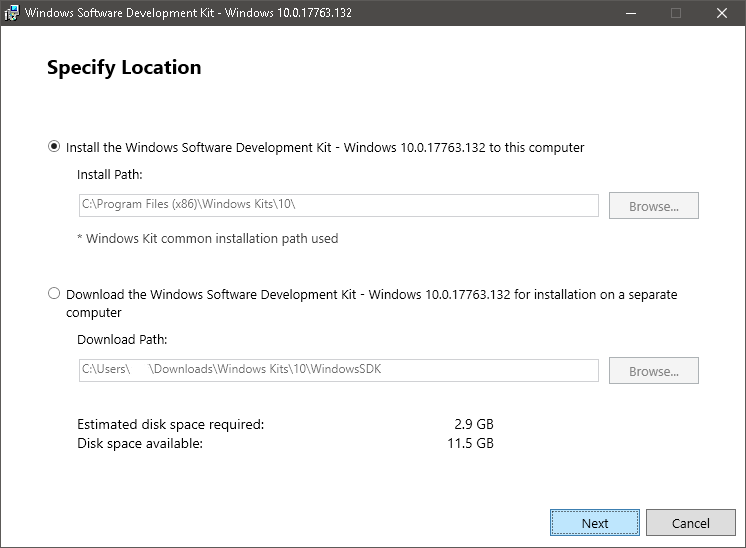</center> ### Now we let it install (let it install in the background, you can continue with the tutorial) ## Ok, now for the EXE. This part is pretty simple. Just running a few commands (kind of) To start off with, you need to open a command prompt in your project directory. Now we run the 'pyi-makespec' command. This makes a' pyinstaller' specification file which we can customize to our liking. Assume your project structure is like this: <code> code_directory |---resources | |---project_dependencies |---script.py </code> Mine is like this: 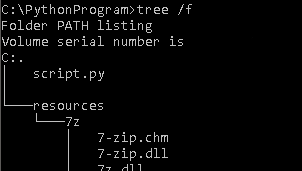 ### Anyways we have to run this command: <code>pyi-makespec script.py -n my_specfile --onefile </code>  ### Ignore that last line, we have a bit of customization to do. Open up the my_specfile.spec in a text editor of your choice. It should look like this Now just add this: <code> a = Analysis(['script.py'], pathex=['C:\\PythonProgram'], binaries=[], datas=get_resources(), </code> The datas=get_resources() is what needs to be added Also add (just under block_cipher = none) this: <code> def get_resources(): data_files = [] for file_name in os.listdir('resources'): data_files.append((os.path.join('resources', file_name), 'resources')) return data_files </code> That is all we need to do for the my_specfile.spec so you can go ahead and close that. Now run this command in the terminal: <code>pyinstaller my_specfile.spec</code> That should produce a whole lot of code ## Now, signing the *.EXE Now you might be able to run this EXE file on your computer, but if you try to run it on another it will tell you 'Unknown Publisher' and it won't run. (during these next few commands, if any one of them asks for a password just select NONE) To fix this we need to sign the EXE file. First (in the same directory) run this command (EXACTLY, IT IS CASE SENSITIVE): <code>"C:\Program Files (x86)\Windows Kits\10\bin\x64\makecert.exe" /r /h 0 /eku "1.3.6.1.5.5.7.3.3,1.3.6.1.4.1.311.10.3.13" /e 12/12/2050 /sv MyKey.pvk MyKey.cer</code> You just created a certificate for yourself! Now we need to convert these files to a .PFX. Run this command EXACTLY: <code> "C:\Program Files (x86)\Windows Kits\10\bin\x64\pvk2pfx.exe" /pvk MyKey.pvk /spc MyKey.cer /pfx MyKey.pfx </code> PHEW! The hard part out of the way!!! Now, all we need to do is run one simple command: <code>"C:\Program Files (x86)\Windows Kits\10\bin\x64\signtool.exe" sign /a /f MyKey.pfx PythonProgram.exe </code> ## There you go, your *.EXE is successfully signed and is fully able to run on any system! :) # Thanks for reading this post, if you enjoyed please upvote and follow me!!!) |
| json metadata | {"tags":["programming","python","howto","tutorial","coding"],"image":["https://cdn.steemitimages.com/DQmU5vK4RcfYpGPMKoGqyvNgusJRbAFN6q7Fge5dn4vkGHd/image.png","https://cdn.steemitimages.com/DQmSb7PRTAaGjNZjTfuwDzv7H6tjyVbKXCs1pPdBeNevQ4v/image.png","https://cdn.steemitimages.com/DQmQgnrBzXUqqXzyJzzEFfZQcguVoGh4EQWa7xjdRMhPadH/image.png","https://cdn.steemitimages.com/DQmVQA9f32z5hB6CiQJG2R66cyPDfYxD9t1nsphSUyfiuFG/image.png","https://cdn.steemitimages.com/DQmZwJVKLiMfH8sBviE96w34Y1tLxYoo9Vor7m6WXS3NXqp/image.png","https://cdn.steemitimages.com/DQmastsVxN9pFBvtxUCLVTUXTyTsp2uk2PryGixe8LFuFdi/image.png"],"links":["https://developer.microsoft.com/en-us/windows/downloads/windows-10-sdk"],"app":"steemit/0.1","format":"markdown"} |
| Transaction Info | Block #30426962/Trx 57fdd833c3f1820a91c3a8be999fbf2ca7f50191 |
View Raw JSON Data
{
"trx_id": "57fdd833c3f1820a91c3a8be999fbf2ca7f50191",
"block": 30426962,
"trx_in_block": 23,
"op_in_trx": 0,
"virtual_op": 0,
"timestamp": "2019-02-17T12:52:48",
"op": [
"comment",
{
"parent_author": "",
"parent_permlink": "programming",
"author": "stolentissue",
"permlink": "how-to-create-your-own-python-executable-exe-file-full-in-depth-tutorial",
"title": "[How To] Create your own Python Executable! (.exe file) Full In-Depth Tutorial",
"body": "<center> </center>\n# Hi there! Welcome to my tutorial on how to create a *.EXE file from your Python Application.\n## You will learn how to successfully bundle a python project into a standalone *.EXE file (with dependencies and external resources!)\n## To start off, we need to download some things ourselves\n<h3> First: </h3>\n#### We need to install PyInstaller. This is a simple Python application that will bundle all of your project files into the standalone EXE.\n\nAll you need to do is run a simple command (for this tutorial I will be using Python 3)\n<center> <code> pip3 install pyinstaller </code>\n </center>\n<h3> Next: </h3>\n<center>https://cdn.steemitimages.com/DQmQgnrBzXUqqXzyJzzEFfZQcguVoGh4EQWa7xjdRMhPadH/image.png</center>\n### You need to download the Windows 10 SDK (or a signing tool based on your OS)\nJust head over to this link: https://developer.microsoft.com/en-us/windows/downloads/windows-10-sdk\nAnd click the big 'Download Installer' button!\n<center></center>\n### Now we let it install (let it install in the background, you can continue with the tutorial)\n## Ok, now for the EXE.\nThis part is pretty simple. Just running a few commands (kind of)\nTo start off with, you need to open a command prompt in your project directory.\nNow we run the 'pyi-makespec' command. This makes a' pyinstaller' specification file which we can customize to our liking.\nAssume your project structure is like this:\n<code>\ncode_directory\n|---resources\n| |---project_dependencies\n|---script.py\n </code>\nMine is like this:\n\n### Anyways we have to run this command:\n<code>pyi-makespec script.py -n my_specfile --onefile </code>\n\n### Ignore that last line, we have a bit of customization to do.\nOpen up the my_specfile.spec in a text editor of your choice.\nIt should look like this\n\nNow just add this:\n<code>\na = Analysis(['script.py'],\n pathex=['C:\\\\PythonProgram'],\n binaries=[],\n datas=get_resources(),\n</code>\nThe datas=get_resources() is what needs to be added\nAlso add (just under block_cipher = none) this:\n<code>\ndef get_resources():\n data_files = []\n for file_name in os.listdir('resources'):\n data_files.append((os.path.join('resources', file_name), 'resources'))\n return data_files\n</code>\nThat is all we need to do for the my_specfile.spec so you can go ahead and close that.\nNow run this command in the terminal:\n<code>pyinstaller my_specfile.spec</code>\nThat should produce a whole lot of code\n## Now, signing the *.EXE\nNow you might be able to run this EXE file on your computer, but if you try to run it on another it will tell you 'Unknown Publisher' and it won't run. \n\n(during these next few commands, if any one of them asks for a password just select NONE)\n\nTo fix this we need to sign the EXE file. First (in the same directory) run this command (EXACTLY, IT IS CASE SENSITIVE):\n<code>\"C:\\Program Files (x86)\\Windows Kits\\10\\bin\\x64\\makecert.exe\" /r /h 0 /eku \"1.3.6.1.5.5.7.3.3,1.3.6.1.4.1.311.10.3.13\" /e 12/12/2050 /sv MyKey.pvk MyKey.cer</code>\nYou just created a certificate for yourself! Now we need to convert these files to a .PFX. \nRun this command EXACTLY:\n<code> \"C:\\Program Files (x86)\\Windows Kits\\10\\bin\\x64\\pvk2pfx.exe\" /pvk MyKey.pvk /spc MyKey.cer /pfx MyKey.pfx </code>\nPHEW! The hard part out of the way!!!\n\nNow, all we need to do is run one simple command: \n<code>\"C:\\Program Files (x86)\\Windows Kits\\10\\bin\\x64\\signtool.exe\" sign /a /f MyKey.pfx PythonProgram.exe </code>\n## There you go, your *.EXE is successfully signed and is fully able to run on any system! :)\n# Thanks for reading this post, if you enjoyed please upvote and follow me!!!)",
"json_metadata": "{\"tags\":[\"programming\",\"python\",\"howto\",\"tutorial\",\"coding\"],\"image\":[\"https://cdn.steemitimages.com/DQmU5vK4RcfYpGPMKoGqyvNgusJRbAFN6q7Fge5dn4vkGHd/image.png\",\"https://cdn.steemitimages.com/DQmSb7PRTAaGjNZjTfuwDzv7H6tjyVbKXCs1pPdBeNevQ4v/image.png\",\"https://cdn.steemitimages.com/DQmQgnrBzXUqqXzyJzzEFfZQcguVoGh4EQWa7xjdRMhPadH/image.png\",\"https://cdn.steemitimages.com/DQmVQA9f32z5hB6CiQJG2R66cyPDfYxD9t1nsphSUyfiuFG/image.png\",\"https://cdn.steemitimages.com/DQmZwJVKLiMfH8sBviE96w34Y1tLxYoo9Vor7m6WXS3NXqp/image.png\",\"https://cdn.steemitimages.com/DQmastsVxN9pFBvtxUCLVTUXTyTsp2uk2PryGixe8LFuFdi/image.png\"],\"links\":[\"https://developer.microsoft.com/en-us/windows/downloads/windows-10-sdk\"],\"app\":\"steemit/0.1\",\"format\":\"markdown\"}"
}
]
}liverehabupvoted (100.00%) @stolentissue / steam-lunar-new-year-sale2019/02/10 14:40:42
liverehabupvoted (100.00%) @stolentissue / steam-lunar-new-year-sale
2019/02/10 14:40:42
| voter | liverehab |
| author | stolentissue |
| permlink | steam-lunar-new-year-sale |
| weight | 10000 (100.00%) |
| Transaction Info | Block #30227671/Trx 41bd6dfb335a39f15c711e5d7886bf1022bf6454 |
View Raw JSON Data
{
  "trx_id": "41bd6dfb335a39f15c711e5d7886bf1022bf6454",
  "block": 30227671,
  "trx_in_block": 4,
  "op_in_trx": 0,
  "virtual_op": 0,
  "timestamp": "2019-02-10T14:40:42",
  "op": [
    "vote",
    {
      "voter": "liverehab",
      "author": "stolentissue",
      "permlink": "steam-lunar-new-year-sale",
      "weight": 10000
    }
  ]
}stolentissuepublished a new post: steam-lunar-new-year-sale2019/02/10 14:17:42
stolentissuepublished a new post: steam-lunar-new-year-sale
2019/02/10 14:17:42
| parent author | |
| parent permlink | steam |
| author | stolentissue |
| permlink | steam-lunar-new-year-sale |
| title | Steam Lunar New Year Sale! |
| body | # No no no. Not Steem, Steam! Steam as in the Gaming Platform, if you haven't heard of it (which is very unlikely, you can go check it out [here](https://steamcommunity.com/)) #### Steam has decided to do a massive sale. The 'Lunar New Year' sale. This is a really big sale, it has tons of games on discount. For example, Rainbow Six Seige is only £9! Another really unique and cool thing about the Steam Lunar New Year Event is that every time you buy something from the store you get 'tokens'. Tokens can be redeemed for lots of things. <center>https://cdn.steemitimages.com/DQmX6TFUwW981QN9k8MEeAiFBoJonNaZKNzTH9mQJNhmA6P/image.png</center> ## As you can see I have 101 tokens Obviously, I have already used most of mine! You can use them on a variety of things at the 'rewards booth'. For example, there is a huge range of custom emoticons for only 100 tokens each! <center>https://cdn.steemitimages.com/DQmbd4npX7T5AzARvaEsK6ZqbRnHGd82k8Lp4jurjvJHz8S/image.png ## There are also Steam Profile backgrounds that you can get! # https://cdn.steemitimages.com/DQmNY2t6Xq79EhyjSRPQWqaebdU82dtwAmh2k5HMjfi8SZ1/image.png ## And, best of all... The 'Golden Profile' # 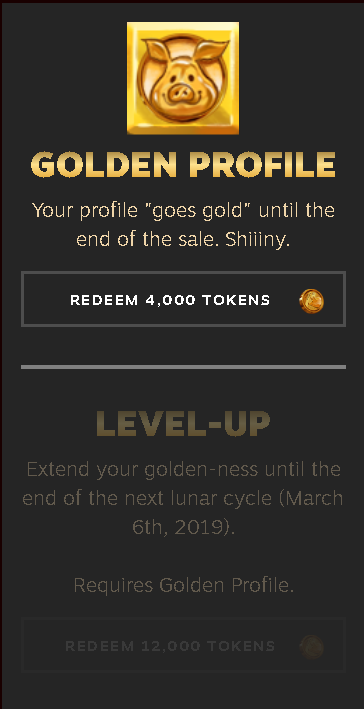 </center> ## For example, it looks like this: # 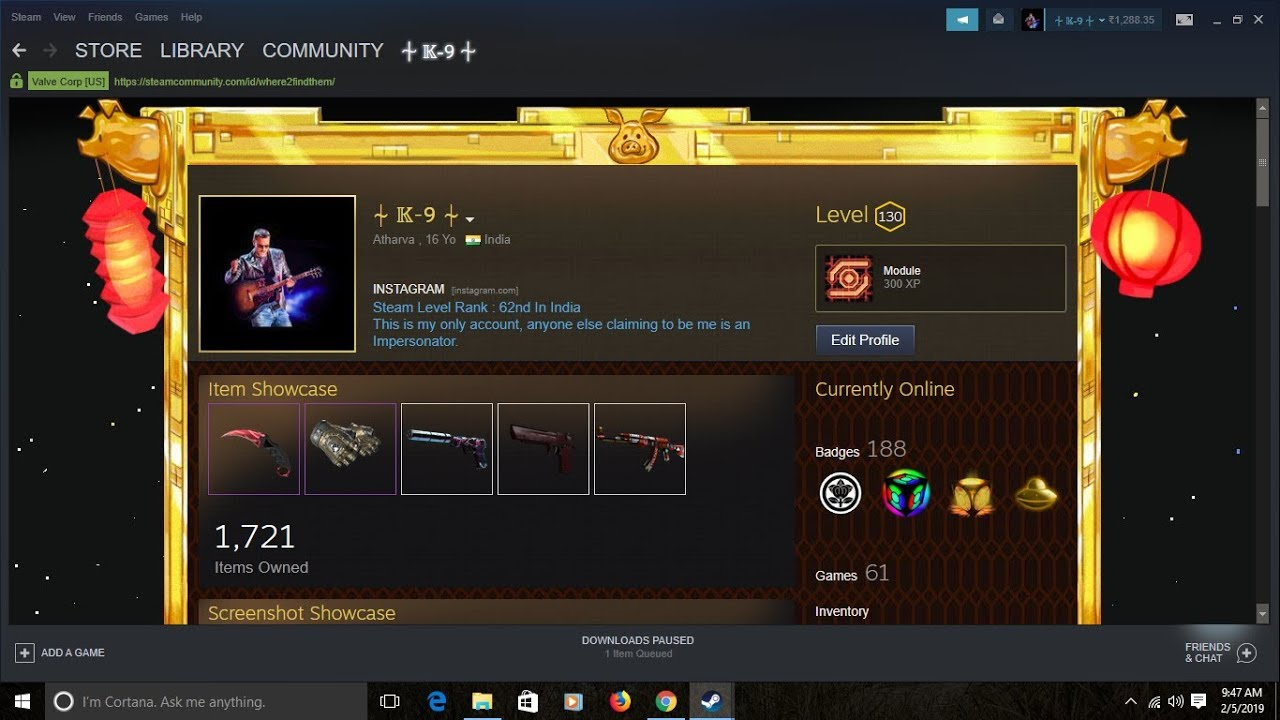 ### Good luck! The Steam Lunar Sale surely has a lot of promise. ## But hurry, it ends on the 13th! |
| json metadata | {"tags":["steam","gaming","sale","rewards"],"image":["https://cdn.steemitimages.com/DQmX6TFUwW981QN9k8MEeAiFBoJonNaZKNzTH9mQJNhmA6P/image.png","https://cdn.steemitimages.com/DQmbd4npX7T5AzARvaEsK6ZqbRnHGd82k8Lp4jurjvJHz8S/image.png","https://cdn.steemitimages.com/DQmNY2t6Xq79EhyjSRPQWqaebdU82dtwAmh2k5HMjfi8SZ1/image.png","https://cdn.steemitimages.com/DQmT3BR7GRgzcjLajZfMZSo9EJGnwPJ4HrYooRvn91FmsWX/image.png","https://cdn.steemitimages.com/DQmandQcomMQYXhUk19tbZz9ttwMZJTMTzSeP8gtee3Kt4S/image.png"],"links":["https://steamcommunity.com/"],"app":"steemit/0.1","format":"markdown"} |
| Transaction Info | Block #30227211/Trx f99391ef45df60a2945fd47c794ceb2a623134f7 |
View Raw JSON Data
{
"trx_id": "f99391ef45df60a2945fd47c794ceb2a623134f7",
"block": 30227211,
"trx_in_block": 2,
"op_in_trx": 0,
"virtual_op": 0,
"timestamp": "2019-02-10T14:17:42",
"op": [
"comment",
{
"parent_author": "",
"parent_permlink": "steam",
"author": "stolentissue",
"permlink": "steam-lunar-new-year-sale",
"title": "Steam Lunar New Year Sale!",
"body": "# No no no. Not Steem, Steam! \nSteam as in the Gaming Platform, if you haven't heard of it (which is very unlikely, you can go check it out [here](https://steamcommunity.com/))\n#### Steam has decided to do a massive sale. The 'Lunar New Year' sale.\nThis is a really big sale, it has tons of games on discount. For example, Rainbow Six Seige is only £9!\n\nAnother really unique and cool thing about the Steam Lunar New Year Event is that every time you buy something from the store you get 'tokens'. Tokens can be redeemed for lots of things.\n<center>https://cdn.steemitimages.com/DQmX6TFUwW981QN9k8MEeAiFBoJonNaZKNzTH9mQJNhmA6P/image.png</center>\n## As you can see I have 101 tokens\nObviously, I have already used most of mine! You can use them on a variety of things at the 'rewards booth'.\nFor example, there is a huge range of custom emoticons for only 100 tokens each!\n<center>https://cdn.steemitimages.com/DQmbd4npX7T5AzARvaEsK6ZqbRnHGd82k8Lp4jurjvJHz8S/image.png\n## There are also Steam Profile backgrounds that you can get!\n#\nhttps://cdn.steemitimages.com/DQmNY2t6Xq79EhyjSRPQWqaebdU82dtwAmh2k5HMjfi8SZ1/image.png\n## And, best of all... The 'Golden Profile'\n#\n\n</center>\n## For example, it looks like this:\n#\n\n### Good luck! The Steam Lunar Sale surely has a lot of promise. \n## But hurry, it ends on the 13th!",
"json_metadata": "{\"tags\":[\"steam\",\"gaming\",\"sale\",\"rewards\"],\"image\":[\"https://cdn.steemitimages.com/DQmX6TFUwW981QN9k8MEeAiFBoJonNaZKNzTH9mQJNhmA6P/image.png\",\"https://cdn.steemitimages.com/DQmbd4npX7T5AzARvaEsK6ZqbRnHGd82k8Lp4jurjvJHz8S/image.png\",\"https://cdn.steemitimages.com/DQmNY2t6Xq79EhyjSRPQWqaebdU82dtwAmh2k5HMjfi8SZ1/image.png\",\"https://cdn.steemitimages.com/DQmT3BR7GRgzcjLajZfMZSo9EJGnwPJ4HrYooRvn91FmsWX/image.png\",\"https://cdn.steemitimages.com/DQmandQcomMQYXhUk19tbZz9ttwMZJTMTzSeP8gtee3Kt4S/image.png\"],\"links\":[\"https://steamcommunity.com/\"],\"app\":\"steemit/0.1\",\"format\":\"markdown\"}"
}
]
}stolentissueupvoted (100.00%) @stolentissue / what-is-github-how-to-use-it-and-why-do-developers-use-it2019/02/10 13:24:12
stolentissueupvoted (100.00%) @stolentissue / what-is-github-how-to-use-it-and-why-do-developers-use-it
2019/02/10 13:24:12
| voter | stolentissue |
| author | stolentissue |
| permlink | what-is-github-how-to-use-it-and-why-do-developers-use-it |
| weight | 10000 (100.00%) |
| Transaction Info | Block #30226141/Trx 1abc6cd7945c920c4825c437ff5027696f4cd0a9 |
View Raw JSON Data
{
  "trx_id": "1abc6cd7945c920c4825c437ff5027696f4cd0a9",
  "block": 30226141,
  "trx_in_block": 27,
  "op_in_trx": 0,
  "virtual_op": 0,
  "timestamp": "2019-02-10T13:24:12",
  "op": [
    "vote",
    {
      "voter": "stolentissue",
      "author": "stolentissue",
      "permlink": "what-is-github-how-to-use-it-and-why-do-developers-use-it",
      "weight": 10000
    }
  ]
}stolentissuereceived 0.108 STEEM, 0.135 SP author reward for @stolentissue / what-is-github-how-to-use-it-and-why-do-developers-use-it2019/02/10 11:29:09
stolentissuereceived 0.108 STEEM, 0.135 SP author reward for @stolentissue / what-is-github-how-to-use-it-and-why-do-developers-use-it
2019/02/10 11:29:09
| author | stolentissue |
| permlink | what-is-github-how-to-use-it-and-why-do-developers-use-it |
| sbd payout | 0.000 SBD |
| steem payout | 0.108 STEEM |
| vesting payout | 220.602347 VESTS |
| Transaction Info | Block #30223839/Virtual Operation #7 |
View Raw JSON Data
{
  "trx_id": "0000000000000000000000000000000000000000",
  "block": 30223839,
  "trx_in_block": 4294967295,
  "op_in_trx": 0,
  "virtual_op": 7,
  "timestamp": "2019-02-10T11:29:09",
  "op": [
    "author_reward",
    {
      "author": "stolentissue",
      "permlink": "what-is-github-how-to-use-it-and-why-do-developers-use-it",
      "sbd_payout": "0.000 SBD",
      "steem_payout": "0.108 STEEM",
      "vesting_payout": "220.602347 VESTS"
    }
  ]
}2019/02/03 17:02:36
2019/02/03 17:02:36
| parent author | stolentissue |
| parent permlink | what-is-github-how-to-use-it-and-why-do-developers-use-it |
| author | minnowsupport |
| permlink | re-what-is-github-how-to-use-it-and-why-do-developers-use-it-20190203t170234z |
| title | |
| body | <p>Congratulations! This post has been upvoted from the communal account, @minnowsupport, by Ether from the Minnow Support Project. It's a witness project run by aggroed, ausbitbank, teamsteem, someguy123, neoxian, followbtcnews, and netuoso. The goal is to help Steemit grow by supporting Minnows. Please find us at the <a href="https://discord.gg/HYj4yvw"> Peace, Abundance, and Liberty Network (PALnet) Discord Channel</a>. It's a completely public and open space to all members of the Steemit community who voluntarily choose to be there.</p> <p>If you would like to delegate to the Minnow Support Project you can do so by clicking on the following links: <a href="https://v2.steemconnect.com/sign/delegateVestingShares?delegator=&delegatee=minnowsupport&vesting_shares=102530.639667%20VESTS">50SP</a>, <a href="https://v2.steemconnect.com/sign/delegateVestingShares?delegator=&delegatee=minnowsupport&vesting_shares=205303.639667%20VESTS">100SP</a>, <a href="https://v2.steemconnect.com/sign/delegateVestingShares?delegator=&delegatee=minnowsupport&vesting_shares=514303.639667%20VESTS">250SP</a>, <a href="https://v2.steemconnect.com/sign/delegateVestingShares?delegator=&delegatee=minnowsupport&vesting_shares=1025303.639667%20VESTS">500SP</a>, <a href="https://v2.steemconnect.com/sign/delegateVestingShares?delegator=&delegatee=minnowsupport&vesting_shares=2053030.639667%20VESTS">1000SP</a>, <a href="https://v2.steemconnect.com/sign/delegateVestingShares?delegator=&delegatee=minnowsupport&vesting_shares=10253030.639667%20VESTS">5000SP</a>. <br><strong>Be sure to leave at least 50SP undelegated on your account.</strong></p> |
| json metadata | {"app": "beem/0.20.17"} |
| Transaction Info | Block #30029085/Trx f3a4abf4db9ba3d2b7e5d1322e8cead1ce55a66d |
View Raw JSON Data
{
"trx_id": "f3a4abf4db9ba3d2b7e5d1322e8cead1ce55a66d",
"block": 30029085,
"trx_in_block": 6,
"op_in_trx": 0,
"virtual_op": 0,
"timestamp": "2019-02-03T17:02:36",
"op": [
"comment",
{
"parent_author": "stolentissue",
"parent_permlink": "what-is-github-how-to-use-it-and-why-do-developers-use-it",
"author": "minnowsupport",
"permlink": "re-what-is-github-how-to-use-it-and-why-do-developers-use-it-20190203t170234z",
"title": "",
"body": "<p>Congratulations! This post has been upvoted from the communal account, @minnowsupport, by Ether from the Minnow Support Project. It's a witness project run by aggroed, ausbitbank, teamsteem, someguy123, neoxian, followbtcnews, and netuoso. The goal is to help Steemit grow by supporting Minnows. Please find us at the <a href=\"https://discord.gg/HYj4yvw\"> Peace, Abundance, and Liberty Network (PALnet) Discord Channel</a>. It's a completely public and open space to all members of the Steemit community who voluntarily choose to be there.</p> <p>If you would like to delegate to the Minnow Support Project you can do so by clicking on the following links: <a href=\"https://v2.steemconnect.com/sign/delegateVestingShares?delegator=&delegatee=minnowsupport&vesting_shares=102530.639667%20VESTS\">50SP</a>, <a href=\"https://v2.steemconnect.com/sign/delegateVestingShares?delegator=&delegatee=minnowsupport&vesting_shares=205303.639667%20VESTS\">100SP</a>, <a href=\"https://v2.steemconnect.com/sign/delegateVestingShares?delegator=&delegatee=minnowsupport&vesting_shares=514303.639667%20VESTS\">250SP</a>, <a href=\"https://v2.steemconnect.com/sign/delegateVestingShares?delegator=&delegatee=minnowsupport&vesting_shares=1025303.639667%20VESTS\">500SP</a>, <a href=\"https://v2.steemconnect.com/sign/delegateVestingShares?delegator=&delegatee=minnowsupport&vesting_shares=2053030.639667%20VESTS\">1000SP</a>, <a href=\"https://v2.steemconnect.com/sign/delegateVestingShares?delegator=&delegatee=minnowsupport&vesting_shares=10253030.639667%20VESTS\">5000SP</a>. <br><strong>Be sure to leave at least 50SP undelegated on your account.</strong></p>",
"json_metadata": "{\"app\": \"beem/0.20.17\"}"
}
]
}2019/02/03 17:02:18
2019/02/03 17:02:18
| voter | minnowsupport |
| author | stolentissue |
| permlink | what-is-github-how-to-use-it-and-why-do-developers-use-it |
| weight | 350 (3.50%) |
| Transaction Info | Block #30029080/Trx e8060a6860b223c60d174cfe3740c8a691c901c7 |
View Raw JSON Data
{
  "trx_id": "e8060a6860b223c60d174cfe3740c8a691c901c7",
  "block": 30029080,
  "trx_in_block": 62,
  "op_in_trx": 0,
  "virtual_op": 0,
  "timestamp": "2019-02-03T17:02:18",
  "op": [
    "vote",
    {
      "voter": "minnowsupport",
      "author": "stolentissue",
      "permlink": "what-is-github-how-to-use-it-and-why-do-developers-use-it",
      "weight": 350
    }
  ]
}steemdelegated 8.823 SP to @stolentissue2019/02/03 13:38:15
steemdelegated 8.823 SP to @stolentissue
2019/02/03 13:38:15
| delegator | steem |
| delegatee | stolentissue |
| vesting shares | 14366.696026 VESTS |
| Transaction Info | Block #30025004/Trx 4e54f399f8d1dc2eddc9de6f3536cc34bb437388 |
View Raw JSON Data
{
  "trx_id": "4e54f399f8d1dc2eddc9de6f3536cc34bb437388",
  "block": 30025004,
  "trx_in_block": 8,
  "op_in_trx": 0,
  "virtual_op": 0,
  "timestamp": "2019-02-03T13:38:15",
  "op": [
    "delegate_vesting_shares",
    {
      "delegator": "steem",
      "delegatee": "stolentissue",
      "vesting_shares": "14366.696026 VESTS"
    }
  ]
}filipinoupvoted (10.00%) @stolentissue / what-is-github-how-to-use-it-and-why-do-developers-use-it2019/02/03 12:33:24
filipinoupvoted (10.00%) @stolentissue / what-is-github-how-to-use-it-and-why-do-developers-use-it
2019/02/03 12:33:24
| voter | filipino |
| author | stolentissue |
| permlink | what-is-github-how-to-use-it-and-why-do-developers-use-it |
| weight | 1000 (10.00%) |
| Transaction Info | Block #30023708/Trx 743144667461fa70361b9dcf419796a70f9c2fe2 |
View Raw JSON Data
{
  "trx_id": "743144667461fa70361b9dcf419796a70f9c2fe2",
  "block": 30023708,
  "trx_in_block": 5,
  "op_in_trx": 0,
  "virtual_op": 0,
  "timestamp": "2019-02-03T12:33:24",
  "op": [
    "vote",
    {
      "voter": "filipino",
      "author": "stolentissue",
      "permlink": "what-is-github-how-to-use-it-and-why-do-developers-use-it",
      "weight": 1000
    }
  ]
}pinoyupvoted (10.00%) @stolentissue / what-is-github-how-to-use-it-and-why-do-developers-use-it2019/02/03 12:18:00
pinoyupvoted (10.00%) @stolentissue / what-is-github-how-to-use-it-and-why-do-developers-use-it
2019/02/03 12:18:00
| voter | pinoy |
| author | stolentissue |
| permlink | what-is-github-how-to-use-it-and-why-do-developers-use-it |
| weight | 1000 (10.00%) |
| Transaction Info | Block #30023400/Trx 3ea23c8e55f43014307d0870236186f5d43fb67f |
View Raw JSON Data
{
  "trx_id": "3ea23c8e55f43014307d0870236186f5d43fb67f",
  "block": 30023400,
  "trx_in_block": 16,
  "op_in_trx": 0,
  "virtual_op": 0,
  "timestamp": "2019-02-03T12:18:00",
  "op": [
    "vote",
    {
      "voter": "pinoy",
      "author": "stolentissue",
      "permlink": "what-is-github-how-to-use-it-and-why-do-developers-use-it",
      "weight": 1000
    }
  ]
}2019/02/03 12:09:45
2019/02/03 12:09:45
| parent author | stolentissue |
| parent permlink | re-fariszgh-my-stories-20190203t115140108z |
| author | fariszgh |
| permlink | re-stolentissue-re-fariszgh-my-stories-20190203t120941706z |
| title | |
| body | Thank you friend i will check 👍🏻 |
| json metadata | {"tags":["life"],"app":"steemit/0.1"} |
| Transaction Info | Block #30023236/Trx ea1456f7cce44b81fa33858ccc39025ef61a7ce9 |
View Raw JSON Data
{
  "trx_id": "ea1456f7cce44b81fa33858ccc39025ef61a7ce9",
  "block": 30023236,
  "trx_in_block": 40,
  "op_in_trx": 0,
  "virtual_op": 0,
  "timestamp": "2019-02-03T12:09:45",
  "op": [
    "comment",
    {
      "parent_author": "stolentissue",
      "parent_permlink": "re-fariszgh-my-stories-20190203t115140108z",
      "author": "fariszgh",
      "permlink": "re-stolentissue-re-fariszgh-my-stories-20190203t120941706z",
      "title": "",
      "body": "Thank you friend i will check 👍🏻",
      "json_metadata": "{\"tags\":[\"life\"],\"app\":\"steemit/0.1\"}"
    }
  ]
}yeheyupvoted (10.00%) @stolentissue / what-is-github-how-to-use-it-and-why-do-developers-use-it2019/02/03 12:02:36
yeheyupvoted (10.00%) @stolentissue / what-is-github-how-to-use-it-and-why-do-developers-use-it
2019/02/03 12:02:36
| voter | yehey |
| author | stolentissue |
| permlink | what-is-github-how-to-use-it-and-why-do-developers-use-it |
| weight | 1000 (10.00%) |
| Transaction Info | Block #30023093/Trx b60c844b16ab6af8679882576c237a10b321211c |
View Raw JSON Data
{
  "trx_id": "b60c844b16ab6af8679882576c237a10b321211c",
  "block": 30023093,
  "trx_in_block": 28,
  "op_in_trx": 0,
  "virtual_op": 0,
  "timestamp": "2019-02-03T12:02:36",
  "op": [
    "vote",
    {
      "voter": "yehey",
      "author": "stolentissue",
      "permlink": "what-is-github-how-to-use-it-and-why-do-developers-use-it",
      "weight": 1000
    }
  ]
}stolentissuepowered up 0.654 STEEM to @stolentissue2019/02/03 11:55:30
stolentissuepowered up 0.654 STEEM to @stolentissue
2019/02/03 11:55:30
| from | stolentissue |
| to | stolentissue |
| amount | 0.654 STEEM |
| Transaction Info | Block #30022951/Trx 5397ba5e381fdad8216a7983603f46ee0607a7b4 |
View Raw JSON Data
{
  "trx_id": "5397ba5e381fdad8216a7983603f46ee0607a7b4",
  "block": 30022951,
  "trx_in_block": 19,
  "op_in_trx": 0,
  "virtual_op": 0,
  "timestamp": "2019-02-03T11:55:30",
  "op": [
    "transfer_to_vesting",
    {
      "from": "stolentissue",
      "to": "stolentissue",
      "amount": "0.654 STEEM"
    }
  ]
}stolentissueblockchain operation: limit order create2019/02/03 11:54:51
stolentissueblockchain operation: limit order create
2019/02/03 11:54:51
| owner | stolentissue |
| orderid | 1549194884 |
| amount to sell | 0.216 SBD |
| min to receive | 0.654 STEEM |
| fill or kill | false |
| expiration | 2019-03-02T11:54:30 |
| Transaction Info | Block #30022938/Trx 925be381e6b61a47da9ba88292803678a0312ef8 |
View Raw JSON Data
{
  "trx_id": "925be381e6b61a47da9ba88292803678a0312ef8",
  "block": 30022938,
  "trx_in_block": 1,
  "op_in_trx": 0,
  "virtual_op": 0,
  "timestamp": "2019-02-03T11:54:51",
  "op": [
    "limit_order_create",
    {
      "owner": "stolentissue",
      "orderid": 1549194884,
      "amount_to_sell": "0.216 SBD",
      "min_to_receive": "0.654 STEEM",
      "fill_or_kill": false,
      "expiration": "2019-03-02T11:54:30"
    }
  ]
}stolentissuebought 0.654 STEEM for 0.216 SBD from @cryptomancer2019/02/03 11:54:51
stolentissuebought 0.654 STEEM for 0.216 SBD from @cryptomancer
2019/02/03 11:54:51
| current owner | stolentissue |
| current orderid | 1549194884 |
| current pays | 0.216 SBD |
| open owner | cryptomancer |
| open orderid | 1549182699 |
| open pays | 0.654 STEEM |
| Transaction Info | Block #30022938/Trx 925be381e6b61a47da9ba88292803678a0312ef8 |
View Raw JSON Data
{
  "trx_id": "925be381e6b61a47da9ba88292803678a0312ef8",
  "block": 30022938,
  "trx_in_block": 1,
  "op_in_trx": 0,
  "virtual_op": 1,
  "timestamp": "2019-02-03T11:54:51",
  "op": [
    "fill_order",
    {
      "current_owner": "stolentissue",
      "current_orderid": 1549194884,
      "current_pays": "0.216 SBD",
      "open_owner": "cryptomancer",
      "open_orderid": 1549182699,
      "open_pays": "0.654 STEEM"
    }
  ]
}stolentissuepowered up 0.469 STEEM to @stolentissue2019/02/03 11:52:57
stolentissuepowered up 0.469 STEEM to @stolentissue
2019/02/03 11:52:57
| from | stolentissue |
| to | stolentissue |
| amount | 0.469 STEEM |
| Transaction Info | Block #30022900/Trx 03ac315ae73333fc4533ba328c9bdb5dc41ececa |
View Raw JSON Data
{
  "trx_id": "03ac315ae73333fc4533ba328c9bdb5dc41ececa",
  "block": 30022900,
  "trx_in_block": 11,
  "op_in_trx": 0,
  "virtual_op": 0,
  "timestamp": "2019-02-03T11:52:57",
  "op": [
    "transfer_to_vesting",
    {
      "from": "stolentissue",
      "to": "stolentissue",
      "amount": "0.469 STEEM"
    }
  ]
}stolentissueclaimed reward balance: 0.085 STEEM, 0.020 SBD, 0.176 SP2019/02/03 11:52:39
stolentissueclaimed reward balance: 0.085 STEEM, 0.020 SBD, 0.176 SP
2019/02/03 11:52:39
| account | stolentissue |
| reward steem | 0.085 STEEM |
| reward sbd | 0.020 SBD |
| reward vests | 287.130497 VESTS |
| Transaction Info | Block #30022894/Trx 8d4cf42b47902d6facef1e345ca2b0e3c3d56dd0 |
View Raw JSON Data
{
  "trx_id": "8d4cf42b47902d6facef1e345ca2b0e3c3d56dd0",
  "block": 30022894,
  "trx_in_block": 5,
  "op_in_trx": 0,
  "virtual_op": 0,
  "timestamp": "2019-02-03T11:52:39",
  "op": [
    "claim_reward_balance",
    {
      "account": "stolentissue",
      "reward_steem": "0.085 STEEM",
      "reward_sbd": "0.020 SBD",
      "reward_vests": "287.130497 VESTS"
    }
  ]
}liverehabupvoted (100.00%) @stolentissue / what-is-github-how-to-use-it-and-why-do-developers-use-it2019/02/03 11:52:36
liverehabupvoted (100.00%) @stolentissue / what-is-github-how-to-use-it-and-why-do-developers-use-it
2019/02/03 11:52:36
| voter | liverehab |
| author | stolentissue |
| permlink | what-is-github-how-to-use-it-and-why-do-developers-use-it |
| weight | 10000 (100.00%) |
| Transaction Info | Block #30022893/Trx 1502f558a2f92cb8b426c9e4ac5fe5dfea3b3617 |
View Raw JSON Data
{
  "trx_id": "1502f558a2f92cb8b426c9e4ac5fe5dfea3b3617",
  "block": 30022893,
  "trx_in_block": 13,
  "op_in_trx": 0,
  "virtual_op": 0,
  "timestamp": "2019-02-03T11:52:36",
  "op": [
    "vote",
    {
      "voter": "liverehab",
      "author": "stolentissue",
      "permlink": "what-is-github-how-to-use-it-and-why-do-developers-use-it",
      "weight": 10000
    }
  ]
}2019/02/03 11:51:42
2019/02/03 11:51:42
| parent author | fariszgh |
| parent permlink | my-stories |
| author | stolentissue |
| permlink | re-fariszgh-my-stories-20190203t115140108z |
| title | |
| body | ## Welcome to Steemit! ### I hope you have a great time here. Since you are new here, I thought I should introduce you to something that can drastically help you on Steemit. It's called the Minow Support Project. It is incredibly useful :) ### https://steemit.com/@minnowsupport ### http://minnowsupportproject.org/ ### You might also want to check out this post (it will help you with formatting your posts in Markdown style. ### https://steemit.com/steemit/@thecryptofiend/markdown-basics-for-beginners ## Good Luck! |
| json metadata | {"tags":["life"],"links":["https://steemit.com/@minnowsupport","http://minnowsupportproject.org/","https://steemit.com/steemit/@thecryptofiend/markdown-basics-for-beginners"],"app":"steemit/0.1"} |
| Transaction Info | Block #30022875/Trx 673428b1552783f6a5e48a8996c5d627f5f33493 |
View Raw JSON Data
{
  "trx_id": "673428b1552783f6a5e48a8996c5d627f5f33493",
  "block": 30022875,
  "trx_in_block": 24,
  "op_in_trx": 0,
  "virtual_op": 0,
  "timestamp": "2019-02-03T11:51:42",
  "op": [
    "comment",
    {
      "parent_author": "fariszgh",
      "parent_permlink": "my-stories",
      "author": "stolentissue",
      "permlink": "re-fariszgh-my-stories-20190203t115140108z",
      "title": "",
      "body": "## Welcome to Steemit! \n### I hope you have a great time here. Since you are new here, I thought I should introduce you to something that can drastically help you on Steemit. It's called the Minow Support Project. It is incredibly useful :)\n### https://steemit.com/@minnowsupport\n### http://minnowsupportproject.org/\n### You might also want to check out this post (it will help you with formatting your posts in Markdown style. \n### https://steemit.com/steemit/@thecryptofiend/markdown-basics-for-beginners\n## Good Luck!",
      "json_metadata": "{\"tags\":[\"life\"],\"links\":[\"https://steemit.com/@minnowsupport\",\"http://minnowsupportproject.org/\",\"https://steemit.com/steemit/@thecryptofiend/markdown-basics-for-beginners\"],\"app\":\"steemit/0.1\"}"
    }
  ]
}2019/02/03 11:42:12
2019/02/03 11:42:12
| parent author | stolentissue |
| parent permlink | what-is-github-how-to-use-it-and-why-do-developers-use-it |
| author | followforupvotes |
| permlink | re-stolentissue-what-is-github-how-to-use-it-and-why-do-developers-use-it-20190203t114209124z |
| title | Congratulations |
| body | As a follower of @followforupvotes this post has been randomly selected and upvoted! Enjoy your upvote and have a great day! |
| json metadata | |
| Transaction Info | Block #30022685/Trx 79fcbc98cc43d8c0483333a83f558823556065bb |
View Raw JSON Data
{
  "trx_id": "79fcbc98cc43d8c0483333a83f558823556065bb",
  "block": 30022685,
  "trx_in_block": 6,
  "op_in_trx": 0,
  "virtual_op": 0,
  "timestamp": "2019-02-03T11:42:12",
  "op": [
    "comment",
    {
      "parent_author": "stolentissue",
      "parent_permlink": "what-is-github-how-to-use-it-and-why-do-developers-use-it",
      "author": "followforupvotes",
      "permlink": "re-stolentissue-what-is-github-how-to-use-it-and-why-do-developers-use-it-20190203t114209124z",
      "title": "Congratulations",
      "body": "As a follower of @followforupvotes this post has been randomly selected and upvoted! Enjoy your upvote and have a great day!",
      "json_metadata": ""
    }
  ]
}2019/02/03 11:42:09
2019/02/03 11:42:09
| voter | followforupvotes |
| author | stolentissue |
| permlink | what-is-github-how-to-use-it-and-why-do-developers-use-it |
| weight | 2000 (20.00%) |
| Transaction Info | Block #30022684/Trx f940f2b337cab68a37fc9746e615e0e5bd1726d7 |
View Raw JSON Data
{
  "trx_id": "f940f2b337cab68a37fc9746e615e0e5bd1726d7",
  "block": 30022684,
  "trx_in_block": 18,
  "op_in_trx": 0,
  "virtual_op": 0,
  "timestamp": "2019-02-03T11:42:09",
  "op": [
    "vote",
    {
      "voter": "followforupvotes",
      "author": "stolentissue",
      "permlink": "what-is-github-how-to-use-it-and-why-do-developers-use-it",
      "weight": 2000
    }
  ]
}fariszghupvoted (100.00%) @stolentissue / what-is-github-how-to-use-it-and-why-do-developers-use-it2019/02/03 11:36:24
fariszghupvoted (100.00%) @stolentissue / what-is-github-how-to-use-it-and-why-do-developers-use-it
2019/02/03 11:36:24
| voter | fariszgh |
| author | stolentissue |
| permlink | what-is-github-how-to-use-it-and-why-do-developers-use-it |
| weight | 10000 (100.00%) |
| Transaction Info | Block #30022569/Trx 7c3b66eb486d0c5bb677c84698d193f055e3f4cc |
View Raw JSON Data
{
  "trx_id": "7c3b66eb486d0c5bb677c84698d193f055e3f4cc",
  "block": 30022569,
  "trx_in_block": 4,
  "op_in_trx": 0,
  "virtual_op": 0,
  "timestamp": "2019-02-03T11:36:24",
  "op": [
    "vote",
    {
      "voter": "fariszgh",
      "author": "stolentissue",
      "permlink": "what-is-github-how-to-use-it-and-why-do-developers-use-it",
      "weight": 10000
    }
  ]
}stolentissuepublished a new post: what-is-github-how-to-use-it-and-why-do-developers-use-it2019/02/03 11:30:30
stolentissuepublished a new post: what-is-github-how-to-use-it-and-why-do-developers-use-it
2019/02/03 11:30:30
| parent author | |
| parent permlink | technology |
| author | stolentissue |
| permlink | what-is-github-how-to-use-it-and-why-do-developers-use-it |
| title | What is GitHub: How to use it, and why do developers use it? |
| body | @@ -1,28 +1,134 @@ +%3Ccenter%3E https://cdn.steemitimages.com/DQmdkLy7YLYcSXF9svaMffBvhBZHmRBkepJzR5Q3eNU94Uh/image.png%3C/center%3E%0A # GitHub, a very useful tool |
| json metadata | {"tags":["technology","git","github","new","blog"],"image":["https://cdn.steemitimages.com/DQmdkLy7YLYcSXF9svaMffBvhBZHmRBkepJzR5Q3eNU94Uh/image.png","https://cdn.steemitimages.com/DQmWyGw65Kk1csEvYhAkTm1Am649EyiPMAMtpsEASYFdaQS/image.png","https://cdn.steemitimages.com/DQmYs5jzR1E9C62Rw2GWsDQwub6ZxNFcL68rEgkYGRe2N1M/image.png","https://cdn.steemitimages.com/DQmUrpeYFnFrz4sV7yXqf676EKQ4XMN9Gm3WBHyfBXrt4bA/image.png"],"links":["https://github.com/airbnb/react-native","https://help.github.com/articles/about-pull-requests/","https://facebook.github.io/react-native/docs/getting-started"],"app":"steemit/0.1","format":"markdown"} |
| Transaction Info | Block #30022451/Trx a0b5b11db4927a185668db46b2509a7acedb9fda |
View Raw JSON Data
{
  "trx_id": "a0b5b11db4927a185668db46b2509a7acedb9fda",
  "block": 30022451,
  "trx_in_block": 0,
  "op_in_trx": 0,
  "virtual_op": 0,
  "timestamp": "2019-02-03T11:30:30",
  "op": [
    "comment",
    {
      "parent_author": "",
      "parent_permlink": "technology",
      "author": "stolentissue",
      "permlink": "what-is-github-how-to-use-it-and-why-do-developers-use-it",
      "title": "What is GitHub: How to use it, and why do developers use it?",
      "body": "@@ -1,28 +1,134 @@\n+%3Ccenter%3E https://cdn.steemitimages.com/DQmdkLy7YLYcSXF9svaMffBvhBZHmRBkepJzR5Q3eNU94Uh/image.png%3C/center%3E%0A\n # GitHub, a very useful tool\n",
      "json_metadata": "{\"tags\":[\"technology\",\"git\",\"github\",\"new\",\"blog\"],\"image\":[\"https://cdn.steemitimages.com/DQmdkLy7YLYcSXF9svaMffBvhBZHmRBkepJzR5Q3eNU94Uh/image.png\",\"https://cdn.steemitimages.com/DQmWyGw65Kk1csEvYhAkTm1Am649EyiPMAMtpsEASYFdaQS/image.png\",\"https://cdn.steemitimages.com/DQmYs5jzR1E9C62Rw2GWsDQwub6ZxNFcL68rEgkYGRe2N1M/image.png\",\"https://cdn.steemitimages.com/DQmUrpeYFnFrz4sV7yXqf676EKQ4XMN9Gm3WBHyfBXrt4bA/image.png\"],\"links\":[\"https://github.com/airbnb/react-native\",\"https://help.github.com/articles/about-pull-requests/\",\"https://facebook.github.io/react-native/docs/getting-started\"],\"app\":\"steemit/0.1\",\"format\":\"markdown\"}"
    }
  ]
}stolentissuepublished a new post: what-is-github-how-to-use-it-and-why-do-developers-use-it2019/02/03 11:29:09
stolentissuepublished a new post: what-is-github-how-to-use-it-and-why-do-developers-use-it
2019/02/03 11:29:09
| parent author | |
| parent permlink | technology |
| author | stolentissue |
| permlink | what-is-github-how-to-use-it-and-why-do-developers-use-it |
| title | What is GitHub: How to use it, and why do developers use it? |
| body | # GitHub, a very useful tool for developers. GitHub provides a very useful space to "backup" your project. Though GitHub is not just that. It is a centralized place for all developers, and can provide lots of good things for your project. Not only can you backup your project to the cloud, you can also get feedback from the community. ## Take a look at this example GitHub repo: 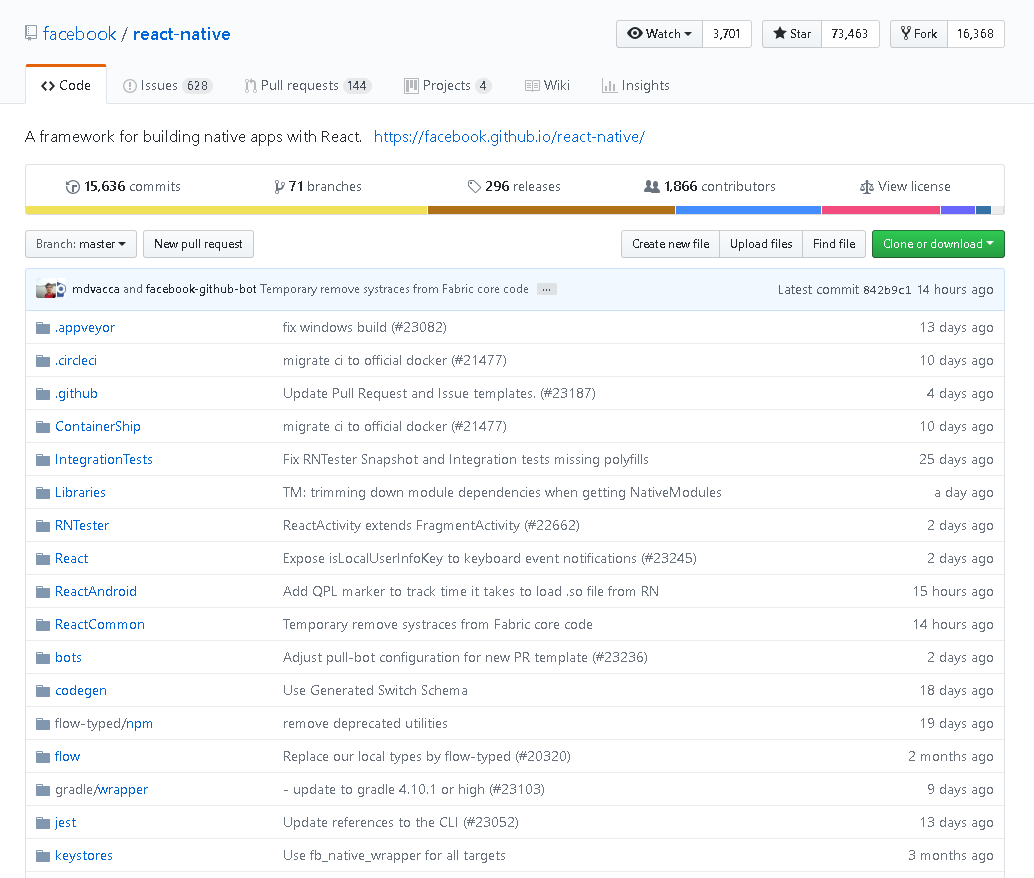 ### Let's break it down At the top is the name and the author of the repo "facebook/react-native", in this example the author is Facebook and the project is called React Native ### You can also see to the right there are buttons labelled "*Watch*", "*Star*", and "*Fork*" * Watching, as the name suggests watches the post for you. You can get notified every time there is an update or an issue. * The star button simply adds the repo to your favourites list. * The fork button is perhaps the most useful of all. Forking a GitHub repo (that is public and allows forking) simply allows you to copy the source code and make it into your own version. For example, Airbnb has their own fork of react-native https://github.com/airbnb/react-native. ### Next, there are a few tabs labelled *Code*, *Issues*, *Pull Requests*, and *Wiki*. Code is simply where is code is. Issues are issues brought up by the community. Pull Requests are a bit too complicated, though if you want to learn more about them then read this article: https://help.github.com/articles/about-pull-requests/ Lastly, the Wiki is simply the Documentation on the repo. For example, this repo's wiki would reroute to this website https://facebook.github.io/react-native/docs/getting-started # GitHub, a very useful tool for developers. GitHub provides a very useful space to "backup" your project. Though GitHub is not just that. It is a centralized place for all developers, and can provide lots of good things for your project. Not only can you backup your project to the cloud, you can also get feedback from the community. ## Take a look at this example GitHub repo:  ### Let's break it down At the top is the name and the author of the repo "facebook/react-native", in this example the author is Facebook and the project is called React Native ### You can also see to the right there are buttons labelled "*Watch*", "*Star*", and "*Fork*" * Watching, as the name suggests watches the post for you. You can get notified every time there is an update or an issue. * The star button simply adds the repo to your favourites list. * The fork button is perhaps the most useful of all. Forking a GitHub repo (that is public and allows forking) simply allows you to copy the source code and make it into your own version. For example, Airbnb has their own fork of react-native https://github.com/airbnb/react-native. ### Next, there are a few tabs labelled *Code*, *Issues*, *Pull Requests*, and *Wiki*. Code is simply where is code is. Issues are issues brought up by the community. Pull Requests are a bit too complicated, though if you want to learn more about them then read this article: https://help.github.com/articles/about-pull-requests/ Lastly, the Wiki is simply the Documentation on the repo. For example, this repo's wiki would reroute to this website https://facebook.github.io/react-native/docs/getting-started <center>https://cdn.steemitimages.com/DQmYs5jzR1E9C62Rw2GWsDQwub6ZxNFcL68rEgkYGRe2N1M/image.png</center> ### This little bar here has a lot of information. You might notice a large number right next to the work "Commits". This is how many times the repo has been updated by the developer. The "71" branches tells us that there are 71 branches of this project. This simply means that there are 71 alternate versions of React Native still on the repo. A branch is a "pointer" to a specific commit Generally the default branch (most likely the master branch) is the most recent version of the project. <center> https://cdn.steemitimages.com/DQmUrpeYFnFrz4sV7yXqf676EKQ4XMN9Gm3WBHyfBXrt4bA/image.png </center> The releases, similar to branches are all of the stable released versions of React Native. The ones pushed by the developers. The contributors are essentially the developers of the project, people that have read-write access and who commit to the project on a semi-regular basis. ### Last but not least, the *Clone or Download* button. This button allows anyone viewing the source to get a cloned version of the repo. This means that the most recent version (latest commit) is downloaded and cloned onto the system. From here you could modify the source code to your liking, or actually use the project like it is intended. There are actually two options, Clone or Download. Cloning requires the use of the "Git" command, and the syntax would be like so: <center><code>git clone https://github.com/developer/nameofproject</code></center> This simply downloads the entire repo onto your system. The Download option is essentially the same time but instead you get a *.zip file downloaded onto your system. ## Again, why do developers use GitHub? As shown here, GitHub can be an amazing tool. So many options with the community (issues, forking, cloning, pull requests, documentation) and such a great place to put it all. Having your project hosted on the cloud (as well as locally) has so many great benefits. If you mess up in a local version, you can just as easily roll back to a previous version and go from there. Or if your project gets corrupted you can just roll back to a previous version again. ## Thanks for taking the time to read this post, an upvote and a follow would be very much appreciated 👌. |
| json metadata | {"tags":["technology","git","github","new","blog"],"image":["https://cdn.steemitimages.com/DQmWyGw65Kk1csEvYhAkTm1Am649EyiPMAMtpsEASYFdaQS/image.png","https://cdn.steemitimages.com/DQmYs5jzR1E9C62Rw2GWsDQwub6ZxNFcL68rEgkYGRe2N1M/image.png","https://cdn.steemitimages.com/DQmUrpeYFnFrz4sV7yXqf676EKQ4XMN9Gm3WBHyfBXrt4bA/image.png"],"links":["https://github.com/airbnb/react-native","https://help.github.com/articles/about-pull-requests/","https://facebook.github.io/react-native/docs/getting-started"],"app":"steemit/0.1","format":"markdown"} |
| Transaction Info | Block #30022424/Trx 65875430e013335d1e9bfe0b2c6123776dd22ebc |
View Raw JSON Data
{
"trx_id": "65875430e013335d1e9bfe0b2c6123776dd22ebc",
"block": 30022424,
"trx_in_block": 25,
"op_in_trx": 0,
"virtual_op": 0,
"timestamp": "2019-02-03T11:29:09",
"op": [
"comment",
{
"parent_author": "",
"parent_permlink": "technology",
"author": "stolentissue",
"permlink": "what-is-github-how-to-use-it-and-why-do-developers-use-it",
"title": "What is GitHub: How to use it, and why do developers use it?",
"body": "# GitHub, a very useful tool for developers.\nGitHub provides a very useful space to \"backup\" your project. Though GitHub is not just that. \nIt is a centralized place for all developers, and can provide lots of good things for your project. \n\nNot only can you backup your project to the cloud, you can also get feedback from the community. \n\n## Take a look at this example GitHub repo:\n\n### Let's break it down\nAt the top is the name and the author of the repo \"facebook/react-native\", in this example the author is Facebook and the project is called React Native\n\n### You can also see to the right there are buttons labelled \"*Watch*\", \"*Star*\", and \"*Fork*\"\n\n* Watching, as the name suggests watches the post for you. You can get notified every time there is an update or an issue.\n* The star button simply adds the repo to your favourites list.\n* The fork button is perhaps the most useful of all. Forking a GitHub repo (that is public and allows forking) simply allows you to copy the source code and make it into your own version. For example, Airbnb has their own fork of react-native https://github.com/airbnb/react-native. \n\n### Next, there are a few tabs labelled *Code*, *Issues*, *Pull Requests*, and *Wiki*. \nCode is simply where is code is. \n\nIssues are issues brought up by the community. \n\nPull Requests are a bit too complicated, though if you want to learn more about them then read this article: https://help.github.com/articles/about-pull-requests/\n\nLastly, the Wiki is simply the Documentation on the repo. For example, this repo's wiki would reroute to this website https://facebook.github.io/react-native/docs/getting-started\n\n# GitHub, a very useful tool for developers.\nGitHub provides a very useful space to \"backup\" your project. Though GitHub is not just that. \nIt is a centralized place for all developers, and can provide lots of good things for your project. \n\nNot only can you backup your project to the cloud, you can also get feedback from the community. \n\n## Take a look at this example GitHub repo:\n\n### Let's break it down\nAt the top is the name and the author of the repo \"facebook/react-native\", in this example the author is Facebook and the project is called React Native\n\n### You can also see to the right there are buttons labelled \"*Watch*\", \"*Star*\", and \"*Fork*\"\n\n* Watching, as the name suggests watches the post for you. You can get notified every time there is an update or an issue.\n* The star button simply adds the repo to your favourites list.\n* The fork button is perhaps the most useful of all. Forking a GitHub repo (that is public and allows forking) simply allows you to copy the source code and make it into your own version. For example, Airbnb has their own fork of react-native https://github.com/airbnb/react-native. \n\n### Next, there are a few tabs labelled *Code*, *Issues*, *Pull Requests*, and *Wiki*. \nCode is simply where is code is. \n\nIssues are issues brought up by the community. \n\nPull Requests are a bit too complicated, though if you want to learn more about them then read this article: https://help.github.com/articles/about-pull-requests/\n\nLastly, the Wiki is simply the Documentation on the repo. For example, this repo's wiki would reroute to this website https://facebook.github.io/react-native/docs/getting-started\n<center>https://cdn.steemitimages.com/DQmYs5jzR1E9C62Rw2GWsDQwub6ZxNFcL68rEgkYGRe2N1M/image.png</center>\n\n### This little bar here has a lot of information.\nYou might notice a large number right next to the work \"Commits\". This is how many times the repo has been updated by the developer. \n\nThe \"71\" branches tells us that there are 71 branches of this project. This simply means that there are 71 alternate versions of React Native still on the repo. A branch is a \"pointer\" to a specific commit\nGenerally the default branch (most likely the master branch) is the most recent version of the project.\n<center> https://cdn.steemitimages.com/DQmUrpeYFnFrz4sV7yXqf676EKQ4XMN9Gm3WBHyfBXrt4bA/image.png </center>\n\nThe releases, similar to branches are all of the stable released versions of React Native. The ones pushed by the developers. \n\nThe contributors are essentially the developers of the project, people that have read-write access and who commit to the project on a semi-regular basis.\n\n### Last but not least, the *Clone or Download* button.\nThis button allows anyone viewing the source to get a cloned version of the repo. This means that the most recent version (latest commit) is downloaded and cloned onto the system. \n\nFrom here you could modify the source code to your liking, or actually use the project like it is intended. \n\nThere are actually two options, Clone or Download. Cloning requires the use of the \"Git\" command, and the syntax would be like so:\n<center><code>git clone https://github.com/developer/nameofproject</code></center>\n\nThis simply downloads the entire repo onto your system. The Download option is essentially the same time but instead you get a *.zip file downloaded onto your system.\n\n## Again, why do developers use GitHub?\nAs shown here, GitHub can be an amazing tool. So many options with the community (issues, forking, cloning, pull requests, documentation) and such a great place to put it all. \n\nHaving your project hosted on the cloud (as well as locally) has so many great benefits. If you mess up in a local version, you can just as easily roll back to a previous version and go from there. Or if your project gets corrupted you can just roll back to a previous version again.\n\n## Thanks for taking the time to read this post, an upvote and a follow would be very much appreciated 👌.",
"json_metadata": "{\"tags\":[\"technology\",\"git\",\"github\",\"new\",\"blog\"],\"image\":[\"https://cdn.steemitimages.com/DQmWyGw65Kk1csEvYhAkTm1Am649EyiPMAMtpsEASYFdaQS/image.png\",\"https://cdn.steemitimages.com/DQmYs5jzR1E9C62Rw2GWsDQwub6ZxNFcL68rEgkYGRe2N1M/image.png\",\"https://cdn.steemitimages.com/DQmUrpeYFnFrz4sV7yXqf676EKQ4XMN9Gm3WBHyfBXrt4bA/image.png\"],\"links\":[\"https://github.com/airbnb/react-native\",\"https://help.github.com/articles/about-pull-requests/\",\"https://facebook.github.io/react-native/docs/getting-started\"],\"app\":\"steemit/0.1\",\"format\":\"markdown\"}"
}
]
}2019/01/27 16:04:45
2019/01/27 16:04:45
| voter | liverehab |
| author | stolentissue |
| permlink | playerunknown-s-battlegrounds-a-new-free-to-play-version-pubg-lite-and-how-to-install |
| weight | 10000 (100.00%) |
| Transaction Info | Block #29826500/Trx 2580f6f1c3183703c4674e9bf2b2839b764e3afc |
View Raw JSON Data
{
  "trx_id": "2580f6f1c3183703c4674e9bf2b2839b764e3afc",
  "block": 29826500,
  "trx_in_block": 20,
  "op_in_trx": 0,
  "virtual_op": 0,
  "timestamp": "2019-01-27T16:04:45",
  "op": [
    "vote",
    {
      "voter": "liverehab",
      "author": "stolentissue",
      "permlink": "playerunknown-s-battlegrounds-a-new-free-to-play-version-pubg-lite-and-how-to-install",
      "weight": 10000
    }
  ]
}2019/01/27 15:50:45
2019/01/27 15:50:45
| voter | hdu |
| author | stolentissue |
| permlink | playerunknown-s-battlegrounds-a-new-free-to-play-version-pubg-lite-and-how-to-install |
| weight | 100 (1.00%) |
| Transaction Info | Block #29826220/Trx e741737f7a95377a98186cd600ceb9618dd50132 |
View Raw JSON Data
{
  "trx_id": "e741737f7a95377a98186cd600ceb9618dd50132",
  "block": 29826220,
  "trx_in_block": 34,
  "op_in_trx": 0,
  "virtual_op": 0,
  "timestamp": "2019-01-27T15:50:45",
  "op": [
    "vote",
    {
      "voter": "hdu",
      "author": "stolentissue",
      "permlink": "playerunknown-s-battlegrounds-a-new-free-to-play-version-pubg-lite-and-how-to-install",
      "weight": 100
    }
  ]
}2019/01/27 15:42:24
2019/01/27 15:42:24
| parent author | |
| parent permlink | games |
| author | stolentissue |
| permlink | playerunknown-s-battlegrounds-a-new-free-to-play-version-pubg-lite-and-how-to-install |
| title | PlayerUnknown's Battlegrounds: A new Free-To-Play Version!? PUBG Lite and how to install! |
| body | <center>https://cdn.steemitimages.com/DQmWh35jCiFETnJpiBZFJDcxuqp1MAEaSe4eu83VL8CdVpE/image.png</center> # The PUBG Corporation just revealed a free version of PUBG. ### The name for this new game is PUBG Lite. It is a lighter, faster, and FREE version of the current bulky PlayerUnkown's Battlegrounds. Most think that this is to keep up with Fortnite, or at least to improve its player base. While this is mostly true, what the PUBG Corporation strived to do was to provide PUBG on low-end machines. If it isn't evident that PUBG Lite is meant for low-end machines, the needed storage space is around 3.5GB. <center><h2> And the required specifications are as follows: </h2></center> <center>https://cdn.steemitimages.com/DQmZDz52bxfZwncrF85FbH9aKLvrPaqnFaLy8iCd5SCBTkR/image.png</center> ### Pretty suitable? I should think so. Most medium-range computers should be able to run this perfectly, and most laptops as well! <center><h3>The bad news: For now PUBG Lite is ONLY available in Thailand</h3></center> <center>https://cdn.steemitimages.com/DQmX5tfZKVUhDwXvCFdxExwVThBWA6KGkgs2BJRrdxxDnfs/image.png</center> <center><h2>Fortunately, there might be a workarround.</h2> https://cdn.steemitimages.com/DQmedL1TinxCXBrURqjDW9CtaG6KTheom9iVGtNH8iHs3Gf/image.png </center> The Garnea platform is a professional E-Sports game launcher. It provides a centralized location for games such as LoL (League Of Legends), FIFA Online, Ring Of Esylum, and Point Blank. The thing about Garnea is that it changes your region location (using its own VPN), hypothetically allowing you to download games from Thailand. ### Maybe we could use this to our advantage! First go ahead and download the Garnea Launcher: https://www.garena.sg/gpc Then sign up for an account. Once this has been done go and click the settings COG in the top right. Now you should see something similar to this image, and click the Region Dropdown menu and select Thailand. <center>https://cdn.steemitimages.com/DQmNSuXsBAiRhCBuKSEV238K41Kx2ZM6qsE8jMQezZUSBqQ/image.png</center> ## Yay! Now that that's done you will see PUBG Lite appear in the home screen. Go ahead and install that. <center>https://cdn.steemitimages.com/DQmbwDFuUnHLd6TKqGu8SU8CCdEFmt6fn1Ctqtfw4JaGB42/image.png</center> ## One last final step! Just change your system date & time zone settings. Simply change your timezone to Keep in mind this WILL change your system time, and requires Administrator to do. 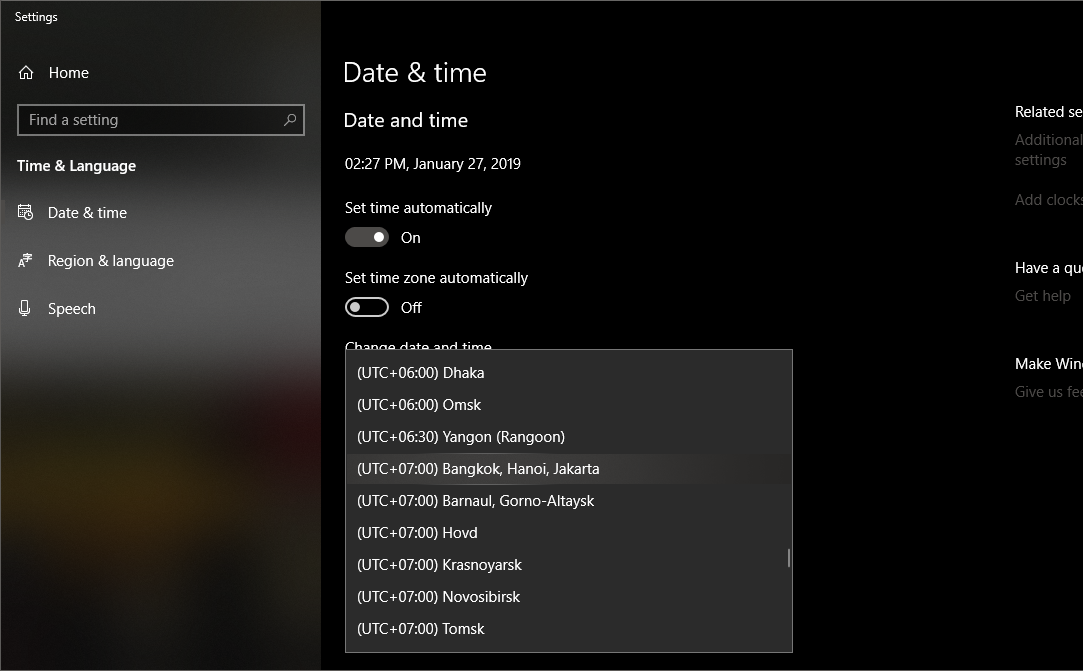 ## Thats it! Now you have PUBG Lite installed on your system. Go ahead and start getting some Chicken Dinners! ###### (sometimes Garnera's VPN doesn't work and you have to stick to a regular VPN) |
| json metadata | {"tags":["games","free","technology","pubg","gaming"],"image":["https://cdn.steemitimages.com/DQmWh35jCiFETnJpiBZFJDcxuqp1MAEaSe4eu83VL8CdVpE/image.png","https://cdn.steemitimages.com/DQmZDz52bxfZwncrF85FbH9aKLvrPaqnFaLy8iCd5SCBTkR/image.png","https://cdn.steemitimages.com/DQmX5tfZKVUhDwXvCFdxExwVThBWA6KGkgs2BJRrdxxDnfs/image.png","https://cdn.steemitimages.com/DQmedL1TinxCXBrURqjDW9CtaG6KTheom9iVGtNH8iHs3Gf/image.png","https://cdn.steemitimages.com/DQmNSuXsBAiRhCBuKSEV238K41Kx2ZM6qsE8jMQezZUSBqQ/image.png","https://cdn.steemitimages.com/DQmbwDFuUnHLd6TKqGu8SU8CCdEFmt6fn1Ctqtfw4JaGB42/image.png","https://cdn.steemitimages.com/DQmQGrAVonKxYg1DBgJaqi79CksXfNuFsEK4LMbw9GCtGzv/image.png"],"links":["https://www.garena.sg/gpc"],"app":"steemit/0.1","format":"markdown"} |
| Transaction Info | Block #29826053/Trx 4bc5c866c2390f688ea739618b905c1a8ad81787 |
View Raw JSON Data
{
"trx_id": "4bc5c866c2390f688ea739618b905c1a8ad81787",
"block": 29826053,
"trx_in_block": 33,
"op_in_trx": 0,
"virtual_op": 0,
"timestamp": "2019-01-27T15:42:24",
"op": [
"comment",
{
"parent_author": "",
"parent_permlink": "games",
"author": "stolentissue",
"permlink": "playerunknown-s-battlegrounds-a-new-free-to-play-version-pubg-lite-and-how-to-install",
"title": "PlayerUnknown's Battlegrounds: A new Free-To-Play Version!? PUBG Lite and how to install!",
"body": "<center>https://cdn.steemitimages.com/DQmWh35jCiFETnJpiBZFJDcxuqp1MAEaSe4eu83VL8CdVpE/image.png</center>\n# The PUBG Corporation just revealed a free version of PUBG.\n### The name for this new game is PUBG Lite. \nIt is a lighter, faster, and FREE version of the current bulky PlayerUnkown's Battlegrounds.\n\nMost think that this is to keep up with Fortnite, or at least to improve its player base. \nWhile this is mostly true, what the PUBG Corporation strived to do was to provide PUBG on low-end machines.\n\nIf it isn't evident that PUBG Lite is meant for low-end machines, the needed storage space is around 3.5GB.\n<center><h2> And the required specifications are as follows: </h2></center>\n<center>https://cdn.steemitimages.com/DQmZDz52bxfZwncrF85FbH9aKLvrPaqnFaLy8iCd5SCBTkR/image.png</center>\n\n### Pretty suitable? I should think so. Most medium-range computers should be able to run this perfectly, and most laptops as well!\n\n<center><h3>The bad news: For now PUBG Lite is ONLY available in Thailand</h3></center>\n<center>https://cdn.steemitimages.com/DQmX5tfZKVUhDwXvCFdxExwVThBWA6KGkgs2BJRrdxxDnfs/image.png</center>\n<center><h2>Fortunately, there might be a workarround.</h2>\nhttps://cdn.steemitimages.com/DQmedL1TinxCXBrURqjDW9CtaG6KTheom9iVGtNH8iHs3Gf/image.png\n</center>\n\nThe Garnea platform is a professional E-Sports game launcher. It provides a centralized location for games such as LoL (League Of Legends), FIFA Online, Ring Of Esylum, and Point Blank.\n\nThe thing about Garnea is that it changes your region location (using its own VPN), hypothetically allowing you to download games from Thailand.\n\n### Maybe we could use this to our advantage!\nFirst go ahead and download the Garnea Launcher: https://www.garena.sg/gpc\n\nThen sign up for an account. Once this has been done go and click the settings COG in the top right. \n\nNow you should see something similar to this image, and click the Region Dropdown menu and select Thailand.\n<center>https://cdn.steemitimages.com/DQmNSuXsBAiRhCBuKSEV238K41Kx2ZM6qsE8jMQezZUSBqQ/image.png</center>\n## Yay! Now that that's done you will see PUBG Lite appear in the home screen. Go ahead and install that.\n<center>https://cdn.steemitimages.com/DQmbwDFuUnHLd6TKqGu8SU8CCdEFmt6fn1Ctqtfw4JaGB42/image.png</center>\n## One last final step! Just change your system date & time zone settings.\nSimply change your timezone to \nKeep in mind this WILL change your system time, and requires Administrator to do.\n\n## Thats it! Now you have PUBG Lite installed on your system. Go ahead and start getting some Chicken Dinners!\n###### (sometimes Garnera's VPN doesn't work and you have to stick to a regular VPN)",
"json_metadata": "{\"tags\":[\"games\",\"free\",\"technology\",\"pubg\",\"gaming\"],\"image\":[\"https://cdn.steemitimages.com/DQmWh35jCiFETnJpiBZFJDcxuqp1MAEaSe4eu83VL8CdVpE/image.png\",\"https://cdn.steemitimages.com/DQmZDz52bxfZwncrF85FbH9aKLvrPaqnFaLy8iCd5SCBTkR/image.png\",\"https://cdn.steemitimages.com/DQmX5tfZKVUhDwXvCFdxExwVThBWA6KGkgs2BJRrdxxDnfs/image.png\",\"https://cdn.steemitimages.com/DQmedL1TinxCXBrURqjDW9CtaG6KTheom9iVGtNH8iHs3Gf/image.png\",\"https://cdn.steemitimages.com/DQmNSuXsBAiRhCBuKSEV238K41Kx2ZM6qsE8jMQezZUSBqQ/image.png\",\"https://cdn.steemitimages.com/DQmbwDFuUnHLd6TKqGu8SU8CCdEFmt6fn1Ctqtfw4JaGB42/image.png\",\"https://cdn.steemitimages.com/DQmQGrAVonKxYg1DBgJaqi79CksXfNuFsEK4LMbw9GCtGzv/image.png\"],\"links\":[\"https://www.garena.sg/gpc\"],\"app\":\"steemit/0.1\",\"format\":\"markdown\"}"
}
]
}stolentissuereceived 0.012 STEEM, 0.020 SBD, 0.085 SP author reward for @stolentissue / 1-steemit-hacks-how-to-get-more-upvotes-on-your-posts2019/01/27 12:08:06
stolentissuereceived 0.012 STEEM, 0.020 SBD, 0.085 SP author reward for @stolentissue / 1-steemit-hacks-how-to-get-more-upvotes-on-your-posts
2019/01/27 12:08:06
| author | stolentissue |
| permlink | 1-steemit-hacks-how-to-get-more-upvotes-on-your-posts |
| sbd payout | 0.020 SBD |
| steem payout | 0.012 STEEM |
| vesting payout | 138.489914 VESTS |
| Transaction Info | Block #29821770/Virtual Operation #39 |
View Raw JSON Data
{
  "trx_id": "0000000000000000000000000000000000000000",
  "block": 29821770,
  "trx_in_block": 4294967295,
  "op_in_trx": 0,
  "virtual_op": 39,
  "timestamp": "2019-01-27T12:08:06",
  "op": [
    "author_reward",
    {
      "author": "stolentissue",
      "permlink": "1-steemit-hacks-how-to-get-more-upvotes-on-your-posts",
      "sbd_payout": "0.020 SBD",
      "steem_payout": "0.012 STEEM",
      "vesting_payout": "138.489914 VESTS"
    }
  ]
}2019/01/22 14:06:36
2019/01/22 14:06:36
| parent author | stolentissue |
| parent permlink | 1-steemit-hacks-how-to-get-more-upvotes-on-your-posts |
| author | oadissin |
| permlink | re-stolentissue-1-steemit-hacks-how-to-get-more-upvotes-on-your-posts-20190122t140637655z |
| title | |
| body | This tool to improve engagement on our post is informative. We can also participate in contests to earn more visibility on steemit. Quality contents demand a lot of skills that is acquired after many essays. The comment and the review of high reputation steemian post are great source of inspiration for minnows. Peace |
| json metadata | {"tags":["community"],"app":"steemit/0.1"} |
| Transaction Info | Block #29680334/Trx 7e9d5fea7ce7b87ecbe53773373a99a63aa0421e |
View Raw JSON Data
{
  "trx_id": "7e9d5fea7ce7b87ecbe53773373a99a63aa0421e",
  "block": 29680334,
  "trx_in_block": 28,
  "op_in_trx": 0,
  "virtual_op": 0,
  "timestamp": "2019-01-22T14:06:36",
  "op": [
    "comment",
    {
      "parent_author": "stolentissue",
      "parent_permlink": "1-steemit-hacks-how-to-get-more-upvotes-on-your-posts",
      "author": "oadissin",
      "permlink": "re-stolentissue-1-steemit-hacks-how-to-get-more-upvotes-on-your-posts-20190122t140637655z",
      "title": "",
      "body": "This tool to improve engagement on our post is informative. We can also participate in contests to earn more visibility on steemit.\nQuality contents demand a lot of skills that is acquired after many essays. The comment and the review of high reputation steemian post are great source of inspiration for minnows.\nPeace",
      "json_metadata": "{\"tags\":[\"community\"],\"app\":\"steemit/0.1\"}"
    }
  ]
}2019/01/20 13:24:30
2019/01/20 13:24:30
| parent author | stolentissue |
| parent permlink | 1-steemit-hacks-how-to-get-more-upvotes-on-your-posts |
| author | minnowsupport |
| permlink | re-1-steemit-hacks-how-to-get-more-upvotes-on-your-posts-20190120t132429z |
| title | |
| body | <p>Congratulations! This post has been upvoted from the communal account, @minnowsupport, by ether from the Minnow Support Project. It's a witness project run by aggroed, ausbitbank, teamsteem, someguy123, neoxian, followbtcnews, and netuoso. The goal is to help Steemit grow by supporting Minnows. Please find us at the <a href="https://discord.gg/HYj4yvw"> Peace, Abundance, and Liberty Network (PALnet) Discord Channel</a>. It's a completely public and open space to all members of the Steemit community who voluntarily choose to be there.</p> <p>If you would like to delegate to the Minnow Support Project you can do so by clicking on the following links: <a href="https://v2.steemconnect.com/sign/delegateVestingShares?delegator=&delegatee=minnowsupport&vesting_shares=102530.639667%20VESTS">50SP</a>, <a href="https://v2.steemconnect.com/sign/delegateVestingShares?delegator=&delegatee=minnowsupport&vesting_shares=205303.639667%20VESTS">100SP</a>, <a href="https://v2.steemconnect.com/sign/delegateVestingShares?delegator=&delegatee=minnowsupport&vesting_shares=514303.639667%20VESTS">250SP</a>, <a href="https://v2.steemconnect.com/sign/delegateVestingShares?delegator=&delegatee=minnowsupport&vesting_shares=1025303.639667%20VESTS">500SP</a>, <a href="https://v2.steemconnect.com/sign/delegateVestingShares?delegator=&delegatee=minnowsupport&vesting_shares=2053030.639667%20VESTS">1000SP</a>, <a href="https://v2.steemconnect.com/sign/delegateVestingShares?delegator=&delegatee=minnowsupport&vesting_shares=10253030.639667%20VESTS">5000SP</a>. <br><strong>Be sure to leave at least 50SP undelegated on your account.</strong></p> |
| json metadata | {"app": "beem/0.20.14"} |
| Transaction Info | Block #29621936/Trx 35871705bccfc5060d1793a74f98ed69d72b992d |
View Raw JSON Data
{
"trx_id": "35871705bccfc5060d1793a74f98ed69d72b992d",
"block": 29621936,
"trx_in_block": 2,
"op_in_trx": 0,
"virtual_op": 0,
"timestamp": "2019-01-20T13:24:30",
"op": [
"comment",
{
"parent_author": "stolentissue",
"parent_permlink": "1-steemit-hacks-how-to-get-more-upvotes-on-your-posts",
"author": "minnowsupport",
"permlink": "re-1-steemit-hacks-how-to-get-more-upvotes-on-your-posts-20190120t132429z",
"title": "",
"body": "<p>Congratulations! This post has been upvoted from the communal account, @minnowsupport, by ether from the Minnow Support Project. It's a witness project run by aggroed, ausbitbank, teamsteem, someguy123, neoxian, followbtcnews, and netuoso. The goal is to help Steemit grow by supporting Minnows. Please find us at the <a href=\"https://discord.gg/HYj4yvw\"> Peace, Abundance, and Liberty Network (PALnet) Discord Channel</a>. It's a completely public and open space to all members of the Steemit community who voluntarily choose to be there.</p> <p>If you would like to delegate to the Minnow Support Project you can do so by clicking on the following links: <a href=\"https://v2.steemconnect.com/sign/delegateVestingShares?delegator=&delegatee=minnowsupport&vesting_shares=102530.639667%20VESTS\">50SP</a>, <a href=\"https://v2.steemconnect.com/sign/delegateVestingShares?delegator=&delegatee=minnowsupport&vesting_shares=205303.639667%20VESTS\">100SP</a>, <a href=\"https://v2.steemconnect.com/sign/delegateVestingShares?delegator=&delegatee=minnowsupport&vesting_shares=514303.639667%20VESTS\">250SP</a>, <a href=\"https://v2.steemconnect.com/sign/delegateVestingShares?delegator=&delegatee=minnowsupport&vesting_shares=1025303.639667%20VESTS\">500SP</a>, <a href=\"https://v2.steemconnect.com/sign/delegateVestingShares?delegator=&delegatee=minnowsupport&vesting_shares=2053030.639667%20VESTS\">1000SP</a>, <a href=\"https://v2.steemconnect.com/sign/delegateVestingShares?delegator=&delegatee=minnowsupport&vesting_shares=10253030.639667%20VESTS\">5000SP</a>. <br><strong>Be sure to leave at least 50SP undelegated on your account.</strong></p>",
"json_metadata": "{\"app\": \"beem/0.20.14\"}"
}
]
}2019/01/20 13:24:18
2019/01/20 13:24:18
| voter | minnowsupport |
| author | stolentissue |
| permlink | 1-steemit-hacks-how-to-get-more-upvotes-on-your-posts |
| weight | 250 (2.50%) |
| Transaction Info | Block #29621932/Trx e3e654c65b1fc95d7a8fd2dfdb3384d5a926e6ba |
View Raw JSON Data
{
  "trx_id": "e3e654c65b1fc95d7a8fd2dfdb3384d5a926e6ba",
  "block": 29621932,
  "trx_in_block": 1,
  "op_in_trx": 0,
  "virtual_op": 0,
  "timestamp": "2019-01-20T13:24:18",
  "op": [
    "vote",
    {
      "voter": "minnowsupport",
      "author": "stolentissue",
      "permlink": "1-steemit-hacks-how-to-get-more-upvotes-on-your-posts",
      "weight": 250
    }
  ]
}liverehabupvoted (100.00%) @stolentissue / 1-steemit-hacks-how-to-get-more-upvotes-on-your-posts2019/01/20 12:30:27
liverehabupvoted (100.00%) @stolentissue / 1-steemit-hacks-how-to-get-more-upvotes-on-your-posts
2019/01/20 12:30:27
| voter | liverehab |
| author | stolentissue |
| permlink | 1-steemit-hacks-how-to-get-more-upvotes-on-your-posts |
| weight | 10000 (100.00%) |
| Transaction Info | Block #29620856/Trx faef3e4b1c4510af1c82e69809e8db0ea6dbc4b7 |
View Raw JSON Data
{
  "trx_id": "faef3e4b1c4510af1c82e69809e8db0ea6dbc4b7",
  "block": 29620856,
  "trx_in_block": 15,
  "op_in_trx": 0,
  "virtual_op": 0,
  "timestamp": "2019-01-20T12:30:27",
  "op": [
    "vote",
    {
      "voter": "liverehab",
      "author": "stolentissue",
      "permlink": "1-steemit-hacks-how-to-get-more-upvotes-on-your-posts",
      "weight": 10000
    }
  ]
}devsupupvoted (0.69%) @stolentissue / 1-steemit-hacks-how-to-get-more-upvotes-on-your-posts2019/01/20 12:23:03
devsupupvoted (0.69%) @stolentissue / 1-steemit-hacks-how-to-get-more-upvotes-on-your-posts
2019/01/20 12:23:03
| voter | devsup |
| author | stolentissue |
| permlink | 1-steemit-hacks-how-to-get-more-upvotes-on-your-posts |
| weight | 69 (0.69%) |
| Transaction Info | Block #29620708/Trx e3f70d40592da243dcf24c43ed33903ad9923951 |
View Raw JSON Data
{
  "trx_id": "e3f70d40592da243dcf24c43ed33903ad9923951",
  "block": 29620708,
  "trx_in_block": 31,
  "op_in_trx": 0,
  "virtual_op": 0,
  "timestamp": "2019-01-20T12:23:03",
  "op": [
    "vote",
    {
      "voter": "devsup",
      "author": "stolentissue",
      "permlink": "1-steemit-hacks-how-to-get-more-upvotes-on-your-posts",
      "weight": 69
    }
  ]
}Manabar
Voting Power100.00%
Downvote Power100.00%
Resource Credits100.00%
Reputation Progress77.43%
{
  "voting_manabar": {
    "current_mana": "16464694045",
    "last_update_time": 1588954218
  },
  "downvote_manabar": {
    "current_mana": 4116173512,
    "last_update_time": 1588954218
  },
  "rc_account": {
    "account": "stolentissue",
    "rc_manabar": {
      "current_mana": "20479551813",
      "last_update_time": 1588954218
    },
    "max_rc_creation_adjustment": {
      "amount": "2020748973",
      "precision": 6,
      "nai": "@@000000037"
    },
    "max_rc": "18485443018"
  }
}
Account Metadata
| POSTING JSON METADATA | |
| profile | {"profile_image":"https://cdn.steemitimages.com/DQmcnnjfnjkUERBdpUcMfscWYBXwH2VGKosZK8vvwzTo8V9/Kleenex.png","cover_image":"https://cdn.steemitimages.com/DQmWRDQmqt2VJ7dNTxjXSNbiUakDh96CRCA7y41mwiLQuBL/stolentissuebanner.png"} |
| JSON METADATA | |
| profile | {"profile_image":"https://cdn.steemitimages.com/DQmcnnjfnjkUERBdpUcMfscWYBXwH2VGKosZK8vvwzTo8V9/Kleenex.png","cover_image":"https://cdn.steemitimages.com/DQmWRDQmqt2VJ7dNTxjXSNbiUakDh96CRCA7y41mwiLQuBL/stolentissuebanner.png"} |
{
  "posting_json_metadata": {
    "profile": {
      "profile_image": "https://cdn.steemitimages.com/DQmcnnjfnjkUERBdpUcMfscWYBXwH2VGKosZK8vvwzTo8V9/Kleenex.png",
      "cover_image": "https://cdn.steemitimages.com/DQmWRDQmqt2VJ7dNTxjXSNbiUakDh96CRCA7y41mwiLQuBL/stolentissuebanner.png"
    }
  },
  "json_metadata": {
    "profile": {
      "profile_image": "https://cdn.steemitimages.com/DQmcnnjfnjkUERBdpUcMfscWYBXwH2VGKosZK8vvwzTo8V9/Kleenex.png",
      "cover_image": "https://cdn.steemitimages.com/DQmWRDQmqt2VJ7dNTxjXSNbiUakDh96CRCA7y41mwiLQuBL/stolentissuebanner.png"
    }
  }
}
Auth Keys
Owner
Single Signature
Public Keys
STM7Qhw1EM9MJ3APctALxPJL1JX9wcRrpzpyXg2oGNHH6RT6a4W4i1/1
Active
Single Signature
Public Keys
STM7jgjjoPCvKtAiHuRb2FcYJgQEaXApd76kZ9y6Y1NKGTCx5NH4X1/1
Posting
Single Signature
Public Keys
STM6YZ7r7KcYqbE7GaCKYDTzyNyVrnxQaQ8tvJoED2Xp1i8SGwpbU1/1
Memo
STM6cvqWEEnJ4iM6wLbBR4gx13hiyCM47H9NqrfxNeDAe7gpvVdhp
{
  "owner": {
    "account_auths": [],
    "key_auths": [
      [
        "STM7Qhw1EM9MJ3APctALxPJL1JX9wcRrpzpyXg2oGNHH6RT6a4W4i",
        1
      ]
    ],
    "weight_threshold": 1
  },
  "active": {
    "account_auths": [],
    "key_auths": [
      [
        "STM7jgjjoPCvKtAiHuRb2FcYJgQEaXApd76kZ9y6Y1NKGTCx5NH4X",
        1
      ]
    ],
    "weight_threshold": 1
  },
  "posting": {
    "account_auths": [],
    "key_auths": [
      [
        "STM6YZ7r7KcYqbE7GaCKYDTzyNyVrnxQaQ8tvJoED2Xp1i8SGwpbU",
        1
      ]
    ],
    "weight_threshold": 1
  },
  "memo": "STM6cvqWEEnJ4iM6wLbBR4gx13hiyCM47H9NqrfxNeDAe7gpvVdhp"
}
Witness Votes
1 / 30
[
  "steemhq.witness"
]