

@somit
30Hi, I’m Somit Vishwakarma, a technical content writer and email migration specialist with hands-on experience in email clients, data conversion etc.
steemit.com/@somitVOTING POWER100.00%
DOWNVOTE POWER100.00%
RESOURCE CREDITS100.00%
REPUTATION PROGRESS30.28%
Net Worth
0.000USD
STEEM
0.000STEEM
SBD
0.000SBD
Effective Power
3.379SP
├── Own SP
0.000SP
└── Incoming DelegationsDeleg
+3.379SP
Detailed Balance
| STEEM | ||
| balance | 0.000STEEM | STEEM |
| market_balance | 0.000STEEM | STEEM |
| savings_balance | 0.000STEEM | STEEM |
| reward_steem_balance | 0.000STEEM | STEEM |
| STEEM POWER | ||
| Own SP | 0.000SP | SP |
| Delegated Out | 0.000SP | SP |
| Delegation In | 3.379SP | SP |
| Effective Power | 3.379SP | SP |
| Reward SP (pending) | 0.000SP | SP |
| SBD | ||
| sbd_balance | 0.000SBD | SBD |
| sbd_conversions | 0.000SBD | SBD |
| sbd_market_balance | 0.000SBD | SBD |
| savings_sbd_balance | 0.000SBD | SBD |
| reward_sbd_balance | 0.000SBD | SBD |
{
  "balance": "0.000 STEEM",
  "savings_balance": "0.000 STEEM",
  "reward_steem_balance": "0.000 STEEM",
  "vesting_shares": "0.000000 VESTS",
  "delegated_vesting_shares": "0.000000 VESTS",
  "received_vesting_shares": "5502.111234 VESTS",
  "sbd_balance": "0.000 SBD",
  "savings_sbd_balance": "0.000 SBD",
  "reward_sbd_balance": "0.000 SBD",
  "conversions": []
}
Account Info
| name | somit |
| id | 1113626 |
| rank | 1,094,549 |
| reputation | 3883261984 |
| created | 2018-08-16T04:44:48 |
| recovery_account | steem |
| proxy | None |
| post_count | 96 |
| comment_count | 0 |
| lifetime_vote_count | 0 |
| witnesses_voted_for | 0 |
| last_post | 2026-02-09T07:11:45 |
| last_root_post | 2025-12-08T04:46:27 |
| last_vote_time | 2025-05-09T05:06:42 |
| proxied_vsf_votes | 0, 0, 0, 0 |
| can_vote | 1 |
| voting_power | 9,799 |
| delayed_votes | 0 |
| balance | 0.000 STEEM |
| savings_balance | 0.000 STEEM |
| sbd_balance | 0.000 SBD |
| savings_sbd_balance | 0.000 SBD |
| vesting_shares | 0.000000 VESTS |
| delegated_vesting_shares | 0.000000 VESTS |
| received_vesting_shares | 5502.111234 VESTS |
| reward_vesting_balance | 0.000000 VESTS |
| vesting_balance | 0.000 STEEM |
| vesting_withdraw_rate | 0.000000 VESTS |
| next_vesting_withdrawal | 1969-12-31T23:59:59 |
| withdrawn | 304237715 |
| to_withdraw | 304237715 |
| withdraw_routes | 0 |
| savings_withdraw_requests | 0 |
| last_account_recovery | 1970-01-01T00:00:00 |
| reset_account | null |
| last_owner_update | 2018-09-12T08:51:12 |
| last_account_update | 2026-02-09T07:12:51 |
| mined | No |
| sbd_seconds | 0 |
| sbd_last_interest_payment | 2023-01-30T23:42:21 |
| savings_sbd_last_interest_payment | 1970-01-01T00:00:00 |
{
  "id": 1113626,
  "name": "somit",
  "owner": {
    "weight_threshold": 1,
    "account_auths": [],
    "key_auths": [
      [
        "STM6sSwRLmtB4MR9h54aAwMkR81XVwGnSiiAzWZ7xqSCLvd5ZCsMA",
        1
      ]
    ]
  },
  "active": {
    "weight_threshold": 1,
    "account_auths": [],
    "key_auths": [
      [
        "STM8aBfK3MdL4F1DmDAiuJBZGqrkAA6FSAafBY5zSbj6KM4rGf5V4",
        1
      ]
    ]
  },
  "posting": {
    "weight_threshold": 1,
    "account_auths": [],
    "key_auths": [
      [
        "STM8TvCwWSTZU6oz9cXhCVRNLxnSn5NEMp6TQGd2b7dYSbWJo4TDS",
        1
      ]
    ]
  },
  "memo_key": "STM6PZTtX2Q43XXyfhSoFoDKsJzf1cV1XwKgpWg7JXLPhWj3bTV31",
  "json_metadata": "{\"profile\":{\"profile_image\":\"https://cdn.steemitimages.com/DQmVuTtgY23uieapms7gLaqV9YUxjKpN3o46LT8eVdrwccQ/IMG-20180627-WA0008.jpg\",\"cover_image\":\"https://cdn.steemitimages.com/DQmWksinvsWQkCSVTKwhA659qb536cD1qJTxBEhGL4kB6xK/dp.jpg\",\"name\":\"Somit Vishwakarma\",\"about\":\"I have expertise in Web development, Blogging, Exchange Servers and many more\",\"location\":\"India\"}}",
  "posting_json_metadata": "{\"profile\":{\"profile_image\":\"https://cdn.steemitimages.com/DQmVuTtgY23uieapms7gLaqV9YUxjKpN3o46LT8eVdrwccQ/IMG-20180627-WA0008.jpg\",\"cover_image\":\"https://cdn.steemitimages.com/DQmWksinvsWQkCSVTKwhA659qb536cD1qJTxBEhGL4kB6xK/dp.jpg\",\"name\":\"Somit Vishwakarma\",\"location\":\"India\",\"version\":2,\"website\":\"https://quillix.blogspot.com/\",\"about\":\"Hi, I’m Somit Vishwakarma, a technical content writer and email migration specialist with hands-on experience in email clients, data conversion etc.\"}}",
  "proxy": "",
  "last_owner_update": "2018-09-12T08:51:12",
  "last_account_update": "2026-02-09T07:12:51",
  "created": "2018-08-16T04:44:48",
  "mined": false,
  "recovery_account": "steem",
  "last_account_recovery": "1970-01-01T00:00:00",
  "reset_account": "null",
  "comment_count": 0,
  "lifetime_vote_count": 0,
  "post_count": 96,
  "can_vote": true,
  "voting_manabar": {
    "current_mana": "5392069009",
    "last_update_time": 1746767202
  },
  "downvote_manabar": {
    "current_mana": 1375527808,
    "last_update_time": 1746767202
  },
  "voting_power": 9799,
  "balance": "0.000 STEEM",
  "savings_balance": "0.000 STEEM",
  "sbd_balance": "0.000 SBD",
  "sbd_seconds": "0",
  "sbd_seconds_last_update": "2023-01-30T23:42:21",
  "sbd_last_interest_payment": "2023-01-30T23:42:21",
  "savings_sbd_balance": "0.000 SBD",
  "savings_sbd_seconds": "0",
  "savings_sbd_seconds_last_update": "1970-01-01T00:00:00",
  "savings_sbd_last_interest_payment": "1970-01-01T00:00:00",
  "savings_withdraw_requests": 0,
  "reward_sbd_balance": "0.000 SBD",
  "reward_steem_balance": "0.000 STEEM",
  "reward_vesting_balance": "0.000000 VESTS",
  "reward_vesting_steem": "0.000 STEEM",
  "vesting_shares": "0.000000 VESTS",
  "delegated_vesting_shares": "0.000000 VESTS",
  "received_vesting_shares": "5502.111234 VESTS",
  "vesting_withdraw_rate": "0.000000 VESTS",
  "next_vesting_withdrawal": "1969-12-31T23:59:59",
  "withdrawn": 304237715,
  "to_withdraw": 304237715,
  "withdraw_routes": 0,
  "curation_rewards": 0,
  "posting_rewards": 103,
  "proxied_vsf_votes": [
    0,
    0,
    0,
    0
  ],
  "witnesses_voted_for": 0,
  "last_post": "2026-02-09T07:11:45",
  "last_root_post": "2025-12-08T04:46:27",
  "last_vote_time": "2025-05-09T05:06:42",
  "post_bandwidth": 0,
  "pending_claimed_accounts": 0,
  "vesting_balance": "0.000 STEEM",
  "reputation": 3883261984,
  "transfer_history": [],
  "market_history": [],
  "post_history": [],
  "vote_history": [],
  "other_history": [],
  "witness_votes": [],
  "tags_usage": [],
  "guest_bloggers": [],
  "rank": 1094549
}
Withdraw Routes
| Incoming | Outgoing |
|---|---|
Empty | Empty |
{
  "incoming": [],
  "outgoing": []
}From Date
To Date
somitupdated their account properties2026/02/09 07:12:51
somitupdated their account properties
2026/02/09 07:12:51
| account | somit |
| extensions | [] |
| json metadata | |
| posting json metadata | {"profile":{"profile_image":"https://cdn.steemitimages.com/DQmVuTtgY23uieapms7gLaqV9YUxjKpN3o46LT8eVdrwccQ/IMG-20180627-WA0008.jpg","cover_image":"https://cdn.steemitimages.com/DQmWksinvsWQkCSVTKwhA659qb536cD1qJTxBEhGL4kB6xK/dp.jpg","name":"Somit Vishwakarma","location":"India","version":2,"website":"https://quillix.blogspot.com/","about":"Hi, I’m Somit Vishwakarma, a technical content writer and email migration specialist with hands-on experience in email clients, data conversion etc."}} |
| Transaction Info | Block #103339683/Trx 02ff2d06cf2d3809a8fedde1e7e8fba3111bc220 |
View Raw JSON Data
{
  "block": 103339683,
  "op": [
    "account_update2",
    {
      "account": "somit",
      "extensions": [],
      "json_metadata": "",
      "posting_json_metadata": "{\"profile\":{\"profile_image\":\"https://cdn.steemitimages.com/DQmVuTtgY23uieapms7gLaqV9YUxjKpN3o46LT8eVdrwccQ/IMG-20180627-WA0008.jpg\",\"cover_image\":\"https://cdn.steemitimages.com/DQmWksinvsWQkCSVTKwhA659qb536cD1qJTxBEhGL4kB6xK/dp.jpg\",\"name\":\"Somit Vishwakarma\",\"location\":\"India\",\"version\":2,\"website\":\"https://quillix.blogspot.com/\",\"about\":\"Hi, I’m Somit Vishwakarma, a technical content writer and email migration specialist with hands-on experience in email clients, data conversion etc.\"}}"
    }
  ],
  "op_in_trx": 0,
  "timestamp": "2026-02-09T07:12:51",
  "trx_id": "02ff2d06cf2d3809a8fedde1e7e8fba3111bc220",
  "trx_in_block": 3,
  "virtual_op": 0
}somitupdated their account properties2026/02/09 07:12:27
somitupdated their account properties
2026/02/09 07:12:27
| account | somit |
| extensions | [] |
| json metadata | |
| posting json metadata | {"profile":{"profile_image":"https://cdn.steemitimages.com/DQmVuTtgY23uieapms7gLaqV9YUxjKpN3o46LT8eVdrwccQ/IMG-20180627-WA0008.jpg","cover_image":"https://cdn.steemitimages.com/DQmWksinvsWQkCSVTKwhA659qb536cD1qJTxBEhGL4kB6xK/dp.jpg","name":"Somit Vishwakarma","location":"India","version":2,"website":"https://quillix.blogspot.com/"}} |
| Transaction Info | Block #103339675/Trx 2d989a35276062cd0da76cdff4113970d93cc130 |
View Raw JSON Data
{
  "block": 103339675,
  "op": [
    "account_update2",
    {
      "account": "somit",
      "extensions": [],
      "json_metadata": "",
      "posting_json_metadata": "{\"profile\":{\"profile_image\":\"https://cdn.steemitimages.com/DQmVuTtgY23uieapms7gLaqV9YUxjKpN3o46LT8eVdrwccQ/IMG-20180627-WA0008.jpg\",\"cover_image\":\"https://cdn.steemitimages.com/DQmWksinvsWQkCSVTKwhA659qb536cD1qJTxBEhGL4kB6xK/dp.jpg\",\"name\":\"Somit Vishwakarma\",\"location\":\"India\",\"version\":2,\"website\":\"https://quillix.blogspot.com/\"}}"
    }
  ],
  "op_in_trx": 0,
  "timestamp": "2026-02-09T07:12:27",
  "trx_id": "2d989a35276062cd0da76cdff4113970d93cc130",
  "trx_in_block": 2,
  "virtual_op": 0
}somitreplied to @emailconversion / ta6jzl2026/02/09 07:11:45
somitreplied to @emailconversion / ta6jzl
2026/02/09 07:11:45
| author | somit |
| body | Thanks sharing this post but as a solution i would like to share <a href="https://steemit.com/mboxconverter/@somit/convert-mbox-to-outlook-pst-manually-and-best-mbox-file-converter">MailsDaddy MBOX converter tool</a> for all Email clients. It has 7+ different conversion options from MBOX to others. |
| json metadata | {"links":["https://steemit.com/mboxconverter/@somit/convert-mbox-to-outlook-pst-manually-and-best-mbox-file-converter"],"app":"steemit/0.2"} |
| parent author | emailconversion |
| parent permlink | convert-mbox-to-pst-and-import-into-outlook-2019-2016-2013 |
| permlink | ta6jzl |
| title | |
| Transaction Info | Block #103339661/Trx a2df72ea838dd4eb994ab010691eb47446764e66 |
View Raw JSON Data
{
  "block": 103339661,
  "op": [
    "comment",
    {
      "author": "somit",
      "body": "Thanks sharing this post but as a solution i would like to share <a href=\"https://steemit.com/mboxconverter/@somit/convert-mbox-to-outlook-pst-manually-and-best-mbox-file-converter\">MailsDaddy MBOX converter tool</a> for all Email clients. It has 7+ different conversion options from MBOX to others.",
      "json_metadata": "{\"links\":[\"https://steemit.com/mboxconverter/@somit/convert-mbox-to-outlook-pst-manually-and-best-mbox-file-converter\"],\"app\":\"steemit/0.2\"}",
      "parent_author": "emailconversion",
      "parent_permlink": "convert-mbox-to-pst-and-import-into-outlook-2019-2016-2013",
      "permlink": "ta6jzl",
      "title": ""
    }
  ],
  "op_in_trx": 0,
  "timestamp": "2026-02-09T07:11:45",
  "trx_id": "a2df72ea838dd4eb994ab010691eb47446764e66",
  "trx_in_block": 6,
  "virtual_op": 0
}somitpublished a new post: guide-to-upload-pst-to-o365-using-the-network-upload-method2025/12/08 09:48:24
somitpublished a new post: guide-to-upload-pst-to-o365-using-the-network-upload-method
2025/12/08 09:48:24
| author | somit |
| body | @@ -396,16 +396,21 @@ s.%3C/div%3E +%0A%3Cbr%3E %0A%0A%3Ca hre @@ -415,63 +415,60 @@ ref= -%22 +' https:// -ibb.co/cXVhhpXM%22%3E%3Cimg class=%22responsive%22 +postimages.org/' target='_blank'%3E%3Cimg src= -%22 +' http @@ -477,23 +477,27 @@ //i. -ibb.co/pr5jjsrG +postimg.cc/bJfn88Z8 /PST @@ -533,15 +533,26 @@ .jpg -%22 +' border='0' alt= -%22 +' PST- @@ -583,27 +583,17 @@ -JPG -%22 border=%220%22 +' %3E%3C/a%3E%0A%0A +%0A %3Cdiv |
| json metadata | {"tags":["office365","microsoft"],"links":["https://postimages.org/","https://quillix.blogspot.com/2025/05/import-pst-to-microsoft-365-for-free.html","https://login.microsoftonline.com/","https://go.microsoft.com/fwlink/p/?LinkId=544717","https://www.mailsdaddy.com/pst-to-office-365-migration-tool/","https://www.linkedin.com/posts/mailsdaddy_microsoft365-emailmigration-datamigration-activity-7402281724975648768-3Tb3?utm_source=share&utm_medium=member_desktop&rcm=ACoAAGI2mO4BoxLBukpG8vcyd-dJsrEUrqSIx-I"],"app":"steemit/0.2","format":"markdown","image":["https://i.postimg.cc/bJfn88Z8/PST-to-O-365-final-Article-2-JPG.jpg"]} |
| parent author | |
| parent permlink | pst |
| permlink | guide-to-upload-pst-to-o365-using-the-network-upload-method |
| title | Guide to Upload PST to O365 Using the Network Upload Method |
| Transaction Info | Block #101532795/Trx d545d32eb5db9eb8f55e8ac8cb923a2e60e81419 |
View Raw JSON Data
{
  "block": 101532795,
  "op": [
    "comment",
    {
      "author": "somit",
      "body": "@@ -396,16 +396,21 @@\n s.%3C/div%3E\n+%0A%3Cbr%3E\n %0A%0A%3Ca hre\n@@ -415,63 +415,60 @@\n ref=\n-%22\n+'\n https://\n-ibb.co/cXVhhpXM%22%3E%3Cimg class=%22responsive%22\n+postimages.org/' target='_blank'%3E%3Cimg\n  src=\n-%22\n+'\n http\n@@ -477,23 +477,27 @@\n //i.\n-ibb.co/pr5jjsrG\n+postimg.cc/bJfn88Z8\n /PST\n@@ -533,15 +533,26 @@\n .jpg\n-%22\n+' border='0'\n  alt=\n-%22\n+'\n PST-\n@@ -583,27 +583,17 @@\n -JPG\n-%22 border=%220%22\n+'\n %3E%3C/a%3E%0A%0A\n+%0A\n %3Cdiv\n",
      "json_metadata": "{\"tags\":[\"office365\",\"microsoft\"],\"links\":[\"https://postimages.org/\",\"https://quillix.blogspot.com/2025/05/import-pst-to-microsoft-365-for-free.html\",\"https://login.microsoftonline.com/\",\"https://go.microsoft.com/fwlink/p/?LinkId=544717\",\"https://www.mailsdaddy.com/pst-to-office-365-migration-tool/\",\"https://www.linkedin.com/posts/mailsdaddy_microsoft365-emailmigration-datamigration-activity-7402281724975648768-3Tb3?utm_source=share&utm_medium=member_desktop&rcm=ACoAAGI2mO4BoxLBukpG8vcyd-dJsrEUrqSIx-I\"],\"app\":\"steemit/0.2\",\"format\":\"markdown\",\"image\":[\"https://i.postimg.cc/bJfn88Z8/PST-to-O-365-final-Article-2-JPG.jpg\"]}",
      "parent_author": "",
      "parent_permlink": "pst",
      "permlink": "guide-to-upload-pst-to-o365-using-the-network-upload-method",
      "title": "Guide to Upload PST to O365 Using the Network Upload Method"
    }
  ],
  "op_in_trx": 0,
  "timestamp": "2025-12-08T09:48:24",
  "trx_id": "d545d32eb5db9eb8f55e8ac8cb923a2e60e81419",
  "trx_in_block": 0,
  "virtual_op": 0
}somitpublished a new post: guide-to-upload-pst-to-o365-using-the-network-upload-method2025/12/08 09:44:00
somitpublished a new post: guide-to-upload-pst-to-o365-using-the-network-upload-method
2025/12/08 09:44:00
| author | somit |
| body | @@ -389,32 +389,216 @@ tiveness.%3C/div%3E%0A +%0A%3Ca href=%22https://ibb.co/cXVhhpXM%22%3E%3Cimg class=%22responsive%22 src=%22https://i.ibb.co/pr5jjsrG/PST-to-O-365-final-Article-2-JPG.jpg%22 alt=%22PST-to-O-365-final-Article-2-JPG%22 border=%220%22%3E%3C/a%3E%0A%0A %3Cdiv%3EThis articl |
| json metadata | {"tags":["office365","microsoft"],"links":["https://ibb.co/cXVhhpXM","https://quillix.blogspot.com/2025/05/import-pst-to-microsoft-365-for-free.html","https://login.microsoftonline.com/","https://go.microsoft.com/fwlink/p/?LinkId=544717","https://www.mailsdaddy.com/pst-to-office-365-migration-tool/","https://www.linkedin.com/posts/mailsdaddy_microsoft365-emailmigration-datamigration-activity-7402281724975648768-3Tb3?utm_source=share&utm_medium=member_desktop&rcm=ACoAAGI2mO4BoxLBukpG8vcyd-dJsrEUrqSIx-I"],"app":"steemit/0.2","format":"markdown","image":["https://i.ibb.co/pr5jjsrG/PST-to-O-365-final-Article-2-JPG.jpg"]} |
| parent author | |
| parent permlink | pst |
| permlink | guide-to-upload-pst-to-o365-using-the-network-upload-method |
| title | Guide to Upload PST to O365 Using the Network Upload Method |
| Transaction Info | Block #101532707/Trx 258c0d1cc9922db10cd35ee3a6a458220b24279e |
View Raw JSON Data
{
  "block": 101532707,
  "op": [
    "comment",
    {
      "author": "somit",
      "body": "@@ -389,32 +389,216 @@\n tiveness.%3C/div%3E%0A\n+%0A%3Ca href=%22https://ibb.co/cXVhhpXM%22%3E%3Cimg class=%22responsive%22 src=%22https://i.ibb.co/pr5jjsrG/PST-to-O-365-final-Article-2-JPG.jpg%22 alt=%22PST-to-O-365-final-Article-2-JPG%22 border=%220%22%3E%3C/a%3E%0A%0A\n %3Cdiv%3EThis articl\n",
      "json_metadata": "{\"tags\":[\"office365\",\"microsoft\"],\"links\":[\"https://ibb.co/cXVhhpXM\",\"https://quillix.blogspot.com/2025/05/import-pst-to-microsoft-365-for-free.html\",\"https://login.microsoftonline.com/\",\"https://go.microsoft.com/fwlink/p/?LinkId=544717\",\"https://www.mailsdaddy.com/pst-to-office-365-migration-tool/\",\"https://www.linkedin.com/posts/mailsdaddy_microsoft365-emailmigration-datamigration-activity-7402281724975648768-3Tb3?utm_source=share&utm_medium=member_desktop&rcm=ACoAAGI2mO4BoxLBukpG8vcyd-dJsrEUrqSIx-I\"],\"app\":\"steemit/0.2\",\"format\":\"markdown\",\"image\":[\"https://i.ibb.co/pr5jjsrG/PST-to-O-365-final-Article-2-JPG.jpg\"]}",
      "parent_author": "",
      "parent_permlink": "pst",
      "permlink": "guide-to-upload-pst-to-o365-using-the-network-upload-method",
      "title": "Guide to Upload PST to O365 Using the Network Upload Method"
    }
  ],
  "op_in_trx": 0,
  "timestamp": "2025-12-08T09:44:00",
  "trx_id": "258c0d1cc9922db10cd35ee3a6a458220b24279e",
  "trx_in_block": 3,
  "virtual_op": 0
}somitpublished a new post: guide-to-upload-pst-to-o365-using-the-network-upload-method2025/12/08 04:46:27
somitpublished a new post: guide-to-upload-pst-to-o365-using-the-network-upload-method
2025/12/08 04:46:27
| author | somit |
| body | <div>Migrating email data to the cloud is a key priority for organisations modernising their IT environments. Moving legacy PST files to Microsoft 365 is an essential step, whether consolidating storage, enhancing security, or supporting digital transformation. Many IT teams choose the network upload method to upload PST files to O365 due to its flexibility, scalability, and cost-effectiveness.</div> <div>This article explains why the network upload method is a practical choice, how it works, and best practices for a smooth migration.</div> <h2>Why Move PST Files to Office 365?</h2> <div>Before getting into the process, it would be helpful to understand why organisations are increasingly migrating PST data to Microsoft 365 nowadays.</div> <h3>1. Improved Security</h3> <div>PST files stored on desktops, laptops, or shared drives pose security risks. They can be lost, stolen, or corrupted. Once uploaded to Office 365, email data benefits from built-in enterprise security features, encryption, and continuous monitoring.</div> <h3>2. Centralised Email Management</h3> <div>Moving PSTs to the cloud makes your organisation’s email data easier to manage, search, and back up. Admins gain more visibility and control through a unified environment.</div> <h3>3. Better Compliance</h3> <div>Local PST files often sit outside compliance frameworks. Migrating them into Office 365 ensures everything is searchable via eDiscovery and retained according to your organisation’s compliance policies.</div> <h3>4. Enhanced User Experience</h3> <div>Employees no longer have to manage multiple PST files or worry about running out of space. Everything becomes accessible through their mailbox in the cloud.</div> <h2>What Is the Network Upload Method?</h2> <div>The network upload approach is a Microsoft-provided method that allows organizations to <a href="https://quillix.blogspot.com/2025/05/import-pst-to-microsoft-365-for-free.html">upload PST to O365</a> using the network upload method by transferring PST files to Microsoft Azure Storage. Once uploaded, IT admins map and import the files into user mailboxes through the Microsoft Purview Compliance Portal.</div> <div>This method is ideal for organisations looking for a scalable, economical migration option that doesn’t require shipping physical drives or relying on end-users.</div> <h2>How to Upload PST to O365 Using the Network Upload Method</h2> <div>Here is a simplified breakdown of how the network upload method works:</div> <div>Follow all the step-by-step instructions from the complete guide to Import PST Files to Microsoft 365 via the Network Upload Method.</div> <h3>1: Login Office 365 Admin Account:</h3> <ul> <li>Run <a href="https://login.microsoftonline.com/">https://login.microsoftonline.com/</a> on your browser.</li> <li>Provide the Admin email ID and click on the Next button.</li> <li>Now fill in the password and click the Sign in button.</li> </ul> <h3>2: Assign the Mailbox Import/Export and Mail Recipients Role.</h3> <div>After successfully logging in to the admin account, we have to assign the mailbox import/export role and Mail Recipients to the admin or to those users who will perform the migration process. Then, for further processing, do as follows:</div> <ul> <li>In Microsoft 365, click on "<strong>Admin</strong>".</li> <li>In the Admin panel, click on "<strong>Show All</strong>" and select "<strong>Exchange</strong>" to open Exchange Admin Centre.</li> <li>Now, click on "<strong>Role</strong>" and select "<strong>Admin Role</strong>".</li> <li>Then select organisation management and click on "<strong>Permission</strong>".</li> <li>Here, find & select "<strong>Mailbox Import Export</strong>" and "<strong>Mail Recipients</strong>", and click on Save.</li> <li>Now, click on "<strong>Assign</strong>" and select the "<strong>Add</strong>" option.</li> <li>Search and select "<strong>Admin ID</strong>" or select "<strong>the users whom you want to provide the Mailbox Import Export</strong>" and "<strong>Mail Recipients role</strong>", and click on the "<strong>Add</strong>" button.</li> </ul> <h3>3: Create an Import Job to Import PST to Office 365:</h3> <div>Before starting the migration process, we have to proceed with the import job. For this</div> <ul> <li>Visit the Microsoft Exchange Admin Centre, click on "<strong>Show All</strong>".</li> <li>Now select "<strong>Microsoft Preview</strong>" to open the Microsoft Preview panel.</li> <li>Here, select "<strong>Data Lifecycle Management >> Select Import and click on New Import Job.</strong>"</li> <li>Now, after that, provide a unique Import Job Name and click the "<strong>Next</strong>" button.</li> <li>Now select "<strong>Upload your data</strong>" and click the Next button.</li> <li>Now, click on "<strong>Show network Upload SAS URL</strong>". Now, copy the SAS URL and click on <strong>Download</strong> Azure AzCopy.</li> <li>Select and download the AzCopy portable binary, which is suitable for your system.</li> <li>Now unzip the file and click on the "<strong>downloaded unzip folder</strong>". Now, copy and save the path of this file location.</li> <li>Now, open the <strong>command prompt</strong> and run the copied path as the screenshot.</li> <li>Then, visit the location where your PST file is located. Right-click on that PST file which you want to export and click on Properties and <strong>copy the PST file path, and update it as the screenshot.</strong></li> <li>Now copy and update the command below. Put the copied <strong>Source Location of the PST file</strong> and the <strong>SAS URL</strong>.</li> <p>azcopy.exe copy "<Source location of PST files>" "<SAS URL>"</p> <li>Now <strong>copy</strong> and <strong>run the command on the command prompt</strong>. Here, wait till the file loads.</li> <li>Now get back to <strong>Exchange Preview</strong>. <strong>Enable check box (I’m done uploading files, and I have access to the mapping file)</strong>. Now click on the <strong>Next</strong> button.</li> <li>Now, here we have to <strong>import the .CSV file</strong>. Click on the given link to <strong>download the sample CSV file</strong>.</li> <p><a href="https://go.microsoft.com/fwlink/p/?LinkId=544717">https://go.microsoft.com/fwlink/p/?LinkId=544717</a></p> <li>Now open the .CSV file and update it like a screenshot.</li> <li>Now, click on the "<strong>Upload</strong>" file and add the updated CSV file. <strong>Validate</strong> it and press the Next button.</li> <li>Now, verify all details and click the "<strong>Next</strong>" button.</li> <li>Now, the file will be uploaded to the cloud. After uploading, click on "<strong>Done</strong>".</li> <li>The Import Job has been created. Here, <strong>wait till the import job process is complete</strong>. Clicking on the <strong>refresh</strong> button, you can check the current progress status.</li> <li>After the import process is completed, <strong>select the created job</strong> and click on "<strong>Import to Office 365</strong>".</li> <li>If you want to apply any filter, select "<strong>I want to filter it before importing</strong>" or select "<strong>No, I want to import everything</strong>" and click the "<strong>Next</strong>" button.</li> <li>Now you can see the data size. Here, directly click on "<strong>Submit</strong>".</li> <li>Now, the upload to the cloud is successfully done. Here, click the "<strong>Done</strong>" button.</li> <li>Click on the <strong>Refresh</strong> button. Now, the Import process has started.</li> <li>Here, wait till the process is done. By clicking on the <strong>refresh</strong> button, you can check the current progress status.</li> </ul> <h2>Benefits of Using the Network Upload Method</h2> <h3>1. Cost-Effective</h3> <div>This method is included with Office 365 subscriptions - no additional cost for tools or services unless extra storage is required.</div> <h3>2. Scalable for Large Migrations</h3> <div>Whether youre importing tens or thousands of PST files, the network upload method supports bulk uploads without needing manual intervention from end users.</div> <h3>3. Secure and Controlled</h3> <div>Data moves through encrypted channels using Microsoft-provided tools, ensuring compliance and administrative oversight from start to finish.</div> <h3>4. Minimises User Disruption</h3> <div>Users continue working as usual while data is imported in the background.</div> <h3>Challenges to Be Aware Of</h3> <ul> <li>Large PST files may require pre-migration cleanup.</li> <li>Corrupted PSTs may cause errors during upload.</li> <li>The process can be technical for inexperienced admins.</li> <li>Bandwidth limitations may slow transfer speeds.</li> </ul> <div>However, with proper planning and preparation and also by using third-party email migration and conversion tools, these challenges are easy to manage.</div> <h2>Best Practices for a Smooth Migration</h2> <div>To make the most of the network upload method, consider the following tips:</div> <ul> <li>Locate all PST files beforehand using automated discovery tools if available.</li> <li>Scan and repair PSTs before uploading.</li> <li>Organise files logically to simplify mapping.</li> <li>Test with a small pilot group before scaling.</li> <li>Communicate timelines and expectations with users.</li> </ul> <h2>Conclusion:</h2> <div>The modernisation of email infrastructure has never been more important. By choosing to upload PST to O365 using the network upload method, organisations can efficiently migrate legacy data to the cloud while improving security, compliance, and manageability. With the right preparation and a clear migration strategy, this method offers a reliable, cost-effective path to a cleaner and more efficient Office 365 environment.</div> <div>For a Simple,Faster and Seamless Solution for uploading PST to O365 using the Network Upload Method, you can also use the <a href="https://www.mailsdaddy.com/pst-to-office-365-migration-tool/">MailsDaddy PST to Outlook 365 converter tool</a> available on their Official site.</div> <h3>Read (With Images): <a href="https://www.linkedin.com/posts/mailsdaddy_microsoft365-emailmigration-datamigration-activity-7402281724975648768-3Tb3?utm_source=share&utm_medium=member_desktop&rcm=ACoAAGI2mO4BoxLBukpG8vcyd-dJsrEUrqSIx-I">Simple Steps Guide to Importing PST to Office 365</a>.</h3> |
| json metadata | {"tags":["pst","office365","microsoft"],"links":["https://quillix.blogspot.com/2025/05/import-pst-to-microsoft-365-for-free.html","https://login.microsoftonline.com/","https://go.microsoft.com/fwlink/p/?LinkId=544717","https://www.mailsdaddy.com/pst-to-office-365-migration-tool/","https://www.linkedin.com/posts/mailsdaddy_microsoft365-emailmigration-datamigration-activity-7402281724975648768-3Tb3?utm_source=share&utm_medium=member_desktop&rcm=ACoAAGI2mO4BoxLBukpG8vcyd-dJsrEUrqSIx-I"],"app":"steemit/0.2","format":"markdown"} |
| parent author | |
| parent permlink | pst |
| permlink | guide-to-upload-pst-to-o365-using-the-network-upload-method |
| title | Guide to Upload PST to O365 Using the Network Upload Method |
| Transaction Info | Block #101526765/Trx aac30f1961dd17a5e0cbcc74735927a467d72cd7 |
View Raw JSON Data
{
"block": 101526765,
"op": [
"comment",
{
"author": "somit",
"body": "<div>Migrating email data to the cloud is a key priority for organisations modernising their IT environments. Moving legacy PST files to Microsoft 365 is an essential step, whether consolidating storage, enhancing security, or supporting digital transformation. Many IT teams choose the network upload method to upload PST files to O365 due to its flexibility, scalability, and cost-effectiveness.</div>\n<div>This article explains why the network upload method is a practical choice, how it works, and best practices for a smooth migration.</div>\n<h2>Why Move PST Files to Office 365?</h2>\n<div>Before getting into the process, it would be helpful to understand why organisations are increasingly migrating PST data to Microsoft 365 nowadays.</div>\n<h3>1. Improved Security</h3>\n<div>PST files stored on desktops, laptops, or shared drives pose security risks. They can be lost, stolen, or corrupted. Once uploaded to Office 365, email data benefits from built-in enterprise security features, encryption, and continuous monitoring.</div>\n<h3>2. Centralised Email Management</h3>\n<div>Moving PSTs to the cloud makes your organisation’s email data easier to manage, search, and back up. Admins gain more visibility and control through a unified environment.</div>\n<h3>3. Better Compliance</h3>\n<div>Local PST files often sit outside compliance frameworks. Migrating them into Office 365 ensures everything is searchable via eDiscovery and retained according to your organisation’s compliance policies.</div>\n<h3>4. Enhanced User Experience</h3>\n<div>Employees no longer have to manage multiple PST files or worry about running out of space. Everything becomes accessible through their mailbox in the cloud.</div>\n<h2>What Is the Network Upload Method?</h2>\n<div>The network upload approach is a Microsoft-provided method that allows organizations to <a href=\"https://quillix.blogspot.com/2025/05/import-pst-to-microsoft-365-for-free.html\">upload PST to O365</a> using the network upload method by transferring PST files to Microsoft Azure Storage. Once uploaded, IT admins map and import the files into user mailboxes through the Microsoft Purview Compliance Portal.</div>\n<div>This method is ideal for organisations looking for a scalable, economical migration option that doesn’t require shipping physical drives or relying on end-users.</div>\n<h2>How to Upload PST to O365 Using the Network Upload Method</h2>\n<div>Here is a simplified breakdown of how the network upload method works:</div>\n<div>Follow all the step-by-step instructions from the complete guide to Import PST Files to Microsoft 365 via the Network Upload Method.</div>\n<h3>1: Login Office 365 Admin Account:</h3>\n<ul>\n<li>Run <a href=\"https://login.microsoftonline.com/\">https://login.microsoftonline.com/</a> on your browser.</li>\n<li>Provide the Admin email ID and click on the Next button.</li>\n<li>Now fill in the password and click the Sign in button.</li>\n</ul>\n<h3>2: Assign the Mailbox Import/Export and Mail Recipients Role.</h3>\n<div>After successfully logging in to the admin account, we have to assign the mailbox import/export role and Mail Recipients to the admin or to those users who will perform the migration process. Then, for further processing, do as follows:</div>\n<ul>\n<li>In Microsoft 365, click on \"<strong>Admin</strong>\".</li>\n<li>In the Admin panel, click on \"<strong>Show All</strong>\" and select \"<strong>Exchange</strong>\" to open Exchange Admin Centre.</li>\n<li>Now, click on \"<strong>Role</strong>\" and select \"<strong>Admin Role</strong>\".</li>\n<li>Then select organisation management and click on \"<strong>Permission</strong>\".</li>\n<li>Here, find & select \"<strong>Mailbox Import Export</strong>\" and \"<strong>Mail Recipients</strong>\", and click on Save.</li>\n<li>Now, click on \"<strong>Assign</strong>\" and select the \"<strong>Add</strong>\" option.</li>\n<li>Search and select \"<strong>Admin ID</strong>\" or select \"<strong>the users whom you want to provide the Mailbox Import Export</strong>\" and \"<strong>Mail Recipients role</strong>\", and click on the \"<strong>Add</strong>\" button.</li>\n</ul>\n<h3>3: Create an Import Job to Import PST to Office 365:</h3>\n<div>Before starting the migration process, we have to proceed with the import job. For this</div>\n<ul>\n<li>Visit the Microsoft Exchange Admin Centre, click on \"<strong>Show All</strong>\".</li>\n<li>Now select \"<strong>Microsoft Preview</strong>\" to open the Microsoft Preview panel.</li>\n<li>Here, select \"<strong>Data Lifecycle Management >> Select Import and click on New Import Job.</strong>\"</li>\n<li>Now, after that, provide a unique Import Job Name and click the \"<strong>Next</strong>\" button.</li>\n<li>Now select \"<strong>Upload your data</strong>\" and click the Next button.</li>\n<li>Now, click on \"<strong>Show network Upload SAS URL</strong>\". Now, copy the SAS URL and click on <strong>Download</strong> Azure AzCopy.</li>\n<li>Select and download the AzCopy portable binary, which is suitable for your system.</li>\n<li>Now unzip the file and click on the \"<strong>downloaded unzip folder</strong>\". Now, copy and save the path of this file location.</li>\n<li>Now, open the <strong>command prompt</strong> and run the copied path as the screenshot.</li>\n<li>Then, visit the location where your PST file is located. Right-click on that PST file which you want to export and click on Properties and <strong>copy the PST file path, and update it as the screenshot.</strong></li>\n<li>Now copy and update the command below. Put the copied <strong>Source Location of the PST file</strong> and the <strong>SAS URL</strong>.</li>\n<p>azcopy.exe copy \"<Source location of PST files>\" \"<SAS URL>\"</p>\n<li>Now <strong>copy</strong> and <strong>run the command on the command prompt</strong>. Here, wait till the file loads.</li>\n<li>Now get back to <strong>Exchange Preview</strong>. <strong>Enable check box (I’m done uploading files, and I have access to the mapping file)</strong>. Now click on the <strong>Next</strong> button.</li>\n<li>Now, here we have to <strong>import the .CSV file</strong>. Click on the given link to <strong>download the sample CSV file</strong>.</li>\n<p><a href=\"https://go.microsoft.com/fwlink/p/?LinkId=544717\">https://go.microsoft.com/fwlink/p/?LinkId=544717</a></p>\n<li>Now open the .CSV file and update it like a screenshot.</li>\n<li>Now, click on the \"<strong>Upload</strong>\" file and add the updated CSV file. <strong>Validate</strong> it and press the Next button.</li>\n<li>Now, verify all details and click the \"<strong>Next</strong>\" button.</li>\n<li>Now, the file will be uploaded to the cloud. After uploading, click on \"<strong>Done</strong>\".</li>\n<li>The Import Job has been created. Here, <strong>wait till the import job process is complete</strong>. Clicking on the <strong>refresh</strong> button, you can check the current progress status.</li>\n<li>After the import process is completed, <strong>select the created job</strong> and click on \"<strong>Import to Office 365</strong>\".</li>\n<li>If you want to apply any filter, select \"<strong>I want to filter it before importing</strong>\" or select \"<strong>No, I want to import everything</strong>\" and click the \"<strong>Next</strong>\" button.</li>\n<li>Now you can see the data size. Here, directly click on \"<strong>Submit</strong>\".</li>\n<li>Now, the upload to the cloud is successfully done. Here, click the \"<strong>Done</strong>\" button.</li>\n<li>Click on the <strong>Refresh</strong> button. Now, the Import process has started.</li>\n<li>Here, wait till the process is done. By clicking on the <strong>refresh</strong> button, you can check the current progress status.</li>\n</ul>\n<h2>Benefits of Using the Network Upload Method</h2>\n<h3>1. Cost-Effective</h3>\n<div>This method is included with Office 365 subscriptions - no additional cost for tools or services unless extra storage is required.</div>\n<h3>2. Scalable for Large Migrations</h3>\n<div>Whether youre importing tens or thousands of PST files, the network upload method supports bulk uploads without needing manual intervention from end users.</div>\n<h3>3. Secure and Controlled</h3>\n<div>Data moves through encrypted channels using Microsoft-provided tools, ensuring compliance and administrative oversight from start to finish.</div>\n<h3>4. Minimises User Disruption</h3>\n<div>Users continue working as usual while data is imported in the background.</div>\n<h3>Challenges to Be Aware Of</h3>\n<ul>\n<li>Large PST files may require pre-migration cleanup.</li>\n<li>Corrupted PSTs may cause errors during upload.</li>\n<li>The process can be technical for inexperienced admins.</li>\n<li>Bandwidth limitations may slow transfer speeds.</li>\n</ul>\n<div>However, with proper planning and preparation and also by using third-party email migration and conversion tools, these challenges are easy to manage.</div>\n<h2>Best Practices for a Smooth Migration</h2>\n<div>To make the most of the network upload method, consider the following tips:</div>\n<ul>\n<li>Locate all PST files beforehand using automated discovery tools if available.</li>\n<li>Scan and repair PSTs before uploading.</li>\n<li>Organise files logically to simplify mapping.</li>\n<li>Test with a small pilot group before scaling.</li>\n<li>Communicate timelines and expectations with users.</li>\n</ul>\n<h2>Conclusion:</h2>\n<div>The modernisation of email infrastructure has never been more important. By choosing to upload PST to O365 using the network upload method, organisations can efficiently migrate legacy data to the cloud while improving security, compliance, and manageability. With the right preparation and a clear migration strategy, this method offers a reliable, cost-effective path to a cleaner and more efficient Office 365 environment.</div>\n<div>For a Simple,Faster and Seamless Solution for uploading PST to O365 using the Network Upload Method, you can also use the <a href=\"https://www.mailsdaddy.com/pst-to-office-365-migration-tool/\">MailsDaddy PST to Outlook 365 converter tool</a> available on their Official site.</div>\n<h3>Read (With Images): <a href=\"https://www.linkedin.com/posts/mailsdaddy_microsoft365-emailmigration-datamigration-activity-7402281724975648768-3Tb3?utm_source=share&utm_medium=member_desktop&rcm=ACoAAGI2mO4BoxLBukpG8vcyd-dJsrEUrqSIx-I\">Simple Steps Guide to Importing PST to Office 365</a>.</h3>",
"json_metadata": "{\"tags\":[\"pst\",\"office365\",\"microsoft\"],\"links\":[\"https://quillix.blogspot.com/2025/05/import-pst-to-microsoft-365-for-free.html\",\"https://login.microsoftonline.com/\",\"https://go.microsoft.com/fwlink/p/?LinkId=544717\",\"https://www.mailsdaddy.com/pst-to-office-365-migration-tool/\",\"https://www.linkedin.com/posts/mailsdaddy_microsoft365-emailmigration-datamigration-activity-7402281724975648768-3Tb3?utm_source=share&utm_medium=member_desktop&rcm=ACoAAGI2mO4BoxLBukpG8vcyd-dJsrEUrqSIx-I\"],\"app\":\"steemit/0.2\",\"format\":\"markdown\"}",
"parent_author": "",
"parent_permlink": "pst",
"permlink": "guide-to-upload-pst-to-o365-using-the-network-upload-method",
"title": "Guide to Upload PST to O365 Using the Network Upload Method"
}
],
"op_in_trx": 0,
"timestamp": "2025-12-08T04:46:27",
"trx_id": "aac30f1961dd17a5e0cbcc74735927a467d72cd7",
"trx_in_block": 2,
"virtual_op": 0
}somitupdated their account properties2025/09/10 06:13:18
somitupdated their account properties
2025/09/10 06:13:18
| account | somit |
| extensions | [] |
| json metadata | |
| posting json metadata | {"profile":{"profile_image":"https://cdn.steemitimages.com/DQmVuTtgY23uieapms7gLaqV9YUxjKpN3o46LT8eVdrwccQ/IMG-20180627-WA0008.jpg","cover_image":"https://cdn.steemitimages.com/DQmWksinvsWQkCSVTKwhA659qb536cD1qJTxBEhGL4kB6xK/dp.jpg","name":"Somit Vishwakarma","location":"India","version":2}} |
| Transaction Info | Block #98971644/Trx 38e679dd5d399136f6453e4762c1293fc1eca782 |
View Raw JSON Data
{
  "block": 98971644,
  "op": [
    "account_update2",
    {
      "account": "somit",
      "extensions": [],
      "json_metadata": "",
      "posting_json_metadata": "{\"profile\":{\"profile_image\":\"https://cdn.steemitimages.com/DQmVuTtgY23uieapms7gLaqV9YUxjKpN3o46LT8eVdrwccQ/IMG-20180627-WA0008.jpg\",\"cover_image\":\"https://cdn.steemitimages.com/DQmWksinvsWQkCSVTKwhA659qb536cD1qJTxBEhGL4kB6xK/dp.jpg\",\"name\":\"Somit Vishwakarma\",\"location\":\"India\",\"version\":2}}"
    }
  ],
  "op_in_trx": 0,
  "timestamp": "2025-09-10T06:13:18",
  "trx_id": "38e679dd5d399136f6453e4762c1293fc1eca782",
  "trx_in_block": 0,
  "virtual_op": 0
}somitupdated their account properties2025/09/10 06:12:45
somitupdated their account properties
2025/09/10 06:12:45
| account | somit |
| extensions | [] |
| json metadata | |
| posting json metadata | {"profile":{"profile_image":"https://cdn.steemitimages.com/DQmVuTtgY23uieapms7gLaqV9YUxjKpN3o46LT8eVdrwccQ/IMG-20180627-WA0008.jpg","cover_image":"https://cdn.steemitimages.com/DQmWksinvsWQkCSVTKwhA659qb536cD1qJTxBEhGL4kB6xK/dp.jpg","name":"Somit Vishwakarma","location":"India","version":2,"website":"https://www.mailsdaddy.com"}} |
| Transaction Info | Block #98971633/Trx cfe874b1931e0b424a775f909f95f42f81c78151 |
View Raw JSON Data
{
  "block": 98971633,
  "op": [
    "account_update2",
    {
      "account": "somit",
      "extensions": [],
      "json_metadata": "",
      "posting_json_metadata": "{\"profile\":{\"profile_image\":\"https://cdn.steemitimages.com/DQmVuTtgY23uieapms7gLaqV9YUxjKpN3o46LT8eVdrwccQ/IMG-20180627-WA0008.jpg\",\"cover_image\":\"https://cdn.steemitimages.com/DQmWksinvsWQkCSVTKwhA659qb536cD1qJTxBEhGL4kB6xK/dp.jpg\",\"name\":\"Somit Vishwakarma\",\"location\":\"India\",\"version\":2,\"website\":\"https://www.mailsdaddy.com\"}}"
    }
  ],
  "op_in_trx": 0,
  "timestamp": "2025-09-10T06:12:45",
  "trx_id": "cfe874b1931e0b424a775f909f95f42f81c78151",
  "trx_in_block": 0,
  "virtual_op": 0
}somitupdated their account properties2025/09/10 06:12:12
somitupdated their account properties
2025/09/10 06:12:12
| account | somit |
| extensions | [] |
| json metadata | |
| posting json metadata | {"profile":{"profile_image":"https://cdn.steemitimages.com/DQmVuTtgY23uieapms7gLaqV9YUxjKpN3o46LT8eVdrwccQ/IMG-20180627-WA0008.jpg","cover_image":"https://cdn.steemitimages.com/DQmWksinvsWQkCSVTKwhA659qb536cD1qJTxBEhGL4kB6xK/dp.jpg","name":"Tech","location":"India","version":2,"about":"I am an accomplished writer known for writing product reviews and technical posts.","website":"https://www.mailsdaddy.com"}} |
| Transaction Info | Block #98971622/Trx bb3a2f0a89ca2b8ba9c09f2af5ca124a71658719 |
View Raw JSON Data
{
  "block": 98971622,
  "op": [
    "account_update2",
    {
      "account": "somit",
      "extensions": [],
      "json_metadata": "",
      "posting_json_metadata": "{\"profile\":{\"profile_image\":\"https://cdn.steemitimages.com/DQmVuTtgY23uieapms7gLaqV9YUxjKpN3o46LT8eVdrwccQ/IMG-20180627-WA0008.jpg\",\"cover_image\":\"https://cdn.steemitimages.com/DQmWksinvsWQkCSVTKwhA659qb536cD1qJTxBEhGL4kB6xK/dp.jpg\",\"name\":\"Tech\",\"location\":\"India\",\"version\":2,\"about\":\"I am an accomplished writer known for writing product reviews and technical posts.\",\"website\":\"https://www.mailsdaddy.com\"}}"
    }
  ],
  "op_in_trx": 0,
  "timestamp": "2025-09-10T06:12:12",
  "trx_id": "bb3a2f0a89ca2b8ba9c09f2af5ca124a71658719",
  "trx_in_block": 1,
  "virtual_op": 0
}somitpublished a new post: how-to-migrate-mailbox-from-office-365-to-office-3652025/05/28 05:01:15
somitpublished a new post: how-to-migrate-mailbox-from-office-365-to-office-365
2025/05/28 05:01:15
| author | somit |
| body | @@ -6471,8 +6471,177 @@ d speed. +%0A%0AAlso Read: %3Ca href=%22https://steemit.com/india/@somit/key-steps-and-solutions-for-google-workspace-to-office-365-migration%22%3EGoogle Workspace to Office 365 Migration%3C/a%3E |
| json metadata | {"tags":["microsoft","cloudmigration","cloudsupport","cloudservice","migration","tenant"],"image":["https://cdn.steemitimages.com/DQmdFQjsy1N8dpiosENouKmV1tzs843MMaKsu9H3xZFGi1w/Office%20365%20to%20Office%20365%20Migration%20Service.png","https://img.youtube.com/vi/BjMrYwTgjp0/0.jpg"],"links":["https://www.mailsdaddy.com/office-365-to-office-365-migration/","https://www.mailsdaddy.com/services/cross-tenant-migration.php","https://www.youtube.com/watch?v=BjMrYwTgjp0","https://steemit.com/india/@somit/key-steps-and-solutions-for-google-workspace-to-office-365-migration"],"app":"steemit/0.2","format":"markdown"} |
| parent author | |
| parent permlink | office365 |
| permlink | how-to-migrate-mailbox-from-office-365-to-office-365 |
| title | How to Migrate Mailbox from Office 365 to Office 365? |
| Transaction Info | Block #95953768/Trx 1a10e71612f7e21fd04b9b286b52116aad5e56fc |
View Raw JSON Data
{
  "block": 95953768,
  "op": [
    "comment",
    {
      "author": "somit",
      "body": "@@ -6471,8 +6471,177 @@\n d speed.\n+%0A%0AAlso Read: %3Ca href=%22https://steemit.com/india/@somit/key-steps-and-solutions-for-google-workspace-to-office-365-migration%22%3EGoogle Workspace to Office 365 Migration%3C/a%3E\n",
      "json_metadata": "{\"tags\":[\"microsoft\",\"cloudmigration\",\"cloudsupport\",\"cloudservice\",\"migration\",\"tenant\"],\"image\":[\"https://cdn.steemitimages.com/DQmdFQjsy1N8dpiosENouKmV1tzs843MMaKsu9H3xZFGi1w/Office%20365%20to%20Office%20365%20Migration%20Service.png\",\"https://img.youtube.com/vi/BjMrYwTgjp0/0.jpg\"],\"links\":[\"https://www.mailsdaddy.com/office-365-to-office-365-migration/\",\"https://www.mailsdaddy.com/services/cross-tenant-migration.php\",\"https://www.youtube.com/watch?v=BjMrYwTgjp0\",\"https://steemit.com/india/@somit/key-steps-and-solutions-for-google-workspace-to-office-365-migration\"],\"app\":\"steemit/0.2\",\"format\":\"markdown\"}",
      "parent_author": "",
      "parent_permlink": "office365",
      "permlink": "how-to-migrate-mailbox-from-office-365-to-office-365",
      "title": "How to Migrate Mailbox from Office 365 to Office 365?"
    }
  ],
  "op_in_trx": 0,
  "timestamp": "2025-05-28T05:01:15",
  "trx_id": "1a10e71612f7e21fd04b9b286b52116aad5e56fc",
  "trx_in_block": 0,
  "virtual_op": 0
}somitpublished a new post: how-to-convert-thunderbird-to-outlook-a-complete-guide2025/05/28 04:58:15
somitpublished a new post: how-to-convert-thunderbird-to-outlook-a-complete-guide
2025/05/28 04:58:15
| author | somit |
| body | Email clients play a vital role in personal and business communication. There are several well-known email clients that are used in large numbers. Out of these, Mozilla Thunderbird and Microsoft Outlook are the two most popular email clients used around the world.  Thunderbird is a free, open-source platform with a simple interface while Outlook offers advanced features, better integration with Microsoft 365, and robust data management tools. Due to these enhanced capabilities, many users eventually decide to <a href="https://www.mailsdaddy.com/thunderbird-to-outlook-converter/">convert Thunderbird to Outlook</a>. However, since both platforms use different file formats, the migration process requires careful planning and the right tools. <h2>Why do users switch from Thunderbird to Outlook?</h2> There are several reasons why users choose to move from Thunderbird to Outlook: <b>Professional requirements</b>: Outlook is widely used in corporate environments and integrates seamlessly with Microsoft Exchange and Office 365. <b>Feature-rich interface</b>: Outlook offers advanced features such as calendar management, contact integration, task tracking, and shared mailboxes. <b>Security and compliance</b>: Microsoft Outlook offers better encryption, user controls, and compliance tools, making it more suitable for enterprise use. <b>Cross-device synchronization</b>: Outlook syncs across devices more effectively using Exchange or Microsoft 365 accounts. Whatever the reason, the challenge lies in exporting Thunderbird emails to Outlook PST format. <h3>The best way to convert Thunderbird to Outlook</h3> Since Outlook does not natively support MBOX files used by Thunderbird, manual transfer is time-consuming and risky in terms of data integrity. The most efficient and safe way is to use a professional converter tool like MailsDaddy Thunderbird to Outlook Converter. This tool is designed to simplify the migration process, providing automatic detection of Thunderbird profiles and enabling users to export emails to PST format. It maintains the folder hierarchy, attachments, metadata, and email formatting. Moreover, it allows both batch and selective email migration, giving users full control over what to export. <b>Read manual way to</b> <a href="https://www.mailsdaddy.com/blogs/solved-export-thunderbird-email-outlook-pst/">Convert Thunderbird to PST</a> <b>Step-by-Step Process Using MailsDaddy Tools</b> <ul><li>Download and install MailsDaddy Thunderbird to Outlook Converter.</li> <li>Auto-load Thunderbird profile or add MBOX files manually.</li> 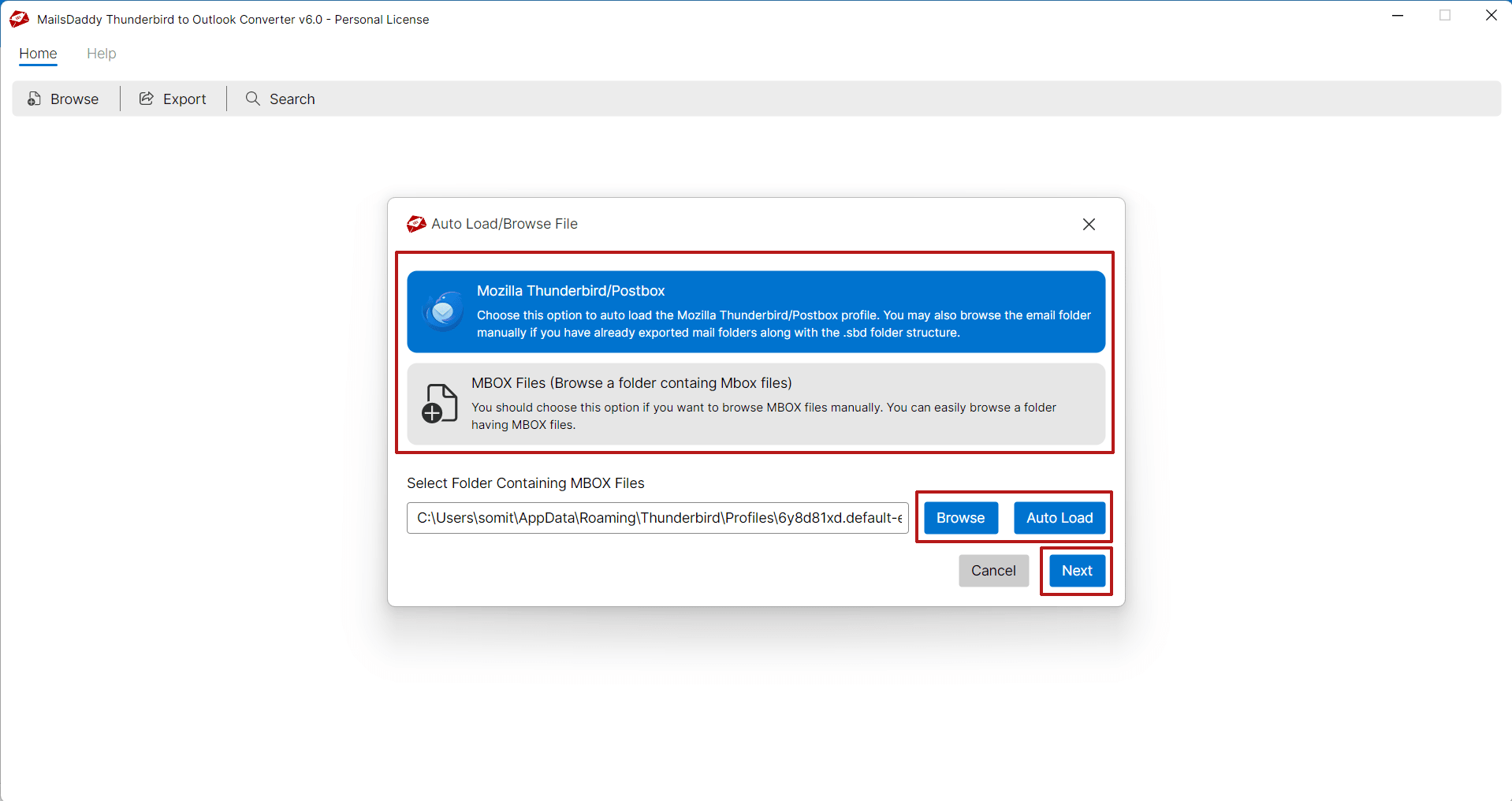 <li>Viewing emails and attachments are optional. Users can directly click on the Export button.</li> 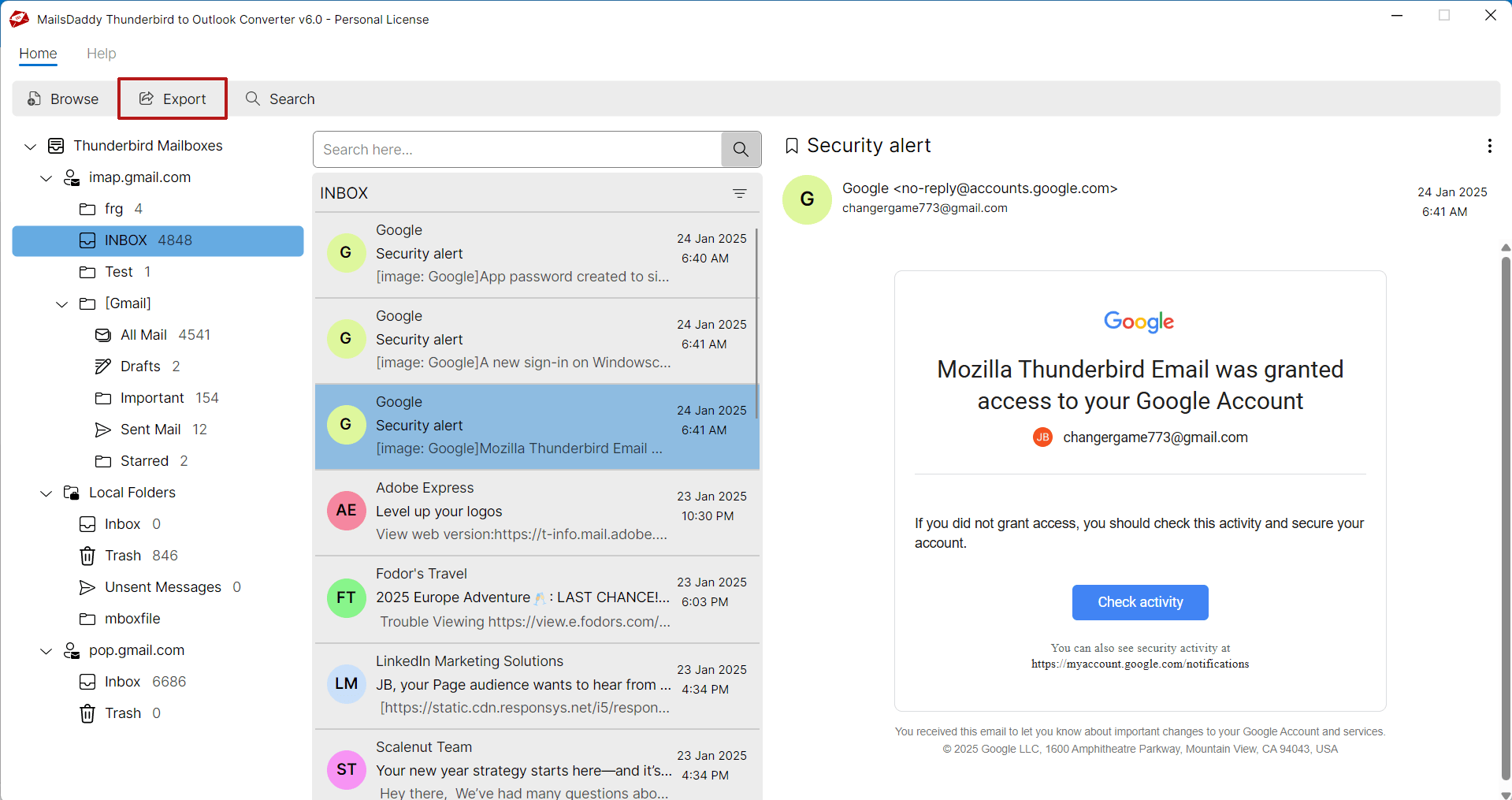 <li>Choose the export format (PST) and select between single or separate PST files.</li> 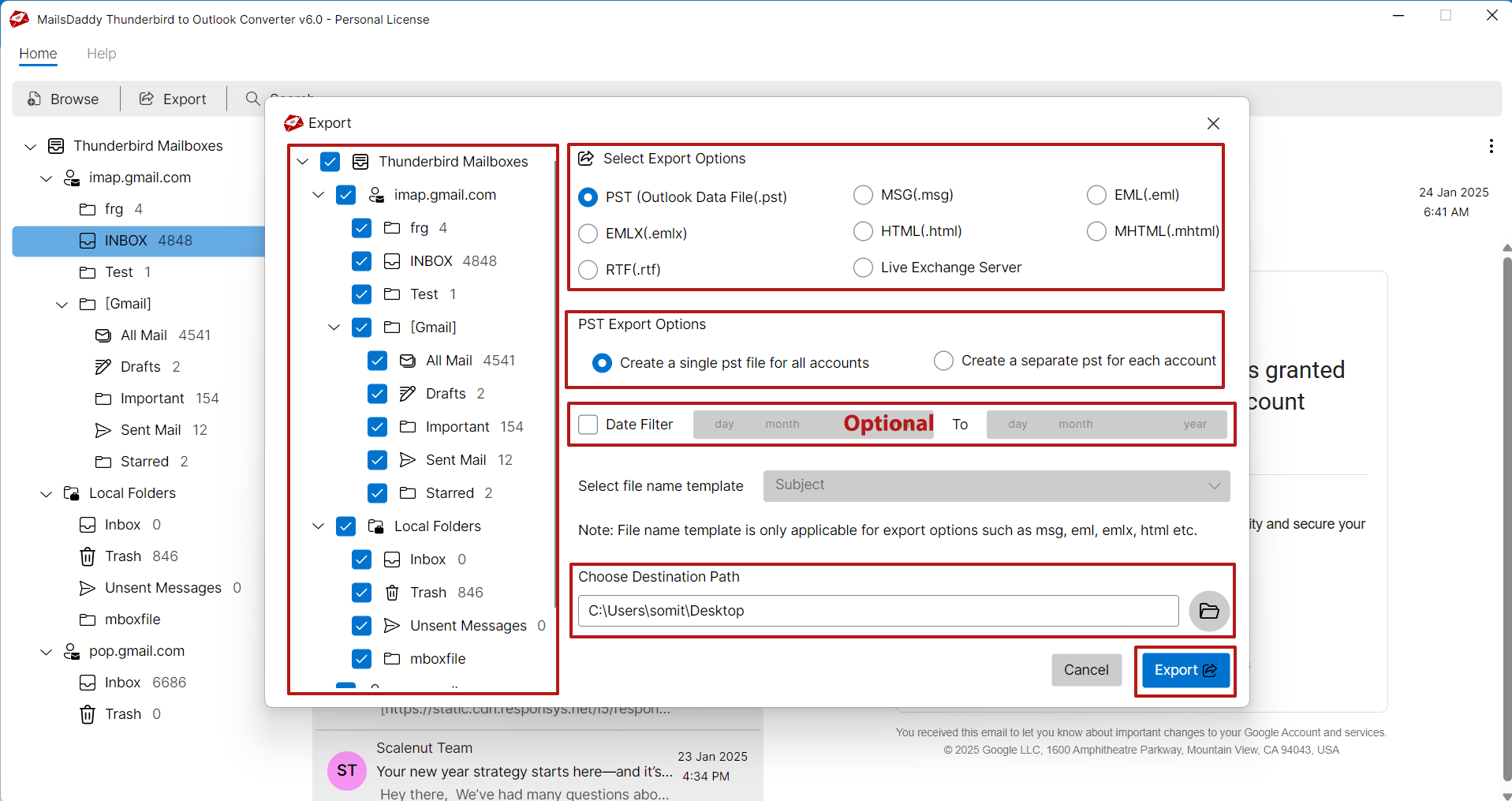 <li>Save the converted file in the local drive and press on Export button.</li></ul> This method ensures no data loss and works with all major versions of Microsoft Outlook including 2019, 2016, 2013, and earlier. <h3>Benefits of using a professional tool </h3> <ul> <li>No technical knowledge is required to maintain the original folder structure.</li> <li>Preserves email properties and attachments</li> <li>Fast conversion with bulk processing</li> <li>Supports large MBOX files</li> <li>Free demo version to test the functionality</li></ul> <h3>Conclusion</h3> If you are planning to export from Thunderbird to Outlook, it is important to choose the right method for a smooth and safe migration. Manual methods may seem attractive but they lack reliability and carry the risk of damaging important data. Using a dedicated tool like MailsDaddy Thunderbird to Outlook Converter not only simplifies the process but also ensures 100% accuracy and integrity. Whether you are an individual user or an IT administrator, this solution offers a hassle-free way to convert from Thunderbird to Outlook with complete peace of mind. Also Read: <a href="https://steemit.com/office365/@somit/how-to-migrate-mailbox-from-office-365-to-office-365">Office 365 Migration Tool</a> |
| json metadata | {"tags":["thundrebird","outlook","pst"],"image":["https://cdn.steemitimages.com/DQmWLKwSrvRhTCjFVbNtQmrbLugkj3NuBwbcxqyMSAHC38M/How%20to%20convert%20Thunderbirdd%20to%20outlook%20A%20complete%20Guide.png","https://cdn.steemitimages.com/DQmNUprAYfDZADAe7V3W6h3f83RzDy742w8cBGwp9ma3VzG/add-thunderbird.webp","https://cdn.steemitimages.com/DQmWTQjCxqzqZdCeyKuWNiNQdHZhvhUfii8pQ35V8d9DKyH/export-button.webp","https://cdn.steemitimages.com/DQmUGZj5x7zDm6chEgeHyKS3jcrAnyau96pjmrMCW9qnh3L/thunderbird-export.webp"],"links":["https://www.mailsdaddy.com/thunderbird-to-outlook-converter/","https://www.mailsdaddy.com/blogs/solved-export-thunderbird-email-outlook-pst/","https://steemit.com/office365/@somit/how-to-migrate-mailbox-from-office-365-to-office-365"],"app":"steemit/0.2","format":"markdown"} |
| parent author | |
| parent permlink | thundrebird |
| permlink | how-to-convert-thunderbird-to-outlook-a-complete-guide |
| title | How to Convert Thunderbird to Outlook: A Complete Guide |
| Transaction Info | Block #95953708/Trx 15de8b5f81b794150c4e62d0c74e87dbb85df5d7 |
View Raw JSON Data
{
"block": 95953708,
"op": [
"comment",
{
"author": "somit",
"body": "Email clients play a vital role in personal and business communication. There are several well-known email clients that are used in large numbers. Out of these, Mozilla Thunderbird and Microsoft Outlook are the two most popular email clients used around the world.\n\n\n\n\n\nThunderbird is a free, open-source platform with a simple interface while Outlook offers advanced features, better integration with Microsoft 365, and robust data management tools. Due to these enhanced capabilities, many users eventually decide to <a href=\"https://www.mailsdaddy.com/thunderbird-to-outlook-converter/\">convert Thunderbird to Outlook</a>. However, since both platforms use different file formats, the migration process requires careful planning and the right tools.\n\n<h2>Why do users switch from Thunderbird to Outlook?</h2>\n\nThere are several reasons why users choose to move from Thunderbird to Outlook:\n\n<b>Professional requirements</b>: Outlook is widely used in corporate environments and integrates seamlessly with Microsoft Exchange and Office 365.\n\n<b>Feature-rich interface</b>: Outlook offers advanced features such as calendar management, contact integration, task tracking, and shared mailboxes.\n\n<b>Security and compliance</b>: Microsoft Outlook offers better encryption, user controls, and compliance tools, making it more suitable for enterprise use.\n\n<b>Cross-device synchronization</b>: Outlook syncs across devices more effectively using Exchange or Microsoft 365 accounts.\n\nWhatever the reason, the challenge lies in exporting Thunderbird emails to Outlook PST format.\n\n<h3>The best way to convert Thunderbird to Outlook</h3>\n\nSince Outlook does not natively support MBOX files used by Thunderbird, manual transfer is time-consuming and risky in terms of data integrity. The most efficient and safe way is to use a professional converter tool like MailsDaddy Thunderbird to Outlook Converter.\n\nThis tool is designed to simplify the migration process, providing automatic detection of Thunderbird profiles and enabling users to export emails to PST format. It maintains the folder hierarchy, attachments, metadata, and email formatting. Moreover, it allows both batch and selective email migration, giving users full control over what to export.\n\n<b>Read manual way to</b> <a href=\"https://www.mailsdaddy.com/blogs/solved-export-thunderbird-email-outlook-pst/\">Convert Thunderbird to PST</a>\n\n<b>Step-by-Step Process Using MailsDaddy Tools</b>\n\n<ul><li>Download and install MailsDaddy Thunderbird to Outlook Converter.</li>\n<li>Auto-load Thunderbird profile or add MBOX files manually.</li>\n\n\n\n<li>Viewing emails and attachments are optional. Users can directly click on the Export button.</li>\n\n\n\n<li>Choose the export format (PST) and select between single or separate PST files.</li>\n\n\n\n<li>Save the converted file in the local drive and press on Export button.</li></ul>\n\nThis method ensures no data loss and works with all major versions of Microsoft Outlook including 2019, 2016, 2013, and earlier. \n\n<h3>Benefits of using a professional tool </h3>\n\n<ul>\n<li>No technical knowledge is required to maintain the original folder structure.</li>\n<li>Preserves email properties and attachments</li>\n<li>Fast conversion with bulk processing</li>\n<li>Supports large MBOX files</li>\n<li>Free demo version to test the functionality</li></ul>\n\n<h3>Conclusion</h3>\n\nIf you are planning to export from Thunderbird to Outlook, it is important to choose the right method for a smooth and safe migration. Manual methods may seem attractive but they lack reliability and carry the risk of damaging important data. Using a dedicated tool like MailsDaddy Thunderbird to Outlook Converter not only simplifies the process but also ensures 100% accuracy and integrity. Whether you are an individual user or an IT administrator, this solution offers a hassle-free way to convert from Thunderbird to Outlook with complete peace of mind.\n\nAlso Read: <a href=\"https://steemit.com/office365/@somit/how-to-migrate-mailbox-from-office-365-to-office-365\">Office 365 Migration Tool</a>",
"json_metadata": "{\"tags\":[\"thundrebird\",\"outlook\",\"pst\"],\"image\":[\"https://cdn.steemitimages.com/DQmWLKwSrvRhTCjFVbNtQmrbLugkj3NuBwbcxqyMSAHC38M/How%20to%20convert%20Thunderbirdd%20to%20outlook%20A%20complete%20Guide.png\",\"https://cdn.steemitimages.com/DQmNUprAYfDZADAe7V3W6h3f83RzDy742w8cBGwp9ma3VzG/add-thunderbird.webp\",\"https://cdn.steemitimages.com/DQmWTQjCxqzqZdCeyKuWNiNQdHZhvhUfii8pQ35V8d9DKyH/export-button.webp\",\"https://cdn.steemitimages.com/DQmUGZj5x7zDm6chEgeHyKS3jcrAnyau96pjmrMCW9qnh3L/thunderbird-export.webp\"],\"links\":[\"https://www.mailsdaddy.com/thunderbird-to-outlook-converter/\",\"https://www.mailsdaddy.com/blogs/solved-export-thunderbird-email-outlook-pst/\",\"https://steemit.com/office365/@somit/how-to-migrate-mailbox-from-office-365-to-office-365\"],\"app\":\"steemit/0.2\",\"format\":\"markdown\"}",
"parent_author": "",
"parent_permlink": "thundrebird",
"permlink": "how-to-convert-thunderbird-to-outlook-a-complete-guide",
"title": "How to Convert Thunderbird to Outlook: A Complete Guide"
}
],
"op_in_trx": 0,
"timestamp": "2025-05-28T04:58:15",
"trx_id": "15de8b5f81b794150c4e62d0c74e87dbb85df5d7",
"trx_in_block": 1,
"virtual_op": 0
}somitpublished a new post: key-steps-and-solutions-for-google-workspace-to-office-365-migration2025/05/22 11:28:54
somitpublished a new post: key-steps-and-solutions-for-google-workspace-to-office-365-migration
2025/05/22 11:28:54
| author | somit |
| body | @@ -3666,16 +3666,60 @@ tion%3C/a%3E +%0Ahttps://www.youtube.com/watch?v=9gipu8YQ1pM %0A%0A%3Ch3%3ECo |
| json metadata | {"tags":["googleworkspace","office365","migration","gmailtooffice365","microsoft365","gsuite","o365"],"image":["https://cdn.steemitimages.com/DQmdmsjywaqwAzRXx1hkyH9YWqicedFT5UnSmHGSYHdkJdp/Key%20Steps%20and%20Solutions%20for.png","https://img.youtube.com/vi/9gipu8YQ1pM/0.jpg"],"links":["https://www.mailsdaddy.com/blogs/migrate-from-google-workspace-to-office-365/","https://www.mailsdaddy.com/blogs/migrate-microsoft-office-365-to-google-workspace/","https://www.youtube.com/watch?v=9gipu8YQ1pM"],"app":"steemit/0.2","format":"markdown"} |
| parent author | |
| parent permlink | hive-182202 |
| permlink | key-steps-and-solutions-for-google-workspace-to-office-365-migration |
| title | Key Steps and Solutions for Google Workspace to Office 365 Migration |
| Transaction Info | Block #95789062/Trx bf1825bad2609c25629e3aa18264e60637d0a5ad |
View Raw JSON Data
{
  "block": 95789062,
  "op": [
    "comment",
    {
      "author": "somit",
      "body": "@@ -3666,16 +3666,60 @@\n tion%3C/a%3E\n+%0Ahttps://www.youtube.com/watch?v=9gipu8YQ1pM\n %0A%0A%3Ch3%3ECo\n",
      "json_metadata": "{\"tags\":[\"googleworkspace\",\"office365\",\"migration\",\"gmailtooffice365\",\"microsoft365\",\"gsuite\",\"o365\"],\"image\":[\"https://cdn.steemitimages.com/DQmdmsjywaqwAzRXx1hkyH9YWqicedFT5UnSmHGSYHdkJdp/Key%20Steps%20and%20Solutions%20for.png\",\"https://img.youtube.com/vi/9gipu8YQ1pM/0.jpg\"],\"links\":[\"https://www.mailsdaddy.com/blogs/migrate-from-google-workspace-to-office-365/\",\"https://www.mailsdaddy.com/blogs/migrate-microsoft-office-365-to-google-workspace/\",\"https://www.youtube.com/watch?v=9gipu8YQ1pM\"],\"app\":\"steemit/0.2\",\"format\":\"markdown\"}",
      "parent_author": "",
      "parent_permlink": "hive-182202",
      "permlink": "key-steps-and-solutions-for-google-workspace-to-office-365-migration",
      "title": "Key Steps and Solutions for Google Workspace to Office 365 Migration"
    }
  ],
  "op_in_trx": 0,
  "timestamp": "2025-05-22T11:28:54",
  "trx_id": "bf1825bad2609c25629e3aa18264e60637d0a5ad",
  "trx_in_block": 2,
  "virtual_op": 0
}somitpublished a new post: microsoft-teams-to-teams-migration-service2025/05/20 08:52:18
somitpublished a new post: microsoft-teams-to-teams-migration-service
2025/05/20 08:52:18
| author | somit |
| body | Microsoft Teams is one of the most popular collaboration applications designed by Microsoft. It offers real-time chat, video meetings, file sharing, and app integration on a single platform, making it versatile for remote and hybrid teams. Also, it makes communication seamless across departments and boosts productivity with features like private channels.  <h2>Why is Teams tenant-to-tenant migration needed?</h2> There are many scenarios where users look for solutions to migrate from one team to another such as mergers and acquisitions, rebranding, compliance, etc. When businesses go through these changes, it is necessary to move Microsoft Teams data including chat history, channels, files, and user permissions. Also, <a href="https://www.mailsdaddy.com/services/">migrating Teams between Microsoft 365 tenants</a> becomes a big step for businesses and organizations. This seamless migration provides continuity in communication which is also the reason for advancement in the business industry. <h2>Solutions and services available for Microsoft Teams cross-tenant migration</h2> Microsoft currently does not provide any native tools for Teams tenant-to-tenant migration. While SharePoint and OneDrive files can be moved using Microsoft’s inbuilt features. However, as a business, it is also a very tedious task. Migrating chat content, private channels, apps, and files requires a third-party solution like <b>MailsDaddy Teams to Teams Migration Service</b>. <b>Benefits of MailsDaddy Team and Chat Migration Service</b> Migrate Teams chat history, 1:1 chats, files, and attachments Migrate Teams channels and permissions Scheduling and batch processing for large environments Delta migrations to sync new or changed data. <h3>Conclusion</h3> Moving Microsoft Teams to another tenant is a complex but necessary task for many modern businesses. With a clear strategy and the right tools, organizations can maintain their Teams environments with full data integrity, ensuring a seamless experience for users before, during, and after the migration. Book a free demo: <a href="https://www.mailsdaddy.com/services/">Microsoft Teams tenant to tenant migration</a> |
| json metadata | {"tags":["teams","microsoft","tenant","office365","mailsdaddy","cloud","service"],"image":["https://cdn.steemitimages.com/DQmQTSonmWa5o1FdiDWCj1DCbCN1dRNZAfzS34obaYMsRha/Key%20Steps%20and%20Solutions%20for.gif"],"links":["https://www.mailsdaddy.com/services/"],"app":"steemit/0.2","format":"markdown"} |
| parent author | |
| parent permlink | teams |
| permlink | microsoft-teams-to-teams-migration-service |
| title | Microsoft Teams to Teams Migration Service |
| Transaction Info | Block #95728452/Trx 522d0ddd557f4b49f970bcf9cf70644065ae4277 |
View Raw JSON Data
{
"block": 95728452,
"op": [
"comment",
{
"author": "somit",
"body": "Microsoft Teams is one of the most popular collaboration applications designed by Microsoft. It offers real-time chat, video meetings, file sharing, and app integration on a single platform, making it versatile for remote and hybrid teams. Also, it makes communication seamless across departments and boosts productivity with features like private channels.\n\n\n\n\n\n<h2>Why is Teams tenant-to-tenant migration needed?</h2>\n\nThere are many scenarios where users look for solutions to migrate from one team to another such as mergers and acquisitions, rebranding, compliance, etc.\n\nWhen businesses go through these changes, it is necessary to move Microsoft Teams data including chat history, channels, files, and user permissions. Also, <a href=\"https://www.mailsdaddy.com/services/\">migrating Teams between Microsoft 365 tenants</a> becomes a big step for businesses and organizations. This seamless migration provides continuity in communication which is also the reason for advancement in the business industry.\n\n<h2>Solutions and services available for Microsoft Teams cross-tenant migration</h2>\n\nMicrosoft currently does not provide any native tools for Teams tenant-to-tenant migration. While SharePoint and OneDrive files can be moved using Microsoft’s inbuilt features. However, as a business, it is also a very tedious task.\n\nMigrating chat content, private channels, apps, and files requires a third-party solution like <b>MailsDaddy Teams to Teams Migration Service</b>.\n\n<b>Benefits of MailsDaddy Team and Chat Migration Service</b>\n\nMigrate Teams chat history, 1:1 chats, files, and attachments\nMigrate Teams channels and permissions\nScheduling and batch processing for large environments\nDelta migrations to sync new or changed data.\n\n<h3>Conclusion</h3>\n\nMoving Microsoft Teams to another tenant is a complex but necessary task for many modern businesses. With a clear strategy and the right tools, organizations can maintain their Teams environments with full data integrity, ensuring a seamless experience for users before, during, and after the migration.\n\nBook a free demo: <a href=\"https://www.mailsdaddy.com/services/\">Microsoft Teams tenant to tenant migration</a>",
"json_metadata": "{\"tags\":[\"teams\",\"microsoft\",\"tenant\",\"office365\",\"mailsdaddy\",\"cloud\",\"service\"],\"image\":[\"https://cdn.steemitimages.com/DQmQTSonmWa5o1FdiDWCj1DCbCN1dRNZAfzS34obaYMsRha/Key%20Steps%20and%20Solutions%20for.gif\"],\"links\":[\"https://www.mailsdaddy.com/services/\"],\"app\":\"steemit/0.2\",\"format\":\"markdown\"}",
"parent_author": "",
"parent_permlink": "teams",
"permlink": "microsoft-teams-to-teams-migration-service",
"title": "Microsoft Teams to Teams Migration Service"
}
],
"op_in_trx": 0,
"timestamp": "2025-05-20T08:52:18",
"trx_id": "522d0ddd557f4b49f970bcf9cf70644065ae4277",
"trx_in_block": 1,
"virtual_op": 0
}somitpublished a new post: key-steps-and-solutions-for-google-workspace-to-office-365-migration2025/05/20 08:41:30
somitpublished a new post: key-steps-and-solutions-for-google-workspace-to-office-365-migration
2025/05/20 08:41:30
| author | somit |
| body | @@ -792,21 +792,41 @@ .%0A%0A%0A +%0A !%5B -Read Now.jp +Key Steps and Solutions for.pn g%5D(h @@ -861,71 +861,97 @@ /DQm -XrqGskApf1epF7Y1EqFHikCanMDY5kkEdR5E4m5mqPaY/Read%2520Now.jp +dmsjywaqwAzRXx1hkyH9YWqicedFT5UnSmHGSYHdkJdp/Key%2520Steps%2520and%2520Solutions%2520for.pn g)%0A%0A%0A +%0A %3Ch2%3E |
| json metadata | {"tags":["googleworkspace","office365","migration","gmailtooffice365","microsoft365","gsuite","o365"],"image":["https://cdn.steemitimages.com/DQmdmsjywaqwAzRXx1hkyH9YWqicedFT5UnSmHGSYHdkJdp/Key%20Steps%20and%20Solutions%20for.png"],"links":["https://www.mailsdaddy.com/blogs/migrate-from-google-workspace-to-office-365/","https://www.mailsdaddy.com/blogs/migrate-microsoft-office-365-to-google-workspace/"],"app":"steemit/0.2","format":"markdown"} |
| parent author | |
| parent permlink | hive-182202 |
| permlink | key-steps-and-solutions-for-google-workspace-to-office-365-migration |
| title | Key Steps and Solutions for Google Workspace to Office 365 Migration |
| Transaction Info | Block #95728236/Trx cd68fc63f4524f01a1b825622075c594261cbb62 |
View Raw JSON Data
{
  "block": 95728236,
  "op": [
    "comment",
    {
      "author": "somit",
      "body": "@@ -792,21 +792,41 @@\n .%0A%0A%0A\n+%0A\n !%5B\n-Read Now.jp\n+Key Steps and Solutions for.pn\n g%5D(h\n@@ -861,71 +861,97 @@\n /DQm\n-XrqGskApf1epF7Y1EqFHikCanMDY5kkEdR5E4m5mqPaY/Read%2520Now.jp\n+dmsjywaqwAzRXx1hkyH9YWqicedFT5UnSmHGSYHdkJdp/Key%2520Steps%2520and%2520Solutions%2520for.pn\n g)%0A%0A%0A\n+%0A\n %3Ch2%3E\n",
      "json_metadata": "{\"tags\":[\"googleworkspace\",\"office365\",\"migration\",\"gmailtooffice365\",\"microsoft365\",\"gsuite\",\"o365\"],\"image\":[\"https://cdn.steemitimages.com/DQmdmsjywaqwAzRXx1hkyH9YWqicedFT5UnSmHGSYHdkJdp/Key%20Steps%20and%20Solutions%20for.png\"],\"links\":[\"https://www.mailsdaddy.com/blogs/migrate-from-google-workspace-to-office-365/\",\"https://www.mailsdaddy.com/blogs/migrate-microsoft-office-365-to-google-workspace/\"],\"app\":\"steemit/0.2\",\"format\":\"markdown\"}",
      "parent_author": "",
      "parent_permlink": "hive-182202",
      "permlink": "key-steps-and-solutions-for-google-workspace-to-office-365-migration",
      "title": "Key Steps and Solutions for Google Workspace to Office 365 Migration"
    }
  ],
  "op_in_trx": 0,
  "timestamp": "2025-05-20T08:41:30",
  "trx_id": "cd68fc63f4524f01a1b825622075c594261cbb62",
  "trx_in_block": 20,
  "virtual_op": 0
}somitpublished a new post: how-to-migrate-mailbox-from-office-365-to-office-3652025/05/16 04:51:18
somitpublished a new post: how-to-migrate-mailbox-from-office-365-to-office-365
2025/05/16 04:51:18
| author | somit |
| body | @@ -406,146 +406,8 @@ n.%0A%0A -Watch Video on Tenant to Tenant Migration%0Ahttps://www.youtube.com/watch?v=s23JHcbjmyQ&t=161s&pp=ygUWb2ZmaWNlNjUgdG8gb2ZmaWNlIDM2NQ%253D%253D%0A%0A %0A!%5BO |
| json metadata | {"tags":["microsoft","cloudmigration","cloudsupport","cloudservice","migration","tenant"],"image":["https://cdn.steemitimages.com/DQmdFQjsy1N8dpiosENouKmV1tzs843MMaKsu9H3xZFGi1w/Office%20365%20to%20Office%20365%20Migration%20Service.png","https://img.youtube.com/vi/BjMrYwTgjp0/0.jpg"],"links":["https://www.mailsdaddy.com/office-365-to-office-365-migration/","https://www.mailsdaddy.com/services/cross-tenant-migration.php","https://www.youtube.com/watch?v=BjMrYwTgjp0"],"app":"steemit/0.2","format":"markdown"} |
| parent author | |
| parent permlink | office365 |
| permlink | how-to-migrate-mailbox-from-office-365-to-office-365 |
| title | How to Migrate Mailbox from Office 365 to Office 365? |
| Transaction Info | Block #95608660/Trx 1c5deedd11ef770165a9632fd224491c759bfe26 |
View Raw JSON Data
{
  "block": 95608660,
  "op": [
    "comment",
    {
      "author": "somit",
      "body": "@@ -406,146 +406,8 @@\n n.%0A%0A\n-Watch Video on Tenant to Tenant Migration%0Ahttps://www.youtube.com/watch?v=s23JHcbjmyQ&t=161s&pp=ygUWb2ZmaWNlNjUgdG8gb2ZmaWNlIDM2NQ%253D%253D%0A%0A\n %0A!%5BO\n",
      "json_metadata": "{\"tags\":[\"microsoft\",\"cloudmigration\",\"cloudsupport\",\"cloudservice\",\"migration\",\"tenant\"],\"image\":[\"https://cdn.steemitimages.com/DQmdFQjsy1N8dpiosENouKmV1tzs843MMaKsu9H3xZFGi1w/Office%20365%20to%20Office%20365%20Migration%20Service.png\",\"https://img.youtube.com/vi/BjMrYwTgjp0/0.jpg\"],\"links\":[\"https://www.mailsdaddy.com/office-365-to-office-365-migration/\",\"https://www.mailsdaddy.com/services/cross-tenant-migration.php\",\"https://www.youtube.com/watch?v=BjMrYwTgjp0\"],\"app\":\"steemit/0.2\",\"format\":\"markdown\"}",
      "parent_author": "",
      "parent_permlink": "office365",
      "permlink": "how-to-migrate-mailbox-from-office-365-to-office-365",
      "title": "How to Migrate Mailbox from Office 365 to Office 365?"
    }
  ],
  "op_in_trx": 0,
  "timestamp": "2025-05-16T04:51:18",
  "trx_id": "1c5deedd11ef770165a9632fd224491c759bfe26",
  "trx_in_block": 0,
  "virtual_op": 0
}somitpublished a new post: how-to-migrate-mailbox-from-office-365-to-office-3652025/05/16 04:38:06
somitpublished a new post: how-to-migrate-mailbox-from-office-365-to-office-365
2025/05/16 04:38:06
| author | somit |
| body | @@ -402,16 +402,154 @@ ation.%0A%0A +Watch Video on Tenant to Tenant Migration%0Ahttps://www.youtube.com/watch?v=s23JHcbjmyQ&t=161s&pp=ygUWb2ZmaWNlNjUgdG8gb2ZmaWNlIDM2NQ%253D%253D%0A%0A %0A!%5BOffic |
| json metadata | {"tags":["microsoft","cloudmigration","cloudsupport","cloudservice","migration","tenant"],"image":["https://img.youtube.com/vi/s23JHcbjmyQ/0.jpg","https://cdn.steemitimages.com/DQmdFQjsy1N8dpiosENouKmV1tzs843MMaKsu9H3xZFGi1w/Office%20365%20to%20Office%20365%20Migration%20Service.png","https://img.youtube.com/vi/BjMrYwTgjp0/0.jpg"],"links":["https://www.youtube.com/watch?v=s23JHcbjmyQ&t=161s&pp=ygUWb2ZmaWNlNjUgdG8gb2ZmaWNlIDM2NQ%3D%3D","https://www.mailsdaddy.com/office-365-to-office-365-migration/","https://www.mailsdaddy.com/services/cross-tenant-migration.php","https://www.youtube.com/watch?v=BjMrYwTgjp0"],"app":"steemit/0.2","format":"markdown"} |
| parent author | |
| parent permlink | office365 |
| permlink | how-to-migrate-mailbox-from-office-365-to-office-365 |
| title | How to Migrate Mailbox from Office 365 to Office 365? |
| Transaction Info | Block #95608397/Trx e8323f489d09437c18738149a0a687b7a7a3d533 |
View Raw JSON Data
{
  "block": 95608397,
  "op": [
    "comment",
    {
      "author": "somit",
      "body": "@@ -402,16 +402,154 @@\n ation.%0A%0A\n+Watch Video on Tenant to Tenant Migration%0Ahttps://www.youtube.com/watch?v=s23JHcbjmyQ&t=161s&pp=ygUWb2ZmaWNlNjUgdG8gb2ZmaWNlIDM2NQ%253D%253D%0A%0A\n %0A!%5BOffic\n",
      "json_metadata": "{\"tags\":[\"microsoft\",\"cloudmigration\",\"cloudsupport\",\"cloudservice\",\"migration\",\"tenant\"],\"image\":[\"https://img.youtube.com/vi/s23JHcbjmyQ/0.jpg\",\"https://cdn.steemitimages.com/DQmdFQjsy1N8dpiosENouKmV1tzs843MMaKsu9H3xZFGi1w/Office%20365%20to%20Office%20365%20Migration%20Service.png\",\"https://img.youtube.com/vi/BjMrYwTgjp0/0.jpg\"],\"links\":[\"https://www.youtube.com/watch?v=s23JHcbjmyQ&t=161s&pp=ygUWb2ZmaWNlNjUgdG8gb2ZmaWNlIDM2NQ%3D%3D\",\"https://www.mailsdaddy.com/office-365-to-office-365-migration/\",\"https://www.mailsdaddy.com/services/cross-tenant-migration.php\",\"https://www.youtube.com/watch?v=BjMrYwTgjp0\"],\"app\":\"steemit/0.2\",\"format\":\"markdown\"}",
      "parent_author": "",
      "parent_permlink": "office365",
      "permlink": "how-to-migrate-mailbox-from-office-365-to-office-365",
      "title": "How to Migrate Mailbox from Office 365 to Office 365?"
    }
  ],
  "op_in_trx": 0,
  "timestamp": "2025-05-16T04:38:06",
  "trx_id": "e8323f489d09437c18738149a0a687b7a7a3d533",
  "trx_in_block": 0,
  "virtual_op": 0
}somitupvoted (100.00%) @somit / how-to-migrate-mailbox-from-office-365-to-office-3652025/05/09 05:06:42
somitupvoted (100.00%) @somit / how-to-migrate-mailbox-from-office-365-to-office-365
2025/05/09 05:06:42
| author | somit |
| permlink | how-to-migrate-mailbox-from-office-365-to-office-365 |
| voter | somit |
| weight | 10000 (100.00%) |
| Transaction Info | Block #95407862/Trx dab3ac37788134b2c6420288ae97608acae95b83 |
View Raw JSON Data
{
  "block": 95407862,
  "op": [
    "vote",
    {
      "author": "somit",
      "permlink": "how-to-migrate-mailbox-from-office-365-to-office-365",
      "voter": "somit",
      "weight": 10000
    }
  ],
  "op_in_trx": 0,
  "timestamp": "2025-05-09T05:06:42",
  "trx_id": "dab3ac37788134b2c6420288ae97608acae95b83",
  "trx_in_block": 0,
  "virtual_op": 0
}somitpublished a new post: how-to-migrate-mailbox-from-office-365-to-office-3652025/05/06 11:43:30
somitpublished a new post: how-to-migrate-mailbox-from-office-365-to-office-365
2025/05/06 11:43:30
| author | somit |
| body | Mailbox migration from Office 365 to Office happens due to mergers, acquisitions, rebranding, or reorganization. To meet the demand of different cloud migrations, we have manual and automated solutions. As we know Office 365 to Office 365 migration is not as straightforward as it seems. It requires planning, expertise, and the right tools to ensure zero data loss, minimal downtime, and smooth migration.  In this article, we will explore both manual and professional methods to perform tenant-to-tenant Office 365 mailbox migration. If you are not a techie, MailsDaddy Office 365 migration tool and MailsDaddy cloud migration services are the best choice for you. ## Why is Office 365 to Office 365 Migration Needed? Organizations may need to migrate mailboxes between Office 365 tenants in scenarios like: <ul> <li>Company mergers or acquisitions</li> <li>Organizational rebranding</li> <li>Domain name changes</li> <li>Compliance or restructuring</li> <li>Switching to a new region or Office 365 data center</li> </ul> In any case, migrating mailbox data (emails, contacts, calendars, tasks, etc.) from one Office 365 tenant to another without data loss is crucial. ## Automated Migration with MailsDaddy Office 365 to Office 365 Migration Tool <b>MailsDaddy Cloud Migration Service</b> and <b>Office 365 Migration Tool</b> are the first choices of many professionals as it is based only on selection, folder include/exclude, mapping, etc. Also, it helps in migrating Office 365 resources like OneDrive, SharePoint, and Teams. This tool simplifies the entire process and ensures 100% accurate and secure mailbox migration between tenants. ### Key Features of MailsDaddy Tenant to Tenant Migration Tool Try free demo: <a href="https://www.mailsdaddy.com/office-365-to-office-365-migration/">Office 365 Migration Tool</a> <ul> <li>Easy Setup and Migration for Office 365</li> <li>Migrate Mailboxes, Archive Mailboxes, and Shared Mailboxes.</li> <li>Incremental Migration - Avoid duplicate items in re-runs.</li> <li>Selective Migration - Migrate specific folders, date ranges, or categories.</li> <li>Auto Map Mailboxes - Easily map source to destination users.</li> <li>Multiple Login Options - Support for Basic and Modern Authentication.</li> <li>No Size Limitation - Migrate unlimited mailbox data.</li> <li>Real-Time Progress Reports and detailed logs.</li> </ul> ### Key Features of MailsDaddy Cloud Migration Services Book Free Demo: <a href="https://www.mailsdaddy.com/services/cross-tenant-migration.php">Cross Tenant Migration Service</a> <ul> <li>Direct Tenant to Tenant Migration - No need to export/import PST files.</li> <li>Allow migrating Office 365 Resources: OneDrive, SharePoint, and Teams</li> <li>Migrate Mailboxes and Archive Mailboxes</li> <li>Incremental Migration – Avoid duplicate items in re-runs.</li> <li>Auto Map Mailboxes – Easily map source to destination users.</li> <li>Multiple Login Options – Support for Basic and Modern Authentication.</li> <li>No Size Limitation – Migrate unlimited mailbox data.</li> <li>Real-Time Progress Reports and detailed logs.</li> </ul> ### Steps to Use MailsDaddy Office 365 Migration Tool <ol> <li>Download & Launch the Tool:<br />Install the software and run it on your system.</li> <li>Login to Source Tenant:<br />Use Admin credentials with proper permissions to connect to the source Office 365.</li> <li>Login to Target Tenant:<br />Similarly, connect to the target Office 365 tenant.</li> <li>Fetch & Map Mailboxes:<br />The tool will automatically list source mailboxes. Use auto or manual mapping to match destination mailboxes.</li> <li>Apply Filters (Optional):<br />Set date ranges, folder filters, etc., as per your migration needs.</li> <li>Start Migration:<br />Click the “Start” button to begin mailbox transfer.</li> <li>Check Reports:<br />After migration, review the report and verify mailbox content in the new tenant.</li> </ol> ### Why Choose MailsDaddy? <ul> <li>No PowerShell Required – Fully GUI-based interface.</li> <li>Quick Setup and Fast Migration</li> <li>Dedicated Support Team – Assistance throughout the process.</li> <li>Free Demo Available.</li> </ul> ### Manual Method to Migrate Office 365 Mailboxes Microsoft does not provide any direct migration feature for tenant-to-tenant migration in the Office 365 admin center. However, the manual method involves several steps using PowerShell. Also, we suggest saving a backup of Office 365 mailbox to PST and then following the steps below. If you don't have PowerShell skills, consider choosing MailsDaddy cloud services. ### Watch Manual Step: https://www.youtube.com/watch?v=BjMrYwTgjp0 ### Manual Steps: <ol> <li>Prepare Source and Target Tenants</li> <li>Create Mail-Enabled Users in Source Tenant.</li> <li>Save the Tenant ID of both the source and target</li> <li>Create a Migration app and Secret value in the target</li> <li>Manage Endpoint and Organization Relationship in Target</li> <li>Configure Organization Relationship in Source</li> <li>Create a Mail user in Target</li> <li>Find and Add ExchangeGuid and ExchangeLegacyDN of the source into the target</li> <li>Test Migration Server</li> <li>Assign License to Mail user in target</li> <li>Create Migration batch in Target</li> <li>Monitor Migration. That’s it!</li> </ol> <b>Pros of the Manual Method</b> <ul> <li>Free</li> <li>Allows for complete control over each step.</li> </ul> <b>Cons of the Manual Method</b> <ul> <li>Time-consuming and complex, especially for non-technical users.</li> <li>Requires multiple permissions and PowerShell knowledge.</li> <li>High chances of making a mistake or skipping a step.</li> </ul> ### Conclusion Migrating mailboxes from one Office 365 tenant to another is often necessary but not always easy. The manual process is long, requires expertise, and is prone to errors. To avoid hassle and risk, using a professional solution like the MailsDaddy Tenant to Tenant Migration Tool or Cloud Service is highly recommended. It ensures a seamless migration experience with minimal effort and maximum data integrity. Whether you’re a small business or an enterprise, MailsDaddy helps you perform Office 365 to Office 365 migration with confidence and speed. |
| json metadata | {"tags":["office365","microsoft","cloudmigration","cloudsupport","cloudservice","migration","tenant"],"image":["https://cdn.steemitimages.com/DQmdFQjsy1N8dpiosENouKmV1tzs843MMaKsu9H3xZFGi1w/Office%20365%20to%20Office%20365%20Migration%20Service.png","https://img.youtube.com/vi/BjMrYwTgjp0/0.jpg"],"links":["https://www.mailsdaddy.com/office-365-to-office-365-migration/","https://www.mailsdaddy.com/services/cross-tenant-migration.php","https://www.youtube.com/watch?v=BjMrYwTgjp0"],"app":"steemit/0.2","format":"markdown"} |
| parent author | |
| parent permlink | office365 |
| permlink | how-to-migrate-mailbox-from-office-365-to-office-365 |
| title | How to Migrate Mailbox from Office 365 to Office 365? |
| Transaction Info | Block #95329564/Trx 4c0a4fd3568110f1ea703beee318fd257ef221a5 |
View Raw JSON Data
{
"block": 95329564,
"op": [
"comment",
{
"author": "somit",
"body": "Mailbox migration from Office 365 to Office happens due to mergers, acquisitions, rebranding, or reorganization. To meet the demand of different cloud migrations, we have manual and automated solutions.\n\nAs we know Office 365 to Office 365 migration is not as straightforward as it seems. It requires planning, expertise, and the right tools to ensure zero data loss, minimal downtime, and smooth migration.\n\n\n\n\n\nIn this article, we will explore both manual and professional methods to perform tenant-to-tenant Office 365 mailbox migration.\nIf you are not a techie, MailsDaddy Office 365 migration tool and MailsDaddy cloud migration services are the best choice for you.\n\n## Why is Office 365 to Office 365 Migration Needed?\nOrganizations may need to migrate mailboxes between Office 365 tenants in scenarios like:\n<ul>\n<li>Company mergers or acquisitions</li>\n<li>Organizational rebranding</li>\n<li>Domain name changes</li>\n<li>Compliance or restructuring</li>\n<li>Switching to a new region or Office 365 data center</li>\n</ul>\nIn any case, migrating mailbox data (emails, contacts, calendars, tasks, etc.) from one Office 365 tenant to another without data loss is crucial. \n\n## Automated Migration with MailsDaddy Office 365 to Office 365 Migration Tool\n<b>MailsDaddy Cloud Migration Service</b> and <b>Office 365 Migration Tool</b> are the first choices of many professionals as it is based only on selection, folder include/exclude, mapping, etc. Also, it helps in migrating Office 365 resources like OneDrive, SharePoint, and Teams. This tool simplifies the entire process and ensures 100% accurate and secure mailbox migration between tenants.\n### Key Features of MailsDaddy Tenant to Tenant Migration Tool\nTry free demo: <a href=\"https://www.mailsdaddy.com/office-365-to-office-365-migration/\">Office 365 Migration Tool</a>\n<ul>\n<li>Easy Setup and Migration for Office 365</li>\n<li>Migrate Mailboxes, Archive Mailboxes, and Shared Mailboxes.</li>\n<li>Incremental Migration - Avoid duplicate items in re-runs.</li>\n<li>Selective Migration - Migrate specific folders, date ranges, or categories.</li>\n<li>Auto Map Mailboxes - Easily map source to destination users.</li>\n<li>Multiple Login Options - Support for Basic and Modern Authentication.</li>\n<li>No Size Limitation - Migrate unlimited mailbox data.</li>\n<li>Real-Time Progress Reports and detailed logs.</li>\n</ul>\n\n### Key Features of MailsDaddy Cloud Migration Services\nBook Free Demo: <a href=\"https://www.mailsdaddy.com/services/cross-tenant-migration.php\">Cross Tenant Migration Service</a>\n<ul>\n<li>Direct Tenant to Tenant Migration - No need to export/import PST files.</li>\n<li>Allow migrating Office 365 Resources: OneDrive, SharePoint, and Teams</li>\n<li>Migrate Mailboxes and Archive Mailboxes</li>\n<li>Incremental Migration – Avoid duplicate items in re-runs.</li>\n<li>Auto Map Mailboxes – Easily map source to destination users.</li>\n<li>Multiple Login Options – Support for Basic and Modern Authentication.</li>\n<li>No Size Limitation – Migrate unlimited mailbox data.</li>\n<li>Real-Time Progress Reports and detailed logs.</li>\n</ul>\n\n### Steps to Use MailsDaddy Office 365 Migration Tool\n<ol>\n<li>Download & Launch the Tool:<br />Install the software and run it on your system.</li>\n<li>Login to Source Tenant:<br />Use Admin credentials with proper permissions to connect to the source Office 365.</li>\n<li>Login to Target Tenant:<br />Similarly, connect to the target Office 365 tenant.</li>\n<li>Fetch & Map Mailboxes:<br />The tool will automatically list source mailboxes. Use auto or manual mapping to match destination mailboxes.</li>\n<li>Apply Filters (Optional):<br />Set date ranges, folder filters, etc., as per your migration needs.</li>\n<li>Start Migration:<br />Click the “Start” button to begin mailbox transfer.</li>\n<li>Check Reports:<br />After migration, review the report and verify mailbox content in the new tenant.</li>\n</ol>\n\n### Why Choose MailsDaddy?\n<ul>\n<li>No PowerShell Required – Fully GUI-based interface.</li>\n<li>Quick Setup and Fast Migration</li>\n<li>Dedicated Support Team – Assistance throughout the process.</li>\n<li>Free Demo Available.</li>\n</ul>\n\n### Manual Method to Migrate Office 365 Mailboxes\nMicrosoft does not provide any direct migration feature for tenant-to-tenant migration in the Office 365 admin center. However, the manual method involves several steps using PowerShell.\n\nAlso, we suggest saving a backup of Office 365 mailbox to PST and then following the steps below. If you don't have PowerShell skills, consider choosing MailsDaddy cloud services.\n\n### Watch Manual Step:\nhttps://www.youtube.com/watch?v=BjMrYwTgjp0\n\n### Manual Steps:\n<ol>\n<li>Prepare Source and Target Tenants</li>\n<li>Create Mail-Enabled Users in Source Tenant.</li>\n<li>Save the Tenant ID of both the source and target</li>\n<li>Create a Migration app and Secret value in the target</li>\n<li>Manage Endpoint and Organization Relationship in Target</li>\n<li>Configure Organization Relationship in Source</li>\n<li>Create a Mail user in Target</li>\n<li>Find and Add ExchangeGuid and ExchangeLegacyDN of the source into the target</li>\n<li>Test Migration Server</li>\n<li>Assign License to Mail user in target</li>\n<li>Create Migration batch in Target</li>\n<li>Monitor Migration. That’s it!</li>\n</ol>\n\n\n<b>Pros of the Manual Method</b>\n<ul>\n<li>Free</li>\n<li>Allows for complete control over each step.</li>\n</ul>\n\n<b>Cons of the Manual Method</b>\n<ul>\n<li>Time-consuming and complex, especially for non-technical users.</li>\n<li>Requires multiple permissions and PowerShell knowledge.</li>\n<li>High chances of making a mistake or skipping a step.</li>\n</ul>\n\n### Conclusion\nMigrating mailboxes from one Office 365 tenant to another is often necessary but not always easy. The manual process is long, requires expertise, and is prone to errors. To avoid hassle and risk, using a professional solution like the MailsDaddy Tenant to Tenant Migration Tool or Cloud Service is highly recommended.\n\nIt ensures a seamless migration experience with minimal effort and maximum data integrity. Whether you’re a small business or an enterprise, MailsDaddy helps you perform Office 365 to Office 365 migration with confidence and speed.",
"json_metadata": "{\"tags\":[\"office365\",\"microsoft\",\"cloudmigration\",\"cloudsupport\",\"cloudservice\",\"migration\",\"tenant\"],\"image\":[\"https://cdn.steemitimages.com/DQmdFQjsy1N8dpiosENouKmV1tzs843MMaKsu9H3xZFGi1w/Office%20365%20to%20Office%20365%20Migration%20Service.png\",\"https://img.youtube.com/vi/BjMrYwTgjp0/0.jpg\"],\"links\":[\"https://www.mailsdaddy.com/office-365-to-office-365-migration/\",\"https://www.mailsdaddy.com/services/cross-tenant-migration.php\",\"https://www.youtube.com/watch?v=BjMrYwTgjp0\"],\"app\":\"steemit/0.2\",\"format\":\"markdown\"}",
"parent_author": "",
"parent_permlink": "office365",
"permlink": "how-to-migrate-mailbox-from-office-365-to-office-365",
"title": "How to Migrate Mailbox from Office 365 to Office 365?"
}
],
"op_in_trx": 0,
"timestamp": "2025-05-06T11:43:30",
"trx_id": "4c0a4fd3568110f1ea703beee318fd257ef221a5",
"trx_in_block": 1,
"virtual_op": 0
}somitsent 0.176 STEEM to @mohamedshalaby2024/12/28 20:05:03
somitsent 0.176 STEEM to @mohamedshalaby
2024/12/28 20:05:03
| amount | 0.176 STEEM |
| from | somit |
| memo | |
| to | mohamedshalaby |
| Transaction Info | Block #91634520/Trx d16d19280f6f310a16a28c4584a39052ed7d177c |
View Raw JSON Data
{
  "block": 91634520,
  "op": [
    "transfer",
    {
      "amount": "0.176 STEEM",
      "from": "somit",
      "memo": "",
      "to": "mohamedshalaby"
    }
  ],
  "op_in_trx": 0,
  "timestamp": "2024-12-28T20:05:03",
  "trx_id": "d16d19280f6f310a16a28c4584a39052ed7d177c",
  "trx_in_block": 1,
  "virtual_op": 0
}somitreceived 0.044 STEEM from power down installment (0.047 SP)2024/11/22 14:35:03
somitreceived 0.044 STEEM from power down installment (0.047 SP)
2024/11/22 14:35:03
| deposited | 0.044 STEEM |
| from account | somit |
| to account | somit |
| withdrawn | 76.059428 VESTS |
| Transaction Info | Block #90593655/Virtual Operation #2 |
View Raw JSON Data
{
  "block": 90593655,
  "op": [
    "fill_vesting_withdraw",
    {
      "deposited": "0.044 STEEM",
      "from_account": "somit",
      "to_account": "somit",
      "withdrawn": "76.059428 VESTS"
    }
  ],
  "op_in_trx": 0,
  "timestamp": "2024-11-22T14:35:03",
  "trx_id": "0000000000000000000000000000000000000000",
  "trx_in_block": 4294967295,
  "virtual_op": 2
}somitreceived 0.044 STEEM from power down installment (0.047 SP)2024/11/15 14:35:03
somitreceived 0.044 STEEM from power down installment (0.047 SP)
2024/11/15 14:35:03
| deposited | 0.044 STEEM |
| from account | somit |
| to account | somit |
| withdrawn | 76.059429 VESTS |
| Transaction Info | Block #90392500/Virtual Operation #2 |
View Raw JSON Data
{
  "block": 90392500,
  "op": [
    "fill_vesting_withdraw",
    {
      "deposited": "0.044 STEEM",
      "from_account": "somit",
      "to_account": "somit",
      "withdrawn": "76.059429 VESTS"
    }
  ],
  "op_in_trx": 0,
  "timestamp": "2024-11-15T14:35:03",
  "trx_id": "0000000000000000000000000000000000000000",
  "trx_in_block": 4294967295,
  "virtual_op": 2
}somitupvoted (100.00%) @davidesimoncini / logocreation-mini-inkscape-skills-disegno2024/11/15 11:17:18
somitupvoted (100.00%) @davidesimoncini / logocreation-mini-inkscape-skills-disegno
2024/11/15 11:17:18
| author | davidesimoncini |
| permlink | logocreation-mini-inkscape-skills-disegno |
| voter | somit |
| weight | 10000 (100.00%) |
| Transaction Info | Block #90388554/Trx 62c76e8a9c4e7eeb1eec4ba80c2ab85ffa1b5880 |
View Raw JSON Data
{
  "block": 90388554,
  "op": [
    "vote",
    {
      "author": "davidesimoncini",
      "permlink": "logocreation-mini-inkscape-skills-disegno",
      "voter": "somit",
      "weight": 10000
    }
  ],
  "op_in_trx": 0,
  "timestamp": "2024-11-15T11:17:18",
  "trx_id": "62c76e8a9c4e7eeb1eec4ba80c2ab85ffa1b5880",
  "trx_in_block": 1,
  "virtual_op": 0
}2024/11/15 07:23:18
2024/11/15 07:23:18
| author | somit |
| permlink | key-steps-and-solutions-for-google-workspace-to-office-365-migration |
| voter | davidesimoncini |
| weight | 2500 (25.00%) |
| Transaction Info | Block #90383886/Trx 764b0ef850a14b197283fb7d77a5d96a56910de0 |
View Raw JSON Data
{
  "block": 90383886,
  "op": [
    "vote",
    {
      "author": "somit",
      "permlink": "key-steps-and-solutions-for-google-workspace-to-office-365-migration",
      "voter": "davidesimoncini",
      "weight": 2500
    }
  ],
  "op_in_trx": 0,
  "timestamp": "2024-11-15T07:23:18",
  "trx_id": "764b0ef850a14b197283fb7d77a5d96a56910de0",
  "trx_in_block": 1,
  "virtual_op": 0
}somitpublished a new post: key-steps-and-solutions-for-google-workspace-to-office-365-migration2024/11/15 07:09:18
somitpublished a new post: key-steps-and-solutions-for-google-workspace-to-office-365-migration
2024/11/15 07:09:18
| author | somit |
| body | Migrating from Google Workspace (formerly G Suite) to Microsoft Office 365 is often motivated by the need for stronger collaboration tools, enhanced security, and seamless integration with Microsoft’s applications. Additionally, businesses may choose Office 365 to unify personal and professional platforms for a more advanced, cohesive environment. Office 365 provides powerful productivity tools such as Outlook, Teams, SharePoint, and OneDrive, which greatly improve collaboration and efficiency within organizations. However, migrating is often time-intensive, as it requires transferring essential data like emails, calendars, contacts, and documents from Google Workspace to Office 365. Careful planning is crucial to minimize downtime and ensure data integrity throughout the process.  <h2>Methods for Google Workspace to Office 365 Migration</h2> <b>1. Manual Migration Method</b> The manual migration process involves a series of steps to carefully <a href="https://www.mailsdaddy.com/blogs/migrate-from-google-workspace-to-office-365/">transfer data from Google Workspace to Office 365</a>. For all steps with images, click on given link. Here’s an outline of the process: <b>Prepare Google Workspace for Migration</b>: Start by confirming that all Google Workspace accounts are ready for migration. This includes verifying domain ownership in Google Workspace, having a super admin account, and creating a CSV file listing all user accounts. <b>Set Up Office 365 for Migration</b>: Log in to the Office 365 admin center, add your domain, and create new user accounts that correspond to each Google Workspace user. Set up mailboxes and assign necessary licenses for the Office 365 platform. <b>Create a Migration Endpoint in Office 365</b>: In the Exchange Admin Center, create a migration endpoint to connect Google Workspace with Office 365, allowing data transfer between the platforms. <b>Create and Start a Migration Batch</b>: Create a migration batch in the Exchange Admin Center to manage data transfer. This batch contains all user emails to be migrated. Assign users to the batch, initiate the migration, and Office 365 will verify each Gmail account and begin transferring emails. <b>Complete the Migration</b>: After the migration batch finishes, verify that all data has transferred correctly. Notify users to switch to Office 365, and update DNS records to direct mail flow to the new Office 365 mailboxes. While the manual method is customizable, it can be time-consuming and requires technical expertise to avoid data loss or extended downtime. <h2>2. MailsDaddy Cloud Service for Automated Migrations</h2> For organizations seeking a streamlined, less hands-on approach, MailsDaddy Cloud Service provides a comprehensive cloud migration solution. Designed specifically to support migrations from Google Workspace to other platforms like Office 365, MailsDaddy offers professional assistance at a cost-effective rate, guiding users through each step. MailsDaddy’s service covers everything from pre-migration planning to post-migration support, with automation and error handling to minimize disruptions. This approach requires minimal intervention, allowing organizations to complete the migration quickly and accurately. Users only need to be trained to navigate the new Office 365 environment post-migration. Read Reverse Migration: <a href="https://www.mailsdaddy.com/blogs/migrate-microsoft-office-365-to-google-workspace/">Microsoft 365 to Google Workspace Migration</a> <h3>Conclusion</h3> Both manual migration and MailsDaddy Cloud Service provide viable options for moving from Google Workspace to Office 365. The best choice depends on the organization’s size, technical resources, and migration complexity. |
| json metadata | {"tags":["googleworkspace","office365","migration","gmailtooffice365","microsoft365","gsuite","o365"],"image":["https://cdn.steemitimages.com/DQmXrqGskApf1epF7Y1EqFHikCanMDY5kkEdR5E4m5mqPaY/Read%20Now.jpg"],"links":["https://www.mailsdaddy.com/blogs/migrate-from-google-workspace-to-office-365/","https://www.mailsdaddy.com/blogs/migrate-microsoft-office-365-to-google-workspace/"],"app":"steemit/0.2","format":"markdown"} |
| parent author | |
| parent permlink | hive-182202 |
| permlink | key-steps-and-solutions-for-google-workspace-to-office-365-migration |
| title | Key Steps and Solutions for Google Workspace to Office 365 Migration |
| Transaction Info | Block #90383606/Trx 08b07bfe57960e0912f0d032718418255332ddf5 |
View Raw JSON Data
{
"block": 90383606,
"op": [
"comment",
{
"author": "somit",
"body": "Migrating from Google Workspace (formerly G Suite) to Microsoft Office 365 is often motivated by the need for stronger collaboration tools, enhanced security, and seamless integration with Microsoft’s applications. Additionally, businesses may choose Office 365 to unify personal and professional platforms for a more advanced, cohesive environment.\n\nOffice 365 provides powerful productivity tools such as Outlook, Teams, SharePoint, and OneDrive, which greatly improve collaboration and efficiency within organizations. However, migrating is often time-intensive, as it requires transferring essential data like emails, calendars, contacts, and documents from Google Workspace to Office 365. Careful planning is crucial to minimize downtime and ensure data integrity throughout the process.\n\n\n\n\n\n<h2>Methods for Google Workspace to Office 365 Migration</h2>\n\n<b>1. Manual Migration Method</b>\nThe manual migration process involves a series of steps to carefully <a href=\"https://www.mailsdaddy.com/blogs/migrate-from-google-workspace-to-office-365/\">transfer data from Google Workspace to Office 365</a>. For all steps with images, click on given link.\n\nHere’s an outline of the process:\n\n<b>Prepare Google Workspace for Migration</b>: Start by confirming that all Google Workspace accounts are ready for migration. This includes verifying domain ownership in Google Workspace, having a super admin account, and creating a CSV file listing all user accounts.\n\n<b>Set Up Office 365 for Migration</b>: Log in to the Office 365 admin center, add your domain, and create new user accounts that correspond to each Google Workspace user. Set up mailboxes and assign necessary licenses for the Office 365 platform.\n\n<b>Create a Migration Endpoint in Office 365</b>: In the Exchange Admin Center, create a migration endpoint to connect Google Workspace with Office 365, allowing data transfer between the platforms.\n\n<b>Create and Start a Migration Batch</b>: Create a migration batch in the Exchange Admin Center to manage data transfer. This batch contains all user emails to be migrated. Assign users to the batch, initiate the migration, and Office 365 will verify each Gmail account and begin transferring emails.\n\n<b>Complete the Migration</b>: After the migration batch finishes, verify that all data has transferred correctly. Notify users to switch to Office 365, and update DNS records to direct mail flow to the new Office 365 mailboxes.\n\nWhile the manual method is customizable, it can be time-consuming and requires technical expertise to avoid data loss or extended downtime.\n\n<h2>2. MailsDaddy Cloud Service for Automated Migrations</h2>\nFor organizations seeking a streamlined, less hands-on approach, MailsDaddy Cloud Service provides a comprehensive cloud migration solution. Designed specifically to support migrations from Google Workspace to other platforms like Office 365, MailsDaddy offers professional assistance at a cost-effective rate, guiding users through each step.\n\nMailsDaddy’s service covers everything from pre-migration planning to post-migration support, with automation and error handling to minimize disruptions. This approach requires minimal intervention, allowing organizations to complete the migration quickly and accurately. Users only need to be trained to navigate the new Office 365 environment post-migration.\n\nRead Reverse Migration: <a href=\"https://www.mailsdaddy.com/blogs/migrate-microsoft-office-365-to-google-workspace/\">Microsoft 365 to Google Workspace Migration</a>\n\n<h3>Conclusion</h3>\n\nBoth manual migration and MailsDaddy Cloud Service provide viable options for moving from Google Workspace to Office 365. The best choice depends on the organization’s size, technical resources, and migration complexity.",
"json_metadata": "{\"tags\":[\"googleworkspace\",\"office365\",\"migration\",\"gmailtooffice365\",\"microsoft365\",\"gsuite\",\"o365\"],\"image\":[\"https://cdn.steemitimages.com/DQmXrqGskApf1epF7Y1EqFHikCanMDY5kkEdR5E4m5mqPaY/Read%20Now.jpg\"],\"links\":[\"https://www.mailsdaddy.com/blogs/migrate-from-google-workspace-to-office-365/\",\"https://www.mailsdaddy.com/blogs/migrate-microsoft-office-365-to-google-workspace/\"],\"app\":\"steemit/0.2\",\"format\":\"markdown\"}",
"parent_author": "",
"parent_permlink": "hive-182202",
"permlink": "key-steps-and-solutions-for-google-workspace-to-office-365-migration",
"title": "Key Steps and Solutions for Google Workspace to Office 365 Migration"
}
],
"op_in_trx": 0,
"timestamp": "2024-11-15T07:09:18",
"trx_id": "08b07bfe57960e0912f0d032718418255332ddf5",
"trx_in_block": 1,
"virtual_op": 0
}somitcustom json: community2024/11/15 06:19:06
somitcustom json: community
2024/11/15 06:19:06
| id | community |
| json | ["subscribe",{"community":"hive-175406"}] |
| required auths | [] |
| required posting auths | ["somit"] |
| Transaction Info | Block #90382603/Trx e2f97da5342d0d4dfed68c9c3f5f5043c3995ba4 |
View Raw JSON Data
{
  "block": 90382603,
  "op": [
    "custom_json",
    {
      "id": "community",
      "json": "[\"subscribe\",{\"community\":\"hive-175406\"}]",
      "required_auths": [],
      "required_posting_auths": [
        "somit"
      ]
    }
  ],
  "op_in_trx": 0,
  "timestamp": "2024-11-15T06:19:06",
  "trx_id": "e2f97da5342d0d4dfed68c9c3f5f5043c3995ba4",
  "trx_in_block": 2,
  "virtual_op": 0
}somitcustom json: community2024/11/15 06:18:00
somitcustom json: community
2024/11/15 06:18:00
| id | community |
| json | ["subscribe",{"community":"hive-120823"}] |
| required auths | [] |
| required posting auths | ["somit"] |
| Transaction Info | Block #90382581/Trx d6e3dae3d06d09ea648dc2152605ec432a2924f6 |
View Raw JSON Data
{
  "block": 90382581,
  "op": [
    "custom_json",
    {
      "id": "community",
      "json": "[\"subscribe\",{\"community\":\"hive-120823\"}]",
      "required_auths": [],
      "required_posting_auths": [
        "somit"
      ]
    }
  ],
  "op_in_trx": 0,
  "timestamp": "2024-11-15T06:18:00",
  "trx_id": "d6e3dae3d06d09ea648dc2152605ec432a2924f6",
  "trx_in_block": 0,
  "virtual_op": 0
}somitcustom json: community2024/11/15 06:17:51
somitcustom json: community
2024/11/15 06:17:51
| id | community |
| json | ["subscribe",{"community":"hive-147599"}] |
| required auths | [] |
| required posting auths | ["somit"] |
| Transaction Info | Block #90382578/Trx a78f176508f9d68f7f6764a70ff2a14b7d975972 |
View Raw JSON Data
{
  "block": 90382578,
  "op": [
    "custom_json",
    {
      "id": "community",
      "json": "[\"subscribe\",{\"community\":\"hive-147599\"}]",
      "required_auths": [],
      "required_posting_auths": [
        "somit"
      ]
    }
  ],
  "op_in_trx": 0,
  "timestamp": "2024-11-15T06:17:51",
  "trx_id": "a78f176508f9d68f7f6764a70ff2a14b7d975972",
  "trx_in_block": 8,
  "virtual_op": 0
}somitcustom json: community2024/11/15 06:17:06
somitcustom json: community
2024/11/15 06:17:06
| id | community |
| json | ["subscribe",{"community":"hive-196917"}] |
| required auths | [] |
| required posting auths | ["somit"] |
| Transaction Info | Block #90382563/Trx f73147ce1de942f8d9f729e7b06585c0de2ecedf |
View Raw JSON Data
{
  "block": 90382563,
  "op": [
    "custom_json",
    {
      "id": "community",
      "json": "[\"subscribe\",{\"community\":\"hive-196917\"}]",
      "required_auths": [],
      "required_posting_auths": [
        "somit"
      ]
    }
  ],
  "op_in_trx": 0,
  "timestamp": "2024-11-15T06:17:06",
  "trx_id": "f73147ce1de942f8d9f729e7b06585c0de2ecedf",
  "trx_in_block": 3,
  "virtual_op": 0
}somitreceived 0.044 STEEM from power down installment (0.047 SP)2024/11/08 14:35:03
somitreceived 0.044 STEEM from power down installment (0.047 SP)
2024/11/08 14:35:03
| deposited | 0.044 STEEM |
| from account | somit |
| to account | somit |
| withdrawn | 76.059429 VESTS |
| Transaction Info | Block #90191741/Virtual Operation #3 |
View Raw JSON Data
{
  "block": 90191741,
  "op": [
    "fill_vesting_withdraw",
    {
      "deposited": "0.044 STEEM",
      "from_account": "somit",
      "to_account": "somit",
      "withdrawn": "76.059429 VESTS"
    }
  ],
  "op_in_trx": 0,
  "timestamp": "2024-11-08T14:35:03",
  "trx_id": "0000000000000000000000000000000000000000",
  "trx_in_block": 4294967295,
  "virtual_op": 3
}somitreceived 0.044 STEEM from power down installment (0.047 SP)2024/11/01 14:35:03
somitreceived 0.044 STEEM from power down installment (0.047 SP)
2024/11/01 14:35:03
| deposited | 0.044 STEEM |
| from account | somit |
| to account | somit |
| withdrawn | 76.059429 VESTS |
| Transaction Info | Block #89990686/Virtual Operation #2 |
View Raw JSON Data
{
  "block": 89990686,
  "op": [
    "fill_vesting_withdraw",
    {
      "deposited": "0.044 STEEM",
      "from_account": "somit",
      "to_account": "somit",
      "withdrawn": "76.059429 VESTS"
    }
  ],
  "op_in_trx": 0,
  "timestamp": "2024-11-01T14:35:03",
  "trx_id": "0000000000000000000000000000000000000000",
  "trx_in_block": 4294967295,
  "virtual_op": 2
}somitstarted power down of 0.187 SP2024/10/25 14:35:03
somitstarted power down of 0.187 SP
2024/10/25 14:35:03
| account | somit |
| vesting shares | 304.237715 VESTS |
| Transaction Info | Block #89789576/Trx 02a87fec3e2b84c1359fdbbdf524ceffcd42269a |
View Raw JSON Data
{
  "block": 89789576,
  "op": [
    "withdraw_vesting",
    {
      "account": "somit",
      "vesting_shares": "304.237715 VESTS"
    }
  ],
  "op_in_trx": 0,
  "timestamp": "2024-10-25T14:35:03",
  "trx_id": "02a87fec3e2b84c1359fdbbdf524ceffcd42269a",
  "trx_in_block": 4,
  "virtual_op": 0
}2023/11/14 12:04:54
2023/11/14 12:04:54
| delegatee | somit |
| delegator | steem |
| vesting shares | 5502.111234 VESTS |
| Transaction Info | Block #79873047/Trx 1f5e417cda86bb54c00525c2f5b9c16f41cbdf80 |
View Raw JSON Data
{
  "block": 79873047,
  "op": [
    "delegate_vesting_shares",
    {
      "delegatee": "somit",
      "delegator": "steem",
      "vesting_shares": "5502.111234 VESTS"
    }
  ],
  "op_in_trx": 0,
  "timestamp": "2023-11-14T12:04:54",
  "trx_id": "1f5e417cda86bb54c00525c2f5b9c16f41cbdf80",
  "trx_in_block": 0,
  "virtual_op": 0
}2023/09/22 10:55:27
2023/09/22 10:55:27
| delegatee | somit |
| delegator | steem |
| vesting shares | 8439.020020 VESTS |
| Transaction Info | Block #78363504/Trx 6b1878644720e91c6598ec1ae77629a44fa5109b |
View Raw JSON Data
{
  "block": 78363504,
  "op": [
    "delegate_vesting_shares",
    {
      "delegatee": "somit",
      "delegator": "steem",
      "vesting_shares": "8439.020020 VESTS"
    }
  ],
  "op_in_trx": 0,
  "timestamp": "2023-09-22T10:55:27",
  "trx_id": "6b1878644720e91c6598ec1ae77629a44fa5109b",
  "trx_in_block": 2,
  "virtual_op": 0
}somitsent 0.103 STEEM to @deepcrypto8- "101615941"2023/01/30 23:43:00
somitsent 0.103 STEEM to @deepcrypto8- "101615941"
2023/01/30 23:43:00
| amount | 0.103 STEEM |
| from | somit |
| memo | 101615941 |
| to | deepcrypto8 |
| Transaction Info | Block #71647318/Trx d3e2ede85213d754366041d826f6037a028f9adb |
View Raw JSON Data
{
  "block": 71647318,
  "op": [
    "transfer",
    {
      "amount": "0.103 STEEM",
      "from": "somit",
      "memo": "101615941",
      "to": "deepcrypto8"
    }
  ],
  "op_in_trx": 0,
  "timestamp": "2023-01-30T23:43:00",
  "trx_id": "d3e2ede85213d754366041d826f6037a028f9adb",
  "trx_in_block": 2,
  "virtual_op": 0
}somitblockchain operation: limit order create2023/01/30 23:42:21
somitblockchain operation: limit order create
2023/01/30 23:42:21
| amount to sell | 0.008 SBD |
| expiration | 2023-02-27T00:42:59 |
| fill or kill | false |
| min to receive | 0.100 STEEM |
| orderid | 1675125782 |
| owner | somit |
| Transaction Info | Block #71647305/Trx 539669846a88c6ca264172118cfac31d484cffea |
View Raw JSON Data
{
  "block": 71647305,
  "op": [
    "limit_order_create",
    {
      "amount_to_sell": "0.008 SBD",
      "expiration": "2023-02-27T00:42:59",
      "fill_or_kill": false,
      "min_to_receive": "0.100 STEEM",
      "orderid": 1675125782,
      "owner": "somit"
    }
  ],
  "op_in_trx": 0,
  "timestamp": "2023-01-30T23:42:21",
  "trx_id": "539669846a88c6ca264172118cfac31d484cffea",
  "trx_in_block": 2,
  "virtual_op": 0
}2023/01/30 23:42:21
2023/01/30 23:42:21
| current orderid | 1675125782 |
| current owner | somit |
| current pays | 0.008 SBD |
| open orderid | 1675101213 |
| open owner | mesbah67 |
| open pays | 0.100 STEEM |
| Transaction Info | Block #71647305/Trx 539669846a88c6ca264172118cfac31d484cffea |
View Raw JSON Data
{
  "block": 71647305,
  "op": [
    "fill_order",
    {
      "current_orderid": 1675125782,
      "current_owner": "somit",
      "current_pays": "0.008 SBD",
      "open_orderid": 1675101213,
      "open_owner": "mesbah67",
      "open_pays": "0.100 STEEM"
    }
  ],
  "op_in_trx": 0,
  "timestamp": "2023-01-30T23:42:21",
  "trx_id": "539669846a88c6ca264172118cfac31d484cffea",
  "trx_in_block": 2,
  "virtual_op": 1
}2022/11/03 18:18:51
2022/11/03 18:18:51
| delegatee | somit |
| delegator | steem |
| vesting shares | 8661.071458 VESTS |
| Transaction Info | Block #69121156/Trx 84d38e039ea9d86e5c58f6f279d43a8670b90c22 |
View Raw JSON Data
{
  "block": 69121156,
  "op": [
    "delegate_vesting_shares",
    {
      "delegatee": "somit",
      "delegator": "steem",
      "vesting_shares": "8661.071458 VESTS"
    }
  ],
  "op_in_trx": 0,
  "timestamp": "2022-11-03T18:18:51",
  "trx_id": "84d38e039ea9d86e5c58f6f279d43a8670b90c22",
  "trx_in_block": 6,
  "virtual_op": 0
}somitupdated their account properties2022/07/11 05:26:57
somitupdated their account properties
2022/07/11 05:26:57
| account | somit |
| extensions | [] |
| json metadata | |
| posting json metadata | {"profile":{"profile_image":"https://cdn.steemitimages.com/DQmVuTtgY23uieapms7gLaqV9YUxjKpN3o46LT8eVdrwccQ/IMG-20180627-WA0008.jpg","cover_image":"https://cdn.steemitimages.com/DQmWksinvsWQkCSVTKwhA659qb536cD1qJTxBEhGL4kB6xK/dp.jpg","name":"Tech","location":"India","version":2}} |
| Transaction Info | Block #65814016/Trx 5c36c14a06f9447a3959a3f2ad3b18af46d0b8fa |
View Raw JSON Data
{
  "block": 65814016,
  "op": [
    "account_update2",
    {
      "account": "somit",
      "extensions": [],
      "json_metadata": "",
      "posting_json_metadata": "{\"profile\":{\"profile_image\":\"https://cdn.steemitimages.com/DQmVuTtgY23uieapms7gLaqV9YUxjKpN3o46LT8eVdrwccQ/IMG-20180627-WA0008.jpg\",\"cover_image\":\"https://cdn.steemitimages.com/DQmWksinvsWQkCSVTKwhA659qb536cD1qJTxBEhGL4kB6xK/dp.jpg\",\"name\":\"Tech\",\"location\":\"India\",\"version\":2}}"
    }
  ],
  "op_in_trx": 0,
  "timestamp": "2022-07-11T05:26:57",
  "trx_id": "5c36c14a06f9447a3959a3f2ad3b18af46d0b8fa",
  "trx_in_block": 5,
  "virtual_op": 0
}2022/07/06 13:42:42
2022/07/06 13:42:42
| delegatee | somit |
| delegator | steem |
| vesting shares | 27011.986682 VESTS |
| Transaction Info | Block #65681319/Trx 4db02be740e78e45c53ddcf479045a4b4297b0d8 |
View Raw JSON Data
{
  "block": 65681319,
  "op": [
    "delegate_vesting_shares",
    {
      "delegatee": "somit",
      "delegator": "steem",
      "vesting_shares": "27011.986682 VESTS"
    }
  ],
  "op_in_trx": 0,
  "timestamp": "2022-07-06T13:42:42",
  "trx_id": "4db02be740e78e45c53ddcf479045a4b4297b0d8",
  "trx_in_block": 2,
  "virtual_op": 0
}somitreplied to @jaketaylor / rc67mr2022/05/20 07:32:51
somitreplied to @jaketaylor / rc67mr
2022/05/20 07:32:51
| author | somit |
| body | Do you want to export your MBOX file to Outlook with all mail & attachments then you have to try professional application software like MailsDaddy MBOX to PsT converter. The software has multiple features to load and import data into Outlook. You can also export bulk data from MBOX to PST, EML, MSG, HTML, Live Exchange, Office 365 etc. Read more here: https://www.geekbloggers.com/failure-points-in-the-manual-process-of-mbox-to-pst-conversion/ |
| json metadata | {"links":["https://www.geekbloggers.com/failure-points-in-the-manual-process-of-mbox-to-pst-conversion/"],"app":"steemit/0.2"} |
| parent author | jaketaylor |
| parent permlink | mbox-file-to-pst-converter-to-convert-mbox-to-pst |
| permlink | rc67mr |
| title | |
| Transaction Info | Block #64327846/Trx e190aded1591e158fcbdfd563523789c21e3aa2f |
View Raw JSON Data
{
  "block": 64327846,
  "op": [
    "comment",
    {
      "author": "somit",
      "body": "Do you want to export your MBOX file to Outlook with all mail & attachments then you have to try professional application software like MailsDaddy MBOX to PsT converter.\n\nThe software has multiple features to load and import data into Outlook. You can also export bulk data from MBOX to PST, EML, MSG, HTML, Live Exchange, Office 365 etc.\n\nRead more here: \nhttps://www.geekbloggers.com/failure-points-in-the-manual-process-of-mbox-to-pst-conversion/",
      "json_metadata": "{\"links\":[\"https://www.geekbloggers.com/failure-points-in-the-manual-process-of-mbox-to-pst-conversion/\"],\"app\":\"steemit/0.2\"}",
      "parent_author": "jaketaylor",
      "parent_permlink": "mbox-file-to-pst-converter-to-convert-mbox-to-pst",
      "permlink": "rc67mr",
      "title": ""
    }
  ],
  "op_in_trx": 0,
  "timestamp": "2022-05-20T07:32:51",
  "trx_id": "e190aded1591e158fcbdfd563523789c21e3aa2f",
  "trx_in_block": 6,
  "virtual_op": 0
}somitreplied to @imkellyrose / r36i2n2022/05/20 07:30:03
somitreplied to @imkellyrose / r36i2n
2022/05/20 07:30:03
| author | somit |
| body | @@ -421,20 +421,15 @@ ogs/ -get-solution +mozilla -thu @@ -451,12 +451,37 @@ nver -sion +ter-export-thunderbird-emails /%22%3EM |
| json metadata | {"links":["https://www.mailsdaddy.com/blogs/mozilla-thunderbird-pst-converter-export-thunderbird-emails/"],"app":"steemit/0.2"} |
| parent author | imkellyrose |
| parent permlink | how-can-i-export-thunderbird-emails-to-outlook-2016 |
| permlink | r36i2n |
| title | |
| Transaction Info | Block #64327790/Trx 51c0471273351cc31a90a76791fd2d2aee8bb6fa |
View Raw JSON Data
{
  "block": 64327790,
  "op": [
    "comment",
    {
      "author": "somit",
      "body": "@@ -421,20 +421,15 @@\n ogs/\n-get-solution\n+mozilla\n -thu\n@@ -451,12 +451,37 @@\n nver\n-sion\n+ter-export-thunderbird-emails\n /%22%3EM\n",
      "json_metadata": "{\"links\":[\"https://www.mailsdaddy.com/blogs/mozilla-thunderbird-pst-converter-export-thunderbird-emails/\"],\"app\":\"steemit/0.2\"}",
      "parent_author": "imkellyrose",
      "parent_permlink": "how-can-i-export-thunderbird-emails-to-outlook-2016",
      "permlink": "r36i2n",
      "title": ""
    }
  ],
  "op_in_trx": 0,
  "timestamp": "2022-05-20T07:30:03",
  "trx_id": "51c0471273351cc31a90a76791fd2d2aee8bb6fa",
  "trx_in_block": 5,
  "virtual_op": 0
}somitreplied to @brendonsmith / rc0qqf2022/05/17 08:39:54
somitreplied to @brendonsmith / rc0qqf
2022/05/17 08:39:54
| author | somit |
| body | I would like to suggest MailsDaddy EDB to PST Converter tool to migrate Exchange mailbox into Outlook PST format. The software runs on all Windows OS and easily convert EDB data to Outlook PST format. If you don't have any technical skill then you can also use the software and easily migrate EDB file to PST file format. Read more: https://manualrecovery.blogspot.com/2022/02/export-edb-data-in-pst-file-for-outlook.html More: https://www.dfir.training/tools/mailsdaddy-email-tools |
| json metadata | {"links":["https://manualrecovery.blogspot.com/2022/02/export-edb-data-in-pst-file-for-outlook.html","https://www.dfir.training/tools/mailsdaddy-email-tools"],"app":"steemit/0.2"} |
| parent author | brendonsmith |
| parent permlink | edbmails-edb-to-pst-converter-for-exchange-server-recovery |
| permlink | rc0qqf |
| title | |
| Transaction Info | Block #64243093/Trx baaea0556d49945ffcbf8090959e8ea36a78e4ed |
View Raw JSON Data
{
  "block": 64243093,
  "op": [
    "comment",
    {
      "author": "somit",
      "body": "I would like to suggest MailsDaddy EDB to PST Converter tool to migrate Exchange mailbox into Outlook PST format. The software runs on all Windows OS and easily convert EDB data to Outlook PST format. If you don't have any technical skill then you can also use the software and easily migrate EDB file to PST file format.\n\nRead more: https://manualrecovery.blogspot.com/2022/02/export-edb-data-in-pst-file-for-outlook.html\nMore: https://www.dfir.training/tools/mailsdaddy-email-tools",
      "json_metadata": "{\"links\":[\"https://manualrecovery.blogspot.com/2022/02/export-edb-data-in-pst-file-for-outlook.html\",\"https://www.dfir.training/tools/mailsdaddy-email-tools\"],\"app\":\"steemit/0.2\"}",
      "parent_author": "brendonsmith",
      "parent_permlink": "edbmails-edb-to-pst-converter-for-exchange-server-recovery",
      "permlink": "rc0qqf",
      "title": ""
    }
  ],
  "op_in_trx": 0,
  "timestamp": "2022-05-17T08:39:54",
  "trx_id": "baaea0556d49945ffcbf8090959e8ea36a78e4ed",
  "trx_in_block": 2,
  "virtual_op": 0
}2022/04/17 17:38:12
2022/04/17 17:38:12
| delegatee | somit |
| delegator | steem |
| vesting shares | 27193.244332 VESTS |
| Transaction Info | Block #63394327/Trx a06e36aaa3aecafd32e8c48fbbc3e4e2de0eaf09 |
View Raw JSON Data
{
  "block": 63394327,
  "op": [
    "delegate_vesting_shares",
    {
      "delegatee": "somit",
      "delegator": "steem",
      "vesting_shares": "27193.244332 VESTS"
    }
  ],
  "op_in_trx": 0,
  "timestamp": "2022-04-17T17:38:12",
  "trx_id": "a06e36aaa3aecafd32e8c48fbbc3e4e2de0eaf09",
  "trx_in_block": 3,
  "virtual_op": 0
}imkellyroseflagged (-100.00%) @somit / r9cdf22022/04/07 03:54:48
imkellyroseflagged (-100.00%) @somit / r9cdf2
2022/04/07 03:54:48
| author | somit |
| permlink | r9cdf2 |
| voter | imkellyrose |
| weight | -10000 (-100.00%) |
| Transaction Info | Block #63091337/Trx 74614f980e43078af0dca9b8c9b762cf614e354f |
View Raw JSON Data
{
  "block": 63091337,
  "op": [
    "vote",
    {
      "author": "somit",
      "permlink": "r9cdf2",
      "voter": "imkellyrose",
      "weight": -10000
    }
  ],
  "op_in_trx": 0,
  "timestamp": "2022-04-07T03:54:48",
  "trx_id": "74614f980e43078af0dca9b8c9b762cf614e354f",
  "trx_in_block": 4,
  "virtual_op": 0
}gangstalkingupvoted (1.00%) @somit / r9cdf22022/03/26 07:42:45
gangstalkingupvoted (1.00%) @somit / r9cdf2
2022/03/26 07:42:45
| author | somit |
| permlink | r9cdf2 |
| voter | gangstalking |
| weight | 100 (1.00%) |
| Transaction Info | Block #62751962/Trx 0f1c0aa263b843d84ed1d860f7ec1424503bbada |
View Raw JSON Data
{
  "block": 62751962,
  "op": [
    "vote",
    {
      "author": "somit",
      "permlink": "r9cdf2",
      "voter": "gangstalking",
      "weight": 100
    }
  ],
  "op_in_trx": 0,
  "timestamp": "2022-03-26T07:42:45",
  "trx_id": "0f1c0aa263b843d84ed1d860f7ec1424503bbada",
  "trx_in_block": 7,
  "virtual_op": 0
}somitreplied to @imkellyrose / r9cdf22022/03/26 07:42:39
somitreplied to @imkellyrose / r9cdf2
2022/03/26 07:42:39
| author | somit |
| body | With the MailsDaddy Exchange EDB Recovery Solution, the user can repair risk-free and can restore contaminated/lost EDB files in Outlook PST. Also EDB files can save data without any change in PST, Office 365, and live mail. Exchange EDB Mailbox Recovery maintains the original folder hierarchy in the entire process and has many recovery modes to fix different types of corruption. Users can also delete duplicate emails from the conversion process and can save only selected items by using the Date Boundary Filter option. Read more: https://www.mailsdaddy.com/edb-to-pst-converter/ https://www.mykith.com/explore-97434-edb-to-pst-conversion |
| json metadata | {"links":["https://www.mailsdaddy.com/edb-to-pst-converter/","https://www.mykith.com/explore-97434-edb-to-pst-conversion"],"app":"steemit/0.2"} |
| parent author | imkellyrose |
| parent permlink | qwkxtq |
| permlink | r9cdf2 |
| title | |
| Transaction Info | Block #62751960/Trx 27309623bc0ff8fd0de4f92b919dc85ba36c5d87 |
View Raw JSON Data
{
  "block": 62751960,
  "op": [
    "comment",
    {
      "author": "somit",
      "body": "With the MailsDaddy Exchange EDB Recovery Solution, the user can repair risk-free and can restore contaminated/lost EDB files in Outlook PST. Also EDB files can save data without any change in PST, Office 365, and live mail. Exchange EDB Mailbox Recovery maintains the original folder hierarchy in the entire process and has many recovery modes to fix different types of corruption. Users can also delete duplicate emails from the conversion process and can save only selected items by using the Date Boundary Filter option.\n\nRead more: https://www.mailsdaddy.com/edb-to-pst-converter/\nhttps://www.mykith.com/explore-97434-edb-to-pst-conversion",
      "json_metadata": "{\"links\":[\"https://www.mailsdaddy.com/edb-to-pst-converter/\",\"https://www.mykith.com/explore-97434-edb-to-pst-conversion\"],\"app\":\"steemit/0.2\"}",
      "parent_author": "imkellyrose",
      "parent_permlink": "qwkxtq",
      "permlink": "r9cdf2",
      "title": ""
    }
  ],
  "op_in_trx": 0,
  "timestamp": "2022-03-26T07:42:39",
  "trx_id": "27309623bc0ff8fd0de4f92b919dc85ba36c5d87",
  "trx_in_block": 5,
  "virtual_op": 0
}2022/01/29 12:48:33
2022/01/29 12:48:33
| delegatee | somit |
| delegator | steem |
| vesting shares | 27375.689887 VESTS |
| Transaction Info | Block #61155389/Trx 6b035af98768e08c869dc1aa63cd9605d9055f25 |
View Raw JSON Data
{
  "block": 61155389,
  "op": [
    "delegate_vesting_shares",
    {
      "delegatee": "somit",
      "delegator": "steem",
      "vesting_shares": "27375.689887 VESTS"
    }
  ],
  "op_in_trx": 0,
  "timestamp": "2022-01-29T12:48:33",
  "trx_id": "6b035af98768e08c869dc1aa63cd9605d9055f25",
  "trx_in_block": 26,
  "virtual_op": 0
}somitreplied to @olivaddam / r4robf2021/12/27 09:14:03
somitreplied to @olivaddam / r4robf
2021/12/27 09:14:03
| author | somit |
| body | You have to use MailsDaddy EDB to PST converter software to move data from EDB to Outlook PST format. This single solution supports all Windows OS and provides 100% secure migration from EDB to PST format. If you have large mailbox then you can also use the software and migrate Exchange EDB mailbox to Outlook PST format. The demo version of the software converts 50 items from each folder. Read more: http://wiki.appvisor.org/MailsDaddy_EDB_to_PST_Converter More: https://sites.google.com/view/edb-pst-conversion/home |
| json metadata | {"links":["http://wiki.appvisor.org/MailsDaddy_EDB_to_PST_Converter","https://sites.google.com/view/edb-pst-conversion/home"],"app":"steemit/0.2"} |
| parent author | olivaddam |
| parent permlink | copy-edb-2-pst-software-with-advanced-technology-or-softaken-software |
| permlink | r4robf |
| title | |
| Transaction Info | Block #60205960/Trx 26453ecd8977e25c1386a256c50609e768a211b5 |
View Raw JSON Data
{
  "block": 60205960,
  "op": [
    "comment",
    {
      "author": "somit",
      "body": "You have to use MailsDaddy EDB to PST converter software to move data from EDB to Outlook PST format. This single solution supports all Windows OS and provides 100% secure migration from EDB to PST format.\nIf you have large mailbox then you can also use the software and migrate Exchange EDB mailbox to Outlook PST format. The demo version of the software converts 50 items from each folder.\n\nRead more: http://wiki.appvisor.org/MailsDaddy_EDB_to_PST_Converter\n\nMore: https://sites.google.com/view/edb-pst-conversion/home",
      "json_metadata": "{\"links\":[\"http://wiki.appvisor.org/MailsDaddy_EDB_to_PST_Converter\",\"https://sites.google.com/view/edb-pst-conversion/home\"],\"app\":\"steemit/0.2\"}",
      "parent_author": "olivaddam",
      "parent_permlink": "copy-edb-2-pst-software-with-advanced-technology-or-softaken-software",
      "permlink": "r4robf",
      "title": ""
    }
  ],
  "op_in_trx": 0,
  "timestamp": "2021-12-27T09:14:03",
  "trx_id": "26453ecd8977e25c1386a256c50609e768a211b5",
  "trx_in_block": 17,
  "virtual_op": 0
}somitreplied to @alberttaylor / r4kiff2021/12/23 12:23:42
somitreplied to @alberttaylor / r4kiff
2021/12/23 12:23:42
| author | somit |
| body | For the Exchange to Office 365 migration, I want to share the MailsDaddy EDB converter tool which provides an easy way to convert this mailbox. This professional application software has various outstanding features to load and transfer data from Exchange to Office 365 platform. The software maintains folder structure, inline images, attachments, and various other mail formattings in a new PST file. User can install the free demo version of the software and convert 50 items from each folder. Get more: <a href="https://www.mailsdaddy.com/edb-to-pst-converter/">Exchange to Office 365</a> |
| json metadata | {"links":["https://www.mailsdaddy.com/edb-to-pst-converter/"],"app":"steemit/0.2"} |
| parent author | alberttaylor |
| parent permlink | exchange-server-to-office-365-mailbox-migration-solution |
| permlink | r4kiff |
| title | |
| Transaction Info | Block #60095174/Trx c4e867f443b1e7811760d8a9f3b544c3d8e085e6 |
View Raw JSON Data
{
  "block": 60095174,
  "op": [
    "comment",
    {
      "author": "somit",
      "body": "For the Exchange to Office 365 migration, I want to share the MailsDaddy EDB converter tool which provides an easy way to convert this mailbox. This professional application software has various outstanding features to load and transfer data from Exchange to Office 365 platform. The software maintains folder structure, inline images, attachments, and various other mail formattings in a new PST file. User can install the free demo version of the software and convert 50 items from each folder.\n\nGet more: <a href=\"https://www.mailsdaddy.com/edb-to-pst-converter/\">Exchange to Office 365</a>",
      "json_metadata": "{\"links\":[\"https://www.mailsdaddy.com/edb-to-pst-converter/\"],\"app\":\"steemit/0.2\"}",
      "parent_author": "alberttaylor",
      "parent_permlink": "exchange-server-to-office-365-mailbox-migration-solution",
      "permlink": "r4kiff",
      "title": ""
    }
  ],
  "op_in_trx": 0,
  "timestamp": "2021-12-23T12:23:42",
  "trx_id": "c4e867f443b1e7811760d8a9f3b544c3d8e085e6",
  "trx_in_block": 1,
  "virtual_op": 0
}somitpublished a new post: methods-to-import-ost-to-office-365-using-an-affordable-tool2021/12/23 12:18:39
somitpublished a new post: methods-to-import-ost-to-office-365-using-an-affordable-tool
2021/12/23 12:18:39
| author | somit |
| body | Many users look for ways to import OST to Office 365 account as they want to move their entire OST mailbox to O365 account. Here I described a superlative method by which users can import OST to Office 365 accounts. Make sure that you opt for a reliable and professional tool over the manual method. <h2>Why Avoid Manual Trick of Conversion from OST to Office 365</h2> The manual way is free of cost, however, it involves multiple risks and has multiple limitations so we recommend our readers to opt for the best third-party tool to import OST mailbox to Office 365. The manual method is a time-consuming process and complicated to follow and that is why we discourage our readers to avoid using the manual way. You might lose your database while importing to the O365 account. <h2>OST to Office 365 Migration Tool to Import OST to Office 365</h2> Use MailsDaddy OST to Office 365 Migration Tool to import files from <a href="https://www.mailsdaddy.com/ost-to-office-365-migration-tool/">OST to Office 365</a> account directly. This is one of the safest and direct methods to shift the entire OST mailbox to O365 account. Use the ‘Preview’ option to check the data before importing from OST to Exchange 365. This powerful converter has an array of advanced features that helps the users to import OST to Office 365 in just a few steps safely and directly. The converter has a free demo edition that helps the users to check the features and import 20 email items per mailbox free of cost. <b>Features</b> 1) Allows moving OST to Exchange 365 & Outlook PST format. 2) Use to use for all tech & non-tech users. 3) Enable to add multiple OST files in the application import them into different Exchange online accounts at a time. 4) Available filter & export option to migrate some required OST file databases into O365. 5) Offers to transfer OST to Office 365 Primary as well as Archive Mailbox. 6) Recover & migrate inaccessible OST files with maintaining the original fodder hierarchy, text formatting, and email properties. <h3>Summary</h3> Avoid using the manual method to import your OST mailbox items to your Office 365 account. Using automated software to move OST to O365 is a reliable option. Just make sure that you read the blog and find out why you should avoid using the manual way to <a href="https://www.mailsdaddy.com/ost-to-office-365-migration-tool/">import OST mailbox to Office 365</a> account. |
| json metadata | {"tags":["ost-office365"],"links":["https://www.mailsdaddy.com/ost-to-office-365-migration-tool/"],"app":"steemit/0.2","format":"markdown"} |
| parent author | |
| parent permlink | ost-office365 |
| permlink | methods-to-import-ost-to-office-365-using-an-affordable-tool |
| title | Methods to Import OST to Office 365 Using an Affordable Tool |
| Transaction Info | Block #60095075/Trx ade44b89610c6f2c6780b2630febde10f5eec6c3 |
View Raw JSON Data
{
  "block": 60095075,
  "op": [
    "comment",
    {
      "author": "somit",
      "body": "Many users look for ways to import OST to Office 365 account as they want to move their entire OST mailbox to O365 account. Here I described a superlative method by which users can import OST to Office 365 accounts. Make sure that you opt for a reliable and professional tool over the manual method. \n\n<h2>Why Avoid Manual Trick of Conversion from OST to Office 365</h2>\nThe manual way is free of cost, however, it involves multiple risks and has multiple limitations so we recommend our readers to opt for the best third-party tool to import OST mailbox to Office 365. The manual method is a time-consuming process and complicated to follow and that is why we discourage our readers to avoid using the manual way. You might lose your database while importing to the O365 account. \n\n<h2>OST to Office 365 Migration Tool to Import OST to Office 365</h2>\nUse MailsDaddy OST to Office 365 Migration Tool to import files from <a href=\"https://www.mailsdaddy.com/ost-to-office-365-migration-tool/\">OST to Office 365</a> account directly. This is one of the safest and direct methods to shift the entire OST mailbox to O365 account. Use the ‘Preview’ option to check the data before importing from OST to Exchange 365. This powerful converter has an array of advanced features that helps the users to import OST to Office 365 in just a few steps safely and directly. The converter has a free demo edition that helps the users to check the features and import 20 email items per mailbox free of cost.\n\n<b>Features</b>\n\n1) Allows moving OST to Exchange 365 & Outlook PST format.\n2) Use to use for all tech & non-tech users.\n3) Enable to add multiple OST files in the application import them into different Exchange online accounts at a time.\n4) Available filter & export option to migrate some required OST file databases into O365.\n5) Offers to transfer OST to Office 365 Primary as well as Archive Mailbox.\n6) Recover & migrate inaccessible OST files with maintaining the original fodder hierarchy, text formatting, and email properties.\n\n<h3>Summary</h3>\nAvoid using the manual method to import your OST mailbox items to your Office 365 account. Using automated software to move OST to O365 is a reliable option. Just make sure that you read the blog and find out why you should avoid using the manual way to <a href=\"https://www.mailsdaddy.com/ost-to-office-365-migration-tool/\">import OST mailbox to Office 365</a> account.",
      "json_metadata": "{\"tags\":[\"ost-office365\"],\"links\":[\"https://www.mailsdaddy.com/ost-to-office-365-migration-tool/\"],\"app\":\"steemit/0.2\",\"format\":\"markdown\"}",
      "parent_author": "",
      "parent_permlink": "ost-office365",
      "permlink": "methods-to-import-ost-to-office-365-using-an-affordable-tool",
      "title": "Methods to Import OST to Office 365 Using an Affordable Tool"
    }
  ],
  "op_in_trx": 0,
  "timestamp": "2021-12-23T12:18:39",
  "trx_id": "ade44b89610c6f2c6780b2630febde10f5eec6c3",
  "trx_in_block": 15,
  "virtual_op": 0
}somitreplied to @jaketaylor / r4iixh2021/12/22 10:39:18
somitreplied to @jaketaylor / r4iixh
2021/12/22 10:39:18
| author | somit |
| body | The professional MBOX converter is the only best way to transfer MBOX data to Outlook PST format. Therefore i want to suggest MailsDaddy MBOX to PST Converter tool. This GUI solution easily convert single or multiple MBOX file to Outlook PST format. User can install the software on Windows and export MBOX to PST, Office 365, EML, MSG, Live Exchange, etc. Get more information: https://telegra.ph/Launch-MBOX-Converter-to-export-MBOX-to-PST-01-18 Or read here: http://mboxconverter.idea.informer.com/ |
| json metadata | {"links":["https://telegra.ph/Launch-MBOX-Converter-to-export-MBOX-to-PST-01-18","http://mboxconverter.idea.informer.com/"],"app":"steemit/0.2"} |
| parent author | jaketaylor |
| parent permlink | download-free-mbox-to-pst-converter-software |
| permlink | r4iixh |
| title | |
| Transaction Info | Block #60064454/Trx 9d449dadc8181104f0693cf23e50232e7ec15521 |
View Raw JSON Data
{
  "block": 60064454,
  "op": [
    "comment",
    {
      "author": "somit",
      "body": "The professional MBOX converter is the only best way to transfer MBOX data to Outlook PST format. Therefore i want to suggest MailsDaddy MBOX to PST Converter tool. This GUI solution easily convert single or multiple MBOX file to Outlook PST format. User can install the software on Windows and export MBOX to PST, Office 365, EML, MSG, Live Exchange, etc.\n\nGet more information: https://telegra.ph/Launch-MBOX-Converter-to-export-MBOX-to-PST-01-18\n\nOr read here: http://mboxconverter.idea.informer.com/",
      "json_metadata": "{\"links\":[\"https://telegra.ph/Launch-MBOX-Converter-to-export-MBOX-to-PST-01-18\",\"http://mboxconverter.idea.informer.com/\"],\"app\":\"steemit/0.2\"}",
      "parent_author": "jaketaylor",
      "parent_permlink": "download-free-mbox-to-pst-converter-software",
      "permlink": "r4iixh",
      "title": ""
    }
  ],
  "op_in_trx": 0,
  "timestamp": "2021-12-22T10:39:18",
  "trx_id": "9d449dadc8181104f0693cf23e50232e7ec15521",
  "trx_in_block": 18,
  "virtual_op": 0
}somitreplied to @alexanderwillson / r4iiqj2021/12/22 10:35:09
somitreplied to @alexanderwillson / r4iiqj
2021/12/22 10:35:09
| author | somit |
| body | To convert MBOX file to Outlook PST format, try MailsDaddy MBOX to PST Converter tool. This GUI tool keeps all mail formatting, inline images, attachments, header, and various other detail in a new PST file. Users can install the software on different Windows OS and convert MBOX to PST in a new easy click. Get more detail: http://somit.livedoor.blog/archives/9144758.html more: https://www.fuzia.com/article_detail/283186/convert-mbox-to-pst-manually-or-use-mbox-to-pst |
| json metadata | {"links":["http://somit.livedoor.blog/archives/9144758.html","https://www.fuzia.com/article_detail/283186/convert-mbox-to-pst-manually-or-use-mbox-to-pst"],"app":"steemit/0.2"} |
| parent author | alexanderwillson |
| parent permlink | como-convertir-mbox-a-pst-en-mac-en-4-sencillos-pasos |
| permlink | r4iiqj |
| title | |
| Transaction Info | Block #60064371/Trx cf467d83b809151ac0c0004eeb21b04fd8363492 |
View Raw JSON Data
{
  "block": 60064371,
  "op": [
    "comment",
    {
      "author": "somit",
      "body": "To convert MBOX file to Outlook PST format, try MailsDaddy MBOX to PST Converter tool. This GUI tool keeps all mail formatting, inline images, attachments, header, and various other detail in a new PST file. Users can install the software on different Windows OS and convert MBOX to PST in a new easy click.\n\nGet more detail: http://somit.livedoor.blog/archives/9144758.html\n\nmore: https://www.fuzia.com/article_detail/283186/convert-mbox-to-pst-manually-or-use-mbox-to-pst",
      "json_metadata": "{\"links\":[\"http://somit.livedoor.blog/archives/9144758.html\",\"https://www.fuzia.com/article_detail/283186/convert-mbox-to-pst-manually-or-use-mbox-to-pst\"],\"app\":\"steemit/0.2\"}",
      "parent_author": "alexanderwillson",
      "parent_permlink": "como-convertir-mbox-a-pst-en-mac-en-4-sencillos-pasos",
      "permlink": "r4iiqj",
      "title": ""
    }
  ],
  "op_in_trx": 0,
  "timestamp": "2021-12-22T10:35:09",
  "trx_id": "cf467d83b809151ac0c0004eeb21b04fd8363492",
  "trx_in_block": 44,
  "virtual_op": 0
}somitreplied to @jasondarulo / r4gqx42021/12/21 11:36:42
somitreplied to @jasondarulo / r4gqx4
2021/12/21 11:36:42
| author | somit |
| body | For EDB to PST conversion, users can choose MailsDaddy EDB to PST converter software. This professional tool has several useful features and conversion options to move EDB data to Outlook PST format. Users can install the EDB converter tool on all Windows OS and migrate EDB to PST format without any hassle. The software preserves mail, attachments, contact, calendar, task, and various other mail items in a new PST file. For more information: https://www.mailsdaddy.com/edb-to-pst-converter/ |
| json metadata | {"links":["https://www.mailsdaddy.com/edb-to-pst-converter/"],"app":"steemit/0.2"} |
| parent author | jasondarulo |
| parent permlink | free-edb-to-pst-converter-tool-to-convert-exchange-edb-to-pst-format |
| permlink | r4gqx4 |
| title | |
| Transaction Info | Block #60036953/Trx a42a9837e2d00f26e134720a915411e54e6a32b8 |
View Raw JSON Data
{
  "block": 60036953,
  "op": [
    "comment",
    {
      "author": "somit",
      "body": "For EDB to PST conversion, users can choose MailsDaddy EDB to PST converter software. This professional tool has several useful features and conversion options to move EDB data to Outlook PST format. Users can install the EDB converter tool on all Windows OS and migrate EDB to PST format without any hassle. The software preserves mail, attachments, contact, calendar, task, and various other mail items in a new PST file.\n\nFor more information: https://www.mailsdaddy.com/edb-to-pst-converter/",
      "json_metadata": "{\"links\":[\"https://www.mailsdaddy.com/edb-to-pst-converter/\"],\"app\":\"steemit/0.2\"}",
      "parent_author": "jasondarulo",
      "parent_permlink": "free-edb-to-pst-converter-tool-to-convert-exchange-edb-to-pst-format",
      "permlink": "r4gqx4",
      "title": ""
    }
  ],
  "op_in_trx": 0,
  "timestamp": "2021-12-21T11:36:42",
  "trx_id": "a42a9837e2d00f26e134720a915411e54e6a32b8",
  "trx_in_block": 12,
  "virtual_op": 0
}somitreplied to @jasondarulo / r3y6un2021/12/11 11:06:24
somitreplied to @jasondarulo / r3y6un
2021/12/11 11:06:24
| author | somit |
| body | There are multiple solutions available in the market to Import PST file into Exchange 365 l, but I recommend users to use MailsDaddy PST to Office 365 Migration Tool. Here users can add multiple PST files, fix bugs, and shift them to Office 365 accounts without any hassle. It offers users to directly transfer PST files into Office 365 Primary, In-Place Archive, and Shared Mailbox. Moreover, users can install it in all windows OS-supported systems. Get free: <a href="https://www.mailsdaddy.com/pst-to-office-365-migration-tool/">PST to Office 365 migration</a> |
| json metadata | {"links":["https://www.mailsdaddy.com/pst-to-office-365-migration-tool/"],"app":"steemit/0.2"} |
| parent author | jasondarulo |
| parent permlink | import-pst-to-office-365-to-import-pst-file-into-office-365 |
| permlink | r3y6un |
| title | |
| Transaction Info | Block #59755184/Trx 289d21b1821d936a4f01001b93aced574218d1d0 |
View Raw JSON Data
{
  "block": 59755184,
  "op": [
    "comment",
    {
      "author": "somit",
      "body": "There are multiple solutions available in the market to Import PST file into Exchange 365 l, but I recommend users to use MailsDaddy PST to Office 365 Migration Tool. Here users can add multiple PST files, fix bugs, and shift them to Office 365 accounts without any hassle. It offers users to directly transfer PST files into Office 365 Primary, In-Place Archive, and Shared Mailbox. Moreover, users can install it in all windows OS-supported systems.\n\nGet free: <a href=\"https://www.mailsdaddy.com/pst-to-office-365-migration-tool/\">PST to Office 365 migration</a>",
      "json_metadata": "{\"links\":[\"https://www.mailsdaddy.com/pst-to-office-365-migration-tool/\"],\"app\":\"steemit/0.2\"}",
      "parent_author": "jasondarulo",
      "parent_permlink": "import-pst-to-office-365-to-import-pst-file-into-office-365",
      "permlink": "r3y6un",
      "title": ""
    }
  ],
  "op_in_trx": 0,
  "timestamp": "2021-12-11T11:06:24",
  "trx_id": "289d21b1821d936a4f01001b93aced574218d1d0",
  "trx_in_block": 19,
  "virtual_op": 0
}somitreplied to @jasondarulo / r3xphs2021/12/11 04:51:30
somitreplied to @jasondarulo / r3xphs
2021/12/11 04:51:30
| author | somit |
| body | If you want to transfer Thunderbird data files to Outlook PST format then you can try MailsDaddy Thunderbird to Outlook converter tool. This GUI application software keeps email formatting, inline images, attachments, and various other mail formattings in a new PST file. The software also helps to import multiple mailboxes from Thunderbird Maildir file to Outlook PST format. Read more: https://www.mailsdaddy.com/blogs/mozilla-thunderbird-pst-converter-export-thunderbird-emails/ |
| json metadata | {"links":["https://www.mailsdaddy.com/blogs/mozilla-thunderbird-pst-converter-export-thunderbird-emails/"],"app":"steemit/0.2"} |
| parent author | jasondarulo |
| parent permlink | free-online-mbox-to-pst-converter-software-to-migrate-thunderbird-files-into-outlook-pst |
| permlink | r3xphs |
| title | |
| Transaction Info | Block #59747771/Trx a8beda623e3dbea7ee2c1802f729b95062e3b744 |
View Raw JSON Data
{
  "block": 59747771,
  "op": [
    "comment",
    {
      "author": "somit",
      "body": "If you want to transfer Thunderbird data files to Outlook PST format then you can try MailsDaddy Thunderbird to Outlook converter tool. This GUI application software keeps email formatting, inline images, attachments, and various other mail formattings in a new PST file. The software also helps to import multiple mailboxes from Thunderbird Maildir file to Outlook PST format.\n\nRead more: https://www.mailsdaddy.com/blogs/mozilla-thunderbird-pst-converter-export-thunderbird-emails/",
      "json_metadata": "{\"links\":[\"https://www.mailsdaddy.com/blogs/mozilla-thunderbird-pst-converter-export-thunderbird-emails/\"],\"app\":\"steemit/0.2\"}",
      "parent_author": "jasondarulo",
      "parent_permlink": "free-online-mbox-to-pst-converter-software-to-migrate-thunderbird-files-into-outlook-pst",
      "permlink": "r3xphs",
      "title": ""
    }
  ],
  "op_in_trx": 0,
  "timestamp": "2021-12-11T04:51:30",
  "trx_id": "a8beda623e3dbea7ee2c1802f729b95062e3b744",
  "trx_in_block": 3,
  "virtual_op": 0
}somitclaimed reward balance: 0.008 SBD, 0.062 SP2021/12/09 12:26:03
somitclaimed reward balance: 0.008 SBD, 0.062 SP
2021/12/09 12:26:03
| account | somit |
| reward sbd | 0.008 SBD |
| reward steem | 0.000 STEEM |
| reward vests | 101.728536 VESTS |
| Transaction Info | Block #59699634/Trx c3df25672c33e40a4ea97abefbe1dfe81f9a3a14 |
View Raw JSON Data
{
  "block": 59699634,
  "op": [
    "claim_reward_balance",
    {
      "account": "somit",
      "reward_sbd": "0.008 SBD",
      "reward_steem": "0.000 STEEM",
      "reward_vests": "101.728536 VESTS"
    }
  ],
  "op_in_trx": 0,
  "timestamp": "2021-12-09T12:26:03",
  "trx_id": "c3df25672c33e40a4ea97abefbe1dfe81f9a3a14",
  "trx_in_block": 6,
  "virtual_op": 0
}2021/12/05 20:41:54
2021/12/05 20:41:54
| delegatee | somit |
| delegator | steem |
| vesting shares | 27559.283420 VESTS |
| Transaction Info | Block #59594931/Trx 81320d5ff5a99b515cf8d1d9d033b02c398f4355 |
View Raw JSON Data
{
  "block": 59594931,
  "op": [
    "delegate_vesting_shares",
    {
      "delegatee": "somit",
      "delegator": "steem",
      "vesting_shares": "27559.283420 VESTS"
    }
  ],
  "op_in_trx": 0,
  "timestamp": "2021-12-05T20:41:54",
  "trx_id": "81320d5ff5a99b515cf8d1d9d033b02c398f4355",
  "trx_in_block": 15,
  "virtual_op": 0
}somitreplied to @daniel5698 / r3bj0r2021/11/29 05:24:27
somitreplied to @daniel5698 / r3bj0r
2021/11/29 05:24:27
| author | somit |
| body | Go for MailsDaddy EML Converter to convert EML files into PST format. Using this application users can convert EML files into PST, MSG, EMLX, RTF, HTML, and other formats. The software helps to safely resolve EML file bugs and convert them into Outlook PST and other formats. Free Demo- https://www.mailsdaddy.com/eml-to-pst-converter/ |
| json metadata | {"links":["https://www.mailsdaddy.com/eml-to-pst-converter/"],"app":"steemit/0.2"} |
| parent author | daniel5698 |
| parent permlink | know-a-safe-method-to-convert-eml-files-into-outlook-2016 |
| permlink | r3bj0r |
| title | |
| Transaction Info | Block #59404976/Trx f3ec7fddb33a8737c530340184c9875a53294f2b |
View Raw JSON Data
{
  "block": 59404976,
  "op": [
    "comment",
    {
      "author": "somit",
      "body": "Go for MailsDaddy EML Converter to convert EML files into PST format. Using this application users can convert EML files into PST, MSG, EMLX, RTF, HTML, and other formats. The software helps to safely resolve EML file bugs and convert them into Outlook PST and other formats. \n\nFree Demo- https://www.mailsdaddy.com/eml-to-pst-converter/",
      "json_metadata": "{\"links\":[\"https://www.mailsdaddy.com/eml-to-pst-converter/\"],\"app\":\"steemit/0.2\"}",
      "parent_author": "daniel5698",
      "parent_permlink": "know-a-safe-method-to-convert-eml-files-into-outlook-2016",
      "permlink": "r3bj0r",
      "title": ""
    }
  ],
  "op_in_trx": 0,
  "timestamp": "2021-11-29T05:24:27",
  "trx_id": "f3ec7fddb33a8737c530340184c9875a53294f2b",
  "trx_in_block": 2,
  "virtual_op": 0
}somitreplied to @jasondarulo / r3bj082021/11/29 05:24:09
somitreplied to @jasondarulo / r3bj08
2021/11/29 05:24:09
| author | somit |
| body | If you are planning to move EML file emails into Outlook PST format, use an outstanding solution MailsDaddy EML to PST Converter Tool. This professional solution also enables users to save EML files into PST, MSG, EMLX, HTML, MHTML, and RTF, formats without any alteration. It can move required EML files, emails, and folders into PST format. More Info- https://www.mailsdaddy.com/eml-to-pst-converter/ |
| json metadata | {"links":["https://www.mailsdaddy.com/eml-to-pst-converter/"],"app":"steemit/0.2"} |
| parent author | jasondarulo |
| parent permlink | how-to-convert-eml-to-pst-with-eml-to-pst-converter-utility |
| permlink | r3bj08 |
| title | |
| Transaction Info | Block #59404970/Trx 78e17435d61b1264bb94264aee43bd9e9ed3bef5 |
View Raw JSON Data
{
  "block": 59404970,
  "op": [
    "comment",
    {
      "author": "somit",
      "body": "If you are planning to move EML file emails into Outlook PST format, use an outstanding solution MailsDaddy EML to PST Converter Tool. This professional solution also enables users to save EML files into PST, MSG, EMLX, HTML, MHTML, and RTF, formats without any alteration. It can move required EML files, emails, and folders into PST format. \n\nMore Info- https://www.mailsdaddy.com/eml-to-pst-converter/",
      "json_metadata": "{\"links\":[\"https://www.mailsdaddy.com/eml-to-pst-converter/\"],\"app\":\"steemit/0.2\"}",
      "parent_author": "jasondarulo",
      "parent_permlink": "how-to-convert-eml-to-pst-with-eml-to-pst-converter-utility",
      "permlink": "r3bj08",
      "title": ""
    }
  ],
  "op_in_trx": 0,
  "timestamp": "2021-11-29T05:24:09",
  "trx_id": "78e17435d61b1264bb94264aee43bd9e9ed3bef5",
  "trx_in_block": 7,
  "virtual_op": 0
}somitreplied to @jasondarulo / r3bizp2021/11/29 05:23:48
somitreplied to @jasondarulo / r3bizp
2021/11/29 05:23:48
| author | somit |
| body | Convert unlimited EML files at a single time into Outlook PST format by taking the help of MailsDaddy EML to PST Converter Tool. Using this solution users can convert heavy EML files into PST format. It can convert EML files into PST, MSG, EMLX, HTML, MHTML, and RTF, format. Free Demo- https://www.mailsdaddy.com/eml-to-pst-converter/ |
| json metadata | {"links":["https://www.mailsdaddy.com/eml-to-pst-converter/"],"app":"steemit/0.2"} |
| parent author | jasondarulo |
| parent permlink | eml-to-pst-converter-free-online-export-eml-to-office-365 |
| permlink | r3bizp |
| title | |
| Transaction Info | Block #59404963/Trx df43e4a6619e433d1ee6cc07194b4d8356bc2091 |
View Raw JSON Data
{
  "block": 59404963,
  "op": [
    "comment",
    {
      "author": "somit",
      "body": "Convert unlimited EML files at a single time into Outlook PST format by taking the help of MailsDaddy EML to PST Converter Tool. Using this solution users can convert heavy EML files into PST format. It can convert EML files into PST, MSG, EMLX, HTML, MHTML, and RTF, format. \n\nFree Demo- https://www.mailsdaddy.com/eml-to-pst-converter/",
      "json_metadata": "{\"links\":[\"https://www.mailsdaddy.com/eml-to-pst-converter/\"],\"app\":\"steemit/0.2\"}",
      "parent_author": "jasondarulo",
      "parent_permlink": "eml-to-pst-converter-free-online-export-eml-to-office-365",
      "permlink": "r3bizp",
      "title": ""
    }
  ],
  "op_in_trx": 0,
  "timestamp": "2021-11-29T05:23:48",
  "trx_id": "df43e4a6619e433d1ee6cc07194b4d8356bc2091",
  "trx_in_block": 44,
  "virtual_op": 0
}somitreplied to @jasondarulo / r3biz72021/11/29 05:23:30
somitreplied to @jasondarulo / r3biz7
2021/11/29 05:23:30
| author | somit |
| body | MailsDaddy EML to PST Converter Tool is an exact solution that helps to convert all EML emails into PST format. It also enables users to save EML file data into PST, MSG, EMLX, HTML, MHTML, and RTF, format. Here users can select and convert required EML files data into PST format. It also generates the preview of complete EML file data in the preview section. More Info- https://www.mailsdaddy.com/eml-to-pst-converter/ |
| json metadata | {"links":["https://www.mailsdaddy.com/eml-to-pst-converter/"],"app":"steemit/0.2"} |
| parent author | jasondarulo |
| parent permlink | free-eml-to-pst-converter-tool-to-convert-eml-to-pst-online |
| permlink | r3biz7 |
| title | |
| Transaction Info | Block #59404957/Trx 7fbdf3b992fb06300a7ae6f9bebab2375d2df6ff |
View Raw JSON Data
{
  "block": 59404957,
  "op": [
    "comment",
    {
      "author": "somit",
      "body": "MailsDaddy EML to PST Converter Tool is an exact solution that helps to convert all EML emails into PST format. It also enables users to save EML file data into PST, MSG, EMLX, HTML, MHTML, and RTF, format. Here users can select and convert required EML files data into PST format. It also generates the preview of complete EML file data in the preview section. \n\nMore Info- https://www.mailsdaddy.com/eml-to-pst-converter/",
      "json_metadata": "{\"links\":[\"https://www.mailsdaddy.com/eml-to-pst-converter/\"],\"app\":\"steemit/0.2\"}",
      "parent_author": "jasondarulo",
      "parent_permlink": "free-eml-to-pst-converter-tool-to-convert-eml-to-pst-online",
      "permlink": "r3biz7",
      "title": ""
    }
  ],
  "op_in_trx": 0,
  "timestamp": "2021-11-29T05:23:30",
  "trx_id": "7fbdf3b992fb06300a7ae6f9bebab2375d2df6ff",
  "trx_in_block": 38,
  "virtual_op": 0
}somitreplied to @jasondarulo / r3biy32021/11/29 05:22:51
somitreplied to @jasondarulo / r3biy3
2021/11/29 05:22:51
| author | somit |
| body | MailsDaddy EML Converter is a perfect tool to convert EML files into Outlook PST file format without losing a bit of content. This professional solution easily fixes the bugs of EML files and convert them into PST, EMLX, HTML, RTF, MHTML, MSG, and other formats. The software provides a preview of the complete EML file database before migration. More Info- https://www.mailsdaddy.com/eml-to-pst-converter/ |
| json metadata | {"links":["https://www.mailsdaddy.com/eml-to-pst-converter/"],"app":"steemit/0.2"} |
| parent author | jasondarulo |
| parent permlink | windows-live-mail-to-outlook-pst-conversion-process |
| permlink | r3biy3 |
| title | |
| Transaction Info | Block #59404944/Trx 1adbaaceee94e033489e178f976fda10e3553b3a |
View Raw JSON Data
{
  "block": 59404944,
  "op": [
    "comment",
    {
      "author": "somit",
      "body": "MailsDaddy EML Converter is a perfect tool to convert EML files into Outlook PST file format without losing a bit of content. This professional solution easily fixes the bugs of EML files and convert them into PST, EMLX, HTML, RTF, MHTML, MSG, and other formats. The software provides a preview of the complete EML file database before migration. \n\nMore Info- https://www.mailsdaddy.com/eml-to-pst-converter/",
      "json_metadata": "{\"links\":[\"https://www.mailsdaddy.com/eml-to-pst-converter/\"],\"app\":\"steemit/0.2\"}",
      "parent_author": "jasondarulo",
      "parent_permlink": "windows-live-mail-to-outlook-pst-conversion-process",
      "permlink": "r3biy3",
      "title": ""
    }
  ],
  "op_in_trx": 0,
  "timestamp": "2021-11-29T05:22:51",
  "trx_id": "1adbaaceee94e033489e178f976fda10e3553b3a",
  "trx_in_block": 7,
  "virtual_op": 0
}somitreplied to @chasewalker / r3biuy2021/11/29 05:20:57
somitreplied to @chasewalker / r3biuy
2021/11/29 05:20:57
| author | somit |
| body | To get the best result in EML to PST migration, download a smart solution MailsDaddy EML to PST Converter Tool. It facilitates users to convert EML files into PST, EMLX, HTML, RTF, MHTML, MSG, and other formats with full accuracy. This superb tool is also compatible to transfer unlimited size EML file into Outlook PST format with maintaining folder hierarchy, text formatting, meta properties, and folder hierarchy. Free Demo- https://www.mailsdaddy.com/eml-to-pst-converter/ |
| json metadata | {"links":["https://www.mailsdaddy.com/eml-to-pst-converter/"],"app":"steemit/0.2"} |
| parent author | chasewalker |
| parent permlink | way-for-eml-to-pst-conversion-or-softaken-eml-to-pst-converter |
| permlink | r3biuy |
| title | |
| Transaction Info | Block #59404906/Trx b9675ec00227b4d03d35b3b6f9640be13f539bc3 |
View Raw JSON Data
{
  "block": 59404906,
  "op": [
    "comment",
    {
      "author": "somit",
      "body": "To get the best result in EML to PST migration, download a smart solution MailsDaddy EML to PST Converter Tool. It facilitates users to convert EML files into PST, EMLX, HTML, RTF, MHTML, MSG, and other formats with full accuracy. This superb tool is also compatible to transfer unlimited size EML file into Outlook PST format with maintaining folder hierarchy, text formatting, meta properties, and folder hierarchy.\n\nFree Demo- https://www.mailsdaddy.com/eml-to-pst-converter/",
      "json_metadata": "{\"links\":[\"https://www.mailsdaddy.com/eml-to-pst-converter/\"],\"app\":\"steemit/0.2\"}",
      "parent_author": "chasewalker",
      "parent_permlink": "way-for-eml-to-pst-conversion-or-softaken-eml-to-pst-converter",
      "permlink": "r3biuy",
      "title": ""
    }
  ],
  "op_in_trx": 0,
  "timestamp": "2021-11-29T05:20:57",
  "trx_id": "b9675ec00227b4d03d35b3b6f9640be13f539bc3",
  "trx_in_block": 4,
  "virtual_op": 0
}somitreplied to @jasondarulo / r3biid2021/11/29 05:13:24
somitreplied to @jasondarulo / r3biid
2021/11/29 05:13:24
| author | somit |
| body | MailsDaddy PST Split Tool is excellent software that easily divides large PST file into smaller PST files as per the specific criterion like size, date, folder and email id, and protects them from any corruption issues because of file size limits. The software avoids the risk of corruption and easily split Outlook PST file into small parts. I would recommend this tool to every user searching for PST splitter tool. Free Demo- https://www.mailsdaddy.com/pst-split-tool/ |
| json metadata | {"links":["https://www.mailsdaddy.com/pst-split-tool/"],"app":"steemit/0.2"} |
| parent author | jasondarulo |
| parent permlink | outlook-pst-splitter-to-split-large-pst-file |
| permlink | r3biid |
| title | |
| Transaction Info | Block #59404757/Trx 9688f3669dfd1384d8fd91ac4b3ff94a4bf9d100 |
View Raw JSON Data
{
  "block": 59404757,
  "op": [
    "comment",
    {
      "author": "somit",
      "body": "MailsDaddy PST Split Tool is excellent software that easily divides large PST file into smaller PST files as per the specific criterion like size, date, folder and email id, and protects them from any corruption issues because of file size limits. The software avoids the risk of corruption and easily split Outlook PST file into small parts. I would recommend this tool to every user searching for PST splitter tool.\n\nFree Demo- https://www.mailsdaddy.com/pst-split-tool/",
      "json_metadata": "{\"links\":[\"https://www.mailsdaddy.com/pst-split-tool/\"],\"app\":\"steemit/0.2\"}",
      "parent_author": "jasondarulo",
      "parent_permlink": "outlook-pst-splitter-to-split-large-pst-file",
      "permlink": "r3biid",
      "title": ""
    }
  ],
  "op_in_trx": 0,
  "timestamp": "2021-11-29T05:13:24",
  "trx_id": "9688f3669dfd1384d8fd91ac4b3ff94a4bf9d100",
  "trx_in_block": 13,
  "virtual_op": 0
}somitreplied to @kimorawilson / r37yru2021/11/27 07:14:18
somitreplied to @kimorawilson / r37yru
2021/11/27 07:14:18
| author | somit |
| body | Safely combine all Outlook PST files into a single PST file using a well-programmed software MailsDaddy PST Merge and Join tool. It provides multiple advance feature that helps to quickly attach two are more PST files into one PST file. It can combine the unlimited size of heavy PST files into a PST file. It can combine the overall PST files database into a single PST file with full accuracies, like- email, contact, calendar, notes, tasks, attachments, etc. Here users can attach password secured, Unicode, and Archive PST files into a new PST file. More Info- https://www.mailsdaddy.com/pst-merge-and-join/ |
| json metadata | {"links":["https://www.mailsdaddy.com/pst-merge-and-join/"],"app":"steemit/0.2"} |
| parent author | kimorawilson |
| parent permlink | how-to-merge-emails-in-outlook-manually |
| permlink | r37yru |
| title | |
| Transaction Info | Block #59353042/Trx 767ae69ae366b598cd266df0dbb0dda4912ec205 |
View Raw JSON Data
{
  "block": 59353042,
  "op": [
    "comment",
    {
      "author": "somit",
      "body": "Safely combine all Outlook PST files into a single PST file using a well-programmed software MailsDaddy PST Merge and Join tool. It provides multiple advance feature that helps to quickly attach two are more PST files into one PST file. It can combine the unlimited size of heavy PST files into a PST file. It can combine the overall PST files database into a single PST file with full accuracies, like- email, contact, calendar, notes, tasks, attachments, etc. Here users can attach password secured, Unicode, and Archive PST files into a new PST file. \n\nMore Info- https://www.mailsdaddy.com/pst-merge-and-join/",
      "json_metadata": "{\"links\":[\"https://www.mailsdaddy.com/pst-merge-and-join/\"],\"app\":\"steemit/0.2\"}",
      "parent_author": "kimorawilson",
      "parent_permlink": "how-to-merge-emails-in-outlook-manually",
      "permlink": "r37yru",
      "title": ""
    }
  ],
  "op_in_trx": 0,
  "timestamp": "2021-11-27T07:14:18",
  "trx_id": "767ae69ae366b598cd266df0dbb0dda4912ec205",
  "trx_in_block": 1,
  "virtual_op": 0
}somitreplied to @emailconversion / r37ym72021/11/27 07:10:57
somitreplied to @emailconversion / r37ym7
2021/11/27 07:10:57
| author | somit |
| body | MailsDaddy Outlook PST Repair is a great application designed for Windows to recover damaged PST data. It allows repairing and moving of the corrupted PST file into many format. A secure tool for complete Outlook PST Recovery that always give quality solution. It never alter any of the item of the PST file while repairing PST. It even sustains the folder structure, Inline images, HTML formatting, signature, etc. of the PST file. More Info- https://www.mailsdaddy.com/outlook-pst-repair/ |
| json metadata | {"links":["https://www.mailsdaddy.com/outlook-pst-repair/"],"app":"steemit/0.2"} |
| parent author | emailconversion |
| parent permlink | how-to-repair-pst-file-in-windows-8-assured-solutions |
| permlink | r37ym7 |
| title | |
| Transaction Info | Block #59352978/Trx 953200b4687194b52321d61aebc7eb8e93ae61b9 |
View Raw JSON Data
{
  "block": 59352978,
  "op": [
    "comment",
    {
      "author": "somit",
      "body": "MailsDaddy Outlook PST Repair is a great application designed for Windows to recover damaged PST data. It allows repairing and moving of the corrupted PST file into many format. A secure tool for complete Outlook PST Recovery that always give quality solution. It never alter any of the item of the PST file while repairing PST. It even sustains the folder structure, Inline images, HTML formatting, signature, etc. of the PST file.\n\nMore Info- https://www.mailsdaddy.com/outlook-pst-repair/",
      "json_metadata": "{\"links\":[\"https://www.mailsdaddy.com/outlook-pst-repair/\"],\"app\":\"steemit/0.2\"}",
      "parent_author": "emailconversion",
      "parent_permlink": "how-to-repair-pst-file-in-windows-8-assured-solutions",
      "permlink": "r37ym7",
      "title": ""
    }
  ],
  "op_in_trx": 0,
  "timestamp": "2021-11-27T07:10:57",
  "trx_id": "953200b4687194b52321d61aebc7eb8e93ae61b9",
  "trx_in_block": 2,
  "virtual_op": 0
}somitreplied to @jasondarulo / r37yl32021/11/27 07:10:15
somitreplied to @jasondarulo / r37yl3
2021/11/27 07:10:15
| author | somit |
| body | MailsDaddy Outlook PST Repair helps to provide complete recovery of PST data file. While repairing PST file, the software always takes care of the folder hierarchy and the HTML formatting of the PST data. It even sustains the email formats of PST file like To, Bcc, subject, date, attachments, etc. A secure PST recovery tool to give the flawless outcom to repair PST file. It is an effective utility that even repairs all highly damaged Outlook PST files. For More Info- https://www.mailsdaddy.com/outlook-pst-repair/ |
| json metadata | {"links":["https://www.mailsdaddy.com/outlook-pst-repair/"],"app":"steemit/0.2"} |
| parent author | jasondarulo |
| parent permlink | outlook-pst-recovery-tool-to-repair-pst-files-of-outlook |
| permlink | r37yl3 |
| title | |
| Transaction Info | Block #59352964/Trx 207dfcaf5f81a2bde070c1ecf0a15da1e3c14a47 |
View Raw JSON Data
{
  "block": 59352964,
  "op": [
    "comment",
    {
      "author": "somit",
      "body": "MailsDaddy Outlook PST Repair helps to provide complete recovery of PST data file. While repairing PST file, the software always takes care of the folder hierarchy and the HTML formatting of the PST data. It even sustains the email formats of PST file like To, Bcc, subject, date, attachments, etc. A secure PST recovery tool to give the flawless outcom to repair PST file. It is an effective utility that even repairs all highly damaged Outlook PST files. \n\nFor More Info- https://www.mailsdaddy.com/outlook-pst-repair/",
      "json_metadata": "{\"links\":[\"https://www.mailsdaddy.com/outlook-pst-repair/\"],\"app\":\"steemit/0.2\"}",
      "parent_author": "jasondarulo",
      "parent_permlink": "outlook-pst-recovery-tool-to-repair-pst-files-of-outlook",
      "permlink": "r37yl3",
      "title": ""
    }
  ],
  "op_in_trx": 0,
  "timestamp": "2021-11-27T07:10:15",
  "trx_id": "207dfcaf5f81a2bde070c1ecf0a15da1e3c14a47",
  "trx_in_block": 5,
  "virtual_op": 0
}somitreplied to @jasondarulo / r37yj62021/11/27 07:09:06
somitreplied to @jasondarulo / r37yj6
2021/11/27 07:09:06
| author | somit |
| body | MailsDaddy Outlook PST Repair works like a magical tool that recovers all types of issues of the PST file. A complete PST recovery solution to repair even highly corrupted PSTs. The software supports all PST files whether archive, password-protected, small or big. The tool even compatible with all editions of Outlook PST file to perform recovery tasks. It is a well-developed application designed with many important features to resolves all PST file corruption issues. An easy to available software with free demo edition to check its functionalities to repair PST file. User can use and operate this tool whenever required to recover Outlook PST file. More Info- https://www.mailsdaddy.com/outlook-pst-repair/ |
| json metadata | {"links":["https://www.mailsdaddy.com/outlook-pst-repair/"],"app":"steemit/0.2"} |
| parent author | jasondarulo |
| parent permlink | pst-recovery-tool-to-recover-corrupted-and-damaged-outlook-pst-file |
| permlink | r37yj6 |
| title | |
| Transaction Info | Block #59352942/Trx 827b9851532ae8774f81eda97289bf295939a8d4 |
View Raw JSON Data
{
  "block": 59352942,
  "op": [
    "comment",
    {
      "author": "somit",
      "body": "MailsDaddy Outlook PST Repair works like a magical tool that recovers all types of issues of the PST file. A complete PST recovery solution to repair even highly corrupted PSTs. The software supports all PST files whether archive, password-protected, small or big. The tool even compatible with all editions of Outlook PST file to perform recovery tasks. It is a well-developed application designed with many important features to resolves all PST file corruption issues. An easy to available software with free demo edition to check its functionalities to repair PST file. User can use and operate this tool whenever required to recover Outlook PST file. \n\nMore Info- https://www.mailsdaddy.com/outlook-pst-repair/",
      "json_metadata": "{\"links\":[\"https://www.mailsdaddy.com/outlook-pst-repair/\"],\"app\":\"steemit/0.2\"}",
      "parent_author": "jasondarulo",
      "parent_permlink": "pst-recovery-tool-to-recover-corrupted-and-damaged-outlook-pst-file",
      "permlink": "r37yj6",
      "title": ""
    }
  ],
  "op_in_trx": 0,
  "timestamp": "2021-11-27T07:09:06",
  "trx_id": "827b9851532ae8774f81eda97289bf295939a8d4",
  "trx_in_block": 3,
  "virtual_op": 0
}somitreplied to @jasondarulo / r37yht2021/11/27 07:08:18
somitreplied to @jasondarulo / r37yht
2021/11/27 07:08:18
| author | somit |
| body | MailsDaddy Outlook PST Repair resolves all complex issue of the PST file converting into multiple formats. A successful recovery solution to damaged Outlook PST data file making it into healthy format. The software works without losing any single PST item and sustains its originality. A wonderful solution that also supports password-protected PST files to repair PST without needing its login details. It is a great Outlook PST recovery tool works in Windows platform to give an error-free solution. Any user can download this effective PST Repair tool for completely fixing the PST files. For More Info- https://www.mailsdaddy.com/outlook-pst-repair/ |
| json metadata | {"links":["https://www.mailsdaddy.com/outlook-pst-repair/"],"app":"steemit/0.2"} |
| parent author | jasondarulo |
| parent permlink | outlook-pst-repair-tool-to-recovers-outlook-mailbox-items |
| permlink | r37yht |
| title | |
| Transaction Info | Block #59352927/Trx ec1f9a030ac1d95f7bd748fe8e408c835e71f3f0 |
View Raw JSON Data
{
  "block": 59352927,
  "op": [
    "comment",
    {
      "author": "somit",
      "body": "MailsDaddy Outlook PST Repair resolves all complex issue of the PST file converting into multiple formats. A successful recovery solution to damaged Outlook PST data file making it into healthy format. The software works without losing any single PST item and sustains its originality. A wonderful solution that also supports password-protected PST files to repair PST without needing its login details. It is a great Outlook PST recovery tool works in Windows platform to give an error-free solution. Any user can download this effective PST Repair tool for completely fixing the PST files.  \n\nFor More Info- https://www.mailsdaddy.com/outlook-pst-repair/",
      "json_metadata": "{\"links\":[\"https://www.mailsdaddy.com/outlook-pst-repair/\"],\"app\":\"steemit/0.2\"}",
      "parent_author": "jasondarulo",
      "parent_permlink": "outlook-pst-repair-tool-to-recovers-outlook-mailbox-items",
      "permlink": "r37yht",
      "title": ""
    }
  ],
  "op_in_trx": 0,
  "timestamp": "2021-11-27T07:08:18",
  "trx_id": "ec1f9a030ac1d95f7bd748fe8e408c835e71f3f0",
  "trx_in_block": 3,
  "virtual_op": 0
}somitreplied to @jaketaylor / r36icw2021/11/26 12:22:09
somitreplied to @jaketaylor / r36icw
2021/11/26 12:22:09
| author | somit |
| body | MailsDaddy MBOX to PST converter tool helps users to export MBOX files to Outlook PST file format with all mail formatting. It includes plenty of advanced features, which can help you to convert all emails along with attachments and open into Outlook 2019, 2016, 2013, etc. This <a href="https://www.mailsdaddy.com/blogs/import-mbox-outlook-full-accuracy/">MBOX to Outlook converter</a> supports all MBOX-based email clients like Thunderbird, Entourage, PocoMail, Mulberry, AppleMail, SeaMonkey, ClawsMail, OperaMail, Netscape, Mozilla Mail, Sylpheed, Cone, Mutt, Gnu Mail, Evolution. |
| json metadata | {"links":["https://www.mailsdaddy.com/blogs/import-mbox-outlook-full-accuracy/"],"app":"steemit/0.2"} |
| parent author | jaketaylor |
| parent permlink | mbox-to-pst-converter-software-to-convert-mbox-files-in-outlook-pst |
| permlink | r36icw |
| title | |
| Transaction Info | Block #59331431/Trx 5fcefe720c1dfbc4d0abcfc56c0f2d8e333322d2 |
View Raw JSON Data
{
  "block": 59331431,
  "op": [
    "comment",
    {
      "author": "somit",
      "body": "MailsDaddy MBOX to PST converter tool helps users to export MBOX files to Outlook PST file format with all mail formatting. It includes plenty of advanced features, which can help you to convert all emails along with attachments and open into Outlook 2019, 2016, 2013, etc. \nThis <a href=\"https://www.mailsdaddy.com/blogs/import-mbox-outlook-full-accuracy/\">MBOX to Outlook converter</a> supports all MBOX-based email clients like Thunderbird, Entourage, PocoMail, Mulberry, AppleMail, SeaMonkey, ClawsMail, OperaMail, Netscape, Mozilla Mail, Sylpheed, Cone, Mutt, Gnu Mail, Evolution.",
      "json_metadata": "{\"links\":[\"https://www.mailsdaddy.com/blogs/import-mbox-outlook-full-accuracy/\"],\"app\":\"steemit/0.2\"}",
      "parent_author": "jaketaylor",
      "parent_permlink": "mbox-to-pst-converter-software-to-convert-mbox-files-in-outlook-pst",
      "permlink": "r36icw",
      "title": ""
    }
  ],
  "op_in_trx": 0,
  "timestamp": "2021-11-26T12:22:09",
  "trx_id": "5fcefe720c1dfbc4d0abcfc56c0f2d8e333322d2",
  "trx_in_block": 16,
  "virtual_op": 0
}somitreplied to @imkellyrose / r36i2n2021/11/26 12:16:00
somitreplied to @imkellyrose / r36i2n
2021/11/26 12:16:00
| author | somit |
| body | Mozilla Thunderbird stores mailbox in MBOX and Maildir file format so you need a proper solution that export both mailbox at the same time. I would like to suggest MailsDaddy Thunderbird to Outlook converter tool to import single or multiple Thunderbird mailbox to Outlook PST format. User can install the software on all Windows OS and open data in a new PST file. Get more info: <a href="https://www.mailsdaddy.com/blogs/get-solution-thunderbird-pst-conversion/">Migrate Thunderbird to PST</a> |
| json metadata | {"links":["https://www.mailsdaddy.com/blogs/get-solution-thunderbird-pst-conversion/"],"app":"steemit/0.2"} |
| parent author | imkellyrose |
| parent permlink | how-can-i-export-thunderbird-emails-to-outlook-2016 |
| permlink | r36i2n |
| title | |
| Transaction Info | Block #59331311/Trx 65da3e3341a31cada35540243f7639f843e04b63 |
View Raw JSON Data
{
  "block": 59331311,
  "op": [
    "comment",
    {
      "author": "somit",
      "body": "Mozilla Thunderbird stores mailbox in MBOX and Maildir file format so you need a proper solution that export both mailbox at the same time. I would like to suggest MailsDaddy Thunderbird to Outlook converter tool to import single or multiple Thunderbird mailbox to Outlook PST format. User can install the software on all Windows OS and open data in a new PST file.\n\nGet more info: <a href=\"https://www.mailsdaddy.com/blogs/get-solution-thunderbird-pst-conversion/\">Migrate Thunderbird to PST</a>",
      "json_metadata": "{\"links\":[\"https://www.mailsdaddy.com/blogs/get-solution-thunderbird-pst-conversion/\"],\"app\":\"steemit/0.2\"}",
      "parent_author": "imkellyrose",
      "parent_permlink": "how-can-i-export-thunderbird-emails-to-outlook-2016",
      "permlink": "r36i2n",
      "title": ""
    }
  ],
  "op_in_trx": 0,
  "timestamp": "2021-11-26T12:16:00",
  "trx_id": "65da3e3341a31cada35540243f7639f843e04b63",
  "trx_in_block": 39,
  "virtual_op": 0
}somitreplied to @emailconversion / r36hxr2021/11/26 12:13:06
somitreplied to @emailconversion / r36hxr
2021/11/26 12:13:06
| author | somit |
| body | If you don't want to damage your file and folder structure then I would highly recommend you to try MailsDaddy MBOX to PST Converter Tool. It is the top GUI-based application software to easily migrate single or multiple mailboxes from MBOX to Outlook PST format. Users can use the software on multiple email clients and export MBOX to PST, Office 365, EML, etc. Get more detail: <a href="https://www.mailsdaddy.com/blogs/import-mbox-outlook-full-accuracy/">Import MBOX to Outlook</a> |
| json metadata | {"links":["https://www.mailsdaddy.com/blogs/import-mbox-outlook-full-accuracy/"],"app":"steemit/0.2"} |
| parent author | emailconversion |
| parent permlink | best-mbox-to-outlook-converter-tools-for-2021 |
| permlink | r36hxr |
| title | |
| Transaction Info | Block #59331253/Trx b88e5f25ec680a33f34a93d1a5cfb4809d7dcb35 |
View Raw JSON Data
{
  "block": 59331253,
  "op": [
    "comment",
    {
      "author": "somit",
      "body": "If you don't want to damage your file and folder structure then I would highly recommend you to try MailsDaddy MBOX to PST Converter Tool. It is the top GUI-based application software to easily migrate single or multiple mailboxes from MBOX to Outlook PST format. Users can use the software on multiple email clients and export MBOX to PST, Office 365, EML, etc.\n\nGet more detail: <a href=\"https://www.mailsdaddy.com/blogs/import-mbox-outlook-full-accuracy/\">Import MBOX to Outlook</a>",
      "json_metadata": "{\"links\":[\"https://www.mailsdaddy.com/blogs/import-mbox-outlook-full-accuracy/\"],\"app\":\"steemit/0.2\"}",
      "parent_author": "emailconversion",
      "parent_permlink": "best-mbox-to-outlook-converter-tools-for-2021",
      "permlink": "r36hxr",
      "title": ""
    }
  ],
  "op_in_trx": 0,
  "timestamp": "2021-11-26T12:13:06",
  "trx_id": "b88e5f25ec680a33f34a93d1a5cfb4809d7dcb35",
  "trx_in_block": 7,
  "virtual_op": 0
}2021/09/20 15:05:54
2021/09/20 15:05:54
| delegatee | somit |
| delegator | steem |
| vesting shares | 27743.842340 VESTS |
| Transaction Info | Block #57419400/Trx c4f3c42ee849bc3638dcab07a89855be87f74cdc |
View Raw JSON Data
{
  "block": 57419400,
  "op": [
    "delegate_vesting_shares",
    {
      "delegatee": "somit",
      "delegator": "steem",
      "vesting_shares": "27743.842340 VESTS"
    }
  ],
  "op_in_trx": 0,
  "timestamp": "2021-09-20T15:05:54",
  "trx_id": "c4f3c42ee849bc3638dcab07a89855be87f74cdc",
  "trx_in_block": 7,
  "virtual_op": 0
}somitreplied to @annadowney010 / qzqmvg2021/09/20 14:57:18
somitreplied to @annadowney010 / qzqmvg
2021/09/20 14:57:18
| author | somit |
| body | I have a relevant tool that helps you to migrate Thunderbird to Office 365 default and In-place archive mailbox. MailsDaddy Thunderbird to Office 365 migration tool is designed to load and import multiple mailboxes at once. User can use the software on different Windows OS and easily convert single or multiple Thunderbird data to Office 365 account at once. The demo edition of the software converts only 20 emails from each mailbox. Read more: <a href="http://www.mailsdaddy.com/thunderbird-to-office-365-migration/">Migrate Thunderbird to Office 365</a> |
| json metadata | {"links":["http://www.mailsdaddy.com/thunderbird-to-office-365-migration/"],"app":"steemit/0.2"} |
| parent author | annadowney010 |
| parent permlink | convert-thunderbird-to-outlook-365 |
| permlink | qzqmvg |
| title | |
| Transaction Info | Block #57419229/Trx 6c2e0b5e40b762155cb16151ed091b829b7b83a9 |
View Raw JSON Data
{
  "block": 57419229,
  "op": [
    "comment",
    {
      "author": "somit",
      "body": "I have a relevant tool that helps you to migrate Thunderbird to Office 365 default and In-place archive mailbox. MailsDaddy Thunderbird to Office 365 migration tool is designed to load and import multiple mailboxes at once. User can use the software on different Windows OS and easily convert single or multiple Thunderbird data to Office 365 account at once.  The demo edition of the software converts only 20 emails from each mailbox.\n\nRead more: <a href=\"http://www.mailsdaddy.com/thunderbird-to-office-365-migration/\">Migrate Thunderbird to Office 365</a>",
      "json_metadata": "{\"links\":[\"http://www.mailsdaddy.com/thunderbird-to-office-365-migration/\"],\"app\":\"steemit/0.2\"}",
      "parent_author": "annadowney010",
      "parent_permlink": "convert-thunderbird-to-outlook-365",
      "permlink": "qzqmvg",
      "title": ""
    }
  ],
  "op_in_trx": 0,
  "timestamp": "2021-09-20T14:57:18",
  "trx_id": "6c2e0b5e40b762155cb16151ed091b829b7b83a9",
  "trx_in_block": 1,
  "virtual_op": 0
}somitupvoted (100.00%) @steemitboard / steemitboard-notify-ravigupta-20171208t103934000z2021/09/20 14:53:45
somitupvoted (100.00%) @steemitboard / steemitboard-notify-ravigupta-20171208t103934000z
2021/09/20 14:53:45
| author | steemitboard |
| permlink | steemitboard-notify-ravigupta-20171208t103934000z |
| voter | somit |
| weight | 10000 (100.00%) |
| Transaction Info | Block #57419158/Trx 124f70fbfc57ecb6d206e93283059749f4789373 |
View Raw JSON Data
{
  "block": 57419158,
  "op": [
    "vote",
    {
      "author": "steemitboard",
      "permlink": "steemitboard-notify-ravigupta-20171208t103934000z",
      "voter": "somit",
      "weight": 10000
    }
  ],
  "op_in_trx": 0,
  "timestamp": "2021-09-20T14:53:45",
  "trx_id": "124f70fbfc57ecb6d206e93283059749f4789373",
  "trx_in_block": 2,
  "virtual_op": 0
}Manabar
Voting Power100.00%
Downvote Power100.00%
Resource Credits100.00%
Reputation Progress30.28%
{
  "voting_manabar": {
    "current_mana": "5392069009",
    "last_update_time": 1746767202
  },
  "downvote_manabar": {
    "current_mana": 1375527808,
    "last_update_time": 1746767202
  },
  "rc_account": {
    "account": "somit",
    "rc_manabar": {
      "current_mana": "5774995512",
      "last_update_time": 1770621171
    },
    "max_rc_creation_adjustment": {
      "amount": "2020748973",
      "precision": 6,
      "nai": "@@000000037"
    },
    "max_rc": "7522860207"
  }
}
Account Metadata
| POSTING JSON METADATA | |
| profile | {"profile_image":"https://cdn.steemitimages.com/DQmVuTtgY23uieapms7gLaqV9YUxjKpN3o46LT8eVdrwccQ/IMG-20180627-WA0008.jpg","cover_image":"https://cdn.steemitimages.com/DQmWksinvsWQkCSVTKwhA659qb536cD1qJTxBEhGL4kB6xK/dp.jpg","name":"Somit Vishwakarma","location":"India","version":2,"website":"https://quillix.blogspot.com/","about":"Hi, I’m Somit Vishwakarma, a technical content writer and email migration specialist with hands-on experience in email clients, data conversion etc."} |
| JSON METADATA | |
| profile | {"profile_image":"https://cdn.steemitimages.com/DQmVuTtgY23uieapms7gLaqV9YUxjKpN3o46LT8eVdrwccQ/IMG-20180627-WA0008.jpg","cover_image":"https://cdn.steemitimages.com/DQmWksinvsWQkCSVTKwhA659qb536cD1qJTxBEhGL4kB6xK/dp.jpg","name":"Somit Vishwakarma","about":"I have expertise in Web development, Blogging, Exchange Servers and many more","location":"India"} |
{
  "posting_json_metadata": {
    "profile": {
      "profile_image": "https://cdn.steemitimages.com/DQmVuTtgY23uieapms7gLaqV9YUxjKpN3o46LT8eVdrwccQ/IMG-20180627-WA0008.jpg",
      "cover_image": "https://cdn.steemitimages.com/DQmWksinvsWQkCSVTKwhA659qb536cD1qJTxBEhGL4kB6xK/dp.jpg",
      "name": "Somit Vishwakarma",
      "location": "India",
      "version": 2,
      "website": "https://quillix.blogspot.com/",
      "about": "Hi, I’m Somit Vishwakarma, a technical content writer and email migration specialist with hands-on experience in email clients, data conversion etc."
    }
  },
  "json_metadata": {
    "profile": {
      "profile_image": "https://cdn.steemitimages.com/DQmVuTtgY23uieapms7gLaqV9YUxjKpN3o46LT8eVdrwccQ/IMG-20180627-WA0008.jpg",
      "cover_image": "https://cdn.steemitimages.com/DQmWksinvsWQkCSVTKwhA659qb536cD1qJTxBEhGL4kB6xK/dp.jpg",
      "name": "Somit Vishwakarma",
      "about": "I have expertise in Web development, Blogging, Exchange Servers and many more",
      "location": "India"
    }
  }
}
Auth Keys
Owner
Single Signature
Public Keys
STM6sSwRLmtB4MR9h54aAwMkR81XVwGnSiiAzWZ7xqSCLvd5ZCsMA1/1
Active
Single Signature
Public Keys
STM8aBfK3MdL4F1DmDAiuJBZGqrkAA6FSAafBY5zSbj6KM4rGf5V41/1
Posting
Single Signature
Public Keys
STM8TvCwWSTZU6oz9cXhCVRNLxnSn5NEMp6TQGd2b7dYSbWJo4TDS1/1
Memo
STM6PZTtX2Q43XXyfhSoFoDKsJzf1cV1XwKgpWg7JXLPhWj3bTV31
{
  "owner": {
    "weight_threshold": 1,
    "account_auths": [],
    "key_auths": [
      [
        "STM6sSwRLmtB4MR9h54aAwMkR81XVwGnSiiAzWZ7xqSCLvd5ZCsMA",
        1
      ]
    ]
  },
  "active": {
    "weight_threshold": 1,
    "account_auths": [],
    "key_auths": [
      [
        "STM8aBfK3MdL4F1DmDAiuJBZGqrkAA6FSAafBY5zSbj6KM4rGf5V4",
        1
      ]
    ]
  },
  "posting": {
    "weight_threshold": 1,
    "account_auths": [],
    "key_auths": [
      [
        "STM8TvCwWSTZU6oz9cXhCVRNLxnSn5NEMp6TQGd2b7dYSbWJo4TDS",
        1
      ]
    ]
  },
  "memo": "STM6PZTtX2Q43XXyfhSoFoDKsJzf1cV1XwKgpWg7JXLPhWj3bTV31"
}
Witness Votes
0 / 30
No active witness votes.
[]