

VOTING POWER100.00%
DOWNVOTE POWER100.00%
RESOURCE CREDITS100.00%
REPUTATION PROGRESS0.00%
Net Worth
0.034USD
STEEM
0.000STEEM
SBD
0.000SBD
Effective Power
5.001SP
├── Own SP
0.632SP
└── Incoming DelegationsDeleg
+4.369SP
Detailed Balance
| STEEM | ||
| balance | 0.000STEEM | STEEM |
| market_balance | 0.000STEEM | STEEM |
| savings_balance | 0.000STEEM | STEEM |
| reward_steem_balance | 0.000STEEM | STEEM |
| STEEM POWER | ||
| Own SP | 0.632SP | SP |
| Delegated Out | 0.000SP | SP |
| Delegation In | 4.369SP | SP |
| Effective Power | 5.001SP | SP |
| Reward SP (pending) | 0.000SP | SP |
| SBD | ||
| sbd_balance | 0.000SBD | SBD |
| sbd_conversions | 0.000SBD | SBD |
| sbd_market_balance | 0.000SBD | SBD |
| savings_sbd_balance | 0.000SBD | SBD |
| reward_sbd_balance | 0.000SBD | SBD |
{
  "balance": "0.000 STEEM",
  "savings_balance": "0.000 STEEM",
  "reward_steem_balance": "0.000 STEEM",
  "vesting_shares": "1029.675072 VESTS",
  "delegated_vesting_shares": "0.000000 VESTS",
  "received_vesting_shares": "7113.984734 VESTS",
  "sbd_balance": "0.000 SBD",
  "savings_sbd_balance": "0.000 SBD",
  "reward_sbd_balance": "0.000 SBD",
  "conversions": []
}
Account Info
| name | neo14 |
| id | 383410 |
| rank | 1,426,415 |
| reputation | 36669132 |
| created | 2017-09-25T18:24:33 |
| recovery_account | steem |
| proxy | None |
| post_count | 3 |
| comment_count | 0 |
| lifetime_vote_count | 0 |
| witnesses_voted_for | 0 |
| last_post | 2017-10-12T17:35:57 |
| last_root_post | 2017-10-12T17:35:57 |
| last_vote_time | 2017-09-25T19:02:27 |
| proxied_vsf_votes | 0, 0, 0, 0 |
| can_vote | 1 |
| voting_power | 0 |
| delayed_votes | 0 |
| balance | 0.000 STEEM |
| savings_balance | 0.000 STEEM |
| sbd_balance | 0.000 SBD |
| savings_sbd_balance | 0.000 SBD |
| vesting_shares | 1029.675072 VESTS |
| delegated_vesting_shares | 0.000000 VESTS |
| received_vesting_shares | 7113.984734 VESTS |
| reward_vesting_balance | 0.000000 VESTS |
| vesting_balance | 0.000 STEEM |
| vesting_withdraw_rate | 0.000000 VESTS |
| next_vesting_withdrawal | 1969-12-31T23:59:59 |
| withdrawn | 0 |
| to_withdraw | 0 |
| withdraw_routes | 0 |
| savings_withdraw_requests | 0 |
| last_account_recovery | 1970-01-01T00:00:00 |
| reset_account | null |
| last_owner_update | 1970-01-01T00:00:00 |
| last_account_update | 1970-01-01T00:00:00 |
| mined | No |
| sbd_seconds | 0 |
| sbd_last_interest_payment | 1970-01-01T00:00:00 |
| savings_sbd_last_interest_payment | 1970-01-01T00:00:00 |
{
  "id": 383410,
  "name": "neo14",
  "owner": {
    "weight_threshold": 1,
    "account_auths": [],
    "key_auths": [
      [
        "STM5JrbeB861ptXcxLEE68qHrnXLJb2kEqBerR68BdQAGEDjWY3UL",
        1
      ]
    ]
  },
  "active": {
    "weight_threshold": 1,
    "account_auths": [],
    "key_auths": [
      [
        "STM8jwV4ChwENAnNFGneYbR6tXWMnEDvx5dAQYcdaDUGvTZit1jXa",
        1
      ]
    ]
  },
  "posting": {
    "weight_threshold": 1,
    "account_auths": [],
    "key_auths": [
      [
        "STM7Fm7CiuqevdndrtP3wK3xeGkXCSUEaMSC7haRM8FVCNKvA7WsN",
        1
      ]
    ]
  },
  "memo_key": "STM5tK5PeTVQfXgX4KcJf4bU5kD8VjPfkqx26mwwUUhD6rp1TTHaY",
  "json_metadata": "",
  "posting_json_metadata": "",
  "proxy": "",
  "last_owner_update": "1970-01-01T00:00:00",
  "last_account_update": "1970-01-01T00:00:00",
  "created": "2017-09-25T18:24:33",
  "mined": false,
  "recovery_account": "steem",
  "last_account_recovery": "1970-01-01T00:00:00",
  "reset_account": "null",
  "comment_count": 0,
  "lifetime_vote_count": 0,
  "post_count": 3,
  "can_vote": true,
  "voting_manabar": {
    "current_mana": "8143659806",
    "last_update_time": 1779078210
  },
  "downvote_manabar": {
    "current_mana": 2035914951,
    "last_update_time": 1779078210
  },
  "voting_power": 0,
  "balance": "0.000 STEEM",
  "savings_balance": "0.000 STEEM",
  "sbd_balance": "0.000 SBD",
  "sbd_seconds": "0",
  "sbd_seconds_last_update": "1970-01-01T00:00:00",
  "sbd_last_interest_payment": "1970-01-01T00:00:00",
  "savings_sbd_balance": "0.000 SBD",
  "savings_sbd_seconds": "0",
  "savings_sbd_seconds_last_update": "1970-01-01T00:00:00",
  "savings_sbd_last_interest_payment": "1970-01-01T00:00:00",
  "savings_withdraw_requests": 0,
  "reward_sbd_balance": "0.000 SBD",
  "reward_steem_balance": "0.000 STEEM",
  "reward_vesting_balance": "0.000000 VESTS",
  "reward_vesting_steem": "0.000 STEEM",
  "vesting_shares": "1029.675072 VESTS",
  "delegated_vesting_shares": "0.000000 VESTS",
  "received_vesting_shares": "7113.984734 VESTS",
  "vesting_withdraw_rate": "0.000000 VESTS",
  "next_vesting_withdrawal": "1969-12-31T23:59:59",
  "withdrawn": 0,
  "to_withdraw": 0,
  "withdraw_routes": 0,
  "curation_rewards": 0,
  "posting_rewards": 0,
  "proxied_vsf_votes": [
    0,
    0,
    0,
    0
  ],
  "witnesses_voted_for": 0,
  "last_post": "2017-10-12T17:35:57",
  "last_root_post": "2017-10-12T17:35:57",
  "last_vote_time": "2017-09-25T19:02:27",
  "post_bandwidth": 0,
  "pending_claimed_accounts": 0,
  "vesting_balance": "0.000 STEEM",
  "reputation": 36669132,
  "transfer_history": [],
  "market_history": [],
  "post_history": [],
  "vote_history": [],
  "other_history": [],
  "witness_votes": [],
  "tags_usage": [],
  "guest_bloggers": [],
  "rank": 1426415
}
Withdraw Routes
| Incoming | Outgoing |
|---|---|
Empty | Empty |
{
  "incoming": [],
  "outgoing": []
}From Date
To Date
2026/05/18 04:23:30
2026/05/18 04:23:30
| delegator | steem |
| delegatee | neo14 |
| vesting shares | 7113.984734 VESTS |
| Transaction Info | Block #106148390/Trx 51c1e77ccb5d6cf0e4fa8b2d6ece957a9f5c13ed |
View Raw JSON Data
{
  "trx_id": "51c1e77ccb5d6cf0e4fa8b2d6ece957a9f5c13ed",
  "block": 106148390,
  "trx_in_block": 2,
  "op_in_trx": 0,
  "virtual_op": 0,
  "timestamp": "2026-05-18T04:23:30",
  "op": [
    "delegate_vesting_shares",
    {
      "delegator": "steem",
      "delegatee": "neo14",
      "vesting_shares": "7113.984734 VESTS"
    }
  ]
}2026/05/12 20:37:39
2026/05/12 20:37:39
| delegator | steem |
| delegatee | neo14 |
| vesting shares | 4401.774329 VESTS |
| Transaction Info | Block #105995812/Trx ed3b9d3c2e1456cec19cecc2df7528fc5937ee8e |
View Raw JSON Data
{
  "trx_id": "ed3b9d3c2e1456cec19cecc2df7528fc5937ee8e",
  "block": 105995812,
  "trx_in_block": 2,
  "op_in_trx": 0,
  "virtual_op": 0,
  "timestamp": "2026-05-12T20:37:39",
  "op": [
    "delegate_vesting_shares",
    {
      "delegator": "steem",
      "delegatee": "neo14",
      "vesting_shares": "4401.774329 VESTS"
    }
  ]
}2026/04/26 03:37:51
2026/04/26 03:37:51
| delegator | steem |
| delegatee | neo14 |
| vesting shares | 7126.500490 VESTS |
| Transaction Info | Block #105515924/Trx d857576332e2807c270ae3b8d14aac9151e67a44 |
View Raw JSON Data
{
  "trx_id": "d857576332e2807c270ae3b8d14aac9151e67a44",
  "block": 105515924,
  "trx_in_block": 2,
  "op_in_trx": 0,
  "virtual_op": 0,
  "timestamp": "2026-04-26T03:37:51",
  "op": [
    "delegate_vesting_shares",
    {
      "delegator": "steem",
      "delegatee": "neo14",
      "vesting_shares": "7126.500490 VESTS"
    }
  ]
}2026/01/23 18:55:06
2026/01/23 18:55:06
| delegator | steem |
| delegatee | neo14 |
| vesting shares | 4443.321148 VESTS |
| Transaction Info | Block #102865130/Trx 67c7857da5b6b5240ce6b42d589294d1ca5f0632 |
View Raw JSON Data
{
  "trx_id": "67c7857da5b6b5240ce6b42d589294d1ca5f0632",
  "block": 102865130,
  "trx_in_block": 2,
  "op_in_trx": 0,
  "virtual_op": 0,
  "timestamp": "2026-01-23T18:55:06",
  "op": [
    "delegate_vesting_shares",
    {
      "delegator": "steem",
      "delegatee": "neo14",
      "vesting_shares": "4443.321148 VESTS"
    }
  ]
}2024/12/17 14:06:48
2024/12/17 14:06:48
| delegator | steem |
| delegatee | neo14 |
| vesting shares | 4607.540345 VESTS |
| Transaction Info | Block #91311377/Trx 5c1ec27ed5cb1528531fb0397a21de8d62f0fb2c |
View Raw JSON Data
{
  "trx_id": "5c1ec27ed5cb1528531fb0397a21de8d62f0fb2c",
  "block": 91311377,
  "trx_in_block": 1,
  "op_in_trx": 0,
  "virtual_op": 0,
  "timestamp": "2024-12-17T14:06:48",
  "op": [
    "delegate_vesting_shares",
    {
      "delegator": "steem",
      "delegatee": "neo14",
      "vesting_shares": "4607.540345 VESTS"
    }
  ]
}2023/11/14 05:48:30
2023/11/14 05:48:30
| delegator | steem |
| delegatee | neo14 |
| vesting shares | 4776.673877 VESTS |
| Transaction Info | Block #79865547/Trx 2aded4ec28f0c57df61cf26b89ede9ee2fba5d5e |
View Raw JSON Data
{
  "trx_id": "2aded4ec28f0c57df61cf26b89ede9ee2fba5d5e",
  "block": 79865547,
  "trx_in_block": 1,
  "op_in_trx": 0,
  "virtual_op": 0,
  "timestamp": "2023-11-14T05:48:30",
  "op": [
    "delegate_vesting_shares",
    {
      "delegator": "steem",
      "delegatee": "neo14",
      "vesting_shares": "4776.673877 VESTS"
    }
  ]
}2023/09/22 08:08:27
2023/09/22 08:08:27
| delegator | steem |
| delegatee | neo14 |
| vesting shares | 7713.582663 VESTS |
| Transaction Info | Block #78360174/Trx 89eb70a4678e3d86e0bf0b3ae4b5f81359756d7e |
View Raw JSON Data
{
  "trx_id": "89eb70a4678e3d86e0bf0b3ae4b5f81359756d7e",
  "block": 78360174,
  "trx_in_block": 0,
  "op_in_trx": 0,
  "virtual_op": 0,
  "timestamp": "2023-09-22T08:08:27",
  "op": [
    "delegate_vesting_shares",
    {
      "delegator": "steem",
      "delegatee": "neo14",
      "vesting_shares": "7713.582663 VESTS"
    }
  ]
}2022/11/03 15:54:03
2022/11/03 15:54:03
| delegator | steem |
| delegatee | neo14 |
| vesting shares | 7935.634101 VESTS |
| Transaction Info | Block #69118274/Trx a88eeb5362304ffdabc1b248298cf39d5b95fee7 |
View Raw JSON Data
{
  "trx_id": "a88eeb5362304ffdabc1b248298cf39d5b95fee7",
  "block": 69118274,
  "trx_in_block": 7,
  "op_in_trx": 0,
  "virtual_op": 0,
  "timestamp": "2022-11-03T15:54:03",
  "op": [
    "delegate_vesting_shares",
    {
      "delegator": "steem",
      "delegatee": "neo14",
      "vesting_shares": "7935.634101 VESTS"
    }
  ]
}2022/01/17 21:16:48
2022/01/17 21:16:48
| delegator | steem |
| delegatee | neo14 |
| vesting shares | 8155.741702 VESTS |
| Transaction Info | Block #60821738/Trx a56c2d8453956b90137d2202205ba60add43e31a |
View Raw JSON Data
{
  "trx_id": "a56c2d8453956b90137d2202205ba60add43e31a",
  "block": 60821738,
  "trx_in_block": 15,
  "op_in_trx": 0,
  "virtual_op": 0,
  "timestamp": "2022-01-17T21:16:48",
  "op": [
    "delegate_vesting_shares",
    {
      "delegator": "steem",
      "delegatee": "neo14",
      "vesting_shares": "8155.741702 VESTS"
    }
  ]
}2021/06/14 04:32:42
2021/06/14 04:32:42
| delegator | steem |
| delegatee | neo14 |
| vesting shares | 8339.935990 VESTS |
| Transaction Info | Block #54612171/Trx 9d9c8239d5715d88aad42fea801d40e085bc597e |
View Raw JSON Data
{
  "trx_id": "9d9c8239d5715d88aad42fea801d40e085bc597e",
  "block": 54612171,
  "trx_in_block": 8,
  "op_in_trx": 0,
  "virtual_op": 0,
  "timestamp": "2021-06-14T04:32:42",
  "op": [
    "delegate_vesting_shares",
    {
      "delegator": "steem",
      "delegatee": "neo14",
      "vesting_shares": "8339.935990 VESTS"
    }
  ]
}2020/12/11 14:46:45
2020/12/11 14:46:45
| delegator | steem |
| delegatee | neo14 |
| vesting shares | 8527.357964 VESTS |
| Transaction Info | Block #49359485/Trx fb50cd35a38625dd08c4b9a016cd0a0a4bd44828 |
View Raw JSON Data
{
  "trx_id": "fb50cd35a38625dd08c4b9a016cd0a0a4bd44828",
  "block": 49359485,
  "trx_in_block": 2,
  "op_in_trx": 0,
  "virtual_op": 0,
  "timestamp": "2020-12-11T14:46:45",
  "op": [
    "delegate_vesting_shares",
    {
      "delegator": "steem",
      "delegatee": "neo14",
      "vesting_shares": "8527.357964 VESTS"
    }
  ]
}2020/12/06 08:23:06
2020/12/06 08:23:06
| delegator | steem |
| delegatee | neo14 |
| vesting shares | 1912.543513 VESTS |
| Transaction Info | Block #49211027/Trx ba185b8f1c5a404fbe87132da90af6328c5f0a9a |
View Raw JSON Data
{
  "trx_id": "ba185b8f1c5a404fbe87132da90af6328c5f0a9a",
  "block": 49211027,
  "trx_in_block": 1,
  "op_in_trx": 0,
  "virtual_op": 0,
  "timestamp": "2020-12-06T08:23:06",
  "op": [
    "delegate_vesting_shares",
    {
      "delegator": "steem",
      "delegatee": "neo14",
      "vesting_shares": "1912.543513 VESTS"
    }
  ]
}2020/12/05 18:24:27
2020/12/05 18:24:27
| delegator | steem |
| delegatee | neo14 |
| vesting shares | 8533.565818 VESTS |
| Transaction Info | Block #49194571/Trx 7c7669dbe307438ac52f3b7ef2a47a5fac0cba94 |
View Raw JSON Data
{
  "trx_id": "7c7669dbe307438ac52f3b7ef2a47a5fac0cba94",
  "block": 49194571,
  "trx_in_block": 0,
  "op_in_trx": 0,
  "virtual_op": 0,
  "timestamp": "2020-12-05T18:24:27",
  "op": [
    "delegate_vesting_shares",
    {
      "delegator": "steem",
      "delegatee": "neo14",
      "vesting_shares": "8533.565818 VESTS"
    }
  ]
}2020/11/02 23:12:06
2020/11/02 23:12:06
| delegator | steem |
| delegatee | neo14 |
| vesting shares | 1920.017158 VESTS |
| Transaction Info | Block #48266711/Trx 1b88dca1463167998912fce864ec4b521d6a60a2 |
View Raw JSON Data
{
  "trx_id": "1b88dca1463167998912fce864ec4b521d6a60a2",
  "block": 48266711,
  "trx_in_block": 1,
  "op_in_trx": 0,
  "virtual_op": 0,
  "timestamp": "2020-11-02T23:12:06",
  "op": [
    "delegate_vesting_shares",
    {
      "delegator": "steem",
      "delegatee": "neo14",
      "vesting_shares": "1920.017158 VESTS"
    }
  ]
}2020/05/09 09:24:03
2020/05/09 09:24:03
| delegator | steem |
| delegatee | neo14 |
| vesting shares | 8736.371177 VESTS |
| Transaction Info | Block #43221325/Trx c70ffa77fae7e8066716096c07b96f60fcae6584 |
View Raw JSON Data
{
  "trx_id": "c70ffa77fae7e8066716096c07b96f60fcae6584",
  "block": 43221325,
  "trx_in_block": 18,
  "op_in_trx": 0,
  "virtual_op": 0,
  "timestamp": "2020-05-09T09:24:03",
  "op": [
    "delegate_vesting_shares",
    {
      "delegator": "steem",
      "delegatee": "neo14",
      "vesting_shares": "8736.371177 VESTS"
    }
  ]
}2020/05/08 13:33:21
2020/05/08 13:33:21
| delegator | steem |
| delegatee | neo14 |
| vesting shares | 1953.311140 VESTS |
| Transaction Info | Block #43198071/Trx 60ee55ab960b76d8de3d288606a5cd69d184692d |
View Raw JSON Data
{
  "trx_id": "60ee55ab960b76d8de3d288606a5cd69d184692d",
  "block": 43198071,
  "trx_in_block": 33,
  "op_in_trx": 0,
  "virtual_op": 0,
  "timestamp": "2020-05-08T13:33:21",
  "op": [
    "delegate_vesting_shares",
    {
      "delegator": "steem",
      "delegatee": "neo14",
      "vesting_shares": "1953.311140 VESTS"
    }
  ]
}2020/04/16 02:13:21
2020/04/16 02:13:21
| delegator | steem |
| delegatee | neo14 |
| vesting shares | 8749.258625 VESTS |
| Transaction Info | Block #42567907/Trx f35e99c9877a38db1288b3ab710f06f4af296d3c |
View Raw JSON Data
{
  "trx_id": "f35e99c9877a38db1288b3ab710f06f4af296d3c",
  "block": 42567907,
  "trx_in_block": 11,
  "op_in_trx": 0,
  "virtual_op": 0,
  "timestamp": "2020-04-16T02:13:21",
  "op": [
    "delegate_vesting_shares",
    {
      "delegator": "steem",
      "delegatee": "neo14",
      "vesting_shares": "8749.258625 VESTS"
    }
  ]
}2019/09/25 19:35:39
2019/09/25 19:35:39
| parent author | neo14 |
| parent permlink | coin-sheet-october-12-2017 |
| author | steemitboard |
| permlink | steemitboard-notify-neo14-20190925t193539000z |
| title | |
| body | Congratulations @neo14! You received a personal award! <table><tr><td>https://steemitimages.com/70x70/http://steemitboard.com/@neo14/birthday2.png</td><td>Happy Birthday! - You are on the Steem blockchain for 2 years!</td></tr></table> <sub>_You can view [your badges on your Steem Board](https://steemitboard.com/@neo14) and compare to others on the [Steem Ranking](https://steemitboard.com/ranking/index.php?name=neo14)_</sub> **Do not miss the last post from @steemitboard:** <table><tr><td><a href="https://steemit.com/steemfest/@steemitboard/steemitboard-supports-the-steemfest-travel-reimbursement-fund"><img src="https://steemitimages.com/64x128/https://cdn.steemitimages.com/DQmXDHs9xfx8ZZ3DESFUqHRUQAcQT5kUWobArsRoJg2Yz1F/image.png"></a></td><td><a href="https://steemit.com/steemfest/@steemitboard/steemitboard-supports-the-steemfest-travel-reimbursement-fund">SteemitBoard supports the SteemFest⁴ Travel Reimbursement Fund.</a></td></tr></table> ###### [Vote for @Steemitboard as a witness](https://v2.steemconnect.com/sign/account-witness-vote?witness=steemitboard&approve=1) to get one more award and increased upvotes! |
| json metadata | {"image":["https://steemitboard.com/img/notify.png"]} |
| Transaction Info | Block #36738837/Trx da384e0ee0e922071271ec9ba27958bda37bd333 |
View Raw JSON Data
{
  "trx_id": "da384e0ee0e922071271ec9ba27958bda37bd333",
  "block": 36738837,
  "trx_in_block": 2,
  "op_in_trx": 0,
  "virtual_op": 0,
  "timestamp": "2019-09-25T19:35:39",
  "op": [
    "comment",
    {
      "parent_author": "neo14",
      "parent_permlink": "coin-sheet-october-12-2017",
      "author": "steemitboard",
      "permlink": "steemitboard-notify-neo14-20190925t193539000z",
      "title": "",
      "body": "Congratulations @neo14! You received a personal award!\n\n<table><tr><td>https://steemitimages.com/70x70/http://steemitboard.com/@neo14/birthday2.png</td><td>Happy Birthday! - You are on the Steem blockchain for 2 years!</td></tr></table>\n\n<sub>_You can view [your badges on your Steem Board](https://steemitboard.com/@neo14) and compare to others on the [Steem Ranking](https://steemitboard.com/ranking/index.php?name=neo14)_</sub>\n\n\n**Do not miss the last post from @steemitboard:**\n<table><tr><td><a href=\"https://steemit.com/steemfest/@steemitboard/steemitboard-supports-the-steemfest-travel-reimbursement-fund\"><img src=\"https://steemitimages.com/64x128/https://cdn.steemitimages.com/DQmXDHs9xfx8ZZ3DESFUqHRUQAcQT5kUWobArsRoJg2Yz1F/image.png\"></a></td><td><a href=\"https://steemit.com/steemfest/@steemitboard/steemitboard-supports-the-steemfest-travel-reimbursement-fund\">SteemitBoard supports the SteemFest⁴ Travel Reimbursement Fund.</a></td></tr></table>\n\n###### [Vote for @Steemitboard as a witness](https://v2.steemconnect.com/sign/account-witness-vote?witness=steemitboard&approve=1) to get one more award and increased upvotes!",
      "json_metadata": "{\"image\":[\"https://steemitboard.com/img/notify.png\"]}"
    }
  ]
}2019/05/12 19:19:57
2019/05/12 19:19:57
| delegator | steem |
| delegatee | neo14 |
| vesting shares | 8944.875438 VESTS |
| Transaction Info | Block #32850800/Trx 7013795023de37de21f9375749c5e785b06e4a5d |
View Raw JSON Data
{
  "trx_id": "7013795023de37de21f9375749c5e785b06e4a5d",
  "block": 32850800,
  "trx_in_block": 31,
  "op_in_trx": 0,
  "virtual_op": 0,
  "timestamp": "2019-05-12T19:19:57",
  "op": [
    "delegate_vesting_shares",
    {
      "delegator": "steem",
      "delegatee": "neo14",
      "vesting_shares": "8944.875438 VESTS"
    }
  ]
}camtheconsultantupvoted (100.00%) @neo14 / how-to-overclock-rx570-rx580-graphic-cards-for-mining2018/10/06 07:55:36
camtheconsultantupvoted (100.00%) @neo14 / how-to-overclock-rx570-rx580-graphic-cards-for-mining
2018/10/06 07:55:36
| voter | camtheconsultant |
| author | neo14 |
| permlink | how-to-overclock-rx570-rx580-graphic-cards-for-mining |
| weight | 10000 (100.00%) |
| Transaction Info | Block #26564677/Trx 4085f0e7447336f0e6cfee49a96cfee98af53383 |
View Raw JSON Data
{
  "trx_id": "4085f0e7447336f0e6cfee49a96cfee98af53383",
  "block": 26564677,
  "trx_in_block": 31,
  "op_in_trx": 0,
  "virtual_op": 0,
  "timestamp": "2018-10-06T07:55:36",
  "op": [
    "vote",
    {
      "voter": "camtheconsultant",
      "author": "neo14",
      "permlink": "how-to-overclock-rx570-rx580-graphic-cards-for-mining",
      "weight": 10000
    }
  ]
}2018/05/16 23:18:27
2018/05/16 23:18:27
| delegator | steem |
| delegatee | neo14 |
| vesting shares | 9144.486306 VESTS |
| Transaction Info | Block #22493470/Trx b6b5792a392669d1306190b12d64e72c367ab493 |
View Raw JSON Data
{
  "trx_id": "b6b5792a392669d1306190b12d64e72c367ab493",
  "block": 22493470,
  "trx_in_block": 38,
  "op_in_trx": 0,
  "virtual_op": 0,
  "timestamp": "2018-05-16T23:18:27",
  "op": [
    "delegate_vesting_shares",
    {
      "delegator": "steem",
      "delegatee": "neo14",
      "vesting_shares": "9144.486306 VESTS"
    }
  ]
}chioksenupvoted (100.00%) @neo14 / how-to-overclock-rx570-rx580-graphic-cards-for-mining2018/03/22 06:32:51
chioksenupvoted (100.00%) @neo14 / how-to-overclock-rx570-rx580-graphic-cards-for-mining
2018/03/22 06:32:51
| voter | chioksen |
| author | neo14 |
| permlink | how-to-overclock-rx570-rx580-graphic-cards-for-mining |
| weight | 10000 (100.00%) |
| Transaction Info | Block #20890665/Trx 22aad436c353393ea4a2a76a5898ec02dcf14bdb |
View Raw JSON Data
{
  "trx_id": "22aad436c353393ea4a2a76a5898ec02dcf14bdb",
  "block": 20890665,
  "trx_in_block": 58,
  "op_in_trx": 0,
  "virtual_op": 0,
  "timestamp": "2018-03-22T06:32:51",
  "op": [
    "vote",
    {
      "voter": "chioksen",
      "author": "neo14",
      "permlink": "how-to-overclock-rx570-rx580-graphic-cards-for-mining",
      "weight": 10000
    }
  ]
}veliakmanupvoted (100.00%) @neo14 / how-to-overclock-rx570-rx580-graphic-cards-for-mining2018/03/19 12:56:21
veliakmanupvoted (100.00%) @neo14 / how-to-overclock-rx570-rx580-graphic-cards-for-mining
2018/03/19 12:56:21
| voter | veliakman |
| author | neo14 |
| permlink | how-to-overclock-rx570-rx580-graphic-cards-for-mining |
| weight | 10000 (100.00%) |
| Transaction Info | Block #20812414/Trx 96b530fb5822f324ecc8670cc6000027143a49c6 |
View Raw JSON Data
{
  "trx_id": "96b530fb5822f324ecc8670cc6000027143a49c6",
  "block": 20812414,
  "trx_in_block": 8,
  "op_in_trx": 0,
  "virtual_op": 0,
  "timestamp": "2018-03-19T12:56:21",
  "op": [
    "vote",
    {
      "voter": "veliakman",
      "author": "neo14",
      "permlink": "how-to-overclock-rx570-rx580-graphic-cards-for-mining",
      "weight": 10000
    }
  ]
}2018/03/04 00:20:36
2018/03/04 00:20:36
| voter | markyzmark |
| author | neo14 |
| permlink | re-tbit-re-neo14-how-to-overclock-rx570-rx580-graphic-cards-for-mining-20170925t185308211z |
| weight | 10000 (100.00%) |
| Transaction Info | Block #20365798/Trx 56c85f96d26b30e6119a4d256b52e843b0087dd8 |
View Raw JSON Data
{
  "trx_id": "56c85f96d26b30e6119a4d256b52e843b0087dd8",
  "block": 20365798,
  "trx_in_block": 24,
  "op_in_trx": 0,
  "virtual_op": 0,
  "timestamp": "2018-03-04T00:20:36",
  "op": [
    "vote",
    {
      "voter": "markyzmark",
      "author": "neo14",
      "permlink": "re-tbit-re-neo14-how-to-overclock-rx570-rx580-graphic-cards-for-mining-20170925t185308211z",
      "weight": 10000
    }
  ]
}2018/03/04 00:06:45
2018/03/04 00:06:45
| parent author | neo14 |
| parent permlink | how-to-overclock-rx570-rx580-graphic-cards-for-mining |
| author | markyzmark |
| permlink | re-neo14-how-to-overclock-rx570-rx580-graphic-cards-for-mining-20180304t000646865z |
| title | |
| body | Your post deserves much more credit |
| json metadata | {"tags":["overclock"],"app":"steemit/0.1"} |
| Transaction Info | Block #20365521/Trx 9ed69325bf1f1d5b5318cc781f8ee9919a4673dc |
View Raw JSON Data
{
  "trx_id": "9ed69325bf1f1d5b5318cc781f8ee9919a4673dc",
  "block": 20365521,
  "trx_in_block": 23,
  "op_in_trx": 0,
  "virtual_op": 0,
  "timestamp": "2018-03-04T00:06:45",
  "op": [
    "comment",
    {
      "parent_author": "neo14",
      "parent_permlink": "how-to-overclock-rx570-rx580-graphic-cards-for-mining",
      "author": "markyzmark",
      "permlink": "re-neo14-how-to-overclock-rx570-rx580-graphic-cards-for-mining-20180304t000646865z",
      "title": "",
      "body": "Your post deserves much more credit",
      "json_metadata": "{\"tags\":[\"overclock\"],\"app\":\"steemit/0.1\"}"
    }
  ]
}2018/02/21 23:13:12
2018/02/21 23:13:12
| delegator | steem |
| delegatee | neo14 |
| vesting shares | 29627.341510 VESTS |
| Transaction Info | Block #20076694/Trx e000926724b98dca8b1a855a8c2138124a7a77ff |
View Raw JSON Data
{
  "trx_id": "e000926724b98dca8b1a855a8c2138124a7a77ff",
  "block": 20076694,
  "trx_in_block": 40,
  "op_in_trx": 0,
  "virtual_op": 0,
  "timestamp": "2018-02-21T23:13:12",
  "op": [
    "delegate_vesting_shares",
    {
      "delegator": "steem",
      "delegatee": "neo14",
      "vesting_shares": "29627.341510 VESTS"
    }
  ]
}markyzmarkupvoted (100.00%) @neo14 / how-to-overclock-rx570-rx580-graphic-cards-for-mining2018/02/21 12:27:54
markyzmarkupvoted (100.00%) @neo14 / how-to-overclock-rx570-rx580-graphic-cards-for-mining
2018/02/21 12:27:54
| voter | markyzmark |
| author | neo14 |
| permlink | how-to-overclock-rx570-rx580-graphic-cards-for-mining |
| weight | 10000 (100.00%) |
| Transaction Info | Block #20063793/Trx 498be4f548ea6d06fc21169b3f36cf5127a01d7f |
View Raw JSON Data
{
  "trx_id": "498be4f548ea6d06fc21169b3f36cf5127a01d7f",
  "block": 20063793,
  "trx_in_block": 37,
  "op_in_trx": 0,
  "virtual_op": 0,
  "timestamp": "2018-02-21T12:27:54",
  "op": [
    "vote",
    {
      "voter": "markyzmark",
      "author": "neo14",
      "permlink": "how-to-overclock-rx570-rx580-graphic-cards-for-mining",
      "weight": 10000
    }
  ]
}cryptochicken1upvoted (100.00%) @neo14 / how-to-overclock-rx570-rx580-graphic-cards-for-mining2018/02/09 17:28:18
cryptochicken1upvoted (100.00%) @neo14 / how-to-overclock-rx570-rx580-graphic-cards-for-mining
2018/02/09 17:28:18
| voter | cryptochicken1 |
| author | neo14 |
| permlink | how-to-overclock-rx570-rx580-graphic-cards-for-mining |
| weight | 10000 (100.00%) |
| Transaction Info | Block #19724424/Trx b3f5d15311668c9deb2e305dcce7950f4833fced |
View Raw JSON Data
{
  "trx_id": "b3f5d15311668c9deb2e305dcce7950f4833fced",
  "block": 19724424,
  "trx_in_block": 41,
  "op_in_trx": 0,
  "virtual_op": 0,
  "timestamp": "2018-02-09T17:28:18",
  "op": [
    "vote",
    {
      "voter": "cryptochicken1",
      "author": "neo14",
      "permlink": "how-to-overclock-rx570-rx580-graphic-cards-for-mining",
      "weight": 10000
    }
  ]
}2018/01/31 21:25:30
2018/01/31 21:25:30
| parent author | neo14 |
| parent permlink | how-to-overclock-rx570-rx580-graphic-cards-for-mining |
| author | evileddy |
| permlink | re-neo14-how-to-overclock-rx570-rx580-graphic-cards-for-mining-20180131t212535132z |
| title | |
| body | Very nice how to post!!! |
| json metadata | {"tags":["overclock"],"app":"steemit/0.1"} |
| Transaction Info | Block #19470503/Trx 3be78af2e8515674887725833cc8242033807695 |
View Raw JSON Data
{
  "trx_id": "3be78af2e8515674887725833cc8242033807695",
  "block": 19470503,
  "trx_in_block": 49,
  "op_in_trx": 0,
  "virtual_op": 0,
  "timestamp": "2018-01-31T21:25:30",
  "op": [
    "comment",
    {
      "parent_author": "neo14",
      "parent_permlink": "how-to-overclock-rx570-rx580-graphic-cards-for-mining",
      "author": "evileddy",
      "permlink": "re-neo14-how-to-overclock-rx570-rx580-graphic-cards-for-mining-20180131t212535132z",
      "title": "",
      "body": "Very nice how to post!!!",
      "json_metadata": "{\"tags\":[\"overclock\"],\"app\":\"steemit/0.1\"}"
    }
  ]
}evileddyupvoted (100.00%) @neo14 / how-to-overclock-rx570-rx580-graphic-cards-for-mining2018/01/31 21:24:57
evileddyupvoted (100.00%) @neo14 / how-to-overclock-rx570-rx580-graphic-cards-for-mining
2018/01/31 21:24:57
| voter | evileddy |
| author | neo14 |
| permlink | how-to-overclock-rx570-rx580-graphic-cards-for-mining |
| weight | 10000 (100.00%) |
| Transaction Info | Block #19470492/Trx 067c69dfbfa51b390dedab12069dd74207c22b11 |
View Raw JSON Data
{
  "trx_id": "067c69dfbfa51b390dedab12069dd74207c22b11",
  "block": 19470492,
  "trx_in_block": 22,
  "op_in_trx": 0,
  "virtual_op": 0,
  "timestamp": "2018-01-31T21:24:57",
  "op": [
    "vote",
    {
      "voter": "evileddy",
      "author": "neo14",
      "permlink": "how-to-overclock-rx570-rx580-graphic-cards-for-mining",
      "weight": 10000
    }
  ]
}amarjargalupvoted (100.00%) @neo14 / how-to-overclock-rx570-rx580-graphic-cards-for-mining2018/01/09 15:10:36
amarjargalupvoted (100.00%) @neo14 / how-to-overclock-rx570-rx580-graphic-cards-for-mining
2018/01/09 15:10:36
| voter | amarjargal |
| author | neo14 |
| permlink | how-to-overclock-rx570-rx580-graphic-cards-for-mining |
| weight | 10000 (100.00%) |
| Transaction Info | Block #18829802/Trx 6f85308de151dd766e3f0dfde3cd6f7a69d6d2d1 |
View Raw JSON Data
{
  "trx_id": "6f85308de151dd766e3f0dfde3cd6f7a69d6d2d1",
  "block": 18829802,
  "trx_in_block": 16,
  "op_in_trx": 0,
  "virtual_op": 0,
  "timestamp": "2018-01-09T15:10:36",
  "op": [
    "vote",
    {
      "voter": "amarjargal",
      "author": "neo14",
      "permlink": "how-to-overclock-rx570-rx580-graphic-cards-for-mining",
      "weight": 10000
    }
  ]
}neo14upvoted (100.00%) @neo14 / how-to-overclock-rx570-rx580-graphic-cards-for-mining2017/10/31 19:30:39
neo14upvoted (100.00%) @neo14 / how-to-overclock-rx570-rx580-graphic-cards-for-mining
2017/10/31 19:30:39
| voter | neo14 |
| author | neo14 |
| permlink | how-to-overclock-rx570-rx580-graphic-cards-for-mining |
| weight | 10000 (100.00%) |
| Transaction Info | Block #16820167/Trx 733e4a7b1bdfa6387761bf9466315d8c545bd241 |
View Raw JSON Data
{
  "trx_id": "733e4a7b1bdfa6387761bf9466315d8c545bd241",
  "block": 16820167,
  "trx_in_block": 5,
  "op_in_trx": 0,
  "virtual_op": 0,
  "timestamp": "2017-10-31T19:30:39",
  "op": [
    "vote",
    {
      "voter": "neo14",
      "author": "neo14",
      "permlink": "how-to-overclock-rx570-rx580-graphic-cards-for-mining",
      "weight": 10000
    }
  ]
}cobaltskkyupvoted (100.00%) @neo14 / how-to-overclock-rx570-rx580-graphic-cards-for-mining2017/10/26 21:42:42
cobaltskkyupvoted (100.00%) @neo14 / how-to-overclock-rx570-rx580-graphic-cards-for-mining
2017/10/26 21:42:42
| voter | cobaltskky |
| author | neo14 |
| permlink | how-to-overclock-rx570-rx580-graphic-cards-for-mining |
| weight | 10000 (100.00%) |
| Transaction Info | Block #16678896/Trx f577d66bf4301423526c63d3a9383887529b5b20 |
View Raw JSON Data
{
  "trx_id": "f577d66bf4301423526c63d3a9383887529b5b20",
  "block": 16678896,
  "trx_in_block": 2,
  "op_in_trx": 0,
  "virtual_op": 0,
  "timestamp": "2017-10-26T21:42:42",
  "op": [
    "vote",
    {
      "voter": "cobaltskky",
      "author": "neo14",
      "permlink": "how-to-overclock-rx570-rx580-graphic-cards-for-mining",
      "weight": 10000
    }
  ]
}2017/10/13 05:14:24
2017/10/13 05:14:24
| delegator | steem |
| delegatee | neo14 |
| vesting shares | 29832.324928 VESTS |
| Transaction Info | Block #16285284/Trx 8fc23306b9ea1014a34f734d6c9511b2034abfb9 |
View Raw JSON Data
{
  "trx_id": "8fc23306b9ea1014a34f734d6c9511b2034abfb9",
  "block": 16285284,
  "trx_in_block": 26,
  "op_in_trx": 0,
  "virtual_op": 0,
  "timestamp": "2017-10-13T05:14:24",
  "op": [
    "delegate_vesting_shares",
    {
      "delegator": "steem",
      "delegatee": "neo14",
      "vesting_shares": "29832.324928 VESTS"
    }
  ]
}azriannurupvoted (100.00%) @neo14 / coin-sheet-october-12-20172017/10/12 17:36:30
azriannurupvoted (100.00%) @neo14 / coin-sheet-october-12-2017
2017/10/12 17:36:30
| voter | azriannur |
| author | neo14 |
| permlink | coin-sheet-october-12-2017 |
| weight | 10000 (100.00%) |
| Transaction Info | Block #16271344/Trx 12ae815dec5bccd83855e9aaaf51dc4e9d2065bd |
View Raw JSON Data
{
  "trx_id": "12ae815dec5bccd83855e9aaaf51dc4e9d2065bd",
  "block": 16271344,
  "trx_in_block": 7,
  "op_in_trx": 0,
  "virtual_op": 0,
  "timestamp": "2017-10-12T17:36:30",
  "op": [
    "vote",
    {
      "voter": "azriannur",
      "author": "neo14",
      "permlink": "coin-sheet-october-12-2017",
      "weight": 10000
    }
  ]
}neo14published a new post: coin-sheet-october-12-20172017/10/12 17:35:57
neo14published a new post: coin-sheet-october-12-2017
2017/10/12 17:35:57
| parent author | |
| parent permlink | bitcoin |
| author | neo14 |
| permlink | coin-sheet-october-12-2017 |
| title | Coin Sheet - October 12, 2017 |
| body | COIN BULLETIN Bitcoin Sets A New All Time High Bam! Bitcoin has hit a new all-time high today, with prices reaching ~$5,230 on GDAX. The $5000 mental resistance has finally been broken on GDAX. The interesting question is whether or not we will have a short pull back for the next day or two, before resuming the bullish trend and making an attempt at hitting the upper line of the historically bullish channel. 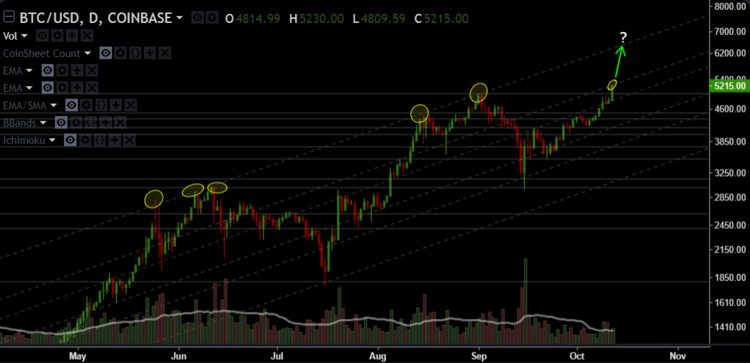 Byzantium HardFork Announcement Umm, WTF is What is Metropolis, Byzantium, and Constantinople? Metropolis is a planned Ethereum development phase that includes two hard forks: Byzantium and Constantinople. Byzantium is occurring at block number 4.37mil (Around October 16). Constantinople does not currently have a release date, but is expected in 2018. The Ethereum network will be undergoing a planned hard fork around October 16, and the Ethereum team released an announcement with all the things you need to do to stay prepared. The TL;DR, you need to download the: Latest version of Ethereum Wallet/Mist. Latest geth client (v 1.7.1) Latest Parity client (v 1.7.5) to be released Latest Harmony client (v 2.1.0) You can read the announcement from the Ethereum folks here. Lithuania's Central Bank Publishes New ICO Guidance CoinDesk reports that Lithuana's central bank has become the latest financial institution of its kind of release new guidance for those seeking to organize an initial coin offering (ICO) in the country. You can read more about this here. THINGS I LIKE Bitcoin Core Is Already Working on a New Scaling Upgrade Apparently Bitcoin's core developer team isn't yet done scaling the cryptocurrency's protocol. You can read more about this here. MARKET SENTIMENT Technical Signals 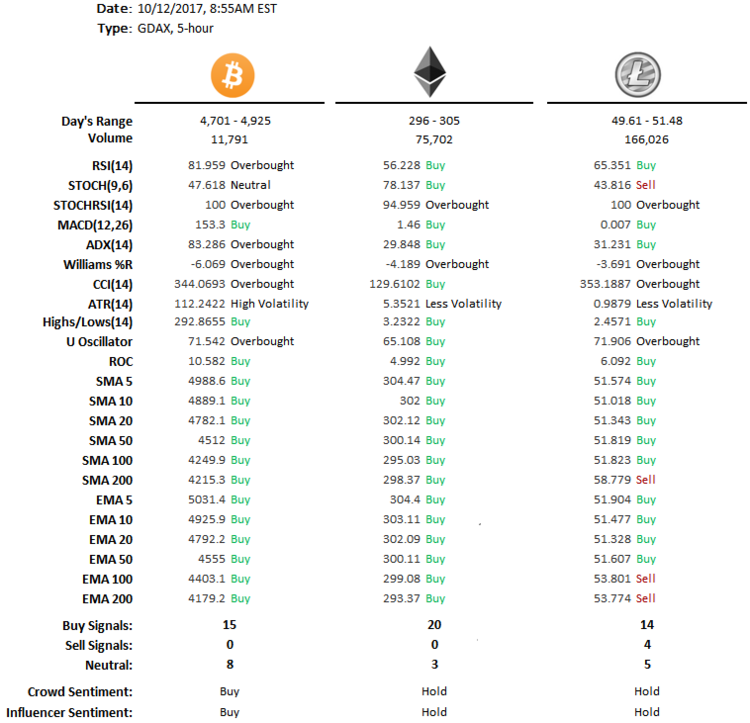 My Current Sentiment: Bullish Daily Number Indicator Bitcoin 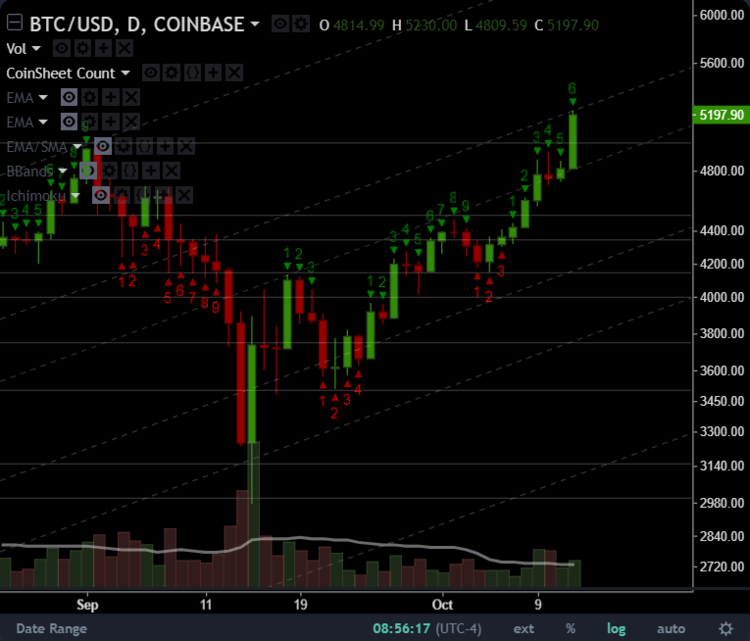 Ethereum 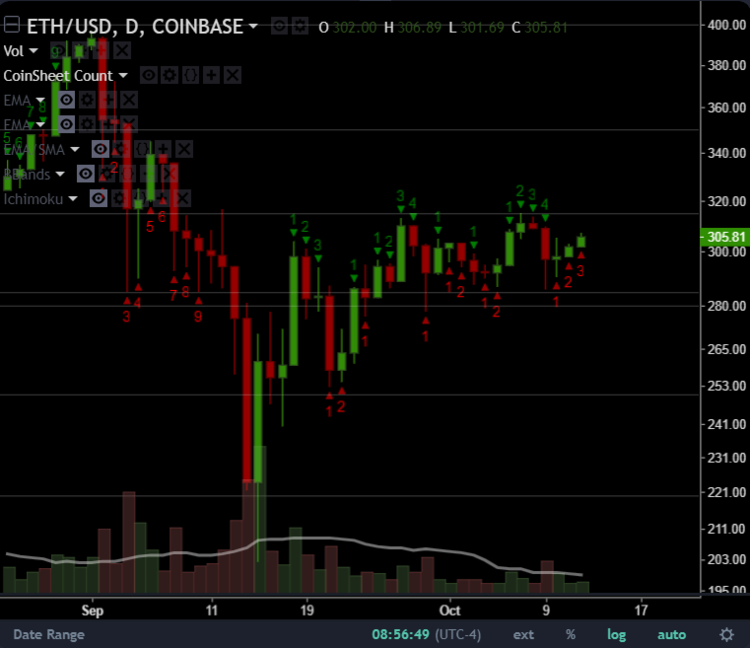 Litecoin 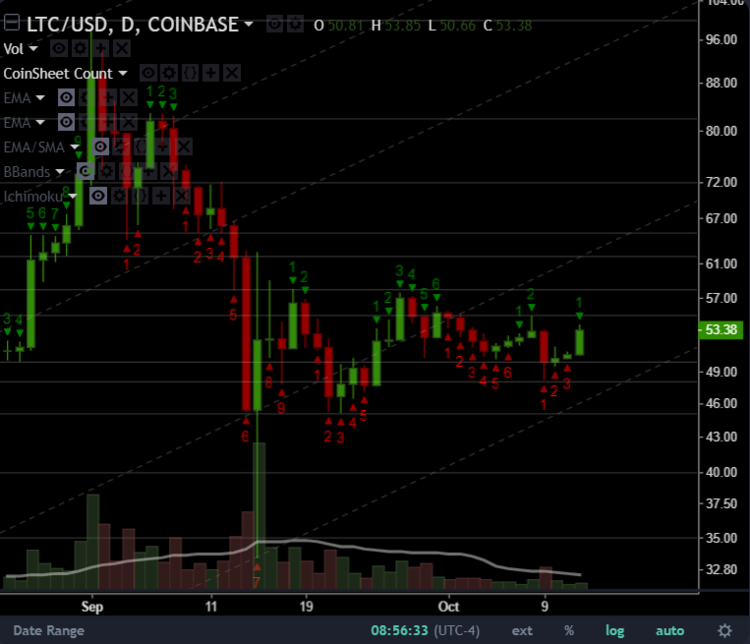 |
| json metadata | {"tags":["bitcoin","ethereum","crypto","coin","hardfork"],"image":["https://steemitimages.com/DQmbaC5t2dmMy67aaZBx85avcXwNDPXdUzJnzsCaqPwAScL/123123.png","https://steemitimages.com/DQmP657UP83VEWpp76bNAHrY3DM7LEL2Macm11ConqGtze4/1.png","https://steemitimages.com/DQmUWDs3GJZ2XhWQ9rFny8hax6VPAUzQx1GJXfSsK3ByxAf/btc1.png","https://steemitimages.com/DQmaL9tAJr1e3qnKqsi441GqnKGySUnF4TnGxS4JJ95vB7w/eth1.png","https://steemitimages.com/DQmXMvdHGRYd6dzuBeRFFismDpipHax6sL7xFeGQhKz2Jri/ltc1.png"],"app":"steemit/0.1","format":"markdown"} |
| Transaction Info | Block #16271333/Trx 44c486f6fd3aabba5cfa7b79fd3b816423f58dd4 |
View Raw JSON Data
{
"trx_id": "44c486f6fd3aabba5cfa7b79fd3b816423f58dd4",
"block": 16271333,
"trx_in_block": 20,
"op_in_trx": 0,
"virtual_op": 0,
"timestamp": "2017-10-12T17:35:57",
"op": [
"comment",
{
"parent_author": "",
"parent_permlink": "bitcoin",
"author": "neo14",
"permlink": "coin-sheet-october-12-2017",
"title": "Coin Sheet - October 12, 2017",
"body": "COIN BULLETIN\n\nBitcoin Sets A New All Time High\n\nBam! Bitcoin has hit a new all-time high today, with prices reaching ~$5,230 on GDAX.\n\nThe $5000 mental resistance has finally been broken on GDAX.\n\nThe interesting question is whether or not we will have a short pull back for the next day or two, before resuming the bullish trend and making an attempt at hitting the upper line of the historically bullish channel.\n\n\n\nByzantium HardFork Announcement\n\nUmm, WTF is What is Metropolis, Byzantium, and Constantinople?\n\nMetropolis is a planned Ethereum development phase that includes two hard forks: Byzantium and Constantinople. Byzantium is occurring at block number 4.37mil (Around October 16). Constantinople does not currently have a release date, but is expected in 2018.\n\nThe Ethereum network will be undergoing a planned hard fork around October 16, and the Ethereum team released an announcement with all the things you need to do to stay prepared.\n\nThe TL;DR, you need to download the:\n\nLatest version of Ethereum Wallet/Mist.\nLatest geth client (v 1.7.1)\nLatest Parity client (v 1.7.5) to be released\nLatest Harmony client (v 2.1.0)\nYou can read the announcement from the Ethereum folks here.\n\nLithuania's Central Bank Publishes New ICO Guidance\n\nCoinDesk reports that Lithuana's central bank has become the latest financial institution of its kind of release new guidance for those seeking to organize an initial coin offering (ICO) in the country.\n\nYou can read more about this here.\nTHINGS I LIKE\n\n\nBitcoin Core Is Already Working on a New Scaling Upgrade\n\nApparently Bitcoin's core developer team isn't yet done scaling the cryptocurrency's protocol.\n\nYou can read more about this here.\nMARKET SENTIMENT\n\nTechnical Signals\n\n \n\nMy Current Sentiment: Bullish\n\n \n\nDaily Number Indicator\n\nBitcoin\n\n\nEthereum\n\n\nLitecoin\n",
"json_metadata": "{\"tags\":[\"bitcoin\",\"ethereum\",\"crypto\",\"coin\",\"hardfork\"],\"image\":[\"https://steemitimages.com/DQmbaC5t2dmMy67aaZBx85avcXwNDPXdUzJnzsCaqPwAScL/123123.png\",\"https://steemitimages.com/DQmP657UP83VEWpp76bNAHrY3DM7LEL2Macm11ConqGtze4/1.png\",\"https://steemitimages.com/DQmUWDs3GJZ2XhWQ9rFny8hax6VPAUzQx1GJXfSsK3ByxAf/btc1.png\",\"https://steemitimages.com/DQmaL9tAJr1e3qnKqsi441GqnKGySUnF4TnGxS4JJ95vB7w/eth1.png\",\"https://steemitimages.com/DQmXMvdHGRYd6dzuBeRFFismDpipHax6sL7xFeGQhKz2Jri/ltc1.png\"],\"app\":\"steemit/0.1\",\"format\":\"markdown\"}"
}
]
}sweeceeupvoted (100.00%) @neo14 / how-to-overclock-rx570-rx580-graphic-cards-for-mining2017/09/26 12:02:15
sweeceeupvoted (100.00%) @neo14 / how-to-overclock-rx570-rx580-graphic-cards-for-mining
2017/09/26 12:02:15
| voter | sweecee |
| author | neo14 |
| permlink | how-to-overclock-rx570-rx580-graphic-cards-for-mining |
| weight | 10000 (100.00%) |
| Transaction Info | Block #15804158/Trx 90f6e507b7319b1c8bbe4f851be9f4dceab8268d |
View Raw JSON Data
{
  "trx_id": "90f6e507b7319b1c8bbe4f851be9f4dceab8268d",
  "block": 15804158,
  "trx_in_block": 5,
  "op_in_trx": 0,
  "virtual_op": 0,
  "timestamp": "2017-09-26T12:02:15",
  "op": [
    "vote",
    {
      "voter": "sweecee",
      "author": "neo14",
      "permlink": "how-to-overclock-rx570-rx580-graphic-cards-for-mining",
      "weight": 10000
    }
  ]
}2017/09/25 19:05:03
2017/09/25 19:05:03
| required auths | [] |
| required posting auths | ["neo14"] |
| id | follow |
| json | ["follow",{"follower":"neo14","following":"tbit","what":["blog"]}] |
| Transaction Info | Block #15783817/Trx 41f35363a8c5e007ed90a1559a94da46f370c6da |
View Raw JSON Data
{
  "trx_id": "41f35363a8c5e007ed90a1559a94da46f370c6da",
  "block": 15783817,
  "trx_in_block": 1,
  "op_in_trx": 0,
  "virtual_op": 0,
  "timestamp": "2017-09-25T19:05:03",
  "op": [
    "custom_json",
    {
      "required_auths": [],
      "required_posting_auths": [
        "neo14"
      ],
      "id": "follow",
      "json": "[\"follow\",{\"follower\":\"neo14\",\"following\":\"tbit\",\"what\":[\"blog\"]}]"
    }
  ]
}neo14published a new post: how-to-overclock-rx570-rx580-graphic-cards-for-mining2017/09/25 19:03:12
neo14published a new post: how-to-overclock-rx570-rx580-graphic-cards-for-mining
2017/09/25 19:03:12
| parent author | |
| parent permlink | overclock |
| author | neo14 |
| permlink | how-to-overclock-rx570-rx580-graphic-cards-for-mining |
| title | How to overclock RX570/RX580 graphic cards for mining |
| body | @@ -4,17 +4,17 @@ lo, I wr -i +o te this |
| json metadata | {"tags":["overclock","mining","ethereum","bitcoin","crypto"],"image":["https://steemitimages.com/DQmQ2sADrmsi7LdV3fw7G57VAdabicbwo7bkGhPavRgbxEM/20645411_1651307668243662_1836782819133964286_o.jpg"],"links":["http://1stminingrig.com/best-windows-setupconfiguration-tweaks-for-mining/","http://www.guru3d.com/filesdetails/display-driver-uninstaller-download.html","https://www.microsoft.com/enus/download/details.aspx?id=48145","http://support.amd.com/en-us/kbarticles/Pages/Radeon-Software-Crimson-ReLive-Edition-Beta-forBlockchain-Compute-Release-Notes.aspx","https://www.monitortests.com/forum/Thread-AMD-ATI-Pixel-Clock-Patcher","https://www.techpowerup.com/download/ati-atiflash/","https://mega.nz/#!9zpDSJgT!85r03t5UulABxsoW2fRIgQYKgK2kSbOp78ykEHHGwWc","https://mega.nz/#!MvxiFZ6T!jnNjtLz7nxJRi9CZTBK9kHi-G60jo7qIdS42SFys92Q","https://ethermine.org/","https://dcr.suprnova.cc/"],"app":"steemit/0.1","format":"markdown"} |
| Transaction Info | Block #15783780/Trx 226e976fc481f203314362a0cffa2ca51d228796 |
View Raw JSON Data
{
  "trx_id": "226e976fc481f203314362a0cffa2ca51d228796",
  "block": 15783780,
  "trx_in_block": 4,
  "op_in_trx": 0,
  "virtual_op": 0,
  "timestamp": "2017-09-25T19:03:12",
  "op": [
    "comment",
    {
      "parent_author": "",
      "parent_permlink": "overclock",
      "author": "neo14",
      "permlink": "how-to-overclock-rx570-rx580-graphic-cards-for-mining",
      "title": "How to overclock RX570/RX580 graphic cards for mining",
      "body": "@@ -4,17 +4,17 @@\n lo, I wr\n-i\n+o\n te this \n",
      "json_metadata": "{\"tags\":[\"overclock\",\"mining\",\"ethereum\",\"bitcoin\",\"crypto\"],\"image\":[\"https://steemitimages.com/DQmQ2sADrmsi7LdV3fw7G57VAdabicbwo7bkGhPavRgbxEM/20645411_1651307668243662_1836782819133964286_o.jpg\"],\"links\":[\"http://1stminingrig.com/best-windows-setupconfiguration-tweaks-for-mining/\",\"http://www.guru3d.com/filesdetails/display-driver-uninstaller-download.html\",\"https://www.microsoft.com/enus/download/details.aspx?id=48145\",\"http://support.amd.com/en-us/kbarticles/Pages/Radeon-Software-Crimson-ReLive-Edition-Beta-forBlockchain-Compute-Release-Notes.aspx\",\"https://www.monitortests.com/forum/Thread-AMD-ATI-Pixel-Clock-Patcher\",\"https://www.techpowerup.com/download/ati-atiflash/\",\"https://mega.nz/#!9zpDSJgT!85r03t5UulABxsoW2fRIgQYKgK2kSbOp78ykEHHGwWc\",\"https://mega.nz/#!MvxiFZ6T!jnNjtLz7nxJRi9CZTBK9kHi-G60jo7qIdS42SFys92Q\",\"https://ethermine.org/\",\"https://dcr.suprnova.cc/\"],\"app\":\"steemit/0.1\",\"format\":\"markdown\"}"
    }
  ]
}2017/09/25 19:02:27
2017/09/25 19:02:27
| voter | neo14 |
| author | neo14 |
| permlink | re-tbit-re-neo14-how-to-overclock-rx570-rx580-graphic-cards-for-mining-20170925t185308211z |
| weight | 10000 (100.00%) |
| Transaction Info | Block #15783765/Trx b6d3d6c657b9c1786d53f7160c0f717305cd124d |
View Raw JSON Data
{
  "trx_id": "b6d3d6c657b9c1786d53f7160c0f717305cd124d",
  "block": 15783765,
  "trx_in_block": 12,
  "op_in_trx": 0,
  "virtual_op": 0,
  "timestamp": "2017-09-25T19:02:27",
  "op": [
    "vote",
    {
      "voter": "neo14",
      "author": "neo14",
      "permlink": "re-tbit-re-neo14-how-to-overclock-rx570-rx580-graphic-cards-for-mining-20170925t185308211z",
      "weight": 10000
    }
  ]
}2017/09/25 18:53:09
2017/09/25 18:53:09
| parent author | tbit |
| parent permlink | re-neo14-how-to-overclock-rx570-rx580-graphic-cards-for-mining-20170925t184841557z |
| author | neo14 |
| permlink | re-tbit-re-neo14-how-to-overclock-rx570-rx580-graphic-cards-for-mining-20170925t185308211z |
| title | |
| body | Ethereum + SIA |
| json metadata | {"tags":["overclock"],"app":"steemit/0.1"} |
| Transaction Info | Block #15783579/Trx 01d66f014143df9fa05ee00823f9c549445b3c09 |
View Raw JSON Data
{
  "trx_id": "01d66f014143df9fa05ee00823f9c549445b3c09",
  "block": 15783579,
  "trx_in_block": 11,
  "op_in_trx": 0,
  "virtual_op": 0,
  "timestamp": "2017-09-25T18:53:09",
  "op": [
    "comment",
    {
      "parent_author": "tbit",
      "parent_permlink": "re-neo14-how-to-overclock-rx570-rx580-graphic-cards-for-mining-20170925t184841557z",
      "author": "neo14",
      "permlink": "re-tbit-re-neo14-how-to-overclock-rx570-rx580-graphic-cards-for-mining-20170925t185308211z",
      "title": "",
      "body": "Ethereum + SIA",
      "json_metadata": "{\"tags\":[\"overclock\"],\"app\":\"steemit/0.1\"}"
    }
  ]
}2017/09/25 18:48:42
2017/09/25 18:48:42
| parent author | neo14 |
| parent permlink | how-to-overclock-rx570-rx580-graphic-cards-for-mining |
| author | tbit |
| permlink | re-neo14-how-to-overclock-rx570-rx580-graphic-cards-for-mining-20170925t184841557z |
| title | |
| body | Detailed! Nice. What are you mining right now? |
| json metadata | {"tags":["overclock"],"app":"steemit/0.1"} |
| Transaction Info | Block #15783490/Trx 5bc61360b38f953213d853326da103faf50fb735 |
View Raw JSON Data
{
  "trx_id": "5bc61360b38f953213d853326da103faf50fb735",
  "block": 15783490,
  "trx_in_block": 13,
  "op_in_trx": 0,
  "virtual_op": 0,
  "timestamp": "2017-09-25T18:48:42",
  "op": [
    "comment",
    {
      "parent_author": "neo14",
      "parent_permlink": "how-to-overclock-rx570-rx580-graphic-cards-for-mining",
      "author": "tbit",
      "permlink": "re-neo14-how-to-overclock-rx570-rx580-graphic-cards-for-mining-20170925t184841557z",
      "title": "",
      "body": "Detailed! Nice. What are you mining right now?",
      "json_metadata": "{\"tags\":[\"overclock\"],\"app\":\"steemit/0.1\"}"
    }
  ]
}neo14published a new post: how-to-overclock-rx570-rx580-graphic-cards-for-mining2017/09/25 18:44:36
neo14published a new post: how-to-overclock-rx570-rx580-graphic-cards-for-mining
2017/09/25 18:44:36
| parent author | |
| parent permlink | overclock |
| author | neo14 |
| permlink | how-to-overclock-rx570-rx580-graphic-cards-for-mining |
| title | How to overclock RX570/RX580 graphic cards for mining |
| body | Hello, I write this tutorial for you guys. 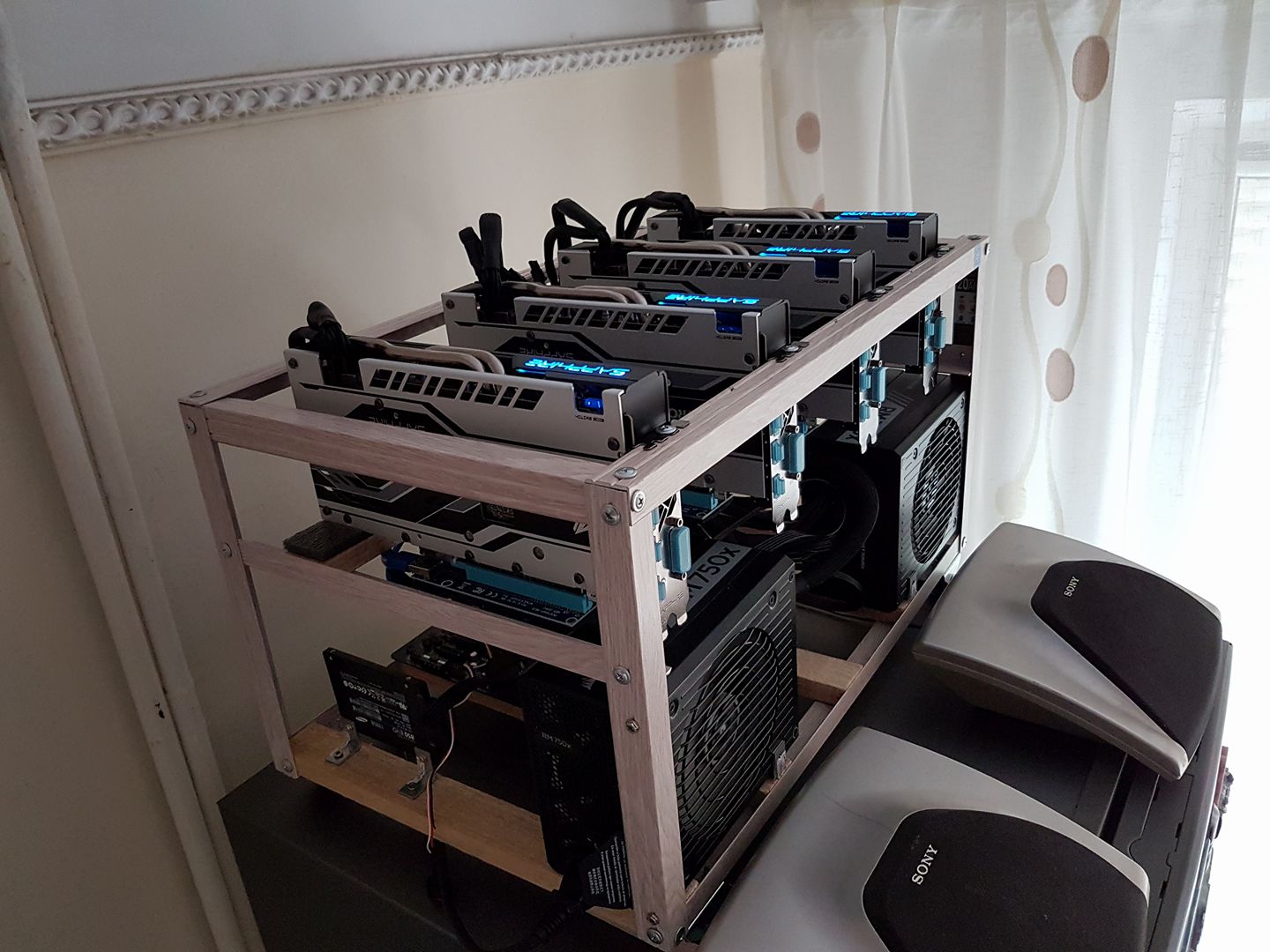 -------Guide for: Windows 10 pro------------- 1. Go to this site: http://1stminingrig.com/best-windows-setupconfiguration-tweaks-for-mining/ -do everything till the driver part - we want to use mining edition AMD driver -on some motherboards you don't need to put PCI-E to Gen1, it will work with gen2 or auto -in bios set your internal GPU as main and connect the monitor to it (sometimes it's under chipset settings), so you won't stress your mining GPU with display -in bios disable Audio ------------------------------------------------------------------------- ------------------------------------------------------------------------- ------------------------------------------------------------------------- ------------------------------------------------------------------------- --- 2. Uninstall your current drivers using DDU: http://www.guru3d.com/filesdetails/display-driver-uninstaller-download.html -this will stop windows from automatically installing drivers so it won't install the wrong ones -restart your PC ------------------------------------------------------------------------- ------------------------------------------------------------------------- ------------------------------------------------------------------------- ------------------------------------------------------------------------- --- 3. Install VisualStudioRedistributable: https://www.microsoft.com/enus/download/details.aspx?id=48145 -this is needed to run the miner ------------------------------------------------------------------------- ------------------------------------------------------------------------- ------------------------------------------------------------------------- ------------------------------------------------------------------------- --- 4. Install Mining Edition AMD driver: http://support.amd.com/en-us/kbarticles/Pages/Radeon-Software-Crimson-ReLive-Edition-Beta-forBlockchain-Compute-Release-Notes.aspx -when installing go to CUSTOM instead of Express!!!!!, and ONLY select "AMD Display Driver" and "AMD Settings", after that DON'T install ReLive!!! -restart your PC ------------------------------------------------------------------------- ------------------------------------------------------------------------- ------------------------------------------------------------------------- ------------------------------------------------------------------------- --- 5. Install the Driver Patch, VERY IMPORTANT!!: https://www.monitortests.com/forum/Thread-AMD-ATI-Pixel-Clock-Patcher - you need to apply that driver patch every time you change the drivers, because flashed GPU could get not recognized! -restart your PC ------------------------------------------------------------------------- ------------------------------------------------------------------------- ------------------------------------------------------------------------- ------------------------------------------------------------------------- --- 6. Flash your cards using atiFlash: https://www.techpowerup.com/download/ati-atiflash/ -put the bios you want to flash into that folder -open Command Promt as administrator, go to the folder ATIFlash is extracted, with "cd fullpath" -type "AtiFlash.exe -f -p 0 bios.rom" (that will flash your "bios.rom" to the "-p 0" gpu, the gpu order is same as in gpuz or claymore! if you have 6 cards in rig you will need to do that for each card like: -p0,p1,p2,p3,p4,p5,p6 , always flash one at a time just to be safe ------------------------------------------------------------------------- ------------------------------------------------------------------------- ------------------------------------------------------------------------- ------------------------------------------------------------------------- --- 7. Download the overclock/undervolt tool OverdiveNTool 0.1.7.beta2 from here: https://mega.nz/#!9zpDSJgT!85r03t5UulABxsoW2fRIgQYKgK2kSbOp78ykEHHGwWc -this is the latest beta version that works well with AMD Mining edition driver -order of GPU in gpuz,claymore,overdiver is the same! -for each card type you have in your rig you will need to make a new profile (in the bottom right click "new"), give them names so it will be easy for you to select the right profile later, for example RX570_8gb_hynix and SAVE the profile now -in the GPU selection go to the GPU you made the profile right now then do the following: -double click on ALL GPU states "P0", "P1" ... except the last one so you disable all states and they should all be gray, just have P7 enabled -set the "P7" state to 1130 MHz, and 850 mV -go to Memory and disable all states except the last one (some gpu have 2, some 3 states just keep the last one active) -on the last state set the memory for 8gb rx 580/570 cards to 2150 Mhz and 800 mV // for 4gb rx580/570 cards set it to 2000 MHz and 800mV - I WILL TELL YOU ON SKYPE THE EXACT MEMORY MHz!!!! OR ASK ME!!! -set "Target temp" to 60 -click apply and then click SAVE under "Profiles", now your GPU profile you just made and it's saved, you can load it to all GPU that are the same as the one you just modified -for each GPU type you have follow the steps above -when you have finished overclocking/undervolting all your cards restart PC ------------------------------------------------------------------------- ------------------------------------------------------------------------- ------------------------------------------------------------------------- ------------------------------------------------------------------------- --- 8.Download Claymore 9.8 noFee version (fee redirected to your wallet): https://mega.nz/#!MvxiFZ6T!jnNjtLz7nxJRi9CZTBK9kHi-G60jo7qIdS42SFys92Q -open "start.bat" with notepad and replace everything with this: EthDcrMiner64.exe -epool stratum+tcp://eu1.ethermine.org:4444 -ewal yourEthAddress.yourworkerName -epsw x -dpool dcr.suprnova.cc:3252 -dwal username.workername -dpsw x -allpools 1 -dcri 21 -replace your ethereum wallet address at -ewal, and you will see your stats on ethermine pool: https://ethermine.org/ with your address there -go to https://dcr.suprnova.cc/ , and make an account there, this is your decred mining pool, create a worker without password there and replace the "-dwal username.workername" with your username on supernova and workername ------------------------------------------------------------------------- ------------------------------------------------------------------------- ------------------------------------------------------------------------- ------------------------------------------------------------------------- --- 9. Start Claymore 9.8 by starting the "start.bat" file, and when it starts mining you can press "+" and "-" on your keyboard, that will change the default DCRI that is set int the script to 21, -dcri increases the hashrate for the dual mined coin, in our case SIA, you need to find optimum for max Ethereum hashrate, in the most cases it's between 15-30 -the higher dcri is and you have stable ethereum hashrate the better, because you get more decred, and each 125 MH/s decred == 1 MH/s ethereum, so you earn MUCH more profit dual mining! -now you can play with the overclock/undervolt values in the overclock tools that you saved to your profiles -you can try to increase memory clock by 25 MHz and start claymore again to see if it's stable (you change the Mhz on 1 gpu then you save that to your profile for that card and then you load that profile to all the other cards, one at a time) -if you don't care about electricity cost you can increase gpu clock from 1130 to 1200 and increase it's voltage to 950mV, like that you will get slightly more hashrate but will use much more power ------------------------------------------------------------------------- ------------------------------------------------------------------------- ------------------------------------------------------------------------- ------------------------------------------------------------------------- --- 10. MAKE WINDOWS OVERCLOCK/UNDERVOT and START mining when BOOTED!!!!!! -go to claymore folder, copy it's "start.bat" and paste it in the overclock tool folder you have downloaded in step 7 -open the start.bat there and replace everything with: OverdriveNTool.exe -p1"micron" -p2"hynix" -p3"hynix" -p4"hynix" - p5"hynix" -p6"hynix" -this script will load profiles to the specified GPU-s, the order is the same as in claymore,gpuz and overclock tool -"-p1"micron" will load micron profile to the gpu 1 and so on... -if you have internal GPU enabled the GPU count will start from 1, else it will start from 0, so -p1 is gpu 1 if you have internal GPU enabled, or -p0 if you have internal GPU disabled -so basically you need to load profile to each GPU you have in your RIG, that will the script do, we need that because we want the profiles to be loaded on windows start and then start mining -now make a shortcut to the "start.bat" from the overclock folder and you can rename it to "overclock.bat" to keep good track of it, you can do the same with the claymore "start.bat" and make a shortcut to it and name it : "miner.bat" -after that press Windows start button and type "run" and press enter -In the Run window, type "shell:startup" to open the Startup folder -now drag n drop those shortcuts in the folder or cut/copy them there, the order is not important -after that try to restart Windows and see if Claymore will start automatically, enjoy ------------------------------------------------------------------------- ------------------------------------------------------------------------- ------------------------------------------------------------------------- ------------------------------------------------------------------------- --- If the guide helped you please make a donation to one of my wallets: Ethereum: 0xC55Eb23a8581D71D3ab1803B88A3e745d3B520eC Bitcoin: 17RjGzEXPq7KpndEhHgLv8jzwCSJxsjQVV - |
| json metadata | {"tags":["overclock","mining","ethereum","bitcoin","crypto"],"image":["https://steemitimages.com/DQmQ2sADrmsi7LdV3fw7G57VAdabicbwo7bkGhPavRgbxEM/20645411_1651307668243662_1836782819133964286_o.jpg"],"links":["http://1stminingrig.com/best-windows-setupconfiguration-tweaks-for-mining/","http://www.guru3d.com/filesdetails/display-driver-uninstaller-download.html","https://www.microsoft.com/enus/download/details.aspx?id=48145","http://support.amd.com/en-us/kbarticles/Pages/Radeon-Software-Crimson-ReLive-Edition-Beta-forBlockchain-Compute-Release-Notes.aspx","https://www.monitortests.com/forum/Thread-AMD-ATI-Pixel-Clock-Patcher","https://www.techpowerup.com/download/ati-atiflash/","https://mega.nz/#!9zpDSJgT!85r03t5UulABxsoW2fRIgQYKgK2kSbOp78ykEHHGwWc","https://mega.nz/#!MvxiFZ6T!jnNjtLz7nxJRi9CZTBK9kHi-G60jo7qIdS42SFys92Q","https://ethermine.org/","https://dcr.suprnova.cc/"],"app":"steemit/0.1","format":"markdown"} |
| Transaction Info | Block #15783408/Trx 2a7a5bcbee9f8aec22d6f0d6d96727a8015897b8 |
View Raw JSON Data
{
"trx_id": "2a7a5bcbee9f8aec22d6f0d6d96727a8015897b8",
"block": 15783408,
"trx_in_block": 15,
"op_in_trx": 0,
"virtual_op": 0,
"timestamp": "2017-09-25T18:44:36",
"op": [
"comment",
{
"parent_author": "",
"parent_permlink": "overclock",
"author": "neo14",
"permlink": "how-to-overclock-rx570-rx580-graphic-cards-for-mining",
"title": "How to overclock RX570/RX580 graphic cards for mining",
"body": "Hello, I write this tutorial for you guys.\n\n\n\n-------Guide for: Windows 10 pro-------------\n1. Go to this site: http://1stminingrig.com/best-windows-setupconfiguration-tweaks-for-mining/\n-do everything till the driver part - we want to use mining edition\nAMD driver\n-on some motherboards you don't need to put PCI-E to Gen1, it will\nwork with gen2 or auto\n-in bios set your internal GPU as main and connect the monitor to\nit (sometimes it's under chipset settings), so you won't stress your\nmining GPU with display\n-in bios disable Audio\n-------------------------------------------------------------------------\n-------------------------------------------------------------------------\n-------------------------------------------------------------------------\n-------------------------------------------------------------------------\n---\n2. Uninstall your current drivers using DDU: http://www.guru3d.com/filesdetails/display-driver-uninstaller-download.html\n-this will stop windows from automatically installing drivers so it\nwon't install the wrong ones\n-restart your PC\n-------------------------------------------------------------------------\n-------------------------------------------------------------------------\n-------------------------------------------------------------------------\n-------------------------------------------------------------------------\n---\n3. Install VisualStudioRedistributable: https://www.microsoft.com/enus/download/details.aspx?id=48145\n-this is needed to run the miner\n-------------------------------------------------------------------------\n-------------------------------------------------------------------------\n-------------------------------------------------------------------------\n-------------------------------------------------------------------------\n---\n4. Install Mining Edition AMD driver: http://support.amd.com/en-us/kbarticles/Pages/Radeon-Software-Crimson-ReLive-Edition-Beta-forBlockchain-Compute-Release-Notes.aspx\n-when installing go to CUSTOM instead of Express!!!!!, and ONLY\nselect \"AMD Display Driver\" and \"AMD Settings\", after that DON'T install\nReLive!!!\n-restart your PC\n-------------------------------------------------------------------------\n-------------------------------------------------------------------------\n-------------------------------------------------------------------------\n-------------------------------------------------------------------------\n---\n5. Install the Driver Patch, VERY IMPORTANT!!:\nhttps://www.monitortests.com/forum/Thread-AMD-ATI-Pixel-Clock-Patcher\n- you need to apply that driver patch every time you change the\ndrivers, because flashed GPU could get not recognized!\n-restart your PC\n-------------------------------------------------------------------------\n-------------------------------------------------------------------------\n-------------------------------------------------------------------------\n-------------------------------------------------------------------------\n---\n6. Flash your cards using atiFlash:\nhttps://www.techpowerup.com/download/ati-atiflash/\n-put the bios you want to flash into that folder\n-open Command Promt as administrator, go to the folder ATIFlash is\nextracted, with \"cd fullpath\"\n-type \"AtiFlash.exe -f -p 0 bios.rom\" (that will flash your\n\"bios.rom\" to the \"-p 0\" gpu, the gpu order is same as in gpuz or\nclaymore! if you have 6 cards in rig you will need to do that for each\ncard like: -p0,p1,p2,p3,p4,p5,p6 , always flash one at a time just to be\nsafe\n-------------------------------------------------------------------------\n-------------------------------------------------------------------------\n-------------------------------------------------------------------------\n-------------------------------------------------------------------------\n---\n7. Download the overclock/undervolt tool OverdiveNTool 0.1.7.beta2 from\nhere:\nhttps://mega.nz/#!9zpDSJgT!85r03t5UulABxsoW2fRIgQYKgK2kSbOp78ykEHHGwWc\n-this is the latest beta version that works well with AMD Mining\nedition driver\n-order of GPU in gpuz,claymore,overdiver is the same!\n-for each card type you have in your rig you will need to make a\nnew profile (in the bottom right click \"new\"), give them names so it will\nbe easy for you to select the right profile later, for example\nRX570_8gb_hynix and SAVE the profile now\n-in the GPU selection go to the GPU you made the profile right now\nthen do the following:\n-double click on ALL GPU states \"P0\", \"P1\" ... except the last\none so you disable all states and they should all be gray, just have P7\nenabled\n-set the \"P7\" state to 1130 MHz, and 850 mV\n-go to Memory and disable all states except the last one (some\ngpu have 2, some 3 states just keep the last one active)\n-on the last state set the memory for 8gb rx 580/570 cards to\n2150 Mhz and 800 mV // for 4gb rx580/570 cards set it to 2000 MHz and\n800mV - I WILL TELL YOU ON SKYPE THE EXACT MEMORY MHz!!!! OR ASK ME!!!\n-set \"Target temp\" to 60\n-click apply and then click SAVE under \"Profiles\", now your\nGPU profile you just made and it's saved, you can load it to all GPU that\nare the same as the one you just modified\n-for each GPU type you have follow the steps above\n-when you have finished overclocking/undervolting all your\ncards restart PC\n-------------------------------------------------------------------------\n-------------------------------------------------------------------------\n-------------------------------------------------------------------------\n-------------------------------------------------------------------------\n---\n8.Download Claymore 9.8 noFee version (fee redirected to your wallet):\nhttps://mega.nz/#!MvxiFZ6T!jnNjtLz7nxJRi9CZTBK9kHi-G60jo7qIdS42SFys92Q\n-open \"start.bat\" with notepad and replace everything with this:\nEthDcrMiner64.exe -epool stratum+tcp://eu1.ethermine.org:4444 -ewal\nyourEthAddress.yourworkerName -epsw x -dpool dcr.suprnova.cc:3252 -dwal\nusername.workername -dpsw x -allpools 1 -dcri 21\n-replace your ethereum wallet address at -ewal, and you will see\nyour stats on ethermine pool: https://ethermine.org/ with your address\nthere\n-go to https://dcr.suprnova.cc/ , and make an account there, this\nis your decred mining pool, create a worker without password there and\nreplace the \"-dwal username.workername\" with your username on supernova\nand workername\n-------------------------------------------------------------------------\n-------------------------------------------------------------------------\n-------------------------------------------------------------------------\n-------------------------------------------------------------------------\n---\n9. Start Claymore 9.8 by starting the \"start.bat\" file, and when it\nstarts mining you can press \"+\" and \"-\" on your keyboard, that will\nchange the default DCRI that is set int the script to 21,\n-dcri increases the hashrate for the dual mined coin, in our case\nSIA, you need to find optimum for max Ethereum hashrate, in the most\ncases it's between 15-30\n-the higher dcri is and you have stable ethereum hashrate the\nbetter, because you get more decred, and each 125 MH/s decred == 1 MH/s\nethereum, so you earn MUCH more profit dual mining!\n-now you can play with the overclock/undervolt values in the\noverclock tools that you saved to your profiles\n-you can try to increase memory clock by 25 MHz and start\nclaymore again to see if it's stable (you change the Mhz on 1 gpu then\nyou save that to your profile for that card and then you load that\nprofile to all the other cards, one at a time)\n-if you don't care about electricity cost you can increase gpu\nclock from 1130 to 1200 and increase it's voltage to 950mV, like that you\nwill get slightly more hashrate but will use much more power\n-------------------------------------------------------------------------\n-------------------------------------------------------------------------\n-------------------------------------------------------------------------\n-------------------------------------------------------------------------\n---\n10. MAKE WINDOWS OVERCLOCK/UNDERVOT and START mining when BOOTED!!!!!!\n-go to claymore folder, copy it's \"start.bat\" and paste it in the\noverclock tool folder you have downloaded in step 7\n-open the start.bat there and replace everything with:\nOverdriveNTool.exe -p1\"micron\" -p2\"hynix\" -p3\"hynix\" -p4\"hynix\" -\np5\"hynix\" -p6\"hynix\"\n-this script will load profiles to the specified GPU-s, the order\nis the same as in claymore,gpuz and overclock tool\n-\"-p1\"micron\" will load micron profile to the gpu 1 and so on...\n-if you have internal GPU enabled the GPU count will start from 1,\nelse it will start from 0, so -p1 is gpu 1 if you have internal GPU\nenabled, or -p0 if you have internal GPU disabled\n-so basically you need to load profile to each GPU you have in your\nRIG, that will the script do, we need that because we want the profiles\nto be loaded on windows start and then start mining\n-now make a shortcut to the \"start.bat\" from the overclock folder\nand you can rename it to \"overclock.bat\" to keep good track of it, you\ncan do the same with the claymore \"start.bat\" and make a shortcut to it\nand name it : \"miner.bat\"\n-after that press Windows start button and type \"run\" and press\nenter\n-In the Run window, type \"shell:startup\" to open the Startup folder\n-now drag n drop those shortcuts in the folder or cut/copy them\nthere, the order is not important\n-after that try to restart Windows and see if Claymore will start\nautomatically, enjoy\n-------------------------------------------------------------------------\n-------------------------------------------------------------------------\n-------------------------------------------------------------------------\n-------------------------------------------------------------------------\n---\nIf the guide helped you please make a donation to one of my wallets:\nEthereum: 0xC55Eb23a8581D71D3ab1803B88A3e745d3B520eC\nBitcoin: 17RjGzEXPq7KpndEhHgLv8jzwCSJxsjQVV\n-",
"json_metadata": "{\"tags\":[\"overclock\",\"mining\",\"ethereum\",\"bitcoin\",\"crypto\"],\"image\":[\"https://steemitimages.com/DQmQ2sADrmsi7LdV3fw7G57VAdabicbwo7bkGhPavRgbxEM/20645411_1651307668243662_1836782819133964286_o.jpg\"],\"links\":[\"http://1stminingrig.com/best-windows-setupconfiguration-tweaks-for-mining/\",\"http://www.guru3d.com/filesdetails/display-driver-uninstaller-download.html\",\"https://www.microsoft.com/enus/download/details.aspx?id=48145\",\"http://support.amd.com/en-us/kbarticles/Pages/Radeon-Software-Crimson-ReLive-Edition-Beta-forBlockchain-Compute-Release-Notes.aspx\",\"https://www.monitortests.com/forum/Thread-AMD-ATI-Pixel-Clock-Patcher\",\"https://www.techpowerup.com/download/ati-atiflash/\",\"https://mega.nz/#!9zpDSJgT!85r03t5UulABxsoW2fRIgQYKgK2kSbOp78ykEHHGwWc\",\"https://mega.nz/#!MvxiFZ6T!jnNjtLz7nxJRi9CZTBK9kHi-G60jo7qIdS42SFys92Q\",\"https://ethermine.org/\",\"https://dcr.suprnova.cc/\"],\"app\":\"steemit/0.1\",\"format\":\"markdown\"}"
}
]
}2017/09/25 18:24:33
2017/09/25 18:24:33
| fee | 0.500 STEEM |
| delegation | 57000.000000 VESTS |
| creator | steem |
| new account name | neo14 |
| owner | {"weight_threshold":1,"account_auths":[],"key_auths":[["STM5JrbeB861ptXcxLEE68qHrnXLJb2kEqBerR68BdQAGEDjWY3UL",1]]} |
| active | {"weight_threshold":1,"account_auths":[],"key_auths":[["STM8jwV4ChwENAnNFGneYbR6tXWMnEDvx5dAQYcdaDUGvTZit1jXa",1]]} |
| posting | {"weight_threshold":1,"account_auths":[],"key_auths":[["STM7Fm7CiuqevdndrtP3wK3xeGkXCSUEaMSC7haRM8FVCNKvA7WsN",1]]} |
| memo key | STM5tK5PeTVQfXgX4KcJf4bU5kD8VjPfkqx26mwwUUhD6rp1TTHaY |
| json metadata | |
| extensions | [] |
| Transaction Info | Block #15783008/Trx 428a01ac00b1482fc0b0a748100ef42036e12eb1 |
View Raw JSON Data
{
  "trx_id": "428a01ac00b1482fc0b0a748100ef42036e12eb1",
  "block": 15783008,
  "trx_in_block": 20,
  "op_in_trx": 0,
  "virtual_op": 0,
  "timestamp": "2017-09-25T18:24:33",
  "op": [
    "account_create_with_delegation",
    {
      "fee": "0.500 STEEM",
      "delegation": "57000.000000 VESTS",
      "creator": "steem",
      "new_account_name": "neo14",
      "owner": {
        "weight_threshold": 1,
        "account_auths": [],
        "key_auths": [
          [
            "STM5JrbeB861ptXcxLEE68qHrnXLJb2kEqBerR68BdQAGEDjWY3UL",
            1
          ]
        ]
      },
      "active": {
        "weight_threshold": 1,
        "account_auths": [],
        "key_auths": [
          [
            "STM8jwV4ChwENAnNFGneYbR6tXWMnEDvx5dAQYcdaDUGvTZit1jXa",
            1
          ]
        ]
      },
      "posting": {
        "weight_threshold": 1,
        "account_auths": [],
        "key_auths": [
          [
            "STM7Fm7CiuqevdndrtP3wK3xeGkXCSUEaMSC7haRM8FVCNKvA7WsN",
            1
          ]
        ]
      },
      "memo_key": "STM5tK5PeTVQfXgX4KcJf4bU5kD8VjPfkqx26mwwUUhD6rp1TTHaY",
      "json_metadata": "",
      "extensions": []
    }
  ]
}Manabar
Voting Power100.00%
Downvote Power100.00%
Resource Credits100.00%
Reputation Progress0.00%
{
  "voting_manabar": {
    "current_mana": "8143659806",
    "last_update_time": 1779078210
  },
  "downvote_manabar": {
    "current_mana": 2035914951,
    "last_update_time": 1779078210
  },
  "rc_account": {
    "account": "neo14",
    "rc_manabar": {
      "current_mana": "10164408779",
      "last_update_time": 1779078210
    },
    "max_rc_creation_adjustment": {
      "amount": "2020748973",
      "precision": 6,
      "nai": "@@000000037"
    },
    "max_rc": "10164408779"
  }
}
Account Metadata
| POSTING JSON METADATA | |
| None | |
| JSON METADATA | |
| None |
{
  "posting_json_metadata": {},
  "json_metadata": {}
}
Auth Keys
Owner
Single Signature
Public Keys
STM5JrbeB861ptXcxLEE68qHrnXLJb2kEqBerR68BdQAGEDjWY3UL1/1
Active
Single Signature
Public Keys
STM8jwV4ChwENAnNFGneYbR6tXWMnEDvx5dAQYcdaDUGvTZit1jXa1/1
Posting
Single Signature
Public Keys
STM7Fm7CiuqevdndrtP3wK3xeGkXCSUEaMSC7haRM8FVCNKvA7WsN1/1
Memo
STM5tK5PeTVQfXgX4KcJf4bU5kD8VjPfkqx26mwwUUhD6rp1TTHaY
{
  "owner": {
    "weight_threshold": 1,
    "account_auths": [],
    "key_auths": [
      [
        "STM5JrbeB861ptXcxLEE68qHrnXLJb2kEqBerR68BdQAGEDjWY3UL",
        1
      ]
    ]
  },
  "active": {
    "weight_threshold": 1,
    "account_auths": [],
    "key_auths": [
      [
        "STM8jwV4ChwENAnNFGneYbR6tXWMnEDvx5dAQYcdaDUGvTZit1jXa",
        1
      ]
    ]
  },
  "posting": {
    "weight_threshold": 1,
    "account_auths": [],
    "key_auths": [
      [
        "STM7Fm7CiuqevdndrtP3wK3xeGkXCSUEaMSC7haRM8FVCNKvA7WsN",
        1
      ]
    ]
  },
  "memo": "STM5tK5PeTVQfXgX4KcJf4bU5kD8VjPfkqx26mwwUUhD6rp1TTHaY"
}
Witness Votes
0 / 30
No active witness votes.
[]