

VOTING POWER100.00%
DOWNVOTE POWER100.00%
RESOURCE CREDITS100.00%
REPUTATION PROGRESS0.00%
Net Worth
0.035USD
STEEM
0.004STEEM
SBD
0.000SBD
Effective Power
5.001SP
├── Own SP
0.636SP
└── Incoming DelegationsDeleg
+4.366SP
Detailed Balance
| STEEM | ||
| balance | 0.004STEEM | STEEM |
| market_balance | 0.000STEEM | STEEM |
| savings_balance | 0.000STEEM | STEEM |
| reward_steem_balance | 0.000STEEM | STEEM |
| STEEM POWER | ||
| Own SP | 0.636SP | SP |
| Delegated Out | 0.000SP | SP |
| Delegation In | 4.366SP | SP |
| Effective Power | 5.001SP | SP |
| Reward SP (pending) | 0.000SP | SP |
| SBD | ||
| sbd_balance | 0.000SBD | SBD |
| sbd_conversions | 0.000SBD | SBD |
| sbd_market_balance | 0.000SBD | SBD |
| savings_sbd_balance | 0.000SBD | SBD |
| reward_sbd_balance | 0.000SBD | SBD |
{
  "balance": "0.004 STEEM",
  "savings_balance": "0.000 STEEM",
  "reward_steem_balance": "0.000 STEEM",
  "vesting_shares": "1034.853022 VESTS",
  "delegated_vesting_shares": "0.000000 VESTS",
  "received_vesting_shares": "7108.806784 VESTS",
  "sbd_balance": "0.000 SBD",
  "savings_sbd_balance": "0.000 SBD",
  "reward_sbd_balance": "0.000 SBD",
  "conversions": []
}
Account Info
| name | lotusnotesexport |
| id | 215795 |
| rank | 751,938 |
| reputation | 84854363 |
| created | 2017-06-23T05:13:09 |
| recovery_account | steem |
| proxy | None |
| post_count | 9 |
| comment_count | 0 |
| lifetime_vote_count | 0 |
| witnesses_voted_for | 0 |
| last_post | 2023-05-09T11:27:18 |
| last_root_post | 2023-05-09T11:27:18 |
| last_vote_time | 2017-06-23T05:34:00 |
| proxied_vsf_votes | 0, 0, 0, 0 |
| can_vote | 1 |
| voting_power | 0 |
| delayed_votes | 0 |
| balance | 0.004 STEEM |
| savings_balance | 0.000 STEEM |
| sbd_balance | 0.000 SBD |
| savings_sbd_balance | 0.000 SBD |
| vesting_shares | 1034.853022 VESTS |
| delegated_vesting_shares | 0.000000 VESTS |
| received_vesting_shares | 7108.806784 VESTS |
| reward_vesting_balance | 0.000000 VESTS |
| vesting_balance | 0.000 STEEM |
| vesting_withdraw_rate | 0.000000 VESTS |
| next_vesting_withdrawal | 1969-12-31T23:59:59 |
| withdrawn | 0 |
| to_withdraw | 0 |
| withdraw_routes | 0 |
| savings_withdraw_requests | 0 |
| last_account_recovery | 1970-01-01T00:00:00 |
| reset_account | null |
| last_owner_update | 1970-01-01T00:00:00 |
| last_account_update | 2020-06-16T11:45:21 |
| mined | No |
| sbd_seconds | 0 |
| sbd_last_interest_payment | 1970-01-01T00:00:00 |
| savings_sbd_last_interest_payment | 1970-01-01T00:00:00 |
{
  "active": {
    "account_auths": [],
    "key_auths": [
      [
        "STM7h7DSGq47a2R65fxVB7FxaS2gCtiHkApazqHARuez6ec4c9o9W",
        1
      ]
    ],
    "weight_threshold": 1
  },
  "balance": "0.004 STEEM",
  "can_vote": true,
  "comment_count": 0,
  "created": "2017-06-23T05:13:09",
  "curation_rewards": 0,
  "delegated_vesting_shares": "0.000000 VESTS",
  "downvote_manabar": {
    "current_mana": 2035914951,
    "last_update_time": 1779073530
  },
  "guest_bloggers": [],
  "id": 215795,
  "json_metadata": "",
  "last_account_recovery": "1970-01-01T00:00:00",
  "last_account_update": "2020-06-16T11:45:21",
  "last_owner_update": "1970-01-01T00:00:00",
  "last_post": "2023-05-09T11:27:18",
  "last_root_post": "2023-05-09T11:27:18",
  "last_vote_time": "2017-06-23T05:34:00",
  "lifetime_vote_count": 0,
  "market_history": [],
  "memo_key": "STM67hq3UjHhHzvayBWrRTwAfA2NeAXtxQJj9qTG2aEbPkMPFkWNr",
  "mined": false,
  "name": "lotusnotesexport",
  "next_vesting_withdrawal": "1969-12-31T23:59:59",
  "other_history": [],
  "owner": {
    "account_auths": [],
    "key_auths": [
      [
        "STM7NXFN68ZaJJr3yWgkZu1XWwQmXh2E5STG3NEFD84djFSpn8fJY",
        1
      ]
    ],
    "weight_threshold": 1
  },
  "pending_claimed_accounts": 0,
  "post_bandwidth": 0,
  "post_count": 9,
  "post_history": [],
  "posting": {
    "account_auths": [
      [
        "busy.app",
        1
      ]
    ],
    "key_auths": [
      [
        "STM5hEnA2YBdrWHnvs6VGBzpx7aNGSuQTnVgjf5TvdyZG9rb28npz",
        1
      ]
    ],
    "weight_threshold": 1
  },
  "posting_json_metadata": "",
  "posting_rewards": 0,
  "proxied_vsf_votes": [
    0,
    0,
    0,
    0
  ],
  "proxy": "",
  "received_vesting_shares": "7108.806784 VESTS",
  "recovery_account": "steem",
  "reputation": 84854363,
  "reset_account": "null",
  "reward_sbd_balance": "0.000 SBD",
  "reward_steem_balance": "0.000 STEEM",
  "reward_vesting_balance": "0.000000 VESTS",
  "reward_vesting_steem": "0.000 STEEM",
  "savings_balance": "0.000 STEEM",
  "savings_sbd_balance": "0.000 SBD",
  "savings_sbd_last_interest_payment": "1970-01-01T00:00:00",
  "savings_sbd_seconds": "0",
  "savings_sbd_seconds_last_update": "1970-01-01T00:00:00",
  "savings_withdraw_requests": 0,
  "sbd_balance": "0.000 SBD",
  "sbd_last_interest_payment": "1970-01-01T00:00:00",
  "sbd_seconds": "0",
  "sbd_seconds_last_update": "1970-01-01T00:00:00",
  "tags_usage": [],
  "to_withdraw": 0,
  "transfer_history": [],
  "vesting_balance": "0.000 STEEM",
  "vesting_shares": "1034.853022 VESTS",
  "vesting_withdraw_rate": "0.000000 VESTS",
  "vote_history": [],
  "voting_manabar": {
    "current_mana": "8143659806",
    "last_update_time": 1779073530
  },
  "voting_power": 0,
  "withdraw_routes": 0,
  "withdrawn": 0,
  "witness_votes": [],
  "witnesses_voted_for": 0,
  "rank": 751938
}
Withdraw Routes
| Incoming | Outgoing |
|---|---|
Empty | Empty |
{
  "incoming": [],
  "outgoing": []
}From Date
To Date
steemdelegated 4.366 SP to @lotusnotesexport2026/05/18 03:05:30
steemdelegated 4.366 SP to @lotusnotesexport
2026/05/18 03:05:30
| delegator | steem |
| delegatee | lotusnotesexport |
| vesting shares | 7108.806784 VESTS |
| Transaction Info | Block #106146836/Trx 4483c866601953783ac696214948a58495f4953d |
View Raw JSON Data
{
  "trx_id": "4483c866601953783ac696214948a58495f4953d",
  "block": 106146836,
  "trx_in_block": 3,
  "op_in_trx": 0,
  "virtual_op": 0,
  "timestamp": "2026-05-18T03:05:30",
  "op": [
    "delegate_vesting_shares",
    {
      "delegator": "steem",
      "delegatee": "lotusnotesexport",
      "vesting_shares": "7108.806784 VESTS"
    }
  ]
}steemdelegated 2.700 SP to @lotusnotesexport2026/05/12 15:19:18
steemdelegated 2.700 SP to @lotusnotesexport
2026/05/12 15:19:18
| delegator | steem |
| delegatee | lotusnotesexport |
| vesting shares | 4396.596379 VESTS |
| Transaction Info | Block #105989457/Trx 4a31945be8a0896fcd47ecbcb7294731b91e75bb |
View Raw JSON Data
{
  "trx_id": "4a31945be8a0896fcd47ecbcb7294731b91e75bb",
  "block": 105989457,
  "trx_in_block": 1,
  "op_in_trx": 0,
  "virtual_op": 0,
  "timestamp": "2026-05-12T15:19:18",
  "op": [
    "delegate_vesting_shares",
    {
      "delegator": "steem",
      "delegatee": "lotusnotesexport",
      "vesting_shares": "4396.596379 VESTS"
    }
  ]
}steemdelegated 4.373 SP to @lotusnotesexport2026/04/26 02:22:03
steemdelegated 4.373 SP to @lotusnotesexport
2026/04/26 02:22:03
| delegator | steem |
| delegatee | lotusnotesexport |
| vesting shares | 7121.322540 VESTS |
| Transaction Info | Block #105514410/Trx be3a3547661c8edb940fa404b9e2e35331ecca97 |
View Raw JSON Data
{
  "trx_id": "be3a3547661c8edb940fa404b9e2e35331ecca97",
  "block": 105514410,
  "trx_in_block": 0,
  "op_in_trx": 0,
  "virtual_op": 0,
  "timestamp": "2026-04-26T02:22:03",
  "op": [
    "delegate_vesting_shares",
    {
      "delegator": "steem",
      "delegatee": "lotusnotesexport",
      "vesting_shares": "7121.322540 VESTS"
    }
  ]
}steemdelegated 2.726 SP to @lotusnotesexport2026/01/23 15:23:18
steemdelegated 2.726 SP to @lotusnotesexport
2026/01/23 15:23:18
| delegator | steem |
| delegatee | lotusnotesexport |
| vesting shares | 4438.143198 VESTS |
| Transaction Info | Block #102860903/Trx 0413c73fabcba5e5cac39a072eaf79399459a789 |
View Raw JSON Data
{
  "trx_id": "0413c73fabcba5e5cac39a072eaf79399459a789",
  "block": 102860903,
  "trx_in_block": 3,
  "op_in_trx": 0,
  "virtual_op": 0,
  "timestamp": "2026-01-23T15:23:18",
  "op": [
    "delegate_vesting_shares",
    {
      "delegator": "steem",
      "delegatee": "lotusnotesexport",
      "vesting_shares": "4438.143198 VESTS"
    }
  ]
}steemdelegated 2.826 SP to @lotusnotesexport2024/12/17 10:37:18
steemdelegated 2.826 SP to @lotusnotesexport
2024/12/17 10:37:18
| delegator | steem |
| delegatee | lotusnotesexport |
| vesting shares | 4602.362395 VESTS |
| Transaction Info | Block #91307194/Trx 04cfac949704488cb32c12746698b9f2063c02a9 |
View Raw JSON Data
{
  "trx_id": "04cfac949704488cb32c12746698b9f2063c02a9",
  "block": 91307194,
  "trx_in_block": 3,
  "op_in_trx": 0,
  "virtual_op": 0,
  "timestamp": "2024-12-17T10:37:18",
  "op": [
    "delegate_vesting_shares",
    {
      "delegator": "steem",
      "delegatee": "lotusnotesexport",
      "vesting_shares": "4602.362395 VESTS"
    }
  ]
}jacksanjonsreplied to @lotusnotesexport / sdf3n12024/05/13 09:28:27
jacksanjonsreplied to @lotusnotesexport / sdf3n1
2024/05/13 09:28:27
| parent author | lotusnotesexport |
| parent permlink | how-to-convert-zimbra-tgz-files-to-outlook-including-all-details-and-attachments |
| author | jacksanjons |
| permlink | sdf3n1 |
| title | |
| body | Convert Zimbra TGZ files to Outlook including all details and attachments. You can easily convert Zimbra TGZ files to Outlook PST files by using the BetaVare TGZ to PST Converter Tool. It can convert Zimbra files to a variety of formats, including MSG, EML, EMLX, HTML, and MHTML. Simply convert Zimbra TGZ files to Outlook PST files, preserving complete data integrity. This tool converts Zimbra TGZ files to Outlook PST files with no size limitations. This tool converts Zimbra TGZ files to Outlook PST without causing any data loss. This application is compatible with all Windows OS versions. This application has a user-friendly interface all users can easily use it. Visit More:- https://www.betavare.com/tgz/pst/ |
| json metadata | {"links":["https://www.betavare.com/tgz/pst/"],"app":"steemit/0.2"} |
| Transaction Info | Block #85052000/Trx c7290e86c7e329c112f821af1554edb9c1c53bdf |
View Raw JSON Data
{
  "trx_id": "c7290e86c7e329c112f821af1554edb9c1c53bdf",
  "block": 85052000,
  "trx_in_block": 4,
  "op_in_trx": 0,
  "virtual_op": 0,
  "timestamp": "2024-05-13T09:28:27",
  "op": [
    "comment",
    {
      "parent_author": "lotusnotesexport",
      "parent_permlink": "how-to-convert-zimbra-tgz-files-to-outlook-including-all-details-and-attachments",
      "author": "jacksanjons",
      "permlink": "sdf3n1",
      "title": "",
      "body": "Convert Zimbra TGZ files to Outlook including all details and attachments. You can easily convert Zimbra TGZ files to Outlook PST files by using the BetaVare TGZ to PST Converter Tool. It can convert Zimbra files to a variety of formats, including MSG, EML, EMLX, HTML, and MHTML. Simply convert Zimbra TGZ files to Outlook PST files, preserving complete data integrity. This tool converts Zimbra TGZ files to Outlook PST files with no size limitations. This tool converts Zimbra TGZ files to Outlook PST without causing any data loss. This application is compatible with all Windows OS versions. This application has a user-friendly interface all users can easily use it.\n\nVisit More:- https://www.betavare.com/tgz/pst/",
      "json_metadata": "{\"links\":[\"https://www.betavare.com/tgz/pst/\"],\"app\":\"steemit/0.2\"}"
    }
  ]
}steemdelegated 2.930 SP to @lotusnotesexport2023/11/14 02:19:36
steemdelegated 2.930 SP to @lotusnotesexport
2023/11/14 02:19:36
| delegator | steem |
| delegatee | lotusnotesexport |
| vesting shares | 4771.495927 VESTS |
| Transaction Info | Block #79861379/Trx d6ab63b8f9c6a04bad8917267355acafecb0e87e |
View Raw JSON Data
{
  "trx_id": "d6ab63b8f9c6a04bad8917267355acafecb0e87e",
  "block": 79861379,
  "trx_in_block": 3,
  "op_in_trx": 0,
  "virtual_op": 0,
  "timestamp": "2023-11-14T02:19:36",
  "op": [
    "delegate_vesting_shares",
    {
      "delegator": "steem",
      "delegatee": "lotusnotesexport",
      "vesting_shares": "4771.495927 VESTS"
    }
  ]
}steemdelegated 4.734 SP to @lotusnotesexport2023/09/22 01:09:39
steemdelegated 4.734 SP to @lotusnotesexport
2023/09/22 01:09:39
| delegator | steem |
| delegatee | lotusnotesexport |
| vesting shares | 7708.774713 VESTS |
| Transaction Info | Block #78351816/Trx b90d2f4179c4d54272f5dd3a09dd85c7b43ad44d |
View Raw JSON Data
{
  "trx_id": "b90d2f4179c4d54272f5dd3a09dd85c7b43ad44d",
  "block": 78351816,
  "trx_in_block": 3,
  "op_in_trx": 0,
  "virtual_op": 0,
  "timestamp": "2023-09-22T01:09:39",
  "op": [
    "delegate_vesting_shares",
    {
      "delegator": "steem",
      "delegatee": "lotusnotesexport",
      "vesting_shares": "7708.774713 VESTS"
    }
  ]
}alexmove.witnesssent 0.001 STEEM to @lotusnotesexport- "Hi, lotusnotesexport! If you like contests, then I invite you to take part in a series of contests "Workplace" from SelfDevelopment Club. Total prize fund: 375 STEEM. Details in the SelfDevelopment Cl..."2023/05/09 11:46:06
alexmove.witnesssent 0.001 STEEM to @lotusnotesexport- "Hi, lotusnotesexport! If you like contests, then I invite you to take part in a series of contests "Workplace" from SelfDevelopment Club. Total prize fund: 375 STEEM. Details in the SelfDevelopment Cl..."
2023/05/09 11:46:06
| from | alexmove.witness |
| to | lotusnotesexport |
| amount | 0.001 STEEM |
| memo | Hi, lotusnotesexport! If you like contests, then I invite you to take part in a series of contests "Workplace" from SelfDevelopment Club. Total prize fund: 375 STEEM. Details in the SelfDevelopment Club community. Have a good day, lotusnotesexport! Good luck! 20230509 |
| Transaction Info | Block #74468051/Trx 105a7ae4e6a3e41918b6fa9193cae40a62134c9d |
View Raw JSON Data
{
  "trx_id": "105a7ae4e6a3e41918b6fa9193cae40a62134c9d",
  "block": 74468051,
  "trx_in_block": 8,
  "op_in_trx": 0,
  "virtual_op": 0,
  "timestamp": "2023-05-09T11:46:06",
  "op": [
    "transfer",
    {
      "from": "alexmove.witness",
      "to": "lotusnotesexport",
      "amount": "0.001 STEEM",
      "memo": "Hi, lotusnotesexport! If you like contests, then I invite you to take part in a series of contests \"Workplace\" from SelfDevelopment Club. Total prize fund: 375 STEEM. Details in the SelfDevelopment Club community. Have a good day, lotusnotesexport! Good luck! 20230509"
    }
  ]
}alexmove.witnesssent 0.001 STEEM to @lotusnotesexport- "Please support me @alexmove.witness as witness on site https://steemitwallet.com/~witnesses. I send daily Witness vote STEEM reward and developing a learning project SelfDevelopment Club. Your vote is..."2023/05/09 11:40:03
alexmove.witnesssent 0.001 STEEM to @lotusnotesexport- "Please support me @alexmove.witness as witness on site https://steemitwallet.com/~witnesses. I send daily Witness vote STEEM reward and developing a learning project SelfDevelopment Club. Your vote is..."
2023/05/09 11:40:03
| from | alexmove.witness |
| to | lotusnotesexport |
| amount | 0.001 STEEM |
| memo | Please support me @alexmove.witness as witness on site https://steemitwallet.com/~witnesses. I send daily Witness vote STEEM reward and developing a learning project SelfDevelopment Club. Your vote is very important to me, lotusnotesexport! Good luck! 20230509 |
| Transaction Info | Block #74467933/Trx 3418755c8a90ec74e6982b36a213e1cbd103002f |
View Raw JSON Data
{
  "trx_id": "3418755c8a90ec74e6982b36a213e1cbd103002f",
  "block": 74467933,
  "trx_in_block": 8,
  "op_in_trx": 0,
  "virtual_op": 0,
  "timestamp": "2023-05-09T11:40:03",
  "op": [
    "transfer",
    {
      "from": "alexmove.witness",
      "to": "lotusnotesexport",
      "amount": "0.001 STEEM",
      "memo": "Please support me @alexmove.witness as witness on site https://steemitwallet.com/~witnesses. I send daily Witness vote STEEM reward and developing a learning project SelfDevelopment Club. Your vote is very important to me, lotusnotesexport! Good luck! 20230509"
    }
  ]
}lotusnotesexportpublished a new post: know-how-to-change-pdf-file-to-svg2023/05/09 11:27:18
lotusnotesexportpublished a new post: know-how-to-change-pdf-file-to-svg
2023/05/09 11:27:18
| parent author | |
| parent permlink | how |
| author | lotusnotesexport |
| permlink | know-how-to-change-pdf-file-to-svg |
| title | Know How to Change PDF File to SVG? |
| body | Do you also search for an alternative and direct method to change PDF file to SVG image format? Then, this article is for you, in this post, we’ll provide you the working and benefits of a professional PDF to Image Tool which can simply convert your PDF documents to SVG and other picture formats such as JPG, TIFF, BMP, PNG, GIF, etc. **Benefits of Using SVG** • SVG pictures are zoomable • If SVG pictures are zoomed in or resized, their quality is not compromised. • SVG files only contain XML. • SVG images can be printed at any resolution in great quality. **How to Change PDF File to SVG using PDF to SVG Tool?** As there is no free manual method to change PDF file to SVG picture, so, we’re going to introduce the finest and most brilliant <b>CubexSoft <a href = "https://www.cubexsoft.com/pdf-to-image/">PDF to Image Converter</a></b>. It is a powerful and perfect way software that quickly convert Adobe PDF files to SVG image format without losing any formatting. The tool supports the batch conversion of PDF documents into SVG at a time without any trouble. Also, this application helps users to change PDF files to PNG, TIFF, GIF, BMP, and PNG. **Step-By-Step Working Guide to Convert PDF File to SVG Picture** Install and open PDF to Image Wizard on your PC. 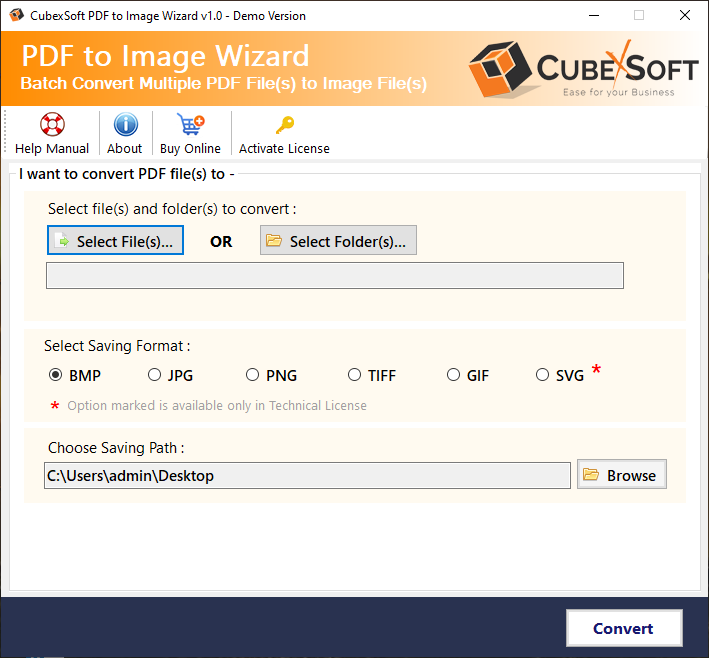 Press on the Select Files (s) or Select Folder (s) button to upload Adobe PDF documents. 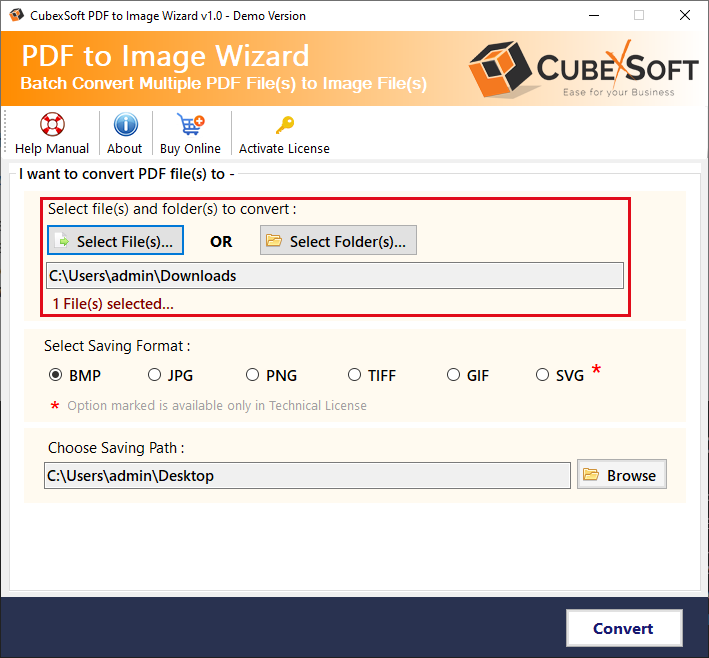 Pick the SVG image option from the Select Saving Options. 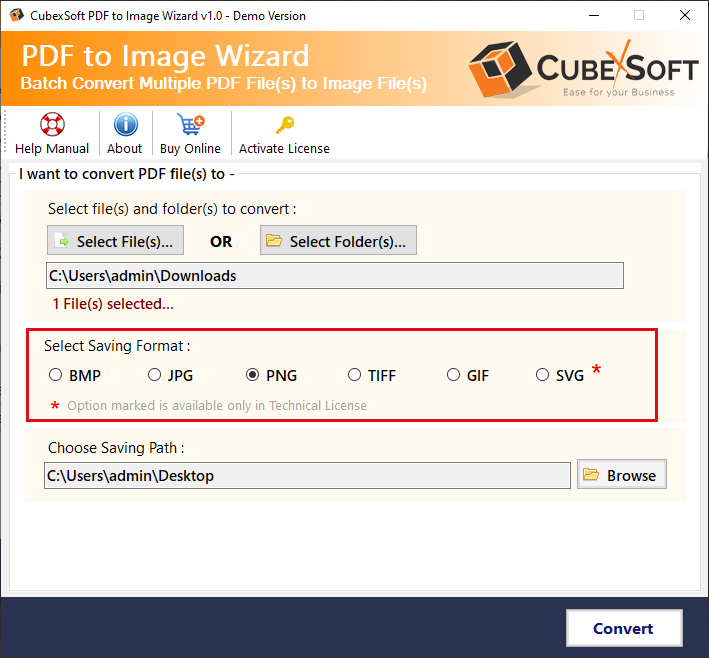 Hit on the Destination Path tab to select the Desired Location Path for the output data. 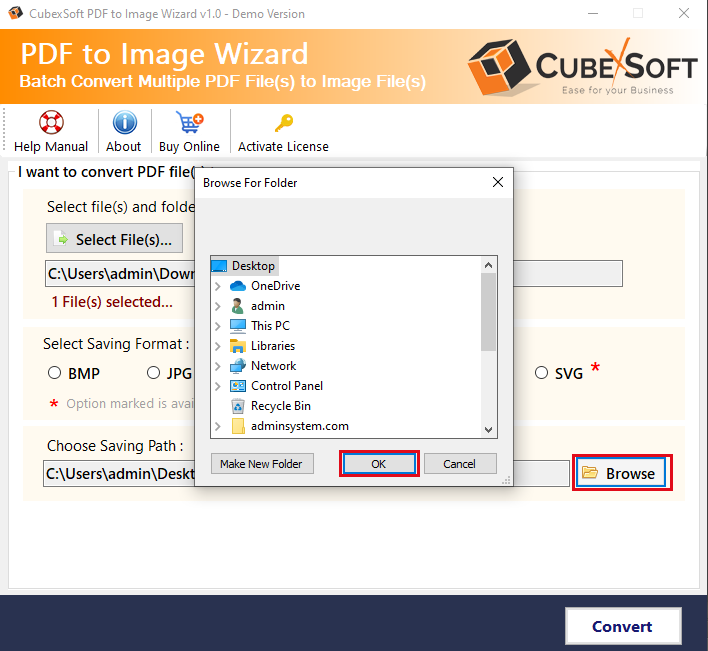 Finally, click on the Convert button to being the conversion of PDF into SVG format. 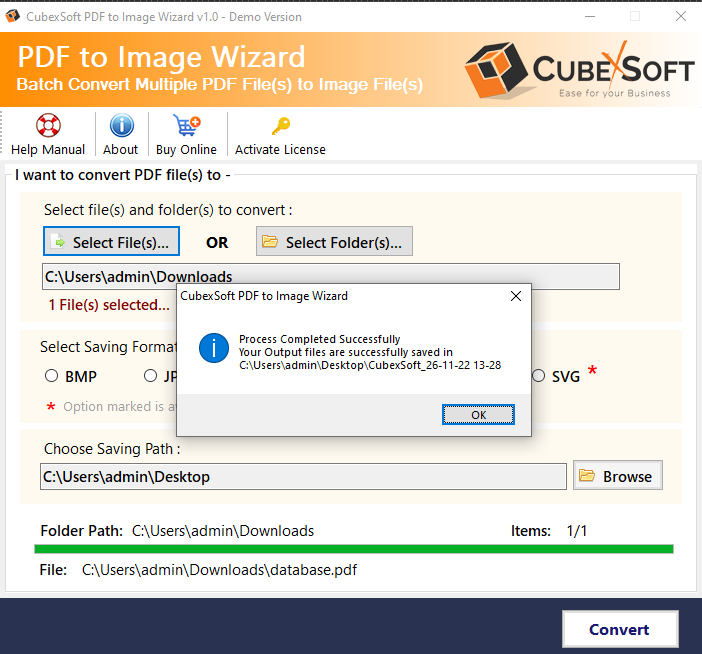 Using the above working procedure, one can successfully and quickly change PDF to SVG image format without facing a single issue. It’s a quick and perfect solution that also exports Adobe PDF docs into multiple image formats with complete details. **Some Helpful Features of PDF to Photo Converter** • PDF to SVG Conversion Tool allows the conversion of single as well as unlimited PDF images at a time without missing any document. • Free PDF to Image Conversion Tool enables users to convert PDF files into various picture formats. • The software allows users to select the saving path as per the user-defined location. • With using Adobe Acrobat, you can easily change PDF to SVG. • Its simple, user, friendly, and intuitive GUI is designed in such a way that anyone can simply use this software without possessing technical help. • It is a Windows-based utility that can smoothly run on all 32-bit & 64-bit Windows Operating Systems like Win 11, 10, 8.1, 8, 7, XP, Vista, etc. • The tool also gives a free trial copy that allows changing only the first 5 PDF files/folder with company watermark, free of cost. **Cover Up** In the above article, we’ve discussed the instant method to change PDF file to SVG image format using <b><a href ="https://www.cubexsoft.com/blog/best-pdf-to-svg-converter/"> PDF to SVG Converter</a></b>. The tool effectively change PDF documents to SVG and many other image formats without the installation of Adobe Reader. Furthermore, this utility helps in the bulk conversion of Adobe PDF files. Anyone can choose this third-party tool for a safe and fast migration process. |
| json metadata | {"tags":["how","to","convert","pdf","file","svg"],"image":["https://cdn.steemitimages.com/DQmaPqTjYJ8ZjAiqSY3khM7TUhpL1Me8PeM9YJzLxb5ecgc/image-28.png","https://cdn.steemitimages.com/DQmXjQgHQM3zJpQkJAee1enpqg9iH4r8ay8ugKZefXAkXim/image-29.png","https://cdn.steemitimages.com/DQmQyk62NBCZLifptUgi3714zE5561TECy3PQBgSMejjds8/image-30.png","https://cdn.steemitimages.com/DQmaspQsfsiKM6VTy9pjT94bK9mrj2tYrcWTmbiSfghgSNG/image-31.png","https://cdn.steemitimages.com/DQmNgmCwrJhqmdsN8UELvooHPhh2cyDmk2Eo8HaLW5PnU6X/image-32.png"],"links":["https://www.cubexsoft.com/pdf-to-image/","https://www.cubexsoft.com/blog/best-pdf-to-svg-converter/"],"app":"steemit/0.2","format":"markdown"} |
| Transaction Info | Block #74467680/Trx 8c8f778d17ca88a2ba506773907a7c4013b60a9f |
View Raw JSON Data
{
"trx_id": "8c8f778d17ca88a2ba506773907a7c4013b60a9f",
"block": 74467680,
"trx_in_block": 0,
"op_in_trx": 0,
"virtual_op": 0,
"timestamp": "2023-05-09T11:27:18",
"op": [
"comment",
{
"parent_author": "",
"parent_permlink": "how",
"author": "lotusnotesexport",
"permlink": "know-how-to-change-pdf-file-to-svg",
"title": "Know How to Change PDF File to SVG?",
"body": "Do you also search for an alternative and direct method to change PDF file to SVG image format? Then, this article is for you, in this post, we’ll provide you the working and benefits of a professional PDF to Image Tool which can simply convert your PDF documents to SVG and other picture formats such as JPG, TIFF, BMP, PNG, GIF, etc.\n\n**Benefits of Using SVG**\n\n•\tSVG pictures are zoomable\n•\tIf SVG pictures are zoomed in or resized, their quality is not compromised.\n•\tSVG files only contain XML.\n•\tSVG images can be printed at any resolution in great quality.\n\n**How to Change PDF File to SVG using PDF to SVG Tool?**\n\nAs there is no free manual method to change PDF file to SVG picture, so, we’re going to introduce the finest and most brilliant <b>CubexSoft <a href = \"https://www.cubexsoft.com/pdf-to-image/\">PDF to Image Converter</a></b>. It is a powerful and perfect way software that quickly convert Adobe PDF files to SVG image format without losing any formatting. The tool supports the batch conversion of PDF documents into SVG at a time without any trouble. Also, this application helps users to change PDF files to PNG, TIFF, GIF, BMP, and PNG.\n\n **Step-By-Step Working Guide to Convert PDF File to SVG Picture**\n\nInstall and open PDF to Image Wizard on your PC.\n\n\n\nPress on the Select Files (s) or Select Folder (s) button to upload Adobe PDF documents.\n\n\n\nPick the SVG image option from the Select Saving Options.\n\n\n\nHit on the Destination Path tab to select the Desired Location Path for the output data.\n\n\n\nFinally, click on the Convert button to being the conversion of PDF into SVG format.\n\n\n\n\nUsing the above working procedure, one can successfully and quickly change PDF to SVG image format without facing a single issue. It’s a quick and perfect solution that also exports Adobe PDF docs into multiple image formats with complete details.\n\n**Some Helpful Features of PDF to Photo Converter**\n\n•\tPDF to SVG Conversion Tool allows the conversion of single as well as unlimited PDF images at a time without missing any document.\n•\tFree PDF to Image Conversion Tool enables users to convert PDF files into various picture formats.\n•\tThe software allows users to select the saving path as per the user-defined location.\n•\tWith using Adobe Acrobat, you can easily change PDF to SVG.\n•\tIts simple, user, friendly, and intuitive GUI is designed in such a way that anyone can simply use this software without possessing technical help.\n•\tIt is a Windows-based utility that can smoothly run on all 32-bit & 64-bit Windows Operating Systems like Win 11, 10, 8.1, 8, 7, XP, Vista, etc.\n•\tThe tool also gives a free trial copy that allows changing only the first 5 PDF files/folder with company watermark, free of cost.\n\n**Cover Up**\n\nIn the above article, we’ve discussed the instant method to change PDF file to SVG image format using <b><a href =\"https://www.cubexsoft.com/blog/best-pdf-to-svg-converter/\">\nPDF to SVG Converter</a></b>. The tool effectively change PDF documents to SVG and many other image formats without the installation of Adobe Reader. Furthermore, this utility helps in the bulk conversion of Adobe PDF files. Anyone can choose this third-party tool for a safe and fast migration process.",
"json_metadata": "{\"tags\":[\"how\",\"to\",\"convert\",\"pdf\",\"file\",\"svg\"],\"image\":[\"https://cdn.steemitimages.com/DQmaPqTjYJ8ZjAiqSY3khM7TUhpL1Me8PeM9YJzLxb5ecgc/image-28.png\",\"https://cdn.steemitimages.com/DQmXjQgHQM3zJpQkJAee1enpqg9iH4r8ay8ugKZefXAkXim/image-29.png\",\"https://cdn.steemitimages.com/DQmQyk62NBCZLifptUgi3714zE5561TECy3PQBgSMejjds8/image-30.png\",\"https://cdn.steemitimages.com/DQmaspQsfsiKM6VTy9pjT94bK9mrj2tYrcWTmbiSfghgSNG/image-31.png\",\"https://cdn.steemitimages.com/DQmNgmCwrJhqmdsN8UELvooHPhh2cyDmk2Eo8HaLW5PnU6X/image-32.png\"],\"links\":[\"https://www.cubexsoft.com/pdf-to-image/\",\"https://www.cubexsoft.com/blog/best-pdf-to-svg-converter/\"],\"app\":\"steemit/0.2\",\"format\":\"markdown\"}"
}
]
}2023/05/09 10:58:57
2023/05/09 10:58:57
| parent author | |
| parent permlink | zimbra |
| author | lotusnotesexport |
| permlink | how-to-convert-zimbra-tgz-files-to-outlook-including-all-details-and-attachments |
| title | How to Convert Zimbra TGZ Files to Outlook including all Details and Attachments |
| body | @@ -2508,24 +2508,83 @@ edition of +%3Ca href=%22https://www.cubexsoft.com/zimbra-export/pst.html%22%3E Zimbra to PS @@ -2594,16 +2594,20 @@ onverter +%3C/a%3E is also @@ -2885,85 +2885,4 @@ ons. -%0A%0ATo get more info: https://gallery.technet.microsoft.com/Zimbra-to-PST-c24705e2 |
| json metadata | {"app":"steemit/0.2","format":"markdown","links":["http://www.cubexsoft.com/zimbra-export/","https://www.cubexsoft.com/zimbra-export/pst.html"],"tags":["to","pst","converter"]} |
| Transaction Info | Block #74467116/Trx 59aa51f449e28a5eb2e5881d0a7caef1fd07e58e |
View Raw JSON Data
{
  "trx_id": "59aa51f449e28a5eb2e5881d0a7caef1fd07e58e",
  "block": 74467116,
  "trx_in_block": 5,
  "op_in_trx": 0,
  "virtual_op": 0,
  "timestamp": "2023-05-09T10:58:57",
  "op": [
    "comment",
    {
      "parent_author": "",
      "parent_permlink": "zimbra",
      "author": "lotusnotesexport",
      "permlink": "how-to-convert-zimbra-tgz-files-to-outlook-including-all-details-and-attachments",
      "title": "How to Convert Zimbra TGZ Files to Outlook including all Details and Attachments",
      "body": "@@ -2508,24 +2508,83 @@\n  edition of \n+%3Ca href=%22https://www.cubexsoft.com/zimbra-export/pst.html%22%3E\n Zimbra to PS\n@@ -2594,16 +2594,20 @@\n onverter\n+%3C/a%3E\n  is also\n@@ -2885,85 +2885,4 @@\n ons.\n-%0A%0ATo get more info:  https://gallery.technet.microsoft.com/Zimbra-to-PST-c24705e2\n",
      "json_metadata": "{\"app\":\"steemit/0.2\",\"format\":\"markdown\",\"links\":[\"http://www.cubexsoft.com/zimbra-export/\",\"https://www.cubexsoft.com/zimbra-export/pst.html\"],\"tags\":[\"to\",\"pst\",\"converter\"]}"
    }
  ]
}lotusnotesexportpublished a new post: how-to-move-mail-from-lotus-notes-to-outlook-windows2023/05/09 10:57:00
lotusnotesexportpublished a new post: how-to-move-mail-from-lotus-notes-to-outlook-windows
2023/05/09 10:57:00
| parent author | |
| parent permlink | nsf |
| author | lotusnotesexport |
| permlink | how-to-move-mail-from-lotus-notes-to-outlook-windows |
| title | How to Move Mail From Lotus Notes to Outlook Windows? |
| body | @@ -204,19 +204,16 @@ 2016.%0A%0A -%E2%80%8B%0A%0A IBM Lotu @@ -563,19 +563,16 @@ tures.%0A%0A -%E2%80%8B%0A%0A Lotus No @@ -861,16 +861,17 @@ **%5D(http +s ://www.c @@ -887,33 +887,55 @@ com/ -nsf-converter/to-pst.html +blog/microsoft-outlook-connector-for-ibm-notes/ ) PS @@ -945,19 +945,16 @@ ormat.%0A%0A -%E2%80%8B%0A%0A You can @@ -1221,19 +1221,16 @@ se it?%0A%0A -%E2%80%8B%0A%0A **Manual @@ -1283,20 +1283,18 @@ tlook**%0A -%0A %E2%80%8B%0A -%0A First, e @@ -1516,19 +1516,16 @@ below:%0A%0A -%E2%80%8B%0A%0A **Export @@ -1562,35 +1562,32 @@ PST Outlook**%0A%0A -%E2%80%8B%0A%0A 1. Open Lotus No @@ -1873,19 +1873,16 @@ button%0A%0A -%E2%80%8B%0A%0A Finally, @@ -2169,19 +2169,16 @@ ormat.%0A%0A -%E2%80%8B%0A%0A **Import @@ -2223,19 +2223,16 @@ look**%0A%0A -%E2%80%8B%0A%0A 1. Open @@ -2684,19 +2684,16 @@ s done%0A%0A -%E2%80%8B%0A%0A Now, use @@ -2977,19 +2977,16 @@ well.%0A%0A -%E2%80%8B%0A%0A Exchange @@ -3337,19 +3337,16 @@ ation.%0A%0A -%E2%80%8B%0A%0A It is a @@ -3457,19 +3457,16 @@ email.%0A%0A -%E2%80%8B%0A%0A For larg @@ -3808,19 +3808,16 @@ you. %0A%0A -%E2%80%8B%0A%0A **CubexS @@ -3878,11 +3878,8 @@ **%0A%0A -%E2%80%8B%0A%0A The @@ -3900,16 +3900,81 @@ eliable +%3Cb%3E%3Ca href=%22https://www.cubexsoft.com/nsf-converter/to-pst.html%22%3E NSF to P @@ -3985,16 +3985,24 @@ onverter +%3C/a%3E%3C/b%3E is a sm @@ -4866,19 +4866,16 @@ ws OS.%0A%0A - %0A%0A **Downlo @@ -5269,13 +5269,12 @@ nstallation. -%0A |
| json metadata | {"tags":["pst","lotus","notes","outlook"],"format":"markdown","links":["https://www.cubexsoft.com/blog/microsoft-outlook-connector-for-ibm-notes/","https://www.cubexsoft.com/nsf-converter/to-pst.html"],"app":"steemit/0.2"} |
| Transaction Info | Block #74467077/Trx 024d0cc7dcf193b2feb4bcd652a37e0080f2a92a |
View Raw JSON Data
{
  "trx_id": "024d0cc7dcf193b2feb4bcd652a37e0080f2a92a",
  "block": 74467077,
  "trx_in_block": 2,
  "op_in_trx": 0,
  "virtual_op": 0,
  "timestamp": "2023-05-09T10:57:00",
  "op": [
    "comment",
    {
      "parent_author": "",
      "parent_permlink": "nsf",
      "author": "lotusnotesexport",
      "permlink": "how-to-move-mail-from-lotus-notes-to-outlook-windows",
      "title": "How to Move Mail From Lotus Notes to Outlook Windows?",
      "body": "@@ -204,19 +204,16 @@\n  2016.%0A%0A\n-%E2%80%8B%0A%0A\n IBM Lotu\n@@ -563,19 +563,16 @@\n tures.%0A%0A\n-%E2%80%8B%0A%0A\n Lotus No\n@@ -861,16 +861,17 @@\n **%5D(http\n+s\n ://www.c\n@@ -887,33 +887,55 @@\n com/\n-nsf-converter/to-pst.html\n+blog/microsoft-outlook-connector-for-ibm-notes/\n ) PS\n@@ -945,19 +945,16 @@\n ormat.%0A%0A\n-%E2%80%8B%0A%0A\n You can \n@@ -1221,19 +1221,16 @@\n se it?%0A%0A\n-%E2%80%8B%0A%0A\n **Manual\n@@ -1283,20 +1283,18 @@\n tlook**%0A\n-%0A\n %E2%80%8B%0A\n-%0A\n First, e\n@@ -1516,19 +1516,16 @@\n below:%0A%0A\n-%E2%80%8B%0A%0A\n **Export\n@@ -1562,35 +1562,32 @@\n  PST Outlook**%0A%0A\n-%E2%80%8B%0A%0A\n 1. Open Lotus No\n@@ -1873,19 +1873,16 @@\n button%0A%0A\n-%E2%80%8B%0A%0A\n Finally,\n@@ -2169,19 +2169,16 @@\n ormat.%0A%0A\n-%E2%80%8B%0A%0A\n **Import\n@@ -2223,19 +2223,16 @@\n look**%0A%0A\n-%E2%80%8B%0A%0A\n 1. Open \n@@ -2684,19 +2684,16 @@\n s done%0A%0A\n-%E2%80%8B%0A%0A\n Now, use\n@@ -2977,19 +2977,16 @@\n  well.%0A%0A\n-%E2%80%8B%0A%0A\n Exchange\n@@ -3337,19 +3337,16 @@\n ation.%0A%0A\n-%E2%80%8B%0A%0A\n It is a \n@@ -3457,19 +3457,16 @@\n email.%0A%0A\n-%E2%80%8B%0A%0A\n For larg\n@@ -3808,19 +3808,16 @@\n you.  %0A%0A\n-%E2%80%8B%0A%0A\n **CubexS\n@@ -3878,11 +3878,8 @@\n **%0A%0A\n-%E2%80%8B%0A%0A\n The \n@@ -3900,16 +3900,81 @@\n eliable \n+%3Cb%3E%3Ca href=%22https://www.cubexsoft.com/nsf-converter/to-pst.html%22%3E\n NSF to P\n@@ -3985,16 +3985,24 @@\n onverter\n+%3C/a%3E%3C/b%3E\n  is a sm\n@@ -4866,19 +4866,16 @@\n ws OS.%0A%0A\n- %0A%0A\n **Downlo\n@@ -5269,13 +5269,12 @@\n nstallation.\n-%0A\n",
      "json_metadata": "{\"tags\":[\"pst\",\"lotus\",\"notes\",\"outlook\"],\"format\":\"markdown\",\"links\":[\"https://www.cubexsoft.com/blog/microsoft-outlook-connector-for-ibm-notes/\",\"https://www.cubexsoft.com/nsf-converter/to-pst.html\"],\"app\":\"steemit/0.2\"}"
    }
  ]
}lotusnotesexportpublished a new post: how-to-export-outlook-emails-to-apple-mail2023/05/09 10:51:24
lotusnotesexportpublished a new post: how-to-export-outlook-emails-to-apple-mail
2023/05/09 10:51:24
| parent author | |
| parent permlink | outlook |
| author | lotusnotesexport |
| permlink | how-to-export-outlook-emails-to-apple-mail |
| title | How to Export Outlook Emails to Apple Mail |
| body | @@ -272,24 +272,109 @@ ledge about +%3Ca href=%22https://www.cubexsoft.com/blog/how-to-import-outlook-pst-file-to-mac-mail/%22%3E how to expor @@ -402,16 +402,20 @@ ple Mail +%3C/a%3E , it is @@ -1303,36 +1303,70 @@ the -Outlook Emails to Apple mail +%3Cb%3E%3Ca href=%22https://www.cubexsoft.com/outlook-export/%22%3EOutlook Con @@ -1371,16 +1371,23 @@ onverter +%3C/a%3E%3Cb%3E . This i @@ -3384,17 +3384,17 @@ first 2 -0 +5 emails |
| json metadata | {"app":"steemit/0.2","format":"markdown","links":["https://www.cubexsoft.com/blog/how-to-import-outlook-pst-file-to-mac-mail/","https://www.cubexsoft.com/outlook-export/","http://www.cubexsoft.com/pst-to-mbox/"],"tags":["apple","mail","mbox","pst"]} |
| Transaction Info | Block #74466965/Trx a368013683f76eb41b7bab9610647e04a9c89d15 |
View Raw JSON Data
{
  "trx_id": "a368013683f76eb41b7bab9610647e04a9c89d15",
  "block": 74466965,
  "trx_in_block": 1,
  "op_in_trx": 0,
  "virtual_op": 0,
  "timestamp": "2023-05-09T10:51:24",
  "op": [
    "comment",
    {
      "parent_author": "",
      "parent_permlink": "outlook",
      "author": "lotusnotesexport",
      "permlink": "how-to-export-outlook-emails-to-apple-mail",
      "title": "How to Export Outlook Emails to Apple Mail",
      "body": "@@ -272,24 +272,109 @@\n ledge about \n+%3Ca href=%22https://www.cubexsoft.com/blog/how-to-import-outlook-pst-file-to-mac-mail/%22%3E\n how to expor\n@@ -402,16 +402,20 @@\n ple Mail\n+%3C/a%3E\n , it is \n@@ -1303,36 +1303,70 @@\n the \n-Outlook Emails to Apple mail\n+%3Cb%3E%3Ca href=%22https://www.cubexsoft.com/outlook-export/%22%3EOutlook\n  Con\n@@ -1371,16 +1371,23 @@\n onverter\n+%3C/a%3E%3Cb%3E\n . This i\n@@ -3384,17 +3384,17 @@\n  first 2\n-0\n+5\n  emails \n",
      "json_metadata": "{\"app\":\"steemit/0.2\",\"format\":\"markdown\",\"links\":[\"https://www.cubexsoft.com/blog/how-to-import-outlook-pst-file-to-mac-mail/\",\"https://www.cubexsoft.com/outlook-export/\",\"http://www.cubexsoft.com/pst-to-mbox/\"],\"tags\":[\"apple\",\"mail\",\"mbox\",\"pst\"]}"
    }
  ]
}lotusnotesexportpublished a new post: how-to-split-lotus-notes-page-with-the-utilization-of-nsf-split2023/05/09 10:47:36
lotusnotesexportpublished a new post: how-to-split-lotus-notes-page-with-the-utilization-of-nsf-split
2023/05/09 10:47:36
| parent author | |
| parent permlink | nsf |
| author | lotusnotesexport |
| permlink | how-to-split-lotus-notes-page-with-the-utilization-of-nsf-split |
| title | How to Split Lotus Notes Page with the Utilization of NSF Split? |
| body | @@ -4786,83 +4786,8 @@ the -%3Cb%3E%3Ca href=%22https://gallery.technet.microsoft.com/NSF-Split-Tool-0bac190d%22%3E NSF @@ -4791,24 +4791,16 @@ SF Split -%3C/a%3E%3C/b%3E softwar |
| json metadata | {"app":"steemit/0.2","format":"markdown","links":["http://www.cubexsoft.com/nsf-split/"],"tags":["split"]} |
| Transaction Info | Block #74466889/Trx e666f806c098adde4cb677a9152e236023bda115 |
View Raw JSON Data
{
  "trx_id": "e666f806c098adde4cb677a9152e236023bda115",
  "block": 74466889,
  "trx_in_block": 3,
  "op_in_trx": 0,
  "virtual_op": 0,
  "timestamp": "2023-05-09T10:47:36",
  "op": [
    "comment",
    {
      "parent_author": "",
      "parent_permlink": "nsf",
      "author": "lotusnotesexport",
      "permlink": "how-to-split-lotus-notes-page-with-the-utilization-of-nsf-split",
      "title": "How to Split Lotus Notes Page with the Utilization of NSF Split?",
      "body": "@@ -4786,83 +4786,8 @@\n the \n-%3Cb%3E%3Ca href=%22https://gallery.technet.microsoft.com/NSF-Split-Tool-0bac190d%22%3E\n NSF \n@@ -4791,24 +4791,16 @@\n SF Split\n-%3C/a%3E%3C/b%3E\n  softwar\n",
      "json_metadata": "{\"app\":\"steemit/0.2\",\"format\":\"markdown\",\"links\":[\"http://www.cubexsoft.com/nsf-split/\"],\"tags\":[\"split\"]}"
    }
  ]
}2023/05/09 10:46:15
2023/05/09 10:46:15
| parent author | |
| parent permlink | nsf |
| author | lotusnotesexport |
| permlink | how-to-convert-lotus-notes-mail-to-outlook-with-free-nsf-to-pst-converter-download-version |
| title | Convert NSF to PST Freeware Download Version to Export Lotus Notes Mail File to Outlook |
| body | @@ -9,95 +9,8 @@ of -%3Ca href=%22https://gallery.technet.microsoft.com/Convert-NSF-to-PST-to-Open-0e8645c3%22%3E%3Cb%3E how @@ -56,16 +56,8 @@ free -%3C/b%3E%3C/a%3E of @@ -1538,22 +1538,88 @@ on i.e. -Notes +CubexSoft %3Ca href=%22https://www.cubexsoft.com/nsf-converter/to-pst.html%22%3E NSF to P @@ -1630,16 +1630,20 @@ onverter +%3C/a%3E . Let%E2%80%99s @@ -4576,26 +4576,70 @@ bexSoft -NSF to PST +%3Ca href=%22https://www.cubexsoft.com/nsf-converter/%22%3ENSF Convert @@ -4640,16 +4640,20 @@ onverter +%3C/a%3E is one |
| json metadata | {"app":"steemit/0.2","format":"markdown","links":["https://www.cubexsoft.com/nsf-converter/to-pst.html","https://www.cubexsoft.com/nsf-converter/"],"tags":["pst","lotus","notes","outlook"]} |
| Transaction Info | Block #74466862/Trx 6f9893c6a7c3e05180d62af13ad4a07bbbbda348 |
View Raw JSON Data
{
  "trx_id": "6f9893c6a7c3e05180d62af13ad4a07bbbbda348",
  "block": 74466862,
  "trx_in_block": 1,
  "op_in_trx": 0,
  "virtual_op": 0,
  "timestamp": "2023-05-09T10:46:15",
  "op": [
    "comment",
    {
      "parent_author": "",
      "parent_permlink": "nsf",
      "author": "lotusnotesexport",
      "permlink": "how-to-convert-lotus-notes-mail-to-outlook-with-free-nsf-to-pst-converter-download-version",
      "title": "Convert NSF to PST Freeware Download Version to Export Lotus Notes Mail File to Outlook",
      "body": "@@ -9,95 +9,8 @@\n  of \n-%3Ca href=%22https://gallery.technet.microsoft.com/Convert-NSF-to-PST-to-Open-0e8645c3%22%3E%3Cb%3E\n how \n@@ -56,16 +56,8 @@\n free\n-%3C/b%3E%3C/a%3E\n  of \n@@ -1538,22 +1538,88 @@\n on i.e. \n-Notes \n+CubexSoft %3Ca href=%22https://www.cubexsoft.com/nsf-converter/to-pst.html%22%3E\n NSF to P\n@@ -1630,16 +1630,20 @@\n onverter\n+%3C/a%3E\n . Let%E2%80%99s \n@@ -4576,26 +4576,70 @@\n bexSoft \n-NSF to PST\n+%3Ca href=%22https://www.cubexsoft.com/nsf-converter/%22%3ENSF\n  Convert\n@@ -4640,16 +4640,20 @@\n onverter\n+%3C/a%3E\n  is one \n",
      "json_metadata": "{\"app\":\"steemit/0.2\",\"format\":\"markdown\",\"links\":[\"https://www.cubexsoft.com/nsf-converter/to-pst.html\",\"https://www.cubexsoft.com/nsf-converter/\"],\"tags\":[\"pst\",\"lotus\",\"notes\",\"outlook\"]}"
    }
  ]
}steemdelegated 4.870 SP to @lotusnotesexport2022/11/03 14:32:45
steemdelegated 4.870 SP to @lotusnotesexport
2022/11/03 14:32:45
| delegator | steem |
| delegatee | lotusnotesexport |
| vesting shares | 7930.456151 VESTS |
| Transaction Info | Block #69116654/Trx 3749d76372c89aeebd6b2bd3048c72741fba93e2 |
View Raw JSON Data
{
  "trx_id": "3749d76372c89aeebd6b2bd3048c72741fba93e2",
  "block": 69116654,
  "trx_in_block": 6,
  "op_in_trx": 0,
  "virtual_op": 0,
  "timestamp": "2022-11-03T14:32:45",
  "op": [
    "delegate_vesting_shares",
    {
      "delegator": "steem",
      "delegatee": "lotusnotesexport",
      "vesting_shares": "7930.456151 VESTS"
    }
  ]
}steemdelegated 5.009 SP to @lotusnotesexport2022/01/09 21:35:42
steemdelegated 5.009 SP to @lotusnotesexport
2022/01/09 21:35:42
| delegator | steem |
| delegatee | lotusnotesexport |
| vesting shares | 8157.004853 VESTS |
| Transaction Info | Block #60592946/Trx 8161a397e1276232430b672c05e1e66af1f84d55 |
View Raw JSON Data
{
  "trx_id": "8161a397e1276232430b672c05e1e66af1f84d55",
  "block": 60592946,
  "trx_in_block": 18,
  "op_in_trx": 0,
  "virtual_op": 0,
  "timestamp": "2022-01-09T21:35:42",
  "op": [
    "delegate_vesting_shares",
    {
      "delegator": "steem",
      "delegatee": "lotusnotesexport",
      "vesting_shares": "8157.004853 VESTS"
    }
  ]
}steemdelegated 5.122 SP to @lotusnotesexport2021/06/07 13:55:54
steemdelegated 5.122 SP to @lotusnotesexport
2021/06/07 13:55:54
| delegator | steem |
| delegatee | lotusnotesexport |
| vesting shares | 8340.863547 VESTS |
| Transaction Info | Block #54423243/Trx 57977ad2c3d0544c204e0e4cc8284ef65f4875f0 |
View Raw JSON Data
{
  "trx_id": "57977ad2c3d0544c204e0e4cc8284ef65f4875f0",
  "block": 54423243,
  "trx_in_block": 3,
  "op_in_trx": 0,
  "virtual_op": 0,
  "timestamp": "2021-06-07T13:55:54",
  "op": [
    "delegate_vesting_shares",
    {
      "delegator": "steem",
      "delegatee": "lotusnotesexport",
      "vesting_shares": "8340.863547 VESTS"
    }
  ]
}steemdelegated 5.237 SP to @lotusnotesexport2020/12/05 17:16:12
steemdelegated 5.237 SP to @lotusnotesexport
2020/12/05 17:16:12
| delegator | steem |
| delegatee | lotusnotesexport |
| vesting shares | 8528.387868 VESTS |
| Transaction Info | Block #49193232/Trx 2396f3fbca74666a94ef4190ad022d626bbc1942 |
View Raw JSON Data
{
  "trx_id": "2396f3fbca74666a94ef4190ad022d626bbc1942",
  "block": 49193232,
  "trx_in_block": 1,
  "op_in_trx": 0,
  "virtual_op": 0,
  "timestamp": "2020-12-05T17:16:12",
  "op": [
    "delegate_vesting_shares",
    {
      "delegator": "steem",
      "delegatee": "lotusnotesexport",
      "vesting_shares": "8528.387868 VESTS"
    }
  ]
}steemdelegated 1.179 SP to @lotusnotesexport2020/11/02 20:50:00
steemdelegated 1.179 SP to @lotusnotesexport
2020/11/02 20:50:00
| delegator | steem |
| delegatee | lotusnotesexport |
| vesting shares | 1920.017158 VESTS |
| Transaction Info | Block #48263919/Trx 22811a089670d699dfc668225e83dae79286df11 |
View Raw JSON Data
{
  "trx_id": "22811a089670d699dfc668225e83dae79286df11",
  "block": 48263919,
  "trx_in_block": 2,
  "op_in_trx": 0,
  "virtual_op": 0,
  "timestamp": "2020-11-02T20:50:00",
  "op": [
    "delegate_vesting_shares",
    {
      "delegator": "steem",
      "delegatee": "lotusnotesexport",
      "vesting_shares": "1920.017158 VESTS"
    }
  ]
}steemdelegated 5.293 SP to @lotusnotesexport2020/09/15 23:15:42
steemdelegated 5.293 SP to @lotusnotesexport
2020/09/15 23:15:42
| delegator | steem |
| delegatee | lotusnotesexport |
| vesting shares | 8618.708839 VESTS |
| Transaction Info | Block #46903799/Trx b153a23ef7369b1c00993187c61a5571e8395b21 |
View Raw JSON Data
{
  "trx_id": "b153a23ef7369b1c00993187c61a5571e8395b21",
  "block": 46903799,
  "trx_in_block": 3,
  "op_in_trx": 0,
  "virtual_op": 0,
  "timestamp": "2020-09-15T23:15:42",
  "op": [
    "delegate_vesting_shares",
    {
      "delegator": "steem",
      "delegatee": "lotusnotesexport",
      "vesting_shares": "8618.708839 VESTS"
    }
  ]
}steemdelegated 17.503 SP to @lotusnotesexport2020/08/29 20:48:36
steemdelegated 17.503 SP to @lotusnotesexport
2020/08/29 20:48:36
| delegator | steem |
| delegatee | lotusnotesexport |
| vesting shares | 28500.835277 VESTS |
| Transaction Info | Block #46417272/Trx 4bf2850dbe8d8e3fd3e75359d90ea0c0a804ba1a |
View Raw JSON Data
{
  "trx_id": "4bf2850dbe8d8e3fd3e75359d90ea0c0a804ba1a",
  "block": 46417272,
  "trx_in_block": 0,
  "op_in_trx": 0,
  "virtual_op": 0,
  "timestamp": "2020-08-29T20:48:36",
  "op": [
    "delegate_vesting_shares",
    {
      "delegator": "steem",
      "delegatee": "lotusnotesexport",
      "vesting_shares": "28500.835277 VESTS"
    }
  ]
}steemdelegated 17.624 SP to @lotusnotesexport2020/06/16 13:15:48
steemdelegated 17.624 SP to @lotusnotesexport
2020/06/16 13:15:48
| delegator | steem |
| delegatee | lotusnotesexport |
| vesting shares | 28698.121865 VESTS |
| Transaction Info | Block #44300402/Trx 6bc1e9d27cd805998d6d6306432ac8a49b17a064 |
View Raw JSON Data
{
  "trx_id": "6bc1e9d27cd805998d6d6306432ac8a49b17a064",
  "block": 44300402,
  "trx_in_block": 8,
  "op_in_trx": 0,
  "virtual_op": 0,
  "timestamp": "2020-06-16T13:15:48",
  "op": [
    "delegate_vesting_shares",
    {
      "delegator": "steem",
      "delegatee": "lotusnotesexport",
      "vesting_shares": "28698.121865 VESTS"
    }
  ]
}executive-boardsent 0.001 STEEM to @lotusnotesexport- "❗ Hello lotusnotesexport, great that you are using the STEEM blockchain. The Executive Board invites you to visit https://discord.gg/KyBbmhh where you will get some insider infos on how you will earn ..."2020/06/16 12:03:03
executive-boardsent 0.001 STEEM to @lotusnotesexport- "❗ Hello lotusnotesexport, great that you are using the STEEM blockchain. The Executive Board invites you to visit https://discord.gg/KyBbmhh where you will get some insider infos on how you will earn ..."
2020/06/16 12:03:03
| from | executive-board |
| to | lotusnotesexport |
| amount | 0.001 STEEM |
| memo | ❗ Hello lotusnotesexport, great that you are using the STEEM blockchain. The Executive Board invites you to visit https://discord.gg/KyBbmhh where you will get some insider infos on how you will earn the most coins. It's easy, just follow the instructions. Warm regards, The Executive Board. |
| Transaction Info | Block #44298970/Trx cea025604c71ca199662ab0f014cd98b2a9854e0 |
View Raw JSON Data
{
  "trx_id": "cea025604c71ca199662ab0f014cd98b2a9854e0",
  "block": 44298970,
  "trx_in_block": 6,
  "op_in_trx": 0,
  "virtual_op": 0,
  "timestamp": "2020-06-16T12:03:03",
  "op": [
    "transfer",
    {
      "from": "executive-board",
      "to": "lotusnotesexport",
      "amount": "0.001 STEEM",
      "memo": "❗ Hello lotusnotesexport, great that you are using the STEEM blockchain. The Executive Board invites you to visit https://discord.gg/KyBbmhh where you will get some insider infos on how you will earn the most coins. It's easy, just follow the instructions. Warm regards, The Executive Board."
    }
  ]
}beemenginesent 0.001 STEEM to @lotusnotesexport- "★★★★★ best promotion engine. auto boosting all your upcoming posts 24/24 , just subscribe and we do all the rest. checkout http://beemengine.live a one month for only 1 STEEM to @beemengine with memo:..."2020/06/16 12:02:12
beemenginesent 0.001 STEEM to @lotusnotesexport- "★★★★★ best promotion engine. auto boosting all your upcoming posts 24/24 , just subscribe and we do all the rest. checkout http://beemengine.live a one month for only 1 STEEM to @beemengine with memo:..."
2020/06/16 12:02:12
| from | beemengine |
| to | lotusnotesexport |
| amount | 0.001 STEEM |
| memo | ★★★★★ best promotion engine. auto boosting all your upcoming posts 24/24 , just subscribe and we do all the rest. checkout http://beemengine.live a one month for only 1 STEEM to @beemengine with memo: subscribe |
| Transaction Info | Block #44298953/Trx d21eceaf570493a1470adf0857e63c1729721df8 |
View Raw JSON Data
{
  "trx_id": "d21eceaf570493a1470adf0857e63c1729721df8",
  "block": 44298953,
  "trx_in_block": 0,
  "op_in_trx": 0,
  "virtual_op": 0,
  "timestamp": "2020-06-16T12:02:12",
  "op": [
    "transfer",
    {
      "from": "beemengine",
      "to": "lotusnotesexport",
      "amount": "0.001 STEEM",
      "memo": "★★★★★ best promotion engine. auto boosting all your upcoming posts 24/24 , just subscribe and we do all the rest. checkout http://beemengine.live a one month for only 1 STEEM to @beemengine with memo: subscribe"
    }
  ]
}2020/06/16 12:01:18
2020/06/16 12:01:18
| author | lotusnotesexport |
| permlink | how-to-transfer-documents-from-one-dropbox-to-another-an-alternative-solution |
| max accepted payout | 1000000.000 SBD |
| percent steem dollars | 10000 |
| allow votes | true |
| allow curation rewards | true |
| extensions | [[0,{"beneficiaries":[{"account":"busy.org","weight":1000}]}]] |
| Transaction Info | Block #44298935/Trx 2e0257c071cdd460a7e59ccf0a7f0a0617d3cc2e |
View Raw JSON Data
{
  "trx_id": "2e0257c071cdd460a7e59ccf0a7f0a0617d3cc2e",
  "block": 44298935,
  "trx_in_block": 1,
  "op_in_trx": 0,
  "virtual_op": 0,
  "timestamp": "2020-06-16T12:01:18",
  "op": [
    "comment_options",
    {
      "author": "lotusnotesexport",
      "permlink": "how-to-transfer-documents-from-one-dropbox-to-another-an-alternative-solution",
      "max_accepted_payout": "1000000.000 SBD",
      "percent_steem_dollars": 10000,
      "allow_votes": true,
      "allow_curation_rewards": true,
      "extensions": [
        [
          0,
          {
            "beneficiaries": [
              {
                "account": "busy.org",
                "weight": 1000
              }
            ]
          }
        ]
      ]
    }
  ]
}2020/06/16 12:01:18
2020/06/16 12:01:18
| parent author | |
| parent permlink | cloud |
| author | lotusnotesexport |
| permlink | how-to-transfer-documents-from-one-dropbox-to-another-an-alternative-solution |
| title | How to Transfer Documents from One Dropbox to Another? – An Alternative Solution! |
| body | Do you are looking the best solution on how to transfer documents from one Dropbox to another account? If yes, then not to worry, you can find it in this article post as it contains the perfect and reliable an automated solution through which you can get an exact solution for your related query. The automated software i.e. [Dropbox Migration](https://www.cubexsoft.com/dropbox-migration/) Tool can transfer all data from the one Dropbox account to another drive account. For this Dropbox Migration process, this software is the best choice as it has advanced and amazing features which can helps you to move data without any error and loss. ## What Are the Reasons to Migrate Dropbox Data to Another Account? Everyone wants to move all data from one Dropbox to another account. Here, some of the common causes are given that force the users to transfer Dropbox data to another account: **To Move Files into Various Drives –** This is the main reasons for this migration process, a number of users need to backup data from Dropbox account to multiple cloud drives account. Most of the users practice this method as they want to store important and desired data into many place where they can get open and access easily. **Wants Better Functionality –** Many times, an operator want to use some more cloud drives to get more advantages and benefits options, which is better than the Dropbox cloud drive application. **Want More Storage Facility on Cloud –**One of the main causes of users to need to transfer one cloud drive account to another drive account. Storage issue is one of the major problem for every cloud drive operators. For that reasons, you need to change one drive account to other drive accounts. ## Error-Free Method to Transfer Documents From One Dropbox to Another A perfect solution to transfer data from one Dropbox account to another drives account can be possible using professional Cloud Drive Migration Tool that can easily move all Dropbox document data into Google Drive, Dropbox, and Microsoft OneDrive accounts. You can also move data from one or more than one source account to more than one destination cloud drive accounts within a few simple clicks without any extra efforts. This software includes some smart features to give more appropriate results of the migration process. This application is a designed with high level security and advanced features, so cannot save any login credential details of any cloud drive accounts to keep the privacy of the user’s accounts. You can convert selective data items with the use of date-filter and file type filtration options. Through the tool, you can move all documents format files, images, videos, zip files, archive data, all types of folders and all other data of selected source accounts of Dropbox. **Follow the Step-by-Step Working Guide of the Software:** 1. Run and Open the software on your windows machine. 2. After that, click on the Add button to Add Source Drive (Dropbox) and enter all necessary login credentials. 3. Now, hit on the Add button to Add Destination Drive such as “Dropbox, OneDrive, and Google Drive”. Then, click on the Next tab. 4. Now, you can see all selected accounts as you can select multiple accounts for migration at the same time process. 5. After that, press the Next button and from the new screen you can select filtration options i.e. Date Filters and File Type Filters through that you can transfer require data items only. 6. Finally, press the Next button to start the process and wait for the completion of migration. Now, after doing all steps, you can save whole migration report in CSV file format. So, you can understand how to transfer documents from one Dropbox to another account with easy and direct way. These above mentioned steps are easy and simple, so anyone can easily performs the migrating process without any technical knowledge. **The Concluding Words** In this article, you can simple comprehend and understand how to transfer document from one Dropbox to another account along with all details of the selected accounts. To get the complete knowledge of this migration process, you can download free demo version of [Cloud Drive Migration](https://www.cubexsoft.com/cloud-drive-migrator/) toll that can helps you to easily understand the complete process without any cost. Through demo version, users can move the first items from each folder. For multiple data migration, you have to buy the licensed key of the software. |
| json metadata | {"community":"busy","app":"busy/2.5.6","format":"markdown","tags":["cloud","drives","dropboxmigration"],"users":[],"links":["https://www.cubexsoft.com/dropbox-migration/","https://www.cubexsoft.com/cloud-drive-migrator/"],"image":[]} |
| Transaction Info | Block #44298935/Trx 2e0257c071cdd460a7e59ccf0a7f0a0617d3cc2e |
View Raw JSON Data
{
  "trx_id": "2e0257c071cdd460a7e59ccf0a7f0a0617d3cc2e",
  "block": 44298935,
  "trx_in_block": 1,
  "op_in_trx": 0,
  "virtual_op": 0,
  "timestamp": "2020-06-16T12:01:18",
  "op": [
    "comment",
    {
      "parent_author": "",
      "parent_permlink": "cloud",
      "author": "lotusnotesexport",
      "permlink": "how-to-transfer-documents-from-one-dropbox-to-another-an-alternative-solution",
      "title": "How to Transfer Documents from One Dropbox to Another? – An Alternative Solution!",
      "body": "Do you are looking the best solution on how to transfer documents from one Dropbox to another account? If yes, then not to worry, you can find it in this article post as it contains the perfect and reliable an automated solution through which you can get an exact solution for your related query.\n\nThe automated software i.e. [Dropbox Migration](https://www.cubexsoft.com/dropbox-migration/) Tool can transfer all data from the one Dropbox account to another drive account. For this Dropbox Migration process, this software is the best choice as it has advanced and amazing features which can helps you to move data without any error and loss.\n\n## What Are the Reasons to Migrate Dropbox Data to Another Account?\n\nEveryone wants to move all data from one Dropbox to another account. Here, some of the common causes are given that force the users to transfer Dropbox data to another account:\n\n**To Move Files into Various Drives –** This is the main reasons for this migration process, a number of users need to backup data from Dropbox account to multiple cloud drives account. Most of the users practice this method as they want to store important and desired data into many place where they can get open and access easily.\n\n**Wants Better Functionality –** Many times, an operator want to use some more cloud drives to get more advantages and benefits options, which is better than the Dropbox cloud drive application.\n\n**Want More Storage Facility on Cloud –**One of the main causes of users to need to transfer one cloud drive account to another drive account. Storage issue is one of the major problem for every cloud drive operators. For that reasons, you need to change one drive account to other drive accounts.\n\n## Error-Free Method to Transfer Documents From One Dropbox to Another\n\nA perfect solution to transfer data from one Dropbox account to another drives account can be possible using professional Cloud Drive Migration Tool that can easily move all Dropbox document data into Google Drive, Dropbox, and Microsoft OneDrive accounts. You can also move data from one or more than one source account to more than one destination cloud drive accounts within a few simple clicks without any extra efforts. This software includes some smart features to give more appropriate results of the migration process.\n\nThis application is a designed with high level security and advanced features, so cannot save any login credential details of any cloud drive accounts to keep the privacy of the user’s accounts. You can convert selective data items with the use of date-filter and file type filtration options. Through the tool, you can move all documents format files, images, videos, zip files, archive data, all types of folders and all other data of selected source accounts of Dropbox.\n\n**Follow the Step-by-Step Working Guide of the Software:**\n1. Run and Open the software on your windows machine.\n2. After that, click on the Add button to Add Source Drive (Dropbox) and enter all necessary login credentials.\n3. Now, hit on the Add button to Add Destination Drive such as “Dropbox, OneDrive, and Google Drive”. Then, click on the Next tab.\n4. Now, you can see all selected accounts as you can select multiple accounts for migration at the same time process.\n5. After that, press the Next button and from the new screen you can select filtration options i.e. Date Filters and File Type Filters through that you can transfer require data items only.\n6. Finally, press the Next button to start the process and wait for the completion of migration.\n\nNow, after doing all steps, you can save whole migration report in CSV file format. So, you can understand how to transfer documents from one Dropbox to another account with easy and direct way. These above mentioned steps are easy and simple, so anyone can easily performs the migrating process without any technical knowledge.\n\n**The Concluding Words**\nIn this article, you can simple comprehend and understand how to transfer document from one Dropbox to another account along with all details of the selected accounts. To get the complete knowledge of this migration process, you can download free demo version of [Cloud Drive Migration](https://www.cubexsoft.com/cloud-drive-migrator/) toll that can helps you to easily understand the complete process without any cost. Through demo version, users can move the first items from each folder. For multiple data migration, you have to buy the licensed key of the software.",
      "json_metadata": "{\"community\":\"busy\",\"app\":\"busy/2.5.6\",\"format\":\"markdown\",\"tags\":[\"cloud\",\"drives\",\"dropboxmigration\"],\"users\":[],\"links\":[\"https://www.cubexsoft.com/dropbox-migration/\",\"https://www.cubexsoft.com/cloud-drive-migrator/\"],\"image\":[]}"
    }
  ]
}lotusnotesexportupdated their account properties2020/06/16 11:45:21
lotusnotesexportupdated their account properties
2020/06/16 11:45:21
| account | lotusnotesexport |
| posting | {"weight_threshold":1,"account_auths":[["busy.app",1]],"key_auths":[["STM5hEnA2YBdrWHnvs6VGBzpx7aNGSuQTnVgjf5TvdyZG9rb28npz",1]]} |
| memo key | STM67hq3UjHhHzvayBWrRTwAfA2NeAXtxQJj9qTG2aEbPkMPFkWNr |
| json metadata | |
| Transaction Info | Block #44298620/Trx d41679783e24f0dd3233254c6b188b3f20b8e0e9 |
View Raw JSON Data
{
  "trx_id": "d41679783e24f0dd3233254c6b188b3f20b8e0e9",
  "block": 44298620,
  "trx_in_block": 6,
  "op_in_trx": 0,
  "virtual_op": 0,
  "timestamp": "2020-06-16T11:45:21",
  "op": [
    "account_update",
    {
      "account": "lotusnotesexport",
      "posting": {
        "weight_threshold": 1,
        "account_auths": [
          [
            "busy.app",
            1
          ]
        ],
        "key_auths": [
          [
            "STM5hEnA2YBdrWHnvs6VGBzpx7aNGSuQTnVgjf5TvdyZG9rb28npz",
            1
          ]
        ]
      },
      "memo_key": "STM67hq3UjHhHzvayBWrRTwAfA2NeAXtxQJj9qTG2aEbPkMPFkWNr",
      "json_metadata": ""
    }
  ]
}steemdelegated 5.362 SP to @lotusnotesexport2020/05/09 08:14:45
steemdelegated 5.362 SP to @lotusnotesexport
2020/05/09 08:14:45
| delegator | steem |
| delegatee | lotusnotesexport |
| vesting shares | 8731.193227 VESTS |
| Transaction Info | Block #43219970/Trx ff9809694737062552c9d15d681036d5b813d381 |
View Raw JSON Data
{
  "trx_id": "ff9809694737062552c9d15d681036d5b813d381",
  "block": 43219970,
  "trx_in_block": 34,
  "op_in_trx": 0,
  "virtual_op": 0,
  "timestamp": "2020-05-09T08:14:45",
  "op": [
    "delegate_vesting_shares",
    {
      "delegator": "steem",
      "delegatee": "lotusnotesexport",
      "vesting_shares": "8731.193227 VESTS"
    }
  ]
}steemdelegated 1.200 SP to @lotusnotesexport2020/05/08 12:13:24
steemdelegated 1.200 SP to @lotusnotesexport
2020/05/08 12:13:24
| delegator | steem |
| delegatee | lotusnotesexport |
| vesting shares | 1953.311140 VESTS |
| Transaction Info | Block #43196511/Trx a62aa374f1e377df55f6fc93f349ba1b29baba62 |
View Raw JSON Data
{
  "trx_id": "a62aa374f1e377df55f6fc93f349ba1b29baba62",
  "block": 43196511,
  "trx_in_block": 42,
  "op_in_trx": 0,
  "virtual_op": 0,
  "timestamp": "2020-05-08T12:13:24",
  "op": [
    "delegate_vesting_shares",
    {
      "delegator": "steem",
      "delegatee": "lotusnotesexport",
      "vesting_shares": "1953.311140 VESTS"
    }
  ]
}steemdelegated 5.364 SP to @lotusnotesexport2020/05/03 22:32:00
steemdelegated 5.364 SP to @lotusnotesexport
2020/05/03 22:32:00
| delegator | steem |
| delegatee | lotusnotesexport |
| vesting shares | 8734.200566 VESTS |
| Transaction Info | Block #43068053/Trx 7c1389f543c58acf0bbe51d2571cf7010dc97ebe |
View Raw JSON Data
{
  "trx_id": "7c1389f543c58acf0bbe51d2571cf7010dc97ebe",
  "block": 43068053,
  "trx_in_block": 4,
  "op_in_trx": 0,
  "virtual_op": 0,
  "timestamp": "2020-05-03T22:32:00",
  "op": [
    "delegate_vesting_shares",
    {
      "delegator": "steem",
      "delegatee": "lotusnotesexport",
      "vesting_shares": "8734.200566 VESTS"
    }
  ]
}2019/12/31 08:23:09
2019/12/31 08:23:09
| parent author | lotusnotesexport |
| parent permlink | how-to-move-mail-from-lotus-notes-to-outlook-windows |
| author | jonsonrude1 |
| permlink | re-lotusnotesexport-how-to-move-mail-from-lotus-notes-to-outlook-windows-20191231t082341866z |
| title | |
| body | Migrate from Lotus Notes to Outlook with **MailsDaddy NSF to PST Converter** tool and export NSF emails, contacts, calendars, tasks, notes, journals, etc. in PST file format that is easily importable in Outlook 2019, 2016, 2013, 2010, etc. It facilitates the users to transfer the Notes mailbox data in EML, EMLX, HTML, MBOX, MSG, RTF, and many other file formats without any data loss. The user can migrate from Lotus Notes to Office 365 and the Live Exchange server platform with a hassle-free process using this handy solution. For more inquiry, visit here: https://www.mailsdaddy.com/lotus-notes-to-outlook-converter/ |
| json metadata | {"community":"busy","app":"busy/2.5.6","format":"markdown","tags":["nsf"],"users":[],"links":["https://www.mailsdaddy.com/lotus-notes-to-outlook-converter/"],"image":[]} |
| Transaction Info | Block #39513618/Trx 2327e589875a55df037ece83ca3839746654a139 |
View Raw JSON Data
{
  "trx_id": "2327e589875a55df037ece83ca3839746654a139",
  "block": 39513618,
  "trx_in_block": 13,
  "op_in_trx": 0,
  "virtual_op": 0,
  "timestamp": "2019-12-31T08:23:09",
  "op": [
    "comment",
    {
      "parent_author": "lotusnotesexport",
      "parent_permlink": "how-to-move-mail-from-lotus-notes-to-outlook-windows",
      "author": "jonsonrude1",
      "permlink": "re-lotusnotesexport-how-to-move-mail-from-lotus-notes-to-outlook-windows-20191231t082341866z",
      "title": "",
      "body": "Migrate from Lotus Notes to Outlook with **MailsDaddy NSF to PST Converter** tool and export NSF emails, contacts, calendars, tasks, notes, journals, etc. in PST file format that is easily importable in Outlook 2019, 2016, 2013, 2010, etc.  It facilitates the users to transfer the Notes mailbox data in EML, EMLX, HTML, MBOX, MSG, RTF, and many other file formats without any data loss. The user can migrate from Lotus Notes to Office 365 and the Live Exchange server platform with a hassle-free process using this handy solution. For more inquiry, visit here: https://www.mailsdaddy.com/lotus-notes-to-outlook-converter/",
      "json_metadata": "{\"community\":\"busy\",\"app\":\"busy/2.5.6\",\"format\":\"markdown\",\"tags\":[\"nsf\"],\"users\":[],\"links\":[\"https://www.mailsdaddy.com/lotus-notes-to-outlook-converter/\"],\"image\":[]}"
    }
  ]
}2019/06/23 07:19:06
2019/06/23 07:19:06
| parent author | lotusnotesexport |
| parent permlink | how-to-split-lotus-notes-page-with-the-utilization-of-nsf-split |
| author | steemitboard |
| permlink | steemitboard-notify-lotusnotesexport-20190623t071905000z |
| title | |
| body | Congratulations @lotusnotesexport! You received a personal award! <table><tr><td>https://steemitimages.com/70x70/http://steemitboard.com/@lotusnotesexport/birthday2.png</td><td>Happy Birthday! - You are on the Steem blockchain for 2 years!</td></tr></table> <sub>_You can view [your badges on your Steem Board](https://steemitboard.com/@lotusnotesexport) and compare to others on the [Steem Ranking](https://steemitboard.com/ranking/index.php?name=lotusnotesexport)_</sub> **Do not miss the last post from @steemitboard:** <table><tr><td><a href="https://steemit.com/steemitboard/@steemitboard/the-steem-community-has-lost-an-epic-member-farewell-woflhart"><img src="https://steemitimages.com/64x128/https://cdn.steemitimages.com/DQmQWnM36SWCPGn98nY83M1ArgweMz5fnovQEp2E4FiDdug/Wolfhart_header.png"></a></td><td><a href="https://steemit.com/steemitboard/@steemitboard/the-steem-community-has-lost-an-epic-member-farewell-woflhart">The Steem community has lost an epic member! Farewell @woflhart!</a></td></tr><tr><td><a href="https://steemit.com/steemtoolbar/@steemitboard/steemtoolbar-update-display-bug-fixed"><img src="https://steemitimages.com/64x128/http://i.cubeupload.com/7CiQEO.png"></a></td><td><a href="https://steemit.com/steemtoolbar/@steemitboard/steemtoolbar-update-display-bug-fixed">SteemitBoard - Witness Update</a></td></tr><tr><td><a href="https://steemit.com/steem/@steemitboard/do-not-miss-the-coming-rocky-mountain-steem-meetup-and-get-a-new-community-badge"><img src="https://steemitimages.com/64x128/https://cdn.steemitimages.com/DQmUphCGZFWgt6bJ1XTtunV7esnwy6bxnGqcLcHAV3NEqnQ/meetup-rocky-mountain.png"></a></td><td><a href="https://steemit.com/steem/@steemitboard/do-not-miss-the-coming-rocky-mountain-steem-meetup-and-get-a-new-community-badge">Do not miss the coming Rocky Mountain Steem Meetup and get a new community badge!</a></td></tr></table> ###### [Vote for @Steemitboard as a witness](https://v2.steemconnect.com/sign/account-witness-vote?witness=steemitboard&approve=1) to get one more award and increased upvotes! |
| json metadata | {"image":["https://steemitboard.com/img/notify.png"]} |
| Transaction Info | Block #34044576/Trx 6fc80c806179ab2c7afba8afbcc40513a0f23d45 |
View Raw JSON Data
{
  "trx_id": "6fc80c806179ab2c7afba8afbcc40513a0f23d45",
  "block": 34044576,
  "trx_in_block": 4,
  "op_in_trx": 0,
  "virtual_op": 0,
  "timestamp": "2019-06-23T07:19:06",
  "op": [
    "comment",
    {
      "parent_author": "lotusnotesexport",
      "parent_permlink": "how-to-split-lotus-notes-page-with-the-utilization-of-nsf-split",
      "author": "steemitboard",
      "permlink": "steemitboard-notify-lotusnotesexport-20190623t071905000z",
      "title": "",
      "body": "Congratulations @lotusnotesexport! You received a personal award!\n\n<table><tr><td>https://steemitimages.com/70x70/http://steemitboard.com/@lotusnotesexport/birthday2.png</td><td>Happy Birthday! - You are on the Steem blockchain for 2 years!</td></tr></table>\n\n<sub>_You can view [your badges on your Steem Board](https://steemitboard.com/@lotusnotesexport) and compare to others on the [Steem Ranking](https://steemitboard.com/ranking/index.php?name=lotusnotesexport)_</sub>\n\n\n**Do not miss the last post from @steemitboard:**\n<table><tr><td><a href=\"https://steemit.com/steemitboard/@steemitboard/the-steem-community-has-lost-an-epic-member-farewell-woflhart\"><img src=\"https://steemitimages.com/64x128/https://cdn.steemitimages.com/DQmQWnM36SWCPGn98nY83M1ArgweMz5fnovQEp2E4FiDdug/Wolfhart_header.png\"></a></td><td><a href=\"https://steemit.com/steemitboard/@steemitboard/the-steem-community-has-lost-an-epic-member-farewell-woflhart\">The Steem community has lost an epic member! Farewell @woflhart!</a></td></tr><tr><td><a href=\"https://steemit.com/steemtoolbar/@steemitboard/steemtoolbar-update-display-bug-fixed\"><img src=\"https://steemitimages.com/64x128/http://i.cubeupload.com/7CiQEO.png\"></a></td><td><a href=\"https://steemit.com/steemtoolbar/@steemitboard/steemtoolbar-update-display-bug-fixed\">SteemitBoard - Witness Update</a></td></tr><tr><td><a href=\"https://steemit.com/steem/@steemitboard/do-not-miss-the-coming-rocky-mountain-steem-meetup-and-get-a-new-community-badge\"><img src=\"https://steemitimages.com/64x128/https://cdn.steemitimages.com/DQmUphCGZFWgt6bJ1XTtunV7esnwy6bxnGqcLcHAV3NEqnQ/meetup-rocky-mountain.png\"></a></td><td><a href=\"https://steemit.com/steem/@steemitboard/do-not-miss-the-coming-rocky-mountain-steem-meetup-and-get-a-new-community-badge\">Do not miss the coming Rocky Mountain Steem Meetup and get a new community badge!</a></td></tr></table>\n\n###### [Vote for @Steemitboard as a witness](https://v2.steemconnect.com/sign/account-witness-vote?witness=steemitboard&approve=1) to get one more award and increased upvotes!",
      "json_metadata": "{\"image\":[\"https://steemitboard.com/img/notify.png\"]}"
    }
  ]
}steemdelegated 5.484 SP to @lotusnotesexport2019/05/30 01:31:18
steemdelegated 5.484 SP to @lotusnotesexport
2019/05/30 01:31:18
| delegator | steem |
| delegatee | lotusnotesexport |
| vesting shares | 8929.586495 VESTS |
| Transaction Info | Block #33347464/Trx 4e2950fd184236f577638766b65a4ceeb344f6bc |
View Raw JSON Data
{
  "trx_id": "4e2950fd184236f577638766b65a4ceeb344f6bc",
  "block": 33347464,
  "trx_in_block": 4,
  "op_in_trx": 0,
  "virtual_op": 0,
  "timestamp": "2019-05-30T01:31:18",
  "op": [
    "delegate_vesting_shares",
    {
      "delegator": "steem",
      "delegatee": "lotusnotesexport",
      "vesting_shares": "8929.586495 VESTS"
    }
  ]
}2019/04/16 06:31:15
2019/04/16 06:31:15
| parent author | lotusnotesexport |
| parent permlink | how-to-move-mail-from-lotus-notes-to-outlook-windows |
| author | jansmithsmth |
| permlink | re-lotusnotesexport-how-to-move-mail-from-lotus-notes-to-outlook-windows-20190416t063116739z |
| title | |
| body | To move emails from <a href="http://www.esofttools.com/nsf-to-pst-converter.html">Lotus Notes to Outlook</a> in Windows, the easiest way is by using a tool like eSoftTools NSF to PST converter. It can help in migration data from Lotus Notes. Even Lotus Notes file conversion is possible in 7+ formats with this tool. It includes PST, EML, HTML, MSG, EMLX, vCard, MBOX, CSV and etc. Also, this tool can work fine with any version of Lotus Notes. A demo is available for trial purpose. <img src="http://www.esofttools.com/imagesnew/box/nsftopst-Box-Front-Only-with-Base.png"> Explore more <a href="http://www.free.nsfpstconverter.com/">NSF PST converter freeware</a> here. |
| json metadata | {"tags":["nsf"],"image":["http://www.esofttools.com/imagesnew/box/nsftopst-Box-Front-Only-with-Base.png"],"links":["http://www.esofttools.com/nsf-to-pst-converter.html","http://www.free.nsfpstconverter.com/"],"app":"steemit/0.1"} |
| Transaction Info | Block #32087044/Trx 3110cf325af43b62aea643ab0c135cf0ca118526 |
View Raw JSON Data
{
  "trx_id": "3110cf325af43b62aea643ab0c135cf0ca118526",
  "block": 32087044,
  "trx_in_block": 8,
  "op_in_trx": 0,
  "virtual_op": 0,
  "timestamp": "2019-04-16T06:31:15",
  "op": [
    "comment",
    {
      "parent_author": "lotusnotesexport",
      "parent_permlink": "how-to-move-mail-from-lotus-notes-to-outlook-windows",
      "author": "jansmithsmth",
      "permlink": "re-lotusnotesexport-how-to-move-mail-from-lotus-notes-to-outlook-windows-20190416t063116739z",
      "title": "",
      "body": "To move emails from <a href=\"http://www.esofttools.com/nsf-to-pst-converter.html\">Lotus Notes to Outlook</a> in Windows, the easiest way is by using a tool like eSoftTools NSF to PST converter. It can help in migration data from Lotus Notes. Even Lotus Notes file conversion is possible in 7+ formats with this tool. It includes PST, EML, HTML, MSG, EMLX, vCard, MBOX, CSV and etc. Also, this tool can work fine with any version of Lotus Notes. A demo is available for trial purpose.\n<img src=\"http://www.esofttools.com/imagesnew/box/nsftopst-Box-Front-Only-with-Base.png\">\nExplore more <a href=\"http://www.free.nsfpstconverter.com/\">NSF PST converter freeware</a> here.",
      "json_metadata": "{\"tags\":[\"nsf\"],\"image\":[\"http://www.esofttools.com/imagesnew/box/nsftopst-Box-Front-Only-with-Base.png\"],\"links\":[\"http://www.esofttools.com/nsf-to-pst-converter.html\",\"http://www.free.nsfpstconverter.com/\"],\"app\":\"steemit/0.1\"}"
    }
  ]
}2019/04/03 08:53:27
2019/04/03 08:53:27
| parent author | lotusnotesexport |
| parent permlink | how-to-convert-lotus-notes-mail-to-outlook-with-free-nsf-to-pst-converter-download-version |
| author | jansmithsmth |
| permlink | re-lotusnotesexport-how-to-convert-lotus-notes-mail-to-outlook-with-free-nsf-to-pst-converter-download-version-20190403t085328160z |
| title | |
| body | The easiest way to convert Lotus Notes email in Outlook with reliable <a href="http://www.free.nsfpstconverter.com/">free NSF to PST converter</a> like one developed by eSoftTools. It lets the user restore NSF file data in many different file types such as PST, EML, HTML, MBOX and many others. The software’s GUI is user-friendly and works fine with all versions of IBM Lotus Notes and Outlook variant. The data is not modified in the process. A free demo is available to try it. <img src="http://www.esofttools.com/screen/nsfpst/select-nsf.gif"> Know more ways to <a href="http://www.esofttools.com/nsf-to-pst-converter.html">convert Lotus Notes to PST</a> here. |
| json metadata | {"tags":["nsf"],"image":["http://www.esofttools.com/screen/nsfpst/select-nsf.gif"],"links":["http://www.free.nsfpstconverter.com/","http://www.esofttools.com/nsf-to-pst-converter.html"],"app":"steemit/0.1"} |
| Transaction Info | Block #31717294/Trx 1b5f1282f2c8459bf2e4e8868fd8515a3d1b0975 |
View Raw JSON Data
{
  "trx_id": "1b5f1282f2c8459bf2e4e8868fd8515a3d1b0975",
  "block": 31717294,
  "trx_in_block": 38,
  "op_in_trx": 0,
  "virtual_op": 0,
  "timestamp": "2019-04-03T08:53:27",
  "op": [
    "comment",
    {
      "parent_author": "lotusnotesexport",
      "parent_permlink": "how-to-convert-lotus-notes-mail-to-outlook-with-free-nsf-to-pst-converter-download-version",
      "author": "jansmithsmth",
      "permlink": "re-lotusnotesexport-how-to-convert-lotus-notes-mail-to-outlook-with-free-nsf-to-pst-converter-download-version-20190403t085328160z",
      "title": "",
      "body": "The easiest way to convert Lotus Notes email in Outlook with reliable <a href=\"http://www.free.nsfpstconverter.com/\">free NSF to PST converter</a> like one developed by eSoftTools. It lets the user restore NSF file data in many different file types such as PST, EML, HTML, MBOX and many others. The software’s GUI is user-friendly and works fine with all versions of IBM Lotus Notes and Outlook variant. The data is not modified in the process. A free demo is available to try it.\n<img src=\"http://www.esofttools.com/screen/nsfpst/select-nsf.gif\">\nKnow more ways to <a href=\"http://www.esofttools.com/nsf-to-pst-converter.html\">convert Lotus Notes to PST</a> here.",
      "json_metadata": "{\"tags\":[\"nsf\"],\"image\":[\"http://www.esofttools.com/screen/nsfpst/select-nsf.gif\"],\"links\":[\"http://www.free.nsfpstconverter.com/\",\"http://www.esofttools.com/nsf-to-pst-converter.html\"],\"app\":\"steemit/0.1\"}"
    }
  ]
}2019/04/03 08:49:33
2019/04/03 08:49:33
| parent author | lotusnotesexport |
| parent permlink | how-to-convert-lotus-notes-mail-to-outlook-with-free-nsf-to-pst-converter-download-version |
| author | kirajennifer |
| permlink | re-lotusnotesexport-how-to-convert-lotus-notes-mail-to-outlook-with-free-nsf-to-pst-converter-download-version-20190403t084932522z |
| title | |
| body | The easiest way to convert Lotus /notes email in Outlook with reliable <a href="http://www.free.nsfpstconverter.com/">free NSF to PST converter</a> like one developed by eSoftTools. It lets the user restore NSF file data in many different file types such as PST, EML, HTML, MBOX and many others. The software’s GUI is user-friendly and works fine with all versions of IBM Lotus Notes and Outlook variant. The data is not modified in the process. A free demo is available to try it. <img src="http://www.esofttools.com/screen/nsfpst/select-nsf.gif"> Know more ways to <a href="http://www.esofttools.com/nsf-to-pst-converter.html">convert Lotus Notes to PST</a> here |
| json metadata | {"tags":["nsf"],"image":["http://www.esofttools.com/screen/nsfpst/select-nsf.gif"],"links":["http://www.free.nsfpstconverter.com/","http://www.esofttools.com/nsf-to-pst-converter.html"],"app":"steemit/0.1"} |
| Transaction Info | Block #31717216/Trx fd9311d808b817912ee36c24693bef49234e34b8 |
View Raw JSON Data
{
  "trx_id": "fd9311d808b817912ee36c24693bef49234e34b8",
  "block": 31717216,
  "trx_in_block": 4,
  "op_in_trx": 0,
  "virtual_op": 0,
  "timestamp": "2019-04-03T08:49:33",
  "op": [
    "comment",
    {
      "parent_author": "lotusnotesexport",
      "parent_permlink": "how-to-convert-lotus-notes-mail-to-outlook-with-free-nsf-to-pst-converter-download-version",
      "author": "kirajennifer",
      "permlink": "re-lotusnotesexport-how-to-convert-lotus-notes-mail-to-outlook-with-free-nsf-to-pst-converter-download-version-20190403t084932522z",
      "title": "",
      "body": "The easiest way to convert Lotus /notes email in Outlook with reliable <a href=\"http://www.free.nsfpstconverter.com/\">free NSF to PST converter</a> like one developed by eSoftTools. It lets the user restore NSF file data in many different file types such as PST, EML, HTML, MBOX and many others. The software’s GUI is user-friendly and works fine with all versions of IBM Lotus Notes and Outlook variant. The data is not modified in the process. A free demo is available to try it.\n<img src=\"http://www.esofttools.com/screen/nsfpst/select-nsf.gif\">\nKnow more ways to <a href=\"http://www.esofttools.com/nsf-to-pst-converter.html\">convert Lotus Notes to PST</a> here",
      "json_metadata": "{\"tags\":[\"nsf\"],\"image\":[\"http://www.esofttools.com/screen/nsfpst/select-nsf.gif\"],\"links\":[\"http://www.free.nsfpstconverter.com/\",\"http://www.esofttools.com/nsf-to-pst-converter.html\"],\"app\":\"steemit/0.1\"}"
    }
  ]
}2019/04/01 10:24:33
2019/04/01 10:24:33
| parent author | lotusnotesexport |
| parent permlink | how-to-convert-lotus-notes-mail-to-outlook-with-free-nsf-to-pst-converter-download-version |
| author | kirajennifer |
| permlink | re-lotusnotesexport-how-to-convert-lotus-notes-mail-to-outlook-with-free-nsf-to-pst-converter-download-version-20190401t102250727z |
| title | |
| body | @@ -115,17 +115,16 @@ Inspire -%0A %3Ca href= |
| json metadata | {"tags":["nsf"],"image":["https://www.sysinspire.com/nsf-to-pst-converter/img/nsf-conversion.png"],"links":["https://www.sysinspire.com/nsf-to-pst-converter/"],"app":"steemit/0.1"} |
| Transaction Info | Block #31661571/Trx eb6192851bdeef4dcf3f4a283cb0f085081c81c8 |
View Raw JSON Data
{
  "trx_id": "eb6192851bdeef4dcf3f4a283cb0f085081c81c8",
  "block": 31661571,
  "trx_in_block": 29,
  "op_in_trx": 0,
  "virtual_op": 0,
  "timestamp": "2019-04-01T10:24:33",
  "op": [
    "comment",
    {
      "parent_author": "lotusnotesexport",
      "parent_permlink": "how-to-convert-lotus-notes-mail-to-outlook-with-free-nsf-to-pst-converter-download-version",
      "author": "kirajennifer",
      "permlink": "re-lotusnotesexport-how-to-convert-lotus-notes-mail-to-outlook-with-free-nsf-to-pst-converter-download-version-20190401t102250727z",
      "title": "",
      "body": "@@ -115,17 +115,16 @@\n Inspire \n-%0A\n %3Ca href=\n",
      "json_metadata": "{\"tags\":[\"nsf\"],\"image\":[\"https://www.sysinspire.com/nsf-to-pst-converter/img/nsf-conversion.png\"],\"links\":[\"https://www.sysinspire.com/nsf-to-pst-converter/\"],\"app\":\"steemit/0.1\"}"
    }
  ]
}2019/04/01 10:22:51
2019/04/01 10:22:51
| parent author | lotusnotesexport |
| parent permlink | how-to-convert-lotus-notes-mail-to-outlook-with-free-nsf-to-pst-converter-download-version |
| author | kirajennifer |
| permlink | re-lotusnotesexport-how-to-convert-lotus-notes-mail-to-outlook-with-free-nsf-to-pst-converter-download-version-20190401t102250727z |
| title | |
| body | If you want to convert your data from Lotus Notes NSF to PST Outlook data so I offer the advice to use only <b>SysInspire <a href="https://www.sysinspire.com/nsf-to-pst-converter/">Convert NSF to PST</a></b> freeware application. The protection of this conversion tool very lowly price. With the help of this program, you can convert single as well as many files at one time. Using this software you can see the preview of the recovered mailbox and you can also choose those file which you want to convert from NSF file and other file formats like- PST, MSG, EML, ICS, CSV, EMLX, MBOX, HTML and vCard formats. <img src="https://www.sysinspire.com/nsf-to-pst-converter/img/nsf-conversion.png"></img> Download this Software free demo version from here:- <b><a href="">https://www.softdown.eu/windows/sysinspire-nsf-to-pst-converter-software-nsf-to-pst-converter-software-to-convert-nsf-to-pst-outlook.html</a></b> |
| json metadata | {"tags":["nsf"],"image":["https://www.sysinspire.com/nsf-to-pst-converter/img/nsf-conversion.png"],"links":["https://www.sysinspire.com/nsf-to-pst-converter/"],"app":"steemit/0.1"} |
| Transaction Info | Block #31661537/Trx d6a97de9e5704fe36443eb450ffb78c38c103f02 |
View Raw JSON Data
{
  "trx_id": "d6a97de9e5704fe36443eb450ffb78c38c103f02",
  "block": 31661537,
  "trx_in_block": 14,
  "op_in_trx": 0,
  "virtual_op": 0,
  "timestamp": "2019-04-01T10:22:51",
  "op": [
    "comment",
    {
      "parent_author": "lotusnotesexport",
      "parent_permlink": "how-to-convert-lotus-notes-mail-to-outlook-with-free-nsf-to-pst-converter-download-version",
      "author": "kirajennifer",
      "permlink": "re-lotusnotesexport-how-to-convert-lotus-notes-mail-to-outlook-with-free-nsf-to-pst-converter-download-version-20190401t102250727z",
      "title": "",
      "body": "If you want to convert your data from Lotus Notes NSF to PST Outlook data so I offer the advice to use only <b>SysInspire \n<a href=\"https://www.sysinspire.com/nsf-to-pst-converter/\">Convert NSF to PST</a></b> freeware application. The protection of this conversion tool very lowly price. With the help of this program, you can convert single as well as many files at one time. Using this software you can see the preview of the recovered mailbox and you can also choose those file which you want to convert from NSF file and other file formats like- PST, MSG, EML, ICS, CSV, EMLX, MBOX, HTML and vCard formats. \n<img src=\"https://www.sysinspire.com/nsf-to-pst-converter/img/nsf-conversion.png\"></img>\n\nDownload this Software free demo version from here:- <b><a href=\"\">https://www.softdown.eu/windows/sysinspire-nsf-to-pst-converter-software-nsf-to-pst-converter-software-to-convert-nsf-to-pst-outlook.html</a></b>",
      "json_metadata": "{\"tags\":[\"nsf\"],\"image\":[\"https://www.sysinspire.com/nsf-to-pst-converter/img/nsf-conversion.png\"],\"links\":[\"https://www.sysinspire.com/nsf-to-pst-converter/\"],\"app\":\"steemit/0.1\"}"
    }
  ]
}2018/10/27 07:39:30
2018/10/27 07:39:30
| parent author | lotusnotesexport |
| parent permlink | how-to-export-outlook-emails-to-apple-mail |
| author | somit |
| permlink | re-lotusnotesexport-how-to-export-outlook-emails-to-apple-mail-20181027t073752279z |
| title | |
| body | @@ -102,18 +102,29 @@ PST -in to MBOX +in Window OS then @@ -139,16 +139,26 @@ import +converted MBOX dat |
| json metadata | {"tags":["outlook"],"links":["https://www.mailsdaddy.com/outlook-pst-to-mbox-converter/"],"app":"steemit/0.1"} |
| Transaction Info | Block #27168714/Trx 686904607732ea35f092f0bbe1310500dc4b6412 |
View Raw JSON Data
{
  "trx_id": "686904607732ea35f092f0bbe1310500dc4b6412",
  "block": 27168714,
  "trx_in_block": 15,
  "op_in_trx": 0,
  "virtual_op": 0,
  "timestamp": "2018-10-27T07:39:30",
  "op": [
    "comment",
    {
      "parent_author": "lotusnotesexport",
      "parent_permlink": "how-to-export-outlook-emails-to-apple-mail",
      "author": "somit",
      "permlink": "re-lotusnotesexport-how-to-export-outlook-emails-to-apple-mail-20181027t073752279z",
      "title": "",
      "body": "@@ -102,18 +102,29 @@\n PST \n-in\n to MBOX \n+in Window OS \n then\n@@ -139,16 +139,26 @@\n  import \n+converted \n MBOX dat\n",
      "json_metadata": "{\"tags\":[\"outlook\"],\"links\":[\"https://www.mailsdaddy.com/outlook-pst-to-mbox-converter/\"],\"app\":\"steemit/0.1\"}"
    }
  ]
}2018/10/27 07:37:42
2018/10/27 07:37:42
| parent author | lotusnotesexport |
| parent permlink | how-to-export-outlook-emails-to-apple-mail |
| author | somit |
| permlink | re-lotusnotesexport-how-to-export-outlook-emails-to-apple-mail-20181027t073752279z |
| title | |
| body | If you want to convert PST file to MBOX format for MAC then first you should have to convert Outlook PST into MBOX then you can import MBOX data into MAC mail manually without any hassle. <b>MailsDaddy Outlook PST to MBOX converter</b> is smoothly work on Outlook PST file for windows. So download the tool from official website then use it on Outlook PST file and <a href="https://www.mailsdaddy.com/outlook-pst-to-mbox-converter/">export PST to MBOX</a> or Other given formats. The tool is simple GUI interface so it is easy to use for any non-tech or tech person. for more detail visit official website or get familiar with the tool features by using demo edition |
| json metadata | {"tags":["outlook"],"links":["https://www.mailsdaddy.com/outlook-pst-to-mbox-converter/"],"app":"steemit/0.1"} |
| Transaction Info | Block #27168678/Trx 7ffe66549106063c39d65016faad17f9630f9e16 |
View Raw JSON Data
{
  "trx_id": "7ffe66549106063c39d65016faad17f9630f9e16",
  "block": 27168678,
  "trx_in_block": 2,
  "op_in_trx": 0,
  "virtual_op": 0,
  "timestamp": "2018-10-27T07:37:42",
  "op": [
    "comment",
    {
      "parent_author": "lotusnotesexport",
      "parent_permlink": "how-to-export-outlook-emails-to-apple-mail",
      "author": "somit",
      "permlink": "re-lotusnotesexport-how-to-export-outlook-emails-to-apple-mail-20181027t073752279z",
      "title": "",
      "body": "If you want to convert PST file to MBOX format for MAC then first you should have to convert Outlook PST into MBOX then you can import MBOX data into MAC mail manually without any hassle. <b>MailsDaddy Outlook PST to MBOX converter</b> is smoothly work on Outlook PST file for windows. So download the tool from official website then use it on Outlook PST file and <a href=\"https://www.mailsdaddy.com/outlook-pst-to-mbox-converter/\">export PST to MBOX</a> or Other given formats. The tool is simple GUI interface so it is easy to use for any non-tech or tech person.\nfor more detail visit official website or get familiar with the tool features by using demo edition",
      "json_metadata": "{\"tags\":[\"outlook\"],\"links\":[\"https://www.mailsdaddy.com/outlook-pst-to-mbox-converter/\"],\"app\":\"steemit/0.1\"}"
    }
  ]
}2018/06/30 10:11:00
2018/06/30 10:11:00
| voter | ravigupta |
| author | lotusnotesexport |
| permlink | re-ravigupta-how-to-convert-thunderbird-emails-to-outlook-pst-format-20180201t042443311z |
| weight | -10000 (-100.00%) |
| Transaction Info | Block #23772440/Trx bb793ed0fd4fe4921ad56aae4058f63a5bfbbbd6 |
View Raw JSON Data
{
  "trx_id": "bb793ed0fd4fe4921ad56aae4058f63a5bfbbbd6",
  "block": 23772440,
  "trx_in_block": 28,
  "op_in_trx": 0,
  "virtual_op": 0,
  "timestamp": "2018-06-30T10:11:00",
  "op": [
    "vote",
    {
      "voter": "ravigupta",
      "author": "lotusnotesexport",
      "permlink": "re-ravigupta-how-to-convert-thunderbird-emails-to-outlook-pst-format-20180201t042443311z",
      "weight": -10000
    }
  ]
}steemdelegated 5.606 SP to @lotusnotesexport2018/06/05 12:26:06
steemdelegated 5.606 SP to @lotusnotesexport
2018/06/05 12:26:06
| delegator | steem |
| delegatee | lotusnotesexport |
| vesting shares | 9128.917359 VESTS |
| Transaction Info | Block #23055923/Trx 309a018262afa9f02ac03e2beec86e2135163c50 |
View Raw JSON Data
{
  "trx_id": "309a018262afa9f02ac03e2beec86e2135163c50",
  "block": 23055923,
  "trx_in_block": 66,
  "op_in_trx": 0,
  "virtual_op": 0,
  "timestamp": "2018-06-05T12:26:06",
  "op": [
    "delegate_vesting_shares",
    {
      "delegator": "steem",
      "delegatee": "lotusnotesexport",
      "vesting_shares": "9128.917359 VESTS"
    }
  ]
}steemdelegated 18.107 SP to @lotusnotesexport2018/05/18 20:04:21
steemdelegated 18.107 SP to @lotusnotesexport
2018/05/18 20:04:21
| delegator | steem |
| delegatee | lotusnotesexport |
| vesting shares | 29484.666903 VESTS |
| Transaction Info | Block #22547178/Trx 05bad237039623148cd3b025b2ff1b2f332f44ce |
View Raw JSON Data
{
  "trx_id": "05bad237039623148cd3b025b2ff1b2f332f44ce",
  "block": 22547178,
  "trx_in_block": 8,
  "op_in_trx": 0,
  "virtual_op": 0,
  "timestamp": "2018-05-18T20:04:21",
  "op": [
    "delegate_vesting_shares",
    {
      "delegator": "steem",
      "delegatee": "lotusnotesexport",
      "vesting_shares": "29484.666903 VESTS"
    }
  ]
}lotusnotesexportupdated options for how-to-split-lotus-notes-page-with-the-utilization-of-nsf-split2018/03/06 12:06:24
lotusnotesexportupdated options for how-to-split-lotus-notes-page-with-the-utilization-of-nsf-split
2018/03/06 12:06:24
| author | lotusnotesexport |
| permlink | how-to-split-lotus-notes-page-with-the-utilization-of-nsf-split |
| max accepted payout | 1000000.000 SBD |
| percent steem dollars | 10000 |
| allow votes | true |
| allow curation rewards | true |
| extensions | [[0,{"beneficiaries":[{"account":"steemkr","weight":1500}]}]] |
| Transaction Info | Block #20437481/Trx f5ade195ae34561de520943d7c6ffb6073971698 |
View Raw JSON Data
{
  "trx_id": "f5ade195ae34561de520943d7c6ffb6073971698",
  "block": 20437481,
  "trx_in_block": 9,
  "op_in_trx": 0,
  "virtual_op": 0,
  "timestamp": "2018-03-06T12:06:24",
  "op": [
    "comment_options",
    {
      "author": "lotusnotesexport",
      "permlink": "how-to-split-lotus-notes-page-with-the-utilization-of-nsf-split",
      "max_accepted_payout": "1000000.000 SBD",
      "percent_steem_dollars": 10000,
      "allow_votes": true,
      "allow_curation_rewards": true,
      "extensions": [
        [
          0,
          {
            "beneficiaries": [
              {
                "account": "steemkr",
                "weight": 1500
              }
            ]
          }
        ]
      ]
    }
  ]
}lotusnotesexportpublished a new post: how-to-split-lotus-notes-page-with-the-utilization-of-nsf-split2018/03/06 12:06:24
lotusnotesexportpublished a new post: how-to-split-lotus-notes-page-with-the-utilization-of-nsf-split
2018/03/06 12:06:24
| parent author | |
| parent permlink | nsf |
| author | lotusnotesexport |
| permlink | how-to-split-lotus-notes-page-with-the-utilization-of-nsf-split |
| title | How to Split Lotus Notes Page with the Utilization of NSF Split? |
| body | Most of the times user are unhappy with their large size of NSF page because this problem is hamper the work and convert into huge problem that completely harm your system data and corrupt all the important files and pages that were saved in computer. I am here to resolve your problem and discuss most of the important things that helps to more about for gathering the brief information of <b><a href="http://www.cubexsoft.com/nsf-split/">how to split Lotus Notes NSF file page</a></b>. Not to worry we offer NSF Split Tool which is 99.99% reliable and you can simply trust on NSF Split. Now the important question arise “Is this NSF Split capable to break complete mailbox of Lotus Notes page”? So, the answer is yes, this software have a capability to break complete mailbox of NSF according to size, date, year and folder. First I will brief discuss two methods to split Lotus Notes page i.e. Manual Method and Professional Method. <h2>Manual Method to Split/Break Large Lotus Notes NSF File</h2> IBM Lotus Notes has an option in which user can simply drag and drop the all data files from one folder to another folder. With this technique you can only moves data items from one folder to another just to decrease the size. You can also make a new NSF database file and move over sized file items in the new file. However, the manual methods have certain drawbacks that effect your data performance. <b>Drawbacks of Manual Method to Split Lotus Notes Page:</b> I. It takes lot of time for splitting process II. Less chances of getting accurate result III. Possibility of data loss IV. Unreliable procedure to opt V. Very much technical process, non-professional will not be able to implement it. <h2>Professional Method - NSF Split Tool</h2> Under the professional method there is some software suggested by expert’s i.e. NSF Split. NSF Split is an advanced approach that supports to break large Lotus Notes page and helps user to resolve all the problems. This NSF Split Tool is built under the professional’s knowledge and it is simply tackle by any user with the basic knowledge of computer because it has user-friendly interface. NSF Split having lot of feature that defined NSF Split is finest solution to divide NSF pages. There are some brilliant features that defined NSF Split briefly. <h3>Features of NSF Split Software:</h3> <ul> <li><b> Split by size:</b> Some user have large Lotus Notes database that corrupt the NSF files, so this NSF Split helps to split large Lotus Notes page by their size.</li><br> <li><b>Split by year:</b> You can simply split NSF data according to year and make separate files of every year as per convenience. Example: If there is one NSF file of 2010 to 2016 so with this NSF Split you can create six NSF file for each year.</li><br> <li><b>Split by date:</b> With the use of this option user can split NSF files according to date. You can manage and organized the NSF files by date.</li><br> <li><b>Split by folder:</b> With this option you can break folder into multiple folder for each individual file as per requirement.</li><br> <li><b>Split password protected NSF file:</b> NSF Split having the feature to split password protected file, if you know the password of particular item.</li><br> <li><b>Split status shown:</b> Click on view report button to compare NSF file of before the splitting process and after the splitting procedure.</li><br> <li><b>Supports all Windows versions:</b> NSF Split software is easily runnable on all Windows editions such as 7, 8, 8.1, 10, OS, Vista and so on.</li><br> </ul> Now after discussion about the drawbacks of manual method and features of professional method hopefully you understand which method should be suitable to split Lotus Notes page. Now, if you finally decided that professional method will be beneficial for the work. So, proceed to procedure of NSF Split. <h3>Steps to Split Lotus Notes Page</h3> <b>Step 1-</b> First you have to Download NSF Split application in system <b>Step 2-</b> Now Select Any One Option between four i.e. split by date, folder, year and size and click on next button. <b>Step 3-</b> Now, Browse File or Folder of NSF that you want to split and Select Date Ex- 08 October 2018. <b>Step 4-</b> Select Destination Path to click on browse button and press next button <b>Step 5-</b> Now Review the split details that you were selected and click on Split Button <b>Step 6-</b> Finally you have seen complete splitting status on screen. After the splitting completion a message is shown on screen that Splitting Done Successfully, now click on ok. <b>Conclusion</b> Now, I think you must try NSF Split software with the free demo of software in which you aware nicely with the NSF Split and its advanced features. Hopefully you understand the <b><a href="https://gallery.technet.microsoft.com/NSF-Split-Tool-0bac190d">NSF Split</a></b> software briefly with this information. |
| json metadata | {"tags":["nsf","split"],"links":["http://www.cubexsoft.com/nsf-split/","https://gallery.technet.microsoft.com/NSF-Split-Tool-0bac190d"],"app":"steemkr/0.1","format":"markdown"} |
| Transaction Info | Block #20437481/Trx f5ade195ae34561de520943d7c6ffb6073971698 |
View Raw JSON Data
{
  "trx_id": "f5ade195ae34561de520943d7c6ffb6073971698",
  "block": 20437481,
  "trx_in_block": 9,
  "op_in_trx": 0,
  "virtual_op": 0,
  "timestamp": "2018-03-06T12:06:24",
  "op": [
    "comment",
    {
      "parent_author": "",
      "parent_permlink": "nsf",
      "author": "lotusnotesexport",
      "permlink": "how-to-split-lotus-notes-page-with-the-utilization-of-nsf-split",
      "title": "How to Split Lotus Notes Page with the Utilization of NSF Split?",
      "body": "Most of the times user are unhappy with their large size of NSF page because this problem is hamper the work and convert into huge problem that completely harm your system data and corrupt all the important files and pages that were saved in computer. I am here to resolve your problem and discuss most of the important things that helps to more about for gathering the brief information of <b><a href=\"http://www.cubexsoft.com/nsf-split/\">how to split Lotus Notes NSF file page</a></b>. \n\nNot to worry we offer NSF Split Tool which is 99.99% reliable and you can simply trust on NSF Split. Now the important question arise “Is this NSF Split capable to break complete mailbox of Lotus Notes page”? So, the answer is yes, this software have a capability to break complete mailbox of NSF according to size, date, year and folder. First I will brief discuss two methods to split Lotus Notes page i.e. Manual Method and Professional Method.\n\n<h2>Manual Method to Split/Break Large Lotus Notes NSF File</h2>\n\nIBM Lotus Notes has an option in which user can simply drag and drop the all data files from one folder to another folder. With this technique you can only moves data items from one folder to another just to decrease the size. You can also make a new NSF database file and move over sized file items in the new file.\n\nHowever, the manual methods have certain drawbacks that effect your data performance.\n\n<b>Drawbacks of Manual Method to Split Lotus Notes Page:</b>\n\nI.\tIt takes lot of time for splitting process\nII.\tLess chances of getting accurate result\nIII.\tPossibility of data loss\nIV.\tUnreliable procedure to opt\nV.\tVery much technical process, non-professional will not be able to implement it.\n\n<h2>Professional Method - NSF Split Tool</h2>\n\nUnder the professional method there is some software suggested by expert’s i.e. NSF Split. NSF Split is an advanced approach that supports to break large Lotus Notes page and helps user to resolve all the problems. This NSF Split Tool is built under the professional’s knowledge and it is simply tackle by any user with the basic knowledge of computer because it has user-friendly interface. \n \nNSF Split having lot of feature that defined NSF Split is finest solution to divide NSF pages. There are some brilliant features that defined NSF Split briefly.\n\n<h3>Features of NSF Split Software:</h3>\n<ul>\n<li><b> Split by size:</b> Some user have large Lotus Notes database that corrupt the NSF files, so this NSF Split helps to split large Lotus Notes page by their size.</li><br>\n<li><b>Split by year:</b> You can simply split NSF data according to year and make separate files of every year as per convenience. Example: If there is one NSF file of 2010 to 2016 so with this NSF Split you can create six NSF file for each year.</li><br>  \n<li><b>Split by date:</b> With the use of this option user can split NSF files according to date. You can manage and organized the NSF files by date.</li><br>\n<li><b>Split by folder:</b> With this option you can break folder into multiple folder for each individual file as per requirement.</li><br>\n<li><b>Split password protected NSF file:</b> NSF Split having the feature to split password protected file, if you know the password of particular item.</li><br>\n<li><b>Split status shown:</b> Click on view report button to compare NSF file of before the splitting process and after the splitting procedure.</li><br>\n<li><b>Supports all Windows versions:</b> NSF Split software is easily runnable on all Windows editions such as 7, 8, 8.1, 10, OS, Vista and so on.</li><br>\n</ul>\n\nNow after discussion about the drawbacks of manual method and features of professional method hopefully you understand which method should be suitable to split Lotus Notes page. Now, if you finally decided that professional method will be beneficial for the work. So, proceed to procedure of NSF Split.\n\n<h3>Steps to Split Lotus Notes Page</h3>\n\n<b>Step 1-</b> First you have to Download NSF Split application in system\n<b>Step 2-</b> Now Select Any One Option between four i.e. split by date, folder, year and size and click on next button.\n<b>Step 3-</b> Now, Browse File or Folder of NSF that you want to split and Select Date Ex- 08 October 2018.\n<b>Step 4-</b> Select Destination Path to click on browse button and press next button\n<b>Step 5-</b> Now Review the split details that you were selected and click on Split Button\n<b>Step 6-</b> Finally you have seen complete splitting status on screen. After the splitting completion a message is shown on screen that Splitting Done Successfully, now click on ok.\n\n<b>Conclusion</b>\n\nNow, I think you must try NSF Split software with the free demo of software in which you aware nicely with the NSF Split and its advanced features. Hopefully you understand the <b><a href=\"https://gallery.technet.microsoft.com/NSF-Split-Tool-0bac190d\">NSF Split</a></b> software briefly with this information.",
      "json_metadata": "{\"tags\":[\"nsf\",\"split\"],\"links\":[\"http://www.cubexsoft.com/nsf-split/\",\"https://gallery.technet.microsoft.com/NSF-Split-Tool-0bac190d\"],\"app\":\"steemkr/0.1\",\"format\":\"markdown\"}"
    }
  ]
}2018/02/01 04:24:48
2018/02/01 04:24:48
| parent author | ravigupta |
| parent permlink | how-to-convert-thunderbird-emails-to-outlook-pst-format |
| author | lotusnotesexport |
| permlink | re-ravigupta-how-to-convert-thunderbird-emails-to-outlook-pst-format-20180201t042443311z |
| title | |
| body | You may try CubexSoft MBOX Converter software for converting Mozilla Thunderbird emails to Outlook PST successfully. It provides 100% safe and secure conversion of Thunderbird MBOX emails to Outlook PST for all MS Outlook (32-bit and 64-bit) editions. For more info click here: https://gallery.technet.microsoft.com/MBOX-Export-Tool-A-fba6a0df |
| json metadata | {"tags":["thunderbird"],"links":["https://gallery.technet.microsoft.com/MBOX-Export-Tool-A-fba6a0df"],"app":"steemit/0.1"} |
| Transaction Info | Block #19478873/Trx 82629a3b7794c971cae5ee110def4026403bc9d4 |
View Raw JSON Data
{
  "trx_id": "82629a3b7794c971cae5ee110def4026403bc9d4",
  "block": 19478873,
  "trx_in_block": 10,
  "op_in_trx": 0,
  "virtual_op": 0,
  "timestamp": "2018-02-01T04:24:48",
  "op": [
    "comment",
    {
      "parent_author": "ravigupta",
      "parent_permlink": "how-to-convert-thunderbird-emails-to-outlook-pst-format",
      "author": "lotusnotesexport",
      "permlink": "re-ravigupta-how-to-convert-thunderbird-emails-to-outlook-pst-format-20180201t042443311z",
      "title": "",
      "body": "You may try CubexSoft MBOX Converter software for converting Mozilla Thunderbird emails to Outlook PST successfully. It provides 100% safe and secure conversion of Thunderbird MBOX emails to Outlook PST for all MS Outlook (32-bit and 64-bit) editions.\nFor more info click here: https://gallery.technet.microsoft.com/MBOX-Export-Tool-A-fba6a0df",
      "json_metadata": "{\"tags\":[\"thunderbird\"],\"links\":[\"https://gallery.technet.microsoft.com/MBOX-Export-Tool-A-fba6a0df\"],\"app\":\"steemit/0.1\"}"
    }
  ]
}2018/01/13 12:11:51
2018/01/13 12:11:51
| parent author | lotusnotesexport |
| parent permlink | how-to-convert-lotus-notes-mail-to-outlook-with-free-nsf-to-pst-converter-download-version |
| author | marytayllors |
| permlink | re-lotusnotesexport-how-to-convert-lotus-notes-mail-to-outlook-with-free-nsf-to-pst-converter-download-version-20180114t133611628z |
| title | |
| body | NSF to PST Converter is an apt solution for NSF to PST migration. It converts the Lotus Notes NSF files into usable Outlook PST file. It can efficiently export all the mailbox items of Lotus Notes, along with attachments, calendar, contacts, journals etc.You will also have the option to save the folder of mail items as MSG, PST or EML files. It features detailed wizard to help you in every step. Its interactive platform enables users to easily and efficiently migrate from Lotus Notes to MS Outlook without any technical help. Download now: http://www.softmagnat.com/nsf-to-pst-converter.html |
| json metadata | {"tags":["nsf"],"links":["http://www.softmagnat.com/nsf-to-pst-converter.html"],"app":"steemit/0.1"} |
| Transaction Info | Block #18941324/Trx 40ccb9a008f106e9d27b9ead64c2b8f5558218ec |
View Raw JSON Data
{
  "trx_id": "40ccb9a008f106e9d27b9ead64c2b8f5558218ec",
  "block": 18941324,
  "trx_in_block": 4,
  "op_in_trx": 0,
  "virtual_op": 0,
  "timestamp": "2018-01-13T12:11:51",
  "op": [
    "comment",
    {
      "parent_author": "lotusnotesexport",
      "parent_permlink": "how-to-convert-lotus-notes-mail-to-outlook-with-free-nsf-to-pst-converter-download-version",
      "author": "marytayllors",
      "permlink": "re-lotusnotesexport-how-to-convert-lotus-notes-mail-to-outlook-with-free-nsf-to-pst-converter-download-version-20180114t133611628z",
      "title": "",
      "body": "NSF to PST Converter is an apt solution for NSF to PST migration. It converts the Lotus Notes NSF files into usable Outlook PST file. It can efficiently export all the mailbox items of Lotus Notes, along with attachments, calendar, contacts, journals etc.You will also have the option to save the folder of mail items as MSG, PST or EML files. It features detailed wizard to help you in every step. Its interactive platform enables users to easily and efficiently migrate from Lotus Notes to MS Outlook without any technical help.\n\nDownload now: http://www.softmagnat.com/nsf-to-pst-converter.html",
      "json_metadata": "{\"tags\":[\"nsf\"],\"links\":[\"http://www.softmagnat.com/nsf-to-pst-converter.html\"],\"app\":\"steemit/0.1\"}"
    }
  ]
}steemdelegated 18.233 SP to @lotusnotesexport2018/01/09 06:41:45
steemdelegated 18.233 SP to @lotusnotesexport
2018/01/09 06:41:45
| delegator | steem |
| delegatee | lotusnotesexport |
| vesting shares | 29690.336270 VESTS |
| Transaction Info | Block #18819632/Trx ba1ee0e3de8fbc0e0396bec771120059b33f1205 |
View Raw JSON Data
{
  "trx_id": "ba1ee0e3de8fbc0e0396bec771120059b33f1205",
  "block": 18819632,
  "trx_in_block": 24,
  "op_in_trx": 0,
  "virtual_op": 0,
  "timestamp": "2018-01-09T06:41:45",
  "op": [
    "delegate_vesting_shares",
    {
      "delegator": "steem",
      "delegatee": "lotusnotesexport",
      "vesting_shares": "29690.336270 VESTS"
    }
  ]
}2017/12/14 12:14:03
2017/12/14 12:14:03
| parent author | |
| parent permlink | zimbra |
| author | lotusnotesexport |
| permlink | how-to-convert-zimbra-tgz-files-to-outlook-including-all-details-and-attachments |
| title | How to Convert Zimbra TGZ Files to Outlook including all Details and Attachments |
| body | @@ -2839,36 +2839,49 @@ info: http +s :// -www.cubex +gallery.technet.micro soft.com/zim @@ -2869,30 +2869,38 @@ t.microsoft.com/ -z +Z imbra- -export/ +to-PST-c24705e2 |
| json metadata | {"tags":["zimbra","to","pst","converter"],"links":["http://www.cubexsoft.com/zimbra-export/","https://gallery.technet.microsoft.com/Zimbra-to-PST-c24705e2"],"app":"steemit/0.1","format":"markdown"} |
| Transaction Info | Block #18078037/Trx d01f8f2e94ceeb1b91a5f12bc6411542f2cbb8cb |
View Raw JSON Data
{
  "trx_id": "d01f8f2e94ceeb1b91a5f12bc6411542f2cbb8cb",
  "block": 18078037,
  "trx_in_block": 18,
  "op_in_trx": 0,
  "virtual_op": 0,
  "timestamp": "2017-12-14T12:14:03",
  "op": [
    "comment",
    {
      "parent_author": "",
      "parent_permlink": "zimbra",
      "author": "lotusnotesexport",
      "permlink": "how-to-convert-zimbra-tgz-files-to-outlook-including-all-details-and-attachments",
      "title": "How to Convert Zimbra TGZ Files to Outlook including all Details and Attachments",
      "body": "@@ -2839,36 +2839,49 @@\n  info:  http\n+s\n ://\n-www.cubex\n+gallery.technet.micro\n soft.com/zim\n@@ -2869,30 +2869,38 @@\n t.microsoft.com/\n-z\n+Z\n imbra-\n-export/\n+to-PST-c24705e2\n",
      "json_metadata": "{\"tags\":[\"zimbra\",\"to\",\"pst\",\"converter\"],\"links\":[\"http://www.cubexsoft.com/zimbra-export/\",\"https://gallery.technet.microsoft.com/Zimbra-to-PST-c24705e2\"],\"app\":\"steemit/0.1\",\"format\":\"markdown\"}"
    }
  ]
}2017/12/14 12:12:45
2017/12/14 12:12:45
| voter | mbcarre |
| author | lotusnotesexport |
| permlink | how-to-convert-zimbra-tgz-files-to-outlook-including-all-details-and-attachments |
| weight | 10000 (100.00%) |
| Transaction Info | Block #18078011/Trx eadecf5adcbb8a2bc078f93f3fa60d1cd13fd76c |
View Raw JSON Data
{
  "trx_id": "eadecf5adcbb8a2bc078f93f3fa60d1cd13fd76c",
  "block": 18078011,
  "trx_in_block": 21,
  "op_in_trx": 0,
  "virtual_op": 0,
  "timestamp": "2017-12-14T12:12:45",
  "op": [
    "vote",
    {
      "voter": "mbcarre",
      "author": "lotusnotesexport",
      "permlink": "how-to-convert-zimbra-tgz-files-to-outlook-including-all-details-and-attachments",
      "weight": 10000
    }
  ]
}2017/12/14 12:12:33
2017/12/14 12:12:33
| parent author | |
| parent permlink | zimbra |
| author | lotusnotesexport |
| permlink | how-to-convert-zimbra-tgz-files-to-outlook-including-all-details-and-attachments |
| title | How to Convert Zimbra TGZ Files to Outlook including all Details and Attachments |
| body | Do you want to know how to convert Zimbra TGZ Files to Outlook? If you really want to know then download Zimbra to PST Converter that provides easy and simple conversion method for users to export TGZ file from Zimbra to Outlook. The software also converts all Zimbra emails, contacts, calendars, notes, tasks, etc in accurate form. Before you know how to convert Zimbra TGZ files to Outlook, firstly you have to know “what is Zimbra” and “what is Outlook?” **About Zimbra** Zimbra is a collaborative software suite which is developed by Zimbra, Inc. It includes a web client and email server. It is compatible with multiple operating systems and is workable with Windows, Mac and Linux computers. Zimbra supports multiple numbers of user accounts at a one place and can manage all the items of Zimbra mailboxes like – emails, contacts, calendars, notes, etc. **About Outlook** Outlook is the most common & popular email client which is developed by Microsoft, Inc. Mostly, it is known as personal information manager and is used by many users (whether professionals and non-professionals). It saves all the mailboxes item in PST (personal storage table) file format. MS Outlook manages all the emails including contacts, calendars, tasks, notes and journals. Outlook 2016 is the latest version of MS Outlook. <h1>Export TGZ File from Zimbra to Outlook</h1> Use Zimbra to PST Converter – accurate conversion software to accurately export TGZ file from Zimbra to Outlook along with entire emails and formatting without any alteration. The software provides simple and easy conversion steps to <b><a href="http://www.cubexsoft.com/zimbra-export/">convert Zimbra TGZ files to Outlook</a></b>. It exports all the mailbox items of multiple user accounts from Zimbra to Outlook .pst file format. The application provides some valuable benefits for users, which are given below: 1. Moves all emails, contacts, calendars, briefcase, notes, etc from Zimbra to Outlook 2. Support both - Single user and multiple users mailboxes conversion 3. Efficiency to convert Zimbra TGZ file to MS Outlook, Exchange and Office 365 4. Retained exact folder structure in the conversion process 5. Convert all email messages, attachments, formatting and layout in exact form 6. No requirement of Zimbra desktop for conversion of Zimbra TGZ to Outlook 7. Preferable for all MS Outlook (2016, 2013, 2010, 2007 & 2003) and Windows (10, 8.1, 8, etc) versions <h2>Download Demo Software of Zimbra to PST Converter</h2> Free Demo edition of Zimbra to PST Converter is also given for users who want to know how to convert Zimbra TGZ files to Outlook. It has capability the license version, but it converts only first 20 emails. You can be sure about the product, if you want to convert unlimited files, and then you purchased its licensed editions. To get more info: http://www.cubexsoft.com/zimbra-export/ |
| json metadata | {"tags":["zimbra","to","pst","converter"],"links":["http://www.cubexsoft.com/zimbra-export/"],"app":"steemit/0.1","format":"markdown"} |
| Transaction Info | Block #18078007/Trx 95ff3d7daac9979f28aaa329233a3d976b711d85 |
View Raw JSON Data
{
  "trx_id": "95ff3d7daac9979f28aaa329233a3d976b711d85",
  "block": 18078007,
  "trx_in_block": 11,
  "op_in_trx": 0,
  "virtual_op": 0,
  "timestamp": "2017-12-14T12:12:33",
  "op": [
    "comment",
    {
      "parent_author": "",
      "parent_permlink": "zimbra",
      "author": "lotusnotesexport",
      "permlink": "how-to-convert-zimbra-tgz-files-to-outlook-including-all-details-and-attachments",
      "title": "How to Convert Zimbra TGZ Files to Outlook including all Details and Attachments",
      "body": "Do you want to know how to convert Zimbra TGZ Files to Outlook? If you really want to know then download Zimbra to PST Converter that provides easy and simple conversion method for users to export TGZ file from Zimbra to Outlook. The software also converts all Zimbra emails, contacts, calendars, notes, tasks, etc in accurate form. Before you know how to convert Zimbra TGZ files to Outlook, firstly you have to know “what is Zimbra” and “what is Outlook?”\n\n**About Zimbra**\n\nZimbra is a collaborative software suite which is developed by Zimbra, Inc. It includes a web client and email server. It is compatible with multiple operating systems and is workable with Windows, Mac and Linux computers. Zimbra supports multiple numbers of user accounts at a one place and can manage all the items of Zimbra mailboxes like – emails, contacts, calendars, notes, etc.\n\n**About Outlook**\n\nOutlook is the most common & popular email client which is developed by Microsoft, Inc. Mostly, it is known as personal information manager and is used by many users (whether professionals and non-professionals). It saves all the mailboxes item in PST (personal storage table) file format. MS Outlook manages all the emails including contacts, calendars, tasks, notes and journals. Outlook 2016 is the latest version of MS Outlook.\n\n<h1>Export TGZ File from Zimbra to Outlook</h1>\n\nUse Zimbra to PST Converter – accurate conversion software to accurately export TGZ file from Zimbra to Outlook along with entire emails and formatting without any alteration. The software provides simple and easy conversion steps to <b><a href=\"http://www.cubexsoft.com/zimbra-export/\">convert Zimbra TGZ files to Outlook</a></b>. It exports all the mailbox items of multiple user accounts from Zimbra to Outlook .pst file format. The application provides some valuable benefits for users, which are given below:\n\n1. Moves all emails, contacts, calendars, briefcase, notes, etc from Zimbra to Outlook\n2. Support both - Single user and multiple users mailboxes conversion\n3. Efficiency to convert Zimbra TGZ file to MS Outlook, Exchange and Office 365\n4. Retained exact folder structure in the conversion process\n5. Convert all email messages, attachments, formatting and layout in exact form\n6. No requirement of Zimbra desktop for conversion of Zimbra TGZ to Outlook\n7. Preferable for all MS Outlook (2016, 2013, 2010, 2007 & 2003) and Windows (10, 8.1, 8, etc) versions\n\n<h2>Download Demo Software of Zimbra to PST Converter</h2>\n\nFree Demo edition of Zimbra to PST Converter is also given for users who want to know how to convert Zimbra TGZ files to Outlook. It has capability the license version, but it converts only first 20 emails. You can be sure about the product, if you want to convert unlimited files, and then you purchased its licensed editions.\n\nTo get more info:  http://www.cubexsoft.com/zimbra-export/",
      "json_metadata": "{\"tags\":[\"zimbra\",\"to\",\"pst\",\"converter\"],\"links\":[\"http://www.cubexsoft.com/zimbra-export/\"],\"app\":\"steemit/0.1\",\"format\":\"markdown\"}"
    }
  ]
}sulunovaupvoted (100.00%) @lotusnotesexport / how-do-i-export-emails-from-apple-mail2017/11/20 14:14:57
sulunovaupvoted (100.00%) @lotusnotesexport / how-do-i-export-emails-from-apple-mail
2017/11/20 14:14:57
| voter | sulunova |
| author | lotusnotesexport |
| permlink | how-do-i-export-emails-from-apple-mail |
| weight | 10000 (100.00%) |
| Transaction Info | Block #17389594/Trx 0342e75ca6b85eee248d84a939a7e1a3efced2c8 |
View Raw JSON Data
{
  "trx_id": "0342e75ca6b85eee248d84a939a7e1a3efced2c8",
  "block": 17389594,
  "trx_in_block": 12,
  "op_in_trx": 0,
  "virtual_op": 0,
  "timestamp": "2017-11-20T14:14:57",
  "op": [
    "vote",
    {
      "voter": "sulunova",
      "author": "lotusnotesexport",
      "permlink": "how-do-i-export-emails-from-apple-mail",
      "weight": 10000
    }
  ]
}jillwallupvoted (100.00%) @lotusnotesexport / how-do-i-export-emails-from-apple-mail2017/11/20 14:14:15
jillwallupvoted (100.00%) @lotusnotesexport / how-do-i-export-emails-from-apple-mail
2017/11/20 14:14:15
| voter | jillwall |
| author | lotusnotesexport |
| permlink | how-do-i-export-emails-from-apple-mail |
| weight | 10000 (100.00%) |
| Transaction Info | Block #17389580/Trx a96a01bcb21c889e51f6764014a230dd7af0436e |
View Raw JSON Data
{
  "trx_id": "a96a01bcb21c889e51f6764014a230dd7af0436e",
  "block": 17389580,
  "trx_in_block": 39,
  "op_in_trx": 0,
  "virtual_op": 0,
  "timestamp": "2017-11-20T14:14:15",
  "op": [
    "vote",
    {
      "voter": "jillwall",
      "author": "lotusnotesexport",
      "permlink": "how-do-i-export-emails-from-apple-mail",
      "weight": 10000
    }
  ]
}laragavriupvoted (100.00%) @lotusnotesexport / how-do-i-export-emails-from-apple-mail2017/11/20 14:14:15
laragavriupvoted (100.00%) @lotusnotesexport / how-do-i-export-emails-from-apple-mail
2017/11/20 14:14:15
| voter | laragavri |
| author | lotusnotesexport |
| permlink | how-do-i-export-emails-from-apple-mail |
| weight | 10000 (100.00%) |
| Transaction Info | Block #17389580/Trx cd57c00bfe89ada1a6a15fa1c6bd2ecf8a8b91c6 |
View Raw JSON Data
{
  "trx_id": "cd57c00bfe89ada1a6a15fa1c6bd2ecf8a8b91c6",
  "block": 17389580,
  "trx_in_block": 21,
  "op_in_trx": 0,
  "virtual_op": 0,
  "timestamp": "2017-11-20T14:14:15",
  "op": [
    "vote",
    {
      "voter": "laragavri",
      "author": "lotusnotesexport",
      "permlink": "how-do-i-export-emails-from-apple-mail",
      "weight": 10000
    }
  ]
}kosarmyginupvoted (100.00%) @lotusnotesexport / how-do-i-export-emails-from-apple-mail2017/11/20 14:14:12
kosarmyginupvoted (100.00%) @lotusnotesexport / how-do-i-export-emails-from-apple-mail
2017/11/20 14:14:12
| voter | kosarmygin |
| author | lotusnotesexport |
| permlink | how-do-i-export-emails-from-apple-mail |
| weight | 10000 (100.00%) |
| Transaction Info | Block #17389579/Trx 55d3337499041816b15ea28ddc44128449e95174 |
View Raw JSON Data
{
  "trx_id": "55d3337499041816b15ea28ddc44128449e95174",
  "block": 17389579,
  "trx_in_block": 18,
  "op_in_trx": 0,
  "virtual_op": 0,
  "timestamp": "2017-11-20T14:14:12",
  "op": [
    "vote",
    {
      "voter": "kosarmygin",
      "author": "lotusnotesexport",
      "permlink": "how-do-i-export-emails-from-apple-mail",
      "weight": 10000
    }
  ]
}zavazovupvoted (100.00%) @lotusnotesexport / how-do-i-export-emails-from-apple-mail2017/11/20 14:14:12
zavazovupvoted (100.00%) @lotusnotesexport / how-do-i-export-emails-from-apple-mail
2017/11/20 14:14:12
| voter | zavazov |
| author | lotusnotesexport |
| permlink | how-do-i-export-emails-from-apple-mail |
| weight | 10000 (100.00%) |
| Transaction Info | Block #17389579/Trx 65dfd1d1092b4d7994db2a865832ad4caad91105 |
View Raw JSON Data
{
  "trx_id": "65dfd1d1092b4d7994db2a865832ad4caad91105",
  "block": 17389579,
  "trx_in_block": 1,
  "op_in_trx": 0,
  "virtual_op": 0,
  "timestamp": "2017-11-20T14:14:12",
  "op": [
    "vote",
    {
      "voter": "zavazov",
      "author": "lotusnotesexport",
      "permlink": "how-do-i-export-emails-from-apple-mail",
      "weight": 10000
    }
  ]
}lotusnotesexportpublished a new post: how-do-i-export-emails-from-apple-mail2017/11/20 11:30:09
lotusnotesexportpublished a new post: how-do-i-export-emails-from-apple-mail
2017/11/20 11:30:09
| parent author | |
| parent permlink | export |
| author | lotusnotesexport |
| permlink | how-do-i-export-emails-from-apple-mail |
| title | How Do I Export Emails from Apple Mail? |
| body | @@ -281,32 +281,38 @@ from Apple Mail +%3C/a%3E** to other format @@ -311,22 +311,16 @@ r format -%3C/a%3E** . If the |
| json metadata | {"tags":["export","emails","apple","mail"],"links":["http://www.cubexsoft.com/mbox-export/"],"app":"steemit/0.1","format":"markdown"} |
| Transaction Info | Block #17386300/Trx 9a9771c0e29283ab22e8f342c385fbcb91535e66 |
View Raw JSON Data
{
  "trx_id": "9a9771c0e29283ab22e8f342c385fbcb91535e66",
  "block": 17386300,
  "trx_in_block": 17,
  "op_in_trx": 0,
  "virtual_op": 0,
  "timestamp": "2017-11-20T11:30:09",
  "op": [
    "comment",
    {
      "parent_author": "",
      "parent_permlink": "export",
      "author": "lotusnotesexport",
      "permlink": "how-do-i-export-emails-from-apple-mail",
      "title": "How Do I Export Emails from Apple Mail?",
      "body": "@@ -281,32 +281,38 @@\n  from Apple Mail\n+%3C/a%3E**\n  to other format\n@@ -311,22 +311,16 @@\n r format\n-%3C/a%3E**\n . If the\n",
      "json_metadata": "{\"tags\":[\"export\",\"emails\",\"apple\",\"mail\"],\"links\":[\"http://www.cubexsoft.com/mbox-export/\"],\"app\":\"steemit/0.1\",\"format\":\"markdown\"}"
    }
  ]
}lotusnotesexportpublished a new post: how-do-i-export-emails-from-apple-mail2017/11/20 11:25:45
lotusnotesexportpublished a new post: how-do-i-export-emails-from-apple-mail
2017/11/20 11:25:45
| parent author | |
| parent permlink | export |
| author | lotusnotesexport |
| permlink | how-do-i-export-emails-from-apple-mail |
| title | How Do I Export Emails from Apple Mail? |
| body | *I have some Apple Mail MBOX emails and I need to export the same into other popular file formats like – PST, MSG, PDF, EML, NSF, VCF and ICS including attachments due to some personal reason. But don’t know **<a href="http://www.cubexsoft.com/mbox-export/">how do I export emails from Apple Mail to other format</a>**. If there is any best solution available, then please recommend.* Not to get worried, we have a best solution – **Apple Mail MBOX Converter** for you to simply understand how to export emails from Apple Mail to desired format. Apple Mail MBOX Converter gives simple method to export emails from Apple Mail to different formats, so that you can easily export Apple Mail emails to required format. But before understand Apple Mail emails conversion process, let us first discuss about Apple Mail. **What is Apple Mail?** Apple Mail is a default email client which comes with Mac OS X. It creates and saves its all email data in .mbox file format. However, another reason for using this email application is that its data flexibility for convert over other platforms. Apple Mail is the most suitable email client for the mac users being as default email client provided by Apple. <h2>Manual Process to Export Emails from Apple Mail</h2> Some steps of manual process are given below for you to understand how to export emails from Apple Mail to required format manually: **Step 1**: Run Apple mail and click on **File**> **Import Mailboxes** **Step 2**: Select MBOX file where you want to export data, choose File in MBOX format, then click on **Continue** **Step 3**: Browse the location where you have saved the MBOX file and click on choose and then click on Continue **Step 4**: Click ‘**Done**’ when conversion is finished **Note**: Manual method is a time consuming solution for you to export emails from Apple Mail to other format. Using this manual process, you can save Single or two Apple Mail emails to another file successfully. But for exporting hundreds or thousands of Apple Mail emails to different format, manual method is not the perfect solution. It creates lots of trouble while exporting batch Apple Mail emails to other. <h2>Advanced Solution – Apple Mail MBOX Converter</h2> So, in order to overcome from these problems, it is recommended to opt professional and trustworthy third party solution i.e. Apple Mail MBOX Converter. It is designed with appropriate techniques and algorithms. You can simply run this software on all Windows Operating Systems including latest Windows 10. The Apple Mail MBOX Converter program offers few simple steps that can be easily followed by anyone to export emails from Apple Mail to number of popular file formats. Moreover, you can easily export mails from Apple Mail email application to different file format i.e. PST, MSG, PDF, EML, VCF, ICS and NSF with precise result. The Apple Mail MBOX Converter also provides some helpful features which helps you to easily export Apple Mail data to other file format. <ul> <li>Export Apple Mail MBOX file to MSG, PST, PDF, EML, NSF, VCF and ICS</li> <li>Outlook installation is not required for Apple Mail to PST migration</li> <li>Convert MBOX files to desired format along with all email attributes and attachments</li> <li>Batch mode option is also available to export multiple emails from Apple Mail to other format in one single process</li> <li>Well-preferable for all Windows OS systems – 10, 8.1, 8, 7, XP, Vista, etc.</li> <li>Retained same folder structure of selected file format after the migration process</li> </ul> To evaluate the product and its working procedure, we gives **Trial edition** of the software. It will allow you to effortlessly understand how to export emails from Apple Mail mailbox to different file format with attachments. The trial edition is capable to export 20 Apple Mail emails to required format. If you need to export more Apple Mail emails, then get its license key. |
| json metadata | {"tags":["export","emails","apple","mail"],"links":["http://www.cubexsoft.com/mbox-export/"],"app":"steemit/0.1","format":"markdown"} |
| Transaction Info | Block #17386212/Trx 2debbf2468bb0aa10b3150b0112ce46defe2f6a2 |
View Raw JSON Data
{
  "trx_id": "2debbf2468bb0aa10b3150b0112ce46defe2f6a2",
  "block": 17386212,
  "trx_in_block": 24,
  "op_in_trx": 0,
  "virtual_op": 0,
  "timestamp": "2017-11-20T11:25:45",
  "op": [
    "comment",
    {
      "parent_author": "",
      "parent_permlink": "export",
      "author": "lotusnotesexport",
      "permlink": "how-do-i-export-emails-from-apple-mail",
      "title": "How Do I Export Emails from Apple Mail?",
      "body": "*I have some Apple Mail MBOX emails and I need to export the same into other popular file formats like – PST, MSG, PDF, EML, NSF, VCF and ICS including attachments due to some personal reason. But don’t know **<a href=\"http://www.cubexsoft.com/mbox-export/\">how do I export emails from Apple Mail to other format</a>**. If there is any best solution available, then please recommend.*\n\nNot to get worried, we have a best solution – **Apple Mail MBOX Converter** for you to simply understand how to export emails from Apple Mail to desired format. Apple Mail MBOX Converter gives simple method to export emails from Apple Mail to different formats, so that you can easily export Apple Mail emails to required format. But before understand Apple Mail emails conversion process, let us first discuss about Apple Mail.\n\n**What is Apple Mail?**\n\nApple Mail is a default email client which comes with Mac OS X.  It creates and saves its all email data in .mbox file format. However, another reason for using this email application is that its data flexibility for convert over other platforms. Apple Mail is the most suitable email client for the mac users being as default email client provided by Apple.\n\n<h2>Manual Process to Export Emails from Apple Mail</h2>\n\nSome steps of manual process are given below for you to understand how to export emails from Apple Mail to required format manually:\n\n**Step 1**: Run Apple mail and click on **File**> **Import Mailboxes**\n**Step 2**: Select MBOX file where you want to export data, choose File in MBOX format, then click on **Continue**\n**Step 3**:  Browse the location where you have saved the MBOX file and click on choose and then click on Continue\n**Step 4**: Click ‘**Done**’ when conversion is finished\n\n**Note**: Manual method is a time consuming solution for you to export emails from Apple Mail to other format. Using this manual process, you can save Single or two Apple Mail emails to another file successfully. But for exporting hundreds or thousands of Apple Mail emails to different format, manual method is not the perfect solution. It creates lots of trouble while exporting batch Apple Mail emails to other.\n\n<h2>Advanced Solution – Apple Mail MBOX Converter</h2>\n\nSo, in order to overcome from these problems, it is recommended to opt professional and trustworthy third party solution i.e. Apple Mail MBOX Converter. It is designed with appropriate techniques and algorithms. You can simply run this software on all Windows Operating Systems including latest Windows 10. The Apple Mail MBOX Converter program offers few simple steps that can be easily followed by anyone to export emails from Apple Mail to number of popular file formats. Moreover, you can easily export mails from Apple Mail email application to different file format i.e. PST, MSG, PDF, EML, VCF, ICS and NSF with precise result. The Apple Mail MBOX Converter also provides some helpful features which helps you to easily export Apple Mail data to other file format.\n<ul>\n<li>Export Apple Mail MBOX file to MSG, PST, PDF, EML, NSF, VCF and ICS</li>\n<li>Outlook installation is not required for Apple Mail to PST migration</li>\n<li>Convert MBOX files to desired format along with all email attributes and attachments</li>\n<li>Batch mode option is also available to export multiple emails from Apple Mail to other format in one single process</li>\n<li>Well-preferable for all Windows OS systems – 10, 8.1, 8, 7, XP, Vista, etc.</li>\n<li>Retained same folder structure of selected file format after the migration process</li>\n</ul>\n\nTo evaluate the product and its working procedure, we gives **Trial edition** of the software. It will allow you to effortlessly understand how to export emails from Apple Mail mailbox to different file format with attachments. The trial edition is capable to export 20 Apple Mail emails to required format. If you need to export more Apple Mail emails, then get its license key.",
      "json_metadata": "{\"tags\":[\"export\",\"emails\",\"apple\",\"mail\"],\"links\":[\"http://www.cubexsoft.com/mbox-export/\"],\"app\":\"steemit/0.1\",\"format\":\"markdown\"}"
    }
  ]
}lotusnotesexportpublished a new post: how-to-export-outlook-emails-to-apple-mail2017/10/11 10:07:27
lotusnotesexportpublished a new post: how-to-export-outlook-emails-to-apple-mail
2017/10/11 10:07:27
| parent author | |
| parent permlink | outlook |
| author | lotusnotesexport |
| permlink | how-to-export-outlook-emails-to-apple-mail |
| title | How to Export Outlook Emails to Apple Mail |
| body | If you are a user and looking to export Outlook Emails to Apple Mail, then you are thinking how to export Outlook Emails to Apple Mail. Then here is the most beneficial solution which describes the simple method to export Outlook Emails to Apple Mail. Before getting knowledge about how to export Outlook files to Apple Mail, it is important to understand what is Outlook and about Apple Mail. <b>About Outlook</b> Outlook is a most popular email client and it comes with Microsoft’s Office suite. Outlook is a saves all data in .pst file fomat. MS Outlook is also uses as personal information manager because it includes inbox, contacts, calendars, notes, journal and tasks management functionality. <b>About Apple Mail</b> Apple Mail is an email client included with operating systems. It provides various advanced features and become one of the most widely used preferred email client for almost all Mac users. This email client provides is simplicity of usage and you can configure multiple email account using this email client. It offers many other services to users which ultimately attract many users. <b>The Best Solution to Export Outlook Emails to Apple Mail</b> Download the independent type of the Outlook Emails to Apple mail Converter. This is a healthy easy to try out all its features. With the Outlook to Apple Mail Converter tool, that helps users to converts in bulk or single files without any problems. This is the exclusive Export Outlook Emails to Apple Mail that organizes all your folders and sub-folders exactly. This software maintains all the folder structure during the whole conversion process in batch mode. Outlook to Apple Mail converter software is very simple user friendly graphical interface, so anyone can easily handle it without any technical knowledge. This software is easily converts multiple Outlook emails to Apple Mail with attachments without losing any data. It has no file size limitation, so users can converts number of files without any problem. This tool easily and quickly maintains all Meta data and formatting and it will be helpful and time saving solution for user to export multiple emails at a time. This software supports the entire latest Windows version like 10, 8.1, 8, 7, etc. and below versions also supported. <b>Use Manual Solution to Export Outlook Emails to Apple Mail</b> Outlook and Apple Mail does not support a common mail file format so we will use Thunderbird on Windows a free application to transfer our Outlook emails into Apple Mail or transfer email from Windows to Mac. Steps: -Transfer emails and attachments from <b>Microsoft Outlook to Thunderbird</b> 1. Download and Install the application on your system 2. Launch Thunderbird and then click button – to Import 3. On the Import Window, choose the mail option and click on next button 4. And after that please select the type of file that would like to import field, choose Outlook 5. If the import is successful, the system displays show the following message: 6. That’s it. You are done. Congratulations! <b>Try Free Demo Edition</b> Free trial of the software is provided to help users know about how it works. This trial edition works similar to the licensed edition, but is limited to exporting only first 20 emails from each Outlook file to Apple Mail. For unrestricted usage of the software to batch export Outlook Email to Apple Mail, users have to purchase licensed edition. <b>See More Details</b> :- <a href="http://www.cubexsoft.com/pst-to-mbox/">http://www.cubexsoft.com/pst-to-mbox/</a> |
| json metadata | {"tags":["outlook","apple","mail","mbox","pst"],"links":["http://www.cubexsoft.com/pst-to-mbox/"],"app":"steemit/0.1","format":"markdown"} |
| Transaction Info | Block #16233570/Trx 9ea57496a61439ad9ebd4a52b383b26b8c4b255a |
View Raw JSON Data
{
  "trx_id": "9ea57496a61439ad9ebd4a52b383b26b8c4b255a",
  "block": 16233570,
  "trx_in_block": 4,
  "op_in_trx": 0,
  "virtual_op": 0,
  "timestamp": "2017-10-11T10:07:27",
  "op": [
    "comment",
    {
      "parent_author": "",
      "parent_permlink": "outlook",
      "author": "lotusnotesexport",
      "permlink": "how-to-export-outlook-emails-to-apple-mail",
      "title": "How to Export Outlook Emails to Apple Mail",
      "body": "If you are a user and looking to export Outlook Emails to Apple Mail, then you are thinking how to export Outlook Emails to Apple Mail. Then here is the most beneficial solution which describes the simple method to export Outlook Emails to Apple Mail. Before getting knowledge about how to export Outlook files to Apple Mail, it is important to understand what is Outlook and about Apple Mail.\n\n<b>About Outlook</b>\n\nOutlook is a most popular email client and it comes with Microsoft’s Office suite. Outlook is a saves all data in .pst file fomat. MS Outlook is also uses as personal information manager because it includes inbox, contacts, calendars, notes, journal and tasks management functionality.\n\n<b>About Apple Mail</b>\n\nApple Mail is an email client included with operating systems. It provides various advanced features and become one of the most widely used preferred email client for almost all Mac users. This email client provides is simplicity of usage and you can configure multiple email account using this email client. It offers many other services to users which ultimately attract many users.\n\n<b>The Best Solution to Export Outlook Emails to Apple Mail</b>\n\nDownload the independent type of the Outlook Emails to Apple mail Converter. This is a healthy easy to try out all its features. With the Outlook to Apple Mail Converter tool, that helps users to converts in bulk or single files without any problems. This is the exclusive Export Outlook Emails to Apple Mail that organizes all your folders and sub-folders exactly. This software maintains all the folder structure during the whole conversion process in batch mode. Outlook to Apple Mail converter software is very simple user friendly graphical interface, so anyone can easily handle it without any technical knowledge. This software is easily converts multiple Outlook emails to Apple Mail with attachments without losing any data. It has no file size limitation, so users can converts number of files without any problem. This tool easily and quickly maintains all Meta data and formatting and it will be helpful and time saving solution for user to export multiple emails at a time. This software supports the entire latest Windows version like 10, 8.1, 8, 7, etc. and below versions also supported.\n\n<b>Use Manual Solution to Export Outlook Emails to Apple Mail</b>\n\nOutlook and Apple Mail does not support a common mail file format so we will use Thunderbird on Windows a free application to transfer our Outlook emails into Apple Mail or transfer email from Windows to Mac.\n\nSteps: -Transfer emails and attachments from <b>Microsoft Outlook to Thunderbird</b>\n\n1.\tDownload and Install the application on your system\n2.\tLaunch Thunderbird and then click button – to Import\n3.\tOn the Import Window, choose the mail option and click on next button\n4.\tAnd after that please select the type of file that would like to import field, choose Outlook\n5.\tIf the import is successful, the system displays show the following message:\n6.\tThat’s it. You are done. Congratulations!\n\n<b>Try Free Demo Edition</b>\n\nFree trial of the software is provided to help users know about how it works. This trial edition works similar to the licensed edition, but is limited to exporting only first 20 emails from each Outlook file to Apple Mail. For unrestricted usage of the software to batch export Outlook Email to Apple Mail, users have to purchase licensed edition.\n\n<b>See More Details</b> :- <a href=\"http://www.cubexsoft.com/pst-to-mbox/\">http://www.cubexsoft.com/pst-to-mbox/</a>",
      "json_metadata": "{\"tags\":[\"outlook\",\"apple\",\"mail\",\"mbox\",\"pst\"],\"links\":[\"http://www.cubexsoft.com/pst-to-mbox/\"],\"app\":\"steemit/0.1\",\"format\":\"markdown\"}"
    }
  ]
}deltakiloupvoted (100.00%) @lotusnotesexport / how-to-move-mail-from-lotus-notes-to-outlook-windows2017/10/09 09:21:06
deltakiloupvoted (100.00%) @lotusnotesexport / how-to-move-mail-from-lotus-notes-to-outlook-windows
2017/10/09 09:21:06
| voter | deltakilo |
| author | lotusnotesexport |
| permlink | how-to-move-mail-from-lotus-notes-to-outlook-windows |
| weight | 10000 (100.00%) |
| Transaction Info | Block #16175098/Trx 0201a82fbfbbefe22b0d15b595a131d324dbd0b1 |
View Raw JSON Data
{
  "trx_id": "0201a82fbfbbefe22b0d15b595a131d324dbd0b1",
  "block": 16175098,
  "trx_in_block": 17,
  "op_in_trx": 0,
  "virtual_op": 0,
  "timestamp": "2017-10-09T09:21:06",
  "op": [
    "vote",
    {
      "voter": "deltakilo",
      "author": "lotusnotesexport",
      "permlink": "how-to-move-mail-from-lotus-notes-to-outlook-windows",
      "weight": 10000
    }
  ]
}anomalyupvoted (1.00%) @lotusnotesexport / how-to-move-mail-from-lotus-notes-to-outlook-windows2017/10/09 09:16:21
anomalyupvoted (1.00%) @lotusnotesexport / how-to-move-mail-from-lotus-notes-to-outlook-windows
2017/10/09 09:16:21
| voter | anomaly |
| author | lotusnotesexport |
| permlink | how-to-move-mail-from-lotus-notes-to-outlook-windows |
| weight | 100 (1.00%) |
| Transaction Info | Block #16175003/Trx a0e24cc0d25f61d25b85150853d06b1b80ac6114 |
View Raw JSON Data
{
  "trx_id": "a0e24cc0d25f61d25b85150853d06b1b80ac6114",
  "block": 16175003,
  "trx_in_block": 15,
  "op_in_trx": 0,
  "virtual_op": 0,
  "timestamp": "2017-10-09T09:16:21",
  "op": [
    "vote",
    {
      "voter": "anomaly",
      "author": "lotusnotesexport",
      "permlink": "how-to-move-mail-from-lotus-notes-to-outlook-windows",
      "weight": 100
    }
  ]
}lotusnotesexportpublished a new post: how-to-move-mail-from-lotus-notes-to-outlook-windows2017/10/09 09:14:27
lotusnotesexportpublished a new post: how-to-move-mail-from-lotus-notes-to-outlook-windows
2017/10/09 09:14:27
| parent author | |
| parent permlink | nsf |
| author | lotusnotesexport |
| permlink | how-to-move-mail-from-lotus-notes-to-outlook-windows |
| title | How to Move Mail From Lotus Notes to Outlook Windows? |
| body | Looking for an accurate and reliable solution to export data from Lotus Notes to Outlook! Get cost-effective and all-in-one NSF to PST Converter to move mail from Lotus Notes to Outlook 2007, 2010, 2013, 2016. IBM Lotus Notes is a popular reliable and professional email client application used across the globe. However, quickly changing market trends and business requirements shows that in recent time, most of the individuals and organizations are switching to Microsoft Outlook as it is more user-friendly and provides easy data management and security features. Lotus Notes stores all its email files in NSF format that stands for Notes Storage Format. Whereas MS Outlook make use of PST i.e. Personal Storage Table to keep all its mailbox data. In order to migrate Lotus Notes data to MS Outlook, you need to [**export data from Lotus Notes to Outlook**](http://www.cubexsoft.com/nsf-converter/to-pst.html) PST format. You can make use of Exchange Server Migration Wizard to migrate multiple NSF files of Lotus Notes into PST Outlook. However, the Wizard has got some limitations. But, before you know that, let’s know some benefits of using Exchange Server Migration Wizard and how to use it? **Manual Process to Export Data From Lotus Notes to Outlook** First, export NSF emails to a definite location and then import them into MS Outlook. Before you continue with the process, ensure that all the applications are closed. To know the procedure, have a look at the steps given below: **Export NSF Files from Lotus Notes to PST Outlook** 1. Open Lotus Notes email client 2. Choose emails to export 3. Click on File menu >> Select Export option 4. Choose the file by typing a name >> Use Structured Text Type to save it at desired location 5. Click Export button 6. A dialogue box will appear, fill it completely and click on OK button Finally, all the selected email files will instantly exported to the particular location. After successful export process, one can convert obtained CSV format or Tab Separated Value format as MS Outlook does not support Structured Text Format. Now import exported files into Outlook PST format. **Import NSF files from Lotus Notes to PST Outlook** 1. Open MS Outlook email client application 2. Click on File menu and select Open 3. Click on Import option 4. Import and Export Wizard will open, select Import from another program or file 5. Choose the file type (either Comma Separated Values (Windows) or Tab Separated Values (Windows)) to which you have convert the exported Lotus Notes emails. 6. Browse the file to import and complete the option list 7. Proceed until the importing process is done Now, users can operate Lotus Notes email files in MS Outlook. However, earlier Exchange Server Migration Wizard includes few limitations. You may find some of the emails missing and the process is a bit lengthy too. If you are non-technical, you might find a process a bit confusing as well. Exchange Server Migration Wizard fails to transfer encrypted emails and many other mailbox folders. The program can transfer calendar items, to-do list etc. but the Wizard unable to transfer encrypted emails or custom applications. The Wizard fails to extract encrypted emails and users will find many emails missing after completion of NSF to PST migration. It is a major obstruction for professional users as they cannot afford the deletion or missing of their crucial email. For large organizations, Exchange Server Migration Wizard is not enough as they carry huge amount of data to migrate. Here, the data migration tools come into picture. If you are an individual user who is looking for a precise tool to migrate NSF files to PST, then professional CubexSoft NSF to PST Converter would surely prove beneficial to you. **CubexSoft NSF to PST Converter – Quick Professional Solution** The professional reliable NSF to PST Converter is a smartly designed tool which smoothly convert unlimited NSF files to Outlook PST format accurately in minimum time. The tool can migrate unlimited Lotus Notes NSF files to PST Outlook without data loss. Renowned to perform impeccable conversion of NSF files to PST. The application also enables to access Lotus Notes emails, attachments, contacts, drafts and other mailbox items in MS Outlook. It can successfully transfer encrypted emails as well. Its dual data scanning mode – Standard and Advanced, facilitates to transfer few or multiple NSF files from Lotus Notes Domino to MS Outlook. The application also provides the option to save NSF files into MSG, PDF, EML and MBOX. Users can also choose to save items falling in a specific data range. NSF to PST Converter provide compatibility with almost all latest versions of Lotus Notes, MS Outlook and Windows OS. **Download Free NSF to PST Converter Software Version** The application delivers free version of the tool. It allow to convert 20 NSF files into PST format of MS Outlook. Also provides the preview of converted NSF file before saving it in PST format. Users can purchase the one time license key to migrate unlimited NSF files to PST. But check the complete system requirements before software installation. |
| json metadata | {"app":"busy/1.0.0","format":"markdown","tags":["nsf","pst","lotus","notes","outlook"],"links":["http://www.cubexsoft.com/nsf-converter/to-pst.html"]} |
| Transaction Info | Block #16174965/Trx d7ecc2853738ac49c85c83f6475f063eab58c78b |
View Raw JSON Data
{
"trx_id": "d7ecc2853738ac49c85c83f6475f063eab58c78b",
"block": 16174965,
"trx_in_block": 14,
"op_in_trx": 0,
"virtual_op": 0,
"timestamp": "2017-10-09T09:14:27",
"op": [
"comment",
{
"parent_author": "",
"parent_permlink": "nsf",
"author": "lotusnotesexport",
"permlink": "how-to-move-mail-from-lotus-notes-to-outlook-windows",
"title": "How to Move Mail From Lotus Notes to Outlook Windows?",
"body": "Looking for an accurate and reliable solution to export data from Lotus Notes to Outlook! Get cost-effective and all-in-one NSF to PST Converter to move mail from Lotus Notes to Outlook 2007, 2010, 2013, 2016.\n\n\n\nIBM Lotus Notes is a popular reliable and professional email client application used across the globe. However, quickly changing market trends and business requirements shows that in recent time, most of the individuals and organizations are switching to Microsoft Outlook as it is more user-friendly and provides easy data management and security features.\n\n\n\nLotus Notes stores all its email files in NSF format that stands for Notes Storage Format. Whereas MS Outlook make use of PST i.e. Personal Storage Table to keep all its mailbox data. In order to migrate Lotus Notes data to MS Outlook, you need to [**export data from Lotus Notes to Outlook**](http://www.cubexsoft.com/nsf-converter/to-pst.html) PST format.\n\n\n\nYou can make use of Exchange Server Migration Wizard to migrate multiple NSF files of Lotus Notes into PST Outlook. However, the Wizard has got some limitations. But, before you know that, let’s know some benefits of using Exchange Server Migration Wizard and how to use it?\n\n\n\n**Manual Process to Export Data From Lotus Notes to Outlook**\n\n\n\nFirst, export NSF emails to a definite location and then import them into MS Outlook. Before you continue with the process, ensure that all the applications are closed. To know the procedure, have a look at the steps given below:\n\n\n\n**Export NSF Files from Lotus Notes to PST Outlook**\n\n\n\n1. Open Lotus Notes email client\n\n2. Choose emails to export\n\n3. Click on File menu >> Select Export option\n\n4. Choose the file by typing a name >> Use Structured Text Type to save it at desired location\n\n5. Click Export button\n\n6. A dialogue box will appear, fill it completely and click on OK button\n\n\n\nFinally, all the selected email files will instantly exported to the particular location. After successful export process, one can convert obtained CSV format or Tab Separated Value format as MS Outlook does not support Structured Text Format. Now import exported files into Outlook PST format.\n\n\n\n**Import NSF files from Lotus Notes to PST Outlook**\n\n\n\n1. Open MS Outlook email client application\n\n2. Click on File menu and select Open\n\n3. Click on Import option\n\n4. Import and Export Wizard will open, select Import from another program or file\n\n5. Choose the file type (either Comma Separated Values (Windows) or Tab Separated Values (Windows)) to which you have convert the exported Lotus Notes emails.\n\n6. Browse the file to import and complete the option list\n\n7. Proceed until the importing process is done\n\n\n\nNow, users can operate Lotus Notes email files in MS Outlook. However, earlier Exchange Server Migration Wizard includes few limitations. You may find some of the emails missing and the process is a bit lengthy too. If you are non-technical, you might find a process a bit confusing as well.\n\n\n\nExchange Server Migration Wizard fails to transfer encrypted emails and many other mailbox folders. The program can transfer calendar items, to-do list etc. but the Wizard unable to transfer encrypted emails or custom applications. The Wizard fails to extract encrypted emails and users will find many emails missing after completion of NSF to PST migration.\n\n\n\nIt is a major obstruction for professional users as they cannot afford the deletion or missing of their crucial email.\n\n\n\nFor large organizations, Exchange Server Migration Wizard is not enough as they carry huge amount of data to migrate. Here, the data migration tools come into picture. If you are an individual user who is looking for a precise tool to migrate NSF files to PST, then professional CubexSoft NSF to PST Converter would surely prove beneficial to you. \n\n\n\n**CubexSoft NSF to PST Converter – Quick Professional Solution**\n\n\n\nThe professional reliable NSF to PST Converter is a smartly designed tool which smoothly convert unlimited NSF files to Outlook PST format accurately in minimum time. The tool can migrate unlimited Lotus Notes NSF files to PST Outlook without data loss. Renowned to perform impeccable conversion of NSF files to PST. The application also enables to access Lotus Notes emails, attachments, contacts, drafts and other mailbox items in MS Outlook. It can successfully transfer encrypted emails as well. Its dual data scanning mode – Standard and Advanced, facilitates to transfer few or multiple NSF files from Lotus Notes Domino to MS Outlook. The application also provides the option to save NSF files into MSG, PDF, EML and MBOX. Users can also choose to save items falling in a specific data range. NSF to PST Converter provide compatibility with almost all latest versions of Lotus Notes, MS Outlook and Windows OS.\n\n \n\n**Download Free NSF to PST Converter Software Version**\n\nThe application delivers free version of the tool. It allow to convert 20 NSF files into PST format of MS Outlook. Also provides the preview of converted NSF file before saving it in PST format. Users can purchase the one time license key to migrate unlimited NSF files to PST. But check the complete system requirements before software installation.\n",
"json_metadata": "{\"app\":\"busy/1.0.0\",\"format\":\"markdown\",\"tags\":[\"nsf\",\"pst\",\"lotus\",\"notes\",\"outlook\"],\"links\":[\"http://www.cubexsoft.com/nsf-converter/to-pst.html\"]}"
}
]
}steemdelegated 18.387 SP to @lotusnotesexport2017/08/04 05:17:21
steemdelegated 18.387 SP to @lotusnotesexport
2017/08/04 05:17:21
| delegator | steem |
| delegatee | lotusnotesexport |
| vesting shares | 29941.146978 VESTS |
| Transaction Info | Block #14271426/Trx 5bbeabba338690df69a4f2cd05b925d58b3387ec |
View Raw JSON Data
{
  "trx_id": "5bbeabba338690df69a4f2cd05b925d58b3387ec",
  "block": 14271426,
  "trx_in_block": 2,
  "op_in_trx": 0,
  "virtual_op": 0,
  "timestamp": "2017-08-04T05:17:21",
  "op": [
    "delegate_vesting_shares",
    {
      "delegator": "steem",
      "delegatee": "lotusnotesexport",
      "vesting_shares": "29941.146978 VESTS"
    }
  ]
}2017/08/01 23:27:51
2017/08/01 23:27:51
| parent author | lotusnotesexport |
| parent permlink | how-to-convert-lotus-notes-mail-to-outlook-with-free-nsf-to-pst-converter-download-version |
| author | venpihungcoll |
| permlink | re-lotusnotesexport-how-to-convert-lotus-notes-mail-to-outlook-with-free-nsf-to-pst-converter-download-version-20170801t232928048z |
| title | |
| body | Write good |
| json metadata | {"tags":["nsf"],"app":"steemit/0.1"} |
| Transaction Info | Block #14206871/Trx 8ec44df59baa37b41392b655f82d1e7730b816b1 |
View Raw JSON Data
{
  "trx_id": "8ec44df59baa37b41392b655f82d1e7730b816b1",
  "block": 14206871,
  "trx_in_block": 4,
  "op_in_trx": 0,
  "virtual_op": 0,
  "timestamp": "2017-08-01T23:27:51",
  "op": [
    "comment",
    {
      "parent_author": "lotusnotesexport",
      "parent_permlink": "how-to-convert-lotus-notes-mail-to-outlook-with-free-nsf-to-pst-converter-download-version",
      "author": "venpihungcoll",
      "permlink": "re-lotusnotesexport-how-to-convert-lotus-notes-mail-to-outlook-with-free-nsf-to-pst-converter-download-version-20170801t232928048z",
      "title": "",
      "body": "Write good",
      "json_metadata": "{\"tags\":[\"nsf\"],\"app\":\"steemit/0.1\"}"
    }
  ]
}2017/07/11 14:27:21
2017/07/11 14:27:21
| parent author | lotusnotesexport |
| parent permlink | how-to-convert-lotus-notes-mail-to-outlook-with-free-nsf-to-pst-converter-download-version |
| author | knorberto |
| permlink | re-lotusnotesexport-how-to-convert-lotus-notes-mail-to-outlook-with-free-nsf-to-pst-converter-download-version-20170711t142630508z |
| title | |
| body | Very interesting |
| json metadata | {"tags":["nsf"],"app":"steemit/0.1"} |
| Transaction Info | Block #13591758/Trx dfff346a3df7d1c6ccfe0bd330920706856e5602 |
View Raw JSON Data
{
  "trx_id": "dfff346a3df7d1c6ccfe0bd330920706856e5602",
  "block": 13591758,
  "trx_in_block": 26,
  "op_in_trx": 0,
  "virtual_op": 0,
  "timestamp": "2017-07-11T14:27:21",
  "op": [
    "comment",
    {
      "parent_author": "lotusnotesexport",
      "parent_permlink": "how-to-convert-lotus-notes-mail-to-outlook-with-free-nsf-to-pst-converter-download-version",
      "author": "knorberto",
      "permlink": "re-lotusnotesexport-how-to-convert-lotus-notes-mail-to-outlook-with-free-nsf-to-pst-converter-download-version-20170711t142630508z",
      "title": "",
      "body": "Very interesting",
      "json_metadata": "{\"tags\":[\"nsf\"],\"app\":\"steemit/0.1\"}"
    }
  ]
}2017/06/23 05:59:03
2017/06/23 05:59:03
| parent author | |
| parent permlink | nsf |
| author | lotusnotesexport |
| permlink | how-to-convert-lotus-notes-mail-to-outlook-with-free-nsf-to-pst-converter-download-version |
| title | Convert NSF to PST Freeware Download Version to Export Lotus Notes Mail File to Outlook |
| body | Thinking of <a href="https://gallery.technet.microsoft.com/Convert-NSF-to-PST-to-Open-0e8645c3"><b>how to convert Lotus Notes Mail to Outlook free</b></a> of cost? No need to think about this anymore! Simply opt for NSF to PST Converter which is available with free demo version of first try and then buy criteria. <b>Introduction:</b> Lotus Notes is a popular email client application which is developed by an American Software Company IBM. Similar to MS Outlook, Lotus Notes is consists of contacts, calendars, emails, notes, tasks, programming & web server components. MS Outlook make use of PST format which stands for Personal Storage Table to store its entire mailbox data and IBM Lotus Notes use keeps all its mailbox data in NSF format. <h2>Reasons to Convert the NSF File to PST File Format</h2> Many organizations notably used Lotus Notes email client throughout the world but it’s not the email platform of mass. MS Outlook is certainly the most popular email program used by mass. It is proved as one of the preferable email application among organizations and individuals across the globe because of its ease of access, easy data management & user-friendly features. But, some situations might come up suddenly when a user need to convert the NSF file to PST file format due to change in personal & professional requirements. Sometimes, users also need to extract the Lotus Notes mails on different platform like MS Outlook. <h2>How to export mails from Lotus Notes to MS Outlook?</h2> There are two different ways that users can make use of to convert NSF to PST i.e. Manual Method and Third Party Application i.e. Notes NSF to PST Converter. Let’s first start with the manual conversion method. But, in order to perform this make sure you back up all the crucial data before proceeding as the process could damage the structure of original files. <h3>Free Convert NSF File to PST Manually</h3> Manual method goes through two stages to complete the entire NSF to Outlook PST conversion process. First, export Lotus Notes NSF mails and second import exported NSF files to Outlook email program. There are certain steps that need to be followed in both the stages to complete the data conversion process. <b>Steps to Export Mail NSF to PST</b> <ul> <li>Launch <b>Lotus Notes</b> on the system</li> <li>Open <b>NSF database</b> file</li> <li>Go to <b>File</b> >> Click on <b>Export</b></li> <li>Choose a specific location to save exported file and <b>Select Comma Separated Value</b> or <b>Structured Text</b> in save as type.</li> <li>Dialogue box will display, select the required option and click on <b>OK</b></li> <li>Rename the exported file and click on <b>Export</b> button.</li> </ul> As the Lotus Notes NSF files successfully exported, now import exported NSF files to MS Outlook by following the below steps: <b>Steps to import mail from Lotus Notes to Outlook</b> <ul> <li>Open <b>MS Outlook</b> on the system</li> <li>Go to <b>File</b> >> Click on <b>Import</b> </li> <li>The <b>Import and Export Wizard</b> will open</li> <li>Select <b>Import from another program or file</b> option and click on <b>Next</b></li> <li>Choose <b>Comma Separated Values (Windows)</b></li> <li>Browse the required NSF files for import and check Replace duplicates with item imported</li> <li>Now, choose the desired folder to save the resultant file and click <b>Next</b>.</li> <li>After clicking <b>Next</b> button, the import process starts. Once it gets over, click on <b>Finish.</li> </ul> Now, you can easily view the entire NSF mailbox data in MS Outlook platform. But somehow this process is not reliable and very much not recommended by professionals. It involves a number of N steps and makes the process complicated. Moreover, a very time consuming process and possibility of data loss. Also, the structure of original files could be harmed by this method. Not can be easily used by non-professionals, they need to take help of expertise to perform NSF to PST conversion manually. And when it’s about the crucial data, you shouldn’t be taking any chances, and it is always advised to take help from third party NSF to PST Converter. By making use of professional conversion utility one can carry out successful Lotus Notes to Outlook migration. <h3>Reliable Converter to Convert the NSF Files to PST File Format</h3> Try NSF to PST Converter, a reliable way out of exporting emails from Lotus Notes to Outlook. Several NSF to PST migration applications are available over the internet. Many of them are completely free but will not guarantee the precise conversion. CubexSoft NSF to PST Converter is one such application that quickly performs NSF export to PST process in minimal time. The tool easily extracts Lotus Notes mails and smoothly implements the conversion of NSF files to PST. Moreover, it is not a one by one process, the NSF to PST Converter provides the option which facilitates to convert multiple NSF files to PST in a bulk with attachments, contacts, calendars and etc. accurately in short span of time. Free NSF to PST Converter download version is available that will allow to evaluate and analyse the functioning and working of the software by converting 20 NSF files. If you need to convert more than this, then a license key is required. Moreover, download NSF to PST Converter on all versions of Windows OS including Win 10. |
| json metadata | {"tags":["nsf","pst","lotus","notes","outlook"],"links":["https://gallery.technet.microsoft.com/Convert-NSF-to-PST-to-Open-0e8645c3"],"app":"steemit/0.1","format":"markdown"} |
| Transaction Info | Block #13064288/Trx 08226ca4fd4c4d82ace0c1fc18bfb8dae58203c5 |
View Raw JSON Data
{
  "trx_id": "08226ca4fd4c4d82ace0c1fc18bfb8dae58203c5",
  "block": 13064288,
  "trx_in_block": 24,
  "op_in_trx": 0,
  "virtual_op": 0,
  "timestamp": "2017-06-23T05:59:03",
  "op": [
    "comment",
    {
      "parent_author": "",
      "parent_permlink": "nsf",
      "author": "lotusnotesexport",
      "permlink": "how-to-convert-lotus-notes-mail-to-outlook-with-free-nsf-to-pst-converter-download-version",
      "title": "Convert NSF to PST Freeware Download Version to Export Lotus Notes Mail File to Outlook",
      "body": "Thinking of <a href=\"https://gallery.technet.microsoft.com/Convert-NSF-to-PST-to-Open-0e8645c3\"><b>how to convert Lotus Notes Mail to Outlook free</b></a> of cost? No need to think about this anymore! Simply opt for NSF to PST Converter which is available with free demo version of first try and then buy criteria. \n\n<b>Introduction:</b>\n\nLotus Notes is a popular email client application which is developed by an American Software Company IBM. Similar to MS Outlook, Lotus Notes is consists of contacts, calendars, emails, notes, tasks, programming & web server components. MS Outlook make use of PST format which stands for Personal Storage Table to store its entire mailbox data and IBM Lotus Notes use keeps all its mailbox data in NSF format. \n\n<h2>Reasons to Convert the NSF File to PST File Format</h2>\n\nMany organizations notably used Lotus Notes email client throughout the world but it’s not the email platform of mass. MS Outlook is certainly the most popular email program used by mass. It is proved as one of the preferable email application among organizations and individuals across the globe because of its ease of access, easy data management & user-friendly features. But, some situations might come up suddenly when a user need to convert the NSF file to PST file format due to change in personal & professional requirements. Sometimes, users also need to extract the Lotus Notes mails on different platform like MS Outlook.  \t\n\n<h2>How to export mails from Lotus Notes to MS Outlook?</h2>\n\nThere are two different ways that users can make use of to convert NSF to PST i.e. Manual Method and Third Party Application i.e. Notes NSF to PST Converter. Let’s first start with the manual conversion method. But, in order to perform this make sure you back up all the crucial data before proceeding as the process could damage the structure of original files. \n\n<h3>Free Convert NSF File to PST Manually</h3>\n\nManual method goes through two stages to complete the entire NSF to Outlook PST conversion process. First, export Lotus Notes NSF mails and second import exported NSF files to Outlook email program. There are certain steps that need to be followed in both the stages to complete the data conversion process.\n\n<b>Steps to Export Mail NSF to PST</b>\n<ul>\n<li>Launch <b>Lotus Notes</b> on the system</li>\n<li>Open <b>NSF database</b> file</li>\n<li>Go to <b>File</b> >> Click on <b>Export</b></li>\n<li>Choose a specific location to save exported file and <b>Select Comma Separated Value</b> or <b>Structured Text</b> in save as type.</li>\n<li>Dialogue box will display, select the required option and click on <b>OK</b></li>\n<li>Rename the exported file and click on <b>Export</b> button.</li>\n</ul>\n\nAs the Lotus Notes NSF files successfully exported, now import exported NSF files to MS Outlook by following the below steps:\n\n<b>Steps to import mail from Lotus Notes to Outlook</b>\n<ul>\n<li>Open <b>MS Outlook</b> on the system</li>\n<li>Go to <b>File</b> >> Click on <b>Import</b> </li>\n<li>The <b>Import and Export Wizard</b> will open</li>\n<li>Select <b>Import from another program or file</b> option and click on <b>Next</b></li>\n<li>Choose <b>Comma Separated Values (Windows)</b></li>\n<li>Browse the required NSF files for import and check Replace duplicates with item imported</li>\n<li>Now, choose the desired folder to save the resultant file and click <b>Next</b>.</li>\n<li>After clicking <b>Next</b> button, the import process starts. Once it gets over, click on <b>Finish.</li>\n</ul>\nNow, you can easily view the entire NSF mailbox data in MS Outlook platform. But somehow this process is not reliable and very much not recommended by professionals. It involves a number of N steps and makes the process complicated. Moreover, a very time consuming process and possibility of data loss. Also, the structure of original files could be harmed by this method. Not can be easily used by non-professionals, they need to take help of expertise to perform NSF to PST conversion manually. And when it’s about the crucial data, you shouldn’t be taking any chances, and it is always advised to take help from third party NSF to PST Converter. By making use of professional conversion utility one can carry out successful Lotus Notes to Outlook migration.\n\n<h3>Reliable Converter to Convert the NSF Files to PST File Format</h3>\n\nTry NSF to PST Converter, a reliable way out of exporting emails from Lotus Notes to Outlook. Several NSF to PST migration applications are available over the internet. Many of them are completely free but will not guarantee the precise conversion. CubexSoft NSF to PST Converter is one such application that quickly performs NSF export to PST process in minimal time. The tool easily extracts Lotus Notes mails and smoothly implements the conversion of NSF files to PST. Moreover, it is not a one by one process, the NSF to PST Converter provides the option which facilitates to convert multiple NSF files to PST in a bulk with attachments, contacts, calendars and etc. accurately in short span of time.  Free NSF to PST Converter download version is available that will allow to evaluate and analyse the functioning and working of the software by converting 20 NSF files. If you need to convert more than this, then a license key is required. Moreover, download NSF to PST Converter on all versions of Windows OS including Win 10.",
      "json_metadata": "{\"tags\":[\"nsf\",\"pst\",\"lotus\",\"notes\",\"outlook\"],\"links\":[\"https://gallery.technet.microsoft.com/Convert-NSF-to-PST-to-Open-0e8645c3\"],\"app\":\"steemit/0.1\",\"format\":\"markdown\"}"
    }
  ]
}2017/06/23 05:34:00
2017/06/23 05:34:00
| voter | lotusnotesexport |
| author | lotusnotesexport |
| permlink | how-to-convert-lotus-notes-mail-to-outlook-with-free-nsf-to-pst-converter-download-version |
| weight | 10000 (100.00%) |
| Transaction Info | Block #13063787/Trx c196eeec2ed9d64d171c1b19e22cc7fa84944a5c |
View Raw JSON Data
{
  "trx_id": "c196eeec2ed9d64d171c1b19e22cc7fa84944a5c",
  "block": 13063787,
  "trx_in_block": 12,
  "op_in_trx": 0,
  "virtual_op": 0,
  "timestamp": "2017-06-23T05:34:00",
  "op": [
    "vote",
    {
      "voter": "lotusnotesexport",
      "author": "lotusnotesexport",
      "permlink": "how-to-convert-lotus-notes-mail-to-outlook-with-free-nsf-to-pst-converter-download-version",
      "weight": 10000
    }
  ]
}2017/06/23 05:34:00
2017/06/23 05:34:00
| parent author | |
| parent permlink | nsf |
| author | lotusnotesexport |
| permlink | how-to-convert-lotus-notes-mail-to-outlook-with-free-nsf-to-pst-converter-download-version |
| title | How to Convert Lotus Notes Mail to Outlook with Free NSF to PST Converter Download Version |
| body | Thinking of <a href="https://gallery.technet.microsoft.com/Convert-NSF-to-PST-to-Open-0e8645c3"><b>how to convert Lotus Notes Mail to Outlook free</b></a> of cost? No need to think about this anymore! Simply opt for NSF to PST Converter which is available with free demo version of first try and then buy criteria. <b>Introduction:</b> Lotus Notes is a popular email client application which is developed by an American Software Company IBM. Similar to MS Outlook, Lotus Notes is consists of contacts, calendars, emails, notes, tasks, programming & web server components. MS Outlook make use of PST format which stands for Personal Storage Table to store its entire mailbox data and IBM Lotus Notes use keeps all its mailbox data in NSF format. <h2>Reasons to Convert the NSF File to PST File Format</h2> Many organizations notably used Lotus Notes email client throughout the world but it’s not the email platform of mass. MS Outlook is certainly the most popular email program used by mass. It is proved as one of the preferable email application among organizations and individuals across the globe because of its ease of access, easy data management & user-friendly features. But, some situations might come up suddenly when a user need to convert the NSF file to PST file format due to change in personal & professional requirements. Sometimes, users also need to extract the Lotus Notes mails on different platform like MS Outlook. <h2>How to export mails from Lotus Notes to MS Outlook?</h2> There are two different ways that users can make use of to convert NSF to PST i.e. Manual Method and Third Party Application i.e. Notes NSF to PST Converter. Let’s first start with the manual conversion method. But, in order to perform this make sure you back up all the crucial data before proceeding as the process could damage the structure of original files. <h3>Free Convert NSF File to PST Manually</h3> Manual method goes through two stages to complete the entire NSF to Outlook PST conversion process. First, export Lotus Notes NSF mails and second import exported NSF files to Outlook email program. There are certain steps that need to be followed in both the stages to complete the data conversion process. <b>Steps to Export Mail NSF to PST</b> <ul> <li>Launch <b>Lotus Notes</b> on the system</li> <li>Open <b>NSF database</b> file</li> <li>Go to <b>File</b> >> Click on <b>Export</b></li> <li>Choose a specific location to save exported file and <b>Select Comma Separated Value</b> or <b>Structured Text</b> in save as type.</li> <li>Dialogue box will display, select the required option and click on <b>OK</b></li> <li>Rename the exported file and click on <b>Export</b> button.</li> </ul> As the Lotus Notes NSF files successfully exported, now import exported NSF files to MS Outlook by following the below steps: <b>Steps to import mail from Lotus Notes to Outlook</b> <ul> <li>Open <b>MS Outlook</b> on the system</li> <li>Go to <b>File</b> >> Click on <b>Import</b> </li> <li>The <b>Import and Export Wizard</b> will open</li> <li>Select <b>Import from another program or file</b> option and click on <b>Next</b></li> <li>Choose <b>Comma Separated Values (Windows)</b></li> <li>Browse the required NSF files for import and check Replace duplicates with item imported</li> <li>Now, choose the desired folder to save the resultant file and click <b>Next</b>.</li> <li>After clicking <b>Next</b> button, the import process starts. Once it gets over, click on <b>Finish.</li> </ul> Now, you can easily view the entire NSF mailbox data in MS Outlook platform. But somehow this process is not reliable and very much not recommended by professionals. It involves a number of N steps and makes the process complicated. Moreover, a very time consuming process and possibility of data loss. Also, the structure of original files could be harmed by this method. Not can be easily used by non-professionals, they need to take help of expertise to perform NSF to PST conversion manually. And when it’s about the crucial data, you shouldn’t be taking any chances, and it is always advised to take help from third party NSF to PST Converter. By making use of professional conversion utility one can carry out successful Lotus Notes to Outlook migration. <h3>Reliable Converter to Convert the NSF Files to PST File Format</h3> Try NSF to PST Converter, a reliable way out of exporting emails from Lotus Notes to Outlook. Several NSF to PST migration applications are available over the internet. Many of them are completely free but will not guarantee the precise conversion. CubexSoft NSF to PST Converter is one such application that quickly performs NSF export to PST process in minimal time. The tool easily extracts Lotus Notes mails and smoothly implements the conversion of NSF files to PST. Moreover, it is not a one by one process, the NSF to PST Converter provides the option which facilitates to convert multiple NSF files to PST in a bulk with attachments, contacts, calendars and etc. accurately in short span of time. Free NSF to PST Converter download version is available that will allow to evaluate and analyse the functioning and working of the software by converting 20 NSF files. If you need to convert more than this, then a license key is required. Moreover, download NSF to PST Converter on all versions of Windows OS including Win 10. |
| json metadata | {"tags":["nsf","pst","lotus","notes","outlook"],"links":["https://gallery.technet.microsoft.com/Convert-NSF-to-PST-to-Open-0e8645c3"],"app":"steemit/0.1","format":"markdown"} |
| Transaction Info | Block #13063787/Trx c196eeec2ed9d64d171c1b19e22cc7fa84944a5c |
View Raw JSON Data
{
  "trx_id": "c196eeec2ed9d64d171c1b19e22cc7fa84944a5c",
  "block": 13063787,
  "trx_in_block": 12,
  "op_in_trx": 0,
  "virtual_op": 0,
  "timestamp": "2017-06-23T05:34:00",
  "op": [
    "comment",
    {
      "parent_author": "",
      "parent_permlink": "nsf",
      "author": "lotusnotesexport",
      "permlink": "how-to-convert-lotus-notes-mail-to-outlook-with-free-nsf-to-pst-converter-download-version",
      "title": "How to Convert Lotus Notes Mail to Outlook with Free NSF to PST Converter Download Version",
      "body": "Thinking of <a href=\"https://gallery.technet.microsoft.com/Convert-NSF-to-PST-to-Open-0e8645c3\"><b>how to convert Lotus Notes Mail to Outlook free</b></a> of cost? No need to think about this anymore! Simply opt for NSF to PST Converter which is available with free demo version of first try and then buy criteria. \n\n<b>Introduction:</b>\n\nLotus Notes is a popular email client application which is developed by an American Software Company IBM. Similar to MS Outlook, Lotus Notes is consists of contacts, calendars, emails, notes, tasks, programming & web server components. MS Outlook make use of PST format which stands for Personal Storage Table to store its entire mailbox data and IBM Lotus Notes use keeps all its mailbox data in NSF format. \n\n<h2>Reasons to Convert the NSF File to PST File Format</h2>\n\nMany organizations notably used Lotus Notes email client throughout the world but it’s not the email platform of mass. MS Outlook is certainly the most popular email program used by mass. It is proved as one of the preferable email application among organizations and individuals across the globe because of its ease of access, easy data management & user-friendly features. But, some situations might come up suddenly when a user need to convert the NSF file to PST file format due to change in personal & professional requirements. Sometimes, users also need to extract the Lotus Notes mails on different platform like MS Outlook.  \t\n\n<h2>How to export mails from Lotus Notes to MS Outlook?</h2>\n\nThere are two different ways that users can make use of to convert NSF to PST i.e. Manual Method and Third Party Application i.e. Notes NSF to PST Converter. Let’s first start with the manual conversion method. But, in order to perform this make sure you back up all the crucial data before proceeding as the process could damage the structure of original files. \n\n<h3>Free Convert NSF File to PST Manually</h3>\n\nManual method goes through two stages to complete the entire NSF to Outlook PST conversion process. First, export Lotus Notes NSF mails and second import exported NSF files to Outlook email program. There are certain steps that need to be followed in both the stages to complete the data conversion process.\n\n<b>Steps to Export Mail NSF to PST</b>\n<ul>\n<li>Launch <b>Lotus Notes</b> on the system</li>\n<li>Open <b>NSF database</b> file</li>\n<li>Go to <b>File</b> >> Click on <b>Export</b></li>\n<li>Choose a specific location to save exported file and <b>Select Comma Separated Value</b> or <b>Structured Text</b> in save as type.</li>\n<li>Dialogue box will display, select the required option and click on <b>OK</b></li>\n<li>Rename the exported file and click on <b>Export</b> button.</li>\n</ul>\n\nAs the Lotus Notes NSF files successfully exported, now import exported NSF files to MS Outlook by following the below steps:\n\n<b>Steps to import mail from Lotus Notes to Outlook</b>\n<ul>\n<li>Open <b>MS Outlook</b> on the system</li>\n<li>Go to <b>File</b> >> Click on <b>Import</b> </li>\n<li>The <b>Import and Export Wizard</b> will open</li>\n<li>Select <b>Import from another program or file</b> option and click on <b>Next</b></li>\n<li>Choose <b>Comma Separated Values (Windows)</b></li>\n<li>Browse the required NSF files for import and check Replace duplicates with item imported</li>\n<li>Now, choose the desired folder to save the resultant file and click <b>Next</b>.</li>\n<li>After clicking <b>Next</b> button, the import process starts. Once it gets over, click on <b>Finish.</li>\n</ul>\nNow, you can easily view the entire NSF mailbox data in MS Outlook platform. But somehow this process is not reliable and very much not recommended by professionals. It involves a number of N steps and makes the process complicated. Moreover, a very time consuming process and possibility of data loss. Also, the structure of original files could be harmed by this method. Not can be easily used by non-professionals, they need to take help of expertise to perform NSF to PST conversion manually. And when it’s about the crucial data, you shouldn’t be taking any chances, and it is always advised to take help from third party NSF to PST Converter. By making use of professional conversion utility one can carry out successful Lotus Notes to Outlook migration.\n\n<h3>Reliable Converter to Convert the NSF Files to PST File Format</h3>\n\nTry NSF to PST Converter, a reliable way out of exporting emails from Lotus Notes to Outlook. Several NSF to PST migration applications are available over the internet. Many of them are completely free but will not guarantee the precise conversion. CubexSoft NSF to PST Converter is one such application that quickly performs NSF export to PST process in minimal time. The tool easily extracts Lotus Notes mails and smoothly implements the conversion of NSF files to PST. Moreover, it is not a one by one process, the NSF to PST Converter provides the option which facilitates to convert multiple NSF files to PST in a bulk with attachments, contacts, calendars and etc. accurately in short span of time.  Free NSF to PST Converter download version is available that will allow to evaluate and analyse the functioning and working of the software by converting 20 NSF files. If you need to convert more than this, then a license key is required. Moreover, download NSF to PST Converter on all versions of Windows OS including Win 10.",
      "json_metadata": "{\"tags\":[\"nsf\",\"pst\",\"lotus\",\"notes\",\"outlook\"],\"links\":[\"https://gallery.technet.microsoft.com/Convert-NSF-to-PST-to-Open-0e8645c3\"],\"app\":\"steemit/0.1\",\"format\":\"markdown\"}"
    }
  ]
}steemcreated a new account: @lotusnotesexport2017/06/23 05:13:09
steemcreated a new account: @lotusnotesexport
2017/06/23 05:13:09
| fee | 0.500 STEEM |
| delegation | 57000.000000 VESTS |
| creator | steem |
| new account name | lotusnotesexport |
| owner | {"weight_threshold":1,"account_auths":[],"key_auths":[["STM7NXFN68ZaJJr3yWgkZu1XWwQmXh2E5STG3NEFD84djFSpn8fJY",1]]} |
| active | {"weight_threshold":1,"account_auths":[],"key_auths":[["STM7h7DSGq47a2R65fxVB7FxaS2gCtiHkApazqHARuez6ec4c9o9W",1]]} |
| posting | {"weight_threshold":1,"account_auths":[],"key_auths":[["STM5hEnA2YBdrWHnvs6VGBzpx7aNGSuQTnVgjf5TvdyZG9rb28npz",1]]} |
| memo key | STM67hq3UjHhHzvayBWrRTwAfA2NeAXtxQJj9qTG2aEbPkMPFkWNr |
| json metadata | |
| extensions | [] |
| Transaction Info | Block #13063370/Trx 56c700b6d2598574d6ad69591386d68e473045c9 |
View Raw JSON Data
{
  "trx_id": "56c700b6d2598574d6ad69591386d68e473045c9",
  "block": 13063370,
  "trx_in_block": 0,
  "op_in_trx": 0,
  "virtual_op": 0,
  "timestamp": "2017-06-23T05:13:09",
  "op": [
    "account_create_with_delegation",
    {
      "fee": "0.500 STEEM",
      "delegation": "57000.000000 VESTS",
      "creator": "steem",
      "new_account_name": "lotusnotesexport",
      "owner": {
        "weight_threshold": 1,
        "account_auths": [],
        "key_auths": [
          [
            "STM7NXFN68ZaJJr3yWgkZu1XWwQmXh2E5STG3NEFD84djFSpn8fJY",
            1
          ]
        ]
      },
      "active": {
        "weight_threshold": 1,
        "account_auths": [],
        "key_auths": [
          [
            "STM7h7DSGq47a2R65fxVB7FxaS2gCtiHkApazqHARuez6ec4c9o9W",
            1
          ]
        ]
      },
      "posting": {
        "weight_threshold": 1,
        "account_auths": [],
        "key_auths": [
          [
            "STM5hEnA2YBdrWHnvs6VGBzpx7aNGSuQTnVgjf5TvdyZG9rb28npz",
            1
          ]
        ]
      },
      "memo_key": "STM67hq3UjHhHzvayBWrRTwAfA2NeAXtxQJj9qTG2aEbPkMPFkWNr",
      "json_metadata": "",
      "extensions": []
    }
  ]
}Manabar
Voting Power100.00%
Downvote Power100.00%
Resource Credits100.00%
Reputation Progress0.00%
{
  "voting_manabar": {
    "current_mana": "8143659806",
    "last_update_time": 1779073530
  },
  "downvote_manabar": {
    "current_mana": 2035914951,
    "last_update_time": 1779073530
  },
  "rc_account": {
    "account": "lotusnotesexport",
    "max_rc": "10164408779",
    "max_rc_creation_adjustment": {
      "amount": "2020748973",
      "nai": "@@000000037",
      "precision": 6
    },
    "rc_manabar": {
      "current_mana": "10164408779",
      "last_update_time": 1779073530
    }
  }
}
Account Metadata
| POSTING JSON METADATA | |
| None | |
| JSON METADATA | |
| None |
{
  "posting_json_metadata": {},
  "json_metadata": {}
}
Auth Keys
Owner
Single Signature
Public Keys
STM7NXFN68ZaJJr3yWgkZu1XWwQmXh2E5STG3NEFD84djFSpn8fJY1/1
Active
Single Signature
Public Keys
STM7h7DSGq47a2R65fxVB7FxaS2gCtiHkApazqHARuez6ec4c9o9W1/1
Posting
Single Signature
Public Keys
STM5hEnA2YBdrWHnvs6VGBzpx7aNGSuQTnVgjf5TvdyZG9rb28npz1/1
App Permissions
@busy.app1/1
Memo
STM67hq3UjHhHzvayBWrRTwAfA2NeAXtxQJj9qTG2aEbPkMPFkWNr
{
  "owner": {
    "account_auths": [],
    "key_auths": [
      [
        "STM7NXFN68ZaJJr3yWgkZu1XWwQmXh2E5STG3NEFD84djFSpn8fJY",
        1
      ]
    ],
    "weight_threshold": 1
  },
  "active": {
    "account_auths": [],
    "key_auths": [
      [
        "STM7h7DSGq47a2R65fxVB7FxaS2gCtiHkApazqHARuez6ec4c9o9W",
        1
      ]
    ],
    "weight_threshold": 1
  },
  "posting": {
    "account_auths": [
      [
        "busy.app",
        1
      ]
    ],
    "key_auths": [
      [
        "STM5hEnA2YBdrWHnvs6VGBzpx7aNGSuQTnVgjf5TvdyZG9rb28npz",
        1
      ]
    ],
    "weight_threshold": 1
  },
  "memo": "STM67hq3UjHhHzvayBWrRTwAfA2NeAXtxQJj9qTG2aEbPkMPFkWNr"
}
Witness Votes
0 / 30
No active witness votes.
[]