

VOTING POWER100.00%
DOWNVOTE POWER100.00%
RESOURCE CREDITS100.00%
REPUTATION PROGRESS5.84%
Net Worth
2.988USD
STEEM
0.021STEEM
SBD
0.007SBD
Own SP
51.430SP
Detailed Balance
| STEEM | ||
| balance | 0.021STEEM | STEEM |
| market_balance | 0.000STEEM | STEEM |
| savings_balance | 0.000STEEM | STEEM |
| reward_steem_balance | 0.000STEEM | STEEM |
| STEEM POWER | ||
| Own SP | 51.430SP | SP |
| Delegated Out | 0.000SP | SP |
| Delegation In | 0.000SP | SP |
| Effective Power | 51.430SP | SP |
| Reward SP (pending) | 0.000SP | SP |
| SBD | ||
| sbd_balance | 0.007SBD | SBD |
| sbd_conversions | 0.000SBD | SBD |
| sbd_market_balance | 0.000SBD | SBD |
| savings_sbd_balance | 0.000SBD | SBD |
| reward_sbd_balance | 0.000SBD | SBD |
{
  "balance": "0.021 STEEM",
  "savings_balance": "0.000 STEEM",
  "reward_steem_balance": "0.000 STEEM",
  "vesting_shares": "83638.239405 VESTS",
  "delegated_vesting_shares": "0.000000 VESTS",
  "received_vesting_shares": "0.000000 VESTS",
  "sbd_balance": "0.007 SBD",
  "savings_sbd_balance": "0.000 SBD",
  "reward_sbd_balance": "0.000 SBD",
  "conversions": []
}
Account Info
| name | jamiekaler |
| id | 122541 |
| rank | 34,102 |
| reputation | 10150596088 |
| created | 2016-12-27T11:24:33 |
| recovery_account | steem |
| proxy | None |
| post_count | 7 |
| comment_count | 0 |
| lifetime_vote_count | 0 |
| witnesses_voted_for | 0 |
| last_post | 2017-09-01T08:09:21 |
| last_root_post | 2017-09-01T08:09:21 |
| last_vote_time | 2017-05-22T10:03:03 |
| proxied_vsf_votes | 0, 0, 0, 0 |
| can_vote | 1 |
| voting_power | 9,802 |
| delayed_votes | 0 |
| balance | 0.021 STEEM |
| savings_balance | 0.000 STEEM |
| sbd_balance | 0.007 SBD |
| savings_sbd_balance | 0.000 SBD |
| vesting_shares | 83638.239405 VESTS |
| delegated_vesting_shares | 0.000000 VESTS |
| received_vesting_shares | 0.000000 VESTS |
| reward_vesting_balance | 0.000000 VESTS |
| vesting_balance | 0.000 STEEM |
| vesting_withdraw_rate | 0.000000 VESTS |
| next_vesting_withdrawal | 1969-12-31T23:59:59 |
| withdrawn | 0 |
| to_withdraw | 0 |
| withdraw_routes | 0 |
| savings_withdraw_requests | 0 |
| last_account_recovery | 1970-01-01T00:00:00 |
| reset_account | null |
| last_owner_update | 2021-11-16T10:18:15 |
| last_account_update | 2021-11-16T10:18:15 |
| mined | No |
| sbd_seconds | 2,293,740 |
| sbd_last_interest_payment | 2017-08-04T15:52:12 |
| savings_sbd_last_interest_payment | 1970-01-01T00:00:00 |
{
  "active": {
    "account_auths": [],
    "key_auths": [
      [
        "STM8hi2MoPj41tmrgaPxkaLaz5hhy1KyzRWvHZx1Hr9qCb6e3JUyJ",
        1
      ]
    ],
    "weight_threshold": 1
  },
  "balance": "0.021 STEEM",
  "can_vote": true,
  "comment_count": 0,
  "created": "2016-12-27T11:24:33",
  "curation_rewards": 0,
  "delegated_vesting_shares": "0.000000 VESTS",
  "downvote_manabar": {
    "current_mana": 0,
    "last_update_time": 1482837873
  },
  "guest_bloggers": [],
  "id": 122541,
  "json_metadata": "{\"profile\":{\"name\":\"Jamie Kaler\",\"about\":\"Tech Geek\",\"location\":\"India\"}}",
  "last_account_recovery": "1970-01-01T00:00:00",
  "last_account_update": "2021-11-16T10:18:15",
  "last_owner_update": "2021-11-16T10:18:15",
  "last_post": "2017-09-01T08:09:21",
  "last_root_post": "2017-09-01T08:09:21",
  "last_vote_time": "2017-05-22T10:03:03",
  "lifetime_vote_count": 0,
  "market_history": [],
  "memo_key": "STM5pnNcD1xvfKPQiiuRZjcZEzD93991ZVyvL6cTuzencwt8DE74W",
  "mined": false,
  "name": "jamiekaler",
  "next_vesting_withdrawal": "1969-12-31T23:59:59",
  "other_history": [],
  "owner": {
    "account_auths": [],
    "key_auths": [
      [
        "STM7JSy1LBCMGyTtTSzyAtBXWKcdTDJK5CVGH6FLMm6o7kE86qoW9",
        1
      ]
    ],
    "weight_threshold": 1
  },
  "pending_claimed_accounts": 0,
  "post_bandwidth": 10000,
  "post_count": 7,
  "post_history": [],
  "posting": {
    "account_auths": [],
    "key_auths": [
      [
        "STM71dF3tXWdWV6Wbowjoh7zStd5TDt4Y1UFCCmmF453DZ95j46fL",
        1
      ]
    ],
    "weight_threshold": 1
  },
  "posting_json_metadata": "{\"profile\":{\"name\":\"Jamie Kaler\",\"about\":\"Tech Geek\",\"location\":\"India\"}}",
  "posting_rewards": 105,
  "proxied_vsf_votes": [
    0,
    0,
    0,
    0
  ],
  "proxy": "",
  "received_vesting_shares": "0.000000 VESTS",
  "recovery_account": "steem",
  "reputation": "10150596088",
  "reset_account": "null",
  "reward_sbd_balance": "0.000 SBD",
  "reward_steem_balance": "0.000 STEEM",
  "reward_vesting_balance": "0.000000 VESTS",
  "reward_vesting_steem": "0.000 STEEM",
  "savings_balance": "0.000 STEEM",
  "savings_sbd_balance": "0.000 SBD",
  "savings_sbd_last_interest_payment": "1970-01-01T00:00:00",
  "savings_sbd_seconds": "0",
  "savings_sbd_seconds_last_update": "1970-01-01T00:00:00",
  "savings_withdraw_requests": 0,
  "sbd_balance": "0.007 SBD",
  "sbd_last_interest_payment": "2017-08-04T15:52:12",
  "sbd_seconds": "2293740",
  "sbd_seconds_last_update": "2017-08-09T08:57:21",
  "tags_usage": [],
  "to_withdraw": 0,
  "transfer_history": [],
  "vesting_balance": "0.000 STEEM",
  "vesting_shares": "83638.239405 VESTS",
  "vesting_withdraw_rate": "0.000000 VESTS",
  "vote_history": [],
  "voting_manabar": {
    "current_mana": 9802,
    "last_update_time": 1495447383
  },
  "voting_power": 9802,
  "withdraw_routes": 0,
  "withdrawn": 0,
  "witness_votes": [],
  "witnesses_voted_for": 0,
  "rank": 34102
}
Withdraw Routes
| Incoming | Outgoing |
|---|---|
Empty | Empty |
{
  "incoming": [],
  "outgoing": []
}From Date
To Date
jamiekalerupdated their account properties2021/11/16 10:18:15
jamiekalerupdated their account properties
2021/11/16 10:18:15
| account | jamiekaler |
| active | {"account_auths":[],"key_auths":[["STM8hi2MoPj41tmrgaPxkaLaz5hhy1KyzRWvHZx1Hr9qCb6e3JUyJ",1]],"weight_threshold":1} |
| json metadata | {"profile":{"name":"Jamie Kaler","about":"Tech Geek","location":"India"}} |
| memo key | STM5pnNcD1xvfKPQiiuRZjcZEzD93991ZVyvL6cTuzencwt8DE74W |
| owner | {"account_auths":[],"key_auths":[["STM7JSy1LBCMGyTtTSzyAtBXWKcdTDJK5CVGH6FLMm6o7kE86qoW9",1]],"weight_threshold":1} |
| posting | {"account_auths":[],"key_auths":[["STM71dF3tXWdWV6Wbowjoh7zStd5TDt4Y1UFCCmmF453DZ95j46fL",1]],"weight_threshold":1} |
| Transaction Info | Block #59044685/Trx 3f2480e65e33a8312c1e91cf0f0d5849826482ad |
View Raw JSON Data
{
  "block": 59044685,
  "op": [
    "account_update",
    {
      "account": "jamiekaler",
      "active": {
        "account_auths": [],
        "key_auths": [
          [
            "STM8hi2MoPj41tmrgaPxkaLaz5hhy1KyzRWvHZx1Hr9qCb6e3JUyJ",
            1
          ]
        ],
        "weight_threshold": 1
      },
      "json_metadata": "{\"profile\":{\"name\":\"Jamie Kaler\",\"about\":\"Tech Geek\",\"location\":\"India\"}}",
      "memo_key": "STM5pnNcD1xvfKPQiiuRZjcZEzD93991ZVyvL6cTuzencwt8DE74W",
      "owner": {
        "account_auths": [],
        "key_auths": [
          [
            "STM7JSy1LBCMGyTtTSzyAtBXWKcdTDJK5CVGH6FLMm6o7kE86qoW9",
            1
          ]
        ],
        "weight_threshold": 1
      },
      "posting": {
        "account_auths": [],
        "key_auths": [
          [
            "STM71dF3tXWdWV6Wbowjoh7zStd5TDt4Y1UFCCmmF453DZ95j46fL",
            1
          ]
        ],
        "weight_threshold": 1
      }
    }
  ],
  "op_in_trx": 0,
  "timestamp": "2021-11-16T10:18:15",
  "trx_id": "3f2480e65e33a8312c1e91cf0f0d5849826482ad",
  "trx_in_block": 0,
  "virtual_op": 0
}2019/12/27 11:50:30
2019/12/27 11:50:30
| author | steemitboard |
| body | Congratulations @jamiekaler! You received a personal award! <table><tr><td>https://steemitimages.com/70x70/http://steemitboard.com/@jamiekaler/birthday3.png</td><td>Happy Birthday! - You are on the Steem blockchain for 3 years!</td></tr></table> <sub>_You can view [your badges on your Steem Board](https://steemitboard.com/@jamiekaler) and compare to others on the [Steem Ranking](https://steemitboard.com/ranking/index.php?name=jamiekaler)_</sub> ###### [Vote for @Steemitboard as a witness](https://v2.steemconnect.com/sign/account-witness-vote?witness=steemitboard&approve=1) to get one more award and increased upvotes! |
| json metadata | {"image":["https://steemitboard.com/img/notify.png"]} |
| parent author | jamiekaler |
| parent permlink | easy-way-to-import-nsf-files-to-ms-outlook-2007 |
| permlink | steemitboard-notify-jamiekaler-20191227t115030000z |
| title | |
| Transaction Info | Block #39402768/Trx 9a99d598374df40149b8e06cb232df9f5f82fd88 |
View Raw JSON Data
{
  "block": 39402768,
  "op": [
    "comment",
    {
      "author": "steemitboard",
      "body": "Congratulations @jamiekaler! You received a personal award!\n\n<table><tr><td>https://steemitimages.com/70x70/http://steemitboard.com/@jamiekaler/birthday3.png</td><td>Happy Birthday! - You are on the Steem blockchain for 3 years!</td></tr></table>\n\n<sub>_You can view [your badges on your Steem Board](https://steemitboard.com/@jamiekaler) and compare to others on the [Steem Ranking](https://steemitboard.com/ranking/index.php?name=jamiekaler)_</sub>\n\n\n###### [Vote for @Steemitboard as a witness](https://v2.steemconnect.com/sign/account-witness-vote?witness=steemitboard&approve=1) to get one more award and increased upvotes!",
      "json_metadata": "{\"image\":[\"https://steemitboard.com/img/notify.png\"]}",
      "parent_author": "jamiekaler",
      "parent_permlink": "easy-way-to-import-nsf-files-to-ms-outlook-2007",
      "permlink": "steemitboard-notify-jamiekaler-20191227t115030000z",
      "title": ""
    }
  ],
  "op_in_trx": 0,
  "timestamp": "2019-12-27T11:50:30",
  "trx_id": "9a99d598374df40149b8e06cb232df9f5f82fd88",
  "trx_in_block": 10,
  "virtual_op": 0
}2019/01/21 07:46:57
2019/01/21 07:46:57
| author | jamesdavid7119 |
| body | Recovee OST to PST Converter is one of the great and solid solutions which able to fix all the corruption issues of OST files and used for conversion OST files to PST files. This OST to PST Converter is more productive more effective for MS Outlook users. In very easy and succeeding manner, the Outlook admin can successfully balance the entire issues of MS Outlook OST File and demolish the entire impossibilities which could be an obstacle in opening a (.ost) file. The program is capable enough to export all the properties like inbox, calendars, Task, Journals and email headers in a new file. For more info: https://www.recovee.com/ost-to-pst-converter.html 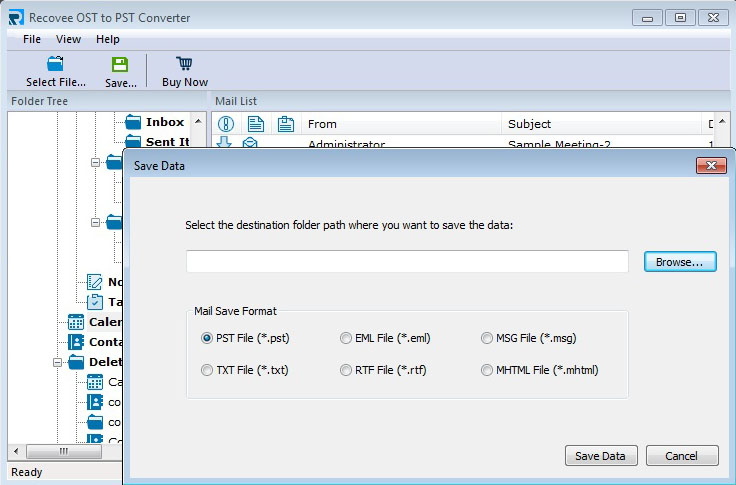 |
| json metadata | {"tags":["exchange"],"image":["https://cdn.steemitimages.com/DQmXWFZ13uS42LtbF8mA3usCT2EviaEqbDfMMLszXgWR6nC/recovee%203.jpg"],"links":["https://www.recovee.com/ost-to-pst-converter.html"],"app":"steemit/0.1"} |
| parent author | jamiekaler |
| parent permlink | how-to-import-ost-file-data-in-ms-outlook-2016 |
| permlink | re-jamiekaler-how-to-import-ost-file-data-in-ms-outlook-2016-20190121t074653850z |
| title | |
| Transaction Info | Block #29643972/Trx 7711a90e433a4d455ec41e09b40563f979e89c94 |
View Raw JSON Data
{
"block": 29643972,
"op": [
"comment",
{
"author": "jamesdavid7119",
"body": "Recovee OST to PST Converter is one of the great and solid solutions which able to fix all the corruption issues of OST files and used for conversion OST files to PST files. This OST to PST Converter is more productive more effective for MS Outlook users. In very easy and succeeding manner, the Outlook admin can successfully balance the entire issues of MS Outlook OST File and demolish the entire impossibilities which could be an obstacle in opening a (.ost) file. The program is capable enough to export all the properties like inbox, calendars, Task, Journals and email headers in a new file. \n\nFor more info: https://www.recovee.com/ost-to-pst-converter.html\n\n",
"json_metadata": "{\"tags\":[\"exchange\"],\"image\":[\"https://cdn.steemitimages.com/DQmXWFZ13uS42LtbF8mA3usCT2EviaEqbDfMMLszXgWR6nC/recovee%203.jpg\"],\"links\":[\"https://www.recovee.com/ost-to-pst-converter.html\"],\"app\":\"steemit/0.1\"}",
"parent_author": "jamiekaler",
"parent_permlink": "how-to-import-ost-file-data-in-ms-outlook-2016",
"permlink": "re-jamiekaler-how-to-import-ost-file-data-in-ms-outlook-2016-20190121t074653850z",
"title": ""
}
],
"op_in_trx": 0,
"timestamp": "2019-01-21T07:46:57",
"trx_id": "7711a90e433a4d455ec41e09b40563f979e89c94",
"trx_in_block": 0,
"virtual_op": 0
}2018/12/27 11:59:54
2018/12/27 11:59:54
| author | steemitboard |
| body | Congratulations @jamiekaler! You received a personal award! <table><tr><td>https://steemitimages.com/70x70/http://steemitboard.com/@jamiekaler/birthday2.png</td><td>2 Years on Steemit</td></tr></table> <sub>_[Click here to view your Board](https://steemitboard.com/@jamiekaler)_</sub> **Do not miss the last post from @steemitboard:** <table><tr><td><a href="https://steemit.com/christmas/@steemitboard/christmas-challenge-send-a-gift-to-to-your-friends-the-party-continues"><img src="https://steemitimages.com/64x128/http://i.cubeupload.com/kf4SJb.png"></a></td><td><a href="https://steemit.com/christmas/@steemitboard/christmas-challenge-send-a-gift-to-to-your-friends-the-party-continues">Christmas Challenge - The party continues</a></td></tr><tr><td><a href="https://steemit.com/christmas/@steemitboard/christmas-challenge-send-a-gift-to-to-your-friends"><img src="https://steemitimages.com/64x128/http://i.cubeupload.com/kf4SJb.png"></a></td><td><a href="https://steemit.com/christmas/@steemitboard/christmas-challenge-send-a-gift-to-to-your-friends">Christmas Challenge - Send a gift to to your friends</a></td></tr></table> > Support [SteemitBoard's project](https://steemit.com/@steemitboard)! **[Vote for its witness](https://v2.steemconnect.com/sign/account-witness-vote?witness=steemitboard&approve=1)** and **get one more award**! |
| json metadata | {"image":["https://steemitboard.com/img/notify.png"]} |
| parent author | jamiekaler |
| parent permlink | easy-way-to-import-nsf-files-to-ms-outlook-2007 |
| permlink | steemitboard-notify-jamiekaler-20181227t115953000z |
| title | |
| Transaction Info | Block #28929657/Trx 865adfb8e935010689b5b2429734ef49e5b67dd0 |
View Raw JSON Data
{
  "block": 28929657,
  "op": [
    "comment",
    {
      "author": "steemitboard",
      "body": "Congratulations @jamiekaler! You received a personal award!\n\n<table><tr><td>https://steemitimages.com/70x70/http://steemitboard.com/@jamiekaler/birthday2.png</td><td>2 Years on Steemit</td></tr></table>\n\n<sub>_[Click here to view your Board](https://steemitboard.com/@jamiekaler)_</sub>\n\n\n**Do not miss the last post from @steemitboard:**\n<table><tr><td><a href=\"https://steemit.com/christmas/@steemitboard/christmas-challenge-send-a-gift-to-to-your-friends-the-party-continues\"><img src=\"https://steemitimages.com/64x128/http://i.cubeupload.com/kf4SJb.png\"></a></td><td><a href=\"https://steemit.com/christmas/@steemitboard/christmas-challenge-send-a-gift-to-to-your-friends-the-party-continues\">Christmas Challenge - The party continues</a></td></tr><tr><td><a href=\"https://steemit.com/christmas/@steemitboard/christmas-challenge-send-a-gift-to-to-your-friends\"><img src=\"https://steemitimages.com/64x128/http://i.cubeupload.com/kf4SJb.png\"></a></td><td><a href=\"https://steemit.com/christmas/@steemitboard/christmas-challenge-send-a-gift-to-to-your-friends\">Christmas Challenge - Send a gift to to your friends</a></td></tr></table>\n\n> Support [SteemitBoard's project](https://steemit.com/@steemitboard)! **[Vote for its witness](https://v2.steemconnect.com/sign/account-witness-vote?witness=steemitboard&approve=1)** and **get one more award**!",
      "json_metadata": "{\"image\":[\"https://steemitboard.com/img/notify.png\"]}",
      "parent_author": "jamiekaler",
      "parent_permlink": "easy-way-to-import-nsf-files-to-ms-outlook-2007",
      "permlink": "steemitboard-notify-jamiekaler-20181227t115953000z",
      "title": ""
    }
  ],
  "op_in_trx": 0,
  "timestamp": "2018-12-27T11:59:54",
  "trx_id": "865adfb8e935010689b5b2429734ef49e5b67dd0",
  "trx_in_block": 4,
  "virtual_op": 0
}2018/09/18 04:41:18
2018/09/18 04:41:18
| author | somit |
| body | I hope this is working for you, but I suggest to <b>MailsDaddy MBOX to PST converter</b>. Tool 30 is a 100% safe and reliable solution for email client's MBOX data such as Poco Mail, Entourage, Eudora, Apple Mail, Thunderbird, SeaMonkey etc. The software has embedded lot of internal features, which makes it the best and it has been already tested with huge MBOX data, so do not worry about the huge file size. Here you can explore <a href="https://www.mailsdaddy.com/mbox-to-pst-converter/">MBOX to PST converter</a> steps: |
| json metadata | {"tags":["mbox"],"links":["https://www.mailsdaddy.com/mbox-to-pst-converter/"],"app":"steemit/0.1"} |
| parent author | jamiekaler |
| parent permlink | convert-mbox-to-ms-outlook-pst-file-easily |
| permlink | re-jamiekaler-convert-mbox-to-ms-outlook-pst-file-easily-20180918t044121876z |
| title | |
| Transaction Info | Block #26043333/Trx c01d83c1cb5db7a492729114fec78c057016c4d7 |
View Raw JSON Data
{
"block": 26043333,
"op": [
"comment",
{
"author": "somit",
"body": "I hope this is working for you, but I suggest to <b>MailsDaddy MBOX to PST converter</b>. Tool 30 is a 100% safe and reliable solution for email client's MBOX data such as Poco Mail, Entourage, Eudora, Apple Mail, Thunderbird, SeaMonkey etc. The software has embedded lot of internal features, which makes it the best and it has been already tested with huge MBOX data, so do not worry about the huge file size.\nHere you can explore <a href=\"https://www.mailsdaddy.com/mbox-to-pst-converter/\">MBOX to PST converter</a> steps:",
"json_metadata": "{\"tags\":[\"mbox\"],\"links\":[\"https://www.mailsdaddy.com/mbox-to-pst-converter/\"],\"app\":\"steemit/0.1\"}",
"parent_author": "jamiekaler",
"parent_permlink": "convert-mbox-to-ms-outlook-pst-file-easily",
"permlink": "re-jamiekaler-convert-mbox-to-ms-outlook-pst-file-easily-20180918t044121876z",
"title": ""
}
],
"op_in_trx": 0,
"timestamp": "2018-09-18T04:41:18",
"trx_id": "c01d83c1cb5db7a492729114fec78c057016c4d7",
"trx_in_block": 14,
"virtual_op": 0
}2018/08/09 12:52:27
2018/08/09 12:52:27
| author | brendonsmith |
| body | EdbMails [OST to PST Converter](https://www.edbmails.com/pages/ost-to-pst-converter.html) is a reliable OST recovery utility which recovers all the corrupted or damaged ost files without any data loss. This Software performs ost to pst file conversion, office 365 migration and live exchange server migration. EdbMails OST to PST Converter software also saves OST to PST, MSG, HTML, MHT, TXT, RTF and EML format. EdbMails recovers data like inbox , contact, calendar, sent items, note, task etc..without any data loss. [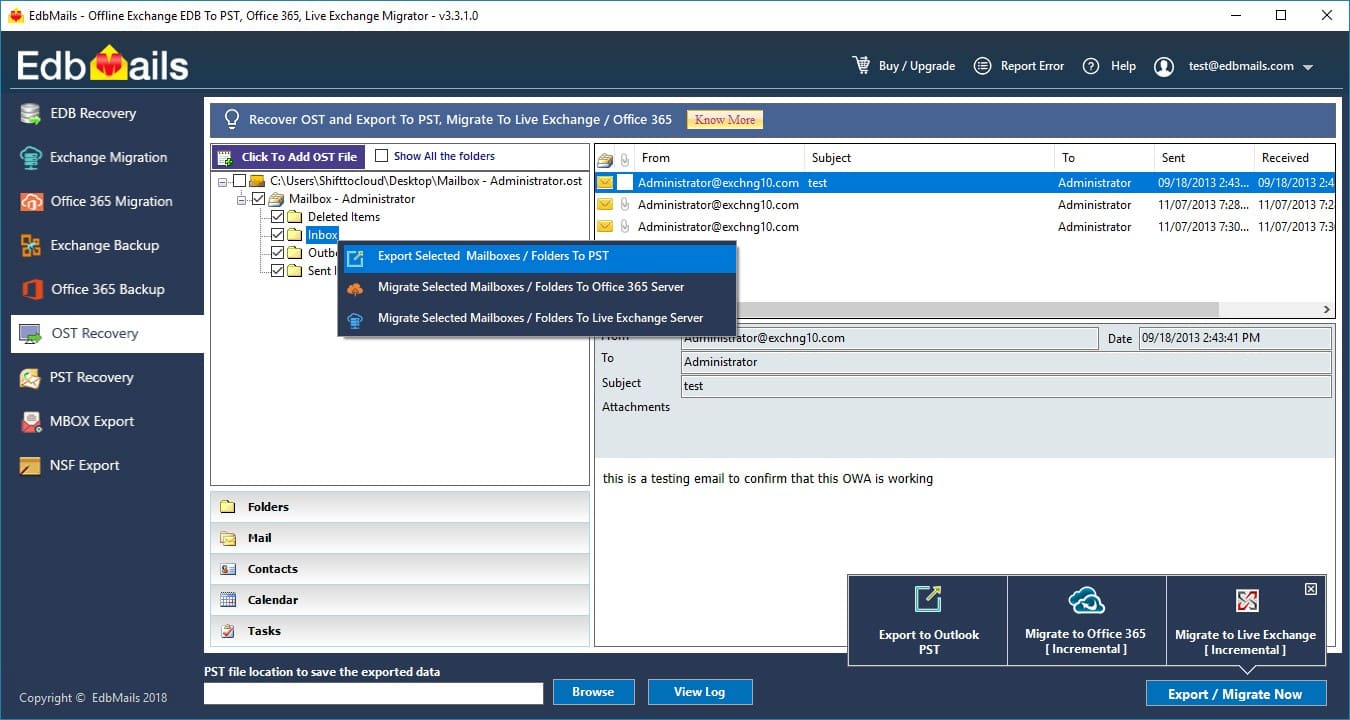](https://www.edbmails.com/pages/ost-to-pst-converter.html) Features of the OST to PST Converter Tool: -Repairs Corrupted OST files -Convert encrypted OST to PST file -Non English Unicode support -No file size limitation -Preview all the items like emails, contacts, calendar before actual export -Conversion of emails, contacts, notes, calendars, Tasks, Journals and Etc... |
| json metadata | {"tags":["exchange"],"image":["https://www.edbmails.com/images/ost_trialaccount.jpg"],"links":["https://www.edbmails.com/pages/ost-to-pst-converter.html"],"app":"steemit/0.1"} |
| parent author | jamiekaler |
| parent permlink | how-to-import-ost-file-data-in-ms-outlook-2016 |
| permlink | re-jamiekaler-how-to-import-ost-file-data-in-ms-outlook-2016-20180809t125303897z |
| title | |
| Transaction Info | Block #24916812/Trx 0d1c355d5a16ad2ddde71dd9c10abf2bbcd30c1e |
View Raw JSON Data
{
"block": 24916812,
"op": [
"comment",
{
"author": "brendonsmith",
"body": "EdbMails [OST to PST Converter](https://www.edbmails.com/pages/ost-to-pst-converter.html) is a reliable OST recovery utility which recovers all the corrupted or damaged ost files without any data loss. This Software performs ost to pst file conversion, office 365 migration and live exchange server migration. EdbMails OST to PST Converter software also saves OST to PST, MSG, HTML, MHT, TXT, RTF and EML format. EdbMails recovers data like inbox , contact, calendar, sent items, note, task etc..without any data loss.\n[](https://www.edbmails.com/pages/ost-to-pst-converter.html)\nFeatures of the OST to PST Converter Tool: \n \n-Repairs Corrupted OST files\n-Convert encrypted OST to PST file\n-Non English Unicode support\n-No file size limitation\n-Preview all the items like emails, contacts, calendar before actual export\n-Conversion of emails, contacts, notes, calendars, Tasks, Journals and Etc...",
"json_metadata": "{\"tags\":[\"exchange\"],\"image\":[\"https://www.edbmails.com/images/ost_trialaccount.jpg\"],\"links\":[\"https://www.edbmails.com/pages/ost-to-pst-converter.html\"],\"app\":\"steemit/0.1\"}",
"parent_author": "jamiekaler",
"parent_permlink": "how-to-import-ost-file-data-in-ms-outlook-2016",
"permlink": "re-jamiekaler-how-to-import-ost-file-data-in-ms-outlook-2016-20180809t125303897z",
"title": ""
}
],
"op_in_trx": 0,
"timestamp": "2018-08-09T12:52:27",
"trx_id": "0d1c355d5a16ad2ddde71dd9c10abf2bbcd30c1e",
"trx_in_block": 4,
"virtual_op": 0
}2018/06/28 11:55:33
2018/06/28 11:55:33
| author | aishawinget |
| body | Very well-written content. You can also refer MailPro+ MBOX to PST converter to migrate MBOX files to PST. Refer: http://www.mailproplus.com/email-conversion/mbox/pst.html |
| json metadata | {"tags":["mbox"],"links":["http://www.mailproplus.com/email-conversion/mbox/pst.html"],"app":"steemit/0.1"} |
| parent author | jamiekaler |
| parent permlink | convert-mbox-to-ms-outlook-pst-file-easily |
| permlink | re-jamiekaler-convert-mbox-to-ms-outlook-pst-file-easily-20180628t115409616z |
| title | |
| Transaction Info | Block #23716981/Trx 1d3e1d698e6d010b99068b8ef7de8ff3d23882af |
View Raw JSON Data
{
  "block": 23716981,
  "op": [
    "comment",
    {
      "author": "aishawinget",
      "body": "Very well-written content. You can also refer MailPro+ MBOX to PST converter to migrate MBOX files to PST. \n\nRefer: http://www.mailproplus.com/email-conversion/mbox/pst.html",
      "json_metadata": "{\"tags\":[\"mbox\"],\"links\":[\"http://www.mailproplus.com/email-conversion/mbox/pst.html\"],\"app\":\"steemit/0.1\"}",
      "parent_author": "jamiekaler",
      "parent_permlink": "convert-mbox-to-ms-outlook-pst-file-easily",
      "permlink": "re-jamiekaler-convert-mbox-to-ms-outlook-pst-file-easily-20180628t115409616z",
      "title": ""
    }
  ],
  "op_in_trx": 0,
  "timestamp": "2018-06-28T11:55:33",
  "trx_id": "1d3e1d698e6d010b99068b8ef7de8ff3d23882af",
  "trx_in_block": 56,
  "virtual_op": 0
}2018/06/21 06:51:21
2018/06/21 06:51:21
| author | ellestephen |
| body | Hi, If you want to save emails from Mac Mail into PDF file format, then you can also opt SysTools MBOX File to PDF format. This Software allows users to export MBOX to PDF with attachments. Using this application, it becomes easy for users to perform MBOX format to PDF document without installing any supportive application. It also allows to search emails and attachments with the help of keywords within the MBOX files. To Know More, Plz Visit: https://www.systoolsgroup.com/mbox-viewer-pro.html |
| json metadata | {"tags":["mac"],"links":["https://www.systoolsgroup.com/mbox-viewer-pro.html"],"app":"steemit/0.1"} |
| parent author | jamiekaler |
| parent permlink | how-to-save-emails-from-mac-mail-into-pdf-instantly |
| permlink | re-jamiekaler-how-to-save-emails-from-mac-mail-into-pdf-instantly-20180621t065105412z |
| title | |
| Transaction Info | Block #23509327/Trx 3c291bafd4aed49a4368eb4d165634c66326af86 |
View Raw JSON Data
{
  "block": 23509327,
  "op": [
    "comment",
    {
      "author": "ellestephen",
      "body": "Hi,\nIf you want to save emails from Mac Mail into PDF file format, then you can also opt SysTools MBOX File to PDF format. This Software allows users to export MBOX to PDF with attachments. Using this application, it becomes easy for users to perform MBOX format to PDF document without installing any supportive application. It also allows to search emails and attachments with the help of keywords within the MBOX files. \n\nTo Know More, Plz Visit: https://www.systoolsgroup.com/mbox-viewer-pro.html",
      "json_metadata": "{\"tags\":[\"mac\"],\"links\":[\"https://www.systoolsgroup.com/mbox-viewer-pro.html\"],\"app\":\"steemit/0.1\"}",
      "parent_author": "jamiekaler",
      "parent_permlink": "how-to-save-emails-from-mac-mail-into-pdf-instantly",
      "permlink": "re-jamiekaler-how-to-save-emails-from-mac-mail-into-pdf-instantly-20180621t065105412z",
      "title": ""
    }
  ],
  "op_in_trx": 0,
  "timestamp": "2018-06-21T06:51:21",
  "trx_id": "3c291bafd4aed49a4368eb4d165634c66326af86",
  "trx_in_block": 15,
  "virtual_op": 0
}2018/03/17 10:33:48
2018/03/17 10:33:48
| author | ellestephen |
| body | @@ -49,17 +49,168 @@ mation. -I +The Manual method discussed above is quite effective but it has some limitations as well and it can only export one single mail at a time. Therefore, i n order |
| json metadata | {"tags":["pdf"],"links":["http://technewskb.com/save-outlook-email-as-pdf/"],"app":"steemit/0.1"} |
| parent author | jamiekaler |
| parent permlink | how-to-export-microsoft-outlook-2013-emails-to-pdf-file-format |
| permlink | re-jamiekaler-how-to-export-microsoft-outlook-2013-emails-to-pdf-file-format-20180317t102749775z |
| title | |
| Transaction Info | Block #20751977/Trx b53a61895ecfae407f91a53fe338c13f18b2c094 |
View Raw JSON Data
{
  "block": 20751977,
  "op": [
    "comment",
    {
      "author": "ellestephen",
      "body": "@@ -49,17 +49,168 @@\n mation. \n-I\n+The Manual method discussed above is quite effective but it has some limitations as well and it can only export one single mail at a time. Therefore,  i\n n order \n",
      "json_metadata": "{\"tags\":[\"pdf\"],\"links\":[\"http://technewskb.com/save-outlook-email-as-pdf/\"],\"app\":\"steemit/0.1\"}",
      "parent_author": "jamiekaler",
      "parent_permlink": "how-to-export-microsoft-outlook-2013-emails-to-pdf-file-format",
      "permlink": "re-jamiekaler-how-to-export-microsoft-outlook-2013-emails-to-pdf-file-format-20180317t102749775z",
      "title": ""
    }
  ],
  "op_in_trx": 0,
  "timestamp": "2018-03-17T10:33:48",
  "trx_id": "b53a61895ecfae407f91a53fe338c13f18b2c094",
  "trx_in_block": 37,
  "virtual_op": 0
}2018/03/17 10:27:48
2018/03/17 10:27:48
| author | ellestephen |
| body | Thanks for sharing this helpful and useful information. In order to export Outlook emails to PDF file format in bulk at a time, then you can also refer to an informative blog. For More Info., please read: http://technewskb.com/save-outlook-email-as-pdf/ |
| json metadata | {"tags":["pdf"],"links":["http://technewskb.com/save-outlook-email-as-pdf/"],"app":"steemit/0.1"} |
| parent author | jamiekaler |
| parent permlink | how-to-export-microsoft-outlook-2013-emails-to-pdf-file-format |
| permlink | re-jamiekaler-how-to-export-microsoft-outlook-2013-emails-to-pdf-file-format-20180317t102749775z |
| title | |
| Transaction Info | Block #20751857/Trx 53d45f6929742f2f63f5964485704152cf8cc064 |
View Raw JSON Data
{
  "block": 20751857,
  "op": [
    "comment",
    {
      "author": "ellestephen",
      "body": "Thanks for sharing this helpful and useful information. In order to export Outlook emails to PDF file format in bulk at a time, then  you can also refer to an informative blog. \nFor More Info., please read: http://technewskb.com/save-outlook-email-as-pdf/",
      "json_metadata": "{\"tags\":[\"pdf\"],\"links\":[\"http://technewskb.com/save-outlook-email-as-pdf/\"],\"app\":\"steemit/0.1\"}",
      "parent_author": "jamiekaler",
      "parent_permlink": "how-to-export-microsoft-outlook-2013-emails-to-pdf-file-format",
      "permlink": "re-jamiekaler-how-to-export-microsoft-outlook-2013-emails-to-pdf-file-format-20180317t102749775z",
      "title": ""
    }
  ],
  "op_in_trx": 0,
  "timestamp": "2018-03-17T10:27:48",
  "trx_id": "53d45f6929742f2f63f5964485704152cf8cc064",
  "trx_in_block": 14,
  "virtual_op": 0
}2017/12/27 13:26:36
2017/12/27 13:26:36
| author | steemitboard |
| body | Congratulations @jamiekaler! You have received a personal award! [](http://steemitboard.com/@jamiekaler) 1 Year on Steemit Click on the badge to view your own Board of Honor on SteemitBoard. > By upvoting this notification, you can help all Steemit users. Learn how [here](https://steemit.com/steemitboard/@steemitboard/http-i-cubeupload-com-7ciqeo-png)! |
| json metadata | {"image":["https://steemitboard.com/img/notifications.png"]} |
| parent author | jamiekaler |
| parent permlink | easy-way-to-import-nsf-files-to-ms-outlook-2007 |
| permlink | steemitboard-notify-jamiekaler-20171227t132638000z |
| title | |
| Transaction Info | Block #18453748/Trx 595debb9fb349c11dbd27d4e4be5ab740bfd6e7a |
View Raw JSON Data
{
"block": 18453748,
"op": [
"comment",
{
"author": "steemitboard",
"body": "Congratulations @jamiekaler! You have received a personal award!\n\n[](http://steemitboard.com/@jamiekaler) 1 Year on Steemit\nClick on the badge to view your own Board of Honor on SteemitBoard.\n\n> By upvoting this notification, you can help all Steemit users. Learn how [here](https://steemit.com/steemitboard/@steemitboard/http-i-cubeupload-com-7ciqeo-png)!",
"json_metadata": "{\"image\":[\"https://steemitboard.com/img/notifications.png\"]}",
"parent_author": "jamiekaler",
"parent_permlink": "easy-way-to-import-nsf-files-to-ms-outlook-2007",
"permlink": "steemitboard-notify-jamiekaler-20171227t132638000z",
"title": ""
}
],
"op_in_trx": 0,
"timestamp": "2017-12-27T13:26:36",
"trx_id": "595debb9fb349c11dbd27d4e4be5ab740bfd6e7a",
"trx_in_block": 65,
"virtual_op": 0
}cocachoupvoted (100.00%) @jamiekaler / easy-way-to-import-nsf-files-to-ms-outlook-20072017/09/01 08:33:51
cocachoupvoted (100.00%) @jamiekaler / easy-way-to-import-nsf-files-to-ms-outlook-2007
2017/09/01 08:33:51
| author | jamiekaler |
| permlink | easy-way-to-import-nsf-files-to-ms-outlook-2007 |
| voter | cocacho |
| weight | 10000 (100.00%) |
| Transaction Info | Block #15080277/Trx e67c7d820cc4ed9ef83c0879e36718b8ee06e295 |
View Raw JSON Data
{
  "block": 15080277,
  "op": [
    "vote",
    {
      "author": "jamiekaler",
      "permlink": "easy-way-to-import-nsf-files-to-ms-outlook-2007",
      "voter": "cocacho",
      "weight": 10000
    }
  ],
  "op_in_trx": 0,
  "timestamp": "2017-09-01T08:33:51",
  "trx_id": "e67c7d820cc4ed9ef83c0879e36718b8ee06e295",
  "trx_in_block": 8,
  "virtual_op": 0
}firekeeperupvoted (100.00%) @jamiekaler / easy-way-to-import-nsf-files-to-ms-outlook-20072017/09/01 08:11:03
firekeeperupvoted (100.00%) @jamiekaler / easy-way-to-import-nsf-files-to-ms-outlook-2007
2017/09/01 08:11:03
| author | jamiekaler |
| permlink | easy-way-to-import-nsf-files-to-ms-outlook-2007 |
| voter | firekeeper |
| weight | 10000 (100.00%) |
| Transaction Info | Block #15079821/Trx 65814304c3bb5e56d5d15de523bbed9739c5a8a3 |
View Raw JSON Data
{
  "block": 15079821,
  "op": [
    "vote",
    {
      "author": "jamiekaler",
      "permlink": "easy-way-to-import-nsf-files-to-ms-outlook-2007",
      "voter": "firekeeper",
      "weight": 10000
    }
  ],
  "op_in_trx": 0,
  "timestamp": "2017-09-01T08:11:03",
  "trx_id": "65814304c3bb5e56d5d15de523bbed9739c5a8a3",
  "trx_in_block": 4,
  "virtual_op": 0
}jamiekalerpublished a new post: easy-way-to-import-nsf-files-to-ms-outlook-20072017/09/01 08:09:21
jamiekalerpublished a new post: easy-way-to-import-nsf-files-to-ms-outlook-2007
2017/09/01 08:09:21
| author | jamiekaler |
| body | Lotus Notes is a well-known emailing client. It is mostly used in large sized organizations. The function such as encryption and password etc. makes Lotus Notes too special for fulfilling large sized organizational needs. In most of the stances, Lotus Notes is not much preferred as compared with contemporary emailing applications such as MS Outlook. Though, as an alternate to Lotus Notes, there are series of emailing clients but there is nothing like Outlook. For corporate sector, MS Outlook is the most liked alternative after Lotus Notes thus a lot of user need to <a href="https://www.jagwaresoftware.com/nsf-to-pst/" target="_blank"><b>import Lotus Notes NSF files into MS Outlook 2007</b></a>, 2010 or any version they use.  Lotus Notes is very costly thus any small organizations or startups cannot afford to use it for longer time span. What really happens is when Lotus Notes is installed, users are not aware of maintenance charges which are really hard to afford. Maintenance cost is unavoidable and needs to be spent every year. The work experience with Lotus Notes is not easy at all. You either have to be really efficient in technical skills or else you won’t feel comfortable with the features at all. MS Outlook, on the contrary is a known application for excellent features. The user-interface is so simple that if you are using it for the first time, you feel extremely comfortable to work with. Also Outlook is easily available and can be used anytime anywhere. <h2>Avail Seamless Way To Import NSF Files to MS Outlook 2007?</h2> When it comes to the migration of data from Lotus Notes to MS Outlook, it becomes really challenging for a system admin to carry it out successfully. There could be two possible ways; either you choose manual tricks or go for some paid solution. This is so obvious that companies prefer for availing the software which is quick and straightforward. Also, they cannot risk there data with some manual tricks which is not full proof. It is recommended to try <a href="https://www.jagwaresoftware.com/nsf-to-pst/" target="_blank"><b>NSF to PST Converter software</b></a>. This is a known application which aims at resolving email migration need. <h2>Other Benefits of Using NSF to PST Migration Tool over Manual Method:</h2> • Tool can migrate multiple NSF files at a time into PST file format but with manual conversion you have to perform same task for each NSF file • Manual conversion from NSF to PST is feasible if you have one or two Lotus Notes file to save into PST. For bulk conversion NSF to PST converter is suitable. • Complete data will be migration without any loss from NSF file into PST format with the tool. On the other hand, manually you can’t do this easily. • You can save ample of time in performing NSF to PST migration when it is to convert Lotus Notes data into Outlook PST format but manually it is very time consuming • Tool ensures to keep the folder structure of Lotus Notes NSF file intact while you convert it into PST file format but if you do it manually there is no guarantee of folder structure. This NSF to PST conversion tool is a complete solution for those who need to import NSF files into MS Outlook 2007 or any other version. It can create UNICODE type PST file for each NSF file and you can easily import the converted PST file within MS Outlook. |
| json metadata | {"tags":["nsf","pst","outlook","lotusnotes","convert"],"image":["https://steemitimages.com/DQmVS5nGRteHQKTZSgd6M3yozRmEu5TRumUtXYreuQFwzN6/email22.jpg"],"links":["https://www.jagwaresoftware.com/nsf-to-pst/"],"app":"steemit/0.1","format":"markdown"} |
| parent author | |
| parent permlink | nsf |
| permlink | easy-way-to-import-nsf-files-to-ms-outlook-2007 |
| title | Easy Way To Import NSF Files to MS Outlook 2007? |
| Transaction Info | Block #15079787/Trx 2d164b9d97d0b34568573d31ab6bf1dd37052a6f |
View Raw JSON Data
{
"block": 15079787,
"op": [
"comment",
{
"author": "jamiekaler",
"body": "Lotus Notes is a well-known emailing client. It is mostly used in large sized organizations. The function such as encryption and password etc. makes Lotus Notes too special for fulfilling large sized organizational needs. In most of the stances, Lotus Notes is not much preferred as compared with contemporary emailing applications such as MS Outlook. Though, as an alternate to Lotus Notes, there are series of emailing clients but there is nothing like Outlook. For corporate sector, MS Outlook is the most liked alternative after Lotus Notes thus a lot of user need to <a href=\"https://www.jagwaresoftware.com/nsf-to-pst/\" target=\"_blank\"><b>import Lotus Notes NSF files into MS Outlook 2007</b></a>, 2010 or any version they use.\n\n\n\nLotus Notes is very costly thus any small organizations or startups cannot afford to use it for longer time span. What really happens is when Lotus Notes is installed, users are not aware of maintenance charges which are really hard to afford. Maintenance cost is unavoidable and needs to be spent every year. The work experience with Lotus Notes is not easy at all. You either have to be really efficient in technical skills or else you won’t feel comfortable with the features at all. MS Outlook, on the contrary is a known application for excellent features. The user-interface is so simple that if you are using it for the first time, you feel extremely comfortable to work with. Also Outlook is easily available and can be used anytime anywhere. \n\n<h2>Avail Seamless Way To Import NSF Files to MS Outlook 2007?</h2>\n\nWhen it comes to the migration of data from Lotus Notes to MS Outlook, it becomes really challenging for a system admin to carry it out successfully. There could be two possible ways; either you choose manual tricks or go for some paid solution. This is so obvious that companies prefer for availing the software which is quick and straightforward. Also, they cannot risk there data with some manual tricks which is not full proof. \n\nIt is recommended to try <a href=\"https://www.jagwaresoftware.com/nsf-to-pst/\" target=\"_blank\"><b>NSF to PST Converter software</b></a>. This is a known application which aims at resolving email migration need.\n\n<h2>Other Benefits of Using NSF to PST Migration Tool over Manual Method:</h2>\n\n•\tTool can migrate multiple NSF files at a time into PST file format but with manual conversion you have to perform same task for each NSF file\n•\tManual conversion from NSF to PST is feasible if you have one or two Lotus Notes file to save into PST. For bulk conversion NSF to PST converter is suitable.\n•\tComplete data will be migration without any loss from NSF file into PST format with the tool. On the other hand, manually you can’t do this easily.\n•\tYou can save ample of time in performing NSF to PST migration when it is to convert Lotus Notes data into Outlook PST format but manually it is very time consuming\n•\tTool ensures to keep the folder structure of Lotus Notes NSF file intact while you convert it into PST file format but if you do it manually there is no guarantee of folder structure.\n\nThis NSF to PST conversion tool is a complete solution for those who need to import NSF files into MS Outlook 2007 or any other version. It can create UNICODE type PST file for each NSF file and you can easily import the converted PST file within MS Outlook.",
"json_metadata": "{\"tags\":[\"nsf\",\"pst\",\"outlook\",\"lotusnotes\",\"convert\"],\"image\":[\"https://steemitimages.com/DQmVS5nGRteHQKTZSgd6M3yozRmEu5TRumUtXYreuQFwzN6/email22.jpg\"],\"links\":[\"https://www.jagwaresoftware.com/nsf-to-pst/\"],\"app\":\"steemit/0.1\",\"format\":\"markdown\"}",
"parent_author": "",
"parent_permlink": "nsf",
"permlink": "easy-way-to-import-nsf-files-to-ms-outlook-2007",
"title": "Easy Way To Import NSF Files to MS Outlook 2007?"
}
],
"op_in_trx": 0,
"timestamp": "2017-09-01T08:09:21",
"trx_id": "2d164b9d97d0b34568573d31ab6bf1dd37052a6f",
"trx_in_block": 7,
"virtual_op": 0
}kromtarupvoted (3.00%) @jamiekaler / convert-mbox-to-ms-outlook-pst-file-easily2017/08/30 11:25:51
kromtarupvoted (3.00%) @jamiekaler / convert-mbox-to-ms-outlook-pst-file-easily
2017/08/30 11:25:51
| author | jamiekaler |
| permlink | convert-mbox-to-ms-outlook-pst-file-easily |
| voter | kromtar |
| weight | 300 (3.00%) |
| Transaction Info | Block #15026198/Trx b0f21afe0a50e1b15257ab327d146ec3777fc227 |
View Raw JSON Data
{
  "block": 15026198,
  "op": [
    "vote",
    {
      "author": "jamiekaler",
      "permlink": "convert-mbox-to-ms-outlook-pst-file-easily",
      "voter": "kromtar",
      "weight": 300
    }
  ],
  "op_in_trx": 0,
  "timestamp": "2017-08-30T11:25:51",
  "trx_id": "b0f21afe0a50e1b15257ab327d146ec3777fc227",
  "trx_in_block": 2,
  "virtual_op": 0
}jamiekalerpublished a new post: convert-mbox-to-ms-outlook-pst-file-easily2017/08/30 10:55:18
jamiekalerpublished a new post: convert-mbox-to-ms-outlook-pst-file-easily
2017/08/30 10:55:18
| author | jamiekaler |
| body | The most important source of communication these days is email. Being economic, it is fast and safe communication channel. Emails are important not only for corporate users but for home users as well. Email communication is least possible without emailing client. Today, many emailing applications exist which makes it difficult to decide for the right one. Many of the email clients are supportive of .mbox file format and they are Entourage, Mozilla Thunderbird, and Pocomail, etc. Some other email clients are available as well using various file formats such as Microsoft® Outlook. This is most used emailing application used all over the world for fulfilling emailing needs in a safe manner. Windows supporting Outlook consisted of so many fruitful elements such as emails, calendars, to do list, tasks etc. On several occasions, users feel the need to <a href="https://www.jagwaresoftware.com/mbox-to-pst/"><b>convert MBOX to MS Outlook PST file</b></a>.  <b>Why PST over MBOX?</b> .mbox and .pst are two most distinct emailing clients. MBOX is supportive of so many emailing applications whereas PST is supportive of Outlook. Reasons for choosing PST over MBOX are as follows: • Suppose you are Mozilla Thunderbird user and wanted to make a switch to Outlook then it is not possible to open MBOX file in Outlook because Outlook is not supportive of MBOX file • If user received a file in MBOX file format and you use Outlook then migration is of course needed. • Change of emailing application from any MBOX supportive client to MS Outlook in office leads to convert MBOX file into PST. <h2>How to convert MBOX to MS Outlook PST file? </h2> The resolution for converting MBOX file into PST consisted of two different ways: Manual and Paid migration using external software <b>Manual Migration Process: </b> The manual migration process from MBOX to PST causes severe most hurdles because of many reasons. Suppose, you are not technically sound then migration can cause hurdles. In fact, it leads to waste time. If the migration process is intervened a little then user needs to start with the steps from the very beginning. These drawbacks impose an inclination for commercial software tool. The professional applications are instant and best result provider. Thus ensure for converting MBOX files into PST via external application in the swift and effective manner. The software ensures for instant migration and with all comfort. <h2>Use Online Software for Convert MBOX to MS Outlook PST file</h2> For migrating MBOX files into PST, rely on some external application such as <a href="https://www.jagwaresoftware.com/mbox-to-pst/"><b>MBOX to PST Converter</b></a> and get the instant results. This is a known application that aims migrating the complete data from MBOX into PST swiftly. You will be happy with the obtained migration solutions. With this conversion wizard you can smoothly convert multiple MBOX files into PST format at a time. The folder structure of each MBOX file remains intact while saving it into PST format. There is no file size limitation with the MBOX file if you convert it into PST file format. If you are unsure about functionalities then download the software in freeware demo run and then make a purchase for the tool. This is the most affordable utility that you can choose for safe migration. |
| json metadata | {"tags":["mbox","pst","outlook","convert","email"],"image":["https://steemitimages.com/DQmZAJ5kdvo2FngYNgSHwHezBELTA4ghcq2iFCP7zJA9uni/email11.png"],"links":["https://www.jagwaresoftware.com/mbox-to-pst/"],"app":"steemit/0.1","format":"markdown"} |
| parent author | |
| parent permlink | mbox |
| permlink | convert-mbox-to-ms-outlook-pst-file-easily |
| title | Convert MBOX To MS Outlook PST File Easily |
| Transaction Info | Block #15025587/Trx c0ee6a4ace6f1817814d6165ef8ec07e7d120fca |
View Raw JSON Data
{
"block": 15025587,
"op": [
"comment",
{
"author": "jamiekaler",
"body": "The most important source of communication these days is email. Being economic, it is fast and safe communication channel. Emails are important not only for corporate users but for home users as well. Email communication is least possible without emailing client. Today, many emailing applications exist which makes it difficult to decide for the right one. Many of the email clients are supportive of .mbox file format and they are Entourage, Mozilla Thunderbird, and Pocomail, etc. Some other email clients are available as well using various file formats such as Microsoft® Outlook. This is most used emailing application used all over the world for fulfilling emailing needs in a safe manner. Windows supporting Outlook consisted of so many fruitful elements such as emails, calendars, to do list, tasks etc. On several occasions, users feel the need to <a href=\"https://www.jagwaresoftware.com/mbox-to-pst/\"><b>convert MBOX to MS Outlook PST file</b></a>.\n\n\n\n<b>Why PST over MBOX?</b>\n.mbox and .pst are two most distinct emailing clients. MBOX is supportive of so many emailing applications whereas PST is supportive of Outlook. Reasons for choosing PST over MBOX are as follows: \n\n•\tSuppose you are Mozilla Thunderbird user and wanted to make a switch to Outlook then it is not possible to open MBOX file in Outlook because Outlook is not supportive of MBOX file \n•\tIf user received a file in MBOX file format and you use Outlook then migration is of course needed. \n•\tChange of emailing application from any MBOX supportive client to MS Outlook in office leads to convert MBOX file into PST. \n\n<h2>How to convert MBOX to MS Outlook PST file? </h2>\n\nThe resolution for converting MBOX file into PST consisted of two different ways: Manual and Paid migration using external software \n\n<b>Manual Migration Process: </b> The manual migration process from MBOX to PST causes severe most hurdles because of many reasons. Suppose, you are not technically sound then migration can cause hurdles. In fact, it leads to waste time. If the migration process is intervened a little then user needs to start with the steps from the very beginning. These drawbacks impose an inclination for commercial software tool. The professional applications are instant and best result provider. Thus ensure for converting MBOX files into PST via external application in the swift and effective manner. The software ensures for instant migration and with all comfort. \n\n<h2>Use Online Software for Convert MBOX to MS Outlook PST file</h2>\n\nFor migrating MBOX files into PST, rely on some external application such as <a href=\"https://www.jagwaresoftware.com/mbox-to-pst/\"><b>MBOX to PST Converter</b></a> and get the instant results. This is a known application that aims migrating the complete data from MBOX into PST swiftly. You will be happy with the obtained migration solutions. \n\nWith this conversion wizard you can smoothly convert multiple MBOX files into PST format at a time. The folder structure of each MBOX file remains intact while saving it into PST format. There is no file size limitation with the MBOX file if you convert it into PST file format. If you are unsure about functionalities then download the software in freeware demo run and then make a purchase for the tool. This is the most affordable utility that you can choose for safe migration.",
"json_metadata": "{\"tags\":[\"mbox\",\"pst\",\"outlook\",\"convert\",\"email\"],\"image\":[\"https://steemitimages.com/DQmZAJ5kdvo2FngYNgSHwHezBELTA4ghcq2iFCP7zJA9uni/email11.png\"],\"links\":[\"https://www.jagwaresoftware.com/mbox-to-pst/\"],\"app\":\"steemit/0.1\",\"format\":\"markdown\"}",
"parent_author": "",
"parent_permlink": "mbox",
"permlink": "convert-mbox-to-ms-outlook-pst-file-easily",
"title": "Convert MBOX To MS Outlook PST File Easily"
}
],
"op_in_trx": 0,
"timestamp": "2017-08-30T10:55:18",
"trx_id": "c0ee6a4ace6f1817814d6165ef8ec07e7d120fca",
"trx_in_block": 17,
"virtual_op": 0
}joanaltressent 0.001 SBD to @jamiekaler- "RESTEEM SERVICE! We're offering resteems to over 9000 followers for only 2 SBD or 2 STEEM per resteem. Our resteems generally do better than Promoted Posts. See my order page at resteem.com if you are..."2017/08/09 08:57:21
joanaltressent 0.001 SBD to @jamiekaler- "RESTEEM SERVICE! We're offering resteems to over 9000 followers for only 2 SBD or 2 STEEM per resteem. Our resteems generally do better than Promoted Posts. See my order page at resteem.com if you are..."
2017/08/09 08:57:21
| amount | 0.001 SBD |
| from | joanaltres |
| memo | RESTEEM SERVICE! We're offering resteems to over 9000 followers for only 2 SBD or 2 STEEM per resteem. Our resteems generally do better than Promoted Posts. See my order page at resteem.com if you are interested, or you can simply send 2 SBD or 2 STEEM now and the link to your post to @carlobelgado and we'll resteem it right away. Resteems get you more views, more followers, more engagement on your post, and usually more money. We've had several repeat buyers who love the service. Thanks! |
| to | jamiekaler |
| Transaction Info | Block #14419498/Trx 012e3e38def48d1134dfbf3e8df5f2fd8b882b01 |
View Raw JSON Data
{
  "block": 14419498,
  "op": [
    "transfer",
    {
      "amount": "0.001 SBD",
      "from": "joanaltres",
      "memo": "RESTEEM SERVICE! We're offering resteems to over 9000 followers for only 2 SBD or 2 STEEM per resteem. Our resteems generally do better than Promoted Posts. See my order page at resteem.com if you are interested, or you can simply send 2 SBD or 2 STEEM now and the link to your post to @carlobelgado and we'll resteem it right away. Resteems get you more views, more followers, more engagement on your post, and usually more money. We've had several repeat buyers who love the service. Thanks!",
      "to": "jamiekaler"
    }
  ],
  "op_in_trx": 0,
  "timestamp": "2017-08-09T08:57:21",
  "trx_id": "012e3e38def48d1134dfbf3e8df5f2fd8b882b01",
  "trx_in_block": 9,
  "virtual_op": 0
}2017/08/08 07:34:33
2017/08/08 07:34:33
| author | joeyarnoldvn |
| body | awesome |
| json metadata | {"tags":["nsf"],"app":"steemit/0.1"} |
| parent author | jamiekaler |
| parent permlink | export-lotus-notes-email-to-windows-live-mail |
| permlink | re-jamiekaler-export-lotus-notes-email-to-windows-live-mail-20170808t073432867z |
| title | |
| Transaction Info | Block #14389082/Trx f7dca7a7ab99ee644f8280927ff67d6a8eb15ae6 |
View Raw JSON Data
{
  "block": 14389082,
  "op": [
    "comment",
    {
      "author": "joeyarnoldvn",
      "body": "awesome",
      "json_metadata": "{\"tags\":[\"nsf\"],\"app\":\"steemit/0.1\"}",
      "parent_author": "jamiekaler",
      "parent_permlink": "export-lotus-notes-email-to-windows-live-mail",
      "permlink": "re-jamiekaler-export-lotus-notes-email-to-windows-live-mail-20170808t073432867z",
      "title": ""
    }
  ],
  "op_in_trx": 0,
  "timestamp": "2017-08-08T07:34:33",
  "trx_id": "f7dca7a7ab99ee644f8280927ff67d6a8eb15ae6",
  "trx_in_block": 16,
  "virtual_op": 0
}jamiekalerpublished a new post: export-lotus-notes-email-to-windows-live-mail2017/08/08 07:24:51
jamiekalerpublished a new post: export-lotus-notes-email-to-windows-live-mail
2017/08/08 07:24:51
| author | jamiekaler |
| body | @@ -734,16 +734,79 @@ ails. %0A%0A +%3Cimg src=%22https://www.jagwaresoftware.com/imgs/email8.jpg%22 /%3E%0A%0A %3Ch2%3EHow |
| json metadata | {"tags":["nsf","eml","lotus","notes","convert"],"links":["https://www.jagwaresoftware.com/nsf-to-eml/"],"app":"steemit/0.1","format":"markdown","image":["https://www.jagwaresoftware.com/imgs/email8.jpg"]} |
| parent author | |
| parent permlink | nsf |
| permlink | export-lotus-notes-email-to-windows-live-mail |
| title | Export Lotus Notes Email To Windows Live Mail |
| Transaction Info | Block #14388888/Trx 7894c2de652cbd93111312d0ec9c1210bb566094 |
View Raw JSON Data
{
  "block": 14388888,
  "op": [
    "comment",
    {
      "author": "jamiekaler",
      "body": "@@ -734,16 +734,79 @@\n ails. %0A%0A\n+%3Cimg src=%22https://www.jagwaresoftware.com/imgs/email8.jpg%22 /%3E%0A%0A\n %3Ch2%3EHow \n",
      "json_metadata": "{\"tags\":[\"nsf\",\"eml\",\"lotus\",\"notes\",\"convert\"],\"links\":[\"https://www.jagwaresoftware.com/nsf-to-eml/\"],\"app\":\"steemit/0.1\",\"format\":\"markdown\",\"image\":[\"https://www.jagwaresoftware.com/imgs/email8.jpg\"]}",
      "parent_author": "",
      "parent_permlink": "nsf",
      "permlink": "export-lotus-notes-email-to-windows-live-mail",
      "title": "Export Lotus Notes Email To Windows Live Mail"
    }
  ],
  "op_in_trx": 0,
  "timestamp": "2017-08-08T07:24:51",
  "trx_id": "7894c2de652cbd93111312d0ec9c1210bb566094",
  "trx_in_block": 7,
  "virtual_op": 0
}jamiekalerpublished a new post: export-lotus-notes-email-to-windows-live-mail2017/08/08 07:23:21
jamiekalerpublished a new post: export-lotus-notes-email-to-windows-live-mail
2017/08/08 07:23:21
| author | jamiekaler |
| body | You are happily working in Lotus Notes atmosphere but all of a sudden your administrator announce for change of the email platform. The move is now onto Windows Live Mail. WLM is the most important platform used all over. However, the trouble in not to shift to the new environment but it is regarding emails which are stored in Lotus Notes. You might fall into the need where it is urgent to find the answer for query <a href="https://www.jagwaresoftware.com/nsf-to-eml/"><b>how to Export Lotus Notes email to Windows Live Mail</b></a>. It is utmost crucial for capturing the emails along with you when moving to the new platform otherwise severe hurdles may arise. You never know when you fall into need to collect data from NSF emails. <h2>How to Export Lotus Notes email to Windows Live Mail?</h2> The right solution is indeed required that can make migration safely and instantly. Don’t just opt any solution to migrate the emails instead know in detail and judge the solution in a better way. These methods can be as follows: <b>Migrate NSF Files Manually:</b> There is availability of manual solutions but not recommended because of the following drawbacks: • The process is too long to continue with. This will lead to produce complications because at a time, only one file can move into Windows Live Mail EML files. If the emails are in bulk then process is highly complicated and time consuming as well • However the process can be used if emails are few in countable numbers say 10 or 15. • In addition to these points, if you are not well-versed with the technology then such a process will not work for longer and cause severe hurdles too. If you ever skip the steps then repetition of the process from the beginning is mandatory. • The method is full of risks. The chance of losing data is higher in cases like poor internet connectivity etc. <b>Paid Third party software:</b> As we all live in the fast technological world and everyone is running short of time. Thus entrepreneurs look for fastest possible solutions and prefer choosing online application tools over manual migration facilities. The commercial tools are so many in numbers that sometimes you might get confused which one is apt to buy. For avoiding the complications, simply download the software in freeware edition and seek the details in advance. <h3>Flawless Way To Export Lotus Notes email to Windows Live</h3> In order to convert emails from Lotus Notes to EML file format, go for <a href="https://www.jagwaresoftware.com/nsf-to-eml/"><b>NSF to EML converter</b></a> application. This is a known software application that aims at resolving the hurdles that you come across while making migration. This is a known third-party application that aims at migrating data comprehensively in a hassle-free manner. Thus, connect with the support desk soon and collect the applicable results further. In order to get familiar with the consequences, try the functioning of the software in free of cost demonstration edition. |
| json metadata | {"tags":["nsf","eml","lotus","notes","convert"],"links":["https://www.jagwaresoftware.com/nsf-to-eml/"],"app":"steemit/0.1","format":"markdown"} |
| parent author | |
| parent permlink | nsf |
| permlink | export-lotus-notes-email-to-windows-live-mail |
| title | Export Lotus Notes Email To Windows Live Mail |
| Transaction Info | Block #14388858/Trx 9864767045b46511c9235f6f612271e0b25781f9 |
View Raw JSON Data
{
  "block": 14388858,
  "op": [
    "comment",
    {
      "author": "jamiekaler",
      "body": "You are happily working in Lotus Notes atmosphere but all of a sudden your administrator announce for change of the email platform. The move is now onto Windows Live Mail. WLM is the most important platform used all over. However, the trouble in not to shift to the new environment but it is regarding emails which are stored in Lotus Notes. You might fall into the need where it is urgent to find the answer for query <a href=\"https://www.jagwaresoftware.com/nsf-to-eml/\"><b>how to Export Lotus Notes email to Windows Live Mail</b></a>. It is utmost crucial for capturing the emails along with you when moving to the new platform otherwise severe hurdles may arise. You never know when you fall into need to collect data from NSF emails. \n\n<h2>How to Export Lotus Notes email to Windows Live Mail?</h2>\n\nThe right solution is indeed required that can make migration safely and instantly. Don’t just opt any solution to migrate the emails instead know in detail and judge the solution in a better way. These methods can be as follows:\n\n<b>Migrate NSF Files Manually:</b>  There is availability of manual solutions but not recommended because of the following drawbacks:\n\n•\tThe process is too long to continue with. This will lead to produce complications because at a time, only one file can move into Windows Live Mail EML files. If the emails are in bulk then process is highly complicated and time consuming as well\n•\tHowever the process can be used if emails are few in countable numbers say 10 or 15. \n•\tIn addition to these points, if you are not well-versed with the technology then such a process will not work for longer and cause severe hurdles too. If you ever skip the steps then repetition of the process from the beginning is mandatory. \n•\tThe method is full of risks. The chance of losing data is higher in cases like poor internet connectivity etc. \n\n<b>Paid Third party software:</b> \n\nAs we all live in the fast technological world and everyone is running short of time. Thus entrepreneurs look for fastest possible solutions and prefer choosing online application tools over manual migration facilities. The commercial tools are so many in numbers that sometimes you might get confused which one is apt to buy. For avoiding the complications, simply download the software in freeware edition and seek the details in advance. \n\n<h3>Flawless Way To Export Lotus Notes email to Windows Live</h3> \n\nIn order to convert emails from Lotus Notes to EML file format, go for <a href=\"https://www.jagwaresoftware.com/nsf-to-eml/\"><b>NSF to EML converter</b></a> application. This is a known software application that aims at resolving the hurdles that you come across while making migration. This is a known third-party application that aims at migrating data comprehensively in a hassle-free manner. Thus, connect with the support desk soon and collect the applicable results further. In order to get familiar with the consequences, try the functioning of the software in free of cost demonstration edition.",
      "json_metadata": "{\"tags\":[\"nsf\",\"eml\",\"lotus\",\"notes\",\"convert\"],\"links\":[\"https://www.jagwaresoftware.com/nsf-to-eml/\"],\"app\":\"steemit/0.1\",\"format\":\"markdown\"}",
      "parent_author": "",
      "parent_permlink": "nsf",
      "permlink": "export-lotus-notes-email-to-windows-live-mail",
      "title": "Export Lotus Notes Email To Windows Live Mail"
    }
  ],
  "op_in_trx": 0,
  "timestamp": "2017-08-08T07:23:21",
  "trx_id": "9864767045b46511c9235f6f612271e0b25781f9",
  "trx_in_block": 15,
  "virtual_op": 0
}jamiekalerpublished a new post: how-to-transfer-outlook-express-emails-to-outlook-2010-on-new-computer2017/08/08 06:46:48
jamiekalerpublished a new post: how-to-transfer-outlook-express-emails-to-outlook-2010-on-new-computer
2017/08/08 06:46:48
| author | jamiekaler |
| body | In many possible scenarios, user is forced to migrate from Outlook Express emails into Outlook. Though when such situation crop up, it is obvious for anyone to show worries about emails stored in OE. However, there are several ways for making conversion but still it is problematic when you are misguided or when it is not possible to spot the apt solution. As we all know Outlook express saves it emails in EML format and Outlook stores its data in PST format. Thus, if at any point of time you need to <a href="https://www.jagwaresoftware.com/eml-to-pst/"><b>migrate from Outlook express to MS Outlook</b></a> then you have to convert Outlook express EML files into Outlook PST file format. <img src="https://www.jagwaresoftware.com/imgs/email9.png"/> <b>In several unanticipated circumstances user wants to know how to transfer Outlook Express emails to Outlook 2010 on new computer?</b> <ul> <li>Suppose you are using Outlook Express in your old computer machine and after the purchase of the new PC, you have installed Outlook 2010. Here the requirement is to move emails from old PC installed with OE into MS Outlook 2010. </li> <li>Switch to the new organization is the biggest cause for moving emails from EML into PST. You might have changed your workstation where all over Outlook 2010 is used. Now this switch doesn’t mean to leave the emails in the old PC of your previous organization. Thus, before leaving, ensure that you take away Outlook Express EML files along with you. </li> <li>Suppose you work from Home and your PC suddenly got severely damaged or corrupted. Now, rather than fixing the things, you prepare your mind to buy a new laptop. This will ensure to create a need to move away all the emails stored in EML file format into Outlook 2010. </li> <ul> <b>Try some methods! For all these problems and undue scenarios, ensure that you use some of the methods such as: </b> <ul> <li>Drag and drop method: This method is a kind of manual solution which is useful for opening EML files in MS Outlook. You cannot transfer emails via this method but can make a shift using drag and drop method. In all the situations mentioned above, it is clear that user has bulk of emails. Now, the thing is how is it feasible to use drag and drop method for such a large number of emails. </li> <li>Freeware tools: There are immense of freeware applications for converting or importing the emails from one platform to another. However, this method is not reliable and risk factor is too high.</li> <li>Use Third-party software: As a safe and quick solution, most of the users rely on Third-party software tool. There are so many applications fulfilling this need which might confuse you. Thus, to resolve the hurdles in deciding the better one, ensure for trying the software in free of cost demonstration edition. </li> <ul> <h2>How to transfer Outlook Express emails to Outlook 2010 on new computer with automated Process?</h2> If you are tired of repeating the steps for converting each EML file in PST then look for automated conversion method. Use <a href="https://www.jagwaresoftware.com/eml-to-pst/"><b>EML to PST Converter tool</b></a> for this purpose. This software package is useful when the data is in bulk because this application can make bulk migration in a single go. Also, it is extremely simple and easy to use thus, even a non-technical user can use it to save Outlook Express data into Outlook. |
| json metadata | {"tags":["eml","pst","outlook","email","nsf"],"app":"steemit/0.1","format":"markdown","image":["https://www.jagwaresoftware.com/imgs/email9.png"],"links":["https://www.jagwaresoftware.com/eml-to-pst/"]} |
| parent author | |
| parent permlink | nsf |
| permlink | how-to-transfer-outlook-express-emails-to-outlook-2010-on-new-computer |
| title | How to Transfer Outlook Express Emails To Outlook 2010 On New Computer? |
| Transaction Info | Block #14388127/Trx 3ad490d5e51d537055a3068c05a58e7085de5938 |
View Raw JSON Data
{
  "block": 14388127,
  "op": [
    "comment",
    {
      "author": "jamiekaler",
      "body": "In many possible scenarios, user is forced to migrate from Outlook Express emails into Outlook. Though when such situation crop up, it is obvious for anyone to show worries about emails stored in OE. However, there are several ways for making conversion but still it is problematic when you are misguided or when it is not possible to spot the apt solution. \n\nAs we all know Outlook express saves it emails in EML format and Outlook stores its data in PST format. Thus, if at any point of time you need to <a href=\"https://www.jagwaresoftware.com/eml-to-pst/\"><b>migrate from Outlook express to MS Outlook</b></a> then you have to convert Outlook express EML files into Outlook PST file format. \n\n<img src=\"https://www.jagwaresoftware.com/imgs/email9.png\"/>\n\n<b>In several unanticipated circumstances user wants to know how to transfer Outlook Express emails to Outlook 2010 on new computer?</b>\n\n<ul>\n<li>Suppose you are using Outlook Express in your old computer machine and after the purchase of the new PC, you have installed Outlook 2010. Here the requirement is to move emails from old PC installed with OE into MS Outlook 2010. </li>\n<li>Switch to the new organization is the biggest cause for moving emails from EML into PST. You might have changed your workstation where all over Outlook 2010 is used. Now this switch doesn’t mean to leave the emails in the old PC of your previous organization. Thus, before leaving, ensure that you take away Outlook Express EML files along with you. </li>\n<li>Suppose you work from Home and your PC suddenly got severely damaged or corrupted. Now, rather than fixing the things, you prepare your mind to buy a new laptop. This will ensure to create a need to move away all the emails stored in EML file format into Outlook 2010. </li>\n<ul>\n\n<b>Try some methods! For all these problems and undue scenarios, ensure that you use some of the methods such as: </b>\n\n<ul>\n<li>Drag and drop method: This method is a kind of manual solution which is useful for opening EML files in MS Outlook. You cannot transfer emails via this method but can make a shift using drag and drop method. In all the situations mentioned above, it is clear that user has bulk of emails. Now, the thing is how is it feasible to use drag and drop method for such a large number of emails. </li>\n<li>Freeware tools: There are immense of freeware applications for converting or importing the emails from one platform to another. However, this method is not reliable and risk factor is too high.</li> \n<li>Use Third-party software: As a safe and quick solution, most of the users rely on Third-party software tool. There are so many applications fulfilling this need which might confuse you. Thus, to resolve the hurdles in deciding the better one, ensure for trying the software in free of cost demonstration edition. </li>\n<ul>\n<h2>How to transfer Outlook Express emails to Outlook 2010 on new computer with automated Process?</h2>\n\nIf you are tired of repeating the steps for converting each EML file in PST then look for automated conversion method. Use <a href=\"https://www.jagwaresoftware.com/eml-to-pst/\"><b>EML to PST Converter tool</b></a> for this purpose. This software package is useful when the data is in bulk because this application can make bulk migration in a single go. Also, it is extremely simple and easy to use thus, even a non-technical user can use  it to save Outlook Express data into Outlook.",
      "json_metadata": "{\"tags\":[\"eml\",\"pst\",\"outlook\",\"email\",\"nsf\"],\"app\":\"steemit/0.1\",\"format\":\"markdown\",\"image\":[\"https://www.jagwaresoftware.com/imgs/email9.png\"],\"links\":[\"https://www.jagwaresoftware.com/eml-to-pst/\"]}",
      "parent_author": "",
      "parent_permlink": "nsf",
      "permlink": "how-to-transfer-outlook-express-emails-to-outlook-2010-on-new-computer",
      "title": "How to Transfer Outlook Express Emails To Outlook 2010 On New Computer?"
    }
  ],
  "op_in_trx": 0,
  "timestamp": "2017-08-08T06:46:48",
  "trx_id": "3ad490d5e51d537055a3068c05a58e7085de5938",
  "trx_in_block": 13,
  "virtual_op": 0
}jamiekalerpublished a new post: how-to-transfer-outlook-express-emails-to-outlook-2010-on-new-computer2017/08/08 06:46:24
jamiekalerpublished a new post: how-to-transfer-outlook-express-emails-to-outlook-2010-on-new-computer
2017/08/08 06:46:24
| author | jamiekaler |
| body | In many possible scenarios, user is forced to migrate from Outlook Express emails into Outlook. Though when such situation crop up, it is obvious for anyone to show worries about emails stored in OE. However, there are several ways for making conversion but still it is problematic when you are misguided or when it is not possible to spot the apt solution. As we all know Outlook express saves it emails in EML format and Outlook stores its data in PST format. Thus, if at any point of time you need to <a href="https://www.jagwaresoftware.com/eml-to-pst/"><b>migrate from Outlook express to MS Outlook</b></a> then you have to convert Outlook express EML files into Outlook PST file format. <img src="https://www.jagwaresoftware.com/imgs/email9.png"/> <b>In several unanticipated circumstances user wants to know how to transfer Outlook Express emails to Outlook 2010 on new computer?</b> <ul> <li>Suppose you are using Outlook Express in your old computer machine and after the purchase of the new PC, you have installed Outlook 2010. Here the requirement is to move emails from old PC installed with OE into MS Outlook 2010. </li> <li>Switch to the new organization is the biggest cause for moving emails from EML into PST. You might have changed your workstation where all over Outlook 2010 is used. Now this switch doesn’t mean to leave the emails in the old PC of your previous organization. Thus, before leaving, ensure that you take away Outlook Express EML files along with you. </li> <li>Suppose you work from Home and your PC suddenly got severely damaged or corrupted. Now, rather than fixing the things, you prepare your mind to buy a new laptop. This will ensure to create a need to move away all the emails stored in EML file format into Outlook 2010. </li> <ul> <b>Try some methods! For all these problems and undue scenarios, ensure that you use some of the methods such as: </b> <ul> <li>Drag and drop method: This method is a kind of manual solution which is useful for opening EML files in MS Outlook. You cannot transfer emails via this method but can make a shift using drag and drop method. In all the situations mentioned above, it is clear that user has bulk of emails. Now, the thing is how is it feasible to use drag and drop method for such a large number of emails. </li> <li>Freeware tools: There are immense of freeware applications for converting or importing the emails from one platform to another. However, this method is not reliable and risk factor is too high.</li> <li>Use Third-party software: As a safe and quick solution, most of the users rely on Third-party software tool. There are so many applications fulfilling this need which might confuse you. Thus, to resolve the hurdles in deciding the better one, ensure for trying the software in free of cost demonstration edition. </li> <ul> <h2>How to transfer Outlook Express emails to Outlook 2010 on new computer with automated Process?</h2> If you are tired of repeating the steps for converting each EML file in PST then look for automated conversion method. Use <a href="https://www.jagwaresoftware.com/eml-to-pst/"><b>EML to PST Converter tool</b></a> for this purpose. This software package is useful when the data is in bulk because this application can make bulk migration in a single go. Also, it is extremely simple and easy to use thus, even a non-technical user can use it to save Outlook Express data into Outlook. |
| json metadata | {"tags":["eml","pst","outlook","email","nsf"],"app":"steemit/0.1","format":"markdown","image":["https://www.jagwaresoftware.com/imgs/email9.png"],"links":["https://www.jagwaresoftware.com/eml-to-pst/"]} |
| parent author | |
| parent permlink | nsf |
| permlink | how-to-transfer-outlook-express-emails-to-outlook-2010-on-new-computer |
| title | How to Transfer Outlook Express Emails To Outlook 2010 On New Computer? |
| Transaction Info | Block #14388119/Trx 3dc335d949614967272c0cc35bef4cffc8bde08d |
View Raw JSON Data
{
  "block": 14388119,
  "op": [
    "comment",
    {
      "author": "jamiekaler",
      "body": "In many possible scenarios, user is forced to migrate from Outlook Express emails into Outlook. Though when such situation crop up, it is obvious for anyone to show worries about emails stored in OE. However, there are several ways for making conversion but still it is problematic when you are misguided or when it is not possible to spot the apt solution. \n\nAs we all know Outlook express saves it emails in EML format and Outlook stores its data in PST format. Thus, if at any point of time you need to <a href=\"https://www.jagwaresoftware.com/eml-to-pst/\"><b>migrate from Outlook express to MS Outlook</b></a> then you have to convert Outlook express EML files into Outlook PST file format. \n\n<img src=\"https://www.jagwaresoftware.com/imgs/email9.png\"/>\n\n<b>In several unanticipated circumstances user wants to know how to transfer Outlook Express emails to Outlook 2010 on new computer?</b>\n\n<ul>\n<li>Suppose you are using Outlook Express in your old computer machine and after the purchase of the new PC, you have installed Outlook 2010. Here the requirement is to move emails from old PC installed with OE into MS Outlook 2010. </li>\n<li>Switch to the new organization is the biggest cause for moving emails from EML into PST. You might have changed your workstation where all over Outlook 2010 is used. Now this switch doesn’t mean to leave the emails in the old PC of your previous organization. Thus, before leaving, ensure that you take away Outlook Express EML files along with you. </li>\n<li>Suppose you work from Home and your PC suddenly got severely damaged or corrupted. Now, rather than fixing the things, you prepare your mind to buy a new laptop. This will ensure to create a need to move away all the emails stored in EML file format into Outlook 2010. </li>\n<ul>\n\n<b>Try some methods! For all these problems and undue scenarios, ensure that you use some of the methods such as: </b>\n\n<ul>\n<li>Drag and drop method: This method is a kind of manual solution which is useful for opening EML files in MS Outlook. You cannot transfer emails via this method but can make a shift using drag and drop method. In all the situations mentioned above, it is clear that user has bulk of emails. Now, the thing is how is it feasible to use drag and drop method for such a large number of emails. </li>\n<li>Freeware tools: There are immense of freeware applications for converting or importing the emails from one platform to another. However, this method is not reliable and risk factor is too high.</li> \n<li>Use Third-party software: As a safe and quick solution, most of the users rely on Third-party software tool. There are so many applications fulfilling this need which might confuse you. Thus, to resolve the hurdles in deciding the better one, ensure for trying the software in free of cost demonstration edition. </li>\n<ul>\n<h2>How to transfer Outlook Express emails to Outlook 2010 on new computer with automated Process?</h2>\n\nIf you are tired of repeating the steps for converting each EML file in PST then look for automated conversion method. Use <a href=\"https://www.jagwaresoftware.com/eml-to-pst/\"><b>EML to PST Converter tool</b></a> for this purpose. This software package is useful when the data is in bulk because this application can make bulk migration in a single go. Also, it is extremely simple and easy to use thus, even a non-technical user can use  it to save Outlook Express data into Outlook.",
      "json_metadata": "{\"tags\":[\"eml\",\"pst\",\"outlook\",\"email\",\"nsf\"],\"app\":\"steemit/0.1\",\"format\":\"markdown\",\"image\":[\"https://www.jagwaresoftware.com/imgs/email9.png\"],\"links\":[\"https://www.jagwaresoftware.com/eml-to-pst/\"]}",
      "parent_author": "",
      "parent_permlink": "nsf",
      "permlink": "how-to-transfer-outlook-express-emails-to-outlook-2010-on-new-computer",
      "title": "How to Transfer Outlook Express Emails To Outlook 2010 On New Computer?"
    }
  ],
  "op_in_trx": 0,
  "timestamp": "2017-08-08T06:46:24",
  "trx_id": "3dc335d949614967272c0cc35bef4cffc8bde08d",
  "trx_in_block": 10,
  "virtual_op": 0
}joanaltressent 0.001 SBD to @jamiekaler- "Resteeming Service Update: From this point forward all resteems will cost only $2 starting now. You can order a resteem to over 9000 followers for your post by sending 2 SBD (Steem Dollars) and the li..."2017/08/06 09:14:06
joanaltressent 0.001 SBD to @jamiekaler- "Resteeming Service Update: From this point forward all resteems will cost only $2 starting now. You can order a resteem to over 9000 followers for your post by sending 2 SBD (Steem Dollars) and the li..."
2017/08/06 09:14:06
| amount | 0.001 SBD |
| from | joanaltres |
| memo | Resteeming Service Update: From this point forward all resteems will cost only $2 starting now. You can order a resteem to over 9000 followers for your post by sending 2 SBD (Steem Dollars) and the link to your post to @carlobelgado. The result you get depends on your post quality and how interesting it is to people. Resteems are just like retweets on Twitter - it puts your post in front of more eyeballs but it doesn't guarantee people will click on it to read it and upvote it. More money is only one of the possible benefits from a resteem. You could also gain more followers who support your efforts on Steemit long term. Hopefully, this will help some of you gain more exposure on this great platform where it is very hard these days to attract views for your posts. To order a resteem for your post, send 2 SBD and the link to your post to @carlobelgado, and he will resteem it. Best wishes! |
| to | jamiekaler |
| Transaction Info | Block #14333540/Trx fc90949fbffbce390c7144c8a66622c1b9e2c1ba |
View Raw JSON Data
{
  "block": 14333540,
  "op": [
    "transfer",
    {
      "amount": "0.001 SBD",
      "from": "joanaltres",
      "memo": "Resteeming Service Update: From this point forward all resteems will cost only $2 starting now. You can order a resteem to over 9000 followers for your post by sending 2 SBD (Steem Dollars) and the link to your post to @carlobelgado. The result you get depends on your post quality and how interesting it is to people. Resteems are just like retweets on Twitter - it puts your post in front of more eyeballs but it doesn't guarantee people will click on it to read it and upvote it. More money is only one of the possible benefits from a resteem. You could also gain more followers who support your efforts on Steemit long term. Hopefully, this will help some of you gain more exposure on this great platform where it is very hard these days to attract views for your posts. To order a resteem for your post, send 2 SBD and the link to your post to @carlobelgado, and he will resteem it. Best wishes!",
      "to": "jamiekaler"
    }
  ],
  "op_in_trx": 0,
  "timestamp": "2017-08-06T09:14:06",
  "trx_id": "fc90949fbffbce390c7144c8a66622c1b9e2c1ba",
  "trx_in_block": 17,
  "virtual_op": 0
}jones420sent 0.001 SBD to @jamiekaler- "Thank you for following me!
Do you want your post to be resteemed to 5.000+ followers? Contact me@ https://steemit.chat/direct/mr.jones Peace! (Do you want upvotes exchange go to https://steemfollower..."2017/08/04 15:52:12
jones420sent 0.001 SBD to @jamiekaler- "Thank you for following me!
Do you want your post to be resteemed to 5.000+ followers? Contact me@ https://steemit.chat/direct/mr.jones Peace! (Do you want upvotes exchange go to https://steemfollower..."
2017/08/04 15:52:12
| amount | 0.001 SBD |
| from | jones420 |
| memo | Thank you for following me! Do you want your post to be resteemed to 5.000+ followers? Contact me@ https://steemit.chat/direct/mr.jones Peace! (Do you want upvotes exchange go to https://steemfollower.com/?r=346) |
| to | jamiekaler |
| Transaction Info | Block #14283910/Trx 10a14ef88e493d1c0db3e032077a35e6c3420161 |
View Raw JSON Data
{
  "block": 14283910,
  "op": [
    "transfer",
    {
      "amount": "0.001 SBD",
      "from": "jones420",
      "memo": "Thank you for following me!\nDo you want your post to be resteemed to 5.000+ followers? Contact me@ https://steemit.chat/direct/mr.jones Peace! (Do you want upvotes exchange go to https://steemfollower.com/?r=346)",
      "to": "jamiekaler"
    }
  ],
  "op_in_trx": 0,
  "timestamp": "2017-08-04T15:52:12",
  "trx_id": "10a14ef88e493d1c0db3e032077a35e6c3420161",
  "trx_in_block": 5,
  "virtual_op": 0
}2017/08/04 11:28:21
2017/08/04 11:28:21
| author | jamiekaler |
| permlink | how-to-transfer-outlook-express-emails-to-outlook-2010-on-new-computer |
| voter | alphacore |
| weight | 10 (0.10%) |
| Transaction Info | Block #14278636/Trx ad1404cb747b5474ff6ccda83a50ad1feb2054ac |
View Raw JSON Data
{
  "block": 14278636,
  "op": [
    "vote",
    {
      "author": "jamiekaler",
      "permlink": "how-to-transfer-outlook-express-emails-to-outlook-2010-on-new-computer",
      "voter": "alphacore",
      "weight": 10
    }
  ],
  "op_in_trx": 0,
  "timestamp": "2017-08-04T11:28:21",
  "trx_id": "ad1404cb747b5474ff6ccda83a50ad1feb2054ac",
  "trx_in_block": 2,
  "virtual_op": 0
}2017/08/04 11:28:06
2017/08/04 11:28:06
| author | jamiekaler |
| permlink | how-to-transfer-outlook-express-emails-to-outlook-2010-on-new-computer |
| voter | samuelpaddy |
| weight | 10000 (100.00%) |
| Transaction Info | Block #14278631/Trx 2340da34a209cae5df23a5d867c5b150ed0496d6 |
View Raw JSON Data
{
  "block": 14278631,
  "op": [
    "vote",
    {
      "author": "jamiekaler",
      "permlink": "how-to-transfer-outlook-express-emails-to-outlook-2010-on-new-computer",
      "voter": "samuelpaddy",
      "weight": 10000
    }
  ],
  "op_in_trx": 0,
  "timestamp": "2017-08-04T11:28:06",
  "trx_id": "2340da34a209cae5df23a5d867c5b150ed0496d6",
  "trx_in_block": 3,
  "virtual_op": 0
}jamiekalerpublished a new post: how-to-transfer-outlook-express-emails-to-outlook-2010-on-new-computer2017/08/04 11:25:30
jamiekalerpublished a new post: how-to-transfer-outlook-express-emails-to-outlook-2010-on-new-computer
2017/08/04 11:25:30
| author | jamiekaler |
| body | @@ -499,19 +499,79 @@ need to -mov +%3Ca href=%22https://www.jagwaresoftware.com/eml-to-pst/%22%3E%3Cb%3Emigrat e from O @@ -598,16 +598,24 @@ Outlook +%3C/b%3E%3C/a%3E then yo @@ -690,16 +690,78 @@ rmat. %0A%0A +%3Cimg src=%22https://www.jagwaresoftware.com/imgs/email9.png%22/%3E%0A%0A %3Cb%3EIn se @@ -3063,16 +3063,73 @@ od. Use +%3Ca href=%22https://www.jagwaresoftware.com/eml-to-pst/%22%3E%3Cb%3E EML to P @@ -3145,16 +3145,24 @@ ter tool +%3C/b%3E%3C/a%3E for thi |
| json metadata | {"tags":["nsf","eml","lotus","notes","convert"],"app":"steemit/0.1","format":"markdown","image":["https://www.jagwaresoftware.com/imgs/email9.png"],"links":["https://www.jagwaresoftware.com/eml-to-pst/"]} |
| parent author | |
| parent permlink | nsf |
| permlink | how-to-transfer-outlook-express-emails-to-outlook-2010-on-new-computer |
| title | How to Transfer Outlook Express Emails To Outlook 2010 On New Computer? |
| Transaction Info | Block #14278579/Trx 5a945d8fe69f71a892d0ad73fde0e230fc2dda0e |
View Raw JSON Data
{
  "block": 14278579,
  "op": [
    "comment",
    {
      "author": "jamiekaler",
      "body": "@@ -499,19 +499,79 @@\n need to \n-mov\n+%3Ca href=%22https://www.jagwaresoftware.com/eml-to-pst/%22%3E%3Cb%3Emigrat\n e from O\n@@ -598,16 +598,24 @@\n  Outlook\n+%3C/b%3E%3C/a%3E\n  then yo\n@@ -690,16 +690,78 @@\n rmat. %0A%0A\n+%3Cimg src=%22https://www.jagwaresoftware.com/imgs/email9.png%22/%3E%0A%0A\n %3Cb%3EIn se\n@@ -3063,16 +3063,73 @@\n od. Use \n+%3Ca href=%22https://www.jagwaresoftware.com/eml-to-pst/%22%3E%3Cb%3E\n EML to P\n@@ -3145,16 +3145,24 @@\n ter tool\n+%3C/b%3E%3C/a%3E\n  for thi\n",
      "json_metadata": "{\"tags\":[\"nsf\",\"eml\",\"lotus\",\"notes\",\"convert\"],\"app\":\"steemit/0.1\",\"format\":\"markdown\",\"image\":[\"https://www.jagwaresoftware.com/imgs/email9.png\"],\"links\":[\"https://www.jagwaresoftware.com/eml-to-pst/\"]}",
      "parent_author": "",
      "parent_permlink": "nsf",
      "permlink": "how-to-transfer-outlook-express-emails-to-outlook-2010-on-new-computer",
      "title": "How to Transfer Outlook Express Emails To Outlook 2010 On New Computer?"
    }
  ],
  "op_in_trx": 0,
  "timestamp": "2017-08-04T11:25:30",
  "trx_id": "5a945d8fe69f71a892d0ad73fde0e230fc2dda0e",
  "trx_in_block": 8,
  "virtual_op": 0
}jamiekalerpublished a new post: how-to-transfer-outlook-express-emails-to-outlook-2010-on-new-computer2017/08/04 11:22:18
jamiekalerpublished a new post: how-to-transfer-outlook-express-emails-to-outlook-2010-on-new-computer
2017/08/04 11:22:18
| author | jamiekaler |
| body | In many possible scenarios, user is forced to migrate from Outlook Express emails into Outlook. Though when such situation crop up, it is obvious for anyone to show worries about emails stored in OE. However, there are several ways for making conversion but still it is problematic when you are misguided or when it is not possible to spot the apt solution. As we all know Outlook express saves it emails in EML format and Outlook stores its data in PST format. Thus, if at any point of time you need to move from Outlook express to MS Outlook then you have to convert Outlook express EML files into Outlook PST file format. <b>In several unanticipated circumstances user wants to know how to transfer Outlook Express emails to Outlook 2010 on new computer?</b> <ul> <li>Suppose you are using Outlook Express in your old computer machine and after the purchase of the new PC, you have installed Outlook 2010. Here the requirement is to move emails from old PC installed with OE into MS Outlook 2010. </li> <li>Switch to the new organization is the biggest cause for moving emails from EML into PST. You might have changed your workstation where all over Outlook 2010 is used. Now this switch doesn’t mean to leave the emails in the old PC of your previous organization. Thus, before leaving, ensure that you take away Outlook Express EML files along with you. </li> <li>Suppose you work from Home and your PC suddenly got severely damaged or corrupted. Now, rather than fixing the things, you prepare your mind to buy a new laptop. This will ensure to create a need to move away all the emails stored in EML file format into Outlook 2010. </li> <ul> <b>Try some methods! For all these problems and undue scenarios, ensure that you use some of the methods such as: </b> <ul> <li>Drag and drop method: This method is a kind of manual solution which is useful for opening EML files in MS Outlook. You cannot transfer emails via this method but can make a shift using drag and drop method. In all the situations mentioned above, it is clear that user has bulk of emails. Now, the thing is how is it feasible to use drag and drop method for such a large number of emails. </li> <li>Freeware tools: There are immense of freeware applications for converting or importing the emails from one platform to another. However, this method is not reliable and risk factor is too high.</li> <li>Use Third-party software: As a safe and quick solution, most of the users rely on Third-party software tool. There are so many applications fulfilling this need which might confuse you. Thus, to resolve the hurdles in deciding the better one, ensure for trying the software in free of cost demonstration edition. </li> <ul> <h2>How to transfer Outlook Express emails to Outlook 2010 on new computer with automated Process?</h2> If you are tired of repeating the steps for converting each EML file in PST then look for automated conversion method. Use EML to PST Converter tool for this purpose. This software package is useful when the data is in bulk because this application can make bulk migration in a single go. Also, it is extremely simple and easy to use thus, even a non-technical user can use it to save Outlook Express data into Outlook. |
| json metadata | {"tags":["nsf"],"app":"steemit/0.1","format":"markdown"} |
| parent author | |
| parent permlink | nsf |
| permlink | how-to-transfer-outlook-express-emails-to-outlook-2010-on-new-computer |
| title | How to Transfer Outlook Express Emails To Outlook 2010 On New Computer? |
| Transaction Info | Block #14278515/Trx 33a71a86fc212549c14f23ff838f32cfb370da48 |
View Raw JSON Data
{
  "block": 14278515,
  "op": [
    "comment",
    {
      "author": "jamiekaler",
      "body": "In many possible scenarios, user is forced to migrate from Outlook Express emails into Outlook. Though when such situation crop up, it is obvious for anyone to show worries about emails stored in OE. However, there are several ways for making conversion but still it is problematic when you are misguided or when it is not possible to spot the apt solution. \n\nAs we all know Outlook express saves it emails in EML format and Outlook stores its data in PST format. Thus, if at any point of time you need to move from Outlook express to MS Outlook then you have to convert Outlook express EML files into Outlook PST file format. \n\n<b>In several unanticipated circumstances user wants to know how to transfer Outlook Express emails to Outlook 2010 on new computer?</b>\n\n<ul>\n<li>Suppose you are using Outlook Express in your old computer machine and after the purchase of the new PC, you have installed Outlook 2010. Here the requirement is to move emails from old PC installed with OE into MS Outlook 2010. </li>\n<li>Switch to the new organization is the biggest cause for moving emails from EML into PST. You might have changed your workstation where all over Outlook 2010 is used. Now this switch doesn’t mean to leave the emails in the old PC of your previous organization. Thus, before leaving, ensure that you take away Outlook Express EML files along with you. </li>\n<li>Suppose you work from Home and your PC suddenly got severely damaged or corrupted. Now, rather than fixing the things, you prepare your mind to buy a new laptop. This will ensure to create a need to move away all the emails stored in EML file format into Outlook 2010. </li>\n<ul>\n\n<b>Try some methods! For all these problems and undue scenarios, ensure that you use some of the methods such as: </b>\n\n<ul>\n<li>Drag and drop method: This method is a kind of manual solution which is useful for opening EML files in MS Outlook. You cannot transfer emails via this method but can make a shift using drag and drop method. In all the situations mentioned above, it is clear that user has bulk of emails. Now, the thing is how is it feasible to use drag and drop method for such a large number of emails. </li>\n<li>Freeware tools: There are immense of freeware applications for converting or importing the emails from one platform to another. However, this method is not reliable and risk factor is too high.</li> \n<li>Use Third-party software: As a safe and quick solution, most of the users rely on Third-party software tool. There are so many applications fulfilling this need which might confuse you. Thus, to resolve the hurdles in deciding the better one, ensure for trying the software in free of cost demonstration edition. </li>\n<ul>\n<h2>How to transfer Outlook Express emails to Outlook 2010 on new computer with automated Process?</h2>\n\nIf you are tired of repeating the steps for converting each EML file in PST then look for automated conversion method. Use EML to PST Converter tool for this purpose. This software package is useful when the data is in bulk because this application can make bulk migration in a single go. Also, it is extremely simple and easy to use thus, even a non-technical user can use  it to save Outlook Express data into Outlook.",
      "json_metadata": "{\"tags\":[\"nsf\"],\"app\":\"steemit/0.1\",\"format\":\"markdown\"}",
      "parent_author": "",
      "parent_permlink": "nsf",
      "permlink": "how-to-transfer-outlook-express-emails-to-outlook-2010-on-new-computer",
      "title": "How to Transfer Outlook Express Emails To Outlook 2010 On New Computer?"
    }
  ],
  "op_in_trx": 0,
  "timestamp": "2017-08-04T11:22:18",
  "trx_id": "33a71a86fc212549c14f23ff838f32cfb370da48",
  "trx_in_block": 3,
  "virtual_op": 0
}jamiekalerfollowed @aadyashakti2017/08/04 10:59:24
jamiekalerfollowed @aadyashakti
2017/08/04 10:59:24
| id | follow |
| json | ["follow",{"follower":"jamiekaler","following":"aadyashakti","what":["blog"]}] |
| required auths | [] |
| required posting auths | ["jamiekaler"] |
| Transaction Info | Block #14278057/Trx 5f20bf86d4febbf3ec4e1528efd24aa32c7f5780 |
View Raw JSON Data
{
  "block": 14278057,
  "op": [
    "custom_json",
    {
      "id": "follow",
      "json": "[\"follow\",{\"follower\":\"jamiekaler\",\"following\":\"aadyashakti\",\"what\":[\"blog\"]}]",
      "required_auths": [],
      "required_posting_auths": [
        "jamiekaler"
      ]
    }
  ],
  "op_in_trx": 0,
  "timestamp": "2017-08-04T10:59:24",
  "trx_id": "5f20bf86d4febbf3ec4e1528efd24aa32c7f5780",
  "trx_in_block": 8,
  "virtual_op": 0
}jamiekalerfollowed @quintomudigo2017/08/04 10:59:18
jamiekalerfollowed @quintomudigo
2017/08/04 10:59:18
| id | follow |
| json | ["follow",{"follower":"jamiekaler","following":"quintomudigo","what":["blog"]}] |
| required auths | [] |
| required posting auths | ["jamiekaler"] |
| Transaction Info | Block #14278055/Trx 4bc8e5e378b385682d06c44b441a720b3d04e0e8 |
View Raw JSON Data
{
  "block": 14278055,
  "op": [
    "custom_json",
    {
      "id": "follow",
      "json": "[\"follow\",{\"follower\":\"jamiekaler\",\"following\":\"quintomudigo\",\"what\":[\"blog\"]}]",
      "required_auths": [],
      "required_posting_auths": [
        "jamiekaler"
      ]
    }
  ],
  "op_in_trx": 0,
  "timestamp": "2017-08-04T10:59:18",
  "trx_id": "4bc8e5e378b385682d06c44b441a720b3d04e0e8",
  "trx_in_block": 14,
  "virtual_op": 0
}jamiekalerfollowed @ralph-rennoldson2017/08/04 10:59:18
jamiekalerfollowed @ralph-rennoldson
2017/08/04 10:59:18
| id | follow |
| json | ["follow",{"follower":"jamiekaler","following":"ralph-rennoldson","what":["blog"]}] |
| required auths | [] |
| required posting auths | ["jamiekaler"] |
| Transaction Info | Block #14278055/Trx 03e1e74871bc368d276fab00fa6b86d985b405bd |
View Raw JSON Data
{
  "block": 14278055,
  "op": [
    "custom_json",
    {
      "id": "follow",
      "json": "[\"follow\",{\"follower\":\"jamiekaler\",\"following\":\"ralph-rennoldson\",\"what\":[\"blog\"]}]",
      "required_auths": [],
      "required_posting_auths": [
        "jamiekaler"
      ]
    }
  ],
  "op_in_trx": 0,
  "timestamp": "2017-08-04T10:59:18",
  "trx_id": "03e1e74871bc368d276fab00fa6b86d985b405bd",
  "trx_in_block": 7,
  "virtual_op": 0
}jamiekalerfollowed @rayanboland2017/08/04 10:59:18
jamiekalerfollowed @rayanboland
2017/08/04 10:59:18
| id | follow |
| json | ["follow",{"follower":"jamiekaler","following":"rayanboland","what":["blog"]}] |
| required auths | [] |
| required posting auths | ["jamiekaler"] |
| Transaction Info | Block #14278055/Trx aee3c779eedd550e86d2bfeb55d6a4d0346ad893 |
View Raw JSON Data
{
  "block": 14278055,
  "op": [
    "custom_json",
    {
      "id": "follow",
      "json": "[\"follow\",{\"follower\":\"jamiekaler\",\"following\":\"rayanboland\",\"what\":[\"blog\"]}]",
      "required_auths": [],
      "required_posting_auths": [
        "jamiekaler"
      ]
    }
  ],
  "op_in_trx": 0,
  "timestamp": "2017-08-04T10:59:18",
  "trx_id": "aee3c779eedd550e86d2bfeb55d6a4d0346ad893",
  "trx_in_block": 4,
  "virtual_op": 0
}jamiekalerfollowed @ronel2017/08/04 10:59:18
jamiekalerfollowed @ronel
2017/08/04 10:59:18
| id | follow |
| json | ["follow",{"follower":"jamiekaler","following":"ronel","what":["blog"]}] |
| required auths | [] |
| required posting auths | ["jamiekaler"] |
| Transaction Info | Block #14278055/Trx f661442f1790079c8f67acc26fc95d44bb1fcaee |
View Raw JSON Data
{
  "block": 14278055,
  "op": [
    "custom_json",
    {
      "id": "follow",
      "json": "[\"follow\",{\"follower\":\"jamiekaler\",\"following\":\"ronel\",\"what\":[\"blog\"]}]",
      "required_auths": [],
      "required_posting_auths": [
        "jamiekaler"
      ]
    }
  ],
  "op_in_trx": 0,
  "timestamp": "2017-08-04T10:59:18",
  "trx_id": "f661442f1790079c8f67acc26fc95d44bb1fcaee",
  "trx_in_block": 1,
  "virtual_op": 0
}jamiekalerfollowed @showoff2017/08/04 10:59:15
jamiekalerfollowed @showoff
2017/08/04 10:59:15
| id | follow |
| json | ["follow",{"follower":"jamiekaler","following":"showoff","what":["blog"]}] |
| required auths | [] |
| required posting auths | ["jamiekaler"] |
| Transaction Info | Block #14278054/Trx 83497a54e1d2c87fb8302afe77c4015ff59d1922 |
View Raw JSON Data
{
  "block": 14278054,
  "op": [
    "custom_json",
    {
      "id": "follow",
      "json": "[\"follow\",{\"follower\":\"jamiekaler\",\"following\":\"showoff\",\"what\":[\"blog\"]}]",
      "required_auths": [],
      "required_posting_auths": [
        "jamiekaler"
      ]
    }
  ],
  "op_in_trx": 0,
  "timestamp": "2017-08-04T10:59:15",
  "trx_id": "83497a54e1d2c87fb8302afe77c4015ff59d1922",
  "trx_in_block": 21,
  "virtual_op": 0
}jamiekalerfollowed @skyefox2017/08/04 10:59:15
jamiekalerfollowed @skyefox
2017/08/04 10:59:15
| id | follow |
| json | ["follow",{"follower":"jamiekaler","following":"skyefox","what":["blog"]}] |
| required auths | [] |
| required posting auths | ["jamiekaler"] |
| Transaction Info | Block #14278054/Trx d0633d843b759dff52124d927517b5b5f92c8677 |
View Raw JSON Data
{
  "block": 14278054,
  "op": [
    "custom_json",
    {
      "id": "follow",
      "json": "[\"follow\",{\"follower\":\"jamiekaler\",\"following\":\"skyefox\",\"what\":[\"blog\"]}]",
      "required_auths": [],
      "required_posting_auths": [
        "jamiekaler"
      ]
    }
  ],
  "op_in_trx": 0,
  "timestamp": "2017-08-04T10:59:15",
  "trx_id": "d0633d843b759dff52124d927517b5b5f92c8677",
  "trx_in_block": 17,
  "virtual_op": 0
}jamiekalerfollowed @steemlinks2017/08/04 10:59:15
jamiekalerfollowed @steemlinks
2017/08/04 10:59:15
| id | follow |
| json | ["follow",{"follower":"jamiekaler","following":"steemlinks","what":["blog"]}] |
| required auths | [] |
| required posting auths | ["jamiekaler"] |
| Transaction Info | Block #14278054/Trx 81dd8717fb25c4d59c86bc2f671c60b67f578b53 |
View Raw JSON Data
{
  "block": 14278054,
  "op": [
    "custom_json",
    {
      "id": "follow",
      "json": "[\"follow\",{\"follower\":\"jamiekaler\",\"following\":\"steemlinks\",\"what\":[\"blog\"]}]",
      "required_auths": [],
      "required_posting_auths": [
        "jamiekaler"
      ]
    }
  ],
  "op_in_trx": 0,
  "timestamp": "2017-08-04T10:59:15",
  "trx_id": "81dd8717fb25c4d59c86bc2f671c60b67f578b53",
  "trx_in_block": 12,
  "virtual_op": 0
}jamiekalerfollowed @sylviamiller2017/08/04 10:59:15
jamiekalerfollowed @sylviamiller
2017/08/04 10:59:15
| id | follow |
| json | ["follow",{"follower":"jamiekaler","following":"sylviamiller","what":["blog"]}] |
| required auths | [] |
| required posting auths | ["jamiekaler"] |
| Transaction Info | Block #14278054/Trx ad1614ae69e201bec70ecd1926f5d8cdea778651 |
View Raw JSON Data
{
  "block": 14278054,
  "op": [
    "custom_json",
    {
      "id": "follow",
      "json": "[\"follow\",{\"follower\":\"jamiekaler\",\"following\":\"sylviamiller\",\"what\":[\"blog\"]}]",
      "required_auths": [],
      "required_posting_auths": [
        "jamiekaler"
      ]
    }
  ],
  "op_in_trx": 0,
  "timestamp": "2017-08-04T10:59:15",
  "trx_id": "ad1614ae69e201bec70ecd1926f5d8cdea778651",
  "trx_in_block": 8,
  "virtual_op": 0
}jamiekalerfollowed @tinoe2017/08/04 10:59:15
jamiekalerfollowed @tinoe
2017/08/04 10:59:15
| id | follow |
| json | ["follow",{"follower":"jamiekaler","following":"tinoe","what":["blog"]}] |
| required auths | [] |
| required posting auths | ["jamiekaler"] |
| Transaction Info | Block #14278054/Trx 5aedc44bdb465c2d5d78033db5fef01fbd3d473f |
View Raw JSON Data
{
  "block": 14278054,
  "op": [
    "custom_json",
    {
      "id": "follow",
      "json": "[\"follow\",{\"follower\":\"jamiekaler\",\"following\":\"tinoe\",\"what\":[\"blog\"]}]",
      "required_auths": [],
      "required_posting_auths": [
        "jamiekaler"
      ]
    }
  ],
  "op_in_trx": 0,
  "timestamp": "2017-08-04T10:59:15",
  "trx_id": "5aedc44bdb465c2d5d78033db5fef01fbd3d473f",
  "trx_in_block": 4,
  "virtual_op": 0
}jamiekalerfollowed @pqlenator2017/08/04 10:59:12
jamiekalerfollowed @pqlenator
2017/08/04 10:59:12
| id | follow |
| json | ["follow",{"follower":"jamiekaler","following":"pqlenator","what":["blog"]}] |
| required auths | [] |
| required posting auths | ["jamiekaler"] |
| Transaction Info | Block #14278053/Trx eb8c502a0c30b6b0744941d528ddab2e4c40d557 |
View Raw JSON Data
{
  "block": 14278053,
  "op": [
    "custom_json",
    {
      "id": "follow",
      "json": "[\"follow\",{\"follower\":\"jamiekaler\",\"following\":\"pqlenator\",\"what\":[\"blog\"]}]",
      "required_auths": [],
      "required_posting_auths": [
        "jamiekaler"
      ]
    }
  ],
  "op_in_trx": 0,
  "timestamp": "2017-08-04T10:59:12",
  "trx_id": "eb8c502a0c30b6b0744941d528ddab2e4c40d557",
  "trx_in_block": 13,
  "virtual_op": 0
}jamiekalerfollowed @pistox2017/08/04 10:59:12
jamiekalerfollowed @pistox
2017/08/04 10:59:12
| id | follow |
| json | ["follow",{"follower":"jamiekaler","following":"pistox","what":["blog"]}] |
| required auths | [] |
| required posting auths | ["jamiekaler"] |
| Transaction Info | Block #14278053/Trx bcfcd47d736fb5be40f040039fcfdbd33b8f918b |
View Raw JSON Data
{
  "block": 14278053,
  "op": [
    "custom_json",
    {
      "id": "follow",
      "json": "[\"follow\",{\"follower\":\"jamiekaler\",\"following\":\"pistox\",\"what\":[\"blog\"]}]",
      "required_auths": [],
      "required_posting_auths": [
        "jamiekaler"
      ]
    }
  ],
  "op_in_trx": 0,
  "timestamp": "2017-08-04T10:59:12",
  "trx_id": "bcfcd47d736fb5be40f040039fcfdbd33b8f918b",
  "trx_in_block": 7,
  "virtual_op": 0
}jamiekalerfollowed @mikeshoman2017/08/04 10:59:12
jamiekalerfollowed @mikeshoman
2017/08/04 10:59:12
| id | follow |
| json | ["follow",{"follower":"jamiekaler","following":"mikeshoman","what":["blog"]}] |
| required auths | [] |
| required posting auths | ["jamiekaler"] |
| Transaction Info | Block #14278053/Trx 77b7c22a99cdfcc9187d7a2b6a6ddf9abdf99da2 |
View Raw JSON Data
{
  "block": 14278053,
  "op": [
    "custom_json",
    {
      "id": "follow",
      "json": "[\"follow\",{\"follower\":\"jamiekaler\",\"following\":\"mikeshoman\",\"what\":[\"blog\"]}]",
      "required_auths": [],
      "required_posting_auths": [
        "jamiekaler"
      ]
    }
  ],
  "op_in_trx": 0,
  "timestamp": "2017-08-04T10:59:12",
  "trx_id": "77b7c22a99cdfcc9187d7a2b6a6ddf9abdf99da2",
  "trx_in_block": 0,
  "virtual_op": 0
}jamiekalerfollowed @melowd2017/08/04 10:59:09
jamiekalerfollowed @melowd
2017/08/04 10:59:09
| id | follow |
| json | ["follow",{"follower":"jamiekaler","following":"melowd","what":["blog"]}] |
| required auths | [] |
| required posting auths | ["jamiekaler"] |
| Transaction Info | Block #14278052/Trx 1400f26e1e34fd0210f0a83000355e7edd7a03c7 |
View Raw JSON Data
{
  "block": 14278052,
  "op": [
    "custom_json",
    {
      "id": "follow",
      "json": "[\"follow\",{\"follower\":\"jamiekaler\",\"following\":\"melowd\",\"what\":[\"blog\"]}]",
      "required_auths": [],
      "required_posting_auths": [
        "jamiekaler"
      ]
    }
  ],
  "op_in_trx": 0,
  "timestamp": "2017-08-04T10:59:09",
  "trx_id": "1400f26e1e34fd0210f0a83000355e7edd7a03c7",
  "trx_in_block": 14,
  "virtual_op": 0
}jamiekalerfollowed @mehdikh192017/08/04 10:59:09
jamiekalerfollowed @mehdikh19
2017/08/04 10:59:09
| id | follow |
| json | ["follow",{"follower":"jamiekaler","following":"mehdikh19","what":["blog"]}] |
| required auths | [] |
| required posting auths | ["jamiekaler"] |
| Transaction Info | Block #14278052/Trx 4baab9a7ac8301e3a32ee39a97ac79537b1894a7 |
View Raw JSON Data
{
  "block": 14278052,
  "op": [
    "custom_json",
    {
      "id": "follow",
      "json": "[\"follow\",{\"follower\":\"jamiekaler\",\"following\":\"mehdikh19\",\"what\":[\"blog\"]}]",
      "required_auths": [],
      "required_posting_auths": [
        "jamiekaler"
      ]
    }
  ],
  "op_in_trx": 0,
  "timestamp": "2017-08-04T10:59:09",
  "trx_id": "4baab9a7ac8301e3a32ee39a97ac79537b1894a7",
  "trx_in_block": 12,
  "virtual_op": 0
}jamiekalerfollowed @maxer272017/08/04 10:59:09
jamiekalerfollowed @maxer27
2017/08/04 10:59:09
| id | follow |
| json | ["follow",{"follower":"jamiekaler","following":"maxer27","what":["blog"]}] |
| required auths | [] |
| required posting auths | ["jamiekaler"] |
| Transaction Info | Block #14278052/Trx 27ebfee4eae95b1b183128924248f23a2c1d0ad0 |
View Raw JSON Data
{
  "block": 14278052,
  "op": [
    "custom_json",
    {
      "id": "follow",
      "json": "[\"follow\",{\"follower\":\"jamiekaler\",\"following\":\"maxer27\",\"what\":[\"blog\"]}]",
      "required_auths": [],
      "required_posting_auths": [
        "jamiekaler"
      ]
    }
  ],
  "op_in_trx": 0,
  "timestamp": "2017-08-04T10:59:09",
  "trx_id": "27ebfee4eae95b1b183128924248f23a2c1d0ad0",
  "trx_in_block": 9,
  "virtual_op": 0
}jamiekalerfollowed @mastergreen2017/08/04 10:59:06
jamiekalerfollowed @mastergreen
2017/08/04 10:59:06
| id | follow |
| json | ["follow",{"follower":"jamiekaler","following":"mastergreen","what":["blog"]}] |
| required auths | [] |
| required posting auths | ["jamiekaler"] |
| Transaction Info | Block #14278051/Trx 9f8471aeb401670fb2374a03ee777f3dfc1fe686 |
View Raw JSON Data
{
  "block": 14278051,
  "op": [
    "custom_json",
    {
      "id": "follow",
      "json": "[\"follow\",{\"follower\":\"jamiekaler\",\"following\":\"mastergreen\",\"what\":[\"blog\"]}]",
      "required_auths": [],
      "required_posting_auths": [
        "jamiekaler"
      ]
    }
  ],
  "op_in_trx": 0,
  "timestamp": "2017-08-04T10:59:06",
  "trx_id": "9f8471aeb401670fb2374a03ee777f3dfc1fe686",
  "trx_in_block": 13,
  "virtual_op": 0
}jamiekalerfollowed @lupo2017/08/04 10:59:06
jamiekalerfollowed @lupo
2017/08/04 10:59:06
| id | follow |
| json | ["follow",{"follower":"jamiekaler","following":"lupo","what":["blog"]}] |
| required auths | [] |
| required posting auths | ["jamiekaler"] |
| Transaction Info | Block #14278051/Trx ccc7d68f028d4603ebe37807e0889e1feb7e5451 |
View Raw JSON Data
{
  "block": 14278051,
  "op": [
    "custom_json",
    {
      "id": "follow",
      "json": "[\"follow\",{\"follower\":\"jamiekaler\",\"following\":\"lupo\",\"what\":[\"blog\"]}]",
      "required_auths": [],
      "required_posting_auths": [
        "jamiekaler"
      ]
    }
  ],
  "op_in_trx": 0,
  "timestamp": "2017-08-04T10:59:06",
  "trx_id": "ccc7d68f028d4603ebe37807e0889e1feb7e5451",
  "trx_in_block": 12,
  "virtual_op": 0
}jamiekalerfollowed @lautenglye2017/08/04 10:59:06
jamiekalerfollowed @lautenglye
2017/08/04 10:59:06
| id | follow |
| json | ["follow",{"follower":"jamiekaler","following":"lautenglye","what":["blog"]}] |
| required auths | [] |
| required posting auths | ["jamiekaler"] |
| Transaction Info | Block #14278051/Trx 32799847f08de39ca7311a8ef3ecca3c4dfa06c0 |
View Raw JSON Data
{
  "block": 14278051,
  "op": [
    "custom_json",
    {
      "id": "follow",
      "json": "[\"follow\",{\"follower\":\"jamiekaler\",\"following\":\"lautenglye\",\"what\":[\"blog\"]}]",
      "required_auths": [],
      "required_posting_auths": [
        "jamiekaler"
      ]
    }
  ],
  "op_in_trx": 0,
  "timestamp": "2017-08-04T10:59:06",
  "trx_id": "32799847f08de39ca7311a8ef3ecca3c4dfa06c0",
  "trx_in_block": 9,
  "virtual_op": 0
}jamiekalerfollowed @katythompson2017/08/04 10:59:06
jamiekalerfollowed @katythompson
2017/08/04 10:59:06
| id | follow |
| json | ["follow",{"follower":"jamiekaler","following":"katythompson","what":["blog"]}] |
| required auths | [] |
| required posting auths | ["jamiekaler"] |
| Transaction Info | Block #14278051/Trx 72df078c907f08bd3f8d61a85c4ee76ab504639f |
View Raw JSON Data
{
  "block": 14278051,
  "op": [
    "custom_json",
    {
      "id": "follow",
      "json": "[\"follow\",{\"follower\":\"jamiekaler\",\"following\":\"katythompson\",\"what\":[\"blog\"]}]",
      "required_auths": [],
      "required_posting_auths": [
        "jamiekaler"
      ]
    }
  ],
  "op_in_trx": 0,
  "timestamp": "2017-08-04T10:59:06",
  "trx_id": "72df078c907f08bd3f8d61a85c4ee76ab504639f",
  "trx_in_block": 4,
  "virtual_op": 0
}jamiekalerfollowed @joshmocek2017/08/04 10:59:06
jamiekalerfollowed @joshmocek
2017/08/04 10:59:06
| id | follow |
| json | ["follow",{"follower":"jamiekaler","following":"joshmocek","what":["blog"]}] |
| required auths | [] |
| required posting auths | ["jamiekaler"] |
| Transaction Info | Block #14278051/Trx de40045a214af33430143954a53b88a470c3ed98 |
View Raw JSON Data
{
  "block": 14278051,
  "op": [
    "custom_json",
    {
      "id": "follow",
      "json": "[\"follow\",{\"follower\":\"jamiekaler\",\"following\":\"joshmocek\",\"what\":[\"blog\"]}]",
      "required_auths": [],
      "required_posting_auths": [
        "jamiekaler"
      ]
    }
  ],
  "op_in_trx": 0,
  "timestamp": "2017-08-04T10:59:06",
  "trx_id": "de40045a214af33430143954a53b88a470c3ed98",
  "trx_in_block": 0,
  "virtual_op": 0
}jamiekalerfollowed @joseburgos2017/08/04 10:59:03
jamiekalerfollowed @joseburgos
2017/08/04 10:59:03
| id | follow |
| json | ["follow",{"follower":"jamiekaler","following":"joseburgos","what":["blog"]}] |
| required auths | [] |
| required posting auths | ["jamiekaler"] |
| Transaction Info | Block #14278050/Trx 504ed3186ff0e496d37481f2f9a34b01ec4b2fe2 |
View Raw JSON Data
{
  "block": 14278050,
  "op": [
    "custom_json",
    {
      "id": "follow",
      "json": "[\"follow\",{\"follower\":\"jamiekaler\",\"following\":\"joseburgos\",\"what\":[\"blog\"]}]",
      "required_auths": [],
      "required_posting_auths": [
        "jamiekaler"
      ]
    }
  ],
  "op_in_trx": 0,
  "timestamp": "2017-08-04T10:59:03",
  "trx_id": "504ed3186ff0e496d37481f2f9a34b01ec4b2fe2",
  "trx_in_block": 14,
  "virtual_op": 0
}jamiekalerfollowed @jones4202017/08/04 10:59:03
jamiekalerfollowed @jones420
2017/08/04 10:59:03
| id | follow |
| json | ["follow",{"follower":"jamiekaler","following":"jones420","what":["blog"]}] |
| required auths | [] |
| required posting auths | ["jamiekaler"] |
| Transaction Info | Block #14278050/Trx 0f741a0ea99e2e500feb1c510af12e062562a67f |
View Raw JSON Data
{
  "block": 14278050,
  "op": [
    "custom_json",
    {
      "id": "follow",
      "json": "[\"follow\",{\"follower\":\"jamiekaler\",\"following\":\"jones420\",\"what\":[\"blog\"]}]",
      "required_auths": [],
      "required_posting_auths": [
        "jamiekaler"
      ]
    }
  ],
  "op_in_trx": 0,
  "timestamp": "2017-08-04T10:59:03",
  "trx_id": "0f741a0ea99e2e500feb1c510af12e062562a67f",
  "trx_in_block": 8,
  "virtual_op": 0
}jamiekalerfollowed @joanaltres2017/08/04 10:59:03
jamiekalerfollowed @joanaltres
2017/08/04 10:59:03
| id | follow |
| json | ["follow",{"follower":"jamiekaler","following":"joanaltres","what":["blog"]}] |
| required auths | [] |
| required posting auths | ["jamiekaler"] |
| Transaction Info | Block #14278050/Trx a7f02bf9358f387213d62d9b09a995ca275144c2 |
View Raw JSON Data
{
  "block": 14278050,
  "op": [
    "custom_json",
    {
      "id": "follow",
      "json": "[\"follow\",{\"follower\":\"jamiekaler\",\"following\":\"joanaltres\",\"what\":[\"blog\"]}]",
      "required_auths": [],
      "required_posting_auths": [
        "jamiekaler"
      ]
    }
  ],
  "op_in_trx": 0,
  "timestamp": "2017-08-04T10:59:03",
  "trx_id": "a7f02bf9358f387213d62d9b09a995ca275144c2",
  "trx_in_block": 6,
  "virtual_op": 0
}jamiekalerfollowed @jackmiller2017/08/04 10:59:03
jamiekalerfollowed @jackmiller
2017/08/04 10:59:03
| id | follow |
| json | ["follow",{"follower":"jamiekaler","following":"jackmiller","what":["blog"]}] |
| required auths | [] |
| required posting auths | ["jamiekaler"] |
| Transaction Info | Block #14278050/Trx 4dc7cebcaf40e3de18b129627e78e1f48dcb6a6f |
View Raw JSON Data
{
  "block": 14278050,
  "op": [
    "custom_json",
    {
      "id": "follow",
      "json": "[\"follow\",{\"follower\":\"jamiekaler\",\"following\":\"jackmiller\",\"what\":[\"blog\"]}]",
      "required_auths": [],
      "required_posting_auths": [
        "jamiekaler"
      ]
    }
  ],
  "op_in_trx": 0,
  "timestamp": "2017-08-04T10:59:03",
  "trx_id": "4dc7cebcaf40e3de18b129627e78e1f48dcb6a6f",
  "trx_in_block": 3,
  "virtual_op": 0
}jamiekalerfollowed @imagediet2017/08/04 10:59:03
jamiekalerfollowed @imagediet
2017/08/04 10:59:03
| id | follow |
| json | ["follow",{"follower":"jamiekaler","following":"imagediet","what":["blog"]}] |
| required auths | [] |
| required posting auths | ["jamiekaler"] |
| Transaction Info | Block #14278050/Trx 35e14f70abe69c7667aa66d015ffcdea5f5523a4 |
View Raw JSON Data
{
  "block": 14278050,
  "op": [
    "custom_json",
    {
      "id": "follow",
      "json": "[\"follow\",{\"follower\":\"jamiekaler\",\"following\":\"imagediet\",\"what\":[\"blog\"]}]",
      "required_auths": [],
      "required_posting_auths": [
        "jamiekaler"
      ]
    }
  ],
  "op_in_trx": 0,
  "timestamp": "2017-08-04T10:59:03",
  "trx_id": "35e14f70abe69c7667aa66d015ffcdea5f5523a4",
  "trx_in_block": 0,
  "virtual_op": 0
}jamiekalerfollowed @grildrig2017/08/04 10:59:00
jamiekalerfollowed @grildrig
2017/08/04 10:59:00
| id | follow |
| json | ["follow",{"follower":"jamiekaler","following":"grildrig","what":["blog"]}] |
| required auths | [] |
| required posting auths | ["jamiekaler"] |
| Transaction Info | Block #14278049/Trx 791e39d115f4c072232330fd73c6a9cec43162be |
View Raw JSON Data
{
  "block": 14278049,
  "op": [
    "custom_json",
    {
      "id": "follow",
      "json": "[\"follow\",{\"follower\":\"jamiekaler\",\"following\":\"grildrig\",\"what\":[\"blog\"]}]",
      "required_auths": [],
      "required_posting_auths": [
        "jamiekaler"
      ]
    }
  ],
  "op_in_trx": 0,
  "timestamp": "2017-08-04T10:59:00",
  "trx_id": "791e39d115f4c072232330fd73c6a9cec43162be",
  "trx_in_block": 14,
  "virtual_op": 0
}jamiekalerfollowed @gamemusic2017/08/04 10:59:00
jamiekalerfollowed @gamemusic
2017/08/04 10:59:00
| id | follow |
| json | ["follow",{"follower":"jamiekaler","following":"gamemusic","what":["blog"]}] |
| required auths | [] |
| required posting auths | ["jamiekaler"] |
| Transaction Info | Block #14278049/Trx 6b251044da3c6eea53ab792405e0d5bb99cd1683 |
View Raw JSON Data
{
  "block": 14278049,
  "op": [
    "custom_json",
    {
      "id": "follow",
      "json": "[\"follow\",{\"follower\":\"jamiekaler\",\"following\":\"gamemusic\",\"what\":[\"blog\"]}]",
      "required_auths": [],
      "required_posting_auths": [
        "jamiekaler"
      ]
    }
  ],
  "op_in_trx": 0,
  "timestamp": "2017-08-04T10:59:00",
  "trx_id": "6b251044da3c6eea53ab792405e0d5bb99cd1683",
  "trx_in_block": 5,
  "virtual_op": 0
}jamiekalerfollowed @freethink2017/08/04 10:59:00
jamiekalerfollowed @freethink
2017/08/04 10:59:00
| id | follow |
| json | ["follow",{"follower":"jamiekaler","following":"freethink","what":["blog"]}] |
| required auths | [] |
| required posting auths | ["jamiekaler"] |
| Transaction Info | Block #14278049/Trx b594bd89dbde7f08a010862e6d66fd89678d79fe |
View Raw JSON Data
{
  "block": 14278049,
  "op": [
    "custom_json",
    {
      "id": "follow",
      "json": "[\"follow\",{\"follower\":\"jamiekaler\",\"following\":\"freethink\",\"what\":[\"blog\"]}]",
      "required_auths": [],
      "required_posting_auths": [
        "jamiekaler"
      ]
    }
  ],
  "op_in_trx": 0,
  "timestamp": "2017-08-04T10:59:00",
  "trx_id": "b594bd89dbde7f08a010862e6d66fd89678d79fe",
  "trx_in_block": 4,
  "virtual_op": 0
}jamiekalerfollowed @fitexercise2017/08/04 10:58:57
jamiekalerfollowed @fitexercise
2017/08/04 10:58:57
| id | follow |
| json | ["follow",{"follower":"jamiekaler","following":"fitexercise","what":["blog"]}] |
| required auths | [] |
| required posting auths | ["jamiekaler"] |
| Transaction Info | Block #14278048/Trx 499b034f7d98a80c034a95ce9e9d5bd7f25a3cbb |
View Raw JSON Data
{
  "block": 14278048,
  "op": [
    "custom_json",
    {
      "id": "follow",
      "json": "[\"follow\",{\"follower\":\"jamiekaler\",\"following\":\"fitexercise\",\"what\":[\"blog\"]}]",
      "required_auths": [],
      "required_posting_auths": [
        "jamiekaler"
      ]
    }
  ],
  "op_in_trx": 0,
  "timestamp": "2017-08-04T10:58:57",
  "trx_id": "499b034f7d98a80c034a95ce9e9d5bd7f25a3cbb",
  "trx_in_block": 19,
  "virtual_op": 0
}jamiekalerfollowed @fcbnews2017/08/04 10:58:57
jamiekalerfollowed @fcbnews
2017/08/04 10:58:57
| id | follow |
| json | ["follow",{"follower":"jamiekaler","following":"fcbnews","what":["blog"]}] |
| required auths | [] |
| required posting auths | ["jamiekaler"] |
| Transaction Info | Block #14278048/Trx 0206014d243690f370cfa7926357eacbb2967c0a |
View Raw JSON Data
{
  "block": 14278048,
  "op": [
    "custom_json",
    {
      "id": "follow",
      "json": "[\"follow\",{\"follower\":\"jamiekaler\",\"following\":\"fcbnews\",\"what\":[\"blog\"]}]",
      "required_auths": [],
      "required_posting_auths": [
        "jamiekaler"
      ]
    }
  ],
  "op_in_trx": 0,
  "timestamp": "2017-08-04T10:58:57",
  "trx_id": "0206014d243690f370cfa7926357eacbb2967c0a",
  "trx_in_block": 15,
  "virtual_op": 0
}jamiekalerfollowed @edtorrez2017/08/04 10:58:57
jamiekalerfollowed @edtorrez
2017/08/04 10:58:57
| id | follow |
| json | ["follow",{"follower":"jamiekaler","following":"edtorrez","what":["blog"]}] |
| required auths | [] |
| required posting auths | ["jamiekaler"] |
| Transaction Info | Block #14278048/Trx bffe2c9fb208010714a394b52711551393fffeb0 |
View Raw JSON Data
{
  "block": 14278048,
  "op": [
    "custom_json",
    {
      "id": "follow",
      "json": "[\"follow\",{\"follower\":\"jamiekaler\",\"following\":\"edtorrez\",\"what\":[\"blog\"]}]",
      "required_auths": [],
      "required_posting_auths": [
        "jamiekaler"
      ]
    }
  ],
  "op_in_trx": 0,
  "timestamp": "2017-08-04T10:58:57",
  "trx_id": "bffe2c9fb208010714a394b52711551393fffeb0",
  "trx_in_block": 11,
  "virtual_op": 0
}jamiekalerfollowed @eazyh2017/08/04 10:58:57
jamiekalerfollowed @eazyh
2017/08/04 10:58:57
| id | follow |
| json | ["follow",{"follower":"jamiekaler","following":"eazyh","what":["blog"]}] |
| required auths | [] |
| required posting auths | ["jamiekaler"] |
| Transaction Info | Block #14278048/Trx e1841d5a725f8adcc120add8ed95b2d5e96980ef |
View Raw JSON Data
{
  "block": 14278048,
  "op": [
    "custom_json",
    {
      "id": "follow",
      "json": "[\"follow\",{\"follower\":\"jamiekaler\",\"following\":\"eazyh\",\"what\":[\"blog\"]}]",
      "required_auths": [],
      "required_posting_auths": [
        "jamiekaler"
      ]
    }
  ],
  "op_in_trx": 0,
  "timestamp": "2017-08-04T10:58:57",
  "trx_id": "e1841d5a725f8adcc120add8ed95b2d5e96980ef",
  "trx_in_block": 6,
  "virtual_op": 0
}jamiekalerfollowed @dtworker2017/08/04 10:58:57
jamiekalerfollowed @dtworker
2017/08/04 10:58:57
| id | follow |
| json | ["follow",{"follower":"jamiekaler","following":"dtworker","what":["blog"]}] |
| required auths | [] |
| required posting auths | ["jamiekaler"] |
| Transaction Info | Block #14278048/Trx 0620b72d279eae46ae9a34aba0fa6345e9c53516 |
View Raw JSON Data
{
  "block": 14278048,
  "op": [
    "custom_json",
    {
      "id": "follow",
      "json": "[\"follow\",{\"follower\":\"jamiekaler\",\"following\":\"dtworker\",\"what\":[\"blog\"]}]",
      "required_auths": [],
      "required_posting_auths": [
        "jamiekaler"
      ]
    }
  ],
  "op_in_trx": 0,
  "timestamp": "2017-08-04T10:58:57",
  "trx_id": "0620b72d279eae46ae9a34aba0fa6345e9c53516",
  "trx_in_block": 4,
  "virtual_op": 0
}jamiekalerfollowed @dimidrolshina2017/08/04 10:58:54
jamiekalerfollowed @dimidrolshina
2017/08/04 10:58:54
| id | follow |
| json | ["follow",{"follower":"jamiekaler","following":"dimidrolshina","what":["blog"]}] |
| required auths | [] |
| required posting auths | ["jamiekaler"] |
| Transaction Info | Block #14278047/Trx ad46a9bf3288dda6bd1ac2f7933a73b500b4e0d4 |
View Raw JSON Data
{
  "block": 14278047,
  "op": [
    "custom_json",
    {
      "id": "follow",
      "json": "[\"follow\",{\"follower\":\"jamiekaler\",\"following\":\"dimidrolshina\",\"what\":[\"blog\"]}]",
      "required_auths": [],
      "required_posting_auths": [
        "jamiekaler"
      ]
    }
  ],
  "op_in_trx": 0,
  "timestamp": "2017-08-04T10:58:54",
  "trx_id": "ad46a9bf3288dda6bd1ac2f7933a73b500b4e0d4",
  "trx_in_block": 9,
  "virtual_op": 0
}jamiekalerfollowed @dragos08972017/08/04 10:58:54
jamiekalerfollowed @dragos0897
2017/08/04 10:58:54
| id | follow |
| json | ["follow",{"follower":"jamiekaler","following":"dragos0897","what":["blog"]}] |
| required auths | [] |
| required posting auths | ["jamiekaler"] |
| Transaction Info | Block #14278047/Trx dba802f9d1f1e1cfe7bafdb51be25881001b99e4 |
View Raw JSON Data
{
  "block": 14278047,
  "op": [
    "custom_json",
    {
      "id": "follow",
      "json": "[\"follow\",{\"follower\":\"jamiekaler\",\"following\":\"dragos0897\",\"what\":[\"blog\"]}]",
      "required_auths": [],
      "required_posting_auths": [
        "jamiekaler"
      ]
    }
  ],
  "op_in_trx": 0,
  "timestamp": "2017-08-04T10:58:54",
  "trx_id": "dba802f9d1f1e1cfe7bafdb51be25881001b99e4",
  "trx_in_block": 8,
  "virtual_op": 0
}jamiekalerfollowed @dp3ns72017/08/04 10:58:54
jamiekalerfollowed @dp3ns7
2017/08/04 10:58:54
| id | follow |
| json | ["follow",{"follower":"jamiekaler","following":"dp3ns7","what":["blog"]}] |
| required auths | [] |
| required posting auths | ["jamiekaler"] |
| Transaction Info | Block #14278047/Trx 01098c8b0ee8b7f767c928ff848a8890ffabef10 |
View Raw JSON Data
{
  "block": 14278047,
  "op": [
    "custom_json",
    {
      "id": "follow",
      "json": "[\"follow\",{\"follower\":\"jamiekaler\",\"following\":\"dp3ns7\",\"what\":[\"blog\"]}]",
      "required_auths": [],
      "required_posting_auths": [
        "jamiekaler"
      ]
    }
  ],
  "op_in_trx": 0,
  "timestamp": "2017-08-04T10:58:54",
  "trx_id": "01098c8b0ee8b7f767c928ff848a8890ffabef10",
  "trx_in_block": 4,
  "virtual_op": 0
}jamiekalerfollowed @cryptoriddler2017/08/04 10:58:51
jamiekalerfollowed @cryptoriddler
2017/08/04 10:58:51
| id | follow |
| json | ["follow",{"follower":"jamiekaler","following":"cryptoriddler","what":["blog"]}] |
| required auths | [] |
| required posting auths | ["jamiekaler"] |
| Transaction Info | Block #14278046/Trx 2b42348d8a326e5ccacbe6471b25aaba5cbadbe3 |
View Raw JSON Data
{
  "block": 14278046,
  "op": [
    "custom_json",
    {
      "id": "follow",
      "json": "[\"follow\",{\"follower\":\"jamiekaler\",\"following\":\"cryptoriddler\",\"what\":[\"blog\"]}]",
      "required_auths": [],
      "required_posting_auths": [
        "jamiekaler"
      ]
    }
  ],
  "op_in_trx": 0,
  "timestamp": "2017-08-04T10:58:51",
  "trx_id": "2b42348d8a326e5ccacbe6471b25aaba5cbadbe3",
  "trx_in_block": 13,
  "virtual_op": 0
}jamiekalerfollowed @cryptopizza2017/08/04 10:58:51
jamiekalerfollowed @cryptopizza
2017/08/04 10:58:51
| id | follow |
| json | ["follow",{"follower":"jamiekaler","following":"cryptopizza","what":["blog"]}] |
| required auths | [] |
| required posting auths | ["jamiekaler"] |
| Transaction Info | Block #14278046/Trx d34c57ba52a6a3caf7e024d79bd24b544088830b |
View Raw JSON Data
{
  "block": 14278046,
  "op": [
    "custom_json",
    {
      "id": "follow",
      "json": "[\"follow\",{\"follower\":\"jamiekaler\",\"following\":\"cryptopizza\",\"what\":[\"blog\"]}]",
      "required_auths": [],
      "required_posting_auths": [
        "jamiekaler"
      ]
    }
  ],
  "op_in_trx": 0,
  "timestamp": "2017-08-04T10:58:51",
  "trx_id": "d34c57ba52a6a3caf7e024d79bd24b544088830b",
  "trx_in_block": 12,
  "virtual_op": 0
}jamiekalerfollowed @cryptokiing2017/08/04 10:58:51
jamiekalerfollowed @cryptokiing
2017/08/04 10:58:51
| id | follow |
| json | ["follow",{"follower":"jamiekaler","following":"cryptokiing","what":["blog"]}] |
| required auths | [] |
| required posting auths | ["jamiekaler"] |
| Transaction Info | Block #14278046/Trx 10c4772e88e48042d72e66bdb915775350212f83 |
View Raw JSON Data
{
  "block": 14278046,
  "op": [
    "custom_json",
    {
      "id": "follow",
      "json": "[\"follow\",{\"follower\":\"jamiekaler\",\"following\":\"cryptokiing\",\"what\":[\"blog\"]}]",
      "required_auths": [],
      "required_posting_auths": [
        "jamiekaler"
      ]
    }
  ],
  "op_in_trx": 0,
  "timestamp": "2017-08-04T10:58:51",
  "trx_id": "10c4772e88e48042d72e66bdb915775350212f83",
  "trx_in_block": 9,
  "virtual_op": 0
}jamiekalerfollowed @chevs7102017/08/04 10:58:51
jamiekalerfollowed @chevs710
2017/08/04 10:58:51
| id | follow |
| json | ["follow",{"follower":"jamiekaler","following":"chevs710","what":["blog"]}] |
| required auths | [] |
| required posting auths | ["jamiekaler"] |
| Transaction Info | Block #14278046/Trx 26c38bd288534e88e1117c613071e4b3d3e9e66e |
View Raw JSON Data
{
  "block": 14278046,
  "op": [
    "custom_json",
    {
      "id": "follow",
      "json": "[\"follow\",{\"follower\":\"jamiekaler\",\"following\":\"chevs710\",\"what\":[\"blog\"]}]",
      "required_auths": [],
      "required_posting_auths": [
        "jamiekaler"
      ]
    }
  ],
  "op_in_trx": 0,
  "timestamp": "2017-08-04T10:58:51",
  "trx_id": "26c38bd288534e88e1117c613071e4b3d3e9e66e",
  "trx_in_block": 6,
  "virtual_op": 0
}jamiekalerfollowed @charlesdavid2017/08/04 10:58:51
jamiekalerfollowed @charlesdavid
2017/08/04 10:58:51
| id | follow |
| json | ["follow",{"follower":"jamiekaler","following":"charlesdavid","what":["blog"]}] |
| required auths | [] |
| required posting auths | ["jamiekaler"] |
| Transaction Info | Block #14278046/Trx 9c4a31192f17cf89ed184f2194b7697020334991 |
View Raw JSON Data
{
  "block": 14278046,
  "op": [
    "custom_json",
    {
      "id": "follow",
      "json": "[\"follow\",{\"follower\":\"jamiekaler\",\"following\":\"charlesdavid\",\"what\":[\"blog\"]}]",
      "required_auths": [],
      "required_posting_auths": [
        "jamiekaler"
      ]
    }
  ],
  "op_in_trx": 0,
  "timestamp": "2017-08-04T10:58:51",
  "trx_id": "9c4a31192f17cf89ed184f2194b7697020334991",
  "trx_in_block": 1,
  "virtual_op": 0
}jamiekalerfollowed @carverdelic2017/08/04 10:58:48
jamiekalerfollowed @carverdelic
2017/08/04 10:58:48
| id | follow |
| json | ["follow",{"follower":"jamiekaler","following":"carverdelic","what":["blog"]}] |
| required auths | [] |
| required posting auths | ["jamiekaler"] |
| Transaction Info | Block #14278045/Trx 3eb89c8cf91be4b73c043e61d239056ed4cc44ec |
View Raw JSON Data
{
  "block": 14278045,
  "op": [
    "custom_json",
    {
      "id": "follow",
      "json": "[\"follow\",{\"follower\":\"jamiekaler\",\"following\":\"carverdelic\",\"what\":[\"blog\"]}]",
      "required_auths": [],
      "required_posting_auths": [
        "jamiekaler"
      ]
    }
  ],
  "op_in_trx": 0,
  "timestamp": "2017-08-04T10:58:48",
  "trx_id": "3eb89c8cf91be4b73c043e61d239056ed4cc44ec",
  "trx_in_block": 21,
  "virtual_op": 0
}jamiekalerfollowed @bobross2017/08/04 10:58:48
jamiekalerfollowed @bobross
2017/08/04 10:58:48
| id | follow |
| json | ["follow",{"follower":"jamiekaler","following":"bobross","what":["blog"]}] |
| required auths | [] |
| required posting auths | ["jamiekaler"] |
| Transaction Info | Block #14278045/Trx f94faf8d1c69e1953112f467ffc6f78cc824d58f |
View Raw JSON Data
{
  "block": 14278045,
  "op": [
    "custom_json",
    {
      "id": "follow",
      "json": "[\"follow\",{\"follower\":\"jamiekaler\",\"following\":\"bobross\",\"what\":[\"blog\"]}]",
      "required_auths": [],
      "required_posting_auths": [
        "jamiekaler"
      ]
    }
  ],
  "op_in_trx": 0,
  "timestamp": "2017-08-04T10:58:48",
  "trx_id": "f94faf8d1c69e1953112f467ffc6f78cc824d58f",
  "trx_in_block": 16,
  "virtual_op": 0
}jamiekalerfollowed @bilalhaider2017/08/04 10:58:48
jamiekalerfollowed @bilalhaider
2017/08/04 10:58:48
| id | follow |
| json | ["follow",{"follower":"jamiekaler","following":"bilalhaider","what":["blog"]}] |
| required auths | [] |
| required posting auths | ["jamiekaler"] |
| Transaction Info | Block #14278045/Trx 3ba095e511417838cdcc976c545114d5c07c0aa9 |
View Raw JSON Data
{
  "block": 14278045,
  "op": [
    "custom_json",
    {
      "id": "follow",
      "json": "[\"follow\",{\"follower\":\"jamiekaler\",\"following\":\"bilalhaider\",\"what\":[\"blog\"]}]",
      "required_auths": [],
      "required_posting_auths": [
        "jamiekaler"
      ]
    }
  ],
  "op_in_trx": 0,
  "timestamp": "2017-08-04T10:58:48",
  "trx_id": "3ba095e511417838cdcc976c545114d5c07c0aa9",
  "trx_in_block": 15,
  "virtual_op": 0
}jamiekalerfollowed @biddle2017/08/04 10:58:48
jamiekalerfollowed @biddle
2017/08/04 10:58:48
| id | follow |
| json | ["follow",{"follower":"jamiekaler","following":"biddle","what":["blog"]}] |
| required auths | [] |
| required posting auths | ["jamiekaler"] |
| Transaction Info | Block #14278045/Trx 6a8bb64d663e016aa2e00b0dd65a4e48175ac12c |
View Raw JSON Data
{
  "block": 14278045,
  "op": [
    "custom_json",
    {
      "id": "follow",
      "json": "[\"follow\",{\"follower\":\"jamiekaler\",\"following\":\"biddle\",\"what\":[\"blog\"]}]",
      "required_auths": [],
      "required_posting_auths": [
        "jamiekaler"
      ]
    }
  ],
  "op_in_trx": 0,
  "timestamp": "2017-08-04T10:58:48",
  "trx_id": "6a8bb64d663e016aa2e00b0dd65a4e48175ac12c",
  "trx_in_block": 10,
  "virtual_op": 0
}2017/06/28 22:48:36
2017/06/28 22:48:36
| author | steemitboard |
| body | Congratulations @jamiekaler! You have completed some achievement on Steemit and have been rewarded with new badge(s) : [](http://steemitboard.com/@jamiekaler) Award for the number of upvotes received Click on any badge to view your own Board of Honnor on SteemitBoard. For more information about SteemitBoard, click [here](https://steemit.com/@steemitboard) If you no longer want to receive notifications, reply to this comment with the word `STOP` By upvoting this notification, you can help all Steemit users. Learn how [here](https://steemit.com/steemitboard/@steemitboard/http-i-cubeupload-com-7ciqeo-png)! |
| json metadata | {"image":["https://steemitboard.com/img/notifications.png"]} |
| parent author | jamiekaler |
| parent permlink | how-to-save-emails-from-mac-mail-into-pdf-instantly |
| permlink | steemitboard-notify-jamiekaler-20170628t224836000z |
| title | |
| Transaction Info | Block #13228128/Trx d51bdafb8eb1c2c4488ecb94a0eb70d3afdeee55 |
View Raw JSON Data
{
"block": 13228128,
"op": [
"comment",
{
"author": "steemitboard",
"body": "Congratulations @jamiekaler! You have completed some achievement on Steemit and have been rewarded with new badge(s) :\n\n[](http://steemitboard.com/@jamiekaler) Award for the number of upvotes received\n\nClick on any badge to view your own Board of Honnor on SteemitBoard.\nFor more information about SteemitBoard, click [here](https://steemit.com/@steemitboard)\n\nIf you no longer want to receive notifications, reply to this comment with the word `STOP`\n\nBy upvoting this notification, you can help all Steemit users. Learn how [here](https://steemit.com/steemitboard/@steemitboard/http-i-cubeupload-com-7ciqeo-png)!",
"json_metadata": "{\"image\":[\"https://steemitboard.com/img/notifications.png\"]}",
"parent_author": "jamiekaler",
"parent_permlink": "how-to-save-emails-from-mac-mail-into-pdf-instantly",
"permlink": "steemitboard-notify-jamiekaler-20170628t224836000z",
"title": ""
}
],
"op_in_trx": 0,
"timestamp": "2017-06-28T22:48:36",
"trx_id": "d51bdafb8eb1c2c4488ecb94a0eb70d3afdeee55",
"trx_in_block": 0,
"virtual_op": 0
}Manabar
Voting Power100.00%
Downvote Power100.00%
Resource Credits100.00%
Reputation Progress5.84%
{
  "voting_manabar": {
    "current_mana": 9802,
    "last_update_time": 1495447383
  },
  "downvote_manabar": {
    "current_mana": 0,
    "last_update_time": 1482837873
  },
  "rc_account": {
    "account": "jamiekaler",
    "max_rc": "85658988378",
    "max_rc_creation_adjustment": {
      "amount": "2020748973",
      "nai": "@@000000037",
      "precision": 6
    },
    "rc_manabar": {
      "current_mana": "85553845590",
      "last_update_time": 1637057895
    }
  }
}
Account Metadata
| POSTING JSON METADATA | |
| profile | {"name":"Jamie Kaler","about":"Tech Geek","location":"India"} |
| JSON METADATA | |
| profile | {"name":"Jamie Kaler","about":"Tech Geek","location":"India"} |
{
  "posting_json_metadata": {
    "profile": {
      "name": "Jamie Kaler",
      "about": "Tech Geek",
      "location": "India"
    }
  },
  "json_metadata": {
    "profile": {
      "name": "Jamie Kaler",
      "about": "Tech Geek",
      "location": "India"
    }
  }
}
Auth Keys
Owner
Single Signature
Public Keys
STM7JSy1LBCMGyTtTSzyAtBXWKcdTDJK5CVGH6FLMm6o7kE86qoW91/1
Active
Single Signature
Public Keys
STM8hi2MoPj41tmrgaPxkaLaz5hhy1KyzRWvHZx1Hr9qCb6e3JUyJ1/1
Posting
Single Signature
Public Keys
STM71dF3tXWdWV6Wbowjoh7zStd5TDt4Y1UFCCmmF453DZ95j46fL1/1
Memo
STM5pnNcD1xvfKPQiiuRZjcZEzD93991ZVyvL6cTuzencwt8DE74W
{
  "owner": {
    "account_auths": [],
    "key_auths": [
      [
        "STM7JSy1LBCMGyTtTSzyAtBXWKcdTDJK5CVGH6FLMm6o7kE86qoW9",
        1
      ]
    ],
    "weight_threshold": 1
  },
  "active": {
    "account_auths": [],
    "key_auths": [
      [
        "STM8hi2MoPj41tmrgaPxkaLaz5hhy1KyzRWvHZx1Hr9qCb6e3JUyJ",
        1
      ]
    ],
    "weight_threshold": 1
  },
  "posting": {
    "account_auths": [],
    "key_auths": [
      [
        "STM71dF3tXWdWV6Wbowjoh7zStd5TDt4Y1UFCCmmF453DZ95j46fL",
        1
      ]
    ],
    "weight_threshold": 1
  },
  "memo": "STM5pnNcD1xvfKPQiiuRZjcZEzD93991ZVyvL6cTuzencwt8DE74W"
}
Witness Votes
0 / 30
No active witness votes.
[]