

VOTING POWER100.00%
DOWNVOTE POWER100.00%
RESOURCE CREDITS100.00%
REPUTATION PROGRESS0.00%
Net Worth
0.034USD
STEEM
0.000STEEM
SBD
0.000SBD
Effective Power
5.001SP
├── Own SP
0.628SP
└── Incoming DelegationsDeleg
+4.373SP
Detailed Balance
| STEEM | ||
| balance | 0.000STEEM | STEEM |
| market_balance | 0.000STEEM | STEEM |
| savings_balance | 0.000STEEM | STEEM |
| reward_steem_balance | 0.000STEEM | STEEM |
| STEEM POWER | ||
| Own SP | 0.628SP | SP |
| Delegated Out | 0.000SP | SP |
| Delegation In | 4.373SP | SP |
| Effective Power | 5.001SP | SP |
| Reward SP (pending) | 0.000SP | SP |
| SBD | ||
| sbd_balance | 0.000SBD | SBD |
| sbd_conversions | 0.000SBD | SBD |
| sbd_market_balance | 0.000SBD | SBD |
| savings_sbd_balance | 0.000SBD | SBD |
| reward_sbd_balance | 0.000SBD | SBD |
{
  "balance": "0.000 STEEM",
  "savings_balance": "0.000 STEEM",
  "reward_steem_balance": "0.000 STEEM",
  "vesting_shares": "1022.774559 VESTS",
  "delegated_vesting_shares": "0.000000 VESTS",
  "received_vesting_shares": "7120.885247 VESTS",
  "sbd_balance": "0.000 SBD",
  "savings_sbd_balance": "0.000 SBD",
  "reward_sbd_balance": "0.000 SBD",
  "conversions": []
}
Account Info
| name | googlefaxfree |
| id | 721636 |
| rank | 479,774 |
| reputation | 315579658 |
| created | 2018-02-05T13:53:51 |
| recovery_account | steem |
| proxy | None |
| post_count | 12 |
| comment_count | 0 |
| lifetime_vote_count | 0 |
| witnesses_voted_for | 0 |
| last_post | 2018-12-01T09:07:54 |
| last_root_post | 2018-12-01T09:07:54 |
| last_vote_time | 2019-01-06T02:36:51 |
| proxied_vsf_votes | 0, 0, 0, 0 |
| can_vote | 1 |
| voting_power | 0 |
| delayed_votes | 0 |
| balance | 0.000 STEEM |
| savings_balance | 0.000 STEEM |
| sbd_balance | 0.000 SBD |
| savings_sbd_balance | 0.000 SBD |
| vesting_shares | 1022.774559 VESTS |
| delegated_vesting_shares | 0.000000 VESTS |
| received_vesting_shares | 7120.885247 VESTS |
| reward_vesting_balance | 0.000000 VESTS |
| vesting_balance | 0.000 STEEM |
| vesting_withdraw_rate | 0.000000 VESTS |
| next_vesting_withdrawal | 1969-12-31T23:59:59 |
| withdrawn | 0 |
| to_withdraw | 0 |
| withdraw_routes | 0 |
| savings_withdraw_requests | 0 |
| last_account_recovery | 1970-01-01T00:00:00 |
| reset_account | null |
| last_owner_update | 1970-01-01T00:00:00 |
| last_account_update | 1970-01-01T00:00:00 |
| mined | No |
| sbd_seconds | 0 |
| sbd_last_interest_payment | 1970-01-01T00:00:00 |
| savings_sbd_last_interest_payment | 1970-01-01T00:00:00 |
{
  "id": 721636,
  "name": "googlefaxfree",
  "owner": {
    "weight_threshold": 1,
    "account_auths": [],
    "key_auths": [
      [
        "STM5bjZvqj5ZovxKpzsM8az6rA3xotexhxx1wPdms3CtMXkTipdWS",
        1
      ]
    ]
  },
  "active": {
    "weight_threshold": 1,
    "account_auths": [],
    "key_auths": [
      [
        "STM7RLUtJ39iiUMo6LMtsQCdG9cdhQX3xnrLFLakE2EzuLCMjzhHU",
        1
      ]
    ]
  },
  "posting": {
    "weight_threshold": 1,
    "account_auths": [],
    "key_auths": [
      [
        "STM8EEsfPCnfLHY65jWqFcTUCubV6qWFpFdtAU7Y6ARwVAxgcEBZs",
        1
      ]
    ]
  },
  "memo_key": "STM7zWDWyoiduEpgUM3ogGjQYXUKANaGcv8nsazwWvyhzdTb73hCT",
  "json_metadata": "",
  "posting_json_metadata": "",
  "proxy": "",
  "last_owner_update": "1970-01-01T00:00:00",
  "last_account_update": "1970-01-01T00:00:00",
  "created": "2018-02-05T13:53:51",
  "mined": false,
  "recovery_account": "steem",
  "last_account_recovery": "1970-01-01T00:00:00",
  "reset_account": "null",
  "comment_count": 0,
  "lifetime_vote_count": 0,
  "post_count": 12,
  "can_vote": true,
  "voting_manabar": {
    "current_mana": "8143659806",
    "last_update_time": 1779065178
  },
  "downvote_manabar": {
    "current_mana": 2035914951,
    "last_update_time": 1779065178
  },
  "voting_power": 0,
  "balance": "0.000 STEEM",
  "savings_balance": "0.000 STEEM",
  "sbd_balance": "0.000 SBD",
  "sbd_seconds": "0",
  "sbd_seconds_last_update": "1970-01-01T00:00:00",
  "sbd_last_interest_payment": "1970-01-01T00:00:00",
  "savings_sbd_balance": "0.000 SBD",
  "savings_sbd_seconds": "0",
  "savings_sbd_seconds_last_update": "1970-01-01T00:00:00",
  "savings_sbd_last_interest_payment": "1970-01-01T00:00:00",
  "savings_withdraw_requests": 0,
  "reward_sbd_balance": "0.000 SBD",
  "reward_steem_balance": "0.000 STEEM",
  "reward_vesting_balance": "0.000000 VESTS",
  "reward_vesting_steem": "0.000 STEEM",
  "vesting_shares": "1022.774559 VESTS",
  "delegated_vesting_shares": "0.000000 VESTS",
  "received_vesting_shares": "7120.885247 VESTS",
  "vesting_withdraw_rate": "0.000000 VESTS",
  "next_vesting_withdrawal": "1969-12-31T23:59:59",
  "withdrawn": 0,
  "to_withdraw": 0,
  "withdraw_routes": 0,
  "curation_rewards": 0,
  "posting_rewards": 0,
  "proxied_vsf_votes": [
    0,
    0,
    0,
    0
  ],
  "witnesses_voted_for": 0,
  "last_post": "2018-12-01T09:07:54",
  "last_root_post": "2018-12-01T09:07:54",
  "last_vote_time": "2019-01-06T02:36:51",
  "post_bandwidth": 0,
  "pending_claimed_accounts": 0,
  "vesting_balance": "0.000 STEEM",
  "reputation": 315579658,
  "transfer_history": [],
  "market_history": [],
  "post_history": [],
  "vote_history": [],
  "other_history": [],
  "witness_votes": [],
  "tags_usage": [],
  "guest_bloggers": [],
  "rank": 479774
}
Withdraw Routes
| Incoming | Outgoing |
|---|---|
Empty | Empty |
{
  "incoming": [],
  "outgoing": []
}From Date
To Date
steemdelegated 4.373 SP to @googlefaxfree2026/05/18 00:46:18
steemdelegated 4.373 SP to @googlefaxfree
2026/05/18 00:46:18
| delegator | steem |
| delegatee | googlefaxfree |
| vesting shares | 7120.885247 VESTS |
| Transaction Info | Block #106144068/Trx 4ddfcf0ba02822d5ff891c8ab2cf44dc1ec809bc |
View Raw JSON Data
{
  "trx_id": "4ddfcf0ba02822d5ff891c8ab2cf44dc1ec809bc",
  "block": 106144068,
  "trx_in_block": 1,
  "op_in_trx": 0,
  "virtual_op": 0,
  "timestamp": "2026-05-18T00:46:18",
  "op": [
    "delegate_vesting_shares",
    {
      "delegator": "steem",
      "delegatee": "googlefaxfree",
      "vesting_shares": "7120.885247 VESTS"
    }
  ]
}steemdelegated 2.707 SP to @googlefaxfree2026/05/12 05:56:48
steemdelegated 2.707 SP to @googlefaxfree
2026/05/12 05:56:48
| delegator | steem |
| delegatee | googlefaxfree |
| vesting shares | 4408.674842 VESTS |
| Transaction Info | Block #105978232/Trx cbcd75649e0b5a73b41c0ac0fb190de85e7156ed |
View Raw JSON Data
{
  "trx_id": "cbcd75649e0b5a73b41c0ac0fb190de85e7156ed",
  "block": 105978232,
  "trx_in_block": 0,
  "op_in_trx": 0,
  "virtual_op": 0,
  "timestamp": "2026-05-12T05:56:48",
  "op": [
    "delegate_vesting_shares",
    {
      "delegator": "steem",
      "delegatee": "googlefaxfree",
      "vesting_shares": "4408.674842 VESTS"
    }
  ]
}steemdelegated 4.381 SP to @googlefaxfree2026/04/26 00:06:30
steemdelegated 4.381 SP to @googlefaxfree
2026/04/26 00:06:30
| delegator | steem |
| delegatee | googlefaxfree |
| vesting shares | 7133.401003 VESTS |
| Transaction Info | Block #105511708/Trx c71d4d96d2116f369ebfa3bc5f061b410da17cd8 |
View Raw JSON Data
{
  "trx_id": "c71d4d96d2116f369ebfa3bc5f061b410da17cd8",
  "block": 105511708,
  "trx_in_block": 6,
  "op_in_trx": 0,
  "virtual_op": 0,
  "timestamp": "2026-04-26T00:06:30",
  "op": [
    "delegate_vesting_shares",
    {
      "delegator": "steem",
      "delegatee": "googlefaxfree",
      "vesting_shares": "7133.401003 VESTS"
    }
  ]
}steemdelegated 2.733 SP to @googlefaxfree2026/01/23 09:11:42
steemdelegated 2.733 SP to @googlefaxfree
2026/01/23 09:11:42
| delegator | steem |
| delegatee | googlefaxfree |
| vesting shares | 4450.221661 VESTS |
| Transaction Info | Block #102853480/Trx f0ff42d21315c1c7f273a647b81697011beab593 |
View Raw JSON Data
{
  "trx_id": "f0ff42d21315c1c7f273a647b81697011beab593",
  "block": 102853480,
  "trx_in_block": 0,
  "op_in_trx": 0,
  "virtual_op": 0,
  "timestamp": "2026-01-23T09:11:42",
  "op": [
    "delegate_vesting_shares",
    {
      "delegator": "steem",
      "delegatee": "googlefaxfree",
      "vesting_shares": "4450.221661 VESTS"
    }
  ]
}michaelwadereplied to @googlefaxfree / t6gfa22025/11/28 20:51:39
michaelwadereplied to @googlefaxfree / t6gfa2
2025/11/28 20:51:39
| parent author | googlefaxfree |
| parent permlink | top-5-best-free-fax-apps-for-iphone-ipad |
| author | michaelwade |
| permlink | t6gfa2 |
| title | |
| body | Is it possible to fax photos or images directly from my iPhone, or do I need to convert them to PDFs first? |
| json metadata | {"app":"steemit/0.2"} |
| Transaction Info | Block #101258611/Trx cdd2614a529d4243435945638dd9603e3b588d9e |
View Raw JSON Data
{
  "trx_id": "cdd2614a529d4243435945638dd9603e3b588d9e",
  "block": 101258611,
  "trx_in_block": 4,
  "op_in_trx": 0,
  "virtual_op": 0,
  "timestamp": "2025-11-28T20:51:39",
  "op": [
    "comment",
    {
      "parent_author": "googlefaxfree",
      "parent_permlink": "top-5-best-free-fax-apps-for-iphone-ipad",
      "author": "michaelwade",
      "permlink": "t6gfa2",
      "title": "",
      "body": "Is it possible to fax photos or images directly from my iPhone, or do I need to convert them to PDFs first?",
      "json_metadata": "{\"app\":\"steemit/0.2\"}"
    }
  ]
}steemdelegated 2.834 SP to @googlefaxfree2024/12/17 04:30:12
steemdelegated 2.834 SP to @googlefaxfree
2024/12/17 04:30:12
| delegator | steem |
| delegatee | googlefaxfree |
| vesting shares | 4614.440858 VESTS |
| Transaction Info | Block #91299873/Trx 8426b70480f0c2fcdcc87c9290799bccf70b2366 |
View Raw JSON Data
{
  "trx_id": "8426b70480f0c2fcdcc87c9290799bccf70b2366",
  "block": 91299873,
  "trx_in_block": 0,
  "op_in_trx": 0,
  "virtual_op": 0,
  "timestamp": "2024-12-17T04:30:12",
  "op": [
    "delegate_vesting_shares",
    {
      "delegator": "steem",
      "delegatee": "googlefaxfree",
      "vesting_shares": "4614.440858 VESTS"
    }
  ]
}steemdelegated 2.938 SP to @googlefaxfree2023/11/13 20:13:06
steemdelegated 2.938 SP to @googlefaxfree
2023/11/13 20:13:06
| delegator | steem |
| delegatee | googlefaxfree |
| vesting shares | 4783.574390 VESTS |
| Transaction Info | Block #79854073/Trx 93831aa8a5327bee491a2e767640965a09c793d6 |
View Raw JSON Data
{
  "trx_id": "93831aa8a5327bee491a2e767640965a09c793d6",
  "block": 79854073,
  "trx_in_block": 3,
  "op_in_trx": 0,
  "virtual_op": 0,
  "timestamp": "2023-11-13T20:13:06",
  "op": [
    "delegate_vesting_shares",
    {
      "delegator": "steem",
      "delegatee": "googlefaxfree",
      "vesting_shares": "4783.574390 VESTS"
    }
  ]
}steemdelegated 4.741 SP to @googlefaxfree2023/09/21 22:26:27
steemdelegated 4.741 SP to @googlefaxfree
2023/09/21 22:26:27
| delegator | steem |
| delegatee | googlefaxfree |
| vesting shares | 7720.853176 VESTS |
| Transaction Info | Block #78348559/Trx 4d9aecec6e3d635e52241f5ba49ddaa9ba9108f6 |
View Raw JSON Data
{
  "trx_id": "4d9aecec6e3d635e52241f5ba49ddaa9ba9108f6",
  "block": 78348559,
  "trx_in_block": 4,
  "op_in_trx": 0,
  "virtual_op": 0,
  "timestamp": "2023-09-21T22:26:27",
  "op": [
    "delegate_vesting_shares",
    {
      "delegator": "steem",
      "delegatee": "googlefaxfree",
      "vesting_shares": "7720.853176 VESTS"
    }
  ]
}steemdelegated 4.877 SP to @googlefaxfree2022/11/03 12:09:18
steemdelegated 4.877 SP to @googlefaxfree
2022/11/03 12:09:18
| delegator | steem |
| delegatee | googlefaxfree |
| vesting shares | 7942.534614 VESTS |
| Transaction Info | Block #69113802/Trx 98e5d7097d344c07b371f871b7d814fc2078b0ab |
View Raw JSON Data
{
  "trx_id": "98e5d7097d344c07b371f871b7d814fc2078b0ab",
  "block": 69113802,
  "trx_in_block": 3,
  "op_in_trx": 0,
  "virtual_op": 0,
  "timestamp": "2022-11-03T12:09:18",
  "op": [
    "delegate_vesting_shares",
    {
      "delegator": "steem",
      "delegatee": "googlefaxfree",
      "vesting_shares": "7942.534614 VESTS"
    }
  ]
}steemdelegated 5.013 SP to @googlefaxfree2022/01/17 11:23:09
steemdelegated 5.013 SP to @googlefaxfree
2022/01/17 11:23:09
| delegator | steem |
| delegatee | googlefaxfree |
| vesting shares | 8163.067845 VESTS |
| Transaction Info | Block #60809927/Trx d2c7346341b604beedb9c4e1648bcef62db22f0e |
View Raw JSON Data
{
  "trx_id": "d2c7346341b604beedb9c4e1648bcef62db22f0e",
  "block": 60809927,
  "trx_in_block": 43,
  "op_in_trx": 0,
  "virtual_op": 0,
  "timestamp": "2022-01-17T11:23:09",
  "op": [
    "delegate_vesting_shares",
    {
      "delegator": "steem",
      "delegatee": "googlefaxfree",
      "vesting_shares": "8163.067845 VESTS"
    }
  ]
}steemdelegated 5.126 SP to @googlefaxfree2021/06/14 01:17:12
steemdelegated 5.126 SP to @googlefaxfree
2021/06/14 01:17:12
| delegator | steem |
| delegatee | googlefaxfree |
| vesting shares | 8346.836503 VESTS |
| Transaction Info | Block #54608289/Trx 05f4b252d08faf30c069e92ca6a3b15ab4fc54da |
View Raw JSON Data
{
  "trx_id": "05f4b252d08faf30c069e92ca6a3b15ab4fc54da",
  "block": 54608289,
  "trx_in_block": 6,
  "op_in_trx": 0,
  "virtual_op": 0,
  "timestamp": "2021-06-14T01:17:12",
  "op": [
    "delegate_vesting_shares",
    {
      "delegator": "steem",
      "delegatee": "googlefaxfree",
      "vesting_shares": "8346.836503 VESTS"
    }
  ]
}steemdelegated 5.241 SP to @googlefaxfree2020/12/11 11:35:18
steemdelegated 5.241 SP to @googlefaxfree
2020/12/11 11:35:18
| delegator | steem |
| delegatee | googlefaxfree |
| vesting shares | 8534.258477 VESTS |
| Transaction Info | Block #49355727/Trx c28d49e6e1d2999562bfb1b96a6b4e63f9886bac |
View Raw JSON Data
{
  "trx_id": "c28d49e6e1d2999562bfb1b96a6b4e63f9886bac",
  "block": 49355727,
  "trx_in_block": 0,
  "op_in_trx": 0,
  "virtual_op": 0,
  "timestamp": "2020-12-11T11:35:18",
  "op": [
    "delegate_vesting_shares",
    {
      "delegator": "steem",
      "delegatee": "googlefaxfree",
      "vesting_shares": "8534.258477 VESTS"
    }
  ]
}steemdelegated 1.174 SP to @googlefaxfree2020/12/06 05:12:24
steemdelegated 1.174 SP to @googlefaxfree
2020/12/06 05:12:24
| delegator | steem |
| delegatee | googlefaxfree |
| vesting shares | 1912.543513 VESTS |
| Transaction Info | Block #49207288/Trx 221cb42dcf6e89aec64b9e94da4ef89d034d41e9 |
View Raw JSON Data
{
  "trx_id": "221cb42dcf6e89aec64b9e94da4ef89d034d41e9",
  "block": 49207288,
  "trx_in_block": 6,
  "op_in_trx": 0,
  "virtual_op": 0,
  "timestamp": "2020-12-06T05:12:24",
  "op": [
    "delegate_vesting_shares",
    {
      "delegator": "steem",
      "delegatee": "googlefaxfree",
      "vesting_shares": "1912.543513 VESTS"
    }
  ]
}steemdelegated 5.245 SP to @googlefaxfree2020/12/05 15:13:18
steemdelegated 5.245 SP to @googlefaxfree
2020/12/05 15:13:18
| delegator | steem |
| delegatee | googlefaxfree |
| vesting shares | 8540.466331 VESTS |
| Transaction Info | Block #49190820/Trx b8d8817aad530aef1ff3f25fd18099fbf294cad5 |
View Raw JSON Data
{
  "trx_id": "b8d8817aad530aef1ff3f25fd18099fbf294cad5",
  "block": 49190820,
  "trx_in_block": 4,
  "op_in_trx": 0,
  "virtual_op": 0,
  "timestamp": "2020-12-05T15:13:18",
  "op": [
    "delegate_vesting_shares",
    {
      "delegator": "steem",
      "delegatee": "googlefaxfree",
      "vesting_shares": "8540.466331 VESTS"
    }
  ]
}steemdelegated 1.179 SP to @googlefaxfree2020/11/02 16:36:00
steemdelegated 1.179 SP to @googlefaxfree
2020/11/02 16:36:00
| delegator | steem |
| delegatee | googlefaxfree |
| vesting shares | 1920.017158 VESTS |
| Transaction Info | Block #48258933/Trx 2bb0643e1348630e15fe703045e0d6f19ad35d83 |
View Raw JSON Data
{
  "trx_id": "2bb0643e1348630e15fe703045e0d6f19ad35d83",
  "block": 48258933,
  "trx_in_block": 3,
  "op_in_trx": 0,
  "virtual_op": 0,
  "timestamp": "2020-11-02T16:36:00",
  "op": [
    "delegate_vesting_shares",
    {
      "delegator": "steem",
      "delegatee": "googlefaxfree",
      "vesting_shares": "1920.017158 VESTS"
    }
  ]
}steemdelegated 5.369 SP to @googlefaxfree2020/05/09 06:10:21
steemdelegated 5.369 SP to @googlefaxfree
2020/05/09 06:10:21
| delegator | steem |
| delegatee | googlefaxfree |
| vesting shares | 8743.271690 VESTS |
| Transaction Info | Block #43217546/Trx dbd54f6788a5d5bf37e9917ab7a8225d0727e928 |
View Raw JSON Data
{
  "trx_id": "dbd54f6788a5d5bf37e9917ab7a8225d0727e928",
  "block": 43217546,
  "trx_in_block": 0,
  "op_in_trx": 0,
  "virtual_op": 0,
  "timestamp": "2020-05-09T06:10:21",
  "op": [
    "delegate_vesting_shares",
    {
      "delegator": "steem",
      "delegatee": "googlefaxfree",
      "vesting_shares": "8743.271690 VESTS"
    }
  ]
}steemdelegated 1.200 SP to @googlefaxfree2020/05/08 09:50:45
steemdelegated 1.200 SP to @googlefaxfree
2020/05/08 09:50:45
| delegator | steem |
| delegatee | googlefaxfree |
| vesting shares | 1953.311140 VESTS |
| Transaction Info | Block #43193723/Trx 774aa807571a55449996123b268fd509e9277949 |
View Raw JSON Data
{
  "trx_id": "774aa807571a55449996123b268fd509e9277949",
  "block": 43193723,
  "trx_in_block": 103,
  "op_in_trx": 0,
  "virtual_op": 0,
  "timestamp": "2020-05-08T09:50:45",
  "op": [
    "delegate_vesting_shares",
    {
      "delegator": "steem",
      "delegatee": "googlefaxfree",
      "vesting_shares": "1953.311140 VESTS"
    }
  ]
}steemdelegated 5.390 SP to @googlefaxfree2020/03/05 17:36:45
steemdelegated 5.390 SP to @googlefaxfree
2020/03/05 17:36:45
| delegator | steem |
| delegatee | googlefaxfree |
| vesting shares | 8776.436290 VESTS |
| Transaction Info | Block #41391916/Trx fe0a013de5ed0785e344b03f59d54d29762aaceb |
View Raw JSON Data
{
  "trx_id": "fe0a013de5ed0785e344b03f59d54d29762aaceb",
  "block": 41391916,
  "trx_in_block": 11,
  "op_in_trx": 0,
  "virtual_op": 0,
  "timestamp": "2020-03-05T17:36:45",
  "op": [
    "delegate_vesting_shares",
    {
      "delegator": "steem",
      "delegatee": "googlefaxfree",
      "vesting_shares": "8776.436290 VESTS"
    }
  ]
}2020/02/05 15:25:09
2020/02/05 15:25:09
| parent author | googlefaxfree |
| parent permlink | can-i-block-incoming-faxes |
| author | steemitboard |
| permlink | steemitboard-notify-googlefaxfree-20200205t152508000z |
| title | |
| body | Congratulations @googlefaxfree! You received a personal award! <table><tr><td>https://steemitimages.com/70x70/http://steemitboard.com/@googlefaxfree/birthday2.png</td><td>Happy Birthday! - You are on the Steem blockchain for 2 years!</td></tr></table> <sub>_You can view [your badges on your Steem Board](https://steemitboard.com/@googlefaxfree) and compare to others on the [Steem Ranking](https://steemitboard.com/ranking/index.php?name=googlefaxfree)_</sub> **Do not miss the last post from @steemitboard:** <table><tr><td><a href="https://steemit.com/steemitboard/@steemitboard/steemitboard-ranking-update-a-better-rich-list-comparator"><img src="https://steemitimages.com/64x128/https://cdn.steemitimages.com/DQmfRVpHQhLDhnjDtqck8GPv9NPvNKPfMsDaAFDE1D9Er2Z/header_ranking.png"></a></td><td><a href="https://steemit.com/steemitboard/@steemitboard/steemitboard-ranking-update-a-better-rich-list-comparator">SteemitBoard Ranking update - A better rich list comparator</a></td></tr></table> ###### [Vote for @Steemitboard as a witness](https://v2.steemconnect.com/sign/account-witness-vote?witness=steemitboard&approve=1) to get one more award and increased upvotes! |
| json metadata | {"image":["https://steemitboard.com/img/notify.png"]} |
| Transaction Info | Block #40556801/Trx 344afc26013ba00555229ba3a4e114444e2f2fb1 |
View Raw JSON Data
{
  "trx_id": "344afc26013ba00555229ba3a4e114444e2f2fb1",
  "block": 40556801,
  "trx_in_block": 3,
  "op_in_trx": 0,
  "virtual_op": 0,
  "timestamp": "2020-02-05T15:25:09",
  "op": [
    "comment",
    {
      "parent_author": "googlefaxfree",
      "parent_permlink": "can-i-block-incoming-faxes",
      "author": "steemitboard",
      "permlink": "steemitboard-notify-googlefaxfree-20200205t152508000z",
      "title": "",
      "body": "Congratulations @googlefaxfree! You received a personal award!\n\n<table><tr><td>https://steemitimages.com/70x70/http://steemitboard.com/@googlefaxfree/birthday2.png</td><td>Happy Birthday! - You are on the Steem blockchain for 2 years!</td></tr></table>\n\n<sub>_You can view [your badges on your Steem Board](https://steemitboard.com/@googlefaxfree) and compare to others on the [Steem Ranking](https://steemitboard.com/ranking/index.php?name=googlefaxfree)_</sub>\n\n\n**Do not miss the last post from @steemitboard:**\n<table><tr><td><a href=\"https://steemit.com/steemitboard/@steemitboard/steemitboard-ranking-update-a-better-rich-list-comparator\"><img src=\"https://steemitimages.com/64x128/https://cdn.steemitimages.com/DQmfRVpHQhLDhnjDtqck8GPv9NPvNKPfMsDaAFDE1D9Er2Z/header_ranking.png\"></a></td><td><a href=\"https://steemit.com/steemitboard/@steemitboard/steemitboard-ranking-update-a-better-rich-list-comparator\">SteemitBoard Ranking update - A better rich list comparator</a></td></tr></table>\n\n###### [Vote for @Steemitboard as a witness](https://v2.steemconnect.com/sign/account-witness-vote?witness=steemitboard&approve=1) to get one more award and increased upvotes!",
      "json_metadata": "{\"image\":[\"https://steemitboard.com/img/notify.png\"]}"
    }
  ]
}steemdelegated 5.510 SP to @googlefaxfree2019/04/07 04:13:33
steemdelegated 5.510 SP to @googlefaxfree
2019/04/07 04:13:33
| delegator | steem |
| delegatee | googlefaxfree |
| vesting shares | 8972.423442 VESTS |
| Transaction Info | Block #31826827/Trx 06ae7cf1c42e085d6e3b004b5140fc63a7c6cd8f |
View Raw JSON Data
{
  "trx_id": "06ae7cf1c42e085d6e3b004b5140fc63a7c6cd8f",
  "block": 31826827,
  "trx_in_block": 16,
  "op_in_trx": 0,
  "virtual_op": 0,
  "timestamp": "2019-04-07T04:13:33",
  "op": [
    "delegate_vesting_shares",
    {
      "delegator": "steem",
      "delegatee": "googlefaxfree",
      "vesting_shares": "8972.423442 VESTS"
    }
  ]
}2019/02/05 17:34:54
2019/02/05 17:34:54
| parent author | googlefaxfree |
| parent permlink | can-i-block-incoming-faxes |
| author | steemitboard |
| permlink | steemitboard-notify-googlefaxfree-20190205t173454000z |
| title | |
| body | Congratulations @googlefaxfree! You received a personal award! <table><tr><td>https://steemitimages.com/70x70/http://steemitboard.com/@googlefaxfree/birthday1.png</td><td>Happy Birthday! - You are on the Steem blockchain for 1 year!</td></tr></table> <sub>_[Click here to view your Board](https://steemitboard.com/@googlefaxfree)_</sub> > Support [SteemitBoard's project](https://steemit.com/@steemitboard)! **[Vote for its witness](https://v2.steemconnect.com/sign/account-witness-vote?witness=steemitboard&approve=1)** and **get one more award**! |
| json metadata | {"image":["https://steemitboard.com/img/notify.png"]} |
| Transaction Info | Block #30087264/Trx a61216e3badb709e02ae5a13408e364dc9396293 |
View Raw JSON Data
{
  "trx_id": "a61216e3badb709e02ae5a13408e364dc9396293",
  "block": 30087264,
  "trx_in_block": 7,
  "op_in_trx": 0,
  "virtual_op": 0,
  "timestamp": "2019-02-05T17:34:54",
  "op": [
    "comment",
    {
      "parent_author": "googlefaxfree",
      "parent_permlink": "can-i-block-incoming-faxes",
      "author": "steemitboard",
      "permlink": "steemitboard-notify-googlefaxfree-20190205t173454000z",
      "title": "",
      "body": "Congratulations @googlefaxfree! You received a personal award!\n\n<table><tr><td>https://steemitimages.com/70x70/http://steemitboard.com/@googlefaxfree/birthday1.png</td><td>Happy Birthday! - You are on the Steem blockchain for 1 year!</td></tr></table>\n\n<sub>_[Click here to view your Board](https://steemitboard.com/@googlefaxfree)_</sub>\n\n\n> Support [SteemitBoard's project](https://steemit.com/@steemitboard)! **[Vote for its witness](https://v2.steemconnect.com/sign/account-witness-vote?witness=steemitboard&approve=1)** and **get one more award**!",
      "json_metadata": "{\"image\":[\"https://steemitboard.com/img/notify.png\"]}"
    }
  ]
}2019/01/18 08:40:30
2019/01/18 08:40:30
| parent author | googlefaxfree |
| parent permlink | can-i-block-incoming-faxes |
| author | partiko |
| permlink | partiko-re-googlefaxfree-can-i-block-incoming-faxes-20190118t084030369z |
| title | |
| body | Thank you so much for sharing this amazing post with us! Have you heard about Partiko? It’s a really convenient mobile app for Steem! With Partiko, you can easily see what’s going on in the Steem community, make posts and comments (no beneficiary cut forever!), and always stayed connected with your followers via push notification! Partiko also rewards you with Partiko Points (3000 Partiko Point bonus when you first use it!), and Partiko Points can be converted into Steem tokens. You can earn Partiko Points easily by making posts and comments using Partiko. We also noticed that your Steem Power is low. We will be very happy to delegate 15 Steem Power to you once you have made a post using Partiko! With more Steem Power, you can make more posts and comments, and earn more rewards! If that all sounds interesting, you can: - Download Partiko Android at [Google Play](http://bit.ly/2SRFIta) - Or Download Partiko iOS on the [App Store](https://apple.co/2PcXkSd) Thank you so much for reading this message! |
| json metadata | {"app":"partiko"} |
| Transaction Info | Block #29558714/Trx dafccc15191e5a49cfdc57475fe3fa2638a82a0c |
View Raw JSON Data
{
  "trx_id": "dafccc15191e5a49cfdc57475fe3fa2638a82a0c",
  "block": 29558714,
  "trx_in_block": 10,
  "op_in_trx": 0,
  "virtual_op": 0,
  "timestamp": "2019-01-18T08:40:30",
  "op": [
    "comment",
    {
      "parent_author": "googlefaxfree",
      "parent_permlink": "can-i-block-incoming-faxes",
      "author": "partiko",
      "permlink": "partiko-re-googlefaxfree-can-i-block-incoming-faxes-20190118t084030369z",
      "title": "",
      "body": "Thank you so much for sharing this amazing post with us!\n\nHave you heard about Partiko? It’s a really convenient mobile app for Steem! With Partiko, you can easily see what’s going on in the Steem community, make posts and comments (no beneficiary cut forever!), and always stayed connected with your followers via push notification!\n\nPartiko also rewards you with Partiko Points (3000 Partiko Point bonus when you first use it!), and Partiko Points can be converted into Steem tokens. You can earn Partiko Points easily by making posts and comments using Partiko.\n\nWe also noticed that your Steem Power is low. We will be very happy to delegate 15 Steem Power to you once you have made a post using Partiko! With more Steem Power, you can make more posts and comments, and earn more rewards!\n\nIf that all sounds interesting, you can: \n\n- Download Partiko Android at [Google Play](http://bit.ly/2SRFIta)\n- Or Download Partiko iOS on the [App Store](https://apple.co/2PcXkSd)\n\nThank you so much for reading this message!",
      "json_metadata": "{\"app\":\"partiko\"}"
    }
  ]
}googlefaxfreecustom json: follow2019/01/08 13:01:12
googlefaxfreecustom json: follow
2019/01/08 13:01:12
| required auths | [] |
| required posting auths | ["googlefaxfree"] |
| id | follow |
| json | ["reblog",{"account":"googlefaxfree","author":"qixingaihao","permlink":"4bnmca"}] |
| Transaction Info | Block #29276157/Trx 18df3f0e64a8dd1eff0e6649f932b61dc389528c |
View Raw JSON Data
{
  "trx_id": "18df3f0e64a8dd1eff0e6649f932b61dc389528c",
  "block": 29276157,
  "trx_in_block": 43,
  "op_in_trx": 0,
  "virtual_op": 0,
  "timestamp": "2019-01-08T13:01:12",
  "op": [
    "custom_json",
    {
      "required_auths": [],
      "required_posting_auths": [
        "googlefaxfree"
      ],
      "id": "follow",
      "json": "[\"reblog\",{\"account\":\"googlefaxfree\",\"author\":\"qixingaihao\",\"permlink\":\"4bnmca\"}]"
    }
  ]
}googlefaxfreecustom json: follow2019/01/08 13:01:03
googlefaxfreecustom json: follow
2019/01/08 13:01:03
| required auths | [] |
| required posting auths | ["googlefaxfree"] |
| id | follow |
| json | ["reblog",{"account":"googlefaxfree","author":"qixingaihao","permlink":"discovering-the-ebro-delta-by-bike"}] |
| Transaction Info | Block #29276154/Trx d60918c3ff9dc8a774cae24563ce3a427358a037 |
View Raw JSON Data
{
  "trx_id": "d60918c3ff9dc8a774cae24563ce3a427358a037",
  "block": 29276154,
  "trx_in_block": 36,
  "op_in_trx": 0,
  "virtual_op": 0,
  "timestamp": "2019-01-08T13:01:03",
  "op": [
    "custom_json",
    {
      "required_auths": [],
      "required_posting_auths": [
        "googlefaxfree"
      ],
      "id": "follow",
      "json": "[\"reblog\",{\"account\":\"googlefaxfree\",\"author\":\"qixingaihao\",\"permlink\":\"discovering-the-ebro-delta-by-bike\"}]"
    }
  ]
}googlefaxfreeupvoted (100.00%) @qixingaihao / 3doavo2019/01/06 02:37:30
googlefaxfreeupvoted (100.00%) @qixingaihao / 3doavo
2019/01/06 02:37:30
| voter | googlefaxfree |
| author | qixingaihao |
| permlink | 3doavo |
| weight | 10000 (100.00%) |
| Transaction Info | Block #29206139/Trx 85206473aa036b28ff0a2687704880f8626e4fec |
View Raw JSON Data
{
  "trx_id": "85206473aa036b28ff0a2687704880f8626e4fec",
  "block": 29206139,
  "trx_in_block": 20,
  "op_in_trx": 0,
  "virtual_op": 0,
  "timestamp": "2019-01-06T02:37:30",
  "op": [
    "vote",
    {
      "voter": "googlefaxfree",
      "author": "qixingaihao",
      "permlink": "3doavo",
      "weight": 10000
    }
  ]
}googlefaxfreeupvoted (100.00%) @qixingaihao / lqxjd2019/01/06 02:37:27
googlefaxfreeupvoted (100.00%) @qixingaihao / lqxjd
2019/01/06 02:37:27
| voter | googlefaxfree |
| author | qixingaihao |
| permlink | lqxjd |
| weight | 10000 (100.00%) |
| Transaction Info | Block #29206138/Trx b0f9ef1fee7c2918701e42dc494f4ef9c2067aec |
View Raw JSON Data
{
  "trx_id": "b0f9ef1fee7c2918701e42dc494f4ef9c2067aec",
  "block": 29206138,
  "trx_in_block": 8,
  "op_in_trx": 0,
  "virtual_op": 0,
  "timestamp": "2019-01-06T02:37:27",
  "op": [
    "vote",
    {
      "voter": "googlefaxfree",
      "author": "qixingaihao",
      "permlink": "lqxjd",
      "weight": 10000
    }
  ]
}googlefaxfreeupvoted (100.00%) @qixingaihao / 5ggtc72019/01/06 02:37:18
googlefaxfreeupvoted (100.00%) @qixingaihao / 5ggtc7
2019/01/06 02:37:18
| voter | googlefaxfree |
| author | qixingaihao |
| permlink | 5ggtc7 |
| weight | 10000 (100.00%) |
| Transaction Info | Block #29206135/Trx 00e3a5951d3af98e6d65fb81609043ead39c1b72 |
View Raw JSON Data
{
  "trx_id": "00e3a5951d3af98e6d65fb81609043ead39c1b72",
  "block": 29206135,
  "trx_in_block": 14,
  "op_in_trx": 0,
  "virtual_op": 0,
  "timestamp": "2019-01-06T02:37:18",
  "op": [
    "vote",
    {
      "voter": "googlefaxfree",
      "author": "qixingaihao",
      "permlink": "5ggtc7",
      "weight": 10000
    }
  ]
}googlefaxfreeupvoted (100.00%) @qixingaihao / 3myuyb2019/01/06 02:37:12
googlefaxfreeupvoted (100.00%) @qixingaihao / 3myuyb
2019/01/06 02:37:12
| voter | googlefaxfree |
| author | qixingaihao |
| permlink | 3myuyb |
| weight | 10000 (100.00%) |
| Transaction Info | Block #29206133/Trx f828de4542a1a69e063ae763c90c7c2f751e3739 |
View Raw JSON Data
{
  "trx_id": "f828de4542a1a69e063ae763c90c7c2f751e3739",
  "block": 29206133,
  "trx_in_block": 18,
  "op_in_trx": 0,
  "virtual_op": 0,
  "timestamp": "2019-01-06T02:37:12",
  "op": [
    "vote",
    {
      "voter": "googlefaxfree",
      "author": "qixingaihao",
      "permlink": "3myuyb",
      "weight": 10000
    }
  ]
}googlefaxfreeupvoted (100.00%) @qixingaihao / 5sk7s12019/01/06 02:37:06
googlefaxfreeupvoted (100.00%) @qixingaihao / 5sk7s1
2019/01/06 02:37:06
| voter | googlefaxfree |
| author | qixingaihao |
| permlink | 5sk7s1 |
| weight | 10000 (100.00%) |
| Transaction Info | Block #29206131/Trx 6fa5f36b0c1d753de3996f30c09eaf40fbfa7476 |
View Raw JSON Data
{
  "trx_id": "6fa5f36b0c1d753de3996f30c09eaf40fbfa7476",
  "block": 29206131,
  "trx_in_block": 14,
  "op_in_trx": 0,
  "virtual_op": 0,
  "timestamp": "2019-01-06T02:37:06",
  "op": [
    "vote",
    {
      "voter": "googlefaxfree",
      "author": "qixingaihao",
      "permlink": "5sk7s1",
      "weight": 10000
    }
  ]
}googlefaxfreeupvoted (100.00%) @qixingaihao / 5v1zkf2019/01/06 02:37:00
googlefaxfreeupvoted (100.00%) @qixingaihao / 5v1zkf
2019/01/06 02:37:00
| voter | googlefaxfree |
| author | qixingaihao |
| permlink | 5v1zkf |
| weight | 10000 (100.00%) |
| Transaction Info | Block #29206129/Trx 7265fc5ff937c0acd7f4be94575f2975f7a01aa4 |
View Raw JSON Data
{
  "trx_id": "7265fc5ff937c0acd7f4be94575f2975f7a01aa4",
  "block": 29206129,
  "trx_in_block": 7,
  "op_in_trx": 0,
  "virtual_op": 0,
  "timestamp": "2019-01-06T02:37:00",
  "op": [
    "vote",
    {
      "voter": "googlefaxfree",
      "author": "qixingaihao",
      "permlink": "5v1zkf",
      "weight": 10000
    }
  ]
}googlefaxfreeupvoted (100.00%) @qixingaihao / 3xrdhk2019/01/06 02:36:54
googlefaxfreeupvoted (100.00%) @qixingaihao / 3xrdhk
2019/01/06 02:36:54
| voter | googlefaxfree |
| author | qixingaihao |
| permlink | 3xrdhk |
| weight | 10000 (100.00%) |
| Transaction Info | Block #29206127/Trx d39c52c1f67238ebe5e861642403c1b640ea595a |
View Raw JSON Data
{
  "trx_id": "d39c52c1f67238ebe5e861642403c1b640ea595a",
  "block": 29206127,
  "trx_in_block": 12,
  "op_in_trx": 0,
  "virtual_op": 0,
  "timestamp": "2019-01-06T02:36:54",
  "op": [
    "vote",
    {
      "voter": "googlefaxfree",
      "author": "qixingaihao",
      "permlink": "3xrdhk",
      "weight": 10000
    }
  ]
}googlefaxfreeupvoted (100.00%) @qixingaihao / 547qwg2019/01/06 02:36:51
googlefaxfreeupvoted (100.00%) @qixingaihao / 547qwg
2019/01/06 02:36:51
| voter | googlefaxfree |
| author | qixingaihao |
| permlink | 547qwg |
| weight | 10000 (100.00%) |
| Transaction Info | Block #29206126/Trx 9990db364a55cfbf0bd17ecae445c08bf46065f7 |
View Raw JSON Data
{
  "trx_id": "9990db364a55cfbf0bd17ecae445c08bf46065f7",
  "block": 29206126,
  "trx_in_block": 3,
  "op_in_trx": 0,
  "virtual_op": 0,
  "timestamp": "2019-01-06T02:36:51",
  "op": [
    "vote",
    {
      "voter": "googlefaxfree",
      "author": "qixingaihao",
      "permlink": "547qwg",
      "weight": 10000
    }
  ]
}googlefaxfreeupvoted (100.00%) @qixingaihao / discovering-the-ebro-delta-by-bike2019/01/06 02:36:45
googlefaxfreeupvoted (100.00%) @qixingaihao / discovering-the-ebro-delta-by-bike
2019/01/06 02:36:45
| voter | googlefaxfree |
| author | qixingaihao |
| permlink | discovering-the-ebro-delta-by-bike |
| weight | 10000 (100.00%) |
| Transaction Info | Block #29206124/Trx 34230b5135ad86076dc095339caf11311475c8d7 |
View Raw JSON Data
{
  "trx_id": "34230b5135ad86076dc095339caf11311475c8d7",
  "block": 29206124,
  "trx_in_block": 6,
  "op_in_trx": 0,
  "virtual_op": 0,
  "timestamp": "2019-01-06T02:36:45",
  "op": [
    "vote",
    {
      "voter": "googlefaxfree",
      "author": "qixingaihao",
      "permlink": "discovering-the-ebro-delta-by-bike",
      "weight": 10000
    }
  ]
}steemdelegated 17.882 SP to @googlefaxfree2019/01/06 02:15:54
steemdelegated 17.882 SP to @googlefaxfree
2019/01/06 02:15:54
| delegator | steem |
| delegatee | googlefaxfree |
| vesting shares | 29119.131269 VESTS |
| Transaction Info | Block #29205709/Trx 2aea973c317fc6880c0d794de4d634c923576284 |
View Raw JSON Data
{
  "trx_id": "2aea973c317fc6880c0d794de4d634c923576284",
  "block": 29205709,
  "trx_in_block": 3,
  "op_in_trx": 0,
  "virtual_op": 0,
  "timestamp": "2019-01-06T02:15:54",
  "op": [
    "delegate_vesting_shares",
    {
      "delegator": "steem",
      "delegatee": "googlefaxfree",
      "vesting_shares": "29119.131269 VESTS"
    }
  ]
}googlefaxfreeupvoted (100.00%) @qixingaihao / 6zpf3r2018/12/03 10:34:00
googlefaxfreeupvoted (100.00%) @qixingaihao / 6zpf3r
2018/12/03 10:34:00
| voter | googlefaxfree |
| author | qixingaihao |
| permlink | 6zpf3r |
| weight | 10000 (100.00%) |
| Transaction Info | Block #28237147/Trx 91e80daac8610f623b79159c8e9c8f364d9c9211 |
View Raw JSON Data
{
  "trx_id": "91e80daac8610f623b79159c8e9c8f364d9c9211",
  "block": 28237147,
  "trx_in_block": 2,
  "op_in_trx": 0,
  "virtual_op": 0,
  "timestamp": "2018-12-03T10:34:00",
  "op": [
    "vote",
    {
      "voter": "googlefaxfree",
      "author": "qixingaihao",
      "permlink": "6zpf3r",
      "weight": 10000
    }
  ]
}googlefaxfreeupvoted (100.00%) @googlefaxfree / can-i-block-incoming-faxes2018/12/01 09:08:03
googlefaxfreeupvoted (100.00%) @googlefaxfree / can-i-block-incoming-faxes
2018/12/01 09:08:03
| voter | googlefaxfree |
| author | googlefaxfree |
| permlink | can-i-block-incoming-faxes |
| weight | 10000 (100.00%) |
| Transaction Info | Block #28177854/Trx a6f629b0d5c4739ca793bfbdcea7a2d906673d90 |
View Raw JSON Data
{
  "trx_id": "a6f629b0d5c4739ca793bfbdcea7a2d906673d90",
  "block": 28177854,
  "trx_in_block": 11,
  "op_in_trx": 0,
  "virtual_op": 0,
  "timestamp": "2018-12-01T09:08:03",
  "op": [
    "vote",
    {
      "voter": "googlefaxfree",
      "author": "googlefaxfree",
      "permlink": "can-i-block-incoming-faxes",
      "weight": 10000
    }
  ]
}googlefaxfreepublished a new post: can-i-block-incoming-faxes2018/12/01 09:07:54
googlefaxfreepublished a new post: can-i-block-incoming-faxes
2018/12/01 09:07:54
| parent author | |
| parent permlink | business |
| author | googlefaxfree |
| permlink | can-i-block-incoming-faxes |
| title | Can I block incoming Faxes? |
| body | Unfortunately, with [eFax]( http://www.jdoqocy.com/click-8723296-10432983) you can’t block incoming faxes. However, if you’d like to be able to block eFaxs online, you can use RingCentral which comes with the blocking feature. ### I can no longer receive Fax notification eMails. What should I do? If you’re not receiving fax notification emails, it’s usually because the email has been flagged as a spam by the computer. In that case, you can go to your Junk folder, detect the notification email, and mark it as “Not Spam.” If this doesn’t work, you can shoot a mail to the eFax support team. Below, I’ll demonstrate how to block incoming faxes if you’re using [RingCentral](https://googlefaxfree.com/ringcentral-fax-reviews/). [Try RingCentral 30-Day FREE Trial Now](http://www.jdoqocy.com/click-8723296-10432983) ## How to block Incoming Faxes: If you have a RingCentral account, you can log in. Go to ‘Settings’ from the upper tab.  RingCentral account setting,Select ‘Caller ID & Blocked Calls’.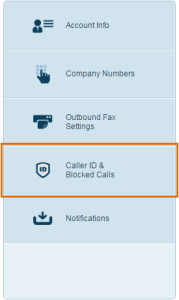 Blocked Calls Select ‘Blocked Calls’. 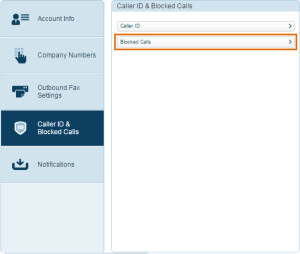 Select Blocked Calls Now you can choose to either block all incoming faxes or only specific ones. Simply add the fax number you’d like to block and select ‘Block’!  add-the-fax-number ! |
| json metadata | {"tags":["business","security","signature","email","organization"],"image":["https://cdn.steemitimages.com/DQmXsEUKtBY7DHP3JriBgCZNa2EhbXZBbVjd4a2LWpepYM1/RingCentral-account-setting.png","https://cdn.steemitimages.com/DQmXwGo2acmnMXzbfUW6xndTM6Ek4upWHpph6GhdW1X7i6Y/rtaImage.png","https://cdn.steemitimages.com/DQmRjAXPLQcQJxxCraEXpi4djgwALpo8wq8KoxmpSmhLi2o/Select-Blocked-Calls.png"],"links":["http://www.jdoqocy.com/click-8723296-10432983","https://googlefaxfree.com/ringcentral-fax-reviews/"],"app":"steemit/0.1","format":"markdown"} |
| Transaction Info | Block #28177851/Trx 3eae558b0980bfb13edd4ec6f3e2f39c2759ebfa |
View Raw JSON Data
{
"trx_id": "3eae558b0980bfb13edd4ec6f3e2f39c2759ebfa",
"block": 28177851,
"trx_in_block": 21,
"op_in_trx": 0,
"virtual_op": 0,
"timestamp": "2018-12-01T09:07:54",
"op": [
"comment",
{
"parent_author": "",
"parent_permlink": "business",
"author": "googlefaxfree",
"permlink": "can-i-block-incoming-faxes",
"title": "Can I block incoming Faxes?",
"body": "Unfortunately, with [eFax]( http://www.jdoqocy.com/click-8723296-10432983) you can’t block incoming faxes. However, if you’d like to be able to block eFaxs online, you can use RingCentral which comes with the blocking feature.\n### I can no longer receive Fax notification eMails. What should I do?\nIf you’re not receiving fax notification emails, it’s usually because the email has been flagged as a spam by the computer. In that case, you can go to your Junk folder, detect the notification email, and mark it as “Not Spam.”\nIf this doesn’t work, you can shoot a mail to the eFax support team.\nBelow, I’ll demonstrate how to block incoming faxes if you’re using [RingCentral](https://googlefaxfree.com/ringcentral-fax-reviews/).\n[Try RingCentral 30-Day FREE Trial Now](http://www.jdoqocy.com/click-8723296-10432983)\n## How to block Incoming Faxes:\nIf you have a RingCentral account, you can log in.\nGo to ‘Settings’ from the upper tab.\n\nRingCentral account setting,Select ‘Caller ID & Blocked Calls’.\nBlocked Calls\nSelect ‘Blocked Calls’.\n\nSelect Blocked Calls\nNow you can choose to either block all incoming faxes or only specific ones. Simply add the fax number you’d like to block and select ‘Block’!\n\nadd-the-fax-number\n!",
"json_metadata": "{\"tags\":[\"business\",\"security\",\"signature\",\"email\",\"organization\"],\"image\":[\"https://cdn.steemitimages.com/DQmXsEUKtBY7DHP3JriBgCZNa2EhbXZBbVjd4a2LWpepYM1/RingCentral-account-setting.png\",\"https://cdn.steemitimages.com/DQmXwGo2acmnMXzbfUW6xndTM6Ek4upWHpph6GhdW1X7i6Y/rtaImage.png\",\"https://cdn.steemitimages.com/DQmRjAXPLQcQJxxCraEXpi4djgwALpo8wq8KoxmpSmhLi2o/Select-Blocked-Calls.png\"],\"links\":[\"http://www.jdoqocy.com/click-8723296-10432983\",\"https://googlefaxfree.com/ringcentral-fax-reviews/\"],\"app\":\"steemit/0.1\",\"format\":\"markdown\"}"
}
]
}googlefaxfreepublished a new post: efax-reviews-2018-30-day-free-trial-with-it2018/12/01 08:59:21
googlefaxfreepublished a new post: efax-reviews-2018-30-day-free-trial-with-it
2018/12/01 08:59:21
| parent author | |
| parent permlink | business |
| author | googlefaxfree |
| permlink | efax-reviews-2018-30-day-free-trial-with-it |
| title | eFax Reviews 2018/ 30-day free trial with it! |
| body | @@ -476,49 +476,49 @@ http -s ://www. -efax.com/lp/free-trial/?VID=36258 +jdoqocy.com/click-8723296-10432983 ) is @@ -1287,49 +1287,49 @@ http -s ://www. -efax.com/lp/free-trial/?VID=36258 +jdoqocy.com/click-8723296-10432983 ): e |
| json metadata | {"tags":["business","security","signature","email","organization"],"users":["inbound.efax.com"],"image":["https://s1.ax2x.com/2018/11/08/5meq89.jpg"],"links":["http://www.jdoqocy.com/click-8723296-10432983","https://googlefaxfree.com/efax-reviews/","https://googlefaxfree.com/how-to-send-a-fax/","https://googlefaxfree.com/best-free-fax-app-for-mac/","https://googlefaxfree.com/block-faxes/"],"app":"steemit/0.1","format":"markdown"} |
| Transaction Info | Block #28177680/Trx 5b5589c337765f4cf33d370aa54e5b93b5ee0c06 |
View Raw JSON Data
{
  "trx_id": "5b5589c337765f4cf33d370aa54e5b93b5ee0c06",
  "block": 28177680,
  "trx_in_block": 2,
  "op_in_trx": 0,
  "virtual_op": 0,
  "timestamp": "2018-12-01T08:59:21",
  "op": [
    "comment",
    {
      "parent_author": "",
      "parent_permlink": "business",
      "author": "googlefaxfree",
      "permlink": "efax-reviews-2018-30-day-free-trial-with-it",
      "title": "eFax Reviews 2018/ 30-day free trial with it!",
      "body": "@@ -476,49 +476,49 @@\n http\n-s\n ://www.\n-efax.com/lp/free-trial/?VID=36258\n+jdoqocy.com/click-8723296-10432983\n ) is\n@@ -1287,49 +1287,49 @@\n http\n-s\n ://www.\n-efax.com/lp/free-trial/?VID=36258\n+jdoqocy.com/click-8723296-10432983\n ): e\n",
      "json_metadata": "{\"tags\":[\"business\",\"security\",\"signature\",\"email\",\"organization\"],\"users\":[\"inbound.efax.com\"],\"image\":[\"https://s1.ax2x.com/2018/11/08/5meq89.jpg\"],\"links\":[\"http://www.jdoqocy.com/click-8723296-10432983\",\"https://googlefaxfree.com/efax-reviews/\",\"https://googlefaxfree.com/how-to-send-a-fax/\",\"https://googlefaxfree.com/best-free-fax-app-for-mac/\",\"https://googlefaxfree.com/block-faxes/\"],\"app\":\"steemit/0.1\",\"format\":\"markdown\"}"
    }
  ]
}qixingaihaoupvoted (100.00%) @googlefaxfree / how-to-send-a-fax-from-gmail2018/11/29 14:58:03
qixingaihaoupvoted (100.00%) @googlefaxfree / how-to-send-a-fax-from-gmail
2018/11/29 14:58:03
| voter | qixingaihao |
| author | googlefaxfree |
| permlink | how-to-send-a-fax-from-gmail |
| weight | 10000 (100.00%) |
| Transaction Info | Block #28127273/Trx 61b7ce39248b45c8d8b1519ce43a75d97b99e08b |
View Raw JSON Data
{
  "trx_id": "61b7ce39248b45c8d8b1519ce43a75d97b99e08b",
  "block": 28127273,
  "trx_in_block": 38,
  "op_in_trx": 0,
  "virtual_op": 0,
  "timestamp": "2018-11-29T14:58:03",
  "op": [
    "vote",
    {
      "voter": "qixingaihao",
      "author": "googlefaxfree",
      "permlink": "how-to-send-a-fax-from-gmail",
      "weight": 10000
    }
  ]
}qixingaihaoupvoted (100.00%) @googlefaxfree / the-amazingly-easy-guide-on-how-to-send-fax-from-gmail2018/11/29 14:58:03
qixingaihaoupvoted (100.00%) @googlefaxfree / the-amazingly-easy-guide-on-how-to-send-fax-from-gmail
2018/11/29 14:58:03
| voter | qixingaihao |
| author | googlefaxfree |
| permlink | the-amazingly-easy-guide-on-how-to-send-fax-from-gmail |
| weight | 10000 (100.00%) |
| Transaction Info | Block #28127273/Trx 48f8f6ccea6b11966a5f6bad214142894dfb0d40 |
View Raw JSON Data
{
  "trx_id": "48f8f6ccea6b11966a5f6bad214142894dfb0d40",
  "block": 28127273,
  "trx_in_block": 37,
  "op_in_trx": 0,
  "virtual_op": 0,
  "timestamp": "2018-11-29T14:58:03",
  "op": [
    "vote",
    {
      "voter": "qixingaihao",
      "author": "googlefaxfree",
      "permlink": "the-amazingly-easy-guide-on-how-to-send-fax-from-gmail",
      "weight": 10000
    }
  ]
}qixingaihaoupvoted (100.00%) @googlefaxfree / how-to-use-your-google-fax-number2018/11/29 14:58:00
qixingaihaoupvoted (100.00%) @googlefaxfree / how-to-use-your-google-fax-number
2018/11/29 14:58:00
| voter | qixingaihao |
| author | googlefaxfree |
| permlink | how-to-use-your-google-fax-number |
| weight | 10000 (100.00%) |
| Transaction Info | Block #28127272/Trx d49ba37996627202eb2efb610b2c837b5020863c |
View Raw JSON Data
{
  "trx_id": "d49ba37996627202eb2efb610b2c837b5020863c",
  "block": 28127272,
  "trx_in_block": 0,
  "op_in_trx": 0,
  "virtual_op": 0,
  "timestamp": "2018-11-29T14:58:00",
  "op": [
    "vote",
    {
      "voter": "qixingaihao",
      "author": "googlefaxfree",
      "permlink": "how-to-use-your-google-fax-number",
      "weight": 10000
    }
  ]
}qixingaihaoupvoted (100.00%) @googlefaxfree / how-does-a-gmail-fax-service-work2018/11/29 14:57:57
qixingaihaoupvoted (100.00%) @googlefaxfree / how-does-a-gmail-fax-service-work
2018/11/29 14:57:57
| voter | qixingaihao |
| author | googlefaxfree |
| permlink | how-does-a-gmail-fax-service-work |
| weight | 10000 (100.00%) |
| Transaction Info | Block #28127271/Trx b6d7e5973a3cd5e630126cd3f3d1b35e057c1b85 |
View Raw JSON Data
{
  "trx_id": "b6d7e5973a3cd5e630126cd3f3d1b35e057c1b85",
  "block": 28127271,
  "trx_in_block": 20,
  "op_in_trx": 0,
  "virtual_op": 0,
  "timestamp": "2018-11-29T14:57:57",
  "op": [
    "vote",
    {
      "voter": "qixingaihao",
      "author": "googlefaxfree",
      "permlink": "how-does-a-gmail-fax-service-work",
      "weight": 10000
    }
  ]
}qixingaihaoupvoted (100.00%) @googlefaxfree / what-are-the-benefits-of-electronic-faxing2018/11/29 14:57:54
qixingaihaoupvoted (100.00%) @googlefaxfree / what-are-the-benefits-of-electronic-faxing
2018/11/29 14:57:54
| voter | qixingaihao |
| author | googlefaxfree |
| permlink | what-are-the-benefits-of-electronic-faxing |
| weight | 10000 (100.00%) |
| Transaction Info | Block #28127270/Trx 10fb21d86d749152d938e338e6e8f76ddc25bb4c |
View Raw JSON Data
{
  "trx_id": "10fb21d86d749152d938e338e6e8f76ddc25bb4c",
  "block": 28127270,
  "trx_in_block": 2,
  "op_in_trx": 0,
  "virtual_op": 0,
  "timestamp": "2018-11-29T14:57:54",
  "op": [
    "vote",
    {
      "voter": "qixingaihao",
      "author": "googlefaxfree",
      "permlink": "what-are-the-benefits-of-electronic-faxing",
      "weight": 10000
    }
  ]
}2018/11/29 14:57:48
2018/11/29 14:57:48
| voter | qixingaihao |
| author | googlefaxfree |
| permlink | 2cnbtz-the-amazingly-easy-guide-on-how-to-send-fax-from-gmail |
| weight | 10000 (100.00%) |
| Transaction Info | Block #28127268/Trx dc29ddeb119fb36ffa9e292aaba4d218b6308ff9 |
View Raw JSON Data
{
  "trx_id": "dc29ddeb119fb36ffa9e292aaba4d218b6308ff9",
  "block": 28127268,
  "trx_in_block": 23,
  "op_in_trx": 0,
  "virtual_op": 0,
  "timestamp": "2018-11-29T14:57:48",
  "op": [
    "vote",
    {
      "voter": "qixingaihao",
      "author": "googlefaxfree",
      "permlink": "2cnbtz-the-amazingly-easy-guide-on-how-to-send-fax-from-gmail",
      "weight": 10000
    }
  ]
}qixingaihaoupvoted (100.00%) @googlefaxfree / what-are-the-benefits-of-fax-from-computer2018/11/29 14:57:45
qixingaihaoupvoted (100.00%) @googlefaxfree / what-are-the-benefits-of-fax-from-computer
2018/11/29 14:57:45
| voter | qixingaihao |
| author | googlefaxfree |
| permlink | what-are-the-benefits-of-fax-from-computer |
| weight | 10000 (100.00%) |
| Transaction Info | Block #28127267/Trx 3c1151667895cbc6c59edc7debab9bbc7c661986 |
View Raw JSON Data
{
  "trx_id": "3c1151667895cbc6c59edc7debab9bbc7c661986",
  "block": 28127267,
  "trx_in_block": 22,
  "op_in_trx": 0,
  "virtual_op": 0,
  "timestamp": "2018-11-29T14:57:45",
  "op": [
    "vote",
    {
      "voter": "qixingaihao",
      "author": "googlefaxfree",
      "permlink": "what-are-the-benefits-of-fax-from-computer",
      "weight": 10000
    }
  ]
}qixingaihaoupvoted (100.00%) @googlefaxfree / top-5-best-free-fax-apps-for-iphone-ipad2018/11/29 14:57:42
qixingaihaoupvoted (100.00%) @googlefaxfree / top-5-best-free-fax-apps-for-iphone-ipad
2018/11/29 14:57:42
| voter | qixingaihao |
| author | googlefaxfree |
| permlink | top-5-best-free-fax-apps-for-iphone-ipad |
| weight | 10000 (100.00%) |
| Transaction Info | Block #28127266/Trx 6b40703510e77213d8afb022cb3909d277af0292 |
View Raw JSON Data
{
  "trx_id": "6b40703510e77213d8afb022cb3909d277af0292",
  "block": 28127266,
  "trx_in_block": 12,
  "op_in_trx": 0,
  "virtual_op": 0,
  "timestamp": "2018-11-29T14:57:42",
  "op": [
    "vote",
    {
      "voter": "qixingaihao",
      "author": "googlefaxfree",
      "permlink": "top-5-best-free-fax-apps-for-iphone-ipad",
      "weight": 10000
    }
  ]
}qixingaihaoupvoted (100.00%) @googlefaxfree / how-to-send-a-fax-from-computer2018/11/29 14:57:42
qixingaihaoupvoted (100.00%) @googlefaxfree / how-to-send-a-fax-from-computer
2018/11/29 14:57:42
| voter | qixingaihao |
| author | googlefaxfree |
| permlink | how-to-send-a-fax-from-computer |
| weight | 10000 (100.00%) |
| Transaction Info | Block #28127266/Trx 59acd6aa718b9e5287b2ef3c2bc52bab2c30c647 |
View Raw JSON Data
{
  "trx_id": "59acd6aa718b9e5287b2ef3c2bc52bab2c30c647",
  "block": 28127266,
  "trx_in_block": 5,
  "op_in_trx": 0,
  "virtual_op": 0,
  "timestamp": "2018-11-29T14:57:42",
  "op": [
    "vote",
    {
      "voter": "qixingaihao",
      "author": "googlefaxfree",
      "permlink": "how-to-send-a-fax-from-computer",
      "weight": 10000
    }
  ]
}qixingaihaoupvoted (100.00%) @googlefaxfree / efax-reviews-2018-30-day-free-trial-with-it2018/11/29 14:57:39
qixingaihaoupvoted (100.00%) @googlefaxfree / efax-reviews-2018-30-day-free-trial-with-it
2018/11/29 14:57:39
| voter | qixingaihao |
| author | googlefaxfree |
| permlink | efax-reviews-2018-30-day-free-trial-with-it |
| weight | 10000 (100.00%) |
| Transaction Info | Block #28127265/Trx ba42efa76b912af73c50d3d4c4c593e91a959e64 |
View Raw JSON Data
{
  "trx_id": "ba42efa76b912af73c50d3d4c4c593e91a959e64",
  "block": 28127265,
  "trx_in_block": 18,
  "op_in_trx": 0,
  "virtual_op": 0,
  "timestamp": "2018-11-29T14:57:39",
  "op": [
    "vote",
    {
      "voter": "qixingaihao",
      "author": "googlefaxfree",
      "permlink": "efax-reviews-2018-30-day-free-trial-with-it",
      "weight": 10000
    }
  ]
}qixingaihaoupvoted (100.00%) @googlefaxfree / 7nvzjb-how-to-send-a-fax-from-computer2018/11/29 14:57:39
qixingaihaoupvoted (100.00%) @googlefaxfree / 7nvzjb-how-to-send-a-fax-from-computer
2018/11/29 14:57:39
| voter | qixingaihao |
| author | googlefaxfree |
| permlink | 7nvzjb-how-to-send-a-fax-from-computer |
| weight | 10000 (100.00%) |
| Transaction Info | Block #28127265/Trx 42046b7e19ea537d98ba5d401564fa8e437bad20 |
View Raw JSON Data
{
  "trx_id": "42046b7e19ea537d98ba5d401564fa8e437bad20",
  "block": 28127265,
  "trx_in_block": 10,
  "op_in_trx": 0,
  "virtual_op": 0,
  "timestamp": "2018-11-29T14:57:39",
  "op": [
    "vote",
    {
      "voter": "qixingaihao",
      "author": "googlefaxfree",
      "permlink": "7nvzjb-how-to-send-a-fax-from-computer",
      "weight": 10000
    }
  ]
}googlefaxfreeupvoted (100.00%) @qixingaihao / 3uiyu42018/11/29 14:05:57
googlefaxfreeupvoted (100.00%) @qixingaihao / 3uiyu4
2018/11/29 14:05:57
| voter | googlefaxfree |
| author | qixingaihao |
| permlink | 3uiyu4 |
| weight | 10000 (100.00%) |
| Transaction Info | Block #28126233/Trx 02e810c9011a997e975459f62bcdeacf2dcc4363 |
View Raw JSON Data
{
  "trx_id": "02e810c9011a997e975459f62bcdeacf2dcc4363",
  "block": 28126233,
  "trx_in_block": 2,
  "op_in_trx": 0,
  "virtual_op": 0,
  "timestamp": "2018-11-29T14:05:57",
  "op": [
    "vote",
    {
      "voter": "googlefaxfree",
      "author": "qixingaihao",
      "permlink": "3uiyu4",
      "weight": 10000
    }
  ]
}googlefaxfreeupvoted (100.00%) @qixingaihao / pyihf2018/11/29 10:59:54
googlefaxfreeupvoted (100.00%) @qixingaihao / pyihf
2018/11/29 10:59:54
| voter | googlefaxfree |
| author | qixingaihao |
| permlink | pyihf |
| weight | 10000 (100.00%) |
| Transaction Info | Block #28122513/Trx 0c753d7350b19c7311a7b84ee205cfc5d4acf197 |
View Raw JSON Data
{
  "trx_id": "0c753d7350b19c7311a7b84ee205cfc5d4acf197",
  "block": 28122513,
  "trx_in_block": 5,
  "op_in_trx": 0,
  "virtual_op": 0,
  "timestamp": "2018-11-29T10:59:54",
  "op": [
    "vote",
    {
      "voter": "googlefaxfree",
      "author": "qixingaihao",
      "permlink": "pyihf",
      "weight": 10000
    }
  ]
}googlefaxfreeupvoted (100.00%) @qixingaihao / 62018/11/29 10:59:48
googlefaxfreeupvoted (100.00%) @qixingaihao / 6
2018/11/29 10:59:48
| voter | googlefaxfree |
| author | qixingaihao |
| permlink | 6 |
| weight | 10000 (100.00%) |
| Transaction Info | Block #28122511/Trx 055f2d5b9de2f72c54637cebbaae643f5abbfa3a |
View Raw JSON Data
{
  "trx_id": "055f2d5b9de2f72c54637cebbaae643f5abbfa3a",
  "block": 28122511,
  "trx_in_block": 3,
  "op_in_trx": 0,
  "virtual_op": 0,
  "timestamp": "2018-11-29T10:59:48",
  "op": [
    "vote",
    {
      "voter": "googlefaxfree",
      "author": "qixingaihao",
      "permlink": "6",
      "weight": 10000
    }
  ]
}googlefaxfreeupvoted (100.00%) @qixingaihao / 658qcq2018/11/29 10:59:45
googlefaxfreeupvoted (100.00%) @qixingaihao / 658qcq
2018/11/29 10:59:45
| voter | googlefaxfree |
| author | qixingaihao |
| permlink | 658qcq |
| weight | 10000 (100.00%) |
| Transaction Info | Block #28122510/Trx 8d3954b9e7dc17c38dbafe4f53c51a981a046198 |
View Raw JSON Data
{
  "trx_id": "8d3954b9e7dc17c38dbafe4f53c51a981a046198",
  "block": 28122510,
  "trx_in_block": 6,
  "op_in_trx": 0,
  "virtual_op": 0,
  "timestamp": "2018-11-29T10:59:45",
  "op": [
    "vote",
    {
      "voter": "googlefaxfree",
      "author": "qixingaihao",
      "permlink": "658qcq",
      "weight": 10000
    }
  ]
}googlefaxfreefollowed @qixingaihao2018/11/29 10:59:39
googlefaxfreefollowed @qixingaihao
2018/11/29 10:59:39
| required auths | [] |
| required posting auths | ["googlefaxfree"] |
| id | follow |
| json | ["follow",{"follower":"googlefaxfree","following":"qixingaihao","what":["blog"]}] |
| Transaction Info | Block #28122508/Trx cc06d863487c8e02daa6fedca26aefbfc449e668 |
View Raw JSON Data
{
  "trx_id": "cc06d863487c8e02daa6fedca26aefbfc449e668",
  "block": 28122508,
  "trx_in_block": 16,
  "op_in_trx": 0,
  "virtual_op": 0,
  "timestamp": "2018-11-29T10:59:39",
  "op": [
    "custom_json",
    {
      "required_auths": [],
      "required_posting_auths": [
        "googlefaxfree"
      ],
      "id": "follow",
      "json": "[\"follow\",{\"follower\":\"googlefaxfree\",\"following\":\"qixingaihao\",\"what\":[\"blog\"]}]"
    }
  ]
}googlefaxfreeupvoted (100.00%) @qixingaihao / 3dxhxj2018/11/29 10:59:30
googlefaxfreeupvoted (100.00%) @qixingaihao / 3dxhxj
2018/11/29 10:59:30
| voter | googlefaxfree |
| author | qixingaihao |
| permlink | 3dxhxj |
| weight | 10000 (100.00%) |
| Transaction Info | Block #28122505/Trx 7356555ab18c415ebe7c69e79d740be344eb88fa |
View Raw JSON Data
{
  "trx_id": "7356555ab18c415ebe7c69e79d740be344eb88fa",
  "block": 28122505,
  "trx_in_block": 4,
  "op_in_trx": 0,
  "virtual_op": 0,
  "timestamp": "2018-11-29T10:59:30",
  "op": [
    "vote",
    {
      "voter": "googlefaxfree",
      "author": "qixingaihao",
      "permlink": "3dxhxj",
      "weight": 10000
    }
  ]
}2018/11/12 11:10:15
2018/11/12 11:10:15
| voter | googlefaxfree |
| author | googlefaxfree |
| permlink | 2cnbtz-the-amazingly-easy-guide-on-how-to-send-fax-from-gmail |
| weight | 10000 (100.00%) |
| Transaction Info | Block #27633388/Trx 5b3a75d93086073df41a511b9de48987f4faa590 |
View Raw JSON Data
{
  "trx_id": "5b3a75d93086073df41a511b9de48987f4faa590",
  "block": 27633388,
  "trx_in_block": 27,
  "op_in_trx": 0,
  "virtual_op": 0,
  "timestamp": "2018-11-12T11:10:15",
  "op": [
    "vote",
    {
      "voter": "googlefaxfree",
      "author": "googlefaxfree",
      "permlink": "2cnbtz-the-amazingly-easy-guide-on-how-to-send-fax-from-gmail",
      "weight": 10000
    }
  ]
}googlefaxfreeupvoted (100.00%) @googlefaxfree / what-are-the-benefits-of-fax-from-computer2018/11/12 11:10:15
googlefaxfreeupvoted (100.00%) @googlefaxfree / what-are-the-benefits-of-fax-from-computer
2018/11/12 11:10:15
| voter | googlefaxfree |
| author | googlefaxfree |
| permlink | what-are-the-benefits-of-fax-from-computer |
| weight | 10000 (100.00%) |
| Transaction Info | Block #27633388/Trx 9abfc12660e75bf78c49290dbfb7fa925d25fb38 |
View Raw JSON Data
{
  "trx_id": "9abfc12660e75bf78c49290dbfb7fa925d25fb38",
  "block": 27633388,
  "trx_in_block": 4,
  "op_in_trx": 0,
  "virtual_op": 0,
  "timestamp": "2018-11-12T11:10:15",
  "op": [
    "vote",
    {
      "voter": "googlefaxfree",
      "author": "googlefaxfree",
      "permlink": "what-are-the-benefits-of-fax-from-computer",
      "weight": 10000
    }
  ]
}googlefaxfreeupvoted (100.00%) @googlefaxfree / top-5-best-free-fax-apps-for-iphone-ipad2018/11/12 11:10:12
googlefaxfreeupvoted (100.00%) @googlefaxfree / top-5-best-free-fax-apps-for-iphone-ipad
2018/11/12 11:10:12
| voter | googlefaxfree |
| author | googlefaxfree |
| permlink | top-5-best-free-fax-apps-for-iphone-ipad |
| weight | 10000 (100.00%) |
| Transaction Info | Block #27633387/Trx 0a04fbe56d27f062e1ab79ffd595349d080010c1 |
View Raw JSON Data
{
  "trx_id": "0a04fbe56d27f062e1ab79ffd595349d080010c1",
  "block": 27633387,
  "trx_in_block": 22,
  "op_in_trx": 0,
  "virtual_op": 0,
  "timestamp": "2018-11-12T11:10:12",
  "op": [
    "vote",
    {
      "voter": "googlefaxfree",
      "author": "googlefaxfree",
      "permlink": "top-5-best-free-fax-apps-for-iphone-ipad",
      "weight": 10000
    }
  ]
}googlefaxfreeupvoted (100.00%) @googlefaxfree / how-to-send-a-fax-from-computer2018/11/12 11:10:09
googlefaxfreeupvoted (100.00%) @googlefaxfree / how-to-send-a-fax-from-computer
2018/11/12 11:10:09
| voter | googlefaxfree |
| author | googlefaxfree |
| permlink | how-to-send-a-fax-from-computer |
| weight | 10000 (100.00%) |
| Transaction Info | Block #27633386/Trx 83730aa283192ea6a0e0324dcdd3688ca3085812 |
View Raw JSON Data
{
  "trx_id": "83730aa283192ea6a0e0324dcdd3688ca3085812",
  "block": 27633386,
  "trx_in_block": 14,
  "op_in_trx": 0,
  "virtual_op": 0,
  "timestamp": "2018-11-12T11:10:09",
  "op": [
    "vote",
    {
      "voter": "googlefaxfree",
      "author": "googlefaxfree",
      "permlink": "how-to-send-a-fax-from-computer",
      "weight": 10000
    }
  ]
}googlefaxfreeupvoted (100.00%) @googlefaxfree / how-does-a-gmail-fax-service-work2018/11/09 22:51:09
googlefaxfreeupvoted (100.00%) @googlefaxfree / how-does-a-gmail-fax-service-work
2018/11/09 22:51:09
| voter | googlefaxfree |
| author | googlefaxfree |
| permlink | how-does-a-gmail-fax-service-work |
| weight | 10000 (100.00%) |
| Transaction Info | Block #27561046/Trx 46288e106f4633a257ef9f7b6da2dddafd9c887e |
View Raw JSON Data
{
  "trx_id": "46288e106f4633a257ef9f7b6da2dddafd9c887e",
  "block": 27561046,
  "trx_in_block": 48,
  "op_in_trx": 0,
  "virtual_op": 0,
  "timestamp": "2018-11-09T22:51:09",
  "op": [
    "vote",
    {
      "voter": "googlefaxfree",
      "author": "googlefaxfree",
      "permlink": "how-does-a-gmail-fax-service-work",
      "weight": 10000
    }
  ]
}sensationupvoted (100.00%) @googlefaxfree / efax-reviews-2018-30-day-free-trial-with-it2018/11/09 05:04:03
sensationupvoted (100.00%) @googlefaxfree / efax-reviews-2018-30-day-free-trial-with-it
2018/11/09 05:04:03
| voter | sensation |
| author | googlefaxfree |
| permlink | efax-reviews-2018-30-day-free-trial-with-it |
| weight | 10000 (100.00%) |
| Transaction Info | Block #27539712/Trx ad2c8880d5cf044c2d4ea2b01443b12fcc890c58 |
View Raw JSON Data
{
  "trx_id": "ad2c8880d5cf044c2d4ea2b01443b12fcc890c58",
  "block": 27539712,
  "trx_in_block": 10,
  "op_in_trx": 0,
  "virtual_op": 0,
  "timestamp": "2018-11-09T05:04:03",
  "op": [
    "vote",
    {
      "voter": "sensation",
      "author": "googlefaxfree",
      "permlink": "efax-reviews-2018-30-day-free-trial-with-it",
      "weight": 10000
    }
  ]
}2018/11/08 18:11:00
2018/11/08 18:11:00
| parent author | googlefaxfree |
| parent permlink | efax-reviews-2018-30-day-free-trial-with-it |
| author | steemitboard |
| permlink | steemitboard-notify-googlefaxfree-20181108t181102000z |
| title | |
| body | Congratulations @googlefaxfree! You have completed the following achievement on the Steem blockchain and have been rewarded with new badge(s) : <table><tr><td>https://steemitimages.com/60x70/http://steemitboard.com/@googlefaxfree/voted.png?201811081542</td><td>You received more than 10 upvotes. Your next target is to reach 50 upvotes.</td></tr> </table> <sub>_[Click here to view your Board of Honor](https://steemitboard.com/@googlefaxfree)_</sub> <sub>_If you no longer want to receive notifications, reply to this comment with the word_ `STOP`</sub> **Do not miss the last post from @steemitboard:** <table><tr><td><a href="https://steemit.com/steemfest/@steemitboard/steemfest3-and-steemitboard-meet-the-steemians-contest"><img src="https://steemitimages.com/64x128/https://cdn.steemitimages.com/DQmeLukvNFRsa7RURqsFpiLGEZZD49MiU52JtWmjS5S2wtW/image.png"></a></td><td><a href="https://steemit.com/steemfest/@steemitboard/steemfest3-and-steemitboard-meet-the-steemians-contest">SteemFest3 and SteemitBoard - Meet the Steemians Contest</a></td></tr></table> > Support [SteemitBoard's project](https://steemit.com/@steemitboard)! **[Vote for its witness](https://v2.steemconnect.com/sign/account-witness-vote?witness=steemitboard&approve=1)** and **get one more award**! |
| json metadata | {"image":["https://steemitboard.com/img/notify.png"]} |
| Transaction Info | Block #27526661/Trx bad36fc35910e4a6572f8b7f51c759b245776053 |
View Raw JSON Data
{
  "trx_id": "bad36fc35910e4a6572f8b7f51c759b245776053",
  "block": 27526661,
  "trx_in_block": 54,
  "op_in_trx": 0,
  "virtual_op": 0,
  "timestamp": "2018-11-08T18:11:00",
  "op": [
    "comment",
    {
      "parent_author": "googlefaxfree",
      "parent_permlink": "efax-reviews-2018-30-day-free-trial-with-it",
      "author": "steemitboard",
      "permlink": "steemitboard-notify-googlefaxfree-20181108t181102000z",
      "title": "",
      "body": "Congratulations @googlefaxfree! You have completed the following achievement on the Steem blockchain and have been rewarded with new badge(s) :\n\n<table><tr><td>https://steemitimages.com/60x70/http://steemitboard.com/@googlefaxfree/voted.png?201811081542</td><td>You received more than 10 upvotes. Your next target is to reach 50 upvotes.</td></tr>\n</table>\n\n<sub>_[Click here to view your Board of Honor](https://steemitboard.com/@googlefaxfree)_</sub>\n<sub>_If you no longer want to receive notifications, reply to this comment with the word_ `STOP`</sub>\n\n\n\n**Do not miss the last post from @steemitboard:**\n<table><tr><td><a href=\"https://steemit.com/steemfest/@steemitboard/steemfest3-and-steemitboard-meet-the-steemians-contest\"><img src=\"https://steemitimages.com/64x128/https://cdn.steemitimages.com/DQmeLukvNFRsa7RURqsFpiLGEZZD49MiU52JtWmjS5S2wtW/image.png\"></a></td><td><a href=\"https://steemit.com/steemfest/@steemitboard/steemfest3-and-steemitboard-meet-the-steemians-contest\">SteemFest3 and SteemitBoard - Meet the Steemians Contest</a></td></tr></table>\n\n> Support [SteemitBoard's project](https://steemit.com/@steemitboard)! **[Vote for its witness](https://v2.steemconnect.com/sign/account-witness-vote?witness=steemitboard&approve=1)** and **get one more award**!",
      "json_metadata": "{\"image\":[\"https://steemitboard.com/img/notify.png\"]}"
    }
  ]
}yeheyupvoted (10.00%) @googlefaxfree / efax-reviews-2018-30-day-free-trial-with-it2018/11/08 15:41:15
yeheyupvoted (10.00%) @googlefaxfree / efax-reviews-2018-30-day-free-trial-with-it
2018/11/08 15:41:15
| voter | yehey |
| author | googlefaxfree |
| permlink | efax-reviews-2018-30-day-free-trial-with-it |
| weight | 1000 (10.00%) |
| Transaction Info | Block #27523667/Trx 8ce94d1d12fd924fe6226dffa240bc39d37ff10b |
View Raw JSON Data
{
  "trx_id": "8ce94d1d12fd924fe6226dffa240bc39d37ff10b",
  "block": 27523667,
  "trx_in_block": 1,
  "op_in_trx": 0,
  "virtual_op": 0,
  "timestamp": "2018-11-08T15:41:15",
  "op": [
    "vote",
    {
      "voter": "yehey",
      "author": "googlefaxfree",
      "permlink": "efax-reviews-2018-30-day-free-trial-with-it",
      "weight": 1000
    }
  ]
}googlefaxfreeupvoted (100.00%) @googlefaxfree / efax-reviews-2018-30-day-free-trial-with-it2018/11/08 15:08:00
googlefaxfreeupvoted (100.00%) @googlefaxfree / efax-reviews-2018-30-day-free-trial-with-it
2018/11/08 15:08:00
| voter | googlefaxfree |
| author | googlefaxfree |
| permlink | efax-reviews-2018-30-day-free-trial-with-it |
| weight | 10000 (100.00%) |
| Transaction Info | Block #27523003/Trx 76fa17ed29d072560b7bd85e99e80944c7400d3c |
View Raw JSON Data
{
  "trx_id": "76fa17ed29d072560b7bd85e99e80944c7400d3c",
  "block": 27523003,
  "trx_in_block": 26,
  "op_in_trx": 0,
  "virtual_op": 0,
  "timestamp": "2018-11-08T15:08:00",
  "op": [
    "vote",
    {
      "voter": "googlefaxfree",
      "author": "googlefaxfree",
      "permlink": "efax-reviews-2018-30-day-free-trial-with-it",
      "weight": 10000
    }
  ]
}googlefaxfreepublished a new post: efax-reviews-2018-30-day-free-trial-with-it2018/11/08 15:07:33
googlefaxfreepublished a new post: efax-reviews-2018-30-day-free-trial-with-it
2018/11/08 15:07:33
| parent author | |
| parent permlink | business |
| author | googlefaxfree |
| permlink | efax-reviews-2018-30-day-free-trial-with-it |
| title | eFax Reviews 2018/ 30-day free trial with it! |
| body | Sending fax online has recently gained a lot of popularity. Unlike the old days when you had to use up paper and handle big machines to send out faxes, you can now do so with the click of a few buttons directly from your cell phone or computer. There are a lot of online fax services that help you do that. In this article, we’ll review one of the best online fax services — eFax. ## What is eFax?  [eFax online]( https://www.efax.com/lp/free-trial/?VID=36258) is the leading fax service for small businesses who need to send out a large number of faxes regularly to both domestic and international recipients. eFax services are slightly more expensive than those of their counterparts, however, it’s a lot more user-friendly and has a lot of great features you can get behind. In this [eFax review]( https://googlefaxfree.com/efax-reviews/) article, we’ll give you a detailed outline of eFax online, its price and value, and how it functions. ## Price and Value eFax is one of the leading online fax services in the market. However, it’s also a bit more expensive than its counterparts. Of course, it also comes with a free 30-day trial period. But after that, it becomes pretty expensive. There are two [eFax price plans]( https://www.efax.com/lp/free-trial/?VID=36258): eFax Plus, and eFax Pro. The eFax Plus plan allows you to send out and receive 150 faxes per month, each. Furthermore, if you exceed that limit, you’ll have to pay 10 cents per fax that you send. In addition to this, the setup fee for this eFax plan is $10. The monthly cost of the eFax Plus plan is $16.95, but if you subscribe to it for a whole year, the monthly price would come down to $14.13. The eFax Pro plan allows you to send out and receive 200 faxes per month, each. Upon exceeding that limit, you’ll have to pay 10 cents per fax, same as that of the Plus plan. The setup fee is twice as expensive as the Plus plan at $19.95. The monthly cost of the eFax Pro plan is $19.95. However, if you subscribe for a whole year, you get a discount worth two months. How to send and receive an eFax ## Sending an eFax You can [send eFaxes]( https://googlefaxfree.com/how-to-send-a-fax/) either through email, the online account, or through the eFax Mobile App. eFax gives users access to a Mobile App which you can download for both iOS and Android devices. You directly send all [faxes from the app]( https://googlefaxfree.com/best-free-fax-app-for-mac/) as well, adding the documents as attachments. efax-app-step5 If you’d like to [send eFax by email]( https://googlefaxfree.com/how-to-send-a-fax/), you can simply create a new email and enter the recipient’s fax number and country code in the address line. This process is similar to that of sending a regular email. If you want to add a custom cover page, you can just write the text in the body. Finally, you can also send eFax from the Online Account. Simply go to the ‘Send Faxes’ option, select your contact, attach the documents, and send them away! To read the details of how to send eFax using these methods, you can read our detailed FAQ guide. ## Receiving an eFax You can [receive the eFax]( https://googlefaxfree.com/block-faxes/) either in your eMail, your Online Account, or your Mobile App. In your email, you’ll receive the fax from the address “@inbound.efax.com”. If you want to view it online, simply click on the “View Faxes” option in your Online Account. If you’re using your mobile app, you can find the fax in your “Inbox” folder. Pros | Cons ------------ | ------------- 24/7 support| Expensive 30-day free trial| Limited faxes per month Wide coverage| Advanced features not compatible with Mac. Easy Fax Management | Separation of incoming and outgoing fax documents Availability of Mobile App|. Ability to add digital signature | Can send faxes from email, online account, mobile app, or even MS Word | ### 1.Easy Fax Management: Fax management is extremely easy. You can preview your faxes before sending them out, have them arranged in an inbox, add contacts to your address book, and send out faxes just like a regular email. ### 2.Wide Coverage: eFax provides an extremely wide coverage range. You can have several fax numbers allocated to an account and you can assign 5 email addresses to each of the numbers. Furthermore, you can either get a toll free number or a local number as well. ### 3.Digital Signature: One of the great advantages is that you can add your digital signature to any document with the click of a button. ### 4.Large File Size: eFax allows you to send big files up to 18MBs in size. As such, you can easily send out presentations, media files, large high-res photographs, etc. ### 5.eMail Fax Sending: One of the best features of eFax is that it allows you to send and receive faxes directly from your email account, which is the most convenient means of going about it. ### 6.Multiple Fax Sources: If you don’t care for the email, you can send faxes in a number of different ways. You can send it straight from the Account, from the Mobile App, or even from Microsoft Word with the help of an extension. ### 7.Mobile App The Mobile App is extremely handy and you can get notifications as soon as you receive a fax and even send a fax directly from the phone. ### 8.Trial Period You get a 30-day free trial with it. ### 9.Support eFax comes with 24/7 support in case you need any help. Cons: ### 1.Incompatibility: You can’t preview the fax before sending if you use a Mac. ### 2.Separate Allocation It includes separate allocation of both the incoming and the outgoing faxes. ### 3.Expensive It’s the most expensive online fax service in the market. 4.Limited Faxes Can only send 150 or 200 faxes per month without having to pay the additional 10 cents per fax. ## Conclusion eFax isn’t a cheap fax sending option by any standards. In fact, it’s the most expensive one out there. However, it’s also the most reliable and it allows you to both send and receive faxes in a number of different ways, either through email, Online Account, or the Mobile App. |
| json metadata | {"tags":["business","security","signature","email","organization"],"users":["inbound.efax.com"],"image":["https://s1.ax2x.com/2018/11/08/5meq89.jpg"],"links":["https://www.efax.com/lp/free-trial/?VID=36258","https://googlefaxfree.com/efax-reviews/","https://googlefaxfree.com/how-to-send-a-fax/","https://googlefaxfree.com/best-free-fax-app-for-mac/","https://googlefaxfree.com/block-faxes/"],"app":"steemit/0.1","format":"markdown"} |
| Transaction Info | Block #27522994/Trx 7349273b192e88f7b84f2d50c7fda203b4f47803 |
View Raw JSON Data
{
"trx_id": "7349273b192e88f7b84f2d50c7fda203b4f47803",
"block": 27522994,
"trx_in_block": 23,
"op_in_trx": 0,
"virtual_op": 0,
"timestamp": "2018-11-08T15:07:33",
"op": [
"comment",
{
"parent_author": "",
"parent_permlink": "business",
"author": "googlefaxfree",
"permlink": "efax-reviews-2018-30-day-free-trial-with-it",
"title": "eFax Reviews 2018/ 30-day free trial with it!",
"body": "Sending fax online has recently gained a lot of popularity. Unlike the old days when you had to use up paper and handle big machines to send out faxes, you can now do so with the click of a few buttons directly from your cell phone or computer. There are a lot of online fax services that help you do that.\nIn this article, we’ll review one of the best online fax services — eFax.\n## What is eFax?\n\n[eFax online]( https://www.efax.com/lp/free-trial/?VID=36258) is the leading fax service for small businesses who need to send out a large number of faxes regularly to both domestic and international recipients. eFax services are slightly more expensive than those of their counterparts, however, it’s a lot more user-friendly and has a lot of great features you can get behind.\nIn this [eFax review]( https://googlefaxfree.com/efax-reviews/) article, we’ll give you a detailed outline of eFax online, its price and value, and how it functions.\n## Price and Value\neFax is one of the leading online fax services in the market. However, it’s also a bit more expensive than its counterparts. Of course, it also comes with a free 30-day trial period. But after that, it becomes pretty expensive.\nThere are two [eFax price plans]( https://www.efax.com/lp/free-trial/?VID=36258): eFax Plus, and eFax Pro.\nThe eFax Plus plan allows you to send out and receive 150 faxes per month, each. Furthermore, if you exceed that limit, you’ll have to pay 10 cents per fax that you send. In addition to this, the setup fee for this eFax plan is $10. The monthly cost of the eFax Plus plan is $16.95, but if you subscribe to it for a whole year, the monthly price would come down to $14.13.\nThe eFax Pro plan allows you to send out and receive 200 faxes per month, each. Upon exceeding that limit, you’ll have to pay 10 cents per fax, same as that of the Plus plan. The setup fee is twice as expensive as the Plus plan at $19.95. The monthly cost of the eFax Pro plan is $19.95. However, if you subscribe for a whole year, you get a discount worth two months.\nHow to send and receive an eFax\n## Sending an eFax\nYou can [send eFaxes]( https://googlefaxfree.com/how-to-send-a-fax/) either through email, the online account, or through the eFax Mobile App.\neFax gives users access to a Mobile App which you can download for both iOS and Android devices. You directly send all [faxes from the app]( https://googlefaxfree.com/best-free-fax-app-for-mac/) as well, adding the documents as attachments.\nefax-app-step5\nIf you’d like to [send eFax by email]( https://googlefaxfree.com/how-to-send-a-fax/), you can simply create a new email and enter the recipient’s fax number and country code in the address line. This process is similar to that of sending a regular email. If you want to add a custom cover page, you can just write the text in the body.\n\nFinally, you can also send eFax from the Online Account. Simply go to the ‘Send Faxes’ option, select your contact, attach the documents, and send them away!\nTo read the details of how to send eFax using these methods, you can read our detailed FAQ guide.\n## Receiving an eFax\nYou can [receive the eFax]( https://googlefaxfree.com/block-faxes/) either in your eMail, your Online Account, or your Mobile App.\nIn your email, you’ll receive the fax from the address “@inbound.efax.com”.\nIf you want to view it online, simply click on the “View Faxes” option in your Online Account.\nIf you’re using your mobile app, you can find the fax in your “Inbox” folder.\nPros | Cons \n------------ | ------------- \n24/7 support| Expensive\n 30-day free trial| Limited faxes per month\n Wide coverage| Advanced features not compatible with Mac.\n Easy Fax Management | Separation of incoming and outgoing fax documents \nAvailability of Mobile App|.\nAbility to add digital signature | \nCan send faxes from email, online account, mobile app, or even MS Word |\n### 1.Easy Fax Management:\nFax management is extremely easy. You can preview your faxes before sending them out, have them arranged in an inbox, add contacts to your address book, and send out faxes just like a regular email.\n### 2.Wide Coverage:\neFax provides an extremely wide coverage range. You can have several fax numbers allocated to an account and you can assign 5 email addresses to each of the numbers. Furthermore, you can either get a toll free number or a local number as well.\n### 3.Digital Signature:\nOne of the great advantages is that you can add your digital signature to any document with the click of a button.\n### 4.Large File Size:\neFax allows you to send big files up to 18MBs in size. As such, you can easily send out presentations, media files, large high-res photographs, etc.\n### 5.eMail Fax Sending:\nOne of the best features of eFax is that it allows you to send and receive faxes directly from your email account, which is the most convenient means of going about it.\n### 6.Multiple Fax Sources:\nIf you don’t care for the email, you can send faxes in a number of different ways. You can send it straight from the Account, from the Mobile App, or even from Microsoft Word with the help of an extension.\n### 7.Mobile App\nThe Mobile App is extremely handy and you can get notifications as soon as you receive a fax and even send a fax directly from the phone.\n### 8.Trial Period\nYou get a 30-day free trial with it.\n### 9.Support\neFax comes with 24/7 support in case you need any help.\nCons:\n### 1.Incompatibility:\nYou can’t preview the fax before sending if you use a Mac.\n### 2.Separate Allocation\nIt includes separate allocation of both the incoming and the outgoing faxes.\n### 3.Expensive\nIt’s the most expensive online fax service in the market.\n4.Limited Faxes\nCan only send 150 or 200 faxes per month without having to pay the additional 10 cents per fax.\n## Conclusion\neFax isn’t a cheap fax sending option by any standards. In fact, it’s the most expensive one out there. However, it’s also the most reliable and it allows you to both send and receive faxes in a number of different ways, either through email, Online Account, or the Mobile App.",
"json_metadata": "{\"tags\":[\"business\",\"security\",\"signature\",\"email\",\"organization\"],\"users\":[\"inbound.efax.com\"],\"image\":[\"https://s1.ax2x.com/2018/11/08/5meq89.jpg\"],\"links\":[\"https://www.efax.com/lp/free-trial/?VID=36258\",\"https://googlefaxfree.com/efax-reviews/\",\"https://googlefaxfree.com/how-to-send-a-fax/\",\"https://googlefaxfree.com/best-free-fax-app-for-mac/\",\"https://googlefaxfree.com/block-faxes/\"],\"app\":\"steemit/0.1\",\"format\":\"markdown\"}"
}
]
}googlefaxfreepublished a new post: 7nvzjb-how-to-send-a-fax-from-computer2018/11/03 13:01:09
googlefaxfreepublished a new post: 7nvzjb-how-to-send-a-fax-from-computer
2018/11/03 13:01:09
| parent author | |
| parent permlink | fax |
| author | googlefaxfree |
| permlink | 7nvzjb-how-to-send-a-fax-from-computer |
| title | How to send a fax from computer? |
| body | @@ -626,16 +626,77 @@ ware/).%0A +!%5BImage of imgse%5D( https://s1.ax2x.com/2018/11/03/5mXUnX.jpg) %0AThere a @@ -4025,16 +4025,19 @@ %E2%80%98Print.%E2%80%99 +%0A3%E3%80%81 When the @@ -4154,17 +4154,17 @@ t that.%0A -3 +4 %E3%80%81Next, e @@ -4253,16 +4253,78 @@ d Fax.%E2%80%99%0A +!%5BImage of imgse%5D( https://s1.ax2x.com/2018/11/03/5mX1Ql.jpg)%0A ### How @@ -5104,16 +5104,78 @@ Scan.%E2%80%9D %0A +!%5BImage of imgse%5D( https://s1.ax2x.com/2018/11/03/5mXAcJ.png)%0A 4%E3%80%81Next, @@ -5430,16 +5430,78 @@ ttings.%0A +!%5BImage of imgse%5D( https://s1.ax2x.com/2018/11/03/5mXtiB.jpg)%0A ## Sendi |
| json metadata | {"tags":["fax","office","work"],"users":["inbound.efax.com"],"links":["https://googlefaxfree.com/windows-fax-software/","https://googlefaxfree.com/windows-7-fax/","https://googlefaxfree.com/efax-reviews/","https://googlefaxfree.com/fax-app-for-android/","https://googlefaxfree.com/myfax-reviews/","https://googlefaxfree.com/ringcentral-fax-reviews/"],"app":"steemit/0.1","format":"markdown","image":["https://s1.ax2x.com/2018/11/03/5mXUnX.jpg","https://s1.ax2x.com/2018/11/03/5mX1Ql.jpg","https://s1.ax2x.com/2018/11/03/5mXAcJ.png","https://s1.ax2x.com/2018/11/03/5mXtiB.jpg"]} |
| Transaction Info | Block #27376606/Trx 74493aafb79ce86332e7f39d15612db338926067 |
View Raw JSON Data
{
  "trx_id": "74493aafb79ce86332e7f39d15612db338926067",
  "block": 27376606,
  "trx_in_block": 21,
  "op_in_trx": 0,
  "virtual_op": 0,
  "timestamp": "2018-11-03T13:01:09",
  "op": [
    "comment",
    {
      "parent_author": "",
      "parent_permlink": "fax",
      "author": "googlefaxfree",
      "permlink": "7nvzjb-how-to-send-a-fax-from-computer",
      "title": "How to send a fax from computer?",
      "body": "@@ -626,16 +626,77 @@\n ware/).%0A\n+!%5BImage of imgse%5D( https://s1.ax2x.com/2018/11/03/5mXUnX.jpg)\n %0AThere a\n@@ -4025,16 +4025,19 @@\n %E2%80%98Print.%E2%80%99\n+%0A3%E3%80%81\n When the\n@@ -4154,17 +4154,17 @@\n t that.%0A\n-3\n+4\n %E3%80%81Next, e\n@@ -4253,16 +4253,78 @@\n d Fax.%E2%80%99%0A\n+!%5BImage of imgse%5D( https://s1.ax2x.com/2018/11/03/5mX1Ql.jpg)%0A\n ### How \n@@ -5104,16 +5104,78 @@\n Scan.%E2%80%9D %0A\n+!%5BImage of imgse%5D( https://s1.ax2x.com/2018/11/03/5mXAcJ.png)%0A\n 4%E3%80%81Next, \n@@ -5430,16 +5430,78 @@\n ttings.%0A\n+!%5BImage of imgse%5D( https://s1.ax2x.com/2018/11/03/5mXtiB.jpg)%0A\n ## Sendi\n",
      "json_metadata": "{\"tags\":[\"fax\",\"office\",\"work\"],\"users\":[\"inbound.efax.com\"],\"links\":[\"https://googlefaxfree.com/windows-fax-software/\",\"https://googlefaxfree.com/windows-7-fax/\",\"https://googlefaxfree.com/efax-reviews/\",\"https://googlefaxfree.com/fax-app-for-android/\",\"https://googlefaxfree.com/myfax-reviews/\",\"https://googlefaxfree.com/ringcentral-fax-reviews/\"],\"app\":\"steemit/0.1\",\"format\":\"markdown\",\"image\":[\"https://s1.ax2x.com/2018/11/03/5mXUnX.jpg\",\"https://s1.ax2x.com/2018/11/03/5mX1Ql.jpg\",\"https://s1.ax2x.com/2018/11/03/5mXAcJ.png\",\"https://s1.ax2x.com/2018/11/03/5mXtiB.jpg\"]}"
    }
  ]
}googlefaxfreeupvoted (100.00%) @kangnajiang / 4fempe2018/11/03 12:43:00
googlefaxfreeupvoted (100.00%) @kangnajiang / 4fempe
2018/11/03 12:43:00
| voter | googlefaxfree |
| author | kangnajiang |
| permlink | 4fempe |
| weight | 10000 (100.00%) |
| Transaction Info | Block #27376243/Trx a5a9e45d23fe01ce77603cc13a9500d16bc2642b |
View Raw JSON Data
{
  "trx_id": "a5a9e45d23fe01ce77603cc13a9500d16bc2642b",
  "block": 27376243,
  "trx_in_block": 7,
  "op_in_trx": 0,
  "virtual_op": 0,
  "timestamp": "2018-11-03T12:43:00",
  "op": [
    "vote",
    {
      "voter": "googlefaxfree",
      "author": "kangnajiang",
      "permlink": "4fempe",
      "weight": 10000
    }
  ]
}googlefaxfreeupvoted (100.00%) @googlefaxfree / 7nvzjb-how-to-send-a-fax-from-computer2018/11/03 11:22:57
googlefaxfreeupvoted (100.00%) @googlefaxfree / 7nvzjb-how-to-send-a-fax-from-computer
2018/11/03 11:22:57
| voter | googlefaxfree |
| author | googlefaxfree |
| permlink | 7nvzjb-how-to-send-a-fax-from-computer |
| weight | 10000 (100.00%) |
| Transaction Info | Block #27374642/Trx a4ed42a921855bb85b2a6e4b1d656807a395d27c |
View Raw JSON Data
{
  "trx_id": "a4ed42a921855bb85b2a6e4b1d656807a395d27c",
  "block": 27374642,
  "trx_in_block": 6,
  "op_in_trx": 0,
  "virtual_op": 0,
  "timestamp": "2018-11-03T11:22:57",
  "op": [
    "vote",
    {
      "voter": "googlefaxfree",
      "author": "googlefaxfree",
      "permlink": "7nvzjb-how-to-send-a-fax-from-computer",
      "weight": 10000
    }
  ]
}googlefaxfreepublished a new post: 7nvzjb-how-to-send-a-fax-from-computer2018/11/03 11:22:39
googlefaxfreepublished a new post: 7nvzjb-how-to-send-a-fax-from-computer
2018/11/03 11:22:39
| parent author | |
| parent permlink | fax |
| author | googlefaxfree |
| permlink | 7nvzjb-how-to-send-a-fax-from-computer |
| title | How to send a fax from computer? |
| body | If you’re on this page, it likely means that you’re asking “how to send a fax from my computer?” And you want the simplest answer to your problem. Fax machines used to be a big thing back in the late 20th century. They were perhaps the most important machines in offices and businesses. While most of the world has moved on from Fax Machines, there are still a lot of old businesses that have to keep using Fax services. However, the cost of maintaining and using a Fax machine is too high, and the process is too difficult. Most businesses prefer to[ fax document from computers](https://googlefaxfree.com/windows-fax-software/). There are three simple methods by which to fax document from computer — sending Fax PDF from computer using online fax services; sending fax from computer mac via Fax Machines or Multifunction Printers; and sending fax from computer using a Fax software. In this article, I’ll explain how all three methods work, along with their pros and cons. ## How to Send Fax from Computer using Online Fax Services Perhaps the most simple and efficient means by which to send fax from computer is to [use online fax services](https://googlefaxfree.com/windows-7-fax/). An online fax service is a fax number that’s hosted by a service provider. If you use an online fax service, you can send fax directly from the internet without having to use any machines or phone lines. There are a number of great online fax services. However, our preferred fax service is [eFax online](https://googlefaxfree.com/efax-reviews/). eFax is the leading fax service for both small and big businesses. It’s especially helpful for businesses that need to send out faxes across the globe because it allows you to send international faxes without incurring a surcharge. Using eFax is extremely simple. There are three simple means of sending fax from computer using eFax. You can send fax from computer using the online account, using a mobile app, or even using the regular email service. If you’re sending eFax using the email, you’ll have to enter the recipient’s fax number followed by “@inbound.efax.com”. One of the reasons that we so highly recommend eFax is that it’s free to use, convenient, and extremely fast. You faxes get sent out the moment you click the button. You can learn more about it in our article on eFax Reviews 2018. While this is one of the best [online fax services](https://googlefaxfree.com/fax-app-for-android/) there are several others. If you’re interested, you can also read about online fax services such as [MyFax](https://googlefaxfree.com/myfax-reviews/) and [RingCentral](https://googlefaxfree.com/ringcentral-fax-reviews/). ## How to Send Fax from Computer via Fax Machine or Multifunction Printer Another means of sending a fax document from computer is to use a multifunction printer with a fax capacity. A lot of multifunction printers have an inbuilt fax option, you just have to find the right one. The great benefit of using a multifunction printer as a fax machine is that you can send the fax directly from the computer instead of having to print it out and send it. This saves both time and paper. However, this method doesn’t work over the internet. As such, you need to have a landline just like you would with a regular fax machine. You can use the WiFi to connect the fax machine to the computer so that it can receive the information about the document. However, the fax machine still needs to be connected to the landline. ### Setting up the multifunction printer is easy. 1、You need to connect the printer to the landline. 2、Following that, you need to install the printer’s drivers to your computer. 3、Finally, you need to connect your computer to the printer, either through a cable or over WiFi. ### Sending a Fax Document from Computer using Multifunction Printer 1、You need to install the fax drivers into your computer. 2、Next, go to the document you want to send as a fax and click on ‘Print.’When the Print dialogue box opens up, select the fax driver you installed. For example, if it’s an HP Officejet, select that. 3、Next, enter the fax details of the recipient, including the fax number. And click on ‘Send Fax.’ ### How to Send Fax using a Fax Software This method is only applicable to Windows computers. You can’t use it to send fax from computer mac. However, if you have a Windows computer, this is a really great method. All Windows computers include the “Windows Fax and Scan” or “Fax Console” feature. These features allow you to send a fax document from computer without using a fax machine. However, you will require a landline phone line and a fax modem board as well to use this feature. Setup 1、Connect the fax modem to the computer. This can be done via a USB dongle, or internally within the CPU. 2、Now, connect the phone line to the fax modem. Make sure that the phone line has a dial tone. 3、Go to the “Windows Accessories” option in your computer. Select “Windows Fax and Scan.” 4、Next, the program will open up. You can go to Tools > Sender Information, if you want to modify that. This will include your own contact details. 5.You can also go around the software to modify anything else you want, such as the cover page or the fax settings. ## Sending a Fax Document from Computer using Fax Software 1、On the main menu, click on ‘New Fax.’ 2、Now you can add multiple fax numbers in the ‘To’ field and add the custom cover page in the main body. 3、Attach the necessary documents. 4、Click on ‘Send’. And with that, you’ve successfully sent out a fax document from computer! ## Comparison So now you know about the different methods by which you can send fax from computer. As you can see, all of these, have their own advantages and disadvantages. Determining which one is ideal would be hard. As such, you can go through this comparison table to help make a decision. category | Online Fax Services| Multifunction Printer| Fax Software ------------ | ------------- | ------------- | ------------- Compatibility| With all computers and smartphones. |With all computers and smartphones. | Only with Windows computers Requirements | Just a computer or smartphone with internet. | Computer, multifunction printer with fax capacity, and landline phone line.| Windows computer, fax modem, and landline phone line. Faxes per Month| Depends on the Online Fax Service. For example, eFax can send/receive 200 faxes | Unlimited.| Unlimited. Necessity of phone line? | No | Yes| Yes Necessity of Internet? |Yes | No | No Convenience | Extremely convenient. | Complicated.| Moderately complicated Cost |Free | Cost of printer and landline. | Cost of fax modem and landline. ## Conclusion Well, so there you have it! That’s all you need to know to start sending fax documents from computer. As you can see, all of the different methods come with their own unique traits. However, we personally recommend using online fax services such as eFax because they’re the most convenient, the cheapest, and the most reliable! Having said that, do let us know which method you prefer best and why. And if you have any questions, we’d love to answer them! |
| json metadata | {"tags":["fax","office","work"],"users":["inbound.efax.com"],"links":["https://googlefaxfree.com/windows-fax-software/","https://googlefaxfree.com/windows-7-fax/","https://googlefaxfree.com/efax-reviews/","https://googlefaxfree.com/fax-app-for-android/","https://googlefaxfree.com/myfax-reviews/","https://googlefaxfree.com/ringcentral-fax-reviews/"],"app":"steemit/0.1","format":"markdown"} |
| Transaction Info | Block #27374636/Trx c86ad85285144f4bf52bcae787a707b2983fb164 |
View Raw JSON Data
{
  "trx_id": "c86ad85285144f4bf52bcae787a707b2983fb164",
  "block": 27374636,
  "trx_in_block": 9,
  "op_in_trx": 0,
  "virtual_op": 0,
  "timestamp": "2018-11-03T11:22:39",
  "op": [
    "comment",
    {
      "parent_author": "",
      "parent_permlink": "fax",
      "author": "googlefaxfree",
      "permlink": "7nvzjb-how-to-send-a-fax-from-computer",
      "title": "How to send a fax from computer?",
      "body": "If you’re on this page, it likely means that you’re asking “how to send a fax from my computer?” And you want the simplest answer to your problem.\n\nFax machines used to be a big thing back in the late 20th century. They were perhaps the most important machines in offices and businesses. While most of the world has moved on from Fax Machines, there are still a lot of old businesses that have to keep using Fax services.\n\nHowever, the cost of maintaining and using a Fax machine is too high, and the process is too difficult. Most businesses prefer to[ fax document from computers](https://googlefaxfree.com/windows-fax-software/).\n\nThere are three simple methods by which to fax document from computer — sending Fax PDF from computer using online fax services; sending fax from computer mac via Fax Machines or Multifunction Printers; and sending fax from computer using a Fax software.\n\nIn this article, I’ll explain how all three methods work, along with their pros and cons.\n\n## How to Send Fax from Computer using Online Fax Services\nPerhaps the most simple and efficient means by which to send fax from computer is to [use online fax services](https://googlefaxfree.com/windows-7-fax/).\n\nAn online fax service is a fax number that’s hosted by a service provider. If you use an online fax service, you can send fax directly from the internet without having to use any machines or phone lines.\n\nThere are a number of great online fax services. However, our preferred fax service is [eFax online](https://googlefaxfree.com/efax-reviews/).\n\neFax is the leading fax service for both small and big businesses. It’s especially helpful for businesses that need to send out faxes across the globe because it allows you to send international faxes without incurring a surcharge.\n\nUsing eFax is extremely simple. There are three simple means of sending fax from computer using eFax. You can send fax from computer using the online account, using a mobile app, or even using the regular email service.\n\nIf you’re sending eFax using the email, you’ll have to enter the recipient’s fax number followed by “@inbound.efax.com”.\n\nOne of the reasons that we so highly recommend eFax is that it’s free to use, convenient, and extremely fast. You faxes get sent out the moment you click the button.\n\nYou can learn more about it in our article on eFax Reviews 2018.\n\nWhile this is one of the best [online fax services](https://googlefaxfree.com/fax-app-for-android/) there are several others. If you’re interested, you can also read about online fax services such as [MyFax](https://googlefaxfree.com/myfax-reviews/) and [RingCentral](https://googlefaxfree.com/ringcentral-fax-reviews/).\n\n## How to Send Fax from Computer via Fax Machine or Multifunction Printer\n\nAnother means of sending a fax document from computer is to use a multifunction printer with a fax capacity. A lot of multifunction printers have an inbuilt fax option, you just have to find the right one.\n\nThe great benefit of using a multifunction printer as a fax machine is that you can send the fax directly from the computer instead of having to print it out and send it. This saves both time and paper.\n\nHowever, this method doesn’t work over the internet. As such, you need to have a landline just like you would with a regular fax machine. You can use the WiFi to connect the fax machine to the computer so that it can receive the information about the document. However, the fax machine still needs to be connected to the landline.\n\n### Setting up the multifunction printer is easy.\n1、You need to connect the printer to the landline.\n2、Following that, you need to install the printer’s drivers to your computer.\n3、Finally, you need to connect your computer to the printer, either through a cable or over WiFi.\n### Sending a Fax Document from Computer using Multifunction Printer\n1、You need to install the fax drivers into your computer.\n2、Next, go to the document you want to send as a fax and click on ‘Print.’When the Print dialogue box opens up, select the fax driver you installed. For example, if it’s an HP Officejet, select that.\n3、Next, enter the fax details of the recipient, including the fax number. And click on ‘Send Fax.’\n### How to Send Fax using a Fax Software\nThis method is only applicable to Windows computers. You can’t use it to send fax from computer mac. However, if you have a Windows computer, this is a really great method.\n\nAll Windows computers include the “Windows Fax and Scan” or “Fax Console” feature. These features allow you to send a fax document from computer without using a fax machine.\n\nHowever, you will require a landline phone line and a fax modem board as well to use this feature.\n\nSetup\n\n1、Connect the fax modem to the computer. This can be done via a USB dongle, or internally within the CPU.\n2、Now, connect the phone line to the fax modem. Make sure that the phone line has a dial tone.\n3、Go to the “Windows Accessories” option in your computer. Select “Windows Fax and Scan.” \n4、Next, the program will open up. You can go to Tools > Sender Information, if you want to modify that. This will include your own contact details. 5.You can also go around the software to modify anything else you want, such as the cover page or the fax settings.\n## Sending a Fax Document from Computer using Fax Software\n1、On the main menu, click on ‘New Fax.’\n2、Now you can add multiple fax numbers in the ‘To’ field and add the custom cover page in the main body.\n3、Attach the necessary documents.\n4、Click on ‘Send’.\nAnd with that, you’ve successfully sent out a fax document from computer!\n\n## Comparison\nSo now you know about the different methods by which you can send fax from computer. As you can see, all of these, have their own advantages and disadvantages. Determining which one is ideal would be hard. As such, you can go through this comparison table to help make a decision.\n\ncategory | Online Fax Services| Multifunction Printer| Fax Software\n------------ | ------------- | ------------- | -------------\nCompatibility| With all computers and smartphones. |With all computers and smartphones. | Only with Windows computers\nRequirements | Just a computer or smartphone with internet. | Computer, multifunction printer with fax capacity, and landline phone line.| Windows computer, fax modem, and landline phone line.\n Faxes per Month| Depends on the Online Fax Service. For example, eFax can send/receive 200 faxes | Unlimited.| Unlimited.\nNecessity of phone line? | No | Yes| Yes\nNecessity of Internet? |Yes | No | No\nConvenience | Extremely convenient. | Complicated.| Moderately complicated\nCost |Free | Cost of printer and landline. | Cost of fax modem and landline.\n\n## Conclusion\nWell, so there you have it! That’s all you need to know to start sending fax documents from computer. As you can see, all of the different methods come with their own unique traits. However, we personally recommend using online fax services such as eFax because they’re the most convenient, the cheapest, and the most reliable!\n\n\n\nHaving said that, do let us know which method you prefer best and why. And if you have any questions, we’d love to answer them!",
      "json_metadata": "{\"tags\":[\"fax\",\"office\",\"work\"],\"users\":[\"inbound.efax.com\"],\"links\":[\"https://googlefaxfree.com/windows-fax-software/\",\"https://googlefaxfree.com/windows-7-fax/\",\"https://googlefaxfree.com/efax-reviews/\",\"https://googlefaxfree.com/fax-app-for-android/\",\"https://googlefaxfree.com/myfax-reviews/\",\"https://googlefaxfree.com/ringcentral-fax-reviews/\"],\"app\":\"steemit/0.1\",\"format\":\"markdown\"}"
    }
  ]
}googlefaxfreepublished a new post: how-to-send-a-fax-from-computer2018/10/16 13:21:42
googlefaxfreepublished a new post: how-to-send-a-fax-from-computer
2018/10/16 13:21:42
| parent author | |
| parent permlink | fax |
| author | googlefaxfree |
| permlink | how-to-send-a-fax-from-computer |
| title | How to send a fax from computer? |
| body | If you’re on this page, it likely means that you’re asking “how to send a fax from my computer?” And you want the simplest answer to your problem. Fax machines used to be a big thing back in the late 20th century. They were perhaps the most important machines in offices and businesses. While most of the world has moved on from Fax Machines, there are still a lot of old businesses that have to keep using Fax services. However, the cost of maintaining and using a Fax machine is too high, and the process is too difficult. Most businesses prefer to[ fax document from computers](https://googlefaxfree.com/windows-fax-software/). There are three simple methods by which to fax document from computer — sending Fax PDF from computer using online fax services; sending fax from computer mac via Fax Machines or Multifunction Printers; and sending fax from computer using a Fax software. In this article, I’ll explain how all three methods work, along with their pros and cons. ## How to Send Fax from Computer using Online Fax Services Perhaps the most simple and efficient means by which to send fax from computer is to [use online fax services](https://googlefaxfree.com/windows-7-fax/). An online fax service is a fax number that’s hosted by a service provider. If you use an online fax service, you can send fax directly from the internet without having to use any machines or phone lines. There are a number of great online fax services. However, our preferred fax service is [eFax online](https://googlefaxfree.com/efax-reviews/). eFax is the leading fax service for both small and big businesses. It’s especially helpful for businesses that need to send out faxes across the globe because it allows you to send international faxes without incurring a surcharge. Using eFax is extremely simple. There are three simple means of sending fax from computer using eFax. You can send fax from computer using the online account, using a mobile app, or even using the regular email service. If you’re sending eFax using the email, you’ll have to enter the recipient’s fax number followed by “@inbound.efax.com”. One of the reasons that we so highly recommend eFax is that it’s free to use, convenient, and extremely fast. You faxes get sent out the moment you click the button. You can learn more about it in our article on eFax Reviews 2018. While this is one of the best [online fax services](https://googlefaxfree.com/fax-app-for-android/) there are several others. If you’re interested, you can also read about online fax services such as [MyFax](https://googlefaxfree.com/myfax-reviews/) and [RingCentral](https://googlefaxfree.com/ringcentral-fax-reviews/). ## How to Send Fax from Computer via Fax Machine or Multifunction Printer Another means of sending a fax document from computer is to use a multifunction printer with a fax capacity. A lot of multifunction printers have an inbuilt fax option, you just have to find the right one. The great benefit of using a multifunction printer as a fax machine is that you can send the fax directly from the computer instead of having to print it out and send it. This saves both time and paper. However, this method doesn’t work over the internet. As such, you need to have a landline just like you would with a regular fax machine. You can use the WiFi to connect the fax machine to the computer so that it can receive the information about the document. However, the fax machine still needs to be connected to the landline. ### Setting up the multifunction printer is easy. 1、You need to connect the printer to the landline. 2、Following that, you need to install the printer’s drivers to your computer. 3、Finally, you need to connect your computer to the printer, either through a cable or over WiFi. ### Sending a Fax Document from Computer using Multifunction Printer 1、You need to install the fax drivers into your computer. 2、Next, go to the document you want to send as a fax and click on ‘Print.’When the Print dialogue box opens up, select the fax driver you installed. For example, if it’s an HP Officejet, select that. 3、Next, enter the fax details of the recipient, including the fax number. And click on ‘Send Fax.’ ### How to Send Fax using a Fax Software This method is only applicable to Windows computers. You can’t use it to send fax from computer mac. However, if you have a Windows computer, this is a really great method. All Windows computers include the “Windows Fax and Scan” or “Fax Console” feature. These features allow you to send a fax document from computer without using a fax machine. However, you will require a landline phone line and a fax modem board as well to use this feature. Setup 1、Connect the fax modem to the computer. This can be done via a USB dongle, or internally within the CPU. 2、Now, connect the phone line to the fax modem. Make sure that the phone line has a dial tone. 3、Go to the “Windows Accessories” option in your computer. Select “Windows Fax and Scan.” 4、Next, the program will open up. You can go to Tools > Sender Information, if you want to modify that. This will include your own contact details. 5.You can also go around the software to modify anything else you want, such as the cover page or the fax settings. ## Sending a Fax Document from Computer using Fax Software 1、On the main menu, click on ‘New Fax.’ 2、Now you can add multiple fax numbers in the ‘To’ field and add the custom cover page in the main body. 3、Attach the necessary documents. 4、Click on ‘Send’. And with that, you’ve successfully sent out a fax document from computer! ## Comparison So now you know about the different methods by which you can send fax from computer. As you can see, all of these, have their own advantages and disadvantages. Determining which one is ideal would be hard. As such, you can go through this comparison table to help make a decision. category | Online Fax Services| Multifunction Printer| Fax Software ------------ | ------------- | ------------- | ------------- Compatibility| With all computers and smartphones. |With all computers and smartphones. | Only with Windows computers Requirements | Just a computer or smartphone with internet. | Computer, multifunction printer with fax capacity, and landline phone line.| Windows computer, fax modem, and landline phone line. Faxes per Month| Depends on the Online Fax Service. For example, eFax can send/receive 200 faxes | Unlimited.| Unlimited. Necessity of phone line? | No | Yes| Yes Necessity of Internet? |Yes | No | No Convenience | Extremely convenient. | Complicated.| Moderately complicated Cost |Free | Cost of printer and landline. | Cost of fax modem and landline. ## Conclusion Well, so there you have it! That’s all you need to know to start sending fax documents from computer. As you can see, all of the different methods come with their own unique traits. However, we personally recommend using online fax services such as eFax because they’re the most convenient, the cheapest, and the most reliable! Having said that, do let us know which method you prefer best and why. And if you have any questions, we’d love to answer them! |
| json metadata | {"tags":["fax","from","computer","for","free"],"users":["inbound.efax.com"],"links":["https://googlefaxfree.com/windows-fax-software/","https://googlefaxfree.com/windows-7-fax/","https://googlefaxfree.com/efax-reviews/","https://googlefaxfree.com/fax-app-for-android/","https://googlefaxfree.com/myfax-reviews/","https://googlefaxfree.com/ringcentral-fax-reviews/"],"app":"steemit/0.1","format":"markdown"} |
| Transaction Info | Block #26858983/Trx a87e14ed59a908afcd484953da8170ab6a344139 |
View Raw JSON Data
{
  "trx_id": "a87e14ed59a908afcd484953da8170ab6a344139",
  "block": 26858983,
  "trx_in_block": 14,
  "op_in_trx": 0,
  "virtual_op": 0,
  "timestamp": "2018-10-16T13:21:42",
  "op": [
    "comment",
    {
      "parent_author": "",
      "parent_permlink": "fax",
      "author": "googlefaxfree",
      "permlink": "how-to-send-a-fax-from-computer",
      "title": "How to send a fax from computer?",
      "body": "If you’re on this page, it likely means that you’re asking “how to send a fax from my computer?” And you want the simplest answer to your problem.\n\nFax machines used to be a big thing back in the late 20th century. They were perhaps the most important machines in offices and businesses. While most of the world has moved on from Fax Machines, there are still a lot of old businesses that have to keep using Fax services.\n\nHowever, the cost of maintaining and using a Fax machine is too high, and the process is too difficult. Most businesses prefer to[ fax document from computers](https://googlefaxfree.com/windows-fax-software/).\n\nThere are three simple methods by which to fax document from computer — sending Fax PDF from computer using online fax services; sending fax from computer mac via Fax Machines or Multifunction Printers; and sending fax from computer using a Fax software.\n\nIn this article, I’ll explain how all three methods work, along with their pros and cons.\n\n## How to Send Fax from Computer using Online Fax Services\nPerhaps the most simple and efficient means by which to send fax from computer is to [use online fax services](https://googlefaxfree.com/windows-7-fax/).\n\nAn online fax service is a fax number that’s hosted by a service provider. If you use an online fax service, you can send fax directly from the internet without having to use any machines or phone lines.\n\nThere are a number of great online fax services. However, our preferred fax service is [eFax online](https://googlefaxfree.com/efax-reviews/).\n\neFax is the leading fax service for both small and big businesses. It’s especially helpful for businesses that need to send out faxes across the globe because it allows you to send international faxes without incurring a surcharge.\n\nUsing eFax is extremely simple. There are three simple means of sending fax from computer using eFax. You can send fax from computer using the online account, using a mobile app, or even using the regular email service.\n\nIf you’re sending eFax using the email, you’ll have to enter the recipient’s fax number followed by “@inbound.efax.com”.\n\nOne of the reasons that we so highly recommend eFax is that it’s free to use, convenient, and extremely fast. You faxes get sent out the moment you click the button.\n\nYou can learn more about it in our article on eFax Reviews 2018.\n\nWhile this is one of the best [online fax services](https://googlefaxfree.com/fax-app-for-android/) there are several others. If you’re interested, you can also read about online fax services such as [MyFax](https://googlefaxfree.com/myfax-reviews/) and [RingCentral](https://googlefaxfree.com/ringcentral-fax-reviews/).\n\n## How to Send Fax from Computer via Fax Machine or Multifunction Printer\n\nAnother means of sending a fax document from computer is to use a multifunction printer with a fax capacity. A lot of multifunction printers have an inbuilt fax option, you just have to find the right one.\n\nThe great benefit of using a multifunction printer as a fax machine is that you can send the fax directly from the computer instead of having to print it out and send it. This saves both time and paper.\n\nHowever, this method doesn’t work over the internet. As such, you need to have a landline just like you would with a regular fax machine. You can use the WiFi to connect the fax machine to the computer so that it can receive the information about the document. However, the fax machine still needs to be connected to the landline.\n\n### Setting up the multifunction printer is easy.\n1、You need to connect the printer to the landline.\n2、Following that, you need to install the printer’s drivers to your computer.\n3、Finally, you need to connect your computer to the printer, either through a cable or over WiFi.\n### Sending a Fax Document from Computer using Multifunction Printer\n1、You need to install the fax drivers into your computer.\n2、Next, go to the document you want to send as a fax and click on ‘Print.’When the Print dialogue box opens up, select the fax driver you installed. For example, if it’s an HP Officejet, select that.\n3、Next, enter the fax details of the recipient, including the fax number. And click on ‘Send Fax.’\n### How to Send Fax using a Fax Software\nThis method is only applicable to Windows computers. You can’t use it to send fax from computer mac. However, if you have a Windows computer, this is a really great method.\n\nAll Windows computers include the “Windows Fax and Scan” or “Fax Console” feature. These features allow you to send a fax document from computer without using a fax machine.\n\nHowever, you will require a landline phone line and a fax modem board as well to use this feature.\n\nSetup\n\n1、Connect the fax modem to the computer. This can be done via a USB dongle, or internally within the CPU.\n2、Now, connect the phone line to the fax modem. Make sure that the phone line has a dial tone.\n3、Go to the “Windows Accessories” option in your computer. Select “Windows Fax and Scan.” \n4、Next, the program will open up. You can go to Tools > Sender Information, if you want to modify that. This will include your own contact details. 5.You can also go around the software to modify anything else you want, such as the cover page or the fax settings.\n## Sending a Fax Document from Computer using Fax Software\n1、On the main menu, click on ‘New Fax.’\n2、Now you can add multiple fax numbers in the ‘To’ field and add the custom cover page in the main body.\n3、Attach the necessary documents.\n4、Click on ‘Send’.\nAnd with that, you’ve successfully sent out a fax document from computer!\n\n## Comparison\nSo now you know about the different methods by which you can send fax from computer. As you can see, all of these, have their own advantages and disadvantages. Determining which one is ideal would be hard. As such, you can go through this comparison table to help make a decision.\n\ncategory | Online Fax Services| Multifunction Printer| Fax Software\n------------ | ------------- | ------------- | -------------\nCompatibility| With all computers and smartphones. |With all computers and smartphones. | Only with Windows computers\nRequirements | Just a computer or smartphone with internet. | Computer, multifunction printer with fax capacity, and landline phone line.| Windows computer, fax modem, and landline phone line.\n Faxes per Month| Depends on the Online Fax Service. For example, eFax can send/receive 200 faxes | Unlimited.| Unlimited.\nNecessity of phone line? | No | Yes| Yes\nNecessity of Internet? |Yes | No | No\nConvenience | Extremely convenient. | Complicated.| Moderately complicated\nCost |Free | Cost of printer and landline. | Cost of fax modem and landline.\n\n## Conclusion\nWell, so there you have it! That’s all you need to know to start sending fax documents from computer. As you can see, all of the different methods come with their own unique traits. However, we personally recommend using online fax services such as eFax because they’re the most convenient, the cheapest, and the most reliable!\nHaving said that, do let us know which method you prefer best and why. And if you have any questions, we’d love to answer them!",
      "json_metadata": "{\"tags\":[\"fax\",\"from\",\"computer\",\"for\",\"free\"],\"users\":[\"inbound.efax.com\"],\"links\":[\"https://googlefaxfree.com/windows-fax-software/\",\"https://googlefaxfree.com/windows-7-fax/\",\"https://googlefaxfree.com/efax-reviews/\",\"https://googlefaxfree.com/fax-app-for-android/\",\"https://googlefaxfree.com/myfax-reviews/\",\"https://googlefaxfree.com/ringcentral-fax-reviews/\"],\"app\":\"steemit/0.1\",\"format\":\"markdown\"}"
    }
  ]
}kestuxsupvoted (100.00%) @googlefaxfree / top-5-best-free-fax-apps-for-iphone-ipad2018/09/19 18:19:51
kestuxsupvoted (100.00%) @googlefaxfree / top-5-best-free-fax-apps-for-iphone-ipad
2018/09/19 18:19:51
| voter | kestuxs |
| author | googlefaxfree |
| permlink | top-5-best-free-fax-apps-for-iphone-ipad |
| weight | 10000 (100.00%) |
| Transaction Info | Block #26088097/Trx a10d8849a4a1c9b1325de74cd728e6095caa323e |
View Raw JSON Data
{
  "trx_id": "a10d8849a4a1c9b1325de74cd728e6095caa323e",
  "block": 26088097,
  "trx_in_block": 4,
  "op_in_trx": 0,
  "virtual_op": 0,
  "timestamp": "2018-09-19T18:19:51",
  "op": [
    "vote",
    {
      "voter": "kestuxs",
      "author": "googlefaxfree",
      "permlink": "top-5-best-free-fax-apps-for-iphone-ipad",
      "weight": 10000
    }
  ]
}googlefaxfreeupvoted (100.00%) @triverse / playstation-mini-announced2018/09/19 14:37:18
googlefaxfreeupvoted (100.00%) @triverse / playstation-mini-announced
2018/09/19 14:37:18
| voter | googlefaxfree |
| author | triverse |
| permlink | playstation-mini-announced |
| weight | 10000 (100.00%) |
| Transaction Info | Block #26083649/Trx 89804d7eec911058a06786654411de08c3d6760f |
View Raw JSON Data
{
  "trx_id": "89804d7eec911058a06786654411de08c3d6760f",
  "block": 26083649,
  "trx_in_block": 4,
  "op_in_trx": 0,
  "virtual_op": 0,
  "timestamp": "2018-09-19T14:37:18",
  "op": [
    "vote",
    {
      "voter": "googlefaxfree",
      "author": "triverse",
      "permlink": "playstation-mini-announced",
      "weight": 10000
    }
  ]
}fastresteemupvoted (1.00%) @googlefaxfree / top-5-best-free-fax-apps-for-iphone-ipad2018/09/19 14:37:09
fastresteemupvoted (1.00%) @googlefaxfree / top-5-best-free-fax-apps-for-iphone-ipad
2018/09/19 14:37:09
| voter | fastresteem |
| author | googlefaxfree |
| permlink | top-5-best-free-fax-apps-for-iphone-ipad |
| weight | 100 (1.00%) |
| Transaction Info | Block #26083646/Trx 035d20dfc087a9da669d16a0cd82a6df4952e3b7 |
View Raw JSON Data
{
  "trx_id": "035d20dfc087a9da669d16a0cd82a6df4952e3b7",
  "block": 26083646,
  "trx_in_block": 21,
  "op_in_trx": 0,
  "virtual_op": 0,
  "timestamp": "2018-09-19T14:37:09",
  "op": [
    "vote",
    {
      "voter": "fastresteem",
      "author": "googlefaxfree",
      "permlink": "top-5-best-free-fax-apps-for-iphone-ipad",
      "weight": 100
    }
  ]
}googlefaxfreepublished a new post: top-5-best-free-fax-apps-for-iphone-ipad2018/09/19 14:37:00
googlefaxfreepublished a new post: top-5-best-free-fax-apps-for-iphone-ipad
2018/09/19 14:37:00
| parent author | |
| parent permlink | free |
| author | googlefaxfree |
| permlink | top-5-best-free-fax-apps-for-iphone-ipad |
| title | Top 5 Best Free Fax Apps for iPhone/iPad |
| body | The ability to send out faxes by just pressing a few buttons in your iPhone/iPad is awesome. A lot of companies still use fax services because they’ve been doing so for several decades and it’s hard to change it all of a sudden. However, just because one is using a fax service doesn’t mean they have to go on using fax machines and phone lines. That’s where[ fax apps for iPhone](https://googlefaxfree.com/best-free-fax-app-for-iphone-ipad/) come in. There are a bunch of free fax apps for iPhone that allow you to send faxes to recipients across the globe. Most of these apps come with a 30-day trial period, after which they become paid services. Furthermore, these apps also have differences in terms of features, the number of faxes you can send out, whether they charge for [international](https://googlefaxfree.com/international-fax/) sending, etc. As such, making a decision about which service to use can be confusing. As such, in this article on the 5 best free fax apps for iPhone/iPad, I’ll give you a detailed run down of these apps and their features. # 5 Best Fax App for iPhone In the table below, I’ve given you a comparison of the main features and specifications of these fax apps for iPhone. As such, you can narrow down your options and decide which one work for you. ### Part 1: eFax eFax - Best Free Fax Apps for iPhone/iPad [eFax](https://googlefaxfree.com/efax-reviews/) is one of the most popular iPhone fax apps in the market. It’s an ideal choice for businesses that don’t need to send out a large number of faxes on a monthly basis, but do require international coverage. With eFax, you can send out up to 200 faxes a month with no additional charges for international faxes. Most competing apps will charge you extra for sending faxes to international numbers. eFax comes with a 30-day trial period. However, once that period is over, eFax is actually the most expensive app for sending faxes. But if sending international faxes is a necessity for you, that cost is likely to be well worth it. The iPhone eFax app is extremely efficient and it allows you to manage every aspect of your fax service. You can send faxes through it by attaching documents from the iCloud or the iPhone memory, and you can also receive notifications every time you get a fax. Furthermore, you can also manage all your information and faxes in the inbox or forward them to other recipients. You can even add digital signatures to your documents. eFax-Best Fax Apps for iPhone/iPad Website: https://efax.com Pros | Cons ------------ | ------------- Fax management is made easy. | Its extremely expensive. Can send faxes internationally for no surcharge. | Can only send 150 to 200 faxes a month. Can add digital signatures. | 24/7 support. | Try eFax 30-Day FREE Trial Now ## Part 2: RingCentral [RingCentral](http://www.jdoqocy.com/click-8723296-10448177) is one of the most reasonable online fax services available. It gives you the option of being able to send 500, 1000, or even unlimited faxes a month without additional charges. However, the major drawback here is that it’s not ideal for international sending. If you want to send faxes internationally, you’ll have to pay an addition 5 cents to $1 per fax, depending on the country, and that can get quite expensive in the long run. The RingCentral iPhone app is extremely simple to use and you can send multiple faxes with it. It comes with some very useful features such as the ability to manage contacts and add them efficiently. You can also integrate your iPhone app with Google Drive or Dropbox so that you can easily find documents and attach them into your faxes. ringcentralWebsite: https://www.ringcentral.com/ Pros | Cons ------------ | ------------- Effective contact management system. | Attachments have to be downloaded to be viewed. Can easily forward faxes to multiple recipients. | International fax sending can be very expensive. Can integrate easily with Dropbox, Google Drive, etc.. | Can send a large number of faxes, ranging from 500 a month to unlimited. | 24/7 customer support. | Try RingCentral 30-Day FREE Trial Now ## Part 3: MyFax [MyFax](https://googlefaxfree.com/myfax-reviews/) is another online fax service that’s quite similar to eFax in terms of functionality. It offers you both an international and a toll-free number so you can send out faxes internationally without a surcharge. As such, if you business needs to send a lot of faxes across the globe, this is the ideal choice for you. However, while it’s similar to eFax in terms of international faxing, it’s also a lot cheaper as an alternative. That’s largely because it doesn’t come with some of the vital features available in eFax, such as the ability to attach brand logos and digital signatures. As such, it’s a basic version of eFax. However, if you don’t need the additional features, you’ll love how reasonable MyFax is. Once the 30-day trial period is over, you get the ability to send and receive 400 faxes a month for just $10 a month. If you go beyond that 400 faxes limit, you just have to spend an additional $0.10 per fax sent. MyFax, like eFax, can send faxes through the online account, though email, or through the mobile app. The MyFax iPhone app is free to download and it comes with the complete suite of features that allow you to manage faxes, send, or receive them. You can attach documents to the fax from iCloud, GoogleDrive, or any other app as well. ### myFax Send Receive Fax MyFax also has a very simple user interface. While some people love that about it, others aren’t particularly keen on how basic it is. Some claim that the user interface feels rather dated. However, one of the best features of MyFax is that it has a wide range of compatibility in terms of file types. Most fax services only support the major types such as PDF and TIFF. However, MyFax also supports less-popular formats like CAD, Quattro Pro, etc as well. Pros | Cons ------------ | ------------- Easy user interface.|Cant add digital signatures. Ability to send international faxes without surcharge.|Cant share with others. Wide compatibility of file formats. |Lack of important features. 24/7 customer support.| Cheap service. | ## Part 4: MetroFax MetroFax is an extremely efficient online fax service that’s capable of handling all incoming and outgoing fax requirements. Unlike some of the previous fax services which are either ideal for small businesses or large businesses, MetroFax is a lot more flexible and has price packages for both. After the 30-day trial period, the cost of using MetroFax is $7.95 per month, and it leaves you capable of sending out 500 faxes. The MetroFax iPhone app is highly efficient and you can use it to send and receive faxes, notifications, manage contacts, and also add documents as attachments. MetroFax is one of the best iPhone fax apps, and it’s highly recommended. However, it doesn’t quite come with the sheer suite of features available in either eFax or RingCentral. If you’re a business that requires adding digital signatures, modifying cover letter templates, etc, then you should look elsewhere. Pros | Cons ------------ | ------------- Simple mobile app. | Cover letter template can’t be modified. Cheap. | Wide range of file formats supported. | ## Part 5: iFax iFax isn’t quite as popular as some of the other fax services in this article. However, it comes with the widest range of features. This app is accessible in 17 countries across the world, and sending faxes between those countries doesn’t incur an additional charge either. The iFax iPhone app is also quite intuitive. However, you can only avail of the free trial for 7 days as opposed to 30 in some of the other apps. The app does give you the ability to scan documents and it supports all the popular file formats. The documents can also be downloaded and attached from iCloud, GoogleDrive or other apps. iFax also provides a series of templates for your fax, and you can modify them according to your liking. You can also easily add your company logo or sign off with a digital signature. iFax charges its users based on a credit system. You can check out the complete price and credit breakdown in the screenshot below. iFax pricing Pros | Cons ------------ | ------------- Great features. |Shorter trial period than others. Intuitive app. | Expensive. Wide range of formats. | Conclusion All of the iPhone fax apps mentioned in this article come with their particular set of pros and cons. However, my personal recommendation would be to use eFax, RingCentral, or MyFax. eFax is ideal for businesses that don’t need to send out too many faxes a month, but do require international coverage. RingCentral is ideal for you if you need a wide domestic coverage but not an international coverage. MyFax is ideal for people who need to send out a wide number of faxes internationally, but it doesn’t have to be as professionally modified as eFax. Whatever you decide to go with, please feel free to comment down below and tell us about your experiences! If you want to know more, [click here](https://googlefaxfree.com/) |
| json metadata | {"tags":["free","fax","app","iphone","ipad"],"links":["https://googlefaxfree.com/best-free-fax-app-for-iphone-ipad/","https://googlefaxfree.com/international-fax/","https://googlefaxfree.com/efax-reviews/","https://efax.com","http://www.jdoqocy.com/click-8723296-10448177","https://www.ringcentral.com/","https://googlefaxfree.com/myfax-reviews/","https://googlefaxfree.com/"],"app":"steemit/0.1","format":"markdown"} |
| Transaction Info | Block #26083643/Trx 304595f3f921e18734d13b44f3d34e3690cbdf3e |
View Raw JSON Data
{
  "trx_id": "304595f3f921e18734d13b44f3d34e3690cbdf3e",
  "block": 26083643,
  "trx_in_block": 10,
  "op_in_trx": 0,
  "virtual_op": 0,
  "timestamp": "2018-09-19T14:37:00",
  "op": [
    "comment",
    {
      "parent_author": "",
      "parent_permlink": "free",
      "author": "googlefaxfree",
      "permlink": "top-5-best-free-fax-apps-for-iphone-ipad",
      "title": "Top 5 Best Free Fax Apps for iPhone/iPad",
      "body": "The ability to send out faxes by just pressing a few buttons in your iPhone/iPad is awesome.\n\nA lot of companies still use fax services because they’ve been doing so for several decades and it’s hard to change it all of a sudden. However, just because one is using a fax service doesn’t mean they have to go on using fax machines and phone lines. That’s where[ fax apps for iPhone](https://googlefaxfree.com/best-free-fax-app-for-iphone-ipad/) come in.\n\nThere are a bunch of free fax apps for iPhone that allow you to send faxes to recipients across the globe. Most of these apps come with a 30-day trial period, after which they become paid services.\n\nFurthermore, these apps also have differences in terms of features, the number of faxes you can send out, whether they charge for [international](https://googlefaxfree.com/international-fax/) sending, etc. As such, making a decision about which service to use can be confusing.\n\nAs such, in this article on the 5 best free fax apps for iPhone/iPad, I’ll give you a detailed run down of these apps and their features.\n\n# 5 Best Fax App for iPhone\nIn the table below, I’ve given you a comparison of the main features and specifications of these fax apps for iPhone. As such, you can narrow down your options and decide which one work for you.\n### Part 1: eFax\neFax - Best Free Fax Apps for iPhone/iPad\n[eFax](https://googlefaxfree.com/efax-reviews/) is one of the most popular iPhone fax apps in the market. It’s an ideal choice for businesses that don’t need to send out a large number of faxes on a monthly basis, but do require international coverage.\n\nWith eFax, you can send out up to 200 faxes a month with no additional charges for international faxes. Most competing apps will charge you extra for sending faxes to international numbers.\n\neFax comes with a 30-day trial period. However, once that period is over, eFax is actually the most expensive app for sending faxes. But if sending international faxes is a necessity for you, that cost is likely to be well worth it.\n\nThe iPhone eFax app is extremely efficient and it allows you to manage every aspect of your fax service. You can send faxes through it by attaching documents from the iCloud or the iPhone memory, and you can also receive notifications every time you get a fax. Furthermore, you can also manage all your information and faxes in the inbox or forward them to other recipients. You can even add digital signatures to your documents.\n\neFax-Best Fax Apps for iPhone/iPad Website: https://efax.com\nPros | Cons\n------------ | -------------\nFax management is made easy. | \tIts extremely expensive.\nCan send faxes internationally for no surcharge. | \tCan only send 150 to 200 faxes a month.\nCan add digital signatures.\t | \n24/7 support.\t | \nTry eFax 30-Day FREE Trial Now\n \n##  Part 2: RingCentral\n\n[RingCentral](http://www.jdoqocy.com/click-8723296-10448177) is one of the most reasonable online fax services available. It gives you the option of being able to send 500, 1000, or even unlimited faxes a month without additional charges. However, the major drawback here is that it’s not ideal for international sending. If you want to send faxes internationally, you’ll have to pay an addition 5 cents to $1 per fax, depending on the country, and that can get quite expensive in the long run.\n\nThe RingCentral iPhone app is extremely simple to use and you can send multiple faxes with it. It comes with some very useful features such as the ability to manage contacts and add them efficiently. You can also integrate your iPhone app with Google Drive or Dropbox so that you can easily find documents and attach them into your faxes.\n\nringcentralWebsite: https://www.ringcentral.com/\n\nPros | Cons\n------------ | -------------\nEffective contact management system. | \tAttachments have to be downloaded to be viewed.\nCan easily forward faxes to multiple recipients. | International fax sending can be very expensive.\nCan integrate easily with Dropbox, Google Drive, etc..\t | \nCan send a large number of faxes, ranging from 500 a month to unlimited. | \t\n24/7 customer support. | \t\nTry RingCentral 30-Day FREE Trial Now\n ##  Part 3: MyFax\n[MyFax](https://googlefaxfree.com/myfax-reviews/) is another online fax service that’s quite similar to eFax in terms of functionality. It offers you both an international and a toll-free number so you can send out faxes internationally without a surcharge. As such, if you business needs to send a lot of faxes across the globe, this is the ideal choice for you.\n\nHowever, while it’s similar to eFax in terms of international faxing, it’s also a lot cheaper as an alternative. That’s largely because it doesn’t come with some of the vital features available in eFax, such as the ability to attach brand logos and digital signatures. As such, it’s a basic version of eFax.\n\nHowever, if you don’t need the additional features, you’ll love how reasonable MyFax is. Once the 30-day trial period is over, you get the ability to send and receive 400 faxes a month for just $10 a month. If you go beyond that 400 faxes limit, you just have to spend an additional $0.10 per fax sent.\n\nMyFax, like eFax, can send faxes through the online account, though email, or through the mobile app. The MyFax iPhone app is free to download and it comes with the complete suite of features that allow you to manage faxes, send, or receive them. You can attach documents to the fax from iCloud, GoogleDrive, or any other app as well.\n\n ### myFax Send Receive Fax\n\nMyFax also has a very simple user interface. While some people love that about it, others aren’t particularly keen on how basic it is. Some claim that the user interface feels rather dated. However, one of the best features of MyFax is that it has a wide range of compatibility in terms of file types. Most fax services only support the major types such as PDF and TIFF. However, MyFax also supports less-popular formats like CAD, Quattro Pro, etc as well.\nPros | Cons\n------------ | -------------\nEasy user interface.|Cant add digital signatures.\nAbility to send international faxes without surcharge.|Cant share with others.\nWide compatibility of file formats.\t|Lack of important features.\n24/7 customer support.|\t\nCheap service.\t|\n ## Part 4: MetroFax\nMetroFax is an extremely efficient online fax service that’s capable of handling all incoming and outgoing fax requirements. Unlike some of the previous fax services which are either ideal for small businesses or large businesses, MetroFax is a lot more flexible and has price packages for both.\n\nAfter the 30-day trial period, the cost of using MetroFax is $7.95 per month, and it leaves you capable of sending out 500 faxes. The MetroFax iPhone app is highly efficient and you can use it to send and receive faxes, notifications, manage contacts, and also add documents as attachments.\n\nMetroFax is one of the best iPhone fax apps, and it’s highly recommended. However, it doesn’t quite come with the sheer suite of features available in either eFax or RingCentral. If you’re a business that requires adding digital signatures, modifying cover letter templates, etc, then you should look elsewhere.\nPros | Cons\n------------ | -------------\n\nSimple mobile app. | Cover letter template can’t be modified.\nCheap.\t | \nWide range of file formats supported. | \t\n ##  Part 5: iFax\niFax isn’t quite as popular as some of the other fax services in this article. However, it comes with the widest range of features. This app is accessible in 17 countries across the world, and sending faxes between those countries doesn’t incur an additional charge either.\n\nThe iFax iPhone app is also quite intuitive. However, you can only avail of the free trial for 7 days as opposed to 30 in some of the other apps. The app does give you the ability to scan documents and it supports all the popular file formats. The documents can also be downloaded and attached from iCloud, GoogleDrive or other apps.\n\niFax also provides a series of templates for your fax, and you can modify them according to your liking. You can also easily add your company logo or sign off with a digital signature.\n\niFax charges its users based on a credit system. You can check out the complete price and credit breakdown in the screenshot below. iFax pricing\nPros | Cons\n------------ | -------------\nGreat features.\t |Shorter trial period than others.\nIntuitive app. |\tExpensive.\nWide range of formats. |\t\nConclusion\nAll of the iPhone fax apps mentioned in this article come with their particular set of pros and cons. However, my personal recommendation would be to use eFax, RingCentral, or MyFax.\n\neFax is ideal for businesses that don’t need to send out too many faxes a month, but do require international coverage.\n\nRingCentral is ideal for you if you need a wide domestic coverage but not an international coverage.\n\nMyFax is ideal for people who need to send out a wide number of faxes internationally, but it doesn’t have to be as professionally modified as eFax.\n\nWhatever you decide to go with, please feel free to comment down below and tell us about your experiences!\nIf you want to know more, [click here](https://googlefaxfree.com/)",
      "json_metadata": "{\"tags\":[\"free\",\"fax\",\"app\",\"iphone\",\"ipad\"],\"links\":[\"https://googlefaxfree.com/best-free-fax-app-for-iphone-ipad/\",\"https://googlefaxfree.com/international-fax/\",\"https://googlefaxfree.com/efax-reviews/\",\"https://efax.com\",\"http://www.jdoqocy.com/click-8723296-10448177\",\"https://www.ringcentral.com/\",\"https://googlefaxfree.com/myfax-reviews/\",\"https://googlefaxfree.com/\"],\"app\":\"steemit/0.1\",\"format\":\"markdown\"}"
    }
  ]
}ax3upvoted (1.00%) @googlefaxfree / what-are-the-benefits-of-fax-from-computer2018/09/13 14:16:12
ax3upvoted (1.00%) @googlefaxfree / what-are-the-benefits-of-fax-from-computer
2018/09/13 14:16:12
| voter | ax3 |
| author | googlefaxfree |
| permlink | what-are-the-benefits-of-fax-from-computer |
| weight | 100 (1.00%) |
| Transaction Info | Block #25926055/Trx 7828905ac21a8f903fb6388d266200986110f256 |
View Raw JSON Data
{
  "trx_id": "7828905ac21a8f903fb6388d266200986110f256",
  "block": 25926055,
  "trx_in_block": 23,
  "op_in_trx": 0,
  "virtual_op": 0,
  "timestamp": "2018-09-13T14:16:12",
  "op": [
    "vote",
    {
      "voter": "ax3",
      "author": "googlefaxfree",
      "permlink": "what-are-the-benefits-of-fax-from-computer",
      "weight": 100
    }
  ]
}Manabar
Voting Power100.00%
Downvote Power100.00%
Resource Credits100.00%
Reputation Progress0.00%
{
  "voting_manabar": {
    "current_mana": "8143659806",
    "last_update_time": 1779065178
  },
  "downvote_manabar": {
    "current_mana": 2035914951,
    "last_update_time": 1779065178
  },
  "rc_account": {
    "account": "googlefaxfree",
    "rc_manabar": {
      "current_mana": "10164408779",
      "last_update_time": 1779065178
    },
    "max_rc_creation_adjustment": {
      "amount": "2020748973",
      "precision": 6,
      "nai": "@@000000037"
    },
    "max_rc": "10164408779"
  }
}
Account Metadata
| POSTING JSON METADATA | |
| None | |
| JSON METADATA | |
| None |
{
  "posting_json_metadata": {},
  "json_metadata": {}
}
Auth Keys
Owner
Single Signature
Public Keys
STM5bjZvqj5ZovxKpzsM8az6rA3xotexhxx1wPdms3CtMXkTipdWS1/1
Active
Single Signature
Public Keys
STM7RLUtJ39iiUMo6LMtsQCdG9cdhQX3xnrLFLakE2EzuLCMjzhHU1/1
Posting
Single Signature
Public Keys
STM8EEsfPCnfLHY65jWqFcTUCubV6qWFpFdtAU7Y6ARwVAxgcEBZs1/1
Memo
STM7zWDWyoiduEpgUM3ogGjQYXUKANaGcv8nsazwWvyhzdTb73hCT
{
  "owner": {
    "weight_threshold": 1,
    "account_auths": [],
    "key_auths": [
      [
        "STM5bjZvqj5ZovxKpzsM8az6rA3xotexhxx1wPdms3CtMXkTipdWS",
        1
      ]
    ]
  },
  "active": {
    "weight_threshold": 1,
    "account_auths": [],
    "key_auths": [
      [
        "STM7RLUtJ39iiUMo6LMtsQCdG9cdhQX3xnrLFLakE2EzuLCMjzhHU",
        1
      ]
    ]
  },
  "posting": {
    "weight_threshold": 1,
    "account_auths": [],
    "key_auths": [
      [
        "STM8EEsfPCnfLHY65jWqFcTUCubV6qWFpFdtAU7Y6ARwVAxgcEBZs",
        1
      ]
    ]
  },
  "memo": "STM7zWDWyoiduEpgUM3ogGjQYXUKANaGcv8nsazwWvyhzdTb73hCT"
}
Witness Votes
0 / 30
No active witness votes.
[]