

VOTING POWER100.00%
DOWNVOTE POWER100.00%
RESOURCE CREDITS100.00%
REPUTATION PROGRESS55.14%
Net Worth
2.322USD
STEEM
0.318STEEM
SBD
0.088SBD
Own SP
41.941SP
Detailed Balance
| STEEM | ||
| balance | 0.318STEEM | STEEM |
| market_balance | 0.000STEEM | STEEM |
| savings_balance | 0.000STEEM | STEEM |
| reward_steem_balance | 0.000STEEM | STEEM |
| STEEM POWER | ||
| Own SP | 41.941SP | SP |
| Delegated Out | 0.000SP | SP |
| Delegation In | 0.000SP | SP |
| Effective Power | 41.941SP | SP |
| Reward SP (pending) | 0.000SP | SP |
| SBD | ||
| sbd_balance | 0.088SBD | SBD |
| sbd_conversions | 0.000SBD | SBD |
| sbd_market_balance | 0.000SBD | SBD |
| savings_sbd_balance | 0.000SBD | SBD |
| reward_sbd_balance | 0.000SBD | SBD |
{
  "balance": "0.318 STEEM",
  "savings_balance": "0.000 STEEM",
  "reward_steem_balance": "0.000 STEEM",
  "vesting_shares": "68296.855589 VESTS",
  "delegated_vesting_shares": "0.000000 VESTS",
  "received_vesting_shares": "0.000000 VESTS",
  "sbd_balance": "0.088 SBD",
  "savings_sbd_balance": "0.000 SBD",
  "reward_sbd_balance": "0.000 SBD",
  "conversions": []
}
Account Info
| name | benstokes |
| id | 128916 |
| rank | 52,989 |
| reputation | 69031027433 |
| created | 2017-01-25T10:59:39 |
| recovery_account | steem |
| proxy | None |
| post_count | 12 |
| comment_count | 0 |
| lifetime_vote_count | 0 |
| witnesses_voted_for | 0 |
| last_post | 2019-08-01T10:58:03 |
| last_root_post | 2019-08-01T10:58:03 |
| last_vote_time | 2017-05-15T12:39:21 |
| proxied_vsf_votes | 0, 0, 0, 0 |
| can_vote | 1 |
| voting_power | 0 |
| delayed_votes | 0 |
| balance | 0.318 STEEM |
| savings_balance | 0.000 STEEM |
| sbd_balance | 0.088 SBD |
| savings_sbd_balance | 0.000 SBD |
| vesting_shares | 68296.855589 VESTS |
| delegated_vesting_shares | 0.000000 VESTS |
| received_vesting_shares | 0.000000 VESTS |
| reward_vesting_balance | 0.000000 VESTS |
| vesting_balance | 0.000 STEEM |
| vesting_withdraw_rate | 0.000000 VESTS |
| next_vesting_withdrawal | 1969-12-31T23:59:59 |
| withdrawn | 0 |
| to_withdraw | 0 |
| withdraw_routes | 0 |
| savings_withdraw_requests | 0 |
| last_account_recovery | 1970-01-01T00:00:00 |
| reset_account | null |
| last_owner_update | 2020-02-22T06:56:57 |
| last_account_update | 2020-02-22T06:56:57 |
| mined | No |
| sbd_seconds | 0 |
| sbd_last_interest_payment | 2020-02-22T06:57:27 |
| savings_sbd_last_interest_payment | 1970-01-01T00:00:00 |
{
  "id": 128916,
  "name": "benstokes",
  "owner": {
    "weight_threshold": 1,
    "account_auths": [],
    "key_auths": [
      [
        "STM5FYsBWwcfH1ejqobLFcVsFKtpYdnnbr3DrCj2q8EiZWhRF5CVu",
        1
      ]
    ]
  },
  "active": {
    "weight_threshold": 1,
    "account_auths": [],
    "key_auths": [
      [
        "STM6APJ9sPJbubrC9UVyH9XrbK59PWoA2Tpc2XGbk3Zw9MbAt99w4",
        1
      ]
    ]
  },
  "posting": {
    "weight_threshold": 1,
    "account_auths": [],
    "key_auths": [
      [
        "STM8QsjJnZGpS4pK5cNv2TBrxqmmvRRrgLnwdzGVhBAPoBRStB6Jx",
        1
      ]
    ]
  },
  "memo_key": "STM6NKoLDZXXRncx2LRGL6Xhr9YFjbmgiFTB15P4Z9WbKvkEwd6jF",
  "json_metadata": "",
  "posting_json_metadata": "",
  "proxy": "",
  "last_owner_update": "2020-02-22T06:56:57",
  "last_account_update": "2020-02-22T06:56:57",
  "created": "2017-01-25T10:59:39",
  "mined": false,
  "recovery_account": "steem",
  "last_account_recovery": "1970-01-01T00:00:00",
  "reset_account": "null",
  "comment_count": 0,
  "lifetime_vote_count": 0,
  "post_count": 12,
  "can_vote": true,
  "voting_manabar": {
    "current_mana": "68296855589",
    "last_update_time": 1582354647
  },
  "downvote_manabar": {
    "current_mana": "17074213896",
    "last_update_time": 1582354647
  },
  "voting_power": 0,
  "balance": "0.318 STEEM",
  "savings_balance": "0.000 STEEM",
  "sbd_balance": "0.088 SBD",
  "sbd_seconds": "0",
  "sbd_seconds_last_update": "2020-02-22T06:57:27",
  "sbd_last_interest_payment": "2020-02-22T06:57:27",
  "savings_sbd_balance": "0.000 SBD",
  "savings_sbd_seconds": "0",
  "savings_sbd_seconds_last_update": "1970-01-01T00:00:00",
  "savings_sbd_last_interest_payment": "1970-01-01T00:00:00",
  "savings_withdraw_requests": 0,
  "reward_sbd_balance": "0.000 SBD",
  "reward_steem_balance": "0.000 STEEM",
  "reward_vesting_balance": "0.000000 VESTS",
  "reward_vesting_steem": "0.000 STEEM",
  "vesting_shares": "68296.855589 VESTS",
  "delegated_vesting_shares": "0.000000 VESTS",
  "received_vesting_shares": "0.000000 VESTS",
  "vesting_withdraw_rate": "0.000000 VESTS",
  "next_vesting_withdrawal": "1969-12-31T23:59:59",
  "withdrawn": 0,
  "to_withdraw": 0,
  "withdraw_routes": 0,
  "curation_rewards": 0,
  "posting_rewards": 1505,
  "proxied_vsf_votes": [
    0,
    0,
    0,
    0
  ],
  "witnesses_voted_for": 0,
  "last_post": "2019-08-01T10:58:03",
  "last_root_post": "2019-08-01T10:58:03",
  "last_vote_time": "2017-05-15T12:39:21",
  "post_bandwidth": 10000,
  "pending_claimed_accounts": 0,
  "vesting_balance": "0.000 STEEM",
  "reputation": "69031027433",
  "transfer_history": [],
  "market_history": [],
  "post_history": [],
  "vote_history": [],
  "other_history": [],
  "witness_votes": [],
  "tags_usage": [],
  "guest_bloggers": [],
  "rank": 52989
}
Withdraw Routes
| Incoming | Outgoing |
|---|---|
Empty | Empty |
{
  "incoming": [],
  "outgoing": []
}From Date
To Date
jacksanjonsreplied to @benstokes / scur2q2024/05/02 09:45:00
jacksanjonsreplied to @benstokes / scur2q
2024/05/02 09:45:00
| parent author | benstokes |
| parent permlink | convert-dbx-to-pst-format-by-using-experts-solution |
| author | jacksanjons |
| permlink | scur2q |
| title | |
| body | Convert DBX files to PST format. I offer the automatic solution, BetaVare DBX to PST Converter Tool, which converts DBX files into Outlook PST files without the requirement for MS Outlook. This software is compatible with all versions of Windows OS including 11, 10, 8, 7, XP, and Vista. This application can easily convert a large volume of data from DBX to Outlook PST format. Microsoft Outlook 2021, 2019, 2016, 2013, 2010, 2007, 2003, and 2000 are all compatible. You can utilize the free trial version. It features a graphical user interface. Visit More:- https://www.betavare.com/dbx/pst/ |
| json metadata | {"links":["https://www.betavare.com/dbx/pst/"],"app":"steemit/0.2"} |
| Transaction Info | Block #84736624/Trx a543df85558292595ea467c9cfffbdef034d7d35 |
View Raw JSON Data
{
  "trx_id": "a543df85558292595ea467c9cfffbdef034d7d35",
  "block": 84736624,
  "trx_in_block": 3,
  "op_in_trx": 0,
  "virtual_op": 0,
  "timestamp": "2024-05-02T09:45:00",
  "op": [
    "comment",
    {
      "parent_author": "benstokes",
      "parent_permlink": "convert-dbx-to-pst-format-by-using-experts-solution",
      "author": "jacksanjons",
      "permlink": "scur2q",
      "title": "",
      "body": "Convert DBX files to PST format. I offer the automatic solution, BetaVare DBX to PST Converter Tool, which converts DBX files into Outlook PST files without the requirement for MS Outlook. This software is compatible with all versions of Windows OS including 11, 10, 8, 7, XP, and Vista. This application can easily convert a large volume of data from DBX to Outlook PST format. Microsoft Outlook 2021, 2019, 2016, 2013, 2010, 2007, 2003, and 2000 are all compatible. You can utilize the free trial version. It features a graphical user interface.\n\nVisit More:- https://www.betavare.com/dbx/pst/",
      "json_metadata": "{\"links\":[\"https://www.betavare.com/dbx/pst/\"],\"app\":\"steemit/0.2\"}"
    }
  ]
}alberttaylorreplied to @benstokes / scjv6v2024/04/26 12:40:18
alberttaylorreplied to @benstokes / scjv6v
2024/04/26 12:40:18
| parent author | benstokes |
| parent permlink | convert-dbx-to-pst-format-by-using-experts-solution |
| author | alberttaylor |
| permlink | scjv6v |
| title | |
| body | https://www.linkedin.com/pulse/ways-convert-dbx-pst-format-shoviv-software/ |
| json metadata | {"links":["https://www.linkedin.com/pulse/ways-convert-dbx-pst-format-shoviv-software/"],"app":"steemit/0.2"} |
| Transaction Info | Block #84568501/Trx df718c9192911bc7ab655d83aa5c033b363a43e8 |
View Raw JSON Data
{
  "trx_id": "df718c9192911bc7ab655d83aa5c033b363a43e8",
  "block": 84568501,
  "trx_in_block": 0,
  "op_in_trx": 0,
  "virtual_op": 0,
  "timestamp": "2024-04-26T12:40:18",
  "op": [
    "comment",
    {
      "parent_author": "benstokes",
      "parent_permlink": "convert-dbx-to-pst-format-by-using-experts-solution",
      "author": "alberttaylor",
      "permlink": "scjv6v",
      "title": "",
      "body": "https://www.linkedin.com/pulse/ways-convert-dbx-pst-format-shoviv-software/",
      "json_metadata": "{\"links\":[\"https://www.linkedin.com/pulse/ways-convert-dbx-pst-format-shoviv-software/\"],\"app\":\"steemit/0.2\"}"
    }
  ]
}shovivsoftwarereplied to @benstokes / qia4zn2020/10/16 05:38:15
shovivsoftwarereplied to @benstokes / qia4zn
2020/10/16 05:38:15
| parent author | benstokes |
| parent permlink | convert-dbx-to-pst-format-by-using-experts-solution |
| author | shovivsoftware |
| permlink | qia4zn |
| title | |
| body | Download <b>Shoviv</b> <a href="https://govex.jhu.edu/profile/2972/about">DBX to PST Converter</a> to extract the multiple DBX files into Outlook PST format at once without any data loss. It is so helpful tool to access all the email data items like email messages, attachments, contacts, notes, etc. of Outlook Express in PST format by maintaining the email structure. It consists of several advance features which make an easier task for users and easily export their multiple DBX files into PST format.It Supports to all Outlook Versions i.e. Outlook 2016, 2013, 2010, 2007, etc. Read more: <a href="https://know.obgyn.wisc.edu/sites/sst/Lists/Feedback/DispForm.aspx?ID=822">Convert DBX to PST</a> |
| json metadata | {"links":["https://govex.jhu.edu/profile/2972/about","https://know.obgyn.wisc.edu/sites/sst/Lists/Feedback/DispForm.aspx?ID=822"],"app":"steemit/0.2"} |
| Transaction Info | Block #47765220/Trx 330cd3371b168d2fea4345fcd404305654619453 |
View Raw JSON Data
{
  "trx_id": "330cd3371b168d2fea4345fcd404305654619453",
  "block": 47765220,
  "trx_in_block": 3,
  "op_in_trx": 0,
  "virtual_op": 0,
  "timestamp": "2020-10-16T05:38:15",
  "op": [
    "comment",
    {
      "parent_author": "benstokes",
      "parent_permlink": "convert-dbx-to-pst-format-by-using-experts-solution",
      "author": "shovivsoftware",
      "permlink": "qia4zn",
      "title": "",
      "body": "Download <b>Shoviv</b> <a href=\"https://govex.jhu.edu/profile/2972/about\">DBX to PST Converter</a> to extract the multiple DBX files into Outlook PST format at once without any data loss. It is so helpful tool to access all the email data items like email messages, attachments, contacts, notes, etc. of Outlook Express in PST format by maintaining the email structure. It consists of several advance features which make an easier task for users and easily export their multiple DBX files into PST format.It Supports to all Outlook Versions i.e. Outlook 2016, 2013, 2010, 2007, etc.\nRead more:  <a href=\"https://know.obgyn.wisc.edu/sites/sst/Lists/Feedback/DispForm.aspx?ID=822\">Convert DBX to PST</a>",
      "json_metadata": "{\"links\":[\"https://govex.jhu.edu/profile/2972/about\",\"https://know.obgyn.wisc.edu/sites/sst/Lists/Feedback/DispForm.aspx?ID=822\"],\"app\":\"steemit/0.2\"}"
    }
  ]
}benstokesclaimed reward balance: 0.090 STEEM, 0.111 SP2020/02/22 06:57:27
benstokesclaimed reward balance: 0.090 STEEM, 0.111 SP
2020/02/22 06:57:27
| account | benstokes |
| reward steem | 0.090 STEEM |
| reward sbd | 0.000 SBD |
| reward vests | 180.602710 VESTS |
| Transaction Info | Block #41035257/Trx 9f5e2d70a239afdf921f20676d2b5005be9f4c64 |
View Raw JSON Data
{
  "trx_id": "9f5e2d70a239afdf921f20676d2b5005be9f4c64",
  "block": 41035257,
  "trx_in_block": 8,
  "op_in_trx": 0,
  "virtual_op": 0,
  "timestamp": "2020-02-22T06:57:27",
  "op": [
    "claim_reward_balance",
    {
      "account": "benstokes",
      "reward_steem": "0.090 STEEM",
      "reward_sbd": "0.000 SBD",
      "reward_vests": "180.602710 VESTS"
    }
  ]
}benstokesupdated their account properties2020/02/22 06:56:57
benstokesupdated their account properties
2020/02/22 06:56:57
| account | benstokes |
| owner | {"weight_threshold":1,"account_auths":[],"key_auths":[["STM5FYsBWwcfH1ejqobLFcVsFKtpYdnnbr3DrCj2q8EiZWhRF5CVu",1]]} |
| active | {"weight_threshold":1,"account_auths":[],"key_auths":[["STM6APJ9sPJbubrC9UVyH9XrbK59PWoA2Tpc2XGbk3Zw9MbAt99w4",1]]} |
| posting | {"weight_threshold":1,"account_auths":[],"key_auths":[["STM8QsjJnZGpS4pK5cNv2TBrxqmmvRRrgLnwdzGVhBAPoBRStB6Jx",1]]} |
| memo key | STM6NKoLDZXXRncx2LRGL6Xhr9YFjbmgiFTB15P4Z9WbKvkEwd6jF |
| json metadata | |
| Transaction Info | Block #41035247/Trx c2b1a7f1c6f1a421331120753f5c871e62604df8 |
View Raw JSON Data
{
  "trx_id": "c2b1a7f1c6f1a421331120753f5c871e62604df8",
  "block": 41035247,
  "trx_in_block": 9,
  "op_in_trx": 0,
  "virtual_op": 0,
  "timestamp": "2020-02-22T06:56:57",
  "op": [
    "account_update",
    {
      "account": "benstokes",
      "owner": {
        "weight_threshold": 1,
        "account_auths": [],
        "key_auths": [
          [
            "STM5FYsBWwcfH1ejqobLFcVsFKtpYdnnbr3DrCj2q8EiZWhRF5CVu",
            1
          ]
        ]
      },
      "active": {
        "weight_threshold": 1,
        "account_auths": [],
        "key_auths": [
          [
            "STM6APJ9sPJbubrC9UVyH9XrbK59PWoA2Tpc2XGbk3Zw9MbAt99w4",
            1
          ]
        ]
      },
      "posting": {
        "weight_threshold": 1,
        "account_auths": [],
        "key_auths": [
          [
            "STM8QsjJnZGpS4pK5cNv2TBrxqmmvRRrgLnwdzGVhBAPoBRStB6Jx",
            1
          ]
        ]
      },
      "memo_key": "STM6NKoLDZXXRncx2LRGL6Xhr9YFjbmgiFTB15P4Z9WbKvkEwd6jF",
      "json_metadata": ""
    }
  ]
}2020/01/25 11:18:12
2020/01/25 11:18:12
| parent author | benstokes |
| parent permlink | how-to-transfer-multiple-thunderbird-emails-to-pdf-format |
| author | steemitboard |
| permlink | steemitboard-notify-benstokes-20200125t111811000z |
| title | |
| body | Congratulations @benstokes! You received a personal award! <table><tr><td>https://steemitimages.com/70x70/http://steemitboard.com/@benstokes/birthday3.png</td><td>Happy Birthday! - You are on the Steem blockchain for 3 years!</td></tr></table> <sub>_You can view [your badges on your Steem Board](https://steemitboard.com/@benstokes) and compare to others on the [Steem Ranking](https://steemitboard.com/ranking/index.php?name=benstokes)_</sub> ###### [Vote for @Steemitboard as a witness](https://v2.steemconnect.com/sign/account-witness-vote?witness=steemitboard&approve=1) to get one more award and increased upvotes! |
| json metadata | {"image":["https://steemitboard.com/img/notify.png"]} |
| Transaction Info | Block #40235728/Trx 96c076b583d98ecb8cb265dbda09d38d740a794b |
View Raw JSON Data
{
  "trx_id": "96c076b583d98ecb8cb265dbda09d38d740a794b",
  "block": 40235728,
  "trx_in_block": 6,
  "op_in_trx": 0,
  "virtual_op": 0,
  "timestamp": "2020-01-25T11:18:12",
  "op": [
    "comment",
    {
      "parent_author": "benstokes",
      "parent_permlink": "how-to-transfer-multiple-thunderbird-emails-to-pdf-format",
      "author": "steemitboard",
      "permlink": "steemitboard-notify-benstokes-20200125t111811000z",
      "title": "",
      "body": "Congratulations @benstokes! You received a personal award!\n\n<table><tr><td>https://steemitimages.com/70x70/http://steemitboard.com/@benstokes/birthday3.png</td><td>Happy Birthday! - You are on the Steem blockchain for 3 years!</td></tr></table>\n\n<sub>_You can view [your badges on your Steem Board](https://steemitboard.com/@benstokes) and compare to others on the [Steem Ranking](https://steemitboard.com/ranking/index.php?name=benstokes)_</sub>\n\n\n###### [Vote for @Steemitboard as a witness](https://v2.steemconnect.com/sign/account-witness-vote?witness=steemitboard&approve=1) to get one more award and increased upvotes!",
      "json_metadata": "{\"image\":[\"https://steemitboard.com/img/notify.png\"]}"
    }
  ]
}jansmithsmthreplied to @benstokes / pzvnxf2019/10/24 11:58:33
jansmithsmthreplied to @benstokes / pzvnxf
2019/10/24 11:58:33
| parent author | benstokes |
| parent permlink | how-to-transfer-ost-to-pst-format-by-using-prominent-solution |
| author | jansmithsmth |
| permlink | pzvnxf |
| title | |
| body | <b>eSoftTools <a href="https://www.esofttools.com/ost-to-pst-converter.html">OST to PST Converter</a> Software</b> is an amazing tool to easily transfer all the OST file inner items like- emails, contacts, chats, tasks, notes, journals, and appointments to a newly created PST file format. It is the most trusted software in the data conversion or recovery field which gives the complete solution to repair corrupt OST files and quickly save the recovered OST Mailbox items into Outlook PST, MSG, EML, EMLX, HTML, MBOX, vCard, VCF, and Office 365 Cloud. <b>Get more info:- <a href="https://www.esofttools.com/ost-recovery/">Recover OST to PST</a></a> https://www.esofttools.com/screen/osttopst/export-items.png |
| json metadata | {"image":["https://www.esofttools.com/screen/osttopst/export-items.png"],"links":["https://www.esofttools.com/ost-to-pst-converter.html","https://www.esofttools.com/ost-recovery/"],"app":"steemit/0.1"} |
| Transaction Info | Block #37563194/Trx a9f343881d4f9364a2ae7eeb0c8ee26d14d9f684 |
View Raw JSON Data
{
  "trx_id": "a9f343881d4f9364a2ae7eeb0c8ee26d14d9f684",
  "block": 37563194,
  "trx_in_block": 22,
  "op_in_trx": 0,
  "virtual_op": 0,
  "timestamp": "2019-10-24T11:58:33",
  "op": [
    "comment",
    {
      "parent_author": "benstokes",
      "parent_permlink": "how-to-transfer-ost-to-pst-format-by-using-prominent-solution",
      "author": "jansmithsmth",
      "permlink": "pzvnxf",
      "title": "",
      "body": "<b>eSoftTools <a href=\"https://www.esofttools.com/ost-to-pst-converter.html\">OST to PST Converter</a> Software</b> is an amazing tool to easily transfer all the OST file inner items like- emails, contacts, chats, tasks, notes, journals, and appointments to a newly created PST file format. It is the most trusted software in the data conversion or recovery field which gives the complete solution to repair corrupt OST files and quickly save the recovered OST Mailbox items into Outlook PST, MSG, EML, EMLX, HTML, MBOX, vCard, VCF, and Office 365 Cloud.\n\n<b>Get more info:- <a href=\"https://www.esofttools.com/ost-recovery/\">Recover OST to PST</a></a>\n\nhttps://www.esofttools.com/screen/osttopst/export-items.png",
      "json_metadata": "{\"image\":[\"https://www.esofttools.com/screen/osttopst/export-items.png\"],\"links\":[\"https://www.esofttools.com/ost-to-pst-converter.html\",\"https://www.esofttools.com/ost-recovery/\"],\"app\":\"steemit/0.1\"}"
    }
  ]
}benstokesreceived 0.090 STEEM, 0.111 SP author reward for @benstokes / how-to-transfer-multiple-thunderbird-emails-to-pdf-format2019/08/08 10:58:03
benstokesreceived 0.090 STEEM, 0.111 SP author reward for @benstokes / how-to-transfer-multiple-thunderbird-emails-to-pdf-format
2019/08/08 10:58:03
| author | benstokes |
| permlink | how-to-transfer-multiple-thunderbird-emails-to-pdf-format |
| sbd payout | 0.000 SBD |
| steem payout | 0.090 STEEM |
| vesting payout | 180.602710 VESTS |
| Transaction Info | Block #35370708/Virtual Operation #8 |
View Raw JSON Data
{
  "trx_id": "0000000000000000000000000000000000000000",
  "block": 35370708,
  "trx_in_block": 4294967295,
  "op_in_trx": 0,
  "virtual_op": 8,
  "timestamp": "2019-08-08T10:58:03",
  "op": [
    "author_reward",
    {
      "author": "benstokes",
      "permlink": "how-to-transfer-multiple-thunderbird-emails-to-pdf-format",
      "sbd_payout": "0.000 SBD",
      "steem_payout": "0.090 STEEM",
      "vesting_payout": "180.602710 VESTS"
    }
  ]
}ejemaiupvoted (100.00%) @benstokes / how-to-transfer-multiple-thunderbird-emails-to-pdf-format2019/08/02 08:42:15
ejemaiupvoted (100.00%) @benstokes / how-to-transfer-multiple-thunderbird-emails-to-pdf-format
2019/08/02 08:42:15
| voter | ejemai |
| author | benstokes |
| permlink | how-to-transfer-multiple-thunderbird-emails-to-pdf-format |
| weight | 10000 (100.00%) |
| Transaction Info | Block #35196373/Trx 8a2624340b5f7338c62535bd2f6a0d835fdd0a47 |
View Raw JSON Data
{
  "trx_id": "8a2624340b5f7338c62535bd2f6a0d835fdd0a47",
  "block": 35196373,
  "trx_in_block": 21,
  "op_in_trx": 0,
  "virtual_op": 0,
  "timestamp": "2019-08-02T08:42:15",
  "op": [
    "vote",
    {
      "voter": "ejemai",
      "author": "benstokes",
      "permlink": "how-to-transfer-multiple-thunderbird-emails-to-pdf-format",
      "weight": 10000
    }
  ]
}sockpuppetupvoted (40.00%) @benstokes / how-to-transfer-multiple-thunderbird-emails-to-pdf-format2019/08/01 14:55:18
sockpuppetupvoted (40.00%) @benstokes / how-to-transfer-multiple-thunderbird-emails-to-pdf-format
2019/08/01 14:55:18
| voter | sockpuppet |
| author | benstokes |
| permlink | how-to-transfer-multiple-thunderbird-emails-to-pdf-format |
| weight | 4000 (40.00%) |
| Transaction Info | Block #35175086/Trx 2ee0d32f88aa432620e45e6113ba09cc688ba9de |
View Raw JSON Data
{
  "trx_id": "2ee0d32f88aa432620e45e6113ba09cc688ba9de",
  "block": 35175086,
  "trx_in_block": 2,
  "op_in_trx": 0,
  "virtual_op": 0,
  "timestamp": "2019-08-01T14:55:18",
  "op": [
    "vote",
    {
      "voter": "sockpuppet",
      "author": "benstokes",
      "permlink": "how-to-transfer-multiple-thunderbird-emails-to-pdf-format",
      "weight": 4000
    }
  ]
}2019/08/01 11:26:03
2019/08/01 11:26:03
| voter | fyrstikken |
| author | benstokes |
| permlink | how-to-transfer-multiple-thunderbird-emails-to-pdf-format |
| weight | 100 (1.00%) |
| Transaction Info | Block #35170912/Trx 7c20fd27c749172b6517d8f547ecac75f94dcee1 |
View Raw JSON Data
{
  "trx_id": "7c20fd27c749172b6517d8f547ecac75f94dcee1",
  "block": 35170912,
  "trx_in_block": 37,
  "op_in_trx": 0,
  "virtual_op": 0,
  "timestamp": "2019-08-01T11:26:03",
  "op": [
    "vote",
    {
      "voter": "fyrstikken",
      "author": "benstokes",
      "permlink": "how-to-transfer-multiple-thunderbird-emails-to-pdf-format",
      "weight": 100
    }
  ]
}2019/08/01 10:58:45
2019/08/01 10:58:45
| voter | steeming-hot |
| author | benstokes |
| permlink | how-to-transfer-multiple-thunderbird-emails-to-pdf-format |
| weight | 1 (0.01%) |
| Transaction Info | Block #35170368/Trx bdc5449649515949e7f1e4828c52879e6f25a67d |
View Raw JSON Data
{
  "trx_id": "bdc5449649515949e7f1e4828c52879e6f25a67d",
  "block": 35170368,
  "trx_in_block": 3,
  "op_in_trx": 0,
  "virtual_op": 0,
  "timestamp": "2019-08-01T10:58:45",
  "op": [
    "vote",
    {
      "voter": "steeming-hot",
      "author": "benstokes",
      "permlink": "how-to-transfer-multiple-thunderbird-emails-to-pdf-format",
      "weight": 1
    }
  ]
}benstokespublished a new post: how-to-transfer-multiple-thunderbird-emails-to-pdf-format2019/08/01 10:58:03
benstokespublished a new post: how-to-transfer-multiple-thunderbird-emails-to-pdf-format
2019/08/01 10:58:03
| parent author | |
| parent permlink | thunderbirdtopdf |
| author | benstokes |
| permlink | how-to-transfer-multiple-thunderbird-emails-to-pdf-format |
| title | How to Transfer Multiple Thunderbird Emails to PDF Format ? |
| body | <html> <p> Are you in trouble while converting Thunderbird emails to PDF, then try this <a href="https://www.zooksoftware.com/thunderbird-to-pdf/"><strong>Thunderbird to PDF Converter</strong></a>. It enables user to batch convert Thunderbird to PDF format without any problem. In this article, users will get the brief solution to save Thunderbird emails to PDF format which will be helpful for users. </p> <p> In any case, if you got stuck in any situation where you need to export Thunderbird to PDF format then there are lots of solutions are available in the market. I have tried lots of tool but none of them satisfied me. Then I got <strong>ZOOK Thunderbird to PDF Converter</strong> which successfully exports entire Thunderbird data to PDF format. It comes up with various adorable features which enables user to save Thunderbird emails to PDF format in few moments. </p> <p> Before coming to any conclusion, users must know about the Thunderbird and PDF files. In this section, we will discuss about the Thunderbird and PDF files. </p> <h2>Introduction to Thunderbird & PDF Files</h2> <p>Let us take a quick overview on Thunderbird and PDF files one by one. As we know that Thunderbird is the most popular email application which is widely used by users across the platform. Moreover, it is a free and open-source email applications which stores its entire data in MBOX format. All the mailbox data of Thunderbird is stored as the folders name like <strong>inbox.mbox, sent items.mbox, draft.mbox,</strong> etc.On the other side, PDF file is document file format which is offered by Adobe Corporation. PDF file is the most popular file format which is especially designed for e-books, documents, and saving data in PDF file. There are lots of advantages of using PDF file and print the document data as a hard copy. </p> <h1>Why We Need to Convert Thunderbird to PDF Format?</h1> <p> There are lots of reasons are occurred in front of user where users need to convert Thunderbird emails to PDF format. Some of the common factors are discussed below: - </p> <ul> <li>PDF files is widely used for forensic purpose and for representing medical reports or evidence to court.</li> <li>PDF file is independent of platform which can be easily accessed by any user from anywhere without depending on any application.</li> <li>When Thunderbird gets corrupted or damaged, then users must need to convert Thunderbird emails to PDF format to access Thunderbird emails.</li> <li>Security is another factor which forces user to save Thunderbird emails to PDF format. As Thunderbird is an open source email client which is not secure to save important credentials. So, users will save Thunderbird emails to PDF format because it offers password-protection to save PDF data.</li> </ul> <h1>Choose Trusted Solution — Thunderbird to PDF Converter</h1> <p> To overcome from this situation, users must need to convert Thunderbird to PDF format. It can be safely done by using Thunderbird to PDF converter in couple of clicks. The tool has simple to use interface which can be easily managed by any novice user. The software has various advance feature which quickly <a href="https://www.zooksoftware.com/thunderbird-to-pdf/"><strong>converts MBOX to PDF with attachments</strong></a>. The tool has batch mode which permits user to batch convert Thunderbird emails to PDF format in couple of clicks. </p> <h2>Advance Features of Thunderbird to PDF Converter</h2> <ul> <li>Batch conversion of Thunderbird emails to PDF format at once.</li> <li>Provides complete conversion of Thunderbird to PDF format along with attachments.</li> <li>Capable to maintain folder structure to keep all the Thunderbird emails in same folder structure.</li> <li>All the email formatting will be preserved even after performing the Thunderbird to PDF conversion.</li> <li>Supports MBOX files of any Thunderbird edition.</li> <li>Offers dual mode to convert Thunderbird emails to PDF format.</li> </ul> </html> |
| json metadata | {"tags":["thunderbirdtopdf","news","software","convertthunderbirdtopdf","technology"],"links":["https://www.zooksoftware.com/thunderbird-to-pdf/"],"app":"steemit/0.1","format":"html"} |
| Transaction Info | Block #35170354/Trx df03c13d9190eb4dae387b1c0290a7ad16c88a56 |
View Raw JSON Data
{
"trx_id": "df03c13d9190eb4dae387b1c0290a7ad16c88a56",
"block": 35170354,
"trx_in_block": 18,
"op_in_trx": 0,
"virtual_op": 0,
"timestamp": "2019-08-01T10:58:03",
"op": [
"comment",
{
"parent_author": "",
"parent_permlink": "thunderbirdtopdf",
"author": "benstokes",
"permlink": "how-to-transfer-multiple-thunderbird-emails-to-pdf-format",
"title": "How to Transfer Multiple Thunderbird Emails to PDF Format ?",
"body": "<html>\n<p> Are you in trouble while converting Thunderbird emails to PDF, then try this <a href=\"https://www.zooksoftware.com/thunderbird-to-pdf/\"><strong>Thunderbird to PDF Converter</strong></a>. It enables user to batch convert Thunderbird to PDF format without any problem. In this article, users will get the brief solution to save Thunderbird emails to PDF format which will be helpful for users. </p>\n<p> In any case, if you got stuck in any situation where you need to export Thunderbird to PDF format then there are lots of solutions are available in the market. I have tried lots of tool but none of them satisfied me. Then I got <strong>ZOOK Thunderbird to PDF Converter</strong> which successfully exports entire Thunderbird data to PDF format. It comes up with various adorable features which enables user to save Thunderbird emails to PDF format in few moments. </p>\n<p> Before coming to any conclusion, users must know about the Thunderbird and PDF files. In this section, we will discuss about the Thunderbird and PDF files. </p>\n<h2>Introduction to Thunderbird & PDF Files</h2>\n<p>Let us take a quick overview on Thunderbird and PDF files one by one. As we know that Thunderbird is the most popular email application which is widely used by users across the platform. Moreover, it is a free and open-source email applications which stores its entire data in MBOX format. All the mailbox data of Thunderbird is stored as the folders name like <strong>inbox.mbox, sent items.mbox, draft.mbox,</strong> etc.On the other side, PDF file is document file format which is offered by Adobe Corporation. PDF file is the most popular file format which is especially designed for e-books, documents, and saving data in PDF file. There are lots of advantages of using PDF file and print the document data as a hard copy. </p>\n<h1>Why We Need to Convert Thunderbird to PDF Format?</h1>\n<p> There are lots of reasons are occurred in front of user where users need to convert Thunderbird emails to PDF format. Some of the common factors are discussed below: - </p>\n<ul>\n <li>PDF files is widely used for forensic purpose and for representing medical reports or evidence to court.</li>\n <li>PDF file is independent of platform which can be easily accessed by any user from anywhere without depending on any application.</li>\n <li>When Thunderbird gets corrupted or damaged, then users must need to convert Thunderbird emails to PDF format to access Thunderbird emails.</li>\n <li>Security is another factor which forces user to save Thunderbird emails to PDF format. As Thunderbird is an open source email client which is not secure to save important credentials. So, users will save Thunderbird emails to PDF format because it offers password-protection to save PDF data.</li>\n</ul>\n<h1>Choose Trusted Solution — Thunderbird to PDF Converter</h1>\n<p> To overcome from this situation, users must need to convert Thunderbird to PDF format. It can be safely done by using Thunderbird to PDF converter in couple of clicks. The tool has simple to use interface which can be easily managed by any novice user. The software has various advance feature which quickly <a href=\"https://www.zooksoftware.com/thunderbird-to-pdf/\"><strong>converts MBOX to PDF with attachments</strong></a>. The tool has batch mode which permits user to batch convert Thunderbird emails to PDF format in couple of clicks. </p>\n<h2>Advance Features of Thunderbird to PDF Converter</h2>\n<ul>\n <li>Batch conversion of Thunderbird emails to PDF format at once.</li>\n <li>Provides complete conversion of Thunderbird to PDF format along with attachments.</li>\n <li>Capable to maintain folder structure to keep all the Thunderbird emails in same folder structure.</li>\n <li>All the email formatting will be preserved even after performing the Thunderbird to PDF conversion.</li>\n <li>Supports MBOX files of any Thunderbird edition.</li>\n <li>Offers dual mode to convert Thunderbird emails to PDF format.</li>\n</ul>\n</html>",
"json_metadata": "{\"tags\":[\"thunderbirdtopdf\",\"news\",\"software\",\"convertthunderbirdtopdf\",\"technology\"],\"links\":[\"https://www.zooksoftware.com/thunderbird-to-pdf/\"],\"app\":\"steemit/0.1\",\"format\":\"html\"}"
}
]
}2019/01/25 12:33:36
2019/01/25 12:33:36
| parent author | benstokes |
| parent permlink | best-solution-to-batch-convert-eml-to-pst-without-outlook |
| author | steemitboard |
| permlink | steemitboard-notify-benstokes-20190125t123336000z |
| title | |
| body | Congratulations @benstokes! You received a personal award! <table><tr><td>https://steemitimages.com/70x70/http://steemitboard.com/@benstokes/birthday2.png</td><td>Happy Birthday! - You are on the Steem blockchain for 2 years!</td></tr></table> <sub>_[Click here to view your Board](https://steemitboard.com/@benstokes)_</sub> > Support [SteemitBoard's project](https://steemit.com/@steemitboard)! **[Vote for its witness](https://v2.steemconnect.com/sign/account-witness-vote?witness=steemitboard&approve=1)** and **get one more award**! |
| json metadata | {"image":["https://steemitboard.com/img/notify.png"]} |
| Transaction Info | Block #29764740/Trx 6e60247bb2c4888af7312cfd21e53770401b8741 |
View Raw JSON Data
{
  "trx_id": "6e60247bb2c4888af7312cfd21e53770401b8741",
  "block": 29764740,
  "trx_in_block": 11,
  "op_in_trx": 0,
  "virtual_op": 0,
  "timestamp": "2019-01-25T12:33:36",
  "op": [
    "comment",
    {
      "parent_author": "benstokes",
      "parent_permlink": "best-solution-to-batch-convert-eml-to-pst-without-outlook",
      "author": "steemitboard",
      "permlink": "steemitboard-notify-benstokes-20190125t123336000z",
      "title": "",
      "body": "Congratulations @benstokes! You received a personal award!\n\n<table><tr><td>https://steemitimages.com/70x70/http://steemitboard.com/@benstokes/birthday2.png</td><td>Happy Birthday! - You are on the Steem blockchain for 2 years!</td></tr></table>\n\n<sub>_[Click here to view your Board](https://steemitboard.com/@benstokes)_</sub>\n\n\n> Support [SteemitBoard's project](https://steemit.com/@steemitboard)! **[Vote for its witness](https://v2.steemconnect.com/sign/account-witness-vote?witness=steemitboard&approve=1)** and **get one more award**!",
      "json_metadata": "{\"image\":[\"https://steemitboard.com/img/notify.png\"]}"
    }
  ]
}2018/10/27 07:21:54
2018/10/27 07:21:54
| parent author | benstokes |
| parent permlink | best-solution-to-batch-convert-eml-to-pst-without-outlook |
| author | somit |
| permlink | re-benstokes-best-solution-to-batch-convert-eml-to-pst-without-outlook-20181027t072127315z |
| title | |
| body | @@ -13,12 +13,13 @@ big -deal +point to |
| json metadata | {"tags":["emltopst"],"links":["https://www.mailsdaddy.com/eml-to-pst-converter/"],"app":"steemit/0.1"} |
| Transaction Info | Block #27168362/Trx c002aa5562896650ac47c063a6139890a1b7ef0e |
View Raw JSON Data
{
  "trx_id": "c002aa5562896650ac47c063a6139890a1b7ef0e",
  "block": 27168362,
  "trx_in_block": 3,
  "op_in_trx": 0,
  "virtual_op": 0,
  "timestamp": "2018-10-27T07:21:54",
  "op": [
    "comment",
    {
      "parent_author": "benstokes",
      "parent_permlink": "best-solution-to-batch-convert-eml-to-pst-without-outlook",
      "author": "somit",
      "permlink": "re-benstokes-best-solution-to-batch-convert-eml-to-pst-without-outlook-20181027t072127315z",
      "title": "",
      "body": "@@ -13,12 +13,13 @@\n big \n-deal\n+point\n  to \n",
      "json_metadata": "{\"tags\":[\"emltopst\"],\"links\":[\"https://www.mailsdaddy.com/eml-to-pst-converter/\"],\"app\":\"steemit/0.1\"}"
    }
  ]
}2018/10/27 07:21:15
2018/10/27 07:21:15
| parent author | benstokes |
| parent permlink | best-solution-to-batch-convert-eml-to-pst-without-outlook |
| author | somit |
| permlink | re-benstokes-best-solution-to-batch-convert-eml-to-pst-without-outlook-20181027t072127315z |
| title | |
| body | This is not big deal to install MS Outlook then perform EML to PST conversion. So I prefer <b>MailsDaddy EML to PST converter</b>, which smoothly convert EML files into Outlook PST format without Outlook installation. The tool embedded features gives you accurate and error free migration from EML based email client such as Outlook express, Window live mail, Apple Mail, Entourage, and Thunderbird to Outlook. This <a href="https://www.mailsdaddy.com/eml-to-pst-converter/">EML to PST converter </a> tool included with several conversion format including PST as well as keeps folder infrastructure, data intact and attachments. |
| json metadata | {"tags":["emltopst"],"links":["https://www.mailsdaddy.com/eml-to-pst-converter/"],"app":"steemit/0.1"} |
| Transaction Info | Block #27168349/Trx d41d050b5f53ac5fede3ffdbbddf4ea0b082c55f |
View Raw JSON Data
{
  "trx_id": "d41d050b5f53ac5fede3ffdbbddf4ea0b082c55f",
  "block": 27168349,
  "trx_in_block": 19,
  "op_in_trx": 0,
  "virtual_op": 0,
  "timestamp": "2018-10-27T07:21:15",
  "op": [
    "comment",
    {
      "parent_author": "benstokes",
      "parent_permlink": "best-solution-to-batch-convert-eml-to-pst-without-outlook",
      "author": "somit",
      "permlink": "re-benstokes-best-solution-to-batch-convert-eml-to-pst-without-outlook-20181027t072127315z",
      "title": "",
      "body": "This is not big deal to install MS Outlook then perform EML to PST conversion. So I prefer <b>MailsDaddy EML to PST converter</b>, which smoothly convert EML files into Outlook PST format without Outlook installation. The tool embedded features gives you accurate and error free migration from EML based email client such as Outlook express, Window live mail, Apple Mail, Entourage, and Thunderbird to Outlook. This <a href=\"https://www.mailsdaddy.com/eml-to-pst-converter/\">EML to PST converter </a> tool included with several conversion format including PST as well as keeps folder infrastructure, data intact and attachments.",
      "json_metadata": "{\"tags\":[\"emltopst\"],\"links\":[\"https://www.mailsdaddy.com/eml-to-pst-converter/\"],\"app\":\"steemit/0.1\"}"
    }
  ]
}benstokespublished a new post: best-solution-to-batch-convert-eml-to-pst-without-outlook2018/10/17 12:37:24
benstokespublished a new post: best-solution-to-batch-convert-eml-to-pst-without-outlook
2018/10/17 12:37:24
| parent author | |
| parent permlink | emltopst |
| author | benstokes |
| permlink | best-solution-to-batch-convert-eml-to-pst-without-outlook |
| title | Best Solution to Batch Convert EML to PST without Outlook |
| body | @@ -3106,24 +3106,127 @@ . %3C/p%3E%0A +%3Cp%3E%3Cimg src=%22https://www.zooksoftware.com/screens/eml-to-pst/step4.png%22 width=%22816%22 height=%22638%22/%3E%3C/p%3E%0A %3Ch3%3EAdvantag |
| json metadata | {"tags":["emltopst","technology","outlook","news","convertemltopst"],"links":["https://www.zooksoftware.com/eml-to-pst/","http://vooksoftware.com/eml-to-pst/"],"app":"steemit/0.1","format":"html","image":["https://www.zooksoftware.com/screens/eml-to-pst/step4.png"]} |
| Transaction Info | Block #26886869/Trx 596e7ce89661aa13cd74f324239c91be0f03558b |
View Raw JSON Data
{
  "trx_id": "596e7ce89661aa13cd74f324239c91be0f03558b",
  "block": 26886869,
  "trx_in_block": 15,
  "op_in_trx": 0,
  "virtual_op": 0,
  "timestamp": "2018-10-17T12:37:24",
  "op": [
    "comment",
    {
      "parent_author": "",
      "parent_permlink": "emltopst",
      "author": "benstokes",
      "permlink": "best-solution-to-batch-convert-eml-to-pst-without-outlook",
      "title": "Best Solution to Batch Convert EML to PST without Outlook",
      "body": "@@ -3106,24 +3106,127 @@\n . %3C/p%3E%0A\n+%3Cp%3E%3Cimg src=%22https://www.zooksoftware.com/screens/eml-to-pst/step4.png%22 width=%22816%22 height=%22638%22/%3E%3C/p%3E%0A\n %3Ch3%3EAdvantag\n",
      "json_metadata": "{\"tags\":[\"emltopst\",\"technology\",\"outlook\",\"news\",\"convertemltopst\"],\"links\":[\"https://www.zooksoftware.com/eml-to-pst/\",\"http://vooksoftware.com/eml-to-pst/\"],\"app\":\"steemit/0.1\",\"format\":\"html\",\"image\":[\"https://www.zooksoftware.com/screens/eml-to-pst/step4.png\"]}"
    }
  ]
}benstokespublished a new post: best-solution-to-batch-convert-eml-to-pst-without-outlook2018/10/17 12:35:48
benstokespublished a new post: best-solution-to-batch-convert-eml-to-pst-without-outlook
2018/10/17 12:35:48
| parent author | |
| parent permlink | emltopst |
| author | benstokes |
| permlink | best-solution-to-batch-convert-eml-to-pst-without-outlook |
| title | Best Solution to Batch Convert EML to PST without Outlook |
| body | <html> <p>Are you trying to <a href="https://www.zooksoftware.com/eml-to-pst/"><strong>convert EML to PST without Outlook</strong></a>? If your answer is YES, then you are at right place which helps you to export EML to PST in bulk even in absence of Outlook. Here, you get the most adorable tool which helps you to save EML files to Outlook PST format without any extra efforts. Before moving on to our solution, let us take an overview to EML and PST files which is required to perform EML to PST migration. </p> <h2>Quick Overview of EML & PST Files</h2> <p>As EML and PST both are file extension and associated with different email applications used by users. EML is an individual file of which contains a single email message along with attachments and message body. It is a common file which is supported by 25+ EML supporting email clients. </p> <p>Whereas, PST is another file extension of Microsoft Outlook. Usually, PST file is a single file which contains entire mailboxes of Outlook in a single file. The PST contains all Outlook data items such as Outlook emails, contacts, tasks, calendars, notes, and much more in a single PST file. </p> <h2>Why Users Looking for EML to PST Migration?</h2> <p>However, there certain situations occurred where users need to transfer EML files to Outlook. It totally depends on user’s requirement why he wants to perform EML to PST migration. There are various common queries by users which shows a requirement to convert EML to PST format without Outlook.</p> <blockquote><em>1. I have 4500 EML files in my system. Recently, I have changed my system and takes a backup of EML files with me. Now, I want to use my all EML files in new system where I have Microsoft Outlook. I am not able to access all EML files in Outlook. I have also tried various solution but none of them works. Please suggest a suitable solution.</em></blockquote> <blockquote><em>2. I have several EML files and wants to switch from Windows Live Mail to Outlook. I want to use Outlook 2016 but I am unable to access my entire Windows Mail data in Outlook. Is there any simple solution to transfer EML files to Outlook?</em> </blockquote> <p>There are thousands of queries by users where they want to migrate EML files to Outlook platform. Here, you will get your solution for all your queries. </p> <h3>Best Solution to Save EML Files to PST Format – ZOOK EML to PST Converter</h3> <p>Whenever, there is a requirement to perform EML to PST conversion, it is always preferred to use <a href="https://www.zooksoftware.com/eml-to-pst/"><strong>ZOOK EML to PST Converter</strong></a>. It is the most trusted solution for users to save multiple EML files into PST format. The tool is fully capable to convert EML to PST without Outlook. It has so simple and effective interface which makes any novice users to export EML to PST without Outlook. The tool creates an UNICODE PST file for users which can be easily accessed in any Outlook edition. It is a straightforward solution for users to migrate EML files to Outlook PST format without any alteration of data. </p> <h3>Advantages of EML to PST Converter</h3> <ul> <li>Provides complete conversion from EML files to PST format in a single process.</li> <li>Buk convert EML to PST format for Outlook at once.</li> <li>Enables user to convert EML to PST without Outlook.</li> <li>Preserves email formatting and data integrity of EML files in PST format too.</li> <li>Keeps entire folder structure in its original structure.</li> <li>Supports 30+ EML supported Email Applications.</li> <li>Simple and interactive interface of the tool for Non-technical users.</li> <li>Creates a UNICODE PST file for Outlook 2016, 2013, 2010, 2007, etc. </li> </ul> <h3>Conclusion</h3> <p>When we need to perform EML to PST migration, then there is a only possible to convert EML to PST format. It is the most secured solution for users to <a href="http://vooksoftware.com/eml-to-pst/"><strong>save multiple EML files as PST format</strong></a> in a single click. The tool allows you to convert EML to PST without Outlook which can be easily accessed in any Outlook edition. </p> </html> |
| json metadata | {"tags":["emltopst","technology","outlook","news","convertemltopst"],"links":["https://www.zooksoftware.com/eml-to-pst/","http://vooksoftware.com/eml-to-pst/"],"app":"steemit/0.1","format":"html"} |
| Transaction Info | Block #26886837/Trx 0c48c08f398189b33ddbc9375ad675beb4e63852 |
View Raw JSON Data
{
"trx_id": "0c48c08f398189b33ddbc9375ad675beb4e63852",
"block": 26886837,
"trx_in_block": 6,
"op_in_trx": 0,
"virtual_op": 0,
"timestamp": "2018-10-17T12:35:48",
"op": [
"comment",
{
"parent_author": "",
"parent_permlink": "emltopst",
"author": "benstokes",
"permlink": "best-solution-to-batch-convert-eml-to-pst-without-outlook",
"title": "Best Solution to Batch Convert EML to PST without Outlook",
"body": "<html>\n<p>Are you trying to <a href=\"https://www.zooksoftware.com/eml-to-pst/\"><strong>convert EML to PST without Outlook</strong></a>? If your answer is YES, then you are at right place which helps you to export EML to PST in bulk even in absence of Outlook. Here, you get the most adorable tool which helps you to save EML files to Outlook PST format without any extra efforts. Before moving on to our solution, let us take an overview to EML and PST files which is required to perform EML to PST migration. </p>\n<h2>Quick Overview of EML & PST Files</h2>\n<p>As EML and PST both are file extension and associated with different email applications used by users. EML is an individual file of which contains a single email message along with attachments and message body. It is a common file which is supported by 25+ EML supporting email clients. </p>\n<p>Whereas, PST is another file extension of Microsoft Outlook. Usually, PST file is a single file which contains entire mailboxes of Outlook in a single file. The PST contains all Outlook data items such as Outlook emails, contacts, tasks, calendars, notes, and much more in a single PST file. </p>\n<h2>Why Users Looking for EML to PST Migration?</h2>\n<p>However, there certain situations occurred where users need to transfer EML files to Outlook. It totally depends on user’s requirement why he wants to perform EML to PST migration. There are various common queries by users which shows a requirement to convert EML to PST format without Outlook.</p>\n<blockquote><em>1. I have 4500 EML files in my system. Recently, I have changed my system and takes a backup of EML files with me. Now, I want to use my all EML files in new system where I have Microsoft Outlook. I am not able to access all EML files in Outlook. I have also tried various solution but none of them works. Please suggest a suitable solution.</em></blockquote>\n<blockquote><em>2. I have several EML files and wants to switch from Windows Live Mail to Outlook. I want to use Outlook 2016 but I am unable to access my entire Windows Mail data in Outlook. Is there any simple solution to transfer EML files to Outlook?</em> </blockquote>\n<p>There are thousands of queries by users where they want to migrate EML files to Outlook platform. Here, you will get your solution for all your queries. </p>\n<h3>Best Solution to Save EML Files to PST Format – ZOOK EML to PST Converter</h3>\n<p>Whenever, there is a requirement to perform EML to PST conversion, it is always preferred to use <a href=\"https://www.zooksoftware.com/eml-to-pst/\"><strong>ZOOK EML to PST Converter</strong></a>. It is the most trusted solution for users to save multiple EML files into PST format. The tool is fully capable to convert EML to PST without Outlook. It has so simple and effective interface which makes any novice users to export EML to PST without Outlook. The tool creates an UNICODE PST file for users which can be easily accessed in any Outlook edition. It is a straightforward solution for users to migrate EML files to Outlook PST format without any alteration of data. </p>\n<h3>Advantages of EML to PST Converter</h3>\n<ul>\n <li>Provides complete conversion from EML files to PST format in a single process.</li>\n <li>Buk convert EML to PST format for Outlook at once.</li>\n <li>Enables user to convert EML to PST without Outlook.</li>\n <li>Preserves email formatting and data integrity of EML files in PST format too.</li>\n <li>Keeps entire folder structure in its original structure.</li>\n <li>Supports 30+ EML supported Email Applications.</li>\n <li>Simple and interactive interface of the tool for Non-technical users.</li>\n <li>Creates a UNICODE PST file for Outlook 2016, 2013, 2010, 2007, etc. </li>\n</ul>\n<h3>Conclusion</h3>\n<p>When we need to perform EML to PST migration, then there is a only possible to convert EML to PST format. It is the most secured solution for users to <a href=\"http://vooksoftware.com/eml-to-pst/\"><strong>save multiple EML files as PST format</strong></a> in a single click. The tool allows you to convert EML to PST without Outlook which can be easily accessed in any Outlook edition. </p>\n</html>",
"json_metadata": "{\"tags\":[\"emltopst\",\"technology\",\"outlook\",\"news\",\"convertemltopst\"],\"links\":[\"https://www.zooksoftware.com/eml-to-pst/\",\"http://vooksoftware.com/eml-to-pst/\"],\"app\":\"steemit/0.1\",\"format\":\"html\"}"
}
]
}2018/09/18 05:07:57
2018/09/18 05:07:57
| parent author | benstokes |
| parent permlink | how-to-export-import-mbox-to-outlook-2013-to-access-mbox-data |
| author | somit |
| permlink | re-benstokes-how-to-export-import-mbox-to-outlook-2013-to-access-mbox-data-20180918t050759635z |
| title | |
| body | you described much better but as a tool I suggest <b>MailsDaddy MBOX to PST converter</b>, which is the best software to migrate MBOX data to Outlook PST format. The tool has inbuilt lots of features and it supports 30 email client's mbox data such as Mozilla Thunderbird, Apple Mail, SeaMonkey, Spicebird, Netscape, Evolution etc. With this tool, you can <a href="https://www.mailsdaddy.com/mbox-to-pst-converter/">convert multiple mbox to pst</a> and other given formats. The tool has been already tested with huge MBOX data so don't worry about huge MBOX data. |
| json metadata | {"tags":["mboxtopst"],"links":["https://www.mailsdaddy.com/mbox-to-pst-converter/"],"app":"steemit/0.1"} |
| Transaction Info | Block #26043830/Trx 5f0ecd9d379b044b9ef99629734247325e78483f |
View Raw JSON Data
{
  "trx_id": "5f0ecd9d379b044b9ef99629734247325e78483f",
  "block": 26043830,
  "trx_in_block": 11,
  "op_in_trx": 0,
  "virtual_op": 0,
  "timestamp": "2018-09-18T05:07:57",
  "op": [
    "comment",
    {
      "parent_author": "benstokes",
      "parent_permlink": "how-to-export-import-mbox-to-outlook-2013-to-access-mbox-data",
      "author": "somit",
      "permlink": "re-benstokes-how-to-export-import-mbox-to-outlook-2013-to-access-mbox-data-20180918t050759635z",
      "title": "",
      "body": "you described much better but as a tool I suggest <b>MailsDaddy MBOX to PST converter</b>, which is the best software to migrate MBOX data to Outlook PST format. The tool has inbuilt lots of features and it supports 30 email client's mbox data such as Mozilla Thunderbird, Apple Mail, SeaMonkey, Spicebird, Netscape, Evolution etc. With this tool, you can <a href=\"https://www.mailsdaddy.com/mbox-to-pst-converter/\">convert multiple mbox to pst</a> and other given formats. The tool has been already tested with huge MBOX data so don't worry about huge MBOX data.",
      "json_metadata": "{\"tags\":[\"mboxtopst\"],\"links\":[\"https://www.mailsdaddy.com/mbox-to-pst-converter/\"],\"app\":\"steemit/0.1\"}"
    }
  ]
}2018/08/14 01:54:00
2018/08/14 01:54:00
| parent author | benstokes |
| parent permlink | know-how-to-create-pst-from-msg-files-in-few-seconds |
| author | steemitboard |
| permlink | steemitboard-notify-benstokes-20180814t015359000z |
| title | |
| body | Congratulations @benstokes! You have completed the following achievement on Steemit and have been rewarded with new badge(s) : [](http://steemitboard.com/@benstokes) Award for the number of posts published <sub>_Click on the badge to view your Board of Honor._</sub> <sub>_If you no longer want to receive notifications, reply to this comment with the word_ `STOP`</sub> > Do you like [SteemitBoard's project](https://steemit.com/@steemitboard)? Then **[Vote for its witness](https://v2.steemconnect.com/sign/account-witness-vote?witness=steemitboard&approve=1)** and **get one more award**! |
| json metadata | {"image":["https://steemitboard.com/img/notify.png"]} |
| Transaction Info | Block #25047603/Trx 68b3554030d96672613aa7ec20a6db2e79c2e7a3 |
View Raw JSON Data
{
"trx_id": "68b3554030d96672613aa7ec20a6db2e79c2e7a3",
"block": 25047603,
"trx_in_block": 4,
"op_in_trx": 0,
"virtual_op": 0,
"timestamp": "2018-08-14T01:54:00",
"op": [
"comment",
{
"parent_author": "benstokes",
"parent_permlink": "know-how-to-create-pst-from-msg-files-in-few-seconds",
"author": "steemitboard",
"permlink": "steemitboard-notify-benstokes-20180814t015359000z",
"title": "",
"body": "Congratulations @benstokes! You have completed the following achievement on Steemit and have been rewarded with new badge(s) :\n\n[](http://steemitboard.com/@benstokes) Award for the number of posts published\n\n<sub>_Click on the badge to view your Board of Honor._</sub>\n<sub>_If you no longer want to receive notifications, reply to this comment with the word_ `STOP`</sub>\n\n\n\n> Do you like [SteemitBoard's project](https://steemit.com/@steemitboard)? Then **[Vote for its witness](https://v2.steemconnect.com/sign/account-witness-vote?witness=steemitboard&approve=1)** and **get one more award**!",
"json_metadata": "{\"image\":[\"https://steemitboard.com/img/notify.png\"]}"
}
]
}benstokespublished a new post: know-how-to-create-pst-from-msg-files-in-few-seconds2018/08/13 13:24:06
benstokespublished a new post: know-how-to-create-pst-from-msg-files-in-few-seconds
2018/08/13 13:24:06
| parent author | |
| parent permlink | technology |
| author | benstokes |
| permlink | know-how-to-create-pst-from-msg-files-in-few-seconds |
| title | Know How to Create PST from MSG Files in Few Seconds? |
| body | <html> <p> Are you in a hunt to know the solution to <a href="http://www.zooksoftware.com/msg-to-pst/"><strong>create PST from MSG files</strong></a> without any extra efforts? Then get this amazing solution to combine MSG files to PST format for Outlook along with attachments. Here, you will get the amazing solution to merge multiple MSG files to Outlook PST format. So before finding the solution to create PST from MSG files, let us know about the factors which are responsible for creating PST file from multiple MSG files.</p> <p>In today’s technical era, there is a wide range of choice to opt desired email client as per the requirement. But the issue, is when you have multiple individual email messages and wants to bulk import MSG to Outlook PST format. As we all know that MSG and PST both file extension belongs to Microsoft Outlook. But working of both email file extensions are apart from each other. MSG file is a single and individual email message of Outlook. On the other hand, PST consists of multiple mailbox folders which contains multiple MSG files. </p> <h2>Awful Situation Forces to Create PST from MSG Files</h2> <p>However, there are various situations occurred where users need to convert MSG files into PST format to get out from those troubled situations. There may be various reasons can be happened and we describe few of them here due to which users need to convert MSG to PST format.</p> <ul> <li>MSG files can be easily edited using any text editor which is not safe to keep any important message openly. So that most of the users create PST file from MSG files.</li> <li>If anyone wants to import MSG files to Outlook, then it is not possible to import MSG files directly. For doing this, users need to convert MSG files into PST format and then access all MSG data.</li> <li>In most of the cases, it is so hectic to access desired MSG files from the tons of email messages among various folders. So, users prefer to access all at a time by converting MSG to PST format. </li> </ul> <h3>Convert MSG to PST Format using Manual Procedure</h3> <p>After getting stuck into various situations, and looking for any manual solution, then you can try this manual solution to create PST file from MSG files. It is so sticky and time consuming process and not an easy task to convert MSG to PST format. Before proceeding this MSG to PST conversion, take a backup of your MSG files.</p> <ul> <li>Open your Outlook and create a folder in Outlook.</li> <li>Select desired MSG files.</li> <li>Use drag and drop method to import MSG files to this folder.</li> <li>In few moments, all MSG files have been successfully imported to Outlook.</li> </ul> <p> Moving one by one MSG files to folder created in Outlook is a lengthy process and seems to be difficult for any non-technical user. So, it is always suggested to prefer third party tool MSG to PST Converter. </p> <p><img src="http://www.zooksoftware.com/screens/msg-to-pst/step4.png" width="816" height="638"/></p> <h3>Get ZOOK MSG to PST Converter to Import MSG Files to Outlook</h3> <p>It is always not an easy task for users to create PST file from MSG files by using manual procedure. To perform trouble-free solution, it is recommended to use expert’s suggested tool <strong>ZOOK MSG to PST Converter</strong>. The tool makes it possible for any non-technical users by using the simplest tool. The tool has so simple GUI which is easy to handle and safely performs MSG to PST conversion. It has so important feature which allows you to <a href="http://www.zooksoftware.com/msg-to-pst/"><strong>bulk import MSG to Outlook PST</strong></a> format in a single conversion process. It is so simple process to convert MSG to PST with attachments and access all MSG files in Outlook 2016, 2013, 2010, 2007, 2003, etc. With this tool, users can efficiently export multiple MSG files to PST format without losing any data. </p> <h3>Advantages of Using MSG to PST Converter</h3> <ul> <li>Completely converts MSG to PST along with attachments.</li> <li>Bulk export MSG to PST format at once.</li> <li>Supports all MSG files associated to any Outlook editions.</li> <li>It fully supports all UNICODE and ANSI MSG files.</li> <li>Preserves all email structure and meta properties even after the conversion.</li> <li>Avails dual mode of conversion to convert desired email messages.</li> <li>Safely convert MSG to PST without Outlook in few seconds. </li> </ul> <h3>Conclusion </h3> <p>However, there are various situation occurred in front of users where users need to convert MSG to PST format. In that case, it is suggested to use any third party software MSG to PST Converter to create PST file from MSG files. It easily converts MSG to PST format along with attachments in few moments. </p> <p>For More Info: - <a href="https://gallery.technet.microsoft.com/MSG-to-PST-Converter-Batch-cf1800ed">https://gallery.technet.microsoft.com/MSG-to-PST-Converter-Batch-cf1800ed</a></p> </html> |
| json metadata | {"tags":["technology","news","msgtopst","createpstfrommsgfiles","msgtopstconverter"],"image":["http://www.zooksoftware.com/screens/msg-to-pst/step4.png"],"links":["http://www.zooksoftware.com/msg-to-pst/","https://gallery.technet.microsoft.com/MSG-to-PST-Converter-Batch-cf1800ed"],"app":"steemit/0.1","format":"html"} |
| Transaction Info | Block #25032613/Trx 2b60ad978ea4257e161912b68dd38f265c9ab63f |
View Raw JSON Data
{
"trx_id": "2b60ad978ea4257e161912b68dd38f265c9ab63f",
"block": 25032613,
"trx_in_block": 24,
"op_in_trx": 0,
"virtual_op": 0,
"timestamp": "2018-08-13T13:24:06",
"op": [
"comment",
{
"parent_author": "",
"parent_permlink": "technology",
"author": "benstokes",
"permlink": "know-how-to-create-pst-from-msg-files-in-few-seconds",
"title": "Know How to Create PST from MSG Files in Few Seconds?",
"body": "<html>\n<p> Are you in a hunt to know the solution to <a href=\"http://www.zooksoftware.com/msg-to-pst/\"><strong>create PST from MSG files</strong></a> without any extra efforts? Then get this amazing solution to combine MSG files to PST format for Outlook along with attachments. Here, you will get the amazing solution to merge multiple MSG files to Outlook PST format. So before finding the solution to create PST from MSG files, let us know about the factors which are responsible for creating PST file from multiple MSG files.</p>\n<p>In today’s technical era, there is a wide range of choice to opt desired email client as per the requirement. But the issue, is when you have multiple individual email messages and wants to bulk import MSG to Outlook PST format. As we all know that MSG and PST both file extension belongs to Microsoft Outlook. But working of both email file extensions are apart from each other. MSG file is a single and individual email message of Outlook. On the other hand, PST consists of multiple mailbox folders which contains multiple MSG files. </p>\n<h2>Awful Situation Forces to Create PST from MSG Files</h2>\n<p>However, there are various situations occurred where users need to convert MSG files into PST format to get out from those troubled situations. There may be various reasons can be happened and we describe few of them here due to which users need to convert MSG to PST format.</p>\n<ul>\n <li>MSG files can be easily edited using any text editor which is not safe to keep any important message openly. So that most of the users create PST file from MSG files.</li>\n <li>If anyone wants to import MSG files to Outlook, then it is not possible to import MSG files directly. For doing this, users need to convert MSG files into PST format and then access all MSG data.</li>\n <li>In most of the cases, it is so hectic to access desired MSG files from the tons of email messages among various folders. So, users prefer to access all at a time by converting MSG to PST format. </li>\n</ul>\n<h3>Convert MSG to PST Format using Manual Procedure</h3>\n<p>After getting stuck into various situations, and looking for any manual solution, then you can try this manual solution to create PST file from MSG files. It is so sticky and time consuming process and not an easy task to convert MSG to PST format. Before proceeding this MSG to PST conversion, take a backup of your MSG files.</p>\n<ul>\n <li>Open your Outlook and create a folder in Outlook.</li>\n <li>Select desired MSG files.</li>\n <li>Use drag and drop method to import MSG files to this folder.</li>\n <li>In few moments, all MSG files have been successfully imported to Outlook.</li>\n</ul>\n<p> Moving one by one MSG files to folder created in Outlook is a lengthy process and seems to be difficult for any non-technical user. So, it is always suggested to prefer third party tool MSG to PST Converter. </p>\n<p><img src=\"http://www.zooksoftware.com/screens/msg-to-pst/step4.png\" width=\"816\" height=\"638\"/></p>\n<h3>Get ZOOK MSG to PST Converter to Import MSG Files to Outlook</h3>\n<p>It is always not an easy task for users to create PST file from MSG files by using manual procedure. To perform trouble-free solution, it is recommended to use expert’s suggested tool <strong>ZOOK MSG to PST Converter</strong>. The tool makes it possible for any non-technical users by using the simplest tool. The tool has so simple GUI which is easy to handle and safely performs MSG to PST conversion. It has so important feature which allows you to <a href=\"http://www.zooksoftware.com/msg-to-pst/\"><strong>bulk import MSG to Outlook PST</strong></a> format in a single conversion process. It is so simple process to convert MSG to PST with attachments and access all MSG files in Outlook 2016, 2013, 2010, 2007, 2003, etc. With this tool, users can efficiently export multiple MSG files to PST format without losing any data. </p>\n<h3>Advantages of Using MSG to PST Converter</h3>\n<ul>\n <li>Completely converts MSG to PST along with attachments.</li>\n <li>Bulk export MSG to PST format at once.</li>\n <li>Supports all MSG files associated to any Outlook editions.</li>\n <li>It fully supports all UNICODE and ANSI MSG files.</li>\n <li>Preserves all email structure and meta properties even after the conversion.</li>\n <li>Avails dual mode of conversion to convert desired email messages.</li>\n <li>Safely convert MSG to PST without Outlook in few seconds. </li>\n</ul>\n<h3>Conclusion </h3>\n<p>However, there are various situation occurred in front of users where users need to convert MSG to PST format. In that case, it is suggested to use any third party software MSG to PST Converter to create PST file from MSG files. It easily converts MSG to PST format along with attachments in few moments. </p>\n<p>For More Info: - <a href=\"https://gallery.technet.microsoft.com/MSG-to-PST-Converter-Batch-cf1800ed\">https://gallery.technet.microsoft.com/MSG-to-PST-Converter-Batch-cf1800ed</a></p>\n</html>",
"json_metadata": "{\"tags\":[\"technology\",\"news\",\"msgtopst\",\"createpstfrommsgfiles\",\"msgtopstconverter\"],\"image\":[\"http://www.zooksoftware.com/screens/msg-to-pst/step4.png\"],\"links\":[\"http://www.zooksoftware.com/msg-to-pst/\",\"https://gallery.technet.microsoft.com/MSG-to-PST-Converter-Batch-cf1800ed\"],\"app\":\"steemit/0.1\",\"format\":\"html\"}"
}
]
}2018/08/09 12:43:54
2018/08/09 12:43:54
| parent author | benstokes |
| parent permlink | how-to-transfer-ost-to-pst-format-by-using-prominent-solution |
| author | brendonsmith |
| permlink | re-benstokes-how-to-transfer-ost-to-pst-format-by-using-prominent-solution-20180809t124433768z |
| title | |
| body | The [OST to PST](https://www.edbmails.com/pages/ost-to-pst-converter.html) software enables data recovery from the corrupted OST files into outlook PST files effortlessly. However serious your OST corruption is, fret not as EdbMails can help deal with it and recover all information from the OST file. It converts all types of corrupt files of MS Outlook email client. It can thoroughly scan the offline contents of OST file with its deep scanning algorithms and convert the same into the PST file. The intuitive and user friendly GUI helps you to select the items you need to convert into PST file.The trial version is free of cost and enables you to test all the features of the tool and also export upto 30 items per folder. [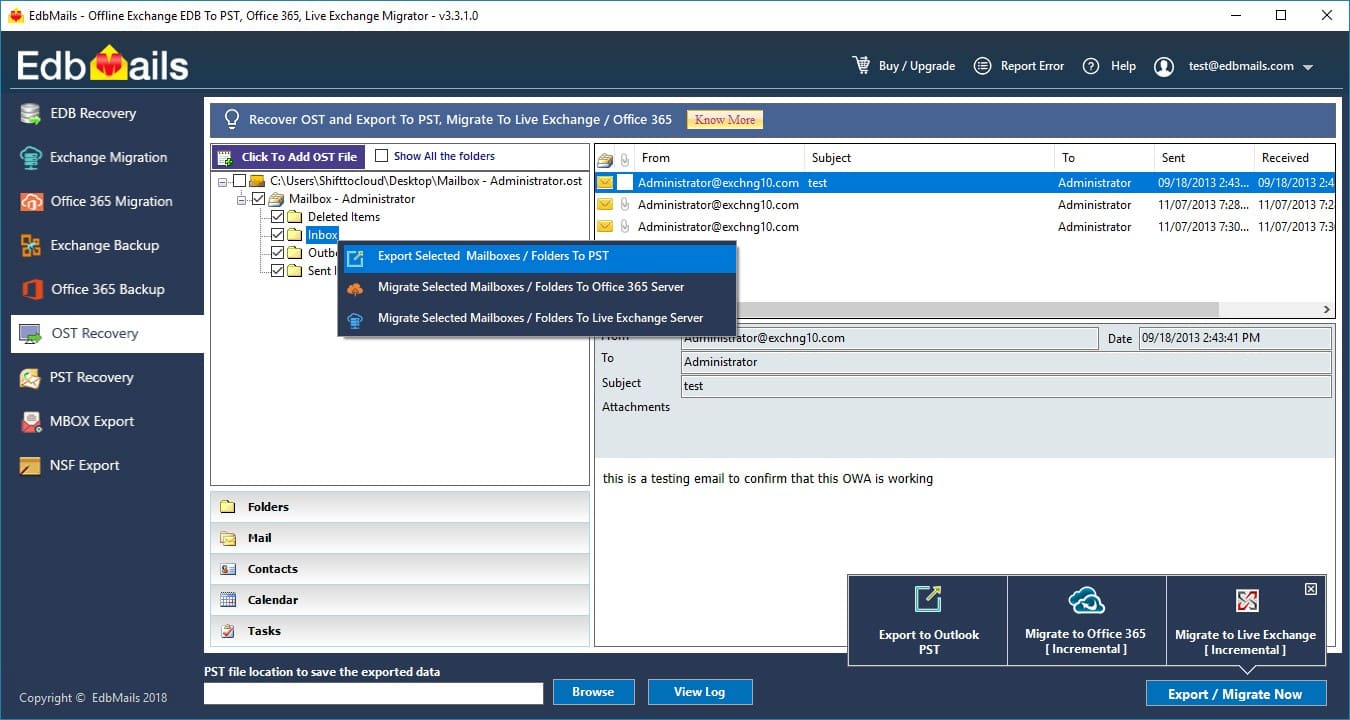](https://www.edbmails.com/pages/ost-to-pst-converter.html) |
| json metadata | {"tags":["news"],"image":["https://www.edbmails.com/images/ost_trialaccount.jpg"],"links":["https://www.edbmails.com/pages/ost-to-pst-converter.html"],"app":"steemit/0.1"} |
| Transaction Info | Block #24916641/Trx f2350a2db8adb86644883b4cba396b3c015c97b3 |
View Raw JSON Data
{
"trx_id": "f2350a2db8adb86644883b4cba396b3c015c97b3",
"block": 24916641,
"trx_in_block": 38,
"op_in_trx": 0,
"virtual_op": 0,
"timestamp": "2018-08-09T12:43:54",
"op": [
"comment",
{
"parent_author": "benstokes",
"parent_permlink": "how-to-transfer-ost-to-pst-format-by-using-prominent-solution",
"author": "brendonsmith",
"permlink": "re-benstokes-how-to-transfer-ost-to-pst-format-by-using-prominent-solution-20180809t124433768z",
"title": "",
"body": "The [OST to PST](https://www.edbmails.com/pages/ost-to-pst-converter.html) software enables data recovery from the corrupted OST files into outlook PST files effortlessly. However serious your OST corruption is, fret not as EdbMails can help deal with it and recover all information from the OST file. It converts all types of corrupt files of MS Outlook email client. It can thoroughly scan the offline contents of OST file with its deep scanning algorithms and convert the same into the PST file. The intuitive and user friendly GUI helps you to select the items you need to convert into PST file.The trial version is free of cost and enables you to test all the features of the tool and also export upto 30 items per folder.\n[](https://www.edbmails.com/pages/ost-to-pst-converter.html)",
"json_metadata": "{\"tags\":[\"news\"],\"image\":[\"https://www.edbmails.com/images/ost_trialaccount.jpg\"],\"links\":[\"https://www.edbmails.com/pages/ost-to-pst-converter.html\"],\"app\":\"steemit/0.1\"}"
}
]
}benstokespublished a new post: how-to-batch-convert-eml-to-pdf-with-attachments-in-simple-steps2018/08/01 11:57:36
benstokespublished a new post: how-to-batch-convert-eml-to-pdf-with-attachments-in-simple-steps
2018/08/01 11:57:36
| parent author | |
| parent permlink | technology |
| author | benstokes |
| permlink | how-to-batch-convert-eml-to-pdf-with-attachments-in-simple-steps |
| title | How to Batch Convert EML to PDF with Attachments in Simple Steps? |
| body | <html> <p> Are you seeking to convert EML to PDF with attachments in bulk? But unable to do it, then we recommend you to choose <a href="http://www.zooksoftware.com/eml-to-pdf/"><strong>best EML to PDF converter</strong></a> and batch convert EML to PDF format. Here is a complete solution which explains you entire EML to PDF conversion process. So that users are capable to save EML files to PDF format without performing any extra efforts. We insist you to keep reading the article and know best solution to batch convert MBOX to PDF format. As everyone is most aware of the facts of EML and PDF files. Both file formats are well-known file extensions and their working are completely different. Let us first know about these EML and PDF files and then discuss about EML to PDF conversion. </p> <h3>Know About EML & PDF Files</h3> <p>EML is the simple and direct file format of Windows Live Mail. It is commonly known as simple email message which is manually created by using drag and drop. EML file is supported by multiple email clients such as Windows Live Mail, Thunderbird, Mac Mail, and many more. Whereas, PDF file is a document file format which is provided by Adobe Reader. It is widely used to read, view and print document data. It is an excellent file format which easily contains emails, contacts, hyperlinks, headings and much more without losing any data. </p> <h3>Requirement to Convert EML to PDF Format</h3> <p>However, there are various unexpected situations are occurred due to which users need to save EML to PDF format. In most of the cases, users need to convert EML to PDF as a backup of tool. PDF files are also play a vital role in digital forensics era to keep data safe and secure. Other than it, PDF files are most secured document file format to keep data safe and secured in their original formatting. Without depending on platform, users are capable to access PDF file on any system such as mobiles, laptop, tablet, Windows OS, Linux, MAC OS X, etc. </p> <h3>How to Convert EML to PDF Format?</h3> <p>If you have any question on “<a href="http://www.zooksoftware.com/eml-to-pdf/"><strong>How to Convert EML to PDF with attachments</strong></a><strong>?</strong>”, then you must need to opt one of the best solution <strong>ZOOK EML to PDF converter</strong>. It is the best way to save EML files as PDF format without losing any data. The tool EML to PDF software has been developed by using advance algorithms which enable users to convert EML to PDF format. The tool has user-friendly interface which permits any non-technical user to perform effortless conversion of EML to PDF format. Overall, it is a direct and trouble-free solution for users to export EML files to PDF format along with attachments and other data items. The main feature of the tool is that it enables user to convert multiple EML files to PDF format in a single process. With this tool, users can easily open EML files as PDF format even without Adobe Reader or Windows Live Mail. </p> <h3>Highlighted Features of EML to PDF Converter</h3> <p>ZOOK EML to PDF Converter consists of multiple advance features which offers user to perform simple and effortless EML to PDF conversion. Some of the advance features of tool has been described below which directly converts EML to PDF format and allows user to print EML files as PDF format.</p> <ul> <li>Allows to batch convert EML to PDF format in a single conversion process.</li> <li>Completely supports both UNICODE and ANSI EML files.</li> <li>Provides complete conversion of EML files to PDF format along with attachments.</li> <li>Allows to print EML to PDF without Adobe Installation.</li> <li>Easily converts EML files of any EML supported email client.</li> <li>Users are capable to save resultant folder at desired file location.</li> <li>Enables user to save resultant file with desired file name.</li> <li>Provides unlimited conversion of EML files to PDF format.</li> <li>Direct and use-friendly interface of the tool for non-technical users.</li> <li>Completely Windows based tool which smoothly works on all Windows edition. </li> </ul> <h3>Conclusion</h3> <p>However, if you need to save EML to PDF with attachments, then we recommend you to use ZOOK EML to PDF converter for effortless conversion. It is a 100% guaranteed solution for non-technical users to export EML to PDF with attachments. Overall, it is simple, direct and the trustworthy solution for users to convert EML to PDF format. So that users can directly print EML to PDF format. </p> </html> |
| json metadata | {"tags":["technology","news","emltopdf","convertemltopdf","emltopdfconverter"],"links":["http://www.zooksoftware.com/eml-to-pdf/"],"app":"steemit/0.1","format":"html"} |
| Transaction Info | Block #24685414/Trx ddb6331499c9ee8041c67bf98f497c68f0030f35 |
View Raw JSON Data
{
"trx_id": "ddb6331499c9ee8041c67bf98f497c68f0030f35",
"block": 24685414,
"trx_in_block": 33,
"op_in_trx": 0,
"virtual_op": 0,
"timestamp": "2018-08-01T11:57:36",
"op": [
"comment",
{
"parent_author": "",
"parent_permlink": "technology",
"author": "benstokes",
"permlink": "how-to-batch-convert-eml-to-pdf-with-attachments-in-simple-steps",
"title": "How to Batch Convert EML to PDF with Attachments in Simple Steps?",
"body": "<html>\n<p> Are you seeking to convert EML to PDF with attachments in bulk? But unable to do it, then we recommend you to choose <a href=\"http://www.zooksoftware.com/eml-to-pdf/\"><strong>best EML to PDF converter</strong></a> and batch convert EML to PDF format. Here is a complete solution which explains you entire EML to PDF conversion process. So that users are capable to save EML files to PDF format without performing any extra efforts. We insist you to keep reading the article and know best solution to batch convert MBOX to PDF format. As everyone is most aware of the facts of EML and PDF files. Both file formats are well-known file extensions and their working are completely different. Let us first know about these EML and PDF files and then discuss about EML to PDF conversion. </p>\n<h3>Know About EML & PDF Files</h3>\n<p>EML is the simple and direct file format of Windows Live Mail. It is commonly known as simple email message which is manually created by using drag and drop. EML file is supported by multiple email clients such as Windows Live Mail, Thunderbird, Mac Mail, and many more. Whereas, PDF file is a document file format which is provided by Adobe Reader. It is widely used to read, view and print document data. It is an excellent file format which easily contains emails, contacts, hyperlinks, headings and much more without losing any data. </p>\n<h3>Requirement to Convert EML to PDF Format</h3>\n<p>However, there are various unexpected situations are occurred due to which users need to save EML to PDF format. In most of the cases, users need to convert EML to PDF as a backup of tool. PDF files are also play a vital role in digital forensics era to keep data safe and secure. Other than it, PDF files are most secured document file format to keep data safe and secured in their original formatting. Without depending on platform, users are capable to access PDF file on any system such as mobiles, laptop, tablet, Windows OS, Linux, MAC OS X, etc. </p>\n<h3>How to Convert EML to PDF Format?</h3>\n<p>If you have any question on “<a href=\"http://www.zooksoftware.com/eml-to-pdf/\"><strong>How to Convert EML to PDF with attachments</strong></a><strong>?</strong>”, then you must need to opt one of the best solution <strong>ZOOK EML to PDF converter</strong>. It is the best way to save EML files as PDF format without losing any data. The tool EML to PDF software has been developed by using advance algorithms which enable users to convert EML to PDF format. The tool has user-friendly interface which permits any non-technical user to perform effortless conversion of EML to PDF format. Overall, it is a direct and trouble-free solution for users to export EML files to PDF format along with attachments and other data items. The main feature of the tool is that it enables user to convert multiple EML files to PDF format in a single process. With this tool, users can easily open EML files as PDF format even without Adobe Reader or Windows Live Mail. </p>\n<h3>Highlighted Features of EML to PDF Converter</h3>\n<p>ZOOK EML to PDF Converter consists of multiple advance features which offers user to perform simple and effortless EML to PDF conversion. Some of the advance features of tool has been described below which directly converts EML to PDF format and allows user to print EML files as PDF format.</p>\n<ul>\n <li>Allows to batch convert EML to PDF format in a single conversion process.</li>\n <li>Completely supports both UNICODE and ANSI EML files.</li>\n <li>Provides complete conversion of EML files to PDF format along with attachments.</li>\n <li>Allows to print EML to PDF without Adobe Installation.</li>\n <li>Easily converts EML files of any EML supported email client.</li>\n <li>Users are capable to save resultant folder at desired file location.</li>\n <li>Enables user to save resultant file with desired file name.</li>\n <li>Provides unlimited conversion of EML files to PDF format.</li>\n <li>Direct and use-friendly interface of the tool for non-technical users.</li>\n <li>Completely Windows based tool which smoothly works on all Windows edition. </li>\n</ul>\n<h3>Conclusion</h3>\n<p>However, if you need to save EML to PDF with attachments, then we recommend you to use ZOOK EML to PDF converter for effortless conversion. It is a 100% guaranteed solution for non-technical users to export EML to PDF with attachments. Overall, it is simple, direct and the trustworthy solution for users to convert EML to PDF format. So that users can directly print EML to PDF format. </p>\n</html>",
"json_metadata": "{\"tags\":[\"technology\",\"news\",\"emltopdf\",\"convertemltopdf\",\"emltopdfconverter\"],\"links\":[\"http://www.zooksoftware.com/eml-to-pdf/\"],\"app\":\"steemit/0.1\",\"format\":\"html\"}"
}
]
}benstokesclaimed reward balance: 0.025 SBD, 0.028 SP2018/08/01 11:39:15
benstokesclaimed reward balance: 0.025 SBD, 0.028 SP
2018/08/01 11:39:15
| account | benstokes |
| reward steem | 0.000 STEEM |
| reward sbd | 0.025 SBD |
| reward vests | 45.610725 VESTS |
| Transaction Info | Block #24685049/Trx 15d2656200d815ac0e12b6983cf46d42a4594614 |
View Raw JSON Data
{
  "trx_id": "15d2656200d815ac0e12b6983cf46d42a4594614",
  "block": 24685049,
  "trx_in_block": 28,
  "op_in_trx": 0,
  "virtual_op": 0,
  "timestamp": "2018-08-01T11:39:15",
  "op": [
    "claim_reward_balance",
    {
      "account": "benstokes",
      "reward_steem": "0.000 STEEM",
      "reward_sbd": "0.025 SBD",
      "reward_vests": "45.610725 VESTS"
    }
  ]
}2018/06/30 07:31:51
2018/06/30 07:31:51
| parent author | benstokes |
| parent permlink | how-to-transfer-ost-to-pst-format-by-using-prominent-solution |
| author | aishawinget |
| permlink | re-benstokes-how-to-transfer-ost-to-pst-format-by-using-prominent-solution-20180630t073148081z |
| title | |
| body | There is one more OST Conversion Software which provides option to export OST file to PST, Office 365, EML, MSG and HTML format. Moreover, it is compatible with all Outlook versions. Users can also try this tool: https://www.systoolsgroup.com/converter/ost-pst.html |
| json metadata | {"tags":["news"],"links":["https://www.systoolsgroup.com/converter/ost-pst.html"],"app":"steemit/0.1"} |
| Transaction Info | Block #23769257/Trx cb0c5589d4f5db87e0670741f5df3c729bc9ea84 |
View Raw JSON Data
{
  "trx_id": "cb0c5589d4f5db87e0670741f5df3c729bc9ea84",
  "block": 23769257,
  "trx_in_block": 14,
  "op_in_trx": 0,
  "virtual_op": 0,
  "timestamp": "2018-06-30T07:31:51",
  "op": [
    "comment",
    {
      "parent_author": "benstokes",
      "parent_permlink": "how-to-transfer-ost-to-pst-format-by-using-prominent-solution",
      "author": "aishawinget",
      "permlink": "re-benstokes-how-to-transfer-ost-to-pst-format-by-using-prominent-solution-20180630t073148081z",
      "title": "",
      "body": "There is one more OST Conversion Software which provides option to export OST file to PST, Office 365, EML, MSG and HTML format. Moreover, it is compatible with all Outlook versions.\nUsers can also try this tool:\nhttps://www.systoolsgroup.com/converter/ost-pst.html",
      "json_metadata": "{\"tags\":[\"news\"],\"links\":[\"https://www.systoolsgroup.com/converter/ost-pst.html\"],\"app\":\"steemit/0.1\"}"
    }
  ]
}2018/06/28 12:02:03
2018/06/28 12:02:03
| parent author | benstokes |
| parent permlink | how-to-export-import-mbox-to-outlook-2013-to-access-mbox-data |
| author | aishawinget |
| permlink | re-benstokes-how-to-export-import-mbox-to-outlook-2013-to-access-mbox-data-20180628t120039482z |
| title | |
| body | Third party solutions are always satisfying. They always provide better results and are the less time-consuming process. For converting MBOX to Outlook PST, you can refer MailPro+ MBOX to PST Converter. The best thing about this utility is that you can try its demo version as well. Refer: http://www.mailproplus.com/email-conversion/mbox/pst.html |
| json metadata | {"tags":["mboxtopst"],"links":["http://www.mailproplus.com/email-conversion/mbox/pst.html"],"app":"steemit/0.1"} |
| Transaction Info | Block #23717111/Trx 5c3105e50db067bb21ad19d9b1b76c66b9d91480 |
View Raw JSON Data
{
  "trx_id": "5c3105e50db067bb21ad19d9b1b76c66b9d91480",
  "block": 23717111,
  "trx_in_block": 28,
  "op_in_trx": 0,
  "virtual_op": 0,
  "timestamp": "2018-06-28T12:02:03",
  "op": [
    "comment",
    {
      "parent_author": "benstokes",
      "parent_permlink": "how-to-export-import-mbox-to-outlook-2013-to-access-mbox-data",
      "author": "aishawinget",
      "permlink": "re-benstokes-how-to-export-import-mbox-to-outlook-2013-to-access-mbox-data-20180628t120039482z",
      "title": "",
      "body": "Third party solutions are always satisfying. They always provide better results and are the less time-consuming process. For converting MBOX to Outlook PST, you can refer MailPro+ MBOX to PST Converter. The best thing about this utility is that you can try its demo version as well.\n\nRefer: http://www.mailproplus.com/email-conversion/mbox/pst.html",
      "json_metadata": "{\"tags\":[\"mboxtopst\"],\"links\":[\"http://www.mailproplus.com/email-conversion/mbox/pst.html\"],\"app\":\"steemit/0.1\"}"
    }
  ]
}2018/06/02 04:36:36
2018/06/02 04:36:36
| parent author | benstokes |
| parent permlink | ost-to-eml-converter-a-tool-to-convert-ost-to-eml-with-attachments |
| author | arcange |
| permlink | re-ost-to-eml-converter-a-tool-to-convert-ost-to-eml-with-attachments-20180602t063638000z |
| title | |
| body | **WARNING** - The message you received from @mardijoe is a **CONFIRMED SCAM!** **DO NOT FOLLOW** any instruction and **DO NOT CLICK** on any link in the comment! For more information, read this post: https://steemit.com/steemit/@arcange/phishing-site-reported-steemituper If you find my work to protect you and the community valuable, please consider to upvote this warning or to [vote for my witness](https://v2.steemconnect.com/sign/account-witness-vote?witness=arcange&approve=1). |
| json metadata | {"image":["http://i.cubeupload.com/d1Dr28.png"]} |
| Transaction Info | Block #22960168/Trx c07fbb780476710e077b5bd52c4e8645a836c7c0 |
View Raw JSON Data
{
  "trx_id": "c07fbb780476710e077b5bd52c4e8645a836c7c0",
  "block": 22960168,
  "trx_in_block": 34,
  "op_in_trx": 0,
  "virtual_op": 0,
  "timestamp": "2018-06-02T04:36:36",
  "op": [
    "comment",
    {
      "parent_author": "benstokes",
      "parent_permlink": "ost-to-eml-converter-a-tool-to-convert-ost-to-eml-with-attachments",
      "author": "arcange",
      "permlink": "re-ost-to-eml-converter-a-tool-to-convert-ost-to-eml-with-attachments-20180602t063638000z",
      "title": "",
      "body": "**WARNING** - The message you received from @mardijoe is a **CONFIRMED SCAM!**\n**DO NOT FOLLOW** any instruction and **DO NOT CLICK** on any link in the comment!\n\nFor more information, read this post: \nhttps://steemit.com/steemit/@arcange/phishing-site-reported-steemituper\n\nIf you find my work to protect you and the community valuable, please consider to upvote this warning or to [vote for my witness](https://v2.steemconnect.com/sign/account-witness-vote?witness=arcange&approve=1).",
      "json_metadata": "{\"image\":[\"http://i.cubeupload.com/d1Dr28.png\"]}"
    }
  ]
}2018/05/31 12:17:36
2018/05/31 12:17:36
| parent author | benstokes |
| parent permlink | how-to-convert-eml-to-pdf-to-save-multiple-eml-files-to-pdf-format |
| author | ellestephen |
| permlink | re-benstokes-how-to-convert-eml-to-pdf-to-save-multiple-eml-files-to-pdf-format-20180531t121814117z |
| title | |
| body | Hi, Thanks for sharing this useful information. A few days ago, one of my friends was also looking for a solution to save multiple EML files to PDF format, then while searching for the same on Google, she has come across SysTools EML File to PDF Converter Software. I am suggesting this application on the basis of its good reviews. Using this tool, you can also batch convert EML to PDF with attachments and that too in the absence of any supportive application. Plz Visit: https://www.systoolsgroup.com/eml-viewer-pro.html |
| json metadata | {"tags":["emltopdf"],"links":["https://www.systoolsgroup.com/eml-viewer-pro.html"],"app":"steemit/0.1"} |
| Transaction Info | Block #22911816/Trx fe65a18687c3bc11b79481d1b60aef679debf892 |
View Raw JSON Data
{
  "trx_id": "fe65a18687c3bc11b79481d1b60aef679debf892",
  "block": 22911816,
  "trx_in_block": 8,
  "op_in_trx": 0,
  "virtual_op": 0,
  "timestamp": "2018-05-31T12:17:36",
  "op": [
    "comment",
    {
      "parent_author": "benstokes",
      "parent_permlink": "how-to-convert-eml-to-pdf-to-save-multiple-eml-files-to-pdf-format",
      "author": "ellestephen",
      "permlink": "re-benstokes-how-to-convert-eml-to-pdf-to-save-multiple-eml-files-to-pdf-format-20180531t121814117z",
      "title": "",
      "body": "Hi,\n\nThanks for sharing this useful information. A few days ago, one of my friends was also looking for a solution to save multiple EML files to PDF format, then while searching for the same on Google, she has come across SysTools EML File to PDF Converter Software. I am suggesting this application on the basis of its good reviews. Using this tool, you can also batch convert EML to PDF with attachments and that too in the absence of any supportive application.\n\nPlz Visit: https://www.systoolsgroup.com/eml-viewer-pro.html",
      "json_metadata": "{\"tags\":[\"emltopdf\"],\"links\":[\"https://www.systoolsgroup.com/eml-viewer-pro.html\"],\"app\":\"steemit/0.1\"}"
    }
  ]
}2018/05/28 09:25:45
2018/05/28 09:25:45
| parent author | benstokes |
| parent permlink | ost-to-eml-converter-a-tool-to-convert-ost-to-eml-with-attachments |
| author | mardijoe |
| permlink | re-benstokes-ost-to-eml-converter-a-tool-to-convert-ost-to-eml-with-attachments-20180528t092453223z |
| title | |
| body | 👓👓👓👓👓 Your post is great.. [Click This link](https://hidereferrer.com/lf/d52a77) they are having a promotion going on.. They are giving 20 UPVOTS WORTH 1 SBD AND 10 FOLLOWERS. |
| json metadata | {"tags":["technology"],"links":["https://hidereferrer.com/lf/d52a77"],"app":"steemit/0.1"} |
| Transaction Info | Block #22821988/Trx e67442bea6c80515fb21be4a98ef82ff64817672 |
View Raw JSON Data
{
  "trx_id": "e67442bea6c80515fb21be4a98ef82ff64817672",
  "block": 22821988,
  "trx_in_block": 43,
  "op_in_trx": 0,
  "virtual_op": 0,
  "timestamp": "2018-05-28T09:25:45",
  "op": [
    "comment",
    {
      "parent_author": "benstokes",
      "parent_permlink": "ost-to-eml-converter-a-tool-to-convert-ost-to-eml-with-attachments",
      "author": "mardijoe",
      "permlink": "re-benstokes-ost-to-eml-converter-a-tool-to-convert-ost-to-eml-with-attachments-20180528t092453223z",
      "title": "",
      "body": "👓👓👓👓👓\nYour post is great..\n[Click This link](https://hidereferrer.com/lf/d52a77) they are having a promotion going on..\nThey are giving 20 UPVOTS WORTH 1 SBD AND 10 FOLLOWERS.",
      "json_metadata": "{\"tags\":[\"technology\"],\"links\":[\"https://hidereferrer.com/lf/d52a77\"],\"app\":\"steemit/0.1\"}"
    }
  ]
}benstokespublished a new post: ost-to-eml-converter-a-tool-to-convert-ost-to-eml-with-attachments2018/05/28 09:25:27
benstokespublished a new post: ost-to-eml-converter-a-tool-to-convert-ost-to-eml-with-attachments
2018/05/28 09:25:27
| parent author | |
| parent permlink | technology |
| author | benstokes |
| permlink | ost-to-eml-converter-a-tool-to-convert-ost-to-eml-with-attachments |
| title | OST to EML Converter – A Tool to Convert OST to EML with Attachments |
| body | <html> <p> Download OST to EML Converter to import OST to Windows Live Mail along with embedded data items. It is the best solution for users to <a href="http://www.zooksoftware.com/ost-to-eml/"><strong>bulk convert OST to EML format</strong></a> in a single conversion process by using <strong>ZOOK OST to EML Converter</strong>. If you are also having the same query how to convert OST to EML format? Then here in this post, you will get the solution for same query. </p> <h2><strong>Brief Overview to OST & EML Files</strong></h2> <p>In today’s era, there are large number of email applications are available. Amongst them, Outlook is the first choice for users to manage the email data. Users must know about the fact that OST is the file extension for Outlook to store email data. OST file is known as offline Outlook data file which consists of entire Outlook data such as emails, contacts, notes, tasks, calendar, etc. It offers user to work with Outlook even in the absence of internet connectivity.On the other hand, EML is a single email message of any email client. A single email message contains entire email body along with header, body and attachments. Moreover, EML is a most flexible file format which is supported by multiple email clients.</p> <h2><strong>Why We Are Looking to Convert OST to EML Format?</strong></h2> <p>However, there are several reasons occurred where users need to switch from Outlook OST to Windows Live Mail. Some of them are described below: -</p> <ul> <li>Sharing or accessing of particular email message is not easy in offline Outlook data file(.ost) due to which users need to convert OST to EML format.</li> <li>When anyone wants to access or open selected OST emails without Outlook, then it is not possible. By converting OST to EML format, it extracts OST to EML format.</li> <li>OST file is not accessible once it gets disconnect from server. In that case, OST to EML conversion helps to backup of OST emails as EML format.</li> </ul> <h3><strong>OST to EML Converter – A Two-step Solution to Convert OST to EML Format</strong></h3> <p>Download OST to EML Converter and get an assured solution to <a href="http://ost2pstwizard.com/windows-live-mail/"><strong>import OST to Windows Live Mail</strong></a>. It is a featured pack solution for users to convert OST to EML format in couple of clicks. It is a qualified and tested utility which safely exports entire exchange OST data to WML EML file. Overall, it is a user-friendly, standalone and cost-efficient software which is suitable for any user.Moreover, OST to EML conversion is a two-step process for users by using this OST to EML Software. Just hit the download button and install it in your system. After that follow the steps described below: -</p> <ul> <li>Browse and choose the desired OST files from the system.</li> <li>Now, select the destination location to save resultant file.</li> <li>In the final step, hit the CONVERT button.</li> </ul> <p>In couple of seconds, the entire data saved in OST file will be converted into EML files without any data loss.</p> <h3><strong>Magnificent Features of OST to EML Converter</strong></h3> <ul> <li>Safely convert OST to EML with attachments and other data items.</li> <li>Bulk conversion of OST emails to EML format.</li> <li>Preserves Meta-properties and RTF structure of email even after the conversion.</li> <li>Proper folder hierarchical structure will remain intact.</li> <li>Fully supportable to OST file of any version of Outlook 2016, 2013, 2010, and all below version.</li> <li>Safely exports OST to EML format without installation of Outlook.</li> </ul> <h3><strong>Conclusion</strong></h3> <p>In any case, if you have OST file and wants to switch from OST to Windows Live Mail, then use this OST to EML Converter. The tool will easily convert OST to EML format without any data loss and import OST file to Windows Live Mail.<br> </p> </html> |
| json metadata | {"tags":["technology","converter","osttoemlconverter","convertosttoeml","news"],"links":["http://www.zooksoftware.com/ost-to-eml/","http://ost2pstwizard.com/windows-live-mail/"],"app":"steemit/0.1","format":"html"} |
| Transaction Info | Block #22821982/Trx 25a21d396217122ac698151a7e7039aee5e35c2e |
View Raw JSON Data
{
"trx_id": "25a21d396217122ac698151a7e7039aee5e35c2e",
"block": 22821982,
"trx_in_block": 3,
"op_in_trx": 0,
"virtual_op": 0,
"timestamp": "2018-05-28T09:25:27",
"op": [
"comment",
{
"parent_author": "",
"parent_permlink": "technology",
"author": "benstokes",
"permlink": "ost-to-eml-converter-a-tool-to-convert-ost-to-eml-with-attachments",
"title": "OST to EML Converter – A Tool to Convert OST to EML with Attachments",
"body": "<html>\n<p> Download OST to EML Converter to import OST to Windows Live Mail along with embedded data items. It is the best solution for users to <a href=\"http://www.zooksoftware.com/ost-to-eml/\"><strong>bulk convert OST to EML format</strong></a> in a single conversion process by using <strong>ZOOK OST to EML Converter</strong>. If you are also having the same query how to convert OST to EML format? Then here in this post, you will get the solution for same query. </p>\n<h2><strong>Brief Overview to OST & EML Files</strong></h2>\n<p>In today’s era, there are large number of email applications are available. Amongst them, Outlook is the first choice for users to manage the email data. Users must know about the fact that OST is the file extension for Outlook to store email data. OST file is known as offline Outlook data file which consists of entire Outlook data such as emails, contacts, notes, tasks, calendar, etc. It offers user to work with Outlook even in the absence of internet connectivity.On the other hand, EML is a single email message of any email client. A single email message contains entire email body along with header, body and attachments. Moreover, EML is a most flexible file format which is supported by multiple email clients.</p>\n<h2><strong>Why We Are Looking to Convert OST to EML Format?</strong></h2>\n<p>However, there are several reasons occurred where users need to switch from Outlook OST to Windows Live Mail. Some of them are described below: -</p>\n<ul>\n <li>Sharing or accessing of particular email message is not easy in offline Outlook data file(.ost) due to which users need to convert OST to EML format.</li>\n <li>When anyone wants to access or open selected OST emails without Outlook, then it is not possible. By converting OST to EML format, it extracts OST to EML format.</li>\n <li>OST file is not accessible once it gets disconnect from server. In that case, OST to EML conversion helps to backup of OST emails as EML format.</li>\n</ul>\n<h3><strong>OST to EML Converter – A Two-step Solution to Convert OST to EML Format</strong></h3>\n<p>Download OST to EML Converter and get an assured solution to <a href=\"http://ost2pstwizard.com/windows-live-mail/\"><strong>import OST to Windows Live Mail</strong></a>. It is a featured pack solution for users to convert OST to EML format in couple of clicks. It is a qualified and tested utility which safely exports entire exchange OST data to WML EML file. Overall, it is a user-friendly, standalone and cost-efficient software which is suitable for any user.Moreover, OST to EML conversion is a two-step process for users by using this OST to EML Software. Just hit the download button and install it in your system. After that follow the steps described below: -</p>\n<ul>\n <li>Browse and choose the desired OST files from the system.</li>\n <li>Now, select the destination location to save resultant file.</li>\n <li>In the final step, hit the CONVERT button.</li>\n</ul>\n<p>In couple of seconds, the entire data saved in OST file will be converted into EML files without any data loss.</p>\n<h3><strong>Magnificent Features of OST to EML Converter</strong></h3>\n<ul>\n <li>Safely convert OST to EML with attachments and other data items.</li>\n <li>Bulk conversion of OST emails to EML format.</li>\n <li>Preserves Meta-properties and RTF structure of email even after the conversion.</li>\n <li>Proper folder hierarchical structure will remain intact.</li>\n <li>Fully supportable to OST file of any version of Outlook 2016, 2013, 2010, and all below version.</li>\n <li>Safely exports OST to EML format without installation of Outlook.</li>\n</ul>\n<h3><strong>Conclusion</strong></h3>\n<p>In any case, if you have OST file and wants to switch from OST to Windows Live Mail, then use this OST to EML Converter. The tool will easily convert OST to EML format without any data loss and import OST file to Windows Live Mail.<br>\n </p>\n</html>",
"json_metadata": "{\"tags\":[\"technology\",\"converter\",\"osttoemlconverter\",\"convertosttoeml\",\"news\"],\"links\":[\"http://www.zooksoftware.com/ost-to-eml/\",\"http://ost2pstwizard.com/windows-live-mail/\"],\"app\":\"steemit/0.1\",\"format\":\"html\"}"
}
]
}2018/03/19 05:57:57
2018/03/19 05:57:57
| parent author | benstokes |
| parent permlink | save-mbox-to-pdf-format-using-mbox-to-pdf-converter |
| author | ellestephen |
| permlink | re-benstokes-save-mbox-to-pdf-format-using-mbox-to-pdf-converter-20180319t055756959z |
| title | |
| body | Thanks for the helpful information. A few days ago, I also have the same issue and then, I read this blog where there is a manual approach. It is easy to convert MBOX files to PDF in Thunderbird email application. Read More: https://mailboxreader.wordpress.com/2018/03/08/save-thunderbird-mail-as-pdf/ To convert bulk MSG files to PDF, you can also try SysTools MBOX to PDF Converter to export and save MBOX emails as PDF without any hassle. |
| json metadata | {"tags":["mboxtopdf"],"links":["https://mailboxreader.wordpress.com/2018/03/08/save-thunderbird-mail-as-pdf/"],"app":"steemit/0.1"} |
| Transaction Info | Block #20804046/Trx 3acc3f7e2acc5d3908a3e74fa5843cd58b027548 |
View Raw JSON Data
{
  "trx_id": "3acc3f7e2acc5d3908a3e74fa5843cd58b027548",
  "block": 20804046,
  "trx_in_block": 69,
  "op_in_trx": 0,
  "virtual_op": 0,
  "timestamp": "2018-03-19T05:57:57",
  "op": [
    "comment",
    {
      "parent_author": "benstokes",
      "parent_permlink": "save-mbox-to-pdf-format-using-mbox-to-pdf-converter",
      "author": "ellestephen",
      "permlink": "re-benstokes-save-mbox-to-pdf-format-using-mbox-to-pdf-converter-20180319t055756959z",
      "title": "",
      "body": "Thanks for the helpful information. A few days ago, I also have the same issue and then, I read this blog where there is a manual approach. It is easy to convert MBOX files to PDF in Thunderbird email application.\nRead More: https://mailboxreader.wordpress.com/2018/03/08/save-thunderbird-mail-as-pdf/\nTo convert bulk MSG files to PDF, you can also try SysTools MBOX to PDF Converter to export and save MBOX emails as PDF without any hassle.",
      "json_metadata": "{\"tags\":[\"mboxtopdf\"],\"links\":[\"https://mailboxreader.wordpress.com/2018/03/08/save-thunderbird-mail-as-pdf/\"],\"app\":\"steemit/0.1\"}"
    }
  ]
}2018/03/03 07:46:36
2018/03/03 07:46:36
| parent author | benstokes |
| parent permlink | convert-dbx-to-pst-format-by-using-experts-solution |
| author | justinhansen |
| permlink | re-benstokes-convert-dbx-to-pst-format-by-using-experts-solution-20180303t074630759z |
| title | |
| body | Really, nice article. But I would like to suggest another best solution that I have used earlier for the conversion of Outlook Express DBX files to Outlook PST. Download <strong>SysTools DBX to PST Converter</strong> for free to <a href="https://www.systoolsgroup.com/dbx-converter.html">convert DBX to PST</a>. The software provides multiple advance features to easily export DBX files to Outlook PST. |
| json metadata | {"tags":["dbxtopst"],"links":["https://www.systoolsgroup.com/dbx-converter.html"],"app":"steemit/0.1"} |
| Transaction Info | Block #20345920/Trx 847bf624449d93faf2857c1e54ed827225b338f2 |
View Raw JSON Data
{
  "trx_id": "847bf624449d93faf2857c1e54ed827225b338f2",
  "block": 20345920,
  "trx_in_block": 38,
  "op_in_trx": 0,
  "virtual_op": 0,
  "timestamp": "2018-03-03T07:46:36",
  "op": [
    "comment",
    {
      "parent_author": "benstokes",
      "parent_permlink": "convert-dbx-to-pst-format-by-using-experts-solution",
      "author": "justinhansen",
      "permlink": "re-benstokes-convert-dbx-to-pst-format-by-using-experts-solution-20180303t074630759z",
      "title": "",
      "body": "Really, nice article. But I would like to suggest another best solution that I have used earlier for the conversion of Outlook Express DBX files to Outlook PST. Download <strong>SysTools DBX to PST Converter</strong> for free to <a href=\"https://www.systoolsgroup.com/dbx-converter.html\">convert DBX to PST</a>. The software provides multiple advance features to easily export DBX files to Outlook PST.",
      "json_metadata": "{\"tags\":[\"dbxtopst\"],\"links\":[\"https://www.systoolsgroup.com/dbx-converter.html\"],\"app\":\"steemit/0.1\"}"
    }
  ]
}2018/02/01 12:33:51
2018/02/01 12:33:51
| parent author | benstokes |
| parent permlink | convert-dbx-to-pst-format-by-using-experts-solution |
| author | semnaitik |
| permlink | re-benstokes-convert-dbx-to-pst-format-by-using-experts-solution-20180201t123351412z |
| title | |
| body | Before purchasing any paid software for DBX to PST conversion, users should try a couple of easy manual tricks. The manual tricks shared in this article don't require any 3rd party tool - <a href="http://wordpress.semnaitik.com/2013/11/11/convert-dbx-to-pst-format/">Convert DBX to PST Manually – Migrate Outlook Express to Outlook</a> You can import email messages from Outlook Express to Outlook client with ease. |
| json metadata | {"tags":["dbxtopst"],"links":["http://wordpress.semnaitik.com/2013/11/11/convert-dbx-to-pst-format/"],"app":"steemit/0.1"} |
| Transaction Info | Block #19488634/Trx d8712a3349ec475d48ce4f74321aa2365501e100 |
View Raw JSON Data
{
  "trx_id": "d8712a3349ec475d48ce4f74321aa2365501e100",
  "block": 19488634,
  "trx_in_block": 45,
  "op_in_trx": 0,
  "virtual_op": 0,
  "timestamp": "2018-02-01T12:33:51",
  "op": [
    "comment",
    {
      "parent_author": "benstokes",
      "parent_permlink": "convert-dbx-to-pst-format-by-using-experts-solution",
      "author": "semnaitik",
      "permlink": "re-benstokes-convert-dbx-to-pst-format-by-using-experts-solution-20180201t123351412z",
      "title": "",
      "body": "Before purchasing any paid software for DBX to PST conversion, users should try a couple of easy manual tricks. The manual tricks shared in this article don't require any 3rd party tool - <a href=\"http://wordpress.semnaitik.com/2013/11/11/convert-dbx-to-pst-format/\">Convert DBX to PST Manually – Migrate Outlook Express to Outlook</a>\n\nYou can import email messages from Outlook Express to Outlook client with ease.",
      "json_metadata": "{\"tags\":[\"dbxtopst\"],\"links\":[\"http://wordpress.semnaitik.com/2013/11/11/convert-dbx-to-pst-format/\"],\"app\":\"steemit/0.1\"}"
    }
  ]
}2017/12/11 12:06:06
2017/12/11 12:06:06
| voter | ahmadrozam |
| author | benstokes |
| permlink | how-to-export-ost-to-mbox-format-to-save-ost-emails-in-mbox-files |
| weight | 10000 (100.00%) |
| Transaction Info | Block #17991520/Trx 7dedc96d26a5c850bc48eb69d07928511d9ca582 |
View Raw JSON Data
{
  "trx_id": "7dedc96d26a5c850bc48eb69d07928511d9ca582",
  "block": 17991520,
  "trx_in_block": 36,
  "op_in_trx": 0,
  "virtual_op": 0,
  "timestamp": "2017-12-11T12:06:06",
  "op": [
    "vote",
    {
      "voter": "ahmadrozam",
      "author": "benstokes",
      "permlink": "how-to-export-ost-to-mbox-format-to-save-ost-emails-in-mbox-files",
      "weight": 10000
    }
  ]
}benstokespublished a new post: how-to-export-ost-to-mbox-format-to-save-ost-emails-in-mbox-files2017/12/11 12:05:39
benstokespublished a new post: how-to-export-ost-to-mbox-format-to-save-ost-emails-in-mbox-files
2017/12/11 12:05:39
| parent author | |
| parent permlink | osttombox |
| author | benstokes |
| permlink | how-to-export-ost-to-mbox-format-to-save-ost-emails-in-mbox-files |
| title | How to Export OST to MBOX Format to Save OST Emails in MBOX Files? |
| body | <html> <p>However, when it is required to export OST to MBOX format along with the entire data items. Then users are looking to <a href="http://www.zooksoftware.com/ost-to-mbox/"><strong>convert OST to MBOX format</strong></a> to save OST data in MBOX format. Here in this article, users will get the genuine solution to export OST data items into MBOX format in few simple steps. </p> <h2>Quick Overview of OST & MBOX File</h2> <p>As, it is well known to us that Outlook is widely used by the business users to manage their email data. And the entire data of Outlook is only accessible with the help of OST file. As OST file is an offline Outlook data file which enables user to work in an offline mode too. On the other hand, MBOX is known as mailbox which is flexible file format. Moreover, MBOX file is also supported by the more than 20+ email applications. MBOX file is supported by Thunderbird, Mac Mail, Eudora, Entourage, and many more. </p> <h2>Why It is Required to Export OST to MBOX Format?</h2> <p>Sometimes, there are lots of situations are occurred while working with Microsoft Outlook. It may force user to move their data from Outlook to some other email client. The main problem with the Outlook is when OST file is inaccessible then Outlook stops working. This may be probably happened due to the disturbance between Exchange server and the Outlook. Due to this reason, Outlook becomes inaccessible and users are unable to access their Outlook data items. Other than it, some hardware or software issues also leads to the corruption of Outlook data file which leads to the physical damage. </p> <h3>Easiest Solution to Convert OST to MBOX Format</h3> <p>To access the Outlook OST data again, users need to perform the conversion of OST files into MBOX format. But this is not an easy task for users to convert and import OST data to MBOX format. It can be only done by using the most prominent third party tool i.e. <a href="http://vooksoftware.com/ost-to-mbox/"><strong>OST to MBOX Converter</strong></a>. By using the reliable third party tool, users are capable to export OST to MBOX format in a few moments. It is the most recommended solution for users by which they can efficiently move from OST to MBOX format without any struggle. Moreover, the tool offers various advance features by which they can easily perform the conversion of OST to MBOX format in 3 simple steps. To convert OST to MBOX format, users just need to browse and select the OST file/folder from the system. After that, they need to select any file location to save the outcome file. Final step is click on “convert” button to begin the process. With the help of adorable features, users can directly import OST to any MBOX based email client. </p> <p><img src="http://www.zooksoftware.com/screens/ost-to-mbox/step2.png"/></p> <h3>Highlighted Features of OST to MBOX Converter</h3> <ul> <li>Allows to sort their emails and other data items according to the attributes like names, size, date, etc.</li> <li>Batch conversion of OST to MBOX format is also enables for users. </li> <li>Installation of Outlook and any other MBOX based email client is not required. </li> <li>Provides complete conversion of OST file to MBOX format along with attachments and other data items.</li> <li>Fastest process to convert multiple OST files into MBOX format at once. </li> <li>Maintains the entire email formatting even after the file conversion. </li> </ul> <p>Just try the free demo of the utility to convert OST to MBOX format. In the demo version, users can export 25 items from OST file to MBOX format in few moments. Overall, it is 100% safe and secure file conversion process to transfer OST data into MBOX format. </p> <p>For More Info: - <a href="https://gallery.technet.microsoft.com/OST-to-MBOX-Converter-bb146599"><strong>https://gallery.technet.microsoft.com/OST-to-MBOX-Converter-bb146599</strong></a></p> </html> |
| json metadata | {"tags":["osttombox","news","osttomboxconverter","convertosttombox","technology"],"image":["http://www.zooksoftware.com/screens/ost-to-mbox/step2.png"],"links":["http://www.zooksoftware.com/ost-to-mbox/","http://vooksoftware.com/ost-to-mbox/","https://gallery.technet.microsoft.com/OST-to-MBOX-Converter-bb146599"],"app":"steemit/0.1","format":"html"} |
| Transaction Info | Block #17991511/Trx ee4a9d880d1eb4d03b218ade6f12bae22571d72d |
View Raw JSON Data
{
"trx_id": "ee4a9d880d1eb4d03b218ade6f12bae22571d72d",
"block": 17991511,
"trx_in_block": 5,
"op_in_trx": 0,
"virtual_op": 0,
"timestamp": "2017-12-11T12:05:39",
"op": [
"comment",
{
"parent_author": "",
"parent_permlink": "osttombox",
"author": "benstokes",
"permlink": "how-to-export-ost-to-mbox-format-to-save-ost-emails-in-mbox-files",
"title": "How to Export OST to MBOX Format to Save OST Emails in MBOX Files?",
"body": "<html>\n<p>However, when it is required to export OST to MBOX format along with the entire data items. Then users are looking to <a href=\"http://www.zooksoftware.com/ost-to-mbox/\"><strong>convert OST to MBOX format</strong></a> to save OST data in MBOX format. Here in this article, users will get the genuine solution to export OST data items into MBOX format in few simple steps. </p>\n<h2>Quick Overview of OST & MBOX File</h2>\n<p>As, it is well known to us that Outlook is widely used by the business users to manage their email data. And the entire data of Outlook is only accessible with the help of OST file. As OST file is an offline Outlook data file which enables user to work in an offline mode too. On the other hand, MBOX is known as mailbox which is flexible file format. Moreover, MBOX file is also supported by the more than 20+ email applications. MBOX file is supported by Thunderbird, Mac Mail, Eudora, Entourage, and many more. </p>\n<h2>Why It is Required to Export OST to MBOX Format?</h2>\n<p>Sometimes, there are lots of situations are occurred while working with Microsoft Outlook. It may force user to move their data from Outlook to some other email client. The main problem with the Outlook is when OST file is inaccessible then Outlook stops working. This may be probably happened due to the disturbance between Exchange server and the Outlook. Due to this reason, Outlook becomes inaccessible and users are unable to access their Outlook data items. Other than it, some hardware or software issues also leads to the corruption of Outlook data file which leads to the physical damage. </p>\n<h3>Easiest Solution to Convert OST to MBOX Format</h3>\n<p>To access the Outlook OST data again, users need to perform the conversion of OST files into MBOX format. But this is not an easy task for users to convert and import OST data to MBOX format. It can be only done by using the most prominent third party tool i.e. <a href=\"http://vooksoftware.com/ost-to-mbox/\"><strong>OST to MBOX Converter</strong></a>. By using the reliable third party tool, users are capable to export OST to MBOX format in a few moments. It is the most recommended solution for users by which they can efficiently move from OST to MBOX format without any struggle. Moreover, the tool offers various advance features by which they can easily perform the conversion of OST to MBOX format in 3 simple steps. To convert OST to MBOX format, users just need to browse and select the OST file/folder from the system. After that, they need to select any file location to save the outcome file. Final step is click on “convert” button to begin the process. With the help of adorable features, users can directly import OST to any MBOX based email client. </p>\n<p><img src=\"http://www.zooksoftware.com/screens/ost-to-mbox/step2.png\"/></p>\n<h3>Highlighted Features of OST to MBOX Converter</h3>\n<ul>\n <li>Allows to sort their emails and other data items according to the attributes like names, size, date, etc.</li>\n <li>Batch conversion of OST to MBOX format is also enables for users. </li>\n <li>Installation of Outlook and any other MBOX based email client is not required. </li>\n <li>Provides complete conversion of OST file to MBOX format along with attachments and other data items.</li>\n <li>Fastest process to convert multiple OST files into MBOX format at once. </li>\n <li>Maintains the entire email formatting even after the file conversion. </li>\n</ul>\n<p>Just try the free demo of the utility to convert OST to MBOX format. In the demo version, users can export 25 items from OST file to MBOX format in few moments. Overall, it is 100% safe and secure file conversion process to transfer OST data into MBOX format. </p>\n<p>For More Info: - <a href=\"https://gallery.technet.microsoft.com/OST-to-MBOX-Converter-bb146599\"><strong>https://gallery.technet.microsoft.com/OST-to-MBOX-Converter-bb146599</strong></a></p>\n</html>",
"json_metadata": "{\"tags\":[\"osttombox\",\"news\",\"osttomboxconverter\",\"convertosttombox\",\"technology\"],\"image\":[\"http://www.zooksoftware.com/screens/ost-to-mbox/step2.png\"],\"links\":[\"http://www.zooksoftware.com/ost-to-mbox/\",\"http://vooksoftware.com/ost-to-mbox/\",\"https://gallery.technet.microsoft.com/OST-to-MBOX-Converter-bb146599\"],\"app\":\"steemit/0.1\",\"format\":\"html\"}"
}
]
}benstokespublished a new post: how-to-convert-eml-to-pdf-to-save-multiple-eml-files-to-pdf-format2017/09/06 11:26:57
benstokespublished a new post: how-to-convert-eml-to-pdf-to-save-multiple-eml-files-to-pdf-format
2017/09/06 11:26:57
| parent author | |
| parent permlink | emltopdf |
| author | benstokes |
| permlink | how-to-convert-eml-to-pdf-to-save-multiple-eml-files-to-pdf-format |
| title | How to Convert EML to PDF to Save Multiple EML Files to PDF Format? |
| body | <html> <blockquote>I have multiple EML files and seeking for the perfect solution to convert EML to PDF with attachments. I need to batch print EML to PDF format to save tons of EML files into Adobe PDF format for forensics purpose. I have tried several solutions but none of them works fine. So, I am looking for the professional tool to export multiple EML files to PDF format to achieve the perfect conversion task.</blockquote> <p>However, in any case if users need to transform EML files to PDF format along with attachments. Then, they must go with any professional tool i.e. <a href="http://vooksoftware.com/eml-to-pdf/"><strong>EML to PDF Converter</strong></a> which provides the successful conversion. There are wide range of professional tools are available in the market which allows you to extract EML files to PDF format. </p> <h2>Facts About EML & PDF Files</h2> <p>Before performing the conversion process, users must know about the EML and PDF file formats. Some common facts about EML and PDF files are described below: - </p> <p><strong>EML Files</strong>: - EML files are the plain text files which contains header, body, sender and recipient email address, subject, etc. It is a common file extension which is supported by multiple emails clients such as Windows Live Mail, Windows Mail, Thunderbird Mail, Outlook Express, Mac Mail, and many more email clients. EML files can be created by using drag and drop method from email client or they can be find out from the default location of email client. </p> <p><strong>PDF Files</strong>: - As we are most familiar about PDF file which is popular document format to keep any data. It is capable to keep any formatting in its original structure without any alteration. It allows user to keep headings, fonts, hyperlinks, graphical medias, and many more without any distraction. PDF file is also capable to keep all the data safe because it restricts user from any modifications. It is widely used for e-books, presentations, legal and medical reports, and for several other purposes. </p> <h2>Reasons Behind the Conversion of EML to PDF Format</h2> <p>However, there are several reasons which forces user to transform EML files to PDF format. Most of the common reasons are discussed below which shows the requirement to convert EML to PDF format: - </p> <ul> <li>PDF file is a portable file which can be easily moved to anywhere. Due to which users can easily transfer or share their data via mails or other internet sources. </li> <li>It is independent of platform which can easily accessed on any platform while EML files required any email client to open EML files in it. </li> <li>Users can save their important EML files in a PDF format as a backup. So that it is easy for users to access any important mail anywhere at any time. </li> <li>EML is a plain text file which can be easily opened and modified by users. While PDF file offers a password protection to users to keep the email data secured.</li> <li>PDF files can be used for forensics purpose to represent the reports as their evidence. </li> </ul> <h2>How to Perform EML to PDF Migration?</h2> <p>In order to convert EML to PDF with attachments, users need to choose the most admirable tool i.e. EML to PDF converter. It can easily <a href="http://www.zooksoftware.com/eml-to-pdf/"><strong>batch export EML to PDF</strong></a> format to save multiple EML files to Adobe PDF format in few moments. The utility provides an accurate conversion result to save EML to PDF along with its embedded attachments. Overall, it is an assertive solution for users to print EML to PDF file format. This enables user to print multiple EML files to PDF format and access the entire EML data without any trouble. All the multiple adorable features of the utility make all the migration task so simple for users. </p> <p>Some of the simple steps are required to perform the conversion of EML files to PDF format as discussed below: -</p> <ul> <li>Launch EML to PDF Converter in your system. </li> <li>After that, users need to browse and choose EML files/folder which needs to be converted. </li> <li>Now, users need to choose the targeted file location to save the resultant PDF file. </li> <li>Finally, click on “Convert” button to initiate the conversion process. </li> </ul> <p>After few seconds, the conversion process may get completed and the resultant PDF files are saved at selected file location. </p> <h3>Conclusion</h3> <p>Overall, when the users need to print EML to PDF format, then users need to choose any technical solution such as EML to PDF Converter. It is the prominent and affordable solution for users to convert EML to PDF format to save multiple EML files into Adobe PDF format in a short span of time. </p> </html> |
| json metadata | {"tags":["emltopdf","convertemltopdf","emltopdfconverter","technology","news"],"links":["http://vooksoftware.com/eml-to-pdf/","http://www.zooksoftware.com/eml-to-pdf/"],"app":"steemit/0.1","format":"html"} |
| Transaction Info | Block #15227682/Trx 6e68ea403da863cb20983352976deb540641a5fb |
View Raw JSON Data
{
"trx_id": "6e68ea403da863cb20983352976deb540641a5fb",
"block": 15227682,
"trx_in_block": 1,
"op_in_trx": 0,
"virtual_op": 0,
"timestamp": "2017-09-06T11:26:57",
"op": [
"comment",
{
"parent_author": "",
"parent_permlink": "emltopdf",
"author": "benstokes",
"permlink": "how-to-convert-eml-to-pdf-to-save-multiple-eml-files-to-pdf-format",
"title": "How to Convert EML to PDF to Save Multiple EML Files to PDF Format?",
"body": "<html>\n<blockquote>I have multiple EML files and seeking for the perfect solution to convert EML to PDF with attachments. I need to batch print EML to PDF format to save tons of EML files into Adobe PDF format for forensics purpose. I have tried several solutions but none of them works fine. So, I am looking for the professional tool to export multiple EML files to PDF format to achieve the perfect conversion task.</blockquote>\n<p>However, in any case if users need to transform EML files to PDF format along with attachments. Then, they must go with any professional tool i.e. <a href=\"http://vooksoftware.com/eml-to-pdf/\"><strong>EML to PDF Converter</strong></a> which provides the successful conversion. There are wide range of professional tools are available in the market which allows you to extract EML files to PDF format. </p>\n<h2>Facts About EML & PDF Files</h2>\n<p>Before performing the conversion process, users must know about the EML and PDF file formats. Some common facts about EML and PDF files are described below: - </p>\n<p><strong>EML Files</strong>: - EML files are the plain text files which contains header, body, sender and recipient email address, subject, etc. It is a common file extension which is supported by multiple emails clients such as Windows Live Mail, Windows Mail, Thunderbird Mail, Outlook Express, Mac Mail, and many more email clients. EML files can be created by using drag and drop method from email client or they can be find out from the default location of email client. </p>\n<p><strong>PDF Files</strong>: - As we are most familiar about PDF file which is popular document format to keep any data. It is capable to keep any formatting in its original structure without any alteration. It allows user to keep headings, fonts, hyperlinks, graphical medias, and many more without any distraction. PDF file is also capable to keep all the data safe because it restricts user from any modifications. It is widely used for e-books, presentations, legal and medical reports, and for several other purposes. </p>\n<h2>Reasons Behind the Conversion of EML to PDF Format</h2>\n<p>However, there are several reasons which forces user to transform EML files to PDF format. Most of the common reasons are discussed below which shows the requirement to convert EML to PDF format: - </p>\n<ul>\n <li>PDF file is a portable file which can be easily moved to anywhere. Due to which users can easily transfer or share their data via mails or other internet sources. </li>\n <li>It is independent of platform which can easily accessed on any platform while EML files required any email client to open EML files in it. </li>\n <li>Users can save their important EML files in a PDF format as a backup. So that it is easy for users to access any important mail anywhere at any time. </li>\n <li>EML is a plain text file which can be easily opened and modified by users. While PDF file offers a password protection to users to keep the email data secured.</li>\n <li>PDF files can be used for forensics purpose to represent the reports as their evidence. </li>\n</ul>\n<h2>How to Perform EML to PDF Migration?</h2>\n<p>In order to convert EML to PDF with attachments, users need to choose the most admirable tool i.e. EML to PDF converter. It can easily <a href=\"http://www.zooksoftware.com/eml-to-pdf/\"><strong>batch export EML to PDF</strong></a> format to save multiple EML files to Adobe PDF format in few moments. The utility provides an accurate conversion result to save EML to PDF along with its embedded attachments. Overall, it is an assertive solution for users to print EML to PDF file format. This enables user to print multiple EML files to PDF format and access the entire EML data without any trouble. All the multiple adorable features of the utility make all the migration task so simple for users. </p>\n<p>Some of the simple steps are required to perform the conversion of EML files to PDF format as discussed below: -</p>\n<ul>\n <li>Launch EML to PDF Converter in your system. </li>\n <li>After that, users need to browse and choose EML files/folder which needs to be converted. </li>\n <li>Now, users need to choose the targeted file location to save the resultant PDF file. </li>\n <li>Finally, click on “Convert” button to initiate the conversion process. </li>\n</ul>\n<p>After few seconds, the conversion process may get completed and the resultant PDF files are saved at selected file location. </p>\n<h3>Conclusion</h3>\n<p>Overall, when the users need to print EML to PDF format, then users need to choose any technical solution such as EML to PDF Converter. It is the prominent and affordable solution for users to convert EML to PDF format to save multiple EML files into Adobe PDF format in a short span of time. </p>\n</html>",
"json_metadata": "{\"tags\":[\"emltopdf\",\"convertemltopdf\",\"emltopdfconverter\",\"technology\",\"news\"],\"links\":[\"http://vooksoftware.com/eml-to-pdf/\",\"http://www.zooksoftware.com/eml-to-pdf/\"],\"app\":\"steemit/0.1\",\"format\":\"html\"}"
}
]
}2017/09/06 11:16:12
2017/09/06 11:16:12
| voter | benstokes |
| author | jamesstewart250 |
| permlink | re-benstokes-how-to-transfer-ost-to-pst-format-by-using-prominent-solution-20170425t072926249z |
| weight | 0 (0.00%) |
| Transaction Info | Block #15227467/Trx 5535a7495048e15b6c6e40c424b5530273827b8c |
View Raw JSON Data
{
  "trx_id": "5535a7495048e15b6c6e40c424b5530273827b8c",
  "block": 15227467,
  "trx_in_block": 1,
  "op_in_trx": 0,
  "virtual_op": 0,
  "timestamp": "2017-09-06T11:16:12",
  "op": [
    "vote",
    {
      "voter": "benstokes",
      "author": "jamesstewart250",
      "permlink": "re-benstokes-how-to-transfer-ost-to-pst-format-by-using-prominent-solution-20170425t072926249z",
      "weight": 0
    }
  ]
}2017/09/06 11:15:24
2017/09/06 11:15:24
| voter | benstokes |
| author | jamesstewart250 |
| permlink | re-benstokes-how-to-transfer-ost-to-pst-format-by-using-prominent-solution-20170425t072926249z |
| weight | 10000 (100.00%) |
| Transaction Info | Block #15227451/Trx 9fe669799c6d785f871f0b20e5a23802f83dd6f5 |
View Raw JSON Data
{
  "trx_id": "9fe669799c6d785f871f0b20e5a23802f83dd6f5",
  "block": 15227451,
  "trx_in_block": 18,
  "op_in_trx": 0,
  "virtual_op": 0,
  "timestamp": "2017-09-06T11:15:24",
  "op": [
    "vote",
    {
      "voter": "benstokes",
      "author": "jamesstewart250",
      "permlink": "re-benstokes-how-to-transfer-ost-to-pst-format-by-using-prominent-solution-20170425t072926249z",
      "weight": 10000
    }
  ]
}benstokesreceived 0.025 SBD, 0.028 SP author reward for @benstokes / how-to-import-mbox-to-lotus-notes-with-attachments2017/05/22 12:39:21
benstokesreceived 0.025 SBD, 0.028 SP author reward for @benstokes / how-to-import-mbox-to-lotus-notes-with-attachments
2017/05/22 12:39:21
| author | benstokes |
| permlink | how-to-import-mbox-to-lotus-notes-with-attachments |
| sbd payout | 0.025 SBD |
| steem payout | 0.000 STEEM |
| vesting payout | 45.610725 VESTS |
| Transaction Info | Block #12151759/Virtual Operation #3 |
View Raw JSON Data
{
  "trx_id": "0000000000000000000000000000000000000000",
  "block": 12151759,
  "trx_in_block": 4294967295,
  "op_in_trx": 0,
  "virtual_op": 3,
  "timestamp": "2017-05-22T12:39:21",
  "op": [
    "author_reward",
    {
      "author": "benstokes",
      "permlink": "how-to-import-mbox-to-lotus-notes-with-attachments",
      "sbd_payout": "0.025 SBD",
      "steem_payout": "0.000 STEEM",
      "vesting_payout": "45.610725 VESTS"
    }
  ]
}pqlenatorupvoted (20.00%) @benstokes / how-to-import-mbox-to-lotus-notes-with-attachments2017/05/16 07:20:03
pqlenatorupvoted (20.00%) @benstokes / how-to-import-mbox-to-lotus-notes-with-attachments
2017/05/16 07:20:03
| voter | pqlenator |
| author | benstokes |
| permlink | how-to-import-mbox-to-lotus-notes-with-attachments |
| weight | 2000 (20.00%) |
| Transaction Info | Block #11972654/Trx f356370395068ba9ba2f52fbd32ae293da100c2b |
View Raw JSON Data
{
  "trx_id": "f356370395068ba9ba2f52fbd32ae293da100c2b",
  "block": 11972654,
  "trx_in_block": 2,
  "op_in_trx": 0,
  "virtual_op": 0,
  "timestamp": "2017-05-16T07:20:03",
  "op": [
    "vote",
    {
      "voter": "pqlenator",
      "author": "benstokes",
      "permlink": "how-to-import-mbox-to-lotus-notes-with-attachments",
      "weight": 2000
    }
  ]
}bottymcbotfacesent 0.001 STEEM to @benstokes- "If you would like the value of Steem to soar, please vote for Steem to be added to BTCC.com https://twitter.com/bobbyclee/status/864155469899644928"2017/05/16 06:24:03
bottymcbotfacesent 0.001 STEEM to @benstokes- "If you would like the value of Steem to soar, please vote for Steem to be added to BTCC.com https://twitter.com/bobbyclee/status/864155469899644928"
2017/05/16 06:24:03
| from | bottymcbotface |
| to | benstokes |
| amount | 0.001 STEEM |
| memo | If you would like the value of Steem to soar, please vote for Steem to be added to BTCC.com https://twitter.com/bobbyclee/status/864155469899644928 |
| Transaction Info | Block #11971534/Trx ef1e8c920dfba07405981ad106d843c92628dbcb |
View Raw JSON Data
{
  "trx_id": "ef1e8c920dfba07405981ad106d843c92628dbcb",
  "block": 11971534,
  "trx_in_block": 1,
  "op_in_trx": 0,
  "virtual_op": 0,
  "timestamp": "2017-05-16T06:24:03",
  "op": [
    "transfer",
    {
      "from": "bottymcbotface",
      "to": "benstokes",
      "amount": "0.001 STEEM",
      "memo": "If you would like the value of Steem to soar, please vote for Steem to be added to BTCC.com https://twitter.com/bobbyclee/status/864155469899644928"
    }
  ]
}dimimpupvoted (1.00%) @benstokes / how-to-import-mbox-to-lotus-notes-with-attachments2017/05/15 13:07:30
dimimpupvoted (1.00%) @benstokes / how-to-import-mbox-to-lotus-notes-with-attachments
2017/05/15 13:07:30
| voter | dimimp |
| author | benstokes |
| permlink | how-to-import-mbox-to-lotus-notes-with-attachments |
| weight | 100 (1.00%) |
| Transaction Info | Block #11950806/Trx 0791e48761336b10e677b343278e8891b7a6d9d3 |
View Raw JSON Data
{
  "trx_id": "0791e48761336b10e677b343278e8891b7a6d9d3",
  "block": 11950806,
  "trx_in_block": 0,
  "op_in_trx": 0,
  "virtual_op": 0,
  "timestamp": "2017-05-15T13:07:30",
  "op": [
    "vote",
    {
      "voter": "dimimp",
      "author": "benstokes",
      "permlink": "how-to-import-mbox-to-lotus-notes-with-attachments",
      "weight": 100
    }
  ]
}mgaft1upvoted (100.00%) @benstokes / how-to-import-mbox-to-lotus-notes-with-attachments2017/05/15 12:41:36
mgaft1upvoted (100.00%) @benstokes / how-to-import-mbox-to-lotus-notes-with-attachments
2017/05/15 12:41:36
| voter | mgaft1 |
| author | benstokes |
| permlink | how-to-import-mbox-to-lotus-notes-with-attachments |
| weight | 10000 (100.00%) |
| Transaction Info | Block #11950288/Trx 63a45dbf2528b6257b2b2fbab08f570dd7f155b8 |
View Raw JSON Data
{
  "trx_id": "63a45dbf2528b6257b2b2fbab08f570dd7f155b8",
  "block": 11950288,
  "trx_in_block": 1,
  "op_in_trx": 0,
  "virtual_op": 0,
  "timestamp": "2017-05-15T12:41:36",
  "op": [
    "vote",
    {
      "voter": "mgaft1",
      "author": "benstokes",
      "permlink": "how-to-import-mbox-to-lotus-notes-with-attachments",
      "weight": 10000
    }
  ]
}benstokesupvoted (100.00%) @benstokes / how-to-import-mbox-to-lotus-notes-with-attachments2017/05/15 12:39:21
benstokesupvoted (100.00%) @benstokes / how-to-import-mbox-to-lotus-notes-with-attachments
2017/05/15 12:39:21
| voter | benstokes |
| author | benstokes |
| permlink | how-to-import-mbox-to-lotus-notes-with-attachments |
| weight | 10000 (100.00%) |
| Transaction Info | Block #11950243/Trx a1d699705f0f4022d82dbda33044ae9a33a369d8 |
View Raw JSON Data
{
  "trx_id": "a1d699705f0f4022d82dbda33044ae9a33a369d8",
  "block": 11950243,
  "trx_in_block": 3,
  "op_in_trx": 0,
  "virtual_op": 0,
  "timestamp": "2017-05-15T12:39:21",
  "op": [
    "vote",
    {
      "voter": "benstokes",
      "author": "benstokes",
      "permlink": "how-to-import-mbox-to-lotus-notes-with-attachments",
      "weight": 10000
    }
  ]
}benstokespublished a new post: how-to-import-mbox-to-lotus-notes-with-attachments2017/05/15 12:39:21
benstokespublished a new post: how-to-import-mbox-to-lotus-notes-with-attachments
2017/05/15 12:39:21
| parent author | |
| parent permlink | mboxtonsf |
| author | benstokes |
| permlink | how-to-import-mbox-to-lotus-notes-with-attachments |
| title | How to Import MBOX to Lotus Notes with Attachments? |
| body | <html> <p>Get the most proficient solution for the query “<strong>how to import MBOX to Lotus Notes?</strong>”. By using MBOX to NSF Converter, users can batch export MBOX to NSF along with attachments for IBM Lotus Notes. Overall, it is a quick and efficient solution for users who are seeking for the best solution to import mailbox data to Lotus Notes.</p> <h3>General Introduction</h3> <p>As MBOX and NSF both are the different file extensions and supported by different email clients. Before proceeding further, let us know little bit about the both file extensions. MBOX is known as mailbox which saves the collection of email messages into a single file. The MBOX file is a common file which is supported by multiple MBOX supported email application. Whereas, NSF is the file extension of the most popular email client i.e. IBM Lotus Notes. It is the most secured email client which is widely used by the organizations to save entire email data safely. </p> <h2>Reasons to Convert MBOX to NSF Format?</h2> <p>Nowadays, there are various email clients are available in the market to manage their email data. Users can choose any email client as per their requirement. Most of the popular email clients are Mozilla Thunderbird, Mac Mail, Eudora, and many more are MBOX based email clients. Whereas, on the other hand, IBM Notes supports NSF file extension to save its data in database. So, it is mandatory to convert MBOX to NSF format to access the mailbox data in Lotus Notes without any issue. It will enable you to get your MBOX data back in IBM Notes by migrating MBOX data into NSF format. Some Other Issues are discussed below: - </p> <ul> <li>In any case, if user needs to switch his organization where each and every firm uses different email clients as per their email clients. So, user needs a required file extension to access the email data.</li> <li>When we talk about security, then users or organizations are giving their first priority to IBM Lotus Notes to save their crucial email data. And most of the MBOX based email clients are open sources email clients. </li> </ul> <h2>How to Import MBOX to Lotus Notes NSF?</h2> <p>However, when it is required to convert MBOX to NSF format to import mailbox data to Lotus Notes without losing any data, then use <a href="http://www.zooksoftware.com/mbox-to-nsf/"><strong>MBOX to NSF Converter</strong></a>. It is a trouble-free solution for users to retrieve the MBOX data into Lotus Notes within few seconds. To import MBOX data into Lotus Notes, users need to follow the simple steps as described below: -</p> <ul> <li>Install the MBOX to NSF Converter in the system to perform the conversion process.</li> <li>Add MBOX file or MBOX folder from the system by using the tool.</li> <li>Now, choose the targeted file location to save your converted NSF file by choosing “Destination Location” option.</li> <li>In the next step, users need to press the Convert button to begin the process.</li> </ul> <p>After applying the two-step process, users will get their resultant NSF file at their desired file location in a couple of clicks. It has various options to convert and save resultant NSF file without losing any data.</p> <p>It is the prominent solution for users to perform the migration process to import MBOX to Lotus Notes in few seconds. It is a versatile tool for users to migrate MBOX data into NSF format along with their attachments. It is the most trustworthy tool which is suggested by experts to convert MBOX data into NSF format and retrieve their data back in Lotus Notes. So, it is always recommended to use the MBOX to NSF converter to perform the migration of multiple MBOX files into NSF format. </p> <p><img src="http://www.zooksoftware.com/screens/mbox-to-nsf/step2.png" width="811" height="634"/></p> <h3>Facilities Provided by MBOX to NSF Converter</h3> <ul> <li>The tool enables user to batch export MBOX to NSF format in a single click along with attachments.</li> <li>It will provide 100% accurate conversion result without losing any data in few seconds. </li> <li>Simple and easy to use tool enables novice user to convert MBOX files into NSF format in few seconds without any technical knowledge. </li> <li>Safely migrates MBOX to NSF format to import mailbox data to any edition of the Lotus Notes. It easily supports all the editions of IBM Lotus Notes i.e. Lotus Notes 9.0 and below versions. </li> <li>Users can save their resultant NSF at their desired file location by maintaining the data integrity and folder structure.</li> </ul> <p>For More Info: - <a href="https://gallery.technet.microsoft.com/MBOX-to-NSF-Converter-a9114314"><strong>https://gallery.technet.microsoft.com/MBOX-to-NSF-Converter-a9114314</strong></a></p> </html> |
| json metadata | {"tags":["mboxtonsf","mboxtonsfconverter","convertmboxtonsf","import","lotusnotes"],"image":["http://www.zooksoftware.com/screens/mbox-to-nsf/step2.png"],"links":["http://www.zooksoftware.com/mbox-to-nsf/","https://gallery.technet.microsoft.com/MBOX-to-NSF-Converter-a9114314"],"app":"steemit/0.1","format":"html"} |
| Transaction Info | Block #11950243/Trx a1d699705f0f4022d82dbda33044ae9a33a369d8 |
View Raw JSON Data
{
"trx_id": "a1d699705f0f4022d82dbda33044ae9a33a369d8",
"block": 11950243,
"trx_in_block": 3,
"op_in_trx": 0,
"virtual_op": 0,
"timestamp": "2017-05-15T12:39:21",
"op": [
"comment",
{
"parent_author": "",
"parent_permlink": "mboxtonsf",
"author": "benstokes",
"permlink": "how-to-import-mbox-to-lotus-notes-with-attachments",
"title": "How to Import MBOX to Lotus Notes with Attachments?",
"body": "<html>\n<p>Get the most proficient solution for the query “<strong>how to import MBOX to Lotus Notes?</strong>”. By using MBOX to NSF Converter, users can batch export MBOX to NSF along with attachments for IBM Lotus Notes. Overall, it is a quick and efficient solution for users who are seeking for the best solution to import mailbox data to Lotus Notes.</p>\n<h3>General Introduction</h3>\n<p>As MBOX and NSF both are the different file extensions and supported by different email clients. Before proceeding further, let us know little bit about the both file extensions. MBOX is known as mailbox which saves the collection of email messages into a single file. The MBOX file is a common file which is supported by multiple MBOX supported email application. Whereas, NSF is the file extension of the most popular email client i.e. IBM Lotus Notes. It is the most secured email client which is widely used by the organizations to save entire email data safely. </p>\n<h2>Reasons to Convert MBOX to NSF Format?</h2>\n<p>Nowadays, there are various email clients are available in the market to manage their email data. Users can choose any email client as per their requirement. Most of the popular email clients are Mozilla Thunderbird, Mac Mail, Eudora, and many more are MBOX based email clients. Whereas, on the other hand, IBM Notes supports NSF file extension to save its data in database. So, it is mandatory to convert MBOX to NSF format to access the mailbox data in Lotus Notes without any issue. It will enable you to get your MBOX data back in IBM Notes by migrating MBOX data into NSF format. Some Other Issues are discussed below: - </p>\n<ul>\n <li>In any case, if user needs to switch his organization where each and every firm uses different email clients as per their email clients. So, user needs a required file extension to access the email data.</li>\n <li>When we talk about security, then users or organizations are giving their first priority to IBM Lotus Notes to save their crucial email data. And most of the MBOX based email clients are open sources email clients. </li>\n</ul>\n<h2>How to Import MBOX to Lotus Notes NSF?</h2>\n<p>However, when it is required to convert MBOX to NSF format to import mailbox data to Lotus Notes without losing any data, then use <a href=\"http://www.zooksoftware.com/mbox-to-nsf/\"><strong>MBOX to NSF Converter</strong></a>. It is a trouble-free solution for users to retrieve the MBOX data into Lotus Notes within few seconds. To import MBOX data into Lotus Notes, users need to follow the simple steps as described below: -</p>\n<ul>\n <li>Install the MBOX to NSF Converter in the system to perform the conversion process.</li>\n <li>Add MBOX file or MBOX folder from the system by using the tool.</li>\n <li>Now, choose the targeted file location to save your converted NSF file by choosing “Destination Location” option.</li>\n <li>In the next step, users need to press the Convert button to begin the process.</li>\n</ul>\n<p>After applying the two-step process, users will get their resultant NSF file at their desired file location in a couple of clicks. It has various options to convert and save resultant NSF file without losing any data.</p>\n<p>It is the prominent solution for users to perform the migration process to import MBOX to Lotus Notes in few seconds. It is a versatile tool for users to migrate MBOX data into NSF format along with their attachments. It is the most trustworthy tool which is suggested by experts to convert MBOX data into NSF format and retrieve their data back in Lotus Notes. So, it is always recommended to use the MBOX to NSF converter to perform the migration of multiple MBOX files into NSF format. </p>\n<p><img src=\"http://www.zooksoftware.com/screens/mbox-to-nsf/step2.png\" width=\"811\" height=\"634\"/></p>\n<h3>Facilities Provided by MBOX to NSF Converter</h3>\n<ul>\n <li>The tool enables user to batch export MBOX to NSF format in a single click along with attachments.</li>\n <li>It will provide 100% accurate conversion result without losing any data in few seconds. </li>\n <li>Simple and easy to use tool enables novice user to convert MBOX files into NSF format in few seconds without any technical knowledge. </li>\n <li>Safely migrates MBOX to NSF format to import mailbox data to any edition of the Lotus Notes. It easily supports all the editions of IBM Lotus Notes i.e. Lotus Notes 9.0 and below versions. </li>\n <li>Users can save their resultant NSF at their desired file location by maintaining the data integrity and folder structure.</li>\n</ul>\n<p>For More Info: - <a href=\"https://gallery.technet.microsoft.com/MBOX-to-NSF-Converter-a9114314\"><strong>https://gallery.technet.microsoft.com/MBOX-to-NSF-Converter-a9114314</strong></a></p>\n</html>",
"json_metadata": "{\"tags\":[\"mboxtonsf\",\"mboxtonsfconverter\",\"convertmboxtonsf\",\"import\",\"lotusnotes\"],\"image\":[\"http://www.zooksoftware.com/screens/mbox-to-nsf/step2.png\"],\"links\":[\"http://www.zooksoftware.com/mbox-to-nsf/\",\"https://gallery.technet.microsoft.com/MBOX-to-NSF-Converter-a9114314\"],\"app\":\"steemit/0.1\",\"format\":\"html\"}"
}
]
}2017/05/15 12:37:36
2017/05/15 12:37:36
| voter | benstokes |
| author | abrienne3 |
| permlink | re-benstokes-how-to-export-import-mbox-to-outlook-2013-to-access-mbox-data-20170427t120334601z |
| weight | 10000 (100.00%) |
| Transaction Info | Block #11950208/Trx 3158654e4e36b0aea039f631cf999529b3916407 |
View Raw JSON Data
{
  "trx_id": "3158654e4e36b0aea039f631cf999529b3916407",
  "block": 11950208,
  "trx_in_block": 0,
  "op_in_trx": 0,
  "virtual_op": 0,
  "timestamp": "2017-05-15T12:37:36",
  "op": [
    "vote",
    {
      "voter": "benstokes",
      "author": "abrienne3",
      "permlink": "re-benstokes-how-to-export-import-mbox-to-outlook-2013-to-access-mbox-data-20170427t120334601z",
      "weight": 10000
    }
  ]
}2017/05/03 06:46:03
2017/05/03 06:46:03
| parent author | benstokes |
| parent permlink | convert-dbx-to-pst-format-by-using-experts-solution |
| author | jamessnow12 |
| permlink | re-benstokes-convert-dbx-to-pst-format-by-using-experts-solution-20170503t064528309z |
| title | |
| body | Nice Article Friend. I would also like to suggest yo another [DBX to PST Converter](http://www.dbx2pstconverter.com/) Tool that flawlessly imports DBX files to PST format. |
| json metadata | {"tags":["dbxtopst"],"links":["http://www.dbx2pstconverter.com/"],"app":"steemit/0.1"} |
| Transaction Info | Block #11597928/Trx 069b4d1f9b5a307b426b99e9124c8dad2b740a28 |
View Raw JSON Data
{
  "trx_id": "069b4d1f9b5a307b426b99e9124c8dad2b740a28",
  "block": 11597928,
  "trx_in_block": 1,
  "op_in_trx": 0,
  "virtual_op": 0,
  "timestamp": "2017-05-03T06:46:03",
  "op": [
    "comment",
    {
      "parent_author": "benstokes",
      "parent_permlink": "convert-dbx-to-pst-format-by-using-experts-solution",
      "author": "jamessnow12",
      "permlink": "re-benstokes-convert-dbx-to-pst-format-by-using-experts-solution-20170503t064528309z",
      "title": "",
      "body": "Nice Article Friend. I would also like to suggest yo another [DBX to PST Converter](http://www.dbx2pstconverter.com/) Tool  that flawlessly imports DBX files to PST format.",
      "json_metadata": "{\"tags\":[\"dbxtopst\"],\"links\":[\"http://www.dbx2pstconverter.com/\"],\"app\":\"steemit/0.1\"}"
    }
  ]
}2017/04/27 12:03:48
2017/04/27 12:03:48
| parent author | benstokes |
| parent permlink | how-to-export-import-mbox-to-outlook-2013-to-access-mbox-data |
| author | abrienne3 |
| permlink | re-benstokes-how-to-export-import-mbox-to-outlook-2013-to-access-mbox-data-20170427t120334601z |
| title | |
| body | I think third party software is perfect for MBOX to PST conversion. You can easily convert MBOX files to Outlook PST file format without losing MBOX file data. So, I recommend MBOX to PST converter Software, working with the software is very easy because the utility provides perfect user-intuitive design and also provides many other features such as convert all MBOX items from MBOX folder, support different mail client, etc. MBOX to PST converter is a useful tool without the need of MS Outlook installation user easily convert MBOX file data to PST format. https://gallery.technet.microsoft.com/Easy-MBOX-to-PST-b74e6236?redir=0 |
| json metadata | {"tags":["mboxtopst"],"links":["https://gallery.technet.microsoft.com/Easy-MBOX-to-PST-b74e6236?redir=0"],"app":"steemit/0.1"} |
| Transaction Info | Block #11431599/Trx 28f741004fa3cd9f228b456467319204afa86e29 |
View Raw JSON Data
{
  "trx_id": "28f741004fa3cd9f228b456467319204afa86e29",
  "block": 11431599,
  "trx_in_block": 1,
  "op_in_trx": 0,
  "virtual_op": 0,
  "timestamp": "2017-04-27T12:03:48",
  "op": [
    "comment",
    {
      "parent_author": "benstokes",
      "parent_permlink": "how-to-export-import-mbox-to-outlook-2013-to-access-mbox-data",
      "author": "abrienne3",
      "permlink": "re-benstokes-how-to-export-import-mbox-to-outlook-2013-to-access-mbox-data-20170427t120334601z",
      "title": "",
      "body": "I think third party software is perfect for MBOX to PST conversion. You can easily convert MBOX files to Outlook PST file format without losing MBOX file data. So, I recommend MBOX to PST converter Software, working with the software is very easy because the utility provides perfect user-intuitive design and also provides many other features such as convert all MBOX items from MBOX folder, support different mail client, etc. MBOX to PST converter is a useful tool without the need of MS Outlook installation user easily convert MBOX file data to PST format.  \nhttps://gallery.technet.microsoft.com/Easy-MBOX-to-PST-b74e6236?redir=0",
      "json_metadata": "{\"tags\":[\"mboxtopst\"],\"links\":[\"https://gallery.technet.microsoft.com/Easy-MBOX-to-PST-b74e6236?redir=0\"],\"app\":\"steemit/0.1\"}"
    }
  ]
}2017/04/25 07:33:15
2017/04/25 07:33:15
| parent author | benstokes |
| parent permlink | how-to-transfer-ost-to-pst-format-by-using-prominent-solution |
| author | jamesstewart250 |
| permlink | re-benstokes-how-to-transfer-ost-to-pst-format-by-using-prominent-solution-20170425t072926249z |
| title | |
| body | Download the most trusted and effective third party email migration software, export OST to PST, to perform hassle free conversion of OST mailbox data into PST file safely. The software is compatible with all versions of MS Exchange and Outlook, including MS Outlook 2016/2013. To get more information about the software, visit- http://www.exportosttopst.ost2pstexe.net |
| json metadata | {"tags":["news"],"links":["http://www.exportosttopst.ost2pstexe.net"],"app":"steemit/0.1"} |
| Transaction Info | Block #11368626/Trx 7b5281ad676b20c20fdaa5c183daca6a36055108 |
View Raw JSON Data
{
  "trx_id": "7b5281ad676b20c20fdaa5c183daca6a36055108",
  "block": 11368626,
  "trx_in_block": 0,
  "op_in_trx": 0,
  "virtual_op": 0,
  "timestamp": "2017-04-25T07:33:15",
  "op": [
    "comment",
    {
      "parent_author": "benstokes",
      "parent_permlink": "how-to-transfer-ost-to-pst-format-by-using-prominent-solution",
      "author": "jamesstewart250",
      "permlink": "re-benstokes-how-to-transfer-ost-to-pst-format-by-using-prominent-solution-20170425t072926249z",
      "title": "",
      "body": "Download the most trusted and effective third party email migration software, export OST to PST, to perform hassle free conversion of OST mailbox data into PST file safely. The software is compatible with all versions of MS Exchange and Outlook, including MS Outlook 2016/2013.\nTo get more information about the software, visit- http://www.exportosttopst.ost2pstexe.net",
      "json_metadata": "{\"tags\":[\"news\"],\"links\":[\"http://www.exportosttopst.ost2pstexe.net\"],\"app\":\"steemit/0.1\"}"
    }
  ]
}squbeupvoted (1.00%) @benstokes / how-to-export-import-mbox-to-outlook-2013-to-access-mbox-data2017/04/18 11:30:03
squbeupvoted (1.00%) @benstokes / how-to-export-import-mbox-to-outlook-2013-to-access-mbox-data
2017/04/18 11:30:03
| voter | sqube |
| author | benstokes |
| permlink | how-to-export-import-mbox-to-outlook-2013-to-access-mbox-data |
| weight | 100 (1.00%) |
| Transaction Info | Block #11171881/Trx b83fc81405f19b283beabcfe3fef042374b8a109 |
View Raw JSON Data
{
  "trx_id": "b83fc81405f19b283beabcfe3fef042374b8a109",
  "block": 11171881,
  "trx_in_block": 0,
  "op_in_trx": 0,
  "virtual_op": 0,
  "timestamp": "2017-04-18T11:30:03",
  "op": [
    "vote",
    {
      "voter": "sqube",
      "author": "benstokes",
      "permlink": "how-to-export-import-mbox-to-outlook-2013-to-access-mbox-data",
      "weight": 100
    }
  ]
}2017/04/18 11:30:00
2017/04/18 11:30:00
| voter | cathynsons |
| author | benstokes |
| permlink | how-to-export-import-mbox-to-outlook-2013-to-access-mbox-data |
| weight | 100 (1.00%) |
| Transaction Info | Block #11171880/Trx 208e092381ab8efb97581051cadc637fde8a5684 |
View Raw JSON Data
{
  "trx_id": "208e092381ab8efb97581051cadc637fde8a5684",
  "block": 11171880,
  "trx_in_block": 5,
  "op_in_trx": 0,
  "virtual_op": 0,
  "timestamp": "2017-04-18T11:30:00",
  "op": [
    "vote",
    {
      "voter": "cathynsons",
      "author": "benstokes",
      "permlink": "how-to-export-import-mbox-to-outlook-2013-to-access-mbox-data",
      "weight": 100
    }
  ]
}sassalupvoted (100.00%) @benstokes / how-to-export-import-mbox-to-outlook-2013-to-access-mbox-data2017/04/18 11:11:03
sassalupvoted (100.00%) @benstokes / how-to-export-import-mbox-to-outlook-2013-to-access-mbox-data
2017/04/18 11:11:03
| voter | sassal |
| author | benstokes |
| permlink | how-to-export-import-mbox-to-outlook-2013-to-access-mbox-data |
| weight | 10000 (100.00%) |
| Transaction Info | Block #11171501/Trx fd9d543222b2a03ac0a8de50702d330ecd8ae7d9 |
View Raw JSON Data
{
  "trx_id": "fd9d543222b2a03ac0a8de50702d330ecd8ae7d9",
  "block": 11171501,
  "trx_in_block": 1,
  "op_in_trx": 0,
  "virtual_op": 0,
  "timestamp": "2017-04-18T11:11:03",
  "op": [
    "vote",
    {
      "voter": "sassal",
      "author": "benstokes",
      "permlink": "how-to-export-import-mbox-to-outlook-2013-to-access-mbox-data",
      "weight": 10000
    }
  ]
}2017/04/18 11:07:27
2017/04/18 11:07:27
| voter | kuttmargo |
| author | benstokes |
| permlink | how-to-export-import-mbox-to-outlook-2013-to-access-mbox-data |
| weight | 111 (1.11%) |
| Transaction Info | Block #11171429/Trx e0a91ab28c976c13e1c3d880b7dfd4bcac9e258b |
View Raw JSON Data
{
  "trx_id": "e0a91ab28c976c13e1c3d880b7dfd4bcac9e258b",
  "block": 11171429,
  "trx_in_block": 4,
  "op_in_trx": 0,
  "virtual_op": 0,
  "timestamp": "2017-04-18T11:07:27",
  "op": [
    "vote",
    {
      "voter": "kuttmargo",
      "author": "benstokes",
      "permlink": "how-to-export-import-mbox-to-outlook-2013-to-access-mbox-data",
      "weight": 111
    }
  ]
}palupvoted (2.22%) @benstokes / how-to-export-import-mbox-to-outlook-2013-to-access-mbox-data2017/04/18 11:06:06
palupvoted (2.22%) @benstokes / how-to-export-import-mbox-to-outlook-2013-to-access-mbox-data
2017/04/18 11:06:06
| voter | pal |
| author | benstokes |
| permlink | how-to-export-import-mbox-to-outlook-2013-to-access-mbox-data |
| weight | 222 (2.22%) |
| Transaction Info | Block #11171402/Trx eacd914535d9b4d97f3b38f41ac17af88999514d |
View Raw JSON Data
{
  "trx_id": "eacd914535d9b4d97f3b38f41ac17af88999514d",
  "block": 11171402,
  "trx_in_block": 2,
  "op_in_trx": 0,
  "virtual_op": 0,
  "timestamp": "2017-04-18T11:06:06",
  "op": [
    "vote",
    {
      "voter": "pal",
      "author": "benstokes",
      "permlink": "how-to-export-import-mbox-to-outlook-2013-to-access-mbox-data",
      "weight": 222
    }
  ]
}ubgupvoted (1.11%) @benstokes / how-to-export-import-mbox-to-outlook-2013-to-access-mbox-data2017/04/18 11:06:00
ubgupvoted (1.11%) @benstokes / how-to-export-import-mbox-to-outlook-2013-to-access-mbox-data
2017/04/18 11:06:00
| voter | ubg |
| author | benstokes |
| permlink | how-to-export-import-mbox-to-outlook-2013-to-access-mbox-data |
| weight | 111 (1.11%) |
| Transaction Info | Block #11171400/Trx d47f204893b144dff9c7084cece30925844611d7 |
View Raw JSON Data
{
  "trx_id": "d47f204893b144dff9c7084cece30925844611d7",
  "block": 11171400,
  "trx_in_block": 3,
  "op_in_trx": 0,
  "virtual_op": 0,
  "timestamp": "2017-04-18T11:06:00",
  "op": [
    "vote",
    {
      "voter": "ubg",
      "author": "benstokes",
      "permlink": "how-to-export-import-mbox-to-outlook-2013-to-access-mbox-data",
      "weight": 111
    }
  ]
}benstokesupvoted (100.00%) @benstokes / how-to-export-import-mbox-to-outlook-2013-to-access-mbox-data2017/04/18 10:45:00
benstokesupvoted (100.00%) @benstokes / how-to-export-import-mbox-to-outlook-2013-to-access-mbox-data
2017/04/18 10:45:00
| voter | benstokes |
| author | benstokes |
| permlink | how-to-export-import-mbox-to-outlook-2013-to-access-mbox-data |
| weight | 10000 (100.00%) |
| Transaction Info | Block #11170980/Trx f9b9bcd815b230921dc560e46145052d92780e9e |
View Raw JSON Data
{
  "trx_id": "f9b9bcd815b230921dc560e46145052d92780e9e",
  "block": 11170980,
  "trx_in_block": 2,
  "op_in_trx": 0,
  "virtual_op": 0,
  "timestamp": "2017-04-18T10:45:00",
  "op": [
    "vote",
    {
      "voter": "benstokes",
      "author": "benstokes",
      "permlink": "how-to-export-import-mbox-to-outlook-2013-to-access-mbox-data",
      "weight": 10000
    }
  ]
}benstokespublished a new post: how-to-export-import-mbox-to-outlook-2013-to-access-mbox-data2017/04/18 10:45:00
benstokespublished a new post: how-to-export-import-mbox-to-outlook-2013-to-access-mbox-data
2017/04/18 10:45:00
| parent author | |
| parent permlink | mboxtopst |
| author | benstokes |
| permlink | how-to-export-import-mbox-to-outlook-2013-to-access-mbox-data |
| title | How to Export/Import MBOX to Outlook 2013 to Access MBOX Data? |
| body | <html> <p> However, if you have any MBOX file and want to export/import MBOX to Outlook 2013, 2016 or any other version of Outlook. Then here, you will get the most amazing solution to <a href="http://www.zooksoftware.com/mbox-to-pst/"><strong>convert MBOX to PST format</strong></a> and access your MBOX email data in Microsoft Outlook.</p> <p>In this article, users will get complete solution to export MBOX to PST format and get back their emails in Outlook without any issue. But before moving on let us first know about the simple file extensions and their email clients.</p> <h1>Know about MBOX & Outlook</h1> <p> As Outlook is widely used by the home users as well as by the organizations to manage their email data. It has most advance functionalities by which users can easily manage their email data safely as per their requirement. PST file extension is offered by Outlook to store their data items which consists of email messages, contacts, calendar, images, notes and much more. </p> <p>On the other hand, MBOX is also a very common email file extension which is known as mailbox to store the data items of the different email clients. It supports various email applications such as Mozilla Thunderbird, Mac Mail, Entourage, Opera Mail, The Bat! and many more.</p> <h2>What is the Requirement to Export/Import MBOX to Outlook?</h2> <p> However, there are several reasons occurred while accessing MBOX data in different MBOX based email clients. It causes user to export MBOX data to Outlook which is a more suitable email client for users. Some of the common issues are discussed below: -</p> <ul> <li><strong>Security</strong>: - Security feature is one of the safest feature to save the entire data without affecting it. Mostly, MBOX based email client is an open-source email client which is not safe for users to store their important data. Whereas, Outlook is the safest email client to save the email client.</li> <li><strong>Data Accessibility: - </strong>To access the mailbox data of MBOX file, users need to install the MBOX supporting email client. Sometimes, it may depend on the operating system to access the data like Mac Mail required Mac OS x system. But Outlook supports a single PST file to store the data which is only opened in Windows operating system.</li> <li><strong>Change in Email Platform: - </strong>Sometimes, it may happen that users switch his computer where he has used any MBOX supporting email client to another. In his new organization, MS Outlook has been used for their communication. In that case, users need to transfer MBOX files to PST format.</li> </ul> <p> Now the question arises in user’s mind “How to convert MBOX to PST?” for accessing their data in MS Outlook. In the next section users will get their solution to export MBOX to PST format. </p> <h3>Simple & Reliable Solution to Convert MBOX to PST</h3> <p>If you are troubling to convert MBOX to PST format, then get one of the fine solution to <a href="http://vooksoftware.com/mbox-to-pst/"><strong>migrate MBOX to PST format</strong></a> to import mailbox data to Outlook. It is specially designed for non-technical users to convert MBOX to PST format within a few simple steps. The tool consists of multiple advance features which makes all the task simpler for users. It is an innovative two-step process for users to perform the migration process without losing any data.</p> <p> The tool easily maintains the email attributes and data integrity of email data saved in MBOX file. Users will get the entire mailbox data saved in the same folders and sub-folders to store the same email data. It can simply work on latest and earlier versions of Windows operating system to perform the conversion process. The utility can easily support to all the MBOX files generated by different MBOX based email clients. Overall, it is the beneficial tool to convert MBOX to Outlook with their entire data items into PST format without losing any data items.</p> <p><img src="http://www.zooksoftware.com/screens/mbox-to-pst/5.png" width="802" height="626"/></p> </html> |
| json metadata | {"tags":["mboxtopst","import","export","migrate","convert"],"image":["http://www.zooksoftware.com/screens/mbox-to-pst/5.png"],"links":["http://www.zooksoftware.com/mbox-to-pst/","http://vooksoftware.com/mbox-to-pst/"],"app":"steemit/0.1","format":"html"} |
| Transaction Info | Block #11170980/Trx f9b9bcd815b230921dc560e46145052d92780e9e |
View Raw JSON Data
{
"trx_id": "f9b9bcd815b230921dc560e46145052d92780e9e",
"block": 11170980,
"trx_in_block": 2,
"op_in_trx": 0,
"virtual_op": 0,
"timestamp": "2017-04-18T10:45:00",
"op": [
"comment",
{
"parent_author": "",
"parent_permlink": "mboxtopst",
"author": "benstokes",
"permlink": "how-to-export-import-mbox-to-outlook-2013-to-access-mbox-data",
"title": "How to Export/Import MBOX to Outlook 2013 to Access MBOX Data?",
"body": "<html>\n<p> However, if you have any MBOX file and want to export/import MBOX to Outlook 2013, 2016 or any other version of Outlook. Then here, you will get the most amazing solution to <a href=\"http://www.zooksoftware.com/mbox-to-pst/\"><strong>convert MBOX to PST format</strong></a> and access your MBOX email data in Microsoft Outlook.</p>\n<p>In this article, users will get complete solution to export MBOX to PST format and get back their emails in Outlook without any issue. But before moving on let us first know about the simple file extensions and their email clients.</p>\n<h1>Know about MBOX & Outlook</h1>\n<p> As Outlook is widely used by the home users as well as by the organizations to manage their email data. It has most advance functionalities by which users can easily manage their email data safely as per their requirement. PST file extension is offered by Outlook to store their data items which consists of email messages, contacts, calendar, images, notes and much more. </p>\n<p>On the other hand, MBOX is also a very common email file extension which is known as mailbox to store the data items of the different email clients. It supports various email applications such as Mozilla Thunderbird, Mac Mail, Entourage, Opera Mail, The Bat! and many more.</p>\n<h2>What is the Requirement to Export/Import MBOX to Outlook?</h2>\n<p> However, there are several reasons occurred while accessing MBOX data in different MBOX based email clients. It causes user to export MBOX data to Outlook which is a more suitable email client for users. Some of the common issues are discussed below: -</p>\n<ul>\n <li><strong>Security</strong>: - Security feature is one of the safest feature to save the entire data without affecting it. Mostly, MBOX based email client is an open-source email client which is not safe for users to store their important data. Whereas, Outlook is the safest email client to save the email client.</li>\n <li><strong>Data Accessibility: - </strong>To access the mailbox data of MBOX file, users need to install the MBOX supporting email client. Sometimes, it may depend on the operating system to access the data like Mac Mail required Mac OS x system. But Outlook supports a single PST file to store the data which is only opened in Windows operating system.</li>\n <li><strong>Change in Email Platform: - </strong>Sometimes, it may happen that users switch his computer where he has used any MBOX supporting email client to another. In his new organization, MS Outlook has been used for their communication. In that case, users need to transfer MBOX files to PST format.</li>\n</ul>\n<p> Now the question arises in user’s mind “How to convert MBOX to PST?” for accessing their data in MS Outlook. In the next section users will get their solution to export MBOX to PST format. </p>\n<h3>Simple & Reliable Solution to Convert MBOX to PST</h3>\n<p>If you are troubling to convert MBOX to PST format, then get one of the fine solution to <a href=\"http://vooksoftware.com/mbox-to-pst/\"><strong>migrate MBOX to PST format</strong></a> to import mailbox data to Outlook. It is specially designed for non-technical users to convert MBOX to PST format within a few simple steps. The tool consists of multiple advance features which makes all the task simpler for users. It is an innovative two-step process for users to perform the migration process without losing any data.</p>\n<p> The tool easily maintains the email attributes and data integrity of email data saved in MBOX file. Users will get the entire mailbox data saved in the same folders and sub-folders to store the same email data. It can simply work on latest and earlier versions of Windows operating system to perform the conversion process. The utility can easily support to all the MBOX files generated by different MBOX based email clients. Overall, it is the beneficial tool to convert MBOX to Outlook with their entire data items into PST format without losing any data items.</p>\n<p><img src=\"http://www.zooksoftware.com/screens/mbox-to-pst/5.png\" width=\"802\" height=\"626\"/></p>\n</html>",
"json_metadata": "{\"tags\":[\"mboxtopst\",\"import\",\"export\",\"migrate\",\"convert\"],\"image\":[\"http://www.zooksoftware.com/screens/mbox-to-pst/5.png\"],\"links\":[\"http://www.zooksoftware.com/mbox-to-pst/\",\"http://vooksoftware.com/mbox-to-pst/\"],\"app\":\"steemit/0.1\",\"format\":\"html\"}"
}
]
}pairmikeupvoted (1.00%) @benstokes / convert-dbx-to-pst-format-by-using-experts-solution
pairmikeupvoted (1.00%) @benstokes / convert-dbx-to-pst-format-by-using-experts-solution
| voter | pairmike |
| author | benstokes |
| permlink | convert-dbx-to-pst-format-by-using-experts-solution |
| weight | 100 (1.00%) |
| Transaction Info | Block #9448045/Trx aaa5a45fe721319cfe73bb1ef8ae8118530efcee |
View Raw JSON Data
{
  "trx_id": "aaa5a45fe721319cfe73bb1ef8ae8118530efcee",
  "block": 9448045,
  "trx_in_block": 4,
  "op_in_trx": 0,
  "virtual_op": 0,
  "timestamp": "2017-02-17T13:16:30",
  "op": [
    "vote",
    {
      "voter": "pairmike",
      "author": "benstokes",
      "permlink": "convert-dbx-to-pst-format-by-using-experts-solution",
      "weight": 100
    }
  ]
}jacobtsupvoted (1.00%) @benstokes / convert-dbx-to-pst-format-by-using-experts-solution
jacobtsupvoted (1.00%) @benstokes / convert-dbx-to-pst-format-by-using-experts-solution
| voter | jacobts |
| author | benstokes |
| permlink | convert-dbx-to-pst-format-by-using-experts-solution |
| weight | 100 (1.00%) |
| Transaction Info | Block #9447790/Trx 304bcc77a32e288ed37d9382de2653f8e721334f |
View Raw JSON Data
{
  "trx_id": "304bcc77a32e288ed37d9382de2653f8e721334f",
  "block": 9447790,
  "trx_in_block": 4,
  "op_in_trx": 0,
  "virtual_op": 0,
  "timestamp": "2017-02-17T13:03:45",
  "op": [
    "vote",
    {
      "voter": "jacobts",
      "author": "benstokes",
      "permlink": "convert-dbx-to-pst-format-by-using-experts-solution",
      "weight": 100
    }
  ]
}fyrstikkenupvoted (1.00%) @benstokes / convert-dbx-to-pst-format-by-using-experts-solution
fyrstikkenupvoted (1.00%) @benstokes / convert-dbx-to-pst-format-by-using-experts-solution
| voter | fyrstikken |
| author | benstokes |
| permlink | convert-dbx-to-pst-format-by-using-experts-solution |
| weight | 100 (1.00%) |
| Transaction Info | Block #9447758/Trx 522ef04553b5dda8c8f6080194b2d5bafaa57323 |
View Raw JSON Data
{
  "trx_id": "522ef04553b5dda8c8f6080194b2d5bafaa57323",
  "block": 9447758,
  "trx_in_block": 1,
  "op_in_trx": 0,
  "virtual_op": 0,
  "timestamp": "2017-02-17T13:02:09",
  "op": [
    "vote",
    {
      "voter": "fyrstikken",
      "author": "benstokes",
      "permlink": "convert-dbx-to-pst-format-by-using-experts-solution",
      "weight": 100
    }
  ]
}proctologicupvoted (1.00%) @benstokes / convert-dbx-to-pst-format-by-using-experts-solution
proctologicupvoted (1.00%) @benstokes / convert-dbx-to-pst-format-by-using-experts-solution
| voter | proctologic |
| author | benstokes |
| permlink | convert-dbx-to-pst-format-by-using-experts-solution |
| weight | 100 (1.00%) |
| Transaction Info | Block #9447740/Trx f2c63e0f91d4db3b5aaf8b0363dbc2d869772a66 |
View Raw JSON Data
{
  "trx_id": "f2c63e0f91d4db3b5aaf8b0363dbc2d869772a66",
  "block": 9447740,
  "trx_in_block": 0,
  "op_in_trx": 0,
  "virtual_op": 0,
  "timestamp": "2017-02-17T13:01:15",
  "op": [
    "vote",
    {
      "voter": "proctologic",
      "author": "benstokes",
      "permlink": "convert-dbx-to-pst-format-by-using-experts-solution",
      "weight": 100
    }
  ]
}steemspeakupvoted (1.00%) @benstokes / convert-dbx-to-pst-format-by-using-experts-solution
steemspeakupvoted (1.00%) @benstokes / convert-dbx-to-pst-format-by-using-experts-solution
| voter | steemspeak |
| author | benstokes |
| permlink | convert-dbx-to-pst-format-by-using-experts-solution |
| weight | 100 (1.00%) |
| Transaction Info | Block #9447674/Trx db2ffd0041f4fd917d5d13d44c8c5b6192805b6c |
View Raw JSON Data
{
  "trx_id": "db2ffd0041f4fd917d5d13d44c8c5b6192805b6c",
  "block": 9447674,
  "trx_in_block": 4,
  "op_in_trx": 0,
  "virtual_op": 0,
  "timestamp": "2017-02-17T12:57:57",
  "op": [
    "vote",
    {
      "voter": "steemspeak",
      "author": "benstokes",
      "permlink": "convert-dbx-to-pst-format-by-using-experts-solution",
      "weight": 100
    }
  ]
}timelapseupvoted (1.00%) @benstokes / convert-dbx-to-pst-format-by-using-experts-solution
timelapseupvoted (1.00%) @benstokes / convert-dbx-to-pst-format-by-using-experts-solution
| voter | timelapse |
| author | benstokes |
| permlink | convert-dbx-to-pst-format-by-using-experts-solution |
| weight | 100 (1.00%) |
| Transaction Info | Block #9447646/Trx e85a69aec49498a488bf4d61d84a93f05b1feaeb |
View Raw JSON Data
{
  "trx_id": "e85a69aec49498a488bf4d61d84a93f05b1feaeb",
  "block": 9447646,
  "trx_in_block": 1,
  "op_in_trx": 0,
  "virtual_op": 0,
  "timestamp": "2017-02-17T12:56:33",
  "op": [
    "vote",
    {
      "voter": "timelapse",
      "author": "benstokes",
      "permlink": "convert-dbx-to-pst-format-by-using-experts-solution",
      "weight": 100
    }
  ]
}steemitguideupvoted (1.00%) @benstokes / convert-dbx-to-pst-format-by-using-experts-solution
steemitguideupvoted (1.00%) @benstokes / convert-dbx-to-pst-format-by-using-experts-solution
| voter | steemitguide |
| author | benstokes |
| permlink | convert-dbx-to-pst-format-by-using-experts-solution |
| weight | 100 (1.00%) |
| Transaction Info | Block #9447621/Trx 2fbb4c515db65c1210c3474d0155d4e2eaf4d7c0 |
View Raw JSON Data
{
  "trx_id": "2fbb4c515db65c1210c3474d0155d4e2eaf4d7c0",
  "block": 9447621,
  "trx_in_block": 7,
  "op_in_trx": 0,
  "virtual_op": 0,
  "timestamp": "2017-02-17T12:55:18",
  "op": [
    "vote",
    {
      "voter": "steemitguide",
      "author": "benstokes",
      "permlink": "convert-dbx-to-pst-format-by-using-experts-solution",
      "weight": 100
    }
  ]
}daisydupvoted (1.00%) @benstokes / convert-dbx-to-pst-format-by-using-experts-solution
daisydupvoted (1.00%) @benstokes / convert-dbx-to-pst-format-by-using-experts-solution
| voter | daisyd |
| author | benstokes |
| permlink | convert-dbx-to-pst-format-by-using-experts-solution |
| weight | 100 (1.00%) |
| Transaction Info | Block #9447607/Trx cd8d44d9dae1a836656741142607925d5ade4476 |
View Raw JSON Data
{
  "trx_id": "cd8d44d9dae1a836656741142607925d5ade4476",
  "block": 9447607,
  "trx_in_block": 1,
  "op_in_trx": 0,
  "virtual_op": 0,
  "timestamp": "2017-02-17T12:54:36",
  "op": [
    "vote",
    {
      "voter": "daisyd",
      "author": "benstokes",
      "permlink": "convert-dbx-to-pst-format-by-using-experts-solution",
      "weight": 100
    }
  ]
}revostrikeupvoted (1.00%) @benstokes / convert-dbx-to-pst-format-by-using-experts-solution
revostrikeupvoted (1.00%) @benstokes / convert-dbx-to-pst-format-by-using-experts-solution
| voter | revostrike |
| author | benstokes |
| permlink | convert-dbx-to-pst-format-by-using-experts-solution |
| weight | 100 (1.00%) |
| Transaction Info | Block #9447527/Trx 9448a784400d086c7e5a98a9c8887a89c3bcfbbc |
View Raw JSON Data
{
  "trx_id": "9448a784400d086c7e5a98a9c8887a89c3bcfbbc",
  "block": 9447527,
  "trx_in_block": 4,
  "op_in_trx": 0,
  "virtual_op": 0,
  "timestamp": "2017-02-17T12:50:30",
  "op": [
    "vote",
    {
      "voter": "revostrike",
      "author": "benstokes",
      "permlink": "convert-dbx-to-pst-format-by-using-experts-solution",
      "weight": 100
    }
  ]
}darthnavaupvoted (1.00%) @benstokes / convert-dbx-to-pst-format-by-using-experts-solution
darthnavaupvoted (1.00%) @benstokes / convert-dbx-to-pst-format-by-using-experts-solution
| voter | darthnava |
| author | benstokes |
| permlink | convert-dbx-to-pst-format-by-using-experts-solution |
| weight | 100 (1.00%) |
| Transaction Info | Block #9447522/Trx 1e959440face431c0274f8a0893072ac21b71462 |
View Raw JSON Data
{
  "trx_id": "1e959440face431c0274f8a0893072ac21b71462",
  "block": 9447522,
  "trx_in_block": 4,
  "op_in_trx": 0,
  "virtual_op": 0,
  "timestamp": "2017-02-17T12:50:15",
  "op": [
    "vote",
    {
      "voter": "darthnava",
      "author": "benstokes",
      "permlink": "convert-dbx-to-pst-format-by-using-experts-solution",
      "weight": 100
    }
  ]
}andreiupvoted (1.00%) @benstokes / convert-dbx-to-pst-format-by-using-experts-solution
andreiupvoted (1.00%) @benstokes / convert-dbx-to-pst-format-by-using-experts-solution
| voter | andrei |
| author | benstokes |
| permlink | convert-dbx-to-pst-format-by-using-experts-solution |
| weight | 100 (1.00%) |
| Transaction Info | Block #9447505/Trx 8d0c16b36166b728555320dd2d60705b9b043484 |
View Raw JSON Data
{
  "trx_id": "8d0c16b36166b728555320dd2d60705b9b043484",
  "block": 9447505,
  "trx_in_block": 1,
  "op_in_trx": 0,
  "virtual_op": 0,
  "timestamp": "2017-02-17T12:49:24",
  "op": [
    "vote",
    {
      "voter": "andrei",
      "author": "benstokes",
      "permlink": "convert-dbx-to-pst-format-by-using-experts-solution",
      "weight": 100
    }
  ]
}toxichanupvoted (1.00%) @benstokes / convert-dbx-to-pst-format-by-using-experts-solution
toxichanupvoted (1.00%) @benstokes / convert-dbx-to-pst-format-by-using-experts-solution
| voter | toxichan |
| author | benstokes |
| permlink | convert-dbx-to-pst-format-by-using-experts-solution |
| weight | 100 (1.00%) |
| Transaction Info | Block #9447492/Trx 2b21f017acb94d97eaa13f33dbedd0d3093333f1 |
View Raw JSON Data
{
  "trx_id": "2b21f017acb94d97eaa13f33dbedd0d3093333f1",
  "block": 9447492,
  "trx_in_block": 0,
  "op_in_trx": 0,
  "virtual_op": 0,
  "timestamp": "2017-02-17T12:48:45",
  "op": [
    "vote",
    {
      "voter": "toxichan",
      "author": "benstokes",
      "permlink": "convert-dbx-to-pst-format-by-using-experts-solution",
      "weight": 100
    }
  ]
}denmarkguyupvoted (1.00%) @benstokes / convert-dbx-to-pst-format-by-using-experts-solution
denmarkguyupvoted (1.00%) @benstokes / convert-dbx-to-pst-format-by-using-experts-solution
| voter | denmarkguy |
| author | benstokes |
| permlink | convert-dbx-to-pst-format-by-using-experts-solution |
| weight | 100 (1.00%) |
| Transaction Info | Block #9447490/Trx cf122e729b7016366d9f98d8f0bad644716123d8 |
View Raw JSON Data
{
  "trx_id": "cf122e729b7016366d9f98d8f0bad644716123d8",
  "block": 9447490,
  "trx_in_block": 3,
  "op_in_trx": 0,
  "virtual_op": 0,
  "timestamp": "2017-02-17T12:48:39",
  "op": [
    "vote",
    {
      "voter": "denmarkguy",
      "author": "benstokes",
      "permlink": "convert-dbx-to-pst-format-by-using-experts-solution",
      "weight": 100
    }
  ]
}gamer00upvoted (1.00%) @benstokes / convert-dbx-to-pst-format-by-using-experts-solution
gamer00upvoted (1.00%) @benstokes / convert-dbx-to-pst-format-by-using-experts-solution
| voter | gamer00 |
| author | benstokes |
| permlink | convert-dbx-to-pst-format-by-using-experts-solution |
| weight | 100 (1.00%) |
| Transaction Info | Block #9447462/Trx 54363023c0fe0dc62e60dabfb7c6d0b91a97b577 |
View Raw JSON Data
{
  "trx_id": "54363023c0fe0dc62e60dabfb7c6d0b91a97b577",
  "block": 9447462,
  "trx_in_block": 2,
  "op_in_trx": 0,
  "virtual_op": 0,
  "timestamp": "2017-02-17T12:47:15",
  "op": [
    "vote",
    {
      "voter": "gamer00",
      "author": "benstokes",
      "permlink": "convert-dbx-to-pst-format-by-using-experts-solution",
      "weight": 100
    }
  ]
}forrestwillieupvoted (1.00%) @benstokes / convert-dbx-to-pst-format-by-using-experts-solution
forrestwillieupvoted (1.00%) @benstokes / convert-dbx-to-pst-format-by-using-experts-solution
| voter | forrestwillie |
| author | benstokes |
| permlink | convert-dbx-to-pst-format-by-using-experts-solution |
| weight | 100 (1.00%) |
| Transaction Info | Block #9447461/Trx b3b4c3a8cf8a2ea2fbf3f4774dd1f003b10e4442 |
View Raw JSON Data
{
  "trx_id": "b3b4c3a8cf8a2ea2fbf3f4774dd1f003b10e4442",
  "block": 9447461,
  "trx_in_block": 3,
  "op_in_trx": 0,
  "virtual_op": 0,
  "timestamp": "2017-02-17T12:47:12",
  "op": [
    "vote",
    {
      "voter": "forrestwillie",
      "author": "benstokes",
      "permlink": "convert-dbx-to-pst-format-by-using-experts-solution",
      "weight": 100
    }
  ]
}barryduttonupvoted (1.00%) @benstokes / convert-dbx-to-pst-format-by-using-experts-solution
barryduttonupvoted (1.00%) @benstokes / convert-dbx-to-pst-format-by-using-experts-solution
| voter | barrydutton |
| author | benstokes |
| permlink | convert-dbx-to-pst-format-by-using-experts-solution |
| weight | 100 (1.00%) |
| Transaction Info | Block #9447389/Trx 5c709251f92bdf70f53e9dda72b83d2739940a83 |
View Raw JSON Data
{
  "trx_id": "5c709251f92bdf70f53e9dda72b83d2739940a83",
  "block": 9447389,
  "trx_in_block": 1,
  "op_in_trx": 0,
  "virtual_op": 0,
  "timestamp": "2017-02-17T12:43:33",
  "op": [
    "vote",
    {
      "voter": "barrydutton",
      "author": "benstokes",
      "permlink": "convert-dbx-to-pst-format-by-using-experts-solution",
      "weight": 100
    }
  ]
}strayupvoted (1.00%) @benstokes / convert-dbx-to-pst-format-by-using-experts-solution
strayupvoted (1.00%) @benstokes / convert-dbx-to-pst-format-by-using-experts-solution
| voter | stray |
| author | benstokes |
| permlink | convert-dbx-to-pst-format-by-using-experts-solution |
| weight | 100 (1.00%) |
| Transaction Info | Block #9447375/Trx 4b6e997a45dc406a2fe7a567ff674c59b08ce6f9 |
View Raw JSON Data
{
  "trx_id": "4b6e997a45dc406a2fe7a567ff674c59b08ce6f9",
  "block": 9447375,
  "trx_in_block": 2,
  "op_in_trx": 0,
  "virtual_op": 0,
  "timestamp": "2017-02-17T12:42:48",
  "op": [
    "vote",
    {
      "voter": "stray",
      "author": "benstokes",
      "permlink": "convert-dbx-to-pst-format-by-using-experts-solution",
      "weight": 100
    }
  ]
}driptorchpressupvoted (1.00%) @benstokes / convert-dbx-to-pst-format-by-using-experts-solution
driptorchpressupvoted (1.00%) @benstokes / convert-dbx-to-pst-format-by-using-experts-solution
| voter | driptorchpress |
| author | benstokes |
| permlink | convert-dbx-to-pst-format-by-using-experts-solution |
| weight | 100 (1.00%) |
| Transaction Info | Block #9447369/Trx 2ddf8badc388d5fdc5b3c50f77eabc746a654035 |
View Raw JSON Data
{
  "trx_id": "2ddf8badc388d5fdc5b3c50f77eabc746a654035",
  "block": 9447369,
  "trx_in_block": 0,
  "op_in_trx": 0,
  "virtual_op": 0,
  "timestamp": "2017-02-17T12:42:30",
  "op": [
    "vote",
    {
      "voter": "driptorchpress",
      "author": "benstokes",
      "permlink": "convert-dbx-to-pst-format-by-using-experts-solution",
      "weight": 100
    }
  ]
}Manabar
Voting Power100.00%
Downvote Power100.00%
Resource Credits100.00%
Reputation Progress55.14%
{
  "voting_manabar": {
    "current_mana": "68296855589",
    "last_update_time": 1582354647
  },
  "downvote_manabar": {
    "current_mana": "17074213896",
    "last_update_time": 1582354647
  },
  "rc_account": {
    "account": "benstokes",
    "rc_manabar": {
      "current_mana": "70032617646",
      "last_update_time": 1582354647
    },
    "max_rc_creation_adjustment": {
      "amount": "2020748973",
      "precision": 6,
      "nai": "@@000000037"
    },
    "max_rc": "70317604562"
  }
}
Account Metadata
| POSTING JSON METADATA | |
| None | |
| JSON METADATA | |
| None |
{
  "posting_json_metadata": {},
  "json_metadata": {}
}
Auth Keys
Owner
Single Signature
Public Keys
STM5FYsBWwcfH1ejqobLFcVsFKtpYdnnbr3DrCj2q8EiZWhRF5CVu1/1
Active
Single Signature
Public Keys
STM6APJ9sPJbubrC9UVyH9XrbK59PWoA2Tpc2XGbk3Zw9MbAt99w41/1
Posting
Single Signature
Public Keys
STM8QsjJnZGpS4pK5cNv2TBrxqmmvRRrgLnwdzGVhBAPoBRStB6Jx1/1
Memo
STM6NKoLDZXXRncx2LRGL6Xhr9YFjbmgiFTB15P4Z9WbKvkEwd6jF
{
  "owner": {
    "weight_threshold": 1,
    "account_auths": [],
    "key_auths": [
      [
        "STM5FYsBWwcfH1ejqobLFcVsFKtpYdnnbr3DrCj2q8EiZWhRF5CVu",
        1
      ]
    ]
  },
  "active": {
    "weight_threshold": 1,
    "account_auths": [],
    "key_auths": [
      [
        "STM6APJ9sPJbubrC9UVyH9XrbK59PWoA2Tpc2XGbk3Zw9MbAt99w4",
        1
      ]
    ]
  },
  "posting": {
    "weight_threshold": 1,
    "account_auths": [],
    "key_auths": [
      [
        "STM8QsjJnZGpS4pK5cNv2TBrxqmmvRRrgLnwdzGVhBAPoBRStB6Jx",
        1
      ]
    ]
  },
  "memo": "STM6NKoLDZXXRncx2LRGL6Xhr9YFjbmgiFTB15P4Z9WbKvkEwd6jF"
}
Witness Votes
0 / 30
No active witness votes.
[]