

@wavescap
25Wavescap is a community driven project to make Waves blockchain data easier accessable with the combination of raw on chain data and curated off chain data
steemit.com/@wavescapVOTING POWER100.00%
DOWNVOTE POWER100.00%
RESOURCE CREDITS100.00%
REPUTATION PROGRESS0.00%
Net Worth
0.004USD
STEEM
0.012STEEM
SBD
0.006SBD
Effective Power
3.365SP
├── Own SP
0.000SP
└── Incoming DelegationsDeleg
+3.365SP
Detailed Balance
| STEEM | ||
| balance | 0.012STEEM | STEEM |
| market_balance | 0.000STEEM | STEEM |
| savings_balance | 0.000STEEM | STEEM |
| reward_steem_balance | 0.000STEEM | STEEM |
| STEEM POWER | ||
| Own SP | 0.000SP | SP |
| Delegated Out | 0.000SP | SP |
| Delegation In | 3.365SP | SP |
| Effective Power | 3.365SP | SP |
| Reward SP (pending) | 0.011SP | SP |
| SBD | ||
| sbd_balance | 0.000SBD | SBD |
| sbd_conversions | 0.000SBD | SBD |
| sbd_market_balance | 0.000SBD | SBD |
| savings_sbd_balance | 0.000SBD | SBD |
| reward_sbd_balance | 0.006SBD | SBD |
{
  "balance": "0.012 STEEM",
  "savings_balance": "0.000 STEEM",
  "reward_steem_balance": "0.000 STEEM",
  "vesting_shares": "0.000000 VESTS",
  "delegated_vesting_shares": "0.000000 VESTS",
  "received_vesting_shares": "5472.996220 VESTS",
  "sbd_balance": "0.000 SBD",
  "savings_sbd_balance": "0.000 SBD",
  "reward_sbd_balance": "0.006 SBD",
  "conversions": []
}
Account Info
| name | wavescap |
| id | 1629541 |
| rank | 1,296,636 |
| reputation | 855642132 |
| created | 2021-11-13T02:31:51 |
| recovery_account | steem |
| proxy | None |
| post_count | 2 |
| comment_count | 0 |
| lifetime_vote_count | 0 |
| witnesses_voted_for | 0 |
| last_post | 2021-11-21T01:47:30 |
| last_root_post | 2021-11-21T01:47:30 |
| last_vote_time | 2021-11-14T03:26:30 |
| proxied_vsf_votes | 0, 0, 0, 0 |
| can_vote | 1 |
| voting_power | 0 |
| delayed_votes | 0 |
| balance | 0.012 STEEM |
| savings_balance | 0.000 STEEM |
| sbd_balance | 0.000 SBD |
| savings_sbd_balance | 0.000 SBD |
| vesting_shares | 0.000000 VESTS |
| delegated_vesting_shares | 0.000000 VESTS |
| received_vesting_shares | 5472.996220 VESTS |
| reward_vesting_balance | 20.312970 VESTS |
| vesting_balance | 0.000 STEEM |
| vesting_withdraw_rate | 0.000000 VESTS |
| next_vesting_withdrawal | 1969-12-31T23:59:59 |
| withdrawn | 0 |
| to_withdraw | 0 |
| withdraw_routes | 0 |
| savings_withdraw_requests | 0 |
| last_account_recovery | 1970-01-01T00:00:00 |
| reset_account | null |
| last_owner_update | 1970-01-01T00:00:00 |
| last_account_update | 2021-11-21T02:00:24 |
| mined | No |
| sbd_seconds | 0 |
| sbd_last_interest_payment | 1970-01-01T00:00:00 |
| savings_sbd_last_interest_payment | 1970-01-01T00:00:00 |
{
  "active": {
    "account_auths": [],
    "key_auths": [
      [
        "STM6daFuQJ2PRftpC4TcUQ9w89qr8gLqeREDTCyRefLd7XEsYRiEC",
        1
      ]
    ],
    "weight_threshold": 1
  },
  "balance": "0.012 STEEM",
  "can_vote": true,
  "comment_count": 0,
  "created": "2021-11-13T02:31:51",
  "curation_rewards": 0,
  "delegated_vesting_shares": "0.000000 VESTS",
  "downvote_manabar": {
    "current_mana": 1368249055,
    "last_update_time": 1769230854
  },
  "guest_bloggers": [],
  "id": 1629541,
  "json_metadata": "{}",
  "last_account_recovery": "1970-01-01T00:00:00",
  "last_account_update": "2021-11-21T02:00:24",
  "last_owner_update": "1970-01-01T00:00:00",
  "last_post": "2021-11-21T01:47:30",
  "last_root_post": "2021-11-21T01:47:30",
  "last_vote_time": "2021-11-14T03:26:30",
  "lifetime_vote_count": 0,
  "market_history": [],
  "memo_key": "STM8XibAd4WMcSRtMrXx8cHsm7i5az9cP85VnHW9weX1fP6mfsYza",
  "mined": false,
  "name": "wavescap",
  "next_vesting_withdrawal": "1969-12-31T23:59:59",
  "other_history": [],
  "owner": {
    "account_auths": [],
    "key_auths": [
      [
        "STM77zXjUPf17D8CqFxrEKDhfJVHB4eghQxLmpKM51uw8HJkhXf7Z",
        1
      ]
    ],
    "weight_threshold": 1
  },
  "pending_claimed_accounts": 0,
  "post_bandwidth": 0,
  "post_count": 2,
  "post_history": [],
  "posting": {
    "account_auths": [],
    "key_auths": [
      [
        "STM66bcz7Mj9c4PQQv8iXqYrLvCtYSCXmzZcTQAg576b1qwhmS7iC",
        1
      ]
    ],
    "weight_threshold": 1
  },
  "posting_json_metadata": "{\"profile\":{\"profile_image\":\"https://wavescap.com/img/logo.png\",\"name\":\"Wavescap\",\"website\":\"https://wavescap.com/\",\"version\":2,\"about\":\"Wavescap is a community driven project to make Waves blockchain data easier accessable with the combination of raw on chain data and curated off chain data \"}}",
  "posting_rewards": 22,
  "proxied_vsf_votes": [
    0,
    0,
    0,
    0
  ],
  "proxy": "",
  "received_vesting_shares": "5472.996220 VESTS",
  "recovery_account": "steem",
  "reputation": 855642132,
  "reset_account": "null",
  "reward_sbd_balance": "0.006 SBD",
  "reward_steem_balance": "0.000 STEEM",
  "reward_vesting_balance": "20.312970 VESTS",
  "reward_vesting_steem": "0.011 STEEM",
  "savings_balance": "0.000 STEEM",
  "savings_sbd_balance": "0.000 SBD",
  "savings_sbd_last_interest_payment": "1970-01-01T00:00:00",
  "savings_sbd_seconds": "0",
  "savings_sbd_seconds_last_update": "1970-01-01T00:00:00",
  "savings_withdraw_requests": 0,
  "sbd_balance": "0.000 SBD",
  "sbd_last_interest_payment": "1970-01-01T00:00:00",
  "sbd_seconds": "0",
  "sbd_seconds_last_update": "1970-01-01T00:00:00",
  "tags_usage": [],
  "to_withdraw": 0,
  "transfer_history": [],
  "vesting_balance": "0.000 STEEM",
  "vesting_shares": "0.000000 VESTS",
  "vesting_withdraw_rate": "0.000000 VESTS",
  "vote_history": [],
  "voting_manabar": {
    "current_mana": "5472996220",
    "last_update_time": 1769230854
  },
  "voting_power": 0,
  "withdraw_routes": 0,
  "withdrawn": 0,
  "witness_votes": [],
  "witnesses_voted_for": 0,
  "rank": 1296636
}
Withdraw Routes
| Incoming | Outgoing |
|---|---|
Empty | Empty |
{
  "incoming": [],
  "outgoing": []
}From Date
To Date
2026/01/24 05:00:54
2026/01/24 05:00:54
| delegatee | wavescap |
| delegator | steem |
| vesting shares | 5472.996220 VESTS |
| Transaction Info | Block #102877214/Trx f7375c58e74c036d033d1da3e92ed5dd83ad0949 |
View Raw JSON Data
{
  "block": 102877214,
  "op": [
    "delegate_vesting_shares",
    {
      "delegatee": "wavescap",
      "delegator": "steem",
      "vesting_shares": "5472.996220 VESTS"
    }
  ],
  "op_in_trx": 0,
  "timestamp": "2026-01-24T05:00:54",
  "trx_id": "f7375c58e74c036d033d1da3e92ed5dd83ad0949",
  "trx_in_block": 6,
  "virtual_op": 0
}2024/12/18 00:09:48
2024/12/18 00:09:48
| delegatee | wavescap |
| delegator | steem |
| vesting shares | 5637.215417 VESTS |
| Transaction Info | Block #91323410/Trx 6c0388f8aa7970b0e62902edad08322d1a5ec7b7 |
View Raw JSON Data
{
  "block": 91323410,
  "op": [
    "delegate_vesting_shares",
    {
      "delegatee": "wavescap",
      "delegator": "steem",
      "vesting_shares": "5637.215417 VESTS"
    }
  ],
  "op_in_trx": 0,
  "timestamp": "2024-12-18T00:09:48",
  "trx_id": "6c0388f8aa7970b0e62902edad08322d1a5ec7b7",
  "trx_in_block": 7,
  "virtual_op": 0
}2023/11/14 15:48:39
2023/11/14 15:48:39
| delegatee | wavescap |
| delegator | steem |
| vesting shares | 5806.348949 VESTS |
| Transaction Info | Block #79877503/Trx 69cf9761a0d19bf854cc212aafa283108bea9097 |
View Raw JSON Data
{
  "block": 79877503,
  "op": [
    "delegate_vesting_shares",
    {
      "delegatee": "wavescap",
      "delegator": "steem",
      "vesting_shares": "5806.348949 VESTS"
    }
  ],
  "op_in_trx": 0,
  "timestamp": "2023-11-14T15:48:39",
  "trx_id": "69cf9761a0d19bf854cc212aafa283108bea9097",
  "trx_in_block": 9,
  "virtual_op": 0
}2023/09/22 12:35:09
2023/09/22 12:35:09
| delegatee | wavescap |
| delegator | steem |
| vesting shares | 8743.257735 VESTS |
| Transaction Info | Block #78365490/Trx bf699b8cf51af47c757cb5acc81668dbf5f829a9 |
View Raw JSON Data
{
  "block": 78365490,
  "op": [
    "delegate_vesting_shares",
    {
      "delegatee": "wavescap",
      "delegator": "steem",
      "vesting_shares": "8743.257735 VESTS"
    }
  ],
  "op_in_trx": 0,
  "timestamp": "2023-09-22T12:35:09",
  "trx_id": "bf699b8cf51af47c757cb5acc81668dbf5f829a9",
  "trx_in_block": 0,
  "virtual_op": 0
}2022/11/03 19:46:21
2022/11/03 19:46:21
| delegatee | wavescap |
| delegator | steem |
| vesting shares | 8965.309173 VESTS |
| Transaction Info | Block #69122900/Trx 4a001956e73ff32ae12802d68cad9cb93a977753 |
View Raw JSON Data
{
  "block": 69122900,
  "op": [
    "delegate_vesting_shares",
    {
      "delegatee": "wavescap",
      "delegator": "steem",
      "vesting_shares": "8965.309173 VESTS"
    }
  ],
  "op_in_trx": 0,
  "timestamp": "2022-11-03T19:46:21",
  "trx_id": "4a001956e73ff32ae12802d68cad9cb93a977753",
  "trx_in_block": 6,
  "virtual_op": 0
}2022/02/20 02:47:36
2022/02/20 02:47:36
| delegatee | wavescap |
| delegator | steem |
| vesting shares | 9158.676615 VESTS |
| Transaction Info | Block #61771767/Trx f6dd27c4588b354e77f88c63fda5ecd232a21305 |
View Raw JSON Data
{
  "block": 61771767,
  "op": [
    "delegate_vesting_shares",
    {
      "delegatee": "wavescap",
      "delegator": "steem",
      "vesting_shares": "9158.676615 VESTS"
    }
  ],
  "op_in_trx": 0,
  "timestamp": "2022-02-20T02:47:36",
  "trx_id": "f6dd27c4588b354e77f88c63fda5ecd232a21305",
  "trx_in_block": 14,
  "virtual_op": 0
}2022/01/28 08:46:00
2022/01/28 08:46:00
| delegatee | wavescap |
| delegator | steem |
| vesting shares | 27530.775487 VESTS |
| Transaction Info | Block #61121919/Trx e79ec3e35acf2fb278790a351c0799f8cd021fa4 |
View Raw JSON Data
{
  "block": 61121919,
  "op": [
    "delegate_vesting_shares",
    {
      "delegatee": "wavescap",
      "delegator": "steem",
      "vesting_shares": "27530.775487 VESTS"
    }
  ],
  "op_in_trx": 0,
  "timestamp": "2022-01-28T08:46:00",
  "trx_id": "e79ec3e35acf2fb278790a351c0799f8cd021fa4",
  "trx_in_block": 23,
  "virtual_op": 0
}project.hopesent 0.011 STEEM to @wavescap- "Hi @wavescap. Would you like to earn solid (115k SP) upvote on your latest post from @project.hope? Check out our recent post for more details. And hopefully you will find this publication worth your ..."2021/11/25 03:21:45
project.hopesent 0.011 STEEM to @wavescap- "Hi @wavescap. Would you like to earn solid (115k SP) upvote on your latest post from @project.hope? Check out our recent post for more details. And hopefully you will find this publication worth your ..."
2021/11/25 03:21:45
| amount | 0.011 STEEM |
| from | project.hope |
| memo | Hi @wavescap. Would you like to earn solid (115k SP) upvote on your latest post from @project.hope? Check out our recent post for more details. And hopefully you will find this publication worth your time and attention. We're explaining our community economy "business model", hoping that more people will join our efforts in the future. // LINk: https://steemit.com/hive-175254/@project.hope/project-hope-economy-explained-2021 |
| to | wavescap |
| Transaction Info | Block #59292111/Trx 6bc49f8e5127282f9cb2b745865c4e69bc98e59e |
View Raw JSON Data
{
  "block": 59292111,
  "op": [
    "transfer",
    {
      "amount": "0.011 STEEM",
      "from": "project.hope",
      "memo": "Hi @wavescap. Would you like to earn solid (115k SP) upvote on your latest post from @project.hope? Check out our recent post for more details. And hopefully you will find this publication worth your time and attention. We're explaining our community economy \"business model\", hoping that more people will join our efforts in the future. // LINk: https://steemit.com/hive-175254/@project.hope/project-hope-economy-explained-2021",
      "to": "wavescap"
    }
  ],
  "op_in_trx": 0,
  "timestamp": "2021-11-25T03:21:45",
  "trx_id": "6bc49f8e5127282f9cb2b745865c4e69bc98e59e",
  "trx_in_block": 18,
  "virtual_op": 0
}wavescapreceived 0.006 SBD, 0.012 SP author reward for @wavescap / what-the-hell-is-wavescap-the-complete-guide-to-wavescap-com2021/11/21 03:19:39
wavescapreceived 0.006 SBD, 0.012 SP author reward for @wavescap / what-the-hell-is-wavescap-the-complete-guide-to-wavescap-com
2021/11/21 03:19:39
| author | wavescap |
| permlink | what-the-hell-is-wavescap-the-complete-guide-to-wavescap-com |
| sbd payout | 0.006 SBD |
| steem payout | 0.000 STEEM |
| vesting payout | 20.312970 VESTS |
| Transaction Info | Block #59177578/Virtual Operation #4 |
View Raw JSON Data
{
  "block": 59177578,
  "op": [
    "author_reward",
    {
      "author": "wavescap",
      "permlink": "what-the-hell-is-wavescap-the-complete-guide-to-wavescap-com",
      "sbd_payout": "0.006 SBD",
      "steem_payout": "0.000 STEEM",
      "vesting_payout": "20.312970 VESTS"
    }
  ],
  "op_in_trx": 0,
  "timestamp": "2021-11-21T03:19:39",
  "trx_id": "0000000000000000000000000000000000000000",
  "trx_in_block": 4294967295,
  "virtual_op": 4
}wavescappublished a new post: what-the-hell-is-wavescap-the-complete-guide-to-wavescap-com2021/11/21 02:09:21
wavescappublished a new post: what-the-hell-is-wavescap-the-complete-guide-to-wavescap-com
2021/11/21 02:09:21
| author | wavescap |
| body | @@ -13893,20 +13893,293 @@ osystem! Stay tuned! +%0A%0A## Links:%0A%0A%5BwScan - Waves Explorer%5D(https://wscan.io/)%0A%5BWavescap - Waves Tokens, dApps & Links%5D(https://wavescap.com/)%0A%5BWavescap Official Telegram Group%5D(https://t.me/WavesCap)%0A%5BwScan Twitter%5D(https://twitter.com/wscan_io)%0A%5BWavescap Twitter%5D(https://twitter.com/wavescap) |
| json metadata | {"tags":["cryptocurrency","waves","wavesplatform","wavescap","wscan","defi","dapp"],"image":["https://cdn.steemitimages.com/DQmZiNQNXC2fCdTJXKwXmeVPYSUZfkaFtVKURLb1SnuCZE1/Wavescap%20Landing%20Page.PNG","https://cdn.steemitimages.com/DQmesSXDPi6nVwV6fhmeKvL3mXYxqHTDttTc7pHjuSnVPt3/Wavescap%20Detail%20Page.PNG","https://cdn.steemitimages.com/DQmd5FPtgRta6SYpKvJrfkBCXrgPXEUVywGHqyDysg5BjeW/Wvescap%20Richlist.PNG","https://cdn.steemitimages.com/DQmXd4MTSvxv3kEQXeWv1qKgciWuH3Tv2HoKRJ57ehKNqKG/info.PNG","https://cdn.steemitimages.com/DQmZ5ja16HyWG7oGSGMBupCupkSwLYoeccqmMybzEz4WbSX/node.PNG","https://cdn.steemitimages.com/DQmeZF4rqHB5NYmCRsThXBq7z6jWCtxgakWgU2t4M91ghhU/payout%20calculator.PNG","https://cdn.steemitimages.com/DQmWd3TRqAUpExh6tMX24E4b7SymU6hB2WeUcFkQrTpS86t/dapp.PNG","https://cdn.steemitimages.com/DQmTTUgCRqFXwvhnRPKsB4ctt6teL8ZYbkwFjxPpj6nWFeJ/dapp%20detail.PNG","https://cdn.steemitimages.com/DQmNiqvJzh7z9bnpfQde4pNuLV4neHKcT18TrcPQNf4RXg7/related%20token.PNG","https://cdn.steemitimages.com/DQmZVpPhdnfxpYwuZNc5iHadWs3GEFAbCWNe3VamY4rf2sx/smartcontracts.PNG","https://cdn.steemitimages.com/DQmX2vMBg3tQLTi6prMPS9UZFr8Nzehhh1gAU3NLKRmZeXe/links.PNG","https://cdn.steemitimages.com/DQmTH6qvJnsNX47t5DNyfpWwMqV2xY2VkeB3zSkuePtc8kF/ico.PNG","https://cdn.steemitimages.com/DQmRCLxZTK9UGhPBJyhE2wJBpHg17nSYbi9Dmx2K5o1JNdr/infowcaop.PNG","https://cdn.steemitimages.com/DQmdQMeriLUAtZBnKNAZqUKYfMSoeERN7sJKob9iAj8hy6u/widget.PNG","https://cdn.steemitimages.com/DQmR1jhFeY5rW2Medhyx48DtnRseouNSdCqYXygA54WNcPJ/api.PNG"],"links":["https://wavescap.com","https://wavescap.com/asset/NSBT","https://wavescap.com/nodes","https://wavescap.com/dapps","https://wscan.io/","https://wavescap.com/links","https://wavescap.com/ico","https://wavescap.com/info","https://t.me/WavesCap","https://wavescap.com/","https://twitter.com/wscan_io","https://twitter.com/wavescap"],"app":"steemit/0.2","format":"markdown"} |
| parent author | |
| parent permlink | crypto |
| permlink | what-the-hell-is-wavescap-the-complete-guide-to-wavescap-com |
| title | What the hell is Wavescap? The complete guide to wavescap.com! |
| Transaction Info | Block #59176179/Trx 8abbd53778363438c4bbeefa4a4cd4f2fe4692ba |
View Raw JSON Data
{
  "block": 59176179,
  "op": [
    "comment",
    {
      "author": "wavescap",
      "body": "@@ -13893,20 +13893,293 @@\n osystem! Stay tuned!\n+%0A%0A## Links:%0A%0A%5BwScan - Waves Explorer%5D(https://wscan.io/)%0A%5BWavescap - Waves Tokens, dApps & Links%5D(https://wavescap.com/)%0A%5BWavescap Official Telegram Group%5D(https://t.me/WavesCap)%0A%5BwScan Twitter%5D(https://twitter.com/wscan_io)%0A%5BWavescap Twitter%5D(https://twitter.com/wavescap)\n",
      "json_metadata": "{\"tags\":[\"cryptocurrency\",\"waves\",\"wavesplatform\",\"wavescap\",\"wscan\",\"defi\",\"dapp\"],\"image\":[\"https://cdn.steemitimages.com/DQmZiNQNXC2fCdTJXKwXmeVPYSUZfkaFtVKURLb1SnuCZE1/Wavescap%20Landing%20Page.PNG\",\"https://cdn.steemitimages.com/DQmesSXDPi6nVwV6fhmeKvL3mXYxqHTDttTc7pHjuSnVPt3/Wavescap%20Detail%20Page.PNG\",\"https://cdn.steemitimages.com/DQmd5FPtgRta6SYpKvJrfkBCXrgPXEUVywGHqyDysg5BjeW/Wvescap%20Richlist.PNG\",\"https://cdn.steemitimages.com/DQmXd4MTSvxv3kEQXeWv1qKgciWuH3Tv2HoKRJ57ehKNqKG/info.PNG\",\"https://cdn.steemitimages.com/DQmZ5ja16HyWG7oGSGMBupCupkSwLYoeccqmMybzEz4WbSX/node.PNG\",\"https://cdn.steemitimages.com/DQmeZF4rqHB5NYmCRsThXBq7z6jWCtxgakWgU2t4M91ghhU/payout%20calculator.PNG\",\"https://cdn.steemitimages.com/DQmWd3TRqAUpExh6tMX24E4b7SymU6hB2WeUcFkQrTpS86t/dapp.PNG\",\"https://cdn.steemitimages.com/DQmTTUgCRqFXwvhnRPKsB4ctt6teL8ZYbkwFjxPpj6nWFeJ/dapp%20detail.PNG\",\"https://cdn.steemitimages.com/DQmNiqvJzh7z9bnpfQde4pNuLV4neHKcT18TrcPQNf4RXg7/related%20token.PNG\",\"https://cdn.steemitimages.com/DQmZVpPhdnfxpYwuZNc5iHadWs3GEFAbCWNe3VamY4rf2sx/smartcontracts.PNG\",\"https://cdn.steemitimages.com/DQmX2vMBg3tQLTi6prMPS9UZFr8Nzehhh1gAU3NLKRmZeXe/links.PNG\",\"https://cdn.steemitimages.com/DQmTH6qvJnsNX47t5DNyfpWwMqV2xY2VkeB3zSkuePtc8kF/ico.PNG\",\"https://cdn.steemitimages.com/DQmRCLxZTK9UGhPBJyhE2wJBpHg17nSYbi9Dmx2K5o1JNdr/infowcaop.PNG\",\"https://cdn.steemitimages.com/DQmdQMeriLUAtZBnKNAZqUKYfMSoeERN7sJKob9iAj8hy6u/widget.PNG\",\"https://cdn.steemitimages.com/DQmR1jhFeY5rW2Medhyx48DtnRseouNSdCqYXygA54WNcPJ/api.PNG\"],\"links\":[\"https://wavescap.com\",\"https://wavescap.com/asset/NSBT\",\"https://wavescap.com/nodes\",\"https://wavescap.com/dapps\",\"https://wscan.io/\",\"https://wavescap.com/links\",\"https://wavescap.com/ico\",\"https://wavescap.com/info\",\"https://t.me/WavesCap\",\"https://wavescap.com/\",\"https://twitter.com/wscan_io\",\"https://twitter.com/wavescap\"],\"app\":\"steemit/0.2\",\"format\":\"markdown\"}",
      "parent_author": "",
      "parent_permlink": "crypto",
      "permlink": "what-the-hell-is-wavescap-the-complete-guide-to-wavescap-com",
      "title": "What the hell is Wavescap? The complete guide to wavescap.com!"
    }
  ],
  "op_in_trx": 0,
  "timestamp": "2021-11-21T02:09:21",
  "trx_id": "8abbd53778363438c4bbeefa4a4cd4f2fe4692ba",
  "trx_in_block": 4,
  "virtual_op": 0
}wavescapupdated their account properties2021/11/21 02:00:24
wavescapupdated their account properties
2021/11/21 02:00:24
| account | wavescap |
| extensions | [] |
| json metadata | |
| posting json metadata | {"profile":{"profile_image":"https://wavescap.com/img/logo.png","name":"Wavescap","website":"https://wavescap.com/","version":2,"about":"Wavescap is a community driven project to make Waves blockchain data easier accessable with the combination of raw on chain data and curated off chain data "}} |
| Transaction Info | Block #59176001/Trx b4089631beb477abc11464fe6338aedebbd5d9f7 |
View Raw JSON Data
{
  "block": 59176001,
  "op": [
    "account_update2",
    {
      "account": "wavescap",
      "extensions": [],
      "json_metadata": "",
      "posting_json_metadata": "{\"profile\":{\"profile_image\":\"https://wavescap.com/img/logo.png\",\"name\":\"Wavescap\",\"website\":\"https://wavescap.com/\",\"version\":2,\"about\":\"Wavescap is a community driven project to make Waves blockchain data easier accessable with the combination of raw on chain data and curated off chain data \"}}"
    }
  ],
  "op_in_trx": 0,
  "timestamp": "2021-11-21T02:00:24",
  "trx_id": "b4089631beb477abc11464fe6338aedebbd5d9f7",
  "trx_in_block": 16,
  "virtual_op": 0
}wavescapfollowed @wavesplatform2021/11/21 01:56:21
wavescapfollowed @wavesplatform
2021/11/21 01:56:21
| id | follow |
| json | ["follow",{"follower":"wavescap","following":"wavesplatform","what":["blog",""]}] |
| required auths | [] |
| required posting auths | ["wavescap"] |
| Transaction Info | Block #59175920/Trx 10c25cea0b9ca4b7bafdb325c02fdf8be29b6de8 |
View Raw JSON Data
{
  "block": 59175920,
  "op": [
    "custom_json",
    {
      "id": "follow",
      "json": "[\"follow\",{\"follower\":\"wavescap\",\"following\":\"wavesplatform\",\"what\":[\"blog\",\"\"]}]",
      "required_auths": [],
      "required_posting_auths": [
        "wavescap"
      ]
    }
  ],
  "op_in_trx": 0,
  "timestamp": "2021-11-21T01:56:21",
  "trx_id": "10c25cea0b9ca4b7bafdb325c02fdf8be29b6de8",
  "trx_in_block": 1,
  "virtual_op": 0
}wavescappublished a new post: what-the-hell-is-wscan-the-complete-guide-to-wscan-io2021/11/21 01:54:45
wavescappublished a new post: what-the-hell-is-wscan-the-complete-guide-to-wscan-io
2021/11/21 01:54:45
| author | wavescap |
| body | # Hello World! Today we want to present you our recently released [Waves Block Explorer](https://wscan.io/) - wscan.io! It comes with some special features you may have missed on other explorers! This guide will introduce you to all features we offer at wscan.io and help you take advantage of this new explorer. # wscan.io - Next generation Waves block explorer 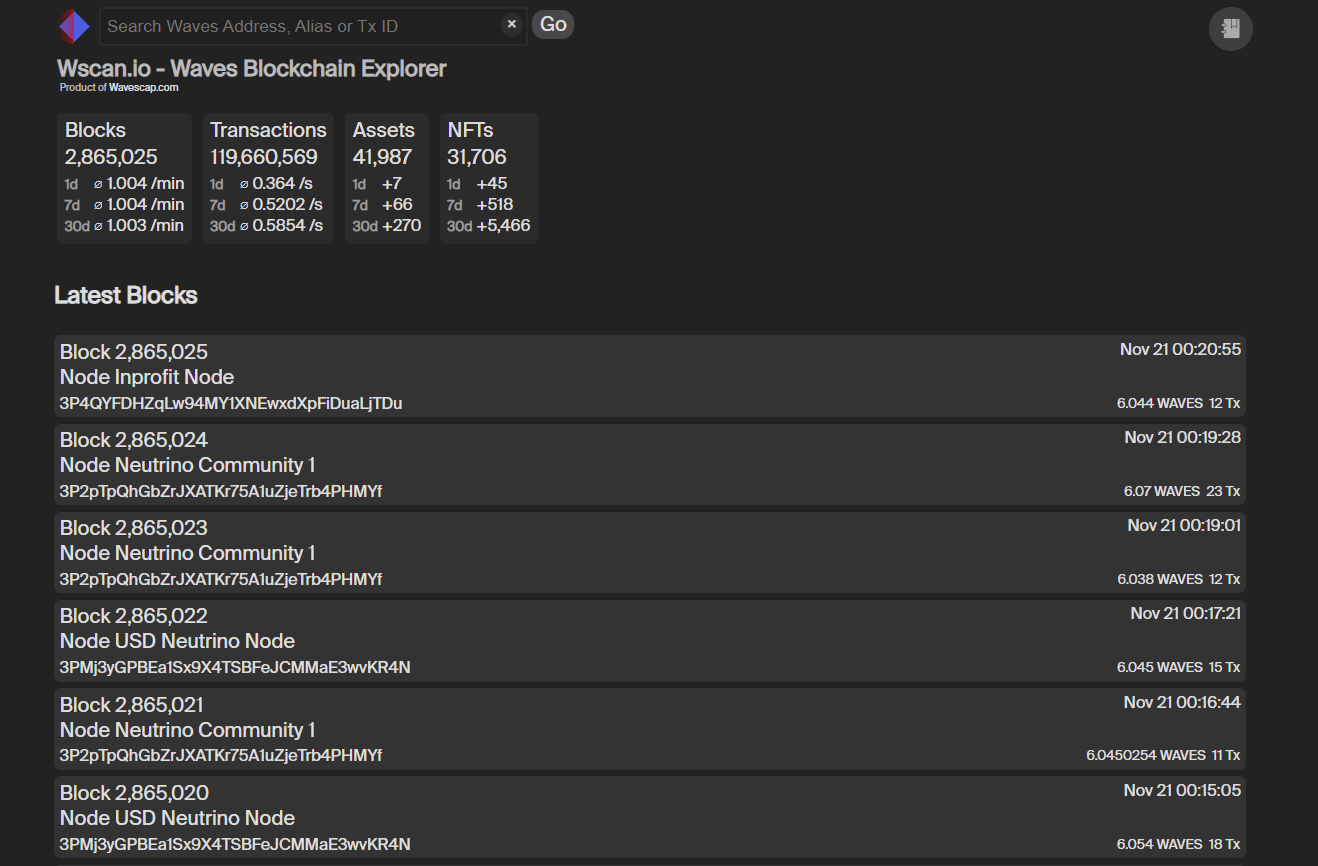 Wscan.io comes - in the tradition of wavescap - in a minimalistic and clean design. With the search bar you can search for all kind of blockchain data such as waves addresses, transaction IDs, Asset IDs and even for alias. Below the search bar you are provided with some basic network related stats. First some block related stats: The total number of mined blocks on the Waves blockchain and the average block time for different timeframes. Huge discrepancies might indicate problems within the Waves network so its never bad to have an eye on those stats, even if discrepancies are almost never observed! Next to the block info you find transaction related information. Next to the total number of transactions you see the amount of transactions within different timeframes. This helps you to see how active the network is and if there is an upwards or an downwards trend in terms of network activity. The next two info tiles, NFT and Asset, are a bit special. They show the same stats as the variables before, but on top of that you can click the tiles and see a complete list of all recently created NFTs and Assets - but more on that later. ## Latest Blocks Below the info tiles you will find a list of all recently generated blocks. The number of each block and the address of the node are provided directly on the tile. Same goes for the timestamp, the number of transactions and the dollar value (block reward + collected fees). If we have the node in our databank we also provide you with the name of the node. If you know a node which we dont have in our list please contact us at [email protected]! 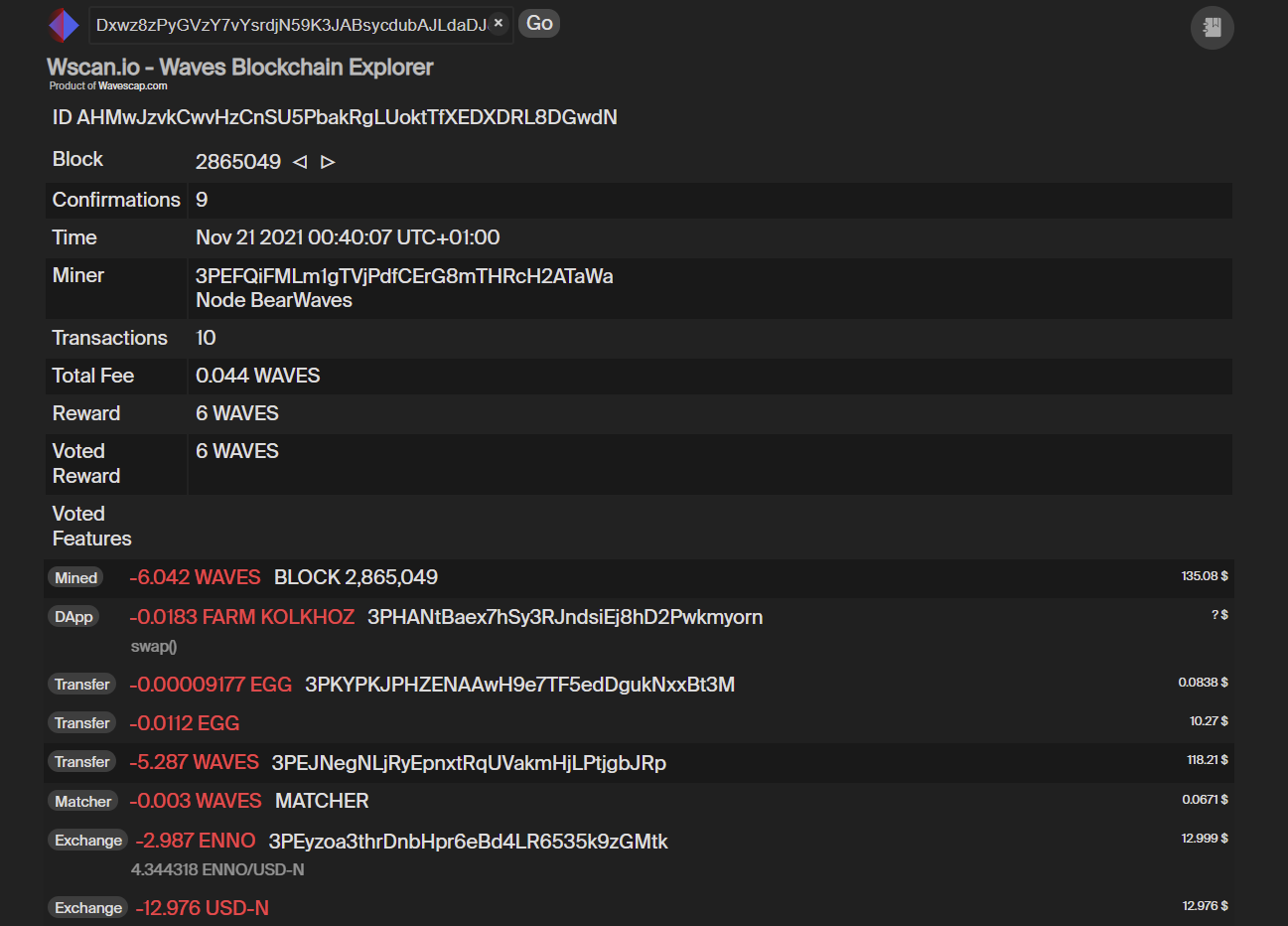 If you click on a block you will see a more detailed view showing all mined transactions in the block as well as the block reward and the total fees collected. With the arrows next to the block number you can navigate back and forth in the block history. ## Transaction ID If you search for a transaction ID you will end up on the following overview. 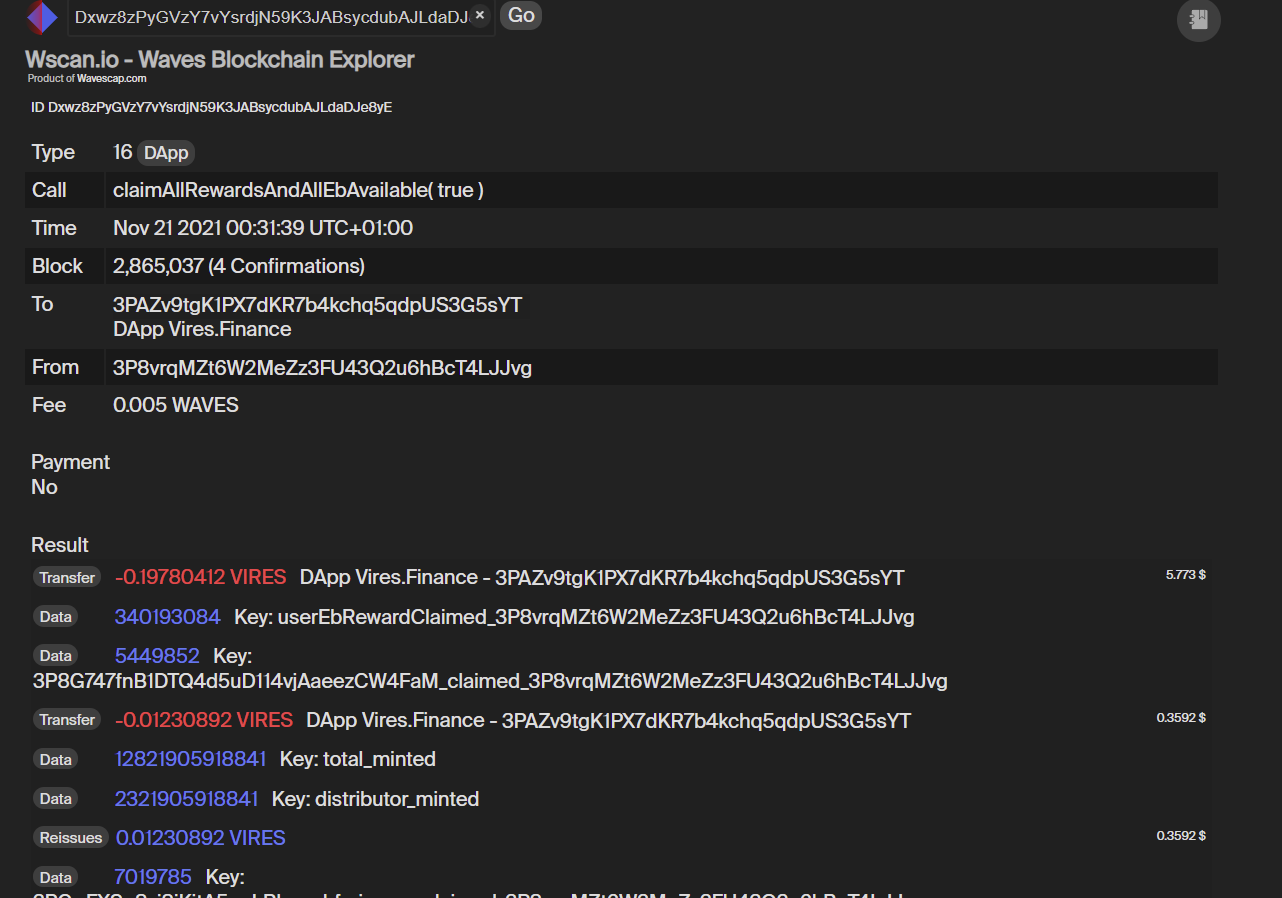 In the first row you will see what transaction type the transaction is. Its also indicated with the tag in the transaction history of an address. In this case its a dApp transaction. For dApp transactions we also provide all key values additionally to the basic transaction informations. We also show the dApp call in order to give you an indicator on whats happening within the dApp. We also show the number of confirmations in the transaction overview. If you want to know how many confirmations your waves transaction has wscan.io is the best place to go. ## Asset ID If you search for an asset ID you will end up at the following overview: 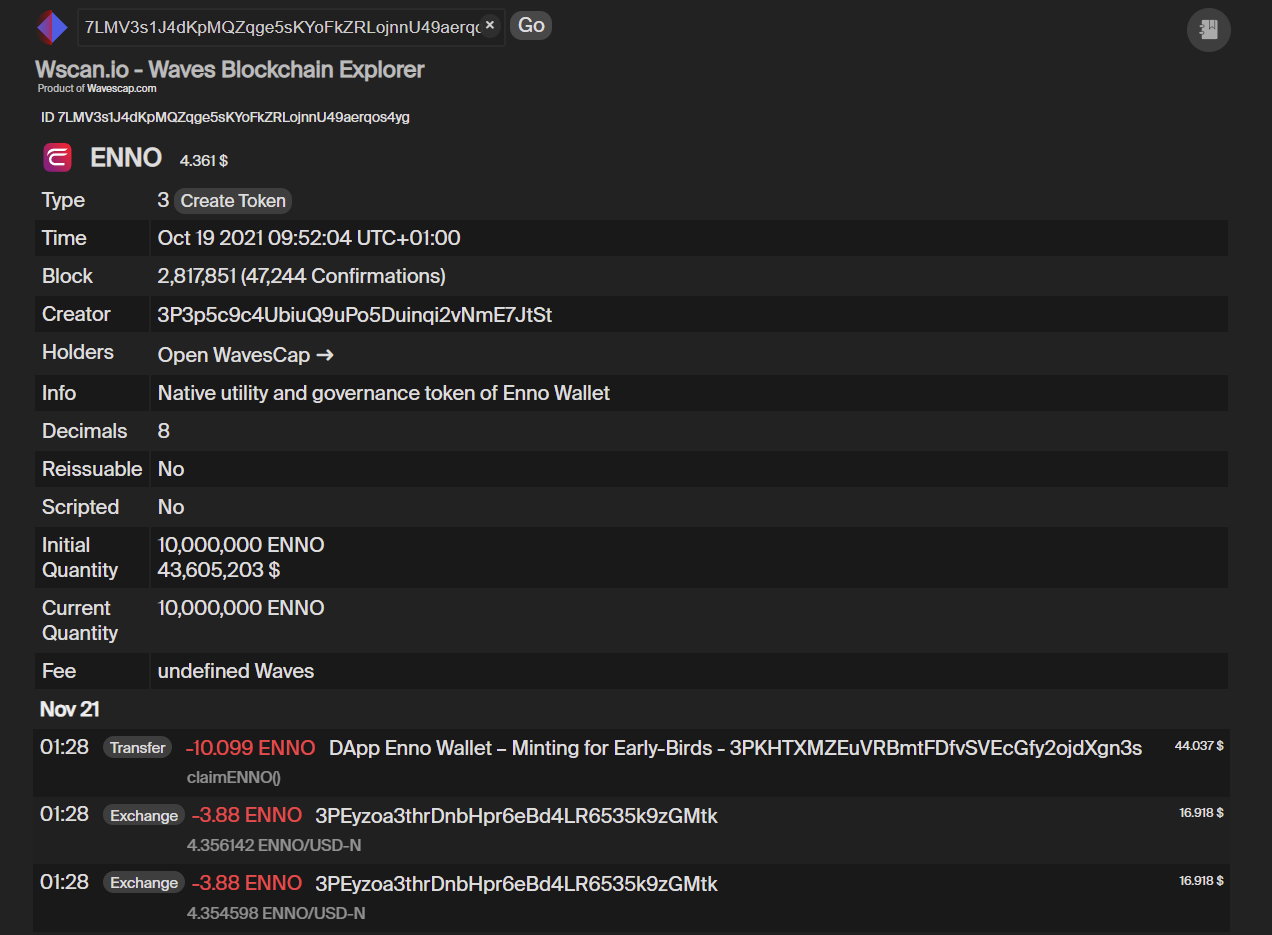 On top of the usual token metrics we also offer a direct link to the richlist of the token at Wavescap. If the token is not listed on Wavescap we forward you to the richlist at dev.pywaves.org/assets/ASSETID. Below the section with the token information you will find a feed with the latest transactions involving the selected asset. This helps to keep track of what is happening with the token you are holding! Check the latest transactions frequently to increase your knowledge about any Waves tokens economy! ## Address book In the top right corner you find a small address book icon. In the address book you can label and save any address and if it appears anywhere in the wscan explorer the address will be displayed together with the label - so you always notice a publicly known or familiar address. 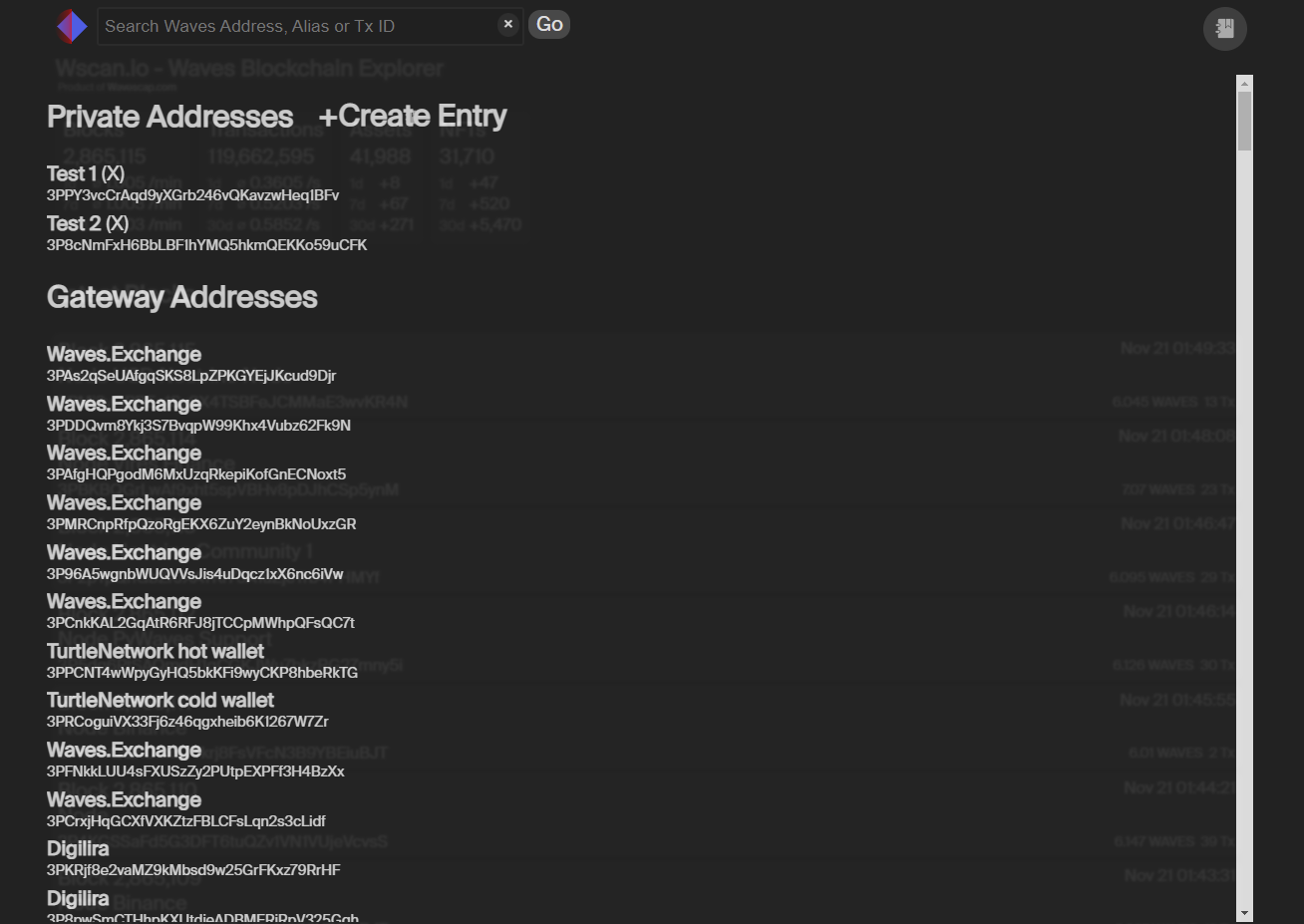 The default address book comes with over 200 addresses we collected. Those addresses are grouped by exchange addresses, dApp addresses, node addresses as well as gateway addresses. Whenever one of those 200 addresses appears in your wscan.io feed you will see it labeled and immedieatly know where this address belongs to. You can expand the list by doing your own research and save any address which is of interest to you. The address book is stored locally with your cookie. You dont need any account or log in, but you will have a different address book on a different device. If you have a suggestion for an address we should add to the default address book let us know at [email protected]! ## Address History The address overview is the key feature of wscan.io. 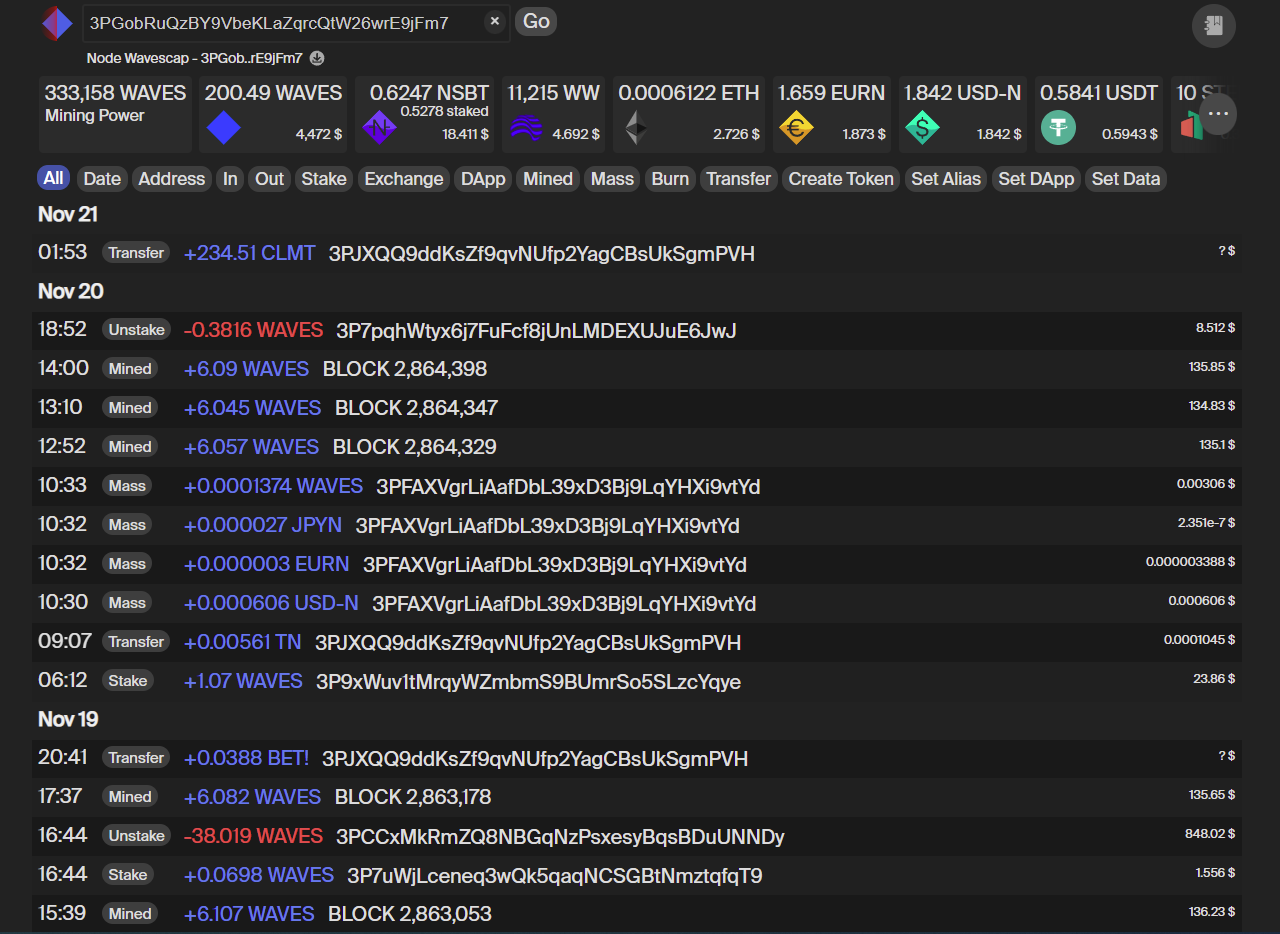 Wscan.io is the first Waves explorer which offers you an easily filterable transaction history! You can just enable any of the filters and it will be applied to the history. You can also combine some of the filters, e.g. "IN" and "MASS" shows all incoming mass transfers. If you want to see all outgoing transfer transactions you have to enable "OUT" and "Transfer". With "Set Alias" you are able to filter for all registered alias of a certain address. You can also set a date as filter or filter for transactions between a specific address. ### Waves Transaction History CSV Export For faster loading we load only the most recent transactions. If you want to go back further in the transaction history you can scroll down or click on the download icon next to the addresses name (if saved in address book) and address. The transaction history will be downloaded as CSV file. The download button will always download the history with the selected filters applied. The history is preloaded in small batches to prevent very big addresses stalling our system. You can stop the loading anytime. When you click the stop button you will download the history until the date shown in the download dialog. If you have loaded the entire history of an address the download will be executed. 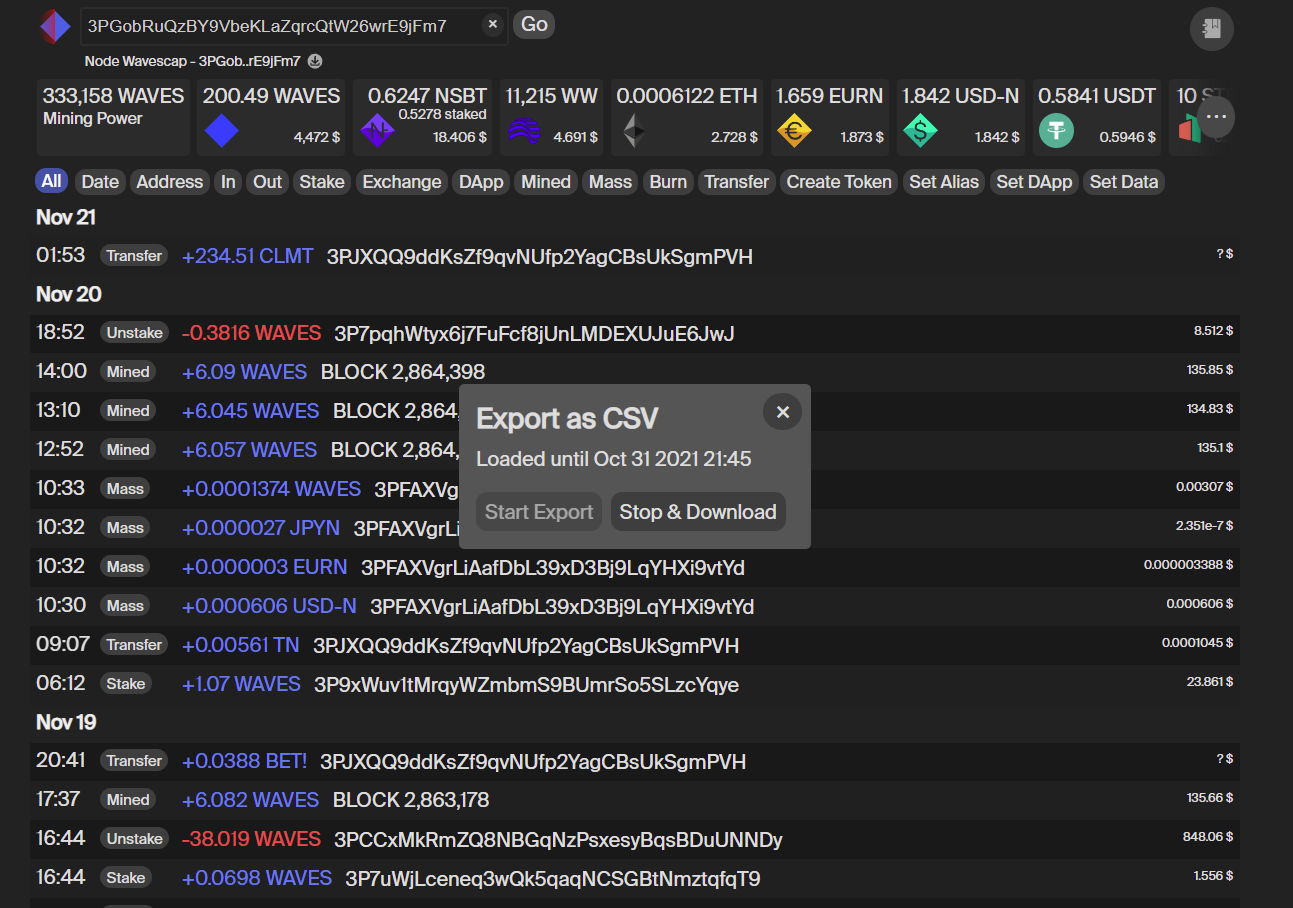 ### Portfolio Overview One of the most unique features you wont find anywhere else is the Waves Portfolio Overview at wscan.io. The tiles below the search bar indicate the biggest positions the selected address holds. At the three dots at the right you can expand to the full portfolio overview. 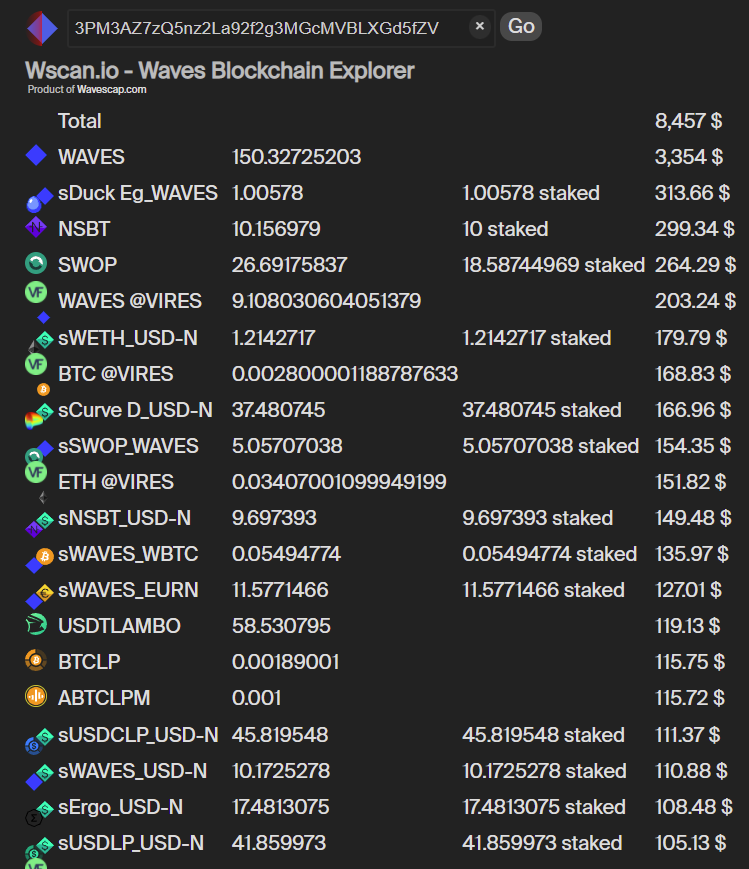 As you see in the screenshot from the portfolio overview above we really include everything in the portfolio overview. Since we have our address database with over 200 addresses we are able to track all major Waves dApps like swop.fi, Neutrino and Vires and show exactly what funds an address holds at which dApp. We also indicate if funds are staked or locked. We try to track every single Waves dApp we find but if we ever miss one feel free to reach out to us at [email protected]. You are able to see the value of any LP share token from swop.fi, waves.exchange or any other AMM Waves has to offer. Even if the LP token are staked we are able to display the value of the assets. Also supplied or borrowed funds from vires.finance are displayed. The wscan.io waves portfolio overview is the only place where you can track your entire portfolio, no matter where in the ecosystem your assets are. ## Outlook What can you expect from wscan.io in the future? We aim to become the #1 community built explorer in the Waves Ecosystem. Community built tools which have a deep integration into a projects ecosystem are the most sustainable way in establishing a network in the long run. We want to achieve that by providing an explorer specifically aiming for people interested in the financial aspects of the Waves ecosystem. Wscan.io is the traders and investors first choice when in comes to recieving data from the block chain. We combine raw blockchain data with curated off chain data to perfectly fit the Waves investors needs and provide you with a wide variety of tools. The portfolio overview is just the starting point of our journey. Expect mindblowing features in the future! ## Links: [wScan - Waves Explorer](https://wscan.io/) [Wavescap - Waves Tokens, dApps & Links](https://wavescap.com/) [Wavescap Official Telegram Group](https://t.me/WavesCap) [wScan Twitter](https://twitter.com/wscan_io) [Wavescap Twitter](https://twitter.com/wavescap) |
| json metadata | {"tags":["waves","wavescap","defi","dapp","wavesplatform","explorer"],"image":["https://cdn.steemitimages.com/DQmSbRUKrTgDW4EXBrpEK5PoPiDv9wiXg7MHhRLd6TDYWAe/wscanLanding.PNG","https://cdn.steemitimages.com/DQma26otqeCtkMHRYJbhuW5dAFo2kJPejEzwSeWeqXuE5uM/wscanBlock.PNG","https://cdn.steemitimages.com/DQmbHj2j7d7x8DU1V1xsJjHGDupygG1SBqZfMeeWx5Aedd7/wscantx.PNG","https://cdn.steemitimages.com/DQmeYGPUcZNhjetKmjWS5FoYsDZpmDKsoFDpNPJc74GaAvb/wscanAsset.PNG","https://cdn.steemitimages.com/DQmd3b5DQpZCwFWBQrj76pPJK5tdCEsYpEhF3QaJcNfqb15/wscanAdressbook.PNG","https://cdn.steemitimages.com/DQmXzseTAL4516PAiUFMksWvnHKZwkPQkTgEeFxMX3VRKKV/wscanAddress.PNG","https://cdn.steemitimages.com/DQmY8qJVcRdHqT6UxWBAZ3YfBy4gsTVBJau3rcGiwPZzJMb/wscanDownload.PNG","https://cdn.steemitimages.com/DQmQZGaiD6hSZD8ca63bwwredWeru2BvF9RhDZeCjSjrfUa/wscanPortfolio.PNG"],"links":["https://wscan.io/","https://wavescap.com/","https://t.me/WavesCap","https://twitter.com/wscan_io","https://twitter.com/wavescap"],"app":"steemit/0.2","format":"markdown"} |
| parent author | |
| parent permlink | crypto |
| permlink | what-the-hell-is-wscan-the-complete-guide-to-wscan-io |
| title | What the hell is wScan? The complete guide to wscan.io! |
| Transaction Info | Block #59175888/Trx 68b27dd4260c76b5f554ee65da0019e227067a7a |
View Raw JSON Data
{
"block": 59175888,
"op": [
"comment",
{
"author": "wavescap",
"body": "# Hello World! \n\n\nToday we want to present you our recently released [Waves Block Explorer](https://wscan.io/) - wscan.io! It comes with some special features you may have missed on other explorers! This guide will introduce you to all features we offer at wscan.io and help you take advantage of this new explorer. \n\n# wscan.io - Next generation Waves block explorer\n\n\n\n\n\nWscan.io comes - in the tradition of wavescap - in a minimalistic and clean design. With the search bar you can search for all kind of blockchain data such as waves addresses, transaction IDs, Asset IDs and even for alias. \n\nBelow the search bar you are provided with some basic network related stats. First some block related stats: The total number of mined blocks on the Waves blockchain and the average block time for different timeframes. Huge discrepancies might indicate problems within the Waves network so its never bad to have an eye on those stats, even if discrepancies are almost never observed! Next to the block info you find transaction related information. Next to the total number of transactions you see the amount of transactions within different timeframes. This helps you to see how active the network is and if there is an upwards or an downwards trend in terms of network activity. \n\nThe next two info tiles, NFT and Asset, are a bit special. They show the same stats as the variables before, but on top of that you can click the tiles and see a complete list of all recently created NFTs and Assets - but more on that later.\n\n## Latest Blocks\n\nBelow the info tiles you will find a list of all recently generated blocks. The number of each block and the address of the node are provided directly on the tile. Same goes for the timestamp, the number of transactions and the dollar value (block reward + collected fees). If we have the node in our databank we also provide you with the name of the node. If you know a node which we dont have in our list please contact us at [email protected]! \n\n\n\nIf you click on a block you will see a more detailed view showing all mined transactions in the block as well as the block reward and the total fees collected. With the arrows next to the block number you can navigate back and forth in the block history. \n\n## Transaction ID\n\nIf you search for a transaction ID you will end up on the following overview.\n\n\nIn the first row you will see what transaction type the transaction is. Its also indicated with the tag in the transaction history of an address. In this case its a dApp transaction. For dApp transactions we also provide all key values additionally to the basic transaction informations. We also show the dApp call in order to give you an indicator on whats happening within the dApp.\n\nWe also show the number of confirmations in the transaction overview. If you want to know how many confirmations your waves transaction has wscan.io is the best place to go. \n\n\n## Asset ID\n\nIf you search for an asset ID you will end up at the following overview:\n\n\n\nOn top of the usual token metrics we also offer a direct link to the richlist of the token at Wavescap. If the token is not listed on Wavescap we forward you to the richlist at dev.pywaves.org/assets/ASSETID. \n\nBelow the section with the token information you will find a feed with the latest transactions involving the selected asset. This helps to keep track of what is happening with the token you are holding! Check the latest transactions frequently to increase your knowledge about any Waves tokens economy! \n\n## Address book\n\nIn the top right corner you find a small address book icon. In the address book you can label and save any address and if it appears anywhere in the wscan explorer the address will be displayed together with the label - so you always notice a publicly known or familiar address. \n\n\n\n\nThe default address book comes with over 200 addresses we collected. Those addresses are grouped by exchange addresses, dApp addresses, node addresses as well as gateway addresses. Whenever one of those 200 addresses appears in your wscan.io feed you will see it labeled and immedieatly know where this address belongs to. You can expand the list by doing your own research and save any address which is of interest to you. \n\nThe address book is stored locally with your cookie. You dont need any account or log in, but you will have a different address book on a different device. If you have a suggestion for an address we should add to the default address book let us know at [email protected]! \n\n## Address History\n\nThe address overview is the key feature of wscan.io. \n\n\n\nWscan.io is the first Waves explorer which offers you an easily filterable transaction history! You can just enable any of the filters and it will be applied to the history. You can also combine some of the filters, e.g. \"IN\" and \"MASS\" shows all incoming mass transfers. If you want to see all outgoing transfer transactions you have to enable \"OUT\" and \"Transfer\". With \"Set Alias\" you are able to filter for all registered alias of a certain address. You can also set a date as filter or filter for transactions between a specific address. \n\n### Waves Transaction History CSV Export\n\nFor faster loading we load only the most recent transactions. If you want to go back further in the transaction history you can scroll down or click on the download icon next to the addresses name (if saved in address book) and address. The transaction history will be downloaded as CSV file. The download button will always download the history with the selected filters applied. The history is preloaded in small batches to prevent very big addresses stalling our system. You can stop the loading anytime. When you click the stop button you will download the history until the date shown in the download dialog. If you have loaded the entire history of an address the download will be executed. \n\n\n\n\n### Portfolio Overview\n\nOne of the most unique features you wont find anywhere else is the Waves Portfolio Overview at wscan.io. The tiles below the search bar indicate the biggest positions the selected address holds. At the three dots at the right you can expand to the full portfolio overview.\n\n\n\n\nAs you see in the screenshot from the portfolio overview above we really include everything in the portfolio overview. Since we have our address database with over 200 addresses we are able to track all major Waves dApps like swop.fi, Neutrino and Vires and show exactly what funds an address holds at which dApp. We also indicate if funds are staked or locked. We try to track every single Waves dApp we find but if we ever miss one feel free to reach out to us at [email protected]. \n\nYou are able to see the value of any LP share token from swop.fi, waves.exchange or any other AMM Waves has to offer. Even if the LP token are staked we are able to display the value of the assets. Also supplied or borrowed funds from vires.finance are displayed. \n\nThe wscan.io waves portfolio overview is the only place where you can track your entire portfolio, no matter where in the ecosystem your assets are.\n\n## Outlook\n\nWhat can you expect from wscan.io in the future? We aim to become the #1 community built explorer in the Waves Ecosystem. Community built tools which have a deep integration into a projects ecosystem are the most sustainable way in establishing a network in the long run. We want to achieve that by providing an explorer specifically aiming for people interested in the financial aspects of the Waves ecosystem. Wscan.io is the traders and investors first choice when in comes to recieving data from the block chain. \n\nWe combine raw blockchain data with curated off chain data to perfectly fit the Waves investors needs and provide you with a wide variety of tools. The portfolio overview is just the starting point of our journey. \n\nExpect mindblowing features in the future! \n\n\n## Links:\n\n[wScan - Waves Explorer](https://wscan.io/)\n[Wavescap - Waves Tokens, dApps & Links](https://wavescap.com/)\n[Wavescap Official Telegram Group](https://t.me/WavesCap)\n[wScan Twitter](https://twitter.com/wscan_io)\n[Wavescap Twitter](https://twitter.com/wavescap)",
"json_metadata": "{\"tags\":[\"waves\",\"wavescap\",\"defi\",\"dapp\",\"wavesplatform\",\"explorer\"],\"image\":[\"https://cdn.steemitimages.com/DQmSbRUKrTgDW4EXBrpEK5PoPiDv9wiXg7MHhRLd6TDYWAe/wscanLanding.PNG\",\"https://cdn.steemitimages.com/DQma26otqeCtkMHRYJbhuW5dAFo2kJPejEzwSeWeqXuE5uM/wscanBlock.PNG\",\"https://cdn.steemitimages.com/DQmbHj2j7d7x8DU1V1xsJjHGDupygG1SBqZfMeeWx5Aedd7/wscantx.PNG\",\"https://cdn.steemitimages.com/DQmeYGPUcZNhjetKmjWS5FoYsDZpmDKsoFDpNPJc74GaAvb/wscanAsset.PNG\",\"https://cdn.steemitimages.com/DQmd3b5DQpZCwFWBQrj76pPJK5tdCEsYpEhF3QaJcNfqb15/wscanAdressbook.PNG\",\"https://cdn.steemitimages.com/DQmXzseTAL4516PAiUFMksWvnHKZwkPQkTgEeFxMX3VRKKV/wscanAddress.PNG\",\"https://cdn.steemitimages.com/DQmY8qJVcRdHqT6UxWBAZ3YfBy4gsTVBJau3rcGiwPZzJMb/wscanDownload.PNG\",\"https://cdn.steemitimages.com/DQmQZGaiD6hSZD8ca63bwwredWeru2BvF9RhDZeCjSjrfUa/wscanPortfolio.PNG\"],\"links\":[\"https://wscan.io/\",\"https://wavescap.com/\",\"https://t.me/WavesCap\",\"https://twitter.com/wscan_io\",\"https://twitter.com/wavescap\"],\"app\":\"steemit/0.2\",\"format\":\"markdown\"}",
"parent_author": "",
"parent_permlink": "crypto",
"permlink": "what-the-hell-is-wscan-the-complete-guide-to-wscan-io",
"title": "What the hell is wScan? The complete guide to wscan.io!"
}
],
"op_in_trx": 0,
"timestamp": "2021-11-21T01:54:45",
"trx_id": "68b27dd4260c76b5f554ee65da0019e227067a7a",
"trx_in_block": 16,
"virtual_op": 0
}wavescappublished a new post: what-the-hell-is-wscan-the-complete-guide-to-wscan-io2021/11/21 01:47:30
wavescappublished a new post: what-the-hell-is-wscan-the-complete-guide-to-wscan-io
2021/11/21 01:47:30
| author | wavescap |
| body | # Hello World! Today we want to present you our recently released [Waves Block Explorer](https://wscan.io/) - wscan.io! It comes with some special features you may have missed on other explorers! This guide will introduce you to all features we offer at wscan.io and help you take advantage of this new explorer. # wscan.io - Next generation Waves block explorer  Wscan.io comes - in the tradition of wavescap - in a minimalistic and clean design. With the search bar you can search for all kind of blockchain data such as waves addresses, transaction IDs, Asset IDs and even for alias. Below the search bar you are provided with some basic network related stats. First some block related stats: The total number of mined blocks on the Waves blockchain and the average block time for different timeframes. Huge discrepancies might indicate problems within the Waves network so its never bad to have an eye on those stats, even if discrepancies are almost never observed! Next to the block info you find transaction related information. Next to the total number of transactions you see the amount of transactions within different timeframes. This helps you to see how active the network is and if there is an upwards or an downwards trend in terms of network activity. The next two info tiles, NFT and Asset, are a bit special. They show the same stats as the variables before, but on top of that you can click the tiles and see a complete list of all recently created NFTs and Assets - but more on that later. ## Latest Blocks Below the info tiles you will find a list of all recently generated blocks. The number of each block and the address of the node are provided directly on the tile. Same goes for the timestamp, the number of transactions and the dollar value (block reward + collected fees). If we have the node in our databank we also provide you with the name of the node. If you know a node which we dont have in our list please contact us at [email protected]!  If you click on a block you will see a more detailed view showing all mined transactions in the block as well as the block reward and the total fees collected. With the arrows next to the block number you can navigate back and forth in the block history. ## Transaction ID If you search for a transaction ID you will end up on the following overview.  In the first row you will see what transaction type the transaction is. Its also indicated with the tag in the transaction history of an address. In this case its a dApp transaction. For dApp transactions we also provide all key values additionally to the basic transaction informations. We also show the dApp call in order to give you an indicator on whats happening within the dApp. We also show the number of confirmations in the transaction overview. If you want to know how many confirmations your waves transaction has wscan.io is the best place to go. ## Asset ID If you search for an asset ID you will end up at the following overview:  On top of the usual token metrics we also offer a direct link to the richlist of the token at Wavescap. If the token is not listed on Wavescap we forward you to the richlist at dev.pywaves.org/assets/ASSETID. Below the section with the token information you will find a feed with the latest transactions involving the selected asset. This helps to keep track of what is happening with the token you are holding! Check the latest transactions frequently to increase your knowledge about any Waves tokens economy! ## Address book In the top right corner you find a small address book icon. In the address book you can label and save any address and if it appears anywhere in the wscan explorer the address will be displayed together with the label - so you always notice a publicly known or familiar address.  The default address book comes with over 200 addresses we collected. Those addresses are grouped by exchange addresses, dApp addresses, node addresses as well as gateway addresses. Whenever one of those 200 addresses appears in your wscan.io feed you will see it labeled and immedieatly know where this address belongs to. You can expand the list by doing your own research and save any address which is of interest to you. The address book is stored locally with your cookie. You dont need any account or log in, but you will have a different address book on a different device. If you have a suggestion for an address we should add to the default address book let us know at [email protected]! ## Address History The address overview is the key feature of wscan.io.  Wscan.io is the first Waves explorer which offers you an easily filterable transaction history! You can just enable any of the filters and it will be applied to the history. You can also combine some of the filters, e.g. "IN" and "MASS" shows all incoming mass transfers. If you want to see all outgoing transfer transactions you have to enable "OUT" and "Transfer". With "Set Alias" you are able to filter for all registered alias of a certain address. You can also set a date as filter or filter for transactions between a specific address. ### Waves Transaction History CSV Export For faster loading we load only the most recent transactions. If you want to go back further in the transaction history you can scroll down or click on the download icon next to the addresses name (if saved in address book) and address. The transaction history will be downloaded as CSV file. The download button will always download the history with the selected filters applied. The history is preloaded in small batches to prevent very big addresses stalling our system. You can stop the loading anytime. When you click the stop button you will download the history until the date shown in the download dialog. If you have loaded the entire history of an address the download will be executed.  ### Portfolio Overview One of the most unique features you wont find anywhere else is the Waves Portfolio Overview at wscan.io. The tiles below the search bar indicate the biggest positions the selected address holds. At the three dots at the right you can expand to the full portfolio overview.  As you see in the screenshot from the portfolio overview above we really include everything in the portfolio overview. Since we have our address database with over 200 addresses we are able to track all major Waves dApps like swop.fi, Neutrino and Vires and show exactly what funds an address holds at which dApp. We also indicate if funds are staked or locked. We try to track every single Waves dApp we find but if we ever miss one feel free to reach out to us at [email protected]. You are able to see the value of any LP share token from swop.fi, waves.exchange or any other AMM Waves has to offer. Even if the LP token are staked we are able to display the value of the assets. Also supplied or borrowed funds from vires.finance are displayed. The wscan.io waves portfolio overview is the only place where you can track your entire portfolio, no matter where in the ecosystem your assets are. ## Outlook What can you expect from wscan.io in the future? We aim to become the #1 community built explorer in the Waves Ecosystem. Community built tools which have a deep integration into a projects ecosystem are the most sustainable way in establishing a network in the long run. We want to achieve that by providing an explorer specifically aiming for people interested in the financial aspects of the Waves ecosystem. Wscan.io is the traders and investors first choice when in comes to recieving data from the block chain. We combine raw blockchain data with curated off chain data to perfectly fit the Waves investors needs and provide you with a wide variety of tools. The portfolio overview is just the starting point of our journey. Expect mindblowing features in the future! ## Links: [wScan - Waves Explorer](https://wscan.io/) [Wavescap - Waves Tokens, dApps & Links](https://wavescap.com/) [Wavescap Official Telegram Group](https://t.me/WavesCap) [wScan Twitter](https://twitter.com/wscan_io) [Wavescap Twitter](https://twitter.com/wavescap) |
| json metadata | {"tags":["crypto","waves","wavescap","defi","dapp","wavesplatform","explorer"],"image":["https://cdn.steemitimages.com/DQmSbRUKrTgDW4EXBrpEK5PoPiDv9wiXg7MHhRLd6TDYWAe/wscanLanding.PNG","https://cdn.steemitimages.com/DQma26otqeCtkMHRYJbhuW5dAFo2kJPejEzwSeWeqXuE5uM/wscanBlock.PNG","https://cdn.steemitimages.com/DQmbHj2j7d7x8DU1V1xsJjHGDupygG1SBqZfMeeWx5Aedd7/wscantx.PNG","https://cdn.steemitimages.com/DQmeYGPUcZNhjetKmjWS5FoYsDZpmDKsoFDpNPJc74GaAvb/wscanAsset.PNG","https://cdn.steemitimages.com/DQmd3b5DQpZCwFWBQrj76pPJK5tdCEsYpEhF3QaJcNfqb15/wscanAdressbook.PNG","https://cdn.steemitimages.com/DQmXzseTAL4516PAiUFMksWvnHKZwkPQkTgEeFxMX3VRKKV/wscanAddress.PNG","https://cdn.steemitimages.com/DQmY8qJVcRdHqT6UxWBAZ3YfBy4gsTVBJau3rcGiwPZzJMb/wscanDownload.PNG","https://cdn.steemitimages.com/DQmQZGaiD6hSZD8ca63bwwredWeru2BvF9RhDZeCjSjrfUa/wscanPortfolio.PNG"],"links":["https://wscan.io/","https://wavescap.com/","https://t.me/WavesCap","https://twitter.com/wscan_io","https://twitter.com/wavescap"],"app":"steemit/0.2","format":"markdown"} |
| parent author | |
| parent permlink | crypto |
| permlink | what-the-hell-is-wscan-the-complete-guide-to-wscan-io |
| title | What the hell is wscan? The complete guide to wscan.io! |
| Transaction Info | Block #59175743/Trx 96f89506321717f1890b51bbd0978ae65f8367d0 |
View Raw JSON Data
{
"block": 59175743,
"op": [
"comment",
{
"author": "wavescap",
"body": "# Hello World! \n\n\nToday we want to present you our recently released [Waves Block Explorer](https://wscan.io/) - wscan.io! It comes with some special features you may have missed on other explorers! This guide will introduce you to all features we offer at wscan.io and help you take advantage of this new explorer. \n\n# wscan.io - Next generation Waves block explorer\n\n\n\n\n\nWscan.io comes - in the tradition of wavescap - in a minimalistic and clean design. With the search bar you can search for all kind of blockchain data such as waves addresses, transaction IDs, Asset IDs and even for alias. \n\nBelow the search bar you are provided with some basic network related stats. First some block related stats: The total number of mined blocks on the Waves blockchain and the average block time for different timeframes. Huge discrepancies might indicate problems within the Waves network so its never bad to have an eye on those stats, even if discrepancies are almost never observed! Next to the block info you find transaction related information. Next to the total number of transactions you see the amount of transactions within different timeframes. This helps you to see how active the network is and if there is an upwards or an downwards trend in terms of network activity. \n\nThe next two info tiles, NFT and Asset, are a bit special. They show the same stats as the variables before, but on top of that you can click the tiles and see a complete list of all recently created NFTs and Assets - but more on that later.\n\n## Latest Blocks\n\nBelow the info tiles you will find a list of all recently generated blocks. The number of each block and the address of the node are provided directly on the tile. Same goes for the timestamp, the number of transactions and the dollar value (block reward + collected fees). If we have the node in our databank we also provide you with the name of the node. If you know a node which we dont have in our list please contact us at [email protected]! \n\n\n\nIf you click on a block you will see a more detailed view showing all mined transactions in the block as well as the block reward and the total fees collected. With the arrows next to the block number you can navigate back and forth in the block history. \n\n## Transaction ID\n\nIf you search for a transaction ID you will end up on the following overview.\n\n\nIn the first row you will see what transaction type the transaction is. Its also indicated with the tag in the transaction history of an address. In this case its a dApp transaction. For dApp transactions we also provide all key values additionally to the basic transaction informations. We also show the dApp call in order to give you an indicator on whats happening within the dApp.\n\nWe also show the number of confirmations in the transaction overview. If you want to know how many confirmations your waves transaction has wscan.io is the best place to go. \n\n\n## Asset ID\n\nIf you search for an asset ID you will end up at the following overview:\n\n\n\nOn top of the usual token metrics we also offer a direct link to the richlist of the token at Wavescap. If the token is not listed on Wavescap we forward you to the richlist at dev.pywaves.org/assets/ASSETID. \n\nBelow the section with the token information you will find a feed with the latest transactions involving the selected asset. This helps to keep track of what is happening with the token you are holding! Check the latest transactions frequently to increase your knowledge about any Waves tokens economy! \n\n## Address book\n\nIn the top right corner you find a small address book icon. In the address book you can label and save any address and if it appears anywhere in the wscan explorer the address will be displayed together with the label - so you always notice a publicly known or familiar address. \n\n\n\n\nThe default address book comes with over 200 addresses we collected. Those addresses are grouped by exchange addresses, dApp addresses, node addresses as well as gateway addresses. Whenever one of those 200 addresses appears in your wscan.io feed you will see it labeled and immedieatly know where this address belongs to. You can expand the list by doing your own research and save any address which is of interest to you. \n\nThe address book is stored locally with your cookie. You dont need any account or log in, but you will have a different address book on a different device. If you have a suggestion for an address we should add to the default address book let us know at [email protected]! \n\n## Address History\n\nThe address overview is the key feature of wscan.io. \n\n\n\nWscan.io is the first Waves explorer which offers you an easily filterable transaction history! You can just enable any of the filters and it will be applied to the history. You can also combine some of the filters, e.g. \"IN\" and \"MASS\" shows all incoming mass transfers. If you want to see all outgoing transfer transactions you have to enable \"OUT\" and \"Transfer\". With \"Set Alias\" you are able to filter for all registered alias of a certain address. You can also set a date as filter or filter for transactions between a specific address. \n\n### Waves Transaction History CSV Export\n\nFor faster loading we load only the most recent transactions. If you want to go back further in the transaction history you can scroll down or click on the download icon next to the addresses name (if saved in address book) and address. The transaction history will be downloaded as CSV file. The download button will always download the history with the selected filters applied. The history is preloaded in small batches to prevent very big addresses stalling our system. You can stop the loading anytime. When you click the stop button you will download the history until the date shown in the download dialog. If you have loaded the entire history of an address the download will be executed. \n\n\n\n\n### Portfolio Overview\n\nOne of the most unique features you wont find anywhere else is the Waves Portfolio Overview at wscan.io. The tiles below the search bar indicate the biggest positions the selected address holds. At the three dots at the right you can expand to the full portfolio overview.\n\n\n\n\nAs you see in the screenshot from the portfolio overview above we really include everything in the portfolio overview. Since we have our address database with over 200 addresses we are able to track all major Waves dApps like swop.fi, Neutrino and Vires and show exactly what funds an address holds at which dApp. We also indicate if funds are staked or locked. We try to track every single Waves dApp we find but if we ever miss one feel free to reach out to us at [email protected]. \n\nYou are able to see the value of any LP share token from swop.fi, waves.exchange or any other AMM Waves has to offer. Even if the LP token are staked we are able to display the value of the assets. Also supplied or borrowed funds from vires.finance are displayed. \n\nThe wscan.io waves portfolio overview is the only place where you can track your entire portfolio, no matter where in the ecosystem your assets are.\n\n## Outlook\n\nWhat can you expect from wscan.io in the future? We aim to become the #1 community built explorer in the Waves Ecosystem. Community built tools which have a deep integration into a projects ecosystem are the most sustainable way in establishing a network in the long run. We want to achieve that by providing an explorer specifically aiming for people interested in the financial aspects of the Waves ecosystem. Wscan.io is the traders and investors first choice when in comes to recieving data from the block chain. \n\nWe combine raw blockchain data with curated off chain data to perfectly fit the Waves investors needs and provide you with a wide variety of tools. The portfolio overview is just the starting point of our journey. \n\nExpect mindblowing features in the future! \n\n\n## Links:\n\n[wScan - Waves Explorer](https://wscan.io/)\n[Wavescap - Waves Tokens, dApps & Links](https://wavescap.com/)\n[Wavescap Official Telegram Group](https://t.me/WavesCap)\n[wScan Twitter](https://twitter.com/wscan_io)\n[Wavescap Twitter](https://twitter.com/wavescap)",
"json_metadata": "{\"tags\":[\"crypto\",\"waves\",\"wavescap\",\"defi\",\"dapp\",\"wavesplatform\",\"explorer\"],\"image\":[\"https://cdn.steemitimages.com/DQmSbRUKrTgDW4EXBrpEK5PoPiDv9wiXg7MHhRLd6TDYWAe/wscanLanding.PNG\",\"https://cdn.steemitimages.com/DQma26otqeCtkMHRYJbhuW5dAFo2kJPejEzwSeWeqXuE5uM/wscanBlock.PNG\",\"https://cdn.steemitimages.com/DQmbHj2j7d7x8DU1V1xsJjHGDupygG1SBqZfMeeWx5Aedd7/wscantx.PNG\",\"https://cdn.steemitimages.com/DQmeYGPUcZNhjetKmjWS5FoYsDZpmDKsoFDpNPJc74GaAvb/wscanAsset.PNG\",\"https://cdn.steemitimages.com/DQmd3b5DQpZCwFWBQrj76pPJK5tdCEsYpEhF3QaJcNfqb15/wscanAdressbook.PNG\",\"https://cdn.steemitimages.com/DQmXzseTAL4516PAiUFMksWvnHKZwkPQkTgEeFxMX3VRKKV/wscanAddress.PNG\",\"https://cdn.steemitimages.com/DQmY8qJVcRdHqT6UxWBAZ3YfBy4gsTVBJau3rcGiwPZzJMb/wscanDownload.PNG\",\"https://cdn.steemitimages.com/DQmQZGaiD6hSZD8ca63bwwredWeru2BvF9RhDZeCjSjrfUa/wscanPortfolio.PNG\"],\"links\":[\"https://wscan.io/\",\"https://wavescap.com/\",\"https://t.me/WavesCap\",\"https://twitter.com/wscan_io\",\"https://twitter.com/wavescap\"],\"app\":\"steemit/0.2\",\"format\":\"markdown\"}",
"parent_author": "",
"parent_permlink": "crypto",
"permlink": "what-the-hell-is-wscan-the-complete-guide-to-wscan-io",
"title": "What the hell is wscan? The complete guide to wscan.io!"
}
],
"op_in_trx": 0,
"timestamp": "2021-11-21T01:47:30",
"trx_id": "96f89506321717f1890b51bbd0978ae65f8367d0",
"trx_in_block": 1,
"virtual_op": 0
}2021/11/14 03:49:27
2021/11/14 03:49:27
| id | follow |
| json | ["follow",{"follower":"wavescap","following":"wavescap","what":["blog",""]}] |
| required auths | [] |
| required posting auths | ["wavescap"] |
| Transaction Info | Block #58979684/Trx a97bcb6445e7dc5fad5cb86a17482ef59bff0de0 |
View Raw JSON Data
{
  "block": 58979684,
  "op": [
    "custom_json",
    {
      "id": "follow",
      "json": "[\"follow\",{\"follower\":\"wavescap\",\"following\":\"wavescap\",\"what\":[\"blog\",\"\"]}]",
      "required_auths": [],
      "required_posting_auths": [
        "wavescap"
      ]
    }
  ],
  "op_in_trx": 0,
  "timestamp": "2021-11-14T03:49:27",
  "trx_id": "a97bcb6445e7dc5fad5cb86a17482ef59bff0de0",
  "trx_in_block": 11,
  "virtual_op": 0
}inertiaupvoted (100.00%) @wavescap / what-the-hell-is-wavescap-the-complete-guide-to-wavescap-com2021/11/14 03:33:39
inertiaupvoted (100.00%) @wavescap / what-the-hell-is-wavescap-the-complete-guide-to-wavescap-com
2021/11/14 03:33:39
| author | wavescap |
| permlink | what-the-hell-is-wavescap-the-complete-guide-to-wavescap-com |
| voter | inertia |
| weight | 10000 (100.00%) |
| Transaction Info | Block #58979370/Trx ee1773352dee622b0f1a081db4839ede63f99796 |
View Raw JSON Data
{
  "block": 58979370,
  "op": [
    "vote",
    {
      "author": "wavescap",
      "permlink": "what-the-hell-is-wavescap-the-complete-guide-to-wavescap-com",
      "voter": "inertia",
      "weight": 10000
    }
  ],
  "op_in_trx": 0,
  "timestamp": "2021-11-14T03:33:39",
  "trx_id": "ee1773352dee622b0f1a081db4839ede63f99796",
  "trx_in_block": 4,
  "virtual_op": 0
}gduranupvoted (100.00%) @wavescap / what-the-hell-is-wavescap-the-complete-guide-to-wavescap-com2021/11/14 03:33:15
gduranupvoted (100.00%) @wavescap / what-the-hell-is-wavescap-the-complete-guide-to-wavescap-com
2021/11/14 03:33:15
| author | wavescap |
| permlink | what-the-hell-is-wavescap-the-complete-guide-to-wavescap-com |
| voter | gduran |
| weight | 10000 (100.00%) |
| Transaction Info | Block #58979362/Trx c89a52c013426f5aa9b31f378fd79d2640700b19 |
View Raw JSON Data
{
  "block": 58979362,
  "op": [
    "vote",
    {
      "author": "wavescap",
      "permlink": "what-the-hell-is-wavescap-the-complete-guide-to-wavescap-com",
      "voter": "gduran",
      "weight": 10000
    }
  ],
  "op_in_trx": 0,
  "timestamp": "2021-11-14T03:33:15",
  "trx_id": "c89a52c013426f5aa9b31f378fd79d2640700b19",
  "trx_in_block": 15,
  "virtual_op": 0
}wavescapremoved vote from (0.00%) @wavescap / what-the-hell-is-wavescap-the-complete-guide-to-wavescap-com2021/11/14 03:26:30
wavescapremoved vote from (0.00%) @wavescap / what-the-hell-is-wavescap-the-complete-guide-to-wavescap-com
2021/11/14 03:26:30
| author | wavescap |
| permlink | what-the-hell-is-wavescap-the-complete-guide-to-wavescap-com |
| voter | wavescap |
| weight | 0 (0.00%) |
| Transaction Info | Block #58979227/Trx 334d6ba1cc7a6e8717be53678049a4091fca908d |
View Raw JSON Data
{
  "block": 58979227,
  "op": [
    "vote",
    {
      "author": "wavescap",
      "permlink": "what-the-hell-is-wavescap-the-complete-guide-to-wavescap-com",
      "voter": "wavescap",
      "weight": 0
    }
  ],
  "op_in_trx": 0,
  "timestamp": "2021-11-14T03:26:30",
  "trx_id": "334d6ba1cc7a6e8717be53678049a4091fca908d",
  "trx_in_block": 6,
  "virtual_op": 0
}wavescapupvoted (100.00%) @wavescap / what-the-hell-is-wavescap-the-complete-guide-to-wavescap-com2021/11/14 03:26:18
wavescapupvoted (100.00%) @wavescap / what-the-hell-is-wavescap-the-complete-guide-to-wavescap-com
2021/11/14 03:26:18
| author | wavescap |
| permlink | what-the-hell-is-wavescap-the-complete-guide-to-wavescap-com |
| voter | wavescap |
| weight | 10000 (100.00%) |
| Transaction Info | Block #58979223/Trx 9eaf4e18b8e46b58e97e08f4844eb922555a0508 |
View Raw JSON Data
{
  "block": 58979223,
  "op": [
    "vote",
    {
      "author": "wavescap",
      "permlink": "what-the-hell-is-wavescap-the-complete-guide-to-wavescap-com",
      "voter": "wavescap",
      "weight": 10000
    }
  ],
  "op_in_trx": 0,
  "timestamp": "2021-11-14T03:26:18",
  "trx_id": "9eaf4e18b8e46b58e97e08f4844eb922555a0508",
  "trx_in_block": 2,
  "virtual_op": 0
}wavescapcustom json: notify2021/11/14 03:21:51
wavescapcustom json: notify
2021/11/14 03:21:51
| id | notify |
| json | ["setLastRead",{"date":"2021-11-14T03:21:51"}] |
| required auths | [] |
| required posting auths | ["wavescap"] |
| Transaction Info | Block #58979134/Trx 1786730dff7e044279e661ba326e9e4b440e6f9c |
View Raw JSON Data
{
  "block": 58979134,
  "op": [
    "custom_json",
    {
      "id": "notify",
      "json": "[\"setLastRead\",{\"date\":\"2021-11-14T03:21:51\"}]",
      "required_auths": [],
      "required_posting_auths": [
        "wavescap"
      ]
    }
  ],
  "op_in_trx": 0,
  "timestamp": "2021-11-14T03:21:51",
  "trx_id": "1786730dff7e044279e661ba326e9e4b440e6f9c",
  "trx_in_block": 6,
  "virtual_op": 0
}2021/11/14 03:19:48
2021/11/14 03:19:48
| author | wavescap |
| permlink | what-the-hell-is-wavescap-the-complete-guide-to-wavescap-com |
| voter | steem.history |
| weight | 1000 (10.00%) |
| Transaction Info | Block #58979094/Trx 8b0c286f5f9117598e07491c788dcb24e248f422 |
View Raw JSON Data
{
  "block": 58979094,
  "op": [
    "vote",
    {
      "author": "wavescap",
      "permlink": "what-the-hell-is-wavescap-the-complete-guide-to-wavescap-com",
      "voter": "steem.history",
      "weight": 1000
    }
  ],
  "op_in_trx": 0,
  "timestamp": "2021-11-14T03:19:48",
  "trx_id": "8b0c286f5f9117598e07491c788dcb24e248f422",
  "trx_in_block": 4,
  "virtual_op": 0
}2021/11/14 03:19:45
2021/11/14 03:19:45
| author | steem.history |
| body | Hello welcome to Steemit world! I'm @steem.history, who is steem witness. This is a recommended post for you.[Newcomers Guide](https://steemitdev.com/guide/@steemitblog/steemit-a-guide-for-newcomers) and [The Complete Steemit Etiquette Guide (Revision 2.0)](https://steemit.com/steem/@steem.history/the-complete-steemit-etiquette-guide-revision-20-homage-1598425779) and, recommended community [Newcomers Community](https://steemit.com/trending/hive-172186) I wish you luck to your steemit activities.<center> https://cdn.steemitimages.com/DQmXHwdcNs5VPcBft1iSosPdHLpBNBfjuG84g3ffWhMw5JQ/image.png <sub>(The bots avatar has been created using https://robohash.org/)</sub> @steem.history ### My witness activity - [My aspiration for STEEM witness](https://steemit.com/hive-185836/@steem.history/my-aspiration-for-steem-witness-1601280729) - Provides information on Steem. [Reference](https://steemit.com/trending/hive-130095) - Supporting the Steem project. [SPUD4STEEM project](https://steemit.com/trending/spud4steem) - Supporting the community. [Newcomers Community](https://steemit.com/trending/hive-172186),[Steem Sri Lanka](https://steemit.com/trending/hive-133716) ,[WORLD OF XPILAR](https://steemit.com/trending/hive-185836), [GLOBAL STEEM](https://steemit.com/trending/hive-145160), [Scouts](https://steemit.com/trending/hive-181136), [Latino Community](https://steemit.com/trending/hive-188619) ### My featured posts - [The Complete Steemit Etiquette Guide (Revision 2.0) -Homage](https://steemit.com/steem/@steem.history/the-complete-steemit-etiquette-guide-revision-20-homage-1598425779) [](https://steemlogin.com/sign/account-witness-vote?witness=steem.history&approve=1) <sub>please click it!</sub>  <sub>(Go to https://steemit.com/~witnesses and type fbslo at the bottom of the page)</sub> </center> |
| json metadata | {"tsgs":["hello"]} |
| parent author | wavescap |
| parent permlink | what-the-hell-is-wavescap-the-complete-guide-to-wavescap-com |
| permlink | re-wavescap-what-the-hell-is-wavescap-the-complete-guide-to-wavescap-com-20211114t031945595z |
| title | |
| Transaction Info | Block #58979093/Trx f8f34e520a9494c75c966f16474da6224273af4d |
View Raw JSON Data
{
"block": 58979093,
"op": [
"comment",
{
"author": "steem.history",
"body": "Hello welcome to Steemit world! \n I'm @steem.history, who is steem witness. \n This is a recommended post for you.[Newcomers Guide](https://steemitdev.com/guide/@steemitblog/steemit-a-guide-for-newcomers) and [The Complete Steemit Etiquette Guide (Revision 2.0)](https://steemit.com/steem/@steem.history/the-complete-steemit-etiquette-guide-revision-20-homage-1598425779) and, recommended community [Newcomers Community](https://steemit.com/trending/hive-172186) \n I wish you luck to your steemit activities.<center> \n \n \n https://cdn.steemitimages.com/DQmXHwdcNs5VPcBft1iSosPdHLpBNBfjuG84g3ffWhMw5JQ/image.png \n <sub>(The bots avatar has been created using https://robohash.org/)</sub> \n @steem.history \n \n ### My witness activity \n - [My aspiration for STEEM witness](https://steemit.com/hive-185836/@steem.history/my-aspiration-for-steem-witness-1601280729) \n - Provides information on Steem. \n [Reference](https://steemit.com/trending/hive-130095) \n - Supporting the Steem project. \n [SPUD4STEEM project](https://steemit.com/trending/spud4steem) \n - Supporting the community. \n [Newcomers Community](https://steemit.com/trending/hive-172186),[Steem Sri Lanka](https://steemit.com/trending/hive-133716) ,[WORLD OF XPILAR](https://steemit.com/trending/hive-185836), [GLOBAL STEEM](https://steemit.com/trending/hive-145160), [Scouts](https://steemit.com/trending/hive-181136), [Latino Community](https://steemit.com/trending/hive-188619) \n \n ### My featured posts \n - [The Complete Steemit Etiquette Guide (Revision 2.0) -Homage](https://steemit.com/steem/@steem.history/the-complete-steemit-etiquette-guide-revision-20-homage-1598425779) \n \n [](https://steemlogin.com/sign/account-witness-vote?witness=steem.history&approve=1) \n <sub>please click it!</sub> \n \n  \n <sub>(Go to https://steemit.com/~witnesses and type fbslo at the bottom of the page)</sub> \n \n </center>",
"json_metadata": "{\"tsgs\":[\"hello\"]}",
"parent_author": "wavescap",
"parent_permlink": "what-the-hell-is-wavescap-the-complete-guide-to-wavescap-com",
"permlink": "re-wavescap-what-the-hell-is-wavescap-the-complete-guide-to-wavescap-com-20211114t031945595z",
"title": ""
}
],
"op_in_trx": 0,
"timestamp": "2021-11-14T03:19:45",
"trx_id": "f8f34e520a9494c75c966f16474da6224273af4d",
"trx_in_block": 21,
"virtual_op": 0
}wavescappublished a new post: what-the-hell-is-wavescap-the-complete-guide-to-wavescap-com2021/11/14 03:19:39
wavescappublished a new post: what-the-hell-is-wavescap-the-complete-guide-to-wavescap-com
2021/11/14 03:19:39
| author | wavescap |
| body | # Greetings steemit community, we recently joined steemit and before we start anything we want to introduce ourselfs. This post aims to provide you with an overview of Wavescap, our goals and our features. How can https://wavescap.com help you in your daily crypto life? Enjoy finding out while reading! # What is Wavescap.com? Wavescap.com is a source of information for the Waves ecosystem. What started out as a token overview for the growing number of Waves based tokens has evolved to an extensive source of ecosystem information. In the following we want to present you the features of wavescap.com and how to use them. ## Waves Token Overview The initial feature on our launch in April 2019 was the token overview for Waves based token. Until today it is the landing page of wavescap.com. On default settings the tokens are sorted after trading volume, but you can also order them after price change, % of tokens staked or marketcap. 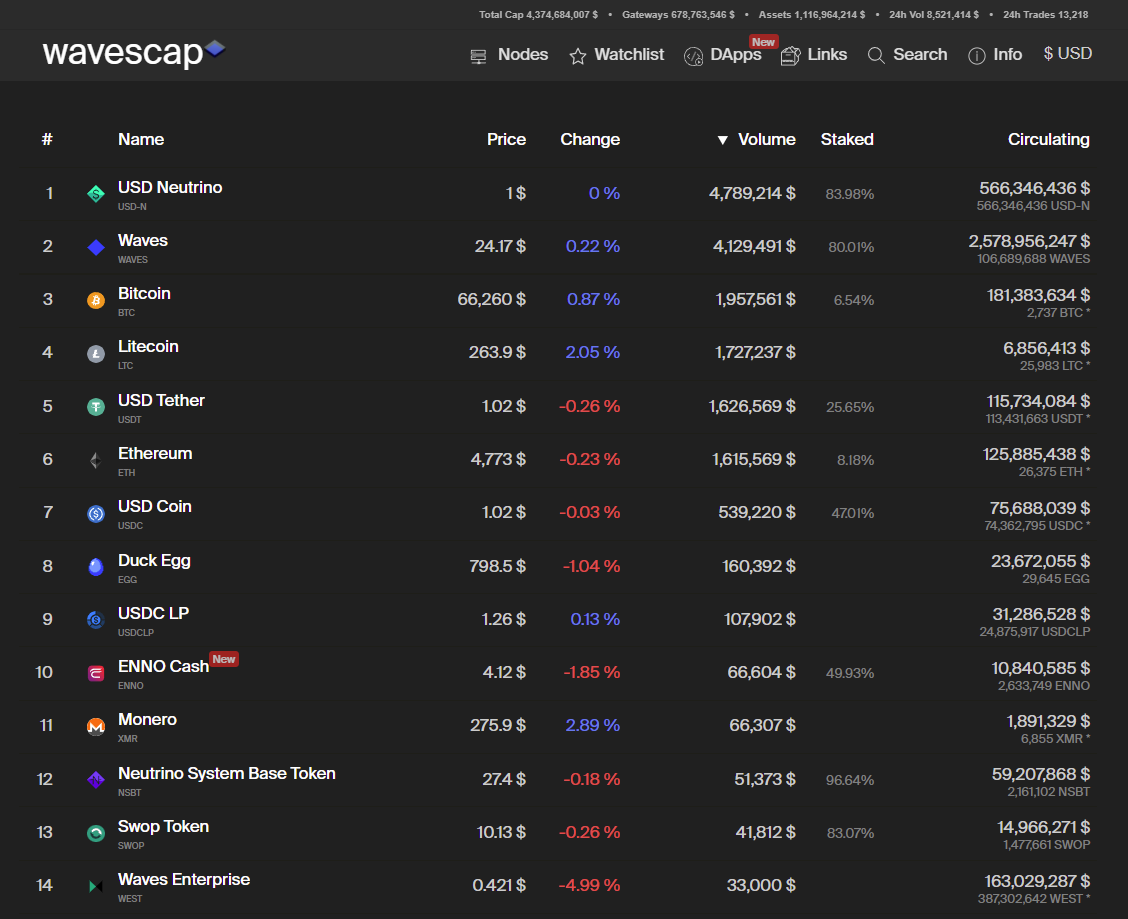 The trading volume includes only waves based exchange operation of any kind. This includes exchange transactions on the Waves blockchain, swop.fi exchanges and waves.exchange. The goal is to implement any Waves based exchange platform. On top of the website you will find 5 metrics which give you a general impression about the current volume of the ecosystem. Total Cap shows the value of all waves based assets and gateway assets combined. They are also showed seperately. The 24h Vol shows the trading volume across the entire waves blockchain. The metric 24h Trades shows the number of exchange transactions executed to the waves blockchain. ### Token Detail Page Every token has a detail page which you can find at wavescap.com/asset/[ticker], for example https://wavescap.com/asset/NSBT. There you can find a chart which shows three different graphs. 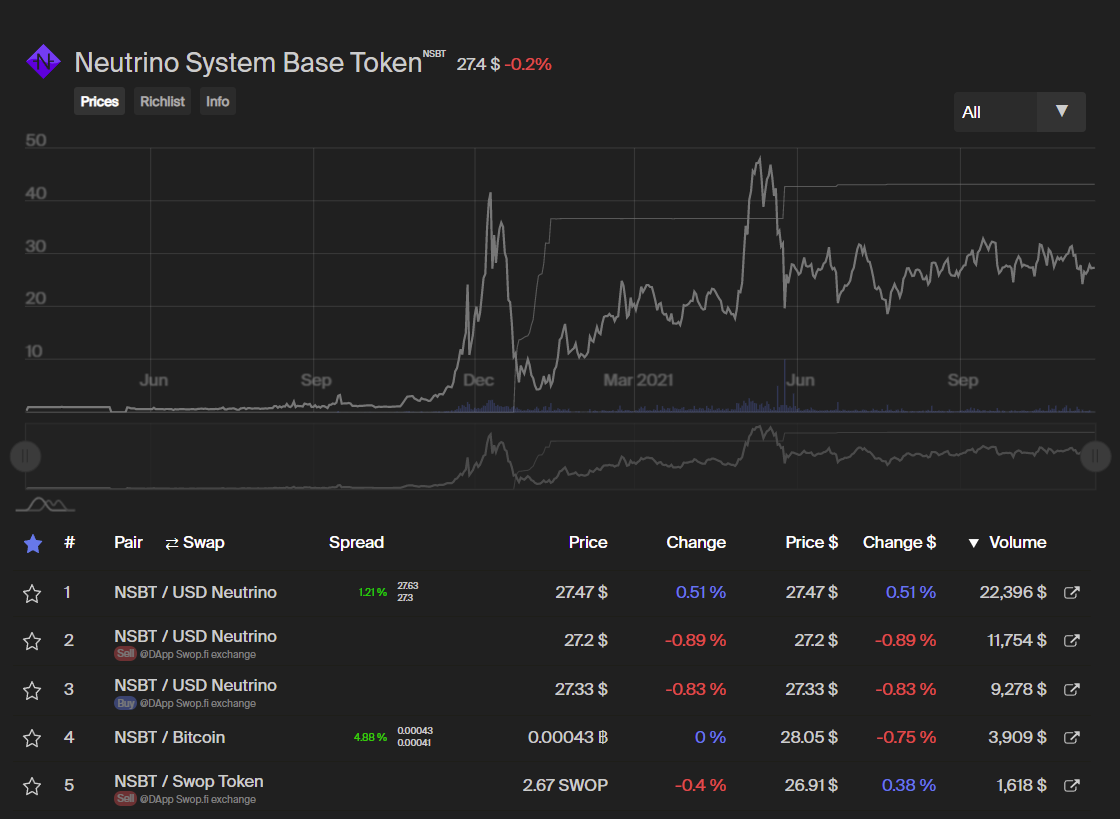 The big grey line shows the price, the thin grey line shows the circulating supply and the blue bars show the trading volume. Via the dropdown menu in the top right corner you are able to choose between 7 pre-defined timeframes (1 day, 1 week, 1 month, 3 months, 6 months, 1 year and complete history), but you can also set any custom timeframe by moving the regulators below the chart. Below the regulator bar you will find a list of all active trading pairs. You can freely order the list by any listed metric. By clicking on the "swap" button you can swith the price asset and amount asset, so you are able to choose the kind of display you prefer. The metrics shown include the spread of all shown pairs. It also shows the best bid and ask orders, so you dont have to open waves.exchange in order to see at what price the best bid and at what price the best ask is. The spread numbers are coloured (green = good, red = bad) and show you how reliable the price of that exact pair is. A high spread usually indicates very low trading volume and thus a not very reliable price. The lower the spread, the more reliable is the price. By clicking on the link icon at the right end of each row you directly get forwarded to the very waves.exchange trading pair you just clicked. 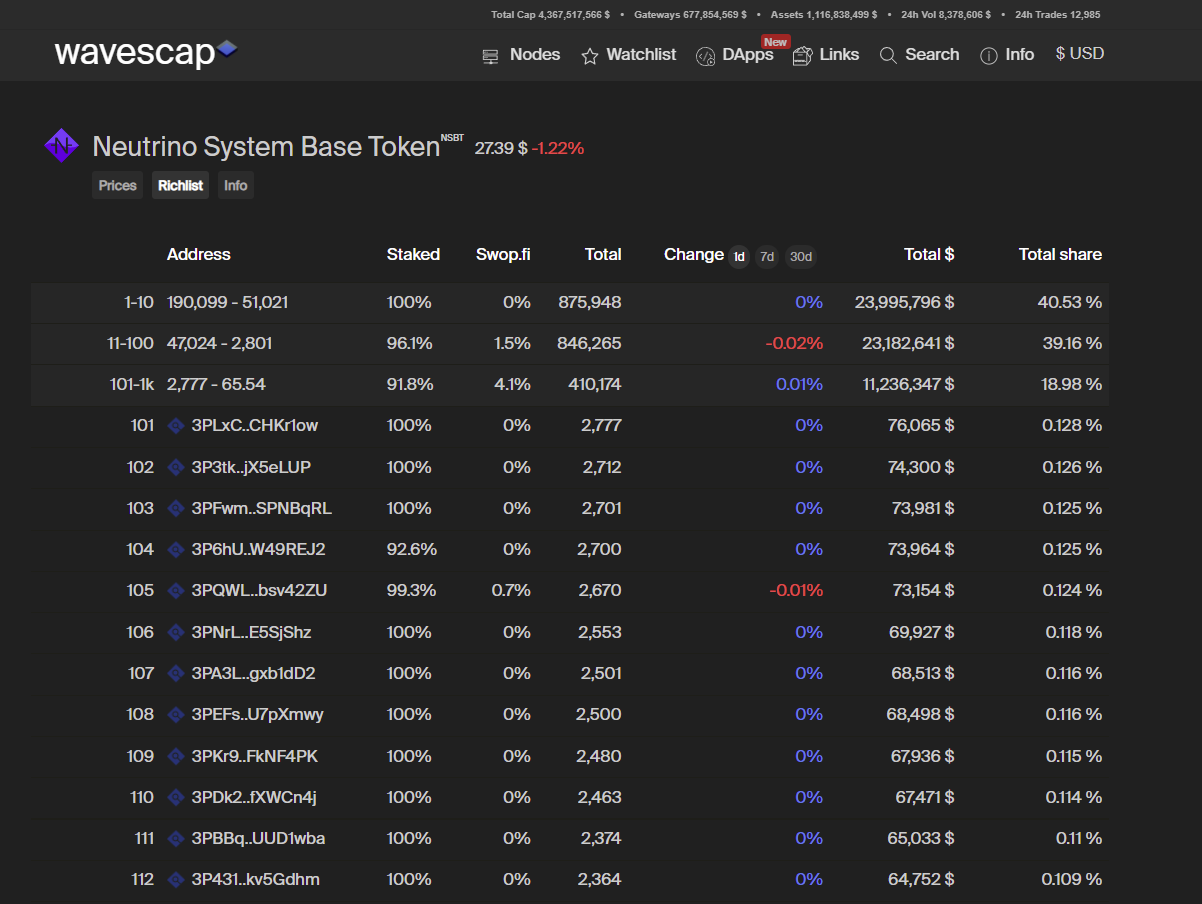 If you click on the richlist tab below the token name you will see one of our core features. We show the Top 1000 addresses for every token we have listed. For the rest we just provide some general statistics to show the distribution of the coin but in order to provide you with a good performance we currently cant load more then the top 1000 addresses from the blockchain. With the richlist you can see how different groups of holders are acting. Are the top wallets accumulating more? Are they dumping? Who are the top wallets? Our richlist feature helps you to answer all of those question. You can see short term as well as long term changes in holders stake, just use the 1d, 7d or 30d button to adjust the timeframe. The info tab will provide you with some basic information, such as social media links, a brief description of the token as well as the general token metrics. 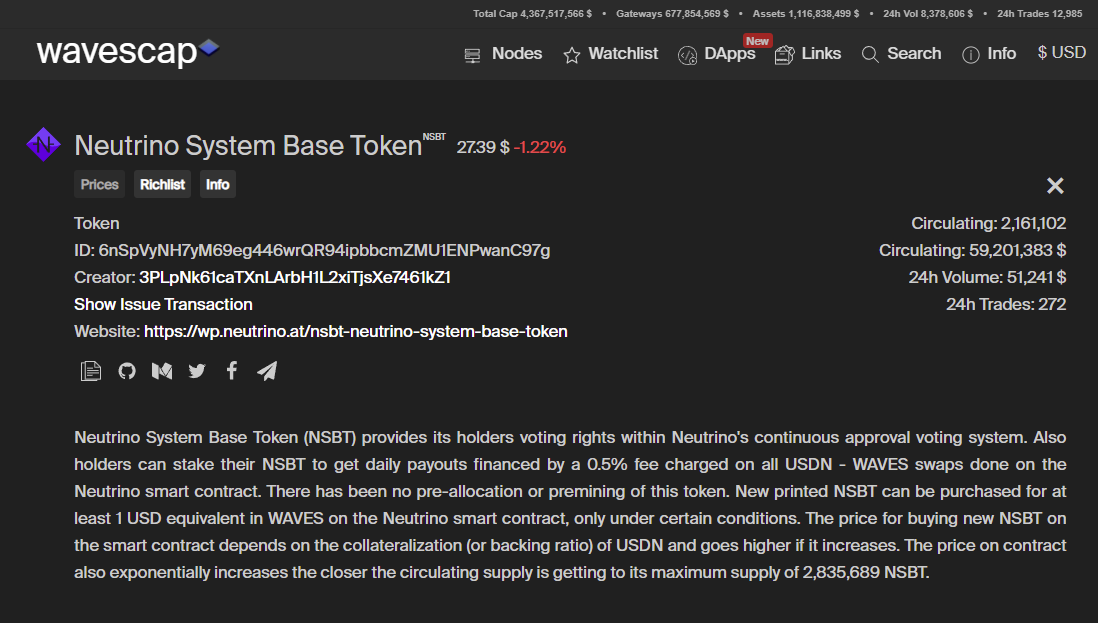 ## Waves Node Overview In addition to the token overview we also developed a node overview which you can find at https://wavescap.com/nodes. 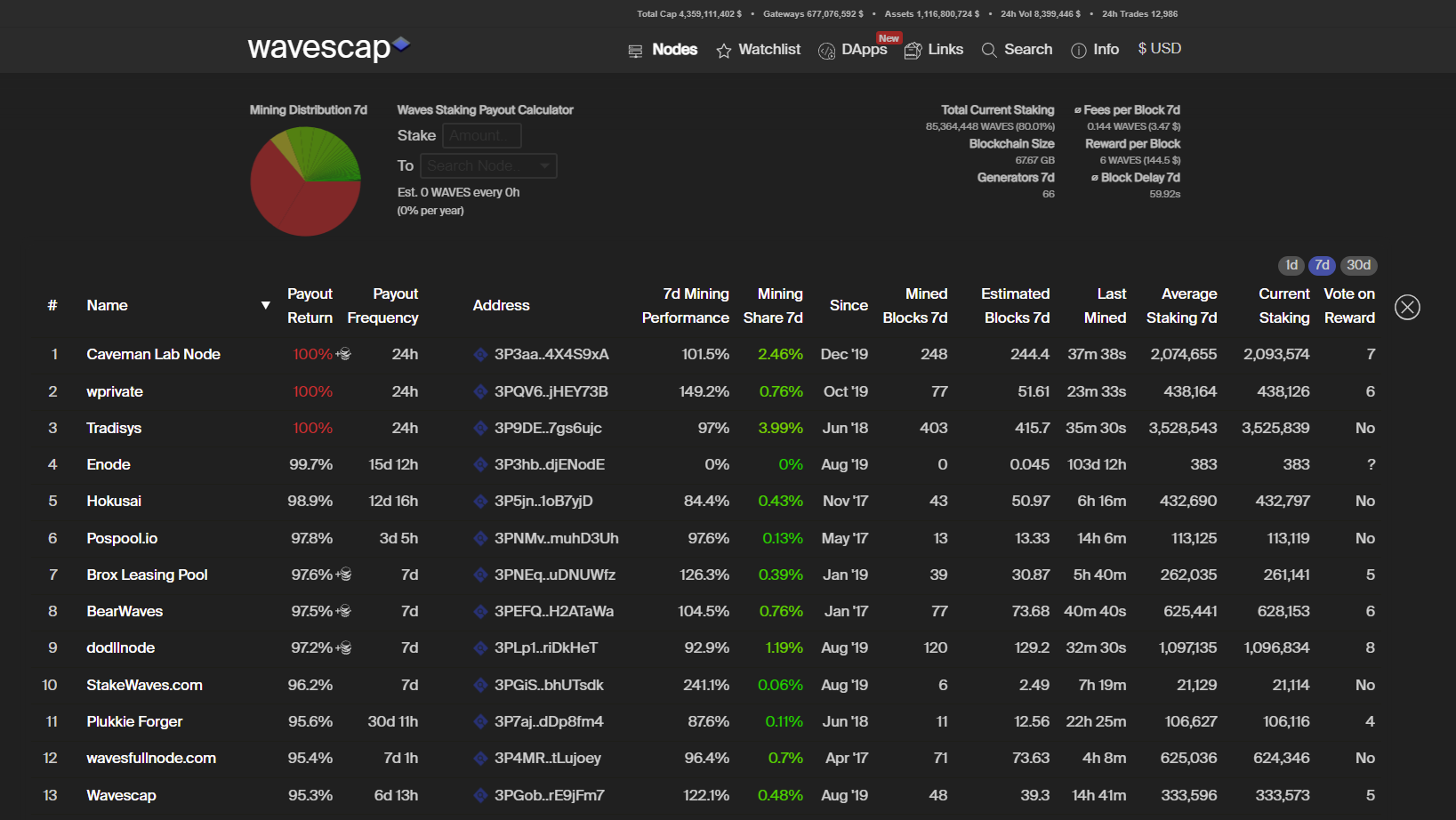 In the top right corner you find some basic network stats, such as the total staked amount of Waves in the network, the number of generators (nodes) and the current size of the Waves blockchain. We also show the block delay, the average fees per block with the dollar equivalent and the current block reward in waves and dollar. We list all nodes who generate blocks but not all of them are nodes with a public presence. For those where we have a name we provide it. If you find a node in our list which we have not assigned a name yet feel free to contact us at [email protected] . Beside the basic node metrics such as the nodes name and address, the number of mined blocks, the number of estimated blocks, the performance ratio (minded blocks divided by estimated blocks) as well as the last mined block. The current and average staking numbers give you an impression if a node gained or lost generating power in the selected timeframe. We also show for what block reward the nodes are voting. The current block reward is 6, but nodes are voting for block rewards ranging from 4 to 20 Waves. If you want to influence the block reward within the Waves ecosystem you can have impact on that by leasing to a node voting for your favour! But we dont want to only provide the standard informations, we want a deeper insight. Thats why we started a bot who tracks every node with a public payout scheme. This way we are able to determine payout frequency and payout ratio. We dont rely on third party informations for this, we track all of it by our own. The small token symbol next to the payout ratio number indicates if a node is paying out additional assets (for example node tokens or other leasing incentives). Those assets are not included at the payout ratio. The payout ratio solely shows the mined Waves vs. distributed Waves metric. Some of the numbers are coloured. Red numbers indicate a risk for the network. Green numbers indicate an increase of decentralization. Try to consider more metrics then just the payout ratio when it comes to selecting a node. Always remember that a strong and decentralized network in the long run will gain more value then a rather centralized network which pays out a few more % in the short run. ### Waves Staking Calculator 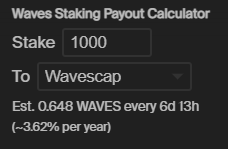 Within the node overview we also provide you with a handy tool, a Waves staking calculator. The benefit with our Waves staking calculator is that we use the payout information we gather in the node overview. This means you can select any node from the dropdown menu, enter any amount of Waves and you will be shown how many Waves in what frequency you roughly can expect. ## Waves dApp Overview One of our latest releases was our reworked dApp overview. You can find it at https://wavescap.com/dapps. 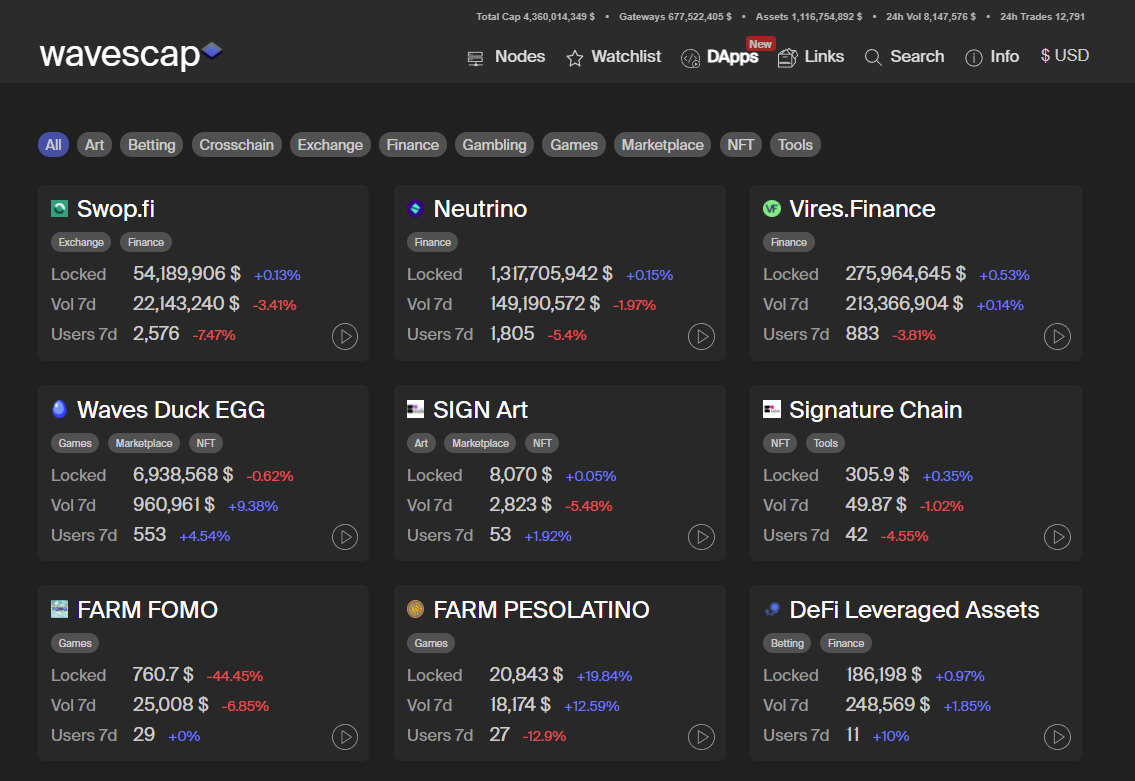 Similar to the token overview you are presented with a short overview of all Waves based dApps. On the general overview you see the most important numbers for every dapp such as the dollar value of all locked assets in this smart contract, the dollar value of all transactions related to the dApp and the number of users. All dApps are also assigned with one or multiple tags which allow you to filter for specific categories, for example finance or art. By clicking on the play button you get forwarded to the web frontend of the dApp. If you click on a tile you will enter the detail overview. ### dApp Detail Overview 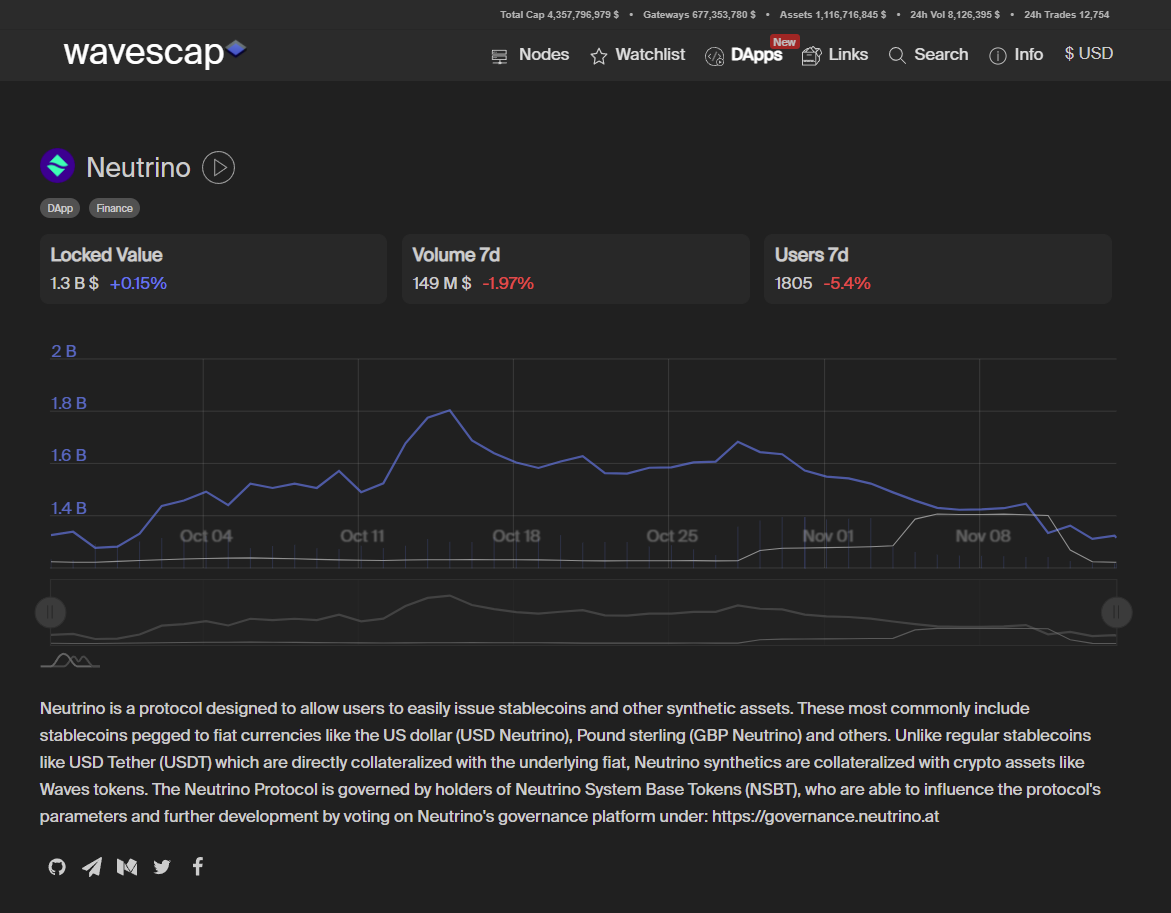 In addition to the numbers already shown on the general overview you find a chart similar to the token chart. It also features three graphs: The blue line indicates the total locked value, the grey line indicates the amount of users and the bars indicate the volume. You are also provided with a short description of the dApp and all relevant social media links. ### Related Token If you scroll further down you will find a list of all tokens which are related to the dApp. This means the dApp address or an associated address has issued these assets or they are commonly used within the dApps smart contracts. 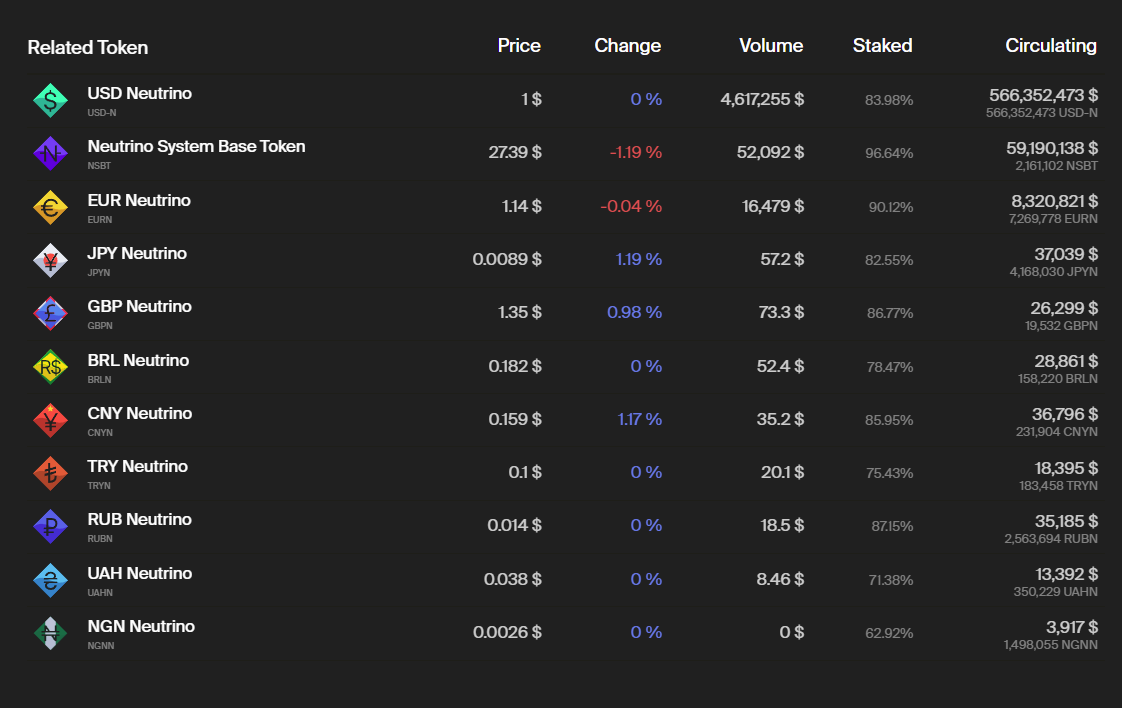 ### Smart Contracts There also is a list of all smart contracts used within the dapps. 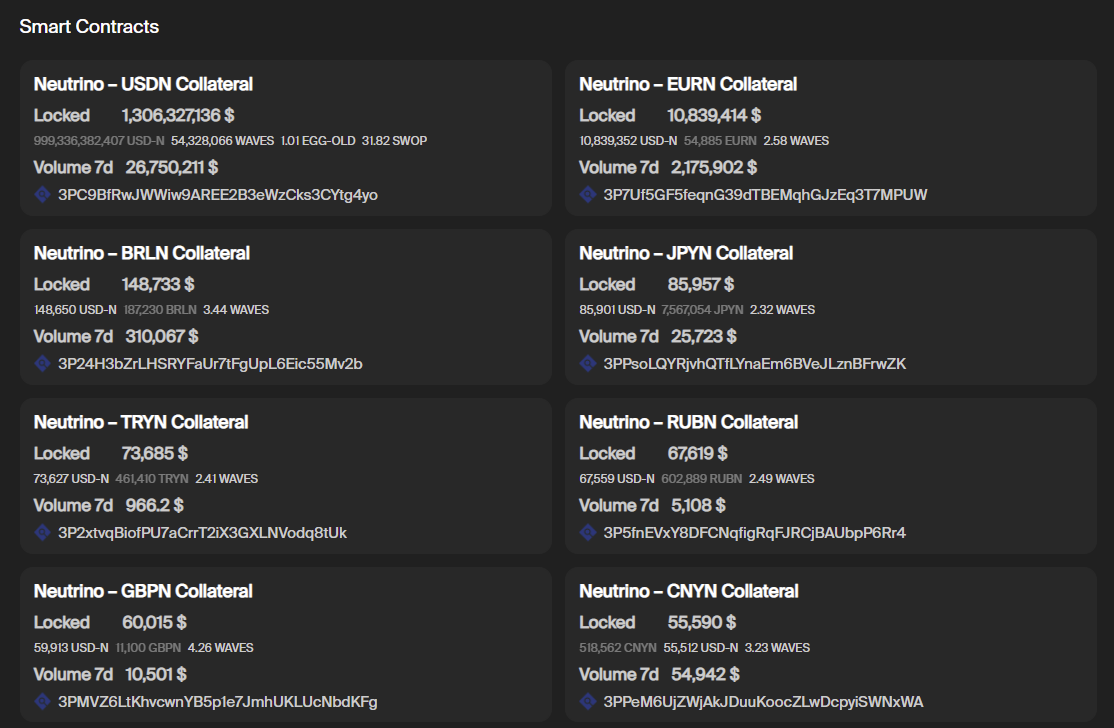 We not only show the addresses of the said smart contracts but also how many of which asset is locked on the address and what dollar value this means. We also show the volume for each individual smart contract. You can also click on the explorer logo to reach our own block explorer https://wscan.io/ and further analyze the smart contract addresses. We will present wscan.io to you in a seperate post. We also pland to widely expand the dApp metrics we show. We are already working on even more usefull data to show. Stay tuned! ## Link and ICO database Another major focus is our knowledge database. It consists out of two parts: usefull links and Waves icos. ### The link database The database features all kind of usefull links from the waves ecosystem. You can find it at https://wavescap.com/links. Links to tutorials, wallets, usefull telegram bots and much more can be discovered. Similar to the dApp overview the links are assigned tags so you are able to filter the dapps and browse through the group of links you are primarily interested. You can combine as many tags as you want. 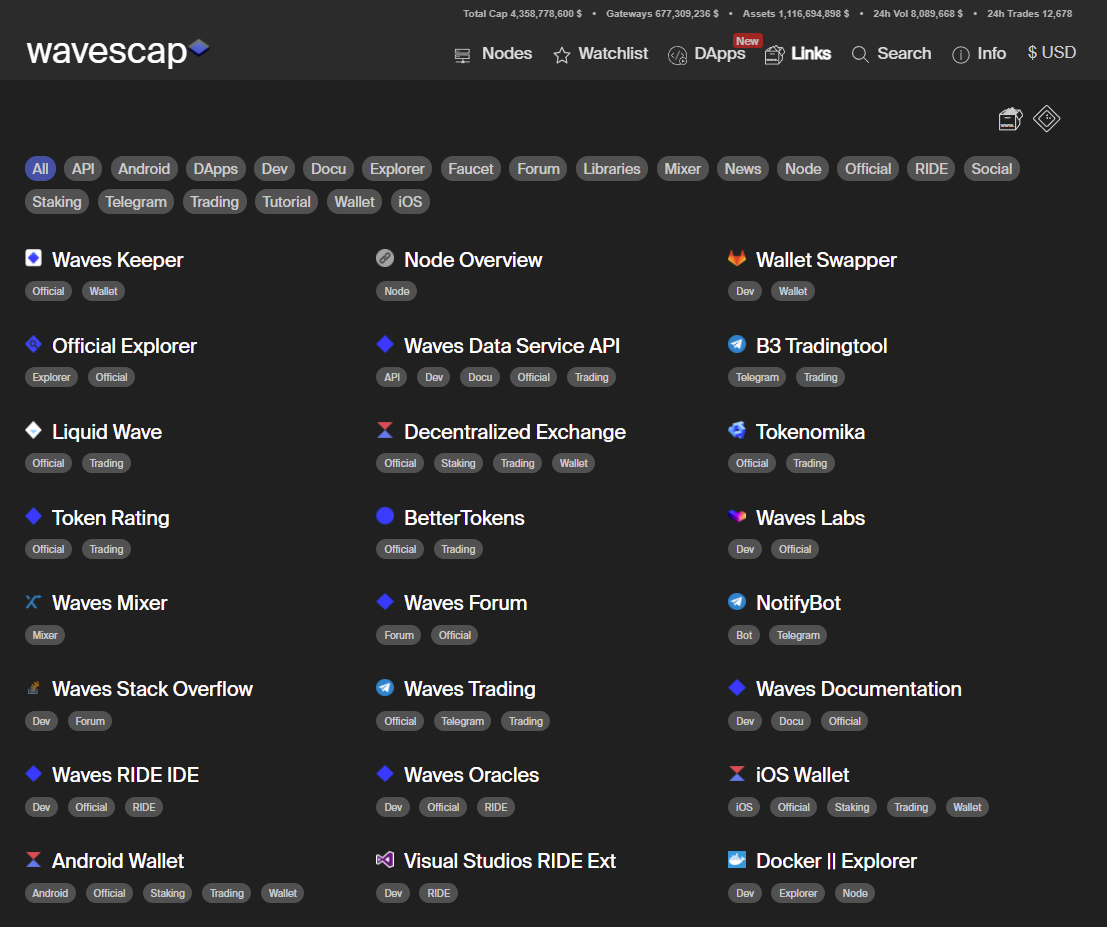 If you want your resource in our link list just write us an email to [email protected] and we will add it if it complies with our quality standard. ### The ICO database You can find the ICO database at https://wavescap.com/ico or by clicking on the symbol in the top right corner. 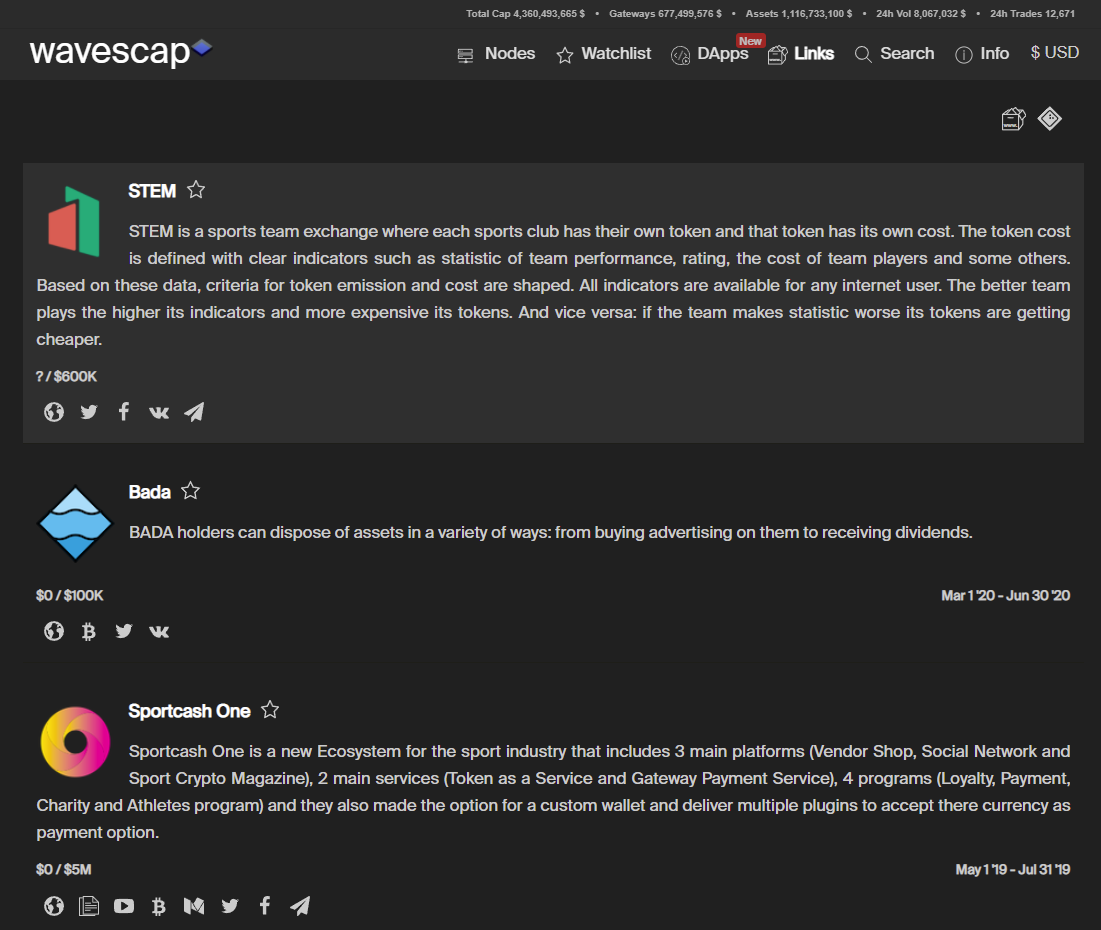 Today this servers mainly as an archive for ICOs and IDOs conducted on the Waves Platform. We show the funding goal and raised amount, if publicly accessable. Also the start and end date of the sale as well as helpfull links related to the project. #### The Watchlist Did you knew you can not only add tokens but also ICOs to your watchlist? If you click on the watchlist tab you will find one tab with all your bookmarked token and another one with all your bookmarked ICOs! ## More Features We already presented you our main features but we also provide you with a few more things which might be usefull for some of you. ### Wavescap Node If you visit https://wavescap.com/info you will first find informations about our own node. 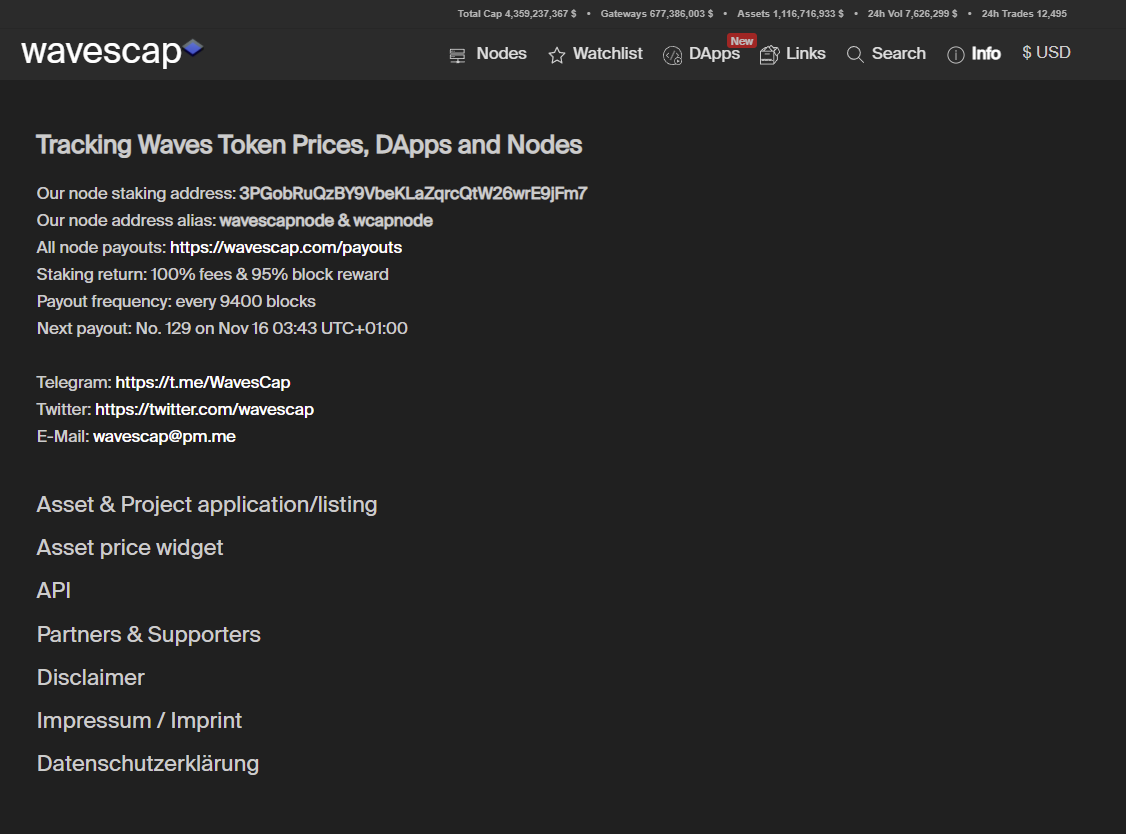 We are running our public node in a very reliable way since summer 2019. On top of the mainnet node we also run a testnet and a stagenet node to become involved in active testing and this way supporting the evolution of the network. Payouts are distributed once a week. We pay out 100% of the fees and 95% of the block reward. The remaining 5% are used to maintain our nodes and contribute to Wavescap expenses. If you want to support Wavescap in any way, leasing to our node might be the most effective one. While you donate a small fraction of your leasing income you not only help us, you also help the network because you contribute to financing our test- and stagenet nodes aswell. If you want to lease some of your waves to us you can lease to 3PGobRuQzBY9VbeKLaZqrcQtW26wrE9jFm7 or our alias wavescapnode. We appreciate every kind of support! ### Widgets We also offer widgets for all listed tokens. 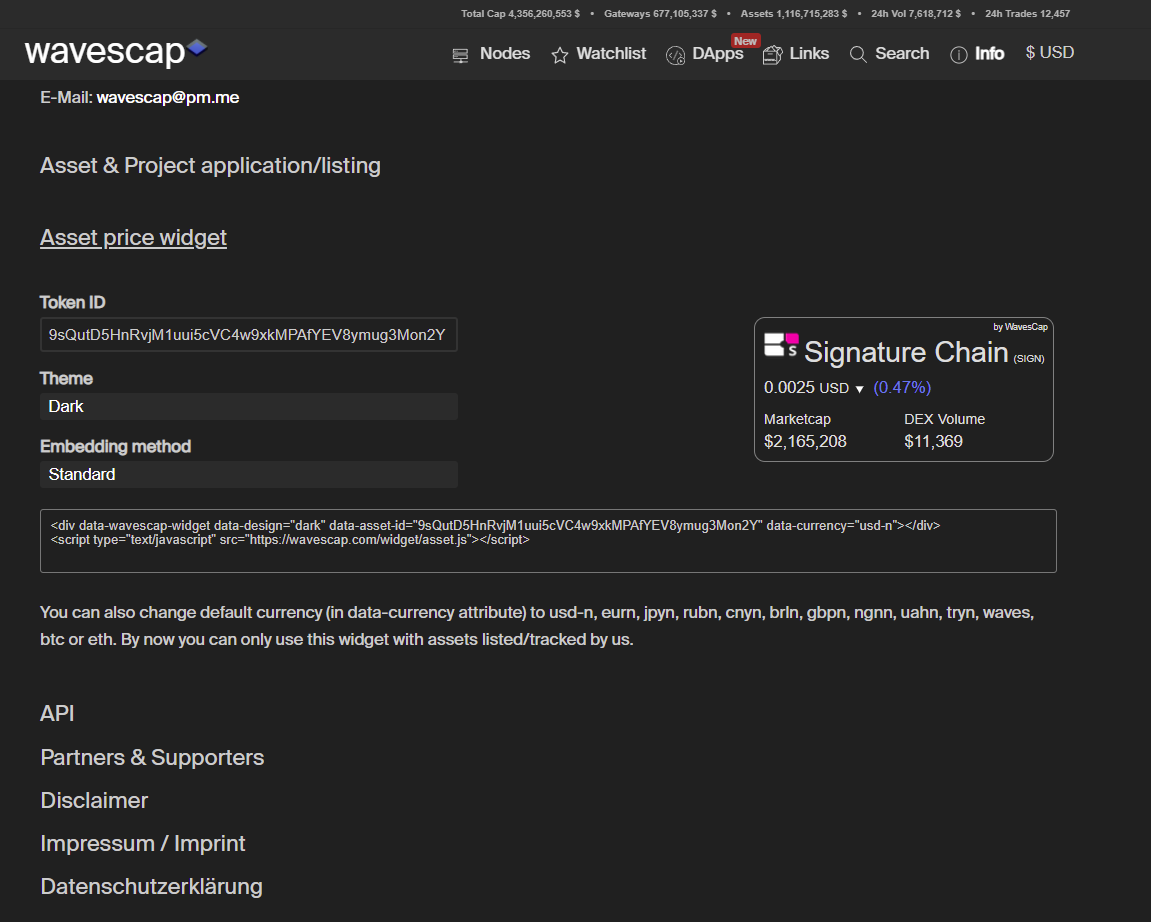 Just fill in an asset ID from any asset listed on wavescap and then you can embed the widget to your website! ### Wavescap API Most of our data is freely accessable via our own API. 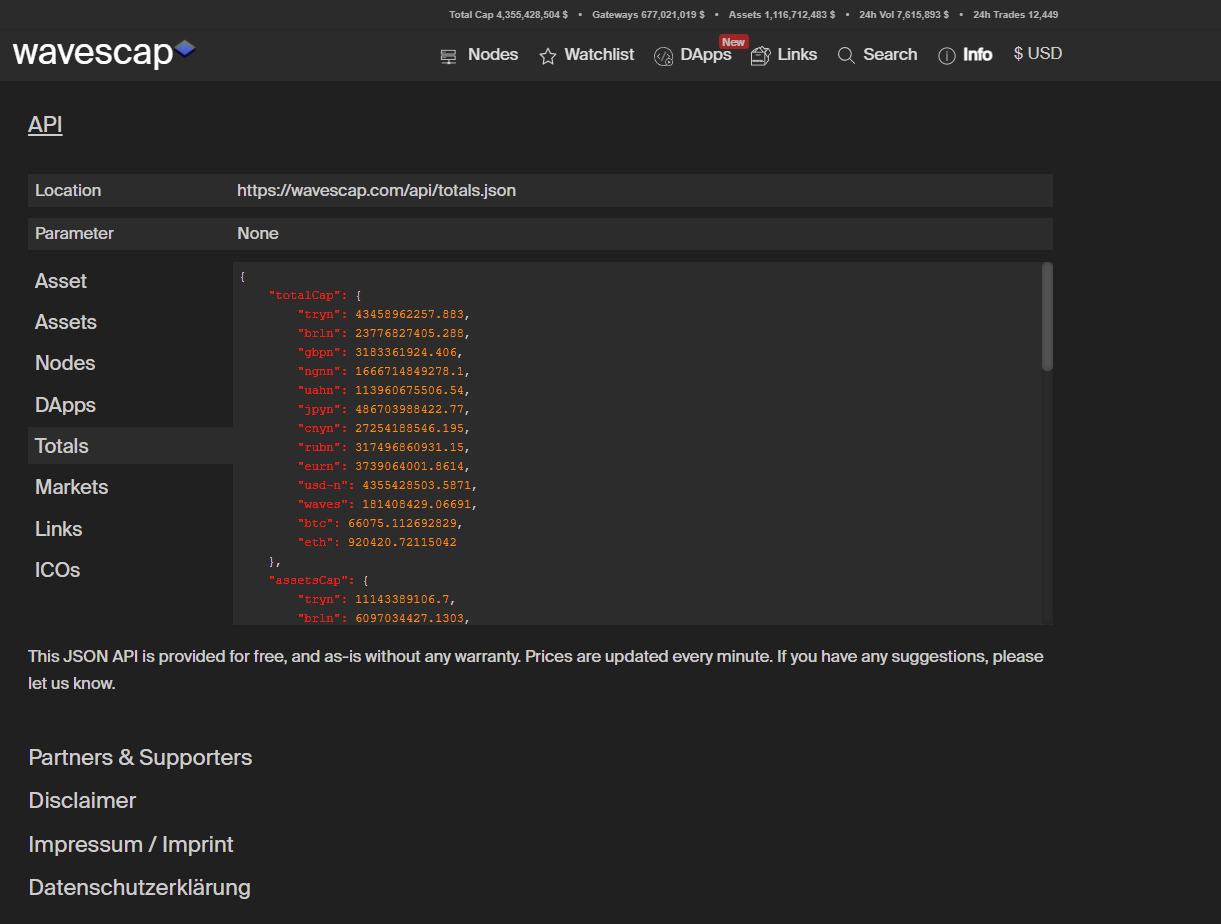 We want to increase decentralization and this is why we aim to become a community driven data provider. We want to give other people out there the opportunity to build on top of our project and thus create a truly decentralized ecosystem. If you struggle or have problems with our API feel free to join our telegram community and ask for help. You can join via this link https://t.me/WavesCap. ## Outlook We want to implement even more features and create infrastructure with a lot of depth for the waves ecosystem. We came one step closer to this by releasing our own explorer https://wscan.io/. We will soon present wscan.io in a similar post. This and more things are waiting! Great times ahead for everybody in the ecosystem! Stay tuned! |
| json metadata | {"tags":["crypto","cryptocurrency","waves","wavesplatform","wavescap","wscan","defi","dapp"],"image":["https://cdn.steemitimages.com/DQmZiNQNXC2fCdTJXKwXmeVPYSUZfkaFtVKURLb1SnuCZE1/Wavescap%20Landing%20Page.PNG","https://cdn.steemitimages.com/DQmesSXDPi6nVwV6fhmeKvL3mXYxqHTDttTc7pHjuSnVPt3/Wavescap%20Detail%20Page.PNG","https://cdn.steemitimages.com/DQmd5FPtgRta6SYpKvJrfkBCXrgPXEUVywGHqyDysg5BjeW/Wvescap%20Richlist.PNG","https://cdn.steemitimages.com/DQmXd4MTSvxv3kEQXeWv1qKgciWuH3Tv2HoKRJ57ehKNqKG/info.PNG","https://cdn.steemitimages.com/DQmZ5ja16HyWG7oGSGMBupCupkSwLYoeccqmMybzEz4WbSX/node.PNG","https://cdn.steemitimages.com/DQmeZF4rqHB5NYmCRsThXBq7z6jWCtxgakWgU2t4M91ghhU/payout%20calculator.PNG","https://cdn.steemitimages.com/DQmWd3TRqAUpExh6tMX24E4b7SymU6hB2WeUcFkQrTpS86t/dapp.PNG","https://cdn.steemitimages.com/DQmTTUgCRqFXwvhnRPKsB4ctt6teL8ZYbkwFjxPpj6nWFeJ/dapp%20detail.PNG","https://cdn.steemitimages.com/DQmNiqvJzh7z9bnpfQde4pNuLV4neHKcT18TrcPQNf4RXg7/related%20token.PNG","https://cdn.steemitimages.com/DQmZVpPhdnfxpYwuZNc5iHadWs3GEFAbCWNe3VamY4rf2sx/smartcontracts.PNG","https://cdn.steemitimages.com/DQmX2vMBg3tQLTi6prMPS9UZFr8Nzehhh1gAU3NLKRmZeXe/links.PNG","https://cdn.steemitimages.com/DQmTH6qvJnsNX47t5DNyfpWwMqV2xY2VkeB3zSkuePtc8kF/ico.PNG","https://cdn.steemitimages.com/DQmRCLxZTK9UGhPBJyhE2wJBpHg17nSYbi9Dmx2K5o1JNdr/infowcaop.PNG","https://cdn.steemitimages.com/DQmdQMeriLUAtZBnKNAZqUKYfMSoeERN7sJKob9iAj8hy6u/widget.PNG","https://cdn.steemitimages.com/DQmR1jhFeY5rW2Medhyx48DtnRseouNSdCqYXygA54WNcPJ/api.PNG"],"links":["https://wavescap.com","https://wavescap.com/asset/NSBT","https://wavescap.com/nodes","https://wavescap.com/dapps","https://wscan.io/","https://wavescap.com/links","https://wavescap.com/ico","https://wavescap.com/info","https://t.me/WavesCap"],"app":"steemit/0.2","format":"markdown"} |
| parent author | |
| parent permlink | crypto |
| permlink | what-the-hell-is-wavescap-the-complete-guide-to-wavescap-com |
| title | What the hell is Wavescap? The complete guide to wavescap.com! |
| Transaction Info | Block #58979091/Trx bf12b0c8a171d63f42f6fcbab64d2a6f0d4be448 |
View Raw JSON Data
{
"block": 58979091,
"op": [
"comment",
{
"author": "wavescap",
"body": "# Greetings steemit community,\n\nwe recently joined steemit and before we start anything we want to introduce ourselfs. This post aims to provide you with an overview of Wavescap, our goals and our features. How can https://wavescap.com help you in your daily crypto life? Enjoy finding out while reading!\n\n# What is Wavescap.com? \n\nWavescap.com is a source of information for the Waves ecosystem. What started out as a token overview for the growing number of Waves based tokens has evolved to an extensive source of ecosystem information. In the following we want to present you the features of wavescap.com and how to use them. \n\n## Waves Token Overview\nThe initial feature on our launch in April 2019 was the token overview for Waves based token. Until today it is the landing page of wavescap.com. On default settings the tokens are sorted after trading volume, but you can also order them after price change, % of tokens staked or marketcap. \n\n\n\nThe trading volume includes only waves based exchange operation of any kind. This includes exchange transactions on the Waves blockchain, swop.fi exchanges and waves.exchange. The goal is to implement any Waves based exchange platform. \nOn top of the website you will find 5 metrics which give you a general impression about the current volume of the ecosystem. Total Cap shows the value of all waves based assets and gateway assets combined. They are also showed seperately. The 24h Vol shows the trading volume across the entire waves blockchain. The metric 24h Trades shows the number of exchange transactions executed to the waves blockchain.\n\n### Token Detail Page\n\nEvery token has a detail page which you can find at wavescap.com/asset/[ticker], for example https://wavescap.com/asset/NSBT. There you can find a chart which shows three different graphs. \n\n\n\nThe big grey line shows the price, the thin grey line shows the circulating supply and the blue bars show the trading volume. Via the dropdown menu in the top right corner you are able to choose between 7 pre-defined timeframes (1 day, 1 week, 1 month, 3 months, 6 months, 1 year and complete history), but you can also set any custom timeframe by moving the regulators below the chart. Below the regulator bar you will find a list of all active trading pairs. You can freely order the list by any listed metric. By clicking on the \"swap\" button you can swith the price asset and amount asset, so you are able to choose the kind of display you prefer. \nThe metrics shown include the spread of all shown pairs. It also shows the best bid and ask orders, so you dont have to open waves.exchange in order to see at what price the best bid and at what price the best ask is. The spread numbers are coloured (green = good, red = bad) and show you how reliable the price of that exact pair is. A high spread usually indicates very low trading volume and thus a not very reliable price. The lower the spread, the more reliable is the price. \nBy clicking on the link icon at the right end of each row you directly get forwarded to the very waves.exchange trading pair you just clicked. \n\n\n\nIf you click on the richlist tab below the token name you will see one of our core features. We show the Top 1000 addresses for every token we have listed. For the rest we just provide some general statistics to show the distribution of the coin but in order to provide you with a good performance we currently cant load more then the top 1000 addresses from the blockchain. With the richlist you can see how different groups of holders are acting. Are the top wallets accumulating more? Are they dumping? Who are the top wallets? Our richlist feature helps you to answer all of those question. You can see short term as well as long term changes in holders stake, just use the 1d, 7d or 30d button to adjust the timeframe. \nThe info tab will provide you with some basic information, such as social media links, a brief description of the token as well as the general token metrics. \n\n\n\n\n\n## Waves Node Overview\n\nIn addition to the token overview we also developed a node overview which you can find at https://wavescap.com/nodes. \n\n\n\nIn the top right corner you find some basic network stats, such as the total staked amount of Waves in the network, the number of generators (nodes) and the current size of the Waves blockchain. We also show the block delay, the average fees per block with the dollar equivalent and the current block reward in waves and dollar. \nWe list all nodes who generate blocks but not all of them are nodes with a public presence. For those where we have a name we provide it. If you find a node in our list which we have not assigned a name yet feel free to contact us at [email protected] . \nBeside the basic node metrics such as the nodes name and address, the number of mined blocks, the number of estimated blocks, the performance ratio (minded blocks divided by estimated blocks) as well as the last mined block. The current and average staking numbers give you an impression if a node gained or lost generating power in the selected timeframe. We also show for what block reward the nodes are voting. The current block reward is 6, but nodes are voting for block rewards ranging from 4 to 20 Waves. If you want to influence the block reward within the Waves ecosystem you can have impact on that by leasing to a node voting for your favour!\nBut we dont want to only provide the standard informations, we want a deeper insight. Thats why we started a bot who tracks every node with a public payout scheme. This way we are able to determine payout frequency and payout ratio. We dont rely on third party informations for this, we track all of it by our own. The small token symbol next to the payout ratio number indicates if a node is paying out additional assets (for example node tokens or other leasing incentives). Those assets are not included at the payout ratio. The payout ratio solely shows the mined Waves vs. distributed Waves metric. \nSome of the numbers are coloured. Red numbers indicate a risk for the network. Green numbers indicate an increase of decentralization. Try to consider more metrics then just the payout ratio when it comes to selecting a node. Always remember that a strong and decentralized network in the long run will gain more value then a rather centralized network which pays out a few more % in the short run. \n\n### Waves Staking Calculator\n\n\n\nWithin the node overview we also provide you with a handy tool, a Waves staking calculator. The benefit with our Waves staking calculator is that we use the payout information we gather in the node overview. This means you can select any node from the dropdown menu, enter any amount of Waves and you will be shown how many Waves in what frequency you roughly can expect. \n\n## Waves dApp Overview\n\nOne of our latest releases was our reworked dApp overview. You can find it at https://wavescap.com/dapps. \n\n\n\nSimilar to the token overview you are presented with a short overview of all Waves based dApps. On the general overview you see the most important numbers for every dapp such as the dollar value of all locked assets in this smart contract, the dollar value of all transactions related to the dApp and the number of users. All dApps are also assigned with one or multiple tags which allow you to filter for specific categories, for example finance or art. By clicking on the play button you get forwarded to the web frontend of the dApp. If you click on a tile you will enter the detail overview.\n\n### dApp Detail Overview\n\n\n\nIn addition to the numbers already shown on the general overview you find a chart similar to the token chart. It also features three graphs: The blue line indicates the total locked value, the grey line indicates the amount of users and the bars indicate the volume. \nYou are also provided with a short description of the dApp and all relevant social media links. \n\n### Related Token\n\nIf you scroll further down you will find a list of all tokens which are related to the dApp. This means the dApp address or an associated address has issued these assets or they are commonly used within the dApps smart contracts. \n\n\n\n### Smart Contracts\n\nThere also is a list of all smart contracts used within the dapps. \n\n\n\nWe not only show the addresses of the said smart contracts but also how many of which asset is locked on the address and what dollar value this means. We also show the volume for each individual smart contract. You can also click on the explorer logo to reach our own block explorer https://wscan.io/ and further analyze the smart contract addresses. We will present wscan.io to you in a seperate post. \nWe also pland to widely expand the dApp metrics we show. We are already working on even more usefull data to show. Stay tuned! \n\n## Link and ICO database\n\nAnother major focus is our knowledge database. It consists out of two parts: usefull links and Waves icos. \n\n### The link database\n\nThe database features all kind of usefull links from the waves ecosystem. You can find it at https://wavescap.com/links. Links to tutorials, wallets, usefull telegram bots and much more can be discovered. Similar to the dApp overview the links are assigned tags so you are able to filter the dapps and browse through the group of links you are primarily interested. You can combine as many tags as you want. \n\n\n\nIf you want your resource in our link list just write us an email to [email protected] and we will add it if it complies with our quality standard. \n\n### The ICO database\n\nYou can find the ICO database at https://wavescap.com/ico or by clicking on the symbol in the top right corner. \n\n\n\nToday this servers mainly as an archive for ICOs and IDOs conducted on the Waves Platform. We show the funding goal and raised amount, if publicly accessable. Also the start and end date of the sale as well as helpfull links related to the project. \n\n#### The Watchlist\n\nDid you knew you can not only add tokens but also ICOs to your watchlist? If you click on the watchlist tab you will find one tab with all your bookmarked token and another one with all your bookmarked ICOs! \n\n## More Features\n\nWe already presented you our main features but we also provide you with a few more things which might be usefull for some of you.\n\n### Wavescap Node\n\nIf you visit https://wavescap.com/info you will first find informations about our own node.\n\n\n\nWe are running our public node in a very reliable way since summer 2019. On top of the mainnet node we also run a testnet and a stagenet node to become involved in active testing and this way supporting the evolution of the network. Payouts are distributed once a week. We pay out 100% of the fees and 95% of the block reward. The remaining 5% are used to maintain our nodes and contribute to Wavescap expenses. If you want to support Wavescap in any way, leasing to our node might be the most effective one. While you donate a small fraction of your leasing income you not only help us, you also help the network because you contribute to financing our test- and stagenet nodes aswell. \nIf you want to lease some of your waves to us you can lease to 3PGobRuQzBY9VbeKLaZqrcQtW26wrE9jFm7 or our alias wavescapnode. We appreciate every kind of support! \n\n### Widgets\n\nWe also offer widgets for all listed tokens. \n\n\n\nJust fill in an asset ID from any asset listed on wavescap and then you can embed the widget to your website! \n\n### Wavescap API\n\nMost of our data is freely accessable via our own API. \n\n\n\nWe want to increase decentralization and this is why we aim to become a community driven data provider. We want to give other people out there the opportunity to build on top of our project and thus create a truly decentralized ecosystem. If you struggle or have problems with our API feel free to join our telegram community and ask for help. You can join via this link https://t.me/WavesCap.\n\n## Outlook\n\nWe want to implement even more features and create infrastructure with a lot of depth for the waves ecosystem. We came one step closer to this by releasing our own explorer https://wscan.io/. We will soon present wscan.io in a similar post. This and more things are waiting! Great times ahead for everybody in the ecosystem! Stay tuned!",
"json_metadata": "{\"tags\":[\"crypto\",\"cryptocurrency\",\"waves\",\"wavesplatform\",\"wavescap\",\"wscan\",\"defi\",\"dapp\"],\"image\":[\"https://cdn.steemitimages.com/DQmZiNQNXC2fCdTJXKwXmeVPYSUZfkaFtVKURLb1SnuCZE1/Wavescap%20Landing%20Page.PNG\",\"https://cdn.steemitimages.com/DQmesSXDPi6nVwV6fhmeKvL3mXYxqHTDttTc7pHjuSnVPt3/Wavescap%20Detail%20Page.PNG\",\"https://cdn.steemitimages.com/DQmd5FPtgRta6SYpKvJrfkBCXrgPXEUVywGHqyDysg5BjeW/Wvescap%20Richlist.PNG\",\"https://cdn.steemitimages.com/DQmXd4MTSvxv3kEQXeWv1qKgciWuH3Tv2HoKRJ57ehKNqKG/info.PNG\",\"https://cdn.steemitimages.com/DQmZ5ja16HyWG7oGSGMBupCupkSwLYoeccqmMybzEz4WbSX/node.PNG\",\"https://cdn.steemitimages.com/DQmeZF4rqHB5NYmCRsThXBq7z6jWCtxgakWgU2t4M91ghhU/payout%20calculator.PNG\",\"https://cdn.steemitimages.com/DQmWd3TRqAUpExh6tMX24E4b7SymU6hB2WeUcFkQrTpS86t/dapp.PNG\",\"https://cdn.steemitimages.com/DQmTTUgCRqFXwvhnRPKsB4ctt6teL8ZYbkwFjxPpj6nWFeJ/dapp%20detail.PNG\",\"https://cdn.steemitimages.com/DQmNiqvJzh7z9bnpfQde4pNuLV4neHKcT18TrcPQNf4RXg7/related%20token.PNG\",\"https://cdn.steemitimages.com/DQmZVpPhdnfxpYwuZNc5iHadWs3GEFAbCWNe3VamY4rf2sx/smartcontracts.PNG\",\"https://cdn.steemitimages.com/DQmX2vMBg3tQLTi6prMPS9UZFr8Nzehhh1gAU3NLKRmZeXe/links.PNG\",\"https://cdn.steemitimages.com/DQmTH6qvJnsNX47t5DNyfpWwMqV2xY2VkeB3zSkuePtc8kF/ico.PNG\",\"https://cdn.steemitimages.com/DQmRCLxZTK9UGhPBJyhE2wJBpHg17nSYbi9Dmx2K5o1JNdr/infowcaop.PNG\",\"https://cdn.steemitimages.com/DQmdQMeriLUAtZBnKNAZqUKYfMSoeERN7sJKob9iAj8hy6u/widget.PNG\",\"https://cdn.steemitimages.com/DQmR1jhFeY5rW2Medhyx48DtnRseouNSdCqYXygA54WNcPJ/api.PNG\"],\"links\":[\"https://wavescap.com\",\"https://wavescap.com/asset/NSBT\",\"https://wavescap.com/nodes\",\"https://wavescap.com/dapps\",\"https://wscan.io/\",\"https://wavescap.com/links\",\"https://wavescap.com/ico\",\"https://wavescap.com/info\",\"https://t.me/WavesCap\"],\"app\":\"steemit/0.2\",\"format\":\"markdown\"}",
"parent_author": "",
"parent_permlink": "crypto",
"permlink": "what-the-hell-is-wavescap-the-complete-guide-to-wavescap-com",
"title": "What the hell is Wavescap? The complete guide to wavescap.com!"
}
],
"op_in_trx": 0,
"timestamp": "2021-11-14T03:19:39",
"trx_id": "bf12b0c8a171d63f42f6fcbab64d2a6f0d4be448",
"trx_in_block": 16,
"virtual_op": 0
}wavescapupdated their account properties2021/11/14 00:46:57
wavescapupdated their account properties
2021/11/14 00:46:57
| account | wavescap |
| extensions | [] |
| json metadata | |
| posting json metadata | {"profile":{"profile_image":"https://wavescap.com/img/logo.png","name":"Wavescap","website":"https://wavescap.com/","version":2}} |
| Transaction Info | Block #58976058/Trx 4f2a7292007911f5c69109da807132f48e5a38bb |
View Raw JSON Data
{
  "block": 58976058,
  "op": [
    "account_update2",
    {
      "account": "wavescap",
      "extensions": [],
      "json_metadata": "",
      "posting_json_metadata": "{\"profile\":{\"profile_image\":\"https://wavescap.com/img/logo.png\",\"name\":\"Wavescap\",\"website\":\"https://wavescap.com/\",\"version\":2}}"
    }
  ],
  "op_in_trx": 0,
  "timestamp": "2021-11-14T00:46:57",
  "trx_id": "4f2a7292007911f5c69109da807132f48e5a38bb",
  "trx_in_block": 34,
  "virtual_op": 0
}2021/11/13 04:48:48
2021/11/13 04:48:48
| delegatee | wavescap |
| delegator | steem |
| vesting shares | 27714.392634 VESTS |
| Transaction Info | Block #58952233/Trx f92d7989f04139ad2de814e597302692bfd7651b |
View Raw JSON Data
{
  "block": 58952233,
  "op": [
    "delegate_vesting_shares",
    {
      "delegatee": "wavescap",
      "delegator": "steem",
      "vesting_shares": "27714.392634 VESTS"
    }
  ],
  "op_in_trx": 0,
  "timestamp": "2021-11-13T04:48:48",
  "trx_id": "f92d7989f04139ad2de814e597302692bfd7651b",
  "trx_in_block": 1,
  "virtual_op": 0
}executive-boardsent 0.001 STEEM to @wavescap- "❗ Hello wavescap, welcome to the STEEM ecosystem. The Executive Board is publishing insider infos at https://discord.gg/KyBbmhh on how you will be earning the most coins. It's easy, just follow the in..."2021/11/13 02:33:03
executive-boardsent 0.001 STEEM to @wavescap- "❗ Hello wavescap, welcome to the STEEM ecosystem. The Executive Board is publishing insider infos at https://discord.gg/KyBbmhh on how you will be earning the most coins. It's easy, just follow the in..."
2021/11/13 02:33:03
| amount | 0.001 STEEM |
| from | executive-board |
| memo | ❗ Hello wavescap, welcome to the STEEM ecosystem. The Executive Board is publishing insider infos at https://discord.gg/KyBbmhh on how you will be earning the most coins. It's easy, just follow the instructions. THE 1000X BOOSTER KEY is already waiting for you over there too. 😉 Warm regards, The Executive Board. |
| to | wavescap |
| Transaction Info | Block #58949530/Trx 3a793b2a3bf37c8b1ad01f3cac6bdbc9d2574bf8 |
View Raw JSON Data
{
  "block": 58949530,
  "op": [
    "transfer",
    {
      "amount": "0.001 STEEM",
      "from": "executive-board",
      "memo": "❗ Hello wavescap, welcome to the STEEM ecosystem. The Executive Board is publishing insider infos at https://discord.gg/KyBbmhh on how you will be earning the most coins. It's easy, just follow the instructions. THE 1000X BOOSTER KEY is already waiting for you over there too. 😉 Warm regards, The Executive Board.",
      "to": "wavescap"
    }
  ],
  "op_in_trx": 0,
  "timestamp": "2021-11-13T02:33:03",
  "trx_id": "3a793b2a3bf37c8b1ad01f3cac6bdbc9d2574bf8",
  "trx_in_block": 4,
  "virtual_op": 0
}2021/11/13 02:31:51
2021/11/13 02:31:51
| delegatee | wavescap |
| delegator | steem |
| vesting shares | 30300.000000 VESTS |
| Transaction Info | Block #58949506/Trx f071cb51760a064b17ece71d7b93ac00658d672c |
View Raw JSON Data
{
  "block": 58949506,
  "op": [
    "delegate_vesting_shares",
    {
      "delegatee": "wavescap",
      "delegator": "steem",
      "vesting_shares": "30300.000000 VESTS"
    }
  ],
  "op_in_trx": 0,
  "timestamp": "2021-11-13T02:31:51",
  "trx_id": "f071cb51760a064b17ece71d7b93ac00658d672c",
  "trx_in_block": 17,
  "virtual_op": 0
}2021/11/13 02:31:51
2021/11/13 02:31:51
| active | {"account_auths":[],"key_auths":[["STM6daFuQJ2PRftpC4TcUQ9w89qr8gLqeREDTCyRefLd7XEsYRiEC",1]],"weight_threshold":1} |
| creator | steem |
| extensions | [] |
| json metadata | {} |
| memo key | STM8XibAd4WMcSRtMrXx8cHsm7i5az9cP85VnHW9weX1fP6mfsYza |
| new account name | wavescap |
| owner | {"account_auths":[],"key_auths":[["STM77zXjUPf17D8CqFxrEKDhfJVHB4eghQxLmpKM51uw8HJkhXf7Z",1]],"weight_threshold":1} |
| posting | {"account_auths":[],"key_auths":[["STM66bcz7Mj9c4PQQv8iXqYrLvCtYSCXmzZcTQAg576b1qwhmS7iC",1]],"weight_threshold":1} |
| Transaction Info | Block #58949506/Trx f071cb51760a064b17ece71d7b93ac00658d672c |
View Raw JSON Data
{
  "block": 58949506,
  "op": [
    "create_claimed_account",
    {
      "active": {
        "account_auths": [],
        "key_auths": [
          [
            "STM6daFuQJ2PRftpC4TcUQ9w89qr8gLqeREDTCyRefLd7XEsYRiEC",
            1
          ]
        ],
        "weight_threshold": 1
      },
      "creator": "steem",
      "extensions": [],
      "json_metadata": "{}",
      "memo_key": "STM8XibAd4WMcSRtMrXx8cHsm7i5az9cP85VnHW9weX1fP6mfsYza",
      "new_account_name": "wavescap",
      "owner": {
        "account_auths": [],
        "key_auths": [
          [
            "STM77zXjUPf17D8CqFxrEKDhfJVHB4eghQxLmpKM51uw8HJkhXf7Z",
            1
          ]
        ],
        "weight_threshold": 1
      },
      "posting": {
        "account_auths": [],
        "key_auths": [
          [
            "STM66bcz7Mj9c4PQQv8iXqYrLvCtYSCXmzZcTQAg576b1qwhmS7iC",
            1
          ]
        ],
        "weight_threshold": 1
      }
    }
  ],
  "op_in_trx": 0,
  "timestamp": "2021-11-13T02:31:51",
  "trx_id": "f071cb51760a064b17ece71d7b93ac00658d672c",
  "trx_in_block": 17,
  "virtual_op": 0
}Manabar
Voting Power100.00%
Downvote Power100.00%
Resource Credits100.00%
Reputation Progress0.00%
{
  "voting_manabar": {
    "current_mana": "5472996220",
    "last_update_time": 1769230854
  },
  "downvote_manabar": {
    "current_mana": 1368249055,
    "last_update_time": 1769230854
  },
  "rc_account": {
    "account": "wavescap",
    "max_rc": "11015914323",
    "max_rc_creation_adjustment": {
      "amount": "5542918103",
      "nai": "@@000000037",
      "precision": 6
    },
    "rc_manabar": {
      "current_mana": "11180133520",
      "last_update_time": 1769230854
    }
  }
}
Account Metadata
| POSTING JSON METADATA | |
| profile | {"profile_image":"https://wavescap.com/img/logo.png","name":"Wavescap","website":"https://wavescap.com/","version":2,"about":"Wavescap is a community driven project to make Waves blockchain data easier accessable with the combination of raw on chain data and curated off chain data "} |
| JSON METADATA | |
| None | |
{
  "posting_json_metadata": {
    "profile": {
      "profile_image": "https://wavescap.com/img/logo.png",
      "name": "Wavescap",
      "website": "https://wavescap.com/",
      "version": 2,
      "about": "Wavescap is a community driven project to make Waves blockchain data easier accessable with the combination of raw on chain data and curated off chain data "
    }
  },
  "json_metadata": {}
}
Auth Keys
Owner
Single Signature
Public Keys
STM77zXjUPf17D8CqFxrEKDhfJVHB4eghQxLmpKM51uw8HJkhXf7Z1/1
Active
Single Signature
Public Keys
STM6daFuQJ2PRftpC4TcUQ9w89qr8gLqeREDTCyRefLd7XEsYRiEC1/1
Posting
Single Signature
Public Keys
STM66bcz7Mj9c4PQQv8iXqYrLvCtYSCXmzZcTQAg576b1qwhmS7iC1/1
Memo
STM8XibAd4WMcSRtMrXx8cHsm7i5az9cP85VnHW9weX1fP6mfsYza
{
  "owner": {
    "account_auths": [],
    "key_auths": [
      [
        "STM77zXjUPf17D8CqFxrEKDhfJVHB4eghQxLmpKM51uw8HJkhXf7Z",
        1
      ]
    ],
    "weight_threshold": 1
  },
  "active": {
    "account_auths": [],
    "key_auths": [
      [
        "STM6daFuQJ2PRftpC4TcUQ9w89qr8gLqeREDTCyRefLd7XEsYRiEC",
        1
      ]
    ],
    "weight_threshold": 1
  },
  "posting": {
    "account_auths": [],
    "key_auths": [
      [
        "STM66bcz7Mj9c4PQQv8iXqYrLvCtYSCXmzZcTQAg576b1qwhmS7iC",
        1
      ]
    ],
    "weight_threshold": 1
  },
  "memo": "STM8XibAd4WMcSRtMrXx8cHsm7i5az9cP85VnHW9weX1fP6mfsYza"
}
Witness Votes
0 / 30
No active witness votes.
[]