

VOTING POWER0.00%
DOWNVOTE POWER0.00%
RESOURCE CREDITS100.00%
REPUTATION PROGRESS0.00%
Net Worth
0.000USD
STEEM
0.002STEEM
SBD
0.000SBD
Own SP
0.000SP
Detailed Balance
| STEEM | ||
| balance | 0.002STEEM | STEEM |
| market_balance | 0.000STEEM | STEEM |
| savings_balance | 0.000STEEM | STEEM |
| reward_steem_balance | 0.000STEEM | STEEM |
| STEEM POWER | ||
| Own SP | 0.000SP | SP |
| Delegated Out | 0.000SP | SP |
| Delegation In | 0.000SP | SP |
| Effective Power | 0.000SP | SP |
| Reward SP (pending) | 0.000SP | SP |
| SBD | ||
| sbd_balance | 0.000SBD | SBD |
| sbd_conversions | 0.000SBD | SBD |
| sbd_market_balance | 0.000SBD | SBD |
| savings_sbd_balance | 0.000SBD | SBD |
| reward_sbd_balance | 0.000SBD | SBD |
{
  "balance": "0.002 STEEM",
  "savings_balance": "0.000 STEEM",
  "reward_steem_balance": "0.000 STEEM",
  "vesting_shares": "0.000000 VESTS",
  "delegated_vesting_shares": "0.000000 VESTS",
  "received_vesting_shares": "0.000000 VESTS",
  "sbd_balance": "0.000 SBD",
  "savings_sbd_balance": "0.000 SBD",
  "reward_sbd_balance": "0.000 SBD",
  "conversions": []
}
Account Info
| name | tmdoit |
| id | 1370529 |
| rank | 1,849,589 |
| reputation | 2548354 |
| created | 2020-03-06T20:25:03 |
| recovery_account | esteemapp |
| proxy | heimindanger |
| post_count | 4 |
| comment_count | 0 |
| lifetime_vote_count | 0 |
| witnesses_voted_for | 0 |
| last_post | 2020-07-15T08:57:00 |
| last_root_post | 2020-07-15T08:57:00 |
| last_vote_time | 2020-04-05T14:12:24 |
| proxied_vsf_votes | 0, 0, 0, 0 |
| can_vote | 1 |
| voting_power | 0 |
| delayed_votes | 0 |
| balance | 0.002 STEEM |
| savings_balance | 0.000 STEEM |
| sbd_balance | 0.000 SBD |
| savings_sbd_balance | 0.000 SBD |
| vesting_shares | 0.000000 VESTS |
| delegated_vesting_shares | 0.000000 VESTS |
| received_vesting_shares | 0.000000 VESTS |
| reward_vesting_balance | 0.000000 VESTS |
| vesting_balance | 0.000 STEEM |
| vesting_withdraw_rate | 0.000000 VESTS |
| next_vesting_withdrawal | 1969-12-31T23:59:59 |
| withdrawn | 0 |
| to_withdraw | 0 |
| withdraw_routes | 0 |
| savings_withdraw_requests | 0 |
| last_account_recovery | 1970-01-01T00:00:00 |
| reset_account | null |
| last_owner_update | 1970-01-01T00:00:00 |
| last_account_update | 2020-03-07T16:23:09 |
| mined | No |
| sbd_seconds | 0 |
| sbd_last_interest_payment | 1970-01-01T00:00:00 |
| savings_sbd_last_interest_payment | 1970-01-01T00:00:00 |
{
  "id": 1370529,
  "name": "tmdoit",
  "owner": {
    "weight_threshold": 1,
    "account_auths": [],
    "key_auths": [
      [
        "STM8YdiuA9DsgioR5fysWbXM5Waj89nwZzppeKhhc1FqGmSKZLfZH",
        1
      ]
    ]
  },
  "active": {
    "weight_threshold": 1,
    "account_auths": [],
    "key_auths": [
      [
        "STM6a7w3eTNx86NdvZN89xLugwGsN5NNxfVe3cos8WgbWyyP57guA",
        1
      ]
    ]
  },
  "posting": {
    "weight_threshold": 1,
    "account_auths": [
      [
        "steempeak.app",
        1
      ],
      [
        "vimm.app",
        1
      ]
    ],
    "key_auths": [
      [
        "STM77HbdFvMGgcYM8RLVZfyJRr4xJTENWkM2N7RedAUAUKkR3K85f",
        1
      ]
    ]
  },
  "memo_key": "STM8eEnDXyN7gYkZFvcoHMHFJyBXfnJRepBRK9MoM9fnN5GhKsZTp",
  "json_metadata": "{\"profile\":{\"name\":\"tmdoit\",\"about\":\"\",\"cover_image\":\"\",\"profile_image\":\"\",\"website\":\"\",\"location\":\"\"}}",
  "posting_json_metadata": "",
  "proxy": "heimindanger",
  "last_owner_update": "1970-01-01T00:00:00",
  "last_account_update": "2020-03-07T16:23:09",
  "created": "2020-03-06T20:25:03",
  "mined": false,
  "recovery_account": "esteemapp",
  "last_account_recovery": "1970-01-01T00:00:00",
  "reset_account": "null",
  "comment_count": 0,
  "lifetime_vote_count": 0,
  "post_count": 4,
  "can_vote": true,
  "voting_manabar": {
    "current_mana": 0,
    "last_update_time": 1586095944
  },
  "downvote_manabar": {
    "current_mana": 0,
    "last_update_time": 1586095944
  },
  "voting_power": 0,
  "balance": "0.002 STEEM",
  "savings_balance": "0.000 STEEM",
  "sbd_balance": "0.000 SBD",
  "sbd_seconds": "0",
  "sbd_seconds_last_update": "1970-01-01T00:00:00",
  "sbd_last_interest_payment": "1970-01-01T00:00:00",
  "savings_sbd_balance": "0.000 SBD",
  "savings_sbd_seconds": "0",
  "savings_sbd_seconds_last_update": "1970-01-01T00:00:00",
  "savings_sbd_last_interest_payment": "1970-01-01T00:00:00",
  "savings_withdraw_requests": 0,
  "reward_sbd_balance": "0.000 SBD",
  "reward_steem_balance": "0.000 STEEM",
  "reward_vesting_balance": "0.000000 VESTS",
  "reward_vesting_steem": "0.000 STEEM",
  "vesting_shares": "0.000000 VESTS",
  "delegated_vesting_shares": "0.000000 VESTS",
  "received_vesting_shares": "0.000000 VESTS",
  "vesting_withdraw_rate": "0.000000 VESTS",
  "next_vesting_withdrawal": "1969-12-31T23:59:59",
  "withdrawn": 0,
  "to_withdraw": 0,
  "withdraw_routes": 0,
  "curation_rewards": 0,
  "posting_rewards": 0,
  "proxied_vsf_votes": [
    0,
    0,
    0,
    0
  ],
  "witnesses_voted_for": 0,
  "last_post": "2020-07-15T08:57:00",
  "last_root_post": "2020-07-15T08:57:00",
  "last_vote_time": "2020-04-05T14:12:24",
  "post_bandwidth": 0,
  "pending_claimed_accounts": 0,
  "vesting_balance": "0.000 STEEM",
  "reputation": 2548354,
  "transfer_history": [],
  "market_history": [],
  "post_history": [],
  "vote_history": [],
  "other_history": [],
  "witness_votes": [],
  "tags_usage": [],
  "guest_bloggers": [],
  "rank": 1849589
}
Withdraw Routes
| Incoming | Outgoing |
|---|---|
Empty | Empty |
{
  "incoming": [],
  "outgoing": []
}From Date
To Date
2025/06/02 14:04:36
2025/06/02 14:04:36
| parent author | tmdoit |
| parent permlink | create-development-environment-for-container-based-applications-using-aws-cloud9-node-red-example |
| author | fusrodah |
| permlink | sx8f3o |
| title | |
| body | If you are just starting out with Amazon Web Services, it is important to understand <a href="https://perfsys.com/blog/guides/aws-pricing/">AWS pricing models explained for beginners</a> to avoid unexpected charges. AWS offers different pricing models: On-Demand, Reserved Instances, and Spot Instances. A blog post on perfsys.com explains these AWS pricing models simply and clearly. On-Demand — pay only for what you use, ideal for short projects. Reserved Instances are beneficial for long-term use — you reserve resources in advance and save up to 75%. Spot Instances allow you to purchase unused resources at a reduced price, but they can be revoked at any time. For beginners, it is important to first analyze your needs and choose the best option. |
| json metadata | {"links":["https://perfsys.com/blog/guides/aws-pricing/"],"app":"steemit/0.2"} |
| Transaction Info | Block #96108336/Trx 1a74b8ac000b593dc2a5a043a00277b098ace52f |
View Raw JSON Data
{
  "trx_id": "1a74b8ac000b593dc2a5a043a00277b098ace52f",
  "block": 96108336,
  "trx_in_block": 4,
  "op_in_trx": 0,
  "virtual_op": 0,
  "timestamp": "2025-06-02T14:04:36",
  "op": [
    "comment",
    {
      "parent_author": "tmdoit",
      "parent_permlink": "create-development-environment-for-container-based-applications-using-aws-cloud9-node-red-example",
      "author": "fusrodah",
      "permlink": "sx8f3o",
      "title": "",
      "body": "If you are just starting out with Amazon Web Services, it is important to understand <a href=\"https://perfsys.com/blog/guides/aws-pricing/\">AWS pricing models explained for beginners</a> to avoid unexpected charges. AWS offers different pricing models: On-Demand, Reserved Instances, and Spot Instances. A blog post on perfsys.com explains these AWS pricing models simply and clearly. On-Demand — pay only for what you use, ideal for short projects. Reserved Instances are beneficial for long-term use — you reserve resources in advance and save up to 75%. Spot Instances allow you to purchase unused resources at a reduced price, but they can be revoked at any time. For beginners, it is important to first analyze your needs and choose the best option.",
      "json_metadata": "{\"links\":[\"https://perfsys.com/blog/guides/aws-pricing/\"],\"app\":\"steemit/0.2\"}"
    }
  ]
}jordansandersreplied to @tmdoit / rof7k72023/01/13 10:53:00
jordansandersreplied to @tmdoit / rof7k7
2023/01/13 10:53:00
| parent author | tmdoit |
| parent permlink | rundeck-openldap-postgresql-pgadmin-apache-directory-studio-vnc-server |
| author | jordansanders |
| permlink | rof7k7 |
| title | |
| body | For the PostgreSQL database, I can recommend <a href="www.devart.com/odbc/postgresql/">odbc driver for postgresql</a>. |
| json metadata | {"links":["www.devart.com/odbc/postgresql/"],"app":"steemit/0.2"} |
| Transaction Info | Block #71144903/Trx 04ddfbf449b6e4efff93f177b6a0d931b5bba63a |
View Raw JSON Data
{
  "trx_id": "04ddfbf449b6e4efff93f177b6a0d931b5bba63a",
  "block": 71144903,
  "trx_in_block": 1,
  "op_in_trx": 0,
  "virtual_op": 0,
  "timestamp": "2023-01-13T10:53:00",
  "op": [
    "comment",
    {
      "parent_author": "tmdoit",
      "parent_permlink": "rundeck-openldap-postgresql-pgadmin-apache-directory-studio-vnc-server",
      "author": "jordansanders",
      "permlink": "rof7k7",
      "title": "",
      "body": "For the PostgreSQL database, I can recommend <a href=\"www.devart.com/odbc/postgresql/\">odbc driver for postgresql</a>.",
      "json_metadata": "{\"links\":[\"www.devart.com/odbc/postgresql/\"],\"app\":\"steemit/0.2\"}"
    }
  ]
}tmdoitpublished a new post: run-docker-node-red-with-mounted-data-and-node-red-folders2020/07/15 08:57:00
tmdoitpublished a new post: run-docker-node-red-with-mounted-data-and-node-red-folders
2020/07/15 08:57:00
| parent author | |
| parent permlink | nodered |
| author | tmdoit |
| permlink | run-docker-node-red-with-mounted-data-and-node-red-folders |
| title | Run Docker Node-RED with mounted "data" and "node-red" folders |
| body | Create Node-RED playground/test/development environment using AWS Cloud9 editor, with two mounted folders "data" and "node-red". Enable self-signed certificates, authentication and projects (git). Link to article: https://blog.digitaloak.it/en/posts/docker-run-node-red-with-mounted-data-and-node-red-folders/ |
| json metadata | {"tags":["nodered","cloud9","automation","docker","iot"],"links":["https://blog.digitaloak.it/en/posts/docker-run-node-red-with-mounted-data-and-node-red-folders/"],"app":"steemit/0.2","format":"markdown"} |
| Transaction Info | Block #45122162/Trx 3abe7ec64a51f469df9f7f621b93db9753e6f532 |
View Raw JSON Data
{
  "trx_id": "3abe7ec64a51f469df9f7f621b93db9753e6f532",
  "block": 45122162,
  "trx_in_block": 4,
  "op_in_trx": 0,
  "virtual_op": 0,
  "timestamp": "2020-07-15T08:57:00",
  "op": [
    "comment",
    {
      "parent_author": "",
      "parent_permlink": "nodered",
      "author": "tmdoit",
      "permlink": "run-docker-node-red-with-mounted-data-and-node-red-folders",
      "title": "Run Docker Node-RED with mounted \"data\" and \"node-red\" folders",
      "body": "Create Node-RED playground/test/development environment using AWS Cloud9 editor, with two mounted folders \"data\" and \"node-red\". Enable self-signed certificates, authentication and projects (git).\n\nLink to article: https://blog.digitaloak.it/en/posts/docker-run-node-red-with-mounted-data-and-node-red-folders/",
      "json_metadata": "{\"tags\":[\"nodered\",\"cloud9\",\"automation\",\"docker\",\"iot\"],\"links\":[\"https://blog.digitaloak.it/en/posts/docker-run-node-red-with-mounted-data-and-node-red-folders/\"],\"app\":\"steemit/0.2\",\"format\":\"markdown\"}"
    }
  ]
}2020/07/02 17:36:36
2020/07/02 17:36:36
| voter | elowin |
| author | tmdoit |
| permlink | create-development-environment-for-container-based-applications-using-aws-cloud9-node-red-example |
| weight | 8000 (80.00%) |
| Transaction Info | Block #44761611/Trx 99cca88871982ece945e52a30328fcfb16a1ca8c |
View Raw JSON Data
{
  "trx_id": "99cca88871982ece945e52a30328fcfb16a1ca8c",
  "block": 44761611,
  "trx_in_block": 6,
  "op_in_trx": 0,
  "virtual_op": 0,
  "timestamp": "2020-07-02T17:36:36",
  "op": [
    "vote",
    {
      "voter": "elowin",
      "author": "tmdoit",
      "permlink": "create-development-environment-for-container-based-applications-using-aws-cloud9-node-red-example",
      "weight": 8000
    }
  ]
}2020/07/02 17:10:09
2020/07/02 17:10:09
| parent author | |
| parent permlink | aws |
| author | tmdoit |
| permlink | create-development-environment-for-container-based-applications-using-aws-cloud9-node-red-example |
| title | Create development environment for container-based applications using AWS Cloud9 (Node-RED example) |
| body | **Current article**: https://blog.digitaloak.it/en/posts/create-development-env ## Say what? AWS Cloud9 is an accessible via web browser IDE with full access to the machine with installed Linux distribution (EC2 instance or your server) and with built in many features. You can read more about it here https://aws.amazon.com/cloud9/ and about pricing here https://aws.amazon.com/cloud9/pricing/. Below screenshot presenting editor. 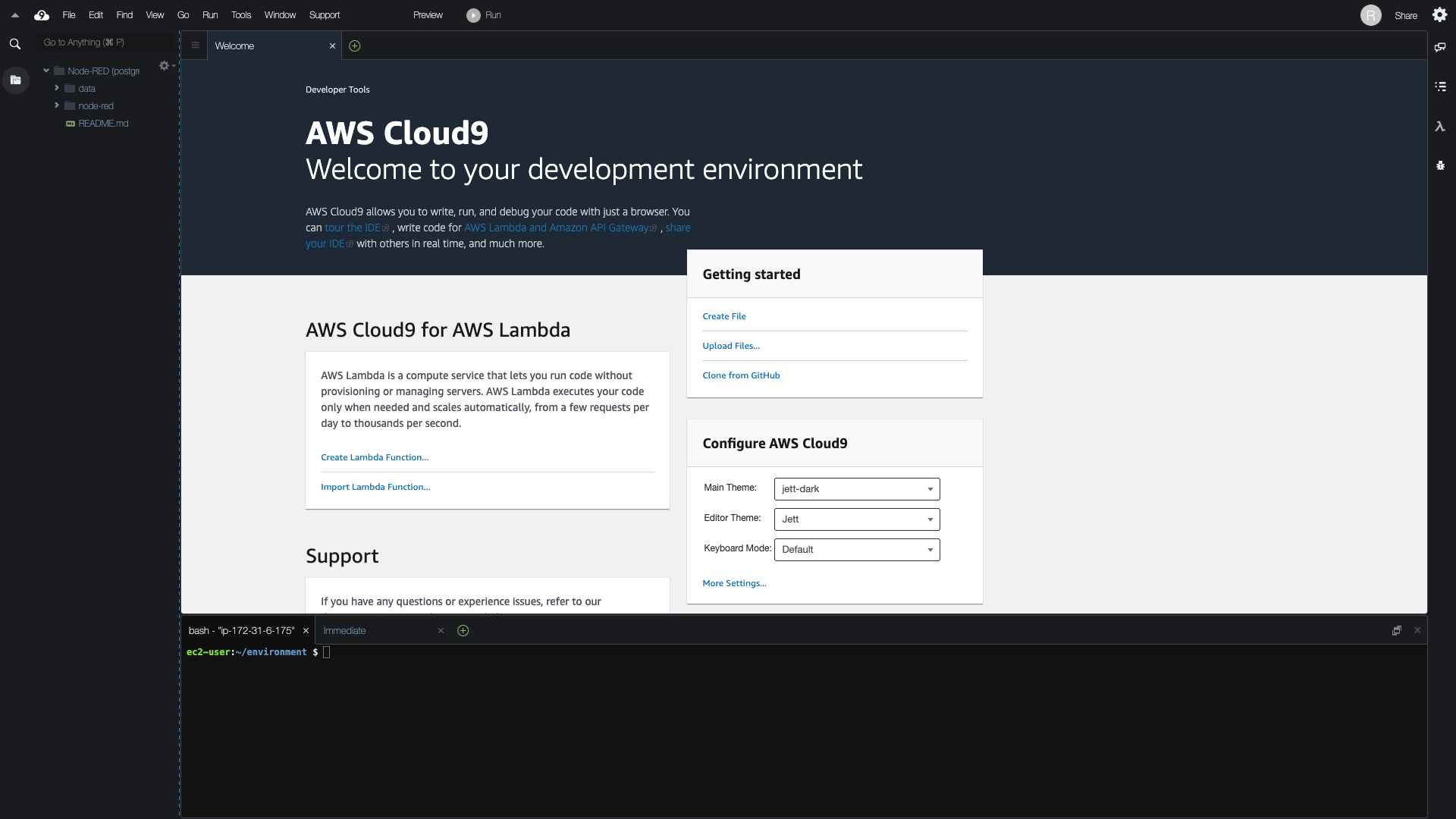 ## Why? 1. It’s free 2. It’s accessible via web browser 3. It has support for collaboration 4. It has full access to OS 5. You can connect IDE to your machine (free) or to one available in AWS (you can use for free t2.micro instance in free tier) It’s handy to run development environment, share workspace with other developers and publish work for external or internal preview. ## How? In our example we will use Node-RED docker image and AWS EC2 t2.micro instance. Let’s split work into multiple parts: - create new AWS user and run Cloud9 workspace - create Node-RED development environment - share Node-RED instance making it available from outside - share Node-RED instance via VNC "gateway" Last two are optional and important if you want share access to your services. First option is about mapping port from EC2 to service (in this example to Node-RED docker container), second is the same as first but relates only to VNC service from which you have access to all services in your docker virtual network. It is also possible to share your AWS Cloud9 workspace using its built in functionality. ## Requirements - basic AWS knowledge and AWS account - basic Docker knowledge ## Create new AWS user and run Cloud9 workspace 1. Create new group “C9”, go to: IAM service > Groups > Create New Group (check policies: AWSCloud9EnvironmentMember, AWSCloud9User) 2. Create new user, go to: IAM service > Users > Add user (check option: “AWS Management Console access”; select option: 3. “Autogenerated password”; check option: “Require password reset”) > attach user to group “C9” > … 3. At fifth step copy generated password 4. Log in as new created user passing copied password and then create the new one ## Create Node-RED development environment Go to Cloud9 service and Create environment > Create a new instance for environment (EC2); Select Amazon Linux > Next step > Create environment For our development purpose we need access to two Node-RED container folders from host (Cloud9 editor): - /data - user data - /usr/src/node-red - application data To achieve it, we will run container, copy to host specified above two folders, remove container and again start it with mounted, previously copied folders. Then we will modify permissions for container "node-red" user to have same UID and GID as host user. 1. Create network ``` docker network create --driver bridge pink --subnet 172.30.0.0/16 ``` 2. Run Node-RED in Docker ``` docker run -d -ti \ --name node-red \ --restart always \ -p 8080:1880 \ nodered/node-red:latest ``` 3. Copy two folders from the container: /data and /usr/src/node-red ``` docker cp -a -L node-red:/data /home/ec2-user/environment docker cp -a -L node-red:/usr/src/node-red /home/ec2-user/environment ``` 4. Remove container ``` docker rm -f node-red ``` 5. Run again NR in Docker container with local, previously copied folders ``` docker run -ti -d \ --name node-red \ --hostname node-red \ --mount type=bind,source=/home/ec2-user/environment/data,target=/data \ --mount type=bind,source=/home/ec2-user/environment/node-red,target=/usr/src/node-red \ --restart always \ --net pink \ --ip 172.30.0.11 \ -p 8080:1880 \ nodered/node-red:latest ``` 6. Because docker image is based on Alpine Linux, you have to install shadow package to change UID and GID ``` docker exec -ti -u root node-red bash echo http://dl-2.alpinelinux.org/alpine/latest-stable/community/ >> /etc/apk/repositories apk --no-cache add shadow ``` 7. Change UID and GID for user “node-red” in NR container so user in host and user in container has the same UID and GID ``` usermod -u 501 node-red groupmod -g 501 node-red find / -user 1000 -exec chown -h node-red {} \; find / -group 1000 -exec chgrp -h node-red {} \; exit ``` 8. Restart container ``` docker restart node-red ``` 9. Enable projects feature by editing "data" > "settings.js" in Cloud9 editor. In "settings.js" change property value "editorTheme" > "projects" > "enabled" value to "true". ```code editorTheme: { projects: { // To enable the Projects feature, set this value to true enabled: true } } ``` 10. Restart container ```bash docker restart node-red ``` To open Node-RED flow editor (http service is listening on 8080), click “Preview” > “Preview Running Application”. Open URL in browser of your choice. ## Share Node-RED instance making it available from outside 1. Sign in to AWS Console as root or other authorised user which can change security group settings 2. Go to "EC2" service, select instance in "Instances" used by Cloud9 and click on security group listed in its description in the bottom panel 3. Go to “Inbound” tab, click “Edit” and add the new rule for TCP port 8080 allowing access for “0.0.0.0/0, ::/0” (or other defined by you) Now you can access it using EC2 instance public domain with enabled port. ## Share Node-RED instance via VNC "gateway" 1. Run VNC container, set your preferred resolution ``` docker run \ -it \ --name vnc \ -p 8081:80 \ -v /dev/shm:/dev/shm \ --net pink \ -e RESOLUTION=800x600 \ -e VNC_PASSWORD=Upd4t34lm4n4ch \ --ip 172.30.0.16 \ -d dorowu/ubuntu-desktop-lxde-vnc ``` 2. Modify EC2 security group, allow inbound traffic for 8081 TCP port (same steps as above) 3. Now you can access it using EC2 instance public domain with enabled port ## Video (steps visualisation) Video is also available on - [d.tube](https://d.tube/#!/v/digit4l0ak/QmQf8SppyXrq51JJ3tCZiTdBGAJkM1L9pZpUAqGaz2AaRo) - [3speak](https://3speak.online/watch?v=digitaloak/nhjllotl) https://youtu.be/HUFJ21x3kIU ## Appendix Problem: Error when installing c9 on remote machine with Debian Stretch “tmux: need UTF-8 locale (LC_CTYPE) but have ANSI_X3.4–1968” Solution: install package locales-all ## Thanks to - nixCraft for an article: https://www.cyberciti.biz/faq/linux-change-user-group-uid-gid-for-all-owned-files/ ## Forum - [https://support.digitaloak.it/index.php?/forums/topic-details/https-blog-digitaloak-it-en-posts-create-development-env](https://support.digitaloak.it/index.php?/forums/topic-details/https-blog-digitaloak-it-en-posts-create-development-env) |
| json metadata | {"tags":["aws","cloud9","nodered","docker","development"],"image":["https://cdn.steemitimages.com/DQmQWBFkWJHAXzTuj2oSJWtJdsoPNehtUPjPXpmzPPFePxg/c9_workspace.png","https://img.youtube.com/vi/HUFJ21x3kIU/0.jpg"],"links":["https://blog.digitaloak.it/en/posts/create-development-env","https://aws.amazon.com/cloud9/","https://aws.amazon.com/cloud9/pricing/","https://d.tube/#!/v/digit4l0ak/QmQf8SppyXrq51JJ3tCZiTdBGAJkM1L9pZpUAqGaz2AaRo","https://3speak.online/watch?v=digitaloak/nhjllotl","https://youtu.be/HUFJ21x3kIU","https://www.cyberciti.biz/faq/linux-change-user-group-uid-gid-for-all-owned-files/","https://support.digitaloak.it/index.php?/forums/topic-details/https-blog-digitaloak-it-en-posts-create-development-env"],"app":"steemit/0.2","format":"markdown"} |
| Transaction Info | Block #44761087/Trx 81895ffe16cb9cd846222076f8f535a791d516a8 |
View Raw JSON Data
{
"trx_id": "81895ffe16cb9cd846222076f8f535a791d516a8",
"block": 44761087,
"trx_in_block": 0,
"op_in_trx": 0,
"virtual_op": 0,
"timestamp": "2020-07-02T17:10:09",
"op": [
"comment",
{
"parent_author": "",
"parent_permlink": "aws",
"author": "tmdoit",
"permlink": "create-development-environment-for-container-based-applications-using-aws-cloud9-node-red-example",
"title": "Create development environment for container-based applications using AWS Cloud9 (Node-RED example)",
"body": "**Current article**: https://blog.digitaloak.it/en/posts/create-development-env\n\n## Say what?\n\nAWS Cloud9 is an accessible via web browser IDE with full access to the machine with installed Linux distribution (EC2 instance or your server) and with built in many features. \n\nYou can read more about it here https://aws.amazon.com/cloud9/ and about pricing here https://aws.amazon.com/cloud9/pricing/. Below screenshot presenting editor.\n\n\n\n\n\n## Why?\n1. It’s free\n2. It’s accessible via web browser\n3. It has support for collaboration\n4. It has full access to OS\n5. You can connect IDE to your machine (free) or to one available in AWS (you can use for free t2.micro instance in free tier)\n\nIt’s handy to run development environment, share workspace with other developers and publish work for external or internal preview.\n\n## How?\nIn our example we will use Node-RED docker image and AWS EC2 t2.micro instance. Let’s split work into multiple parts:\n\n- create new AWS user and run Cloud9 workspace\n- create Node-RED development environment\n- share Node-RED instance making it available from outside\n- share Node-RED instance via VNC \"gateway\" \n\nLast two are optional and important if you want share access to your services. First option is about mapping port from EC2 to service (in this example to Node-RED docker container), second is the same as first but relates only to VNC service from which you have access to all services in your docker virtual network.\nIt is also possible to share your AWS Cloud9 workspace using its built in functionality.\n\n## Requirements\n- basic AWS knowledge and AWS account\n- basic Docker knowledge\n\n## Create new AWS user and run Cloud9 workspace\n1. Create new group “C9”, go to: IAM service > Groups > Create New Group (check policies: AWSCloud9EnvironmentMember, AWSCloud9User)\n2. Create new user, go to: IAM service > Users > Add user (check option: “AWS Management Console access”; select option: 3. “Autogenerated password”; check option: “Require password reset”) > attach user to group “C9” > …\n3. At fifth step copy generated password \n4. Log in as new created user passing copied password and then create the new one\n\n\n## Create Node-RED development environment\nGo to Cloud9 service and Create environment > Create a new instance for environment (EC2); Select Amazon Linux > Next step > Create environment\n\nFor our development purpose we need access to two Node-RED container folders from host (Cloud9 editor):\n- /data - user data\n- /usr/src/node-red - application data\n\nTo achieve it, we will run container, copy to host specified above two folders, remove container and again start it with mounted, previously copied folders. Then we will modify permissions for container \"node-red\" user to have same UID and GID as host user.\n\n1. Create network\n ```\n docker network create --driver bridge pink --subnet 172.30.0.0/16\n ```\n2. Run Node-RED in Docker\n ```\n docker run -d -ti \\\n --name node-red \\\n --restart always \\\n -p 8080:1880 \\\n nodered/node-red:latest\n ```\n3. Copy two folders from the container: /data and /usr/src/node-red\n ```\n docker cp -a -L node-red:/data /home/ec2-user/environment\n docker cp -a -L node-red:/usr/src/node-red /home/ec2-user/environment\n ```\n4. Remove container\n ```\n docker rm -f node-red\n ```\n5. Run again NR in Docker container with local, previously copied folders\n ```\n docker run -ti -d \\\n --name node-red \\\n --hostname node-red \\\n --mount type=bind,source=/home/ec2-user/environment/data,target=/data \\\n --mount type=bind,source=/home/ec2-user/environment/node-red,target=/usr/src/node-red \\\n --restart always \\\n --net pink \\\n --ip 172.30.0.11 \\\n -p 8080:1880 \\\n nodered/node-red:latest\n ```\n6. Because docker image is based on Alpine Linux, you have to install shadow package to change UID and GID\n ```\n docker exec -ti -u root node-red bash\n echo http://dl-2.alpinelinux.org/alpine/latest-stable/community/ >> /etc/apk/repositories\n apk --no-cache add shadow\n ```\n7. Change UID and GID for user “node-red” in NR container so user in host and user in container has the same UID and GID\n ```\n usermod -u 501 node-red\n groupmod -g 501 node-red\n find / -user 1000 -exec chown -h node-red {} \\;\n find / -group 1000 -exec chgrp -h node-red {} \\;\n exit\n ```\n8. Restart container\n ```\n docker restart node-red\n ```\n9. Enable projects feature by editing \"data\" > \"settings.js\" in Cloud9 editor. In \"settings.js\" change property value \"editorTheme\" > \"projects\" > \"enabled\" value to \"true\".\n ```code\n editorTheme: {\n \t projects: {\n\t\t // To enable the Projects feature, set this value to true\n\t\t enabled: true\n\t }\n }\n ```\n10. Restart container\n ```bash\n docker restart node-red\n ```\n\n\nTo open Node-RED flow editor (http service is listening on 8080), click “Preview” > “Preview Running Application”. Open URL in browser of your choice.\n\n## Share Node-RED instance making it available from outside\n1. Sign in to AWS Console as root or other authorised user which can change security group settings\n2. Go to \"EC2\" service, select instance in \"Instances\" used by Cloud9 and click on security group listed in its description in the bottom panel\n3. Go to “Inbound” tab, click “Edit” and add the new rule for TCP port 8080 allowing access for “0.0.0.0/0, ::/0” (or other defined by you)\n\nNow you can access it using EC2 instance public domain with enabled port.\n\n## Share Node-RED instance via VNC \"gateway\"\n1. Run VNC container, set your preferred resolution\n ```\n docker run \\\n -it \\\n --name vnc \\\n -p 8081:80 \\\n -v /dev/shm:/dev/shm \\\n --net pink \\\n -e RESOLUTION=800x600 \\\n -e VNC_PASSWORD=Upd4t34lm4n4ch \\\n --ip 172.30.0.16 \\\n -d dorowu/ubuntu-desktop-lxde-vnc\n ```\n2. Modify EC2 security group, allow inbound traffic for 8081 TCP port (same steps as above)\n3. Now you can access it using EC2 instance public domain with enabled port\n\n\n## Video (steps visualisation)\nVideo is also available on \n- [d.tube](https://d.tube/#!/v/digit4l0ak/QmQf8SppyXrq51JJ3tCZiTdBGAJkM1L9pZpUAqGaz2AaRo)\n- [3speak](https://3speak.online/watch?v=digitaloak/nhjllotl)\n\nhttps://youtu.be/HUFJ21x3kIU\n\n\n## Appendix\nProblem: Error when installing c9 on remote machine with Debian Stretch “tmux: need UTF-8 locale (LC_CTYPE) but have ANSI_X3.4–1968”\nSolution: install package locales-all\n\n\n## Thanks to\n- nixCraft for an article: https://www.cyberciti.biz/faq/linux-change-user-group-uid-gid-for-all-owned-files/\n\n\n## Forum\n- [https://support.digitaloak.it/index.php?/forums/topic-details/https-blog-digitaloak-it-en-posts-create-development-env](https://support.digitaloak.it/index.php?/forums/topic-details/https-blog-digitaloak-it-en-posts-create-development-env)",
"json_metadata": "{\"tags\":[\"aws\",\"cloud9\",\"nodered\",\"docker\",\"development\"],\"image\":[\"https://cdn.steemitimages.com/DQmQWBFkWJHAXzTuj2oSJWtJdsoPNehtUPjPXpmzPPFePxg/c9_workspace.png\",\"https://img.youtube.com/vi/HUFJ21x3kIU/0.jpg\"],\"links\":[\"https://blog.digitaloak.it/en/posts/create-development-env\",\"https://aws.amazon.com/cloud9/\",\"https://aws.amazon.com/cloud9/pricing/\",\"https://d.tube/#!/v/digit4l0ak/QmQf8SppyXrq51JJ3tCZiTdBGAJkM1L9pZpUAqGaz2AaRo\",\"https://3speak.online/watch?v=digitaloak/nhjllotl\",\"https://youtu.be/HUFJ21x3kIU\",\"https://www.cyberciti.biz/faq/linux-change-user-group-uid-gid-for-all-owned-files/\",\"https://support.digitaloak.it/index.php?/forums/topic-details/https-blog-digitaloak-it-en-posts-create-development-env\"],\"app\":\"steemit/0.2\",\"format\":\"markdown\"}"
}
]
}tmdoitcustom json: notify2020/06/27 08:13:48
tmdoitcustom json: notify
2020/06/27 08:13:48
| required auths | [] |
| required posting auths | ["tmdoit"] |
| id | notify |
| json | ["setLastRead",{"date":"2020-06-27T08:13:51"}] |
| Transaction Info | Block #44607903/Trx cb14c9dc3f1a90c46046ed0fc2a7f71db89ba331 |
View Raw JSON Data
{
  "trx_id": "cb14c9dc3f1a90c46046ed0fc2a7f71db89ba331",
  "block": 44607903,
  "trx_in_block": 7,
  "op_in_trx": 0,
  "virtual_op": 0,
  "timestamp": "2020-06-27T08:13:48",
  "op": [
    "custom_json",
    {
      "required_auths": [],
      "required_posting_auths": [
        "tmdoit"
      ],
      "id": "notify",
      "json": "[\"setLastRead\",{\"date\":\"2020-06-27T08:13:51\"}]"
    }
  ]
}executive-boardsent 0.001 STEEM to @tmdoit- "❗ Hello tmdoit, great that you are using the STEEM blockchain. The Executive Board invites you to visit https://discord.gg/KyBbmhh where you will get some insider infos on how you will earn the most c..."2020/06/27 07:40:03
executive-boardsent 0.001 STEEM to @tmdoit- "❗ Hello tmdoit, great that you are using the STEEM blockchain. The Executive Board invites you to visit https://discord.gg/KyBbmhh where you will get some insider infos on how you will earn the most c..."
2020/06/27 07:40:03
| from | executive-board |
| to | tmdoit |
| amount | 0.001 STEEM |
| memo | ❗ Hello tmdoit, great that you are using the STEEM blockchain. The Executive Board invites you to visit https://discord.gg/KyBbmhh where you will get some insider infos on how you will earn the most coins. It's easy, just follow the instructions. Warm regards, The Executive Board. |
| Transaction Info | Block #44607235/Trx a0c1df5fa0d722b14f3639da111ea45644460d83 |
View Raw JSON Data
{
  "trx_id": "a0c1df5fa0d722b14f3639da111ea45644460d83",
  "block": 44607235,
  "trx_in_block": 4,
  "op_in_trx": 0,
  "virtual_op": 0,
  "timestamp": "2020-06-27T07:40:03",
  "op": [
    "transfer",
    {
      "from": "executive-board",
      "to": "tmdoit",
      "amount": "0.001 STEEM",
      "memo": "❗ Hello tmdoit, great that you are using the STEEM blockchain. The Executive Board invites you to visit https://discord.gg/KyBbmhh where you will get some insider infos on how you will earn the most coins. It's easy, just follow the instructions. Warm regards, The Executive Board."
    }
  ]
}tmdoitpublished a new post: rundeck-openldap-postgresql-pgadmin-apache-directory-studio-vnc-server2020/06/27 07:38:12
tmdoitpublished a new post: rundeck-openldap-postgresql-pgadmin-apache-directory-studio-vnc-server
2020/06/27 07:38:12
| parent author | |
| parent permlink | rundeck |
| author | tmdoit |
| permlink | rundeck-openldap-postgresql-pgadmin-apache-directory-studio-vnc-server |
| title | Rundeck + OpenLDAP + PostgreSQL (pgAdmin + Apache Directory Studio + VNC server) |
| body |  For this article we will use Cloud9 with EC2 instance (t3.medium), workspace which you can share with others (ie. to get support). We will access our solution via "desktop gateway" - VNC docker container running inside virtual network. At the bottom is available video version of this tutorial. ## Preparation 1. Create network ``` docker network create --driver bridge pink --subnet 172.30.0.0/16 ``` 2. Resize system partition from 10GB to 20GB. 2.1. Change size of EC2 EBS volume via console or cmd line tool 2.2. Extend a Linux file system after resizing a volume doing following steps (if it doesn't work, here you can read about the details https://docs.aws.amazon.com/AWSEC2/latest/UserGuide/recognize-expanded-volume-linux.html). ```bash sudo growpart /dev/nvme0n1 1 sudo resize2fs /dev/nvme0n1p1 ``` ## VNC 1. Run docker container and open URL (Preview > Preview Running Application). For better experience use your preferred resolution and open VNC URL outside of C9 editor (in browser new window or tab). Password is optional, no one but you will have access to docker containers (in default EC2 configuration when running via Cloud9). ```bash docker run \ -it \ --name vnc \ -p 8080:80 \ -v /dev/shm:/dev/shm \ --net pink \ -e RESOLUTION=800x600 \ -e VNC_PASSWORD=Upd4t34lm4n4ch \ --ip 172.30.0.13 \ -d dorowu/ubuntu-desktop-lxde-vnc ``` 2. Download Apache Directory Studio (https://directory.apache.org/studio/downloads.html) application if you want use GUI for OpenLDAP configuration. 3. To run it, download and install JRE ``` bash sudo apt-get update && sudo apt-get install default-jre -y ``` ## OpenLDAP 1. Run OpenLDAP container ``` bash docker run \ -it \ --name ldap \ --hostname ldap \ --net pink \ --ip 172.30.0.14 \ --restart unless-stopped \ -e 'LDAP_ORGANISATION=ACME' \ -e 'LDAP_DOMAIN=acme.it' \ -e 'LDAP_ADMIN_PASSWORD=123' \ -d osixia/openldap:1.2.1 ``` 2. Sign in using credentials ``` login: cn=admin,dc=acme,dc=it password: 123 ``` 3. Create "superadmin" role using posixGroup object class ``` cn=superadmin,ou=rundeck,ou=roles,dc=acme,dc=it ``` 4. Create new user "John Doe" using posixAccount and inetOrgPerson, set password to "123" ``` cn=John Doe,ou=users,dc=acme,dc=it ``` 5. Add attribute "memberUid" to "superadmin" role ``` cn=John Doe,ou=users,dc=acme,dc=it ``` ## PostgreSQL 1. Create volume for database files ``` bash docker volume create var_lib_postgresql_data_pgdata ``` 2. Run PostgreSQL docker container ``` bash docker run \ --hostname postgres \ --name postgres \ -it \ --ip 172.30.0.11 \ --restart unless-stopped \ --net pink \ -e POSTGRES_PASSWORD=123 \ -e PGDATA=/var/lib/postgresql/data/pgdata \ --mount source=var_lib_postgresql_data_pgdata,target=/var/lib/postgresql/data/pgdata \ -d postgres:12.3 ``` 3. Create user "rundeck" with password "123" and database "rundeck". You can accomplish this step later using pgAdmin. ## pgAdmin 1. Create volume for data ``` bash docker volume create var_lib_pgadmin ``` 2. Run pgAdmin docker container and access it via VNC container using browser with URL http://pgadmin ``` bash docker run \ -it \ --hostname pgadmin \ --name pgadmin \ --mount source=var_lib_pgadmin,target=/var/lib/pgadmin \ --ip 172.30.0.12 \ --restart unless-stopped \ --net pink \ -e '[email protected]' \ -e 'PGADMIN_DEFAULT_PASSWORD=123' \ -d dpage/pgadmin4 ``` ## Rundeck To persist /home/rundeck/etc directory we will run docker container, copy files, delete container and run it again with mounted directory. Next we will map container user UID to the host user UID to avoid permissions error after files modification in host. Last step is acl file modification, where we will change "admin" group/role to "superadmin". 1. Run Rundeck ``` bash docker run -it --name rundeck -d rundeck/rundeck:3.2.8 ``` 2. Copy folder "/home/rundeck/etc" to "/home/ec2-user/environment/etc" ``` bash docker cp -a -L rundeck:/home/rundeck/etc /home/ec2-user/environment ``` 3. Delete container ``` bash docker rm -f rundeck ``` 4. Run Rundeck container and access it via VNC container using browser with URL http://rundeck:4440 ``` bash docker run \ -it \ --name rundeck \ --hostname rundeck \ --net pink \ --ip 172.30.0.15 \ --restart unless-stopped \ --mount type=bind,source=/home/ec2-user/environment/etc,target=/home/rundeck/etc \ -e 'RUNDECK_GRAILS_URL=http://rundeck:4440' \ -e 'RUNDECK_DATABASE_DRIVER=org.postgresql.Driver' \ -e 'RUNDECK_DATABASE_URL=jdbc:postgresql://postgres/rundeck?autoReconnect=true&useSSL=false' \ -e 'RUNDECK_DATABASE_USERNAME=rundeck' \ -e 'RUNDECK_DATABASE_PASSWORD=123' \ -e 'RUNDECK_JAAS_MODULES_0=JettyCombinedLdapLoginModule' \ -e 'RUNDECK_JAAS_LDAP_PROVIDERURL=ldap://ldap:389' \ -e 'RUNDECK_JAAS_LDAP_BINDDN=cn=admin,dc=acme,dc=it' \ -e 'RUNDECK_JAAS_LDAP_BINDPASSWORD=123' \ -e 'RUNDECK_JAAS_LDAP_USERBASEDN=ou=users,dc=acme,dc=it' \ -e 'RUNDECK_JAAS_LDAP_ROLEBASEDN=ou=rundeck,ou=roles,dc=acme,dc=it' \ -e 'RUNDECK_JAAS_LDAP_ROLEOBJECTCLASS=posixGroup' \ -e 'RUNDECK_JAAS_LDAP_ROLEMEMBERATTRIBUTE=memberUid' \ -e 'RUNDECK_JAAS_LDAP_ROLENAMEATTRIBUTE=cn' \ -d rundeck/rundeck:3.2.8 ``` 5. Change UID for container user "rundeck" from "1000" to "501" and reflect changes to files and dirs. ``` bash docker exec -ti -u root rundeck bash usermod -u 501 rundeck find / -user 1000 -exec chown -h rundeck {} \; exit ``` 6. Restart container ``` bash docker restart rundeck ``` 7. Modify host file mounted in container ~/environment/etc/admin.aclpolicy and change two "admin" occurrences to "superadmin". 8. Now you can successfully login - open url http://rundeck:4440 via browser in vnc container ## Video (steps visualization) Video is also available on [d.tube](https://d.tube/v/digit4l0ak/QmcKCKGnjNKXMpxtX6ToAmV7J33vZkYrGRWE5hcDcBuSzj). https://www.youtube.com/watch?v=ze4rYxeFJ7E ## Appendix Watch video about Rundeck authentication (AD, OpenLDAP) and ACL https://www.youtube.com/watch?v=tW6rVPdoXbI ## Article source https://blog.digitaloak.it/en/posts/rundeck-openldap-postgresql/ |
| json metadata | {"tags":["rundeck","postgresql","cloud9","openldap"],"image":["https://cdn.steemitimages.com/DQmbTZcY6d4FnEHn5d45PbuVx3j2fAkgQkAyhrR9zR6JuS6/Untitled_700x450.png","https://img.youtube.com/vi/ze4rYxeFJ7E/0.jpg","https://img.youtube.com/vi/tW6rVPdoXbI/0.jpg"],"links":["https://docs.aws.amazon.com/AWSEC2/latest/UserGuide/recognize-expanded-volume-linux.html","https://directory.apache.org/studio/downloads.html","http://pgadmin","http://rundeck:4440","https://d.tube/v/digit4l0ak/QmcKCKGnjNKXMpxtX6ToAmV7J33vZkYrGRWE5hcDcBuSzj","https://www.youtube.com/watch?v=ze4rYxeFJ7E","https://www.youtube.com/watch?v=tW6rVPdoXbI","https://blog.digitaloak.it/en/posts/rundeck-openldap-postgresql/"],"app":"steemit/0.2","format":"markdown"} |
| Transaction Info | Block #44607198/Trx 666a0e23f0239525565bb491bcbdde569cb79d83 |
View Raw JSON Data
{
"trx_id": "666a0e23f0239525565bb491bcbdde569cb79d83",
"block": 44607198,
"trx_in_block": 0,
"op_in_trx": 0,
"virtual_op": 0,
"timestamp": "2020-06-27T07:38:12",
"op": [
"comment",
{
"parent_author": "",
"parent_permlink": "rundeck",
"author": "tmdoit",
"permlink": "rundeck-openldap-postgresql-pgadmin-apache-directory-studio-vnc-server",
"title": "Rundeck + OpenLDAP + PostgreSQL (pgAdmin + Apache Directory Studio + VNC server)",
"body": "\n\n\nFor this article we will use Cloud9 with EC2 instance (t3.medium), workspace which you can share with others (ie. to get support).\nWe will access our solution via \"desktop gateway\" - VNC docker container running inside virtual network.\nAt the bottom is available video version of this tutorial.\n\n## Preparation\n\n1. Create network\n ```\n docker network create --driver bridge pink --subnet 172.30.0.0/16\n ```\n\n2. Resize system partition from 10GB to 20GB. \n2.1. Change size of EC2 EBS volume via console or cmd line tool \n2.2. Extend a Linux file system after resizing a volume doing following steps (if it doesn't work, here you can read about the details https://docs.aws.amazon.com/AWSEC2/latest/UserGuide/recognize-expanded-volume-linux.html).\n ```bash\n sudo growpart /dev/nvme0n1 1\n sudo resize2fs /dev/nvme0n1p1\n ```\n\n\n## VNC\n1. Run docker container and open URL (Preview > Preview Running Application). For better experience use your preferred resolution and open VNC URL outside of C9 editor (in browser new window or tab). Password is optional, no one but you will have access to docker containers (in default EC2 configuration when running via Cloud9).\n ```bash\n docker run \\\n -it \\\n --name vnc \\\n -p 8080:80 \\\n -v /dev/shm:/dev/shm \\\n --net pink \\\n -e RESOLUTION=800x600 \\\n -e VNC_PASSWORD=Upd4t34lm4n4ch \\\n --ip 172.30.0.13 \\\n -d dorowu/ubuntu-desktop-lxde-vnc\n ```\n\n2. Download Apache Directory Studio (https://directory.apache.org/studio/downloads.html) application if you want use GUI for OpenLDAP configuration.\n\n3. To run it, download and install JRE\n ``` bash\n sudo apt-get update && sudo apt-get install default-jre -y\n ```\n\n\n## OpenLDAP\n1. Run OpenLDAP container\n ``` bash\n docker run \\\n -it \\\n --name ldap \\\n --hostname ldap \\\n --net pink \\\n --ip 172.30.0.14 \\\n --restart unless-stopped \\\n -e 'LDAP_ORGANISATION=ACME' \\\n -e 'LDAP_DOMAIN=acme.it' \\\n -e 'LDAP_ADMIN_PASSWORD=123' \\\n -d osixia/openldap:1.2.1 \n ```\n2. Sign in using credentials\n ```\n login: cn=admin,dc=acme,dc=it\n password: 123\n ```\n\n3. Create \"superadmin\" role using posixGroup object class\n ```\n cn=superadmin,ou=rundeck,ou=roles,dc=acme,dc=it\n ```\n\n4. Create new user \"John Doe\" using posixAccount and inetOrgPerson, set password to \"123\"\n ```\n cn=John Doe,ou=users,dc=acme,dc=it\n ```\n\n5. Add attribute \"memberUid\" to \"superadmin\" role\n ```\n cn=John Doe,ou=users,dc=acme,dc=it\n ```\n\n\n## PostgreSQL\n1. Create volume for database files\n ``` bash\n docker volume create var_lib_postgresql_data_pgdata\n ```\n\n2. Run PostgreSQL docker container\n ``` bash\n docker run \\\n --hostname postgres \\\n --name postgres \\\n -it \\\n --ip 172.30.0.11 \\\n --restart unless-stopped \\\n --net pink \\\n -e POSTGRES_PASSWORD=123 \\\n -e PGDATA=/var/lib/postgresql/data/pgdata \\\n --mount source=var_lib_postgresql_data_pgdata,target=/var/lib/postgresql/data/pgdata \\\n -d postgres:12.3\n ```\n\n3. Create user \"rundeck\" with password \"123\" and database \"rundeck\". You can accomplish this step later using pgAdmin.\n \n\n\n## pgAdmin\n1. Create volume for data\n ``` bash\n docker volume create var_lib_pgadmin\n ```\n\n2. Run pgAdmin docker container and access it via VNC container using browser with URL http://pgadmin\n ``` bash\n docker run \\\n -it \\\n --hostname pgadmin \\\n --name pgadmin \\\n --mount source=var_lib_pgadmin,target=/var/lib/pgadmin \\\n --ip 172.30.0.12 \\\n --restart unless-stopped \\\n --net pink \\\n -e '[email protected]' \\\n -e 'PGADMIN_DEFAULT_PASSWORD=123' \\\n -d dpage/pgadmin4\n ```\n\n\n## Rundeck\nTo persist /home/rundeck/etc directory we will run docker container, copy files, delete container and run it again with mounted directory. Next we will map container user UID to the host user UID to avoid permissions error after files modification in host. Last step is acl file modification, where we will change \"admin\" group/role to \"superadmin\".\n1. Run Rundeck\n ``` bash\n docker run -it --name rundeck -d rundeck/rundeck:3.2.8\n ```\n\n2. Copy folder \"/home/rundeck/etc\" to \"/home/ec2-user/environment/etc\"\n ``` bash\n docker cp -a -L rundeck:/home/rundeck/etc /home/ec2-user/environment\n ```\n\n3. Delete container\n ``` bash\n docker rm -f rundeck\n ```\n\n4. Run Rundeck container and access it via VNC container using browser with URL http://rundeck:4440\n ``` bash\n docker run \\\n -it \\\n --name rundeck \\\n --hostname rundeck \\\n --net pink \\\n --ip 172.30.0.15 \\\n --restart unless-stopped \\\n --mount type=bind,source=/home/ec2-user/environment/etc,target=/home/rundeck/etc \\\n -e 'RUNDECK_GRAILS_URL=http://rundeck:4440' \\\n -e 'RUNDECK_DATABASE_DRIVER=org.postgresql.Driver' \\\n -e 'RUNDECK_DATABASE_URL=jdbc:postgresql://postgres/rundeck?autoReconnect=true&useSSL=false' \\\n -e 'RUNDECK_DATABASE_USERNAME=rundeck' \\\n -e 'RUNDECK_DATABASE_PASSWORD=123' \\\n -e 'RUNDECK_JAAS_MODULES_0=JettyCombinedLdapLoginModule' \\\n -e 'RUNDECK_JAAS_LDAP_PROVIDERURL=ldap://ldap:389' \\\n -e 'RUNDECK_JAAS_LDAP_BINDDN=cn=admin,dc=acme,dc=it' \\\n -e 'RUNDECK_JAAS_LDAP_BINDPASSWORD=123' \\\n -e 'RUNDECK_JAAS_LDAP_USERBASEDN=ou=users,dc=acme,dc=it' \\\n -e 'RUNDECK_JAAS_LDAP_ROLEBASEDN=ou=rundeck,ou=roles,dc=acme,dc=it' \\\n -e 'RUNDECK_JAAS_LDAP_ROLEOBJECTCLASS=posixGroup' \\\n -e 'RUNDECK_JAAS_LDAP_ROLEMEMBERATTRIBUTE=memberUid' \\\n -e 'RUNDECK_JAAS_LDAP_ROLENAMEATTRIBUTE=cn' \\\n -d rundeck/rundeck:3.2.8\n ```\n\n5. Change UID for container user \"rundeck\" from \"1000\" to \"501\" and reflect changes to files and dirs.\n ``` bash\n docker exec -ti -u root rundeck bash\n usermod -u 501 rundeck\n find / -user 1000 -exec chown -h rundeck {} \\;\n exit\n ```\n\n6. Restart container\n ``` bash\n docker restart rundeck\n ```\n\n7. Modify host file mounted in container ~/environment/etc/admin.aclpolicy and change two \"admin\" occurrences to \"superadmin\". \n\n8. Now you can successfully login - open url http://rundeck:4440 via browser in vnc container \n\n\n## Video (steps visualization)\nVideo is also available on [d.tube](https://d.tube/v/digit4l0ak/QmcKCKGnjNKXMpxtX6ToAmV7J33vZkYrGRWE5hcDcBuSzj).\n\nhttps://www.youtube.com/watch?v=ze4rYxeFJ7E\n\n\n## Appendix\nWatch video about Rundeck authentication (AD, OpenLDAP) and ACL\n\nhttps://www.youtube.com/watch?v=tW6rVPdoXbI\n\n\n## Article source\nhttps://blog.digitaloak.it/en/posts/rundeck-openldap-postgresql/",
"json_metadata": "{\"tags\":[\"rundeck\",\"postgresql\",\"cloud9\",\"openldap\"],\"image\":[\"https://cdn.steemitimages.com/DQmbTZcY6d4FnEHn5d45PbuVx3j2fAkgQkAyhrR9zR6JuS6/Untitled_700x450.png\",\"https://img.youtube.com/vi/ze4rYxeFJ7E/0.jpg\",\"https://img.youtube.com/vi/tW6rVPdoXbI/0.jpg\"],\"links\":[\"https://docs.aws.amazon.com/AWSEC2/latest/UserGuide/recognize-expanded-volume-linux.html\",\"https://directory.apache.org/studio/downloads.html\",\"http://pgadmin\",\"http://rundeck:4440\",\"https://d.tube/v/digit4l0ak/QmcKCKGnjNKXMpxtX6ToAmV7J33vZkYrGRWE5hcDcBuSzj\",\"https://www.youtube.com/watch?v=ze4rYxeFJ7E\",\"https://www.youtube.com/watch?v=tW6rVPdoXbI\",\"https://blog.digitaloak.it/en/posts/rundeck-openldap-postgresql/\"],\"app\":\"steemit/0.2\",\"format\":\"markdown\"}"
}
]
}tmdoitupvoted (100.00%) @heimindanger / re-firstamendment-q8a44o2020/04/05 14:12:24
tmdoitupvoted (100.00%) @heimindanger / re-firstamendment-q8a44o
2020/04/05 14:12:24
| voter | tmdoit |
| author | heimindanger |
| permlink | re-firstamendment-q8a44o |
| weight | 10000 (100.00%) |
| Transaction Info | Block #42272682/Trx cd4f750dea89ff8f5295fc5d05222b131297d29f |
View Raw JSON Data
{
  "trx_id": "cd4f750dea89ff8f5295fc5d05222b131297d29f",
  "block": 42272682,
  "trx_in_block": 9,
  "op_in_trx": 0,
  "virtual_op": 0,
  "timestamp": "2020-04-05T14:12:24",
  "op": [
    "vote",
    {
      "voter": "tmdoit",
      "author": "heimindanger",
      "permlink": "re-firstamendment-q8a44o",
      "weight": 10000
    }
  ]
}tmdoitupvoted (100.00%) @dtube / dtube-s-upload-gets-upgraded2020/03/21 02:36:18
tmdoitupvoted (100.00%) @dtube / dtube-s-upload-gets-upgraded
2020/03/21 02:36:18
| voter | tmdoit |
| author | dtube |
| permlink | dtube-s-upload-gets-upgraded |
| weight | 10000 (100.00%) |
| Transaction Info | Block #41833337/Trx 4aeef91972584497dc5fd05b5cbe6347d409d0ff |
View Raw JSON Data
{
  "trx_id": "4aeef91972584497dc5fd05b5cbe6347d409d0ff",
  "block": 41833337,
  "trx_in_block": 50,
  "op_in_trx": 0,
  "virtual_op": 0,
  "timestamp": "2020-03-21T02:36:18",
  "op": [
    "vote",
    {
      "voter": "tmdoit",
      "author": "dtube",
      "permlink": "dtube-s-upload-gets-upgraded",
      "weight": 10000
    }
  ]
}tmdoitcustom json: notify2020/03/18 16:31:12
tmdoitcustom json: notify
2020/03/18 16:31:12
| required auths | [] |
| required posting auths | ["tmdoit"] |
| id | notify |
| json | ["setLastRead",{"date":"2020-03-18T16:31:11"}] |
| Transaction Info | Block #41764259/Trx 103f904dee2c0264b0a100bb425ed82048c95f98 |
View Raw JSON Data
{
  "trx_id": "103f904dee2c0264b0a100bb425ed82048c95f98",
  "block": 41764259,
  "trx_in_block": 10,
  "op_in_trx": 0,
  "virtual_op": 0,
  "timestamp": "2020-03-18T16:31:12",
  "op": [
    "custom_json",
    {
      "required_auths": [],
      "required_posting_auths": [
        "tmdoit"
      ],
      "id": "notify",
      "json": "[\"setLastRead\",{\"date\":\"2020-03-18T16:31:11\"}]"
    }
  ]
}tmdoitupvoted (100.00%) @intrepidsurfer / gm9dhkqmika2020/03/15 15:35:06
tmdoitupvoted (100.00%) @intrepidsurfer / gm9dhkqmika
2020/03/15 15:35:06
| voter | tmdoit |
| author | intrepidsurfer |
| permlink | gm9dhkqmika |
| weight | 10000 (100.00%) |
| Transaction Info | Block #41676889/Trx e75965cfe63ba509844391165c92ebf97403c309 |
View Raw JSON Data
{
  "trx_id": "e75965cfe63ba509844391165c92ebf97403c309",
  "block": 41676889,
  "trx_in_block": 11,
  "op_in_trx": 0,
  "virtual_op": 0,
  "timestamp": "2020-03-15T15:35:06",
  "op": [
    "vote",
    {
      "voter": "tmdoit",
      "author": "intrepidsurfer",
      "permlink": "gm9dhkqmika",
      "weight": 10000
    }
  ]
}tmdoitcustom json: community2020/03/11 18:22:24
tmdoitcustom json: community
2020/03/11 18:22:24
| required auths | [] |
| required posting auths | ["tmdoit"] |
| id | community |
| json | ["subscribe",{"community":"hive-169321"}] |
| Transaction Info | Block #41565228/Trx 8928ff275a494201e84318fd22bf776a06415c8a |
View Raw JSON Data
{
  "trx_id": "8928ff275a494201e84318fd22bf776a06415c8a",
  "block": 41565228,
  "trx_in_block": 12,
  "op_in_trx": 0,
  "virtual_op": 0,
  "timestamp": "2020-03-11T18:22:24",
  "op": [
    "custom_json",
    {
      "required_auths": [],
      "required_posting_auths": [
        "tmdoit"
      ],
      "id": "community",
      "json": "[\"subscribe\",{\"community\":\"hive-169321\"}]"
    }
  ]
}tmdoitupvoted (12.00%) @ash / appics-v1-appics-im-1072772020/03/10 00:31:24
tmdoitupvoted (12.00%) @ash / appics-v1-appics-im-107277
2020/03/10 00:31:24
| voter | tmdoit |
| author | ash |
| permlink | appics-v1-appics-im-107277 |
| weight | 1200 (12.00%) |
| Transaction Info | Block #41515102/Trx 1bf74eda9f645191cf9dd819dfb34430ac65fbd3 |
View Raw JSON Data
{
  "trx_id": "1bf74eda9f645191cf9dd819dfb34430ac65fbd3",
  "block": 41515102,
  "trx_in_block": 3,
  "op_in_trx": 0,
  "virtual_op": 0,
  "timestamp": "2020-03-10T00:31:24",
  "op": [
    "vote",
    {
      "voter": "tmdoit",
      "author": "ash",
      "permlink": "appics-v1-appics-im-107277",
      "weight": 1200
    }
  ]
}tmdoitfollowed @umaofficial2020/03/09 19:23:18
tmdoitfollowed @umaofficial
2020/03/09 19:23:18
| required auths | [] |
| required posting auths | ["tmdoit"] |
| id | follow |
| json | ["follow",{"follower":"tmdoit","following":"umaofficial","what":["blog"]}] |
| Transaction Info | Block #41508953/Trx aa78c228cd337f264c24ab116cca32b7923b26c8 |
View Raw JSON Data
{
  "trx_id": "aa78c228cd337f264c24ab116cca32b7923b26c8",
  "block": 41508953,
  "trx_in_block": 20,
  "op_in_trx": 0,
  "virtual_op": 0,
  "timestamp": "2020-03-09T19:23:18",
  "op": [
    "custom_json",
    {
      "required_auths": [],
      "required_posting_auths": [
        "tmdoit"
      ],
      "id": "follow",
      "json": "[\"follow\",{\"follower\":\"tmdoit\",\"following\":\"umaofficial\",\"what\":[\"blog\"]}]"
    }
  ]
}tmdoitupvoted (13.00%) @hilarski / appics-v1-appics-im-1100572020/03/09 19:16:03
tmdoitupvoted (13.00%) @hilarski / appics-v1-appics-im-110057
2020/03/09 19:16:03
| voter | tmdoit |
| author | hilarski |
| permlink | appics-v1-appics-im-110057 |
| weight | 1300 (13.00%) |
| Transaction Info | Block #41508808/Trx eaacc0300b8fdf25861106c9a8473083278482af |
View Raw JSON Data
{
  "trx_id": "eaacc0300b8fdf25861106c9a8473083278482af",
  "block": 41508808,
  "trx_in_block": 23,
  "op_in_trx": 0,
  "virtual_op": 0,
  "timestamp": "2020-03-09T19:16:03",
  "op": [
    "vote",
    {
      "voter": "tmdoit",
      "author": "hilarski",
      "permlink": "appics-v1-appics-im-110057",
      "weight": 1300
    }
  ]
}tmdoitset governance voting proxy to @heimindanger2020/03/08 02:11:15
tmdoitset governance voting proxy to @heimindanger
2020/03/08 02:11:15
| account | tmdoit |
| proxy | heimindanger |
| Transaction Info | Block #41459613/Trx 2621a400eabf23878701e6cb7f00fd468bd962e7 |
View Raw JSON Data
{
  "trx_id": "2621a400eabf23878701e6cb7f00fd468bd962e7",
  "block": 41459613,
  "trx_in_block": 0,
  "op_in_trx": 0,
  "virtual_op": 0,
  "timestamp": "2020-03-08T02:11:15",
  "op": [
    "account_witness_proxy",
    {
      "account": "tmdoit",
      "proxy": "heimindanger"
    }
  ]
}tmdoitfollowed @steemit-polska2020/03/08 02:01:21
tmdoitfollowed @steemit-polska
2020/03/08 02:01:21
| required auths | [] |
| required posting auths | ["tmdoit"] |
| id | follow |
| json | ["follow",{"follower":"tmdoit","following":"steemit-polska","what":["blog"]}] |
| Transaction Info | Block #41459415/Trx a3beec8bc05e4c6803697486229f9f884e283153 |
View Raw JSON Data
{
  "trx_id": "a3beec8bc05e4c6803697486229f9f884e283153",
  "block": 41459415,
  "trx_in_block": 22,
  "op_in_trx": 0,
  "virtual_op": 0,
  "timestamp": "2020-03-08T02:01:21",
  "op": [
    "custom_json",
    {
      "required_auths": [],
      "required_posting_auths": [
        "tmdoit"
      ],
      "id": "follow",
      "json": "[\"follow\",{\"follower\":\"tmdoit\",\"following\":\"steemit-polska\",\"what\":[\"blog\"]}]"
    }
  ]
}2020/03/08 02:00:36
2020/03/08 02:00:36
| required auths | [] |
| required posting auths | ["tmdoit"] |
| id | follow |
| json | ["follow",{"follower":"tmdoit","following":"jamzed","what":["blog"]}] |
| Transaction Info | Block #41459400/Trx 76c549438e08858905c2091c09d29ce85b9c2421 |
View Raw JSON Data
{
  "trx_id": "76c549438e08858905c2091c09d29ce85b9c2421",
  "block": 41459400,
  "trx_in_block": 18,
  "op_in_trx": 0,
  "virtual_op": 0,
  "timestamp": "2020-03-08T02:00:36",
  "op": [
    "custom_json",
    {
      "required_auths": [],
      "required_posting_auths": [
        "tmdoit"
      ],
      "id": "follow",
      "json": "[\"follow\",{\"follower\":\"tmdoit\",\"following\":\"jamzed\",\"what\":[\"blog\"]}]"
    }
  ]
}tmdoitflagged (-100.00%) @berniesanders / q603w42020/03/08 00:09:00
tmdoitflagged (-100.00%) @berniesanders / q603w4
2020/03/08 00:09:00
| voter | tmdoit |
| author | berniesanders |
| permlink | q603w4 |
| weight | -10000 (-100.00%) |
| Transaction Info | Block #41457174/Trx 544dbb2be7e1b60555a304b8a8ab4e1f3b06e9a1 |
View Raw JSON Data
{
  "trx_id": "544dbb2be7e1b60555a304b8a8ab4e1f3b06e9a1",
  "block": 41457174,
  "trx_in_block": 4,
  "op_in_trx": 0,
  "virtual_op": 0,
  "timestamp": "2020-03-08T00:09:00",
  "op": [
    "vote",
    {
      "voter": "tmdoit",
      "author": "berniesanders",
      "permlink": "q603w4",
      "weight": -10000
    }
  ]
}tmdoitmuted @iflagtrash2020/03/07 23:44:48
tmdoitmuted @iflagtrash
2020/03/07 23:44:48
| required auths | [] |
| required posting auths | ["tmdoit"] |
| id | follow |
| json | ["follow",{"follower":"tmdoit","following":"iflagtrash","what":["ignore"]}] |
| Transaction Info | Block #41456691/Trx 977bb9edefa214663614d6564f0196a1fff6164c |
View Raw JSON Data
{
  "trx_id": "977bb9edefa214663614d6564f0196a1fff6164c",
  "block": 41456691,
  "trx_in_block": 5,
  "op_in_trx": 0,
  "virtual_op": 0,
  "timestamp": "2020-03-07T23:44:48",
  "op": [
    "custom_json",
    {
      "required_auths": [],
      "required_posting_auths": [
        "tmdoit"
      ],
      "id": "follow",
      "json": "[\"follow\",{\"follower\":\"tmdoit\",\"following\":\"iflagtrash\",\"what\":[\"ignore\"]}]"
    }
  ]
}tmdoitmuted @iflagtrash2020/03/07 22:24:09
tmdoitmuted @iflagtrash
2020/03/07 22:24:09
| required auths | [] |
| required posting auths | ["tmdoit"] |
| id | follow |
| json | ["follow",{"follower":"tmdoit","following":"iflagtrash","what":["ignore"]}] |
| Transaction Info | Block #41455083/Trx 4accc4faf61dc06da2d97b4ed040f318bb54ceb7 |
View Raw JSON Data
{
  "trx_id": "4accc4faf61dc06da2d97b4ed040f318bb54ceb7",
  "block": 41455083,
  "trx_in_block": 20,
  "op_in_trx": 0,
  "virtual_op": 0,
  "timestamp": "2020-03-07T22:24:09",
  "op": [
    "custom_json",
    {
      "required_auths": [],
      "required_posting_auths": [
        "tmdoit"
      ],
      "id": "follow",
      "json": "[\"follow\",{\"follower\":\"tmdoit\",\"following\":\"iflagtrash\",\"what\":[\"ignore\"]}]"
    }
  ]
}2020/03/07 19:17:24
2020/03/07 19:17:24
| voter | tmdoit |
| author | tinowhale |
| permlink | re-phgnomo-re-konami-re-shenanigator-the-ultimate-guide-to-steemit-payouts-20180107t100201482z |
| weight | 10000 (100.00%) |
| Transaction Info | Block #41451356/Trx 5be991385a5a2c77f44130e71ee7bb1ad9edbe86 |
View Raw JSON Data
{
  "trx_id": "5be991385a5a2c77f44130e71ee7bb1ad9edbe86",
  "block": 41451356,
  "trx_in_block": 0,
  "op_in_trx": 0,
  "virtual_op": 0,
  "timestamp": "2020-03-07T19:17:24",
  "op": [
    "vote",
    {
      "voter": "tmdoit",
      "author": "tinowhale",
      "permlink": "re-phgnomo-re-konami-re-shenanigator-the-ultimate-guide-to-steemit-payouts-20180107t100201482z",
      "weight": 10000
    }
  ]
}tmdoitupvoted (100.00%) @dtube / dtube-mainnet-launch-date-and-adjustments2020/03/07 18:59:39
tmdoitupvoted (100.00%) @dtube / dtube-mainnet-launch-date-and-adjustments
2020/03/07 18:59:39
| voter | tmdoit |
| author | dtube |
| permlink | dtube-mainnet-launch-date-and-adjustments |
| weight | 10000 (100.00%) |
| Transaction Info | Block #41451003/Trx 7c055fc9bc8e2b1b23f45ece040885d5a7fb6d62 |
View Raw JSON Data
{
  "trx_id": "7c055fc9bc8e2b1b23f45ece040885d5a7fb6d62",
  "block": 41451003,
  "trx_in_block": 5,
  "op_in_trx": 0,
  "virtual_op": 0,
  "timestamp": "2020-03-07T18:59:39",
  "op": [
    "vote",
    {
      "voter": "tmdoit",
      "author": "dtube",
      "permlink": "dtube-mainnet-launch-date-and-adjustments",
      "weight": 10000
    }
  ]
}beemenginesent 0.001 STEEM to @tmdoit- "💎 Awesome Community Offer: auto booster with 10x extra votes, passive curation earnings and more. Checkout https://www.steembeem.com 🤙 or try it for one month with ONLY 1 STEEM 🤯 to @beemengine wit..."2020/03/07 16:42:33
beemenginesent 0.001 STEEM to @tmdoit- "💎 Awesome Community Offer: auto booster with 10x extra votes, passive curation earnings and more. Checkout https://www.steembeem.com 🤙 or try it for one month with ONLY 1 STEEM 🤯 to @beemengine wit..."
2020/03/07 16:42:33
| from | beemengine |
| to | tmdoit |
| amount | 0.001 STEEM |
| memo | 💎 Awesome Community Offer: auto booster with 10x extra votes, passive curation earnings and more. Checkout https://www.steembeem.com 🤙 or try it for one month with ONLY 1 STEEM 🤯 to @beemengine with memo: subscribe |
| Transaction Info | Block #41448268/Trx 58b578fdd55b623281395d3a9235063be850a578 |
View Raw JSON Data
{
  "trx_id": "58b578fdd55b623281395d3a9235063be850a578",
  "block": 41448268,
  "trx_in_block": 21,
  "op_in_trx": 0,
  "virtual_op": 0,
  "timestamp": "2020-03-07T16:42:33",
  "op": [
    "transfer",
    {
      "from": "beemengine",
      "to": "tmdoit",
      "amount": "0.001 STEEM",
      "memo": "💎 Awesome Community Offer: auto booster with 10x extra votes, passive curation earnings and more. Checkout https://www.steembeem.com 🤙 or try it for one month with ONLY 1 STEEM 🤯 to @beemengine with memo: subscribe"
    }
  ]
}tmdoitreplied to @makeyourselfrich / q6u11j2020/03/07 16:41:42
tmdoitreplied to @makeyourselfrich / q6u11j
2020/03/07 16:41:42
| parent author | makeyourselfrich |
| parent permlink | can-t-login-to-dtube-private-posting-key-is-wrong-solved |
| author | tmdoit |
| permlink | q6u11j |
| title | |
| body | Thanks for posting this, helpful for steem newbie! :) Just learning the whole thing and at the beginning there is a lot of to understand. |
| json metadata | {"app":"steemit/0.2"} |
| Transaction Info | Block #41448251/Trx 3bc0895c02840d4751ad08b055bcf5e90fe9c01e |
View Raw JSON Data
{
  "trx_id": "3bc0895c02840d4751ad08b055bcf5e90fe9c01e",
  "block": 41448251,
  "trx_in_block": 19,
  "op_in_trx": 0,
  "virtual_op": 0,
  "timestamp": "2020-03-07T16:41:42",
  "op": [
    "comment",
    {
      "parent_author": "makeyourselfrich",
      "parent_permlink": "can-t-login-to-dtube-private-posting-key-is-wrong-solved",
      "author": "tmdoit",
      "permlink": "q6u11j",
      "title": "",
      "body": "Thanks for posting this, helpful for steem newbie! :) Just learning the whole thing and at the beginning there is a lot of to understand.",
      "json_metadata": "{\"app\":\"steemit/0.2\"}"
    }
  ]
}tmdoitupvoted (100.00%) @makeyourselfrich / can-t-login-to-dtube-private-posting-key-is-wrong-solved2020/03/07 16:37:30
tmdoitupvoted (100.00%) @makeyourselfrich / can-t-login-to-dtube-private-posting-key-is-wrong-solved
2020/03/07 16:37:30
| voter | tmdoit |
| author | makeyourselfrich |
| permlink | can-t-login-to-dtube-private-posting-key-is-wrong-solved |
| weight | 10000 (100.00%) |
| Transaction Info | Block #41448167/Trx 34925693b5824f2a164919bd770ba8853242cd8e |
View Raw JSON Data
{
  "trx_id": "34925693b5824f2a164919bd770ba8853242cd8e",
  "block": 41448167,
  "trx_in_block": 11,
  "op_in_trx": 0,
  "virtual_op": 0,
  "timestamp": "2020-03-07T16:37:30",
  "op": [
    "vote",
    {
      "voter": "tmdoit",
      "author": "makeyourselfrich",
      "permlink": "can-t-login-to-dtube-private-posting-key-is-wrong-solved",
      "weight": 10000
    }
  ]
}tmdoitcustom json: community2020/03/07 16:36:45
tmdoitcustom json: community
2020/03/07 16:36:45
| required auths | [] |
| required posting auths | ["tmdoit"] |
| id | community |
| json | ["subscribe",{"community":"hive-196037"}] |
| Transaction Info | Block #41448152/Trx 415676bcba3f1a428aa7255d9c1e0e82d047b5f7 |
View Raw JSON Data
{
  "trx_id": "415676bcba3f1a428aa7255d9c1e0e82d047b5f7",
  "block": 41448152,
  "trx_in_block": 4,
  "op_in_trx": 0,
  "virtual_op": 0,
  "timestamp": "2020-03-07T16:36:45",
  "op": [
    "custom_json",
    {
      "required_auths": [],
      "required_posting_auths": [
        "tmdoit"
      ],
      "id": "community",
      "json": "[\"subscribe\",{\"community\":\"hive-196037\"}]"
    }
  ]
}tmdoitupdated their account properties2020/03/07 16:23:09
tmdoitupdated their account properties
2020/03/07 16:23:09
| account | tmdoit |
| posting | {"weight_threshold":1,"account_auths":[["steempeak.app",1],["vimm.app",1]],"key_auths":[["STM77HbdFvMGgcYM8RLVZfyJRr4xJTENWkM2N7RedAUAUKkR3K85f",1]]} |
| memo key | STM8eEnDXyN7gYkZFvcoHMHFJyBXfnJRepBRK9MoM9fnN5GhKsZTp |
| json metadata | {"profile":{"name":"tmdoit","about":"","cover_image":"","profile_image":"","website":"","location":""}} |
| Transaction Info | Block #41447881/Trx 6c0db3f3feb35952943c63b75e90488c6cbabef2 |
View Raw JSON Data
{
  "trx_id": "6c0db3f3feb35952943c63b75e90488c6cbabef2",
  "block": 41447881,
  "trx_in_block": 9,
  "op_in_trx": 0,
  "virtual_op": 0,
  "timestamp": "2020-03-07T16:23:09",
  "op": [
    "account_update",
    {
      "account": "tmdoit",
      "posting": {
        "weight_threshold": 1,
        "account_auths": [
          [
            "steempeak.app",
            1
          ],
          [
            "vimm.app",
            1
          ]
        ],
        "key_auths": [
          [
            "STM77HbdFvMGgcYM8RLVZfyJRr4xJTENWkM2N7RedAUAUKkR3K85f",
            1
          ]
        ]
      },
      "memo_key": "STM8eEnDXyN7gYkZFvcoHMHFJyBXfnJRepBRK9MoM9fnN5GhKsZTp",
      "json_metadata": "{\"profile\":{\"name\":\"tmdoit\",\"about\":\"\",\"cover_image\":\"\",\"profile_image\":\"\",\"website\":\"\",\"location\":\"\"}}"
    }
  ]
}tmdoitcustom json: follow2020/03/06 22:44:21
tmdoitcustom json: follow
2020/03/06 22:44:21
| required auths | [] |
| required posting auths | ["tmdoit"] |
| id | follow |
| json | ["reblog",{"account":"tmdoit","author":"acidyo","permlink":"twitch-vs-steem"}] |
| Transaction Info | Block #41426763/Trx 5efcd39ef4970c235966d38c1a8fb76a312993ad |
View Raw JSON Data
{
  "trx_id": "5efcd39ef4970c235966d38c1a8fb76a312993ad",
  "block": 41426763,
  "trx_in_block": 26,
  "op_in_trx": 0,
  "virtual_op": 0,
  "timestamp": "2020-03-06T22:44:21",
  "op": [
    "custom_json",
    {
      "required_auths": [],
      "required_posting_auths": [
        "tmdoit"
      ],
      "id": "follow",
      "json": "[\"reblog\",{\"account\":\"tmdoit\",\"author\":\"acidyo\",\"permlink\":\"twitch-vs-steem\"}]"
    }
  ]
}tmdoitupvoted (100.00%) @acidyo / twitch-vs-steem2020/03/06 22:39:57
tmdoitupvoted (100.00%) @acidyo / twitch-vs-steem
2020/03/06 22:39:57
| voter | tmdoit |
| author | acidyo |
| permlink | twitch-vs-steem |
| weight | 10000 (100.00%) |
| Transaction Info | Block #41426675/Trx d0f7cc88a4ed1887f861e305048fd9ba3cd494cd |
View Raw JSON Data
{
  "trx_id": "d0f7cc88a4ed1887f861e305048fd9ba3cd494cd",
  "block": 41426675,
  "trx_in_block": 11,
  "op_in_trx": 0,
  "virtual_op": 0,
  "timestamp": "2020-03-06T22:39:57",
  "op": [
    "vote",
    {
      "voter": "tmdoit",
      "author": "acidyo",
      "permlink": "twitch-vs-steem",
      "weight": 10000
    }
  ]
}tmdoitupdated their account properties2020/03/06 21:51:03
tmdoitupdated their account properties
2020/03/06 21:51:03
| account | tmdoit |
| memo key | STM8eEnDXyN7gYkZFvcoHMHFJyBXfnJRepBRK9MoM9fnN5GhKsZTp |
| json metadata | {"profile":{"name":"tmdoit","about":"","cover_image":"","profile_image":"","website":"","location":""}} |
| Transaction Info | Block #41425700/Trx ab2dc41f0c6b2c46651acd63540f79d1029918bf |
View Raw JSON Data
{
  "trx_id": "ab2dc41f0c6b2c46651acd63540f79d1029918bf",
  "block": 41425700,
  "trx_in_block": 3,
  "op_in_trx": 0,
  "virtual_op": 0,
  "timestamp": "2020-03-06T21:51:03",
  "op": [
    "account_update",
    {
      "account": "tmdoit",
      "memo_key": "STM8eEnDXyN7gYkZFvcoHMHFJyBXfnJRepBRK9MoM9fnN5GhKsZTp",
      "json_metadata": "{\"profile\":{\"name\":\"tmdoit\",\"about\":\"\",\"cover_image\":\"\",\"profile_image\":\"\",\"website\":\"\",\"location\":\"\"}}"
    }
  ]
}tmdoitupdated their account properties2020/03/06 21:00:39
tmdoitupdated their account properties
2020/03/06 21:00:39
| account | tmdoit |
| posting | {"weight_threshold":1,"account_auths":[["vimm.app",1]],"key_auths":[["STM77HbdFvMGgcYM8RLVZfyJRr4xJTENWkM2N7RedAUAUKkR3K85f",1]]} |
| memo key | STM8eEnDXyN7gYkZFvcoHMHFJyBXfnJRepBRK9MoM9fnN5GhKsZTp |
| json metadata | |
| Transaction Info | Block #41424694/Trx de158fe05d3dc5150af83fdc35a7c95eca27559a |
View Raw JSON Data
{
  "trx_id": "de158fe05d3dc5150af83fdc35a7c95eca27559a",
  "block": 41424694,
  "trx_in_block": 5,
  "op_in_trx": 0,
  "virtual_op": 0,
  "timestamp": "2020-03-06T21:00:39",
  "op": [
    "account_update",
    {
      "account": "tmdoit",
      "posting": {
        "weight_threshold": 1,
        "account_auths": [
          [
            "vimm.app",
            1
          ]
        ],
        "key_auths": [
          [
            "STM77HbdFvMGgcYM8RLVZfyJRr4xJTENWkM2N7RedAUAUKkR3K85f",
            1
          ]
        ]
      },
      "memo_key": "STM8eEnDXyN7gYkZFvcoHMHFJyBXfnJRepBRK9MoM9fnN5GhKsZTp",
      "json_metadata": ""
    }
  ]
}2020/03/06 20:25:03
2020/03/06 20:25:03
| creator | esteemapp |
| new account name | tmdoit |
| owner | {"weight_threshold":1,"account_auths":[],"key_auths":[["STM8YdiuA9DsgioR5fysWbXM5Waj89nwZzppeKhhc1FqGmSKZLfZH",1]]} |
| active | {"weight_threshold":1,"account_auths":[],"key_auths":[["STM6a7w3eTNx86NdvZN89xLugwGsN5NNxfVe3cos8WgbWyyP57guA",1]]} |
| posting | {"weight_threshold":1,"account_auths":[],"key_auths":[["STM77HbdFvMGgcYM8RLVZfyJRr4xJTENWkM2N7RedAUAUKkR3K85f",1]]} |
| memo key | STM8eEnDXyN7gYkZFvcoHMHFJyBXfnJRepBRK9MoM9fnN5GhKsZTp |
| json metadata | |
| extensions | [] |
| Transaction Info | Block #41423986/Trx bf58464764dd285b65a2f3028dd492d771af7f1c |
View Raw JSON Data
{
  "trx_id": "bf58464764dd285b65a2f3028dd492d771af7f1c",
  "block": 41423986,
  "trx_in_block": 15,
  "op_in_trx": 0,
  "virtual_op": 0,
  "timestamp": "2020-03-06T20:25:03",
  "op": [
    "create_claimed_account",
    {
      "creator": "esteemapp",
      "new_account_name": "tmdoit",
      "owner": {
        "weight_threshold": 1,
        "account_auths": [],
        "key_auths": [
          [
            "STM8YdiuA9DsgioR5fysWbXM5Waj89nwZzppeKhhc1FqGmSKZLfZH",
            1
          ]
        ]
      },
      "active": {
        "weight_threshold": 1,
        "account_auths": [],
        "key_auths": [
          [
            "STM6a7w3eTNx86NdvZN89xLugwGsN5NNxfVe3cos8WgbWyyP57guA",
            1
          ]
        ]
      },
      "posting": {
        "weight_threshold": 1,
        "account_auths": [],
        "key_auths": [
          [
            "STM77HbdFvMGgcYM8RLVZfyJRr4xJTENWkM2N7RedAUAUKkR3K85f",
            1
          ]
        ]
      },
      "memo_key": "STM8eEnDXyN7gYkZFvcoHMHFJyBXfnJRepBRK9MoM9fnN5GhKsZTp",
      "json_metadata": "",
      "extensions": []
    }
  ]
}Manabar
Voting Power0.00%
Downvote Power0.00%
Resource Credits100.00%
Reputation Progress0.00%
{
  "voting_manabar": {
    "current_mana": 0,
    "last_update_time": 1586095944
  },
  "downvote_manabar": {
    "current_mana": 0,
    "last_update_time": 1586095944
  },
  "rc_account": {
    "account": "tmdoit",
    "rc_manabar": {
      "current_mana": "4755458437",
      "last_update_time": 1594803420
    },
    "max_rc_creation_adjustment": {
      "amount": "5879207491",
      "precision": 6,
      "nai": "@@000000037"
    },
    "max_rc": "5879207491"
  }
}
Account Metadata
| POSTING JSON METADATA | |
| None | |
| JSON METADATA | |
| profile | {"name":"tmdoit","about":"","cover_image":"","profile_image":"","website":"","location":""} |
{
  "posting_json_metadata": {},
  "json_metadata": {
    "profile": {
      "name": "tmdoit",
      "about": "",
      "cover_image": "",
      "profile_image": "",
      "website": "",
      "location": ""
    }
  }
}
Auth Keys
Owner
Single Signature
Public Keys
STM8YdiuA9DsgioR5fysWbXM5Waj89nwZzppeKhhc1FqGmSKZLfZH1/1
Active
Single Signature
Public Keys
STM6a7w3eTNx86NdvZN89xLugwGsN5NNxfVe3cos8WgbWyyP57guA1/1
Posting
Single Signature
Public Keys
STM77HbdFvMGgcYM8RLVZfyJRr4xJTENWkM2N7RedAUAUKkR3K85f1/1
Memo
STM8eEnDXyN7gYkZFvcoHMHFJyBXfnJRepBRK9MoM9fnN5GhKsZTp
{
  "owner": {
    "weight_threshold": 1,
    "account_auths": [],
    "key_auths": [
      [
        "STM8YdiuA9DsgioR5fysWbXM5Waj89nwZzppeKhhc1FqGmSKZLfZH",
        1
      ]
    ]
  },
  "active": {
    "weight_threshold": 1,
    "account_auths": [],
    "key_auths": [
      [
        "STM6a7w3eTNx86NdvZN89xLugwGsN5NNxfVe3cos8WgbWyyP57guA",
        1
      ]
    ]
  },
  "posting": {
    "weight_threshold": 1,
    "account_auths": [
      [
        "steempeak.app",
        1
      ],
      [
        "vimm.app",
        1
      ]
    ],
    "key_auths": [
      [
        "STM77HbdFvMGgcYM8RLVZfyJRr4xJTENWkM2N7RedAUAUKkR3K85f",
        1
      ]
    ]
  },
  "memo": "STM8eEnDXyN7gYkZFvcoHMHFJyBXfnJRepBRK9MoM9fnN5GhKsZTp"
}
Witness Votes
0 / 30
No active witness votes (Proxied to @heimindanger).
[]