

VOTING POWER100.00%
DOWNVOTE POWER100.00%
RESOURCE CREDITS100.00%
REPUTATION PROGRESS80.15%
Net Worth
0.000USD
STEEM
0.004STEEM
SBD
0.000SBD
Effective Power
3.367SP
├── Own SP
0.000SP
└── Incoming DelegationsDeleg
+3.367SP
Detailed Balance
| STEEM | ||
| balance | 0.004STEEM | STEEM |
| market_balance | 0.000STEEM | STEEM |
| savings_balance | 0.000STEEM | STEEM |
| reward_steem_balance | 0.000STEEM | STEEM |
| STEEM POWER | ||
| Own SP | 0.000SP | SP |
| Delegated Out | 0.000SP | SP |
| Delegation In | 3.367SP | SP |
| Effective Power | 3.367SP | SP |
| Reward SP (pending) | 0.000SP | SP |
| SBD | ||
| sbd_balance | 0.000SBD | SBD |
| sbd_conversions | 0.000SBD | SBD |
| sbd_market_balance | 0.000SBD | SBD |
| savings_sbd_balance | 0.000SBD | SBD |
| reward_sbd_balance | 0.000SBD | SBD |
{
  "balance": "0.004 STEEM",
  "savings_balance": "0.000 STEEM",
  "reward_steem_balance": "0.000 STEEM",
  "vesting_shares": "0.000000 VESTS",
  "delegated_vesting_shares": "0.000000 VESTS",
  "received_vesting_shares": "5472.996220 VESTS",
  "sbd_balance": "0.000 SBD",
  "savings_sbd_balance": "0.000 SBD",
  "reward_sbd_balance": "0.000 SBD",
  "conversions": []
}
Account Info
| name | tecwikki |
| id | 1760656 |
| rank | 1,205,968 |
| reputation | -2927486136 |
| created | 2022-11-03T02:48:39 |
| recovery_account | steemcurator01 |
| proxy | None |
| post_count | 5 |
| comment_count | 0 |
| lifetime_vote_count | 0 |
| witnesses_voted_for | 0 |
| last_post | 2022-11-13T12:06:30 |
| last_root_post | 2022-11-13T12:06:30 |
| last_vote_time | 1970-01-01T00:00:00 |
| proxied_vsf_votes | 0, 0, 0, 0 |
| can_vote | 1 |
| voting_power | 0 |
| delayed_votes | 0 |
| balance | 0.004 STEEM |
| savings_balance | 0.000 STEEM |
| sbd_balance | 0.000 SBD |
| savings_sbd_balance | 0.000 SBD |
| vesting_shares | 0.000000 VESTS |
| delegated_vesting_shares | 0.000000 VESTS |
| received_vesting_shares | 5472.996220 VESTS |
| reward_vesting_balance | 0.000000 VESTS |
| vesting_balance | 0.000 STEEM |
| vesting_withdraw_rate | 0.000000 VESTS |
| next_vesting_withdrawal | 1969-12-31T23:59:59 |
| withdrawn | 0 |
| to_withdraw | 0 |
| withdraw_routes | 0 |
| savings_withdraw_requests | 0 |
| last_account_recovery | 1970-01-01T00:00:00 |
| reset_account | null |
| last_owner_update | 1970-01-01T00:00:00 |
| last_account_update | 2022-11-13T12:07:12 |
| mined | No |
| sbd_seconds | 0 |
| sbd_last_interest_payment | 1970-01-01T00:00:00 |
| savings_sbd_last_interest_payment | 1970-01-01T00:00:00 |
{
  "id": 1760656,
  "name": "tecwikki",
  "owner": {
    "weight_threshold": 1,
    "account_auths": [],
    "key_auths": [
      [
        "STM81kBNPfpEKa6Z9syH2qxtWen2vkAQjwufr23RZFoQ7s3SM8VMQ",
        1
      ]
    ]
  },
  "active": {
    "weight_threshold": 1,
    "account_auths": [],
    "key_auths": [
      [
        "STM8H8zWUorTdXyUFZ2vymXFQAAurssLDDsy3kQCmQaKVcRoYhTtq",
        1
      ]
    ]
  },
  "posting": {
    "weight_threshold": 1,
    "account_auths": [],
    "key_auths": [
      [
        "STM7XsCbtCWKVuwSE9UgEMY9vgwcmN9BiN2qFHLehJDLHZFiCkpZF",
        1
      ]
    ]
  },
  "memo_key": "STM5DTLgQThp6NDUegro7brB5S3gJrR4QYW5nbJS2XmFr9DPABqWM",
  "json_metadata": "{}",
  "posting_json_metadata": "{\"profile\":{\"version\":2}}",
  "proxy": "",
  "last_owner_update": "1970-01-01T00:00:00",
  "last_account_update": "2022-11-13T12:07:12",
  "created": "2022-11-03T02:48:39",
  "mined": false,
  "recovery_account": "steemcurator01",
  "last_account_recovery": "1970-01-01T00:00:00",
  "reset_account": "null",
  "comment_count": 0,
  "lifetime_vote_count": 0,
  "post_count": 5,
  "can_vote": true,
  "voting_manabar": {
    "current_mana": "5472996220",
    "last_update_time": 1769222409
  },
  "downvote_manabar": {
    "current_mana": 1368249055,
    "last_update_time": 1769222409
  },
  "voting_power": 0,
  "balance": "0.004 STEEM",
  "savings_balance": "0.000 STEEM",
  "sbd_balance": "0.000 SBD",
  "sbd_seconds": "0",
  "sbd_seconds_last_update": "1970-01-01T00:00:00",
  "sbd_last_interest_payment": "1970-01-01T00:00:00",
  "savings_sbd_balance": "0.000 SBD",
  "savings_sbd_seconds": "0",
  "savings_sbd_seconds_last_update": "1970-01-01T00:00:00",
  "savings_sbd_last_interest_payment": "1970-01-01T00:00:00",
  "savings_withdraw_requests": 0,
  "reward_sbd_balance": "0.000 SBD",
  "reward_steem_balance": "0.000 STEEM",
  "reward_vesting_balance": "0.000000 VESTS",
  "reward_vesting_steem": "0.000 STEEM",
  "vesting_shares": "0.000000 VESTS",
  "delegated_vesting_shares": "0.000000 VESTS",
  "received_vesting_shares": "5472.996220 VESTS",
  "vesting_withdraw_rate": "0.000000 VESTS",
  "next_vesting_withdrawal": "1969-12-31T23:59:59",
  "withdrawn": 0,
  "to_withdraw": 0,
  "withdraw_routes": 0,
  "curation_rewards": 0,
  "posting_rewards": 0,
  "proxied_vsf_votes": [
    0,
    0,
    0,
    0
  ],
  "witnesses_voted_for": 0,
  "last_post": "2022-11-13T12:06:30",
  "last_root_post": "2022-11-13T12:06:30",
  "last_vote_time": "1970-01-01T00:00:00",
  "post_bandwidth": 0,
  "pending_claimed_accounts": 0,
  "vesting_balance": "0.000 STEEM",
  "reputation": -2927486136,
  "transfer_history": [],
  "market_history": [],
  "post_history": [],
  "vote_history": [],
  "other_history": [],
  "witness_votes": [],
  "tags_usage": [],
  "guest_bloggers": [],
  "rank": 1205968
}
Withdraw Routes
| Incoming | Outgoing |
|---|---|
Empty | Empty |
{
  "incoming": [],
  "outgoing": []
}From Date
To Date
2026/01/24 02:40:09
2026/01/24 02:40:09
| delegator | steem |
| delegatee | tecwikki |
| vesting shares | 5472.996220 VESTS |
| Transaction Info | Block #102874405/Trx 920e2ba773480911e504cce0ff2e174a33782290 |
View Raw JSON Data
{
  "trx_id": "920e2ba773480911e504cce0ff2e174a33782290",
  "block": 102874405,
  "trx_in_block": 0,
  "op_in_trx": 0,
  "virtual_op": 0,
  "timestamp": "2026-01-24T02:40:09",
  "op": [
    "delegate_vesting_shares",
    {
      "delegator": "steem",
      "delegatee": "tecwikki",
      "vesting_shares": "5472.996220 VESTS"
    }
  ]
}2024/12/17 21:48:57
2024/12/17 21:48:57
| delegator | steem |
| delegatee | tecwikki |
| vesting shares | 5637.215417 VESTS |
| Transaction Info | Block #91320601/Trx 776dc119b742c6e2df920228df49fa8a3c922a63 |
View Raw JSON Data
{
  "trx_id": "776dc119b742c6e2df920228df49fa8a3c922a63",
  "block": 91320601,
  "trx_in_block": 6,
  "op_in_trx": 0,
  "virtual_op": 0,
  "timestamp": "2024-12-17T21:48:57",
  "op": [
    "delegate_vesting_shares",
    {
      "delegator": "steem",
      "delegatee": "tecwikki",
      "vesting_shares": "5637.215417 VESTS"
    }
  ]
}2023/11/14 13:28:09
2023/11/14 13:28:09
| delegator | steem |
| delegatee | tecwikki |
| vesting shares | 5806.348949 VESTS |
| Transaction Info | Block #79874705/Trx 248d36ec92a7fb9197bcea2fca1121a7bb0250bf |
View Raw JSON Data
{
  "trx_id": "248d36ec92a7fb9197bcea2fca1121a7bb0250bf",
  "block": 79874705,
  "trx_in_block": 0,
  "op_in_trx": 0,
  "virtual_op": 0,
  "timestamp": "2023-11-14T13:28:09",
  "op": [
    "delegate_vesting_shares",
    {
      "delegator": "steem",
      "delegatee": "tecwikki",
      "vesting_shares": "5806.348949 VESTS"
    }
  ]
}2023/09/22 11:32:42
2023/09/22 11:32:42
| delegator | steem |
| delegatee | tecwikki |
| vesting shares | 8743.257735 VESTS |
| Transaction Info | Block #78364244/Trx d89585a6b3a27213cb81c42b849cdf8365070a27 |
View Raw JSON Data
{
  "trx_id": "d89585a6b3a27213cb81c42b849cdf8365070a27",
  "block": 78364244,
  "trx_in_block": 7,
  "op_in_trx": 0,
  "virtual_op": 0,
  "timestamp": "2023-09-22T11:32:42",
  "op": [
    "delegate_vesting_shares",
    {
      "delegator": "steem",
      "delegatee": "tecwikki",
      "vesting_shares": "8743.257735 VESTS"
    }
  ]
}2023/01/25 15:32:21
2023/01/25 15:32:21
| delegator | steem |
| delegatee | tecwikki |
| vesting shares | 26717.685932 VESTS |
| Transaction Info | Block #71494241/Trx d4952becc8c66a21fdfb2f8ccc9e25f1b10087df |
View Raw JSON Data
{
  "trx_id": "d4952becc8c66a21fdfb2f8ccc9e25f1b10087df",
  "block": 71494241,
  "trx_in_block": 2,
  "op_in_trx": 0,
  "virtual_op": 0,
  "timestamp": "2023-01-25T15:32:21",
  "op": [
    "delegate_vesting_shares",
    {
      "delegator": "steem",
      "delegatee": "tecwikki",
      "vesting_shares": "26717.685932 VESTS"
    }
  ]
}steemit-familysent 0.002 STEEM to @tecwikki- "Hello! Join the discord "Steem Market" and read the book "Steemit for beginners"! Share your impressions and get prizes! https://discord.gg/rmhuj2fv"2022/11/20 11:39:42
steemit-familysent 0.002 STEEM to @tecwikki- "Hello! Join the discord "Steem Market" and read the book "Steemit for beginners"! Share your impressions and get prizes! https://discord.gg/rmhuj2fv"
2022/11/20 11:39:42
| from | steemit-family |
| to | tecwikki |
| amount | 0.002 STEEM |
| memo | Hello! Join the discord "Steem Market" and read the book "Steemit for beginners"! Share your impressions and get prizes! https://discord.gg/rmhuj2fv |
| Transaction Info | Block #69600519/Trx 3d6c5644932dcade11314f336a16d4783eecc028 |
View Raw JSON Data
{
  "trx_id": "3d6c5644932dcade11314f336a16d4783eecc028",
  "block": 69600519,
  "trx_in_block": 0,
  "op_in_trx": 0,
  "virtual_op": 0,
  "timestamp": "2022-11-20T11:39:42",
  "op": [
    "transfer",
    {
      "from": "steemit-family",
      "to": "tecwikki",
      "amount": "0.002 STEEM",
      "memo": "Hello! Join the discord \"Steem Market\" and read the book \"Steemit for beginners\"! Share your impressions and get prizes! https://discord.gg/rmhuj2fv"
    }
  ]
}tecwikkipublished a new post: achievement-1-or-or-introducing-myself2022/11/15 04:53:33
tecwikkipublished a new post: achievement-1-or-or-introducing-myself
2022/11/15 04:53:33
| parent author | |
| parent permlink | hive-172186 |
| author | tecwikki |
| permlink | achievement-1-or-or-introducing-myself |
| title | [Deleted] |
| body | [Empty] |
| json metadata | {"app":"steemit/0.2","format":"markdown"} |
| Transaction Info | Block #69449152/Trx 1278e5d2abe77d43cf52d76895c59e8b4b058a90 |
View Raw JSON Data
{
  "trx_id": "1278e5d2abe77d43cf52d76895c59e8b4b058a90",
  "block": 69449152,
  "trx_in_block": 2,
  "op_in_trx": 0,
  "virtual_op": 0,
  "timestamp": "2022-11-15T04:53:33",
  "op": [
    "comment",
    {
      "parent_author": "",
      "parent_permlink": "hive-172186",
      "author": "tecwikki",
      "permlink": "achievement-1-or-or-introducing-myself",
      "title": "[Deleted]",
      "body": "[Empty]",
      "json_metadata": "{\"app\":\"steemit/0.2\",\"format\":\"markdown\"}"
    }
  ]
}tecwikkipublished a new post: achievement-1-or-or-introducing-myself2022/11/15 04:53:15
tecwikkipublished a new post: achievement-1-or-or-introducing-myself
2022/11/15 04:53:15
| parent author | |
| parent permlink | hive-172186 |
| author | tecwikki |
| permlink | achievement-1-or-or-introducing-myself |
| title | [Deleted] |
| body | [Empty] |
| json metadata | {"tags":["achievement1","introducingmyself","bangladesh","steemexclusive","steemit","steem"],"app":"steemit/0.2","format":"markdown"} |
| Transaction Info | Block #69449146/Trx f9550988fecd982ef2e93a4e653cfd637199542c |
View Raw JSON Data
{
  "trx_id": "f9550988fecd982ef2e93a4e653cfd637199542c",
  "block": 69449146,
  "trx_in_block": 0,
  "op_in_trx": 0,
  "virtual_op": 0,
  "timestamp": "2022-11-15T04:53:15",
  "op": [
    "comment",
    {
      "parent_author": "",
      "parent_permlink": "hive-172186",
      "author": "tecwikki",
      "permlink": "achievement-1-or-or-introducing-myself",
      "title": "[Deleted]",
      "body": "[Empty]",
      "json_metadata": "{\"tags\":[\"achievement1\",\"introducingmyself\",\"bangladesh\",\"steemexclusive\",\"steemit\",\"steem\"],\"app\":\"steemit/0.2\",\"format\":\"markdown\"}"
    }
  ]
}tecwikkiupdated their account properties2022/11/13 12:07:12
tecwikkiupdated their account properties
2022/11/13 12:07:12
| account | tecwikki |
| json metadata | |
| posting json metadata | {"profile":{"version":2}} |
| extensions | [] |
| Transaction Info | Block #69400439/Trx b8bc51fba06db43b950efe00f0e0788dd2e4ac7d |
View Raw JSON Data
{
  "trx_id": "b8bc51fba06db43b950efe00f0e0788dd2e4ac7d",
  "block": 69400439,
  "trx_in_block": 5,
  "op_in_trx": 0,
  "virtual_op": 0,
  "timestamp": "2022-11-13T12:07:12",
  "op": [
    "account_update2",
    {
      "account": "tecwikki",
      "json_metadata": "",
      "posting_json_metadata": "{\"profile\":{\"version\":2}}",
      "extensions": []
    }
  ]
}tecwikkipublished a new post: how-to-remove-activate-windows-watermark2022/11/13 12:06:30
tecwikkipublished a new post: how-to-remove-activate-windows-watermark
2022/11/13 12:06:30
| parent author | |
| parent permlink | hive-172186 |
| author | tecwikki |
| permlink | how-to-remove-activate-windows-watermark |
| title | [Deleted] |
| body | [Empty] |
| json metadata | {"app":"steemit/0.2","format":"markdown"} |
| Transaction Info | Block #69400425/Trx 9042102e278f41a9301bf80f68f3d50c6259612d |
View Raw JSON Data
{
  "trx_id": "9042102e278f41a9301bf80f68f3d50c6259612d",
  "block": 69400425,
  "trx_in_block": 1,
  "op_in_trx": 0,
  "virtual_op": 0,
  "timestamp": "2022-11-13T12:06:30",
  "op": [
    "comment",
    {
      "parent_author": "",
      "parent_permlink": "hive-172186",
      "author": "tecwikki",
      "permlink": "how-to-remove-activate-windows-watermark",
      "title": "[Deleted]",
      "body": "[Empty]",
      "json_metadata": "{\"app\":\"steemit/0.2\",\"format\":\"markdown\"}"
    }
  ]
}tecwikkideleted a comment or post2022/11/13 12:05:21
tecwikkideleted a comment or post
2022/11/13 12:05:21
| author | tecwikki |
| permlink | how-to-remove-activate-windows-watermark |
| Transaction Info | Block #69400402/Trx dfc32bf94b11da89e9d0466a0b3bbd2aa9315a82 |
View Raw JSON Data
{
  "trx_id": "dfc32bf94b11da89e9d0466a0b3bbd2aa9315a82",
  "block": 69400402,
  "trx_in_block": 2,
  "op_in_trx": 0,
  "virtual_op": 0,
  "timestamp": "2022-11-13T12:05:21",
  "op": [
    "delete_comment",
    {
      "author": "tecwikki",
      "permlink": "how-to-remove-activate-windows-watermark"
    }
  ]
}dr-autoflowerflagged (-61.00%) @tecwikki / how-to-remove-activate-windows-watermark2022/11/12 08:34:36
dr-autoflowerflagged (-61.00%) @tecwikki / how-to-remove-activate-windows-watermark
2022/11/12 08:34:36
| voter | dr-autoflower |
| author | tecwikki |
| permlink | how-to-remove-activate-windows-watermark |
| weight | -6100 (-61.00%) |
| Transaction Info | Block #69367532/Trx cf30d38e5fc705b6734af0f5a858029e76363b8f |
View Raw JSON Data
{
  "trx_id": "cf30d38e5fc705b6734af0f5a858029e76363b8f",
  "block": 69367532,
  "trx_in_block": 7,
  "op_in_trx": 0,
  "virtual_op": 0,
  "timestamp": "2022-11-12T08:34:36",
  "op": [
    "vote",
    {
      "voter": "dr-autoflower",
      "author": "tecwikki",
      "permlink": "how-to-remove-activate-windows-watermark",
      "weight": -6100
    }
  ]
}tecwikkideleted a comment or post2022/11/12 08:21:45
tecwikkideleted a comment or post
2022/11/12 08:21:45
| author | tecwikki |
| permlink | rl6e1t |
| Transaction Info | Block #69367277/Trx 0e4d1f6b317448cac159c670e558acfe5b4656d6 |
View Raw JSON Data
{
  "trx_id": "0e4d1f6b317448cac159c670e558acfe5b4656d6",
  "block": 69367277,
  "trx_in_block": 4,
  "op_in_trx": 0,
  "virtual_op": 0,
  "timestamp": "2022-11-12T08:21:45",
  "op": [
    "delete_comment",
    {
      "author": "tecwikki",
      "permlink": "rl6e1t"
    }
  ]
}tecwikkipublished a new post: how-to-remove-activate-windows-watermark2022/11/12 08:19:54
tecwikkipublished a new post: how-to-remove-activate-windows-watermark
2022/11/12 08:19:54
| parent author | |
| parent permlink | hive-172186 |
| author | tecwikki |
| permlink | how-to-remove-activate-windows-watermark |
| title | How to Remove Activate Windows Watermark |
| body | As the most popular and user-friendly operating system, Windows has the largest user base worldwide, and it provides its users with various exemplary services which are in great demand. The "Activate Windows" watermark is a common issue faced by users while using Windows. In this case, a transparent Watermark appears at the bottom of the desktop, and it is very annoying for some of the users to see this watermark on the screen while operating their system. 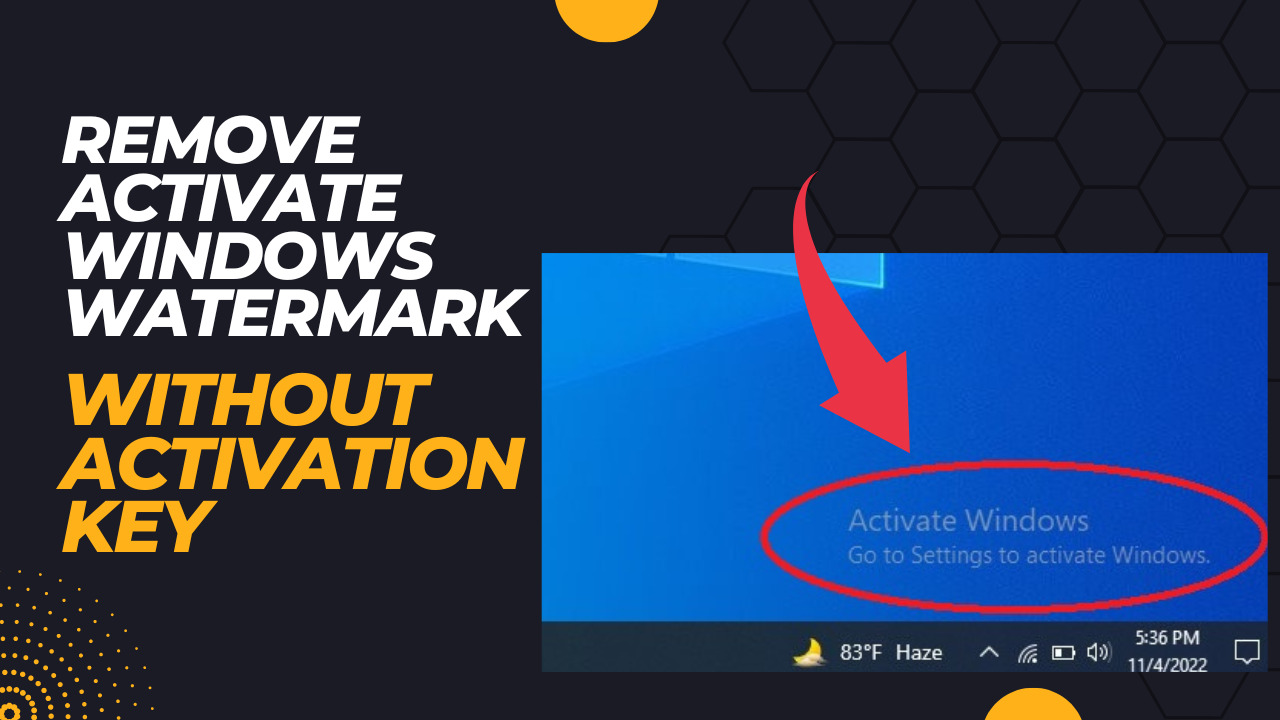 **Reasons Behind the “Activate Windows” watermark** The reasons behind the “Activate Windows" watermark are:- 1) Product Key and Version Incompatibility: This is one of the biggest and most common reasons, and it occurs in the situation when the product key and the installed Windows are different. For example, a user possesses the product key for the Windows Professional and he/she installs Windows Enterprise on the system. 2) Invalid License: Some people provide free unauthentic product keys online, but Microsoft opposes using these types of product keys. Thus, licenses of such product keys are termed invalid, and this watermark is available at the bottom right of the screen. These were the two main reasons that are responsible for this watermark. Now, we will discuss how to get rid of the "Activate Windows" watermark in the below section. **Why Get Rid Of the "Activate Windows" watermark** The most important thing is why you need to get relief from the “Activate Windows” Watermark if it's only a watermark. The watermark, which is placed at the bottom right of the screen, is a source of distraction for the utmost of the users. Also, the watermark signifies your Windows isn't activated, and unactivated Windows doesn't have the following features: *Windows protector/Security Features:* The unactivated Windows doesn't offer the security firewall and Windows Defender safety. *Enable Microsoft Office to be Installed:* You can not install Microsoft office on unactivated Windows, and therefore there is various other software that you can't use on unactivated Windows. *Install Security Updates:* You can not install the rearmost updates and bug fixes on the system to make it more effective and useful if Windows isn't activated. *Personalize Desktop:* You can not change the desktop settings, nor you can change the wallpaper if your Windows isn't activated. Some other features will lack if you have unactivated Windows on your system. **Ways To Fix the “Activate Windows” watermark** There are various ways to fix the “Activate Windows” Watermark. Follow any of the mentioned methods to remove the "Activate Windows" watermark. Method 1: Using Product Key To remove the "Activate Windows" watermark the recommended and most effective way is to use a Product Key. Whenever a user purchases a licensed Windows, then he/she is provided with a product key that can be further used in the system. By using this product key, the user can activate Windows from settings. To remove the "Activate Windows" watermark with a Product Key follow the mentioned steps. Step: 1 Open Settings or press Windows+I from the keyboard and click on “Update & security”. 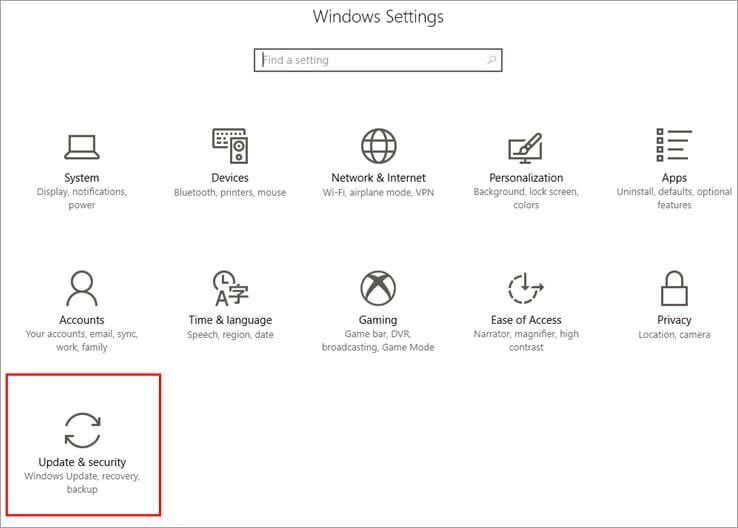.jpg) Step: 2 Click on the “Activation” menu on the left sidebar and then click on “Change product key”. 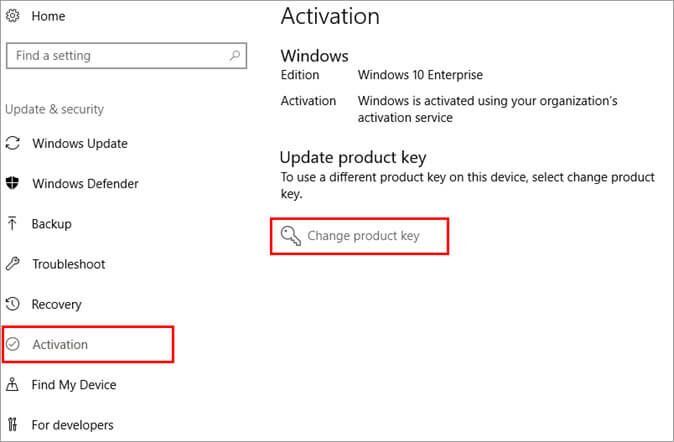.jpg) Step: 3 A dialog box will open up. Enter the product key and click on the “Next” button. 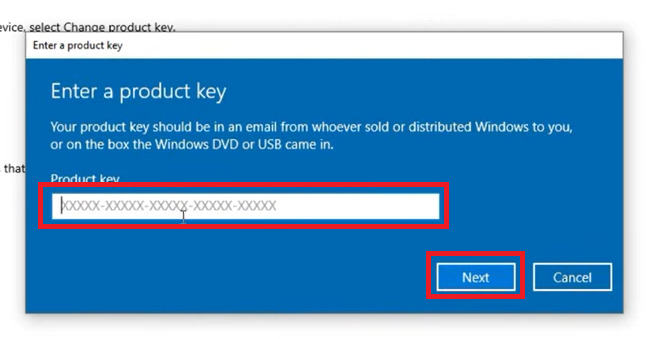.jpg) Step: 4 Then another dialog box will open up. Click on the “Activate” button. 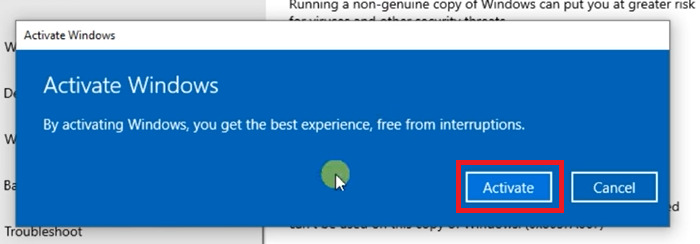.jpg) Finally, restart the computer, and the “Activate Windows” Watermark issue will be fixed. Method 2: Disabling Windows 10 Tips You can also avoid this error by simply disabling the Windows 10 tips provided by the system. To remove the "Activate Windows" watermark by Disabling Windows 10 Tips follow the mentioned steps. Step: 1 Open Settings or press Windows+I from the keyboard. Then, click on “System”. 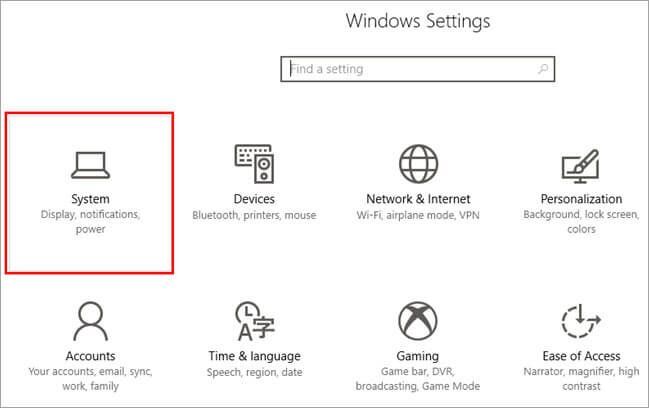.jpg) Step: 2 Then, click on the “Notification & action” menu on the left sidebar and uncheck “Get tips, tricks, and suggestions as you use Windows” and “Show me the Windows welcome experience after updates and occasionally when I sign in to highlight what's new and suggested” options. 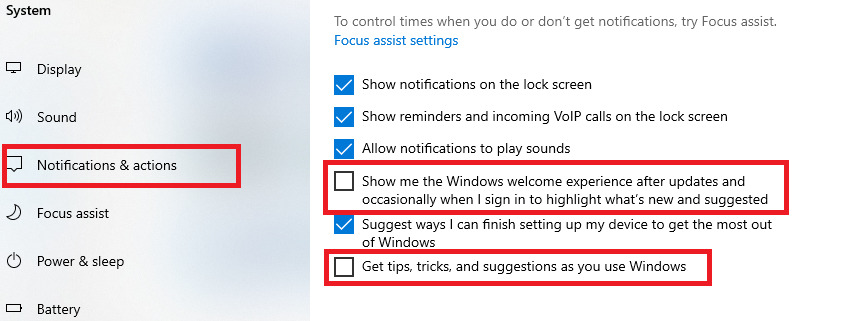.jpg) Finally, restart the computer. After doing this the system will deactivate the tips and tricks for Windows and fix this error. Method 3: Using Registry Editor If you want to remove the "Activate Windows" watermark without cracking your Windows Operating System, and without any third-party software or script, then this method is for you. But remember that, this method involves serious risk, so only a person with a good knowledge of the system personalization should try this method to remove the “Activate Windows” watermark. The method involves making changes in Registry Editor files, which directly affects the system's core files. So, be careful. Step: 1 Press Windows+R from the keyboard and type “regedit” in the search bar, and click on the “OK,” button. 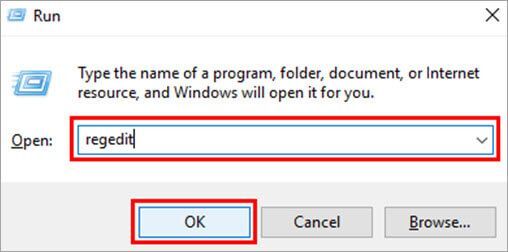.jpg) Step: 2 Enter the mentioned address in the search bar “HKEY_CURRENT_USER\Control Panel\Desktop” and press the “Enter” key on the keyboard. Then, navigate to “Desktop”. And then double-click on the “PaintDesktopVersion” option. 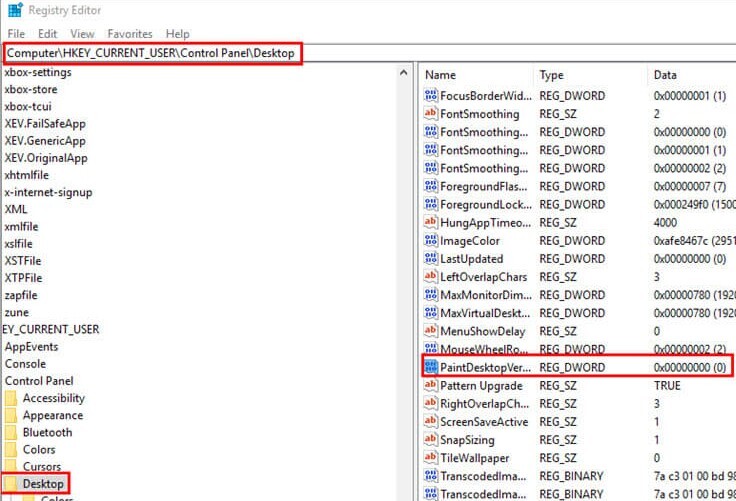.jpg) Step: 3 A dialog box will open up. Change the value data to “1”, and click on the “OK” button. 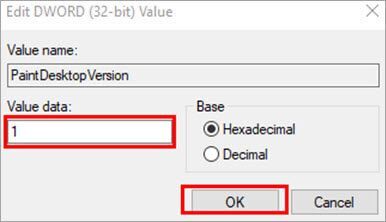.jpg) Finally, restart the computer. After doing this the “Activate Windows” watermark issue will be fixed. Method 4: Using Windows PowerShell The Windows PowerShell will allow you to directly make changes in the core files of the system as it provides special access through all files. To remove the "Activate Windows" watermark by Using Windows PowerShell follow the mentioned steps. Step: 1 Press the Windows button and search for Windows PowerShell. Right-click on “Windows PowerShell” and click on “Run as administrator”. 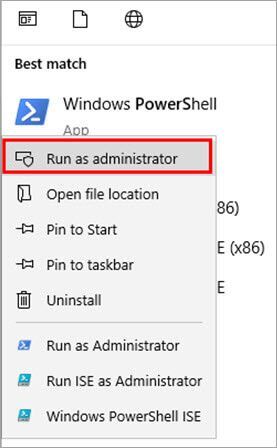.jpg) Step: 2 A window will open. Type “slmgr /renew” and press Enter. .jpg) Now, simply restart the computer, and the issue will be fixed. Method 5: Using Script Windows Explorer is responsible for reminding the user about the “Activation Windows” watermark. By using a script and saving it in batch format, and then running the file as Administrator, you can override this reminder. To remove the "Activate Windows" watermark by Using Script follow the mentioned steps. Step: 1 Firstly, click on the Windows button and search for Notepad. 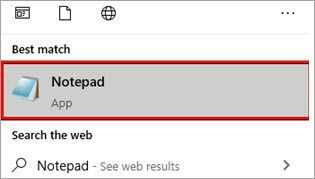.jpg) Step: 2 Copy the below code and paste it into the Notepad. @echo off taskkill /F /IM explorer.exe explorer.exe exit 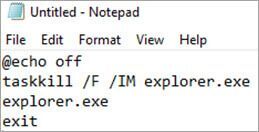.jpg) Step: 3 Save the file as Active.bat and, select the file as All Files. And then click on the “Save” button. 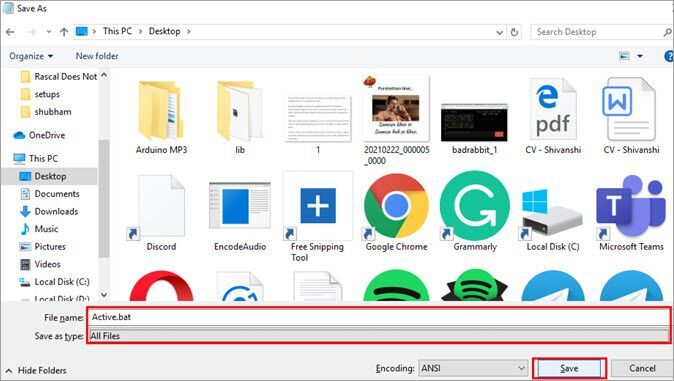.jpg) Step: 4 Locate the file, right-click on it, and then click “Run as Administrator”. 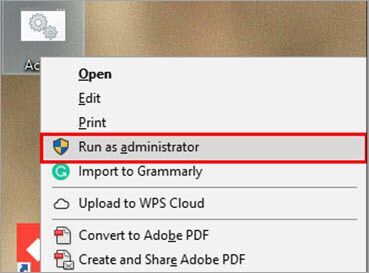.jpg) Now, simply restart the computer, and the “Activate Windows” watermark issue will be fixed. Method 6: Using Third-Party Tools There are various third-party tools available that you can use to fix this “Activate Windows” watermark issue. To remove the "Activate Windows" watermark by Using Third-Party Tools follow the mentioned steps. Step: 1 Download the software from the given link, unzip the download file, and install the exe file in the zip folder. 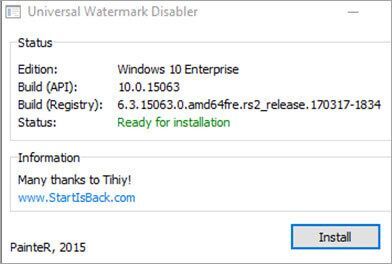.jpg) After installing the software restart the computer, and the error will be resolved. Click here to Download the watermark disabler tool **Frequently Asked Questions** Q-1) What happens if Windows 10 is not activated? Answer: If the user does not activate Windows 10, then he/she will not be able to make any changes in the system and hence won’t be able to personalize the desktop, title bar, and other components on the screen. Q-2) How long unactivated use Windows 10 can be used? Answer: A user can use Windows 10 as long as he/she wants without activating it. But, it is very risky. Because if a user does not activate windows, then malware may affect his/her computer system. Q-3) How do I know if my Windows is activated? Answer: A user can easily check if the Windows on the system is activated or not by following the steps mentioned below. 1. Go to Settings. 2. Click on “Update & security”. 3. Click on the “Activation” menu on the left sidebar. After clicking on the “Activation” menu, you can find the activation status of your system Q-4) Why is there an “Activate Windows” watermark? Answer: There is an “Activate Windows” watermark to maintain the credibility of the Windows operating system, making sure that no one can exploit or pirate the software. Q-5) Is the “Activate Windows” watermark annoying? Answer: It is not annoying for all, but for some users, it can be a bit annoying. It’s just a small transparent logo at the bottom of a desktop, but the most important thing is that you are unable to make changes in various settings and cannot personalize the settings as per your wish. Q-6) How do I remove the Windows 10 activation watermark or How do I permanently remove the “Activate Windows” watermark? Answer: There are various ways to remove the “Activate Windows” watermark. You can learn in detail by reading this article. But for a quick review, the methods are- 1. Using Product Key. 2. Disabling Windows 10 Tips. 3. Using Registry Editor. 4. Using Windows PowerShell. 5. Using Script. 6. Using Third-Party Tools. **Conclusion** Windows can be used efficiently and in the best possible way if it is authentic and is activated on your system. Therefore, in this article, we have discussed all of the issues that arise while using unactivated Windows. To get rid of all these issues follow any of the methods mentioned earlier in this article. Hopefully, these methods will work for you |
| json metadata | {"tags":["hive-172186"],"users":["echo"],"image":["https://cdn.steemitimages.com/DQmRJTSUo9jqaBCTXKxKa5WPPuQARDbeeeN3Lsc6gJ2vd4w/Black%20Minimalist%20Interiors%20Design%20YouTube%20Thumbnail.jpg","https://cdn.steemitimages.com/DQmZQfcrSHNA7uDeFEVRNkR3PXYdt5EH85Q7sCkcTBTrVfk/Windows%20(14).jpg","https://cdn.steemitimages.com/DQmchqqc2s6r35pcLxtRNREQJWTSAKKzejPi9ydKHp7nTrH/Windows%20(7).jpg","https://cdn.steemitimages.com/DQmemdq4PUCGyxANDoK7M9xug2tKBwUWXoktWAtxSGnZwTY/Windows%20(9).jpg","https://cdn.steemitimages.com/DQmW3xu3TBXwWYuFwozYVQttDuMgsNH8fUnvKc9p3YftoVq/Windows%20(10).jpg","https://cdn.steemitimages.com/DQmPdoakQmPzaAHff6ANsMW3cR2fZ3MTRL1NqbTe8ofVcpJ/Windows%20(11).jpg","https://cdn.steemitimages.com/DQmetwfYtuVdfH7GHqBqFrEFzvrrGeHzG5nbHuuivwqmTRB/Windows%20(8).jpg","https://cdn.steemitimages.com/DQmRfUuepDpjLd99RCVi9SLPxHznWqWpquMMWo6Wz2eTZR4/Windows%20(4).jpg","https://cdn.steemitimages.com/DQmZ5oumezCAzfT4VeStwJCLTpoccueKbuqkSpJ2QyUGihC/Windows%20(15).jpg","https://cdn.steemitimages.com/DQmd7ad68FxsGGEfDZZd6tiuxtTxrWw6ckN23eKwXcd24vg/Windows%20(3).jpg","https://cdn.steemitimages.com/DQmZHStaeKAgCCx4JvXJ3iaMk9VP1LWQLpeZx8yYzxnHH31/Windows%20(2).jpg","https://cdn.steemitimages.com/DQmbUPRuTYh9ohQzSW9bkyBJDDEbVunZgCGfDsDCp8oEh2S/Windows%20(16).jpg","https://cdn.steemitimages.com/DQmPNJ74wpTFpjNte52LvbziP9XRW3XCyjiKBj5C2PuPEy9/Windows%20(1).jpg","https://cdn.steemitimages.com/DQmewwT8CDiMpfryPYFZDU5z5ae6ms7H4ATARnCxxeQM9rU/Windows%20(6).jpg","https://cdn.steemitimages.com/DQmajNbwbMaCoToe77RTXP2yemvBWZtDFRVbfoCAQpWH8iv/Windows%20(12).jpg","https://cdn.steemitimages.com/DQmXVpYLYJCUxovrZHbVbFgmWHUx3Q3zn94YQFrMg34ZHrE/Windows%20(13).jpg","https://cdn.steemitimages.com/DQmby6EdLwizyzRVXQd8VNTCFxJJnmL3KfYGK8FvmWMm6Cq/Windows%20(5).jpg"],"app":"steemit/0.2","format":"markdown"} |
| Transaction Info | Block #69367240/Trx 08ba322000d643ba264ad45dd7648caf7d816723 |
View Raw JSON Data
{
"trx_id": "08ba322000d643ba264ad45dd7648caf7d816723",
"block": 69367240,
"trx_in_block": 1,
"op_in_trx": 0,
"virtual_op": 0,
"timestamp": "2022-11-12T08:19:54",
"op": [
"comment",
{
"parent_author": "",
"parent_permlink": "hive-172186",
"author": "tecwikki",
"permlink": "how-to-remove-activate-windows-watermark",
"title": "How to Remove Activate Windows Watermark",
"body": "As the most popular and user-friendly operating system, Windows has the largest user base worldwide, and it provides its users with various exemplary services which are in great demand. The \"Activate Windows\" watermark is a common issue faced by users while using Windows. In this case, a transparent Watermark appears at the bottom of the desktop, and it is very annoying for some of the users to see this watermark on the screen while operating their system.\n\n\n\n\n**Reasons Behind the “Activate Windows” watermark**\n\nThe reasons behind the “Activate Windows\" watermark are:-\n\n1) Product Key and Version Incompatibility:\nThis is one of the biggest and most common reasons, and it occurs in the situation when the product key and the installed Windows are different. For example, a user possesses the product key for the Windows Professional and he/she installs Windows Enterprise on the system.\n\n2) Invalid License:\nSome people provide free unauthentic product keys online, but Microsoft opposes using these types of product keys. Thus, licenses of such product keys are termed invalid, and this watermark is available at the bottom right of the screen.\n\nThese were the two main reasons that are responsible for this watermark. Now, we will discuss how to get rid of the \"Activate Windows\" watermark in the below section.\n\n\n**Why Get Rid Of the \"Activate Windows\" watermark**\n\nThe most important thing is why you need to get relief from the “Activate Windows” Watermark if it's only a watermark. The watermark, which is placed at the bottom right of the screen, is a source of distraction for the utmost of the users. Also, the watermark signifies your Windows isn't activated, and unactivated Windows doesn't have the following features:\n\n*Windows protector/Security Features:* The unactivated Windows doesn't offer the security firewall and Windows Defender safety.\n*Enable Microsoft Office to be Installed:* You can not install Microsoft office on unactivated Windows, and therefore there is various other software that you can't use on unactivated Windows.\n*Install Security Updates:* You can not install the rearmost updates and bug fixes on the system to make it more effective and useful if Windows isn't activated.\n*Personalize Desktop:* You can not change the desktop settings, nor you can change the wallpaper if your Windows isn't activated.\n\nSome other features will lack if you have unactivated Windows on your system.\n\n\n**Ways To Fix the “Activate Windows” watermark**\n\nThere are various ways to fix the “Activate Windows” Watermark. Follow any of the mentioned methods to remove the \"Activate Windows\" watermark.\n\nMethod 1: Using Product Key\n\nTo remove the \"Activate Windows\" watermark the recommended and most effective way is to use a Product Key. Whenever a user purchases a licensed Windows, then he/she is provided with a product key that can be further used in the system. By using this product key, the user can activate Windows from settings. To remove the \"Activate Windows\" watermark with a Product Key follow the mentioned steps.\n\nStep: 1\nOpen Settings or press Windows+I from the keyboard and click on “Update & security”.\n.jpg)\n\nStep: 2\nClick on the “Activation” menu on the left sidebar and then click on “Change product key”.\n.jpg)\n\nStep: 3\nA dialog box will open up. Enter the product key and click on the “Next” button.\n.jpg)\n\nStep: 4\nThen another dialog box will open up. Click on the “Activate” button.\n.jpg)\n\nFinally, restart the computer, and the “Activate Windows” Watermark issue will be fixed.\n\nMethod 2: Disabling Windows 10 Tips\n\nYou can also avoid this error by simply disabling the Windows 10 tips provided by the system. To remove the \"Activate Windows\" watermark by Disabling Windows 10 Tips follow the mentioned steps.\n\nStep: 1\nOpen Settings or press Windows+I from the keyboard. Then, click on “System”.\n.jpg)\n\nStep: 2\nThen, click on the “Notification & action” menu on the left sidebar and uncheck “Get tips, tricks, and suggestions as you use Windows” and “Show me the Windows welcome experience after updates and occasionally when I sign in to highlight what's new and suggested” options.\n.jpg)\n\nFinally, restart the computer. After doing this the system will deactivate the tips and tricks for Windows and fix this error.\n\n\nMethod 3: Using Registry Editor\n\nIf you want to remove the \"Activate Windows\" watermark without cracking your Windows Operating System, and without any third-party software or script, then this method is for you. But remember that, this method involves serious risk, so only a person with a good knowledge of the system personalization should try this method to remove the “Activate Windows” watermark. The method involves making changes in Registry Editor files, which directly affects the system's core files. So, be careful.\n\nStep: 1\nPress Windows+R from the keyboard and type “regedit” in the search bar, and click on the “OK,” button.\n.jpg)\n\nStep: 2\nEnter the mentioned address in the search bar “HKEY_CURRENT_USER\\Control Panel\\Desktop” and press the “Enter” key on the keyboard. Then, navigate to “Desktop”. And then double-click on the “PaintDesktopVersion” option.\n.jpg)\n\nStep: 3\nA dialog box will open up. Change the value data to “1”, and click on the “OK” button.\n.jpg)\n\nFinally, restart the computer. After doing this the “Activate Windows” watermark issue will be fixed.\n\n\nMethod 4: Using Windows PowerShell\n\nThe Windows PowerShell will allow you to directly make changes in the core files of the system as it provides special access through all files. To remove the \"Activate Windows\" watermark by Using Windows PowerShell follow the mentioned steps.\n\nStep: 1\nPress the Windows button and search for Windows PowerShell. Right-click on “Windows PowerShell” and click on “Run as administrator”.\n.jpg)\n\nStep: 2\nA window will open. Type “slmgr /renew” and press Enter.\n.jpg)\n\nNow, simply restart the computer, and the issue will be fixed.\n\n\nMethod 5: Using Script\n\nWindows Explorer is responsible for reminding the user about the “Activation Windows” watermark. By using a script and saving it in batch format, and then running the file as Administrator, you can override this reminder. To remove the \"Activate Windows\" watermark by Using Script follow the mentioned steps.\n\nStep: 1\nFirstly, click on the Windows button and search for Notepad.\n.jpg)\n\nStep: 2\nCopy the below code and paste it into the Notepad.\n\n@echo off\ntaskkill /F /IM explorer.exe\nexplorer.exe\nexit\n\n.jpg)\n\nStep: 3\nSave the file as Active.bat and, select the file as All Files. And then click on the “Save” button.\n.jpg)\n\nStep: 4\n\nLocate the file, right-click on it, and then click “Run as Administrator”.\n.jpg)\n\nNow, simply restart the computer, and the “Activate Windows” watermark issue will be fixed.\n\n\nMethod 6: Using Third-Party Tools\n\nThere are various third-party tools available that you can use to fix this “Activate Windows” watermark issue. To remove the \"Activate Windows\" watermark by Using Third-Party Tools follow the mentioned steps.\n\nStep: 1\nDownload the software from the given link, unzip the download file, and install the exe file in the zip folder.\n.jpg)\n\nAfter installing the software restart the computer, and the error will be resolved.\n\n\nClick here to Download the watermark disabler tool\n\n\n\n**Frequently Asked Questions**\n\nQ-1) What happens if Windows 10 is not activated?\nAnswer: If the user does not activate Windows 10, then he/she will not be able to make any changes in the system and hence won’t be able to personalize the desktop, title bar, and other components on the screen.\n\nQ-2) How long unactivated use Windows 10 can be used?\nAnswer: A user can use Windows 10 as long as he/she wants without activating it. But, it is very risky. Because if a user does not activate windows, then malware may affect his/her computer system.\n\nQ-3) How do I know if my Windows is activated?\nAnswer: A user can easily check if the Windows on the system is activated or not by following the steps mentioned below.\n1. Go to Settings.\n2. Click on “Update & security”.\n3. Click on the “Activation” menu on the left sidebar. After clicking on the “Activation” menu, you can find the activation status of your system\n\nQ-4) Why is there an “Activate Windows” watermark?\nAnswer: There is an “Activate Windows” watermark to maintain the credibility of the Windows operating system, making sure that no one can exploit or pirate the software.\n\nQ-5) Is the “Activate Windows” watermark annoying?\nAnswer: It is not annoying for all, but for some users, it can be a bit annoying. It’s just a small transparent logo at the bottom of a desktop, but the most important thing is that you are unable to make changes in various settings and cannot personalize the settings as per your wish.\n\nQ-6) How do I remove the Windows 10 activation watermark or How do I permanently remove the “Activate Windows” watermark?\nAnswer: There are various ways to remove the “Activate Windows” watermark. You can learn in detail by reading this article. But for a quick review, the methods are-\n\n1. Using Product Key.\n2. Disabling Windows 10 Tips.\n3. Using Registry Editor.\n4. Using Windows PowerShell.\n5. Using Script.\n6. Using Third-Party Tools.\n\n\n**Conclusion**\n\nWindows can be used efficiently and in the best possible way if it is authentic and is activated on your system. Therefore, in this article, we have discussed all of the issues that arise while using unactivated Windows. To get rid of all these issues follow any of the methods mentioned earlier in this article. Hopefully, these methods will work for you",
"json_metadata": "{\"tags\":[\"hive-172186\"],\"users\":[\"echo\"],\"image\":[\"https://cdn.steemitimages.com/DQmRJTSUo9jqaBCTXKxKa5WPPuQARDbeeeN3Lsc6gJ2vd4w/Black%20Minimalist%20Interiors%20Design%20YouTube%20Thumbnail.jpg\",\"https://cdn.steemitimages.com/DQmZQfcrSHNA7uDeFEVRNkR3PXYdt5EH85Q7sCkcTBTrVfk/Windows%20(14).jpg\",\"https://cdn.steemitimages.com/DQmchqqc2s6r35pcLxtRNREQJWTSAKKzejPi9ydKHp7nTrH/Windows%20(7).jpg\",\"https://cdn.steemitimages.com/DQmemdq4PUCGyxANDoK7M9xug2tKBwUWXoktWAtxSGnZwTY/Windows%20(9).jpg\",\"https://cdn.steemitimages.com/DQmW3xu3TBXwWYuFwozYVQttDuMgsNH8fUnvKc9p3YftoVq/Windows%20(10).jpg\",\"https://cdn.steemitimages.com/DQmPdoakQmPzaAHff6ANsMW3cR2fZ3MTRL1NqbTe8ofVcpJ/Windows%20(11).jpg\",\"https://cdn.steemitimages.com/DQmetwfYtuVdfH7GHqBqFrEFzvrrGeHzG5nbHuuivwqmTRB/Windows%20(8).jpg\",\"https://cdn.steemitimages.com/DQmRfUuepDpjLd99RCVi9SLPxHznWqWpquMMWo6Wz2eTZR4/Windows%20(4).jpg\",\"https://cdn.steemitimages.com/DQmZ5oumezCAzfT4VeStwJCLTpoccueKbuqkSpJ2QyUGihC/Windows%20(15).jpg\",\"https://cdn.steemitimages.com/DQmd7ad68FxsGGEfDZZd6tiuxtTxrWw6ckN23eKwXcd24vg/Windows%20(3).jpg\",\"https://cdn.steemitimages.com/DQmZHStaeKAgCCx4JvXJ3iaMk9VP1LWQLpeZx8yYzxnHH31/Windows%20(2).jpg\",\"https://cdn.steemitimages.com/DQmbUPRuTYh9ohQzSW9bkyBJDDEbVunZgCGfDsDCp8oEh2S/Windows%20(16).jpg\",\"https://cdn.steemitimages.com/DQmPNJ74wpTFpjNte52LvbziP9XRW3XCyjiKBj5C2PuPEy9/Windows%20(1).jpg\",\"https://cdn.steemitimages.com/DQmewwT8CDiMpfryPYFZDU5z5ae6ms7H4ATARnCxxeQM9rU/Windows%20(6).jpg\",\"https://cdn.steemitimages.com/DQmajNbwbMaCoToe77RTXP2yemvBWZtDFRVbfoCAQpWH8iv/Windows%20(12).jpg\",\"https://cdn.steemitimages.com/DQmXVpYLYJCUxovrZHbVbFgmWHUx3Q3zn94YQFrMg34ZHrE/Windows%20(13).jpg\",\"https://cdn.steemitimages.com/DQmby6EdLwizyzRVXQd8VNTCFxJJnmL3KfYGK8FvmWMm6Cq/Windows%20(5).jpg\"],\"app\":\"steemit/0.2\",\"format\":\"markdown\"}"
}
]
}tecwikkireplied to @ripon0630 / rl6e1t2022/11/11 08:53:54
tecwikkireplied to @ripon0630 / rl6e1t
2022/11/11 08:53:54
| parent author | ripon0630 |
| parent permlink | rkry5p |
| author | tecwikki |
| permlink | rl6e1t |
| title | |
| body | I have edited the post according to your recommendation. I would be very happy if you recheck the post, and let me know if there are any mistakes. |
| json metadata | {"app":"steemit/0.2"} |
| Transaction Info | Block #69339238/Trx 2d1f907a76814153ce437605dddc301b34b2ca82 |
View Raw JSON Data
{
  "trx_id": "2d1f907a76814153ce437605dddc301b34b2ca82",
  "block": 69339238,
  "trx_in_block": 2,
  "op_in_trx": 0,
  "virtual_op": 0,
  "timestamp": "2022-11-11T08:53:54",
  "op": [
    "comment",
    {
      "parent_author": "ripon0630",
      "parent_permlink": "rkry5p",
      "author": "tecwikki",
      "permlink": "rl6e1t",
      "title": "",
      "body": "I have edited the post according to your recommendation. I would be very happy if you recheck the post, and let me know if there are any mistakes.",
      "json_metadata": "{\"app\":\"steemit/0.2\"}"
    }
  ]
}tecwikkicustom json: notify2022/11/11 08:44:39
tecwikkicustom json: notify
2022/11/11 08:44:39
| required auths | [] |
| required posting auths | ["tecwikki"] |
| id | notify |
| json | ["setLastRead",{"date":"2022-11-11T08:44:39"}] |
| Transaction Info | Block #69339053/Trx 3a82c68f9d99503a631b63bf7e7ac644bdc41840 |
View Raw JSON Data
{
  "trx_id": "3a82c68f9d99503a631b63bf7e7ac644bdc41840",
  "block": 69339053,
  "trx_in_block": 6,
  "op_in_trx": 0,
  "virtual_op": 0,
  "timestamp": "2022-11-11T08:44:39",
  "op": [
    "custom_json",
    {
      "required_auths": [],
      "required_posting_auths": [
        "tecwikki"
      ],
      "id": "notify",
      "json": "[\"setLastRead\",{\"date\":\"2022-11-11T08:44:39\"}]"
    }
  ]
}tecwikkideleted a comment or post2022/11/10 12:24:06
tecwikkideleted a comment or post
2022/11/10 12:24:06
| author | tecwikki |
| permlink | rkyid0 |
| Transaction Info | Block #69314751/Trx cb74695321a35ccbf539e223948b8e037795abea |
View Raw JSON Data
{
  "trx_id": "cb74695321a35ccbf539e223948b8e037795abea",
  "block": 69314751,
  "trx_in_block": 0,
  "op_in_trx": 0,
  "virtual_op": 0,
  "timestamp": "2022-11-10T12:24:06",
  "op": [
    "delete_comment",
    {
      "author": "tecwikki",
      "permlink": "rkyid0"
    }
  ]
}tecwikkipublished a new post: achievement-1-or-or-introducing-myself2022/11/10 12:24:00
tecwikkipublished a new post: achievement-1-or-or-introducing-myself
2022/11/10 12:24:00
| parent author | |
| parent permlink | hive-172186 |
| author | tecwikki |
| permlink | achievement-1-or-or-introducing-myself |
| title | Achievement-1 || Introducing Myself |
| body | Hope all are doing well. I'm a newbie for Steemit and I am really excited to be here and to become a part of this beautiful platform. My Steemit username is @tecwikki So, as a beginning, let me give you a brief introduction about myself. 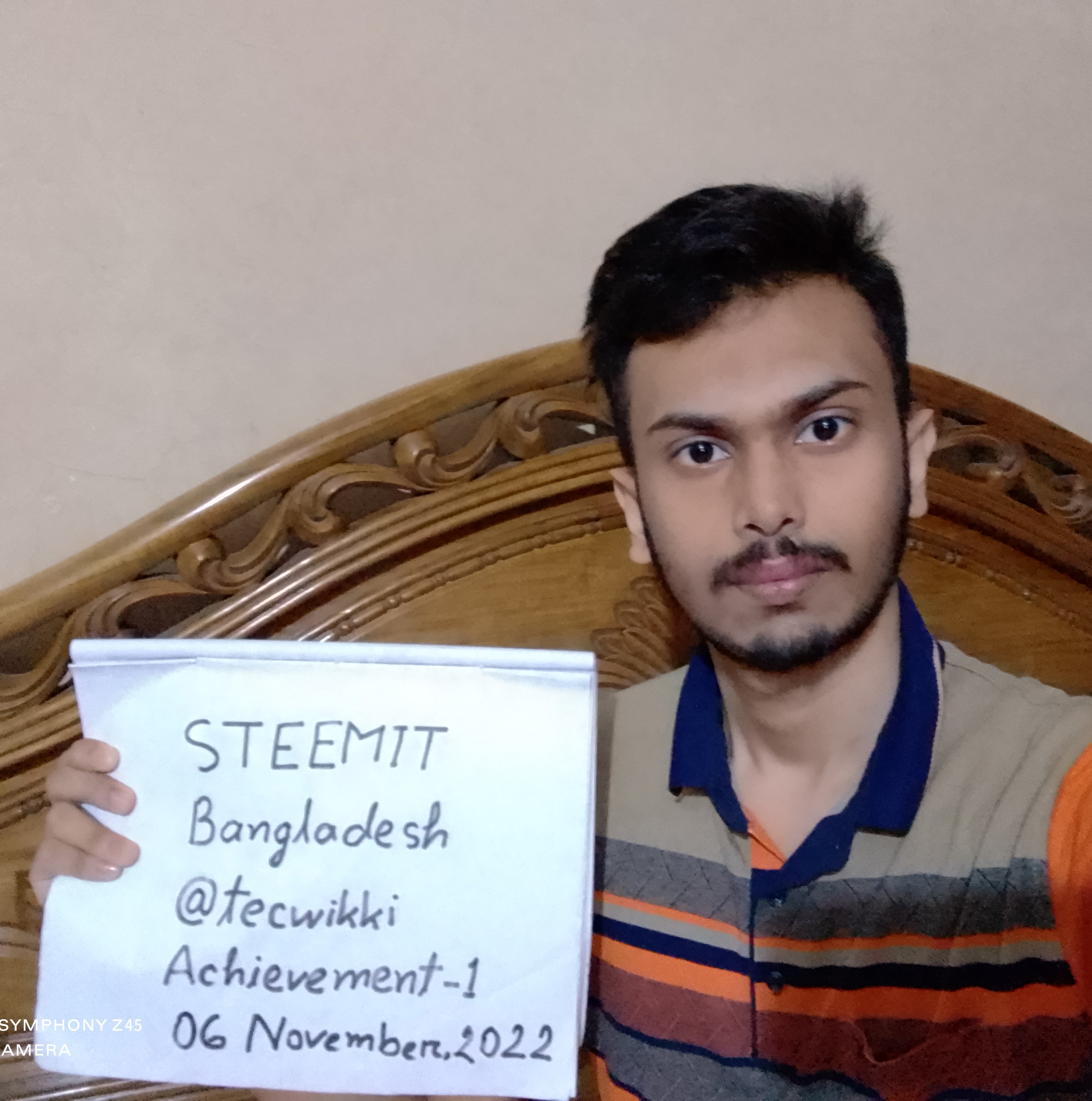 I'm Sazid Ahsan, a year old and I am from Bangladesh. I'm just HSC from Abdul Kadir Mollah City College and currently, I am working as a content writer online. I hope to learn more and improve myself while getting industry experience. Actually when I look back in time now, the years I spent at my college was the most interesting years that I was gifted in my life. Most of the time, although I and my beloved friends were very busy with our studies, attending daily lectures, getting ready for exams, and of course doing our research, we didn't forget to enjoy life as well. So those beautiful years are still filled with lovely memories of us, organizing and attending many fun events, traveling around the country, learning and growing together by helping each other, and many more. Few of those beautiful memories 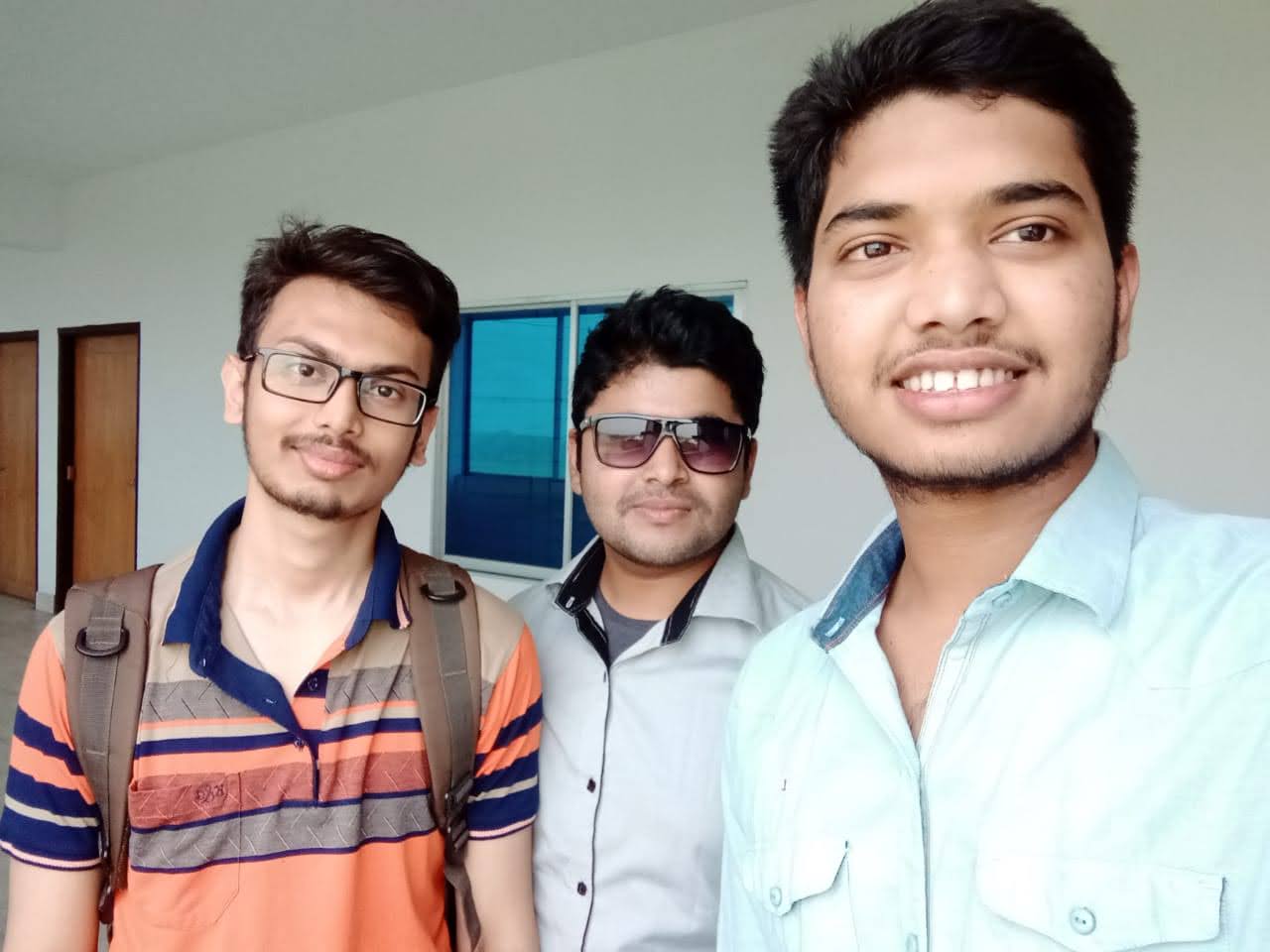 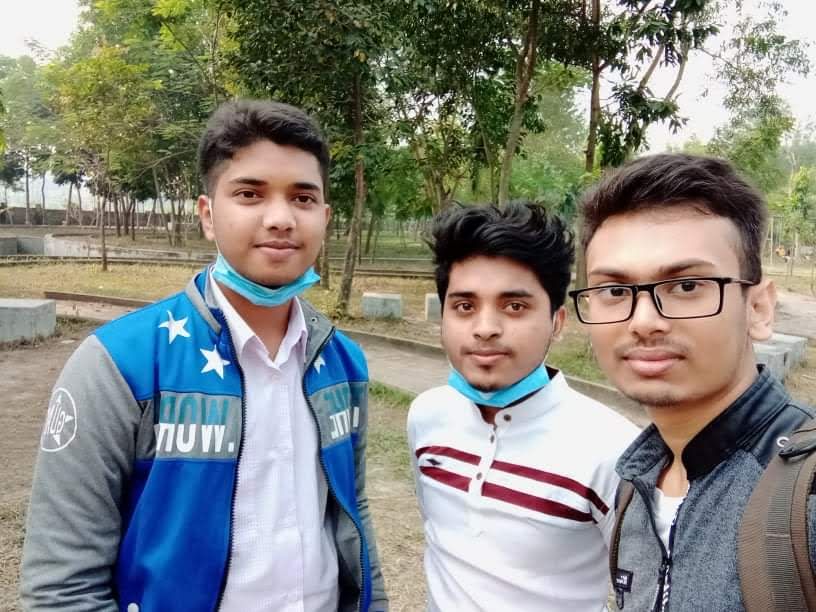 On the other hand, my small family is the strongest strength behind me in every up and down of my life ever. My father, mother, and younger brother are the people who have the amazing ability to comfort my heart all the time. 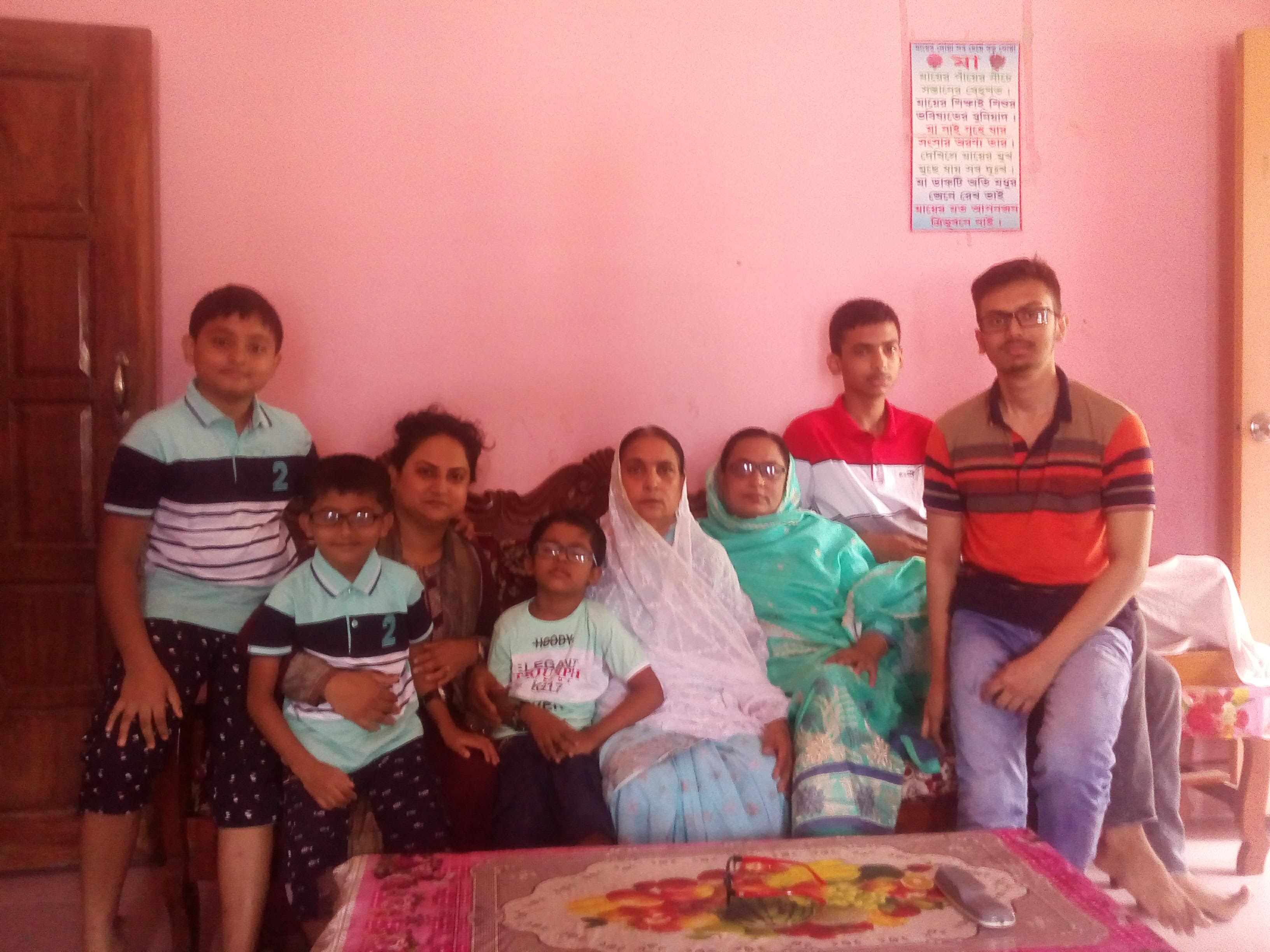 I'm in love with traveling. I have visited lots of beautiful places in my country including Sonargaon, Chittagong, Sylhet, St. Martin's Island, Cox's Bazar, Srimangal, and many more. I love observing nature and looking at green environments filled with natural beauty. I think it is the greatest feeling one can have out of everything. The ability of nature to heal both our minds and bodies is just amazing. And also I love reading books, watching movies, and internet browsing as well. I love internet browsing and knowing different things about technology. And, I also love content creation and coding. On this beautiful platform, I'm willing to share posts about different things about technology, my different kinds of experiences, my ideas, my achievements, and many more. And I hope to explore the posts by others related to technology. I, hope to explore another new and interesting field as well. And I hope Steemit will be a great place for me to make new friends all around the world. I got to know about Steemit from a YouTuber @aniksikder. I'm very grateful for introducing Steemit to me and for the continuous guidance and support are given. Actually, this is going to be my very first experience with crypto. And I’m willing to gain this new experience and become a valuable contributor to the platform. Thank you! Best Regards! |
| json metadata | {"tags":["achievement1","introducingmyself","bangladesh","steemexclusive","steemit","steem"],"users":["tecwikki","aniksikder"],"image":["https://cdn.steemitimages.com/DQmRELD8axRxC89AKyQ2TV7tLAGdL5GhNRbuTwfQXMpweyq/IMG_20221106_113732.jpg","https://cdn.steemitimages.com/DQmbK9hfRBcLbyYcETQeyA6JXVSnAaCvZLWAtSFHAa7kb5p/IMG-20210323-WA0002.jpg","https://cdn.steemitimages.com/DQmaSDtZbaiMWKQCk9W6gytqWRExiHr1qV4k5rauTKEcX9d/received_392681192004344.jpg","https://cdn.steemitimages.com/DQmU3eVu4JVZPG5iYDqxpUtAWErAwQL8Z1sPJnHVA9ywud1/IMG_20210521_125000.jpg"],"app":"steemit/0.2","format":"markdown"} |
| Transaction Info | Block #69314749/Trx d9d5d97544c0971864e13cb706dd01e6a99737a7 |
View Raw JSON Data
{
"trx_id": "d9d5d97544c0971864e13cb706dd01e6a99737a7",
"block": 69314749,
"trx_in_block": 2,
"op_in_trx": 0,
"virtual_op": 0,
"timestamp": "2022-11-10T12:24:00",
"op": [
"comment",
{
"parent_author": "",
"parent_permlink": "hive-172186",
"author": "tecwikki",
"permlink": "achievement-1-or-or-introducing-myself",
"title": "Achievement-1 || Introducing Myself",
"body": "Hope all are doing well. I'm a newbie for Steemit and I am really excited to be here and to become a part of this beautiful platform. My Steemit username is @tecwikki So, as a beginning, let me give you a brief introduction about myself.\n\n\n\n\n\n\nI'm Sazid Ahsan, a year old and I am from Bangladesh. I'm just HSC from Abdul Kadir Mollah City College and currently, I am working as a content writer online. I hope to learn more and improve myself while getting industry experience.\n\nActually when I look back in time now, the years I spent at my college was the most interesting years that I was gifted in my life. Most of the time, although I and my beloved friends were very busy with our studies, attending daily lectures, getting ready for exams, and of course doing our research, we didn't forget to enjoy life as well. So those beautiful years are still filled with lovely memories of us, organizing and attending many fun events, traveling around the country, learning and growing together by helping each other, and many more.\n\nFew of those beautiful memories\n\n\n\n\n\n\nOn the other hand, my small family is the strongest strength behind me in every up and down of my life ever. My father, mother, and younger brother are the people who have the amazing ability to comfort my heart all the time.\n\n\n\n\nI'm in love with traveling. I have visited lots of beautiful places in my country including Sonargaon, Chittagong, Sylhet, St. Martin's Island, Cox's Bazar, Srimangal, and many more. I love observing nature and looking at green environments filled with natural beauty. I think it is the greatest feeling one can have out of everything. The ability of nature to heal both our minds and bodies is just amazing.\n\nAnd also I love reading books, watching movies, and internet browsing as well. I love internet browsing and knowing different things about technology. And, I also love content creation and coding.\n\nOn this beautiful platform, I'm willing to share posts about different things about technology, my different kinds of experiences, my ideas, my achievements, and many more. And I hope to explore the posts by others related to technology. I, hope to explore another new and interesting field as well. And I hope Steemit will be a great place for me to make new friends all around the world.\n\nI got to know about Steemit from a YouTuber @aniksikder. I'm very grateful for introducing Steemit to me and for the continuous guidance and support are given.\n\nActually, this is going to be my very first experience with crypto. And I’m willing to gain this new experience and become a valuable contributor to the platform.\n\nThank you!\n\nBest Regards!",
"json_metadata": "{\"tags\":[\"achievement1\",\"introducingmyself\",\"bangladesh\",\"steemexclusive\",\"steemit\",\"steem\"],\"users\":[\"tecwikki\",\"aniksikder\"],\"image\":[\"https://cdn.steemitimages.com/DQmRELD8axRxC89AKyQ2TV7tLAGdL5GhNRbuTwfQXMpweyq/IMG_20221106_113732.jpg\",\"https://cdn.steemitimages.com/DQmbK9hfRBcLbyYcETQeyA6JXVSnAaCvZLWAtSFHAa7kb5p/IMG-20210323-WA0002.jpg\",\"https://cdn.steemitimages.com/DQmaSDtZbaiMWKQCk9W6gytqWRExiHr1qV4k5rauTKEcX9d/received_392681192004344.jpg\",\"https://cdn.steemitimages.com/DQmU3eVu4JVZPG5iYDqxpUtAWErAwQL8Z1sPJnHVA9ywud1/IMG_20210521_125000.jpg\"],\"app\":\"steemit/0.2\",\"format\":\"markdown\"}"
}
]
}tecwikkireplied to @ripon0630 / rkyid02022/11/07 02:46:12
tecwikkireplied to @ripon0630 / rkyid0
2022/11/07 02:46:12
| parent author | ripon0630 |
| parent permlink | rkry5p |
| author | tecwikki |
| permlink | rkyid0 |
| title | |
| body | Dear MOD, I have made some changes according to your suggestions. Hopefully, that would be enough for approval. |
| json metadata | {"app":"steemit/0.2"} |
| Transaction Info | Block #69217277/Trx 5025a21e16d4d16302229da6bd211685c291d3a8 |
View Raw JSON Data
{
  "trx_id": "5025a21e16d4d16302229da6bd211685c291d3a8",
  "block": 69217277,
  "trx_in_block": 4,
  "op_in_trx": 0,
  "virtual_op": 0,
  "timestamp": "2022-11-07T02:46:12",
  "op": [
    "comment",
    {
      "parent_author": "ripon0630",
      "parent_permlink": "rkry5p",
      "author": "tecwikki",
      "permlink": "rkyid0",
      "title": "",
      "body": "Dear MOD,\n\nI have made some changes according to your suggestions. Hopefully, that would be enough for approval.",
      "json_metadata": "{\"app\":\"steemit/0.2\"}"
    }
  ]
}realmankwonupvoted (50.00%) @tecwikki / achievement-1-or-or-introducing-myself2022/11/06 08:51:45
realmankwonupvoted (50.00%) @tecwikki / achievement-1-or-or-introducing-myself
2022/11/06 08:51:45
| voter | realmankwon |
| author | tecwikki |
| permlink | achievement-1-or-or-introducing-myself |
| weight | 5000 (50.00%) |
| Transaction Info | Block #69195880/Trx 36b4de7310c3e7eda43bcea91e924504ae1b7b55 |
View Raw JSON Data
{
  "trx_id": "36b4de7310c3e7eda43bcea91e924504ae1b7b55",
  "block": 69195880,
  "trx_in_block": 4,
  "op_in_trx": 0,
  "virtual_op": 0,
  "timestamp": "2022-11-06T08:51:45",
  "op": [
    "vote",
    {
      "voter": "realmankwon",
      "author": "tecwikki",
      "permlink": "achievement-1-or-or-introducing-myself",
      "weight": 5000
    }
  ]
}mcgomeupvoted (50.00%) @tecwikki / achievement-1-or-or-introducing-myself2022/11/06 08:51:42
mcgomeupvoted (50.00%) @tecwikki / achievement-1-or-or-introducing-myself
2022/11/06 08:51:42
| voter | mcgome |
| author | tecwikki |
| permlink | achievement-1-or-or-introducing-myself |
| weight | 5000 (50.00%) |
| Transaction Info | Block #69195879/Trx d66cdc746b5eed593714e9b512b6866a085defcd |
View Raw JSON Data
{
  "trx_id": "d66cdc746b5eed593714e9b512b6866a085defcd",
  "block": 69195879,
  "trx_in_block": 4,
  "op_in_trx": 0,
  "virtual_op": 0,
  "timestamp": "2022-11-06T08:51:42",
  "op": [
    "vote",
    {
      "voter": "mcgome",
      "author": "tecwikki",
      "permlink": "achievement-1-or-or-introducing-myself",
      "weight": 5000
    }
  ]
}allnewsupvoted (50.00%) @tecwikki / achievement-1-or-or-introducing-myself2022/11/06 08:51:39
allnewsupvoted (50.00%) @tecwikki / achievement-1-or-or-introducing-myself
2022/11/06 08:51:39
| voter | allnews |
| author | tecwikki |
| permlink | achievement-1-or-or-introducing-myself |
| weight | 5000 (50.00%) |
| Transaction Info | Block #69195878/Trx a46c7efcf8e06e7e018ddeee2dafd6af4fc1ff4d |
View Raw JSON Data
{
  "trx_id": "a46c7efcf8e06e7e018ddeee2dafd6af4fc1ff4d",
  "block": 69195878,
  "trx_in_block": 2,
  "op_in_trx": 0,
  "virtual_op": 0,
  "timestamp": "2022-11-06T08:51:39",
  "op": [
    "vote",
    {
      "voter": "allnews",
      "author": "tecwikki",
      "permlink": "achievement-1-or-or-introducing-myself",
      "weight": 5000
    }
  ]
}tecwikkipublished a new post: achievement-1-or-or-introducing-myself2022/11/06 05:54:18
tecwikkipublished a new post: achievement-1-or-or-introducing-myself
2022/11/06 05:54:18
| parent author | |
| parent permlink | hive-172186 |
| author | tecwikki |
| permlink | achievement-1-or-or-introducing-myself |
| title | Achievement-1 || Introducing Myself |
| body | @@ -235,17 +235,50 @@ and -I studied +my school is NKM. Currently, I am studying at @@ -283,16 +283,24 @@ t AKMCC +college in Narsi @@ -340,16 +340,17 @@ ikki.%0A%0A%0A +%0A !%5BIMG_20 @@ -350,32 +350,32 @@ %5BIMG_2022110 -3_121254 +6_113732 .jpg%5D(https: @@ -405,52 +405,52 @@ /DQm -cn8ro8unpL72WDiWy6Wc7cEiBcy2LFvcVL2eeUZfowLh +RELD8axRxC89AKyQ2TV7tLAGdL5GhNRbuTwfQXMpweyq /IMG @@ -461,24 +461,25 @@ 2110 -3_121254 +6_113732 .jpg)%0A%0A%0A +%0A My f @@ -610,22 +610,27 @@ eacher. -I love +My hobby is interne @@ -1028,17 +1028,144 @@ 2.jpg)%0A%0A -F +I came to know about Steemit while I am searching about blockchain technology and decentralized platforms on the internet. The f irst tim @@ -1220,16 +1220,20 @@ crypto +was in 2020. |
| json metadata | {"tags":["achievement1","introducingmyself","bangladesh","steemexclusive","steemit","steem"],"users":["tecwikki"],"image":["https://cdn.steemitimages.com/DQmRELD8axRxC89AKyQ2TV7tLAGdL5GhNRbuTwfQXMpweyq/IMG_20221106_113732.jpg","https://cdn.steemitimages.com/DQmQcjB3NgDHizQYo4QrQrZBwz1zMEDUDWmFHZ9auv1tcun/FB_IMG_1615446945379.jpg","https://cdn.steemitimages.com/DQmbK9hfRBcLbyYcETQeyA6JXVSnAaCvZLWAtSFHAa7kb5p/IMG-20210323-WA0002.jpg"],"app":"steemit/0.2","format":"markdown"} |
| Transaction Info | Block #69192347/Trx 04b5fbdc10a39fd0c419f88093279b6d3b0e0879 |
View Raw JSON Data
{
  "trx_id": "04b5fbdc10a39fd0c419f88093279b6d3b0e0879",
  "block": 69192347,
  "trx_in_block": 0,
  "op_in_trx": 0,
  "virtual_op": 0,
  "timestamp": "2022-11-06T05:54:18",
  "op": [
    "comment",
    {
      "parent_author": "",
      "parent_permlink": "hive-172186",
      "author": "tecwikki",
      "permlink": "achievement-1-or-or-introducing-myself",
      "title": "Achievement-1 || Introducing Myself",
      "body": "@@ -235,17 +235,50 @@\n and \n-I studied\n+my school is NKM. Currently, I am studying\n  at \n@@ -283,16 +283,24 @@\n t AKMCC \n+college \n in Narsi\n@@ -340,16 +340,17 @@\n ikki.%0A%0A%0A\n+%0A\n !%5BIMG_20\n@@ -350,32 +350,32 @@\n %5BIMG_2022110\n-3_121254\n+6_113732\n .jpg%5D(https:\n@@ -405,52 +405,52 @@\n /DQm\n-cn8ro8unpL72WDiWy6Wc7cEiBcy2LFvcVL2eeUZfowLh\n+RELD8axRxC89AKyQ2TV7tLAGdL5GhNRbuTwfQXMpweyq\n /IMG\n@@ -461,24 +461,25 @@\n 2110\n-3_121254\n+6_113732\n .jpg)%0A%0A%0A\n+%0A\n My f\n@@ -610,22 +610,27 @@\n eacher. \n-I love\n+My hobby is\n  interne\n@@ -1028,17 +1028,144 @@\n 2.jpg)%0A%0A\n-F\n+I came to know about Steemit while I am searching about blockchain technology and decentralized platforms on the internet. The f\n irst tim\n@@ -1220,16 +1220,20 @@\n  crypto \n+was \n in 2020.\n",
      "json_metadata": "{\"tags\":[\"achievement1\",\"introducingmyself\",\"bangladesh\",\"steemexclusive\",\"steemit\",\"steem\"],\"users\":[\"tecwikki\"],\"image\":[\"https://cdn.steemitimages.com/DQmRELD8axRxC89AKyQ2TV7tLAGdL5GhNRbuTwfQXMpweyq/IMG_20221106_113732.jpg\",\"https://cdn.steemitimages.com/DQmQcjB3NgDHizQYo4QrQrZBwz1zMEDUDWmFHZ9auv1tcun/FB_IMG_1615446945379.jpg\",\"https://cdn.steemitimages.com/DQmbK9hfRBcLbyYcETQeyA6JXVSnAaCvZLWAtSFHAa7kb5p/IMG-20210323-WA0002.jpg\"],\"app\":\"steemit/0.2\",\"format\":\"markdown\"}"
    }
  ]
}tecwikkimuted @farhansajid20032022/11/05 06:07:21
tecwikkimuted @farhansajid2003
2022/11/05 06:07:21
| required auths | [] |
| required posting auths | ["tecwikki"] |
| id | follow |
| json | ["follow",{"follower":"tecwikki","following":"farhansajid2003","what":["",""]}] |
| Transaction Info | Block #69163930/Trx b6f68193b7ec362dee22e42e27390b631e947a9a |
View Raw JSON Data
{
  "trx_id": "b6f68193b7ec362dee22e42e27390b631e947a9a",
  "block": 69163930,
  "trx_in_block": 7,
  "op_in_trx": 0,
  "virtual_op": 0,
  "timestamp": "2022-11-05T06:07:21",
  "op": [
    "custom_json",
    {
      "required_auths": [],
      "required_posting_auths": [
        "tecwikki"
      ],
      "id": "follow",
      "json": "[\"follow\",{\"follower\":\"tecwikki\",\"following\":\"farhansajid2003\",\"what\":[\"\",\"\"]}]"
    }
  ]
}2022/11/03 18:52:00
2022/11/03 18:52:00
| delegator | steem |
| delegatee | tecwikki |
| vesting shares | 26895.927518 VESTS |
| Transaction Info | Block #69121816/Trx 2724e2d9a2cbead86b8355e8e96c2ae923193394 |
View Raw JSON Data
{
  "trx_id": "2724e2d9a2cbead86b8355e8e96c2ae923193394",
  "block": 69121816,
  "trx_in_block": 2,
  "op_in_trx": 0,
  "virtual_op": 0,
  "timestamp": "2022-11-03T18:52:00",
  "op": [
    "delegate_vesting_shares",
    {
      "delegator": "steem",
      "delegatee": "tecwikki",
      "vesting_shares": "26895.927518 VESTS"
    }
  ]
}2022/11/03 13:40:57
2022/11/03 13:40:57
| parent author | tecwikki |
| parent permlink | achievement-1-or-or-introducing-myself |
| author | ripon0630 |
| permlink | rkry5p |
| title | |
| body | Welcome, - I invite you to show a new presentation photo holding a sign where the word **Steemit**, **Bangladesh**, **Username**, **Achievement-1**, and the **current date** should appear,* this information should be handwritten. - Describe more about your Study, work, education, Hobby, and living .how did you come to about this platform? Thank you |
| json metadata | {"app":"steemit/0.2"} |
| Transaction Info | Block #69115621/Trx 9355049fe1b199a9a459d2fdb30d790fc1c47faf |
View Raw JSON Data
{
  "trx_id": "9355049fe1b199a9a459d2fdb30d790fc1c47faf",
  "block": 69115621,
  "trx_in_block": 0,
  "op_in_trx": 0,
  "virtual_op": 0,
  "timestamp": "2022-11-03T13:40:57",
  "op": [
    "comment",
    {
      "parent_author": "tecwikki",
      "parent_permlink": "achievement-1-or-or-introducing-myself",
      "author": "ripon0630",
      "permlink": "rkry5p",
      "title": "",
      "body": "Welcome,\n\n- I invite you to show a new presentation photo holding a sign where the word **Steemit**, **Bangladesh**, **Username**, **Achievement-1**, and the **current date** should appear,* this information should be handwritten.\n\n- Describe more about your Study, work, education, Hobby, and living .how did you come to about this platform?\n\nThank you",
      "json_metadata": "{\"app\":\"steemit/0.2\"}"
    }
  ]
}mkabasiupvoted (100.00%) @tecwikki / achievement-1-or-or-introducing-myself2022/11/03 10:24:33
mkabasiupvoted (100.00%) @tecwikki / achievement-1-or-or-introducing-myself
2022/11/03 10:24:33
| voter | mkabasi |
| author | tecwikki |
| permlink | achievement-1-or-or-introducing-myself |
| weight | 10000 (100.00%) |
| Transaction Info | Block #69111716/Trx 8e8ac78d3dc0e889051e2619d1998fd5e49d4b24 |
View Raw JSON Data
{
  "trx_id": "8e8ac78d3dc0e889051e2619d1998fd5e49d4b24",
  "block": 69111716,
  "trx_in_block": 6,
  "op_in_trx": 0,
  "virtual_op": 0,
  "timestamp": "2022-11-03T10:24:33",
  "op": [
    "vote",
    {
      "voter": "mkabasi",
      "author": "tecwikki",
      "permlink": "achievement-1-or-or-introducing-myself",
      "weight": 10000
    }
  ]
}tanjidaupvoted (100.00%) @tecwikki / achievement-1-or-or-introducing-myself2022/11/03 07:18:48
tanjidaupvoted (100.00%) @tecwikki / achievement-1-or-or-introducing-myself
2022/11/03 07:18:48
| voter | tanjida |
| author | tecwikki |
| permlink | achievement-1-or-or-introducing-myself |
| weight | 10000 (100.00%) |
| Transaction Info | Block #69108015/Trx b7c4d4adad418fd509896f0373b9dbcca256d510 |
View Raw JSON Data
{
  "trx_id": "b7c4d4adad418fd509896f0373b9dbcca256d510",
  "block": 69108015,
  "trx_in_block": 0,
  "op_in_trx": 0,
  "virtual_op": 0,
  "timestamp": "2022-11-03T07:18:48",
  "op": [
    "vote",
    {
      "voter": "tanjida",
      "author": "tecwikki",
      "permlink": "achievement-1-or-or-introducing-myself",
      "weight": 10000
    }
  ]
}inertiaupvoted (100.00%) @tecwikki / achievement-1-or-or-introducing-myself2022/11/03 07:06:42
inertiaupvoted (100.00%) @tecwikki / achievement-1-or-or-introducing-myself
2022/11/03 07:06:42
| voter | inertia |
| author | tecwikki |
| permlink | achievement-1-or-or-introducing-myself |
| weight | 10000 (100.00%) |
| Transaction Info | Block #69107773/Trx 4cd24030a3a12f997b76673abe97906a28178633 |
View Raw JSON Data
{
  "trx_id": "4cd24030a3a12f997b76673abe97906a28178633",
  "block": 69107773,
  "trx_in_block": 3,
  "op_in_trx": 0,
  "virtual_op": 0,
  "timestamp": "2022-11-03T07:06:42",
  "op": [
    "vote",
    {
      "voter": "inertia",
      "author": "tecwikki",
      "permlink": "achievement-1-or-or-introducing-myself",
      "weight": 10000
    }
  ]
}alexmove.witnesssent 0.001 STEEM to @tecwikki- "Please support me @alexmove.witness as witness on site https://steemitwallet.com/~witnesses. I send daily Witness vote STEEM reward and voted for some posts of those who voted. Your vote is very impor..."2022/11/03 06:56:06
alexmove.witnesssent 0.001 STEEM to @tecwikki- "Please support me @alexmove.witness as witness on site https://steemitwallet.com/~witnesses. I send daily Witness vote STEEM reward and voted for some posts of those who voted. Your vote is very impor..."
2022/11/03 06:56:06
| from | alexmove.witness |
| to | tecwikki |
| amount | 0.001 STEEM |
| memo | Please support me @alexmove.witness as witness on site https://steemitwallet.com/~witnesses. I send daily Witness vote STEEM reward and voted for some posts of those who voted. Your vote is very important to me, tecwikki! Good luck! 20221103 |
| Transaction Info | Block #69107561/Trx 5e1e9540a8fb2d36e26b7cb415d194a2eff4ce3b |
View Raw JSON Data
{
  "trx_id": "5e1e9540a8fb2d36e26b7cb415d194a2eff4ce3b",
  "block": 69107561,
  "trx_in_block": 3,
  "op_in_trx": 0,
  "virtual_op": 0,
  "timestamp": "2022-11-03T06:56:06",
  "op": [
    "transfer",
    {
      "from": "alexmove.witness",
      "to": "tecwikki",
      "amount": "0.001 STEEM",
      "memo": "Please support me @alexmove.witness as witness on site https://steemitwallet.com/~witnesses. I send daily Witness vote STEEM reward and voted for some posts of those who voted. Your vote is very important to me, tecwikki! Good luck! 20221103"
    }
  ]
}tecwikkipublished a new post: achievement-1-or-or-introducing-myself2022/11/03 06:54:42
tecwikkipublished a new post: achievement-1-or-or-introducing-myself
2022/11/03 06:54:42
| parent author | |
| parent permlink | hive-172186 |
| author | tecwikki |
| permlink | achievement-1-or-or-introducing-myself |
| title | Achievement-1 || Introducing Myself |
| body | Hello, dear Newcomers' Community, prosperity and success for all. For me, It's really a pleasure to be able to join the most famous platform #steem. I am Sazid Ahsan. I am from Bangladesh, and I live in Narsingdi. I am 19 years old, and I studied at AKMCC in Narsingdi. My Steemit user id is @tecwikki. 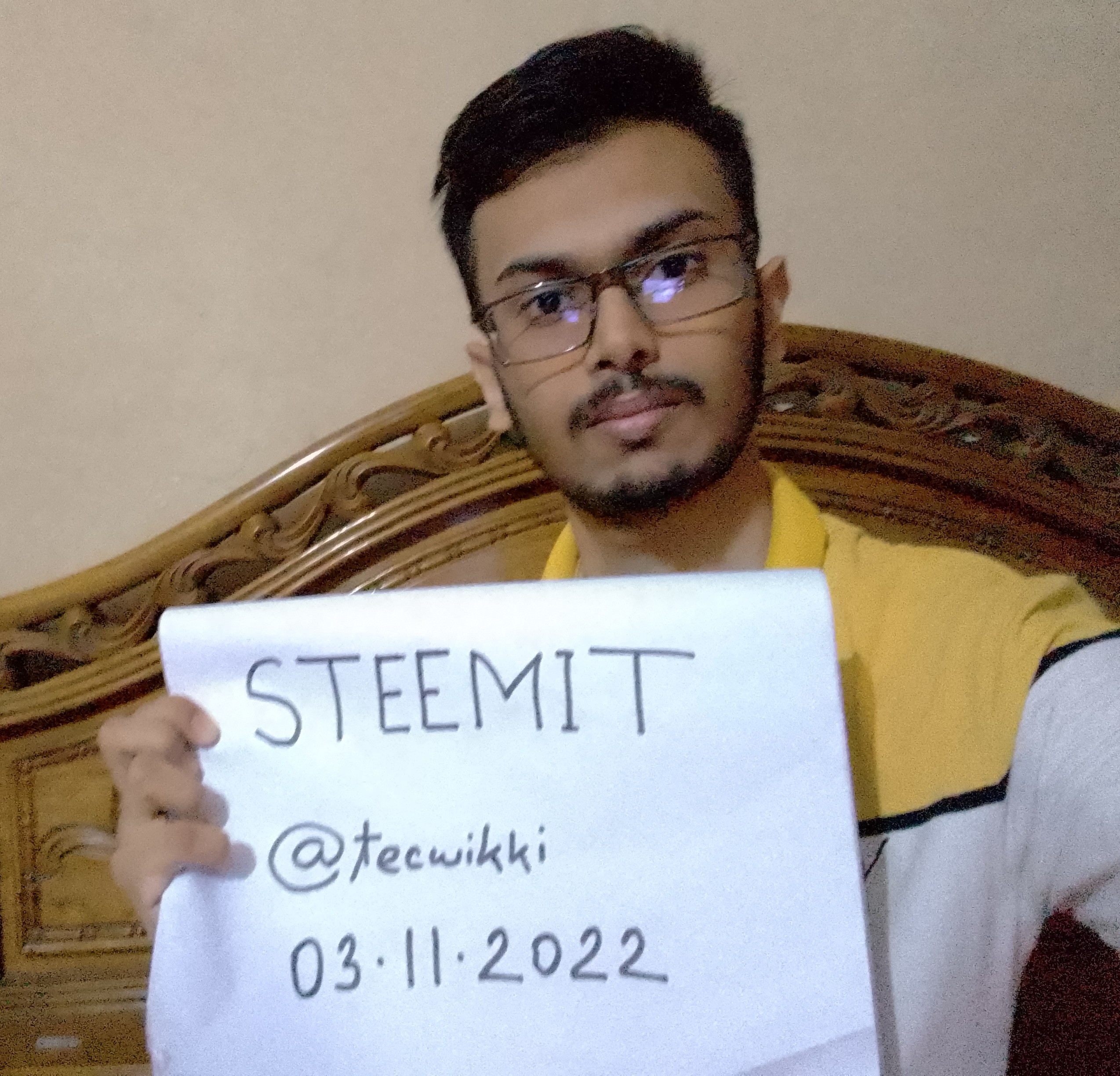 My family consists of four members, my father, my mother, my younger brother, and me. My father is a lawyer and my mother is a Teacher. I love internet browsing and knowing different things about technology. And, I also love content creation and coding. I love my family very much.   First time I came to know about blockchain technology and crypto in 2020. Since then I a big fan of crypto and blockchain technology and all the apps and platforms related to this. And, Steemit is one of them. I love blockchain technology for its decentralized feature. In Steemit I will share different things about technology that I know, and I am also looking for this type of content in this field on this platform. I choose Steemit for this job because I think it has great potential. |
| json metadata | {"tags":["achievement1","introducingmyself","bangladesh","steemexclusive","steemit","steem"],"users":["tecwikki"],"image":["https://cdn.steemitimages.com/DQmcn8ro8unpL72WDiWy6Wc7cEiBcy2LFvcVL2eeUZfowLh/IMG_20221103_121254.jpg","https://cdn.steemitimages.com/DQmQcjB3NgDHizQYo4QrQrZBwz1zMEDUDWmFHZ9auv1tcun/FB_IMG_1615446945379.jpg","https://cdn.steemitimages.com/DQmbK9hfRBcLbyYcETQeyA6JXVSnAaCvZLWAtSFHAa7kb5p/IMG-20210323-WA0002.jpg"],"app":"steemit/0.2","format":"markdown"} |
| Transaction Info | Block #69107534/Trx 26a9aee1ecd9a135881879011d9c0e200a4bc906 |
View Raw JSON Data
{
"trx_id": "26a9aee1ecd9a135881879011d9c0e200a4bc906",
"block": 69107534,
"trx_in_block": 1,
"op_in_trx": 0,
"virtual_op": 0,
"timestamp": "2022-11-03T06:54:42",
"op": [
"comment",
{
"parent_author": "",
"parent_permlink": "hive-172186",
"author": "tecwikki",
"permlink": "achievement-1-or-or-introducing-myself",
"title": "Achievement-1 || Introducing Myself",
"body": "Hello, dear Newcomers' Community, prosperity and success for all. For me, It's really a pleasure to be able to join the most famous platform #steem.\n\nI am Sazid Ahsan. I am from Bangladesh, and I live in Narsingdi. I am 19 years old, and I studied at AKMCC in Narsingdi. My Steemit user id is @tecwikki.\n\n\n\n\n\nMy family consists of four members, my father, my mother, my younger brother, and me. My father is a lawyer and my mother is a Teacher. I love internet browsing and knowing different things about technology. And, I also love content creation and coding. I love my family very much.\n\n\n\n\n\n\n\nFirst time I came to know about blockchain technology and crypto in 2020. Since then I a big fan of crypto and blockchain technology and all the apps and platforms related to this. And, Steemit is one of them. I love blockchain technology for its decentralized feature. In Steemit I will share different things about technology that I know, and I am also looking for this type of content in this field on this platform. I choose Steemit for this job because I think it has great potential.",
"json_metadata": "{\"tags\":[\"achievement1\",\"introducingmyself\",\"bangladesh\",\"steemexclusive\",\"steemit\",\"steem\"],\"users\":[\"tecwikki\"],\"image\":[\"https://cdn.steemitimages.com/DQmcn8ro8unpL72WDiWy6Wc7cEiBcy2LFvcVL2eeUZfowLh/IMG_20221103_121254.jpg\",\"https://cdn.steemitimages.com/DQmQcjB3NgDHizQYo4QrQrZBwz1zMEDUDWmFHZ9auv1tcun/FB_IMG_1615446945379.jpg\",\"https://cdn.steemitimages.com/DQmbK9hfRBcLbyYcETQeyA6JXVSnAaCvZLWAtSFHAa7kb5p/IMG-20210323-WA0002.jpg\"],\"app\":\"steemit/0.2\",\"format\":\"markdown\"}"
}
]
}tecwikkifollowed @farhansajid20032022/11/03 06:01:06
tecwikkifollowed @farhansajid2003
2022/11/03 06:01:06
| required auths | [] |
| required posting auths | ["tecwikki"] |
| id | follow |
| json | ["follow",{"follower":"tecwikki","following":"farhansajid2003","what":["blog",""]}] |
| Transaction Info | Block #69106467/Trx 9ba7581379adceb1c03ee2a8ce0f9b5cb9cf7c0a |
View Raw JSON Data
{
  "trx_id": "9ba7581379adceb1c03ee2a8ce0f9b5cb9cf7c0a",
  "block": 69106467,
  "trx_in_block": 0,
  "op_in_trx": 0,
  "virtual_op": 0,
  "timestamp": "2022-11-03T06:01:06",
  "op": [
    "custom_json",
    {
      "required_auths": [],
      "required_posting_auths": [
        "tecwikki"
      ],
      "id": "follow",
      "json": "[\"follow\",{\"follower\":\"tecwikki\",\"following\":\"farhansajid2003\",\"what\":[\"blog\",\"\"]}]"
    }
  ]
}tecwikkicustom json: community2022/11/03 05:05:33
tecwikkicustom json: community
2022/11/03 05:05:33
| required auths | [] |
| required posting auths | ["tecwikki"] |
| id | community |
| json | ["subscribe",{"community":"hive-172186"}] |
| Transaction Info | Block #69105360/Trx 08ad9c43e5c53ef0e81b9d443b536926ae7538cf |
View Raw JSON Data
{
  "trx_id": "08ad9c43e5c53ef0e81b9d443b536926ae7538cf",
  "block": 69105360,
  "trx_in_block": 4,
  "op_in_trx": 0,
  "virtual_op": 0,
  "timestamp": "2022-11-03T05:05:33",
  "op": [
    "custom_json",
    {
      "required_auths": [],
      "required_posting_auths": [
        "tecwikki"
      ],
      "id": "community",
      "json": "[\"subscribe\",{\"community\":\"hive-172186\"}]"
    }
  ]
}tecwikkiupdated their account properties2022/11/03 04:48:18
tecwikkiupdated their account properties
2022/11/03 04:48:18
| account | tecwikki |
| json metadata | |
| posting json metadata | {"profile":{"profile_image":"https://cdn.steemitimages.com/DQmUJntuDhmEDhufziCYc8QnA4dRrTw5bXUwybn74ccrW1Q/PSX_20220916_114644-02-01.jpeg","cover_image":"https://cdn.steemitimages.com/DQmSTcnYzoNeTvjGAdGABcW4drRTVTcWZMKz7JwKg2zhAkK/tech_2048x512.jpg","name":"Sazid","website":"https://tecwikki.blogspot.com/","version":2}} |
| extensions | [] |
| Transaction Info | Block #69105016/Trx 5b1fac548e89807286c532ee81a1c4af0d30ca0f |
View Raw JSON Data
{
  "trx_id": "5b1fac548e89807286c532ee81a1c4af0d30ca0f",
  "block": 69105016,
  "trx_in_block": 3,
  "op_in_trx": 0,
  "virtual_op": 0,
  "timestamp": "2022-11-03T04:48:18",
  "op": [
    "account_update2",
    {
      "account": "tecwikki",
      "json_metadata": "",
      "posting_json_metadata": "{\"profile\":{\"profile_image\":\"https://cdn.steemitimages.com/DQmUJntuDhmEDhufziCYc8QnA4dRrTw5bXUwybn74ccrW1Q/PSX_20220916_114644-02-01.jpeg\",\"cover_image\":\"https://cdn.steemitimages.com/DQmSTcnYzoNeTvjGAdGABcW4drRTVTcWZMKz7JwKg2zhAkK/tech_2048x512.jpg\",\"name\":\"Sazid\",\"website\":\"https://tecwikki.blogspot.com/\",\"version\":2}}",
      "extensions": []
    }
  ]
}tecwikkiupdated their account properties2022/11/03 04:18:51
tecwikkiupdated their account properties
2022/11/03 04:18:51
| account | tecwikki |
| json metadata | |
| posting json metadata | {"profile":{"profile_image":"https://cdn.steemitimages.com/DQmUJntuDhmEDhufziCYc8QnA4dRrTw5bXUwybn74ccrW1Q/PSX_20220916_114644-02-01.jpeg","cover_image":"https://cdn.steemitimages.com/DQmbMssmdpW6ciqw4CWQ2U549aFz2cHvSdXtJFuhb7GCn3s/tech_1_2048x600.jpg","name":"Sazid","website":"https://tecwikki.blogspot.com/","version":2}} |
| extensions | [] |
| Transaction Info | Block #69104433/Trx c7a4fa129fc1f48b341937aea1d582fcea0f1df8 |
View Raw JSON Data
{
  "trx_id": "c7a4fa129fc1f48b341937aea1d582fcea0f1df8",
  "block": 69104433,
  "trx_in_block": 6,
  "op_in_trx": 0,
  "virtual_op": 0,
  "timestamp": "2022-11-03T04:18:51",
  "op": [
    "account_update2",
    {
      "account": "tecwikki",
      "json_metadata": "",
      "posting_json_metadata": "{\"profile\":{\"profile_image\":\"https://cdn.steemitimages.com/DQmUJntuDhmEDhufziCYc8QnA4dRrTw5bXUwybn74ccrW1Q/PSX_20220916_114644-02-01.jpeg\",\"cover_image\":\"https://cdn.steemitimages.com/DQmbMssmdpW6ciqw4CWQ2U549aFz2cHvSdXtJFuhb7GCn3s/tech_1_2048x600.jpg\",\"name\":\"Sazid\",\"website\":\"https://tecwikki.blogspot.com/\",\"version\":2}}",
      "extensions": []
    }
  ]
}tecwikkiupdated their account properties2022/11/03 04:15:09
tecwikkiupdated their account properties
2022/11/03 04:15:09
| account | tecwikki |
| json metadata | |
| posting json metadata | {"profile":{"profile_image":"https://cdn.steemitimages.com/DQmUJntuDhmEDhufziCYc8QnA4dRrTw5bXUwybn74ccrW1Q/PSX_20220916_114644-02-01.jpeg","cover_image":"https://cdn.steemitimages.com/DQmSTcnYzoNeTvjGAdGABcW4drRTVTcWZMKz7JwKg2zhAkK/tech_2048x512.jpg","name":"Sazid","website":"https://tecwikki.blogspot.com/","version":2}} |
| extensions | [] |
| Transaction Info | Block #69104360/Trx 4561d15d2507ae928bb78f43df55bcb9dec1cc6b |
View Raw JSON Data
{
  "trx_id": "4561d15d2507ae928bb78f43df55bcb9dec1cc6b",
  "block": 69104360,
  "trx_in_block": 2,
  "op_in_trx": 0,
  "virtual_op": 0,
  "timestamp": "2022-11-03T04:15:09",
  "op": [
    "account_update2",
    {
      "account": "tecwikki",
      "json_metadata": "",
      "posting_json_metadata": "{\"profile\":{\"profile_image\":\"https://cdn.steemitimages.com/DQmUJntuDhmEDhufziCYc8QnA4dRrTw5bXUwybn74ccrW1Q/PSX_20220916_114644-02-01.jpeg\",\"cover_image\":\"https://cdn.steemitimages.com/DQmSTcnYzoNeTvjGAdGABcW4drRTVTcWZMKz7JwKg2zhAkK/tech_2048x512.jpg\",\"name\":\"Sazid\",\"website\":\"https://tecwikki.blogspot.com/\",\"version\":2}}",
      "extensions": []
    }
  ]
}executive-boardsent 0.001 STEEM to @tecwikki- "❗ Hello tecwikki, welcome to the STEEM ecosystem. The Executive Board is publishing insider infos at https://discord.gg/KyBbmhh on how you will be earning the most coins. It's easy, just follow the in..."2022/11/03 02:50:06
executive-boardsent 0.001 STEEM to @tecwikki- "❗ Hello tecwikki, welcome to the STEEM ecosystem. The Executive Board is publishing insider infos at https://discord.gg/KyBbmhh on how you will be earning the most coins. It's easy, just follow the in..."
2022/11/03 02:50:06
| from | executive-board |
| to | tecwikki |
| amount | 0.001 STEEM |
| memo | ❗ Hello tecwikki, welcome to the STEEM ecosystem. The Executive Board is publishing insider infos at https://discord.gg/KyBbmhh on how you will be earning the most coins. It's easy, just follow the instructions. THE 1000X BOOSTER KEY is already waiting for you over there too. 😉 Warm regards, The Executive Board. |
| Transaction Info | Block #69102670/Trx 4b733060b2cabe4a4c183d5a0992a64d2e5e9bb6 |
View Raw JSON Data
{
  "trx_id": "4b733060b2cabe4a4c183d5a0992a64d2e5e9bb6",
  "block": 69102670,
  "trx_in_block": 1,
  "op_in_trx": 0,
  "virtual_op": 0,
  "timestamp": "2022-11-03T02:50:06",
  "op": [
    "transfer",
    {
      "from": "executive-board",
      "to": "tecwikki",
      "amount": "0.001 STEEM",
      "memo": "❗ Hello tecwikki, welcome to the STEEM ecosystem. The Executive Board is publishing insider infos at https://discord.gg/KyBbmhh on how you will be earning the most coins. It's easy, just follow the instructions. THE 1000X BOOSTER KEY is already waiting for you over there too. 😉 Warm regards, The Executive Board."
    }
  ]
}2022/11/03 02:48:42
2022/11/03 02:48:42
| delegator | steem |
| delegatee | tecwikki |
| vesting shares | 30300.000000 VESTS |
| Transaction Info | Block #69102642/Trx e1d3f005b0b1d1d6bd3805dfd2219a3fcbfb925b |
View Raw JSON Data
{
  "trx_id": "e1d3f005b0b1d1d6bd3805dfd2219a3fcbfb925b",
  "block": 69102642,
  "trx_in_block": 0,
  "op_in_trx": 0,
  "virtual_op": 0,
  "timestamp": "2022-11-03T02:48:42",
  "op": [
    "delegate_vesting_shares",
    {
      "delegator": "steem",
      "delegatee": "tecwikki",
      "vesting_shares": "30300.000000 VESTS"
    }
  ]
}steemcurator01created a new account: @tecwikki2022/11/03 02:48:39
steemcurator01created a new account: @tecwikki
2022/11/03 02:48:39
| creator | steemcurator01 |
| new account name | tecwikki |
| owner | {"weight_threshold":1,"account_auths":[],"key_auths":[["STM81kBNPfpEKa6Z9syH2qxtWen2vkAQjwufr23RZFoQ7s3SM8VMQ",1]]} |
| active | {"weight_threshold":1,"account_auths":[],"key_auths":[["STM8H8zWUorTdXyUFZ2vymXFQAAurssLDDsy3kQCmQaKVcRoYhTtq",1]]} |
| posting | {"weight_threshold":1,"account_auths":[],"key_auths":[["STM7XsCbtCWKVuwSE9UgEMY9vgwcmN9BiN2qFHLehJDLHZFiCkpZF",1]]} |
| memo key | STM5DTLgQThp6NDUegro7brB5S3gJrR4QYW5nbJS2XmFr9DPABqWM |
| json metadata | {} |
| extensions | [] |
| Transaction Info | Block #69102641/Trx dde3c3e43146585f9ac411bb3c5a9c24853ae75f |
View Raw JSON Data
{
  "trx_id": "dde3c3e43146585f9ac411bb3c5a9c24853ae75f",
  "block": 69102641,
  "trx_in_block": 0,
  "op_in_trx": 0,
  "virtual_op": 0,
  "timestamp": "2022-11-03T02:48:39",
  "op": [
    "create_claimed_account",
    {
      "creator": "steemcurator01",
      "new_account_name": "tecwikki",
      "owner": {
        "weight_threshold": 1,
        "account_auths": [],
        "key_auths": [
          [
            "STM81kBNPfpEKa6Z9syH2qxtWen2vkAQjwufr23RZFoQ7s3SM8VMQ",
            1
          ]
        ]
      },
      "active": {
        "weight_threshold": 1,
        "account_auths": [],
        "key_auths": [
          [
            "STM8H8zWUorTdXyUFZ2vymXFQAAurssLDDsy3kQCmQaKVcRoYhTtq",
            1
          ]
        ]
      },
      "posting": {
        "weight_threshold": 1,
        "account_auths": [],
        "key_auths": [
          [
            "STM7XsCbtCWKVuwSE9UgEMY9vgwcmN9BiN2qFHLehJDLHZFiCkpZF",
            1
          ]
        ]
      },
      "memo_key": "STM5DTLgQThp6NDUegro7brB5S3gJrR4QYW5nbJS2XmFr9DPABqWM",
      "json_metadata": "{}",
      "extensions": []
    }
  ]
}Manabar
Voting Power100.00%
Downvote Power100.00%
Resource Credits100.00%
Reputation Progress80.15%
{
  "voting_manabar": {
    "current_mana": "5472996220",
    "last_update_time": 1769222409
  },
  "downvote_manabar": {
    "current_mana": 1368249055,
    "last_update_time": 1769222409
  },
  "rc_account": {
    "account": "tecwikki",
    "rc_manabar": {
      "current_mana": "11016493817",
      "last_update_time": 1769222409
    },
    "max_rc_creation_adjustment": {
      "amount": "5379278400",
      "precision": 6,
      "nai": "@@000000037"
    },
    "max_rc": "10852274620"
  }
}
Account Metadata
| POSTING JSON METADATA | |
| profile | {"version":2} |
| JSON METADATA | |
| None | |
{
  "posting_json_metadata": {
    "profile": {
      "version": 2
    }
  },
  "json_metadata": {}
}
Auth Keys
Owner
Single Signature
Public Keys
STM81kBNPfpEKa6Z9syH2qxtWen2vkAQjwufr23RZFoQ7s3SM8VMQ1/1
Active
Single Signature
Public Keys
STM8H8zWUorTdXyUFZ2vymXFQAAurssLDDsy3kQCmQaKVcRoYhTtq1/1
Posting
Single Signature
Public Keys
STM7XsCbtCWKVuwSE9UgEMY9vgwcmN9BiN2qFHLehJDLHZFiCkpZF1/1
Memo
STM5DTLgQThp6NDUegro7brB5S3gJrR4QYW5nbJS2XmFr9DPABqWM
{
  "owner": {
    "weight_threshold": 1,
    "account_auths": [],
    "key_auths": [
      [
        "STM81kBNPfpEKa6Z9syH2qxtWen2vkAQjwufr23RZFoQ7s3SM8VMQ",
        1
      ]
    ]
  },
  "active": {
    "weight_threshold": 1,
    "account_auths": [],
    "key_auths": [
      [
        "STM8H8zWUorTdXyUFZ2vymXFQAAurssLDDsy3kQCmQaKVcRoYhTtq",
        1
      ]
    ]
  },
  "posting": {
    "weight_threshold": 1,
    "account_auths": [],
    "key_auths": [
      [
        "STM7XsCbtCWKVuwSE9UgEMY9vgwcmN9BiN2qFHLehJDLHZFiCkpZF",
        1
      ]
    ]
  },
  "memo": "STM5DTLgQThp6NDUegro7brB5S3gJrR4QYW5nbJS2XmFr9DPABqWM"
}
Witness Votes
0 / 30
No active witness votes.
[]