

VOTING POWER100.00%
DOWNVOTE POWER100.00%
RESOURCE CREDITS100.00%
REPUTATION PROGRESS0.00%
Net Worth
0.034USD
STEEM
0.000STEEM
SBD
0.000SBD
Effective Power
5.001SP
├── Own SP
0.633SP
└── Incoming DelegationsDeleg
+4.368SP
Detailed Balance
| STEEM | ||
| balance | 0.000STEEM | STEEM |
| market_balance | 0.000STEEM | STEEM |
| savings_balance | 0.000STEEM | STEEM |
| reward_steem_balance | 0.000STEEM | STEEM |
| STEEM POWER | ||
| Own SP | 0.633SP | SP |
| Delegated Out | 0.000SP | SP |
| Delegation In | 4.368SP | SP |
| Effective Power | 5.001SP | SP |
| Reward SP (pending) | 0.000SP | SP |
| SBD | ||
| sbd_balance | 0.000SBD | SBD |
| sbd_conversions | 0.000SBD | SBD |
| sbd_market_balance | 0.000SBD | SBD |
| savings_sbd_balance | 0.000SBD | SBD |
| reward_sbd_balance | 0.000SBD | SBD |
{
  "balance": "0.000 STEEM",
  "savings_balance": "0.000 STEEM",
  "reward_steem_balance": "0.000 STEEM",
  "vesting_shares": "1031.413776 VESTS",
  "delegated_vesting_shares": "0.000000 VESTS",
  "received_vesting_shares": "7112.246030 VESTS",
  "sbd_balance": "0.000 SBD",
  "savings_sbd_balance": "0.000 SBD",
  "reward_sbd_balance": "0.000 SBD",
  "conversions": []
}
Account Info
| name | stipe |
| id | 332460 |
| rank | 1,425,675 |
| reputation | 63796212 |
| created | 2017-08-24T21:04:09 |
| recovery_account | steem |
| proxy | None |
| post_count | 7 |
| comment_count | 0 |
| lifetime_vote_count | 0 |
| witnesses_voted_for | 0 |
| last_post | 2017-09-30T21:51:36 |
| last_root_post | 2017-09-30T21:51:36 |
| last_vote_time | 2017-08-27T11:53:06 |
| proxied_vsf_votes | 0, 0, 0, 0 |
| can_vote | 1 |
| voting_power | 0 |
| delayed_votes | 0 |
| balance | 0.000 STEEM |
| savings_balance | 0.000 STEEM |
| sbd_balance | 0.000 SBD |
| savings_sbd_balance | 0.000 SBD |
| vesting_shares | 1031.413776 VESTS |
| delegated_vesting_shares | 0.000000 VESTS |
| received_vesting_shares | 7112.246030 VESTS |
| reward_vesting_balance | 0.000000 VESTS |
| vesting_balance | 0.000 STEEM |
| vesting_withdraw_rate | 0.000000 VESTS |
| next_vesting_withdrawal | 1969-12-31T23:59:59 |
| withdrawn | 0 |
| to_withdraw | 0 |
| withdraw_routes | 0 |
| savings_withdraw_requests | 0 |
| last_account_recovery | 1970-01-01T00:00:00 |
| reset_account | null |
| last_owner_update | 1970-01-01T00:00:00 |
| last_account_update | 2018-12-11T20:35:54 |
| mined | No |
| sbd_seconds | 0 |
| sbd_last_interest_payment | 1970-01-01T00:00:00 |
| savings_sbd_last_interest_payment | 1970-01-01T00:00:00 |
{
  "id": 332460,
  "name": "stipe",
  "owner": {
    "weight_threshold": 1,
    "account_auths": [],
    "key_auths": [
      [
        "STM6PC5TPYuBtXBuE5RYy1aeW3YUEdX5wMRMkWX2F1ceNnMCTyZ7t",
        1
      ]
    ]
  },
  "active": {
    "weight_threshold": 1,
    "account_auths": [],
    "key_auths": [
      [
        "STM7s7KeEEkhndZdjwEASDdPWf9m2TVjPVRJBSUAxJCDZw62ApdeW",
        1
      ]
    ]
  },
  "posting": {
    "weight_threshold": 1,
    "account_auths": [],
    "key_auths": [
      [
        "STM6zEtNr48uYhTwdW9za7jqtiLxsMNis95b2tqbSrD73WkkqvdzA",
        1
      ]
    ]
  },
  "memo_key": "STM8VDzdeX56iYjPZSGZsDCnj6TWeGbj4tDzCSXsjUwD3jryke5b4",
  "json_metadata": "{\"profile\":{\"name\":\"JohnEdmond\",\"profile_image\":\"https://cdn.steemitimages.com/DQmVq77iMRLyDVmwvkBsCFpzZYVL8gHjYc32dYPJHaPuT5i/Screenshot%20at%20Dec%2011%2021-35-33.png\"}}",
  "posting_json_metadata": "{\"profile\":{\"name\":\"JohnEdmond\",\"profile_image\":\"https://cdn.steemitimages.com/DQmVq77iMRLyDVmwvkBsCFpzZYVL8gHjYc32dYPJHaPuT5i/Screenshot%20at%20Dec%2011%2021-35-33.png\"}}",
  "proxy": "",
  "last_owner_update": "1970-01-01T00:00:00",
  "last_account_update": "2018-12-11T20:35:54",
  "created": "2017-08-24T21:04:09",
  "mined": false,
  "recovery_account": "steem",
  "last_account_recovery": "1970-01-01T00:00:00",
  "reset_account": "null",
  "comment_count": 0,
  "lifetime_vote_count": 0,
  "post_count": 7,
  "can_vote": true,
  "voting_manabar": {
    "current_mana": "8143659806",
    "last_update_time": 1779087423
  },
  "downvote_manabar": {
    "current_mana": 2035914951,
    "last_update_time": 1779087423
  },
  "voting_power": 0,
  "balance": "0.000 STEEM",
  "savings_balance": "0.000 STEEM",
  "sbd_balance": "0.000 SBD",
  "sbd_seconds": "0",
  "sbd_seconds_last_update": "1970-01-01T00:00:00",
  "sbd_last_interest_payment": "1970-01-01T00:00:00",
  "savings_sbd_balance": "0.000 SBD",
  "savings_sbd_seconds": "0",
  "savings_sbd_seconds_last_update": "1970-01-01T00:00:00",
  "savings_sbd_last_interest_payment": "1970-01-01T00:00:00",
  "savings_withdraw_requests": 0,
  "reward_sbd_balance": "0.000 SBD",
  "reward_steem_balance": "0.000 STEEM",
  "reward_vesting_balance": "0.000000 VESTS",
  "reward_vesting_steem": "0.000 STEEM",
  "vesting_shares": "1031.413776 VESTS",
  "delegated_vesting_shares": "0.000000 VESTS",
  "received_vesting_shares": "7112.246030 VESTS",
  "vesting_withdraw_rate": "0.000000 VESTS",
  "next_vesting_withdrawal": "1969-12-31T23:59:59",
  "withdrawn": 0,
  "to_withdraw": 0,
  "withdraw_routes": 0,
  "curation_rewards": 0,
  "posting_rewards": 0,
  "proxied_vsf_votes": [
    0,
    0,
    0,
    0
  ],
  "witnesses_voted_for": 0,
  "last_post": "2017-09-30T21:51:36",
  "last_root_post": "2017-09-30T21:51:36",
  "last_vote_time": "2017-08-27T11:53:06",
  "post_bandwidth": 0,
  "pending_claimed_accounts": 0,
  "vesting_balance": "0.000 STEEM",
  "reputation": 63796212,
  "transfer_history": [],
  "market_history": [],
  "post_history": [],
  "vote_history": [],
  "other_history": [],
  "witness_votes": [],
  "tags_usage": [],
  "guest_bloggers": [],
  "rank": 1425675
}
Withdraw Routes
| Incoming | Outgoing |
|---|---|
Empty | Empty |
{
  "incoming": [],
  "outgoing": []
}From Date
To Date
2026/05/18 06:57:03
2026/05/18 06:57:03
| delegator | steem |
| delegatee | stipe |
| vesting shares | 7112.246030 VESTS |
| Transaction Info | Block #106151451/Trx f5cc6826ba11862f483c3f17784baf01b3292d00 |
View Raw JSON Data
{
  "trx_id": "f5cc6826ba11862f483c3f17784baf01b3292d00",
  "block": 106151451,
  "trx_in_block": 0,
  "op_in_trx": 0,
  "virtual_op": 0,
  "timestamp": "2026-05-18T06:57:03",
  "op": [
    "delegate_vesting_shares",
    {
      "delegator": "steem",
      "delegatee": "stipe",
      "vesting_shares": "7112.246030 VESTS"
    }
  ]
}2026/05/13 07:03:54
2026/05/13 07:03:54
| delegator | steem |
| delegatee | stipe |
| vesting shares | 4400.035625 VESTS |
| Transaction Info | Block #106008304/Trx 4219d32577db72d5c041d8b99bdafc2953d52748 |
View Raw JSON Data
{
  "trx_id": "4219d32577db72d5c041d8b99bdafc2953d52748",
  "block": 106008304,
  "trx_in_block": 1,
  "op_in_trx": 0,
  "virtual_op": 0,
  "timestamp": "2026-05-13T07:03:54",
  "op": [
    "delegate_vesting_shares",
    {
      "delegator": "steem",
      "delegatee": "stipe",
      "vesting_shares": "4400.035625 VESTS"
    }
  ]
}2026/04/26 06:07:51
2026/04/26 06:07:51
| delegator | steem |
| delegatee | stipe |
| vesting shares | 7124.761786 VESTS |
| Transaction Info | Block #105518917/Trx f1d1863d10d849e975e2544a6e3118fc2a67e6fb |
View Raw JSON Data
{
  "trx_id": "f1d1863d10d849e975e2544a6e3118fc2a67e6fb",
  "block": 105518917,
  "trx_in_block": 1,
  "op_in_trx": 0,
  "virtual_op": 0,
  "timestamp": "2026-04-26T06:07:51",
  "op": [
    "delegate_vesting_shares",
    {
      "delegator": "steem",
      "delegatee": "stipe",
      "vesting_shares": "7124.761786 VESTS"
    }
  ]
}2026/01/24 01:49:36
2026/01/24 01:49:36
| delegator | steem |
| delegatee | stipe |
| vesting shares | 4441.582444 VESTS |
| Transaction Info | Block #102873403/Trx 5f11a8b0388abc7183d614aaca38f2b36937413f |
View Raw JSON Data
{
  "trx_id": "5f11a8b0388abc7183d614aaca38f2b36937413f",
  "block": 102873403,
  "trx_in_block": 6,
  "op_in_trx": 0,
  "virtual_op": 0,
  "timestamp": "2026-01-24T01:49:36",
  "op": [
    "delegate_vesting_shares",
    {
      "delegator": "steem",
      "delegatee": "stipe",
      "vesting_shares": "4441.582444 VESTS"
    }
  ]
}2024/12/17 20:58:45
2024/12/17 20:58:45
| delegator | steem |
| delegatee | stipe |
| vesting shares | 4605.801641 VESTS |
| Transaction Info | Block #91319601/Trx b9e550f05e6e89eecae876fd3a794493c084f4c3 |
View Raw JSON Data
{
  "trx_id": "b9e550f05e6e89eecae876fd3a794493c084f4c3",
  "block": 91319601,
  "trx_in_block": 0,
  "op_in_trx": 0,
  "virtual_op": 0,
  "timestamp": "2024-12-17T20:58:45",
  "op": [
    "delegate_vesting_shares",
    {
      "delegator": "steem",
      "delegatee": "stipe",
      "vesting_shares": "4605.801641 VESTS"
    }
  ]
}2023/11/14 12:38:54
2023/11/14 12:38:54
| delegator | steem |
| delegatee | stipe |
| vesting shares | 4774.935173 VESTS |
| Transaction Info | Block #79873722/Trx 22afed704e39e4c699b86c9858cf43dce1c77e9f |
View Raw JSON Data
{
  "trx_id": "22afed704e39e4c699b86c9858cf43dce1c77e9f",
  "block": 79873722,
  "trx_in_block": 5,
  "op_in_trx": 0,
  "virtual_op": 0,
  "timestamp": "2023-11-14T12:38:54",
  "op": [
    "delegate_vesting_shares",
    {
      "delegator": "steem",
      "delegatee": "stipe",
      "vesting_shares": "4774.935173 VESTS"
    }
  ]
}2023/09/22 11:10:42
2023/09/22 11:10:42
| delegator | steem |
| delegatee | stipe |
| vesting shares | 7711.843959 VESTS |
| Transaction Info | Block #78363805/Trx c0f417ef679537de7f5f70d145eab263397626bf |
View Raw JSON Data
{
  "trx_id": "c0f417ef679537de7f5f70d145eab263397626bf",
  "block": 78363805,
  "trx_in_block": 0,
  "op_in_trx": 0,
  "virtual_op": 0,
  "timestamp": "2023-09-22T11:10:42",
  "op": [
    "delegate_vesting_shares",
    {
      "delegator": "steem",
      "delegatee": "stipe",
      "vesting_shares": "7711.843959 VESTS"
    }
  ]
}2022/11/03 18:32:42
2022/11/03 18:32:42
| delegator | steem |
| delegatee | stipe |
| vesting shares | 7933.895397 VESTS |
| Transaction Info | Block #69121431/Trx aa045e19c511b4fb4e7df5981befd1871e0a3d35 |
View Raw JSON Data
{
  "trx_id": "aa045e19c511b4fb4e7df5981befd1871e0a3d35",
  "block": 69121431,
  "trx_in_block": 1,
  "op_in_trx": 0,
  "virtual_op": 0,
  "timestamp": "2022-11-03T18:32:42",
  "op": [
    "delegate_vesting_shares",
    {
      "delegator": "steem",
      "delegatee": "stipe",
      "vesting_shares": "7933.895397 VESTS"
    }
  ]
}2022/01/17 23:40:33
2022/01/17 23:40:33
| delegator | steem |
| delegatee | stipe |
| vesting shares | 8154.002998 VESTS |
| Transaction Info | Block #60824602/Trx cd2db9a74fb9519cc063dd00206b7c08c9ef6471 |
View Raw JSON Data
{
  "trx_id": "cd2db9a74fb9519cc063dd00206b7c08c9ef6471",
  "block": 60824602,
  "trx_in_block": 31,
  "op_in_trx": 0,
  "virtual_op": 0,
  "timestamp": "2022-01-17T23:40:33",
  "op": [
    "delegate_vesting_shares",
    {
      "delegator": "steem",
      "delegatee": "stipe",
      "vesting_shares": "8154.002998 VESTS"
    }
  ]
}2021/06/14 06:49:45
2021/06/14 06:49:45
| delegator | steem |
| delegatee | stipe |
| vesting shares | 8338.197286 VESTS |
| Transaction Info | Block #54614889/Trx 1c6e13e7d312be1730c5a8208ff75482a2270460 |
View Raw JSON Data
{
  "trx_id": "1c6e13e7d312be1730c5a8208ff75482a2270460",
  "block": 54614889,
  "trx_in_block": 0,
  "op_in_trx": 0,
  "virtual_op": 0,
  "timestamp": "2021-06-14T06:49:45",
  "op": [
    "delegate_vesting_shares",
    {
      "delegator": "steem",
      "delegatee": "stipe",
      "vesting_shares": "8338.197286 VESTS"
    }
  ]
}2020/12/11 17:01:30
2020/12/11 17:01:30
| delegator | steem |
| delegatee | stipe |
| vesting shares | 8525.619260 VESTS |
| Transaction Info | Block #49362133/Trx dd4eb84bddcb702ebd6e6c23ebfa5aa7f6e3363e |
View Raw JSON Data
{
  "trx_id": "dd4eb84bddcb702ebd6e6c23ebfa5aa7f6e3363e",
  "block": 49362133,
  "trx_in_block": 3,
  "op_in_trx": 0,
  "virtual_op": 0,
  "timestamp": "2020-12-11T17:01:30",
  "op": [
    "delegate_vesting_shares",
    {
      "delegator": "steem",
      "delegatee": "stipe",
      "vesting_shares": "8525.619260 VESTS"
    }
  ]
}2020/12/06 10:36:51
2020/12/06 10:36:51
| delegator | steem |
| delegatee | stipe |
| vesting shares | 1912.543513 VESTS |
| Transaction Info | Block #49213646/Trx db95e8e04ea3483b1b5d4e373c6eaa0d76d69c28 |
View Raw JSON Data
{
  "trx_id": "db95e8e04ea3483b1b5d4e373c6eaa0d76d69c28",
  "block": 49213646,
  "trx_in_block": 2,
  "op_in_trx": 0,
  "virtual_op": 0,
  "timestamp": "2020-12-06T10:36:51",
  "op": [
    "delegate_vesting_shares",
    {
      "delegator": "steem",
      "delegatee": "stipe",
      "vesting_shares": "1912.543513 VESTS"
    }
  ]
}2020/12/05 20:39:21
2020/12/05 20:39:21
| delegator | steem |
| delegatee | stipe |
| vesting shares | 8531.827114 VESTS |
| Transaction Info | Block #49197221/Trx 1603aad7b7f5dacb265c83450713e6f8b70793b8 |
View Raw JSON Data
{
  "trx_id": "1603aad7b7f5dacb265c83450713e6f8b70793b8",
  "block": 49197221,
  "trx_in_block": 0,
  "op_in_trx": 0,
  "virtual_op": 0,
  "timestamp": "2020-12-05T20:39:21",
  "op": [
    "delegate_vesting_shares",
    {
      "delegator": "steem",
      "delegatee": "stipe",
      "vesting_shares": "8531.827114 VESTS"
    }
  ]
}2020/11/03 03:55:51
2020/11/03 03:55:51
| delegator | steem |
| delegatee | stipe |
| vesting shares | 1920.017158 VESTS |
| Transaction Info | Block #48272274/Trx 0929484d2165fa6d99a4020e5e28fda956f92b47 |
View Raw JSON Data
{
  "trx_id": "0929484d2165fa6d99a4020e5e28fda956f92b47",
  "block": 48272274,
  "trx_in_block": 0,
  "op_in_trx": 0,
  "virtual_op": 0,
  "timestamp": "2020-11-03T03:55:51",
  "op": [
    "delegate_vesting_shares",
    {
      "delegator": "steem",
      "delegatee": "stipe",
      "vesting_shares": "1920.017158 VESTS"
    }
  ]
}2020/05/09 11:40:42
2020/05/09 11:40:42
| delegator | steem |
| delegatee | stipe |
| vesting shares | 8734.632473 VESTS |
| Transaction Info | Block #43223989/Trx 835bd61adf0f849febd973a23f7bfa6e105ae873 |
View Raw JSON Data
{
  "trx_id": "835bd61adf0f849febd973a23f7bfa6e105ae873",
  "block": 43223989,
  "trx_in_block": 18,
  "op_in_trx": 0,
  "virtual_op": 0,
  "timestamp": "2020-05-09T11:40:42",
  "op": [
    "delegate_vesting_shares",
    {
      "delegator": "steem",
      "delegatee": "stipe",
      "vesting_shares": "8734.632473 VESTS"
    }
  ]
}2020/05/08 16:09:57
2020/05/08 16:09:57
| delegator | steem |
| delegatee | stipe |
| vesting shares | 1953.311140 VESTS |
| Transaction Info | Block #43201132/Trx ba473a25f0b46f202e2bdbebf70bbddafc611253 |
View Raw JSON Data
{
  "trx_id": "ba473a25f0b46f202e2bdbebf70bbddafc611253",
  "block": 43201132,
  "trx_in_block": 16,
  "op_in_trx": 0,
  "virtual_op": 0,
  "timestamp": "2020-05-08T16:09:57",
  "op": [
    "delegate_vesting_shares",
    {
      "delegator": "steem",
      "delegatee": "stipe",
      "vesting_shares": "1953.311140 VESTS"
    }
  ]
}2020/04/16 03:39:00
2020/04/16 03:39:00
| delegator | steem |
| delegatee | stipe |
| vesting shares | 8747.519921 VESTS |
| Transaction Info | Block #42569566/Trx 5726fef71c6565881bfdc4fbe014af6ee3e647d1 |
View Raw JSON Data
{
  "trx_id": "5726fef71c6565881bfdc4fbe014af6ee3e647d1",
  "block": 42569566,
  "trx_in_block": 15,
  "op_in_trx": 0,
  "virtual_op": 0,
  "timestamp": "2020-04-16T03:39:00",
  "op": [
    "delegate_vesting_shares",
    {
      "delegator": "steem",
      "delegatee": "stipe",
      "vesting_shares": "8747.519921 VESTS"
    }
  ]
}2019/08/24 22:41:24
2019/08/24 22:41:24
| parent author | stipe |
| parent permlink | mining-ethereum-with-nvidia-gpus-on-ethos |
| author | steemitboard |
| permlink | steemitboard-notify-stipe-20190824t224123000z |
| title | |
| body | Congratulations @stipe! You received a personal award! <table><tr><td>https://steemitimages.com/70x70/http://steemitboard.com/@stipe/birthday2.png</td><td>Happy Birthday! - You are on the Steem blockchain for 2 years!</td></tr></table> <sub>_You can view [your badges on your Steem Board](https://steemitboard.com/@stipe) and compare to others on the [Steem Ranking](https://steemitboard.com/ranking/index.php?name=stipe)_</sub> ###### [Vote for @Steemitboard as a witness](https://v2.steemconnect.com/sign/account-witness-vote?witness=steemitboard&approve=1) to get one more award and increased upvotes! |
| json metadata | {"image":["https://steemitboard.com/img/notify.png"]} |
| Transaction Info | Block #35844742/Trx dd858a3fe57c8e46555054325cb6f9c7616e6218 |
View Raw JSON Data
{
  "trx_id": "dd858a3fe57c8e46555054325cb6f9c7616e6218",
  "block": 35844742,
  "trx_in_block": 5,
  "op_in_trx": 0,
  "virtual_op": 0,
  "timestamp": "2019-08-24T22:41:24",
  "op": [
    "comment",
    {
      "parent_author": "stipe",
      "parent_permlink": "mining-ethereum-with-nvidia-gpus-on-ethos",
      "author": "steemitboard",
      "permlink": "steemitboard-notify-stipe-20190824t224123000z",
      "title": "",
      "body": "Congratulations @stipe! You received a personal award!\n\n<table><tr><td>https://steemitimages.com/70x70/http://steemitboard.com/@stipe/birthday2.png</td><td>Happy Birthday! - You are on the Steem blockchain for 2 years!</td></tr></table>\n\n<sub>_You can view [your badges on your Steem Board](https://steemitboard.com/@stipe) and compare to others on the [Steem Ranking](https://steemitboard.com/ranking/index.php?name=stipe)_</sub>\n\n\n###### [Vote for @Steemitboard as a witness](https://v2.steemconnect.com/sign/account-witness-vote?witness=steemitboard&approve=1) to get one more award and increased upvotes!",
      "json_metadata": "{\"image\":[\"https://steemitboard.com/img/notify.png\"]}"
    }
  ]
}2019/05/12 20:46:21
2019/05/12 20:46:21
| delegator | steem |
| delegatee | stipe |
| vesting shares | 8943.136734 VESTS |
| Transaction Info | Block #32852527/Trx ca020c45ae352213af503ed9c16745b7992dbe9f |
View Raw JSON Data
{
  "trx_id": "ca020c45ae352213af503ed9c16745b7992dbe9f",
  "block": 32852527,
  "trx_in_block": 3,
  "op_in_trx": 0,
  "virtual_op": 0,
  "timestamp": "2019-05-12T20:46:21",
  "op": [
    "delegate_vesting_shares",
    {
      "delegator": "steem",
      "delegatee": "stipe",
      "vesting_shares": "8943.136734 VESTS"
    }
  ]
}stipepublished a new post: mining-ethereum-with-nvidia-gpus-on-ethos2018/12/11 20:42:12
stipepublished a new post: mining-ethereum-with-nvidia-gpus-on-ethos
2018/12/11 20:42:12
| parent author | |
| parent permlink | blockchain |
| author | stipe |
| permlink | mining-ethereum-with-nvidia-gpus-on-ethos |
| title | . |
| body | <html> <h3><br></h3> </html> |
| json metadata | {"tags":["one","two","three","four","blockchain"],"app":"steemit/0.1","format":"html"} |
| Transaction Info | Block #28479580/Trx 3dac0c9adc4ac0b43530b29996960a55aa2a5520 |
View Raw JSON Data
{
  "trx_id": "3dac0c9adc4ac0b43530b29996960a55aa2a5520",
  "block": 28479580,
  "trx_in_block": 4,
  "op_in_trx": 0,
  "virtual_op": 0,
  "timestamp": "2018-12-11T20:42:12",
  "op": [
    "comment",
    {
      "parent_author": "",
      "parent_permlink": "blockchain",
      "author": "stipe",
      "permlink": "mining-ethereum-with-nvidia-gpus-on-ethos",
      "title": ".",
      "body": "<html>\n<h3><br></h3>\n</html>",
      "json_metadata": "{\"tags\":[\"one\",\"two\",\"three\",\"four\",\"blockchain\"],\"app\":\"steemit/0.1\",\"format\":\"html\"}"
    }
  ]
}stipepublished a new post: mining-ethereum-with-nvidia-gpus-on-ethos2018/12/11 20:41:57
stipepublished a new post: mining-ethereum-with-nvidia-gpus-on-ethos
2018/12/11 20:41:57
| parent author | |
| parent permlink | blockchain |
| author | stipe |
| permlink | mining-ethereum-with-nvidia-gpus-on-ethos |
| title | . |
| body | <html> <h3><br></h3> </html> |
| json metadata | {"tags":["blockchain","one","two","three"],"app":"steemit/0.1","format":"html"} |
| Transaction Info | Block #28479575/Trx 47896527c0d9ffbd81f1cc9e5ffe5649338a1996 |
View Raw JSON Data
{
  "trx_id": "47896527c0d9ffbd81f1cc9e5ffe5649338a1996",
  "block": 28479575,
  "trx_in_block": 7,
  "op_in_trx": 0,
  "virtual_op": 0,
  "timestamp": "2018-12-11T20:41:57",
  "op": [
    "comment",
    {
      "parent_author": "",
      "parent_permlink": "blockchain",
      "author": "stipe",
      "permlink": "mining-ethereum-with-nvidia-gpus-on-ethos",
      "title": ".",
      "body": "<html>\n<h3><br></h3>\n</html>",
      "json_metadata": "{\"tags\":[\"blockchain\",\"one\",\"two\",\"three\"],\"app\":\"steemit/0.1\",\"format\":\"html\"}"
    }
  ]
}stipepublished a new post: mining-ethereum-with-nvidia-gpus-on-ethos2018/12/11 20:41:30
stipepublished a new post: mining-ethereum-with-nvidia-gpus-on-ethos
2018/12/11 20:41:30
| parent author | |
| parent permlink | blockchain |
| author | stipe |
| permlink | mining-ethereum-with-nvidia-gpus-on-ethos |
| title | . |
| body | <html> <h3>Overclock and ethOS setup</h3> <p><img src="https://cdn-images-1.medium.com/max/2000/1*XXvX8_B3n2gfgYGb47oz9Q.jpeg" width="1920" height="1080"/></p> <p><br></p> <p>Since there is a mining hype around AMD RX 470/480/570/580 cards and not enough information for Nvidia cards, this article will be a small contribution towards getting maximum out of Nvidia card. Below I will share how to make a setup and the overclock for <a href="https://cnhv.co/13oj">MSI Geforce Nvidia GTX 1060 Gaming X 6GB card</a>.</p> <h3>About ethOS</h3> <p>This test mining is being managed by ethOS which is a Linux distribution specially customised for mining Ethereum, convenient for newbie miners that want to make an excellent setup of their mining rig in short amount of time for a certain cost, since it is not a free Linux distribution. Advantage is hassle free, there is no installation of drivers, compiling, creating scripts, etc. After you have booted ethOS on your SSD or USB memory drive that is all. After you turn on your rig, system gets up and detects all of your hardware. Very next thing you would need to do is to setup your configuration. No performance gains were noticed when compared with other OS choices. Main advantage is saving time.</p> <h2>Configuration setup</h2> <p>At the start <code>globalcore</code> and <code>globalmem</code> are set to a default value and MSI Geforce Nvidia GTX 1060 Gaming X 6GB cards are running on 19 MH/s.Default values: <code>default globalcore = 1885</code> and <code>default globalmem = 3802</code></p> <p>To get more out of the Nvidia card you would need to play a bit with the overlock. Two main things you have to focus is <code>globalmem</code> and <code>globalcore</code>. New values that will get most of your card:</p> <blockquote><code>globalcore = 1400</code> and <code>globalmem = 4900</code></blockquote> <p><br></p> <p><code>globalminer ethminer<br> maxgputemp 66<br> stratumproxy enabled<br> proxywallet 0xYOUR_WALLET<br> proxypool1 POOL_OF_YOUR_CHOICE<br> flags — cl-global-work 8192 — farm-recheck 200<br> globalfan 80<br> globalcore 1400<br> globalmem 4900<br> autoreboot 3</code></p> <p><br></p> <p><code>globalminer</code> = Above we use ethminer, since that one is specially optimized for 1060 cards</p> <p><code>maxgputemp</code> = if card reaches given temperature mining will stop on that card</p> <p><code>stratum proxy</code> = mining protocol which improves pool performance</p> <p><code>proxywallet</code> = address of your ethereum wallet</p> <p><code>proxypool1</code> = server host of any pool e.g. nanopool, dwarfpool, etc.</p> <p><code>cl-global-work</code> = lower the value, lower GPU usage, and therefore lower hashrate</p> <p><code>farm-recheck</code> =makes a check for new job in given timeframe (2000 = 2s)</p> <p><code>globalfan</code> = defines fan speed of gpu. If you set e.g. 80, card will always have fans running on 80% of their power</p> <p><br></p> <p>Stable result was 23.08 Mh/s per card. In this state each card will take from 100 Watts to 105 Watts. In case any of your cards reaches 66°C, ethOS will automatically turn mining off on that specific card, for safety reasons.Depending on the temperature of the room, you maybe do not need <code>globalfan</code> on 80. However, I would not recommend setting it below 60, since GPU may easily reach 66°C temperature.</p> <p><br></p> <p><img src="https://cdn-images-1.medium.com/max/1600/1*39zoK9i9nIXp56GRjCJFIA.png" width="896" height="160"/></p> <p><br></p> <p><strong>Good to know:</strong></p> <p>— <strong>change the name of the rig:</strong><code>loc [worker] newname [YOUR_DESIRED_NAME]</code> , [worker] is your rig nameexample <code>loc 12345 My-new-rig-name</code>— <strong>change password:</strong></p> <ol> <li>In terminal type <code>passwd ethos</code> </li> <li>Type your old password</li> <li>Type new password</li> <li>Confirm new password</li> </ol> <p><img src="https://cdn-images-1.medium.com/max/1600/1*Ca9eS-hDkjMh17vBLAY3Fw.png" width="906" height="216"/></p> <p>— <strong>Tweak </strong><code><strong>remote.conf</strong></code><strong> file via terminal</strong></p> <p>1. Type <code>vi /home/ethos/remote.conf</code> and hit ENTER key</p> <p>2. “Comment” first line <code>http://ethosdistro.com/pool.txt</code> with <code>#</code> and save the changes.</p> <p><img src="https://cdn-images-1.medium.com/max/2000/1*7gSnwis7QdE50nzTOVhwZw.gif" width="1201" height="383"/></p> <p>— <strong>Reboot</strong></p> <p>Type <code>r</code> and hit ENTER</p> <p>— <strong>Apply changes without rebooting</strong></p> <p><code>sudo ethos-overclock</code></p> <p><br></p> <p><strong>vi commands:</strong></p> <p>— To INSERT text type <code>i</code> on your keyboard and you will be able to write.</p> <p>— To SAVE changes by </p> <p>1. Hit <code>esc</code> key </p> <p>2.Press <code>SHIFT + :</code> </p> <p>3. Type <code>wq</code> </p> <p>4. Hit <code>enter</code> key</p> <p><br></p> <p>Donations are always appreciated!</p> <p>ETH: 0xC1256f995715Fb8569297eEdAF4B60c5d2b2C2e5</p> <p>BTC: 1Kq9S7LF6x9sXcwA2Xhh9VPXHQMyHtuFp5</p> <p>DASH: XiuTvMbrEQTr43RShct2f5SK3SLJt1mvTp</p> <p>DOGE: DHGMBRbGCSXAz5anwS9BWm9HdDU3XcgWU1</p> <p>LITECOIN: Lf42CK3AnJcrnG2M6AQMxyNuCogBkHmWe1</p> <p>GOLEM: 0xC1256f995715Fb8569297eEdAF4B60c5d2b2C2e5<br> </p> </html> |
| json metadata | {"tags":["one","two","three","blockchain"],"image":["https://cdn-images-1.medium.com/max/2000/1*XXvX8_B3n2gfgYGb47oz9Q.jpeg","https://cdn-images-1.medium.com/max/1600/1*39zoK9i9nIXp56GRjCJFIA.png","https://cdn-images-1.medium.com/max/1600/1*Ca9eS-hDkjMh17vBLAY3Fw.png","https://cdn-images-1.medium.com/max/2000/1*7gSnwis7QdE50nzTOVhwZw.gif"],"links":["https://cnhv.co/13oj"],"app":"steemit/0.1","format":"html"} |
| Transaction Info | Block #28479566/Trx 3a43d9e20e820859e4b3f77ed6c1dbcbeb3ebbb7 |
View Raw JSON Data
{
"trx_id": "3a43d9e20e820859e4b3f77ed6c1dbcbeb3ebbb7",
"block": 28479566,
"trx_in_block": 4,
"op_in_trx": 0,
"virtual_op": 0,
"timestamp": "2018-12-11T20:41:30",
"op": [
"comment",
{
"parent_author": "",
"parent_permlink": "blockchain",
"author": "stipe",
"permlink": "mining-ethereum-with-nvidia-gpus-on-ethos",
"title": ".",
"body": "<html>\n<h3>Overclock and ethOS setup</h3>\n<p><img src=\"https://cdn-images-1.medium.com/max/2000/1*XXvX8_B3n2gfgYGb47oz9Q.jpeg\" width=\"1920\" height=\"1080\"/></p>\n<p><br></p>\n<p>Since there is a mining hype around AMD RX 470/480/570/580 cards and not enough information for Nvidia cards, this article will be a small contribution towards getting maximum out of Nvidia card. Below I will share how to make a setup and the overclock for <a href=\"https://cnhv.co/13oj\">MSI Geforce Nvidia GTX 1060 Gaming X 6GB card</a>.</p>\n<h3>About ethOS</h3>\n<p>This test mining is being managed by ethOS which is a Linux distribution specially customised for mining Ethereum, convenient for newbie miners that want to make an excellent setup of their mining rig in short amount of time for a certain cost, since it is not a free Linux distribution. Advantage is hassle free, there is no installation of drivers, compiling, creating scripts, etc. After you have booted ethOS on your SSD or USB memory drive that is all. After you turn on your rig, system gets up and detects all of your hardware. Very next thing you would need to do is to setup your configuration. No performance gains were noticed when compared with other OS choices. Main advantage is saving time.</p>\n<h2>Configuration setup</h2>\n<p>At the start <code>globalcore</code> and <code>globalmem</code> are set to a default value and MSI Geforce Nvidia GTX 1060 Gaming X 6GB cards are running on 19 MH/s.Default values: <code>default globalcore = 1885</code> and <code>default globalmem = 3802</code></p>\n<p>To get more out of the Nvidia card you would need to play a bit with the overlock. Two main things you have to focus is <code>globalmem</code> and <code>globalcore</code>. New values that will get most of your card:</p>\n<blockquote><code>globalcore = 1400</code> and <code>globalmem = 4900</code></blockquote>\n<p><br></p>\n<p><code>globalminer ethminer<br>\nmaxgputemp 66<br>\nstratumproxy enabled<br>\nproxywallet 0xYOUR_WALLET<br>\nproxypool1 POOL_OF_YOUR_CHOICE<br>\nflags — cl-global-work 8192 — farm-recheck 200<br>\nglobalfan 80<br>\nglobalcore 1400<br>\nglobalmem 4900<br>\nautoreboot 3</code></p>\n<p><br></p>\n<p><code>globalminer</code> = Above we use ethminer, since that one is specially optimized for 1060 cards</p>\n<p><code>maxgputemp</code> = if card reaches given temperature mining will stop on that card</p>\n<p><code>stratum proxy</code> = mining protocol which improves pool performance</p>\n<p><code>proxywallet</code> = address of your ethereum wallet</p>\n<p><code>proxypool1</code> = server host of any pool e.g. nanopool, dwarfpool, etc.</p>\n<p><code>cl-global-work</code> = lower the value, lower GPU usage, and therefore lower hashrate</p>\n<p><code>farm-recheck</code> =makes a check for new job in given timeframe (2000 = 2s)</p>\n<p><code>globalfan</code> = defines fan speed of gpu. If you set e.g. 80, card will always have fans running on 80% of their power</p>\n<p><br></p>\n<p>Stable result was 23.08 Mh/s per card. In this state each card will take from 100 Watts to 105 Watts. In case any of your cards reaches 66°C, ethOS will automatically turn mining off on that specific card, for safety reasons.Depending on the temperature of the room, you maybe do not need <code>globalfan</code> on 80. However, I would not recommend setting it below 60, since GPU may easily reach 66°C temperature.</p>\n<p><br></p>\n<p><img src=\"https://cdn-images-1.medium.com/max/1600/1*39zoK9i9nIXp56GRjCJFIA.png\" width=\"896\" height=\"160\"/></p>\n<p><br></p>\n<p><strong>Good to know:</strong></p>\n<p>— <strong>change the name of the rig:</strong><code>loc [worker] newname [YOUR_DESIRED_NAME]</code> , [worker] is your rig nameexample <code>loc 12345 My-new-rig-name</code>— <strong>change password:</strong></p>\n<ol>\n <li>In terminal type <code>passwd ethos</code> </li>\n <li>Type your old password</li>\n <li>Type new password</li>\n <li>Confirm new password</li>\n</ol>\n<p><img src=\"https://cdn-images-1.medium.com/max/1600/1*Ca9eS-hDkjMh17vBLAY3Fw.png\" width=\"906\" height=\"216\"/></p>\n<p>— <strong>Tweak </strong><code><strong>remote.conf</strong></code><strong> file via terminal</strong></p>\n<p>1. Type <code>vi /home/ethos/remote.conf</code> and hit ENTER key</p>\n<p>2. “Comment” first line <code>http://ethosdistro.com/pool.txt</code> with <code>#</code> and save the changes.</p>\n<p><img src=\"https://cdn-images-1.medium.com/max/2000/1*7gSnwis7QdE50nzTOVhwZw.gif\" width=\"1201\" height=\"383\"/></p>\n<p>— <strong>Reboot</strong></p>\n<p>Type <code>r</code> and hit ENTER</p>\n<p>— <strong>Apply changes without rebooting</strong></p>\n<p><code>sudo ethos-overclock</code></p>\n<p><br></p>\n<p><strong>vi commands:</strong></p>\n<p>— To INSERT text type <code>i</code> on your keyboard and you will be able to write.</p>\n<p>— To SAVE changes by </p>\n<p>1. Hit <code>esc</code> key </p>\n<p>2.Press <code>SHIFT + :</code> </p>\n<p>3. Type <code>wq</code> </p>\n<p>4. Hit <code>enter</code> key</p>\n<p><br></p>\n<p>Donations are always appreciated!</p>\n<p>ETH: 0xC1256f995715Fb8569297eEdAF4B60c5d2b2C2e5</p>\n<p>BTC: 1Kq9S7LF6x9sXcwA2Xhh9VPXHQMyHtuFp5</p>\n<p>DASH: XiuTvMbrEQTr43RShct2f5SK3SLJt1mvTp</p>\n<p>DOGE: DHGMBRbGCSXAz5anwS9BWm9HdDU3XcgWU1</p>\n<p>LITECOIN: Lf42CK3AnJcrnG2M6AQMxyNuCogBkHmWe1</p>\n<p>GOLEM: 0xC1256f995715Fb8569297eEdAF4B60c5d2b2C2e5<br>\n</p>\n</html>",
"json_metadata": "{\"tags\":[\"one\",\"two\",\"three\",\"blockchain\"],\"image\":[\"https://cdn-images-1.medium.com/max/2000/1*XXvX8_B3n2gfgYGb47oz9Q.jpeg\",\"https://cdn-images-1.medium.com/max/1600/1*39zoK9i9nIXp56GRjCJFIA.png\",\"https://cdn-images-1.medium.com/max/1600/1*Ca9eS-hDkjMh17vBLAY3Fw.png\",\"https://cdn-images-1.medium.com/max/2000/1*7gSnwis7QdE50nzTOVhwZw.gif\"],\"links\":[\"https://cnhv.co/13oj\"],\"app\":\"steemit/0.1\",\"format\":\"html\"}"
}
]
}stipeupdated their account properties2018/12/11 20:35:54
stipeupdated their account properties
2018/12/11 20:35:54
| account | stipe |
| memo key | STM8VDzdeX56iYjPZSGZsDCnj6TWeGbj4tDzCSXsjUwD3jryke5b4 |
| json metadata | {"profile":{"name":"JohnEdmond","profile_image":"https://cdn.steemitimages.com/DQmVq77iMRLyDVmwvkBsCFpzZYVL8gHjYc32dYPJHaPuT5i/Screenshot%20at%20Dec%2011%2021-35-33.png"}} |
| Transaction Info | Block #28479454/Trx c760109a11da6acafbb46864279d943ac13ba91c |
View Raw JSON Data
{
  "trx_id": "c760109a11da6acafbb46864279d943ac13ba91c",
  "block": 28479454,
  "trx_in_block": 25,
  "op_in_trx": 0,
  "virtual_op": 0,
  "timestamp": "2018-12-11T20:35:54",
  "op": [
    "account_update",
    {
      "account": "stipe",
      "memo_key": "STM8VDzdeX56iYjPZSGZsDCnj6TWeGbj4tDzCSXsjUwD3jryke5b4",
      "json_metadata": "{\"profile\":{\"name\":\"JohnEdmond\",\"profile_image\":\"https://cdn.steemitimages.com/DQmVq77iMRLyDVmwvkBsCFpzZYVL8gHjYc32dYPJHaPuT5i/Screenshot%20at%20Dec%2011%2021-35-33.png\"}}"
    }
  ]
}stipeupdated their account properties2018/12/11 20:34:03
stipeupdated their account properties
2018/12/11 20:34:03
| account | stipe |
| memo key | STM8VDzdeX56iYjPZSGZsDCnj6TWeGbj4tDzCSXsjUwD3jryke5b4 |
| json metadata | {"profile":{"name":"JohnEdmond"}} |
| Transaction Info | Block #28479417/Trx c5c15d90e2d56c8979cee02b31fb6b5faa670b7e |
View Raw JSON Data
{
  "trx_id": "c5c15d90e2d56c8979cee02b31fb6b5faa670b7e",
  "block": 28479417,
  "trx_in_block": 17,
  "op_in_trx": 0,
  "virtual_op": 0,
  "timestamp": "2018-12-11T20:34:03",
  "op": [
    "account_update",
    {
      "account": "stipe",
      "memo_key": "STM8VDzdeX56iYjPZSGZsDCnj6TWeGbj4tDzCSXsjUwD3jryke5b4",
      "json_metadata": "{\"profile\":{\"name\":\"JohnEdmond\"}}"
    }
  ]
}2018/05/17 03:03:45
2018/05/17 03:03:45
| delegator | steem |
| delegatee | stipe |
| vesting shares | 9142.651826 VESTS |
| Transaction Info | Block #22497973/Trx 49114471b108c2501cb12a9d29d9b63adacecd65 |
View Raw JSON Data
{
  "trx_id": "49114471b108c2501cb12a9d29d9b63adacecd65",
  "block": 22497973,
  "trx_in_block": 48,
  "op_in_trx": 0,
  "virtual_op": 0,
  "timestamp": "2018-05-17T03:03:45",
  "op": [
    "delegate_vesting_shares",
    {
      "delegator": "steem",
      "delegatee": "stipe",
      "vesting_shares": "9142.651826 VESTS"
    }
  ]
}2018/04/09 15:48:27
2018/04/09 15:48:27
| parent author | stipe |
| parent permlink | jmeter-how-to-install |
| author | mahsum |
| permlink | re-stipe-jmeter-how-to-install-20180409t154826418z |
| title | |
| body | Very useful article and wish success for future posts. Let's keep in touch. |
| json metadata | {"tags":["jmeter"],"app":"steemit/0.1"} |
| Transaction Info | Block #21419714/Trx 5ba43ef1f76a8a0d00035d3eb58f08f7ffff98f7 |
View Raw JSON Data
{
  "trx_id": "5ba43ef1f76a8a0d00035d3eb58f08f7ffff98f7",
  "block": 21419714,
  "trx_in_block": 10,
  "op_in_trx": 0,
  "virtual_op": 0,
  "timestamp": "2018-04-09T15:48:27",
  "op": [
    "comment",
    {
      "parent_author": "stipe",
      "parent_permlink": "jmeter-how-to-install",
      "author": "mahsum",
      "permlink": "re-stipe-jmeter-how-to-install-20180409t154826418z",
      "title": "",
      "body": "Very useful article and wish success for future posts. Let's keep in touch.",
      "json_metadata": "{\"tags\":[\"jmeter\"],\"app\":\"steemit/0.1\"}"
    }
  ]
}dtubixupvoted (50.00%) @stipe / mining-ethereum-with-nvidia-gpus-on-ethos2018/02/23 21:45:33
dtubixupvoted (50.00%) @stipe / mining-ethereum-with-nvidia-gpus-on-ethos
2018/02/23 21:45:33
| voter | dtubix |
| author | stipe |
| permlink | mining-ethereum-with-nvidia-gpus-on-ethos |
| weight | 5000 (50.00%) |
| Transaction Info | Block #20132534/Trx cd5593f66b11c38c1b40e8bcd142f39f12e94647 |
View Raw JSON Data
{
  "trx_id": "cd5593f66b11c38c1b40e8bcd142f39f12e94647",
  "block": 20132534,
  "trx_in_block": 37,
  "op_in_trx": 0,
  "virtual_op": 0,
  "timestamp": "2018-02-23T21:45:33",
  "op": [
    "vote",
    {
      "voter": "dtubix",
      "author": "stipe",
      "permlink": "mining-ethereum-with-nvidia-gpus-on-ethos",
      "weight": 5000
    }
  ]
}2018/02/22 12:30:33
2018/02/22 12:30:33
| delegator | steem |
| delegatee | stipe |
| vesting shares | 29624.710133 VESTS |
| Transaction Info | Block #20092639/Trx a069f6227ee832b6ce390bc6b5fb4cea663f7140 |
View Raw JSON Data
{
  "trx_id": "a069f6227ee832b6ce390bc6b5fb4cea663f7140",
  "block": 20092639,
  "trx_in_block": 4,
  "op_in_trx": 0,
  "virtual_op": 0,
  "timestamp": "2018-02-22T12:30:33",
  "op": [
    "delegate_vesting_shares",
    {
      "delegator": "steem",
      "delegatee": "stipe",
      "vesting_shares": "29624.710133 VESTS"
    }
  ]
}2017/12/03 07:07:42
2017/12/03 07:07:42
| parent author | stipe |
| parent permlink | re-cryptochron-re-plainbroadcast-nicehash-claymore-and-ethos-what-are-they-and-which-one-should-i-use-20170824t213915379z |
| author | supermama |
| permlink | re-stipe-re-cryptochron-re-plainbroadcast-nicehash-claymore-and-ethos-what-are-they-and-which-one-should-i-use-20171203t070743513z |
| title | |
| body | Thanks for this, very reassuring |
| json metadata | {"tags":["ethos"],"app":"steemit/0.1"} |
| Transaction Info | Block #17755301/Trx ab91af36986bcff5df693999d5e268f829c38bb1 |
View Raw JSON Data
{
  "trx_id": "ab91af36986bcff5df693999d5e268f829c38bb1",
  "block": 17755301,
  "trx_in_block": 11,
  "op_in_trx": 0,
  "virtual_op": 0,
  "timestamp": "2017-12-03T07:07:42",
  "op": [
    "comment",
    {
      "parent_author": "stipe",
      "parent_permlink": "re-cryptochron-re-plainbroadcast-nicehash-claymore-and-ethos-what-are-they-and-which-one-should-i-use-20170824t213915379z",
      "author": "supermama",
      "permlink": "re-stipe-re-cryptochron-re-plainbroadcast-nicehash-claymore-and-ethos-what-are-they-and-which-one-should-i-use-20171203t070743513z",
      "title": "",
      "body": "Thanks for this, very reassuring",
      "json_metadata": "{\"tags\":[\"ethos\"],\"app\":\"steemit/0.1\"}"
    }
  ]
}2017/12/03 07:07:24
2017/12/03 07:07:24
| voter | supermama |
| author | stipe |
| permlink | re-plainbroadcast-nicehash-claymore-and-ethos-what-are-they-and-which-one-should-i-use-20170824t213811179z |
| weight | 10000 (100.00%) |
| Transaction Info | Block #17755295/Trx a750bf98cee4841b79c7cfd5738929cbdc70650b |
View Raw JSON Data
{
  "trx_id": "a750bf98cee4841b79c7cfd5738929cbdc70650b",
  "block": 17755295,
  "trx_in_block": 5,
  "op_in_trx": 0,
  "virtual_op": 0,
  "timestamp": "2017-12-03T07:07:24",
  "op": [
    "vote",
    {
      "voter": "supermama",
      "author": "stipe",
      "permlink": "re-plainbroadcast-nicehash-claymore-and-ethos-what-are-they-and-which-one-should-i-use-20170824t213811179z",
      "weight": 10000
    }
  ]
}2017/12/03 07:03:57
2017/12/03 07:03:57
| voter | supermama |
| author | stipe |
| permlink | re-cryptochron-re-plainbroadcast-nicehash-claymore-and-ethos-what-are-they-and-which-one-should-i-use-20170824t213915379z |
| weight | 10000 (100.00%) |
| Transaction Info | Block #17755226/Trx 4afe66279aae58686e2c634f775fe95146da88ac |
View Raw JSON Data
{
  "trx_id": "4afe66279aae58686e2c634f775fe95146da88ac",
  "block": 17755226,
  "trx_in_block": 19,
  "op_in_trx": 0,
  "virtual_op": 0,
  "timestamp": "2017-12-03T07:03:57",
  "op": [
    "vote",
    {
      "voter": "supermama",
      "author": "stipe",
      "permlink": "re-cryptochron-re-plainbroadcast-nicehash-claymore-and-ethos-what-are-they-and-which-one-should-i-use-20170824t213915379z",
      "weight": 10000
    }
  ]
}2017/10/13 16:11:39
2017/10/13 16:11:39
| delegator | steem |
| delegatee | stipe |
| vesting shares | 29829.586224 VESTS |
| Transaction Info | Block #16298415/Trx 80b47fa69a41ee8b577595fe9028c0b33655392b |
View Raw JSON Data
{
  "trx_id": "80b47fa69a41ee8b577595fe9028c0b33655392b",
  "block": 16298415,
  "trx_in_block": 7,
  "op_in_trx": 0,
  "virtual_op": 0,
  "timestamp": "2017-10-13T16:11:39",
  "op": [
    "delegate_vesting_shares",
    {
      "delegator": "steem",
      "delegatee": "stipe",
      "vesting_shares": "29829.586224 VESTS"
    }
  ]
}2017/10/01 01:54:06
2017/10/01 01:54:06
| parent author | stipe |
| parent permlink | jsecoin-cryptocurrency-for-website-owners-and-browser-miners |
| author | sames |
| permlink | re-stipe-jsecoin-cryptocurrency-for-website-owners-and-browser-miners-20171001t013335215z |
| title | |
| body | thanks! |
| json metadata | {"tags":["crypto"],"app":"steemit/0.1"} |
| Transaction Info | Block #15935942/Trx dc2d6339ee6c62d557af8b1b9ed0ac4d10d3aa19 |
View Raw JSON Data
{
  "trx_id": "dc2d6339ee6c62d557af8b1b9ed0ac4d10d3aa19",
  "block": 15935942,
  "trx_in_block": 29,
  "op_in_trx": 0,
  "virtual_op": 0,
  "timestamp": "2017-10-01T01:54:06",
  "op": [
    "comment",
    {
      "parent_author": "stipe",
      "parent_permlink": "jsecoin-cryptocurrency-for-website-owners-and-browser-miners",
      "author": "sames",
      "permlink": "re-stipe-jsecoin-cryptocurrency-for-website-owners-and-browser-miners-20171001t013335215z",
      "title": "",
      "body": "thanks!",
      "json_metadata": "{\"tags\":[\"crypto\"],\"app\":\"steemit/0.1\"}"
    }
  ]
}2017/10/01 01:33:33
2017/10/01 01:33:33
| parent author | stipe |
| parent permlink | jsecoin-cryptocurrency-for-website-owners-and-browser-miners |
| author | sames |
| permlink | re-stipe-jsecoin-cryptocurrency-for-website-owners-and-browser-miners-20171001t013335215z |
| title | |
| body | Do you want to trade 5 jsecoins for 0.1 sbd https://steemit.com/jsecoin/@sames/anyone-want-to-buy-my-5-jsecoins-for-0-1-sbd |
| json metadata | {"tags":["crypto"],"links":["https://steemit.com/jsecoin/@sames/anyone-want-to-buy-my-5-jsecoins-for-0-1-sbd"],"app":"steemit/0.1"} |
| Transaction Info | Block #15935531/Trx da4b0462f175f6fd7bf5e9836f031218a03a7267 |
View Raw JSON Data
{
  "trx_id": "da4b0462f175f6fd7bf5e9836f031218a03a7267",
  "block": 15935531,
  "trx_in_block": 20,
  "op_in_trx": 0,
  "virtual_op": 0,
  "timestamp": "2017-10-01T01:33:33",
  "op": [
    "comment",
    {
      "parent_author": "stipe",
      "parent_permlink": "jsecoin-cryptocurrency-for-website-owners-and-browser-miners",
      "author": "sames",
      "permlink": "re-stipe-jsecoin-cryptocurrency-for-website-owners-and-browser-miners-20171001t013335215z",
      "title": "",
      "body": "Do you want to trade 5 jsecoins for 0.1 sbd\nhttps://steemit.com/jsecoin/@sames/anyone-want-to-buy-my-5-jsecoins-for-0-1-sbd",
      "json_metadata": "{\"tags\":[\"crypto\"],\"links\":[\"https://steemit.com/jsecoin/@sames/anyone-want-to-buy-my-5-jsecoins-for-0-1-sbd\"],\"app\":\"steemit/0.1\"}"
    }
  ]
}2017/09/30 21:59:33
2017/09/30 21:59:33
| voter | bitcoinparadise |
| author | stipe |
| permlink | jsecoin-cryptocurrency-for-website-owners-and-browser-miners |
| weight | 2 (0.02%) |
| Transaction Info | Block #15931259/Trx 7e0f6b0e1aaf6b47011dac0a393d4c922c53df37 |
View Raw JSON Data
{
  "trx_id": "7e0f6b0e1aaf6b47011dac0a393d4c922c53df37",
  "block": 15931259,
  "trx_in_block": 4,
  "op_in_trx": 0,
  "virtual_op": 0,
  "timestamp": "2017-09-30T21:59:33",
  "op": [
    "vote",
    {
      "voter": "bitcoinparadise",
      "author": "stipe",
      "permlink": "jsecoin-cryptocurrency-for-website-owners-and-browser-miners",
      "weight": 2
    }
  ]
}2017/09/30 21:52:00
2017/09/30 21:52:00
| parent author | stipe |
| parent permlink | mining-ethereum-with-nvidia-gpus-on-ethos |
| author | cheetah |
| permlink | cheetah-re-stipemining-ethereum-with-nvidia-gpus-on-ethos |
| title | |
| body | Hi! I am a robot. I just upvoted you! I found similar content that readers might be interested in: https://medium.com/@stipe.kolovrat/mining-ethereum-with-nvidia-gpus-c02e25b31fb3 |
| json metadata | |
| Transaction Info | Block #15931108/Trx 025a2a3f24997e44352babd28d935b3b5b9b6ed6 |
View Raw JSON Data
{
  "trx_id": "025a2a3f24997e44352babd28d935b3b5b9b6ed6",
  "block": 15931108,
  "trx_in_block": 2,
  "op_in_trx": 0,
  "virtual_op": 0,
  "timestamp": "2017-09-30T21:52:00",
  "op": [
    "comment",
    {
      "parent_author": "stipe",
      "parent_permlink": "mining-ethereum-with-nvidia-gpus-on-ethos",
      "author": "cheetah",
      "permlink": "cheetah-re-stipemining-ethereum-with-nvidia-gpus-on-ethos",
      "title": "",
      "body": "Hi! I am a robot. I just upvoted you! I found similar content that readers might be interested in:\nhttps://medium.com/@stipe.kolovrat/mining-ethereum-with-nvidia-gpus-c02e25b31fb3",
      "json_metadata": ""
    }
  ]
}cheetahupvoted (0.50%) @stipe / mining-ethereum-with-nvidia-gpus-on-ethos2017/09/30 21:51:54
cheetahupvoted (0.50%) @stipe / mining-ethereum-with-nvidia-gpus-on-ethos
2017/09/30 21:51:54
| voter | cheetah |
| author | stipe |
| permlink | mining-ethereum-with-nvidia-gpus-on-ethos |
| weight | 50 (0.50%) |
| Transaction Info | Block #15931106/Trx 6632dff860962fa3a8beddcff3d3a204f1ad06f2 |
View Raw JSON Data
{
  "trx_id": "6632dff860962fa3a8beddcff3d3a204f1ad06f2",
  "block": 15931106,
  "trx_in_block": 9,
  "op_in_trx": 0,
  "virtual_op": 0,
  "timestamp": "2017-09-30T21:51:54",
  "op": [
    "vote",
    {
      "voter": "cheetah",
      "author": "stipe",
      "permlink": "mining-ethereum-with-nvidia-gpus-on-ethos",
      "weight": 50
    }
  ]
}stipeupdated options for mining-ethereum-with-nvidia-gpus-on-ethos2017/09/30 21:51:36
stipeupdated options for mining-ethereum-with-nvidia-gpus-on-ethos
2017/09/30 21:51:36
| author | stipe |
| permlink | mining-ethereum-with-nvidia-gpus-on-ethos |
| max accepted payout | 1000000.000 SBD |
| percent steem dollars | 0 |
| allow votes | true |
| allow curation rewards | true |
| extensions | [] |
| Transaction Info | Block #15931100/Trx 6cd421b2dc01ea08d5afdd60a65f54dc5a408408 |
View Raw JSON Data
{
  "trx_id": "6cd421b2dc01ea08d5afdd60a65f54dc5a408408",
  "block": 15931100,
  "trx_in_block": 7,
  "op_in_trx": 0,
  "virtual_op": 0,
  "timestamp": "2017-09-30T21:51:36",
  "op": [
    "comment_options",
    {
      "author": "stipe",
      "permlink": "mining-ethereum-with-nvidia-gpus-on-ethos",
      "max_accepted_payout": "1000000.000 SBD",
      "percent_steem_dollars": 0,
      "allow_votes": true,
      "allow_curation_rewards": true,
      "extensions": []
    }
  ]
}stipepublished a new post: mining-ethereum-with-nvidia-gpus-on-ethos2017/09/30 21:51:36
stipepublished a new post: mining-ethereum-with-nvidia-gpus-on-ethos
2017/09/30 21:51:36
| parent author | |
| parent permlink | blockchain |
| author | stipe |
| permlink | mining-ethereum-with-nvidia-gpus-on-ethos |
| title | Mining Ethereum with Nvidia GPUs on ethOS |
| body | <html> <h3>Overclock and ethOS setup</h3> <p><img src="https://cdn-images-1.medium.com/max/2000/1*XXvX8_B3n2gfgYGb47oz9Q.jpeg" width="1920" height="1080"/></p> <p><br></p> <p>Since there is a mining hype around AMD RX 470/480/570/580 cards and not enough information for Nvidia cards, this article will be a small contribution towards getting maximum out of Nvidia card. Below I will share how to make a setup and the overclock for <a href="https://cnhv.co/13oj">MSI Geforce Nvidia GTX 1060 Gaming X 6GB card</a>.</p> <h3>About ethOS</h3> <p>This test mining is being managed by ethOS which is a Linux distribution specially customised for mining Ethereum, convenient for newbie miners that want to make an excellent setup of their mining rig in short amount of time for a certain cost, since it is not a free Linux distribution. Advantage is hassle free, there is no installation of drivers, compiling, creating scripts, etc. After you have booted ethOS on your SSD or USB memory drive that is all. After you turn on your rig, system gets up and detects all of your hardware. Very next thing you would need to do is to setup your configuration. No performance gains were noticed when compared with other OS choices. Main advantage is saving time.</p> <h2>Configuration setup</h2> <p>At the start <code>globalcore</code> and <code>globalmem</code> are set to a default value and MSI Geforce Nvidia GTX 1060 Gaming X 6GB cards are running on 19 MH/s.Default values: <code>default globalcore = 1885</code> and <code>default globalmem = 3802</code></p> <p>To get more out of the Nvidia card you would need to play a bit with the overlock. Two main things you have to focus is <code>globalmem</code> and <code>globalcore</code>. New values that will get most of your card:</p> <blockquote><code>globalcore = 1400</code> and <code>globalmem = 4900</code></blockquote> <p><br></p> <p><code>globalminer ethminer<br> maxgputemp 66<br> stratumproxy enabled<br> proxywallet 0xYOUR_WALLET<br> proxypool1 POOL_OF_YOUR_CHOICE<br> flags — cl-global-work 8192 — farm-recheck 200<br> globalfan 80<br> globalcore 1400<br> globalmem 4900<br> autoreboot 3</code></p> <p><br></p> <p><code>globalminer</code> = Above we use ethminer, since that one is specially optimized for 1060 cards</p> <p><code>maxgputemp</code> = if card reaches given temperature mining will stop on that card</p> <p><code>stratum proxy</code> = mining protocol which improves pool performance</p> <p><code>proxywallet</code> = address of your ethereum wallet</p> <p><code>proxypool1</code> = server host of any pool e.g. nanopool, dwarfpool, etc.</p> <p><code>cl-global-work</code> = lower the value, lower GPU usage, and therefore lower hashrate</p> <p><code>farm-recheck</code> =makes a check for new job in given timeframe (2000 = 2s)</p> <p><code>globalfan</code> = defines fan speed of gpu. If you set e.g. 80, card will always have fans running on 80% of their power</p> <p><br></p> <p>Stable result was 23.08 Mh/s per card. In this state each card will take from 100 Watts to 105 Watts. In case any of your cards reaches 66°C, ethOS will automatically turn mining off on that specific card, for safety reasons.Depending on the temperature of the room, you maybe do not need <code>globalfan</code> on 80. However, I would not recommend setting it below 60, since GPU may easily reach 66°C temperature.</p> <p><br></p> <p><img src="https://cdn-images-1.medium.com/max/1600/1*39zoK9i9nIXp56GRjCJFIA.png" width="896" height="160"/></p> <p><br></p> <p><strong>Good to know:</strong></p> <p>— <strong>change the name of the rig:</strong><code>loc [worker] newname [YOUR_DESIRED_NAME]</code> , [worker] is your rig nameexample <code>loc 12345 My-new-rig-name</code>— <strong>change password:</strong></p> <ol> <li>In terminal type <code>passwd ethos</code> </li> <li>Type your old password</li> <li>Type new password</li> <li>Confirm new password</li> </ol> <p><img src="https://cdn-images-1.medium.com/max/1600/1*Ca9eS-hDkjMh17vBLAY3Fw.png" width="906" height="216"/></p> <p>— <strong>Tweak </strong><code><strong>remote.conf</strong></code><strong> file via terminal</strong></p> <p>1. Type <code>vi /home/ethos/remote.conf</code> and hit ENTER key</p> <p>2. “Comment” first line <code>http://ethosdistro.com/pool.txt</code> with <code>#</code> and save the changes.</p> <p><img src="https://cdn-images-1.medium.com/max/2000/1*7gSnwis7QdE50nzTOVhwZw.gif" width="1201" height="383"/></p> <p>— <strong>Reboot</strong></p> <p>Type <code>r</code> and hit ENTER</p> <p>— <strong>Apply changes without rebooting</strong></p> <p><code>sudo ethos-overclock</code></p> <p><br></p> <p><strong>vi commands:</strong></p> <p>— To INSERT text type <code>i</code> on your keyboard and you will be able to write.</p> <p>— To SAVE changes by </p> <p>1. Hit <code>esc</code> key </p> <p>2.Press <code>SHIFT + :</code> </p> <p>3. Type <code>wq</code> </p> <p>4. Hit <code>enter</code> key</p> <p><br></p> <p>Donations are always appreciated!</p> <p>ETH: 0xC1256f995715Fb8569297eEdAF4B60c5d2b2C2e5</p> <p>BTC: 1Kq9S7LF6x9sXcwA2Xhh9VPXHQMyHtuFp5</p> <p>DASH: XiuTvMbrEQTr43RShct2f5SK3SLJt1mvTp</p> <p>DOGE: DHGMBRbGCSXAz5anwS9BWm9HdDU3XcgWU1</p> <p>LITECOIN: Lf42CK3AnJcrnG2M6AQMxyNuCogBkHmWe1</p> <p>GOLEM: 0xC1256f995715Fb8569297eEdAF4B60c5d2b2C2e5<br> </p> </html> |
| json metadata | {"tags":["blockchain","ethereum","mining","cryptocurrency","bitcoin"],"image":["https://cdn-images-1.medium.com/max/2000/1*XXvX8_B3n2gfgYGb47oz9Q.jpeg","https://cdn-images-1.medium.com/max/1600/1*39zoK9i9nIXp56GRjCJFIA.png","https://cdn-images-1.medium.com/max/1600/1*Ca9eS-hDkjMh17vBLAY3Fw.png","https://cdn-images-1.medium.com/max/2000/1*7gSnwis7QdE50nzTOVhwZw.gif"],"links":["https://cnhv.co/13oj"],"app":"steemit/0.1","format":"html"} |
| Transaction Info | Block #15931100/Trx 6cd421b2dc01ea08d5afdd60a65f54dc5a408408 |
View Raw JSON Data
{
"trx_id": "6cd421b2dc01ea08d5afdd60a65f54dc5a408408",
"block": 15931100,
"trx_in_block": 7,
"op_in_trx": 0,
"virtual_op": 0,
"timestamp": "2017-09-30T21:51:36",
"op": [
"comment",
{
"parent_author": "",
"parent_permlink": "blockchain",
"author": "stipe",
"permlink": "mining-ethereum-with-nvidia-gpus-on-ethos",
"title": "Mining Ethereum with Nvidia GPUs on ethOS",
"body": "<html>\n<h3>Overclock and ethOS setup</h3>\n<p><img src=\"https://cdn-images-1.medium.com/max/2000/1*XXvX8_B3n2gfgYGb47oz9Q.jpeg\" width=\"1920\" height=\"1080\"/></p>\n<p><br></p>\n<p>Since there is a mining hype around AMD RX 470/480/570/580 cards and not enough information for Nvidia cards, this article will be a small contribution towards getting maximum out of Nvidia card. Below I will share how to make a setup and the overclock for <a href=\"https://cnhv.co/13oj\">MSI Geforce Nvidia GTX 1060 Gaming X 6GB card</a>.</p>\n<h3>About ethOS</h3>\n<p>This test mining is being managed by ethOS which is a Linux distribution specially customised for mining Ethereum, convenient for newbie miners that want to make an excellent setup of their mining rig in short amount of time for a certain cost, since it is not a free Linux distribution. Advantage is hassle free, there is no installation of drivers, compiling, creating scripts, etc. After you have booted ethOS on your SSD or USB memory drive that is all. After you turn on your rig, system gets up and detects all of your hardware. Very next thing you would need to do is to setup your configuration. No performance gains were noticed when compared with other OS choices. Main advantage is saving time.</p>\n<h2>Configuration setup</h2>\n<p>At the start <code>globalcore</code> and <code>globalmem</code> are set to a default value and MSI Geforce Nvidia GTX 1060 Gaming X 6GB cards are running on 19 MH/s.Default values: <code>default globalcore = 1885</code> and <code>default globalmem = 3802</code></p>\n<p>To get more out of the Nvidia card you would need to play a bit with the overlock. Two main things you have to focus is <code>globalmem</code> and <code>globalcore</code>. New values that will get most of your card:</p>\n<blockquote><code>globalcore = 1400</code> and <code>globalmem = 4900</code></blockquote>\n<p><br></p>\n<p><code>globalminer ethminer<br>\nmaxgputemp 66<br>\nstratumproxy enabled<br>\nproxywallet 0xYOUR_WALLET<br>\nproxypool1 POOL_OF_YOUR_CHOICE<br>\nflags — cl-global-work 8192 — farm-recheck 200<br>\nglobalfan 80<br>\nglobalcore 1400<br>\nglobalmem 4900<br>\nautoreboot 3</code></p>\n<p><br></p>\n<p><code>globalminer</code> = Above we use ethminer, since that one is specially optimized for 1060 cards</p>\n<p><code>maxgputemp</code> = if card reaches given temperature mining will stop on that card</p>\n<p><code>stratum proxy</code> = mining protocol which improves pool performance</p>\n<p><code>proxywallet</code> = address of your ethereum wallet</p>\n<p><code>proxypool1</code> = server host of any pool e.g. nanopool, dwarfpool, etc.</p>\n<p><code>cl-global-work</code> = lower the value, lower GPU usage, and therefore lower hashrate</p>\n<p><code>farm-recheck</code> =makes a check for new job in given timeframe (2000 = 2s)</p>\n<p><code>globalfan</code> = defines fan speed of gpu. If you set e.g. 80, card will always have fans running on 80% of their power</p>\n<p><br></p>\n<p>Stable result was 23.08 Mh/s per card. In this state each card will take from 100 Watts to 105 Watts. In case any of your cards reaches 66°C, ethOS will automatically turn mining off on that specific card, for safety reasons.Depending on the temperature of the room, you maybe do not need <code>globalfan</code> on 80. However, I would not recommend setting it below 60, since GPU may easily reach 66°C temperature.</p>\n<p><br></p>\n<p><img src=\"https://cdn-images-1.medium.com/max/1600/1*39zoK9i9nIXp56GRjCJFIA.png\" width=\"896\" height=\"160\"/></p>\n<p><br></p>\n<p><strong>Good to know:</strong></p>\n<p>— <strong>change the name of the rig:</strong><code>loc [worker] newname [YOUR_DESIRED_NAME]</code> , [worker] is your rig nameexample <code>loc 12345 My-new-rig-name</code>— <strong>change password:</strong></p>\n<ol>\n <li>In terminal type <code>passwd ethos</code> </li>\n <li>Type your old password</li>\n <li>Type new password</li>\n <li>Confirm new password</li>\n</ol>\n<p><img src=\"https://cdn-images-1.medium.com/max/1600/1*Ca9eS-hDkjMh17vBLAY3Fw.png\" width=\"906\" height=\"216\"/></p>\n<p>— <strong>Tweak </strong><code><strong>remote.conf</strong></code><strong> file via terminal</strong></p>\n<p>1. Type <code>vi /home/ethos/remote.conf</code> and hit ENTER key</p>\n<p>2. “Comment” first line <code>http://ethosdistro.com/pool.txt</code> with <code>#</code> and save the changes.</p>\n<p><img src=\"https://cdn-images-1.medium.com/max/2000/1*7gSnwis7QdE50nzTOVhwZw.gif\" width=\"1201\" height=\"383\"/></p>\n<p>— <strong>Reboot</strong></p>\n<p>Type <code>r</code> and hit ENTER</p>\n<p>— <strong>Apply changes without rebooting</strong></p>\n<p><code>sudo ethos-overclock</code></p>\n<p><br></p>\n<p><strong>vi commands:</strong></p>\n<p>— To INSERT text type <code>i</code> on your keyboard and you will be able to write.</p>\n<p>— To SAVE changes by </p>\n<p>1. Hit <code>esc</code> key </p>\n<p>2.Press <code>SHIFT + :</code> </p>\n<p>3. Type <code>wq</code> </p>\n<p>4. Hit <code>enter</code> key</p>\n<p><br></p>\n<p>Donations are always appreciated!</p>\n<p>ETH: 0xC1256f995715Fb8569297eEdAF4B60c5d2b2C2e5</p>\n<p>BTC: 1Kq9S7LF6x9sXcwA2Xhh9VPXHQMyHtuFp5</p>\n<p>DASH: XiuTvMbrEQTr43RShct2f5SK3SLJt1mvTp</p>\n<p>DOGE: DHGMBRbGCSXAz5anwS9BWm9HdDU3XcgWU1</p>\n<p>LITECOIN: Lf42CK3AnJcrnG2M6AQMxyNuCogBkHmWe1</p>\n<p>GOLEM: 0xC1256f995715Fb8569297eEdAF4B60c5d2b2C2e5<br>\n</p>\n</html>",
"json_metadata": "{\"tags\":[\"blockchain\",\"ethereum\",\"mining\",\"cryptocurrency\",\"bitcoin\"],\"image\":[\"https://cdn-images-1.medium.com/max/2000/1*XXvX8_B3n2gfgYGb47oz9Q.jpeg\",\"https://cdn-images-1.medium.com/max/1600/1*39zoK9i9nIXp56GRjCJFIA.png\",\"https://cdn-images-1.medium.com/max/1600/1*Ca9eS-hDkjMh17vBLAY3Fw.png\",\"https://cdn-images-1.medium.com/max/2000/1*7gSnwis7QdE50nzTOVhwZw.gif\"],\"links\":[\"https://cnhv.co/13oj\"],\"app\":\"steemit/0.1\",\"format\":\"html\"}"
}
]
}anomalyupvoted (1.00%) @stipe / jsecoin-cryptocurrency-for-website-owners-and-browser-miners2017/09/30 21:43:00
anomalyupvoted (1.00%) @stipe / jsecoin-cryptocurrency-for-website-owners-and-browser-miners
2017/09/30 21:43:00
| voter | anomaly |
| author | stipe |
| permlink | jsecoin-cryptocurrency-for-website-owners-and-browser-miners |
| weight | 100 (1.00%) |
| Transaction Info | Block #15930928/Trx 41d50042ca30aa345adadd75f8621997cb14ed3a |
View Raw JSON Data
{
  "trx_id": "41d50042ca30aa345adadd75f8621997cb14ed3a",
  "block": 15930928,
  "trx_in_block": 14,
  "op_in_trx": 0,
  "virtual_op": 0,
  "timestamp": "2017-09-30T21:43:00",
  "op": [
    "vote",
    {
      "voter": "anomaly",
      "author": "stipe",
      "permlink": "jsecoin-cryptocurrency-for-website-owners-and-browser-miners",
      "weight": 100
    }
  ]
}stipeupdated options for jsecoin-cryptocurrency-for-website-owners-and-browser-miners2017/09/30 21:38:33
stipeupdated options for jsecoin-cryptocurrency-for-website-owners-and-browser-miners
2017/09/30 21:38:33
| author | stipe |
| permlink | jsecoin-cryptocurrency-for-website-owners-and-browser-miners |
| max accepted payout | 1000000.000 SBD |
| percent steem dollars | 0 |
| allow votes | true |
| allow curation rewards | true |
| extensions | [] |
| Transaction Info | Block #15930839/Trx 2dce6eaf6cf599b7e381fe8066a60486a0486cb9 |
View Raw JSON Data
{
  "trx_id": "2dce6eaf6cf599b7e381fe8066a60486a0486cb9",
  "block": 15930839,
  "trx_in_block": 7,
  "op_in_trx": 0,
  "virtual_op": 0,
  "timestamp": "2017-09-30T21:38:33",
  "op": [
    "comment_options",
    {
      "author": "stipe",
      "permlink": "jsecoin-cryptocurrency-for-website-owners-and-browser-miners",
      "max_accepted_payout": "1000000.000 SBD",
      "percent_steem_dollars": 0,
      "allow_votes": true,
      "allow_curation_rewards": true,
      "extensions": []
    }
  ]
}stipepublished a new post: jsecoin-cryptocurrency-for-website-owners-and-browser-miners2017/09/30 21:38:33
stipepublished a new post: jsecoin-cryptocurrency-for-website-owners-and-browser-miners
2017/09/30 21:38:33
| parent author | |
| parent permlink | crypto |
| author | stipe |
| permlink | jsecoin-cryptocurrency-for-website-owners-and-browser-miners |
| title | JSECoin — cryptocurrency for website owners and browser miners |
| body | <html> <p>Recently bumped into a new product called JSECoin. I got intrigued by the potential that it holds.</p> <h2>What innovation they bring?</h2> <p>Imagine you open up the website that doesn’t swamp you with all the ads. That is exactly what JSE is offering, additional earnings for website owner and less adverts spam for a user.</p> <h2>What is JSECoin?</h2> <p>It is a cryptocurrency, which hold a pre-ico value of 1JSE=1USD. After they pass ico phase and enter into market, value might be much larger. At that point JSECoin could be exchanged for any other cryptocurrency or fiat.How it works at the moment:</p> <ol> <li>Owner of the website adds a small snippet of the code in the website and earns coins per users visits</li> <li>Anyone can open JSECoin website and start mining from the browser. It’s that easy.</li> </ol> <p>They have estimated value of 1 JSE to be equal to 1 USD, which is pretty good value. That gives an opportunity anyone to make an additional income.</p> <h2>How it works for website owners — steps</h2> <ol> <li>Go to the site and register => <a href="https://cnhv.co/13oz">link</a></li> <li>Click on <code>Publishers</code> left sidebar</li> <li>Type your website’s domain name</li> <li>Click <code>SETUP SITE</code> button</li> </ol> <p>After that you get a javascript code which you have to copy and paste into your website. Example:</p> <p><code><script type=”text/javascript”> (function() { var trackingurl = ‘https://load.jsecoin.com/server/load/1859/yourwebsitename.com/0/0/'; var d=document, j=d.createElement(‘script’), s=d.getElementsByTagName(‘script’)[0]; j.type=’text/javascript’; j.async=true; j.defer=true; j.src=trackingurl; s.parentNode.insertBefore(j,s); })(); </script></code></p> <p><br></p> <p>Webmaster is also provided with stats page to keep track of its visitors and earnings.</p> <h3>Steps for Wordpress owners:</h3> <ol> <li>Go to your Wordpress admin site</li> <li>Click <code>Plugins->Add New</code></li> <li>In search bar, type <code>jsecoin</code></li> <li>Install plugin and activate it</li> <li>Click on left sidebar, <code>JSECoin</code></li> <li>Go to JSECoin website and <a href="https://cnhv.co/13oz">register</a></li> <li>Click on <code>Publishers</code> left sidebar</li> <li>Type your website’s domain name</li> <li>Click <code>SETUP SITE</code> button</li> <li>Copy javascript code snippet</li> <li>Go back to Wordpress site and paste the code in <code>JSECoin</code> left sidebar</li> <li>Save the changes and you are good to go</li> </ol> <h2>How it works for mining — steps</h2> <ol> <li>User goes to the site and registers</li> <li>Click on <code>Mining</code> left sidebar</li> <li>Click <code>START MINING</code> button</li> </ol> <p>Additionally user can improve performance by going to <code>SETTINGS</code> and raise <code>Hash Rate Acceleration</code> to maximum (9). That should give much better hash rate and thus better earnings.</p> <p><br></p> <p><img src="https://cdn-images-1.medium.com/max/1600/1*uEDAx_3x4wpY_sfllsyNTA.gif" width="1265" height="605"/></p> <p><br></p> <p>While testing this I have noticed that. Hash rate is best when mining page is open on your browser. If you open a new browser windows or a new tab, hash rate will be reduced. This may be great opportunity for people to turn on their computer, open up their browser and keep computer ON while mining.Mining can be done on any device (pc, laptop, smartphone device, tablet, mining rig, smart tv, android box, etc.) that has any internet browser (Chrome, Firefox, Safari, Microsoft Edge, Safari, etc.)It is that simple. Start mining your JSECoin Today.</p> <p><br></p> <p>Join <a href="https://cnhv.co/13oz">here</a></p> </html> |
| json metadata | {"tags":["crypto","ethereum","blockchain","jsecoin","mining"],"image":["https://cdn-images-1.medium.com/max/1600/1*uEDAx_3x4wpY_sfllsyNTA.gif"],"links":["https://cnhv.co/13oz"],"app":"steemit/0.1","format":"html"} |
| Transaction Info | Block #15930839/Trx 2dce6eaf6cf599b7e381fe8066a60486a0486cb9 |
View Raw JSON Data
{
"trx_id": "2dce6eaf6cf599b7e381fe8066a60486a0486cb9",
"block": 15930839,
"trx_in_block": 7,
"op_in_trx": 0,
"virtual_op": 0,
"timestamp": "2017-09-30T21:38:33",
"op": [
"comment",
{
"parent_author": "",
"parent_permlink": "crypto",
"author": "stipe",
"permlink": "jsecoin-cryptocurrency-for-website-owners-and-browser-miners",
"title": "JSECoin — cryptocurrency for website owners and browser miners",
"body": "<html>\n<p>Recently bumped into a new product called JSECoin. I got intrigued by the potential that it holds.</p>\n<h2>What innovation they bring?</h2>\n<p>Imagine you open up the website that doesn’t swamp you with all the ads. That is exactly what JSE is offering, additional earnings for website owner and less adverts spam for a user.</p>\n<h2>What is JSECoin?</h2>\n<p>It is a cryptocurrency, which hold a pre-ico value of 1JSE=1USD. After they pass ico phase and enter into market, value might be much larger. At that point JSECoin could be exchanged for any other cryptocurrency or fiat.How it works at the moment:</p>\n<ol>\n <li>Owner of the website adds a small snippet of the code in the website and earns coins per users visits</li>\n <li>Anyone can open JSECoin website and start mining from the browser. It’s that easy.</li>\n</ol>\n<p>They have estimated value of 1 JSE to be equal to 1 USD, which is pretty good value. That gives an opportunity anyone to make an additional income.</p>\n<h2>How it works for website owners — steps</h2>\n<ol>\n <li>Go to the site and register => <a href=\"https://cnhv.co/13oz\">link</a></li>\n <li>Click on <code>Publishers</code> left sidebar</li>\n <li>Type your website’s domain name</li>\n <li>Click <code>SETUP SITE</code> button</li>\n</ol>\n<p>After that you get a javascript code which you have to copy and paste into your website. Example:</p>\n<p><code><script type=”text/javascript”> (function() { var trackingurl = ‘https://load.jsecoin.com/server/load/1859/yourwebsitename.com/0/0/'; var d=document, j=d.createElement(‘script’), s=d.getElementsByTagName(‘script’)[0]; j.type=’text/javascript’; j.async=true; j.defer=true; j.src=trackingurl; s.parentNode.insertBefore(j,s); })(); </script></code></p>\n<p><br></p>\n<p>Webmaster is also provided with stats page to keep track of its visitors and earnings.</p>\n<h3>Steps for Wordpress owners:</h3>\n<ol>\n <li>Go to your Wordpress admin site</li>\n <li>Click <code>Plugins->Add New</code></li>\n <li>In search bar, type <code>jsecoin</code></li>\n <li>Install plugin and activate it</li>\n <li>Click on left sidebar, <code>JSECoin</code></li>\n <li>Go to JSECoin website and <a href=\"https://cnhv.co/13oz\">register</a></li>\n <li>Click on <code>Publishers</code> left sidebar</li>\n <li>Type your website’s domain name</li>\n <li>Click <code>SETUP SITE</code> button</li>\n <li>Copy javascript code snippet</li>\n <li>Go back to Wordpress site and paste the code in <code>JSECoin</code> left sidebar</li>\n <li>Save the changes and you are good to go</li>\n</ol>\n<h2>How it works for mining — steps</h2>\n<ol>\n <li>User goes to the site and registers</li>\n <li>Click on <code>Mining</code> left sidebar</li>\n <li>Click <code>START MINING</code> button</li>\n</ol>\n<p>Additionally user can improve performance by going to <code>SETTINGS</code> and raise <code>Hash Rate Acceleration</code> to maximum (9). That should give much better hash rate and thus better earnings.</p>\n<p><br></p>\n<p><img src=\"https://cdn-images-1.medium.com/max/1600/1*uEDAx_3x4wpY_sfllsyNTA.gif\" width=\"1265\" height=\"605\"/></p>\n<p><br></p>\n<p>While testing this I have noticed that. Hash rate is best when mining page is open on your browser. If you open a new browser windows or a new tab, hash rate will be reduced. This may be great opportunity for people to turn on their computer, open up their browser and keep computer ON while mining.Mining can be done on any device (pc, laptop, smartphone device, tablet, mining rig, smart tv, android box, etc.) that has any internet browser (Chrome, Firefox, Safari, Microsoft Edge, Safari, etc.)It is that simple. Start mining your JSECoin Today.</p>\n<p><br></p>\n<p>Join <a href=\"https://cnhv.co/13oz\">here</a></p>\n</html>",
"json_metadata": "{\"tags\":[\"crypto\",\"ethereum\",\"blockchain\",\"jsecoin\",\"mining\"],\"image\":[\"https://cdn-images-1.medium.com/max/1600/1*uEDAx_3x4wpY_sfllsyNTA.gif\"],\"links\":[\"https://cnhv.co/13oz\"],\"app\":\"steemit/0.1\",\"format\":\"html\"}"
}
]
}stipepublished a new post: installation-cucumber-watirwebdriver2017/08/27 11:53:30
stipepublished a new post: installation-cucumber-watirwebdriver
2017/08/27 11:53:30
| parent author | |
| parent permlink | cucumber |
| author | stipe |
| permlink | installation-cucumber-watirwebdriver |
| title | Installation – Cucumber-WatirWebDriver |
| body | @@ -1,8 +1,147 @@ +!%5Bcucumber-watirwebdriver-2.png%5D(https://steemitimages.com/DQmPmnSmrYYHhrAyHytXJW4NDKfuJkfsE58htsA5gg7D6E2/cucumber-watirwebdriver-2.png)%0A%0A # Setup |
| json metadata | {"tags":["cucumber","testing","qa","webdriver","watir"],"image":["https://steemitimages.com/DQmPmnSmrYYHhrAyHytXJW4NDKfuJkfsE58htsA5gg7D6E2/cucumber-watirwebdriver-2.png","https://steemitimages.com/DQmbcandCw1qnrm6Biv81ZnGWGbN3DVWtYvaYHMjyPPsCW8/rvminstall1.png","https://steemitimages.com/DQmYCCJT4XQUgihVVswjhMm9kHuXAF76wRUkfwgt49qbgcc/rvminstalled2.png","https://steemitimages.com/DQmQRLSpF36LUYGk2KUwgwqw7JY7ncNEs9gj8UaYzvSMTtk/rvminstallation3version.png","https://steemitimages.com/DQmYM1FV6vXpEcjZJgUjtqcM38fMgJDe7awf88FTuqPqLxm/chromedriver.png","https://steemitimages.com/DQmR8Yf6FRBNxB9pKQYpve4vXDknYBt3ijy9sRsrUewbpko/bundleinstalled.png"],"links":["https://get.rvm.io","https://raw.github.com/mxcl/homebrew/go","http://brew.sh/"],"app":"steemit/0.1","format":"markdown"} |
| Transaction Info | Block #14940399/Trx 106db5a1f847a15fbcdb9b31b0bfb8d17a621711 |
View Raw JSON Data
{
  "trx_id": "106db5a1f847a15fbcdb9b31b0bfb8d17a621711",
  "block": 14940399,
  "trx_in_block": 4,
  "op_in_trx": 0,
  "virtual_op": 0,
  "timestamp": "2017-08-27T11:53:30",
  "op": [
    "comment",
    {
      "parent_author": "",
      "parent_permlink": "cucumber",
      "author": "stipe",
      "permlink": "installation-cucumber-watirwebdriver",
      "title": "Installation – Cucumber-WatirWebDriver",
      "body": "@@ -1,8 +1,147 @@\n+!%5Bcucumber-watirwebdriver-2.png%5D(https://steemitimages.com/DQmPmnSmrYYHhrAyHytXJW4NDKfuJkfsE58htsA5gg7D6E2/cucumber-watirwebdriver-2.png)%0A%0A\n # Setup \n",
      "json_metadata": "{\"tags\":[\"cucumber\",\"testing\",\"qa\",\"webdriver\",\"watir\"],\"image\":[\"https://steemitimages.com/DQmPmnSmrYYHhrAyHytXJW4NDKfuJkfsE58htsA5gg7D6E2/cucumber-watirwebdriver-2.png\",\"https://steemitimages.com/DQmbcandCw1qnrm6Biv81ZnGWGbN3DVWtYvaYHMjyPPsCW8/rvminstall1.png\",\"https://steemitimages.com/DQmYCCJT4XQUgihVVswjhMm9kHuXAF76wRUkfwgt49qbgcc/rvminstalled2.png\",\"https://steemitimages.com/DQmQRLSpF36LUYGk2KUwgwqw7JY7ncNEs9gj8UaYzvSMTtk/rvminstallation3version.png\",\"https://steemitimages.com/DQmYM1FV6vXpEcjZJgUjtqcM38fMgJDe7awf88FTuqPqLxm/chromedriver.png\",\"https://steemitimages.com/DQmR8Yf6FRBNxB9pKQYpve4vXDknYBt3ijy9sRsrUewbpko/bundleinstalled.png\"],\"links\":[\"https://get.rvm.io\",\"https://raw.github.com/mxcl/homebrew/go\",\"http://brew.sh/\"],\"app\":\"steemit/0.1\",\"format\":\"markdown\"}"
    }
  ]
}stipeupvoted (100.00%) @stipe / installation-cucumber-watirwebdriver2017/08/27 11:53:06
stipeupvoted (100.00%) @stipe / installation-cucumber-watirwebdriver
2017/08/27 11:53:06
| voter | stipe |
| author | stipe |
| permlink | installation-cucumber-watirwebdriver |
| weight | 10000 (100.00%) |
| Transaction Info | Block #14940391/Trx ca5ef117b32879355ff58053f3766899ed96b974 |
View Raw JSON Data
{
  "trx_id": "ca5ef117b32879355ff58053f3766899ed96b974",
  "block": 14940391,
  "trx_in_block": 10,
  "op_in_trx": 0,
  "virtual_op": 0,
  "timestamp": "2017-08-27T11:53:06",
  "op": [
    "vote",
    {
      "voter": "stipe",
      "author": "stipe",
      "permlink": "installation-cucumber-watirwebdriver",
      "weight": 10000
    }
  ]
}stipepublished a new post: installation-cucumber-watirwebdriver2017/08/27 11:50:21
stipepublished a new post: installation-cucumber-watirwebdriver
2017/08/27 11:50:21
| parent author | |
| parent permlink | cucumber |
| author | stipe |
| permlink | installation-cucumber-watirwebdriver |
| title | Installation – Cucumber-WatirWebDriver |
| body | # Setup on Mac OSX ### Tools you need: * Mac with sudo Access * Xcode with command line tools installed. The command line tools can be installed from Xcode -> Preferences -> Downloads * RVM (optional) * Ruby 2.1.1 * Watir-Webdriver * webdriver-user-agent * cucumber * homebrew (optional) * chromedriver ### Installation: * Install XCode from the app store * To install RVM (Ruby Version Manager), in terminal type: > \curl -sSL https://get.rvm.io | bash -s stable 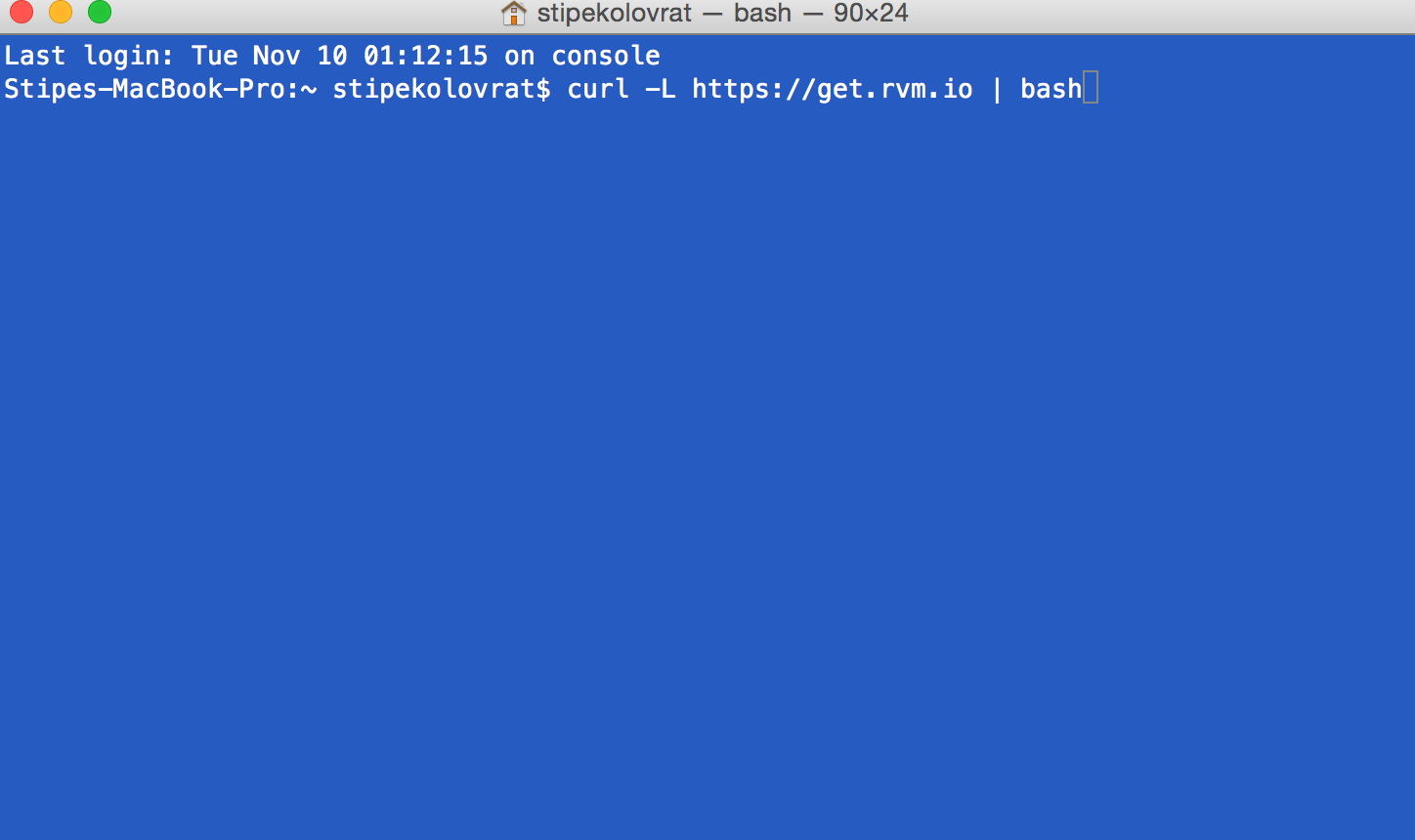 The rvm function will be automatically configured for every user on the system if you install as single user. When installation is completed you should receive similar message: 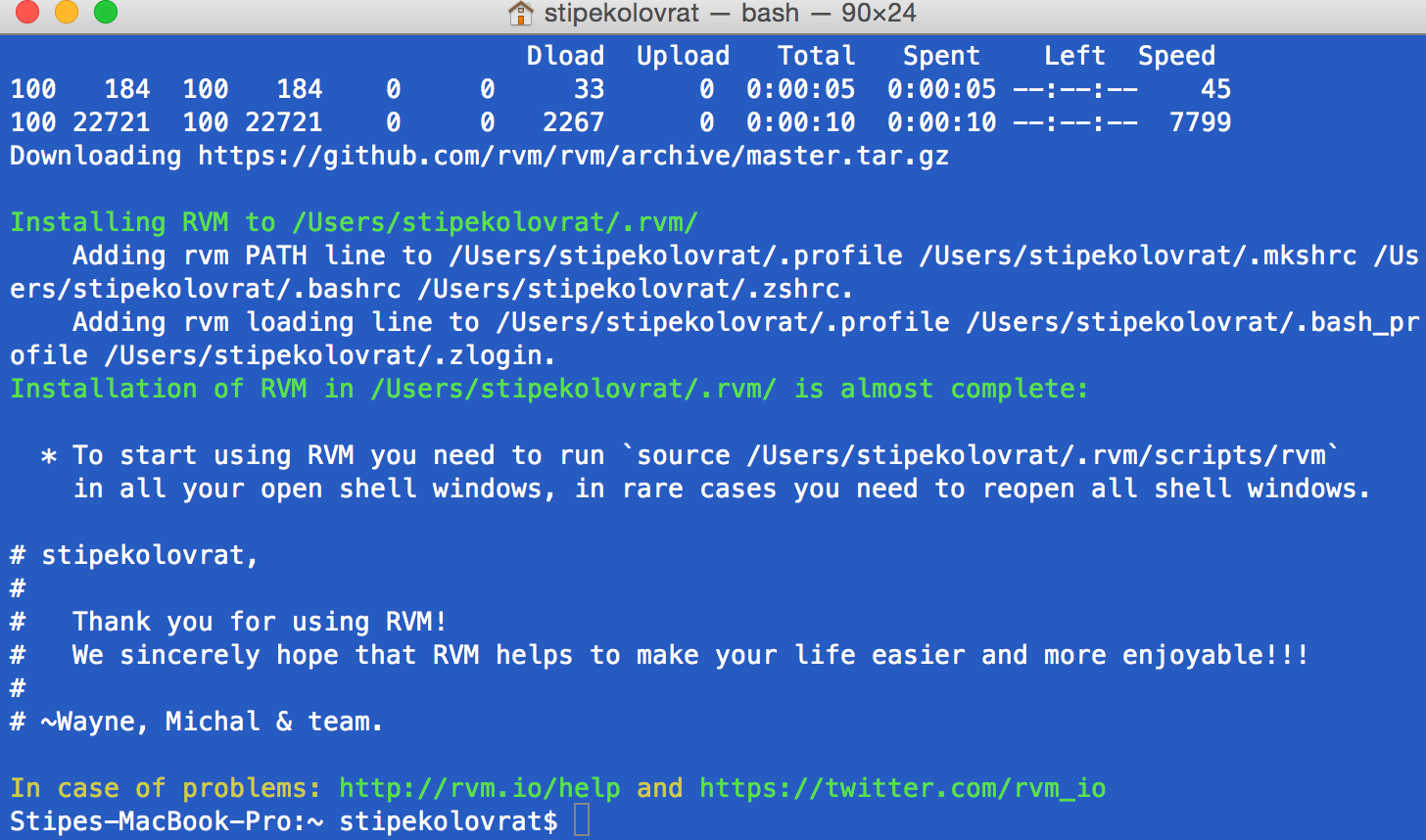 Now you may turn off you terminal, and turn it on again. After that to check if you installed it type: > rvm version 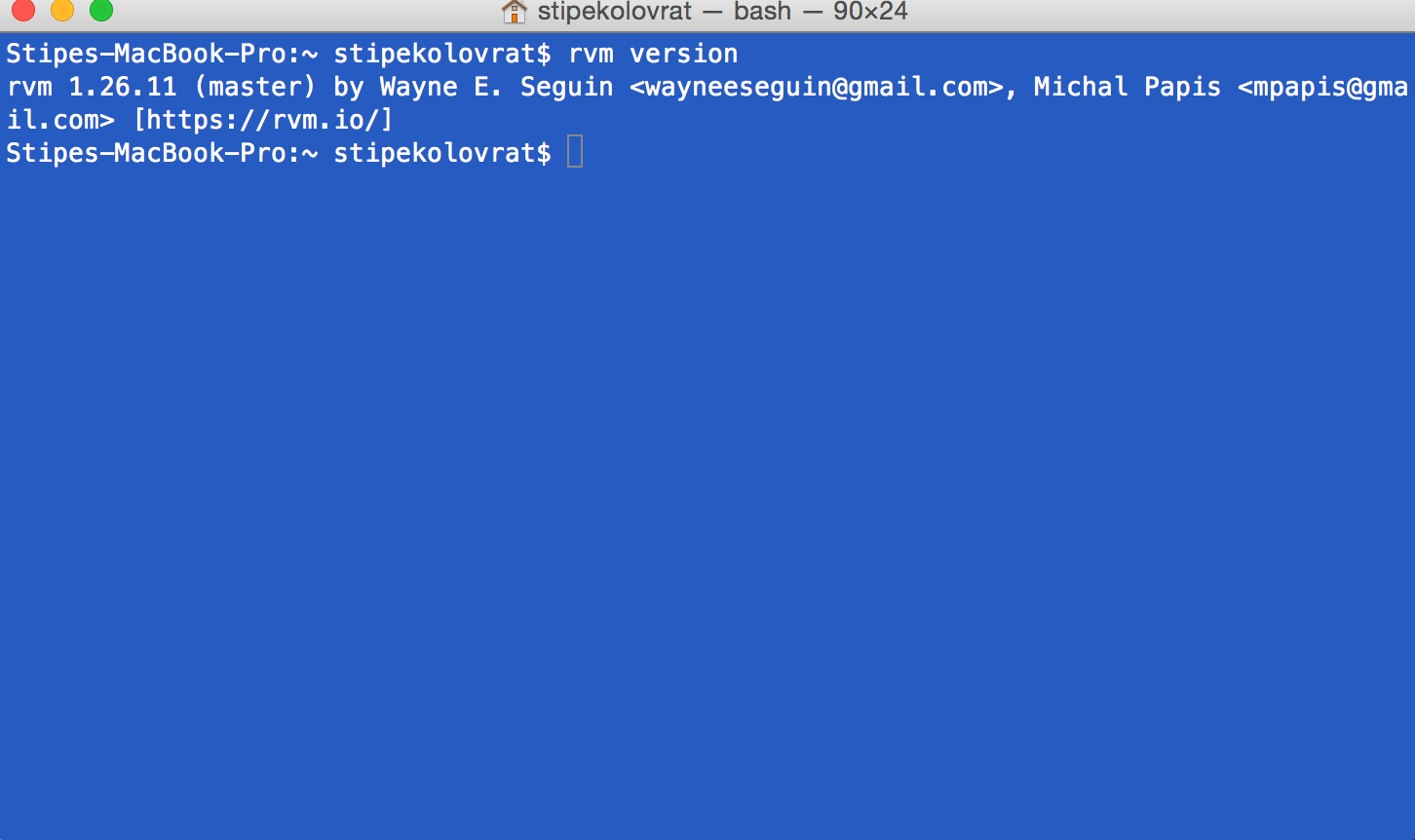 * Installing Ruby installation, type: > rvm install ruby-2.1.1 If you have more than one ruby version installed then you may want to make this version default: > rvm use ruby-2.1.1 –default * Installing Homebrew, type: > ruby -e “$(curl -fsSL https://raw.github.com/mxcl/homebrew/go)” and then: > brew doctor You may also take a look at http://brew.sh/ * Installing ChromeDriver, type: > brew install chromedriver When installation is completed you will have following message: 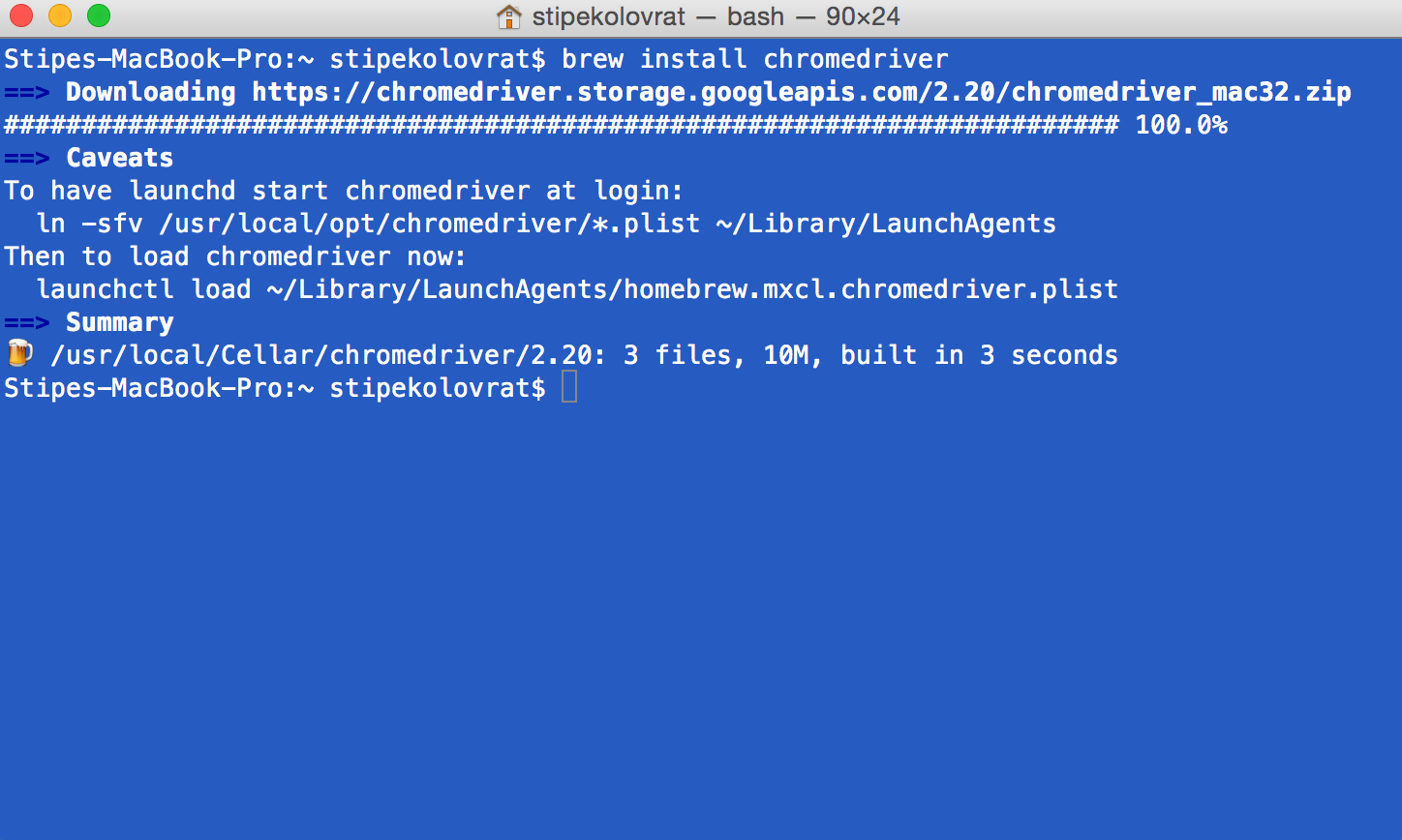 If later on you want to update your version of chromedriver you may type: > brew update && brew upgrade * Install the bundler gem, type: > gem install bundler –no-ri –no-rdoc Bundler will provide you with consistent environment for Ruby projects. It will tracks and install the exact gems and versions that are needed. * Install gems, type: > bundle install Navigate to your project folder and then type bundle install. This will install all necessary gems that you need. If your installation in some case was not complete and gave you message “freetds is missing.”, then you do not have gem tiny_tds installed. To solve that, type: > brew install freetds and then again type: > bundle install 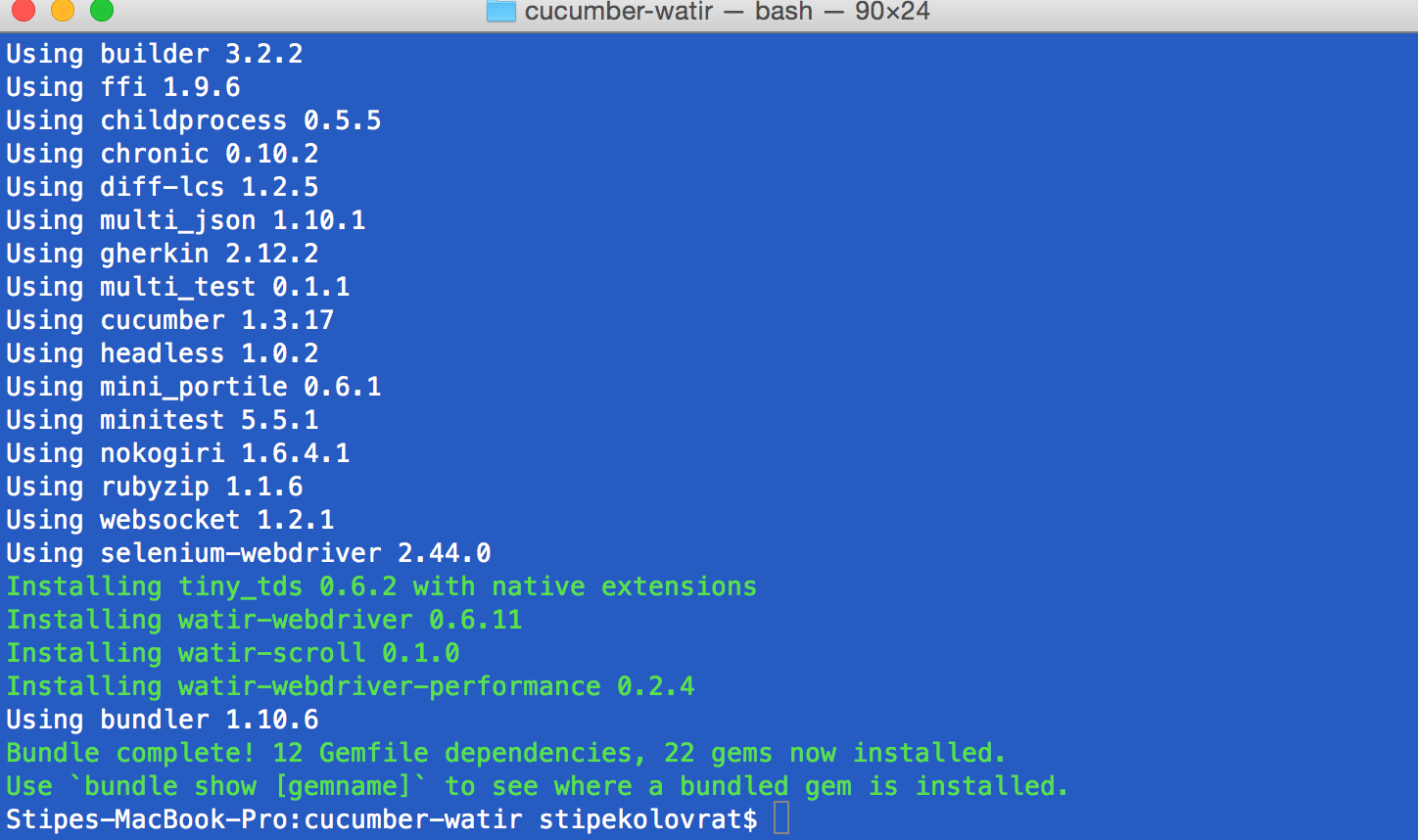 To see all installed gems, type: > bundle list This is all you need for getting started. |
| json metadata | {"tags":["cucumber","testing","qa","webdriver","watir"],"image":["https://steemitimages.com/DQmbcandCw1qnrm6Biv81ZnGWGbN3DVWtYvaYHMjyPPsCW8/rvminstall1.png","https://steemitimages.com/DQmYCCJT4XQUgihVVswjhMm9kHuXAF76wRUkfwgt49qbgcc/rvminstalled2.png","https://steemitimages.com/DQmQRLSpF36LUYGk2KUwgwqw7JY7ncNEs9gj8UaYzvSMTtk/rvminstallation3version.png","https://steemitimages.com/DQmYM1FV6vXpEcjZJgUjtqcM38fMgJDe7awf88FTuqPqLxm/chromedriver.png","https://steemitimages.com/DQmR8Yf6FRBNxB9pKQYpve4vXDknYBt3ijy9sRsrUewbpko/bundleinstalled.png"],"links":["https://get.rvm.io","https://raw.github.com/mxcl/homebrew/go","http://brew.sh/"],"app":"steemit/0.1","format":"markdown"} |
| Transaction Info | Block #14940336/Trx 824f101a279734a6c4685c9739c3987f989f37db |
View Raw JSON Data
{
"trx_id": "824f101a279734a6c4685c9739c3987f989f37db",
"block": 14940336,
"trx_in_block": 1,
"op_in_trx": 0,
"virtual_op": 0,
"timestamp": "2017-08-27T11:50:21",
"op": [
"comment",
{
"parent_author": "",
"parent_permlink": "cucumber",
"author": "stipe",
"permlink": "installation-cucumber-watirwebdriver",
"title": "Installation – Cucumber-WatirWebDriver",
"body": "# Setup on Mac OSX\n\n### Tools you need:\n\n* Mac with sudo Access\n* Xcode with command line tools installed. The command line tools can be installed from Xcode -> Preferences -> Downloads\n* RVM (optional)\n* Ruby 2.1.1\n* Watir-Webdriver\n* webdriver-user-agent\n* cucumber\n* homebrew (optional)\n* chromedriver\n\n### Installation:\n\n* Install XCode from the app store\n* To install RVM (Ruby Version Manager), in terminal type:\n\n> \\curl -sSL https://get.rvm.io | bash -s stable\n\n\n\nThe rvm function will be automatically configured for every user on the system if you install as single user. When installation is completed you should receive similar message:\n\n\n\nNow you may turn off you terminal, and turn it on again. After that to check if you installed it type:\n\n> rvm version\n\n\n\n* Installing Ruby installation, type:\n\n> rvm install ruby-2.1.1\n\nIf you have more than one ruby version installed then you may want to make this version default:\n\n> rvm use ruby-2.1.1 –default\n\n* Installing Homebrew, type:\n\n> ruby -e “$(curl -fsSL https://raw.github.com/mxcl/homebrew/go)”\n\nand then:\n\n> brew doctor\n\nYou may also take a look at http://brew.sh/\n\n* Installing ChromeDriver, type:\n\n> brew install chromedriver\n\nWhen installation is completed you will have following message:\n\n\n\nIf later on you want to update your version of chromedriver you may type:\n\n> brew update && brew upgrade\n\n* Install the bundler gem, type:\n\n> gem install bundler –no-ri –no-rdoc\n\nBundler will provide you with consistent environment for Ruby projects. It will tracks and install the exact gems and versions that are needed.\n\n* Install gems, type:\n\n> bundle install\n\nNavigate to your project folder and then type bundle install. This will install all necessary gems that you need.\nIf your installation in some case was not complete and gave you message “freetds is missing.”, then you do not have gem tiny_tds installed. To solve that, type:\n\n> brew install freetds\n\nand then again type:\n\n> bundle install\n\n\n\nTo see all installed gems, type:\n\n> bundle list\n\nThis is all you need for getting started.",
"json_metadata": "{\"tags\":[\"cucumber\",\"testing\",\"qa\",\"webdriver\",\"watir\"],\"image\":[\"https://steemitimages.com/DQmbcandCw1qnrm6Biv81ZnGWGbN3DVWtYvaYHMjyPPsCW8/rvminstall1.png\",\"https://steemitimages.com/DQmYCCJT4XQUgihVVswjhMm9kHuXAF76wRUkfwgt49qbgcc/rvminstalled2.png\",\"https://steemitimages.com/DQmQRLSpF36LUYGk2KUwgwqw7JY7ncNEs9gj8UaYzvSMTtk/rvminstallation3version.png\",\"https://steemitimages.com/DQmYM1FV6vXpEcjZJgUjtqcM38fMgJDe7awf88FTuqPqLxm/chromedriver.png\",\"https://steemitimages.com/DQmR8Yf6FRBNxB9pKQYpve4vXDknYBt3ijy9sRsrUewbpko/bundleinstalled.png\"],\"links\":[\"https://get.rvm.io\",\"https://raw.github.com/mxcl/homebrew/go\",\"http://brew.sh/\"],\"app\":\"steemit/0.1\",\"format\":\"markdown\"}"
}
]
}2017/08/25 11:06:03
2017/08/25 11:06:03
| parent author | stipe |
| parent permlink | workflow-with-git-and-github |
| author | steemitboard |
| permlink | steemitboard-notify-stipe-20170825t110605000z |
| title | |
| body | Congratulations @stipe! You have completed some achievement on Steemit and have been rewarded with new badge(s) : [](http://steemitboard.com/@stipe) You published your First Post [](http://steemitboard.com/@stipe) You made your First Vote [](http://steemitboard.com/@stipe) You got a First Vote Click on any badge to view your own Board of Honor on SteemitBoard. For more information about SteemitBoard, click [here](https://steemit.com/@steemitboard) If you no longer want to receive notifications, reply to this comment with the word `STOP` > By upvoting this notification, you can help all Steemit users. Learn how [here](https://steemit.com/steemitboard/@steemitboard/http-i-cubeupload-com-7ciqeo-png)! |
| json metadata | {"image":["https://steemitboard.com/img/notifications.png"]} |
| Transaction Info | Block #14881870/Trx bb19d0a684db0ff7da15940325b6ca0de2395ba3 |
View Raw JSON Data
{
"trx_id": "bb19d0a684db0ff7da15940325b6ca0de2395ba3",
"block": 14881870,
"trx_in_block": 21,
"op_in_trx": 0,
"virtual_op": 0,
"timestamp": "2017-08-25T11:06:03",
"op": [
"comment",
{
"parent_author": "stipe",
"parent_permlink": "workflow-with-git-and-github",
"author": "steemitboard",
"permlink": "steemitboard-notify-stipe-20170825t110605000z",
"title": "",
"body": "Congratulations @stipe! You have completed some achievement on Steemit and have been rewarded with new badge(s) :\n\n[](http://steemitboard.com/@stipe) You published your First Post\n[](http://steemitboard.com/@stipe) You made your First Vote\n[](http://steemitboard.com/@stipe) You got a First Vote\n\nClick on any badge to view your own Board of Honor on SteemitBoard.\nFor more information about SteemitBoard, click [here](https://steemit.com/@steemitboard)\n\nIf you no longer want to receive notifications, reply to this comment with the word `STOP`\n\n> By upvoting this notification, you can help all Steemit users. Learn how [here](https://steemit.com/steemitboard/@steemitboard/http-i-cubeupload-com-7ciqeo-png)!",
"json_metadata": "{\"image\":[\"https://steemitboard.com/img/notifications.png\"]}"
}
]
}nrgupvoted (1.11%) @stipe / jmeter-how-to-install2017/08/25 09:04:27
nrgupvoted (1.11%) @stipe / jmeter-how-to-install
2017/08/25 09:04:27
| voter | nrg |
| author | stipe |
| permlink | jmeter-how-to-install |
| weight | 111 (1.11%) |
| Transaction Info | Block #14879438/Trx 24d73014422d5eae8f89766d95cc8bf486b7643a |
View Raw JSON Data
{
  "trx_id": "24d73014422d5eae8f89766d95cc8bf486b7643a",
  "block": 14879438,
  "trx_in_block": 8,
  "op_in_trx": 0,
  "virtual_op": 0,
  "timestamp": "2017-08-25T09:04:27",
  "op": [
    "vote",
    {
      "voter": "nrg",
      "author": "stipe",
      "permlink": "jmeter-how-to-install",
      "weight": 111
    }
  ]
}shockblogupvoted (100.00%) @stipe / workflow-with-git-and-github2017/08/25 09:01:51
shockblogupvoted (100.00%) @stipe / workflow-with-git-and-github
2017/08/25 09:01:51
| voter | shockblog |
| author | stipe |
| permlink | workflow-with-git-and-github |
| weight | 10000 (100.00%) |
| Transaction Info | Block #14879386/Trx 9cfad282d1dcf6b4692fcd8571a4246469533585 |
View Raw JSON Data
{
  "trx_id": "9cfad282d1dcf6b4692fcd8571a4246469533585",
  "block": 14879386,
  "trx_in_block": 10,
  "op_in_trx": 0,
  "virtual_op": 0,
  "timestamp": "2017-08-25T09:01:51",
  "op": [
    "vote",
    {
      "voter": "shockblog",
      "author": "stipe",
      "permlink": "workflow-with-git-and-github",
      "weight": 10000
    }
  ]
}stipepublished a new post: workflow-with-git-and-github2017/08/25 09:01:27
stipepublished a new post: workflow-with-git-and-github
2017/08/25 09:01:27
| parent author | |
| parent permlink | git |
| author | stipe |
| permlink | workflow-with-git-and-github |
| title | Workflow With Git And GitHub |
| body |  If you are not sure how to start using Git and GitHub, but you already have Git installed, GitHub account created, GitHub desktop app installed, work repository cloned locally and updated. Alright, now when you create the changes you will not commit them directly to your master branch. What you will do is a bit wiser way. After you are done with your work on specific file you will create a new branch, add a new file and then commit to the new branch, then for the finale you will make a pull request and assign it to your colleague so (s)he can review it and then merge it to a master branch. Your colleague is your mentor, and you are a mentor to your colleague. Collaboration, and checking each others work will give safety before merging new stuff into already working master branch. # Git ### Create New Branch First, what you want to do is to create a new branch. To start, open up the terminal and navigate to your repository directory. Then type: > git branch [THE NAME OF THE BRANCH] ### On which branch am I ? To check on which branch you are at the moment you should type: > git branch ### Switch branches To switch to another branch, type: > git checkout [THE NAME OF THE BRANCH] Now your new branch is created locally, first time to push it to remote repository to get tracked, type: > git push -u origin [THE NAME OF THE BRANCH] ### Check Status To see what is the current status of your branch with latest changes, type: > git status It gives you information about difference between three different trees: * your working directory * staging index * repository ### Add Files Before you make a ‘Commit’ you should add all your changes to your staging directory by typing: > git add . If you want to add just one specific file, then you type: > git add [NAME OF YOUR FILE] ### Check Status Type: > git status Now you should get a message “Changes to be committed:…” ### Make a Commit When you added all your changes you are ready for your commit. It is advised to add short yet informative message to a commit. To create a commit to repository type: > git commit -m “TYPE YOUR MESSAGE HERE” ### Check Status > git status Now you should get a message “nothing to commit, working directory clean” ### Make a Push To upload all the changes to a remote GitHub repository, your first time you should type : * git push * github username * github password When it is completed, you will get a message ”everything up-to-date” # GitHub Now when we have our changed files in the remote Github repository we can go ahead and make a pull request to our colleague. ### Create a Pull Request **The purpose of new pull request is double checking. A colleague of yours who understands your changes will take a look and decide if it makes sense or you should go back and make couple more edits.** * Open up the GitHub web app * Navigate to your branch * Click “Pull requests” button (right-sidebar) * Click “New pull request” button * From the dropdown menus “base” vs “compare”, choose “branch: master” and “compare:YOUR BRANCH” * Click “Create Pull Request” button * Type desired title * Type more descriptive text of your file changes * Click “Send pull request” * Click “Assignee” and add your colleague ------------------------------------------------------- Later on when your code changes are accepted and merged to master you may want to delete branch both local and remote. To delete local branch, type: > git branch -d [THE NAME OF THE BRANCH] To delete remote branch, type: > git push origin :[THE NAME OF THE BRANCH] ---- That's it sharing is caring. Please hit that upvote button and share this article with anyone who might benefit from it. |
| json metadata | {"tags":["git","github","softwaretesting","applyquality"],"image":["https://steemitimages.com/DQmPntrb3gP3uN41Jeusi632ndPjTzRaNUn2vgmZRw9oJHz/gitgithubworkflow-2.png"],"app":"steemit/0.1","format":"markdown"} |
| Transaction Info | Block #14879378/Trx 32a50ad4e857a42067d957f408917e11b3bbdbba |
View Raw JSON Data
{
"trx_id": "32a50ad4e857a42067d957f408917e11b3bbdbba",
"block": 14879378,
"trx_in_block": 12,
"op_in_trx": 0,
"virtual_op": 0,
"timestamp": "2017-08-25T09:01:27",
"op": [
"comment",
{
"parent_author": "",
"parent_permlink": "git",
"author": "stipe",
"permlink": "workflow-with-git-and-github",
"title": "Workflow With Git And GitHub",
"body": "\n\nIf you are not sure how to start using Git and GitHub, but you already have Git installed, GitHub account created, GitHub desktop app installed, work repository cloned locally and updated.\nAlright, now when you create the changes you will not commit them directly to your master branch. What you will do is a bit wiser way. After you are done with your work on specific file you will create a new branch, add a new file and then commit to the new branch, then for the finale you will make a pull request and assign it to your colleague so (s)he can review it and then merge it to a master branch.\nYour colleague is your mentor, and you are a mentor to your colleague. Collaboration, and checking each others work will give safety before merging new stuff into already working master branch.\n\n# Git\n### Create New Branch\n\nFirst, what you want to do is to create a new branch. To start, open up the terminal and navigate to your repository directory. Then type:\n\n> git branch [THE NAME OF THE BRANCH]\n\n### On which branch am I ?\n\nTo check on which branch you are at the moment you should type:\n> git branch\n\n### Switch branches\n\nTo switch to another branch, type:\n\n> git checkout [THE NAME OF THE BRANCH]\n\nNow your new branch is created locally, first time to push it to remote repository to get tracked, type: \n\n> git push -u origin [THE NAME OF THE BRANCH]\n\n### Check Status\n\nTo see what is the current status of your branch with latest changes, type:\n\n> git status\n\nIt gives you information about difference between three different trees:\n\n* your working directory\n* staging index\n* repository\n\n### Add Files\n\nBefore you make a ‘Commit’ you should add all your changes to your staging directory by typing:\n\n> git add .\n\nIf you want to add just one specific file, then you type:\n\n> git add [NAME OF YOUR FILE] \n\n### Check Status\n\nType:\n\n> git status\n\nNow you should get a message “Changes to be committed:…”\n\n### Make a Commit\n\nWhen you added all your changes you are ready for your commit. It is advised to add short yet informative message to a commit.\n\nTo create a commit to repository type:\n\n> git commit -m “TYPE YOUR MESSAGE HERE”\n\n### Check Status\n\n> git status\n\nNow you should get a message “nothing to commit, working directory clean”\n\n### Make a Push\n\nTo upload all the changes to a remote GitHub repository, your first time you should type :\n\n* git push\n* github username\n* github password\n\nWhen it is completed, you will get a message ”everything up-to-date”\n\n# GitHub\n\nNow when we have our changed files in the remote Github repository we can go ahead and make a pull request to our colleague.\n\n### Create a Pull Request\n\n**The purpose of new pull request is double checking. A colleague of yours who understands your changes will take a look and decide if it makes sense or you should go back and make couple more edits.**\n\n\n* Open up the GitHub web app\n* Navigate to your branch\n* Click “Pull requests” button (right-sidebar)\n* Click “New pull request” button\n* From the dropdown menus “base” vs “compare”, choose “branch: master” and “compare:YOUR BRANCH”\n* Click “Create Pull Request” button\n* Type desired title\n* Type more descriptive text of your file changes\n* Click “Send pull request”\n* Click “Assignee” and add your colleague\n-------------------------------------------------------\nLater on when your code changes are accepted and merged to master you may want to delete branch both local and remote.\n\nTo delete local branch, type:\n\n> git branch -d [THE NAME OF THE BRANCH]\n\nTo delete remote branch, type:\n\n> git push origin :[THE NAME OF THE BRANCH]\n----\n\nThat's it sharing is caring. Please hit that upvote button and share this article with anyone who might benefit from it.",
"json_metadata": "{\"tags\":[\"git\",\"github\",\"softwaretesting\",\"applyquality\"],\"image\":[\"https://steemitimages.com/DQmPntrb3gP3uN41Jeusi632ndPjTzRaNUn2vgmZRw9oJHz/gitgithubworkflow-2.png\"],\"app\":\"steemit/0.1\",\"format\":\"markdown\"}"
}
]
}stipeupvoted (100.00%) @stipe / jmeter-how-to-install2017/08/25 08:39:30
stipeupvoted (100.00%) @stipe / jmeter-how-to-install
2017/08/25 08:39:30
| voter | stipe |
| author | stipe |
| permlink | jmeter-how-to-install |
| weight | 10000 (100.00%) |
| Transaction Info | Block #14878939/Trx 36b8a2173586e5cee7e3fadea81e3c0e5728cbef |
View Raw JSON Data
{
  "trx_id": "36b8a2173586e5cee7e3fadea81e3c0e5728cbef",
  "block": 14878939,
  "trx_in_block": 19,
  "op_in_trx": 0,
  "virtual_op": 0,
  "timestamp": "2017-08-25T08:39:30",
  "op": [
    "vote",
    {
      "voter": "stipe",
      "author": "stipe",
      "permlink": "jmeter-how-to-install",
      "weight": 10000
    }
  ]
}stipeupdated their account properties2017/08/25 08:38:36
stipeupdated their account properties
2017/08/25 08:38:36
| account | stipe |
| memo key | STM8VDzdeX56iYjPZSGZsDCnj6TWeGbj4tDzCSXsjUwD3jryke5b4 |
| json metadata | {"profile":{"name":"Stipe","about":"I QA apps","profile_image":"https://media.licdn.com/mpr/mpr/shrinknp_400_400/AAEAAQAAAAAAAAyDAAAAJDM3NGI5ZTRhLTJjYWMtNDk4Mi05MGExLWY5MjA2NTIxYmZkOA.jpg","cover_image":"https://media.licdn.com/media/AAEAAQAAAAAAAAYPAAAAJDk0ODEyOGJjLWM2NjItNDk2OS04Nzk0LTk1MjIxMTk2MzkwMA.jpg"}} |
| Transaction Info | Block #14878921/Trx 8bdae8f1757fdbbc821ec7799c98d9ece38bd81a |
View Raw JSON Data
{
  "trx_id": "8bdae8f1757fdbbc821ec7799c98d9ece38bd81a",
  "block": 14878921,
  "trx_in_block": 16,
  "op_in_trx": 0,
  "virtual_op": 0,
  "timestamp": "2017-08-25T08:38:36",
  "op": [
    "account_update",
    {
      "account": "stipe",
      "memo_key": "STM8VDzdeX56iYjPZSGZsDCnj6TWeGbj4tDzCSXsjUwD3jryke5b4",
      "json_metadata": "{\"profile\":{\"name\":\"Stipe\",\"about\":\"I QA apps\",\"profile_image\":\"https://media.licdn.com/mpr/mpr/shrinknp_400_400/AAEAAQAAAAAAAAyDAAAAJDM3NGI5ZTRhLTJjYWMtNDk4Mi05MGExLWY5MjA2NTIxYmZkOA.jpg\",\"cover_image\":\"https://media.licdn.com/media/AAEAAQAAAAAAAAYPAAAAJDk0ODEyOGJjLWM2NjItNDk2OS04Nzk0LTk1MjIxMTk2MzkwMA.jpg\"}}"
    }
  ]
}stipeupdated their account properties2017/08/25 08:36:33
stipeupdated their account properties
2017/08/25 08:36:33
| account | stipe |
| memo key | STM8VDzdeX56iYjPZSGZsDCnj6TWeGbj4tDzCSXsjUwD3jryke5b4 |
| json metadata | {"profile":{"name":"Stipe","about":"I QA apps"}} |
| Transaction Info | Block #14878880/Trx d39849399f75c16ef093f653402dafd41d78243d |
View Raw JSON Data
{
  "trx_id": "d39849399f75c16ef093f653402dafd41d78243d",
  "block": 14878880,
  "trx_in_block": 14,
  "op_in_trx": 0,
  "virtual_op": 0,
  "timestamp": "2017-08-25T08:36:33",
  "op": [
    "account_update",
    {
      "account": "stipe",
      "memo_key": "STM8VDzdeX56iYjPZSGZsDCnj6TWeGbj4tDzCSXsjUwD3jryke5b4",
      "json_metadata": "{\"profile\":{\"name\":\"Stipe\",\"about\":\"I QA apps\"}}"
    }
  ]
}stipepublished a new post: jmeter-how-to-install2017/08/25 08:34:27
stipepublished a new post: jmeter-how-to-install
2017/08/25 08:34:27
| parent author | |
| parent permlink | jmeter |
| author | stipe |
| permlink | jmeter-how-to-install |
| title | JMeter – How to install |
| body |  You have just planned to use JMeter for your load testing, well you made the right decision. You are now wondering how to install it in quick and painless way. Chill, I have a straightforward guide for you where the installation is going to be quick and JMeter will work beautifully. # What is ? JMeter is free and open source tool from Apache. You can record certain amount of actions in your application and then rerun them and test performance. Testing can be done on both static and dynamic resources. It is completely up to you what type of load you want to simulate on your server. # How to install ? ### Installation on mac: * Open up the console * Copy and paste: > ruby -e “$(curl -fsSL https://raw.githubusercontent.com/Homebrew/install/master/install)” < /dev/null 2> /dev/null * Then, copy and paste: > brew install jmeter –with-plugins * To run it, in console type: > jmeter Voila, JMeter is up and running! Now, there is one step more which will allow you to record tests. For the next step I will use the Firefox browser, but you can use any other if it suits your needs better. ### Browser setup: There are two things you should configure: * Proxy * Certificate ### 1. Proxy Open Menu (Top-right hamburger button) -> Preferences -> Advanced -> Network -> Settings * Choose ‘Manual proxy configuration:’ * In ‘HTTP Proxy:‘ type ‘localhost‘ * In ‘Port:‘ type ‘8080‘ * Click on checkbox ‘Use this proxy server for all protocols‘ * Click ‘OK’ button 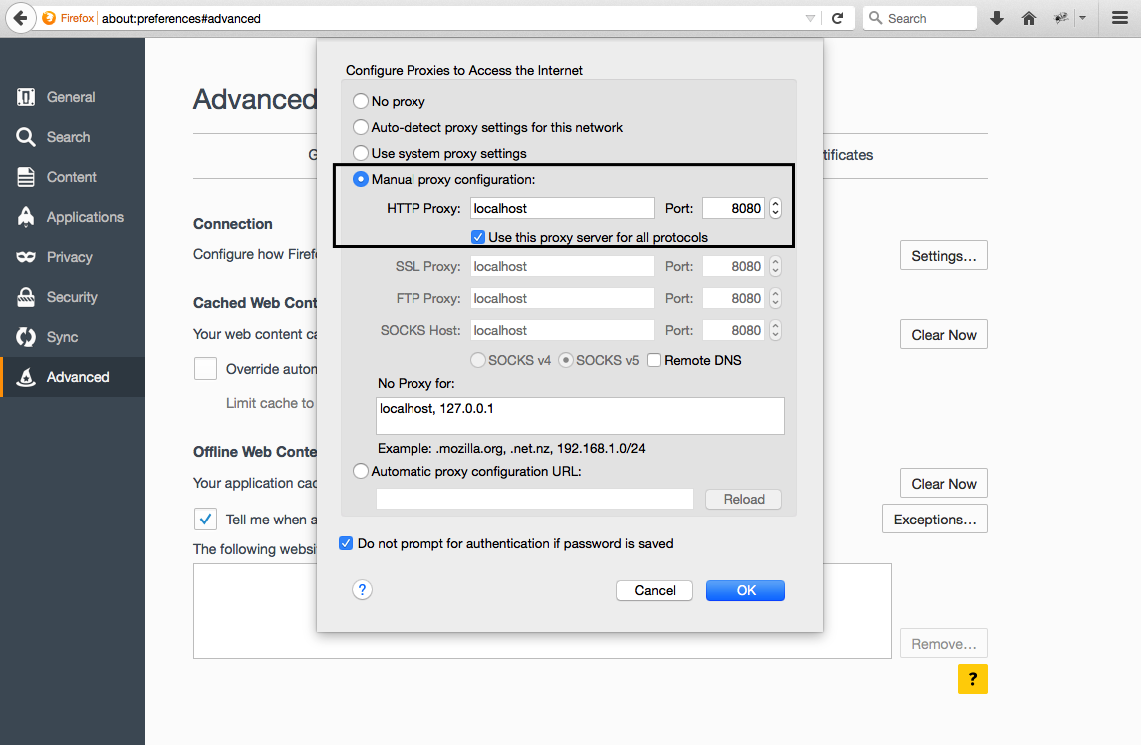 |
| json metadata | {"tags":["jmeter","softwaretesting","performancetesting","qualityassurance"],"image":["https://steemitimages.com/DQmdTqYWCUQQipgydfQsvb9RaUgg8aLa7kiX4qBXaCfxWaa/Jmeter.png","https://steemitimages.com/DQmSJMsjhSKQKb4fbhafU7thygLeEYGSA7cQFm4zHF2TkxW/proxyff.png"],"links":["https://raw.githubusercontent.com/Homebrew/install/master/install"],"app":"steemit/0.1","format":"markdown"} |
| Transaction Info | Block #14878838/Trx a3e11d0adef4039e38446349ce486127264d0d99 |
View Raw JSON Data
{
"trx_id": "a3e11d0adef4039e38446349ce486127264d0d99",
"block": 14878838,
"trx_in_block": 36,
"op_in_trx": 0,
"virtual_op": 0,
"timestamp": "2017-08-25T08:34:27",
"op": [
"comment",
{
"parent_author": "",
"parent_permlink": "jmeter",
"author": "stipe",
"permlink": "jmeter-how-to-install",
"title": "JMeter – How to install",
"body": "\n\nYou have just planned to use JMeter for your load testing, well you made the right decision. You are now wondering how to install it in quick and painless way. Chill, I have a straightforward guide for you where the installation is going to be quick and JMeter will work beautifully.\n\n# What is ?\n\nJMeter is free and open source tool from Apache. You can record certain amount of actions in your application and then rerun them and test performance. Testing can be done on both static and dynamic resources. It is completely up to you what type of load you want to simulate on your server.\n\n# How to install ?\n### Installation on mac:\n * Open up the console\n* Copy and paste:\n\n> ruby -e “$(curl -fsSL https://raw.githubusercontent.com/Homebrew/install/master/install)” < /dev/null 2> /dev/null\n\n* Then, copy and paste:\n> brew install jmeter –with-plugins\n\n* To run it, in console type:\n> jmeter\n\nVoila, JMeter is up and running! Now, there is one step more which will allow you to record tests.\nFor the next step I will use the Firefox browser, but you can use any other if it suits your needs better.\n\n### Browser setup:\nThere are two things you should configure:\n\n* Proxy\n* Certificate\n\n### 1. Proxy \n\nOpen Menu (Top-right hamburger button) -> Preferences -> Advanced -> Network -> Settings\n\n* Choose ‘Manual proxy configuration:’\n* In ‘HTTP Proxy:‘ type ‘localhost‘\n* In ‘Port:‘ type ‘8080‘\n* Click on checkbox ‘Use this proxy server for all protocols‘\n* Click ‘OK’ button\n",
"json_metadata": "{\"tags\":[\"jmeter\",\"softwaretesting\",\"performancetesting\",\"qualityassurance\"],\"image\":[\"https://steemitimages.com/DQmdTqYWCUQQipgydfQsvb9RaUgg8aLa7kiX4qBXaCfxWaa/Jmeter.png\",\"https://steemitimages.com/DQmSJMsjhSKQKb4fbhafU7thygLeEYGSA7cQFm4zHF2TkxW/proxyff.png\"],\"links\":[\"https://raw.githubusercontent.com/Homebrew/install/master/install\"],\"app\":\"steemit/0.1\",\"format\":\"markdown\"}"
}
]
}2017/08/24 21:39:15
2017/08/24 21:39:15
| parent author | cryptochron |
| parent permlink | re-plainbroadcast-nicehash-claymore-and-ethos-what-are-they-and-which-one-should-i-use-20170615t005759378z |
| author | stipe |
| permlink | re-cryptochron-re-plainbroadcast-nicehash-claymore-and-ethos-what-are-they-and-which-one-should-i-use-20170824t213915379z |
| title | |
| body | You can overclock by changing local config file woth 'globalmem' and 'globalcore' |
| json metadata | {"tags":["ethos"],"app":"steemit/0.1"} |
| Transaction Info | Block #14865742/Trx 4d2940feb337746fa4f5629d621299accf01b00e |
View Raw JSON Data
{
  "trx_id": "4d2940feb337746fa4f5629d621299accf01b00e",
  "block": 14865742,
  "trx_in_block": 17,
  "op_in_trx": 0,
  "virtual_op": 0,
  "timestamp": "2017-08-24T21:39:15",
  "op": [
    "comment",
    {
      "parent_author": "cryptochron",
      "parent_permlink": "re-plainbroadcast-nicehash-claymore-and-ethos-what-are-they-and-which-one-should-i-use-20170615t005759378z",
      "author": "stipe",
      "permlink": "re-cryptochron-re-plainbroadcast-nicehash-claymore-and-ethos-what-are-they-and-which-one-should-i-use-20170824t213915379z",
      "title": "",
      "body": "You can overclock by changing local config file woth 'globalmem' and 'globalcore'",
      "json_metadata": "{\"tags\":[\"ethos\"],\"app\":\"steemit/0.1\"}"
    }
  ]
}2017/08/24 21:38:12
2017/08/24 21:38:12
| parent author | plainbroadcast |
| parent permlink | nicehash-claymore-and-ethos-what-are-they-and-which-one-should-i-use |
| author | stipe |
| permlink | re-plainbroadcast-nicehash-claymore-and-ethos-what-are-they-and-which-one-should-i-use-20170824t213811179z |
| title | |
| body | I am using ethOS with nvidia 1060 6GB GPUs and MH/s are always the same. Cant complain as AMD users do. With win10 rig was unstable. So pretty much amything on linux is great choice: ethOS, ubuntu, simplemining |
| json metadata | {"tags":["ethos"],"app":"steemit/0.1"} |
| Transaction Info | Block #14865721/Trx 9b91811fbc9e1c241c2a9b86bfecd077c98d1372 |
View Raw JSON Data
{
  "trx_id": "9b91811fbc9e1c241c2a9b86bfecd077c98d1372",
  "block": 14865721,
  "trx_in_block": 18,
  "op_in_trx": 0,
  "virtual_op": 0,
  "timestamp": "2017-08-24T21:38:12",
  "op": [
    "comment",
    {
      "parent_author": "plainbroadcast",
      "parent_permlink": "nicehash-claymore-and-ethos-what-are-they-and-which-one-should-i-use",
      "author": "stipe",
      "permlink": "re-plainbroadcast-nicehash-claymore-and-ethos-what-are-they-and-which-one-should-i-use-20170824t213811179z",
      "title": "",
      "body": "I am using ethOS with nvidia 1060 6GB GPUs and MH/s are always the same. Cant complain as AMD users do. With win10 rig was unstable. So pretty much amything on linux is great choice: ethOS, ubuntu, simplemining",
      "json_metadata": "{\"tags\":[\"ethos\"],\"app\":\"steemit/0.1\"}"
    }
  ]
}2017/08/24 21:04:09
2017/08/24 21:04:09
| fee | 0.500 STEEM |
| delegation | 57000.000000 VESTS |
| creator | steem |
| new account name | stipe |
| owner | {"weight_threshold":1,"account_auths":[],"key_auths":[["STM6PC5TPYuBtXBuE5RYy1aeW3YUEdX5wMRMkWX2F1ceNnMCTyZ7t",1]]} |
| active | {"weight_threshold":1,"account_auths":[],"key_auths":[["STM7s7KeEEkhndZdjwEASDdPWf9m2TVjPVRJBSUAxJCDZw62ApdeW",1]]} |
| posting | {"weight_threshold":1,"account_auths":[],"key_auths":[["STM6zEtNr48uYhTwdW9za7jqtiLxsMNis95b2tqbSrD73WkkqvdzA",1]]} |
| memo key | STM8VDzdeX56iYjPZSGZsDCnj6TWeGbj4tDzCSXsjUwD3jryke5b4 |
| json metadata | |
| extensions | [] |
| Transaction Info | Block #14865040/Trx 717e4780a637250f844d94d5d1a83f342eadf5df |
View Raw JSON Data
{
  "trx_id": "717e4780a637250f844d94d5d1a83f342eadf5df",
  "block": 14865040,
  "trx_in_block": 35,
  "op_in_trx": 0,
  "virtual_op": 0,
  "timestamp": "2017-08-24T21:04:09",
  "op": [
    "account_create_with_delegation",
    {
      "fee": "0.500 STEEM",
      "delegation": "57000.000000 VESTS",
      "creator": "steem",
      "new_account_name": "stipe",
      "owner": {
        "weight_threshold": 1,
        "account_auths": [],
        "key_auths": [
          [
            "STM6PC5TPYuBtXBuE5RYy1aeW3YUEdX5wMRMkWX2F1ceNnMCTyZ7t",
            1
          ]
        ]
      },
      "active": {
        "weight_threshold": 1,
        "account_auths": [],
        "key_auths": [
          [
            "STM7s7KeEEkhndZdjwEASDdPWf9m2TVjPVRJBSUAxJCDZw62ApdeW",
            1
          ]
        ]
      },
      "posting": {
        "weight_threshold": 1,
        "account_auths": [],
        "key_auths": [
          [
            "STM6zEtNr48uYhTwdW9za7jqtiLxsMNis95b2tqbSrD73WkkqvdzA",
            1
          ]
        ]
      },
      "memo_key": "STM8VDzdeX56iYjPZSGZsDCnj6TWeGbj4tDzCSXsjUwD3jryke5b4",
      "json_metadata": "",
      "extensions": []
    }
  ]
}Manabar
Voting Power100.00%
Downvote Power100.00%
Resource Credits100.00%
Reputation Progress0.00%
{
  "voting_manabar": {
    "current_mana": "8143659806",
    "last_update_time": 1779087423
  },
  "downvote_manabar": {
    "current_mana": 2035914951,
    "last_update_time": 1779087423
  },
  "rc_account": {
    "account": "stipe",
    "rc_manabar": {
      "current_mana": "10164408779",
      "last_update_time": 1779087423
    },
    "max_rc_creation_adjustment": {
      "amount": "2020748973",
      "precision": 6,
      "nai": "@@000000037"
    },
    "max_rc": "10164408779"
  }
}
Account Metadata
| POSTING JSON METADATA | |
| profile | {"name":"JohnEdmond","profile_image":"https://cdn.steemitimages.com/DQmVq77iMRLyDVmwvkBsCFpzZYVL8gHjYc32dYPJHaPuT5i/Screenshot%20at%20Dec%2011%2021-35-33.png"} |
| JSON METADATA | |
| profile | {"name":"JohnEdmond","profile_image":"https://cdn.steemitimages.com/DQmVq77iMRLyDVmwvkBsCFpzZYVL8gHjYc32dYPJHaPuT5i/Screenshot%20at%20Dec%2011%2021-35-33.png"} |
{
  "posting_json_metadata": {
    "profile": {
      "name": "JohnEdmond",
      "profile_image": "https://cdn.steemitimages.com/DQmVq77iMRLyDVmwvkBsCFpzZYVL8gHjYc32dYPJHaPuT5i/Screenshot%20at%20Dec%2011%2021-35-33.png"
    }
  },
  "json_metadata": {
    "profile": {
      "name": "JohnEdmond",
      "profile_image": "https://cdn.steemitimages.com/DQmVq77iMRLyDVmwvkBsCFpzZYVL8gHjYc32dYPJHaPuT5i/Screenshot%20at%20Dec%2011%2021-35-33.png"
    }
  }
}
Auth Keys
Owner
Single Signature
Public Keys
STM6PC5TPYuBtXBuE5RYy1aeW3YUEdX5wMRMkWX2F1ceNnMCTyZ7t1/1
Active
Single Signature
Public Keys
STM7s7KeEEkhndZdjwEASDdPWf9m2TVjPVRJBSUAxJCDZw62ApdeW1/1
Posting
Single Signature
Public Keys
STM6zEtNr48uYhTwdW9za7jqtiLxsMNis95b2tqbSrD73WkkqvdzA1/1
Memo
STM8VDzdeX56iYjPZSGZsDCnj6TWeGbj4tDzCSXsjUwD3jryke5b4
{
  "owner": {
    "weight_threshold": 1,
    "account_auths": [],
    "key_auths": [
      [
        "STM6PC5TPYuBtXBuE5RYy1aeW3YUEdX5wMRMkWX2F1ceNnMCTyZ7t",
        1
      ]
    ]
  },
  "active": {
    "weight_threshold": 1,
    "account_auths": [],
    "key_auths": [
      [
        "STM7s7KeEEkhndZdjwEASDdPWf9m2TVjPVRJBSUAxJCDZw62ApdeW",
        1
      ]
    ]
  },
  "posting": {
    "weight_threshold": 1,
    "account_auths": [],
    "key_auths": [
      [
        "STM6zEtNr48uYhTwdW9za7jqtiLxsMNis95b2tqbSrD73WkkqvdzA",
        1
      ]
    ]
  },
  "memo": "STM8VDzdeX56iYjPZSGZsDCnj6TWeGbj4tDzCSXsjUwD3jryke5b4"
}
Witness Votes
0 / 30
No active witness votes.
[]