

VOTING POWER100.00%
DOWNVOTE POWER100.00%
RESOURCE CREDITS100.00%
REPUTATION PROGRESS53.80%
Net Worth
0.062USD
STEEM
0.000STEEM
SBD
0.099SBD
Effective Power
5.001SP
├── Own SP
0.253SP
└── Incoming DelegationsDeleg
+4.749SP
Detailed Balance
| STEEM | ||
| balance | 0.000STEEM | STEEM |
| market_balance | 0.000STEEM | STEEM |
| savings_balance | 0.000STEEM | STEEM |
| reward_steem_balance | 0.000STEEM | STEEM |
| STEEM POWER | ||
| Own SP | 0.253SP | SP |
| Delegated Out | 0.000SP | SP |
| Delegation In | 4.749SP | SP |
| Effective Power | 5.001SP | SP |
| Reward SP (pending) | 0.000SP | SP |
| SBD | ||
| sbd_balance | 0.099SBD | SBD |
| sbd_conversions | 0.000SBD | SBD |
| sbd_market_balance | 0.000SBD | SBD |
| savings_sbd_balance | 0.000SBD | SBD |
| reward_sbd_balance | 0.000SBD | SBD |
{
  "balance": "0.000 STEEM",
  "savings_balance": "0.000 STEEM",
  "reward_steem_balance": "0.000 STEEM",
  "vesting_shares": "411.218878 VESTS",
  "delegated_vesting_shares": "0.000000 VESTS",
  "received_vesting_shares": "7732.440928 VESTS",
  "sbd_balance": "0.099 SBD",
  "savings_sbd_balance": "0.000 SBD",
  "reward_sbd_balance": "0.000 SBD",
  "conversions": []
}
Account Info
| name | smk762 |
| id | 828346 |
| rank | 475,110 |
| reputation | 1914266274 |
| created | 2018-03-12T16:28:30 |
| recovery_account | steem |
| proxy | None |
| post_count | 16 |
| comment_count | 0 |
| lifetime_vote_count | 0 |
| witnesses_voted_for | 0 |
| last_post | 2018-08-28T13:07:15 |
| last_root_post | 2018-08-28T13:07:15 |
| last_vote_time | 2018-08-04T14:10:48 |
| proxied_vsf_votes | 0, 0, 0, 0 |
| can_vote | 1 |
| voting_power | 0 |
| delayed_votes | 0 |
| balance | 0.000 STEEM |
| savings_balance | 0.000 STEEM |
| sbd_balance | 0.099 SBD |
| savings_sbd_balance | 0.000 SBD |
| vesting_shares | 411.218878 VESTS |
| delegated_vesting_shares | 0.000000 VESTS |
| received_vesting_shares | 7732.440928 VESTS |
| reward_vesting_balance | 0.000000 VESTS |
| vesting_balance | 0.000 STEEM |
| vesting_withdraw_rate | 0.000000 VESTS |
| next_vesting_withdrawal | 1969-12-31T23:59:59 |
| withdrawn | 0 |
| to_withdraw | 0 |
| withdraw_routes | 0 |
| savings_withdraw_requests | 0 |
| last_account_recovery | 1970-01-01T00:00:00 |
| reset_account | null |
| last_owner_update | 1970-01-01T00:00:00 |
| last_account_update | 2018-04-11T13:47:36 |
| mined | No |
| sbd_seconds | 0 |
| sbd_last_interest_payment | 2018-07-25T08:54:33 |
| savings_sbd_last_interest_payment | 1970-01-01T00:00:00 |
{
  "id": 828346,
  "name": "smk762",
  "owner": {
    "weight_threshold": 1,
    "account_auths": [],
    "key_auths": [
      [
        "STM6tu4yr9jgo2TD5dp1CvFo36BoDyKFrQ4yhdtscBDbX969pgDJs",
        1
      ]
    ]
  },
  "active": {
    "weight_threshold": 1,
    "account_auths": [],
    "key_auths": [
      [
        "STM86m4wCV4e6qtQEJMq5ZPVWSyKRh4vb4U4BknkxW6SU56Df9MbG",
        1
      ]
    ]
  },
  "posting": {
    "weight_threshold": 1,
    "account_auths": [
      [
        "dlive.app",
        1
      ]
    ],
    "key_auths": [
      [
        "STM8TPKoyB5rypssCWHBfremJhMvbZnUhZz5ccWKnUpj6NPYKTNos",
        1
      ]
    ]
  },
  "memo_key": "STM5o6LyF9Pr5Q3g29P6kkrBBP8AnmrETGL3ixvuUKpdDjCd2YJFN",
  "json_metadata": "{}",
  "posting_json_metadata": "{}",
  "proxy": "",
  "last_owner_update": "1970-01-01T00:00:00",
  "last_account_update": "2018-04-11T13:47:36",
  "created": "2018-03-12T16:28:30",
  "mined": false,
  "recovery_account": "steem",
  "last_account_recovery": "1970-01-01T00:00:00",
  "reset_account": "null",
  "comment_count": 0,
  "lifetime_vote_count": 0,
  "post_count": 16,
  "can_vote": true,
  "voting_manabar": {
    "current_mana": "8143659806",
    "last_update_time": 1779086397
  },
  "downvote_manabar": {
    "current_mana": 2035914951,
    "last_update_time": 1779086397
  },
  "voting_power": 0,
  "balance": "0.000 STEEM",
  "savings_balance": "0.000 STEEM",
  "sbd_balance": "0.099 SBD",
  "sbd_seconds": "0",
  "sbd_seconds_last_update": "2018-07-25T08:54:33",
  "sbd_last_interest_payment": "2018-07-25T08:54:33",
  "savings_sbd_balance": "0.000 SBD",
  "savings_sbd_seconds": "0",
  "savings_sbd_seconds_last_update": "1970-01-01T00:00:00",
  "savings_sbd_last_interest_payment": "1970-01-01T00:00:00",
  "savings_withdraw_requests": 0,
  "reward_sbd_balance": "0.000 SBD",
  "reward_steem_balance": "0.000 STEEM",
  "reward_vesting_balance": "0.000000 VESTS",
  "reward_vesting_steem": "0.000 STEEM",
  "vesting_shares": "411.218878 VESTS",
  "delegated_vesting_shares": "0.000000 VESTS",
  "received_vesting_shares": "7732.440928 VESTS",
  "vesting_withdraw_rate": "0.000000 VESTS",
  "next_vesting_withdrawal": "1969-12-31T23:59:59",
  "withdrawn": 0,
  "to_withdraw": 0,
  "withdraw_routes": 0,
  "curation_rewards": 1,
  "posting_rewards": 146,
  "proxied_vsf_votes": [
    0,
    0,
    0,
    0
  ],
  "witnesses_voted_for": 0,
  "last_post": "2018-08-28T13:07:15",
  "last_root_post": "2018-08-28T13:07:15",
  "last_vote_time": "2018-08-04T14:10:48",
  "post_bandwidth": 0,
  "pending_claimed_accounts": 0,
  "vesting_balance": "0.000 STEEM",
  "reputation": 1914266274,
  "transfer_history": [],
  "market_history": [],
  "post_history": [],
  "vote_history": [],
  "other_history": [],
  "witness_votes": [],
  "tags_usage": [],
  "guest_bloggers": [],
  "rank": 475110
}
Withdraw Routes
| Incoming | Outgoing |
|---|---|
Empty | Empty |
{
  "incoming": [],
  "outgoing": []
}From Date
To Date
2026/05/18 06:39:57
2026/05/18 06:39:57
| delegator | steem |
| delegatee | smk762 |
| vesting shares | 7732.440928 VESTS |
| Transaction Info | Block #106151110/Trx 1458cb9dd3151597c4b95b0e2d39c7801fae4988 |
View Raw JSON Data
{
  "trx_id": "1458cb9dd3151597c4b95b0e2d39c7801fae4988",
  "block": 106151110,
  "trx_in_block": 0,
  "op_in_trx": 0,
  "virtual_op": 0,
  "timestamp": "2026-05-18T06:39:57",
  "op": [
    "delegate_vesting_shares",
    {
      "delegator": "steem",
      "delegatee": "smk762",
      "vesting_shares": "7732.440928 VESTS"
    }
  ]
}2026/05/13 05:56:00
2026/05/13 05:56:00
| delegator | steem |
| delegatee | smk762 |
| vesting shares | 5020.230523 VESTS |
| Transaction Info | Block #106006949/Trx 7963a8943ec59862d07316f5866273206162263d |
View Raw JSON Data
{
  "trx_id": "7963a8943ec59862d07316f5866273206162263d",
  "block": 106006949,
  "trx_in_block": 1,
  "op_in_trx": 0,
  "virtual_op": 0,
  "timestamp": "2026-05-13T05:56:00",
  "op": [
    "delegate_vesting_shares",
    {
      "delegator": "steem",
      "delegatee": "smk762",
      "vesting_shares": "5020.230523 VESTS"
    }
  ]
}2026/04/26 05:51:09
2026/04/26 05:51:09
| delegator | steem |
| delegatee | smk762 |
| vesting shares | 7744.956684 VESTS |
| Transaction Info | Block #105518583/Trx a22b8338498b4982e97d2b96b0dd2746904b729c |
View Raw JSON Data
{
  "trx_id": "a22b8338498b4982e97d2b96b0dd2746904b729c",
  "block": 105518583,
  "trx_in_block": 0,
  "op_in_trx": 0,
  "virtual_op": 0,
  "timestamp": "2026-04-26T05:51:09",
  "op": [
    "delegate_vesting_shares",
    {
      "delegator": "steem",
      "delegatee": "smk762",
      "vesting_shares": "7744.956684 VESTS"
    }
  ]
}2026/01/24 01:04:51
2026/01/24 01:04:51
| delegator | steem |
| delegatee | smk762 |
| vesting shares | 5061.777342 VESTS |
| Transaction Info | Block #102872509/Trx 39133b8a7f5a05140f1771b47b85dbb5c4039515 |
View Raw JSON Data
{
  "trx_id": "39133b8a7f5a05140f1771b47b85dbb5c4039515",
  "block": 102872509,
  "trx_in_block": 3,
  "op_in_trx": 0,
  "virtual_op": 0,
  "timestamp": "2026-01-24T01:04:51",
  "op": [
    "delegate_vesting_shares",
    {
      "delegator": "steem",
      "delegatee": "smk762",
      "vesting_shares": "5061.777342 VESTS"
    }
  ]
}2024/12/17 20:14:36
2024/12/17 20:14:36
| delegator | steem |
| delegatee | smk762 |
| vesting shares | 5225.996539 VESTS |
| Transaction Info | Block #91318719/Trx 45beac8c1ec2cdfac09c34d7707b389da6dc658a |
View Raw JSON Data
{
  "trx_id": "45beac8c1ec2cdfac09c34d7707b389da6dc658a",
  "block": 91318719,
  "trx_in_block": 4,
  "op_in_trx": 0,
  "virtual_op": 0,
  "timestamp": "2024-12-17T20:14:36",
  "op": [
    "delegate_vesting_shares",
    {
      "delegator": "steem",
      "delegatee": "smk762",
      "vesting_shares": "5225.996539 VESTS"
    }
  ]
}2023/11/14 11:55:15
2023/11/14 11:55:15
| delegator | steem |
| delegatee | smk762 |
| vesting shares | 5395.130071 VESTS |
| Transaction Info | Block #79872854/Trx 0eab5eb47af840cfa02dbdca1cc17b606106658c |
View Raw JSON Data
{
  "trx_id": "0eab5eb47af840cfa02dbdca1cc17b606106658c",
  "block": 79872854,
  "trx_in_block": 0,
  "op_in_trx": 0,
  "virtual_op": 0,
  "timestamp": "2023-11-14T11:55:15",
  "op": [
    "delegate_vesting_shares",
    {
      "delegator": "steem",
      "delegatee": "smk762",
      "vesting_shares": "5395.130071 VESTS"
    }
  ]
}2023/09/22 10:51:09
2023/09/22 10:51:09
| delegator | steem |
| delegatee | smk762 |
| vesting shares | 8332.038857 VESTS |
| Transaction Info | Block #78363418/Trx d7d810b9e56b026eb13a489db1d06ac26bc80788 |
View Raw JSON Data
{
  "trx_id": "d7d810b9e56b026eb13a489db1d06ac26bc80788",
  "block": 78363418,
  "trx_in_block": 1,
  "op_in_trx": 0,
  "virtual_op": 0,
  "timestamp": "2023-09-22T10:51:09",
  "op": [
    "delegate_vesting_shares",
    {
      "delegator": "steem",
      "delegatee": "smk762",
      "vesting_shares": "8332.038857 VESTS"
    }
  ]
}2022/11/03 18:15:00
2022/11/03 18:15:00
| delegator | steem |
| delegatee | smk762 |
| vesting shares | 8554.090295 VESTS |
| Transaction Info | Block #69121081/Trx 3d998da2a8c99167f97a72d5a60af57c8da429db |
View Raw JSON Data
{
  "trx_id": "3d998da2a8c99167f97a72d5a60af57c8da429db",
  "block": 69121081,
  "trx_in_block": 8,
  "op_in_trx": 0,
  "virtual_op": 0,
  "timestamp": "2022-11-03T18:15:00",
  "op": [
    "delegate_vesting_shares",
    {
      "delegator": "steem",
      "delegatee": "smk762",
      "vesting_shares": "8554.090295 VESTS"
    }
  ]
}2022/01/17 23:24:39
2022/01/17 23:24:39
| delegator | steem |
| delegatee | smk762 |
| vesting shares | 8774.197896 VESTS |
| Transaction Info | Block #60824285/Trx ccf3656a34e9281356c814c79047e0a3e7fede61 |
View Raw JSON Data
{
  "trx_id": "ccf3656a34e9281356c814c79047e0a3e7fede61",
  "block": 60824285,
  "trx_in_block": 9,
  "op_in_trx": 0,
  "virtual_op": 0,
  "timestamp": "2022-01-17T23:24:39",
  "op": [
    "delegate_vesting_shares",
    {
      "delegator": "steem",
      "delegatee": "smk762",
      "vesting_shares": "8774.197896 VESTS"
    }
  ]
}robertoalbareplied to @smk762 / qwhg9n2021/07/19 08:15:24
robertoalbareplied to @smk762 / qwhg9n
2021/07/19 08:15:24
| parent author | smk762 |
| parent permlink | using-avenza-maps-app-to-capture-gps-tracks-for-use-in-qgis-free |
| author | robertoalba |
| permlink | qwhg9n |
| title | |
| body | Since it's just a base map for treasure hunting, I think that it's enough just to track people's routes. But I think on any interactive map, you still can <a href="https://www.showmymap.com/how-to-enter-latitude-and-longitude-into-google-maps/">enter map coordinates</a>and see a specific location on our planet. In general, maps already record every move we make, so I think this interactive map does it on purpose. |
| json metadata | {"links":["https://www.showmymap.com/how-to-enter-latitude-and-longitude-into-google-maps/"],"app":"steemit/0.2"} |
| Transaction Info | Block #55611838/Trx d390ddc240926295ea566abb530c6db93e259449 |
View Raw JSON Data
{
  "trx_id": "d390ddc240926295ea566abb530c6db93e259449",
  "block": 55611838,
  "trx_in_block": 5,
  "op_in_trx": 0,
  "virtual_op": 0,
  "timestamp": "2021-07-19T08:15:24",
  "op": [
    "comment",
    {
      "parent_author": "smk762",
      "parent_permlink": "using-avenza-maps-app-to-capture-gps-tracks-for-use-in-qgis-free",
      "author": "robertoalba",
      "permlink": "qwhg9n",
      "title": "",
      "body": "Since it's just a base map for treasure hunting, I think that it's enough just to track people's routes. But I think on any interactive map, you still can  <a href=\"https://www.showmymap.com/how-to-enter-latitude-and-longitude-into-google-maps/\">enter map coordinates</a>and see a specific location on our planet. In general, maps already record every move we make, so I think this interactive map does it on purpose.",
      "json_metadata": "{\"links\":[\"https://www.showmymap.com/how-to-enter-latitude-and-longitude-into-google-maps/\"],\"app\":\"steemit/0.2\"}"
    }
  ]
}billshiphrreplied to @smk762 / qwhceq2021/07/19 06:52:03
billshiphrreplied to @smk762 / qwhceq
2021/07/19 06:52:03
| parent author | smk762 |
| parent permlink | using-avenza-maps-app-to-capture-gps-tracks-for-use-in-qgis-free |
| author | billshiphr |
| permlink | qwhceq |
| title | |
| body | That's interesting! But I didn't get it, is this map more interactive, or it just allows you to track your route? |
| json metadata | {"app":"steemit/0.2"} |
| Transaction Info | Block #55610180/Trx d2239cb1a213ab7bb79762b2da27e89a581f6f9a |
View Raw JSON Data
{
  "trx_id": "d2239cb1a213ab7bb79762b2da27e89a581f6f9a",
  "block": 55610180,
  "trx_in_block": 5,
  "op_in_trx": 0,
  "virtual_op": 0,
  "timestamp": "2021-07-19T06:52:03",
  "op": [
    "comment",
    {
      "parent_author": "smk762",
      "parent_permlink": "using-avenza-maps-app-to-capture-gps-tracks-for-use-in-qgis-free",
      "author": "billshiphr",
      "permlink": "qwhceq",
      "title": "",
      "body": "That's interesting! But I didn't get it, is this map more interactive, or it just allows you to track your route?",
      "json_metadata": "{\"app\":\"steemit/0.2\"}"
    }
  ]
}2021/06/14 06:34:27
2021/06/14 06:34:27
| delegator | steem |
| delegatee | smk762 |
| vesting shares | 8958.392184 VESTS |
| Transaction Info | Block #54614586/Trx 0628b21187c43d6a97d6c2b1774300bcb3f0ca40 |
View Raw JSON Data
{
  "trx_id": "0628b21187c43d6a97d6c2b1774300bcb3f0ca40",
  "block": 54614586,
  "trx_in_block": 0,
  "op_in_trx": 0,
  "virtual_op": 0,
  "timestamp": "2021-06-14T06:34:27",
  "op": [
    "delegate_vesting_shares",
    {
      "delegator": "steem",
      "delegatee": "smk762",
      "vesting_shares": "8958.392184 VESTS"
    }
  ]
}2020/12/11 16:46:15
2020/12/11 16:46:15
| delegator | steem |
| delegatee | smk762 |
| vesting shares | 9145.814158 VESTS |
| Transaction Info | Block #49361835/Trx fd1fb97f858218147bd0b4f5d4f10b4a14c00429 |
View Raw JSON Data
{
  "trx_id": "fd1fb97f858218147bd0b4f5d4f10b4a14c00429",
  "block": 49361835,
  "trx_in_block": 0,
  "op_in_trx": 0,
  "virtual_op": 0,
  "timestamp": "2020-12-11T16:46:15",
  "op": [
    "delegate_vesting_shares",
    {
      "delegator": "steem",
      "delegatee": "smk762",
      "vesting_shares": "9145.814158 VESTS"
    }
  ]
}2020/12/06 10:21:42
2020/12/06 10:21:42
| delegator | steem |
| delegatee | smk762 |
| vesting shares | 1912.543513 VESTS |
| Transaction Info | Block #49213350/Trx 869ce78c816d3bc5123cb28aa4cb5d9f072c5695 |
View Raw JSON Data
{
  "trx_id": "869ce78c816d3bc5123cb28aa4cb5d9f072c5695",
  "block": 49213350,
  "trx_in_block": 5,
  "op_in_trx": 0,
  "virtual_op": 0,
  "timestamp": "2020-12-06T10:21:42",
  "op": [
    "delegate_vesting_shares",
    {
      "delegator": "steem",
      "delegatee": "smk762",
      "vesting_shares": "1912.543513 VESTS"
    }
  ]
}2020/12/05 20:24:06
2020/12/05 20:24:06
| delegator | steem |
| delegatee | smk762 |
| vesting shares | 9152.022012 VESTS |
| Transaction Info | Block #49196921/Trx a0b9bc2b022837ef5a40f8ede1f22586248d9c40 |
View Raw JSON Data
{
  "trx_id": "a0b9bc2b022837ef5a40f8ede1f22586248d9c40",
  "block": 49196921,
  "trx_in_block": 3,
  "op_in_trx": 0,
  "virtual_op": 0,
  "timestamp": "2020-12-05T20:24:06",
  "op": [
    "delegate_vesting_shares",
    {
      "delegator": "steem",
      "delegatee": "smk762",
      "vesting_shares": "9152.022012 VESTS"
    }
  ]
}2020/11/03 03:20:36
2020/11/03 03:20:36
| delegator | steem |
| delegatee | smk762 |
| vesting shares | 1920.017158 VESTS |
| Transaction Info | Block #48271581/Trx 7fde735d29d78d79f8f0259e144a4016e7a7890a |
View Raw JSON Data
{
  "trx_id": "7fde735d29d78d79f8f0259e144a4016e7a7890a",
  "block": 48271581,
  "trx_in_block": 1,
  "op_in_trx": 0,
  "virtual_op": 0,
  "timestamp": "2020-11-03T03:20:36",
  "op": [
    "delegate_vesting_shares",
    {
      "delegator": "steem",
      "delegatee": "smk762",
      "vesting_shares": "1920.017158 VESTS"
    }
  ]
}2020/05/09 11:25:18
2020/05/09 11:25:18
| delegator | steem |
| delegatee | smk762 |
| vesting shares | 9354.827371 VESTS |
| Transaction Info | Block #43223688/Trx a1ef9246eaa2446101d079937b181fc138457801 |
View Raw JSON Data
{
  "trx_id": "a1ef9246eaa2446101d079937b181fc138457801",
  "block": 43223688,
  "trx_in_block": 18,
  "op_in_trx": 0,
  "virtual_op": 0,
  "timestamp": "2020-05-09T11:25:18",
  "op": [
    "delegate_vesting_shares",
    {
      "delegator": "steem",
      "delegatee": "smk762",
      "vesting_shares": "9354.827371 VESTS"
    }
  ]
}2020/05/08 15:52:18
2020/05/08 15:52:18
| delegator | steem |
| delegatee | smk762 |
| vesting shares | 1953.311140 VESTS |
| Transaction Info | Block #43200787/Trx b332863dd680a3f20ff4543f67ae31a71f3b8873 |
View Raw JSON Data
{
  "trx_id": "b332863dd680a3f20ff4543f67ae31a71f3b8873",
  "block": 43200787,
  "trx_in_block": 8,
  "op_in_trx": 0,
  "virtual_op": 0,
  "timestamp": "2020-05-08T15:52:18",
  "op": [
    "delegate_vesting_shares",
    {
      "delegator": "steem",
      "delegatee": "smk762",
      "vesting_shares": "1953.311140 VESTS"
    }
  ]
}2020/03/12 18:04:30
2020/03/12 18:04:30
| parent author | smk762 |
| parent permlink | simple-vue-components-local-time |
| author | steemitboard |
| permlink | steemitboard-notify-smk762-20200312t180430000z |
| title | |
| body | Congratulations @smk762! You received a personal award! <table><tr><td>https://steemitimages.com/70x70/http://steemitboard.com/@smk762/birthday2.png</td><td>Happy Steem Birthday! - You are on the Steem blockchain for 2 years!</td></tr></table> <sub>_You can view [your badges on your Steem Board](https://steemitboard.com/@smk762) and compare to others on the [Steem Ranking](https://steemitboard.com/ranking/index.php?name=smk762)_</sub> **Do not miss the last post from @steemitboard:** <table><tr><td><a href="https://steemit.com/steemitboard/@steemitboard/downvote-challenge-add-up-to-3-funny-badges-to-your-board"><img src="https://steemitimages.com/64x128/https://steemitimages.com/0x0/"></a></td><td><a href="https://steemit.com/steemitboard/@steemitboard/downvote-challenge-add-up-to-3-funny-badges-to-your-board">Downvote challenge - Add up to 3 funny badges to your board</a></td></tr></table> ###### [Vote for @Steemitboard as a witness](https://v2.steemconnect.com/sign/account-witness-vote?witness=steemitboard&approve=1) to get one more award and increased upvotes! |
| json metadata | {"image":["https://steemitboard.com/img/notify.png"]} |
| Transaction Info | Block #41593615/Trx d645df8c638fd0a59052391633515dc054cdf415 |
View Raw JSON Data
{
"trx_id": "d645df8c638fd0a59052391633515dc054cdf415",
"block": 41593615,
"trx_in_block": 13,
"op_in_trx": 0,
"virtual_op": 0,
"timestamp": "2020-03-12T18:04:30",
"op": [
"comment",
{
"parent_author": "smk762",
"parent_permlink": "simple-vue-components-local-time",
"author": "steemitboard",
"permlink": "steemitboard-notify-smk762-20200312t180430000z",
"title": "",
"body": "Congratulations @smk762! You received a personal award!\n\n<table><tr><td>https://steemitimages.com/70x70/http://steemitboard.com/@smk762/birthday2.png</td><td>Happy Steem Birthday! - You are on the Steem blockchain for 2 years!</td></tr></table>\n\n<sub>_You can view [your badges on your Steem Board](https://steemitboard.com/@smk762) and compare to others on the [Steem Ranking](https://steemitboard.com/ranking/index.php?name=smk762)_</sub>\n\n\n**Do not miss the last post from @steemitboard:**\n<table><tr><td><a href=\"https://steemit.com/steemitboard/@steemitboard/downvote-challenge-add-up-to-3-funny-badges-to-your-board\"><img src=\"https://steemitimages.com/64x128/https://steemitimages.com/0x0/\"></a></td><td><a href=\"https://steemit.com/steemitboard/@steemitboard/downvote-challenge-add-up-to-3-funny-badges-to-your-board\">Downvote challenge - Add up to 3 funny badges to your board</a></td></tr></table>\n\n###### [Vote for @Steemitboard as a witness](https://v2.steemconnect.com/sign/account-witness-vote?witness=steemitboard&approve=1) to get one more award and increased upvotes!",
"json_metadata": "{\"image\":[\"https://steemitboard.com/img/notify.png\"]}"
}
]
}2019/11/02 04:16:45
2019/11/02 04:16:45
| delegator | steem |
| delegatee | smk762 |
| vesting shares | 9460.699021 VESTS |
| Transaction Info | Block #37812675/Trx 4b6e432c846a085df8509f7b16bd98da6f90f7af |
View Raw JSON Data
{
  "trx_id": "4b6e432c846a085df8509f7b16bd98da6f90f7af",
  "block": 37812675,
  "trx_in_block": 19,
  "op_in_trx": 0,
  "virtual_op": 0,
  "timestamp": "2019-11-02T04:16:45",
  "op": [
    "delegate_vesting_shares",
    {
      "delegator": "steem",
      "delegatee": "smk762",
      "vesting_shares": "9460.699021 VESTS"
    }
  ]
}2019/03/12 23:00:36
2019/03/12 23:00:36
| parent author | smk762 |
| parent permlink | simple-vue-components-local-time |
| author | steemitboard |
| permlink | steemitboard-notify-smk762-20190312t230036000z |
| title | |
| body | Congratulations @smk762! You received a personal award! <table><tr><td>https://steemitimages.com/70x70/http://steemitboard.com/@smk762/birthday1.png</td><td>Happy Birthday! - You are on the Steem blockchain for 1 year!</td></tr></table> <sub>_You can view [your badges on your Steem Board](https://steemitboard.com/@smk762) and compare to others on the [Steem Ranking](http://steemitboard.com/ranking/index.php?name=smk762)_</sub> **Do not miss the last post from @steemitboard:** <table><tr><td><a href="https://steemit.com/drugwars/@steemitboard/drugwars-early-adopter"><img src="https://steemitimages.com/64x128/https://cdn.steemitimages.com/DQmYGN7R653u4hDFyq1hM7iuhr2bdAP1v2ApACDNtecJAZ5/image.png"></a></td><td><a href="https://steemit.com/drugwars/@steemitboard/drugwars-early-adopter">Are you a DrugWars early adopter? Benvenuto in famiglia!</a></td></tr></table> ###### [Vote for @Steemitboard as a witness](https://v2.steemconnect.com/sign/account-witness-vote?witness=steemitboard&approve=1) to get one more award and increased upvotes! |
| json metadata | {"image":["https://steemitboard.com/img/notify.png"]} |
| Transaction Info | Block #31101043/Trx f63921dec0d444575016116b7ae9275c0ebb38e2 |
View Raw JSON Data
{
  "trx_id": "f63921dec0d444575016116b7ae9275c0ebb38e2",
  "block": 31101043,
  "trx_in_block": 5,
  "op_in_trx": 0,
  "virtual_op": 0,
  "timestamp": "2019-03-12T23:00:36",
  "op": [
    "comment",
    {
      "parent_author": "smk762",
      "parent_permlink": "simple-vue-components-local-time",
      "author": "steemitboard",
      "permlink": "steemitboard-notify-smk762-20190312t230036000z",
      "title": "",
      "body": "Congratulations @smk762! You received a personal award!\n\n<table><tr><td>https://steemitimages.com/70x70/http://steemitboard.com/@smk762/birthday1.png</td><td>Happy Birthday! - You are on the Steem blockchain for 1 year!</td></tr></table>\n\n<sub>_You can view [your badges on your Steem Board](https://steemitboard.com/@smk762) and compare to others on the [Steem Ranking](http://steemitboard.com/ranking/index.php?name=smk762)_</sub>\n\n\n**Do not miss the last post from @steemitboard:**\n<table><tr><td><a href=\"https://steemit.com/drugwars/@steemitboard/drugwars-early-adopter\"><img src=\"https://steemitimages.com/64x128/https://cdn.steemitimages.com/DQmYGN7R653u4hDFyq1hM7iuhr2bdAP1v2ApACDNtecJAZ5/image.png\"></a></td><td><a href=\"https://steemit.com/drugwars/@steemitboard/drugwars-early-adopter\">Are you a DrugWars early adopter? Benvenuto in famiglia!</a></td></tr></table>\n\n###### [Vote for @Steemitboard as a witness](https://v2.steemconnect.com/sign/account-witness-vote?witness=steemitboard&approve=1) to get one more award and increased upvotes!",
      "json_metadata": "{\"image\":[\"https://steemitboard.com/img/notify.png\"]}"
    }
  ]
}2018/11/27 15:58:09
2018/11/27 15:58:09
| delegator | steem |
| delegatee | smk762 |
| vesting shares | 9658.155761 VESTS |
| Transaction Info | Block #28070890/Trx d78648fcb5ee6b00d453f2c2f4ef1ff31a80cc84 |
View Raw JSON Data
{
  "trx_id": "d78648fcb5ee6b00d453f2c2f4ef1ff31a80cc84",
  "block": 28070890,
  "trx_in_block": 9,
  "op_in_trx": 0,
  "virtual_op": 0,
  "timestamp": "2018-11-27T15:58:09",
  "op": [
    "delegate_vesting_shares",
    {
      "delegator": "steem",
      "delegatee": "smk762",
      "vesting_shares": "9658.155761 VESTS"
    }
  ]
}smk762followed @alfarisi942018/08/28 13:18:36
smk762followed @alfarisi94
2018/08/28 13:18:36
| required auths | [] |
| required posting auths | ["smk762"] |
| id | follow |
| json | ["follow",{"follower":"smk762","following":"alfarisi94","what":["blog"]}] |
| Transaction Info | Block #25464320/Trx c716cc92449b9ba2e997767fa268318d217ff01a |
View Raw JSON Data
{
  "trx_id": "c716cc92449b9ba2e997767fa268318d217ff01a",
  "block": 25464320,
  "trx_in_block": 17,
  "op_in_trx": 0,
  "virtual_op": 0,
  "timestamp": "2018-08-28T13:18:36",
  "op": [
    "custom_json",
    {
      "required_auths": [],
      "required_posting_auths": [
        "smk762"
      ],
      "id": "follow",
      "json": "[\"follow\",{\"follower\":\"smk762\",\"following\":\"alfarisi94\",\"what\":[\"blog\"]}]"
    }
  ]
}smk762upvoted (100.00%) @alfarisi94 / how-to-implement-vue-select-in-our-project2018/08/28 13:18:21
smk762upvoted (100.00%) @alfarisi94 / how-to-implement-vue-select-in-our-project
2018/08/28 13:18:21
| voter | smk762 |
| author | alfarisi94 |
| permlink | how-to-implement-vue-select-in-our-project |
| weight | 10000 (100.00%) |
| Transaction Info | Block #25464315/Trx 4e88584c6fafba16e5e19997f313aa97e9f3c0da |
View Raw JSON Data
{
  "trx_id": "4e88584c6fafba16e5e19997f313aa97e9f3c0da",
  "block": 25464315,
  "trx_in_block": 6,
  "op_in_trx": 0,
  "virtual_op": 0,
  "timestamp": "2018-08-28T13:18:21",
  "op": [
    "vote",
    {
      "voter": "smk762",
      "author": "alfarisi94",
      "permlink": "how-to-implement-vue-select-in-our-project",
      "weight": 10000
    }
  ]
}smk762published a new post: simple-vue-components-local-time2018/08/28 13:07:15
smk762published a new post: simple-vue-components-local-time
2018/08/28 13:07:15
| parent author | |
| parent permlink | javascript |
| author | smk762 |
| permlink | simple-vue-components-local-time |
| title | Simple Vue components - local time |
| body | Create a div for Vue to link to and surround the dynamic render variable `text` in a pair of mustaches `<div id="time">{{ text }}</div>` Create a `Date` object, and a Vue instance. Link it to the `time` div, and set the initial value to the local current time. `<script>` `var d = new Date();` `var clock = new Vue({` ` el: '#time',` ` data: {` ` text: d.toLocaleTimeString() ` ` }` `})` Create an interval timing event to recalculate the current time every 1000 milliseconds. `setInterval( function() { d = new Date(); clock.text = d.toLocaleTimeString() },1000);` `</script>` Assigning the calculated time to the data property `text` of the Vue instance `clock`means each time the `setInterval` event runs, the `time` element updates the value displayed. |
| json metadata | {"tags":["javascript","vuejs","webdev"],"app":"steemit/0.1","format":"markdown"} |
| Transaction Info | Block #25464093/Trx 2d58a251e595e9b4d8b9536113864197381f69a1 |
View Raw JSON Data
{
  "trx_id": "2d58a251e595e9b4d8b9536113864197381f69a1",
  "block": 25464093,
  "trx_in_block": 31,
  "op_in_trx": 0,
  "virtual_op": 0,
  "timestamp": "2018-08-28T13:07:15",
  "op": [
    "comment",
    {
      "parent_author": "",
      "parent_permlink": "javascript",
      "author": "smk762",
      "permlink": "simple-vue-components-local-time",
      "title": "Simple Vue components - local time",
      "body": "Create a div for Vue to link to and surround the dynamic render variable `text` in a pair of mustaches\n\n`<div id=\"time\">{{ text }}</div>`\n\nCreate a `Date` object, and a Vue instance. Link it to the `time` div, and set the initial value to the local current time.\n\n`<script>`\n`var d = new Date();`\n`var clock = new Vue({`\n`  el: '#time',`\n`  data: {`\n`    text: d.toLocaleTimeString() `\n`  }`\n`})`\n\n\nCreate an interval timing event to recalculate the current time every 1000 milliseconds. \n`setInterval( function() { d = new Date(); clock.text = d.toLocaleTimeString() },1000);`\n`</script>`\n\nAssigning the calculated time to the data property `text` of the Vue instance `clock`means each time the `setInterval` event runs, the `time` element updates the value displayed.",
      "json_metadata": "{\"tags\":[\"javascript\",\"vuejs\",\"webdev\"],\"app\":\"steemit/0.1\",\"format\":\"markdown\"}"
    }
  ]
}2018/08/19 06:44:42
2018/08/19 06:44:42
| delegator | steem |
| delegatee | smk762 |
| vesting shares | 29960.106913 VESTS |
| Transaction Info | Block #25197366/Trx dfa2f480bb17cb2c383394b7ed42a8a88eb7f4ed |
View Raw JSON Data
{
  "trx_id": "dfa2f480bb17cb2c383394b7ed42a8a88eb7f4ed",
  "block": 25197366,
  "trx_in_block": 15,
  "op_in_trx": 0,
  "virtual_op": 0,
  "timestamp": "2018-08-19T06:44:42",
  "op": [
    "delegate_vesting_shares",
    {
      "delegator": "steem",
      "delegatee": "smk762",
      "vesting_shares": "29960.106913 VESTS"
    }
  ]
}2018/08/19 05:32:06
2018/08/19 05:32:06
| from | smk762 |
| to | smk762 |
| amount | 0.028 STEEM |
| Transaction Info | Block #25195914/Trx d6798b360b1a4c313531b13fa3b7adab6f3916da |
View Raw JSON Data
{
  "trx_id": "d6798b360b1a4c313531b13fa3b7adab6f3916da",
  "block": 25195914,
  "trx_in_block": 22,
  "op_in_trx": 0,
  "virtual_op": 0,
  "timestamp": "2018-08-19T05:32:06",
  "op": [
    "transfer_to_vesting",
    {
      "from": "smk762",
      "to": "smk762",
      "amount": "0.028 STEEM"
    }
  ]
}2018/08/06 04:11:36
2018/08/06 04:11:36
| voter | dudefromsa |
| author | smk762 |
| permlink | part-three-exporting-avenza-maps-catured-gps-tracks-and-placemarks-into-qgis |
| weight | 10000 (100.00%) |
| Transaction Info | Block #24820046/Trx e3644039f7038c99d5a489578787c557efbb205e |
View Raw JSON Data
{
  "trx_id": "e3644039f7038c99d5a489578787c557efbb205e",
  "block": 24820046,
  "trx_in_block": 13,
  "op_in_trx": 0,
  "virtual_op": 0,
  "timestamp": "2018-08-06T04:11:36",
  "op": [
    "vote",
    {
      "voter": "dudefromsa",
      "author": "smk762",
      "permlink": "part-three-exporting-avenza-maps-catured-gps-tracks-and-placemarks-into-qgis",
      "weight": 10000
    }
  ]
}smk762followed @dudefromsa2018/08/05 22:22:06
smk762followed @dudefromsa
2018/08/05 22:22:06
| required auths | [] |
| required posting auths | ["smk762"] |
| id | follow |
| json | ["follow",{"follower":"smk762","following":"dudefromsa","what":["blog"]}] |
| Transaction Info | Block #24813057/Trx ad7332c6a6c697d28292dd14894cf22d523d3540 |
View Raw JSON Data
{
  "trx_id": "ad7332c6a6c697d28292dd14894cf22d523d3540",
  "block": 24813057,
  "trx_in_block": 31,
  "op_in_trx": 0,
  "virtual_op": 0,
  "timestamp": "2018-08-05T22:22:06",
  "op": [
    "custom_json",
    {
      "required_auths": [],
      "required_posting_auths": [
        "smk762"
      ],
      "id": "follow",
      "json": "[\"follow\",{\"follower\":\"smk762\",\"following\":\"dudefromsa\",\"what\":[\"blog\"]}]"
    }
  ]
}dudefromsaupvoted (100.00%) @smk762 / using-avenza-maps-app-to-capture-gps-tracks-for-use-in-qgis-free2018/08/05 19:27:39
dudefromsaupvoted (100.00%) @smk762 / using-avenza-maps-app-to-capture-gps-tracks-for-use-in-qgis-free
2018/08/05 19:27:39
| voter | dudefromsa |
| author | smk762 |
| permlink | using-avenza-maps-app-to-capture-gps-tracks-for-use-in-qgis-free |
| weight | 10000 (100.00%) |
| Transaction Info | Block #24809568/Trx 6ae5f71e01a85a34841671abc92328e260ad1c5f |
View Raw JSON Data
{
  "trx_id": "6ae5f71e01a85a34841671abc92328e260ad1c5f",
  "block": 24809568,
  "trx_in_block": 12,
  "op_in_trx": 0,
  "virtual_op": 0,
  "timestamp": "2018-08-05T19:27:39",
  "op": [
    "vote",
    {
      "voter": "dudefromsa",
      "author": "smk762",
      "permlink": "using-avenza-maps-app-to-capture-gps-tracks-for-use-in-qgis-free",
      "weight": 10000
    }
  ]
}smk762published a new post: part-three-exporting-avenza-maps-catured-gps-tracks-and-placemarks-into-qgis2018/08/05 13:49:21
smk762published a new post: part-three-exporting-avenza-maps-catured-gps-tracks-and-placemarks-into-qgis
2018/08/05 13:49:21
| parent author | |
| parent permlink | qgis |
| author | smk762 |
| permlink | part-three-exporting-avenza-maps-catured-gps-tracks-and-placemarks-into-qgis |
| title | Part Three - Exporting Avenza Maps catured GPS tracks and placemarks into QGIS |
| body | *Link to earlier parts: [Part One - Using Avenza Maps and QGIS to create custom maps for free treasure hunting](https://steemit.com/geocaching/@smk762/using-avenza-maps-app-to-capture-gps-tracks-for-use-in-qgis-free) [Part Two - Hidden treasure in your local parks: using Avenza maps to GPS your geocaches](https://steemit.com/geocache/@smk762/part-2-hidden-treasure-in-your-local-parks-using-avenza-maps-to-gps-your-geocaches)*  In the previous two articles, we used QGIS to create a simple basemap of a local park, imported the map into the Avenza mapping app on our smartphone, and used our GPS to record our walk along the riverside, and the location of a few geocaches we hid nearby. Now we'll pull that GPS information back into QGIS, where we have the tools to change the theme of the map into something a little more creative. Open the Avenza Maps app on your smartphone, and load the basemap we created in step one, and added the GPS track and placemarks to in part two. Follow the steps in the image below to export the track and placemarks 👇  I've used KML as the export format, because it's easy to display in both QGIS and Google Earth, and it's available on the free license of Avenza Maps (shapefiles are not, but we can convert the KML in QGIS). You can export to device storage, drop box or email - whatever is most convenient. Once you've copied the KML file onto your PC, open QGIS and load it up over the base layer created in [Part One](https://steemit.com/geocaching/@smk762/using-avenza-maps-app-to-capture-gps-tracks-for-use-in-qgis-free) We'll convert the KML to a shapefile, because that allows us a few more options for styling in part four. We'll also convert to a projected coordinate system, so we can measure the distance traveled while walking the GPS track along the river. Projected coordinate systems like the Map Grid of Australia (MGA) are measured in meters, and broken into different zone numbers.  To measure our track, we can use the `Add geometry attributes` tool. Just follow the images below, and it will calculate the distance of our track in meters.  Close the tool once completed, and you should see a layer called "added geom info". Right click on it and select "open attribute table". Scroll right and in the last column, it will show you the distance traveled in meters for the GPS track.  Almost 4km, not bad for an hour outside letting the dog sniff and wee to his heart's content. A few deviations off the beaten track were dead ends, mostly due to recent rains threatening to soak my Ugg boots where marshy areas lay ahead, or access was blocked by puddles bigger than my steps.  In part four, we'll create some custom placemark icons in QGIS, and change the basemap into something that looks a little more like a treasure map instead of the boring vanilla view from our original quick base map. *Continue to... Part 4 - Artistic styling in QGIS to create a geocache treasure map _(coming soon)_* *Go back to... Part One - [Using Avenza Maps and QGIS to create custom maps for free treasure hunting](https://steemit.com/geocaching/@smk762/using-avenza-maps-app-to-capture-gps-tracks-for-use-in-qgis-free) Part Two - [Hidden treasure in your local parks: using Avenza maps to GPS your geocaches](https://steemit.com/geocache/@smk762/part-2-hidden-treasure-in-your-local-parks-using-avenza-maps-to-gps-your-geocaches)* |
| json metadata | {"tags":["travel","qgis","geocaching","nature","gps"],"image":["https://upload.wikimedia.org/wikipedia/commons/2/2a/GeoCache_hidden_Under_Pine_Cones.jpg","https://i.imgur.com/Uo5xd5S.jpg","https://i.imgur.com/e377OSV.jpg","https://i.imgur.com/DaRw3mt.jpg","https://i.imgur.com/7BqHGwl.jpg","https://i.imgur.com/hTs250j.jpg"],"links":["https://steemit.com/geocaching/@smk762/using-avenza-maps-app-to-capture-gps-tracks-for-use-in-qgis-free","https://steemit.com/geocache/@smk762/part-2-hidden-treasure-in-your-local-parks-using-avenza-maps-to-gps-your-geocaches"],"app":"steemit/0.1","format":"markdown"} |
| Transaction Info | Block #24802806/Trx 801eb6b2da9db8a33637dfb85551b9908880bb63 |
View Raw JSON Data
{
"trx_id": "801eb6b2da9db8a33637dfb85551b9908880bb63",
"block": 24802806,
"trx_in_block": 14,
"op_in_trx": 0,
"virtual_op": 0,
"timestamp": "2018-08-05T13:49:21",
"op": [
"comment",
{
"parent_author": "",
"parent_permlink": "qgis",
"author": "smk762",
"permlink": "part-three-exporting-avenza-maps-catured-gps-tracks-and-placemarks-into-qgis",
"title": "Part Three - Exporting Avenza Maps catured GPS tracks and placemarks into QGIS",
"body": "*Link to earlier parts:\n [Part One - Using Avenza Maps and QGIS to create custom maps for free treasure hunting](https://steemit.com/geocaching/@smk762/using-avenza-maps-app-to-capture-gps-tracks-for-use-in-qgis-free)\n [Part Two - Hidden treasure in your local parks: using Avenza maps to GPS your geocaches](https://steemit.com/geocache/@smk762/part-2-hidden-treasure-in-your-local-parks-using-avenza-maps-to-gps-your-geocaches)*\n \n \n \nIn the previous two articles, we used QGIS to create a simple basemap of a local park, imported the map into the Avenza mapping app on our smartphone, and used our GPS to record our walk along the riverside, and the location of a few geocaches we hid nearby.\n\nNow we'll pull that GPS information back into QGIS, where we have the tools to change the theme of the map into something a little more creative. Open the Avenza Maps app on your smartphone, and load the basemap we created in step one, and added the GPS track and placemarks to in part two. Follow the steps in the image below to export the track and placemarks 👇\n\n\n\nI've used KML as the export format, because it's easy to display in both QGIS and Google Earth, and it's available on the free license of Avenza Maps (shapefiles are not, but we can convert the KML in QGIS). You can export to device storage, drop box or email - whatever is most convenient.\n\nOnce you've copied the KML file onto your PC, open QGIS and load it up over the base layer created in [Part One](https://steemit.com/geocaching/@smk762/using-avenza-maps-app-to-capture-gps-tracks-for-use-in-qgis-free)\n\nWe'll convert the KML to a shapefile, because that allows us a few more options for styling in part four. We'll also convert to a projected coordinate system, so we can measure the distance traveled while walking the GPS track along the river. Projected coordinate systems like the Map Grid of Australia (MGA) are measured in meters, and broken into different zone numbers. \n\n\n\nTo measure our track, we can use the `Add geometry attributes` tool. Just follow the images below, and it will calculate the distance of our track in meters.\n\n\n\nClose the tool once completed, and you should see a layer called \"added geom info\". Right click on it and select \"open attribute table\". Scroll right and in the last column, it will show you the distance traveled in meters for the GPS track.\n\n\n\nAlmost 4km, not bad for an hour outside letting the dog sniff and wee to his heart's content. A few deviations off the beaten track were dead ends, mostly due to recent rains threatening to soak my Ugg boots where marshy areas lay ahead, or access was blocked by puddles bigger than my steps. \n\n\n\nIn part four, we'll create some custom placemark icons in QGIS, and change the basemap into something that looks a little more like a treasure map instead of the boring vanilla view from our original quick base map.\n\n*Continue to...\nPart 4 - Artistic styling in QGIS to create a geocache treasure map _(coming soon)_*\n\n*Go back to...\nPart One - [Using Avenza Maps and QGIS to create custom maps for free treasure hunting](https://steemit.com/geocaching/@smk762/using-avenza-maps-app-to-capture-gps-tracks-for-use-in-qgis-free) \nPart Two - [Hidden treasure in your local parks: using Avenza maps to GPS your geocaches](https://steemit.com/geocache/@smk762/part-2-hidden-treasure-in-your-local-parks-using-avenza-maps-to-gps-your-geocaches)*",
"json_metadata": "{\"tags\":[\"travel\",\"qgis\",\"geocaching\",\"nature\",\"gps\"],\"image\":[\"https://upload.wikimedia.org/wikipedia/commons/2/2a/GeoCache_hidden_Under_Pine_Cones.jpg\",\"https://i.imgur.com/Uo5xd5S.jpg\",\"https://i.imgur.com/e377OSV.jpg\",\"https://i.imgur.com/DaRw3mt.jpg\",\"https://i.imgur.com/7BqHGwl.jpg\",\"https://i.imgur.com/hTs250j.jpg\"],\"links\":[\"https://steemit.com/geocaching/@smk762/using-avenza-maps-app-to-capture-gps-tracks-for-use-in-qgis-free\",\"https://steemit.com/geocache/@smk762/part-2-hidden-treasure-in-your-local-parks-using-avenza-maps-to-gps-your-geocaches\"],\"app\":\"steemit/0.1\",\"format\":\"markdown\"}"
}
]
}smk762published a new post: part-three-exporting-avenza-maps-catured-gps-tracks-and-placemarks-into-qgis2018/08/05 13:42:18
smk762published a new post: part-three-exporting-avenza-maps-catured-gps-tracks-and-placemarks-into-qgis
2018/08/05 13:42:18
| parent author | |
| parent permlink | qgis |
| author | smk762 |
| permlink | part-three-exporting-avenza-maps-catured-gps-tracks-and-placemarks-into-qgis |
| title | Part Three - Exporting Avenza Maps catured GPS tracks and placemarks into QGIS |
| body | *Link to earlier parts: [Part One - Using Avenza Maps and QGIS to create custom maps for free treasure hunting](https://steemit.com/geocaching/@smk762/using-avenza-maps-app-to-capture-gps-tracks-for-use-in-qgis-free) [Part Two - Hidden treasure in your local parks: using Avenza maps to GPS your geocaches](https://steemit.com/geocache/@smk762/part-2-hidden-treasure-in-your-local-parks-using-avenza-maps-to-gps-your-geocaches)*  In the previous two articles, we used QGIS to create a simple basemap of a local park, imported the map into the Avenza mapping app on our smartphone, and used our GPS to record our walk along the riverside, and the location of a few geocaches we hid nearby. Now we'll pull that GPS information back into QGIS, where we have the tools to change the theme of the map into something a little more creative. Open the Avenza Maps app on your smartphone, and load the basemap we created in step one, and added the GPS track and placemarks to in part two. Follow the steps in the image below to export the track and placemarks 👇  I've used KML as the export format, because it's easy to display in both QGIS and Google Earth, and it's available on the free license of Avenza Maps (shapefiles are not, but we can convert the KML in QGIS). You can export to device storage, drop box or email - whatever is most convenient. Once you've copied the KML file onto your PC, open QGIS and load it up over the base layer created in [Part One](https://steemit.com/geocaching/@smk762/using-avenza-maps-app-to-capture-gps-tracks-for-use-in-qgis-free) We'll convert the KML to a shapefile, because that allows us a few more options for styling in part four. We'll also convert to a projected coordinate system, so we can measure the distance traveled while walking the GPS track along the river. Projected coordinate systems like the Map Grid of Australia (MGA) are measured in meters, and broken into different zone numbers.  To measure our track, we can use the `Add geometry attributes` tool. Just follow the images below, and it will calculate the distance of our track in meters.  Close the tool once completed, and you should see a layer called "added geom info". Right click on it and select "open attribute table". Scroll right and in the last column, it will show you the distance traveled in meters for the GPS track.  Almost 4km, not bad for an hour outside letting the dog sniff and wee to his heart's content. A few deviations off the beaten track were dead ends, mostly due to recent rains threatening to soak my Ugg boots where marshy areas lay ahead, or access was blocked by puddles bigger than my steps.  In part four, we'll create some custom placemark icons in QGIS, and change the basemap into something that looks a little more like a treasure map instead of the boring vanilla view from our original quick base map. *Continue to... Part 4 - Artistic styling in QGIS to create a geocache treasure map _(coming soon)_* *Go back to... Part One - [Using Avenza Maps and QGIS to create custom maps for free treasure hunting](https://steemit.com/geocaching/@smk762/using-avenza-maps-app-to-capture-gps-tracks-for-use-in-qgis-free) Part Two - [Hidden treasure in your local parks: using Avenza maps to GPS your geocaches](https://steemit.com/geocache/@smk762/part-2-hidden-treasure-in-your-local-parks-using-avenza-maps-to-gps-your-geocaches)* |
| json metadata | {"tags":["travel","qgis","geocaching","nature","gps"],"image":["https://upload.wikimedia.org/wikipedia/commons/2/2a/GeoCache_hidden_Under_Pine_Cones.jpg","https://i.imgur.com/Uo5xd5S.jpg","https://i.imgur.com/e377OSV.jpg","https://i.imgur.com/DaRw3mt.jpg","https://i.imgur.com/7BqHGwl.jpg","https://i.imgur.com/hTs250j.jpg"],"links":["https://steemit.com/geocaching/@smk762/using-avenza-maps-app-to-capture-gps-tracks-for-use-in-qgis-free","https://steemit.com/geocache/@smk762/part-2-hidden-treasure-in-your-local-parks-using-avenza-maps-to-gps-your-geocaches"],"app":"steemit/0.1","format":"markdown"} |
| Transaction Info | Block #24802665/Trx b3cca94e2786c55782458bc1f54d920796fed14f |
View Raw JSON Data
{
"trx_id": "b3cca94e2786c55782458bc1f54d920796fed14f",
"block": 24802665,
"trx_in_block": 12,
"op_in_trx": 0,
"virtual_op": 0,
"timestamp": "2018-08-05T13:42:18",
"op": [
"comment",
{
"parent_author": "",
"parent_permlink": "qgis",
"author": "smk762",
"permlink": "part-three-exporting-avenza-maps-catured-gps-tracks-and-placemarks-into-qgis",
"title": "Part Three - Exporting Avenza Maps catured GPS tracks and placemarks into QGIS",
"body": "*Link to earlier parts:\n [Part One - Using Avenza Maps and QGIS to create custom maps for free treasure hunting](https://steemit.com/geocaching/@smk762/using-avenza-maps-app-to-capture-gps-tracks-for-use-in-qgis-free)\n [Part Two - Hidden treasure in your local parks: using Avenza maps to GPS your geocaches](https://steemit.com/geocache/@smk762/part-2-hidden-treasure-in-your-local-parks-using-avenza-maps-to-gps-your-geocaches)*\n \n \n \nIn the previous two articles, we used QGIS to create a simple basemap of a local park, imported the map into the Avenza mapping app on our smartphone, and used our GPS to record our walk along the riverside, and the location of a few geocaches we hid nearby.\n\nNow we'll pull that GPS information back into QGIS, where we have the tools to change the theme of the map into something a little more creative. Open the Avenza Maps app on your smartphone, and load the basemap we created in step one, and added the GPS track and placemarks to in part two. Follow the steps in the image below to export the track and placemarks 👇\n\n\n\nI've used KML as the export format, because it's easy to display in both QGIS and Google Earth, and it's available on the free license of Avenza Maps (shapefiles are not, but we can convert the KML in QGIS). You can export to device storage, drop box or email - whatever is most convenient.\n\nOnce you've copied the KML file onto your PC, open QGIS and load it up over the base layer created in [Part One](https://steemit.com/geocaching/@smk762/using-avenza-maps-app-to-capture-gps-tracks-for-use-in-qgis-free)\n\nWe'll convert the KML to a shapefile, because that allows us a few more options for styling in part four. We'll also convert to a projected coordinate system, so we can measure the distance traveled while walking the GPS track along the river. Projected coordinate systems like the Map Grid of Australia (MGA) are measured in meters, and broken into different zone numbers. \n\n\n\nTo measure our track, we can use the `Add geometry attributes` tool. Just follow the images below, and it will calculate the distance of our track in meters.\n\n\n\nClose the tool once completed, and you should see a layer called \"added geom info\". Right click on it and select \"open attribute table\". Scroll right and in the last column, it will show you the distance traveled in meters for the GPS track.\n\n\n\nAlmost 4km, not bad for an hour outside letting the dog sniff and wee to his heart's content. A few deviations off the beaten track were dead ends, mostly due to recent rains threatening to soak my Ugg boots where marshy areas lay ahead, or access was blocked by puddles bigger than my steps. \n\n\n\nIn part four, we'll create some custom placemark icons in QGIS, and change the basemap into something that looks a little more like a treasure map instead of the boring vanilla view from our original quick base map.\n\n*Continue to...\nPart 4 - Artistic styling in QGIS to create a geocache treasure map _(coming soon)_*\n\n*Go back to...\nPart One - [Using Avenza Maps and QGIS to create custom maps for free treasure hunting](https://steemit.com/geocaching/@smk762/using-avenza-maps-app-to-capture-gps-tracks-for-use-in-qgis-free) \nPart Two - [Hidden treasure in your local parks: using Avenza maps to GPS your geocaches](https://steemit.com/geocache/@smk762/part-2-hidden-treasure-in-your-local-parks-using-avenza-maps-to-gps-your-geocaches)*",
"json_metadata": "{\"tags\":[\"travel\",\"qgis\",\"geocaching\",\"nature\",\"gps\"],\"image\":[\"https://upload.wikimedia.org/wikipedia/commons/2/2a/GeoCache_hidden_Under_Pine_Cones.jpg\",\"https://i.imgur.com/Uo5xd5S.jpg\",\"https://i.imgur.com/e377OSV.jpg\",\"https://i.imgur.com/DaRw3mt.jpg\",\"https://i.imgur.com/7BqHGwl.jpg\",\"https://i.imgur.com/hTs250j.jpg\"],\"links\":[\"https://steemit.com/geocaching/@smk762/using-avenza-maps-app-to-capture-gps-tracks-for-use-in-qgis-free\",\"https://steemit.com/geocache/@smk762/part-2-hidden-treasure-in-your-local-parks-using-avenza-maps-to-gps-your-geocaches\"],\"app\":\"steemit/0.1\",\"format\":\"markdown\"}"
}
]
}2018/08/05 13:38:27
2018/08/05 13:38:27
| voter | thetroublenotes |
| author | smk762 |
| permlink | part-2-hidden-treasure-in-your-local-parks-using-avenza-maps-to-gps-your-geocaches |
| weight | 100 (1.00%) |
| Transaction Info | Block #24802588/Trx c091ca78c493ce2e500a35ec9a52e89d3c13bf82 |
View Raw JSON Data
{
  "trx_id": "c091ca78c493ce2e500a35ec9a52e89d3c13bf82",
  "block": 24802588,
  "trx_in_block": 9,
  "op_in_trx": 0,
  "virtual_op": 0,
  "timestamp": "2018-08-05T13:38:27",
  "op": [
    "vote",
    {
      "voter": "thetroublenotes",
      "author": "smk762",
      "permlink": "part-2-hidden-treasure-in-your-local-parks-using-avenza-maps-to-gps-your-geocaches",
      "weight": 100
    }
  ]
}smk762published a new post: part-2-hidden-treasure-in-your-local-parks-using-avenza-maps-to-gps-your-geocaches2018/08/05 13:37:21
smk762published a new post: part-2-hidden-treasure-in-your-local-parks-using-avenza-maps-to-gps-your-geocaches
2018/08/05 13:37:21
| parent author | |
| parent permlink | geocache |
| author | smk762 |
| permlink | part-2-hidden-treasure-in-your-local-parks-using-avenza-maps-to-gps-your-geocaches |
| title | Part Two - Hidden treasure in your local parks: Using Avenza maps to GPS your geocaches and the path of your treasure hunt |
| body |  *Link to part one - [Using Avenza Maps and QGIS to create custom maps for free treasure hunting](https://steemit.com/geocaching/@smk762/using-avenza-maps-app-to-capture-gps-tracks-for-use-in-qgis-free)* [Geocaching](https://en.wikipedia.org/wiki/Geocaching) is fun way to spend some time in nature, learn about mapping technology, and find some hidden trinkets left behind by previous travellers. It's a free-to-play, completely immersive, total reality game with real prizes!  In part 1, we detailed how you can use the free mapping software [QGIS](https://qgis.org/en/site/), and the [Avenza Maps](https://www.avenza.com/avenza-maps/) smartphone app to create your own base map, and use it with your smartphone's GPS. In Part 2, we'll explain how to use Avenza maps to capture the path we took walking around the [Canning River Park](https://parks.dpaw.wa.gov.au/park/canning-river), and the coordinates of things we saw on the way. We'll also capture some placemark coordinates for the spots where we hid a few geocaches for future explorers. 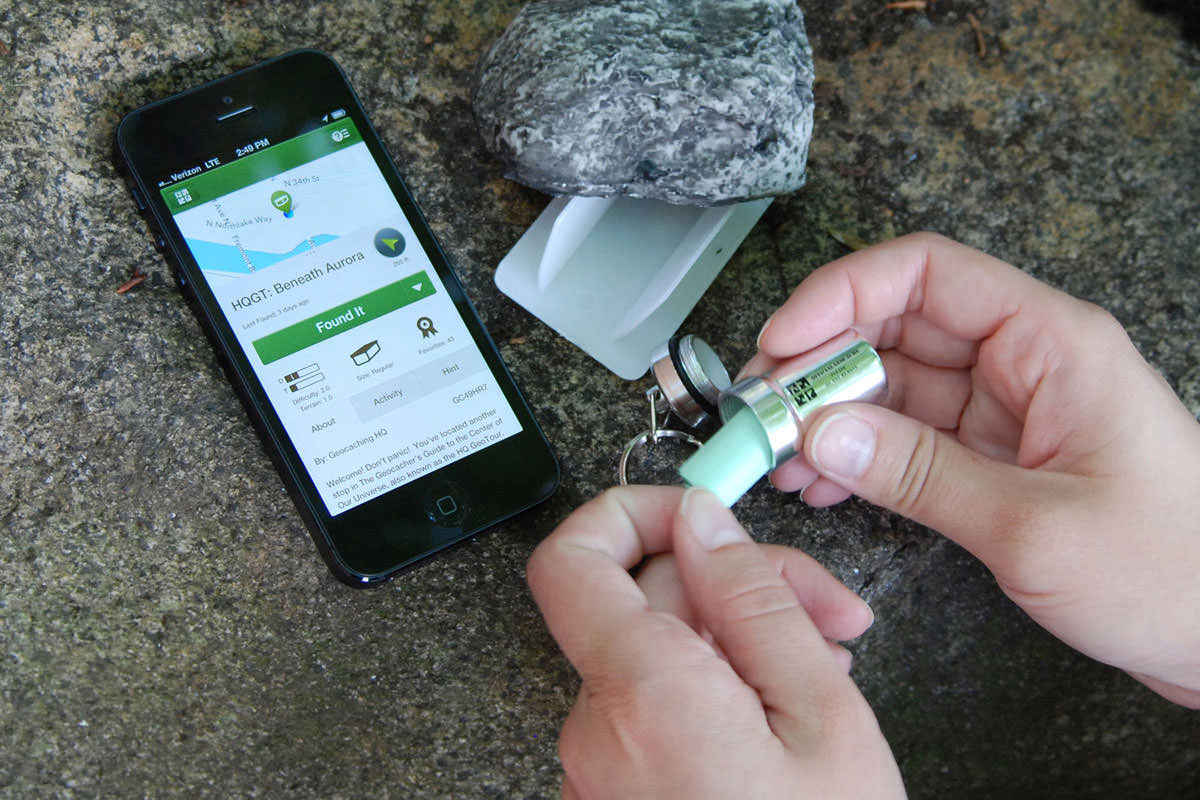 *Using geocaching.com's smartphone app to find a cache* First load the Avenza Maps app (see **[Part One](https://steemit.com/geocaching/@smk762/using-avenza-maps-app-to-capture-gps-tracks-for-use-in-qgis-free)** for install links) on your smartphone. Turn on your phone's GPS, load up the basemap you made in part one, and press the spanner on the top right to access the menu, and select "Record GPS Tracks". When your GPS has a lock on your position, it will say "Ready" next to the "play" triangle, and you can press the triangle to start recording the track, and start walking.  While walking along (and a little way off) the tracks looking for cache spots, we can also capture the location of a few points of interest. Noticing a bit of rubish littering parts of the riverside, and needing somewhere to drop off my dog's smelly droppings, I captured the location of a few rubbish bins by clicking on the "add placemark" button on the Avenza map screen. You can also optionally add a description, photo and custom icon.  A bin probably isn't worth a photo though. Walking a little off the path, toward the rivers edge lots of trees offered branches to hold a small cache safely in place without risking wind, water or muggles dislodging it, and minimal disturbance to the surrounding ecosystem.  Once all caches had been set, and the walk is over, we can stop recording our GPS track by clicking "Done" in the Avenza map window. We can also now see where we walked, and where the things we recorded the positions of are on our base map.  In Part 3, we'll import the track and placemarks into QGIS, and apply some artistic styling to create a custom themed treasure map. **Checkout the other parts...** Part One - [Using Avenza Maps and QGIS to create custom maps for free treasure hunting](https://steemit.com/geocaching/@smk762/using-avenza-maps-app-to-capture-gps-tracks-for-use-in-qgis-free) Part Three - [Exporting Avenza Maps catured GPS tracks and placemarks into QGIS](https://steemit.com/qgis/@smk762/part-three-exporting-avenza-maps-catured-gps-tracks-and-placemarks-into-qgis) Part Four - Artistic styling in QGIS to create a geocache treasure map _(coming soon)_ |
| json metadata | {"tags":["nature","geocache","gps","qgis","travel"],"image":["https://i.imgur.com/5k6zJc1.jpg","https://i.imgur.com/RwFKHdO.jpg","https://www.geocaching.com/play/Content/images/preview-lg.jpg","https://i.imgur.com/4hNvQSF.jpg","https://i.imgur.com/frHu1Gu.jpg","https://i.imgur.com/bwSYTRk.jpg","https://i.imgur.com/0vTTYHo.jpg"],"links":["https://steemit.com/geocaching/@smk762/using-avenza-maps-app-to-capture-gps-tracks-for-use-in-qgis-free","https://en.wikipedia.org/wiki/Geocaching","https://qgis.org/en/site/","https://www.avenza.com/avenza-maps/","https://parks.dpaw.wa.gov.au/park/canning-river","https://steemit.com/qgis/@smk762/part-three-exporting-avenza-maps-catured-gps-tracks-and-placemarks-into-qgis"],"app":"steemit/0.1","format":"markdown"} |
| Transaction Info | Block #24802566/Trx a4ad14b18c52900f4a2302ca559f1dbdbad0aca9 |
View Raw JSON Data
{
"trx_id": "a4ad14b18c52900f4a2302ca559f1dbdbad0aca9",
"block": 24802566,
"trx_in_block": 15,
"op_in_trx": 0,
"virtual_op": 0,
"timestamp": "2018-08-05T13:37:21",
"op": [
"comment",
{
"parent_author": "",
"parent_permlink": "geocache",
"author": "smk762",
"permlink": "part-2-hidden-treasure-in-your-local-parks-using-avenza-maps-to-gps-your-geocaches",
"title": "Part Two - Hidden treasure in your local parks: Using Avenza maps to GPS your geocaches and the path of your treasure hunt",
"body": "\n\n*Link to part one - [Using Avenza Maps and QGIS to create custom maps for free treasure hunting](https://steemit.com/geocaching/@smk762/using-avenza-maps-app-to-capture-gps-tracks-for-use-in-qgis-free)*\n\n[Geocaching](https://en.wikipedia.org/wiki/Geocaching) is fun way to spend some time in nature, learn about mapping technology, and find some hidden trinkets left behind by previous travellers. It's a free-to-play, completely immersive, total reality game with real prizes!\n\n\n\nIn part 1, we detailed how you can use the free mapping software [QGIS](https://qgis.org/en/site/), and the [Avenza Maps](https://www.avenza.com/avenza-maps/) smartphone app to create your own base map, and use it with your smartphone's GPS.\n\nIn Part 2, we'll explain how to use Avenza maps to capture the path we took walking around the [Canning River Park](https://parks.dpaw.wa.gov.au/park/canning-river), and the coordinates of things we saw on the way. We'll also capture some placemark coordinates for the spots where we hid a few geocaches for future explorers.\n\n\n*Using geocaching.com's smartphone app to find a cache*\n\nFirst load the Avenza Maps app (see **[Part One](https://steemit.com/geocaching/@smk762/using-avenza-maps-app-to-capture-gps-tracks-for-use-in-qgis-free)** for install links) on your smartphone. Turn on your phone's GPS, load up the basemap you made in part one, and press the spanner on the top right to access the menu, and select \"Record GPS Tracks\". When your GPS has a lock on your position, it will say \"Ready\" next to the \"play\" triangle, and you can press the triangle to start recording the track, and start walking.\n\n\n\nWhile walking along (and a little way off) the tracks looking for cache spots, we can also capture the location of a few points of interest. Noticing a bit of rubish littering parts of the riverside, and needing somewhere to drop off my dog's smelly droppings, I captured the location of a few rubbish bins by clicking on the \"add placemark\" button on the Avenza map screen. You can also optionally add a description, photo and custom icon.\n\n\n\nA bin probably isn't worth a photo though. Walking a little off the path, toward the rivers edge lots of trees offered branches to hold a small cache safely in place without risking wind, water or muggles dislodging it, and minimal disturbance to the surrounding ecosystem.\n\n\n\nOnce all caches had been set, and the walk is over, we can stop recording our GPS track by clicking \"Done\" in the Avenza map window. We can also now see where we walked, and where the things we recorded the positions of are on our base map.\n\n\n\nIn Part 3, we'll import the track and placemarks into QGIS, and apply some artistic styling to create a custom themed treasure map. \n\n**Checkout the other parts...**\n\nPart One - [Using Avenza Maps and QGIS to create custom maps for free treasure hunting](https://steemit.com/geocaching/@smk762/using-avenza-maps-app-to-capture-gps-tracks-for-use-in-qgis-free) \nPart Three - [Exporting Avenza Maps catured GPS tracks and placemarks into QGIS](https://steemit.com/qgis/@smk762/part-three-exporting-avenza-maps-catured-gps-tracks-and-placemarks-into-qgis)\nPart Four - Artistic styling in QGIS to create a geocache treasure map _(coming soon)_",
"json_metadata": "{\"tags\":[\"nature\",\"geocache\",\"gps\",\"qgis\",\"travel\"],\"image\":[\"https://i.imgur.com/5k6zJc1.jpg\",\"https://i.imgur.com/RwFKHdO.jpg\",\"https://www.geocaching.com/play/Content/images/preview-lg.jpg\",\"https://i.imgur.com/4hNvQSF.jpg\",\"https://i.imgur.com/frHu1Gu.jpg\",\"https://i.imgur.com/bwSYTRk.jpg\",\"https://i.imgur.com/0vTTYHo.jpg\"],\"links\":[\"https://steemit.com/geocaching/@smk762/using-avenza-maps-app-to-capture-gps-tracks-for-use-in-qgis-free\",\"https://en.wikipedia.org/wiki/Geocaching\",\"https://qgis.org/en/site/\",\"https://www.avenza.com/avenza-maps/\",\"https://parks.dpaw.wa.gov.au/park/canning-river\",\"https://steemit.com/qgis/@smk762/part-three-exporting-avenza-maps-catured-gps-tracks-and-placemarks-into-qgis\"],\"app\":\"steemit/0.1\",\"format\":\"markdown\"}"
}
]
}smk762published a new post: using-avenza-maps-app-to-capture-gps-tracks-for-use-in-qgis-free2018/08/05 13:36:24
smk762published a new post: using-avenza-maps-app-to-capture-gps-tracks-for-use-in-qgis-free
2018/08/05 13:36:24
| parent author | |
| parent permlink | geocaching |
| author | smk762 |
| permlink | using-avenza-maps-app-to-capture-gps-tracks-for-use-in-qgis-free |
| title | Part One - Using Avenza Maps and QGIS to create a base map for treaure hunting |
| body |  We are fortunate to live in an age where we have free access to software allowing accurate location data capture with GPS and the tools to add attribution, run analysis, and output digital base maps we can use on smartphones for future navigation. Better yet, there is hidden treasure all around us waiting to be found by curious explorers. This means we don't have to rely on apps like Google maps / Apple maps recording every move we make 🌍 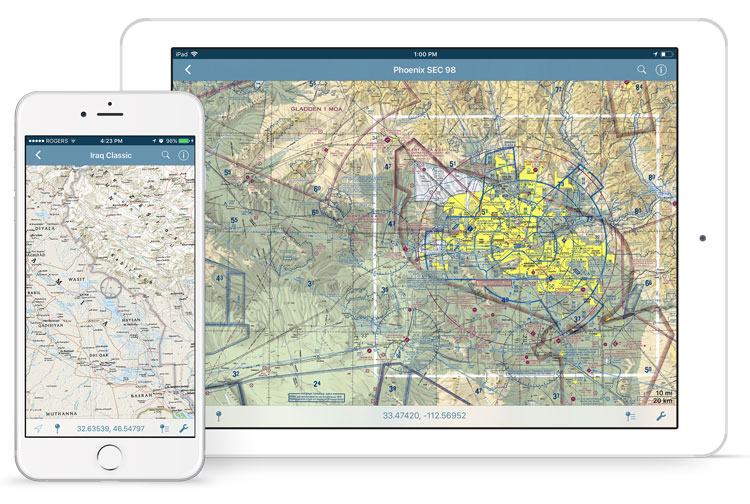 **[Avenza maps](https://www.avenza.com/avenza-maps/)** is handy smartphone app which allows the import of custom base map layers, which you can download from the Avenza map store (many free samples are available), or create yourself on a PC using the open source mapping software QGIS. **Install Avenza maps** IOS - https://itunes.apple.com/app/apple-store/id388424049?mt=8 Android - https://play.google.com/store/apps/details?id=com.Avenza **Download a local basemap** A range of maps are available at https://www.avenzamaps.com/maps/search.html Some are free, and most are much cheaper than the paper equivalent. Alternatively you can easily make a custom map for your area of interest using QGIS and OpenStreetMap (OSM) layers. 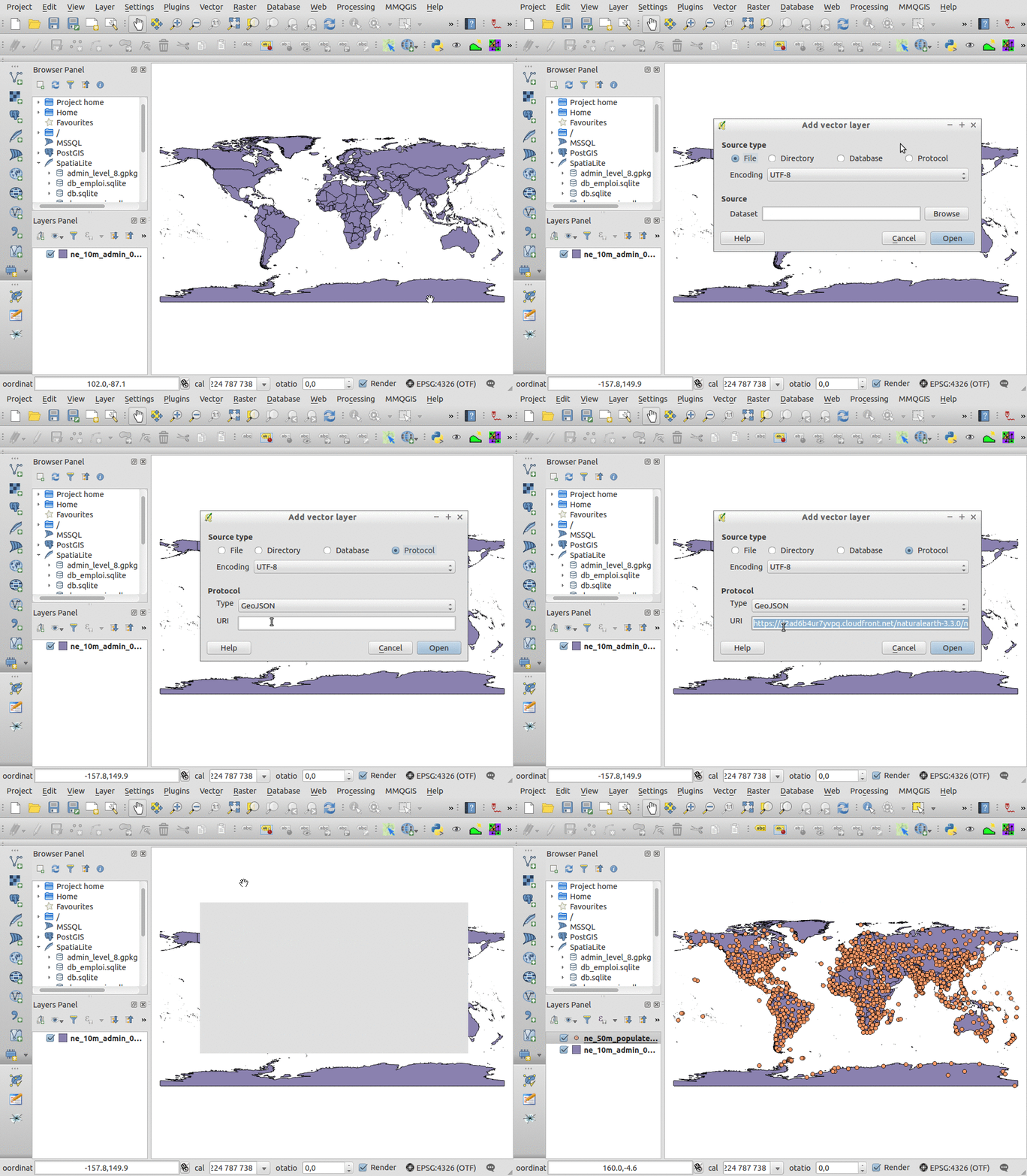 **[QGIS](https://qgis.org/en/site/)** is a powerful tool which grants you the ability to create maps, compare features, calculate statistics, and perform geoprocessing tasks on spatial datasets. It is also highly extensible though a large library of open source plugins created and maintained by the community offering added functionality. *Install QGIS* - https://qgis.org/en/site/forusers/download.html **Treasure Hunt!** Below is an example of how we can use the above software to set up a riverside *[geocache](https://www.geocaching.com/play)*, capture its GPS coordinates using the Avenza app, and then create a custom map in QGIS to help treasure hunters find the riches within 🎁  **Creating a quick basemap in QGIS** Open a new QGIS project, and select Plugins > Manage and install plugins. Search for and install the [QuickMapServices](https://github.com/nextgis/quickmapservices) plugin (QGIS v3.2) or the [OpenLayers plugin](https://github.com/sourcepole/qgis-openlayers-plugin) (QGIS v2.18) Look through the plugin menus, and select a basemap layer. I"ll use *OSM Standard* from the Web> QuickMapServices>OSM menu, and have positioned it over a section of the [Canning River Park](https://parks.dpaw.wa.gov.au/park/canning-river) in Perth, Western Australia. It's a great spot for kayaking, cycling, and walking your dog. There are also many places along the river to hide our treasures 🍄  Credit: *[Canning River to Deep Water Point", by Peter Hyatt](https://finishingtouchgallery.com.au/product/canning-river-deep-water-point/)* Once you've loaded a basemap and moved it into position, go to **Project > New Print Layout**. Leave the title blank and click OK.  Look for the "add new map" icon, click it and draw a rectangle the size of the print layout canvas, then go to **Project > Export as Image**, set the file type to TIF and save your map image. QGIS will embed coordinate system information into the image file's metadata, which allows it to be displayed in the correct area when we import it in to the Avenza app on our smartphone and activate the GPS. 🎯  **Importing your basemap into Avenza** Avenza maps is integrated into Dropbox, which is a convenient place to store your maps and easily share or retrieve them from the cloud. You can also import maps from the device storage, or via a USB cable, a web address, or QR code. Follow the links below for more details - IOS - *http://help.avenzamaps.com/customer/en/portal/articles/2936861-importing-a-map-ios-* Android - *http://help.avenzamaps.com/customer/en/portal/articles/2934897-importing-a-map-android-* *Depending on the size of the map you create, it might take a few minutes to process and tile the image.* 🐌  Now we can turn on the smartphone GPS, and our location will appear over our base map Avenza also allows us to record tracks, waypoints and placemarks. In part 2, we'll go for a walk, hide some treasure, and mark the locations. To add a little challenge for treasure hunters, instead of giving full coordinates, we'll only give the first 3 decimal places in decimal degrees. Nearby monuments or signage can offer extra hints to help narrow it down 🚸  **Continue to...** Part Two - [Hidden treasure in your local parks: using Avenza maps to GPS your geocaches](https://steemit.com/geocache/@smk762/part-2-hidden-treasure-in-your-local-parks-using-avenza-maps-to-gps-your-geocaches) Part Three - [Exporting Avenza Maps catured GPS tracks and placemarks into QGIS](https://steemit.com/qgis/@smk762/part-three-exporting-avenza-maps-catured-gps-tracks-and-placemarks-into-qgis) Part Four - Artistic styling in QGIS to create a geocache treasure map *(coming soon)* |
| json metadata | {"tags":["nature","geocaching","travel","gps","qgis"],"image":["https://i.imgur.com/JuUSEu0.jpg","https://www.avenza.com/wp-content/uploads/2018/02/avenza-maps-iphone-ipad-military-2.jpg","https://webgeodatavore.com/images/qgis-add-remote-geojson.gif","https://i.imgur.com/8Is6Y3X.jpg","https://finishingtouchgallery.com.au/wp-content/uploads/2016/06/[email protected]","https://i.imgur.com/tIUH5F8.jpg","https://i.imgur.com/rQF2qgQ.jpg","https://i.imgur.com/QUcJoR5.png","https://i.imgur.com/dngLYA1.jpg"],"links":["https://www.avenza.com/avenza-maps/","https://itunes.apple.com/app/apple-store/id388424049?mt=8","https://play.google.com/store/apps/details?id=com.Avenza","https://www.avenzamaps.com/maps/search.html","https://qgis.org/en/site/","https://qgis.org/en/site/forusers/download.html","https://www.geocaching.com/play","https://github.com/nextgis/quickmapservices","https://github.com/sourcepole/qgis-openlayers-plugin","https://parks.dpaw.wa.gov.au/park/canning-river","https://finishingtouchgallery.com.au/product/canning-river-deep-water-point/","http://help.avenzamaps.com/customer/en/portal/articles/2936861-importing-a-map-ios-","http://help.avenzamaps.com/customer/en/portal/articles/2934897-importing-a-map-android-","https://steemit.com/geocache/@smk762/part-2-hidden-treasure-in-your-local-parks-using-avenza-maps-to-gps-your-geocaches","https://steemit.com/qgis/@smk762/part-three-exporting-avenza-maps-catured-gps-tracks-and-placemarks-into-qgis"],"app":"steemit/0.1","format":"markdown"} |
| Transaction Info | Block #24802547/Trx b3f94069ccab88f008ead4296aa47338b145393d |
View Raw JSON Data
{
"trx_id": "b3f94069ccab88f008ead4296aa47338b145393d",
"block": 24802547,
"trx_in_block": 8,
"op_in_trx": 0,
"virtual_op": 0,
"timestamp": "2018-08-05T13:36:24",
"op": [
"comment",
{
"parent_author": "",
"parent_permlink": "geocaching",
"author": "smk762",
"permlink": "using-avenza-maps-app-to-capture-gps-tracks-for-use-in-qgis-free",
"title": "Part One - Using Avenza Maps and QGIS to create a base map for treaure hunting",
"body": "\n\nWe are fortunate to live in an age where we have free access to software allowing accurate location data capture with GPS and the tools to add attribution, run analysis, and output digital base maps we can use on smartphones for future navigation. Better yet, there is hidden treasure all around us waiting to be found by curious explorers.\n\nThis means we don't have to rely on apps like Google maps / Apple maps recording every move we make 🌍\n\n\n\n**[Avenza maps](https://www.avenza.com/avenza-maps/)** is handy smartphone app which allows the import of custom base map layers, which you can download from the Avenza map store (many free samples are available), or create yourself on a PC using the open source mapping software QGIS.\n\n**Install Avenza maps**\nIOS - https://itunes.apple.com/app/apple-store/id388424049?mt=8\nAndroid - https://play.google.com/store/apps/details?id=com.Avenza\n\n**Download a local basemap**\nA range of maps are available at https://www.avenzamaps.com/maps/search.html\nSome are free, and most are much cheaper than the paper equivalent.\n\nAlternatively you can easily make a custom map for your area of interest using QGIS and OpenStreetMap (OSM) layers.\n\n\n\n**[QGIS](https://qgis.org/en/site/)** is a powerful tool which grants you the ability to create maps, compare features, calculate statistics, and perform geoprocessing tasks on spatial datasets. It is also highly extensible though a large library of open source plugins created and maintained by the community offering added functionality.\n\n*Install QGIS* - https://qgis.org/en/site/forusers/download.html\n\n**Treasure Hunt!**\nBelow is an example of how we can use the above software to set up a riverside *[geocache](https://www.geocaching.com/play)*, capture its GPS coordinates using the Avenza app, and then create a custom map in QGIS to help treasure hunters find the riches within 🎁\n\n\n\n**Creating a quick basemap in QGIS**\n\nOpen a new QGIS project, and select Plugins > Manage and install plugins.\nSearch for and install the [QuickMapServices](https://github.com/nextgis/quickmapservices) plugin (QGIS v3.2) or the [OpenLayers plugin](https://github.com/sourcepole/qgis-openlayers-plugin) (QGIS v2.18)\n\nLook through the plugin menus, and select a basemap layer. I\"ll use *OSM Standard* from the Web> QuickMapServices>OSM menu, and have positioned it over a section of the [Canning River Park](https://parks.dpaw.wa.gov.au/park/canning-river) in Perth, Western Australia. It's a great spot for kayaking, cycling, and walking your dog. There are also many places along the river to hide our treasures 🍄\n\n\nCredit: *[Canning River to Deep Water Point\", by Peter Hyatt](https://finishingtouchgallery.com.au/product/canning-river-deep-water-point/)* \n\nOnce you've loaded a basemap and moved it into position, go to **Project > New Print Layout**. Leave the title blank and click OK.\n\n\n\nLook for the \"add new map\" icon, click it and draw a rectangle the size of the print layout canvas, then go to **Project > Export as Image**, set the file type to TIF and save your map image. QGIS will embed coordinate system information into the image file's metadata, which allows it to be displayed in the correct area when we import it in to the Avenza app on our smartphone and activate the GPS. 🎯 \n\n\n\n**Importing your basemap into Avenza**\nAvenza maps is integrated into Dropbox, which is a convenient place to store your maps and easily share or retrieve them from the cloud. You can also import maps from the device storage, or via a USB cable, a web address, or QR code. Follow the links below for more details - \n\nIOS - *http://help.avenzamaps.com/customer/en/portal/articles/2936861-importing-a-map-ios-*\nAndroid - *http://help.avenzamaps.com/customer/en/portal/articles/2934897-importing-a-map-android-*\n\n*Depending on the size of the map you create, it might take a few minutes to process and tile the image.* 🐌\n\n\n\nNow we can turn on the smartphone GPS, and our location will appear over our base map \n\nAvenza also allows us to record tracks, waypoints and placemarks. In part 2, we'll go for a walk, hide some treasure, and mark the locations. To add a little challenge for treasure hunters, instead of giving full coordinates, we'll only give the first 3 decimal places in decimal degrees. Nearby monuments or signage can offer extra hints to help narrow it down 🚸\n\n\n\n**Continue to...**\nPart Two - [Hidden treasure in your local parks: using Avenza maps to GPS your geocaches](https://steemit.com/geocache/@smk762/part-2-hidden-treasure-in-your-local-parks-using-avenza-maps-to-gps-your-geocaches)\n\nPart Three - [Exporting Avenza Maps catured GPS tracks and placemarks into QGIS](https://steemit.com/qgis/@smk762/part-three-exporting-avenza-maps-catured-gps-tracks-and-placemarks-into-qgis)\nPart Four - Artistic styling in QGIS to create a geocache treasure map *(coming soon)*",
"json_metadata": "{\"tags\":[\"nature\",\"geocaching\",\"travel\",\"gps\",\"qgis\"],\"image\":[\"https://i.imgur.com/JuUSEu0.jpg\",\"https://www.avenza.com/wp-content/uploads/2018/02/avenza-maps-iphone-ipad-military-2.jpg\",\"https://webgeodatavore.com/images/qgis-add-remote-geojson.gif\",\"https://i.imgur.com/8Is6Y3X.jpg\",\"https://finishingtouchgallery.com.au/wp-content/uploads/2016/06/[email protected]\",\"https://i.imgur.com/tIUH5F8.jpg\",\"https://i.imgur.com/rQF2qgQ.jpg\",\"https://i.imgur.com/QUcJoR5.png\",\"https://i.imgur.com/dngLYA1.jpg\"],\"links\":[\"https://www.avenza.com/avenza-maps/\",\"https://itunes.apple.com/app/apple-store/id388424049?mt=8\",\"https://play.google.com/store/apps/details?id=com.Avenza\",\"https://www.avenzamaps.com/maps/search.html\",\"https://qgis.org/en/site/\",\"https://qgis.org/en/site/forusers/download.html\",\"https://www.geocaching.com/play\",\"https://github.com/nextgis/quickmapservices\",\"https://github.com/sourcepole/qgis-openlayers-plugin\",\"https://parks.dpaw.wa.gov.au/park/canning-river\",\"https://finishingtouchgallery.com.au/product/canning-river-deep-water-point/\",\"http://help.avenzamaps.com/customer/en/portal/articles/2936861-importing-a-map-ios-\",\"http://help.avenzamaps.com/customer/en/portal/articles/2934897-importing-a-map-android-\",\"https://steemit.com/geocache/@smk762/part-2-hidden-treasure-in-your-local-parks-using-avenza-maps-to-gps-your-geocaches\",\"https://steemit.com/qgis/@smk762/part-three-exporting-avenza-maps-catured-gps-tracks-and-placemarks-into-qgis\"],\"app\":\"steemit/0.1\",\"format\":\"markdown\"}"
}
]
}2018/08/05 13:28:09
2018/08/05 13:28:09
| voter | thetroublenotes |
| author | smk762 |
| permlink | part-three-exporting-avenza-maps-catured-gps-tracks-and-placemarks-into-qgis |
| weight | 100 (1.00%) |
| Transaction Info | Block #24802382/Trx 5d6ec584b5ead11e2b81d38ce8e28a08ed198c77 |
View Raw JSON Data
{
  "trx_id": "5d6ec584b5ead11e2b81d38ce8e28a08ed198c77",
  "block": 24802382,
  "trx_in_block": 6,
  "op_in_trx": 0,
  "virtual_op": 0,
  "timestamp": "2018-08-05T13:28:09",
  "op": [
    "vote",
    {
      "voter": "thetroublenotes",
      "author": "smk762",
      "permlink": "part-three-exporting-avenza-maps-catured-gps-tracks-and-placemarks-into-qgis",
      "weight": 100
    }
  ]
}smk762published a new post: using-avenza-maps-app-to-capture-gps-tracks-for-use-in-qgis-free2018/08/05 13:18:57
smk762published a new post: using-avenza-maps-app-to-capture-gps-tracks-for-use-in-qgis-free
2018/08/05 13:18:57
| parent author | |
| parent permlink | geocaching |
| author | smk762 |
| permlink | using-avenza-maps-app-to-capture-gps-tracks-for-use-in-qgis-free |
| title | Part One - Using Avenza Maps and QGIS to create a base map for treaure hunting |
| body |  We are fortunate to live in an age where we have free access to software allowing accurate location data capture with GPS and the tools to add attribution, run analysis, and output digital base maps we can use on smartphones for future navigation. Better yet, there is hidden treasure all around us waiting to be found by curious explorers. This means we don't have to rely on apps like Google maps / Apple maps recording every move we make 🌍  **[Avenza maps](https://www.avenza.com/avenza-maps/)** is handy smartphone app which allows the import of custom base map layers, which you can download from the Avenza map store (many free samples are available), or create yourself on a PC using the open source mapping software QGIS. **Install Avenza maps** IOS - https://itunes.apple.com/app/apple-store/id388424049?mt=8 Android - https://play.google.com/store/apps/details?id=com.Avenza **Download a local basemap** A range of maps are available at https://www.avenzamaps.com/maps/search.html Some are free, and most are much cheaper than the paper equivalent. Alternatively you can easily make a custom map for your area of interest using QGIS and OpenStreetMap (OSM) layers.  **[QGIS](https://qgis.org/en/site/)** is a powerful tool which grants you the ability to create maps, compare features, calculate statistics, and perform geoprocessing tasks on spatial datasets. It is also highly extensible though a large library of open source plugins created and maintained by the community offering added functionality. *Install QGIS* - https://qgis.org/en/site/forusers/download.html **Treasure Hunt!** Below is an example of how we can use the above software to set up a riverside *[geocache](https://www.geocaching.com/play)*, capture its GPS coordinates using the Avenza app, and then create a custom map in QGIS to help treasure hunters find the riches within 🎁  **Creating a quick basemap in QGIS** Open a new QGIS project, and select Plugins > Manage and install plugins. Search for and install the [QuickMapServices](https://github.com/nextgis/quickmapservices) plugin (QGIS v3.2) or the [OpenLayers plugin](https://github.com/sourcepole/qgis-openlayers-plugin) (QGIS v2.18) Look through the plugin menus, and select a basemap layer. I"ll use *OSM Standard* from the Web> QuickMapServices>OSM menu, and have positioned it over a section of the [Canning River Park](https://parks.dpaw.wa.gov.au/park/canning-river) in Perth, Western Australia. It's a great spot for kayaking, cycling, and walking your dog. There are also many places along the river to hide our treasures 🍄  Credit: *[Canning River to Deep Water Point", by Peter Hyatt](https://finishingtouchgallery.com.au/product/canning-river-deep-water-point/)* Once you've loaded a basemap and moved it into position, go to **Project > New Print Layout**. Leave the title blank and click OK.  Look for the "add new map" icon, click it and draw a rectangle the size of the print layout canvas, then go to **Project > Export as Image**, set the file type to TIF and save your map image. QGIS will embed coordinate system information into the image file's metadata, which allows it to be displayed in the correct area when we import it in to the Avenza app on our smartphone and activate the GPS. 🎯  **Importing your basemap into Avenza** Avenza maps is integrated into Dropbox, which is a convenient place to store your maps and easily share or retrieve them from the cloud. You can also import maps from the device storage, or via a USB cable, a web address, or QR code. Follow the links below for more details - IOS - *http://help.avenzamaps.com/customer/en/portal/articles/2936861-importing-a-map-ios-* Android - *http://help.avenzamaps.com/customer/en/portal/articles/2934897-importing-a-map-android-* *Depending on the size of the map you create, it might take a few minutes to process and tile the image.* 🐌  Now we can turn on the smartphone GPS, and our location will appear over our base map Avenza also allows us to record tracks, waypoints and placemarks. In part 2, we'll go for a walk, hide some treasure, and mark the locations. To add a little challenge for treasure hunters, instead of giving full coordinates, we'll only give the first 3 decimal places in decimal degrees. Nearby monuments or signage can offer extra hints to help narrow it down 🚸  **Continue to...** Part Two - [Hidden treasure in your local parks: using Avenza maps to GPS your geocaches](https://steemit.com/geocache/@smk762/part-2-hidden-treasure-in-your-local-parks-using-avenza-maps-to-gps-your-geocaches) Part Three - [Exporting Avenza Maps catured GPS tracks and placemarks into QGIS](https://steemit.com/qgis/@smk762/part-three-exporting-avenza-maps-catured-gps-tracks-and-placemarks-into-qgis) Part Four - Artistic styling in QGIS to create a geocache treasure map *(coming soon)* |
| json metadata | {"tags":["geocaching","maps","gps","qgis","avenza"],"image":["https://i.imgur.com/JuUSEu0.jpg","https://www.avenza.com/wp-content/uploads/2018/02/avenza-maps-iphone-ipad-military-2.jpg","https://webgeodatavore.com/images/qgis-add-remote-geojson.gif","https://i.imgur.com/8Is6Y3X.jpg","https://finishingtouchgallery.com.au/wp-content/uploads/2016/06/[email protected]","https://i.imgur.com/tIUH5F8.jpg","https://i.imgur.com/rQF2qgQ.jpg","https://i.imgur.com/QUcJoR5.png","https://i.imgur.com/dngLYA1.jpg"],"links":["https://www.avenza.com/avenza-maps/","https://itunes.apple.com/app/apple-store/id388424049?mt=8","https://play.google.com/store/apps/details?id=com.Avenza","https://www.avenzamaps.com/maps/search.html","https://qgis.org/en/site/","https://qgis.org/en/site/forusers/download.html","https://www.geocaching.com/play","https://github.com/nextgis/quickmapservices","https://github.com/sourcepole/qgis-openlayers-plugin","https://parks.dpaw.wa.gov.au/park/canning-river","https://finishingtouchgallery.com.au/product/canning-river-deep-water-point/","http://help.avenzamaps.com/customer/en/portal/articles/2936861-importing-a-map-ios-","http://help.avenzamaps.com/customer/en/portal/articles/2934897-importing-a-map-android-","https://steemit.com/geocache/@smk762/part-2-hidden-treasure-in-your-local-parks-using-avenza-maps-to-gps-your-geocaches","https://steemit.com/qgis/@smk762/part-three-exporting-avenza-maps-catured-gps-tracks-and-placemarks-into-qgis"],"app":"steemit/0.1","format":"markdown"} |
| Transaction Info | Block #24802198/Trx 3821b6dbc382477b2187afa3807f279b00dcc5c2 |
View Raw JSON Data
{
"trx_id": "3821b6dbc382477b2187afa3807f279b00dcc5c2",
"block": 24802198,
"trx_in_block": 7,
"op_in_trx": 0,
"virtual_op": 0,
"timestamp": "2018-08-05T13:18:57",
"op": [
"comment",
{
"parent_author": "",
"parent_permlink": "geocaching",
"author": "smk762",
"permlink": "using-avenza-maps-app-to-capture-gps-tracks-for-use-in-qgis-free",
"title": "Part One - Using Avenza Maps and QGIS to create a base map for treaure hunting",
"body": "\n\nWe are fortunate to live in an age where we have free access to software allowing accurate location data capture with GPS and the tools to add attribution, run analysis, and output digital base maps we can use on smartphones for future navigation. Better yet, there is hidden treasure all around us waiting to be found by curious explorers.\n\nThis means we don't have to rely on apps like Google maps / Apple maps recording every move we make 🌍\n\n\n\n**[Avenza maps](https://www.avenza.com/avenza-maps/)** is handy smartphone app which allows the import of custom base map layers, which you can download from the Avenza map store (many free samples are available), or create yourself on a PC using the open source mapping software QGIS.\n\n**Install Avenza maps**\nIOS - https://itunes.apple.com/app/apple-store/id388424049?mt=8\nAndroid - https://play.google.com/store/apps/details?id=com.Avenza\n\n**Download a local basemap**\nA range of maps are available at https://www.avenzamaps.com/maps/search.html\nSome are free, and most are much cheaper than the paper equivalent.\n\nAlternatively you can easily make a custom map for your area of interest using QGIS and OpenStreetMap (OSM) layers.\n\n\n\n**[QGIS](https://qgis.org/en/site/)** is a powerful tool which grants you the ability to create maps, compare features, calculate statistics, and perform geoprocessing tasks on spatial datasets. It is also highly extensible though a large library of open source plugins created and maintained by the community offering added functionality.\n\n*Install QGIS* - https://qgis.org/en/site/forusers/download.html\n\n**Treasure Hunt!**\nBelow is an example of how we can use the above software to set up a riverside *[geocache](https://www.geocaching.com/play)*, capture its GPS coordinates using the Avenza app, and then create a custom map in QGIS to help treasure hunters find the riches within 🎁\n\n\n\n**Creating a quick basemap in QGIS**\n\nOpen a new QGIS project, and select Plugins > Manage and install plugins.\nSearch for and install the [QuickMapServices](https://github.com/nextgis/quickmapservices) plugin (QGIS v3.2) or the [OpenLayers plugin](https://github.com/sourcepole/qgis-openlayers-plugin) (QGIS v2.18)\n\nLook through the plugin menus, and select a basemap layer. I\"ll use *OSM Standard* from the Web> QuickMapServices>OSM menu, and have positioned it over a section of the [Canning River Park](https://parks.dpaw.wa.gov.au/park/canning-river) in Perth, Western Australia. It's a great spot for kayaking, cycling, and walking your dog. There are also many places along the river to hide our treasures 🍄\n\n\nCredit: *[Canning River to Deep Water Point\", by Peter Hyatt](https://finishingtouchgallery.com.au/product/canning-river-deep-water-point/)* \n\nOnce you've loaded a basemap and moved it into position, go to **Project > New Print Layout**. Leave the title blank and click OK.\n\n\n\nLook for the \"add new map\" icon, click it and draw a rectangle the size of the print layout canvas, then go to **Project > Export as Image**, set the file type to TIF and save your map image. QGIS will embed coordinate system information into the image file's metadata, which allows it to be displayed in the correct area when we import it in to the Avenza app on our smartphone and activate the GPS. 🎯 \n\n\n\n**Importing your basemap into Avenza**\nAvenza maps is integrated into Dropbox, which is a convenient place to store your maps and easily share or retrieve them from the cloud. You can also import maps from the device storage, or via a USB cable, a web address, or QR code. Follow the links below for more details - \n\nIOS - *http://help.avenzamaps.com/customer/en/portal/articles/2936861-importing-a-map-ios-*\nAndroid - *http://help.avenzamaps.com/customer/en/portal/articles/2934897-importing-a-map-android-*\n\n*Depending on the size of the map you create, it might take a few minutes to process and tile the image.* 🐌\n\n\n\nNow we can turn on the smartphone GPS, and our location will appear over our base map \n\nAvenza also allows us to record tracks, waypoints and placemarks. In part 2, we'll go for a walk, hide some treasure, and mark the locations. To add a little challenge for treasure hunters, instead of giving full coordinates, we'll only give the first 3 decimal places in decimal degrees. Nearby monuments or signage can offer extra hints to help narrow it down 🚸\n\n\n\n**Continue to...**\nPart Two - [Hidden treasure in your local parks: using Avenza maps to GPS your geocaches](https://steemit.com/geocache/@smk762/part-2-hidden-treasure-in-your-local-parks-using-avenza-maps-to-gps-your-geocaches)\n\nPart Three - [Exporting Avenza Maps catured GPS tracks and placemarks into QGIS](https://steemit.com/qgis/@smk762/part-three-exporting-avenza-maps-catured-gps-tracks-and-placemarks-into-qgis)\nPart Four - Artistic styling in QGIS to create a geocache treasure map *(coming soon)*",
"json_metadata": "{\"tags\":[\"geocaching\",\"maps\",\"gps\",\"qgis\",\"avenza\"],\"image\":[\"https://i.imgur.com/JuUSEu0.jpg\",\"https://www.avenza.com/wp-content/uploads/2018/02/avenza-maps-iphone-ipad-military-2.jpg\",\"https://webgeodatavore.com/images/qgis-add-remote-geojson.gif\",\"https://i.imgur.com/8Is6Y3X.jpg\",\"https://finishingtouchgallery.com.au/wp-content/uploads/2016/06/[email protected]\",\"https://i.imgur.com/tIUH5F8.jpg\",\"https://i.imgur.com/rQF2qgQ.jpg\",\"https://i.imgur.com/QUcJoR5.png\",\"https://i.imgur.com/dngLYA1.jpg\"],\"links\":[\"https://www.avenza.com/avenza-maps/\",\"https://itunes.apple.com/app/apple-store/id388424049?mt=8\",\"https://play.google.com/store/apps/details?id=com.Avenza\",\"https://www.avenzamaps.com/maps/search.html\",\"https://qgis.org/en/site/\",\"https://qgis.org/en/site/forusers/download.html\",\"https://www.geocaching.com/play\",\"https://github.com/nextgis/quickmapservices\",\"https://github.com/sourcepole/qgis-openlayers-plugin\",\"https://parks.dpaw.wa.gov.au/park/canning-river\",\"https://finishingtouchgallery.com.au/product/canning-river-deep-water-point/\",\"http://help.avenzamaps.com/customer/en/portal/articles/2936861-importing-a-map-ios-\",\"http://help.avenzamaps.com/customer/en/portal/articles/2934897-importing-a-map-android-\",\"https://steemit.com/geocache/@smk762/part-2-hidden-treasure-in-your-local-parks-using-avenza-maps-to-gps-your-geocaches\",\"https://steemit.com/qgis/@smk762/part-three-exporting-avenza-maps-catured-gps-tracks-and-placemarks-into-qgis\"],\"app\":\"steemit/0.1\",\"format\":\"markdown\"}"
}
]
}smk762published a new post: part-2-hidden-treasure-in-your-local-parks-using-avenza-maps-to-gps-your-geocaches2018/08/05 13:18:24
smk762published a new post: part-2-hidden-treasure-in-your-local-parks-using-avenza-maps-to-gps-your-geocaches
2018/08/05 13:18:24
| parent author | |
| parent permlink | geocache |
| author | smk762 |
| permlink | part-2-hidden-treasure-in-your-local-parks-using-avenza-maps-to-gps-your-geocaches |
| title | Part Two - Hidden treasure in your local parks: Using Avenza maps to GPS your geocaches and the path of your treasure hunt |
| body |  *Link to part one - [Using Avenza Maps and QGIS to create custom maps for free treasure hunting](https://steemit.com/geocaching/@smk762/using-avenza-maps-app-to-capture-gps-tracks-for-use-in-qgis-free)* [Geocaching](https://en.wikipedia.org/wiki/Geocaching) is fun way to spend some time in nature, learn about mapping technology, and find some hidden trinkets left behind by previous travellers. It's a free-to-play, completely immersive, total reality game with real prizes!  In part 1, we detailed how you can use the free mapping software [QGIS](https://qgis.org/en/site/), and the [Avenza Maps](https://www.avenza.com/avenza-maps/) smartphone app to create your own base map, and use it with your smartphone's GPS. In Part 2, we'll explain how to use Avenza maps to capture the path we took walking around the [Canning River Park](https://parks.dpaw.wa.gov.au/park/canning-river), and the coordinates of things we saw on the way. We'll also capture some placemark coordinates for the spots where we hid a few geocaches for future explorers.  *Using geocaching.com's smartphone app to find a cache* First load the Avenza Maps app (see **[Part One](https://steemit.com/geocaching/@smk762/using-avenza-maps-app-to-capture-gps-tracks-for-use-in-qgis-free)** for install links) on your smartphone. Turn on your phone's GPS, load up the basemap you made in part one, and press the spanner on the top right to access the menu, and select "Record GPS Tracks". When your GPS has a lock on your position, it will say "Ready" next to the "play" triangle, and you can press the triangle to start recording the track, and start walking.  While walking along (and a little way off) the tracks looking for cache spots, we can also capture the location of a few points of interest. Noticing a bit of rubish littering parts of the riverside, and needing somewhere to drop off my dog's smelly droppings, I captured the location of a few rubbish bins by clicking on the "add placemark" button on the Avenza map screen. You can also optionally add a description, photo and custom icon.  A bin probably isn't worth a photo though. Walking a little off the path, toward the rivers edge lots of trees offered branches to hold a small cache safely in place without risking wind, water or muggles dislodging it, and minimal disturbance to the surrounding ecosystem.  Once all caches had been set, and the walk is over, we can stop recording our GPS track by clicking "Done" in the Avenza map window. We can also now see where we walked, and where the things we recorded the positions of are on our base map.  In Part 3, we'll import the track and placemarks into QGIS, and apply some artistic styling to create a custom themed treasure map. **Checkout the other parts...** Part One - [Using Avenza Maps and QGIS to create custom maps for free treasure hunting](https://steemit.com/geocaching/@smk762/using-avenza-maps-app-to-capture-gps-tracks-for-use-in-qgis-free) Part Three - [Exporting Avenza Maps catured GPS tracks and placemarks into QGIS](https://steemit.com/qgis/@smk762/part-three-exporting-avenza-maps-catured-gps-tracks-and-placemarks-into-qgis) Part Four - Artistic styling in QGIS to create a geocache treasure map _(coming soon)_ |
| json metadata | {"tags":["geocache","gps","qgis","avenza","mapping"],"image":["https://i.imgur.com/5k6zJc1.jpg","https://i.imgur.com/RwFKHdO.jpg","https://www.geocaching.com/play/Content/images/preview-lg.jpg","https://i.imgur.com/4hNvQSF.jpg","https://i.imgur.com/frHu1Gu.jpg","https://i.imgur.com/bwSYTRk.jpg","https://i.imgur.com/0vTTYHo.jpg"],"links":["https://steemit.com/geocaching/@smk762/using-avenza-maps-app-to-capture-gps-tracks-for-use-in-qgis-free","https://en.wikipedia.org/wiki/Geocaching","https://qgis.org/en/site/","https://www.avenza.com/avenza-maps/","https://parks.dpaw.wa.gov.au/park/canning-river","https://steemit.com/qgis/@smk762/part-three-exporting-avenza-maps-catured-gps-tracks-and-placemarks-into-qgis"],"app":"steemit/0.1","format":"markdown"} |
| Transaction Info | Block #24802187/Trx 16d7239119f2e4cb5d70926fd341dfaeea0e91a2 |
View Raw JSON Data
{
"trx_id": "16d7239119f2e4cb5d70926fd341dfaeea0e91a2",
"block": 24802187,
"trx_in_block": 18,
"op_in_trx": 0,
"virtual_op": 0,
"timestamp": "2018-08-05T13:18:24",
"op": [
"comment",
{
"parent_author": "",
"parent_permlink": "geocache",
"author": "smk762",
"permlink": "part-2-hidden-treasure-in-your-local-parks-using-avenza-maps-to-gps-your-geocaches",
"title": "Part Two - Hidden treasure in your local parks: Using Avenza maps to GPS your geocaches and the path of your treasure hunt",
"body": "\n\n*Link to part one - [Using Avenza Maps and QGIS to create custom maps for free treasure hunting](https://steemit.com/geocaching/@smk762/using-avenza-maps-app-to-capture-gps-tracks-for-use-in-qgis-free)*\n\n[Geocaching](https://en.wikipedia.org/wiki/Geocaching) is fun way to spend some time in nature, learn about mapping technology, and find some hidden trinkets left behind by previous travellers. It's a free-to-play, completely immersive, total reality game with real prizes!\n\n\n\nIn part 1, we detailed how you can use the free mapping software [QGIS](https://qgis.org/en/site/), and the [Avenza Maps](https://www.avenza.com/avenza-maps/) smartphone app to create your own base map, and use it with your smartphone's GPS.\n\nIn Part 2, we'll explain how to use Avenza maps to capture the path we took walking around the [Canning River Park](https://parks.dpaw.wa.gov.au/park/canning-river), and the coordinates of things we saw on the way. We'll also capture some placemark coordinates for the spots where we hid a few geocaches for future explorers.\n\n\n*Using geocaching.com's smartphone app to find a cache*\n\nFirst load the Avenza Maps app (see **[Part One](https://steemit.com/geocaching/@smk762/using-avenza-maps-app-to-capture-gps-tracks-for-use-in-qgis-free)** for install links) on your smartphone. Turn on your phone's GPS, load up the basemap you made in part one, and press the spanner on the top right to access the menu, and select \"Record GPS Tracks\". When your GPS has a lock on your position, it will say \"Ready\" next to the \"play\" triangle, and you can press the triangle to start recording the track, and start walking.\n\n\n\nWhile walking along (and a little way off) the tracks looking for cache spots, we can also capture the location of a few points of interest. Noticing a bit of rubish littering parts of the riverside, and needing somewhere to drop off my dog's smelly droppings, I captured the location of a few rubbish bins by clicking on the \"add placemark\" button on the Avenza map screen. You can also optionally add a description, photo and custom icon.\n\n\n\nA bin probably isn't worth a photo though. Walking a little off the path, toward the rivers edge lots of trees offered branches to hold a small cache safely in place without risking wind, water or muggles dislodging it, and minimal disturbance to the surrounding ecosystem.\n\n\n\nOnce all caches had been set, and the walk is over, we can stop recording our GPS track by clicking \"Done\" in the Avenza map window. We can also now see where we walked, and where the things we recorded the positions of are on our base map.\n\n\n\nIn Part 3, we'll import the track and placemarks into QGIS, and apply some artistic styling to create a custom themed treasure map. \n\n**Checkout the other parts...**\n\nPart One - [Using Avenza Maps and QGIS to create custom maps for free treasure hunting](https://steemit.com/geocaching/@smk762/using-avenza-maps-app-to-capture-gps-tracks-for-use-in-qgis-free) \nPart Three - [Exporting Avenza Maps catured GPS tracks and placemarks into QGIS](https://steemit.com/qgis/@smk762/part-three-exporting-avenza-maps-catured-gps-tracks-and-placemarks-into-qgis)\nPart Four - Artistic styling in QGIS to create a geocache treasure map _(coming soon)_",
"json_metadata": "{\"tags\":[\"geocache\",\"gps\",\"qgis\",\"avenza\",\"mapping\"],\"image\":[\"https://i.imgur.com/5k6zJc1.jpg\",\"https://i.imgur.com/RwFKHdO.jpg\",\"https://www.geocaching.com/play/Content/images/preview-lg.jpg\",\"https://i.imgur.com/4hNvQSF.jpg\",\"https://i.imgur.com/frHu1Gu.jpg\",\"https://i.imgur.com/bwSYTRk.jpg\",\"https://i.imgur.com/0vTTYHo.jpg\"],\"links\":[\"https://steemit.com/geocaching/@smk762/using-avenza-maps-app-to-capture-gps-tracks-for-use-in-qgis-free\",\"https://en.wikipedia.org/wiki/Geocaching\",\"https://qgis.org/en/site/\",\"https://www.avenza.com/avenza-maps/\",\"https://parks.dpaw.wa.gov.au/park/canning-river\",\"https://steemit.com/qgis/@smk762/part-three-exporting-avenza-maps-catured-gps-tracks-and-placemarks-into-qgis\"],\"app\":\"steemit/0.1\",\"format\":\"markdown\"}"
}
]
}2018/08/05 13:05:54
2018/08/05 13:05:54
| voter | thetroublenotes |
| author | smk762 |
| permlink | using-avenza-maps-app-to-capture-gps-tracks-for-use-in-qgis-free |
| weight | 100 (1.00%) |
| Transaction Info | Block #24801937/Trx 65d21a8ebdb6821aa7b1f60fcbf642db90924604 |
View Raw JSON Data
{
  "trx_id": "65d21a8ebdb6821aa7b1f60fcbf642db90924604",
  "block": 24801937,
  "trx_in_block": 24,
  "op_in_trx": 0,
  "virtual_op": 0,
  "timestamp": "2018-08-05T13:05:54",
  "op": [
    "vote",
    {
      "voter": "thetroublenotes",
      "author": "smk762",
      "permlink": "using-avenza-maps-app-to-capture-gps-tracks-for-use-in-qgis-free",
      "weight": 100
    }
  ]
}smk762published a new post: using-avenza-maps-app-to-capture-gps-tracks-for-use-in-qgis-free2018/08/05 13:04:18
smk762published a new post: using-avenza-maps-app-to-capture-gps-tracks-for-use-in-qgis-free
2018/08/05 13:04:18
| parent author | |
| parent permlink | geocaching |
| author | smk762 |
| permlink | using-avenza-maps-app-to-capture-gps-tracks-for-use-in-qgis-free |
| title | Part 1 - Using Avenza Maps and QGIS to create custom maps for free treasure hunting |
| body | @@ -5187,19 +5187,21 @@ .**%0A -%5B Part -2 +Two - +%5B Hidd @@ -5407,12 +5407,17 @@ art -3 +Three - +%5B Expo @@ -5422,16 +5422,36 @@ porting +Avenza Maps catured GPS trac @@ -5472,63 +5472,139 @@ rks -from A +into QGIS%5D(https://steemit.com/qgis/@smk762/part-three-exporting-a venza - Maps for use in QGIS *(coming soon)* +-maps-catured-gps-tracks-and-placemarks-into-qgis) %0APart -4 +Four - A |
| json metadata | {"tags":["geocaching","maps","gps","qgis","avenza"],"image":["https://i.imgur.com/JuUSEu0.jpg","https://www.avenza.com/wp-content/uploads/2018/02/avenza-maps-iphone-ipad-military-2.jpg","https://webgeodatavore.com/images/qgis-add-remote-geojson.gif","https://i.imgur.com/8Is6Y3X.jpg","https://finishingtouchgallery.com.au/wp-content/uploads/2016/06/[email protected]","https://i.imgur.com/tIUH5F8.jpg","https://i.imgur.com/rQF2qgQ.jpg","https://i.imgur.com/QUcJoR5.png","https://i.imgur.com/dngLYA1.jpg"],"links":["https://www.avenza.com/avenza-maps/","https://itunes.apple.com/app/apple-store/id388424049?mt=8","https://play.google.com/store/apps/details?id=com.Avenza","https://www.avenzamaps.com/maps/search.html","https://qgis.org/en/site/","https://qgis.org/en/site/forusers/download.html","https://www.geocaching.com/play","https://github.com/nextgis/quickmapservices","https://github.com/sourcepole/qgis-openlayers-plugin","https://parks.dpaw.wa.gov.au/park/canning-river","https://finishingtouchgallery.com.au/product/canning-river-deep-water-point/","http://help.avenzamaps.com/customer/en/portal/articles/2936861-importing-a-map-ios-","http://help.avenzamaps.com/customer/en/portal/articles/2934897-importing-a-map-android-","https://steemit.com/geocache/@smk762/part-2-hidden-treasure-in-your-local-parks-using-avenza-maps-to-gps-your-geocaches","https://steemit.com/qgis/@smk762/part-three-exporting-avenza-maps-catured-gps-tracks-and-placemarks-into-qgis"],"app":"steemit/0.1","format":"markdown"} |
| Transaction Info | Block #24801905/Trx bc2e9f0f87f22d59ebec5984dce4af0a50c0dba9 |
View Raw JSON Data
{
  "trx_id": "bc2e9f0f87f22d59ebec5984dce4af0a50c0dba9",
  "block": 24801905,
  "trx_in_block": 5,
  "op_in_trx": 0,
  "virtual_op": 0,
  "timestamp": "2018-08-05T13:04:18",
  "op": [
    "comment",
    {
      "parent_author": "",
      "parent_permlink": "geocaching",
      "author": "smk762",
      "permlink": "using-avenza-maps-app-to-capture-gps-tracks-for-use-in-qgis-free",
      "title": "Part 1 - Using Avenza Maps and QGIS to create custom maps for free treasure hunting",
      "body": "@@ -5187,19 +5187,21 @@\n .**%0A\n-%5B\n Part \n-2\n+Two\n  -  \n+%5B\n Hidd\n@@ -5407,12 +5407,17 @@\n art \n-3\n+Three\n  - \n+%5B\n Expo\n@@ -5422,16 +5422,36 @@\n porting \n+Avenza Maps catured \n GPS trac\n@@ -5472,63 +5472,139 @@\n rks \n-from A\n+into QGIS%5D(https://steemit.com/qgis/@smk762/part-three-exporting-a\n venza\n- Maps for use in QGIS *(coming soon)*\n+-maps-catured-gps-tracks-and-placemarks-into-qgis)\n %0APart \n-4\n+Four\n  - A\n",
      "json_metadata": "{\"tags\":[\"geocaching\",\"maps\",\"gps\",\"qgis\",\"avenza\"],\"image\":[\"https://i.imgur.com/JuUSEu0.jpg\",\"https://www.avenza.com/wp-content/uploads/2018/02/avenza-maps-iphone-ipad-military-2.jpg\",\"https://webgeodatavore.com/images/qgis-add-remote-geojson.gif\",\"https://i.imgur.com/8Is6Y3X.jpg\",\"https://finishingtouchgallery.com.au/wp-content/uploads/2016/06/[email protected]\",\"https://i.imgur.com/tIUH5F8.jpg\",\"https://i.imgur.com/rQF2qgQ.jpg\",\"https://i.imgur.com/QUcJoR5.png\",\"https://i.imgur.com/dngLYA1.jpg\"],\"links\":[\"https://www.avenza.com/avenza-maps/\",\"https://itunes.apple.com/app/apple-store/id388424049?mt=8\",\"https://play.google.com/store/apps/details?id=com.Avenza\",\"https://www.avenzamaps.com/maps/search.html\",\"https://qgis.org/en/site/\",\"https://qgis.org/en/site/forusers/download.html\",\"https://www.geocaching.com/play\",\"https://github.com/nextgis/quickmapservices\",\"https://github.com/sourcepole/qgis-openlayers-plugin\",\"https://parks.dpaw.wa.gov.au/park/canning-river\",\"https://finishingtouchgallery.com.au/product/canning-river-deep-water-point/\",\"http://help.avenzamaps.com/customer/en/portal/articles/2936861-importing-a-map-ios-\",\"http://help.avenzamaps.com/customer/en/portal/articles/2934897-importing-a-map-android-\",\"https://steemit.com/geocache/@smk762/part-2-hidden-treasure-in-your-local-parks-using-avenza-maps-to-gps-your-geocaches\",\"https://steemit.com/qgis/@smk762/part-three-exporting-avenza-maps-catured-gps-tracks-and-placemarks-into-qgis\"],\"app\":\"steemit/0.1\",\"format\":\"markdown\"}"
    }
  ]
}2018/08/05 13:03:33
2018/08/05 13:03:33
| voter | raise-me-up |
| author | smk762 |
| permlink | part-three-exporting-avenza-maps-catured-gps-tracks-and-placemarks-into-qgis |
| weight | 80 (0.80%) |
| Transaction Info | Block #24801890/Trx c29343b502b5a217654e92abf0b89dc8c0beb993 |
View Raw JSON Data
{
  "trx_id": "c29343b502b5a217654e92abf0b89dc8c0beb993",
  "block": 24801890,
  "trx_in_block": 36,
  "op_in_trx": 0,
  "virtual_op": 0,
  "timestamp": "2018-08-05T13:03:33",
  "op": [
    "vote",
    {
      "voter": "raise-me-up",
      "author": "smk762",
      "permlink": "part-three-exporting-avenza-maps-catured-gps-tracks-and-placemarks-into-qgis",
      "weight": 80
    }
  ]
}smk762published a new post: part-2-hidden-treasure-in-your-local-parks-using-avenza-maps-to-gps-your-geocaches2018/08/05 13:02:36
smk762published a new post: part-2-hidden-treasure-in-your-local-parks-using-avenza-maps-to-gps-your-geocaches
2018/08/05 13:02:36
| parent author | |
| parent permlink | geocache |
| author | smk762 |
| permlink | part-2-hidden-treasure-in-your-local-parks-using-avenza-maps-to-gps-your-geocaches |
| title | Part 2 - Hidden treasure in your local parks: using Avenza maps to GPS your geocaches |
| body | @@ -3279,17 +3279,19 @@ *%0A%0APart -1 +One - %5BUsin @@ -3477,12 +3477,17 @@ art -3 +Three - +%5B Expo @@ -3492,16 +3492,36 @@ porting +Avenza Maps catured GPS trac @@ -3542,65 +3542,139 @@ rks -from A +into QGIS%5D(https://steemit.com/qgis/@smk762/part-three-exporting-a venza - Maps for use in QGIS _(coming soon)_ +-maps-catured-gps-tracks-and-placemarks-into-qgis) %0APart -4 +Four - A |
| json metadata | {"tags":["geocache","gps","qgis","avenza","mapping"],"image":["https://i.imgur.com/5k6zJc1.jpg","https://i.imgur.com/RwFKHdO.jpg","https://www.geocaching.com/play/Content/images/preview-lg.jpg","https://i.imgur.com/4hNvQSF.jpg","https://i.imgur.com/frHu1Gu.jpg","https://i.imgur.com/bwSYTRk.jpg","https://i.imgur.com/0vTTYHo.jpg"],"links":["https://steemit.com/geocaching/@smk762/using-avenza-maps-app-to-capture-gps-tracks-for-use-in-qgis-free","https://en.wikipedia.org/wiki/Geocaching","https://qgis.org/en/site/","https://www.avenza.com/avenza-maps/","https://parks.dpaw.wa.gov.au/park/canning-river","https://steemit.com/qgis/@smk762/part-three-exporting-avenza-maps-catured-gps-tracks-and-placemarks-into-qgis"],"app":"steemit/0.1","format":"markdown"} |
| Transaction Info | Block #24801871/Trx c886e04cb755599db64542b082582111a9c544b2 |
View Raw JSON Data
{
  "trx_id": "c886e04cb755599db64542b082582111a9c544b2",
  "block": 24801871,
  "trx_in_block": 18,
  "op_in_trx": 0,
  "virtual_op": 0,
  "timestamp": "2018-08-05T13:02:36",
  "op": [
    "comment",
    {
      "parent_author": "",
      "parent_permlink": "geocache",
      "author": "smk762",
      "permlink": "part-2-hidden-treasure-in-your-local-parks-using-avenza-maps-to-gps-your-geocaches",
      "title": "Part 2 - Hidden treasure  in your local parks:  using Avenza maps to GPS your geocaches",
      "body": "@@ -3279,17 +3279,19 @@\n *%0A%0APart \n-1\n+One\n  - %5BUsin\n@@ -3477,12 +3477,17 @@\n art \n-3\n+Three\n  - \n+%5B\n Expo\n@@ -3492,16 +3492,36 @@\n porting \n+Avenza Maps catured \n GPS trac\n@@ -3542,65 +3542,139 @@\n rks \n-from A\n+into QGIS%5D(https://steemit.com/qgis/@smk762/part-three-exporting-a\n venza\n- Maps for use in QGIS _(coming soon)_  \n+-maps-catured-gps-tracks-and-placemarks-into-qgis)\n %0APart \n-4\n+Four\n  - A\n",
      "json_metadata": "{\"tags\":[\"geocache\",\"gps\",\"qgis\",\"avenza\",\"mapping\"],\"image\":[\"https://i.imgur.com/5k6zJc1.jpg\",\"https://i.imgur.com/RwFKHdO.jpg\",\"https://www.geocaching.com/play/Content/images/preview-lg.jpg\",\"https://i.imgur.com/4hNvQSF.jpg\",\"https://i.imgur.com/frHu1Gu.jpg\",\"https://i.imgur.com/bwSYTRk.jpg\",\"https://i.imgur.com/0vTTYHo.jpg\"],\"links\":[\"https://steemit.com/geocaching/@smk762/using-avenza-maps-app-to-capture-gps-tracks-for-use-in-qgis-free\",\"https://en.wikipedia.org/wiki/Geocaching\",\"https://qgis.org/en/site/\",\"https://www.avenza.com/avenza-maps/\",\"https://parks.dpaw.wa.gov.au/park/canning-river\",\"https://steemit.com/qgis/@smk762/part-three-exporting-avenza-maps-catured-gps-tracks-and-placemarks-into-qgis\"],\"app\":\"steemit/0.1\",\"format\":\"markdown\"}"
    }
  ]
}smk762published a new post: part-three-exporting-avenza-maps-catured-gps-tracks-and-placemarks-into-qgis2018/08/05 13:01:09
smk762published a new post: part-three-exporting-avenza-maps-catured-gps-tracks-and-placemarks-into-qgis
2018/08/05 13:01:09
| parent author | |
| parent permlink | qgis |
| author | smk762 |
| permlink | part-three-exporting-avenza-maps-catured-gps-tracks-and-placemarks-into-qgis |
| title | Part Three - Exporting Avenza Maps catured GPS tracks and placemarks into QGIS |
| body | *Link to earlier parts: [Part One - Using Avenza Maps and QGIS to create custom maps for free treasure hunting](https://steemit.com/geocaching/@smk762/using-avenza-maps-app-to-capture-gps-tracks-for-use-in-qgis-free) [Part Two - Hidden treasure in your local parks: using Avenza maps to GPS your geocaches](https://steemit.com/geocache/@smk762/part-2-hidden-treasure-in-your-local-parks-using-avenza-maps-to-gps-your-geocaches)*  In the previous two articles, we used QGIS to create a simple basemap of a local park, imported the map into the Avenza mapping app on our smartphone, and used our GPS to record our walk along the riverside, and the location of a few geocaches we hid nearby. Now we'll pull that GPS information back into QGIS, where we have the tools to change the theme of the map into something a little more creative. Open the Avenza Maps app on your smartphone, and load the basemap we created in step one, and added the GPS track and placemarks to in part two. Follow the steps in the image below to export the track and placemarks 👇  I've used KML as the export format, because it's easy to display in both QGIS and Google Earth, and it's available on the free license of Avenza Maps (shapefiles are not, but we can convert the KML in QGIS). You can export to device storage, drop box or email - whatever is most convenient. Once you've copied the KML file onto your PC, open QGIS and load it up over the base layer created in [Part One](https://steemit.com/geocaching/@smk762/using-avenza-maps-app-to-capture-gps-tracks-for-use-in-qgis-free) We'll convert the KML to a shapefile, because that allows us a few more options for styling in part four. We'll also convert to a projected coordinate system, so we can measure the distance traveled while walking the GPS track along the river. Projected coordinate systems like the Map Grid of Australia (MGA) are measured in meters, and broken into different zone numbers.  To measure our track, we can use the `Add geometry attributes` tool. Just follow the images below, and it will calculate the distance of our track in meters.  Close the tool once completed, and you should see a layer called "added geom info". Right click on it and select "open attribute table". Scroll right and in the last column, it will show you the distance traveled in meters for the GPS track.  Almost 4km, not bad for an hour outside letting the dog sniff and wee to his heart's content. A few deviations off the beaten track were dead ends, mostly due to recent rains threatening to soak my Ugg boots where marshy areas lay ahead, or access was blocked by puddles bigger than my steps.  In part four, we'll create some custom placemark icons in QGIS, and change the basemap into something that looks a little more like a treasure map instead of the boring vanilla view from our original quick base map. *Continue to... Part 4 - Artistic styling in QGIS to create a geocache treasure map _(coming soon)_* *Go back to... Part One - [Using Avenza Maps and QGIS to create custom maps for free treasure hunting](https://steemit.com/geocaching/@smk762/using-avenza-maps-app-to-capture-gps-tracks-for-use-in-qgis-free) Part Two - [Hidden treasure in your local parks: using Avenza maps to GPS your geocaches](https://steemit.com/geocache/@smk762/part-2-hidden-treasure-in-your-local-parks-using-avenza-maps-to-gps-your-geocaches)* |
| json metadata | {"tags":["qgis","avenza","geocaching","mapping","gps"],"image":["https://upload.wikimedia.org/wikipedia/commons/2/2a/GeoCache_hidden_Under_Pine_Cones.jpg","https://i.imgur.com/Uo5xd5S.jpg","https://i.imgur.com/e377OSV.jpg","https://i.imgur.com/DaRw3mt.jpg","https://i.imgur.com/7BqHGwl.jpg","https://i.imgur.com/hTs250j.jpg"],"links":["https://steemit.com/geocaching/@smk762/using-avenza-maps-app-to-capture-gps-tracks-for-use-in-qgis-free","https://steemit.com/geocache/@smk762/part-2-hidden-treasure-in-your-local-parks-using-avenza-maps-to-gps-your-geocaches"],"app":"steemit/0.1","format":"markdown"} |
| Transaction Info | Block #24801842/Trx 6eed18061887ecf55ebfad7c25efea7d675bada8 |
View Raw JSON Data
{
"trx_id": "6eed18061887ecf55ebfad7c25efea7d675bada8",
"block": 24801842,
"trx_in_block": 46,
"op_in_trx": 0,
"virtual_op": 0,
"timestamp": "2018-08-05T13:01:09",
"op": [
"comment",
{
"parent_author": "",
"parent_permlink": "qgis",
"author": "smk762",
"permlink": "part-three-exporting-avenza-maps-catured-gps-tracks-and-placemarks-into-qgis",
"title": "Part Three - Exporting Avenza Maps catured GPS tracks and placemarks into QGIS",
"body": "*Link to earlier parts:\n [Part One - Using Avenza Maps and QGIS to create custom maps for free treasure hunting](https://steemit.com/geocaching/@smk762/using-avenza-maps-app-to-capture-gps-tracks-for-use-in-qgis-free)\n [Part Two - Hidden treasure in your local parks: using Avenza maps to GPS your geocaches](https://steemit.com/geocache/@smk762/part-2-hidden-treasure-in-your-local-parks-using-avenza-maps-to-gps-your-geocaches)*\n \n \n \nIn the previous two articles, we used QGIS to create a simple basemap of a local park, imported the map into the Avenza mapping app on our smartphone, and used our GPS to record our walk along the riverside, and the location of a few geocaches we hid nearby.\n\nNow we'll pull that GPS information back into QGIS, where we have the tools to change the theme of the map into something a little more creative. Open the Avenza Maps app on your smartphone, and load the basemap we created in step one, and added the GPS track and placemarks to in part two. Follow the steps in the image below to export the track and placemarks 👇\n\n\n\nI've used KML as the export format, because it's easy to display in both QGIS and Google Earth, and it's available on the free license of Avenza Maps (shapefiles are not, but we can convert the KML in QGIS). You can export to device storage, drop box or email - whatever is most convenient.\n\nOnce you've copied the KML file onto your PC, open QGIS and load it up over the base layer created in [Part One](https://steemit.com/geocaching/@smk762/using-avenza-maps-app-to-capture-gps-tracks-for-use-in-qgis-free)\n\nWe'll convert the KML to a shapefile, because that allows us a few more options for styling in part four. We'll also convert to a projected coordinate system, so we can measure the distance traveled while walking the GPS track along the river. Projected coordinate systems like the Map Grid of Australia (MGA) are measured in meters, and broken into different zone numbers. \n\n\n\nTo measure our track, we can use the `Add geometry attributes` tool. Just follow the images below, and it will calculate the distance of our track in meters.\n\n\n\nClose the tool once completed, and you should see a layer called \"added geom info\". Right click on it and select \"open attribute table\". Scroll right and in the last column, it will show you the distance traveled in meters for the GPS track.\n\n\n\nAlmost 4km, not bad for an hour outside letting the dog sniff and wee to his heart's content. A few deviations off the beaten track were dead ends, mostly due to recent rains threatening to soak my Ugg boots where marshy areas lay ahead, or access was blocked by puddles bigger than my steps. \n\n\n\nIn part four, we'll create some custom placemark icons in QGIS, and change the basemap into something that looks a little more like a treasure map instead of the boring vanilla view from our original quick base map.\n\n*Continue to...\nPart 4 - Artistic styling in QGIS to create a geocache treasure map _(coming soon)_*\n\n*Go back to...\nPart One - [Using Avenza Maps and QGIS to create custom maps for free treasure hunting](https://steemit.com/geocaching/@smk762/using-avenza-maps-app-to-capture-gps-tracks-for-use-in-qgis-free) \nPart Two - [Hidden treasure in your local parks: using Avenza maps to GPS your geocaches](https://steemit.com/geocache/@smk762/part-2-hidden-treasure-in-your-local-parks-using-avenza-maps-to-gps-your-geocaches)*",
"json_metadata": "{\"tags\":[\"qgis\",\"avenza\",\"geocaching\",\"mapping\",\"gps\"],\"image\":[\"https://upload.wikimedia.org/wikipedia/commons/2/2a/GeoCache_hidden_Under_Pine_Cones.jpg\",\"https://i.imgur.com/Uo5xd5S.jpg\",\"https://i.imgur.com/e377OSV.jpg\",\"https://i.imgur.com/DaRw3mt.jpg\",\"https://i.imgur.com/7BqHGwl.jpg\",\"https://i.imgur.com/hTs250j.jpg\"],\"links\":[\"https://steemit.com/geocaching/@smk762/using-avenza-maps-app-to-capture-gps-tracks-for-use-in-qgis-free\",\"https://steemit.com/geocache/@smk762/part-2-hidden-treasure-in-your-local-parks-using-avenza-maps-to-gps-your-geocaches\"],\"app\":\"steemit/0.1\",\"format\":\"markdown\"}"
}
]
}fityanupvoted (100.00%) @smk762 / using-avenza-maps-app-to-capture-gps-tracks-for-use-in-qgis-free2018/08/05 11:01:06
fityanupvoted (100.00%) @smk762 / using-avenza-maps-app-to-capture-gps-tracks-for-use-in-qgis-free
2018/08/05 11:01:06
| voter | fityan |
| author | smk762 |
| permlink | using-avenza-maps-app-to-capture-gps-tracks-for-use-in-qgis-free |
| weight | 10000 (100.00%) |
| Transaction Info | Block #24799441/Trx 560de7fdadff7bfd96d9bb5f1648030f54939a2d |
View Raw JSON Data
{
  "trx_id": "560de7fdadff7bfd96d9bb5f1648030f54939a2d",
  "block": 24799441,
  "trx_in_block": 28,
  "op_in_trx": 0,
  "virtual_op": 0,
  "timestamp": "2018-08-05T11:01:06",
  "op": [
    "vote",
    {
      "voter": "fityan",
      "author": "smk762",
      "permlink": "using-avenza-maps-app-to-capture-gps-tracks-for-use-in-qgis-free",
      "weight": 10000
    }
  ]
}smk762published a new post: part-2-hidden-treasure-in-your-local-parks-using-avenza-maps-to-gps-your-geocaches2018/08/05 10:21:21
smk762published a new post: part-2-hidden-treasure-in-your-local-parks-using-avenza-maps-to-gps-your-geocaches
2018/08/05 10:21:21
| parent author | |
| parent permlink | geocache |
| author | smk762 |
| permlink | part-2-hidden-treasure-in-your-local-parks-using-avenza-maps-to-gps-your-geocaches |
| title | Part 2 - Hidden treasure in your local parks: using Avenza maps to GPS your geocaches |
| body | @@ -69,16 +69,220 @@ 1.jpg)%0A%0A +*Link to part one - %5BUsing Avenza Maps and QGIS to create custom maps for free treasure hunting%5D(https://steemit.com/geocaching/@smk762/using-avenza-maps-app-to-capture-gps-tracks-for-use-in-qgis-free)*%0A%0A %5BGeocach |
| json metadata | {"tags":["geocache","gps","qgis","avenza","mapping"],"image":["https://i.imgur.com/5k6zJc1.jpg","https://i.imgur.com/RwFKHdO.jpg","https://www.geocaching.com/play/Content/images/preview-lg.jpg","https://i.imgur.com/4hNvQSF.jpg","https://i.imgur.com/frHu1Gu.jpg","https://i.imgur.com/bwSYTRk.jpg","https://i.imgur.com/0vTTYHo.jpg"],"links":["https://steemit.com/geocaching/@smk762/using-avenza-maps-app-to-capture-gps-tracks-for-use-in-qgis-free","https://en.wikipedia.org/wiki/Geocaching","https://qgis.org/en/site/","https://www.avenza.com/avenza-maps/","https://parks.dpaw.wa.gov.au/park/canning-river"],"app":"steemit/0.1","format":"markdown"} |
| Transaction Info | Block #24798646/Trx a7b8607dd151bfc5a344e80890bf149234a10a98 |
View Raw JSON Data
{
  "trx_id": "a7b8607dd151bfc5a344e80890bf149234a10a98",
  "block": 24798646,
  "trx_in_block": 26,
  "op_in_trx": 0,
  "virtual_op": 0,
  "timestamp": "2018-08-05T10:21:21",
  "op": [
    "comment",
    {
      "parent_author": "",
      "parent_permlink": "geocache",
      "author": "smk762",
      "permlink": "part-2-hidden-treasure-in-your-local-parks-using-avenza-maps-to-gps-your-geocaches",
      "title": "Part 2 - Hidden treasure  in your local parks:  using Avenza maps to GPS your geocaches",
      "body": "@@ -69,16 +69,220 @@\n 1.jpg)%0A%0A\n+*Link to part one - %5BUsing Avenza Maps and QGIS to create custom maps for free treasure hunting%5D(https://steemit.com/geocaching/@smk762/using-avenza-maps-app-to-capture-gps-tracks-for-use-in-qgis-free)*%0A%0A\n %5BGeocach\n",
      "json_metadata": "{\"tags\":[\"geocache\",\"gps\",\"qgis\",\"avenza\",\"mapping\"],\"image\":[\"https://i.imgur.com/5k6zJc1.jpg\",\"https://i.imgur.com/RwFKHdO.jpg\",\"https://www.geocaching.com/play/Content/images/preview-lg.jpg\",\"https://i.imgur.com/4hNvQSF.jpg\",\"https://i.imgur.com/frHu1Gu.jpg\",\"https://i.imgur.com/bwSYTRk.jpg\",\"https://i.imgur.com/0vTTYHo.jpg\"],\"links\":[\"https://steemit.com/geocaching/@smk762/using-avenza-maps-app-to-capture-gps-tracks-for-use-in-qgis-free\",\"https://en.wikipedia.org/wiki/Geocaching\",\"https://qgis.org/en/site/\",\"https://www.avenza.com/avenza-maps/\",\"https://parks.dpaw.wa.gov.au/park/canning-river\"],\"app\":\"steemit/0.1\",\"format\":\"markdown\"}"
    }
  ]
}2018/08/05 10:20:54
2018/08/05 10:20:54
| voter | raise-me-up |
| author | smk762 |
| permlink | part-2-hidden-treasure-in-your-local-parks-using-avenza-maps-to-gps-your-geocaches |
| weight | 80 (0.80%) |
| Transaction Info | Block #24798637/Trx b47629708c474ec9a88577cb0835a91eb8fd6c5a |
View Raw JSON Data
{
  "trx_id": "b47629708c474ec9a88577cb0835a91eb8fd6c5a",
  "block": 24798637,
  "trx_in_block": 15,
  "op_in_trx": 0,
  "virtual_op": 0,
  "timestamp": "2018-08-05T10:20:54",
  "op": [
    "vote",
    {
      "voter": "raise-me-up",
      "author": "smk762",
      "permlink": "part-2-hidden-treasure-in-your-local-parks-using-avenza-maps-to-gps-your-geocaches",
      "weight": 80
    }
  ]
}2018/08/05 10:20:12
2018/08/05 10:20:12
| parent author | smk762 |
| parent permlink | using-avenza-maps-app-to-capture-gps-tracks-for-use-in-qgis-free |
| author | resteemsupport |
| permlink | re-using-avenza-maps-app-to-capture-gps-tracks-for-use-in-qgis-free-20180805t102011 |
| title | |
| body | Hello smk762! Congratulations! This post has been randomly Resteemed! For a chance to get more of your content resteemed join the [Steem Engine Team](https://steemit.com/steemit/@steemengineteam/join-steemengine-today) |
| json metadata | |
| Transaction Info | Block #24798623/Trx 8b8d3bacb86d049d0e70bc43af45c0ac5d20c5bd |
View Raw JSON Data
{
  "trx_id": "8b8d3bacb86d049d0e70bc43af45c0ac5d20c5bd",
  "block": 24798623,
  "trx_in_block": 5,
  "op_in_trx": 0,
  "virtual_op": 0,
  "timestamp": "2018-08-05T10:20:12",
  "op": [
    "comment",
    {
      "parent_author": "smk762",
      "parent_permlink": "using-avenza-maps-app-to-capture-gps-tracks-for-use-in-qgis-free",
      "author": "resteemsupport",
      "permlink": "re-using-avenza-maps-app-to-capture-gps-tracks-for-use-in-qgis-free-20180805t102011",
      "title": "",
      "body": "Hello smk762!\n\nCongratulations! This post has been randomly Resteemed! For a chance to get more of your content resteemed join the [Steem Engine Team](https://steemit.com/steemit/@steemengineteam/join-steemengine-today)",
      "json_metadata": ""
    }
  ]
}smk762published a new post: using-avenza-maps-app-to-capture-gps-tracks-for-use-in-qgis-free2018/08/05 10:18:57
smk762published a new post: using-avenza-maps-app-to-capture-gps-tracks-for-use-in-qgis-free
2018/08/05 10:18:57
| parent author | |
| parent permlink | geocaching |
| author | smk762 |
| permlink | using-avenza-maps-app-to-capture-gps-tracks-for-use-in-qgis-free |
| title | Part 1 - Using Avenza Maps and QGIS to create custom maps for free treasure hunting |
| body | @@ -5183,16 +5183,17 @@ to...**%0A +%5B Part 2 - @@ -5197,94 +5197,210 @@ 2 - -Capturing GPS tracks and placemarks for geocached treasure coordinates *(coming soon)* + Hidden treasure in your local parks: using Avenza maps to GPS your geocaches%5D(https://steemit.com/geocache/@smk762/part-2-hidden-treasure-in-your-local-parks-using-avenza-maps-to-gps-your-geocaches)%0A %0APar |
| json metadata | {"tags":["geocaching","maps","gps","qgis","avenza"],"image":["https://i.imgur.com/JuUSEu0.jpg","https://www.avenza.com/wp-content/uploads/2018/02/avenza-maps-iphone-ipad-military-2.jpg","https://webgeodatavore.com/images/qgis-add-remote-geojson.gif","https://i.imgur.com/8Is6Y3X.jpg","https://finishingtouchgallery.com.au/wp-content/uploads/2016/06/[email protected]","https://i.imgur.com/tIUH5F8.jpg","https://i.imgur.com/rQF2qgQ.jpg","https://i.imgur.com/QUcJoR5.png","https://i.imgur.com/dngLYA1.jpg"],"links":["https://www.avenza.com/avenza-maps/","https://itunes.apple.com/app/apple-store/id388424049?mt=8","https://play.google.com/store/apps/details?id=com.Avenza","https://www.avenzamaps.com/maps/search.html","https://qgis.org/en/site/","https://qgis.org/en/site/forusers/download.html","https://www.geocaching.com/play","https://github.com/nextgis/quickmapservices","https://github.com/sourcepole/qgis-openlayers-plugin","https://parks.dpaw.wa.gov.au/park/canning-river","https://finishingtouchgallery.com.au/product/canning-river-deep-water-point/","http://help.avenzamaps.com/customer/en/portal/articles/2936861-importing-a-map-ios-","http://help.avenzamaps.com/customer/en/portal/articles/2934897-importing-a-map-android-","https://steemit.com/geocache/@smk762/part-2-hidden-treasure-in-your-local-parks-using-avenza-maps-to-gps-your-geocaches"],"app":"steemit/0.1","format":"markdown"} |
| Transaction Info | Block #24798598/Trx 0d7aafcead6966392161a0fc31dc05f87bca97bb |
View Raw JSON Data
{
  "trx_id": "0d7aafcead6966392161a0fc31dc05f87bca97bb",
  "block": 24798598,
  "trx_in_block": 12,
  "op_in_trx": 0,
  "virtual_op": 0,
  "timestamp": "2018-08-05T10:18:57",
  "op": [
    "comment",
    {
      "parent_author": "",
      "parent_permlink": "geocaching",
      "author": "smk762",
      "permlink": "using-avenza-maps-app-to-capture-gps-tracks-for-use-in-qgis-free",
      "title": "Part 1 - Using Avenza Maps and QGIS to create custom maps for free treasure hunting",
      "body": "@@ -5183,16 +5183,17 @@\n to...**%0A\n+%5B\n Part 2 -\n@@ -5197,94 +5197,210 @@\n 2 - \n-Capturing GPS tracks and placemarks for geocached treasure coordinates *(coming soon)*\n+ Hidden treasure  in your local parks:  using Avenza maps to GPS your geocaches%5D(https://steemit.com/geocache/@smk762/part-2-hidden-treasure-in-your-local-parks-using-avenza-maps-to-gps-your-geocaches)%0A\n %0APar\n",
      "json_metadata": "{\"tags\":[\"geocaching\",\"maps\",\"gps\",\"qgis\",\"avenza\"],\"image\":[\"https://i.imgur.com/JuUSEu0.jpg\",\"https://www.avenza.com/wp-content/uploads/2018/02/avenza-maps-iphone-ipad-military-2.jpg\",\"https://webgeodatavore.com/images/qgis-add-remote-geojson.gif\",\"https://i.imgur.com/8Is6Y3X.jpg\",\"https://finishingtouchgallery.com.au/wp-content/uploads/2016/06/[email protected]\",\"https://i.imgur.com/tIUH5F8.jpg\",\"https://i.imgur.com/rQF2qgQ.jpg\",\"https://i.imgur.com/QUcJoR5.png\",\"https://i.imgur.com/dngLYA1.jpg\"],\"links\":[\"https://www.avenza.com/avenza-maps/\",\"https://itunes.apple.com/app/apple-store/id388424049?mt=8\",\"https://play.google.com/store/apps/details?id=com.Avenza\",\"https://www.avenzamaps.com/maps/search.html\",\"https://qgis.org/en/site/\",\"https://qgis.org/en/site/forusers/download.html\",\"https://www.geocaching.com/play\",\"https://github.com/nextgis/quickmapservices\",\"https://github.com/sourcepole/qgis-openlayers-plugin\",\"https://parks.dpaw.wa.gov.au/park/canning-river\",\"https://finishingtouchgallery.com.au/product/canning-river-deep-water-point/\",\"http://help.avenzamaps.com/customer/en/portal/articles/2936861-importing-a-map-ios-\",\"http://help.avenzamaps.com/customer/en/portal/articles/2934897-importing-a-map-android-\",\"https://steemit.com/geocache/@smk762/part-2-hidden-treasure-in-your-local-parks-using-avenza-maps-to-gps-your-geocaches\"],\"app\":\"steemit/0.1\",\"format\":\"markdown\"}"
    }
  ]
}smk762published a new post: part-2-hidden-treasure-in-your-local-parks-using-avenza-maps-to-gps-your-geocaches2018/08/05 10:18:03
smk762published a new post: part-2-hidden-treasure-in-your-local-parks-using-avenza-maps-to-gps-your-geocaches
2018/08/05 10:18:03
| parent author | |
| parent permlink | geocache |
| author | smk762 |
| permlink | part-2-hidden-treasure-in-your-local-parks-using-avenza-maps-to-gps-your-geocaches |
| title | Part 2 - Hidden treasure in your local parks: using Avenza maps to GPS your geocaches |
| body |  [Geocaching](https://en.wikipedia.org/wiki/Geocaching) is fun way to spend some time in nature, learn about mapping technology, and find some hidden trinkets left behind by previous travellers. It's a free-to-play, completely immersive, total reality game with real prizes!  In part 1, we detailed how you can use the free mapping software [QGIS](https://qgis.org/en/site/), and the [Avenza Maps](https://www.avenza.com/avenza-maps/) smartphone app to create your own base map, and use it with your smartphone's GPS. In Part 2, we'll explain how to use Avenza maps to capture the path we took walking around the [Canning River Park](https://parks.dpaw.wa.gov.au/park/canning-river), and the coordinates of things we saw on the way. We'll also capture some placemark coordinates for the spots where we hid a few geocaches for future explorers.  *Using geocaching.com's smartphone app to find a cache* First load the Avenza Maps app (see **[Part One](https://steemit.com/geocaching/@smk762/using-avenza-maps-app-to-capture-gps-tracks-for-use-in-qgis-free)** for install links) on your smartphone. Turn on your phone's GPS, load up the basemap you made in part one, and press the spanner on the top right to access the menu, and select "Record GPS Tracks". When your GPS has a lock on your position, it will say "Ready" next to the "play" triangle, and you can press the triangle to start recording the track, and start walking.  While walking along (and a little way off) the tracks looking for cache spots, we can also capture the location of a few points of interest. Noticing a bit of rubish littering parts of the riverside, and needing somewhere to drop off my dog's smelly droppings, I captured the location of a few rubbish bins by clicking on the "add placemark" button on the Avenza map screen. You can also optionally add a description, photo and custom icon.  A bin probably isn't worth a photo though. Walking a little off the path, toward the rivers edge lots of trees offered branches to hold a small cache safely in place without risking wind, water or muggles dislodging it, and minimal disturbance to the surrounding ecosystem.  Once all caches had been set, and the walk is over, we can stop recording our GPS track by clicking "Done" in the Avenza map window. We can also now see where we walked, and where the things we recorded the positions of are on our base map.  In Part 3, we'll import the track and placemarks into QGIS, and apply some artistic styling to create a custom themed treasure map. **Checkout the other parts...** Part 1 - [Using Avenza Maps and QGIS to create custom maps for free treasure hunting](https://steemit.com/geocaching/@smk762/using-avenza-maps-app-to-capture-gps-tracks-for-use-in-qgis-free) Part 3 - Exporting GPS tracks and placemarks from Avenza Maps for use in QGIS _(coming soon)_ Part 4 - Artistic styling in QGIS to create a geocache treasure map _(coming soon)_ |
| json metadata | {"tags":["geocache","gps","qgis","avenza","mapping"],"image":["https://i.imgur.com/5k6zJc1.jpg","https://i.imgur.com/RwFKHdO.jpg","https://www.geocaching.com/play/Content/images/preview-lg.jpg","https://i.imgur.com/4hNvQSF.jpg","https://i.imgur.com/frHu1Gu.jpg","https://i.imgur.com/bwSYTRk.jpg","https://i.imgur.com/0vTTYHo.jpg"],"links":["https://en.wikipedia.org/wiki/Geocaching","https://qgis.org/en/site/","https://www.avenza.com/avenza-maps/","https://parks.dpaw.wa.gov.au/park/canning-river","https://steemit.com/geocaching/@smk762/using-avenza-maps-app-to-capture-gps-tracks-for-use-in-qgis-free"],"app":"steemit/0.1","format":"markdown"} |
| Transaction Info | Block #24798580/Trx 67c5d2aca2931e27c45af71571e6fa4a1e281471 |
View Raw JSON Data
{
"trx_id": "67c5d2aca2931e27c45af71571e6fa4a1e281471",
"block": 24798580,
"trx_in_block": 15,
"op_in_trx": 0,
"virtual_op": 0,
"timestamp": "2018-08-05T10:18:03",
"op": [
"comment",
{
"parent_author": "",
"parent_permlink": "geocache",
"author": "smk762",
"permlink": "part-2-hidden-treasure-in-your-local-parks-using-avenza-maps-to-gps-your-geocaches",
"title": "Part 2 - Hidden treasure in your local parks: using Avenza maps to GPS your geocaches",
"body": "\n\n[Geocaching](https://en.wikipedia.org/wiki/Geocaching) is fun way to spend some time in nature, learn about mapping technology, and find some hidden trinkets left behind by previous travellers. It's a free-to-play, completely immersive, total reality game with real prizes!\n\n\n\nIn part 1, we detailed how you can use the free mapping software [QGIS](https://qgis.org/en/site/), and the [Avenza Maps](https://www.avenza.com/avenza-maps/) smartphone app to create your own base map, and use it with your smartphone's GPS.\n\nIn Part 2, we'll explain how to use Avenza maps to capture the path we took walking around the [Canning River Park](https://parks.dpaw.wa.gov.au/park/canning-river), and the coordinates of things we saw on the way. We'll also capture some placemark coordinates for the spots where we hid a few geocaches for future explorers.\n\n\n*Using geocaching.com's smartphone app to find a cache*\n\nFirst load the Avenza Maps app (see **[Part One](https://steemit.com/geocaching/@smk762/using-avenza-maps-app-to-capture-gps-tracks-for-use-in-qgis-free)** for install links) on your smartphone. Turn on your phone's GPS, load up the basemap you made in part one, and press the spanner on the top right to access the menu, and select \"Record GPS Tracks\". When your GPS has a lock on your position, it will say \"Ready\" next to the \"play\" triangle, and you can press the triangle to start recording the track, and start walking.\n\n\n\nWhile walking along (and a little way off) the tracks looking for cache spots, we can also capture the location of a few points of interest. Noticing a bit of rubish littering parts of the riverside, and needing somewhere to drop off my dog's smelly droppings, I captured the location of a few rubbish bins by clicking on the \"add placemark\" button on the Avenza map screen. You can also optionally add a description, photo and custom icon.\n\n\n\nA bin probably isn't worth a photo though. Walking a little off the path, toward the rivers edge lots of trees offered branches to hold a small cache safely in place without risking wind, water or muggles dislodging it, and minimal disturbance to the surrounding ecosystem.\n\n\n\nOnce all caches had been set, and the walk is over, we can stop recording our GPS track by clicking \"Done\" in the Avenza map window. We can also now see where we walked, and where the things we recorded the positions of are on our base map.\n\n\n\nIn Part 3, we'll import the track and placemarks into QGIS, and apply some artistic styling to create a custom themed treasure map. \n\n**Checkout the other parts...**\n\nPart 1 - [Using Avenza Maps and QGIS to create custom maps for free treasure hunting](https://steemit.com/geocaching/@smk762/using-avenza-maps-app-to-capture-gps-tracks-for-use-in-qgis-free) \nPart 3 - Exporting GPS tracks and placemarks from Avenza Maps for use in QGIS _(coming soon)_ \nPart 4 - Artistic styling in QGIS to create a geocache treasure map _(coming soon)_",
"json_metadata": "{\"tags\":[\"geocache\",\"gps\",\"qgis\",\"avenza\",\"mapping\"],\"image\":[\"https://i.imgur.com/5k6zJc1.jpg\",\"https://i.imgur.com/RwFKHdO.jpg\",\"https://www.geocaching.com/play/Content/images/preview-lg.jpg\",\"https://i.imgur.com/4hNvQSF.jpg\",\"https://i.imgur.com/frHu1Gu.jpg\",\"https://i.imgur.com/bwSYTRk.jpg\",\"https://i.imgur.com/0vTTYHo.jpg\"],\"links\":[\"https://en.wikipedia.org/wiki/Geocaching\",\"https://qgis.org/en/site/\",\"https://www.avenza.com/avenza-maps/\",\"https://parks.dpaw.wa.gov.au/park/canning-river\",\"https://steemit.com/geocaching/@smk762/using-avenza-maps-app-to-capture-gps-tracks-for-use-in-qgis-free\"],\"app\":\"steemit/0.1\",\"format\":\"markdown\"}"
}
]
}2018/08/05 08:08:27
2018/08/05 08:08:27
| voter | alphabot |
| author | smk762 |
| permlink | using-avenza-maps-app-to-capture-gps-tracks-for-use-in-qgis-free |
| weight | 100 (1.00%) |
| Transaction Info | Block #24795988/Trx 39bca140047e658586efbe541759e368774df509 |
View Raw JSON Data
{
  "trx_id": "39bca140047e658586efbe541759e368774df509",
  "block": 24795988,
  "trx_in_block": 20,
  "op_in_trx": 0,
  "virtual_op": 0,
  "timestamp": "2018-08-05T08:08:27",
  "op": [
    "vote",
    {
      "voter": "alphabot",
      "author": "smk762",
      "permlink": "using-avenza-maps-app-to-capture-gps-tracks-for-use-in-qgis-free",
      "weight": 100
    }
  ]
}smk762published a new post: using-avenza-maps-app-to-capture-gps-tracks-for-use-in-qgis-free2018/08/05 08:08:18
smk762published a new post: using-avenza-maps-app-to-capture-gps-tracks-for-use-in-qgis-free
2018/08/05 08:08:18
| parent author | |
| parent permlink | geocaching |
| author | smk762 |
| permlink | using-avenza-maps-app-to-capture-gps-tracks-for-use-in-qgis-free |
| title | Part 1 - Using Avenza Maps and QGIS to create custom maps for free treasure hunting |
| body |  We are fortunate to live in an age where we have free access to software allowing accurate location data capture with GPS and the tools to add attribution, run analysis, and output digital base maps we can use on smartphones for future navigation. Better yet, there is hidden treasure all around us waiting to be found by curious explorers. This means we don't have to rely on apps like Google maps / Apple maps recording every move we make 🌍  **[Avenza maps](https://www.avenza.com/avenza-maps/)** is handy smartphone app which allows the import of custom base map layers, which you can download from the Avenza map store (many free samples are available), or create yourself on a PC using the open source mapping software QGIS. **Install Avenza maps** IOS - https://itunes.apple.com/app/apple-store/id388424049?mt=8 Android - https://play.google.com/store/apps/details?id=com.Avenza **Download a local basemap** A range of maps are available at https://www.avenzamaps.com/maps/search.html Some are free, and most are much cheaper than the paper equivalent. Alternatively you can easily make a custom map for your area of interest using QGIS and OpenStreetMap (OSM) layers.  **[QGIS](https://qgis.org/en/site/)** is a powerful tool which grants you the ability to create maps, compare features, calculate statistics, and perform geoprocessing tasks on spatial datasets. It is also highly extensible though a large library of open source plugins created and maintained by the community offering added functionality. *Install QGIS* - https://qgis.org/en/site/forusers/download.html **Treasure Hunt!** Below is an example of how we can use the above software to set up a riverside *[geocache](https://www.geocaching.com/play)*, capture its GPS coordinates using the Avenza app, and then create a custom map in QGIS to help treasure hunters find the riches within 🎁  **Creating a quick basemap in QGIS** Open a new QGIS project, and select Plugins > Manage and install plugins. Search for and install the [QuickMapServices](https://github.com/nextgis/quickmapservices) plugin (QGIS v3.2) or the [OpenLayers plugin](https://github.com/sourcepole/qgis-openlayers-plugin) (QGIS v2.18) Look through the plugin menus, and select a basemap layer. I"ll use *OSM Standard* from the Web> QuickMapServices>OSM menu, and have positioned it over a section of the [Canning River Park](https://parks.dpaw.wa.gov.au/park/canning-river) in Perth, Western Australia. It's a great spot for kayaking, cycling, and walking your dog. There are also many places along the river to hide our treasures 🍄  Credit: *[Canning River to Deep Water Point", by Peter Hyatt](https://finishingtouchgallery.com.au/product/canning-river-deep-water-point/)* Once you've loaded a basemap and moved it into position, go to **Project > New Print Layout**. Leave the title blank and click OK.  Look for the "add new map" icon, click it and draw a rectangle the size of the print layout canvas, then go to **Project > Export as Image**, set the file type to TIF and save your map image. QGIS will embed coordinate system information into the image file's metadata, which allows it to be displayed in the correct area when we import it in to the Avenza app on our smartphone and activate the GPS. 🎯  **Importing your basemap into Avenza** Avenza maps is integrated into Dropbox, which is a convenient place to store your maps and easily share or retrieve them from the cloud. You can also import maps from the device storage, or via a USB cable, a web address, or QR code. Follow the links below for more details - IOS - *http://help.avenzamaps.com/customer/en/portal/articles/2936861-importing-a-map-ios-* Android - *http://help.avenzamaps.com/customer/en/portal/articles/2934897-importing-a-map-android-* *Depending on the size of the map you create, it might take a few minutes to process and tile the image.* 🐌  Now we can turn on the smartphone GPS, and our location will appear over our base map Avenza also allows us to record tracks, waypoints and placemarks. In part 2, we'll go for a walk, hide some treasure, and mark the locations. To add a little challenge for treasure hunters, instead of giving full coordinates, we'll only give the first 3 decimal places in decimal degrees. Nearby monuments or signage can offer extra hints to help narrow it down 🚸  **Continue to...** Part 2 - Capturing GPS tracks and placemarks for geocached treasure coordinates *(coming soon)* Part 3 - Exporting GPS tracks and placemarks from Avenza Maps for use in QGIS *(coming soon)* Part 4 - Artistic styling in QGIS to create a geocache treasure map *(coming soon)* |
| json metadata | {"tags":["geocaching","maps","gps","qgis","avenza"],"image":["https://i.imgur.com/JuUSEu0.jpg","https://www.avenza.com/wp-content/uploads/2018/02/avenza-maps-iphone-ipad-military-2.jpg","https://webgeodatavore.com/images/qgis-add-remote-geojson.gif","https://i.imgur.com/8Is6Y3X.jpg","https://finishingtouchgallery.com.au/wp-content/uploads/2016/06/[email protected]","https://i.imgur.com/tIUH5F8.jpg","https://i.imgur.com/rQF2qgQ.jpg","https://i.imgur.com/QUcJoR5.png","https://i.imgur.com/dngLYA1.jpg"],"links":["https://www.avenza.com/avenza-maps/","https://itunes.apple.com/app/apple-store/id388424049?mt=8","https://play.google.com/store/apps/details?id=com.Avenza","https://www.avenzamaps.com/maps/search.html","https://qgis.org/en/site/","https://qgis.org/en/site/forusers/download.html","https://www.geocaching.com/play","https://github.com/nextgis/quickmapservices","https://github.com/sourcepole/qgis-openlayers-plugin","https://parks.dpaw.wa.gov.au/park/canning-river","https://finishingtouchgallery.com.au/product/canning-river-deep-water-point/","http://help.avenzamaps.com/customer/en/portal/articles/2936861-importing-a-map-ios-","http://help.avenzamaps.com/customer/en/portal/articles/2934897-importing-a-map-android-"],"app":"steemit/0.1","format":"markdown"} |
| Transaction Info | Block #24795985/Trx 127a202b0407ae7267cee20e79cfb80c2668a978 |
View Raw JSON Data
{
"trx_id": "127a202b0407ae7267cee20e79cfb80c2668a978",
"block": 24795985,
"trx_in_block": 0,
"op_in_trx": 0,
"virtual_op": 0,
"timestamp": "2018-08-05T08:08:18",
"op": [
"comment",
{
"parent_author": "",
"parent_permlink": "geocaching",
"author": "smk762",
"permlink": "using-avenza-maps-app-to-capture-gps-tracks-for-use-in-qgis-free",
"title": "Part 1 - Using Avenza Maps and QGIS to create custom maps for free treasure hunting",
"body": "\n\nWe are fortunate to live in an age where we have free access to software allowing accurate location data capture with GPS and the tools to add attribution, run analysis, and output digital base maps we can use on smartphones for future navigation. Better yet, there is hidden treasure all around us waiting to be found by curious explorers.\n\nThis means we don't have to rely on apps like Google maps / Apple maps recording every move we make 🌍\n\n\n\n**[Avenza maps](https://www.avenza.com/avenza-maps/)** is handy smartphone app which allows the import of custom base map layers, which you can download from the Avenza map store (many free samples are available), or create yourself on a PC using the open source mapping software QGIS.\n\n**Install Avenza maps**\nIOS - https://itunes.apple.com/app/apple-store/id388424049?mt=8\nAndroid - https://play.google.com/store/apps/details?id=com.Avenza\n\n**Download a local basemap**\nA range of maps are available at https://www.avenzamaps.com/maps/search.html\nSome are free, and most are much cheaper than the paper equivalent.\n\nAlternatively you can easily make a custom map for your area of interest using QGIS and OpenStreetMap (OSM) layers.\n\n\n\n**[QGIS](https://qgis.org/en/site/)** is a powerful tool which grants you the ability to create maps, compare features, calculate statistics, and perform geoprocessing tasks on spatial datasets. It is also highly extensible though a large library of open source plugins created and maintained by the community offering added functionality.\n\n*Install QGIS* - https://qgis.org/en/site/forusers/download.html\n\n**Treasure Hunt!**\nBelow is an example of how we can use the above software to set up a riverside *[geocache](https://www.geocaching.com/play)*, capture its GPS coordinates using the Avenza app, and then create a custom map in QGIS to help treasure hunters find the riches within 🎁\n\n\n\n**Creating a quick basemap in QGIS**\n\nOpen a new QGIS project, and select Plugins > Manage and install plugins.\nSearch for and install the [QuickMapServices](https://github.com/nextgis/quickmapservices) plugin (QGIS v3.2) or the [OpenLayers plugin](https://github.com/sourcepole/qgis-openlayers-plugin) (QGIS v2.18)\n\nLook through the plugin menus, and select a basemap layer. I\"ll use *OSM Standard* from the Web> QuickMapServices>OSM menu, and have positioned it over a section of the [Canning River Park](https://parks.dpaw.wa.gov.au/park/canning-river) in Perth, Western Australia. It's a great spot for kayaking, cycling, and walking your dog. There are also many places along the river to hide our treasures 🍄\n\n\nCredit: *[Canning River to Deep Water Point\", by Peter Hyatt](https://finishingtouchgallery.com.au/product/canning-river-deep-water-point/)* \n\nOnce you've loaded a basemap and moved it into position, go to **Project > New Print Layout**. Leave the title blank and click OK.\n\n\n\nLook for the \"add new map\" icon, click it and draw a rectangle the size of the print layout canvas, then go to **Project > Export as Image**, set the file type to TIF and save your map image. QGIS will embed coordinate system information into the image file's metadata, which allows it to be displayed in the correct area when we import it in to the Avenza app on our smartphone and activate the GPS. 🎯 \n\n\n\n**Importing your basemap into Avenza**\nAvenza maps is integrated into Dropbox, which is a convenient place to store your maps and easily share or retrieve them from the cloud. You can also import maps from the device storage, or via a USB cable, a web address, or QR code. Follow the links below for more details - \n\nIOS - *http://help.avenzamaps.com/customer/en/portal/articles/2936861-importing-a-map-ios-*\nAndroid - *http://help.avenzamaps.com/customer/en/portal/articles/2934897-importing-a-map-android-*\n\n*Depending on the size of the map you create, it might take a few minutes to process and tile the image.* 🐌\n\n\n\nNow we can turn on the smartphone GPS, and our location will appear over our base map \n\nAvenza also allows us to record tracks, waypoints and placemarks. In part 2, we'll go for a walk, hide some treasure, and mark the locations. To add a little challenge for treasure hunters, instead of giving full coordinates, we'll only give the first 3 decimal places in decimal degrees. Nearby monuments or signage can offer extra hints to help narrow it down 🚸\n\n\n\n**Continue to...**\nPart 2 - Capturing GPS tracks and placemarks for geocached treasure coordinates *(coming soon)*\nPart 3 - Exporting GPS tracks and placemarks from Avenza Maps for use in QGIS *(coming soon)*\nPart 4 - Artistic styling in QGIS to create a geocache treasure map *(coming soon)*",
"json_metadata": "{\"tags\":[\"geocaching\",\"maps\",\"gps\",\"qgis\",\"avenza\"],\"image\":[\"https://i.imgur.com/JuUSEu0.jpg\",\"https://www.avenza.com/wp-content/uploads/2018/02/avenza-maps-iphone-ipad-military-2.jpg\",\"https://webgeodatavore.com/images/qgis-add-remote-geojson.gif\",\"https://i.imgur.com/8Is6Y3X.jpg\",\"https://finishingtouchgallery.com.au/wp-content/uploads/2016/06/[email protected]\",\"https://i.imgur.com/tIUH5F8.jpg\",\"https://i.imgur.com/rQF2qgQ.jpg\",\"https://i.imgur.com/QUcJoR5.png\",\"https://i.imgur.com/dngLYA1.jpg\"],\"links\":[\"https://www.avenza.com/avenza-maps/\",\"https://itunes.apple.com/app/apple-store/id388424049?mt=8\",\"https://play.google.com/store/apps/details?id=com.Avenza\",\"https://www.avenzamaps.com/maps/search.html\",\"https://qgis.org/en/site/\",\"https://qgis.org/en/site/forusers/download.html\",\"https://www.geocaching.com/play\",\"https://github.com/nextgis/quickmapservices\",\"https://github.com/sourcepole/qgis-openlayers-plugin\",\"https://parks.dpaw.wa.gov.au/park/canning-river\",\"https://finishingtouchgallery.com.au/product/canning-river-deep-water-point/\",\"http://help.avenzamaps.com/customer/en/portal/articles/2936861-importing-a-map-ios-\",\"http://help.avenzamaps.com/customer/en/portal/articles/2934897-importing-a-map-android-\"],\"app\":\"steemit/0.1\",\"format\":\"markdown\"}"
}
]
}prepperbotupvoted (25.00%) @smk762 / 98ec91a3-9878-11e8-af2e-0242ac1100032018/08/05 06:57:15
prepperbotupvoted (25.00%) @smk762 / 98ec91a3-9878-11e8-af2e-0242ac110003
2018/08/05 06:57:15
| voter | prepperbot |
| author | smk762 |
| permlink | 98ec91a3-9878-11e8-af2e-0242ac110003 |
| weight | 2500 (25.00%) |
| Transaction Info | Block #24794565/Trx 15fc80db63f6b62a6ac48a85ef7f2f2210888044 |
View Raw JSON Data
{
  "trx_id": "15fc80db63f6b62a6ac48a85ef7f2f2210888044",
  "block": 24794565,
  "trx_in_block": 39,
  "op_in_trx": 0,
  "virtual_op": 0,
  "timestamp": "2018-08-05T06:57:15",
  "op": [
    "vote",
    {
      "voter": "prepperbot",
      "author": "smk762",
      "permlink": "98ec91a3-9878-11e8-af2e-0242ac110003",
      "weight": 2500
    }
  ]
}raise-me-upupvoted (0.80%) @smk762 / 98ec91a3-9878-11e8-af2e-0242ac1100032018/08/05 06:33:12
raise-me-upupvoted (0.80%) @smk762 / 98ec91a3-9878-11e8-af2e-0242ac110003
2018/08/05 06:33:12
| voter | raise-me-up |
| author | smk762 |
| permlink | 98ec91a3-9878-11e8-af2e-0242ac110003 |
| weight | 80 (0.80%) |
| Transaction Info | Block #24794084/Trx 1584b480c806a2df13845cbafa96eaa992a69e41 |
View Raw JSON Data
{
  "trx_id": "1584b480c806a2df13845cbafa96eaa992a69e41",
  "block": 24794084,
  "trx_in_block": 1,
  "op_in_trx": 0,
  "virtual_op": 0,
  "timestamp": "2018-08-05T06:33:12",
  "op": [
    "vote",
    {
      "voter": "raise-me-up",
      "author": "smk762",
      "permlink": "98ec91a3-9878-11e8-af2e-0242ac110003",
      "weight": 80
    }
  ]
}fastresteemupvoted (1.00%) @smk762 / 98ec91a3-9878-11e8-af2e-0242ac1100032018/08/05 06:31:24
fastresteemupvoted (1.00%) @smk762 / 98ec91a3-9878-11e8-af2e-0242ac110003
2018/08/05 06:31:24
| voter | fastresteem |
| author | smk762 |
| permlink | 98ec91a3-9878-11e8-af2e-0242ac110003 |
| weight | 100 (1.00%) |
| Transaction Info | Block #24794048/Trx 2547cb2ae0bcd7aac426bad9c2bea9a74cc46b84 |
View Raw JSON Data
{
  "trx_id": "2547cb2ae0bcd7aac426bad9c2bea9a74cc46b84",
  "block": 24794048,
  "trx_in_block": 25,
  "op_in_trx": 0,
  "virtual_op": 0,
  "timestamp": "2018-08-05T06:31:24",
  "op": [
    "vote",
    {
      "voter": "fastresteem",
      "author": "smk762",
      "permlink": "98ec91a3-9878-11e8-af2e-0242ac110003",
      "weight": 100
    }
  ]
}smk762published a new post: 98ec91a3-9878-11e8-af2e-0242ac1100032018/08/05 06:31:15
smk762published a new post: 98ec91a3-9878-11e8-af2e-0242ac110003
2018/08/05 06:31:15
| parent author | |
| parent permlink | dlive |
| author | smk762 |
| permlink | 98ec91a3-9878-11e8-af2e-0242ac110003 |
| title | Skills of a Kalahari Bushman in search of water |
| body | [](https://dlive.io/video/smk762/98ec91a3-9878-11e8-af2e-0242ac110003) Survival is an art, and when technology fails, bushcraft comes to the rescue. My video is at [DLive](https://dlive.io/video/smk762/98ec91a3-9878-11e8-af2e-0242ac110003) |
| json metadata | {"tags":["dlive","dlive-video","Learning","survival"],"app":"dlive/0.1","format":"markdown","language":"English","thumbnail":"https://images.dlive.io/23fd94b7-9879-11e8-ba94-0242ac110002"} |
| Transaction Info | Block #24794045/Trx e13a1cfaddbc077b8b251ec5e026a19fedf8d58b |
View Raw JSON Data
{
"trx_id": "e13a1cfaddbc077b8b251ec5e026a19fedf8d58b",
"block": 24794045,
"trx_in_block": 6,
"op_in_trx": 0,
"virtual_op": 0,
"timestamp": "2018-08-05T06:31:15",
"op": [
"comment",
{
"parent_author": "",
"parent_permlink": "dlive",
"author": "smk762",
"permlink": "98ec91a3-9878-11e8-af2e-0242ac110003",
"title": "Skills of a Kalahari Bushman in search of water",
"body": "[](https://dlive.io/video/smk762/98ec91a3-9878-11e8-af2e-0242ac110003)\n\nSurvival is an art, and when technology fails, bushcraft comes to the rescue.\n\nMy video is at [DLive](https://dlive.io/video/smk762/98ec91a3-9878-11e8-af2e-0242ac110003)",
"json_metadata": "{\"tags\":[\"dlive\",\"dlive-video\",\"Learning\",\"survival\"],\"app\":\"dlive/0.1\",\"format\":\"markdown\",\"language\":\"English\",\"thumbnail\":\"https://images.dlive.io/23fd94b7-9879-11e8-ba94-0242ac110002\"}"
}
]
}filipinoupvoted (10.00%) @smk762 / using-avenza-maps-app-to-capture-gps-tracks-for-use-in-qgis-free2018/08/04 14:31:39
filipinoupvoted (10.00%) @smk762 / using-avenza-maps-app-to-capture-gps-tracks-for-use-in-qgis-free
2018/08/04 14:31:39
| voter | filipino |
| author | smk762 |
| permlink | using-avenza-maps-app-to-capture-gps-tracks-for-use-in-qgis-free |
| weight | 1000 (10.00%) |
| Transaction Info | Block #24774858/Trx 80346d878b2a60176f2d4ed38caa90b89dae4509 |
View Raw JSON Data
{
  "trx_id": "80346d878b2a60176f2d4ed38caa90b89dae4509",
  "block": 24774858,
  "trx_in_block": 7,
  "op_in_trx": 0,
  "virtual_op": 0,
  "timestamp": "2018-08-04T14:31:39",
  "op": [
    "vote",
    {
      "voter": "filipino",
      "author": "smk762",
      "permlink": "using-avenza-maps-app-to-capture-gps-tracks-for-use-in-qgis-free",
      "weight": 1000
    }
  ]
}smk762upvoted (100.00%) @nrs / how-to-find-hidden-cameras-using-your-smartphone-s-front-camera2018/08/04 14:10:48
smk762upvoted (100.00%) @nrs / how-to-find-hidden-cameras-using-your-smartphone-s-front-camera
2018/08/04 14:10:48
| voter | smk762 |
| author | nrs |
| permlink | how-to-find-hidden-cameras-using-your-smartphone-s-front-camera |
| weight | 10000 (100.00%) |
| Transaction Info | Block #24774441/Trx a57073285d2f26d5054b3b74c9202e916907e007 |
View Raw JSON Data
{
  "trx_id": "a57073285d2f26d5054b3b74c9202e916907e007",
  "block": 24774441,
  "trx_in_block": 7,
  "op_in_trx": 0,
  "virtual_op": 0,
  "timestamp": "2018-08-04T14:10:48",
  "op": [
    "vote",
    {
      "voter": "smk762",
      "author": "nrs",
      "permlink": "how-to-find-hidden-cameras-using-your-smartphone-s-front-camera",
      "weight": 10000
    }
  ]
}smk762upvoted (100.00%) @dali-gis / gps-what-is-it2018/08/04 14:08:18
smk762upvoted (100.00%) @dali-gis / gps-what-is-it
2018/08/04 14:08:18
| voter | smk762 |
| author | dali-gis |
| permlink | gps-what-is-it |
| weight | 10000 (100.00%) |
| Transaction Info | Block #24774391/Trx e05431d1a52077f060115e7b2ea21645c3db3933 |
View Raw JSON Data
{
  "trx_id": "e05431d1a52077f060115e7b2ea21645c3db3933",
  "block": 24774391,
  "trx_in_block": 8,
  "op_in_trx": 0,
  "virtual_op": 0,
  "timestamp": "2018-08-04T14:08:18",
  "op": [
    "vote",
    {
      "voter": "smk762",
      "author": "dali-gis",
      "permlink": "gps-what-is-it",
      "weight": 10000
    }
  ]
}smk762upvoted (100.00%) @maulanagogo / qgis-open-souce-application-for-mapping2018/08/04 14:06:54
smk762upvoted (100.00%) @maulanagogo / qgis-open-souce-application-for-mapping
2018/08/04 14:06:54
| voter | smk762 |
| author | maulanagogo |
| permlink | qgis-open-souce-application-for-mapping |
| weight | 10000 (100.00%) |
| Transaction Info | Block #24774363/Trx 665c2487757ae928d6c4082677788aa9f01ac602 |
View Raw JSON Data
{
  "trx_id": "665c2487757ae928d6c4082677788aa9f01ac602",
  "block": 24774363,
  "trx_in_block": 52,
  "op_in_trx": 0,
  "virtual_op": 0,
  "timestamp": "2018-08-04T14:06:54",
  "op": [
    "vote",
    {
      "voter": "smk762",
      "author": "maulanagogo",
      "permlink": "qgis-open-souce-application-for-mapping",
      "weight": 10000
    }
  ]
}smk762followed @abdurrahim22018/08/04 14:06:24
smk762followed @abdurrahim2
2018/08/04 14:06:24
| required auths | [] |
| required posting auths | ["smk762"] |
| id | follow |
| json | ["follow",{"follower":"smk762","following":"abdurrahim2","what":["blog"]}] |
| Transaction Info | Block #24774353/Trx c2a6bd3f46c3dcf9a3f1803509e513d1e416d4c5 |
View Raw JSON Data
{
  "trx_id": "c2a6bd3f46c3dcf9a3f1803509e513d1e416d4c5",
  "block": 24774353,
  "trx_in_block": 6,
  "op_in_trx": 0,
  "virtual_op": 0,
  "timestamp": "2018-08-04T14:06:24",
  "op": [
    "custom_json",
    {
      "required_auths": [],
      "required_posting_auths": [
        "smk762"
      ],
      "id": "follow",
      "json": "[\"follow\",{\"follower\":\"smk762\",\"following\":\"abdurrahim2\",\"what\":[\"blog\"]}]"
    }
  ]
}smk762upvoted (100.00%) @abdurrahim2 / geographic-information-system-gis2018/08/04 14:05:54
smk762upvoted (100.00%) @abdurrahim2 / geographic-information-system-gis
2018/08/04 14:05:54
| voter | smk762 |
| author | abdurrahim2 |
| permlink | geographic-information-system-gis |
| weight | 10000 (100.00%) |
| Transaction Info | Block #24774343/Trx a8c853cb3911c1832c797f4403d045c24c966e69 |
View Raw JSON Data
{
  "trx_id": "a8c853cb3911c1832c797f4403d045c24c966e69",
  "block": 24774343,
  "trx_in_block": 40,
  "op_in_trx": 0,
  "virtual_op": 0,
  "timestamp": "2018-08-04T14:05:54",
  "op": [
    "vote",
    {
      "voter": "smk762",
      "author": "abdurrahim2",
      "permlink": "geographic-information-system-gis",
      "weight": 10000
    }
  ]
}smk762followed @potplucker2018/08/04 14:05:24
smk762followed @potplucker
2018/08/04 14:05:24
| required auths | [] |
| required posting auths | ["smk762"] |
| id | follow |
| json | ["follow",{"follower":"smk762","following":"potplucker","what":["blog"]}] |
| Transaction Info | Block #24774333/Trx 9205f1f31961f13cb4e121da5b74ecffa47e4ecf |
View Raw JSON Data
{
  "trx_id": "9205f1f31961f13cb4e121da5b74ecffa47e4ecf",
  "block": 24774333,
  "trx_in_block": 32,
  "op_in_trx": 0,
  "virtual_op": 0,
  "timestamp": "2018-08-04T14:05:24",
  "op": [
    "custom_json",
    {
      "required_auths": [],
      "required_posting_auths": [
        "smk762"
      ],
      "id": "follow",
      "json": "[\"follow\",{\"follower\":\"smk762\",\"following\":\"potplucker\",\"what\":[\"blog\"]}]"
    }
  ]
}smk762upvoted (100.00%) @potplucker / map-making-gis-surface-feature-types2018/08/04 14:05:15
smk762upvoted (100.00%) @potplucker / map-making-gis-surface-feature-types
2018/08/04 14:05:15
| voter | smk762 |
| author | potplucker |
| permlink | map-making-gis-surface-feature-types |
| weight | 10000 (100.00%) |
| Transaction Info | Block #24774330/Trx 797245d3f3a9897e0f019f2a77b45c645c393189 |
View Raw JSON Data
{
  "trx_id": "797245d3f3a9897e0f019f2a77b45c645c393189",
  "block": 24774330,
  "trx_in_block": 8,
  "op_in_trx": 0,
  "virtual_op": 0,
  "timestamp": "2018-08-04T14:05:15",
  "op": [
    "vote",
    {
      "voter": "smk762",
      "author": "potplucker",
      "permlink": "map-making-gis-surface-feature-types",
      "weight": 10000
    }
  ]
}smk762followed @sooflauschig2018/08/04 14:04:30
smk762followed @sooflauschig
2018/08/04 14:04:30
| required auths | [] |
| required posting auths | ["smk762"] |
| id | follow |
| json | ["follow",{"follower":"smk762","following":"sooflauschig","what":["blog"]}] |
| Transaction Info | Block #24774315/Trx f2fde8926325728cf0bbccb05fa8f7a66500f0ca |
View Raw JSON Data
{
  "trx_id": "f2fde8926325728cf0bbccb05fa8f7a66500f0ca",
  "block": 24774315,
  "trx_in_block": 3,
  "op_in_trx": 0,
  "virtual_op": 0,
  "timestamp": "2018-08-04T14:04:30",
  "op": [
    "custom_json",
    {
      "required_auths": [],
      "required_posting_auths": [
        "smk762"
      ],
      "id": "follow",
      "json": "[\"follow\",{\"follower\":\"smk762\",\"following\":\"sooflauschig\",\"what\":[\"blog\"]}]"
    }
  ]
}2018/08/04 14:00:09
2018/08/04 14:00:09
| required auths | [] |
| required posting auths | ["smk762"] |
| id | follow |
| json | ["follow",{"follower":"smk762","following":"kutluhan","what":["blog"]}] |
| Transaction Info | Block #24774228/Trx d1ce5138954d38e1207e897e5abd1ad59468a31c |
View Raw JSON Data
{
  "trx_id": "d1ce5138954d38e1207e897e5abd1ad59468a31c",
  "block": 24774228,
  "trx_in_block": 55,
  "op_in_trx": 0,
  "virtual_op": 0,
  "timestamp": "2018-08-04T14:00:09",
  "op": [
    "custom_json",
    {
      "required_auths": [],
      "required_posting_auths": [
        "smk762"
      ],
      "id": "follow",
      "json": "[\"follow\",{\"follower\":\"smk762\",\"following\":\"kutluhan\",\"what\":[\"blog\"]}]"
    }
  ]
}smk762upvoted (100.00%) @aeh / benefits-of-remote-sensing-and-gis2018/08/04 13:58:45
smk762upvoted (100.00%) @aeh / benefits-of-remote-sensing-and-gis
2018/08/04 13:58:45
| voter | smk762 |
| author | aeh |
| permlink | benefits-of-remote-sensing-and-gis |
| weight | 10000 (100.00%) |
| Transaction Info | Block #24774200/Trx cce140e81a020c92a9f7d6eaa03fd4634700d0fd |
View Raw JSON Data
{
  "trx_id": "cce140e81a020c92a9f7d6eaa03fd4634700d0fd",
  "block": 24774200,
  "trx_in_block": 37,
  "op_in_trx": 0,
  "virtual_op": 0,
  "timestamp": "2018-08-04T13:58:45",
  "op": [
    "vote",
    {
      "voter": "smk762",
      "author": "aeh",
      "permlink": "benefits-of-remote-sensing-and-gis",
      "weight": 10000
    }
  ]
}smk762upvoted (100.00%) @dali-gis / about-my-field-gis-geographic-information-system2018/08/04 13:57:54
smk762upvoted (100.00%) @dali-gis / about-my-field-gis-geographic-information-system
2018/08/04 13:57:54
| voter | smk762 |
| author | dali-gis |
| permlink | about-my-field-gis-geographic-information-system |
| weight | 10000 (100.00%) |
| Transaction Info | Block #24774183/Trx ed985a924f44d1311eeda0e41eadad6da6f81349 |
View Raw JSON Data
{
  "trx_id": "ed985a924f44d1311eeda0e41eadad6da6f81349",
  "block": 24774183,
  "trx_in_block": 28,
  "op_in_trx": 0,
  "virtual_op": 0,
  "timestamp": "2018-08-04T13:57:54",
  "op": [
    "vote",
    {
      "voter": "smk762",
      "author": "dali-gis",
      "permlink": "about-my-field-gis-geographic-information-system",
      "weight": 10000
    }
  ]
}smk762published a new post: using-avenza-maps-app-to-capture-gps-tracks-for-use-in-qgis-free2018/08/04 13:55:18
smk762published a new post: using-avenza-maps-app-to-capture-gps-tracks-for-use-in-qgis-free
2018/08/04 13:55:18
| parent author | |
| parent permlink | geocaching |
| author | smk762 |
| permlink | using-avenza-maps-app-to-capture-gps-tracks-for-use-in-qgis-free |
| title | Using Avenza Maps app to capture GPS tracks for use in QGIS - FREE :) |
| body |  We are fortunate to live in an age where we have free access to software allowing accurate location data capture with GPS and the tools to add attribution, run analysis, and output digital base maps we can use on smartphones for future navigation. Better yet, there is hidden treasure all around us waiting to be found by curious explorers. This means we don't have to rely on apps like Google maps / Apple maps recording every move we make 🌍  **[Avenza maps](https://www.avenza.com/avenza-maps/)** is handy smartphone app which allows the import of custom base map layers, which you can download from the Avenza map store (many free samples are available), or create yourself on a PC using the open source mapping software QGIS. **Install Avenza maps** IOS - https://itunes.apple.com/app/apple-store/id388424049?mt=8 Android - https://play.google.com/store/apps/details?id=com.Avenza **Download a local basemap** A range of maps are available at https://www.avenzamaps.com/maps/search.html Some are free, and most are much cheaper than the paper equivalent. Alternatively you can easily make a custom map for your area of interest using QGIS and OpenStreetMap (OSM) layers.  **[QGIS](https://qgis.org/en/site/)** is a powerful tool which grants you the ability to create maps, compare features, calculate statistics, and perform geoprocessing tasks on spatial datasets. It is also highly extensible though a large library of open source plugins created and maintained by the community offering added functionality. *Install QGIS* - https://qgis.org/en/site/forusers/download.html **Treasure Hunt!** Below is an example of how we can use the above software to set up a riverside *[geocache](https://www.geocaching.com/play)*, capture its GPS coordinates using the Avenza app, and then create a custom map in QGIS to help treasure hunters find the riches within 🎁  **Creating a quick basemap in QGIS** Open a new QGIS project, and select Plugins > Manage and install plugins. Search for and install the [QuickMapServices](https://github.com/nextgis/quickmapservices) plugin (QGIS v3.2) or the [OpenLayers plugin](https://github.com/sourcepole/qgis-openlayers-plugin) (QGIS v2.18) Look through the plugin menus, and select a basemap layer. I"ll use *OSM Standard* from the Web> QuickMapServices>OSM menu, and have positioned it over a section of the [Canning River Park](https://parks.dpaw.wa.gov.au/park/canning-river) in Perth, Western Australia. It's a great spot for kayaking, cycling, and walking your dog. There are also many places along the river to hide our treasures 🍄  Credit: *[Canning River to Deep Water Point", by Peter Hyatt](https://finishingtouchgallery.com.au/product/canning-river-deep-water-point/)* Once you've loaded a basemap and moved it into position, go to **Project > New Print Layout**. Leave the title blank and click OK.  Look for the "add new map" icon, click it and draw a rectangle the size of the print layout canvas, then go to **Project > Export as Image**, set the file type to TIF and save your map image. QGIS will embed coordinate system information into the image file's metadata, which allows it to be displayed in the correct area when we import it in to the Avenza app on our smartphone and activate the GPS. 🎯  **Importing your basemap into Avenza** Avenza maps is integrated into Dropbox, which is a convenient place to store your maps and easily share or retrieve them from the cloud. You can also import maps from the device storage, or via a USB cable, a web address, or QR code. Follow the links below for more details - IOS - *http://help.avenzamaps.com/customer/en/portal/articles/2936861-importing-a-map-ios-* Android - *http://help.avenzamaps.com/customer/en/portal/articles/2934897-importing-a-map-android-* *Depending on the size of the map you create, it might take a few minutes to process and tile the image.* 🐌  Now we can turn on the smartphone GPS, and our location will appear over our base map Avenza also allows us to record tracks, waypoints and placemarks. In part 2, we'll go for a walk, hide some treasure, and mark the locations. To add a little challenge for treasure hunters, instead of giving full coordinates, we'll only give the first 3 decimal places in decimal degrees. Nearby monuments or signage can offer extra hints to help narrow it down 🚸  **Continue to...** Part 2 - Capturing GPS tracks and placemarks for geocached treasure coordinates *(coming soon)* Part 3 - Exporting GPS tracks and placemarks from Avenza Maps for use in QGIS *(coming soon)* Part 4 - Artistic styling in QGIS to create a geocache treasure map *(coming soon)* |
| json metadata | {"tags":["geocaching","maps","gps","qgis","avenza"],"image":["https://i.imgur.com/JuUSEu0.jpg","https://www.avenza.com/wp-content/uploads/2018/02/avenza-maps-iphone-ipad-military-2.jpg","https://webgeodatavore.com/images/qgis-add-remote-geojson.gif","https://i.imgur.com/8Is6Y3X.jpg","https://finishingtouchgallery.com.au/wp-content/uploads/2016/06/[email protected]","https://i.imgur.com/tIUH5F8.jpg","https://i.imgur.com/rQF2qgQ.jpg","https://i.imgur.com/QUcJoR5.png","https://i.imgur.com/dngLYA1.jpg"],"links":["https://www.avenza.com/avenza-maps/","https://itunes.apple.com/app/apple-store/id388424049?mt=8","https://play.google.com/store/apps/details?id=com.Avenza","https://www.avenzamaps.com/maps/search.html","https://qgis.org/en/site/","https://qgis.org/en/site/forusers/download.html","https://www.geocaching.com/play","https://github.com/nextgis/quickmapservices","https://github.com/sourcepole/qgis-openlayers-plugin","https://parks.dpaw.wa.gov.au/park/canning-river","https://finishingtouchgallery.com.au/product/canning-river-deep-water-point/","http://help.avenzamaps.com/customer/en/portal/articles/2936861-importing-a-map-ios-","http://help.avenzamaps.com/customer/en/portal/articles/2934897-importing-a-map-android-"],"app":"steemit/0.1","format":"markdown"} |
| Transaction Info | Block #24774131/Trx 3532412a397327983ab86e37f3f7897b7da8d350 |
View Raw JSON Data
{
"trx_id": "3532412a397327983ab86e37f3f7897b7da8d350",
"block": 24774131,
"trx_in_block": 7,
"op_in_trx": 0,
"virtual_op": 0,
"timestamp": "2018-08-04T13:55:18",
"op": [
"comment",
{
"parent_author": "",
"parent_permlink": "geocaching",
"author": "smk762",
"permlink": "using-avenza-maps-app-to-capture-gps-tracks-for-use-in-qgis-free",
"title": "Using Avenza Maps app to capture GPS tracks for use in QGIS - FREE :)",
"body": "\n\nWe are fortunate to live in an age where we have free access to software allowing accurate location data capture with GPS and the tools to add attribution, run analysis, and output digital base maps we can use on smartphones for future navigation. Better yet, there is hidden treasure all around us waiting to be found by curious explorers.\n\nThis means we don't have to rely on apps like Google maps / Apple maps recording every move we make 🌍\n\n\n\n**[Avenza maps](https://www.avenza.com/avenza-maps/)** is handy smartphone app which allows the import of custom base map layers, which you can download from the Avenza map store (many free samples are available), or create yourself on a PC using the open source mapping software QGIS.\n\n**Install Avenza maps**\nIOS - https://itunes.apple.com/app/apple-store/id388424049?mt=8\nAndroid - https://play.google.com/store/apps/details?id=com.Avenza\n\n**Download a local basemap**\nA range of maps are available at https://www.avenzamaps.com/maps/search.html\nSome are free, and most are much cheaper than the paper equivalent.\n\nAlternatively you can easily make a custom map for your area of interest using QGIS and OpenStreetMap (OSM) layers.\n\n\n\n**[QGIS](https://qgis.org/en/site/)** is a powerful tool which grants you the ability to create maps, compare features, calculate statistics, and perform geoprocessing tasks on spatial datasets. It is also highly extensible though a large library of open source plugins created and maintained by the community offering added functionality.\n\n*Install QGIS* - https://qgis.org/en/site/forusers/download.html\n\n**Treasure Hunt!**\nBelow is an example of how we can use the above software to set up a riverside *[geocache](https://www.geocaching.com/play)*, capture its GPS coordinates using the Avenza app, and then create a custom map in QGIS to help treasure hunters find the riches within 🎁\n\n\n\n**Creating a quick basemap in QGIS**\n\nOpen a new QGIS project, and select Plugins > Manage and install plugins.\nSearch for and install the [QuickMapServices](https://github.com/nextgis/quickmapservices) plugin (QGIS v3.2) or the [OpenLayers plugin](https://github.com/sourcepole/qgis-openlayers-plugin) (QGIS v2.18)\n\nLook through the plugin menus, and select a basemap layer. I\"ll use *OSM Standard* from the Web> QuickMapServices>OSM menu, and have positioned it over a section of the [Canning River Park](https://parks.dpaw.wa.gov.au/park/canning-river) in Perth, Western Australia. It's a great spot for kayaking, cycling, and walking your dog. There are also many places along the river to hide our treasures 🍄\n\n\nCredit: *[Canning River to Deep Water Point\", by Peter Hyatt](https://finishingtouchgallery.com.au/product/canning-river-deep-water-point/)* \n\nOnce you've loaded a basemap and moved it into position, go to **Project > New Print Layout**. Leave the title blank and click OK.\n\n\n\nLook for the \"add new map\" icon, click it and draw a rectangle the size of the print layout canvas, then go to **Project > Export as Image**, set the file type to TIF and save your map image. QGIS will embed coordinate system information into the image file's metadata, which allows it to be displayed in the correct area when we import it in to the Avenza app on our smartphone and activate the GPS. 🎯 \n\n\n\n**Importing your basemap into Avenza**\nAvenza maps is integrated into Dropbox, which is a convenient place to store your maps and easily share or retrieve them from the cloud. You can also import maps from the device storage, or via a USB cable, a web address, or QR code. Follow the links below for more details - \n\nIOS - *http://help.avenzamaps.com/customer/en/portal/articles/2936861-importing-a-map-ios-*\nAndroid - *http://help.avenzamaps.com/customer/en/portal/articles/2934897-importing-a-map-android-*\n\n*Depending on the size of the map you create, it might take a few minutes to process and tile the image.* 🐌\n\n\n\nNow we can turn on the smartphone GPS, and our location will appear over our base map \n\nAvenza also allows us to record tracks, waypoints and placemarks. In part 2, we'll go for a walk, hide some treasure, and mark the locations. To add a little challenge for treasure hunters, instead of giving full coordinates, we'll only give the first 3 decimal places in decimal degrees. Nearby monuments or signage can offer extra hints to help narrow it down 🚸\n\n\n\n**Continue to...**\nPart 2 - Capturing GPS tracks and placemarks for geocached treasure coordinates *(coming soon)*\nPart 3 - Exporting GPS tracks and placemarks from Avenza Maps for use in QGIS *(coming soon)*\nPart 4 - Artistic styling in QGIS to create a geocache treasure map *(coming soon)*",
"json_metadata": "{\"tags\":[\"geocaching\",\"maps\",\"gps\",\"qgis\",\"avenza\"],\"image\":[\"https://i.imgur.com/JuUSEu0.jpg\",\"https://www.avenza.com/wp-content/uploads/2018/02/avenza-maps-iphone-ipad-military-2.jpg\",\"https://webgeodatavore.com/images/qgis-add-remote-geojson.gif\",\"https://i.imgur.com/8Is6Y3X.jpg\",\"https://finishingtouchgallery.com.au/wp-content/uploads/2016/06/[email protected]\",\"https://i.imgur.com/tIUH5F8.jpg\",\"https://i.imgur.com/rQF2qgQ.jpg\",\"https://i.imgur.com/QUcJoR5.png\",\"https://i.imgur.com/dngLYA1.jpg\"],\"links\":[\"https://www.avenza.com/avenza-maps/\",\"https://itunes.apple.com/app/apple-store/id388424049?mt=8\",\"https://play.google.com/store/apps/details?id=com.Avenza\",\"https://www.avenzamaps.com/maps/search.html\",\"https://qgis.org/en/site/\",\"https://qgis.org/en/site/forusers/download.html\",\"https://www.geocaching.com/play\",\"https://github.com/nextgis/quickmapservices\",\"https://github.com/sourcepole/qgis-openlayers-plugin\",\"https://parks.dpaw.wa.gov.au/park/canning-river\",\"https://finishingtouchgallery.com.au/product/canning-river-deep-water-point/\",\"http://help.avenzamaps.com/customer/en/portal/articles/2936861-importing-a-map-ios-\",\"http://help.avenzamaps.com/customer/en/portal/articles/2934897-importing-a-map-android-\"],\"app\":\"steemit/0.1\",\"format\":\"markdown\"}"
}
]
}smk762claimed reward balance: 0.028 STEEM, 0.022 SBD, 0.055 SP2018/07/25 08:54:33
smk762claimed reward balance: 0.028 STEEM, 0.022 SBD, 0.055 SP
2018/07/25 08:54:33
| account | smk762 |
| reward steem | 0.028 STEEM |
| reward sbd | 0.022 SBD |
| reward vests | 89.210243 VESTS |
| Transaction Info | Block #24480717/Trx 8c36fe6aace70702aca0610431c9a4a140e817e3 |
View Raw JSON Data
{
  "trx_id": "8c36fe6aace70702aca0610431c9a4a140e817e3",
  "block": 24480717,
  "trx_in_block": 5,
  "op_in_trx": 0,
  "virtual_op": 0,
  "timestamp": "2018-07-25T08:54:33",
  "op": [
    "claim_reward_balance",
    {
      "account": "smk762",
      "reward_steem": "0.028 STEEM",
      "reward_sbd": "0.022 SBD",
      "reward_vests": "89.210243 VESTS"
    }
  ]
}smk762received 0.028 STEEM, 0.022 SBD, 0.055 SP author reward for @smk762 / re-krnel-destroying-other-people-s-property-because-you-didn-t-get-what-you-wanted-20180718t000657401z2018/07/25 00:06:57
smk762received 0.028 STEEM, 0.022 SBD, 0.055 SP author reward for @smk762 / re-krnel-destroying-other-people-s-property-because-you-didn-t-get-what-you-wanted-20180718t000657401z
2018/07/25 00:06:57
| author | smk762 |
| permlink | re-krnel-destroying-other-people-s-property-because-you-didn-t-get-what-you-wanted-20180718t000657401z |
| sbd payout | 0.022 SBD |
| steem payout | 0.028 STEEM |
| vesting payout | 89.210243 VESTS |
| Transaction Info | Block #24470166/Virtual Operation #8 |
View Raw JSON Data
{
  "trx_id": "0000000000000000000000000000000000000000",
  "block": 24470166,
  "trx_in_block": 4294967295,
  "op_in_trx": 0,
  "virtual_op": 8,
  "timestamp": "2018-07-25T00:06:57",
  "op": [
    "author_reward",
    {
      "author": "smk762",
      "permlink": "re-krnel-destroying-other-people-s-property-because-you-didn-t-get-what-you-wanted-20180718t000657401z",
      "sbd_payout": "0.022 SBD",
      "steem_payout": "0.028 STEEM",
      "vesting_payout": "89.210243 VESTS"
    }
  ]
}2018/07/21 15:28:42
2018/07/21 15:28:42
| voter | smk762 |
| author | krnel |
| permlink | re-smk762-re-krnel-destroying-other-people-s-property-because-you-didn-t-get-what-you-wanted-20180720t143136606z |
| weight | 10000 (100.00%) |
| Transaction Info | Block #24373486/Trx 4652cb80f0f9a7dd560259009d07a4cda7d70032 |
View Raw JSON Data
{
  "trx_id": "4652cb80f0f9a7dd560259009d07a4cda7d70032",
  "block": 24373486,
  "trx_in_block": 8,
  "op_in_trx": 0,
  "virtual_op": 0,
  "timestamp": "2018-07-21T15:28:42",
  "op": [
    "vote",
    {
      "voter": "smk762",
      "author": "krnel",
      "permlink": "re-smk762-re-krnel-destroying-other-people-s-property-because-you-didn-t-get-what-you-wanted-20180720t143136606z",
      "weight": 10000
    }
  ]
}2018/07/20 14:33:06
2018/07/20 14:33:06
| voter | krnel |
| author | smk762 |
| permlink | re-krnel-destroying-other-people-s-property-because-you-didn-t-get-what-you-wanted-20180718t000657401z |
| weight | 500 (5.00%) |
| Transaction Info | Block #24343590/Trx 5e73708c69009c8acdd35da183aa28df79c98755 |
View Raw JSON Data
{
  "trx_id": "5e73708c69009c8acdd35da183aa28df79c98755",
  "block": 24343590,
  "trx_in_block": 6,
  "op_in_trx": 0,
  "virtual_op": 0,
  "timestamp": "2018-07-20T14:33:06",
  "op": [
    "vote",
    {
      "voter": "krnel",
      "author": "smk762",
      "permlink": "re-krnel-destroying-other-people-s-property-because-you-didn-t-get-what-you-wanted-20180718t000657401z",
      "weight": 500
    }
  ]
}2018/07/20 14:33:00
2018/07/20 14:33:00
| parent author | smk762 |
| parent permlink | re-krnel-destroying-other-people-s-property-because-you-didn-t-get-what-you-wanted-20180718t000657401z |
| author | krnel |
| permlink | re-smk762-re-krnel-destroying-other-people-s-property-because-you-didn-t-get-what-you-wanted-20180720t143136606z |
| title | |
| body | Yup, it's exactly what they do as well. Do what we say. No? OK! I'm stealing your shit and/or locking you in a cage! Seat-belts and bike helmets are one example that I covered recently. |
| json metadata | {"tags":["anarchy"],"app":"steemit/0.1"} |
| Transaction Info | Block #24343588/Trx a2900f333eed6356fd3389ee0b773a167d7c5b3f |
View Raw JSON Data
{
  "trx_id": "a2900f333eed6356fd3389ee0b773a167d7c5b3f",
  "block": 24343588,
  "trx_in_block": 22,
  "op_in_trx": 0,
  "virtual_op": 0,
  "timestamp": "2018-07-20T14:33:00",
  "op": [
    "comment",
    {
      "parent_author": "smk762",
      "parent_permlink": "re-krnel-destroying-other-people-s-property-because-you-didn-t-get-what-you-wanted-20180718t000657401z",
      "author": "krnel",
      "permlink": "re-smk762-re-krnel-destroying-other-people-s-property-because-you-didn-t-get-what-you-wanted-20180720t143136606z",
      "title": "",
      "body": "Yup, it's exactly what they do as well. Do what we say. No? OK! I'm stealing your shit and/or locking you in a cage! Seat-belts and bike helmets are one example that I covered recently.",
      "json_metadata": "{\"tags\":[\"anarchy\"],\"app\":\"steemit/0.1\"}"
    }
  ]
}2018/07/18 02:18:48
2018/07/18 02:18:48
| voter | hueso |
| author | smk762 |
| permlink | re-krnel-destroying-other-people-s-property-because-you-didn-t-get-what-you-wanted-20180718t000657401z |
| weight | 10000 (100.00%) |
| Transaction Info | Block #24271343/Trx 64b0603711a2483aac24b90abf79faebfaef6fbf |
View Raw JSON Data
{
  "trx_id": "64b0603711a2483aac24b90abf79faebfaef6fbf",
  "block": 24271343,
  "trx_in_block": 46,
  "op_in_trx": 0,
  "virtual_op": 0,
  "timestamp": "2018-07-18T02:18:48",
  "op": [
    "vote",
    {
      "voter": "hueso",
      "author": "smk762",
      "permlink": "re-krnel-destroying-other-people-s-property-because-you-didn-t-get-what-you-wanted-20180718t000657401z",
      "weight": 10000
    }
  ]
}2018/07/18 00:07:57
2018/07/18 00:07:57
| voter | smk762 |
| author | thepholosopher |
| permlink | you-have-to-cut-through-the-orwellian-double-speak-to-truly-understand-the-nature-of-the-state-zg1hbmlh-o08if |
| weight | 10000 (100.00%) |
| Transaction Info | Block #24268731/Trx 7009a728e667e0f5a833e25fa03ee791a060b94c |
View Raw JSON Data
{
  "trx_id": "7009a728e667e0f5a833e25fa03ee791a060b94c",
  "block": 24268731,
  "trx_in_block": 18,
  "op_in_trx": 0,
  "virtual_op": 0,
  "timestamp": "2018-07-18T00:07:57",
  "op": [
    "vote",
    {
      "voter": "smk762",
      "author": "thepholosopher",
      "permlink": "you-have-to-cut-through-the-orwellian-double-speak-to-truly-understand-the-nature-of-the-state-zg1hbmlh-o08if",
      "weight": 10000
    }
  ]
}Manabar
Voting Power100.00%
Downvote Power100.00%
Resource Credits100.00%
Reputation Progress53.80%
{
  "voting_manabar": {
    "current_mana": "8143659806",
    "last_update_time": 1779086397
  },
  "downvote_manabar": {
    "current_mana": 2035914951,
    "last_update_time": 1779086397
  },
  "rc_account": {
    "account": "smk762",
    "rc_manabar": {
      "current_mana": "10164408779",
      "last_update_time": 1779086397
    },
    "max_rc_creation_adjustment": {
      "amount": "2020748973",
      "precision": 6,
      "nai": "@@000000037"
    },
    "max_rc": "10164408779"
  }
}
Account Metadata
| POSTING JSON METADATA | |
| None | |
| JSON METADATA | |
| None |
{
  "posting_json_metadata": {},
  "json_metadata": {}
}
Auth Keys
Owner
Single Signature
Public Keys
STM6tu4yr9jgo2TD5dp1CvFo36BoDyKFrQ4yhdtscBDbX969pgDJs1/1
Active
Single Signature
Public Keys
STM86m4wCV4e6qtQEJMq5ZPVWSyKRh4vb4U4BknkxW6SU56Df9MbG1/1
Posting
Single Signature
Public Keys
STM8TPKoyB5rypssCWHBfremJhMvbZnUhZz5ccWKnUpj6NPYKTNos1/1
App Permissions
@dlive.app1/1
Memo
STM5o6LyF9Pr5Q3g29P6kkrBBP8AnmrETGL3ixvuUKpdDjCd2YJFN
{
  "owner": {
    "weight_threshold": 1,
    "account_auths": [],
    "key_auths": [
      [
        "STM6tu4yr9jgo2TD5dp1CvFo36BoDyKFrQ4yhdtscBDbX969pgDJs",
        1
      ]
    ]
  },
  "active": {
    "weight_threshold": 1,
    "account_auths": [],
    "key_auths": [
      [
        "STM86m4wCV4e6qtQEJMq5ZPVWSyKRh4vb4U4BknkxW6SU56Df9MbG",
        1
      ]
    ]
  },
  "posting": {
    "weight_threshold": 1,
    "account_auths": [
      [
        "dlive.app",
        1
      ]
    ],
    "key_auths": [
      [
        "STM8TPKoyB5rypssCWHBfremJhMvbZnUhZz5ccWKnUpj6NPYKTNos",
        1
      ]
    ]
  },
  "memo": "STM5o6LyF9Pr5Q3g29P6kkrBBP8AnmrETGL3ixvuUKpdDjCd2YJFN"
}
Witness Votes
0 / 30
No active witness votes.
[]