

VOTING POWER100.00%
DOWNVOTE POWER100.00%
RESOURCE CREDITS100.00%
REPUTATION PROGRESS0.00%
Net Worth
0.000USD
STEEM
0.001STEEM
SBD
0.000SBD
Effective Power
1.179SP
├── Own SP
0.000SP
└── Incoming DelegationsDeleg
+1.179SP
Detailed Balance
| STEEM | ||
| balance | 0.001STEEM | STEEM |
| market_balance | 0.000STEEM | STEEM |
| savings_balance | 0.000STEEM | STEEM |
| reward_steem_balance | 0.000STEEM | STEEM |
| STEEM POWER | ||
| Own SP | 0.000SP | SP |
| Delegated Out | 0.000SP | SP |
| Delegation In | 1.179SP | SP |
| Effective Power | 1.179SP | SP |
| Reward SP (pending) | 0.000SP | SP |
| SBD | ||
| sbd_balance | 0.000SBD | SBD |
| sbd_conversions | 0.000SBD | SBD |
| sbd_market_balance | 0.000SBD | SBD |
| savings_sbd_balance | 0.000SBD | SBD |
| reward_sbd_balance | 0.000SBD | SBD |
{
  "balance": "0.001 STEEM",
  "savings_balance": "0.000 STEEM",
  "reward_steem_balance": "0.000 STEEM",
  "vesting_shares": "0.000000 VESTS",
  "delegated_vesting_shares": "0.000000 VESTS",
  "received_vesting_shares": "1920.017158 VESTS",
  "sbd_balance": "0.000 SBD",
  "savings_sbd_balance": "0.000 SBD",
  "reward_sbd_balance": "0.000 SBD",
  "conversions": []
}
Account Info
| name | scraidx123 |
| id | 1294646 |
| rank | 1,638,342 |
| reputation | 62877134 |
| created | 2019-07-21T05:50:18 |
| recovery_account | steem |
| proxy | None |
| post_count | 3 |
| comment_count | 0 |
| lifetime_vote_count | 0 |
| witnesses_voted_for | 0 |
| last_post | 2020-03-06T17:55:00 |
| last_root_post | 2020-03-06T17:55:00 |
| last_vote_time | 1970-01-01T00:00:00 |
| proxied_vsf_votes | 0, 0, 0, 0 |
| can_vote | 1 |
| voting_power | 0 |
| delayed_votes | 0 |
| balance | 0.001 STEEM |
| savings_balance | 0.000 STEEM |
| sbd_balance | 0.000 SBD |
| savings_sbd_balance | 0.000 SBD |
| vesting_shares | 0.000000 VESTS |
| delegated_vesting_shares | 0.000000 VESTS |
| received_vesting_shares | 1920.017158 VESTS |
| reward_vesting_balance | 0.000000 VESTS |
| vesting_balance | 0.000 STEEM |
| vesting_withdraw_rate | 0.000000 VESTS |
| next_vesting_withdrawal | 1969-12-31T23:59:59 |
| withdrawn | 0 |
| to_withdraw | 0 |
| withdraw_routes | 0 |
| savings_withdraw_requests | 0 |
| last_account_recovery | 1970-01-01T00:00:00 |
| reset_account | null |
| last_owner_update | 1970-01-01T00:00:00 |
| last_account_update | 2020-03-06T16:22:36 |
| mined | No |
| sbd_seconds | 0 |
| sbd_last_interest_payment | 1970-01-01T00:00:00 |
| savings_sbd_last_interest_payment | 1970-01-01T00:00:00 |
{
  "id": 1294646,
  "name": "scraidx123",
  "owner": {
    "weight_threshold": 1,
    "account_auths": [],
    "key_auths": [
      [
        "STM5j2UQob56sSmaaGTFmUMBDKLB3Ks8wCQr6SmHg8du52nrD2uhv",
        1
      ]
    ]
  },
  "active": {
    "weight_threshold": 1,
    "account_auths": [],
    "key_auths": [
      [
        "STM8gbbGDYzStg2C26gpXiRPbg5vQpxDE9bV2CzmWxLKujcw64Yiy",
        1
      ]
    ]
  },
  "posting": {
    "weight_threshold": 1,
    "account_auths": [],
    "key_auths": [
      [
        "STM4tmVkqUAznhYt3yBzv4KU8JKERC9Wk6YuDFeFd3npbcrsYYZ6X",
        1
      ]
    ]
  },
  "memo_key": "STM5QJn13sXGtk42pQ5CMzJAvyMjtjePjPddABU6KXuU18HVesh4A",
  "json_metadata": "{}",
  "posting_json_metadata": "{\"profile\":{\"profile_image\":\"https://cdn.steemitimages.com/DQmWmUEC99CeqQ8Ef1rH1bFjwX2caVbuPbC9uPAwByEKsDC/80032370_2054179394684385_1974378555957575680_n.jpg\",\"cover_image\":\"https://cdn.steemitimages.com/DQmYJHrHCPZqc6dXGKVGZq52tEhEYBeyysgKdW8tq2CbEPK/steemit_cover.png\",\"version\":2,\"name\":\"SageKn1ght\"}}",
  "proxy": "",
  "last_owner_update": "1970-01-01T00:00:00",
  "last_account_update": "2020-03-06T16:22:36",
  "created": "2019-07-21T05:50:18",
  "mined": false,
  "recovery_account": "steem",
  "last_account_recovery": "1970-01-01T00:00:00",
  "reset_account": "null",
  "comment_count": 0,
  "lifetime_vote_count": 0,
  "post_count": 3,
  "can_vote": true,
  "voting_manabar": {
    "current_mana": 1920017158,
    "last_update_time": 1604370921
  },
  "downvote_manabar": {
    "current_mana": 480004290,
    "last_update_time": 1604370921
  },
  "voting_power": 0,
  "balance": "0.001 STEEM",
  "savings_balance": "0.000 STEEM",
  "sbd_balance": "0.000 SBD",
  "sbd_seconds": "0",
  "sbd_seconds_last_update": "1970-01-01T00:00:00",
  "sbd_last_interest_payment": "1970-01-01T00:00:00",
  "savings_sbd_balance": "0.000 SBD",
  "savings_sbd_seconds": "0",
  "savings_sbd_seconds_last_update": "1970-01-01T00:00:00",
  "savings_sbd_last_interest_payment": "1970-01-01T00:00:00",
  "savings_withdraw_requests": 0,
  "reward_sbd_balance": "0.000 SBD",
  "reward_steem_balance": "0.000 STEEM",
  "reward_vesting_balance": "0.000000 VESTS",
  "reward_vesting_steem": "0.000 STEEM",
  "vesting_shares": "0.000000 VESTS",
  "delegated_vesting_shares": "0.000000 VESTS",
  "received_vesting_shares": "1920.017158 VESTS",
  "vesting_withdraw_rate": "0.000000 VESTS",
  "next_vesting_withdrawal": "1969-12-31T23:59:59",
  "withdrawn": 0,
  "to_withdraw": 0,
  "withdraw_routes": 0,
  "curation_rewards": 0,
  "posting_rewards": 0,
  "proxied_vsf_votes": [
    0,
    0,
    0,
    0
  ],
  "witnesses_voted_for": 0,
  "last_post": "2020-03-06T17:55:00",
  "last_root_post": "2020-03-06T17:55:00",
  "last_vote_time": "1970-01-01T00:00:00",
  "post_bandwidth": 0,
  "pending_claimed_accounts": 0,
  "vesting_balance": "0.000 STEEM",
  "reputation": 62877134,
  "transfer_history": [],
  "market_history": [],
  "post_history": [],
  "vote_history": [],
  "other_history": [],
  "witness_votes": [],
  "tags_usage": [],
  "guest_bloggers": [],
  "rank": 1638342
}
Withdraw Routes
| Incoming | Outgoing |
|---|---|
Empty | Empty |
{
  "incoming": [],
  "outgoing": []
}From Date
To Date
steemdelegated 1.179 SP to @scraidx1232020/11/03 02:35:21
steemdelegated 1.179 SP to @scraidx123
2020/11/03 02:35:21
| delegator | steem |
| delegatee | scraidx123 |
| vesting shares | 1920.017158 VESTS |
| Transaction Info | Block #48270695/Trx f696c552788f455a790106786d4eaec6a9e3b03b |
View Raw JSON Data
{
  "trx_id": "f696c552788f455a790106786d4eaec6a9e3b03b",
  "block": 48270695,
  "trx_in_block": 2,
  "op_in_trx": 0,
  "virtual_op": 0,
  "timestamp": "2020-11-03T02:35:21",
  "op": [
    "delegate_vesting_shares",
    {
      "delegator": "steem",
      "delegatee": "scraidx123",
      "vesting_shares": "1920.017158 VESTS"
    }
  ]
}steemdelegated 3.599 SP to @scraidx1232020/05/08 15:27:00
steemdelegated 3.599 SP to @scraidx123
2020/05/08 15:27:00
| delegator | steem |
| delegatee | scraidx123 |
| vesting shares | 5859.933421 VESTS |
| Transaction Info | Block #43200292/Trx a6c0eaeea3f5b9bb3d4e615c8c65cdaacc3a4a6e |
View Raw JSON Data
{
  "trx_id": "a6c0eaeea3f5b9bb3d4e615c8c65cdaacc3a4a6e",
  "block": 43200292,
  "trx_in_block": 13,
  "op_in_trx": 0,
  "virtual_op": 0,
  "timestamp": "2020-05-08T15:27:00",
  "op": [
    "delegate_vesting_shares",
    {
      "delegator": "steem",
      "delegatee": "scraidx123",
      "vesting_shares": "5859.933421 VESTS"
    }
  ]
}scraidx123published a new post: setting-up-new-harmony-one-open-staking-node2020/03/15 08:03:54
scraidx123published a new post: setting-up-new-harmony-one-open-staking-node
2020/03/15 08:03:54
| parent author | |
| parent permlink | harmony |
| author | scraidx123 |
| permlink | setting-up-new-harmony-one-open-staking-node |
| title | Setting up New Harmony ONE Open Staking Node |
| body | @@ -797,16 +797,21 @@ y CLI#%0A$ + sudo curl -L @@ -840,16 +840,21 @@ hmycli%0A$ + sudo mv hmyc @@ -861,16 +861,21 @@ li hmy%0A$ + sudo chmod + @@ -1807,36 +1807,32 @@ 0c747649a32d2783 -.key %0A%0A.this gave me @@ -2610,35 +2610,32 @@ st press 'enter' - x2 , or fill it wit @@ -3827,16 +3827,18 @@ fund 10 +,0 00 ONE t @@ -3850,15 +3850,17 @@ on +' Shard 0 +' , pe @@ -4664,26 +4664,18 @@ dentity -sagekn1ght +SK --websi @@ -4729,16 +4729,28 @@ gekn1ght [email protected] --detai @@ -4764,33 +4764,35 @@ eNode%22 --rate 0. -1 +005 --max-rate 0.9 @@ -4779,35 +4779,33 @@ .005 --max-rate -0.9 +1 --max-change-ra @@ -4858,32 +4858,35 @@ legation 1000000 +000 --bls-pubkeys 7 @@ -4985,32 +4985,33 @@ 783 --amount 999 +9 --chain-id test @@ -5386,16 +5386,17 @@ ount 999 +9 %3E from @@ -5407,16 +5407,17 @@ ets 1000 +0 , leave @@ -7848,16 +7848,16 @@ launch%0A%0A - Last but @@ -7866,16 +7866,17 @@ ot Least +, Thank y |
| json metadata | {"tags":["one","staking","node","pangaea","testnet","fn","mainnet","download"],"image":["https://cdn.steemitimages.com/DQmf1Y5jybpuPi1yrYQWNgnSs9V73Y2xAvgsWyhbafvkLm1/current_block_number.png"],"links":["https://harmony.one/hmycli","https://api.s0.os.hmny.io","https://harmony.one/node2.sh","http://pub.harmony.one.s3.amazonaws.com/release/linux-x86_64/testnet/libcrypto.so.10","https://faucet.os.hmny.io/fund?address=","https://faucet.os.hmny.io/fund?address=one1rmsztmw3727yjuszwd484z8mvf9v6fkkze4r5s","https://staking.harmony.one/networks","https://api.s0.os.hmny.io/","https://staking.harmony.one/validators/one1-your-one-addresss","https://staking.harmony.one/validators/one1rmsztmw3727yjuszwd484z8mvf9v6fkkze4r5s","https://t.me/harmonypangaea","https://harmony.one/launch"],"app":"steemit/0.2","format":"markdown"} |
| Transaction Info | Block #41667878/Trx 7a201b660b92f17d5487c85f7d11b387cfba8128 |
View Raw JSON Data
{
  "trx_id": "7a201b660b92f17d5487c85f7d11b387cfba8128",
  "block": 41667878,
  "trx_in_block": 34,
  "op_in_trx": 0,
  "virtual_op": 0,
  "timestamp": "2020-03-15T08:03:54",
  "op": [
    "comment",
    {
      "parent_author": "",
      "parent_permlink": "harmony",
      "author": "scraidx123",
      "permlink": "setting-up-new-harmony-one-open-staking-node",
      "title": "Setting up New Harmony ONE Open Staking Node",
      "body": "@@ -797,16 +797,21 @@\n y CLI#%0A$\n+ sudo\n  curl -L\n@@ -840,16 +840,21 @@\n hmycli%0A$\n+ sudo\n  mv hmyc\n@@ -861,16 +861,21 @@\n li hmy%0A$\n+ sudo\n  chmod +\n@@ -1807,36 +1807,32 @@\n 0c747649a32d2783\n-.key\n %0A%0A.this gave me \n@@ -2610,35 +2610,32 @@\n st press 'enter'\n- x2\n , or fill it wit\n@@ -3827,16 +3827,18 @@\n  fund 10\n+,0\n 00 ONE t\n@@ -3850,15 +3850,17 @@\n  on \n+'\n Shard 0\n+'\n , pe\n@@ -4664,26 +4664,18 @@\n dentity \n-sagekn1ght\n+SK\n  --websi\n@@ -4729,16 +4729,28 @@\n gekn1ght\[email protected]\n  --detai\n@@ -4764,33 +4764,35 @@\n eNode%22 --rate 0.\n-1\n+005\n  --max-rate 0.9 \n@@ -4779,35 +4779,33 @@\n .005 --max-rate \n-0.9\n+1\n  --max-change-ra\n@@ -4858,32 +4858,35 @@\n legation 1000000\n+000\n  --bls-pubkeys 7\n@@ -4985,32 +4985,33 @@\n 783 --amount 999\n+9\n  --chain-id test\n@@ -5386,16 +5386,17 @@\n ount 999\n+9\n  %3E from \n@@ -5407,16 +5407,17 @@\n ets 1000\n+0\n , leave \n@@ -7848,16 +7848,16 @@\n launch%0A%0A\n-\n Last but\n@@ -7866,16 +7866,17 @@\n ot Least\n+,\n  Thank y\n",
      "json_metadata": "{\"tags\":[\"one\",\"staking\",\"node\",\"pangaea\",\"testnet\",\"fn\",\"mainnet\",\"download\"],\"image\":[\"https://cdn.steemitimages.com/DQmf1Y5jybpuPi1yrYQWNgnSs9V73Y2xAvgsWyhbafvkLm1/current_block_number.png\"],\"links\":[\"https://harmony.one/hmycli\",\"https://api.s0.os.hmny.io\",\"https://harmony.one/node2.sh\",\"http://pub.harmony.one.s3.amazonaws.com/release/linux-x86_64/testnet/libcrypto.so.10\",\"https://faucet.os.hmny.io/fund?address=\",\"https://faucet.os.hmny.io/fund?address=one1rmsztmw3727yjuszwd484z8mvf9v6fkkze4r5s\",\"https://staking.harmony.one/networks\",\"https://api.s0.os.hmny.io/\",\"https://staking.harmony.one/validators/one1-your-one-addresss\",\"https://staking.harmony.one/validators/one1rmsztmw3727yjuszwd484z8mvf9v6fkkze4r5s\",\"https://t.me/harmonypangaea\",\"https://harmony.one/launch\"],\"app\":\"steemit/0.2\",\"format\":\"markdown\"}"
    }
  ]
}scraidx123published a new post: setting-up-new-harmony-one-open-staking-node2020/03/08 12:10:06
scraidx123published a new post: setting-up-new-harmony-one-open-staking-node
2020/03/08 12:10:06
| parent author | |
| parent permlink | harmony |
| author | scraidx123 |
| permlink | setting-up-new-harmony-one-open-staking-node |
| title | Setting up New Harmony ONE Open Staking Node |
| body | @@ -468,16 +468,31 @@ ut, and +for this setup i used w @@ -6781,47 +6781,8 @@ yet? - That if you've got curious about it,, %0A%0A#C @@ -7798,16 +7798,24 @@ cement; +https:// harmony. @@ -7905,74 +7905,21 @@ you -up vote this article i really appreciate, also if you like it, you +like you also can @@ -7951,20 +7951,8 @@ too -, to my BEP2 ; bn |
| json metadata | {"tags":["one","staking","node","pangaea","testnet","fn","mainnet","download"],"image":["https://cdn.steemitimages.com/DQmf1Y5jybpuPi1yrYQWNgnSs9V73Y2xAvgsWyhbafvkLm1/current_block_number.png"],"links":["https://harmony.one/hmycli","https://api.s0.os.hmny.io","https://harmony.one/node2.sh","http://pub.harmony.one.s3.amazonaws.com/release/linux-x86_64/testnet/libcrypto.so.10","https://faucet.os.hmny.io/fund?address=","https://faucet.os.hmny.io/fund?address=one1rmsztmw3727yjuszwd484z8mvf9v6fkkze4r5s","https://staking.harmony.one/networks","https://api.s0.os.hmny.io/","https://staking.harmony.one/validators/one1-your-one-addresss","https://staking.harmony.one/validators/one1rmsztmw3727yjuszwd484z8mvf9v6fkkze4r5s","https://t.me/harmonypangaea","https://harmony.one/launch"],"app":"steemit/0.2","format":"markdown"} |
| Transaction Info | Block #41471567/Trx 724b690f43ad732a82cf766f8647bca70838edf0 |
View Raw JSON Data
{
  "trx_id": "724b690f43ad732a82cf766f8647bca70838edf0",
  "block": 41471567,
  "trx_in_block": 14,
  "op_in_trx": 0,
  "virtual_op": 0,
  "timestamp": "2020-03-08T12:10:06",
  "op": [
    "comment",
    {
      "parent_author": "",
      "parent_permlink": "harmony",
      "author": "scraidx123",
      "permlink": "setting-up-new-harmony-one-open-staking-node",
      "title": "Setting up New Harmony ONE Open Staking Node",
      "body": "@@ -468,16 +468,31 @@\n ut, and \n+for this setup \n i used w\n@@ -6781,47 +6781,8 @@\n yet?\n- That  if you've got curious about it,,\n %0A%0A#C\n@@ -7798,16 +7798,24 @@\n cement; \n+https://\n harmony.\n@@ -7905,74 +7905,21 @@\n you \n-up vote this article i really appreciate, also if you like it, you\n+like you also\n  can\n@@ -7951,20 +7951,8 @@\n  too\n-, to my BEP2\n ; bn\n",
      "json_metadata": "{\"tags\":[\"one\",\"staking\",\"node\",\"pangaea\",\"testnet\",\"fn\",\"mainnet\",\"download\"],\"image\":[\"https://cdn.steemitimages.com/DQmf1Y5jybpuPi1yrYQWNgnSs9V73Y2xAvgsWyhbafvkLm1/current_block_number.png\"],\"links\":[\"https://harmony.one/hmycli\",\"https://api.s0.os.hmny.io\",\"https://harmony.one/node2.sh\",\"http://pub.harmony.one.s3.amazonaws.com/release/linux-x86_64/testnet/libcrypto.so.10\",\"https://faucet.os.hmny.io/fund?address=\",\"https://faucet.os.hmny.io/fund?address=one1rmsztmw3727yjuszwd484z8mvf9v6fkkze4r5s\",\"https://staking.harmony.one/networks\",\"https://api.s0.os.hmny.io/\",\"https://staking.harmony.one/validators/one1-your-one-addresss\",\"https://staking.harmony.one/validators/one1rmsztmw3727yjuszwd484z8mvf9v6fkkze4r5s\",\"https://t.me/harmonypangaea\",\"https://harmony.one/launch\"],\"app\":\"steemit/0.2\",\"format\":\"markdown\"}"
    }
  ]
}scraidx123published a new post: setting-up-new-harmony-one-open-staking-node2020/03/07 15:20:15
scraidx123published a new post: setting-up-new-harmony-one-open-staking-node
2020/03/07 15:20:15
| parent author | |
| parent permlink | harmony |
| author | scraidx123 |
| permlink | setting-up-new-harmony-one-open-staking-node |
| title | Setting up New Harmony ONE Open Staking Node |
| body | @@ -281,16 +281,20 @@ ubuntu, + but if yes @@ -6758,33 +6758,55 @@ or -still not if you curious +not yet? That if you've got curious about it,, %0A%0A#C @@ -6882,39 +6882,24 @@ GO%0A%0A -Okay just that Gang's how is it +How is it Gang's , re @@ -7392,16 +7392,38 @@ n Reward + directly on Dashboard %0A.do Sta @@ -7500,16 +7500,40 @@ Rewards' + directly from Dashboard %0A%0AAnd th @@ -7726,16 +7726,28 @@ be many + 'Pangaeans' can ans @@ -7771,23 +7771,16 @@ 's there - Gang's ,,%0A%0AAlso @@ -7846,10 +7846,26 @@ ch%0A%0A -So +Last but not Least Tha @@ -7908,33 +7908,41 @@ icle +, a -lso +nd if you -do up + vote -i t +his article i r @@ -7961,16 +7961,14 @@ iate - it, and +, also if @@ -7982,18 +7982,14 @@ e it +, you -also can @@ -8003,20 +8003,30 @@ little -love +happiness too, to my B @@ -8028,16 +8028,17 @@ my BEP2 +; bnb1flq @@ -8139,16 +8139,25 @@ enerous, + i really love it |
| json metadata | {"tags":["one","staking","node","pangaea","testnet","fn","mainnet","download"],"image":["https://cdn.steemitimages.com/DQmf1Y5jybpuPi1yrYQWNgnSs9V73Y2xAvgsWyhbafvkLm1/current_block_number.png"],"links":["https://harmony.one/hmycli","https://api.s0.os.hmny.io","https://harmony.one/node2.sh","http://pub.harmony.one.s3.amazonaws.com/release/linux-x86_64/testnet/libcrypto.so.10","https://faucet.os.hmny.io/fund?address=","https://faucet.os.hmny.io/fund?address=one1rmsztmw3727yjuszwd484z8mvf9v6fkkze4r5s","https://staking.harmony.one/networks","https://api.s0.os.hmny.io/","https://staking.harmony.one/validators/one1-your-one-addresss","https://staking.harmony.one/validators/one1rmsztmw3727yjuszwd484z8mvf9v6fkkze4r5s","https://t.me/harmonypangaea"],"app":"steemit/0.2","format":"markdown"} |
| Transaction Info | Block #41446625/Trx 41a0bec49e21ec9e31d6998e82ab22dce44eff5d |
View Raw JSON Data
{
  "trx_id": "41a0bec49e21ec9e31d6998e82ab22dce44eff5d",
  "block": 41446625,
  "trx_in_block": 13,
  "op_in_trx": 0,
  "virtual_op": 0,
  "timestamp": "2020-03-07T15:20:15",
  "op": [
    "comment",
    {
      "parent_author": "",
      "parent_permlink": "harmony",
      "author": "scraidx123",
      "permlink": "setting-up-new-harmony-one-open-staking-node",
      "title": "Setting up New Harmony ONE Open Staking Node",
      "body": "@@ -281,16 +281,20 @@\n  ubuntu,\n+ but\n  if yes \n@@ -6758,33 +6758,55 @@\n  or \n-still not if you curious \n+not yet? That  if you've got curious about it,,\n %0A%0A#C\n@@ -6882,39 +6882,24 @@\n GO%0A%0A\n-Okay just that Gang's how is it\n+How is it Gang's\n , re\n@@ -7392,16 +7392,38 @@\n n Reward\n+ directly on Dashboard\n %0A.do Sta\n@@ -7500,16 +7500,40 @@\n Rewards'\n+ directly from Dashboard\n %0A%0AAnd th\n@@ -7726,16 +7726,28 @@\n  be many\n+ 'Pangaeans'\n  can ans\n@@ -7771,23 +7771,16 @@\n 's there\n- Gang's\n ,,%0A%0AAlso\n@@ -7846,10 +7846,26 @@\n ch%0A%0A\n-So\n+Last but not Least\n  Tha\n@@ -7908,33 +7908,41 @@\n icle\n+,\n  a\n-lso\n+nd\n  if you \n-do \n up\n+ \n vote \n-i\n t\n+his article\n  i r\n@@ -7961,16 +7961,14 @@\n iate\n- it, and\n+, also\n  if \n@@ -7982,18 +7982,14 @@\n e it\n+,\n  you \n-also \n can \n@@ -8003,20 +8003,30 @@\n  little \n-love\n+happiness too,\n  to my B\n@@ -8028,16 +8028,17 @@\n  my BEP2\n+;\n  bnb1flq\n@@ -8139,16 +8139,25 @@\n enerous,\n+ i really\n  love it\n",
      "json_metadata": "{\"tags\":[\"one\",\"staking\",\"node\",\"pangaea\",\"testnet\",\"fn\",\"mainnet\",\"download\"],\"image\":[\"https://cdn.steemitimages.com/DQmf1Y5jybpuPi1yrYQWNgnSs9V73Y2xAvgsWyhbafvkLm1/current_block_number.png\"],\"links\":[\"https://harmony.one/hmycli\",\"https://api.s0.os.hmny.io\",\"https://harmony.one/node2.sh\",\"http://pub.harmony.one.s3.amazonaws.com/release/linux-x86_64/testnet/libcrypto.so.10\",\"https://faucet.os.hmny.io/fund?address=\",\"https://faucet.os.hmny.io/fund?address=one1rmsztmw3727yjuszwd484z8mvf9v6fkkze4r5s\",\"https://staking.harmony.one/networks\",\"https://api.s0.os.hmny.io/\",\"https://staking.harmony.one/validators/one1-your-one-addresss\",\"https://staking.harmony.one/validators/one1rmsztmw3727yjuszwd484z8mvf9v6fkkze4r5s\",\"https://t.me/harmonypangaea\"],\"app\":\"steemit/0.2\",\"format\":\"markdown\"}"
    }
  ]
}scraidx123published a new post: setting-up-new-harmony-one-open-staking-node2020/03/06 20:10:42
scraidx123published a new post: setting-up-new-harmony-one-open-staking-node
2020/03/06 20:10:42
| parent author | |
| parent permlink | harmony |
| author | scraidx123 |
| permlink | setting-up-new-harmony-one-open-staking-node |
| title | Setting up New Harmony ONE Open Staking Node |
| body | @@ -5680,16 +5680,20 @@ you've +got synced t |
| json metadata | {"tags":["one","staking","node","pangaea","testnet","fn","mainnet","download"],"image":["https://cdn.steemitimages.com/DQmf1Y5jybpuPi1yrYQWNgnSs9V73Y2xAvgsWyhbafvkLm1/current_block_number.png"],"links":["https://harmony.one/hmycli","https://api.s0.os.hmny.io","https://harmony.one/node2.sh","http://pub.harmony.one.s3.amazonaws.com/release/linux-x86_64/testnet/libcrypto.so.10","https://faucet.os.hmny.io/fund?address=","https://faucet.os.hmny.io/fund?address=one1rmsztmw3727yjuszwd484z8mvf9v6fkkze4r5s","https://staking.harmony.one/networks","https://api.s0.os.hmny.io/","https://staking.harmony.one/validators/one1-your-one-addresss","https://staking.harmony.one/validators/one1rmsztmw3727yjuszwd484z8mvf9v6fkkze4r5s","https://t.me/harmonypangaea"],"app":"steemit/0.2","format":"markdown"} |
| Transaction Info | Block #41423700/Trx 16c76f9e996918e58cb64b2a64749b13d50852fa |
View Raw JSON Data
{
  "trx_id": "16c76f9e996918e58cb64b2a64749b13d50852fa",
  "block": 41423700,
  "trx_in_block": 22,
  "op_in_trx": 0,
  "virtual_op": 0,
  "timestamp": "2020-03-06T20:10:42",
  "op": [
    "comment",
    {
      "parent_author": "",
      "parent_permlink": "harmony",
      "author": "scraidx123",
      "permlink": "setting-up-new-harmony-one-open-staking-node",
      "title": "Setting up New Harmony ONE Open Staking Node",
      "body": "@@ -5680,16 +5680,20 @@\n  you've \n+got \n synced t\n",
      "json_metadata": "{\"tags\":[\"one\",\"staking\",\"node\",\"pangaea\",\"testnet\",\"fn\",\"mainnet\",\"download\"],\"image\":[\"https://cdn.steemitimages.com/DQmf1Y5jybpuPi1yrYQWNgnSs9V73Y2xAvgsWyhbafvkLm1/current_block_number.png\"],\"links\":[\"https://harmony.one/hmycli\",\"https://api.s0.os.hmny.io\",\"https://harmony.one/node2.sh\",\"http://pub.harmony.one.s3.amazonaws.com/release/linux-x86_64/testnet/libcrypto.so.10\",\"https://faucet.os.hmny.io/fund?address=\",\"https://faucet.os.hmny.io/fund?address=one1rmsztmw3727yjuszwd484z8mvf9v6fkkze4r5s\",\"https://staking.harmony.one/networks\",\"https://api.s0.os.hmny.io/\",\"https://staking.harmony.one/validators/one1-your-one-addresss\",\"https://staking.harmony.one/validators/one1rmsztmw3727yjuszwd484z8mvf9v6fkkze4r5s\",\"https://t.me/harmonypangaea\"],\"app\":\"steemit/0.2\",\"format\":\"markdown\"}"
    }
  ]
}filipinoupvoted (10.00%) @scraidx123 / setting-up-new-harmony-one-open-staking-node2020/03/06 18:31:54
filipinoupvoted (10.00%) @scraidx123 / setting-up-new-harmony-one-open-staking-node
2020/03/06 18:31:54
| voter | filipino |
| author | scraidx123 |
| permlink | setting-up-new-harmony-one-open-staking-node |
| weight | 1000 (10.00%) |
| Transaction Info | Block #41421727/Trx 373659e485d60edad66675bf1b322d3662b94eae |
View Raw JSON Data
{
  "trx_id": "373659e485d60edad66675bf1b322d3662b94eae",
  "block": 41421727,
  "trx_in_block": 26,
  "op_in_trx": 0,
  "virtual_op": 0,
  "timestamp": "2020-03-06T18:31:54",
  "op": [
    "vote",
    {
      "voter": "filipino",
      "author": "scraidx123",
      "permlink": "setting-up-new-harmony-one-open-staking-node",
      "weight": 1000
    }
  ]
}scraidx123published a new post: setting-up-new-harmony-one-open-staking-node2020/03/06 18:26:09
scraidx123published a new post: setting-up-new-harmony-one-open-staking-node
2020/03/06 18:26:09
| parent author | |
| parent permlink | harmony |
| author | scraidx123 |
| permlink | setting-up-new-harmony-one-open-staking-node |
| title | Setting up New Harmony ONE Open Staking Node |
| body | @@ -293,41 +293,55 @@ yes -your OS is not ubuntu but Linux 2 +(ec2-user) your OS is Linux 2 instead of ubuntu , ev @@ -412,19 +412,21 @@ one of -the +below command @@ -523,16 +523,19 @@ l, okay +so lets rol @@ -536,19 +536,16 @@ ts roll -on the node @@ -848,17 +848,17 @@ x hmy%0A%0A. -D +d ouble ch @@ -924,16 +924,27 @@ content +on notepad if you w @@ -2509,16 +2509,141 @@ ey file - +%0A%0A.it'll ask u for ur BLS Passphrase set above, in this case just press 'enter' x2, or fill it with ur's if u set it before%0A%0A 7484973d @@ -2933,17 +2933,16 @@ hard 3%0A%0A -. + Congrats @@ -3777,17 +3777,16 @@ ze4r5s%0A%0A -. The fauc @@ -3847,17 +3847,16 @@ per hour -. %0A%0A#Creat @@ -4029,19 +4029,16 @@ replace -it + mine wit @@ -5278,18 +5278,18 @@ east 1 O -NE +ne %0A.--pass @@ -5743,16 +5743,31 @@ xt Epoch + (about 10 min) , then y @@ -5861,18 +5861,31 @@ compare -it +your last block with th @@ -6111,16 +6111,20 @@ networks + (1) %3E choos @@ -6139,16 +6139,62 @@ akingnet + (it will show you where are your network '2') %0A.choose @@ -6221,16 +6221,20 @@ ft menu' + (3) %0A.compar @@ -6288,16 +6288,20 @@ number' + (4) %0A%0A#Check @@ -6746,16 +6746,22 @@ NGO! or +still not if y @@ -6793,16 +6793,18 @@ BINGO!#%0A +$ tail lat @@ -6848,17 +6848,17 @@ BINGO%0A%0A -o +O kay just @@ -6862,17 +6862,23 @@ ust that -, + Gang's how is @@ -7469,10 +7469,11 @@ s'%0A%0A -So +And tha @@ -7709,16 +7709,86 @@ ng's,,%0A%0A +Also maybe you want to read this announcement; harmony.one/launch%0A%0ASo Thank yo @@ -7845,16 +7845,39 @@ upvote +it i really appreciate it, and @@ -7978,17 +7978,26 @@ jyv7dvp -, +:) %0A%0AAgain thank y @@ -8011,24 +8011,25 @@ much Gang's +! you're all |
| json metadata | {"tags":["one","staking","node","pangaea","testnet","fn","mainnet","download"],"image":["https://cdn.steemitimages.com/DQmf1Y5jybpuPi1yrYQWNgnSs9V73Y2xAvgsWyhbafvkLm1/current_block_number.png"],"links":["https://harmony.one/hmycli","https://api.s0.os.hmny.io","https://harmony.one/node2.sh","http://pub.harmony.one.s3.amazonaws.com/release/linux-x86_64/testnet/libcrypto.so.10","https://faucet.os.hmny.io/fund?address=","https://faucet.os.hmny.io/fund?address=one1rmsztmw3727yjuszwd484z8mvf9v6fkkze4r5s","https://staking.harmony.one/networks","https://api.s0.os.hmny.io/","https://staking.harmony.one/validators/one1-your-one-addresss","https://staking.harmony.one/validators/one1rmsztmw3727yjuszwd484z8mvf9v6fkkze4r5s","https://t.me/harmonypangaea"],"app":"steemit/0.2","format":"markdown"} |
| Transaction Info | Block #41421612/Trx 169bdb493c867b4befdd8decec3e8637f0b9ecfa |
View Raw JSON Data
{
  "trx_id": "169bdb493c867b4befdd8decec3e8637f0b9ecfa",
  "block": 41421612,
  "trx_in_block": 24,
  "op_in_trx": 0,
  "virtual_op": 0,
  "timestamp": "2020-03-06T18:26:09",
  "op": [
    "comment",
    {
      "parent_author": "",
      "parent_permlink": "harmony",
      "author": "scraidx123",
      "permlink": "setting-up-new-harmony-one-open-staking-node",
      "title": "Setting up New Harmony ONE Open Staking Node",
      "body": "@@ -293,41 +293,55 @@\n yes \n-your OS is not ubuntu but Linux 2\n+(ec2-user) your OS is Linux 2 instead of ubuntu\n , ev\n@@ -412,19 +412,21 @@\n  one of \n-the\n+below\n  command\n@@ -523,16 +523,19 @@\n l, okay \n+so \n lets rol\n@@ -536,19 +536,16 @@\n ts roll \n-on \n the node\n@@ -848,17 +848,17 @@\n x hmy%0A%0A.\n-D\n+d\n ouble ch\n@@ -924,16 +924,27 @@\n content \n+on notepad \n if you w\n@@ -2509,16 +2509,141 @@\n ey file \n-\n \n+%0A%0A.it'll ask u for ur BLS Passphrase set above, in this case just press 'enter' x2, or fill it with ur's if u set it before%0A%0A\n 7484973d\n@@ -2933,17 +2933,16 @@\n hard 3%0A%0A\n-.\n \n+\n Congrats\n@@ -3777,17 +3777,16 @@\n ze4r5s%0A%0A\n-.\n The fauc\n@@ -3847,17 +3847,16 @@\n per hour\n-.\n %0A%0A#Creat\n@@ -4029,19 +4029,16 @@\n replace \n-it \n \n+\n mine wit\n@@ -5278,18 +5278,18 @@\n east 1 O\n-NE\n+ne\n %0A.--pass\n@@ -5743,16 +5743,31 @@\n xt Epoch\n+ (about 10 min)\n , then y\n@@ -5861,18 +5861,31 @@\n compare \n-it\n+your last block\n  with th\n@@ -6111,16 +6111,20 @@\n networks\n+ (1)\n  %3E choos\n@@ -6139,16 +6139,62 @@\n akingnet\n+ (it will show you where are your network '2')\n %0A.choose\n@@ -6221,16 +6221,20 @@\n ft menu'\n+ (3)\n %0A.compar\n@@ -6288,16 +6288,20 @@\n  number'\n+ (4)\n %0A%0A#Check\n@@ -6746,16 +6746,22 @@\n NGO! or \n+still \n not if y\n@@ -6793,16 +6793,18 @@\n BINGO!#%0A\n+$ \n tail lat\n@@ -6848,17 +6848,17 @@\n  BINGO%0A%0A\n-o\n+O\n kay just\n@@ -6862,17 +6862,23 @@\n ust that\n-,\n+ Gang's\n  how is \n@@ -7469,10 +7469,11 @@\n s'%0A%0A\n-So\n+And\n  tha\n@@ -7709,16 +7709,86 @@\n ng's,,%0A%0A\n+Also maybe you want to read this announcement; harmony.one/launch%0A%0ASo \n Thank yo\n@@ -7845,16 +7845,39 @@\n  upvote \n+it i really appreciate \n it, and \n@@ -7978,17 +7978,26 @@\n jyv7dvp \n-,\n+:) %0A%0AAgain\n  thank y\n@@ -8011,24 +8011,25 @@\n  much Gang's\n+!\n  you're all \n",
      "json_metadata": "{\"tags\":[\"one\",\"staking\",\"node\",\"pangaea\",\"testnet\",\"fn\",\"mainnet\",\"download\"],\"image\":[\"https://cdn.steemitimages.com/DQmf1Y5jybpuPi1yrYQWNgnSs9V73Y2xAvgsWyhbafvkLm1/current_block_number.png\"],\"links\":[\"https://harmony.one/hmycli\",\"https://api.s0.os.hmny.io\",\"https://harmony.one/node2.sh\",\"http://pub.harmony.one.s3.amazonaws.com/release/linux-x86_64/testnet/libcrypto.so.10\",\"https://faucet.os.hmny.io/fund?address=\",\"https://faucet.os.hmny.io/fund?address=one1rmsztmw3727yjuszwd484z8mvf9v6fkkze4r5s\",\"https://staking.harmony.one/networks\",\"https://api.s0.os.hmny.io/\",\"https://staking.harmony.one/validators/one1-your-one-addresss\",\"https://staking.harmony.one/validators/one1rmsztmw3727yjuszwd484z8mvf9v6fkkze4r5s\",\"https://t.me/harmonypangaea\"],\"app\":\"steemit/0.2\",\"format\":\"markdown\"}"
    }
  ]
}elowinupvoted (80.00%) @scraidx123 / setting-up-new-harmony-one-open-staking-node2020/03/06 18:20:45
elowinupvoted (80.00%) @scraidx123 / setting-up-new-harmony-one-open-staking-node
2020/03/06 18:20:45
| voter | elowin |
| author | scraidx123 |
| permlink | setting-up-new-harmony-one-open-staking-node |
| weight | 8000 (80.00%) |
| Transaction Info | Block #41421504/Trx 27ac1b85cf87ddee54f7aa640cc68d9b45c8a65e |
View Raw JSON Data
{
  "trx_id": "27ac1b85cf87ddee54f7aa640cc68d9b45c8a65e",
  "block": 41421504,
  "trx_in_block": 14,
  "op_in_trx": 0,
  "virtual_op": 0,
  "timestamp": "2020-03-06T18:20:45",
  "op": [
    "vote",
    {
      "voter": "elowin",
      "author": "scraidx123",
      "permlink": "setting-up-new-harmony-one-open-staking-node",
      "weight": 8000
    }
  ]
}scraidx123published a new post: setting-up-new-harmony-one-open-staking-node2020/03/06 17:57:33
scraidx123published a new post: setting-up-new-harmony-one-open-staking-node
2020/03/06 17:57:33
| parent author | |
| parent permlink | harmony |
| author | scraidx123 |
| permlink | setting-up-new-harmony-one-open-staking-node |
| title | Setting up New Harmony ONE Open Staking Node |
| body | @@ -2,17 +2,16 @@ ello wel -l come bac @@ -18,16 +18,18 @@ k Gang's +,, %0A%0ABelow |
| json metadata | {"tags":["one","staking","node","pangaea","testnet","fn","mainnet","download"],"image":["https://cdn.steemitimages.com/DQmf1Y5jybpuPi1yrYQWNgnSs9V73Y2xAvgsWyhbafvkLm1/current_block_number.png"],"links":["https://harmony.one/hmycli","https://api.s0.os.hmny.io","https://harmony.one/node2.sh","http://pub.harmony.one.s3.amazonaws.com/release/linux-x86_64/testnet/libcrypto.so.10","https://faucet.os.hmny.io/fund?address=","https://faucet.os.hmny.io/fund?address=one1rmsztmw3727yjuszwd484z8mvf9v6fkkze4r5s","https://staking.harmony.one/networks","https://api.s0.os.hmny.io/","https://staking.harmony.one/validators/one1-your-one-addresss","https://staking.harmony.one/validators/one1rmsztmw3727yjuszwd484z8mvf9v6fkkze4r5s","https://t.me/harmonypangaea"],"app":"steemit/0.2","format":"markdown"} |
| Transaction Info | Block #41421043/Trx 75c171d1e461683c800ce2132b7d3bd06239b189 |
View Raw JSON Data
{
  "trx_id": "75c171d1e461683c800ce2132b7d3bd06239b189",
  "block": 41421043,
  "trx_in_block": 9,
  "op_in_trx": 0,
  "virtual_op": 0,
  "timestamp": "2020-03-06T17:57:33",
  "op": [
    "comment",
    {
      "parent_author": "",
      "parent_permlink": "harmony",
      "author": "scraidx123",
      "permlink": "setting-up-new-harmony-one-open-staking-node",
      "title": "Setting up New Harmony ONE Open Staking Node",
      "body": "@@ -2,17 +2,16 @@\n ello wel\n-l\n come bac\n@@ -18,16 +18,18 @@\n k Gang's\n+,,\n %0A%0ABelow \n",
      "json_metadata": "{\"tags\":[\"one\",\"staking\",\"node\",\"pangaea\",\"testnet\",\"fn\",\"mainnet\",\"download\"],\"image\":[\"https://cdn.steemitimages.com/DQmf1Y5jybpuPi1yrYQWNgnSs9V73Y2xAvgsWyhbafvkLm1/current_block_number.png\"],\"links\":[\"https://harmony.one/hmycli\",\"https://api.s0.os.hmny.io\",\"https://harmony.one/node2.sh\",\"http://pub.harmony.one.s3.amazonaws.com/release/linux-x86_64/testnet/libcrypto.so.10\",\"https://faucet.os.hmny.io/fund?address=\",\"https://faucet.os.hmny.io/fund?address=one1rmsztmw3727yjuszwd484z8mvf9v6fkkze4r5s\",\"https://staking.harmony.one/networks\",\"https://api.s0.os.hmny.io/\",\"https://staking.harmony.one/validators/one1-your-one-addresss\",\"https://staking.harmony.one/validators/one1rmsztmw3727yjuszwd484z8mvf9v6fkkze4r5s\",\"https://t.me/harmonypangaea\"],\"app\":\"steemit/0.2\",\"format\":\"markdown\"}"
    }
  ]
}scraidx123published a new post: setting-up-new-harmony-one-open-staking-node2020/03/06 17:55:00
scraidx123published a new post: setting-up-new-harmony-one-open-staking-node
2020/03/06 17:55:00
| parent author | |
| parent permlink | harmony |
| author | scraidx123 |
| permlink | setting-up-new-harmony-one-open-staking-node |
| title | Setting up New Harmony ONE Open Staking Node |
| body | Hello wellcome back Gang's Below i'll explain a simpler way to run your new Harmony One Node, just paste it 1 by 1, and don't skip the task, before make sure you use ubuntu 18.04, coz many of command below is for ubuntu, so make sure if you use AWS your user is not ec2-user but ubuntu, if yes your OS is not ubuntu but Linux 2, even it'll not give a big different, but it'll make you dizzy when one of the command is not give you a desired output, and i used windows with the help of PuTTY as my terminal, okay lets roll on the node; If you just buy your vps you must do this after '$' dollar sign, don't paste the '$' on your terminal; $ sudo apt-get update && sudo apt-get upgrade && sudo apt-get install tmux $ tmux new-session -s node #Download Harmony CLI# $ curl -LO https://harmony.one/hmycli $ mv hmycli hmy $ chmod +x hmy .Double check if it works with; $ ./hmy cookbook .save the cookbook content if you want to #Create a new BLS# $ ./hmy keys generate-bls-key --passphrase .it'll ask u for Passphrase, just press 'enter' x2, or you can fill it if you want .this gave me output; { "public-key": "7484973d2fe6caa6e905e97e38fdc0840cd6b20aa557d11879fe0651cabb33c39df6aa9a3d7339ae0c747649a32d2783", "private-key": "blablabla", "encrypted-private-key-path": "/root/7484973d2fe6caa6e905e97e38fdc0840cd6b20aa557d11879fe0651cabb33c39df6aa9a3d7339ae0c747649a32d2783.key" } .that's mean the 'xxx.key' or your BLS key is be on root directory #Checking which Shard the BLS will validate on# $ ./hmy --node="https://api.s0.os.hmny.io" utility shard-for-bls [BLS PUBLIC KEY] example. $ ./hmy --node="https://api.s0.os.hmny.io" utility shard-for-bls 7484973d2fe6caa6e905e97e38fdc0840cd6b20aa557d11879fe0651cabb33c39df6aa9a3d7339ae0c747649a32d2783.key .this gave me output; {"shard-id":3} #Download node.sh# $ curl -LO https://harmony.one/node2.sh && mv node2.sh node.sh && chmod a+x node.sh $ curl -LO http://pub.harmony.one.s3.amazonaws.com/release/linux-x86_64/testnet/libcrypto.so.10 $ sudo apt-get install libgmp-dev #Run node.sh# $ ./node.sh -S -N staking -z -k 7484973d2fe6caa6e905e97e38fdc0840cd6b20aa557d11879fe0651cabb33c39df6aa9a3d7339ae0c747649a32d2783.key .this gave me output; node.sh: downloaded harmony node.sh: downloaded wallet node.sh: downloaded bootnode node.sh: downloaded libmcl.so node.sh: downloaded libbls384_256.so node.sh: downloaded libcrypto.so.10 node.sh: public IP address autodetected: 172.31.16.211 Enter passphrase for the BLS key file 7484973d2fe6caa6e905e97e38fdc0840cd6b20aa557d11879fe0651cabb33c39df6aa9a3d7339ae0c747649a32d2783.key: node.sh: ############### Running Harmony Process ############### Staking mode; node key 7484973d2fe6caa6e905e97e38fdc0840cd6b20aa557d11879fe0651cabb33c39df6aa9a3d7339ae0c747649a32d2783 -> shard 3 .Congrats Gang's you just run your node, now just simply detach from tmux by pressing 'Ctrl+b' d on your keyboard #Create a new Wallet (CLI)# $ ./hmy keys add [LOCAL ACCOUNT NAME] --passphrase example. $ ./hmy keys add sagekn1ght --passphrase .it'll ask u for Wallet Passphrase, just press 'enter' x2, or you can fill it if you want .it'll generate you a 12 seed phrase (mnemonic), save it on notepad in case you lose your keystore #Check your New ONE Address# $ ./hmy keys list .this gave me output; NAME ADDRESS sagekn1ght one1rmsztmw3727yjuszwd484z8mvf9v6fkkze4r5s #Get the ONE Token for your Initial Stake# $ curl -X GET https://faucet.os.hmny.io/fund?address=[ONE ADDRESS] example. $ curl -X GET https://faucet.os.hmny.io/fund?address=one1rmsztmw3727yjuszwd484z8mvf9v6fkkze4r5s .The faucet will fund 1000 ONE tokens on Shard 0, per account, per hour. #Create a Validator# .you can do this after you got sync, but you can do this in advanced .this is one liner, don't give it extra more 'space' or it'll cause you an error .replace it mine with yours if you want simplicity $ ./hmy --node="https://api.s0.os.hmny.io" staking create-validator --validator-addr [one1youraddress] --name [NAME] --identity [IDENTITY] --website [YOUR-WEBSITE.COM] --security-contact [CONTACT] --details "DETAILS" --rate 0.1 --max-rate 0.9 --max-change-rate 0.05 --min-self-delegation 1 --max-total-delegation 1000000 --bls-pubkeys [BLS PUBLIC KEY] --amount 999 --chain-id testnet --passphrase example. $ ./hmy --node="https://api.s0.os.hmny.io" staking create-validator --validator-addr one1rmsztmw3727yjuszwd484z8mvf9v6fkkze4r5s --name sagekn1ght --identity sagekn1ght --website sagekn1ght.harmony.one --security-contact sagekn1ght --details "SageNode" --rate 0.1 --max-rate 0.9 --max-change-rate 0.05 --min-self-delegation 1 --max-total-delegation 1000000 --bls-pubkeys 7484973d2fe6caa6e905e97e38fdc0840cd6b20aa557d11879fe0651cabb33c39df6aa9a3d7339ae0c747649a32d2783 --amount 999 --chain-id testnet --passphrase .it'll ask u for ur BLS Passphrase set above, in this case just press 'enter', or fill it with ur's if u set it before .and it'll ask u for ur Wallet Passphrase twice, in this case just press 'enter' x2, or fill it with ur's if u set it before .--min-self-delegation has to be at least 1 ONE .--passphrase > [don't put any pass after this line] .--amount 999 > from faucets 1000, leave it 1 $ONE for network fee .this gave me output; txhash. 0x2f59987f75c3778ffb8d6d09a7b09084a2252e239d188af2d531ff5d09931d6a .if you do create validator after you got sync, congrats you just have to wait about 1 epoch until you got 'Elected' .if you create this in advanced, so you must wait until you've synced to the last block height, then wait until the Next Epoch, then you'll got 'Elected' #Check your last block height# $ ./hmy blockchain latest-header .compare it with the last block height in your staking web dashboard 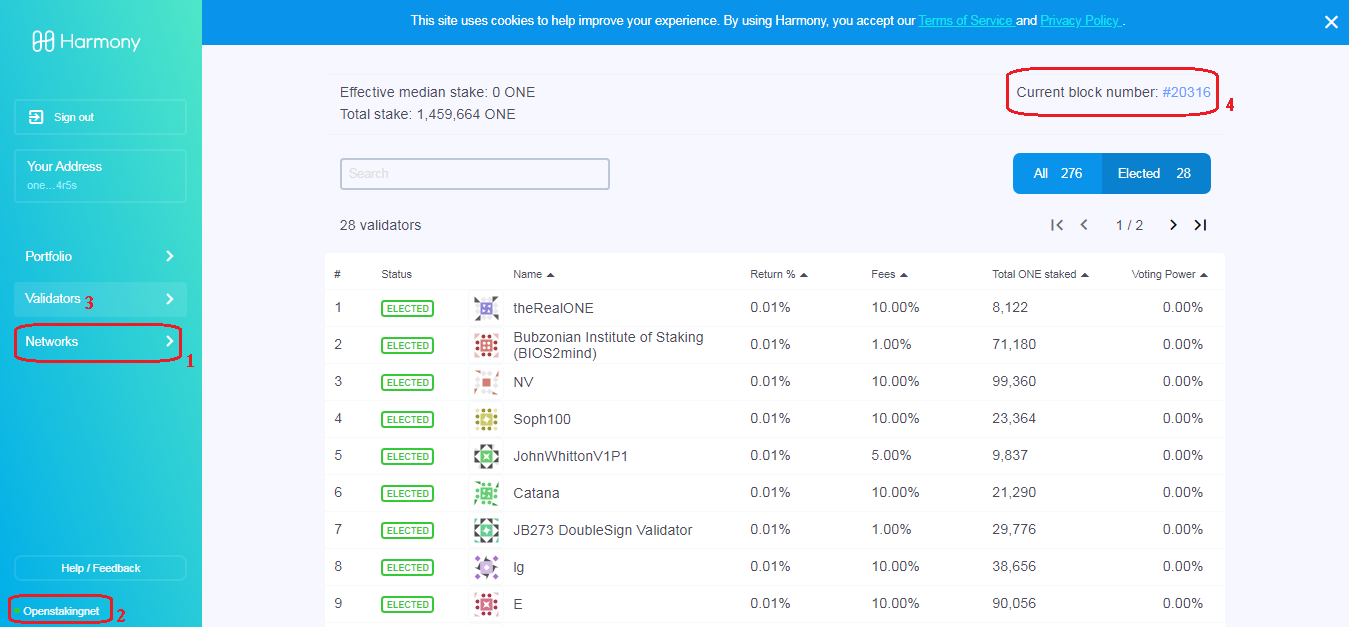 .go to https://staking.harmony.one/networks > choose Openstakingnet .choose 'Validators' on 'left menu' .compare your block height with the 'net current block number' #Check your balance# $ ./hmy balances [ONE ADDRESS] .mean while waiting until you got 'Elected', you may want to check your balances .or maybe you want to request another faucets after 1 hours #Check your Validator Info# $ ./hmy --node=https://api.s0.os.hmny.io/ blockchain validator information [ONE ADDRESS] .after you got 'Elected' you may want to checking your Validator Information .or maybe you want to check whether you've got your BINGO! or not if you curious #Check your BINGO!# tail latest/zerolog-validator-*.log | grep -i BINGO okay just that, how is it, really simple isn't it, so next step you may want to explore the staking dashboard; .download Harmony Google Chrome Extension, and log in there with your ONE address you just got above .login to Harmony staking dashboard website .check your info by paste below link on your Google Chrome address bar; https://staking.harmony.one/validators/one1-your-one-addresss example. https://staking.harmony.one/validators/one1rmsztmw3727yjuszwd484z8mvf9v6fkkze4r5s .do Claim your ONE testnets token Reward .do Stake or this is called 'Self Delegation' of your just Claiming 'Staking Rewards' So that's a WRAP! Gang's, if you have a plenty question you can asking about that in the comment section below or just head off to Harmony Pangaean Group https://t.me/harmonypangaea, there'll be many can answer your Question's there Gang's,, Thank you very much for visiting my Article also if you do upvote it, and if you like it you also can share a little love to my BEP2 bnb1flqt26pfnaj35e2xy5zq2s6rt9nkcqgjyv7dvp , thank you very much Gang's you're all really generous, love it, yeah!! |
| json metadata | {"tags":["harmony","one","staking","node","pangaea","testnet","fn","mainnet"],"image":["https://cdn.steemitimages.com/DQmf1Y5jybpuPi1yrYQWNgnSs9V73Y2xAvgsWyhbafvkLm1/current_block_number.png"],"links":["https://harmony.one/hmycli","https://api.s0.os.hmny.io","https://harmony.one/node2.sh","http://pub.harmony.one.s3.amazonaws.com/release/linux-x86_64/testnet/libcrypto.so.10","https://faucet.os.hmny.io/fund?address=","https://faucet.os.hmny.io/fund?address=one1rmsztmw3727yjuszwd484z8mvf9v6fkkze4r5s","https://staking.harmony.one/networks","https://api.s0.os.hmny.io/","https://staking.harmony.one/validators/one1-your-one-addresss","https://staking.harmony.one/validators/one1rmsztmw3727yjuszwd484z8mvf9v6fkkze4r5s","https://t.me/harmonypangaea"],"app":"steemit/0.2","format":"markdown"} |
| Transaction Info | Block #41420993/Trx 59863e77f565ced45258b644d817cb08c8838b27 |
View Raw JSON Data
{
"trx_id": "59863e77f565ced45258b644d817cb08c8838b27",
"block": 41420993,
"trx_in_block": 0,
"op_in_trx": 0,
"virtual_op": 0,
"timestamp": "2020-03-06T17:55:00",
"op": [
"comment",
{
"parent_author": "",
"parent_permlink": "harmony",
"author": "scraidx123",
"permlink": "setting-up-new-harmony-one-open-staking-node",
"title": "Setting up New Harmony ONE Open Staking Node",
"body": "Hello wellcome back Gang's\n\nBelow i'll explain a simpler way to run your new Harmony One Node, just paste it 1 by 1, and don't skip the task, before make sure you use ubuntu 18.04, coz many of command below is for ubuntu, so make sure if you use AWS your user is not ec2-user but ubuntu, if yes your OS is not ubuntu but Linux 2, even it'll not give a big different, but it'll make you dizzy when one of the command is not give you a desired output, and i used windows with the help of PuTTY as my terminal, okay lets roll on the node;\n\nIf you just buy your vps you must do this after '$' dollar sign, don't paste the '$' on your terminal;\n\n$ sudo apt-get update && sudo apt-get upgrade && sudo apt-get install tmux\n$ tmux new-session -s node\n\n#Download Harmony CLI#\n$ curl -LO https://harmony.one/hmycli\n$ mv hmycli hmy\n$ chmod +x hmy\n\n.Double check if it works with;\n$ ./hmy cookbook\n\n.save the cookbook content if you want to\n\n#Create a new BLS#\n$ ./hmy keys generate-bls-key --passphrase\n\n.it'll ask u for Passphrase, just press 'enter' x2, or you can fill it if you want\n.this gave me output;\n\n{\n \"public-key\": \"7484973d2fe6caa6e905e97e38fdc0840cd6b20aa557d11879fe0651cabb33c39df6aa9a3d7339ae0c747649a32d2783\",\n \"private-key\": \"blablabla\",\n \"encrypted-private-key-path\": \"/root/7484973d2fe6caa6e905e97e38fdc0840cd6b20aa557d11879fe0651cabb33c39df6aa9a3d7339ae0c747649a32d2783.key\"\n}\n\n.that's mean the 'xxx.key' or your BLS key is be on root directory\n\n#Checking which Shard the BLS will validate on#\n$ ./hmy --node=\"https://api.s0.os.hmny.io\" utility shard-for-bls [BLS PUBLIC KEY]\n\nexample.\n$ ./hmy --node=\"https://api.s0.os.hmny.io\" utility shard-for-bls 7484973d2fe6caa6e905e97e38fdc0840cd6b20aa557d11879fe0651cabb33c39df6aa9a3d7339ae0c747649a32d2783.key\n\n.this gave me output;\n{\"shard-id\":3}\n\n#Download node.sh#\n$ curl -LO https://harmony.one/node2.sh && mv node2.sh node.sh && chmod a+x node.sh\n$ curl -LO http://pub.harmony.one.s3.amazonaws.com/release/linux-x86_64/testnet/libcrypto.so.10\n$ sudo apt-get install libgmp-dev\n\n#Run node.sh#\n$ ./node.sh -S -N staking -z -k 7484973d2fe6caa6e905e97e38fdc0840cd6b20aa557d11879fe0651cabb33c39df6aa9a3d7339ae0c747649a32d2783.key\n\n.this gave me output;\nnode.sh: downloaded harmony\nnode.sh: downloaded wallet\nnode.sh: downloaded bootnode\nnode.sh: downloaded libmcl.so\nnode.sh: downloaded libbls384_256.so\nnode.sh: downloaded libcrypto.so.10\nnode.sh: public IP address autodetected: 172.31.16.211\nEnter passphrase for the BLS key file 7484973d2fe6caa6e905e97e38fdc0840cd6b20aa557d11879fe0651cabb33c39df6aa9a3d7339ae0c747649a32d2783.key:\nnode.sh: ############### Running Harmony Process ###############\nStaking mode; node key 7484973d2fe6caa6e905e97e38fdc0840cd6b20aa557d11879fe0651cabb33c39df6aa9a3d7339ae0c747649a32d2783 -> shard 3\n\n.Congrats Gang's you just run your node, now just simply detach from tmux by pressing 'Ctrl+b' d on your keyboard\n\n#Create a new Wallet (CLI)#\n$ ./hmy keys add [LOCAL ACCOUNT NAME] --passphrase\n\nexample.\n$ ./hmy keys add sagekn1ght --passphrase\n\n.it'll ask u for Wallet Passphrase, just press 'enter' x2, or you can fill it if you want\n.it'll generate you a 12 seed phrase (mnemonic), save it on notepad in case you lose your keystore\n\n#Check your New ONE Address#\n$ ./hmy keys list\n\n.this gave me output;\nNAME ADDRESS\n\nsagekn1ght one1rmsztmw3727yjuszwd484z8mvf9v6fkkze4r5s\n\n#Get the ONE Token for your Initial Stake#\n$ curl -X GET https://faucet.os.hmny.io/fund?address=[ONE ADDRESS]\n\nexample.\n$ curl -X GET https://faucet.os.hmny.io/fund?address=one1rmsztmw3727yjuszwd484z8mvf9v6fkkze4r5s\n\n.The faucet will fund 1000 ONE tokens on Shard 0, per account, per hour.\n\n#Create a Validator#\n.you can do this after you got sync, but you can do this in advanced\n.this is one liner, don't give it extra more 'space' or it'll cause you an error\n.replace it mine with yours if you want simplicity\n\n$ ./hmy --node=\"https://api.s0.os.hmny.io\" staking create-validator --validator-addr [one1youraddress] --name [NAME] --identity [IDENTITY] --website [YOUR-WEBSITE.COM] --security-contact [CONTACT] --details \"DETAILS\" --rate 0.1 --max-rate 0.9 --max-change-rate 0.05 --min-self-delegation 1 --max-total-delegation 1000000 --bls-pubkeys [BLS PUBLIC KEY] --amount 999 --chain-id testnet --passphrase\n\nexample.\n$ ./hmy --node=\"https://api.s0.os.hmny.io\" staking create-validator --validator-addr one1rmsztmw3727yjuszwd484z8mvf9v6fkkze4r5s --name sagekn1ght --identity sagekn1ght --website sagekn1ght.harmony.one --security-contact sagekn1ght --details \"SageNode\" --rate 0.1 --max-rate 0.9 --max-change-rate 0.05 --min-self-delegation 1 --max-total-delegation 1000000 --bls-pubkeys 7484973d2fe6caa6e905e97e38fdc0840cd6b20aa557d11879fe0651cabb33c39df6aa9a3d7339ae0c747649a32d2783 --amount 999 --chain-id testnet --passphrase\n\n.it'll ask u for ur BLS Passphrase set above, in this case just press 'enter', or fill it with ur's if u set it before\n.and it'll ask u for ur Wallet Passphrase twice, in this case just press 'enter' x2, or fill it with ur's if u set it before\n.--min-self-delegation has to be at least 1 ONE\n.--passphrase > [don't put any pass after this line]\n.--amount 999 > from faucets 1000, leave it 1 $ONE for network fee\n\n.this gave me output;\ntxhash. 0x2f59987f75c3778ffb8d6d09a7b09084a2252e239d188af2d531ff5d09931d6a\n\n.if you do create validator after you got sync, congrats you just have to wait about 1 epoch until you got 'Elected'\n.if you create this in advanced, so you must wait until you've synced to the last block height, then wait until the Next Epoch, then you'll got 'Elected'\n\n#Check your last block height#\n$ ./hmy blockchain latest-header\n\n.compare it with the last block height in your staking web dashboard\n\n\n\n.go to https://staking.harmony.one/networks > choose Openstakingnet\n.choose 'Validators' on 'left menu'\n.compare your block height with the 'net current block number'\n\n#Check your balance#\n$ ./hmy balances [ONE ADDRESS]\n\n.mean while waiting until you got 'Elected', you may want to check your balances\n.or maybe you want to request another faucets after 1 hours\n\n#Check your Validator Info#\n$ ./hmy --node=https://api.s0.os.hmny.io/ blockchain validator information [ONE ADDRESS]\n\n.after you got 'Elected' you may want to checking your Validator Information\n.or maybe you want to check whether you've got your BINGO! or not if you curious \n\n#Check your BINGO!#\ntail latest/zerolog-validator-*.log | grep -i BINGO\n\nokay just that, how is it, really simple isn't it, so next step you may want to explore the staking dashboard;\n.download Harmony Google Chrome Extension, and log in there with your ONE address you just got above\n.login to Harmony staking dashboard website\n.check your info by paste below link on your Google Chrome address bar;\nhttps://staking.harmony.one/validators/one1-your-one-addresss\n\nexample.\nhttps://staking.harmony.one/validators/one1rmsztmw3727yjuszwd484z8mvf9v6fkkze4r5s\n\n.do Claim your ONE testnets token Reward\n.do Stake or this is called 'Self Delegation' of your just Claiming 'Staking Rewards'\n\nSo that's a WRAP! Gang's, if you have a plenty question you can asking about that in the comment section below or just head off to Harmony Pangaean Group https://t.me/harmonypangaea, there'll be many can answer your Question's there Gang's,,\n\nThank you very much for visiting my Article also if you do upvote it, and if you like it you also can share a little love to my BEP2 bnb1flqt26pfnaj35e2xy5zq2s6rt9nkcqgjyv7dvp , thank you very much Gang's you're all really generous, love it, yeah!!",
"json_metadata": "{\"tags\":[\"harmony\",\"one\",\"staking\",\"node\",\"pangaea\",\"testnet\",\"fn\",\"mainnet\"],\"image\":[\"https://cdn.steemitimages.com/DQmf1Y5jybpuPi1yrYQWNgnSs9V73Y2xAvgsWyhbafvkLm1/current_block_number.png\"],\"links\":[\"https://harmony.one/hmycli\",\"https://api.s0.os.hmny.io\",\"https://harmony.one/node2.sh\",\"http://pub.harmony.one.s3.amazonaws.com/release/linux-x86_64/testnet/libcrypto.so.10\",\"https://faucet.os.hmny.io/fund?address=\",\"https://faucet.os.hmny.io/fund?address=one1rmsztmw3727yjuszwd484z8mvf9v6fkkze4r5s\",\"https://staking.harmony.one/networks\",\"https://api.s0.os.hmny.io/\",\"https://staking.harmony.one/validators/one1-your-one-addresss\",\"https://staking.harmony.one/validators/one1rmsztmw3727yjuszwd484z8mvf9v6fkkze4r5s\",\"https://t.me/harmonypangaea\"],\"app\":\"steemit/0.2\",\"format\":\"markdown\"}"
}
]
}scraidx123updated their account properties2020/03/06 16:22:36
scraidx123updated their account properties
2020/03/06 16:22:36
| account | scraidx123 |
| json metadata | |
| posting json metadata | {"profile":{"profile_image":"https://cdn.steemitimages.com/DQmWmUEC99CeqQ8Ef1rH1bFjwX2caVbuPbC9uPAwByEKsDC/80032370_2054179394684385_1974378555957575680_n.jpg","cover_image":"https://cdn.steemitimages.com/DQmYJHrHCPZqc6dXGKVGZq52tEhEYBeyysgKdW8tq2CbEPK/steemit_cover.png","version":2,"name":"SageKn1ght"}} |
| extensions | [] |
| Transaction Info | Block #41419149/Trx 98395cc8b085b95521b473d3a38789e1a3d659d8 |
View Raw JSON Data
{
  "trx_id": "98395cc8b085b95521b473d3a38789e1a3d659d8",
  "block": 41419149,
  "trx_in_block": 10,
  "op_in_trx": 0,
  "virtual_op": 0,
  "timestamp": "2020-03-06T16:22:36",
  "op": [
    "account_update2",
    {
      "account": "scraidx123",
      "json_metadata": "",
      "posting_json_metadata": "{\"profile\":{\"profile_image\":\"https://cdn.steemitimages.com/DQmWmUEC99CeqQ8Ef1rH1bFjwX2caVbuPbC9uPAwByEKsDC/80032370_2054179394684385_1974378555957575680_n.jpg\",\"cover_image\":\"https://cdn.steemitimages.com/DQmYJHrHCPZqc6dXGKVGZq52tEhEYBeyysgKdW8tq2CbEPK/steemit_cover.png\",\"version\":2,\"name\":\"SageKn1ght\"}}",
      "extensions": []
    }
  ]
}scraidx123updated their account properties2020/03/06 16:21:54
scraidx123updated their account properties
2020/03/06 16:21:54
| account | scraidx123 |
| json metadata | |
| posting json metadata | {"profile":{"profile_image":"https://cdn.steemitimages.com/DQmWmUEC99CeqQ8Ef1rH1bFjwX2caVbuPbC9uPAwByEKsDC/80032370_2054179394684385_1974378555957575680_n.jpg","cover_image":"https://cdn.steemitimages.com/DQmYJHrHCPZqc6dXGKVGZq52tEhEYBeyysgKdW8tq2CbEPK/steemit_cover.png","version":2}} |
| extensions | [] |
| Transaction Info | Block #41419135/Trx 2eeddeb4f2c06640805ad0d8b94feda4e08d4d2e |
View Raw JSON Data
{
  "trx_id": "2eeddeb4f2c06640805ad0d8b94feda4e08d4d2e",
  "block": 41419135,
  "trx_in_block": 4,
  "op_in_trx": 0,
  "virtual_op": 0,
  "timestamp": "2020-03-06T16:21:54",
  "op": [
    "account_update2",
    {
      "account": "scraidx123",
      "json_metadata": "",
      "posting_json_metadata": "{\"profile\":{\"profile_image\":\"https://cdn.steemitimages.com/DQmWmUEC99CeqQ8Ef1rH1bFjwX2caVbuPbC9uPAwByEKsDC/80032370_2054179394684385_1974378555957575680_n.jpg\",\"cover_image\":\"https://cdn.steemitimages.com/DQmYJHrHCPZqc6dXGKVGZq52tEhEYBeyysgKdW8tq2CbEPK/steemit_cover.png\",\"version\":2}}",
      "extensions": []
    }
  ]
}scraidx123custom json: notify2020/02/21 03:55:27
scraidx123custom json: notify
2020/02/21 03:55:27
| required auths | [] |
| required posting auths | ["scraidx123"] |
| id | notify |
| json | ["setLastRead",{"date":"2020-02-20T01:22:11"}] |
| Transaction Info | Block #41002882/Trx 2850e5b0c9c594ae2ec69eebd3c7f2dcd10be68c |
View Raw JSON Data
{
  "trx_id": "2850e5b0c9c594ae2ec69eebd3c7f2dcd10be68c",
  "block": 41002882,
  "trx_in_block": 6,
  "op_in_trx": 0,
  "virtual_op": 0,
  "timestamp": "2020-02-21T03:55:27",
  "op": [
    "custom_json",
    {
      "required_auths": [],
      "required_posting_auths": [
        "scraidx123"
      ],
      "id": "notify",
      "json": "[\"setLastRead\",{\"date\":\"2020-02-20T01:22:11\"}]"
    }
  ]
}scraidx123published a new post: comprehensive-guide-to-buidl-matic-counterstake-node-on-home-cpu2020/02/21 03:55:00
scraidx123published a new post: comprehensive-guide-to-buidl-matic-counterstake-node-on-home-cpu
2020/02/21 03:55:00
| parent author | |
| parent permlink | node |
| author | scraidx123 |
| permlink | comprehensive-guide-to-buidl-matic-counterstake-node-on-home-cpu |
| title | Comprehensive Guide to Buidl Matic Counterstake Node on Home CPU - CS-2002 updated |
| body | @@ -11477,16 +11477,22 @@ trl+c%0A$; + pkill heimdal @@ -11497,25 +11497,36 @@ alld - unsafe-reset- +%0A$; sudo rm -rf ~/.heimd all +/ %0A%0ACt @@ -11765,16 +11765,38 @@ stop.sh +%0A$; sudo rm -rf ~/.bor %0A%0ACtrl+b @@ -11896,16 +11896,42 @@ Ctrl+c%0A +$; pkill heimdalld-bridge%0A $; sudo @@ -13129,19 +13129,20 @@ g Time.%0A -Btw +Yess Congrat |
| json metadata | {"tags":["staking","matic","counterstake","testnet","incentivize","vps","ubuntu","tmux"],"image":["https://img.youtube.com/vi/MaHbPygjNQo/0.jpg","https://img.youtube.com/vi/XFIKnovTcm4/0.jpg","https://img.youtube.com/vi/-JGmU6oqDlo/0.jpg"],"links":["https://youtu.be/MaHbPygjNQo","https://forms.gle/P2JrXiTFuPvQadbv9","https://gist.githubusercontent.com/vaibhavchellani/cbe0fa947dc0a6557cb9583d081ff8ce/raw/d47b3df14ccffdd7a965e44c39fb5ec235360166/new.sh","https://packages.erlang-solutions.com/erlang-solutions_1.0_all.deb","https://dl.bintray.com/rabbitmq/debian","https://dl.bintray.com/rabbitmq/Keys/rabbitmq-release-signing-key.asc","https://www.rabbitmq.com/rabbitmq-release-signing-key.asc","https://github.com/maticnetwork/heimdall","https://www.youtube.com/watch?v=XFIKnovTcm4","https://github.com/maticnetwork/public-testnets","https://ethereumico.io/knowledge-base/infura-api-key-guide","https://github.com/maticnetwork/bor","https://youtu.be/-JGmU6oqDlo","https://api.matic.network/staking/cs1001/swagger-ui/","http://localhost:26657/status"],"app":"steemit/0.2","format":"markdown"} |
| Transaction Info | Block #41002873/Trx 514eb3e1a73273102ed9758fefc3691ab799de15 |
View Raw JSON Data
{
  "trx_id": "514eb3e1a73273102ed9758fefc3691ab799de15",
  "block": 41002873,
  "trx_in_block": 26,
  "op_in_trx": 0,
  "virtual_op": 0,
  "timestamp": "2020-02-21T03:55:00",
  "op": [
    "comment",
    {
      "parent_author": "",
      "parent_permlink": "node",
      "author": "scraidx123",
      "permlink": "comprehensive-guide-to-buidl-matic-counterstake-node-on-home-cpu",
      "title": "Comprehensive Guide to Buidl Matic Counterstake Node on Home CPU - CS-2002 updated",
      "body": "@@ -11477,16 +11477,22 @@\n trl+c%0A$;\n+ pkill\n  heimdal\n@@ -11497,25 +11497,36 @@\n alld\n- unsafe-reset-\n+%0A$; sudo rm -rf ~/.heimd\n all\n+/\n %0A%0ACt\n@@ -11765,16 +11765,38 @@\n  stop.sh\n+%0A$; sudo rm -rf ~/.bor\n %0A%0ACtrl+b\n@@ -11896,16 +11896,42 @@\n  Ctrl+c%0A\n+$; pkill heimdalld-bridge%0A\n $; sudo \n@@ -13129,19 +13129,20 @@\n g Time.%0A\n-Btw\n+Yess\n  Congrat\n",
      "json_metadata": "{\"tags\":[\"staking\",\"matic\",\"counterstake\",\"testnet\",\"incentivize\",\"vps\",\"ubuntu\",\"tmux\"],\"image\":[\"https://img.youtube.com/vi/MaHbPygjNQo/0.jpg\",\"https://img.youtube.com/vi/XFIKnovTcm4/0.jpg\",\"https://img.youtube.com/vi/-JGmU6oqDlo/0.jpg\"],\"links\":[\"https://youtu.be/MaHbPygjNQo\",\"https://forms.gle/P2JrXiTFuPvQadbv9\",\"https://gist.githubusercontent.com/vaibhavchellani/cbe0fa947dc0a6557cb9583d081ff8ce/raw/d47b3df14ccffdd7a965e44c39fb5ec235360166/new.sh\",\"https://packages.erlang-solutions.com/erlang-solutions_1.0_all.deb\",\"https://dl.bintray.com/rabbitmq/debian\",\"https://dl.bintray.com/rabbitmq/Keys/rabbitmq-release-signing-key.asc\",\"https://www.rabbitmq.com/rabbitmq-release-signing-key.asc\",\"https://github.com/maticnetwork/heimdall\",\"https://www.youtube.com/watch?v=XFIKnovTcm4\",\"https://github.com/maticnetwork/public-testnets\",\"https://ethereumico.io/knowledge-base/infura-api-key-guide\",\"https://github.com/maticnetwork/bor\",\"https://youtu.be/-JGmU6oqDlo\",\"https://api.matic.network/staking/cs1001/swagger-ui/\",\"http://localhost:26657/status\"],\"app\":\"steemit/0.2\",\"format\":\"markdown\"}"
    }
  ]
}scraidx123published a new post: comprehensive-guide-to-buidl-matic-counterstake-node-on-home-cpu2020/02/21 03:33:36
scraidx123published a new post: comprehensive-guide-to-buidl-matic-counterstake-node-on-home-cpu
2020/02/21 03:33:36
| parent author | |
| parent permlink | node |
| author | scraidx123 |
| permlink | comprehensive-guide-to-buidl-matic-counterstake-node-on-home-cpu |
| title | Comprehensive Guide to Buidl Matic Counterstake Node on Home CPU - CS-2002 updated |
| body | @@ -13626,24 +13626,28 @@ t be set 20 +TST tokens);%0A%0A$; @@ -13802,24 +13802,88 @@ ls, -you can pay your +but for sending this tx you still need Eth Ropsten for gas fee, you can pay this fee @@ -15289,20 +15289,27 @@ all- -lXaaU9 +cs2002 , and +if you init @@ -15329,16 +15329,17 @@ tor Join +, before @@ -15359,16 +15359,19 @@ tokens, + it will le @@ -15611,30 +15611,30 @@ id heimdall- -lXaaU9 +cs2002 %0A%0AThis comma @@ -16133,14 +16133,14 @@ all- -lXaaU9 +cs2002 %0A%0ATh |
| json metadata | {"tags":["staking","matic","counterstake","testnet","incentivize","vps","ubuntu","tmux"],"image":["https://img.youtube.com/vi/MaHbPygjNQo/0.jpg","https://img.youtube.com/vi/XFIKnovTcm4/0.jpg","https://img.youtube.com/vi/-JGmU6oqDlo/0.jpg"],"links":["https://youtu.be/MaHbPygjNQo","https://forms.gle/P2JrXiTFuPvQadbv9","https://gist.githubusercontent.com/vaibhavchellani/cbe0fa947dc0a6557cb9583d081ff8ce/raw/d47b3df14ccffdd7a965e44c39fb5ec235360166/new.sh","https://packages.erlang-solutions.com/erlang-solutions_1.0_all.deb","https://dl.bintray.com/rabbitmq/debian","https://dl.bintray.com/rabbitmq/Keys/rabbitmq-release-signing-key.asc","https://www.rabbitmq.com/rabbitmq-release-signing-key.asc","https://github.com/maticnetwork/heimdall","https://www.youtube.com/watch?v=XFIKnovTcm4","https://github.com/maticnetwork/public-testnets","https://ethereumico.io/knowledge-base/infura-api-key-guide","https://github.com/maticnetwork/bor","https://youtu.be/-JGmU6oqDlo","https://api.matic.network/staking/cs1001/swagger-ui/","http://localhost:26657/status"],"app":"steemit/0.2","format":"markdown"} |
| Transaction Info | Block #41002445/Trx d1130687f0bf1d66427bca06dba68942f17388fb |
View Raw JSON Data
{
  "trx_id": "d1130687f0bf1d66427bca06dba68942f17388fb",
  "block": 41002445,
  "trx_in_block": 21,
  "op_in_trx": 0,
  "virtual_op": 0,
  "timestamp": "2020-02-21T03:33:36",
  "op": [
    "comment",
    {
      "parent_author": "",
      "parent_permlink": "node",
      "author": "scraidx123",
      "permlink": "comprehensive-guide-to-buidl-matic-counterstake-node-on-home-cpu",
      "title": "Comprehensive Guide to Buidl Matic Counterstake Node on Home CPU - CS-2002 updated",
      "body": "@@ -13626,24 +13626,28 @@\n t be set 20 \n+TST \n tokens);%0A%0A$;\n@@ -13802,24 +13802,88 @@\n ls, \n-you can pay your\n+but for sending this tx you still need Eth Ropsten for gas fee, you can pay this\n  fee\n@@ -15289,20 +15289,27 @@\n all-\n-lXaaU9\n+cs2002\n , and \n+if you \n init\n@@ -15329,16 +15329,17 @@\n tor Join\n+,\n  before \n@@ -15359,16 +15359,19 @@\n  tokens,\n+ it\n  will le\n@@ -15611,30 +15611,30 @@\n id heimdall-\n-lXaaU9\n+cs2002\n %0A%0AThis comma\n@@ -16133,14 +16133,14 @@\n all-\n-lXaaU9\n+cs2002\n %0A%0ATh\n",
      "json_metadata": "{\"tags\":[\"staking\",\"matic\",\"counterstake\",\"testnet\",\"incentivize\",\"vps\",\"ubuntu\",\"tmux\"],\"image\":[\"https://img.youtube.com/vi/MaHbPygjNQo/0.jpg\",\"https://img.youtube.com/vi/XFIKnovTcm4/0.jpg\",\"https://img.youtube.com/vi/-JGmU6oqDlo/0.jpg\"],\"links\":[\"https://youtu.be/MaHbPygjNQo\",\"https://forms.gle/P2JrXiTFuPvQadbv9\",\"https://gist.githubusercontent.com/vaibhavchellani/cbe0fa947dc0a6557cb9583d081ff8ce/raw/d47b3df14ccffdd7a965e44c39fb5ec235360166/new.sh\",\"https://packages.erlang-solutions.com/erlang-solutions_1.0_all.deb\",\"https://dl.bintray.com/rabbitmq/debian\",\"https://dl.bintray.com/rabbitmq/Keys/rabbitmq-release-signing-key.asc\",\"https://www.rabbitmq.com/rabbitmq-release-signing-key.asc\",\"https://github.com/maticnetwork/heimdall\",\"https://www.youtube.com/watch?v=XFIKnovTcm4\",\"https://github.com/maticnetwork/public-testnets\",\"https://ethereumico.io/knowledge-base/infura-api-key-guide\",\"https://github.com/maticnetwork/bor\",\"https://youtu.be/-JGmU6oqDlo\",\"https://api.matic.network/staking/cs1001/swagger-ui/\",\"http://localhost:26657/status\"],\"app\":\"steemit/0.2\",\"format\":\"markdown\"}"
    }
  ]
}scraidx123published a new post: comprehensive-guide-to-buidl-matic-counterstake-node-on-home-cpu2020/02/20 00:08:51
scraidx123published a new post: comprehensive-guide-to-buidl-matic-counterstake-node-on-home-cpu
2020/02/20 00:08:51
| parent author | |
| parent permlink | node |
| author | scraidx123 |
| permlink | comprehensive-guide-to-buidl-matic-counterstake-node-on-home-cpu |
| title | Comprehensive Guide to Buidl Matic Counterstake Node on Home CPU - CS-2002 updated |
| body | @@ -2140,17 +2140,18 @@ nt shell +. %0A - I prefer @@ -3175,16 +3175,17 @@ ironment +. %0Afirstly @@ -4347,16 +4347,39 @@ server%0A%0A +#Run RabbitMQ Services%0A $; sudo @@ -5014,17 +5014,17 @@ Heimdall - +. %0AHeimdal @@ -8940,24 +8940,25 @@ %0A%0AD. Run Bor +. %0A$; tmux new @@ -10017,32 +10017,37 @@ word.txt%0A%0A#Start +&Sync Bor%0A$; bash sta @@ -10362,32 +10362,33 @@ Sync Rest Server +. %0A$; tmux new-ses @@ -10686,16 +10686,17 @@ c Bridge +. %0A#Bridge @@ -11266,16 +11266,17 @@ ery data +. %0A#To see @@ -11406,17 +11406,17 @@ r-ui/%0A%0AH -a +1 . Stop a @@ -11432,16 +11432,17 @@ the Node +. %0A%0A#Stop @@ -11904,17 +11904,17 @@ l+b d%0A%0AH -b +2 . Start @@ -11924,21 +11924,16 @@ Node, ( -when the stak @@ -11950,16 +11950,17 @@ as come) +. %0A%0A#Start @@ -12285,16 +12285,21 @@ %0A%0A#Start +&Sync Bor%0A$; @@ -12845,16 +12845,21 @@ %0A%0A#Start +&Sync Bridge%0A @@ -13062,16 +13062,17 @@ ing Time +. %0ABtw Con @@ -13361,16 +13361,17 @@ #Approve +# %0AThe app @@ -14196,16 +14196,17 @@ %0A%0A#Stake +# %0AOnce ap @@ -14804,16 +14804,17 @@ tor join +# %0AYou mus @@ -15345,16 +15345,17 @@ ormation +# %0AIf you @@ -15917,16 +15917,17 @@ #Balance +# %0AAfter a @@ -15979,17 +15979,19 @@ nce by;%0A - $ +; heimdall |
| json metadata | {"tags":["staking","matic","counterstake","testnet","incentivize","vps","ubuntu","tmux"],"image":["https://img.youtube.com/vi/MaHbPygjNQo/0.jpg","https://img.youtube.com/vi/XFIKnovTcm4/0.jpg","https://img.youtube.com/vi/-JGmU6oqDlo/0.jpg"],"links":["https://youtu.be/MaHbPygjNQo","https://forms.gle/P2JrXiTFuPvQadbv9","https://gist.githubusercontent.com/vaibhavchellani/cbe0fa947dc0a6557cb9583d081ff8ce/raw/d47b3df14ccffdd7a965e44c39fb5ec235360166/new.sh","https://packages.erlang-solutions.com/erlang-solutions_1.0_all.deb","https://dl.bintray.com/rabbitmq/debian","https://dl.bintray.com/rabbitmq/Keys/rabbitmq-release-signing-key.asc","https://www.rabbitmq.com/rabbitmq-release-signing-key.asc","https://github.com/maticnetwork/heimdall","https://www.youtube.com/watch?v=XFIKnovTcm4","https://github.com/maticnetwork/public-testnets","https://ethereumico.io/knowledge-base/infura-api-key-guide","https://github.com/maticnetwork/bor","https://youtu.be/-JGmU6oqDlo","https://api.matic.network/staking/cs1001/swagger-ui/","http://localhost:26657/status"],"app":"steemit/0.2","format":"markdown"} |
| Transaction Info | Block #40969615/Trx 2fbd47c06f9c001923530af42212a764dbd015f0 |
View Raw JSON Data
{
  "trx_id": "2fbd47c06f9c001923530af42212a764dbd015f0",
  "block": 40969615,
  "trx_in_block": 2,
  "op_in_trx": 0,
  "virtual_op": 0,
  "timestamp": "2020-02-20T00:08:51",
  "op": [
    "comment",
    {
      "parent_author": "",
      "parent_permlink": "node",
      "author": "scraidx123",
      "permlink": "comprehensive-guide-to-buidl-matic-counterstake-node-on-home-cpu",
      "title": "Comprehensive Guide to Buidl Matic Counterstake Node on Home CPU - CS-2002 updated",
      "body": "@@ -2140,17 +2140,18 @@\n nt shell\n+.\n %0A\n-\n I prefer\n@@ -3175,16 +3175,17 @@\n ironment\n+.\n %0Afirstly\n@@ -4347,16 +4347,39 @@\n server%0A%0A\n+#Run RabbitMQ Services%0A\n $; sudo \n@@ -5014,17 +5014,17 @@\n Heimdall\n- \n+.\n %0AHeimdal\n@@ -8940,24 +8940,25 @@\n %0A%0AD. Run Bor\n+.\n %0A$; tmux new\n@@ -10017,32 +10017,37 @@\n word.txt%0A%0A#Start\n+&Sync\n  Bor%0A$; bash sta\n@@ -10362,32 +10362,33 @@\n Sync Rest Server\n+.\n %0A$; tmux new-ses\n@@ -10686,16 +10686,17 @@\n c Bridge\n+.\n %0A#Bridge\n@@ -11266,16 +11266,17 @@\n ery data\n+.\n %0A#To see\n@@ -11406,17 +11406,17 @@\n r-ui/%0A%0AH\n-a\n+1\n . Stop a\n@@ -11432,16 +11432,17 @@\n the Node\n+.\n %0A%0A#Stop \n@@ -11904,17 +11904,17 @@\n l+b d%0A%0AH\n-b\n+2\n . Start \n@@ -11924,21 +11924,16 @@\n  Node, (\n-when \n the stak\n@@ -11950,16 +11950,17 @@\n as come)\n+.\n %0A%0A#Start\n@@ -12285,16 +12285,21 @@\n %0A%0A#Start\n+&Sync\n  Bor%0A$; \n@@ -12845,16 +12845,21 @@\n %0A%0A#Start\n+&Sync\n  Bridge%0A\n@@ -13062,16 +13062,17 @@\n ing Time\n+.\n %0ABtw Con\n@@ -13361,16 +13361,17 @@\n #Approve\n+#\n %0AThe app\n@@ -14196,16 +14196,17 @@\n %0A%0A#Stake\n+#\n %0AOnce ap\n@@ -14804,16 +14804,17 @@\n tor join\n+#\n %0AYou mus\n@@ -15345,16 +15345,17 @@\n ormation\n+#\n %0AIf you \n@@ -15917,16 +15917,17 @@\n #Balance\n+#\n %0AAfter a\n@@ -15979,17 +15979,19 @@\n nce by;%0A\n-\n $\n+; \n heimdall\n",
      "json_metadata": "{\"tags\":[\"staking\",\"matic\",\"counterstake\",\"testnet\",\"incentivize\",\"vps\",\"ubuntu\",\"tmux\"],\"image\":[\"https://img.youtube.com/vi/MaHbPygjNQo/0.jpg\",\"https://img.youtube.com/vi/XFIKnovTcm4/0.jpg\",\"https://img.youtube.com/vi/-JGmU6oqDlo/0.jpg\"],\"links\":[\"https://youtu.be/MaHbPygjNQo\",\"https://forms.gle/P2JrXiTFuPvQadbv9\",\"https://gist.githubusercontent.com/vaibhavchellani/cbe0fa947dc0a6557cb9583d081ff8ce/raw/d47b3df14ccffdd7a965e44c39fb5ec235360166/new.sh\",\"https://packages.erlang-solutions.com/erlang-solutions_1.0_all.deb\",\"https://dl.bintray.com/rabbitmq/debian\",\"https://dl.bintray.com/rabbitmq/Keys/rabbitmq-release-signing-key.asc\",\"https://www.rabbitmq.com/rabbitmq-release-signing-key.asc\",\"https://github.com/maticnetwork/heimdall\",\"https://www.youtube.com/watch?v=XFIKnovTcm4\",\"https://github.com/maticnetwork/public-testnets\",\"https://ethereumico.io/knowledge-base/infura-api-key-guide\",\"https://github.com/maticnetwork/bor\",\"https://youtu.be/-JGmU6oqDlo\",\"https://api.matic.network/staking/cs1001/swagger-ui/\",\"http://localhost:26657/status\"],\"app\":\"steemit/0.2\",\"format\":\"markdown\"}"
    }
  ]
}beemenginesent 0.001 STEEM to @scraidx123- "💎 Awesome Community Offer, Your Best STEEM Companion, automated 24/24 boosting your posts, guaranteed community extra votes, passive curation earnings and more, checkout https://www.steembeem.com 🤙 ..."2020/02/19 23:33:57
beemenginesent 0.001 STEEM to @scraidx123- "💎 Awesome Community Offer, Your Best STEEM Companion, automated 24/24 boosting your posts, guaranteed community extra votes, passive curation earnings and more, checkout https://www.steembeem.com 🤙 ..."
2020/02/19 23:33:57
| from | beemengine |
| to | scraidx123 |
| amount | 0.001 STEEM |
| memo | 💎 Awesome Community Offer, Your Best STEEM Companion, automated 24/24 boosting your posts, guaranteed community extra votes, passive curation earnings and more, checkout https://www.steembeem.com 🤙 or join in for one month by sending ONLY 1 STEEM 🤯 to @beemengine with memo: subscribe |
| Transaction Info | Block #40968917/Trx 4058aa7061d107d9f60abcb6f3918a1173fc0188 |
View Raw JSON Data
{
  "trx_id": "4058aa7061d107d9f60abcb6f3918a1173fc0188",
  "block": 40968917,
  "trx_in_block": 13,
  "op_in_trx": 0,
  "virtual_op": 0,
  "timestamp": "2020-02-19T23:33:57",
  "op": [
    "transfer",
    {
      "from": "beemengine",
      "to": "scraidx123",
      "amount": "0.001 STEEM",
      "memo": "💎 Awesome Community Offer, Your Best STEEM Companion, automated 24/24 boosting your posts, guaranteed community extra votes, passive curation earnings and more, checkout https://www.steembeem.com 🤙 or join in for one month by sending ONLY 1 STEEM 🤯 to @beemengine with memo: subscribe"
    }
  ]
}scraidx123published a new post: comprehensive-guide-to-buidl-matic-counterstake-node-on-home-cpu2020/02/19 23:32:57
scraidx123published a new post: comprehensive-guide-to-buidl-matic-counterstake-node-on-home-cpu
2020/02/19 23:32:57
| parent author | |
| parent permlink | node |
| author | scraidx123 |
| permlink | comprehensive-guide-to-buidl-matic-counterstake-node-on-home-cpu |
| title | Comprehensive Guide to Buidl Matic Counterstake Node on Home CPU - CS-2002 updated |
| body | @@ -622,798 +622,133 @@ and -of what to type (copy & paste) maybe will be differ with the command used for build on Home CPU, and overall the command will always be different between one and the other, example. it maybe different between Virtual Machine, and it'll be differes between Virtual Machine with VPS, or between Instance/Machine on the same VPS provider, and ofcourse between one VPS to other VPS, yes maybe u'll face the different sintax/command but the steps is same, you just have to seek the right command and if you follow the steps right without skip it, then u'll blast off, to the moon with Matic,,%0A%0ABecause this Tutorial is for they who running Ubuntu 18.04.3 on Virtual Box, so maybe if you used VPS, or other version of linux or Virtual Machine, you could face issue like what i mention above, but +will be differ because this is propose for buidl on Home CPU (virtual machine), you just have to seek the right command, and as @@ -842,16 +842,69 @@ ht Track +, then u'll blast off, to the moon with Matic Token,, %0A%0AOkay i @@ -1319,18 +1319,21 @@ Doc.), b -ut +efore there w @@ -1368,27 +1368,82 @@ added, +but now it has updated twice from CS-2001 to CS-2002 (now), if you - just read th @@ -1445,18 +1445,20 @@ ad this -by +from my firs @@ -1483,162 +1483,424 @@ it, -you're still saved, because they just give people option to install, wether it like what i did in this tuts (Binaries Mode), or with Docker, etc.%0A%0AAnd +and wanna seek for update or information, it's not changes very much, you'll not get confuse because in conclution the step are just;%0A%0A- Download and Install%0A- Configure%0A- Start the Node (Heimdall, Rest Server, Bridge & Bor)%0A- Stake your Matic (TST) tokens%0A%0AFor optional way to install, they gave another method named Linux Package Installation, btw the way what we'll gonna Install was named the Binaries way%0A%0AO the +r add @@ -1915,81 +1915,145 @@ info - was, they just ask us to stop the service until they started Phase 1, so +; For participating on Phase 1, you need to fill below form to receives your Matic (TST) tokens;%0Ahttps://forms.gle/P2JrXiTFuPvQadbv9%0A%0AAnd let @@ -2066,17 +2066,16 @@ it on;%0A -%0A A. Separ @@ -2092,14 +2092,8 @@ all, - Bor & Res @@ -2100,16 +2100,30 @@ t Server +, Bridge & Bor to run @@ -2536,19 +2536,26 @@ s Cs -Bor +Rs #for -Bo +Rest Serve r%0A$; @@ -2577,34 +2577,68 @@ on -s Cs -Rs +Brd #for -Rest Serve +Bridge%0A$; tmux new-session -s CsBor #for Bo r%0A%0ADon't @@ -2998,29 +2998,48 @@ t Cs -Bor%0A$; tmux a -t CsRs +Rs%0A$; tmux a -t CsBrd%0A$; tmux a -t CsBor %0A%0Aor @@ -3715,263 +3715,8 @@ go%0A%0A -#dep%0A$; go get -d -u github.com/golang/dep%0A$; cd $(go env GOPATH)/src/github.com/golang/dep%0A$; DEP_LATEST=$(git describe --abbrev=0 --tags)%0A$; git checkout $DEP_LATEST%0A$; go install -ldflags=%22-X main.version=$DEP_LATEST%22 ./cmd/dep%0A$; git checkout master%0A%0A #Erl @@ -4350,38 +4350,29 @@ r%0A%0A$; sudo s -ystemctl enabl +ervic e rabbitmq-s @@ -4381,48 +4381,14 @@ ver -%0A$; sudo systemctl start rabbitmq-server +start %0A%0Aif @@ -4422,21 +4422,14 @@ do s -ystemctl stop +ervice rab @@ -4440,16 +4440,21 @@ q-server + stop %0A%0A#Check @@ -4480,432 +4480,38 @@ udo -rabbitmq-plugins enable rabbitmq_management%0A%0A$; sudo rabbitmqctl status%0A%0A#Set Rabbit User%0A$; sudo rabbitmqctl add_user scraidx123 x123456 =%3E this is password, (changes with yours)%0A$; sudo rabbitmqctl set_user_tags scraidx123 administrator%0A$; sudo rabbitmqctl set_permissions -p / scraidx123 %22%5Escraidx123-.*%22 %22.*%22 %22.*%22%0A%0A$; sudo rabbitmq-plugins enable rabbitmq_management%0A$; sudo chown -R rabbitmq:rabbitmq /var/lib/rabbitmq/ +service rabbitmq-server status %0A%0A#I @@ -5423,20 +5423,20 @@ rst 'CS- -1001 +2002 ' direct @@ -5516,36 +5516,36 @@ git checkout CS- -1001 +2002 %0A$; make dep%0A%0A$; @@ -5541,150 +5541,250 @@ ake -dep%0A%0A$; git checkout CS-1001%0A$; make install%0A%0A$; heimdalld --help%0A%0A$; heimdalld init%0A%0ANotice. when it 'prompt' you to input 'Yes', just type Y +install%0A%0ANotice. when it 'prompt' you to input 'Yes', just type Y%0A%0A$; heimdalld --help%0A%0A$; heimdalld init%0A%0A#write out the generated chain_id & node_id for further use%0A%0A$; echo %22export HEIMDALLDIR=~/.heimdalld%22 %3E%3E ~/.bashrc%0A$; source ~/.bashrc %0A%0A#s @@ -5938,53 +5938,139 @@ /CS- -1001%0A$; cp heimdall-genesis.json ~/.heimdalld +2002%0A$; echo %22export CONFIGPATH=$PWD%22 %3E%3E ~/.bashrc%0A$; source ~/.bashrc%0A$; cp $CONFIGPATH/heimdall/config/genesis.json $HEIMDALLDIR /con @@ -6096,41 +6096,69 @@ cp +$CONFIGPATH/ heimdall -- +/ config -.toml ~/.heimdalld +/heimdall-config.toml $HEIMDALLDIR /con @@ -6420,344 +6420,825 @@ %22%0A%0A# -Configure peers for Heimdall%0A$; nano config.toml %0A%0Apaste below value, under %22persistent_peers%22 =%0A%[email protected]:26656,[email protected]:26656,[email protected]:26656,[email protected] +make sure your contract address is match for CS-2002 below;%0A### Eth Chain Contracts%0Astakinginfo_contract = %220x4A77108eA2380217553dcc77C7Aa62f58C5b04a2%22%0Astake_manager_contract = %220x228DF261D960d48bDBF50BDC8dc00ba20358aCea%22%0Arootchain_contract = %220x12c1d34135bee2745AD930647F54D36c9dD6Cbe3%22%0Astate_sender_contract = %220x061b9fE56513BBa078d509C2377e3E5be9219FeB%22%0Amatic_token = %220x6bAA90c411945C2fE93f1D336fb5787b6531a67C%22%0A%0A#Configure peers for Heimdall%0A$; nano config.toml %0A%0Apaste below value, under %22persistent_peers%22 =%0A%[email protected]:26656,[email protected]:26656,[email protected]:26656,[email protected]:26656,[email protected] :266 @@ -7242,16 +7242,50 @@ 26656%22%0A%0A +#Try to find the peers your self %0A Refer to @@ -7327,23 +7327,31 @@ in your +public- testnet +s folder. @@ -7450,23 +7450,31 @@ to find +public- testnet +s , $; fin @@ -7501,23 +7501,31 @@ l -name +public- testnet +s %0A%0Anow f @@ -7705,125 +7705,170 @@ ml, -if you want to find the peers your self%0A%0A#Check Heimdall Status; %0ADo verify you are on the correct version by running +or just type%0A$; cd ~%0A$; cd public-testnets/CS-2002/heimdall/%0A$; cat heimdall-seeds.txt = copy the result, and paste on config.toml%0A%0A#Generate Heimdall private key %0A$; @@ -7891,16 +7891,17 @@ config%0A$ +; heimdal @@ -7909,93 +7909,479 @@ cli -version --long%0A%0A// Expected Output%0Aname: heimdall%0Aserver_name: heimdalld%0Aclient_name: +generate-validatorkey %3Cyour eth addr private key, that you register for this event%3E%0A%0ARefer to; this registration form. https://forms.gle/P2JrXiTFuPvQadbv9%0A%0A#This will create priv_validator_key.json in the same folder, make sure this file be on ~/.heimdalld/config directory.%0AIf not move this validator key file to heimdall config folder;%0A%0A$; mv ./priv_validator_key.json $HEIMDALLDIR/config%0A%0A#Check Heimdall Status; %0ADo verify you are on the correct version by running%0A%0A$ hei @@ -8392,74 +8392,67 @@ lcli -%0A + version -: CS-1001%0Acommit: 812ab544c1f658acf5f84c0b2e4bfe9943fa4854 + --long on this directory $; cd ~/.heimdalld/config %0A%0ATi @@ -8490,18 +8490,28 @@ you run -i t +he Heimdall , no pro @@ -8719,17 +8719,16 @@ rt or re -- start th @@ -8856,77 +8856,8 @@ %22 %0A%0A -Refer to; https://docs.matic.network/staking/heimdall/run-heimdall/%0A%0A and @@ -9070,20 +9070,20 @@ kout CS- -1001 +2002 %0A$; make @@ -9127,288 +9127,299 @@ Bor%0A -make sure your bor-config directory by $; find / -xdev 2%3E/dev/null -name bor-config%0A%0A#then; %0A$; cd /home/ubuntu/public-testnets/bor-config%0A%0A$; cp ../CS-1001/bor-genesis.json genesis.json %0A$; $GOPATH/src/github.com/maticnetwork/bor/build/bin/bor -- +$; cd ~%0A$; cd public-testnets/CS-2002%0A$; echo %22export CONFIGPATH=$PWD%22 %3E%3E ~/.bashrc%0A$; source ~/.bashrc%0A$; cd $CONFIGPATH/bor %0A$; bash setup.sh%0A$; echo %22export BORDIR=~/.bor%22 %3E%3E ~/.bashrc%0A$; source ~/.bashrc%0A%0AThis will create Bor home directory at ~/.bor and data + dir - dataDir init genesis.json +ectory at ~/.bor/dataDir %0A%0A#C @@ -9445,32 +9445,8 @@ Bor%0A -$; cd ..%0A$; cd CS-1001%0A%0A $; c @@ -9469,21 +9469,14 @@ son -../bor-config +~/.bor /dat @@ -9490,144 +9490,679 @@ r/%0A%0A -$; cd ..%0A$; cd bor-config%0A%0A#Start Bor%0A$; bash start.sh%0A%0A#Check Bor Status; %0A$; cd logs%0A$; sudo cat bor.log #or%0A$; nano bor.log %7C Ctrl+x +#Generate Bor keystore file%0A$; heimdallcli generate-keystore %3Cyour eth addr private key, that you register for this event%3E%0A%0AThis will create a keystore file in UTC format. For example:%0AUTC--2020-02-10T10-11-48.027180000Z--6c468cf8c9879006e22ec4029696e005c2319c9d%0A%0ANow you will have to move the keystore file to bor data directory%0A$; sudo mv UTC--(time)-(address) ~/.bor/keystore/%0A%0A#Add password.txt%0AAdd the password that you entered as passphrase in the password.txt file%0A%0A$; sudo nano ~/.bor/password.txt%0A%0A#Start Bor%0A$; bash start.sh%0A%0ANote. Make sure you are still on this directory; public-testnets/CS-2002/bor%0A%0A#Check Bor Status; %0A$; cd $BORDIR/logs%0A$; tail -f bor.log %0A%0ATi @@ -10634,16 +10634,428 @@ tions.%0A%0A +F. Start&Sync Bridge%0A#Bridge is a helper package that sends transactions to heimdall on behalf of validators. All interactions with other chains happens via this bridge, Bridge won't run without rabbitmq and rest-server so ensure they are running before trying to run bridge%0A%0A$; tmux new-session -s CsBrd%0A%0A$; cd ~/.heimdalld/config%0A%0A$; bridge start --all%0A%0Aand now just get out the shell by pressing; Ctrl+b & d%0A%0A #Btw i'v @@ -11220,17 +11220,17 @@ oqDlo %0A%0A -F +G . Query @@ -11375,51 +11375,35 @@ i/%0A%0A -G +Ha . Stop -the Node until further announcement +and Reset the Node %0A%0A#S @@ -11477,24 +11477,164 @@ %0A%0ACtrl+b d%0A%0A +Note. To be used only if you need to restart Heimdall and delete old data in the event of a crash or if there are changes in genesis files%0A%0A #Stop Bor%0A$; @@ -11659,16 +11659,38 @@ Ctrl+c%0A +$; cd $CONFIGPATH/bor%0A $; bash @@ -11781,17 +11781,105 @@ rl+b d%0A%0A -H +#Stop Bridge%0A$; tmux a -t CsBrd %7C Ctrl+c%0A$; sudo rm -rf $HEIMDALLDIR/bridge%0A%0ACtrl+b d%0A%0AHb . Start @@ -11886,16 +11886,17 @@ the Node +, (when t @@ -12288,48 +12288,23 @@ cd -~/home/ubuntu/public-testnets/bor-config +$CONFIGPATH/bor %0A$; @@ -12463,47 +12463,15 @@ cd -/home/ubuntu/public-testnets/bor-config +$BORDIR /log @@ -12475,24 +12475,23 @@ logs%0A$; -sudo cat +tail -f bor.log @@ -12696,19 +12696,31 @@ udo +service rabbitmq -ctl +-server sta @@ -12738,20 +12738,13 @@ not -run / disabl +activ e, a @@ -12776,22 +12776,13 @@ do s -ystemctl enabl +ervic e ra @@ -12799,48 +12799,14 @@ ver -%0A$; sudo systemctl start rabbitmq-server +start %0A%0A#S @@ -12843,16 +12843,18 @@ n -s CsB +rd %0A$; cd ~ @@ -12943,291 +12943,3345 @@ ll%0A%0A -note. Bridge is a helper package that sends transactions to heimdall on behalf of validators. %0AAll interactions with other chains happens via this bridge.%0A%0Aand now just get out the shell by pressing; Ctrl+b & d%0A%0Abtw%0A%0ACongrat'z Gang'z you've just join the Matic testnet %5BCounterStake%5D +and now just get out the shell by pressing; Ctrl+b & d%0A%0Athen%0A%0AI. It's Staking Time%0ABtw Congrat'z Gang'z you've just join the Matic testnet %5BCounterStake%5D, and now it's time to stake your testnets token that you got after you're application has been chosen, there'll be 500 TST Token on your Ropsten Eth Address, if you didn't see on your metamask, see it on etherscan.io%0A%0A#Approve%0AThe approve command will initiate your transaction towards staking on Matic%0A%0A$; heimdallcli approve --staked-amount %3Cstake-amount%3E --fee-amount %3Cheimdall-fee-amount%3E%0A%0AFor example, to approve for stake amount 100 Matic (TST) Tokens and fee 20 tokens, (must be set 20 tokens);%0A%0A$; heimdallcli approve --staked-amount 100000000000000000000 --fee-amount 20000000000000000000%0A%0ANote. Stake amount and fee amount must be in 18 decimals, you can pay your fee by claim a Ropsten Faucet, u'll get about 1,5 Eth of Ropsten Testnet Tokens, (you must have this Ropsten Test Eth for being successing Approve & Stake your TST Token)%0A%0AOnce you run the approve command you should see the following response along with the transaction hash;%0ASent approve tx sucessfully txHash=0x987aa9a319de34f61b768e4bbac160212055d8e5e9b813b2fc520dc650488943%0A%0A#Stake%0AOnce approve transaction gets confirmed, send stake transaction on Ethereum%0A%0A$; heimdallcli stake --staked-amount %3Cstake-amount%3E --fee-amount %3Cheimdall-fee-amount%3E --validator %3Cvalidator-owner-address%3E%0A%0AFor example, to stake amount 100 Matic tokens and fee 20 tokens;%0A$; heimdallcli stake --staked-amount 100000000000000000000 --fee-amount 20000000000000000000 --validator 0xc40e52501d9969B6788C173C1cA6b23DE6f33943%0A%0AYou should see the following response once you run the above command;%0ASubmitted stake sucessfully txHash=0x987aa9a319de34f61b768e4bbac160212055d8e5e9b813b2fc520dc650488943%0A%0A#Validator join%0AYou must join Validator to be eligible increasing your TST stake token, you can join the network by running the following command;%0A%0A$; heimdallcli tx staking validator-join --signer-pubkey %3Csigner-pub-key%3E --tx-hash %3Cstake-ethereum-tx-hash%3E --chain-id %3Cchain-id%3E%0A%0AYou can view your pub-key by running this command; %0A$; heimdalld show-account%0A%0ANote. The chain-id required here is the heimdall chain-id; heimdall-lXaaU9, and initiate a Validator Join before you stake any tokens, will lead you to got an error message%0A%0A#Validator Information%0AIf you want to your Validator Information you can used below command;%0A$; heimdallcli query staking validator-info --validator=0x6c468cf8c9879006e22ec4029696e005c2319c9d --chain-id heimdall-lXaaU9%0A%0AThis command should display the following output;%0A%7B%0A %22ID%22:1,%0A %22startEpoch%22:0,%0A %22endEpoch%22:0,%0A %22power%22:10,%0A %22pubKey%22:%220x04b12d8b2f6e3d45a7ace12c4b2158f79b95e4c28ebe5ad54c439be9431d7fc9dc1164210bf6a5c3b8523528b931e772c86a307e8cff4b725e6b4a77d21417bf19%22,%0A %22signer%22:%220x6c468cf8c9879006e22ec4029696e005c2319c9d%22,%0A %22last_updated%22:0,%0A %22accum%22:0%0A%7D%0A%0A#Balance%0AAfter a day or two maybe you want to check your balance by;%0A$heimdallcli query auth account %3Csigner-address%3E --chain-id heimdall-lXaaU9%0A%0AThe following output should appear;%0Aaddress: 0x6c468cf8c9879006e22ec4029696e005c2319c9d%0A coins:%0A - denom: matic%0A amount:%0A i: %221000000000000000000000%22%0A accountnumber: 0%0A sequence: 0%0A%0ANote. You need to keep checking if your balance has been updated or not. %0A%0AIf @@ -16326,19 +16326,19 @@ comment - it +ing below, @@ -16473,16 +16473,29 @@ i hope +this article can clea @@ -16573,122 +16573,120 @@ Node - on your Home CPU or your VPS'es, Thank you very much and see you on Counterstake Phase One around 08/01/2020 Guys +, Thank you very much and hope to see you join with me and other's on this Counterstake Phase One, See you there , Ch |
| json metadata | {"tags":["staking","matic","counterstake","testnet","incentivize","vps","ubuntu","tmux"],"image":["https://img.youtube.com/vi/MaHbPygjNQo/0.jpg","https://img.youtube.com/vi/XFIKnovTcm4/0.jpg","https://img.youtube.com/vi/-JGmU6oqDlo/0.jpg"],"links":["https://youtu.be/MaHbPygjNQo","https://forms.gle/P2JrXiTFuPvQadbv9","https://gist.githubusercontent.com/vaibhavchellani/cbe0fa947dc0a6557cb9583d081ff8ce/raw/d47b3df14ccffdd7a965e44c39fb5ec235360166/new.sh","https://packages.erlang-solutions.com/erlang-solutions_1.0_all.deb","https://dl.bintray.com/rabbitmq/debian","https://dl.bintray.com/rabbitmq/Keys/rabbitmq-release-signing-key.asc","https://www.rabbitmq.com/rabbitmq-release-signing-key.asc","https://github.com/maticnetwork/heimdall","https://www.youtube.com/watch?v=XFIKnovTcm4","https://github.com/maticnetwork/public-testnets","https://ethereumico.io/knowledge-base/infura-api-key-guide","https://github.com/maticnetwork/bor","https://youtu.be/-JGmU6oqDlo","https://api.matic.network/staking/cs1001/swagger-ui/","http://localhost:26657/status"],"app":"steemit/0.1","format":"markdown"} |
| Transaction Info | Block #40968897/Trx 0ded65f900fee69e6897a41a8ba34936327f303f |
View Raw JSON Data
{
  "trx_id": "0ded65f900fee69e6897a41a8ba34936327f303f",
  "block": 40968897,
  "trx_in_block": 30,
  "op_in_trx": 0,
  "virtual_op": 0,
  "timestamp": "2020-02-19T23:32:57",
  "op": [
    "comment",
    {
      "parent_author": "",
      "parent_permlink": "node",
      "author": "scraidx123",
      "permlink": "comprehensive-guide-to-buidl-matic-counterstake-node-on-home-cpu",
      "title": "Comprehensive Guide to Buidl Matic Counterstake Node on Home CPU - CS-2002 updated",
      "body": "@@ -622,798 +622,133 @@\n and \n-of what to type (copy & paste) maybe will be differ with the command used for build on Home CPU, and overall the command will always be different between one and the other, example. it maybe different between Virtual Machine, and it'll be differes between Virtual Machine with VPS, or between Instance/Machine on the same  VPS provider, and ofcourse between one VPS to other VPS, yes maybe u'll face the different sintax/command but the steps is same, you just have to seek the right command and if you follow the steps right without skip it, then u'll blast off, to the moon with Matic,,%0A%0ABecause this Tutorial is for they who running Ubuntu 18.04.3 on Virtual Box, so maybe if you used VPS, or other version of linux or Virtual Machine, you could face issue like what i mention above, but\n+will be differ because this is propose for buidl on Home CPU (virtual machine),  you just have to seek the right command, and\n  as \n@@ -842,16 +842,69 @@\n ht Track\n+, then u'll blast off, to the moon with Matic Token,,\n %0A%0AOkay i\n@@ -1319,18 +1319,21 @@\n Doc.), b\n-ut\n+efore\n  there w\n@@ -1368,27 +1368,82 @@\n  added, \n+but now it has updated twice from CS-2001 to CS-2002 (now), \n if you\n- just\n  read th\n@@ -1445,18 +1445,20 @@\n ad this \n-by\n+from\n  my firs\n@@ -1483,162 +1483,424 @@\n it, \n-you're still saved, because they just give people option to install, wether it like what i did in this tuts (Binaries Mode), or with Docker, etc.%0A%0AAnd \n+and wanna seek for update or information, it's not changes very much, you'll not get confuse because in conclution the step are just;%0A%0A- Download and Install%0A- Configure%0A- Start the Node (Heimdall, Rest Server, Bridge & Bor)%0A- Stake your Matic (TST) tokens%0A%0AFor optional way to install, they gave another method named Linux Package Installation, btw the way what we'll gonna Install was named the Binaries way%0A%0AO\n the\n+r\n  add\n@@ -1915,81 +1915,145 @@\n info\n- was, they just ask us to stop the service until they started Phase 1, so\n+; For participating on Phase 1, you need to fill below form to receives your Matic (TST) tokens;%0Ahttps://forms.gle/P2JrXiTFuPvQadbv9%0A%0AAnd\n  let\n@@ -2066,17 +2066,16 @@\n  it on;%0A\n-%0A\n A. Separ\n@@ -2092,14 +2092,8 @@\n all,\n- Bor &\n  Res\n@@ -2100,16 +2100,30 @@\n t Server\n+, Bridge & Bor\n  to run \n@@ -2536,19 +2536,26 @@\n s Cs\n-Bor\n+Rs\n  #for \n-Bo\n+Rest Serve\n r%0A$;\n@@ -2577,34 +2577,68 @@\n on -s Cs\n-Rs\n+Brd\n  #for \n-Rest Serve\n+Bridge%0A$; tmux new-session -s CsBor #for Bo\n r%0A%0ADon't\n@@ -2998,29 +2998,48 @@\n t Cs\n-Bor%0A$; tmux a -t CsRs\n+Rs%0A$; tmux a -t CsBrd%0A$; tmux a -t CsBor\n %0A%0Aor\n@@ -3715,263 +3715,8 @@\n go%0A%0A\n-#dep%0A$; go get -d -u github.com/golang/dep%0A$; cd $(go env GOPATH)/src/github.com/golang/dep%0A$; DEP_LATEST=$(git describe --abbrev=0 --tags)%0A$; git checkout $DEP_LATEST%0A$; go install -ldflags=%22-X main.version=$DEP_LATEST%22 ./cmd/dep%0A$; git checkout master%0A%0A\n #Erl\n@@ -4350,38 +4350,29 @@\n r%0A%0A$; sudo s\n-ystemctl enabl\n+ervic\n e rabbitmq-s\n@@ -4381,48 +4381,14 @@\n ver \n-%0A$; sudo systemctl start rabbitmq-server\n+start \n %0A%0Aif\n@@ -4422,21 +4422,14 @@\n do s\n-ystemctl stop\n+ervice\n  rab\n@@ -4440,16 +4440,21 @@\n q-server\n+ stop\n %0A%0A#Check\n@@ -4480,432 +4480,38 @@\n udo \n-rabbitmq-plugins enable rabbitmq_management%0A%0A$; sudo rabbitmqctl status%0A%0A#Set Rabbit User%0A$; sudo rabbitmqctl add_user scraidx123 x123456 =%3E this is password, (changes with yours)%0A$; sudo rabbitmqctl set_user_tags scraidx123 administrator%0A$; sudo rabbitmqctl set_permissions -p / scraidx123 %22%5Escraidx123-.*%22 %22.*%22 %22.*%22%0A%0A$; sudo rabbitmq-plugins enable rabbitmq_management%0A$; sudo chown -R rabbitmq:rabbitmq /var/lib/rabbitmq/\n+service rabbitmq-server status\n %0A%0A#I\n@@ -5423,20 +5423,20 @@\n rst 'CS-\n-1001\n+2002\n ' direct\n@@ -5516,36 +5516,36 @@\n git checkout CS-\n-1001\n+2002\n %0A$; make dep%0A%0A$;\n@@ -5541,150 +5541,250 @@\n ake \n-dep%0A%0A$; git checkout CS-1001%0A$; make install%0A%0A$; heimdalld --help%0A%0A$; heimdalld init%0A%0ANotice. when it 'prompt' you to input 'Yes', just type Y\n+install%0A%0ANotice. when it 'prompt' you to input 'Yes', just type Y%0A%0A$; heimdalld --help%0A%0A$; heimdalld init%0A%0A#write out the generated chain_id & node_id for further use%0A%0A$; echo %22export HEIMDALLDIR=~/.heimdalld%22 %3E%3E ~/.bashrc%0A$; source ~/.bashrc\n %0A%0A#s\n@@ -5938,53 +5938,139 @@\n /CS-\n-1001%0A$; cp heimdall-genesis.json ~/.heimdalld\n+2002%0A$; echo %22export CONFIGPATH=$PWD%22 %3E%3E ~/.bashrc%0A$; source ~/.bashrc%0A$; cp $CONFIGPATH/heimdall/config/genesis.json  $HEIMDALLDIR\n /con\n@@ -6096,41 +6096,69 @@\n  cp \n+$CONFIGPATH/\n heimdall\n--\n+/\n config\n-.toml ~/.heimdalld\n+/heimdall-config.toml $HEIMDALLDIR\n /con\n@@ -6420,344 +6420,825 @@\n %22%0A%0A#\n-Configure peers for Heimdall%0A$; nano config.toml %0A%0Apaste below value, under %22persistent_peers%22 =%0A%[email protected]:26656,[email protected]:26656,[email protected]:26656,[email protected]\n+make sure your contract address is match for CS-2002 below;%0A### Eth Chain Contracts%0Astakinginfo_contract = %220x4A77108eA2380217553dcc77C7Aa62f58C5b04a2%22%0Astake_manager_contract = %220x228DF261D960d48bDBF50BDC8dc00ba20358aCea%22%0Arootchain_contract = %220x12c1d34135bee2745AD930647F54D36c9dD6Cbe3%22%0Astate_sender_contract = %220x061b9fE56513BBa078d509C2377e3E5be9219FeB%22%0Amatic_token = %220x6bAA90c411945C2fE93f1D336fb5787b6531a67C%22%0A%0A#Configure peers for Heimdall%0A$; nano config.toml %0A%0Apaste below value, under %22persistent_peers%22 =%0A%[email protected]:26656,[email protected]:26656,[email protected]:26656,[email protected]:26656,[email protected]\n :266\n@@ -7242,16 +7242,50 @@\n 26656%22%0A%0A\n+#Try to find the peers your self %0A\n Refer to\n@@ -7327,23 +7327,31 @@\n in your \n+public-\n testnet\n+s\n  folder.\n@@ -7450,23 +7450,31 @@\n to find \n+public-\n testnet\n+s\n , $; fin\n@@ -7501,23 +7501,31 @@\n l -name \n+public-\n testnet\n+s\n  %0A%0Anow f\n@@ -7705,125 +7705,170 @@\n ml, \n-if you want to find the peers your self%0A%0A#Check Heimdall Status; %0ADo verify you are on the correct version by running\n+or just type%0A$; cd ~%0A$; cd public-testnets/CS-2002/heimdall/%0A$; cat heimdall-seeds.txt = copy the result, and paste on config.toml%0A%0A#Generate Heimdall private key\n %0A$; \n@@ -7891,16 +7891,17 @@\n config%0A$\n+;\n  heimdal\n@@ -7909,93 +7909,479 @@\n cli \n-version --long%0A%0A// Expected Output%0Aname: heimdall%0Aserver_name: heimdalld%0Aclient_name:\n+generate-validatorkey %3Cyour eth addr private key, that you register for this event%3E%0A%0ARefer to; this registration form. https://forms.gle/P2JrXiTFuPvQadbv9%0A%0A#This will create priv_validator_key.json in the same folder, make sure this file be on ~/.heimdalld/config directory.%0AIf not move this validator key file to heimdall config folder;%0A%0A$; mv ./priv_validator_key.json $HEIMDALLDIR/config%0A%0A#Check Heimdall Status; %0ADo verify you are on the correct version by running%0A%0A$\n  hei\n@@ -8392,74 +8392,67 @@\n lcli\n-%0A\n+ \n version\n-: CS-1001%0Acommit: 812ab544c1f658acf5f84c0b2e4bfe9943fa4854\n+ --long on this directory $; cd ~/.heimdalld/config\n %0A%0ATi\n@@ -8490,18 +8490,28 @@\n you run \n-i\n t\n+he Heimdall\n , no pro\n@@ -8719,17 +8719,16 @@\n rt or re\n--\n start th\n@@ -8856,77 +8856,8 @@\n %22 %0A%0A\n-Refer to; https://docs.matic.network/staking/heimdall/run-heimdall/%0A%0A\n and \n@@ -9070,20 +9070,20 @@\n kout CS-\n-1001\n+2002\n %0A$; make\n@@ -9127,288 +9127,299 @@\n Bor%0A\n-make sure your bor-config directory by $; find / -xdev 2%3E/dev/null -name bor-config%0A%0A#then; %0A$; cd /home/ubuntu/public-testnets/bor-config%0A%0A$; cp ../CS-1001/bor-genesis.json genesis.json %0A$; $GOPATH/src/github.com/maticnetwork/bor/build/bin/bor --\n+$; cd ~%0A$; cd public-testnets/CS-2002%0A$; echo %22export CONFIGPATH=$PWD%22 %3E%3E ~/.bashrc%0A$; source ~/.bashrc%0A$; cd $CONFIGPATH/bor %0A$; bash setup.sh%0A$; echo %22export BORDIR=~/.bor%22 %3E%3E ~/.bashrc%0A$; source ~/.bashrc%0A%0AThis will create Bor home directory at ~/.bor and \n data\n+ \n dir\n- dataDir init genesis.json\n+ectory at ~/.bor/dataDir\n %0A%0A#C\n@@ -9445,32 +9445,8 @@\n Bor%0A\n-$; cd ..%0A$; cd CS-1001%0A%0A\n $; c\n@@ -9469,21 +9469,14 @@\n son \n-../bor-config\n+~/.bor\n /dat\n@@ -9490,144 +9490,679 @@\n r/%0A%0A\n-$; cd ..%0A$; cd bor-config%0A%0A#Start Bor%0A$; bash start.sh%0A%0A#Check Bor Status; %0A$; cd logs%0A$; sudo cat bor.log #or%0A$; nano bor.log  %7C Ctrl+x\n+#Generate Bor keystore file%0A$; heimdallcli generate-keystore %3Cyour eth addr private key, that you register for this event%3E%0A%0AThis will create a keystore file in UTC format. For example:%0AUTC--2020-02-10T10-11-48.027180000Z--6c468cf8c9879006e22ec4029696e005c2319c9d%0A%0ANow you will have to move the keystore file to bor data directory%0A$; sudo mv UTC--(time)-(address) ~/.bor/keystore/%0A%0A#Add password.txt%0AAdd the password that you entered as passphrase in the password.txt file%0A%0A$; sudo nano ~/.bor/password.txt%0A%0A#Start Bor%0A$; bash start.sh%0A%0ANote. Make sure you are still on this directory; public-testnets/CS-2002/bor%0A%0A#Check Bor Status; %0A$; cd $BORDIR/logs%0A$; tail -f bor.log\n %0A%0ATi\n@@ -10634,16 +10634,428 @@\n tions.%0A%0A\n+F. Start&Sync Bridge%0A#Bridge is a helper package that sends transactions to heimdall on behalf of validators. All interactions with other chains happens via this bridge, Bridge won't run without rabbitmq and rest-server so ensure they are running before trying to run bridge%0A%0A$; tmux new-session -s CsBrd%0A%0A$; cd ~/.heimdalld/config%0A%0A$; bridge start --all%0A%0Aand now just get out the shell by pressing; Ctrl+b & d%0A%0A\n #Btw i'v\n@@ -11220,17 +11220,17 @@\n oqDlo %0A%0A\n-F\n+G\n . Query \n@@ -11375,51 +11375,35 @@\n i/%0A%0A\n-G\n+Ha\n . Stop \n-the Node until further announcement\n+and Reset the Node\n %0A%0A#S\n@@ -11477,24 +11477,164 @@\n %0A%0ACtrl+b d%0A%0A\n+Note. To be used only if you need to restart Heimdall and delete old data in the event of a crash or if there are changes in genesis files%0A%0A\n #Stop Bor%0A$;\n@@ -11659,16 +11659,38 @@\n  Ctrl+c%0A\n+$; cd $CONFIGPATH/bor%0A\n $; bash \n@@ -11781,17 +11781,105 @@\n rl+b d%0A%0A\n-H\n+#Stop Bridge%0A$; tmux a -t CsBrd %7C Ctrl+c%0A$; sudo rm -rf $HEIMDALLDIR/bridge%0A%0ACtrl+b d%0A%0AHb\n . Start \n@@ -11886,16 +11886,17 @@\n the Node\n+,\n  (when t\n@@ -12288,48 +12288,23 @@\n  cd \n-~/home/ubuntu/public-testnets/bor-config\n+$CONFIGPATH/bor\n %0A$; \n@@ -12463,47 +12463,15 @@\n  cd \n-/home/ubuntu/public-testnets/bor-config\n+$BORDIR\n /log\n@@ -12475,24 +12475,23 @@\n logs%0A$; \n-sudo cat\n+tail -f\n  bor.log\n@@ -12696,19 +12696,31 @@\n udo \n+service \n rabbitmq\n-ctl\n+-server\n  sta\n@@ -12738,20 +12738,13 @@\n not \n-run / disabl\n+activ\n e, a\n@@ -12776,22 +12776,13 @@\n do s\n-ystemctl enabl\n+ervic\n e ra\n@@ -12799,48 +12799,14 @@\n ver \n-%0A$; sudo systemctl start rabbitmq-server\n+start \n %0A%0A#S\n@@ -12843,16 +12843,18 @@\n n -s CsB\n+rd\n %0A$; cd ~\n@@ -12943,291 +12943,3345 @@\n ll%0A%0A\n-note. Bridge is a helper package that sends transactions to heimdall on behalf of validators. %0AAll interactions with other chains happens via this bridge.%0A%0Aand now just get out the shell by pressing; Ctrl+b & d%0A%0Abtw%0A%0ACongrat'z Gang'z you've just join the Matic testnet %5BCounterStake%5D\n+and now just get out the shell by pressing; Ctrl+b & d%0A%0Athen%0A%0AI. It's Staking Time%0ABtw Congrat'z Gang'z you've just join the Matic testnet %5BCounterStake%5D, and now it's time to stake your testnets token that you got after you're application has been chosen, there'll be 500 TST Token on your Ropsten Eth Address, if you didn't see on your metamask, see it on etherscan.io%0A%0A#Approve%0AThe approve command will initiate your transaction towards staking on Matic%0A%0A$; heimdallcli approve --staked-amount %3Cstake-amount%3E  --fee-amount %3Cheimdall-fee-amount%3E%0A%0AFor example, to approve for stake amount 100 Matic (TST) Tokens and fee 20 tokens, (must be set 20 tokens);%0A%0A$; heimdallcli approve --staked-amount 100000000000000000000 --fee-amount 20000000000000000000%0A%0ANote. Stake amount and fee amount must be in 18 decimals, you can pay your fee by claim a Ropsten Faucet, u'll get about 1,5 Eth of Ropsten Testnet Tokens, (you must have this Ropsten Test Eth for being successing Approve & Stake your TST Token)%0A%0AOnce you run the approve command you should see the following response along with the transaction hash;%0ASent approve tx sucessfully txHash=0x987aa9a319de34f61b768e4bbac160212055d8e5e9b813b2fc520dc650488943%0A%0A#Stake%0AOnce approve transaction gets confirmed, send stake transaction on Ethereum%0A%0A$; heimdallcli stake --staked-amount %3Cstake-amount%3E  --fee-amount %3Cheimdall-fee-amount%3E --validator %3Cvalidator-owner-address%3E%0A%0AFor example, to stake amount 100 Matic tokens and fee 20 tokens;%0A$; heimdallcli stake --staked-amount 100000000000000000000 --fee-amount 20000000000000000000 --validator 0xc40e52501d9969B6788C173C1cA6b23DE6f33943%0A%0AYou should see the following response once you run the above command;%0ASubmitted stake sucessfully txHash=0x987aa9a319de34f61b768e4bbac160212055d8e5e9b813b2fc520dc650488943%0A%0A#Validator join%0AYou must join Validator to be eligible increasing your TST stake token, you can join the network by running the following command;%0A%0A$; heimdallcli tx staking validator-join --signer-pubkey %3Csigner-pub-key%3E --tx-hash %3Cstake-ethereum-tx-hash%3E --chain-id %3Cchain-id%3E%0A%0AYou can view your pub-key by running this command; %0A$; heimdalld show-account%0A%0ANote. The chain-id required here is the heimdall chain-id; heimdall-lXaaU9, and initiate a Validator Join before you stake any tokens, will lead you to got an error message%0A%0A#Validator Information%0AIf you want to your Validator Information you can used below command;%0A$; heimdallcli query staking validator-info --validator=0x6c468cf8c9879006e22ec4029696e005c2319c9d --chain-id heimdall-lXaaU9%0A%0AThis command should display the following output;%0A%7B%0A    %22ID%22:1,%0A    %22startEpoch%22:0,%0A    %22endEpoch%22:0,%0A    %22power%22:10,%0A    %22pubKey%22:%220x04b12d8b2f6e3d45a7ace12c4b2158f79b95e4c28ebe5ad54c439be9431d7fc9dc1164210bf6a5c3b8523528b931e772c86a307e8cff4b725e6b4a77d21417bf19%22,%0A    %22signer%22:%220x6c468cf8c9879006e22ec4029696e005c2319c9d%22,%0A    %22last_updated%22:0,%0A    %22accum%22:0%0A%7D%0A%0A#Balance%0AAfter a day or two maybe you want to check your balance by;%0A$heimdallcli query auth account %3Csigner-address%3E --chain-id heimdall-lXaaU9%0A%0AThe following output should appear;%0Aaddress: 0x6c468cf8c9879006e22ec4029696e005c2319c9d%0A  coins:%0A  - denom: matic%0A    amount:%0A      i: %221000000000000000000000%22%0A  accountnumber: 0%0A  sequence: 0%0A%0ANote. You need to keep checking if your balance has been updated or not. \n %0A%0AIf\n@@ -16326,19 +16326,19 @@\n  comment\n- it\n+ing\n  below, \n@@ -16473,16 +16473,29 @@\n  i hope \n+this article \n can clea\n@@ -16573,122 +16573,120 @@\n Node\n- on your Home CPU or your VPS'es, Thank you very much and see you on Counterstake Phase One around 08/01/2020 Guys\n+, Thank you very much and hope to see you join with me and other's on this Counterstake Phase One, See you there\n , Ch\n",
      "json_metadata": "{\"tags\":[\"staking\",\"matic\",\"counterstake\",\"testnet\",\"incentivize\",\"vps\",\"ubuntu\",\"tmux\"],\"image\":[\"https://img.youtube.com/vi/MaHbPygjNQo/0.jpg\",\"https://img.youtube.com/vi/XFIKnovTcm4/0.jpg\",\"https://img.youtube.com/vi/-JGmU6oqDlo/0.jpg\"],\"links\":[\"https://youtu.be/MaHbPygjNQo\",\"https://forms.gle/P2JrXiTFuPvQadbv9\",\"https://gist.githubusercontent.com/vaibhavchellani/cbe0fa947dc0a6557cb9583d081ff8ce/raw/d47b3df14ccffdd7a965e44c39fb5ec235360166/new.sh\",\"https://packages.erlang-solutions.com/erlang-solutions_1.0_all.deb\",\"https://dl.bintray.com/rabbitmq/debian\",\"https://dl.bintray.com/rabbitmq/Keys/rabbitmq-release-signing-key.asc\",\"https://www.rabbitmq.com/rabbitmq-release-signing-key.asc\",\"https://github.com/maticnetwork/heimdall\",\"https://www.youtube.com/watch?v=XFIKnovTcm4\",\"https://github.com/maticnetwork/public-testnets\",\"https://ethereumico.io/knowledge-base/infura-api-key-guide\",\"https://github.com/maticnetwork/bor\",\"https://youtu.be/-JGmU6oqDlo\",\"https://api.matic.network/staking/cs1001/swagger-ui/\",\"http://localhost:26657/status\"],\"app\":\"steemit/0.1\",\"format\":\"markdown\"}"
    }
  ]
}scraidx123published a new post: comprehensive-guide-to-buidl-matic-counterstake-node-on-home-cpu2020/01/21 04:21:15
scraidx123published a new post: comprehensive-guide-to-buidl-matic-counterstake-node-on-home-cpu
2020/01/21 04:21:15
| parent author | |
| parent permlink | node |
| author | scraidx123 |
| permlink | comprehensive-guide-to-buidl-matic-counterstake-node-on-home-cpu |
| title | Comprehensive Guide to Buidl Matic Counterstake Node on Home CPU |
| body | @@ -8420,77 +8420,68 @@ %0AYou -r Heimdall Node consider running if you see this two words in monitor +'re noticing if your Node has run by saw these words appear, %22Ex @@ -9301,60 +9301,8 @@ sh%0A%0A -#Clean & Stop Bor%0A$; bash clean.sh && bash stop.sh%0A%0A #Che @@ -10622,16 +10622,26 @@ start%0A%0A +Ctrl+b d%0A%0A #Check H @@ -10821,26 +10821,16 @@ status%0A%0A -Ctrl+b d%0A%0A #Start B @@ -11891,16 +11891,16 @@ Stake%5D%0A%0A - If there @@ -11997,16 +11997,18 @@ ave you +a way out |
| json metadata | {"tags":["staking","matic","counterstake","testnet","incentivize","vps","ubuntu","tmux"],"image":["https://img.youtube.com/vi/MaHbPygjNQo/0.jpg","https://img.youtube.com/vi/XFIKnovTcm4/0.jpg","https://img.youtube.com/vi/-JGmU6oqDlo/0.jpg"],"links":["https://youtu.be/MaHbPygjNQo","https://gist.githubusercontent.com/vaibhavchellani/cbe0fa947dc0a6557cb9583d081ff8ce/raw/d47b3df14ccffdd7a965e44c39fb5ec235360166/new.sh","https://packages.erlang-solutions.com/erlang-solutions_1.0_all.deb","https://dl.bintray.com/rabbitmq/debian","https://dl.bintray.com/rabbitmq/Keys/rabbitmq-release-signing-key.asc","https://www.rabbitmq.com/rabbitmq-release-signing-key.asc","https://github.com/maticnetwork/heimdall","https://www.youtube.com/watch?v=XFIKnovTcm4","https://github.com/maticnetwork/public-testnets","https://ethereumico.io/knowledge-base/infura-api-key-guide","https://docs.matic.network/staking/heimdall/run-heimdall/","https://github.com/maticnetwork/bor","https://youtu.be/-JGmU6oqDlo","https://api.matic.network/staking/cs1001/swagger-ui/","http://localhost:26657/status"],"app":"steemit/0.1","format":"markdown"} |
| Transaction Info | Block #40112433/Trx cbc17c5b614f1cb0745acb9521a68f25b74fa516 |
View Raw JSON Data
{
  "trx_id": "cbc17c5b614f1cb0745acb9521a68f25b74fa516",
  "block": 40112433,
  "trx_in_block": 24,
  "op_in_trx": 0,
  "virtual_op": 0,
  "timestamp": "2020-01-21T04:21:15",
  "op": [
    "comment",
    {
      "parent_author": "",
      "parent_permlink": "node",
      "author": "scraidx123",
      "permlink": "comprehensive-guide-to-buidl-matic-counterstake-node-on-home-cpu",
      "title": "Comprehensive Guide to Buidl Matic Counterstake Node on Home CPU",
      "body": "@@ -8420,77 +8420,68 @@\n %0AYou\n-r Heimdall Node consider running if you see this two words in monitor\n+'re noticing if your Node has run by saw these words appear,\n  %22Ex\n@@ -9301,60 +9301,8 @@\n sh%0A%0A\n-#Clean & Stop Bor%0A$; bash clean.sh && bash stop.sh%0A%0A\n #Che\n@@ -10622,16 +10622,26 @@\n  start%0A%0A\n+Ctrl+b d%0A%0A\n #Check H\n@@ -10821,26 +10821,16 @@\n status%0A%0A\n-Ctrl+b d%0A%0A\n #Start B\n@@ -11891,16 +11891,16 @@\n Stake%5D%0A%0A\n-\n If there\n@@ -11997,16 +11997,18 @@\n ave you \n+a \n way out \n",
      "json_metadata": "{\"tags\":[\"staking\",\"matic\",\"counterstake\",\"testnet\",\"incentivize\",\"vps\",\"ubuntu\",\"tmux\"],\"image\":[\"https://img.youtube.com/vi/MaHbPygjNQo/0.jpg\",\"https://img.youtube.com/vi/XFIKnovTcm4/0.jpg\",\"https://img.youtube.com/vi/-JGmU6oqDlo/0.jpg\"],\"links\":[\"https://youtu.be/MaHbPygjNQo\",\"https://gist.githubusercontent.com/vaibhavchellani/cbe0fa947dc0a6557cb9583d081ff8ce/raw/d47b3df14ccffdd7a965e44c39fb5ec235360166/new.sh\",\"https://packages.erlang-solutions.com/erlang-solutions_1.0_all.deb\",\"https://dl.bintray.com/rabbitmq/debian\",\"https://dl.bintray.com/rabbitmq/Keys/rabbitmq-release-signing-key.asc\",\"https://www.rabbitmq.com/rabbitmq-release-signing-key.asc\",\"https://github.com/maticnetwork/heimdall\",\"https://www.youtube.com/watch?v=XFIKnovTcm4\",\"https://github.com/maticnetwork/public-testnets\",\"https://ethereumico.io/knowledge-base/infura-api-key-guide\",\"https://docs.matic.network/staking/heimdall/run-heimdall/\",\"https://github.com/maticnetwork/bor\",\"https://youtu.be/-JGmU6oqDlo\",\"https://api.matic.network/staking/cs1001/swagger-ui/\",\"http://localhost:26657/status\"],\"app\":\"steemit/0.1\",\"format\":\"markdown\"}"
    }
  ]
}scraidx123published a new post: comprehensive-guide-to-buidl-matic-counterstake-node-on-home-cpu2020/01/21 03:39:39
scraidx123published a new post: comprehensive-guide-to-buidl-matic-counterstake-node-on-home-cpu
2020/01/21 03:39:39
| parent author | |
| parent permlink | node |
| author | scraidx123 |
| permlink | comprehensive-guide-to-buidl-matic-counterstake-node-on-home-cpu |
| title | Comprehensive Guide to Buidl Matic Counterstake Node on Home CPU |
| body | @@ -2177,24 +2177,49 @@ r, etc.%0A%0AAnd + the additional info was, they just a @@ -2495,16 +2495,85 @@ x after +'$;', in one order, don't separate it, and u'll be alright,, %0A%0A#tmux%0A $; sudo @@ -2810,16 +2810,108 @@ Server%0A%0A +Don't forget guys, don't paste the 'dollar' symbol, but only the command after the '$;' and don't ty @@ -2935,18 +2935,19 @@ er '#' a -nd +lso you can @@ -3002,16 +3002,55 @@ ter '-s' +, eg. tmux new-session -s 'ur own name' %0A%0Afor ge |
| json metadata | {"tags":["staking","matic","counterstake","testnet","incentivize","vps","ubuntu","tmux"],"image":["https://img.youtube.com/vi/MaHbPygjNQo/0.jpg","https://img.youtube.com/vi/XFIKnovTcm4/0.jpg","https://img.youtube.com/vi/-JGmU6oqDlo/0.jpg"],"links":["https://youtu.be/MaHbPygjNQo","https://gist.githubusercontent.com/vaibhavchellani/cbe0fa947dc0a6557cb9583d081ff8ce/raw/d47b3df14ccffdd7a965e44c39fb5ec235360166/new.sh","https://packages.erlang-solutions.com/erlang-solutions_1.0_all.deb","https://dl.bintray.com/rabbitmq/debian","https://dl.bintray.com/rabbitmq/Keys/rabbitmq-release-signing-key.asc","https://www.rabbitmq.com/rabbitmq-release-signing-key.asc","https://github.com/maticnetwork/heimdall","https://www.youtube.com/watch?v=XFIKnovTcm4","https://github.com/maticnetwork/public-testnets","https://ethereumico.io/knowledge-base/infura-api-key-guide","https://docs.matic.network/staking/heimdall/run-heimdall/","https://github.com/maticnetwork/bor","https://youtu.be/-JGmU6oqDlo","https://api.matic.network/staking/cs1001/swagger-ui/","http://localhost:26657/status"],"app":"steemit/0.1","format":"markdown"} |
| Transaction Info | Block #40111602/Trx dfc5ed56d1c858ea77a6036e217c47a2f5acf07e |
View Raw JSON Data
{
  "trx_id": "dfc5ed56d1c858ea77a6036e217c47a2f5acf07e",
  "block": 40111602,
  "trx_in_block": 0,
  "op_in_trx": 0,
  "virtual_op": 0,
  "timestamp": "2020-01-21T03:39:39",
  "op": [
    "comment",
    {
      "parent_author": "",
      "parent_permlink": "node",
      "author": "scraidx123",
      "permlink": "comprehensive-guide-to-buidl-matic-counterstake-node-on-home-cpu",
      "title": "Comprehensive Guide to Buidl Matic Counterstake Node on Home CPU",
      "body": "@@ -2177,24 +2177,49 @@\n r, etc.%0A%0AAnd\n+ the additional info was,\n  they just a\n@@ -2495,16 +2495,85 @@\n x after \n+'$;', in one order, don't separate it, and u'll be alright,, %0A%0A#tmux%0A\n $; sudo \n@@ -2810,16 +2810,108 @@\n Server%0A%0A\n+Don't forget guys, don't paste the 'dollar' symbol, but only the command after the '$;' and \n don't ty\n@@ -2935,18 +2935,19 @@\n er '#' a\n-nd\n+lso\n  you can\n@@ -3002,16 +3002,55 @@\n ter '-s'\n+, eg. tmux new-session -s 'ur own name'\n %0A%0Afor ge\n",
      "json_metadata": "{\"tags\":[\"staking\",\"matic\",\"counterstake\",\"testnet\",\"incentivize\",\"vps\",\"ubuntu\",\"tmux\"],\"image\":[\"https://img.youtube.com/vi/MaHbPygjNQo/0.jpg\",\"https://img.youtube.com/vi/XFIKnovTcm4/0.jpg\",\"https://img.youtube.com/vi/-JGmU6oqDlo/0.jpg\"],\"links\":[\"https://youtu.be/MaHbPygjNQo\",\"https://gist.githubusercontent.com/vaibhavchellani/cbe0fa947dc0a6557cb9583d081ff8ce/raw/d47b3df14ccffdd7a965e44c39fb5ec235360166/new.sh\",\"https://packages.erlang-solutions.com/erlang-solutions_1.0_all.deb\",\"https://dl.bintray.com/rabbitmq/debian\",\"https://dl.bintray.com/rabbitmq/Keys/rabbitmq-release-signing-key.asc\",\"https://www.rabbitmq.com/rabbitmq-release-signing-key.asc\",\"https://github.com/maticnetwork/heimdall\",\"https://www.youtube.com/watch?v=XFIKnovTcm4\",\"https://github.com/maticnetwork/public-testnets\",\"https://ethereumico.io/knowledge-base/infura-api-key-guide\",\"https://docs.matic.network/staking/heimdall/run-heimdall/\",\"https://github.com/maticnetwork/bor\",\"https://youtu.be/-JGmU6oqDlo\",\"https://api.matic.network/staking/cs1001/swagger-ui/\",\"http://localhost:26657/status\"],\"app\":\"steemit/0.1\",\"format\":\"markdown\"}"
    }
  ]
}scraidx123published a new post: comprehensive-guide-to-buidl-matic-counterstake-node-on-home-cpu2020/01/10 00:52:00
scraidx123published a new post: comprehensive-guide-to-buidl-matic-counterstake-node-on-home-cpu
2020/01/10 00:52:00
| parent author | |
| parent permlink | node |
| author | scraidx123 |
| permlink | comprehensive-guide-to-buidl-matic-counterstake-node-on-home-cpu |
| title | Comprehensive Guide to Buidl Matic Counterstake Node on Home CPU |
| body | @@ -11108,32 +11108,42 @@ ld rest-server%0A%0A +Ctrl+b d%0A%0A #Check Rabbit-MQ @@ -11321,16 +11321,43 @@ Bridge%0A +$; tmux new-session -s CsB%0A $; cd ~/ |
| json metadata | {"tags":["staking","matic","counterstake","testnet","incentivize","vps","ubuntu","for"],"image":["https://img.youtube.com/vi/MaHbPygjNQo/0.jpg","https://img.youtube.com/vi/XFIKnovTcm4/0.jpg","https://img.youtube.com/vi/-JGmU6oqDlo/0.jpg"],"links":["https://youtu.be/MaHbPygjNQo","https://gist.githubusercontent.com/vaibhavchellani/cbe0fa947dc0a6557cb9583d081ff8ce/raw/d47b3df14ccffdd7a965e44c39fb5ec235360166/new.sh","https://packages.erlang-solutions.com/erlang-solutions_1.0_all.deb","https://dl.bintray.com/rabbitmq/debian","https://dl.bintray.com/rabbitmq/Keys/rabbitmq-release-signing-key.asc","https://www.rabbitmq.com/rabbitmq-release-signing-key.asc","https://github.com/maticnetwork/heimdall","https://www.youtube.com/watch?v=XFIKnovTcm4","https://github.com/maticnetwork/public-testnets","https://ethereumico.io/knowledge-base/infura-api-key-guide","https://docs.matic.network/staking/heimdall/run-heimdall/","https://github.com/maticnetwork/bor","https://youtu.be/-JGmU6oqDlo","https://api.matic.network/staking/cs1001/swagger-ui/","http://localhost:26657/status"],"app":"steemit/0.1","format":"markdown"} |
| Transaction Info | Block #39792077/Trx 887316b62cf5e6d7d3a9b5ac54e2a5fee37aa583 |
View Raw JSON Data
{
  "trx_id": "887316b62cf5e6d7d3a9b5ac54e2a5fee37aa583",
  "block": 39792077,
  "trx_in_block": 3,
  "op_in_trx": 0,
  "virtual_op": 0,
  "timestamp": "2020-01-10T00:52:00",
  "op": [
    "comment",
    {
      "parent_author": "",
      "parent_permlink": "node",
      "author": "scraidx123",
      "permlink": "comprehensive-guide-to-buidl-matic-counterstake-node-on-home-cpu",
      "title": "Comprehensive Guide to Buidl Matic Counterstake Node on Home CPU",
      "body": "@@ -11108,32 +11108,42 @@\n ld rest-server%0A%0A\n+Ctrl+b d%0A%0A\n #Check Rabbit-MQ\n@@ -11321,16 +11321,43 @@\n  Bridge%0A\n+$; tmux new-session -s CsB%0A\n $; cd ~/\n",
      "json_metadata": "{\"tags\":[\"staking\",\"matic\",\"counterstake\",\"testnet\",\"incentivize\",\"vps\",\"ubuntu\",\"for\"],\"image\":[\"https://img.youtube.com/vi/MaHbPygjNQo/0.jpg\",\"https://img.youtube.com/vi/XFIKnovTcm4/0.jpg\",\"https://img.youtube.com/vi/-JGmU6oqDlo/0.jpg\"],\"links\":[\"https://youtu.be/MaHbPygjNQo\",\"https://gist.githubusercontent.com/vaibhavchellani/cbe0fa947dc0a6557cb9583d081ff8ce/raw/d47b3df14ccffdd7a965e44c39fb5ec235360166/new.sh\",\"https://packages.erlang-solutions.com/erlang-solutions_1.0_all.deb\",\"https://dl.bintray.com/rabbitmq/debian\",\"https://dl.bintray.com/rabbitmq/Keys/rabbitmq-release-signing-key.asc\",\"https://www.rabbitmq.com/rabbitmq-release-signing-key.asc\",\"https://github.com/maticnetwork/heimdall\",\"https://www.youtube.com/watch?v=XFIKnovTcm4\",\"https://github.com/maticnetwork/public-testnets\",\"https://ethereumico.io/knowledge-base/infura-api-key-guide\",\"https://docs.matic.network/staking/heimdall/run-heimdall/\",\"https://github.com/maticnetwork/bor\",\"https://youtu.be/-JGmU6oqDlo\",\"https://api.matic.network/staking/cs1001/swagger-ui/\",\"http://localhost:26657/status\"],\"app\":\"steemit/0.1\",\"format\":\"markdown\"}"
    }
  ]
}scraidx123published a new post: comprehensive-guide-to-buidl-matic-counterstake-node-on-home-cpu2020/01/10 00:42:15
scraidx123published a new post: comprehensive-guide-to-buidl-matic-counterstake-node-on-home-cpu
2020/01/10 00:42:15
| parent author | |
| parent permlink | node |
| author | scraidx123 |
| permlink | comprehensive-guide-to-buidl-matic-counterstake-node-on-home-cpu |
| title | Comprehensive Guide to Buidl Matic Counterstake Node on Home CPU |
| body | @@ -9270,54 +9270,52 @@ w th -is +ese word +s appear -ance %22Imported new chain segment +, %22Proposer%22 and %22Validators %22%0A%0Aa @@ -10615,295 +10615,82 @@ $; c -d $GOPATH/src/github.com/maticnetwork/heimdall/logs%0A$; git checkout heimdalld.log%0A$; curl http://localhost:26657/status%0A%0ACtrl+b d%0A%0A#Start Bor%0A$; tmux a -t CsBor%0A$; cd /home/ubuntu/public-testnets/bor-config/dataDir%0A$; $GOPATH/src/github.com/maticnetwork/bor/build/bin/bor attach geth.ipc +url http://localhost:26657/status%0A%0ACtrl+b d%0A%0A#Start Bor%0A$; tmux a -t CsBor %0A$; @@ -10896,67 +10896,63 @@ cd -$GOPATH/src/github.com/maticnetwork/bor/logs%0A$; git checkou +/home/ubuntu/public-testnets/bor-config/logs%0A$; sudo ca t bo @@ -11191,16 +11191,37 @@ disable - +, apply below command )%0A$; sud @@ -11310,16 +11310,86 @@ t Bridge - +%0A$; cd ~/.heimdalld/config (if you're not on the config directory yet) %0A$; brid |
| json metadata | {"tags":["staking","matic","counterstake","testnet","incentivize","vps","ubuntu","for"],"image":["https://img.youtube.com/vi/MaHbPygjNQo/0.jpg","https://img.youtube.com/vi/XFIKnovTcm4/0.jpg","https://img.youtube.com/vi/-JGmU6oqDlo/0.jpg"],"links":["https://youtu.be/MaHbPygjNQo","https://gist.githubusercontent.com/vaibhavchellani/cbe0fa947dc0a6557cb9583d081ff8ce/raw/d47b3df14ccffdd7a965e44c39fb5ec235360166/new.sh","https://packages.erlang-solutions.com/erlang-solutions_1.0_all.deb","https://dl.bintray.com/rabbitmq/debian","https://dl.bintray.com/rabbitmq/Keys/rabbitmq-release-signing-key.asc","https://www.rabbitmq.com/rabbitmq-release-signing-key.asc","https://github.com/maticnetwork/heimdall","https://www.youtube.com/watch?v=XFIKnovTcm4","https://github.com/maticnetwork/public-testnets","https://ethereumico.io/knowledge-base/infura-api-key-guide","https://docs.matic.network/staking/heimdall/run-heimdall/","https://github.com/maticnetwork/bor","https://youtu.be/-JGmU6oqDlo","https://api.matic.network/staking/cs1001/swagger-ui/","http://localhost:26657/status"],"app":"steemit/0.1","format":"markdown"} |
| Transaction Info | Block #39791883/Trx 9942f546437466ff65b0e50ae6604b38c740439e |
View Raw JSON Data
{
  "trx_id": "9942f546437466ff65b0e50ae6604b38c740439e",
  "block": 39791883,
  "trx_in_block": 2,
  "op_in_trx": 0,
  "virtual_op": 0,
  "timestamp": "2020-01-10T00:42:15",
  "op": [
    "comment",
    {
      "parent_author": "",
      "parent_permlink": "node",
      "author": "scraidx123",
      "permlink": "comprehensive-guide-to-buidl-matic-counterstake-node-on-home-cpu",
      "title": "Comprehensive Guide to Buidl Matic Counterstake Node on Home CPU",
      "body": "@@ -9270,54 +9270,52 @@\n w th\n-is\n+ese\n  word\n+s\n  appear\n-ance %22Imported new chain segment\n+, %22Proposer%22 and %22Validators\n %22%0A%0Aa\n@@ -10615,295 +10615,82 @@\n $; c\n-d $GOPATH/src/github.com/maticnetwork/heimdall/logs%0A$; git checkout heimdalld.log%0A$; curl http://localhost:26657/status%0A%0ACtrl+b d%0A%0A#Start Bor%0A$; tmux a -t CsBor%0A$; cd /home/ubuntu/public-testnets/bor-config/dataDir%0A$; $GOPATH/src/github.com/maticnetwork/bor/build/bin/bor attach geth.ipc\n+url http://localhost:26657/status%0A%0ACtrl+b d%0A%0A#Start Bor%0A$; tmux a -t CsBor\n %0A$; \n@@ -10896,67 +10896,63 @@\n  cd \n-$GOPATH/src/github.com/maticnetwork/bor/logs%0A$; git checkou\n+/home/ubuntu/public-testnets/bor-config/logs%0A$; sudo ca\n t bo\n@@ -11191,16 +11191,37 @@\n  disable\n-\n \n+, apply below command\n )%0A$; sud\n@@ -11310,16 +11310,86 @@\n t Bridge\n-\n \n+%0A$; cd ~/.heimdalld/config (if you're not on the config directory yet)\n %0A$; brid\n",
      "json_metadata": "{\"tags\":[\"staking\",\"matic\",\"counterstake\",\"testnet\",\"incentivize\",\"vps\",\"ubuntu\",\"for\"],\"image\":[\"https://img.youtube.com/vi/MaHbPygjNQo/0.jpg\",\"https://img.youtube.com/vi/XFIKnovTcm4/0.jpg\",\"https://img.youtube.com/vi/-JGmU6oqDlo/0.jpg\"],\"links\":[\"https://youtu.be/MaHbPygjNQo\",\"https://gist.githubusercontent.com/vaibhavchellani/cbe0fa947dc0a6557cb9583d081ff8ce/raw/d47b3df14ccffdd7a965e44c39fb5ec235360166/new.sh\",\"https://packages.erlang-solutions.com/erlang-solutions_1.0_all.deb\",\"https://dl.bintray.com/rabbitmq/debian\",\"https://dl.bintray.com/rabbitmq/Keys/rabbitmq-release-signing-key.asc\",\"https://www.rabbitmq.com/rabbitmq-release-signing-key.asc\",\"https://github.com/maticnetwork/heimdall\",\"https://www.youtube.com/watch?v=XFIKnovTcm4\",\"https://github.com/maticnetwork/public-testnets\",\"https://ethereumico.io/knowledge-base/infura-api-key-guide\",\"https://docs.matic.network/staking/heimdall/run-heimdall/\",\"https://github.com/maticnetwork/bor\",\"https://youtu.be/-JGmU6oqDlo\",\"https://api.matic.network/staking/cs1001/swagger-ui/\",\"http://localhost:26657/status\"],\"app\":\"steemit/0.1\",\"format\":\"markdown\"}"
    }
  ]
}scraidx123published a new post: comprehensive-guide-to-buidl-matic-counterstake-node-on-home-cpu2020/01/06 15:11:36
scraidx123published a new post: comprehensive-guide-to-buidl-matic-counterstake-node-on-home-cpu
2020/01/06 15:11:36
| parent author | |
| parent permlink | node |
| author | scraidx123 |
| permlink | comprehensive-guide-to-buidl-matic-counterstake-node-on-home-cpu |
| title | Comprehensive Guide to Buidl Matic Counterstake Node on Home CPU |
| body | @@ -1842,16 +1842,442 @@ gjNQo %0A%0A +Stop Press! Maybe you all have known that Matic Team have updated their GitBook (Doc.), but there were no additional blockchain added, if you just read this by my first time publishing it, you're still saved, because they just give people option to install, wether it like what i did in this tuts (Binaries Mode), or with Docker, etc.%0A%0AAnd they just ask us to stop the service until they started Phase 1, so let's get it on;%0A%0A A. Separ @@ -8187,16 +8187,130 @@ rocess%0A%0A +Your Heimdall Node consider running if you see this two words in monitor %22Executed block%22 and %22Committed state%22 %0A%0A Refer to @@ -9062,17 +9062,16 @@ art Bor%0A -%0A $; bash @@ -9214,16 +9214,117 @@ Ctrl+x%0A%0A +Tips. You're noticing if your Node has run by saw this word appearance %22Imported new chain segment%22%0A%0A and now @@ -9535,18 +9535,178 @@ +b & d%0A%0A -#I +Note. The rest-server can be used by external services like explorer, faucets etc to connect to heimdall chain for fetching data and sending transactions.%0A%0A#Btw i 've made @@ -10016,16 +10016,1744 @@ er-ui/%0A%0A +G. Stop the Node until further announcement%0A%0A#Stop Heimdall%0A$; tmux a -t Cs %7C Ctrl+c%0A$; heimdalld unsafe-reset-all%0A%0ACtrl+b d%0A%0A#Stop Bor%0A$; tmux a -t CsBor %7C Ctrl+c%0A$; bash clean.sh && bash stop.sh%0A%0ACtrl+b d%0A%0A#Stop Rest Server%0A$; tmux a -t CsRs %7C Ctrl+c%0A%0ACtrl+b d%0A%0AH. Start the Node (when the staking time has come)%0A%0A#Start&Sync Heimdall%0A$; tmux a -t Cs%0A$; cd ~/.heimdalld/config (if you're not on the config directory yet)%0A$; heimdalld start%0A%0A#Check Heimdall Status (you can skip it btw, if your Heimdall Node has run); %0Aadditional command to check whether your Heimdall Node were Sync or Not%0A$; cd $GOPATH/src/github.com/maticnetwork/heimdall/logs%0A$; git checkout heimdalld.log%0A$; curl http://localhost:26657/status%0A%0ACtrl+b d%0A%0A#Start Bor%0A$; tmux a -t CsBor%0A$; cd /home/ubuntu/public-testnets/bor-config/dataDir%0A$; $GOPATH/src/github.com/maticnetwork/bor/build/bin/bor attach geth.ipc%0A$; cd ~/home/ubuntu/public-testnets/bor-config%0A$; bash start.sh%0A%0A#Check Bor Status (you can skip it btw, if your Bor Node has run); %0Aadditional command to check whether your Bor Node were Sync or Not%0A$; cd $GOPATH/src/github.com/maticnetwork/bor/logs%0A$; git checkout bor.log%0A%0ACtrl+b d%0A%0A#Start&Sync Rest Server%0A$; tmux new-session -s CsRs%0A$; cd ~/.heimdalld/config (if you're not on the config directory yet)%0A$; heimdalld rest-server%0A%0A#Check Rabbit-MQ Status%0A$; sudo rabbitmqctl status (if it not run / disable)%0A$; sudo systemctl enable rabbitmq-server %0A$; sudo systemctl start rabbitmq-server%0A%0A#Start Bridge%0A$; bridge start --all%0A%0Anote. Bridge is a helper package that sends transactions to heimdall on behalf of validators. %0AAll interactions with other chains happens via this bridge.%0A%0Aand now just get out the shell by pressing; Ctrl+b & d%0A%0A btw%0A%0ACon |
| json metadata | {"tags":["staking","matic","counterstake","testnet","incentivize","vps","ubuntu","for"],"image":["https://img.youtube.com/vi/MaHbPygjNQo/0.jpg","https://img.youtube.com/vi/XFIKnovTcm4/0.jpg","https://img.youtube.com/vi/-JGmU6oqDlo/0.jpg"],"links":["https://youtu.be/MaHbPygjNQo","https://gist.githubusercontent.com/vaibhavchellani/cbe0fa947dc0a6557cb9583d081ff8ce/raw/d47b3df14ccffdd7a965e44c39fb5ec235360166/new.sh","https://packages.erlang-solutions.com/erlang-solutions_1.0_all.deb","https://dl.bintray.com/rabbitmq/debian","https://dl.bintray.com/rabbitmq/Keys/rabbitmq-release-signing-key.asc","https://www.rabbitmq.com/rabbitmq-release-signing-key.asc","https://github.com/maticnetwork/heimdall","https://www.youtube.com/watch?v=XFIKnovTcm4","https://github.com/maticnetwork/public-testnets","https://ethereumico.io/knowledge-base/infura-api-key-guide","https://docs.matic.network/staking/heimdall/run-heimdall/","https://github.com/maticnetwork/bor","https://youtu.be/-JGmU6oqDlo","https://api.matic.network/staking/cs1001/swagger-ui/","http://localhost:26657/status"],"app":"steemit/0.1","format":"markdown"} |
| Transaction Info | Block #39694278/Trx 15ee4a6e0baa75d2a5d1a68fdc3c18676a238bde |
View Raw JSON Data
{
  "trx_id": "15ee4a6e0baa75d2a5d1a68fdc3c18676a238bde",
  "block": 39694278,
  "trx_in_block": 15,
  "op_in_trx": 0,
  "virtual_op": 0,
  "timestamp": "2020-01-06T15:11:36",
  "op": [
    "comment",
    {
      "parent_author": "",
      "parent_permlink": "node",
      "author": "scraidx123",
      "permlink": "comprehensive-guide-to-buidl-matic-counterstake-node-on-home-cpu",
      "title": "Comprehensive Guide to Buidl Matic Counterstake Node on Home CPU",
      "body": "@@ -1842,16 +1842,442 @@\n gjNQo %0A%0A\n+Stop Press! Maybe you all have known that Matic Team have updated their GitBook (Doc.), but there were no additional blockchain added, if you just read this by my first time publishing it, you're still saved, because they just give people option to install, wether it like what i did in this tuts (Binaries Mode), or with Docker, etc.%0A%0AAnd they just ask us to stop the service until they started Phase 1, so let's get it on;%0A%0A\n A. Separ\n@@ -8187,16 +8187,130 @@\n rocess%0A%0A\n+Your Heimdall Node consider running if you see this two words in monitor %22Executed block%22 and %22Committed state%22 %0A%0A\n Refer to\n@@ -9062,17 +9062,16 @@\n art Bor%0A\n-%0A\n $; bash \n@@ -9214,16 +9214,117 @@\n Ctrl+x%0A%0A\n+Tips. You're noticing if your Node has run by saw this word appearance %22Imported new chain segment%22%0A%0A\n and now \n@@ -9535,18 +9535,178 @@\n +b & d%0A%0A\n-#I\n+Note. The rest-server can be used by external services like explorer, faucets etc to connect to heimdall chain for fetching data and sending transactions.%0A%0A#Btw i\n 've made\n@@ -10016,16 +10016,1744 @@\n er-ui/%0A%0A\n+G. Stop the Node until further announcement%0A%0A#Stop Heimdall%0A$; tmux a -t Cs %7C Ctrl+c%0A$; heimdalld unsafe-reset-all%0A%0ACtrl+b d%0A%0A#Stop Bor%0A$; tmux a -t CsBor %7C Ctrl+c%0A$; bash clean.sh && bash stop.sh%0A%0ACtrl+b d%0A%0A#Stop Rest Server%0A$; tmux a -t CsRs %7C Ctrl+c%0A%0ACtrl+b d%0A%0AH. Start the Node (when the staking time has come)%0A%0A#Start&Sync Heimdall%0A$; tmux a -t Cs%0A$; cd ~/.heimdalld/config (if you're not on the config directory yet)%0A$; heimdalld start%0A%0A#Check Heimdall Status (you can skip it btw, if your Heimdall Node has run); %0Aadditional command to check whether your Heimdall Node were Sync or Not%0A$; cd $GOPATH/src/github.com/maticnetwork/heimdall/logs%0A$; git checkout heimdalld.log%0A$; curl http://localhost:26657/status%0A%0ACtrl+b d%0A%0A#Start Bor%0A$; tmux a -t CsBor%0A$; cd /home/ubuntu/public-testnets/bor-config/dataDir%0A$; $GOPATH/src/github.com/maticnetwork/bor/build/bin/bor attach geth.ipc%0A$; cd ~/home/ubuntu/public-testnets/bor-config%0A$; bash start.sh%0A%0A#Check Bor Status (you can skip it btw, if your Bor Node has run); %0Aadditional command to check whether your Bor Node were Sync or Not%0A$; cd $GOPATH/src/github.com/maticnetwork/bor/logs%0A$; git checkout bor.log%0A%0ACtrl+b d%0A%0A#Start&Sync Rest Server%0A$; tmux new-session -s CsRs%0A$; cd ~/.heimdalld/config (if you're not on the config directory yet)%0A$; heimdalld rest-server%0A%0A#Check Rabbit-MQ Status%0A$; sudo rabbitmqctl status (if it not run / disable)%0A$; sudo systemctl enable rabbitmq-server %0A$; sudo systemctl start rabbitmq-server%0A%0A#Start Bridge%0A$; bridge start --all%0A%0Anote. Bridge is a helper package that sends transactions to heimdall on behalf of validators. %0AAll interactions with other chains happens via this bridge.%0A%0Aand now just get out the shell by pressing; Ctrl+b & d%0A%0A\n btw%0A%0ACon\n",
      "json_metadata": "{\"tags\":[\"staking\",\"matic\",\"counterstake\",\"testnet\",\"incentivize\",\"vps\",\"ubuntu\",\"for\"],\"image\":[\"https://img.youtube.com/vi/MaHbPygjNQo/0.jpg\",\"https://img.youtube.com/vi/XFIKnovTcm4/0.jpg\",\"https://img.youtube.com/vi/-JGmU6oqDlo/0.jpg\"],\"links\":[\"https://youtu.be/MaHbPygjNQo\",\"https://gist.githubusercontent.com/vaibhavchellani/cbe0fa947dc0a6557cb9583d081ff8ce/raw/d47b3df14ccffdd7a965e44c39fb5ec235360166/new.sh\",\"https://packages.erlang-solutions.com/erlang-solutions_1.0_all.deb\",\"https://dl.bintray.com/rabbitmq/debian\",\"https://dl.bintray.com/rabbitmq/Keys/rabbitmq-release-signing-key.asc\",\"https://www.rabbitmq.com/rabbitmq-release-signing-key.asc\",\"https://github.com/maticnetwork/heimdall\",\"https://www.youtube.com/watch?v=XFIKnovTcm4\",\"https://github.com/maticnetwork/public-testnets\",\"https://ethereumico.io/knowledge-base/infura-api-key-guide\",\"https://docs.matic.network/staking/heimdall/run-heimdall/\",\"https://github.com/maticnetwork/bor\",\"https://youtu.be/-JGmU6oqDlo\",\"https://api.matic.network/staking/cs1001/swagger-ui/\",\"http://localhost:26657/status\"],\"app\":\"steemit/0.1\",\"format\":\"markdown\"}"
    }
  ]
}scraidx123published a new post: comprehensive-guide-to-buidl-matic-counterstake-node-on-home-cpu2020/01/04 06:15:15
scraidx123published a new post: comprehensive-guide-to-buidl-matic-counterstake-node-on-home-cpu
2020/01/04 06:15:15
| parent author | |
| parent permlink | node |
| author | scraidx123 |
| permlink | comprehensive-guide-to-buidl-matic-counterstake-node-on-home-cpu |
| title | Comprehensive Guide to Buidl Matic Counterstake Node on Home CPU |
| body | @@ -212,15 +212,14 @@ ram -on this +around 8 J @@ -1908,27 +1908,16 @@ nt shell - using tmux + %0AI prefe @@ -2460,17 +2460,22 @@ press d -%0A +,%0Aand for get @@ -2477,16 +2477,22 @@ get in +again type;%0A$; @@ -4954,25 +4954,26 @@ stuck and d -o +id n't know wha @@ -4985,32 +4985,83 @@ ill -be going on, or +going on if you pasted all of this in your machines, or maybe you just -one +want to @@ -5070,21 +5070,26 @@ ke sure +that you' -v +r e on the @@ -5291,16 +5291,19 @@ roperly +is by pasti @@ -5353,16 +5353,39 @@ n' below + (#Start&Sync Heimdall) , but be @@ -6858,21 +6858,16 @@ or file, - type $; find @@ -6922,24 +6922,16 @@ testnet, - so type $; find @@ -7071,31 +7071,543 @@ .txt -%0A%0A#Start&Sync Heimdall%0A +, open with nano and copy the persistent_peers, and then paste it on config.toml, if you want to find the peers your self%0A%0A#Check Heimdall Status; %0ADo verify you are on the correct version by running%0A$; cd ~/.heimdalld/config%0A$ heimdallcli version --long%0A%0A// Expected Output%0Aname: heimdall%0Aserver_name: heimdalld%0Aclient_name: heimdallcli%0Aversion: CS-1001%0Acommit: 812ab544c1f658acf5f84c0b2e4bfe9943fa4854%0A%0ATips. you also can do this after you run it, no problem%0A%0A#Start&Sync Heimdall%0A$; cd ~/.heimdalld/config%0A$; heimdalld start%0A%0ATips. Alwa @@ -7701,28 +7701,70 @@ nfig -%0A%0A$; heimdalld start +, this directory is for start or re-start the Heimdall Process %0A%0ARe |
| json metadata | {"tags":["staking","matic","counterstake","testnet","incentivize","vps","ubuntu","for"],"image":["https://img.youtube.com/vi/MaHbPygjNQo/0.jpg","https://img.youtube.com/vi/XFIKnovTcm4/0.jpg","https://img.youtube.com/vi/-JGmU6oqDlo/0.jpg"],"links":["https://youtu.be/MaHbPygjNQo","https://gist.githubusercontent.com/vaibhavchellani/cbe0fa947dc0a6557cb9583d081ff8ce/raw/d47b3df14ccffdd7a965e44c39fb5ec235360166/new.sh","https://packages.erlang-solutions.com/erlang-solutions_1.0_all.deb","https://dl.bintray.com/rabbitmq/debian","https://dl.bintray.com/rabbitmq/Keys/rabbitmq-release-signing-key.asc","https://www.rabbitmq.com/rabbitmq-release-signing-key.asc","https://github.com/maticnetwork/heimdall","https://www.youtube.com/watch?v=XFIKnovTcm4","https://github.com/maticnetwork/public-testnets","https://ethereumico.io/knowledge-base/infura-api-key-guide","https://docs.matic.network/staking/heimdall/run-heimdall/","https://github.com/maticnetwork/bor","https://youtu.be/-JGmU6oqDlo","https://api.matic.network/staking/cs1001/swagger-ui/"],"app":"steemit/0.1","format":"markdown"} |
| Transaction Info | Block #39626068/Trx 9a2b7a00b6aad728593fc42186c37aeea7babb28 |
View Raw JSON Data
{
  "trx_id": "9a2b7a00b6aad728593fc42186c37aeea7babb28",
  "block": 39626068,
  "trx_in_block": 13,
  "op_in_trx": 0,
  "virtual_op": 0,
  "timestamp": "2020-01-04T06:15:15",
  "op": [
    "comment",
    {
      "parent_author": "",
      "parent_permlink": "node",
      "author": "scraidx123",
      "permlink": "comprehensive-guide-to-buidl-matic-counterstake-node-on-home-cpu",
      "title": "Comprehensive Guide to Buidl Matic Counterstake Node on Home CPU",
      "body": "@@ -212,15 +212,14 @@\n ram \n-on this\n+around\n  8 J\n@@ -1908,27 +1908,16 @@\n nt shell\n- using tmux\n \n+\n %0AI prefe\n@@ -2460,17 +2460,22 @@\n  press d\n-%0A\n+,%0Aand \n for get \n@@ -2477,16 +2477,22 @@\n  get in \n+again \n type;%0A$;\n@@ -4954,25 +4954,26 @@\n  stuck and d\n-o\n+id\n n't know wha\n@@ -4985,32 +4985,83 @@\n ill \n-be going on, or\n+going on if you pasted all of this in your machines, or maybe you\n  just \n-one\n+want\n  to \n@@ -5070,21 +5070,26 @@\n ke sure \n+that \n you'\n-v\n+r\n e on the\n@@ -5291,16 +5291,19 @@\n roperly \n+is \n by pasti\n@@ -5353,16 +5353,39 @@\n n' below\n+ (#Start&Sync Heimdall)\n , but be\n@@ -6858,21 +6858,16 @@\n or file,\n- type\n  $; find\n@@ -6922,24 +6922,16 @@\n testnet,\n- so type\n  $; find\n@@ -7071,31 +7071,543 @@\n .txt\n-%0A%0A#Start&Sync Heimdall%0A\n+, open with nano and copy the persistent_peers, and then paste it on config.toml, if you want to find the peers your self%0A%0A#Check Heimdall Status; %0ADo verify you are on the correct version by running%0A$; cd ~/.heimdalld/config%0A$ heimdallcli version --long%0A%0A// Expected Output%0Aname: heimdall%0Aserver_name: heimdalld%0Aclient_name: heimdallcli%0Aversion: CS-1001%0Acommit: 812ab544c1f658acf5f84c0b2e4bfe9943fa4854%0A%0ATips. you also can do this after you run it, no problem%0A%0A#Start&Sync Heimdall%0A$; cd ~/.heimdalld/config%0A$; heimdalld start%0A%0ATips. \n Alwa\n@@ -7701,28 +7701,70 @@\n nfig\n-%0A%0A$; heimdalld start\n+, this directory is for start or re-start the Heimdall Process\n %0A%0ARe\n",
      "json_metadata": "{\"tags\":[\"staking\",\"matic\",\"counterstake\",\"testnet\",\"incentivize\",\"vps\",\"ubuntu\",\"for\"],\"image\":[\"https://img.youtube.com/vi/MaHbPygjNQo/0.jpg\",\"https://img.youtube.com/vi/XFIKnovTcm4/0.jpg\",\"https://img.youtube.com/vi/-JGmU6oqDlo/0.jpg\"],\"links\":[\"https://youtu.be/MaHbPygjNQo\",\"https://gist.githubusercontent.com/vaibhavchellani/cbe0fa947dc0a6557cb9583d081ff8ce/raw/d47b3df14ccffdd7a965e44c39fb5ec235360166/new.sh\",\"https://packages.erlang-solutions.com/erlang-solutions_1.0_all.deb\",\"https://dl.bintray.com/rabbitmq/debian\",\"https://dl.bintray.com/rabbitmq/Keys/rabbitmq-release-signing-key.asc\",\"https://www.rabbitmq.com/rabbitmq-release-signing-key.asc\",\"https://github.com/maticnetwork/heimdall\",\"https://www.youtube.com/watch?v=XFIKnovTcm4\",\"https://github.com/maticnetwork/public-testnets\",\"https://ethereumico.io/knowledge-base/infura-api-key-guide\",\"https://docs.matic.network/staking/heimdall/run-heimdall/\",\"https://github.com/maticnetwork/bor\",\"https://youtu.be/-JGmU6oqDlo\",\"https://api.matic.network/staking/cs1001/swagger-ui/\"],\"app\":\"steemit/0.1\",\"format\":\"markdown\"}"
    }
  ]
}2020/01/03 16:40:54
2020/01/03 16:40:54
| voter | vishalhkothari |
| author | scraidx123 |
| permlink | comprehensive-guide-to-buidl-matic-counterstake-node-on-home-cpu |
| weight | 10000 (100.00%) |
| Transaction Info | Block #39609805/Trx 891e19297065400b2a24ab55bf5a7eeff1ff391e |
View Raw JSON Data
{
  "trx_id": "891e19297065400b2a24ab55bf5a7eeff1ff391e",
  "block": 39609805,
  "trx_in_block": 5,
  "op_in_trx": 0,
  "virtual_op": 0,
  "timestamp": "2020-01-03T16:40:54",
  "op": [
    "vote",
    {
      "voter": "vishalhkothari",
      "author": "scraidx123",
      "permlink": "comprehensive-guide-to-buidl-matic-counterstake-node-on-home-cpu",
      "weight": 10000
    }
  ]
}scraidx123published a new post: comprehensive-guide-to-buidl-matic-counterstake-node-on-home-cpu2020/01/02 15:33:12
scraidx123published a new post: comprehensive-guide-to-buidl-matic-counterstake-node-on-home-cpu
2020/01/02 15:33:12
| parent author | |
| parent permlink | node |
| author | scraidx123 |
| permlink | comprehensive-guide-to-buidl-matic-counterstake-node-on-home-cpu |
| title | Comprehensive Guide to Buidl Matic Counterstake Node on Home CPU |
| body | Hi guys how are you all? Happy New Years btw, so how's your vacation, i hope all got a great time with your Family and or your Friends, btw in this new year Matic Token will launch it's counterstake staking program on this 8 January 2020, have all of you connected to their Testnet? If not i hope this Tutorial can help you to open a little knowledge about How to connect, When it's considered as connected, etc Maybe i dedicated this to they who want to connect using their own Home Networking, but if you want to manage it remotely by rent some VPS, you can used this Tutorial too, the steps is same, but maybe the command of what to type (copy & paste) maybe will be differ with the command used for build on Home CPU, and overall the command will always be different between one and the other, example. it maybe different between Virtual Machine, and it'll be differes between Virtual Machine with VPS, or between Instance/Machine on the same VPS provider, and ofcourse between one VPS to other VPS, yes maybe u'll face the different sintax/command but the steps is same, you just have to seek the right command and if you follow the steps right without skip it, then u'll blast off, to the moon with Matic,, Because this Tutorial is for they who running Ubuntu 18.04.3 on Virtual Box, so maybe if you used VPS, or other version of linux or Virtual Machine, you could face issue like what i mention above, but as long as you run the command in sequence and not skip the command pasted, u'll be on right Track Okay i assume you all have play your Virtualbox and your ubuntu has just running, and you have used one of Terminal program to submit command to the machine, so let's get it on, but if you still not make it, here video about how to Install your first Ubuntu on your windows PC/Laptop with Virtual Box; https://youtu.be/MaHbPygjNQo A. Separated Heimdall, Bor & Rest Server to run on different shell using tmux I prefer to separated them using tmux, so if you just install the ubuntu, you still didn't have tmux, so just paste below sintax after $; sudo apt-get update && sudo apt-get upgrade && sudo apt-get install tmux after that start each of this tmux sessions; $; tmux new-session -s Cs #for Heimdall $; tmux new-session -s CsBor #for Bor $; tmux new-session -s CsRs #for Rest Server don't type/paste word after '#' and you can create your own name, just changes the input after '-s' for get out of respective shell press & hold Ctrl +b and then press d for get in type; $; tmux a -t Cs $; tmux a -t CsBor $; tmux a -t CsRs or $; tmux a -t 'ur input' and don't press Ctrl+c on terminal coz it'll stop all running command B. Prepare the Counterstake Environment firstly you need to get in first to Cs shell so type $; tmux new-session -s Cs And then just following below sintax after '$;', one by one in order, don't skip it, and u'll be alright; #git $; sudo apt install git curl -y #go $; curl https://gist.githubusercontent.com/vaibhavchellani/cbe0fa947dc0a6557cb9583d081ff8ce/raw/d47b3df14ccffdd7a965e44c39fb5ec235360166/new.sh > install_go.sh $; bash install_go.sh Remember guys don't paste the 'dollar' symbol, but only the command after the '$;' #go-lang $; sudo apt install golang-go #dep $; go get -d -u github.com/golang/dep $; cd $(go env GOPATH)/src/github.com/golang/dep $; DEP_LATEST=$(git describe --abbrev=0 --tags) $; git checkout $DEP_LATEST $; go install -ldflags="-X main.version=$DEP_LATEST" ./cmd/dep $; git checkout master #Erlang $; wget https://packages.erlang-solutions.com/erlang-solutions_1.0_all.deb $; sudo dpkg -i erlang-solutions_1.0_all.deb $; sudo apt-get update $; sudo apt-get install erlang #Check Erlang Status $; erl Ctrl+c 2x #for Quitting #Rabbit $; sudo sh -c 'echo "deb https://dl.bintray.com/rabbitmq/debian $(lsb_release -sc) main" >> /etc/apt/sources.list.d/rabbitmq.list' $; wget -O- https://dl.bintray.com/rabbitmq/Keys/rabbitmq-release-signing-key.asc | sudo apt-key add - $; wget -O- https://www.rabbitmq.com/rabbitmq-release-signing-key.asc | sudo apt-key add - $; sudo apt-get update && sudo apt-get install rabbitmq-server $; sudo systemctl enable rabbitmq-server $; sudo systemctl start rabbitmq-server if you want to stop it; $; sudo systemctl stop rabbitmq-server #Check Rabbit Status $; sudo rabbitmq-plugins enable rabbitmq_management $; sudo rabbitmqctl status #Set Rabbit User $; sudo rabbitmqctl add_user scraidx123 x123456 => this is password, (changes with yours) $; sudo rabbitmqctl set_user_tags scraidx123 administrator $; sudo rabbitmqctl set_permissions -p / scraidx123 "^scraidx123-.*" ".*" ".*" $; sudo rabbitmq-plugins enable rabbitmq_management $; sudo chown -R rabbitmq:rabbitmq /var/lib/rabbitmq/ #Install Make $; sudo apt-get install build-essential #Clone Heimdall Directory $; mkdir -p $GOPATH/src/github.com/maticnetwork $; cd $GOPATH/src/github.com/maticnetwork $; git clone https://github.com/maticnetwork/heimdall #If you get stuck and don't know what's will be going on, or just one to make sure you've on the right track, you can watch below video; https://www.youtube.com/watch?v=XFIKnovTcm4 C. Run Heimdall Heimdall is one of Matic node, the other one named Bor, how we know the Heimdall node run properly by pasting the last command of 'Run Heimdall section' below, but before that please follow the sintax one by one, without skipping it #Clone Public Testnet Directory $; cd ~ $; git clone https://github.com/maticnetwork/public-testnets Tips. Before using 'Make' sintax you must always 'checkout' first 'CS-1001' directory, first type $; cd $GOPATH/src/github.com/maticnetwork/heimdall/ $; git checkout CS-1001 $; make dep $; git checkout CS-1001 $; make install $; heimdalld --help $; heimdalld init Notice. when it 'prompt' you to input 'Yes', just type Y #see configuration of your Heimdall; $; sudo cat ~/.heimdalld/config/heimdall-config.toml #Get Heimdall Genesis Config $; cd ~ $; cd public-testnets/CS-1001 $; cp heimdall-genesis.json ~/.heimdalld/config/genesis.json $; cp heimdall-config.toml ~/.heimdalld/config/heimdall-config.toml #Generate API key using: https://ethereumico.io/knowledge-base/infura-api-key-guide ~after you get it; $; cd ~/.heimdalld/config $; nano heimdall-config.toml paste your Infura API under "eth_RPC_URL" = "32-digit-of-alphanumeric" #Configure peers for Heimdall $; nano config.toml paste below value, under "persistent_peers" = "[email protected]:26656,[email protected]:26656,[email protected]:26656,[email protected]:26656" Refer to; heimdall-seeds.txt for peer info in your testnet folder. Tips. command to find some folder or file, type $; find / -xdev 2>/dev/null -name ex. you want to find testnet, so type $; find / -xdev 2>/dev/null -name testnet now find heimdall-seeds.txt directory (folder), $; find / -xdev 2>/dev/null -name heimdall-seeds.txt #Start&Sync Heimdall Always running Heimdall on heimdalld configuration directory, or type $; cd ~/.heimdalld/config $; heimdalld start Refer to; https://docs.matic.network/staking/heimdall/run-heimdall/ and now just get out the shell by pressing ; Ctrl+b & d D. Run Bor $; tmux new-session -s CsBor $; cd $GOPATH/src/github.com/maticnetwork $; git clone https://github.com/maticnetwork/bor $; cd bor && git checkout CS-1001 $; make bor #Initialise genesis block for Bor make sure your bor-config directory by $; find / -xdev 2>/dev/null -name bor-config #then; $; cd /home/ubuntu/public-testnets/bor-config $; cp ../CS-1001/bor-genesis.json genesis.json $; $GOPATH/src/github.com/maticnetwork/bor/build/bin/bor --datadir dataDir init genesis.json #Configure peers for Bor $; cd .. $; cd CS-1001 $; cp static-nodes.json ../bor-config/dataDir/bor/ $; cd .. $; cd bor-config #Start Bor $; bash start.sh #Clean & Stop Bor $; bash clean.sh && bash stop.sh #Check Bor Status; $; cd logs $; sudo cat bor.log #or $; nano bor.log | Ctrl+x and now just get out the shell by pressing; Ctrl+b & d E. Start&Sync Rest Server $; tmux new-session -s CsRs $; cd ~/.heimdalld/config $; heimdalld rest-server and now just get out the shell by pressing; Ctrl+b & d #I've made another video about how to Join the Counterstake Testnet, which is by successfully Running Heimdall, Bor, and Rest Server here; https://youtu.be/-JGmU6oqDlo F. Query data #To see examples on how to query your full node and get network status, Refer to; https://api.matic.network/staking/cs1001/swagger-ui/ btw Congrat'z Gang'z you've just join the Matic testnet [CounterStake] If there any issue that bug you, just go comment it below, and let see if i or other members can gave you way out from your issue, and thank you for stopping by and reading my tutorial, i hope can clear one of your problem on how to Buidling and Running your Counterstake Node on your Home CPU or your VPS'es, Thank you very much and see you on Counterstake Phase One around 08/01/2020 Guys, Cheers |
| json metadata | {"tags":["node","staking","matic","counterstake","testnet","incentivize","vps","ubuntu"],"image":["https://img.youtube.com/vi/MaHbPygjNQo/0.jpg","https://img.youtube.com/vi/XFIKnovTcm4/0.jpg","https://img.youtube.com/vi/-JGmU6oqDlo/0.jpg"],"links":["https://youtu.be/MaHbPygjNQo","https://gist.githubusercontent.com/vaibhavchellani/cbe0fa947dc0a6557cb9583d081ff8ce/raw/d47b3df14ccffdd7a965e44c39fb5ec235360166/new.sh","https://packages.erlang-solutions.com/erlang-solutions_1.0_all.deb","https://dl.bintray.com/rabbitmq/debian","https://dl.bintray.com/rabbitmq/Keys/rabbitmq-release-signing-key.asc","https://www.rabbitmq.com/rabbitmq-release-signing-key.asc","https://github.com/maticnetwork/heimdall","https://www.youtube.com/watch?v=XFIKnovTcm4","https://github.com/maticnetwork/public-testnets","https://ethereumico.io/knowledge-base/infura-api-key-guide","https://docs.matic.network/staking/heimdall/run-heimdall/","https://github.com/maticnetwork/bor","https://youtu.be/-JGmU6oqDlo","https://api.matic.network/staking/cs1001/swagger-ui/"],"app":"steemit/0.1","format":"markdown"} |
| Transaction Info | Block #39579704/Trx 69f37f18c015110b92cac539aceb10e4c3a3ac20 |
View Raw JSON Data
{
  "trx_id": "69f37f18c015110b92cac539aceb10e4c3a3ac20",
  "block": 39579704,
  "trx_in_block": 2,
  "op_in_trx": 0,
  "virtual_op": 0,
  "timestamp": "2020-01-02T15:33:12",
  "op": [
    "comment",
    {
      "parent_author": "",
      "parent_permlink": "node",
      "author": "scraidx123",
      "permlink": "comprehensive-guide-to-buidl-matic-counterstake-node-on-home-cpu",
      "title": "Comprehensive Guide to Buidl Matic Counterstake Node on Home CPU",
      "body": "Hi guys how are you all? Happy New Years btw, so how's your vacation, i hope all got a great time with your Family and or your Friends, btw in this new year Matic Token will launch it's counterstake staking program on this 8 January 2020, have all of you connected to their Testnet? If not i hope this Tutorial can help you to open a little knowledge about How to connect, When it's considered as connected, etc\n\nMaybe i dedicated this to they who want to connect using their own Home Networking, but if you want to manage it remotely by rent some VPS, you can used this Tutorial too, the steps is same, but maybe the command of what to type (copy & paste) maybe will be differ with the command used for build on Home CPU, and overall the command will always be different between one and the other, example. it maybe different between Virtual Machine, and it'll be differes between Virtual Machine with VPS, or between Instance/Machine on the same  VPS provider, and ofcourse between one VPS to other VPS, yes maybe u'll face the different sintax/command but the steps is same, you just have to seek the right command and if you follow the steps right without skip it, then u'll blast off, to the moon with Matic,,\n\nBecause this Tutorial is for they who running Ubuntu 18.04.3 on Virtual Box, so maybe if you used VPS, or other version of linux or Virtual Machine, you could face issue like what i mention above, but as long as you run the command in sequence and not skip the command pasted, u'll be on right Track\n\nOkay i assume you all have play your Virtualbox and your ubuntu has just running, and you have used one of Terminal program to submit command to the machine, so let's get it on, but if you still not make it, here video about how to Install your first Ubuntu on your windows PC/Laptop with Virtual Box; https://youtu.be/MaHbPygjNQo \n\nA. Separated Heimdall, Bor & Rest Server to run on different shell using tmux\nI prefer to separated them using tmux, so if you just install the ubuntu, you still didn't have tmux, so just paste below sintax after $; sudo apt-get update && sudo apt-get upgrade && sudo apt-get install tmux\n\nafter that start each of this tmux sessions;\n$; tmux new-session -s Cs #for Heimdall\n$; tmux new-session -s CsBor #for Bor\n$; tmux new-session -s CsRs #for Rest Server\n\ndon't type/paste word after '#' and you can create your own name, just changes the input after '-s'\n\nfor get out of respective shell press & hold Ctrl +b and then press d\nfor get in type;\n$; tmux a -t Cs\n$; tmux a -t CsBor\n$; tmux a -t CsRs\n\nor $; tmux a -t 'ur input'\n\nand don't press Ctrl+c on terminal coz it'll stop all running command\n\nB. Prepare the Counterstake Environment\nfirstly you need to get in first to Cs shell so type $; tmux new-session -s Cs\n\nAnd then just following below sintax after '$;', one by one in order, don't skip it, and u'll be alright;\n\n#git\n$; sudo apt install git curl -y\n\n#go\n$; curl https://gist.githubusercontent.com/vaibhavchellani/cbe0fa947dc0a6557cb9583d081ff8ce/raw/d47b3df14ccffdd7a965e44c39fb5ec235360166/new.sh > install_go.sh\n$; bash install_go.sh\n\nRemember guys don't paste the 'dollar' symbol, but only the command after the '$;'\n\n#go-lang\n$; sudo apt install golang-go\n\n#dep\n$; go get -d -u github.com/golang/dep\n$; cd $(go env GOPATH)/src/github.com/golang/dep\n$; DEP_LATEST=$(git describe --abbrev=0 --tags)\n$; git checkout $DEP_LATEST\n$; go install -ldflags=\"-X main.version=$DEP_LATEST\" ./cmd/dep\n$; git checkout master\n\n#Erlang\n$; wget https://packages.erlang-solutions.com/erlang-solutions_1.0_all.deb\n$; sudo dpkg -i erlang-solutions_1.0_all.deb\n$; sudo apt-get update\n$; sudo apt-get install erlang\n\n#Check Erlang Status\n$; erl\n\nCtrl+c 2x #for Quitting\n\n#Rabbit\n$; sudo sh -c 'echo \"deb https://dl.bintray.com/rabbitmq/debian $(lsb_release -sc) main\" >> /etc/apt/sources.list.d/rabbitmq.list'\n$; wget -O- https://dl.bintray.com/rabbitmq/Keys/rabbitmq-release-signing-key.asc | sudo apt-key add -\n$; wget -O- https://www.rabbitmq.com/rabbitmq-release-signing-key.asc | sudo apt-key add -\n$; sudo apt-get update && sudo apt-get install rabbitmq-server\n\n$; sudo systemctl enable rabbitmq-server \n$; sudo systemctl start rabbitmq-server\n\nif you want to stop it; $; sudo systemctl stop rabbitmq-server\n\n#Check Rabbit Status\n$; sudo rabbitmq-plugins enable rabbitmq_management\n\n$; sudo rabbitmqctl status\n\n#Set Rabbit User\n$; sudo rabbitmqctl add_user scraidx123 x123456 => this is password, (changes with yours)\n$; sudo rabbitmqctl set_user_tags scraidx123 administrator\n$; sudo rabbitmqctl set_permissions -p / scraidx123 \"^scraidx123-.*\" \".*\" \".*\"\n\n$; sudo rabbitmq-plugins enable rabbitmq_management\n$; sudo chown -R rabbitmq:rabbitmq /var/lib/rabbitmq/\n\n#Install Make\n$; sudo apt-get install build-essential\n\n#Clone Heimdall Directory\n$; mkdir -p $GOPATH/src/github.com/maticnetwork\n$; cd $GOPATH/src/github.com/maticnetwork\n$; git clone https://github.com/maticnetwork/heimdall\n\n#If you get stuck and don't know what's will be going on, or just one to make sure you've on the right track, you can watch below video; \nhttps://www.youtube.com/watch?v=XFIKnovTcm4\n\nC. Run Heimdall \nHeimdall is one of Matic node, the other one named Bor, how we know the Heimdall node run properly by pasting the last command of 'Run Heimdall section' below, but before that please follow the sintax one by one, without skipping it\n\n#Clone Public Testnet Directory\n$; cd ~\n$; git clone https://github.com/maticnetwork/public-testnets\n\nTips. Before using 'Make' sintax you must always 'checkout' first 'CS-1001' directory, first type $; \ncd $GOPATH/src/github.com/maticnetwork/heimdall/\n\n$; git checkout CS-1001\n$; make dep\n\n$; git checkout CS-1001\n$; make install\n\n$; heimdalld --help\n\n$; heimdalld init\n\nNotice. when it 'prompt' you to input 'Yes', just type Y\n\n#see configuration of your Heimdall;\n$; sudo cat ~/.heimdalld/config/heimdall-config.toml\n\n#Get Heimdall Genesis Config\n$; cd ~\n$; cd public-testnets/CS-1001\n$; cp heimdall-genesis.json ~/.heimdalld/config/genesis.json\n$; cp heimdall-config.toml ~/.heimdalld/config/heimdall-config.toml\n\n#Generate API key using: https://ethereumico.io/knowledge-base/infura-api-key-guide ~after you get it;\n$; cd ~/.heimdalld/config\n$; nano heimdall-config.toml \n\npaste your Infura API under \"eth_RPC_URL\" = \"32-digit-of-alphanumeric\"\n\n#Configure peers for Heimdall\n$; nano config.toml \n\npaste below value, under \"persistent_peers\" =\n\"[email protected]:26656,[email protected]:26656,[email protected]:26656,[email protected]:26656\"\n\nRefer to; heimdall-seeds.txt for peer info in your testnet folder.\n\nTips. command to find some folder or file, type $; find / -xdev 2>/dev/null -name\nex. you want to find testnet, so type $; find / -xdev 2>/dev/null -name testnet \n\nnow find heimdall-seeds.txt directory (folder), $; find / -xdev 2>/dev/null -name heimdall-seeds.txt\n\n#Start&Sync Heimdall\nAlways running Heimdall on heimdalld configuration directory, or type $; cd ~/.heimdalld/config\n\n$; heimdalld start\n\nRefer to; https://docs.matic.network/staking/heimdall/run-heimdall/\n\nand now just get out the shell by pressing ; Ctrl+b & d\n\nD. Run Bor\n$; tmux new-session -s CsBor\n\n$; cd $GOPATH/src/github.com/maticnetwork\n$; git clone https://github.com/maticnetwork/bor\n$; cd bor && git checkout CS-1001\n$; make bor \n\n#Initialise genesis block for Bor\nmake sure your bor-config directory by $; find / -xdev 2>/dev/null -name bor-config\n\n#then; \n$; cd /home/ubuntu/public-testnets/bor-config\n\n$; cp ../CS-1001/bor-genesis.json genesis.json \n$; $GOPATH/src/github.com/maticnetwork/bor/build/bin/bor --datadir dataDir init genesis.json\n\n#Configure peers for Bor\n$; cd ..\n$; cd CS-1001\n\n$; cp static-nodes.json ../bor-config/dataDir/bor/\n\n$; cd ..\n$; cd bor-config\n\n#Start Bor\n\n$; bash start.sh\n\n#Clean & Stop Bor\n$; bash clean.sh && bash stop.sh\n\n#Check Bor Status; \n$; cd logs\n$; sudo cat bor.log #or\n$; nano bor.log  | Ctrl+x\n\nand now just get out the shell by pressing; Ctrl+b & d\n\nE. Start&Sync Rest Server\n$; tmux new-session -s CsRs\n\n$; cd ~/.heimdalld/config\n\n$; heimdalld rest-server\n\nand now just get out the shell by pressing; Ctrl+b & d\n\n#I've made another video about how to Join the Counterstake Testnet, which is by successfully Running Heimdall, Bor, and Rest Server here; https://youtu.be/-JGmU6oqDlo \n\nF. Query data\n#To see examples on how to query your full node and get network status, \nRefer to; https://api.matic.network/staking/cs1001/swagger-ui/\n\nbtw\n\nCongrat'z Gang'z you've just join the Matic testnet [CounterStake]\n\nIf there any issue that bug you, just go comment it below, and let see if i or other members can gave you way out from your issue, and thank you for stopping by and reading my tutorial, i hope can clear one of your problem on how to Buidling and Running your Counterstake Node on your Home CPU or your VPS'es, Thank you very much and see you on Counterstake Phase One around 08/01/2020 Guys, Cheers",
      "json_metadata": "{\"tags\":[\"node\",\"staking\",\"matic\",\"counterstake\",\"testnet\",\"incentivize\",\"vps\",\"ubuntu\"],\"image\":[\"https://img.youtube.com/vi/MaHbPygjNQo/0.jpg\",\"https://img.youtube.com/vi/XFIKnovTcm4/0.jpg\",\"https://img.youtube.com/vi/-JGmU6oqDlo/0.jpg\"],\"links\":[\"https://youtu.be/MaHbPygjNQo\",\"https://gist.githubusercontent.com/vaibhavchellani/cbe0fa947dc0a6557cb9583d081ff8ce/raw/d47b3df14ccffdd7a965e44c39fb5ec235360166/new.sh\",\"https://packages.erlang-solutions.com/erlang-solutions_1.0_all.deb\",\"https://dl.bintray.com/rabbitmq/debian\",\"https://dl.bintray.com/rabbitmq/Keys/rabbitmq-release-signing-key.asc\",\"https://www.rabbitmq.com/rabbitmq-release-signing-key.asc\",\"https://github.com/maticnetwork/heimdall\",\"https://www.youtube.com/watch?v=XFIKnovTcm4\",\"https://github.com/maticnetwork/public-testnets\",\"https://ethereumico.io/knowledge-base/infura-api-key-guide\",\"https://docs.matic.network/staking/heimdall/run-heimdall/\",\"https://github.com/maticnetwork/bor\",\"https://youtu.be/-JGmU6oqDlo\",\"https://api.matic.network/staking/cs1001/swagger-ui/\"],\"app\":\"steemit/0.1\",\"format\":\"markdown\"}"
    }
  ]
}steemdelegated 6.060 SP to @scraidx1232019/11/09 13:27:24
steemdelegated 6.060 SP to @scraidx123
2019/11/09 13:27:24
| delegator | steem |
| delegatee | scraidx123 |
| vesting shares | 9867.564502 VESTS |
| Transaction Info | Block #38024886/Trx e4542b7c7b8f62c5c4bc5f88b77729bfe2912fd9 |
View Raw JSON Data
{
  "trx_id": "e4542b7c7b8f62c5c4bc5f88b77729bfe2912fd9",
  "block": 38024886,
  "trx_in_block": 9,
  "op_in_trx": 0,
  "virtual_op": 0,
  "timestamp": "2019-11-09T13:27:24",
  "op": [
    "delegate_vesting_shares",
    {
      "delegator": "steem",
      "delegatee": "scraidx123",
      "vesting_shares": "9867.564502 VESTS"
    }
  ]
}steemdelegated 18.180 SP to @scraidx1232019/11/08 14:53:18
steemdelegated 18.180 SP to @scraidx123
2019/11/08 14:53:18
| delegator | steem |
| delegatee | scraidx123 |
| vesting shares | 29604.360723 VESTS |
| Transaction Info | Block #37997851/Trx 32d481956638445b5a8b516d662e7eb3c8458ec2 |
View Raw JSON Data
{
  "trx_id": "32d481956638445b5a8b516d662e7eb3c8458ec2",
  "block": 37997851,
  "trx_in_block": 0,
  "op_in_trx": 0,
  "virtual_op": 0,
  "timestamp": "2019-11-08T14:53:18",
  "op": [
    "delegate_vesting_shares",
    {
      "delegator": "steem",
      "delegatee": "scraidx123",
      "vesting_shares": "29604.360723 VESTS"
    }
  ]
}2019/08/22 20:59:09
2019/08/22 20:59:09
| parent author | scraidx123 |
| parent permlink | earn-even-tokens-worth-100-usdt-and-more |
| author | schoolofminnows |
| permlink | earn-even-tokens-worth-100-usdt-and-more-sominvite |
| title | |
| body | Hey there @scraidx123, welcome to STEEM. If you join @schoolofminnows, you can receive votes for free. 1. Your post will appear in post-promotion on the discord. 2. Your posts will also get featured on the school of minnows account on steem https://steemit.com/@schoolofminnows 3. You get votes from other members. 4. The whole thing is FREE. To join follow this link: https://steem.host/connect/steempunks |
| json metadata | {} |
| Transaction Info | Block #35785188/Trx a483e2583d79c506125b73c1a852867d49dbcf0a |
View Raw JSON Data
{
  "trx_id": "a483e2583d79c506125b73c1a852867d49dbcf0a",
  "block": 35785188,
  "trx_in_block": 0,
  "op_in_trx": 0,
  "virtual_op": 0,
  "timestamp": "2019-08-22T20:59:09",
  "op": [
    "comment",
    {
      "parent_author": "scraidx123",
      "parent_permlink": "earn-even-tokens-worth-100-usdt-and-more",
      "author": "schoolofminnows",
      "permlink": "earn-even-tokens-worth-100-usdt-and-more-sominvite",
      "title": "",
      "body": "Hey there @scraidx123, welcome to STEEM. If you join @schoolofminnows, you can receive votes for free.\n            1. Your post will appear in post-promotion on the discord.\n            2. Your posts will also get featured on the school of minnows account on steem\n            https://steemit.com/@schoolofminnows\n            3. You get votes from other members.\n            4. The whole thing is FREE.\n            To join follow this link:\n            https://steem.host/connect/steempunks",
      "json_metadata": "{}"
    }
  ]
}2019/08/10 10:34:15
2019/08/10 10:34:15
| parent author | scraidx123 |
| parent permlink | earn-even-tokens-worth-100-usdt-and-more |
| author | cheetah |
| permlink | cheetah-re-scraidx123earn-even-tokens-worth-100-usdt-and-more |
| title | |
| body | Hi! I am a robot. I just upvoted you! I found similar content that readers might be interested in: https://www.crunchbase.com/organization/even |
| json metadata | |
| Transaction Info | Block #35427705/Trx ee0884365ecfd938349486b47a98aee8ac59af44 |
View Raw JSON Data
{
  "trx_id": "ee0884365ecfd938349486b47a98aee8ac59af44",
  "block": 35427705,
  "trx_in_block": 3,
  "op_in_trx": 0,
  "virtual_op": 0,
  "timestamp": "2019-08-10T10:34:15",
  "op": [
    "comment",
    {
      "parent_author": "scraidx123",
      "parent_permlink": "earn-even-tokens-worth-100-usdt-and-more",
      "author": "cheetah",
      "permlink": "cheetah-re-scraidx123earn-even-tokens-worth-100-usdt-and-more",
      "title": "",
      "body": "Hi! I am a robot. I just upvoted you! I found similar content that readers might be interested in:\nhttps://www.crunchbase.com/organization/even",
      "json_metadata": ""
    }
  ]
}cheetahupvoted (0.08%) @scraidx123 / earn-even-tokens-worth-100-usdt-and-more2019/08/10 10:34:09
cheetahupvoted (0.08%) @scraidx123 / earn-even-tokens-worth-100-usdt-and-more
2019/08/10 10:34:09
| voter | cheetah |
| author | scraidx123 |
| permlink | earn-even-tokens-worth-100-usdt-and-more |
| weight | 8 (0.08%) |
| Transaction Info | Block #35427703/Trx c531052a0ea1d20eb379aede2e8fd98d243a7f4e |
View Raw JSON Data
{
  "trx_id": "c531052a0ea1d20eb379aede2e8fd98d243a7f4e",
  "block": 35427703,
  "trx_in_block": 32,
  "op_in_trx": 0,
  "virtual_op": 0,
  "timestamp": "2019-08-10T10:34:09",
  "op": [
    "vote",
    {
      "voter": "cheetah",
      "author": "scraidx123",
      "permlink": "earn-even-tokens-worth-100-usdt-and-more",
      "weight": 8
    }
  ]
}bamosupvoted (5.00%) @scraidx123 / earn-even-tokens-worth-100-usdt-and-more2019/08/10 10:34:09
bamosupvoted (5.00%) @scraidx123 / earn-even-tokens-worth-100-usdt-and-more
2019/08/10 10:34:09
| voter | bamos |
| author | scraidx123 |
| permlink | earn-even-tokens-worth-100-usdt-and-more |
| weight | 500 (5.00%) |
| Transaction Info | Block #35427703/Trx b9bdeae0de3942907a9975dba7d26e9be636e358 |
View Raw JSON Data
{
  "trx_id": "b9bdeae0de3942907a9975dba7d26e9be636e358",
  "block": 35427703,
  "trx_in_block": 12,
  "op_in_trx": 0,
  "virtual_op": 0,
  "timestamp": "2019-08-10T10:34:09",
  "op": [
    "vote",
    {
      "voter": "bamos",
      "author": "scraidx123",
      "permlink": "earn-even-tokens-worth-100-usdt-and-more",
      "weight": 500
    }
  ]
}scraidx123published a new post: earn-even-tokens-worth-100-usdt-and-more2019/08/10 10:34:00
scraidx123published a new post: earn-even-tokens-worth-100-usdt-and-more
2019/08/10 10:34:00
| parent author | |
| parent permlink | airdrop |
| author | scraidx123 |
| permlink | earn-even-tokens-worth-100-usdt-and-more |
| title | Earn EVEN tokens worth 100 USDT and more |
| body |  1. Follow my referral link and receive 500 tokens + 500 tokens for KYC 2. Share your referral link and get 100 EVEN per every referral 3. Complete bounty tasks and receive 1500 tokens and more Initial listing rate is 3000 EVEN = 100 USDT http://bit.ly/3kEVEN100usdt Technical features Crosschain transactions Cross-Chain Interaction Protocol (CIP) is a protocol for secure cross-chain transactions, including transferring, exchanging, and storing digital assets. Decentralized secure digital asset storage Safe of Digital Assets (SoDA) is a distributed storage facility for the management, cross-chain exchange, and storage of digital assets. Crosschain smart contracts Create smart contracts, define their launch hierarchies and conditions of execution, and route them on multiple blockchain platforms. Light technologies Rated DAG algorithm allows running nodes on smartphone and conducting transactions at a high speed, while also allowing for easy network scalability. Business Model We build a decentralized ecosystem which provides digital and financial services to end users and new opportunities to businesses and developers. Also we develope the product for end users. EVEN dApp is a solution for the mass market based on the EVEN Network. It consist of dChat, dMultiWallet, and dMarket. Comparative Advantages EVEN is the only decentralized platform which combines three main components: - light DLT technology which allows using a smartphone as a node - crosschain technologies based on most efficient approaches such as proxy tokens and key sharding - full set of decentralized application development instruments including Framework, dCloud, dStorage crosschain smart contracts. |
| json metadata | {"tags":["airdrop","bounty","token","usdt","even"],"image":["https://cdn.steemitimages.com/DQmc492uUhZjSdfbmyjDBeVx9EY6KmfAhbptLKToRmEFXJi/10225da15447d31734f2637994a443bf8e2d8bb9d3efc8a52f93ad700985e8fc.gif"],"links":["http://bit.ly/3kEVEN100usdt"],"app":"steemit/0.1","format":"markdown"} |
| Transaction Info | Block #35427700/Trx eab1b576259139a7ef0bbc567342c972f50572fa |
View Raw JSON Data
{
"trx_id": "eab1b576259139a7ef0bbc567342c972f50572fa",
"block": 35427700,
"trx_in_block": 9,
"op_in_trx": 0,
"virtual_op": 0,
"timestamp": "2019-08-10T10:34:00",
"op": [
"comment",
{
"parent_author": "",
"parent_permlink": "airdrop",
"author": "scraidx123",
"permlink": "earn-even-tokens-worth-100-usdt-and-more",
"title": "Earn EVEN tokens worth 100 USDT and more",
"body": "\n\n1. Follow my referral link and receive 500 tokens + 500 tokens for KYC\n\n2. Share your referral link and get 100 EVEN per every referral\n\n3. Complete bounty tasks and receive 1500 tokens and more\n\nInitial listing rate is 3000 EVEN = 100 USDT\n\nhttp://bit.ly/3kEVEN100usdt\n\nTechnical features\nCrosschain transactions\n\nCross-Chain Interaction Protocol (CIP) is a protocol for secure cross-chain transactions, including transferring, exchanging, and storing digital assets.\n\nDecentralized secure digital asset storage\n\nSafe of Digital Assets (SoDA) is a distributed storage facility for the management, cross-chain exchange, and storage of digital assets.\n\nCrosschain smart contracts\n\nCreate smart contracts, define their launch hierarchies and conditions of execution, and route them on multiple blockchain platforms.\n\nLight technologies\n\nRated DAG algorithm allows running nodes on smartphone and conducting transactions at a high speed, while also allowing for easy network scalability.\n\nBusiness Model\nWe build a decentralized ecosystem which provides digital and financial services to end users and new opportunities to businesses and developers. Also we develope the product for end users. EVEN dApp is a solution for the mass market based on the EVEN Network. It consist of dChat, dMultiWallet, and dMarket.\n\nComparative Advantages\nEVEN is the only decentralized platform which combines three main components:\n\n- light DLT technology which allows using a smartphone as a node\n\n- crosschain technologies based on most efficient approaches such as proxy tokens and key sharding\n\n- full set of decentralized application development instruments including Framework, dCloud, dStorage crosschain smart contracts.",
"json_metadata": "{\"tags\":[\"airdrop\",\"bounty\",\"token\",\"usdt\",\"even\"],\"image\":[\"https://cdn.steemitimages.com/DQmc492uUhZjSdfbmyjDBeVx9EY6KmfAhbptLKToRmEFXJi/10225da15447d31734f2637994a443bf8e2d8bb9d3efc8a52f93ad700985e8fc.gif\"],\"links\":[\"http://bit.ly/3kEVEN100usdt\"],\"app\":\"steemit/0.1\",\"format\":\"markdown\"}"
}
]
}scraidx123followed @sharktradeblog2019/07/21 14:47:48
scraidx123followed @sharktradeblog
2019/07/21 14:47:48
| required auths | [] |
| required posting auths | ["scraidx123"] |
| id | follow |
| json | ["follow",{"follower":"scraidx123","following":"sharktradeblog","what":["blog"]}] |
| Transaction Info | Block #34858955/Trx 26e265e2953c41c0d6327764d855440a6b45694f |
View Raw JSON Data
{
  "trx_id": "26e265e2953c41c0d6327764d855440a6b45694f",
  "block": 34858955,
  "trx_in_block": 2,
  "op_in_trx": 0,
  "virtual_op": 0,
  "timestamp": "2019-07-21T14:47:48",
  "op": [
    "custom_json",
    {
      "required_auths": [],
      "required_posting_auths": [
        "scraidx123"
      ],
      "id": "follow",
      "json": "[\"follow\",{\"follower\":\"scraidx123\",\"following\":\"sharktradeblog\",\"what\":[\"blog\"]}]"
    }
  ]
}scraidx123unfollowed @sharktradeblog2019/07/21 14:47:33
scraidx123unfollowed @sharktradeblog
2019/07/21 14:47:33
| required auths | [] |
| required posting auths | ["scraidx123"] |
| id | follow |
| json | ["follow",{"follower":"scraidx123","following":"sharktradeblog","what":[]}] |
| Transaction Info | Block #34858950/Trx 3c55aa3cbebf417f442fa769bc3c3d3965e99284 |
View Raw JSON Data
{
  "trx_id": "3c55aa3cbebf417f442fa769bc3c3d3965e99284",
  "block": 34858950,
  "trx_in_block": 32,
  "op_in_trx": 0,
  "virtual_op": 0,
  "timestamp": "2019-07-21T14:47:33",
  "op": [
    "custom_json",
    {
      "required_auths": [],
      "required_posting_auths": [
        "scraidx123"
      ],
      "id": "follow",
      "json": "[\"follow\",{\"follower\":\"scraidx123\",\"following\":\"sharktradeblog\",\"what\":[]}]"
    }
  ]
}scraidx123followed @sharktradeblog2019/07/21 14:47:06
scraidx123followed @sharktradeblog
2019/07/21 14:47:06
| required auths | [] |
| required posting auths | ["scraidx123"] |
| id | follow |
| json | ["follow",{"follower":"scraidx123","following":"sharktradeblog","what":["blog"]}] |
| Transaction Info | Block #34858941/Trx fd3b43592361479aa845e9403b8a2a6321f0a4f6 |
View Raw JSON Data
{
  "trx_id": "fd3b43592361479aa845e9403b8a2a6321f0a4f6",
  "block": 34858941,
  "trx_in_block": 17,
  "op_in_trx": 0,
  "virtual_op": 0,
  "timestamp": "2019-07-21T14:47:06",
  "op": [
    "custom_json",
    {
      "required_auths": [],
      "required_posting_auths": [
        "scraidx123"
      ],
      "id": "follow",
      "json": "[\"follow\",{\"follower\":\"scraidx123\",\"following\":\"sharktradeblog\",\"what\":[\"blog\"]}]"
    }
  ]
}steemdelegated 18.301 SP to @scraidx1232019/07/21 08:30:24
steemdelegated 18.301 SP to @scraidx123
2019/07/21 08:30:24
| delegator | steem |
| delegatee | scraidx123 |
| vesting shares | 29801.765663 VESTS |
| Transaction Info | Block #34851412/Trx c146bbf8a3e84ac9c2b6cc96d4126346e9e612e2 |
View Raw JSON Data
{
  "trx_id": "c146bbf8a3e84ac9c2b6cc96d4126346e9e612e2",
  "block": 34851412,
  "trx_in_block": 12,
  "op_in_trx": 0,
  "virtual_op": 0,
  "timestamp": "2019-07-21T08:30:24",
  "op": [
    "delegate_vesting_shares",
    {
      "delegator": "steem",
      "delegatee": "scraidx123",
      "vesting_shares": "29801.765663 VESTS"
    }
  ]
}steemdelegated 18.607 SP to @scraidx1232019/07/21 05:50:18
steemdelegated 18.607 SP to @scraidx123
2019/07/21 05:50:18
| delegator | steem |
| delegatee | scraidx123 |
| vesting shares | 30300.000000 VESTS |
| Transaction Info | Block #34848214/Trx 79c7cb5653979eed47b01fab6731a8105989d00d |
View Raw JSON Data
{
  "trx_id": "79c7cb5653979eed47b01fab6731a8105989d00d",
  "block": 34848214,
  "trx_in_block": 19,
  "op_in_trx": 0,
  "virtual_op": 0,
  "timestamp": "2019-07-21T05:50:18",
  "op": [
    "delegate_vesting_shares",
    {
      "delegator": "steem",
      "delegatee": "scraidx123",
      "vesting_shares": "30300.000000 VESTS"
    }
  ]
}steemcreated a new account: @scraidx1232019/07/21 05:50:18
steemcreated a new account: @scraidx123
2019/07/21 05:50:18
| creator | steem |
| new account name | scraidx123 |
| owner | {"weight_threshold":1,"account_auths":[],"key_auths":[["STM5j2UQob56sSmaaGTFmUMBDKLB3Ks8wCQr6SmHg8du52nrD2uhv",1]]} |
| active | {"weight_threshold":1,"account_auths":[],"key_auths":[["STM8gbbGDYzStg2C26gpXiRPbg5vQpxDE9bV2CzmWxLKujcw64Yiy",1]]} |
| posting | {"weight_threshold":1,"account_auths":[],"key_auths":[["STM4tmVkqUAznhYt3yBzv4KU8JKERC9Wk6YuDFeFd3npbcrsYYZ6X",1]]} |
| memo key | STM5QJn13sXGtk42pQ5CMzJAvyMjtjePjPddABU6KXuU18HVesh4A |
| json metadata | {} |
| extensions | [] |
| Transaction Info | Block #34848214/Trx 79c7cb5653979eed47b01fab6731a8105989d00d |
View Raw JSON Data
{
  "trx_id": "79c7cb5653979eed47b01fab6731a8105989d00d",
  "block": 34848214,
  "trx_in_block": 19,
  "op_in_trx": 0,
  "virtual_op": 0,
  "timestamp": "2019-07-21T05:50:18",
  "op": [
    "create_claimed_account",
    {
      "creator": "steem",
      "new_account_name": "scraidx123",
      "owner": {
        "weight_threshold": 1,
        "account_auths": [],
        "key_auths": [
          [
            "STM5j2UQob56sSmaaGTFmUMBDKLB3Ks8wCQr6SmHg8du52nrD2uhv",
            1
          ]
        ]
      },
      "active": {
        "weight_threshold": 1,
        "account_auths": [],
        "key_auths": [
          [
            "STM8gbbGDYzStg2C26gpXiRPbg5vQpxDE9bV2CzmWxLKujcw64Yiy",
            1
          ]
        ]
      },
      "posting": {
        "weight_threshold": 1,
        "account_auths": [],
        "key_auths": [
          [
            "STM4tmVkqUAznhYt3yBzv4KU8JKERC9Wk6YuDFeFd3npbcrsYYZ6X",
            1
          ]
        ]
      },
      "memo_key": "STM5QJn13sXGtk42pQ5CMzJAvyMjtjePjPddABU6KXuU18HVesh4A",
      "json_metadata": "{}",
      "extensions": []
    }
  ]
}Manabar
Voting Power100.00%
Downvote Power100.00%
Resource Credits100.00%
Reputation Progress0.00%
{
  "voting_manabar": {
    "current_mana": 1920017158,
    "last_update_time": 1604370921
  },
  "downvote_manabar": {
    "current_mana": 480004290,
    "last_update_time": 1604370921
  },
  "rc_account": {
    "account": "scraidx123",
    "rc_manabar": {
      "current_mana": "11820322784",
      "last_update_time": 1604370921
    },
    "max_rc_creation_adjustment": {
      "amount": "5960389363",
      "precision": 6,
      "nai": "@@000000037"
    },
    "max_rc": "7880406521"
  }
}
Account Metadata
| POSTING JSON METADATA | |
| profile | {"profile_image":"https://cdn.steemitimages.com/DQmWmUEC99CeqQ8Ef1rH1bFjwX2caVbuPbC9uPAwByEKsDC/80032370_2054179394684385_1974378555957575680_n.jpg","cover_image":"https://cdn.steemitimages.com/DQmYJHrHCPZqc6dXGKVGZq52tEhEYBeyysgKdW8tq2CbEPK/steemit_cover.png","version":2,"name":"SageKn1ght"} |
| JSON METADATA | |
| None | |
{
  "posting_json_metadata": {
    "profile": {
      "profile_image": "https://cdn.steemitimages.com/DQmWmUEC99CeqQ8Ef1rH1bFjwX2caVbuPbC9uPAwByEKsDC/80032370_2054179394684385_1974378555957575680_n.jpg",
      "cover_image": "https://cdn.steemitimages.com/DQmYJHrHCPZqc6dXGKVGZq52tEhEYBeyysgKdW8tq2CbEPK/steemit_cover.png",
      "version": 2,
      "name": "SageKn1ght"
    }
  },
  "json_metadata": {}
}
Auth Keys
Owner
Single Signature
Public Keys
STM5j2UQob56sSmaaGTFmUMBDKLB3Ks8wCQr6SmHg8du52nrD2uhv1/1
Active
Single Signature
Public Keys
STM8gbbGDYzStg2C26gpXiRPbg5vQpxDE9bV2CzmWxLKujcw64Yiy1/1
Posting
Single Signature
Public Keys
STM4tmVkqUAznhYt3yBzv4KU8JKERC9Wk6YuDFeFd3npbcrsYYZ6X1/1
Memo
STM5QJn13sXGtk42pQ5CMzJAvyMjtjePjPddABU6KXuU18HVesh4A
{
  "owner": {
    "weight_threshold": 1,
    "account_auths": [],
    "key_auths": [
      [
        "STM5j2UQob56sSmaaGTFmUMBDKLB3Ks8wCQr6SmHg8du52nrD2uhv",
        1
      ]
    ]
  },
  "active": {
    "weight_threshold": 1,
    "account_auths": [],
    "key_auths": [
      [
        "STM8gbbGDYzStg2C26gpXiRPbg5vQpxDE9bV2CzmWxLKujcw64Yiy",
        1
      ]
    ]
  },
  "posting": {
    "weight_threshold": 1,
    "account_auths": [],
    "key_auths": [
      [
        "STM4tmVkqUAznhYt3yBzv4KU8JKERC9Wk6YuDFeFd3npbcrsYYZ6X",
        1
      ]
    ]
  },
  "memo": "STM5QJn13sXGtk42pQ5CMzJAvyMjtjePjPddABU6KXuU18HVesh4A"
}
Witness Votes
0 / 30
No active witness votes.
[]