

VOTING POWER100.00%
DOWNVOTE POWER100.00%
RESOURCE CREDITS100.00%
REPUTATION PROGRESS0.00%
Net Worth
0.048USD
STEEM
0.000STEEM
SBD
0.024SBD
Effective Power
5.008SP
├── Own SP
0.636SP
└── Incoming DelegationsDeleg
+4.371SP
Detailed Balance
| STEEM | ||
| balance | 0.000STEEM | STEEM |
| market_balance | 0.000STEEM | STEEM |
| savings_balance | 0.000STEEM | STEEM |
| reward_steem_balance | 0.000STEEM | STEEM |
| STEEM POWER | ||
| Own SP | 0.636SP | SP |
| Delegated Out | 0.000SP | SP |
| Delegation In | 4.371SP | SP |
| Effective Power | 5.008SP | SP |
| Reward SP (pending) | 0.000SP | SP |
| SBD | ||
| sbd_balance | 0.024SBD | SBD |
| sbd_conversions | 0.000SBD | SBD |
| sbd_market_balance | 0.000SBD | SBD |
| savings_sbd_balance | 0.000SBD | SBD |
| reward_sbd_balance | 0.000SBD | SBD |
{
  "balance": "0.000 STEEM",
  "savings_balance": "0.000 STEEM",
  "reward_steem_balance": "0.000 STEEM",
  "vesting_shares": "1034.886682 VESTS",
  "delegated_vesting_shares": "0.000000 VESTS",
  "received_vesting_shares": "7108.773124 VESTS",
  "sbd_balance": "0.024 SBD",
  "savings_sbd_balance": "0.000 SBD",
  "reward_sbd_balance": "0.000 SBD",
  "conversions": []
}
Account Info
| name | schedutron |
| id | 540919 |
| rank | 745,150 |
| reputation | 118503640 |
| created | 2017-12-30T22:02:30 |
| recovery_account | steem |
| proxy | None |
| post_count | 2 |
| comment_count | 0 |
| lifetime_vote_count | 0 |
| witnesses_voted_for | 0 |
| last_post | 2018-01-17T10:00:21 |
| last_root_post | 2018-01-17T10:00:21 |
| last_vote_time | 2018-01-03T19:59:12 |
| proxied_vsf_votes | 0, 0, 0, 0 |
| can_vote | 1 |
| voting_power | 0 |
| delayed_votes | 0 |
| balance | 0.000 STEEM |
| savings_balance | 0.000 STEEM |
| sbd_balance | 0.024 SBD |
| savings_sbd_balance | 0.000 SBD |
| vesting_shares | 1034.886682 VESTS |
| delegated_vesting_shares | 0.000000 VESTS |
| received_vesting_shares | 7108.773124 VESTS |
| reward_vesting_balance | 0.000000 VESTS |
| vesting_balance | 0.000 STEEM |
| vesting_withdraw_rate | 0.000000 VESTS |
| next_vesting_withdrawal | 1969-12-31T23:59:59 |
| withdrawn | 0 |
| to_withdraw | 0 |
| withdraw_routes | 0 |
| savings_withdraw_requests | 0 |
| last_account_recovery | 1970-01-01T00:00:00 |
| reset_account | null |
| last_owner_update | 1970-01-01T00:00:00 |
| last_account_update | 2018-01-03T18:43:36 |
| mined | No |
| sbd_seconds | 0 |
| sbd_last_interest_payment | 1970-01-01T00:00:00 |
| savings_sbd_last_interest_payment | 1970-01-01T00:00:00 |
{
  "id": 540919,
  "name": "schedutron",
  "owner": {
    "weight_threshold": 1,
    "account_auths": [],
    "key_auths": [
      [
        "STM7sSTYMmjxM1CELFShxV2Xy2Wgx4nzHpree3Q7o36t5eKSsGyVA",
        1
      ]
    ]
  },
  "active": {
    "weight_threshold": 1,
    "account_auths": [],
    "key_auths": [
      [
        "STM81b2CJK7DTeuLAP42evM2jrSam1dNvwAFbrg9od78LeTVP7Tz1",
        1
      ]
    ]
  },
  "posting": {
    "weight_threshold": 1,
    "account_auths": [
      [
        "utopian.app",
        1
      ]
    ],
    "key_auths": [
      [
        "STM7RhRSGevSSMq9zekyXJtowib4d5DHPeUGAzH62sthVMAe936e6",
        1
      ]
    ]
  },
  "memo_key": "STM564iZqakpwtdszx3Bcwy4Gfo5SjHJo18XzZ7PUA6xEbnshSSkF",
  "json_metadata": "{\"profile\":{\"profile_image\":\"https://pbs.twimg.com/profile_images/882223198976098306/B04nThcd_400x400.jpg\",\"cover_image\":\"https://pbs.twimg.com/profile_banners/257842996/1499173144/1500x500\",\"name\":\"Saurabh Chaturvedi\",\"about\":\"Python Programmmer\",\"location\":\"Jaipur\",\"website\":\"https://medium.com/@arichduvet\"}}",
  "posting_json_metadata": "{\"profile\":{\"profile_image\":\"https://pbs.twimg.com/profile_images/882223198976098306/B04nThcd_400x400.jpg\",\"cover_image\":\"https://pbs.twimg.com/profile_banners/257842996/1499173144/1500x500\",\"name\":\"Saurabh Chaturvedi\",\"about\":\"Python Programmmer\",\"location\":\"Jaipur\",\"website\":\"https://medium.com/@arichduvet\"}}",
  "proxy": "",
  "last_owner_update": "1970-01-01T00:00:00",
  "last_account_update": "2018-01-03T18:43:36",
  "created": "2017-12-30T22:02:30",
  "mined": false,
  "recovery_account": "steem",
  "last_account_recovery": "1970-01-01T00:00:00",
  "reset_account": "null",
  "comment_count": 0,
  "lifetime_vote_count": 0,
  "post_count": 2,
  "can_vote": true,
  "voting_manabar": {
    "current_mana": "8143659806",
    "last_update_time": 1779084837
  },
  "downvote_manabar": {
    "current_mana": 2035914951,
    "last_update_time": 1779084837
  },
  "voting_power": 0,
  "balance": "0.000 STEEM",
  "savings_balance": "0.000 STEEM",
  "sbd_balance": "0.024 SBD",
  "sbd_seconds": "0",
  "sbd_seconds_last_update": "2018-01-18T17:06:12",
  "sbd_last_interest_payment": "1970-01-01T00:00:00",
  "savings_sbd_balance": "0.000 SBD",
  "savings_sbd_seconds": "0",
  "savings_sbd_seconds_last_update": "1970-01-01T00:00:00",
  "savings_sbd_last_interest_payment": "1970-01-01T00:00:00",
  "savings_withdraw_requests": 0,
  "reward_sbd_balance": "0.000 SBD",
  "reward_steem_balance": "0.000 STEEM",
  "reward_vesting_balance": "0.000000 VESTS",
  "reward_vesting_steem": "0.000 STEEM",
  "vesting_shares": "1034.886682 VESTS",
  "delegated_vesting_shares": "0.000000 VESTS",
  "received_vesting_shares": "7108.773124 VESTS",
  "vesting_withdraw_rate": "0.000000 VESTS",
  "next_vesting_withdrawal": "1969-12-31T23:59:59",
  "withdrawn": 0,
  "to_withdraw": 0,
  "withdraw_routes": 0,
  "curation_rewards": 0,
  "posting_rewards": 9,
  "proxied_vsf_votes": [
    0,
    0,
    0,
    0
  ],
  "witnesses_voted_for": 0,
  "last_post": "2018-01-17T10:00:21",
  "last_root_post": "2018-01-17T10:00:21",
  "last_vote_time": "2018-01-03T19:59:12",
  "post_bandwidth": 0,
  "pending_claimed_accounts": 0,
  "vesting_balance": "0.000 STEEM",
  "reputation": 118503640,
  "transfer_history": [],
  "market_history": [],
  "post_history": [],
  "vote_history": [],
  "other_history": [],
  "witness_votes": [],
  "tags_usage": [],
  "guest_bloggers": [],
  "rank": 745150
}
Withdraw Routes
| Incoming | Outgoing |
|---|---|
Empty | Empty |
{
  "incoming": [],
  "outgoing": []
}From Date
To Date
steemdelegated 4.371 SP to @schedutron2026/05/18 06:13:57
steemdelegated 4.371 SP to @schedutron
2026/05/18 06:13:57
| delegator | steem |
| delegatee | schedutron |
| vesting shares | 7108.773124 VESTS |
| Transaction Info | Block #106150592/Trx 02291c1238528e9434e9c90d447538e8e63e9e55 |
View Raw JSON Data
{
  "trx_id": "02291c1238528e9434e9c90d447538e8e63e9e55",
  "block": 106150592,
  "trx_in_block": 0,
  "op_in_trx": 0,
  "virtual_op": 0,
  "timestamp": "2026-05-18T06:13:57",
  "op": [
    "delegate_vesting_shares",
    {
      "delegator": "steem",
      "delegatee": "schedutron",
      "vesting_shares": "7108.773124 VESTS"
    }
  ]
}steemdelegated 2.703 SP to @schedutron2026/05/13 04:10:27
steemdelegated 2.703 SP to @schedutron
2026/05/13 04:10:27
| delegator | steem |
| delegatee | schedutron |
| vesting shares | 4396.562719 VESTS |
| Transaction Info | Block #106004844/Trx 8489a8ba9514142baa5f8b05abad21327fe7bd2e |
View Raw JSON Data
{
  "trx_id": "8489a8ba9514142baa5f8b05abad21327fe7bd2e",
  "block": 106004844,
  "trx_in_block": 3,
  "op_in_trx": 0,
  "virtual_op": 0,
  "timestamp": "2026-05-13T04:10:27",
  "op": [
    "delegate_vesting_shares",
    {
      "delegator": "steem",
      "delegatee": "schedutron",
      "vesting_shares": "4396.562719 VESTS"
    }
  ]
}steemdelegated 4.379 SP to @schedutron2026/04/26 05:25:42
steemdelegated 4.379 SP to @schedutron
2026/04/26 05:25:42
| delegator | steem |
| delegatee | schedutron |
| vesting shares | 7121.288880 VESTS |
| Transaction Info | Block #105518076/Trx 0d8594139e505ac3a1c3d31615b08789fd215bd5 |
View Raw JSON Data
{
  "trx_id": "0d8594139e505ac3a1c3d31615b08789fd215bd5",
  "block": 105518076,
  "trx_in_block": 0,
  "op_in_trx": 0,
  "virtual_op": 0,
  "timestamp": "2026-04-26T05:25:42",
  "op": [
    "delegate_vesting_shares",
    {
      "delegator": "steem",
      "delegatee": "schedutron",
      "vesting_shares": "7121.288880 VESTS"
    }
  ]
}steemdelegated 2.729 SP to @schedutron2026/01/23 23:55:00
steemdelegated 2.729 SP to @schedutron
2026/01/23 23:55:00
| delegator | steem |
| delegatee | schedutron |
| vesting shares | 4438.109538 VESTS |
| Transaction Info | Block #102871116/Trx c43fa5cacd2f581887aba0ab53ef5c49bfdc3c01 |
View Raw JSON Data
{
  "trx_id": "c43fa5cacd2f581887aba0ab53ef5c49bfdc3c01",
  "block": 102871116,
  "trx_in_block": 0,
  "op_in_trx": 0,
  "virtual_op": 0,
  "timestamp": "2026-01-23T23:55:00",
  "op": [
    "delegate_vesting_shares",
    {
      "delegator": "steem",
      "delegatee": "schedutron",
      "vesting_shares": "4438.109538 VESTS"
    }
  ]
}steemdelegated 2.830 SP to @schedutron2024/12/17 19:04:42
steemdelegated 2.830 SP to @schedutron
2024/12/17 19:04:42
| delegator | steem |
| delegatee | schedutron |
| vesting shares | 4602.328735 VESTS |
| Transaction Info | Block #91317323/Trx 5dcd75473a532ed2cc5d3cbaede3032b8006b747 |
View Raw JSON Data
{
  "trx_id": "5dcd75473a532ed2cc5d3cbaede3032b8006b747",
  "block": 91317323,
  "trx_in_block": 2,
  "op_in_trx": 0,
  "virtual_op": 0,
  "timestamp": "2024-12-17T19:04:42",
  "op": [
    "delegate_vesting_shares",
    {
      "delegator": "steem",
      "delegatee": "schedutron",
      "vesting_shares": "4602.328735 VESTS"
    }
  ]
}steemdelegated 2.934 SP to @schedutron2023/11/14 10:46:06
steemdelegated 2.934 SP to @schedutron
2023/11/14 10:46:06
| delegator | steem |
| delegatee | schedutron |
| vesting shares | 4771.462267 VESTS |
| Transaction Info | Block #79871478/Trx 8635062ffd30aa2ce3af74879705ced160e4e6e0 |
View Raw JSON Data
{
  "trx_id": "8635062ffd30aa2ce3af74879705ced160e4e6e0",
  "block": 79871478,
  "trx_in_block": 0,
  "op_in_trx": 0,
  "virtual_op": 0,
  "timestamp": "2023-11-14T10:46:06",
  "op": [
    "delegate_vesting_shares",
    {
      "delegator": "steem",
      "delegatee": "schedutron",
      "vesting_shares": "4771.462267 VESTS"
    }
  ]
}steemdelegated 4.740 SP to @schedutron2023/09/22 10:20:15
steemdelegated 4.740 SP to @schedutron
2023/09/22 10:20:15
| delegator | steem |
| delegatee | schedutron |
| vesting shares | 7708.371053 VESTS |
| Transaction Info | Block #78362800/Trx fa4c4acb817684c3318c298c2c4da885a48b5f4b |
View Raw JSON Data
{
  "trx_id": "fa4c4acb817684c3318c298c2c4da885a48b5f4b",
  "block": 78362800,
  "trx_in_block": 5,
  "op_in_trx": 0,
  "virtual_op": 0,
  "timestamp": "2023-09-22T10:20:15",
  "op": [
    "delegate_vesting_shares",
    {
      "delegator": "steem",
      "delegatee": "schedutron",
      "vesting_shares": "7708.371053 VESTS"
    }
  ]
}steemdelegated 4.876 SP to @schedutron2022/11/03 17:47:57
steemdelegated 4.876 SP to @schedutron
2022/11/03 17:47:57
| delegator | steem |
| delegatee | schedutron |
| vesting shares | 7930.422491 VESTS |
| Transaction Info | Block #69120542/Trx fd1bb3baf871e7f9a11cf4913c3829c49a6b4134 |
View Raw JSON Data
{
  "trx_id": "fd1bb3baf871e7f9a11cf4913c3829c49a6b4134",
  "block": 69120542,
  "trx_in_block": 4,
  "op_in_trx": 0,
  "virtual_op": 0,
  "timestamp": "2022-11-03T17:47:57",
  "op": [
    "delegate_vesting_shares",
    {
      "delegator": "steem",
      "delegatee": "schedutron",
      "vesting_shares": "7930.422491 VESTS"
    }
  ]
}steemdelegated 5.012 SP to @schedutron2022/01/17 22:59:48
steemdelegated 5.012 SP to @schedutron
2022/01/17 22:59:48
| delegator | steem |
| delegatee | schedutron |
| vesting shares | 8150.530092 VESTS |
| Transaction Info | Block #60823789/Trx ad0e64a67e72ab3155dedd4e8776e7f1053267d4 |
View Raw JSON Data
{
  "trx_id": "ad0e64a67e72ab3155dedd4e8776e7f1053267d4",
  "block": 60823789,
  "trx_in_block": 32,
  "op_in_trx": 0,
  "virtual_op": 0,
  "timestamp": "2022-01-17T22:59:48",
  "op": [
    "delegate_vesting_shares",
    {
      "delegator": "steem",
      "delegatee": "schedutron",
      "vesting_shares": "8150.530092 VESTS"
    }
  ]
}steemdelegated 5.125 SP to @schedutron2021/06/14 06:10:57
steemdelegated 5.125 SP to @schedutron
2021/06/14 06:10:57
| delegator | steem |
| delegatee | schedutron |
| vesting shares | 8334.724380 VESTS |
| Transaction Info | Block #54614118/Trx 736621a922d2a8d4d21d77b8e25e0d7d47cedfdc |
View Raw JSON Data
{
  "trx_id": "736621a922d2a8d4d21d77b8e25e0d7d47cedfdc",
  "block": 54614118,
  "trx_in_block": 5,
  "op_in_trx": 0,
  "virtual_op": 0,
  "timestamp": "2021-06-14T06:10:57",
  "op": [
    "delegate_vesting_shares",
    {
      "delegator": "steem",
      "delegatee": "schedutron",
      "vesting_shares": "8334.724380 VESTS"
    }
  ]
}steemdelegated 5.240 SP to @schedutron2020/12/11 16:23:18
steemdelegated 5.240 SP to @schedutron
2020/12/11 16:23:18
| delegator | steem |
| delegatee | schedutron |
| vesting shares | 8522.146354 VESTS |
| Transaction Info | Block #49361386/Trx bfba7652a60a5e125a7d6710bb26064209b3166d |
View Raw JSON Data
{
  "trx_id": "bfba7652a60a5e125a7d6710bb26064209b3166d",
  "block": 49361386,
  "trx_in_block": 8,
  "op_in_trx": 0,
  "virtual_op": 0,
  "timestamp": "2020-12-11T16:23:18",
  "op": [
    "delegate_vesting_shares",
    {
      "delegator": "steem",
      "delegatee": "schedutron",
      "vesting_shares": "8522.146354 VESTS"
    }
  ]
}steemdelegated 1.176 SP to @schedutron2020/12/06 09:58:57
steemdelegated 1.176 SP to @schedutron
2020/12/06 09:58:57
| delegator | steem |
| delegatee | schedutron |
| vesting shares | 1912.543513 VESTS |
| Transaction Info | Block #49212906/Trx 961c0570f5db7d82ce7533a616fe5dacac064bb6 |
View Raw JSON Data
{
  "trx_id": "961c0570f5db7d82ce7533a616fe5dacac064bb6",
  "block": 49212906,
  "trx_in_block": 11,
  "op_in_trx": 0,
  "virtual_op": 0,
  "timestamp": "2020-12-06T09:58:57",
  "op": [
    "delegate_vesting_shares",
    {
      "delegator": "steem",
      "delegatee": "schedutron",
      "vesting_shares": "1912.543513 VESTS"
    }
  ]
}steemdelegated 5.244 SP to @schedutron2020/12/05 20:01:06
steemdelegated 5.244 SP to @schedutron
2020/12/05 20:01:06
| delegator | steem |
| delegatee | schedutron |
| vesting shares | 8528.354208 VESTS |
| Transaction Info | Block #49196468/Trx b4542916c3d0fbcd03b46cda66d73be18a928159 |
View Raw JSON Data
{
  "trx_id": "b4542916c3d0fbcd03b46cda66d73be18a928159",
  "block": 49196468,
  "trx_in_block": 3,
  "op_in_trx": 0,
  "virtual_op": 0,
  "timestamp": "2020-12-05T20:01:06",
  "op": [
    "delegate_vesting_shares",
    {
      "delegator": "steem",
      "delegatee": "schedutron",
      "vesting_shares": "8528.354208 VESTS"
    }
  ]
}steemdelegated 1.181 SP to @schedutron2020/11/03 02:33:18
steemdelegated 1.181 SP to @schedutron
2020/11/03 02:33:18
| delegator | steem |
| delegatee | schedutron |
| vesting shares | 1920.017158 VESTS |
| Transaction Info | Block #48270655/Trx cd12d4c6bdfca7eb54287275bdccfb0ef6d64f52 |
View Raw JSON Data
{
  "trx_id": "cd12d4c6bdfca7eb54287275bdccfb0ef6d64f52",
  "block": 48270655,
  "trx_in_block": 9,
  "op_in_trx": 0,
  "virtual_op": 0,
  "timestamp": "2020-11-03T02:33:18",
  "op": [
    "delegate_vesting_shares",
    {
      "delegator": "steem",
      "delegatee": "schedutron",
      "vesting_shares": "1920.017158 VESTS"
    }
  ]
}steemdelegated 5.369 SP to @schedutron2020/05/09 11:02:00
steemdelegated 5.369 SP to @schedutron
2020/05/09 11:02:00
| delegator | steem |
| delegatee | schedutron |
| vesting shares | 8731.159567 VESTS |
| Transaction Info | Block #43223233/Trx 50c88804b798741ef59f1ce4234d3b61219fb7d8 |
View Raw JSON Data
{
  "trx_id": "50c88804b798741ef59f1ce4234d3b61219fb7d8",
  "block": 43223233,
  "trx_in_block": 8,
  "op_in_trx": 0,
  "virtual_op": 0,
  "timestamp": "2020-05-09T11:02:00",
  "op": [
    "delegate_vesting_shares",
    {
      "delegator": "steem",
      "delegatee": "schedutron",
      "vesting_shares": "8731.159567 VESTS"
    }
  ]
}steemdelegated 1.201 SP to @schedutron2020/05/08 15:25:45
steemdelegated 1.201 SP to @schedutron
2020/05/08 15:25:45
| delegator | steem |
| delegatee | schedutron |
| vesting shares | 1953.311140 VESTS |
| Transaction Info | Block #43200269/Trx cad7ace390d9aab3000086857ab70949c0d4f578 |
View Raw JSON Data
{
  "trx_id": "cad7ace390d9aab3000086857ab70949c0d4f578",
  "block": 43200269,
  "trx_in_block": 2,
  "op_in_trx": 0,
  "virtual_op": 0,
  "timestamp": "2020-05-08T15:25:45",
  "op": [
    "delegate_vesting_shares",
    {
      "delegator": "steem",
      "delegatee": "schedutron",
      "vesting_shares": "1953.311140 VESTS"
    }
  ]
}steemdelegated 5.377 SP to @schedutron2020/04/16 03:14:30
steemdelegated 5.377 SP to @schedutron
2020/04/16 03:14:30
| delegator | steem |
| delegatee | schedutron |
| vesting shares | 8744.047015 VESTS |
| Transaction Info | Block #42569091/Trx 6d875f0f2f1a43779e259da74d7f67170731416f |
View Raw JSON Data
{
  "trx_id": "6d875f0f2f1a43779e259da74d7f67170731416f",
  "block": 42569091,
  "trx_in_block": 1,
  "op_in_trx": 0,
  "virtual_op": 0,
  "timestamp": "2020-04-16T03:14:30",
  "op": [
    "delegate_vesting_shares",
    {
      "delegator": "steem",
      "delegatee": "schedutron",
      "vesting_shares": "8744.047015 VESTS"
    }
  ]
}2019/12/30 22:39:03
2019/12/30 22:39:03
| parent author | schedutron |
| parent permlink | another-way-to-find-max-partitions |
| author | steemitboard |
| permlink | steemitboard-notify-schedutron-20191230t223902000z |
| title | |
| body | Congratulations @schedutron! You received a personal award! <table><tr><td>https://steemitimages.com/70x70/http://steemitboard.com/@schedutron/birthday2.png</td><td>Happy Birthday! - You are on the Steem blockchain for 2 years!</td></tr></table> <sub>_You can view [your badges on your Steem Board](https://steemitboard.com/@schedutron) and compare to others on the [Steem Ranking](https://steemitboard.com/ranking/index.php?name=schedutron)_</sub> ###### [Vote for @Steemitboard as a witness](https://v2.steemconnect.com/sign/account-witness-vote?witness=steemitboard&approve=1) to get one more award and increased upvotes! |
| json metadata | {"image":["https://steemitboard.com/img/notify.png"]} |
| Transaction Info | Block #39501951/Trx 74df596df3b7bf44a1ddca00cc2993c4a4dfd201 |
View Raw JSON Data
{
  "trx_id": "74df596df3b7bf44a1ddca00cc2993c4a4dfd201",
  "block": 39501951,
  "trx_in_block": 2,
  "op_in_trx": 0,
  "virtual_op": 0,
  "timestamp": "2019-12-30T22:39:03",
  "op": [
    "comment",
    {
      "parent_author": "schedutron",
      "parent_permlink": "another-way-to-find-max-partitions",
      "author": "steemitboard",
      "permlink": "steemitboard-notify-schedutron-20191230t223902000z",
      "title": "",
      "body": "Congratulations @schedutron! You received a personal award!\n\n<table><tr><td>https://steemitimages.com/70x70/http://steemitboard.com/@schedutron/birthday2.png</td><td>Happy Birthday! - You are on the Steem blockchain for 2 years!</td></tr></table>\n\n<sub>_You can view [your badges on your Steem Board](https://steemitboard.com/@schedutron) and compare to others on the [Steem Ranking](https://steemitboard.com/ranking/index.php?name=schedutron)_</sub>\n\n\n###### [Vote for @Steemitboard as a witness](https://v2.steemconnect.com/sign/account-witness-vote?witness=steemitboard&approve=1) to get one more award and increased upvotes!",
      "json_metadata": "{\"image\":[\"https://steemitboard.com/img/notify.png\"]}"
    }
  ]
}steemdelegated 5.497 SP to @schedutron2019/05/12 20:21:36
steemdelegated 5.497 SP to @schedutron
2019/05/12 20:21:36
| delegator | steem |
| delegatee | schedutron |
| vesting shares | 8939.663828 VESTS |
| Transaction Info | Block #32852033/Trx 614cf6ee9762daeb02bc29c7da205b56f172f098 |
View Raw JSON Data
{
  "trx_id": "614cf6ee9762daeb02bc29c7da205b56f172f098",
  "block": 32852033,
  "trx_in_block": 11,
  "op_in_trx": 0,
  "virtual_op": 0,
  "timestamp": "2019-05-12T20:21:36",
  "op": [
    "delegate_vesting_shares",
    {
      "delegator": "steem",
      "delegatee": "schedutron",
      "vesting_shares": "8939.663828 VESTS"
    }
  ]
}2018/12/30 22:48:00
2018/12/30 22:48:00
| parent author | schedutron |
| parent permlink | another-way-to-find-max-partitions |
| author | steemitboard |
| permlink | steemitboard-notify-schedutron-20181230t224759000z |
| title | |
| body | Congratulations @schedutron! You received a personal award! <table><tr><td>https://steemitimages.com/70x70/http://steemitboard.com/@schedutron/birthday1.png</td><td>1 Year on Steemit</td></tr></table> <sub>_[Click here to view your Board](https://steemitboard.com/@schedutron)_</sub> **Do not miss the last post from @steemitboard:** <table><tr><td><a href="https://steemit.com/christmas/@steemitboard/christmas-challenge-send-a-gift-to-to-your-friends-the-party-continues"><img src="https://steemitimages.com/64x128/http://i.cubeupload.com/kf4SJb.png"></a></td><td><a href="https://steemit.com/christmas/@steemitboard/christmas-challenge-send-a-gift-to-to-your-friends-the-party-continues">Christmas Challenge - The party continues</a></td></tr></table> > Support [SteemitBoard's project](https://steemit.com/@steemitboard)! **[Vote for its witness](https://v2.steemconnect.com/sign/account-witness-vote?witness=steemitboard&approve=1)** and **get one more award**! |
| json metadata | {"image":["https://steemitboard.com/img/notify.png"]} |
| Transaction Info | Block #29028976/Trx 86fb3b160609197ae09986e3f9b30ef5baa4036c |
View Raw JSON Data
{
  "trx_id": "86fb3b160609197ae09986e3f9b30ef5baa4036c",
  "block": 29028976,
  "trx_in_block": 3,
  "op_in_trx": 0,
  "virtual_op": 0,
  "timestamp": "2018-12-30T22:48:00",
  "op": [
    "comment",
    {
      "parent_author": "schedutron",
      "parent_permlink": "another-way-to-find-max-partitions",
      "author": "steemitboard",
      "permlink": "steemitboard-notify-schedutron-20181230t224759000z",
      "title": "",
      "body": "Congratulations @schedutron! You received a personal award!\n\n<table><tr><td>https://steemitimages.com/70x70/http://steemitboard.com/@schedutron/birthday1.png</td><td>1 Year on Steemit</td></tr></table>\n\n<sub>_[Click here to view your Board](https://steemitboard.com/@schedutron)_</sub>\n\n\n**Do not miss the last post from @steemitboard:**\n<table><tr><td><a href=\"https://steemit.com/christmas/@steemitboard/christmas-challenge-send-a-gift-to-to-your-friends-the-party-continues\"><img src=\"https://steemitimages.com/64x128/http://i.cubeupload.com/kf4SJb.png\"></a></td><td><a href=\"https://steemit.com/christmas/@steemitboard/christmas-challenge-send-a-gift-to-to-your-friends-the-party-continues\">Christmas Challenge - The party continues</a></td></tr></table>\n\n> Support [SteemitBoard's project](https://steemit.com/@steemitboard)! **[Vote for its witness](https://v2.steemconnect.com/sign/account-witness-vote?witness=steemitboard&approve=1)** and **get one more award**!",
      "json_metadata": "{\"image\":[\"https://steemitboard.com/img/notify.png\"]}"
    }
  ]
}steemdelegated 5.620 SP to @schedutron2018/05/17 02:40:15
steemdelegated 5.620 SP to @schedutron
2018/05/17 02:40:15
| delegator | steem |
| delegatee | schedutron |
| vesting shares | 9139.178920 VESTS |
| Transaction Info | Block #22497505/Trx c80b8546ab5c65fdcf04fad29578db88530b5ec1 |
View Raw JSON Data
{
  "trx_id": "c80b8546ab5c65fdcf04fad29578db88530b5ec1",
  "block": 22497505,
  "trx_in_block": 16,
  "op_in_trx": 0,
  "virtual_op": 0,
  "timestamp": "2018-05-17T02:40:15",
  "op": [
    "delegate_vesting_shares",
    {
      "delegator": "steem",
      "delegatee": "schedutron",
      "vesting_shares": "9139.178920 VESTS"
    }
  ]
}steemdelegated 18.138 SP to @schedutron2018/05/11 02:50:09
steemdelegated 18.138 SP to @schedutron
2018/05/11 02:50:09
| delegator | steem |
| delegatee | schedutron |
| vesting shares | 29496.809303 VESTS |
| Transaction Info | Block #22324918/Trx 0ce2e3c4ab0f937e21bde7c7d4b4b71263c9a8e7 |
View Raw JSON Data
{
  "trx_id": "0ce2e3c4ab0f937e21bde7c7d4b4b71263c9a8e7",
  "block": 22324918,
  "trx_in_block": 14,
  "op_in_trx": 0,
  "virtual_op": 0,
  "timestamp": "2018-05-11T02:50:09",
  "op": [
    "delegate_vesting_shares",
    {
      "delegator": "steem",
      "delegatee": "schedutron",
      "vesting_shares": "29496.809303 VESTS"
    }
  ]
}schedutronclaimed reward balance: 0.024 SBD, 0.006 SP2018/01/18 17:06:12
schedutronclaimed reward balance: 0.024 SBD, 0.006 SP
2018/01/18 17:06:12
| account | schedutron |
| reward steem | 0.000 STEEM |
| reward sbd | 0.024 SBD |
| reward vests | 10.241011 VESTS |
| Transaction Info | Block #19091130/Trx a1566bd339ff4a645bef3871239f282e2e0ea670 |
View Raw JSON Data
{
  "trx_id": "a1566bd339ff4a645bef3871239f282e2e0ea670",
  "block": 19091130,
  "trx_in_block": 40,
  "op_in_trx": 0,
  "virtual_op": 0,
  "timestamp": "2018-01-18T17:06:12",
  "op": [
    "claim_reward_balance",
    {
      "account": "schedutron",
      "reward_steem": "0.000 STEEM",
      "reward_sbd": "0.024 SBD",
      "reward_vests": "10.241011 VESTS"
    }
  ]
}2018/01/17 10:12:30
2018/01/17 10:12:30
| parent author | schedutron |
| parent permlink | another-way-to-find-max-partitions |
| author | cheetah |
| permlink | cheetah-re-schedutronanother-way-to-find-max-partitions |
| title | |
| body | Hi! I am a robot. I just upvoted you! I found similar content that readers might be interested in: https://medium.com/@arichduvet/another-way-to-find-max-partitions-36005590a2a5 |
| json metadata | |
| Transaction Info | Block #19054073/Trx f02cef1c492db6ed19b80788824c764cd9298462 |
View Raw JSON Data
{
  "trx_id": "f02cef1c492db6ed19b80788824c764cd9298462",
  "block": 19054073,
  "trx_in_block": 24,
  "op_in_trx": 0,
  "virtual_op": 0,
  "timestamp": "2018-01-17T10:12:30",
  "op": [
    "comment",
    {
      "parent_author": "schedutron",
      "parent_permlink": "another-way-to-find-max-partitions",
      "author": "cheetah",
      "permlink": "cheetah-re-schedutronanother-way-to-find-max-partitions",
      "title": "",
      "body": "Hi! I am a robot. I just upvoted you! I found similar content that readers might be interested in:\nhttps://medium.com/@arichduvet/another-way-to-find-max-partitions-36005590a2a5",
      "json_metadata": ""
    }
  ]
}cheetahupvoted (0.08%) @schedutron / another-way-to-find-max-partitions2018/01/17 10:12:27
cheetahupvoted (0.08%) @schedutron / another-way-to-find-max-partitions
2018/01/17 10:12:27
| voter | cheetah |
| author | schedutron |
| permlink | another-way-to-find-max-partitions |
| weight | 8 (0.08%) |
| Transaction Info | Block #19054072/Trx acc08b49d4b553d2369a851d455fdb7462d2c6f6 |
View Raw JSON Data
{
  "trx_id": "acc08b49d4b553d2369a851d455fdb7462d2c6f6",
  "block": 19054072,
  "trx_in_block": 5,
  "op_in_trx": 0,
  "virtual_op": 0,
  "timestamp": "2018-01-17T10:12:27",
  "op": [
    "vote",
    {
      "voter": "cheetah",
      "author": "schedutron",
      "permlink": "another-way-to-find-max-partitions",
      "weight": 8
    }
  ]
}schedutronpublished a new post: another-way-to-find-max-partitions2018/01/17 10:00:21
schedutronpublished a new post: another-way-to-find-max-partitions
2018/01/17 10:00:21
| parent author | |
| parent permlink | optimization |
| author | schedutron |
| permlink | another-way-to-find-max-partitions |
| title | Another Way to Find Max Partitions |
| body | 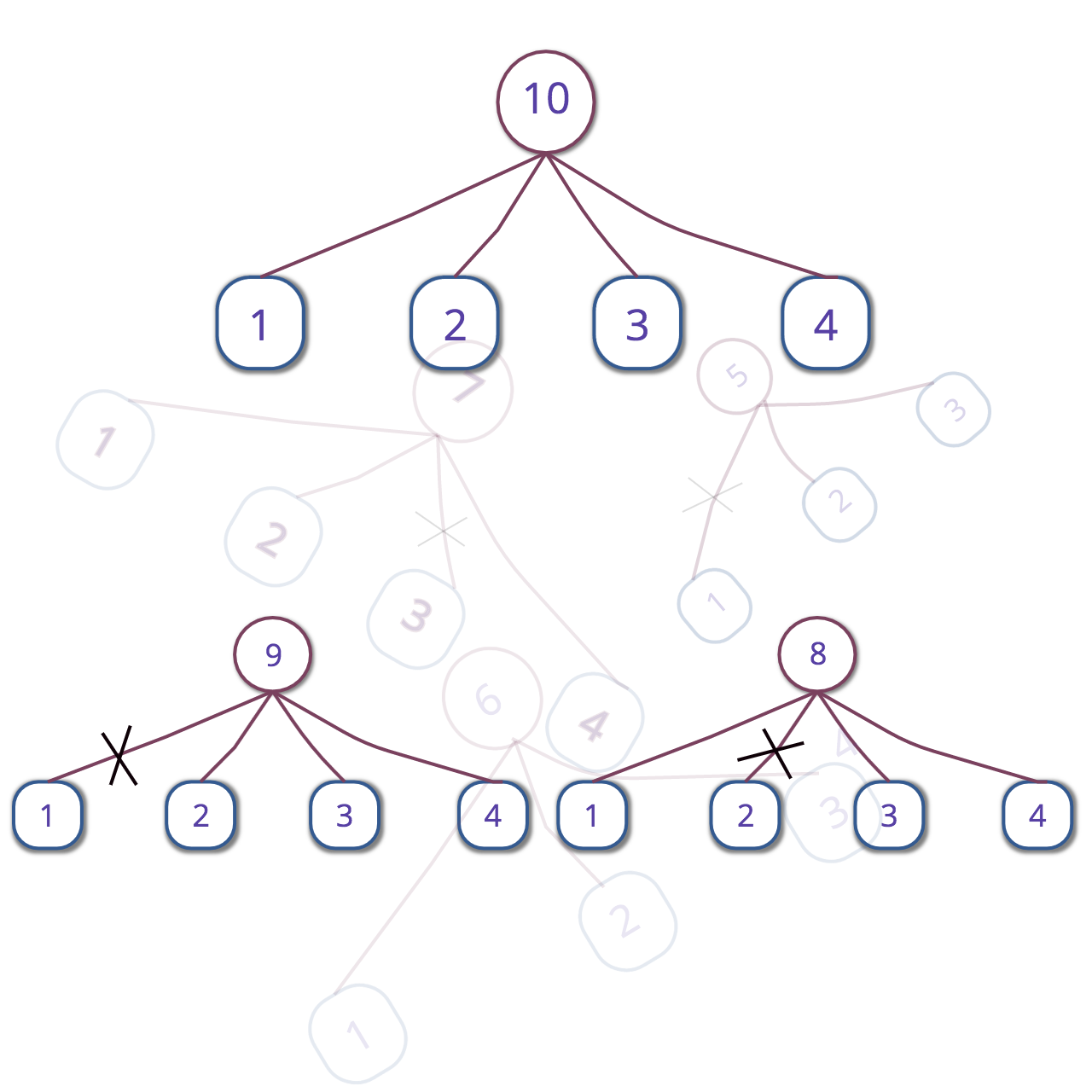 --- You’re organizing a hackathon and decide to give free cloud storage as prizes to the winners. For the prize fund, you’ve got 1024 GB of cloud space. You would be giving these gigabytes with the condition that a higher place in the hackathon gets a larger amount of space. Since you want to make as many participants happy as possible, you want to find the maximum number of places for which you’ll be awarding the prizes. That means, if you had just 8 GB available, you’d be having total 3 positions — the winner gets 5 GB, the runner-up gets 2 GB and the person who came third gets 1 GB (another variation is possible — 4, 3 and 1 GBs, but the number of positions is still 3 for 8 GB). So how do you solve this? Note that (as demonstrated in the above example) there are multiple distributions possible for a given number of positions (let’s call this number p). Indeed, this boils down to representing a number in terms of the sum of distinct smaller numbers in such a way that there are as many of these numbers as possible. For 8 gigs, we could’ve chosen the form 8 = 7 + 1 or 8 = 5 + 3, but these wouldn’t have been optimum since 8 can be expressed as a sum of more than just a couple of numbers — as in 8 = 5 + 2 + 1. A mathematical concept which can add convenience to solving this problem is that of partitions — to quote Wikipedia, a partition of a positive integer _n_, also called an integer partition, is a way of writing n as a sum of positive integers. So in our case, we simply want to calculate the partition of 512 which has as many numbers as possible. Let’s call this a max partition for the sake of the conversation. In computer science, this problem falls into a certain class of problems whose solutions use greedy algorithms — procedures that make the locally optimal choice at each stage of the solution with the hope of finding a global optimum. The “greedy” approach to solving our example is as follows: doesn’t it seem natural to start with 1 as the first summand? All that remains then is to express 7 as a max partition and add 1 to it. But now expressing 7 as a max partition has a constraint — we cannot use 1. So we use 2 and move on to represent 8 - (1+2) = 5 as a max partition. Again, for that, we can’t use 1 and 2. Neither can we use 3 or 4 because then we’ll end up using 2 and 1 again, respectively. Thus, we represent 5 as just itself and we’re done — we now have our max partition as 8 = 1 + 2 + 5. It can be shown easily that this final condition arises when the number we originally wanted to pop out (here 3) is at least half the remaining number (here 5). I leave that part for you to figure out. So, to put this strategy more formally — consider that we initially have two numbers n= 8 and l = 1. If n ≤ 2l, we simply represent n as itself, otherwise we pop out l and then solve the subproblem of representing n - l as a max partition such that each number in the partition is at least l+1. The value of l for this subproblem is 1 greater than that of the original problem. So for our example (n, l) of representing 8 as a max partition, we first pop out 1 and then solve the subproblem (n-l, l+1), i.e (7, 2). For this subproblem, we pop out 2 and then solve the subproblem (7-2, 2+1), that is (5, 3). Now, since 5 ≤ 2x3, we just pop out 5 and we’re done. We now just sum up the popped out numbers to get 8 = 1 + 2 + 5. Since we’ve articulated the strategy more formally now, it’s easy to come up with a working program to solve our problem. Here’s a straightforward implementation in Python 3: ``` def max_partition(n, l=1): partition = [] while n > 2*l: partition.append(l) n = n - l l += 1 partition.append(n) return partition print(max_partition(int(input()))) ``` --- But wait — I’ve got another approach. Perhaps better. I noticed that numbers which can be represented as the sum of first n natural numbers are special. Aren’t they already in max-partition form when they show off their identity?! For example, isn’t 6 already in max-partition form when written as 6 = 1 + 2 + 3? Isn’t 10 already in max-partition form when written as 10 = 1 + 2 + 3 + 4? Let’s call such numbers “senior numbers” for the sake of this conversation. This insight forms the basis for my algorithm. Here’s how we proceed: if the number n whose max-partition we have to find is already a senior number, we simply represent it in it’s n = 1 + 2 + 3 + … + k form. If it’s not a senior number, we still find a k which is just large enough to make the sum s = 1 + 2 + 3 + … + k greater than n (by large enough I mean k can make 1+ 2 + 3 + … + k greater than n, but cannot do the same for 1 + 2 + 3 + … + k-1). Since k is just large enough for s to be greater than n, s-n is going to be less than k. So s-n is going to be a number among 1, 2, 3, …, k-1. What if we “pluck out” s-n from the sum of first k natural numbers? That would give us s-(s-n), which is nothing but n! By the way, the last character of the above paragraph isn’t for a factorial 🙂. Let’s visualize the idea we’ve learned so far. Usually, Ferrers diagrams are used to visualize partitions, but for our purposes, I found my custom visualization more convenient: in the below tree, the top node is the number whose max partition we wish to evaluate. The leaves are the numbers in the max-partition representation, that, of course, sum up to give the number on the top node. For a senior number, everything’s good: 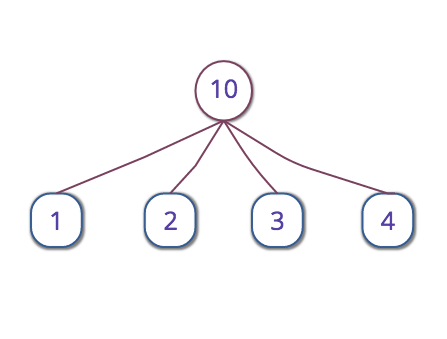 For a number that’s not senior, we cut the appropriate branch so that the number on the leaf which was connected to the top node via that branch isn’t added. Consider the case of 9: 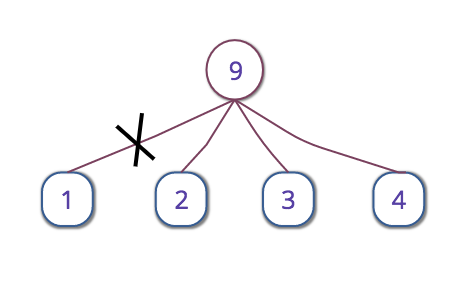 And below is the tree for 8. Notice that we’re simply finding the number k. For 8 and 9, it’s 4. Since the sum of first 4 natural numbers is 10 we first draw the tree for 10 and then replace 10 in the top node with the number we want — here it’s 8. We then cut of the branch connecting the top node to the number 10 – 8 = 2. For 9, that number was 10 - 9 = 1. 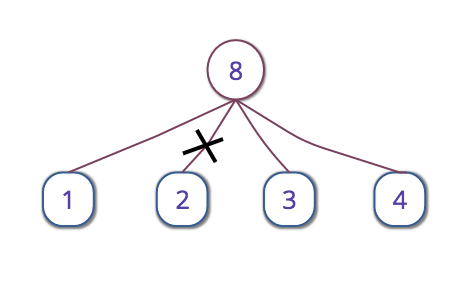 The max partition then is simply the sum of the remaining leaves. I hope you understand my algorithm by now. One subtlety that’s remaining to be uncovered is the method to find out the “just large enough k”. But it’s a pretty straightforward calculation. The sum of first k natural numbers is n = k * (k+1) / 2. After solving this equation for a positive k, we get k = (√(1 + 8*n) – 1) / 2. Since k is going to be fractional if n wasn’t a senior number, we take the ceiling of it. That makes k large enough. I think by now I’ve articulated this algorithm clearly. We can thus proceed to programming the solution. Here’s another straightforward implementation in Python 3: ``` import math def optimal_summands(n): k = ((1 + 8*n)**0.5 - 1) / 2 k = math.ceil(k) summands = list(range(1, k+1)) the_sum = int(k * (k+1) / 2) if the_sum - n > 0: # If n is not senior. del summands[the_sum-n-1] return summands print(optimum_summands(int(input()))) ``` If we do some analysis of both the algorithms, we discover that both of them run in linear time, that is O(n). However, the invisible constant hidden in O(n) is perhaps much less for _optimal_summands()_ than for max_partition(). I did some simple checks in Python to see which method is quicker and the latter one turned out to execute more than thrice as fast as the former. I used Python’s timeit module to time both the algorithms, and here’s an instance of one of my checks on the Python interpreter: ``` >>> from timeit import timeit >>> >>> timeit(setup='from different_summands import optimal_summands', stmt='optimal_summands(10000)', number=100000) 0.8999944160023006 >>> >>> timeit(setup='from greedy_different_summands import max_partition', stmt='max_partition(10000)', number=100000) 3.161972836998757 >>> ``` I’ve often observed that knowing some mathematical facts allows one to develop a better algorithm, or at least develop an algorithm faster and with more intuition. Mathematical insights can often dramatically improve the runtime of one’s programs. Math and computer science — especially the study of algorithms, are great friends!  If you know about some other factors which make the latter program work faster, please let me know in the comments. At the end, perhaps greed isn’t always good, but math is. 😀 --- By the way, you can split those 1024 gigabytes as: 1024 = 1 + 2 + 3 + 4 + 5 + 6 + 7 + 8 + 9 + 10 + 12 + 13 + 14 + 15 + 16 + 17 + 18 + 19 + 20 + 21 + 22 + 23 + 24 + 25 + 26 + 27 + 28 + 29 + 30 + 31 + 32 + 33 + 34 + 35 + 36 + 37 + 38 + 39 + 40 + 41 + 42 + 43 + 44 + 45 (Notice the missing number? Hint: it’s the sum of first 45 natural numbers - 1024.) Of course, then you’ve got to have more than 45 participants in your hackathon! 🙂 P.S: Should I write an ArXiv paper for this? |
| json metadata | {"tags":["optimization","programming","algorithms","math","software"],"image":["https://cdn-images-1.medium.com/max/2000/1*APvhFmzJb82rixlRy5ckaw.png","https://cdn-images-1.medium.com/max/1600/1*916SSjR3bqu5mmdthoeUbA.png","https://cdn-images-1.medium.com/max/1600/1*D9loLo4gMUlKWfwJ6jZFiA.png","https://cdn-images-1.medium.com/max/1600/1*gNEqvbhVVGfqemJjBwp0Nw.png","https://cdn-images-1.medium.com/max/1600/1*YtieqHKCtP37N0P5vT1sxw.png"],"app":"steemit/0.1","format":"markdown"} |
| Transaction Info | Block #19053830/Trx 6cdd146e378efc510dfdd7d12a89f3e504088a8a |
View Raw JSON Data
{
"trx_id": "6cdd146e378efc510dfdd7d12a89f3e504088a8a",
"block": 19053830,
"trx_in_block": 0,
"op_in_trx": 0,
"virtual_op": 0,
"timestamp": "2018-01-17T10:00:21",
"op": [
"comment",
{
"parent_author": "",
"parent_permlink": "optimization",
"author": "schedutron",
"permlink": "another-way-to-find-max-partitions",
"title": "Another Way to Find Max Partitions",
"body": "\n\n---\n\nYou’re organizing a hackathon and decide to give free cloud storage as prizes to the winners. For the prize fund, you’ve got 1024 GB of cloud space. You would be giving these gigabytes with the condition that a higher place in the hackathon gets a larger amount of space. Since you want to make as many participants happy as possible, you want to find the maximum number of places for which you’ll be awarding the prizes. That means, if you had just 8 GB available, you’d be having total 3 positions — the winner gets 5 GB, the runner-up gets 2 GB and the person who came third gets 1 GB (another variation is possible — 4, 3 and 1 GBs, but the number of positions is still 3 for 8 GB).\n\n\nSo how do you solve this? Note that (as demonstrated in the above example) there are multiple distributions possible for a given number of positions (let’s call this number p). Indeed, this boils down to representing a number in terms of the sum of distinct smaller numbers in such a way that there are as many of these numbers as possible. For 8 gigs, we could’ve chosen the form 8 = 7 + 1 or 8 = 5 + 3, but these wouldn’t have been optimum since 8 can be expressed as a sum of more than just a couple of numbers — as in 8 = 5 + 2 + 1. A mathematical concept which can add convenience to solving this problem is that of partitions — to quote Wikipedia, a partition of a positive integer _n_, also called an integer partition, is a way of writing n as a sum of positive integers. So in our case, we simply want to calculate the partition of 512 which has as many numbers as possible. Let’s call this a max partition for the sake of the conversation.\n\n\nIn computer science, this problem falls into a certain class of problems whose solutions use greedy algorithms — procedures that make the locally optimal choice at each stage of the solution with the hope of finding a global optimum.\nThe “greedy” approach to solving our example is as follows: doesn’t it seem natural to start with 1 as the first summand? All that remains then is to express 7 as a max partition and add 1 to it. But now expressing 7 as a max partition has a constraint — we cannot use 1. So we use 2 and move on to represent 8 - (1+2) = 5 as a max partition. Again, for that, we can’t use 1 and 2. Neither can we use 3 or 4 because then we’ll end up using 2 and 1 again, respectively. Thus, we represent 5 as just itself and we’re done — we now have our max partition as 8 = 1 + 2 + 5. It can be shown easily that this final condition arises when the number we originally wanted to pop out (here 3) is at least half the remaining number (here 5). I leave that part for you to figure out.\n\n\nSo, to put this strategy more formally — consider that we initially have two numbers n= 8 and l = 1. If n ≤ 2l, we simply represent n as itself, otherwise we pop out l and then solve the subproblem of representing n - l as a max partition such that each number in the partition is at least l+1. The value of l for this subproblem is 1 greater than that of the original problem. So for our example (n, l) of representing 8 as a max partition, we first pop out 1 and then solve the subproblem (n-l, l+1), i.e (7, 2). For this subproblem, we pop out 2 and then solve the subproblem (7-2, 2+1), that is (5, 3). Now, since 5 ≤ 2x3, we just pop out 5 and we’re done. We now just sum up the popped out numbers to get 8 = 1 + 2 + 5.\nSince we’ve articulated the strategy more formally now, it’s easy to come up with a working program to solve our problem. Here’s a straightforward implementation in Python 3:\n\n```\ndef max_partition(n, l=1):\n partition = []\n while n > 2*l:\n partition.append(l)\n n = n - l\n l += 1\n partition.append(n)\n return partition\nprint(max_partition(int(input())))\n```\n\n---\n\nBut wait — I’ve got another approach. Perhaps better. I noticed that numbers which can be represented as the sum of first n natural numbers are special. Aren’t they already in max-partition form when they show off their identity?! For example, isn’t 6 already in max-partition form when written as 6 = 1 + 2 + 3? Isn’t 10 already in max-partition form when written as 10 = 1 + 2 + 3 + 4? Let’s call such numbers “senior numbers” for the sake of this conversation. This insight forms the basis for my algorithm.\n\n\nHere’s how we proceed: if the number n whose max-partition we have to find is already a senior number, we simply represent it in it’s n = 1 + 2 + 3 + … + k form. If it’s not a senior number, we still find a k which is just large enough to make the sum s = 1 + 2 + 3 + … + k greater than n (by large enough I mean k can make 1+ 2 + 3 + … + k greater than n, but cannot do the same for 1 + 2 + 3 + … + k-1). Since k is just large enough for s to be greater than n, s-n is going to be less than k. So s-n is going to be a number among 1, 2, 3, …, k-1. What if we “pluck out” s-n from the sum of first k natural numbers? That would give us s-(s-n), which is nothing but n!\n\n\nBy the way, the last character of the above paragraph isn’t for a factorial 🙂. Let’s visualize the idea we’ve learned so far. Usually, Ferrers diagrams are used to visualize partitions, but for our purposes, I found my custom visualization more convenient: in the below tree, the top node is the number whose max partition we wish to evaluate. The leaves are the numbers in the max-partition representation, that, of course, sum up to give the number on the top node. For a senior number, everything’s good:\n\n\n\nFor a number that’s not senior, we cut the appropriate branch so that the number on the leaf which was connected to the top node via that branch isn’t added. Consider the case of 9:\n\n\n\nAnd below is the tree for 8. Notice that we’re simply finding the number k. For 8 and 9, it’s 4. Since the sum of first 4 natural numbers is 10 we first draw the tree for 10 and then replace 10 in the top node with the number we want — here it’s 8. We then cut of the branch connecting the top node to the number 10 – 8 = 2. For 9, that number was 10 - 9 = 1.\n\n\n\nThe max partition then is simply the sum of the remaining leaves. I hope you understand my algorithm by now.\n\n\nOne subtlety that’s remaining to be uncovered is the method to find out the “just large enough k”. But it’s a pretty straightforward calculation. The sum of first k natural numbers is n = k * (k+1) / 2. After solving this equation for a positive k, we get k = (√(1 + 8*n) – 1) / 2. Since k is going to be fractional if n wasn’t a senior number, we take the ceiling of it. That makes k large enough.\n\n\nI think by now I’ve articulated this algorithm clearly. We can thus proceed to programming the solution. Here’s another straightforward implementation in Python 3:\n\n```\nimport math\ndef optimal_summands(n):\n k = ((1 + 8*n)**0.5 - 1) / 2\n k = math.ceil(k)\n summands = list(range(1, k+1))\n the_sum = int(k * (k+1) / 2)\n if the_sum - n > 0: # If n is not senior.\n del summands[the_sum-n-1]\n return summands\nprint(optimum_summands(int(input())))\n```\n\nIf we do some analysis of both the algorithms, we discover that both of them run in linear time, that is O(n). However, the invisible constant hidden in O(n) is perhaps much less for _optimal_summands()_ than for max_partition().\n\n\nI did some simple checks in Python to see which method is quicker and the latter one turned out to execute more than thrice as fast as the former. I used Python’s timeit module to time both the algorithms, and here’s an instance of one of my checks on the Python interpreter:\n\n```\n>>> from timeit import timeit\n>>>\n>>> timeit(setup='from different_summands import optimal_summands', stmt='optimal_summands(10000)', number=100000)\n0.8999944160023006\n>>>\n>>> timeit(setup='from greedy_different_summands import max_partition', stmt='max_partition(10000)', number=100000)\n3.161972836998757\n>>>\n```\n\nI’ve often observed that knowing some mathematical facts allows one to develop a better algorithm, or at least develop an algorithm faster and with more intuition. Mathematical insights can often dramatically improve the runtime of one’s programs. Math and computer science — especially the study of algorithms, are great friends!\n\n\n\nIf you know about some other factors which make the latter program work faster, please let me know in the comments. At the end, perhaps greed isn’t always good, but math is. 😀\n\n\n---\n\nBy the way, you can split those 1024 gigabytes as:\n1024 = 1 + 2 + 3 + 4 + 5 + 6 + 7 + 8 + 9 + 10 + 12 + 13 + 14 + 15 + 16 + 17 + 18 + 19 + 20 + 21 + 22 + 23 + 24 + 25 + 26 + 27 + 28 + 29 + 30 + 31 + 32 + 33 + 34 + 35 + 36 + 37 + 38 + 39 + 40 + 41 + 42 + 43 + 44 + 45\n(Notice the missing number? Hint: it’s the sum of first 45 natural numbers - 1024.)\nOf course, then you’ve got to have more than 45 participants in your hackathon! 🙂\nP.S: Should I write an ArXiv paper for this?",
"json_metadata": "{\"tags\":[\"optimization\",\"programming\",\"algorithms\",\"math\",\"software\"],\"image\":[\"https://cdn-images-1.medium.com/max/2000/1*APvhFmzJb82rixlRy5ckaw.png\",\"https://cdn-images-1.medium.com/max/1600/1*916SSjR3bqu5mmdthoeUbA.png\",\"https://cdn-images-1.medium.com/max/1600/1*D9loLo4gMUlKWfwJ6jZFiA.png\",\"https://cdn-images-1.medium.com/max/1600/1*gNEqvbhVVGfqemJjBwp0Nw.png\",\"https://cdn-images-1.medium.com/max/1600/1*YtieqHKCtP37N0P5vT1sxw.png\"],\"app\":\"steemit/0.1\",\"format\":\"markdown\"}"
}
]
}schedutronreceived 0.024 SBD, 0.006 SP author reward for @schedutron / let-s-write-a-chat-app-in-python2018/01/10 18:31:21
schedutronreceived 0.024 SBD, 0.006 SP author reward for @schedutron / let-s-write-a-chat-app-in-python
2018/01/10 18:31:21
| author | schedutron |
| permlink | let-s-write-a-chat-app-in-python |
| sbd payout | 0.024 SBD |
| steem payout | 0.000 STEEM |
| vesting payout | 10.241011 VESTS |
| Transaction Info | Block #18862603/Virtual Operation #6 |
View Raw JSON Data
{
  "trx_id": "0000000000000000000000000000000000000000",
  "block": 18862603,
  "trx_in_block": 4294967295,
  "op_in_trx": 0,
  "virtual_op": 6,
  "timestamp": "2018-01-10T18:31:21",
  "op": [
    "author_reward",
    {
      "author": "schedutron",
      "permlink": "let-s-write-a-chat-app-in-python",
      "sbd_payout": "0.024 SBD",
      "steem_payout": "0.000 STEEM",
      "vesting_payout": "10.241011 VESTS"
    }
  ]
}steemdelegated 18.263 SP to @schedutron2018/01/08 19:34:09
steemdelegated 18.263 SP to @schedutron
2018/01/08 19:34:09
| delegator | steem |
| delegatee | schedutron |
| vesting shares | 29700.354329 VESTS |
| Transaction Info | Block #18806304/Trx 5558fc18f6bd1159843ce3ff35c307940200ae78 |
View Raw JSON Data
{
  "trx_id": "5558fc18f6bd1159843ce3ff35c307940200ae78",
  "block": 18806304,
  "trx_in_block": 16,
  "op_in_trx": 0,
  "virtual_op": 0,
  "timestamp": "2018-01-08T19:34:09",
  "op": [
    "delegate_vesting_shares",
    {
      "delegator": "steem",
      "delegatee": "schedutron",
      "vesting_shares": "29700.354329 VESTS"
    }
  ]
}2018/01/03 23:45:39
2018/01/03 23:45:39
| parent author | schedutron |
| parent permlink | let-s-write-a-chat-app-in-python |
| author | steem-network |
| permlink | re-let-s-write-a-chat-app-in-python-20180103t234538 |
| title | |
| body | <html> <p>Congratulations <a href="/@schedutron" target="_blank">@schedutron</a>, you have decided to take the next big step with your first post! The Steem Network Team wishes you a great time among this awesome community.</p> <hr> <div class="pull-left"><img src="https://steemitimages.com/DQmaAdLUJ3yaSkmcmWECWyPGPWcjfbCoZ8Tu4RM6H4DbjCi/steem-network-thumbs-up.gif" alt="Thumbs up for Steem Network´s strategy" title="I suggest Steem Network´s strategy" width="320" height="222"></div> <h1>The proven road to boost your personal success in this amazing Steem Network</h1> <p>Do you already know that awesome content will get great profits by following these <a href="/steem-network/@steem-network/spread-your-posts-through-this-proven-strategy-and-get-great-profits-in-return--for-posts-created-at-2018-01-03" target="_blank" alt="Steem Network" title="Follow Steem Network´s suggestions to boost your success">simple steps</a>, that have been worked out by experts?</p> </html> |
| json metadata | {"tags": ["steem-network"], "users": ["steem-network", "schedutron"], "image": ["https://steemitimages.com/DQmaAdLUJ3yaSkmcmWECWyPGPWcjfbCoZ8Tu4RM6H4DbjCi/steem-network-thumbs-up.gif"], "links": ["/@schedutron", "/steem-network/@steem-network/spread-your-posts-through-this-proven-strategy-and-get-great-profits-in-return--for-posts-created-at-2018-01-03"], "community": "steem-network", "app": "steem-network/1.0.1", "format": "html"} |
| Transaction Info | Block #18667448/Trx 284d36904b0f42f5d79662c6557228cb10820df7 |
View Raw JSON Data
{
  "trx_id": "284d36904b0f42f5d79662c6557228cb10820df7",
  "block": 18667448,
  "trx_in_block": 20,
  "op_in_trx": 0,
  "virtual_op": 0,
  "timestamp": "2018-01-03T23:45:39",
  "op": [
    "comment",
    {
      "parent_author": "schedutron",
      "parent_permlink": "let-s-write-a-chat-app-in-python",
      "author": "steem-network",
      "permlink": "re-let-s-write-a-chat-app-in-python-20180103t234538",
      "title": "",
      "body": "<html>\n<p>Congratulations <a href=\"/@schedutron\" target=\"_blank\">@schedutron</a>, you have decided to take the next big step with your first post! The Steem Network Team wishes you a great time among this awesome community.</p>\n<hr>\n<div class=\"pull-left\"><img src=\"https://steemitimages.com/DQmaAdLUJ3yaSkmcmWECWyPGPWcjfbCoZ8Tu4RM6H4DbjCi/steem-network-thumbs-up.gif\" alt=\"Thumbs up for Steem Network´s strategy\" title=\"I suggest Steem Network´s strategy\" width=\"320\" height=\"222\"></div>\n<h1>The proven road to boost your personal success in this amazing Steem Network</h1>\n<p>Do you already know that awesome content will get great profits by following these <a href=\"/steem-network/@steem-network/spread-your-posts-through-this-proven-strategy-and-get-great-profits-in-return--for-posts-created-at-2018-01-03\" target=\"_blank\" alt=\"Steem Network\" title=\"Follow Steem Network´s suggestions to boost your success\">simple steps</a>, that have been worked out by experts?</p>\n</html>",
      "json_metadata": "{\"tags\": [\"steem-network\"], \"users\": [\"steem-network\", \"schedutron\"], \"image\": [\"https://steemitimages.com/DQmaAdLUJ3yaSkmcmWECWyPGPWcjfbCoZ8Tu4RM6H4DbjCi/steem-network-thumbs-up.gif\"], \"links\": [\"/@schedutron\", \"/steem-network/@steem-network/spread-your-posts-through-this-proven-strategy-and-get-great-profits-in-return--for-posts-created-at-2018-01-03\"], \"community\": \"steem-network\", \"app\": \"steem-network/1.0.1\", \"format\": \"html\"}"
    }
  ]
}parths007upvoted (100.00%) @schedutron / let-s-write-a-chat-app-in-python2018/01/03 20:01:48
parths007upvoted (100.00%) @schedutron / let-s-write-a-chat-app-in-python
2018/01/03 20:01:48
| voter | parths007 |
| author | schedutron |
| permlink | let-s-write-a-chat-app-in-python |
| weight | 10000 (100.00%) |
| Transaction Info | Block #18662972/Trx 035891440cc2d10dd5a34b3815b1ac41480a9469 |
View Raw JSON Data
{
  "trx_id": "035891440cc2d10dd5a34b3815b1ac41480a9469",
  "block": 18662972,
  "trx_in_block": 42,
  "op_in_trx": 0,
  "virtual_op": 0,
  "timestamp": "2018-01-03T20:01:48",
  "op": [
    "vote",
    {
      "voter": "parths007",
      "author": "schedutron",
      "permlink": "let-s-write-a-chat-app-in-python",
      "weight": 10000
    }
  ]
}schedutronfollowed @parths0072018/01/03 19:59:27
schedutronfollowed @parths007
2018/01/03 19:59:27
| required auths | [] |
| required posting auths | ["schedutron"] |
| id | follow |
| json | ["follow",{"follower":"schedutron","following":"parths007","what":["blog"]}] |
| Transaction Info | Block #18662925/Trx 9e9076c48ab7f3571be335298d38325da84bb323 |
View Raw JSON Data
{
  "trx_id": "9e9076c48ab7f3571be335298d38325da84bb323",
  "block": 18662925,
  "trx_in_block": 40,
  "op_in_trx": 0,
  "virtual_op": 0,
  "timestamp": "2018-01-03T19:59:27",
  "op": [
    "custom_json",
    {
      "required_auths": [],
      "required_posting_auths": [
        "schedutron"
      ],
      "id": "follow",
      "json": "[\"follow\",{\"follower\":\"schedutron\",\"following\":\"parths007\",\"what\":[\"blog\"]}]"
    }
  ]
}schedutronupvoted (100.00%) @parths007 / integrating-travis-ci-and-codecov-into-a-python-based-project2018/01/03 19:59:12
schedutronupvoted (100.00%) @parths007 / integrating-travis-ci-and-codecov-into-a-python-based-project
2018/01/03 19:59:12
| voter | schedutron |
| author | parths007 |
| permlink | integrating-travis-ci-and-codecov-into-a-python-based-project |
| weight | 10000 (100.00%) |
| Transaction Info | Block #18662920/Trx e9293e9b11cba3864505a4a1994f72b3952e06a1 |
View Raw JSON Data
{
  "trx_id": "e9293e9b11cba3864505a4a1994f72b3952e06a1",
  "block": 18662920,
  "trx_in_block": 0,
  "op_in_trx": 0,
  "virtual_op": 0,
  "timestamp": "2018-01-03T19:59:12",
  "op": [
    "vote",
    {
      "voter": "schedutron",
      "author": "parths007",
      "permlink": "integrating-travis-ci-and-codecov-into-a-python-based-project",
      "weight": 10000
    }
  ]
}schedutronupvoted (100.00%) @schedutron / let-s-write-a-chat-app-in-python2018/01/03 19:43:03
schedutronupvoted (100.00%) @schedutron / let-s-write-a-chat-app-in-python
2018/01/03 19:43:03
| voter | schedutron |
| author | schedutron |
| permlink | let-s-write-a-chat-app-in-python |
| weight | 10000 (100.00%) |
| Transaction Info | Block #18662597/Trx 057a8f879311659165bc0412b0b560aa3a501df6 |
View Raw JSON Data
{
  "trx_id": "057a8f879311659165bc0412b0b560aa3a501df6",
  "block": 18662597,
  "trx_in_block": 15,
  "op_in_trx": 0,
  "virtual_op": 0,
  "timestamp": "2018-01-03T19:43:03",
  "op": [
    "vote",
    {
      "voter": "schedutron",
      "author": "schedutron",
      "permlink": "let-s-write-a-chat-app-in-python",
      "weight": 10000
    }
  ]
}2018/01/03 19:40:09
2018/01/03 19:40:09
| parent author | schedutron |
| parent permlink | let-s-write-a-chat-app-in-python |
| author | cheetah |
| permlink | cheetah-re-schedutronlet-s-write-a-chat-app-in-python |
| title | |
| body | Hi! I am a robot. I just upvoted you! I found similar content that readers might be interested in: https://medium.com/swlh/lets-write-a-chat-app-in-python-f6783a9ac170 |
| json metadata | |
| Transaction Info | Block #18662539/Trx 5b18f0f4704b6dd7a45c29a8439d67e407e3f2f1 |
View Raw JSON Data
{
  "trx_id": "5b18f0f4704b6dd7a45c29a8439d67e407e3f2f1",
  "block": 18662539,
  "trx_in_block": 22,
  "op_in_trx": 0,
  "virtual_op": 0,
  "timestamp": "2018-01-03T19:40:09",
  "op": [
    "comment",
    {
      "parent_author": "schedutron",
      "parent_permlink": "let-s-write-a-chat-app-in-python",
      "author": "cheetah",
      "permlink": "cheetah-re-schedutronlet-s-write-a-chat-app-in-python",
      "title": "",
      "body": "Hi! I am a robot. I just upvoted you! I found similar content that readers might be interested in:\nhttps://medium.com/swlh/lets-write-a-chat-app-in-python-f6783a9ac170",
      "json_metadata": ""
    }
  ]
}cheetahupvoted (0.08%) @schedutron / let-s-write-a-chat-app-in-python2018/01/03 19:40:03
cheetahupvoted (0.08%) @schedutron / let-s-write-a-chat-app-in-python
2018/01/03 19:40:03
| voter | cheetah |
| author | schedutron |
| permlink | let-s-write-a-chat-app-in-python |
| weight | 8 (0.08%) |
| Transaction Info | Block #18662537/Trx 4bb7dcc5c23675a6e5bbb1d965ec169c106350f3 |
View Raw JSON Data
{
  "trx_id": "4bb7dcc5c23675a6e5bbb1d965ec169c106350f3",
  "block": 18662537,
  "trx_in_block": 34,
  "op_in_trx": 0,
  "virtual_op": 0,
  "timestamp": "2018-01-03T19:40:03",
  "op": [
    "vote",
    {
      "voter": "cheetah",
      "author": "schedutron",
      "permlink": "let-s-write-a-chat-app-in-python",
      "weight": 8
    }
  ]
}schedutronfollowed @gavvet2018/01/03 18:48:15
schedutronfollowed @gavvet
2018/01/03 18:48:15
| required auths | [] |
| required posting auths | ["schedutron"] |
| id | follow |
| json | ["follow",{"follower":"schedutron","following":"gavvet","what":["blog"]}] |
| Transaction Info | Block #18661501/Trx fd5eedb6b010d5ab2f1ba1e129aa1aae0d69ec4c |
View Raw JSON Data
{
  "trx_id": "fd5eedb6b010d5ab2f1ba1e129aa1aae0d69ec4c",
  "block": 18661501,
  "trx_in_block": 3,
  "op_in_trx": 0,
  "virtual_op": 0,
  "timestamp": "2018-01-03T18:48:15",
  "op": [
    "custom_json",
    {
      "required_auths": [],
      "required_posting_auths": [
        "schedutron"
      ],
      "id": "follow",
      "json": "[\"follow\",{\"follower\":\"schedutron\",\"following\":\"gavvet\",\"what\":[\"blog\"]}]"
    }
  ]
}schedutronupdated their account properties2018/01/03 18:43:36
schedutronupdated their account properties
2018/01/03 18:43:36
| account | schedutron |
| memo key | STM564iZqakpwtdszx3Bcwy4Gfo5SjHJo18XzZ7PUA6xEbnshSSkF |
| json metadata | {"profile":{"profile_image":"https://pbs.twimg.com/profile_images/882223198976098306/B04nThcd_400x400.jpg","cover_image":"https://pbs.twimg.com/profile_banners/257842996/1499173144/1500x500","name":"Saurabh Chaturvedi","about":"Python Programmmer","location":"Jaipur","website":"https://medium.com/@arichduvet"}} |
| Transaction Info | Block #18661408/Trx 951d9ad4dc5c5a54016d7f7fe3bfd8935437968b |
View Raw JSON Data
{
  "trx_id": "951d9ad4dc5c5a54016d7f7fe3bfd8935437968b",
  "block": 18661408,
  "trx_in_block": 17,
  "op_in_trx": 0,
  "virtual_op": 0,
  "timestamp": "2018-01-03T18:43:36",
  "op": [
    "account_update",
    {
      "account": "schedutron",
      "memo_key": "STM564iZqakpwtdszx3Bcwy4Gfo5SjHJo18XzZ7PUA6xEbnshSSkF",
      "json_metadata": "{\"profile\":{\"profile_image\":\"https://pbs.twimg.com/profile_images/882223198976098306/B04nThcd_400x400.jpg\",\"cover_image\":\"https://pbs.twimg.com/profile_banners/257842996/1499173144/1500x500\",\"name\":\"Saurabh Chaturvedi\",\"about\":\"Python Programmmer\",\"location\":\"Jaipur\",\"website\":\"https://medium.com/@arichduvet\"}}"
    }
  ]
}schedutronupdated their account properties2018/01/03 18:36:54
schedutronupdated their account properties
2018/01/03 18:36:54
| account | schedutron |
| memo key | STM564iZqakpwtdszx3Bcwy4Gfo5SjHJo18XzZ7PUA6xEbnshSSkF |
| json metadata | {"profile":{"profile_image":"https://scontent.fdel1-1.fna.fbcdn.net/v/t1.0-9/22687738_1492915314109416_5335682110924877971_n.jpg?oh=a8661390aa73e8853ce959d9ad9358c5&oe=5AC3822A","cover_image":"https://scontent.fdel1-1.fna.fbcdn.net/v/t1.0-9/21032467_1442760502458231_3878886967481225898_n.jpg?oh=5f382aa231f56fd6297f279bf37b3033&oe=5AB4871E","name":"Saurabh Chaturvedi","about":"Python Programmmer","location":"Jaipur","website":"https://medium.com/@arichduvet"}} |
| Transaction Info | Block #18661274/Trx bfed67387f3b394a7da3ed85b129406a246ad534 |
View Raw JSON Data
{
  "trx_id": "bfed67387f3b394a7da3ed85b129406a246ad534",
  "block": 18661274,
  "trx_in_block": 15,
  "op_in_trx": 0,
  "virtual_op": 0,
  "timestamp": "2018-01-03T18:36:54",
  "op": [
    "account_update",
    {
      "account": "schedutron",
      "memo_key": "STM564iZqakpwtdszx3Bcwy4Gfo5SjHJo18XzZ7PUA6xEbnshSSkF",
      "json_metadata": "{\"profile\":{\"profile_image\":\"https://scontent.fdel1-1.fna.fbcdn.net/v/t1.0-9/22687738_1492915314109416_5335682110924877971_n.jpg?oh=a8661390aa73e8853ce959d9ad9358c5&oe=5AC3822A\",\"cover_image\":\"https://scontent.fdel1-1.fna.fbcdn.net/v/t1.0-9/21032467_1442760502458231_3878886967481225898_n.jpg?oh=5f382aa231f56fd6297f279bf37b3033&oe=5AB4871E\",\"name\":\"Saurabh Chaturvedi\",\"about\":\"Python Programmmer\",\"location\":\"Jaipur\",\"website\":\"https://medium.com/@arichduvet\"}}"
    }
  ]
}geekchannelupvoted (91.24%) @schedutron / let-s-write-a-chat-app-in-python2018/01/03 18:31:54
geekchannelupvoted (91.24%) @schedutron / let-s-write-a-chat-app-in-python
2018/01/03 18:31:54
| voter | geekchannel |
| author | schedutron |
| permlink | let-s-write-a-chat-app-in-python |
| weight | 9124 (91.24%) |
| Transaction Info | Block #18661174/Trx 51e7cb28477bac77a808d3de186d7825651212ac |
View Raw JSON Data
{
  "trx_id": "51e7cb28477bac77a808d3de186d7825651212ac",
  "block": 18661174,
  "trx_in_block": 15,
  "op_in_trx": 0,
  "virtual_op": 0,
  "timestamp": "2018-01-03T18:31:54",
  "op": [
    "vote",
    {
      "voter": "geekchannel",
      "author": "schedutron",
      "permlink": "let-s-write-a-chat-app-in-python",
      "weight": 9124
    }
  ]
}schedutronpublished a new post: let-s-write-a-chat-app-in-python2018/01/03 18:31:21
schedutronpublished a new post: let-s-write-a-chat-app-in-python
2018/01/03 18:31:21
| parent author | |
| parent permlink | python |
| author | schedutron |
| permlink | let-s-write-a-chat-app-in-python |
| title | Let’s Write a Chat App in Python |
| body | Not too frequently, you happen to create something astonishingly simple yet fun to use that you just can’t wait to share with the world. That’s exactly what happened to me, so I’m here to share how I made a simple chat app with quite concise Python code. What’s more, I’ve implemented the code without _any_ third party dependencies! Let’s just dive in! First, I created a chat server that could recieve incoming requests from clients wanting to communicate. For this, I used good ol’ sockets and a bit of multithreading. Using frameworks like [Twisted](https://twistedmatrix.com/) and [SocketServer](https://pymotw.com/3/socketserver/) was an option, but that seemed like overkill to me for software as simple as ours. ### **The Server**  Here’s how we begin our server script (for this app, there are just two scripts: one for server and another for client): ``` #!/usr/bin/env python3"""Server for multithreaded (asynchronous) chat application.""" ``` ``` from socket import AF_INET, socket, SOCK_STREAM from threading import Thread ``` We will be using TCP sockets for this purpose, therefore we use `AF_INET` and `SOCK_STREAM` flags. We use them over UDP sockets because they’re more telephonic — the recipient has to approve the incoming connection before communication begins. UDP sockets are a more post-mail sort of thing (anyone can send mail to a recipient whose address he or she knows), so they don’t really require an establishment of connection before communication can happen. Clearly, TCP is more suited to our purpose than UDP sockets, therefore we'll use them. You can learn more about sockets [here](https://en.wikipedia.org/wiki/Network_socket). After imports, we set up some _constants_ for later use: ``` clients = {} addresses = {} ``` ``` HOST = '' PORT = 33000 BUFSIZ = 1024 ADDR = (HOST, PORT) SERVER = socket(AF_INET, SOCK_STREAM) SERVER.bind(ADDR) ``` Now, we break our task into accepting new connections, broadcasting messages, and handling particular clients. Let’s begin with accepting connections: ``` def accept_incoming_connections(): """Sets up handling for incoming clients.""" while True: client, client_address = SERVER.accept() print("%s:%s has connected." % client_address) client.send(bytes("Greetings from the cave!" + "Now type your name and press enter!", "utf8")) addresses[client] = client_address Thread(target=handle_client, args=(client,)).start() ``` This is just a loop that waits forever for incoming connections. As soon as it gets one, it logs the connection (prints some of the connection details) and sends the connected client a welcome message. Then, it stores the client’s address in the `addresses` dictionary and later starts the handling thread for that client. Of course, we haven’t yet defined the target function `handle_client()` for that, but here’s how we do it: ``` def handle_client(client): # Takes client socket as argument. """Handles a single client connection.""" name = client.recv(BUFSIZ).decode("utf8") welcome = 'Welcome %s! If you ever want to quit, type {quit} to exit.' % name client.send(bytes(welcome, "utf8")) msg = "%s has joined the chat!" % name broadcast(bytes(msg, "utf8")) clients[client] = name while True: msg = client.recv(BUFSIZ) if msg != bytes("{quit}", "utf8"): broadcast(msg, name+": ") else: client.send(bytes("{quit}", "utf8")) client.close() del clients[client] broadcast(bytes("%s has left the chat." % name, "utf8")) break ``` Naturally, after we send the new client the welcome message, it will reply with the name he or she wants to use for further communication. In the `handle_client()` function, the first task we do is save this name and then send another message to the client regarding further instructions. After this comes the main loop for communication: here we recieve further messages from the client and if a message doesn’t contain instructions to quit, we simply broadcast the messsage to other connected clients (we’ll be defining the broadcast method in a moment). If we do encounter a message with exit instructions (i.e. the client sends a `{quit}`), we echo back the same message to the client (it triggers close action on the client side) and then we close the connection socket for it. We then do some cleanup by deleting the entry for the client, and finally give a shoutout to other connected people that this particular person has left the conversation. Now comes our `broadcast()` function: ``` def broadcast(msg, prefix=""): # prefix is for name identification. """Broadcasts a message to all the clients.""" for sock in clients: sock.send(bytes(prefix, "utf8")+msg) ``` This is pretty much self-explanatory — it simply sends the `msg` to all the connected clients, and prepends an optional `prefix` if necessary. We do pass a `prefix` to `broadcast()` in our `handle_client()` function, and we do it so that people can see exactly who is the sender of a particular message. That was all the required functionalities for our server. Finally, we put in some code for starting our server and listening for incoming connections: ``` if __name__ == " __main__": SERVER.listen(5) # Listens for 5 connections at max. print("Waiting for connection...") ACCEPT_THREAD = Thread(target=accept_incoming_connections) ACCEPT_THREAD.start() # Starts the infinite loop. ACCEPT_THREAD.join() SERVER.close() ``` We `join()` `ACCEPT_THREAD` so that the main script waits for it to complete and doesn’t jump to the next line, which closes the server. This completes our server script, which is presented in the following gist (for those who are reading this on smartphones, visit [this](https://github.com/schedutron/CPAP/blob/master/Chap5/chat_serv.py) link for the complete server code): * * * ### The Client  This is more fun beause we’ll be writing a GUI! We use Tkinter, Python’s “batteries included” GUI building tool for our purpose. Let’s do some imports first: ``` #!/usr/bin/env python3 """Script for Tkinter GUI chat client.""" ``` ``` from socket import AF_INET, socket, SOCK_STREAM from threading import Threadimport tkinter ``` Now we’ll write functions for handling, sending, and receiving messages. We'll start with receive: ``` def receive(): """Handles receiving of messages.""" while True: try: msg = client_socket.recv(BUFSIZ).decode("utf8") msg_list.insert(tkinter.END, msg) except OSError: # Possibly client has left the chat. break ``` Why an infinite loop again? Because we’ll be receiving messages quite non-deterministically, and independently of how and when we send the messages. We don’t want this to be a walkie-talkie chat app which can only either send **_or_** receive at a time — we want to receive messages when we can, and send them when we want. The functionality within the loop is pretty straightforward; the `recv()` is the blocking part. It stops execution until it receives a message, and when it does, we move ahead and append the message to `msg_list`. We will soon define `msg_list`, which is basically a Tkinter feature for displaying the list of messages on the screen. Next, we define the `send()` function: ``` def send(event=None): # event is passed by binders. """Handles sending of messages.""" msg = my_msg.get() my_msg.set("") # Clears input field. client_socket.send(bytes(msg, "utf8")) if msg == "{quit}": client_socket.close() top.quit() ``` We’re using `event` as an argument because it is implicitly passed by Tkinter when the `send` button on the GUI is pressed. `my_msg` is the input field on the GUI. Therefore, we extract the message to be sent using `msg = my_msg.get()`. After that, we clear the input field and then send the message to the server, which, as we’ve seen before, broadcasts this message to all of the clients (if it’s not an exit message). If it is an exit message, we close the socket and then the GUI app (via `top.close()`) We define one more function, which will be called when we choose to close the GUI window. It is a sort of cleanup-before-close function and will close the socket connection before the GUI closes: ``` def on_closing(event=None): """This function is to be called when the window is closed.""" my_msg.set("{quit}") send() ``` This sets the input field to `{quit}` and then calls `send()`, which then works as expected. Now we start building the GUI in the main namespace (i.e. outside any function). We start by defining the top-level widget and set its title: ``` top = tkinter.Tk() top.title("Chatter") ``` Then, we create a frame for holding the list of messages. Next, we create a string variable, primarily for storing the value we get from the input field (which we will define soon). We set that variable to `"Type your messages here."` to prompt the user to write their message. After that, we create a scrollbar for scrolling through this message frame. Here’s the code: ``` messages_frame = tkinter.Frame(top) my_msg = tkinter.StringVar() # For the messages to be sent. my_msg.set("Type your messages here.") scrollbar = tkinter.Scrollbar(messages_frame) # To navigate through past messages. ``` Now we define the message list, which will be stored in `messages_frame` and then pack in (at the appropriate places) all the stuff we’ve created until now: ``` msg_list = tkinter.Listbox(messages_frame, height=15, width=50, yscrollcommand=scrollbar.set) scrollbar.pack(side=tkinter.RIGHT, fill=tkinter.Y) msg_list.pack(side=tkinter.LEFT, fill=tkinter.BOTH) msg_list.pack() messages_frame.pack() ``` After this, we create the input field for the user to input their message and bind it to the string variable defined above. We also bind it to the `send()` function so that whenever the user presses return, the message is sent to the server. Next, we create the send button if the user wishes to send their messages by clicking on it. Again, we bind the clicking of this button to the `send()` function. And yes, we also pack all of this stuff we created just now. Furthermore, don’t forget to make use of the cleanup function `on_closing()`, which should be called when the user wishes to close the GUI window. We do that by using the `protocol` method of `top`. Here’s the code for all of this: ``` entry_field = tkinter.Entry(top, textvariable=my_msg) entry_field.bind("<Return>", send) entry_field.pack() send_button = tkinter.Button(top, text="Send", command=send) send_button.pack() ``` ``` top.protocol("WM_DELETE_WINDOW", on_closing) ``` (Almost) done. We haven’t yet written code for connecting to the server. For that, we have to ask the user for the server’s address. I’ve done that by simply using `input()`, so the user is greeted with some command line prompt asking for the host address before the GUI begins. It may be a little inconvenient, and you can add GUI for that, but I leave that to you as homework 🙂. Here’s my code: ``` HOST = input('Enter host: ') PORT = input('Enter port: ') ``` ``` if not PORT: PORT = 33000 # Default value. else: PORT = int(PORT) ``` ``` BUFSIZ = 1024 ADDR = (HOST, PORT) client_socket = socket(AF_INET, SOCK_STREAM) client_socket.connect(ADDR) ``` Once we get the address and create a socket to connect to it, we start the thread for receiving messages, and then the main loop for our GUI application: ``` receive_thread = Thread(target=receive) receive_thread.start() tkinter.mainloop() # Starts GUI execution. ``` That’s it! We’ve coded our chat application. Again, the complete client script is given in the following gist: * * * ### Demo This feels great tested on multiple computers. You can, of course, run the server and the client on the same machine for testing (using `127.0.0.1` for `HOST` in your client), but seeing the communication happen in realtime among different computers feels awesome. The server script will log which IP addresses are accessing it and the client script will generate a GUI (after asking for the host address) similar to the following screenshots: 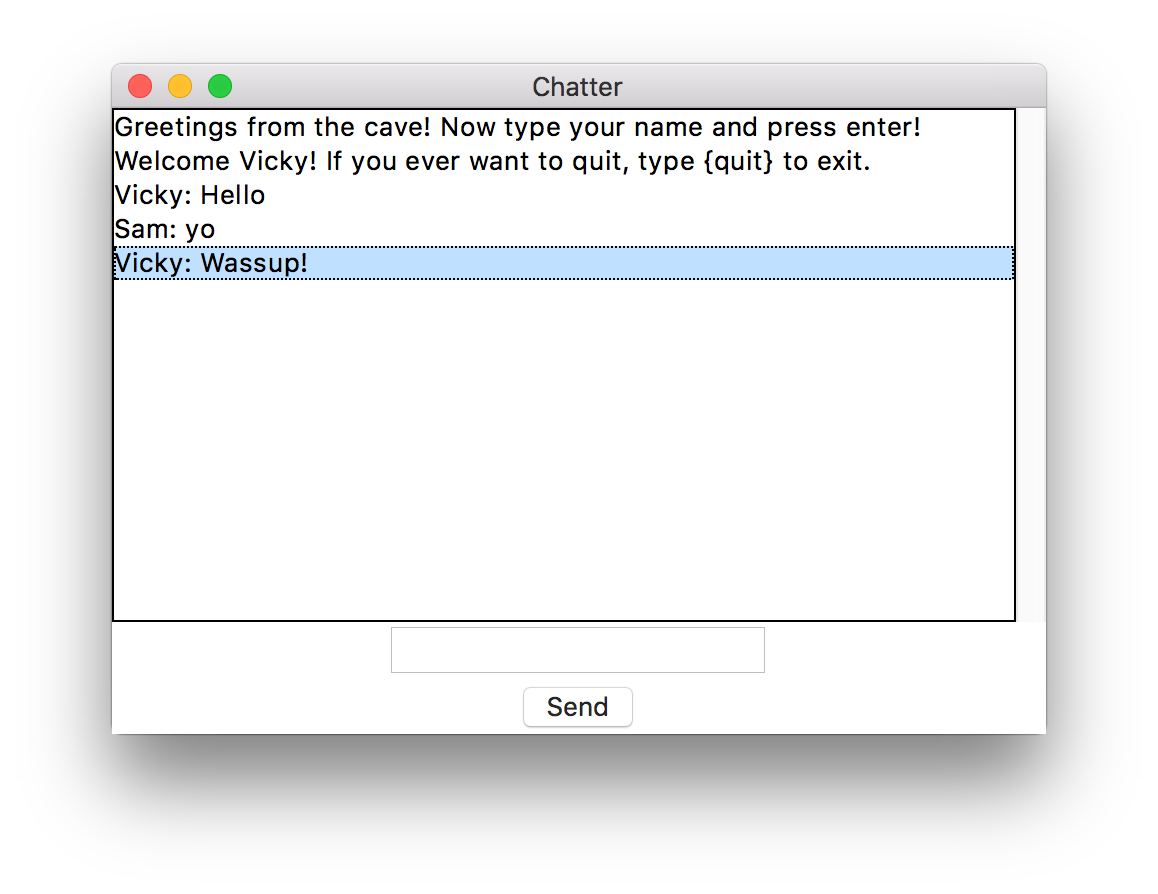 *Client GUI*  *Another Client Connected to the Same Server* Honestly speaking, the GUI looks good, considering the number of lines of Python code behind it, but not great! I leave it to you to make this look better (and more intuitive), perhaps by making a left-right chat interface like Facebook’s Messenger. You may even use third-party libraries like [Kivy](https://kivy.org) for more beauty and cross-platform portability, or a Web interface instead - post your ideas in the comments. Finally, thanks for bearing with me and reading until the last character! I applaud your patience 🙂. * * * P.S: For my other projects (some smaller and others much larger), visit [my GitHub profile](https://github.com/schedutron). Furthermore, I’m new to blogging, so constructive criticism is not only needed, but very much wanted! I’m open to better writing styles, techniques and pedagogy — feel free to mention them in the comments.  This post is originally published by the author on [The Startup](https://medium.com/swlh). This version has been edited for clarity and may appear different from the original post. |
| json metadata | {"tags":["python","multithreading","parallel-computing","software","networking"],"image":["https://cdn-images-1.medium.com/max/1600/1*V1imyonxELroNxrrRV45Aw.jpeg","https://cdn-images-1.medium.com/max/1600/1*8BUJc4gYd9mrVhZkd4hQ6g.jpeg","https://cdn-images-1.medium.com/max/1600/1*MihTDwKFQMDHpIUTxf5Rtg.png","https://cdn-images-1.medium.com/max/1600/1*33q-TKPi8cXBGC3KoAVmfQ.png","https://cdn-images-1.medium.com/max/2000/1*6gfnVvkMRFtjVsWF7vkClA.png"],"links":["https://twistedmatrix.com/","https://pymotw.com/3/socketserver/","https://en.wikipedia.org/wiki/Network_socket","https://github.com/schedutron/CPAP/blob/master/Chap5/chat_serv.py","https://kivy.org","https://github.com/schedutron","https://medium.com/swlh"],"app":"steemit/0.1","format":"markdown"} |
| Transaction Info | Block #18661163/Trx 4e758f50669ec36e9f472453741369e98fdbd1a7 |
View Raw JSON Data
{
"trx_id": "4e758f50669ec36e9f472453741369e98fdbd1a7",
"block": 18661163,
"trx_in_block": 2,
"op_in_trx": 0,
"virtual_op": 0,
"timestamp": "2018-01-03T18:31:21",
"op": [
"comment",
{
"parent_author": "",
"parent_permlink": "python",
"author": "schedutron",
"permlink": "let-s-write-a-chat-app-in-python",
"title": "Let’s Write a Chat App in Python",
"body": "Not too frequently, you happen to create something astonishingly simple yet fun to use that you just can’t wait to share with the world.\n\nThat’s exactly what happened to me, so I’m here to share how I made a simple chat app with quite concise Python code. What’s more, I’ve implemented the code without _any_ third party dependencies! \n\nLet’s just dive in!\n\nFirst, I created a chat server that could recieve incoming requests from clients wanting to communicate. For this, I used good ol’ sockets and a bit of multithreading. \n\nUsing frameworks like [Twisted](https://twistedmatrix.com/) and [SocketServer](https://pymotw.com/3/socketserver/) was an option, but that seemed like overkill to me for software as simple as ours.\n\n### **The Server**\n\n \n\nHere’s how we begin our server script (for this app, there are just two scripts: one for server and another for client):\n\n```\n#!/usr/bin/env python3\"\"\"Server for multithreaded (asynchronous) chat application.\"\"\"\n```\n\n```\nfrom socket import AF_INET, socket, SOCK_STREAM\nfrom threading import Thread\n```\n\nWe will be using TCP sockets for this purpose, therefore we use `AF_INET` and `SOCK_STREAM` flags. We use them over UDP sockets because they’re more telephonic — the recipient has to approve the incoming connection before communication begins. \n\nUDP sockets are a more post-mail sort of thing (anyone can send mail to a recipient whose address he or she knows), so they don’t really require an establishment of connection before communication can happen. \n\nClearly, TCP is more suited to our purpose than UDP sockets, therefore we'll use them. You can learn more about sockets [here](https://en.wikipedia.org/wiki/Network_socket).\n\nAfter imports, we set up some _constants_ for later use:\n\n```\nclients = {}\naddresses = {}\n```\n\n```\nHOST = ''\nPORT = 33000\nBUFSIZ = 1024\nADDR = (HOST, PORT)\nSERVER = socket(AF_INET, SOCK_STREAM)\nSERVER.bind(ADDR)\n```\n\nNow, we break our task into accepting new connections, broadcasting messages, and handling particular clients. Let’s begin with accepting connections:\n\n```\ndef accept_incoming_connections():\n \"\"\"Sets up handling for incoming clients.\"\"\"\n while True:\n client, client_address = SERVER.accept()\n print(\"%s:%s has connected.\" % client_address)\n client.send(bytes(\"Greetings from the cave!\" + \"Now type your name and press enter!\", \"utf8\"))\n addresses[client] = client_address\n Thread(target=handle_client, args=(client,)).start()\n```\n\nThis is just a loop that waits forever for incoming connections. As soon as it gets one, it logs the connection (prints some of the connection details) and sends the connected client a welcome message. Then, it stores the client’s address in the `addresses` dictionary and later starts the handling thread for that client. Of course, we haven’t yet defined the target function `handle_client()` for that, but here’s how we do it:\n\n```\ndef handle_client(client): \n # Takes client socket as argument.\n \"\"\"Handles a single client connection.\"\"\"\n name = client.recv(BUFSIZ).decode(\"utf8\")\n welcome = 'Welcome %s! If you ever want to quit, type {quit} to exit.' % name\n client.send(bytes(welcome, \"utf8\"))\n msg = \"%s has joined the chat!\" % name\n broadcast(bytes(msg, \"utf8\"))\n clients[client] = name\n while True:\n msg = client.recv(BUFSIZ)\n if msg != bytes(\"{quit}\", \"utf8\"):\n broadcast(msg, name+\": \")\n else:\n client.send(bytes(\"{quit}\", \"utf8\"))\n client.close()\n del clients[client]\n broadcast(bytes(\"%s has left the chat.\" % name, \"utf8\"))\n break\n```\n\nNaturally, after we send the new client the welcome message, it will reply with the name he or she wants to use for further communication. In the `handle_client()` function, the first task we do is save this name and then send another message to the client regarding further instructions. \n\nAfter this comes the main loop for communication: here we recieve further messages from the client and if a message doesn’t contain instructions to quit, we simply broadcast the messsage to other connected clients (we’ll be defining the broadcast method in a moment).\n\nIf we do encounter a message with exit instructions (i.e. the client sends a `{quit}`), we echo back the same message to the client (it triggers close action on the client side) and then we close the connection socket for it. We then do some cleanup by deleting the entry for the client, and finally give a shoutout to other connected people that this particular person has left the conversation.\n\nNow comes our `broadcast()` function:\n\n```\ndef broadcast(msg, prefix=\"\"):\n # prefix is for name identification.\n \"\"\"Broadcasts a message to all the clients.\"\"\"\n for sock in clients:\n sock.send(bytes(prefix, \"utf8\")+msg)\n```\n\nThis is pretty much self-explanatory — it simply sends the `msg` to all the connected clients, and prepends an optional `prefix` if necessary. We do pass a `prefix` to `broadcast()` in our `handle_client()` function, and we do it so that people can see exactly who is the sender of a particular message.\n\nThat was all the required functionalities for our server. Finally, we put in some code for starting our server and listening for incoming connections:\n\n```\nif __name__ == \" __main__\":\n SERVER.listen(5)\n # Listens for 5 connections at max.\n print(\"Waiting for connection...\")\n ACCEPT_THREAD = Thread(target=accept_incoming_connections)\n ACCEPT_THREAD.start()\n # Starts the infinite loop.\n ACCEPT_THREAD.join()\n SERVER.close()\n```\n\nWe `join()` `ACCEPT_THREAD` so that the main script waits for it to complete and doesn’t jump to the next line, which closes the server.\n\nThis completes our server script, which is presented in the following gist (for those who are reading this on smartphones, visit [this](https://github.com/schedutron/CPAP/blob/master/Chap5/chat_serv.py) link for the complete server code):\n\n* * *\n\n### The Client\n\n \n\nThis is more fun beause we’ll be writing a GUI! We use Tkinter, Python’s “batteries included” GUI building tool for our purpose. Let’s do some imports first:\n\n```\n#!/usr/bin/env python3\n\"\"\"Script for Tkinter GUI chat client.\"\"\"\n```\n\n```\nfrom socket import AF_INET, socket, SOCK_STREAM\nfrom threading import Threadimport tkinter\n```\n\nNow we’ll write functions for handling, sending, and receiving messages. We'll start with receive:\n\n```\ndef receive():\n \"\"\"Handles receiving of messages.\"\"\"\n while True:\n try:\n msg = client_socket.recv(BUFSIZ).decode(\"utf8\")\n msg_list.insert(tkinter.END, msg)\n except OSError:\n # Possibly client has left the chat.\n break\n```\n\nWhy an infinite loop again? Because we’ll be receiving messages quite non-deterministically, and independently of how and when we send the messages. We don’t want this to be a walkie-talkie chat app which can only either send **_or_** receive at a time — we want to receive messages when we can, and send them when we want. \n\nThe functionality within the loop is pretty straightforward; the `recv()` is the blocking part. It stops execution until it receives a message, and when it does, we move ahead and append the message to `msg_list`. We will soon define `msg_list`, which is basically a Tkinter feature for displaying the list of messages on the screen.\n\nNext, we define the `send()` function:\n\n```\ndef send(event=None):\n # event is passed by binders.\n \"\"\"Handles sending of messages.\"\"\"\n msg = my_msg.get()\n my_msg.set(\"\")\n # Clears input field.\n client_socket.send(bytes(msg, \"utf8\"))\n if msg == \"{quit}\":\n client_socket.close()\n top.quit()\n```\n\nWe’re using `event` as an argument because it is implicitly passed by Tkinter when the `send` button on the GUI is pressed. `my_msg` is the input field on the GUI. Therefore, we extract the message to be sent using `msg = my_msg.get()`. \n\nAfter that, we clear the input field and then send the message to the server, which, as we’ve seen before, broadcasts this message to all of the clients (if it’s not an exit message). If it is an exit message, we close the socket and then the GUI app (via `top.close()`)\n\nWe define one more function, which will be called when we choose to close the GUI window. It is a sort of cleanup-before-close function and will close the socket connection before the GUI closes:\n\n```\ndef on_closing(event=None):\n \"\"\"This function is to be called when the window is closed.\"\"\"\n my_msg.set(\"{quit}\")\n send()\n```\n\nThis sets the input field to `{quit}` and then calls `send()`, which then works as expected. Now we start building the GUI in the main namespace (i.e. outside any function). We start by defining the top-level widget and set its title:\n\n```\ntop = tkinter.Tk()\ntop.title(\"Chatter\")\n```\n\nThen, we create a frame for holding the list of messages. Next, we create a string variable, primarily for storing the value we get from the input field (which we will define soon). We set that variable to `\"Type your messages here.\"` to prompt the user to write their message. After that, we create a scrollbar for scrolling through this message frame. Here’s the code:\n\n```\nmessages_frame = tkinter.Frame(top)\nmy_msg = tkinter.StringVar() # For the messages to be sent.\nmy_msg.set(\"Type your messages here.\")\nscrollbar = tkinter.Scrollbar(messages_frame) # To navigate through past messages.\n```\n\nNow we define the message list, which will be stored in `messages_frame` and then pack in (at the appropriate places) all the stuff we’ve created until now:\n\n```\nmsg_list = tkinter.Listbox(messages_frame, height=15, width=50, yscrollcommand=scrollbar.set)\nscrollbar.pack(side=tkinter.RIGHT, fill=tkinter.Y)\nmsg_list.pack(side=tkinter.LEFT, fill=tkinter.BOTH)\nmsg_list.pack()\nmessages_frame.pack()\n```\n\nAfter this, we create the input field for the user to input their message and bind it to the string variable defined above. We also bind it to the `send()` function so that whenever the user presses return, the message is sent to the server. \n\nNext, we create the send button if the user wishes to send their messages by clicking on it. Again, we bind the clicking of this button to the `send()` function. And yes, we also pack all of this stuff we created just now. Furthermore, don’t forget to make use of the cleanup function `on_closing()`, which should be called when the user wishes to close the GUI window. We do that by using the `protocol` method of `top`. Here’s the code for all of this:\n\n```\nentry_field = tkinter.Entry(top, textvariable=my_msg)\nentry_field.bind(\"<Return>\", send)\nentry_field.pack()\nsend_button = tkinter.Button(top, text=\"Send\", command=send)\nsend_button.pack()\n```\n\n```\ntop.protocol(\"WM_DELETE_WINDOW\", on_closing)\n```\n\n(Almost) done. We haven’t yet written code for connecting to the server. For that, we have to ask the user for the server’s address. I’ve done that by simply using `input()`, so the user is greeted with some command line prompt asking for the host address before the GUI begins. It may be a little inconvenient, and you can add GUI for that, but I leave that to you as homework 🙂. Here’s my code:\n\n```\nHOST = input('Enter host: ')\nPORT = input('Enter port: ')\n```\n\n```\nif not PORT: PORT = 33000 # Default value.\nelse: PORT = int(PORT)\n```\n\n```\nBUFSIZ = 1024\nADDR = (HOST, PORT)\nclient_socket = socket(AF_INET, SOCK_STREAM)\nclient_socket.connect(ADDR)\n```\n\nOnce we get the address and create a socket to connect to it, we start the thread for receiving messages, and then the main loop for our GUI application:\n\n```\nreceive_thread = Thread(target=receive)\nreceive_thread.start()\ntkinter.mainloop() # Starts GUI execution.\n```\n\nThat’s it! We’ve coded our chat application. Again, the complete client script is given in the following gist:\n\n* * *\n\n### Demo\n\nThis feels great tested on multiple computers. You can, of course, run the server and the client on the same machine for testing (using `127.0.0.1` for `HOST` in your client), but seeing the communication happen in realtime among different computers feels awesome. The server script will log which IP addresses are accessing it and the client script will generate a GUI (after asking for the host address) similar to the following screenshots:\n\n \n *Client GUI*\n\n\n \n*Another Client Connected to the Same Server*\n\n\nHonestly speaking, the GUI looks good, considering the number of lines of Python code behind it, but not great! I leave it to you to make this look better (and more intuitive), perhaps by making a left-right chat interface like Facebook’s Messenger. You may even use third-party libraries like [Kivy](https://kivy.org) for more beauty and cross-platform portability, or a Web interface instead - post your ideas in the comments. Finally, thanks for bearing with me and reading until the last character! I applaud your patience 🙂.\n\n* * *\n\nP.S: For my other projects (some smaller and others much larger), visit [my GitHub profile](https://github.com/schedutron).\n\nFurthermore, I’m new to blogging, so constructive criticism is not only needed, but very much wanted! I’m open to better writing styles, techniques and pedagogy — feel free to mention them in the comments.\n\n \n\n\nThis post is originally published by the author on [The Startup](https://medium.com/swlh). This version has been edited for clarity and may appear different from the original post.",
"json_metadata": "{\"tags\":[\"python\",\"multithreading\",\"parallel-computing\",\"software\",\"networking\"],\"image\":[\"https://cdn-images-1.medium.com/max/1600/1*V1imyonxELroNxrrRV45Aw.jpeg\",\"https://cdn-images-1.medium.com/max/1600/1*8BUJc4gYd9mrVhZkd4hQ6g.jpeg\",\"https://cdn-images-1.medium.com/max/1600/1*MihTDwKFQMDHpIUTxf5Rtg.png\",\"https://cdn-images-1.medium.com/max/1600/1*33q-TKPi8cXBGC3KoAVmfQ.png\",\"https://cdn-images-1.medium.com/max/2000/1*6gfnVvkMRFtjVsWF7vkClA.png\"],\"links\":[\"https://twistedmatrix.com/\",\"https://pymotw.com/3/socketserver/\",\"https://en.wikipedia.org/wiki/Network_socket\",\"https://github.com/schedutron/CPAP/blob/master/Chap5/chat_serv.py\",\"https://kivy.org\",\"https://github.com/schedutron\",\"https://medium.com/swlh\"],\"app\":\"steemit/0.1\",\"format\":\"markdown\"}"
}
]
}schedutronupdated their account properties2018/01/02 18:13:03
schedutronupdated their account properties
2018/01/02 18:13:03
| account | schedutron |
| posting | {"weight_threshold":1,"account_auths":[["utopian.app",1]],"key_auths":[["STM7RhRSGevSSMq9zekyXJtowib4d5DHPeUGAzH62sthVMAe936e6",1]]} |
| memo key | STM564iZqakpwtdszx3Bcwy4Gfo5SjHJo18XzZ7PUA6xEbnshSSkF |
| json metadata | |
| Transaction Info | Block #18632009/Trx aace0123a6a4d2a9131265fed8d4805edf215336 |
View Raw JSON Data
{
  "trx_id": "aace0123a6a4d2a9131265fed8d4805edf215336",
  "block": 18632009,
  "trx_in_block": 49,
  "op_in_trx": 0,
  "virtual_op": 0,
  "timestamp": "2018-01-02T18:13:03",
  "op": [
    "account_update",
    {
      "account": "schedutron",
      "posting": {
        "weight_threshold": 1,
        "account_auths": [
          [
            "utopian.app",
            1
          ]
        ],
        "key_auths": [
          [
            "STM7RhRSGevSSMq9zekyXJtowib4d5DHPeUGAzH62sthVMAe936e6",
            1
          ]
        ]
      },
      "memo_key": "STM564iZqakpwtdszx3Bcwy4Gfo5SjHJo18XzZ7PUA6xEbnshSSkF",
      "json_metadata": ""
    }
  ]
}steemcreated a new account: @schedutron2017/12/30 22:02:30
steemcreated a new account: @schedutron
2017/12/30 22:02:30
| fee | 0.500 STEEM |
| delegation | 57000.000000 VESTS |
| creator | steem |
| new account name | schedutron |
| owner | {"weight_threshold":1,"account_auths":[],"key_auths":[["STM7sSTYMmjxM1CELFShxV2Xy2Wgx4nzHpree3Q7o36t5eKSsGyVA",1]]} |
| active | {"weight_threshold":1,"account_auths":[],"key_auths":[["STM81b2CJK7DTeuLAP42evM2jrSam1dNvwAFbrg9od78LeTVP7Tz1",1]]} |
| posting | {"weight_threshold":1,"account_auths":[],"key_auths":[["STM7RhRSGevSSMq9zekyXJtowib4d5DHPeUGAzH62sthVMAe936e6",1]]} |
| memo key | STM564iZqakpwtdszx3Bcwy4Gfo5SjHJo18XzZ7PUA6xEbnshSSkF |
| json metadata | |
| extensions | [] |
| Transaction Info | Block #18550438/Trx 4d5db207984b88451c46f3125a6e541f46cd8eb2 |
View Raw JSON Data
{
  "trx_id": "4d5db207984b88451c46f3125a6e541f46cd8eb2",
  "block": 18550438,
  "trx_in_block": 41,
  "op_in_trx": 0,
  "virtual_op": 0,
  "timestamp": "2017-12-30T22:02:30",
  "op": [
    "account_create_with_delegation",
    {
      "fee": "0.500 STEEM",
      "delegation": "57000.000000 VESTS",
      "creator": "steem",
      "new_account_name": "schedutron",
      "owner": {
        "weight_threshold": 1,
        "account_auths": [],
        "key_auths": [
          [
            "STM7sSTYMmjxM1CELFShxV2Xy2Wgx4nzHpree3Q7o36t5eKSsGyVA",
            1
          ]
        ]
      },
      "active": {
        "weight_threshold": 1,
        "account_auths": [],
        "key_auths": [
          [
            "STM81b2CJK7DTeuLAP42evM2jrSam1dNvwAFbrg9od78LeTVP7Tz1",
            1
          ]
        ]
      },
      "posting": {
        "weight_threshold": 1,
        "account_auths": [],
        "key_auths": [
          [
            "STM7RhRSGevSSMq9zekyXJtowib4d5DHPeUGAzH62sthVMAe936e6",
            1
          ]
        ]
      },
      "memo_key": "STM564iZqakpwtdszx3Bcwy4Gfo5SjHJo18XzZ7PUA6xEbnshSSkF",
      "json_metadata": "",
      "extensions": []
    }
  ]
}Manabar
Voting Power100.00%
Downvote Power100.00%
Resource Credits100.00%
Reputation Progress0.00%
{
  "voting_manabar": {
    "current_mana": "8143659806",
    "last_update_time": 1779084837
  },
  "downvote_manabar": {
    "current_mana": 2035914951,
    "last_update_time": 1779084837
  },
  "rc_account": {
    "account": "schedutron",
    "rc_manabar": {
      "current_mana": "10164408779",
      "last_update_time": 1779084837
    },
    "max_rc_creation_adjustment": {
      "amount": "2020748973",
      "precision": 6,
      "nai": "@@000000037"
    },
    "max_rc": "10164408779"
  }
}
Account Metadata
| POSTING JSON METADATA | |
| profile | {"profile_image":"https://pbs.twimg.com/profile_images/882223198976098306/B04nThcd_400x400.jpg","cover_image":"https://pbs.twimg.com/profile_banners/257842996/1499173144/1500x500","name":"Saurabh Chaturvedi","about":"Python Programmmer","location":"Jaipur","website":"https://medium.com/@arichduvet"} |
| JSON METADATA | |
| profile | {"profile_image":"https://pbs.twimg.com/profile_images/882223198976098306/B04nThcd_400x400.jpg","cover_image":"https://pbs.twimg.com/profile_banners/257842996/1499173144/1500x500","name":"Saurabh Chaturvedi","about":"Python Programmmer","location":"Jaipur","website":"https://medium.com/@arichduvet"} |
{
  "posting_json_metadata": {
    "profile": {
      "profile_image": "https://pbs.twimg.com/profile_images/882223198976098306/B04nThcd_400x400.jpg",
      "cover_image": "https://pbs.twimg.com/profile_banners/257842996/1499173144/1500x500",
      "name": "Saurabh Chaturvedi",
      "about": "Python Programmmer",
      "location": "Jaipur",
      "website": "https://medium.com/@arichduvet"
    }
  },
  "json_metadata": {
    "profile": {
      "profile_image": "https://pbs.twimg.com/profile_images/882223198976098306/B04nThcd_400x400.jpg",
      "cover_image": "https://pbs.twimg.com/profile_banners/257842996/1499173144/1500x500",
      "name": "Saurabh Chaturvedi",
      "about": "Python Programmmer",
      "location": "Jaipur",
      "website": "https://medium.com/@arichduvet"
    }
  }
}
Auth Keys
Owner
Single Signature
Public Keys
STM7sSTYMmjxM1CELFShxV2Xy2Wgx4nzHpree3Q7o36t5eKSsGyVA1/1
Active
Single Signature
Public Keys
STM81b2CJK7DTeuLAP42evM2jrSam1dNvwAFbrg9od78LeTVP7Tz11/1
Posting
Single Signature
Public Keys
STM7RhRSGevSSMq9zekyXJtowib4d5DHPeUGAzH62sthVMAe936e61/1
App Permissions
@utopian.app1/1
Memo
STM564iZqakpwtdszx3Bcwy4Gfo5SjHJo18XzZ7PUA6xEbnshSSkF
{
  "owner": {
    "weight_threshold": 1,
    "account_auths": [],
    "key_auths": [
      [
        "STM7sSTYMmjxM1CELFShxV2Xy2Wgx4nzHpree3Q7o36t5eKSsGyVA",
        1
      ]
    ]
  },
  "active": {
    "weight_threshold": 1,
    "account_auths": [],
    "key_auths": [
      [
        "STM81b2CJK7DTeuLAP42evM2jrSam1dNvwAFbrg9od78LeTVP7Tz1",
        1
      ]
    ]
  },
  "posting": {
    "weight_threshold": 1,
    "account_auths": [
      [
        "utopian.app",
        1
      ]
    ],
    "key_auths": [
      [
        "STM7RhRSGevSSMq9zekyXJtowib4d5DHPeUGAzH62sthVMAe936e6",
        1
      ]
    ]
  },
  "memo": "STM564iZqakpwtdszx3Bcwy4Gfo5SjHJo18XzZ7PUA6xEbnshSSkF"
}
Witness Votes
0 / 30
No active witness votes.
[]