

VOTING POWER100.00%
DOWNVOTE POWER100.00%
RESOURCE CREDITS100.00%
REPUTATION PROGRESS0.00%
Net Worth
0.000USD
STEEM
0.001STEEM
SBD
0.000SBD
Effective Power
3.361SP
├── Own SP
0.000SP
└── Incoming DelegationsDeleg
+3.361SP
Detailed Balance
| STEEM | ||
| balance | 0.001STEEM | STEEM |
| market_balance | 0.000STEEM | STEEM |
| savings_balance | 0.000STEEM | STEEM |
| reward_steem_balance | 0.000STEEM | STEEM |
| STEEM POWER | ||
| Own SP | 0.000SP | SP |
| Delegated Out | 0.000SP | SP |
| Delegation In | 3.361SP | SP |
| Effective Power | 3.361SP | SP |
| Reward SP (pending) | 0.000SP | SP |
| SBD | ||
| sbd_balance | 0.000SBD | SBD |
| sbd_conversions | 0.000SBD | SBD |
| sbd_market_balance | 0.000SBD | SBD |
| savings_sbd_balance | 0.000SBD | SBD |
| reward_sbd_balance | 0.000SBD | SBD |
{
  "balance": "0.001 STEEM",
  "savings_balance": "0.000 STEEM",
  "reward_steem_balance": "0.000 STEEM",
  "vesting_shares": "0.000000 VESTS",
  "delegated_vesting_shares": "0.000000 VESTS",
  "received_vesting_shares": "5472.996220 VESTS",
  "sbd_balance": "0.000 SBD",
  "savings_sbd_balance": "0.000 SBD",
  "reward_sbd_balance": "0.000 SBD",
  "conversions": []
}
Account Info
| name | samlung |
| id | 1696030 |
| rank | 1,000,530 |
| reputation | 910193711 |
| created | 2022-02-27T17:23:24 |
| recovery_account | steem |
| proxy | None |
| post_count | 2 |
| comment_count | 0 |
| lifetime_vote_count | 0 |
| witnesses_voted_for | 0 |
| last_post | 2022-03-04T16:30:12 |
| last_root_post | 2022-03-04T16:30:12 |
| last_vote_time | 2022-03-04T16:31:15 |
| proxied_vsf_votes | 0, 0, 0, 0 |
| can_vote | 1 |
| voting_power | 0 |
| delayed_votes | 0 |
| balance | 0.001 STEEM |
| savings_balance | 0.000 STEEM |
| sbd_balance | 0.000 SBD |
| savings_sbd_balance | 0.000 SBD |
| vesting_shares | 0.000000 VESTS |
| delegated_vesting_shares | 0.000000 VESTS |
| received_vesting_shares | 5472.996220 VESTS |
| reward_vesting_balance | 0.000000 VESTS |
| vesting_balance | 0.000 STEEM |
| vesting_withdraw_rate | 0.000000 VESTS |
| next_vesting_withdrawal | 1969-12-31T23:59:59 |
| withdrawn | 0 |
| to_withdraw | 0 |
| withdraw_routes | 0 |
| savings_withdraw_requests | 0 |
| last_account_recovery | 1970-01-01T00:00:00 |
| reset_account | null |
| last_owner_update | 1970-01-01T00:00:00 |
| last_account_update | 1970-01-01T00:00:00 |
| mined | No |
| sbd_seconds | 0 |
| sbd_last_interest_payment | 1970-01-01T00:00:00 |
| savings_sbd_last_interest_payment | 1970-01-01T00:00:00 |
{
  "id": 1696030,
  "name": "samlung",
  "owner": {
    "weight_threshold": 1,
    "account_auths": [],
    "key_auths": [
      [
        "STM7LD7iyxRBN7TbjfGD12NZ2Cp6RRCNmYj1sk34GpJ2y4wBn3YBx",
        1
      ]
    ]
  },
  "active": {
    "weight_threshold": 1,
    "account_auths": [],
    "key_auths": [
      [
        "STM7HrVPUW4qfPmY7wsx7gT7pNzud1BbyBDzTS4Kr5jAk5ZPopMNt",
        1
      ]
    ]
  },
  "posting": {
    "weight_threshold": 1,
    "account_auths": [],
    "key_auths": [
      [
        "STM6NFzCoPKZvcxSguoxtdHXENCFjTL1ioeJZ4YWmgScwqGwESZge",
        1
      ]
    ]
  },
  "memo_key": "STM64fTnzNAQLEjbFt9iQEQtNcTi9EP8xL1imdz5DWNSojsd6W6YP",
  "json_metadata": "{}",
  "posting_json_metadata": "",
  "proxy": "",
  "last_owner_update": "1970-01-01T00:00:00",
  "last_account_update": "1970-01-01T00:00:00",
  "created": "2022-02-27T17:23:24",
  "mined": false,
  "recovery_account": "steem",
  "last_account_recovery": "1970-01-01T00:00:00",
  "reset_account": "null",
  "comment_count": 0,
  "lifetime_vote_count": 0,
  "post_count": 2,
  "can_vote": true,
  "voting_manabar": {
    "current_mana": "5472996220",
    "last_update_time": 1769211201
  },
  "downvote_manabar": {
    "current_mana": 1368249055,
    "last_update_time": 1769211201
  },
  "voting_power": 0,
  "balance": "0.001 STEEM",
  "savings_balance": "0.000 STEEM",
  "sbd_balance": "0.000 SBD",
  "sbd_seconds": "0",
  "sbd_seconds_last_update": "1970-01-01T00:00:00",
  "sbd_last_interest_payment": "1970-01-01T00:00:00",
  "savings_sbd_balance": "0.000 SBD",
  "savings_sbd_seconds": "0",
  "savings_sbd_seconds_last_update": "1970-01-01T00:00:00",
  "savings_sbd_last_interest_payment": "1970-01-01T00:00:00",
  "savings_withdraw_requests": 0,
  "reward_sbd_balance": "0.000 SBD",
  "reward_steem_balance": "0.000 STEEM",
  "reward_vesting_balance": "0.000000 VESTS",
  "reward_vesting_steem": "0.000 STEEM",
  "vesting_shares": "0.000000 VESTS",
  "delegated_vesting_shares": "0.000000 VESTS",
  "received_vesting_shares": "5472.996220 VESTS",
  "vesting_withdraw_rate": "0.000000 VESTS",
  "next_vesting_withdrawal": "1969-12-31T23:59:59",
  "withdrawn": 0,
  "to_withdraw": 0,
  "withdraw_routes": 0,
  "curation_rewards": 0,
  "posting_rewards": 0,
  "proxied_vsf_votes": [
    0,
    0,
    0,
    0
  ],
  "witnesses_voted_for": 0,
  "last_post": "2022-03-04T16:30:12",
  "last_root_post": "2022-03-04T16:30:12",
  "last_vote_time": "2022-03-04T16:31:15",
  "post_bandwidth": 0,
  "pending_claimed_accounts": 0,
  "vesting_balance": "0.000 STEEM",
  "reputation": 910193711,
  "transfer_history": [],
  "market_history": [],
  "post_history": [],
  "vote_history": [],
  "other_history": [],
  "witness_votes": [],
  "tags_usage": [],
  "guest_bloggers": [],
  "rank": 1000530
}
Withdraw Routes
| Incoming | Outgoing |
|---|---|
Empty | Empty |
{
  "incoming": [],
  "outgoing": []
}From Date
To Date
2026/01/23 23:33:21
2026/01/23 23:33:21
| delegator | steem |
| delegatee | samlung |
| vesting shares | 5472.996220 VESTS |
| Transaction Info | Block #102870685/Trx 6a4efefac0d24df79b408c252ee6f1e78d79efab |
View Raw JSON Data
{
  "trx_id": "6a4efefac0d24df79b408c252ee6f1e78d79efab",
  "block": 102870685,
  "trx_in_block": 2,
  "op_in_trx": 0,
  "virtual_op": 0,
  "timestamp": "2026-01-23T23:33:21",
  "op": [
    "delegate_vesting_shares",
    {
      "delegator": "steem",
      "delegatee": "samlung",
      "vesting_shares": "5472.996220 VESTS"
    }
  ]
}2024/12/17 18:43:30
2024/12/17 18:43:30
| delegator | steem |
| delegatee | samlung |
| vesting shares | 5637.215417 VESTS |
| Transaction Info | Block #91316899/Trx 44310412232c6416519d5fd26620252313c434be |
View Raw JSON Data
{
  "trx_id": "44310412232c6416519d5fd26620252313c434be",
  "block": 91316899,
  "trx_in_block": 7,
  "op_in_trx": 0,
  "virtual_op": 0,
  "timestamp": "2024-12-17T18:43:30",
  "op": [
    "delegate_vesting_shares",
    {
      "delegator": "steem",
      "delegatee": "samlung",
      "vesting_shares": "5637.215417 VESTS"
    }
  ]
}2023/11/14 10:24:57
2023/11/14 10:24:57
| delegator | steem |
| delegatee | samlung |
| vesting shares | 5806.348949 VESTS |
| Transaction Info | Block #79871057/Trx d750d71ad641a65d2f86e75ce1c180e526be1be5 |
View Raw JSON Data
{
  "trx_id": "d750d71ad641a65d2f86e75ce1c180e526be1be5",
  "block": 79871057,
  "trx_in_block": 4,
  "op_in_trx": 0,
  "virtual_op": 0,
  "timestamp": "2023-11-14T10:24:57",
  "op": [
    "delegate_vesting_shares",
    {
      "delegator": "steem",
      "delegatee": "samlung",
      "vesting_shares": "5806.348949 VESTS"
    }
  ]
}2023/09/22 10:10:57
2023/09/22 10:10:57
| delegator | steem |
| delegatee | samlung |
| vesting shares | 8743.257735 VESTS |
| Transaction Info | Block #78362615/Trx 71aab425cc72b8d034ef19cf8ed5189ad2aff381 |
View Raw JSON Data
{
  "trx_id": "71aab425cc72b8d034ef19cf8ed5189ad2aff381",
  "block": 78362615,
  "trx_in_block": 5,
  "op_in_trx": 0,
  "virtual_op": 0,
  "timestamp": "2023-09-22T10:10:57",
  "op": [
    "delegate_vesting_shares",
    {
      "delegator": "steem",
      "delegatee": "samlung",
      "vesting_shares": "8743.257735 VESTS"
    }
  ]
}2022/06/06 05:28:33
2022/06/06 05:28:33
| delegator | steem |
| delegatee | samlung |
| vesting shares | 9077.926093 VESTS |
| Transaction Info | Block #64812808/Trx 613c3ec801f1e1eb3e0c71c0e8324a28e9a2267b |
View Raw JSON Data
{
  "trx_id": "613c3ec801f1e1eb3e0c71c0e8324a28e9a2267b",
  "block": 64812808,
  "trx_in_block": 4,
  "op_in_trx": 0,
  "virtual_op": 0,
  "timestamp": "2022-06-06T05:28:33",
  "op": [
    "delegate_vesting_shares",
    {
      "delegator": "steem",
      "delegatee": "samlung",
      "vesting_shares": "9077.926093 VESTS"
    }
  ]
}2022/05/18 17:56:21
2022/05/18 17:56:21
| delegator | steem |
| delegatee | samlung |
| vesting shares | 27275.847246 VESTS |
| Transaction Info | Block #64282874/Trx 27efb812f41a980211320ccd7752f102e62f4fd9 |
View Raw JSON Data
{
  "trx_id": "27efb812f41a980211320ccd7752f102e62f4fd9",
  "block": 64282874,
  "trx_in_block": 3,
  "op_in_trx": 0,
  "virtual_op": 0,
  "timestamp": "2022-05-18T17:56:21",
  "op": [
    "delegate_vesting_shares",
    {
      "delegator": "steem",
      "delegatee": "samlung",
      "vesting_shares": "27275.847246 VESTS"
    }
  ]
}samlungcustom json: community2022/03/05 16:24:48
samlungcustom json: community
2022/03/05 16:24:48
| required auths | [] |
| required posting auths | ["samlung"] |
| id | community |
| json | ["subscribe",{"community":"hive-144064"}] |
| Transaction Info | Block #62160532/Trx 33d910d94d224e07b8f7decdb602e9d88a574ba2 |
View Raw JSON Data
{
  "trx_id": "33d910d94d224e07b8f7decdb602e9d88a574ba2",
  "block": 62160532,
  "trx_in_block": 5,
  "op_in_trx": 0,
  "virtual_op": 0,
  "timestamp": "2022-03-05T16:24:48",
  "op": [
    "custom_json",
    {
      "required_auths": [],
      "required_posting_auths": [
        "samlung"
      ],
      "id": "community",
      "json": "[\"subscribe\",{\"community\":\"hive-144064\"}]"
    }
  ]
}samlungcustom json: community2022/03/05 16:24:39
samlungcustom json: community
2022/03/05 16:24:39
| required auths | [] |
| required posting auths | ["samlung"] |
| id | community |
| json | ["subscribe",{"community":"hive-119463"}] |
| Transaction Info | Block #62160529/Trx 95919076795baa15820d9b494e22e6b99f0155c7 |
View Raw JSON Data
{
  "trx_id": "95919076795baa15820d9b494e22e6b99f0155c7",
  "block": 62160529,
  "trx_in_block": 11,
  "op_in_trx": 0,
  "virtual_op": 0,
  "timestamp": "2022-03-05T16:24:39",
  "op": [
    "custom_json",
    {
      "required_auths": [],
      "required_posting_auths": [
        "samlung"
      ],
      "id": "community",
      "json": "[\"subscribe\",{\"community\":\"hive-119463\"}]"
    }
  ]
}samlungcustom json: community2022/03/05 16:24:21
samlungcustom json: community
2022/03/05 16:24:21
| required auths | [] |
| required posting auths | ["samlung"] |
| id | community |
| json | ["subscribe",{"community":"hive-153970"}] |
| Transaction Info | Block #62160523/Trx d1c1ce8536d6f9dab4e3ff91776f0b4cc90f7fe4 |
View Raw JSON Data
{
  "trx_id": "d1c1ce8536d6f9dab4e3ff91776f0b4cc90f7fe4",
  "block": 62160523,
  "trx_in_block": 5,
  "op_in_trx": 0,
  "virtual_op": 0,
  "timestamp": "2022-03-05T16:24:21",
  "op": [
    "custom_json",
    {
      "required_auths": [],
      "required_posting_auths": [
        "samlung"
      ],
      "id": "community",
      "json": "[\"subscribe\",{\"community\":\"hive-153970\"}]"
    }
  ]
}samlungcustom json: community2022/03/05 16:24:12
samlungcustom json: community
2022/03/05 16:24:12
| required auths | [] |
| required posting auths | ["samlung"] |
| id | community |
| json | ["subscribe",{"community":"hive-185836"}] |
| Transaction Info | Block #62160520/Trx 1bc6f553abe51af2c28d33911c23e891140fe842 |
View Raw JSON Data
{
  "trx_id": "1bc6f553abe51af2c28d33911c23e891140fe842",
  "block": 62160520,
  "trx_in_block": 6,
  "op_in_trx": 0,
  "virtual_op": 0,
  "timestamp": "2022-03-05T16:24:12",
  "op": [
    "custom_json",
    {
      "required_auths": [],
      "required_posting_auths": [
        "samlung"
      ],
      "id": "community",
      "json": "[\"subscribe\",{\"community\":\"hive-185836\"}]"
    }
  ]
}samlungupvoted (100.00%) @steemitblog / steemit-a-guide-for-newcomers2022/03/05 16:23:33
samlungupvoted (100.00%) @steemitblog / steemit-a-guide-for-newcomers
2022/03/05 16:23:33
| voter | samlung |
| author | steemitblog |
| permlink | steemit-a-guide-for-newcomers |
| weight | 10000 (100.00%) |
| Transaction Info | Block #62160507/Trx 4bb64cea480dc02cbbf60199da3fa2b8606e8349 |
View Raw JSON Data
{
  "trx_id": "4bb64cea480dc02cbbf60199da3fa2b8606e8349",
  "block": 62160507,
  "trx_in_block": 6,
  "op_in_trx": 0,
  "virtual_op": 0,
  "timestamp": "2022-03-05T16:23:33",
  "op": [
    "vote",
    {
      "voter": "samlung",
      "author": "steemitblog",
      "permlink": "steemit-a-guide-for-newcomers",
      "weight": 10000
    }
  ]
}ktpaulupvoted (100.00%) @samlung / auto-trading-copy-trading-paper-trading-all-in-one-platform2022/03/04 22:00:30
ktpaulupvoted (100.00%) @samlung / auto-trading-copy-trading-paper-trading-all-in-one-platform
2022/03/04 22:00:30
| voter | ktpaul |
| author | samlung |
| permlink | auto-trading-copy-trading-paper-trading-all-in-one-platform |
| weight | 10000 (100.00%) |
| Transaction Info | Block #62138554/Trx 5fa941225ec86e26427606c78dea152458b3f504 |
View Raw JSON Data
{
  "trx_id": "5fa941225ec86e26427606c78dea152458b3f504",
  "block": 62138554,
  "trx_in_block": 1,
  "op_in_trx": 0,
  "virtual_op": 0,
  "timestamp": "2022-03-04T22:00:30",
  "op": [
    "vote",
    {
      "voter": "ktpaul",
      "author": "samlung",
      "permlink": "auto-trading-copy-trading-paper-trading-all-in-one-platform",
      "weight": 10000
    }
  ]
}2022/03/04 16:37:36
2022/03/04 16:37:36
| voter | samlung |
| author | steem.history |
| permlink | the-complete-steemit-etiquette-guide-revision-20-homage-1598425779 |
| weight | 10000 (100.00%) |
| Transaction Info | Block #62132132/Trx 96435947bd93e11f4c1ab40e1e532d8236b5434f |
View Raw JSON Data
{
  "trx_id": "96435947bd93e11f4c1ab40e1e532d8236b5434f",
  "block": 62132132,
  "trx_in_block": 5,
  "op_in_trx": 0,
  "virtual_op": 0,
  "timestamp": "2022-03-04T16:37:36",
  "op": [
    "vote",
    {
      "voter": "samlung",
      "author": "steem.history",
      "permlink": "the-complete-steemit-etiquette-guide-revision-20-homage-1598425779",
      "weight": 10000
    }
  ]
}samlungfollowed @steem.history2022/03/04 16:35:00
samlungfollowed @steem.history
2022/03/04 16:35:00
| required auths | [] |
| required posting auths | ["samlung"] |
| id | follow |
| json | ["follow",{"follower":"samlung","following":"steem.history","what":["blog",""]}] |
| Transaction Info | Block #62132080/Trx 5875064ba87bf57c9210faee19578f8f67f230bc |
View Raw JSON Data
{
  "trx_id": "5875064ba87bf57c9210faee19578f8f67f230bc",
  "block": 62132080,
  "trx_in_block": 3,
  "op_in_trx": 0,
  "virtual_op": 0,
  "timestamp": "2022-03-04T16:35:00",
  "op": [
    "custom_json",
    {
      "required_auths": [],
      "required_posting_auths": [
        "samlung"
      ],
      "id": "follow",
      "json": "[\"follow\",{\"follower\":\"samlung\",\"following\":\"steem.history\",\"what\":[\"blog\",\"\"]}]"
    }
  ]
}samlungupvoted (100.00%) @samlung / auto-trading-copy-trading-paper-trading-all-in-one-platform2022/03/04 16:31:15
samlungupvoted (100.00%) @samlung / auto-trading-copy-trading-paper-trading-all-in-one-platform
2022/03/04 16:31:15
| voter | samlung |
| author | samlung |
| permlink | auto-trading-copy-trading-paper-trading-all-in-one-platform |
| weight | 10000 (100.00%) |
| Transaction Info | Block #62132005/Trx 9613ac7fca50501b65c8015370444148a638590b |
View Raw JSON Data
{
  "trx_id": "9613ac7fca50501b65c8015370444148a638590b",
  "block": 62132005,
  "trx_in_block": 10,
  "op_in_trx": 0,
  "virtual_op": 0,
  "timestamp": "2022-03-04T16:31:15",
  "op": [
    "vote",
    {
      "voter": "samlung",
      "author": "samlung",
      "permlink": "auto-trading-copy-trading-paper-trading-all-in-one-platform",
      "weight": 10000
    }
  ]
}samlungpublished a new post: auto-trading-copy-trading-paper-trading-all-in-one-platform2022/03/04 16:30:12
samlungpublished a new post: auto-trading-copy-trading-paper-trading-all-in-one-platform
2022/03/04 16:30:12
| parent author | |
| parent permlink | trading |
| author | samlung |
| permlink | auto-trading-copy-trading-paper-trading-all-in-one-platform |
| title | AUTO TRADING, COPY TRADING, PAPER TRADING, all in one platform |
| body | Dealerify is a Trading, Copy Trading and Auto Trading tool that use for the development of the social trading industry in the cryptocurrency, which we intend to help by providing diverse and attractive services in this field to all traders operating in the attractive world of cryptocurrencies Use modern technologies and attractive and interesting facilities to have more successful trades. 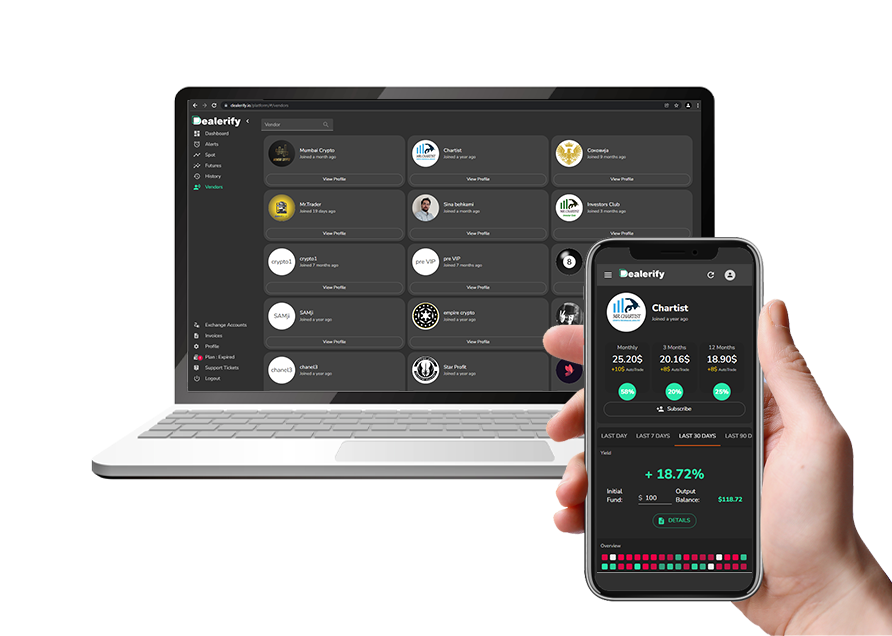 Auto-trading is one of those useful tools for you who are a newbie in the world of cryptocurrency and trading. You can use this tool to connect to vendors and easily use their strategies and signals. 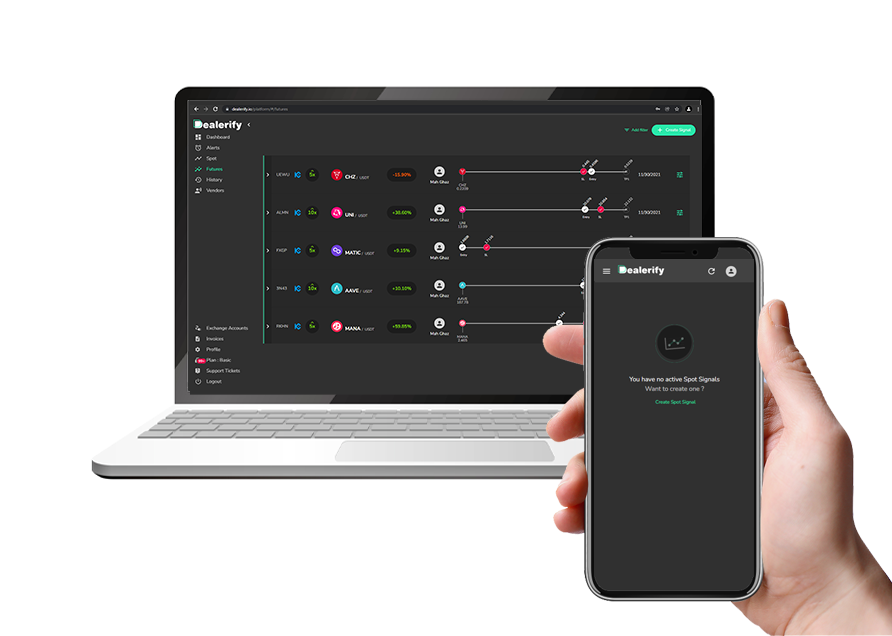 One of the best services in Dealerify, for professional traders, is the possibility of trading and managing up to 20 accounts simultaneously by accessing one account instead of multiple accounts in a very simple and practical space, and by managing a position of 20 accounts. This is actually a very useful and noteworthy possibility for people who have the power to perform portfolio management services and want to manage multiple accounts. This feature is called “Copy-Trading” in Dealerify. 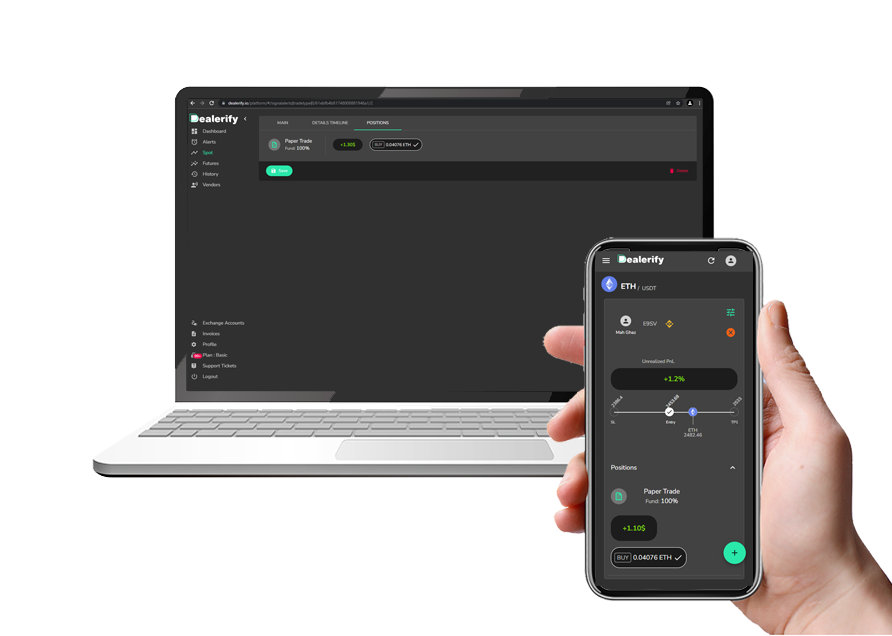 Dealerify allows people who do not have adequate trading experience yet and want to trade in real space to use paper trading in the live and real market to examine if it is possible for them to do this on a real basis. This means that you can trade in the real market with unlimited virtual capital, and master all the trading techniques and techniques until you are sure that you are ready to enter this market with your real capital. |
| json metadata | {"tags":["trading"],"image":["https://cdn.steemitimages.com/DQmUcd77qpEyF5nCsmiKJhfyjU3EQ5b9TKGa2rYq3D2x9aR/2.png","https://cdn.steemitimages.com/DQmPD9PJeLnih5eHfuKYdYhVDdfQ1LzGJooupwrWmBJKZtr/7.png","https://cdn.steemitimages.com/DQmUcNQKMAjbqTMwLEZytGpPeMVCuQy2VsvpWWgM2ZWCJMg/paper%20trade.png"],"app":"steemit/0.2","format":"markdown"} |
| Transaction Info | Block #62131984/Trx caa636bf20cc59cb98c3d9686838edf8bb007893 |
View Raw JSON Data
{
"trx_id": "caa636bf20cc59cb98c3d9686838edf8bb007893",
"block": 62131984,
"trx_in_block": 3,
"op_in_trx": 0,
"virtual_op": 0,
"timestamp": "2022-03-04T16:30:12",
"op": [
"comment",
{
"parent_author": "",
"parent_permlink": "trading",
"author": "samlung",
"permlink": "auto-trading-copy-trading-paper-trading-all-in-one-platform",
"title": "AUTO TRADING, COPY TRADING, PAPER TRADING, all in one platform",
"body": "Dealerify is a Trading, Copy Trading and Auto Trading tool that use for the development of the social trading industry in the cryptocurrency, which we intend to help by providing diverse and attractive services in this field to all traders operating in the attractive world of cryptocurrencies Use modern technologies and attractive and interesting facilities to have more successful trades.\n\n\n\nAuto-trading is one of those useful tools for you who are a newbie in the world of cryptocurrency and trading. You can use this tool to connect to vendors and easily use their strategies and signals.\n\n\n\n\nOne of the best services in Dealerify, for professional traders, is the possibility of trading and managing up to 20 accounts simultaneously by accessing one account instead of multiple accounts in a very simple and practical space, and by managing a position of 20 accounts. This is actually a very useful and noteworthy possibility for people who have the power to perform portfolio management services and want to manage multiple accounts. This feature is called “Copy-Trading” in Dealerify.\n\n\n\nDealerify allows people who do not have adequate trading experience yet and want to trade in real space to use paper trading in the live and real market to examine if it is possible for them to do this on a real basis. This means that you can trade in the real market with unlimited virtual capital, and master all the trading techniques and techniques until you are sure that you are ready to enter this market with your real capital.",
"json_metadata": "{\"tags\":[\"trading\"],\"image\":[\"https://cdn.steemitimages.com/DQmUcd77qpEyF5nCsmiKJhfyjU3EQ5b9TKGa2rYq3D2x9aR/2.png\",\"https://cdn.steemitimages.com/DQmPD9PJeLnih5eHfuKYdYhVDdfQ1LzGJooupwrWmBJKZtr/7.png\",\"https://cdn.steemitimages.com/DQmUcNQKMAjbqTMwLEZytGpPeMVCuQy2VsvpWWgM2ZWCJMg/paper%20trade.png\"],\"app\":\"steemit/0.2\",\"format\":\"markdown\"}"
}
]
}samlungpublished a new post: dealerify-copy-trading-platform-or-dealerify-complete-guide2022/03/04 15:11:54
samlungpublished a new post: dealerify-copy-trading-platform-or-dealerify-complete-guide
2022/03/04 15:11:54
| parent author | |
| parent permlink | crypto |
| author | samlung |
| permlink | dealerify-copy-trading-platform-or-dealerify-complete-guide |
| title | Dealerify copy trading platform| Dealerify complete guide |
| body | How to trade on the Dealerify platform?  Nowadays, the global community is increasingly supporting the cryptocurrency world to decentralize the financial market and, consequently, the business and governance. Dealerify team’s years of experience in training and trading have helped analyze these problems and identify areas for improvement. This growing market has slower maturity in services and products. But Dealerify has many plans to increase the penetration rate of the cryptocurrency trading market. In this article, we will introduce and teach you how to work with one of the best platforms for copy-trading, Dealerify. Dealerify offers a very diverse and significant service to users that can be useful for any level of trading. Introducing the features of the Dealerify platform 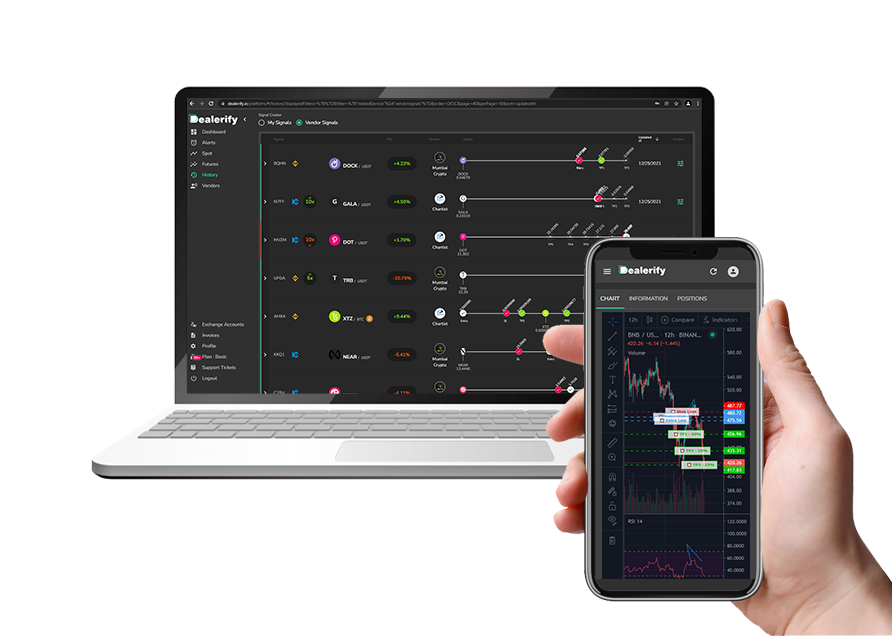 Dealerify is a professional and easy trading platform that is used to develop the cryptocurrency trading industry and intends to help all traders in the world of cryptocurrencies by providing various and attractive services in this field. In this part, we will introduce the features of the Dealerify trading platform. These features include the following: - An important feature of Dealerify is that it transforms the entire trading space full of numbers into a coordinated space. You can view your positions on a page and make any decision you want for each of them as soon as possible. - Dealerify has provided free facilities for all its users for 7 days at the beginning of entering this platform, so they can get acquainted with the platform conditions and its features and benefits at no cost. You can easily test this platform and it will help you to make the best choice. - Automated trading is one of the useful tools and features of this platform that is suitable for beginners. Using this tool, you can easily use signals and strategies of professional traders called "Vendor" in Dealerify. - One of the best features of Dealerify for professional traders is the ability to trade and manage 20 user accounts simultaneously with access to one account instead of several accounts in a very simple and practical space. This is actually a very useful feature for people who want to manage multiple accounts. - According to the plan you have in Dealerify, you can connect another account to your account and manage them. In Basic Plan, you can connect 2 accounts to your account. In Pro Plan, you can add up to 10 accounts and in Portfolio Plan you are allowed to connect up to 20 accounts. - For the safety and convenience of its users, this platform has no access to your exchange account or wallet, and you only connect your exchange API to the platform, so you can trade safely and make sure your capital is safe in the exchange. - Another great feature of Dealerify is that you can set the minimum and maximum capital you want to invest in each position. This is an advantage that makes you more flexible in managing your assets. -Alert helps you to be sharp in the market. In the world of trading, you have to constantly monitor the market so that you can have good currencies with reasonable entry prices. But this is not always possible and you can not check all the cryptocurrencies you have in mind in the long run it is quite clear that this is very time-consuming. But in Dealerify, it is possible for you to enter the desired pairs and their price conditions with the help of the Alert feature, and the Dealerify smart platform will inform you as soon as these conditions are reached. - You can see the balance of all your exchange accounts updated on the Dealerify platform. This access is available to all accounts connected to the platform. Your Spot and Futures account balances are updated individually and continuously. Introducing the goals of the Dealerify platform Dealerify copy-trading platform intends to make trading in the world of digital currencies enjoyable and profitable for all individuals and traders at any level. We will introduce some of these features in the following: • Keep it as simple as possible for increasing life quality for all. • Having the most access to exchange offices during a year. • Reach 500,000 MAU in the next 5 years. • Fifty headquarters in 50 major cities over the next 5 years. Dealerify platform registration: 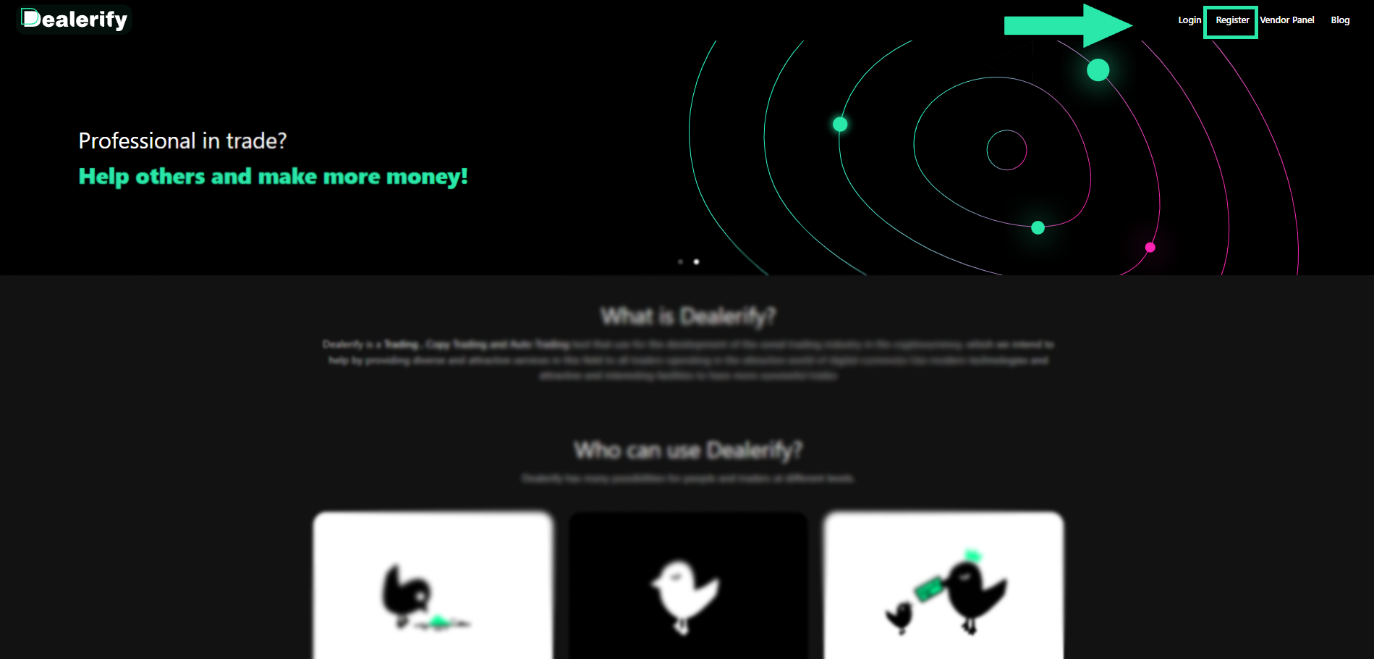 To use the Dealerify platform, you must first register. Registration on this platform is done using a mobile number. If you want to register the Dealerify, you can follow the steps below: 1. First, enter the main page of this exchange using the Dealerify.io address. And select the "Register" option to register. Note: If you have already registered on this platform, you can click on the "Login" option and log in to your account after entering the password. 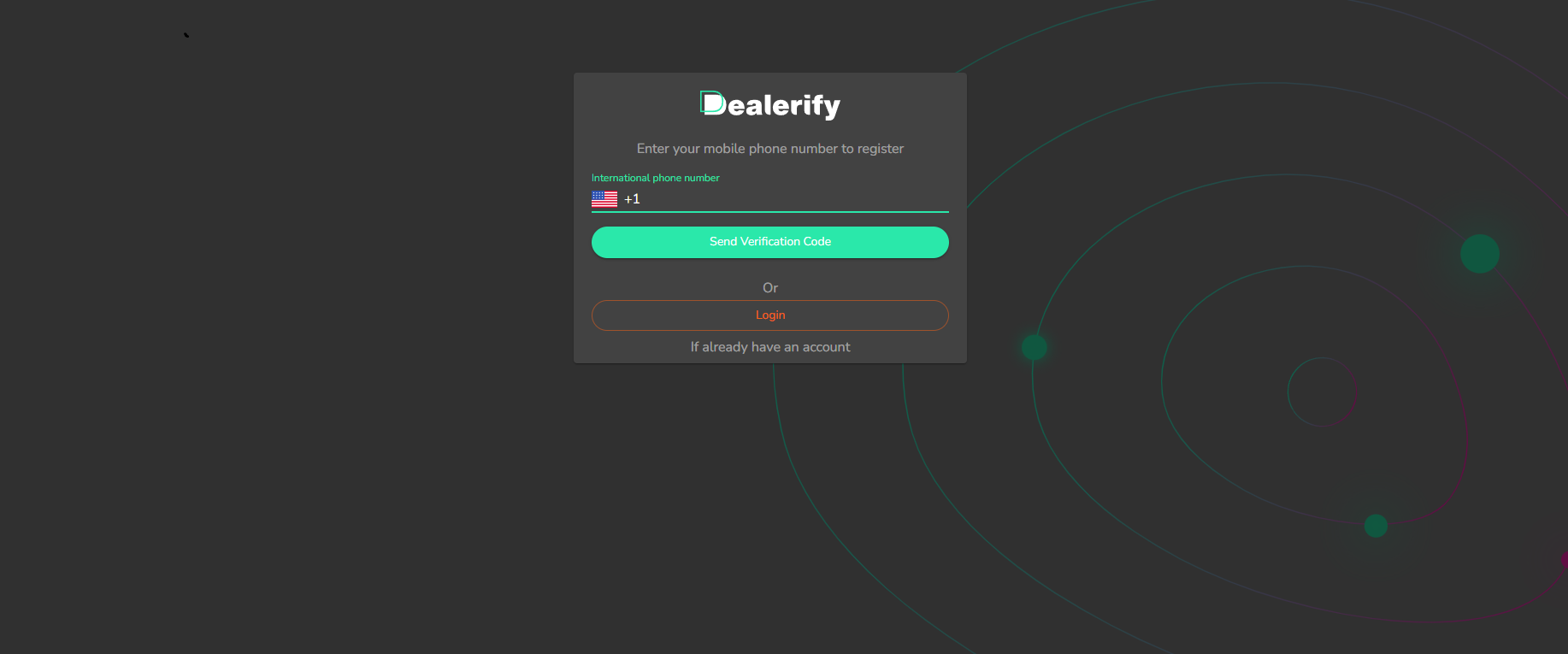 2. In this step, you must select your country and enter your mobile phone number. Then click on "Send Verification Code". 3. After entering your mobile number, you must enter the code sent via SMS in this step. Finally, select the "Confirm" option. 4. Here you must enter the requested information such as first name, last name, email, password, and referral code. You must select a password for yourself and repeat it in the fifth field. After completing the information, click on the Register option. Note: It should be noted that you must have an invitation code to register. Referral Code is the same as the referral code. You can use the code 88831453. 5. After completing the information and selecting the Register option, you will see a message indicating that your registration has been completed successfully. Click on "Login" to enter the platform. After completing the registration process, you must confirm your entered email. In this step, click on the "Send Verification Email" option. Enter the code sent to your email in the box provided. Finally, select the "Confirm" option to confirm and your email will be easily verified. Introducing different parts of Dealerify platform After registering on the Dealerify platform, you can get acquainted with its different sections in this part of the article. In the image below, we will number each section and introduce each one: 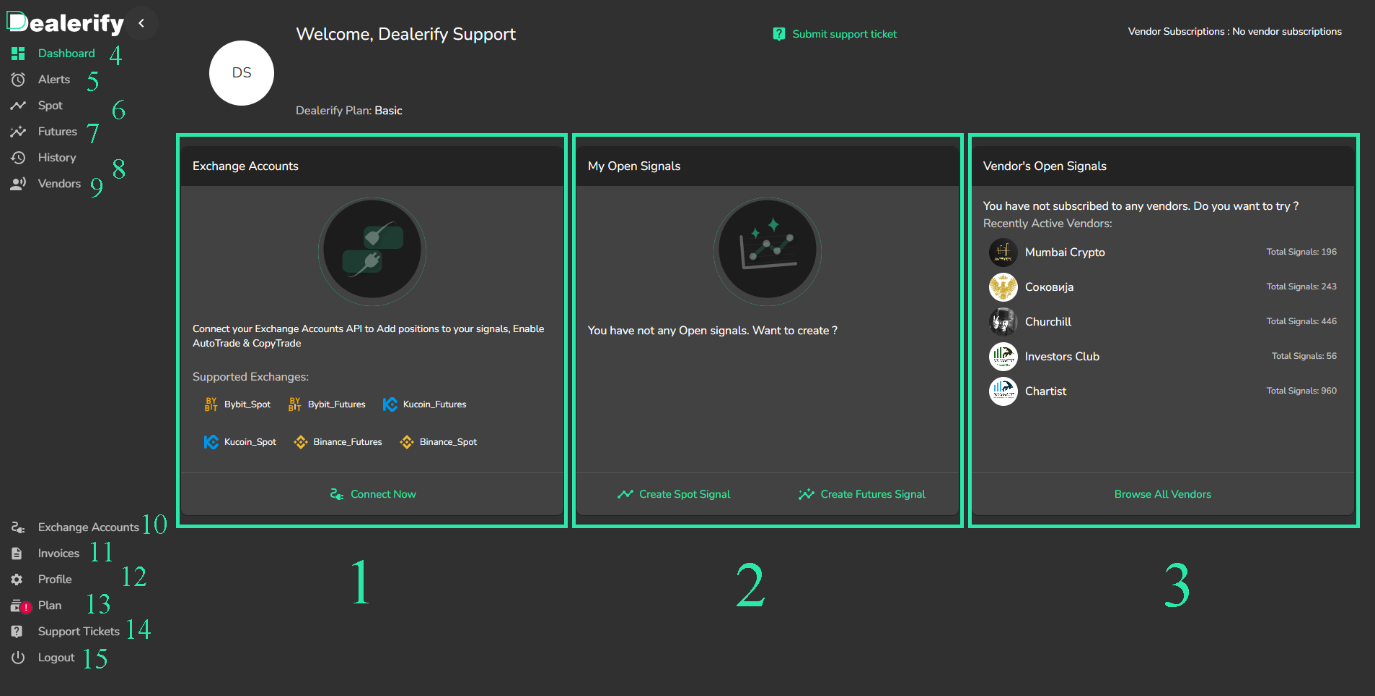 1. This part of the platform represents the accounts you have connected to the platform. You can see the connected accounts along with your balance in this section. 2. The My Open Signals section displays the game positions that you have traded, which can be spots or futures. It also shows the amount of interest you have paid and saved. 3. You have access to the vendors list through this section. 4. The Dashboard section shows you the home screen. 5. Using the Alert section, you can enter alerts for the desired pairs and their price conditions, and the system will notify you as soon as these conditions are reached. 6. Spot section shows you all of your spot positions, both those you traded yourself and those published by a vendor. 7. The futures section shows you futures signals. 8. The history section makes it possible to review a report of your past trades. 9. The vendors section shows you a list of people who provide signal services. 10. You can see all invoices you create and paid in Dealerify in this section. 11. The Exchange Account section allows you to add different accounts to this platform. 12. The profile shows your account information. You can use this option to get your invitation code. 13. This option indicates your Plan and informs you how much time is left until your plan expires. 14. You will be able to use the Support Ticket section to send tickets to the platform. 15. If you want to log out of your account on the platform, you can use the Logout section. Trade Spot on Dealerify platform 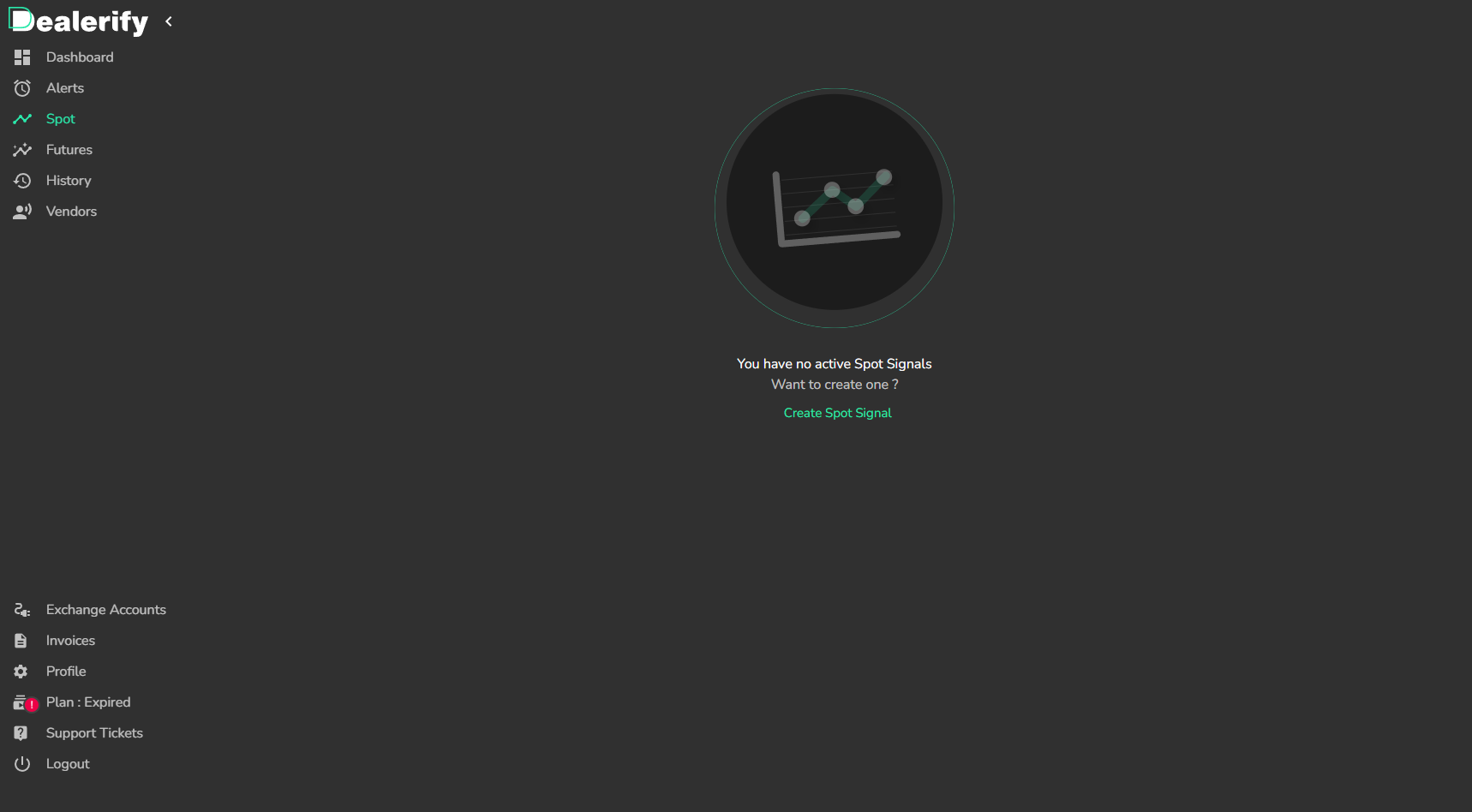 In this section, we will guide you to learn how to set up a spot order in Dealerify: Step 1: Go to the Spot section of your Dealerify account, click on "Create Signal" and select the exchange account you want to trade with. 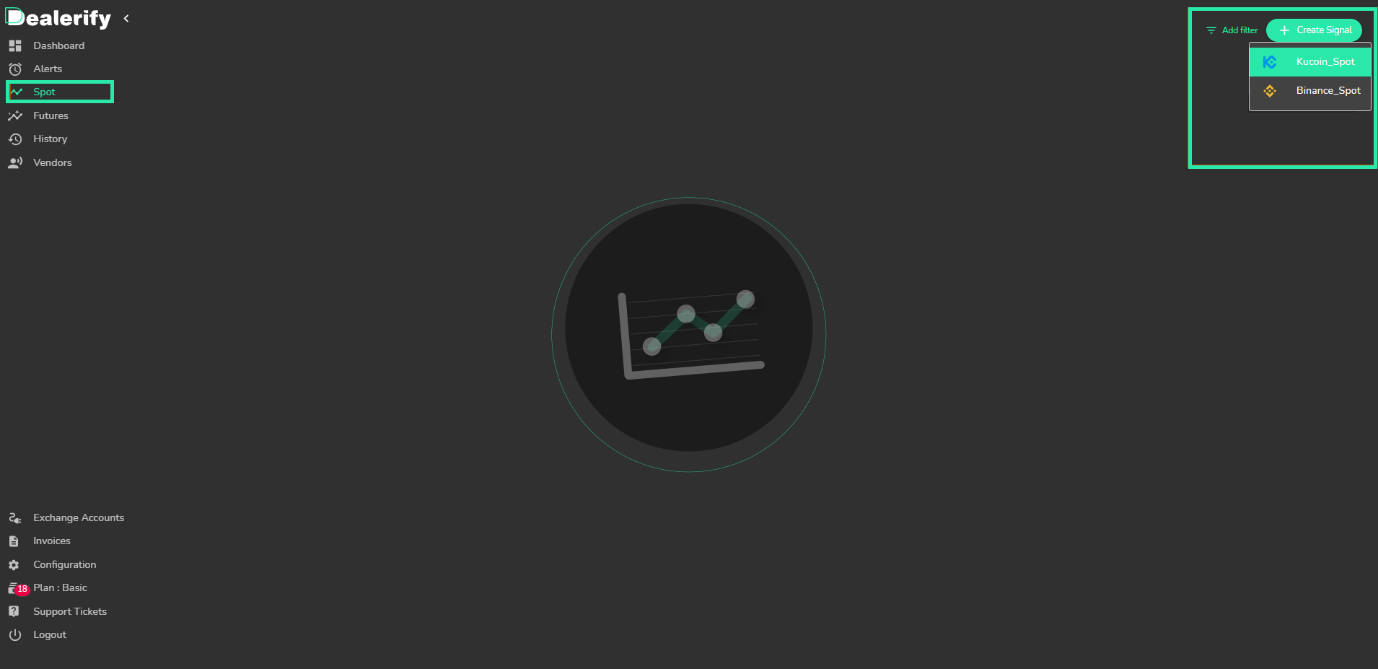 Step 2: In this step, you will see the trading chart and you can select the pair you want. You should also choose your short or long position for trading. 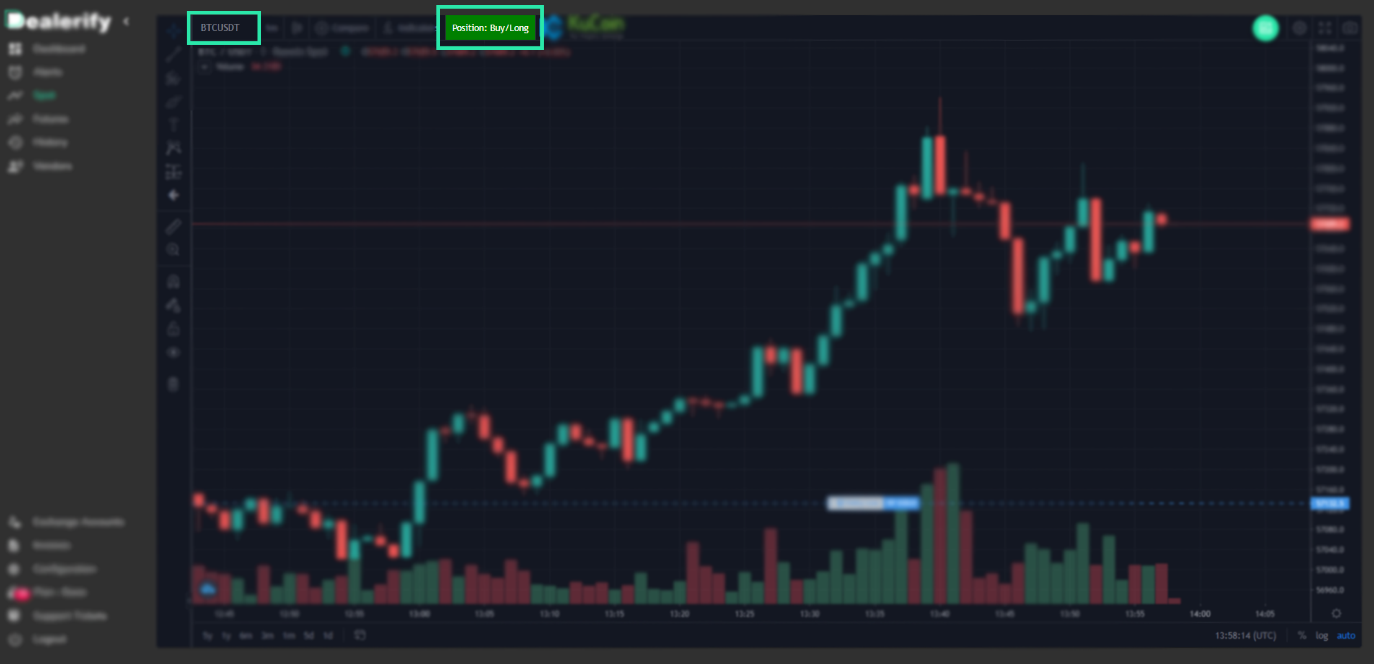 Step 3: Now you need to set your entry points, target points, and stop loss. 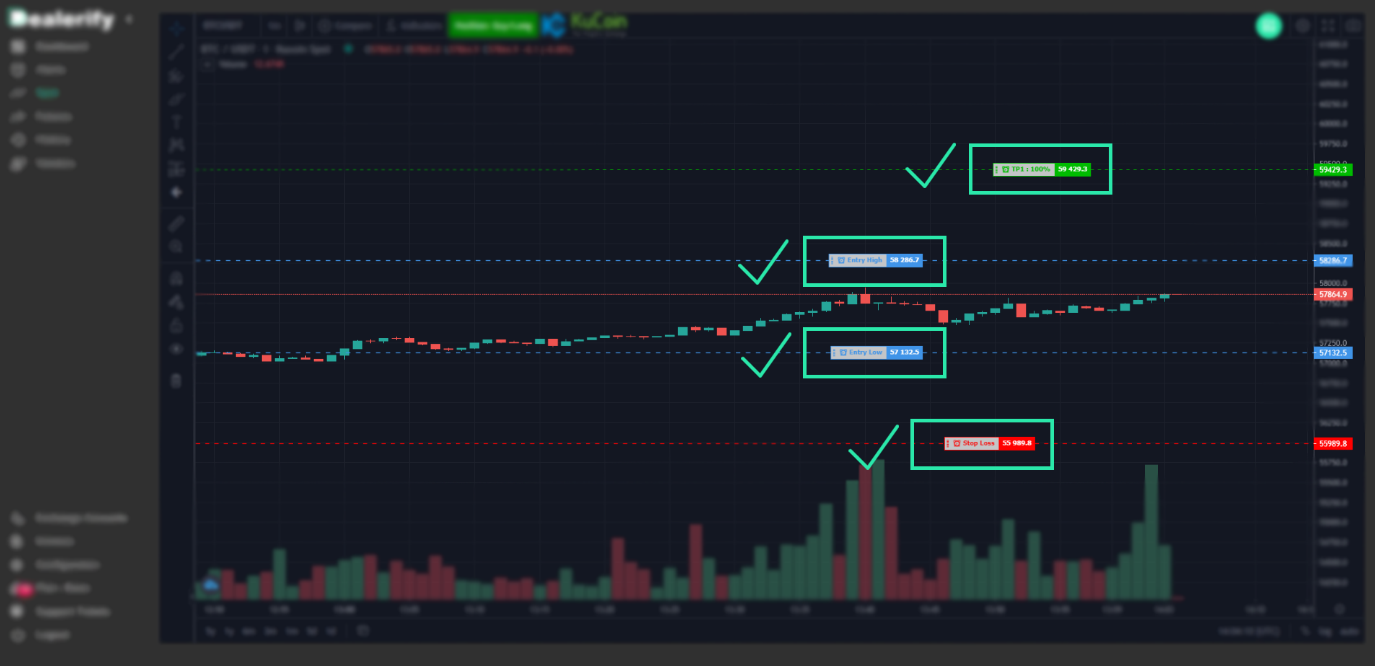 Step 4: If you want to add more target points you can do it through this item. 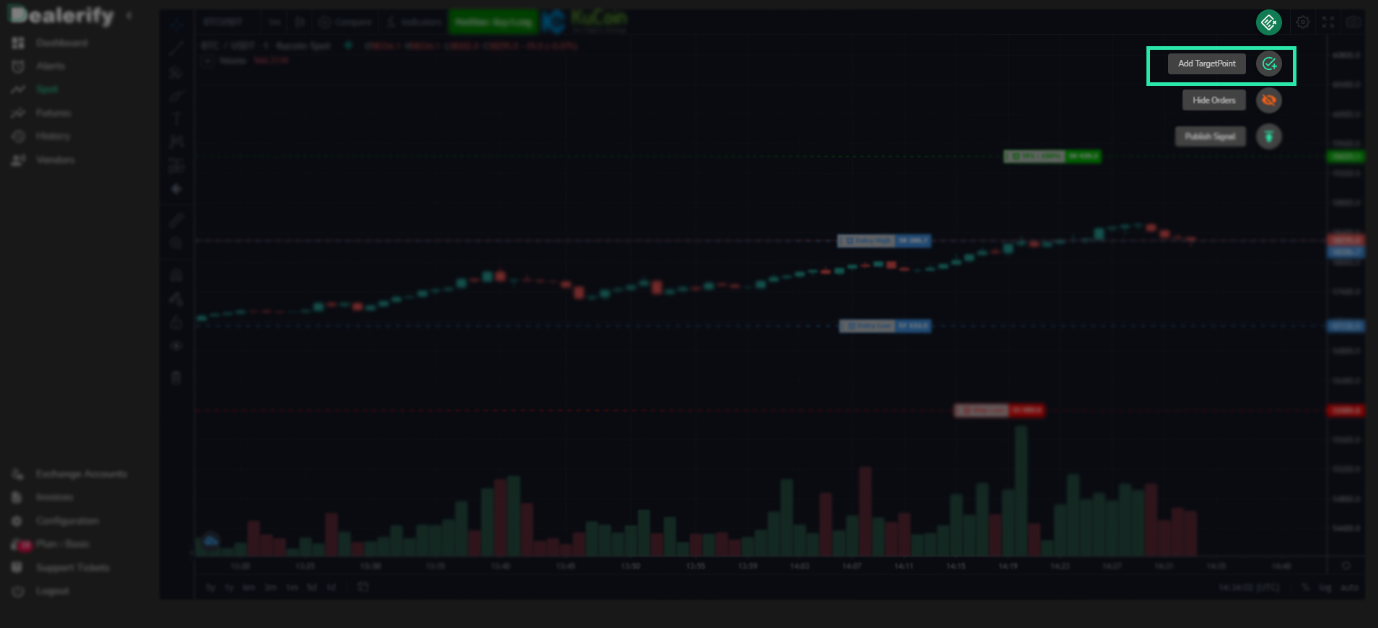 Step 5: Now you can publish your signal through this item. 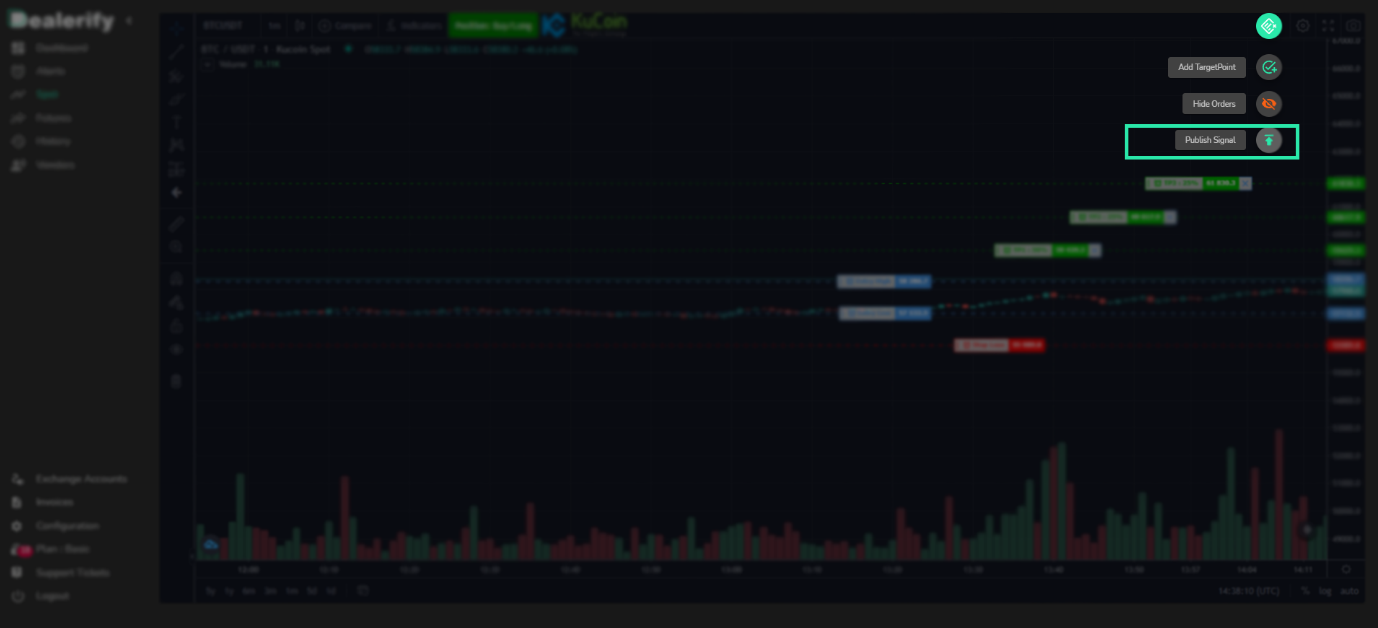 Step 6: You can change amount extraction in each target point here. 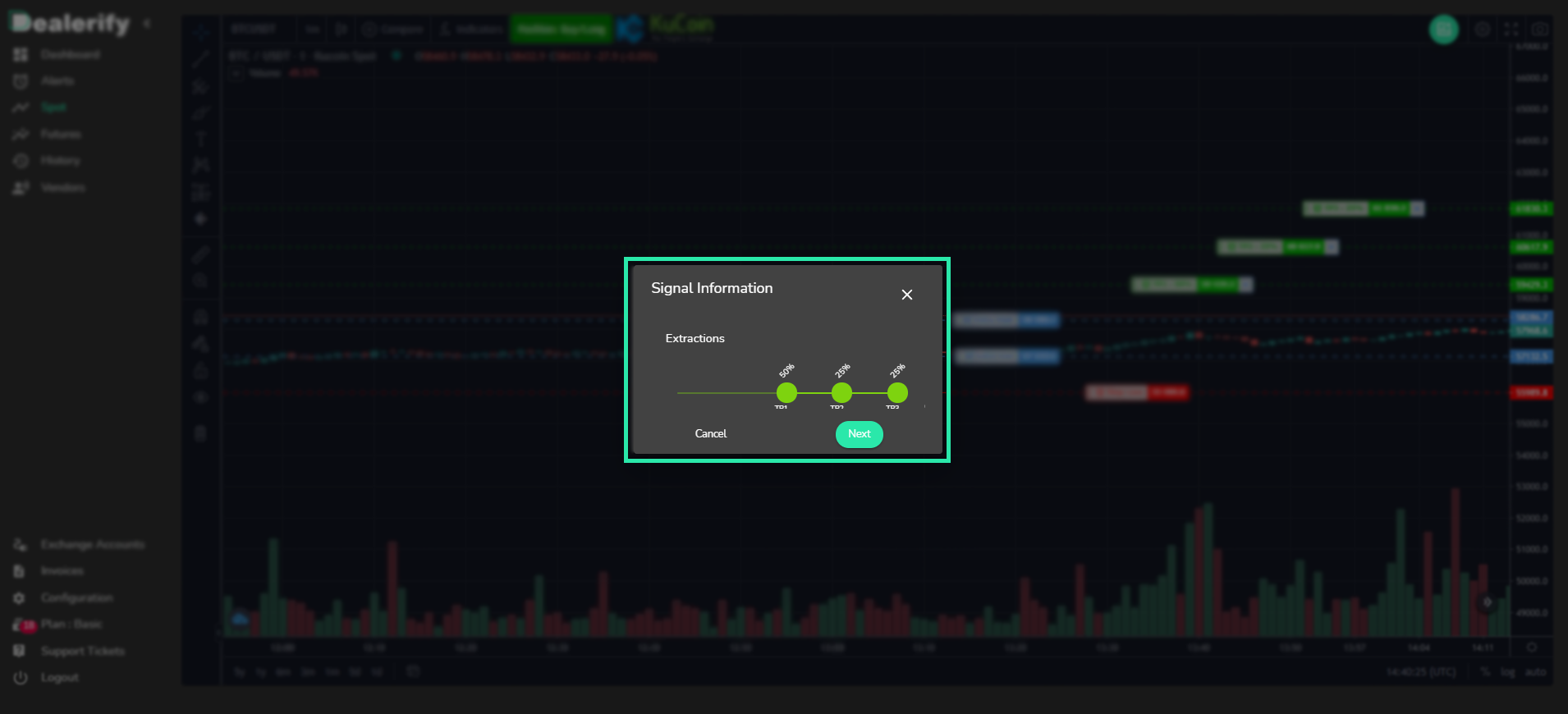 Step 7: In this part, you can see the profit and loss of your signal, please check it carefully and then add your exchange account and determine the trade percent. 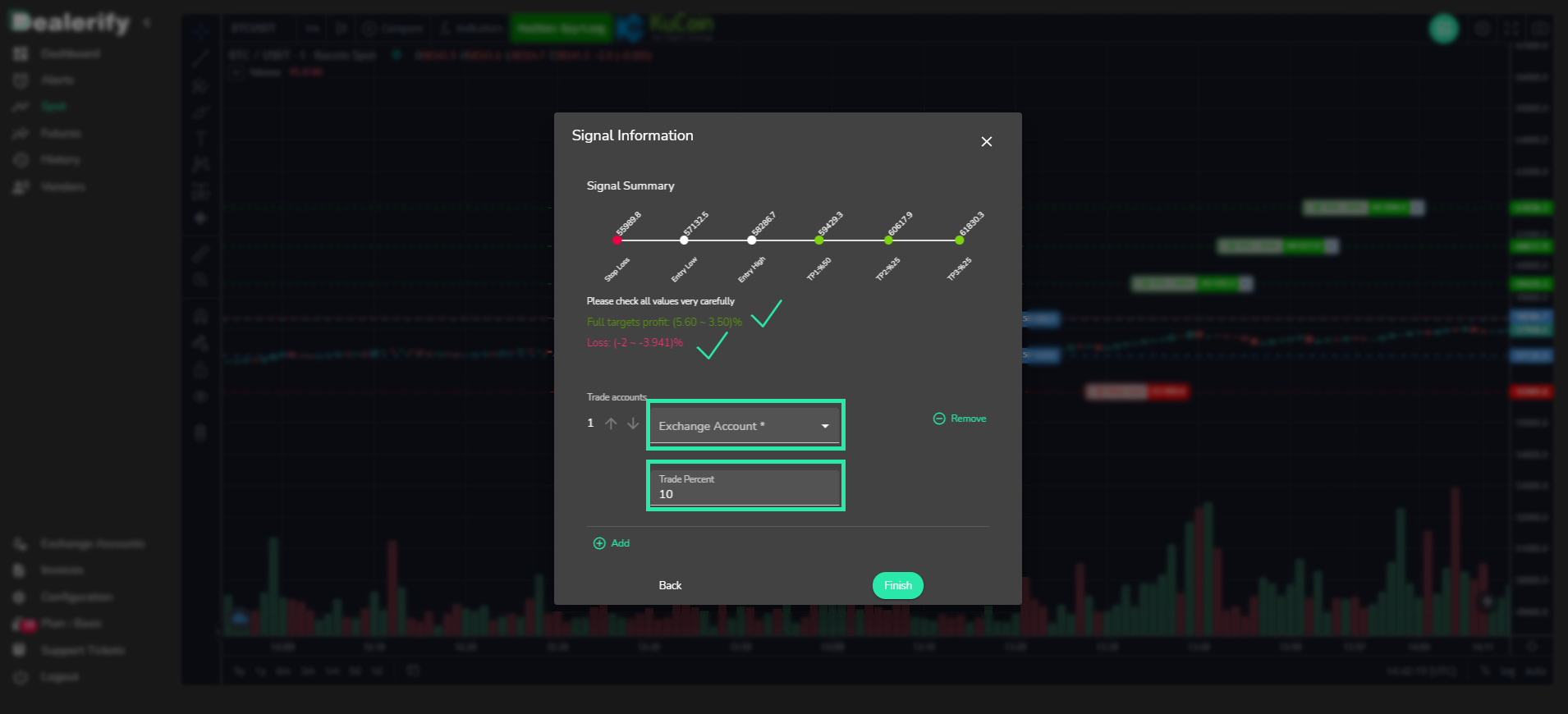 Trade Futures on the Dealerify platform 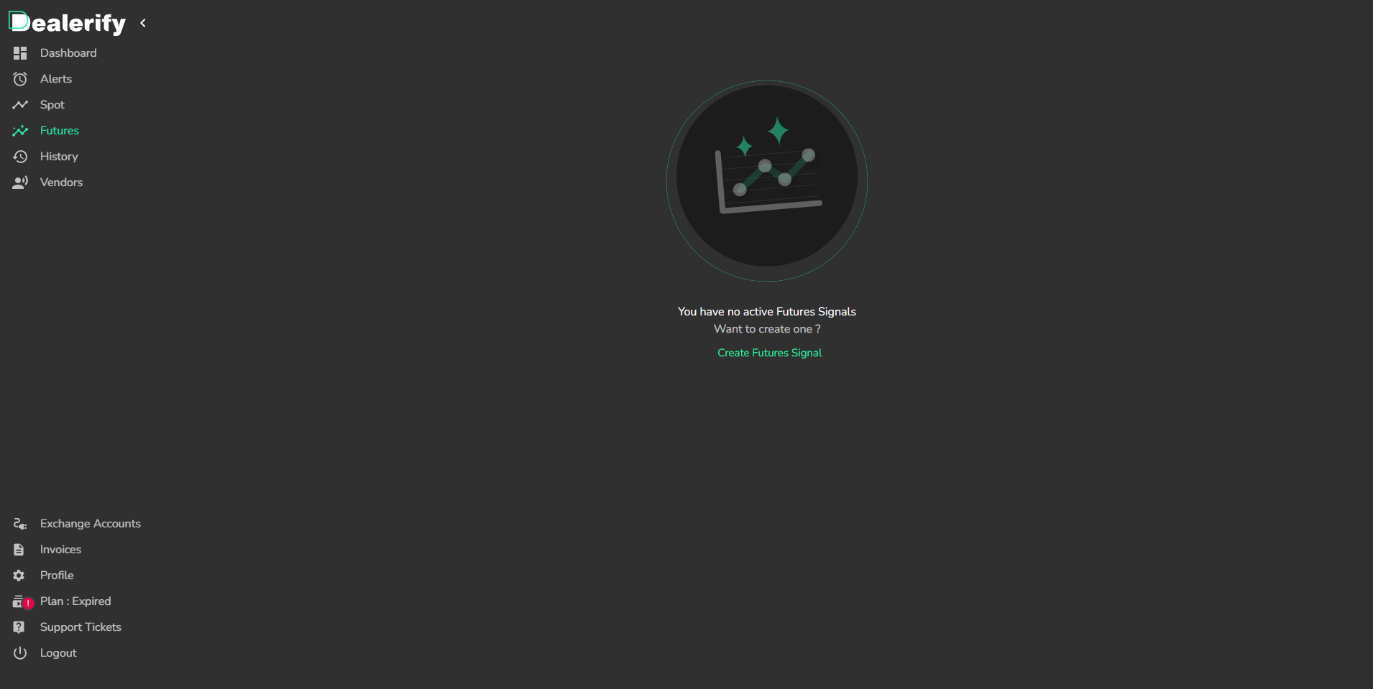 In this section, we introduce the steps that you can use to set up a futures order in Dealerify. Step 1: Go to the Futures section of your Dealerify account, click on Create Signal and select the exchange account you want to trade with. 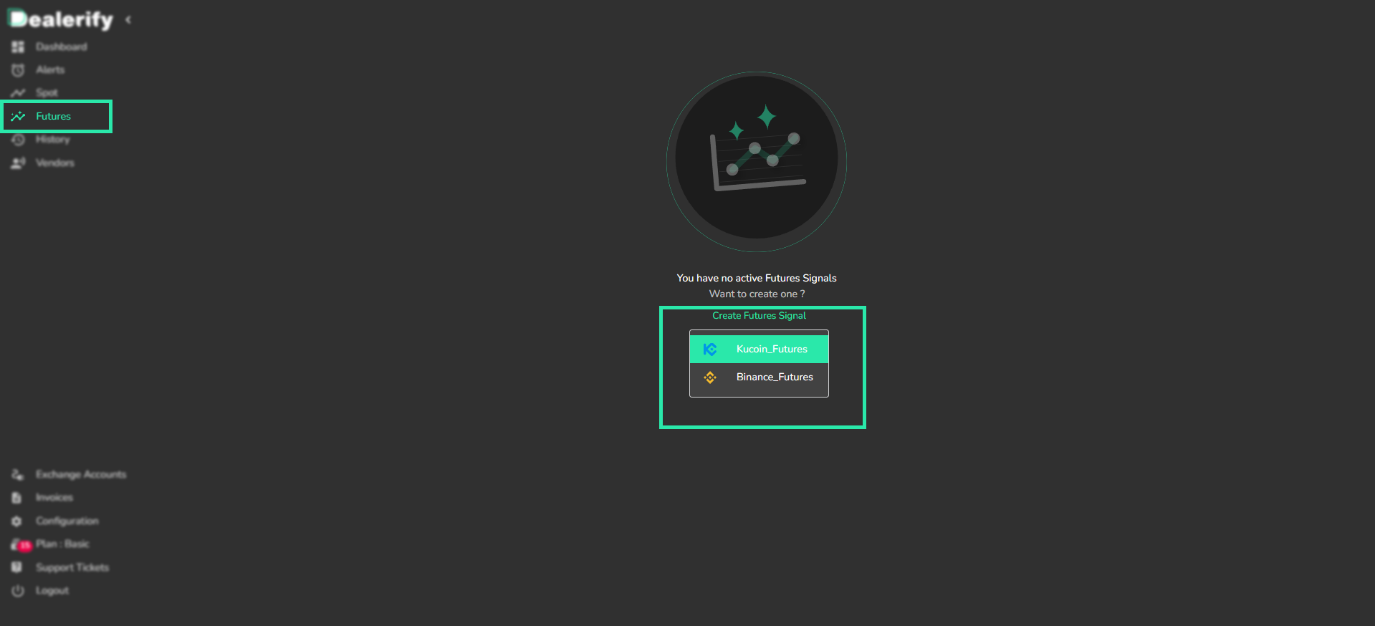 Step 2: In this step, you will see a trading chart and you can select the currency pair you want. You must also select a short or long position. 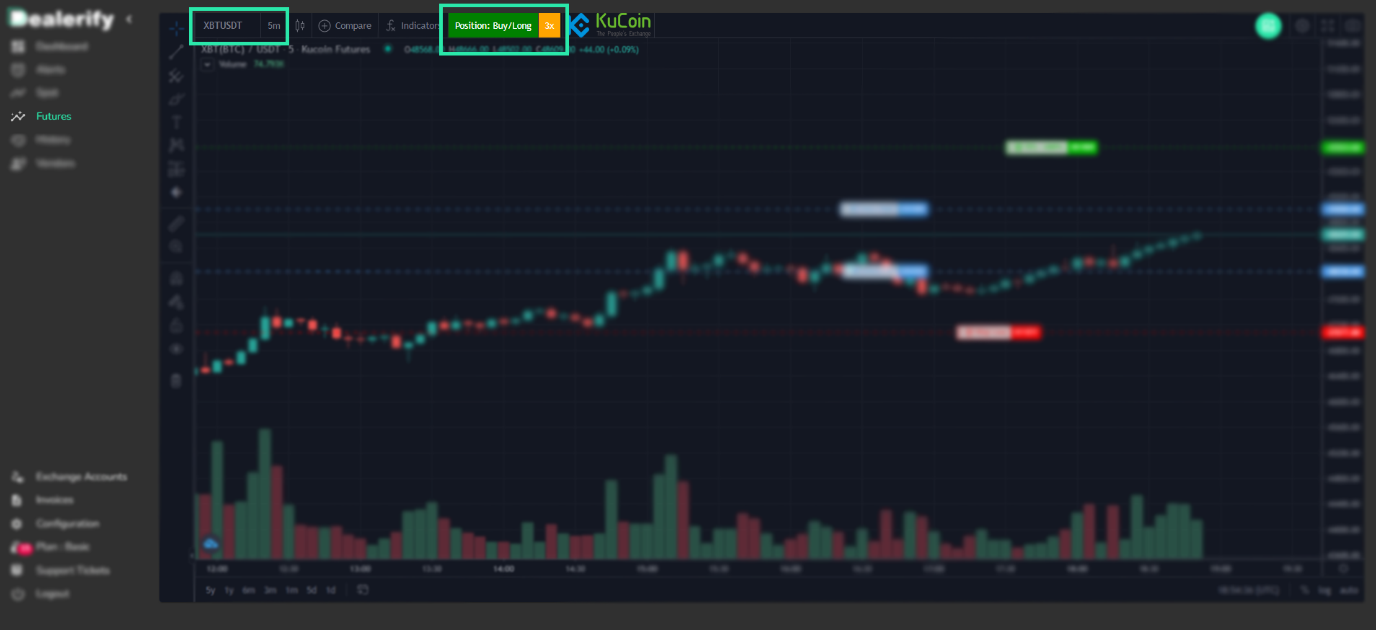 Step 3: Now you need to set your entry points, target points, and StopLoss. 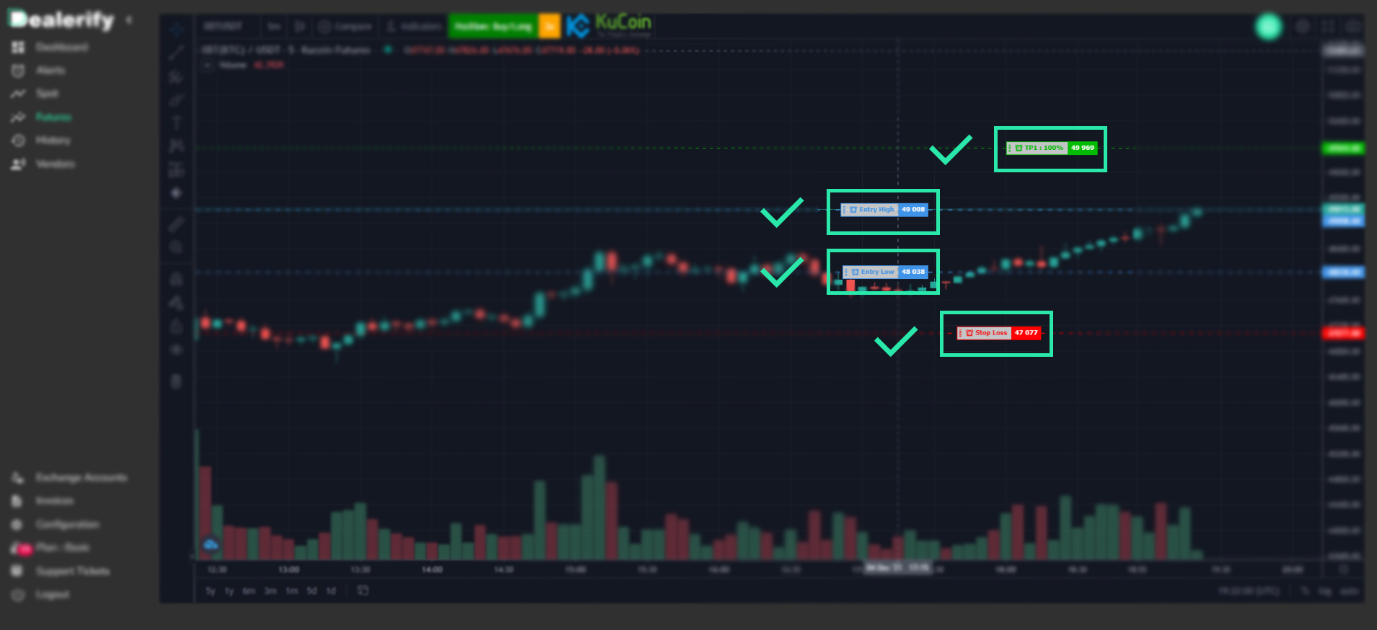 Step 4: You can add more target points using the option you see in the image below. 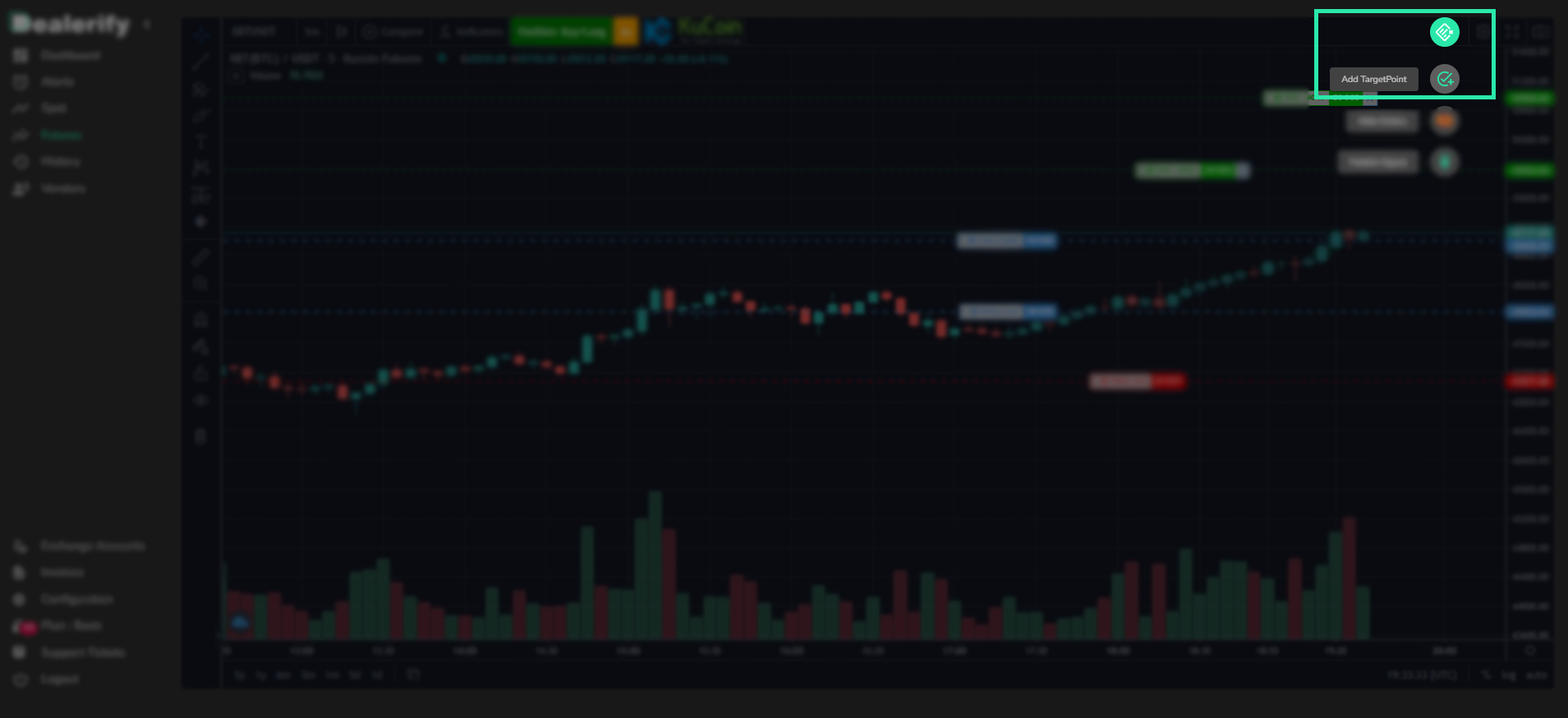 Step 5: You can publish your signal using the option we have specified in the image below. 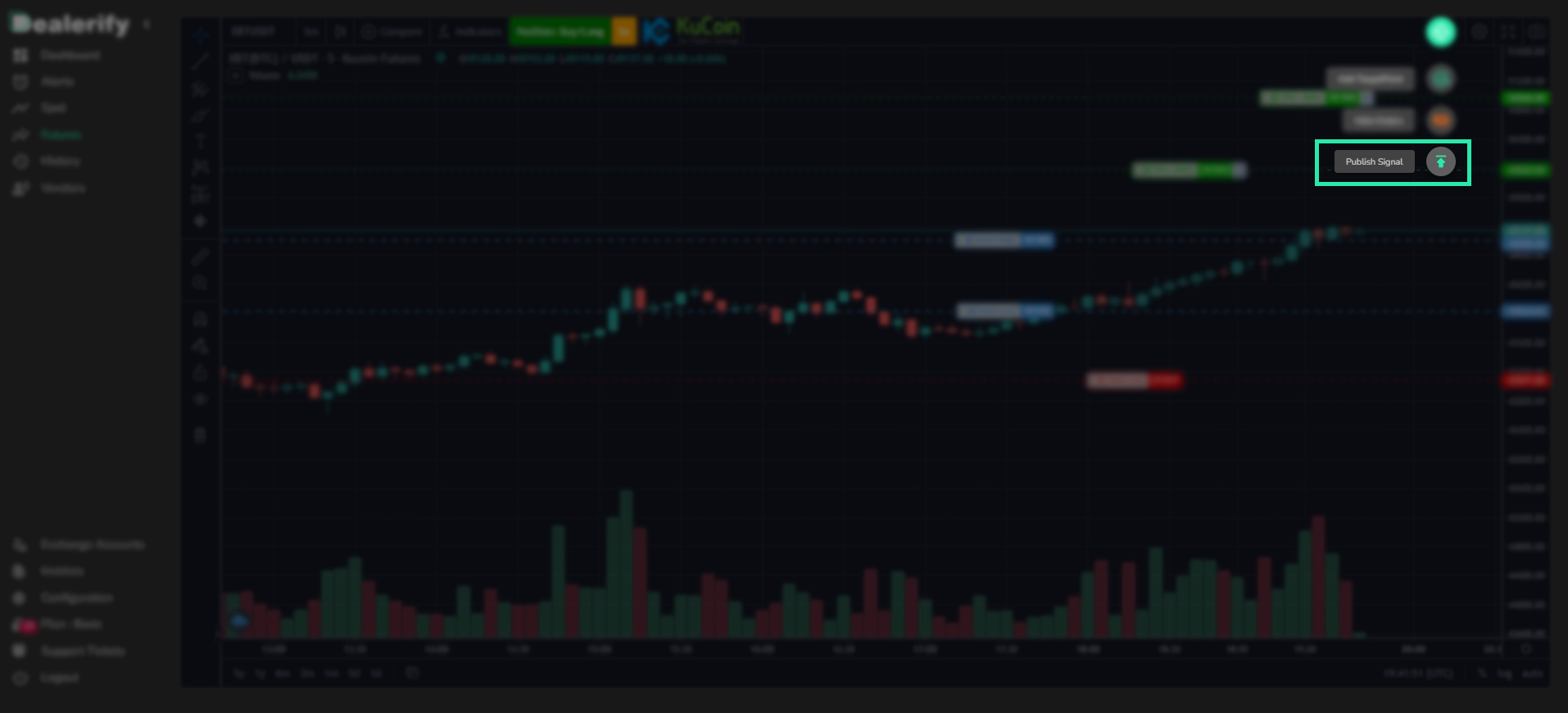 Step 6: You can adjust your leverage at this stage. You can also change the value anywhere on the target here. 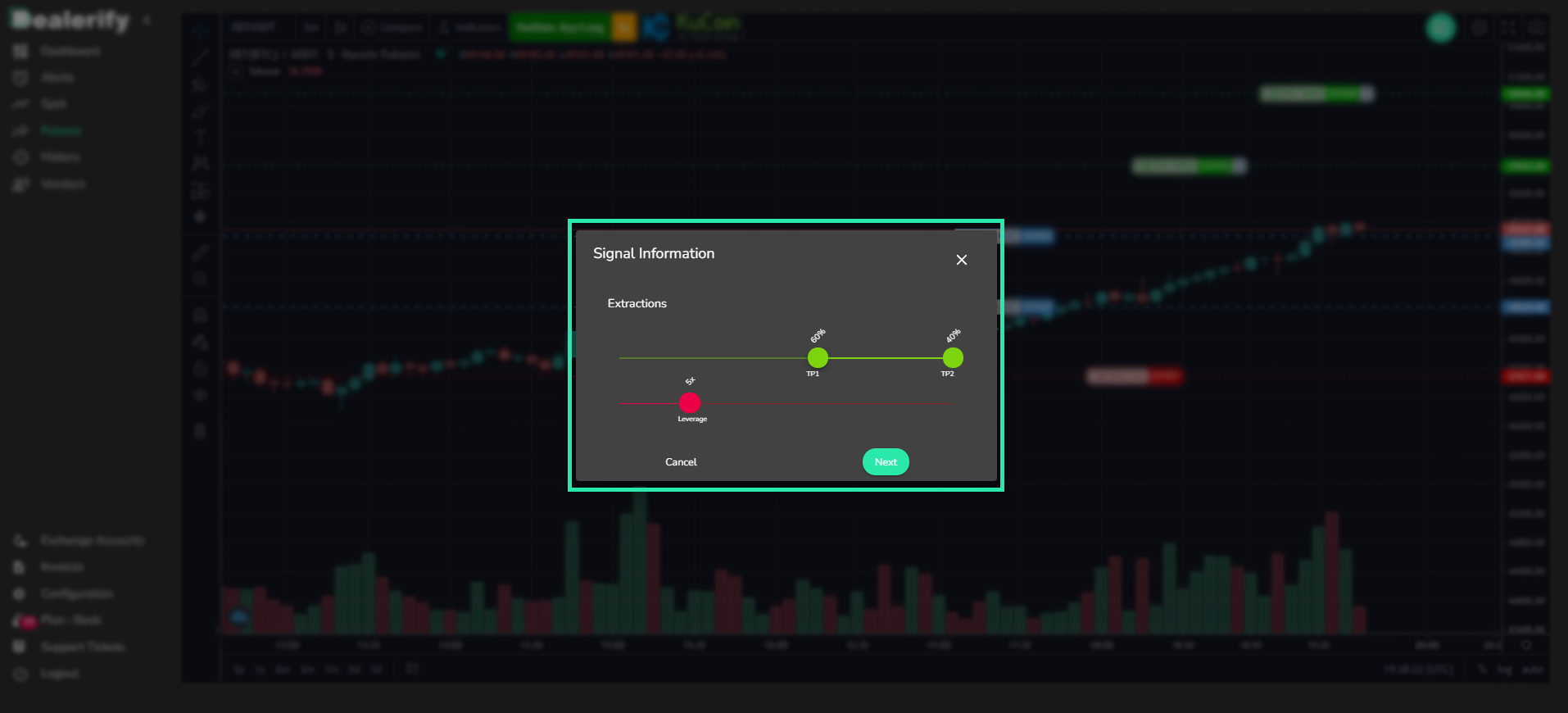 Step 7: In this section, you can see the profit and loss of your signal, check it carefully and then add your exchange account and determine the percentage of the amount you want to trade. 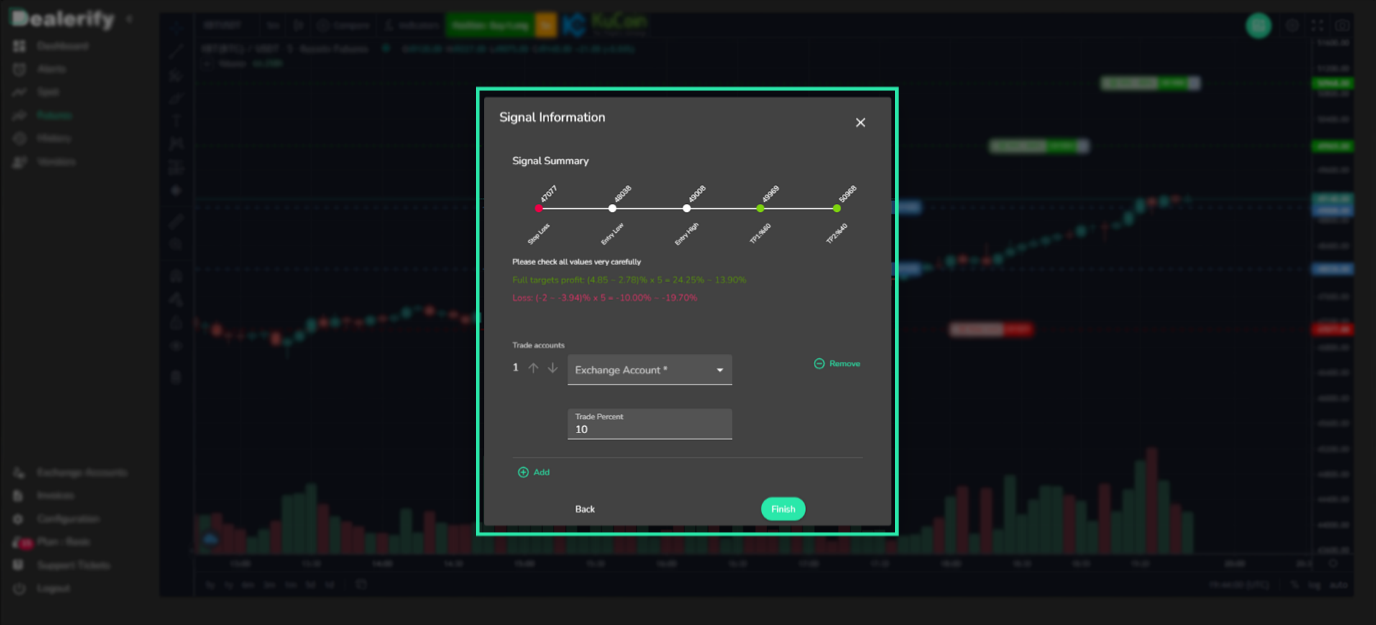 Conclusion By reading this article, you can get acquainted with the copy trading platform Dealerify. This platform offers various features to users and traders will be able to connect their accounts in Kucoin, Binance, and Bybit exchanges to this platform and trade. In this article, we have provided the necessary training on how to register, connect an account to the Dealerify platform, and how to trade on the platform. We hope you find this tutorial useful. |
| json metadata | {"image":["https://cdn.steemitimages.com/DQmaAy5fxpxzo4xeHvkqHMTmbiRZadpQ7adDoP8zpRxFGqR/banner2.png","https://cdn.steemitimages.com/DQmZRdDXMoeqdtmkdcHmHQeTCEQxw1e1isquJi18eFfxZ6f/1.png","https://cdn.steemitimages.com/DQmWQuVmtYeYSio2KKqBJFsJ3pTia5YL77MH4CJpPEqGSmx/2.png","https://cdn.steemitimages.com/DQmTuQY8QTf6SY5SujSgYrZTAYFuJXzMu9nbouDboMqLpDo/3.png","https://cdn.steemitimages.com/DQmQDNXVMnc5L8sqCcrvhqPkvf5Ntrph9J1AxYuW5psyLAu/4.png","https://cdn.steemitimages.com/DQmb1gqhEd2DoPuCQKehUvscWdEogw9V6dKJuKoUHkLg8Q4/5.png","https://cdn.steemitimages.com/DQmbjsmqZ8CHpCPZ7E7wbsMpbNVu6x1dkkrKWJWX2LiBvPy/6.png","https://cdn.steemitimages.com/DQmVp9p3ydNbZogmsquBq6GuQwys9Fz17BCw4fCWfgohsEm/7.png","https://cdn.steemitimages.com/DQmZy3dQfJiQXFsSyNpxe6TrVNYCb2JZUj9rMWwtLCH469j/8.png","https://cdn.steemitimages.com/DQmeAKY4zdknDnq9c8Y9BRW3oAadBr1AMkTh5jd1ju3hDHx/9.png","https://cdn.steemitimages.com/DQmNm3SKHVdx2U4Vdbej4eCASL5fHwkF6imxf43BmDkupX4/10.png","https://cdn.steemitimages.com/DQmUmDmTPSmZmuv64AUkVbz9nLaUz2o34KKcqJsinbHfj3j/11.png","https://cdn.steemitimages.com/DQmZWUtoyhRAJaSkskb8Suyk7jPN5hyMuovRgZ6zu8Y1kMD/12.png","https://cdn.steemitimages.com/DQmVfJZ2furR3NAJyFb4YyLTkBQZjcFvN6RWi6frRu9EGFL/13.png","https://cdn.steemitimages.com/DQmQZqC6P9BdSNzj1ZXWMyjWveveYNtWUqyxtzvHCYq4UDe/14.png","https://cdn.steemitimages.com/DQmPdY5VmSoczcYmS3Y9KosuVzhqfeiF44upyuMvw1RmTH1/15.png","https://cdn.steemitimages.com/DQmZLMr7kNpFteyxgBJ4FCYTYiek9u4PYNNDrrwhuyUpA92/16.png","https://cdn.steemitimages.com/DQmSCtxwvvNtkfeGUTsMnAnhm2yieTKtR6xbP4DRiV3BsoA/17.png","https://cdn.steemitimages.com/DQmere2EX6gJUae2gzQqhvVmTQmRTytafUEKF6Vr7EzQdiw/18.png","https://cdn.steemitimages.com/DQmP12NdH1d9GoJFwsxvYsnx6zAT25FrHrxjUyUJ3Wxbutk/19.png","https://cdn.steemitimages.com/DQmcphVdieSP9zs6gMEzEAnoYBQvsrWNDLQovbupXX9dYoq/20.png"],"app":"steemit/0.2","format":"markdown"} |
| Transaction Info | Block #62130423/Trx 5c949555b84d783196af1a710284eed0b473dc4d |
View Raw JSON Data
{
"trx_id": "5c949555b84d783196af1a710284eed0b473dc4d",
"block": 62130423,
"trx_in_block": 6,
"op_in_trx": 0,
"virtual_op": 0,
"timestamp": "2022-03-04T15:11:54",
"op": [
"comment",
{
"parent_author": "",
"parent_permlink": "crypto",
"author": "samlung",
"permlink": "dealerify-copy-trading-platform-or-dealerify-complete-guide",
"title": "Dealerify copy trading platform| Dealerify complete guide",
"body": "How to trade on the Dealerify platform?\n\n\n\nNowadays, the global community is increasingly supporting the cryptocurrency world to decentralize the financial market and, consequently, the business and governance. Dealerify team’s years of experience in training and trading have helped analyze these problems and identify areas for improvement. This growing market has slower maturity in services and products. But Dealerify has many plans to increase the penetration rate of the cryptocurrency trading market.\nIn this article, we will introduce and teach you how to work with one of the best platforms for copy-trading, Dealerify. Dealerify offers a very diverse and significant service to users that can be useful for any level of trading.\n \nIntroducing the features of the Dealerify platform\n\n\n\nDealerify is a professional and easy trading platform that is used to develop the cryptocurrency trading industry and intends to help all traders in the world of cryptocurrencies by providing various and attractive services in this field. In this part, we will introduce the features of the Dealerify trading platform. These features include the following:\n- An important feature of Dealerify is that it transforms the entire trading space full of numbers into a coordinated space. You can view your positions on a page and make any decision you want for each of them as soon as possible.\n- Dealerify has provided free facilities for all its users for 7 days at the beginning of entering this platform, so they can get acquainted with the platform conditions and its features and benefits at no cost. You can easily test this platform and it will help you to make the best choice.\n- Automated trading is one of the useful tools and features of this platform that is suitable for beginners. Using this tool, you can easily use signals and strategies of professional traders called \"Vendor\" in Dealerify.\n- One of the best features of Dealerify for professional traders is the ability to trade and manage 20 user accounts simultaneously with access to one account instead of several accounts in a very simple and practical space. This is actually a very useful feature for people who want to manage multiple accounts.\n- According to the plan you have in Dealerify, you can connect another account to your account and manage them. In Basic Plan, you can connect 2 accounts to your account. In Pro Plan, you can add up to 10 accounts and in Portfolio Plan you are allowed to connect up to 20 accounts.\n- For the safety and convenience of its users, this platform has no access to your exchange account or wallet, and you only connect your exchange API to the platform, so you can trade safely and make sure your capital is safe in the exchange.\n- Another great feature of Dealerify is that you can set the minimum and maximum capital you want to invest in each position. This is an advantage that makes you more flexible in managing your assets.\n-Alert helps you to be sharp in the market. In the world of trading, you have to constantly monitor the market so that you can have good currencies with reasonable entry prices. But this is not always possible and you can not check all the cryptocurrencies you have in mind in the long run it is quite clear that this is very time-consuming. But in Dealerify, it is possible for you to enter the desired pairs and their price conditions with the help of the Alert feature, and the Dealerify smart platform will inform you as soon as these conditions are reached.\n- You can see the balance of all your exchange accounts updated on the Dealerify platform. This access is available to all accounts connected to the platform. Your Spot and Futures account balances are updated individually and continuously.\n \nIntroducing the goals of the Dealerify platform\nDealerify copy-trading platform intends to make trading in the world of digital currencies enjoyable and profitable for all individuals and traders at any level.\nWe will introduce some of these features in the following:\n•\tKeep it as simple as possible for increasing life quality for all.\n•\tHaving the most access to exchange offices during a year.\n•\tReach 500,000 MAU in the next 5 years.\n•\tFifty headquarters in 50 major cities over the next 5 years.\n \nDealerify platform registration:\n\n\n\nTo use the Dealerify platform, you must first register. Registration on this platform is done using a mobile number. If you want to register the Dealerify, you can follow the steps below:\n1.\tFirst, enter the main page of this exchange using the Dealerify.io address. And select the \"Register\" option to register.\nNote: If you have already registered on this platform, you can click on the \"Login\" option and log in to your account after entering the password.\n\n\n\n2.\tIn this step, you must select your country and enter your mobile phone number. Then click on \"Send Verification Code\".\n3.\tAfter entering your mobile number, you must enter the code sent via SMS in this step. Finally, select the \"Confirm\" option.\n4.\tHere you must enter the requested information such as first name, last name, email, password, and referral code. You must select a password for yourself and repeat it in the fifth field. After completing the information, click on the Register option.\nNote: It should be noted that you must have an invitation code to register. Referral Code is the same as the referral code. You can use the code 88831453.\n5. After completing the information and selecting the Register option, you will see a message indicating that your registration has been completed successfully. Click on \"Login\" to enter the platform.\nAfter completing the registration process, you must confirm your entered email. In this step, click on the \"Send Verification Email\" option.\nEnter the code sent to your email in the box provided. Finally, select the \"Confirm\" option to confirm and your email will be easily verified.\n \nIntroducing different parts of Dealerify platform\nAfter registering on the Dealerify platform, you can get acquainted with its different sections in this part of the article. In the image below, we will number each section and introduce each one:\n\n\n\n1.\tThis part of the platform represents the accounts you have connected to the platform. You can see the connected accounts along with your balance in this section.\n2.\tThe My Open Signals section displays the game positions that you have traded, which can be spots or futures. It also shows the amount of interest you have paid and saved.\n3.\tYou have access to the vendors list through this section.\n4.\tThe Dashboard section shows you the home screen.\n5.\tUsing the Alert section, you can enter alerts for the desired pairs and their price conditions, and the system will notify you as soon as these conditions are reached.\n6.\tSpot section shows you all of your spot positions, both those you traded yourself and those published by a vendor.\n7.\tThe futures section shows you futures signals.\n8.\tThe history section makes it possible to review a report of your past trades.\n9.\tThe vendors section shows you a list of people who provide signal services.\n10.\tYou can see all invoices you create and paid in Dealerify in this section.\n11.\tThe Exchange Account section allows you to add different accounts to this platform.\n12.\tThe profile shows your account information. You can use this option to get your invitation code.\n13.\tThis option indicates your Plan and informs you how much time is left until your plan expires.\n14.\tYou will be able to use the Support Ticket section to send tickets to the platform.\n15.\tIf you want to log out of your account on the platform, you can use the Logout section.\n \nTrade Spot on Dealerify platform\n \n\n\n \nIn this section, we will guide you to learn how to set up a spot order in Dealerify:\nStep 1: Go to the Spot section of your Dealerify account, click on \"Create Signal\" and select the exchange account you want to trade with.\n\n\n\n \nStep 2: In this step, you will see the trading chart and you can select the pair you want. You should also choose your short or long position for trading.\n\n\n\n \nStep 3: Now you need to set your entry points, target points, and stop loss.\n\n\n\n\n \nStep 4: If you want to add more target points you can do it through this item.\n\n\n \nStep 5: Now you can publish your signal through this item.\n\n\n\nStep 6: You can change amount extraction in each target point here.\n\n\n\n\n \nStep 7: In this part, you can see the profit and loss of your signal, please check it carefully and then add your exchange account and determine the trade percent.\n\n\n\n\n\n \nTrade Futures on the Dealerify platform\n\n\n\n\nIn this section, we introduce the steps that you can use to set up a futures order in Dealerify.\nStep 1: Go to the Futures section of your Dealerify account, click on Create Signal and select the exchange account you want to trade with.\n\n\n\n\n\n \nStep 2: In this step, you will see a trading chart and you can select the currency pair you want. You must also select a short or long position.\n\n\n\n \nStep 3: Now you need to set your entry points, target points, and StopLoss.\n\n\n\n\n \nStep 4: You can add more target points using the option you see in the image below.\n\n\n\n\n \nStep 5: You can publish your signal using the option we have specified in the image below.\n\n\n\n\n \nStep 6: You can adjust your leverage at this stage. You can also change the value anywhere on the target here.\n\n\n \nStep 7: In this section, you can see the profit and loss of your signal, check it carefully and then add your exchange account and determine the percentage of the amount you want to trade.\n\n\n \nConclusion\nBy reading this article, you can get acquainted with the copy trading platform Dealerify. This platform offers various features to users and traders will be able to connect their accounts in Kucoin, Binance, and Bybit exchanges to this platform and trade. In this article, we have provided the necessary training on how to register, connect an account to the Dealerify platform, and how to trade on the platform. We hope you find this tutorial useful.",
"json_metadata": "{\"image\":[\"https://cdn.steemitimages.com/DQmaAy5fxpxzo4xeHvkqHMTmbiRZadpQ7adDoP8zpRxFGqR/banner2.png\",\"https://cdn.steemitimages.com/DQmZRdDXMoeqdtmkdcHmHQeTCEQxw1e1isquJi18eFfxZ6f/1.png\",\"https://cdn.steemitimages.com/DQmWQuVmtYeYSio2KKqBJFsJ3pTia5YL77MH4CJpPEqGSmx/2.png\",\"https://cdn.steemitimages.com/DQmTuQY8QTf6SY5SujSgYrZTAYFuJXzMu9nbouDboMqLpDo/3.png\",\"https://cdn.steemitimages.com/DQmQDNXVMnc5L8sqCcrvhqPkvf5Ntrph9J1AxYuW5psyLAu/4.png\",\"https://cdn.steemitimages.com/DQmb1gqhEd2DoPuCQKehUvscWdEogw9V6dKJuKoUHkLg8Q4/5.png\",\"https://cdn.steemitimages.com/DQmbjsmqZ8CHpCPZ7E7wbsMpbNVu6x1dkkrKWJWX2LiBvPy/6.png\",\"https://cdn.steemitimages.com/DQmVp9p3ydNbZogmsquBq6GuQwys9Fz17BCw4fCWfgohsEm/7.png\",\"https://cdn.steemitimages.com/DQmZy3dQfJiQXFsSyNpxe6TrVNYCb2JZUj9rMWwtLCH469j/8.png\",\"https://cdn.steemitimages.com/DQmeAKY4zdknDnq9c8Y9BRW3oAadBr1AMkTh5jd1ju3hDHx/9.png\",\"https://cdn.steemitimages.com/DQmNm3SKHVdx2U4Vdbej4eCASL5fHwkF6imxf43BmDkupX4/10.png\",\"https://cdn.steemitimages.com/DQmUmDmTPSmZmuv64AUkVbz9nLaUz2o34KKcqJsinbHfj3j/11.png\",\"https://cdn.steemitimages.com/DQmZWUtoyhRAJaSkskb8Suyk7jPN5hyMuovRgZ6zu8Y1kMD/12.png\",\"https://cdn.steemitimages.com/DQmVfJZ2furR3NAJyFb4YyLTkBQZjcFvN6RWi6frRu9EGFL/13.png\",\"https://cdn.steemitimages.com/DQmQZqC6P9BdSNzj1ZXWMyjWveveYNtWUqyxtzvHCYq4UDe/14.png\",\"https://cdn.steemitimages.com/DQmPdY5VmSoczcYmS3Y9KosuVzhqfeiF44upyuMvw1RmTH1/15.png\",\"https://cdn.steemitimages.com/DQmZLMr7kNpFteyxgBJ4FCYTYiek9u4PYNNDrrwhuyUpA92/16.png\",\"https://cdn.steemitimages.com/DQmSCtxwvvNtkfeGUTsMnAnhm2yieTKtR6xbP4DRiV3BsoA/17.png\",\"https://cdn.steemitimages.com/DQmere2EX6gJUae2gzQqhvVmTQmRTytafUEKF6Vr7EzQdiw/18.png\",\"https://cdn.steemitimages.com/DQmP12NdH1d9GoJFwsxvYsnx6zAT25FrHrxjUyUJ3Wxbutk/19.png\",\"https://cdn.steemitimages.com/DQmcphVdieSP9zs6gMEzEAnoYBQvsrWNDLQovbupXX9dYoq/20.png\"],\"app\":\"steemit/0.2\",\"format\":\"markdown\"}"
}
]
}virsfievflagged (-100.00%) @samlung / dealerify-copy-trading-platform-or-dealerify-complete-guide2022/02/28 20:27:24
virsfievflagged (-100.00%) @samlung / dealerify-copy-trading-platform-or-dealerify-complete-guide
2022/02/28 20:27:24
| voter | virsfiev |
| author | samlung |
| permlink | dealerify-copy-trading-platform-or-dealerify-complete-guide |
| weight | -10000 (-100.00%) |
| Transaction Info | Block #62022070/Trx b2520a2581fabb377589de582c2023e8105ced9b |
View Raw JSON Data
{
  "trx_id": "b2520a2581fabb377589de582c2023e8105ced9b",
  "block": 62022070,
  "trx_in_block": 2,
  "op_in_trx": 0,
  "virtual_op": 0,
  "timestamp": "2022-02-28T20:27:24",
  "op": [
    "vote",
    {
      "voter": "virsfiev",
      "author": "samlung",
      "permlink": "dealerify-copy-trading-platform-or-dealerify-complete-guide",
      "weight": -10000
    }
  ]
}inertiaupvoted (100.00%) @samlung / dealerify-copy-trading-platform-or-dealerify-complete-guide2022/02/27 19:04:42
inertiaupvoted (100.00%) @samlung / dealerify-copy-trading-platform-or-dealerify-complete-guide
2022/02/27 19:04:42
| voter | inertia |
| author | samlung |
| permlink | dealerify-copy-trading-platform-or-dealerify-complete-guide |
| weight | 10000 (100.00%) |
| Transaction Info | Block #61991768/Trx 7787f556a312b0b5f4e25e6e4d95f8809c1ee8ce |
View Raw JSON Data
{
  "trx_id": "7787f556a312b0b5f4e25e6e4d95f8809c1ee8ce",
  "block": 61991768,
  "trx_in_block": 3,
  "op_in_trx": 0,
  "virtual_op": 0,
  "timestamp": "2022-02-27T19:04:42",
  "op": [
    "vote",
    {
      "voter": "inertia",
      "author": "samlung",
      "permlink": "dealerify-copy-trading-platform-or-dealerify-complete-guide",
      "weight": 10000
    }
  ]
}2022/02/27 18:49:51
2022/02/27 18:49:51
| voter | samlung |
| author | steem.history |
| permlink | re-samlung-dealerify-copy-trading-platform-or-dealerify-complete-guide-20220227t184848674z |
| weight | 10000 (100.00%) |
| Transaction Info | Block #61991471/Trx a48cde606285d681efe0f9fd02eb9758b93994da |
View Raw JSON Data
{
  "trx_id": "a48cde606285d681efe0f9fd02eb9758b93994da",
  "block": 61991471,
  "trx_in_block": 1,
  "op_in_trx": 0,
  "virtual_op": 0,
  "timestamp": "2022-02-27T18:49:51",
  "op": [
    "vote",
    {
      "voter": "samlung",
      "author": "steem.history",
      "permlink": "re-samlung-dealerify-copy-trading-platform-or-dealerify-complete-guide-20220227t184848674z",
      "weight": 10000
    }
  ]
}steem.historyupvoted (10.00%) @samlung / dealerify-copy-trading-platform-or-dealerify-complete-guide2022/02/27 18:48:51
steem.historyupvoted (10.00%) @samlung / dealerify-copy-trading-platform-or-dealerify-complete-guide
2022/02/27 18:48:51
| voter | steem.history |
| author | samlung |
| permlink | dealerify-copy-trading-platform-or-dealerify-complete-guide |
| weight | 1000 (10.00%) |
| Transaction Info | Block #61991451/Trx ed70708daa647c0a957e9ef2f82603ec5d39de35 |
View Raw JSON Data
{
  "trx_id": "ed70708daa647c0a957e9ef2f82603ec5d39de35",
  "block": 61991451,
  "trx_in_block": 4,
  "op_in_trx": 0,
  "virtual_op": 0,
  "timestamp": "2022-02-27T18:48:51",
  "op": [
    "vote",
    {
      "voter": "steem.history",
      "author": "samlung",
      "permlink": "dealerify-copy-trading-platform-or-dealerify-complete-guide",
      "weight": 1000
    }
  ]
}2022/02/27 18:48:48
2022/02/27 18:48:48
| parent author | samlung |
| parent permlink | dealerify-copy-trading-platform-or-dealerify-complete-guide |
| author | steem.history |
| permlink | re-samlung-dealerify-copy-trading-platform-or-dealerify-complete-guide-20220227t184848674z |
| title | |
| body | Hello welcome to Steemit world! I'm @steem.history, who is steem witness. This is a recommended post for you.[Newcomers Guide](https://steemitdev.com/guide/@steemitblog/steemit-a-guide-for-newcomers) and [The Complete Steemit Etiquette Guide (Revision 2.0)](https://steemit.com/steem/@steem.history/the-complete-steemit-etiquette-guide-revision-20-homage-1598425779) and, recommended community [Newcomers Community](https://steemit.com/trending/hive-172186) I wish you luck to your steemit activities.<center> https://cdn.steemitimages.com/DQmXHwdcNs5VPcBft1iSosPdHLpBNBfjuG84g3ffWhMw5JQ/image.png <sub>(The bots avatar has been created using https://robohash.org/)</sub> @steem.history ### My witness activity - [My aspiration for STEEM witness](https://steemit.com/hive-185836/@steem.history/my-aspiration-for-steem-witness-1601280729) - Provides information on Steem. [Reference](https://steemit.com/trending/hive-130095) - Supporting the Steem project. [SPUD4STEEM project](https://steemit.com/trending/spud4steem) - Supporting the community. [Newcomers Community](https://steemit.com/trending/hive-172186),[Steem Sri Lanka](https://steemit.com/trending/hive-133716) ,[WORLD OF XPILAR](https://steemit.com/trending/hive-185836), [GLOBAL STEEM](https://steemit.com/trending/hive-145160), [Scouts](https://steemit.com/trending/hive-181136), [Latino Community](https://steemit.com/trending/hive-188619) ### My featured posts - [The Complete Steemit Etiquette Guide (Revision 2.0) -Homage](https://steemit.com/steem/@steem.history/the-complete-steemit-etiquette-guide-revision-20-homage-1598425779) [](https://steemlogin.com/sign/account-witness-vote?witness=steem.history&approve=1) <sub>please click it!</sub>  <sub>(Go to https://steemit.com/~witnesses and type fbslo at the bottom of the page)</sub> </center> |
| json metadata | {"tsgs":["hello"]} |
| Transaction Info | Block #61991450/Trx acf500e46b6b42d862287e6f442ce577d0ab7e8c |
View Raw JSON Data
{
"trx_id": "acf500e46b6b42d862287e6f442ce577d0ab7e8c",
"block": 61991450,
"trx_in_block": 1,
"op_in_trx": 0,
"virtual_op": 0,
"timestamp": "2022-02-27T18:48:48",
"op": [
"comment",
{
"parent_author": "samlung",
"parent_permlink": "dealerify-copy-trading-platform-or-dealerify-complete-guide",
"author": "steem.history",
"permlink": "re-samlung-dealerify-copy-trading-platform-or-dealerify-complete-guide-20220227t184848674z",
"title": "",
"body": "Hello welcome to Steemit world! \n I'm @steem.history, who is steem witness. \n This is a recommended post for you.[Newcomers Guide](https://steemitdev.com/guide/@steemitblog/steemit-a-guide-for-newcomers) and [The Complete Steemit Etiquette Guide (Revision 2.0)](https://steemit.com/steem/@steem.history/the-complete-steemit-etiquette-guide-revision-20-homage-1598425779) and, recommended community [Newcomers Community](https://steemit.com/trending/hive-172186) \n I wish you luck to your steemit activities.<center> \n \n \n https://cdn.steemitimages.com/DQmXHwdcNs5VPcBft1iSosPdHLpBNBfjuG84g3ffWhMw5JQ/image.png \n <sub>(The bots avatar has been created using https://robohash.org/)</sub> \n @steem.history \n \n ### My witness activity \n - [My aspiration for STEEM witness](https://steemit.com/hive-185836/@steem.history/my-aspiration-for-steem-witness-1601280729) \n - Provides information on Steem. \n [Reference](https://steemit.com/trending/hive-130095) \n - Supporting the Steem project. \n [SPUD4STEEM project](https://steemit.com/trending/spud4steem) \n - Supporting the community. \n [Newcomers Community](https://steemit.com/trending/hive-172186),[Steem Sri Lanka](https://steemit.com/trending/hive-133716) ,[WORLD OF XPILAR](https://steemit.com/trending/hive-185836), [GLOBAL STEEM](https://steemit.com/trending/hive-145160), [Scouts](https://steemit.com/trending/hive-181136), [Latino Community](https://steemit.com/trending/hive-188619) \n \n ### My featured posts \n - [The Complete Steemit Etiquette Guide (Revision 2.0) -Homage](https://steemit.com/steem/@steem.history/the-complete-steemit-etiquette-guide-revision-20-homage-1598425779) \n \n [](https://steemlogin.com/sign/account-witness-vote?witness=steem.history&approve=1) \n <sub>please click it!</sub> \n \n  \n <sub>(Go to https://steemit.com/~witnesses and type fbslo at the bottom of the page)</sub> \n \n </center>",
"json_metadata": "{\"tsgs\":[\"hello\"]}"
}
]
}samlungpublished a new post: dealerify-copy-trading-platform-or-dealerify-complete-guide2022/02/27 18:48:42
samlungpublished a new post: dealerify-copy-trading-platform-or-dealerify-complete-guide
2022/02/27 18:48:42
| parent author | |
| parent permlink | crypto |
| author | samlung |
| permlink | dealerify-copy-trading-platform-or-dealerify-complete-guide |
| title | Dealerify copy trading platform| Dealerify complete guide |
| body | How to trade on the Dealerify platform?  Nowadays, the global community is increasingly supporting the cryptocurrency world to decentralize the financial market and, consequently, the business and governance. Dealerify team’s years of experience in training and trading have helped analyze these problems and identify areas for improvement. This growing market has slower maturity in services and products. But Dealerify has many plans to increase the penetration rate of the cryptocurrency trading market. In this article, we will introduce and teach you how to work with one of the best platforms for copy-trading, Dealerify. Dealerify offers a very diverse and significant service to users that can be useful for any level of trading. Introducing the features of the Dealerify platform  Dealerify is a professional and easy trading platform that is used to develop the cryptocurrency trading industry and intends to help all traders in the world of cryptocurrencies by providing various and attractive services in this field. In this part, we will introduce the features of the Dealerify trading platform. These features include the following: - An important feature of Dealerify is that it transforms the entire trading space full of numbers into a coordinated space. You can view your positions on a page and make any decision you want for each of them as soon as possible. - Dealerify has provided free facilities for all its users for 7 days at the beginning of entering this platform, so they can get acquainted with the platform conditions and its features and benefits at no cost. You can easily test this platform and it will help you to make the best choice. - Automated trading is one of the useful tools and features of this platform that is suitable for beginners. Using this tool, you can easily use signals and strategies of professional traders called "Vendor" in Dealerify. - One of the best features of Dealerify for professional traders is the ability to trade and manage 20 user accounts simultaneously with access to one account instead of several accounts in a very simple and practical space. This is actually a very useful feature for people who want to manage multiple accounts. - According to the plan you have in Dealerify, you can connect another account to your account and manage them. In Basic Plan, you can connect 2 accounts to your account. In Pro Plan, you can add up to 10 accounts and in Portfolio Plan you are allowed to connect up to 20 accounts. - For the safety and convenience of its users, this platform has no access to your exchange account or wallet, and you only connect your exchange API to the platform, so you can trade safely and make sure your capital is safe in the exchange. - Another great feature of Dealerify is that you can set the minimum and maximum capital you want to invest in each position. This is an advantage that makes you more flexible in managing your assets. -Alert helps you to be sharp in the market. In the world of trading, you have to constantly monitor the market so that you can have good currencies with reasonable entry prices. But this is not always possible and you can not check all the cryptocurrencies you have in mind in the long run it is quite clear that this is very time-consuming. But in Dealerify, it is possible for you to enter the desired pairs and their price conditions with the help of the Alert feature, and the Dealerify smart platform will inform you as soon as these conditions are reached. - You can see the balance of all your exchange accounts updated on the Dealerify platform. This access is available to all accounts connected to the platform. Your Spot and Futures account balances are updated individually and continuously. Introducing the goals of the Dealerify platform Dealerify copy-trading platform intends to make trading in the world of digital currencies enjoyable and profitable for all individuals and traders at any level. We will introduce some of these features in the following: • Keep it as simple as possible for increasing life quality for all. • Having the most access to exchange offices during a year. • Reach 500,000 MAU in the next 5 years. • Fifty headquarters in 50 major cities over the next 5 years. Dealerify platform registration:  To use the Dealerify platform, you must first register. Registration on this platform is done using a mobile number. If you want to register the Dealerify, you can follow the steps below: 1. First, enter the main page of this exchange using the Dealerify.io address. And select the "Register" option to register. Note: If you have already registered on this platform, you can click on the "Login" option and log in to your account after entering the password.  2. In this step, you must select your country and enter your mobile phone number. Then click on "Send Verification Code". 3. After entering your mobile number, you must enter the code sent via SMS in this step. Finally, select the "Confirm" option. 4. Here you must enter the requested information such as first name, last name, email, password, and referral code. You must select a password for yourself and repeat it in the fifth field. After completing the information, click on the Register option. Note: It should be noted that you must have an invitation code to register. Referral Code is the same as the referral code. You can use the code 88831453. 5. After completing the information and selecting the Register option, you will see a message indicating that your registration has been completed successfully. Click on "Login" to enter the platform. After completing the registration process, you must confirm your entered email. In this step, click on the "Send Verification Email" option. Enter the code sent to your email in the box provided. Finally, select the "Confirm" option to confirm and your email will be easily verified. Introducing different parts of Dealerify platform After registering on the Dealerify platform, you can get acquainted with its different sections in this part of the article. In the image below, we will number each section and introduce each one:  1. This part of the platform represents the accounts you have connected to the platform. You can see the connected accounts along with your balance in this section. 2. The My Open Signals section displays the game positions that you have traded, which can be spots or futures. It also shows the amount of interest you have paid and saved. 3. You have access to the vendors list through this section. 4. The Dashboard section shows you the home screen. 5. Using the Alert section, you can enter alerts for the desired pairs and their price conditions, and the system will notify you as soon as these conditions are reached. 6. Spot section shows you all of your spot positions, both those you traded yourself and those published by a vendor. 7. The futures section shows you futures signals. 8. The history section makes it possible to review a report of your past trades. 9. The vendors section shows you a list of people who provide signal services. 10. You can see all invoices you create and paid in Dealerify in this section. 11. The Exchange Account section allows you to add different accounts to this platform. 12. The profile shows your account information. You can use this option to get your invitation code. 13. This option indicates your Plan and informs you how much time is left until your plan expires. 14. You will be able to use the Support Ticket section to send tickets to the platform. 15. If you want to log out of your account on the platform, you can use the Logout section. Trade Spot on Dealerify platform  In this section, we will guide you to learn how to set up a spot order in Dealerify: Step 1: Go to the Spot section of your Dealerify account, click on "Create Signal" and select the exchange account you want to trade with.  Step 2: In this step, you will see the trading chart and you can select the pair you want. You should also choose your short or long position for trading.  Step 3: Now you need to set your entry points, target points, and stop loss.  Step 4: If you want to add more target points you can do it through this item.  Step 5: Now you can publish your signal through this item.  Step 6: You can change amount extraction in each target point here.  Step 7: In this part, you can see the profit and loss of your signal, please check it carefully and then add your exchange account and determine the trade percent.  Trade Futures on the Dealerify platform  In this section, we introduce the steps that you can use to set up a futures order in Dealerify. Step 1: Go to the Futures section of your Dealerify account, click on Create Signal and select the exchange account you want to trade with.  Step 2: In this step, you will see a trading chart and you can select the currency pair you want. You must also select a short or long position.  Step 3: Now you need to set your entry points, target points, and StopLoss.  Step 4: You can add more target points using the option you see in the image below.  Step 5: You can publish your signal using the option we have specified in the image below.  Step 6: You can adjust your leverage at this stage. You can also change the value anywhere on the target here.  Step 7: In this section, you can see the profit and loss of your signal, check it carefully and then add your exchange account and determine the percentage of the amount you want to trade.  Conclusion By reading this article, you can get acquainted with the copy trading platform Dealerify. This platform offers various features to users and traders will be able to connect their accounts in Kucoin, Binance, and Bybit exchanges to this platform and trade. In this article, we have provided the necessary training on how to register, connect an account to the Dealerify platform, and how to trade on the platform. We hope you find this tutorial useful. |
| json metadata | {"tags":["crypto"],"image":["https://cdn.steemitimages.com/DQmaAy5fxpxzo4xeHvkqHMTmbiRZadpQ7adDoP8zpRxFGqR/banner2.png","https://cdn.steemitimages.com/DQmZRdDXMoeqdtmkdcHmHQeTCEQxw1e1isquJi18eFfxZ6f/1.png","https://cdn.steemitimages.com/DQmWQuVmtYeYSio2KKqBJFsJ3pTia5YL77MH4CJpPEqGSmx/2.png","https://cdn.steemitimages.com/DQmTuQY8QTf6SY5SujSgYrZTAYFuJXzMu9nbouDboMqLpDo/3.png","https://cdn.steemitimages.com/DQmQDNXVMnc5L8sqCcrvhqPkvf5Ntrph9J1AxYuW5psyLAu/4.png","https://cdn.steemitimages.com/DQmb1gqhEd2DoPuCQKehUvscWdEogw9V6dKJuKoUHkLg8Q4/5.png","https://cdn.steemitimages.com/DQmbjsmqZ8CHpCPZ7E7wbsMpbNVu6x1dkkrKWJWX2LiBvPy/6.png","https://cdn.steemitimages.com/DQmVp9p3ydNbZogmsquBq6GuQwys9Fz17BCw4fCWfgohsEm/7.png","https://cdn.steemitimages.com/DQmZy3dQfJiQXFsSyNpxe6TrVNYCb2JZUj9rMWwtLCH469j/8.png","https://cdn.steemitimages.com/DQmeAKY4zdknDnq9c8Y9BRW3oAadBr1AMkTh5jd1ju3hDHx/9.png","https://cdn.steemitimages.com/DQmNm3SKHVdx2U4Vdbej4eCASL5fHwkF6imxf43BmDkupX4/10.png","https://cdn.steemitimages.com/DQmUmDmTPSmZmuv64AUkVbz9nLaUz2o34KKcqJsinbHfj3j/11.png","https://cdn.steemitimages.com/DQmZWUtoyhRAJaSkskb8Suyk7jPN5hyMuovRgZ6zu8Y1kMD/12.png","https://cdn.steemitimages.com/DQmVfJZ2furR3NAJyFb4YyLTkBQZjcFvN6RWi6frRu9EGFL/13.png","https://cdn.steemitimages.com/DQmQZqC6P9BdSNzj1ZXWMyjWveveYNtWUqyxtzvHCYq4UDe/14.png","https://cdn.steemitimages.com/DQmPdY5VmSoczcYmS3Y9KosuVzhqfeiF44upyuMvw1RmTH1/15.png","https://cdn.steemitimages.com/DQmZLMr7kNpFteyxgBJ4FCYTYiek9u4PYNNDrrwhuyUpA92/16.png","https://cdn.steemitimages.com/DQmSCtxwvvNtkfeGUTsMnAnhm2yieTKtR6xbP4DRiV3BsoA/17.png","https://cdn.steemitimages.com/DQmere2EX6gJUae2gzQqhvVmTQmRTytafUEKF6Vr7EzQdiw/18.png","https://cdn.steemitimages.com/DQmP12NdH1d9GoJFwsxvYsnx6zAT25FrHrxjUyUJ3Wxbutk/19.png","https://cdn.steemitimages.com/DQmcphVdieSP9zs6gMEzEAnoYBQvsrWNDLQovbupXX9dYoq/20.png"],"app":"steemit/0.2","format":"markdown"} |
| Transaction Info | Block #61991448/Trx 53e571c2e4e2d8d666f298ad8ed4511aec7aa14b |
View Raw JSON Data
{
"trx_id": "53e571c2e4e2d8d666f298ad8ed4511aec7aa14b",
"block": 61991448,
"trx_in_block": 1,
"op_in_trx": 0,
"virtual_op": 0,
"timestamp": "2022-02-27T18:48:42",
"op": [
"comment",
{
"parent_author": "",
"parent_permlink": "crypto",
"author": "samlung",
"permlink": "dealerify-copy-trading-platform-or-dealerify-complete-guide",
"title": "Dealerify copy trading platform| Dealerify complete guide",
"body": "How to trade on the Dealerify platform?\n\n\n\nNowadays, the global community is increasingly supporting the cryptocurrency world to decentralize the financial market and, consequently, the business and governance. Dealerify team’s years of experience in training and trading have helped analyze these problems and identify areas for improvement. This growing market has slower maturity in services and products. But Dealerify has many plans to increase the penetration rate of the cryptocurrency trading market.\nIn this article, we will introduce and teach you how to work with one of the best platforms for copy-trading, Dealerify. Dealerify offers a very diverse and significant service to users that can be useful for any level of trading.\n \nIntroducing the features of the Dealerify platform\n\n\n\nDealerify is a professional and easy trading platform that is used to develop the cryptocurrency trading industry and intends to help all traders in the world of cryptocurrencies by providing various and attractive services in this field. In this part, we will introduce the features of the Dealerify trading platform. These features include the following:\n- An important feature of Dealerify is that it transforms the entire trading space full of numbers into a coordinated space. You can view your positions on a page and make any decision you want for each of them as soon as possible.\n- Dealerify has provided free facilities for all its users for 7 days at the beginning of entering this platform, so they can get acquainted with the platform conditions and its features and benefits at no cost. You can easily test this platform and it will help you to make the best choice.\n- Automated trading is one of the useful tools and features of this platform that is suitable for beginners. Using this tool, you can easily use signals and strategies of professional traders called \"Vendor\" in Dealerify.\n- One of the best features of Dealerify for professional traders is the ability to trade and manage 20 user accounts simultaneously with access to one account instead of several accounts in a very simple and practical space. This is actually a very useful feature for people who want to manage multiple accounts.\n- According to the plan you have in Dealerify, you can connect another account to your account and manage them. In Basic Plan, you can connect 2 accounts to your account. In Pro Plan, you can add up to 10 accounts and in Portfolio Plan you are allowed to connect up to 20 accounts.\n- For the safety and convenience of its users, this platform has no access to your exchange account or wallet, and you only connect your exchange API to the platform, so you can trade safely and make sure your capital is safe in the exchange.\n- Another great feature of Dealerify is that you can set the minimum and maximum capital you want to invest in each position. This is an advantage that makes you more flexible in managing your assets.\n-Alert helps you to be sharp in the market. In the world of trading, you have to constantly monitor the market so that you can have good currencies with reasonable entry prices. But this is not always possible and you can not check all the cryptocurrencies you have in mind in the long run it is quite clear that this is very time-consuming. But in Dealerify, it is possible for you to enter the desired pairs and their price conditions with the help of the Alert feature, and the Dealerify smart platform will inform you as soon as these conditions are reached.\n- You can see the balance of all your exchange accounts updated on the Dealerify platform. This access is available to all accounts connected to the platform. Your Spot and Futures account balances are updated individually and continuously.\n \nIntroducing the goals of the Dealerify platform\nDealerify copy-trading platform intends to make trading in the world of digital currencies enjoyable and profitable for all individuals and traders at any level.\nWe will introduce some of these features in the following:\n•\tKeep it as simple as possible for increasing life quality for all.\n•\tHaving the most access to exchange offices during a year.\n•\tReach 500,000 MAU in the next 5 years.\n•\tFifty headquarters in 50 major cities over the next 5 years.\n \nDealerify platform registration:\n\n\n\nTo use the Dealerify platform, you must first register. Registration on this platform is done using a mobile number. If you want to register the Dealerify, you can follow the steps below:\n1.\tFirst, enter the main page of this exchange using the Dealerify.io address. And select the \"Register\" option to register.\nNote: If you have already registered on this platform, you can click on the \"Login\" option and log in to your account after entering the password.\n\n\n\n2.\tIn this step, you must select your country and enter your mobile phone number. Then click on \"Send Verification Code\".\n3.\tAfter entering your mobile number, you must enter the code sent via SMS in this step. Finally, select the \"Confirm\" option.\n4.\tHere you must enter the requested information such as first name, last name, email, password, and referral code. You must select a password for yourself and repeat it in the fifth field. After completing the information, click on the Register option.\nNote: It should be noted that you must have an invitation code to register. Referral Code is the same as the referral code. You can use the code 88831453.\n5. After completing the information and selecting the Register option, you will see a message indicating that your registration has been completed successfully. Click on \"Login\" to enter the platform.\nAfter completing the registration process, you must confirm your entered email. In this step, click on the \"Send Verification Email\" option.\nEnter the code sent to your email in the box provided. Finally, select the \"Confirm\" option to confirm and your email will be easily verified.\n \nIntroducing different parts of Dealerify platform\nAfter registering on the Dealerify platform, you can get acquainted with its different sections in this part of the article. In the image below, we will number each section and introduce each one:\n\n\n\n1.\tThis part of the platform represents the accounts you have connected to the platform. You can see the connected accounts along with your balance in this section.\n2.\tThe My Open Signals section displays the game positions that you have traded, which can be spots or futures. It also shows the amount of interest you have paid and saved.\n3.\tYou have access to the vendors list through this section.\n4.\tThe Dashboard section shows you the home screen.\n5.\tUsing the Alert section, you can enter alerts for the desired pairs and their price conditions, and the system will notify you as soon as these conditions are reached.\n6.\tSpot section shows you all of your spot positions, both those you traded yourself and those published by a vendor.\n7.\tThe futures section shows you futures signals.\n8.\tThe history section makes it possible to review a report of your past trades.\n9.\tThe vendors section shows you a list of people who provide signal services.\n10.\tYou can see all invoices you create and paid in Dealerify in this section.\n11.\tThe Exchange Account section allows you to add different accounts to this platform.\n12.\tThe profile shows your account information. You can use this option to get your invitation code.\n13.\tThis option indicates your Plan and informs you how much time is left until your plan expires.\n14.\tYou will be able to use the Support Ticket section to send tickets to the platform.\n15.\tIf you want to log out of your account on the platform, you can use the Logout section.\n \nTrade Spot on Dealerify platform\n \n\n\n \nIn this section, we will guide you to learn how to set up a spot order in Dealerify:\nStep 1: Go to the Spot section of your Dealerify account, click on \"Create Signal\" and select the exchange account you want to trade with.\n\n\n\n \nStep 2: In this step, you will see the trading chart and you can select the pair you want. You should also choose your short or long position for trading.\n\n\n\n \nStep 3: Now you need to set your entry points, target points, and stop loss.\n\n\n\n\n \nStep 4: If you want to add more target points you can do it through this item.\n\n\n \nStep 5: Now you can publish your signal through this item.\n\n\n\nStep 6: You can change amount extraction in each target point here.\n\n\n\n\n \nStep 7: In this part, you can see the profit and loss of your signal, please check it carefully and then add your exchange account and determine the trade percent.\n\n\n\n\n\n \nTrade Futures on the Dealerify platform\n\n\n\n\nIn this section, we introduce the steps that you can use to set up a futures order in Dealerify.\nStep 1: Go to the Futures section of your Dealerify account, click on Create Signal and select the exchange account you want to trade with.\n\n\n\n\n\n \nStep 2: In this step, you will see a trading chart and you can select the currency pair you want. You must also select a short or long position.\n\n\n\n \nStep 3: Now you need to set your entry points, target points, and StopLoss.\n\n\n\n\n \nStep 4: You can add more target points using the option you see in the image below.\n\n\n\n\n \nStep 5: You can publish your signal using the option we have specified in the image below.\n\n\n\n\n \nStep 6: You can adjust your leverage at this stage. You can also change the value anywhere on the target here.\n\n\n \nStep 7: In this section, you can see the profit and loss of your signal, check it carefully and then add your exchange account and determine the percentage of the amount you want to trade.\n\n\n \nConclusion\nBy reading this article, you can get acquainted with the copy trading platform Dealerify. This platform offers various features to users and traders will be able to connect their accounts in Kucoin, Binance, and Bybit exchanges to this platform and trade. In this article, we have provided the necessary training on how to register, connect an account to the Dealerify platform, and how to trade on the platform. We hope you find this tutorial useful.",
"json_metadata": "{\"tags\":[\"crypto\"],\"image\":[\"https://cdn.steemitimages.com/DQmaAy5fxpxzo4xeHvkqHMTmbiRZadpQ7adDoP8zpRxFGqR/banner2.png\",\"https://cdn.steemitimages.com/DQmZRdDXMoeqdtmkdcHmHQeTCEQxw1e1isquJi18eFfxZ6f/1.png\",\"https://cdn.steemitimages.com/DQmWQuVmtYeYSio2KKqBJFsJ3pTia5YL77MH4CJpPEqGSmx/2.png\",\"https://cdn.steemitimages.com/DQmTuQY8QTf6SY5SujSgYrZTAYFuJXzMu9nbouDboMqLpDo/3.png\",\"https://cdn.steemitimages.com/DQmQDNXVMnc5L8sqCcrvhqPkvf5Ntrph9J1AxYuW5psyLAu/4.png\",\"https://cdn.steemitimages.com/DQmb1gqhEd2DoPuCQKehUvscWdEogw9V6dKJuKoUHkLg8Q4/5.png\",\"https://cdn.steemitimages.com/DQmbjsmqZ8CHpCPZ7E7wbsMpbNVu6x1dkkrKWJWX2LiBvPy/6.png\",\"https://cdn.steemitimages.com/DQmVp9p3ydNbZogmsquBq6GuQwys9Fz17BCw4fCWfgohsEm/7.png\",\"https://cdn.steemitimages.com/DQmZy3dQfJiQXFsSyNpxe6TrVNYCb2JZUj9rMWwtLCH469j/8.png\",\"https://cdn.steemitimages.com/DQmeAKY4zdknDnq9c8Y9BRW3oAadBr1AMkTh5jd1ju3hDHx/9.png\",\"https://cdn.steemitimages.com/DQmNm3SKHVdx2U4Vdbej4eCASL5fHwkF6imxf43BmDkupX4/10.png\",\"https://cdn.steemitimages.com/DQmUmDmTPSmZmuv64AUkVbz9nLaUz2o34KKcqJsinbHfj3j/11.png\",\"https://cdn.steemitimages.com/DQmZWUtoyhRAJaSkskb8Suyk7jPN5hyMuovRgZ6zu8Y1kMD/12.png\",\"https://cdn.steemitimages.com/DQmVfJZ2furR3NAJyFb4YyLTkBQZjcFvN6RWi6frRu9EGFL/13.png\",\"https://cdn.steemitimages.com/DQmQZqC6P9BdSNzj1ZXWMyjWveveYNtWUqyxtzvHCYq4UDe/14.png\",\"https://cdn.steemitimages.com/DQmPdY5VmSoczcYmS3Y9KosuVzhqfeiF44upyuMvw1RmTH1/15.png\",\"https://cdn.steemitimages.com/DQmZLMr7kNpFteyxgBJ4FCYTYiek9u4PYNNDrrwhuyUpA92/16.png\",\"https://cdn.steemitimages.com/DQmSCtxwvvNtkfeGUTsMnAnhm2yieTKtR6xbP4DRiV3BsoA/17.png\",\"https://cdn.steemitimages.com/DQmere2EX6gJUae2gzQqhvVmTQmRTytafUEKF6Vr7EzQdiw/18.png\",\"https://cdn.steemitimages.com/DQmP12NdH1d9GoJFwsxvYsnx6zAT25FrHrxjUyUJ3Wxbutk/19.png\",\"https://cdn.steemitimages.com/DQmcphVdieSP9zs6gMEzEAnoYBQvsrWNDLQovbupXX9dYoq/20.png\"],\"app\":\"steemit/0.2\",\"format\":\"markdown\"}"
}
]
}samlungcustom json: community2022/02/27 17:49:57
samlungcustom json: community
2022/02/27 17:49:57
| required auths | [] |
| required posting auths | ["samlung"] |
| id | community |
| json | ["subscribe",{"community":"hive-198952"}] |
| Transaction Info | Block #61990282/Trx 5190004104cf1ebc86f850df3d771c99efb08b90 |
View Raw JSON Data
{
  "trx_id": "5190004104cf1ebc86f850df3d771c99efb08b90",
  "block": 61990282,
  "trx_in_block": 0,
  "op_in_trx": 0,
  "virtual_op": 0,
  "timestamp": "2022-02-27T17:49:57",
  "op": [
    "custom_json",
    {
      "required_auths": [],
      "required_posting_auths": [
        "samlung"
      ],
      "id": "community",
      "json": "[\"subscribe\",{\"community\":\"hive-198952\"}]"
    }
  ]
}samlungcustom json: community2022/02/27 17:49:54
samlungcustom json: community
2022/02/27 17:49:54
| required auths | [] |
| required posting auths | ["samlung"] |
| id | community |
| json | ["subscribe",{"community":"hive-171551"}] |
| Transaction Info | Block #61990281/Trx dde772225420811f02994ecd70df98dfdcc23284 |
View Raw JSON Data
{
  "trx_id": "dde772225420811f02994ecd70df98dfdcc23284",
  "block": 61990281,
  "trx_in_block": 3,
  "op_in_trx": 0,
  "virtual_op": 0,
  "timestamp": "2022-02-27T17:49:54",
  "op": [
    "custom_json",
    {
      "required_auths": [],
      "required_posting_auths": [
        "samlung"
      ],
      "id": "community",
      "json": "[\"subscribe\",{\"community\":\"hive-171551\"}]"
    }
  ]
}samlungcustom json: community2022/02/27 17:49:45
samlungcustom json: community
2022/02/27 17:49:45
| required auths | [] |
| required posting auths | ["samlung"] |
| id | community |
| json | ["subscribe",{"community":"hive-190030"}] |
| Transaction Info | Block #61990278/Trx 03864948d4083309d465394e1acb1196e52948f5 |
View Raw JSON Data
{
  "trx_id": "03864948d4083309d465394e1acb1196e52948f5",
  "block": 61990278,
  "trx_in_block": 4,
  "op_in_trx": 0,
  "virtual_op": 0,
  "timestamp": "2022-02-27T17:49:45",
  "op": [
    "custom_json",
    {
      "required_auths": [],
      "required_posting_auths": [
        "samlung"
      ],
      "id": "community",
      "json": "[\"subscribe\",{\"community\":\"hive-190030\"}]"
    }
  ]
}samlungcustom json: community2022/02/27 17:49:42
samlungcustom json: community
2022/02/27 17:49:42
| required auths | [] |
| required posting auths | ["samlung"] |
| id | community |
| json | ["subscribe",{"community":"hive-119305"}] |
| Transaction Info | Block #61990277/Trx 1510408747517c29541153b144203eab9a279aba |
View Raw JSON Data
{
  "trx_id": "1510408747517c29541153b144203eab9a279aba",
  "block": 61990277,
  "trx_in_block": 7,
  "op_in_trx": 0,
  "virtual_op": 0,
  "timestamp": "2022-02-27T17:49:42",
  "op": [
    "custom_json",
    {
      "required_auths": [],
      "required_posting_auths": [
        "samlung"
      ],
      "id": "community",
      "json": "[\"subscribe\",{\"community\":\"hive-119305\"}]"
    }
  ]
}samlungcustom json: community2022/02/27 17:49:42
samlungcustom json: community
2022/02/27 17:49:42
| required auths | [] |
| required posting auths | ["samlung"] |
| id | community |
| json | ["subscribe",{"community":"hive-107975"}] |
| Transaction Info | Block #61990277/Trx 79013d8606c994ce0c6e8c1d668cfa0f33f87ad5 |
View Raw JSON Data
{
  "trx_id": "79013d8606c994ce0c6e8c1d668cfa0f33f87ad5",
  "block": 61990277,
  "trx_in_block": 3,
  "op_in_trx": 0,
  "virtual_op": 0,
  "timestamp": "2022-02-27T17:49:42",
  "op": [
    "custom_json",
    {
      "required_auths": [],
      "required_posting_auths": [
        "samlung"
      ],
      "id": "community",
      "json": "[\"subscribe\",{\"community\":\"hive-107975\"}]"
    }
  ]
}samlungcustom json: community2022/02/27 17:49:36
samlungcustom json: community
2022/02/27 17:49:36
| required auths | [] |
| required posting auths | ["samlung"] |
| id | community |
| json | ["subscribe",{"community":"hive-129753"}] |
| Transaction Info | Block #61990275/Trx a0eaea6341afc6d87c81a8ee06d5a150c410e4ed |
View Raw JSON Data
{
  "trx_id": "a0eaea6341afc6d87c81a8ee06d5a150c410e4ed",
  "block": 61990275,
  "trx_in_block": 10,
  "op_in_trx": 0,
  "virtual_op": 0,
  "timestamp": "2022-02-27T17:49:36",
  "op": [
    "custom_json",
    {
      "required_auths": [],
      "required_posting_auths": [
        "samlung"
      ],
      "id": "community",
      "json": "[\"subscribe\",{\"community\":\"hive-129753\"}]"
    }
  ]
}samlungcustom json: community2022/02/27 17:49:36
samlungcustom json: community
2022/02/27 17:49:36
| required auths | [] |
| required posting auths | ["samlung"] |
| id | community |
| json | ["subscribe",{"community":"hive-192766"}] |
| Transaction Info | Block #61990275/Trx 628c9ee0c075d7f0ffa06fc8ad59eb8745dd3897 |
View Raw JSON Data
{
  "trx_id": "628c9ee0c075d7f0ffa06fc8ad59eb8745dd3897",
  "block": 61990275,
  "trx_in_block": 9,
  "op_in_trx": 0,
  "virtual_op": 0,
  "timestamp": "2022-02-27T17:49:36",
  "op": [
    "custom_json",
    {
      "required_auths": [],
      "required_posting_auths": [
        "samlung"
      ],
      "id": "community",
      "json": "[\"subscribe\",{\"community\":\"hive-192766\"}]"
    }
  ]
}samlungcustom json: community2022/02/27 17:49:30
samlungcustom json: community
2022/02/27 17:49:30
| required auths | [] |
| required posting auths | ["samlung"] |
| id | community |
| json | ["subscribe",{"community":"hive-167922"}] |
| Transaction Info | Block #61990273/Trx 250c24044f81598aa429378619c6d5d8968852e5 |
View Raw JSON Data
{
  "trx_id": "250c24044f81598aa429378619c6d5d8968852e5",
  "block": 61990273,
  "trx_in_block": 2,
  "op_in_trx": 0,
  "virtual_op": 0,
  "timestamp": "2022-02-27T17:49:30",
  "op": [
    "custom_json",
    {
      "required_auths": [],
      "required_posting_auths": [
        "samlung"
      ],
      "id": "community",
      "json": "[\"subscribe\",{\"community\":\"hive-167922\"}]"
    }
  ]
}samlungcustom json: community2022/02/27 17:49:30
samlungcustom json: community
2022/02/27 17:49:30
| required auths | [] |
| required posting auths | ["samlung"] |
| id | community |
| json | ["subscribe",{"community":"hive-185347"}] |
| Transaction Info | Block #61990273/Trx 624812bd55d6fd7523fa733ce17c9e829a450caa |
View Raw JSON Data
{
  "trx_id": "624812bd55d6fd7523fa733ce17c9e829a450caa",
  "block": 61990273,
  "trx_in_block": 1,
  "op_in_trx": 0,
  "virtual_op": 0,
  "timestamp": "2022-02-27T17:49:30",
  "op": [
    "custom_json",
    {
      "required_auths": [],
      "required_posting_auths": [
        "samlung"
      ],
      "id": "community",
      "json": "[\"subscribe\",{\"community\":\"hive-185347\"}]"
    }
  ]
}samlungcustom json: community2022/02/27 17:49:30
samlungcustom json: community
2022/02/27 17:49:30
| required auths | [] |
| required posting auths | ["samlung"] |
| id | community |
| json | ["subscribe",{"community":"hive-146596"}] |
| Transaction Info | Block #61990273/Trx f42e4afb64bb3cbd3801d733c6cefe5badf75969 |
View Raw JSON Data
{
  "trx_id": "f42e4afb64bb3cbd3801d733c6cefe5badf75969",
  "block": 61990273,
  "trx_in_block": 0,
  "op_in_trx": 0,
  "virtual_op": 0,
  "timestamp": "2022-02-27T17:49:30",
  "op": [
    "custom_json",
    {
      "required_auths": [],
      "required_posting_auths": [
        "samlung"
      ],
      "id": "community",
      "json": "[\"subscribe\",{\"community\":\"hive-146596\"}]"
    }
  ]
}samlungcustom json: community2022/02/27 17:49:15
samlungcustom json: community
2022/02/27 17:49:15
| required auths | [] |
| required posting auths | ["samlung"] |
| id | community |
| json | ["subscribe",{"community":"hive-108451"}] |
| Transaction Info | Block #61990268/Trx eba45f154ff0975f14af5463dd6c1d0de1e693e4 |
View Raw JSON Data
{
  "trx_id": "eba45f154ff0975f14af5463dd6c1d0de1e693e4",
  "block": 61990268,
  "trx_in_block": 4,
  "op_in_trx": 0,
  "virtual_op": 0,
  "timestamp": "2022-02-27T17:49:15",
  "op": [
    "custom_json",
    {
      "required_auths": [],
      "required_posting_auths": [
        "samlung"
      ],
      "id": "community",
      "json": "[\"subscribe\",{\"community\":\"hive-108451\"}]"
    }
  ]
}samlungcustom json: community2022/02/27 17:49:15
samlungcustom json: community
2022/02/27 17:49:15
| required auths | [] |
| required posting auths | ["samlung"] |
| id | community |
| json | ["subscribe",{"community":"hive-182156"}] |
| Transaction Info | Block #61990268/Trx cf085e63f297a2167a0ed328d2becccab6ca9edb |
View Raw JSON Data
{
  "trx_id": "cf085e63f297a2167a0ed328d2becccab6ca9edb",
  "block": 61990268,
  "trx_in_block": 3,
  "op_in_trx": 0,
  "virtual_op": 0,
  "timestamp": "2022-02-27T17:49:15",
  "op": [
    "custom_json",
    {
      "required_auths": [],
      "required_posting_auths": [
        "samlung"
      ],
      "id": "community",
      "json": "[\"subscribe\",{\"community\":\"hive-182156\"}]"
    }
  ]
}samlungcustom json: community2022/02/27 17:49:15
samlungcustom json: community
2022/02/27 17:49:15
| required auths | [] |
| required posting auths | ["samlung"] |
| id | community |
| json | ["subscribe",{"community":"hive-101145"}] |
| Transaction Info | Block #61990268/Trx aa67e2ae858205b58b4308eb68d81ad45fbae58b |
View Raw JSON Data
{
  "trx_id": "aa67e2ae858205b58b4308eb68d81ad45fbae58b",
  "block": 61990268,
  "trx_in_block": 2,
  "op_in_trx": 0,
  "virtual_op": 0,
  "timestamp": "2022-02-27T17:49:15",
  "op": [
    "custom_json",
    {
      "required_auths": [],
      "required_posting_auths": [
        "samlung"
      ],
      "id": "community",
      "json": "[\"subscribe\",{\"community\":\"hive-101145\"}]"
    }
  ]
}samlungcustom json: community2022/02/27 17:48:15
samlungcustom json: community
2022/02/27 17:48:15
| required auths | [] |
| required posting auths | ["samlung"] |
| id | community |
| json | ["subscribe",{"community":"hive-139324"}] |
| Transaction Info | Block #61990248/Trx e17479a8aeae508b8b1d4b6b78674cbe44d18b52 |
View Raw JSON Data
{
  "trx_id": "e17479a8aeae508b8b1d4b6b78674cbe44d18b52",
  "block": 61990248,
  "trx_in_block": 1,
  "op_in_trx": 0,
  "virtual_op": 0,
  "timestamp": "2022-02-27T17:48:15",
  "op": [
    "custom_json",
    {
      "required_auths": [],
      "required_posting_auths": [
        "samlung"
      ],
      "id": "community",
      "json": "[\"subscribe\",{\"community\":\"hive-139324\"}]"
    }
  ]
}samlungcustom json: community2022/02/27 17:48:12
samlungcustom json: community
2022/02/27 17:48:12
| required auths | [] |
| required posting auths | ["samlung"] |
| id | community |
| json | ["subscribe",{"community":"hive-107252"}] |
| Transaction Info | Block #61990247/Trx 463e05d4a6a7af68c7a59092be470cae034d025b |
View Raw JSON Data
{
  "trx_id": "463e05d4a6a7af68c7a59092be470cae034d025b",
  "block": 61990247,
  "trx_in_block": 6,
  "op_in_trx": 0,
  "virtual_op": 0,
  "timestamp": "2022-02-27T17:48:12",
  "op": [
    "custom_json",
    {
      "required_auths": [],
      "required_posting_auths": [
        "samlung"
      ],
      "id": "community",
      "json": "[\"subscribe\",{\"community\":\"hive-107252\"}]"
    }
  ]
}samlungcustom json: community2022/02/27 17:47:30
samlungcustom json: community
2022/02/27 17:47:30
| required auths | [] |
| required posting auths | ["samlung"] |
| id | community |
| json | ["subscribe",{"community":"hive-120861"}] |
| Transaction Info | Block #61990233/Trx 0bd9554cc27528c3309d329412ca0a62817e7275 |
View Raw JSON Data
{
  "trx_id": "0bd9554cc27528c3309d329412ca0a62817e7275",
  "block": 61990233,
  "trx_in_block": 1,
  "op_in_trx": 0,
  "virtual_op": 0,
  "timestamp": "2022-02-27T17:47:30",
  "op": [
    "custom_json",
    {
      "required_auths": [],
      "required_posting_auths": [
        "samlung"
      ],
      "id": "community",
      "json": "[\"subscribe\",{\"community\":\"hive-120861\"}]"
    }
  ]
}samlungcustom json: community2022/02/27 17:47:30
samlungcustom json: community
2022/02/27 17:47:30
| required auths | [] |
| required posting auths | ["samlung"] |
| id | community |
| json | ["subscribe",{"community":"hive-153176"}] |
| Transaction Info | Block #61990233/Trx 015d6d09ce2876f33ffb82aa89747862415f5db1 |
View Raw JSON Data
{
  "trx_id": "015d6d09ce2876f33ffb82aa89747862415f5db1",
  "block": 61990233,
  "trx_in_block": 0,
  "op_in_trx": 0,
  "virtual_op": 0,
  "timestamp": "2022-02-27T17:47:30",
  "op": [
    "custom_json",
    {
      "required_auths": [],
      "required_posting_auths": [
        "samlung"
      ],
      "id": "community",
      "json": "[\"subscribe\",{\"community\":\"hive-153176\"}]"
    }
  ]
}samlungcustom json: community2022/02/27 17:47:27
samlungcustom json: community
2022/02/27 17:47:27
| required auths | [] |
| required posting auths | ["samlung"] |
| id | community |
| json | ["subscribe",{"community":"hive-165917"}] |
| Transaction Info | Block #61990232/Trx c40ae09d09b0f01ee0654514b5b3f2b5d36cf1c5 |
View Raw JSON Data
{
  "trx_id": "c40ae09d09b0f01ee0654514b5b3f2b5d36cf1c5",
  "block": 61990232,
  "trx_in_block": 3,
  "op_in_trx": 0,
  "virtual_op": 0,
  "timestamp": "2022-02-27T17:47:27",
  "op": [
    "custom_json",
    {
      "required_auths": [],
      "required_posting_auths": [
        "samlung"
      ],
      "id": "community",
      "json": "[\"subscribe\",{\"community\":\"hive-165917\"}]"
    }
  ]
}2022/02/27 17:43:06
2022/02/27 17:43:06
| delegator | steem |
| delegatee | samlung |
| vesting shares | 27457.726446 VESTS |
| Transaction Info | Block #61990146/Trx 5192ff96a49f9f4ffe2729c7d5c84a59ed4b54f4 |
View Raw JSON Data
{
  "trx_id": "5192ff96a49f9f4ffe2729c7d5c84a59ed4b54f4",
  "block": 61990146,
  "trx_in_block": 9,
  "op_in_trx": 0,
  "virtual_op": 0,
  "timestamp": "2022-02-27T17:43:06",
  "op": [
    "delegate_vesting_shares",
    {
      "delegator": "steem",
      "delegatee": "samlung",
      "vesting_shares": "27457.726446 VESTS"
    }
  ]
}executive-boardsent 0.001 STEEM to @samlung- "❗ Hello samlung, welcome to the STEEM ecosystem. The Executive Board is publishing insider infos at https://discord.gg/KyBbmhh on how you will be earning the most coins. It's easy, just follow the ins..."2022/02/27 17:25:06
executive-boardsent 0.001 STEEM to @samlung- "❗ Hello samlung, welcome to the STEEM ecosystem. The Executive Board is publishing insider infos at https://discord.gg/KyBbmhh on how you will be earning the most coins. It's easy, just follow the ins..."
2022/02/27 17:25:06
| from | executive-board |
| to | samlung |
| amount | 0.001 STEEM |
| memo | ❗ Hello samlung, welcome to the STEEM ecosystem. The Executive Board is publishing insider infos at https://discord.gg/KyBbmhh on how you will be earning the most coins. It's easy, just follow the instructions. THE 1000X BOOSTER KEY is already waiting for you over there too. 😉 Warm regards, The Executive Board. |
| Transaction Info | Block #61989788/Trx 9bdcae5d5479e688cb11a229a39c7d674c344543 |
View Raw JSON Data
{
  "trx_id": "9bdcae5d5479e688cb11a229a39c7d674c344543",
  "block": 61989788,
  "trx_in_block": 7,
  "op_in_trx": 0,
  "virtual_op": 0,
  "timestamp": "2022-02-27T17:25:06",
  "op": [
    "transfer",
    {
      "from": "executive-board",
      "to": "samlung",
      "amount": "0.001 STEEM",
      "memo": "❗ Hello samlung, welcome to the STEEM ecosystem. The Executive Board is publishing insider infos at https://discord.gg/KyBbmhh on how you will be earning the most coins. It's easy, just follow the instructions. THE 1000X BOOSTER KEY is already waiting for you over there too. 😉 Warm regards, The Executive Board."
    }
  ]
}2022/02/27 17:23:24
2022/02/27 17:23:24
| delegator | steem |
| delegatee | samlung |
| vesting shares | 30300.000000 VESTS |
| Transaction Info | Block #61989754/Trx 39c8157e1c7b1f48c88fd02d1b95a2bd33a22346 |
View Raw JSON Data
{
  "trx_id": "39c8157e1c7b1f48c88fd02d1b95a2bd33a22346",
  "block": 61989754,
  "trx_in_block": 5,
  "op_in_trx": 0,
  "virtual_op": 0,
  "timestamp": "2022-02-27T17:23:24",
  "op": [
    "delegate_vesting_shares",
    {
      "delegator": "steem",
      "delegatee": "samlung",
      "vesting_shares": "30300.000000 VESTS"
    }
  ]
}2022/02/27 17:23:24
2022/02/27 17:23:24
| creator | steem |
| new account name | samlung |
| owner | {"weight_threshold":1,"account_auths":[],"key_auths":[["STM7LD7iyxRBN7TbjfGD12NZ2Cp6RRCNmYj1sk34GpJ2y4wBn3YBx",1]]} |
| active | {"weight_threshold":1,"account_auths":[],"key_auths":[["STM7HrVPUW4qfPmY7wsx7gT7pNzud1BbyBDzTS4Kr5jAk5ZPopMNt",1]]} |
| posting | {"weight_threshold":1,"account_auths":[],"key_auths":[["STM6NFzCoPKZvcxSguoxtdHXENCFjTL1ioeJZ4YWmgScwqGwESZge",1]]} |
| memo key | STM64fTnzNAQLEjbFt9iQEQtNcTi9EP8xL1imdz5DWNSojsd6W6YP |
| json metadata | {} |
| extensions | [] |
| Transaction Info | Block #61989754/Trx 39c8157e1c7b1f48c88fd02d1b95a2bd33a22346 |
View Raw JSON Data
{
  "trx_id": "39c8157e1c7b1f48c88fd02d1b95a2bd33a22346",
  "block": 61989754,
  "trx_in_block": 5,
  "op_in_trx": 0,
  "virtual_op": 0,
  "timestamp": "2022-02-27T17:23:24",
  "op": [
    "create_claimed_account",
    {
      "creator": "steem",
      "new_account_name": "samlung",
      "owner": {
        "weight_threshold": 1,
        "account_auths": [],
        "key_auths": [
          [
            "STM7LD7iyxRBN7TbjfGD12NZ2Cp6RRCNmYj1sk34GpJ2y4wBn3YBx",
            1
          ]
        ]
      },
      "active": {
        "weight_threshold": 1,
        "account_auths": [],
        "key_auths": [
          [
            "STM7HrVPUW4qfPmY7wsx7gT7pNzud1BbyBDzTS4Kr5jAk5ZPopMNt",
            1
          ]
        ]
      },
      "posting": {
        "weight_threshold": 1,
        "account_auths": [],
        "key_auths": [
          [
            "STM6NFzCoPKZvcxSguoxtdHXENCFjTL1ioeJZ4YWmgScwqGwESZge",
            1
          ]
        ]
      },
      "memo_key": "STM64fTnzNAQLEjbFt9iQEQtNcTi9EP8xL1imdz5DWNSojsd6W6YP",
      "json_metadata": "{}",
      "extensions": []
    }
  ]
}Manabar
Voting Power100.00%
Downvote Power100.00%
Resource Credits100.00%
Reputation Progress0.00%
{
  "voting_manabar": {
    "current_mana": "5472996220",
    "last_update_time": 1769211201
  },
  "downvote_manabar": {
    "current_mana": 1368249055,
    "last_update_time": 1769211201
  },
  "rc_account": {
    "account": "samlung",
    "rc_manabar": {
      "current_mana": "11128762042",
      "last_update_time": 1769211201
    },
    "max_rc_creation_adjustment": {
      "amount": "5491546625",
      "precision": 6,
      "nai": "@@000000037"
    },
    "max_rc": "10964542845"
  }
}
Account Metadata
| POSTING JSON METADATA | |
| None | |
| JSON METADATA | |
| None |
{
  "posting_json_metadata": {},
  "json_metadata": {}
}
Auth Keys
Owner
Single Signature
Public Keys
STM7LD7iyxRBN7TbjfGD12NZ2Cp6RRCNmYj1sk34GpJ2y4wBn3YBx1/1
Active
Single Signature
Public Keys
STM7HrVPUW4qfPmY7wsx7gT7pNzud1BbyBDzTS4Kr5jAk5ZPopMNt1/1
Posting
Single Signature
Public Keys
STM6NFzCoPKZvcxSguoxtdHXENCFjTL1ioeJZ4YWmgScwqGwESZge1/1
Memo
STM64fTnzNAQLEjbFt9iQEQtNcTi9EP8xL1imdz5DWNSojsd6W6YP
{
  "owner": {
    "weight_threshold": 1,
    "account_auths": [],
    "key_auths": [
      [
        "STM7LD7iyxRBN7TbjfGD12NZ2Cp6RRCNmYj1sk34GpJ2y4wBn3YBx",
        1
      ]
    ]
  },
  "active": {
    "weight_threshold": 1,
    "account_auths": [],
    "key_auths": [
      [
        "STM7HrVPUW4qfPmY7wsx7gT7pNzud1BbyBDzTS4Kr5jAk5ZPopMNt",
        1
      ]
    ]
  },
  "posting": {
    "weight_threshold": 1,
    "account_auths": [],
    "key_auths": [
      [
        "STM6NFzCoPKZvcxSguoxtdHXENCFjTL1ioeJZ4YWmgScwqGwESZge",
        1
      ]
    ]
  },
  "memo": "STM64fTnzNAQLEjbFt9iQEQtNcTi9EP8xL1imdz5DWNSojsd6W6YP"
}
Witness Votes
0 / 30
No active witness votes.
[]