

VOTING POWER100.00%
DOWNVOTE POWER100.00%
RESOURCE CREDITS100.00%
REPUTATION PROGRESS0.00%
Net Worth
0.001USD
STEEM
0.014STEEM
SBD
0.000SBD
Effective Power
1.176SP
├── Own SP
0.000SP
└── Incoming DelegationsDeleg
+1.176SP
Detailed Balance
| STEEM | ||
| balance | 0.014STEEM | STEEM |
| market_balance | 0.000STEEM | STEEM |
| savings_balance | 0.000STEEM | STEEM |
| reward_steem_balance | 0.000STEEM | STEEM |
| STEEM POWER | ||
| Own SP | 0.000SP | SP |
| Delegated Out | 0.000SP | SP |
| Delegation In | 1.176SP | SP |
| Effective Power | 1.176SP | SP |
| Reward SP (pending) | 0.000SP | SP |
| SBD | ||
| sbd_balance | 0.000SBD | SBD |
| sbd_conversions | 0.000SBD | SBD |
| sbd_market_balance | 0.000SBD | SBD |
| savings_sbd_balance | 0.000SBD | SBD |
| reward_sbd_balance | 0.000SBD | SBD |
{
  "balance": "0.014 STEEM",
  "savings_balance": "0.000 STEEM",
  "reward_steem_balance": "0.000 STEEM",
  "vesting_shares": "0.000000 VESTS",
  "delegated_vesting_shares": "0.000000 VESTS",
  "received_vesting_shares": "1913.156955 VESTS",
  "sbd_balance": "0.000 SBD",
  "savings_sbd_balance": "0.000 SBD",
  "reward_sbd_balance": "0.000 SBD",
  "conversions": []
}
Account Info
| name | piixpay |
| id | 1418149 |
| rank | 1,651,472 |
| reputation | 0 |
| created | 2020-09-01T11:20:42 |
| recovery_account | steem |
| proxy | None |
| post_count | 1 |
| comment_count | 0 |
| lifetime_vote_count | 0 |
| witnesses_voted_for | 0 |
| last_post | 2020-09-03T08:23:48 |
| last_root_post | 2020-09-03T08:23:48 |
| last_vote_time | 1970-01-01T00:00:00 |
| proxied_vsf_votes | 0, 0, 0, 0 |
| can_vote | 1 |
| voting_power | 0 |
| delayed_votes | 0 |
| balance | 0.014 STEEM |
| savings_balance | 0.000 STEEM |
| sbd_balance | 0.000 SBD |
| savings_sbd_balance | 0.000 SBD |
| vesting_shares | 0.000000 VESTS |
| delegated_vesting_shares | 0.000000 VESTS |
| received_vesting_shares | 1913.156955 VESTS |
| reward_vesting_balance | 0.000000 VESTS |
| vesting_balance | 0.000 STEEM |
| vesting_withdraw_rate | 0.000000 VESTS |
| next_vesting_withdrawal | 1969-12-31T23:59:59 |
| withdrawn | 0 |
| to_withdraw | 0 |
| withdraw_routes | 0 |
| savings_withdraw_requests | 0 |
| last_account_recovery | 1970-01-01T00:00:00 |
| reset_account | null |
| last_owner_update | 1970-01-01T00:00:00 |
| last_account_update | 1970-01-01T00:00:00 |
| mined | No |
| sbd_seconds | 0 |
| sbd_last_interest_payment | 1970-01-01T00:00:00 |
| savings_sbd_last_interest_payment | 1970-01-01T00:00:00 |
{
  "id": 1418149,
  "name": "piixpay",
  "owner": {
    "weight_threshold": 1,
    "account_auths": [],
    "key_auths": [
      [
        "STM6eTqaq7jBN3MTLWS5RWpqZiWP6d7QmSF7QT8Bp5UMfqsXdiwUE",
        1
      ]
    ]
  },
  "active": {
    "weight_threshold": 1,
    "account_auths": [],
    "key_auths": [
      [
        "STM6KXh2iUpcyYsXTwA4KzBtaypRvqx79VueKjhVwKxXGBr5Gxu8L",
        1
      ]
    ]
  },
  "posting": {
    "weight_threshold": 1,
    "account_auths": [],
    "key_auths": [
      [
        "STM7xyrBYiwjGnf3QTFjURv94yZo2adLU2R6M5MXiYeFUuQxVRspY",
        1
      ]
    ]
  },
  "memo_key": "STM6j19h4hZaiWZJ5TUTMWsAbWSJFSvC7CaxZ8iEV6L1oYmZQHmiE",
  "json_metadata": "{}",
  "posting_json_metadata": "",
  "proxy": "",
  "last_owner_update": "1970-01-01T00:00:00",
  "last_account_update": "1970-01-01T00:00:00",
  "created": "2020-09-01T11:20:42",
  "mined": false,
  "recovery_account": "steem",
  "last_account_recovery": "1970-01-01T00:00:00",
  "reset_account": "null",
  "comment_count": 0,
  "lifetime_vote_count": 0,
  "post_count": 1,
  "can_vote": true,
  "voting_manabar": {
    "current_mana": 1913156955,
    "last_update_time": 1607003400
  },
  "downvote_manabar": {
    "current_mana": 478289239,
    "last_update_time": 1607003400
  },
  "voting_power": 0,
  "balance": "0.014 STEEM",
  "savings_balance": "0.000 STEEM",
  "sbd_balance": "0.000 SBD",
  "sbd_seconds": "0",
  "sbd_seconds_last_update": "1970-01-01T00:00:00",
  "sbd_last_interest_payment": "1970-01-01T00:00:00",
  "savings_sbd_balance": "0.000 SBD",
  "savings_sbd_seconds": "0",
  "savings_sbd_seconds_last_update": "1970-01-01T00:00:00",
  "savings_sbd_last_interest_payment": "1970-01-01T00:00:00",
  "savings_withdraw_requests": 0,
  "reward_sbd_balance": "0.000 SBD",
  "reward_steem_balance": "0.000 STEEM",
  "reward_vesting_balance": "0.000000 VESTS",
  "reward_vesting_steem": "0.000 STEEM",
  "vesting_shares": "0.000000 VESTS",
  "delegated_vesting_shares": "0.000000 VESTS",
  "received_vesting_shares": "1913.156955 VESTS",
  "vesting_withdraw_rate": "0.000000 VESTS",
  "next_vesting_withdrawal": "1969-12-31T23:59:59",
  "withdrawn": 0,
  "to_withdraw": 0,
  "withdraw_routes": 0,
  "curation_rewards": 0,
  "posting_rewards": 0,
  "proxied_vsf_votes": [
    0,
    0,
    0,
    0
  ],
  "witnesses_voted_for": 0,
  "last_post": "2020-09-03T08:23:48",
  "last_root_post": "2020-09-03T08:23:48",
  "last_vote_time": "1970-01-01T00:00:00",
  "post_bandwidth": 0,
  "pending_claimed_accounts": 0,
  "vesting_balance": "0.000 STEEM",
  "reputation": 0,
  "transfer_history": [],
  "market_history": [],
  "post_history": [],
  "vote_history": [],
  "other_history": [],
  "witness_votes": [],
  "tags_usage": [],
  "guest_bloggers": [],
  "rank": 1651472
}
Withdraw Routes
| Incoming | Outgoing |
|---|---|
Empty | Empty |
{
  "incoming": [],
  "outgoing": []
}From Date
To Date
2020/12/03 13:50:00
2020/12/03 13:50:00
| delegatee | piixpay |
| delegator | steem |
| vesting shares | 1913.156955 VESTS |
| Transaction Info | Block #49132658/Trx d07083d3da65c4aaf8b2ca7863cc23f3b649254f |
View Raw JSON Data
{
  "block": 49132658,
  "op": [
    "delegate_vesting_shares",
    {
      "delegatee": "piixpay",
      "delegator": "steem",
      "vesting_shares": "1913.156955 VESTS"
    }
  ],
  "op_in_trx": 0,
  "timestamp": "2020-12-03T13:50:00",
  "trx_id": "d07083d3da65c4aaf8b2ca7863cc23f3b649254f",
  "trx_in_block": 1,
  "virtual_op": 0
}2020/11/03 17:13:30
2020/11/03 17:13:30
| delegatee | piixpay |
| delegator | steem |
| vesting shares | 9598.992041 VESTS |
| Transaction Info | Block #48287927/Trx 9f8c7a47c1be3e7805d567e6bce9fa453547e3e3 |
View Raw JSON Data
{
  "block": 48287927,
  "op": [
    "delegate_vesting_shares",
    {
      "delegatee": "piixpay",
      "delegator": "steem",
      "vesting_shares": "9598.992041 VESTS"
    }
  ],
  "op_in_trx": 0,
  "timestamp": "2020-11-03T17:13:30",
  "trx_id": "9f8c7a47c1be3e7805d567e6bce9fa453547e3e3",
  "trx_in_block": 2,
  "virtual_op": 0
}crypto.piotrsent 0.012 STEEM to @piixpay- "Dear @piixpay, I had quite a long break from publishing my own articles since I've focused my efforts on building Project.hope community and watching it grow. Today however, I would like to share with..."2020/11/02 11:12:36
crypto.piotrsent 0.012 STEEM to @piixpay- "Dear @piixpay, I had quite a long break from publishing my own articles since I've focused my efforts on building Project.hope community and watching it grow. Today however, I would like to share with..."
2020/11/02 11:12:36
| amount | 0.012 STEEM |
| from | crypto.piotr |
| memo | Dear @piixpay, I had quite a long break from publishing my own articles since I've focused my efforts on building Project.hope community and watching it grow. Today however, I would like to share with you link to my recent publication and I surely hope to read your feedback. All valuable comments will be rewarded with solid upvote. Cheers, Piotr // LINK: https://steemit.com/hive-175254/@crypto.piotr/is-crypto-space-is-mature-enough-for-another-bull-run-i-have-my-concerns |
| to | piixpay |
| Transaction Info | Block #48252588/Trx 2bb77a65866673d47b73cf67907f1077d962c468 |
View Raw JSON Data
{
  "block": 48252588,
  "op": [
    "transfer",
    {
      "amount": "0.012 STEEM",
      "from": "crypto.piotr",
      "memo": "Dear @piixpay, I had quite a long break from publishing my own articles since I've focused my efforts on building Project.hope community and watching it grow. Today however, I would like to share with you link to my recent publication and I surely hope to read your feedback. All valuable comments will be rewarded with solid upvote. Cheers, Piotr // LINK: https://steemit.com/hive-175254/@crypto.piotr/is-crypto-space-is-mature-enough-for-another-bull-run-i-have-my-concerns",
      "to": "piixpay"
    }
  ],
  "op_in_trx": 0,
  "timestamp": "2020-11-02T11:12:36",
  "trx_id": "2bb77a65866673d47b73cf67907f1077d962c468",
  "trx_in_block": 6,
  "virtual_op": 0
}2020/10/28 23:47:45
2020/10/28 23:47:45
| delegatee | piixpay |
| delegator | steem |
| vesting shares | 28816.246521 VESTS |
| Transaction Info | Block #48126091/Trx 862d069631c7ccfd92115035c9f3f54a82eeb41e |
View Raw JSON Data
{
  "block": 48126091,
  "op": [
    "delegate_vesting_shares",
    {
      "delegatee": "piixpay",
      "delegator": "steem",
      "vesting_shares": "28816.246521 VESTS"
    }
  ],
  "op_in_trx": 0,
  "timestamp": "2020-10-28T23:47:45",
  "trx_id": "862d069631c7ccfd92115035c9f3f54a82eeb41e",
  "trx_in_block": 9,
  "virtual_op": 0
}hyginusmusicupvoted (100.00%) @piixpay / how-to-complete-make-piixpay-kyc-registration2020/09/20 10:20:42
hyginusmusicupvoted (100.00%) @piixpay / how-to-complete-make-piixpay-kyc-registration
2020/09/20 10:20:42
| author | piixpay |
| permlink | how-to-complete-make-piixpay-kyc-registration |
| voter | hyginusmusic |
| weight | 10000 (100.00%) |
| Transaction Info | Block #47030764/Trx 9a0d2b26400439c71cf3c1ce8df40494aff23c33 |
View Raw JSON Data
{
  "block": 47030764,
  "op": [
    "vote",
    {
      "author": "piixpay",
      "permlink": "how-to-complete-make-piixpay-kyc-registration",
      "voter": "hyginusmusic",
      "weight": 10000
    }
  ],
  "op_in_trx": 0,
  "timestamp": "2020-09-20T10:20:42",
  "trx_id": "9a0d2b26400439c71cf3c1ce8df40494aff23c33",
  "trx_in_block": 2,
  "virtual_op": 0
}piixpaypublished a new post: how-to-complete-make-piixpay-kyc-registration2020/09/03 08:26:00
piixpaypublished a new post: how-to-complete-make-piixpay-kyc-registration
2020/09/03 08:26:00
| author | piixpay |
| body | Hello everyone! Piixpay is a crypto-to-fiat payout platform and this is a short explanation of how to register and pass the KYC in order to execute your first payments. **The process is quite straight-forwarded and involves a simple KYC check. Let's get right to it. We can break it down into 3 steps:** 1. Input email and password 2. Give details about your Name and Address 3. Make a selfie with Document Passport/ID (please prepare them when doing the KYC) ________________________________________________________________________ **1. Input email and password** **1.1** When you land on Piipxay.com click on "Sign up" on the upper right corner of the page. 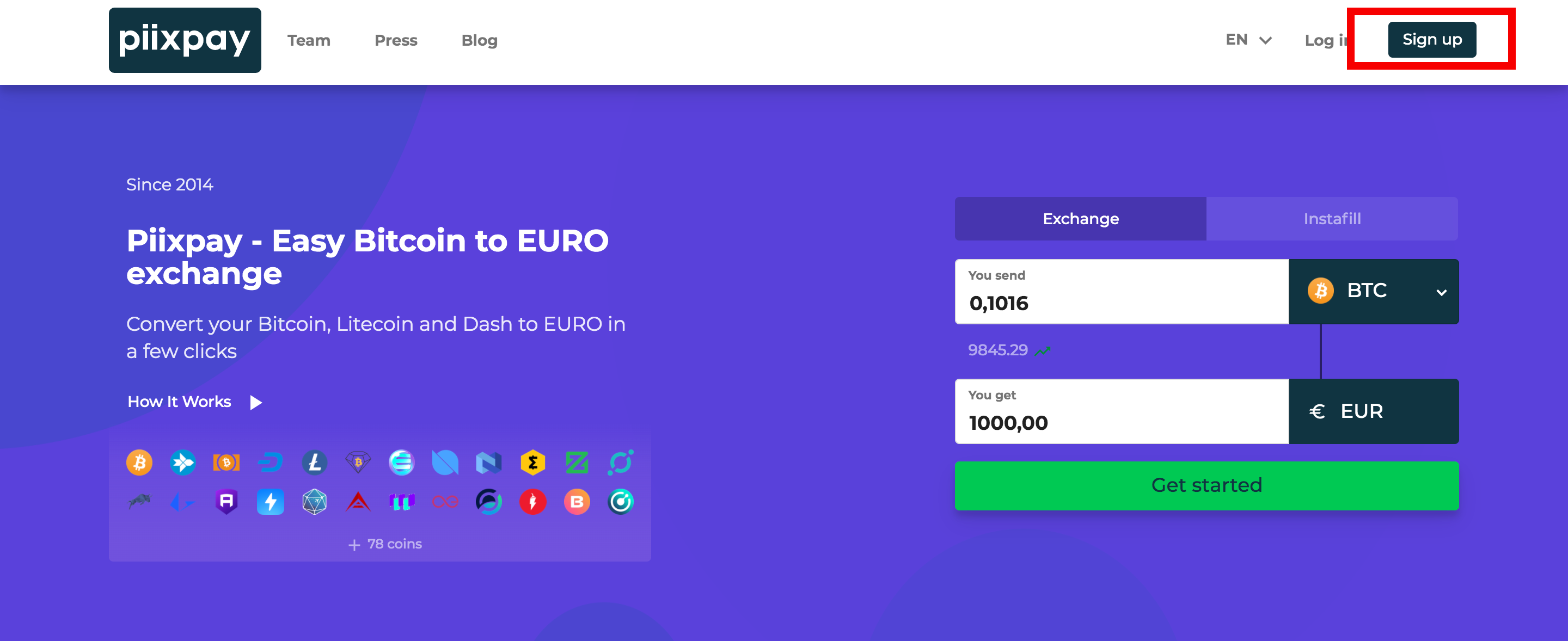 *Sing-up page* You will see a pop-screen. Input your email and password you would like use for your account. Please note you will use this to login both for Personal and Business. Also, you’d need first a personal account to make afterwards a Business one. Accept the terms and conditions and click "Sign up". 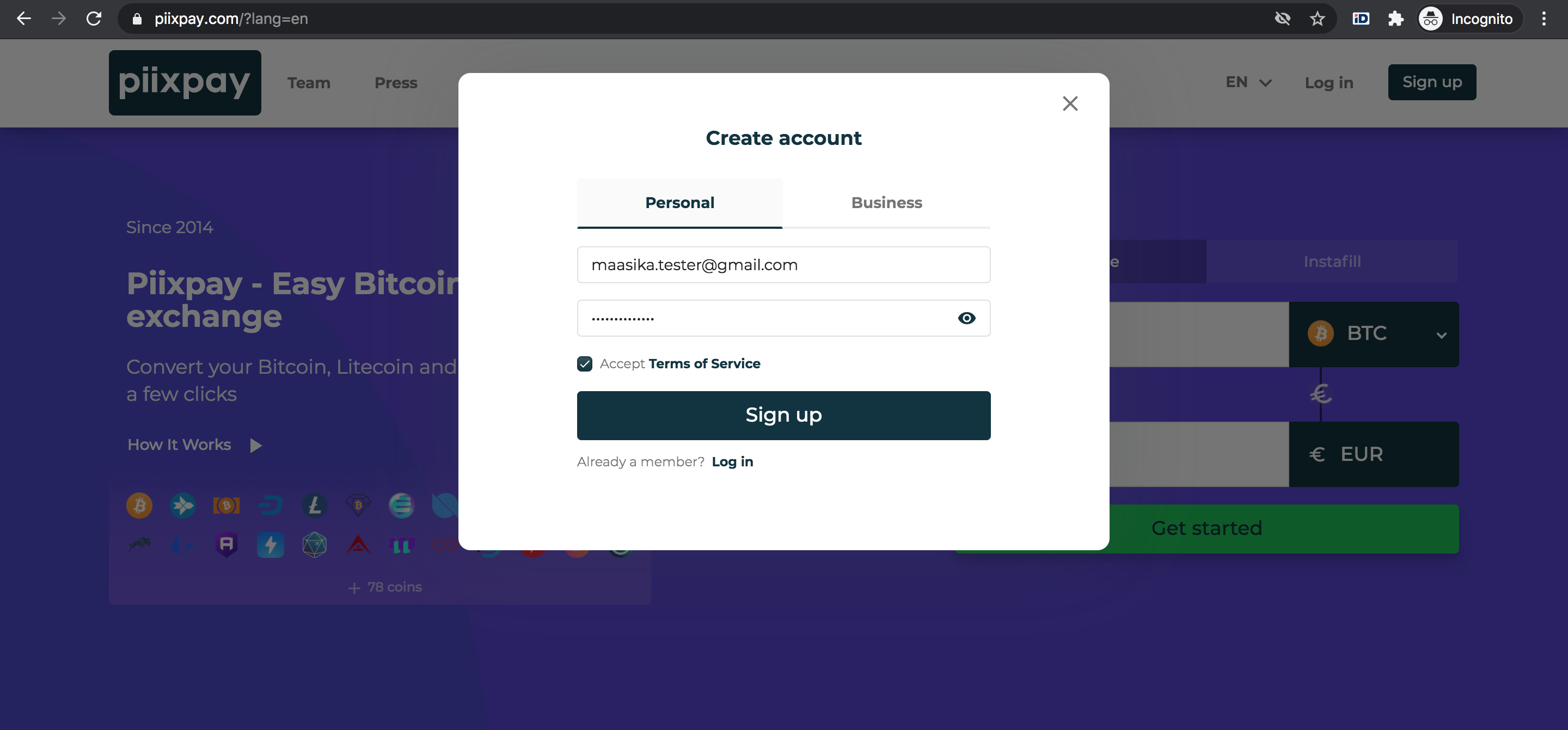 *Input email and password* **1.2.** Go to your email find the Piixpay email confirmation. Click “Confirm”, this will lead you to our dashboard where you need to fill your address. Please also check the “Promotions” or “Junk” folder for finding the email. 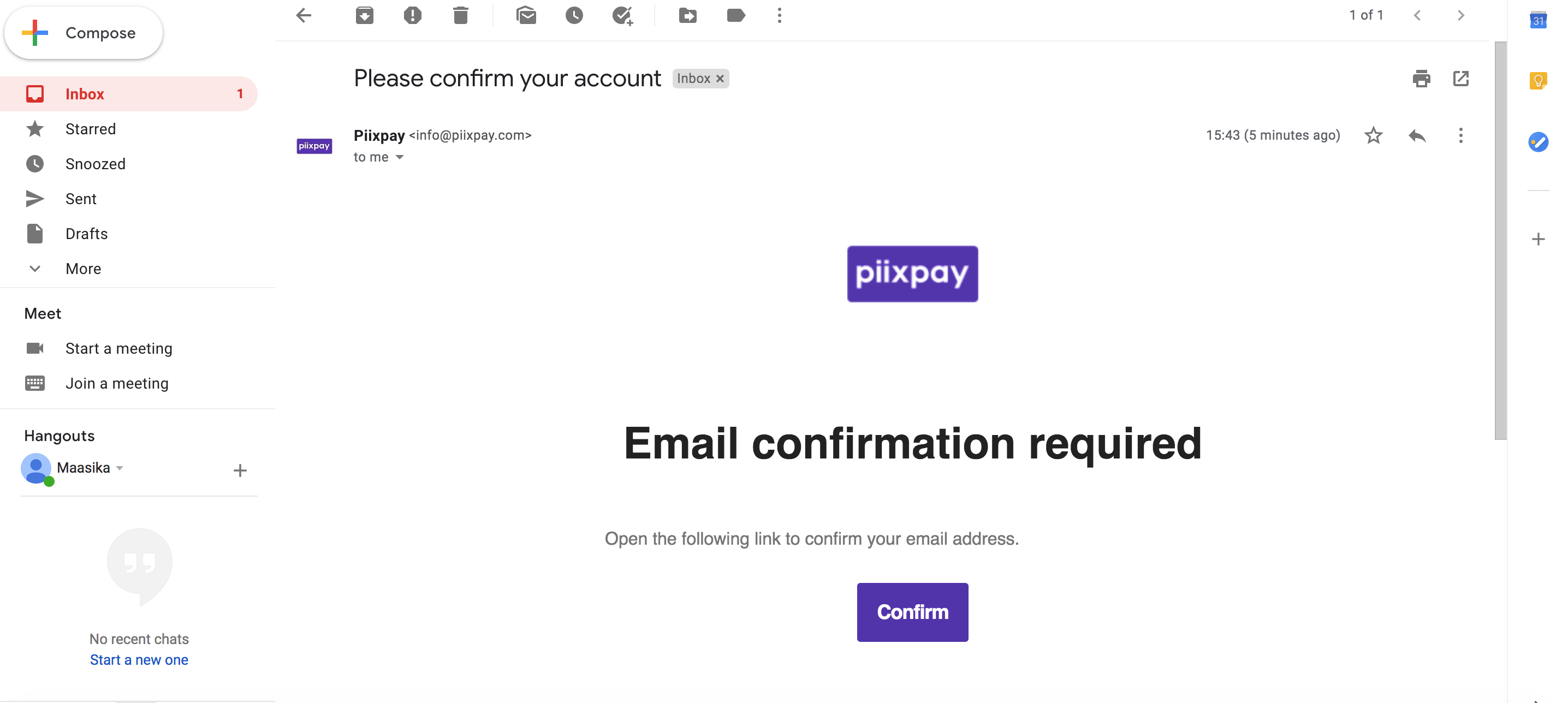 *Confirm* **2. Details about you: Name and Address** **2.1.** Now you’re logged-in! As you can see you need to impute your name, Address and Country. 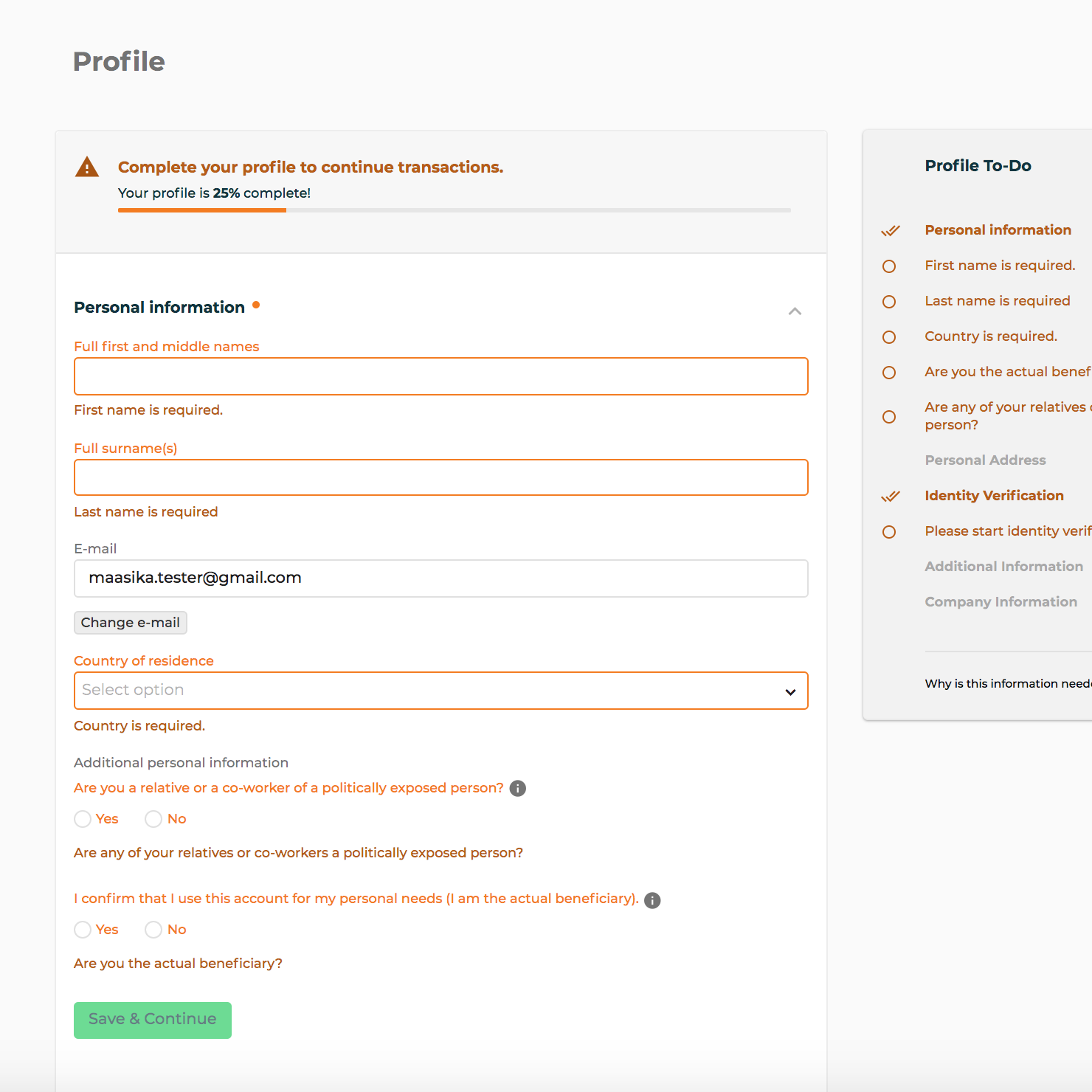 *Name and location* **2.2.** Next, you need to answer the Politically Exposed Person question and select that you want to use this account for personal needs. Don’t be scared by the checklist - filling up is quick. Click afterwards the “Save and Continue” button. 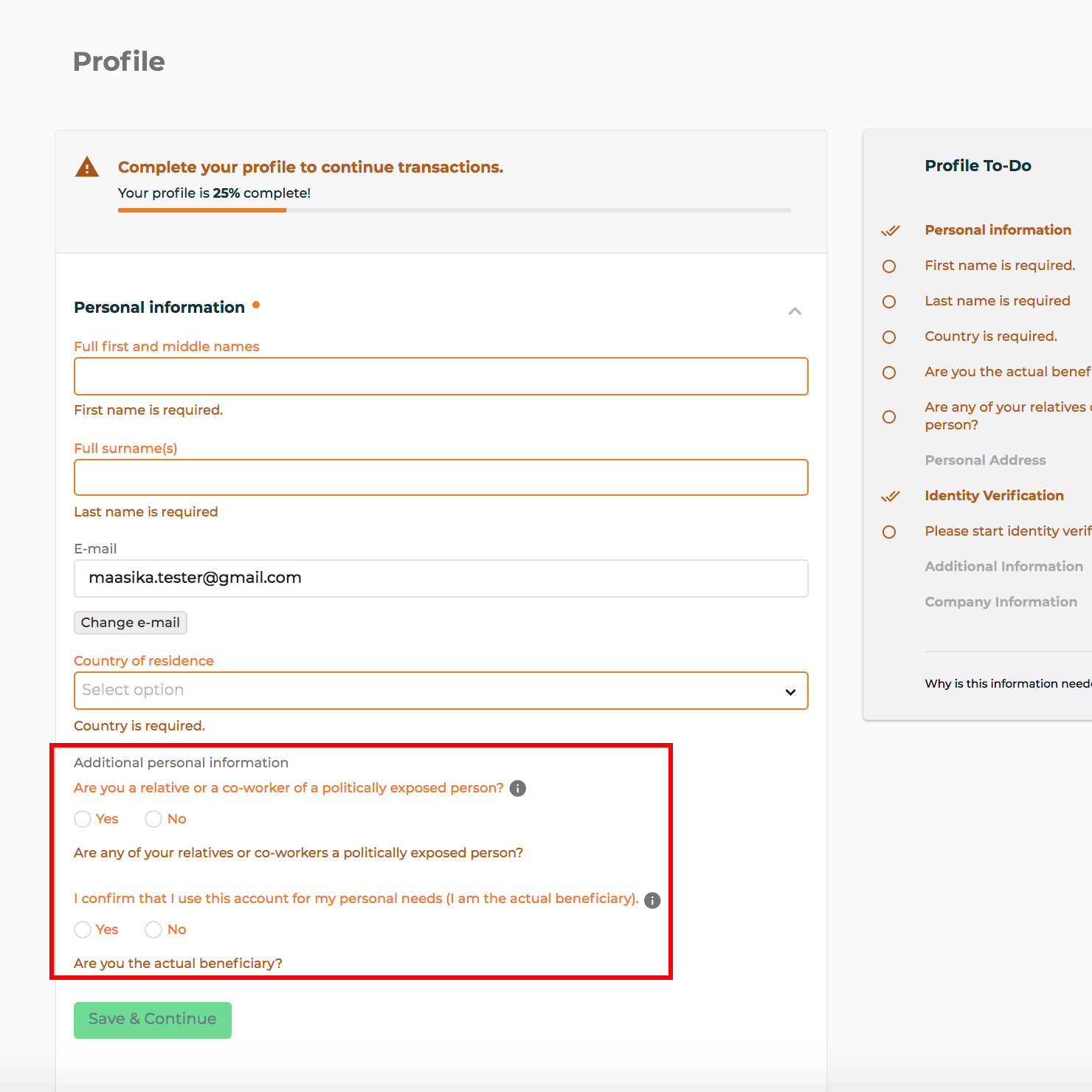 *PEP questions* **3. Make a Selfie with Document, Passport/ID (Please prepare them while doing KYC)** **3.1.** As you can see the verification is almost done. Now, it’s time to verify your identity. Click on “Start verification” button and follow the steps. Note the percentages of your profile completion on the top. 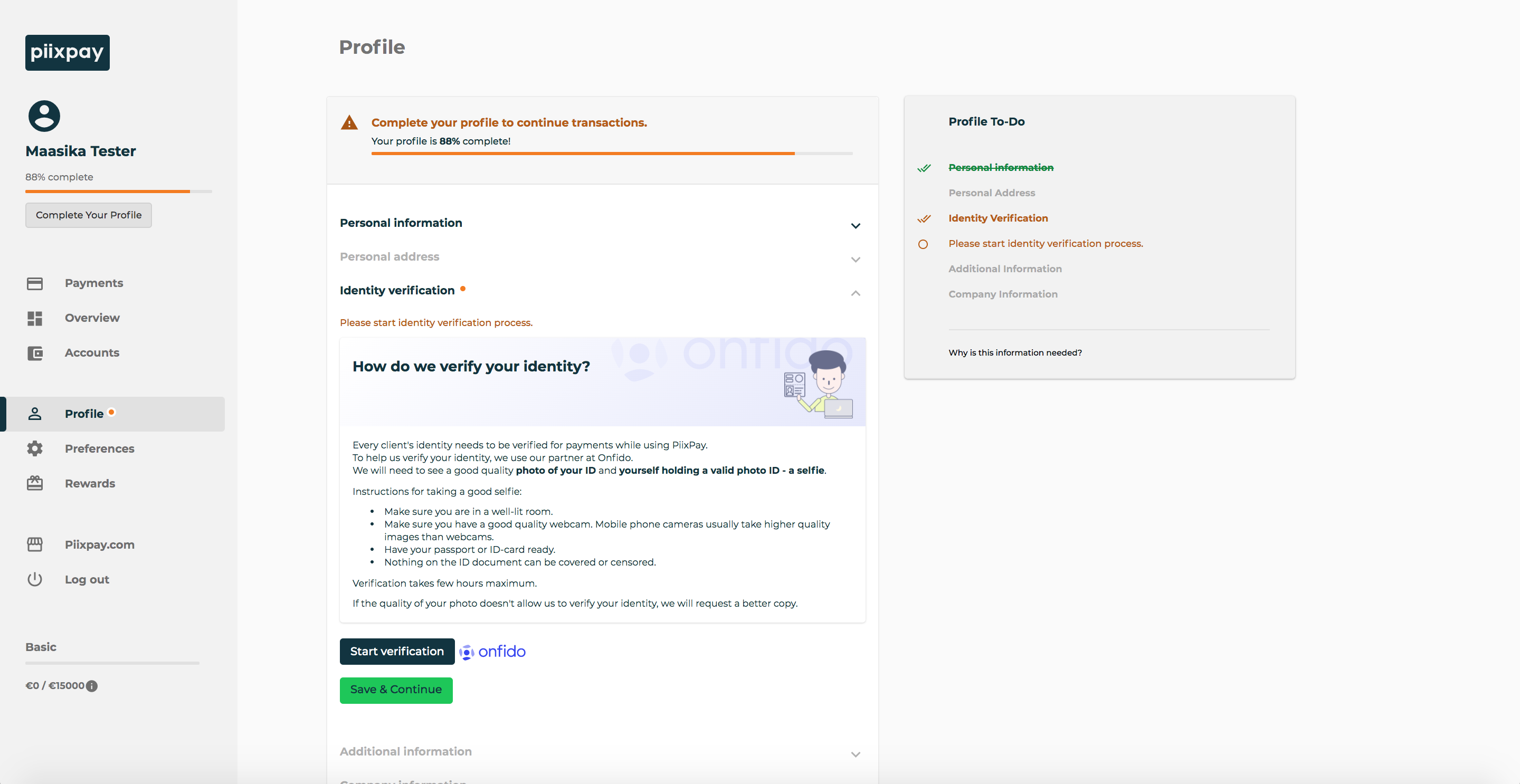 *Start Verification* **3.2** Click “Verify identity”. 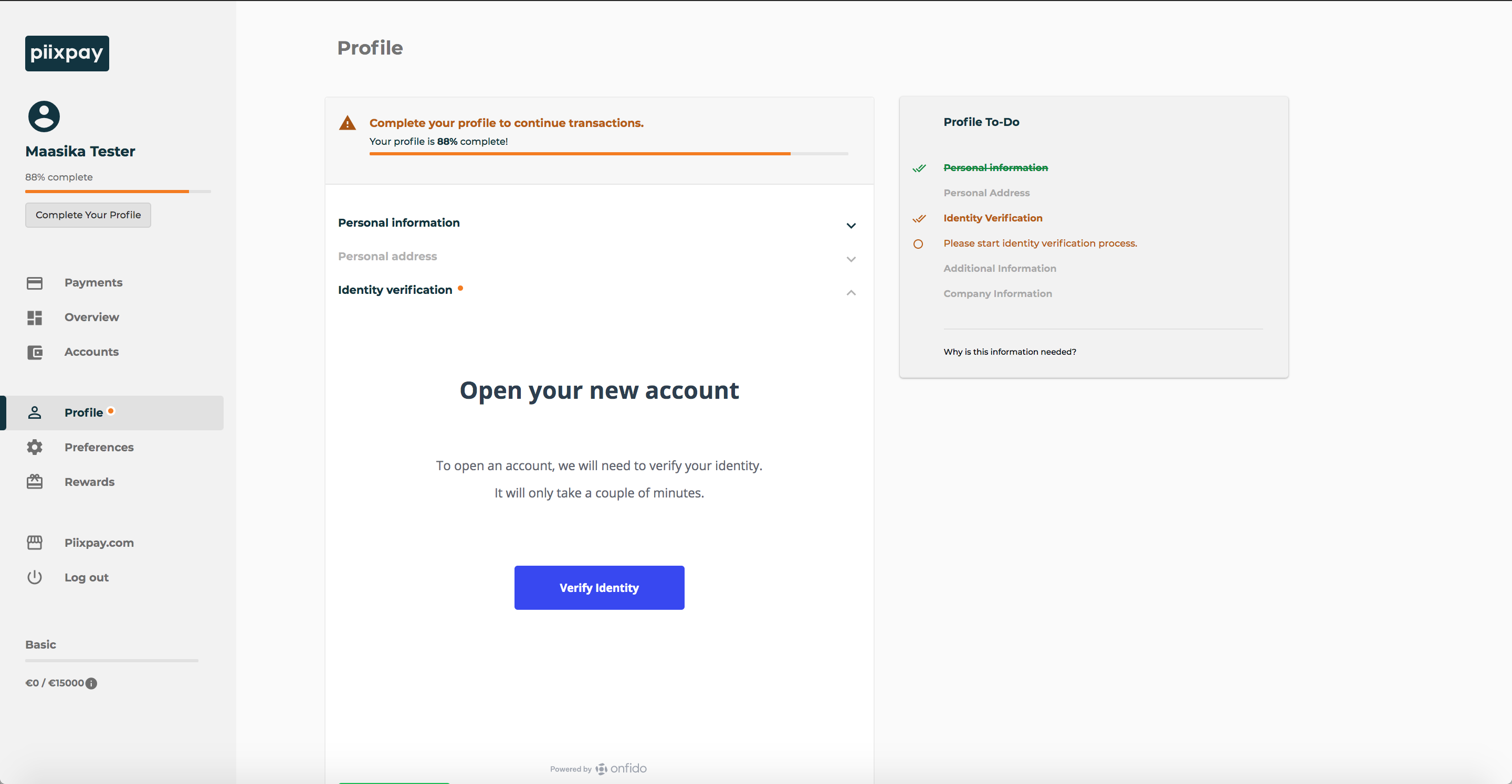 *Verify Identity* **3.3.** Select what document to use. Please have your document prepared. You will be asked to upload scans of it. 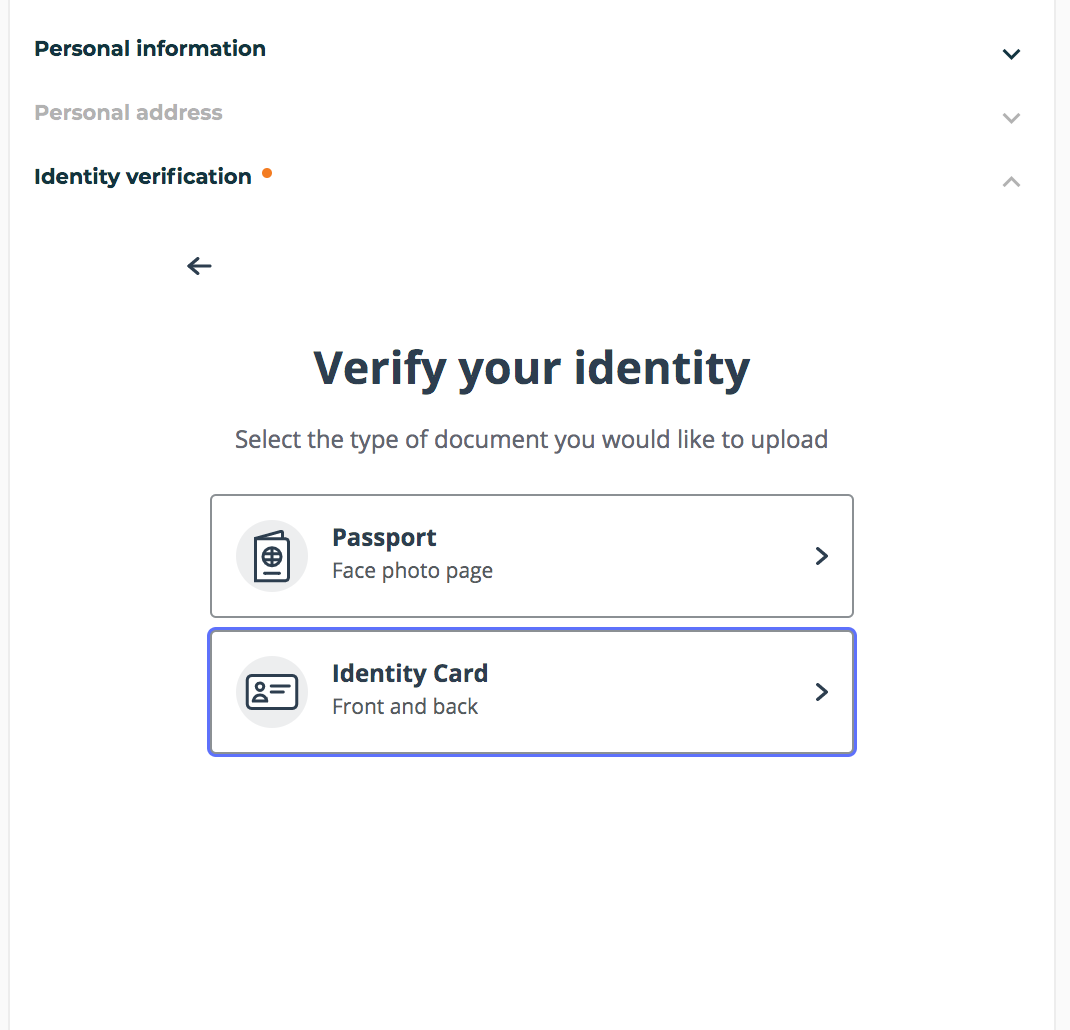 *Document type* **3.4.** Here you need to upload the front and back of your card. 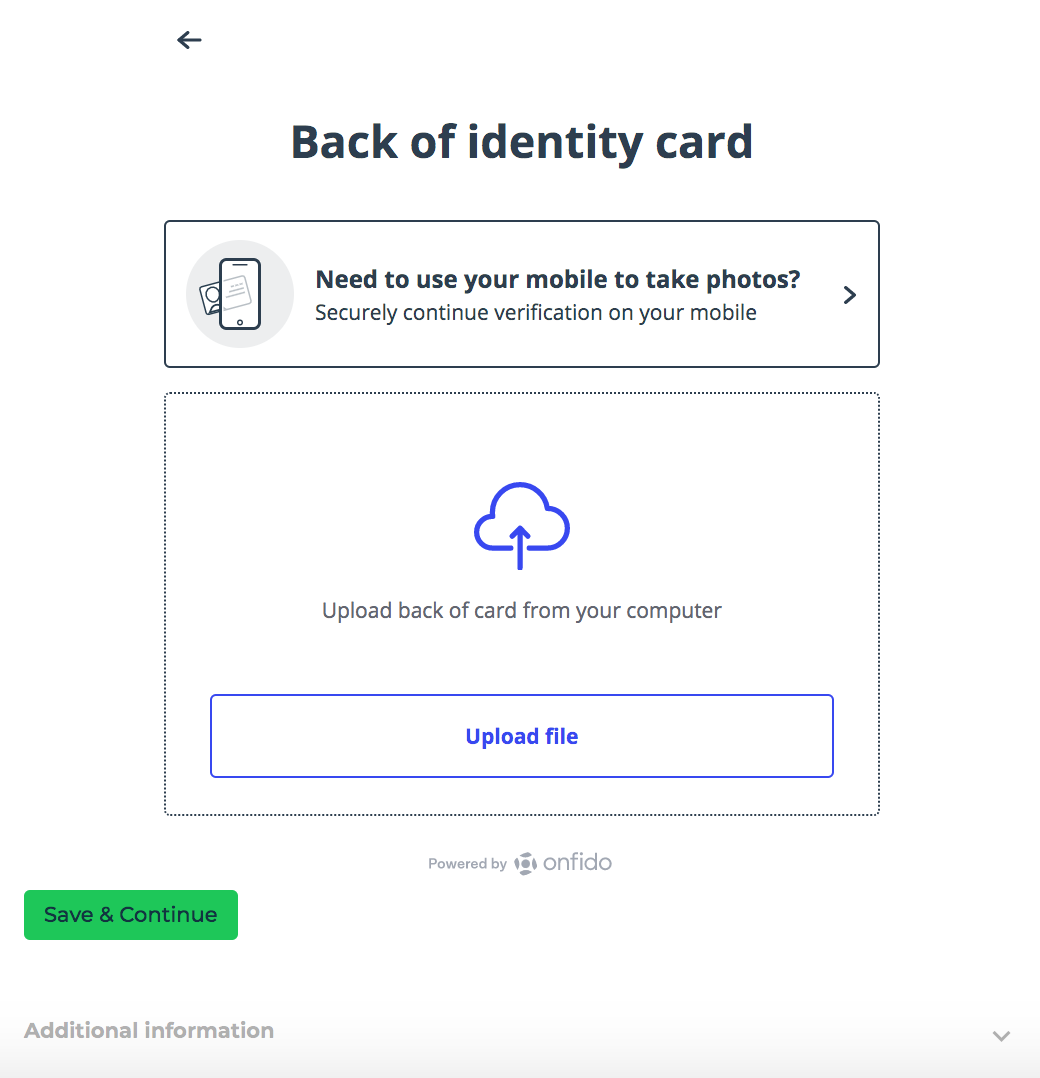 *Front/Back of document* **3.5.** Great! Almost done! You would need the record your voice-over and a short video. Continue following the instructions on the screen. 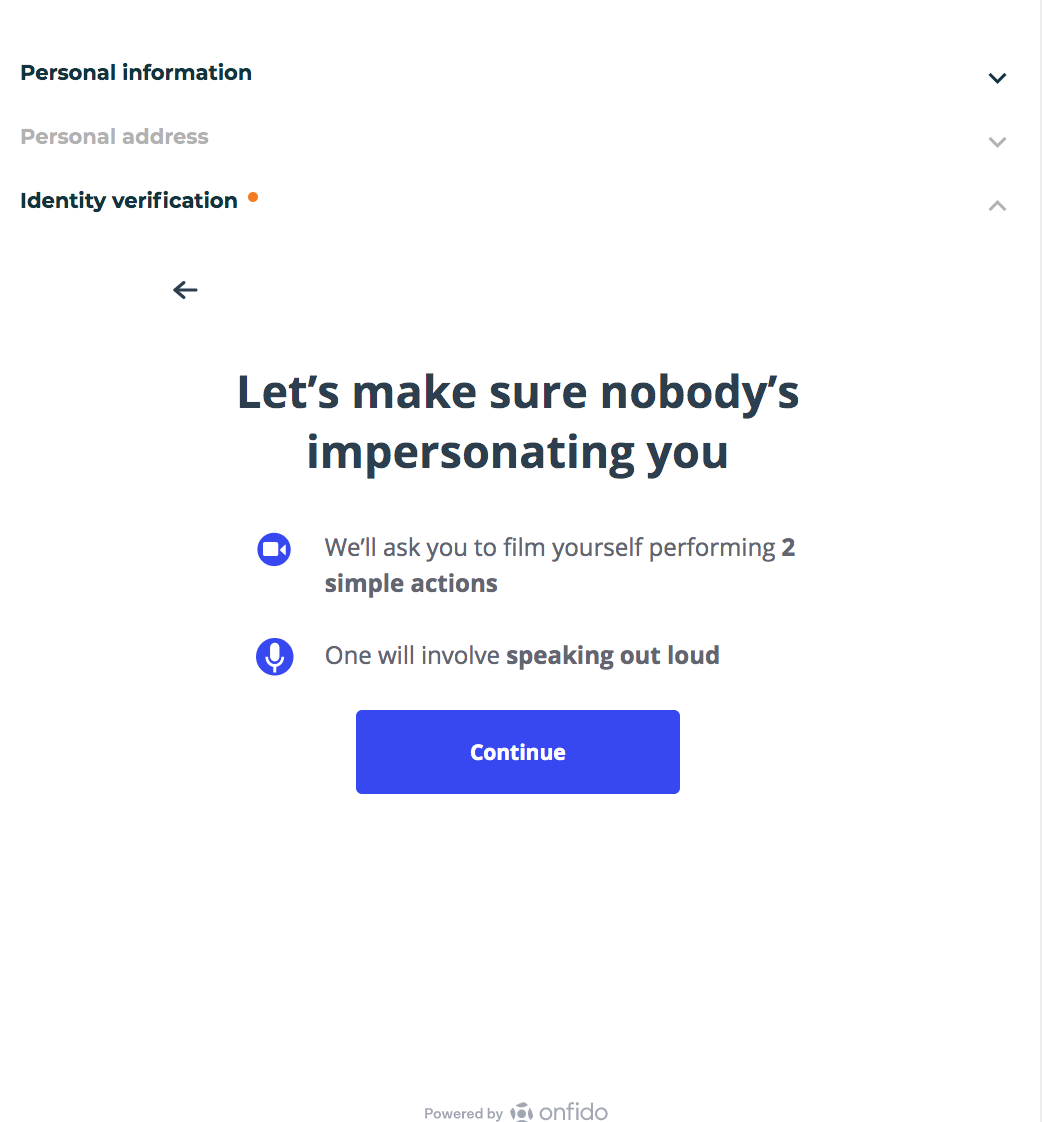 *Voice recording* **3.6.** Enable your camera 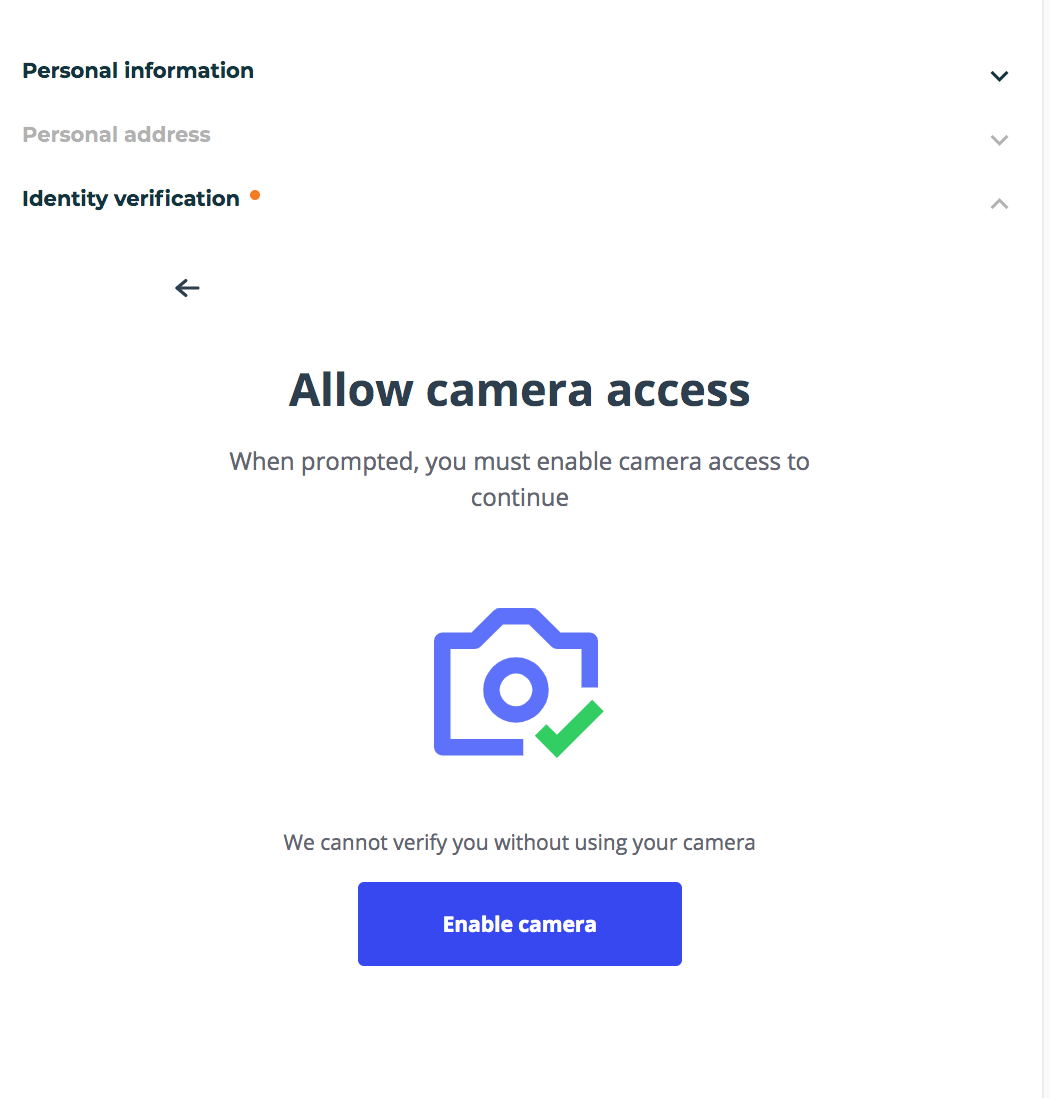 *Enable camera* **3.7.** After enabling your camera you need to look straight and position your head. 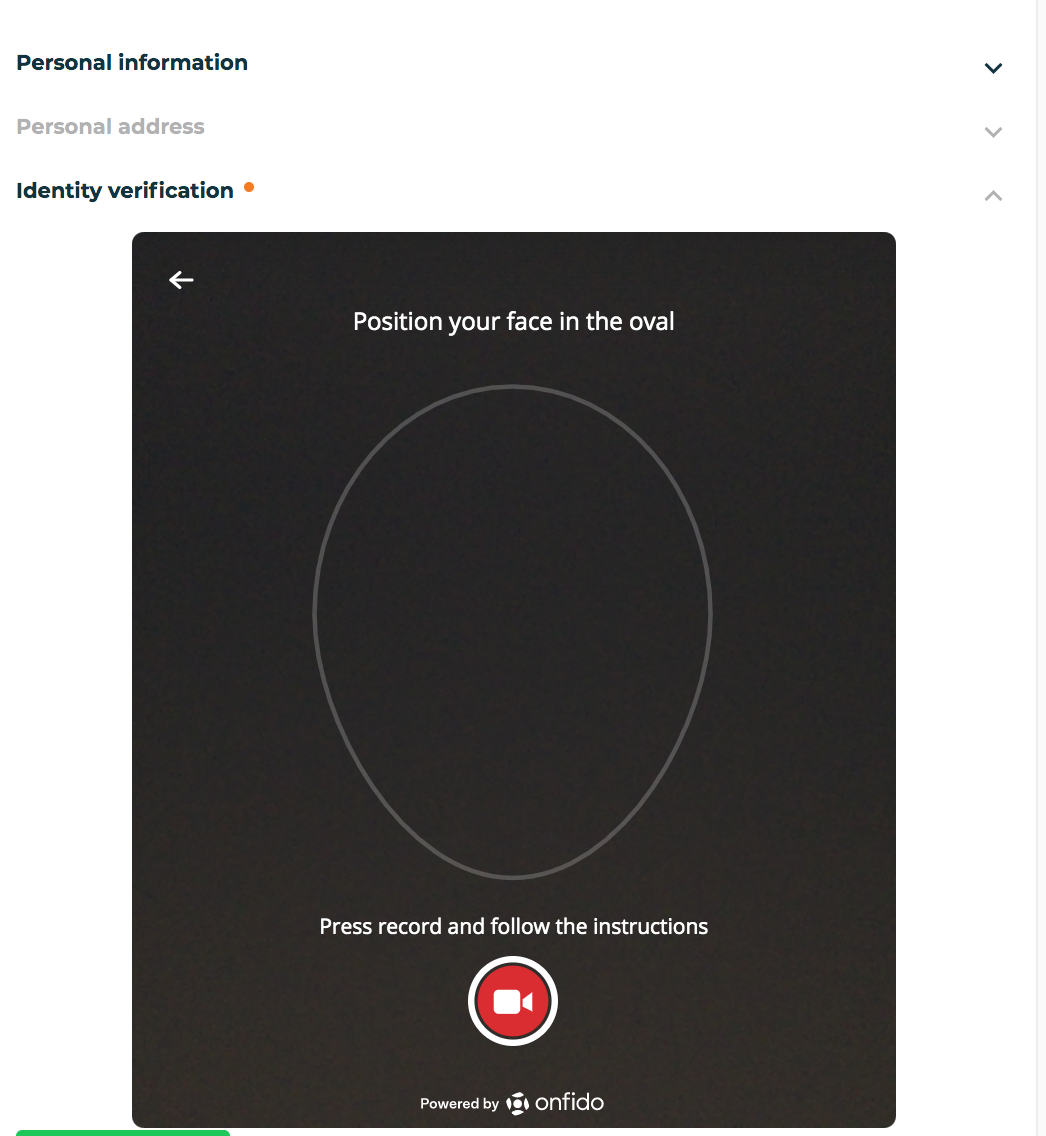 *Adjust head position* **3.8.** You will be asked to look to the left and right eventually.  *Look left and right* 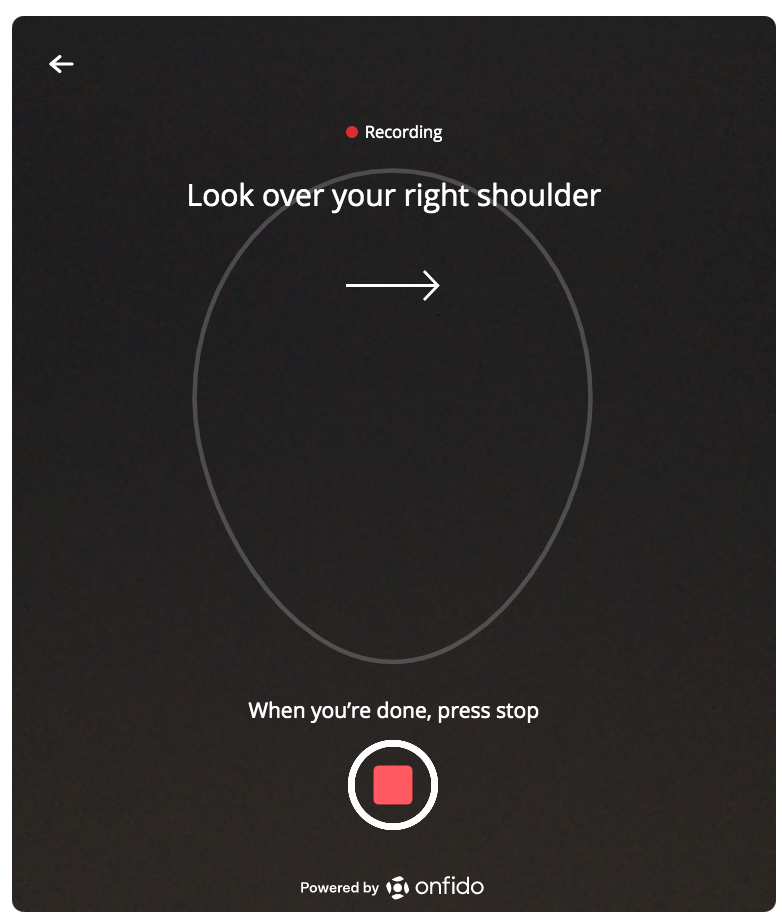 *Look left and right* **3.9.** Don’t forget to click “Stop” when you’re done. You should see a selfie video. Click “Confirm”. Please note that some verification can take 24h. *Click "Stop" when done* 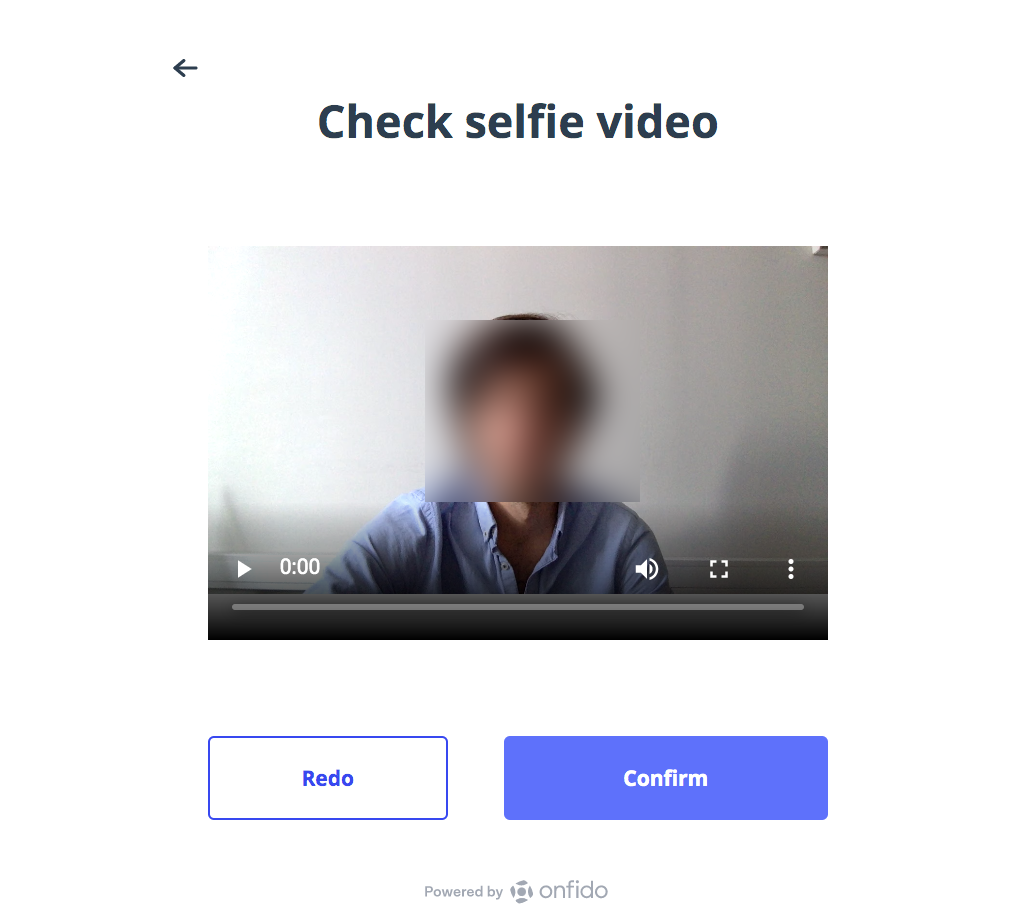 *Recording result* **3.10** You should see a “Verification complete” notice. Congrats! You can now start making payments! Please note that there are additional documents need for payments above €15,000. Your profile should be in “green” now! Try it out: https://www.piixpay.com/?steem&lang=en Piixpay Team |
| json metadata | {"tags":["crypto","kyc","cashout"],"image":["https://cdn.steemitimages.com/DQmdwCNwNjrLpeo9K1asxjiafFv1EcE6xMefRVftZZ5cmRy/Registration1.png","https://cdn.steemitimages.com/DQmeguucgr5T8AZ41cVe7K7hY8jVqYsBb9MfufWsxDjUeZs/Registration2.png","https://cdn.steemitimages.com/DQmbFyyziH48329rt754XYNaQHQSnJKK6Hdv1u2zArry27v/Screen%20Shot%202020-08-24%20at%2015.49.15.png","https://cdn.steemitimages.com/DQmXB2K8Y7r39c4LfJqGxjhgjPpA5XFbW6XA4QPXQ4j2bnD/reg%20copy%20copy3.png","https://cdn.steemitimages.com/DQmVYsz1TUGqwM96Gz7Hhnwz5eosLWHC2Xy8WhVmV6DFJ4o/reg%20copy%20copy2.png","https://cdn.steemitimages.com/DQmWicBEZR7WoRQfU4HnnPGwZRUYBAheM1xs7h4h2HuhxaK/Screen%20Shot%202020-08-24%20at%2015.58.42.png","https://cdn.steemitimages.com/DQmVJUCUMk6p3tGaNgMETVguZ7d3m7zjARcTEPkZuNSHMLW/Screen%20Shot%202020-08-24%20at%2016.03.51.png","https://cdn.steemitimages.com/DQmUmUTP1GJvbo6s5Xp4SiECz38Ad7hK2gHrSCzriubrFhg/Screen%20Shot%202020-08-24%20at%2016.05.59.png","https://cdn.steemitimages.com/DQmVfNDpJ4EDpqM1hVmnJUrjDVxvUNkBzL4MTFywkWLpUfk/Screen%20Shot%202020-08-24%20at%2016.08.46.png","https://cdn.steemitimages.com/DQmXKj5RgbN3jdwwM2JZg5oBBxVvuLn3kWiWNmUeuWaMLXE/Screen%20Shot%202020-08-24%20at%2016.10.45.png","https://cdn.steemitimages.com/DQmf7yWfBidiQHPgNepwCoYKAwN8E5pGUhFRx41E7ytHQDC/Screen%20Shot%202020-08-24%20at%2016.13.33.png","https://cdn.steemitimages.com/DQmPWdmrF9ryaKaCoUyUYPHvUn5NGrUwN9US9z3C7uNRvz3/Screen%20Shot%202020-08-24%20at%2016.14.37.png","https://cdn.steemitimages.com/DQmS59H5WJYodb9AN8xBGNRrLRec1CizLoANuCWoQCQgALc/Screen%20Shot%202020-08-24%20at%2016.15.47.png","https://cdn.steemitimages.com/DQmdD2r6QWhrr8XCeN82oBu4q4UZZGDcoAhx3nPLjiNYz4E/Screen%20Shot%202020-08-24%20at%2016.15.56%20copy%20copy.png"],"links":["https://www.piixpay.com/?steem&lang=en"],"app":"steemit/0.2","format":"markdown"} |
| parent author | |
| parent permlink | piixpay |
| permlink | how-to-complete-make-piixpay-kyc-registration |
| title | How to Complete/Make Piixpay KYC Registration |
| Transaction Info | Block #46544839/Trx 1d6bf9088ca047236ccea0ab02cf436ba9410533 |
View Raw JSON Data
{
"block": 46544839,
"op": [
"comment",
{
"author": "piixpay",
"body": "Hello everyone! \nPiixpay is a crypto-to-fiat payout platform and this is a short explanation of how to register and pass the KYC in order to execute your first payments. \n\n**The process is quite straight-forwarded and involves a simple KYC check. Let's get right to it. We can break it down into 3 steps:**\n\n1. Input email and password\n2. Give details about your Name and Address\n3. Make a selfie with Document Passport/ID (please prepare them when doing the KYC)\n________________________________________________________________________\n\n**1. Input email and password**\n\n**1.1** When you land on Piipxay.com click on \"Sign up\" on the upper right corner of the page. \n\n\n\n*Sing-up page* \n\nYou will see a pop-screen. Input your email and password you would like use for your account. \n\nPlease note you will use this to login both for Personal and Business. Also, you’d need first a personal account to make afterwards a Business one. Accept the terms and conditions and click \"Sign up\".\n\n\n\n*Input email and password*\n\n**1.2.** Go to your email find the Piixpay email confirmation. Click “Confirm”, this will lead you to our dashboard where you need to fill your address. Please also check the “Promotions” or “Junk” folder for finding the email.\n\n\n*Confirm*\n\n**2. Details about you: Name and Address**\n\n**2.1.** Now you’re logged-in! As you can see you need to impute your name, Address and Country. \n\n\n\n*Name and location*\n\n**2.2.** Next, you need to answer the Politically Exposed Person question and select that you want to use this account for personal needs. Don’t be scared by the checklist - filling up is quick. Click afterwards the “Save and Continue” button.\n\n\n\n*PEP questions*\n\n **3. Make a Selfie with Document, Passport/ID (Please prepare them while doing KYC)**\n\n**3.1.** As you can see the verification is almost done. Now, it’s time to verify your identity. Click on “Start verification” button and follow the steps. Note the percentages of your profile completion on the top. \n\n\n*Start Verification*\n\n**3.2** Click “Verify identity”.\n\n\n\n*Verify Identity*\n\n\n**3.3.** Select what document to use. Please have your document prepared. You will be asked to upload scans of it.\n\n\n\n*Document type*\n\n**3.4.** Here you need to upload the front and back of your card. \n\n\n\n*Front/Back of document*\n\n**3.5.** Great! Almost done! You would need the record your voice-over and a short video. Continue following the instructions on the screen.\n\n\n*Voice recording*\n\n**3.6.** Enable your camera\n\n\n\n*Enable camera*\n\n**3.7.** After enabling your camera you need to look straight and position your head. \n\n\n\n*Adjust head position*\n\n\n**3.8.** You will be asked to look to the left and right eventually. \n\n\n\n*Look left and right*\n\n\n*Look left and right*\n\n**3.9.** Don’t forget to click “Stop” when you’re done. You should see a selfie video. Click “Confirm”. Please note that some verification can take 24h.\n*Click \"Stop\" when done*\n\n\n*Recording result*\n\n**3.10** You should see a “Verification complete” notice. \n\nCongrats! You can now start making payments! Please note that there are additional documents need for payments above €15,000. Your profile should be in “green” now!\n\nTry it out: https://www.piixpay.com/?steem&lang=en\n\nPiixpay Team",
"json_metadata": "{\"tags\":[\"crypto\",\"kyc\",\"cashout\"],\"image\":[\"https://cdn.steemitimages.com/DQmdwCNwNjrLpeo9K1asxjiafFv1EcE6xMefRVftZZ5cmRy/Registration1.png\",\"https://cdn.steemitimages.com/DQmeguucgr5T8AZ41cVe7K7hY8jVqYsBb9MfufWsxDjUeZs/Registration2.png\",\"https://cdn.steemitimages.com/DQmbFyyziH48329rt754XYNaQHQSnJKK6Hdv1u2zArry27v/Screen%20Shot%202020-08-24%20at%2015.49.15.png\",\"https://cdn.steemitimages.com/DQmXB2K8Y7r39c4LfJqGxjhgjPpA5XFbW6XA4QPXQ4j2bnD/reg%20copy%20copy3.png\",\"https://cdn.steemitimages.com/DQmVYsz1TUGqwM96Gz7Hhnwz5eosLWHC2Xy8WhVmV6DFJ4o/reg%20copy%20copy2.png\",\"https://cdn.steemitimages.com/DQmWicBEZR7WoRQfU4HnnPGwZRUYBAheM1xs7h4h2HuhxaK/Screen%20Shot%202020-08-24%20at%2015.58.42.png\",\"https://cdn.steemitimages.com/DQmVJUCUMk6p3tGaNgMETVguZ7d3m7zjARcTEPkZuNSHMLW/Screen%20Shot%202020-08-24%20at%2016.03.51.png\",\"https://cdn.steemitimages.com/DQmUmUTP1GJvbo6s5Xp4SiECz38Ad7hK2gHrSCzriubrFhg/Screen%20Shot%202020-08-24%20at%2016.05.59.png\",\"https://cdn.steemitimages.com/DQmVfNDpJ4EDpqM1hVmnJUrjDVxvUNkBzL4MTFywkWLpUfk/Screen%20Shot%202020-08-24%20at%2016.08.46.png\",\"https://cdn.steemitimages.com/DQmXKj5RgbN3jdwwM2JZg5oBBxVvuLn3kWiWNmUeuWaMLXE/Screen%20Shot%202020-08-24%20at%2016.10.45.png\",\"https://cdn.steemitimages.com/DQmf7yWfBidiQHPgNepwCoYKAwN8E5pGUhFRx41E7ytHQDC/Screen%20Shot%202020-08-24%20at%2016.13.33.png\",\"https://cdn.steemitimages.com/DQmPWdmrF9ryaKaCoUyUYPHvUn5NGrUwN9US9z3C7uNRvz3/Screen%20Shot%202020-08-24%20at%2016.14.37.png\",\"https://cdn.steemitimages.com/DQmS59H5WJYodb9AN8xBGNRrLRec1CizLoANuCWoQCQgALc/Screen%20Shot%202020-08-24%20at%2016.15.47.png\",\"https://cdn.steemitimages.com/DQmdD2r6QWhrr8XCeN82oBu4q4UZZGDcoAhx3nPLjiNYz4E/Screen%20Shot%202020-08-24%20at%2016.15.56%20copy%20copy.png\"],\"links\":[\"https://www.piixpay.com/?steem&lang=en\"],\"app\":\"steemit/0.2\",\"format\":\"markdown\"}",
"parent_author": "",
"parent_permlink": "piixpay",
"permlink": "how-to-complete-make-piixpay-kyc-registration",
"title": "How to Complete/Make Piixpay KYC Registration"
}
],
"op_in_trx": 0,
"timestamp": "2020-09-03T08:26:00",
"trx_id": "1d6bf9088ca047236ccea0ab02cf436ba9410533",
"trx_in_block": 6,
"virtual_op": 0
}piixpaypublished a new post: how-to-complete-make-piixpay-kyc-registration2020/09/03 08:25:24
piixpaypublished a new post: how-to-complete-make-piixpay-kyc-registration
2020/09/03 08:25:24
| author | piixpay |
| body | Hello everyone! Piixpay is a crypto-to-fiat payout platform and this is a short explanation of how to register and pass the KYC in order to execute your first payments. **The process is quite straight-forwarded and involves a simple KYC check. Let's get right to it. We can break it down into 3 steps:** 1. Input email and password 2. Give details about your Name and Address 3. Make a selfie with Document Passport/ID (please prepare them when doing the KYC) ________________________________________________________________________ **1. Input email and password** **1.1** When you land on Piipxay.com click on "Sign up" on the upper right corner of the page.  *Sing-up page* You will see a pop-screen. Input your email and password you would like use for your account. Please note you will use this to login both for Personal and Business. Also, you’d need first a personal account to make afterwards a Business one. Accept the terms and conditions and click "Sign up".  *Input email and password* **1.2.** Go to your email find the Piixpay email confirmation. Click “Confirm”, this will lead you to our dashboard where you need to fill your address. Please also check the “Promotions” or “Junk” folder for finding the email.  *Confirm* **2. Details about you: Name and Address** **2.1.** Now you’re logged-in! As you can see you need to impute your name, Address and Country.  *Name and location* **2.2.** Next, you need to answer the Politically Exposed Person question and select that you want to use this account for personal needs. Don’t be scared by the checklist - filling up is quick. Click afterwards the “Save and Continue” button.  *PEP questions* **3. Make a Selfie with Document, Passport/ID (Please prepare them while doing KYC)** **3.1.** As you can see the verification is almost done. Now, it’s time to verify your identity. Click on “Start verification” button and follow the steps. Note the percentages of your profile completion on the top.  *Start Verification* **3.2** Click “Verify identity”.  *Verify Identity* **3.3.** Select what document to use. Please have your document prepared. You will be asked to upload scans of it.  *Document type* **3.4.** Here you need to upload the front and back of your card.  *Front/Back of document* **3.5.** Great! Almost done! You would need the record your voice-over and a short video. Continue following the instructions on the screen.  *Voice recording* **3.6.** Enable your camera  *Enable camera* **3.7.** After enabling your camera you need to look straight and position your head.  *Adjust head position* **3.8.** You will be asked to look to the left and right eventually.  *Look left and right*  *Look left and right* **3.9.** Don’t forget to click “Stop” when you’re done. You should see a selfie video. Click “Confirm”. Please note that some verification can take 24h. *Click "Stop" when done*  *Recording result* **3.10** You should see a “Verification complete” notice. Congrats! You can now start making payments! Please note that there are additional documents need for payments above €15,000. Your profile should be in “green” now! Try it out: https://www.piixpay.com/?steem&lang=en Piixpay Team |
| json metadata | {"tags":["crypto","kyc"],"image":["https://cdn.steemitimages.com/DQmdwCNwNjrLpeo9K1asxjiafFv1EcE6xMefRVftZZ5cmRy/Registration1.png","https://cdn.steemitimages.com/DQmeguucgr5T8AZ41cVe7K7hY8jVqYsBb9MfufWsxDjUeZs/Registration2.png","https://cdn.steemitimages.com/DQmbFyyziH48329rt754XYNaQHQSnJKK6Hdv1u2zArry27v/Screen%20Shot%202020-08-24%20at%2015.49.15.png","https://cdn.steemitimages.com/DQmXB2K8Y7r39c4LfJqGxjhgjPpA5XFbW6XA4QPXQ4j2bnD/reg%20copy%20copy3.png","https://cdn.steemitimages.com/DQmVYsz1TUGqwM96Gz7Hhnwz5eosLWHC2Xy8WhVmV6DFJ4o/reg%20copy%20copy2.png","https://cdn.steemitimages.com/DQmWicBEZR7WoRQfU4HnnPGwZRUYBAheM1xs7h4h2HuhxaK/Screen%20Shot%202020-08-24%20at%2015.58.42.png","https://cdn.steemitimages.com/DQmVJUCUMk6p3tGaNgMETVguZ7d3m7zjARcTEPkZuNSHMLW/Screen%20Shot%202020-08-24%20at%2016.03.51.png","https://cdn.steemitimages.com/DQmUmUTP1GJvbo6s5Xp4SiECz38Ad7hK2gHrSCzriubrFhg/Screen%20Shot%202020-08-24%20at%2016.05.59.png","https://cdn.steemitimages.com/DQmVfNDpJ4EDpqM1hVmnJUrjDVxvUNkBzL4MTFywkWLpUfk/Screen%20Shot%202020-08-24%20at%2016.08.46.png","https://cdn.steemitimages.com/DQmXKj5RgbN3jdwwM2JZg5oBBxVvuLn3kWiWNmUeuWaMLXE/Screen%20Shot%202020-08-24%20at%2016.10.45.png","https://cdn.steemitimages.com/DQmf7yWfBidiQHPgNepwCoYKAwN8E5pGUhFRx41E7ytHQDC/Screen%20Shot%202020-08-24%20at%2016.13.33.png","https://cdn.steemitimages.com/DQmPWdmrF9ryaKaCoUyUYPHvUn5NGrUwN9US9z3C7uNRvz3/Screen%20Shot%202020-08-24%20at%2016.14.37.png","https://cdn.steemitimages.com/DQmS59H5WJYodb9AN8xBGNRrLRec1CizLoANuCWoQCQgALc/Screen%20Shot%202020-08-24%20at%2016.15.47.png","https://cdn.steemitimages.com/DQmdD2r6QWhrr8XCeN82oBu4q4UZZGDcoAhx3nPLjiNYz4E/Screen%20Shot%202020-08-24%20at%2016.15.56%20copy%20copy.png"],"links":["https://www.piixpay.com/?steem&lang=en"],"app":"steemit/0.2","format":"markdown"} |
| parent author | |
| parent permlink | piixpay |
| permlink | how-to-complete-make-piixpay-kyc-registration |
| title | How to Complete/Make Piixpay KYC Registration |
| Transaction Info | Block #46544827/Trx 879463b78d6c4d34c99ac8e13062e6467fe74418 |
View Raw JSON Data
{
"block": 46544827,
"op": [
"comment",
{
"author": "piixpay",
"body": "Hello everyone! \nPiixpay is a crypto-to-fiat payout platform and this is a short explanation of how to register and pass the KYC in order to execute your first payments. \n\n**The process is quite straight-forwarded and involves a simple KYC check. Let's get right to it. We can break it down into 3 steps:**\n\n1. Input email and password\n2. Give details about your Name and Address\n3. Make a selfie with Document Passport/ID (please prepare them when doing the KYC)\n________________________________________________________________________\n\n**1. Input email and password**\n\n**1.1** When you land on Piipxay.com click on \"Sign up\" on the upper right corner of the page. \n\n\n\n*Sing-up page* \n\nYou will see a pop-screen. Input your email and password you would like use for your account. \n\nPlease note you will use this to login both for Personal and Business. Also, you’d need first a personal account to make afterwards a Business one. Accept the terms and conditions and click \"Sign up\".\n\n\n\n*Input email and password*\n\n**1.2.** Go to your email find the Piixpay email confirmation. Click “Confirm”, this will lead you to our dashboard where you need to fill your address. Please also check the “Promotions” or “Junk” folder for finding the email.\n\n\n*Confirm*\n\n**2. Details about you: Name and Address**\n\n**2.1.** Now you’re logged-in! As you can see you need to impute your name, Address and Country. \n\n\n\n*Name and location*\n\n**2.2.** Next, you need to answer the Politically Exposed Person question and select that you want to use this account for personal needs. Don’t be scared by the checklist - filling up is quick. Click afterwards the “Save and Continue” button.\n\n\n\n*PEP questions*\n\n **3. Make a Selfie with Document, Passport/ID (Please prepare them while doing KYC)**\n\n**3.1.** As you can see the verification is almost done. Now, it’s time to verify your identity. Click on “Start verification” button and follow the steps. Note the percentages of your profile completion on the top. \n\n\n*Start Verification*\n\n**3.2** Click “Verify identity”.\n\n\n\n*Verify Identity*\n\n\n**3.3.** Select what document to use. Please have your document prepared. You will be asked to upload scans of it.\n\n\n\n*Document type*\n\n**3.4.** Here you need to upload the front and back of your card. \n\n\n\n*Front/Back of document*\n\n**3.5.** Great! Almost done! You would need the record your voice-over and a short video. Continue following the instructions on the screen.\n\n\n*Voice recording*\n\n**3.6.** Enable your camera\n\n\n\n*Enable camera*\n\n**3.7.** After enabling your camera you need to look straight and position your head. \n\n\n\n*Adjust head position*\n\n\n**3.8.** You will be asked to look to the left and right eventually. \n\n\n\n*Look left and right*\n\n\n*Look left and right*\n\n**3.9.** Don’t forget to click “Stop” when you’re done. You should see a selfie video. Click “Confirm”. Please note that some verification can take 24h.\n*Click \"Stop\" when done*\n\n\n*Recording result*\n\n**3.10** You should see a “Verification complete” notice. \n\nCongrats! You can now start making payments! Please note that there are additional documents need for payments above €15,000. Your profile should be in “green” now!\n\nTry it out: https://www.piixpay.com/?steem&lang=en\n\nPiixpay Team",
"json_metadata": "{\"tags\":[\"crypto\",\"kyc\"],\"image\":[\"https://cdn.steemitimages.com/DQmdwCNwNjrLpeo9K1asxjiafFv1EcE6xMefRVftZZ5cmRy/Registration1.png\",\"https://cdn.steemitimages.com/DQmeguucgr5T8AZ41cVe7K7hY8jVqYsBb9MfufWsxDjUeZs/Registration2.png\",\"https://cdn.steemitimages.com/DQmbFyyziH48329rt754XYNaQHQSnJKK6Hdv1u2zArry27v/Screen%20Shot%202020-08-24%20at%2015.49.15.png\",\"https://cdn.steemitimages.com/DQmXB2K8Y7r39c4LfJqGxjhgjPpA5XFbW6XA4QPXQ4j2bnD/reg%20copy%20copy3.png\",\"https://cdn.steemitimages.com/DQmVYsz1TUGqwM96Gz7Hhnwz5eosLWHC2Xy8WhVmV6DFJ4o/reg%20copy%20copy2.png\",\"https://cdn.steemitimages.com/DQmWicBEZR7WoRQfU4HnnPGwZRUYBAheM1xs7h4h2HuhxaK/Screen%20Shot%202020-08-24%20at%2015.58.42.png\",\"https://cdn.steemitimages.com/DQmVJUCUMk6p3tGaNgMETVguZ7d3m7zjARcTEPkZuNSHMLW/Screen%20Shot%202020-08-24%20at%2016.03.51.png\",\"https://cdn.steemitimages.com/DQmUmUTP1GJvbo6s5Xp4SiECz38Ad7hK2gHrSCzriubrFhg/Screen%20Shot%202020-08-24%20at%2016.05.59.png\",\"https://cdn.steemitimages.com/DQmVfNDpJ4EDpqM1hVmnJUrjDVxvUNkBzL4MTFywkWLpUfk/Screen%20Shot%202020-08-24%20at%2016.08.46.png\",\"https://cdn.steemitimages.com/DQmXKj5RgbN3jdwwM2JZg5oBBxVvuLn3kWiWNmUeuWaMLXE/Screen%20Shot%202020-08-24%20at%2016.10.45.png\",\"https://cdn.steemitimages.com/DQmf7yWfBidiQHPgNepwCoYKAwN8E5pGUhFRx41E7ytHQDC/Screen%20Shot%202020-08-24%20at%2016.13.33.png\",\"https://cdn.steemitimages.com/DQmPWdmrF9ryaKaCoUyUYPHvUn5NGrUwN9US9z3C7uNRvz3/Screen%20Shot%202020-08-24%20at%2016.14.37.png\",\"https://cdn.steemitimages.com/DQmS59H5WJYodb9AN8xBGNRrLRec1CizLoANuCWoQCQgALc/Screen%20Shot%202020-08-24%20at%2016.15.47.png\",\"https://cdn.steemitimages.com/DQmdD2r6QWhrr8XCeN82oBu4q4UZZGDcoAhx3nPLjiNYz4E/Screen%20Shot%202020-08-24%20at%2016.15.56%20copy%20copy.png\"],\"links\":[\"https://www.piixpay.com/?steem&lang=en\"],\"app\":\"steemit/0.2\",\"format\":\"markdown\"}",
"parent_author": "",
"parent_permlink": "piixpay",
"permlink": "how-to-complete-make-piixpay-kyc-registration",
"title": "How to Complete/Make Piixpay KYC Registration"
}
],
"op_in_trx": 0,
"timestamp": "2020-09-03T08:25:24",
"trx_id": "879463b78d6c4d34c99ac8e13062e6467fe74418",
"trx_in_block": 2,
"virtual_op": 0
}piixpaypublished a new post: how-to-complete-make-piixpay-kyc-registration2020/09/03 08:24:57
piixpaypublished a new post: how-to-complete-make-piixpay-kyc-registration
2020/09/03 08:24:57
| author | piixpay |
| body | Hello everyone! Piixpay is a crypto-to-fiat payout platform and this is a short explanation of how to register and pass the KYC in order to execute your first payments. **The process is quite straight-forwarded and involves a simple KYC check. Let's get right to it. We can break it down into 3 steps:** 1. Input email and password 2. Give details about your Name and Address 3. Make a selfie with Document Passport/ID (please prepare them when doing the KYC) ________________________________________________________________________ **1. Input email and password** **1.1** When you land on Piipxay.com click on "Sign up" on the upper right corner of the page.  *Sing-up page* You will see a pop-screen. Input your email and password you would like use for your account. Please note you will use this to login both for Personal and Business. Also, you’d need first a personal account to make afterwards a Business one. Accept the terms and conditions and click "Sign up".  *Input email and password* **1.2.** Go to your email find the Piixpay email confirmation. Click “Confirm”, this will lead you to our dashboard where you need to fill your address. Please also check the “Promotions” or “Junk” folder for finding the email.  *Confirm* **2. Details about you: Name and Address** **2.1.** Now you’re logged-in! As you can see you need to impute your name, Address and Country.  *Name and location* **2.2.** Next, you need to answer the Politically Exposed Person question and select that you want to use this account for personal needs. Don’t be scared by the checklist - filling up is quick. Click afterwards the “Save and Continue” button.  *PEP questions* **3. Make a Selfie with Document, Passport/ID (Please prepare them while doing KYC)** **3.1.** As you can see the verification is almost done. Now, it’s time to verify your identity. Click on “Start verification” button and follow the steps. Note the percentages of your profile completion on the top.  *Start Verification* **3.2** Click “Verify identity”.  *Verify Identity* **3.3.** Select what document to use. Please have your document prepared. You will be asked to upload scans of it.  *Document type* **3.4.** Here you need to upload the front and back of your card.  *Front/Back of document* **3.5.** Great! Almost done! You would need the record your voice-over and a short video. Continue following the instructions on the screen.  *Voice recording* **3.6.** Enable your camera  *Enable camera* **3.7.** After enabling your camera you need to look straight and position your head.  *Adjust head position* **3.8.** You will be asked to look to the left and right eventually.  *Look left and right*  *Look left and right* **3.9.** Don’t forget to click “Stop” when you’re done. You should see a selfie video. Click “Confirm”. Please note that some verification can take 24h. *Click "Stop" when done*  *Recording result* **3.10** You should see a “Verification complete” notice. Congrats! You can now start making payments! Please note that there are additional documents need for payments above €15,000. Your profile should be in “green” now! Try it out: https://www.piixpay.com/?steem&lang=en Piixpay Team |
| json metadata | {"tags":["crypto","kyc"],"image":["https://cdn.steemitimages.com/DQmdwCNwNjrLpeo9K1asxjiafFv1EcE6xMefRVftZZ5cmRy/Registration1.png","https://cdn.steemitimages.com/DQmeguucgr5T8AZ41cVe7K7hY8jVqYsBb9MfufWsxDjUeZs/Registration2.png","https://cdn.steemitimages.com/DQmbFyyziH48329rt754XYNaQHQSnJKK6Hdv1u2zArry27v/Screen%20Shot%202020-08-24%20at%2015.49.15.png","https://cdn.steemitimages.com/DQmXB2K8Y7r39c4LfJqGxjhgjPpA5XFbW6XA4QPXQ4j2bnD/reg%20copy%20copy3.png","https://cdn.steemitimages.com/DQmVYsz1TUGqwM96Gz7Hhnwz5eosLWHC2Xy8WhVmV6DFJ4o/reg%20copy%20copy2.png","https://cdn.steemitimages.com/DQmWicBEZR7WoRQfU4HnnPGwZRUYBAheM1xs7h4h2HuhxaK/Screen%20Shot%202020-08-24%20at%2015.58.42.png","https://cdn.steemitimages.com/DQmVJUCUMk6p3tGaNgMETVguZ7d3m7zjARcTEPkZuNSHMLW/Screen%20Shot%202020-08-24%20at%2016.03.51.png","https://cdn.steemitimages.com/DQmUmUTP1GJvbo6s5Xp4SiECz38Ad7hK2gHrSCzriubrFhg/Screen%20Shot%202020-08-24%20at%2016.05.59.png","https://cdn.steemitimages.com/DQmVfNDpJ4EDpqM1hVmnJUrjDVxvUNkBzL4MTFywkWLpUfk/Screen%20Shot%202020-08-24%20at%2016.08.46.png","https://cdn.steemitimages.com/DQmXKj5RgbN3jdwwM2JZg5oBBxVvuLn3kWiWNmUeuWaMLXE/Screen%20Shot%202020-08-24%20at%2016.10.45.png","https://cdn.steemitimages.com/DQmf7yWfBidiQHPgNepwCoYKAwN8E5pGUhFRx41E7ytHQDC/Screen%20Shot%202020-08-24%20at%2016.13.33.png","https://cdn.steemitimages.com/DQmPWdmrF9ryaKaCoUyUYPHvUn5NGrUwN9US9z3C7uNRvz3/Screen%20Shot%202020-08-24%20at%2016.14.37.png","https://cdn.steemitimages.com/DQmS59H5WJYodb9AN8xBGNRrLRec1CizLoANuCWoQCQgALc/Screen%20Shot%202020-08-24%20at%2016.15.47.png","https://cdn.steemitimages.com/DQmdD2r6QWhrr8XCeN82oBu4q4UZZGDcoAhx3nPLjiNYz4E/Screen%20Shot%202020-08-24%20at%2016.15.56%20copy%20copy.png"],"links":["https://www.piixpay.com/?steem&lang=en"],"app":"steemit/0.2","format":"markdown"} |
| parent author | |
| parent permlink | piixpay |
| permlink | how-to-complete-make-piixpay-kyc-registration |
| title | How to Complete/Make Piixpay KYC Registration |
| Transaction Info | Block #46544818/Trx a72401617ee94273bbc047fa7f35c9b6ef924f24 |
View Raw JSON Data
{
"block": 46544818,
"op": [
"comment",
{
"author": "piixpay",
"body": "Hello everyone! \nPiixpay is a crypto-to-fiat payout platform and this is a short explanation of how to register and pass the KYC in order to execute your first payments. \n\n**The process is quite straight-forwarded and involves a simple KYC check. Let's get right to it. We can break it down into 3 steps:**\n\n1. Input email and password\n2. Give details about your Name and Address\n3. Make a selfie with Document Passport/ID (please prepare them when doing the KYC)\n________________________________________________________________________\n\n**1. Input email and password**\n\n**1.1** When you land on Piipxay.com click on \"Sign up\" on the upper right corner of the page. \n\n\n\n*Sing-up page* \n\nYou will see a pop-screen. Input your email and password you would like use for your account. \n\nPlease note you will use this to login both for Personal and Business. Also, you’d need first a personal account to make afterwards a Business one. Accept the terms and conditions and click \"Sign up\".\n\n\n\n*Input email and password*\n\n**1.2.** Go to your email find the Piixpay email confirmation. Click “Confirm”, this will lead you to our dashboard where you need to fill your address. Please also check the “Promotions” or “Junk” folder for finding the email.\n\n\n*Confirm*\n\n**2. Details about you: Name and Address**\n\n**2.1.** Now you’re logged-in! As you can see you need to impute your name, Address and Country. \n\n\n\n*Name and location*\n\n**2.2.** Next, you need to answer the Politically Exposed Person question and select that you want to use this account for personal needs. Don’t be scared by the checklist - filling up is quick. Click afterwards the “Save and Continue” button.\n\n\n\n*PEP questions*\n\n **3. Make a Selfie with Document, Passport/ID (Please prepare them while doing KYC)**\n\n**3.1.** As you can see the verification is almost done. Now, it’s time to verify your identity. Click on “Start verification” button and follow the steps. Note the percentages of your profile completion on the top. \n\n\n*Start Verification*\n\n**3.2** Click “Verify identity”.\n\n\n\n*Verify Identity*\n\n\n**3.3.** Select what document to use. Please have your document prepared. You will be asked to upload scans of it.\n\n\n\n*Document type*\n\n**3.4.** Here you need to upload the front and back of your card. \n\n\n\n*Front/Back of document*\n\n**3.5.** Great! Almost done! You would need the record your voice-over and a short video. Continue following the instructions on the screen.\n\n\n*Voice recording*\n\n**3.6.** Enable your camera\n\n\n\n*Enable camera*\n\n**3.7.** After enabling your camera you need to look straight and position your head. \n\n\n\n*Adjust head position*\n\n\n**3.8.** You will be asked to look to the left and right eventually. \n\n\n\n*Look left and right*\n\n\n*Look left and right*\n\n**3.9.** Don’t forget to click “Stop” when you’re done. You should see a selfie video. Click “Confirm”. Please note that some verification can take 24h.\n*Click \"Stop\" when done*\n\n\n*Recording result*\n\n**3.10** You should see a “Verification complete” notice. \n\nCongrats! You can now start making payments! Please note that there are additional documents need for payments above €15,000. Your profile should be in “green” now!\n\nTry it out: https://www.piixpay.com/?steem&lang=en\n\nPiixpay Team",
"json_metadata": "{\"tags\":[\"crypto\",\"kyc\"],\"image\":[\"https://cdn.steemitimages.com/DQmdwCNwNjrLpeo9K1asxjiafFv1EcE6xMefRVftZZ5cmRy/Registration1.png\",\"https://cdn.steemitimages.com/DQmeguucgr5T8AZ41cVe7K7hY8jVqYsBb9MfufWsxDjUeZs/Registration2.png\",\"https://cdn.steemitimages.com/DQmbFyyziH48329rt754XYNaQHQSnJKK6Hdv1u2zArry27v/Screen%20Shot%202020-08-24%20at%2015.49.15.png\",\"https://cdn.steemitimages.com/DQmXB2K8Y7r39c4LfJqGxjhgjPpA5XFbW6XA4QPXQ4j2bnD/reg%20copy%20copy3.png\",\"https://cdn.steemitimages.com/DQmVYsz1TUGqwM96Gz7Hhnwz5eosLWHC2Xy8WhVmV6DFJ4o/reg%20copy%20copy2.png\",\"https://cdn.steemitimages.com/DQmWicBEZR7WoRQfU4HnnPGwZRUYBAheM1xs7h4h2HuhxaK/Screen%20Shot%202020-08-24%20at%2015.58.42.png\",\"https://cdn.steemitimages.com/DQmVJUCUMk6p3tGaNgMETVguZ7d3m7zjARcTEPkZuNSHMLW/Screen%20Shot%202020-08-24%20at%2016.03.51.png\",\"https://cdn.steemitimages.com/DQmUmUTP1GJvbo6s5Xp4SiECz38Ad7hK2gHrSCzriubrFhg/Screen%20Shot%202020-08-24%20at%2016.05.59.png\",\"https://cdn.steemitimages.com/DQmVfNDpJ4EDpqM1hVmnJUrjDVxvUNkBzL4MTFywkWLpUfk/Screen%20Shot%202020-08-24%20at%2016.08.46.png\",\"https://cdn.steemitimages.com/DQmXKj5RgbN3jdwwM2JZg5oBBxVvuLn3kWiWNmUeuWaMLXE/Screen%20Shot%202020-08-24%20at%2016.10.45.png\",\"https://cdn.steemitimages.com/DQmf7yWfBidiQHPgNepwCoYKAwN8E5pGUhFRx41E7ytHQDC/Screen%20Shot%202020-08-24%20at%2016.13.33.png\",\"https://cdn.steemitimages.com/DQmPWdmrF9ryaKaCoUyUYPHvUn5NGrUwN9US9z3C7uNRvz3/Screen%20Shot%202020-08-24%20at%2016.14.37.png\",\"https://cdn.steemitimages.com/DQmS59H5WJYodb9AN8xBGNRrLRec1CizLoANuCWoQCQgALc/Screen%20Shot%202020-08-24%20at%2016.15.47.png\",\"https://cdn.steemitimages.com/DQmdD2r6QWhrr8XCeN82oBu4q4UZZGDcoAhx3nPLjiNYz4E/Screen%20Shot%202020-08-24%20at%2016.15.56%20copy%20copy.png\"],\"links\":[\"https://www.piixpay.com/?steem&lang=en\"],\"app\":\"steemit/0.2\",\"format\":\"markdown\"}",
"parent_author": "",
"parent_permlink": "piixpay",
"permlink": "how-to-complete-make-piixpay-kyc-registration",
"title": "How to Complete/Make Piixpay KYC Registration"
}
],
"op_in_trx": 0,
"timestamp": "2020-09-03T08:24:57",
"trx_id": "a72401617ee94273bbc047fa7f35c9b6ef924f24",
"trx_in_block": 7,
"virtual_op": 0
}piixpaypublished a new post: how-to-complete-make-piixpay-kyc-registration2020/09/03 08:24:42
piixpaypublished a new post: how-to-complete-make-piixpay-kyc-registration
2020/09/03 08:24:42
| author | piixpay |
| body | Hello everyone! Piixpay is a crypto-to-fiat payout platform and this is a short explanation of how to register and pass the KYC in order to execute your first payments. **The process is quite straight-forwarded and involves a simple KYC check. Let's get right to it. We can break it down into 3 steps:** 1. Input email and password 2. Give details about your Name and Address 3. Make a selfie with Document Passport/ID (please prepare them when doing the KYC) ________________________________________________________________________ **1. Input email and password** **1.1** When you land on Piipxay.com click on "Sign up" on the upper right corner of the page.  *Sing-up page* You will see a pop-screen. Input your email and password you would like use for your account. Please note you will use this to login both for Personal and Business. Also, you’d need first a personal account to make afterwards a Business one. Accept the terms and conditions and click "Sign up".  *Input email and password* **1.2.** Go to your email find the Piixpay email confirmation. Click “Confirm”, this will lead you to our dashboard where you need to fill your address. Please also check the “Promotions” or “Junk” folder for finding the email.  *Confirm* **2. Details about you: Name and Address** **2.1.** Now you’re logged-in! As you can see you need to impute your name, Address and Country.  *Name and location* **2.2.** Next, you need to answer the Politically Exposed Person question and select that you want to use this account for personal needs. Don’t be scared by the checklist - filling up is quick. Click afterwards the “Save and Continue” button.  *PEP questions* **3. Make a Selfie with Document, Passport/ID (Please prepare them while doing KYC)** **3.1.** As you can see the verification is almost done. Now, it’s time to verify your identity. Click on “Start verification” button and follow the steps. Note the percentages of your profile completion on the top.  *Start Verification* **3.2** Click “Verify identity”.  *Verify Identity* **3.3.** Select what document to use. Please have your document prepared. You will be asked to upload scans of it.  *Document type* **3.4.** Here you need to upload the front and back of your card.  *Front/Back of document* **3.5.** Great! Almost done! You would need the record your voice-over and a short video. Continue following the instructions on the screen.  *Voice recording* **3.6.** Enable your camera  *Enable camera* **3.7.** After enabling your camera you need to look straight and position your head.  *Adjust head position* **3.8.** You will be asked to look to the left and right eventually.  *Look left and right*  *Look left and right* **3.9.** Don’t forget to click “Stop” when you’re done. You should see a selfie video. Click “Confirm”. Please note that some verification can take 24h. *Click "Stop" when done*  *Recording result* **3.10** You should see a “Verification complete” notice. Congrats! You can now start making payments! Please note that there are additional documents need for payments above €15,000. Your profile should be in “green” now! Try it out: https://www.piixpay.com/?steem&lang=en Piixpay Team |
| json metadata | {"image":["https://cdn.steemitimages.com/DQmdwCNwNjrLpeo9K1asxjiafFv1EcE6xMefRVftZZ5cmRy/Registration1.png","https://cdn.steemitimages.com/DQmeguucgr5T8AZ41cVe7K7hY8jVqYsBb9MfufWsxDjUeZs/Registration2.png","https://cdn.steemitimages.com/DQmbFyyziH48329rt754XYNaQHQSnJKK6Hdv1u2zArry27v/Screen%20Shot%202020-08-24%20at%2015.49.15.png","https://cdn.steemitimages.com/DQmXB2K8Y7r39c4LfJqGxjhgjPpA5XFbW6XA4QPXQ4j2bnD/reg%20copy%20copy3.png","https://cdn.steemitimages.com/DQmVYsz1TUGqwM96Gz7Hhnwz5eosLWHC2Xy8WhVmV6DFJ4o/reg%20copy%20copy2.png","https://cdn.steemitimages.com/DQmWicBEZR7WoRQfU4HnnPGwZRUYBAheM1xs7h4h2HuhxaK/Screen%20Shot%202020-08-24%20at%2015.58.42.png","https://cdn.steemitimages.com/DQmVJUCUMk6p3tGaNgMETVguZ7d3m7zjARcTEPkZuNSHMLW/Screen%20Shot%202020-08-24%20at%2016.03.51.png","https://cdn.steemitimages.com/DQmUmUTP1GJvbo6s5Xp4SiECz38Ad7hK2gHrSCzriubrFhg/Screen%20Shot%202020-08-24%20at%2016.05.59.png","https://cdn.steemitimages.com/DQmVfNDpJ4EDpqM1hVmnJUrjDVxvUNkBzL4MTFywkWLpUfk/Screen%20Shot%202020-08-24%20at%2016.08.46.png","https://cdn.steemitimages.com/DQmXKj5RgbN3jdwwM2JZg5oBBxVvuLn3kWiWNmUeuWaMLXE/Screen%20Shot%202020-08-24%20at%2016.10.45.png","https://cdn.steemitimages.com/DQmf7yWfBidiQHPgNepwCoYKAwN8E5pGUhFRx41E7ytHQDC/Screen%20Shot%202020-08-24%20at%2016.13.33.png","https://cdn.steemitimages.com/DQmPWdmrF9ryaKaCoUyUYPHvUn5NGrUwN9US9z3C7uNRvz3/Screen%20Shot%202020-08-24%20at%2016.14.37.png","https://cdn.steemitimages.com/DQmS59H5WJYodb9AN8xBGNRrLRec1CizLoANuCWoQCQgALc/Screen%20Shot%202020-08-24%20at%2016.15.47.png","https://cdn.steemitimages.com/DQmdD2r6QWhrr8XCeN82oBu4q4UZZGDcoAhx3nPLjiNYz4E/Screen%20Shot%202020-08-24%20at%2016.15.56%20copy%20copy.png"],"links":["https://www.piixpay.com/?steem&lang=en"],"app":"steemit/0.2","format":"markdown"} |
| parent author | |
| parent permlink | piixpay |
| permlink | how-to-complete-make-piixpay-kyc-registration |
| title | How to Complete/Make Piixpay KYC Registration |
| Transaction Info | Block #46544813/Trx 9694b2c5a272c839f27ce6730e66e1a4dd30eb26 |
View Raw JSON Data
{
"block": 46544813,
"op": [
"comment",
{
"author": "piixpay",
"body": "Hello everyone! \nPiixpay is a crypto-to-fiat payout platform and this is a short explanation of how to register and pass the KYC in order to execute your first payments. \n\n**The process is quite straight-forwarded and involves a simple KYC check. Let's get right to it. We can break it down into 3 steps:**\n\n1. Input email and password\n2. Give details about your Name and Address\n3. Make a selfie with Document Passport/ID (please prepare them when doing the KYC)\n________________________________________________________________________\n\n**1. Input email and password**\n\n**1.1** When you land on Piipxay.com click on \"Sign up\" on the upper right corner of the page. \n\n\n\n*Sing-up page* \n\nYou will see a pop-screen. Input your email and password you would like use for your account. \n\nPlease note you will use this to login both for Personal and Business. Also, you’d need first a personal account to make afterwards a Business one. Accept the terms and conditions and click \"Sign up\".\n\n\n\n*Input email and password*\n\n**1.2.** Go to your email find the Piixpay email confirmation. Click “Confirm”, this will lead you to our dashboard where you need to fill your address. Please also check the “Promotions” or “Junk” folder for finding the email.\n\n\n*Confirm*\n\n**2. Details about you: Name and Address**\n\n**2.1.** Now you’re logged-in! As you can see you need to impute your name, Address and Country. \n\n\n\n*Name and location*\n\n**2.2.** Next, you need to answer the Politically Exposed Person question and select that you want to use this account for personal needs. Don’t be scared by the checklist - filling up is quick. Click afterwards the “Save and Continue” button.\n\n\n\n*PEP questions*\n\n **3. Make a Selfie with Document, Passport/ID (Please prepare them while doing KYC)**\n\n**3.1.** As you can see the verification is almost done. Now, it’s time to verify your identity. Click on “Start verification” button and follow the steps. Note the percentages of your profile completion on the top. \n\n\n*Start Verification*\n\n**3.2** Click “Verify identity”.\n\n\n\n*Verify Identity*\n\n\n**3.3.** Select what document to use. Please have your document prepared. You will be asked to upload scans of it.\n\n\n\n*Document type*\n\n**3.4.** Here you need to upload the front and back of your card. \n\n\n\n*Front/Back of document*\n\n**3.5.** Great! Almost done! You would need the record your voice-over and a short video. Continue following the instructions on the screen.\n\n\n*Voice recording*\n\n**3.6.** Enable your camera\n\n\n\n*Enable camera*\n\n**3.7.** After enabling your camera you need to look straight and position your head. \n\n\n\n*Adjust head position*\n\n\n**3.8.** You will be asked to look to the left and right eventually. \n\n\n\n*Look left and right*\n\n\n*Look left and right*\n\n**3.9.** Don’t forget to click “Stop” when you’re done. You should see a selfie video. Click “Confirm”. Please note that some verification can take 24h.\n*Click \"Stop\" when done*\n\n\n*Recording result*\n\n**3.10** You should see a “Verification complete” notice. \n\nCongrats! You can now start making payments! Please note that there are additional documents need for payments above €15,000. Your profile should be in “green” now!\n\nTry it out: https://www.piixpay.com/?steem&lang=en\n\nPiixpay Team",
"json_metadata": "{\"image\":[\"https://cdn.steemitimages.com/DQmdwCNwNjrLpeo9K1asxjiafFv1EcE6xMefRVftZZ5cmRy/Registration1.png\",\"https://cdn.steemitimages.com/DQmeguucgr5T8AZ41cVe7K7hY8jVqYsBb9MfufWsxDjUeZs/Registration2.png\",\"https://cdn.steemitimages.com/DQmbFyyziH48329rt754XYNaQHQSnJKK6Hdv1u2zArry27v/Screen%20Shot%202020-08-24%20at%2015.49.15.png\",\"https://cdn.steemitimages.com/DQmXB2K8Y7r39c4LfJqGxjhgjPpA5XFbW6XA4QPXQ4j2bnD/reg%20copy%20copy3.png\",\"https://cdn.steemitimages.com/DQmVYsz1TUGqwM96Gz7Hhnwz5eosLWHC2Xy8WhVmV6DFJ4o/reg%20copy%20copy2.png\",\"https://cdn.steemitimages.com/DQmWicBEZR7WoRQfU4HnnPGwZRUYBAheM1xs7h4h2HuhxaK/Screen%20Shot%202020-08-24%20at%2015.58.42.png\",\"https://cdn.steemitimages.com/DQmVJUCUMk6p3tGaNgMETVguZ7d3m7zjARcTEPkZuNSHMLW/Screen%20Shot%202020-08-24%20at%2016.03.51.png\",\"https://cdn.steemitimages.com/DQmUmUTP1GJvbo6s5Xp4SiECz38Ad7hK2gHrSCzriubrFhg/Screen%20Shot%202020-08-24%20at%2016.05.59.png\",\"https://cdn.steemitimages.com/DQmVfNDpJ4EDpqM1hVmnJUrjDVxvUNkBzL4MTFywkWLpUfk/Screen%20Shot%202020-08-24%20at%2016.08.46.png\",\"https://cdn.steemitimages.com/DQmXKj5RgbN3jdwwM2JZg5oBBxVvuLn3kWiWNmUeuWaMLXE/Screen%20Shot%202020-08-24%20at%2016.10.45.png\",\"https://cdn.steemitimages.com/DQmf7yWfBidiQHPgNepwCoYKAwN8E5pGUhFRx41E7ytHQDC/Screen%20Shot%202020-08-24%20at%2016.13.33.png\",\"https://cdn.steemitimages.com/DQmPWdmrF9ryaKaCoUyUYPHvUn5NGrUwN9US9z3C7uNRvz3/Screen%20Shot%202020-08-24%20at%2016.14.37.png\",\"https://cdn.steemitimages.com/DQmS59H5WJYodb9AN8xBGNRrLRec1CizLoANuCWoQCQgALc/Screen%20Shot%202020-08-24%20at%2016.15.47.png\",\"https://cdn.steemitimages.com/DQmdD2r6QWhrr8XCeN82oBu4q4UZZGDcoAhx3nPLjiNYz4E/Screen%20Shot%202020-08-24%20at%2016.15.56%20copy%20copy.png\"],\"links\":[\"https://www.piixpay.com/?steem&lang=en\"],\"app\":\"steemit/0.2\",\"format\":\"markdown\"}",
"parent_author": "",
"parent_permlink": "piixpay",
"permlink": "how-to-complete-make-piixpay-kyc-registration",
"title": "How to Complete/Make Piixpay KYC Registration"
}
],
"op_in_trx": 0,
"timestamp": "2020-09-03T08:24:42",
"trx_id": "9694b2c5a272c839f27ce6730e66e1a4dd30eb26",
"trx_in_block": 3,
"virtual_op": 0
}piixpaypublished a new post: how-to-complete-make-piixpay-kyc-registration2020/09/03 08:23:48
piixpaypublished a new post: how-to-complete-make-piixpay-kyc-registration
2020/09/03 08:23:48
| author | piixpay |
| body | Hello everyone! Piixpay is a crypto-to-fiat payout platform and this is a short explanation of how to register and pass the KYC in order to execute your first payments. **The process is quite straight-forwarded and involves a simple KYC check. Let's get right to it. We can break it down into 3 steps:** 1. Input email and password 2. Give details about your Name and Address 3. Make a selfie with Document Passport/ID (please prepare them when doing the KYC) ________________________________________________________________________ **1. Input email and password** **1.1** When you land on Piipxay.com click on "Sign up" on the upper right corner of the page.  *Sing-up page* You will see a pop-screen. Input your email and password you would like use for your account. Please note you will use this to login both for Personal and Business. Also, you’d need first a personal account to make afterwards a Business one. Accept the terms and conditions and click "Sign up".  *Input email and password* **1.2.** Go to your email find the Piixpay email confirmation. Click “Confirm”, this will lead you to our dashboard where you need to fill your address. Please also check the “Promotions” or “Junk” folder for finding the email.  *Confirm* **2. Details about you: Name and Address** **2.1.** Now you’re logged-in! As you can see you need to impute your name, Address and Country.  *Name and location* **2.2.** Next, you need to answer the Politically Exposed Person question and select that you want to use this account for personal needs. Don’t be scared by the checklist - filling up is quick. Click afterwards the “Save and Continue” button.  *PEP questions* **3. Make a Selfie with Document, Passport/ID (Please prepare them while doing KYC)** **3.1.** As you can see the verification is almost done. Now, it’s time to verify your identity. Click on “Start verification” button and follow the steps. Note the percentages of your profile completion on the top.  *Start Verification* **3.2** Click “Verify identity”.  *Verify Identity* **3.3.** Select what document to use. Please have your document prepared. You will be asked to upload scans of it.  *Document type* **3.4.** Here you need to upload the front and back of your card.  *Front/Back of document* **3.5.** Great! Almost done! You would need the record your voice-over and a short video. Continue following the instructions on the screen.  *Voice recording* **3.6.** Enable your camera  *Enable camera* **3.7.** After enabling your camera you need to look straight and position your head.  *Adjust head position* **3.8.** You will be asked to look to the left and right eventually.  *Look left and right*  *Look left and right* **3.9.** Don’t forget to click “Stop” when you’re done. You should see a selfie video. Click “Confirm”. Please note that some verification can take 24h. *Click "Stop" when done*  *Recording result* **3.10** You should see a “Verification complete” notice. Congrats! You can now start making payments! Please note that there are additional documents need for payments above €15,000. Your profile should be in “green” now! Try it out: https://www.piixpay.com/?steem&lang=en Piixpay Team |
| json metadata | {"tags":["piixpay"],"image":["https://cdn.steemitimages.com/DQmdwCNwNjrLpeo9K1asxjiafFv1EcE6xMefRVftZZ5cmRy/Registration1.png","https://cdn.steemitimages.com/DQmeguucgr5T8AZ41cVe7K7hY8jVqYsBb9MfufWsxDjUeZs/Registration2.png","https://cdn.steemitimages.com/DQmbFyyziH48329rt754XYNaQHQSnJKK6Hdv1u2zArry27v/Screen%20Shot%202020-08-24%20at%2015.49.15.png","https://cdn.steemitimages.com/DQmXB2K8Y7r39c4LfJqGxjhgjPpA5XFbW6XA4QPXQ4j2bnD/reg%20copy%20copy3.png","https://cdn.steemitimages.com/DQmVYsz1TUGqwM96Gz7Hhnwz5eosLWHC2Xy8WhVmV6DFJ4o/reg%20copy%20copy2.png","https://cdn.steemitimages.com/DQmWicBEZR7WoRQfU4HnnPGwZRUYBAheM1xs7h4h2HuhxaK/Screen%20Shot%202020-08-24%20at%2015.58.42.png","https://cdn.steemitimages.com/DQmVJUCUMk6p3tGaNgMETVguZ7d3m7zjARcTEPkZuNSHMLW/Screen%20Shot%202020-08-24%20at%2016.03.51.png","https://cdn.steemitimages.com/DQmUmUTP1GJvbo6s5Xp4SiECz38Ad7hK2gHrSCzriubrFhg/Screen%20Shot%202020-08-24%20at%2016.05.59.png","https://cdn.steemitimages.com/DQmVfNDpJ4EDpqM1hVmnJUrjDVxvUNkBzL4MTFywkWLpUfk/Screen%20Shot%202020-08-24%20at%2016.08.46.png","https://cdn.steemitimages.com/DQmXKj5RgbN3jdwwM2JZg5oBBxVvuLn3kWiWNmUeuWaMLXE/Screen%20Shot%202020-08-24%20at%2016.10.45.png","https://cdn.steemitimages.com/DQmf7yWfBidiQHPgNepwCoYKAwN8E5pGUhFRx41E7ytHQDC/Screen%20Shot%202020-08-24%20at%2016.13.33.png","https://cdn.steemitimages.com/DQmPWdmrF9ryaKaCoUyUYPHvUn5NGrUwN9US9z3C7uNRvz3/Screen%20Shot%202020-08-24%20at%2016.14.37.png","https://cdn.steemitimages.com/DQmS59H5WJYodb9AN8xBGNRrLRec1CizLoANuCWoQCQgALc/Screen%20Shot%202020-08-24%20at%2016.15.47.png","https://cdn.steemitimages.com/DQmdD2r6QWhrr8XCeN82oBu4q4UZZGDcoAhx3nPLjiNYz4E/Screen%20Shot%202020-08-24%20at%2016.15.56%20copy%20copy.png"],"links":["https://www.piixpay.com/?steem&lang=en"],"app":"steemit/0.2","format":"markdown"} |
| parent author | |
| parent permlink | piixpay |
| permlink | how-to-complete-make-piixpay-kyc-registration |
| title | How to Complete/Make Piixpay KYC Registration |
| Transaction Info | Block #46544795/Trx 13c454757634a6ff3d54cb69dd104d1b9d30caed |
View Raw JSON Data
{
"block": 46544795,
"op": [
"comment",
{
"author": "piixpay",
"body": "Hello everyone! \nPiixpay is a crypto-to-fiat payout platform and this is a short explanation of how to register and pass the KYC in order to execute your first payments. \n\n**The process is quite straight-forwarded and involves a simple KYC check. Let's get right to it. We can break it down into 3 steps:**\n\n1. Input email and password\n2. Give details about your Name and Address\n3. Make a selfie with Document Passport/ID (please prepare them when doing the KYC)\n________________________________________________________________________\n\n**1. Input email and password**\n\n**1.1** When you land on Piipxay.com click on \"Sign up\" on the upper right corner of the page. \n\n\n\n*Sing-up page* \n\nYou will see a pop-screen. Input your email and password you would like use for your account. \n\nPlease note you will use this to login both for Personal and Business. Also, you’d need first a personal account to make afterwards a Business one. Accept the terms and conditions and click \"Sign up\".\n\n\n\n*Input email and password*\n\n**1.2.** Go to your email find the Piixpay email confirmation. Click “Confirm”, this will lead you to our dashboard where you need to fill your address. Please also check the “Promotions” or “Junk” folder for finding the email.\n\n\n*Confirm*\n\n**2. Details about you: Name and Address**\n\n**2.1.** Now you’re logged-in! As you can see you need to impute your name, Address and Country. \n\n\n\n*Name and location*\n\n**2.2.** Next, you need to answer the Politically Exposed Person question and select that you want to use this account for personal needs. Don’t be scared by the checklist - filling up is quick. Click afterwards the “Save and Continue” button.\n\n\n\n*PEP questions*\n\n **3. Make a Selfie with Document, Passport/ID (Please prepare them while doing KYC)**\n\n**3.1.** As you can see the verification is almost done. Now, it’s time to verify your identity. Click on “Start verification” button and follow the steps. Note the percentages of your profile completion on the top. \n\n\n*Start Verification*\n\n**3.2** Click “Verify identity”.\n\n\n\n*Verify Identity*\n\n\n**3.3.** Select what document to use. Please have your document prepared. You will be asked to upload scans of it.\n\n\n\n*Document type*\n\n**3.4.** Here you need to upload the front and back of your card. \n\n\n\n*Front/Back of document*\n\n**3.5.** Great! Almost done! You would need the record your voice-over and a short video. Continue following the instructions on the screen.\n\n\n*Voice recording*\n\n**3.6.** Enable your camera\n\n\n\n*Enable camera*\n\n**3.7.** After enabling your camera you need to look straight and position your head. \n\n\n\n*Adjust head position*\n\n\n**3.8.** You will be asked to look to the left and right eventually. \n\n\n\n*Look left and right*\n\n\n*Look left and right*\n\n**3.9.** Don’t forget to click “Stop” when you’re done. You should see a selfie video. Click “Confirm”. Please note that some verification can take 24h.\n*Click \"Stop\" when done*\n\n\n*Recording result*\n\n**3.10** You should see a “Verification complete” notice. \n\nCongrats! You can now start making payments! Please note that there are additional documents need for payments above €15,000. Your profile should be in “green” now!\n\nTry it out: https://www.piixpay.com/?steem&lang=en\n\nPiixpay Team",
"json_metadata": "{\"tags\":[\"piixpay\"],\"image\":[\"https://cdn.steemitimages.com/DQmdwCNwNjrLpeo9K1asxjiafFv1EcE6xMefRVftZZ5cmRy/Registration1.png\",\"https://cdn.steemitimages.com/DQmeguucgr5T8AZ41cVe7K7hY8jVqYsBb9MfufWsxDjUeZs/Registration2.png\",\"https://cdn.steemitimages.com/DQmbFyyziH48329rt754XYNaQHQSnJKK6Hdv1u2zArry27v/Screen%20Shot%202020-08-24%20at%2015.49.15.png\",\"https://cdn.steemitimages.com/DQmXB2K8Y7r39c4LfJqGxjhgjPpA5XFbW6XA4QPXQ4j2bnD/reg%20copy%20copy3.png\",\"https://cdn.steemitimages.com/DQmVYsz1TUGqwM96Gz7Hhnwz5eosLWHC2Xy8WhVmV6DFJ4o/reg%20copy%20copy2.png\",\"https://cdn.steemitimages.com/DQmWicBEZR7WoRQfU4HnnPGwZRUYBAheM1xs7h4h2HuhxaK/Screen%20Shot%202020-08-24%20at%2015.58.42.png\",\"https://cdn.steemitimages.com/DQmVJUCUMk6p3tGaNgMETVguZ7d3m7zjARcTEPkZuNSHMLW/Screen%20Shot%202020-08-24%20at%2016.03.51.png\",\"https://cdn.steemitimages.com/DQmUmUTP1GJvbo6s5Xp4SiECz38Ad7hK2gHrSCzriubrFhg/Screen%20Shot%202020-08-24%20at%2016.05.59.png\",\"https://cdn.steemitimages.com/DQmVfNDpJ4EDpqM1hVmnJUrjDVxvUNkBzL4MTFywkWLpUfk/Screen%20Shot%202020-08-24%20at%2016.08.46.png\",\"https://cdn.steemitimages.com/DQmXKj5RgbN3jdwwM2JZg5oBBxVvuLn3kWiWNmUeuWaMLXE/Screen%20Shot%202020-08-24%20at%2016.10.45.png\",\"https://cdn.steemitimages.com/DQmf7yWfBidiQHPgNepwCoYKAwN8E5pGUhFRx41E7ytHQDC/Screen%20Shot%202020-08-24%20at%2016.13.33.png\",\"https://cdn.steemitimages.com/DQmPWdmrF9ryaKaCoUyUYPHvUn5NGrUwN9US9z3C7uNRvz3/Screen%20Shot%202020-08-24%20at%2016.14.37.png\",\"https://cdn.steemitimages.com/DQmS59H5WJYodb9AN8xBGNRrLRec1CizLoANuCWoQCQgALc/Screen%20Shot%202020-08-24%20at%2016.15.47.png\",\"https://cdn.steemitimages.com/DQmdD2r6QWhrr8XCeN82oBu4q4UZZGDcoAhx3nPLjiNYz4E/Screen%20Shot%202020-08-24%20at%2016.15.56%20copy%20copy.png\"],\"links\":[\"https://www.piixpay.com/?steem&lang=en\"],\"app\":\"steemit/0.2\",\"format\":\"markdown\"}",
"parent_author": "",
"parent_permlink": "piixpay",
"permlink": "how-to-complete-make-piixpay-kyc-registration",
"title": "How to Complete/Make Piixpay KYC Registration"
}
],
"op_in_trx": 0,
"timestamp": "2020-09-03T08:23:48",
"trx_id": "13c454757634a6ff3d54cb69dd104d1b9d30caed",
"trx_in_block": 3,
"virtual_op": 0
}2020/09/01 19:22:06
2020/09/01 19:22:06
| delegatee | piixpay |
| delegator | steem |
| vesting shares | 29008.934604 VESTS |
| Transaction Info | Block #46500945/Trx 7bcbd0ba934296026776728401b7fa0f21ff6959 |
View Raw JSON Data
{
  "block": 46500945,
  "op": [
    "delegate_vesting_shares",
    {
      "delegatee": "piixpay",
      "delegator": "steem",
      "vesting_shares": "29008.934604 VESTS"
    }
  ],
  "op_in_trx": 0,
  "timestamp": "2020-09-01T19:22:06",
  "trx_id": "7bcbd0ba934296026776728401b7fa0f21ff6959",
  "trx_in_block": 4,
  "virtual_op": 0
}future.witnesssent 0.001 STEEM to @piixpay- "⚠️ Please be careful with any website or discord link that you receive from other users, those are mostly phishing attempts."2020/09/01 11:22:57
future.witnesssent 0.001 STEEM to @piixpay- "⚠️ Please be careful with any website or discord link that you receive from other users, those are mostly phishing attempts."
2020/09/01 11:22:57
| amount | 0.001 STEEM |
| from | future.witness |
| memo | ⚠️ Please be careful with any website or discord link that you receive from other users, those are mostly phishing attempts. |
| to | piixpay |
| Transaction Info | Block #46491475/Trx 4b59bf911a1e785d91f553d526b594ae742d0210 |
View Raw JSON Data
{
  "block": 46491475,
  "op": [
    "transfer",
    {
      "amount": "0.001 STEEM",
      "from": "future.witness",
      "memo": "⚠️ Please be careful with any website or discord link that you receive from other users, those are mostly phishing attempts.",
      "to": "piixpay"
    }
  ],
  "op_in_trx": 0,
  "timestamp": "2020-09-01T11:22:57",
  "trx_id": "4b59bf911a1e785d91f553d526b594ae742d0210",
  "trx_in_block": 4,
  "virtual_op": 0
}executive-boardsent 0.001 STEEM to @piixpay- "❗ Hello piixpay, welcome to the STEEM ecosystem. The Executive Board hereby invites you to https://discord.gg/KyBbmhh where you will get some insider infos on how you will earn the most coins. It's ea..."2020/09/01 11:22:03
executive-boardsent 0.001 STEEM to @piixpay- "❗ Hello piixpay, welcome to the STEEM ecosystem. The Executive Board hereby invites you to https://discord.gg/KyBbmhh where you will get some insider infos on how you will earn the most coins. It's ea..."
2020/09/01 11:22:03
| amount | 0.001 STEEM |
| from | executive-board |
| memo | ❗ Hello piixpay, welcome to the STEEM ecosystem. The Executive Board hereby invites you to https://discord.gg/KyBbmhh where you will get some insider infos on how you will earn the most coins. It's easy, just follow the instructions. Warm regards, The Executive Board. |
| to | piixpay |
| Transaction Info | Block #46491457/Trx ee8fd266399e47e07bd968dfd44b4ee2b4b26be2 |
View Raw JSON Data
{
  "block": 46491457,
  "op": [
    "transfer",
    {
      "amount": "0.001 STEEM",
      "from": "executive-board",
      "memo": "❗ Hello piixpay, welcome to the STEEM ecosystem. The Executive Board hereby invites you to https://discord.gg/KyBbmhh where you will get some insider infos on how you will earn the most coins. It's easy, just follow the instructions. Warm regards, The Executive Board.",
      "to": "piixpay"
    }
  ],
  "op_in_trx": 0,
  "timestamp": "2020-09-01T11:22:03",
  "trx_id": "ee8fd266399e47e07bd968dfd44b4ee2b4b26be2",
  "trx_in_block": 6,
  "virtual_op": 0
}2020/09/01 11:20:42
2020/09/01 11:20:42
| delegatee | piixpay |
| delegator | steem |
| vesting shares | 30300.000000 VESTS |
| Transaction Info | Block #46491430/Trx efd015671f354732e588e8b7f33b38127d93a949 |
View Raw JSON Data
{
  "block": 46491430,
  "op": [
    "delegate_vesting_shares",
    {
      "delegatee": "piixpay",
      "delegator": "steem",
      "vesting_shares": "30300.000000 VESTS"
    }
  ],
  "op_in_trx": 0,
  "timestamp": "2020-09-01T11:20:42",
  "trx_id": "efd015671f354732e588e8b7f33b38127d93a949",
  "trx_in_block": 5,
  "virtual_op": 0
}2020/09/01 11:20:42
2020/09/01 11:20:42
| active | {"account_auths":[],"key_auths":[["STM6KXh2iUpcyYsXTwA4KzBtaypRvqx79VueKjhVwKxXGBr5Gxu8L",1]],"weight_threshold":1} |
| creator | steem |
| extensions | [] |
| json metadata | {} |
| memo key | STM6j19h4hZaiWZJ5TUTMWsAbWSJFSvC7CaxZ8iEV6L1oYmZQHmiE |
| new account name | piixpay |
| owner | {"account_auths":[],"key_auths":[["STM6eTqaq7jBN3MTLWS5RWpqZiWP6d7QmSF7QT8Bp5UMfqsXdiwUE",1]],"weight_threshold":1} |
| posting | {"account_auths":[],"key_auths":[["STM7xyrBYiwjGnf3QTFjURv94yZo2adLU2R6M5MXiYeFUuQxVRspY",1]],"weight_threshold":1} |
| Transaction Info | Block #46491430/Trx efd015671f354732e588e8b7f33b38127d93a949 |
View Raw JSON Data
{
  "block": 46491430,
  "op": [
    "create_claimed_account",
    {
      "active": {
        "account_auths": [],
        "key_auths": [
          [
            "STM6KXh2iUpcyYsXTwA4KzBtaypRvqx79VueKjhVwKxXGBr5Gxu8L",
            1
          ]
        ],
        "weight_threshold": 1
      },
      "creator": "steem",
      "extensions": [],
      "json_metadata": "{}",
      "memo_key": "STM6j19h4hZaiWZJ5TUTMWsAbWSJFSvC7CaxZ8iEV6L1oYmZQHmiE",
      "new_account_name": "piixpay",
      "owner": {
        "account_auths": [],
        "key_auths": [
          [
            "STM6eTqaq7jBN3MTLWS5RWpqZiWP6d7QmSF7QT8Bp5UMfqsXdiwUE",
            1
          ]
        ],
        "weight_threshold": 1
      },
      "posting": {
        "account_auths": [],
        "key_auths": [
          [
            "STM7xyrBYiwjGnf3QTFjURv94yZo2adLU2R6M5MXiYeFUuQxVRspY",
            1
          ]
        ],
        "weight_threshold": 1
      }
    }
  ],
  "op_in_trx": 0,
  "timestamp": "2020-09-01T11:20:42",
  "trx_id": "efd015671f354732e588e8b7f33b38127d93a949",
  "trx_in_block": 5,
  "virtual_op": 0
}Manabar
Voting Power100.00%
Downvote Power100.00%
Resource Credits100.00%
Reputation Progress0.00%
{
  "voting_manabar": {
    "current_mana": 1913156955,
    "last_update_time": 1607003400
  },
  "downvote_manabar": {
    "current_mana": 478289239,
    "last_update_time": 1607003400
  },
  "rc_account": {
    "account": "piixpay",
    "rc_manabar": {
      "current_mana": "15400721412",
      "last_update_time": 1607003400
    },
    "max_rc_creation_adjustment": {
      "amount": "5801729371",
      "precision": 6,
      "nai": "@@000000037"
    },
    "max_rc": "7714886326"
  }
}
Account Metadata
| POSTING JSON METADATA | |
| None | |
| JSON METADATA | |
| None |
{
  "posting_json_metadata": {},
  "json_metadata": {}
}
Auth Keys
Owner
Single Signature
Public Keys
STM6eTqaq7jBN3MTLWS5RWpqZiWP6d7QmSF7QT8Bp5UMfqsXdiwUE1/1
Active
Single Signature
Public Keys
STM6KXh2iUpcyYsXTwA4KzBtaypRvqx79VueKjhVwKxXGBr5Gxu8L1/1
Posting
Single Signature
Public Keys
STM7xyrBYiwjGnf3QTFjURv94yZo2adLU2R6M5MXiYeFUuQxVRspY1/1
Memo
STM6j19h4hZaiWZJ5TUTMWsAbWSJFSvC7CaxZ8iEV6L1oYmZQHmiE
{
  "owner": {
    "weight_threshold": 1,
    "account_auths": [],
    "key_auths": [
      [
        "STM6eTqaq7jBN3MTLWS5RWpqZiWP6d7QmSF7QT8Bp5UMfqsXdiwUE",
        1
      ]
    ]
  },
  "active": {
    "weight_threshold": 1,
    "account_auths": [],
    "key_auths": [
      [
        "STM6KXh2iUpcyYsXTwA4KzBtaypRvqx79VueKjhVwKxXGBr5Gxu8L",
        1
      ]
    ]
  },
  "posting": {
    "weight_threshold": 1,
    "account_auths": [],
    "key_auths": [
      [
        "STM7xyrBYiwjGnf3QTFjURv94yZo2adLU2R6M5MXiYeFUuQxVRspY",
        1
      ]
    ]
  },
  "memo": "STM6j19h4hZaiWZJ5TUTMWsAbWSJFSvC7CaxZ8iEV6L1oYmZQHmiE"
}
Witness Votes
0 / 30
No active witness votes.
[]