

VOTING POWER100.00%
DOWNVOTE POWER100.00%
RESOURCE CREDITS100.00%
REPUTATION PROGRESS0.00%
Net Worth
0.000USD
STEEM
0.003STEEM
SBD
0.000SBD
Effective Power
1.179SP
├── Own SP
0.000SP
└── Incoming DelegationsDeleg
+1.179SP
Detailed Balance
| STEEM | ||
| balance | 0.003STEEM | STEEM |
| market_balance | 0.000STEEM | STEEM |
| savings_balance | 0.000STEEM | STEEM |
| reward_steem_balance | 0.000STEEM | STEEM |
| STEEM POWER | ||
| Own SP | 0.000SP | SP |
| Delegated Out | 0.000SP | SP |
| Delegation In | 1.179SP | SP |
| Effective Power | 1.179SP | SP |
| Reward SP (pending) | 0.000SP | SP |
| SBD | ||
| sbd_balance | 0.000SBD | SBD |
| sbd_conversions | 0.000SBD | SBD |
| sbd_market_balance | 0.000SBD | SBD |
| savings_sbd_balance | 0.000SBD | SBD |
| reward_sbd_balance | 0.000SBD | SBD |
{
  "balance": "0.003 STEEM",
  "savings_balance": "0.000 STEEM",
  "reward_steem_balance": "0.000 STEEM",
  "vesting_shares": "0.000000 VESTS",
  "delegated_vesting_shares": "0.000000 VESTS",
  "received_vesting_shares": "1918.190953 VESTS",
  "sbd_balance": "0.000 SBD",
  "savings_sbd_balance": "0.000 SBD",
  "reward_sbd_balance": "0.000 SBD",
  "conversions": []
}
Account Info
| name | pathak.aman |
| id | 1410469 |
| rank | 1,647,008 |
| reputation | 766621305 |
| created | 2020-08-04T14:46:48 |
| recovery_account | steem |
| proxy | None |
| post_count | 4 |
| comment_count | 0 |
| lifetime_vote_count | 0 |
| witnesses_voted_for | 0 |
| last_post | 2020-08-08T07:08:30 |
| last_root_post | 2020-08-08T07:08:30 |
| last_vote_time | 2020-08-11T15:37:21 |
| proxied_vsf_votes | 0, 0, 0, 0 |
| can_vote | 1 |
| voting_power | 0 |
| delayed_votes | 0 |
| balance | 0.003 STEEM |
| savings_balance | 0.000 STEEM |
| sbd_balance | 0.000 SBD |
| savings_sbd_balance | 0.000 SBD |
| vesting_shares | 0.000000 VESTS |
| delegated_vesting_shares | 0.000000 VESTS |
| received_vesting_shares | 1918.190953 VESTS |
| reward_vesting_balance | 0.000000 VESTS |
| vesting_balance | 0.000 STEEM |
| vesting_withdraw_rate | 0.000000 VESTS |
| next_vesting_withdrawal | 1969-12-31T23:59:59 |
| withdrawn | 0 |
| to_withdraw | 0 |
| withdraw_routes | 0 |
| savings_withdraw_requests | 0 |
| last_account_recovery | 1970-01-01T00:00:00 |
| reset_account | null |
| last_owner_update | 1970-01-01T00:00:00 |
| last_account_update | 2020-08-05T06:50:57 |
| mined | No |
| sbd_seconds | 0 |
| sbd_last_interest_payment | 1970-01-01T00:00:00 |
| savings_sbd_last_interest_payment | 1970-01-01T00:00:00 |
{
  "active": {
    "account_auths": [],
    "key_auths": [
      [
        "STM4tkqxrJx5urjKuZFYrWFo5FzkVaWvW3SKkiQAnHWiK72EX18xH",
        1
      ]
    ],
    "weight_threshold": 1
  },
  "balance": "0.003 STEEM",
  "can_vote": true,
  "comment_count": 0,
  "created": "2020-08-04T14:46:48",
  "curation_rewards": 0,
  "delegated_vesting_shares": "0.000000 VESTS",
  "downvote_manabar": {
    "current_mana": 479547738,
    "last_update_time": 1605040356
  },
  "guest_bloggers": [],
  "id": 1410469,
  "json_metadata": "{}",
  "last_account_recovery": "1970-01-01T00:00:00",
  "last_account_update": "2020-08-05T06:50:57",
  "last_owner_update": "1970-01-01T00:00:00",
  "last_post": "2020-08-08T07:08:30",
  "last_root_post": "2020-08-08T07:08:30",
  "last_vote_time": "2020-08-11T15:37:21",
  "lifetime_vote_count": 0,
  "market_history": [],
  "memo_key": "STM5Y3rbTL2rerKqN2h998fRqbKKgAqNVvPs4HGympPpc6YRfgm4n",
  "mined": false,
  "name": "pathak.aman",
  "next_vesting_withdrawal": "1969-12-31T23:59:59",
  "other_history": [],
  "owner": {
    "account_auths": [],
    "key_auths": [
      [
        "STM7A7PJqNJc9mLJnJdeaid4s5it6hfngQmdQTZYdUM6LMQ1NBuoy",
        1
      ]
    ],
    "weight_threshold": 1
  },
  "pending_claimed_accounts": 0,
  "post_bandwidth": 0,
  "post_count": 4,
  "post_history": [],
  "posting": {
    "account_auths": [],
    "key_auths": [
      [
        "STM7cyk3DGJPwP85KXPBHMMHsVWmuDwZN2WcXfnwDYND2qAPEU4B4",
        1
      ]
    ],
    "weight_threshold": 1
  },
  "posting_json_metadata": "{\"profile\":{\"profile_image\":\"https://cdn.steemitimages.com/DQmcTwiaBP2Be9ZrdzMvnRoZSbn9b5KQ63DXZXX7MWRrHtY/profile.%20(2).jpg\",\"cover_image\":\"https://cdn.steemitimages.com/DQmVXLe9812AGR7gE9TAsZ2gR4faQZFGGsVwomnPTa8vGVJ/lucas-benjamin-R79qkPYvrcM-unsplash.jpg\",\"name\":\"Thoughtful Mind\",\"about\":\"Blogger | Storyteller | Photographer \",\"location\":\"New Delhi,India\",\"website\":\"https://steemit.com/@pathak.aman/\",\"version\":2}}",
  "posting_rewards": 0,
  "proxied_vsf_votes": [
    0,
    0,
    0,
    0
  ],
  "proxy": "",
  "received_vesting_shares": "1918.190953 VESTS",
  "recovery_account": "steem",
  "reputation": 766621305,
  "reset_account": "null",
  "reward_sbd_balance": "0.000 SBD",
  "reward_steem_balance": "0.000 STEEM",
  "reward_vesting_balance": "0.000000 VESTS",
  "reward_vesting_steem": "0.000 STEEM",
  "savings_balance": "0.000 STEEM",
  "savings_sbd_balance": "0.000 SBD",
  "savings_sbd_last_interest_payment": "1970-01-01T00:00:00",
  "savings_sbd_seconds": "0",
  "savings_sbd_seconds_last_update": "1970-01-01T00:00:00",
  "savings_withdraw_requests": 0,
  "sbd_balance": "0.000 SBD",
  "sbd_last_interest_payment": "1970-01-01T00:00:00",
  "sbd_seconds": "0",
  "sbd_seconds_last_update": "1970-01-01T00:00:00",
  "tags_usage": [],
  "to_withdraw": 0,
  "transfer_history": [],
  "vesting_balance": "0.000 STEEM",
  "vesting_shares": "0.000000 VESTS",
  "vesting_withdraw_rate": "0.000000 VESTS",
  "vote_history": [],
  "voting_manabar": {
    "current_mana": 1918190953,
    "last_update_time": 1605040356
  },
  "voting_power": 0,
  "withdraw_routes": 0,
  "withdrawn": 0,
  "witness_votes": [],
  "witnesses_voted_for": 0,
  "rank": 1647008
}
Withdraw Routes
| Incoming | Outgoing |
|---|---|
Empty | Empty |
{
  "incoming": [],
  "outgoing": []
}From Date
To Date
steemdelegated 1.179 SP to @pathak.aman2020/11/10 20:32:36
steemdelegated 1.179 SP to @pathak.aman
2020/11/10 20:32:36
| delegatee | pathak.aman |
| delegator | steem |
| vesting shares | 1918.190953 VESTS |
| Transaction Info | Block #48489645/Trx cd970389433ff5fd6264ab850e9fe3a4118bba73 |
View Raw JSON Data
{
  "block": 48489645,
  "op": [
    "delegate_vesting_shares",
    {
      "delegatee": "pathak.aman",
      "delegator": "steem",
      "vesting_shares": "1918.190953 VESTS"
    }
  ],
  "op_in_trx": 0,
  "timestamp": "2020-11-10T20:32:36",
  "trx_id": "cd970389433ff5fd6264ab850e9fe3a4118bba73",
  "trx_in_block": 6,
  "virtual_op": 0
}steemdelegated 5.902 SP to @pathak.aman2020/11/03 00:13:27
steemdelegated 5.902 SP to @pathak.aman
2020/11/03 00:13:27
| delegatee | pathak.aman |
| delegator | steem |
| vesting shares | 9600.085790 VESTS |
| Transaction Info | Block #48267908/Trx 28eddfc06ab5216944778e73c11d48198c690004 |
View Raw JSON Data
{
  "block": 48267908,
  "op": [
    "delegate_vesting_shares",
    {
      "delegatee": "pathak.aman",
      "delegator": "steem",
      "vesting_shares": "9600.085790 VESTS"
    }
  ],
  "op_in_trx": 0,
  "timestamp": "2020-11-03T00:13:27",
  "trx_id": "28eddfc06ab5216944778e73c11d48198c690004",
  "trx_in_block": 3,
  "virtual_op": 0
}steemdelegated 17.765 SP to @pathak.aman2020/10/05 04:59:18
steemdelegated 17.765 SP to @pathak.aman
2020/10/05 04:59:18
| delegatee | pathak.aman |
| delegator | steem |
| vesting shares | 28896.121699 VESTS |
| Transaction Info | Block #47451312/Trx f07f9ac1c0c0ed68c05c093e12ccc87e543f5029 |
View Raw JSON Data
{
  "block": 47451312,
  "op": [
    "delegate_vesting_shares",
    {
      "delegatee": "pathak.aman",
      "delegator": "steem",
      "vesting_shares": "28896.121699 VESTS"
    }
  ],
  "op_in_trx": 0,
  "timestamp": "2020-10-05T04:59:18",
  "trx_id": "f07f9ac1c0c0ed68c05c093e12ccc87e543f5029",
  "trx_in_block": 0,
  "virtual_op": 0
}pathak.amanupvoted (100.00%) @frederickbangs / taxes-eliminating-and-reducing-income-and-corporate-taxes2020/08/11 15:37:21
pathak.amanupvoted (100.00%) @frederickbangs / taxes-eliminating-and-reducing-income-and-corporate-taxes
2020/08/11 15:37:21
| author | frederickbangs |
| permlink | taxes-eliminating-and-reducing-income-and-corporate-taxes |
| voter | pathak.aman |
| weight | 10000 (100.00%) |
| Transaction Info | Block #45899217/Trx 5ff1ea5cf80188e3b940dccb3a2e2da91897a755 |
View Raw JSON Data
{
  "block": 45899217,
  "op": [
    "vote",
    {
      "author": "frederickbangs",
      "permlink": "taxes-eliminating-and-reducing-income-and-corporate-taxes",
      "voter": "pathak.aman",
      "weight": 10000
    }
  ],
  "op_in_trx": 0,
  "timestamp": "2020-08-11T15:37:21",
  "trx_id": "5ff1ea5cf80188e3b940dccb3a2e2da91897a755",
  "trx_in_block": 0,
  "virtual_op": 0
}2020/08/11 15:37:15
2020/08/11 15:37:15
| author | carlos84 |
| permlink | leaderships-assumed-as-a-result-of-the-historical-events-that-mark-the-destiny-of-peoples-or-philosophy |
| voter | pathak.aman |
| weight | 10000 (100.00%) |
| Transaction Info | Block #45899215/Trx d1644c03157c7dd8cd42eb5f55b9ab666eaccbf2 |
View Raw JSON Data
{
  "block": 45899215,
  "op": [
    "vote",
    {
      "author": "carlos84",
      "permlink": "leaderships-assumed-as-a-result-of-the-historical-events-that-mark-the-destiny-of-peoples-or-philosophy",
      "voter": "pathak.aman",
      "weight": 10000
    }
  ],
  "op_in_trx": 0,
  "timestamp": "2020-08-11T15:37:15",
  "trx_id": "d1644c03157c7dd8cd42eb5f55b9ab666eaccbf2",
  "trx_in_block": 1,
  "virtual_op": 0
}pathak.amanpublished a new post: what-if-you-can-control-your-home-lights-with-your-voice2020/08/08 07:11:09
pathak.amanpublished a new post: what-if-you-can-control-your-home-lights-with-your-voice
2020/08/08 07:11:09
| author | pathak.aman |
| body | 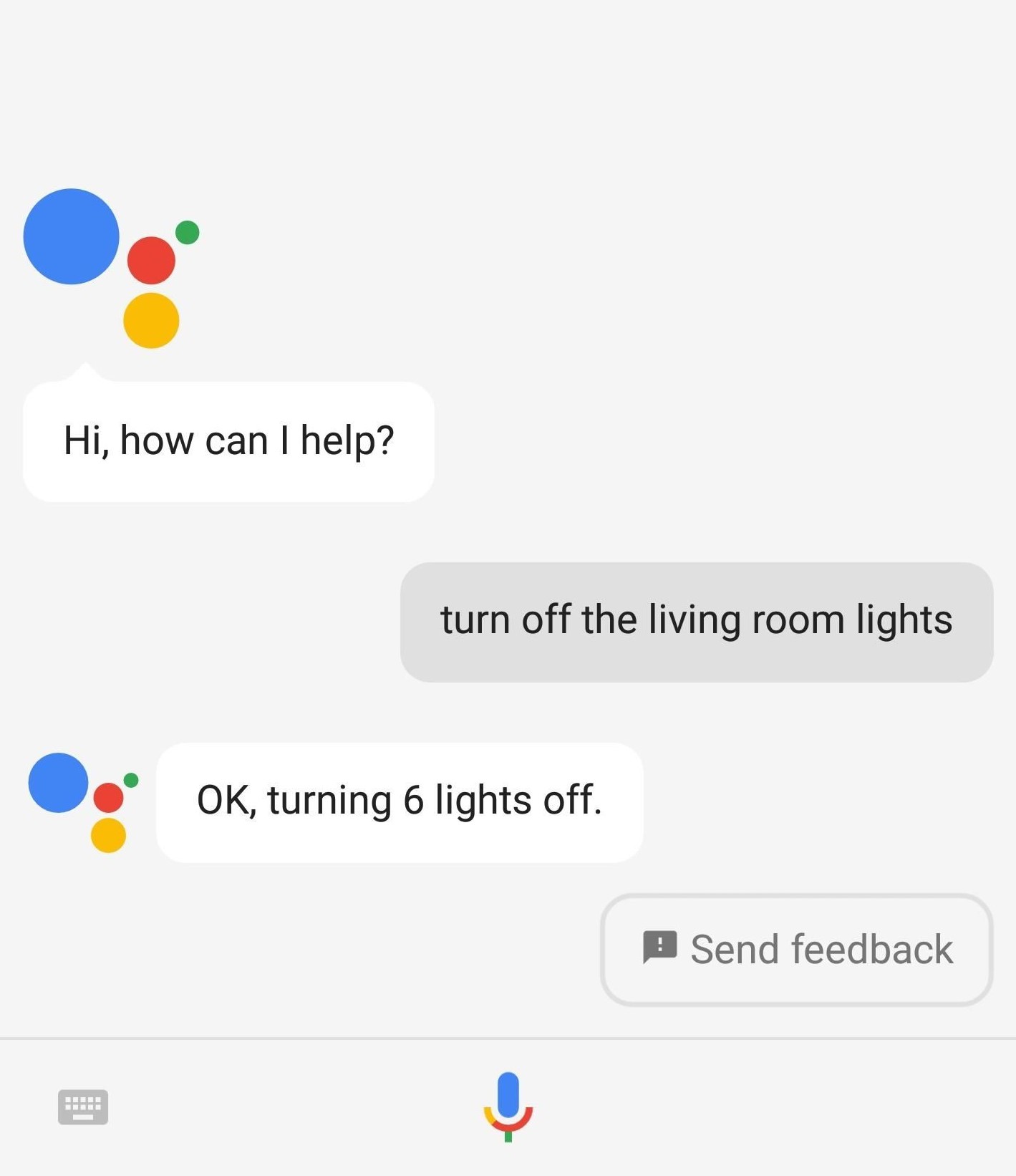 MOTIVE OF THIS PROJECT **Description** Everybody gets exhausted in this busy lifestyle, right? We know how it feels coming back home after such a long tiring day from work. All we want and hope for is everything to be done on its own. We want to control the lights, fan or AC at just the tip of our fingers, click a button and food is right in front of you, served hot and delicious, tap your feet and the music is on letting you enjoy the night. Isn't that really cool? But alas, even if most of us work with technology, we forget to implement it even with the smallest of things which could make our life easier. But as it is rightly said when there is a will there is a way, so here's a simple way out to control the lights of our home at just with your voice. **Things used in this project, Hardware components** *Bolt WiFi Module* 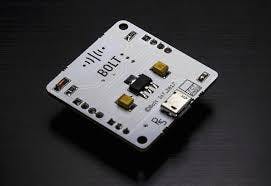 *Relay Module (Single channel)* 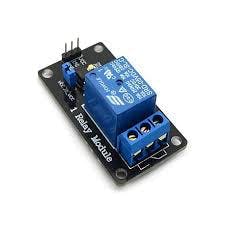 *Jumper wires* 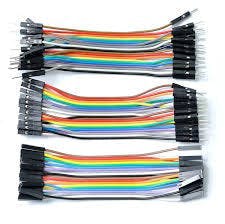 *Bulb(Less voltage)* 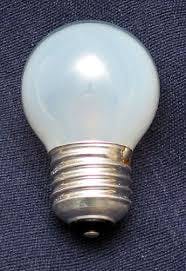 *Bulb holder* 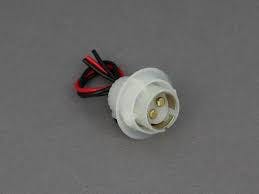 *Mobile charger* 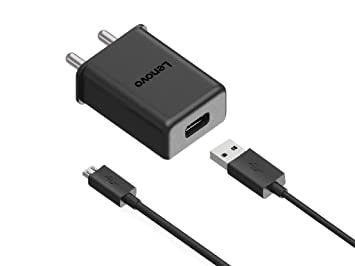 **Software apps and online services** 1.Bolt IoT Account (https://www.boltiot.com/) 2.Bolt cloud Account (https://www.cloud.boltiot.com/) 3.Android Phone with an internet connection 4.IFTTT Account (https://ifttt.com/) **Step 1: Making an account on BoltIoT platform and Bolt Cloud** *Bolt IoT Platform* Bolt IoT platform gives you the capability to control your devices and collect data from IoT devices safely and securely no matter where you are. Get actionable insights by deploying machine learning algorithms with just a few clicks to detect anomalies as well as predict sensor values. To know more visit boltiot.com. **Step 2: Assembling the hardware** 1. Connect the 5V supply pin and GND of the Bolt to the 5V and GND pins of the relay module. 2. Connect any one of the digital pin i.e (0-4) of the Bolt to the IN/REL pin of the relay module. 3. Connect a wire from the bulb holder to the COM pin of the relay module. 4. Connect a wire from the NO pin of the relay module to the 2-pin socket. 5. Connect the remaining terminal of the bulb holder to the other terminal of the 2-pin socket. 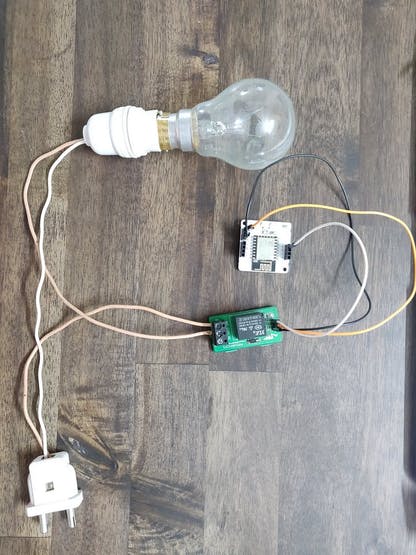 **Step 3: Connecting Bolt to cloud** Learn how to create your new account and link your Bolt device to cloud refer to this .(https://www.hackster.io/104015/setting-up-the-bolt-wifi-module-c5de27). Step 4: Creating a product 1. Visit cloud.botiot.com and login with your account credentials. 2. Click on 'Product' tab and create a product as shown. 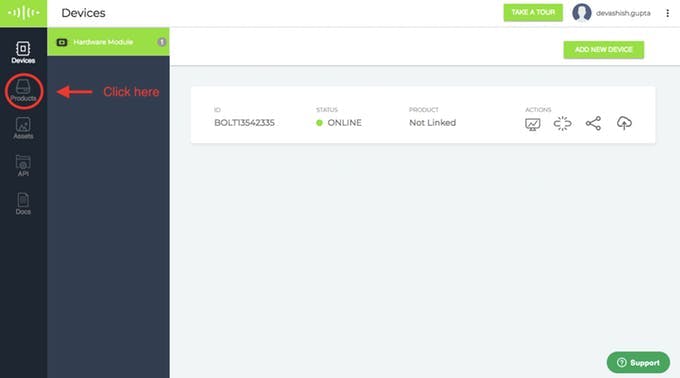 3. Click on the "i" button: 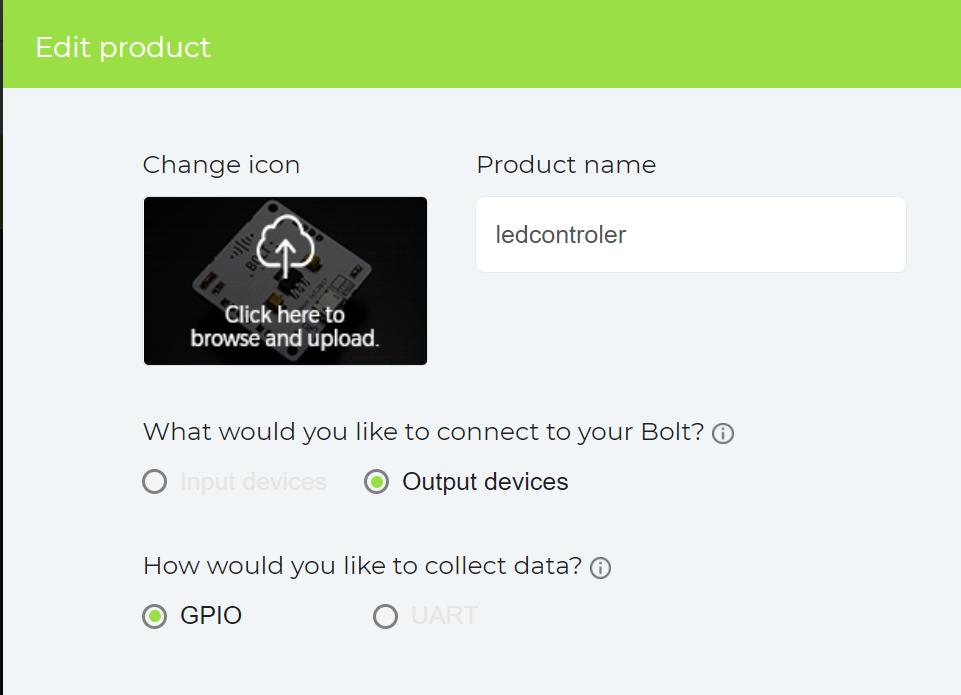 4. Link the Bolt to the product. 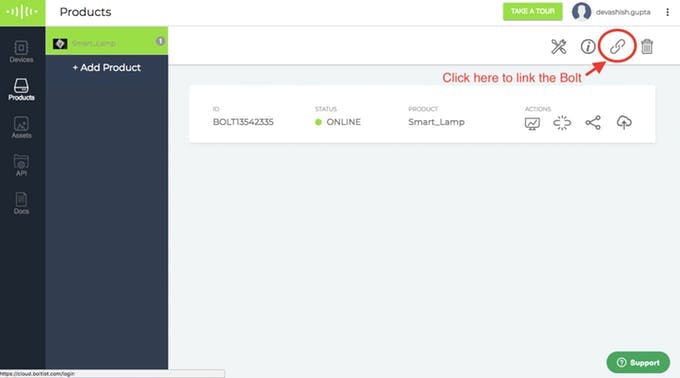 Step 5: Getting the API 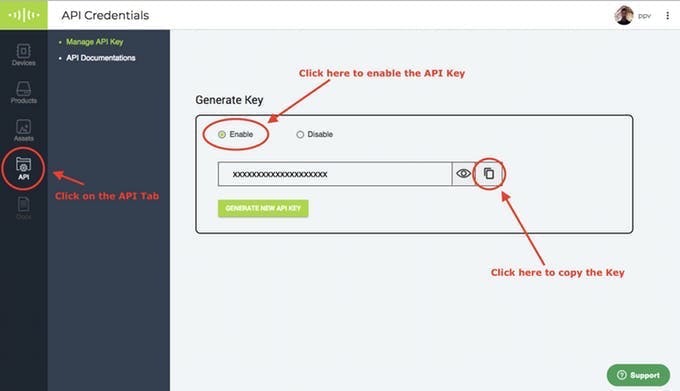 Next click on the copy button to copy your API key. Your API key will may look something like this: f1f918e9-d9c2-4e5b-aed0-b7cb743f74cf **step 6:creating the GPIO control command** Since LED is a digital output device, we will need to get a Digital Write command that can be sent to Bolt over the Internet to switch on the LED. Bolt Cloud go to Docs Tab -> API Documentation -> GPIO Commands API -> Write Digital Output, to understand how to create an API command link to turn on or turn off a pin of the Bolt. The structure of the command is: https://cloud.boltiot.com/remote/**API_KEY**/digitalWrite?pin=**PIN_NUMBER**&state=**HIGH/LOW**&deviceName=**DEVICE_ID** The parameters that you need to replace are: API_KEY: You can get it from the API tab on the cloud dashboard. PIN_NUMBER: Pin to which you have connected the LED. Values can be either 0,1,2,3 or 4 HIGH/LOW: This value indicates if you want to turn on/off the LED. HIGH will turn it on, LOW will turn it off. DEVICE_ID: The id of your device. You can get it from the cloud dashboard. The sample command to turn the led ON connected to a device having ID BOLT13819450 to PIN 0 is: https://cloud.boltiot.com/remote/f1f918e9-d9c2-4e5b-aed0-b7cb743f74cf/digitalWrite?pin=0&state=HIGH&deviceName=BOLT13819450 Make sure that you change the API Key to your own API Key and device ID which you got in the previous step. If you have connected the LED to any other pin other then Pin 0 then make a suitable change in the pin no in your code. **Step 7: IFTTT integration via Google Assistant and Webhooks** *Go to IFTTT to create a new applet by https://ifttt.com* Login using your Gmail account. Make sure you use the same account which you'll be using on your mobile to interact with Google Assistant.  Click on '+This' to create the trigger.  Choose Google Assistant -> Say Specific Phrase 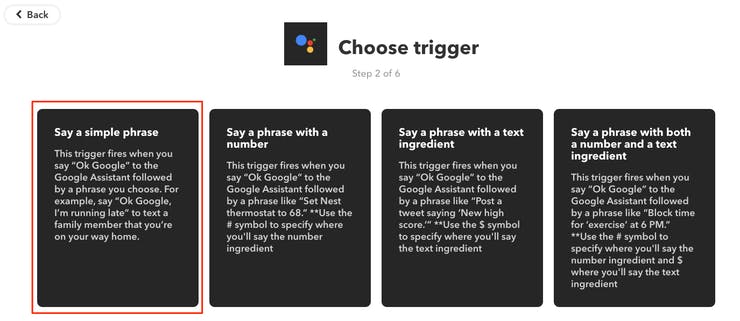 Type the phrase you want to trigger the action. Make sure to specify the trigger command in different ways for example I used a) Turn the lights on b) Turn on the lights c) Lights on 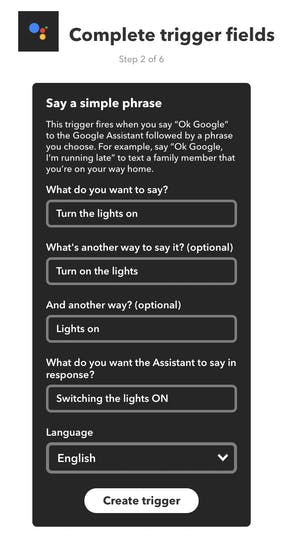 Click on 'Create Trigger' Click on '+That'  Select Webhooks and then Make a web request. 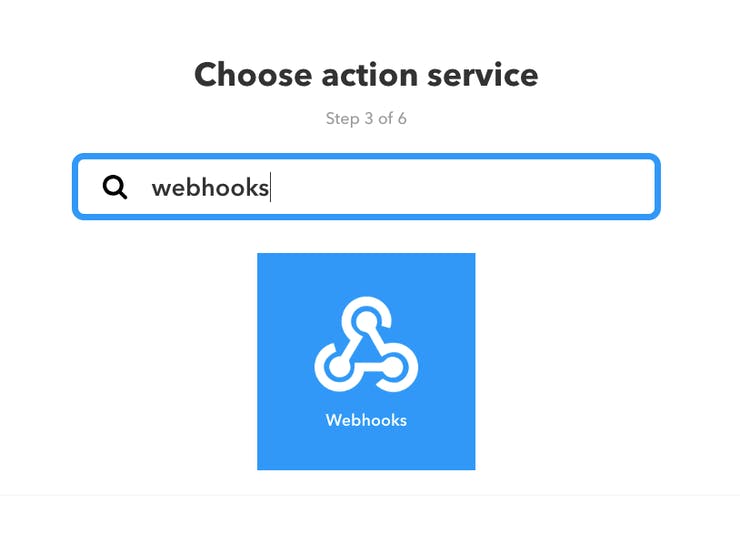 Enter the API URL you got in the previous Step. Make sure that you change the API Key and device name. 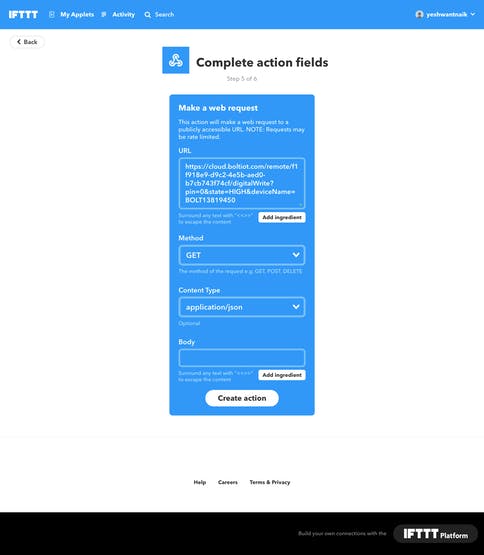 Method will be GET Content type will be Application/json Click on 'Create Action' and then click on 'Finish'. **Steps to turn OFF the LED** Now do the same process for a command to switch off the LED. Here you will change the state to LOW i.e. state=LOW in your code. Here is a sample of the code. Also, add a suitable phrase to switch off the LED. That's it you are done. **For testing the system follow the steps below:** 1. Power up the Bolt device and ensure that it is connected to the cloud. 2. Connect the bulb holder to the AC power supply (i.e wall socket) using the 2- pin socket. 3. Open google assistant in your phone and say "Turn on the Lights" or " Turn off the lights". **Conclusion:** By now your personal voice-controlled lamp should be working. If you liked this project then Please upvote and share it with your friends. Who knows this can be your School/College project. Stayed tuned for more Cool projects, and feel free to ask anything in the comment section. |
| json metadata | {"tags":["the1000daysofsteem","iot","bolt","lamp","steemblog","google","cool","introduceyourself"],"image":["https://cdn.steemitimages.com/DQmPQhfpYgrTNfqrt6oGfvdymNWphEbeEMawp45y6SvEdC6/google-assistant-101-add-your-smart-home-devices-control-them-by-voice.w1456.jpg","https://cdn.steemitimages.com/DQmScVC6LykW9VAj4EmxB57xTanZDWnxqCQt944wV6SgHdN/wifi.jpeg","https://cdn.steemitimages.com/DQmVypiMTnsxWFkKN5WLiwmd99DYoR2LYxy2A3QLHkw33R9/relay_Y6nTIDHWUE.jpeg","https://cdn.steemitimages.com/DQmawGNCjKbKqJNZYP8dKN12VkBZY3zuCokLYxSVLb1xPSM/jumper_G4JRbN4cUh.jpeg","https://cdn.steemitimages.com/DQmboVaGPuXj2c2Eea32eetNBt5ZXgimEESjirYajPV6EnB/bulb_D6qkwoPqiJ.jpeg","https://cdn.steemitimages.com/DQmVmdgMFN3es7fVBTa2121y3TRBsT24Yx1PNGmMSzZRYmG/holder_sIJHhAA2Oa.jpeg","https://cdn.steemitimages.com/DQmXZNY2ctb6186uMjiZHF9wNMKcHUkbe9e6d6WR89ipgB3/51MyQWcPGLL._SX355_.jpg","https://cdn.steemitimages.com/DQmUFQuPVZHCGRVUQGSybjS2W1MxZ9JxbrBjMU8gCW1PGCb/h7_tTZitrVe4b.jpg","https://cdn.steemitimages.com/DQmVWuYbzWiEVYTMb4JBxABMgYLPGcyi7XiPPfHDti1JiJV/screen_shot_2018-07-05_at_6_16_48_pm_EBRYA1ctF9.jfif","https://cdn.steemitimages.com/DQmPQc5SqrwHxz7DmTbaouBYTH1ZH8vHyuWriijJHx5aznK/Capture.PNG","https://cdn.steemitimages.com/DQmag5qK5fg76sQ74epaiBTHNUAD1ivV8EcngmpUh325kdH/screen_shot_2018-07-05_at_6_34_34_pm_2Ga9MmENJR.jfif","https://cdn.steemitimages.com/DQma4oxthjqzdkTbXHMYCCz4cfjyGvPq4QvjG5b7DQXB3Wh/api_key_setup_ySxoYXLFkr.jfif","https://cdn.steemitimages.com/DQmdnQsAGzkmqbGo2v9kkyzAR9Mm15JyaSNw62VvDGeet7k/screen_shot_2019-02-15_at_11_02_06_am_16V29yJS0Y.jfif","https://cdn.steemitimages.com/DQmZcebViKutDbNrK85aVgdW9iUPgaDHaGmCM942DK2XGNg/screen_shot_2019-02-15_at_10_22_20_am_ZWvdkanYWl.jfif","https://cdn.steemitimages.com/DQmT8CJbPSjVipWuk9xqC31QFeXoAiEP8D3hzwUb2PUqTjw/screen_shot_2019-02-15_at_10_23_08_am_2uBl1hujp5.jfif","https://cdn.steemitimages.com/DQmc2QYgsJt6yWcVmPxsZ67fajSf8V4ZXQwbSE8cG4z9z35/screencapture-ifttt-create-if-say-a-simple-phrase-2019-02-15-11_33_59_pcUDhVoytn.jfif","https://cdn.steemitimages.com/DQmcXxtoZsSqMZU4K8udESjmvQg9ARXgWwRgZmLdB8Yqugq/screen_shot_2019-02-15_at_10_25_16_am_YRllxzp9Bb.jfif","https://cdn.steemitimages.com/DQme5MsW7QTneXUkgeRcCrZwSsR1wnyNHX7suuNk8iBCF3M/screen_shot_2019-02-15_at_10_25_50_am_ccrXfaipwg.jfif","https://cdn.steemitimages.com/DQmReT5RPnbrmQ1J4p8NiMv3qg1nVcPpEjoQoMCh3ihn5aZ/screencapture-ifttt-create-if-say-a-simple-phrase-then-make-a-web-request-2019-02-15-10_27_04_wVGXLugVPd.jfif"],"links":["https://www.boltiot.com/","https://www.cloud.boltiot.com/","https://ifttt.com/","https://www.hackster.io/104015/setting-up-the-bolt-wifi-module-c5de27","https://cloud.boltiot.com/remote/","https://cloud.boltiot.com/remote/f1f918e9-d9c2-4e5b-aed0-b7cb743f74cf/digitalWrite?pin=0&state=HIGH&deviceName=BOLT13819450","https://ifttt.com"],"app":"steemit/0.2","format":"markdown"} |
| parent author | |
| parent permlink | projects |
| permlink | what-if-you-can-control-your-home-lights-with-your-voice |
| title | What if you can control your home lights with your voice!!! |
| Transaction Info | Block #45804540/Trx d1b97a8f921e9a5ed577a975057fd9f58129a051 |
View Raw JSON Data
{
"block": 45804540,
"op": [
"comment",
{
"author": "pathak.aman",
"body": "\n \n MOTIVE OF THIS PROJECT\n **Description**\nEverybody gets exhausted in this busy lifestyle, right? We know how it feels coming back home after such a long tiring day from work. All we want and hope for is everything to be done on its own. We want to control the lights, fan or AC at just the tip of our fingers, click a button and food is right in front of you, served hot and delicious, tap your feet and the music is on letting you enjoy the night. Isn't that really cool? But alas, even if most of us work with technology, we forget to implement it even with the smallest of things which could make our life easier. But as it is rightly said when there is a will there is a way, so here's a simple way out to control the lights of our home at just with your voice.\n\n**Things used in this project, Hardware components**\n\n*Bolt WiFi Module*\t\n\n\n*Relay Module (Single channel)*\n\n\n\n*Jumper wires*\n\n\n*Bulb(Less voltage)*\n\n\t\n*Bulb holder*\n\n\n*Mobile charger*\n\n\n\n**Software apps and online services**\n1.Bolt IoT Account (https://www.boltiot.com/)\n2.Bolt cloud Account (https://www.cloud.boltiot.com/)\n3.Android Phone with an internet connection\n4.IFTTT Account (https://ifttt.com/)\n\n\n**Step 1: Making an account on BoltIoT platform and Bolt Cloud**\n\n*Bolt IoT Platform*\nBolt IoT platform gives you the capability to control your devices and collect data from IoT devices safely and securely no matter where you are. Get actionable insights by deploying machine learning algorithms with just a few clicks to detect anomalies as well as predict sensor values.\n\nTo know more visit boltiot.com.\n\n\n**Step 2: Assembling the hardware**\n1. Connect the 5V supply pin and GND of the Bolt to the 5V and GND pins of the relay module.\n\n2. Connect any one of the digital pin i.e (0-4) of the Bolt to the IN/REL pin of the relay module.\n\n3. Connect a wire from the bulb holder to the COM pin of the relay module.\n\n4. Connect a wire from the NO pin of the relay module to the 2-pin socket.\n\n5. Connect the remaining terminal of the bulb holder to the other terminal of the 2-pin socket.\n\n\n\n**Step 3: Connecting Bolt to cloud**\nLearn how to create your new account and link your Bolt device to cloud refer to this .(https://www.hackster.io/104015/setting-up-the-bolt-wifi-module-c5de27).\n\nStep 4: Creating a product\n1. Visit cloud.botiot.com and login with your account credentials.\n\n2. Click on 'Product' tab and create a product as shown.\n\n\n\n3. Click on the \"i\" button:\n \n\n\n4. Link the Bolt to the product.\n\n\n\nStep 5: Getting the API\n\n\n\nNext click on the copy button to copy your API key. Your API key will may look something like this: f1f918e9-d9c2-4e5b-aed0-b7cb743f74cf\n\n**step 6:creating the GPIO control command**\nSince LED is a digital output device, we will need to get a Digital Write command that can be sent to Bolt over the Internet to switch on the LED.\n\nBolt Cloud go to Docs Tab -> API Documentation -> GPIO Commands API -> Write Digital Output, to understand how to create an API command link to turn on or turn off a pin of the Bolt.\n\nThe structure of the command is:\n\nhttps://cloud.boltiot.com/remote/**API_KEY**/digitalWrite?pin=**PIN_NUMBER**&state=**HIGH/LOW**&deviceName=**DEVICE_ID**\n\nThe parameters that you need to replace are:\nAPI_KEY: You can get it from the API tab on the cloud dashboard.\nPIN_NUMBER: Pin to which you have connected the LED. Values can be either 0,1,2,3 or 4\nHIGH/LOW: This value indicates if you want to turn on/off the LED. HIGH will turn it on, LOW will turn it off.\nDEVICE_ID: The id of your device. You can get it from the cloud dashboard.\n\nThe sample command to turn the led ON connected to a device having ID BOLT13819450 to PIN 0 is:\n\nhttps://cloud.boltiot.com/remote/f1f918e9-d9c2-4e5b-aed0-b7cb743f74cf/digitalWrite?pin=0&state=HIGH&deviceName=BOLT13819450\n\nMake sure that you change the API Key to your own API Key and device ID which you got in the previous step. If you have connected the LED to any other pin other then Pin 0 then make a suitable change in the pin no in your code.\n\n\n**Step 7: IFTTT integration via Google Assistant and Webhooks**\n\n*Go to IFTTT to create a new applet by https://ifttt.com*\n\nLogin using your Gmail account. Make sure you use the same account which you'll be using on your mobile to interact with Google Assistant.\n\n\n\nClick on '+This' to create the trigger.\n\n\n\nChoose Google Assistant -> Say Specific Phrase\n\n\n\nType the phrase you want to trigger the action. Make sure to specify the trigger command in different ways for example I used\n\na) Turn the lights on\n\nb) Turn on the lights\n\nc) Lights on\n\n\n\n\nClick on 'Create Trigger'\n\nClick on '+That'\n\n\n\n\nSelect Webhooks and then Make a web request.\n\n\n\n\nEnter the API URL you got in the previous Step. Make sure that you change the API Key and device name.\n\n\n\n\nMethod will be GET\n\nContent type will be Application/json\n\nClick on 'Create Action' and then click on 'Finish'.\n\n**Steps to turn OFF the LED**\n\nNow do the same process for a command to switch off the LED. Here you will change the state to LOW i.e. state=LOW in your code. Here is a sample of the code. Also, add a suitable phrase to switch off the LED.\n\n\nThat's it you are done.\n\n**For testing the system follow the steps below:**\n\n1. Power up the Bolt device and ensure that it is connected to the cloud.\n\n2. Connect the bulb holder to the AC power supply (i.e wall socket) using the 2- pin socket.\n\n3. Open google assistant in your phone and say \"Turn on the Lights\" or \" Turn off the lights\".\n\n**Conclusion:**\nBy now your personal voice-controlled lamp should be working.\n\nIf you liked this project then Please upvote and share it with your friends. Who knows this can be your School/College project. Stayed tuned for more Cool projects, and feel free to ask anything in the comment section.",
"json_metadata": "{\"tags\":[\"the1000daysofsteem\",\"iot\",\"bolt\",\"lamp\",\"steemblog\",\"google\",\"cool\",\"introduceyourself\"],\"image\":[\"https://cdn.steemitimages.com/DQmPQhfpYgrTNfqrt6oGfvdymNWphEbeEMawp45y6SvEdC6/google-assistant-101-add-your-smart-home-devices-control-them-by-voice.w1456.jpg\",\"https://cdn.steemitimages.com/DQmScVC6LykW9VAj4EmxB57xTanZDWnxqCQt944wV6SgHdN/wifi.jpeg\",\"https://cdn.steemitimages.com/DQmVypiMTnsxWFkKN5WLiwmd99DYoR2LYxy2A3QLHkw33R9/relay_Y6nTIDHWUE.jpeg\",\"https://cdn.steemitimages.com/DQmawGNCjKbKqJNZYP8dKN12VkBZY3zuCokLYxSVLb1xPSM/jumper_G4JRbN4cUh.jpeg\",\"https://cdn.steemitimages.com/DQmboVaGPuXj2c2Eea32eetNBt5ZXgimEESjirYajPV6EnB/bulb_D6qkwoPqiJ.jpeg\",\"https://cdn.steemitimages.com/DQmVmdgMFN3es7fVBTa2121y3TRBsT24Yx1PNGmMSzZRYmG/holder_sIJHhAA2Oa.jpeg\",\"https://cdn.steemitimages.com/DQmXZNY2ctb6186uMjiZHF9wNMKcHUkbe9e6d6WR89ipgB3/51MyQWcPGLL._SX355_.jpg\",\"https://cdn.steemitimages.com/DQmUFQuPVZHCGRVUQGSybjS2W1MxZ9JxbrBjMU8gCW1PGCb/h7_tTZitrVe4b.jpg\",\"https://cdn.steemitimages.com/DQmVWuYbzWiEVYTMb4JBxABMgYLPGcyi7XiPPfHDti1JiJV/screen_shot_2018-07-05_at_6_16_48_pm_EBRYA1ctF9.jfif\",\"https://cdn.steemitimages.com/DQmPQc5SqrwHxz7DmTbaouBYTH1ZH8vHyuWriijJHx5aznK/Capture.PNG\",\"https://cdn.steemitimages.com/DQmag5qK5fg76sQ74epaiBTHNUAD1ivV8EcngmpUh325kdH/screen_shot_2018-07-05_at_6_34_34_pm_2Ga9MmENJR.jfif\",\"https://cdn.steemitimages.com/DQma4oxthjqzdkTbXHMYCCz4cfjyGvPq4QvjG5b7DQXB3Wh/api_key_setup_ySxoYXLFkr.jfif\",\"https://cdn.steemitimages.com/DQmdnQsAGzkmqbGo2v9kkyzAR9Mm15JyaSNw62VvDGeet7k/screen_shot_2019-02-15_at_11_02_06_am_16V29yJS0Y.jfif\",\"https://cdn.steemitimages.com/DQmZcebViKutDbNrK85aVgdW9iUPgaDHaGmCM942DK2XGNg/screen_shot_2019-02-15_at_10_22_20_am_ZWvdkanYWl.jfif\",\"https://cdn.steemitimages.com/DQmT8CJbPSjVipWuk9xqC31QFeXoAiEP8D3hzwUb2PUqTjw/screen_shot_2019-02-15_at_10_23_08_am_2uBl1hujp5.jfif\",\"https://cdn.steemitimages.com/DQmc2QYgsJt6yWcVmPxsZ67fajSf8V4ZXQwbSE8cG4z9z35/screencapture-ifttt-create-if-say-a-simple-phrase-2019-02-15-11_33_59_pcUDhVoytn.jfif\",\"https://cdn.steemitimages.com/DQmcXxtoZsSqMZU4K8udESjmvQg9ARXgWwRgZmLdB8Yqugq/screen_shot_2019-02-15_at_10_25_16_am_YRllxzp9Bb.jfif\",\"https://cdn.steemitimages.com/DQme5MsW7QTneXUkgeRcCrZwSsR1wnyNHX7suuNk8iBCF3M/screen_shot_2019-02-15_at_10_25_50_am_ccrXfaipwg.jfif\",\"https://cdn.steemitimages.com/DQmReT5RPnbrmQ1J4p8NiMv3qg1nVcPpEjoQoMCh3ihn5aZ/screencapture-ifttt-create-if-say-a-simple-phrase-then-make-a-web-request-2019-02-15-10_27_04_wVGXLugVPd.jfif\"],\"links\":[\"https://www.boltiot.com/\",\"https://www.cloud.boltiot.com/\",\"https://ifttt.com/\",\"https://www.hackster.io/104015/setting-up-the-bolt-wifi-module-c5de27\",\"https://cloud.boltiot.com/remote/\",\"https://cloud.boltiot.com/remote/f1f918e9-d9c2-4e5b-aed0-b7cb743f74cf/digitalWrite?pin=0&state=HIGH&deviceName=BOLT13819450\",\"https://ifttt.com\"],\"app\":\"steemit/0.2\",\"format\":\"markdown\"}",
"parent_author": "",
"parent_permlink": "projects",
"permlink": "what-if-you-can-control-your-home-lights-with-your-voice",
"title": "What if you can control your home lights with your voice!!!"
}
],
"op_in_trx": 0,
"timestamp": "2020-08-08T07:11:09",
"trx_id": "d1b97a8f921e9a5ed577a975057fd9f58129a051",
"trx_in_block": 5,
"virtual_op": 0
}2020/08/08 07:08:42
2020/08/08 07:08:42
| author | appics-introduce |
| body | ### <center>Dear @pathak.aman </center> #### <center>APPICS is the easiest way to share pictures & videos on the blockchain and get rewarded with both STEEM and APX tokens! 📱 </center> <center> I'd like to invite you to join our mobile apps for iOS and Android, where you can simply login with your steemit account and start getting rewarded for your passion. APPICS is the most engaged dApp in the STEEM ecosystem!</center> <center>If you are on iOS, please visit [ios.appics.com](https://testflight.apple.com/join/ZfYdLQaa) and download the app directly from there. If you are on Android, please sign up at [softlaunch.appics.com](https://b6877970.sibforms.com/serve/MUIEAPygweF5JxggMtjc-qqXNrwD9wisAl7jvwJQpUvZjxE61W3QYi0IlO5AOB4uI3i6a1dOYv0lfeMSNUfpO7eDelZTxuoBBVKGd3jcQcIgt2G6E84DbNPcCp1JLJlNVMii9Y5QrTDxtHnVkLFSEB0hp39trynhnYHY8k0wjnTJrDajg0WniQh767RiZsiMGK0xQw2r1zMsenUL) with your google play store email address so that we can invite you and send you an exclusive download link via email! </center> #### <center> Team APPICS</center> <center>https://media.giphy.com/media/oVjC7Ms2mztjG5fbUB/giphy.gif </center> <center>*Everything you need to know about APPICS: [https://linktr.ee/appics](https://linktr.ee/appics)*</center> <center>*Visit our Website: [https://appics.com](https://appics.com)*</center> <center>*Join us on Telegram: [https://t.me/appics_official](https://t.me/appics_official)*</center> |
| json metadata | {"app": "beem/0.21.1"} |
| parent author | pathak.aman |
| parent permlink | what-if-you-can-control-your-home-lights-with-your-voice |
| permlink | re-what-if-you-can-control-your-home-lights-with-your-voice-20200808t070842z |
| title | |
| Transaction Info | Block #45804495/Trx a7925e596720a80b9fa84ee38d81df9053a4fa5b |
View Raw JSON Data
{
  "block": 45804495,
  "op": [
    "comment",
    {
      "author": "appics-introduce",
      "body": "\n ### <center>Dear @pathak.aman  </center>\n\n#### <center>APPICS is the easiest way to share pictures & videos on the blockchain and get rewarded with both STEEM and APX tokens! 📱 </center>\n\n<center> I'd like to invite you to join our mobile apps for iOS and Android, where you can simply login with your steemit account and start getting rewarded for your passion. APPICS is the most engaged dApp in the STEEM ecosystem!</center>\n<center>If you are on iOS, please visit [ios.appics.com](https://testflight.apple.com/join/ZfYdLQaa) and download the app directly from there. If you are on Android, please sign up at  [softlaunch.appics.com](https://b6877970.sibforms.com/serve/MUIEAPygweF5JxggMtjc-qqXNrwD9wisAl7jvwJQpUvZjxE61W3QYi0IlO5AOB4uI3i6a1dOYv0lfeMSNUfpO7eDelZTxuoBBVKGd3jcQcIgt2G6E84DbNPcCp1JLJlNVMii9Y5QrTDxtHnVkLFSEB0hp39trynhnYHY8k0wjnTJrDajg0WniQh767RiZsiMGK0xQw2r1zMsenUL) with your google play store email address so that we can invite you and send you an exclusive download link via email!  </center>\n\n#### <center>  Team APPICS</center>\n<center>https://media.giphy.com/media/oVjC7Ms2mztjG5fbUB/giphy.gif </center>\n\n\n\n<center>*Everything you need to know about APPICS: [https://linktr.ee/appics](https://linktr.ee/appics)*</center>\n\n<center>*Visit our Website: [https://appics.com](https://appics.com)*</center>\n\n<center>*Join us on Telegram: [https://t.me/appics_official](https://t.me/appics_official)*</center>\n",
      "json_metadata": "{\"app\": \"beem/0.21.1\"}",
      "parent_author": "pathak.aman",
      "parent_permlink": "what-if-you-can-control-your-home-lights-with-your-voice",
      "permlink": "re-what-if-you-can-control-your-home-lights-with-your-voice-20200808t070842z",
      "title": ""
    }
  ],
  "op_in_trx": 0,
  "timestamp": "2020-08-08T07:08:42",
  "trx_id": "a7925e596720a80b9fa84ee38d81df9053a4fa5b",
  "trx_in_block": 7,
  "virtual_op": 0
}pathak.amanpublished a new post: what-if-you-can-control-your-home-lights-with-your-voice2020/08/08 07:08:30
pathak.amanpublished a new post: what-if-you-can-control-your-home-lights-with-your-voice
2020/08/08 07:08:30
| author | pathak.aman |
| body |  MOTIVE OF THIS PROJECT **Description** Everybody gets exhausted in this busy lifestyle, right? We know how it feels coming back home after such a long tiring day from work. All we want and hope for is everything to be done on its own. We want to control the lights, fan or AC at just the tip of our fingers, click a button and food is right in front of you, served hot and delicious, tap your feet and the music is on letting you enjoy the night. Isn't that really cool? But alas, even if most of us work with technology, we forget to implement it even with the smallest of things which could make our life easier. But as it is rightly said when there is a will there is a way, so here's a simple way out to control the lights of our home at just with your voice. **Things used in this project, Hardware components** *Bolt WiFi Module*  *Relay Module (Single channel)*  *Jumper wires*  *Bulb(Less voltage)*  *Bulb holder*  *Mobile charger*  **Software apps and online services** 1.Bolt IoT Account (https://www.boltiot.com/) 2.Bolt cloud Account (https://www.cloud.boltiot.com/) 3.Android Phone with an internet connection 4.IFTTT Account (https://ifttt.com/) **Step 1: Making an account on BoltIoT platform and Bolt Cloud** *Bolt IoT Platform* Bolt IoT platform gives you the capability to control your devices and collect data from IoT devices safely and securely no matter where you are. Get actionable insights by deploying machine learning algorithms with just a few clicks to detect anomalies as well as predict sensor values. To know more visit boltiot.com. **Step 2: Assembling the hardware** 1. Connect the 5V supply pin and GND of the Bolt to the 5V and GND pins of the relay module. 2. Connect any one of the digital pin i.e (0-4) of the Bolt to the IN/REL pin of the relay module. 3. Connect a wire from the bulb holder to the COM pin of the relay module. 4. Connect a wire from the NO pin of the relay module to the 2-pin socket. 5. Connect the remaining terminal of the bulb holder to the other terminal of the 2-pin socket.  **Step 3: Connecting Bolt to cloud** Learn how to create your new account and link your Bolt device to cloud refer to this .(https://www.hackster.io/104015/setting-up-the-bolt-wifi-module-c5de27). Step 4: Creating a product 1. Visit cloud.botiot.com and login with your account credentials. 2. Click on 'Product' tab and create a product as shown.  3. Click on the "i" button:  4. Link the Bolt to the product.  Step 5: Getting the API  Next click on the copy button to copy your API key. Your API key will may look something like this: f1f918e9-d9c2-4e5b-aed0-b7cb743f74cf **step 6:creating the GPIO control command** Since LED is a digital output device, we will need to get a Digital Write command that can be sent to Bolt over the Internet to switch on the LED. Bolt Cloud go to Docs Tab -> API Documentation -> GPIO Commands API -> Write Digital Output, to understand how to create an API command link to turn on or turn off a pin of the Bolt. The structure of the command is: https://cloud.boltiot.com/remote/**API_KEY**/digitalWrite?pin=**PIN_NUMBER**&state=**HIGH/LOW**&deviceName=**DEVICE_ID** The parameters that you need to replace are: API_KEY: You can get it from the API tab on the cloud dashboard. PIN_NUMBER: Pin to which you have connected the LED. Values can be either 0,1,2,3 or 4 HIGH/LOW: This value indicates if you want to turn on/off the LED. HIGH will turn it on, LOW will turn it off. DEVICE_ID: The id of your device. You can get it from the cloud dashboard. The sample command to turn the led ON connected to a device having ID BOLT13819450 to PIN 0 is: https://cloud.boltiot.com/remote/f1f918e9-d9c2-4e5b-aed0-b7cb743f74cf/digitalWrite?pin=0&state=HIGH&deviceName=BOLT13819450 Make sure that you change the API Key to your own API Key and device ID which you got in the previous step. If you have connected the LED to any other pin other then Pin 0 then make a suitable change in the pin no in your code. **Step 7: IFTTT integration via Google Assistant and Webhooks** *Go to IFTTT to create a new applet by https://ifttt.com* Login using your Gmail account. Make sure you use the same account which you'll be using on your mobile to interact with Google Assistant.  Click on '+This' to create the trigger.  Choose Google Assistant -> Say Specific Phrase  Type the phrase you want to trigger the action. Make sure to specify the trigger command in different ways for example I used a) Turn the lights on b) Turn on the lights c) Lights on  Click on 'Create Trigger' Click on '+That'  Select Webhooks and then Make a web request.  Enter the API URL you got in the previous Step. Make sure that you change the API Key and device name.  Method will be GET Content type will be Application/json Click on 'Create Action' and then click on 'Finish'. **Steps to turn OFF the LED** Now do the same process for a command to switch off the LED. Here you will change the state to LOW i.e. state=LOW in your code. Here is a sample of the code. Also, add a suitable phrase to switch off the LED. That's it you are done. **For testing the system follow the steps below:** 1. Power up the Bolt device and ensure that it is connected to the cloud. 2. Connect the bulb holder to the AC power supply (i.e wall socket) using the 2- pin socket. 3. Open google assistant in your phone and say "Turn on the Lights" or " Turn off the lights". **Conclusion:** By now your personal voice-controlled lamp should be working. If you liked this project then Please upvote and share it with your friends. Who knows this can be your School/College project. Stayed tuned for more Cool projects, and feel free to ask anything in the comment section. |
| json metadata | {"tags":["projects","iot","bolt","lamp","steemblog","google","cool","introduceyourself"],"image":["https://cdn.steemitimages.com/DQmPQhfpYgrTNfqrt6oGfvdymNWphEbeEMawp45y6SvEdC6/google-assistant-101-add-your-smart-home-devices-control-them-by-voice.w1456.jpg","https://cdn.steemitimages.com/DQmScVC6LykW9VAj4EmxB57xTanZDWnxqCQt944wV6SgHdN/wifi.jpeg","https://cdn.steemitimages.com/DQmVypiMTnsxWFkKN5WLiwmd99DYoR2LYxy2A3QLHkw33R9/relay_Y6nTIDHWUE.jpeg","https://cdn.steemitimages.com/DQmawGNCjKbKqJNZYP8dKN12VkBZY3zuCokLYxSVLb1xPSM/jumper_G4JRbN4cUh.jpeg","https://cdn.steemitimages.com/DQmboVaGPuXj2c2Eea32eetNBt5ZXgimEESjirYajPV6EnB/bulb_D6qkwoPqiJ.jpeg","https://cdn.steemitimages.com/DQmVmdgMFN3es7fVBTa2121y3TRBsT24Yx1PNGmMSzZRYmG/holder_sIJHhAA2Oa.jpeg","https://cdn.steemitimages.com/DQmXZNY2ctb6186uMjiZHF9wNMKcHUkbe9e6d6WR89ipgB3/51MyQWcPGLL._SX355_.jpg","https://cdn.steemitimages.com/DQmUFQuPVZHCGRVUQGSybjS2W1MxZ9JxbrBjMU8gCW1PGCb/h7_tTZitrVe4b.jpg","https://cdn.steemitimages.com/DQmVWuYbzWiEVYTMb4JBxABMgYLPGcyi7XiPPfHDti1JiJV/screen_shot_2018-07-05_at_6_16_48_pm_EBRYA1ctF9.jfif","https://cdn.steemitimages.com/DQmPQc5SqrwHxz7DmTbaouBYTH1ZH8vHyuWriijJHx5aznK/Capture.PNG","https://cdn.steemitimages.com/DQmag5qK5fg76sQ74epaiBTHNUAD1ivV8EcngmpUh325kdH/screen_shot_2018-07-05_at_6_34_34_pm_2Ga9MmENJR.jfif","https://cdn.steemitimages.com/DQma4oxthjqzdkTbXHMYCCz4cfjyGvPq4QvjG5b7DQXB3Wh/api_key_setup_ySxoYXLFkr.jfif","https://cdn.steemitimages.com/DQmdnQsAGzkmqbGo2v9kkyzAR9Mm15JyaSNw62VvDGeet7k/screen_shot_2019-02-15_at_11_02_06_am_16V29yJS0Y.jfif","https://cdn.steemitimages.com/DQmZcebViKutDbNrK85aVgdW9iUPgaDHaGmCM942DK2XGNg/screen_shot_2019-02-15_at_10_22_20_am_ZWvdkanYWl.jfif","https://cdn.steemitimages.com/DQmT8CJbPSjVipWuk9xqC31QFeXoAiEP8D3hzwUb2PUqTjw/screen_shot_2019-02-15_at_10_23_08_am_2uBl1hujp5.jfif","https://cdn.steemitimages.com/DQmc2QYgsJt6yWcVmPxsZ67fajSf8V4ZXQwbSE8cG4z9z35/screencapture-ifttt-create-if-say-a-simple-phrase-2019-02-15-11_33_59_pcUDhVoytn.jfif","https://cdn.steemitimages.com/DQmcXxtoZsSqMZU4K8udESjmvQg9ARXgWwRgZmLdB8Yqugq/screen_shot_2019-02-15_at_10_25_16_am_YRllxzp9Bb.jfif","https://cdn.steemitimages.com/DQme5MsW7QTneXUkgeRcCrZwSsR1wnyNHX7suuNk8iBCF3M/screen_shot_2019-02-15_at_10_25_50_am_ccrXfaipwg.jfif","https://cdn.steemitimages.com/DQmReT5RPnbrmQ1J4p8NiMv3qg1nVcPpEjoQoMCh3ihn5aZ/screencapture-ifttt-create-if-say-a-simple-phrase-then-make-a-web-request-2019-02-15-10_27_04_wVGXLugVPd.jfif"],"links":["https://www.boltiot.com/","https://www.cloud.boltiot.com/","https://ifttt.com/","https://www.hackster.io/104015/setting-up-the-bolt-wifi-module-c5de27","https://cloud.boltiot.com/remote/","https://cloud.boltiot.com/remote/f1f918e9-d9c2-4e5b-aed0-b7cb743f74cf/digitalWrite?pin=0&state=HIGH&deviceName=BOLT13819450","https://ifttt.com"],"app":"steemit/0.2","format":"markdown"} |
| parent author | |
| parent permlink | projects |
| permlink | what-if-you-can-control-your-home-lights-with-your-voice |
| title | What if you can control your home lights with your voice!!! |
| Transaction Info | Block #45804491/Trx d929aa00f0e9b00a7537583c3d5159485a0d3981 |
View Raw JSON Data
{
"block": 45804491,
"op": [
"comment",
{
"author": "pathak.aman",
"body": "\n \n MOTIVE OF THIS PROJECT\n **Description**\nEverybody gets exhausted in this busy lifestyle, right? We know how it feels coming back home after such a long tiring day from work. All we want and hope for is everything to be done on its own. We want to control the lights, fan or AC at just the tip of our fingers, click a button and food is right in front of you, served hot and delicious, tap your feet and the music is on letting you enjoy the night. Isn't that really cool? But alas, even if most of us work with technology, we forget to implement it even with the smallest of things which could make our life easier. But as it is rightly said when there is a will there is a way, so here's a simple way out to control the lights of our home at just with your voice.\n\n**Things used in this project, Hardware components**\n\n*Bolt WiFi Module*\t\n\n\n*Relay Module (Single channel)*\n\n\n\n*Jumper wires*\n\n\n*Bulb(Less voltage)*\n\n\t\n*Bulb holder*\n\n\n*Mobile charger*\n\n\n\n**Software apps and online services**\n1.Bolt IoT Account (https://www.boltiot.com/)\n2.Bolt cloud Account (https://www.cloud.boltiot.com/)\n3.Android Phone with an internet connection\n4.IFTTT Account (https://ifttt.com/)\n\n\n**Step 1: Making an account on BoltIoT platform and Bolt Cloud**\n\n*Bolt IoT Platform*\nBolt IoT platform gives you the capability to control your devices and collect data from IoT devices safely and securely no matter where you are. Get actionable insights by deploying machine learning algorithms with just a few clicks to detect anomalies as well as predict sensor values.\n\nTo know more visit boltiot.com.\n\n\n**Step 2: Assembling the hardware**\n1. Connect the 5V supply pin and GND of the Bolt to the 5V and GND pins of the relay module.\n\n2. Connect any one of the digital pin i.e (0-4) of the Bolt to the IN/REL pin of the relay module.\n\n3. Connect a wire from the bulb holder to the COM pin of the relay module.\n\n4. Connect a wire from the NO pin of the relay module to the 2-pin socket.\n\n5. Connect the remaining terminal of the bulb holder to the other terminal of the 2-pin socket.\n\n\n\n**Step 3: Connecting Bolt to cloud**\nLearn how to create your new account and link your Bolt device to cloud refer to this .(https://www.hackster.io/104015/setting-up-the-bolt-wifi-module-c5de27).\n\nStep 4: Creating a product\n1. Visit cloud.botiot.com and login with your account credentials.\n\n2. Click on 'Product' tab and create a product as shown.\n\n\n\n3. Click on the \"i\" button:\n \n\n\n4. Link the Bolt to the product.\n\n\n\nStep 5: Getting the API\n\n\n\nNext click on the copy button to copy your API key. Your API key will may look something like this: f1f918e9-d9c2-4e5b-aed0-b7cb743f74cf\n\n**step 6:creating the GPIO control command**\nSince LED is a digital output device, we will need to get a Digital Write command that can be sent to Bolt over the Internet to switch on the LED.\n\nBolt Cloud go to Docs Tab -> API Documentation -> GPIO Commands API -> Write Digital Output, to understand how to create an API command link to turn on or turn off a pin of the Bolt.\n\nThe structure of the command is:\n\nhttps://cloud.boltiot.com/remote/**API_KEY**/digitalWrite?pin=**PIN_NUMBER**&state=**HIGH/LOW**&deviceName=**DEVICE_ID**\n\nThe parameters that you need to replace are:\nAPI_KEY: You can get it from the API tab on the cloud dashboard.\nPIN_NUMBER: Pin to which you have connected the LED. Values can be either 0,1,2,3 or 4\nHIGH/LOW: This value indicates if you want to turn on/off the LED. HIGH will turn it on, LOW will turn it off.\nDEVICE_ID: The id of your device. You can get it from the cloud dashboard.\n\nThe sample command to turn the led ON connected to a device having ID BOLT13819450 to PIN 0 is:\n\nhttps://cloud.boltiot.com/remote/f1f918e9-d9c2-4e5b-aed0-b7cb743f74cf/digitalWrite?pin=0&state=HIGH&deviceName=BOLT13819450\n\nMake sure that you change the API Key to your own API Key and device ID which you got in the previous step. If you have connected the LED to any other pin other then Pin 0 then make a suitable change in the pin no in your code.\n\n\n**Step 7: IFTTT integration via Google Assistant and Webhooks**\n\n*Go to IFTTT to create a new applet by https://ifttt.com*\n\nLogin using your Gmail account. Make sure you use the same account which you'll be using on your mobile to interact with Google Assistant.\n\n\n\nClick on '+This' to create the trigger.\n\n\n\nChoose Google Assistant -> Say Specific Phrase\n\n\n\nType the phrase you want to trigger the action. Make sure to specify the trigger command in different ways for example I used\n\na) Turn the lights on\n\nb) Turn on the lights\n\nc) Lights on\n\n\n\n\nClick on 'Create Trigger'\n\nClick on '+That'\n\n\n\n\nSelect Webhooks and then Make a web request.\n\n\n\n\nEnter the API URL you got in the previous Step. Make sure that you change the API Key and device name.\n\n\n\n\nMethod will be GET\n\nContent type will be Application/json\n\nClick on 'Create Action' and then click on 'Finish'.\n\n**Steps to turn OFF the LED**\n\nNow do the same process for a command to switch off the LED. Here you will change the state to LOW i.e. state=LOW in your code. Here is a sample of the code. Also, add a suitable phrase to switch off the LED.\n\n\nThat's it you are done.\n\n**For testing the system follow the steps below:**\n\n1. Power up the Bolt device and ensure that it is connected to the cloud.\n\n2. Connect the bulb holder to the AC power supply (i.e wall socket) using the 2- pin socket.\n\n3. Open google assistant in your phone and say \"Turn on the Lights\" or \" Turn off the lights\".\n\n**Conclusion:**\nBy now your personal voice-controlled lamp should be working.\n\nIf you liked this project then Please upvote and share it with your friends. Who knows this can be your School/College project. Stayed tuned for more Cool projects, and feel free to ask anything in the comment section.",
"json_metadata": "{\"tags\":[\"projects\",\"iot\",\"bolt\",\"lamp\",\"steemblog\",\"google\",\"cool\",\"introduceyourself\"],\"image\":[\"https://cdn.steemitimages.com/DQmPQhfpYgrTNfqrt6oGfvdymNWphEbeEMawp45y6SvEdC6/google-assistant-101-add-your-smart-home-devices-control-them-by-voice.w1456.jpg\",\"https://cdn.steemitimages.com/DQmScVC6LykW9VAj4EmxB57xTanZDWnxqCQt944wV6SgHdN/wifi.jpeg\",\"https://cdn.steemitimages.com/DQmVypiMTnsxWFkKN5WLiwmd99DYoR2LYxy2A3QLHkw33R9/relay_Y6nTIDHWUE.jpeg\",\"https://cdn.steemitimages.com/DQmawGNCjKbKqJNZYP8dKN12VkBZY3zuCokLYxSVLb1xPSM/jumper_G4JRbN4cUh.jpeg\",\"https://cdn.steemitimages.com/DQmboVaGPuXj2c2Eea32eetNBt5ZXgimEESjirYajPV6EnB/bulb_D6qkwoPqiJ.jpeg\",\"https://cdn.steemitimages.com/DQmVmdgMFN3es7fVBTa2121y3TRBsT24Yx1PNGmMSzZRYmG/holder_sIJHhAA2Oa.jpeg\",\"https://cdn.steemitimages.com/DQmXZNY2ctb6186uMjiZHF9wNMKcHUkbe9e6d6WR89ipgB3/51MyQWcPGLL._SX355_.jpg\",\"https://cdn.steemitimages.com/DQmUFQuPVZHCGRVUQGSybjS2W1MxZ9JxbrBjMU8gCW1PGCb/h7_tTZitrVe4b.jpg\",\"https://cdn.steemitimages.com/DQmVWuYbzWiEVYTMb4JBxABMgYLPGcyi7XiPPfHDti1JiJV/screen_shot_2018-07-05_at_6_16_48_pm_EBRYA1ctF9.jfif\",\"https://cdn.steemitimages.com/DQmPQc5SqrwHxz7DmTbaouBYTH1ZH8vHyuWriijJHx5aznK/Capture.PNG\",\"https://cdn.steemitimages.com/DQmag5qK5fg76sQ74epaiBTHNUAD1ivV8EcngmpUh325kdH/screen_shot_2018-07-05_at_6_34_34_pm_2Ga9MmENJR.jfif\",\"https://cdn.steemitimages.com/DQma4oxthjqzdkTbXHMYCCz4cfjyGvPq4QvjG5b7DQXB3Wh/api_key_setup_ySxoYXLFkr.jfif\",\"https://cdn.steemitimages.com/DQmdnQsAGzkmqbGo2v9kkyzAR9Mm15JyaSNw62VvDGeet7k/screen_shot_2019-02-15_at_11_02_06_am_16V29yJS0Y.jfif\",\"https://cdn.steemitimages.com/DQmZcebViKutDbNrK85aVgdW9iUPgaDHaGmCM942DK2XGNg/screen_shot_2019-02-15_at_10_22_20_am_ZWvdkanYWl.jfif\",\"https://cdn.steemitimages.com/DQmT8CJbPSjVipWuk9xqC31QFeXoAiEP8D3hzwUb2PUqTjw/screen_shot_2019-02-15_at_10_23_08_am_2uBl1hujp5.jfif\",\"https://cdn.steemitimages.com/DQmc2QYgsJt6yWcVmPxsZ67fajSf8V4ZXQwbSE8cG4z9z35/screencapture-ifttt-create-if-say-a-simple-phrase-2019-02-15-11_33_59_pcUDhVoytn.jfif\",\"https://cdn.steemitimages.com/DQmcXxtoZsSqMZU4K8udESjmvQg9ARXgWwRgZmLdB8Yqugq/screen_shot_2019-02-15_at_10_25_16_am_YRllxzp9Bb.jfif\",\"https://cdn.steemitimages.com/DQme5MsW7QTneXUkgeRcCrZwSsR1wnyNHX7suuNk8iBCF3M/screen_shot_2019-02-15_at_10_25_50_am_ccrXfaipwg.jfif\",\"https://cdn.steemitimages.com/DQmReT5RPnbrmQ1J4p8NiMv3qg1nVcPpEjoQoMCh3ihn5aZ/screencapture-ifttt-create-if-say-a-simple-phrase-then-make-a-web-request-2019-02-15-10_27_04_wVGXLugVPd.jfif\"],\"links\":[\"https://www.boltiot.com/\",\"https://www.cloud.boltiot.com/\",\"https://ifttt.com/\",\"https://www.hackster.io/104015/setting-up-the-bolt-wifi-module-c5de27\",\"https://cloud.boltiot.com/remote/\",\"https://cloud.boltiot.com/remote/f1f918e9-d9c2-4e5b-aed0-b7cb743f74cf/digitalWrite?pin=0&state=HIGH&deviceName=BOLT13819450\",\"https://ifttt.com\"],\"app\":\"steemit/0.2\",\"format\":\"markdown\"}",
"parent_author": "",
"parent_permlink": "projects",
"permlink": "what-if-you-can-control-your-home-lights-with-your-voice",
"title": "What if you can control your home lights with your voice!!!"
}
],
"op_in_trx": 0,
"timestamp": "2020-08-08T07:08:30",
"trx_id": "d929aa00f0e9b00a7537583c3d5159485a0d3981",
"trx_in_block": 2,
"virtual_op": 0
}pathak.amanupvoted (100.00%) @fucho80 / collateral-damage2020/08/08 05:53:45
pathak.amanupvoted (100.00%) @fucho80 / collateral-damage
2020/08/08 05:53:45
| author | fucho80 |
| permlink | collateral-damage |
| voter | pathak.aman |
| weight | 10000 (100.00%) |
| Transaction Info | Block #45803082/Trx 56f36fac895b0fa36982eea8c98d2d3dde0d4568 |
View Raw JSON Data
{
  "block": 45803082,
  "op": [
    "vote",
    {
      "author": "fucho80",
      "permlink": "collateral-damage",
      "voter": "pathak.aman",
      "weight": 10000
    }
  ],
  "op_in_trx": 0,
  "timestamp": "2020-08-08T05:53:45",
  "trx_id": "56f36fac895b0fa36982eea8c98d2d3dde0d4568",
  "trx_in_block": 6,
  "virtual_op": 0
}2020/08/08 05:53:36
2020/08/08 05:53:36
| author | openmindedtravel |
| permlink | my-experience-creating-capital-on-steemit-or-cryptocurrency-lifestyle |
| voter | pathak.aman |
| weight | 10000 (100.00%) |
| Transaction Info | Block #45803079/Trx 08d9ecec080d57df45fe8feb586b843fa31e7cef |
View Raw JSON Data
{
  "block": 45803079,
  "op": [
    "vote",
    {
      "author": "openmindedtravel",
      "permlink": "my-experience-creating-capital-on-steemit-or-cryptocurrency-lifestyle",
      "voter": "pathak.aman",
      "weight": 10000
    }
  ],
  "op_in_trx": 0,
  "timestamp": "2020-08-08T05:53:36",
  "trx_id": "08d9ecec080d57df45fe8feb586b843fa31e7cef",
  "trx_in_block": 0,
  "virtual_op": 0
}pathak.amanremoved vote from (0.00%) @openmindedtravel / my-experience-creating-capital-on-steemit-or-cryptocurrency-lifestyle2020/08/08 05:53:18
pathak.amanremoved vote from (0.00%) @openmindedtravel / my-experience-creating-capital-on-steemit-or-cryptocurrency-lifestyle
2020/08/08 05:53:18
| author | openmindedtravel |
| permlink | my-experience-creating-capital-on-steemit-or-cryptocurrency-lifestyle |
| voter | pathak.aman |
| weight | 0 (0.00%) |
| Transaction Info | Block #45803074/Trx 8401a5bf50bd4e069c6c8a2404adbca8319beba8 |
View Raw JSON Data
{
  "block": 45803074,
  "op": [
    "vote",
    {
      "author": "openmindedtravel",
      "permlink": "my-experience-creating-capital-on-steemit-or-cryptocurrency-lifestyle",
      "voter": "pathak.aman",
      "weight": 0
    }
  ],
  "op_in_trx": 0,
  "timestamp": "2020-08-08T05:53:18",
  "trx_id": "8401a5bf50bd4e069c6c8a2404adbca8319beba8",
  "trx_in_block": 1,
  "virtual_op": 0
}2020/08/08 05:52:18
2020/08/08 05:52:18
| author | openmindedtravel |
| permlink | my-experience-creating-capital-on-steemit-or-cryptocurrency-lifestyle |
| voter | pathak.aman |
| weight | 10000 (100.00%) |
| Transaction Info | Block #45803054/Trx af568179c0bc8487af5350c38a57b032e0d3ecc3 |
View Raw JSON Data
{
  "block": 45803054,
  "op": [
    "vote",
    {
      "author": "openmindedtravel",
      "permlink": "my-experience-creating-capital-on-steemit-or-cryptocurrency-lifestyle",
      "voter": "pathak.aman",
      "weight": 10000
    }
  ],
  "op_in_trx": 0,
  "timestamp": "2020-08-08T05:52:18",
  "trx_id": "af568179c0bc8487af5350c38a57b032e0d3ecc3",
  "trx_in_block": 2,
  "virtual_op": 0
}2020/08/08 05:51:57
2020/08/08 05:51:57
| author | carlos84 |
| permlink | reasons-why-we-might-think-that-philosophy-is-still-more-valid-than-ever |
| voter | pathak.aman |
| weight | 10000 (100.00%) |
| Transaction Info | Block #45803048/Trx a3b2bcd2dfffe536dfffe9d8211c80b3cfde8888 |
View Raw JSON Data
{
  "block": 45803048,
  "op": [
    "vote",
    {
      "author": "carlos84",
      "permlink": "reasons-why-we-might-think-that-philosophy-is-still-more-valid-than-ever",
      "voter": "pathak.aman",
      "weight": 10000
    }
  ],
  "op_in_trx": 0,
  "timestamp": "2020-08-08T05:51:57",
  "trx_id": "a3b2bcd2dfffe536dfffe9d8211c80b3cfde8888",
  "trx_in_block": 2,
  "virtual_op": 0
}haccolongupvoted (61.00%) @pathak.aman / introducing-myself-to-other-steemians2020/08/06 05:20:03
haccolongupvoted (61.00%) @pathak.aman / introducing-myself-to-other-steemians
2020/08/06 05:20:03
| author | pathak.aman |
| permlink | introducing-myself-to-other-steemians |
| voter | haccolong |
| weight | 6100 (61.00%) |
| Transaction Info | Block #45746064/Trx 559affe8c6eeb043be4164ba8ba4f5b4e5215348 |
View Raw JSON Data
{
  "block": 45746064,
  "op": [
    "vote",
    {
      "author": "pathak.aman",
      "permlink": "introducing-myself-to-other-steemians",
      "voter": "haccolong",
      "weight": 6100
    }
  ],
  "op_in_trx": 0,
  "timestamp": "2020-08-06T05:20:03",
  "trx_id": "559affe8c6eeb043be4164ba8ba4f5b4e5215348",
  "trx_in_block": 5,
  "virtual_op": 0
}pathak.amanreplied to @zezan1992 / qel2r62020/08/05 09:03:54
pathak.amanreplied to @zezan1992 / qel2r6
2020/08/05 09:03:54
| author | pathak.aman |
| body | Cool man , now your call.. |
| json metadata | {"app":"steemit/0.2"} |
| parent author | zezan1992 |
| parent permlink | qel2d9 |
| permlink | qel2r6 |
| title | |
| Transaction Info | Block #45721949/Trx 8f6ab1f9652e09a7bd198363d619ecd5ed8e5ca3 |
View Raw JSON Data
{
  "block": 45721949,
  "op": [
    "comment",
    {
      "author": "pathak.aman",
      "body": "Cool man ,  now your call..",
      "json_metadata": "{\"app\":\"steemit/0.2\"}",
      "parent_author": "zezan1992",
      "parent_permlink": "qel2d9",
      "permlink": "qel2r6",
      "title": ""
    }
  ],
  "op_in_trx": 0,
  "timestamp": "2020-08-05T09:03:54",
  "trx_id": "8f6ab1f9652e09a7bd198363d619ecd5ed8e5ca3",
  "trx_in_block": 6,
  "virtual_op": 0
}pathak.amanfollowed @zezan19922020/08/05 09:03:03
pathak.amanfollowed @zezan1992
2020/08/05 09:03:03
| id | follow |
| json | ["follow",{"follower":"pathak.aman","following":"zezan1992","what":["blog"]}] |
| required auths | [] |
| required posting auths | ["pathak.aman"] |
| Transaction Info | Block #45721932/Trx a41322026ee100d06ea6027d478571b4fa9af2e6 |
View Raw JSON Data
{
  "block": 45721932,
  "op": [
    "custom_json",
    {
      "id": "follow",
      "json": "[\"follow\",{\"follower\":\"pathak.aman\",\"following\":\"zezan1992\",\"what\":[\"blog\"]}]",
      "required_auths": [],
      "required_posting_auths": [
        "pathak.aman"
      ]
    }
  ],
  "op_in_trx": 0,
  "timestamp": "2020-08-05T09:03:03",
  "trx_id": "a41322026ee100d06ea6027d478571b4fa9af2e6",
  "trx_in_block": 4,
  "virtual_op": 0
}zezan1992replied to @pathak.aman / qel2d92020/08/05 09:00:48
zezan1992replied to @pathak.aman / qel2d9
2020/08/05 09:00:48
| author | zezan1992 |
| body | I looks very yumm.... Bro let’s follow eachother |
| json metadata | {"app":"steemit/0.2"} |
| parent author | pathak.aman |
| parent permlink | qekw6r |
| permlink | qel2d9 |
| title | |
| Transaction Info | Block #45721887/Trx 9e124cd70e8477c06ba4cfd91968bb1cb39bc22c |
View Raw JSON Data
{
  "block": 45721887,
  "op": [
    "comment",
    {
      "author": "zezan1992",
      "body": "I looks very yumm....\n Bro let’s follow eachother",
      "json_metadata": "{\"app\":\"steemit/0.2\"}",
      "parent_author": "pathak.aman",
      "parent_permlink": "qekw6r",
      "permlink": "qel2d9",
      "title": ""
    }
  ],
  "op_in_trx": 0,
  "timestamp": "2020-08-05T09:00:48",
  "trx_id": "9e124cd70e8477c06ba4cfd91968bb1cb39bc22c",
  "trx_in_block": 0,
  "virtual_op": 0
}pathak.amancustom json: community2020/08/05 06:55:33
pathak.amancustom json: community
2020/08/05 06:55:33
| id | community |
| json | ["subscribe",{"community":"hive-175254"}] |
| required auths | [] |
| required posting auths | ["pathak.aman"] |
| Transaction Info | Block #45719402/Trx 86ace0631e310c96a083019e33a58230f373f343 |
View Raw JSON Data
{
  "block": 45719402,
  "op": [
    "custom_json",
    {
      "id": "community",
      "json": "[\"subscribe\",{\"community\":\"hive-175254\"}]",
      "required_auths": [],
      "required_posting_auths": [
        "pathak.aman"
      ]
    }
  ],
  "op_in_trx": 0,
  "timestamp": "2020-08-05T06:55:33",
  "trx_id": "86ace0631e310c96a083019e33a58230f373f343",
  "trx_in_block": 4,
  "virtual_op": 0
}pathak.amanupvoted (100.00%) @musicforsteem / music-for-steem-week-8-vote-now-for-your-favorite-top-102020/08/05 06:54:27
pathak.amanupvoted (100.00%) @musicforsteem / music-for-steem-week-8-vote-now-for-your-favorite-top-10
2020/08/05 06:54:27
| author | musicforsteem |
| permlink | music-for-steem-week-8-vote-now-for-your-favorite-top-10 |
| voter | pathak.aman |
| weight | 10000 (100.00%) |
| Transaction Info | Block #45719380/Trx f960f767185b6d62aee07241b6d4740acfd199d3 |
View Raw JSON Data
{
  "block": 45719380,
  "op": [
    "vote",
    {
      "author": "musicforsteem",
      "permlink": "music-for-steem-week-8-vote-now-for-your-favorite-top-10",
      "voter": "pathak.aman",
      "weight": 10000
    }
  ],
  "op_in_trx": 0,
  "timestamp": "2020-08-05T06:54:27",
  "trx_id": "f960f767185b6d62aee07241b6d4740acfd199d3",
  "trx_in_block": 0,
  "virtual_op": 0
}2020/08/05 06:53:48
2020/08/05 06:53:48
| author | steemitblog |
| permlink | 1000-days-of-steem-day-22-the-diary-game-season-2-some-early-tips |
| voter | pathak.aman |
| weight | 10000 (100.00%) |
| Transaction Info | Block #45719367/Trx 84d7e1b6842c9ca0ef4ac02d1a25c913de78eb33 |
View Raw JSON Data
{
  "block": 45719367,
  "op": [
    "vote",
    {
      "author": "steemitblog",
      "permlink": "1000-days-of-steem-day-22-the-diary-game-season-2-some-early-tips",
      "voter": "pathak.aman",
      "weight": 10000
    }
  ],
  "op_in_trx": 0,
  "timestamp": "2020-08-05T06:53:48",
  "trx_id": "84d7e1b6842c9ca0ef4ac02d1a25c913de78eb33",
  "trx_in_block": 0,
  "virtual_op": 0
}2020/08/05 06:53:42
2020/08/05 06:53:42
| author | steemitblog |
| permlink | 1000-days-of-steem-day-23-get-to-know-your-country-representatives |
| voter | pathak.aman |
| weight | 10000 (100.00%) |
| Transaction Info | Block #45719365/Trx f374148faa6f9c3ec9c373b4489d904925aad4d3 |
View Raw JSON Data
{
  "block": 45719365,
  "op": [
    "vote",
    {
      "author": "steemitblog",
      "permlink": "1000-days-of-steem-day-23-get-to-know-your-country-representatives",
      "voter": "pathak.aman",
      "weight": 10000
    }
  ],
  "op_in_trx": 0,
  "timestamp": "2020-08-05T06:53:42",
  "trx_id": "f374148faa6f9c3ec9c373b4489d904925aad4d3",
  "trx_in_block": 0,
  "virtual_op": 0
}pathak.amanupdated their account properties2020/08/05 06:50:57
pathak.amanupdated their account properties
2020/08/05 06:50:57
| account | pathak.aman |
| extensions | [] |
| json metadata | |
| posting json metadata | {"profile":{"profile_image":"https://cdn.steemitimages.com/DQmcTwiaBP2Be9ZrdzMvnRoZSbn9b5KQ63DXZXX7MWRrHtY/profile.%20(2).jpg","cover_image":"https://cdn.steemitimages.com/DQmVXLe9812AGR7gE9TAsZ2gR4faQZFGGsVwomnPTa8vGVJ/lucas-benjamin-R79qkPYvrcM-unsplash.jpg","name":"Thoughtful Mind","about":"Blogger | Storyteller | Photographer ","location":"New Delhi,India","website":"https://steemit.com/@pathak.aman/","version":2}} |
| Transaction Info | Block #45719310/Trx 6eb3f6cfcaf7b1344a4a82cc7c1c407702251c16 |
View Raw JSON Data
{
  "block": 45719310,
  "op": [
    "account_update2",
    {
      "account": "pathak.aman",
      "extensions": [],
      "json_metadata": "",
      "posting_json_metadata": "{\"profile\":{\"profile_image\":\"https://cdn.steemitimages.com/DQmcTwiaBP2Be9ZrdzMvnRoZSbn9b5KQ63DXZXX7MWRrHtY/profile.%20(2).jpg\",\"cover_image\":\"https://cdn.steemitimages.com/DQmVXLe9812AGR7gE9TAsZ2gR4faQZFGGsVwomnPTa8vGVJ/lucas-benjamin-R79qkPYvrcM-unsplash.jpg\",\"name\":\"Thoughtful Mind\",\"about\":\"Blogger | Storyteller | Photographer \",\"location\":\"New Delhi,India\",\"website\":\"https://steemit.com/@pathak.aman/\",\"version\":2}}"
    }
  ],
  "op_in_trx": 0,
  "timestamp": "2020-08-05T06:50:57",
  "trx_id": "6eb3f6cfcaf7b1344a4a82cc7c1c407702251c16",
  "trx_in_block": 1,
  "virtual_op": 0
}pathak.amanupvoted (100.00%) @pathak.aman / introducing-myself-to-other-steemians2020/08/05 06:47:48
pathak.amanupvoted (100.00%) @pathak.aman / introducing-myself-to-other-steemians
2020/08/05 06:47:48
| author | pathak.aman |
| permlink | introducing-myself-to-other-steemians |
| voter | pathak.aman |
| weight | 10000 (100.00%) |
| Transaction Info | Block #45719247/Trx b4e6a5546cd19694a8f1ca47dd35a56de991c327 |
View Raw JSON Data
{
  "block": 45719247,
  "op": [
    "vote",
    {
      "author": "pathak.aman",
      "permlink": "introducing-myself-to-other-steemians",
      "voter": "pathak.aman",
      "weight": 10000
    }
  ],
  "op_in_trx": 0,
  "timestamp": "2020-08-05T06:47:48",
  "trx_id": "b4e6a5546cd19694a8f1ca47dd35a56de991c327",
  "trx_in_block": 1,
  "virtual_op": 0
}pathak.amanupdated their account properties2020/08/05 06:46:45
pathak.amanupdated their account properties
2020/08/05 06:46:45
| account | pathak.aman |
| extensions | [] |
| json metadata | |
| posting json metadata | {"profile":{"profile_image":"https://cdn.steemitimages.com/DQmcTwiaBP2Be9ZrdzMvnRoZSbn9b5KQ63DXZXX7MWRrHtY/profile.%20(2).jpg","cover_image":"https://cdn.steemitimages.com/DQmXPJUv4GqEhsk5WJMsqEDWD5316HqJFm4vB5zmqZqQc3L/download.jpg","name":"Thoughtful Mind","about":"Blogger | Storyteller | Photographer ","location":"New Delhi,India","website":"https://steemit.com/@pathak.aman/","version":2}} |
| Transaction Info | Block #45719226/Trx cc8f008d2dc33f087918f6cf973d881af6bab434 |
View Raw JSON Data
{
  "block": 45719226,
  "op": [
    "account_update2",
    {
      "account": "pathak.aman",
      "extensions": [],
      "json_metadata": "",
      "posting_json_metadata": "{\"profile\":{\"profile_image\":\"https://cdn.steemitimages.com/DQmcTwiaBP2Be9ZrdzMvnRoZSbn9b5KQ63DXZXX7MWRrHtY/profile.%20(2).jpg\",\"cover_image\":\"https://cdn.steemitimages.com/DQmXPJUv4GqEhsk5WJMsqEDWD5316HqJFm4vB5zmqZqQc3L/download.jpg\",\"name\":\"Thoughtful Mind\",\"about\":\"Blogger | Storyteller | Photographer \",\"location\":\"New Delhi,India\",\"website\":\"https://steemit.com/@pathak.aman/\",\"version\":2}}"
    }
  ],
  "op_in_trx": 0,
  "timestamp": "2020-08-05T06:46:45",
  "trx_id": "cc8f008d2dc33f087918f6cf973d881af6bab434",
  "trx_in_block": 5,
  "virtual_op": 0
}pathak.amancustom json: notify2020/08/05 06:42:39
pathak.amancustom json: notify
2020/08/05 06:42:39
| id | notify |
| json | ["setLastRead",{"date":"2020-08-05T06:47:50"}] |
| required auths | [] |
| required posting auths | ["pathak.aman"] |
| Transaction Info | Block #45719145/Trx 94fcb4cb1c7844be04c5c9d68d8c9cca4de31c2c |
View Raw JSON Data
{
  "block": 45719145,
  "op": [
    "custom_json",
    {
      "id": "notify",
      "json": "[\"setLastRead\",{\"date\":\"2020-08-05T06:47:50\"}]",
      "required_auths": [],
      "required_posting_auths": [
        "pathak.aman"
      ]
    }
  ],
  "op_in_trx": 0,
  "timestamp": "2020-08-05T06:42:39",
  "trx_id": "94fcb4cb1c7844be04c5c9d68d8c9cca4de31c2c",
  "trx_in_block": 7,
  "virtual_op": 0
}pathak.amanreplied to @lichtblick / qekw6r2020/08/05 06:42:06
pathak.amanreplied to @lichtblick / qekw6r
2020/08/05 06:42:06
| author | pathak.aman |
| body | Really elegant, and now I got real cravings in this pandemic. : ) |
| json metadata | {"app":"steemit/0.2"} |
| parent author | lichtblick |
| parent permlink | appics-v1-appics-im-248131 |
| permlink | qekw6r |
| title | |
| Transaction Info | Block #45719134/Trx 3a288ead0023d7bbda4526e97d3166d692327a64 |
View Raw JSON Data
{
  "block": 45719134,
  "op": [
    "comment",
    {
      "author": "pathak.aman",
      "body": "Really elegant, and now I got real cravings in this pandemic. : )",
      "json_metadata": "{\"app\":\"steemit/0.2\"}",
      "parent_author": "lichtblick",
      "parent_permlink": "appics-v1-appics-im-248131",
      "permlink": "qekw6r",
      "title": ""
    }
  ],
  "op_in_trx": 0,
  "timestamp": "2020-08-05T06:42:06",
  "trx_id": "3a288ead0023d7bbda4526e97d3166d692327a64",
  "trx_in_block": 13,
  "virtual_op": 0
}pathak.amanupvoted (100.00%) @lichtblick / appics-v1-appics-im-2481312020/08/05 06:38:27
pathak.amanupvoted (100.00%) @lichtblick / appics-v1-appics-im-248131
2020/08/05 06:38:27
| author | lichtblick |
| permlink | appics-v1-appics-im-248131 |
| voter | pathak.aman |
| weight | 10000 (100.00%) |
| Transaction Info | Block #45719061/Trx 45e2f430ab2b698c992852954ea18f5dbad47106 |
View Raw JSON Data
{
  "block": 45719061,
  "op": [
    "vote",
    {
      "author": "lichtblick",
      "permlink": "appics-v1-appics-im-248131",
      "voter": "pathak.aman",
      "weight": 10000
    }
  ],
  "op_in_trx": 0,
  "timestamp": "2020-08-05T06:38:27",
  "trx_id": "45e2f430ab2b698c992852954ea18f5dbad47106",
  "trx_in_block": 1,
  "virtual_op": 0
}pathak.amanfollowed @lichtblick2020/08/05 06:37:27
pathak.amanfollowed @lichtblick
2020/08/05 06:37:27
| id | follow |
| json | ["follow",{"follower":"pathak.aman","following":"lichtblick","what":["blog"]}] |
| required auths | [] |
| required posting auths | ["pathak.aman"] |
| Transaction Info | Block #45719041/Trx 2f58388674214e52e23878ceac6ccc0c41e0f01e |
View Raw JSON Data
{
  "block": 45719041,
  "op": [
    "custom_json",
    {
      "id": "follow",
      "json": "[\"follow\",{\"follower\":\"pathak.aman\",\"following\":\"lichtblick\",\"what\":[\"blog\"]}]",
      "required_auths": [],
      "required_posting_auths": [
        "pathak.aman"
      ]
    }
  ],
  "op_in_trx": 0,
  "timestamp": "2020-08-05T06:37:27",
  "trx_id": "2f58388674214e52e23878ceac6ccc0c41e0f01e",
  "trx_in_block": 4,
  "virtual_op": 0
}2020/08/05 06:35:54
2020/08/05 06:35:54
| author | jrcornel |
| permlink | bitcoin-is-working-better-than-gold-as-a-hedge-against-a-depreciating-dollar |
| voter | pathak.aman |
| weight | 10000 (100.00%) |
| Transaction Info | Block #45719010/Trx d5f945986c0c1f6b033f1a1a32c47042e3f55556 |
View Raw JSON Data
{
  "block": 45719010,
  "op": [
    "vote",
    {
      "author": "jrcornel",
      "permlink": "bitcoin-is-working-better-than-gold-as-a-hedge-against-a-depreciating-dollar",
      "voter": "pathak.aman",
      "weight": 10000
    }
  ],
  "op_in_trx": 0,
  "timestamp": "2020-08-05T06:35:54",
  "trx_id": "d5f945986c0c1f6b033f1a1a32c47042e3f55556",
  "trx_in_block": 2,
  "virtual_op": 0
}pathak.amanupvoted (100.00%) @nforyembe / excited-to-be-part-of-the-steemit-community-i-am-nfor-yembe2020/08/05 06:34:09
pathak.amanupvoted (100.00%) @nforyembe / excited-to-be-part-of-the-steemit-community-i-am-nfor-yembe
2020/08/05 06:34:09
| author | nforyembe |
| permlink | excited-to-be-part-of-the-steemit-community-i-am-nfor-yembe |
| voter | pathak.aman |
| weight | 10000 (100.00%) |
| Transaction Info | Block #45718975/Trx 106bde9950c671e974f1a567fb4eb6feb05455bf |
View Raw JSON Data
{
  "block": 45718975,
  "op": [
    "vote",
    {
      "author": "nforyembe",
      "permlink": "excited-to-be-part-of-the-steemit-community-i-am-nfor-yembe",
      "voter": "pathak.aman",
      "weight": 10000
    }
  ],
  "op_in_trx": 0,
  "timestamp": "2020-08-05T06:34:09",
  "trx_id": "106bde9950c671e974f1a567fb4eb6feb05455bf",
  "trx_in_block": 2,
  "virtual_op": 0
}pathak.amancustom json: notify2020/08/05 06:31:36
pathak.amancustom json: notify
2020/08/05 06:31:36
| id | notify |
| json | ["setLastRead",{"date":"2020-08-05T06:36:45"}] |
| required auths | [] |
| required posting auths | ["pathak.aman"] |
| Transaction Info | Block #45718924/Trx 295e48b4bd3c6df1530426410f190393b814068a |
View Raw JSON Data
{
  "block": 45718924,
  "op": [
    "custom_json",
    {
      "id": "notify",
      "json": "[\"setLastRead\",{\"date\":\"2020-08-05T06:36:45\"}]",
      "required_auths": [],
      "required_posting_auths": [
        "pathak.aman"
      ]
    }
  ],
  "op_in_trx": 0,
  "timestamp": "2020-08-05T06:31:36",
  "trx_id": "295e48b4bd3c6df1530426410f190393b814068a",
  "trx_in_block": 3,
  "virtual_op": 0
}steemdelegated 17.884 SP to @pathak.aman2020/08/05 05:13:18
steemdelegated 17.884 SP to @pathak.aman
2020/08/05 05:13:18
| delegatee | pathak.aman |
| delegator | steem |
| vesting shares | 29089.505929 VESTS |
| Transaction Info | Block #45717373/Trx e63d6d7dd07cbfe1ad5d52a0d14dc1345d4087f3 |
View Raw JSON Data
{
  "block": 45717373,
  "op": [
    "delegate_vesting_shares",
    {
      "delegatee": "pathak.aman",
      "delegator": "steem",
      "vesting_shares": "29089.505929 VESTS"
    }
  ],
  "op_in_trx": 0,
  "timestamp": "2020-08-05T05:13:18",
  "trx_id": "e63d6d7dd07cbfe1ad5d52a0d14dc1345d4087f3",
  "trx_in_block": 1,
  "virtual_op": 0
}pathak.amanpublished a new post: introducing-myself-to-other-steemians2020/08/04 16:30:15
pathak.amanpublished a new post: introducing-myself-to-other-steemians
2020/08/04 16:30:15
| author | pathak.aman |
| body | @@ -1996,18 +1996,18 @@ follow -us +me too %F0%9F%98%89 |
| json metadata | {"tags":["introduceyourself","steemit","steemians","firstpost","steemitblog","introducemyself"],"users":["steemit","steemitblog"],"image":["https://cdn.steemitimages.com/DQmPSRzJWA7dRbFZaRoMFjh6kcLzDJrtzDTQao3VRi5oRS9/profile..jpg"],"app":"steemit/0.2","format":"markdown"} |
| parent author | |
| parent permlink | introducemyself |
| permlink | introducing-myself-to-other-steemians |
| title | Introducing myself to other steemians |
| Transaction Info | Block #45702247/Trx 04992a4f5867d2a1ab2d606713d364f12c629c52 |
View Raw JSON Data
{
  "block": 45702247,
  "op": [
    "comment",
    {
      "author": "pathak.aman",
      "body": "@@ -1996,18 +1996,18 @@\n  follow \n-us\n+me\n  too %F0%9F%98%89 \n",
      "json_metadata": "{\"tags\":[\"introduceyourself\",\"steemit\",\"steemians\",\"firstpost\",\"steemitblog\",\"introducemyself\"],\"users\":[\"steemit\",\"steemitblog\"],\"image\":[\"https://cdn.steemitimages.com/DQmPSRzJWA7dRbFZaRoMFjh6kcLzDJrtzDTQao3VRi5oRS9/profile..jpg\"],\"app\":\"steemit/0.2\",\"format\":\"markdown\"}",
      "parent_author": "",
      "parent_permlink": "introducemyself",
      "permlink": "introducing-myself-to-other-steemians",
      "title": "Introducing myself to other steemians"
    }
  ],
  "op_in_trx": 0,
  "timestamp": "2020-08-04T16:30:15",
  "trx_id": "04992a4f5867d2a1ab2d606713d364f12c629c52",
  "trx_in_block": 3,
  "virtual_op": 0
}pathak.amanpublished a new post: introducing-myself-to-other-steemians2020/08/04 16:28:36
pathak.amanpublished a new post: introducing-myself-to-other-steemians
2020/08/04 16:28:36
| author | pathak.aman |
| body | @@ -755,27 +755,9 @@ e.%0A%0A -I really love it, t +T o sh @@ -859,50 +859,84 @@ ward + for that will be awesome , so hop -e +ing you -read something I've +will read whatever I got to writ -ten. +e.%0A %0AI l @@ -1320,18 +1320,17 @@ steemit. -%0A%0A + I think |
| json metadata | {"tags":["introduceyourself","steemit","steemians","firstpost","steemitblog","introducemyself"],"users":["steemit","steemitblog"],"image":["https://cdn.steemitimages.com/DQmPSRzJWA7dRbFZaRoMFjh6kcLzDJrtzDTQao3VRi5oRS9/profile..jpg"],"app":"steemit/0.2","format":"markdown"} |
| parent author | |
| parent permlink | introducemyself |
| permlink | introducing-myself-to-other-steemians |
| title | Introducing myself to other steemians |
| Transaction Info | Block #45702214/Trx 4abe1a0fd29f575ce4ebfed6ce3f4d745940469e |
View Raw JSON Data
{
  "block": 45702214,
  "op": [
    "comment",
    {
      "author": "pathak.aman",
      "body": "@@ -755,27 +755,9 @@\n e.%0A%0A\n-I really love it, t\n+T\n o sh\n@@ -859,50 +859,84 @@\n ward\n+ for that will be awesome\n , so hop\n-e\n+ing\n  you \n-read something I've\n+will read whatever I got to\n  writ\n-ten.\n+e.%0A\n %0AI l\n@@ -1320,18 +1320,17 @@\n steemit.\n-%0A%0A\n+ \n I think \n",
      "json_metadata": "{\"tags\":[\"introduceyourself\",\"steemit\",\"steemians\",\"firstpost\",\"steemitblog\",\"introducemyself\"],\"users\":[\"steemit\",\"steemitblog\"],\"image\":[\"https://cdn.steemitimages.com/DQmPSRzJWA7dRbFZaRoMFjh6kcLzDJrtzDTQao3VRi5oRS9/profile..jpg\"],\"app\":\"steemit/0.2\",\"format\":\"markdown\"}",
      "parent_author": "",
      "parent_permlink": "introducemyself",
      "permlink": "introducing-myself-to-other-steemians",
      "title": "Introducing myself to other steemians"
    }
  ],
  "op_in_trx": 0,
  "timestamp": "2020-08-04T16:28:36",
  "trx_id": "4abe1a0fd29f575ce4ebfed6ce3f4d745940469e",
  "trx_in_block": 6,
  "virtual_op": 0
}pathak.amanpublished a new post: introducing-myself-to-other-steemians2020/08/04 16:02:09
pathak.amanpublished a new post: introducing-myself-to-other-steemians
2020/08/04 16:02:09
| author | pathak.aman |
| body |  Hello, steemians (@steemit, @steemitblog) I am very happy to be a part of a growing community that is taking people together and helping them grow in an organized way. #introducemyself Well, I am new to this so I shall start by introducing myself. My name is Aman Pathak and I am a student who lives in Delhi, and pursuing my education in BTech. One of my friends told me about steemit which is a platform where I can share my thoughts about topics and I thought this will be a perfect platform for me as I have been on pages of blogging for many years and I really love writing and reading about opinions on different topics around the globe. I really love it, to share something in this way is awesome to me, write your opinion on any topic, and even have a reward, so hope you read something I've written. I love to read, watch movies, series, sports, and learn philosophy. my favorite shows are Game of thrones, breaking bad, Westworld, how I met your mother, etc, favorite books hamlet, the monk who sold his Ferrari, the knight of the seven kingdoms, etc... I support cryptocurrencies and believe in them. I think they are the future of the economy, that's actually the reason I met steemit. I think steemit will increase in the next years, and many other platforms will use this kind of structure. Story writing is one of the topics which is my favorite and you will see a lot of interesting stories coming your way in future days. I like to write blogs on sports, technology, coding, cybersecurity, etc. and see things in a different way rather than giving a decision I like to share my opinions in a different and interesting way so that people can relate to it. Before this, I have been a sports blogger where I used to write blogs on sports which is one of my favorite topics to talk about and write what I feel like. So I hope you would like it and follow us too 😉 and let me know what kind of topics you like, thank you. |
| json metadata | {"tags":["introduceyourself","steemit","steemians","firstpost","steemitblog","introducemyself"],"users":["steemit","steemitblog"],"image":["https://cdn.steemitimages.com/DQmPSRzJWA7dRbFZaRoMFjh6kcLzDJrtzDTQao3VRi5oRS9/profile..jpg"],"app":"steemit/0.2","format":"markdown"} |
| parent author | |
| parent permlink | introducemyself |
| permlink | introducing-myself-to-other-steemians |
| title | Introducing myself to other steemians |
| Transaction Info | Block #45701689/Trx 0a32dcc5d145e56ba161eea22d50a89395fa4c61 |
View Raw JSON Data
{
"block": 45701689,
"op": [
"comment",
{
"author": "pathak.aman",
"body": "\n\n\nHello, steemians (@steemit, @steemitblog) I am very happy to be a part of a growing community that is taking people together and helping them grow in an organized way.\n\n#introducemyself\n\nWell, I am new to this so I shall start by introducing myself. My name is Aman Pathak and I am a student who lives in Delhi, and pursuing my education in BTech.\n\nOne of my friends told me about steemit which is a platform where I can share my thoughts about topics and I thought this will be a perfect platform for me as I have been on pages of blogging for many years and I really love writing and reading about opinions on different topics around the globe.\n\nI really love it, to share something in this way is awesome to me, write your opinion on any topic, and even have a reward, so hope you read something I've written.\nI love to read, watch movies, series, sports, and learn philosophy. my favorite shows are Game of thrones, breaking bad, Westworld, how I met your mother, etc, favorite books hamlet, the monk who sold his Ferrari, the knight of the seven kingdoms, etc... I support cryptocurrencies and believe in them. I think they are the future of the economy, that's actually the reason I met steemit.\n\nI think steemit will increase in the next years, and many other platforms will use this kind of structure.\n\nStory writing is one of the topics which is my favorite and you will see a lot of interesting stories coming your way in future days.\n\nI like to write blogs on sports, technology, coding, cybersecurity, etc. and see things in a different way rather than giving a decision I like to share my opinions in a different and interesting way so that people can relate to it.\n\nBefore this, I have been a sports blogger where I used to write blogs on sports which is one of my favorite topics to talk about and write what I feel like.\n\nSo I hope you would like it and follow us too 😉 and let me know what kind of topics you like, thank you.",
"json_metadata": "{\"tags\":[\"introduceyourself\",\"steemit\",\"steemians\",\"firstpost\",\"steemitblog\",\"introducemyself\"],\"users\":[\"steemit\",\"steemitblog\"],\"image\":[\"https://cdn.steemitimages.com/DQmPSRzJWA7dRbFZaRoMFjh6kcLzDJrtzDTQao3VRi5oRS9/profile..jpg\"],\"app\":\"steemit/0.2\",\"format\":\"markdown\"}",
"parent_author": "",
"parent_permlink": "introducemyself",
"permlink": "introducing-myself-to-other-steemians",
"title": "Introducing myself to other steemians"
}
],
"op_in_trx": 0,
"timestamp": "2020-08-04T16:02:09",
"trx_id": "0a32dcc5d145e56ba161eea22d50a89395fa4c61",
"trx_in_block": 11,
"virtual_op": 0
}pathak.amanremoved vote from (0.00%) @pathak.aman / introducing-myself-to-other-steemians2020/08/04 15:58:39
pathak.amanremoved vote from (0.00%) @pathak.aman / introducing-myself-to-other-steemians
2020/08/04 15:58:39
| author | pathak.aman |
| permlink | introducing-myself-to-other-steemians |
| voter | pathak.aman |
| weight | 0 (0.00%) |
| Transaction Info | Block #45701619/Trx dfbaf4d7dd5b6265d984972da6f913a5eaaf2280 |
View Raw JSON Data
{
  "block": 45701619,
  "op": [
    "vote",
    {
      "author": "pathak.aman",
      "permlink": "introducing-myself-to-other-steemians",
      "voter": "pathak.aman",
      "weight": 0
    }
  ],
  "op_in_trx": 0,
  "timestamp": "2020-08-04T15:58:39",
  "trx_id": "dfbaf4d7dd5b6265d984972da6f913a5eaaf2280",
  "trx_in_block": 8,
  "virtual_op": 0
}pathak.amanupvoted (100.00%) @pathak.aman / introducing-myself-to-other-steemians2020/08/04 15:58:27
pathak.amanupvoted (100.00%) @pathak.aman / introducing-myself-to-other-steemians
2020/08/04 15:58:27
| author | pathak.aman |
| permlink | introducing-myself-to-other-steemians |
| voter | pathak.aman |
| weight | 10000 (100.00%) |
| Transaction Info | Block #45701615/Trx 85401b0cc949bfb9ea03ae9bf706e4ebb8fe9cce |
View Raw JSON Data
{
  "block": 45701615,
  "op": [
    "vote",
    {
      "author": "pathak.aman",
      "permlink": "introducing-myself-to-other-steemians",
      "voter": "pathak.aman",
      "weight": 10000
    }
  ],
  "op_in_trx": 0,
  "timestamp": "2020-08-04T15:58:27",
  "trx_id": "85401b0cc949bfb9ea03ae9bf706e4ebb8fe9cce",
  "trx_in_block": 2,
  "virtual_op": 0
}beemenginesent 0.001 STEEM to @pathak.aman- "🚀 Your Best Social Blockchain Companion, promoting all your upcoming posts 24/24. Subscribe and we do it all for you. checkout http://beemengine.live for only 1 STEEM a month to @beemengine with mem..."2020/08/04 15:56:45
beemenginesent 0.001 STEEM to @pathak.aman- "🚀 Your Best Social Blockchain Companion, promoting all your upcoming posts 24/24. Subscribe and we do it all for you. checkout http://beemengine.live for only 1 STEEM a month to @beemengine with mem..."
2020/08/04 15:56:45
| amount | 0.001 STEEM |
| from | beemengine |
| memo | 🚀 Your Best Social Blockchain Companion, promoting all your upcoming posts 24/24. Subscribe and we do it all for you. checkout http://beemengine.live for only 1 STEEM a month to @beemengine with memo: subscribe |
| to | pathak.aman |
| Transaction Info | Block #45701581/Trx 3d7d60de82e5e8e4408cf59f3b731a73a520610f |
View Raw JSON Data
{
  "block": 45701581,
  "op": [
    "transfer",
    {
      "amount": "0.001 STEEM",
      "from": "beemengine",
      "memo": "🚀 Your Best Social Blockchain Companion, promoting all your upcoming posts 24/24. Subscribe and we do it all for you. checkout http://beemengine.live  for only 1 STEEM a month to @beemengine with memo: subscribe",
      "to": "pathak.aman"
    }
  ],
  "op_in_trx": 0,
  "timestamp": "2020-08-04T15:56:45",
  "trx_id": "3d7d60de82e5e8e4408cf59f3b731a73a520610f",
  "trx_in_block": 3,
  "virtual_op": 0
}2020/08/04 15:56:03
2020/08/04 15:56:03
| author | appics-introduce |
| body | ### <center>Dear @pathak.aman </center> #### <center>APPICS is the easiest way to share pictures & videos on the blockchain and get rewarded with both STEEM and APX tokens! 📱 </center> <center> I'd like to invite you to join our mobile apps for iOS and Android, where you can simply login with your steemit account and start getting rewarded for your passion. APPICS is the most engaged dApp in the STEEM ecosystem!</center> <center>If you are on iOS, please visit [ios.appics.com](https://testflight.apple.com/join/ZfYdLQaa) and download the app directly from there. If you are on Android, please sign up at [softlaunch.appics.com](https://b6877970.sibforms.com/serve/MUIEAPygweF5JxggMtjc-qqXNrwD9wisAl7jvwJQpUvZjxE61W3QYi0IlO5AOB4uI3i6a1dOYv0lfeMSNUfpO7eDelZTxuoBBVKGd3jcQcIgt2G6E84DbNPcCp1JLJlNVMii9Y5QrTDxtHnVkLFSEB0hp39trynhnYHY8k0wjnTJrDajg0WniQh767RiZsiMGK0xQw2r1zMsenUL) with your google play store email address so that we can invite you and send you an exclusive download link via email! </center> #### <center> Team APPICS</center> <center>https://media.giphy.com/media/8vHXJpW5CICryvka0O/giphy.gif</center> <center>*Everything you need to know about APPICS: [https://linktr.ee/appics](https://linktr.ee/appics)*</center> <center>*Visit our Website: [https://appics.com](https://appics.com)*</center> <center>*Join us on Telegram: [https://t.me/appics_official](https://t.me/appics_official)*</center> |
| json metadata | {"app": "beem/0.21.1"} |
| parent author | pathak.aman |
| parent permlink | introducing-myself-to-other-steemians |
| permlink | re-introducing-myself-to-other-steemians-20200804t155604z |
| title | |
| Transaction Info | Block #45701567/Trx 42a8d504267bcf8f07c0c355313423f8a7f1009f |
View Raw JSON Data
{
  "block": 45701567,
  "op": [
    "comment",
    {
      "author": "appics-introduce",
      "body": "\n ### <center>Dear @pathak.aman  </center>\n\n#### <center>APPICS is the easiest way to share pictures & videos on the blockchain and get rewarded with both STEEM and APX tokens! 📱 </center>\n\n<center> I'd like to invite you to join our mobile apps for iOS and Android, where you can simply login with your steemit account and start getting rewarded for your passion. APPICS is the most engaged dApp in the STEEM ecosystem!</center>\n<center>If you are on iOS, please visit [ios.appics.com](https://testflight.apple.com/join/ZfYdLQaa) and download the app directly from there. If you are on Android, please sign up at  [softlaunch.appics.com](https://b6877970.sibforms.com/serve/MUIEAPygweF5JxggMtjc-qqXNrwD9wisAl7jvwJQpUvZjxE61W3QYi0IlO5AOB4uI3i6a1dOYv0lfeMSNUfpO7eDelZTxuoBBVKGd3jcQcIgt2G6E84DbNPcCp1JLJlNVMii9Y5QrTDxtHnVkLFSEB0hp39trynhnYHY8k0wjnTJrDajg0WniQh767RiZsiMGK0xQw2r1zMsenUL) with your google play store email address so that we can invite you and send you an exclusive download link via email!  </center>\n\n#### <center>  Team APPICS</center>\n<center>https://media.giphy.com/media/8vHXJpW5CICryvka0O/giphy.gif</center>\n\n\n\n<center>*Everything you need to know about APPICS: [https://linktr.ee/appics](https://linktr.ee/appics)*</center>\n\n<center>*Visit our Website: [https://appics.com](https://appics.com)*</center>\n\n<center>*Join us on Telegram: [https://t.me/appics_official](https://t.me/appics_official)*</center>\n",
      "json_metadata": "{\"app\": \"beem/0.21.1\"}",
      "parent_author": "pathak.aman",
      "parent_permlink": "introducing-myself-to-other-steemians",
      "permlink": "re-introducing-myself-to-other-steemians-20200804t155604z",
      "title": ""
    }
  ],
  "op_in_trx": 0,
  "timestamp": "2020-08-04T15:56:03",
  "trx_id": "42a8d504267bcf8f07c0c355313423f8a7f1009f",
  "trx_in_block": 4,
  "virtual_op": 0
}pathak.amanpublished a new post: introducing-myself-to-other-steemians2020/08/04 15:55:54
pathak.amanpublished a new post: introducing-myself-to-other-steemians
2020/08/04 15:55:54
| author | pathak.aman |
| body |  Hello, steemians (@steemit, @steemitblog) I am very happy to be a part of a growing community that is taking people together and helping them grow in an organized way. #introducemyself Well, I am new to this so I shall start by introducing myself. My name is Aman Pathak and I am a student who lives in Delhi, and pursuing my education in BTech. One of my friends told me about steemit which is a platform where I can share my thoughts about topics and I thought this will be a perfect platform for me as I have been on pages of blogging for many years and I really love writing and reading about opinions on different topics around the globe. I really love it, to share something in this way is awesome to me, write your opinion on any topic, and even have a reward, so hope you read something I've written. I love to read, watch movies, series, sports, and learn philosophy. my favorite shows are Game of thrones, breaking bad, Westworld, how I met your mother, etc, favorite books hamlet, the monk who sold his Ferrari, the knight of the seven kingdoms, etc... I support cryptocurrencies and believe in them. I think they are the future of the economy, that's actually the reason I met steemit. I think steemit will increase in the next years, and many other platforms will use this kind of structure. Story writing is one of the topics which is my favorite and you will see a lot of interesting stories coming your way in future days. I like to write blogs on sports, technology, coding, cybersecurity, etc. and see things in a different way rather than giving a decision I like to share my opinions in a different and interesting way so that people can relate to it. Before this, I have been a sports blogger where I used to write blogs on sports which is one of my favorite topics to talk about and write what I feel like. So I hope you would like it and follow us too 😉 and let me know what kind of topics you like, thank you. |
| json metadata | {"tags":["introducemyself","steemit","steemians","firstpost","steemitblog"],"users":["steemit","steemitblog"],"image":["https://cdn.steemitimages.com/DQmPSRzJWA7dRbFZaRoMFjh6kcLzDJrtzDTQao3VRi5oRS9/profile..jpg"],"app":"steemit/0.2","format":"markdown"} |
| parent author | |
| parent permlink | introducemyself |
| permlink | introducing-myself-to-other-steemians |
| title | Introducing myself to other steemians |
| Transaction Info | Block #45701564/Trx b5a413474562f7e04a161724fca14797417f5422 |
View Raw JSON Data
{
"block": 45701564,
"op": [
"comment",
{
"author": "pathak.aman",
"body": "\n\n\nHello, steemians (@steemit, @steemitblog) I am very happy to be a part of a growing community that is taking people together and helping them grow in an organized way.\n\n#introducemyself\n\nWell, I am new to this so I shall start by introducing myself. My name is Aman Pathak and I am a student who lives in Delhi, and pursuing my education in BTech.\n\nOne of my friends told me about steemit which is a platform where I can share my thoughts about topics and I thought this will be a perfect platform for me as I have been on pages of blogging for many years and I really love writing and reading about opinions on different topics around the globe.\n\nI really love it, to share something in this way is awesome to me, write your opinion on any topic, and even have a reward, so hope you read something I've written.\nI love to read, watch movies, series, sports, and learn philosophy. my favorite shows are Game of thrones, breaking bad, Westworld, how I met your mother, etc, favorite books hamlet, the monk who sold his Ferrari, the knight of the seven kingdoms, etc... I support cryptocurrencies and believe in them. I think they are the future of the economy, that's actually the reason I met steemit.\n\nI think steemit will increase in the next years, and many other platforms will use this kind of structure.\n\nStory writing is one of the topics which is my favorite and you will see a lot of interesting stories coming your way in future days.\n\nI like to write blogs on sports, technology, coding, cybersecurity, etc. and see things in a different way rather than giving a decision I like to share my opinions in a different and interesting way so that people can relate to it.\n\nBefore this, I have been a sports blogger where I used to write blogs on sports which is one of my favorite topics to talk about and write what I feel like.\n\nSo I hope you would like it and follow us too 😉 and let me know what kind of topics you like, thank you.",
"json_metadata": "{\"tags\":[\"introducemyself\",\"steemit\",\"steemians\",\"firstpost\",\"steemitblog\"],\"users\":[\"steemit\",\"steemitblog\"],\"image\":[\"https://cdn.steemitimages.com/DQmPSRzJWA7dRbFZaRoMFjh6kcLzDJrtzDTQao3VRi5oRS9/profile..jpg\"],\"app\":\"steemit/0.2\",\"format\":\"markdown\"}",
"parent_author": "",
"parent_permlink": "introducemyself",
"permlink": "introducing-myself-to-other-steemians",
"title": "Introducing myself to other steemians"
}
],
"op_in_trx": 0,
"timestamp": "2020-08-04T15:55:54",
"trx_id": "b5a413474562f7e04a161724fca14797417f5422",
"trx_in_block": 3,
"virtual_op": 0
}pathak.amanupdated their account properties2020/08/04 15:20:30
pathak.amanupdated their account properties
2020/08/04 15:20:30
| account | pathak.aman |
| extensions | [] |
| json metadata | |
| posting json metadata | {"profile":{"profile_image":"https://cdn.steemitimages.com/DQmcTwiaBP2Be9ZrdzMvnRoZSbn9b5KQ63DXZXX7MWRrHtY/profile.%20(2).jpg","cover_image":"https://cdn.steemitimages.com/DQmY9K6zerpCxNZfw9sDX73M51NMv8r4a7UQEiz3oWRwv6m/resized.jpg","name":"Thoughtful Mind","about":"Blogger | Storyteller | Photographer ","location":"New Delhi,India","website":"https://steemit.com/@pathak.aman/","version":2}} |
| Transaction Info | Block #45700862/Trx 69d3fd18c5de365740045341e5569447f17af921 |
View Raw JSON Data
{
  "block": 45700862,
  "op": [
    "account_update2",
    {
      "account": "pathak.aman",
      "extensions": [],
      "json_metadata": "",
      "posting_json_metadata": "{\"profile\":{\"profile_image\":\"https://cdn.steemitimages.com/DQmcTwiaBP2Be9ZrdzMvnRoZSbn9b5KQ63DXZXX7MWRrHtY/profile.%20(2).jpg\",\"cover_image\":\"https://cdn.steemitimages.com/DQmY9K6zerpCxNZfw9sDX73M51NMv8r4a7UQEiz3oWRwv6m/resized.jpg\",\"name\":\"Thoughtful Mind\",\"about\":\"Blogger | Storyteller | Photographer \",\"location\":\"New Delhi,India\",\"website\":\"https://steemit.com/@pathak.aman/\",\"version\":2}}"
    }
  ],
  "op_in_trx": 0,
  "timestamp": "2020-08-04T15:20:30",
  "trx_id": "69d3fd18c5de365740045341e5569447f17af921",
  "trx_in_block": 3,
  "virtual_op": 0
}pathak.amanupdated their account properties2020/08/04 15:16:36
pathak.amanupdated their account properties
2020/08/04 15:16:36
| account | pathak.aman |
| extensions | [] |
| json metadata | |
| posting json metadata | {"profile":{"profile_image":"https://cdn.steemitimages.com/DQmPSRzJWA7dRbFZaRoMFjh6kcLzDJrtzDTQao3VRi5oRS9/profile..jpg","cover_image":"https://cdn.steemitimages.com/DQmY9K6zerpCxNZfw9sDX73M51NMv8r4a7UQEiz3oWRwv6m/resized.jpg","name":"Thoughtful Mind","about":"Blogger | Storyteller | Photographer ","location":"New Delhi,India","website":"https://steemit.com/@pathak.aman/","version":2}} |
| Transaction Info | Block #45700785/Trx 3455d1c192cd74a05803546d9f819cac9706ecda |
View Raw JSON Data
{
  "block": 45700785,
  "op": [
    "account_update2",
    {
      "account": "pathak.aman",
      "extensions": [],
      "json_metadata": "",
      "posting_json_metadata": "{\"profile\":{\"profile_image\":\"https://cdn.steemitimages.com/DQmPSRzJWA7dRbFZaRoMFjh6kcLzDJrtzDTQao3VRi5oRS9/profile..jpg\",\"cover_image\":\"https://cdn.steemitimages.com/DQmY9K6zerpCxNZfw9sDX73M51NMv8r4a7UQEiz3oWRwv6m/resized.jpg\",\"name\":\"Thoughtful Mind\",\"about\":\"Blogger | Storyteller | Photographer \",\"location\":\"New Delhi,India\",\"website\":\"https://steemit.com/@pathak.aman/\",\"version\":2}}"
    }
  ],
  "op_in_trx": 0,
  "timestamp": "2020-08-04T15:16:36",
  "trx_id": "3455d1c192cd74a05803546d9f819cac9706ecda",
  "trx_in_block": 7,
  "virtual_op": 0
}future.witnesssent 0.001 STEEM to @pathak.aman- "⚠️ Please be careful with any website or discord link that you receive from other users, those are mostly phishing attempts."2020/08/04 14:49:06
future.witnesssent 0.001 STEEM to @pathak.aman- "⚠️ Please be careful with any website or discord link that you receive from other users, those are mostly phishing attempts."
2020/08/04 14:49:06
| amount | 0.001 STEEM |
| from | future.witness |
| memo | ⚠️ Please be careful with any website or discord link that you receive from other users, those are mostly phishing attempts. |
| to | pathak.aman |
| Transaction Info | Block #45700239/Trx 9c7d0c24c7f417d6602f1d8364b7382481a2026b |
View Raw JSON Data
{
  "block": 45700239,
  "op": [
    "transfer",
    {
      "amount": "0.001 STEEM",
      "from": "future.witness",
      "memo": "⚠️ Please be careful with any website or discord link that you receive from other users, those are mostly phishing attempts.",
      "to": "pathak.aman"
    }
  ],
  "op_in_trx": 0,
  "timestamp": "2020-08-04T14:49:06",
  "trx_id": "9c7d0c24c7f417d6602f1d8364b7382481a2026b",
  "trx_in_block": 5,
  "virtual_op": 0
}executive-boardsent 0.001 STEEM to @pathak.aman- "❗ Hello pathak.aman, welcome to the STEEM ecosystem. The Executive Board hereby invites you to https://discord.gg/KyBbmhh where you will get some insider infos on how you will earn the most coins. It'..."2020/08/04 14:48:00
executive-boardsent 0.001 STEEM to @pathak.aman- "❗ Hello pathak.aman, welcome to the STEEM ecosystem. The Executive Board hereby invites you to https://discord.gg/KyBbmhh where you will get some insider infos on how you will earn the most coins. It'..."
2020/08/04 14:48:00
| amount | 0.001 STEEM |
| from | executive-board |
| memo | ❗ Hello pathak.aman, welcome to the STEEM ecosystem. The Executive Board hereby invites you to https://discord.gg/KyBbmhh where you will get some insider infos on how you will earn the most coins. It's easy, just follow the instructions. Warm regards, The Executive Board. |
| to | pathak.aman |
| Transaction Info | Block #45700217/Trx 64145b568cc410e7a756fd92e0896a9ae7c61a8a |
View Raw JSON Data
{
  "block": 45700217,
  "op": [
    "transfer",
    {
      "amount": "0.001 STEEM",
      "from": "executive-board",
      "memo": "❗ Hello pathak.aman, welcome to the STEEM ecosystem. The Executive Board hereby invites you to https://discord.gg/KyBbmhh where you will get some insider infos on how you will earn the most coins. It's easy, just follow the instructions. Warm regards, The Executive Board.",
      "to": "pathak.aman"
    }
  ],
  "op_in_trx": 0,
  "timestamp": "2020-08-04T14:48:00",
  "trx_id": "64145b568cc410e7a756fd92e0896a9ae7c61a8a",
  "trx_in_block": 3,
  "virtual_op": 0
}steemdelegated 18.628 SP to @pathak.aman2020/08/04 14:46:48
steemdelegated 18.628 SP to @pathak.aman
2020/08/04 14:46:48
| delegatee | pathak.aman |
| delegator | steem |
| vesting shares | 30300.000000 VESTS |
| Transaction Info | Block #45700193/Trx 23454ac5a03c1691027102ffc88680bb0f47618c |
View Raw JSON Data
{
  "block": 45700193,
  "op": [
    "delegate_vesting_shares",
    {
      "delegatee": "pathak.aman",
      "delegator": "steem",
      "vesting_shares": "30300.000000 VESTS"
    }
  ],
  "op_in_trx": 0,
  "timestamp": "2020-08-04T14:46:48",
  "trx_id": "23454ac5a03c1691027102ffc88680bb0f47618c",
  "trx_in_block": 3,
  "virtual_op": 0
}steemcreated a new account: @pathak.aman2020/08/04 14:46:48
steemcreated a new account: @pathak.aman
2020/08/04 14:46:48
| active | {"account_auths":[],"key_auths":[["STM4tkqxrJx5urjKuZFYrWFo5FzkVaWvW3SKkiQAnHWiK72EX18xH",1]],"weight_threshold":1} |
| creator | steem |
| extensions | [] |
| json metadata | {} |
| memo key | STM5Y3rbTL2rerKqN2h998fRqbKKgAqNVvPs4HGympPpc6YRfgm4n |
| new account name | pathak.aman |
| owner | {"account_auths":[],"key_auths":[["STM7A7PJqNJc9mLJnJdeaid4s5it6hfngQmdQTZYdUM6LMQ1NBuoy",1]],"weight_threshold":1} |
| posting | {"account_auths":[],"key_auths":[["STM7cyk3DGJPwP85KXPBHMMHsVWmuDwZN2WcXfnwDYND2qAPEU4B4",1]],"weight_threshold":1} |
| Transaction Info | Block #45700193/Trx 23454ac5a03c1691027102ffc88680bb0f47618c |
View Raw JSON Data
{
  "block": 45700193,
  "op": [
    "create_claimed_account",
    {
      "active": {
        "account_auths": [],
        "key_auths": [
          [
            "STM4tkqxrJx5urjKuZFYrWFo5FzkVaWvW3SKkiQAnHWiK72EX18xH",
            1
          ]
        ],
        "weight_threshold": 1
      },
      "creator": "steem",
      "extensions": [],
      "json_metadata": "{}",
      "memo_key": "STM5Y3rbTL2rerKqN2h998fRqbKKgAqNVvPs4HGympPpc6YRfgm4n",
      "new_account_name": "pathak.aman",
      "owner": {
        "account_auths": [],
        "key_auths": [
          [
            "STM7A7PJqNJc9mLJnJdeaid4s5it6hfngQmdQTZYdUM6LMQ1NBuoy",
            1
          ]
        ],
        "weight_threshold": 1
      },
      "posting": {
        "account_auths": [],
        "key_auths": [
          [
            "STM7cyk3DGJPwP85KXPBHMMHsVWmuDwZN2WcXfnwDYND2qAPEU4B4",
            1
          ]
        ],
        "weight_threshold": 1
      }
    }
  ],
  "op_in_trx": 0,
  "timestamp": "2020-08-04T14:46:48",
  "trx_id": "23454ac5a03c1691027102ffc88680bb0f47618c",
  "trx_in_block": 3,
  "virtual_op": 0
}Manabar
Voting Power100.00%
Downvote Power100.00%
Resource Credits100.00%
Reputation Progress0.00%
{
  "voting_manabar": {
    "current_mana": 1918190953,
    "last_update_time": 1605040356
  },
  "downvote_manabar": {
    "current_mana": 479547738,
    "last_update_time": 1605040356
  },
  "rc_account": {
    "account": "pathak.aman",
    "max_rc": "7736221352",
    "max_rc_creation_adjustment": {
      "amount": "5818030399",
      "nai": "@@000000037",
      "precision": 6
    },
    "rc_manabar": {
      "current_mana": "15418116189",
      "last_update_time": 1605040356
    }
  }
}
Account Metadata
| POSTING JSON METADATA | |
| profile | {"profile_image":"https://cdn.steemitimages.com/DQmcTwiaBP2Be9ZrdzMvnRoZSbn9b5KQ63DXZXX7MWRrHtY/profile.%20(2).jpg","cover_image":"https://cdn.steemitimages.com/DQmVXLe9812AGR7gE9TAsZ2gR4faQZFGGsVwomnPTa8vGVJ/lucas-benjamin-R79qkPYvrcM-unsplash.jpg","name":"Thoughtful Mind","about":"Blogger | Storyteller | Photographer ","location":"New Delhi,India","website":"https://steemit.com/@pathak.aman/","version":2} |
| JSON METADATA | |
| None | |
{
  "posting_json_metadata": {
    "profile": {
      "profile_image": "https://cdn.steemitimages.com/DQmcTwiaBP2Be9ZrdzMvnRoZSbn9b5KQ63DXZXX7MWRrHtY/profile.%20(2).jpg",
      "cover_image": "https://cdn.steemitimages.com/DQmVXLe9812AGR7gE9TAsZ2gR4faQZFGGsVwomnPTa8vGVJ/lucas-benjamin-R79qkPYvrcM-unsplash.jpg",
      "name": "Thoughtful Mind",
      "about": "Blogger | Storyteller | Photographer ",
      "location": "New Delhi,India",
      "website": "https://steemit.com/@pathak.aman/",
      "version": 2
    }
  },
  "json_metadata": {}
}
Auth Keys
Owner
Single Signature
Public Keys
STM7A7PJqNJc9mLJnJdeaid4s5it6hfngQmdQTZYdUM6LMQ1NBuoy1/1
Active
Single Signature
Public Keys
STM4tkqxrJx5urjKuZFYrWFo5FzkVaWvW3SKkiQAnHWiK72EX18xH1/1
Posting
Single Signature
Public Keys
STM7cyk3DGJPwP85KXPBHMMHsVWmuDwZN2WcXfnwDYND2qAPEU4B41/1
Memo
STM5Y3rbTL2rerKqN2h998fRqbKKgAqNVvPs4HGympPpc6YRfgm4n
{
  "owner": {
    "account_auths": [],
    "key_auths": [
      [
        "STM7A7PJqNJc9mLJnJdeaid4s5it6hfngQmdQTZYdUM6LMQ1NBuoy",
        1
      ]
    ],
    "weight_threshold": 1
  },
  "active": {
    "account_auths": [],
    "key_auths": [
      [
        "STM4tkqxrJx5urjKuZFYrWFo5FzkVaWvW3SKkiQAnHWiK72EX18xH",
        1
      ]
    ],
    "weight_threshold": 1
  },
  "posting": {
    "account_auths": [],
    "key_auths": [
      [
        "STM7cyk3DGJPwP85KXPBHMMHsVWmuDwZN2WcXfnwDYND2qAPEU4B4",
        1
      ]
    ],
    "weight_threshold": 1
  },
  "memo": "STM5Y3rbTL2rerKqN2h998fRqbKKgAqNVvPs4HGympPpc6YRfgm4n"
}
Witness Votes
0 / 30
No active witness votes.
[]