

VOTING POWER100.00%
DOWNVOTE POWER100.00%
RESOURCE CREDITS100.00%
REPUTATION PROGRESS0.00%
Net Worth
0.007USD
STEEM
0.000STEEM
SBD
0.000SBD
Effective Power
5.001SP
├── Own SP
0.124SP
└── Incoming DelegationsDeleg
+4.877SP
Detailed Balance
| STEEM | ||
| balance | 0.000STEEM | STEEM |
| market_balance | 0.000STEEM | STEEM |
| savings_balance | 0.000STEEM | STEEM |
| reward_steem_balance | 0.000STEEM | STEEM |
| STEEM POWER | ||
| Own SP | 0.124SP | SP |
| Delegated Out | 0.000SP | SP |
| Delegation In | 4.877SP | SP |
| Effective Power | 5.001SP | SP |
| Reward SP (pending) | 0.000SP | SP |
| SBD | ||
| sbd_balance | 0.000SBD | SBD |
| sbd_conversions | 0.000SBD | SBD |
| sbd_market_balance | 0.000SBD | SBD |
| savings_sbd_balance | 0.000SBD | SBD |
| reward_sbd_balance | 0.000SBD | SBD |
{
  "balance": "0.000 STEEM",
  "savings_balance": "0.000 STEEM",
  "reward_steem_balance": "0.000 STEEM",
  "vesting_shares": "202.108773 VESTS",
  "delegated_vesting_shares": "0.000000 VESTS",
  "received_vesting_shares": "7941.551033 VESTS",
  "sbd_balance": "0.000 SBD",
  "savings_sbd_balance": "0.000 SBD",
  "reward_sbd_balance": "0.000 SBD",
  "conversions": []
}
Account Info
| name | pacobits |
| id | 1138246 |
| rank | 239,325 |
| reputation | 179440205 |
| created | 2018-09-22T12:02:00 |
| recovery_account | steem |
| proxy | None |
| post_count | 7 |
| comment_count | 0 |
| lifetime_vote_count | 0 |
| witnesses_voted_for | 0 |
| last_post | 2018-11-10T12:40:39 |
| last_root_post | 2018-11-10T12:40:39 |
| last_vote_time | 1970-01-01T00:00:00 |
| proxied_vsf_votes | 0, 0, 0, 0 |
| can_vote | 1 |
| voting_power | 0 |
| delayed_votes | 0 |
| balance | 0.000 STEEM |
| savings_balance | 0.000 STEEM |
| sbd_balance | 0.000 SBD |
| savings_sbd_balance | 0.000 SBD |
| vesting_shares | 202.108773 VESTS |
| delegated_vesting_shares | 0.000000 VESTS |
| received_vesting_shares | 7941.551033 VESTS |
| reward_vesting_balance | 0.000000 VESTS |
| vesting_balance | 0.000 STEEM |
| vesting_withdraw_rate | 0.000000 VESTS |
| next_vesting_withdrawal | 1969-12-31T23:59:59 |
| withdrawn | 0 |
| to_withdraw | 0 |
| withdraw_routes | 0 |
| savings_withdraw_requests | 0 |
| last_account_recovery | 1970-01-01T00:00:00 |
| reset_account | null |
| last_owner_update | 1970-01-01T00:00:00 |
| last_account_update | 1970-01-01T00:00:00 |
| mined | No |
| sbd_seconds | 0 |
| sbd_last_interest_payment | 1970-01-01T00:00:00 |
| savings_sbd_last_interest_payment | 1970-01-01T00:00:00 |
{
  "id": 1138246,
  "name": "pacobits",
  "owner": {
    "weight_threshold": 1,
    "account_auths": [],
    "key_auths": [
      [
        "STM6BW9WsXYEkudHz39No4K5yJe7Ad6mWzmb6QgndQtEG779WWQQA",
        1
      ]
    ]
  },
  "active": {
    "weight_threshold": 1,
    "account_auths": [],
    "key_auths": [
      [
        "STM6zc6KACfAmyESWoDHBCxmrQpRZdCVQasvwLCqsKRPDiqoq8QSV",
        1
      ]
    ]
  },
  "posting": {
    "weight_threshold": 1,
    "account_auths": [],
    "key_auths": [
      [
        "STM8Hbb15W1ZZH7ezpmzmwpMh2RMX8nsn5mLg4UoqpoFyB4VBygA2",
        1
      ]
    ]
  },
  "memo_key": "STM6YGecG5CsrEAeLLJVRXXYtYyc1RVQaQBgxCMM25hwNYUqa4BVe",
  "json_metadata": "{}",
  "posting_json_metadata": "",
  "proxy": "",
  "last_owner_update": "1970-01-01T00:00:00",
  "last_account_update": "1970-01-01T00:00:00",
  "created": "2018-09-22T12:02:00",
  "mined": false,
  "recovery_account": "steem",
  "last_account_recovery": "1970-01-01T00:00:00",
  "reset_account": "null",
  "comment_count": 0,
  "lifetime_vote_count": 0,
  "post_count": 7,
  "can_vote": true,
  "voting_manabar": {
    "current_mana": "8143659806",
    "last_update_time": 1779079959
  },
  "downvote_manabar": {
    "current_mana": 2035914951,
    "last_update_time": 1779079959
  },
  "voting_power": 0,
  "balance": "0.000 STEEM",
  "savings_balance": "0.000 STEEM",
  "sbd_balance": "0.000 SBD",
  "sbd_seconds": "0",
  "sbd_seconds_last_update": "1970-01-01T00:00:00",
  "sbd_last_interest_payment": "1970-01-01T00:00:00",
  "savings_sbd_balance": "0.000 SBD",
  "savings_sbd_seconds": "0",
  "savings_sbd_seconds_last_update": "1970-01-01T00:00:00",
  "savings_sbd_last_interest_payment": "1970-01-01T00:00:00",
  "savings_withdraw_requests": 0,
  "reward_sbd_balance": "0.000 SBD",
  "reward_steem_balance": "0.000 STEEM",
  "reward_vesting_balance": "0.000000 VESTS",
  "reward_vesting_steem": "0.000 STEEM",
  "vesting_shares": "202.108773 VESTS",
  "delegated_vesting_shares": "0.000000 VESTS",
  "received_vesting_shares": "7941.551033 VESTS",
  "vesting_withdraw_rate": "0.000000 VESTS",
  "next_vesting_withdrawal": "1969-12-31T23:59:59",
  "withdrawn": 0,
  "to_withdraw": 0,
  "withdraw_routes": 0,
  "curation_rewards": 0,
  "posting_rewards": 0,
  "proxied_vsf_votes": [
    0,
    0,
    0,
    0
  ],
  "witnesses_voted_for": 0,
  "last_post": "2018-11-10T12:40:39",
  "last_root_post": "2018-11-10T12:40:39",
  "last_vote_time": "1970-01-01T00:00:00",
  "post_bandwidth": 0,
  "pending_claimed_accounts": 0,
  "vesting_balance": "0.000 STEEM",
  "reputation": 179440205,
  "transfer_history": [],
  "market_history": [],
  "post_history": [],
  "vote_history": [],
  "other_history": [],
  "witness_votes": [],
  "tags_usage": [],
  "guest_bloggers": [],
  "rank": 239325
}
Withdraw Routes
| Incoming | Outgoing |
|---|---|
Empty | Empty |
{
  "incoming": [],
  "outgoing": []
}From Date
To Date
2026/05/18 04:52:39
2026/05/18 04:52:39
| delegator | steem |
| delegatee | pacobits |
| vesting shares | 7941.551033 VESTS |
| Transaction Info | Block #106148971/Trx 29bf3b2f274b76710c0b4872d2c38151cc81bff9 |
View Raw JSON Data
{
  "trx_id": "29bf3b2f274b76710c0b4872d2c38151cc81bff9",
  "block": 106148971,
  "trx_in_block": 0,
  "op_in_trx": 0,
  "virtual_op": 0,
  "timestamp": "2026-05-18T04:52:39",
  "op": [
    "delegate_vesting_shares",
    {
      "delegator": "steem",
      "delegatee": "pacobits",
      "vesting_shares": "7941.551033 VESTS"
    }
  ]
}2026/05/12 22:36:30
2026/05/12 22:36:30
| delegator | steem |
| delegatee | pacobits |
| vesting shares | 5229.340628 VESTS |
| Transaction Info | Block #105998181/Trx 2430853480015e27f6a44c654cec254ab2976d72 |
View Raw JSON Data
{
  "trx_id": "2430853480015e27f6a44c654cec254ab2976d72",
  "block": 105998181,
  "trx_in_block": 1,
  "op_in_trx": 0,
  "virtual_op": 0,
  "timestamp": "2026-05-12T22:36:30",
  "op": [
    "delegate_vesting_shares",
    {
      "delegator": "steem",
      "delegatee": "pacobits",
      "vesting_shares": "5229.340628 VESTS"
    }
  ]
}2026/04/26 04:06:27
2026/04/26 04:06:27
| delegator | steem |
| delegatee | pacobits |
| vesting shares | 7954.066789 VESTS |
| Transaction Info | Block #105516494/Trx d5e7f681da4469316d938ca0f9f30927d5bff16a |
View Raw JSON Data
{
  "trx_id": "d5e7f681da4469316d938ca0f9f30927d5bff16a",
  "block": 105516494,
  "trx_in_block": 0,
  "op_in_trx": 0,
  "virtual_op": 0,
  "timestamp": "2026-04-26T04:06:27",
  "op": [
    "delegate_vesting_shares",
    {
      "delegator": "steem",
      "delegatee": "pacobits",
      "vesting_shares": "7954.066789 VESTS"
    }
  ]
}2026/01/23 20:13:57
2026/01/23 20:13:57
| delegator | steem |
| delegatee | pacobits |
| vesting shares | 5270.887447 VESTS |
| Transaction Info | Block #102866704/Trx b795debca5261f6989b7994b1bb0767baba0371c |
View Raw JSON Data
{
  "trx_id": "b795debca5261f6989b7994b1bb0767baba0371c",
  "block": 102866704,
  "trx_in_block": 3,
  "op_in_trx": 0,
  "virtual_op": 0,
  "timestamp": "2026-01-23T20:13:57",
  "op": [
    "delegate_vesting_shares",
    {
      "delegator": "steem",
      "delegatee": "pacobits",
      "vesting_shares": "5270.887447 VESTS"
    }
  ]
}2024/12/17 15:25:09
2024/12/17 15:25:09
| delegator | steem |
| delegatee | pacobits |
| vesting shares | 5435.106644 VESTS |
| Transaction Info | Block #91312941/Trx 3df89c2ddff5f1a1b44251e64d70c834364546e0 |
View Raw JSON Data
{
  "trx_id": "3df89c2ddff5f1a1b44251e64d70c834364546e0",
  "block": 91312941,
  "trx_in_block": 2,
  "op_in_trx": 0,
  "virtual_op": 0,
  "timestamp": "2024-12-17T15:25:09",
  "op": [
    "delegate_vesting_shares",
    {
      "delegator": "steem",
      "delegatee": "pacobits",
      "vesting_shares": "5435.106644 VESTS"
    }
  ]
}2023/11/14 07:06:21
2023/11/14 07:06:21
| delegator | steem |
| delegatee | pacobits |
| vesting shares | 5604.240176 VESTS |
| Transaction Info | Block #79867097/Trx 8ab89c2b9a0195a3c1a6cb45313ffa939fd192d2 |
View Raw JSON Data
{
  "trx_id": "8ab89c2b9a0195a3c1a6cb45313ffa939fd192d2",
  "block": 79867097,
  "trx_in_block": 2,
  "op_in_trx": 0,
  "virtual_op": 0,
  "timestamp": "2023-11-14T07:06:21",
  "op": [
    "delegate_vesting_shares",
    {
      "delegator": "steem",
      "delegatee": "pacobits",
      "vesting_shares": "5604.240176 VESTS"
    }
  ]
}2023/09/22 08:43:03
2023/09/22 08:43:03
| delegator | steem |
| delegatee | pacobits |
| vesting shares | 8541.148962 VESTS |
| Transaction Info | Block #78360863/Trx 36fb4dc6a4708639e6c6593d5e75c950885fce14 |
View Raw JSON Data
{
  "trx_id": "36fb4dc6a4708639e6c6593d5e75c950885fce14",
  "block": 78360863,
  "trx_in_block": 9,
  "op_in_trx": 0,
  "virtual_op": 0,
  "timestamp": "2023-09-22T08:43:03",
  "op": [
    "delegate_vesting_shares",
    {
      "delegator": "steem",
      "delegatee": "pacobits",
      "vesting_shares": "8541.148962 VESTS"
    }
  ]
}2022/11/03 16:23:51
2022/11/03 16:23:51
| delegator | steem |
| delegatee | pacobits |
| vesting shares | 8763.200400 VESTS |
| Transaction Info | Block #69118868/Trx aef176e2244d466559f315c57d045d4a077d1fe7 |
View Raw JSON Data
{
  "trx_id": "aef176e2244d466559f315c57d045d4a077d1fe7",
  "block": 69118868,
  "trx_in_block": 1,
  "op_in_trx": 0,
  "virtual_op": 0,
  "timestamp": "2022-11-03T16:23:51",
  "op": [
    "delegate_vesting_shares",
    {
      "delegator": "steem",
      "delegatee": "pacobits",
      "vesting_shares": "8763.200400 VESTS"
    }
  ]
}2022/01/17 21:44:18
2022/01/17 21:44:18
| delegator | steem |
| delegatee | pacobits |
| vesting shares | 8983.308001 VESTS |
| Transaction Info | Block #60822285/Trx d1dcdc5b83783fcedc09a22a09474ebc15393b91 |
View Raw JSON Data
{
  "trx_id": "d1dcdc5b83783fcedc09a22a09474ebc15393b91",
  "block": 60822285,
  "trx_in_block": 25,
  "op_in_trx": 0,
  "virtual_op": 0,
  "timestamp": "2022-01-17T21:44:18",
  "op": [
    "delegate_vesting_shares",
    {
      "delegator": "steem",
      "delegatee": "pacobits",
      "vesting_shares": "8983.308001 VESTS"
    }
  ]
}2021/06/14 04:58:45
2021/06/14 04:58:45
| delegator | steem |
| delegatee | pacobits |
| vesting shares | 9167.502289 VESTS |
| Transaction Info | Block #54612685/Trx 5a86c5fab75bfc4f9fa54b60620244cfa5a5f878 |
View Raw JSON Data
{
  "trx_id": "5a86c5fab75bfc4f9fa54b60620244cfa5a5f878",
  "block": 54612685,
  "trx_in_block": 5,
  "op_in_trx": 0,
  "virtual_op": 0,
  "timestamp": "2021-06-14T04:58:45",
  "op": [
    "delegate_vesting_shares",
    {
      "delegator": "steem",
      "delegatee": "pacobits",
      "vesting_shares": "9167.502289 VESTS"
    }
  ]
}2020/12/11 15:12:12
2020/12/11 15:12:12
| delegator | steem |
| delegatee | pacobits |
| vesting shares | 9354.924263 VESTS |
| Transaction Info | Block #49359988/Trx 8955f57eb45fcb8efee1f906a993022229f73620 |
View Raw JSON Data
{
  "trx_id": "8955f57eb45fcb8efee1f906a993022229f73620",
  "block": 49359988,
  "trx_in_block": 6,
  "op_in_trx": 0,
  "virtual_op": 0,
  "timestamp": "2020-12-11T15:12:12",
  "op": [
    "delegate_vesting_shares",
    {
      "delegator": "steem",
      "delegatee": "pacobits",
      "vesting_shares": "9354.924263 VESTS"
    }
  ]
}2020/12/06 08:48:27
2020/12/06 08:48:27
| delegator | steem |
| delegatee | pacobits |
| vesting shares | 1912.543513 VESTS |
| Transaction Info | Block #49211522/Trx b8c47766193b93d7b7871931dd50e74123e3dacd |
View Raw JSON Data
{
  "trx_id": "b8c47766193b93d7b7871931dd50e74123e3dacd",
  "block": 49211522,
  "trx_in_block": 8,
  "op_in_trx": 0,
  "virtual_op": 0,
  "timestamp": "2020-12-06T08:48:27",
  "op": [
    "delegate_vesting_shares",
    {
      "delegator": "steem",
      "delegatee": "pacobits",
      "vesting_shares": "1912.543513 VESTS"
    }
  ]
}2020/12/05 18:50:03
2020/12/05 18:50:03
| delegator | steem |
| delegatee | pacobits |
| vesting shares | 9361.132117 VESTS |
| Transaction Info | Block #49195070/Trx 0d6926781420f2ac710b5b7d97ffd33efe178019 |
View Raw JSON Data
{
  "trx_id": "0d6926781420f2ac710b5b7d97ffd33efe178019",
  "block": 49195070,
  "trx_in_block": 3,
  "op_in_trx": 0,
  "virtual_op": 0,
  "timestamp": "2020-12-05T18:50:03",
  "op": [
    "delegate_vesting_shares",
    {
      "delegator": "steem",
      "delegatee": "pacobits",
      "vesting_shares": "9361.132117 VESTS"
    }
  ]
}2020/11/03 00:05:51
2020/11/03 00:05:51
| delegator | steem |
| delegatee | pacobits |
| vesting shares | 1920.017158 VESTS |
| Transaction Info | Block #48267760/Trx 4306aeee703540cd698f59f11befa9683badf91d |
View Raw JSON Data
{
  "trx_id": "4306aeee703540cd698f59f11befa9683badf91d",
  "block": 48267760,
  "trx_in_block": 18,
  "op_in_trx": 0,
  "virtual_op": 0,
  "timestamp": "2020-11-03T00:05:51",
  "op": [
    "delegate_vesting_shares",
    {
      "delegator": "steem",
      "delegatee": "pacobits",
      "vesting_shares": "1920.017158 VESTS"
    }
  ]
}2020/05/09 09:49:57
2020/05/09 09:49:57
| delegator | steem |
| delegatee | pacobits |
| vesting shares | 9563.937476 VESTS |
| Transaction Info | Block #43221830/Trx a031abef97eb80d8161b12358fb25353991721f3 |
View Raw JSON Data
{
  "trx_id": "a031abef97eb80d8161b12358fb25353991721f3",
  "block": 43221830,
  "trx_in_block": 0,
  "op_in_trx": 0,
  "virtual_op": 0,
  "timestamp": "2020-05-09T09:49:57",
  "op": [
    "delegate_vesting_shares",
    {
      "delegator": "steem",
      "delegatee": "pacobits",
      "vesting_shares": "9563.937476 VESTS"
    }
  ]
}2020/05/08 14:03:06
2020/05/08 14:03:06
| delegator | steem |
| delegatee | pacobits |
| vesting shares | 1953.311140 VESTS |
| Transaction Info | Block #43198652/Trx 4c367ebceef63c57909f3f4ab61a3df1a53c97da |
View Raw JSON Data
{
  "trx_id": "4c367ebceef63c57909f3f4ab61a3df1a53c97da",
  "block": 43198652,
  "trx_in_block": 19,
  "op_in_trx": 0,
  "virtual_op": 0,
  "timestamp": "2020-05-08T14:03:06",
  "op": [
    "delegate_vesting_shares",
    {
      "delegator": "steem",
      "delegatee": "pacobits",
      "vesting_shares": "1953.311140 VESTS"
    }
  ]
}2020/01/10 13:17:45
2020/01/10 13:17:45
| delegator | steem |
| delegatee | pacobits |
| vesting shares | 9628.943684 VESTS |
| Transaction Info | Block #39806964/Trx 20c5671d60a48b28040b2b0158403adf12c3d829 |
View Raw JSON Data
{
  "trx_id": "20c5671d60a48b28040b2b0158403adf12c3d829",
  "block": 39806964,
  "trx_in_block": 31,
  "op_in_trx": 0,
  "virtual_op": 0,
  "timestamp": "2020-01-10T13:17:45",
  "op": [
    "delegate_vesting_shares",
    {
      "delegator": "steem",
      "delegatee": "pacobits",
      "vesting_shares": "9628.943684 VESTS"
    }
  ]
}2019/09/22 13:53:36
2019/09/22 13:53:36
| parent author | pacobits |
| parent permlink | swiftnode-setup-guide-swiftcash-masternode |
| author | steemitboard |
| permlink | steemitboard-notify-pacobits-20190922t135336000z |
| title | |
| body | Congratulations @pacobits! You received a personal award! <table><tr><td>https://steemitimages.com/70x70/http://steemitboard.com/@pacobits/birthday1.png</td><td>Happy Birthday! - You are on the Steem blockchain for 1 year!</td></tr></table> <sub>_You can view [your badges on your Steem Board](https://steemitboard.com/@pacobits) and compare to others on the [Steem Ranking](https://steemitboard.com/ranking/index.php?name=pacobits)_</sub> **Do not miss the last post from @steemitboard:** <table><tr><td><a href="https://steemit.com/steemfest/@steemitboard/steemitboard-supports-the-steemfest-travel-reimbursement-fund"><img src="https://steemitimages.com/64x128/https://cdn.steemitimages.com/DQmXDHs9xfx8ZZ3DESFUqHRUQAcQT5kUWobArsRoJg2Yz1F/image.png"></a></td><td><a href="https://steemit.com/steemfest/@steemitboard/steemitboard-supports-the-steemfest-travel-reimbursement-fund">SteemitBoard supports the SteemFest⁴ Travel Reimbursement Fund.</a></td></tr></table> ###### [Vote for @Steemitboard as a witness](https://v2.steemconnect.com/sign/account-witness-vote?witness=steemitboard&approve=1) to get one more award and increased upvotes! |
| json metadata | {"image":["https://steemitboard.com/img/notify.png"]} |
| Transaction Info | Block #36645786/Trx 66d8a42ea838e6c151e27a986885f1390d65e009 |
View Raw JSON Data
{
  "trx_id": "66d8a42ea838e6c151e27a986885f1390d65e009",
  "block": 36645786,
  "trx_in_block": 10,
  "op_in_trx": 0,
  "virtual_op": 0,
  "timestamp": "2019-09-22T13:53:36",
  "op": [
    "comment",
    {
      "parent_author": "pacobits",
      "parent_permlink": "swiftnode-setup-guide-swiftcash-masternode",
      "author": "steemitboard",
      "permlink": "steemitboard-notify-pacobits-20190922t135336000z",
      "title": "",
      "body": "Congratulations @pacobits! You received a personal award!\n\n<table><tr><td>https://steemitimages.com/70x70/http://steemitboard.com/@pacobits/birthday1.png</td><td>Happy Birthday! - You are on the Steem blockchain for 1 year!</td></tr></table>\n\n<sub>_You can view [your badges on your Steem Board](https://steemitboard.com/@pacobits) and compare to others on the [Steem Ranking](https://steemitboard.com/ranking/index.php?name=pacobits)_</sub>\n\n\n**Do not miss the last post from @steemitboard:**\n<table><tr><td><a href=\"https://steemit.com/steemfest/@steemitboard/steemitboard-supports-the-steemfest-travel-reimbursement-fund\"><img src=\"https://steemitimages.com/64x128/https://cdn.steemitimages.com/DQmXDHs9xfx8ZZ3DESFUqHRUQAcQT5kUWobArsRoJg2Yz1F/image.png\"></a></td><td><a href=\"https://steemit.com/steemfest/@steemitboard/steemitboard-supports-the-steemfest-travel-reimbursement-fund\">SteemitBoard supports the SteemFest⁴ Travel Reimbursement Fund.</a></td></tr></table>\n\n###### [Vote for @Steemitboard as a witness](https://v2.steemconnect.com/sign/account-witness-vote?witness=steemitboard&approve=1) to get one more award and increased upvotes!",
      "json_metadata": "{\"image\":[\"https://steemitboard.com/img/notify.png\"]}"
    }
  ]
}pacobitspublished a new post: swiftnode-setup-guide-swiftcash-masternode2019/02/17 09:16:39
pacobitspublished a new post: swiftnode-setup-guide-swiftcash-masternode
2019/02/17 09:16:39
| parent author | |
| parent permlink | swiftcash |
| author | pacobits |
| permlink | swiftnode-setup-guide-swiftcash-masternode |
| title | SwiftNode Setup Guide (SwiftCash masternode) |
| body | @@ -221,17 +221,17 @@ exactly -2 +5 0,000 Sw @@ -2365,17 +2365,17 @@ exactly -2 +5 0.000 Sw @@ -2476,17 +2476,17 @@ ss than -2 +5 0.000.%0A%0A |
| json metadata | {"tags":["swiftcash","swiftnode","guide","tutorial"],"image":["https://cdn.steemitimages.com/DQmYkL6vGgPFKVVAJxQXtxvokT79nwDex9nuFatonpfPdmf/1.jpg","https://cdn.steemitimages.com/DQmUZM5shC4Bjme4FJRmHhK98ZC8EyQStg8TjN7v8BbvNXg/banner_1.png","https://cdn.steemitimages.com/DQmcWfH2w1iJEJzcR8ZixhNiH4vpGQTKYQR9VQoBusHEiSU/2.jpg","https://cdn.steemitimages.com/DQmRrJ8s5oDTPQ5ysKwxioXQEtiz6ef54KTKDc55J7yAQXo/3.jpg","https://cdn.steemitimages.com/DQmaVuFf1gUSqBtSkabKrsCKLzWE6pAr3oar6RmKnHTePsu/4.jpg","https://cdn.steemitimages.com/DQmQXKTMwTX9y2tkpHJiSL5D7p6GFUtumgAD8g4WZojDMsM/5.jpg","https://cdn.steemitimages.com/DQmZhp2X2KEaTDC1mDw8wBbrPPcSRRZQTSxuh7zcw7SG3oc/8_english.JPG","https://cdn.steemitimages.com/DQmSst37dZWaxPQ4tt58iu85YXLj7e1UQVF5ZJ4PerXJSCb/9_english.jpg","https://cdn.steemitimages.com/DQmfJfLiWR5LTPjjYjaJZJNNxbxNRKBLWk5bktnyaCQtEwh/10%20english.jpg","https://cdn.steemitimages.com/DQmXBaN1NodZQD3h5eWT5hZiBVVsvQhMshskWZkgHv4sk6f/12.jpg","https://cdn.steemitimages.com/DQmNybnTdU1vguJmeqv1yXi8uUGUEHZcKiDtp2gSQwXmTAe/14%20english.jpg"],"format":"markdown","links":["https://discordapp.com/channels/488436992032636929/507260942677966878","https://www.vultr.com/?ref=7385020","https://mobaxterm.mobatek.net/download.html","http://swiftcash.org/wallets.html","https://raw.githack.com/swiftcashproject/swiftnode-installer/master/install.sh","https://t.me/PacoBits"],"app":"steemit/0.1"} |
| Transaction Info | Block #30422639/Trx 1e5aea5ee26a0b0e72911c05ab72aacf9952baf0 |
View Raw JSON Data
{
  "trx_id": "1e5aea5ee26a0b0e72911c05ab72aacf9952baf0",
  "block": 30422639,
  "trx_in_block": 17,
  "op_in_trx": 0,
  "virtual_op": 0,
  "timestamp": "2019-02-17T09:16:39",
  "op": [
    "comment",
    {
      "parent_author": "",
      "parent_permlink": "swiftcash",
      "author": "pacobits",
      "permlink": "swiftnode-setup-guide-swiftcash-masternode",
      "title": "SwiftNode Setup Guide (SwiftCash masternode)",
      "body": "@@ -221,17 +221,17 @@\n exactly \n-2\n+5\n 0,000 Sw\n@@ -2365,17 +2365,17 @@\n exactly \n-2\n+5\n 0.000 Sw\n@@ -2476,17 +2476,17 @@\n ss than \n-2\n+5\n 0.000.%0A%0A\n",
      "json_metadata": "{\"tags\":[\"swiftcash\",\"swiftnode\",\"guide\",\"tutorial\"],\"image\":[\"https://cdn.steemitimages.com/DQmYkL6vGgPFKVVAJxQXtxvokT79nwDex9nuFatonpfPdmf/1.jpg\",\"https://cdn.steemitimages.com/DQmUZM5shC4Bjme4FJRmHhK98ZC8EyQStg8TjN7v8BbvNXg/banner_1.png\",\"https://cdn.steemitimages.com/DQmcWfH2w1iJEJzcR8ZixhNiH4vpGQTKYQR9VQoBusHEiSU/2.jpg\",\"https://cdn.steemitimages.com/DQmRrJ8s5oDTPQ5ysKwxioXQEtiz6ef54KTKDc55J7yAQXo/3.jpg\",\"https://cdn.steemitimages.com/DQmaVuFf1gUSqBtSkabKrsCKLzWE6pAr3oar6RmKnHTePsu/4.jpg\",\"https://cdn.steemitimages.com/DQmQXKTMwTX9y2tkpHJiSL5D7p6GFUtumgAD8g4WZojDMsM/5.jpg\",\"https://cdn.steemitimages.com/DQmZhp2X2KEaTDC1mDw8wBbrPPcSRRZQTSxuh7zcw7SG3oc/8_english.JPG\",\"https://cdn.steemitimages.com/DQmSst37dZWaxPQ4tt58iu85YXLj7e1UQVF5ZJ4PerXJSCb/9_english.jpg\",\"https://cdn.steemitimages.com/DQmfJfLiWR5LTPjjYjaJZJNNxbxNRKBLWk5bktnyaCQtEwh/10%20english.jpg\",\"https://cdn.steemitimages.com/DQmXBaN1NodZQD3h5eWT5hZiBVVsvQhMshskWZkgHv4sk6f/12.jpg\",\"https://cdn.steemitimages.com/DQmNybnTdU1vguJmeqv1yXi8uUGUEHZcKiDtp2gSQwXmTAe/14%20english.jpg\"],\"format\":\"markdown\",\"links\":[\"https://discordapp.com/channels/488436992032636929/507260942677966878\",\"https://www.vultr.com/?ref=7385020\",\"https://mobaxterm.mobatek.net/download.html\",\"http://swiftcash.org/wallets.html\",\"https://raw.githack.com/swiftcashproject/swiftnode-installer/master/install.sh\",\"https://t.me/PacoBits\"],\"app\":\"steemit/0.1\"}"
    }
  ]
}2019/02/09 14:26:45
2019/02/09 14:26:45
| delegator | steem |
| delegatee | pacobits |
| vesting shares | 9825.614291 VESTS |
| Transaction Info | Block #30198604/Trx f0a3c7246801d234d1295051f4e24c45e94c3d1d |
View Raw JSON Data
{
  "trx_id": "f0a3c7246801d234d1295051f4e24c45e94c3d1d",
  "block": 30198604,
  "trx_in_block": 14,
  "op_in_trx": 0,
  "virtual_op": 0,
  "timestamp": "2019-02-09T14:26:45",
  "op": [
    "delegate_vesting_shares",
    {
      "delegator": "steem",
      "delegatee": "pacobits",
      "vesting_shares": "9825.614291 VESTS"
    }
  ]
}2019/01/22 00:34:33
2019/01/22 00:34:33
| delegator | steem |
| delegatee | pacobits |
| vesting shares | 29913.113358 VESTS |
| Transaction Info | Block #29664106/Trx fd54d3a3c547fda9435f3cd5cd9cfdc82dab04a4 |
View Raw JSON Data
{
  "trx_id": "fd54d3a3c547fda9435f3cd5cd9cfdc82dab04a4",
  "block": 29664106,
  "trx_in_block": 0,
  "op_in_trx": 0,
  "virtual_op": 0,
  "timestamp": "2019-01-22T00:34:33",
  "op": [
    "delegate_vesting_shares",
    {
      "delegator": "steem",
      "delegatee": "pacobits",
      "vesting_shares": "29913.113358 VESTS"
    }
  ]
}lostprophetupvoted (100.00%) @pacobits / swiftnode-setup-guide-swiftcash-masternode2018/11/21 15:22:00
lostprophetupvoted (100.00%) @pacobits / swiftnode-setup-guide-swiftcash-masternode
2018/11/21 15:22:00
| voter | lostprophet |
| author | pacobits |
| permlink | swiftnode-setup-guide-swiftcash-masternode |
| weight | 10000 (100.00%) |
| Transaction Info | Block #27897466/Trx 20d79141c4ca7f2171d680568375f7990b784ef3 |
View Raw JSON Data
{
  "trx_id": "20d79141c4ca7f2171d680568375f7990b784ef3",
  "block": 27897466,
  "trx_in_block": 28,
  "op_in_trx": 0,
  "virtual_op": 0,
  "timestamp": "2018-11-21T15:22:00",
  "op": [
    "vote",
    {
      "voter": "lostprophet",
      "author": "pacobits",
      "permlink": "swiftnode-setup-guide-swiftcash-masternode",
      "weight": 10000
    }
  ]
}imaverickupvoted (100.00%) @pacobits / swiftnode-setup-guide-swiftcash-masternode2018/11/13 17:50:06
imaverickupvoted (100.00%) @pacobits / swiftnode-setup-guide-swiftcash-masternode
2018/11/13 17:50:06
| voter | imaverick |
| author | pacobits |
| permlink | swiftnode-setup-guide-swiftcash-masternode |
| weight | 10000 (100.00%) |
| Transaction Info | Block #27670163/Trx 481b847758353812ee3ec5562acbd1d1d75b9ebd |
View Raw JSON Data
{
  "trx_id": "481b847758353812ee3ec5562acbd1d1d75b9ebd",
  "block": 27670163,
  "trx_in_block": 25,
  "op_in_trx": 0,
  "virtual_op": 0,
  "timestamp": "2018-11-13T17:50:06",
  "op": [
    "vote",
    {
      "voter": "imaverick",
      "author": "pacobits",
      "permlink": "swiftnode-setup-guide-swiftcash-masternode",
      "weight": 10000
    }
  ]
}pacobitspublished a new post: swiftnode-setup-guide-swiftcash-masternode2018/11/10 12:40:39
pacobitspublished a new post: swiftnode-setup-guide-swiftcash-masternode
2018/11/10 12:40:39
| parent author | |
| parent permlink | swiftcash |
| author | pacobits |
| permlink | swiftnode-setup-guide-swiftcash-masternode |
| title | SwiftNode Setup Guide (SwiftCash masternode) |
| body | In this article you can see the steps necessary to mount SwiftNode. <center></center> To mount the SwiftNode we need to have exactly 20,000 Swift Cash. Currently Swift Cash isn't in any exchange, as soon as it does, I will edit the article to tell you which is the best place to buy them. Meanwhile, you can buy it in <a href="https://discordapp.com/channels/488436992032636929/507260942677966878">discord</a> with the otc bot, We need to hire a VPS that has at least 1GB of RAM, 20 GB of disk space and a static IPV4 address. My recommendation is use this: <center><a href="https://www.vultr.com/?ref=7385020"> </a></center> Once we have registered with the VPS provider, we will proceed to create a server, select the “Servers” option in the menu and click on  Select the location that you want and choose the version Ubuntu 18.04 x64  and select the option 5$/mo 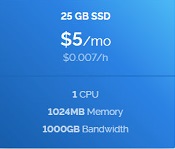 Once this is done, click on the “Deploy Now” button and wait for the server to appear in the Servers panel.<center> </center> With this data, we can connect to our server through a terminal. I use [MobaXterm Personal Home Edition Free.](https://mobaxterm.mobatek.net/download.html) Before continuing we must prepare our local wallet. Install the node client wallet to save our SwiftCash. Once we open our wallet and transfer the SwiftCash from the exchange to our [wallet](http://swiftcash.org/wallets.html), we will proceed to generate a new address for it, we will mark the option *File → Receiving address* and there we add a new address by pressing the button **NEW**. Then enter an alias for our address, for example SwiftNode <center> 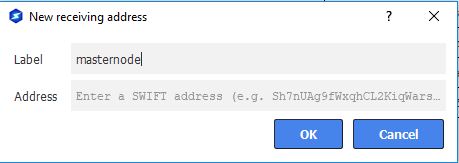</center> Copy the new address, and send in a single transaction exactly 20.000 SwiftCash, neither one more nor one less. Be careful not to deduct the commissions and remain less than 20.000. Wait for the transaction to be confirmed, at least 10 confirmations would be fine. Then go to the menu option *Tools →Debug Console* and write the following commands: >swiftnode genkey 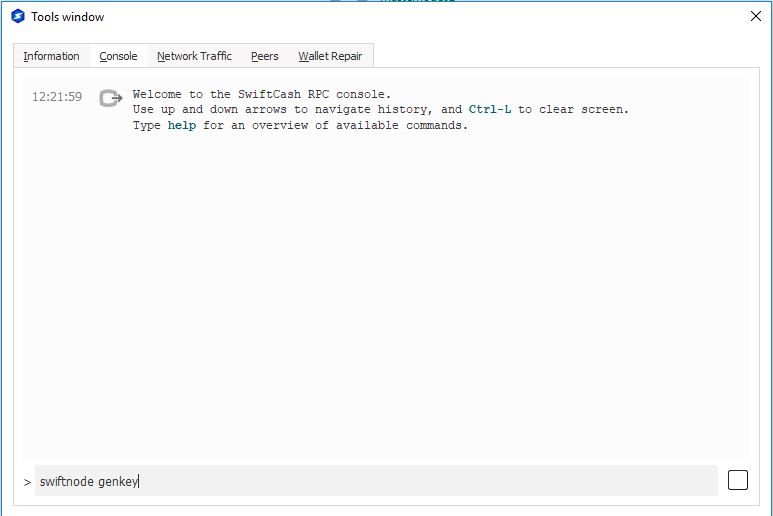 Copy the result, we will need for later and write the following command: >swiftnode outputs 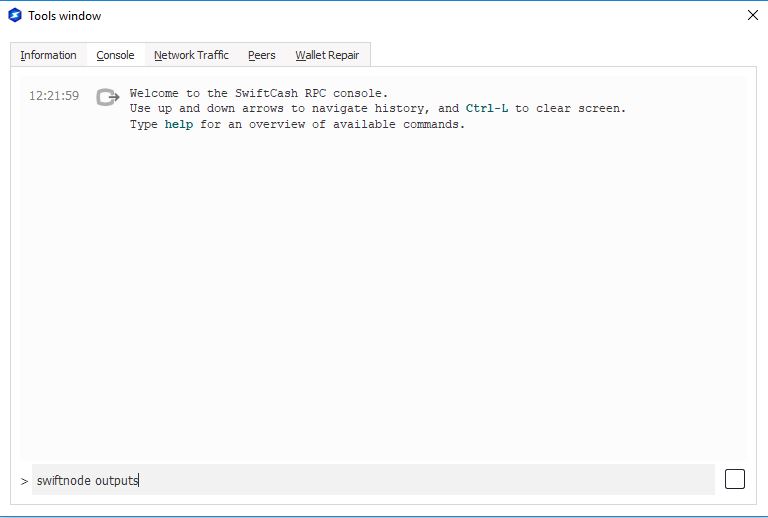 Push ok and proceed to connect to the VPS. Start Mobaxterm , enter ip server and user root. 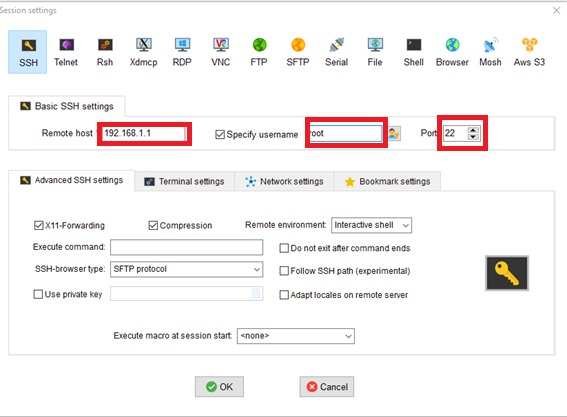 In the command line execute the following commands: >fallocate -l 4G /swapfile chmod 600 /swapfile mkswap /swapfile swapon /swapfile cp /etc/fstab /etc/fstab.bak echo ‘/swapfile none swap sw 0 0’ | tee -a /etc/fstab wget https://raw.githack.com/swiftcashproject/swiftnode-installer/master/install.sh -O install.sh bash ./install.sh When the installer asks for ssh port, you can let it in port 22 (default port). If we are not careful in this point, is possible we are unable to connect to VPS later Installer asks you SwiftNode GenKEY and it will install the software and start it. You can check the sync status with the command: *SwiftCash-cli getinfo* When it is sync you can start the SwiftNode. For it, you must back to your desktop wallet and select *Tools → Open Configuration file Masternodes*. Edit the file with the next values > Example: mn1 127.0.0.2:8544 93HaYBVUCYjEMeeH1Y4sBGLALQZE1Yc1K64xiqgX37tGBDQL8Xg 2bcd3c84c84f87eaa86e4e56834c92927a07f9e18718810b92e0d0324456a67c 0 # **Name ip:port genkey output1 output2** * **Name**: A simply name that identifies the masternode. * **Ip:port**: VPS ip and port 8544 * **Genkey**: the value returned swiftnode genkey * **Output1**: the first value returned by swiftnode outputs * **Output2**: the second value (0 or 1) returned by swiftnode outputs Restart the wallet .Go to tab *SwiftNodes* and select masternode in satus Missing. Wait to total sync and press button *Start Alias*. 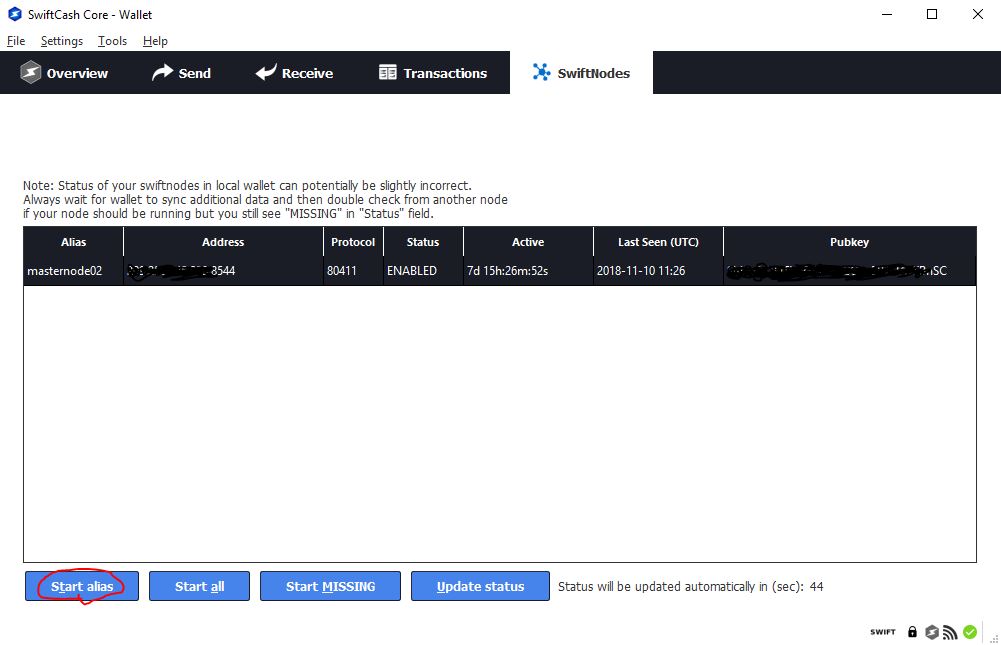 Your Swiftnode will change status to PRE-ENABLED. After some hours it will change status to ENABLED;. If this article is helpful for you , can contribute to the Swiftcash address: SPCG5x19AmzU8AHsE2ZjGfVi7PhcmtEFuf or ETH: 0x765f5d2c05ce18f3b77c91f796a1b42e5679935a [@PacoBits](https://t.me/PacoBits) |
| json metadata | {"tags":["swiftcash","swiftnode","guide","tutorial"],"image":["https://cdn.steemitimages.com/DQmYkL6vGgPFKVVAJxQXtxvokT79nwDex9nuFatonpfPdmf/1.jpg","https://cdn.steemitimages.com/DQmUZM5shC4Bjme4FJRmHhK98ZC8EyQStg8TjN7v8BbvNXg/banner_1.png","https://cdn.steemitimages.com/DQmcWfH2w1iJEJzcR8ZixhNiH4vpGQTKYQR9VQoBusHEiSU/2.jpg","https://cdn.steemitimages.com/DQmRrJ8s5oDTPQ5ysKwxioXQEtiz6ef54KTKDc55J7yAQXo/3.jpg","https://cdn.steemitimages.com/DQmaVuFf1gUSqBtSkabKrsCKLzWE6pAr3oar6RmKnHTePsu/4.jpg","https://cdn.steemitimages.com/DQmQXKTMwTX9y2tkpHJiSL5D7p6GFUtumgAD8g4WZojDMsM/5.jpg","https://cdn.steemitimages.com/DQmZhp2X2KEaTDC1mDw8wBbrPPcSRRZQTSxuh7zcw7SG3oc/8_english.JPG","https://cdn.steemitimages.com/DQmSst37dZWaxPQ4tt58iu85YXLj7e1UQVF5ZJ4PerXJSCb/9_english.jpg","https://cdn.steemitimages.com/DQmfJfLiWR5LTPjjYjaJZJNNxbxNRKBLWk5bktnyaCQtEwh/10%20english.jpg","https://cdn.steemitimages.com/DQmXBaN1NodZQD3h5eWT5hZiBVVsvQhMshskWZkgHv4sk6f/12.jpg","https://cdn.steemitimages.com/DQmNybnTdU1vguJmeqv1yXi8uUGUEHZcKiDtp2gSQwXmTAe/14%20english.jpg"],"links":["https://discordapp.com/channels/488436992032636929/507260942677966878","https://www.vultr.com/?ref=7385020","https://mobaxterm.mobatek.net/download.html","http://swiftcash.org/wallets.html","https://raw.githack.com/swiftcashproject/swiftnode-installer/master/install.sh","https://t.me/PacoBits"],"app":"steemit/0.1","format":"markdown"} |
| Transaction Info | Block #27577633/Trx ea0a1b91025d66d1a42c47806906734e62a7e89f |
View Raw JSON Data
{
"trx_id": "ea0a1b91025d66d1a42c47806906734e62a7e89f",
"block": 27577633,
"trx_in_block": 3,
"op_in_trx": 0,
"virtual_op": 0,
"timestamp": "2018-11-10T12:40:39",
"op": [
"comment",
{
"parent_author": "",
"parent_permlink": "swiftcash",
"author": "pacobits",
"permlink": "swiftnode-setup-guide-swiftcash-masternode",
"title": "SwiftNode Setup Guide (SwiftCash masternode)",
"body": "In this article you can see the steps necessary to mount SwiftNode.\n\n<center></center>\n\nTo mount the SwiftNode we need to have exactly 20,000 Swift Cash. Currently Swift Cash isn't in any exchange, as soon as it does, I will edit the article to tell you which is the best place to buy them. Meanwhile, you can buy it in <a href=\"https://discordapp.com/channels/488436992032636929/507260942677966878\">discord</a> with the otc bot,\n\nWe need to hire a VPS that has at least 1GB of RAM, 20 GB of disk space and a static IPV4 address.\n\nMy recommendation is use this:\n<center><a href=\"https://www.vultr.com/?ref=7385020\">\n</a></center>\n\nOnce we have registered with the VPS provider, we will proceed to create a server, select the “Servers” option in the menu and click on  Select the location that you want and choose the version Ubuntu 18.04 x64  and select the option 5$/mo  \nOnce this is done, click on the “Deploy Now” button and wait for the server to appear in the Servers panel.<center>\n</center>\n\nWith this data, we can connect to our server through a terminal. I use [MobaXterm Personal Home Edition Free.](https://mobaxterm.mobatek.net/download.html)\n\nBefore continuing we must prepare our local wallet. Install the node client wallet to save our SwiftCash. Once we open our wallet and transfer the SwiftCash from the exchange to our [wallet](http://swiftcash.org/wallets.html), we will proceed to generate a new address for it, we will mark the option *File → Receiving address* and there we add a new address by pressing the button **NEW**.\n\nThen enter an alias for our address, for example SwiftNode\n<center>\n</center>\nCopy the new address, and send in a single transaction exactly 20.000 SwiftCash, neither one more nor one less. Be careful not to deduct the commissions and remain less than 20.000.\n\nWait for the transaction to be confirmed, at least 10 confirmations would be fine.\n\nThen go to the menu option *Tools →Debug Console* and write the following commands:\n\n>swiftnode genkey\n\n\n\nCopy the result, we will need for later and write the following command:\n\n>swiftnode outputs\n\n\n\nPush ok and proceed to connect to the VPS.\n\nStart Mobaxterm , enter ip server and user root.\n\n\nIn the command line execute the following commands:\n\n>fallocate -l 4G /swapfile\nchmod 600 /swapfile\nmkswap /swapfile\nswapon /swapfile\ncp /etc/fstab /etc/fstab.bak\necho ‘/swapfile none swap sw 0 0’ | tee -a /etc/fstab\nwget https://raw.githack.com/swiftcashproject/swiftnode-installer/master/install.sh -O install.sh\nbash ./install.sh\n\nWhen the installer asks for ssh port, you can let it in port 22 (default port). If we are not careful in this point, is possible we are unable to connect to VPS later\n\nInstaller asks you SwiftNode GenKEY and it will install the software and start it. You can check the sync status with the command: *SwiftCash-cli getinfo*\n\nWhen it is sync you can start the SwiftNode. For it, you must back to your desktop wallet and select *Tools → Open Configuration file Masternodes*.\n\nEdit the file with the next values\n\n> Example: mn1 127.0.0.2:8544 93HaYBVUCYjEMeeH1Y4sBGLALQZE1Yc1K64xiqgX37tGBDQL8Xg 2bcd3c84c84f87eaa86e4e56834c92927a07f9e18718810b92e0d0324456a67c 0\n\n# **Name ip:port genkey output1 output2**\n\n\n* **Name**: A simply name that identifies the masternode.\n\n* **Ip:port**: VPS ip and port 8544\n\n* **Genkey**: the value returned swiftnode genkey\n\n* **Output1**: the first value returned by swiftnode outputs\n\n* **Output2**: the second value (0 or 1) returned by swiftnode outputs\n\nRestart the wallet .Go to tab *SwiftNodes* and select masternode in satus Missing. Wait to total sync and press button *Start Alias*.\n\n\nYour Swiftnode will change status to PRE-ENABLED. After some hours it will change status to ENABLED;.\n\nIf this article is helpful for you , can contribute to the Swiftcash address: SPCG5x19AmzU8AHsE2ZjGfVi7PhcmtEFuf\n\nor ETH: 0x765f5d2c05ce18f3b77c91f796a1b42e5679935a\n\n[@PacoBits](https://t.me/PacoBits)",
"json_metadata": "{\"tags\":[\"swiftcash\",\"swiftnode\",\"guide\",\"tutorial\"],\"image\":[\"https://cdn.steemitimages.com/DQmYkL6vGgPFKVVAJxQXtxvokT79nwDex9nuFatonpfPdmf/1.jpg\",\"https://cdn.steemitimages.com/DQmUZM5shC4Bjme4FJRmHhK98ZC8EyQStg8TjN7v8BbvNXg/banner_1.png\",\"https://cdn.steemitimages.com/DQmcWfH2w1iJEJzcR8ZixhNiH4vpGQTKYQR9VQoBusHEiSU/2.jpg\",\"https://cdn.steemitimages.com/DQmRrJ8s5oDTPQ5ysKwxioXQEtiz6ef54KTKDc55J7yAQXo/3.jpg\",\"https://cdn.steemitimages.com/DQmaVuFf1gUSqBtSkabKrsCKLzWE6pAr3oar6RmKnHTePsu/4.jpg\",\"https://cdn.steemitimages.com/DQmQXKTMwTX9y2tkpHJiSL5D7p6GFUtumgAD8g4WZojDMsM/5.jpg\",\"https://cdn.steemitimages.com/DQmZhp2X2KEaTDC1mDw8wBbrPPcSRRZQTSxuh7zcw7SG3oc/8_english.JPG\",\"https://cdn.steemitimages.com/DQmSst37dZWaxPQ4tt58iu85YXLj7e1UQVF5ZJ4PerXJSCb/9_english.jpg\",\"https://cdn.steemitimages.com/DQmfJfLiWR5LTPjjYjaJZJNNxbxNRKBLWk5bktnyaCQtEwh/10%20english.jpg\",\"https://cdn.steemitimages.com/DQmXBaN1NodZQD3h5eWT5hZiBVVsvQhMshskWZkgHv4sk6f/12.jpg\",\"https://cdn.steemitimages.com/DQmNybnTdU1vguJmeqv1yXi8uUGUEHZcKiDtp2gSQwXmTAe/14%20english.jpg\"],\"links\":[\"https://discordapp.com/channels/488436992032636929/507260942677966878\",\"https://www.vultr.com/?ref=7385020\",\"https://mobaxterm.mobatek.net/download.html\",\"http://swiftcash.org/wallets.html\",\"https://raw.githack.com/swiftcashproject/swiftnode-installer/master/install.sh\",\"https://t.me/PacoBits\"],\"app\":\"steemit/0.1\",\"format\":\"markdown\"}"
}
]
}2018/10/18 10:34:00
2018/10/18 10:34:00
| parent author | cheetah |
| parent permlink | cheetah-re-pacobitscomprar-criptomonedas-en-binance-casi-sin-comisiones |
| author | pacobits |
| permlink | re-cheetah-cheetah-re-pacobitscomprar-criptomonedas-en-binance-casi-sin-comisiones-20181018t103400783z |
| title | |
| body | Yes, its my account too. |
| json metadata | {"tags":["binance"],"app":"steemit/0.1"} |
| Transaction Info | Block #26913181/Trx 60d4f11d7d21b31cd16fd1919210da391c36f8e7 |
View Raw JSON Data
{
  "trx_id": "60d4f11d7d21b31cd16fd1919210da391c36f8e7",
  "block": 26913181,
  "trx_in_block": 27,
  "op_in_trx": 0,
  "virtual_op": 0,
  "timestamp": "2018-10-18T10:34:00",
  "op": [
    "comment",
    {
      "parent_author": "cheetah",
      "parent_permlink": "cheetah-re-pacobitscomprar-criptomonedas-en-binance-casi-sin-comisiones",
      "author": "pacobits",
      "permlink": "re-cheetah-cheetah-re-pacobitscomprar-criptomonedas-en-binance-casi-sin-comisiones-20181018t103400783z",
      "title": "",
      "body": "Yes, its my account too.",
      "json_metadata": "{\"tags\":[\"binance\"],\"app\":\"steemit/0.1\"}"
    }
  ]
}2018/10/18 10:32:15
2018/10/18 10:32:15
| parent author | steemcleaners |
| parent permlink | re-pacobits-como-comprar-bitcoin-facilmente-sin-comisiones-y-de-forma-segura-20181001t214648072z |
| author | pacobits |
| permlink | re-steemcleaners-re-pacobits-como-comprar-bitcoin-facilmente-sin-comisiones-y-de-forma-segura-20181018t103215250z |
| title | |
| body | This content is original mine. |
| json metadata | {"tags":["bitcoin"],"app":"steemit/0.1"} |
| Transaction Info | Block #26913146/Trx e73034f22633ec8addd3b50c837132fa8a7b00bf |
View Raw JSON Data
{
  "trx_id": "e73034f22633ec8addd3b50c837132fa8a7b00bf",
  "block": 26913146,
  "trx_in_block": 26,
  "op_in_trx": 0,
  "virtual_op": 0,
  "timestamp": "2018-10-18T10:32:15",
  "op": [
    "comment",
    {
      "parent_author": "steemcleaners",
      "parent_permlink": "re-pacobits-como-comprar-bitcoin-facilmente-sin-comisiones-y-de-forma-segura-20181001t214648072z",
      "author": "pacobits",
      "permlink": "re-steemcleaners-re-pacobits-como-comprar-bitcoin-facilmente-sin-comisiones-y-de-forma-segura-20181018t103215250z",
      "title": "",
      "body": "This content is original mine.",
      "json_metadata": "{\"tags\":[\"bitcoin\"],\"app\":\"steemit/0.1\"}"
    }
  ]
}2018/10/11 16:01:12
2018/10/11 16:01:12
| voter | pinoy |
| author | pacobits |
| permlink | como-reclamar-las-comisiones-de-bankera-teniendo-los-tokens-en-tu-wallet-personal |
| weight | 10000 (100.00%) |
| Transaction Info | Block #26718286/Trx bd52a305238e7c57f300401af2a194aa5f7964b9 |
View Raw JSON Data
{
  "trx_id": "bd52a305238e7c57f300401af2a194aa5f7964b9",
  "block": 26718286,
  "trx_in_block": 10,
  "op_in_trx": 0,
  "virtual_op": 0,
  "timestamp": "2018-10-11T16:01:12",
  "op": [
    "vote",
    {
      "voter": "pinoy",
      "author": "pacobits",
      "permlink": "como-reclamar-las-comisiones-de-bankera-teniendo-los-tokens-en-tu-wallet-personal",
      "weight": 10000
    }
  ]
}2018/10/11 15:44:24
2018/10/11 15:44:24
| parent author | |
| parent permlink | bankera |
| author | pacobits |
| permlink | como-reclamar-las-comisiones-de-bankera-teniendo-los-tokens-en-tu-wallet-personal |
| title | Como reclamar las comisiones de Bankera teniendo los tokens en tu wallet personal. |
| body | Bankera es un token asociado al [Exchange SpectroCoin ](https://spectrocoin.com/en/signup.html?referralId=3737993957) el cual reparte comisiones semanalmente entre los poseedores de los tokens **Bankera**. El Exchange tiene varias posibilidades entre las que destaca su tarjeta de crédito con criptomonedas y su pasarela de trasferencia a Euros dentro de la UE. Si quieres puedes registrarte utilizando [este enlace.](https://spectrocoin.com/en/signup.html?referralId=3737993957) Si tenemos tokens Bankera en SpectroCoin todas las semanas recibiremos las comisiones del Exchange que nos correspondan, pero si tenemos nuestros tokens en nuestra propia wallet , debemos seguir los siguientes pasos para reclamarlos manualmente. Lo primero es ir a Etherscan y copiar la dirección del contrato de Bankera la cual actualmente es: **0xC80c5E40220172B36aDee2c951f26F2a577810C5** Buscaremos dicho contrato en etherscan [(click aquí)](https://etherscan.io/address/0xC80c5E40220172B36aDee2c951f26F2a577810C5) Y seleccionaremos la pestaña “Code” 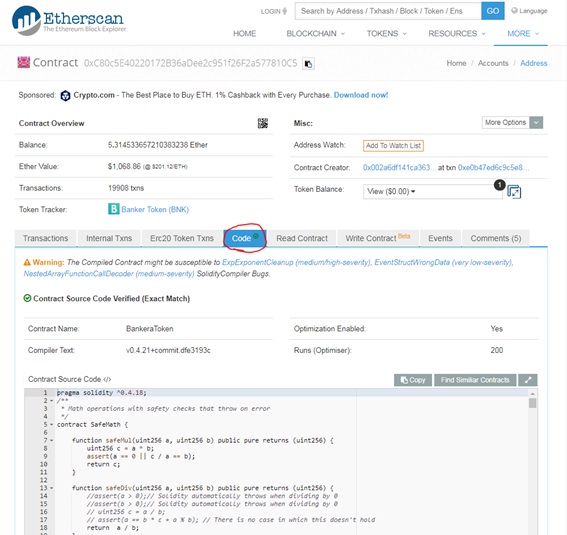 Buscaremos la parte en la que aparece el **Contract ABI** del contrato y lo copiaremos 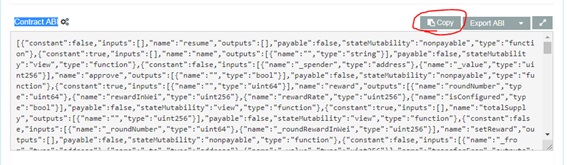 Seguidamente iremos a **myetherwallet** a y seleccionaremos la parte de contratos 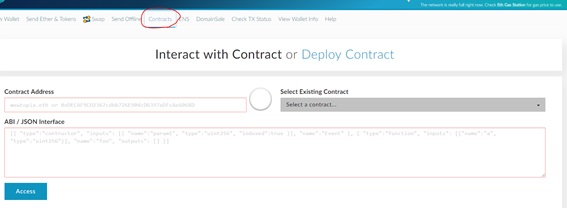 Procederemos a pegar el **ABI** copiado y en el campo **Contract Address** la dirección del contrato de Bankera que obtuvimos al principio de este tutorial, y presionaremos el botón **Access**. 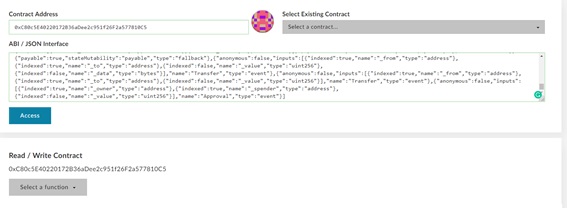 Aparece un desplegable en gris desde el cual podremos invocar dos funciones * _“claimReward”_: reclama todos los intereses de nuestra cuenta * _“claimRewardTillRound”_: reclama todos los intereses hasta la semana que indiquemos. Yo suelo utilizar esta segunda, da menos problemas, consume menos gas y dado que el equipo de Bankera nos recuerda en que semana estamos continuamente resulta más sencillo. En este ejemplo lo ejecutare hasta la semana 57. Por tanto seleccionamos la función _“claimRewardTillRound”_ y como parámetro escribimos la semana hasta la cual queremos cobrar los dividendos. En este caso 57. Seleccionamos el método para conectarnos a la cuenta en la que tenemos los tokens Bankera y presionamos **Write**. 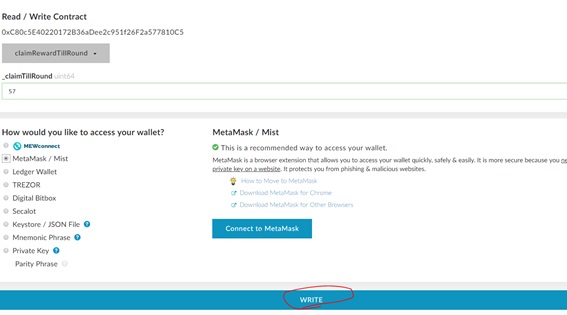 Se desplegara una ventana donde seleccionaremos 0 como eth a enviar y el gas pondremos minimo 120000. 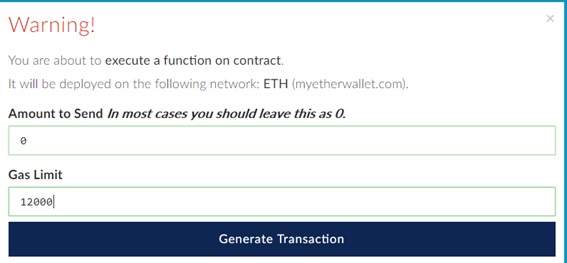 Con esto pulsaremos **Generate Transaction** y solo nos queda esperar a que la red Ethereum procese nuestra transacción y nos pague inmediatamente las comisiones que nos corresponden. Destacar que no es conveniente ejecutar este método frecuentemente ya que cada invocación lleva acarreado un coste de ethereum, que dependerá de la congestión de la red. Si te gusto el artículo puedes contribuir a la cuenta de ETH: 0x765f5d2c05ce18f3b77c91f796a1b42e5679935a También puedes contactar conmigo para un asesoramiento personalizado en telegram, Búscame @PacoBits https://t.me/PacoBits |
| json metadata | {"tags":["bankera","tokens","reclamar","ethereum","spectrocoin"],"users":["pacobits"],"image":["https://cdn.steemitimages.com/DQmbiT7tLP576NEEPbZLuFhCdPfRnqX4X8PGuSUfNfJ4Fsf/1.jpg","https://cdn.steemitimages.com/DQmWBdA44v22VLCQZRyXwE3NHnYjUJpp9nGt8nW2d1FLwyr/2.jpg","https://cdn.steemitimages.com/DQmQof3zjVFuvRn63dEVARbSGAfymFUoR5D45N36A1A1R6G/3.jpg","https://cdn.steemitimages.com/DQmSymCA4DHEFB8Qk3ADWQSHpyaaGhxx4VdVJ1UJNAe8uxF/4.jpg","https://cdn.steemitimages.com/DQmTtwLcSFweT4R6Zw3G61f3bfibPs96CuoZuSdJm4S4JHs/5.jpg","https://cdn.steemitimages.com/DQmSJNji6L2N3A6mLXukzSwiKMExXxfFT6oUwAvyFekCYPY/6.jpg","https://cdn.steemitimages.com/DQmSWv4sqvRnD9LP4uqjaTUXs5F5EFWPYcQSjgLyy967XZN/7.jpg"],"links":["https://spectrocoin.com/en/signup.html?referralId=3737993957","https://etherscan.io/address/0xC80c5E40220172B36aDee2c951f26F2a577810C5","https://t.me/PacoBits"],"app":"steemit/0.1","format":"markdown"} |
| Transaction Info | Block #26717950/Trx 9f0e52d985fd6e375df092778fb283bb8741bf51 |
View Raw JSON Data
{
"trx_id": "9f0e52d985fd6e375df092778fb283bb8741bf51",
"block": 26717950,
"trx_in_block": 18,
"op_in_trx": 0,
"virtual_op": 0,
"timestamp": "2018-10-11T15:44:24",
"op": [
"comment",
{
"parent_author": "",
"parent_permlink": "bankera",
"author": "pacobits",
"permlink": "como-reclamar-las-comisiones-de-bankera-teniendo-los-tokens-en-tu-wallet-personal",
"title": "Como reclamar las comisiones de Bankera teniendo los tokens en tu wallet personal.",
"body": "Bankera es un token asociado al [Exchange SpectroCoin ](https://spectrocoin.com/en/signup.html?referralId=3737993957) el cual reparte comisiones semanalmente entre los poseedores de los tokens **Bankera**. \n\nEl Exchange tiene varias posibilidades entre las que destaca su tarjeta de crédito con criptomonedas y su pasarela de trasferencia a Euros dentro de la UE. Si quieres puedes registrarte utilizando [este enlace.](https://spectrocoin.com/en/signup.html?referralId=3737993957)\n\nSi tenemos tokens Bankera en SpectroCoin todas las semanas recibiremos las comisiones del Exchange que nos correspondan, pero si tenemos nuestros tokens en nuestra propia wallet , debemos seguir los siguientes pasos para reclamarlos manualmente. \n\nLo primero es ir a Etherscan y copiar la dirección del contrato de Bankera la cual actualmente es: **0xC80c5E40220172B36aDee2c951f26F2a577810C5**\n\nBuscaremos dicho contrato en etherscan [(click aquí)](https://etherscan.io/address/0xC80c5E40220172B36aDee2c951f26F2a577810C5)\n\nY seleccionaremos la pestaña “Code”\n\n\n\nBuscaremos la parte en la que aparece el **Contract ABI** del contrato y lo copiaremos\n\n\n\nSeguidamente iremos a **myetherwallet** a y seleccionaremos la parte de contratos\n\n\n\nProcederemos a pegar el **ABI** copiado y en el campo **Contract Address** la dirección del contrato de Bankera que obtuvimos al principio de este tutorial, y presionaremos el botón **Access**.\n\n\n\n\nAparece un desplegable en gris desde el cual podremos invocar dos funciones \n* _“claimReward”_: reclama todos los intereses de nuestra cuenta\n* _“claimRewardTillRound”_: reclama todos los intereses hasta la semana que indiquemos.\n\nYo suelo utilizar esta segunda, da menos problemas, consume menos gas y dado que el equipo de Bankera nos recuerda en que semana estamos continuamente resulta más sencillo. En este ejemplo lo ejecutare hasta la semana 57.\n\nPor tanto seleccionamos la función _“claimRewardTillRound”_ y como parámetro escribimos la semana hasta la cual queremos cobrar los dividendos. En este caso 57.\n\nSeleccionamos el método para conectarnos a la cuenta en la que tenemos los tokens Bankera y presionamos **Write**. \n\n\n\nSe desplegara una ventana donde seleccionaremos 0 como eth a enviar y el gas pondremos minimo 120000.\n\n\n\n\nCon esto pulsaremos **Generate Transaction** y solo nos queda esperar a que la red Ethereum procese nuestra transacción y nos pague inmediatamente las comisiones que nos corresponden.\n\nDestacar que no es conveniente ejecutar este método frecuentemente ya que cada invocación lleva acarreado un coste de ethereum, que dependerá de la congestión de la red.\n\nSi te gusto el artículo puedes contribuir a la cuenta de ETH: 0x765f5d2c05ce18f3b77c91f796a1b42e5679935a\n\nTambién puedes contactar conmigo para un asesoramiento personalizado en telegram, Búscame @PacoBits https://t.me/PacoBits",
"json_metadata": "{\"tags\":[\"bankera\",\"tokens\",\"reclamar\",\"ethereum\",\"spectrocoin\"],\"users\":[\"pacobits\"],\"image\":[\"https://cdn.steemitimages.com/DQmbiT7tLP576NEEPbZLuFhCdPfRnqX4X8PGuSUfNfJ4Fsf/1.jpg\",\"https://cdn.steemitimages.com/DQmWBdA44v22VLCQZRyXwE3NHnYjUJpp9nGt8nW2d1FLwyr/2.jpg\",\"https://cdn.steemitimages.com/DQmQof3zjVFuvRn63dEVARbSGAfymFUoR5D45N36A1A1R6G/3.jpg\",\"https://cdn.steemitimages.com/DQmSymCA4DHEFB8Qk3ADWQSHpyaaGhxx4VdVJ1UJNAe8uxF/4.jpg\",\"https://cdn.steemitimages.com/DQmTtwLcSFweT4R6Zw3G61f3bfibPs96CuoZuSdJm4S4JHs/5.jpg\",\"https://cdn.steemitimages.com/DQmSJNji6L2N3A6mLXukzSwiKMExXxfFT6oUwAvyFekCYPY/6.jpg\",\"https://cdn.steemitimages.com/DQmSWv4sqvRnD9LP4uqjaTUXs5F5EFWPYcQSjgLyy967XZN/7.jpg\"],\"links\":[\"https://spectrocoin.com/en/signup.html?referralId=3737993957\",\"https://etherscan.io/address/0xC80c5E40220172B36aDee2c951f26F2a577810C5\",\"https://t.me/PacoBits\"],\"app\":\"steemit/0.1\",\"format\":\"markdown\"}"
}
]
}2018/10/05 06:50:21
2018/10/05 06:50:21
| voter | octoleaks |
| author | pacobits |
| permlink | como-montar-un-smartnode-masternode-de-smartcash-guia-en-castellano |
| weight | 10000 (100.00%) |
| Transaction Info | Block #26534594/Trx 99ed7bdc7cda89df216f11416a0a38e309843163 |
View Raw JSON Data
{
  "trx_id": "99ed7bdc7cda89df216f11416a0a38e309843163",
  "block": 26534594,
  "trx_in_block": 17,
  "op_in_trx": 0,
  "virtual_op": 0,
  "timestamp": "2018-10-05T06:50:21",
  "op": [
    "vote",
    {
      "voter": "octoleaks",
      "author": "pacobits",
      "permlink": "como-montar-un-smartnode-masternode-de-smartcash-guia-en-castellano",
      "weight": 10000
    }
  ]
}2018/10/03 17:35:45
2018/10/03 17:35:45
| voter | smartcashnews |
| author | pacobits |
| permlink | como-montar-un-smartnode-masternode-de-smartcash-guia-en-castellano |
| weight | 10000 (100.00%) |
| Transaction Info | Block #26489935/Trx 56198c038bfbc4ab8d57e7d4cff85faa4c926d00 |
View Raw JSON Data
{
  "trx_id": "56198c038bfbc4ab8d57e7d4cff85faa4c926d00",
  "block": 26489935,
  "trx_in_block": 43,
  "op_in_trx": 0,
  "virtual_op": 0,
  "timestamp": "2018-10-03T17:35:45",
  "op": [
    "vote",
    {
      "voter": "smartcashnews",
      "author": "pacobits",
      "permlink": "como-montar-un-smartnode-masternode-de-smartcash-guia-en-castellano",
      "weight": 10000
    }
  ]
}2018/10/02 17:12:03
2018/10/02 17:12:03
| voter | council |
| author | pacobits |
| permlink | como-montar-un-smartnode-masternode-de-smartcash-guia-en-castellano |
| weight | 1000 (10.00%) |
| Transaction Info | Block #26460675/Trx 2dd134ba0fec744598824b8851122fb72a00f0c9 |
View Raw JSON Data
{
  "trx_id": "2dd134ba0fec744598824b8851122fb72a00f0c9",
  "block": 26460675,
  "trx_in_block": 3,
  "op_in_trx": 0,
  "virtual_op": 0,
  "timestamp": "2018-10-02T17:12:03",
  "op": [
    "vote",
    {
      "voter": "council",
      "author": "pacobits",
      "permlink": "como-montar-un-smartnode-masternode-de-smartcash-guia-en-castellano",
      "weight": 1000
    }
  ]
}2018/10/02 17:03:27
2018/10/02 17:03:27
| voter | davidfnck |
| author | pacobits |
| permlink | como-montar-un-smartnode-masternode-de-smartcash-guia-en-castellano |
| weight | 3000 (30.00%) |
| Transaction Info | Block #26460503/Trx ac009d56e38c43b2ae56a0f38a744a681d81bc1f |
View Raw JSON Data
{
  "trx_id": "ac009d56e38c43b2ae56a0f38a744a681d81bc1f",
  "block": 26460503,
  "trx_in_block": 3,
  "op_in_trx": 0,
  "virtual_op": 0,
  "timestamp": "2018-10-02T17:03:27",
  "op": [
    "vote",
    {
      "voter": "davidfnck",
      "author": "pacobits",
      "permlink": "como-montar-un-smartnode-masternode-de-smartcash-guia-en-castellano",
      "weight": 3000
    }
  ]
}pacobitspublished a new post: como-montar-un-smartnode-masternode-de-smartcash-guia-en-castellano2018/10/02 16:37:09
pacobitspublished a new post: como-montar-un-smartnode-masternode-de-smartcash-guia-en-castellano
2018/10/02 16:37:09
| parent author | |
| parent permlink | smartnode |
| author | pacobits |
| permlink | como-montar-un-smartnode-masternode-de-smartcash-guia-en-castellano |
| title | Como montar un SmartNode (masternode de SmartCash). Guía en Castellano |
| body | En este tutorial, se explica en castellano los pasos necesarios para montar un SmartNode, es decir un masternode de la criptomoneda **SmartCash.**  Para poder montar el SmartNode necesitamos contar con al menos 10000 SmartCash. Para adquirirlos yo recomiendo comprarlos en [Cryptopia.](https://www.cryptopia.co.nz/Register?referrer=pepotepalote) Para ello deberás tener Bitcoin. Si aún no tienes puedes seguir nuestra guía de inicio para saber [cómo comprar Bitcoin desde Euros o Dólares.](https://steemit.com/bitcoin/@pacobits/como-comprar-bitcoin-facilmente-sin-comisiones-y-de-forma-segura) Siempre recomendamos usar los exchanges para lo que son, intercambios, y tener siempre nuestro dinero en nuestros wallets . Por lo cual , una vez comprados debemos enviar los SmartCash a nuestro wallet. Si no tenemos uno, podemos descargar el wallet NODE CLIENT de [aquí.](https://SmartCash.cc/wallets/#nodeclient) Una vez tenemos los 10000 SmartCash, tenemos dos opciones para montar nuestro masternode. En este caso vamos a optar por la más segura que es montar nuestro SmartNode con un colateral, es decir, tendremos las monedas en nuestro wallet local, pero habrá un servidor en la nube (VPS) de nuestra propiedad que ejecutará el software de SmartCash para hacer de masternode. Por lo tanto necesitamos contratar un VPS que tenga al menos 1GB de RAM, 20 GB de espacio en disco y una dirección IPV4 estática . Yo recomiendo utilizar el siguiente VPS: <a href="https://www.vultr.com/?ref=7385020"><img src="https://www.vultr.com/media/banner_1.png" width="728" height="90"></a> Una vez hemos registrado en el proveedor de VPS procederemos a crear un servidor, seleccionado en el menú la opción “Servers” y haciendo click en  . Seleccionaremos el emplazamiento que queramos, elegiremos la versión Ubuntu 18.04 x64 y seleccionaremos la opción de 5$ al mes: 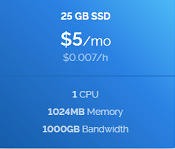 Hecho esto, pulsamos el botón “Deploy Now” y esperamos a que en el panel Servers aparezca nuestro servidor.  Cuando nuestro servidor aparezca tendremos la información necesaria para acceder que es: ip del servidor, usuario y contraseña. 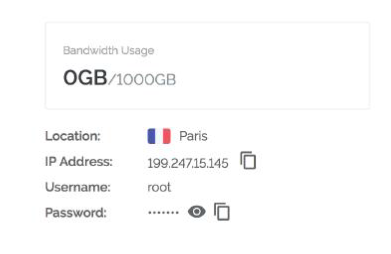 Con estos tres datos podremos conectarnos a nuestro servidor a través de un terminal. Yo utilizaré [MobaXterm Personal Home Edition Free](https://mobaxterm.mobatek.net/download.html) Antes de continuar debemos preparar nuestro wallet local.Tendremos que instalarnos el [node cliente wallet](https://SmartCash.cc/wallets/#nodeclient) para guardar nuestros SmartCash. Una vez abierto nuestro wallet y transferidos los SmartCash desde el exchange a nuestro wallet, procederemos a generar una nueva dirección para ello marcaremos la opción **Archivo--> Direcciones de Recepción** y ahí añadimos una dirección nueva pulsando el botón . Después introduciremos un alias para nuestra dirección, por ejemplo, SmartNode 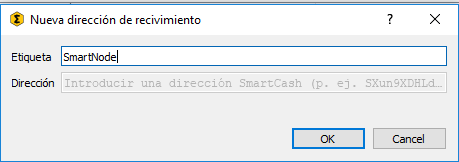 Copiaremos la dirección nueva, y enviaremos en una única transacción exactamente 10000 SmartCash, ni una más ni uno menos. Cuidado no se descuenten las comisiones de los 10000 y quede menos cantidad. 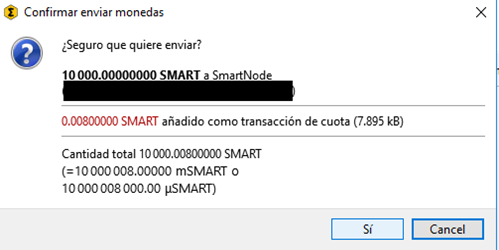 Esperaremos a que la transacción se confirme, al menos 10 confirmaciones estaría bien.  Después iremos a la pestaña de **SmartNodes --> My SmartNodes** y pulsamos el botón **Create SmartNode** 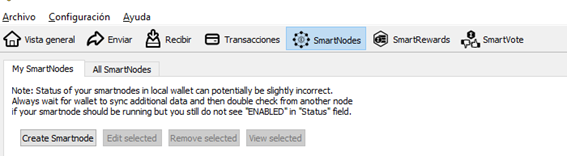 Introducimos el alias y la dirección ip y pulsamos el botón **Copy SmartNodeKey** y la guardaremos para más adelante. 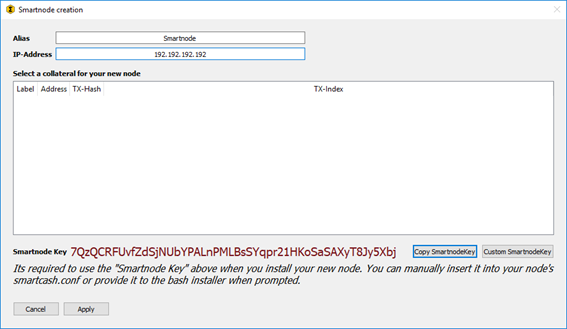 Pulsaremos aceptar y pasaremos a conectarnos al VPS para finalizar la configuración. Arrancaremos Mobaxterm introduciendo la ip del servidor y el usuario root. Una vez se conecte nos preguntara la password. 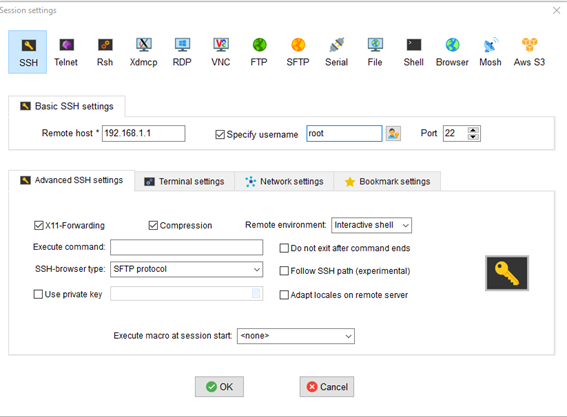 Tras introducir la password estaremos en el servidor. Ejecutaremos los siguientes comandos: >fallocate -l 4G /swapfile >chmod 600 /swapfile >mkswap /swapfile >swapon /swapfile >cp /etc/fstab /etc/fstab.bak >echo '/swapfile none swap sw 0 0' | tee -a /etc/fstab >wget https://raw.githubusercontent.com/SmartCash/SmartNode/master/install.sh >bash ./install.sh  En la instalación nos preguntará por el puerto ssh que queremos utilizar para las conexiones desde Mobaxterm. Podemos dejarlo en el 22 que es el puerto por defecto o cambiarlo a uno que este por encima de 12000. Si no tenemos cuidado puede ser que luego nos cueste conectarnos. Después nos preguntará por la SmartNode GenKEY, que hemos copiado antes en nuestro wallet al generar el SmartNode. Tras esto, se instalara y arrancara el SmartNode, pero tardara en sincronizar. Podemos comprobar por que bloque va con el comando: SmartCash-cli getinfo Que devolverá la información de hasta que bloque ha sincronizado. *{ "version": 1020500, "protocolversion": 90026, "walletversion": 130000, "balance": 0.00000000, "blocks": 63493, "timeoffset": 0, "connections": 8, "proxy": "", "difficulty": 7270.351117746834, "testnet": false, "keypoololdest": 1536405848, "keypoolsize": 199, "paytxfee": 0.00000000, "relayfee": 0.00100000, "errors": "" }* Cuando haya llegado al bloque actual el SmartNode estará sincronizado y podremos arrancarlo. Para ello volveremos al wallet de nuestro PC, al punto donde lo habíamos dejado y presionaremos el botón **Start Missing.** 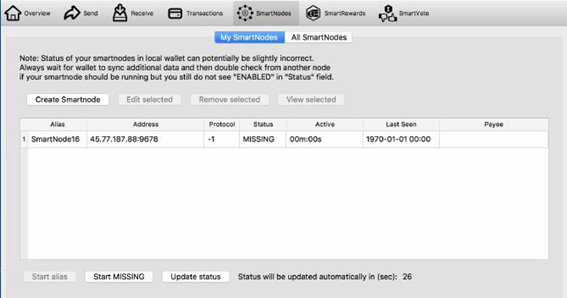 Esto hará que nuestro SmartNode para a estado PRE-ENABLED. En unas horas pasara a ENABLED; y en no mas de 48 horas deberíamos tener el primer pago. Si te gustó el articulo puedes contribuir con una donación de SmartCash a la dirección: SW6BGrAZ6CnBmz4DabUSKoZzuv3Ntx8pZ4 O a la dirección de ETH: 0x765f5d2c05ce18f3b77c91f796a1b42e5679935a También puedes contactar conmigo para un asesoramiento personalizado en telegram, Búscame [@PacoBits ](https://t.me/PacoBits) |
| json metadata | {"tags":["smartnode","masternode","smartcash","guia","castellano"],"image":["https://cdn.steemitimages.com/DQmcyh96tHG5PZ59MxMCYRnzQYW964jMSB34PfR4yFvXhY6/image.png","https://www.vultr.com/media/banner_1.png","https://cdn.steemitimages.com/DQmQLNe86RDPtx75Eex7VGdNMXAApQsKw4YCq449xN8N1H8/image.png","https://cdn.steemitimages.com/DQmQLHi9D8ykYwQrg2TGtKLtcDZwG3D1Cho1HKT9qaFx5Ad/image.png","https://cdn.steemitimages.com/DQmSwojssynhdcDPHpWtMEPT4JhYrUSYhuPpKQ4AFJVd4yn/image.png","https://cdn.steemitimages.com/DQmWwBEdhDeXKVrmCsHFHNc2iKzS9C1HbmrLePVsy2u9Tdd/image.png","https://cdn.steemitimages.com/DQmeySBLm85faRPrz6byEvtyeswW3t1c7bjWV2WGSw1Q8HR/image.png","https://cdn.steemitimages.com/DQmNTfSMo741UzxngfGMrmqtR2Pj6WVpX23EUo2UEe2pEef/image.png","https://cdn.steemitimages.com/DQmWoAgXYM2rD9gMf6mesXGcvTCVwjByV783YbGke9pxptp/image.png","https://cdn.steemitimages.com/DQmR4MTjK7JFrKhte58mmyNUeAu9EjTrXAWtLZifyG6rrTn/image.png","https://cdn.steemitimages.com/DQmZC7kHE3e7shDQjgUozHTs6ssBy7CJF6FCfjDk4TxAhXU/image.png","https://cdn.steemitimages.com/DQmZgZ3HRLvftU2yqQGJPUkUM3ouxY9wxYj9Z5maTwyMRXR/image.png","https://cdn.steemitimages.com/DQmU8AGahPkvBkVwuNVbEUzVeJCtL4zccYtJjqvfzTrLuzb/image.png","https://cdn.steemitimages.com/DQmeaogc3fgMEWxq2YH44p6YkUEvPDi9uwbodSWNA1x7Que/image.png","https://cdn.steemitimages.com/DQmUPNah3nMFVhAUb8qpdcNYnshJyqhWzTJD2ijoK6VpDQz/image.png","https://cdn.steemitimages.com/DQmZ4biZMToyFNLT2B4dsofXXEhVGJc9dxsbLSkvv7HoC7p/image.png","https://cdn.steemitimages.com/DQmbr8BEG6GD2bdZVMyEoUvydfzwZVCrnsdPmp9jJEYrE4A/image.png"],"links":["https://www.cryptopia.co.nz/Register?referrer=pepotepalote","https://steemit.com/bitcoin/@pacobits/como-comprar-bitcoin-facilmente-sin-comisiones-y-de-forma-segura","https://SmartCash.cc/wallets/#nodeclient","https://www.vultr.com/?ref=7385020","https://mobaxterm.mobatek.net/download.html","https://raw.githubusercontent.com/SmartCash/SmartNode/master/install.sh","https://t.me/PacoBits"],"app":"steemit/0.1","format":"markdown"} |
| Transaction Info | Block #26459977/Trx 26743f50b8caa828bda31a28183f30c1b58c14b3 |
View Raw JSON Data
{
"trx_id": "26743f50b8caa828bda31a28183f30c1b58c14b3",
"block": 26459977,
"trx_in_block": 6,
"op_in_trx": 0,
"virtual_op": 0,
"timestamp": "2018-10-02T16:37:09",
"op": [
"comment",
{
"parent_author": "",
"parent_permlink": "smartnode",
"author": "pacobits",
"permlink": "como-montar-un-smartnode-masternode-de-smartcash-guia-en-castellano",
"title": "Como montar un SmartNode (masternode de SmartCash). Guía en Castellano",
"body": "En este tutorial, se explica en castellano los pasos necesarios para montar un SmartNode, es decir un masternode de la criptomoneda **SmartCash.**\n\n\nPara poder montar el SmartNode necesitamos contar con al menos 10000 SmartCash. Para adquirirlos yo recomiendo comprarlos en [Cryptopia.](https://www.cryptopia.co.nz/Register?referrer=pepotepalote)\n\nPara ello deberás tener Bitcoin. Si aún no tienes puedes seguir nuestra guía de inicio para saber [cómo comprar Bitcoin desde Euros o Dólares.](https://steemit.com/bitcoin/@pacobits/como-comprar-bitcoin-facilmente-sin-comisiones-y-de-forma-segura)\n\nSiempre recomendamos usar los exchanges para lo que son, intercambios, y tener siempre nuestro dinero en nuestros wallets . Por lo cual , una vez comprados debemos enviar los SmartCash a nuestro wallet. Si no tenemos uno, podemos descargar el wallet NODE CLIENT de [aquí.](https://SmartCash.cc/wallets/#nodeclient)\n\nUna vez tenemos los 10000 SmartCash, tenemos dos opciones para montar nuestro masternode. En este caso vamos a optar por la más segura que es montar nuestro SmartNode con un colateral, es decir, tendremos las monedas en nuestro wallet local, pero habrá un servidor en la nube (VPS) de nuestra propiedad que ejecutará el software de SmartCash para hacer de masternode.\n\nPor lo tanto necesitamos contratar un VPS que tenga al menos 1GB de RAM, 20 GB de espacio en disco y una dirección IPV4 estática .\n\nYo recomiendo utilizar el siguiente VPS:\n\n<a href=\"https://www.vultr.com/?ref=7385020\"><img src=\"https://www.vultr.com/media/banner_1.png\" width=\"728\" height=\"90\"></a>\n\nUna vez hemos registrado en el proveedor de VPS procederemos a crear un servidor, seleccionado en el menú la opción “Servers” y haciendo click en  . Seleccionaremos el emplazamiento que queramos, elegiremos la versión Ubuntu 18.04 x64 y seleccionaremos la opción de 5$ al mes: \n\n\n\nHecho esto, pulsamos el botón “Deploy Now” y esperamos a que en el panel Servers aparezca nuestro servidor. \n\n\n\nCuando nuestro servidor aparezca tendremos la información necesaria para acceder que es: ip del servidor, usuario y contraseña. \n\n\n\nCon estos tres datos podremos conectarnos a nuestro servidor a través de un terminal. Yo utilizaré [MobaXterm Personal Home Edition Free](https://mobaxterm.mobatek.net/download.html)\n\nAntes de continuar debemos preparar nuestro wallet local.Tendremos que instalarnos el [node cliente wallet](https://SmartCash.cc/wallets/#nodeclient) para guardar nuestros SmartCash. Una vez abierto nuestro wallet y transferidos los SmartCash desde el exchange a nuestro wallet, procederemos a generar una nueva dirección para ello marcaremos la opción **Archivo--> Direcciones de Recepción** y ahí añadimos una dirección nueva pulsando el botón . Después introduciremos un alias para nuestra dirección, por ejemplo, SmartNode\n\n\n\nCopiaremos la dirección nueva, y enviaremos en una única transacción exactamente 10000 SmartCash, ni una más ni uno menos. Cuidado no se descuenten las comisiones de los 10000 y quede menos cantidad.\n\n\n\nEsperaremos a que la transacción se confirme, al menos 10 confirmaciones estaría bien.\n\n\n\nDespués iremos a la pestaña de **SmartNodes --> My SmartNodes** y pulsamos el botón **Create SmartNode**\n\n\n\nIntroducimos el alias y la dirección ip y pulsamos el botón **Copy SmartNodeKey** y la guardaremos para más adelante.\n\n\n\nPulsaremos aceptar y pasaremos a conectarnos al VPS para finalizar la configuración. \nArrancaremos Mobaxterm introduciendo la ip del servidor y el usuario root. Una vez se conecte nos preguntara la password.\n\n\n\n\nTras introducir la password estaremos en el servidor.\n\n\nEjecutaremos los siguientes comandos:\n\n>fallocate -l 4G /swapfile\n>chmod 600 /swapfile\n>mkswap /swapfile\n>swapon /swapfile\n>cp /etc/fstab /etc/fstab.bak\n>echo '/swapfile none swap sw 0 0' | tee -a /etc/fstab\n>wget https://raw.githubusercontent.com/SmartCash/SmartNode/master/install.sh\n>bash ./install.sh\n\n\nEn la instalación nos preguntará por el puerto ssh que queremos utilizar para las conexiones desde Mobaxterm. Podemos dejarlo en el 22 que es el puerto por defecto o cambiarlo a uno que este por encima de 12000. Si no tenemos cuidado puede ser que luego nos cueste conectarnos.\n\nDespués nos preguntará por la SmartNode GenKEY, que hemos copiado antes en nuestro wallet al generar el SmartNode. Tras esto, se instalara y arrancara el SmartNode, pero tardara en sincronizar. Podemos comprobar por que bloque va con el comando: SmartCash-cli getinfo\n\nQue devolverá la información de hasta que bloque ha sincronizado. \n\n*{\n \"version\": 1020500,\n \"protocolversion\": 90026,\n \"walletversion\": 130000,\n \"balance\": 0.00000000,\n \"blocks\": 63493,\n \"timeoffset\": 0,\n \"connections\": 8,\n \"proxy\": \"\",\n \"difficulty\": 7270.351117746834,\n \"testnet\": false,\n \"keypoololdest\": 1536405848,\n \"keypoolsize\": 199,\n \"paytxfee\": 0.00000000,\n \"relayfee\": 0.00100000,\n \"errors\": \"\"\n}*\n\n\nCuando haya llegado al bloque actual el SmartNode estará sincronizado y podremos arrancarlo.\n\nPara ello volveremos al wallet de nuestro PC, al punto donde lo habíamos dejado y presionaremos el botón **Start Missing.** \n\n\n\n\nEsto hará que nuestro SmartNode para a estado PRE-ENABLED. En unas horas pasara a ENABLED; y en no mas de 48 horas deberíamos tener el primer pago.\n\nSi te gustó el articulo puedes contribuir con una donación de SmartCash a la dirección: SW6BGrAZ6CnBmz4DabUSKoZzuv3Ntx8pZ4\nO a la dirección de ETH: 0x765f5d2c05ce18f3b77c91f796a1b42e5679935a\n\nTambién puedes contactar conmigo para un asesoramiento personalizado en telegram, Búscame [@PacoBits ](https://t.me/PacoBits)",
"json_metadata": "{\"tags\":[\"smartnode\",\"masternode\",\"smartcash\",\"guia\",\"castellano\"],\"image\":[\"https://cdn.steemitimages.com/DQmcyh96tHG5PZ59MxMCYRnzQYW964jMSB34PfR4yFvXhY6/image.png\",\"https://www.vultr.com/media/banner_1.png\",\"https://cdn.steemitimages.com/DQmQLNe86RDPtx75Eex7VGdNMXAApQsKw4YCq449xN8N1H8/image.png\",\"https://cdn.steemitimages.com/DQmQLHi9D8ykYwQrg2TGtKLtcDZwG3D1Cho1HKT9qaFx5Ad/image.png\",\"https://cdn.steemitimages.com/DQmSwojssynhdcDPHpWtMEPT4JhYrUSYhuPpKQ4AFJVd4yn/image.png\",\"https://cdn.steemitimages.com/DQmWwBEdhDeXKVrmCsHFHNc2iKzS9C1HbmrLePVsy2u9Tdd/image.png\",\"https://cdn.steemitimages.com/DQmeySBLm85faRPrz6byEvtyeswW3t1c7bjWV2WGSw1Q8HR/image.png\",\"https://cdn.steemitimages.com/DQmNTfSMo741UzxngfGMrmqtR2Pj6WVpX23EUo2UEe2pEef/image.png\",\"https://cdn.steemitimages.com/DQmWoAgXYM2rD9gMf6mesXGcvTCVwjByV783YbGke9pxptp/image.png\",\"https://cdn.steemitimages.com/DQmR4MTjK7JFrKhte58mmyNUeAu9EjTrXAWtLZifyG6rrTn/image.png\",\"https://cdn.steemitimages.com/DQmZC7kHE3e7shDQjgUozHTs6ssBy7CJF6FCfjDk4TxAhXU/image.png\",\"https://cdn.steemitimages.com/DQmZgZ3HRLvftU2yqQGJPUkUM3ouxY9wxYj9Z5maTwyMRXR/image.png\",\"https://cdn.steemitimages.com/DQmU8AGahPkvBkVwuNVbEUzVeJCtL4zccYtJjqvfzTrLuzb/image.png\",\"https://cdn.steemitimages.com/DQmeaogc3fgMEWxq2YH44p6YkUEvPDi9uwbodSWNA1x7Que/image.png\",\"https://cdn.steemitimages.com/DQmUPNah3nMFVhAUb8qpdcNYnshJyqhWzTJD2ijoK6VpDQz/image.png\",\"https://cdn.steemitimages.com/DQmZ4biZMToyFNLT2B4dsofXXEhVGJc9dxsbLSkvv7HoC7p/image.png\",\"https://cdn.steemitimages.com/DQmbr8BEG6GD2bdZVMyEoUvydfzwZVCrnsdPmp9jJEYrE4A/image.png\"],\"links\":[\"https://www.cryptopia.co.nz/Register?referrer=pepotepalote\",\"https://steemit.com/bitcoin/@pacobits/como-comprar-bitcoin-facilmente-sin-comisiones-y-de-forma-segura\",\"https://SmartCash.cc/wallets/#nodeclient\",\"https://www.vultr.com/?ref=7385020\",\"https://mobaxterm.mobatek.net/download.html\",\"https://raw.githubusercontent.com/SmartCash/SmartNode/master/install.sh\",\"https://t.me/PacoBits\"],\"app\":\"steemit/0.1\",\"format\":\"markdown\"}"
}
]
}2018/10/01 21:46:48
2018/10/01 21:46:48
| parent author | pacobits |
| parent permlink | como-comprar-bitcoin-facilmente-sin-comisiones-y-de-forma-segura |
| author | steemcleaners |
| permlink | re-pacobits-como-comprar-bitcoin-facilmente-sin-comisiones-y-de-forma-segura-20181001t214648072z |
| title | |
| body | [Source](https://medium.com/@PacoBits/como-comprar-bitcoin-f%C3%A1cilmente-sin-comisiones-y-de-forma-segura-37fcd39b703c) [Plagiarism](http://www.plagiarism.org/plagiarism-101/what-is-plagiarism/) is the copying & pasting of others work without giving credit to the original author or artist. Plagiarized posts are considered spam. Spam is discouraged by the community, and may result in action from the [cheetah bot](https://steemit.com/faq.html#What_is__cheetah). [More information and tips on sharing content.](https://steemcleaners.org/copy-paste-plagiarism/) If you believe this comment is in error, please contact us in [#disputes on Discord](https://discord.gg/YR2Wy5A) |
| json metadata | {"app":"steemcleaners/0.3","format":"markdown+html","community":"steemcleaners"} |
| Transaction Info | Block #26437377/Trx b9f66e00e00b826a1b8a7b45c065ea46a5bbb9c9 |
View Raw JSON Data
{
  "trx_id": "b9f66e00e00b826a1b8a7b45c065ea46a5bbb9c9",
  "block": 26437377,
  "trx_in_block": 20,
  "op_in_trx": 0,
  "virtual_op": 0,
  "timestamp": "2018-10-01T21:46:48",
  "op": [
    "comment",
    {
      "parent_author": "pacobits",
      "parent_permlink": "como-comprar-bitcoin-facilmente-sin-comisiones-y-de-forma-segura",
      "author": "steemcleaners",
      "permlink": "re-pacobits-como-comprar-bitcoin-facilmente-sin-comisiones-y-de-forma-segura-20181001t214648072z",
      "title": "",
      "body": "[Source](https://medium.com/@PacoBits/como-comprar-bitcoin-f%C3%A1cilmente-sin-comisiones-y-de-forma-segura-37fcd39b703c)\n[Plagiarism](http://www.plagiarism.org/plagiarism-101/what-is-plagiarism/) is the copying & pasting of others work without giving credit to the original author or artist. Plagiarized posts are considered spam. \r\n\r\nSpam is discouraged by the community, and may result in action from the [cheetah bot](https://steemit.com/faq.html#What_is__cheetah).\r\n\r\n[More information and tips on sharing content.](https://steemcleaners.org/copy-paste-plagiarism/)\r\n\r\nIf you believe this comment is in error, please contact us in [#disputes on Discord](https://discord.gg/YR2Wy5A)",
      "json_metadata": "{\"app\":\"steemcleaners/0.3\",\"format\":\"markdown+html\",\"community\":\"steemcleaners\"}"
    }
  ]
}2018/10/01 17:23:39
2018/10/01 17:23:39
| parent author | pacobits |
| parent permlink | comprar-criptomonedas-en-binance-casi-sin-comisiones |
| author | cheetah |
| permlink | cheetah-re-pacobitscomprar-criptomonedas-en-binance-casi-sin-comisiones |
| title | |
| body | Hi! I am a robot. I just upvoted you! I found similar content that readers might be interested in: https://medium.com/@PacoBits/comprar-criptomonedas-en-binance-casi-sin-comisiones-46dcac9b8c7f |
| json metadata | |
| Transaction Info | Block #26432116/Trx 3b2a29bf20783ec98e0ff96b9e8ed8ffbfebcc90 |
View Raw JSON Data
{
  "trx_id": "3b2a29bf20783ec98e0ff96b9e8ed8ffbfebcc90",
  "block": 26432116,
  "trx_in_block": 15,
  "op_in_trx": 0,
  "virtual_op": 0,
  "timestamp": "2018-10-01T17:23:39",
  "op": [
    "comment",
    {
      "parent_author": "pacobits",
      "parent_permlink": "comprar-criptomonedas-en-binance-casi-sin-comisiones",
      "author": "cheetah",
      "permlink": "cheetah-re-pacobitscomprar-criptomonedas-en-binance-casi-sin-comisiones",
      "title": "",
      "body": "Hi! I am a robot. I just upvoted you! I found similar content that readers might be interested in:\nhttps://medium.com/@PacoBits/comprar-criptomonedas-en-binance-casi-sin-comisiones-46dcac9b8c7f",
      "json_metadata": ""
    }
  ]
}cheetahupvoted (0.08%) @pacobits / comprar-criptomonedas-en-binance-casi-sin-comisiones2018/10/01 17:23:36
cheetahupvoted (0.08%) @pacobits / comprar-criptomonedas-en-binance-casi-sin-comisiones
2018/10/01 17:23:36
| voter | cheetah |
| author | pacobits |
| permlink | comprar-criptomonedas-en-binance-casi-sin-comisiones |
| weight | 8 (0.08%) |
| Transaction Info | Block #26432115/Trx 2a31ce250b8c13bc7ee2139a4ff3de3b19bbafd2 |
View Raw JSON Data
{
  "trx_id": "2a31ce250b8c13bc7ee2139a4ff3de3b19bbafd2",
  "block": 26432115,
  "trx_in_block": 3,
  "op_in_trx": 0,
  "virtual_op": 0,
  "timestamp": "2018-10-01T17:23:36",
  "op": [
    "vote",
    {
      "voter": "cheetah",
      "author": "pacobits",
      "permlink": "comprar-criptomonedas-en-binance-casi-sin-comisiones",
      "weight": 8
    }
  ]
}pacobitspublished a new post: comprar-criptomonedas-en-binance-casi-sin-comisiones2018/10/01 17:23:27
pacobitspublished a new post: comprar-criptomonedas-en-binance-casi-sin-comisiones
2018/10/01 17:23:27
| parent author | |
| parent permlink | binance |
| author | pacobits |
| permlink | comprar-criptomonedas-en-binance-casi-sin-comisiones |
| title | Comprar criptomonedas en Binance casi sin comisiones |
| body | Para aquellos que se acaban de adentrar en el mundo Bitcoin, encontrar un Exchange de confianza donde comprar la mayoría de monedas que hay en el mercado, sin que las comisiones nos penalicen, no resulta sencillo. En este artículo damos por hecho que el usuario ya tiene Bitcoin, si no es así consulta nuestro anterior artículo para aprender [como comprar Bitcoin sin comisiones.](https://steemit.com/bitcoin/@pacobits/como-comprar-bitcoin-facilmente-sin-comisiones-y-de-forma-segura) A continuación explicaremos como comprar criptomonedas en un Exchange seguro como [Binance.](https://www.binance.com/?ref=11066518) Para ello, lo primero que debemos hacer es registrarnos en Binance a través del [enlace siguiente.](https://www.binance.com/?ref=11066518) Seleccionaremos crear cuenta o Registrarse.  De nuevo recordar que es importante utilizar los datos personales reales ya que en caso de cualquier incidencia todo será más fácil y además si verificamos nuestra identidad aumentaremos el límite de retiro diario de nuestra cuenta, pasando de 2 Bitcoins diarios a 100. Una vez estemos registrados en Binance podemos si lo deseamos verificar nuestra identidad para ello iremos al icono  y marcaremos la opción Cuenta. En esta pantalla seguiremos las instrucciones para verificar la cuenta. La verificación puede tardar horas e incluso días. Una vez hecho esto, podemos enviar Bitcoins o Ethereum a Binance. Lo recomendable es hacerlo desde Coinbase PRO para evitar pagar comisiones. Hay que tener en cuenta que las monedas que queramos comprar se compraran con Bitcoin o con Ethereum, dependiendo de nuestra elección podemos encontrarnos un precio más favorable o desfavorable. En el caso que queramos usar Bitcoin (con Ethereum sería similar) , vamos a la opción **Fondos -->Depósitos** 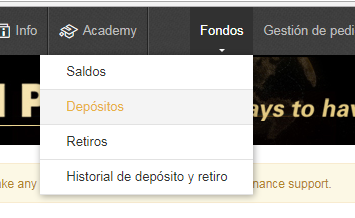 Escribiremos Bitcoin y de todos los que aparecen seleccionaremos **BTC — Bitcoin** 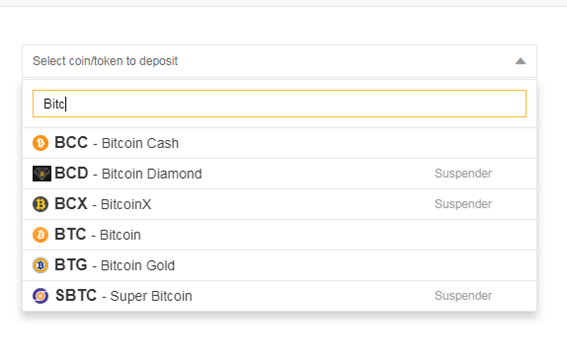 Nos aparecerá una dirección, la cual es nuestra dirección de Bitcoin en el Exchange. Copiaremos dicha dirección. 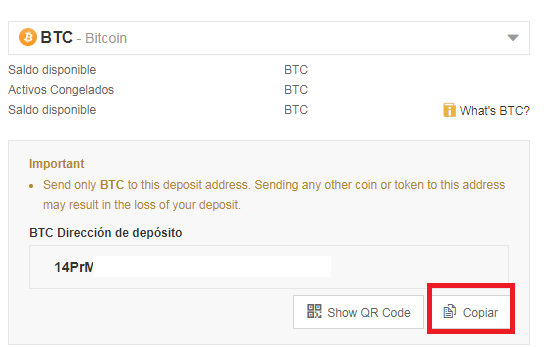 Una vez hecho esto, iremos a [Coinbase PRO](https://www.coinbase.com/join/59804b8522ad270224e445f8) lugar donde deberíamos tener nuestros Bitcoins. Seleccionaremos la opción Whitdraw.  Se presentará un menú con todas las monedas disponibles y seleccionaremos Bitcoin. 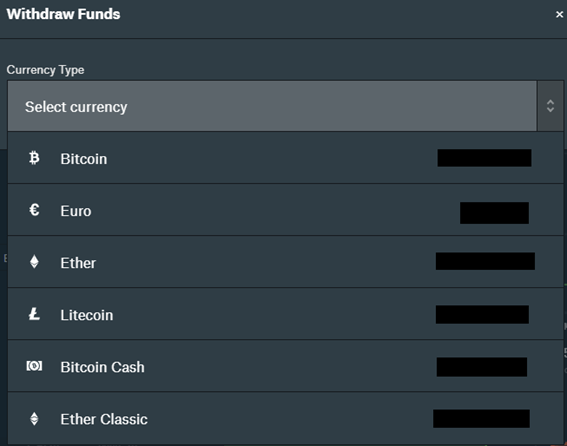 Se presentara una ventana en la que seleccionaremos en la parte de arriba BTC ADDRESS e introduciremos la dirección de Bitcoin que copiamos con anterioridad de Binance e indicamos la cantidad a enviar en Bitcoin. Una vez hecho esto presionaremos el botón WITHDRAW BTC. 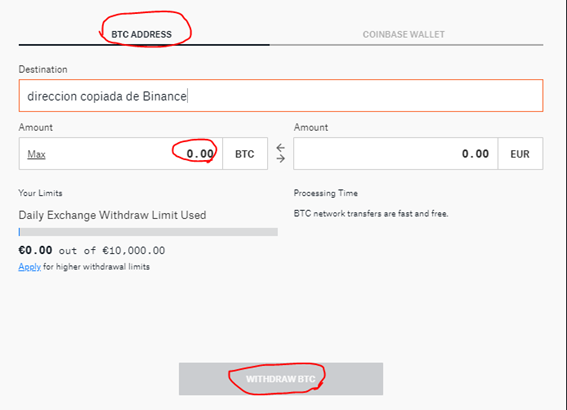 Cuando hagamos este último paso, se nos preguntara el código 2FA en caso de que lo tengamos activo, sino se enviará un email o SMS para autorizar la operación. Una vez confirmado el retiro tardaremos en que este aparezca en Binance, en casos en que la red se ha saturado, han sido horas, pero con las últimas mejoras tecnológicas en Bitcoin, cada vez se tarda menos. Una vez el deposito aparezca en Binance podremos comprar otras criptomonedas con el par Bitcoin. |
| json metadata | {"tags":["binance","exchange","comisiones","bitcoin","ethereum"],"image":["https://cdn.steemitimages.com/DQmYHDQ3hwmnppwhVJU3Hh9cSM5RYmYJnQRh7dQiWCCGpQt/image.png","https://cdn.steemitimages.com/DQmZFkLM5QAqqpmmpTdX3d9BJgcKmf6yuKhiPx1JivdNGEo/image.png","https://cdn.steemitimages.com/DQmV7Zza45MkKvcaHiM9yFy6KH6bPoYxEj6EyvR7LJFzrXg/image.png","https://cdn.steemitimages.com/DQmYKjVbg4bUKHj1oFtrT5JjS2aVg9YGjNzkAHLt9eb7Xkc/image.png","https://cdn.steemitimages.com/DQmTxVdLEWcBymhWbXS8UZgDPzmRx1Kcqj3DTeCsWjm6wj1/image.png","https://cdn.steemitimages.com/DQmeJfSLRwpoHpDTaUcccHxYG8iqf9iUNx67k9rkxPYkWJE/image.png","https://cdn.steemitimages.com/DQmWweZ6whMY4CqRSFksycFcKGqx7fm1B8SQ49fYQ3nQRCR/image.png","https://cdn.steemitimages.com/DQmcbeSayZJy2ycatFpCCZdZJMQhjGiN55ciuVr5XNfktjw/image.png"],"links":["https://steemit.com/bitcoin/@pacobits/como-comprar-bitcoin-facilmente-sin-comisiones-y-de-forma-segura","https://www.binance.com/?ref=11066518","https://www.coinbase.com/join/59804b8522ad270224e445f8"],"app":"steemit/0.1","format":"markdown"} |
| Transaction Info | Block #26432112/Trx 8308e1f79c5a74f43bfcdc00c701515281361140 |
View Raw JSON Data
{
"trx_id": "8308e1f79c5a74f43bfcdc00c701515281361140",
"block": 26432112,
"trx_in_block": 7,
"op_in_trx": 0,
"virtual_op": 0,
"timestamp": "2018-10-01T17:23:27",
"op": [
"comment",
{
"parent_author": "",
"parent_permlink": "binance",
"author": "pacobits",
"permlink": "comprar-criptomonedas-en-binance-casi-sin-comisiones",
"title": "Comprar criptomonedas en Binance casi sin comisiones",
"body": "Para aquellos que se acaban de adentrar en el mundo Bitcoin, encontrar un Exchange de confianza donde comprar la mayoría de monedas que hay en el mercado, sin que las comisiones nos penalicen, no resulta sencillo. En este artículo damos por hecho que el usuario ya tiene Bitcoin, si no es así consulta nuestro anterior artículo para aprender [como comprar Bitcoin sin comisiones.](https://steemit.com/bitcoin/@pacobits/como-comprar-bitcoin-facilmente-sin-comisiones-y-de-forma-segura)\n\nA continuación explicaremos como comprar criptomonedas en un Exchange seguro como [Binance.](https://www.binance.com/?ref=11066518)\n\nPara ello, lo primero que debemos hacer es registrarnos en Binance a través del [enlace siguiente.](https://www.binance.com/?ref=11066518)\n\nSeleccionaremos crear cuenta o Registrarse.\n\n\n\n\nDe nuevo recordar que es importante utilizar los datos personales reales ya que en caso de cualquier incidencia todo será más fácil y además si verificamos nuestra identidad aumentaremos el límite de retiro diario de nuestra cuenta, pasando de 2 Bitcoins diarios a 100.\n\nUna vez estemos registrados en Binance podemos si lo deseamos verificar nuestra identidad para ello iremos al icono  y marcaremos la opción Cuenta. En esta pantalla seguiremos las instrucciones para verificar la cuenta. La verificación puede tardar horas e incluso días. \n\nUna vez hecho esto, podemos enviar Bitcoins o Ethereum a Binance. Lo recomendable es hacerlo desde Coinbase PRO para evitar pagar comisiones.\n\nHay que tener en cuenta que las monedas que queramos comprar se compraran con Bitcoin o con Ethereum, dependiendo de nuestra elección podemos encontrarnos un precio más favorable o desfavorable.\n\nEn el caso que queramos usar Bitcoin (con Ethereum sería similar) , vamos a la opción **Fondos -->Depósitos**\n\n\n\n\nEscribiremos Bitcoin y de todos los que aparecen seleccionaremos **BTC — Bitcoin**\n\n\n\nNos aparecerá una dirección, la cual es nuestra dirección de Bitcoin en el Exchange. Copiaremos dicha dirección.\n\n\n\nUna vez hecho esto, iremos a [Coinbase PRO](https://www.coinbase.com/join/59804b8522ad270224e445f8) lugar donde deberíamos tener nuestros Bitcoins.\n\nSeleccionaremos la opción Whitdraw.\n\n\n\nSe presentará un menú con todas las monedas disponibles y seleccionaremos Bitcoin.\n\n\n\nSe presentara una ventana en la que seleccionaremos en la parte de arriba BTC ADDRESS e introduciremos la dirección de Bitcoin que copiamos con anterioridad de Binance e indicamos la cantidad a enviar en Bitcoin. Una vez hecho esto presionaremos el botón WITHDRAW BTC.\n\n\n\nCuando hagamos este último paso, se nos preguntara el código 2FA en caso de que lo tengamos activo, sino se enviará un email o SMS para autorizar la operación.\n\nUna vez confirmado el retiro tardaremos en que este aparezca en Binance, en casos en que la red se ha saturado, han sido horas, pero con las últimas mejoras tecnológicas en Bitcoin, cada vez se tarda menos.\n\nUna vez el deposito aparezca en Binance podremos comprar otras criptomonedas con el par Bitcoin.",
"json_metadata": "{\"tags\":[\"binance\",\"exchange\",\"comisiones\",\"bitcoin\",\"ethereum\"],\"image\":[\"https://cdn.steemitimages.com/DQmYHDQ3hwmnppwhVJU3Hh9cSM5RYmYJnQRh7dQiWCCGpQt/image.png\",\"https://cdn.steemitimages.com/DQmZFkLM5QAqqpmmpTdX3d9BJgcKmf6yuKhiPx1JivdNGEo/image.png\",\"https://cdn.steemitimages.com/DQmV7Zza45MkKvcaHiM9yFy6KH6bPoYxEj6EyvR7LJFzrXg/image.png\",\"https://cdn.steemitimages.com/DQmYKjVbg4bUKHj1oFtrT5JjS2aVg9YGjNzkAHLt9eb7Xkc/image.png\",\"https://cdn.steemitimages.com/DQmTxVdLEWcBymhWbXS8UZgDPzmRx1Kcqj3DTeCsWjm6wj1/image.png\",\"https://cdn.steemitimages.com/DQmeJfSLRwpoHpDTaUcccHxYG8iqf9iUNx67k9rkxPYkWJE/image.png\",\"https://cdn.steemitimages.com/DQmWweZ6whMY4CqRSFksycFcKGqx7fm1B8SQ49fYQ3nQRCR/image.png\",\"https://cdn.steemitimages.com/DQmcbeSayZJy2ycatFpCCZdZJMQhjGiN55ciuVr5XNfktjw/image.png\"],\"links\":[\"https://steemit.com/bitcoin/@pacobits/como-comprar-bitcoin-facilmente-sin-comisiones-y-de-forma-segura\",\"https://www.binance.com/?ref=11066518\",\"https://www.coinbase.com/join/59804b8522ad270224e445f8\"],\"app\":\"steemit/0.1\",\"format\":\"markdown\"}"
}
]
}pacobitspublished a new post: como-comprar-bitcoin-facilmente-sin-comisiones-y-de-forma-segura2018/10/01 16:55:48
pacobitspublished a new post: como-comprar-bitcoin-facilmente-sin-comisiones-y-de-forma-segura
2018/10/01 16:55:48
| parent author | |
| parent permlink | bitcoin |
| author | pacobits |
| permlink | como-comprar-bitcoin-facilmente-sin-comisiones-y-de-forma-segura |
| title | Como comprar Bitcoin fácilmente sin comisiones y de forma segura. |
| body | En esta guía vamos a explicar cómo podemos comprar **Bitcoins** sin comisiones comprándolos en la casa de cambio más importante del mundo occidental: **Coinbase**. Lo primero que necesitas saber, es que Coinbase es un banco con sede en Estonia y como tal para darse de alta necesitaras validar tu identidad, siguiendo las políticas de la Unión Europea. Dicho esto, procedemos a acceder a [Coinbase](https://www.Coinbase.com/join/59804b8522ad270224e445f8) en la parte superior derecha de la pantalla marcamos la opción Sign up.  Nos registraremos como persona, y (muy importante) introduciremos nuestros datos reales. Es importante no equivocarse en este punto para evitar sorpresas de cuentas bloqueadas o validaciones que no acaban nunca. 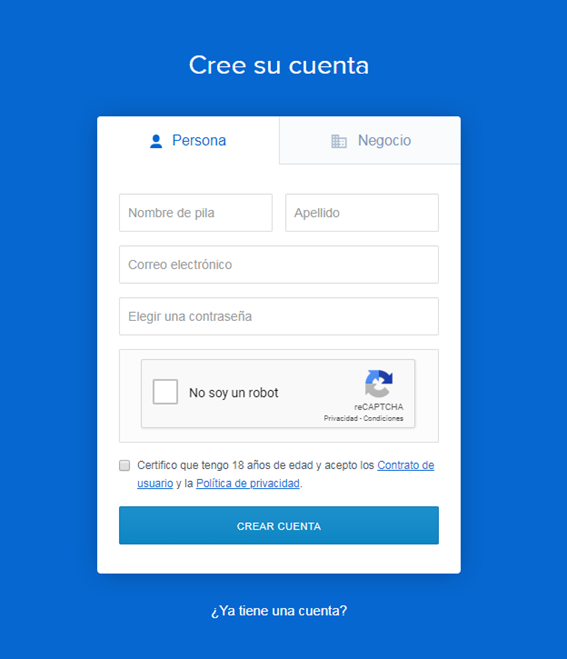 Os recomiendo que utilicéis una contraseña única para este sitio, y de cierta complejidad. Una vez registrados, tendremos que validar nuestro DNI/Pasaporte para poder realizar operaciones. Este proceso en ocasiones suele ser lento y recomiendo que se utilice el móvil , el cual tendremos que haber introducido antes , para realizar la validación. Para verificar un teléfono móvil usaremos la opción de menú, **Configuración → Seguridad** 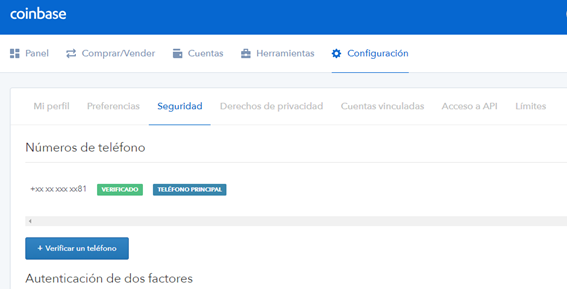 Recomiendo que tras esto activemos la verificación de dos factores. Tras estas configuraciones obligadas de seguridad, estaremos en disposición de comprar de forma segura Bitcoins. Para ello existen dos métodos y dependiendo de la cantidad que vamos a comprar. · **Para cantidades inferiores a 300€ (con comisión)** En este caso recomiendo que se haga la compra con tarjeta de crédito desde la misma página de Coinbase. Para ello seleccionaremos la opción Comprar/Vender:  Y seleccionaremos la moneda que queremos comprar. En la primera compra, aunque nos cobren comisiones, estas se verán compensadas por los 8€ de regalo que da Coinbase por la primera compra. ·**Para cantidades superiores a 300€ (sin comisión)** En este caso debemos validar una cuenta bancaria en la opción **Configuración → Cuentas Vinculadas**.  En ese apartado añadiremos el código IBAN de nuestra cuenta bancaria desde la cual vamos a enviar fondos a Coinbase para posteriormente comprar Bitcoins. El siguiente paso será hacer un depósito, para ello buscaremos la cuenta llamada **EUR Wallet** y pulsaremos en depósito. 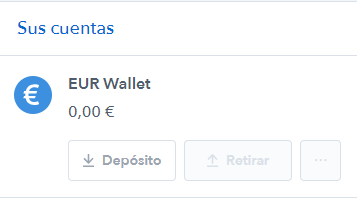 Introduciremos el nombre del banco y nuestro nombre de la cuenta. Muy importante que el nombre de quien figura como titular de la cuenta bancaria sea el mismo que el que hemos usado para registrarnos en Coinbase. 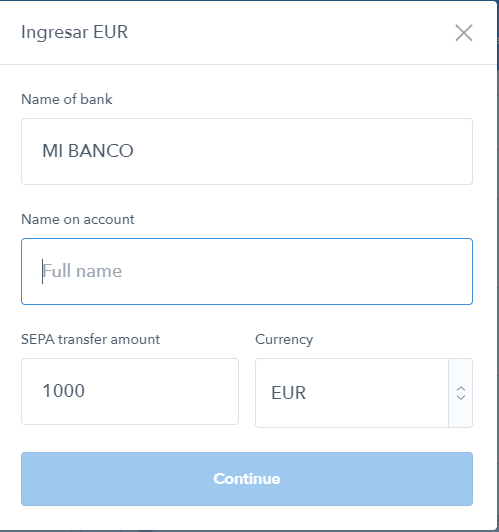 A continuación se nos dará un código de referencia el cual usaremos como concepto de la transferencia. Esto es muy importante ya que es la clave para tener nuestro dinero en Coinbase rápidamente. 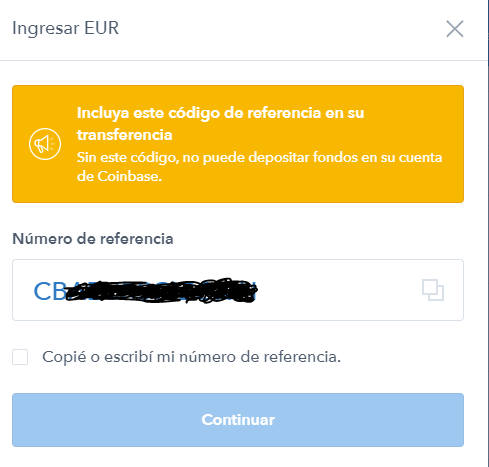 A continuación nos aparecerán los datos para hacer la transferencia, la cual es una transferencia SEPA, sin más, y al ser UE pocos bancos aplican comisiones. Cuando acabemos con la transferencia, habrá que esperar un día laborable o dos, dependiendo de la hora a la que se hizo, para ver nuestro saldo reflejado en Coinbase. Una vez llegue nuestro dinero, Coinbase nos avisara con un mail, y podríamos comprar directamente en Coinbase o acceder a la web [Coinbase PRO]( https://PRO.Coinbase.com/) y comprar sin comisiones. La web Coinbase PRO, pertenece a Coinbase, y podremos acceder con la misma cuenta que en Coinbase. En algunos casos pedirá validar un segundo documento, pero habitualmente con la validación de Coinbase será suficiente. Cuando accedernos tenemos una web muy parecida a las web de inversión en bolsa. 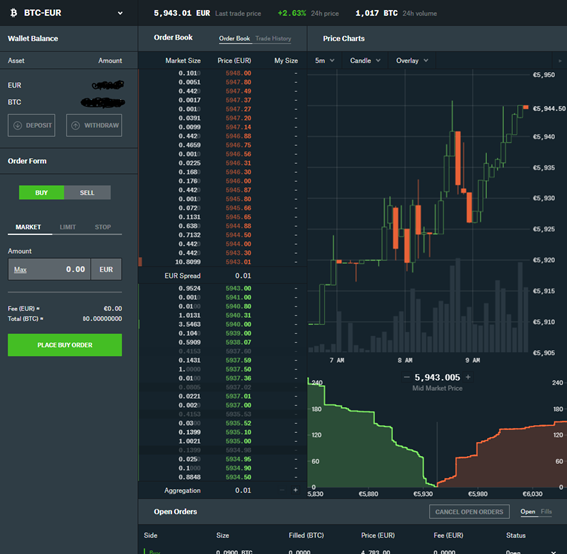 Para poder comprar, tenemos que llevar nuestros Euros desde Coinbase a Coinbase PRO, lo cual es instantaneo. Pulsaremos el boton DEPOSIT.  Seleccionamos nuestra moneda, en este caso EUR e indicaremos que depositamos desde COINBASE WALLET. 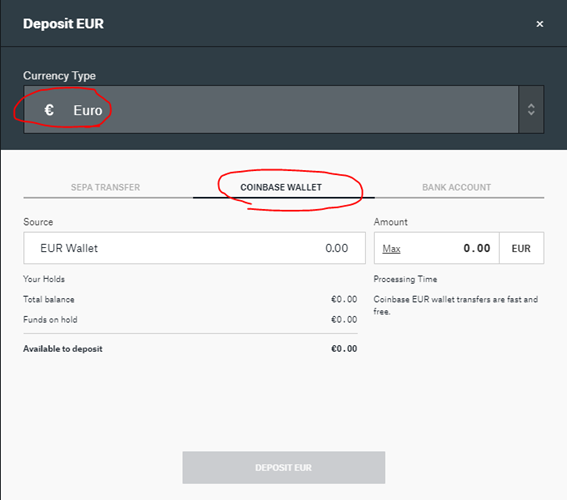 Seleccionaremos la cantidad y dispondremos al instante de esos euros en Coinbase PRO. Como último paso, seleccionaremos la opción BUY y marcaremos LIMIT, indicaremos la cantidad de Bitcoin que queremos comprar y a qué precio. Al ser LIMIT siempre debemos comprar por debajo del precio actual. Podemos poner un euro o dos por debajo, para que en cuanto baje el precio se ejecute nuestra orden. Y por último pulsamos PLACE BUY ORDER. 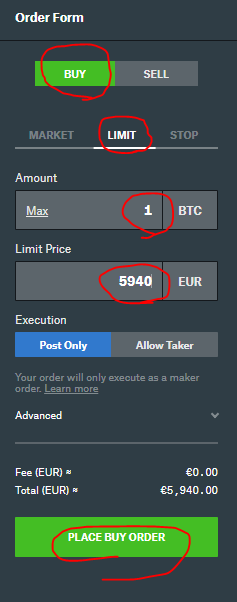 Nuestra orden quedara pendiente, y cuando se dé el precio que hemos marcado, se ejecutará automáticamente sin ninguna comisión. |
| json metadata | {"tags":["bitcoin","coinbase","comisiones","segura","facil"],"image":["https://cdn.steemitimages.com/DQmf5ZooDyac1AwXrXYSj8cVLTyFBZFPJh1wRTPu8DfGxXN/image.png","https://cdn.steemitimages.com/DQmRdUEQZ2LoHiUZhuhPjDUAr8ouDCq5pTzeswGQRbkwwbs/image.png","https://cdn.steemitimages.com/DQmUY8KESrWSM7kg7gZAkP6PcQc1hirQ3sfJFaVxgv6G3M1/image.png","https://cdn.steemitimages.com/DQmZdWgJcdo2z96p2iz3L97Ntf9hiwnn8o99MLNF2ZNCQ2X/image.png","https://cdn.steemitimages.com/DQmbH7vUutGw9DmKgAHCAjyu8GeWtQ6nijUDgmsXqme323U/image.png","https://cdn.steemitimages.com/DQmde3YDfJRaVJpro86PRvw6DyhfxQoXA4TyfVoQHDipcZE/image.png","https://cdn.steemitimages.com/DQmc2zY3ohFNHgf4nZqWxkStQFUFYDDh2N1zoWQPkZqeCWi/image.png","https://cdn.steemitimages.com/DQmde2pJS4CdSdDanpyuAPDFFf62ZB18bG5aWPa6oV3bDJ9/image.png","https://cdn.steemitimages.com/DQmbFgTL2VNp6NS9MpLNDbvVQ6PjoX5u8WeUUsHmZuNRjaB/image.png","https://cdn.steemitimages.com/DQmbFpcngPJf2QomXMrgZAb1rruCeScTbXto2F55ytFacKv/image.png","https://cdn.steemitimages.com/DQmWktW5naX2VVSNrdphz6XSd2iEb1dRKGraiTE98rP7CTY/image.png","https://cdn.steemitimages.com/DQmZbDFk3D4TURkSBGZWMkY6rrKVHCJn2Bkuzmt5SJmQCzf/image.png"],"links":["https://www.Coinbase.com/join/59804b8522ad270224e445f8","https://PRO.Coinbase.com/"],"app":"steemit/0.1","format":"markdown"} |
| Transaction Info | Block #26431559/Trx a7d1b79ff862a62415d4ad4f3ea7f679edbf3a26 |
View Raw JSON Data
{
"trx_id": "a7d1b79ff862a62415d4ad4f3ea7f679edbf3a26",
"block": 26431559,
"trx_in_block": 7,
"op_in_trx": 0,
"virtual_op": 0,
"timestamp": "2018-10-01T16:55:48",
"op": [
"comment",
{
"parent_author": "",
"parent_permlink": "bitcoin",
"author": "pacobits",
"permlink": "como-comprar-bitcoin-facilmente-sin-comisiones-y-de-forma-segura",
"title": "Como comprar Bitcoin fácilmente sin comisiones y de forma segura.",
"body": "En esta guía vamos a explicar cómo podemos comprar **Bitcoins** sin comisiones comprándolos en la casa de cambio más importante del mundo occidental: **Coinbase**.\n\nLo primero que necesitas saber, es que Coinbase es un banco con sede en Estonia y como tal para darse de alta necesitaras validar tu identidad, siguiendo las políticas de la Unión Europea.\n\nDicho esto, procedemos a acceder a [Coinbase](https://www.Coinbase.com/join/59804b8522ad270224e445f8) en la parte superior derecha de la pantalla marcamos la opción Sign up.\n\n\n\nNos registraremos como persona, y (muy importante) introduciremos nuestros datos reales. Es importante no equivocarse en este punto para evitar sorpresas de cuentas bloqueadas o validaciones que no acaban nunca.\n\nOs recomiendo que utilicéis una contraseña única para este sitio, y de cierta complejidad.\nUna vez registrados, tendremos que validar nuestro DNI/Pasaporte para poder realizar operaciones. Este proceso en ocasiones suele ser lento y recomiendo que se utilice el móvil , el cual tendremos que haber introducido antes , para realizar la validación.\nPara verificar un teléfono móvil usaremos la opción de menú, **Configuración → Seguridad**\n\n\nRecomiendo que tras esto activemos la verificación de dos factores.\n\nTras estas configuraciones obligadas de seguridad, estaremos en disposición de comprar de forma segura Bitcoins. Para ello existen dos métodos y dependiendo de la cantidad que vamos a comprar.\n\n· **Para cantidades inferiores a 300€ (con comisión)**\n\nEn este caso recomiendo que se haga la compra con tarjeta de crédito desde la misma página de Coinbase. Para ello seleccionaremos la opción Comprar/Vender:\n\n\nY seleccionaremos la moneda que queremos comprar. En la primera compra, aunque nos cobren comisiones, estas se verán compensadas por los 8€ de regalo que da Coinbase por la primera compra.\n\n·**Para cantidades superiores a 300€ (sin comisión)**\n\nEn este caso debemos validar una cuenta bancaria en la opción **Configuración → Cuentas Vinculadas**.\n\n\nEn ese apartado añadiremos el código IBAN de nuestra cuenta bancaria desde la cual vamos a enviar fondos a Coinbase para posteriormente comprar Bitcoins.\n\nEl siguiente paso será hacer un depósito, para ello buscaremos la cuenta llamada **EUR Wallet** y pulsaremos en depósito.\n\nIntroduciremos el nombre del banco y nuestro nombre de la cuenta. Muy importante que el nombre de quien figura como titular de la cuenta bancaria sea el mismo que el que hemos usado para registrarnos en Coinbase.\n\nA continuación se nos dará un código de referencia el cual usaremos como concepto de la transferencia. Esto es muy importante ya que es la clave para tener nuestro dinero en Coinbase rápidamente.\n\nA continuación nos aparecerán los datos para hacer la transferencia, la cual es una transferencia SEPA, sin más, y al ser UE pocos bancos aplican comisiones.\n\nCuando acabemos con la transferencia, habrá que esperar un día laborable o dos, dependiendo de la hora a la que se hizo, para ver nuestro saldo reflejado en Coinbase.\n\nUna vez llegue nuestro dinero, Coinbase nos avisara con un mail, y podríamos comprar directamente en Coinbase o acceder a la web [Coinbase PRO]( https://PRO.Coinbase.com/) y comprar sin comisiones.\n\nLa web Coinbase PRO, pertenece a Coinbase, y podremos acceder con la misma cuenta que en Coinbase. En algunos casos pedirá validar un segundo documento, pero habitualmente con la validación de Coinbase será suficiente.\n\nCuando accedernos tenemos una web muy parecida a las web de inversión en bolsa.\n\nPara poder comprar, tenemos que llevar nuestros Euros desde Coinbase a Coinbase PRO, lo cual es instantaneo. Pulsaremos el boton DEPOSIT.\n\nSeleccionamos nuestra moneda, en este caso EUR e indicaremos que depositamos desde COINBASE WALLET.\n\nSeleccionaremos la cantidad y dispondremos al instante de esos euros en Coinbase PRO.\n\nComo último paso, seleccionaremos la opción BUY y marcaremos LIMIT, indicaremos la cantidad de Bitcoin que queremos comprar y a qué precio. Al ser LIMIT siempre debemos comprar por debajo del precio actual. Podemos poner un euro o dos por debajo, para que en cuanto baje el precio se ejecute nuestra orden.\n\nY por último pulsamos PLACE BUY ORDER.\n\nNuestra orden quedara pendiente, y cuando se dé el precio que hemos marcado, se ejecutará automáticamente sin ninguna comisión.",
"json_metadata": "{\"tags\":[\"bitcoin\",\"coinbase\",\"comisiones\",\"segura\",\"facil\"],\"image\":[\"https://cdn.steemitimages.com/DQmf5ZooDyac1AwXrXYSj8cVLTyFBZFPJh1wRTPu8DfGxXN/image.png\",\"https://cdn.steemitimages.com/DQmRdUEQZ2LoHiUZhuhPjDUAr8ouDCq5pTzeswGQRbkwwbs/image.png\",\"https://cdn.steemitimages.com/DQmUY8KESrWSM7kg7gZAkP6PcQc1hirQ3sfJFaVxgv6G3M1/image.png\",\"https://cdn.steemitimages.com/DQmZdWgJcdo2z96p2iz3L97Ntf9hiwnn8o99MLNF2ZNCQ2X/image.png\",\"https://cdn.steemitimages.com/DQmbH7vUutGw9DmKgAHCAjyu8GeWtQ6nijUDgmsXqme323U/image.png\",\"https://cdn.steemitimages.com/DQmde3YDfJRaVJpro86PRvw6DyhfxQoXA4TyfVoQHDipcZE/image.png\",\"https://cdn.steemitimages.com/DQmc2zY3ohFNHgf4nZqWxkStQFUFYDDh2N1zoWQPkZqeCWi/image.png\",\"https://cdn.steemitimages.com/DQmde2pJS4CdSdDanpyuAPDFFf62ZB18bG5aWPa6oV3bDJ9/image.png\",\"https://cdn.steemitimages.com/DQmbFgTL2VNp6NS9MpLNDbvVQ6PjoX5u8WeUUsHmZuNRjaB/image.png\",\"https://cdn.steemitimages.com/DQmbFpcngPJf2QomXMrgZAb1rruCeScTbXto2F55ytFacKv/image.png\",\"https://cdn.steemitimages.com/DQmWktW5naX2VVSNrdphz6XSd2iEb1dRKGraiTE98rP7CTY/image.png\",\"https://cdn.steemitimages.com/DQmZbDFk3D4TURkSBGZWMkY6rrKVHCJn2Bkuzmt5SJmQCzf/image.png\"],\"links\":[\"https://www.Coinbase.com/join/59804b8522ad270224e445f8\",\"https://PRO.Coinbase.com/\"],\"app\":\"steemit/0.1\",\"format\":\"markdown\"}"
}
]
}2018/09/22 14:31:15
2018/09/22 14:31:15
| delegator | steem |
| delegatee | pacobits |
| vesting shares | 30114.073492 VESTS |
| Transaction Info | Block #26169846/Trx d5e19c4ce376f4183e06e4716a9e0426753fbb34 |
View Raw JSON Data
{
  "trx_id": "d5e19c4ce376f4183e06e4716a9e0426753fbb34",
  "block": 26169846,
  "trx_in_block": 9,
  "op_in_trx": 0,
  "virtual_op": 0,
  "timestamp": "2018-09-22T14:31:15",
  "op": [
    "delegate_vesting_shares",
    {
      "delegator": "steem",
      "delegatee": "pacobits",
      "vesting_shares": "30114.073492 VESTS"
    }
  ]
}2018/09/22 12:02:00
2018/09/22 12:02:00
| fee | 0.100 STEEM |
| delegation | 30690.000000 VESTS |
| creator | steem |
| new account name | pacobits |
| owner | {"weight_threshold":1,"account_auths":[],"key_auths":[["STM6BW9WsXYEkudHz39No4K5yJe7Ad6mWzmb6QgndQtEG779WWQQA",1]]} |
| active | {"weight_threshold":1,"account_auths":[],"key_auths":[["STM6zc6KACfAmyESWoDHBCxmrQpRZdCVQasvwLCqsKRPDiqoq8QSV",1]]} |
| posting | {"weight_threshold":1,"account_auths":[],"key_auths":[["STM8Hbb15W1ZZH7ezpmzmwpMh2RMX8nsn5mLg4UoqpoFyB4VBygA2",1]]} |
| memo key | STM6YGecG5CsrEAeLLJVRXXYtYyc1RVQaQBgxCMM25hwNYUqa4BVe |
| json metadata | {} |
| extensions | [] |
| Transaction Info | Block #26166873/Trx 3bf0101ec5a23b765805fa04ede1c83c14cdb627 |
View Raw JSON Data
{
  "trx_id": "3bf0101ec5a23b765805fa04ede1c83c14cdb627",
  "block": 26166873,
  "trx_in_block": 34,
  "op_in_trx": 0,
  "virtual_op": 0,
  "timestamp": "2018-09-22T12:02:00",
  "op": [
    "account_create_with_delegation",
    {
      "fee": "0.100 STEEM",
      "delegation": "30690.000000 VESTS",
      "creator": "steem",
      "new_account_name": "pacobits",
      "owner": {
        "weight_threshold": 1,
        "account_auths": [],
        "key_auths": [
          [
            "STM6BW9WsXYEkudHz39No4K5yJe7Ad6mWzmb6QgndQtEG779WWQQA",
            1
          ]
        ]
      },
      "active": {
        "weight_threshold": 1,
        "account_auths": [],
        "key_auths": [
          [
            "STM6zc6KACfAmyESWoDHBCxmrQpRZdCVQasvwLCqsKRPDiqoq8QSV",
            1
          ]
        ]
      },
      "posting": {
        "weight_threshold": 1,
        "account_auths": [],
        "key_auths": [
          [
            "STM8Hbb15W1ZZH7ezpmzmwpMh2RMX8nsn5mLg4UoqpoFyB4VBygA2",
            1
          ]
        ]
      },
      "memo_key": "STM6YGecG5CsrEAeLLJVRXXYtYyc1RVQaQBgxCMM25hwNYUqa4BVe",
      "json_metadata": "{}",
      "extensions": []
    }
  ]
}Manabar
Voting Power100.00%
Downvote Power100.00%
Resource Credits100.00%
Reputation Progress0.00%
{
  "voting_manabar": {
    "current_mana": "8143659806",
    "last_update_time": 1779079959
  },
  "downvote_manabar": {
    "current_mana": 2035914951,
    "last_update_time": 1779079959
  },
  "rc_account": {
    "account": "pacobits",
    "rc_manabar": {
      "current_mana": "10164408779",
      "last_update_time": 1779079959
    },
    "max_rc_creation_adjustment": {
      "amount": "2020748973",
      "precision": 6,
      "nai": "@@000000037"
    },
    "max_rc": "10164408779"
  }
}
Account Metadata
| POSTING JSON METADATA | |
| None | |
| JSON METADATA | |
| None |
{
  "posting_json_metadata": {},
  "json_metadata": {}
}
Auth Keys
Owner
Single Signature
Public Keys
STM6BW9WsXYEkudHz39No4K5yJe7Ad6mWzmb6QgndQtEG779WWQQA1/1
Active
Single Signature
Public Keys
STM6zc6KACfAmyESWoDHBCxmrQpRZdCVQasvwLCqsKRPDiqoq8QSV1/1
Posting
Single Signature
Public Keys
STM8Hbb15W1ZZH7ezpmzmwpMh2RMX8nsn5mLg4UoqpoFyB4VBygA21/1
Memo
STM6YGecG5CsrEAeLLJVRXXYtYyc1RVQaQBgxCMM25hwNYUqa4BVe
{
  "owner": {
    "weight_threshold": 1,
    "account_auths": [],
    "key_auths": [
      [
        "STM6BW9WsXYEkudHz39No4K5yJe7Ad6mWzmb6QgndQtEG779WWQQA",
        1
      ]
    ]
  },
  "active": {
    "weight_threshold": 1,
    "account_auths": [],
    "key_auths": [
      [
        "STM6zc6KACfAmyESWoDHBCxmrQpRZdCVQasvwLCqsKRPDiqoq8QSV",
        1
      ]
    ]
  },
  "posting": {
    "weight_threshold": 1,
    "account_auths": [],
    "key_auths": [
      [
        "STM8Hbb15W1ZZH7ezpmzmwpMh2RMX8nsn5mLg4UoqpoFyB4VBygA2",
        1
      ]
    ]
  },
  "memo": "STM6YGecG5CsrEAeLLJVRXXYtYyc1RVQaQBgxCMM25hwNYUqa4BVe"
}
Witness Votes
0 / 30
No active witness votes.
[]