

VOTING POWER100.00%
DOWNVOTE POWER100.00%
RESOURCE CREDITS100.00%
REPUTATION PROGRESS46.83%
Net Worth
8.025USD
STEEM
0.001STEEM
SBD
14.962SBD
Own SP
14.540SP
Detailed Balance
| STEEM | ||
| balance | 0.001STEEM | STEEM |
| market_balance | 0.000STEEM | STEEM |
| savings_balance | 0.000STEEM | STEEM |
| reward_steem_balance | 0.000STEEM | STEEM |
| STEEM POWER | ||
| Own SP | 14.540SP | SP |
| Delegated Out | 0.000SP | SP |
| Delegation In | 0.000SP | SP |
| Effective Power | 14.540SP | SP |
| Reward SP (pending) | 0.000SP | SP |
| SBD | ||
| sbd_balance | 14.962SBD | SBD |
| sbd_conversions | 0.000SBD | SBD |
| sbd_market_balance | 0.000SBD | SBD |
| savings_sbd_balance | 0.000SBD | SBD |
| reward_sbd_balance | 0.000SBD | SBD |
{
  "balance": "0.001 STEEM",
  "savings_balance": "0.000 STEEM",
  "reward_steem_balance": "0.000 STEEM",
  "vesting_shares": "23650.344949 VESTS",
  "delegated_vesting_shares": "0.000000 VESTS",
  "received_vesting_shares": "0.000000 VESTS",
  "sbd_balance": "14.962 SBD",
  "savings_sbd_balance": "0.000 SBD",
  "reward_sbd_balance": "0.000 SBD",
  "conversions": []
}
Account Info
| name | mucyoung |
| id | 580961 |
| rank | 99,504 |
| reputation | 112727419803 |
| created | 2018-01-08T13:23:39 |
| recovery_account | steem |
| proxy | None |
| post_count | 53 |
| comment_count | 0 |
| lifetime_vote_count | 0 |
| witnesses_voted_for | 1 |
| last_post | 2018-01-28T17:00:45 |
| last_root_post | 2018-01-26T15:32:06 |
| last_vote_time | 2018-03-19T13:44:45 |
| proxied_vsf_votes | 0, 0, 0, 0 |
| can_vote | 1 |
| voting_power | 0 |
| delayed_votes | 0 |
| balance | 0.001 STEEM |
| savings_balance | 0.000 STEEM |
| sbd_balance | 14.962 SBD |
| savings_sbd_balance | 0.000 SBD |
| vesting_shares | 23650.344949 VESTS |
| delegated_vesting_shares | 0.000000 VESTS |
| received_vesting_shares | 0.000000 VESTS |
| reward_vesting_balance | 0.000000 VESTS |
| vesting_balance | 0.000 STEEM |
| vesting_withdraw_rate | 0.000000 VESTS |
| next_vesting_withdrawal | 1969-12-31T23:59:59 |
| withdrawn | 0 |
| to_withdraw | 0 |
| withdraw_routes | 0 |
| savings_withdraw_requests | 0 |
| last_account_recovery | 1970-01-01T00:00:00 |
| reset_account | null |
| last_owner_update | 1970-01-01T00:00:00 |
| last_account_update | 2018-01-25T04:44:54 |
| mined | No |
| sbd_seconds | 10,619,296,332 |
| sbd_last_interest_payment | 2018-01-17T05:33:12 |
| savings_sbd_last_interest_payment | 1970-01-01T00:00:00 |
{
  "id": 580961,
  "name": "mucyoung",
  "owner": {
    "weight_threshold": 1,
    "account_auths": [],
    "key_auths": [
      [
        "STM5MQHEUZyH65kRr9q7pr6jD1b57BhPVwzVSQ7vr8zxXHrmkFc5w",
        1
      ]
    ]
  },
  "active": {
    "weight_threshold": 1,
    "account_auths": [],
    "key_auths": [
      [
        "STM69nS7XWVs1zSQicYbSY3KY1CHp5WFJtPLosrz8paLpLsVGfYM9",
        1
      ]
    ]
  },
  "posting": {
    "weight_threshold": 1,
    "account_auths": [
      [
        "busy.app",
        1
      ],
      [
        "dlive.app",
        1
      ],
      [
        "dtube.app",
        1
      ],
      [
        "utopian.app",
        1
      ]
    ],
    "key_auths": [
      [
        "STM8NY4Z27GLkRgd3YBD7xZjCb7o2jyeWygNSCD2buWg2mPS9D3GE",
        1
      ]
    ]
  },
  "memo_key": "STM8WkPTBhJtM4gBLaiSzqBNNZBtwAEBsrVgVFsxHTfUfpkkFoTq5",
  "json_metadata": "{\"profile\":{\"name\":\"MucYoung\",\"profile_image\":\"https://wx1.sinaimg.cn/thumb150/005TRw24ly8fn62adjqhdj306y06yaa1.jpg\",\"about\":\"Programmer, Growth Hacker, Love Coding, Love Sharing\",\"location\":\"China\"}}",
  "posting_json_metadata": "{\"profile\":{\"name\":\"MucYoung\",\"profile_image\":\"https://wx1.sinaimg.cn/thumb150/005TRw24ly8fn62adjqhdj306y06yaa1.jpg\",\"about\":\"Programmer, Growth Hacker, Love Coding, Love Sharing\",\"location\":\"China\"}}",
  "proxy": "",
  "last_owner_update": "1970-01-01T00:00:00",
  "last_account_update": "2018-01-25T04:44:54",
  "created": "2018-01-08T13:23:39",
  "mined": false,
  "recovery_account": "steem",
  "last_account_recovery": "1970-01-01T00:00:00",
  "reset_account": "null",
  "comment_count": 0,
  "lifetime_vote_count": 0,
  "post_count": 53,
  "can_vote": true,
  "voting_manabar": {
    "current_mana": "23650344949",
    "last_update_time": 1588943868
  },
  "downvote_manabar": {
    "current_mana": "5912586237",
    "last_update_time": 1588943868
  },
  "voting_power": 0,
  "balance": "0.001 STEEM",
  "savings_balance": "0.000 STEEM",
  "sbd_balance": "14.962 SBD",
  "sbd_seconds": "10619296332",
  "sbd_seconds_last_update": "2018-02-04T08:03:33",
  "sbd_last_interest_payment": "2018-01-17T05:33:12",
  "savings_sbd_balance": "0.000 SBD",
  "savings_sbd_seconds": "0",
  "savings_sbd_seconds_last_update": "1970-01-01T00:00:00",
  "savings_sbd_last_interest_payment": "1970-01-01T00:00:00",
  "savings_withdraw_requests": 0,
  "reward_sbd_balance": "0.000 SBD",
  "reward_steem_balance": "0.000 STEEM",
  "reward_vesting_balance": "0.000000 VESTS",
  "reward_vesting_steem": "0.000 STEEM",
  "vesting_shares": "23650.344949 VESTS",
  "delegated_vesting_shares": "0.000000 VESTS",
  "received_vesting_shares": "0.000000 VESTS",
  "vesting_withdraw_rate": "0.000000 VESTS",
  "next_vesting_withdrawal": "1969-12-31T23:59:59",
  "withdrawn": 0,
  "to_withdraw": 0,
  "withdraw_routes": 0,
  "curation_rewards": 7,
  "posting_rewards": 7958,
  "proxied_vsf_votes": [
    0,
    0,
    0,
    0
  ],
  "witnesses_voted_for": 1,
  "last_post": "2018-01-28T17:00:45",
  "last_root_post": "2018-01-26T15:32:06",
  "last_vote_time": "2018-03-19T13:44:45",
  "post_bandwidth": 0,
  "pending_claimed_accounts": 0,
  "vesting_balance": "0.000 STEEM",
  "reputation": "112727419803",
  "transfer_history": [],
  "market_history": [],
  "post_history": [],
  "vote_history": [],
  "other_history": [],
  "witness_votes": [
    "utopian-io"
  ],
  "tags_usage": [],
  "guest_bloggers": [],
  "rank": 99504
}
Withdraw Routes
| Incoming | Outgoing |
|---|---|
Empty | Empty |
{
  "incoming": [],
  "outgoing": []
}From Date
To Date
2022/11/06 19:53:57
2022/11/06 19:53:57
| author | mucyoung |
| permlink | xls2md-v0-1-demo-a-python-cli-tool-converting-excel-file-to-markdown-file |
| voter | ldsn001 |
| weight | 5000 (50.00%) |
| Transaction Info | Block #69209065/Trx eacfebd8ff58ddc295ace93c105d7e6eb85247f2 |
View Raw JSON Data
{
  "block": 69209065,
  "op": [
    "vote",
    {
      "author": "mucyoung",
      "permlink": "xls2md-v0-1-demo-a-python-cli-tool-converting-excel-file-to-markdown-file",
      "voter": "ldsn001",
      "weight": 5000
    }
  ],
  "op_in_trx": 0,
  "timestamp": "2022-11-06T19:53:57",
  "trx_id": "eacfebd8ff58ddc295ace93c105d7e6eb85247f2",
  "trx_in_block": 0,
  "virtual_op": 0
}ldsn001upvoted (50.00%) @mucyoung / chart-js-2-7-or-create-bar-chart-with-chart-js-2-72022/11/06 19:51:00
ldsn001upvoted (50.00%) @mucyoung / chart-js-2-7-or-create-bar-chart-with-chart-js-2-7
2022/11/06 19:51:00
| author | mucyoung |
| permlink | chart-js-2-7-or-create-bar-chart-with-chart-js-2-7 |
| voter | ldsn001 |
| weight | 5000 (50.00%) |
| Transaction Info | Block #69209007/Trx 23d008cb71f6718566bdd06644fc480c88a12a08 |
View Raw JSON Data
{
  "block": 69209007,
  "op": [
    "vote",
    {
      "author": "mucyoung",
      "permlink": "chart-js-2-7-or-create-bar-chart-with-chart-js-2-7",
      "voter": "ldsn001",
      "weight": 5000
    }
  ],
  "op_in_trx": 0,
  "timestamp": "2022-11-06T19:51:00",
  "trx_id": "23d008cb71f6718566bdd06644fc480c88a12a08",
  "trx_in_block": 2,
  "virtual_op": 0
}ldsn001upvoted (50.00%) @mucyoung / chart-js-2-7-or-create-line-chart-with-chart-js-2-72022/11/06 18:47:45
ldsn001upvoted (50.00%) @mucyoung / chart-js-2-7-or-create-line-chart-with-chart-js-2-7
2022/11/06 18:47:45
| author | mucyoung |
| permlink | chart-js-2-7-or-create-line-chart-with-chart-js-2-7 |
| voter | ldsn001 |
| weight | 5000 (50.00%) |
| Transaction Info | Block #69207748/Trx 6a1dc966592d9cfefdb48024fc5f614022032b75 |
View Raw JSON Data
{
  "block": 69207748,
  "op": [
    "vote",
    {
      "author": "mucyoung",
      "permlink": "chart-js-2-7-or-create-line-chart-with-chart-js-2-7",
      "voter": "ldsn001",
      "weight": 5000
    }
  ],
  "op_in_trx": 0,
  "timestamp": "2022-11-06T18:47:45",
  "trx_id": "6a1dc966592d9cfefdb48024fc5f614022032b75",
  "trx_in_block": 0,
  "virtual_op": 0
}2022/11/06 14:14:03
2022/11/06 14:14:03
| author | mucyoung |
| permlink | manage-your-python-projects-with-pipenv-revised-edition-or-pipenv-python |
| voter | ldsn001 |
| weight | 5000 (50.00%) |
| Transaction Info | Block #69202297/Trx aae87461caf34473f262231e984e4a38a22b0e1f |
View Raw JSON Data
{
  "block": 69202297,
  "op": [
    "vote",
    {
      "author": "mucyoung",
      "permlink": "manage-your-python-projects-with-pipenv-revised-edition-or-pipenv-python",
      "voter": "ldsn001",
      "weight": 5000
    }
  ],
  "op_in_trx": 0,
  "timestamp": "2022-11-06T14:14:03",
  "trx_id": "aae87461caf34473f262231e984e4a38a22b0e1f",
  "trx_in_block": 3,
  "virtual_op": 0
}ldsn001upvoted (50.00%) @mucyoung / manage-your-python-projects-with-pipenv-or-pipenv-python2022/11/06 14:13:57
ldsn001upvoted (50.00%) @mucyoung / manage-your-python-projects-with-pipenv-or-pipenv-python
2022/11/06 14:13:57
| author | mucyoung |
| permlink | manage-your-python-projects-with-pipenv-or-pipenv-python |
| voter | ldsn001 |
| weight | 5000 (50.00%) |
| Transaction Info | Block #69202295/Trx 319d4203e6bc33218d09e5ec88aea02228325c86 |
View Raw JSON Data
{
  "block": 69202295,
  "op": [
    "vote",
    {
      "author": "mucyoung",
      "permlink": "manage-your-python-projects-with-pipenv-or-pipenv-python",
      "voter": "ldsn001",
      "weight": 5000
    }
  ],
  "op_in_trx": 0,
  "timestamp": "2022-11-06T14:13:57",
  "trx_id": "319d4203e6bc33218d09e5ec88aea02228325c86",
  "trx_in_block": 3,
  "virtual_op": 0
}2022/11/06 00:17:36
2022/11/06 00:17:36
| author | mucyoung |
| permlink | tutorial-write-python-in-jupyter-notebook-or-jupyter-notebook-python |
| voter | ldsn001 |
| weight | 5000 (50.00%) |
| Transaction Info | Block #69185639/Trx 4c9caf4641c0d550fc4b99d631d05f54e6abb399 |
View Raw JSON Data
{
  "block": 69185639,
  "op": [
    "vote",
    {
      "author": "mucyoung",
      "permlink": "tutorial-write-python-in-jupyter-notebook-or-jupyter-notebook-python",
      "voter": "ldsn001",
      "weight": 5000
    }
  ],
  "op_in_trx": 0,
  "timestamp": "2022-11-06T00:17:36",
  "trx_id": "4c9caf4641c0d550fc4b99d631d05f54e6abb399",
  "trx_in_block": 14,
  "virtual_op": 0
}2022/11/06 00:00:45
2022/11/06 00:00:45
| author | mucyoung |
| permlink | or |
| voter | ldsn001 |
| weight | 5000 (50.00%) |
| Transaction Info | Block #69185302/Trx a804d60405a79030aae8fa29720445f85f573173 |
View Raw JSON Data
{
  "block": 69185302,
  "op": [
    "vote",
    {
      "author": "mucyoung",
      "permlink": "or",
      "voter": "ldsn001",
      "weight": 5000
    }
  ],
  "op_in_trx": 0,
  "timestamp": "2022-11-06T00:00:45",
  "trx_id": "a804d60405a79030aae8fa29720445f85f573173",
  "trx_in_block": 5,
  "virtual_op": 0
}2020/05/08 13:17:48
2020/05/08 13:17:48
| delegatee | mucyoung |
| delegator | steem |
| vesting shares | 0.000000 VESTS |
| Transaction Info | Block #43197770/Trx 6e2026ebbbe617368f0e9424670b01b375c6b991 |
View Raw JSON Data
{
  "block": 43197770,
  "op": [
    "delegate_vesting_shares",
    {
      "delegatee": "mucyoung",
      "delegator": "steem",
      "vesting_shares": "0.000000 VESTS"
    }
  ],
  "op_in_trx": 0,
  "timestamp": "2020-05-08T13:17:48",
  "trx_id": "6e2026ebbbe617368f0e9424670b01b375c6b991",
  "trx_in_block": 14,
  "virtual_op": 0
}2020/01/08 15:19:54
2020/01/08 15:19:54
| author | steemitboard |
| body | Congratulations @mucyoung! You received a personal award! <table><tr><td>https://steemitimages.com/70x70/http://steemitboard.com/@mucyoung/birthday2.png</td><td>Happy Birthday! - You are on the Steem blockchain for 2 years!</td></tr></table> <sub>_You can view [your badges on your Steem Board](https://steemitboard.com/@mucyoung) and compare to others on the [Steem Ranking](https://steemitboard.com/ranking/index.php?name=mucyoung)_</sub> ###### [Vote for @Steemitboard as a witness](https://v2.steemconnect.com/sign/account-witness-vote?witness=steemitboard&approve=1) to get one more award and increased upvotes! |
| json metadata | {"image":["https://steemitboard.com/img/notify.png"]} |
| parent author | mucyoung |
| parent permlink | write-python-in-jupyter-notebook-revised-edition-or-jupyter-notebook-python |
| permlink | steemitboard-notify-mucyoung-20200108t151954000z |
| title | |
| Transaction Info | Block #39751915/Trx f0e8413205686e7b80fba46a340e4794297a60e4 |
View Raw JSON Data
{
  "block": 39751915,
  "op": [
    "comment",
    {
      "author": "steemitboard",
      "body": "Congratulations @mucyoung! You received a personal award!\n\n<table><tr><td>https://steemitimages.com/70x70/http://steemitboard.com/@mucyoung/birthday2.png</td><td>Happy Birthday! - You are on the Steem blockchain for 2 years!</td></tr></table>\n\n<sub>_You can view [your badges on your Steem Board](https://steemitboard.com/@mucyoung) and compare to others on the [Steem Ranking](https://steemitboard.com/ranking/index.php?name=mucyoung)_</sub>\n\n\n###### [Vote for @Steemitboard as a witness](https://v2.steemconnect.com/sign/account-witness-vote?witness=steemitboard&approve=1) to get one more award and increased upvotes!",
      "json_metadata": "{\"image\":[\"https://steemitboard.com/img/notify.png\"]}",
      "parent_author": "mucyoung",
      "parent_permlink": "write-python-in-jupyter-notebook-revised-edition-or-jupyter-notebook-python",
      "permlink": "steemitboard-notify-mucyoung-20200108t151954000z",
      "title": ""
    }
  ],
  "op_in_trx": 0,
  "timestamp": "2020-01-08T15:19:54",
  "trx_id": "f0e8413205686e7b80fba46a340e4794297a60e4",
  "trx_in_block": 9,
  "virtual_op": 0
}2019/08/22 16:57:09
2019/08/22 16:57:09
| amount | 0.001 STEEM |
| from | dtube |
| memo | Time is running out, claim your DTube account now before anyone else can! Login at https://d.tube |
| to | mucyoung |
| Transaction Info | Block #35780352/Trx 96af65e3070905dece77c456738b52e2274b5c8a |
View Raw JSON Data
{
  "block": 35780352,
  "op": [
    "transfer",
    {
      "amount": "0.001 STEEM",
      "from": "dtube",
      "memo": "Time is running out, claim your DTube account now before anyone else can! Login at https://d.tube",
      "to": "mucyoung"
    }
  ],
  "op_in_trx": 0,
  "timestamp": "2019-08-22T16:57:09",
  "trx_id": "96af65e3070905dece77c456738b52e2274b5c8a",
  "trx_in_block": 16,
  "virtual_op": 0
}2019/01/08 15:31:09
2019/01/08 15:31:09
| author | steemitboard |
| body | Congratulations @mucyoung! You received a personal award! <table><tr><td>https://steemitimages.com/70x70/http://steemitboard.com/@mucyoung/birthday1.png</td><td>1 Year on Steemit</td></tr></table> <sub>_[Click here to view your Board](https://steemitboard.com/@mucyoung)_</sub> **Do not miss the last post from @steemitboard:** <table><tr><td><a href="https://steemit.com/steem/@steemitboard/steemwhales-has-officially-moved-to-steemitboard-ranking"><img src="https://steemitimages.com/64x128/https://cdn.steemitimages.com/DQmfRVpHQhLDhnjDtqck8GPv9NPvNKPfMsDaAFDE1D9Er2Z/header_ranking.png"></a></td><td><a href="https://steemit.com/steem/@steemitboard/steemwhales-has-officially-moved-to-steemitboard-ranking">SteemWhales has officially moved to SteemitBoard Ranking</a></td></tr><tr><td><a href="https://steemit.com/steemitboard/@steemitboard/steemitboard-witness-update-2019-01-07"><img src="https://steemitimages.com/64x128/http://i.cubeupload.com/7CiQEO.png"></a></td><td><a href="https://steemit.com/steemitboard/@steemitboard/steemitboard-witness-update-2019-01-07">SteemitBoard - Witness Update</a></td></tr></table> > Support [SteemitBoard's project](https://steemit.com/@steemitboard)! **[Vote for its witness](https://v2.steemconnect.com/sign/account-witness-vote?witness=steemitboard&approve=1)** and **get one more award**! |
| json metadata | {"image":["https://steemitboard.com/img/notify.png"]} |
| parent author | mucyoung |
| parent permlink | write-python-in-jupyter-notebook-revised-edition-or-jupyter-notebook-python |
| permlink | steemitboard-notify-mucyoung-20190108t153109000z |
| title | |
| Transaction Info | Block #29279154/Trx b4aa0c7c4aa2b93f4644386533e322c952b50b0a |
View Raw JSON Data
{
  "block": 29279154,
  "op": [
    "comment",
    {
      "author": "steemitboard",
      "body": "Congratulations @mucyoung! You received a personal award!\n\n<table><tr><td>https://steemitimages.com/70x70/http://steemitboard.com/@mucyoung/birthday1.png</td><td>1 Year on Steemit</td></tr></table>\n\n<sub>_[Click here to view your Board](https://steemitboard.com/@mucyoung)_</sub>\n\n\n**Do not miss the last post from @steemitboard:**\n<table><tr><td><a href=\"https://steemit.com/steem/@steemitboard/steemwhales-has-officially-moved-to-steemitboard-ranking\"><img src=\"https://steemitimages.com/64x128/https://cdn.steemitimages.com/DQmfRVpHQhLDhnjDtqck8GPv9NPvNKPfMsDaAFDE1D9Er2Z/header_ranking.png\"></a></td><td><a href=\"https://steemit.com/steem/@steemitboard/steemwhales-has-officially-moved-to-steemitboard-ranking\">SteemWhales has officially moved to SteemitBoard Ranking</a></td></tr><tr><td><a href=\"https://steemit.com/steemitboard/@steemitboard/steemitboard-witness-update-2019-01-07\"><img src=\"https://steemitimages.com/64x128/http://i.cubeupload.com/7CiQEO.png\"></a></td><td><a href=\"https://steemit.com/steemitboard/@steemitboard/steemitboard-witness-update-2019-01-07\">SteemitBoard - Witness Update</a></td></tr></table>\n\n> Support [SteemitBoard's project](https://steemit.com/@steemitboard)! **[Vote for its witness](https://v2.steemconnect.com/sign/account-witness-vote?witness=steemitboard&approve=1)** and **get one more award**!",
      "json_metadata": "{\"image\":[\"https://steemitboard.com/img/notify.png\"]}",
      "parent_author": "mucyoung",
      "parent_permlink": "write-python-in-jupyter-notebook-revised-edition-or-jupyter-notebook-python",
      "permlink": "steemitboard-notify-mucyoung-20190108t153109000z",
      "title": ""
    }
  ],
  "op_in_trx": 0,
  "timestamp": "2019-01-08T15:31:09",
  "trx_id": "b4aa0c7c4aa2b93f4644386533e322c952b50b0a",
  "trx_in_block": 12,
  "virtual_op": 0
}2018/06/18 15:22:03
2018/06/18 15:22:03
| delegatee | mucyoung |
| delegator | steem |
| vesting shares | 2031.357140 VESTS |
| Transaction Info | Block #23433184/Trx ee044c5c0e9a1b024e83cc2e546d626f0115c394 |
View Raw JSON Data
{
  "block": 23433184,
  "op": [
    "delegate_vesting_shares",
    {
      "delegatee": "mucyoung",
      "delegator": "steem",
      "vesting_shares": "2031.357140 VESTS"
    }
  ],
  "op_in_trx": 0,
  "timestamp": "2018-06-18T15:22:03",
  "trx_id": "ee044c5c0e9a1b024e83cc2e546d626f0115c394",
  "trx_in_block": 35,
  "virtual_op": 0
}2018/05/27 18:00:09
2018/05/27 18:00:09
| delegatee | mucyoung |
| delegator | steem |
| vesting shares | 6855.011742 VESTS |
| Transaction Info | Block #22803476/Trx 5c6622de0cd71b4b81b4d72cdd2e2555fda059f1 |
View Raw JSON Data
{
  "block": 22803476,
  "op": [
    "delegate_vesting_shares",
    {
      "delegatee": "mucyoung",
      "delegator": "steem",
      "vesting_shares": "6855.011742 VESTS"
    }
  ],
  "op_in_trx": 0,
  "timestamp": "2018-05-27T18:00:09",
  "trx_id": "5c6622de0cd71b4b81b4d72cdd2e2555fda059f1",
  "trx_in_block": 38,
  "virtual_op": 0
}mucyoungupvoted (100.00%) @yellowbird / 78mapt2018/03/19 13:44:45
mucyoungupvoted (100.00%) @yellowbird / 78mapt
2018/03/19 13:44:45
| author | yellowbird |
| permlink | 78mapt |
| voter | mucyoung |
| weight | 10000 (100.00%) |
| Transaction Info | Block #20813382/Trx df753f50e90bf8263a2cf785b2dd627bd06df23c |
View Raw JSON Data
{
  "block": 20813382,
  "op": [
    "vote",
    {
      "author": "yellowbird",
      "permlink": "78mapt",
      "voter": "mucyoung",
      "weight": 10000
    }
  ],
  "op_in_trx": 0,
  "timestamp": "2018-03-19T13:44:45",
  "trx_id": "df753f50e90bf8263a2cf785b2dd627bd06df23c",
  "trx_in_block": 28,
  "virtual_op": 0
}mucyoungclaimed reward balance: 0.042 SBD, 0.013 SP2018/02/04 08:03:33
mucyoungclaimed reward balance: 0.042 SBD, 0.013 SP
2018/02/04 08:03:33
| account | mucyoung |
| reward sbd | 0.042 SBD |
| reward steem | 0.000 STEEM |
| reward vests | 20.458767 VESTS |
| Transaction Info | Block #19569436/Trx 26f5747377491bdd8fa29a569064fa324accc672 |
View Raw JSON Data
{
  "block": 19569436,
  "op": [
    "claim_reward_balance",
    {
      "account": "mucyoung",
      "reward_sbd": "0.042 SBD",
      "reward_steem": "0.000 STEEM",
      "reward_vests": "20.458767 VESTS"
    }
  ],
  "op_in_trx": 0,
  "timestamp": "2018-02-04T08:03:33",
  "trx_id": "26f5747377491bdd8fa29a569064fa324accc672",
  "trx_in_block": 25,
  "virtual_op": 0
}mucyoungreceived 0.014 SBD, 0.004 SP author reward for @mucyoung / create-a-python-cli-program-with-docopt2018/02/02 13:46:00
mucyoungreceived 0.014 SBD, 0.004 SP author reward for @mucyoung / create-a-python-cli-program-with-docopt
2018/02/02 13:46:00
| author | mucyoung |
| permlink | create-a-python-cli-program-with-docopt |
| sbd payout | 0.014 SBD |
| steem payout | 0.000 STEEM |
| vesting payout | 6.137593 VESTS |
| Transaction Info | Block #19518827/Virtual Operation #4 |
View Raw JSON Data
{
  "block": 19518827,
  "op": [
    "author_reward",
    {
      "author": "mucyoung",
      "permlink": "create-a-python-cli-program-with-docopt",
      "sbd_payout": "0.014 SBD",
      "steem_payout": "0.000 STEEM",
      "vesting_payout": "6.137593 VESTS"
    }
  ],
  "op_in_trx": 0,
  "timestamp": "2018-02-02T13:46:00",
  "trx_id": "0000000000000000000000000000000000000000",
  "trx_in_block": 4294967295,
  "virtual_op": 4
}utopian.payreceived 0.001 SP benefactor reward from @mucyoung2018/02/02 13:46:00
utopian.payreceived 0.001 SP benefactor reward from @mucyoung
2018/02/02 13:46:00
| author | mucyoung |
| benefactor | utopian.pay |
| permlink | create-a-python-cli-program-with-docopt |
| sbd payout | 0.000 SBD |
| steem payout | 0.000 STEEM |
| vesting payout | 2.045864 VESTS |
| Transaction Info | Block #19518827/Virtual Operation #3 |
View Raw JSON Data
{
  "block": 19518827,
  "op": [
    "comment_benefactor_reward",
    {
      "author": "mucyoung",
      "benefactor": "utopian.pay",
      "permlink": "create-a-python-cli-program-with-docopt",
      "sbd_payout": "0.000 SBD",
      "steem_payout": "0.000 STEEM",
      "vesting_payout": "2.045864 VESTS"
    }
  ],
  "op_in_trx": 0,
  "timestamp": "2018-02-02T13:46:00",
  "trx_id": "0000000000000000000000000000000000000000",
  "trx_in_block": 4294967295,
  "virtual_op": 3
}mucyoungreceived 0.014 SBD, 0.005 SP author reward for @mucyoung / xls2md-v0-1-demo-a-python-cli-tool-converting-excel-file-to-markdown-file2018/02/02 10:08:39
mucyoungreceived 0.014 SBD, 0.005 SP author reward for @mucyoung / xls2md-v0-1-demo-a-python-cli-tool-converting-excel-file-to-markdown-file
2018/02/02 10:08:39
| author | mucyoung |
| permlink | xls2md-v0-1-demo-a-python-cli-tool-converting-excel-file-to-markdown-file |
| sbd payout | 0.014 SBD |
| steem payout | 0.000 STEEM |
| vesting payout | 8.183519 VESTS |
| Transaction Info | Block #19514487/Virtual Operation #5 |
View Raw JSON Data
{
  "block": 19514487,
  "op": [
    "author_reward",
    {
      "author": "mucyoung",
      "permlink": "xls2md-v0-1-demo-a-python-cli-tool-converting-excel-file-to-markdown-file",
      "sbd_payout": "0.014 SBD",
      "steem_payout": "0.000 STEEM",
      "vesting_payout": "8.183519 VESTS"
    }
  ],
  "op_in_trx": 0,
  "timestamp": "2018-02-02T10:08:39",
  "trx_id": "0000000000000000000000000000000000000000",
  "trx_in_block": 4294967295,
  "virtual_op": 5
}utopian.payreceived 0.003 SP benefactor reward from @mucyoung2018/02/02 10:08:39
utopian.payreceived 0.003 SP benefactor reward from @mucyoung
2018/02/02 10:08:39
| author | mucyoung |
| benefactor | utopian.pay |
| permlink | xls2md-v0-1-demo-a-python-cli-tool-converting-excel-file-to-markdown-file |
| sbd payout | 0.000 SBD |
| steem payout | 0.000 STEEM |
| vesting payout | 4.091759 VESTS |
| Transaction Info | Block #19514487/Virtual Operation #4 |
View Raw JSON Data
{
  "block": 19514487,
  "op": [
    "comment_benefactor_reward",
    {
      "author": "mucyoung",
      "benefactor": "utopian.pay",
      "permlink": "xls2md-v0-1-demo-a-python-cli-tool-converting-excel-file-to-markdown-file",
      "sbd_payout": "0.000 SBD",
      "steem_payout": "0.000 STEEM",
      "vesting_payout": "4.091759 VESTS"
    }
  ],
  "op_in_trx": 0,
  "timestamp": "2018-02-02T10:08:39",
  "trx_id": "0000000000000000000000000000000000000000",
  "trx_in_block": 4294967295,
  "virtual_op": 4
}mucyoungreceived 0.014 SBD, 0.004 SP author reward for @mucyoung / chart-js-2-7-or-create-bar-chart-with-chart-js-2-72018/02/02 08:53:30
mucyoungreceived 0.014 SBD, 0.004 SP author reward for @mucyoung / chart-js-2-7-or-create-bar-chart-with-chart-js-2-7
2018/02/02 08:53:30
| author | mucyoung |
| permlink | chart-js-2-7-or-create-bar-chart-with-chart-js-2-7 |
| sbd payout | 0.014 SBD |
| steem payout | 0.000 STEEM |
| vesting payout | 6.137655 VESTS |
| Transaction Info | Block #19512985/Virtual Operation #10 |
View Raw JSON Data
{
  "block": 19512985,
  "op": [
    "author_reward",
    {
      "author": "mucyoung",
      "permlink": "chart-js-2-7-or-create-bar-chart-with-chart-js-2-7",
      "sbd_payout": "0.014 SBD",
      "steem_payout": "0.000 STEEM",
      "vesting_payout": "6.137655 VESTS"
    }
  ],
  "op_in_trx": 0,
  "timestamp": "2018-02-02T08:53:30",
  "trx_id": "0000000000000000000000000000000000000000",
  "trx_in_block": 4294967295,
  "virtual_op": 10
}utopian.payreceived 0.001 SP benefactor reward from @mucyoung2018/02/02 08:53:30
utopian.payreceived 0.001 SP benefactor reward from @mucyoung
2018/02/02 08:53:30
| author | mucyoung |
| benefactor | utopian.pay |
| permlink | chart-js-2-7-or-create-bar-chart-with-chart-js-2-7 |
| sbd payout | 0.000 SBD |
| steem payout | 0.000 STEEM |
| vesting payout | 2.045885 VESTS |
| Transaction Info | Block #19512985/Virtual Operation #9 |
View Raw JSON Data
{
  "block": 19512985,
  "op": [
    "comment_benefactor_reward",
    {
      "author": "mucyoung",
      "benefactor": "utopian.pay",
      "permlink": "chart-js-2-7-or-create-bar-chart-with-chart-js-2-7",
      "sbd_payout": "0.000 SBD",
      "steem_payout": "0.000 STEEM",
      "vesting_payout": "2.045885 VESTS"
    }
  ],
  "op_in_trx": 0,
  "timestamp": "2018-02-02T08:53:30",
  "trx_id": "0000000000000000000000000000000000000000",
  "trx_in_block": 4294967295,
  "virtual_op": 9
}mucyoungfollowed @utopian-io2018/02/01 09:02:54
mucyoungfollowed @utopian-io
2018/02/01 09:02:54
| id | follow |
| json | ["follow",{"follower":"mucyoung","following":"utopian-io","what":["blog"]}] |
| required auths | [] |
| required posting auths | ["mucyoung"] |
| Transaction Info | Block #19484425/Trx c973d01dfbe3e4027116fcd8c138d1128ab4b503 |
View Raw JSON Data
{
  "block": 19484425,
  "op": [
    "custom_json",
    {
      "id": "follow",
      "json": "[\"follow\",{\"follower\":\"mucyoung\",\"following\":\"utopian-io\",\"what\":[\"blog\"]}]",
      "required_auths": [],
      "required_posting_auths": [
        "mucyoung"
      ]
    }
  ],
  "op_in_trx": 0,
  "timestamp": "2018-02-01T09:02:54",
  "trx_id": "c973d01dfbe3e4027116fcd8c138d1128ab4b503",
  "trx_in_block": 15,
  "virtual_op": 0
}2018/02/01 07:32:33
2018/02/01 07:32:33
| delegatee | mucyoung |
| delegator | steem |
| vesting shares | 7059.925714 VESTS |
| Transaction Info | Block #19482622/Trx 2351b18c4f7298051853dc634f14f88f9b4e655b |
View Raw JSON Data
{
  "block": 19482622,
  "op": [
    "delegate_vesting_shares",
    {
      "delegatee": "mucyoung",
      "delegator": "steem",
      "vesting_shares": "7059.925714 VESTS"
    }
  ],
  "op_in_trx": 0,
  "timestamp": "2018-02-01T07:32:33",
  "trx_id": "2351b18c4f7298051853dc634f14f88f9b4e655b",
  "trx_in_block": 44,
  "virtual_op": 0
}mucyoungclaimed reward balance: 10.373 SBD, 2.516 SP2018/02/01 07:13:51
mucyoungclaimed reward balance: 10.373 SBD, 2.516 SP
2018/02/01 07:13:51
| account | mucyoung |
| reward sbd | 10.373 SBD |
| reward steem | 0.000 STEEM |
| reward vests | 4091.994251 VESTS |
| Transaction Info | Block #19482249/Trx c363bff8fd25256e1f59489f532b11499fdbcb85 |
View Raw JSON Data
{
  "block": 19482249,
  "op": [
    "claim_reward_balance",
    {
      "account": "mucyoung",
      "reward_sbd": "10.373 SBD",
      "reward_steem": "0.000 STEEM",
      "reward_vests": "4091.994251 VESTS"
    }
  ],
  "op_in_trx": 0,
  "timestamp": "2018-02-01T07:13:51",
  "trx_id": "c363bff8fd25256e1f59489f532b11499fdbcb85",
  "trx_in_block": 18,
  "virtual_op": 0
}mucyoungreceived 10.373 SBD, 2.511 SP author reward for @mucyoung / chart-js-2-7-or-create-line-chart-with-chart-js-2-72018/02/01 07:13:24
mucyoungreceived 10.373 SBD, 2.511 SP author reward for @mucyoung / chart-js-2-7-or-create-line-chart-with-chart-js-2-7
2018/02/01 07:13:24
| author | mucyoung |
| permlink | chart-js-2-7-or-create-line-chart-with-chart-js-2-7 |
| sbd payout | 10.373 SBD |
| steem payout | 0.000 STEEM |
| vesting payout | 4083.810263 VESTS |
| Transaction Info | Block #19482239/Virtual Operation #24 |
View Raw JSON Data
{
  "block": 19482239,
  "op": [
    "author_reward",
    {
      "author": "mucyoung",
      "permlink": "chart-js-2-7-or-create-line-chart-with-chart-js-2-7",
      "sbd_payout": "10.373 SBD",
      "steem_payout": "0.000 STEEM",
      "vesting_payout": "4083.810263 VESTS"
    }
  ],
  "op_in_trx": 0,
  "timestamp": "2018-02-01T07:13:24",
  "trx_id": "0000000000000000000000000000000000000000",
  "trx_in_block": 4294967295,
  "virtual_op": 24
}utopian.payreceived 1.673 SP benefactor reward from @mucyoung2018/02/01 07:13:24
utopian.payreceived 1.673 SP benefactor reward from @mucyoung
2018/02/01 07:13:24
| author | mucyoung |
| benefactor | utopian.pay |
| permlink | chart-js-2-7-or-create-line-chart-with-chart-js-2-7 |
| sbd payout | 0.000 SBD |
| steem payout | 0.000 STEEM |
| vesting payout | 2721.176177 VESTS |
| Transaction Info | Block #19482239/Virtual Operation #23 |
View Raw JSON Data
{
  "block": 19482239,
  "op": [
    "comment_benefactor_reward",
    {
      "author": "mucyoung",
      "benefactor": "utopian.pay",
      "permlink": "chart-js-2-7-or-create-line-chart-with-chart-js-2-7",
      "sbd_payout": "0.000 SBD",
      "steem_payout": "0.000 STEEM",
      "vesting_payout": "2721.176177 VESTS"
    }
  ],
  "op_in_trx": 0,
  "timestamp": "2018-02-01T07:13:24",
  "trx_id": "0000000000000000000000000000000000000000",
  "trx_in_block": 4294967295,
  "virtual_op": 23
}mucyoungreceived 0.005 SP curation reward for @mucyoung / chart-js-2-7-or-create-line-chart-with-chart-js-2-72018/02/01 07:13:24
mucyoungreceived 0.005 SP curation reward for @mucyoung / chart-js-2-7-or-create-line-chart-with-chart-js-2-7
2018/02/01 07:13:24
| comment author | mucyoung |
| comment permlink | chart-js-2-7-or-create-line-chart-with-chart-js-2-7 |
| curator | mucyoung |
| reward | 8.183988 VESTS |
| Transaction Info | Block #19482239/Virtual Operation #22 |
View Raw JSON Data
{
  "block": 19482239,
  "op": [
    "curation_reward",
    {
      "comment_author": "mucyoung",
      "comment_permlink": "chart-js-2-7-or-create-line-chart-with-chart-js-2-7",
      "curator": "mucyoung",
      "reward": "8.183988 VESTS"
    }
  ],
  "op_in_trx": 0,
  "timestamp": "2018-02-01T07:13:24",
  "trx_id": "0000000000000000000000000000000000000000",
  "trx_in_block": 4294967295,
  "virtual_op": 22
}2018/02/01 05:59:30
2018/02/01 05:59:30
| amount | 7.069 STEEM |
| from | mucyoung |
| to | mucyoung |
| Transaction Info | Block #19480764/Trx e890af70800e220bb77adf5dffbb31d4c3b38972 |
View Raw JSON Data
{
  "block": 19480764,
  "op": [
    "transfer_to_vesting",
    {
      "amount": "7.069 STEEM",
      "from": "mucyoung",
      "to": "mucyoung"
    }
  ],
  "op_in_trx": 0,
  "timestamp": "2018-02-01T05:59:30",
  "trx_id": "e890af70800e220bb77adf5dffbb31d4c3b38972",
  "trx_in_block": 30,
  "virtual_op": 0
}blocktradessent 7.069 STEEM to @mucyoung- "to pu"2018/02/01 05:59:06
blocktradessent 7.069 STEEM to @mucyoung- "to pu"
2018/02/01 05:59:06
| amount | 7.069 STEEM |
| from | blocktrades |
| memo | to pu |
| to | mucyoung |
| Transaction Info | Block #19480756/Trx 94bc69c76deef722a4fc1269225f5b487a997cb7 |
View Raw JSON Data
{
  "block": 19480756,
  "op": [
    "transfer",
    {
      "amount": "7.069 STEEM",
      "from": "blocktrades",
      "memo": "to pu",
      "to": "mucyoung"
    }
  ],
  "op_in_trx": 0,
  "timestamp": "2018-02-01T05:59:06",
  "trx_id": "94bc69c76deef722a4fc1269225f5b487a997cb7",
  "trx_in_block": 54,
  "virtual_op": 0
}mucyoungsent 7.000 SBD to @blocktrades- "adb4272e-4970-4920-964f-67c43d62f7c2"2018/02/01 05:58:54
mucyoungsent 7.000 SBD to @blocktrades- "adb4272e-4970-4920-964f-67c43d62f7c2"
2018/02/01 05:58:54
| amount | 7.000 SBD |
| from | mucyoung |
| memo | adb4272e-4970-4920-964f-67c43d62f7c2 |
| to | blocktrades |
| Transaction Info | Block #19480752/Trx 870f953d4a5d33f5ff68e19b766b497b0aa43dc3 |
View Raw JSON Data
{
  "block": 19480752,
  "op": [
    "transfer",
    {
      "amount": "7.000 SBD",
      "from": "mucyoung",
      "memo": "adb4272e-4970-4920-964f-67c43d62f7c2",
      "to": "blocktrades"
    }
  ],
  "op_in_trx": 0,
  "timestamp": "2018-02-01T05:58:54",
  "trx_id": "870f953d4a5d33f5ff68e19b766b497b0aa43dc3",
  "trx_in_block": 34,
  "virtual_op": 0
}2018/01/30 12:41:12
2018/01/30 12:41:12
| delegatee | mucyoung |
| delegator | steem |
| vesting shares | 25617.913307 VESTS |
| Transaction Info | Block #19431246/Trx d85d3ea092c070a4fb15fa848e1d37cc33a0fb32 |
View Raw JSON Data
{
  "block": 19431246,
  "op": [
    "delegate_vesting_shares",
    {
      "delegatee": "mucyoung",
      "delegator": "steem",
      "vesting_shares": "25617.913307 VESTS"
    }
  ],
  "op_in_trx": 0,
  "timestamp": "2018-01-30T12:41:12",
  "trx_id": "d85d3ea092c070a4fb15fa848e1d37cc33a0fb32",
  "trx_in_block": 24,
  "virtual_op": 0
}2018/01/30 01:21:33
2018/01/30 01:21:33
| author | mucyoung |
| permlink | 30-steem |
| voter | a374o272 |
| weight | 10000 (100.00%) |
| Transaction Info | Block #19417677/Trx 48ecd102329a525fd62cb4bb0af914cdd241fcf2 |
View Raw JSON Data
{
  "block": 19417677,
  "op": [
    "vote",
    {
      "author": "mucyoung",
      "permlink": "30-steem",
      "voter": "a374o272",
      "weight": 10000
    }
  ],
  "op_in_trx": 0,
  "timestamp": "2018-01-30T01:21:33",
  "trx_id": "48ecd102329a525fd62cb4bb0af914cdd241fcf2",
  "trx_in_block": 8,
  "virtual_op": 0
}mucyoungclaimed reward balance: 7.387 SBD, 1.550 SP2018/01/30 00:58:27
mucyoungclaimed reward balance: 7.387 SBD, 1.550 SP
2018/01/30 00:58:27
| account | mucyoung |
| reward sbd | 7.387 SBD |
| reward steem | 0.000 STEEM |
| reward vests | 2521.013423 VESTS |
| Transaction Info | Block #19417215/Trx 45513fcd947501893dda497ac4b5a84b62b3d32c |
View Raw JSON Data
{
  "block": 19417215,
  "op": [
    "claim_reward_balance",
    {
      "account": "mucyoung",
      "reward_sbd": "7.387 SBD",
      "reward_steem": "0.000 STEEM",
      "reward_vests": "2521.013423 VESTS"
    }
  ],
  "op_in_trx": 0,
  "timestamp": "2018-01-30T00:58:27",
  "trx_id": "45513fcd947501893dda497ac4b5a84b62b3d32c",
  "trx_in_block": 42,
  "virtual_op": 0
}2018/01/30 00:47:12
2018/01/30 00:47:12
| author | a374o272 |
| body | 不错的文章,简明扼要。 |
| json metadata | {"tags":["cn"],"app":"steemit/0.1"} |
| parent author | mucyoung |
| parent permlink | 30-steem |
| permlink | re-mucyoung-30-steem-20180130t004712020z |
| title | |
| Transaction Info | Block #19416990/Trx 5dabb5f3e3832e639b2c7a0818a0a39fd6346935 |
View Raw JSON Data
{
  "block": 19416990,
  "op": [
    "comment",
    {
      "author": "a374o272",
      "body": "不错的文章,简明扼要。",
      "json_metadata": "{\"tags\":[\"cn\"],\"app\":\"steemit/0.1\"}",
      "parent_author": "mucyoung",
      "parent_permlink": "30-steem",
      "permlink": "re-mucyoung-30-steem-20180130t004712020z",
      "title": ""
    }
  ],
  "op_in_trx": 0,
  "timestamp": "2018-01-30T00:47:12",
  "trx_id": "5dabb5f3e3832e639b2c7a0818a0a39fd6346935",
  "trx_in_block": 33,
  "virtual_op": 0
}mucyoungreceived 7.387 SBD, 1.546 SP author reward for @mucyoung / manage-your-python-projects-with-pipenv-revised-edition-or-pipenv-python2018/01/29 15:53:33
mucyoungreceived 7.387 SBD, 1.546 SP author reward for @mucyoung / manage-your-python-projects-with-pipenv-revised-edition-or-pipenv-python
2018/01/29 15:53:33
| author | mucyoung |
| permlink | manage-your-python-projects-with-pipenv-revised-edition-or-pipenv-python |
| sbd payout | 7.387 SBD |
| steem payout | 0.000 STEEM |
| vesting payout | 2514.874592 VESTS |
| Transaction Info | Block #19406325/Virtual Operation #11 |
View Raw JSON Data
{
  "block": 19406325,
  "op": [
    "author_reward",
    {
      "author": "mucyoung",
      "permlink": "manage-your-python-projects-with-pipenv-revised-edition-or-pipenv-python",
      "sbd_payout": "7.387 SBD",
      "steem_payout": "0.000 STEEM",
      "vesting_payout": "2514.874592 VESTS"
    }
  ],
  "op_in_trx": 0,
  "timestamp": "2018-01-29T15:53:33",
  "trx_id": "0000000000000000000000000000000000000000",
  "trx_in_block": 4294967295,
  "virtual_op": 11
}utopian.payreceived 1.029 SP benefactor reward from @mucyoung2018/01/29 15:53:33
utopian.payreceived 1.029 SP benefactor reward from @mucyoung
2018/01/29 15:53:33
| author | mucyoung |
| benefactor | utopian.pay |
| permlink | manage-your-python-projects-with-pipenv-revised-edition-or-pipenv-python |
| sbd payout | 0.000 SBD |
| steem payout | 0.000 STEEM |
| vesting payout | 1673.854692 VESTS |
| Transaction Info | Block #19406325/Virtual Operation #10 |
View Raw JSON Data
{
  "block": 19406325,
  "op": [
    "comment_benefactor_reward",
    {
      "author": "mucyoung",
      "benefactor": "utopian.pay",
      "permlink": "manage-your-python-projects-with-pipenv-revised-edition-or-pipenv-python",
      "sbd_payout": "0.000 SBD",
      "steem_payout": "0.000 STEEM",
      "vesting_payout": "1673.854692 VESTS"
    }
  ],
  "op_in_trx": 0,
  "timestamp": "2018-01-29T15:53:33",
  "trx_id": "0000000000000000000000000000000000000000",
  "trx_in_block": 4294967295,
  "virtual_op": 10
}mucyoungreceived 0.004 SP curation reward for @mucyoung / manage-your-python-projects-with-pipenv-revised-edition-or-pipenv-python2018/01/29 15:53:33
mucyoungreceived 0.004 SP curation reward for @mucyoung / manage-your-python-projects-with-pipenv-revised-edition-or-pipenv-python
2018/01/29 15:53:33
| comment author | mucyoung |
| comment permlink | manage-your-python-projects-with-pipenv-revised-edition-or-pipenv-python |
| curator | mucyoung |
| reward | 6.138831 VESTS |
| Transaction Info | Block #19406325/Virtual Operation #8 |
View Raw JSON Data
{
  "block": 19406325,
  "op": [
    "curation_reward",
    {
      "comment_author": "mucyoung",
      "comment_permlink": "manage-your-python-projects-with-pipenv-revised-edition-or-pipenv-python",
      "curator": "mucyoung",
      "reward": "6.138831 VESTS"
    }
  ],
  "op_in_trx": 0,
  "timestamp": "2018-01-29T15:53:33",
  "trx_id": "0000000000000000000000000000000000000000",
  "trx_in_block": 4294967295,
  "virtual_op": 8
}2018/01/29 09:03:45
2018/01/29 09:03:45
| delegatee | mucyoung |
| delegator | steem |
| vesting shares | 28140.735938 VESTS |
| Transaction Info | Block #19398132/Trx c04580f72dd3f28578a21d402fcda9f956d34fda |
View Raw JSON Data
{
  "block": 19398132,
  "op": [
    "delegate_vesting_shares",
    {
      "delegatee": "mucyoung",
      "delegator": "steem",
      "vesting_shares": "28140.735938 VESTS"
    }
  ],
  "op_in_trx": 0,
  "timestamp": "2018-01-29T09:03:45",
  "trx_id": "c04580f72dd3f28578a21d402fcda9f956d34fda",
  "trx_in_block": 36,
  "virtual_op": 0
}mucyoungclaimed reward balance: 0.072 SBD, 0.016 SP2018/01/29 05:15:48
mucyoungclaimed reward balance: 0.072 SBD, 0.016 SP
2018/01/29 05:15:48
| account | mucyoung |
| reward sbd | 0.072 SBD |
| reward steem | 0.000 STEEM |
| reward vests | 26.602201 VESTS |
| Transaction Info | Block #19393576/Trx 5aa38c18f64596ed88c847449e4bba044fc72450 |
View Raw JSON Data
{
  "block": 19393576,
  "op": [
    "claim_reward_balance",
    {
      "account": "mucyoung",
      "reward_sbd": "0.072 SBD",
      "reward_steem": "0.000 STEEM",
      "reward_vests": "26.602201 VESTS"
    }
  ],
  "op_in_trx": 0,
  "timestamp": "2018-01-29T05:15:48",
  "trx_id": "5aa38c18f64596ed88c847449e4bba044fc72450",
  "trx_in_block": 33,
  "virtual_op": 0
}mucyoungreceived 0.072 SBD, 0.016 SP author reward for @mucyoung / manage-your-python-projects-with-pipenv-or-pipenv-python2018/01/29 05:14:48
mucyoungreceived 0.072 SBD, 0.016 SP author reward for @mucyoung / manage-your-python-projects-with-pipenv-or-pipenv-python
2018/01/29 05:14:48
| author | mucyoung |
| permlink | manage-your-python-projects-with-pipenv-or-pipenv-python |
| sbd payout | 0.072 SBD |
| steem payout | 0.000 STEEM |
| vesting payout | 26.602201 VESTS |
| Transaction Info | Block #19393555/Virtual Operation #10 |
View Raw JSON Data
{
  "block": 19393555,
  "op": [
    "author_reward",
    {
      "author": "mucyoung",
      "permlink": "manage-your-python-projects-with-pipenv-or-pipenv-python",
      "sbd_payout": "0.072 SBD",
      "steem_payout": "0.000 STEEM",
      "vesting_payout": "26.602201 VESTS"
    }
  ],
  "op_in_trx": 0,
  "timestamp": "2018-01-29T05:14:48",
  "trx_id": "0000000000000000000000000000000000000000",
  "trx_in_block": 4294967295,
  "virtual_op": 10
}utopian.payreceived 0.010 SP benefactor reward from @mucyoung2018/01/29 05:14:48
utopian.payreceived 0.010 SP benefactor reward from @mucyoung
2018/01/29 05:14:48
| author | mucyoung |
| benefactor | utopian.pay |
| permlink | manage-your-python-projects-with-pipenv-or-pipenv-python |
| sbd payout | 0.000 SBD |
| steem payout | 0.000 STEEM |
| vesting payout | 16.370585 VESTS |
| Transaction Info | Block #19393555/Virtual Operation #9 |
View Raw JSON Data
{
  "block": 19393555,
  "op": [
    "comment_benefactor_reward",
    {
      "author": "mucyoung",
      "benefactor": "utopian.pay",
      "permlink": "manage-your-python-projects-with-pipenv-or-pipenv-python",
      "sbd_payout": "0.000 SBD",
      "steem_payout": "0.000 STEEM",
      "vesting_payout": "16.370585 VESTS"
    }
  ],
  "op_in_trx": 0,
  "timestamp": "2018-01-29T05:14:48",
  "trx_id": "0000000000000000000000000000000000000000",
  "trx_in_block": 4294967295,
  "virtual_op": 9
}2018/01/28 22:00:00
2018/01/28 22:00:00
| author | yokunjon |
| body | Your contribution cannot be approved because it does not follow the [Utopian Rules](https://utopian.io/rules). * This is repost of this: https://steemit.com/utopian-io/@mucyoung/tutorial-write-python-in-jupyter-notebook-or-jupyter-notebook-python You can contact us on [Discord](https://discord.gg/uTyJkNm). **[[utopian-moderator]](https://utopian.io/moderators)** |
| json metadata | {"tags":["utopian-io"],"community":"utopian","app":"utopian/1.0.0"} |
| parent author | mucyoung |
| parent permlink | write-python-in-jupyter-notebook-revised-edition-or-jupyter-notebook-python |
| permlink | re-mucyoung-write-python-in-jupyter-notebook-revised-edition-or-jupyter-notebook-python-20180128t215905389z |
| title | |
| Transaction Info | Block #19384863/Trx 1bec09e7cdbf60df9ac2e66a6c3fbe412840970a |
View Raw JSON Data
{
  "block": 19384863,
  "op": [
    "comment",
    {
      "author": "yokunjon",
      "body": "Your contribution cannot be approved because it does not follow the [Utopian Rules](https://utopian.io/rules).\n\n* This is repost of this: https://steemit.com/utopian-io/@mucyoung/tutorial-write-python-in-jupyter-notebook-or-jupyter-notebook-python\n\nYou can contact us on [Discord](https://discord.gg/uTyJkNm).\n**[[utopian-moderator]](https://utopian.io/moderators)**",
      "json_metadata": "{\"tags\":[\"utopian-io\"],\"community\":\"utopian\",\"app\":\"utopian/1.0.0\"}",
      "parent_author": "mucyoung",
      "parent_permlink": "write-python-in-jupyter-notebook-revised-edition-or-jupyter-notebook-python",
      "permlink": "re-mucyoung-write-python-in-jupyter-notebook-revised-edition-or-jupyter-notebook-python-20180128t215905389z",
      "title": ""
    }
  ],
  "op_in_trx": 0,
  "timestamp": "2018-01-28T22:00:00",
  "trx_id": "1bec09e7cdbf60df9ac2e66a6c3fbe412840970a",
  "trx_in_block": 54,
  "virtual_op": 0
}mucyoungpublished a new post: write-python-in-jupyter-notebook-revised-edition-or-jupyter-notebook-python2018/01/28 21:59:33
mucyoungpublished a new post: write-python-in-jupyter-notebook-revised-edition-or-jupyter-notebook-python
2018/01/28 21:59:33
| author | mucyoung |
| body |  #### What Will I Learn? - You will learn what is jupyter - You will learn why we use jupyter - You will learn basic usage of jupyter #### Requirements - have experience in python - have installed python and pip #### Difficulty - Intermediate #### Tutorial Contents Jupyter Notebook used to be known as the IPython Notebook. It is an interactive computational environment, in which you can combine code execution, rich text, mathematics, plots and rich media. We can get to know it on the offical site http://jupyter.org/. The Notebook has support for over 40 programming languages, including Python, R, Julia, and Scala.However, it is most used in Python. ## Why Python is an object-oriented language, but it is widely used in statistics and machine learning now. As we all know, Matlab was most used in these areas in early years. How can python do it? If we write Python just like Java, we can't know the value of each step. Fortunately, Python is also a scripting language. There is no compilation process in python. We can dynamically create variables in a session. So How can we easily view each variable? It's what Jupyter Notebook does. ## Install Jupyter Notebook supports both python 2 and python 3. First, the package of jupyter is already included in Anaconda. If we don't want to install Anaconda.We can install it with pip easily. Python 2 installed: ```shell python -m pip install --upgrade pip python -m pip install jupyter ``` Python 3 installed: ```shell python3 -m pip install --upgrade pip python3 -m pip install jupyter ``` ## Run Jupyter Type in the command below, then Jupyter will run. We can see it on http://localhost:8888/tree. ```shell jupyter notebook ```  ## Create Python Files We can create a notebook, a text file, a folder and even a terminal with the New button.   Then we will see our own notebook in the browser. We can name it SteemJupyter. The extension of the notebook is .ipynb.  ## Run Python in the notebook Then we can use it just like python shell. In a notebook, a code block is called a cell. All the code in a cell will be run together. In a cell, we can assign values and print the value of a variable.We can also define and run a function in it.  Jupyter is so powerful. I will introduce more interesting functions of it in the next post. --- Jupyter Notebook曾经很长一段时间被称为Ipython Notebook。它是一个可以将代码执行、富文本、数学公式、画图和富媒体(视频等)结合在一起的交互式计算环境。我们可以在它的官网http://jupyter.org/ 进行详细了解。Jupyter Notebook已经能够支持40多种编程语言,包括Python、R、Julia和Scala等。但是应用的最广泛的还属Python。 ## 为什么 Python是一门面向对象语言,但是它被广泛地应用在了统计和机器学习领域(现在又开始入侵我的优化算法领域了=_=)。众所周知,早年间Matlab才是这个领域的老大。Python是怎么做到的呢?如果我们像写Java一样写Python,我们不可能像Matlab一样知道每一步的值。 幸运的是,Python还是一门脚本语言,在Python中是没有编译这个过程的。所以我们可以在一个会话中动态地创建变量。所以我们怎么才能更好地查看自己创建的每一个变量呢?这时候Jupyter Notebook就应运而生了。 ## 安装 Jupyter Notebook同时支持Python2和Python3。 首先,jupyter的包是被囊括在Anaconda环境中的,可以直接安装Anaconda环境。 如果不想安装Anaconda,则可以用过pip来简单安装。 Python 2 installed: ```shell python -m pip install --upgrade pip python -m pip install jupyter ``` Python 3 installed: ```shell python3 -m pip install --upgrade pip python3 -m pip install jupyter ``` ## 运行Jupyter 输入下面的命令,Jupyter就会运行,我们可以在http://localhost:8888/tree 中看到它。 ```shell jupyter notebook ```  ## 创建Python文件 在Jupyter Notebook中,我们通过这个New的按钮可以创建一个notebook,一个text文件,一个文件夹,甚至一个终端窗口。   然后我们就进入了Notebook界面。我们把这个Notebook命名为SteemJupyter。Notebook文件的扩展名是.ipynb。  ## 在Notebook中运行Python 在这个界面我们就可以像写Python Shell一样了。在这里每个代码块被成为一个cell,一个cell中的代码每次都必须一起运行。 在一个cell中,我们可以进行赋值和输出变量操作,也可以定义和运行一个函数。  Jupyter非常强大。在下篇文章中我会介绍它的其他有趣功能。 <br /><hr/><em>Posted on <a href="https://utopian.io/utopian-io/@mucyoung/write-python-in-jupyter-notebook-revised-edition-or-jupyter-notebook-python">Utopian.io - Rewarding Open Source Contributors</a></em><hr/> |
| json metadata | {"community":"utopian","app":"utopian/1.0.0","format":"markdown","repository":{"id":36895421,"name":"jupyter","full_name":"jupyter/jupyter","html_url":"https://github.com/jupyter/jupyter","fork":false,"owner":{"login":"jupyter"}},"pullRequests":[],"platform":"github","type":"tutorials","tags":["utopian-io","python","cn","tutorial","jupyter"],"links":["https://res.cloudinary.com/hpiynhbhq/image/upload/v1515694885/zwqdtrrhhzslcqy8sjzt.jpg","https://res.cloudinary.com/hpiynhbhq/image/upload/v1515694927/xztx0zdagepv4cy8jumb.png","https://res.cloudinary.com/hpiynhbhq/image/upload/v1515695004/ml09phmwbu8bqzfi5rf4.png","https://res.cloudinary.com/hpiynhbhq/image/upload/v1515695360/beywyeu9cg7mnm6cbr8n.png","https://res.cloudinary.com/hpiynhbhq/image/upload/v1515695026/yvyx5xhh9asklycu8e7a.png","https://res.cloudinary.com/hpiynhbhq/image/upload/v1515695041/sdudgl97mqxbrs1r7hv6.png"],"image":["https://res.cloudinary.com/hpiynhbhq/image/upload/v1515694885/zwqdtrrhhzslcqy8sjzt.jpg","https://res.cloudinary.com/hpiynhbhq/image/upload/v1515694927/xztx0zdagepv4cy8jumb.png","https://res.cloudinary.com/hpiynhbhq/image/upload/v1515695004/ml09phmwbu8bqzfi5rf4.png","https://res.cloudinary.com/hpiynhbhq/image/upload/v1515695360/beywyeu9cg7mnm6cbr8n.png","https://res.cloudinary.com/hpiynhbhq/image/upload/v1515695026/yvyx5xhh9asklycu8e7a.png","https://res.cloudinary.com/hpiynhbhq/image/upload/v1515695041/sdudgl97mqxbrs1r7hv6.png"],"moderator":{"account":"yokunjon","time":"2018-01-28T21:59:32.160Z","pending":false,"reviewed":false,"flagged":true}} |
| parent author | |
| parent permlink | utopian-io |
| permlink | write-python-in-jupyter-notebook-revised-edition-or-jupyter-notebook-python |
| title | Write Python in Jupyter Notebook(revised edition)| 在jupyter notebook上写Python代码(修正版) |
| Transaction Info | Block #19384854/Trx 9b344c2bc1f0474666877edd1ab6deaee34f389d |
View Raw JSON Data
{
"block": 19384854,
"op": [
"comment",
{
"author": "mucyoung",
"body": "\n#### What Will I Learn?\n- You will learn what is jupyter\n- You will learn why we use jupyter\n- You will learn basic usage of jupyter\n\n#### Requirements\n- have experience in python\n- have installed python and pip\n\n#### Difficulty\n- Intermediate\n\n#### Tutorial Contents\nJupyter Notebook used to be known as the IPython Notebook. It is an interactive computational environment, in which you can combine code execution, rich text, mathematics, plots and rich media. We can get to know it on the offical site http://jupyter.org/. The Notebook has support for over 40 programming languages, including Python, R, Julia, and Scala.However, it is most used in Python. \n\n## Why\nPython is an object-oriented language, but it is widely used in statistics and machine learning now. As we all know, Matlab was most used in these areas in early years. How can python do it? If we write Python just like Java, we can't know the value of each step. \nFortunately, Python is also a scripting language. There is no compilation process in python. We can dynamically create variables in a session. So How can we easily view each variable? It's what Jupyter Notebook does.\n\n## Install\nJupyter Notebook supports both python 2 and python 3. \nFirst, the package of jupyter is already included in Anaconda. \nIf we don't want to install Anaconda.We can install it with pip easily. \nPython 2 installed: \n```shell\npython -m pip install --upgrade pip\npython -m pip install jupyter\n```\nPython 3 installed: \n```shell\npython3 -m pip install --upgrade pip\npython3 -m pip install jupyter\n```\n\n## Run Jupyter\nType in the command below, then Jupyter will run. We can see it on http://localhost:8888/tree.\n```shell\njupyter notebook\n```\n\n## Create Python Files\nWe can create a notebook, a text file, a folder and even a terminal with the New button. \n\n\nThen we will see our own notebook in the browser. We can name it SteemJupyter. The extension of the notebook is .ipynb.\n\n## Run Python in the notebook\nThen we can use it just like python shell. In a notebook, a code block is called a cell. All the code in a cell will be run together.\n\nIn a cell, we can assign values and print the value of a variable.We can also define and run a function in it.\n\nJupyter is so powerful. I will introduce more interesting functions of it in the next post.\n\n--- \n\n\nJupyter Notebook曾经很长一段时间被称为Ipython Notebook。它是一个可以将代码执行、富文本、数学公式、画图和富媒体(视频等)结合在一起的交互式计算环境。我们可以在它的官网http://jupyter.org/ 进行详细了解。Jupyter Notebook已经能够支持40多种编程语言,包括Python、R、Julia和Scala等。但是应用的最广泛的还属Python。\n\n## 为什么\nPython是一门面向对象语言,但是它被广泛地应用在了统计和机器学习领域(现在又开始入侵我的优化算法领域了=_=)。众所周知,早年间Matlab才是这个领域的老大。Python是怎么做到的呢?如果我们像写Java一样写Python,我们不可能像Matlab一样知道每一步的值。 \n幸运的是,Python还是一门脚本语言,在Python中是没有编译这个过程的。所以我们可以在一个会话中动态地创建变量。所以我们怎么才能更好地查看自己创建的每一个变量呢?这时候Jupyter Notebook就应运而生了。 \n\n## 安装\nJupyter Notebook同时支持Python2和Python3。 \n首先,jupyter的包是被囊括在Anaconda环境中的,可以直接安装Anaconda环境。 \n如果不想安装Anaconda,则可以用过pip来简单安装。 \n\nPython 2 installed: \n```shell\npython -m pip install --upgrade pip\npython -m pip install jupyter\n```\nPython 3 installed: \n```shell\npython3 -m pip install --upgrade pip\npython3 -m pip install jupyter\n```\n\n## 运行Jupyter\n输入下面的命令,Jupyter就会运行,我们可以在http://localhost:8888/tree 中看到它。\n```shell\njupyter notebook\n```\n\n## 创建Python文件\n在Jupyter Notebook中,我们通过这个New的按钮可以创建一个notebook,一个text文件,一个文件夹,甚至一个终端窗口。\n\n\n然后我们就进入了Notebook界面。我们把这个Notebook命名为SteemJupyter。Notebook文件的扩展名是.ipynb。\n\n## 在Notebook中运行Python\n在这个界面我们就可以像写Python Shell一样了。在这里每个代码块被成为一个cell,一个cell中的代码每次都必须一起运行。 \n\n在一个cell中,我们可以进行赋值和输出变量操作,也可以定义和运行一个函数。 \n\nJupyter非常强大。在下篇文章中我会介绍它的其他有趣功能。\n\n\n<br /><hr/><em>Posted on <a href=\"https://utopian.io/utopian-io/@mucyoung/write-python-in-jupyter-notebook-revised-edition-or-jupyter-notebook-python\">Utopian.io - Rewarding Open Source Contributors</a></em><hr/>",
"json_metadata": "{\"community\":\"utopian\",\"app\":\"utopian/1.0.0\",\"format\":\"markdown\",\"repository\":{\"id\":36895421,\"name\":\"jupyter\",\"full_name\":\"jupyter/jupyter\",\"html_url\":\"https://github.com/jupyter/jupyter\",\"fork\":false,\"owner\":{\"login\":\"jupyter\"}},\"pullRequests\":[],\"platform\":\"github\",\"type\":\"tutorials\",\"tags\":[\"utopian-io\",\"python\",\"cn\",\"tutorial\",\"jupyter\"],\"links\":[\"https://res.cloudinary.com/hpiynhbhq/image/upload/v1515694885/zwqdtrrhhzslcqy8sjzt.jpg\",\"https://res.cloudinary.com/hpiynhbhq/image/upload/v1515694927/xztx0zdagepv4cy8jumb.png\",\"https://res.cloudinary.com/hpiynhbhq/image/upload/v1515695004/ml09phmwbu8bqzfi5rf4.png\",\"https://res.cloudinary.com/hpiynhbhq/image/upload/v1515695360/beywyeu9cg7mnm6cbr8n.png\",\"https://res.cloudinary.com/hpiynhbhq/image/upload/v1515695026/yvyx5xhh9asklycu8e7a.png\",\"https://res.cloudinary.com/hpiynhbhq/image/upload/v1515695041/sdudgl97mqxbrs1r7hv6.png\"],\"image\":[\"https://res.cloudinary.com/hpiynhbhq/image/upload/v1515694885/zwqdtrrhhzslcqy8sjzt.jpg\",\"https://res.cloudinary.com/hpiynhbhq/image/upload/v1515694927/xztx0zdagepv4cy8jumb.png\",\"https://res.cloudinary.com/hpiynhbhq/image/upload/v1515695004/ml09phmwbu8bqzfi5rf4.png\",\"https://res.cloudinary.com/hpiynhbhq/image/upload/v1515695360/beywyeu9cg7mnm6cbr8n.png\",\"https://res.cloudinary.com/hpiynhbhq/image/upload/v1515695026/yvyx5xhh9asklycu8e7a.png\",\"https://res.cloudinary.com/hpiynhbhq/image/upload/v1515695041/sdudgl97mqxbrs1r7hv6.png\"],\"moderator\":{\"account\":\"yokunjon\",\"time\":\"2018-01-28T21:59:32.160Z\",\"pending\":false,\"reviewed\":false,\"flagged\":true}}",
"parent_author": "",
"parent_permlink": "utopian-io",
"permlink": "write-python-in-jupyter-notebook-revised-edition-or-jupyter-notebook-python",
"title": "Write Python in Jupyter Notebook(revised edition)| 在jupyter notebook上写Python代码(修正版)"
}
],
"op_in_trx": 0,
"timestamp": "2018-01-28T21:59:33",
"trx_id": "9b344c2bc1f0474666877edd1ab6deaee34f389d",
"trx_in_block": 37,
"virtual_op": 0
}2018/01/28 21:57:09
2018/01/28 21:57:09
| author | mucyoung |
| permlink | write-python-in-jupyter-notebook-revised-edition-or-jupyter-notebook-python |
| voter | zapper |
| weight | 100 (1.00%) |
| Transaction Info | Block #19384806/Trx a570397953c57aa89920fb3a602acab3fd62a430 |
View Raw JSON Data
{
  "block": 19384806,
  "op": [
    "vote",
    {
      "author": "mucyoung",
      "permlink": "write-python-in-jupyter-notebook-revised-edition-or-jupyter-notebook-python",
      "voter": "zapper",
      "weight": 100
    }
  ],
  "op_in_trx": 0,
  "timestamp": "2018-01-28T21:57:09",
  "trx_id": "a570397953c57aa89920fb3a602acab3fd62a430",
  "trx_in_block": 30,
  "virtual_op": 0
}mucyoungpublished a new post: write-python-in-jupyter-notebook-revised-edition-or-jupyter-notebook-python2018/01/28 21:56:09
mucyoungpublished a new post: write-python-in-jupyter-notebook-revised-edition-or-jupyter-notebook-python
2018/01/28 21:56:09
| author | mucyoung |
| body |  #### What Will I Learn? - You will learn what is jupyter - You will learn why we use jupyter - You will learn basic usage of jupyter #### Requirements - have experience in python - have installed python and pip #### Difficulty - Intermediate #### Tutorial Contents Jupyter Notebook used to be known as the IPython Notebook. It is an interactive computational environment, in which you can combine code execution, rich text, mathematics, plots and rich media. We can get to know it on the offical site http://jupyter.org/. The Notebook has support for over 40 programming languages, including Python, R, Julia, and Scala.However, it is most used in Python. ## Why Python is an object-oriented language, but it is widely used in statistics and machine learning now. As we all know, Matlab was most used in these areas in early years. How can python do it? If we write Python just like Java, we can't know the value of each step. Fortunately, Python is also a scripting language. There is no compilation process in python. We can dynamically create variables in a session. So How can we easily view each variable? It's what Jupyter Notebook does. ## Install Jupyter Notebook supports both python 2 and python 3. First, the package of jupyter is already included in Anaconda. If we don't want to install Anaconda.We can install it with pip easily. Python 2 installed: ```shell python -m pip install --upgrade pip python -m pip install jupyter ``` Python 3 installed: ```shell python3 -m pip install --upgrade pip python3 -m pip install jupyter ``` ## Run Jupyter Type in the command below, then Jupyter will run. We can see it on http://localhost:8888/tree. ```shell jupyter notebook ```  ## Create Python Files We can create a notebook, a text file, a folder and even a terminal with the New button.   Then we will see our own notebook in the browser. We can name it SteemJupyter. The extension of the notebook is .ipynb.  ## Run Python in the notebook Then we can use it just like python shell. In a notebook, a code block is called a cell. All the code in a cell will be run together. In a cell, we can assign values and print the value of a variable.We can also define and run a function in it.  Jupyter is so powerful. I will introduce more interesting functions of it in the next post. --- Jupyter Notebook曾经很长一段时间被称为Ipython Notebook。它是一个可以将代码执行、富文本、数学公式、画图和富媒体(视频等)结合在一起的交互式计算环境。我们可以在它的官网http://jupyter.org/ 进行详细了解。Jupyter Notebook已经能够支持40多种编程语言,包括Python、R、Julia和Scala等。但是应用的最广泛的还属Python。 ## 为什么 Python是一门面向对象语言,但是它被广泛地应用在了统计和机器学习领域(现在又开始入侵我的优化算法领域了=_=)。众所周知,早年间Matlab才是这个领域的老大。Python是怎么做到的呢?如果我们像写Java一样写Python,我们不可能像Matlab一样知道每一步的值。 幸运的是,Python还是一门脚本语言,在Python中是没有编译这个过程的。所以我们可以在一个会话中动态地创建变量。所以我们怎么才能更好地查看自己创建的每一个变量呢?这时候Jupyter Notebook就应运而生了。 ## 安装 Jupyter Notebook同时支持Python2和Python3。 首先,jupyter的包是被囊括在Anaconda环境中的,可以直接安装Anaconda环境。 如果不想安装Anaconda,则可以用过pip来简单安装。 Python 2 installed: ```shell python -m pip install --upgrade pip python -m pip install jupyter ``` Python 3 installed: ```shell python3 -m pip install --upgrade pip python3 -m pip install jupyter ``` ## 运行Jupyter 输入下面的命令,Jupyter就会运行,我们可以在http://localhost:8888/tree 中看到它。 ```shell jupyter notebook ```  ## 创建Python文件 在Jupyter Notebook中,我们通过这个New的按钮可以创建一个notebook,一个text文件,一个文件夹,甚至一个终端窗口。   然后我们就进入了Notebook界面。我们把这个Notebook命名为SteemJupyter。Notebook文件的扩展名是.ipynb。  ## 在Notebook中运行Python 在这个界面我们就可以像写Python Shell一样了。在这里每个代码块被成为一个cell,一个cell中的代码每次都必须一起运行。 在一个cell中,我们可以进行赋值和输出变量操作,也可以定义和运行一个函数。  Jupyter非常强大。在下篇文章中我会介绍它的其他有趣功能。 <br /><hr/><em>Posted on <a href="https://utopian.io/utopian-io/@mucyoung/write-python-in-jupyter-notebook-revised-edition-or-jupyter-notebook-python">Utopian.io - Rewarding Open Source Contributors</a></em><hr/> |
| json metadata | {"community":"utopian","app":"utopian/1.0.0","format":"markdown","repository":{"id":36895421,"name":"jupyter","full_name":"jupyter/jupyter","html_url":"https://github.com/jupyter/jupyter","fork":false,"owner":{"login":"jupyter"}},"pullRequests":[],"platform":"github","type":"tutorials","tags":["utopian-io","python","cn","tutorial","jupyter"],"links":["https://res.cloudinary.com/hpiynhbhq/image/upload/v1515694885/zwqdtrrhhzslcqy8sjzt.jpg","https://res.cloudinary.com/hpiynhbhq/image/upload/v1515694927/xztx0zdagepv4cy8jumb.png","https://res.cloudinary.com/hpiynhbhq/image/upload/v1515695004/ml09phmwbu8bqzfi5rf4.png","https://res.cloudinary.com/hpiynhbhq/image/upload/v1515695360/beywyeu9cg7mnm6cbr8n.png","https://res.cloudinary.com/hpiynhbhq/image/upload/v1515695026/yvyx5xhh9asklycu8e7a.png","https://res.cloudinary.com/hpiynhbhq/image/upload/v1515695041/sdudgl97mqxbrs1r7hv6.png"],"image":["https://res.cloudinary.com/hpiynhbhq/image/upload/v1515694885/zwqdtrrhhzslcqy8sjzt.jpg","https://res.cloudinary.com/hpiynhbhq/image/upload/v1515694927/xztx0zdagepv4cy8jumb.png","https://res.cloudinary.com/hpiynhbhq/image/upload/v1515695004/ml09phmwbu8bqzfi5rf4.png","https://res.cloudinary.com/hpiynhbhq/image/upload/v1515695360/beywyeu9cg7mnm6cbr8n.png","https://res.cloudinary.com/hpiynhbhq/image/upload/v1515695026/yvyx5xhh9asklycu8e7a.png","https://res.cloudinary.com/hpiynhbhq/image/upload/v1515695041/sdudgl97mqxbrs1r7hv6.png"],"moderator":{"account":"yokunjon","time":"2018-01-28T21:55:53.283Z","pending":true,"reviewed":false,"flagged":false}} |
| parent author | |
| parent permlink | utopian-io |
| permlink | write-python-in-jupyter-notebook-revised-edition-or-jupyter-notebook-python |
| title | Write Python in Jupyter Notebook(revised edition)| 在jupyter notebook上写Python代码(修正版) |
| Transaction Info | Block #19384786/Trx e93315a3121956268f6dddbae22a9e0ec71fd026 |
View Raw JSON Data
{
"block": 19384786,
"op": [
"comment",
{
"author": "mucyoung",
"body": "\n#### What Will I Learn?\n- You will learn what is jupyter\n- You will learn why we use jupyter\n- You will learn basic usage of jupyter\n\n#### Requirements\n- have experience in python\n- have installed python and pip\n\n#### Difficulty\n- Intermediate\n\n#### Tutorial Contents\nJupyter Notebook used to be known as the IPython Notebook. It is an interactive computational environment, in which you can combine code execution, rich text, mathematics, plots and rich media. We can get to know it on the offical site http://jupyter.org/. The Notebook has support for over 40 programming languages, including Python, R, Julia, and Scala.However, it is most used in Python. \n\n## Why\nPython is an object-oriented language, but it is widely used in statistics and machine learning now. As we all know, Matlab was most used in these areas in early years. How can python do it? If we write Python just like Java, we can't know the value of each step. \nFortunately, Python is also a scripting language. There is no compilation process in python. We can dynamically create variables in a session. So How can we easily view each variable? It's what Jupyter Notebook does.\n\n## Install\nJupyter Notebook supports both python 2 and python 3. \nFirst, the package of jupyter is already included in Anaconda. \nIf we don't want to install Anaconda.We can install it with pip easily. \nPython 2 installed: \n```shell\npython -m pip install --upgrade pip\npython -m pip install jupyter\n```\nPython 3 installed: \n```shell\npython3 -m pip install --upgrade pip\npython3 -m pip install jupyter\n```\n\n## Run Jupyter\nType in the command below, then Jupyter will run. We can see it on http://localhost:8888/tree.\n```shell\njupyter notebook\n```\n\n## Create Python Files\nWe can create a notebook, a text file, a folder and even a terminal with the New button. \n\n\nThen we will see our own notebook in the browser. We can name it SteemJupyter. The extension of the notebook is .ipynb.\n\n## Run Python in the notebook\nThen we can use it just like python shell. In a notebook, a code block is called a cell. All the code in a cell will be run together.\n\nIn a cell, we can assign values and print the value of a variable.We can also define and run a function in it.\n\nJupyter is so powerful. I will introduce more interesting functions of it in the next post.\n\n--- \n\n\nJupyter Notebook曾经很长一段时间被称为Ipython Notebook。它是一个可以将代码执行、富文本、数学公式、画图和富媒体(视频等)结合在一起的交互式计算环境。我们可以在它的官网http://jupyter.org/ 进行详细了解。Jupyter Notebook已经能够支持40多种编程语言,包括Python、R、Julia和Scala等。但是应用的最广泛的还属Python。\n\n## 为什么\nPython是一门面向对象语言,但是它被广泛地应用在了统计和机器学习领域(现在又开始入侵我的优化算法领域了=_=)。众所周知,早年间Matlab才是这个领域的老大。Python是怎么做到的呢?如果我们像写Java一样写Python,我们不可能像Matlab一样知道每一步的值。 \n幸运的是,Python还是一门脚本语言,在Python中是没有编译这个过程的。所以我们可以在一个会话中动态地创建变量。所以我们怎么才能更好地查看自己创建的每一个变量呢?这时候Jupyter Notebook就应运而生了。 \n\n## 安装\nJupyter Notebook同时支持Python2和Python3。 \n首先,jupyter的包是被囊括在Anaconda环境中的,可以直接安装Anaconda环境。 \n如果不想安装Anaconda,则可以用过pip来简单安装。 \n\nPython 2 installed: \n```shell\npython -m pip install --upgrade pip\npython -m pip install jupyter\n```\nPython 3 installed: \n```shell\npython3 -m pip install --upgrade pip\npython3 -m pip install jupyter\n```\n\n## 运行Jupyter\n输入下面的命令,Jupyter就会运行,我们可以在http://localhost:8888/tree 中看到它。\n```shell\njupyter notebook\n```\n\n## 创建Python文件\n在Jupyter Notebook中,我们通过这个New的按钮可以创建一个notebook,一个text文件,一个文件夹,甚至一个终端窗口。\n\n\n然后我们就进入了Notebook界面。我们把这个Notebook命名为SteemJupyter。Notebook文件的扩展名是.ipynb。\n\n## 在Notebook中运行Python\n在这个界面我们就可以像写Python Shell一样了。在这里每个代码块被成为一个cell,一个cell中的代码每次都必须一起运行。 \n\n在一个cell中,我们可以进行赋值和输出变量操作,也可以定义和运行一个函数。 \n\nJupyter非常强大。在下篇文章中我会介绍它的其他有趣功能。\n\n\n<br /><hr/><em>Posted on <a href=\"https://utopian.io/utopian-io/@mucyoung/write-python-in-jupyter-notebook-revised-edition-or-jupyter-notebook-python\">Utopian.io - Rewarding Open Source Contributors</a></em><hr/>",
"json_metadata": "{\"community\":\"utopian\",\"app\":\"utopian/1.0.0\",\"format\":\"markdown\",\"repository\":{\"id\":36895421,\"name\":\"jupyter\",\"full_name\":\"jupyter/jupyter\",\"html_url\":\"https://github.com/jupyter/jupyter\",\"fork\":false,\"owner\":{\"login\":\"jupyter\"}},\"pullRequests\":[],\"platform\":\"github\",\"type\":\"tutorials\",\"tags\":[\"utopian-io\",\"python\",\"cn\",\"tutorial\",\"jupyter\"],\"links\":[\"https://res.cloudinary.com/hpiynhbhq/image/upload/v1515694885/zwqdtrrhhzslcqy8sjzt.jpg\",\"https://res.cloudinary.com/hpiynhbhq/image/upload/v1515694927/xztx0zdagepv4cy8jumb.png\",\"https://res.cloudinary.com/hpiynhbhq/image/upload/v1515695004/ml09phmwbu8bqzfi5rf4.png\",\"https://res.cloudinary.com/hpiynhbhq/image/upload/v1515695360/beywyeu9cg7mnm6cbr8n.png\",\"https://res.cloudinary.com/hpiynhbhq/image/upload/v1515695026/yvyx5xhh9asklycu8e7a.png\",\"https://res.cloudinary.com/hpiynhbhq/image/upload/v1515695041/sdudgl97mqxbrs1r7hv6.png\"],\"image\":[\"https://res.cloudinary.com/hpiynhbhq/image/upload/v1515694885/zwqdtrrhhzslcqy8sjzt.jpg\",\"https://res.cloudinary.com/hpiynhbhq/image/upload/v1515694927/xztx0zdagepv4cy8jumb.png\",\"https://res.cloudinary.com/hpiynhbhq/image/upload/v1515695004/ml09phmwbu8bqzfi5rf4.png\",\"https://res.cloudinary.com/hpiynhbhq/image/upload/v1515695360/beywyeu9cg7mnm6cbr8n.png\",\"https://res.cloudinary.com/hpiynhbhq/image/upload/v1515695026/yvyx5xhh9asklycu8e7a.png\",\"https://res.cloudinary.com/hpiynhbhq/image/upload/v1515695041/sdudgl97mqxbrs1r7hv6.png\"],\"moderator\":{\"account\":\"yokunjon\",\"time\":\"2018-01-28T21:55:53.283Z\",\"pending\":true,\"reviewed\":false,\"flagged\":false}}",
"parent_author": "",
"parent_permlink": "utopian-io",
"permlink": "write-python-in-jupyter-notebook-revised-edition-or-jupyter-notebook-python",
"title": "Write Python in Jupyter Notebook(revised edition)| 在jupyter notebook上写Python代码(修正版)"
}
],
"op_in_trx": 0,
"timestamp": "2018-01-28T21:56:09",
"trx_id": "e93315a3121956268f6dddbae22a9e0ec71fd026",
"trx_in_block": 43,
"virtual_op": 0
}2018/01/28 17:00:45
2018/01/28 17:00:45
| author | mucyoung |
| body | 科研本身是一个完整产业链,科研产出只是这个产业链的一个附属品,大学里的老师极少极少安贫乐道搞科研的,其实搞科研也不一定贫,富的多得是。剩下的一部分发展成了学阀,自己做了军阀,开了个paper生产工厂,用各种文字游戏发paper;另一部分成了纯乙方,说是乙方那也是只做咨询不做实施,因为已经没那个实力了,讲道理,就是在用学校的牌子骗骗小钱。 |
| json metadata | {"tags":["cn"],"app":"steemit/0.1"} |
| parent author | tumutanzi |
| parent permlink | 2p8iqe |
| permlink | re-tumutanzi-2p8iqe-20180128t170045164z |
| title | |
| Transaction Info | Block #19378879/Trx 869d9493a1d0ab5e03bb334990e2ab960d55bcc1 |
View Raw JSON Data
{
  "block": 19378879,
  "op": [
    "comment",
    {
      "author": "mucyoung",
      "body": "科研本身是一个完整产业链,科研产出只是这个产业链的一个附属品,大学里的老师极少极少安贫乐道搞科研的,其实搞科研也不一定贫,富的多得是。剩下的一部分发展成了学阀,自己做了军阀,开了个paper生产工厂,用各种文字游戏发paper;另一部分成了纯乙方,说是乙方那也是只做咨询不做实施,因为已经没那个实力了,讲道理,就是在用学校的牌子骗骗小钱。",
      "json_metadata": "{\"tags\":[\"cn\"],\"app\":\"steemit/0.1\"}",
      "parent_author": "tumutanzi",
      "parent_permlink": "2p8iqe",
      "permlink": "re-tumutanzi-2p8iqe-20180128t170045164z",
      "title": ""
    }
  ],
  "op_in_trx": 0,
  "timestamp": "2018-01-28T17:00:45",
  "trx_id": "869d9493a1d0ab5e03bb334990e2ab960d55bcc1",
  "trx_in_block": 34,
  "virtual_op": 0
}inspiringstoryupvoted (100.00%) @mucyoung / 2mbcrc2018/01/28 16:38:51
inspiringstoryupvoted (100.00%) @mucyoung / 2mbcrc
2018/01/28 16:38:51
| author | mucyoung |
| permlink | 2mbcrc |
| voter | inspiringstory |
| weight | 10000 (100.00%) |
| Transaction Info | Block #19378441/Trx dde6de2c2863f95ef0a00521b79336d4e504aa3a |
View Raw JSON Data
{
  "block": 19378441,
  "op": [
    "vote",
    {
      "author": "mucyoung",
      "permlink": "2mbcrc",
      "voter": "inspiringstory",
      "weight": 10000
    }
  ],
  "op_in_trx": 0,
  "timestamp": "2018-01-28T16:38:51",
  "trx_id": "dde6de2c2863f95ef0a00521b79336d4e504aa3a",
  "trx_in_block": 28,
  "virtual_op": 0
}inspiringstoryupvoted (100.00%) @mucyoung / java2018/01/28 16:38:48
inspiringstoryupvoted (100.00%) @mucyoung / java
2018/01/28 16:38:48
| author | mucyoung |
| permlink | java |
| voter | inspiringstory |
| weight | 10000 (100.00%) |
| Transaction Info | Block #19378440/Trx efbd0d4400d094b671c27038875a036008342683 |
View Raw JSON Data
{
  "block": 19378440,
  "op": [
    "vote",
    {
      "author": "mucyoung",
      "permlink": "java",
      "voter": "inspiringstory",
      "weight": 10000
    }
  ],
  "op_in_trx": 0,
  "timestamp": "2018-01-28T16:38:48",
  "trx_id": "efbd0d4400d094b671c27038875a036008342683",
  "trx_in_block": 46,
  "virtual_op": 0
}inspiringstoryupvoted (100.00%) @mucyoung / 6vybwa2018/01/28 16:38:48
inspiringstoryupvoted (100.00%) @mucyoung / 6vybwa
2018/01/28 16:38:48
| author | mucyoung |
| permlink | 6vybwa |
| voter | inspiringstory |
| weight | 10000 (100.00%) |
| Transaction Info | Block #19378440/Trx 8765ad9fccab71b265e6b3e9c6144204f3557200 |
View Raw JSON Data
{
  "block": 19378440,
  "op": [
    "vote",
    {
      "author": "mucyoung",
      "permlink": "6vybwa",
      "voter": "inspiringstory",
      "weight": 10000
    }
  ],
  "op_in_trx": 0,
  "timestamp": "2018-01-28T16:38:48",
  "trx_id": "8765ad9fccab71b265e6b3e9c6144204f3557200",
  "trx_in_block": 30,
  "virtual_op": 0
}inspiringstoryupvoted (100.00%) @mucyoung / 30-steem2018/01/28 16:38:48
inspiringstoryupvoted (100.00%) @mucyoung / 30-steem
2018/01/28 16:38:48
| author | mucyoung |
| permlink | 30-steem |
| voter | inspiringstory |
| weight | 10000 (100.00%) |
| Transaction Info | Block #19378440/Trx ac5bca43f62e23877b2b903f7d4eba6eb58dbaa4 |
View Raw JSON Data
{
  "block": 19378440,
  "op": [
    "vote",
    {
      "author": "mucyoung",
      "permlink": "30-steem",
      "voter": "inspiringstory",
      "weight": 10000
    }
  ],
  "op_in_trx": 0,
  "timestamp": "2018-01-28T16:38:48",
  "trx_id": "ac5bca43f62e23877b2b903f7d4eba6eb58dbaa4",
  "trx_in_block": 4,
  "virtual_op": 0
}inspiringstoryupvoted (100.00%) @mucyoung / i-don-t-think-this-should-be-on-dtube2018/01/28 16:38:45
inspiringstoryupvoted (100.00%) @mucyoung / i-don-t-think-this-should-be-on-dtube
2018/01/28 16:38:45
| author | mucyoung |
| permlink | i-don-t-think-this-should-be-on-dtube |
| voter | inspiringstory |
| weight | 10000 (100.00%) |
| Transaction Info | Block #19378439/Trx 164f9141d3e8ffd26059ca0ed253e9175a2df45a |
View Raw JSON Data
{
  "block": 19378439,
  "op": [
    "vote",
    {
      "author": "mucyoung",
      "permlink": "i-don-t-think-this-should-be-on-dtube",
      "voter": "inspiringstory",
      "weight": 10000
    }
  ],
  "op_in_trx": 0,
  "timestamp": "2018-01-28T16:38:45",
  "trx_id": "164f9141d3e8ffd26059ca0ed253e9175a2df45a",
  "trx_in_block": 45,
  "virtual_op": 0
}inspiringstoryupvoted (100.00%) @mucyoung / introduce-mucyoung-to-steemit-or-mucyoung2018/01/28 16:38:45
inspiringstoryupvoted (100.00%) @mucyoung / introduce-mucyoung-to-steemit-or-mucyoung
2018/01/28 16:38:45
| author | mucyoung |
| permlink | introduce-mucyoung-to-steemit-or-mucyoung |
| voter | inspiringstory |
| weight | 10000 (100.00%) |
| Transaction Info | Block #19378439/Trx 36650d305167753dae7baa96b83a11563d8d7695 |
View Raw JSON Data
{
  "block": 19378439,
  "op": [
    "vote",
    {
      "author": "mucyoung",
      "permlink": "introduce-mucyoung-to-steemit-or-mucyoung",
      "voter": "inspiringstory",
      "weight": 10000
    }
  ],
  "op_in_trx": 0,
  "timestamp": "2018-01-28T16:38:45",
  "trx_id": "36650d305167753dae7baa96b83a11563d8d7695",
  "trx_in_block": 5,
  "virtual_op": 0
}inspiringstoryupvoted (100.00%) @mucyoung / or2018/01/28 16:38:42
inspiringstoryupvoted (100.00%) @mucyoung / or
2018/01/28 16:38:42
| author | mucyoung |
| permlink | or |
| voter | inspiringstory |
| weight | 10000 (100.00%) |
| Transaction Info | Block #19378438/Trx 79fa4493e25e86cd96b9d03e239546c90bd293bb |
View Raw JSON Data
{
  "block": 19378438,
  "op": [
    "vote",
    {
      "author": "mucyoung",
      "permlink": "or",
      "voter": "inspiringstory",
      "weight": 10000
    }
  ],
  "op_in_trx": 0,
  "timestamp": "2018-01-28T16:38:42",
  "trx_id": "79fa4493e25e86cd96b9d03e239546c90bd293bb",
  "trx_in_block": 26,
  "virtual_op": 0
}2018/01/28 16:38:42
2018/01/28 16:38:42
| author | mucyoung |
| permlink | tutorial-write-python-in-jupyter-notebook-or-jupyter-notebook-python |
| voter | inspiringstory |
| weight | 10000 (100.00%) |
| Transaction Info | Block #19378438/Trx b4b144907d64f763b4a0ed1c6bc1b4bb8cdb4aad |
View Raw JSON Data
{
  "block": 19378438,
  "op": [
    "vote",
    {
      "author": "mucyoung",
      "permlink": "tutorial-write-python-in-jupyter-notebook-or-jupyter-notebook-python",
      "voter": "inspiringstory",
      "weight": 10000
    }
  ],
  "op_in_trx": 0,
  "timestamp": "2018-01-28T16:38:42",
  "trx_id": "b4b144907d64f763b4a0ed1c6bc1b4bb8cdb4aad",
  "trx_in_block": 5,
  "virtual_op": 0
}inspiringstoryupvoted (100.00%) @mucyoung / pip-bug-when-installing-steem-python-in-virtualenv2018/01/28 16:38:39
inspiringstoryupvoted (100.00%) @mucyoung / pip-bug-when-installing-steem-python-in-virtualenv
2018/01/28 16:38:39
| author | mucyoung |
| permlink | pip-bug-when-installing-steem-python-in-virtualenv |
| voter | inspiringstory |
| weight | 10000 (100.00%) |
| Transaction Info | Block #19378437/Trx de0ab123237a4c495effef49295bae9af2dbddf0 |
View Raw JSON Data
{
  "block": 19378437,
  "op": [
    "vote",
    {
      "author": "mucyoung",
      "permlink": "pip-bug-when-installing-steem-python-in-virtualenv",
      "voter": "inspiringstory",
      "weight": 10000
    }
  ],
  "op_in_trx": 0,
  "timestamp": "2018-01-28T16:38:39",
  "trx_id": "de0ab123237a4c495effef49295bae9af2dbddf0",
  "trx_in_block": 26,
  "virtual_op": 0
}inspiringstoryupvoted (100.00%) @mucyoung / manage-your-python-projects-with-pipenv-or-pipenv-python2018/01/28 16:38:39
inspiringstoryupvoted (100.00%) @mucyoung / manage-your-python-projects-with-pipenv-or-pipenv-python
2018/01/28 16:38:39
| author | mucyoung |
| permlink | manage-your-python-projects-with-pipenv-or-pipenv-python |
| voter | inspiringstory |
| weight | 10000 (100.00%) |
| Transaction Info | Block #19378437/Trx 49688a35df3e3f8dc5e1598ad3fa3eb8d38b5c61 |
View Raw JSON Data
{
  "block": 19378437,
  "op": [
    "vote",
    {
      "author": "mucyoung",
      "permlink": "manage-your-python-projects-with-pipenv-or-pipenv-python",
      "voter": "inspiringstory",
      "weight": 10000
    }
  ],
  "op_in_trx": 0,
  "timestamp": "2018-01-28T16:38:39",
  "trx_id": "49688a35df3e3f8dc5e1598ad3fa3eb8d38b5c61",
  "trx_in_block": 16,
  "virtual_op": 0
}inspiringstoryupvoted (100.00%) @mucyoung / chart-js-2-7-or-create-line-chart-with-chart-js-2-72018/01/28 16:38:36
inspiringstoryupvoted (100.00%) @mucyoung / chart-js-2-7-or-create-line-chart-with-chart-js-2-7
2018/01/28 16:38:36
| author | mucyoung |
| permlink | chart-js-2-7-or-create-line-chart-with-chart-js-2-7 |
| voter | inspiringstory |
| weight | 10000 (100.00%) |
| Transaction Info | Block #19378436/Trx 431f510e27a776a08cacb3ddf696b5cf5f863dca |
View Raw JSON Data
{
  "block": 19378436,
  "op": [
    "vote",
    {
      "author": "mucyoung",
      "permlink": "chart-js-2-7-or-create-line-chart-with-chart-js-2-7",
      "voter": "inspiringstory",
      "weight": 10000
    }
  ],
  "op_in_trx": 0,
  "timestamp": "2018-01-28T16:38:36",
  "trx_id": "431f510e27a776a08cacb3ddf696b5cf5f863dca",
  "trx_in_block": 3,
  "virtual_op": 0
}inspiringstoryupvoted (100.00%) @mucyoung / create-a-python-cli-program-with-docopt2018/01/28 16:38:27
inspiringstoryupvoted (100.00%) @mucyoung / create-a-python-cli-program-with-docopt
2018/01/28 16:38:27
| author | mucyoung |
| permlink | create-a-python-cli-program-with-docopt |
| voter | inspiringstory |
| weight | 10000 (100.00%) |
| Transaction Info | Block #19378433/Trx 851d26c3af2b0736801d2b22ea23f31550285bec |
View Raw JSON Data
{
  "block": 19378433,
  "op": [
    "vote",
    {
      "author": "mucyoung",
      "permlink": "create-a-python-cli-program-with-docopt",
      "voter": "inspiringstory",
      "weight": 10000
    }
  ],
  "op_in_trx": 0,
  "timestamp": "2018-01-28T16:38:27",
  "trx_id": "851d26c3af2b0736801d2b22ea23f31550285bec",
  "trx_in_block": 1,
  "virtual_op": 0
}2018/01/28 16:38:21
2018/01/28 16:38:21
| author | mucyoung |
| permlink | write-python-in-jupyter-notebook-revised-edition-or-jupyter-notebook-python |
| voter | inspiringstory |
| weight | 10000 (100.00%) |
| Transaction Info | Block #19378431/Trx 84b70ff415dc6aae20a039df1906913225022aaf |
View Raw JSON Data
{
  "block": 19378431,
  "op": [
    "vote",
    {
      "author": "mucyoung",
      "permlink": "write-python-in-jupyter-notebook-revised-edition-or-jupyter-notebook-python",
      "voter": "inspiringstory",
      "weight": 10000
    }
  ],
  "op_in_trx": 0,
  "timestamp": "2018-01-28T16:38:21",
  "trx_id": "84b70ff415dc6aae20a039df1906913225022aaf",
  "trx_in_block": 6,
  "virtual_op": 0
}mucyoungupvoted (100.00%) @linuslee0216 / ps42018/01/28 15:48:06
mucyoungupvoted (100.00%) @linuslee0216 / ps4
2018/01/28 15:48:06
| author | linuslee0216 |
| permlink | ps4 |
| voter | mucyoung |
| weight | 10000 (100.00%) |
| Transaction Info | Block #19377426/Trx 6376bd06df53fe4a8168ed87ef6ec885904c037e |
View Raw JSON Data
{
  "block": 19377426,
  "op": [
    "vote",
    {
      "author": "linuslee0216",
      "permlink": "ps4",
      "voter": "mucyoung",
      "weight": 10000
    }
  ],
  "op_in_trx": 0,
  "timestamp": "2018-01-28T15:48:06",
  "trx_id": "6376bd06df53fe4a8168ed87ef6ec885904c037e",
  "trx_in_block": 46,
  "virtual_op": 0
}2018/01/28 15:27:39
2018/01/28 15:27:39
| author | mucyoung |
| permlink | tutorial-write-python-in-jupyter-notebook-or-jupyter-notebook-python |
| voter | netscape101 |
| weight | 10000 (100.00%) |
| Transaction Info | Block #19377017/Trx c36130449b00d6b598d2dfcee36650c6f5675799 |
View Raw JSON Data
{
  "block": 19377017,
  "op": [
    "vote",
    {
      "author": "mucyoung",
      "permlink": "tutorial-write-python-in-jupyter-notebook-or-jupyter-notebook-python",
      "voter": "netscape101",
      "weight": 10000
    }
  ],
  "op_in_trx": 0,
  "timestamp": "2018-01-28T15:27:39",
  "trx_id": "c36130449b00d6b598d2dfcee36650c6f5675799",
  "trx_in_block": 12,
  "virtual_op": 0
}netscape101upvoted (100.00%) @mucyoung / pip-bug-when-installing-steem-python-in-virtualenv2018/01/28 15:27:36
netscape101upvoted (100.00%) @mucyoung / pip-bug-when-installing-steem-python-in-virtualenv
2018/01/28 15:27:36
| author | mucyoung |
| permlink | pip-bug-when-installing-steem-python-in-virtualenv |
| voter | netscape101 |
| weight | 10000 (100.00%) |
| Transaction Info | Block #19377016/Trx d5e3b4d378b4f5bd0ace78c7579a319cf0d3185d |
View Raw JSON Data
{
  "block": 19377016,
  "op": [
    "vote",
    {
      "author": "mucyoung",
      "permlink": "pip-bug-when-installing-steem-python-in-virtualenv",
      "voter": "netscape101",
      "weight": 10000
    }
  ],
  "op_in_trx": 0,
  "timestamp": "2018-01-28T15:27:36",
  "trx_id": "d5e3b4d378b4f5bd0ace78c7579a319cf0d3185d",
  "trx_in_block": 31,
  "virtual_op": 0
}2018/01/28 15:27:15
2018/01/28 15:27:15
| author | mucyoung |
| permlink | xls2md-v0-1-demo-a-python-cli-tool-converting-excel-file-to-markdown-file |
| voter | netscape101 |
| weight | 10000 (100.00%) |
| Transaction Info | Block #19377009/Trx 11cf586a62a0e192e495ca92d87af09d678a8774 |
View Raw JSON Data
{
  "block": 19377009,
  "op": [
    "vote",
    {
      "author": "mucyoung",
      "permlink": "xls2md-v0-1-demo-a-python-cli-tool-converting-excel-file-to-markdown-file",
      "voter": "netscape101",
      "weight": 10000
    }
  ],
  "op_in_trx": 0,
  "timestamp": "2018-01-28T15:27:15",
  "trx_id": "11cf586a62a0e192e495ca92d87af09d678a8774",
  "trx_in_block": 9,
  "virtual_op": 0
}netscape101upvoted (100.00%) @mucyoung / create-a-python-cli-program-with-docopt2018/01/28 15:27:09
netscape101upvoted (100.00%) @mucyoung / create-a-python-cli-program-with-docopt
2018/01/28 15:27:09
| author | mucyoung |
| permlink | create-a-python-cli-program-with-docopt |
| voter | netscape101 |
| weight | 10000 (100.00%) |
| Transaction Info | Block #19377007/Trx a7af4bd6b4ecdf854113fad1d6f8d228e2ba6fe2 |
View Raw JSON Data
{
  "block": 19377007,
  "op": [
    "vote",
    {
      "author": "mucyoung",
      "permlink": "create-a-python-cli-program-with-docopt",
      "voter": "netscape101",
      "weight": 10000
    }
  ],
  "op_in_trx": 0,
  "timestamp": "2018-01-28T15:27:09",
  "trx_id": "a7af4bd6b4ecdf854113fad1d6f8d228e2ba6fe2",
  "trx_in_block": 16,
  "virtual_op": 0
}2018/01/28 15:26:48
2018/01/28 15:26:48
| author | mucyoung |
| permlink | re-netscape101-re-mucyoung-manage-your-python-projects-with-pipenv-revised-edition-or-pipenv-python-20180123t163955528z |
| voter | netscape101 |
| weight | 10000 (100.00%) |
| Transaction Info | Block #19377000/Trx 51dd65fadb9b09db1b8d22f57061550e16888592 |
View Raw JSON Data
{
  "block": 19377000,
  "op": [
    "vote",
    {
      "author": "mucyoung",
      "permlink": "re-netscape101-re-mucyoung-manage-your-python-projects-with-pipenv-revised-edition-or-pipenv-python-20180123t163955528z",
      "voter": "netscape101",
      "weight": 10000
    }
  ],
  "op_in_trx": 0,
  "timestamp": "2018-01-28T15:26:48",
  "trx_id": "51dd65fadb9b09db1b8d22f57061550e16888592",
  "trx_in_block": 18,
  "virtual_op": 0
}2018/01/28 09:06:21
2018/01/28 09:06:21
| author | mucyoung |
| body | Sorry, I don't know what "copy paste this" means. Was my posting considered as plagiarism? or there are too much "copy the code you can get the result"? |
| json metadata | {"tags":["utopian-io"],"app":"steemit/0.1"} |
| parent author | deathwing |
| parent permlink | re-mucyoung-create-a-python-cli-program-with-docopt-20180128t052155622z |
| permlink | re-deathwing-re-mucyoung-create-a-python-cli-program-with-docopt-20180128t090621063z |
| title | |
| Transaction Info | Block #19369395/Trx 905d7a88831d17a1440922bec3af22416bb9dd8d |
View Raw JSON Data
{
  "block": 19369395,
  "op": [
    "comment",
    {
      "author": "mucyoung",
      "body": "Sorry, I don't know what \"copy paste this\" means.  Was my posting considered as plagiarism? or there are too much \"copy the code you can get the result\"?",
      "json_metadata": "{\"tags\":[\"utopian-io\"],\"app\":\"steemit/0.1\"}",
      "parent_author": "deathwing",
      "parent_permlink": "re-mucyoung-create-a-python-cli-program-with-docopt-20180128t052155622z",
      "permlink": "re-deathwing-re-mucyoung-create-a-python-cli-program-with-docopt-20180128t090621063z",
      "title": ""
    }
  ],
  "op_in_trx": 0,
  "timestamp": "2018-01-28T09:06:21",
  "trx_id": "905d7a88831d17a1440922bec3af22416bb9dd8d",
  "trx_in_block": 22,
  "virtual_op": 0
}2018/01/28 05:21:54
2018/01/28 05:21:54
| author | deathwing |
| body | Your contribution cannot be approved because it does not follow the [Utopian Rules](https://utopian.io/rules). Your tutorial consists pretty much "copy paste this" that we do not like. You can contact us on [Discord](https://discord.gg/uTyJkNm). **[[utopian-moderator]](https://utopian.io/moderators)** |
| json metadata | {"tags":["utopian-io"],"community":"utopian","app":"utopian/1.0.0"} |
| parent author | mucyoung |
| parent permlink | create-a-python-cli-program-with-docopt |
| permlink | re-mucyoung-create-a-python-cli-program-with-docopt-20180128t052155622z |
| title | |
| Transaction Info | Block #19364907/Trx 98025f4f698c9050e41b82233f9ab90f846d50a3 |
View Raw JSON Data
{
  "block": 19364907,
  "op": [
    "comment",
    {
      "author": "deathwing",
      "body": "Your contribution cannot be approved because it does not follow the [Utopian Rules](https://utopian.io/rules).\n\nYour tutorial consists pretty much \"copy paste this\" that we do not like.\n\nYou can contact us on [Discord](https://discord.gg/uTyJkNm).\n**[[utopian-moderator]](https://utopian.io/moderators)**",
      "json_metadata": "{\"tags\":[\"utopian-io\"],\"community\":\"utopian\",\"app\":\"utopian/1.0.0\"}",
      "parent_author": "mucyoung",
      "parent_permlink": "create-a-python-cli-program-with-docopt",
      "permlink": "re-mucyoung-create-a-python-cli-program-with-docopt-20180128t052155622z",
      "title": ""
    }
  ],
  "op_in_trx": 0,
  "timestamp": "2018-01-28T05:21:54",
  "trx_id": "98025f4f698c9050e41b82233f9ab90f846d50a3",
  "trx_in_block": 29,
  "virtual_op": 0
}mucyoungpublished a new post: create-a-python-cli-program-with-docopt2018/01/28 05:21:33
mucyoungpublished a new post: create-a-python-cli-program-with-docopt
2018/01/28 05:21:33
| author | mucyoung |
| body | #### What Will I Learn? - You will learn what is docopt - You will learn how to use docopt - You will learn a common mistake when using docopt #### Requirements - have experience in python - have installed python and pip #### Difficulty - Intermediate #### Tutorial Contents ##### What is docopt Docopt is a python package which helps you define the interface for your command-line app and automatically generate a parser for it.docopt is available in numerous programming languages, including Go,Julia,Rust and so on. #### Install Docopt We can use pip to install this package. ```shell pip install docopt ``` ##### A simple demo of docopt We create a file named demo.py ```python # !/usr/bin/env python # --*--coding:utf-8--*-- """DEMO CLI Usage: demo.py command --option1 --option2 <op2> demo.py -h|--help demo.py -v|--version Options: -h --help Show this screen. -v --version Show version. --option1 option1 --option2 option2 """ from docopt import docopt def demo(): arguments = docopt(__doc__, version='DEMO 1.0') print(arguments) if __name__ == '__main__': demo() ``` Then we run three commands: - help: ```python python demo.py -h ``` 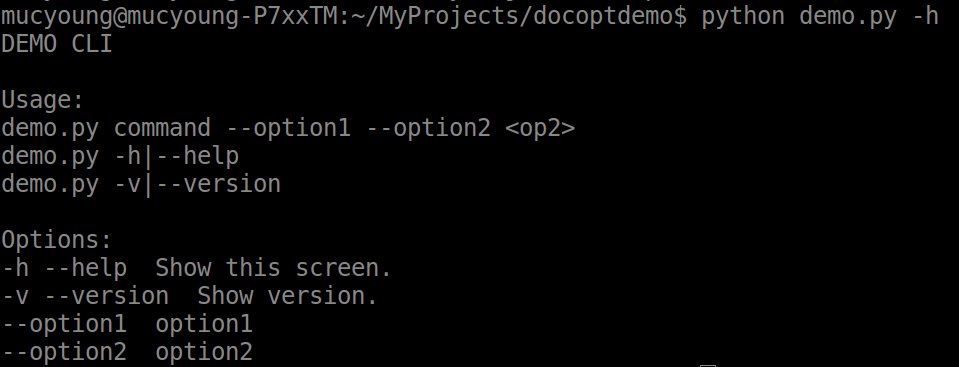 - version: ```python python demo.py -v ```  - common usage: ```python python demo.py command --option1 --option2 op2 ```  - undefined usage: ```python python demo.py command2 ```  As we can see from the results, docopt will only run correctly if you type in the command you have defined in your source code. Otherwise, it will return you the correct usage of the program. ##### How docopt works As we can see the result of common usage, arguments is a dictionary or a json. ```python {'--help': False, '--option1': True, '--option2': True, '--version': False, '<op2>': 'op2', 'command': True} ``` The value of options or commands like '--option1' or 'command' is a boolean value. The value of a variable is a string value. The dictionary is the result of the docopt parser. You can write your program based on this dictionary. ##### A common mistake when using docopt When you encounter the error like "docopt.DocoptLanguageError: unmatched '(' " or "docopt.DocoptLanguageError: unmatched '[' ", 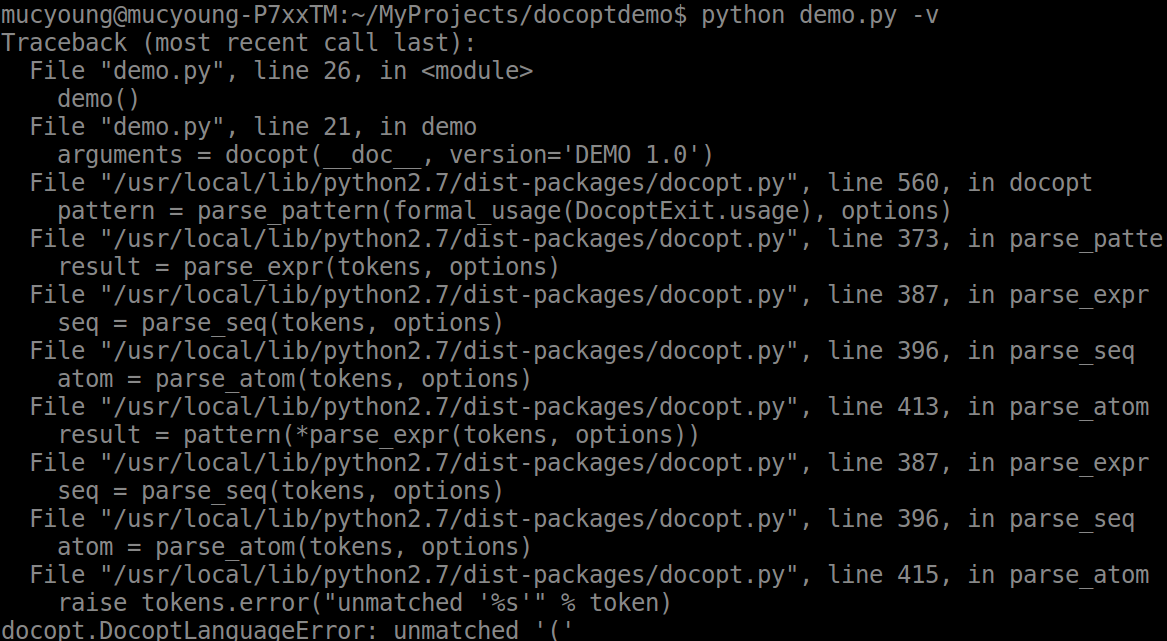 you must check your Options definition. The separator between option and explaination must be two spaces instead of one. Error example: ```python -h --help Show this screen. ``` Correct example: ```python -h --help Show this screen. ``` <br /><hr/><em>Posted on <a href="https://utopian.io/utopian-io/@mucyoung/create-a-python-cli-program-with-docopt">Utopian.io - Rewarding Open Source Contributors</a></em><hr/> |
| json metadata | {"community":"utopian","app":"utopian/1.0.0","format":"markdown","repository":{"id":3959394,"name":"docopt","full_name":"docopt/docopt","html_url":"https://github.com/docopt/docopt","fork":false,"owner":{"login":"docopt"}},"pullRequests":[],"platform":"github","type":"tutorials","tags":["utopian-io","python","tutorial","docopt","development"],"links":["https://s1.ax1x.com/2018/01/26/pLQuQA.png","https://s1.ax1x.com/2018/01/26/pLQMLt.png","https://s1.ax1x.com/2018/01/26/pLQ3o8.png","https://s1.ax1x.com/2018/01/26/pLQleP.png","https://s1.ax1x.com/2018/01/26/pLN2lT.png"],"image":["https://s1.ax1x.com/2018/01/26/pLQuQA.png","https://s1.ax1x.com/2018/01/26/pLQMLt.png","https://s1.ax1x.com/2018/01/26/pLQ3o8.png","https://s1.ax1x.com/2018/01/26/pLQleP.png","https://s1.ax1x.com/2018/01/26/pLN2lT.png"],"moderator":{"account":"deathwing","time":"2018-01-28T05:21:32.360Z","flagged":true,"reviewed":false,"pending":false}} |
| parent author | |
| parent permlink | utopian-io |
| permlink | create-a-python-cli-program-with-docopt |
| title | Create a python cli program with docopt |
| Transaction Info | Block #19364900/Trx 450ecef47ee25cd7e57b0acb8364ecdd29232a24 |
View Raw JSON Data
{
"block": 19364900,
"op": [
"comment",
{
"author": "mucyoung",
"body": "#### What Will I Learn?\n\n- You will learn what is docopt\n- You will learn how to use docopt\n- You will learn a common mistake when using docopt\n\n#### Requirements\n- have experience in python\n- have installed python and pip\n\n#### Difficulty\n- Intermediate\n\n#### Tutorial Contents\n##### What is docopt\nDocopt is a python package which helps you define the interface for your command-line app and automatically generate a parser for it.docopt is available in numerous programming languages, including Go,Julia,Rust and so on.\n\n#### Install Docopt\nWe can use pip to install this package.\n```shell\npip install docopt\n```\n\n##### A simple demo of docopt\nWe create a file named demo.py\n```python\n# !/usr/bin/env python\n# --*--coding:utf-8--*--\n\n\"\"\"DEMO CLI\n\nUsage:\ndemo.py command --option1 --option2 <op2>\ndemo.py -h|--help\ndemo.py -v|--version\n\nOptions:\n-h --help Show this screen.\n-v --version Show version.\n--option1 option1\n--option2 option2\n\"\"\"\n\nfrom docopt import docopt\n\ndef demo():\n arguments = docopt(__doc__, version='DEMO 1.0')\n print(arguments)\n\n\nif __name__ == '__main__':\n demo()\n```\nThen we run three commands:\n- help:\n```python\npython demo.py -h\n```\n\n\n- version:\n```python\npython demo.py -v\n```\n\n\n- common usage:\n```python\npython demo.py command --option1 --option2 op2\n```\n\n\n- undefined usage:\n```python\npython demo.py command2\n```\n\n\nAs we can see from the results, docopt will only run correctly if you type in the command you have defined in your source code. Otherwise, it will return you the correct usage of the program.\n\n##### How docopt works\nAs we can see the result of common usage, arguments is a dictionary or a json.\n```python\n{'--help': False,\n '--option1': True,\n '--option2': True,\n '--version': False,\n '<op2>': 'op2',\n 'command': True}\n```\nThe value of options or commands like '--option1' or 'command' is a boolean value. The value of a variable is a string value. \nThe dictionary is the result of the docopt parser. You can write your program based on this dictionary.\n\n##### A common mistake when using docopt\nWhen you encounter the error like \"docopt.DocoptLanguageError: unmatched '('\n\" or \"docopt.DocoptLanguageError: unmatched '['\n\",\n\nyou must check your Options definition. The separator between option and explaination must be two spaces instead of one. \nError example:\n```python\n-h --help Show this screen.\n```\nCorrect example:\n```python\n-h --help Show this screen.\n```\n\n\n<br /><hr/><em>Posted on <a href=\"https://utopian.io/utopian-io/@mucyoung/create-a-python-cli-program-with-docopt\">Utopian.io - Rewarding Open Source Contributors</a></em><hr/>",
"json_metadata": "{\"community\":\"utopian\",\"app\":\"utopian/1.0.0\",\"format\":\"markdown\",\"repository\":{\"id\":3959394,\"name\":\"docopt\",\"full_name\":\"docopt/docopt\",\"html_url\":\"https://github.com/docopt/docopt\",\"fork\":false,\"owner\":{\"login\":\"docopt\"}},\"pullRequests\":[],\"platform\":\"github\",\"type\":\"tutorials\",\"tags\":[\"utopian-io\",\"python\",\"tutorial\",\"docopt\",\"development\"],\"links\":[\"https://s1.ax1x.com/2018/01/26/pLQuQA.png\",\"https://s1.ax1x.com/2018/01/26/pLQMLt.png\",\"https://s1.ax1x.com/2018/01/26/pLQ3o8.png\",\"https://s1.ax1x.com/2018/01/26/pLQleP.png\",\"https://s1.ax1x.com/2018/01/26/pLN2lT.png\"],\"image\":[\"https://s1.ax1x.com/2018/01/26/pLQuQA.png\",\"https://s1.ax1x.com/2018/01/26/pLQMLt.png\",\"https://s1.ax1x.com/2018/01/26/pLQ3o8.png\",\"https://s1.ax1x.com/2018/01/26/pLQleP.png\",\"https://s1.ax1x.com/2018/01/26/pLN2lT.png\"],\"moderator\":{\"account\":\"deathwing\",\"time\":\"2018-01-28T05:21:32.360Z\",\"flagged\":true,\"reviewed\":false,\"pending\":false}}",
"parent_author": "",
"parent_permlink": "utopian-io",
"permlink": "create-a-python-cli-program-with-docopt",
"title": "Create a python cli program with docopt"
}
],
"op_in_trx": 0,
"timestamp": "2018-01-28T05:21:33",
"trx_id": "450ecef47ee25cd7e57b0acb8364ecdd29232a24",
"trx_in_block": 16,
"virtual_op": 0
}2018/01/28 03:43:09
2018/01/28 03:43:09
| author | rivalhw |
| permlink | 4dcxo3 |
| voter | mucyoung |
| weight | 10000 (100.00%) |
| Transaction Info | Block #19362932/Trx 1c022aac4eb74fdbf11fde7b5fadd8667f02c548 |
View Raw JSON Data
{
  "block": 19362932,
  "op": [
    "vote",
    {
      "author": "rivalhw",
      "permlink": "4dcxo3",
      "voter": "mucyoung",
      "weight": 10000
    }
  ],
  "op_in_trx": 0,
  "timestamp": "2018-01-28T03:43:09",
  "trx_id": "1c022aac4eb74fdbf11fde7b5fadd8667f02c548",
  "trx_in_block": 0,
  "virtual_op": 0
}2018/01/27 14:50:18
2018/01/27 14:50:18
| author | manishmike10 |
| body | Your contribution cannot be approved because it does not follow the [Utopian Rules](https://utopian.io/rules). * there are too many charts tutorials and they do not provide value to the community. You can contact us on [Discord](https://discord.gg/uTyJkNm). **[[utopian-moderator]](https://utopian.io/moderators)** |
| json metadata | {"tags":["utopian-io"],"community":"utopian","app":"utopian/1.0.0"} |
| parent author | mucyoung |
| parent permlink | chart-js-2-7-or-create-bar-chart-with-chart-js-2-7 |
| permlink | re-mucyoung-chart-js-2-7-or-create-bar-chart-with-chart-js-2-7-20180127t145015535z |
| title | |
| Transaction Info | Block #19347479/Trx 2271d23396b12aab88b6fbd442ec41e828bf8fd5 |
View Raw JSON Data
{
  "block": 19347479,
  "op": [
    "comment",
    {
      "author": "manishmike10",
      "body": "Your contribution cannot be approved because it does not follow the [Utopian Rules](https://utopian.io/rules).\n* there are too many charts tutorials and they do not provide value to the community.\nYou can contact us on [Discord](https://discord.gg/uTyJkNm).\n**[[utopian-moderator]](https://utopian.io/moderators)**",
      "json_metadata": "{\"tags\":[\"utopian-io\"],\"community\":\"utopian\",\"app\":\"utopian/1.0.0\"}",
      "parent_author": "mucyoung",
      "parent_permlink": "chart-js-2-7-or-create-bar-chart-with-chart-js-2-7",
      "permlink": "re-mucyoung-chart-js-2-7-or-create-bar-chart-with-chart-js-2-7-20180127t145015535z",
      "title": ""
    }
  ],
  "op_in_trx": 0,
  "timestamp": "2018-01-27T14:50:18",
  "trx_id": "2271d23396b12aab88b6fbd442ec41e828bf8fd5",
  "trx_in_block": 8,
  "virtual_op": 0
}mucyoungpublished a new post: chart-js-2-7-or-create-bar-chart-with-chart-js-2-72018/01/27 14:49:36
mucyoungpublished a new post: chart-js-2-7-or-create-bar-chart-with-chart-js-2-7
2018/01/27 14:49:36
| author | mucyoung |
| body | Summary: Chart.js provides simple yet flexible javascript charting for designers & developers. It has become one of the most popular open source charting libraries and i will show you how to create a bar chart with chartjs today.I choose the total and per capita GDP in the top 10 economies of the world in 2017 as the original data. I use the newest version of Chart.js which is different from the older ones.  Chart.js为设计师和开发者提供简单而灵活的javascript图表设计,它已经成为了最受欢迎的开源图表库之一,今天教程将教大家如何使用Chart.js去绘制一张柱状图。我选取的原始数据是2017年世界前10大经济体的GDP总量和人均GDP数据。采用的Chart.js版本是和以前的版本不太一样的最新的2.7.1版本。 兼容浏览器:一切支持canvas的浏览器,IE9,Chrome,Firefox等等 Chart.js版本: 2.7.1(最新版本) #### 您能从本教程学到什么? - 代码整体结构 - 怎样调用Chart.js - chartjs的容器 - 怎样创建chart对象 - 柱状图的数据结构 - 柱状图的参数选项 - 生成并渲染对象 #### 准备条件 - 一个代码编辑器,如WebStorm和atom - 一个可供调试的浏览器:IE, Chrome或是Firefox #### 难度 - 中等 #### 教程内容 由于HighChart.js的崛起,开源的数据图形库普遍重构了代码,Chart.js在2.0之后就和1.0完全不一样,我们就看看最新版本的Chart.js怎样创建线形图。 ##### 代码整体结构 ```html <script src="path/to/Chartjs"></script> <canvas id="myChart" width="600" height="400"></canvas> <script> var data = {} Line.defaults = {} var ctx = document.getElementById("myChart").getContext("2d"); var chart = new Chart(ctx, { type:{}, data:{}, options:{} }); </script> ``` ##### 原始数据 本教程的原始数据选择2017年世界前10大经济体的GDP总量和人均GDP数据。 | 国家| GDP总量(亿美元)| 人均GDP(美元)| | -------- | -----: | ----: | | 美国| 186979.22| 57765.512| | 中国| 122539.75| 8865.999| | 日本| 41706.43| 33010.024| | 德国| 34725.07| 42388.679| | 英国| 30548.4| 46719.862| | 法国| 24788.48| 38575.438| | 印度| 23847.26| 1820.8| | 意大利| 18675.72| 30540.566| | 巴西| 16728.68| 8117.645| | 加拿大| 15928.48| 44095.85| ##### 要点1:怎样调用Chart.js 本地路径调用 ```html <script src="path/to/Chartjs"></script> ``` CDN调用 ```html <script src="https://cdnjs.cloudflare.com/ajax/libs/Chart.js/2.7.1/Chart.js"></script> ``` 可以使用以上两种方式引入Chart.js ##### 要点2:chartjs的容器 Chartjs不同于HighCharts.js,HighCharts.js基于的是SVG,而Chart.js基于的是canvas,所以chartjs的容器仅需一个canvas元素即可。 ```html <canvas id="myChart" width="600" height="400"></canvas> ``` ##### 要点3:怎样创建chart对象 获取canvas元素有两种方式,一种方式是使用javascript原生的getElementById的方式 ```javascript var ctx = document.getElementById("myChart").getContext("2d"); ``` 另一种方式是用jQuery获取canvas的context。首先从jQuery集合中获取我们需要的DOM节点,然后在这个DOM节点上调用 getContext("2d") 方法。 ```html <script src="https://code.jquery.com/jquery.min.js"></script> ``` ```javascript var ctx = $("#myChart").get(0).getContext("2d"); ``` 获取canvas元素后,需要在指定canvas元素上实例化Chart对象。 ```javascript var chart = new Chart(ctx, { type: 'bar', data: data, options: options }); ``` ##### 要点4:曲线图的数据结构 ```javascript var data = { labels : ["美国","中国","日本","德国","英国","法国","印度","意大利","加拿大"], datasets : [ { label: "人均GDP", backgroundColor : "rgba(151,187,205,0.5)", borderColor : "rgba(151,187,205,1)", data : [57765.512,8865.999,33010.024,42388.679,46719.862,38575.438,1820.8,30540.566,8117.645,44095.85] }, { label: "GDP总量", backgroundColor : "rgba(220,220,220,0.5)", borderColor : "rgba(220,220,220,1)", data : [186979.22,122539.75,41706.43,34725.07,30548.4,24788.48,23847.26,18675.72,16728.68,15928.48] } ] }; ``` 其中labels代表的即是横坐标的标签,本数据中就是国家的名称。而datasets则是具体的数据的值,其中每个dataset就是一个系列的bar。 在某个dataset的具体定义中,backgroundColor指的是填充区域的颜色,borderColor指的是柱状图边线的颜色。 dataset还有许多参数选项,这里不一一列出。 ##### 要点5:曲线图的参数选项 ```javascript var options = { responsive: false, title: { display: true, text: '世界前10大经济体GDP总量及人均GDP数据' } }; ``` responsive就是是否响应式设计,如为true,则canvas的width和height自动不生效,随浏览器变化。 title就是图表的标题的意思,其中display就表示标题是否展现,text就是标题的内容。 options还有许多参数选项,这里不一一列出。 ##### 最终:生成并渲染对象  #### 相关教程 - [用Chart.js 2.7 创建线形图|Create Line Chart with Chart.js 2.7](https://utopian.io/utopian-io/@mucyoung/chart-js-2-7-or-create-line-chart-with-chart-js-2-7) <br /><hr/><em>Posted on <a href="https://utopian.io/utopian-io/@mucyoung/chart-js-2-7-or-create-bar-chart-with-chart-js-2-7">Utopian.io - Rewarding Open Source Contributors</a></em><hr/> |
| json metadata | {"community":"utopian","app":"utopian/1.0.0","format":"markdown","repository":{"id":8843683,"name":"Chart.js","full_name":"chartjs/Chart.js","html_url":"https://github.com/chartjs/Chart.js","fork":false,"owner":{"login":"chartjs"}},"pullRequests":[],"platform":"github","type":"tutorials","tags":["utopian-io","tutorial","javascript","cn","water"],"users":["mucyoung"],"links":["https://res.cloudinary.com/hpiynhbhq/image/upload/v1516956474/icbknychqk4hmdgekjdf.png","https://res.cloudinary.com/hpiynhbhq/image/upload/v1516956320/omtyrdj6mbfmj9euedke.gif","https://utopian.io/utopian-io/@mucyoung/chart-js-2-7-or-create-line-chart-with-chart-js-2-7"],"image":["https://res.cloudinary.com/hpiynhbhq/image/upload/v1516956474/icbknychqk4hmdgekjdf.png","https://res.cloudinary.com/hpiynhbhq/image/upload/v1516956320/omtyrdj6mbfmj9euedke.gif"],"moderator":{"account":"manishmike10","time":"2018-01-27T14:49:35.636Z","flagged":true,"reviewed":false,"pending":false}} |
| parent author | |
| parent permlink | utopian-io |
| permlink | chart-js-2-7-or-create-bar-chart-with-chart-js-2-7 |
| title | 用Chart.js 2.7 创建柱状图|Create Bar Chart with Chart.js 2.7 |
| Transaction Info | Block #19347465/Trx a7c9245692207aaf63952c2964042e7f01a759fa |
View Raw JSON Data
{
"block": 19347465,
"op": [
"comment",
{
"author": "mucyoung",
"body": "Summary: \nChart.js provides simple yet flexible javascript charting for designers & developers. It has become one of the most popular open source charting libraries and i will show you how to create a bar chart with chartjs today.I choose the total and per capita GDP in the top 10 economies of the world in 2017 as the original data. I use the newest version of Chart.js which is different from the older ones.\n\n\n\nChart.js为设计师和开发者提供简单而灵活的javascript图表设计,它已经成为了最受欢迎的开源图表库之一,今天教程将教大家如何使用Chart.js去绘制一张柱状图。我选取的原始数据是2017年世界前10大经济体的GDP总量和人均GDP数据。采用的Chart.js版本是和以前的版本不太一样的最新的2.7.1版本。\n\n兼容浏览器:一切支持canvas的浏览器,IE9,Chrome,Firefox等等\nChart.js版本: 2.7.1(最新版本)\n\n\n#### 您能从本教程学到什么?\n\n- 代码整体结构\n- 怎样调用Chart.js\n- chartjs的容器\n- 怎样创建chart对象\n- 柱状图的数据结构\n- 柱状图的参数选项\n- 生成并渲染对象\n\n#### 准备条件\n- 一个代码编辑器,如WebStorm和atom\n- 一个可供调试的浏览器:IE, Chrome或是Firefox\n\n#### 难度\n- 中等\n\n#### 教程内容\n由于HighChart.js的崛起,开源的数据图形库普遍重构了代码,Chart.js在2.0之后就和1.0完全不一样,我们就看看最新版本的Chart.js怎样创建线形图。\n\n##### 代码整体结构\n```html\n<script src=\"path/to/Chartjs\"></script>\n<canvas id=\"myChart\" width=\"600\" height=\"400\"></canvas>\n<script>\nvar data = {}\nLine.defaults = {}\nvar ctx = document.getElementById(\"myChart\").getContext(\"2d\");\nvar chart = new Chart(ctx, {\n\ttype:{},\n\tdata:{},\n\toptions:{}\n});\n</script>\n```\n\n##### 原始数据\n本教程的原始数据选择2017年世界前10大经济体的GDP总量和人均GDP数据。 \n\n| 国家| GDP总量(亿美元)| 人均GDP(美元)|\n| -------- | -----: | ----: |\n| 美国| 186979.22| 57765.512|\n| 中国| 122539.75| 8865.999|\n| 日本| 41706.43| 33010.024|\n| 德国| 34725.07| 42388.679|\n| 英国| 30548.4| 46719.862|\n| 法国| 24788.48| 38575.438|\n| 印度| 23847.26| 1820.8|\n| 意大利| 18675.72| 30540.566|\n| 巴西| 16728.68| 8117.645|\n| 加拿大| 15928.48| 44095.85|\n\n##### 要点1:怎样调用Chart.js\n本地路径调用\n```html\n<script src=\"path/to/Chartjs\"></script>\n```\nCDN调用\n```html\n<script src=\"https://cdnjs.cloudflare.com/ajax/libs/Chart.js/2.7.1/Chart.js\"></script>\n```\n可以使用以上两种方式引入Chart.js\n\n##### 要点2:chartjs的容器\nChartjs不同于HighCharts.js,HighCharts.js基于的是SVG,而Chart.js基于的是canvas,所以chartjs的容器仅需一个canvas元素即可。\n```html\n<canvas id=\"myChart\" width=\"600\" height=\"400\"></canvas>\n```\n\n##### 要点3:怎样创建chart对象\n获取canvas元素有两种方式,一种方式是使用javascript原生的getElementById的方式\n```javascript\nvar ctx = document.getElementById(\"myChart\").getContext(\"2d\");\n```\n另一种方式是用jQuery获取canvas的context。首先从jQuery集合中获取我们需要的DOM节点,然后在这个DOM节点上调用 getContext(\"2d\") 方法。\n```html\n<script src=\"https://code.jquery.com/jquery.min.js\"></script>\n```\n```javascript\nvar ctx = $(\"#myChart\").get(0).getContext(\"2d\");\n```\n获取canvas元素后,需要在指定canvas元素上实例化Chart对象。\n```javascript\nvar chart = new Chart(ctx, {\n type: 'bar',\n\t\tdata: data,\n\t\toptions: options\n\t});\n```\n\n##### 要点4:曲线图的数据结构\n```javascript\nvar data = {\n\tlabels : [\"美国\",\"中国\",\"日本\",\"德国\",\"英国\",\"法国\",\"印度\",\"意大利\",\"加拿大\"],\n\tdatasets : [\n\t\t{\n\t\t\tlabel: \"人均GDP\",\n\t\t\tbackgroundColor : \"rgba(151,187,205,0.5)\",\n\t\t\tborderColor : \"rgba(151,187,205,1)\",\n\t\t\tdata : [57765.512,8865.999,33010.024,42388.679,46719.862,38575.438,1820.8,30540.566,8117.645,44095.85]\n\t\t},\n\t\t{\n\t\t\tlabel: \"GDP总量\",\n\t\t\tbackgroundColor : \"rgba(220,220,220,0.5)\",\n\t\t\tborderColor : \"rgba(220,220,220,1)\",\n\t\t\tdata : [186979.22,122539.75,41706.43,34725.07,30548.4,24788.48,23847.26,18675.72,16728.68,15928.48]\n\t\t}\n\t]\n};\n```\n其中labels代表的即是横坐标的标签,本数据中就是国家的名称。而datasets则是具体的数据的值,其中每个dataset就是一个系列的bar。 \n在某个dataset的具体定义中,backgroundColor指的是填充区域的颜色,borderColor指的是柱状图边线的颜色。\ndataset还有许多参数选项,这里不一一列出。\n##### 要点5:曲线图的参数选项\n```javascript\nvar options = {\n\t\t\tresponsive: false,\n\t\t\ttitle: {\n\t\t\tdisplay: true,\n\t\t\ttext: '世界前10大经济体GDP总量及人均GDP数据'\n\t\t}\n\t};\n```\nresponsive就是是否响应式设计,如为true,则canvas的width和height自动不生效,随浏览器变化。 \ntitle就是图表的标题的意思,其中display就表示标题是否展现,text就是标题的内容。\noptions还有许多参数选项,这里不一一列出。\n##### 最终:生成并渲染对象\n\n\n#### 相关教程\n- [用Chart.js 2.7 创建线形图|Create Line Chart with Chart.js 2.7](https://utopian.io/utopian-io/@mucyoung/chart-js-2-7-or-create-line-chart-with-chart-js-2-7)\n\n<br /><hr/><em>Posted on <a href=\"https://utopian.io/utopian-io/@mucyoung/chart-js-2-7-or-create-bar-chart-with-chart-js-2-7\">Utopian.io - Rewarding Open Source Contributors</a></em><hr/>",
"json_metadata": "{\"community\":\"utopian\",\"app\":\"utopian/1.0.0\",\"format\":\"markdown\",\"repository\":{\"id\":8843683,\"name\":\"Chart.js\",\"full_name\":\"chartjs/Chart.js\",\"html_url\":\"https://github.com/chartjs/Chart.js\",\"fork\":false,\"owner\":{\"login\":\"chartjs\"}},\"pullRequests\":[],\"platform\":\"github\",\"type\":\"tutorials\",\"tags\":[\"utopian-io\",\"tutorial\",\"javascript\",\"cn\",\"water\"],\"users\":[\"mucyoung\"],\"links\":[\"https://res.cloudinary.com/hpiynhbhq/image/upload/v1516956474/icbknychqk4hmdgekjdf.png\",\"https://res.cloudinary.com/hpiynhbhq/image/upload/v1516956320/omtyrdj6mbfmj9euedke.gif\",\"https://utopian.io/utopian-io/@mucyoung/chart-js-2-7-or-create-line-chart-with-chart-js-2-7\"],\"image\":[\"https://res.cloudinary.com/hpiynhbhq/image/upload/v1516956474/icbknychqk4hmdgekjdf.png\",\"https://res.cloudinary.com/hpiynhbhq/image/upload/v1516956320/omtyrdj6mbfmj9euedke.gif\"],\"moderator\":{\"account\":\"manishmike10\",\"time\":\"2018-01-27T14:49:35.636Z\",\"flagged\":true,\"reviewed\":false,\"pending\":false}}",
"parent_author": "",
"parent_permlink": "utopian-io",
"permlink": "chart-js-2-7-or-create-bar-chart-with-chart-js-2-7",
"title": "用Chart.js 2.7 创建柱状图|Create Bar Chart with Chart.js 2.7"
}
],
"op_in_trx": 0,
"timestamp": "2018-01-27T14:49:36",
"trx_id": "a7c9245692207aaf63952c2964042e7f01a759fa",
"trx_in_block": 11,
"virtual_op": 0
}2018/01/27 01:11:48
2018/01/27 01:11:48
| author | justyy |
| body | @@ -381,16 +381,17 @@ exceltk%5D +( https:// |
| json metadata | {"tags":["utopian-io"],"community":"utopian","app":"utopian/1.0.0"} |
| parent author | mucyoung |
| parent permlink | xls2md-v0-1-demo-a-python-cli-tool-converting-excel-file-to-markdown-file |
| permlink | re-mucyoung-xls2md-v0-1-demo-a-python-cli-tool-converting-excel-file-to-markdown-file-20180127t010943149z |
| title | |
| Transaction Info | Block #19331123/Trx 7b6da51bdbe41bf4246b91e49ff171911744ca40 |
View Raw JSON Data
{
  "block": 19331123,
  "op": [
    "comment",
    {
      "author": "justyy",
      "body": "@@ -381,16 +381,17 @@\n exceltk%5D\n+(\n https://\n",
      "json_metadata": "{\"tags\":[\"utopian-io\"],\"community\":\"utopian\",\"app\":\"utopian/1.0.0\"}",
      "parent_author": "mucyoung",
      "parent_permlink": "xls2md-v0-1-demo-a-python-cli-tool-converting-excel-file-to-markdown-file",
      "permlink": "re-mucyoung-xls2md-v0-1-demo-a-python-cli-tool-converting-excel-file-to-markdown-file-20180127t010943149z",
      "title": ""
    }
  ],
  "op_in_trx": 0,
  "timestamp": "2018-01-27T01:11:48",
  "trx_id": "7b6da51bdbe41bf4246b91e49ff171911744ca40",
  "trx_in_block": 50,
  "virtual_op": 0
}2018/01/27 01:11:33
2018/01/27 01:11:33
| author | justyy |
| body | @@ -323,16 +323,177 @@ ting..%0A%0A +Also, there are already more advanced tools like %5Bexceltk%5Dhttps://github.com/fanfeilong/exceltk) or %5Bpytablewriter%5D(https://github.com/thombashi/pytablewriter)%0A%0A You can |
| json metadata | {"tags":["utopian-io"],"community":"utopian","app":"utopian/1.0.0"} |
| parent author | mucyoung |
| parent permlink | xls2md-v0-1-demo-a-python-cli-tool-converting-excel-file-to-markdown-file |
| permlink | re-mucyoung-xls2md-v0-1-demo-a-python-cli-tool-converting-excel-file-to-markdown-file-20180127t010943149z |
| title | |
| Transaction Info | Block #19331118/Trx 8b7ed4ef153e006a20b72fa7a6e8487fc029653a |
View Raw JSON Data
{
  "block": 19331118,
  "op": [
    "comment",
    {
      "author": "justyy",
      "body": "@@ -323,16 +323,177 @@\n ting..%0A%0A\n+Also, there are already more advanced tools like %5Bexceltk%5Dhttps://github.com/fanfeilong/exceltk) or %5Bpytablewriter%5D(https://github.com/thombashi/pytablewriter)%0A%0A\n You can \n",
      "json_metadata": "{\"tags\":[\"utopian-io\"],\"community\":\"utopian\",\"app\":\"utopian/1.0.0\"}",
      "parent_author": "mucyoung",
      "parent_permlink": "xls2md-v0-1-demo-a-python-cli-tool-converting-excel-file-to-markdown-file",
      "permlink": "re-mucyoung-xls2md-v0-1-demo-a-python-cli-tool-converting-excel-file-to-markdown-file-20180127t010943149z",
      "title": ""
    }
  ],
  "op_in_trx": 0,
  "timestamp": "2018-01-27T01:11:33",
  "trx_id": "8b7ed4ef153e006a20b72fa7a6e8487fc029653a",
  "trx_in_block": 35,
  "virtual_op": 0
}2018/01/27 01:09:48
2018/01/27 01:09:48
| author | justyy |
| body | Your contribution cannot be approved because it does not follow the [Utopian Rules](https://utopian.io/rules). `Simple and common code snippets that can be easily found or reproduced can't be submitted in the development category.` You may consider to re-submit if you have added more features: 1. GUI 2. Consider formatting.. You can contact us on [Discord](https://discord.gg/uTyJkNm). **[[utopian-moderator]](https://utopian.io/moderators)** |
| json metadata | {"tags":["utopian-io"],"community":"utopian","app":"utopian/1.0.0"} |
| parent author | mucyoung |
| parent permlink | xls2md-v0-1-demo-a-python-cli-tool-converting-excel-file-to-markdown-file |
| permlink | re-mucyoung-xls2md-v0-1-demo-a-python-cli-tool-converting-excel-file-to-markdown-file-20180127t010943149z |
| title | |
| Transaction Info | Block #19331083/Trx b4fa38d53f9e52ab6f7b4c21f1ae69684409dd45 |
View Raw JSON Data
{
  "block": 19331083,
  "op": [
    "comment",
    {
      "author": "justyy",
      "body": "Your contribution cannot be approved because it does not follow the [Utopian Rules](https://utopian.io/rules).\n\n`Simple and common code snippets that can be easily found or reproduced can't be submitted in the development category.`\n\nYou may consider to re-submit if you have added more features:\n1. GUI\n2. Consider formatting..\n\nYou can contact us on [Discord](https://discord.gg/uTyJkNm).\n**[[utopian-moderator]](https://utopian.io/moderators)**",
      "json_metadata": "{\"tags\":[\"utopian-io\"],\"community\":\"utopian\",\"app\":\"utopian/1.0.0\"}",
      "parent_author": "mucyoung",
      "parent_permlink": "xls2md-v0-1-demo-a-python-cli-tool-converting-excel-file-to-markdown-file",
      "permlink": "re-mucyoung-xls2md-v0-1-demo-a-python-cli-tool-converting-excel-file-to-markdown-file-20180127t010943149z",
      "title": ""
    }
  ],
  "op_in_trx": 0,
  "timestamp": "2018-01-27T01:09:48",
  "trx_id": "b4fa38d53f9e52ab6f7b4c21f1ae69684409dd45",
  "trx_in_block": 41,
  "virtual_op": 0
}mucyoungpublished a new post: xls2md-v0-1-demo-a-python-cli-tool-converting-excel-file-to-markdown-file2018/01/27 01:08:48
mucyoungpublished a new post: xls2md-v0-1-demo-a-python-cli-tool-converting-excel-file-to-markdown-file
2018/01/27 01:08:48
| author | mucyoung |
| body | ### It‘s a new project #### What is the project about? When posting articles, I offen need a complex table which contain a lot of information. I have to type it in the markdown file. It's troublesome and cost me too much time. So I create a python cli tool to simplify the process. #### Install ```shell pip install pipenv git clone https://github.com/littlemucyoung/xls2md.git cd xls2md pipenv install ``` #### Usage ```shell pipenv shell $ python xls2md.py --head --from example/excel/data.xls --sindex 0 --to example/markdown/data.md ``` common usage: ```shell xls2md.py [--head] --from <from_path> [--sindex <sheet_index>|--sname <sheet_name>] --to <to_path> ``` #### Demo excel file: example/excel/data.xls 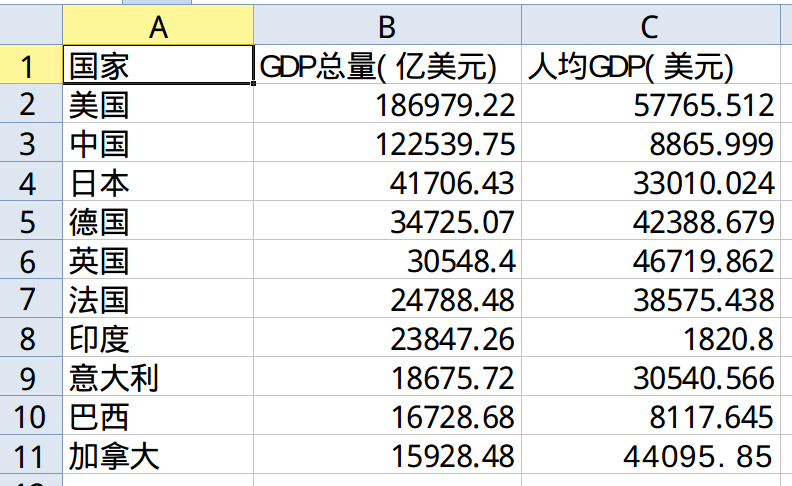 run ```shell python xls2md.py --head --from example/excel/data.xls --sindex 0 --to example/markdown/data.md ``` data.md: |国家|GDP总量(亿美元)|人均GDP(美元)| | --- | --- | --- | |美国|186979.22|57765.512| |中国|122539.75|8865.999| |日本|41706.43|33010.024| |德国|34725.07|42388.679| |英国|30548.4|46719.862| |法国|24788.48|38575.438| |印度|23847.26|1820.8| |意大利|18675.72|30540.566| |巴西|16728.68|8117.645| |加拿大|15928.48|44095.85| #### Technology Stack Language: Python Requirements: xlrd, xlwt, docopt Development Environment: Pipenv #### Roadmap - v0.1: a demo which only satisfies the basic needs - v0.2: support more options - v0.3-0.6: support csv,json,xml,html - v1.0: build excutable file or be wrapped as a pypi package #### Contributing Github: https://github.com/littlemucyoung/xls2md Fork it! Create your feature branch: git checkout -b my-new-feature Commit your changes: git commit -am 'Add some feature' Push to the branch: git push origin my-new-feature Submit a pull request <br /><hr/><em>Posted on <a href="https://utopian.io/utopian-io/@mucyoung/xls2md-v0-1-demo-a-python-cli-tool-converting-excel-file-to-markdown-file">Utopian.io - Rewarding Open Source Contributors</a></em><hr/> |
| json metadata | {"community":"utopian","app":"utopian/1.0.0","format":"markdown","repository":{"id":118920246,"name":"xls2md","full_name":"littlemucyoung/xls2md","html_url":"https://github.com/littlemucyoung/xls2md","fork":false,"owner":{"login":"littlemucyoung"}},"pullRequests":[],"platform":"github","type":"development","tags":["utopian-io","development","excel","markdown","cn"],"links":["https://s1.ax1x.com/2018/01/26/pqbFEQ.png"],"image":["https://s1.ax1x.com/2018/01/26/pqbFEQ.png"],"moderator":{"account":"justyy","time":"2018-01-27T01:08:49.606Z","flagged":true,"reviewed":false,"pending":false}} |
| parent author | |
| parent permlink | utopian-io |
| permlink | xls2md-v0-1-demo-a-python-cli-tool-converting-excel-file-to-markdown-file |
| title | xls2md v0.1 demo, a python cli tool converting excel file to markdown file |
| Transaction Info | Block #19331063/Trx 17cdcdf8690122874f998c35ba62ebb872e267b4 |
View Raw JSON Data
{
"block": 19331063,
"op": [
"comment",
{
"author": "mucyoung",
"body": "### It‘s a new project\n#### What is the project about?\nWhen posting articles, I offen need a complex table which contain a lot of information. I have to type it in the markdown file. It's troublesome and cost me too much time. \nSo I create a python cli tool to simplify the process.\n\n#### Install\n```shell\npip install pipenv\ngit clone https://github.com/littlemucyoung/xls2md.git\ncd xls2md\npipenv install\n```\n\n#### Usage\n```shell\npipenv shell\n$ python xls2md.py --head --from example/excel/data.xls --sindex 0 --to example/markdown/data.md\n```\ncommon usage: \n```shell\nxls2md.py [--head] --from <from_path> [--sindex <sheet_index>|--sname <sheet_name>] --to <to_path>\n```\n\n#### Demo\nexcel file: example/excel/data.xls\n\n\nrun\n```shell\npython xls2md.py --head --from example/excel/data.xls --sindex 0 --to example/markdown/data.md\n```\ndata.md: \n\n|国家|GDP总量(亿美元)|人均GDP(美元)|\n| --- | --- | --- |\n|美国|186979.22|57765.512|\n|中国|122539.75|8865.999|\n|日本|41706.43|33010.024|\n|德国|34725.07|42388.679|\n|英国|30548.4|46719.862|\n|法国|24788.48|38575.438|\n|印度|23847.26|1820.8|\n|意大利|18675.72|30540.566|\n|巴西|16728.68|8117.645|\n|加拿大|15928.48|44095.85|\n\n#### Technology Stack\nLanguage: Python \nRequirements: xlrd, xlwt, docopt \nDevelopment Environment: Pipenv \n\n#### Roadmap\n- v0.1: a demo which only satisfies the basic needs\n- v0.2: support more options\n- v0.3-0.6: support csv,json,xml,html\n- v1.0: build excutable file or be wrapped as a pypi package\n\n#### Contributing\nGithub: https://github.com/littlemucyoung/xls2md\n\nFork it!\nCreate your feature branch: git checkout -b my-new-feature\nCommit your changes: git commit -am 'Add some feature'\nPush to the branch: git push origin my-new-feature\nSubmit a pull request\n\n\n<br /><hr/><em>Posted on <a href=\"https://utopian.io/utopian-io/@mucyoung/xls2md-v0-1-demo-a-python-cli-tool-converting-excel-file-to-markdown-file\">Utopian.io - Rewarding Open Source Contributors</a></em><hr/>",
"json_metadata": "{\"community\":\"utopian\",\"app\":\"utopian/1.0.0\",\"format\":\"markdown\",\"repository\":{\"id\":118920246,\"name\":\"xls2md\",\"full_name\":\"littlemucyoung/xls2md\",\"html_url\":\"https://github.com/littlemucyoung/xls2md\",\"fork\":false,\"owner\":{\"login\":\"littlemucyoung\"}},\"pullRequests\":[],\"platform\":\"github\",\"type\":\"development\",\"tags\":[\"utopian-io\",\"development\",\"excel\",\"markdown\",\"cn\"],\"links\":[\"https://s1.ax1x.com/2018/01/26/pqbFEQ.png\"],\"image\":[\"https://s1.ax1x.com/2018/01/26/pqbFEQ.png\"],\"moderator\":{\"account\":\"justyy\",\"time\":\"2018-01-27T01:08:49.606Z\",\"flagged\":true,\"reviewed\":false,\"pending\":false}}",
"parent_author": "",
"parent_permlink": "utopian-io",
"permlink": "xls2md-v0-1-demo-a-python-cli-tool-converting-excel-file-to-markdown-file",
"title": " xls2md v0.1 demo, a python cli tool converting excel file to markdown file"
}
],
"op_in_trx": 0,
"timestamp": "2018-01-27T01:08:48",
"trx_id": "17cdcdf8690122874f998c35ba62ebb872e267b4",
"trx_in_block": 31,
"virtual_op": 0
}Manabar
Voting Power100.00%
Downvote Power100.00%
Resource Credits100.00%
Reputation Progress46.83%
{
  "voting_manabar": {
    "current_mana": "23650344949",
    "last_update_time": 1588943868
  },
  "downvote_manabar": {
    "current_mana": "5912586237",
    "last_update_time": 1588943868
  },
  "rc_account": {
    "account": "mucyoung",
    "rc_manabar": {
      "current_mana": "27702451062",
      "last_update_time": 1588943868
    },
    "max_rc_creation_adjustment": {
      "amount": "2020748973",
      "precision": 6,
      "nai": "@@000000037"
    },
    "max_rc": "25671093922"
  }
}
Account Metadata
| POSTING JSON METADATA | |
| profile | {"name":"MucYoung","profile_image":"https://wx1.sinaimg.cn/thumb150/005TRw24ly8fn62adjqhdj306y06yaa1.jpg","about":"Programmer, Growth Hacker, Love Coding, Love Sharing","location":"China"} |
| JSON METADATA | |
| profile | {"name":"MucYoung","profile_image":"https://wx1.sinaimg.cn/thumb150/005TRw24ly8fn62adjqhdj306y06yaa1.jpg","about":"Programmer, Growth Hacker, Love Coding, Love Sharing","location":"China"} |
{
  "posting_json_metadata": {
    "profile": {
      "name": "MucYoung",
      "profile_image": "https://wx1.sinaimg.cn/thumb150/005TRw24ly8fn62adjqhdj306y06yaa1.jpg",
      "about": "Programmer, Growth Hacker, Love Coding, Love Sharing",
      "location": "China"
    }
  },
  "json_metadata": {
    "profile": {
      "name": "MucYoung",
      "profile_image": "https://wx1.sinaimg.cn/thumb150/005TRw24ly8fn62adjqhdj306y06yaa1.jpg",
      "about": "Programmer, Growth Hacker, Love Coding, Love Sharing",
      "location": "China"
    }
  }
}
Auth Keys
Owner
Single Signature
Public Keys
STM5MQHEUZyH65kRr9q7pr6jD1b57BhPVwzVSQ7vr8zxXHrmkFc5w1/1
Active
Single Signature
Public Keys
STM69nS7XWVs1zSQicYbSY3KY1CHp5WFJtPLosrz8paLpLsVGfYM91/1
Posting
Single Signature
Public Keys
STM8NY4Z27GLkRgd3YBD7xZjCb7o2jyeWygNSCD2buWg2mPS9D3GE1/1
Memo
STM8WkPTBhJtM4gBLaiSzqBNNZBtwAEBsrVgVFsxHTfUfpkkFoTq5
{
  "owner": {
    "weight_threshold": 1,
    "account_auths": [],
    "key_auths": [
      [
        "STM5MQHEUZyH65kRr9q7pr6jD1b57BhPVwzVSQ7vr8zxXHrmkFc5w",
        1
      ]
    ]
  },
  "active": {
    "weight_threshold": 1,
    "account_auths": [],
    "key_auths": [
      [
        "STM69nS7XWVs1zSQicYbSY3KY1CHp5WFJtPLosrz8paLpLsVGfYM9",
        1
      ]
    ]
  },
  "posting": {
    "weight_threshold": 1,
    "account_auths": [
      [
        "busy.app",
        1
      ],
      [
        "dlive.app",
        1
      ],
      [
        "dtube.app",
        1
      ],
      [
        "utopian.app",
        1
      ]
    ],
    "key_auths": [
      [
        "STM8NY4Z27GLkRgd3YBD7xZjCb7o2jyeWygNSCD2buWg2mPS9D3GE",
        1
      ]
    ]
  },
  "memo": "STM8WkPTBhJtM4gBLaiSzqBNNZBtwAEBsrVgVFsxHTfUfpkkFoTq5"
}
Witness Votes
1 / 30
01.utopian-io |
[
  "utopian-io"
]