

VOTING POWER100.00%
DOWNVOTE POWER100.00%
RESOURCE CREDITS100.00%
REPUTATION PROGRESS26.64%
Net Worth
2.431USD
STEEM
0.020STEEM
SBD
0.006SBD
Own SP
44.876SP
Detailed Balance
| STEEM | ||
| balance | 0.020STEEM | STEEM |
| market_balance | 0.000STEEM | STEEM |
| savings_balance | 0.000STEEM | STEEM |
| reward_steem_balance | 0.000STEEM | STEEM |
| STEEM POWER | ||
| Own SP | 44.876SP | SP |
| Delegated Out | 0.000SP | SP |
| Delegation In | 0.000SP | SP |
| Effective Power | 44.876SP | SP |
| Reward SP (pending) | 0.000SP | SP |
| SBD | ||
| sbd_balance | 0.006SBD | SBD |
| sbd_conversions | 0.000SBD | SBD |
| sbd_market_balance | 0.000SBD | SBD |
| savings_sbd_balance | 0.000SBD | SBD |
| reward_sbd_balance | 0.000SBD | SBD |
{
  "balance": "0.020 STEEM",
  "savings_balance": "0.000 STEEM",
  "reward_steem_balance": "0.000 STEEM",
  "vesting_shares": "73075.479453 VESTS",
  "delegated_vesting_shares": "0.000000 VESTS",
  "received_vesting_shares": "0.000000 VESTS",
  "sbd_balance": "0.006 SBD",
  "savings_sbd_balance": "0.000 SBD",
  "reward_sbd_balance": "0.000 SBD",
  "conversions": []
}
Account Info
| name | mackjohn |
| id | 131382 |
| rank | 44,021 |
| reputation | 10705386928 |
| created | 2017-02-07T09:52:42 |
| recovery_account | steem |
| proxy | None |
| post_count | 10 |
| comment_count | 0 |
| lifetime_vote_count | 0 |
| witnesses_voted_for | 0 |
| last_post | 2020-10-09T11:32:12 |
| last_root_post | 2020-04-16T10:35:30 |
| last_vote_time | 2020-04-16T11:56:33 |
| proxied_vsf_votes | 0, 0, 0, 0 |
| can_vote | 1 |
| voting_power | 9,799 |
| delayed_votes | 0 |
| balance | 0.020 STEEM |
| savings_balance | 0.000 STEEM |
| sbd_balance | 0.006 SBD |
| savings_sbd_balance | 0.000 SBD |
| vesting_shares | 73075.479453 VESTS |
| delegated_vesting_shares | 0.000000 VESTS |
| received_vesting_shares | 0.000000 VESTS |
| reward_vesting_balance | 0.000000 VESTS |
| vesting_balance | 0.000 STEEM |
| vesting_withdraw_rate | 0.000000 VESTS |
| next_vesting_withdrawal | 1969-12-31T23:59:59 |
| withdrawn | 0 |
| to_withdraw | 0 |
| withdraw_routes | 0 |
| savings_withdraw_requests | 0 |
| last_account_recovery | 1970-01-01T00:00:00 |
| reset_account | null |
| last_owner_update | 1970-01-01T00:00:00 |
| last_account_update | 1970-01-01T00:00:00 |
| mined | No |
| sbd_seconds | 0 |
| sbd_last_interest_payment | 1970-01-01T00:00:00 |
| savings_sbd_last_interest_payment | 1970-01-01T00:00:00 |
{
  "active": {
    "account_auths": [],
    "key_auths": [
      [
        "STM5gukb2qN5heLbBUE5HBtG9rWTfCxiCRX5oS92YbLKopEc63VmW",
        1
      ]
    ],
    "weight_threshold": 1
  },
  "balance": "0.020 STEEM",
  "can_vote": true,
  "comment_count": 0,
  "created": "2017-02-07T09:52:42",
  "curation_rewards": 0,
  "delegated_vesting_shares": "0.000000 VESTS",
  "downvote_manabar": {
    "current_mana": "18268869863",
    "last_update_time": 1587038193
  },
  "guest_bloggers": [],
  "id": 131382,
  "json_metadata": "",
  "last_account_recovery": "1970-01-01T00:00:00",
  "last_account_update": "1970-01-01T00:00:00",
  "last_owner_update": "1970-01-01T00:00:00",
  "last_post": "2020-10-09T11:32:12",
  "last_root_post": "2020-04-16T10:35:30",
  "last_vote_time": "2020-04-16T11:56:33",
  "lifetime_vote_count": 0,
  "market_history": [],
  "memo_key": "STM83PziKT67ygdFM3cnCok7fnwUvoa7uDyvi2nWFTd2wqGgjxpKo",
  "mined": false,
  "name": "mackjohn",
  "next_vesting_withdrawal": "1969-12-31T23:59:59",
  "other_history": [],
  "owner": {
    "account_auths": [],
    "key_auths": [
      [
        "STM615pVoP2VU2mrtTAE3wN3k66hwyHo1xxKScVSGdE1bobfxXGTq",
        1
      ]
    ],
    "weight_threshold": 1
  },
  "pending_claimed_accounts": 0,
  "post_bandwidth": 10000,
  "post_count": 10,
  "post_history": [],
  "posting": {
    "account_auths": [],
    "key_auths": [
      [
        "STM83rtxsiqJGQ3ZFqe3hjrrZtFuRLku1Yavhwo4bgQumyzofcrGh",
        1
      ]
    ],
    "weight_threshold": 1
  },
  "posting_json_metadata": "",
  "posting_rewards": 124,
  "proxied_vsf_votes": [
    0,
    0,
    0,
    0
  ],
  "proxy": "",
  "received_vesting_shares": "0.000000 VESTS",
  "recovery_account": "steem",
  "reputation": "10705386928",
  "reset_account": "null",
  "reward_sbd_balance": "0.000 SBD",
  "reward_steem_balance": "0.000 STEEM",
  "reward_vesting_balance": "0.000000 VESTS",
  "reward_vesting_steem": "0.000 STEEM",
  "savings_balance": "0.000 STEEM",
  "savings_sbd_balance": "0.000 SBD",
  "savings_sbd_last_interest_payment": "1970-01-01T00:00:00",
  "savings_sbd_seconds": "0",
  "savings_sbd_seconds_last_update": "1970-01-01T00:00:00",
  "savings_withdraw_requests": 0,
  "sbd_balance": "0.006 SBD",
  "sbd_last_interest_payment": "1970-01-01T00:00:00",
  "sbd_seconds": "0",
  "sbd_seconds_last_update": "2017-02-08T10:40:21",
  "tags_usage": [],
  "to_withdraw": 0,
  "transfer_history": [],
  "vesting_balance": "0.000 STEEM",
  "vesting_shares": "73075.479453 VESTS",
  "vesting_withdraw_rate": "0.000000 VESTS",
  "vote_history": [],
  "voting_manabar": {
    "current_mana": "71613969863",
    "last_update_time": 1587038193
  },
  "voting_power": 9799,
  "withdraw_routes": 0,
  "withdrawn": 0,
  "witness_votes": [],
  "witnesses_voted_for": 0,
  "rank": 44021
}
Withdraw Routes
| Incoming | Outgoing |
|---|---|
Empty | Empty |
{
  "incoming": [],
  "outgoing": []
}From Date
To Date
developingdailyreplied to @mackjohn / qq7pt62021/03/19 10:43:54
developingdailyreplied to @mackjohn / qq7pt6
2021/03/19 10:43:54
| author | developingdaily |
| body | Excellent post for merge, we should also consider adding <a href="https://developingdaily.com/article/windows/installing-grammarly-for-outlook/242">Installing Grammarly on Outlook</a> which can be useful. |
| json metadata | {"links":["https://developingdaily.com/article/windows/installing-grammarly-for-outlook/242"],"app":"steemit/0.2"} |
| parent author | mackjohn |
| parent permlink | import-windows-live-mail-address-book-to-outlook-complete-guide |
| permlink | qq7pt6 |
| title | |
| Transaction Info | Block #52137790/Trx 8d6d448f3f7d2996fe934888636f22e4883c53b1 |
View Raw JSON Data
{
  "block": 52137790,
  "op": [
    "comment",
    {
      "author": "developingdaily",
      "body": "Excellent post for merge, we should also consider adding <a href=\"https://developingdaily.com/article/windows/installing-grammarly-for-outlook/242\">Installing Grammarly on Outlook</a> which can be useful.",
      "json_metadata": "{\"links\":[\"https://developingdaily.com/article/windows/installing-grammarly-for-outlook/242\"],\"app\":\"steemit/0.2\"}",
      "parent_author": "mackjohn",
      "parent_permlink": "import-windows-live-mail-address-book-to-outlook-complete-guide",
      "permlink": "qq7pt6",
      "title": ""
    }
  ],
  "op_in_trx": 0,
  "timestamp": "2021-03-19T10:43:54",
  "trx_id": "8d6d448f3f7d2996fe934888636f22e4883c53b1",
  "trx_in_block": 1,
  "virtual_op": 0
}executive-boardsent 0.001 STEEM to @mackjohn- "❗ Hello mackjohn, great that you are using the STEEM blockchain. The Executive Board hereby invites you to https://discord.gg/KyBbmhh where you will get some insider infos on how you will earn the mos..."2020/10/09 11:34:12
executive-boardsent 0.001 STEEM to @mackjohn- "❗ Hello mackjohn, great that you are using the STEEM blockchain. The Executive Board hereby invites you to https://discord.gg/KyBbmhh where you will get some insider infos on how you will earn the mos..."
2020/10/09 11:34:12
| amount | 0.001 STEEM |
| from | executive-board |
| memo | ❗ Hello mackjohn, great that you are using the STEEM blockchain. The Executive Board hereby invites you to https://discord.gg/KyBbmhh where you will get some insider infos on how you will earn the most coins. It's easy, just follow the instructions. Warm regards, The Executive Board. |
| to | mackjohn |
| Transaction Info | Block #47572989/Trx 88b16dec47b4d265669425984e4d490e3246da69 |
View Raw JSON Data
{
  "block": 47572989,
  "op": [
    "transfer",
    {
      "amount": "0.001 STEEM",
      "from": "executive-board",
      "memo": "❗ Hello mackjohn, great that you are using the STEEM blockchain. The Executive Board hereby invites you to https://discord.gg/KyBbmhh where you will get some insider infos on how you will earn the most coins. It's easy, just follow the instructions. Warm regards, The Executive Board.",
      "to": "mackjohn"
    }
  ],
  "op_in_trx": 0,
  "timestamp": "2020-10-09T11:34:12",
  "trx_id": "88b16dec47b4d265669425984e4d490e3246da69",
  "trx_in_block": 0,
  "virtual_op": 0
}beemenginesent 0.001 STEEM to @mackjohn- "🚀 The Best Blockchain Companion, 200+ Users, 50+ Curator and Passive Earnings. Promoting all your upcoming posts 24/24. Subscribe today and we do all the rest for you, checkout it out on http://beem..."2020/10/09 11:33:18
beemenginesent 0.001 STEEM to @mackjohn- "🚀 The Best Blockchain Companion, 200+ Users, 50+ Curator and Passive Earnings. Promoting all your upcoming posts 24/24. Subscribe today and we do all the rest for you, checkout it out on http://beem..."
2020/10/09 11:33:18
| amount | 0.001 STEEM |
| from | beemengine |
| memo | 🚀 The Best Blockchain Companion, 200+ Users, 50+ Curator and Passive Earnings. Promoting all your upcoming posts 24/24. Subscribe today and we do all the rest for you, checkout it out on http://beemengine.live |
| to | mackjohn |
| Transaction Info | Block #47572971/Trx 3efa0568ec5d6bf9e08b2a67a7c6cf439775b868 |
View Raw JSON Data
{
  "block": 47572971,
  "op": [
    "transfer",
    {
      "amount": "0.001 STEEM",
      "from": "beemengine",
      "memo": "🚀 The Best Blockchain Companion, 200+ Users, 50+ Curator and Passive Earnings. Promoting all your upcoming posts 24/24. Subscribe today and we do all the rest for you, checkout it out on  http://beemengine.live",
      "to": "mackjohn"
    }
  ],
  "op_in_trx": 0,
  "timestamp": "2020-10-09T11:33:18",
  "trx_id": "3efa0568ec5d6bf9e08b2a67a7c6cf439775b868",
  "trx_in_block": 10,
  "virtual_op": 0
}mackjohnreplied to @jonsonrude1 / qhxmpm2020/10/09 11:32:12
mackjohnreplied to @jonsonrude1 / qhxmpm
2020/10/09 11:32:12
| author | mackjohn |
| body | You should visit a product description link: - https://www.softwarepro.org/exporter/ost-to-pst/ |
| json metadata | {"links":["https://www.softwarepro.org/exporter/ost-to-pst/"],"app":"steemit/0.2"} |
| parent author | jonsonrude1 |
| parent permlink | how-to-export-outlook-ost-to-pst-and-migrate-ost-to-eml-msg |
| permlink | qhxmpm |
| title | |
| Transaction Info | Block #47572949/Trx c6f2ff5b27f9545f4e9d5103c21037c61d28fb3c |
View Raw JSON Data
{
  "block": 47572949,
  "op": [
    "comment",
    {
      "author": "mackjohn",
      "body": "You should visit a product description link: - https://www.softwarepro.org/exporter/ost-to-pst/",
      "json_metadata": "{\"links\":[\"https://www.softwarepro.org/exporter/ost-to-pst/\"],\"app\":\"steemit/0.2\"}",
      "parent_author": "jonsonrude1",
      "parent_permlink": "how-to-export-outlook-ost-to-pst-and-migrate-ost-to-eml-msg",
      "permlink": "qhxmpm",
      "title": ""
    }
  ],
  "op_in_trx": 0,
  "timestamp": "2020-10-09T11:32:12",
  "trx_id": "c6f2ff5b27f9545f4e9d5103c21037c61d28fb3c",
  "trx_in_block": 2,
  "virtual_op": 0
}mackjohnremoved vote from (0.00%) @mackjohn / how-to-download-eml-to-pst-converter-software-and-perform-conversion2020/05/15 11:31:48
mackjohnremoved vote from (0.00%) @mackjohn / how-to-download-eml-to-pst-converter-software-and-perform-conversion
2020/05/15 11:31:48
| author | mackjohn |
| permlink | how-to-download-eml-to-pst-converter-software-and-perform-conversion |
| voter | mackjohn |
| weight | 0 (0.00%) |
| Transaction Info | Block #43392711/Trx 614b60e9b09519500a8b0bc32d8b1e1fc34b86c3 |
View Raw JSON Data
{
  "block": 43392711,
  "op": [
    "vote",
    {
      "author": "mackjohn",
      "permlink": "how-to-download-eml-to-pst-converter-software-and-perform-conversion",
      "voter": "mackjohn",
      "weight": 0
    }
  ],
  "op_in_trx": 0,
  "timestamp": "2020-05-15T11:31:48",
  "trx_id": "614b60e9b09519500a8b0bc32d8b1e1fc34b86c3",
  "trx_in_block": 23,
  "virtual_op": 0
}mackjohnupvoted (100.00%) @mackjohn / import-windows-live-mail-address-book-to-outlook-complete-guide2020/04/16 11:56:33
mackjohnupvoted (100.00%) @mackjohn / import-windows-live-mail-address-book-to-outlook-complete-guide
2020/04/16 11:56:33
| author | mackjohn |
| permlink | import-windows-live-mail-address-book-to-outlook-complete-guide |
| voter | mackjohn |
| weight | 10000 (100.00%) |
| Transaction Info | Block #42579194/Trx 69f46d94983e4075e5345f59dcd51a8dfcc5db8b |
View Raw JSON Data
{
  "block": 42579194,
  "op": [
    "vote",
    {
      "author": "mackjohn",
      "permlink": "import-windows-live-mail-address-book-to-outlook-complete-guide",
      "voter": "mackjohn",
      "weight": 10000
    }
  ],
  "op_in_trx": 0,
  "timestamp": "2020-04-16T11:56:33",
  "trx_id": "69f46d94983e4075e5345f59dcd51a8dfcc5db8b",
  "trx_in_block": 21,
  "virtual_op": 0
}mackjohnpublished a new post: import-windows-live-mail-address-book-to-outlook-complete-guide2020/04/16 10:35:30
mackjohnpublished a new post: import-windows-live-mail-address-book-to-outlook-complete-guide
2020/04/16 10:35:30
| author | mackjohn |
| body | <strong>Description: -</strong> If you want to Import address book from Windows Live Mail to Outlook then you are in right place. The post contains the manual method to import windows live mail address book contacts to Outlook 2019, 2016, 2013, 2010, 2007. Windows Live Mail is a free email client provided by Microsoft to send and receive emails. It is a cheaper alternative to Outlook used by companies and organizations. With emails going through the cloud, Microsoft has attracted many users to move Windows Live Mail messages to Outlook 2013. Many have already migrated their emails to Office 365 accounts. They are much easier-to-use and user-friendly. The only issue remains on how to import an address book from Windows Live Mail to Outlook 2013. To remove this hassle from a user’s mind, this post describes all the steps to move contacts from WLM to Outlook 2019, 2016, 2013, 2010, 2007. <h2>Methods to Migrate Windows Live Mail Contacts to Outlook</h2> <p>Following are some of the ways to move address book from Windows Live Mail application to the latest Outlook 2019:</p> <h3>Best Solution to Import Windows Live Mail to Outlook</h3> <p>The manual method should be able to transfer all address book contacts from Windows Mail to Outlook application. But sometimes the fields are not accurate and users look for a workaround solution. One such tool is the <strong>SysTools <a href="https://www.systoolsgroup.com/windows-live-mail-converter.html" target="_blank">Windows Live Mail to PST Converter</a></strong>. It is very easy-to-use and can even be used by a non-technical, home user. It can export Windows Live Mail address book to Outlook 2013 application. It creates a contacts PST file and can move even entire mailbox of emails without any data loss.</p> <p>The software will complete the conversion and import process in 4 steps:</p> <ul> <li>Download <strong>SysTools Software</strong> and Install on Your System</li> <li>Automatically Find WLM Storage File or Browse</li> <li><strong>Preview</strong> complete data before conversion</li> <li><strong>Convert Windows Live Mail to PST</strong> format and then import to Outlook</li> </ul> <p><strong>Export Contacts from Windows Mail to Outlook</strong></p> <ul> <li>First, launch the Windows Mail application.</li> <li>Then, go to <strong>File>>Export>>Windows Contacts</strong></li> <li>Next, select <strong>CSV</strong> (Comma Separated Value).</li> <li>After that, click on the <strong>Export</strong> button.</li> <li>Next, Set a <strong>folder path</strong> and name for the exported CSV.</li> <li>This can be the desktop folder. Remove this file after the process to export Windows Live Mail address book to Outlook 2013.</li> <li>Then, click on the <strong>Next</strong> button.</li> <li>Here, select all the fields that need to be moved for each contact.</li> <li>Then, click <strong>Finish</strong> to complete the export process.</li> </ul> <p><strong>Export Contacts from Windows Live Mail for Windows XP</strong></p> <ul> <li>First, launch the <strong>Windows Live Mail</strong> application.</li> <li>Then, click <strong>Ctrl+Shift+C</strong> key together to bring up the contacts window.</li> <li>Or, one can click on the <strong>Contacts</strong> button from the bottom left corner.</li> <li>Next, go to <strong>File-> Export-> Comma Separated Values</strong> (.csv).</li> <li>Then, set a folder path for the <strong>CSV</strong> and give it a name.</li> <li>Save this file anywhere and delete after moving Windows Live Mail contacts to Outlook 2013.</li> <li>Then, click on the <strong>Next</strong> button to proceed.</li> <li>After that, select all the fields like the first name, the last name, email address, and the telephone number.</li> <li>If not sure about which fields to select, just select all of them.</li> <li>Finally, click on the <strong>Finish</strong> button to complete the export process.</li> </ul> <p><strong>Export Windows Live Mail Contacts in Windows 7, 8 and Vista</strong></p> <ul> <li>In the Windows Live Mail application, click on Contacts from the bottom left corner.</li> <li>Or, press the Ctrl+3 together to bring up the Windows Live Contacts window.</li> <li>From the Home tab, click on the Export button.</li> <li>Next, select Comma-separated values (.csv).</li> <li>Then, set the name and location of the CSV file.</li> <li>This can be any location including the desktop folder.</li> <li>Remove this file after the process to export Windows Live Mail address book to Outlook 2013.</li> <li>Then, click on the Next button.</li> <li>Next, select all the fields of contact.</li> <li>Finally, click on the Finish button.</li> </ul> <p><strong>Import Windows Live Mail Contacts to Outlook 2013</strong></p> <ul> <li>First, launch the Outlook Mail application.</li> <li>Then, go to <strong>File>>Open>>Import</strong>.</li> <li>Next, select <strong>Import</strong> from another program or file.</li> <li>Then, click on the <strong>Next</strong> button.</li> <li>After that, select <strong>Comma Separated Values</strong> (Windows).</li> <li>And click on the <strong>Next</strong> button.</li> <li>Following that, set a name and <strong>folder location</strong> of the CSV file.</li> <li>Then, click on the <strong>Next</strong> button.</li> <li>Here, select the Contacts folder from Outlook 2013 list of folders.</li> <li>Then, press the <strong>Next</strong> button to complete the process to export Windows Live Mail address book to Outlook 2013.</li> <li>Finally, click on the <strong>Finish</strong> button.</li> </ul> <p><strong>Limitations of Manual Process</strong></p> <ul> <li><strong>Highly Technical:</strong> This procedure involves at least a basic understanding of the import and export of files. It is not an apt solution for all home users.</li> <li><strong>Unreliable Process:</strong> Many times the contacts fields are mismatched or missing. It is not the best way on how to import an address book from Windows Live Mail to Outlook 2013.</li> </ul> <p><strong>Final Words</strong></p> <p>Microsoft is a very advanced technology company that keeps providing its users with the latest and the best. The free Windows Live Mail application users can easily migrate to Outlook 2013 for better services. The cloud platforms make a suitable and safe way to send and receive emails in Outlook. This enables many home and business users alike. This post explicitly describes ways on how to import address book from Windows Live Mail to Outlook 2013. To move emails with attachments, an automated solution is also described. </p> <p>Read requirement of other valuable assets for <a href="https://www.softwarepro.org/blog/import-windows-live-mail-emails-to-outlook-2019-2016-2013-2010/" target="_blank"><strong>Windows Live Mail Emails to Outlook</strong></a></p> |
| json metadata | {"tags":["windows","live","mail","to","outlook","export","contacts"],"links":["https://www.systoolsgroup.com/windows-live-mail-converter.html","https://www.softwarepro.org/blog/import-windows-live-mail-emails-to-outlook-2019-2016-2013-2010/"],"app":"steemit/0.2","format":"markdown"} |
| parent author | |
| parent permlink | windows |
| permlink | import-windows-live-mail-address-book-to-outlook-complete-guide |
| title | Import Windows Live Mail Address Book to Outlook [Complete Guide] |
| Transaction Info | Block #42577624/Trx d953691223027ff07f94459fee1938abb11ad25b |
View Raw JSON Data
{
  "block": 42577624,
  "op": [
    "comment",
    {
      "author": "mackjohn",
      "body": "<strong>Description: -</strong> If you want to Import address book from Windows Live Mail to Outlook then you are in right place. The post contains the manual method to import windows live mail address book contacts to Outlook 2019, 2016, 2013, 2010, 2007.\n\nWindows Live Mail is a free email client provided by Microsoft to send and receive emails. It is a cheaper alternative to Outlook used by companies and organizations. With emails going through the cloud, Microsoft has attracted many users to move Windows Live Mail messages to Outlook 2013. Many have already migrated their emails to Office 365 accounts. They are much easier-to-use and user-friendly. The only issue remains on how to import an address book from Windows Live Mail to Outlook 2013. To remove this hassle from a user’s mind, this post describes all the steps to move contacts from WLM to Outlook 2019, 2016, 2013, 2010, 2007.\n\n<h2>Methods to Migrate Windows Live Mail Contacts to Outlook</h2>\n<p>Following are some of the ways to move address book from Windows Live Mail application to the latest Outlook 2019:</p>\n<h3>Best Solution to Import Windows Live Mail to Outlook</h3>\n<p>The manual method should be able to transfer all address book contacts from Windows Mail to Outlook application. But sometimes the fields are not accurate and users look for a workaround solution. One such tool is the <strong>SysTools <a href=\"https://www.systoolsgroup.com/windows-live-mail-converter.html\" target=\"_blank\">Windows Live Mail to PST Converter</a></strong>. It is very easy-to-use and can even be used by a non-technical, home user. It can export Windows Live Mail address book to Outlook 2013 application. It creates a contacts PST file and can move even entire mailbox of emails without any data loss.</p>\n<p>The software will complete the conversion and import process in 4 steps:</p>\n<ul>\n<li>Download <strong>SysTools Software</strong> and Install on Your System</li>\n<li>Automatically Find WLM Storage File or Browse</li>\n<li><strong>Preview</strong> complete data before conversion</li>\n<li><strong>Convert Windows Live Mail to PST</strong> format and then import to Outlook</li>\n</ul>\n<p><strong>Export Contacts from Windows Mail to Outlook</strong></p>\n<ul>\n<li>First, launch the Windows Mail application.</li>\n<li>Then, go to <strong>File>>Export>>Windows Contacts</strong></li>\n<li>Next, select <strong>CSV</strong> (Comma Separated Value).</li>\n<li>After that, click on the <strong>Export</strong> button.</li>\n<li>Next, Set a <strong>folder path</strong> and name for the exported CSV.</li>\n<li>This can be the desktop folder. Remove this file after the process to export Windows Live Mail address book to Outlook 2013.</li>\n<li>Then, click on the <strong>Next</strong> button.</li>\n<li>Here, select all the fields that need to be moved for each contact.</li>\n<li>Then, click <strong>Finish</strong> to complete the export process.</li>\n</ul>\n<p><strong>Export Contacts from Windows Live Mail for Windows XP</strong></p>\n<ul>\n<li>First, launch the <strong>Windows Live Mail</strong> application.</li>\n<li>Then, click <strong>Ctrl+Shift+C</strong> key together to bring up the contacts window.</li>\n<li>Or, one can click on the <strong>Contacts</strong> button from the bottom left corner.</li>\n<li>Next, go to <strong>File-> Export-> Comma Separated Values</strong> (.csv).</li>\n<li>Then, set a folder path for the <strong>CSV</strong> and give it a name.</li>\n<li>Save this file anywhere and delete after moving Windows Live Mail contacts to Outlook 2013.</li>\n<li>Then, click on the <strong>Next</strong> button to proceed.</li>\n<li>After that, select all the fields like the first name, the last name, email address, and the telephone number.</li>\n<li>If not sure about which fields to select, just select all of them.</li>\n<li>Finally, click on the <strong>Finish</strong> button to complete the export process.</li>\n</ul>\n<p><strong>Export Windows Live Mail Contacts in Windows 7, 8 and Vista</strong></p>\n<ul>\n<li>In the Windows Live Mail application, click on Contacts from the bottom left corner.</li>\n<li>Or, press the Ctrl+3 together to bring up the Windows Live Contacts window.</li>\n<li>From the Home tab, click on the Export button.</li>\n<li>Next, select Comma-separated values (.csv).</li>\n<li>Then, set the name and location of the CSV file.</li>\n<li>This can be any location including the desktop folder.</li>\n<li>Remove this file after the process to export Windows Live Mail address book to Outlook 2013.</li>\n<li>Then, click on the Next button.</li>\n<li>Next, select all the fields of contact.</li>\n<li>Finally, click on the Finish button.</li>\n</ul>\n<p><strong>Import Windows Live Mail Contacts to Outlook 2013</strong></p>\n<ul>\n<li>First, launch the Outlook Mail application.</li>\n<li>Then, go to <strong>File>>Open>>Import</strong>.</li>\n<li>Next, select <strong>Import</strong> from another program or file.</li>\n<li>Then, click on the <strong>Next</strong> button.</li>\n<li>After that, select <strong>Comma Separated Values</strong> (Windows).</li>\n<li>And click on the <strong>Next</strong> button.</li>\n<li>Following that, set a name and <strong>folder location</strong> of the CSV file.</li>\n<li>Then, click on the <strong>Next</strong> button.</li>\n<li>Here, select the Contacts folder from Outlook 2013 list of folders.</li>\n<li>Then, press the <strong>Next</strong> button to complete the process to export Windows Live Mail address book to Outlook 2013.</li>\n<li>Finally, click on the <strong>Finish</strong> button.</li>\n</ul>\n<p><strong>Limitations of Manual Process</strong></p>\n<ul>\n<li><strong>Highly Technical:</strong> This procedure involves at least a basic understanding of the import and export of files. It is not an apt solution for all home users.</li>\n<li><strong>Unreliable Process:</strong> Many times the contacts fields are mismatched or missing. It is not the best way on how to import an address book from Windows Live Mail to Outlook 2013.</li>\n</ul>\n<p><strong>Final Words</strong></p>\n<p>Microsoft is a very advanced technology company that keeps providing its users with the latest and the best. The free Windows Live Mail application users can easily migrate to Outlook 2013 for better services. The cloud platforms make a suitable and safe way to send and receive emails in Outlook. This enables many home and business users alike. This post explicitly describes ways on how to import address book from Windows Live Mail to Outlook 2013. To move emails with attachments, an automated solution is also described. </p>\n\n<p>Read requirement of other valuable assets for <a href=\"https://www.softwarepro.org/blog/import-windows-live-mail-emails-to-outlook-2019-2016-2013-2010/\" target=\"_blank\"><strong>Windows Live Mail Emails to Outlook</strong></a></p>",
      "json_metadata": "{\"tags\":[\"windows\",\"live\",\"mail\",\"to\",\"outlook\",\"export\",\"contacts\"],\"links\":[\"https://www.systoolsgroup.com/windows-live-mail-converter.html\",\"https://www.softwarepro.org/blog/import-windows-live-mail-emails-to-outlook-2019-2016-2013-2010/\"],\"app\":\"steemit/0.2\",\"format\":\"markdown\"}",
      "parent_author": "",
      "parent_permlink": "windows",
      "permlink": "import-windows-live-mail-address-book-to-outlook-complete-guide",
      "title": "Import Windows Live Mail Address Book to Outlook [Complete Guide]"
    }
  ],
  "op_in_trx": 0,
  "timestamp": "2020-04-16T10:35:30",
  "trx_id": "d953691223027ff07f94459fee1938abb11ad25b",
  "trx_in_block": 19,
  "virtual_op": 0
}2020/02/07 11:48:30
2020/02/07 11:48:30
| author | steemitboard |
| body | Congratulations @mackjohn! You received a personal award! <table><tr><td>https://steemitimages.com/70x70/http://steemitboard.com/@mackjohn/birthday3.png</td><td>Happy Birthday! - You are on the Steem blockchain for 3 years!</td></tr></table> <sub>_You can view [your badges on your Steem Board](https://steemitboard.com/@mackjohn) and compare to others on the [Steem Ranking](https://steemitboard.com/ranking/index.php?name=mackjohn)_</sub> **Do not miss the last post from @steemitboard:** <table><tr><td><a href="https://steemit.com/steemitboard/@steemitboard/steemitboard-ranking-update-a-better-rich-list-comparator"><img src="https://steemitimages.com/64x128/https://cdn.steemitimages.com/DQmfRVpHQhLDhnjDtqck8GPv9NPvNKPfMsDaAFDE1D9Er2Z/header_ranking.png"></a></td><td><a href="https://steemit.com/steemitboard/@steemitboard/steemitboard-ranking-update-a-better-rich-list-comparator">SteemitBoard Ranking update - A better rich list comparator</a></td></tr></table> ###### [Vote for @Steemitboard as a witness](https://v2.steemconnect.com/sign/account-witness-vote?witness=steemitboard&approve=1) to get one more award and increased upvotes! |
| json metadata | {"image":["https://steemitboard.com/img/notify.png"]} |
| parent author | mackjohn |
| parent permlink | best-hard-drive-data-recovery-software-for-2018-new-release-systools |
| permlink | steemitboard-notify-mackjohn-20200207t114829000z |
| title | |
| Transaction Info | Block #40609952/Trx 868778ac39f7a6b1c9aa7e18d6fe437f51f3b23e |
View Raw JSON Data
{
  "block": 40609952,
  "op": [
    "comment",
    {
      "author": "steemitboard",
      "body": "Congratulations @mackjohn! You received a personal award!\n\n<table><tr><td>https://steemitimages.com/70x70/http://steemitboard.com/@mackjohn/birthday3.png</td><td>Happy Birthday! - You are on the Steem blockchain for 3 years!</td></tr></table>\n\n<sub>_You can view [your badges on your Steem Board](https://steemitboard.com/@mackjohn) and compare to others on the [Steem Ranking](https://steemitboard.com/ranking/index.php?name=mackjohn)_</sub>\n\n\n**Do not miss the last post from @steemitboard:**\n<table><tr><td><a href=\"https://steemit.com/steemitboard/@steemitboard/steemitboard-ranking-update-a-better-rich-list-comparator\"><img src=\"https://steemitimages.com/64x128/https://cdn.steemitimages.com/DQmfRVpHQhLDhnjDtqck8GPv9NPvNKPfMsDaAFDE1D9Er2Z/header_ranking.png\"></a></td><td><a href=\"https://steemit.com/steemitboard/@steemitboard/steemitboard-ranking-update-a-better-rich-list-comparator\">SteemitBoard Ranking update - A better rich list comparator</a></td></tr></table>\n\n###### [Vote for @Steemitboard as a witness](https://v2.steemconnect.com/sign/account-witness-vote?witness=steemitboard&approve=1) to get one more award and increased upvotes!",
      "json_metadata": "{\"image\":[\"https://steemitboard.com/img/notify.png\"]}",
      "parent_author": "mackjohn",
      "parent_permlink": "best-hard-drive-data-recovery-software-for-2018-new-release-systools",
      "permlink": "steemitboard-notify-mackjohn-20200207t114829000z",
      "title": ""
    }
  ],
  "op_in_trx": 0,
  "timestamp": "2020-02-07T11:48:30",
  "trx_id": "868778ac39f7a6b1c9aa7e18d6fe437f51f3b23e",
  "trx_in_block": 7,
  "virtual_op": 0
}2019/02/07 10:02:48
2019/02/07 10:02:48
| author | steemitboard |
| body | Congratulations @mackjohn! You received a personal award! <table><tr><td>https://steemitimages.com/70x70/http://steemitboard.com/@mackjohn/birthday2.png</td><td>Happy Birthday! - You are on the Steem blockchain for 2 years!</td></tr></table> <sub>_[Click here to view your Board](https://steemitboard.com/@mackjohn)_</sub> > Support [SteemitBoard's project](https://steemit.com/@steemitboard)! **[Vote for its witness](https://v2.steemconnect.com/sign/account-witness-vote?witness=steemitboard&approve=1)** and **get one more award**! |
| json metadata | {"image":["https://steemitboard.com/img/notify.png"]} |
| parent author | mackjohn |
| parent permlink | best-hard-drive-data-recovery-software-for-2018-new-release-systools |
| permlink | steemitboard-notify-mackjohn-20190207t100248000z |
| title | |
| Transaction Info | Block #30135778/Trx f030a8f3fdee419f202249a9ba2c5b3c7043ad51 |
View Raw JSON Data
{
  "block": 30135778,
  "op": [
    "comment",
    {
      "author": "steemitboard",
      "body": "Congratulations @mackjohn! You received a personal award!\n\n<table><tr><td>https://steemitimages.com/70x70/http://steemitboard.com/@mackjohn/birthday2.png</td><td>Happy Birthday! - You are on the Steem blockchain for 2 years!</td></tr></table>\n\n<sub>_[Click here to view your Board](https://steemitboard.com/@mackjohn)_</sub>\n\n\n> Support [SteemitBoard's project](https://steemit.com/@steemitboard)! **[Vote for its witness](https://v2.steemconnect.com/sign/account-witness-vote?witness=steemitboard&approve=1)** and **get one more award**!",
      "json_metadata": "{\"image\":[\"https://steemitboard.com/img/notify.png\"]}",
      "parent_author": "mackjohn",
      "parent_permlink": "best-hard-drive-data-recovery-software-for-2018-new-release-systools",
      "permlink": "steemitboard-notify-mackjohn-20190207t100248000z",
      "title": ""
    }
  ],
  "op_in_trx": 0,
  "timestamp": "2019-02-07T10:02:48",
  "trx_id": "f030a8f3fdee419f202249a9ba2c5b3c7043ad51",
  "trx_in_block": 4,
  "virtual_op": 0
}2018/06/04 09:54:27
2018/06/04 09:54:27
| author | abrienne3 |
| body | Merge Multiple PST Files into One File with the excellent <a href="http://www.merge-pst-files.com/">PST Merger Program</a> and combine or join an unlimited number of Outlook PST file to single file. This utility creates new PST line after completing the writ without losing any files or data. |
| json metadata | {"tags":["merge"],"links":["http://www.merge-pst-files.com/"],"app":"steemit/0.1"} |
| parent author | mackjohn |
| parent permlink | re-alisha-how-to-merge-multiple-pst-files-in-single-file-instantaneously-20180213t065454601z |
| permlink | re-mackjohn-re-alisha-how-to-merge-multiple-pst-files-in-single-file-instantaneously-20180604t095421783z |
| title | |
| Transaction Info | Block #23024106/Trx 5f0c134bb4cdffe4332c027d6ae88bf5f0ef71b4 |
View Raw JSON Data
{
  "block": 23024106,
  "op": [
    "comment",
    {
      "author": "abrienne3",
      "body": "Merge Multiple PST Files into One File with the excellent <a href=\"http://www.merge-pst-files.com/\">PST Merger Program</a> and combine or join an unlimited number of Outlook PST file to single file. This utility creates new PST line after completing the writ without losing any files or data.",
      "json_metadata": "{\"tags\":[\"merge\"],\"links\":[\"http://www.merge-pst-files.com/\"],\"app\":\"steemit/0.1\"}",
      "parent_author": "mackjohn",
      "parent_permlink": "re-alisha-how-to-merge-multiple-pst-files-in-single-file-instantaneously-20180213t065454601z",
      "permlink": "re-mackjohn-re-alisha-how-to-merge-multiple-pst-files-in-single-file-instantaneously-20180604t095421783z",
      "title": ""
    }
  ],
  "op_in_trx": 0,
  "timestamp": "2018-06-04T09:54:27",
  "trx_id": "5f0c134bb4cdffe4332c027d6ae88bf5f0ef71b4",
  "trx_in_block": 22,
  "virtual_op": 0
}2018/05/10 12:43:06
2018/05/10 12:43:06
| author | mackjohn |
| body | @@ -20,16 +20,21 @@ an more +find info fro |
| json metadata | {"tags":["office"],"links":["https://queries365.wordpress.com/2018/04/21/how-to-take-backup-of-office-365-mailbox-solution/"],"app":"steemit/0.1"} |
| parent author | stankennedy |
| parent permlink | office-365-backup-tool-to-export-office-365-mailbox-to-pst-format |
| permlink | re-stankennedy-office-365-backup-tool-to-export-office-365-mailbox-to-pst-format-20180510t124229387z |
| title | |
| Transaction Info | Block #22307982/Trx 2ba1aa0f289918537fdd790d26e0155ff2b6cf55 |
View Raw JSON Data
{
  "block": 22307982,
  "op": [
    "comment",
    {
      "author": "mackjohn",
      "body": "@@ -20,16 +20,21 @@\n an more \n+find \n info fro\n",
      "json_metadata": "{\"tags\":[\"office\"],\"links\":[\"https://queries365.wordpress.com/2018/04/21/how-to-take-backup-of-office-365-mailbox-solution/\"],\"app\":\"steemit/0.1\"}",
      "parent_author": "stankennedy",
      "parent_permlink": "office-365-backup-tool-to-export-office-365-mailbox-to-pst-format",
      "permlink": "re-stankennedy-office-365-backup-tool-to-export-office-365-mailbox-to-pst-format-20180510t124229387z",
      "title": ""
    }
  ],
  "op_in_trx": 0,
  "timestamp": "2018-05-10T12:43:06",
  "trx_id": "2ba1aa0f289918537fdd790d26e0155ff2b6cf55",
  "trx_in_block": 26,
  "virtual_op": 0
}2018/05/10 12:42:36
2018/05/10 12:42:36
| author | mackjohn |
| body | Nice article, You can more info from here: - https://queries365.wordpress.com/2018/04/21/how-to-take-backup-of-office-365-mailbox-solution/ |
| json metadata | {"tags":["office"],"links":["https://queries365.wordpress.com/2018/04/21/how-to-take-backup-of-office-365-mailbox-solution/"],"app":"steemit/0.1"} |
| parent author | stankennedy |
| parent permlink | office-365-backup-tool-to-export-office-365-mailbox-to-pst-format |
| permlink | re-stankennedy-office-365-backup-tool-to-export-office-365-mailbox-to-pst-format-20180510t124229387z |
| title | |
| Transaction Info | Block #22307972/Trx 9d6143c6cc1cfaacadcbcae44b4c7d39b86d1243 |
View Raw JSON Data
{
  "block": 22307972,
  "op": [
    "comment",
    {
      "author": "mackjohn",
      "body": "Nice article, You can more info from here: - https://queries365.wordpress.com/2018/04/21/how-to-take-backup-of-office-365-mailbox-solution/",
      "json_metadata": "{\"tags\":[\"office\"],\"links\":[\"https://queries365.wordpress.com/2018/04/21/how-to-take-backup-of-office-365-mailbox-solution/\"],\"app\":\"steemit/0.1\"}",
      "parent_author": "stankennedy",
      "parent_permlink": "office-365-backup-tool-to-export-office-365-mailbox-to-pst-format",
      "permlink": "re-stankennedy-office-365-backup-tool-to-export-office-365-mailbox-to-pst-format-20180510t124229387z",
      "title": ""
    }
  ],
  "op_in_trx": 0,
  "timestamp": "2018-05-10T12:42:36",
  "trx_id": "9d6143c6cc1cfaacadcbcae44b4c7d39b86d1243",
  "trx_in_block": 28,
  "virtual_op": 0
}2018/03/17 09:52:42
2018/03/17 09:52:42
| author | mackjohn |
| permlink | best-hard-drive-data-recovery-software-for-2018-new-release-systools |
| voter | mackjohn |
| weight | 10000 (100.00%) |
| Transaction Info | Block #20751155/Trx c7e5357d88d3ffa2fc26235b4298f4703f3c6c73 |
View Raw JSON Data
{
  "block": 20751155,
  "op": [
    "vote",
    {
      "author": "mackjohn",
      "permlink": "best-hard-drive-data-recovery-software-for-2018-new-release-systools",
      "voter": "mackjohn",
      "weight": 10000
    }
  ],
  "op_in_trx": 0,
  "timestamp": "2018-03-17T09:52:42",
  "trx_id": "c7e5357d88d3ffa2fc26235b4298f4703f3c6c73",
  "trx_in_block": 55,
  "virtual_op": 0
}mackjohnpublished a new post: best-hard-drive-data-recovery-software-for-2018-new-release-systools2018/03/17 09:52:42
mackjohnpublished a new post: best-hard-drive-data-recovery-software-for-2018-new-release-systools
2018/03/17 09:52:42
| author | mackjohn |
| body | The hard drive is widely used to store data. Nowadays most of the electronic devices are providing inbuilt storage system. It has the power to store all your important documents, files, folders, images, video and priceless memories. The hard drives also ensure user to keep data fro the long time. But there are some cons of using the hard drive to store highly important files. There are many situations which hard drive unable to respond or simply your data gone. In this situation you are not able to access your data files. Means you lost your valuable data and though that you can not get back your lost data. In reality, data never lost from hard drive until you overwrite. So here you will find a best and easiest way to recover lost data from hard drive just perform few steps: 1. Download <strong>SysTools <a href="https://www.systoolsgroup.com/hard-drive-data-recovery.html"> Hard Drive Data Recovery Software</a></strong> 2. Launch on your Windows OS Machine 3. View all Attached hard disk partitions (Internal as well as External) 4. There is two option choose either Scan (for quick scanning) or Formatted Scan. 5. All folder will list at the left panel and bold which contains data. 6. Also, hard drive recovery software will mark permanently deleted data by RED color in resultant file. 7. Here you can select required data and then save or save complete folder as well. 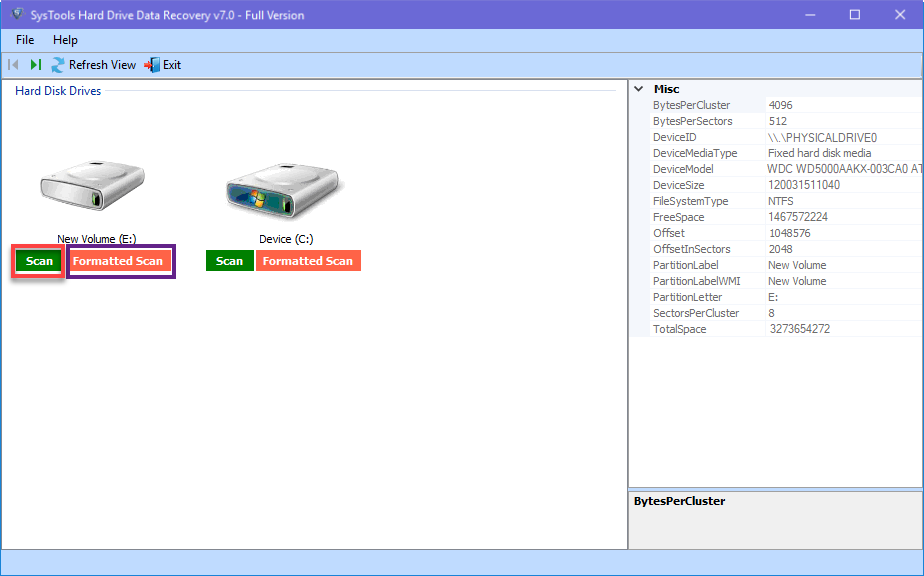 These are ome quick steps to recover lost data from hard drive using best hard drive data recover software for 2018. You can also avail free demo version of this software. In the starting of 2018 SysTools released new version of Hard Drive Data Recovery Software Version 7.0 with high processing speed and 100% data accuracy. It also support externally attached storage devices like SSD, HDD, Pen Drive, SD Card etc. |
| json metadata | {"tags":["best","data","recovery","software"],"image":["https://steemitimages.com/DQmTsow6WYD1KMdN7jJjfEn6Sx2Pbgc2sg8DwBdihiEt1V7/image.png"],"links":["https://www.systoolsgroup.com/hard-drive-data-recovery.html"],"app":"steemit/0.1","format":"markdown"} |
| parent author | |
| parent permlink | best |
| permlink | best-hard-drive-data-recovery-software-for-2018-new-release-systools |
| title | Best Hard Drive Data Recovery Software for 2018 New Release - SysTools |
| Transaction Info | Block #20751155/Trx c7e5357d88d3ffa2fc26235b4298f4703f3c6c73 |
View Raw JSON Data
{
"block": 20751155,
"op": [
"comment",
{
"author": "mackjohn",
"body": "The hard drive is widely used to store data. Nowadays most of the electronic devices are providing inbuilt storage system. It has the power to store all your important documents, files, folders, images, video and priceless memories. The hard drives also ensure user to keep data fro the long time. But there are some cons of using the hard drive to store highly important files. There are many situations which hard drive unable to respond or simply your data gone. In this situation you are not able to access your data files. Means you lost your valuable data and though that you can not get back your lost data. \n\nIn reality, data never lost from hard drive until you overwrite. So here you will find a best and easiest way to recover lost data from hard drive just perform few steps:\n\n1. Download <strong>SysTools <a href=\"https://www.systoolsgroup.com/hard-drive-data-recovery.html\"> Hard Drive Data Recovery Software</a></strong>\n2. Launch on your Windows OS Machine \n3. View all Attached hard disk partitions (Internal as well as External)\n4. There is two option choose either Scan (for quick scanning) or Formatted Scan.\n5. All folder will list at the left panel and bold which contains data.\n6. Also, hard drive recovery software will mark permanently deleted data by RED color in resultant file.\n7. Here you can select required data and then save or save complete folder as well.\n\n\nThese are ome quick steps to recover lost data from hard drive using best hard drive data recover software for 2018. You can also avail free demo version of this software. In the starting of 2018 SysTools released new version of Hard Drive Data Recovery Software Version 7.0 with high processing speed and 100% data accuracy. It also support externally attached storage devices like SSD, HDD, Pen Drive, SD Card etc.",
"json_metadata": "{\"tags\":[\"best\",\"data\",\"recovery\",\"software\"],\"image\":[\"https://steemitimages.com/DQmTsow6WYD1KMdN7jJjfEn6Sx2Pbgc2sg8DwBdihiEt1V7/image.png\"],\"links\":[\"https://www.systoolsgroup.com/hard-drive-data-recovery.html\"],\"app\":\"steemit/0.1\",\"format\":\"markdown\"}",
"parent_author": "",
"parent_permlink": "best",
"permlink": "best-hard-drive-data-recovery-software-for-2018-new-release-systools",
"title": "Best Hard Drive Data Recovery Software for 2018 New Release - SysTools"
}
],
"op_in_trx": 0,
"timestamp": "2018-03-17T09:52:42",
"trx_id": "c7e5357d88d3ffa2fc26235b4298f4703f3c6c73",
"trx_in_block": 55,
"virtual_op": 0
}2018/03/12 05:37:00
2018/03/12 05:37:00
| author | mackjohn |
| body | I tried the mnaul approach to fix vmdk error. The article helped me a lot, you can also try: https://queries365.wordpress.com/2018/03/06/how-to-fix-vmdk-cannot-be-opened-directly-for-writing/ |
| json metadata | {"tags":["recover"],"links":["https://queries365.wordpress.com/2018/03/06/how-to-fix-vmdk-cannot-be-opened-directly-for-writing/"],"app":"steemit/0.1"} |
| parent author | abrienne3 |
| parent permlink | methods-to-repair-corrupt-vmdk-file-in-vmware |
| permlink | re-abrienne3-methods-to-repair-corrupt-vmdk-file-in-vmware-20180312t053647763z |
| title | |
| Transaction Info | Block #20602193/Trx b72771075d1a19d8b9d0c8d756c67452bdf86c8d |
View Raw JSON Data
{
  "block": 20602193,
  "op": [
    "comment",
    {
      "author": "mackjohn",
      "body": "I tried the mnaul approach to fix vmdk error. The article helped me a lot, you can also try:\nhttps://queries365.wordpress.com/2018/03/06/how-to-fix-vmdk-cannot-be-opened-directly-for-writing/",
      "json_metadata": "{\"tags\":[\"recover\"],\"links\":[\"https://queries365.wordpress.com/2018/03/06/how-to-fix-vmdk-cannot-be-opened-directly-for-writing/\"],\"app\":\"steemit/0.1\"}",
      "parent_author": "abrienne3",
      "parent_permlink": "methods-to-repair-corrupt-vmdk-file-in-vmware",
      "permlink": "re-abrienne3-methods-to-repair-corrupt-vmdk-file-in-vmware-20180312t053647763z",
      "title": ""
    }
  ],
  "op_in_trx": 0,
  "timestamp": "2018-03-12T05:37:00",
  "trx_id": "b72771075d1a19d8b9d0c8d756c67452bdf86c8d",
  "trx_in_block": 13,
  "virtual_op": 0
}2018/03/08 09:58:42
2018/03/08 09:58:42
| author | mackjohn |
| body | I would like to suggest you try the manual method to convert eml file into pst format. The complete user guide is explained in the article, visit the link: - https://queries365.wordpress.com/2017/09/05/how-to-import-eml-files-into-outlook-2016/ |
| json metadata | {"tags":["convert"],"links":["https://queries365.wordpress.com/2017/09/05/how-to-import-eml-files-into-outlook-2016/"],"app":"steemit/0.1"} |
| parent author | annadowney010 |
| parent permlink | convert-eml-to-pst-without-outlook |
| permlink | re-annadowney010-convert-eml-to-pst-without-outlook-20180308t095835831z |
| title | |
| Transaction Info | Block #20492401/Trx 1fd3fe5879c212415981359cfdce20f49c8bfed7 |
View Raw JSON Data
{
  "block": 20492401,
  "op": [
    "comment",
    {
      "author": "mackjohn",
      "body": "I would like to suggest you try the manual method to convert eml file into pst format. The complete user guide is explained in the article, visit the link: - https://queries365.wordpress.com/2017/09/05/how-to-import-eml-files-into-outlook-2016/",
      "json_metadata": "{\"tags\":[\"convert\"],\"links\":[\"https://queries365.wordpress.com/2017/09/05/how-to-import-eml-files-into-outlook-2016/\"],\"app\":\"steemit/0.1\"}",
      "parent_author": "annadowney010",
      "parent_permlink": "convert-eml-to-pst-without-outlook",
      "permlink": "re-annadowney010-convert-eml-to-pst-without-outlook-20180308t095835831z",
      "title": ""
    }
  ],
  "op_in_trx": 0,
  "timestamp": "2018-03-08T09:58:42",
  "trx_id": "1fd3fe5879c212415981359cfdce20f49c8bfed7",
  "trx_in_block": 36,
  "virtual_op": 0
}2018/02/13 06:54:57
2018/02/13 06:54:57
| author | mackjohn |
| body | Merge multiple pst files into the single pst file by using optimal solution. Just download the best software from the mentioned link: http://www.softwarepro.org/management/pst-merge/ |
| json metadata | {"tags":["merge"],"links":["http://www.softwarepro.org/management/pst-merge/"],"app":"steemit/0.1"} |
| parent author | alisha |
| parent permlink | how-to-merge-multiple-pst-files-in-single-file-instantaneously |
| permlink | re-alisha-how-to-merge-multiple-pst-files-in-single-file-instantaneously-20180213t065454601z |
| title | |
| Transaction Info | Block #19826887/Trx 6968a779e5b7e9a65513cf728dadf7f16d181b9c |
View Raw JSON Data
{
  "block": 19826887,
  "op": [
    "comment",
    {
      "author": "mackjohn",
      "body": "Merge multiple pst files into the single pst file by using optimal solution. Just download the best software from the mentioned link:\n\nhttp://www.softwarepro.org/management/pst-merge/",
      "json_metadata": "{\"tags\":[\"merge\"],\"links\":[\"http://www.softwarepro.org/management/pst-merge/\"],\"app\":\"steemit/0.1\"}",
      "parent_author": "alisha",
      "parent_permlink": "how-to-merge-multiple-pst-files-in-single-file-instantaneously",
      "permlink": "re-alisha-how-to-merge-multiple-pst-files-in-single-file-instantaneously-20180213t065454601z",
      "title": ""
    }
  ],
  "op_in_trx": 0,
  "timestamp": "2018-02-13T06:54:57",
  "trx_id": "6968a779e5b7e9a65513cf728dadf7f16d181b9c",
  "trx_in_block": 51,
  "virtual_op": 0
}2018/02/07 10:24:18
2018/02/07 10:24:18
| author | steemitboard |
| body | Congratulations @mackjohn! You have received a personal award! [](http://steemitboard.com/@mackjohn) 1 Year on Steemit Click on the badge to view your own Board of Honor on SteemitBoard. > By upvoting this notification, you can help all Steemit users. Learn how [here](https://steemit.com/steemitboard/@steemitboard/http-i-cubeupload-com-7ciqeo-png)! |
| json metadata | {"image":["https://steemitboard.com/img/notifications.png"]} |
| parent author | mackjohn |
| parent permlink | how-to-download-eml-to-pst-converter-software-and-perform-conversion |
| permlink | steemitboard-notify-mackjohn-20180207t102418000z |
| title | |
| Transaction Info | Block #19658599/Trx 340a8505c44127ca483d961bc924402eebb25255 |
View Raw JSON Data
{
"block": 19658599,
"op": [
"comment",
{
"author": "steemitboard",
"body": "Congratulations @mackjohn! You have received a personal award!\n\n[](http://steemitboard.com/@mackjohn) 1 Year on Steemit\nClick on the badge to view your own Board of Honor on SteemitBoard.\n\n> By upvoting this notification, you can help all Steemit users. Learn how [here](https://steemit.com/steemitboard/@steemitboard/http-i-cubeupload-com-7ciqeo-png)!",
"json_metadata": "{\"image\":[\"https://steemitboard.com/img/notifications.png\"]}",
"parent_author": "mackjohn",
"parent_permlink": "how-to-download-eml-to-pst-converter-software-and-perform-conversion",
"permlink": "steemitboard-notify-mackjohn-20180207t102418000z",
"title": ""
}
],
"op_in_trx": 0,
"timestamp": "2018-02-07T10:24:18",
"trx_id": "340a8505c44127ca483d961bc924402eebb25255",
"trx_in_block": 5,
"virtual_op": 0
}2018/01/30 13:02:21
2018/01/30 13:02:21
| author | marytayllors |
| body | Superb EML to PST Converter – Convert EML from WLM, Windows Mail and Outlook Express to Outlook PST file.You can access EML data from email clients like Entourage, Apple Mail and Thunderbird in Microsoft Office Outlook by converting these files in single or batch PST file. Switching from Thunderbird or other email clients to MS Office Outlook has never been easier. It is a reliable tool which offers complete migration with folder hierarchy and formatting intact. Before buying a new third-party tool, everybody have doubt about its efficiency. By considering this fact in mind, we are offering free demo version of this tool to analyze its functions, features and of course,Download now: http://www.filesrecoverytools.com/eml-to-pst-converter.html |
| json metadata | {"tags":["eml"],"links":["http://www.filesrecoverytools.com/eml-to-pst-converter.html"],"app":"steemit/0.1"} |
| parent author | mackjohn |
| parent permlink | how-to-download-eml-to-pst-converter-software-and-perform-conversion |
| permlink | re-mackjohn-how-to-download-eml-to-pst-converter-software-and-perform-conversion-20180131t142558361z |
| title | |
| Transaction Info | Block #19431669/Trx 2be4440a69a36e30a21316fbd6b71cd8abf833cd |
View Raw JSON Data
{
  "block": 19431669,
  "op": [
    "comment",
    {
      "author": "marytayllors",
      "body": "Superb EML to PST Converter – Convert EML from WLM, Windows Mail and Outlook Express to Outlook PST file.You can access EML data from email clients like Entourage, Apple Mail and Thunderbird in Microsoft Office Outlook by converting these files in single or batch PST file. Switching from Thunderbird or other email clients to MS Office Outlook has never been easier. It is a reliable tool which offers complete migration with folder hierarchy and formatting intact. Before buying a new third-party tool, everybody have doubt about its efficiency. By considering this fact in mind, we are offering free demo version of this tool to analyze its functions, features and of course,Download now: http://www.filesrecoverytools.com/eml-to-pst-converter.html",
      "json_metadata": "{\"tags\":[\"eml\"],\"links\":[\"http://www.filesrecoverytools.com/eml-to-pst-converter.html\"],\"app\":\"steemit/0.1\"}",
      "parent_author": "mackjohn",
      "parent_permlink": "how-to-download-eml-to-pst-converter-software-and-perform-conversion",
      "permlink": "re-mackjohn-how-to-download-eml-to-pst-converter-software-and-perform-conversion-20180131t142558361z",
      "title": ""
    }
  ],
  "op_in_trx": 0,
  "timestamp": "2018-01-30T13:02:21",
  "trx_id": "2be4440a69a36e30a21316fbd6b71cd8abf833cd",
  "trx_in_block": 14,
  "virtual_op": 0
}2018/01/30 11:06:39
2018/01/30 11:06:39
| author | mackjohn |
| permlink | how-to-download-eml-to-pst-converter-software-and-perform-conversion |
| voter | mackjohn |
| weight | 10000 (100.00%) |
| Transaction Info | Block #19429360/Trx 551f196ef8febe2b33b9b64ce2d0c59fe3d7dcd1 |
View Raw JSON Data
{
  "block": 19429360,
  "op": [
    "vote",
    {
      "author": "mackjohn",
      "permlink": "how-to-download-eml-to-pst-converter-software-and-perform-conversion",
      "voter": "mackjohn",
      "weight": 10000
    }
  ],
  "op_in_trx": 0,
  "timestamp": "2018-01-30T11:06:39",
  "trx_id": "551f196ef8febe2b33b9b64ce2d0c59fe3d7dcd1",
  "trx_in_block": 31,
  "virtual_op": 0
}mackjohnpublished a new post: how-to-download-eml-to-pst-converter-software-and-perform-conversion2018/01/30 11:05:30
mackjohnpublished a new post: how-to-download-eml-to-pst-converter-software-and-perform-conversion
2018/01/30 11:05:30
| author | mackjohn |
| body | If you want to convert eml file to pst file format. Then first, you have to install a safe and secure utility. Follow the steps mentioned below to download and install the tool. --> First, Download <a href="http://www.softwarepro.org/exporter/eml-to-pst/">EML to PST Converter Software</a> --> After that Install on any Windows Operating System After installing this utility, Go to Windows Home and open the software. After getting the home window of the tool performs the steps mentioned below: 1. Click on <strong>Browse</strong> and add .eml file 2. The complete folder will list in the <strong>left pane </strong>of tool 3. <strong>Explore the folder</strong> and view emails along with attributes 4.<strong> Apply mail filter</strong> (If required) 5. Select <strong> PST</strong> as resultant file format 6. <strong> Save</strong> the converted file at any location 7. At the end import pst into any version of Outlook Note: - <strong>FREE Demo Version</strong> of the software is available and also 30 Days Money Back Guarantee in case of any inconvenience. |
| json metadata | {"tags":["eml","to","pst","download"],"links":["http://www.softwarepro.org/exporter/eml-to-pst/"],"app":"steemit/0.1","format":"markdown"} |
| parent author | |
| parent permlink | eml |
| permlink | how-to-download-eml-to-pst-converter-software-and-perform-conversion |
| title | How to Download EML to PST Converter Software and Perform Conversion |
| Transaction Info | Block #19429337/Trx 9dcc78315c5e46f2e65f87f025c0c613bcbf07ad |
View Raw JSON Data
{
  "block": 19429337,
  "op": [
    "comment",
    {
      "author": "mackjohn",
      "body": "If you want to convert eml file to pst file format. Then first, you have to install a safe and secure utility. Follow the steps mentioned below to download and install the tool.\n--> First, Download <a href=\"http://www.softwarepro.org/exporter/eml-to-pst/\">EML to PST Converter Software</a>\n--> After that Install on any Windows Operating System\nAfter installing this utility, Go to Windows Home and open the software. After getting the home window of the tool performs the steps mentioned below:\n1. Click on <strong>Browse</strong> and add .eml file\n2. The complete folder will list in the <strong>left pane </strong>of tool\n3. <strong>Explore the folder</strong> and view emails along with attributes\n4.<strong> Apply mail filter</strong> (If required)\n5. Select <strong> PST</strong> as resultant file format\n6. <strong> Save</strong> the converted file at any location\n7. At the end import pst into any version of Outlook\nNote: -  <strong>FREE Demo Version</strong> of the software is available and also 30 Days Money Back Guarantee in case of any inconvenience.",
      "json_metadata": "{\"tags\":[\"eml\",\"to\",\"pst\",\"download\"],\"links\":[\"http://www.softwarepro.org/exporter/eml-to-pst/\"],\"app\":\"steemit/0.1\",\"format\":\"markdown\"}",
      "parent_author": "",
      "parent_permlink": "eml",
      "permlink": "how-to-download-eml-to-pst-converter-software-and-perform-conversion",
      "title": "How to Download EML to PST Converter Software and Perform Conversion"
    }
  ],
  "op_in_trx": 0,
  "timestamp": "2018-01-30T11:05:30",
  "trx_id": "9dcc78315c5e46f2e65f87f025c0c613bcbf07ad",
  "trx_in_block": 29,
  "virtual_op": 0
}seablueupvoted (1.00%) @mackjohn / get-back-all-your-pen-drive-data-without-using-any-software
seablueupvoted (1.00%) @mackjohn / get-back-all-your-pen-drive-data-without-using-any-software
| author | mackjohn |
| permlink | get-back-all-your-pen-drive-data-without-using-any-software |
| voter | seablue |
| weight | 100 (1.00%) |
| Transaction Info | Block #9590185/Trx 17aa9a64067fd399683ebdd06934284936cd1c8f |
View Raw JSON Data
{
  "block": 9590185,
  "op": [
    "vote",
    {
      "author": "mackjohn",
      "permlink": "get-back-all-your-pen-drive-data-without-using-any-software",
      "voter": "seablue",
      "weight": 100
    }
  ],
  "op_in_trx": 0,
  "timestamp": "2017-02-22T11:47:03",
  "trx_id": "17aa9a64067fd399683ebdd06934284936cd1c8f",
  "trx_in_block": 7,
  "virtual_op": 0
}| author | mackjohn |
| permlink | get-back-all-your-pen-drive-data-without-using-any-software |
| voter | timelapse |
| weight | 100 (1.00%) |
| Transaction Info | Block #9589939/Trx 64a22bddfef67c46ea91cd1452bb3f994c6f080c |
View Raw JSON Data
{
  "block": 9589939,
  "op": [
    "vote",
    {
      "author": "mackjohn",
      "permlink": "get-back-all-your-pen-drive-data-without-using-any-software",
      "voter": "timelapse",
      "weight": 100
    }
  ],
  "op_in_trx": 0,
  "timestamp": "2017-02-22T11:34:45",
  "trx_id": "64a22bddfef67c46ea91cd1452bb3f994c6f080c",
  "trx_in_block": 2,
  "virtual_op": 0
}| author | mackjohn |
| permlink | get-back-all-your-pen-drive-data-without-using-any-software |
| voter | giantbear |
| weight | 100 (1.00%) |
| Transaction Info | Block #9589934/Trx 73bb497b94b04d3152cafc83410c95adab59aee9 |
View Raw JSON Data
{
  "block": 9589934,
  "op": [
    "vote",
    {
      "author": "mackjohn",
      "permlink": "get-back-all-your-pen-drive-data-without-using-any-software",
      "voter": "giantbear",
      "weight": 100
    }
  ],
  "op_in_trx": 0,
  "timestamp": "2017-02-22T11:34:30",
  "trx_id": "73bb497b94b04d3152cafc83410c95adab59aee9",
  "trx_in_block": 2,
  "virtual_op": 0
}| author | mackjohn |
| permlink | get-back-all-your-pen-drive-data-without-using-any-software |
| voter | driptorchpress |
| weight | 100 (1.00%) |
| Transaction Info | Block #9589913/Trx 1f03f95580ce3c712ec1774adad420975b4a8a71 |
View Raw JSON Data
{
  "block": 9589913,
  "op": [
    "vote",
    {
      "author": "mackjohn",
      "permlink": "get-back-all-your-pen-drive-data-without-using-any-software",
      "voter": "driptorchpress",
      "weight": 100
    }
  ],
  "op_in_trx": 0,
  "timestamp": "2017-02-22T11:33:27",
  "trx_id": "1f03f95580ce3c712ec1774adad420975b4a8a71",
  "trx_in_block": 1,
  "virtual_op": 0
}| author | mackjohn |
| permlink | get-back-all-your-pen-drive-data-without-using-any-software |
| voter | thedeplorable1 |
| weight | 100 (1.00%) |
| Transaction Info | Block #9589903/Trx 0c116aefc29b405b329255092a147edd3d26acf5 |
View Raw JSON Data
{
  "block": 9589903,
  "op": [
    "vote",
    {
      "author": "mackjohn",
      "permlink": "get-back-all-your-pen-drive-data-without-using-any-software",
      "voter": "thedeplorable1",
      "weight": 100
    }
  ],
  "op_in_trx": 0,
  "timestamp": "2017-02-22T11:32:57",
  "trx_id": "0c116aefc29b405b329255092a147edd3d26acf5",
  "trx_in_block": 1,
  "virtual_op": 0
}| author | mackjohn |
| permlink | get-back-all-your-pen-drive-data-without-using-any-software |
| voter | konelectric |
| weight | 100 (1.00%) |
| Transaction Info | Block #9589878/Trx b03c28983fed68e501fd9bbcbfa8bbca5fd27087 |
View Raw JSON Data
{
  "block": 9589878,
  "op": [
    "vote",
    {
      "author": "mackjohn",
      "permlink": "get-back-all-your-pen-drive-data-without-using-any-software",
      "voter": "konelectric",
      "weight": 100
    }
  ],
  "op_in_trx": 0,
  "timestamp": "2017-02-22T11:31:42",
  "trx_id": "b03c28983fed68e501fd9bbcbfa8bbca5fd27087",
  "trx_in_block": 0,
  "virtual_op": 0
}| author | mackjohn |
| permlink | get-back-all-your-pen-drive-data-without-using-any-software |
| voter | revostrike |
| weight | 100 (1.00%) |
| Transaction Info | Block #9589867/Trx 74f7bc5c6df770999d03bbc1e2880a1e7ba5550d |
View Raw JSON Data
{
  "block": 9589867,
  "op": [
    "vote",
    {
      "author": "mackjohn",
      "permlink": "get-back-all-your-pen-drive-data-without-using-any-software",
      "voter": "revostrike",
      "weight": 100
    }
  ],
  "op_in_trx": 0,
  "timestamp": "2017-02-22T11:31:09",
  "trx_id": "74f7bc5c6df770999d03bbc1e2880a1e7ba5550d",
  "trx_in_block": 4,
  "virtual_op": 0
}toxichanupvoted (1.00%) @mackjohn / get-back-all-your-pen-drive-data-without-using-any-software
toxichanupvoted (1.00%) @mackjohn / get-back-all-your-pen-drive-data-without-using-any-software
| author | mackjohn |
| permlink | get-back-all-your-pen-drive-data-without-using-any-software |
| voter | toxichan |
| weight | 100 (1.00%) |
| Transaction Info | Block #9589864/Trx 99349d813848abacd3af6019c4d5992df08669f2 |
View Raw JSON Data
{
  "block": 9589864,
  "op": [
    "vote",
    {
      "author": "mackjohn",
      "permlink": "get-back-all-your-pen-drive-data-without-using-any-software",
      "voter": "toxichan",
      "weight": 100
    }
  ],
  "op_in_trx": 0,
  "timestamp": "2017-02-22T11:31:00",
  "trx_id": "99349d813848abacd3af6019c4d5992df08669f2",
  "trx_in_block": 2,
  "virtual_op": 0
}| author | mackjohn |
| permlink | get-back-all-your-pen-drive-data-without-using-any-software |
| voter | barrydutton |
| weight | 100 (1.00%) |
| Transaction Info | Block #9589859/Trx 968466d68dd4942cbc7b3dd87469f4065b1d8971 |
View Raw JSON Data
{
  "block": 9589859,
  "op": [
    "vote",
    {
      "author": "mackjohn",
      "permlink": "get-back-all-your-pen-drive-data-without-using-any-software",
      "voter": "barrydutton",
      "weight": 100
    }
  ],
  "op_in_trx": 0,
  "timestamp": "2017-02-22T11:30:45",
  "trx_id": "968466d68dd4942cbc7b3dd87469f4065b1d8971",
  "trx_in_block": 1,
  "virtual_op": 0
}andreiupvoted (1.00%) @mackjohn / get-back-all-your-pen-drive-data-without-using-any-software
andreiupvoted (1.00%) @mackjohn / get-back-all-your-pen-drive-data-without-using-any-software
| author | mackjohn |
| permlink | get-back-all-your-pen-drive-data-without-using-any-software |
| voter | andrei |
| weight | 100 (1.00%) |
| Transaction Info | Block #9589833/Trx 457a4c39b3784a3065235ef15d52684880bdddc9 |
View Raw JSON Data
{
  "block": 9589833,
  "op": [
    "vote",
    {
      "author": "mackjohn",
      "permlink": "get-back-all-your-pen-drive-data-without-using-any-software",
      "voter": "andrei",
      "weight": 100
    }
  ],
  "op_in_trx": 0,
  "timestamp": "2017-02-22T11:29:27",
  "trx_id": "457a4c39b3784a3065235ef15d52684880bdddc9",
  "trx_in_block": 6,
  "virtual_op": 0
}| author | mackjohn |
| permlink | get-back-all-your-pen-drive-data-without-using-any-software |
| voter | darthnava |
| weight | 100 (1.00%) |
| Transaction Info | Block #9589788/Trx 52d38b10969c4db05b303d3b346bd38e513a7a5c |
View Raw JSON Data
{
  "block": 9589788,
  "op": [
    "vote",
    {
      "author": "mackjohn",
      "permlink": "get-back-all-your-pen-drive-data-without-using-any-software",
      "voter": "darthnava",
      "weight": 100
    }
  ],
  "op_in_trx": 0,
  "timestamp": "2017-02-22T11:27:12",
  "trx_id": "52d38b10969c4db05b303d3b346bd38e513a7a5c",
  "trx_in_block": 9,
  "virtual_op": 0
}| author | mackjohn |
| permlink | get-back-all-your-pen-drive-data-without-using-any-software |
| voter | steemitguide |
| weight | 100 (1.00%) |
| Transaction Info | Block #9589749/Trx 09d378c10ba0a6f56a448ced1fccdb58803b4095 |
View Raw JSON Data
{
  "block": 9589749,
  "op": [
    "vote",
    {
      "author": "mackjohn",
      "permlink": "get-back-all-your-pen-drive-data-without-using-any-software",
      "voter": "steemitguide",
      "weight": 100
    }
  ],
  "op_in_trx": 0,
  "timestamp": "2017-02-22T11:25:15",
  "trx_id": "09d378c10ba0a6f56a448ced1fccdb58803b4095",
  "trx_in_block": 1,
  "virtual_op": 0
}jacobtsupvoted (1.00%) @mackjohn / get-back-all-your-pen-drive-data-without-using-any-software
jacobtsupvoted (1.00%) @mackjohn / get-back-all-your-pen-drive-data-without-using-any-software
| author | mackjohn |
| permlink | get-back-all-your-pen-drive-data-without-using-any-software |
| voter | jacobts |
| weight | 100 (1.00%) |
| Transaction Info | Block #9589725/Trx 94620f07baf655755d451cbf532db7d8dafb57c5 |
View Raw JSON Data
{
  "block": 9589725,
  "op": [
    "vote",
    {
      "author": "mackjohn",
      "permlink": "get-back-all-your-pen-drive-data-without-using-any-software",
      "voter": "jacobts",
      "weight": 100
    }
  ],
  "op_in_trx": 0,
  "timestamp": "2017-02-22T11:24:03",
  "trx_id": "94620f07baf655755d451cbf532db7d8dafb57c5",
  "trx_in_block": 2,
  "virtual_op": 0
}| author | mackjohn |
| permlink | get-back-all-your-pen-drive-data-without-using-any-software |
| voter | steemspeak |
| weight | 100 (1.00%) |
| Transaction Info | Block #9589694/Trx 42f8f5e84be7445e0b6e84d0393e0b9ab88a0ce4 |
View Raw JSON Data
{
  "block": 9589694,
  "op": [
    "vote",
    {
      "author": "mackjohn",
      "permlink": "get-back-all-your-pen-drive-data-without-using-any-software",
      "voter": "steemspeak",
      "weight": 100
    }
  ],
  "op_in_trx": 0,
  "timestamp": "2017-02-22T11:22:30",
  "trx_id": "42f8f5e84be7445e0b6e84d0393e0b9ab88a0ce4",
  "trx_in_block": 1,
  "virtual_op": 0
}dimimpupvoted (1.00%) @mackjohn / get-back-all-your-pen-drive-data-without-using-any-software
dimimpupvoted (1.00%) @mackjohn / get-back-all-your-pen-drive-data-without-using-any-software
| author | mackjohn |
| permlink | get-back-all-your-pen-drive-data-without-using-any-software |
| voter | dimimp |
| weight | 100 (1.00%) |
| Transaction Info | Block #9589662/Trx 39686703adbd7bb741d377e7d0f8bcb5eaab61e7 |
View Raw JSON Data
{
  "block": 9589662,
  "op": [
    "vote",
    {
      "author": "mackjohn",
      "permlink": "get-back-all-your-pen-drive-data-without-using-any-software",
      "voter": "dimimp",
      "weight": 100
    }
  ],
  "op_in_trx": 0,
  "timestamp": "2017-02-22T11:20:54",
  "trx_id": "39686703adbd7bb741d377e7d0f8bcb5eaab61e7",
  "trx_in_block": 0,
  "virtual_op": 0
}| author | mackjohn |
| permlink | get-back-all-your-pen-drive-data-without-using-any-software |
| voter | denmarkguy |
| weight | 100 (1.00%) |
| Transaction Info | Block #9589613/Trx e82509b38b56cd2f15305a1dbec9bfc03ae8f0c9 |
View Raw JSON Data
{
  "block": 9589613,
  "op": [
    "vote",
    {
      "author": "mackjohn",
      "permlink": "get-back-all-your-pen-drive-data-without-using-any-software",
      "voter": "denmarkguy",
      "weight": 100
    }
  ],
  "op_in_trx": 0,
  "timestamp": "2017-02-22T11:18:27",
  "trx_id": "e82509b38b56cd2f15305a1dbec9bfc03ae8f0c9",
  "trx_in_block": 4,
  "virtual_op": 0
}meysamupvoted (1.00%) @mackjohn / get-back-all-your-pen-drive-data-without-using-any-software
meysamupvoted (1.00%) @mackjohn / get-back-all-your-pen-drive-data-without-using-any-software
| author | mackjohn |
| permlink | get-back-all-your-pen-drive-data-without-using-any-software |
| voter | meysam |
| weight | 100 (1.00%) |
| Transaction Info | Block #9589555/Trx a03d87a1ca950dd854cca345967c064517d9c203 |
View Raw JSON Data
{
  "block": 9589555,
  "op": [
    "vote",
    {
      "author": "mackjohn",
      "permlink": "get-back-all-your-pen-drive-data-without-using-any-software",
      "voter": "meysam",
      "weight": 100
    }
  ],
  "op_in_trx": 0,
  "timestamp": "2017-02-22T11:15:33",
  "trx_id": "a03d87a1ca950dd854cca345967c064517d9c203",
  "trx_in_block": 3,
  "virtual_op": 0
}strayupvoted (1.00%) @mackjohn / get-back-all-your-pen-drive-data-without-using-any-software
strayupvoted (1.00%) @mackjohn / get-back-all-your-pen-drive-data-without-using-any-software
| author | mackjohn |
| permlink | get-back-all-your-pen-drive-data-without-using-any-software |
| voter | stray |
| weight | 100 (1.00%) |
| Transaction Info | Block #9589528/Trx 3bcaedde8554dfbec8c0a9c788c19706e18bf978 |
View Raw JSON Data
{
  "block": 9589528,
  "op": [
    "vote",
    {
      "author": "mackjohn",
      "permlink": "get-back-all-your-pen-drive-data-without-using-any-software",
      "voter": "stray",
      "weight": 100
    }
  ],
  "op_in_trx": 0,
  "timestamp": "2017-02-22T11:14:12",
  "trx_id": "3bcaedde8554dfbec8c0a9c788c19706e18bf978",
  "trx_in_block": 4,
  "virtual_op": 0
}| author | mackjohn |
| permlink | get-back-all-your-pen-drive-data-without-using-any-software |
| voter | forrestwillie |
| weight | 100 (1.00%) |
| Transaction Info | Block #9589490/Trx 45129262553e0d1a95fac420c596da0c9913cc34 |
View Raw JSON Data
{
  "block": 9589490,
  "op": [
    "vote",
    {
      "author": "mackjohn",
      "permlink": "get-back-all-your-pen-drive-data-without-using-any-software",
      "voter": "forrestwillie",
      "weight": 100
    }
  ],
  "op_in_trx": 0,
  "timestamp": "2017-02-22T11:12:18",
  "trx_id": "45129262553e0d1a95fac420c596da0c9913cc34",
  "trx_in_block": 2,
  "virtual_op": 0
}| author | mackjohn |
| permlink | get-back-all-your-pen-drive-data-without-using-any-software |
| voter | whatageek |
| weight | 100 (1.00%) |
| Transaction Info | Block #9589446/Trx 799fe7d69c8df094a708118e2f7349b2709b9ce9 |
View Raw JSON Data
{
  "block": 9589446,
  "op": [
    "vote",
    {
      "author": "mackjohn",
      "permlink": "get-back-all-your-pen-drive-data-without-using-any-software",
      "voter": "whatageek",
      "weight": 100
    }
  ],
  "op_in_trx": 0,
  "timestamp": "2017-02-22T11:10:06",
  "trx_id": "799fe7d69c8df094a708118e2f7349b2709b9ce9",
  "trx_in_block": 0,
  "virtual_op": 0
}| author | mackjohn |
| permlink | get-back-all-your-pen-drive-data-without-using-any-software |
| voter | karenmckersie |
| weight | 100 (1.00%) |
| Transaction Info | Block #9589445/Trx a0fddcbf1edcf8b6b37304d1ed63c236e6e28f04 |
View Raw JSON Data
{
  "block": 9589445,
  "op": [
    "vote",
    {
      "author": "mackjohn",
      "permlink": "get-back-all-your-pen-drive-data-without-using-any-software",
      "voter": "karenmckersie",
      "weight": 100
    }
  ],
  "op_in_trx": 0,
  "timestamp": "2017-02-22T11:10:03",
  "trx_id": "a0fddcbf1edcf8b6b37304d1ed63c236e6e28f04",
  "trx_in_block": 3,
  "virtual_op": 0
}daisydupvoted (1.00%) @mackjohn / get-back-all-your-pen-drive-data-without-using-any-software
daisydupvoted (1.00%) @mackjohn / get-back-all-your-pen-drive-data-without-using-any-software
| author | mackjohn |
| permlink | get-back-all-your-pen-drive-data-without-using-any-software |
| voter | daisyd |
| weight | 100 (1.00%) |
| Transaction Info | Block #9589441/Trx 0871304907d3c1a109fdd3ee813d66a759ca4740 |
View Raw JSON Data
{
  "block": 9589441,
  "op": [
    "vote",
    {
      "author": "mackjohn",
      "permlink": "get-back-all-your-pen-drive-data-without-using-any-software",
      "voter": "daisyd",
      "weight": 100
    }
  ],
  "op_in_trx": 0,
  "timestamp": "2017-02-22T11:09:51",
  "trx_id": "0871304907d3c1a109fdd3ee813d66a759ca4740",
  "trx_in_block": 1,
  "virtual_op": 0
}gamer00upvoted (1.00%) @mackjohn / get-back-all-your-pen-drive-data-without-using-any-software
gamer00upvoted (1.00%) @mackjohn / get-back-all-your-pen-drive-data-without-using-any-software
| author | mackjohn |
| permlink | get-back-all-your-pen-drive-data-without-using-any-software |
| voter | gamer00 |
| weight | 100 (1.00%) |
| Transaction Info | Block #9589438/Trx c8445b92b0e31ed594fbe3c62bef33f85325493f |
View Raw JSON Data
{
  "block": 9589438,
  "op": [
    "vote",
    {
      "author": "mackjohn",
      "permlink": "get-back-all-your-pen-drive-data-without-using-any-software",
      "voter": "gamer00",
      "weight": 100
    }
  ],
  "op_in_trx": 0,
  "timestamp": "2017-02-22T11:09:42",
  "trx_id": "c8445b92b0e31ed594fbe3c62bef33f85325493f",
  "trx_in_block": 2,
  "virtual_op": 0
}jsantanaupvoted (1.00%) @mackjohn / get-back-all-your-pen-drive-data-without-using-any-software
jsantanaupvoted (1.00%) @mackjohn / get-back-all-your-pen-drive-data-without-using-any-software
| author | mackjohn |
| permlink | get-back-all-your-pen-drive-data-without-using-any-software |
| voter | jsantana |
| weight | 100 (1.00%) |
| Transaction Info | Block #9589430/Trx 6333e9ae26fb284ececf47b3b4b56ec8cf472ba1 |
View Raw JSON Data
{
  "block": 9589430,
  "op": [
    "vote",
    {
      "author": "mackjohn",
      "permlink": "get-back-all-your-pen-drive-data-without-using-any-software",
      "voter": "jsantana",
      "weight": 100
    }
  ],
  "op_in_trx": 0,
  "timestamp": "2017-02-22T11:09:18",
  "trx_id": "6333e9ae26fb284ececf47b3b4b56ec8cf472ba1",
  "trx_in_block": 1,
  "virtual_op": 0
}| author | mackjohn |
| permlink | get-back-all-your-pen-drive-data-without-using-any-software |
| voter | richardcrill |
| weight | 100 (1.00%) |
| Transaction Info | Block #9589422/Trx e11083e505f0ceb4825873501325c753e17a5160 |
View Raw JSON Data
{
  "block": 9589422,
  "op": [
    "vote",
    {
      "author": "mackjohn",
      "permlink": "get-back-all-your-pen-drive-data-without-using-any-software",
      "voter": "richardcrill",
      "weight": 100
    }
  ],
  "op_in_trx": 0,
  "timestamp": "2017-02-22T11:08:54",
  "trx_id": "e11083e505f0ceb4825873501325c753e17a5160",
  "trx_in_block": 3,
  "virtual_op": 0
}| author | mackjohn |
| permlink | get-back-all-your-pen-drive-data-without-using-any-software |
| voter | proctologic |
| weight | 100 (1.00%) |
| Transaction Info | Block #9589419/Trx 6eaf05974391b76bd305fff119a0574513869a52 |
View Raw JSON Data
{
  "block": 9589419,
  "op": [
    "vote",
    {
      "author": "mackjohn",
      "permlink": "get-back-all-your-pen-drive-data-without-using-any-software",
      "voter": "proctologic",
      "weight": 100
    }
  ],
  "op_in_trx": 0,
  "timestamp": "2017-02-22T11:08:45",
  "trx_id": "6eaf05974391b76bd305fff119a0574513869a52",
  "trx_in_block": 0,
  "virtual_op": 0
}| author | mackjohn |
| permlink | get-back-all-your-pen-drive-data-without-using-any-software |
| voter | patelincho |
| weight | 100 (1.00%) |
| Transaction Info | Block #9589418/Trx 8e40fb13aac5c85e1623731ad7c42e5dbe31a69f |
View Raw JSON Data
{
  "block": 9589418,
  "op": [
    "vote",
    {
      "author": "mackjohn",
      "permlink": "get-back-all-your-pen-drive-data-without-using-any-software",
      "voter": "patelincho",
      "weight": 100
    }
  ],
  "op_in_trx": 0,
  "timestamp": "2017-02-22T11:08:42",
  "trx_id": "8e40fb13aac5c85e1623731ad7c42e5dbe31a69f",
  "trx_in_block": 3,
  "virtual_op": 0
}| author | mackjohn |
| permlink | get-back-all-your-pen-drive-data-without-using-any-software |
| voter | johnthehoan |
| weight | 100 (1.00%) |
| Transaction Info | Block #9589386/Trx 96242a0d83c9554b1a0c6e9131d59a936a27f6dc |
View Raw JSON Data
{
  "block": 9589386,
  "op": [
    "vote",
    {
      "author": "mackjohn",
      "permlink": "get-back-all-your-pen-drive-data-without-using-any-software",
      "voter": "johnthehoan",
      "weight": 100
    }
  ],
  "op_in_trx": 0,
  "timestamp": "2017-02-22T11:07:06",
  "trx_id": "96242a0d83c9554b1a0c6e9131d59a936a27f6dc",
  "trx_in_block": 1,
  "virtual_op": 0
}pairmikeupvoted (1.00%) @mackjohn / get-back-all-your-pen-drive-data-without-using-any-software
pairmikeupvoted (1.00%) @mackjohn / get-back-all-your-pen-drive-data-without-using-any-software
| author | mackjohn |
| permlink | get-back-all-your-pen-drive-data-without-using-any-software |
| voter | pairmike |
| weight | 100 (1.00%) |
| Transaction Info | Block #9589373/Trx 0ba9a1f31c41a5b2cd56662afa26927a1a03956b |
View Raw JSON Data
{
  "block": 9589373,
  "op": [
    "vote",
    {
      "author": "mackjohn",
      "permlink": "get-back-all-your-pen-drive-data-without-using-any-software",
      "voter": "pairmike",
      "weight": 100
    }
  ],
  "op_in_trx": 0,
  "timestamp": "2017-02-22T11:06:27",
  "trx_id": "0ba9a1f31c41a5b2cd56662afa26927a1a03956b",
  "trx_in_block": 0,
  "virtual_op": 0
}| author | mackjohn |
| permlink | get-back-all-your-pen-drive-data-without-using-any-software |
| voter | tannukas6 |
| weight | 100 (1.00%) |
| Transaction Info | Block #9589355/Trx 99bf2f3dfe6e60bc8de06b3046ccad0516da5151 |
View Raw JSON Data
{
  "block": 9589355,
  "op": [
    "vote",
    {
      "author": "mackjohn",
      "permlink": "get-back-all-your-pen-drive-data-without-using-any-software",
      "voter": "tannukas6",
      "weight": 100
    }
  ],
  "op_in_trx": 0,
  "timestamp": "2017-02-22T11:05:33",
  "trx_id": "99bf2f3dfe6e60bc8de06b3046ccad0516da5151",
  "trx_in_block": 3,
  "virtual_op": 0
}ubgupvoted (1.00%) @mackjohn / get-back-all-your-pen-drive-data-without-using-any-software
ubgupvoted (1.00%) @mackjohn / get-back-all-your-pen-drive-data-without-using-any-software
| author | mackjohn |
| permlink | get-back-all-your-pen-drive-data-without-using-any-software |
| voter | ubg |
| weight | 100 (1.00%) |
| Transaction Info | Block #9589355/Trx 2bda57391c6477855459439916e8935547cd7f3f |
View Raw JSON Data
{
  "block": 9589355,
  "op": [
    "vote",
    {
      "author": "mackjohn",
      "permlink": "get-back-all-your-pen-drive-data-without-using-any-software",
      "voter": "ubg",
      "weight": 100
    }
  ],
  "op_in_trx": 0,
  "timestamp": "2017-02-22T11:05:33",
  "trx_id": "2bda57391c6477855459439916e8935547cd7f3f",
  "trx_in_block": 0,
  "virtual_op": 0
}squbeupvoted (1.00%) @mackjohn / get-back-all-your-pen-drive-data-without-using-any-software
squbeupvoted (1.00%) @mackjohn / get-back-all-your-pen-drive-data-without-using-any-software
| author | mackjohn |
| permlink | get-back-all-your-pen-drive-data-without-using-any-software |
| voter | sqube |
| weight | 100 (1.00%) |
| Transaction Info | Block #9589332/Trx 8c77071ca5d98619fa6e9b9814da48f60d0afa04 |
View Raw JSON Data
{
  "block": 9589332,
  "op": [
    "vote",
    {
      "author": "mackjohn",
      "permlink": "get-back-all-your-pen-drive-data-without-using-any-software",
      "voter": "sqube",
      "weight": 100
    }
  ],
  "op_in_trx": 0,
  "timestamp": "2017-02-22T11:04:24",
  "trx_id": "8c77071ca5d98619fa6e9b9814da48f60d0afa04",
  "trx_in_block": 3,
  "virtual_op": 0
}grey580upvoted (1.00%) @mackjohn / get-back-all-your-pen-drive-data-without-using-any-software
grey580upvoted (1.00%) @mackjohn / get-back-all-your-pen-drive-data-without-using-any-software
| author | mackjohn |
| permlink | get-back-all-your-pen-drive-data-without-using-any-software |
| voter | grey580 |
| weight | 100 (1.00%) |
| Transaction Info | Block #9589235/Trx 8ff9d23000108a442b848e348b723b87aa931fd1 |
View Raw JSON Data
{
  "block": 9589235,
  "op": [
    "vote",
    {
      "author": "mackjohn",
      "permlink": "get-back-all-your-pen-drive-data-without-using-any-software",
      "voter": "grey580",
      "weight": 100
    }
  ],
  "op_in_trx": 0,
  "timestamp": "2017-02-22T10:59:33",
  "trx_id": "8ff9d23000108a442b848e348b723b87aa931fd1",
  "trx_in_block": 3,
  "virtual_op": 0
}| author | mackjohn |
| permlink | get-back-all-your-pen-drive-data-without-using-any-software |
| voter | fyrst-witness |
| weight | 100 (1.00%) |
| Transaction Info | Block #9589181/Trx 17b7f347cb4f58debc911c436f9d1b218d84b3f0 |
View Raw JSON Data
{
  "block": 9589181,
  "op": [
    "vote",
    {
      "author": "mackjohn",
      "permlink": "get-back-all-your-pen-drive-data-without-using-any-software",
      "voter": "fyrst-witness",
      "weight": 100
    }
  ],
  "op_in_trx": 0,
  "timestamp": "2017-02-22T10:56:51",
  "trx_id": "17b7f347cb4f58debc911c436f9d1b218d84b3f0",
  "trx_in_block": 6,
  "virtual_op": 0
}drac59upvoted (100.00%) @mackjohn / get-back-all-your-pen-drive-data-without-using-any-software
drac59upvoted (100.00%) @mackjohn / get-back-all-your-pen-drive-data-without-using-any-software
| author | mackjohn |
| permlink | get-back-all-your-pen-drive-data-without-using-any-software |
| voter | drac59 |
| weight | 10000 (100.00%) |
| Transaction Info | Block #9588876/Trx 73acbffd4dbbc8499d38377a9cb7923101a9e1cf |
View Raw JSON Data
{
  "block": 9588876,
  "op": [
    "vote",
    {
      "author": "mackjohn",
      "permlink": "get-back-all-your-pen-drive-data-without-using-any-software",
      "voter": "drac59",
      "weight": 10000
    }
  ],
  "op_in_trx": 0,
  "timestamp": "2017-02-22T10:41:36",
  "trx_id": "73acbffd4dbbc8499d38377a9cb7923101a9e1cf",
  "trx_in_block": 0,
  "virtual_op": 0
}love-youupvoted (100.00%) @mackjohn / get-back-all-your-pen-drive-data-without-using-any-software
love-youupvoted (100.00%) @mackjohn / get-back-all-your-pen-drive-data-without-using-any-software
| author | mackjohn |
| permlink | get-back-all-your-pen-drive-data-without-using-any-software |
| voter | love-you |
| weight | 10000 (100.00%) |
| Transaction Info | Block #9588755/Trx 8819fa38931ffb101bff37b446a483d6c3d6ae9f |
View Raw JSON Data
{
  "block": 9588755,
  "op": [
    "vote",
    {
      "author": "mackjohn",
      "permlink": "get-back-all-your-pen-drive-data-without-using-any-software",
      "voter": "love-you",
      "weight": 10000
    }
  ],
  "op_in_trx": 0,
  "timestamp": "2017-02-22T10:35:33",
  "trx_id": "8819fa38931ffb101bff37b446a483d6c3d6ae9f",
  "trx_in_block": 0,
  "virtual_op": 0
}mackjohnupvoted (100.00%) @mackjohn / get-back-all-your-pen-drive-data-without-using-any-software
mackjohnupvoted (100.00%) @mackjohn / get-back-all-your-pen-drive-data-without-using-any-software
| author | mackjohn |
| permlink | get-back-all-your-pen-drive-data-without-using-any-software |
| voter | mackjohn |
| weight | 10000 (100.00%) |
| Transaction Info | Block #9588733/Trx 29a31f93c696ab9333121cfd4635bdd3472c0c5a |
View Raw JSON Data
{
  "block": 9588733,
  "op": [
    "vote",
    {
      "author": "mackjohn",
      "permlink": "get-back-all-your-pen-drive-data-without-using-any-software",
      "voter": "mackjohn",
      "weight": 10000
    }
  ],
  "op_in_trx": 0,
  "timestamp": "2017-02-22T10:34:27",
  "trx_id": "29a31f93c696ab9333121cfd4635bdd3472c0c5a",
  "trx_in_block": 1,
  "virtual_op": 0
}mackjohnpublished a new post: get-back-all-your-pen-drive-data-without-using-any-software
mackjohnpublished a new post: get-back-all-your-pen-drive-data-without-using-any-software
| author | mackjohn |
| body | <html> <p> <strong>Introduction</strong> </p> <p>Your photos, videos, and other multimedia files are priceless; you collected them with a lot of care and consideration! Thus, it is important to store these files at a most secured location. Due to its capacity, you can store thousands of pitchers, and music files in it. Nevertheless, the data stored in it is prone to get deleted accidentally or lost under the various situation. When you try to attach the pen drive to your laptop or some other device to access and retrieve lost or deleted photos, it shows a blank folder, and at the same time, the space on drive looks occupied. </p> <p> Yesterday I made a file transfer from my pen drive to my Computer but due to some crash, I lost all my files. It Is the Major problem what many people are getting, Usually, when a file is deleted by accident or manual. All those files won’t get erased instantly, All deleted files will be renamed as “Available Space”. So in this article, we provide simple methods or steps for retrieve deleted and shortcut data from the pen drive. </p> <p> <strong>Some Major Reasons of Data Loss from Pen Drive</strong> </p> <p> <strong>Format Error</strong> </p> <p> Sometimes the error message shows when you connect your pen drive to the system. This forces you to format pen drive before usage and therefore results in data loss. </p> <p> <strong>Accidentally Delete Files </strong> </p> <p> If you accidentally delete your files from pen drive, when it is connected to the system, then it does not get directed to recycle bin. Therefore leads to data from it. </p> <p> <strong>Not using "Safely Remove Hardware" Option</strong> </p> <p> If you remove your pen drive directly without using the ("Safely Remove Hardware") option then you definitely lose data from your pen drive.</p> <p> <strong>Unexpected Power Failure</strong></p> <p> If power failure happens while transferring data from your pen drive to computer then it effects in data loss from your pen drive .</p> <p><strong>Virus Attack</strong> If you connect your pen drive to the computer which is infected by the virus, then it might move into your pen drive also.</p> <p> <strong>Recover/Repair Deleted Data Files Using Cmd</strong> </p> <p> You can Recover/Repair the deleted pen drive data files without using any software. Follow the simple steps given Below in a command Prompt (Cmd) window to recover or repair Deleted files from Pen Drive. </p> <p> <strong>Step 1</strong>: Go to Run by pressing Win key+R </p> <p> <strong>Step 2</strong>: Type CMD to Enter command prompt </p> <p> <strong>Step 3</strong>: In the console window, type ATTRIB -H -R -S /S /D G:*.* </p> <p> <strong>Step 4</strong>: Let G be the drive to recover </p> <p> <strong>Note:</strong> If these steps did not work out for you, <strong>try third party software </strong>below. </p> <p> <strong>Safe and Secure: Third Party Data Retrieve Service</strong> </p> <p> The <a href="http://datarecoverydwarka.in/"><strong>Pen Drive Data Recovery Service</strong></a> is able to repair data from all media devices such as pen drive, Flash drive, USB drive, Thumb Drive, Smart Drive etc of Hitachi, SanDisk, Hp, Apple, Sony, Toshiba, Maxtor, Kingstone, Samsung brands etc. Apart from this, user can use <a href="http://www.pendrive-datarecovery.com/"><strong>Pen Drive Data Recovery Software</strong></a><strong> </strong>to recover data from whole multimedia and picture files as well as text files. Moreover, it does not require any technical knowledge to perform the process. If you have any other problem about retrieving/recovering data, just feel free to send your query.</p> <p> <strong>Key Features</strong> </p> <ul> <li>You can restore data from pen drive of any storage size. </li> <li>It is the only recovery software for pen drive that identifies a large number of file types. This ensures that all files are successfully recovered or Repair from your pen drive without fail.</li> <li>Your recovered files are never changed when they are being recovered from the pen drive.</li> <li>You have an option to save your recovered data to any folder on your computer after recovering it from your pen drive.</li> <li>Data from corrupted, damaged as well as formatted pen drive can be retrieved off a pen drive in a matter of minutes.</li> <li>It can support recovery from many well known brands of pen drive which have become inaccessible.</li> <li>More than 300 types of files can be recovered from an inaccessible pen drive.</li> </ul> <p> <strong>Conclusion:</strong> </p> <p> After losing my important pen drive data files I gave it a try to repair if possible, and it was a success for me, as it worked in my case, so liked to share with you all. In this article, I tried to cover all possible way to Repair/ Restore deleted Pen drive data files without using any software. Hope, this article helps you to Repair/Restore pen drive deleted data files from your Windows Computer or Laptop in the best way. </p> </html> |
| json metadata | {"tags":["pen","drive","data","recovery"],"links":["http://datarecoverydwarka.in/","http://www.pendrive-datarecovery.com/"],"app":"steemit/0.1","format":"html"} |
| parent author | |
| parent permlink | pen |
| permlink | get-back-all-your-pen-drive-data-without-using-any-software |
| title | Get Back All Your Pen Drive Data without Using Any Software |
| Transaction Info | Block #9588733/Trx 29a31f93c696ab9333121cfd4635bdd3472c0c5a |
View Raw JSON Data
{
"block": 9588733,
"op": [
"comment",
{
"author": "mackjohn",
"body": "<html>\n<p> <strong>Introduction</strong> </p>\n<p>Your photos, videos, and other multimedia files are priceless; you collected them with a lot of care and consideration! Thus, it is important to store these files at a most secured location. Due to its capacity, you can store thousands of pitchers, and music files in it. Nevertheless, the data stored in it is prone to get deleted accidentally or lost under the various situation. When you try to attach the pen drive to your laptop or some other device to access and retrieve lost or deleted photos, it shows a blank folder, and at the same time, the space on drive looks occupied. </p>\n<p> Yesterday I made a file transfer from my pen drive to my Computer but due to some crash, I lost all my files. It Is the Major problem what many people are getting, Usually, when a file is deleted by accident or manual. All those files won’t get erased instantly, All deleted files will be renamed as “Available Space”. So in this article, we provide simple methods or steps for retrieve deleted and shortcut data from the pen drive. </p>\n<p> <strong>Some Major Reasons of Data Loss from Pen Drive</strong> </p>\n<p> <strong>Format Error</strong> </p>\n<p> Sometimes the error message shows when you connect your pen drive to the system. This forces you to format pen drive before usage and therefore results in data loss. </p>\n<p> <strong>Accidentally Delete Files </strong> </p>\n<p> If you accidentally delete your files from pen drive, when it is connected to the system, then it does not get directed to recycle bin. Therefore leads to data from it. </p>\n<p> <strong>Not using \"Safely Remove Hardware\" Option</strong> </p>\n<p> If you remove your pen drive directly without using the (\"Safely Remove Hardware\") option then you definitely lose data from your pen drive.</p>\n<p> <strong>Unexpected Power Failure</strong></p>\n<p> If power failure happens while transferring data from your pen drive to computer then it effects in data loss from your pen drive .</p>\n<p><strong>Virus Attack</strong> If you connect your pen drive to the computer which is infected by the virus, then it might move into your pen drive also.</p>\n<p> <strong>Recover/Repair Deleted Data Files Using Cmd</strong> </p>\n<p> You can Recover/Repair the deleted pen drive data files without using any software. Follow the simple steps given Below in a command Prompt (Cmd) window to recover or repair Deleted files from Pen Drive. </p>\n<p> <strong>Step 1</strong>: Go to Run by pressing Win key+R </p>\n<p> <strong>Step 2</strong>: Type CMD to Enter command prompt </p>\n<p> <strong>Step 3</strong>: In the console window, type ATTRIB -H -R -S /S /D G:*.* </p>\n<p> <strong>Step 4</strong>: Let G be the drive to recover </p>\n<p> <strong>Note:</strong> If these steps did not work out for you, <strong>try third party software </strong>below. </p>\n<p> <strong>Safe and Secure: Third Party Data Retrieve Service</strong> </p>\n<p> The <a href=\"http://datarecoverydwarka.in/\"><strong>Pen Drive Data Recovery Service</strong></a> is able to repair data from all media devices such as pen drive, Flash drive, USB drive, Thumb Drive, Smart Drive etc of Hitachi, SanDisk, Hp, Apple, Sony, Toshiba, Maxtor, Kingstone, Samsung brands etc. Apart from this, user can use <a href=\"http://www.pendrive-datarecovery.com/\"><strong>Pen Drive Data Recovery Software</strong></a><strong> </strong>to recover data from whole multimedia and picture files as well as text files. Moreover, it does not require any technical knowledge to perform the process. If you have any other problem about retrieving/recovering data, just feel free to send your query.</p>\n<p> <strong>Key Features</strong> </p>\n<ul>\n <li>You can restore data from pen drive of any storage size. </li>\n <li>It is the only recovery software for pen drive that identifies a large number of file types. This ensures that all files are successfully recovered or Repair from your pen drive without fail.</li>\n <li>Your recovered files are never changed when they are being recovered from the pen drive.</li>\n <li>You have an option to save your recovered data to any folder on your computer after recovering it from your pen drive.</li>\n <li>Data from corrupted, damaged as well as formatted pen drive can be retrieved off a pen drive in a matter of minutes.</li>\n <li>It can support recovery from many well known brands of pen drive which have become inaccessible.</li>\n <li>More than 300 types of files can be recovered from an inaccessible pen drive.</li>\n</ul>\n<p> <strong>Conclusion:</strong> </p>\n<p> After losing my important pen drive data files I gave it a try to repair if possible, and it was a success for me, as it worked in my case, so liked to share with you all. In this article, I tried to cover all possible way to Repair/ Restore deleted Pen drive data files without using any software. Hope, this article helps you to Repair/Restore pen drive deleted data files from your Windows Computer or Laptop in the best way. </p>\n</html>",
"json_metadata": "{\"tags\":[\"pen\",\"drive\",\"data\",\"recovery\"],\"links\":[\"http://datarecoverydwarka.in/\",\"http://www.pendrive-datarecovery.com/\"],\"app\":\"steemit/0.1\",\"format\":\"html\"}",
"parent_author": "",
"parent_permlink": "pen",
"permlink": "get-back-all-your-pen-drive-data-without-using-any-software",
"title": "Get Back All Your Pen Drive Data without Using Any Software"
}
],
"op_in_trx": 0,
"timestamp": "2017-02-22T10:34:27",
"trx_id": "29a31f93c696ab9333121cfd4635bdd3472c0c5a",
"trx_in_block": 1,
"virtual_op": 0
}mackjohnreceived 0.018 STEEM, 0.006 SBD, 0.079 SP author reward for @mackjohn / best-way-to-recover-complete-data-from-corrupted-usb-drive
mackjohnreceived 0.018 STEEM, 0.006 SBD, 0.079 SP author reward for @mackjohn / best-way-to-recover-complete-data-from-corrupted-usb-drive
| author | mackjohn |
| permlink | best-way-to-recover-complete-data-from-corrupted-usb-drive |
| sbd payout | 0.006 SBD |
| steem payout | 0.018 STEEM |
| vesting payout | 129.212822 VESTS |
| Transaction Info | Block #9185991/Virtual Operation #5 |
View Raw JSON Data
{
  "block": 9185991,
  "op": [
    "author_reward",
    {
      "author": "mackjohn",
      "permlink": "best-way-to-recover-complete-data-from-corrupted-usb-drive",
      "sbd_payout": "0.006 SBD",
      "steem_payout": "0.018 STEEM",
      "vesting_payout": "129.212822 VESTS"
    }
  ],
  "op_in_trx": 0,
  "timestamp": "2017-02-08T10:40:21",
  "trx_id": "0000000000000000000000000000000000000000",
  "trx_in_block": 4294967295,
  "virtual_op": 5
}blacklistupvoted (1.00%) @mackjohn / best-way-to-recover-complete-data-from-corrupted-usb-drive
blacklistupvoted (1.00%) @mackjohn / best-way-to-recover-complete-data-from-corrupted-usb-drive
| author | mackjohn |
| permlink | best-way-to-recover-complete-data-from-corrupted-usb-drive |
| voter | blacklist |
| weight | 100 (1.00%) |
| Transaction Info | Block #9157889/Trx e2f78c378c4b0175497b9bbc1f45aa627c2cb778 |
View Raw JSON Data
{
  "block": 9157889,
  "op": [
    "vote",
    {
      "author": "mackjohn",
      "permlink": "best-way-to-recover-complete-data-from-corrupted-usb-drive",
      "voter": "blacklist",
      "weight": 100
    }
  ],
  "op_in_trx": 0,
  "timestamp": "2017-02-07T11:14:00",
  "trx_id": "e2f78c378c4b0175497b9bbc1f45aa627c2cb778",
  "trx_in_block": 2,
  "virtual_op": 0
}drac59upvoted (100.00%) @mackjohn / best-way-to-recover-complete-data-from-corrupted-usb-drive
drac59upvoted (100.00%) @mackjohn / best-way-to-recover-complete-data-from-corrupted-usb-drive
| author | mackjohn |
| permlink | best-way-to-recover-complete-data-from-corrupted-usb-drive |
| voter | drac59 |
| weight | 10000 (100.00%) |
| Transaction Info | Block #9157370/Trx cb3281d5cc7083905a98b5396c27c0a3aa836320 |
View Raw JSON Data
{
  "block": 9157370,
  "op": [
    "vote",
    {
      "author": "mackjohn",
      "permlink": "best-way-to-recover-complete-data-from-corrupted-usb-drive",
      "voter": "drac59",
      "weight": 10000
    }
  ],
  "op_in_trx": 0,
  "timestamp": "2017-02-07T10:48:03",
  "trx_id": "cb3281d5cc7083905a98b5396c27c0a3aa836320",
  "trx_in_block": 2,
  "virtual_op": 0
}oldstoneupvoted (100.00%) @mackjohn / best-way-to-recover-complete-data-from-corrupted-usb-drive
oldstoneupvoted (100.00%) @mackjohn / best-way-to-recover-complete-data-from-corrupted-usb-drive
| author | mackjohn |
| permlink | best-way-to-recover-complete-data-from-corrupted-usb-drive |
| voter | oldstone |
| weight | 10000 (100.00%) |
| Transaction Info | Block #9157357/Trx cccabd1b3cc56112b2a30b6d47e6116dd30ac343 |
View Raw JSON Data
{
  "block": 9157357,
  "op": [
    "vote",
    {
      "author": "mackjohn",
      "permlink": "best-way-to-recover-complete-data-from-corrupted-usb-drive",
      "voter": "oldstone",
      "weight": 10000
    }
  ],
  "op_in_trx": 0,
  "timestamp": "2017-02-07T10:47:24",
  "trx_id": "cccabd1b3cc56112b2a30b6d47e6116dd30ac343",
  "trx_in_block": 0,
  "virtual_op": 0
}bobbyleeupvoted (100.00%) @mackjohn / best-way-to-recover-complete-data-from-corrupted-usb-drive
bobbyleeupvoted (100.00%) @mackjohn / best-way-to-recover-complete-data-from-corrupted-usb-drive
| author | mackjohn |
| permlink | best-way-to-recover-complete-data-from-corrupted-usb-drive |
| voter | bobbylee |
| weight | 10000 (100.00%) |
| Transaction Info | Block #9157231/Trx 3fe9f2c5d6d38ed29e3d75711e5352f902dc2eaf |
View Raw JSON Data
{
  "block": 9157231,
  "op": [
    "vote",
    {
      "author": "mackjohn",
      "permlink": "best-way-to-recover-complete-data-from-corrupted-usb-drive",
      "voter": "bobbylee",
      "weight": 10000
    }
  ],
  "op_in_trx": 0,
  "timestamp": "2017-02-07T10:41:06",
  "trx_id": "3fe9f2c5d6d38ed29e3d75711e5352f902dc2eaf",
  "trx_in_block": 1,
  "virtual_op": 0
}| author | mackjohn |
| permlink | best-way-to-recover-complete-data-from-corrupted-usb-drive |
| voter | fyrstikken |
| weight | 100 (1.00%) |
| Transaction Info | Block #9157208/Trx a1671cb8e91b3c18b2db75e2af81a37e916d44dd |
View Raw JSON Data
{
  "block": 9157208,
  "op": [
    "vote",
    {
      "author": "mackjohn",
      "permlink": "best-way-to-recover-complete-data-from-corrupted-usb-drive",
      "voter": "fyrstikken",
      "weight": 100
    }
  ],
  "op_in_trx": 0,
  "timestamp": "2017-02-07T10:39:54",
  "trx_id": "a1671cb8e91b3c18b2db75e2af81a37e916d44dd",
  "trx_in_block": 1,
  "virtual_op": 0
}cardboardupvoted (40.00%) @mackjohn / best-way-to-recover-complete-data-from-corrupted-usb-drive
cardboardupvoted (40.00%) @mackjohn / best-way-to-recover-complete-data-from-corrupted-usb-drive
| author | mackjohn |
| permlink | best-way-to-recover-complete-data-from-corrupted-usb-drive |
| voter | cardboard |
| weight | 4000 (40.00%) |
| Transaction Info | Block #9157175/Trx dbeae384ddb163ed9142389969978dfd77db66c1 |
View Raw JSON Data
{
  "block": 9157175,
  "op": [
    "vote",
    {
      "author": "mackjohn",
      "permlink": "best-way-to-recover-complete-data-from-corrupted-usb-drive",
      "voter": "cardboard",
      "weight": 4000
    }
  ],
  "op_in_trx": 0,
  "timestamp": "2017-02-07T10:38:15",
  "trx_id": "dbeae384ddb163ed9142389969978dfd77db66c1",
  "trx_in_block": 0,
  "virtual_op": 0
}squbeupvoted (1.00%) @mackjohn / best-way-to-recover-complete-data-from-corrupted-usb-drive
squbeupvoted (1.00%) @mackjohn / best-way-to-recover-complete-data-from-corrupted-usb-drive
| author | mackjohn |
| permlink | best-way-to-recover-complete-data-from-corrupted-usb-drive |
| voter | sqube |
| weight | 100 (1.00%) |
| Transaction Info | Block #9157032/Trx 71bceae58f3645feb238f107a0b8983564d9a10e |
View Raw JSON Data
{
  "block": 9157032,
  "op": [
    "vote",
    {
      "author": "mackjohn",
      "permlink": "best-way-to-recover-complete-data-from-corrupted-usb-drive",
      "voter": "sqube",
      "weight": 100
    }
  ],
  "op_in_trx": 0,
  "timestamp": "2017-02-07T10:31:06",
  "trx_id": "71bceae58f3645feb238f107a0b8983564d9a10e",
  "trx_in_block": 2,
  "virtual_op": 0
}adambalmupvoted (100.00%) @mackjohn / best-way-to-recover-complete-data-from-corrupted-usb-drive
adambalmupvoted (100.00%) @mackjohn / best-way-to-recover-complete-data-from-corrupted-usb-drive
| author | mackjohn |
| permlink | best-way-to-recover-complete-data-from-corrupted-usb-drive |
| voter | adambalm |
| weight | 10000 (100.00%) |
| Transaction Info | Block #9156940/Trx 9cb96cf771e2fcdf1a5e00e7e8d7d143b272d526 |
View Raw JSON Data
{
  "block": 9156940,
  "op": [
    "vote",
    {
      "author": "mackjohn",
      "permlink": "best-way-to-recover-complete-data-from-corrupted-usb-drive",
      "voter": "adambalm",
      "weight": 10000
    }
  ],
  "op_in_trx": 0,
  "timestamp": "2017-02-07T10:26:30",
  "trx_id": "9cb96cf771e2fcdf1a5e00e7e8d7d143b272d526",
  "trx_in_block": 8,
  "virtual_op": 0
}taoteh1221upvoted (100.00%) @mackjohn / best-way-to-recover-complete-data-from-corrupted-usb-drive
taoteh1221upvoted (100.00%) @mackjohn / best-way-to-recover-complete-data-from-corrupted-usb-drive
| author | mackjohn |
| permlink | best-way-to-recover-complete-data-from-corrupted-usb-drive |
| voter | taoteh1221 |
| weight | 10000 (100.00%) |
| Transaction Info | Block #9156853/Trx b040766b25e7ca5933c8af8c856adbf0e7548a09 |
View Raw JSON Data
{
  "block": 9156853,
  "op": [
    "vote",
    {
      "author": "mackjohn",
      "permlink": "best-way-to-recover-complete-data-from-corrupted-usb-drive",
      "voter": "taoteh1221",
      "weight": 10000
    }
  ],
  "op_in_trx": 0,
  "timestamp": "2017-02-07T10:22:09",
  "trx_id": "b040766b25e7ca5933c8af8c856adbf0e7548a09",
  "trx_in_block": 1,
  "virtual_op": 0
}harferriupvoted (100.00%) @mackjohn / best-way-to-recover-complete-data-from-corrupted-usb-drive
harferriupvoted (100.00%) @mackjohn / best-way-to-recover-complete-data-from-corrupted-usb-drive
| author | mackjohn |
| permlink | best-way-to-recover-complete-data-from-corrupted-usb-drive |
| voter | harferri |
| weight | 10000 (100.00%) |
| Transaction Info | Block #9156747/Trx 7d13141c9f848b6c0a09ec44c4d7cb9db9f34a64 |
View Raw JSON Data
{
  "block": 9156747,
  "op": [
    "vote",
    {
      "author": "mackjohn",
      "permlink": "best-way-to-recover-complete-data-from-corrupted-usb-drive",
      "voter": "harferri",
      "weight": 10000
    }
  ],
  "op_in_trx": 0,
  "timestamp": "2017-02-07T10:16:51",
  "trx_id": "7d13141c9f848b6c0a09ec44c4d7cb9db9f34a64",
  "trx_in_block": 2,
  "virtual_op": 0
}| author | mackjohn |
| permlink | best-way-to-recover-complete-data-from-corrupted-usb-drive |
| voter | steemspeak |
| weight | 100 (1.00%) |
| Transaction Info | Block #9156744/Trx dba492bea3e5b2c418fd8ccc0cc1d55be40ed63f |
View Raw JSON Data
{
  "block": 9156744,
  "op": [
    "vote",
    {
      "author": "mackjohn",
      "permlink": "best-way-to-recover-complete-data-from-corrupted-usb-drive",
      "voter": "steemspeak",
      "weight": 100
    }
  ],
  "op_in_trx": 0,
  "timestamp": "2017-02-07T10:16:42",
  "trx_id": "dba492bea3e5b2c418fd8ccc0cc1d55be40ed63f",
  "trx_in_block": 1,
  "virtual_op": 0
}| author | mackjohn |
| permlink | best-way-to-recover-complete-data-from-corrupted-usb-drive |
| voter | fyrst-witness |
| weight | 100 (1.00%) |
| Transaction Info | Block #9156726/Trx 9b4f90a09a0c0064efdf88cfcacc152868eb64ba |
View Raw JSON Data
{
  "block": 9156726,
  "op": [
    "vote",
    {
      "author": "mackjohn",
      "permlink": "best-way-to-recover-complete-data-from-corrupted-usb-drive",
      "voter": "fyrst-witness",
      "weight": 100
    }
  ],
  "op_in_trx": 0,
  "timestamp": "2017-02-07T10:15:48",
  "trx_id": "9b4f90a09a0c0064efdf88cfcacc152868eb64ba",
  "trx_in_block": 0,
  "virtual_op": 0
}mackjohnupvoted (100.00%) @mackjohn / best-way-to-recover-complete-data-from-corrupted-usb-drive
mackjohnupvoted (100.00%) @mackjohn / best-way-to-recover-complete-data-from-corrupted-usb-drive
| author | mackjohn |
| permlink | best-way-to-recover-complete-data-from-corrupted-usb-drive |
| voter | mackjohn |
| weight | 10000 (100.00%) |
| Transaction Info | Block #9156702/Trx 3d7517a498758388ac1eb86bff94b9fe5d78598d |
View Raw JSON Data
{
  "block": 9156702,
  "op": [
    "vote",
    {
      "author": "mackjohn",
      "permlink": "best-way-to-recover-complete-data-from-corrupted-usb-drive",
      "voter": "mackjohn",
      "weight": 10000
    }
  ],
  "op_in_trx": 0,
  "timestamp": "2017-02-07T10:14:36",
  "trx_id": "3d7517a498758388ac1eb86bff94b9fe5d78598d",
  "trx_in_block": 0,
  "virtual_op": 0
}mackjohnpublished a new post: best-way-to-recover-complete-data-from-corrupted-usb-drive
mackjohnpublished a new post: best-way-to-recover-complete-data-from-corrupted-usb-drive
| author | mackjohn |
| body | <html> <p>USB flash drive may be inaccessible due to either logical or physical reason. Many people ask about how to recover data from corrupt usb drive. So I decided to put a manual method which would not cost while performing data recovery. </p> <p>The steps are given below, simply perform the steps as mentioned and your data will be recovered. But there are many cases in which these methods are not helpful. For secured data recovery it is recommended that use <a href="http://www.pendrive-datarecovery.net/"><strong>pen drive data recovery software</strong></a> that enables you to recover deleted, formatted, corrupted, lost and inaccessible data from pen drive. </p> <p> <strong>Steps to Recover Data from Corrupted USB by Using CMD</strong> </p> <p>Follow some simple steps to recover data form corrupt or inaccessible storage device. Here I am discussing manual method to resolve this error. </p> <ol> <li>Go to <strong>Start </strong>menu and click on the <strong>Run</strong>. </li> <li>Type <strong>CMD</strong> and press <strong>Enter</strong> to access the command prompt. </li> <li>Type the command <strong>chkdsk e: /r </strong>and press Enter. </li> <li> Now the chkdsk command will check complete disk for the corruption. Here you will get a warning message that your device is not windows derive. Just simply press Y and continue the process. </li> <li> Now the process will ask you to save lost chain into files, press Yes and then this process will report back result. </li> </ol> <p> <strong>Note: - </strong>If the external storage device is highly corrupted then this command will not work properly and it may delete the data as well. So in this case you can use Pen Drive Recovery Software to recover corrupted and deleted data. </p> <p><strong>Conclusion</strong></p> <p> The above mentioned method may lost your valuable data. So it is recommended that for highly important data don’t try this method. Simply download the software from above given link and recover entire data. I hope that this information will help you in recovering data from damaged pen drive. </p> </html> |
| json metadata | {"tags":["pen","drive","recovery","manual","method"],"links":["http://www.pendrive-datarecovery.net/"],"app":"steemit/0.1","format":"html"} |
| parent author | |
| parent permlink | pen |
| permlink | best-way-to-recover-complete-data-from-corrupted-usb-drive |
| title | Best Way to Recover Complete Data from Corrupted USB Drive |
| Transaction Info | Block #9156702/Trx 3d7517a498758388ac1eb86bff94b9fe5d78598d |
View Raw JSON Data
{
"block": 9156702,
"op": [
"comment",
{
"author": "mackjohn",
"body": "<html>\n<p>USB flash drive may be inaccessible due to either logical or physical reason. Many people ask about how to recover data from corrupt usb drive. So I decided to put a manual method which would not cost while performing data recovery. </p>\n<p>The steps are given below, simply perform the steps as mentioned and your data will be recovered. But there are many cases in which these methods are not helpful. For secured data recovery it is recommended that use <a href=\"http://www.pendrive-datarecovery.net/\"><strong>pen drive data recovery software</strong></a> that enables you to recover deleted, formatted, corrupted, lost and inaccessible data from pen drive. </p>\n<p> <strong>Steps to Recover Data from Corrupted USB by Using CMD</strong> </p>\n<p>Follow some simple steps to recover data form corrupt or inaccessible storage device. Here I am discussing manual method to resolve this error. </p>\n<ol>\n <li>Go to <strong>Start </strong>menu and click on the <strong>Run</strong>. </li>\n <li>Type <strong>CMD</strong> and press <strong>Enter</strong> to access the command prompt. </li>\n <li>Type the command <strong>chkdsk e: /r </strong>and press Enter. </li>\n <li> Now the chkdsk command will check complete disk for the corruption. Here you will get a warning message that your device is not windows derive. Just simply press Y and continue the process. </li>\n <li> Now the process will ask you to save lost chain into files, press Yes and then this process will report back result. </li>\n</ol>\n<p> <strong>Note: - </strong>If the external storage device is highly corrupted then this command will not work properly and it may delete the data as well. So in this case you can use Pen Drive Recovery Software to recover corrupted and deleted data. </p>\n<p><strong>Conclusion</strong></p>\n<p> The above mentioned method may lost your valuable data. So it is recommended that for highly important data don’t try this method. Simply download the software from above given link and recover entire data. I hope that this information will help you in recovering data from damaged pen drive. </p>\n</html>",
"json_metadata": "{\"tags\":[\"pen\",\"drive\",\"recovery\",\"manual\",\"method\"],\"links\":[\"http://www.pendrive-datarecovery.net/\"],\"app\":\"steemit/0.1\",\"format\":\"html\"}",
"parent_author": "",
"parent_permlink": "pen",
"permlink": "best-way-to-recover-complete-data-from-corrupted-usb-drive",
"title": "Best Way to Recover Complete Data from Corrupted USB Drive"
}
],
"op_in_trx": 0,
"timestamp": "2017-02-07T10:14:36",
"trx_id": "3d7517a498758388ac1eb86bff94b9fe5d78598d",
"trx_in_block": 0,
"virtual_op": 0
}| active | {"account_auths":[],"key_auths":[["STM5gukb2qN5heLbBUE5HBtG9rWTfCxiCRX5oS92YbLKopEc63VmW",1]],"weight_threshold":1} |
| creator | steem |
| fee | 35.000 STEEM |
| json metadata | |
| memo key | STM83PziKT67ygdFM3cnCok7fnwUvoa7uDyvi2nWFTd2wqGgjxpKo |
| new account name | mackjohn |
| owner | {"account_auths":[],"key_auths":[["STM615pVoP2VU2mrtTAE3wN3k66hwyHo1xxKScVSGdE1bobfxXGTq",1]],"weight_threshold":1} |
| posting | {"account_auths":[],"key_auths":[["STM83rtxsiqJGQ3ZFqe3hjrrZtFuRLku1Yavhwo4bgQumyzofcrGh",1]],"weight_threshold":1} |
| Transaction Info | Block #9156264/Trx f915b9a8167c77d02ae3192ae0caa852f708ed9f |
View Raw JSON Data
{
  "block": 9156264,
  "op": [
    "account_create",
    {
      "active": {
        "account_auths": [],
        "key_auths": [
          [
            "STM5gukb2qN5heLbBUE5HBtG9rWTfCxiCRX5oS92YbLKopEc63VmW",
            1
          ]
        ],
        "weight_threshold": 1
      },
      "creator": "steem",
      "fee": "35.000 STEEM",
      "json_metadata": "",
      "memo_key": "STM83PziKT67ygdFM3cnCok7fnwUvoa7uDyvi2nWFTd2wqGgjxpKo",
      "new_account_name": "mackjohn",
      "owner": {
        "account_auths": [],
        "key_auths": [
          [
            "STM615pVoP2VU2mrtTAE3wN3k66hwyHo1xxKScVSGdE1bobfxXGTq",
            1
          ]
        ],
        "weight_threshold": 1
      },
      "posting": {
        "account_auths": [],
        "key_auths": [
          [
            "STM83rtxsiqJGQ3ZFqe3hjrrZtFuRLku1Yavhwo4bgQumyzofcrGh",
            1
          ]
        ],
        "weight_threshold": 1
      }
    }
  ],
  "op_in_trx": 0,
  "timestamp": "2017-02-07T09:52:42",
  "trx_id": "f915b9a8167c77d02ae3192ae0caa852f708ed9f",
  "trx_in_block": 0,
  "virtual_op": 0
}Manabar
Voting Power100.00%
Downvote Power100.00%
Resource Credits100.00%
Reputation Progress26.64%
{
  "voting_manabar": {
    "current_mana": "71613969863",
    "last_update_time": 1587038193
  },
  "downvote_manabar": {
    "current_mana": "18268869863",
    "last_update_time": 1587038193
  },
  "rc_account": {
    "account": "mackjohn",
    "max_rc": "75096228426",
    "max_rc_creation_adjustment": {
      "amount": "2020748973",
      "nai": "@@000000037",
      "precision": 6
    },
    "rc_manabar": {
      "current_mana": "74203902766",
      "last_update_time": 1602243132
    }
  }
}
Account Metadata
| POSTING JSON METADATA | |
| None | |
| JSON METADATA | |
| None |
{
  "posting_json_metadata": {},
  "json_metadata": {}
}
Auth Keys
Owner
Single Signature
Public Keys
STM615pVoP2VU2mrtTAE3wN3k66hwyHo1xxKScVSGdE1bobfxXGTq1/1
Active
Single Signature
Public Keys
STM5gukb2qN5heLbBUE5HBtG9rWTfCxiCRX5oS92YbLKopEc63VmW1/1
Posting
Single Signature
Public Keys
STM83rtxsiqJGQ3ZFqe3hjrrZtFuRLku1Yavhwo4bgQumyzofcrGh1/1
Memo
STM83PziKT67ygdFM3cnCok7fnwUvoa7uDyvi2nWFTd2wqGgjxpKo
{
  "owner": {
    "account_auths": [],
    "key_auths": [
      [
        "STM615pVoP2VU2mrtTAE3wN3k66hwyHo1xxKScVSGdE1bobfxXGTq",
        1
      ]
    ],
    "weight_threshold": 1
  },
  "active": {
    "account_auths": [],
    "key_auths": [
      [
        "STM5gukb2qN5heLbBUE5HBtG9rWTfCxiCRX5oS92YbLKopEc63VmW",
        1
      ]
    ],
    "weight_threshold": 1
  },
  "posting": {
    "account_auths": [],
    "key_auths": [
      [
        "STM83rtxsiqJGQ3ZFqe3hjrrZtFuRLku1Yavhwo4bgQumyzofcrGh",
        1
      ]
    ],
    "weight_threshold": 1
  },
  "memo": "STM83PziKT67ygdFM3cnCok7fnwUvoa7uDyvi2nWFTd2wqGgjxpKo"
}
Witness Votes
0 / 30
No active witness votes.
[]