

VOTING POWER100.00%
DOWNVOTE POWER100.00%
RESOURCE CREDITS100.00%
REPUTATION PROGRESS60.12%
Net Worth
20.834USD
STEEM
0.000STEEM
SBD
39.613SBD
Own SP
23.694SP
Detailed Balance
| STEEM | ||
| balance | 0.000STEEM | STEEM |
| market_balance | 0.000STEEM | STEEM |
| savings_balance | 0.000STEEM | STEEM |
| reward_steem_balance | 0.000STEEM | STEEM |
| STEEM POWER | ||
| Own SP | 23.694SP | SP |
| Delegated Out | 0.000SP | SP |
| Delegation In | 0.000SP | SP |
| Effective Power | 23.694SP | SP |
| Reward SP (pending) | 0.000SP | SP |
| SBD | ||
| sbd_balance | 39.613SBD | SBD |
| sbd_conversions | 0.000SBD | SBD |
| sbd_market_balance | 0.000SBD | SBD |
| savings_sbd_balance | 0.000SBD | SBD |
| reward_sbd_balance | 0.000SBD | SBD |
{
  "balance": "0.000 STEEM",
  "savings_balance": "0.000 STEEM",
  "reward_steem_balance": "0.000 STEEM",
  "vesting_shares": "38584.218026 VESTS",
  "delegated_vesting_shares": "0.000000 VESTS",
  "received_vesting_shares": "0.000000 VESTS",
  "sbd_balance": "39.613 SBD",
  "savings_sbd_balance": "0.000 SBD",
  "reward_sbd_balance": "0.000 SBD",
  "conversions": []
}
Account Info
| name | imknowledge |
| id | 192934 |
| rank | 70,757 |
| reputation | 54133369364 |
| created | 2017-06-14T00:47:15 |
| recovery_account | steem |
| proxy | None |
| post_count | 4 |
| comment_count | 0 |
| lifetime_vote_count | 0 |
| witnesses_voted_for | 0 |
| last_post | 2017-10-18T04:07:45 |
| last_root_post | 2017-10-18T04:07:45 |
| last_vote_time | 2018-03-12T06:16:18 |
| proxied_vsf_votes | 0, 0, 0, 0 |
| can_vote | 1 |
| voting_power | 9,415 |
| delayed_votes | 0 |
| balance | 0.000 STEEM |
| savings_balance | 0.000 STEEM |
| sbd_balance | 39.613 SBD |
| savings_sbd_balance | 0.000 SBD |
| vesting_shares | 38584.218026 VESTS |
| delegated_vesting_shares | 0.000000 VESTS |
| received_vesting_shares | 0.000000 VESTS |
| reward_vesting_balance | 0.000000 VESTS |
| vesting_balance | 0.000 STEEM |
| vesting_withdraw_rate | 0.000000 VESTS |
| next_vesting_withdrawal | 1969-12-31T23:59:59 |
| withdrawn | 0 |
| to_withdraw | 0 |
| withdraw_routes | 0 |
| savings_withdraw_requests | 0 |
| last_account_recovery | 1970-01-01T00:00:00 |
| reset_account | null |
| last_owner_update | 1970-01-01T00:00:00 |
| last_account_update | 2017-10-18T04:11:39 |
| mined | No |
| sbd_seconds | 0 |
| sbd_last_interest_payment | 2018-03-14T09:44:45 |
| savings_sbd_last_interest_payment | 1970-01-01T00:00:00 |
{
  "id": 192934,
  "name": "imknowledge",
  "owner": {
    "weight_threshold": 1,
    "account_auths": [],
    "key_auths": [
      [
        "STM6HFWUMD5ThJXiVK14hajYrPP5rS5XuzpCS3t8A8vBYByntosiv",
        1
      ]
    ]
  },
  "active": {
    "weight_threshold": 1,
    "account_auths": [],
    "key_auths": [
      [
        "STM79pPvLoh2V9oMair1QhBagtdpzvH1Srtz8DZ658qb2Gqc73YiU",
        1
      ]
    ]
  },
  "posting": {
    "weight_threshold": 1,
    "account_auths": [],
    "key_auths": [
      [
        "STM8jtm8o5j1wFS8bN66dKSMqrZYcxa3DrVqfyj8fUzWcxiRDrLFM",
        1
      ]
    ]
  },
  "memo_key": "STM6noSPyHCVvJ7HQGbRqxXpkHpahWN7uY83rsF7nPVyBUBNAuntV",
  "json_metadata": "{\"profile\":{\"profile_image\":\"https://www.animalstown.com/animals/g/giant-panda/wallpapers/giant-panda-wallpaper-6.jpg\",\"location\":\"Germany\"}}",
  "posting_json_metadata": "{\"profile\":{\"profile_image\":\"https://www.animalstown.com/animals/g/giant-panda/wallpapers/giant-panda-wallpaper-6.jpg\",\"location\":\"Germany\"}}",
  "proxy": "",
  "last_owner_update": "1970-01-01T00:00:00",
  "last_account_update": "2017-10-18T04:11:39",
  "created": "2017-06-14T00:47:15",
  "mined": false,
  "recovery_account": "steem",
  "last_account_recovery": "1970-01-01T00:00:00",
  "reset_account": "null",
  "comment_count": 0,
  "lifetime_vote_count": 0,
  "post_count": 4,
  "can_vote": true,
  "voting_manabar": {
    "current_mana": 9415,
    "last_update_time": 1520835378
  },
  "downvote_manabar": {
    "current_mana": 0,
    "last_update_time": 1497401235
  },
  "voting_power": 9415,
  "balance": "0.000 STEEM",
  "savings_balance": "0.000 STEEM",
  "sbd_balance": "39.613 SBD",
  "sbd_seconds": "0",
  "sbd_seconds_last_update": "2018-03-14T09:44:45",
  "sbd_last_interest_payment": "2018-03-14T09:44:45",
  "savings_sbd_balance": "0.000 SBD",
  "savings_sbd_seconds": "0",
  "savings_sbd_seconds_last_update": "1970-01-01T00:00:00",
  "savings_sbd_last_interest_payment": "1970-01-01T00:00:00",
  "savings_withdraw_requests": 0,
  "reward_sbd_balance": "0.000 SBD",
  "reward_steem_balance": "0.000 STEEM",
  "reward_vesting_balance": "0.000000 VESTS",
  "reward_vesting_steem": "0.000 STEEM",
  "vesting_shares": "38584.218026 VESTS",
  "delegated_vesting_shares": "0.000000 VESTS",
  "received_vesting_shares": "0.000000 VESTS",
  "vesting_withdraw_rate": "0.000000 VESTS",
  "next_vesting_withdrawal": "1969-12-31T23:59:59",
  "withdrawn": 0,
  "to_withdraw": 0,
  "withdraw_routes": 0,
  "curation_rewards": 0,
  "posting_rewards": 36278,
  "proxied_vsf_votes": [
    0,
    0,
    0,
    0
  ],
  "witnesses_voted_for": 0,
  "last_post": "2017-10-18T04:07:45",
  "last_root_post": "2017-10-18T04:07:45",
  "last_vote_time": "2018-03-12T06:16:18",
  "post_bandwidth": 0,
  "pending_claimed_accounts": 0,
  "vesting_balance": "0.000 STEEM",
  "reputation": "54133369364",
  "transfer_history": [],
  "market_history": [],
  "post_history": [],
  "vote_history": [],
  "other_history": [],
  "witness_votes": [],
  "tags_usage": [],
  "guest_bloggers": [],
  "rank": 70757
}
Withdraw Routes
| Incoming | Outgoing |
|---|---|
Empty | Empty |
{
  "incoming": [],
  "outgoing": []
}From Date
To Date
funkierreplied to @imknowledge / pzgjh72019/10/16 07:58:21
funkierreplied to @imknowledge / pzgjh7
2019/10/16 07:58:21
| parent author | imknowledge |
| parent permlink | how-to-profit-from-dividends-on-etoro-daily-using-dividend-calendar-and-leverage |
| author | funkier |
| permlink | pzgjh7 |
| title | |
| body | I did not know that I can earn a dividend from etoro. Thanks for the informative post. I hope that I could be able to try this platform for investing. |
| json metadata | {"app":"steemit/0.1"} |
| Transaction Info | Block #37328453/Trx 2451345532034639364f68871141dad99d48efb2 |
View Raw JSON Data
{
  "trx_id": "2451345532034639364f68871141dad99d48efb2",
  "block": 37328453,
  "trx_in_block": 16,
  "op_in_trx": 0,
  "virtual_op": 0,
  "timestamp": "2019-10-16T07:58:21",
  "op": [
    "comment",
    {
      "parent_author": "imknowledge",
      "parent_permlink": "how-to-profit-from-dividends-on-etoro-daily-using-dividend-calendar-and-leverage",
      "author": "funkier",
      "permlink": "pzgjh7",
      "title": "",
      "body": "I did not know that I can earn a dividend from etoro. Thanks for the informative post. I hope that I could be able to try this platform for investing.",
      "json_metadata": "{\"app\":\"steemit/0.1\"}"
    }
  ]
}2019/07/23 20:45:18
2019/07/23 20:45:18
| voter | nawaaz |
| author | imknowledge |
| permlink | how-to-profit-from-dividends-on-etoro-daily-using-dividend-calendar-and-leverage |
| weight | 10000 (100.00%) |
| Transaction Info | Block #34923630/Trx 8bf172bd25edc90dfc1b0045695320f0694a468b |
View Raw JSON Data
{
  "trx_id": "8bf172bd25edc90dfc1b0045695320f0694a468b",
  "block": 34923630,
  "trx_in_block": 29,
  "op_in_trx": 0,
  "virtual_op": 0,
  "timestamp": "2019-07-23T20:45:18",
  "op": [
    "vote",
    {
      "voter": "nawaaz",
      "author": "imknowledge",
      "permlink": "how-to-profit-from-dividends-on-etoro-daily-using-dividend-calendar-and-leverage",
      "weight": 10000
    }
  ]
}2019/06/24 09:12:18
2019/06/24 09:12:18
| voter | vetiti |
| author | imknowledge |
| permlink | how-to-profit-from-dividends-on-etoro-daily-using-dividend-calendar-and-leverage |
| weight | 10000 (100.00%) |
| Transaction Info | Block #34075607/Trx 7daa4ca57fe18decd74313fc566cee1f57ea5724 |
View Raw JSON Data
{
  "trx_id": "7daa4ca57fe18decd74313fc566cee1f57ea5724",
  "block": 34075607,
  "trx_in_block": 0,
  "op_in_trx": 0,
  "virtual_op": 0,
  "timestamp": "2019-06-24T09:12:18",
  "op": [
    "vote",
    {
      "voter": "vetiti",
      "author": "imknowledge",
      "permlink": "how-to-profit-from-dividends-on-etoro-daily-using-dividend-calendar-and-leverage",
      "weight": 10000
    }
  ]
}2019/06/14 02:31:09
2019/06/14 02:31:09
| parent author | imknowledge |
| parent permlink | how-to-profit-from-dividends-on-etoro-daily-using-dividend-calendar-and-leverage |
| author | steemitboard |
| permlink | steemitboard-notify-imknowledge-20190614t023109000z |
| title | |
| body | Congratulations @imknowledge! You received a personal award! <table><tr><td>https://steemitimages.com/70x70/http://steemitboard.com/@imknowledge/birthday2.png</td><td>Happy Birthday! - You are on the Steem blockchain for 2 years!</td></tr></table> <sub>_You can view [your badges on your Steem Board](https://steemitboard.com/@imknowledge) and compare to others on the [Steem Ranking](https://steemitboard.com/ranking/index.php?name=imknowledge)_</sub> ###### [Vote for @Steemitboard as a witness](https://v2.steemconnect.com/sign/account-witness-vote?witness=steemitboard&approve=1) to get one more award and increased upvotes! |
| json metadata | {"image":["https://steemitboard.com/img/notify.png"]} |
| Transaction Info | Block #33780121/Trx a084eef44129e4cc4cfaaef9f46241c95323b3be |
View Raw JSON Data
{
  "trx_id": "a084eef44129e4cc4cfaaef9f46241c95323b3be",
  "block": 33780121,
  "trx_in_block": 16,
  "op_in_trx": 0,
  "virtual_op": 0,
  "timestamp": "2019-06-14T02:31:09",
  "op": [
    "comment",
    {
      "parent_author": "imknowledge",
      "parent_permlink": "how-to-profit-from-dividends-on-etoro-daily-using-dividend-calendar-and-leverage",
      "author": "steemitboard",
      "permlink": "steemitboard-notify-imknowledge-20190614t023109000z",
      "title": "",
      "body": "Congratulations @imknowledge! You received a personal award!\n\n<table><tr><td>https://steemitimages.com/70x70/http://steemitboard.com/@imknowledge/birthday2.png</td><td>Happy Birthday! - You are on the Steem blockchain for 2 years!</td></tr></table>\n\n<sub>_You can view [your badges on your Steem Board](https://steemitboard.com/@imknowledge) and compare to others on the [Steem Ranking](https://steemitboard.com/ranking/index.php?name=imknowledge)_</sub>\n\n\n###### [Vote for @Steemitboard as a witness](https://v2.steemconnect.com/sign/account-witness-vote?witness=steemitboard&approve=1) to get one more award and increased upvotes!",
      "json_metadata": "{\"image\":[\"https://steemitboard.com/img/notify.png\"]}"
    }
  ]
}bankieznreplied to @imknowledge / pspt1b2019/06/07 06:08:00
bankieznreplied to @imknowledge / pspt1b
2019/06/07 06:08:00
| parent author | imknowledge |
| parent permlink | how-to-profit-from-dividends-on-etoro-daily-using-dividend-calendar-and-leverage |
| author | bankiezn |
| permlink | pspt1b |
| title | |
| body | I tried this method but was unsuccessful, I bought before dividend pay day but the price of the shares dropped to drastically to make a profit and overnight charges were higher than the dividend payout . Nice post tho |
| json metadata | {"tags":["etoro"],"app":"steemit/0.1"} |
| Transaction Info | Block #33583139/Trx 12611442c13014334593f8aad509638b2cf8c33f |
View Raw JSON Data
{
  "trx_id": "12611442c13014334593f8aad509638b2cf8c33f",
  "block": 33583139,
  "trx_in_block": 20,
  "op_in_trx": 0,
  "virtual_op": 0,
  "timestamp": "2019-06-07T06:08:00",
  "op": [
    "comment",
    {
      "parent_author": "imknowledge",
      "parent_permlink": "how-to-profit-from-dividends-on-etoro-daily-using-dividend-calendar-and-leverage",
      "author": "bankiezn",
      "permlink": "pspt1b",
      "title": "",
      "body": "I tried this method but was unsuccessful, I bought before dividend pay day but the price of the shares dropped to drastically to make a profit and overnight charges were higher than the dividend payout . Nice post tho",
      "json_metadata": "{\"tags\":[\"etoro\"],\"app\":\"steemit/0.1\"}"
    }
  ]
}2019/06/07 06:04:45
2019/06/07 06:04:45
| voter | bankiezn |
| author | imknowledge |
| permlink | how-to-profit-from-dividends-on-etoro-daily-using-dividend-calendar-and-leverage |
| weight | 10000 (100.00%) |
| Transaction Info | Block #33583074/Trx 697a9fe2e651a2ab7d9bd7821e5d45b5fc45c843 |
View Raw JSON Data
{
  "trx_id": "697a9fe2e651a2ab7d9bd7821e5d45b5fc45c843",
  "block": 33583074,
  "trx_in_block": 16,
  "op_in_trx": 0,
  "virtual_op": 0,
  "timestamp": "2019-06-07T06:04:45",
  "op": [
    "vote",
    {
      "voter": "bankiezn",
      "author": "imknowledge",
      "permlink": "how-to-profit-from-dividends-on-etoro-daily-using-dividend-calendar-and-leverage",
      "weight": 10000
    }
  ]
}2018/09/22 21:55:15
2018/09/22 21:55:15
| parent author | imknowledge |
| parent permlink | how-to-profit-from-dividends-on-etoro-daily-using-dividend-calendar-and-leverage |
| author | enzymeishere |
| permlink | re-imknowledge-how-to-profit-from-dividends-on-etoro-daily-using-dividend-calendar-and-leverage-20180922t215550114z |
| title | |
| body | So how do you factor in the fact stock prices drop by dividend percent on ex-dividend day? |
| json metadata | {"tags":["etoro"],"app":"steemit/0.1"} |
| Transaction Info | Block #26178712/Trx bf7ce0df4eb4ed00fea79280597129535d51d81e |
View Raw JSON Data
{
  "trx_id": "bf7ce0df4eb4ed00fea79280597129535d51d81e",
  "block": 26178712,
  "trx_in_block": 6,
  "op_in_trx": 0,
  "virtual_op": 0,
  "timestamp": "2018-09-22T21:55:15",
  "op": [
    "comment",
    {
      "parent_author": "imknowledge",
      "parent_permlink": "how-to-profit-from-dividends-on-etoro-daily-using-dividend-calendar-and-leverage",
      "author": "enzymeishere",
      "permlink": "re-imknowledge-how-to-profit-from-dividends-on-etoro-daily-using-dividend-calendar-and-leverage-20180922t215550114z",
      "title": "",
      "body": "So how do you factor in the fact stock prices drop by dividend percent on ex-dividend day?",
      "json_metadata": "{\"tags\":[\"etoro\"],\"app\":\"steemit/0.1\"}"
    }
  ]
}2018/06/28 18:27:30
2018/06/28 18:27:30
| voter | udobroiler |
| author | imknowledge |
| permlink | how-to-profit-from-dividends-on-etoro-daily-using-dividend-calendar-and-leverage |
| weight | -10000 (-100.00%) |
| Transaction Info | Block #23724820/Trx 5f777446c3fa26175dadd408802979f82dc4c2c4 |
View Raw JSON Data
{
  "trx_id": "5f777446c3fa26175dadd408802979f82dc4c2c4",
  "block": 23724820,
  "trx_in_block": 9,
  "op_in_trx": 0,
  "virtual_op": 0,
  "timestamp": "2018-06-28T18:27:30",
  "op": [
    "vote",
    {
      "voter": "udobroiler",
      "author": "imknowledge",
      "permlink": "how-to-profit-from-dividends-on-etoro-daily-using-dividend-calendar-and-leverage",
      "weight": -10000
    }
  ]
}2018/06/20 18:09:36
2018/06/20 18:09:36
| voter | amja |
| author | imknowledge |
| permlink | how-to-profit-from-dividends-on-etoro-daily-using-dividend-calendar-and-leverage |
| weight | 10000 (100.00%) |
| Transaction Info | Block #23494102/Trx 322587977d309ce7d8ef83fe53b1fa122b410457 |
View Raw JSON Data
{
  "trx_id": "322587977d309ce7d8ef83fe53b1fa122b410457",
  "block": 23494102,
  "trx_in_block": 6,
  "op_in_trx": 0,
  "virtual_op": 0,
  "timestamp": "2018-06-20T18:09:36",
  "op": [
    "vote",
    {
      "voter": "amja",
      "author": "imknowledge",
      "permlink": "how-to-profit-from-dividends-on-etoro-daily-using-dividend-calendar-and-leverage",
      "weight": 10000
    }
  ]
}big-whalesent 0.001 SBD to @imknowledge- "want to Re-stem with 9000+ FOLLOWERS | SEND 0.5 OR 1 SBD to @big-whale and give your post a double chance with 9000+ follower _+ 10 min plus up-votes on your post."2018/03/14 09:44:45
big-whalesent 0.001 SBD to @imknowledge- "want to Re-stem with 9000+ FOLLOWERS | SEND 0.5 OR 1 SBD to @big-whale and give your post a double chance with 9000+ follower _+ 10 min plus up-votes on your post."
2018/03/14 09:44:45
| from | big-whale |
| to | imknowledge |
| amount | 0.001 SBD |
| memo | want to Re-stem with 9000+ FOLLOWERS | SEND 0.5 OR 1 SBD to @big-whale and give your post a double chance with 9000+ follower _+ 10 min plus up-votes on your post. |
| Transaction Info | Block #20664712/Trx 55f84197bca785a4c07c82a97e3bdfd7b9a21b93 |
View Raw JSON Data
{
  "trx_id": "55f84197bca785a4c07c82a97e3bdfd7b9a21b93",
  "block": 20664712,
  "trx_in_block": 82,
  "op_in_trx": 0,
  "virtual_op": 0,
  "timestamp": "2018-03-14T09:44:45",
  "op": [
    "transfer",
    {
      "from": "big-whale",
      "to": "imknowledge",
      "amount": "0.001 SBD",
      "memo": "want to Re-stem with 9000+ FOLLOWERS | SEND 0.5 OR 1 SBD to @big-whale and give your post a double chance with 9000+ follower _+ 10 min plus up-votes on your post."
    }
  ]
}imknowledgeupvoted (100.00%) @chbartist / building-the-road-to-success-chapter-12018/03/12 06:16:18
imknowledgeupvoted (100.00%) @chbartist / building-the-road-to-success-chapter-1
2018/03/12 06:16:18
| voter | imknowledge |
| author | chbartist |
| permlink | building-the-road-to-success-chapter-1 |
| weight | 10000 (100.00%) |
| Transaction Info | Block #20602978/Trx 21d9c4ef96b6377987d692464d0bb2ac789271e0 |
View Raw JSON Data
{
  "trx_id": "21d9c4ef96b6377987d692464d0bb2ac789271e0",
  "block": 20602978,
  "trx_in_block": 33,
  "op_in_trx": 0,
  "virtual_op": 0,
  "timestamp": "2018-03-12T06:16:18",
  "op": [
    "vote",
    {
      "voter": "imknowledge",
      "author": "chbartist",
      "permlink": "building-the-road-to-success-chapter-1",
      "weight": 10000
    }
  ]
}imknowledgeupvoted (100.00%) @thatsweeneyguy / b88bda04-257d-11e8-ac93-0242ac1100022018/03/12 06:12:54
imknowledgeupvoted (100.00%) @thatsweeneyguy / b88bda04-257d-11e8-ac93-0242ac110002
2018/03/12 06:12:54
| voter | imknowledge |
| author | thatsweeneyguy |
| permlink | b88bda04-257d-11e8-ac93-0242ac110002 |
| weight | 10000 (100.00%) |
| Transaction Info | Block #20602910/Trx cd16c7725c75da4c5408c882b47af1516aa9f457 |
View Raw JSON Data
{
  "trx_id": "cd16c7725c75da4c5408c882b47af1516aa9f457",
  "block": 20602910,
  "trx_in_block": 2,
  "op_in_trx": 0,
  "virtual_op": 0,
  "timestamp": "2018-03-12T06:12:54",
  "op": [
    "vote",
    {
      "voter": "imknowledge",
      "author": "thatsweeneyguy",
      "permlink": "b88bda04-257d-11e8-ac93-0242ac110002",
      "weight": 10000
    }
  ]
}imknowledgeupvoted (100.00%) @thatsweeneyguy / new-orleans-baby2018/03/12 06:12:48
imknowledgeupvoted (100.00%) @thatsweeneyguy / new-orleans-baby
2018/03/12 06:12:48
| voter | imknowledge |
| author | thatsweeneyguy |
| permlink | new-orleans-baby |
| weight | 10000 (100.00%) |
| Transaction Info | Block #20602908/Trx e511602008e786b299e9f760eacae99dd6df0144 |
View Raw JSON Data
{
  "trx_id": "e511602008e786b299e9f760eacae99dd6df0144",
  "block": 20602908,
  "trx_in_block": 34,
  "op_in_trx": 0,
  "virtual_op": 0,
  "timestamp": "2018-03-12T06:12:48",
  "op": [
    "vote",
    {
      "voter": "imknowledge",
      "author": "thatsweeneyguy",
      "permlink": "new-orleans-baby",
      "weight": 10000
    }
  ]
}2018/02/19 08:24:00
2018/02/19 08:24:00
| parent author | imknowledge |
| parent permlink | how-to-profit-from-dividends-on-etoro-daily-using-dividend-calendar-and-leverage |
| author | jossrosmarinus |
| permlink | re-imknowledge-how-to-profit-from-dividends-on-etoro-daily-using-dividend-calendar-and-leverage-20180219t082359153z |
| title | |
| body | NEO in Etoro! Neo crypto just added to etoro portfolio! 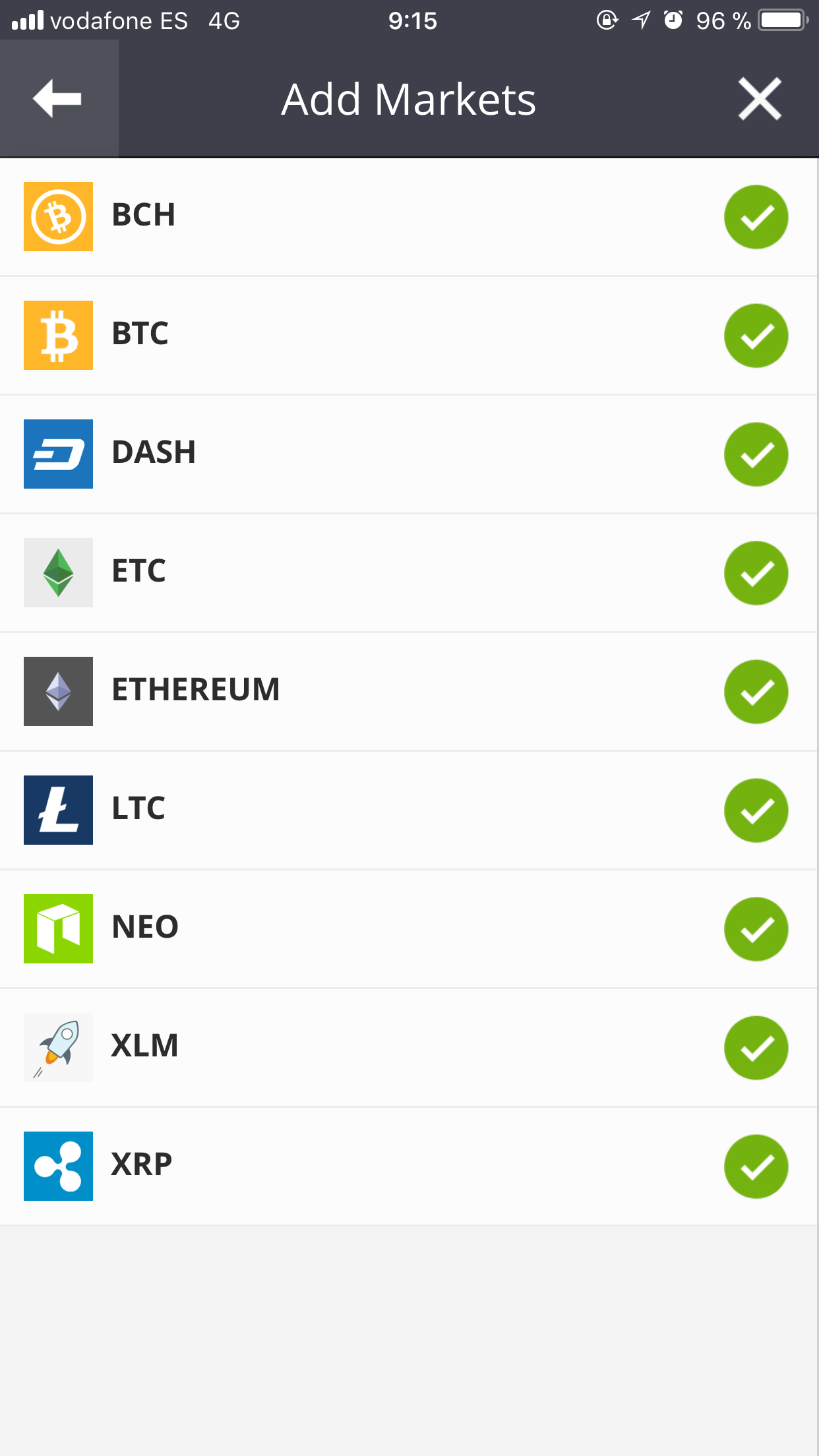 |
| json metadata | {"tags":["etoro"],"image":["https://steemitimages.com/DQmRX9GjcoY8iJHRHqfVsaDXq1AkxEZQxbH8vRx1btSbHm8/ACBB879E-96CD-4ABB-9EB3-B0CBC3F7A691.png"],"app":"steemit/0.1"} |
| Transaction Info | Block #20001343/Trx 1216b7baf2baf8f96aacc91221eafb3b84fdc5a2 |
View Raw JSON Data
{
"trx_id": "1216b7baf2baf8f96aacc91221eafb3b84fdc5a2",
"block": 20001343,
"trx_in_block": 21,
"op_in_trx": 0,
"virtual_op": 0,
"timestamp": "2018-02-19T08:24:00",
"op": [
"comment",
{
"parent_author": "imknowledge",
"parent_permlink": "how-to-profit-from-dividends-on-etoro-daily-using-dividend-calendar-and-leverage",
"author": "jossrosmarinus",
"permlink": "re-imknowledge-how-to-profit-from-dividends-on-etoro-daily-using-dividend-calendar-and-leverage-20180219t082359153z",
"title": "",
"body": "NEO in Etoro! Neo crypto just added to etoro portfolio!\n",
"json_metadata": "{\"tags\":[\"etoro\"],\"image\":[\"https://steemitimages.com/DQmRX9GjcoY8iJHRHqfVsaDXq1AkxEZQxbH8vRx1btSbHm8/ACBB879E-96CD-4ABB-9EB3-B0CBC3F7A691.png\"],\"app\":\"steemit/0.1\"}"
}
]
}2018/01/11 12:55:21
2018/01/11 12:55:21
| voter | ncrazed |
| author | imknowledge |
| permlink | how-to-profit-from-dividends-on-etoro-daily-using-dividend-calendar-and-leverage |
| weight | 10000 (100.00%) |
| Transaction Info | Block #18884680/Trx 0205744829b1e6c38d1a45d663760f2f9e149fdb |
View Raw JSON Data
{
  "trx_id": "0205744829b1e6c38d1a45d663760f2f9e149fdb",
  "block": 18884680,
  "trx_in_block": 52,
  "op_in_trx": 0,
  "virtual_op": 0,
  "timestamp": "2018-01-11T12:55:21",
  "op": [
    "vote",
    {
      "voter": "ncrazed",
      "author": "imknowledge",
      "permlink": "how-to-profit-from-dividends-on-etoro-daily-using-dividend-calendar-and-leverage",
      "weight": 10000
    }
  ]
}2018/01/09 16:10:21
2018/01/09 16:10:21
| parent author | imknowledge |
| parent permlink | how-to-profit-from-dividends-on-etoro-daily-using-dividend-calendar-and-leverage |
| author | karolynaz |
| permlink | re-imknowledge-how-to-profit-from-dividends-on-etoro-daily-using-dividend-calendar-and-leverage-20180109t160928918z |
| title | |
| body | Check out my lambo that I got from investing in ripple at etoro 🚀🚀🚀🚀 : https://steemit.com/ripple/@karolynaz/thank-you-ripple-for-my-first-lamborghini-omg-please-share-if-you-like-ripple |
| json metadata | {"tags":["etoro"],"links":["https://steemit.com/ripple/@karolynaz/thank-you-ripple-for-my-first-lamborghini-omg-please-share-if-you-like-ripple"],"app":"steemit/0.1"} |
| Transaction Info | Block #18830997/Trx 5a5c62fafc03438c26aa74b6a811a37f95aa2ba1 |
View Raw JSON Data
{
  "trx_id": "5a5c62fafc03438c26aa74b6a811a37f95aa2ba1",
  "block": 18830997,
  "trx_in_block": 5,
  "op_in_trx": 0,
  "virtual_op": 0,
  "timestamp": "2018-01-09T16:10:21",
  "op": [
    "comment",
    {
      "parent_author": "imknowledge",
      "parent_permlink": "how-to-profit-from-dividends-on-etoro-daily-using-dividend-calendar-and-leverage",
      "author": "karolynaz",
      "permlink": "re-imknowledge-how-to-profit-from-dividends-on-etoro-daily-using-dividend-calendar-and-leverage-20180109t160928918z",
      "title": "",
      "body": "Check out my lambo that I got from investing in ripple at etoro 🚀🚀🚀🚀 :\n\nhttps://steemit.com/ripple/@karolynaz/thank-you-ripple-for-my-first-lamborghini-omg-please-share-if-you-like-ripple",
      "json_metadata": "{\"tags\":[\"etoro\"],\"links\":[\"https://steemit.com/ripple/@karolynaz/thank-you-ripple-for-my-first-lamborghini-omg-please-share-if-you-like-ripple\"],\"app\":\"steemit/0.1\"}"
    }
  ]
}2018/01/09 16:10:00
2018/01/09 16:10:00
| voter | karolynaz |
| author | imknowledge |
| permlink | how-to-profit-from-dividends-on-etoro-daily-using-dividend-calendar-and-leverage |
| weight | 10000 (100.00%) |
| Transaction Info | Block #18830990/Trx 56acdd9f8a7f5c15a26dc09b237dedd2364899ab |
View Raw JSON Data
{
  "trx_id": "56acdd9f8a7f5c15a26dc09b237dedd2364899ab",
  "block": 18830990,
  "trx_in_block": 5,
  "op_in_trx": 0,
  "virtual_op": 0,
  "timestamp": "2018-01-09T16:10:00",
  "op": [
    "vote",
    {
      "voter": "karolynaz",
      "author": "imknowledge",
      "permlink": "how-to-profit-from-dividends-on-etoro-daily-using-dividend-calendar-and-leverage",
      "weight": 10000
    }
  ]
}steemdelegated 0.000 SP to @imknowledge2018/01/09 06:39:36
steemdelegated 0.000 SP to @imknowledge
2018/01/09 06:39:36
| delegator | steem |
| delegatee | imknowledge |
| vesting shares | 0.000000 VESTS |
| Transaction Info | Block #18819591/Trx e44d73ecb50ceb0ad3035b2bd55e95a0e648c5c9 |
View Raw JSON Data
{
  "trx_id": "e44d73ecb50ceb0ad3035b2bd55e95a0e648c5c9",
  "block": 18819591,
  "trx_in_block": 56,
  "op_in_trx": 0,
  "virtual_op": 0,
  "timestamp": "2018-01-09T06:39:36",
  "op": [
    "delegate_vesting_shares",
    {
      "delegator": "steem",
      "delegatee": "imknowledge",
      "vesting_shares": "0.000000 VESTS"
    }
  ]
}2018/01/03 10:15:54
2018/01/03 10:15:54
| voter | suryabrata |
| author | imknowledge |
| permlink | how-to-profit-from-dividends-on-etoro-daily-using-dividend-calendar-and-leverage |
| weight | 10000 (100.00%) |
| Transaction Info | Block #18651259/Trx 597fe0444b938580965dea270c5674529e8bf870 |
View Raw JSON Data
{
  "trx_id": "597fe0444b938580965dea270c5674529e8bf870",
  "block": 18651259,
  "trx_in_block": 1,
  "op_in_trx": 0,
  "virtual_op": 0,
  "timestamp": "2018-01-03T10:15:54",
  "op": [
    "vote",
    {
      "voter": "suryabrata",
      "author": "imknowledge",
      "permlink": "how-to-profit-from-dividends-on-etoro-daily-using-dividend-calendar-and-leverage",
      "weight": 10000
    }
  ]
}2017/12/27 22:02:30
2017/12/27 22:02:30
| voter | copytrading.pro |
| author | imknowledge |
| permlink | how-to-profit-from-dividends-on-etoro-daily-using-dividend-calendar-and-leverage |
| weight | 10000 (100.00%) |
| Transaction Info | Block #18464063/Trx 7c385dfd31e37ba08406ce06174c55de9b7965d4 |
View Raw JSON Data
{
  "trx_id": "7c385dfd31e37ba08406ce06174c55de9b7965d4",
  "block": 18464063,
  "trx_in_block": 9,
  "op_in_trx": 0,
  "virtual_op": 0,
  "timestamp": "2017-12-27T22:02:30",
  "op": [
    "vote",
    {
      "voter": "copytrading.pro",
      "author": "imknowledge",
      "permlink": "how-to-profit-from-dividends-on-etoro-daily-using-dividend-calendar-and-leverage",
      "weight": 10000
    }
  ]
}2017/12/27 22:02:18
2017/12/27 22:02:18
| parent author | imknowledge |
| parent permlink | how-to-profit-from-dividends-on-etoro-daily-using-dividend-calendar-and-leverage |
| author | copytrading.pro |
| permlink | re-imknowledge-how-to-profit-from-dividends-on-etoro-daily-using-dividend-calendar-and-leverage-20171227t220217223z |
| title | |
| body | I'm using eToro for more then a year, only for copy trading (quite successfully :) I've tried your idea yesterday. 28th of Dec is a dividend day for many companies on NASDAQ (more then 20). So I set orders to buy (on virtual account) for 27th. So now, after the closing of market on 27th, I should set orders to close these position right after opening market on 28th - i.e. on the dividend day? |
| json metadata | {"tags":["etoro"],"app":"steemit/0.1"} |
| Transaction Info | Block #18464059/Trx 490070fe5c5ec3b9cb8bdccb0f558e8aee95e580 |
View Raw JSON Data
{
  "trx_id": "490070fe5c5ec3b9cb8bdccb0f558e8aee95e580",
  "block": 18464059,
  "trx_in_block": 10,
  "op_in_trx": 0,
  "virtual_op": 0,
  "timestamp": "2017-12-27T22:02:18",
  "op": [
    "comment",
    {
      "parent_author": "imknowledge",
      "parent_permlink": "how-to-profit-from-dividends-on-etoro-daily-using-dividend-calendar-and-leverage",
      "author": "copytrading.pro",
      "permlink": "re-imknowledge-how-to-profit-from-dividends-on-etoro-daily-using-dividend-calendar-and-leverage-20171227t220217223z",
      "title": "",
      "body": "I'm using eToro for more then a year, only for copy trading (quite successfully :)\n\nI've tried your idea yesterday. 28th of Dec is a dividend day for many companies on NASDAQ (more then 20). So I set orders to buy (on virtual account) for 27th. So now, after the closing of market on 27th, I should set orders to close these position right after opening market on 28th - i.e. on the dividend day?",
      "json_metadata": "{\"tags\":[\"etoro\"],\"app\":\"steemit/0.1\"}"
    }
  ]
}2017/12/19 12:55:12
2017/12/19 12:55:12
| voter | meuschke |
| author | imknowledge |
| permlink | the-ultimate-shopify-guide-to-making-usd100-per-day-great-startup |
| weight | 10000 (100.00%) |
| Transaction Info | Block #18222841/Trx 2813856b2c539400d2469307b498710cba43f627 |
View Raw JSON Data
{
  "trx_id": "2813856b2c539400d2469307b498710cba43f627",
  "block": 18222841,
  "trx_in_block": 32,
  "op_in_trx": 0,
  "virtual_op": 0,
  "timestamp": "2017-12-19T12:55:12",
  "op": [
    "vote",
    {
      "voter": "meuschke",
      "author": "imknowledge",
      "permlink": "the-ultimate-shopify-guide-to-making-usd100-per-day-great-startup",
      "weight": 10000
    }
  ]
}2017/10/18 04:55:24
2017/10/18 04:55:24
| parent author | |
| parent permlink | etoro |
| author | imknowledge |
| permlink | how-to-profit-from-dividends-on-etoro-daily-using-dividend-calendar-and-leverage |
| title | How to Profit from Dividends on eToro daily using Dividend Calendar and Leverage |
| body | Welcome to this tutorial: I’ll show you strategy on how to profit from dividends on eToro daily, using dividend calendar, leverage, MS Excel and a bit of work. What is dividend? Dividend is a distribution of a portion of a company’s earnings as a way of gratitude for buying and holding stocks. It is essentialy a payout for stock owner, proportional to number of shares owned, with intention to entice investors to buy more shares. And it’s also additional way to award CEOs who are usually owning a large number of shares with more corporate money. How dividends works on eToro? When you trade stocks on eToro, you don’t actually trade stocks, but CFDs – Contracts For Difference. That allows you to earn on upward movement – when you “buy” stock and downward movement – when you “sell it” and trade with leverage (and also buy partial amounts, like half stock). Usually CFDs don’t award dividends, but some brokers do this and that’s the case with eToro. You are awarded dividend multiplied by leverage when you buy, according to dividend calendar and pay fees equal to dividend multiplied by leverage when you sell. Dividends are paid out overnight, after closing bell. Your dividends will be automatically calculated as “Refunds” and added to profits. In case you had fees from holding stock overnight with leverage (sometimes called “swap”, incorrectly though, because this term applies only to currency pairs), refunds will be reduced by current fees accrued. 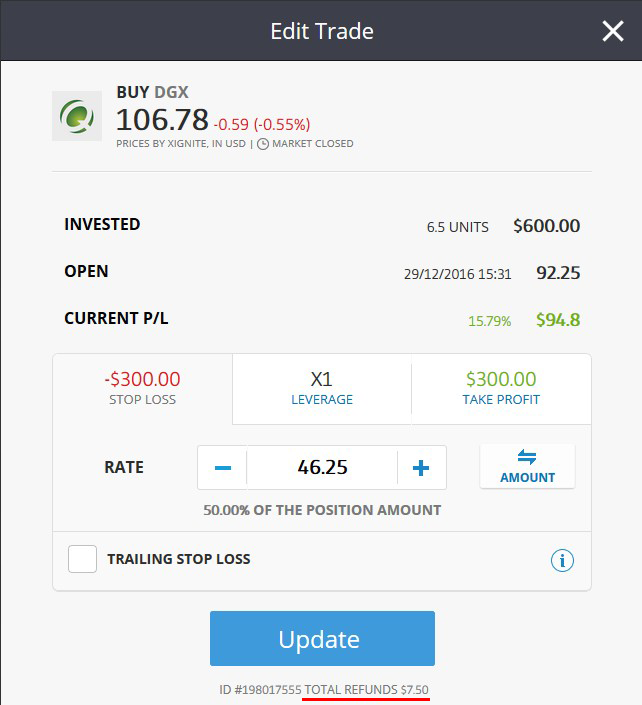.png) How does this strategy work? It’s simple as that: 1.) Research what stocks will be paying dividends in given day 2.) Open buy position 1 day before dividends are paid out for any number of stocks with dividend opportunity. Use leverage if you want to increase profits and risk. 3.) Profit from dividend overnight 4.) Close it at the opening 5.) Repeat next day with another stock or set of stocks When are dividends paid out? Unfortunately, there is no way to check which stock pays dividend and when directly on eToro, so you need to do your own research. There are a couple of websites that I use to check it. For Nasdaq I’m using http://www.nasdaq.com/dividend-stocks/dividend-calendar.aspx. 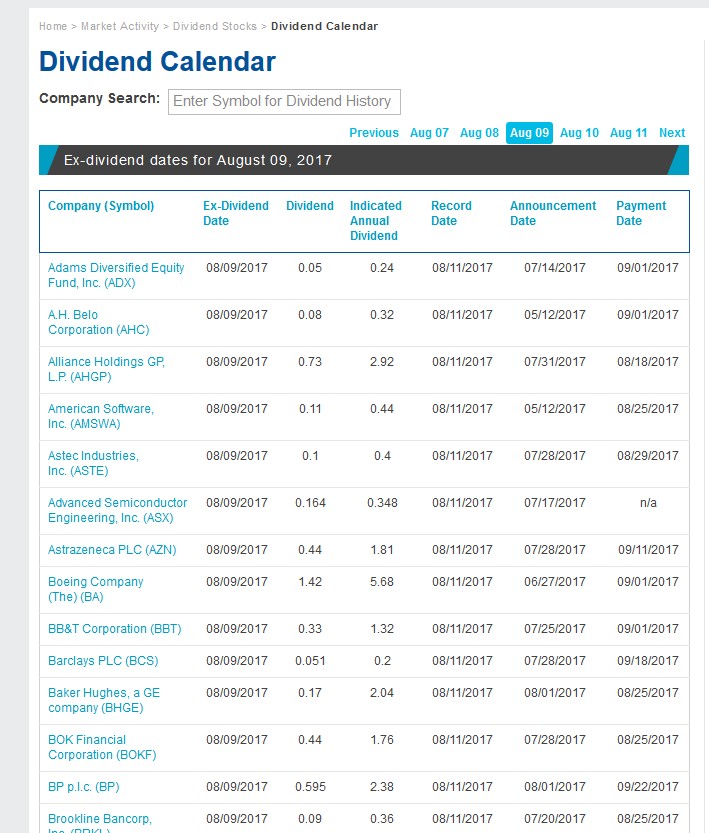.jpg) As you can see, at the day of writing this article, there are a couple of stocks listed on NASDAQ and on eToro. These are ASX, BA, RDS.B and more companies that will be issuing dividends today! For all other markets I’m using https://www.investing.com/dividends-calendar/ Now comes the part requiring a bit of work and research. You need to compare all available stocks with dividend opportunity with their availability on eToro. You will find all companies available to trade at eToro fees page. Write all companies that will be issuing dividend in Excel file, noting yield, ticker and later – actual profit. Do this for entire week or two and you are ready to open positions and get those sweet yields. How much can I earn on this? Let’s make some calculations. Note, that this position was opened with just x1 leverage. But if you would’ve opened the same position with x10, you would earn $75 overnight, which you can constantly repeat several times per month. There are 200 NASDAQ and 725 NYSE stocks on eToro (and this number is growing, because eToro is slowly, but constantly listing new companies) and assuming that typically US publicly traded company pays 2 dividends per year (some companies pay 1 per quarter, while some pay none), on average there 925*2=1850 dividends opportunity yearly or roughly 5 per day. Assume that you are buying just 600$ in stocks with safer, x5 leverage, and average dividend is the same as in $GDX example, this will yield you 19*32,5 USD = 617,5 USD in profits – 103% monthly income from investment! But if you go a little bit riskier, with x10 leverage, it will yield you twice as much: 1235 USD per month. And as you will see, sometimes yield per dividend can be very large, even more than 10% or 20% as in example below. 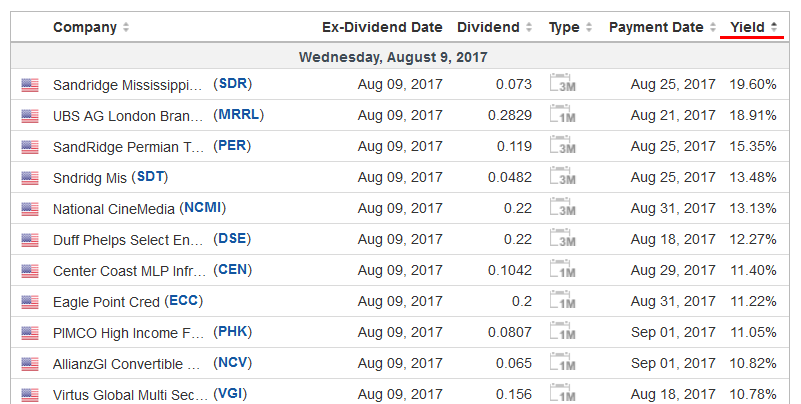.png) On investing.com you can sort by yield to track most lucrative payouts. Don’t believe it actually works? Try it yourself on demo account or on real trading with smallest possible amount to invest on 1 position in stocks ($50) – you will see that it actually works. So are there any drawbacks to this strategy? Of course – no such thing as investment without risk. Dividends are essentially “free money”, but you need to carefully research and execute it for profit. Here’s what can backfire: on bad market days stock price can fall a lot and dividend profits won’t offset this. If you’ve invested with x10 and you have bad luck by picking stock that fell by 5% on opening, your position will move -50%. But at the same time, in addition to dividend alone, you can earn as much when stock will go up, which will be nice addition do dividend profits. Additional things to consider • Dividend trading works mainly for American stocks. European markets are not generous in dividends (there is no such tradition in Frankfurt or Zurich and typically dividends are meager). Executing this strategy will work only with US stocks. • Refrain from buying stocks when market is in downtrend. You can use short term technicals to predict if price will go up or down next day to get better view. • Remember that when you sell position you will pay fees equal to dividend multiplied by leverage. So when you consider to open new sell position and you’re not using this strategy, you can check when dividends will be paid out to factor this loss in your potential earnings profits. |
| json metadata | {"tags":["money","dividends","investing","trading","etoro"],"image":["https://steemitimages.com/DQmUhS7WNevfiigVLLKY6oXEjHzTw4w1s7Z2hSye8pVwBi5/DPjMYcV%20(1).png","https://steemitimages.com/DQmU1unLL4N1JBCq7q5tKeA7AttbUcA1uJZmTENdqxvFdXs/Dy5TXog%20(1).jpg","https://steemitimages.com/DQmUb8WZt2pQk7HGFakZu3am6LtLoh5t546k6XTHhXHbGNq/t3qpoUg%20(1).png"],"links":["http://www.nasdaq.com/dividend-stocks/dividend-calendar.aspx","https://www.investing.com/dividends-calendar/"],"app":"steemit/0.1","format":"markdown"} |
| Transaction Info | Block #16428451/Trx 1cf7fd2cf48a6a2c01fd41a57fe7fa7aa00c75a8 |
View Raw JSON Data
{
"trx_id": "1cf7fd2cf48a6a2c01fd41a57fe7fa7aa00c75a8",
"block": 16428451,
"trx_in_block": 23,
"op_in_trx": 0,
"virtual_op": 0,
"timestamp": "2017-10-18T04:55:24",
"op": [
"comment",
{
"parent_author": "",
"parent_permlink": "etoro",
"author": "imknowledge",
"permlink": "how-to-profit-from-dividends-on-etoro-daily-using-dividend-calendar-and-leverage",
"title": "How to Profit from Dividends on eToro daily using Dividend Calendar and Leverage",
"body": "Welcome to this tutorial: I’ll show you strategy on how to profit from dividends on eToro daily, using dividend calendar, leverage, MS Excel and a bit of work.\n\nWhat is dividend?\nDividend is a distribution of a portion of a company’s earnings as a way of gratitude for buying and holding stocks. It is essentialy a payout for stock owner, proportional to number of shares owned, with intention to entice investors to buy more shares. And it’s also additional way to award CEOs who are usually owning a large number of shares with more corporate money.\n\nHow dividends works on eToro?\nWhen you trade stocks on eToro, you don’t actually trade stocks, but CFDs – Contracts For Difference. That allows you to earn on upward movement – when you “buy” stock and downward movement – when you “sell it” and trade with leverage (and also buy partial amounts, like half stock). Usually CFDs don’t award dividends, but some brokers do this and that’s the case with eToro. You are awarded dividend multiplied by leverage when you buy, according to dividend calendar and pay fees equal to dividend multiplied by leverage when you sell. Dividends are paid out overnight, after closing bell.\n\nYour dividends will be automatically calculated as “Refunds” and added to profits. In case you had fees from holding stock overnight with leverage (sometimes called “swap”, incorrectly though, because this term applies only to currency pairs), refunds will be reduced by current fees accrued.\n\n.png)\n\nHow does this strategy work?\nIt’s simple as that:\n\n1.) Research what stocks will be paying dividends in given day\n2.) Open buy position 1 day before dividends are paid out for any number of stocks with dividend opportunity. Use leverage if you want to increase profits and risk.\n3.) Profit from dividend overnight\n4.) Close it at the opening\n5.) Repeat next day with another stock or set of stocks\n\nWhen are dividends paid out?\n\nUnfortunately, there is no way to check which stock pays dividend and when directly on eToro, so you need to do your own research. There are a couple of websites that I use to check it. For Nasdaq I’m using http://www.nasdaq.com/dividend-stocks/dividend-calendar.aspx.\n\n.jpg)\n\nAs you can see, at the day of writing this article, there are a couple of stocks listed on NASDAQ and on eToro. These are ASX, BA, RDS.B and more companies that will be issuing dividends today!\n\nFor all other markets I’m using https://www.investing.com/dividends-calendar/\n\nNow comes the part requiring a bit of work and research. You need to compare all available stocks with dividend opportunity with their availability on eToro. You will find all companies available to trade at eToro fees page. Write all companies that will be issuing dividend in Excel file, noting yield, ticker and later – actual profit. Do this for entire week or two and you are ready to open positions and get those sweet yields.\n\nHow much can I earn on this?\nLet’s make some calculations. Note, that this position was opened with just x1 leverage. But if you would’ve opened the same position with x10, you would earn $75 overnight, which you can constantly repeat several times per month. There are 200 NASDAQ and 725 NYSE stocks on eToro (and this number is growing, because eToro is slowly, but constantly listing new companies) and assuming that typically US publicly traded company pays 2 dividends per year (some companies pay 1 per quarter, while some pay none), on average there 925*2=1850 dividends opportunity yearly or roughly 5 per day.\n\nAssume that you are buying just 600$ in stocks with safer, x5 leverage, and average dividend is the same as in $GDX example, this will yield you 19*32,5 USD = 617,5 USD in profits – 103% monthly income from investment! But if you go a little bit riskier, with x10 leverage, it will yield you twice as much: 1235 USD per month. And as you will see, sometimes yield per dividend can be very large, even more than 10% or 20% as in example below.\n\n.png)\n\nOn investing.com you can sort by yield to track most lucrative payouts.\n\nDon’t believe it actually works? Try it yourself on demo account or on real trading with smallest possible amount to invest on 1 position in stocks ($50) – you will see that it actually works.\n\nSo are there any drawbacks to this strategy?\nOf course – no such thing as investment without risk. Dividends are essentially “free money”, but you need to carefully research and execute it for profit. Here’s what can backfire: on bad market days stock price can fall a lot and dividend profits won’t offset this. If you’ve invested with x10 and you have bad luck by picking stock that fell by 5% on opening, your position will move -50%. But at the same time, in addition to dividend alone, you can earn as much when stock will go up, which will be nice addition do dividend profits.\n\nAdditional things to consider\n\n• Dividend trading works mainly for American stocks. European markets are not generous in dividends (there is no such tradition in Frankfurt or Zurich and typically dividends are meager). Executing this strategy will work only with US stocks.\n\n• Refrain from buying stocks when market is in downtrend. You can use short term technicals to predict if price will go up or down next day to get better view.\n\n• Remember that when you sell position you will pay fees equal to dividend multiplied by leverage. So when you consider to open new sell position and you’re not using this strategy, you can check when dividends will be paid out to factor this loss in your potential earnings profits.",
"json_metadata": "{\"tags\":[\"money\",\"dividends\",\"investing\",\"trading\",\"etoro\"],\"image\":[\"https://steemitimages.com/DQmUhS7WNevfiigVLLKY6oXEjHzTw4w1s7Z2hSye8pVwBi5/DPjMYcV%20(1).png\",\"https://steemitimages.com/DQmU1unLL4N1JBCq7q5tKeA7AttbUcA1uJZmTENdqxvFdXs/Dy5TXog%20(1).jpg\",\"https://steemitimages.com/DQmUb8WZt2pQk7HGFakZu3am6LtLoh5t546k6XTHhXHbGNq/t3qpoUg%20(1).png\"],\"links\":[\"http://www.nasdaq.com/dividend-stocks/dividend-calendar.aspx\",\"https://www.investing.com/dividends-calendar/\"],\"app\":\"steemit/0.1\",\"format\":\"markdown\"}"
}
]
}2017/10/18 04:53:48
2017/10/18 04:53:48
| parent author | |
| parent permlink | etoro |
| author | imknowledge |
| permlink | how-to-profit-from-dividends-on-etoro-daily-using-dividend-calendar-and-leverage |
| title | How to Profit from Dividends on eToro daily using Dividend Calendar and Leverage |
| body | Welcome to this tutorial: I’ll show you strategy on how to profit from dividends on eToro daily, using dividend calendar, leverage, MS Excel and a bit of work. What is dividend? Dividend is a distribution of a portion of a company’s earnings as a way of gratitude for buying and holding stocks. It is essentialy a payout for stock owner, proportional to number of shares owned, with intention to entice investors to buy more shares. And it’s also additional way to award CEOs who are usually owning a large number of shares with more corporate money. How dividends works on eToro? When you trade stocks on eToro, you don’t actually trade stocks, but CFDs – Contracts For Difference. That allows you to earn on upward movement – when you “buy” stock and downward movement – when you “sell it” and trade with leverage (and also buy partial amounts, like half stock). Usually CFDs don’t award dividends, but some brokers do this and that’s the case with eToro. You are awarded dividend multiplied by leverage when you buy, according to dividend calendar and pay fees equal to dividend multiplied by leverage when you sell. Dividends are paid out overnight, after closing bell. Your dividends will be automatically calculated as “Refunds” and added to profits. In case you had fees from holding stock overnight with leverage (sometimes called “swap”, incorrectly though, because this term applies only to currency pairs), refunds will be reduced by current fees accrued. .png) How does this strategy work? It’s simple as that: 1.) Research what stocks will be paying dividends in given day 2.) Open buy position 1 day before dividends are paid out for any number of stocks with dividend opportunity. Use leverage if you want to increase profits and risk. 3.) Profit from dividend overnight 4.) Close it at the opening 5.) Repeat next day with another stock or set of stocks When are dividends paid out? Unfortunately, there is no way to check which stock pays dividend and when directly on eToro, so you need to do your own research. There are a couple of websites that I use to check it. For Nasdaq I’m using http://www.nasdaq.com/dividend-stocks/dividend-calendar.aspx. .jpg) As you can see, at the day of writing this article, there are a couple of stocks listed on NASDAQ and on eToro. These are ASX, BA, RDS.B and more companies that will be issuing dividends today! For all other markets I’m using https://www.investing.com/dividends-calendar/ Now comes the part requiring a bit of work and research. You need to compare all available stocks with dividend opportunity with their availability on eToro. You will find all companies available to trade at eToro fees page. Write all companies that will be issuing dividend in Excel file, noting yield, ticker and later – actual profit. Do this for entire week or two and you are ready to open positions and get those sweet yields. How much can I earn on this? Let’s make some calculations. Note, that this position was opened with just x1 leverage. But if you would’ve opened the same position with x10, you would earn $75 overnight, which you can constantly repeat several times per month. There are 200 NASDAQ and 725 NYSE stocks on eToro (and this number is growing, because eToro is slowly, but constantly listing new companies) and assuming that typically US publicly traded company pays 2 dividends per year (some companies pay 1 per quarter, while some pay none), on average there 925*2=1850 dividends opportunity yearly or roughly 5 per day. Assume that you are buying just 600$ in stocks with safer, x5 leverage, and average dividend is the same as in $GDX example, this will yield you 19*32,5 USD = 617,5 USD in profits – 103% monthly income from investment! But if you go a little bit riskier, with x10 leverage, it will yield you twice as much: 1235 USD per month. And as you will see, sometimes yield per dividend can be very large, even more than 10% or 20% as in example below. .png) On investing.com you can sort by yield to track most lucrative payouts. Don’t believe it actually works? Try it yourself on demo account or on real trading with smallest possible amount to invest on 1 position in stocks ($50) – you will see that it actually works. So are there any drawbacks to this strategy? Of course – no such thing as investment without risk. Dividends are essentially “free money”, but you need to carefully research and execute it for profit. Here’s what can backfire: on bad market days stock price can fall a lot and dividend profits won’t offset this. If you’ve invested with x10 and you have bad luck by picking stock that fell by 5% on opening, your position will move -50%. But at the same time, in addition to dividend alone, you can earn as much when stock will go up, which will be nice addition do dividend profits. Additional things to consider • Dividend trading works mainly for American stocks. European markets are not generous in dividends (there is no such tradition in Frankfurt or Zurich and typically dividends are meager). Executing this strategy will work only with US stocks. • Refrain from buying stocks when market is in downtrend. You can use short term technicals to predict if price will go up or down next day to get better view. • Remember that when you sell position you will pay fees equal to dividend multiplied by leverage. So when you consider to open new sell position and you’re not using this strategy, you can check when dividends will be paid out to factor this loss in your potential earnings profits. |
| json metadata | {"tags":["money","dividends","investing","etoro","trading"],"image":["https://steemitimages.com/DQmUhS7WNevfiigVLLKY6oXEjHzTw4w1s7Z2hSye8pVwBi5/DPjMYcV%20(1).png","https://steemitimages.com/DQmU1unLL4N1JBCq7q5tKeA7AttbUcA1uJZmTENdqxvFdXs/Dy5TXog%20(1).jpg","https://steemitimages.com/DQmUb8WZt2pQk7HGFakZu3am6LtLoh5t546k6XTHhXHbGNq/t3qpoUg%20(1).png"],"links":["http://www.nasdaq.com/dividend-stocks/dividend-calendar.aspx","https://www.investing.com/dividends-calendar/"],"app":"steemit/0.1","format":"markdown"} |
| Transaction Info | Block #16428419/Trx 9f70392e997f8fecf702ca6c4ffec8ee3f2acbd2 |
View Raw JSON Data
{
"trx_id": "9f70392e997f8fecf702ca6c4ffec8ee3f2acbd2",
"block": 16428419,
"trx_in_block": 2,
"op_in_trx": 0,
"virtual_op": 0,
"timestamp": "2017-10-18T04:53:48",
"op": [
"comment",
{
"parent_author": "",
"parent_permlink": "etoro",
"author": "imknowledge",
"permlink": "how-to-profit-from-dividends-on-etoro-daily-using-dividend-calendar-and-leverage",
"title": "How to Profit from Dividends on eToro daily using Dividend Calendar and Leverage",
"body": "Welcome to this tutorial: I’ll show you strategy on how to profit from dividends on eToro daily, using dividend calendar, leverage, MS Excel and a bit of work.\n\nWhat is dividend?\nDividend is a distribution of a portion of a company’s earnings as a way of gratitude for buying and holding stocks. It is essentialy a payout for stock owner, proportional to number of shares owned, with intention to entice investors to buy more shares. And it’s also additional way to award CEOs who are usually owning a large number of shares with more corporate money.\n\nHow dividends works on eToro?\nWhen you trade stocks on eToro, you don’t actually trade stocks, but CFDs – Contracts For Difference. That allows you to earn on upward movement – when you “buy” stock and downward movement – when you “sell it” and trade with leverage (and also buy partial amounts, like half stock). Usually CFDs don’t award dividends, but some brokers do this and that’s the case with eToro. You are awarded dividend multiplied by leverage when you buy, according to dividend calendar and pay fees equal to dividend multiplied by leverage when you sell. Dividends are paid out overnight, after closing bell.\n\nYour dividends will be automatically calculated as “Refunds” and added to profits. In case you had fees from holding stock overnight with leverage (sometimes called “swap”, incorrectly though, because this term applies only to currency pairs), refunds will be reduced by current fees accrued.\n\n.png)\n\nHow does this strategy work?\nIt’s simple as that:\n\n1.) Research what stocks will be paying dividends in given day\n2.) Open buy position 1 day before dividends are paid out for any number of stocks with dividend opportunity. Use leverage if you want to increase profits and risk.\n3.) Profit from dividend overnight\n4.) Close it at the opening\n5.) Repeat next day with another stock or set of stocks\n\nWhen are dividends paid out?\n\nUnfortunately, there is no way to check which stock pays dividend and when directly on eToro, so you need to do your own research. There are a couple of websites that I use to check it. For Nasdaq I’m using http://www.nasdaq.com/dividend-stocks/dividend-calendar.aspx.\n\n.jpg)\n\nAs you can see, at the day of writing this article, there are a couple of stocks listed on NASDAQ and on eToro. These are ASX, BA, RDS.B and more companies that will be issuing dividends today!\n\nFor all other markets I’m using https://www.investing.com/dividends-calendar/\n\nNow comes the part requiring a bit of work and research. You need to compare all available stocks with dividend opportunity with their availability on eToro. You will find all companies available to trade at eToro fees page. Write all companies that will be issuing dividend in Excel file, noting yield, ticker and later – actual profit. Do this for entire week or two and you are ready to open positions and get those sweet yields.\n\nHow much can I earn on this?\nLet’s make some calculations. Note, that this position was opened with just x1 leverage. But if you would’ve opened the same position with x10, you would earn $75 overnight, which you can constantly repeat several times per month. There are 200 NASDAQ and 725 NYSE stocks on eToro (and this number is growing, because eToro is slowly, but constantly listing new companies) and assuming that typically US publicly traded company pays 2 dividends per year (some companies pay 1 per quarter, while some pay none), on average there 925*2=1850 dividends opportunity yearly or roughly 5 per day.\n\nAssume that you are buying just 600$ in stocks with safer, x5 leverage, and average dividend is the same as in $GDX example, this will yield you 19*32,5 USD = 617,5 USD in profits – 103% monthly income from investment! But if you go a little bit riskier, with x10 leverage, it will yield you twice as much: 1235 USD per month. And as you will see, sometimes yield per dividend can be very large, even more than 10% or 20% as in example below.\n\n.png)\n\nOn investing.com you can sort by yield to track most lucrative payouts.\n\nDon’t believe it actually works? Try it yourself on demo account or on real trading with smallest possible amount to invest on 1 position in stocks ($50) – you will see that it actually works.\n\nSo are there any drawbacks to this strategy?\nOf course – no such thing as investment without risk. Dividends are essentially “free money”, but you need to carefully research and execute it for profit. Here’s what can backfire: on bad market days stock price can fall a lot and dividend profits won’t offset this. If you’ve invested with x10 and you have bad luck by picking stock that fell by 5% on opening, your position will move -50%. But at the same time, in addition to dividend alone, you can earn as much when stock will go up, which will be nice addition do dividend profits.\n\nAdditional things to consider\n\n• Dividend trading works mainly for American stocks. European markets are not generous in dividends (there is no such tradition in Frankfurt or Zurich and typically dividends are meager). Executing this strategy will work only with US stocks.\n\n• Refrain from buying stocks when market is in downtrend. You can use short term technicals to predict if price will go up or down next day to get better view.\n\n• Remember that when you sell position you will pay fees equal to dividend multiplied by leverage. So when you consider to open new sell position and you’re not using this strategy, you can check when dividends will be paid out to factor this loss in your potential earnings profits.",
"json_metadata": "{\"tags\":[\"money\",\"dividends\",\"investing\",\"etoro\",\"trading\"],\"image\":[\"https://steemitimages.com/DQmUhS7WNevfiigVLLKY6oXEjHzTw4w1s7Z2hSye8pVwBi5/DPjMYcV%20(1).png\",\"https://steemitimages.com/DQmU1unLL4N1JBCq7q5tKeA7AttbUcA1uJZmTENdqxvFdXs/Dy5TXog%20(1).jpg\",\"https://steemitimages.com/DQmUb8WZt2pQk7HGFakZu3am6LtLoh5t546k6XTHhXHbGNq/t3qpoUg%20(1).png\"],\"links\":[\"http://www.nasdaq.com/dividend-stocks/dividend-calendar.aspx\",\"https://www.investing.com/dividends-calendar/\"],\"app\":\"steemit/0.1\",\"format\":\"markdown\"}"
}
]
}imknowledgeupdated their account properties2017/10/18 04:11:39
imknowledgeupdated their account properties
2017/10/18 04:11:39
| account | imknowledge |
| memo key | STM6noSPyHCVvJ7HQGbRqxXpkHpahWN7uY83rsF7nPVyBUBNAuntV |
| json metadata | {"profile":{"profile_image":"https://www.animalstown.com/animals/g/giant-panda/wallpapers/giant-panda-wallpaper-6.jpg","location":"Germany"}} |
| Transaction Info | Block #16427576/Trx 8ed9b87d22e472947f070c483900f5b81dacd6b2 |
View Raw JSON Data
{
  "trx_id": "8ed9b87d22e472947f070c483900f5b81dacd6b2",
  "block": 16427576,
  "trx_in_block": 12,
  "op_in_trx": 0,
  "virtual_op": 0,
  "timestamp": "2017-10-18T04:11:39",
  "op": [
    "account_update",
    {
      "account": "imknowledge",
      "memo_key": "STM6noSPyHCVvJ7HQGbRqxXpkHpahWN7uY83rsF7nPVyBUBNAuntV",
      "json_metadata": "{\"profile\":{\"profile_image\":\"https://www.animalstown.com/animals/g/giant-panda/wallpapers/giant-panda-wallpaper-6.jpg\",\"location\":\"Germany\"}}"
    }
  ]
}2017/10/18 04:09:15
2017/10/18 04:09:15
| voter | anomaly |
| author | imknowledge |
| permlink | how-to-profit-from-dividends-on-etoro-daily-using-dividend-calendar-and-leverage |
| weight | 100 (1.00%) |
| Transaction Info | Block #16427528/Trx 9eeaa5d4e23e993b6a67815d0c323c277703ef90 |
View Raw JSON Data
{
  "trx_id": "9eeaa5d4e23e993b6a67815d0c323c277703ef90",
  "block": 16427528,
  "trx_in_block": 8,
  "op_in_trx": 0,
  "virtual_op": 0,
  "timestamp": "2017-10-18T04:09:15",
  "op": [
    "vote",
    {
      "voter": "anomaly",
      "author": "imknowledge",
      "permlink": "how-to-profit-from-dividends-on-etoro-daily-using-dividend-calendar-and-leverage",
      "weight": 100
    }
  ]
}2017/10/18 04:08:03
2017/10/18 04:08:03
| parent author | imknowledge |
| parent permlink | how-to-profit-from-dividends-on-etoro-daily-using-dividend-calendar-and-leverage |
| author | cheetah |
| permlink | cheetah-re-imknowledgehow-to-profit-from-dividends-on-etoro-daily-using-dividend-calendar-and-leverage |
| title | |
| body | Hi! I am a robot. I just upvoted you! I found similar content that readers might be interested in: http://stockemperor.com/etoro/dividend-strategy-tutorial/ |
| json metadata | |
| Transaction Info | Block #16427504/Trx 354f330f92c7ca18aea75ee72f841dc04ebaf6a3 |
View Raw JSON Data
{
  "trx_id": "354f330f92c7ca18aea75ee72f841dc04ebaf6a3",
  "block": 16427504,
  "trx_in_block": 4,
  "op_in_trx": 0,
  "virtual_op": 0,
  "timestamp": "2017-10-18T04:08:03",
  "op": [
    "comment",
    {
      "parent_author": "imknowledge",
      "parent_permlink": "how-to-profit-from-dividends-on-etoro-daily-using-dividend-calendar-and-leverage",
      "author": "cheetah",
      "permlink": "cheetah-re-imknowledgehow-to-profit-from-dividends-on-etoro-daily-using-dividend-calendar-and-leverage",
      "title": "",
      "body": "Hi! I am a robot. I just upvoted you! I found similar content that readers might be interested in:\nhttp://stockemperor.com/etoro/dividend-strategy-tutorial/",
      "json_metadata": ""
    }
  ]
}2017/10/18 04:08:00
2017/10/18 04:08:00
| voter | cheetah |
| author | imknowledge |
| permlink | how-to-profit-from-dividends-on-etoro-daily-using-dividend-calendar-and-leverage |
| weight | 50 (0.50%) |
| Transaction Info | Block #16427503/Trx da836bb8778f386275f89b0d03b0b00ee48756cb |
View Raw JSON Data
{
  "trx_id": "da836bb8778f386275f89b0d03b0b00ee48756cb",
  "block": 16427503,
  "trx_in_block": 4,
  "op_in_trx": 0,
  "virtual_op": 0,
  "timestamp": "2017-10-18T04:08:00",
  "op": [
    "vote",
    {
      "voter": "cheetah",
      "author": "imknowledge",
      "permlink": "how-to-profit-from-dividends-on-etoro-daily-using-dividend-calendar-and-leverage",
      "weight": 50
    }
  ]
}2017/10/18 04:07:45
2017/10/18 04:07:45
| parent author | |
| parent permlink | etoro |
| author | imknowledge |
| permlink | how-to-profit-from-dividends-on-etoro-daily-using-dividend-calendar-and-leverage |
| title | How to Profit from Dividends on eToro daily using Dividend Calendar and Leverage |
| body | Welcome to this tutorial: I’ll show you strategy on how to profit from dividends on eToro daily, using dividend calendar, leverage, MS Excel and a bit of work. What is dividend? Dividend is a distribution of a portion of a company’s earnings as a way of gratitude for buying and holding stocks. It is essentialy a payout for stock owner, proportional to number of shares owned, with intention to entice investors to buy more shares. And it’s also additional way to award CEOs who are usually owning a large number of shares with more corporate money. How dividends works on eToro? When you trade stocks on eToro, you don’t actually trade stocks, but CFDs – Contracts For Difference. That allows you to earn on upward movement – when you “buy” stock and downward movement – when you “sell it” and trade with leverage (and also buy partial amounts, like half stock). Usually CFDs don’t award dividends, but some brokers do this and that’s the case with eToro. You are awarded dividend multiplied by leverage when you buy, according to dividend calendar and pay fees equal to dividend multiplied by leverage when you sell. Dividends are paid out overnight, after closing bell. Your dividends will be automatically calculated as “Refunds” and added to profits. In case you had fees from holding stock overnight with leverage (sometimes called “swap”, incorrectly though, because this term applies only to currency pairs), refunds will be reduced by current fees accrued. .png) How does this strategy work? It’s simple as that: 1.) Research what stocks will be paying dividends in given day 2.) Open buy position 1 day before dividends are paid out for any number of stocks with dividend opportunity. Use leverage if you want to increase profits and risk. 3.) Profit from dividend overnight 4.) Close it at the opening 5.) Repeat next day with another stock or set of stocks When are dividends paid out? Unfortunately, there is no way to check which stock pays dividend and when directly on eToro, so you need to do your own research. There are a couple of websites that I use to check it. For Nasdaq I’m using http://www.nasdaq.com/dividend-stocks/dividend-calendar.aspx. .jpg) As you can see, at the day of writing this article, there are a couple of stocks listed on NASDAQ and on eToro. These are ASX, BA, RDS.B and more companies that will be issuing dividends today! For all other markets I’m using https://www.investing.com/dividends-calendar/ Now comes the part requiring a bit of work and research. You need to compare all available stocks with dividend opportunity with their availability on eToro. You will find all companies available to trade at eToro fees page. Write all companies that will be issuing dividend in Excel file, noting yield, ticker and later – actual profit. Do this for entire week or two and you are ready to open positions and get those sweet yields. How much can I earn on this? Let’s make some calculations. Note, that this position was opened with just x1 leverage. But if you would’ve opened the same position with x10, you would earn $75 overnight, which you can constantly repeat several times per month. There are 200 NASDAQ and 725 NYSE stocks on eToro (and this number is growing, because eToro is slowly, but constantly listing new companies) and assuming that typically US publicly traded company pays 2 dividends per year (some companies pay 1 per quarter, while some pay none), on average there 925*2=1850 dividends opportunity yearly or roughly 5 per day. Assume that you are buying just 600$ in stocks with safer, x5 leverage, and average dividend is the same as in $GDX example, this will yield you 19*32,5 USD = 617,5 USD in profits – 103% monthly income from investment! But if you go a little bit riskier, with x10 leverage, it will yield you twice as much: 1235 USD per month. And as you will see, sometimes yield per dividend can be very large, even more than 10% or 20% as in example below. .png) On investing.com you can sort by yield to track most lucrative payouts. Don’t believe it actually works? Try it yourself on demo account or on real trading with smallest possible amount to invest on 1 position in stocks ($50) – you will see that it actually works. So are there any drawbacks to this strategy? Of course – no such thing as investment without risk. Dividends are essentially “free money”, but you need to carefully research and execute it for profit. Here’s what can backfire: on bad market days stock price can fall a lot and dividend profits won’t offset this. If you’ve invested with x10 and you have bad luck by picking stock that fell by 5% on opening, your position will move -50%. But at the same time, in addition to dividend alone, you can earn as much when stock will go up, which will be nice addition do dividend profits. Additional things to consider • Dividend trading works mainly for American stocks. European markets are not generous in dividends (there is no such tradition in Frankfurt or Zurich and typically dividends are meager). Executing this strategy will work only with US stocks. • Refrain from buying stocks when market is in downtrend. You can use short term technicals to predict if price will go up or down next day to get better view. • Remember that when you sell position you will pay fees equal to dividend multiplied by leverage. So when you consider to open new sell position and you’re not using this strategy, you can check when dividends will be paid out to factor this loss in your potential earnings profits. |
| json metadata | {"tags":["etoro","dividends","investing","money","trading"],"image":["https://steemitimages.com/DQmUhS7WNevfiigVLLKY6oXEjHzTw4w1s7Z2hSye8pVwBi5/DPjMYcV%20(1).png","https://steemitimages.com/DQmU1unLL4N1JBCq7q5tKeA7AttbUcA1uJZmTENdqxvFdXs/Dy5TXog%20(1).jpg","https://steemitimages.com/DQmUb8WZt2pQk7HGFakZu3am6LtLoh5t546k6XTHhXHbGNq/t3qpoUg%20(1).png"],"links":["http://www.nasdaq.com/dividend-stocks/dividend-calendar.aspx","https://www.investing.com/dividends-calendar/"],"app":"steemit/0.1","format":"markdown"} |
| Transaction Info | Block #16427498/Trx 4c74fe8c271ca7bd5a0edaab5c0aede077105ec8 |
View Raw JSON Data
{
"trx_id": "4c74fe8c271ca7bd5a0edaab5c0aede077105ec8",
"block": 16427498,
"trx_in_block": 12,
"op_in_trx": 0,
"virtual_op": 0,
"timestamp": "2017-10-18T04:07:45",
"op": [
"comment",
{
"parent_author": "",
"parent_permlink": "etoro",
"author": "imknowledge",
"permlink": "how-to-profit-from-dividends-on-etoro-daily-using-dividend-calendar-and-leverage",
"title": "How to Profit from Dividends on eToro daily using Dividend Calendar and Leverage",
"body": "Welcome to this tutorial: I’ll show you strategy on how to profit from dividends on eToro daily, using dividend calendar, leverage, MS Excel and a bit of work.\n\nWhat is dividend?\nDividend is a distribution of a portion of a company’s earnings as a way of gratitude for buying and holding stocks. It is essentialy a payout for stock owner, proportional to number of shares owned, with intention to entice investors to buy more shares. And it’s also additional way to award CEOs who are usually owning a large number of shares with more corporate money.\n\nHow dividends works on eToro?\nWhen you trade stocks on eToro, you don’t actually trade stocks, but CFDs – Contracts For Difference. That allows you to earn on upward movement – when you “buy” stock and downward movement – when you “sell it” and trade with leverage (and also buy partial amounts, like half stock). Usually CFDs don’t award dividends, but some brokers do this and that’s the case with eToro. You are awarded dividend multiplied by leverage when you buy, according to dividend calendar and pay fees equal to dividend multiplied by leverage when you sell. Dividends are paid out overnight, after closing bell.\n\nYour dividends will be automatically calculated as “Refunds” and added to profits. In case you had fees from holding stock overnight with leverage (sometimes called “swap”, incorrectly though, because this term applies only to currency pairs), refunds will be reduced by current fees accrued.\n\n.png)\n\nHow does this strategy work?\nIt’s simple as that:\n\n1.) Research what stocks will be paying dividends in given day\n2.) Open buy position 1 day before dividends are paid out for any number of stocks with dividend opportunity. Use leverage if you want to increase profits and risk.\n3.) Profit from dividend overnight\n4.) Close it at the opening\n5.) Repeat next day with another stock or set of stocks\n\nWhen are dividends paid out?\n\nUnfortunately, there is no way to check which stock pays dividend and when directly on eToro, so you need to do your own research. There are a couple of websites that I use to check it. For Nasdaq I’m using http://www.nasdaq.com/dividend-stocks/dividend-calendar.aspx.\n\n.jpg)\n\nAs you can see, at the day of writing this article, there are a couple of stocks listed on NASDAQ and on eToro. These are ASX, BA, RDS.B and more companies that will be issuing dividends today!\n\nFor all other markets I’m using https://www.investing.com/dividends-calendar/\n\nNow comes the part requiring a bit of work and research. You need to compare all available stocks with dividend opportunity with their availability on eToro. You will find all companies available to trade at eToro fees page. Write all companies that will be issuing dividend in Excel file, noting yield, ticker and later – actual profit. Do this for entire week or two and you are ready to open positions and get those sweet yields.\n\nHow much can I earn on this?\nLet’s make some calculations. Note, that this position was opened with just x1 leverage. But if you would’ve opened the same position with x10, you would earn $75 overnight, which you can constantly repeat several times per month. There are 200 NASDAQ and 725 NYSE stocks on eToro (and this number is growing, because eToro is slowly, but constantly listing new companies) and assuming that typically US publicly traded company pays 2 dividends per year (some companies pay 1 per quarter, while some pay none), on average there 925*2=1850 dividends opportunity yearly or roughly 5 per day.\n\nAssume that you are buying just 600$ in stocks with safer, x5 leverage, and average dividend is the same as in $GDX example, this will yield you 19*32,5 USD = 617,5 USD in profits – 103% monthly income from investment! But if you go a little bit riskier, with x10 leverage, it will yield you twice as much: 1235 USD per month. And as you will see, sometimes yield per dividend can be very large, even more than 10% or 20% as in example below.\n\n.png)\n\nOn investing.com you can sort by yield to track most lucrative payouts.\n\nDon’t believe it actually works? Try it yourself on demo account or on real trading with smallest possible amount to invest on 1 position in stocks ($50) – you will see that it actually works.\n\nSo are there any drawbacks to this strategy?\nOf course – no such thing as investment without risk. Dividends are essentially “free money”, but you need to carefully research and execute it for profit. Here’s what can backfire: on bad market days stock price can fall a lot and dividend profits won’t offset this. If you’ve invested with x10 and you have bad luck by picking stock that fell by 5% on opening, your position will move -50%. But at the same time, in addition to dividend alone, you can earn as much when stock will go up, which will be nice addition do dividend profits.\n\nAdditional things to consider\n\n• Dividend trading works mainly for American stocks. European markets are not generous in dividends (there is no such tradition in Frankfurt or Zurich and typically dividends are meager). Executing this strategy will work only with US stocks.\n\n• Refrain from buying stocks when market is in downtrend. You can use short term technicals to predict if price will go up or down next day to get better view.\n\n• Remember that when you sell position you will pay fees equal to dividend multiplied by leverage. So when you consider to open new sell position and you’re not using this strategy, you can check when dividends will be paid out to factor this loss in your potential earnings profits.",
"json_metadata": "{\"tags\":[\"etoro\",\"dividends\",\"investing\",\"money\",\"trading\"],\"image\":[\"https://steemitimages.com/DQmUhS7WNevfiigVLLKY6oXEjHzTw4w1s7Z2hSye8pVwBi5/DPjMYcV%20(1).png\",\"https://steemitimages.com/DQmU1unLL4N1JBCq7q5tKeA7AttbUcA1uJZmTENdqxvFdXs/Dy5TXog%20(1).jpg\",\"https://steemitimages.com/DQmUb8WZt2pQk7HGFakZu3am6LtLoh5t546k6XTHhXHbGNq/t3qpoUg%20(1).png\"],\"links\":[\"http://www.nasdaq.com/dividend-stocks/dividend-calendar.aspx\",\"https://www.investing.com/dividends-calendar/\"],\"app\":\"steemit/0.1\",\"format\":\"markdown\"}"
}
]
}2017/09/11 13:33:30
2017/09/11 13:33:30
| voter | konaorange |
| author | imknowledge |
| permlink | the-ultimate-shopify-guide-to-making-usd100-per-day-great-startup |
| weight | 10000 (100.00%) |
| Transaction Info | Block #15374160/Trx 1b3625fc55c659504b3409afeea1f1e52fd8af73 |
View Raw JSON Data
{
  "trx_id": "1b3625fc55c659504b3409afeea1f1e52fd8af73",
  "block": 15374160,
  "trx_in_block": 16,
  "op_in_trx": 0,
  "virtual_op": 0,
  "timestamp": "2017-09-11T13:33:30",
  "op": [
    "vote",
    {
      "voter": "konaorange",
      "author": "imknowledge",
      "permlink": "the-ultimate-shopify-guide-to-making-usd100-per-day-great-startup",
      "weight": 10000
    }
  ]
}2017/08/09 15:34:24
2017/08/09 15:34:24
| parent author | imknowledge |
| parent permlink | the-ultimate-shopify-guide-to-making-usd100-per-day-great-startup |
| author | karemmohsen |
| permlink | re-imknowledge-the-ultimate-shopify-guide-to-making-usd100-per-day-great-startup-20170809t153423315z |
| title | |
| body | wooow Genius |
| json metadata | {"tags":["shopify"],"app":"steemit/0.1"} |
| Transaction Info | Block #14427421/Trx 66ed806843e0ed3eed3029c84986152bb4292711 |
View Raw JSON Data
{
  "trx_id": "66ed806843e0ed3eed3029c84986152bb4292711",
  "block": 14427421,
  "trx_in_block": 22,
  "op_in_trx": 0,
  "virtual_op": 0,
  "timestamp": "2017-08-09T15:34:24",
  "op": [
    "comment",
    {
      "parent_author": "imknowledge",
      "parent_permlink": "the-ultimate-shopify-guide-to-making-usd100-per-day-great-startup",
      "author": "karemmohsen",
      "permlink": "re-imknowledge-the-ultimate-shopify-guide-to-making-usd100-per-day-great-startup-20170809t153423315z",
      "title": "",
      "body": "wooow Genius",
      "json_metadata": "{\"tags\":[\"shopify\"],\"app\":\"steemit/0.1\"}"
    }
  ]
}2017/08/08 22:37:39
2017/08/08 22:37:39
| parent author | imknowledge |
| parent permlink | the-ultimate-shopify-guide-to-making-usd100-per-day-great-startup |
| author | orsonjackpitch |
| permlink | re-imknowledge-the-ultimate-shopify-guide-to-making-usd100-per-day-great-startup-20170808t223810442z |
| title | |
| body | Super post |
| json metadata | {"tags":["shopify"],"app":"steemit/0.1"} |
| Transaction Info | Block #14407111/Trx 436033dfff0025960e9d9283e970bd2ccb338849 |
View Raw JSON Data
{
  "trx_id": "436033dfff0025960e9d9283e970bd2ccb338849",
  "block": 14407111,
  "trx_in_block": 40,
  "op_in_trx": 0,
  "virtual_op": 0,
  "timestamp": "2017-08-08T22:37:39",
  "op": [
    "comment",
    {
      "parent_author": "imknowledge",
      "parent_permlink": "the-ultimate-shopify-guide-to-making-usd100-per-day-great-startup",
      "author": "orsonjackpitch",
      "permlink": "re-imknowledge-the-ultimate-shopify-guide-to-making-usd100-per-day-great-startup-20170808t223810442z",
      "title": "",
      "body": "Super post",
      "json_metadata": "{\"tags\":[\"shopify\"],\"app\":\"steemit/0.1\"}"
    }
  ]
}2017/08/08 22:21:15
2017/08/08 22:21:15
| parent author | imknowledge |
| parent permlink | make-bank-with-binary-options-this-could-be-the-answer |
| author | verfinktisma |
| permlink | re-imknowledge-make-bank-with-binary-options-this-could-be-the-answer-20170808t222146805z |
| title | |
| body | Excellent |
| json metadata | {"tags":["binaryoptions"],"app":"steemit/0.1"} |
| Transaction Info | Block #14406783/Trx 470309ef07cbf63b9d3d68bf8d3ee8f1b528cc7a |
View Raw JSON Data
{
  "trx_id": "470309ef07cbf63b9d3d68bf8d3ee8f1b528cc7a",
  "block": 14406783,
  "trx_in_block": 4,
  "op_in_trx": 0,
  "virtual_op": 0,
  "timestamp": "2017-08-08T22:21:15",
  "op": [
    "comment",
    {
      "parent_author": "imknowledge",
      "parent_permlink": "make-bank-with-binary-options-this-could-be-the-answer",
      "author": "verfinktisma",
      "permlink": "re-imknowledge-make-bank-with-binary-options-this-could-be-the-answer-20170808t222146805z",
      "title": "",
      "body": "Excellent",
      "json_metadata": "{\"tags\":[\"binaryoptions\"],\"app\":\"steemit/0.1\"}"
    }
  ]
}imknowledgeupvoted (100.00%) @imknowledge / make-bank-with-binary-options-this-could-be-the-answer2017/07/16 00:43:00
imknowledgeupvoted (100.00%) @imknowledge / make-bank-with-binary-options-this-could-be-the-answer
2017/07/16 00:43:00
| voter | imknowledge |
| author | imknowledge |
| permlink | make-bank-with-binary-options-this-could-be-the-answer |
| weight | 10000 (100.00%) |
| Transaction Info | Block #13719113/Trx 43b3446cd7dea44a0ca96f22a301e86e686c8c5e |
View Raw JSON Data
{
  "trx_id": "43b3446cd7dea44a0ca96f22a301e86e686c8c5e",
  "block": 13719113,
  "trx_in_block": 9,
  "op_in_trx": 0,
  "virtual_op": 0,
  "timestamp": "2017-07-16T00:43:00",
  "op": [
    "vote",
    {
      "voter": "imknowledge",
      "author": "imknowledge",
      "permlink": "make-bank-with-binary-options-this-could-be-the-answer",
      "weight": 10000
    }
  ]
}ubgupvoted (1.00%) @imknowledge / make-bank-with-binary-options-this-could-be-the-answer2017/07/15 02:08:00
ubgupvoted (1.00%) @imknowledge / make-bank-with-binary-options-this-could-be-the-answer
2017/07/15 02:08:00
| voter | ubg |
| author | imknowledge |
| permlink | make-bank-with-binary-options-this-could-be-the-answer |
| weight | 100 (1.00%) |
| Transaction Info | Block #13692045/Trx d81d735331e386f1902a81e5ab8ec2e866f3b9cf |
View Raw JSON Data
{
  "trx_id": "d81d735331e386f1902a81e5ab8ec2e866f3b9cf",
  "block": 13692045,
  "trx_in_block": 18,
  "op_in_trx": 0,
  "virtual_op": 0,
  "timestamp": "2017-07-15T02:08:00",
  "op": [
    "vote",
    {
      "voter": "ubg",
      "author": "imknowledge",
      "permlink": "make-bank-with-binary-options-this-could-be-the-answer",
      "weight": 100
    }
  ]
}normanvortexupvoted (100.00%) @imknowledge / make-bank-with-binary-options-this-could-be-the-answer2017/07/15 01:43:51
normanvortexupvoted (100.00%) @imknowledge / make-bank-with-binary-options-this-could-be-the-answer
2017/07/15 01:43:51
| voter | normanvortex |
| author | imknowledge |
| permlink | make-bank-with-binary-options-this-could-be-the-answer |
| weight | 10000 (100.00%) |
| Transaction Info | Block #13691563/Trx f63743a55aab439ad365d1e02a76c919aae3cc1e |
View Raw JSON Data
{
  "trx_id": "f63743a55aab439ad365d1e02a76c919aae3cc1e",
  "block": 13691563,
  "trx_in_block": 0,
  "op_in_trx": 0,
  "virtual_op": 0,
  "timestamp": "2017-07-15T01:43:51",
  "op": [
    "vote",
    {
      "voter": "normanvortex",
      "author": "imknowledge",
      "permlink": "make-bank-with-binary-options-this-could-be-the-answer",
      "weight": 10000
    }
  ]
}jackyx2clicupvoted (100.00%) @imknowledge / make-bank-with-binary-options-this-could-be-the-answer2017/07/15 01:43:24
jackyx2clicupvoted (100.00%) @imknowledge / make-bank-with-binary-options-this-could-be-the-answer
2017/07/15 01:43:24
| voter | jackyx2clic |
| author | imknowledge |
| permlink | make-bank-with-binary-options-this-could-be-the-answer |
| weight | 10000 (100.00%) |
| Transaction Info | Block #13691554/Trx 551e529d225ac9e59dc2f410a9caf83406fa48c9 |
View Raw JSON Data
{
  "trx_id": "551e529d225ac9e59dc2f410a9caf83406fa48c9",
  "block": 13691554,
  "trx_in_block": 2,
  "op_in_trx": 0,
  "virtual_op": 0,
  "timestamp": "2017-07-15T01:43:24",
  "op": [
    "vote",
    {
      "voter": "jackyx2clic",
      "author": "imknowledge",
      "permlink": "make-bank-with-binary-options-this-could-be-the-answer",
      "weight": 10000
    }
  ]
}imknowledgepublished a new post: make-bank-with-binary-options-this-could-be-the-answer2017/07/15 01:40:00
imknowledgepublished a new post: make-bank-with-binary-options-this-could-be-the-answer
2017/07/15 01:40:00
| parent author | |
| parent permlink | binaryoptions |
| author | imknowledge |
| permlink | make-bank-with-binary-options-this-could-be-the-answer |
| title | Make Bank with Binary Options - This could be the Answer !! |
| body | <html> <p>We only trade the highest chances to win - Resistance combined with lots of support!</p> <p><strong>1.) Go to Alertfx.com</strong></p> <p><strong>2.) Go to "Alerts"</strong></p> <p><strong>3.) Chose "Price Alarm"</strong></p> <p><img src="http://www.mediafire.com/convkey/f75d/49uxq6o60bc1kabzg.jpg" width="4747" height="1080"/></p> <p><strong>5.) Depends on the Resistcance/Support Line where you set the Alar</strong></p> <p><strong>6.) Setup the "Alarm Line" to the daily, weekly or hourly Resistance, depends on previous support</strong></p> <p><img src="http://www.mediafire.com/convkey/e207/ap7jxn8fyr7pr80zg.jpg" width="4747" height="1080"/></p> <p><strong>7.) Title your alarm short and informative - execute the Trade if a Signal receive your Inbox - because its well selected!</strong></p> <p><br></p> <p><em><strong>Advice: Play abit with the Timeframes - Daily Alarms could be executed in Hourly Trades</strong></em></p> <p><em><strong>Make sure you dont have any high priority news against you!</strong></em></p> </html> |
| json metadata | {"tags":["binaryoptions","binarystrategy","binaryoptionstrategy","binarymoney","binaryoptionsmethod"],"image":["http://www.mediafire.com/convkey/f75d/49uxq6o60bc1kabzg.jpg","http://www.mediafire.com/convkey/e207/ap7jxn8fyr7pr80zg.jpg"],"app":"steemit/0.1","format":"html"} |
| Transaction Info | Block #13691486/Trx 0e2e2ecbd6d1e93e8b01a5879f0425825378a961 |
View Raw JSON Data
{
  "trx_id": "0e2e2ecbd6d1e93e8b01a5879f0425825378a961",
  "block": 13691486,
  "trx_in_block": 2,
  "op_in_trx": 0,
  "virtual_op": 0,
  "timestamp": "2017-07-15T01:40:00",
  "op": [
    "comment",
    {
      "parent_author": "",
      "parent_permlink": "binaryoptions",
      "author": "imknowledge",
      "permlink": "make-bank-with-binary-options-this-could-be-the-answer",
      "title": "Make Bank with Binary Options - This could be the Answer !!",
      "body": "<html>\n<p>We only trade the highest chances to win - Resistance combined with lots of support!</p>\n<p><strong>1.) Go to Alertfx.com</strong></p>\n<p><strong>2.) Go to \"Alerts\"</strong></p>\n<p><strong>3.) Chose \"Price Alarm\"</strong></p>\n<p><img src=\"http://www.mediafire.com/convkey/f75d/49uxq6o60bc1kabzg.jpg\" width=\"4747\" height=\"1080\"/></p>\n<p><strong>5.) Depends on the Resistcance/Support Line where you set the Alar</strong></p>\n<p><strong>6.) Setup the \"Alarm Line\" to the daily, weekly or hourly Resistance, depends on previous support</strong></p>\n<p><img src=\"http://www.mediafire.com/convkey/e207/ap7jxn8fyr7pr80zg.jpg\" width=\"4747\" height=\"1080\"/></p>\n<p><strong>7.) Title your alarm short and informative - execute the Trade if a Signal receive your Inbox - because its well selected!</strong></p>\n<p><br></p>\n<p><em><strong>Advice: Play abit with the Timeframes - Daily Alarms could be executed in Hourly Trades</strong></em></p>\n<p><em><strong>Make sure you dont have any high priority news against you!</strong></em></p>\n</html>",
      "json_metadata": "{\"tags\":[\"binaryoptions\",\"binarystrategy\",\"binaryoptionstrategy\",\"binarymoney\",\"binaryoptionsmethod\"],\"image\":[\"http://www.mediafire.com/convkey/f75d/49uxq6o60bc1kabzg.jpg\",\"http://www.mediafire.com/convkey/e207/ap7jxn8fyr7pr80zg.jpg\"],\"app\":\"steemit/0.1\",\"format\":\"html\"}"
    }
  ]
}imknowledgeclaimed reward balance: 39.612 SBD, 23.058 SP2017/07/15 01:11:54
imknowledgeclaimed reward balance: 39.612 SBD, 23.058 SP
2017/07/15 01:11:54
| account | imknowledge |
| reward steem | 0.000 STEEM |
| reward sbd | 39.612 SBD |
| reward vests | 37548.855664 VESTS |
| Transaction Info | Block #13690925/Trx 68fa44ed9618982baa6f2f7f47b5daefd7881f10 |
View Raw JSON Data
{
  "trx_id": "68fa44ed9618982baa6f2f7f47b5daefd7881f10",
  "block": 13690925,
  "trx_in_block": 12,
  "op_in_trx": 0,
  "virtual_op": 0,
  "timestamp": "2017-07-15T01:11:54",
  "op": [
    "claim_reward_balance",
    {
      "account": "imknowledge",
      "reward_steem": "0.000 STEEM",
      "reward_sbd": "39.612 SBD",
      "reward_vests": "37548.855664 VESTS"
    }
  ]
}2017/06/26 20:32:39
2017/06/26 20:32:39
| parent author | imknowledge |
| parent permlink | the-ultimate-shopify-guide-to-making-usd100-per-day-great-startup |
| author | djbk |
| permlink | re-imknowledge-the-ultimate-shopify-guide-to-making-usd100-per-day-great-startup-20170626t203238686z |
| title | |
| body | Find useful tips on how to increase conversion rate on my page: https://steemit.com/money/@djbk/shopify-how-to-turn-up-conversion-rates |
| json metadata | {"tags":["shopify"],"links":["https://steemit.com/money/@djbk/shopify-how-to-turn-up-conversion-rates"],"app":"steemit/0.1"} |
| Transaction Info | Block #13168127/Trx 6f6e56f71d48f841a464989d687b53e1a50a7b00 |
View Raw JSON Data
{
  "trx_id": "6f6e56f71d48f841a464989d687b53e1a50a7b00",
  "block": 13168127,
  "trx_in_block": 11,
  "op_in_trx": 0,
  "virtual_op": 0,
  "timestamp": "2017-06-26T20:32:39",
  "op": [
    "comment",
    {
      "parent_author": "imknowledge",
      "parent_permlink": "the-ultimate-shopify-guide-to-making-usd100-per-day-great-startup",
      "author": "djbk",
      "permlink": "re-imknowledge-the-ultimate-shopify-guide-to-making-usd100-per-day-great-startup-20170626t203238686z",
      "title": "",
      "body": "Find useful tips on how to increase conversion rate on my page:\nhttps://steemit.com/money/@djbk/shopify-how-to-turn-up-conversion-rates",
      "json_metadata": "{\"tags\":[\"shopify\"],\"links\":[\"https://steemit.com/money/@djbk/shopify-how-to-turn-up-conversion-rates\"],\"app\":\"steemit/0.1\"}"
    }
  ]
}imknowledgereceived 0.010 SBD, 0.008 SP author reward for @imknowledge / the-ultimate-shopify-guide-to-making-usd100-per-day-great-startup2017/06/21 01:51:12
imknowledgereceived 0.010 SBD, 0.008 SP author reward for @imknowledge / the-ultimate-shopify-guide-to-making-usd100-per-day-great-startup
2017/06/21 01:51:12
| author | imknowledge |
| permlink | the-ultimate-shopify-guide-to-making-usd100-per-day-great-startup |
| sbd payout | 0.010 SBD |
| steem payout | 0.000 STEEM |
| vesting payout | 12.419665 VESTS |
| Transaction Info | Block #13001822/Virtual Operation #32 |
View Raw JSON Data
{
  "trx_id": "0000000000000000000000000000000000000000",
  "block": 13001822,
  "trx_in_block": 4294967295,
  "op_in_trx": 0,
  "virtual_op": 32,
  "timestamp": "2017-06-21T01:51:12",
  "op": [
    "author_reward",
    {
      "author": "imknowledge",
      "permlink": "the-ultimate-shopify-guide-to-making-usd100-per-day-great-startup",
      "sbd_payout": "0.010 SBD",
      "steem_payout": "0.000 STEEM",
      "vesting_payout": "12.419665 VESTS"
    }
  ]
}imknowledgereceived 39.602 SBD, 23.051 SP author reward for @imknowledge / make-money-from-traffic-without-a-website-selfwritten-tutorial2017/06/21 01:03:51
imknowledgereceived 39.602 SBD, 23.051 SP author reward for @imknowledge / make-money-from-traffic-without-a-website-selfwritten-tutorial
2017/06/21 01:03:51
| author | imknowledge |
| permlink | make-money-from-traffic-without-a-website-selfwritten-tutorial |
| sbd payout | 39.602 SBD |
| steem payout | 0.000 STEEM |
| vesting payout | 37536.435999 VESTS |
| Transaction Info | Block #13000879/Virtual Operation #7 |
View Raw JSON Data
{
  "trx_id": "0000000000000000000000000000000000000000",
  "block": 13000879,
  "trx_in_block": 4294967295,
  "op_in_trx": 0,
  "virtual_op": 7,
  "timestamp": "2017-06-21T01:03:51",
  "op": [
    "author_reward",
    {
      "author": "imknowledge",
      "permlink": "make-money-from-traffic-without-a-website-selfwritten-tutorial",
      "sbd_payout": "39.602 SBD",
      "steem_payout": "0.000 STEEM",
      "vesting_payout": "37536.435999 VESTS"
    }
  ]
}2017/06/17 00:03:03
2017/06/17 00:03:03
| parent author | imknowledge |
| parent permlink | the-ultimate-shopify-guide-to-making-usd100-per-day-great-startup |
| author | lazy |
| permlink | re-imknowledge-the-ultimate-shopify-guide-to-making-usd100-per-day-great-startup-20170617t000259992z |
| title | |
| body | Thanks for the article. As far as product goes, since the products you are selling are from popular movies or TV shows, would there be any concerns for copyright or trademark infringement? |
| json metadata | {"tags":["shopify"],"app":"steemit/0.1"} |
| Transaction Info | Block #12884730/Trx 3dbe27e20f147bdfde8a04bf9008da62997e34ae |
View Raw JSON Data
{
  "trx_id": "3dbe27e20f147bdfde8a04bf9008da62997e34ae",
  "block": 12884730,
  "trx_in_block": 1,
  "op_in_trx": 0,
  "virtual_op": 0,
  "timestamp": "2017-06-17T00:03:03",
  "op": [
    "comment",
    {
      "parent_author": "imknowledge",
      "parent_permlink": "the-ultimate-shopify-guide-to-making-usd100-per-day-great-startup",
      "author": "lazy",
      "permlink": "re-imknowledge-the-ultimate-shopify-guide-to-making-usd100-per-day-great-startup-20170617t000259992z",
      "title": "",
      "body": "Thanks for the article.  As far as product goes, since the products you are selling are from popular movies or TV shows, would there be any concerns for copyright or trademark infringement?",
      "json_metadata": "{\"tags\":[\"shopify\"],\"app\":\"steemit/0.1\"}"
    }
  ]
}2017/06/15 00:33:18
2017/06/15 00:33:18
| voter | bongoking |
| author | imknowledge |
| permlink | the-ultimate-shopify-guide-to-making-usd100-per-day-great-startup |
| weight | 10000 (100.00%) |
| Transaction Info | Block #12827801/Trx a9b0493d731473bb875de5182ebc1d6431dbdea3 |
View Raw JSON Data
{
  "trx_id": "a9b0493d731473bb875de5182ebc1d6431dbdea3",
  "block": 12827801,
  "trx_in_block": 12,
  "op_in_trx": 0,
  "virtual_op": 0,
  "timestamp": "2017-06-15T00:33:18",
  "op": [
    "vote",
    {
      "voter": "bongoking",
      "author": "imknowledge",
      "permlink": "the-ultimate-shopify-guide-to-making-usd100-per-day-great-startup",
      "weight": 10000
    }
  ]
}2017/06/14 02:25:24
2017/06/14 02:25:24
| voter | crok |
| author | imknowledge |
| permlink | the-ultimate-shopify-guide-to-making-usd100-per-day-great-startup |
| weight | 100 (1.00%) |
| Transaction Info | Block #12801266/Trx 3c5d1a2979851b04be8e482e68a6327c39b178c9 |
View Raw JSON Data
{
  "trx_id": "3c5d1a2979851b04be8e482e68a6327c39b178c9",
  "block": 12801266,
  "trx_in_block": 6,
  "op_in_trx": 0,
  "virtual_op": 0,
  "timestamp": "2017-06-14T02:25:24",
  "op": [
    "vote",
    {
      "voter": "crok",
      "author": "imknowledge",
      "permlink": "the-ultimate-shopify-guide-to-making-usd100-per-day-great-startup",
      "weight": 100
    }
  ]
}2017/06/14 02:23:33
2017/06/14 02:23:33
| voter | bitcoinparadise |
| author | imknowledge |
| permlink | the-ultimate-shopify-guide-to-making-usd100-per-day-great-startup |
| weight | 100 (1.00%) |
| Transaction Info | Block #12801229/Trx 471094711f72cb6cf051d547007da292dc9b5a94 |
View Raw JSON Data
{
  "trx_id": "471094711f72cb6cf051d547007da292dc9b5a94",
  "block": 12801229,
  "trx_in_block": 8,
  "op_in_trx": 0,
  "virtual_op": 0,
  "timestamp": "2017-06-14T02:23:33",
  "op": [
    "vote",
    {
      "voter": "bitcoinparadise",
      "author": "imknowledge",
      "permlink": "the-ultimate-shopify-guide-to-making-usd100-per-day-great-startup",
      "weight": 100
    }
  ]
}imknowledgepublished a new post: the-ultimate-shopify-guide-to-making-usd100-per-day-great-startup2017/06/14 02:09:00
imknowledgepublished a new post: the-ultimate-shopify-guide-to-making-usd100-per-day-great-startup
2017/06/14 02:09:00
| parent author | |
| parent permlink | shopify |
| author | imknowledge |
| permlink | the-ultimate-shopify-guide-to-making-usd100-per-day-great-startup |
| title | A Simple Shopify Guide to Making Quick $100 Day - Great Startup |
| body | Shopify is one of those platforms that I am sure most of you are familiar with and it can be massively profitable. In this guide, I am going to share all my tips and tricks to make a passive income with Shopify. Like my Teespring thread I shared a while back, this thread is going to be pretty long as I will go through everything I possibly can so that anyone who wants to get started with Shopify or was sitting on the fence can jump in and start banking with Shopify. Heck, I will even go through how you can get started and profit even before you spend a penny from your pocket. Okay, so let's get started. Getting Started In this guide we will be focusing on the dropship model because from my experience it's the easiest and least time consuming. First of all you will need to sign up on Shopify. If you head over to their website you will get an option to get started with a 14 days trial plan but like I said I want people reading this thread to actually apply this whole method so here is coupon code that I found online which will give you a trial for 45 days. 45 days trial - https://www.shopify.com/smart-marketer In the beginning, I mentioned I will explain how you can be profitable even before you spend a penny. This is a part of that. And if anyone is wondering I am no way affiliated with the link above. When you go for signing up Shopify will ask you for your email, password and store name. Use your email and pass and in the store name section choose a nice/catchy name which should be something like this, first an adjective like "amazing, awesome etc" then products/store. Hopefully you get the idea. Now one thing to remember is that if you are not gonna use a custom domain for your store, you will have to stick to this name meaning this StoreName.Shopify.com will be your permanent URL and you WON'T be able to change this so if you are going to be using a Shopify sub domain make sure you choose the store name you want when signing up. Then click on online store and on the next page fill up your info. Then you will be asked a series of questions. Answer them with the following - 1. I am already selling online using a different system 2. Amazon 3. $5k to $50k And click Enter My Store and your store is up and running. You can choose any other option if you want but this is what I choose and I am just making things easier. Setting Up Your Store Then once you are on the home page Shopify will tell you everything you need to do in different tabs which will include setting up your shipping setting, tax info, adding products, choosing themes etc. I will go through each of the things you will need to do step by step. First click on settings on the left and click General and choose your store name which will be the same as the URL and then the two email fields and then the store address. Just fill them up accordingly. Then click on the Payment. There are two payments that you have to include and that's Shopify payments by Stripe which will allow you accept credit cards which will ask you to a series of questions. Answer those questions randomly. They don't really matter but what I have seen a lot of people who live outside US struggle with here is Tax ID and SIN number. Let me tell you that you don't need to worry about these just use random numbers. For those who are wondering you add your Payoneer US payment service here as well. The next thing you will need to choose is Paypal Express Checkout and you are done. Then moving on to Checkout, this part is really a personal preference but I will tell you what I will use. Customer accounts - optional Full name - Require first and last name Company - optional Apt - optional Phone number - optional Keep the rest as it is except select automatically archive my order under after an order has been paid. Then you will see a box that says additional scripts, this is where you will be using your Fb retargeting/conversion pixels. I will explain in a later step. Once you are done with the above go the bottom of the page where you see three boxes (Refund policy, Privacy Policy and TOS) click on generate sample for all three and you are done here. Now let's move on to Shipping. First you will have your shipping rate, leave it as it is and move on to shipping rates and add them based on weight and add these shipping rates - 0 - 0.9 = $9.99 1 - 1.9 = 14.99 2.0 - 2.9 = 17.99 3.0 - 3.9 = 19.99 4.0 - 4.9 = 21.99 And that should be enough for now. As we will be focusing on a dropship model shipping based on weight will be ideal. Designing Your Store Your store design will depend on what niche your products are in but what I would recommend is going for multiple products. Okay so first choose your theme. From my experience the best converting free themes are Classic theme and the Minimal theme. And once you choose the theme you want click on install them and it will get set up. These themes come with everything already set up including the menus, categories and products which you will be editing according to the products you will use. You can modify the theme any way you right but I will just recommend changing the logo and tagline and keep the coloring and stuff same as it is as they are made in a way which will have the highest conversion rate. You can set up your own custom domain if you want which gives your store a more natural feel but I would say sticking with shopify works just fine but if you want to click on online store and then domains and choose a custom domain. Now one thing that I would like to put emphasis on is branding and how important it is so you will want a really professional logo as the logo is the first thing someone will see when they come to your site so get a nice logo for your site. Another important thing that you need to set up is your store navigation which you will find under online store. Page that you need to include About Us, Shipping Info, Contact Us. Here is a sample of an About Us page. If you want you can use the exact this, just edit out the store name - Welcome to "Store Name"! We strive to provide our customer with the best customer service and support and the most convenient shopping experience online. Whether you are at home at work or on the go you can rest assured that your orders are handled securely and with the utmost care. All our products are specifically tailored for the customer looking for the BEST DEALS in the latest trinkets and gadgets! We love hearing from our customers and would love your feedback! Invite friends/family and loved ones to shop with us at "Store Name"! And here is a sample for your shipping page - Shipping depends on the product ordered. For promotional "FREE" items it may take 3-5 weeks to arrive since our items are coming overseas and from different warehouse. For non-promotional items, the shipping can take up to 14 to 30 days. Please allow 14 days before contacting us. No email correspondence will be entered into on the subject of delivery until after this period. This is to allow for any delays in the postal system and to keep email administration down to a manageable level. And there you have it your store is all done. Next thing you need to do is get products in your store. Niche Product Research I could let you spend hours figuring out what products you should put in your store but I am just going to go ahead and provide the niches that worked for me and all you have to do is just copy me. Before I go into it let me mention that you will be targeting keychains, plush toys, lamps, chains, earrings, rings and basically anything in the $1 - $3 mark in Aliexpress. And yes you will be sourcing your products from Aliexpress. Okay so what works best are movie products ( avengers,batman, superman, harry potter etc), anime (my neighbor Totoro, Pokemon) and Tv shows - Game of Thrones (my best selling niche). Now the way you will be finding products is head over to aliexpress and search up the niche for example pokemon then click on the most number of orders. The top products are what others are reselling. I am sure you heard phrase the money lies with the competition. Next you will be adding products to your store. Adding A Product Click on Product then add a product. First the title and then the description. Here is an example plush toy listing and how it would look on your site. Title - Frozen Sven's Plush Toy Description - Take home a limited edition Sven Plush Doll FOR FREE Normally priced at 14.99. We want you to have it for free! Order 2 or more to save on shipping. Only 200 available. **Limit 10 order per person** Limited time only! Allow 4-6 weeks shipping Here is how it should look -  Notice that green button? Looks familiar right. That's because Teespring uses the same color and trust me it plays a major part in conversions so set it up similarly. Pricing will be something like $14.99 and discount it to zero. Now head over to aliexpress and add a variety of items to your site. And once you have around 30 products on your site you are done. To make your site look generic you want to add products with different price ranges. Now we get the traffic. Getting Traffic And Sales Now remember when I said I will show you how to do this without spending a penny, well this is the 2nd part of that. We will be using Facebook to bring in the traffic. Now Facebook allows you a credit of a certain amount which is more than enough to start getting sales and start banking. Whenever you add a card to your account Facebook lets you advertise right away and bills you once you reach that credit appointed to you by Facebook. So let's up the ad. First you will need to create a Facebook fanpage under brand/product then sub category website and fill up the about and add a profile picture and add your website URL. Now the aim here is to make a passive income from this so you have to make everything look generic so make sure you put emphasis on the details so everything looks natural. Now lets create the ad. Go on your page and go to post like this - Hey Totoro lovers! This is for you! FREE for a LIMITED TIME ONLY! Just help us with shipping. Get yours here ➩➩ *link to product* Not when you make this post Facebook will auto generate images from your site but what I found to be more converting is images like this -  So remove the auto genarated images and switch em up with an image like this. There is one more step before we finish up your ad setup and that it your target audience. I want everyone reading this thread to actually apply this and scale accordingly so you will need to how to find the right audience for your ads. Login to your ad manager then go to tools and then audience insights. Once it loads click on everyone on Facebook. So let's assume our ad is going to be for the plush toy above so what we will be doing is on the interest tab include everything that related to this product in this case my neighbour totoro and any related pages and as soon as you include them you can see the demographics you will be targeting for your ads. Look for the ones with the highest bar for example lets say female and age 19 - 34 and change it up on the left. After demographics click on Page likes and then you will see the pages that these people are most interested in and that's by looking at the affinity score which determines how relevant the page is to the audience. The higher the score the more relevant it is. Add those pages on the interest tab on the left. Then save the audience. We will use this audience for our ad. Now create a conversion pixel and paste it in the store where I showed earlier. Since our post is ready. Go to create ad and click on Increase Conversions On Your Website and name the campaign and then and click on Use a Saved Audience and choose the audience from earlier and choose your pixel. Then for placement choose all platforms and in platforms choose only facebook and feeds. Cross out everything else and Set ad budget to $20/day on the first day (after 12pm set budget to $10 to gain edge rank, then $20 the next day). After that you will be going to the ad section and here select your page and and the post you made earlier and then click on place order and you are done. Now since your product is free you will start getting orders in no time and you will get $9.99 for shipping. Assuming your product is $0.99 you will make $9 on each sale! Once you start getting a few sales then follow the scale up section and upsell your buyers with higher priced products. You will need to get 11 sales a day to get 100+ per day which is really easy once you get the hang of it. You can actually make a lot more if you do the upsell correctly. I have had buyers who got the first product for free and went on to purchase $200+ worth of products in upsells. Scaling Up Now to scale up add more products and keep testing. Also create different ad sets with different target audiences. Kill the ones that don't convert and keep your top converting ads. You can do this for multiple products. And make sure to milk your top converting ad by increasing you budget. Once $ starts coming in there are few other things you can do to really kick it up a notch and it add apps on your shopify store. The only one you really need is "Yo - display recent sales in real time" which will show recent sales on the left side of your store like this -  This app really boosts sales like crazy. Other things you need to do is add an upsell by adding an upsell app which will allow you to upsell clients on items from the same niche. Also keep in mind you will be making a buyers list from this as well so don't hesitate to pitch other products in the same niche to your buyers. Once you start to really kill it with this business model you will want to start creating your own products. Conclusion Okay that's all. You will be suprised how much you can make with this method. Once people come into your store 70% of these people will buy other things too if you set up everything properly and that is why I said to make your site look as professional as possible and add as many products as you can. I have explained everything in details so everyone can apply this method. If you need any help and have any questions feel free to ask below. Now go and TAKE ACTION! |
| json metadata | {"tags":["money","investment","invest","shopify"],"image":["https://steemitimages.com/DQmYeiaymh5zbRZHqQQkX9xiHvbqqQwFxvFauTBYXxo1MN1/image.png","https://steemitimages.com/DQmWcRjZuT5G1SapmzmE4uoJ4QJSjhC1AKzEYK7tvycVPf9/image.png","https://steemitimages.com/DQmNSXWeK4WaXQr2NxQBWP44EbfgNAq1okvwpZM4rBfHmSS/image.png"],"links":["https://www.shopify.com/smart-marketer"],"app":"steemit/0.1","format":"markdown"} |
| Transaction Info | Block #12800938/Trx d0f542267cc8087cf61e90f98e1c45a815f77d57 |
View Raw JSON Data
{
"trx_id": "d0f542267cc8087cf61e90f98e1c45a815f77d57",
"block": 12800938,
"trx_in_block": 12,
"op_in_trx": 0,
"virtual_op": 0,
"timestamp": "2017-06-14T02:09:00",
"op": [
"comment",
{
"parent_author": "",
"parent_permlink": "shopify",
"author": "imknowledge",
"permlink": "the-ultimate-shopify-guide-to-making-usd100-per-day-great-startup",
"title": "A Simple Shopify Guide to Making Quick $100 Day - Great Startup",
"body": "Shopify is one of those platforms that I am sure most of you are familiar with and it can be massively profitable. In this guide, I am going to share all my tips and tricks to make a passive income with Shopify.\n\nLike my Teespring thread I shared a while back, this thread is going to be pretty long as I will go through everything I possibly can so that anyone who wants to get started with Shopify or was sitting on the fence can jump in and start banking with Shopify. Heck, I will even go through how you can get started and profit even before you spend a penny from your pocket.\n\nOkay, so let's get started.\n\n\nGetting Started\n\nIn this guide we will be focusing on the dropship model because from my experience it's the easiest and least time consuming. First of all you will need to sign up on Shopify. If you head over to their website you will get an option to get started with a 14 days trial plan but like I said I want people reading this thread to actually apply this whole method so here is coupon code that I found online which will give you a trial for 45 days.\n\n45 days trial - https://www.shopify.com/smart-marketer\n\nIn the beginning, I mentioned I will explain how you can be profitable even before you spend a penny. This is a part of that. And if anyone is wondering I am no way affiliated with the link above.\n\nWhen you go for signing up Shopify will ask you for your email, password and store name. Use your email and pass and in the store name section choose a nice/catchy name which should be something like this, first an adjective like \"amazing, awesome etc\" then products/store. Hopefully you get the idea. Now one thing to remember is that if you are not gonna use a custom domain for your store, you will have to stick to this name meaning this StoreName.Shopify.com will be your permanent URL and you WON'T be able to change this so if you are going to be using a Shopify sub domain make sure you choose the store name you want when signing up. Then click on online store and on the next page fill up your info. Then you will be asked a series of questions. Answer them with the following -\n\n1. I am already selling online using a different system\n\n2. Amazon\n\n3. $5k to $50k\n\nAnd click Enter My Store and your store is up and running. You can choose any other option if you want but this is what I choose and I am just making things easier.\n\n\nSetting Up Your Store \n\nThen once you are on the home page Shopify will tell you everything you need to do in different tabs which will include setting up your shipping setting, tax info, adding products, choosing themes etc. I will go through each of the things you will need to do step by step.\n\nFirst click on settings on the left and click General and choose your store name which will be the same as the URL and then the two email fields and then the store address. Just fill them up accordingly. Then click on the Payment. There are two payments that you have to include and that's Shopify payments by Stripe which will allow you accept credit cards which will ask you to a series of questions. Answer those questions randomly. They don't really matter but what I have seen a lot of people who live outside US struggle with here is Tax ID and SIN number. Let me tell you that you don't need to worry about these just use random numbers. For those who are wondering you add your Payoneer US payment service here as well. The next thing you will need to choose is Paypal Express Checkout and you are done. Then moving on to Checkout, this part is really a personal preference but I will tell you what I will use.\n\nCustomer accounts - optional\n\nFull name - Require first and last name\n\nCompany - optional\n\nApt - optional\n\nPhone number - optional\n\nKeep the rest as it is except select automatically archive my order under after an order has been paid. Then you will see a box that says additional scripts, this is where you will be using your Fb retargeting/conversion pixels. I will explain in a later step. Once you are done with the above go the bottom of the page where you see three boxes (Refund policy, Privacy Policy and TOS) click on generate sample for all three and you are done here.\n\nNow let's move on to Shipping. First you will have your shipping rate, leave it as it is and move on to shipping rates and add them based on weight and add these shipping rates -\n\n0 - 0.9 = $9.99\n1 - 1.9 = 14.99\n2.0 - 2.9 = 17.99\n3.0 - 3.9 = 19.99\n4.0 - 4.9 = 21.99\n\nAnd that should be enough for now. As we will be focusing on a dropship model shipping based on weight will be ideal.\n\n\nDesigning Your Store\n\nYour store design will depend on what niche your products are in but what I would recommend is going for multiple products. Okay so first choose your theme. From my experience the best converting free themes are Classic theme and the Minimal theme. And once you choose the theme you want click on install them and it will get set up. These themes come with everything already set up including the menus, categories and products which you will be editing according to the products you will use. You can modify the theme any way you right but I will just recommend changing the logo and tagline and keep the coloring and stuff same as it is as they are made in a way which will have the highest conversion rate.\n\nYou can set up your own custom domain if you want which gives your store a more natural feel but I would say sticking with shopify works just fine but if you want to click on online store and then domains and choose a custom domain.\n\nNow one thing that I would like to put emphasis on is branding and how important it is so you will want a really professional logo as the logo is the first thing someone will see when they come to your site so get a nice logo for your site.\n\nAnother important thing that you need to set up is your store navigation which you will find under online store. Page that you need to include About Us, Shipping Info, Contact Us.\n\nHere is a sample of an About Us page. If you want you can use the exact this, just edit out the store name -\n\nWelcome to \"Store Name\"!\n\nWe strive to provide our customer with the best customer service and support and the most convenient shopping experience online.\n\nWhether you are at home at work or on the go you can rest assured that your orders are handled securely and with the utmost care.\n\nAll our products are specifically tailored for the customer looking for the BEST DEALS in the latest trinkets and gadgets!\n\nWe love hearing from our customers and would love your feedback!\n\nInvite friends/family and loved ones to shop with us at \"Store Name\"!\n\nAnd here is a sample for your shipping page -\n\nShipping depends on the product ordered. For promotional \"FREE\" items it may take 3-5 weeks to arrive since our items are coming overseas and from different warehouse. For non-promotional items, the shipping can take up to 14 to 30 days. Please allow 14 days before contacting us. No email correspondence will be entered into on the subject of delivery until after this period. This is to allow for any delays in the postal system and to keep email administration down to a manageable level.\n\nAnd there you have it your store is all done. Next thing you need to do is get products in your store.\n\n\nNiche Product Research\n\nI could let you spend hours figuring out what products you should put in your store but I am just going to go ahead and provide the niches that worked for me and all you have to do is just copy me. Before I go into it let me mention that you will be targeting keychains, plush toys, lamps, chains, earrings, rings and basically anything in the $1 - $3 mark in Aliexpress. And yes you will be sourcing your products from Aliexpress. Okay so what works best are movie products ( avengers,batman, superman, harry potter etc), anime (my neighbor Totoro, Pokemon) and Tv shows - Game of Thrones (my best selling niche). Now the way you will be finding products is head over to aliexpress and search up the niche for example pokemon then click on the most number of orders. The top products are what others are reselling. I am sure you heard phrase the money lies with the competition. Next you will be adding products to your store.\n\n\nAdding A Product\n\nClick on Product then add a product. First the title and then the description. Here is an example plush toy listing and how it would look on your site.\n\nTitle - \n\nFrozen Sven's Plush Toy\n\nDescription - \n\nTake home a limited edition Sven Plush Doll FOR FREE\n\nNormally priced at 14.99. We want you to have it for free!\n\nOrder 2 or more to save on shipping.\n\nOnly 200 available. **Limit 10 order per person**\nLimited time only! Allow 4-6 weeks shipping\n\nHere is how it should look -\n\n\n\n\nNotice that green button? Looks familiar right. That's because Teespring uses the same color and trust me it plays a major part in conversions so set it up similarly. Pricing will be something like $14.99 and discount it to zero. Now head over to aliexpress and add a variety of items to your site. And once you have around 30 products on your site you are done. To make your site look generic you want to add products with different price ranges. Now we get the traffic.\n\nGetting Traffic And Sales\n\nNow remember when I said I will show you how to do this without spending a penny, well this is the 2nd part of that. We will be using Facebook to bring in the traffic. Now Facebook allows you a credit of a certain amount which is more than enough to start getting sales and start banking. Whenever you add a card to your account Facebook lets you advertise right away and bills you once you reach that credit appointed to you by Facebook. So let's up the ad.\n\nFirst you will need to create a Facebook fanpage under brand/product then sub category website and fill up the about and add a profile picture and add your website URL. Now the aim here is to make a passive income from this so you have to make everything look generic so make sure you put emphasis on the details so everything looks natural.\n\nNow lets create the ad. Go on your page and go to post like this -\n\nHey Totoro lovers! This is for you!\nFREE for a LIMITED TIME ONLY! Just help us with shipping.\nGet yours here ➩➩ *link to product*\n\nNot when you make this post Facebook will auto generate images from your site but what I found to be more converting is images like this -\n\n\n\n\nSo remove the auto genarated images and switch em up with an image like this.\n\nThere is one more step before we finish up your ad setup and that it your target audience. I want everyone reading this thread to actually apply this and scale accordingly so you will need to how to find the right audience for your ads. Login to your ad manager then go to tools and then audience insights. Once it loads click on everyone on Facebook. So let's assume our ad is going to be for the plush toy above so what we will be doing is on the interest tab include everything that related to this product in this case my neighbour totoro and any related pages and as soon as you include them you can see the demographics you will be targeting for your ads. Look for the ones with the highest bar for example lets say female and age 19 - 34 and change it up on the left.\n\nAfter demographics click on Page likes and then you will see the pages that these people are most interested in and that's by looking at the affinity score which determines how relevant the page is to the audience. The higher the score the more relevant it is. Add those pages on the interest tab on the left. Then save the audience. We will use this audience for our ad. Now create a conversion pixel and paste it in the store where I showed earlier.\n\nSince our post is ready. Go to create ad and click on Increase Conversions On Your Website and name the campaign and then and click on Use a Saved Audience and choose the audience from earlier and choose your pixel. Then for placement choose all platforms and in platforms choose only facebook and feeds. Cross out everything else and Set ad budget to $20/day on the first day (after 12pm set budget to $10 to gain edge rank, then $20 the next day).\n\nAfter that you will be going to the ad section and here select your page and and the post you made earlier and then click on place order and you are done.\n\nNow since your product is free you will start getting orders in no time and you will get $9.99 for shipping. Assuming your product is $0.99 you will make $9 on each sale! Once you start getting a few sales then follow the scale up section and upsell your buyers with higher priced products. You will need to get 11 sales a day to get 100+ per day which is really easy once you get the hang of it. You can actually make a lot more if you do the upsell correctly. I have had buyers who got the first product for free and went on to purchase $200+ worth of products in upsells.\n\n\nScaling Up\n\nNow to scale up add more products and keep testing. Also create different ad sets with different target audiences. Kill the ones that don't convert and keep your top converting ads. You can do this for multiple products. And make sure to milk your top converting ad by increasing you budget. Once $ starts coming in there are few other things you can do to really kick it up a notch and it add apps on your shopify store. The only one you really need is \"Yo - display recent sales in real time\" which will show recent sales on the left side of your store like this -\n\n\n\nThis app really boosts sales like crazy. Other things you need to do is add an upsell by adding an upsell app which will allow you to upsell clients on items from the same niche. Also keep in mind you will be making a buyers list from this as well so don't hesitate to pitch other products in the same niche to your buyers.\n\nOnce you start to really kill it with this business model you will want to start creating your own products.\n\n\nConclusion\n\nOkay that's all. You will be suprised how much you can make with this method. Once people come into your store 70% of these people will buy other things too if you set up everything properly and that is why I said to make your site look as professional as possible and add as many products as you can. I have explained everything in details so everyone can apply this method. If you need any help and have any questions feel free to ask below. Now go and TAKE ACTION!",
"json_metadata": "{\"tags\":[\"money\",\"investment\",\"invest\",\"shopify\"],\"image\":[\"https://steemitimages.com/DQmYeiaymh5zbRZHqQQkX9xiHvbqqQwFxvFauTBYXxo1MN1/image.png\",\"https://steemitimages.com/DQmWcRjZuT5G1SapmzmE4uoJ4QJSjhC1AKzEYK7tvycVPf9/image.png\",\"https://steemitimages.com/DQmNSXWeK4WaXQr2NxQBWP44EbfgNAq1okvwpZM4rBfHmSS/image.png\"],\"links\":[\"https://www.shopify.com/smart-marketer\"],\"app\":\"steemit/0.1\",\"format\":\"markdown\"}"
}
]
}imknowledgepublished a new post: the-ultimate-shopify-guide-to-making-usd100-per-day-great-startup2017/06/14 02:08:24
imknowledgepublished a new post: the-ultimate-shopify-guide-to-making-usd100-per-day-great-startup
2017/06/14 02:08:24
| parent author | |
| parent permlink | shopify |
| author | imknowledge |
| permlink | the-ultimate-shopify-guide-to-making-usd100-per-day-great-startup |
| title | A Simple Shopify Guide to Making $100 per Day - Great Startup |
| body | Shopify is one of those platforms that I am sure most of you are familiar with and it can be massively profitable. In this guide, I am going to share all my tips and tricks to make a passive income with Shopify. Like my Teespring thread I shared a while back, this thread is going to be pretty long as I will go through everything I possibly can so that anyone who wants to get started with Shopify or was sitting on the fence can jump in and start banking with Shopify. Heck, I will even go through how you can get started and profit even before you spend a penny from your pocket. Okay, so let's get started. Getting Started In this guide we will be focusing on the dropship model because from my experience it's the easiest and least time consuming. First of all you will need to sign up on Shopify. If you head over to their website you will get an option to get started with a 14 days trial plan but like I said I want people reading this thread to actually apply this whole method so here is coupon code that I found online which will give you a trial for 45 days. 45 days trial - https://www.shopify.com/smart-marketer In the beginning, I mentioned I will explain how you can be profitable even before you spend a penny. This is a part of that. And if anyone is wondering I am no way affiliated with the link above. When you go for signing up Shopify will ask you for your email, password and store name. Use your email and pass and in the store name section choose a nice/catchy name which should be something like this, first an adjective like "amazing, awesome etc" then products/store. Hopefully you get the idea. Now one thing to remember is that if you are not gonna use a custom domain for your store, you will have to stick to this name meaning this StoreName.Shopify.com will be your permanent URL and you WON'T be able to change this so if you are going to be using a Shopify sub domain make sure you choose the store name you want when signing up. Then click on online store and on the next page fill up your info. Then you will be asked a series of questions. Answer them with the following - 1. I am already selling online using a different system 2. Amazon 3. $5k to $50k And click Enter My Store and your store is up and running. You can choose any other option if you want but this is what I choose and I am just making things easier. Setting Up Your Store Then once you are on the home page Shopify will tell you everything you need to do in different tabs which will include setting up your shipping setting, tax info, adding products, choosing themes etc. I will go through each of the things you will need to do step by step. First click on settings on the left and click General and choose your store name which will be the same as the URL and then the two email fields and then the store address. Just fill them up accordingly. Then click on the Payment. There are two payments that you have to include and that's Shopify payments by Stripe which will allow you accept credit cards which will ask you to a series of questions. Answer those questions randomly. They don't really matter but what I have seen a lot of people who live outside US struggle with here is Tax ID and SIN number. Let me tell you that you don't need to worry about these just use random numbers. For those who are wondering you add your Payoneer US payment service here as well. The next thing you will need to choose is Paypal Express Checkout and you are done. Then moving on to Checkout, this part is really a personal preference but I will tell you what I will use. Customer accounts - optional Full name - Require first and last name Company - optional Apt - optional Phone number - optional Keep the rest as it is except select automatically archive my order under after an order has been paid. Then you will see a box that says additional scripts, this is where you will be using your Fb retargeting/conversion pixels. I will explain in a later step. Once you are done with the above go the bottom of the page where you see three boxes (Refund policy, Privacy Policy and TOS) click on generate sample for all three and you are done here. Now let's move on to Shipping. First you will have your shipping rate, leave it as it is and move on to shipping rates and add them based on weight and add these shipping rates - 0 - 0.9 = $9.99 1 - 1.9 = 14.99 2.0 - 2.9 = 17.99 3.0 - 3.9 = 19.99 4.0 - 4.9 = 21.99 And that should be enough for now. As we will be focusing on a dropship model shipping based on weight will be ideal. Designing Your Store Your store design will depend on what niche your products are in but what I would recommend is going for multiple products. Okay so first choose your theme. From my experience the best converting free themes are Classic theme and the Minimal theme. And once you choose the theme you want click on install them and it will get set up. These themes come with everything already set up including the menus, categories and products which you will be editing according to the products you will use. You can modify the theme any way you right but I will just recommend changing the logo and tagline and keep the coloring and stuff same as it is as they are made in a way which will have the highest conversion rate. You can set up your own custom domain if you want which gives your store a more natural feel but I would say sticking with shopify works just fine but if you want to click on online store and then domains and choose a custom domain. Now one thing that I would like to put emphasis on is branding and how important it is so you will want a really professional logo as the logo is the first thing someone will see when they come to your site so get a nice logo for your site. Another important thing that you need to set up is your store navigation which you will find under online store. Page that you need to include About Us, Shipping Info, Contact Us. Here is a sample of an About Us page. If you want you can use the exact this, just edit out the store name - Welcome to "Store Name"! We strive to provide our customer with the best customer service and support and the most convenient shopping experience online. Whether you are at home at work or on the go you can rest assured that your orders are handled securely and with the utmost care. All our products are specifically tailored for the customer looking for the BEST DEALS in the latest trinkets and gadgets! We love hearing from our customers and would love your feedback! Invite friends/family and loved ones to shop with us at "Store Name"! And here is a sample for your shipping page - Shipping depends on the product ordered. For promotional "FREE" items it may take 3-5 weeks to arrive since our items are coming overseas and from different warehouse. For non-promotional items, the shipping can take up to 14 to 30 days. Please allow 14 days before contacting us. No email correspondence will be entered into on the subject of delivery until after this period. This is to allow for any delays in the postal system and to keep email administration down to a manageable level. And there you have it your store is all done. Next thing you need to do is get products in your store. Niche Product Research I could let you spend hours figuring out what products you should put in your store but I am just going to go ahead and provide the niches that worked for me and all you have to do is just copy me. Before I go into it let me mention that you will be targeting keychains, plush toys, lamps, chains, earrings, rings and basically anything in the $1 - $3 mark in Aliexpress. And yes you will be sourcing your products from Aliexpress. Okay so what works best are movie products ( avengers,batman, superman, harry potter etc), anime (my neighbor Totoro, Pokemon) and Tv shows - Game of Thrones (my best selling niche). Now the way you will be finding products is head over to aliexpress and search up the niche for example pokemon then click on the most number of orders. The top products are what others are reselling. I am sure you heard phrase the money lies with the competition. Next you will be adding products to your store. Adding A Product Click on Product then add a product. First the title and then the description. Here is an example plush toy listing and how it would look on your site. Title - Frozen Sven's Plush Toy Description - Take home a limited edition Sven Plush Doll FOR FREE Normally priced at 14.99. We want you to have it for free! Order 2 or more to save on shipping. Only 200 available. **Limit 10 order per person** Limited time only! Allow 4-6 weeks shipping Here is how it should look -  Notice that green button? Looks familiar right. That's because Teespring uses the same color and trust me it plays a major part in conversions so set it up similarly. Pricing will be something like $14.99 and discount it to zero. Now head over to aliexpress and add a variety of items to your site. And once you have around 30 products on your site you are done. To make your site look generic you want to add products with different price ranges. Now we get the traffic. Getting Traffic And Sales Now remember when I said I will show you how to do this without spending a penny, well this is the 2nd part of that. We will be using Facebook to bring in the traffic. Now Facebook allows you a credit of a certain amount which is more than enough to start getting sales and start banking. Whenever you add a card to your account Facebook lets you advertise right away and bills you once you reach that credit appointed to you by Facebook. So let's up the ad. First you will need to create a Facebook fanpage under brand/product then sub category website and fill up the about and add a profile picture and add your website URL. Now the aim here is to make a passive income from this so you have to make everything look generic so make sure you put emphasis on the details so everything looks natural. Now lets create the ad. Go on your page and go to post like this - Hey Totoro lovers! This is for you! FREE for a LIMITED TIME ONLY! Just help us with shipping. Get yours here ➩➩ *link to product* Not when you make this post Facebook will auto generate images from your site but what I found to be more converting is images like this -  So remove the auto genarated images and switch em up with an image like this. There is one more step before we finish up your ad setup and that it your target audience. I want everyone reading this thread to actually apply this and scale accordingly so you will need to how to find the right audience for your ads. Login to your ad manager then go to tools and then audience insights. Once it loads click on everyone on Facebook. So let's assume our ad is going to be for the plush toy above so what we will be doing is on the interest tab include everything that related to this product in this case my neighbour totoro and any related pages and as soon as you include them you can see the demographics you will be targeting for your ads. Look for the ones with the highest bar for example lets say female and age 19 - 34 and change it up on the left. After demographics click on Page likes and then you will see the pages that these people are most interested in and that's by looking at the affinity score which determines how relevant the page is to the audience. The higher the score the more relevant it is. Add those pages on the interest tab on the left. Then save the audience. We will use this audience for our ad. Now create a conversion pixel and paste it in the store where I showed earlier. Since our post is ready. Go to create ad and click on Increase Conversions On Your Website and name the campaign and then and click on Use a Saved Audience and choose the audience from earlier and choose your pixel. Then for placement choose all platforms and in platforms choose only facebook and feeds. Cross out everything else and Set ad budget to $20/day on the first day (after 12pm set budget to $10 to gain edge rank, then $20 the next day). After that you will be going to the ad section and here select your page and and the post you made earlier and then click on place order and you are done. Now since your product is free you will start getting orders in no time and you will get $9.99 for shipping. Assuming your product is $0.99 you will make $9 on each sale! Once you start getting a few sales then follow the scale up section and upsell your buyers with higher priced products. You will need to get 11 sales a day to get 100+ per day which is really easy once you get the hang of it. You can actually make a lot more if you do the upsell correctly. I have had buyers who got the first product for free and went on to purchase $200+ worth of products in upsells. Scaling Up Now to scale up add more products and keep testing. Also create different ad sets with different target audiences. Kill the ones that don't convert and keep your top converting ads. You can do this for multiple products. And make sure to milk your top converting ad by increasing you budget. Once $ starts coming in there are few other things you can do to really kick it up a notch and it add apps on your shopify store. The only one you really need is "Yo - display recent sales in real time" which will show recent sales on the left side of your store like this -  This app really boosts sales like crazy. Other things you need to do is add an upsell by adding an upsell app which will allow you to upsell clients on items from the same niche. Also keep in mind you will be making a buyers list from this as well so don't hesitate to pitch other products in the same niche to your buyers. Once you start to really kill it with this business model you will want to start creating your own products. Conclusion Okay that's all. You will be suprised how much you can make with this method. Once people come into your store 70% of these people will buy other things too if you set up everything properly and that is why I said to make your site look as professional as possible and add as many products as you can. I have explained everything in details so everyone can apply this method. If you need any help and have any questions feel free to ask below. Now go and TAKE ACTION! |
| json metadata | {"tags":["shopify","money","investment"],"image":["https://steemitimages.com/DQmYeiaymh5zbRZHqQQkX9xiHvbqqQwFxvFauTBYXxo1MN1/image.png","https://steemitimages.com/DQmWcRjZuT5G1SapmzmE4uoJ4QJSjhC1AKzEYK7tvycVPf9/image.png","https://steemitimages.com/DQmNSXWeK4WaXQr2NxQBWP44EbfgNAq1okvwpZM4rBfHmSS/image.png"],"links":["https://www.shopify.com/smart-marketer"],"app":"steemit/0.1","format":"markdown"} |
| Transaction Info | Block #12800926/Trx 350d0f60f9f08990920e159f1347f0c7382f76be |
View Raw JSON Data
{
"trx_id": "350d0f60f9f08990920e159f1347f0c7382f76be",
"block": 12800926,
"trx_in_block": 13,
"op_in_trx": 0,
"virtual_op": 0,
"timestamp": "2017-06-14T02:08:24",
"op": [
"comment",
{
"parent_author": "",
"parent_permlink": "shopify",
"author": "imknowledge",
"permlink": "the-ultimate-shopify-guide-to-making-usd100-per-day-great-startup",
"title": "A Simple Shopify Guide to Making $100 per Day - Great Startup",
"body": "Shopify is one of those platforms that I am sure most of you are familiar with and it can be massively profitable. In this guide, I am going to share all my tips and tricks to make a passive income with Shopify.\n\nLike my Teespring thread I shared a while back, this thread is going to be pretty long as I will go through everything I possibly can so that anyone who wants to get started with Shopify or was sitting on the fence can jump in and start banking with Shopify. Heck, I will even go through how you can get started and profit even before you spend a penny from your pocket.\n\nOkay, so let's get started.\n\n\nGetting Started\n\nIn this guide we will be focusing on the dropship model because from my experience it's the easiest and least time consuming. First of all you will need to sign up on Shopify. If you head over to their website you will get an option to get started with a 14 days trial plan but like I said I want people reading this thread to actually apply this whole method so here is coupon code that I found online which will give you a trial for 45 days.\n\n45 days trial - https://www.shopify.com/smart-marketer\n\nIn the beginning, I mentioned I will explain how you can be profitable even before you spend a penny. This is a part of that. And if anyone is wondering I am no way affiliated with the link above.\n\nWhen you go for signing up Shopify will ask you for your email, password and store name. Use your email and pass and in the store name section choose a nice/catchy name which should be something like this, first an adjective like \"amazing, awesome etc\" then products/store. Hopefully you get the idea. Now one thing to remember is that if you are not gonna use a custom domain for your store, you will have to stick to this name meaning this StoreName.Shopify.com will be your permanent URL and you WON'T be able to change this so if you are going to be using a Shopify sub domain make sure you choose the store name you want when signing up. Then click on online store and on the next page fill up your info. Then you will be asked a series of questions. Answer them with the following -\n\n1. I am already selling online using a different system\n\n2. Amazon\n\n3. $5k to $50k\n\nAnd click Enter My Store and your store is up and running. You can choose any other option if you want but this is what I choose and I am just making things easier.\n\n\nSetting Up Your Store \n\nThen once you are on the home page Shopify will tell you everything you need to do in different tabs which will include setting up your shipping setting, tax info, adding products, choosing themes etc. I will go through each of the things you will need to do step by step.\n\nFirst click on settings on the left and click General and choose your store name which will be the same as the URL and then the two email fields and then the store address. Just fill them up accordingly. Then click on the Payment. There are two payments that you have to include and that's Shopify payments by Stripe which will allow you accept credit cards which will ask you to a series of questions. Answer those questions randomly. They don't really matter but what I have seen a lot of people who live outside US struggle with here is Tax ID and SIN number. Let me tell you that you don't need to worry about these just use random numbers. For those who are wondering you add your Payoneer US payment service here as well. The next thing you will need to choose is Paypal Express Checkout and you are done. Then moving on to Checkout, this part is really a personal preference but I will tell you what I will use.\n\nCustomer accounts - optional\n\nFull name - Require first and last name\n\nCompany - optional\n\nApt - optional\n\nPhone number - optional\n\nKeep the rest as it is except select automatically archive my order under after an order has been paid. Then you will see a box that says additional scripts, this is where you will be using your Fb retargeting/conversion pixels. I will explain in a later step. Once you are done with the above go the bottom of the page where you see three boxes (Refund policy, Privacy Policy and TOS) click on generate sample for all three and you are done here.\n\nNow let's move on to Shipping. First you will have your shipping rate, leave it as it is and move on to shipping rates and add them based on weight and add these shipping rates -\n\n0 - 0.9 = $9.99\n1 - 1.9 = 14.99\n2.0 - 2.9 = 17.99\n3.0 - 3.9 = 19.99\n4.0 - 4.9 = 21.99\n\nAnd that should be enough for now. As we will be focusing on a dropship model shipping based on weight will be ideal.\n\n\nDesigning Your Store\n\nYour store design will depend on what niche your products are in but what I would recommend is going for multiple products. Okay so first choose your theme. From my experience the best converting free themes are Classic theme and the Minimal theme. And once you choose the theme you want click on install them and it will get set up. These themes come with everything already set up including the menus, categories and products which you will be editing according to the products you will use. You can modify the theme any way you right but I will just recommend changing the logo and tagline and keep the coloring and stuff same as it is as they are made in a way which will have the highest conversion rate.\n\nYou can set up your own custom domain if you want which gives your store a more natural feel but I would say sticking with shopify works just fine but if you want to click on online store and then domains and choose a custom domain.\n\nNow one thing that I would like to put emphasis on is branding and how important it is so you will want a really professional logo as the logo is the first thing someone will see when they come to your site so get a nice logo for your site.\n\nAnother important thing that you need to set up is your store navigation which you will find under online store. Page that you need to include About Us, Shipping Info, Contact Us.\n\nHere is a sample of an About Us page. If you want you can use the exact this, just edit out the store name -\n\nWelcome to \"Store Name\"!\n\nWe strive to provide our customer with the best customer service and support and the most convenient shopping experience online.\n\nWhether you are at home at work or on the go you can rest assured that your orders are handled securely and with the utmost care.\n\nAll our products are specifically tailored for the customer looking for the BEST DEALS in the latest trinkets and gadgets!\n\nWe love hearing from our customers and would love your feedback!\n\nInvite friends/family and loved ones to shop with us at \"Store Name\"!\n\nAnd here is a sample for your shipping page -\n\nShipping depends on the product ordered. For promotional \"FREE\" items it may take 3-5 weeks to arrive since our items are coming overseas and from different warehouse. For non-promotional items, the shipping can take up to 14 to 30 days. Please allow 14 days before contacting us. No email correspondence will be entered into on the subject of delivery until after this period. This is to allow for any delays in the postal system and to keep email administration down to a manageable level.\n\nAnd there you have it your store is all done. Next thing you need to do is get products in your store.\n\n\nNiche Product Research\n\nI could let you spend hours figuring out what products you should put in your store but I am just going to go ahead and provide the niches that worked for me and all you have to do is just copy me. Before I go into it let me mention that you will be targeting keychains, plush toys, lamps, chains, earrings, rings and basically anything in the $1 - $3 mark in Aliexpress. And yes you will be sourcing your products from Aliexpress. Okay so what works best are movie products ( avengers,batman, superman, harry potter etc), anime (my neighbor Totoro, Pokemon) and Tv shows - Game of Thrones (my best selling niche). Now the way you will be finding products is head over to aliexpress and search up the niche for example pokemon then click on the most number of orders. The top products are what others are reselling. I am sure you heard phrase the money lies with the competition. Next you will be adding products to your store.\n\n\nAdding A Product\n\nClick on Product then add a product. First the title and then the description. Here is an example plush toy listing and how it would look on your site.\n\nTitle - \n\nFrozen Sven's Plush Toy\n\nDescription - \n\nTake home a limited edition Sven Plush Doll FOR FREE\n\nNormally priced at 14.99. We want you to have it for free!\n\nOrder 2 or more to save on shipping.\n\nOnly 200 available. **Limit 10 order per person**\nLimited time only! Allow 4-6 weeks shipping\n\nHere is how it should look -\n\n\n\n\nNotice that green button? Looks familiar right. That's because Teespring uses the same color and trust me it plays a major part in conversions so set it up similarly. Pricing will be something like $14.99 and discount it to zero. Now head over to aliexpress and add a variety of items to your site. And once you have around 30 products on your site you are done. To make your site look generic you want to add products with different price ranges. Now we get the traffic.\n\nGetting Traffic And Sales\n\nNow remember when I said I will show you how to do this without spending a penny, well this is the 2nd part of that. We will be using Facebook to bring in the traffic. Now Facebook allows you a credit of a certain amount which is more than enough to start getting sales and start banking. Whenever you add a card to your account Facebook lets you advertise right away and bills you once you reach that credit appointed to you by Facebook. So let's up the ad.\n\nFirst you will need to create a Facebook fanpage under brand/product then sub category website and fill up the about and add a profile picture and add your website URL. Now the aim here is to make a passive income from this so you have to make everything look generic so make sure you put emphasis on the details so everything looks natural.\n\nNow lets create the ad. Go on your page and go to post like this -\n\nHey Totoro lovers! This is for you!\nFREE for a LIMITED TIME ONLY! Just help us with shipping.\nGet yours here ➩➩ *link to product*\n\nNot when you make this post Facebook will auto generate images from your site but what I found to be more converting is images like this -\n\n\n\n\nSo remove the auto genarated images and switch em up with an image like this.\n\nThere is one more step before we finish up your ad setup and that it your target audience. I want everyone reading this thread to actually apply this and scale accordingly so you will need to how to find the right audience for your ads. Login to your ad manager then go to tools and then audience insights. Once it loads click on everyone on Facebook. So let's assume our ad is going to be for the plush toy above so what we will be doing is on the interest tab include everything that related to this product in this case my neighbour totoro and any related pages and as soon as you include them you can see the demographics you will be targeting for your ads. Look for the ones with the highest bar for example lets say female and age 19 - 34 and change it up on the left.\n\nAfter demographics click on Page likes and then you will see the pages that these people are most interested in and that's by looking at the affinity score which determines how relevant the page is to the audience. The higher the score the more relevant it is. Add those pages on the interest tab on the left. Then save the audience. We will use this audience for our ad. Now create a conversion pixel and paste it in the store where I showed earlier.\n\nSince our post is ready. Go to create ad and click on Increase Conversions On Your Website and name the campaign and then and click on Use a Saved Audience and choose the audience from earlier and choose your pixel. Then for placement choose all platforms and in platforms choose only facebook and feeds. Cross out everything else and Set ad budget to $20/day on the first day (after 12pm set budget to $10 to gain edge rank, then $20 the next day).\n\nAfter that you will be going to the ad section and here select your page and and the post you made earlier and then click on place order and you are done.\n\nNow since your product is free you will start getting orders in no time and you will get $9.99 for shipping. Assuming your product is $0.99 you will make $9 on each sale! Once you start getting a few sales then follow the scale up section and upsell your buyers with higher priced products. You will need to get 11 sales a day to get 100+ per day which is really easy once you get the hang of it. You can actually make a lot more if you do the upsell correctly. I have had buyers who got the first product for free and went on to purchase $200+ worth of products in upsells.\n\n\nScaling Up\n\nNow to scale up add more products and keep testing. Also create different ad sets with different target audiences. Kill the ones that don't convert and keep your top converting ads. You can do this for multiple products. And make sure to milk your top converting ad by increasing you budget. Once $ starts coming in there are few other things you can do to really kick it up a notch and it add apps on your shopify store. The only one you really need is \"Yo - display recent sales in real time\" which will show recent sales on the left side of your store like this -\n\n\n\nThis app really boosts sales like crazy. Other things you need to do is add an upsell by adding an upsell app which will allow you to upsell clients on items from the same niche. Also keep in mind you will be making a buyers list from this as well so don't hesitate to pitch other products in the same niche to your buyers.\n\nOnce you start to really kill it with this business model you will want to start creating your own products.\n\n\nConclusion\n\nOkay that's all. You will be suprised how much you can make with this method. Once people come into your store 70% of these people will buy other things too if you set up everything properly and that is why I said to make your site look as professional as possible and add as many products as you can. I have explained everything in details so everyone can apply this method. If you need any help and have any questions feel free to ask below. Now go and TAKE ACTION!",
"json_metadata": "{\"tags\":[\"shopify\",\"money\",\"investment\"],\"image\":[\"https://steemitimages.com/DQmYeiaymh5zbRZHqQQkX9xiHvbqqQwFxvFauTBYXxo1MN1/image.png\",\"https://steemitimages.com/DQmWcRjZuT5G1SapmzmE4uoJ4QJSjhC1AKzEYK7tvycVPf9/image.png\",\"https://steemitimages.com/DQmNSXWeK4WaXQr2NxQBWP44EbfgNAq1okvwpZM4rBfHmSS/image.png\"],\"links\":[\"https://www.shopify.com/smart-marketer\"],\"app\":\"steemit/0.1\",\"format\":\"markdown\"}"
}
]
}imknowledgemuted @cheetah2017/06/14 02:05:45
imknowledgemuted @cheetah
2017/06/14 02:05:45
| required auths | [] |
| required posting auths | ["imknowledge"] |
| id | follow |
| json | ["follow",{"follower":"imknowledge","following":"cheetah","what":["ignore"]}] |
| Transaction Info | Block #12800873/Trx ccf1667e3af75487e2282bd31401f87b43950606 |
View Raw JSON Data
{
  "trx_id": "ccf1667e3af75487e2282bd31401f87b43950606",
  "block": 12800873,
  "trx_in_block": 2,
  "op_in_trx": 0,
  "virtual_op": 0,
  "timestamp": "2017-06-14T02:05:45",
  "op": [
    "custom_json",
    {
      "required_auths": [],
      "required_posting_auths": [
        "imknowledge"
      ],
      "id": "follow",
      "json": "[\"follow\",{\"follower\":\"imknowledge\",\"following\":\"cheetah\",\"what\":[\"ignore\"]}]"
    }
  ]
}2017/06/14 01:59:30
2017/06/14 01:59:30
| parent author | imknowledge |
| parent permlink | the-ultimate-shopify-guide-to-making-usd100-per-day-great-startup |
| author | cheetah |
| permlink | cheetah-re-imknowledgethe-ultimate-shopify-guide-to-making-usd100-per-day-great-startup |
| title | |
| body | Hi! I am a robot. I just upvoted you! I found similar content that readers might be interested in: https://www.blackhatworld.com/seo/method-the-ultimate-shopify-guide-to-making-100-day.895900/ |
| json metadata | |
| Transaction Info | Block #12800748/Trx f9cb14e2c0f980d06768b3ed41d152c968e589d7 |
View Raw JSON Data
{
  "trx_id": "f9cb14e2c0f980d06768b3ed41d152c968e589d7",
  "block": 12800748,
  "trx_in_block": 12,
  "op_in_trx": 0,
  "virtual_op": 0,
  "timestamp": "2017-06-14T01:59:30",
  "op": [
    "comment",
    {
      "parent_author": "imknowledge",
      "parent_permlink": "the-ultimate-shopify-guide-to-making-usd100-per-day-great-startup",
      "author": "cheetah",
      "permlink": "cheetah-re-imknowledgethe-ultimate-shopify-guide-to-making-usd100-per-day-great-startup",
      "title": "",
      "body": "Hi! I am a robot. I just upvoted you! I found similar content that readers might be interested in:\nhttps://www.blackhatworld.com/seo/method-the-ultimate-shopify-guide-to-making-100-day.895900/",
      "json_metadata": ""
    }
  ]
}2017/06/14 01:59:24
2017/06/14 01:59:24
| voter | cheetah |
| author | imknowledge |
| permlink | the-ultimate-shopify-guide-to-making-usd100-per-day-great-startup |
| weight | 100 (1.00%) |
| Transaction Info | Block #12800746/Trx dc3ce93da85c0a848602278c9b8b4b62f1d535c7 |
View Raw JSON Data
{
  "trx_id": "dc3ce93da85c0a848602278c9b8b4b62f1d535c7",
  "block": 12800746,
  "trx_in_block": 10,
  "op_in_trx": 0,
  "virtual_op": 0,
  "timestamp": "2017-06-14T01:59:24",
  "op": [
    "vote",
    {
      "voter": "cheetah",
      "author": "imknowledge",
      "permlink": "the-ultimate-shopify-guide-to-making-usd100-per-day-great-startup",
      "weight": 100
    }
  ]
}2017/06/14 01:51:12
2017/06/14 01:51:12
| voter | imknowledge |
| author | imknowledge |
| permlink | the-ultimate-shopify-guide-to-making-usd100-per-day-great-startup |
| weight | 10000 (100.00%) |
| Transaction Info | Block #12800583/Trx 51ec68827453831a44e37d36ef5239093954ee89 |
View Raw JSON Data
{
  "trx_id": "51ec68827453831a44e37d36ef5239093954ee89",
  "block": 12800583,
  "trx_in_block": 11,
  "op_in_trx": 0,
  "virtual_op": 0,
  "timestamp": "2017-06-14T01:51:12",
  "op": [
    "vote",
    {
      "voter": "imknowledge",
      "author": "imknowledge",
      "permlink": "the-ultimate-shopify-guide-to-making-usd100-per-day-great-startup",
      "weight": 10000
    }
  ]
}imknowledgepublished a new post: the-ultimate-shopify-guide-to-making-usd100-per-day-great-startup2017/06/14 01:51:12
imknowledgepublished a new post: the-ultimate-shopify-guide-to-making-usd100-per-day-great-startup
2017/06/14 01:51:12
| parent author | |
| parent permlink | shopify |
| author | imknowledge |
| permlink | the-ultimate-shopify-guide-to-making-usd100-per-day-great-startup |
| title | The Ultimate Shopify Guide to Making $100 per Day - Great Startup |
| body | Shopify is one of those platforms that I am sure most of you are familiar with and it can be massively profitable. In this guide, I am going to share all my tips and tricks to make a passive income with Shopify. Like my Teespring thread I shared a while back, this thread is going to be pretty long as I will go through everything I possibly can so that anyone who wants to get started with Shopify or was sitting on the fence can jump in and start banking with Shopify. Heck, I will even go through how you can get started and profit even before you spend a penny from your pocket. Okay, so let's get started. Getting Started In this guide we will be focusing on the dropship model because from my experience it's the easiest and least time consuming. First of all you will need to sign up on Shopify. If you head over to their website you will get an option to get started with a 14 days trial plan but like I said I want people reading this thread to actually apply this whole method so here is coupon code that I found online which will give you a trial for 45 days. 45 days trial - https://www.shopify.com/smart-marketer In the beginning, I mentioned I will explain how you can be profitable even before you spend a penny. This is a part of that. And if anyone is wondering I am no way affiliated with the link above. When you go for signing up Shopify will ask you for your email, password and store name. Use your email and pass and in the store name section choose a nice/catchy name which should be something like this, first an adjective like "amazing, awesome etc" then products/store. Hopefully you get the idea. Now one thing to remember is that if you are not gonna use a custom domain for your store, you will have to stick to this name meaning this StoreName.Shopify.com will be your permanent URL and you WON'T be able to change this so if you are going to be using a Shopify sub domain make sure you choose the store name you want when signing up. Then click on online store and on the next page fill up your info. Then you will be asked a series of questions. Answer them with the following - 1. I am already selling online using a different system 2. Amazon 3. $5k to $50k And click Enter My Store and your store is up and running. You can choose any other option if you want but this is what I choose and I am just making things easier. Setting Up Your Store Then once you are on the home page Shopify will tell you everything you need to do in different tabs which will include setting up your shipping setting, tax info, adding products, choosing themes etc. I will go through each of the things you will need to do step by step. First click on settings on the left and click General and choose your store name which will be the same as the URL and then the two email fields and then the store address. Just fill them up accordingly. Then click on the Payment. There are two payments that you have to include and that's Shopify payments by Stripe which will allow you accept credit cards which will ask you to a series of questions. Answer those questions randomly. They don't really matter but what I have seen a lot of people who live outside US struggle with here is Tax ID and SIN number. Let me tell you that you don't need to worry about these just use random numbers. For those who are wondering you add your Payoneer US payment service here as well. The next thing you will need to choose is Paypal Express Checkout and you are done. Then moving on to Checkout, this part is really a personal preference but I will tell you what I will use. Customer accounts - optional Full name - Require first and last name Company - optional Apt - optional Phone number - optional Keep the rest as it is except select automatically archive my order under after an order has been paid. Then you will see a box that says additional scripts, this is where you will be using your Fb retargeting/conversion pixels. I will explain in a later step. Once you are done with the above go the bottom of the page where you see three boxes (Refund policy, Privacy Policy and TOS) click on generate sample for all three and you are done here. Now let's move on to Shipping. First you will have your shipping rate, leave it as it is and move on to shipping rates and add them based on weight and add these shipping rates - 0 - 0.9 = $9.99 1 - 1.9 = 14.99 2.0 - 2.9 = 17.99 3.0 - 3.9 = 19.99 4.0 - 4.9 = 21.99 And that should be enough for now. As we will be focusing on a dropship model shipping based on weight will be ideal. Designing Your Store Your store design will depend on what niche your products are in but what I would recommend is going for multiple products. Okay so first choose your theme. From my experience the best converting free themes are Classic theme and the Minimal theme. And once you choose the theme you want click on install them and it will get set up. These themes come with everything already set up including the menus, categories and products which you will be editing according to the products you will use. You can modify the theme any way you right but I will just recommend changing the logo and tagline and keep the coloring and stuff same as it is as they are made in a way which will have the highest conversion rate. You can set up your own custom domain if you want which gives your store a more natural feel but I would say sticking with shopify works just fine but if you want to click on online store and then domains and choose a custom domain. Now one thing that I would like to put emphasis on is branding and how important it is so you will want a really professional logo as the logo is the first thing someone will see when they come to your site so get a nice logo for your site. Another important thing that you need to set up is your store navigation which you will find under online store. Page that you need to include About Us, Shipping Info, Contact Us. Here is a sample of an About Us page. If you want you can use the exact this, just edit out the store name - Welcome to "Store Name"! We strive to provide our customer with the best customer service and support and the most convenient shopping experience online. Whether you are at home at work or on the go you can rest assured that your orders are handled securely and with the utmost care. All our products are specifically tailored for the customer looking for the BEST DEALS in the latest trinkets and gadgets! We love hearing from our customers and would love your feedback! Invite friends/family and loved ones to shop with us at "Store Name"! And here is a sample for your shipping page - Shipping depends on the product ordered. For promotional "FREE" items it may take 3-5 weeks to arrive since our items are coming overseas and from different warehouse. For non-promotional items, the shipping can take up to 14 to 30 days. Please allow 14 days before contacting us. No email correspondence will be entered into on the subject of delivery until after this period. This is to allow for any delays in the postal system and to keep email administration down to a manageable level. And there you have it your store is all done. Next thing you need to do is get products in your store. Niche Product Research I could let you spend hours figuring out what products you should put in your store but I am just going to go ahead and provide the niches that worked for me and all you have to do is just copy me. Before I go into it let me mention that you will be targeting keychains, plush toys, lamps, chains, earrings, rings and basically anything in the $1 - $3 mark in Aliexpress. And yes you will be sourcing your products from Aliexpress. Okay so what works best are movie products ( avengers,batman, superman, harry potter etc), anime (my neighbor Totoro, Pokemon) and Tv shows - Game of Thrones (my best selling niche). Now the way you will be finding products is head over to aliexpress and search up the niche for example pokemon then click on the most number of orders. The top products are what others are reselling. I am sure you heard phrase the money lies with the competition. Next you will be adding products to your store. Adding A Product Click on Product then add a product. First the title and then the description. Here is an example plush toy listing and how it would look on your site. Title - Frozen Sven's Plush Toy Description - Take home a limited edition Sven Plush Doll FOR FREE Normally priced at 14.99. We want you to have it for free! Order 2 or more to save on shipping. Only 200 available. **Limit 10 order per person** Limited time only! Allow 4-6 weeks shipping Here is how it should look -  Notice that green button? Looks familiar right. That's because Teespring uses the same color and trust me it plays a major part in conversions so set it up similarly. Pricing will be something like $14.99 and discount it to zero. Now head over to aliexpress and add a variety of items to your site. And once you have around 30 products on your site you are done. To make your site look generic you want to add products with different price ranges. Now we get the traffic. Getting Traffic And Sales Now remember when I said I will show you how to do this without spending a penny, well this is the 2nd part of that. We will be using Facebook to bring in the traffic. Now Facebook allows you a credit of a certain amount which is more than enough to start getting sales and start banking. Whenever you add a card to your account Facebook lets you advertise right away and bills you once you reach that credit appointed to you by Facebook. So let's up the ad. First you will need to create a Facebook fanpage under brand/product then sub category website and fill up the about and add a profile picture and add your website URL. Now the aim here is to make a passive income from this so you have to make everything look generic so make sure you put emphasis on the details so everything looks natural. Now lets create the ad. Go on your page and go to post like this - Hey Totoro lovers! This is for you! FREE for a LIMITED TIME ONLY! Just help us with shipping. Get yours here ➩➩ *link to product* Not when you make this post Facebook will auto generate images from your site but what I found to be more converting is images like this -  So remove the auto genarated images and switch em up with an image like this. There is one more step before we finish up your ad setup and that it your target audience. I want everyone reading this thread to actually apply this and scale accordingly so you will need to how to find the right audience for your ads. Login to your ad manager then go to tools and then audience insights. Once it loads click on everyone on Facebook. So let's assume our ad is going to be for the plush toy above so what we will be doing is on the interest tab include everything that related to this product in this case my neighbour totoro and any related pages and as soon as you include them you can see the demographics you will be targeting for your ads. Look for the ones with the highest bar for example lets say female and age 19 - 34 and change it up on the left. After demographics click on Page likes and then you will see the pages that these people are most interested in and that's by looking at the affinity score which determines how relevant the page is to the audience. The higher the score the more relevant it is. Add those pages on the interest tab on the left. Then save the audience. We will use this audience for our ad. Now create a conversion pixel and paste it in the store where I showed earlier. Since our post is ready. Go to create ad and click on Increase Conversions On Your Website and name the campaign and then and click on Use a Saved Audience and choose the audience from earlier and choose your pixel. Then for placement choose all platforms and in platforms choose only facebook and feeds. Cross out everything else and Set ad budget to $20/day on the first day (after 12pm set budget to $10 to gain edge rank, then $20 the next day). After that you will be going to the ad section and here select your page and and the post you made earlier and then click on place order and you are done. Now since your product is free you will start getting orders in no time and you will get $9.99 for shipping. Assuming your product is $0.99 you will make $9 on each sale! Once you start getting a few sales then follow the scale up section and upsell your buyers with higher priced products. You will need to get 11 sales a day to get 100+ per day which is really easy once you get the hang of it. You can actually make a lot more if you do the upsell correctly. I have had buyers who got the first product for free and went on to purchase $200+ worth of products in upsells. Scaling Up Now to scale up add more products and keep testing. Also create different ad sets with different target audiences. Kill the ones that don't convert and keep your top converting ads. You can do this for multiple products. And make sure to milk your top converting ad by increasing you budget. Once $ starts coming in there are few other things you can do to really kick it up a notch and it add apps on your shopify store. The only one you really need is "Yo - display recent sales in real time" which will show recent sales on the left side of your store like this -  This app really boosts sales like crazy. Other things you need to do is add an upsell by adding an upsell app which will allow you to upsell clients on items from the same niche. Also keep in mind you will be making a buyers list from this as well so don't hesitate to pitch other products in the same niche to your buyers. Once you start to really kill it with this business model you will want to start creating your own products. Conclusion Okay that's all. You will be suprised how much you can make with this method. Once people come into your store 70% of these people will buy other things too if you set up everything properly and that is why I said to make your site look as professional as possible and add as many products as you can. I have explained everything in details so everyone can apply this method. If you need any help and have any questions feel free to ask below. Now go and TAKE ACTION! |
| json metadata | {"tags":["shopify","money","investment"],"image":["https://steemitimages.com/DQmYeiaymh5zbRZHqQQkX9xiHvbqqQwFxvFauTBYXxo1MN1/image.png","https://steemitimages.com/DQmWcRjZuT5G1SapmzmE4uoJ4QJSjhC1AKzEYK7tvycVPf9/image.png","https://steemitimages.com/DQmNSXWeK4WaXQr2NxQBWP44EbfgNAq1okvwpZM4rBfHmSS/image.png"],"links":["https://www.shopify.com/smart-marketer"],"app":"steemit/0.1","format":"markdown"} |
| Transaction Info | Block #12800583/Trx 51ec68827453831a44e37d36ef5239093954ee89 |
View Raw JSON Data
{
"trx_id": "51ec68827453831a44e37d36ef5239093954ee89",
"block": 12800583,
"trx_in_block": 11,
"op_in_trx": 0,
"virtual_op": 0,
"timestamp": "2017-06-14T01:51:12",
"op": [
"comment",
{
"parent_author": "",
"parent_permlink": "shopify",
"author": "imknowledge",
"permlink": "the-ultimate-shopify-guide-to-making-usd100-per-day-great-startup",
"title": "The Ultimate Shopify Guide to Making $100 per Day - Great Startup",
"body": "Shopify is one of those platforms that I am sure most of you are familiar with and it can be massively profitable. In this guide, I am going to share all my tips and tricks to make a passive income with Shopify.\n\nLike my Teespring thread I shared a while back, this thread is going to be pretty long as I will go through everything I possibly can so that anyone who wants to get started with Shopify or was sitting on the fence can jump in and start banking with Shopify. Heck, I will even go through how you can get started and profit even before you spend a penny from your pocket.\n\nOkay, so let's get started.\n\n\nGetting Started\n\nIn this guide we will be focusing on the dropship model because from my experience it's the easiest and least time consuming. First of all you will need to sign up on Shopify. If you head over to their website you will get an option to get started with a 14 days trial plan but like I said I want people reading this thread to actually apply this whole method so here is coupon code that I found online which will give you a trial for 45 days.\n\n45 days trial - https://www.shopify.com/smart-marketer\n\nIn the beginning, I mentioned I will explain how you can be profitable even before you spend a penny. This is a part of that. And if anyone is wondering I am no way affiliated with the link above.\n\nWhen you go for signing up Shopify will ask you for your email, password and store name. Use your email and pass and in the store name section choose a nice/catchy name which should be something like this, first an adjective like \"amazing, awesome etc\" then products/store. Hopefully you get the idea. Now one thing to remember is that if you are not gonna use a custom domain for your store, you will have to stick to this name meaning this StoreName.Shopify.com will be your permanent URL and you WON'T be able to change this so if you are going to be using a Shopify sub domain make sure you choose the store name you want when signing up. Then click on online store and on the next page fill up your info. Then you will be asked a series of questions. Answer them with the following -\n\n1. I am already selling online using a different system\n\n2. Amazon\n\n3. $5k to $50k\n\nAnd click Enter My Store and your store is up and running. You can choose any other option if you want but this is what I choose and I am just making things easier.\n\n\nSetting Up Your Store \n\nThen once you are on the home page Shopify will tell you everything you need to do in different tabs which will include setting up your shipping setting, tax info, adding products, choosing themes etc. I will go through each of the things you will need to do step by step.\n\nFirst click on settings on the left and click General and choose your store name which will be the same as the URL and then the two email fields and then the store address. Just fill them up accordingly. Then click on the Payment. There are two payments that you have to include and that's Shopify payments by Stripe which will allow you accept credit cards which will ask you to a series of questions. Answer those questions randomly. They don't really matter but what I have seen a lot of people who live outside US struggle with here is Tax ID and SIN number. Let me tell you that you don't need to worry about these just use random numbers. For those who are wondering you add your Payoneer US payment service here as well. The next thing you will need to choose is Paypal Express Checkout and you are done. Then moving on to Checkout, this part is really a personal preference but I will tell you what I will use.\n\nCustomer accounts - optional\n\nFull name - Require first and last name\n\nCompany - optional\n\nApt - optional\n\nPhone number - optional\n\nKeep the rest as it is except select automatically archive my order under after an order has been paid. Then you will see a box that says additional scripts, this is where you will be using your Fb retargeting/conversion pixels. I will explain in a later step. Once you are done with the above go the bottom of the page where you see three boxes (Refund policy, Privacy Policy and TOS) click on generate sample for all three and you are done here.\n\nNow let's move on to Shipping. First you will have your shipping rate, leave it as it is and move on to shipping rates and add them based on weight and add these shipping rates -\n\n0 - 0.9 = $9.99\n1 - 1.9 = 14.99\n2.0 - 2.9 = 17.99\n3.0 - 3.9 = 19.99\n4.0 - 4.9 = 21.99\n\nAnd that should be enough for now. As we will be focusing on a dropship model shipping based on weight will be ideal.\n\n\nDesigning Your Store\n\nYour store design will depend on what niche your products are in but what I would recommend is going for multiple products. Okay so first choose your theme. From my experience the best converting free themes are Classic theme and the Minimal theme. And once you choose the theme you want click on install them and it will get set up. These themes come with everything already set up including the menus, categories and products which you will be editing according to the products you will use. You can modify the theme any way you right but I will just recommend changing the logo and tagline and keep the coloring and stuff same as it is as they are made in a way which will have the highest conversion rate.\n\nYou can set up your own custom domain if you want which gives your store a more natural feel but I would say sticking with shopify works just fine but if you want to click on online store and then domains and choose a custom domain.\n\nNow one thing that I would like to put emphasis on is branding and how important it is so you will want a really professional logo as the logo is the first thing someone will see when they come to your site so get a nice logo for your site.\n\nAnother important thing that you need to set up is your store navigation which you will find under online store. Page that you need to include About Us, Shipping Info, Contact Us.\n\nHere is a sample of an About Us page. If you want you can use the exact this, just edit out the store name -\n\nWelcome to \"Store Name\"!\n\nWe strive to provide our customer with the best customer service and support and the most convenient shopping experience online.\n\nWhether you are at home at work or on the go you can rest assured that your orders are handled securely and with the utmost care.\n\nAll our products are specifically tailored for the customer looking for the BEST DEALS in the latest trinkets and gadgets!\n\nWe love hearing from our customers and would love your feedback!\n\nInvite friends/family and loved ones to shop with us at \"Store Name\"!\n\nAnd here is a sample for your shipping page -\n\nShipping depends on the product ordered. For promotional \"FREE\" items it may take 3-5 weeks to arrive since our items are coming overseas and from different warehouse. For non-promotional items, the shipping can take up to 14 to 30 days. Please allow 14 days before contacting us. No email correspondence will be entered into on the subject of delivery until after this period. This is to allow for any delays in the postal system and to keep email administration down to a manageable level.\n\nAnd there you have it your store is all done. Next thing you need to do is get products in your store.\n\n\nNiche Product Research\n\nI could let you spend hours figuring out what products you should put in your store but I am just going to go ahead and provide the niches that worked for me and all you have to do is just copy me. Before I go into it let me mention that you will be targeting keychains, plush toys, lamps, chains, earrings, rings and basically anything in the $1 - $3 mark in Aliexpress. And yes you will be sourcing your products from Aliexpress. Okay so what works best are movie products ( avengers,batman, superman, harry potter etc), anime (my neighbor Totoro, Pokemon) and Tv shows - Game of Thrones (my best selling niche). Now the way you will be finding products is head over to aliexpress and search up the niche for example pokemon then click on the most number of orders. The top products are what others are reselling. I am sure you heard phrase the money lies with the competition. Next you will be adding products to your store.\n\n\nAdding A Product\n\nClick on Product then add a product. First the title and then the description. Here is an example plush toy listing and how it would look on your site.\n\nTitle - \n\nFrozen Sven's Plush Toy\n\nDescription - \n\nTake home a limited edition Sven Plush Doll FOR FREE\n\nNormally priced at 14.99. We want you to have it for free!\n\nOrder 2 or more to save on shipping.\n\nOnly 200 available. **Limit 10 order per person**\nLimited time only! Allow 4-6 weeks shipping\n\nHere is how it should look -\n\n\n\n\nNotice that green button? Looks familiar right. That's because Teespring uses the same color and trust me it plays a major part in conversions so set it up similarly. Pricing will be something like $14.99 and discount it to zero. Now head over to aliexpress and add a variety of items to your site. And once you have around 30 products on your site you are done. To make your site look generic you want to add products with different price ranges. Now we get the traffic.\n\nGetting Traffic And Sales\n\nNow remember when I said I will show you how to do this without spending a penny, well this is the 2nd part of that. We will be using Facebook to bring in the traffic. Now Facebook allows you a credit of a certain amount which is more than enough to start getting sales and start banking. Whenever you add a card to your account Facebook lets you advertise right away and bills you once you reach that credit appointed to you by Facebook. So let's up the ad.\n\nFirst you will need to create a Facebook fanpage under brand/product then sub category website and fill up the about and add a profile picture and add your website URL. Now the aim here is to make a passive income from this so you have to make everything look generic so make sure you put emphasis on the details so everything looks natural.\n\nNow lets create the ad. Go on your page and go to post like this -\n\nHey Totoro lovers! This is for you!\nFREE for a LIMITED TIME ONLY! Just help us with shipping.\nGet yours here ➩➩ *link to product*\n\nNot when you make this post Facebook will auto generate images from your site but what I found to be more converting is images like this -\n\n\n\n\nSo remove the auto genarated images and switch em up with an image like this.\n\nThere is one more step before we finish up your ad setup and that it your target audience. I want everyone reading this thread to actually apply this and scale accordingly so you will need to how to find the right audience for your ads. Login to your ad manager then go to tools and then audience insights. Once it loads click on everyone on Facebook. So let's assume our ad is going to be for the plush toy above so what we will be doing is on the interest tab include everything that related to this product in this case my neighbour totoro and any related pages and as soon as you include them you can see the demographics you will be targeting for your ads. Look for the ones with the highest bar for example lets say female and age 19 - 34 and change it up on the left.\n\nAfter demographics click on Page likes and then you will see the pages that these people are most interested in and that's by looking at the affinity score which determines how relevant the page is to the audience. The higher the score the more relevant it is. Add those pages on the interest tab on the left. Then save the audience. We will use this audience for our ad. Now create a conversion pixel and paste it in the store where I showed earlier.\n\nSince our post is ready. Go to create ad and click on Increase Conversions On Your Website and name the campaign and then and click on Use a Saved Audience and choose the audience from earlier and choose your pixel. Then for placement choose all platforms and in platforms choose only facebook and feeds. Cross out everything else and Set ad budget to $20/day on the first day (after 12pm set budget to $10 to gain edge rank, then $20 the next day).\n\nAfter that you will be going to the ad section and here select your page and and the post you made earlier and then click on place order and you are done.\n\nNow since your product is free you will start getting orders in no time and you will get $9.99 for shipping. Assuming your product is $0.99 you will make $9 on each sale! Once you start getting a few sales then follow the scale up section and upsell your buyers with higher priced products. You will need to get 11 sales a day to get 100+ per day which is really easy once you get the hang of it. You can actually make a lot more if you do the upsell correctly. I have had buyers who got the first product for free and went on to purchase $200+ worth of products in upsells.\n\n\nScaling Up\n\nNow to scale up add more products and keep testing. Also create different ad sets with different target audiences. Kill the ones that don't convert and keep your top converting ads. You can do this for multiple products. And make sure to milk your top converting ad by increasing you budget. Once $ starts coming in there are few other things you can do to really kick it up a notch and it add apps on your shopify store. The only one you really need is \"Yo - display recent sales in real time\" which will show recent sales on the left side of your store like this -\n\n\n\nThis app really boosts sales like crazy. Other things you need to do is add an upsell by adding an upsell app which will allow you to upsell clients on items from the same niche. Also keep in mind you will be making a buyers list from this as well so don't hesitate to pitch other products in the same niche to your buyers.\n\nOnce you start to really kill it with this business model you will want to start creating your own products.\n\n\nConclusion\n\nOkay that's all. You will be suprised how much you can make with this method. Once people come into your store 70% of these people will buy other things too if you set up everything properly and that is why I said to make your site look as professional as possible and add as many products as you can. I have explained everything in details so everyone can apply this method. If you need any help and have any questions feel free to ask below. Now go and TAKE ACTION!",
"json_metadata": "{\"tags\":[\"shopify\",\"money\",\"investment\"],\"image\":[\"https://steemitimages.com/DQmYeiaymh5zbRZHqQQkX9xiHvbqqQwFxvFauTBYXxo1MN1/image.png\",\"https://steemitimages.com/DQmWcRjZuT5G1SapmzmE4uoJ4QJSjhC1AKzEYK7tvycVPf9/image.png\",\"https://steemitimages.com/DQmNSXWeK4WaXQr2NxQBWP44EbfgNAq1okvwpZM4rBfHmSS/image.png\"],\"links\":[\"https://www.shopify.com/smart-marketer\"],\"app\":\"steemit/0.1\",\"format\":\"markdown\"}"
}
]
}imknowledgefollowed @poopoopoop2017/06/14 01:45:06
imknowledgefollowed @poopoopoop
2017/06/14 01:45:06
| required auths | [] |
| required posting auths | ["imknowledge"] |
| id | follow |
| json | ["follow",{"follower":"imknowledge","following":"poopoopoop","what":["blog"]}] |
| Transaction Info | Block #12800461/Trx 190d1e4c97ac1d6e2d12ea69333479c22b92a9dd |
View Raw JSON Data
{
  "trx_id": "190d1e4c97ac1d6e2d12ea69333479c22b92a9dd",
  "block": 12800461,
  "trx_in_block": 7,
  "op_in_trx": 0,
  "virtual_op": 0,
  "timestamp": "2017-06-14T01:45:06",
  "op": [
    "custom_json",
    {
      "required_auths": [],
      "required_posting_auths": [
        "imknowledge"
      ],
      "id": "follow",
      "json": "[\"follow\",{\"follower\":\"imknowledge\",\"following\":\"poopoopoop\",\"what\":[\"blog\"]}]"
    }
  ]
}imknowledgefollowed @thatsweeneyguy2017/06/14 01:45:06
imknowledgefollowed @thatsweeneyguy
2017/06/14 01:45:06
| required auths | [] |
| required posting auths | ["imknowledge"] |
| id | follow |
| json | ["follow",{"follower":"imknowledge","following":"thatsweeneyguy","what":["blog"]}] |
| Transaction Info | Block #12800461/Trx d05924d8173f48e7991e5da39d941c98f82bea6a |
View Raw JSON Data
{
  "trx_id": "d05924d8173f48e7991e5da39d941c98f82bea6a",
  "block": 12800461,
  "trx_in_block": 3,
  "op_in_trx": 0,
  "virtual_op": 0,
  "timestamp": "2017-06-14T01:45:06",
  "op": [
    "custom_json",
    {
      "required_auths": [],
      "required_posting_auths": [
        "imknowledge"
      ],
      "id": "follow",
      "json": "[\"follow\",{\"follower\":\"imknowledge\",\"following\":\"thatsweeneyguy\",\"what\":[\"blog\"]}]"
    }
  ]
}imknowledgefollowed @aevin212017/06/14 01:45:03
imknowledgefollowed @aevin21
2017/06/14 01:45:03
| required auths | [] |
| required posting auths | ["imknowledge"] |
| id | follow |
| json | ["follow",{"follower":"imknowledge","following":"aevin21","what":["blog"]}] |
| Transaction Info | Block #12800460/Trx cdcfda9f10e968aaf0f4d702266e3d985421e964 |
View Raw JSON Data
{
  "trx_id": "cdcfda9f10e968aaf0f4d702266e3d985421e964",
  "block": 12800460,
  "trx_in_block": 4,
  "op_in_trx": 0,
  "virtual_op": 0,
  "timestamp": "2017-06-14T01:45:03",
  "op": [
    "custom_json",
    {
      "required_auths": [],
      "required_posting_auths": [
        "imknowledge"
      ],
      "id": "follow",
      "json": "[\"follow\",{\"follower\":\"imknowledge\",\"following\":\"aevin21\",\"what\":[\"blog\"]}]"
    }
  ]
}imknowledgefollowed @proctologic2017/06/14 01:45:00
imknowledgefollowed @proctologic
2017/06/14 01:45:00
| required auths | [] |
| required posting auths | ["imknowledge"] |
| id | follow |
| json | ["follow",{"follower":"imknowledge","following":"proctologic","what":["blog"]}] |
| Transaction Info | Block #12800459/Trx eb64797f44043cb947415a4814387b45e1586751 |
View Raw JSON Data
{
  "trx_id": "eb64797f44043cb947415a4814387b45e1586751",
  "block": 12800459,
  "trx_in_block": 16,
  "op_in_trx": 0,
  "virtual_op": 0,
  "timestamp": "2017-06-14T01:45:00",
  "op": [
    "custom_json",
    {
      "required_auths": [],
      "required_posting_auths": [
        "imknowledge"
      ],
      "id": "follow",
      "json": "[\"follow\",{\"follower\":\"imknowledge\",\"following\":\"proctologic\",\"what\":[\"blog\"]}]"
    }
  ]
}imknowledgefollowed @glitterfart2017/06/14 01:45:00
imknowledgefollowed @glitterfart
2017/06/14 01:45:00
| required auths | [] |
| required posting auths | ["imknowledge"] |
| id | follow |
| json | ["follow",{"follower":"imknowledge","following":"glitterfart","what":["blog"]}] |
| Transaction Info | Block #12800459/Trx 4cefb4134d589186849e3d081bd5d4eb5856dbb0 |
View Raw JSON Data
{
  "trx_id": "4cefb4134d589186849e3d081bd5d4eb5856dbb0",
  "block": 12800459,
  "trx_in_block": 2,
  "op_in_trx": 0,
  "virtual_op": 0,
  "timestamp": "2017-06-14T01:45:00",
  "op": [
    "custom_json",
    {
      "required_auths": [],
      "required_posting_auths": [
        "imknowledge"
      ],
      "id": "follow",
      "json": "[\"follow\",{\"follower\":\"imknowledge\",\"following\":\"glitterfart\",\"what\":[\"blog\"]}]"
    }
  ]
}imknowledgefollowed @linuslee02162017/06/14 01:44:30
imknowledgefollowed @linuslee0216
2017/06/14 01:44:30
| required auths | [] |
| required posting auths | ["imknowledge"] |
| id | follow |
| json | ["follow",{"follower":"imknowledge","following":"linuslee0216","what":["blog"]}] |
| Transaction Info | Block #12800449/Trx 0f05d46899e11d5ffa2ab62da8a87b213602b6d1 |
View Raw JSON Data
{
  "trx_id": "0f05d46899e11d5ffa2ab62da8a87b213602b6d1",
  "block": 12800449,
  "trx_in_block": 0,
  "op_in_trx": 0,
  "virtual_op": 0,
  "timestamp": "2017-06-14T01:44:30",
  "op": [
    "custom_json",
    {
      "required_auths": [],
      "required_posting_auths": [
        "imknowledge"
      ],
      "id": "follow",
      "json": "[\"follow\",{\"follower\":\"imknowledge\",\"following\":\"linuslee0216\",\"what\":[\"blog\"]}]"
    }
  ]
}imknowledgefollowed @stephenkendal2017/06/14 01:44:18
imknowledgefollowed @stephenkendal
2017/06/14 01:44:18
| required auths | [] |
| required posting auths | ["imknowledge"] |
| id | follow |
| json | ["follow",{"follower":"imknowledge","following":"stephenkendal","what":["blog"]}] |
| Transaction Info | Block #12800445/Trx ca82edfe96555f8d0149d92a6bf4fa66cbd8f96d |
View Raw JSON Data
{
  "trx_id": "ca82edfe96555f8d0149d92a6bf4fa66cbd8f96d",
  "block": 12800445,
  "trx_in_block": 16,
  "op_in_trx": 0,
  "virtual_op": 0,
  "timestamp": "2017-06-14T01:44:18",
  "op": [
    "custom_json",
    {
      "required_auths": [],
      "required_posting_auths": [
        "imknowledge"
      ],
      "id": "follow",
      "json": "[\"follow\",{\"follower\":\"imknowledge\",\"following\":\"stephenkendal\",\"what\":[\"blog\"]}]"
    }
  ]
}poopoopoopupvoted (100.00%) @imknowledge / make-money-from-traffic-without-a-website-selfwritten-tutorial2017/06/14 01:35:27
poopoopoopupvoted (100.00%) @imknowledge / make-money-from-traffic-without-a-website-selfwritten-tutorial
2017/06/14 01:35:27
| voter | poopoopoop |
| author | imknowledge |
| permlink | make-money-from-traffic-without-a-website-selfwritten-tutorial |
| weight | 10000 (100.00%) |
| Transaction Info | Block #12800268/Trx 52fb7d601fa447889d1ccd4361405abd30700e4e |
View Raw JSON Data
{
  "trx_id": "52fb7d601fa447889d1ccd4361405abd30700e4e",
  "block": 12800268,
  "trx_in_block": 3,
  "op_in_trx": 0,
  "virtual_op": 0,
  "timestamp": "2017-06-14T01:35:27",
  "op": [
    "vote",
    {
      "voter": "poopoopoop",
      "author": "imknowledge",
      "permlink": "make-money-from-traffic-without-a-website-selfwritten-tutorial",
      "weight": 10000
    }
  ]
}2017/06/14 01:34:51
2017/06/14 01:34:51
| voter | thatsweeneyguy |
| author | imknowledge |
| permlink | make-money-from-traffic-without-a-website-selfwritten-tutorial |
| weight | 10000 (100.00%) |
| Transaction Info | Block #12800256/Trx 0f56801b68bd370f03d6d569d256c1e36b36210f |
View Raw JSON Data
{
  "trx_id": "0f56801b68bd370f03d6d569d256c1e36b36210f",
  "block": 12800256,
  "trx_in_block": 4,
  "op_in_trx": 0,
  "virtual_op": 0,
  "timestamp": "2017-06-14T01:34:51",
  "op": [
    "vote",
    {
      "voter": "thatsweeneyguy",
      "author": "imknowledge",
      "permlink": "make-money-from-traffic-without-a-website-selfwritten-tutorial",
      "weight": 10000
    }
  ]
}2017/06/14 01:15:45
2017/06/14 01:15:45
| voter | glitterfart |
| author | imknowledge |
| permlink | make-money-from-traffic-without-a-website-selfwritten-tutorial |
| weight | 10000 (100.00%) |
| Transaction Info | Block #12799874/Trx 49b33f955ebd20fa754778d421d18f5e2c952734 |
View Raw JSON Data
{
  "trx_id": "49b33f955ebd20fa754778d421d18f5e2c952734",
  "block": 12799874,
  "trx_in_block": 16,
  "op_in_trx": 0,
  "virtual_op": 0,
  "timestamp": "2017-06-14T01:15:45",
  "op": [
    "vote",
    {
      "voter": "glitterfart",
      "author": "imknowledge",
      "permlink": "make-money-from-traffic-without-a-website-selfwritten-tutorial",
      "weight": 10000
    }
  ]
}aevin21upvoted (100.00%) @imknowledge / make-money-from-traffic-without-a-website-selfwritten-tutorial2017/06/14 01:06:09
aevin21upvoted (100.00%) @imknowledge / make-money-from-traffic-without-a-website-selfwritten-tutorial
2017/06/14 01:06:09
| voter | aevin21 |
| author | imknowledge |
| permlink | make-money-from-traffic-without-a-website-selfwritten-tutorial |
| weight | 10000 (100.00%) |
| Transaction Info | Block #12799682/Trx 26c1a231b447f818fd1dae7082099b83d06bc0a7 |
View Raw JSON Data
{
  "trx_id": "26c1a231b447f818fd1dae7082099b83d06bc0a7",
  "block": 12799682,
  "trx_in_block": 16,
  "op_in_trx": 0,
  "virtual_op": 0,
  "timestamp": "2017-06-14T01:06:09",
  "op": [
    "vote",
    {
      "voter": "aevin21",
      "author": "imknowledge",
      "permlink": "make-money-from-traffic-without-a-website-selfwritten-tutorial",
      "weight": 10000
    }
  ]
}2017/06/14 01:06:06
2017/06/14 01:06:06
| voter | proctologic |
| author | imknowledge |
| permlink | make-money-from-traffic-without-a-website-selfwritten-tutorial |
| weight | 10 (0.10%) |
| Transaction Info | Block #12799681/Trx a195e17d4862e8cc045b570287086a44e3251a60 |
View Raw JSON Data
{
  "trx_id": "a195e17d4862e8cc045b570287086a44e3251a60",
  "block": 12799681,
  "trx_in_block": 7,
  "op_in_trx": 0,
  "virtual_op": 0,
  "timestamp": "2017-06-14T01:06:06",
  "op": [
    "vote",
    {
      "voter": "proctologic",
      "author": "imknowledge",
      "permlink": "make-money-from-traffic-without-a-website-selfwritten-tutorial",
      "weight": 10
    }
  ]
}imknowledgeremoved vote from (0.00%) @imknowledge / make-money-from-traffic-without-a-website-selfwritten-tutorial2017/06/14 01:05:42
imknowledgeremoved vote from (0.00%) @imknowledge / make-money-from-traffic-without-a-website-selfwritten-tutorial
2017/06/14 01:05:42
| voter | imknowledge |
| author | imknowledge |
| permlink | make-money-from-traffic-without-a-website-selfwritten-tutorial |
| weight | 0 (0.00%) |
| Transaction Info | Block #12799673/Trx ca1b53f61d1383eb8a6d7e71050e20de3559ca04 |
View Raw JSON Data
{
  "trx_id": "ca1b53f61d1383eb8a6d7e71050e20de3559ca04",
  "block": 12799673,
  "trx_in_block": 9,
  "op_in_trx": 0,
  "virtual_op": 0,
  "timestamp": "2017-06-14T01:05:42",
  "op": [
    "vote",
    {
      "voter": "imknowledge",
      "author": "imknowledge",
      "permlink": "make-money-from-traffic-without-a-website-selfwritten-tutorial",
      "weight": 0
    }
  ]
}2017/06/14 01:03:51
2017/06/14 01:03:51
| voter | imknowledge |
| author | imknowledge |
| permlink | make-money-from-traffic-without-a-website-selfwritten-tutorial |
| weight | 10000 (100.00%) |
| Transaction Info | Block #12799636/Trx ceeed6cf4b3549be8cc9f575426c76cec72081a2 |
View Raw JSON Data
{
  "trx_id": "ceeed6cf4b3549be8cc9f575426c76cec72081a2",
  "block": 12799636,
  "trx_in_block": 9,
  "op_in_trx": 0,
  "virtual_op": 0,
  "timestamp": "2017-06-14T01:03:51",
  "op": [
    "vote",
    {
      "voter": "imknowledge",
      "author": "imknowledge",
      "permlink": "make-money-from-traffic-without-a-website-selfwritten-tutorial",
      "weight": 10000
    }
  ]
}imknowledgepublished a new post: make-money-from-traffic-without-a-website-selfwritten-tutorial2017/06/14 01:03:51
imknowledgepublished a new post: make-money-from-traffic-without-a-website-selfwritten-tutorial
2017/06/14 01:03:51
| parent author | |
| parent permlink | money |
| author | imknowledge |
| permlink | make-money-from-traffic-without-a-website-selfwritten-tutorial |
| title | Make Money from Traffic without a Website - Selfwritten Tutorial |
| body | Welcome to one of the Safest Investment Opportunity on Earth! Here is the Solution to make little but safe bucks on autopilot, just take Action and scale! Short Intro: Its all about the Traffic! All you have to do is, buy a Domain Name, change the Nameserver to the Nameserver from redirect.com, send Traffic to your Domain and get a positive ROI - Domain Parking without a Domain ! My Goal is NOT to write 100 Pages personal stuff and teach nothing, i try to focus the Point until you understand everything, if you still have Question leave a comment, i help you out! Ok before Start, what i need ? - You need a cheap random Domain Name, for Example: .com .xyz .eu .info whatever. I use instra to buy cheap .xyz and .com domains. No Hosting required! (no adult names) - Sign up at the HQ Traffic Source: http://bit.ly/29Hl9Kd - Sign up at the LQ Traffic Source: http://bit.ly/29Szy8o - Sign up at http://bit.ly/29Sv1mD (The Money Site) A Big Player in the Industry! (Media Breakaway LLC) All the Hard work is mostly done - 1.) We start with the Domainnames, as you can see on the Screenshot - In this Case for Example: "Sharebit.xyz" Login to your Hosting and chose your personal Domain:  2.) Now go to Redirect.com and copy the Nameservers from them:  3.) Copy ns1.pql.net & ns2.pql.net - go to your Domain Hosting / Nameserver and paste:  This takes 12 - 24 Hours - Visit your Domain and make sure the URL is available from Desktop and your Mobile Devices - Thatsimportant Step to prevent a waste of Money before buying Traffic - Ok now comes the Fun Part - Buying Traffic that makes you Money over and over again. - 1.) Go to Buy Targeted Traffic create "New Campaign" Your bid should be 0.8$ for the highest Tier of Traffic -  Click "Advanced Option" - chose "Redirect Traffic" Only -  !!!Make sure you buy Top Quality USA Traffic only, because you want the highest RPM from redirect.com!!! 2.) Now comes Optimization that generate even more positive ROI on Autopilot! Setup the Operating System from your Visitors, we chose Windows & Mac only! (Most Mac Users earn higher yearly Income than Average)  3.) As you can see, we get the highest RPM in redirect.com from the Browser "Chrome" Thats why we buy Traffic only from Chrome Browser to earn as most as possible!  We tested alot Traffic Sources thats why the RPM is so "low" in this Case, if you buy 1000 Visitors from buy-targeted-traffic.com for 0.80$ the RPM should be 1.10$ to 1.50$ on redirect.com - Thats 0.30$ to 0.70$ guaranteed Profit (!) Yes guaranteed. If you buy 60000 Visitors from Hitleap at 9$ your RPM is between 0.20$ and 0.30$ Thats 60000 x 0.25 = 15$ = 5$ Profit  Now you can calculate your Profits, optimize your Traffic for the most possible ROI, and find more cheap Traffic Sources. Take Action! If you earn 1000$ under 7 Days - apply for weekly Payouts  How is that possible ? Redirect(.)com have a big Variety of CPA/CPM Offers which are ultimately optimized to convert in every imaginable Way, all they need is Traffic from you! --------------------------------------------------------------------------------------------------------------- So, the Water is tested, Scale it up and keep an Eye of your RPM at redirect.com. Optimize your Traffic and Scale it to the DAMN SKY! Questions ? |
| json metadata | {"tags":["money","finance","traffic","website","tutorial"],"image":["https://steemitimages.com/DQmTFtvi826t38ahSEzNbLrRq1eUsWAWAivCEtLm1za3Zn3/image.png","https://steemitimages.com/DQmU2tink5swGB1EkANsexR43Mq6SP9nv75uXrShppMvgKC/image.png"],"links":["http://bit.ly/29Hl9Kd","http://bit.ly/29Szy8o","http://bit.ly/29Sv1mD"],"app":"steemit/0.1","format":"markdown"} |
| Transaction Info | Block #12799636/Trx ceeed6cf4b3549be8cc9f575426c76cec72081a2 |
View Raw JSON Data
{
"trx_id": "ceeed6cf4b3549be8cc9f575426c76cec72081a2",
"block": 12799636,
"trx_in_block": 9,
"op_in_trx": 0,
"virtual_op": 0,
"timestamp": "2017-06-14T01:03:51",
"op": [
"comment",
{
"parent_author": "",
"parent_permlink": "money",
"author": "imknowledge",
"permlink": "make-money-from-traffic-without-a-website-selfwritten-tutorial",
"title": "Make Money from Traffic without a Website - Selfwritten Tutorial",
"body": "Welcome to one of the Safest Investment Opportunity on Earth!\n\nHere is the Solution to make little but safe bucks on autopilot, just take Action and scale!\n\n\nShort Intro: \n\nIts all about the Traffic! All you have to do is, buy a Domain Name,\nchange the Nameserver to the Nameserver from redirect.com, send Traffic to your Domain\nand get a positive ROI -\n\nDomain Parking without a Domain !\n\nMy Goal is NOT to write 100 Pages personal stuff and teach nothing, i try to focus the Point until you\nunderstand everything, if you still have Question leave a comment, i help you out!\n\n\nOk before Start, what i need ?\n\n- You need a cheap random Domain Name, for Example: .com .xyz .eu .info whatever. I use\ninstra to buy cheap .xyz and .com domains. No Hosting required!\n(no adult names)\n\n- Sign up at the HQ Traffic Source: http://bit.ly/29Hl9Kd\n\n- Sign up at the LQ Traffic Source: http://bit.ly/29Szy8o\n\n- Sign up at http://bit.ly/29Sv1mD (The Money Site) A Big Player in the Industry! (Media\nBreakaway LLC)\n\nAll the Hard work is mostly done -\n1.) We start with the Domainnames, as you can see on the Screenshot - In this Case for\nExample: \"Sharebit.xyz\"\nLogin to your Hosting and chose your personal Domain:\n\n\n\n\n2.) Now go to Redirect.com and copy the Nameservers from them:\n\n\n\n3.) Copy ns1.pql.net & ns2.pql.net - go to your Domain Hosting / Nameserver and paste:\n\n\n\nThis takes 12 - 24 Hours - Visit your Domain and make sure the URL is available from\nDesktop and your Mobile Devices - Thatsimportant Step to prevent a waste of Money before\nbuying Traffic -\n\n\nOk now comes the Fun Part - Buying Traffic that makes you Money over and over\nagain.\n\n-\n\n1.) Go to Buy Targeted Traffic create \"New Campaign\"\nYour bid should be 0.8$ for the highest Tier of Traffic -\n\n\n\nClick \"Advanced Option\" - chose \"Redirect Traffic\" Only -\n\n\n\n!!!Make sure you buy Top Quality USA Traffic only, because you want the highest RPM from\nredirect.com!!!\n\n2.) Now comes Optimization that generate even more positive ROI on Autopilot!\nSetup the Operating System from your Visitors, we chose Windows & Mac only!\n(Most Mac Users earn higher yearly Income than Average)\n\n\n\n3.) As you can see, we get the highest RPM in redirect.com from the Browser \"Chrome\"\nThats why we buy Traffic only from Chrome Browser to earn as most as possible!\n\n\n\nWe tested alot Traffic Sources thats why the RPM is so \"low\" in this Case, if you buy 1000\nVisitors from buy-targeted-traffic.com for 0.80$ the RPM should be 1.10$ to 1.50$ on\nredirect.com - Thats 0.30$ to 0.70$ guaranteed Profit (!) Yes guaranteed.\n\nIf you buy 60000 Visitors from Hitleap at 9$ your RPM is between 0.20$ and 0.30$\nThats 60000 x 0.25 = 15$ = 5$ Profit\n\n\n\nNow you can calculate your Profits, optimize your Traffic for the most possible ROI, and find\nmore cheap Traffic Sources. Take Action!\nIf you earn 1000$ under 7 Days - apply for weekly Payouts\n\n\n\nHow is that possible ?\nRedirect(.)com have a big Variety of CPA/CPM Offers which are ultimately optimized to\nconvert in every imaginable Way, all they need is Traffic from you!\n---------------------------------------------------------------------------------------------------------------\nSo, the Water is tested, Scale it up and keep an Eye of your RPM at redirect.com.\nOptimize your Traffic and Scale it to the DAMN SKY!\nQuestions ?",
"json_metadata": "{\"tags\":[\"money\",\"finance\",\"traffic\",\"website\",\"tutorial\"],\"image\":[\"https://steemitimages.com/DQmTFtvi826t38ahSEzNbLrRq1eUsWAWAivCEtLm1za3Zn3/image.png\",\"https://steemitimages.com/DQmU2tink5swGB1EkANsexR43Mq6SP9nv75uXrShppMvgKC/image.png\"],\"links\":[\"http://bit.ly/29Hl9Kd\",\"http://bit.ly/29Szy8o\",\"http://bit.ly/29Sv1mD\"],\"app\":\"steemit/0.1\",\"format\":\"markdown\"}"
}
]
}steemcreated a new account: @imknowledge2017/06/14 00:47:15
steemcreated a new account: @imknowledge
2017/06/14 00:47:15
| fee | 0.500 STEEM |
| delegation | 57000.000000 VESTS |
| creator | steem |
| new account name | imknowledge |
| owner | {"weight_threshold":1,"account_auths":[],"key_auths":[["STM6HFWUMD5ThJXiVK14hajYrPP5rS5XuzpCS3t8A8vBYByntosiv",1]]} |
| active | {"weight_threshold":1,"account_auths":[],"key_auths":[["STM79pPvLoh2V9oMair1QhBagtdpzvH1Srtz8DZ658qb2Gqc73YiU",1]]} |
| posting | {"weight_threshold":1,"account_auths":[],"key_auths":[["STM8jtm8o5j1wFS8bN66dKSMqrZYcxa3DrVqfyj8fUzWcxiRDrLFM",1]]} |
| memo key | STM6noSPyHCVvJ7HQGbRqxXpkHpahWN7uY83rsF7nPVyBUBNAuntV |
| json metadata | |
| extensions | [] |
| Transaction Info | Block #12799304/Trx ef41c1f089f181c93a4a236d26e5c150097c4ab2 |
View Raw JSON Data
{
  "trx_id": "ef41c1f089f181c93a4a236d26e5c150097c4ab2",
  "block": 12799304,
  "trx_in_block": 1,
  "op_in_trx": 0,
  "virtual_op": 0,
  "timestamp": "2017-06-14T00:47:15",
  "op": [
    "account_create_with_delegation",
    {
      "fee": "0.500 STEEM",
      "delegation": "57000.000000 VESTS",
      "creator": "steem",
      "new_account_name": "imknowledge",
      "owner": {
        "weight_threshold": 1,
        "account_auths": [],
        "key_auths": [
          [
            "STM6HFWUMD5ThJXiVK14hajYrPP5rS5XuzpCS3t8A8vBYByntosiv",
            1
          ]
        ]
      },
      "active": {
        "weight_threshold": 1,
        "account_auths": [],
        "key_auths": [
          [
            "STM79pPvLoh2V9oMair1QhBagtdpzvH1Srtz8DZ658qb2Gqc73YiU",
            1
          ]
        ]
      },
      "posting": {
        "weight_threshold": 1,
        "account_auths": [],
        "key_auths": [
          [
            "STM8jtm8o5j1wFS8bN66dKSMqrZYcxa3DrVqfyj8fUzWcxiRDrLFM",
            1
          ]
        ]
      },
      "memo_key": "STM6noSPyHCVvJ7HQGbRqxXpkHpahWN7uY83rsF7nPVyBUBNAuntV",
      "json_metadata": "",
      "extensions": []
    }
  ]
}Manabar
Voting Power100.00%
Downvote Power100.00%
Resource Credits100.00%
Reputation Progress60.12%
{
  "voting_manabar": {
    "current_mana": 9415,
    "last_update_time": 1520835378
  },
  "downvote_manabar": {
    "current_mana": 0,
    "last_update_time": 1497401235
  },
  "rc_account": {
    "account": "imknowledge",
    "rc_manabar": {
      "current_mana": "40604966999",
      "last_update_time": 1537887600
    },
    "max_rc_creation_adjustment": {
      "amount": "2020748973",
      "precision": 6,
      "nai": "@@000000037"
    },
    "max_rc": "40604966999"
  }
}
Account Metadata
| POSTING JSON METADATA | |
| profile | {"profile_image":"https://www.animalstown.com/animals/g/giant-panda/wallpapers/giant-panda-wallpaper-6.jpg","location":"Germany"} |
| JSON METADATA | |
| profile | {"profile_image":"https://www.animalstown.com/animals/g/giant-panda/wallpapers/giant-panda-wallpaper-6.jpg","location":"Germany"} |
{
  "posting_json_metadata": {
    "profile": {
      "profile_image": "https://www.animalstown.com/animals/g/giant-panda/wallpapers/giant-panda-wallpaper-6.jpg",
      "location": "Germany"
    }
  },
  "json_metadata": {
    "profile": {
      "profile_image": "https://www.animalstown.com/animals/g/giant-panda/wallpapers/giant-panda-wallpaper-6.jpg",
      "location": "Germany"
    }
  }
}
Auth Keys
Owner
Single Signature
Public Keys
STM6HFWUMD5ThJXiVK14hajYrPP5rS5XuzpCS3t8A8vBYByntosiv1/1
Active
Single Signature
Public Keys
STM79pPvLoh2V9oMair1QhBagtdpzvH1Srtz8DZ658qb2Gqc73YiU1/1
Posting
Single Signature
Public Keys
STM8jtm8o5j1wFS8bN66dKSMqrZYcxa3DrVqfyj8fUzWcxiRDrLFM1/1
Memo
STM6noSPyHCVvJ7HQGbRqxXpkHpahWN7uY83rsF7nPVyBUBNAuntV
{
  "owner": {
    "weight_threshold": 1,
    "account_auths": [],
    "key_auths": [
      [
        "STM6HFWUMD5ThJXiVK14hajYrPP5rS5XuzpCS3t8A8vBYByntosiv",
        1
      ]
    ]
  },
  "active": {
    "weight_threshold": 1,
    "account_auths": [],
    "key_auths": [
      [
        "STM79pPvLoh2V9oMair1QhBagtdpzvH1Srtz8DZ658qb2Gqc73YiU",
        1
      ]
    ]
  },
  "posting": {
    "weight_threshold": 1,
    "account_auths": [],
    "key_auths": [
      [
        "STM8jtm8o5j1wFS8bN66dKSMqrZYcxa3DrVqfyj8fUzWcxiRDrLFM",
        1
      ]
    ]
  },
  "memo": "STM6noSPyHCVvJ7HQGbRqxXpkHpahWN7uY83rsF7nPVyBUBNAuntV"
}
Witness Votes
0 / 30
No active witness votes.
[]