

VOTING POWER100.00%
DOWNVOTE POWER100.00%
RESOURCE CREDITS100.00%
REPUTATION PROGRESS0.00%
Net Worth
15.186USD
STEEM
0.001STEEM
SBD
0.042SBD
Own SP
261.475SP
Detailed Balance
| STEEM | ||
| balance | 0.001STEEM | STEEM |
| market_balance | 0.000STEEM | STEEM |
| savings_balance | 0.000STEEM | STEEM |
| reward_steem_balance | 0.000STEEM | STEEM |
| STEEM POWER | ||
| Own SP | 261.475SP | SP |
| Delegated Out | 0.000SP | SP |
| Delegation In | 0.000SP | SP |
| Effective Power | 261.475SP | SP |
| Reward SP (pending) | 0.000SP | SP |
| SBD | ||
| sbd_balance | 0.042SBD | SBD |
| sbd_conversions | 0.000SBD | SBD |
| sbd_market_balance | 0.000SBD | SBD |
| savings_sbd_balance | 0.000SBD | SBD |
| reward_sbd_balance | 0.000SBD | SBD |
{
  "balance": "0.001 STEEM",
  "savings_balance": "0.000 STEEM",
  "reward_steem_balance": "0.000 STEEM",
  "vesting_shares": "425245.783779 VESTS",
  "delegated_vesting_shares": "0.000000 VESTS",
  "received_vesting_shares": "0.000000 VESTS",
  "sbd_balance": "0.042 SBD",
  "savings_sbd_balance": "0.000 SBD",
  "reward_sbd_balance": "0.000 SBD",
  "conversions": []
}
Account Info
| name | houseofcrypto |
| id | 460298 |
| rank | 9,357 |
| reputation | 132884191 |
| created | 2017-11-23T11:33:45 |
| recovery_account | steem |
| proxy | None |
| post_count | 2 |
| comment_count | 0 |
| lifetime_vote_count | 0 |
| witnesses_voted_for | 0 |
| last_post | 2018-01-22T01:31:54 |
| last_root_post | 2018-01-22T01:31:54 |
| last_vote_time | 2018-01-22T01:31:54 |
| proxied_vsf_votes | 0, 0, 0, 0 |
| can_vote | 1 |
| voting_power | 9,800 |
| delayed_votes | 0 |
| balance | 0.001 STEEM |
| savings_balance | 0.000 STEEM |
| sbd_balance | 0.042 SBD |
| savings_sbd_balance | 0.000 SBD |
| vesting_shares | 425245.783779 VESTS |
| delegated_vesting_shares | 0.000000 VESTS |
| received_vesting_shares | 0.000000 VESTS |
| reward_vesting_balance | 0.000000 VESTS |
| vesting_balance | 0.000 STEEM |
| vesting_withdraw_rate | 0.000000 VESTS |
| next_vesting_withdrawal | 1969-12-31T23:59:59 |
| withdrawn | 0 |
| to_withdraw | 0 |
| withdraw_routes | 0 |
| savings_withdraw_requests | 0 |
| last_account_recovery | 1970-01-01T00:00:00 |
| reset_account | null |
| last_owner_update | 1970-01-01T00:00:00 |
| last_account_update | 2018-01-22T01:12:51 |
| mined | No |
| sbd_seconds | 0 |
| sbd_last_interest_payment | 1970-01-01T00:00:00 |
| savings_sbd_last_interest_payment | 1970-01-01T00:00:00 |
{
  "id": 460298,
  "name": "houseofcrypto",
  "owner": {
    "weight_threshold": 1,
    "account_auths": [],
    "key_auths": [
      [
        "STM8fYuY5KkGm5iRSmTK8UUyAFPJrGMtdGZCLBstGsMQb59h8vV9w",
        1
      ]
    ]
  },
  "active": {
    "weight_threshold": 1,
    "account_auths": [],
    "key_auths": [
      [
        "STM6uPmHuYqXeWDT36Tp5BRoU7JvH6yMZdBBt4Cjs1QpVBtXLpyqu",
        1
      ]
    ]
  },
  "posting": {
    "weight_threshold": 1,
    "account_auths": [
      [
        "dtube.app",
        1
      ]
    ],
    "key_auths": [
      [
        "STM6mKkHRJ8MhU4abpD6egTu95yE2vKvtbbozpeU51m9qk4DSnk2w",
        1
      ]
    ]
  },
  "memo_key": "STM645ZdUpVU4bbXq8kwbxbPuhfGXZSwFv2GU2Uvi5bXcXH9yeTuP",
  "json_metadata": "{\"profile\":{\"name\":\"Hou$eofCrypto\"}}",
  "posting_json_metadata": "{\"profile\":{\"name\":\"Hou$eofCrypto\"}}",
  "proxy": "",
  "last_owner_update": "1970-01-01T00:00:00",
  "last_account_update": "2018-01-22T01:12:51",
  "created": "2017-11-23T11:33:45",
  "mined": false,
  "recovery_account": "steem",
  "last_account_recovery": "1970-01-01T00:00:00",
  "reset_account": "null",
  "comment_count": 0,
  "lifetime_vote_count": 0,
  "post_count": 2,
  "can_vote": true,
  "voting_manabar": {
    "current_mana": 9800,
    "last_update_time": 1516584714
  },
  "downvote_manabar": {
    "current_mana": 0,
    "last_update_time": 1511436825
  },
  "voting_power": 9800,
  "balance": "0.001 STEEM",
  "savings_balance": "0.000 STEEM",
  "sbd_balance": "0.042 SBD",
  "sbd_seconds": "0",
  "sbd_seconds_last_update": "2018-02-28T13:13:51",
  "sbd_last_interest_payment": "1970-01-01T00:00:00",
  "savings_sbd_balance": "0.000 SBD",
  "savings_sbd_seconds": "0",
  "savings_sbd_seconds_last_update": "1970-01-01T00:00:00",
  "savings_sbd_last_interest_payment": "1970-01-01T00:00:00",
  "savings_withdraw_requests": 0,
  "reward_sbd_balance": "0.000 SBD",
  "reward_steem_balance": "0.000 STEEM",
  "reward_vesting_balance": "0.000000 VESTS",
  "reward_vesting_steem": "0.000 STEEM",
  "vesting_shares": "425245.783779 VESTS",
  "delegated_vesting_shares": "0.000000 VESTS",
  "received_vesting_shares": "0.000000 VESTS",
  "vesting_withdraw_rate": "0.000000 VESTS",
  "next_vesting_withdrawal": "1969-12-31T23:59:59",
  "withdrawn": 0,
  "to_withdraw": 0,
  "withdraw_routes": 0,
  "curation_rewards": 0,
  "posting_rewards": 15,
  "proxied_vsf_votes": [
    0,
    0,
    0,
    0
  ],
  "witnesses_voted_for": 0,
  "last_post": "2018-01-22T01:31:54",
  "last_root_post": "2018-01-22T01:31:54",
  "last_vote_time": "2018-01-22T01:31:54",
  "post_bandwidth": 0,
  "pending_claimed_accounts": 0,
  "vesting_balance": "0.000 STEEM",
  "reputation": 132884191,
  "transfer_history": [],
  "market_history": [],
  "post_history": [],
  "vote_history": [],
  "other_history": [],
  "witness_votes": [],
  "tags_usage": [],
  "guest_bloggers": [],
  "rank": 9357
}
Withdraw Routes
| Incoming | Outgoing |
|---|---|
Empty | Empty |
{
  "incoming": [],
  "outgoing": []
}From Date
To Date
steemeggsent 0.001 STEEM to @houseofcrypto- "Free Upvotes Await!!!, Vote @se-witness for one of your 30 witness votes. Once you do so, you will start accumulating free upvotes every 6 hours automatically. Please check my latests posts for more ..."2022/12/27 00:12:39
steemeggsent 0.001 STEEM to @houseofcrypto- "Free Upvotes Await!!!, Vote @se-witness for one of your 30 witness votes. Once you do so, you will start accumulating free upvotes every 6 hours automatically. Please check my latests posts for more ..."
2022/12/27 00:12:39
| from | steemegg |
| to | houseofcrypto |
| amount | 0.001 STEEM |
| memo | Free Upvotes Await!!!, Vote @se-witness for one of your 30 witness votes. Once you do so, you will start accumulating free upvotes every 6 hours automatically. Please check my latests posts for more info. Thanks! |
| Transaction Info | Block #70644671/Trx bc17a39010ddff51a00238f9896cf9f4c2809bea |
View Raw JSON Data
{
  "trx_id": "bc17a39010ddff51a00238f9896cf9f4c2809bea",
  "block": 70644671,
  "trx_in_block": 9,
  "op_in_trx": 0,
  "virtual_op": 0,
  "timestamp": "2022-12-27T00:12:39",
  "op": [
    "transfer",
    {
      "from": "steemegg",
      "to": "houseofcrypto",
      "amount": "0.001 STEEM",
      "memo": "Free Upvotes Await!!!, Vote @se-witness for one of your 30 witness votes. Once you do so, you will start accumulating free upvotes every 6 hours automatically.  Please check my latests posts for more info.  Thanks!"
    }
  ]
}2019/11/23 12:54:03
2019/11/23 12:54:03
| parent author | houseofcrypto |
| parent permlink | how-do-you-claim-your-bitcoin-gold-with-your-exodus-wallet |
| author | steemitboard |
| permlink | steemitboard-notify-houseofcrypto-20191123t125403000z |
| title | |
| body | Congratulations @houseofcrypto! You received a personal award! <table><tr><td>https://steemitimages.com/70x70/http://steemitboard.com/@houseofcrypto/birthday2.png</td><td>Happy Birthday! - You are on the Steem blockchain for 2 years!</td></tr></table> <sub>_You can view [your badges on your Steem Board](https://steemitboard.com/@houseofcrypto) and compare to others on the [Steem Ranking](https://steemitboard.com/ranking/index.php?name=houseofcrypto)_</sub> ###### [Vote for @Steemitboard as a witness](https://v2.steemconnect.com/sign/account-witness-vote?witness=steemitboard&approve=1) to get one more award and increased upvotes! |
| json metadata | {"image":["https://steemitboard.com/img/notify.png"]} |
| Transaction Info | Block #38426628/Trx d4254f0b5239835dea52811f080c0aae6e83ec54 |
View Raw JSON Data
{
  "trx_id": "d4254f0b5239835dea52811f080c0aae6e83ec54",
  "block": 38426628,
  "trx_in_block": 20,
  "op_in_trx": 0,
  "virtual_op": 0,
  "timestamp": "2019-11-23T12:54:03",
  "op": [
    "comment",
    {
      "parent_author": "houseofcrypto",
      "parent_permlink": "how-do-you-claim-your-bitcoin-gold-with-your-exodus-wallet",
      "author": "steemitboard",
      "permlink": "steemitboard-notify-houseofcrypto-20191123t125403000z",
      "title": "",
      "body": "Congratulations @houseofcrypto! You received a personal award!\n\n<table><tr><td>https://steemitimages.com/70x70/http://steemitboard.com/@houseofcrypto/birthday2.png</td><td>Happy Birthday! - You are on the Steem blockchain for 2 years!</td></tr></table>\n\n<sub>_You can view [your badges on your Steem Board](https://steemitboard.com/@houseofcrypto) and compare to others on the [Steem Ranking](https://steemitboard.com/ranking/index.php?name=houseofcrypto)_</sub>\n\n\n###### [Vote for @Steemitboard as a witness](https://v2.steemconnect.com/sign/account-witness-vote?witness=steemitboard&approve=1) to get one more award and increased upvotes!",
      "json_metadata": "{\"image\":[\"https://steemitboard.com/img/notify.png\"]}"
    }
  ]
}2018/11/23 12:09:33
2018/11/23 12:09:33
| parent author | houseofcrypto |
| parent permlink | how-do-you-claim-your-bitcoin-gold-with-your-exodus-wallet |
| author | steemitboard |
| permlink | steemitboard-notify-houseofcrypto-20181123t120932000z |
| title | |
| body | Congratulations @houseofcrypto! You received a personal award! <table><tr><td>https://steemitimages.com/70x70/http://steemitboard.com/@houseofcrypto/birthday1.png</td><td>1 Year on Steemit</td></tr></table> <sub>_[Click here to view your Board of Honor](https://steemitboard.com/@houseofcrypto)_</sub> **Do not miss the last post from @steemitboard:** <table><tr><td><a href="https://steemit.com/steemfest/@steemitboard/meet-the-steemians-contest-the-results-the-winners-and-the-prizes"><img src="https://steemitimages.com/64x128/https://cdn.steemitimages.com/DQmeLukvNFRsa7RURqsFpiLGEZZD49MiU52JtWmjS5S2wtW/image.png"></a></td><td><a href="https://steemit.com/steemfest/@steemitboard/meet-the-steemians-contest-the-results-the-winners-and-the-prizes">Meet the Steemians Contest - The results, the winners and the prizes</a></td></tr><tr><td><a href="https://steemit.com/steemfest/@steemitboard/meet-the-steemians-contest-special-attendees-revealed"><img src="https://steemitimages.com/64x128/https://cdn.steemitimages.com/DQmeLukvNFRsa7RURqsFpiLGEZZD49MiU52JtWmjS5S2wtW/image.png"></a></td><td><a href="https://steemit.com/steemfest/@steemitboard/meet-the-steemians-contest-special-attendees-revealed">Meet the Steemians Contest - Special attendees revealed</a></td></tr><tr><td><a href="https://steemit.com/steemfest/@steemitboard/meet-the-steemians-contest-intermediate-results"><img src="https://steemitimages.com/64x128/https://cdn.steemitimages.com/DQmeLukvNFRsa7RURqsFpiLGEZZD49MiU52JtWmjS5S2wtW/image.png"></a></td><td><a href="https://steemit.com/steemfest/@steemitboard/meet-the-steemians-contest-intermediate-results">Meet the Steemians Contest - Intermediate results</a></td></tr></table> > Support [SteemitBoard's project](https://steemit.com/@steemitboard)! **[Vote for its witness](https://v2.steemconnect.com/sign/account-witness-vote?witness=steemitboard&approve=1)** and **get one more award**! |
| json metadata | {"image":["https://steemitboard.com/img/notify.png"]} |
| Transaction Info | Block #27951200/Trx 0196b754c708c96d01e81c1b4359c1a2bacad2cd |
View Raw JSON Data
{
  "trx_id": "0196b754c708c96d01e81c1b4359c1a2bacad2cd",
  "block": 27951200,
  "trx_in_block": 4,
  "op_in_trx": 0,
  "virtual_op": 0,
  "timestamp": "2018-11-23T12:09:33",
  "op": [
    "comment",
    {
      "parent_author": "houseofcrypto",
      "parent_permlink": "how-do-you-claim-your-bitcoin-gold-with-your-exodus-wallet",
      "author": "steemitboard",
      "permlink": "steemitboard-notify-houseofcrypto-20181123t120932000z",
      "title": "",
      "body": "Congratulations @houseofcrypto! You received a personal award!\n\n<table><tr><td>https://steemitimages.com/70x70/http://steemitboard.com/@houseofcrypto/birthday1.png</td><td>1 Year on Steemit</td></tr></table>\n\n<sub>_[Click here to view your Board of Honor](https://steemitboard.com/@houseofcrypto)_</sub>\n\n\n**Do not miss the last post from @steemitboard:**\n<table><tr><td><a href=\"https://steemit.com/steemfest/@steemitboard/meet-the-steemians-contest-the-results-the-winners-and-the-prizes\"><img src=\"https://steemitimages.com/64x128/https://cdn.steemitimages.com/DQmeLukvNFRsa7RURqsFpiLGEZZD49MiU52JtWmjS5S2wtW/image.png\"></a></td><td><a href=\"https://steemit.com/steemfest/@steemitboard/meet-the-steemians-contest-the-results-the-winners-and-the-prizes\">Meet the Steemians Contest - The results, the winners and the prizes</a></td></tr><tr><td><a href=\"https://steemit.com/steemfest/@steemitboard/meet-the-steemians-contest-special-attendees-revealed\"><img src=\"https://steemitimages.com/64x128/https://cdn.steemitimages.com/DQmeLukvNFRsa7RURqsFpiLGEZZD49MiU52JtWmjS5S2wtW/image.png\"></a></td><td><a href=\"https://steemit.com/steemfest/@steemitboard/meet-the-steemians-contest-special-attendees-revealed\">Meet the Steemians Contest - Special attendees revealed</a></td></tr><tr><td><a href=\"https://steemit.com/steemfest/@steemitboard/meet-the-steemians-contest-intermediate-results\"><img src=\"https://steemitimages.com/64x128/https://cdn.steemitimages.com/DQmeLukvNFRsa7RURqsFpiLGEZZD49MiU52JtWmjS5S2wtW/image.png\"></a></td><td><a href=\"https://steemit.com/steemfest/@steemitboard/meet-the-steemians-contest-intermediate-results\">Meet the Steemians Contest - Intermediate results</a></td></tr></table>\n\n> Support [SteemitBoard's project](https://steemit.com/@steemitboard)! **[Vote for its witness](https://v2.steemconnect.com/sign/account-witness-vote?witness=steemitboard&approve=1)** and **get one more award**!",
      "json_metadata": "{\"image\":[\"https://steemitboard.com/img/notify.png\"]}"
    }
  ]
}houseofcryptoclaimed reward balance: 0.042 SBD, 0.010 SP2018/02/28 13:13:51
houseofcryptoclaimed reward balance: 0.042 SBD, 0.010 SP
2018/02/28 13:13:51
| account | houseofcrypto |
| reward steem | 0.000 STEEM |
| reward sbd | 0.042 SBD |
| reward vests | 16.370714 VESTS |
| Transaction Info | Block #20266115/Trx 04279e675758f3dc342e653bbc7ae9808ec7f628 |
View Raw JSON Data
{
  "trx_id": "04279e675758f3dc342e653bbc7ae9808ec7f628",
  "block": 20266115,
  "trx_in_block": 26,
  "op_in_trx": 0,
  "virtual_op": 0,
  "timestamp": "2018-02-28T13:13:51",
  "op": [
    "claim_reward_balance",
    {
      "account": "houseofcrypto",
      "reward_steem": "0.000 STEEM",
      "reward_sbd": "0.042 SBD",
      "reward_vests": "16.370714 VESTS"
    }
  ]
}houseofcryptoreceived 0.042 SBD, 0.010 SP author reward for @houseofcrypto / how-do-you-claim-your-bitcoin-gold-with-your-exodus-wallet2018/01/29 01:31:54
houseofcryptoreceived 0.042 SBD, 0.010 SP author reward for @houseofcrypto / how-do-you-claim-your-bitcoin-gold-with-your-exodus-wallet
2018/01/29 01:31:54
| author | houseofcrypto |
| permlink | how-do-you-claim-your-bitcoin-gold-with-your-exodus-wallet |
| sbd payout | 0.042 SBD |
| steem payout | 0.000 STEEM |
| vesting payout | 16.370714 VESTS |
| Transaction Info | Block #19389098/Virtual Operation #4 |
View Raw JSON Data
{
  "trx_id": "0000000000000000000000000000000000000000",
  "block": 19389098,
  "trx_in_block": 4294967295,
  "op_in_trx": 0,
  "virtual_op": 4,
  "timestamp": "2018-01-29T01:31:54",
  "op": [
    "author_reward",
    {
      "author": "houseofcrypto",
      "permlink": "how-do-you-claim-your-bitcoin-gold-with-your-exodus-wallet",
      "sbd_payout": "0.042 SBD",
      "steem_payout": "0.000 STEEM",
      "vesting_payout": "16.370714 VESTS"
    }
  ]
}houseofcryptoupvoted (100.00%) @houseofcrypto / storing-your-cnd-off-the-binance-exchange2018/01/22 01:39:48
houseofcryptoupvoted (100.00%) @houseofcrypto / storing-your-cnd-off-the-binance-exchange
2018/01/22 01:39:48
| voter | houseofcrypto |
| author | houseofcrypto |
| permlink | storing-your-cnd-off-the-binance-exchange |
| weight | 10000 (100.00%) |
| Transaction Info | Block #19187753/Trx 87e9c377fb99e616ec1ceb3d6f8987cae1ac218a |
View Raw JSON Data
{
  "trx_id": "87e9c377fb99e616ec1ceb3d6f8987cae1ac218a",
  "block": 19187753,
  "trx_in_block": 7,
  "op_in_trx": 0,
  "virtual_op": 0,
  "timestamp": "2018-01-22T01:39:48",
  "op": [
    "vote",
    {
      "voter": "houseofcrypto",
      "author": "houseofcrypto",
      "permlink": "storing-your-cnd-off-the-binance-exchange",
      "weight": 10000
    }
  ]
}2018/01/22 01:31:54
2018/01/22 01:31:54
| voter | houseofcrypto |
| author | houseofcrypto |
| permlink | how-do-you-claim-your-bitcoin-gold-with-your-exodus-wallet |
| weight | 10000 (100.00%) |
| Transaction Info | Block #19187596/Trx e68157ad665df020e19b529be7ac8babf7b725d3 |
View Raw JSON Data
{
  "trx_id": "e68157ad665df020e19b529be7ac8babf7b725d3",
  "block": 19187596,
  "trx_in_block": 27,
  "op_in_trx": 0,
  "virtual_op": 0,
  "timestamp": "2018-01-22T01:31:54",
  "op": [
    "vote",
    {
      "voter": "houseofcrypto",
      "author": "houseofcrypto",
      "permlink": "how-do-you-claim-your-bitcoin-gold-with-your-exodus-wallet",
      "weight": 10000
    }
  ]
}houseofcryptopublished a new post: how-do-you-claim-your-bitcoin-gold-with-your-exodus-wallet2018/01/22 01:31:54
houseofcryptopublished a new post: how-do-you-claim-your-bitcoin-gold-with-your-exodus-wallet
2018/01/22 01:31:54
| parent author | |
| parent permlink | exoduswallet |
| author | houseofcrypto |
| permlink | how-do-you-claim-your-bitcoin-gold-with-your-exodus-wallet |
| title | How Do You Claim Your BITCOIN GOLD with your Exodus Wallet |
| body | BEFORE STARTING PLEASE BE SURE TO CHECK IF YOUR ON THE LATEST VERSION 1.43.2. IF NOT PLEASE CLICK THIS LINK TO GET THE LATEST https://www.exodus.io/releases/ YOU MUST HAVE HAD BITCOIN IN YOUR EXODUS WALLET BEFORE OCTOBER 24th TO CLAIM BITCOIN GOLD (BTG) How Do You Claim Your BITCOIN GOLD with your Exodus Wallet 1. Open your Exodus Wallet and Log in: 2.On the left side of your Exodus Wallet scroll down and select "Help"  3. The window to the rigtht will change to the Help Section, Scroll down until you see " How do I claim my Bitcoin Gold (BTG)" at the bottom of the list shown below: Click it... 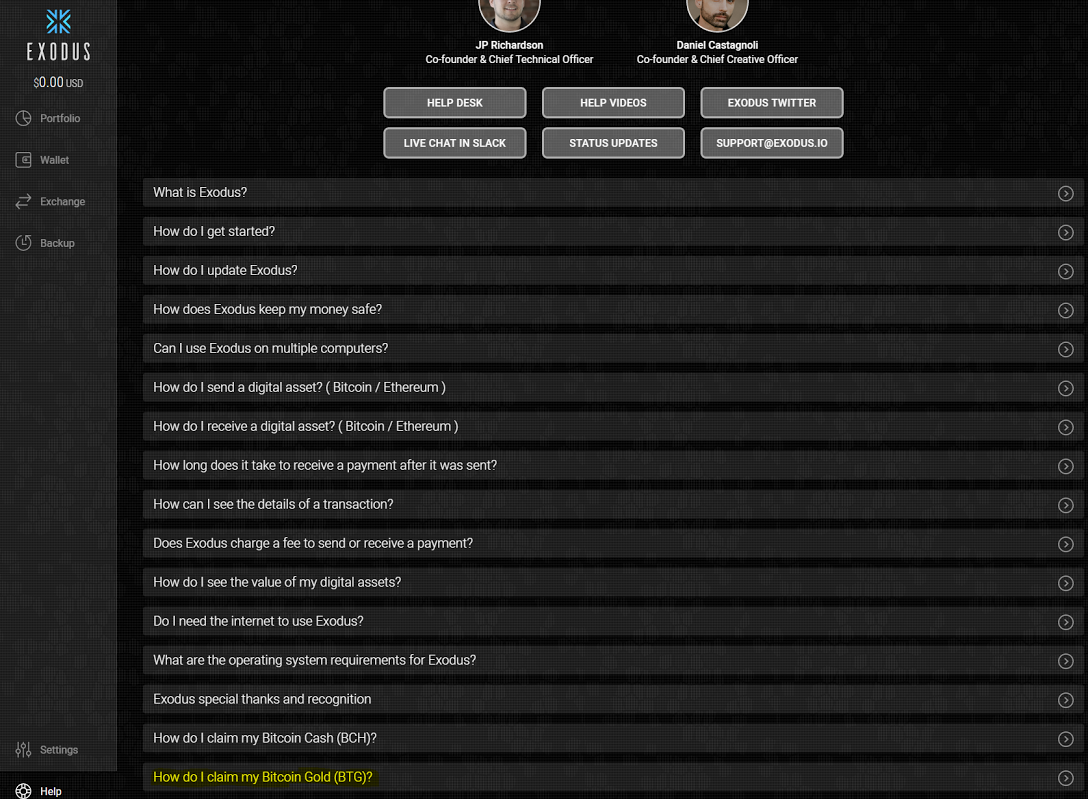 4. You will now see the following:  5. Click the Green Box "Claim my Bitcoin Gold NOW!" button 6. You will see the following: Click "Continue" 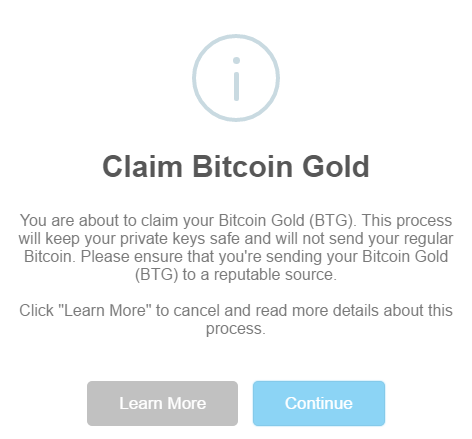 7. You will see the following: Click "Continue" NOTE!! your new Bitcoin Gold address will be auto-filled in the box below. Please be sure you are updated to the newest Exodus Wallet version 1.43.2 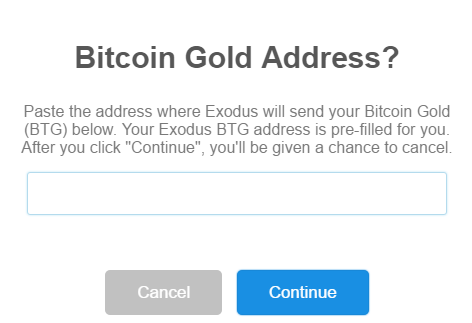 8. The following will be shown: Click " Check My Wallet Now" 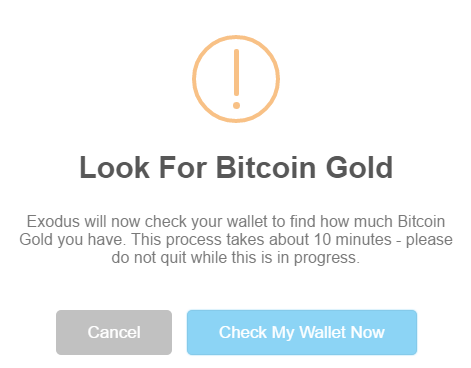 9. After searching you will see the following: Click "Send" 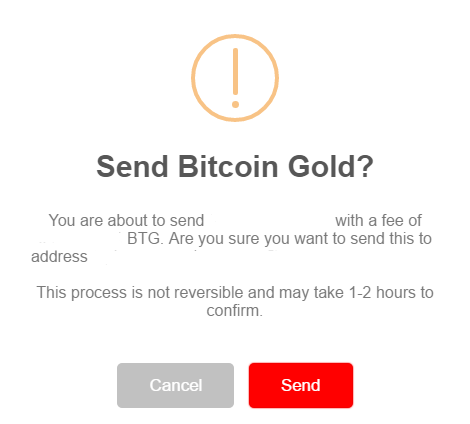 10. The following will show: 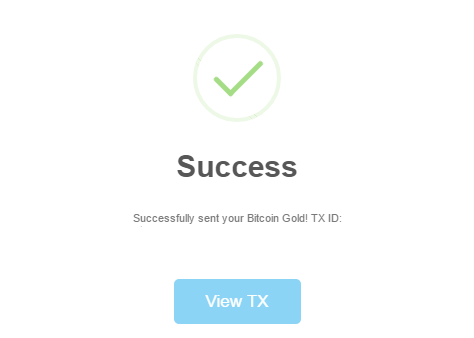 11. You can click on "View" or click on you new Bitcoin Wallet to see if you fund are there, if funds are not there please it time ( 1 - 2 hours ) to confirm. Enjoy!! |
| json metadata | {"tags":["exoduswallet","btg","bitcoingold","claim"],"image":["https://steemitimages.com/DQmY6sSGsLyamf2cFUJNGQ581ATX3LnK5x4KPypmyMypiDA/image.png","https://steemitimages.com/DQmUdEqRV4FPscn39tk2TFFdv66T7kpXqX8qnfoNtfh7dtP/image.png","https://steemitimages.com/DQmWo7h1Kf7cMcjgBfM6bttCbMiM28F27cpRKTAb6xX4D9m/image.png","https://steemitimages.com/DQmU5EERwSFWxtCQXU5QacNwYLQrH7cz3sJonvM8AaJo4Mi/image.png","https://steemitimages.com/DQmW4hshocSdzMBp6bXSKcpR4ux1ySUVKeQiZSZqzAw3Yhw/image.png","https://steemitimages.com/DQmQH6ZW9mpBZBSJiApTNxyqwhZFBnEV3ZaWxf6vAc4v22p/image.png","https://steemitimages.com/DQmeNVoKUDBGUE92hBp9AKrCimrcnn2dJUsPmyqQJcuds3j/image.png","https://steemitimages.com/DQmShC8cWoNF9szdY8yxmyvLkVP7NmCmojzNYdx1pTNHBnx/image.png"],"links":["https://www.exodus.io/releases/"],"app":"steemit/0.1","format":"markdown"} |
| Transaction Info | Block #19187596/Trx e68157ad665df020e19b529be7ac8babf7b725d3 |
View Raw JSON Data
{
"trx_id": "e68157ad665df020e19b529be7ac8babf7b725d3",
"block": 19187596,
"trx_in_block": 27,
"op_in_trx": 0,
"virtual_op": 0,
"timestamp": "2018-01-22T01:31:54",
"op": [
"comment",
{
"parent_author": "",
"parent_permlink": "exoduswallet",
"author": "houseofcrypto",
"permlink": "how-do-you-claim-your-bitcoin-gold-with-your-exodus-wallet",
"title": "How Do You Claim Your BITCOIN GOLD with your Exodus Wallet",
"body": "BEFORE STARTING PLEASE BE SURE TO CHECK IF YOUR ON THE LATEST VERSION 1.43.2. IF NOT PLEASE CLICK THIS LINK TO GET THE LATEST https://www.exodus.io/releases/\n\nYOU MUST HAVE HAD BITCOIN IN YOUR EXODUS WALLET BEFORE OCTOBER 24th TO CLAIM BITCOIN GOLD (BTG)\n \n\n\nHow Do You Claim Your BITCOIN GOLD with your Exodus Wallet\n\n1. Open your Exodus Wallet and Log in:\n\n2.On the left side of your Exodus Wallet scroll down and select \"Help\"\n \n\n\n3. The window to the rigtht will change to the Help Section, Scroll down until you see \" How do I claim my Bitcoin Gold (BTG)\" at the bottom of the list shown below: Click it...\n\n\n\n4. You will now see the following:\n\n\n\n5. Click the Green Box \"Claim my Bitcoin Gold NOW!\" button\n\n6. You will see the following: Click \"Continue\"\n\n\n\n7. You will see the following: Click \"Continue\" NOTE!! your new Bitcoin Gold address will be auto-filled in the box below. Please be sure you are updated to the newest Exodus Wallet version 1.43.2\n\n\n\n8. The following will be shown: Click \" Check My Wallet Now\"\n\n\n\n9. After searching you will see the following: Click \"Send\"\n\n\n\n10. The following will show:\n\n\n\n11. You can click on \"View\" or click on you new Bitcoin Wallet to see if you fund are there, if funds are not there please it time ( 1 - 2 hours ) to confirm. Enjoy!!",
"json_metadata": "{\"tags\":[\"exoduswallet\",\"btg\",\"bitcoingold\",\"claim\"],\"image\":[\"https://steemitimages.com/DQmY6sSGsLyamf2cFUJNGQ581ATX3LnK5x4KPypmyMypiDA/image.png\",\"https://steemitimages.com/DQmUdEqRV4FPscn39tk2TFFdv66T7kpXqX8qnfoNtfh7dtP/image.png\",\"https://steemitimages.com/DQmWo7h1Kf7cMcjgBfM6bttCbMiM28F27cpRKTAb6xX4D9m/image.png\",\"https://steemitimages.com/DQmU5EERwSFWxtCQXU5QacNwYLQrH7cz3sJonvM8AaJo4Mi/image.png\",\"https://steemitimages.com/DQmW4hshocSdzMBp6bXSKcpR4ux1ySUVKeQiZSZqzAw3Yhw/image.png\",\"https://steemitimages.com/DQmQH6ZW9mpBZBSJiApTNxyqwhZFBnEV3ZaWxf6vAc4v22p/image.png\",\"https://steemitimages.com/DQmeNVoKUDBGUE92hBp9AKrCimrcnn2dJUsPmyqQJcuds3j/image.png\",\"https://steemitimages.com/DQmShC8cWoNF9szdY8yxmyvLkVP7NmCmojzNYdx1pTNHBnx/image.png\"],\"links\":[\"https://www.exodus.io/releases/\"],\"app\":\"steemit/0.1\",\"format\":\"markdown\"}"
}
]
}houseofcryptoupdated their account properties2018/01/22 01:12:51
houseofcryptoupdated their account properties
2018/01/22 01:12:51
| account | houseofcrypto |
| posting | {"weight_threshold":1,"account_auths":[["dtube.app",1]],"key_auths":[["STM6mKkHRJ8MhU4abpD6egTu95yE2vKvtbbozpeU51m9qk4DSnk2w",1]]} |
| memo key | STM645ZdUpVU4bbXq8kwbxbPuhfGXZSwFv2GU2Uvi5bXcXH9yeTuP |
| json metadata | {"profile":{"name":"Hou$eofCrypto"}} |
| Transaction Info | Block #19187215/Trx e7f15836b3a3eeb21c948f9cac55a9c2a5bebdd2 |
View Raw JSON Data
{
  "trx_id": "e7f15836b3a3eeb21c948f9cac55a9c2a5bebdd2",
  "block": 19187215,
  "trx_in_block": 19,
  "op_in_trx": 0,
  "virtual_op": 0,
  "timestamp": "2018-01-22T01:12:51",
  "op": [
    "account_update",
    {
      "account": "houseofcrypto",
      "posting": {
        "weight_threshold": 1,
        "account_auths": [
          [
            "dtube.app",
            1
          ]
        ],
        "key_auths": [
          [
            "STM6mKkHRJ8MhU4abpD6egTu95yE2vKvtbbozpeU51m9qk4DSnk2w",
            1
          ]
        ]
      },
      "memo_key": "STM645ZdUpVU4bbXq8kwbxbPuhfGXZSwFv2GU2Uvi5bXcXH9yeTuP",
      "json_metadata": "{\"profile\":{\"name\":\"Hou$eofCrypto\"}}"
    }
  ]
}steemdelegated 0.000 SP to @houseofcrypto2018/01/09 06:39:24
steemdelegated 0.000 SP to @houseofcrypto
2018/01/09 06:39:24
| delegator | steem |
| delegatee | houseofcrypto |
| vesting shares | 0.000000 VESTS |
| Transaction Info | Block #18819587/Trx 6ad523374cc520efae8b7a6f4d5cd44b54257f49 |
View Raw JSON Data
{
  "trx_id": "6ad523374cc520efae8b7a6f4d5cd44b54257f49",
  "block": 18819587,
  "trx_in_block": 17,
  "op_in_trx": 0,
  "virtual_op": 0,
  "timestamp": "2018-01-09T06:39:24",
  "op": [
    "delegate_vesting_shares",
    {
      "delegator": "steem",
      "delegatee": "houseofcrypto",
      "vesting_shares": "0.000000 VESTS"
    }
  ]
}houseofcryptopublished a new post: storing-your-cnd-off-the-binance-exchange2018/01/05 07:32:36
houseofcryptopublished a new post: storing-your-cnd-off-the-binance-exchange
2018/01/05 07:32:36
| parent author | |
| parent permlink | cnd |
| author | houseofcrypto |
| permlink | storing-your-cnd-off-the-binance-exchange |
| title | Storing your CND off the Binance Exchange |
| body | There is no exception to the fact that exchanges can be compromised. One of the cardinal rules of crypto is to not store a vast majority of your coins on an exchange. Unfortunately, not all crypto can be moved. For this reason, I have made this tutorial on how to store your CND coin off the exchange for greater peace of mind. It also prevents you from making hasty decisions (like panic selling) and makes you more conducive to holding the coins for the long-run and sometimes short terms. CND is a token that runs on the Ethereum blockchain so it will work with many wallets. For this email. I’m going to show you how to store it using MyEtherWallet (MEW) because this is one of the most popular wallets. Controlling your Private Keys are the MOST important part of Crypto.. and this is why we take our coins off of the exchanges. Coins on the exchanges we do not control AT ALL.. So if the exchanges decide to pack their bags and skip town you will NO LONGER own your COINS... But if you move them somewhere you control your Private Keys, It does not matter if the site shuts down because you own the Private Keys, so you all ways have control no matter what. And remember never give your Private Keys to anyone including ME. NEVER!! How to setup MyEtherWallet and Send CND to it 1. Go to MyEtherWallet.com Warning: Many scam websites exist on the internet that trick you into giving up your private keys. The official MEW (My Ether Wallet) address ALWAYS ends in “.com” and scam websites end in different endings to trick you (like .co). Also the scam websites might be misspelled (e.g., MyEitherWallet) If you have a wallet on MEW already, scroll down to #2 If you’ve never setup a wallet before on it, it’s easy. Go to the website and the first page it shows you is what you need to create a wallet. All you do is enter a password (REMEMBER TO SAVE THIS PASSWORD) and then click “Create New Wallet.” Inline image 1 Then, click “Download your Keystore File” so that you could have that as a backup. Please back up this file to a thumb drive and put in a safe or safety deposit box.. better yet do BOTH. Serious I'm not joking Then click “I understand.” (You understand that if you lose this info/file you’re out of luck as in you lose EVERYTHING and there’s nobody that can retrieve your money/passwords/privatekeys.) You have been warned... Inline image 2 Then it will show your private key. Copy/paste this private key (and the password you used) into a plain text doc (use notepad.exe, keep it simple) for your own documentation. If you use your keystore file to unlock your wallet on MEW, you need your password to unlock it. If you input your private key, that’s all you need. Security: I recommend you put a copy of the keystore file on both your hard drive and a thumb drive so you have multiple locations. DO NOT save them to your dropbox/gdrive or any other online storage. I also save the password on a text document and zip the whole folder up and protect it with a password.Make it a habit to always use a different password that is unique from any other password. I use LastPass as my password manager to generate strong passwords and save my passwords. It's recommended you physically print or write down the private key as an extra measure and keep that in a fire-proof-safe in a fire-safe pouch in your house. (Or a safe deposit box in the bank but eww, banks). I do this procedure for ALL my crypto wallets. Also, write your passwords down on these papers so in the case something happens to you, your loved ones don't have to search high and low for them but only the documents in the safety deposit box. DONT NOT SKIP THIS PART. Inline image 3 2) Unlock your wallet using your credentials you have saved. You can use your keystore file AND password to unlock it OR just your private key. 3) Click Add Custom Token 4) Enter the following information: CNDContract Address: 0xd4c435f5b09f855c3317c8524cb1f586e42795fa Token Symbol: CND Token Decimals: 18 Click Save Inline image 2 5) Now you’re setup to send CND from Binance to MEW by going to Binance.com -> Funds -> Withdrawal/Deposits -> Click Withdrawal next to CND (first line, last button). 6. Enter your MEW account address and for the “Label” put a name you want to give it such as “MEW.” (The label has nothing to do with sending it, the label is just a name you give it so Binance saves the address for future withdrawals under that label/name.) This is your address on MyEtherWallet and it should look like something above. (NOTE the picture above is not your address). Copy Paste this into Binance. Inline image 1This is how your withdrawal form should look. Warning: Do a test send first. Send a small amount such as only 400 CND before you send a large amount to make sure it works! Caution: Withdrawing CND costs 180 CND so be very aware of that. After your test-send, withdraw it in one lump sum to save money, especially if you don’t plan to use it heavily for covering transaction fees or funding ICOs. 7) Click Submit, enter your 2FA and finally, confirm your withdrawal request by checking your e-mail. Crucial: If you don’t have 2FA setup on Binance, set that up right now for ALL exchanges and your e-mail accounts. 8) Then if you click on Funds -> History and you could see the status under withdrawal history. Instead of BNB it will show CND After 10-15 minutes, the transaction will be completed and show a TxID which you could copy/paste into EtherScan.io to see the details of the transaction on the blockchain. Go to MyEtherWallet and you should see your CND. How to send CND from MyEtherWallet to Binance Click here to expand After you send CND from Binance into MEW, doing it the other way around is easier but you need Ethereum in your wallet to power the transaction. You need some ETH in your MEW to send CND otherwise it will say there is not enough “gas” to do the transaction. If you have CND but not ETH, go to the CND/ETH pair on Binance. Sell some CND (2 CND is enough as of this publication where 1 CND is $2.50) and it will become ETH. Then, send that ETH from Binance to MEW the same way as you sent CND to it before. The transaction should take only 5-10 minutes to complete if the Ethereum network is not bogged down. Now you will have the gas to send CND back to Binance. 1) Go to MyEtherWallet and click “Send Ether & Tokens” and input your keystore file and password or private key to decrypt your wallet. 2) Go to Binance.com -> Funds -> Deposits & Withdrawals -> Click Deposit next to CND and then click “Copy Address.” 3) Go back to MyEtherWallet and paste this address in the “To Address.” Enter the Amount and choose CND. An example of sending 180 CND back to Binance for a test. Warning: Do a test send first. Send a small amount such as only 180 CND before you send a large amount to make sure it works! 4) Click “Generate Transaction” and then “Send Transaction” and then “Yes, I am Sure! Make transaction.” (After you double check everything.) Voila! In 10 minutes you should receive the CND on Binance. Hope that was helpful for you. Web wallets are very convenient and easy. Another safe alternative is a hardware wallet such as a Satoshi Labs Trezor or a Ledger Nano S, which MyEtherWallet supports as well. By the links I gave you to those are direct listings to the manufacturers themselves on Amazon. NEVER buy a hardware wallet, even if it’s a Trezor or Ledger, from a third party seller, even if it’s on Amazon. They can internally manipulate the chip and make it such that they have access to your keys so ONLY buy from the manufacturer. Stay safe out there folks! |
| json metadata | {"tags":["cnd","mew","myetherwallet","binance"],"app":"steemit/0.1","format":"markdown"} |
| Transaction Info | Block #18705575/Trx 13e2531593bf6dce46ace984164d82379518c99c |
View Raw JSON Data
{
  "trx_id": "13e2531593bf6dce46ace984164d82379518c99c",
  "block": 18705575,
  "trx_in_block": 1,
  "op_in_trx": 0,
  "virtual_op": 0,
  "timestamp": "2018-01-05T07:32:36",
  "op": [
    "comment",
    {
      "parent_author": "",
      "parent_permlink": "cnd",
      "author": "houseofcrypto",
      "permlink": "storing-your-cnd-off-the-binance-exchange",
      "title": "Storing your CND off the Binance Exchange",
      "body": "There is no exception to the fact that exchanges can be compromised. One of the cardinal rules of crypto is to not store a vast majority of your coins on an exchange. Unfortunately, not all crypto can be moved. For this reason, I have made this tutorial on how to store your CND coin off the exchange for greater peace of mind. It also prevents you from making hasty decisions (like panic selling) and makes you more conducive to holding the coins for the long-run and sometimes short terms.\n\nCND is a token that runs on the Ethereum blockchain so it will work with many wallets. For this email. I’m going to show you how to store it using MyEtherWallet (MEW) because this is one of the most popular wallets.\n\nControlling your Private Keys are the MOST important part of Crypto.. and this is why we take our coins off of the exchanges. Coins on the exchanges we do not control AT ALL.. So if the exchanges decide to pack their bags and skip town you will NO LONGER own your COINS...\n\nBut if you move them somewhere you control your Private Keys, It does not matter if the site shuts down because you own the Private Keys, so you all ways have control no matter what.\n\nAnd remember never give your Private Keys to anyone including ME. NEVER!!\n\n\n\nHow to setup MyEtherWallet and Send CND to it\n1. Go to MyEtherWallet.com\n\nWarning: Many scam websites exist on the internet that trick you into giving up your private keys. The official MEW (My Ether Wallet) address ALWAYS ends in “.com” and scam websites end in different endings to trick you (like .co). Also the scam websites might be misspelled (e.g., MyEitherWallet)\nIf you have a wallet on MEW already, scroll down to #2\n\nIf you’ve never setup a wallet before on it, it’s easy. Go to the website and the first page it shows you is what you need to create a wallet. All you do is enter a password (REMEMBER TO SAVE THIS PASSWORD) and then click “Create New Wallet.”\nInline image 1\nThen, click “Download your Keystore File” so that you could have that as a backup. Please back up this file to a thumb drive and put in a safe or safety deposit box.. better yet do BOTH. Serious I'm not joking  Then click “I understand.” (You understand that if you lose this info/file you’re out of luck as in you lose EVERYTHING and there’s nobody that can retrieve your money/passwords/privatekeys.) You have been warned...\nInline image 2\n\nThen it will show your private key. Copy/paste this private key (and the password you used) into a plain text doc (use notepad.exe, keep it simple) for your own documentation.\nIf you use your keystore file to unlock your wallet on MEW, you need your password to unlock it. If you input your private key, that’s all you need.\nSecurity: I recommend you put a copy of the keystore file on both your hard drive and a thumb drive so you have multiple locations. DO NOT save them to your dropbox/gdrive or any other online storage. I also save the password on a text document and zip the whole folder up and protect it with a password.Make it a habit to always use a different password that is unique from any other password.   I use LastPass as my password manager to generate strong passwords and save my passwords.\nIt's recommended you physically print or write down the private key as an extra measure and keep that in a fire-proof-safe in a fire-safe pouch in your house. (Or a safe deposit box in the bank but eww, banks). I do this procedure for ALL my crypto wallets. Also, write your passwords down on these papers so in the case something happens to you, your loved ones don't have to search high and low for them but only the documents in the safety deposit box. DONT NOT SKIP THIS PART.\n\nInline image 3\n2) Unlock your wallet using your credentials you have saved. You can use your keystore file AND password to unlock it OR just your private key.\n\n3) Click Add Custom Token\n\n\n\n\n\n4) Enter the following information:\n\nCNDContract Address: 0xd4c435f5b09f855c3317c8524cb1f586e42795fa\nToken Symbol: CND\nToken Decimals: 18\nClick Save\nInline image 2\n\n5) Now you’re setup to send CND from Binance to MEW by going to Binance.com -> Funds -> Withdrawal/Deposits -> Click Withdrawal next to CND (first line, last button).\n\n\n6. Enter your MEW account address and for the “Label” put a name you want to give it such as “MEW.” (The label has nothing to do with sending it, the label is just a name you give it so Binance saves the address for future withdrawals under that label/name.)\n\n\nThis is your address on MyEtherWallet and it should look like something above. (NOTE the picture above is not your address). Copy Paste this into Binance.\n\nInline image 1This is how your withdrawal form should look.\nWarning: Do a test send first. Send a small amount such as only 400 CND before you send a large amount to make sure it works!\nCaution: Withdrawing CND costs 180 CND so be very aware of that. After your test-send, withdraw it in one lump sum to save money, especially if you don’t plan to use it heavily for covering transaction fees or funding ICOs.\n7) Click Submit, enter your 2FA and finally, confirm your withdrawal request by checking your e-mail.\n\nCrucial: If you don’t have 2FA setup on Binance, set that up right now for ALL exchanges and your e-mail accounts.\n8) Then if you click on Funds -> History and you could see the status under withdrawal history.\n\n\n\nInstead of BNB it will show CND\n\nAfter 10-15 minutes, the transaction will be completed and show a TxID which you could copy/paste into EtherScan.io to see the details of the transaction on the blockchain.\n\n\nGo to MyEtherWallet and you should see your CND.\nHow to send CND from MyEtherWallet to Binance\nClick here to expand\nAfter you send CND from Binance into MEW, doing it the other way around is easier but you need Ethereum in your wallet to power the transaction.\n\n\nYou need some ETH in your MEW to send CND otherwise it will say there is not enough “gas” to do the transaction.\nIf you have CND but not ETH, go to the CND/ETH pair on Binance. Sell some CND (2 CND is enough as of this publication where 1 CND is $2.50) and it will become ETH. Then, send that ETH from Binance to MEW the same way as you sent CND to it before. The transaction should take only 5-10 minutes to complete if the Ethereum network is not bogged down. Now you will have the gas to send CND back to Binance.\n1) Go to MyEtherWallet and click “Send Ether & Tokens” and input your keystore file and password or private key to decrypt your wallet.\n\n2) Go to Binance.com -> Funds -> Deposits & Withdrawals -> Click Deposit next to CND and then click “Copy Address.”\n\n3) Go back to MyEtherWallet and paste this address in the “To Address.” Enter the Amount and choose CND.\n\n\nAn example of sending 180 CND back to Binance for a test.\nWarning: Do a test send first. Send a small amount such as only 180 CND  before you send a large amount to make sure it works!\n4) Click “Generate Transaction” and then “Send Transaction” and then “Yes, I am Sure! Make transaction.” (After you double check everything.)\n\nVoila! In 10 minutes you should receive the CND on Binance.\n\nHope that was helpful for you. Web wallets are very convenient and easy. Another safe alternative is a hardware wallet such as a Satoshi Labs Trezor or a Ledger Nano S, which MyEtherWallet supports as well. By the links I gave you to those are direct listings to the manufacturers themselves on Amazon. NEVER buy a hardware wallet, even if it’s a Trezor or Ledger, from a third party seller, even if it’s on Amazon. They can internally manipulate the chip and make it such that they have access to your keys so ONLY buy from the manufacturer. Stay safe out there folks!",
      "json_metadata": "{\"tags\":[\"cnd\",\"mew\",\"myetherwallet\",\"binance\"],\"app\":\"steemit/0.1\",\"format\":\"markdown\"}"
    }
  ]
}blocktradespowered up 206.618 STEEM to @houseofcrypto2017/11/24 04:58:00
blocktradespowered up 206.618 STEEM to @houseofcrypto
2017/11/24 04:58:00
| from | blocktrades |
| to | houseofcrypto |
| amount | 206.618 STEEM |
| Transaction Info | Block #17493584/Trx 9c4edb97c9084400655cd7d4e300504c454efdee |
View Raw JSON Data
{
  "trx_id": "9c4edb97c9084400655cd7d4e300504c454efdee",
  "block": 17493584,
  "trx_in_block": 23,
  "op_in_trx": 0,
  "virtual_op": 0,
  "timestamp": "2017-11-24T04:58:00",
  "op": [
    "transfer_to_vesting",
    {
      "from": "blocktrades",
      "to": "houseofcrypto",
      "amount": "206.618 STEEM"
    }
  ]
}houseofcryptoupdated their account properties2017/11/24 04:55:06
houseofcryptoupdated their account properties
2017/11/24 04:55:06
| account | houseofcrypto |
| memo key | STM645ZdUpVU4bbXq8kwbxbPuhfGXZSwFv2GU2Uvi5bXcXH9yeTuP |
| json metadata | {"profile":{"name":"Hou$eofCrypto"}} |
| Transaction Info | Block #17493526/Trx 8fe88aaf5341c242a30acb0d17a92c1585f6c521 |
View Raw JSON Data
{
  "trx_id": "8fe88aaf5341c242a30acb0d17a92c1585f6c521",
  "block": 17493526,
  "trx_in_block": 14,
  "op_in_trx": 0,
  "virtual_op": 0,
  "timestamp": "2017-11-24T04:55:06",
  "op": [
    "account_update",
    {
      "account": "houseofcrypto",
      "memo_key": "STM645ZdUpVU4bbXq8kwbxbPuhfGXZSwFv2GU2Uvi5bXcXH9yeTuP",
      "json_metadata": "{\"profile\":{\"name\":\"Hou$eofCrypto\"}}"
    }
  ]
}steemcreated a new account: @houseofcrypto2017/11/23 11:33:45
steemcreated a new account: @houseofcrypto
2017/11/23 11:33:45
| fee | 0.500 STEEM |
| delegation | 57000.000000 VESTS |
| creator | steem |
| new account name | houseofcrypto |
| owner | {"weight_threshold":1,"account_auths":[],"key_auths":[["STM8fYuY5KkGm5iRSmTK8UUyAFPJrGMtdGZCLBstGsMQb59h8vV9w",1]]} |
| active | {"weight_threshold":1,"account_auths":[],"key_auths":[["STM6uPmHuYqXeWDT36Tp5BRoU7JvH6yMZdBBt4Cjs1QpVBtXLpyqu",1]]} |
| posting | {"weight_threshold":1,"account_auths":[],"key_auths":[["STM6mKkHRJ8MhU4abpD6egTu95yE2vKvtbbozpeU51m9qk4DSnk2w",1]]} |
| memo key | STM645ZdUpVU4bbXq8kwbxbPuhfGXZSwFv2GU2Uvi5bXcXH9yeTuP |
| json metadata | |
| extensions | [] |
| Transaction Info | Block #17472707/Trx 4dc745ebdf3a60d2a9ca2d1cb8c4419055e05919 |
View Raw JSON Data
{
  "trx_id": "4dc745ebdf3a60d2a9ca2d1cb8c4419055e05919",
  "block": 17472707,
  "trx_in_block": 7,
  "op_in_trx": 0,
  "virtual_op": 0,
  "timestamp": "2017-11-23T11:33:45",
  "op": [
    "account_create_with_delegation",
    {
      "fee": "0.500 STEEM",
      "delegation": "57000.000000 VESTS",
      "creator": "steem",
      "new_account_name": "houseofcrypto",
      "owner": {
        "weight_threshold": 1,
        "account_auths": [],
        "key_auths": [
          [
            "STM8fYuY5KkGm5iRSmTK8UUyAFPJrGMtdGZCLBstGsMQb59h8vV9w",
            1
          ]
        ]
      },
      "active": {
        "weight_threshold": 1,
        "account_auths": [],
        "key_auths": [
          [
            "STM6uPmHuYqXeWDT36Tp5BRoU7JvH6yMZdBBt4Cjs1QpVBtXLpyqu",
            1
          ]
        ]
      },
      "posting": {
        "weight_threshold": 1,
        "account_auths": [],
        "key_auths": [
          [
            "STM6mKkHRJ8MhU4abpD6egTu95yE2vKvtbbozpeU51m9qk4DSnk2w",
            1
          ]
        ]
      },
      "memo_key": "STM645ZdUpVU4bbXq8kwbxbPuhfGXZSwFv2GU2Uvi5bXcXH9yeTuP",
      "json_metadata": "",
      "extensions": []
    }
  ]
}Manabar
Voting Power100.00%
Downvote Power100.00%
Resource Credits100.00%
Reputation Progress0.00%
{
  "voting_manabar": {
    "current_mana": 9800,
    "last_update_time": 1516584714
  },
  "downvote_manabar": {
    "current_mana": 0,
    "last_update_time": 1511436825
  },
  "rc_account": {
    "account": "houseofcrypto",
    "rc_manabar": {
      "current_mana": "427266532752",
      "last_update_time": 1537887600
    },
    "max_rc_creation_adjustment": {
      "amount": "2020748973",
      "precision": 6,
      "nai": "@@000000037"
    },
    "max_rc": "427266532752"
  }
}
Account Metadata
| POSTING JSON METADATA | |
| profile | {"name":"Hou$eofCrypto"} |
| JSON METADATA | |
| profile | {"name":"Hou$eofCrypto"} |
{
  "posting_json_metadata": {
    "profile": {
      "name": "Hou$eofCrypto"
    }
  },
  "json_metadata": {
    "profile": {
      "name": "Hou$eofCrypto"
    }
  }
}
Auth Keys
Owner
Single Signature
Public Keys
STM8fYuY5KkGm5iRSmTK8UUyAFPJrGMtdGZCLBstGsMQb59h8vV9w1/1
Active
Single Signature
Public Keys
STM6uPmHuYqXeWDT36Tp5BRoU7JvH6yMZdBBt4Cjs1QpVBtXLpyqu1/1
Posting
Single Signature
Public Keys
STM6mKkHRJ8MhU4abpD6egTu95yE2vKvtbbozpeU51m9qk4DSnk2w1/1
App Permissions
@dtube.app1/1
Memo
STM645ZdUpVU4bbXq8kwbxbPuhfGXZSwFv2GU2Uvi5bXcXH9yeTuP
{
  "owner": {
    "weight_threshold": 1,
    "account_auths": [],
    "key_auths": [
      [
        "STM8fYuY5KkGm5iRSmTK8UUyAFPJrGMtdGZCLBstGsMQb59h8vV9w",
        1
      ]
    ]
  },
  "active": {
    "weight_threshold": 1,
    "account_auths": [],
    "key_auths": [
      [
        "STM6uPmHuYqXeWDT36Tp5BRoU7JvH6yMZdBBt4Cjs1QpVBtXLpyqu",
        1
      ]
    ]
  },
  "posting": {
    "weight_threshold": 1,
    "account_auths": [
      [
        "dtube.app",
        1
      ]
    ],
    "key_auths": [
      [
        "STM6mKkHRJ8MhU4abpD6egTu95yE2vKvtbbozpeU51m9qk4DSnk2w",
        1
      ]
    ]
  },
  "memo": "STM645ZdUpVU4bbXq8kwbxbPuhfGXZSwFv2GU2Uvi5bXcXH9yeTuP"
}
Witness Votes
0 / 30
No active witness votes.
[]