

VOTING POWER100.00%
DOWNVOTE POWER100.00%
RESOURCE CREDITS100.00%
REPUTATION PROGRESS4.99%
Net Worth
1.660USD
STEEM
0.001STEEM
SBD
0.866SBD
Own SP
22.919SP
Detailed Balance
| STEEM | ||
| balance | 0.001STEEM | STEEM |
| market_balance | 0.000STEEM | STEEM |
| savings_balance | 0.000STEEM | STEEM |
| reward_steem_balance | 0.000STEEM | STEEM |
| STEEM POWER | ||
| Own SP | 22.919SP | SP |
| Delegated Out | 0.000SP | SP |
| Delegation In | 0.000SP | SP |
| Effective Power | 22.919SP | SP |
| Reward SP (pending) | 0.208SP | SP |
| SBD | ||
| sbd_balance | 0.056SBD | SBD |
| sbd_conversions | 0.000SBD | SBD |
| sbd_market_balance | 0.000SBD | SBD |
| savings_sbd_balance | 0.000SBD | SBD |
| reward_sbd_balance | 0.810SBD | SBD |
{
  "balance": "0.001 STEEM",
  "savings_balance": "0.000 STEEM",
  "reward_steem_balance": "0.000 STEEM",
  "vesting_shares": "37319.819034 VESTS",
  "delegated_vesting_shares": "0.000000 VESTS",
  "received_vesting_shares": "0.000000 VESTS",
  "sbd_balance": "0.056 SBD",
  "savings_sbd_balance": "0.000 SBD",
  "reward_sbd_balance": "0.810 SBD",
  "conversions": []
}
Account Info
| name | holudghuri |
| id | 333906 |
| rank | 71,593 |
| reputation | 364001974088 |
| created | 2017-08-25T18:32:51 |
| recovery_account | steem |
| proxy | None |
| post_count | 55 |
| comment_count | 0 |
| lifetime_vote_count | 0 |
| witnesses_voted_for | 0 |
| last_post | 2018-03-01T14:22:39 |
| last_root_post | 2018-03-01T14:22:39 |
| last_vote_time | 2018-02-15T01:56:03 |
| proxied_vsf_votes | 0, 0, 0, 0 |
| can_vote | 1 |
| voting_power | 9,604 |
| delayed_votes | 0 |
| balance | 0.001 STEEM |
| savings_balance | 0.000 STEEM |
| sbd_balance | 0.056 SBD |
| savings_sbd_balance | 0.000 SBD |
| vesting_shares | 37319.819034 VESTS |
| delegated_vesting_shares | 0.000000 VESTS |
| received_vesting_shares | 0.000000 VESTS |
| reward_vesting_balance | 425.218008 VESTS |
| vesting_balance | 0.000 STEEM |
| vesting_withdraw_rate | 0.000000 VESTS |
| next_vesting_withdrawal | 1969-12-31T23:59:59 |
| withdrawn | 0 |
| to_withdraw | 0 |
| withdraw_routes | 0 |
| savings_withdraw_requests | 0 |
| last_account_recovery | 1970-01-01T00:00:00 |
| reset_account | null |
| last_owner_update | 1970-01-01T00:00:00 |
| last_account_update | 2018-01-29T15:46:12 |
| mined | No |
| sbd_seconds | 1,920,219,840 |
| sbd_last_interest_payment | 2018-01-22T18:11:51 |
| savings_sbd_last_interest_payment | 1970-01-01T00:00:00 |
{
  "id": 333906,
  "name": "holudghuri",
  "owner": {
    "weight_threshold": 1,
    "account_auths": [],
    "key_auths": [
      [
        "STM5TAxygjMdXNTHmsPi8RAYxEcyJ7ZC42SocJ1QUSWiPcWBFUShh",
        1
      ]
    ]
  },
  "active": {
    "weight_threshold": 1,
    "account_auths": [],
    "key_auths": [
      [
        "STM6jdXKmWL2oQXW8VZZ3xpZi3ivokAaSAQzmyAG7N2WhxrdAi3iw",
        1
      ]
    ]
  },
  "posting": {
    "weight_threshold": 1,
    "account_auths": [
      [
        "busy.app",
        1
      ],
      [
        "dmania.app",
        1
      ],
      [
        "utopian.app",
        1
      ]
    ],
    "key_auths": [
      [
        "STM7oCSwsTpDhPxiMjGuDiMAnSeCWQZ9StQN7TtsVE4Lb7Ansgz9R",
        1
      ]
    ]
  },
  "memo_key": "STM7qgTduzkAgvw4X4VEkAGMZjsaEZtAMwsHqTqVhmHrs7qfKoQf9",
  "json_metadata": "{\"profile\":{\"profile_image\":\"https://scontent.fccu4-1.fna.fbcdn.net/v/t1.0-9/18740057_10208064316719440_8847351601194015927_n.jpg?oh=a43ba61c6ff81dd5d0d49a8f873cdea0&oe=5A29FFC8\",\"cover_image\":\"https://scontent.fccu4-1.fna.fbcdn.net/v/t1.0-0/p206x206/424831_3767512600095_357169424_n.jpg?oh=238cc56b0b677eb090b306c68a8f3ebf&oe=5A325F33\",\"name\":\"Sam\",\"location\":\"Kolkata, INDIA\"}}",
  "posting_json_metadata": "{\"profile\":{\"profile_image\":\"https://scontent.fccu4-1.fna.fbcdn.net/v/t1.0-9/18740057_10208064316719440_8847351601194015927_n.jpg?oh=a43ba61c6ff81dd5d0d49a8f873cdea0&oe=5A29FFC8\",\"cover_image\":\"https://scontent.fccu4-1.fna.fbcdn.net/v/t1.0-0/p206x206/424831_3767512600095_357169424_n.jpg?oh=238cc56b0b677eb090b306c68a8f3ebf&oe=5A325F33\",\"name\":\"Sam\",\"location\":\"Kolkata, INDIA\"}}",
  "proxy": "",
  "last_owner_update": "1970-01-01T00:00:00",
  "last_account_update": "2018-01-29T15:46:12",
  "created": "2017-08-25T18:32:51",
  "mined": false,
  "recovery_account": "steem",
  "last_account_recovery": "1970-01-01T00:00:00",
  "reset_account": "null",
  "comment_count": 0,
  "lifetime_vote_count": 0,
  "post_count": 55,
  "can_vote": true,
  "voting_manabar": {
    "current_mana": 9604,
    "last_update_time": 1518659763
  },
  "downvote_manabar": {
    "current_mana": 0,
    "last_update_time": 1503685971
  },
  "voting_power": 9604,
  "balance": "0.001 STEEM",
  "savings_balance": "0.000 STEEM",
  "sbd_balance": "0.056 SBD",
  "sbd_seconds": "1920219840",
  "sbd_seconds_last_update": "2018-01-31T17:48:27",
  "sbd_last_interest_payment": "2018-01-22T18:11:51",
  "savings_sbd_balance": "0.000 SBD",
  "savings_sbd_seconds": "0",
  "savings_sbd_seconds_last_update": "1970-01-01T00:00:00",
  "savings_sbd_last_interest_payment": "1970-01-01T00:00:00",
  "savings_withdraw_requests": 0,
  "reward_sbd_balance": "0.810 SBD",
  "reward_steem_balance": "0.000 STEEM",
  "reward_vesting_balance": "425.218008 VESTS",
  "reward_vesting_steem": "0.208 STEEM",
  "vesting_shares": "37319.819034 VESTS",
  "delegated_vesting_shares": "0.000000 VESTS",
  "received_vesting_shares": "0.000000 VESTS",
  "vesting_withdraw_rate": "0.000000 VESTS",
  "next_vesting_withdrawal": "1969-12-31T23:59:59",
  "withdrawn": 0,
  "to_withdraw": 0,
  "withdraw_routes": 0,
  "curation_rewards": 35,
  "posting_rewards": 30676,
  "proxied_vsf_votes": [
    0,
    0,
    0,
    0
  ],
  "witnesses_voted_for": 0,
  "last_post": "2018-03-01T14:22:39",
  "last_root_post": "2018-03-01T14:22:39",
  "last_vote_time": "2018-02-15T01:56:03",
  "post_bandwidth": 0,
  "pending_claimed_accounts": 0,
  "vesting_balance": "0.000 STEEM",
  "reputation": "364001974088",
  "transfer_history": [],
  "market_history": [],
  "post_history": [],
  "vote_history": [],
  "other_history": [],
  "witness_votes": [],
  "tags_usage": [],
  "guest_bloggers": [],
  "rank": 71593
}
Withdraw Routes
| Incoming | Outgoing |
|---|---|
Empty | Empty |
{
  "incoming": [],
  "outgoing": []
}From Date
To Date
2019/08/25 19:40:39
2019/08/25 19:40:39
| parent author | holudghuri |
| parent permlink | today-is-dol-purnima-our-holi-8662c0e5d72ae |
| author | steemitboard |
| permlink | steemitboard-notify-holudghuri-20190825t194039000z |
| title | |
| body | Congratulations @holudghuri! You received a personal award! <table><tr><td>https://steemitimages.com/70x70/http://steemitboard.com/@holudghuri/birthday2.png</td><td>Happy Birthday! - You are on the Steem blockchain for 2 years!</td></tr></table> <sub>_You can view [your badges on your Steem Board](https://steemitboard.com/@holudghuri) and compare to others on the [Steem Ranking](https://steemitboard.com/ranking/index.php?name=holudghuri)_</sub> ###### [Vote for @Steemitboard as a witness](https://v2.steemconnect.com/sign/account-witness-vote?witness=steemitboard&approve=1) to get one more award and increased upvotes! |
| json metadata | {"image":["https://steemitboard.com/img/notify.png"]} |
| Transaction Info | Block #35869884/Trx 2fce83bf14201c3439f88f377c82ab672dd989e2 |
View Raw JSON Data
{
  "trx_id": "2fce83bf14201c3439f88f377c82ab672dd989e2",
  "block": 35869884,
  "trx_in_block": 10,
  "op_in_trx": 0,
  "virtual_op": 0,
  "timestamp": "2019-08-25T19:40:39",
  "op": [
    "comment",
    {
      "parent_author": "holudghuri",
      "parent_permlink": "today-is-dol-purnima-our-holi-8662c0e5d72ae",
      "author": "steemitboard",
      "permlink": "steemitboard-notify-holudghuri-20190825t194039000z",
      "title": "",
      "body": "Congratulations @holudghuri! You received a personal award!\n\n<table><tr><td>https://steemitimages.com/70x70/http://steemitboard.com/@holudghuri/birthday2.png</td><td>Happy Birthday! - You are on the Steem blockchain for 2 years!</td></tr></table>\n\n<sub>_You can view [your badges on your Steem Board](https://steemitboard.com/@holudghuri) and compare to others on the [Steem Ranking](https://steemitboard.com/ranking/index.php?name=holudghuri)_</sub>\n\n\n###### [Vote for @Steemitboard as a witness](https://v2.steemconnect.com/sign/account-witness-vote?witness=steemitboard&approve=1) to get one more award and increased upvotes!",
      "json_metadata": "{\"image\":[\"https://steemitboard.com/img/notify.png\"]}"
    }
  ]
}2019/04/26 06:09:36
2019/04/26 06:09:36
| parent author | holudghuri |
| parent permlink | the-mask-festival-at-kolkata |
| author | mamalikh13 |
| permlink | re-holudghuri-the-mask-festival-at-kolkata-20190426t060933615z |
| title | |
| body | We wear them everyday! Meeting people and dealing with friends. We have a particular mask for each friend we have hehe :) |
| json metadata | {"tags":["art"],"app":"steemit/0.1"} |
| Transaction Info | Block #32374460/Trx a12ab9129d1773c20100b512d5c3124d31a2a0ec |
View Raw JSON Data
{
  "trx_id": "a12ab9129d1773c20100b512d5c3124d31a2a0ec",
  "block": 32374460,
  "trx_in_block": 23,
  "op_in_trx": 0,
  "virtual_op": 0,
  "timestamp": "2019-04-26T06:09:36",
  "op": [
    "comment",
    {
      "parent_author": "holudghuri",
      "parent_permlink": "the-mask-festival-at-kolkata",
      "author": "mamalikh13",
      "permlink": "re-holudghuri-the-mask-festival-at-kolkata-20190426t060933615z",
      "title": "",
      "body": "We wear them everyday!\nMeeting people and dealing with friends.\nWe have a particular mask for each friend we have hehe :)",
      "json_metadata": "{\"tags\":[\"art\"],\"app\":\"steemit/0.1\"}"
    }
  ]
}2018/08/25 20:35:09
2018/08/25 20:35:09
| parent author | holudghuri |
| parent permlink | today-is-dol-purnima-our-holi-8662c0e5d72ae |
| author | steemitboard |
| permlink | steemitboard-notify-holudghuri-20180825t203511000z |
| title | |
| body | Congratulations @holudghuri! You have received a personal award! [](http://steemitboard.com/@holudghuri) 1 Year on Steemit <sub>_Click on the badge to view your Board of Honor._</sub> **Do not miss the last post from @steemitboard:** [SteemitBoard and the Veterans on Steemit - The First Community Badge.](https://steemit.com/veterans/@steemitboard/steemitboard-and-the-veterans-on-steemit-the-first-community-badge) > Do you like [SteemitBoard's project](https://steemit.com/@steemitboard)? Then **[Vote for its witness](https://v2.steemconnect.com/sign/account-witness-vote?witness=steemitboard&approve=1)** and **get one more award**! |
| json metadata | {"image":["https://steemitboard.com/img/notify.png"]} |
| Transaction Info | Block #25386685/Trx e284ac20449aad7857831d62d202f5a377b76f3c |
View Raw JSON Data
{
"trx_id": "e284ac20449aad7857831d62d202f5a377b76f3c",
"block": 25386685,
"trx_in_block": 24,
"op_in_trx": 0,
"virtual_op": 0,
"timestamp": "2018-08-25T20:35:09",
"op": [
"comment",
{
"parent_author": "holudghuri",
"parent_permlink": "today-is-dol-purnima-our-holi-8662c0e5d72ae",
"author": "steemitboard",
"permlink": "steemitboard-notify-holudghuri-20180825t203511000z",
"title": "",
"body": "Congratulations @holudghuri! You have received a personal award!\n\n[](http://steemitboard.com/@holudghuri) 1 Year on Steemit\n<sub>_Click on the badge to view your Board of Honor._</sub>\n\n\n**Do not miss the last post from @steemitboard:**\n[SteemitBoard and the Veterans on Steemit - The First Community Badge.](https://steemit.com/veterans/@steemitboard/steemitboard-and-the-veterans-on-steemit-the-first-community-badge)\n\n> Do you like [SteemitBoard's project](https://steemit.com/@steemitboard)? Then **[Vote for its witness](https://v2.steemconnect.com/sign/account-witness-vote?witness=steemitboard&approve=1)** and **get one more award**!",
"json_metadata": "{\"image\":[\"https://steemitboard.com/img/notify.png\"]}"
}
]
}magia.cincoupvoted (100.00%) @holudghuri / today-is-dol-purnima-our-holi-8662c0e5d72ae2018/03/07 05:48:06
magia.cincoupvoted (100.00%) @holudghuri / today-is-dol-purnima-our-holi-8662c0e5d72ae
2018/03/07 05:48:06
| voter | magia.cinco |
| author | holudghuri |
| permlink | today-is-dol-purnima-our-holi-8662c0e5d72ae |
| weight | 10000 (100.00%) |
| Transaction Info | Block #20458667/Trx 805eeb62910324a0f00b84a6997f1f7ed222f558 |
View Raw JSON Data
{
  "trx_id": "805eeb62910324a0f00b84a6997f1f7ed222f558",
  "block": 20458667,
  "trx_in_block": 20,
  "op_in_trx": 0,
  "virtual_op": 0,
  "timestamp": "2018-03-07T05:48:06",
  "op": [
    "vote",
    {
      "voter": "magia.cinco",
      "author": "holudghuri",
      "permlink": "today-is-dol-purnima-our-holi-8662c0e5d72ae",
      "weight": 10000
    }
  ]
}whitebloodupvoted (100.00%) @holudghuri / today-is-dol-purnima-our-holi-8662c0e5d72ae2018/03/01 17:21:21
whitebloodupvoted (100.00%) @holudghuri / today-is-dol-purnima-our-holi-8662c0e5d72ae
2018/03/01 17:21:21
| voter | whiteblood |
| author | holudghuri |
| permlink | today-is-dol-purnima-our-holi-8662c0e5d72ae |
| weight | 10000 (100.00%) |
| Transaction Info | Block #20299840/Trx efe64ddd5f0f5ce371271c92c44fd8ece369cc9f |
View Raw JSON Data
{
  "trx_id": "efe64ddd5f0f5ce371271c92c44fd8ece369cc9f",
  "block": 20299840,
  "trx_in_block": 18,
  "op_in_trx": 0,
  "virtual_op": 0,
  "timestamp": "2018-03-01T17:21:21",
  "op": [
    "vote",
    {
      "voter": "whiteblood",
      "author": "holudghuri",
      "permlink": "today-is-dol-purnima-our-holi-8662c0e5d72ae",
      "weight": 10000
    }
  ]
}shootupvoted (61.46%) @holudghuri / today-is-dol-purnima-our-holi-8662c0e5d72ae2018/03/01 15:19:09
shootupvoted (61.46%) @holudghuri / today-is-dol-purnima-our-holi-8662c0e5d72ae
2018/03/01 15:19:09
| voter | shoot |
| author | holudghuri |
| permlink | today-is-dol-purnima-our-holi-8662c0e5d72ae |
| weight | 6146 (61.46%) |
| Transaction Info | Block #20297398/Trx a7e1d4f0bd4b0ead3a580b93184b93229c95b89f |
View Raw JSON Data
{
  "trx_id": "a7e1d4f0bd4b0ead3a580b93184b93229c95b89f",
  "block": 20297398,
  "trx_in_block": 43,
  "op_in_trx": 0,
  "virtual_op": 0,
  "timestamp": "2018-03-01T15:19:09",
  "op": [
    "vote",
    {
      "voter": "shoot",
      "author": "holudghuri",
      "permlink": "today-is-dol-purnima-our-holi-8662c0e5d72ae",
      "weight": 6146
    }
  ]
}shootreplied to @holudghuri / re-holudghuri-201831t204855472z2018/03/01 15:18:57
shootreplied to @holudghuri / re-holudghuri-201831t204855472z
2018/03/01 15:18:57
| parent author | holudghuri |
| parent permlink | today-is-dol-purnima-our-holi-8662c0e5d72ae |
| author | shoot |
| permlink | re-holudghuri-201831t204855472z |
| title | |
| body | Happy holi  |
| json metadata | {"tags":["esteem","holi","life","blog","fun"],"app":"esteem/1.5.1","format":"markdown+html","community":"esteem"} |
| Transaction Info | Block #20297394/Trx 6595d8c51ea87aad6178901e647ccc20d0592589 |
View Raw JSON Data
{
"trx_id": "6595d8c51ea87aad6178901e647ccc20d0592589",
"block": 20297394,
"trx_in_block": 43,
"op_in_trx": 0,
"virtual_op": 0,
"timestamp": "2018-03-01T15:18:57",
"op": [
"comment",
{
"parent_author": "holudghuri",
"parent_permlink": "today-is-dol-purnima-our-holi-8662c0e5d72ae",
"author": "shoot",
"permlink": "re-holudghuri-201831t204855472z",
"title": "",
"body": "Happy holi ",
"json_metadata": "{\"tags\":[\"esteem\",\"holi\",\"life\",\"blog\",\"fun\"],\"app\":\"esteem/1.5.1\",\"format\":\"markdown+html\",\"community\":\"esteem\"}"
}
]
}sdavignonupvoted (100.00%) @holudghuri / today-is-dol-purnima-our-holi-8662c0e5d72ae2018/03/01 14:23:51
sdavignonupvoted (100.00%) @holudghuri / today-is-dol-purnima-our-holi-8662c0e5d72ae
2018/03/01 14:23:51
| voter | sdavignon |
| author | holudghuri |
| permlink | today-is-dol-purnima-our-holi-8662c0e5d72ae |
| weight | 10000 (100.00%) |
| Transaction Info | Block #20296292/Trx a86eb4d127f3a1b09541787ef96b0a83a470bd82 |
View Raw JSON Data
{
  "trx_id": "a86eb4d127f3a1b09541787ef96b0a83a470bd82",
  "block": 20296292,
  "trx_in_block": 51,
  "op_in_trx": 0,
  "virtual_op": 0,
  "timestamp": "2018-03-01T14:23:51",
  "op": [
    "vote",
    {
      "voter": "sdavignon",
      "author": "holudghuri",
      "permlink": "today-is-dol-purnima-our-holi-8662c0e5d72ae",
      "weight": 10000
    }
  ]
}holudghuriupdated options for today-is-dol-purnima-our-holi-8662c0e5d72ae2018/03/01 14:22:39
holudghuriupdated options for today-is-dol-purnima-our-holi-8662c0e5d72ae
2018/03/01 14:22:39
| author | holudghuri |
| permlink | today-is-dol-purnima-our-holi-8662c0e5d72ae |
| max accepted payout | 1000000.000 SBD |
| percent steem dollars | 10000 |
| allow votes | true |
| allow curation rewards | true |
| extensions | [[0,{"beneficiaries":[{"account":"esteemapp","weight":1000}]}]] |
| Transaction Info | Block #20296268/Trx 7821cbeecb597ac11fb2534d93d86db6f72c83fc |
View Raw JSON Data
{
  "trx_id": "7821cbeecb597ac11fb2534d93d86db6f72c83fc",
  "block": 20296268,
  "trx_in_block": 35,
  "op_in_trx": 0,
  "virtual_op": 0,
  "timestamp": "2018-03-01T14:22:39",
  "op": [
    "comment_options",
    {
      "author": "holudghuri",
      "permlink": "today-is-dol-purnima-our-holi-8662c0e5d72ae",
      "max_accepted_payout": "1000000.000 SBD",
      "percent_steem_dollars": 10000,
      "allow_votes": true,
      "allow_curation_rewards": true,
      "extensions": [
        [
          0,
          {
            "beneficiaries": [
              {
                "account": "esteemapp",
                "weight": 1000
              }
            ]
          }
        ]
      ]
    }
  ]
}holudghuripublished a new post: today-is-dol-purnima-our-holi-8662c0e5d72ae2018/03/01 14:22:39
holudghuripublished a new post: today-is-dol-purnima-our-holi-8662c0e5d72ae
2018/03/01 14:22:39
| parent author | |
| parent permlink | esteem |
| author | holudghuri |
| permlink | today-is-dol-purnima-our-holi-8662c0e5d72ae |
| title | Today is Dol Purnima our HOLI |
| body | Today We celebrate our holi Festival of this year. We play with lots of color and abur ( Gulab) with my family.Here is some snaps from my celebration,—    Dol is a festival of colours and enjoyment and so am I. # HAPPY HOLI TO ALL MY STEEMIT FRIENDS, enjoy |
| json metadata | {"links":[],"image":["https://img.esteem.ws/2s1vx5nuls.jpg","https://img.esteem.ws/vj0f674me1.jpg","https://img.esteem.ws/qs4krejwlf.jpg"],"tags":["esteem","holi","life","blog","fun"],"app":"esteem/1.5.1","format":"markdown+html","community":"esteem"} |
| Transaction Info | Block #20296268/Trx 7821cbeecb597ac11fb2534d93d86db6f72c83fc |
View Raw JSON Data
{
"trx_id": "7821cbeecb597ac11fb2534d93d86db6f72c83fc",
"block": 20296268,
"trx_in_block": 35,
"op_in_trx": 0,
"virtual_op": 0,
"timestamp": "2018-03-01T14:22:39",
"op": [
"comment",
{
"parent_author": "",
"parent_permlink": "esteem",
"author": "holudghuri",
"permlink": "today-is-dol-purnima-our-holi-8662c0e5d72ae",
"title": "Today is Dol Purnima our HOLI",
"body": "Today We celebrate our holi Festival of this year. We play with lots of color and abur ( Gulab) with my family.Here is some snaps from my celebration,—\n\n \n\n \n\n \n\nDol is a festival of colours and enjoyment and so am I.\n\n# HAPPY HOLI TO ALL MY STEEMIT FRIENDS, enjoy",
"json_metadata": "{\"links\":[],\"image\":[\"https://img.esteem.ws/2s1vx5nuls.jpg\",\"https://img.esteem.ws/vj0f674me1.jpg\",\"https://img.esteem.ws/qs4krejwlf.jpg\"],\"tags\":[\"esteem\",\"holi\",\"life\",\"blog\",\"fun\"],\"app\":\"esteem/1.5.1\",\"format\":\"markdown+html\",\"community\":\"esteem\"}"
}
]
}holudghurireceived 0.020 SBD, 0.008 SP author reward for @holudghuri / my-valentine-night-47179ed5e713b2018/02/22 01:55:03
holudghurireceived 0.020 SBD, 0.008 SP author reward for @holudghuri / my-valentine-night-47179ed5e713b
2018/02/22 01:55:03
| author | holudghuri |
| permlink | my-valentine-night-47179ed5e713b |
| sbd payout | 0.020 SBD |
| steem payout | 0.000 STEEM |
| vesting payout | 12.262789 VESTS |
| Transaction Info | Block #20079930/Virtual Operation #29 |
View Raw JSON Data
{
  "trx_id": "0000000000000000000000000000000000000000",
  "block": 20079930,
  "trx_in_block": 4294967295,
  "op_in_trx": 0,
  "virtual_op": 29,
  "timestamp": "2018-02-22T01:55:03",
  "op": [
    "author_reward",
    {
      "author": "holudghuri",
      "permlink": "my-valentine-night-47179ed5e713b",
      "sbd_payout": "0.020 SBD",
      "steem_payout": "0.000 STEEM",
      "vesting_payout": "12.262789 VESTS"
    }
  ]
}esteemappreceived 0.001 SP benefactor reward from @holudghuri2018/02/22 01:55:03
esteemappreceived 0.001 SP benefactor reward from @holudghuri
2018/02/22 01:55:03
| benefactor | esteemapp |
| author | holudghuri |
| permlink | my-valentine-night-47179ed5e713b |
| sbd payout | 0.000 SBD |
| steem payout | 0.000 STEEM |
| vesting payout | 2.043798 VESTS |
| Transaction Info | Block #20079930/Virtual Operation #28 |
View Raw JSON Data
{
  "trx_id": "0000000000000000000000000000000000000000",
  "block": 20079930,
  "trx_in_block": 4294967295,
  "op_in_trx": 0,
  "virtual_op": 28,
  "timestamp": "2018-02-22T01:55:03",
  "op": [
    "comment_benefactor_reward",
    {
      "benefactor": "esteemapp",
      "author": "holudghuri",
      "permlink": "my-valentine-night-47179ed5e713b",
      "sbd_payout": "0.000 SBD",
      "steem_payout": "0.000 STEEM",
      "vesting_payout": "2.043798 VESTS"
    }
  ]
}holudghurireceived 0.570 SBD, 0.174 SP author reward for @holudghuri / esteem-review-a46852f69737a2018/02/21 07:45:48
holudghurireceived 0.570 SBD, 0.174 SP author reward for @holudghuri / esteem-review-a46852f69737a
2018/02/21 07:45:48
| author | holudghuri |
| permlink | esteem-review-a46852f69737a |
| sbd payout | 0.570 SBD |
| steem payout | 0.000 STEEM |
| vesting payout | 284.099302 VESTS |
| Transaction Info | Block #20058151/Virtual Operation #15 |
View Raw JSON Data
{
  "trx_id": "0000000000000000000000000000000000000000",
  "block": 20058151,
  "trx_in_block": 4294967295,
  "op_in_trx": 0,
  "virtual_op": 15,
  "timestamp": "2018-02-21T07:45:48",
  "op": [
    "author_reward",
    {
      "author": "holudghuri",
      "permlink": "esteem-review-a46852f69737a",
      "sbd_payout": "0.570 SBD",
      "steem_payout": "0.000 STEEM",
      "vesting_payout": "284.099302 VESTS"
    }
  ]
}esteemappreceived 0.038 SP benefactor reward from @holudghuri2018/02/21 07:45:48
esteemappreceived 0.038 SP benefactor reward from @holudghuri
2018/02/21 07:45:48
| benefactor | esteemapp |
| author | holudghuri |
| permlink | esteem-review-a46852f69737a |
| sbd payout | 0.000 SBD |
| steem payout | 0.000 STEEM |
| vesting payout | 61.316396 VESTS |
| Transaction Info | Block #20058151/Virtual Operation #14 |
View Raw JSON Data
{
  "trx_id": "0000000000000000000000000000000000000000",
  "block": 20058151,
  "trx_in_block": 4294967295,
  "op_in_trx": 0,
  "virtual_op": 14,
  "timestamp": "2018-02-21T07:45:48",
  "op": [
    "comment_benefactor_reward",
    {
      "benefactor": "esteemapp",
      "author": "holudghuri",
      "permlink": "esteem-review-a46852f69737a",
      "sbd_payout": "0.000 SBD",
      "steem_payout": "0.000 STEEM",
      "vesting_payout": "61.316396 VESTS"
    }
  ]
}whitebloodupvoted (100.00%) @holudghuri / my-valentine-night-47179ed5e713b2018/02/17 02:05:12
whitebloodupvoted (100.00%) @holudghuri / my-valentine-night-47179ed5e713b
2018/02/17 02:05:12
| voter | whiteblood |
| author | holudghuri |
| permlink | my-valentine-night-47179ed5e713b |
| weight | 10000 (100.00%) |
| Transaction Info | Block #19936176/Trx 44dad472759b0e09bc3e824a21f2efd152bad756 |
View Raw JSON Data
{
  "trx_id": "44dad472759b0e09bc3e824a21f2efd152bad756",
  "block": 19936176,
  "trx_in_block": 9,
  "op_in_trx": 0,
  "virtual_op": 0,
  "timestamp": "2018-02-17T02:05:12",
  "op": [
    "vote",
    {
      "voter": "whiteblood",
      "author": "holudghuri",
      "permlink": "my-valentine-night-47179ed5e713b",
      "weight": 10000
    }
  ]
}iwanderelaupvoted (3.00%) @holudghuri / my-valentine-night-47179ed5e713b2018/02/15 02:25:09
iwanderelaupvoted (3.00%) @holudghuri / my-valentine-night-47179ed5e713b
2018/02/15 02:25:09
| voter | iwanderela |
| author | holudghuri |
| permlink | my-valentine-night-47179ed5e713b |
| weight | 300 (3.00%) |
| Transaction Info | Block #19879024/Trx 650794111881db423b1f95828e84c85d73a478a9 |
View Raw JSON Data
{
  "trx_id": "650794111881db423b1f95828e84c85d73a478a9",
  "block": 19879024,
  "trx_in_block": 30,
  "op_in_trx": 0,
  "virtual_op": 0,
  "timestamp": "2018-02-15T02:25:09",
  "op": [
    "vote",
    {
      "voter": "iwanderela",
      "author": "holudghuri",
      "permlink": "my-valentine-night-47179ed5e713b",
      "weight": 300
    }
  ]
}verbose-jimmyupvoted (100.00%) @holudghuri / my-valentine-night-47179ed5e713b2018/02/15 01:56:24
verbose-jimmyupvoted (100.00%) @holudghuri / my-valentine-night-47179ed5e713b
2018/02/15 01:56:24
| voter | verbose-jimmy |
| author | holudghuri |
| permlink | my-valentine-night-47179ed5e713b |
| weight | 10000 (100.00%) |
| Transaction Info | Block #19878449/Trx 86550a7365028eb0b19f62029964ea99c652d07a |
View Raw JSON Data
{
  "trx_id": "86550a7365028eb0b19f62029964ea99c652d07a",
  "block": 19878449,
  "trx_in_block": 18,
  "op_in_trx": 0,
  "virtual_op": 0,
  "timestamp": "2018-02-15T01:56:24",
  "op": [
    "vote",
    {
      "voter": "verbose-jimmy",
      "author": "holudghuri",
      "permlink": "my-valentine-night-47179ed5e713b",
      "weight": 10000
    }
  ]
}holudghuriupvoted (100.00%) @holudghuri / esteem-review-a46852f69737a2018/02/15 01:56:03
holudghuriupvoted (100.00%) @holudghuri / esteem-review-a46852f69737a
2018/02/15 01:56:03
| voter | holudghuri |
| author | holudghuri |
| permlink | esteem-review-a46852f69737a |
| weight | 10000 (100.00%) |
| Transaction Info | Block #19878442/Trx 5104780e40f600d14bfd0b000145f3d119de36e9 |
View Raw JSON Data
{
  "trx_id": "5104780e40f600d14bfd0b000145f3d119de36e9",
  "block": 19878442,
  "trx_in_block": 15,
  "op_in_trx": 0,
  "virtual_op": 0,
  "timestamp": "2018-02-15T01:56:03",
  "op": [
    "vote",
    {
      "voter": "holudghuri",
      "author": "holudghuri",
      "permlink": "esteem-review-a46852f69737a",
      "weight": 10000
    }
  ]
}holudghuriupvoted (100.00%) @holudghuri / my-valentine-night-47179ed5e713b2018/02/15 01:55:24
holudghuriupvoted (100.00%) @holudghuri / my-valentine-night-47179ed5e713b
2018/02/15 01:55:24
| voter | holudghuri |
| author | holudghuri |
| permlink | my-valentine-night-47179ed5e713b |
| weight | 10000 (100.00%) |
| Transaction Info | Block #19878429/Trx d78e7a6f3393c1a23ab7b6679b32e8218a243c5f |
View Raw JSON Data
{
  "trx_id": "d78e7a6f3393c1a23ab7b6679b32e8218a243c5f",
  "block": 19878429,
  "trx_in_block": 22,
  "op_in_trx": 0,
  "virtual_op": 0,
  "timestamp": "2018-02-15T01:55:24",
  "op": [
    "vote",
    {
      "voter": "holudghuri",
      "author": "holudghuri",
      "permlink": "my-valentine-night-47179ed5e713b",
      "weight": 10000
    }
  ]
}holudghuriupdated options for my-valentine-night-47179ed5e713b2018/02/15 01:55:03
holudghuriupdated options for my-valentine-night-47179ed5e713b
2018/02/15 01:55:03
| author | holudghuri |
| permlink | my-valentine-night-47179ed5e713b |
| max accepted payout | 1000000.000 SBD |
| percent steem dollars | 10000 |
| allow votes | true |
| allow curation rewards | true |
| extensions | [[0,{"beneficiaries":[{"account":"esteemapp","weight":1000}]}]] |
| Transaction Info | Block #19878422/Trx d7a96e05d040a4c6fa507f5a801a1bf400a421e3 |
View Raw JSON Data
{
  "trx_id": "d7a96e05d040a4c6fa507f5a801a1bf400a421e3",
  "block": 19878422,
  "trx_in_block": 49,
  "op_in_trx": 0,
  "virtual_op": 0,
  "timestamp": "2018-02-15T01:55:03",
  "op": [
    "comment_options",
    {
      "author": "holudghuri",
      "permlink": "my-valentine-night-47179ed5e713b",
      "max_accepted_payout": "1000000.000 SBD",
      "percent_steem_dollars": 10000,
      "allow_votes": true,
      "allow_curation_rewards": true,
      "extensions": [
        [
          0,
          {
            "beneficiaries": [
              {
                "account": "esteemapp",
                "weight": 1000
              }
            ]
          }
        ]
      ]
    }
  ]
}holudghuripublished a new post: my-valentine-night-47179ed5e713b2018/02/15 01:55:03
holudghuripublished a new post: my-valentine-night-47179ed5e713b
2018/02/15 01:55:03
| parent author | |
| parent permlink | valentine |
| author | holudghuri |
| permlink | my-valentine-night-47179ed5e713b |
| title | My valentine night |
| body | Valentine’s Day is gone but it’s memories are not. Here is some from last night At ‘blue and beyond’ restaurant. It’s a very god restaurant with great rooftop view and lovely ambiance.   We enjoying candle in lovely night of valentine. And make the day memorable. |
| json metadata | {"links":[],"image":["https://img.esteem.ws/irm4sumizo.jpg","https://img.esteem.ws/0lh5ni460j.jpg"],"tags":["valentine","esteem","love","life","blog"],"app":"esteem/1.5.1","format":"markdown+html","community":"esteem"} |
| Transaction Info | Block #19878422/Trx d7a96e05d040a4c6fa507f5a801a1bf400a421e3 |
View Raw JSON Data
{
"trx_id": "d7a96e05d040a4c6fa507f5a801a1bf400a421e3",
"block": 19878422,
"trx_in_block": 49,
"op_in_trx": 0,
"virtual_op": 0,
"timestamp": "2018-02-15T01:55:03",
"op": [
"comment",
{
"parent_author": "",
"parent_permlink": "valentine",
"author": "holudghuri",
"permlink": "my-valentine-night-47179ed5e713b",
"title": "My valentine night",
"body": "Valentine’s Day is gone but it’s memories are not. Here is some from last night At ‘blue and beyond’ restaurant.\nIt’s a very god restaurant with great rooftop view and lovely ambiance.\n \n \n\nWe enjoying candle in lovely night of valentine. And make the day memorable.",
"json_metadata": "{\"links\":[],\"image\":[\"https://img.esteem.ws/irm4sumizo.jpg\",\"https://img.esteem.ws/0lh5ni460j.jpg\"],\"tags\":[\"valentine\",\"esteem\",\"love\",\"life\",\"blog\"],\"app\":\"esteem/1.5.1\",\"format\":\"markdown+html\",\"community\":\"esteem\"}"
}
]
}meysamupvoted (0.03%) @holudghuri / esteem-review-a46852f69737a2018/02/14 23:53:15
meysamupvoted (0.03%) @holudghuri / esteem-review-a46852f69737a
2018/02/14 23:53:15
| voter | meysam |
| author | holudghuri |
| permlink | esteem-review-a46852f69737a |
| weight | 3 (0.03%) |
| Transaction Info | Block #19875988/Trx 13c975e1dd0a944cbf0cf9837636ffb581ad4208 |
View Raw JSON Data
{
  "trx_id": "13c975e1dd0a944cbf0cf9837636ffb581ad4208",
  "block": 19875988,
  "trx_in_block": 0,
  "op_in_trx": 0,
  "virtual_op": 0,
  "timestamp": "2018-02-14T23:53:15",
  "op": [
    "vote",
    {
      "voter": "meysam",
      "author": "holudghuri",
      "permlink": "esteem-review-a46852f69737a",
      "weight": 3
    }
  ]
}bitcoinerupvoted (0.06%) @holudghuri / esteem-review-a46852f69737a2018/02/14 23:53:12
bitcoinerupvoted (0.06%) @holudghuri / esteem-review-a46852f69737a
2018/02/14 23:53:12
| voter | bitcoiner |
| author | holudghuri |
| permlink | esteem-review-a46852f69737a |
| weight | 6 (0.06%) |
| Transaction Info | Block #19875987/Trx 54723e81470896900329366b893700913430ad63 |
View Raw JSON Data
{
  "trx_id": "54723e81470896900329366b893700913430ad63",
  "block": 19875987,
  "trx_in_block": 46,
  "op_in_trx": 0,
  "virtual_op": 0,
  "timestamp": "2018-02-14T23:53:12",
  "op": [
    "vote",
    {
      "voter": "bitcoiner",
      "author": "holudghuri",
      "permlink": "esteem-review-a46852f69737a",
      "weight": 6
    }
  ]
}holudghurireceived 0.011 SBD, 0.004 SP author reward for @holudghuri / the-mask-festival-at-kolkata2018/02/14 19:34:48
holudghurireceived 0.011 SBD, 0.004 SP author reward for @holudghuri / the-mask-festival-at-kolkata
2018/02/14 19:34:48
| author | holudghuri |
| permlink | the-mask-festival-at-kolkata |
| sbd payout | 0.011 SBD |
| steem payout | 0.000 STEEM |
| vesting payout | 6.133749 VESTS |
| Transaction Info | Block #19870826/Virtual Operation #2 |
View Raw JSON Data
{
  "trx_id": "0000000000000000000000000000000000000000",
  "block": 19870826,
  "trx_in_block": 4294967295,
  "op_in_trx": 0,
  "virtual_op": 2,
  "timestamp": "2018-02-14T19:34:48",
  "op": [
    "author_reward",
    {
      "author": "holudghuri",
      "permlink": "the-mask-festival-at-kolkata",
      "sbd_payout": "0.011 SBD",
      "steem_payout": "0.000 STEEM",
      "vesting_payout": "6.133749 VESTS"
    }
  ]
}whitebloodupvoted (100.00%) @holudghuri / esteem-review-a46852f69737a2018/02/14 18:50:36
whitebloodupvoted (100.00%) @holudghuri / esteem-review-a46852f69737a
2018/02/14 18:50:36
| voter | whiteblood |
| author | holudghuri |
| permlink | esteem-review-a46852f69737a |
| weight | 10000 (100.00%) |
| Transaction Info | Block #19869945/Trx e785d0fa3f9bc39bd58fb1934b5d0d5fd85e2259 |
View Raw JSON Data
{
  "trx_id": "e785d0fa3f9bc39bd58fb1934b5d0d5fd85e2259",
  "block": 19869945,
  "trx_in_block": 28,
  "op_in_trx": 0,
  "virtual_op": 0,
  "timestamp": "2018-02-14T18:50:36",
  "op": [
    "vote",
    {
      "voter": "whiteblood",
      "author": "holudghuri",
      "permlink": "esteem-review-a46852f69737a",
      "weight": 10000
    }
  ]
}esteemappupvoted (0.50%) @holudghuri / esteem-review-a46852f69737a2018/02/14 08:48:30
esteemappupvoted (0.50%) @holudghuri / esteem-review-a46852f69737a
2018/02/14 08:48:30
| voter | esteemapp |
| author | holudghuri |
| permlink | esteem-review-a46852f69737a |
| weight | 50 (0.50%) |
| Transaction Info | Block #19857923/Trx d284f984c58945d34c66d76abcda7e8046facf16 |
View Raw JSON Data
{
  "trx_id": "d284f984c58945d34c66d76abcda7e8046facf16",
  "block": 19857923,
  "trx_in_block": 33,
  "op_in_trx": 0,
  "virtual_op": 0,
  "timestamp": "2018-02-14T08:48:30",
  "op": [
    "vote",
    {
      "voter": "esteemapp",
      "author": "holudghuri",
      "permlink": "esteem-review-a46852f69737a",
      "weight": 50
    }
  ]
}mysteemupvoted (1.00%) @holudghuri / esteem-review-a46852f69737a2018/02/14 08:48:27
mysteemupvoted (1.00%) @holudghuri / esteem-review-a46852f69737a
2018/02/14 08:48:27
| voter | mysteem |
| author | holudghuri |
| permlink | esteem-review-a46852f69737a |
| weight | 100 (1.00%) |
| Transaction Info | Block #19857922/Trx d0d814353543b85f560be4c7ec1e9f9e8e96206b |
View Raw JSON Data
{
  "trx_id": "d0d814353543b85f560be4c7ec1e9f9e8e96206b",
  "block": 19857922,
  "trx_in_block": 26,
  "op_in_trx": 0,
  "virtual_op": 0,
  "timestamp": "2018-02-14T08:48:27",
  "op": [
    "vote",
    {
      "voter": "mysteem",
      "author": "holudghuri",
      "permlink": "esteem-review-a46852f69737a",
      "weight": 100
    }
  ]
}feruzupvoted (1.00%) @holudghuri / esteem-review-a46852f69737a2018/02/14 08:48:24
feruzupvoted (1.00%) @holudghuri / esteem-review-a46852f69737a
2018/02/14 08:48:24
| voter | feruz |
| author | holudghuri |
| permlink | esteem-review-a46852f69737a |
| weight | 100 (1.00%) |
| Transaction Info | Block #19857921/Trx 8ed81aa0de4614913ce12e6652f1ff4e62545b8d |
View Raw JSON Data
{
  "trx_id": "8ed81aa0de4614913ce12e6652f1ff4e62545b8d",
  "block": 19857921,
  "trx_in_block": 35,
  "op_in_trx": 0,
  "virtual_op": 0,
  "timestamp": "2018-02-14T08:48:24",
  "op": [
    "vote",
    {
      "voter": "feruz",
      "author": "holudghuri",
      "permlink": "esteem-review-a46852f69737a",
      "weight": 100
    }
  ]
}demoupvoted (1.00%) @holudghuri / esteem-review-a46852f69737a2018/02/14 08:48:21
demoupvoted (1.00%) @holudghuri / esteem-review-a46852f69737a
2018/02/14 08:48:21
| voter | demo |
| author | holudghuri |
| permlink | esteem-review-a46852f69737a |
| weight | 100 (1.00%) |
| Transaction Info | Block #19857920/Trx 25de7f9a81582f044f44c415623eac3f25711b53 |
View Raw JSON Data
{
  "trx_id": "25de7f9a81582f044f44c415623eac3f25711b53",
  "block": 19857920,
  "trx_in_block": 20,
  "op_in_trx": 0,
  "virtual_op": 0,
  "timestamp": "2018-02-14T08:48:21",
  "op": [
    "vote",
    {
      "voter": "demo",
      "author": "holudghuri",
      "permlink": "esteem-review-a46852f69737a",
      "weight": 100
    }
  ]
}good-karmaupvoted (0.06%) @holudghuri / esteem-review-a46852f69737a2018/02/14 08:48:18
good-karmaupvoted (0.06%) @holudghuri / esteem-review-a46852f69737a
2018/02/14 08:48:18
| voter | good-karma |
| author | holudghuri |
| permlink | esteem-review-a46852f69737a |
| weight | 6 (0.06%) |
| Transaction Info | Block #19857919/Trx 7ff0194d898cf5d620fcf54d0f74d47b5c707b15 |
View Raw JSON Data
{
  "trx_id": "7ff0194d898cf5d620fcf54d0f74d47b5c707b15",
  "block": 19857919,
  "trx_in_block": 5,
  "op_in_trx": 0,
  "virtual_op": 0,
  "timestamp": "2018-02-14T08:48:18",
  "op": [
    "vote",
    {
      "voter": "good-karma",
      "author": "holudghuri",
      "permlink": "esteem-review-a46852f69737a",
      "weight": 6
    }
  ]
}face2faceupvoted (42.12%) @holudghuri / esteem-review-a46852f69737a2018/02/14 08:08:27
face2faceupvoted (42.12%) @holudghuri / esteem-review-a46852f69737a
2018/02/14 08:08:27
| voter | face2face |
| author | holudghuri |
| permlink | esteem-review-a46852f69737a |
| weight | 4212 (42.12%) |
| Transaction Info | Block #19857123/Trx c91f47ae752499b8c593bdd3bdd11759a183458e |
View Raw JSON Data
{
  "trx_id": "c91f47ae752499b8c593bdd3bdd11759a183458e",
  "block": 19857123,
  "trx_in_block": 22,
  "op_in_trx": 0,
  "virtual_op": 0,
  "timestamp": "2018-02-14T08:08:27",
  "op": [
    "vote",
    {
      "voter": "face2face",
      "author": "holudghuri",
      "permlink": "esteem-review-a46852f69737a",
      "weight": 4212
    }
  ]
}face2facereplied to @holudghuri / re-holudghuri-2018214t133751400z2018/02/14 08:07:57
face2facereplied to @holudghuri / re-holudghuri-2018214t133751400z
2018/02/14 08:07:57
| parent author | holudghuri |
| parent permlink | esteem-review-a46852f69737a |
| author | face2face |
| permlink | re-holudghuri-2018214t133751400z |
| title | |
| body | Yes you right there is some bug but will resolve soon. However i am working with this app since long. i have find a solution for this. I will tell you via discord. |
| json metadata | {"tags":["esteem","steemit","blog"],"app":"esteem/1.5.1","format":"markdown+html","community":"esteem"} |
| Transaction Info | Block #19857113/Trx 8deb1327f27eb06adbb9eccfef4c239f101e8981 |
View Raw JSON Data
{
  "trx_id": "8deb1327f27eb06adbb9eccfef4c239f101e8981",
  "block": 19857113,
  "trx_in_block": 18,
  "op_in_trx": 0,
  "virtual_op": 0,
  "timestamp": "2018-02-14T08:07:57",
  "op": [
    "comment",
    {
      "parent_author": "holudghuri",
      "parent_permlink": "esteem-review-a46852f69737a",
      "author": "face2face",
      "permlink": "re-holudghuri-2018214t133751400z",
      "title": "",
      "body": "Yes you right there is some bug but will resolve soon. However i am working with this app since long. i have find a solution for this. I will tell you via discord.",
      "json_metadata": "{\"tags\":[\"esteem\",\"steemit\",\"blog\"],\"app\":\"esteem/1.5.1\",\"format\":\"markdown+html\",\"community\":\"esteem\"}"
    }
  ]
}holudghuriupdated options for esteem-review-a46852f69737a2018/02/14 07:45:48
holudghuriupdated options for esteem-review-a46852f69737a
2018/02/14 07:45:48
| author | holudghuri |
| permlink | esteem-review-a46852f69737a |
| max accepted payout | 1000000.000 SBD |
| percent steem dollars | 10000 |
| allow votes | true |
| allow curation rewards | true |
| extensions | [[0,{"beneficiaries":[{"account":"esteemapp","weight":1000}]}]] |
| Transaction Info | Block #19856671/Trx c5cb4655b19b5b2765f95c335622c577a6c60d15 |
View Raw JSON Data
{
  "trx_id": "c5cb4655b19b5b2765f95c335622c577a6c60d15",
  "block": 19856671,
  "trx_in_block": 36,
  "op_in_trx": 0,
  "virtual_op": 0,
  "timestamp": "2018-02-14T07:45:48",
  "op": [
    "comment_options",
    {
      "author": "holudghuri",
      "permlink": "esteem-review-a46852f69737a",
      "max_accepted_payout": "1000000.000 SBD",
      "percent_steem_dollars": 10000,
      "allow_votes": true,
      "allow_curation_rewards": true,
      "extensions": [
        [
          0,
          {
            "beneficiaries": [
              {
                "account": "esteemapp",
                "weight": 1000
              }
            ]
          }
        ]
      ]
    }
  ]
}holudghuripublished a new post: esteem-review-a46852f69737a2018/02/14 07:45:48
holudghuripublished a new post: esteem-review-a46852f69737a
2018/02/14 07:45:48
| parent author | |
| parent permlink | esteem |
| author | holudghuri |
| permlink | esteem-review-a46852f69737a |
| title | Esteem review |
| body | Today I used esteem app for the first time. I heard about many good things and Review about esteem app so finally today this is the first post of mine for esteem. **bold**The review Ah, it’s pretty tuff to use esteem app after a long useage of steemit website. It’s pretty hard to find all buttons and values which I’m regular in website. But after few minutes of use I found the necessary tabs and buttons and also found a new Tab of ‘active’, which I really don’t know the use of it. And secondly oh, so bad to do it From iPhone 5s. Most of the text of this are post are not coming properly in screen. Like this image-  I think this an error only for iPhone 5s and its has be resolved. I uploaded Above image nicely from my iPhone. And that’s cool now I can upload directly what I captured. The main think I like in esteem app is the accessibility of steemit from anywhere. And very sorry for my bad English. Thanks |
| json metadata | {"links":[],"image":["https://img.esteem.ws/ahoh1ivy8g.jpg"],"tags":["esteem","steemit","blog"],"app":"esteem/1.5.1","format":"markdown+html","community":"esteem"} |
| Transaction Info | Block #19856671/Trx c5cb4655b19b5b2765f95c335622c577a6c60d15 |
View Raw JSON Data
{
"trx_id": "c5cb4655b19b5b2765f95c335622c577a6c60d15",
"block": 19856671,
"trx_in_block": 36,
"op_in_trx": 0,
"virtual_op": 0,
"timestamp": "2018-02-14T07:45:48",
"op": [
"comment",
{
"parent_author": "",
"parent_permlink": "esteem",
"author": "holudghuri",
"permlink": "esteem-review-a46852f69737a",
"title": "Esteem review",
"body": "Today I used esteem app for the first time. I heard about many good things and Review about esteem app so finally today this is the first post of mine for esteem.\n\n**bold**The review \nAh, it’s pretty tuff to use esteem app after a long useage of steemit website. It’s pretty hard to find all buttons and values which I’m regular in website. \nBut after few minutes of use I found the necessary tabs and buttons and also found a new Tab of ‘active’, which I really don’t know the use of it.\n\nAnd secondly oh, so bad to do it From iPhone 5s.\nMost of the text of this are post are not coming properly in screen. Like this image- \n \nI think this an error only for iPhone 5s and its has be resolved.\n\nI uploaded Above image nicely from my iPhone. And that’s cool now I can upload directly what I captured.\n\nThe main think I like in esteem app is the accessibility of steemit from anywhere. \n\nAnd very sorry for my bad English.\n\nThanks",
"json_metadata": "{\"links\":[],\"image\":[\"https://img.esteem.ws/ahoh1ivy8g.jpg\"],\"tags\":[\"esteem\",\"steemit\",\"blog\"],\"app\":\"esteem/1.5.1\",\"format\":\"markdown+html\",\"community\":\"esteem\"}"
}
]
}whitebloodupvoted (100.00%) @holudghuri / the-mask-festival-at-kolkata2018/02/12 05:16:48
whitebloodupvoted (100.00%) @holudghuri / the-mask-festival-at-kolkata
2018/02/12 05:16:48
| voter | whiteblood |
| author | holudghuri |
| permlink | the-mask-festival-at-kolkata |
| weight | 10000 (100.00%) |
| Transaction Info | Block #19796144/Trx 3ddc9332a5419a6c91ba062cb43f1b3f6ecf6a50 |
View Raw JSON Data
{
  "trx_id": "3ddc9332a5419a6c91ba062cb43f1b3f6ecf6a50",
  "block": 19796144,
  "trx_in_block": 33,
  "op_in_trx": 0,
  "virtual_op": 0,
  "timestamp": "2018-02-12T05:16:48",
  "op": [
    "vote",
    {
      "voter": "whiteblood",
      "author": "holudghuri",
      "permlink": "the-mask-festival-at-kolkata",
      "weight": 10000
    }
  ]
}whitebloodremoved vote from (0.00%) @holudghuri / the-mask-festival-at-kolkata2018/02/12 05:16:39
whitebloodremoved vote from (0.00%) @holudghuri / the-mask-festival-at-kolkata
2018/02/12 05:16:39
| voter | whiteblood |
| author | holudghuri |
| permlink | the-mask-festival-at-kolkata |
| weight | 0 (0.00%) |
| Transaction Info | Block #19796141/Trx c2f6608654e40ea0891783fb96d804be928fdf6e |
View Raw JSON Data
{
  "trx_id": "c2f6608654e40ea0891783fb96d804be928fdf6e",
  "block": 19796141,
  "trx_in_block": 16,
  "op_in_trx": 0,
  "virtual_op": 0,
  "timestamp": "2018-02-12T05:16:39",
  "op": [
    "vote",
    {
      "voter": "whiteblood",
      "author": "holudghuri",
      "permlink": "the-mask-festival-at-kolkata",
      "weight": 0
    }
  ]
}holudghurireceived 0.010 SBD, 0.004 SP author reward for @holudghuri / how-to-connect-a-mysql-database-via-a-jdbc-driver-with-openoffice-org2018/02/09 17:36:21
holudghurireceived 0.010 SBD, 0.004 SP author reward for @holudghuri / how-to-connect-a-mysql-database-via-a-jdbc-driver-with-openoffice-org
2018/02/09 17:36:21
| author | holudghuri |
| permlink | how-to-connect-a-mysql-database-via-a-jdbc-driver-with-openoffice-org |
| sbd payout | 0.010 SBD |
| steem payout | 0.000 STEEM |
| vesting payout | 6.135368 VESTS |
| Transaction Info | Block #19724583/Virtual Operation #13 |
View Raw JSON Data
{
  "trx_id": "0000000000000000000000000000000000000000",
  "block": 19724583,
  "trx_in_block": 4294967295,
  "op_in_trx": 0,
  "virtual_op": 13,
  "timestamp": "2018-02-09T17:36:21",
  "op": [
    "author_reward",
    {
      "author": "holudghuri",
      "permlink": "how-to-connect-a-mysql-database-via-a-jdbc-driver-with-openoffice-org",
      "sbd_payout": "0.010 SBD",
      "steem_payout": "0.000 STEEM",
      "vesting_payout": "6.135368 VESTS"
    }
  ]
}utopian.payreceived 0.001 SP benefactor reward from @holudghuri2018/02/09 17:36:21
utopian.payreceived 0.001 SP benefactor reward from @holudghuri
2018/02/09 17:36:21
| benefactor | utopian.pay |
| author | holudghuri |
| permlink | how-to-connect-a-mysql-database-via-a-jdbc-driver-with-openoffice-org |
| sbd payout | 0.000 SBD |
| steem payout | 0.000 STEEM |
| vesting payout | 2.045122 VESTS |
| Transaction Info | Block #19724583/Virtual Operation #12 |
View Raw JSON Data
{
  "trx_id": "0000000000000000000000000000000000000000",
  "block": 19724583,
  "trx_in_block": 4294967295,
  "op_in_trx": 0,
  "virtual_op": 12,
  "timestamp": "2018-02-09T17:36:21",
  "op": [
    "comment_benefactor_reward",
    {
      "benefactor": "utopian.pay",
      "author": "holudghuri",
      "permlink": "how-to-connect-a-mysql-database-via-a-jdbc-driver-with-openoffice-org",
      "sbd_payout": "0.000 SBD",
      "steem_payout": "0.000 STEEM",
      "vesting_payout": "2.045122 VESTS"
    }
  ]
}cexmadreplied to @holudghuri / re-holudghuri-201828t25836142z2018/02/07 19:58:39
cexmadreplied to @holudghuri / re-holudghuri-201828t25836142z
2018/02/07 19:58:39
| parent author | holudghuri |
| parent permlink | the-mask-festival-at-kolkata |
| author | cexmad |
| permlink | re-holudghuri-201828t25836142z |
| title | |
| body | very beautiful picture ok I have vote.jangan forgot vote back |
| json metadata | {"tags":["art","photography","life","blog","photo"],"app":"esteem/1.5.0","format":"markdown+html","community":"esteem"} |
| Transaction Info | Block #19670061/Trx 7622e277bd406472ee2d0252e7ebf435ffa437cf |
View Raw JSON Data
{
  "trx_id": "7622e277bd406472ee2d0252e7ebf435ffa437cf",
  "block": 19670061,
  "trx_in_block": 38,
  "op_in_trx": 0,
  "virtual_op": 0,
  "timestamp": "2018-02-07T19:58:39",
  "op": [
    "comment",
    {
      "parent_author": "holudghuri",
      "parent_permlink": "the-mask-festival-at-kolkata",
      "author": "cexmad",
      "permlink": "re-holudghuri-201828t25836142z",
      "title": "",
      "body": "very beautiful picture ok I have vote.jangan forgot vote back",
      "json_metadata": "{\"tags\":[\"art\",\"photography\",\"life\",\"blog\",\"photo\"],\"app\":\"esteem/1.5.0\",\"format\":\"markdown+html\",\"community\":\"esteem\"}"
    }
  ]
}cexmadupvoted (100.00%) @holudghuri / the-mask-festival-at-kolkata2018/02/07 19:58:21
cexmadupvoted (100.00%) @holudghuri / the-mask-festival-at-kolkata
2018/02/07 19:58:21
| voter | cexmad |
| author | holudghuri |
| permlink | the-mask-festival-at-kolkata |
| weight | 10000 (100.00%) |
| Transaction Info | Block #19670055/Trx eef6a07b19ef1aa3efba795f90f03a31d3ac9c69 |
View Raw JSON Data
{
  "trx_id": "eef6a07b19ef1aa3efba795f90f03a31d3ac9c69",
  "block": 19670055,
  "trx_in_block": 18,
  "op_in_trx": 0,
  "virtual_op": 0,
  "timestamp": "2018-02-07T19:58:21",
  "op": [
    "vote",
    {
      "voter": "cexmad",
      "author": "holudghuri",
      "permlink": "the-mask-festival-at-kolkata",
      "weight": 10000
    }
  ]
}whitebloodupvoted (100.00%) @holudghuri / the-mask-festival-at-kolkata2018/02/07 19:46:48
whitebloodupvoted (100.00%) @holudghuri / the-mask-festival-at-kolkata
2018/02/07 19:46:48
| voter | whiteblood |
| author | holudghuri |
| permlink | the-mask-festival-at-kolkata |
| weight | 10000 (100.00%) |
| Transaction Info | Block #19669825/Trx 33eb0a5846f6a0e5187482765c54711baad1df5c |
View Raw JSON Data
{
  "trx_id": "33eb0a5846f6a0e5187482765c54711baad1df5c",
  "block": 19669825,
  "trx_in_block": 28,
  "op_in_trx": 0,
  "virtual_op": 0,
  "timestamp": "2018-02-07T19:46:48",
  "op": [
    "vote",
    {
      "voter": "whiteblood",
      "author": "holudghuri",
      "permlink": "the-mask-festival-at-kolkata",
      "weight": 10000
    }
  ]
}holudghuriupvoted (100.00%) @holudghuri / the-mask-festival-at-kolkata2018/02/07 19:35:15
holudghuriupvoted (100.00%) @holudghuri / the-mask-festival-at-kolkata
2018/02/07 19:35:15
| voter | holudghuri |
| author | holudghuri |
| permlink | the-mask-festival-at-kolkata |
| weight | 10000 (100.00%) |
| Transaction Info | Block #19669596/Trx 996915caaa30bdcf0aa62a5f8c34e21f57c5885b |
View Raw JSON Data
{
  "trx_id": "996915caaa30bdcf0aa62a5f8c34e21f57c5885b",
  "block": 19669596,
  "trx_in_block": 7,
  "op_in_trx": 0,
  "virtual_op": 0,
  "timestamp": "2018-02-07T19:35:15",
  "op": [
    "vote",
    {
      "voter": "holudghuri",
      "author": "holudghuri",
      "permlink": "the-mask-festival-at-kolkata",
      "weight": 10000
    }
  ]
}holudghuripublished a new post: the-mask-festival-at-kolkata2018/02/07 19:34:48
holudghuripublished a new post: the-mask-festival-at-kolkata
2018/02/07 19:34:48
| parent author | |
| parent permlink | art |
| author | holudghuri |
| permlink | the-mask-festival-at-kolkata |
| title | The 'MASK' Festival at Kolkata |
| body | Recently a mask festival or exhibition was held at Kolkata under 'West bengal information and cultural department about different masks. It is a collection of Masks which are coming different parts or cities of west Bengal. This are vary as per its local culture and environment and necessity of people. 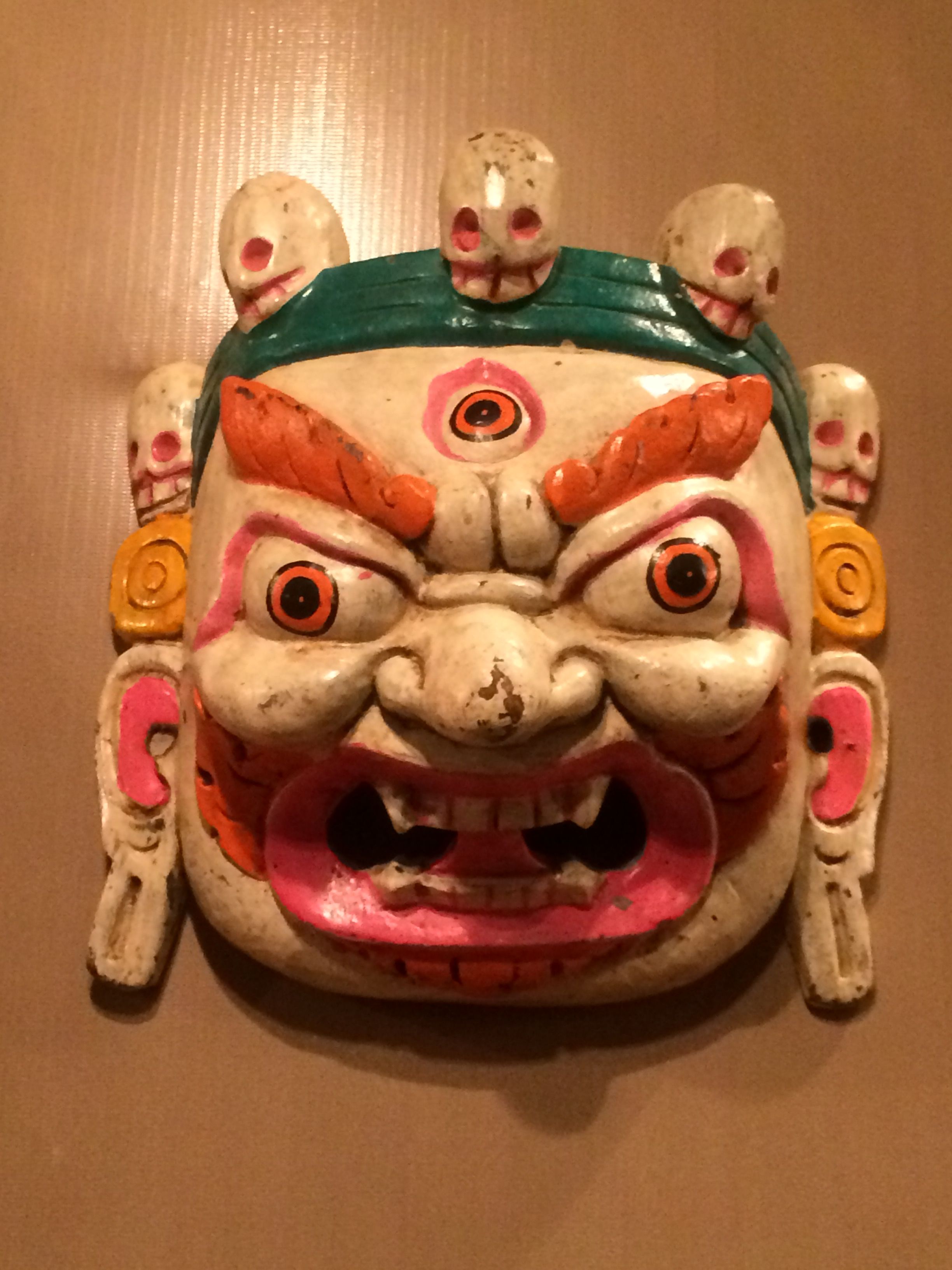 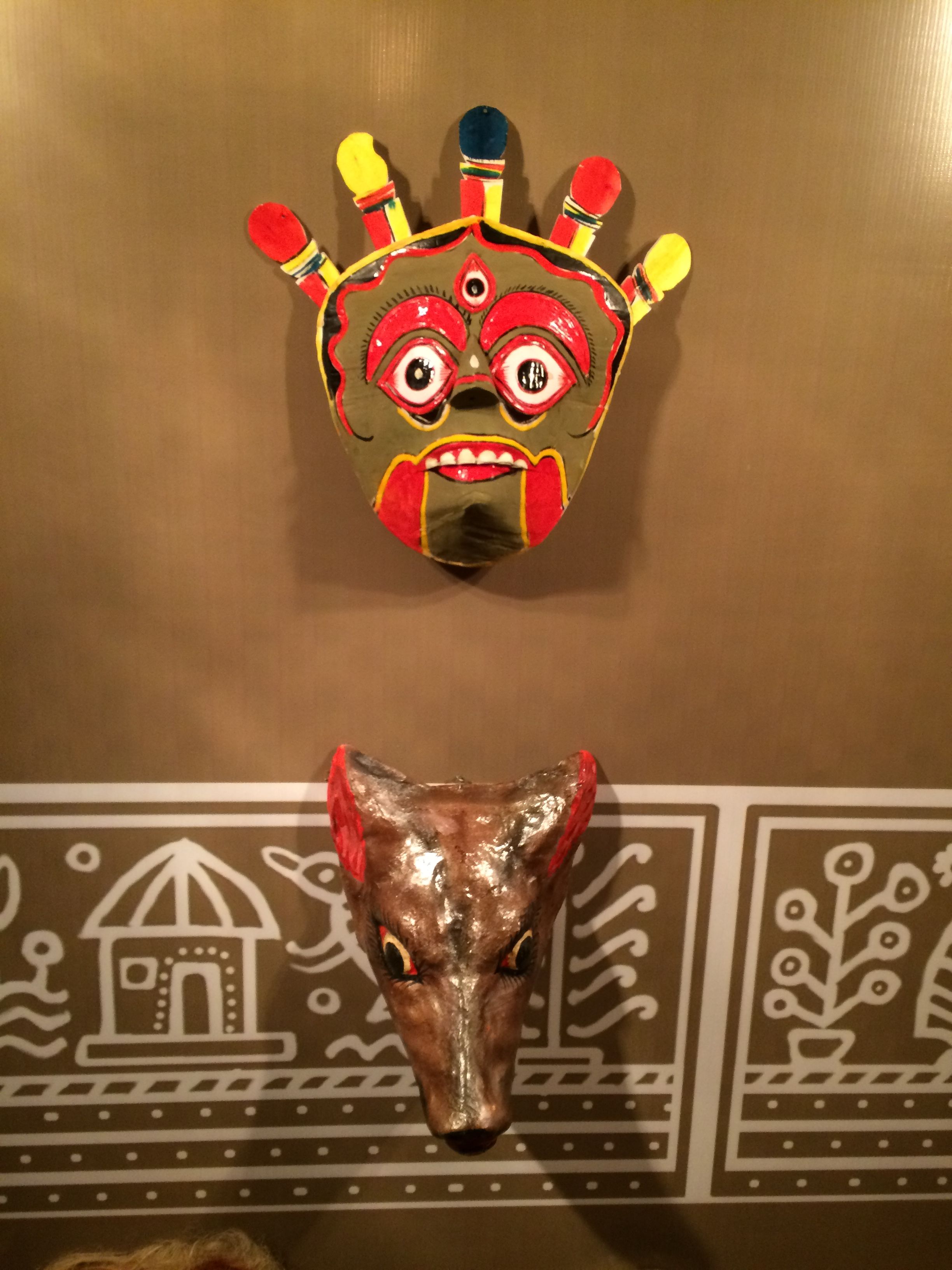 ### The mask are "MUKOSH" in Bengali. So in this post I will show you some amazing images of 'Mukosh' and with their origin with details (if any). ##### "CHOOU NACH" Mask - - - - - - - -- - - - - - - - - - - - - - - - - This kind of mask are mainly from Purulia district and used for Chow dance. The peoples of Parulia are making group dance by wearning this kind of Choou mukosh. The dance are mainly on tale of Godess Durga and Asur fighting. -------------------------------------- 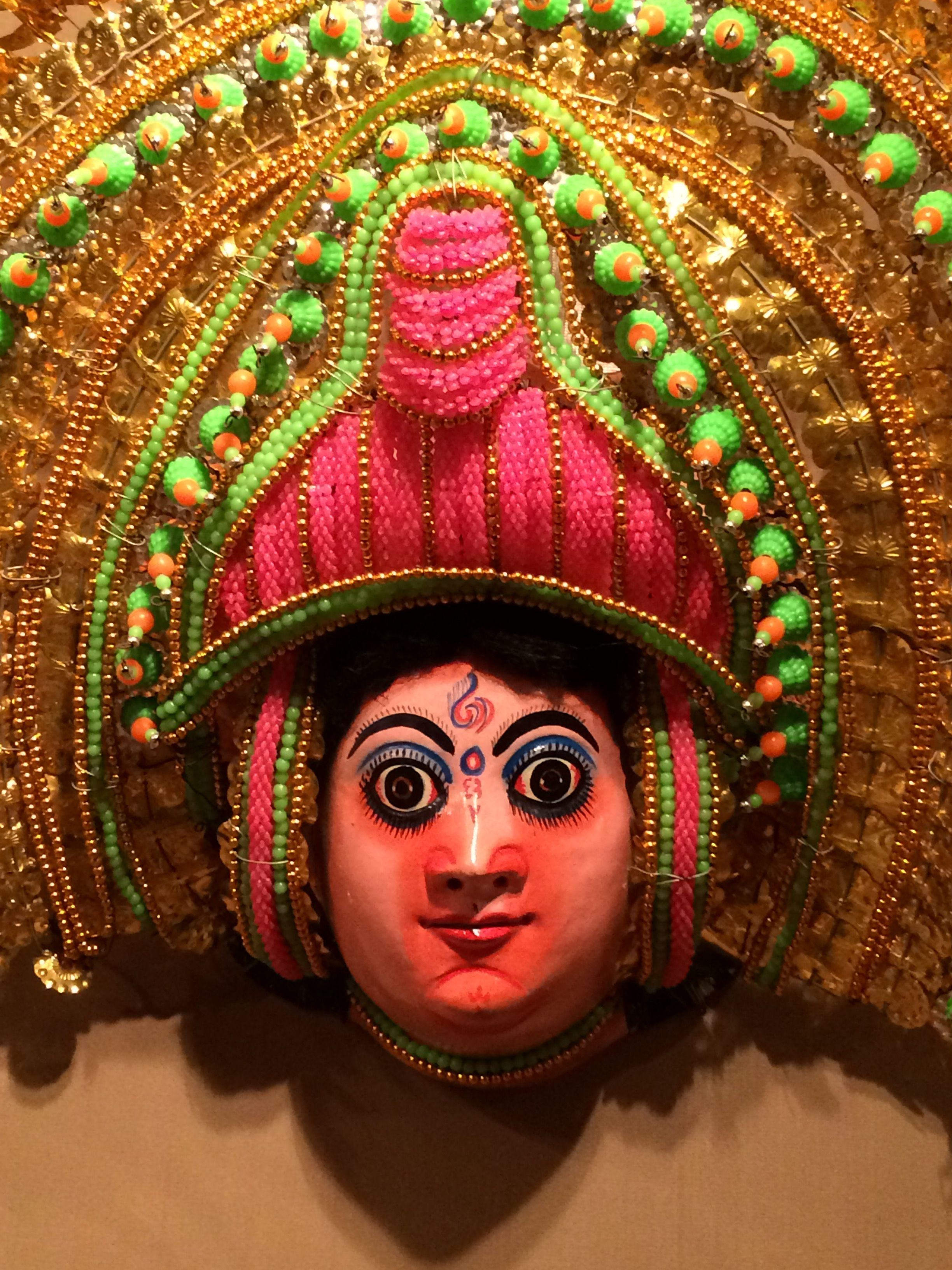 ------------------------------------------------------------------------ 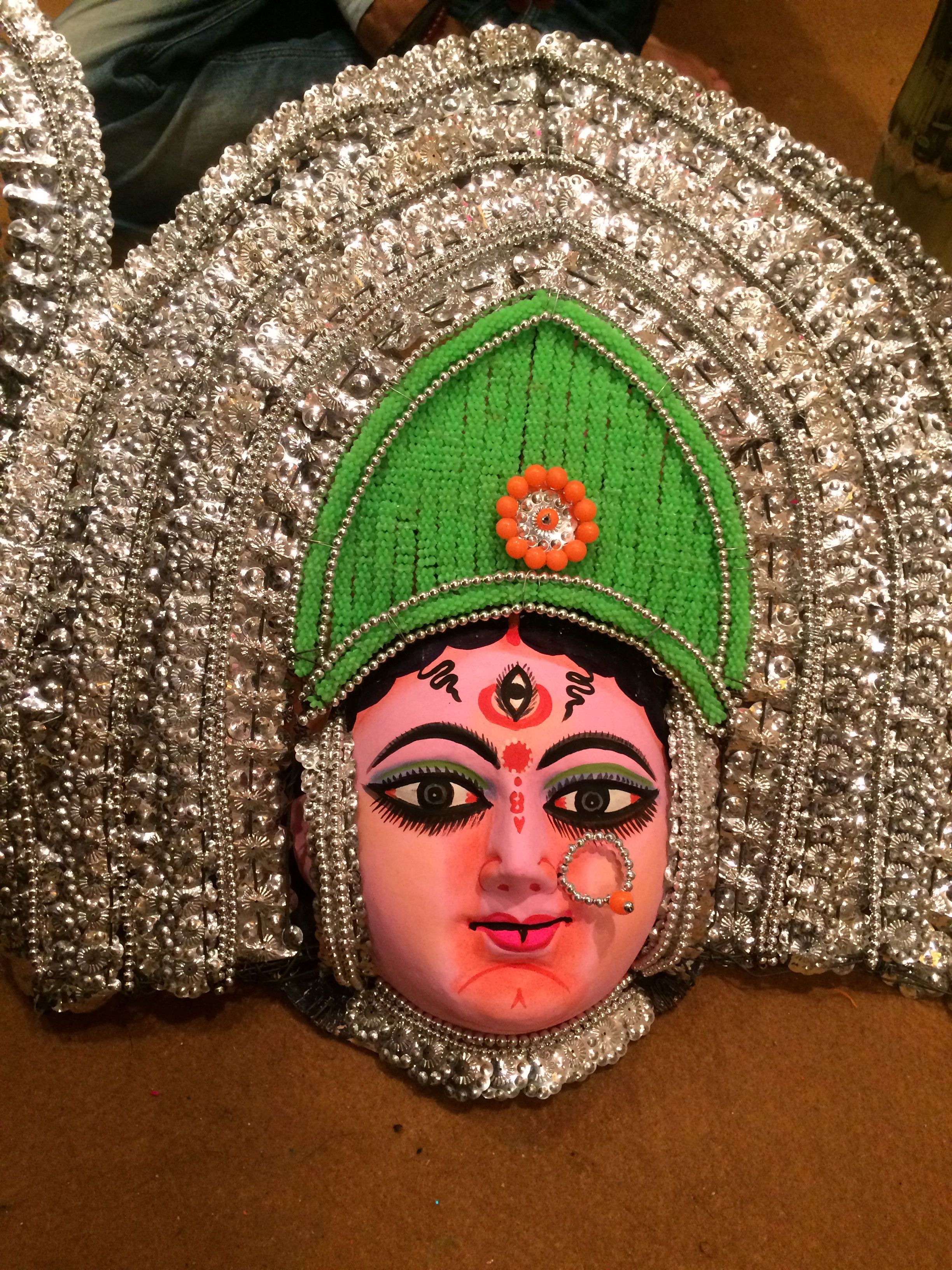 --------------------------------------------------- 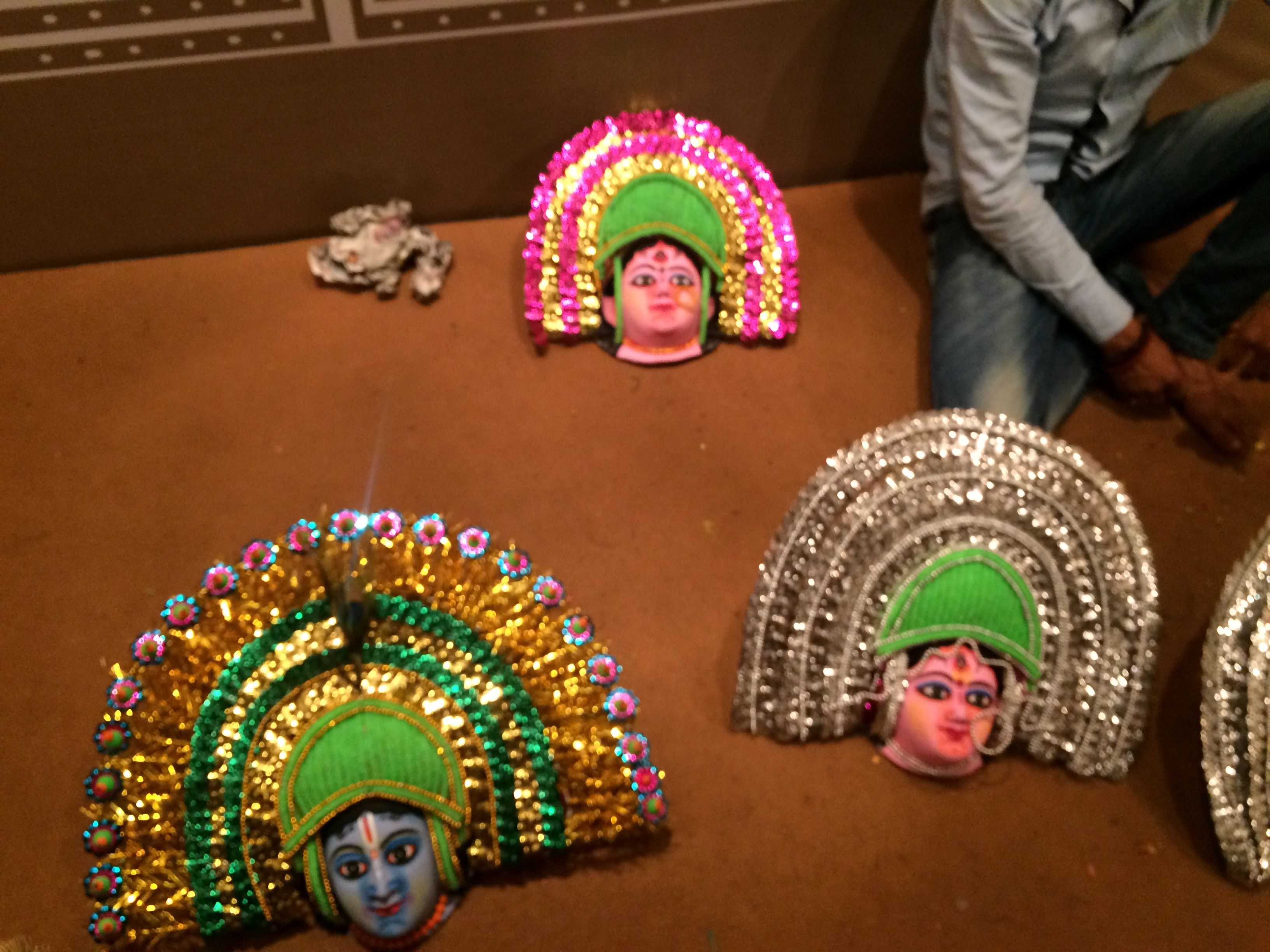 ----------------------------------- ##### "Bagpa or Bakpa" Mask - - - - - - - -- - - - - - - - - - - - - - - - - This is also a dance mask.This dance about defeat evil and for better humanity. Thsi mask are mainly used by Buddhist region peoples .Also know as LAMA mask. Mainly red,blue and white colored mask are available. ----------------------------------------- 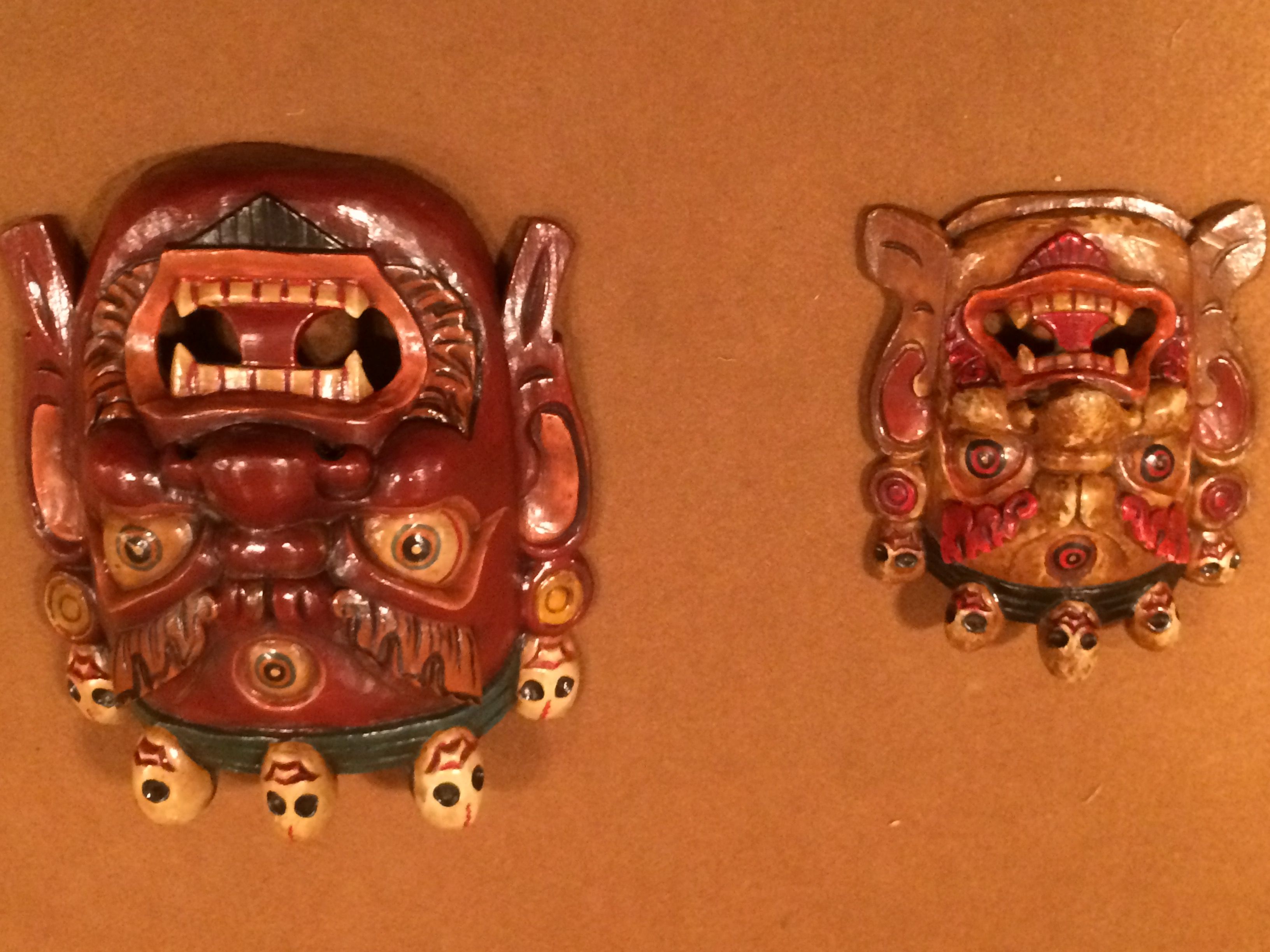 ----------------------------------- 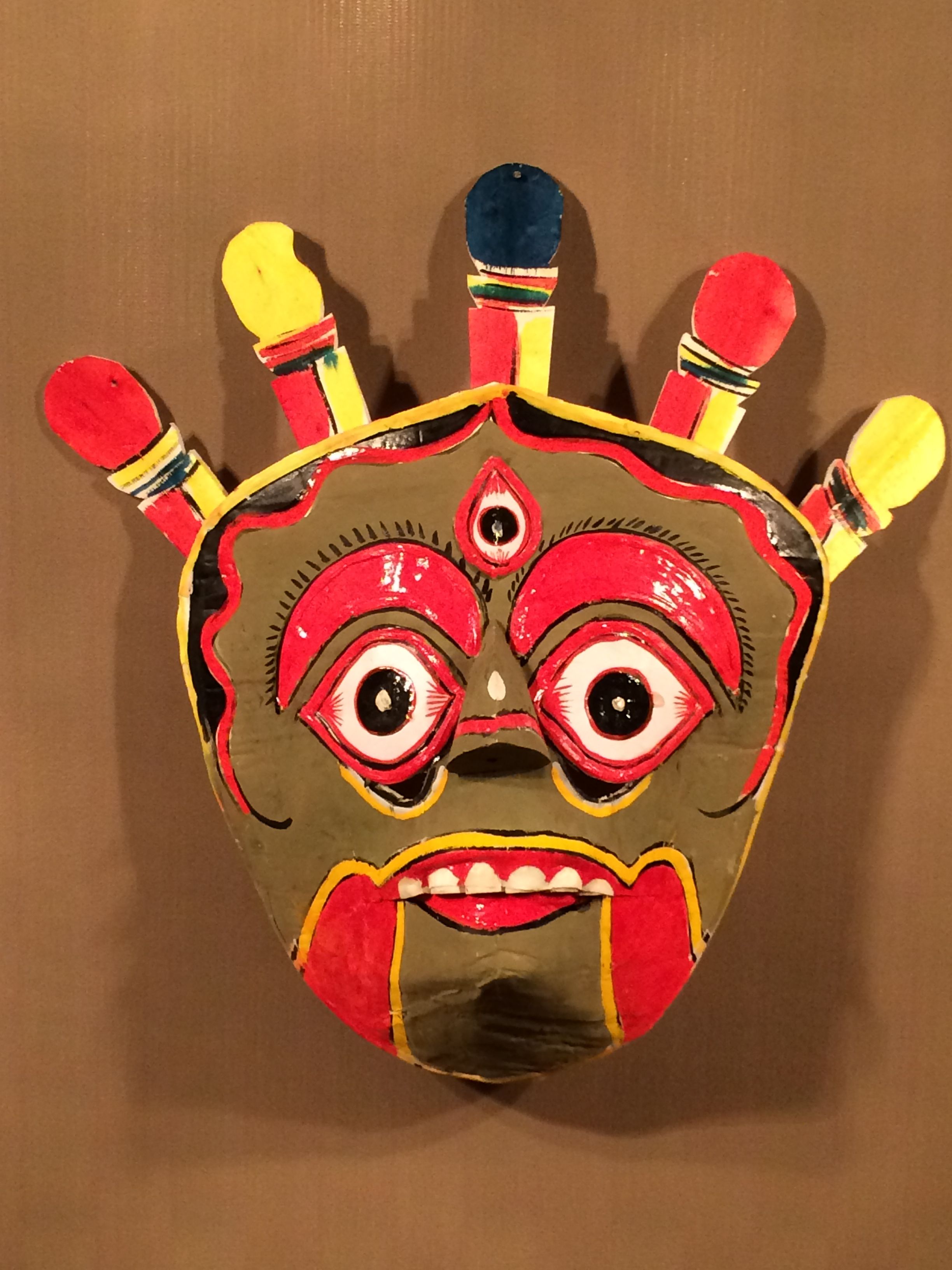 --------------------------------------------- 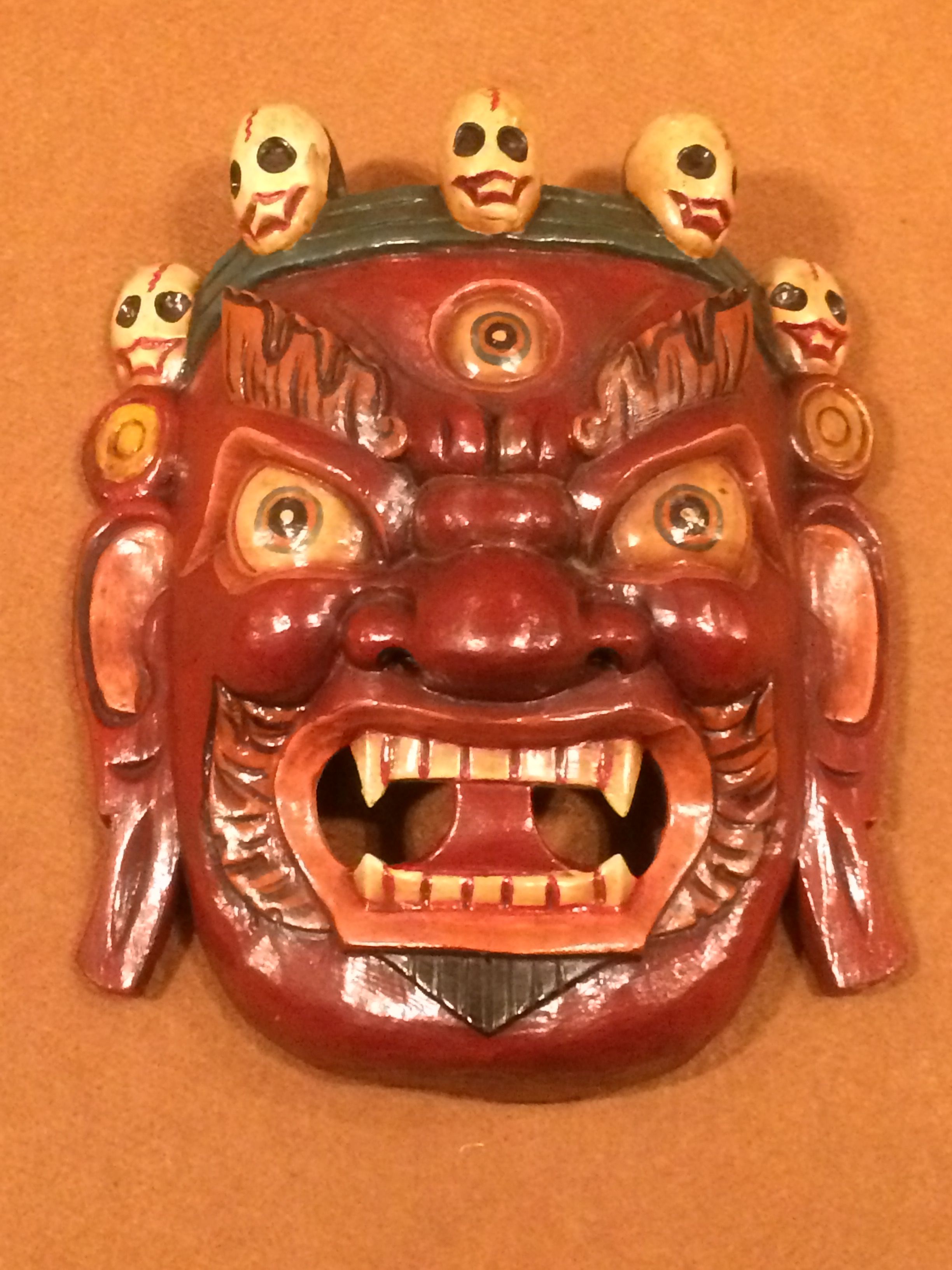 --------------------------------------------- ##### "Mukha Nach" Mask - - - - - - - -- - - - - - - - - - - - - - - - - This is are created for Mukha dance. This mask are from 'Uttar Dinajpur' District og West Bengal. This mask are created by crating woods. ------------------------------------- 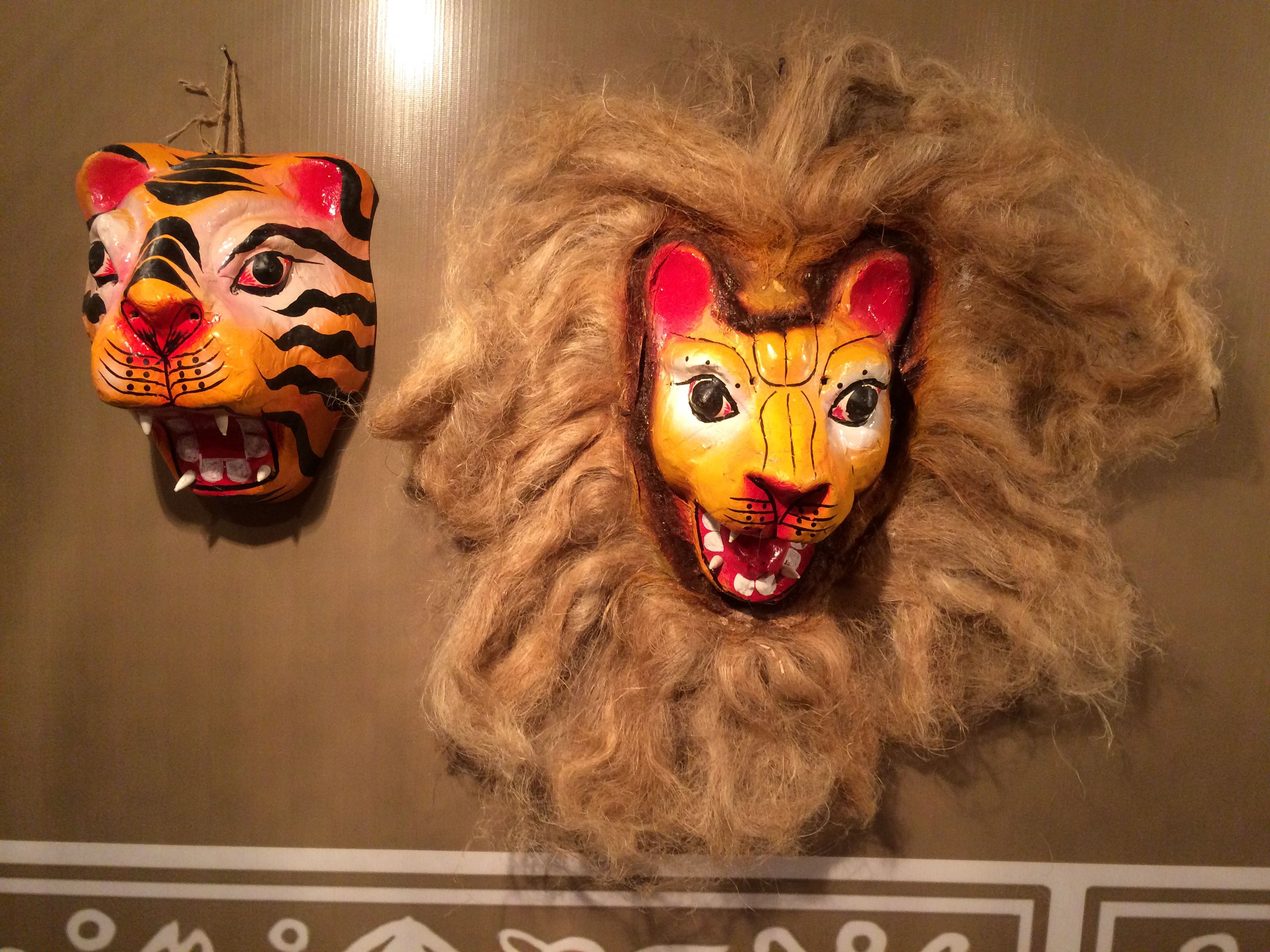 --------------------------- 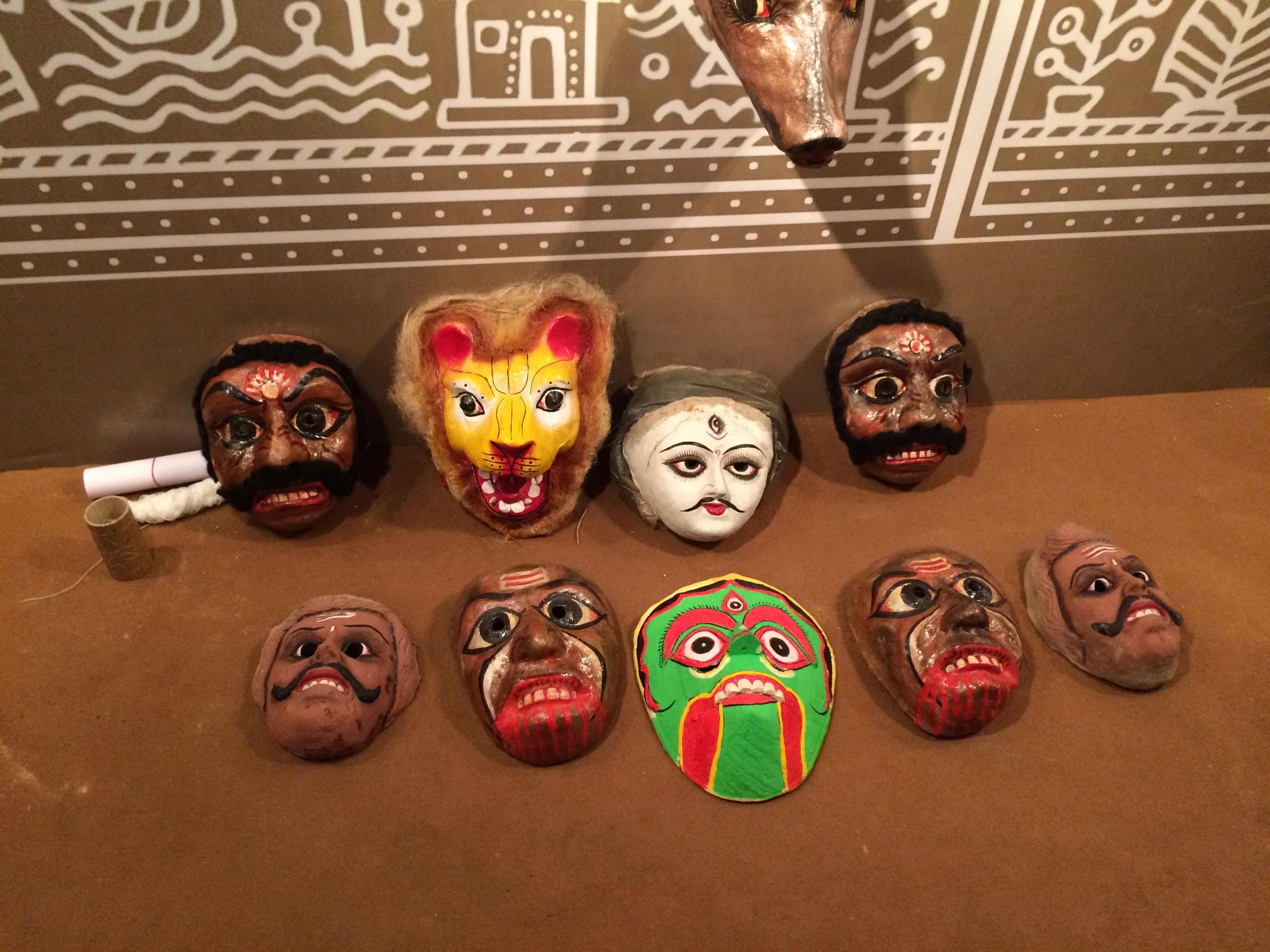 --------------------------------------- 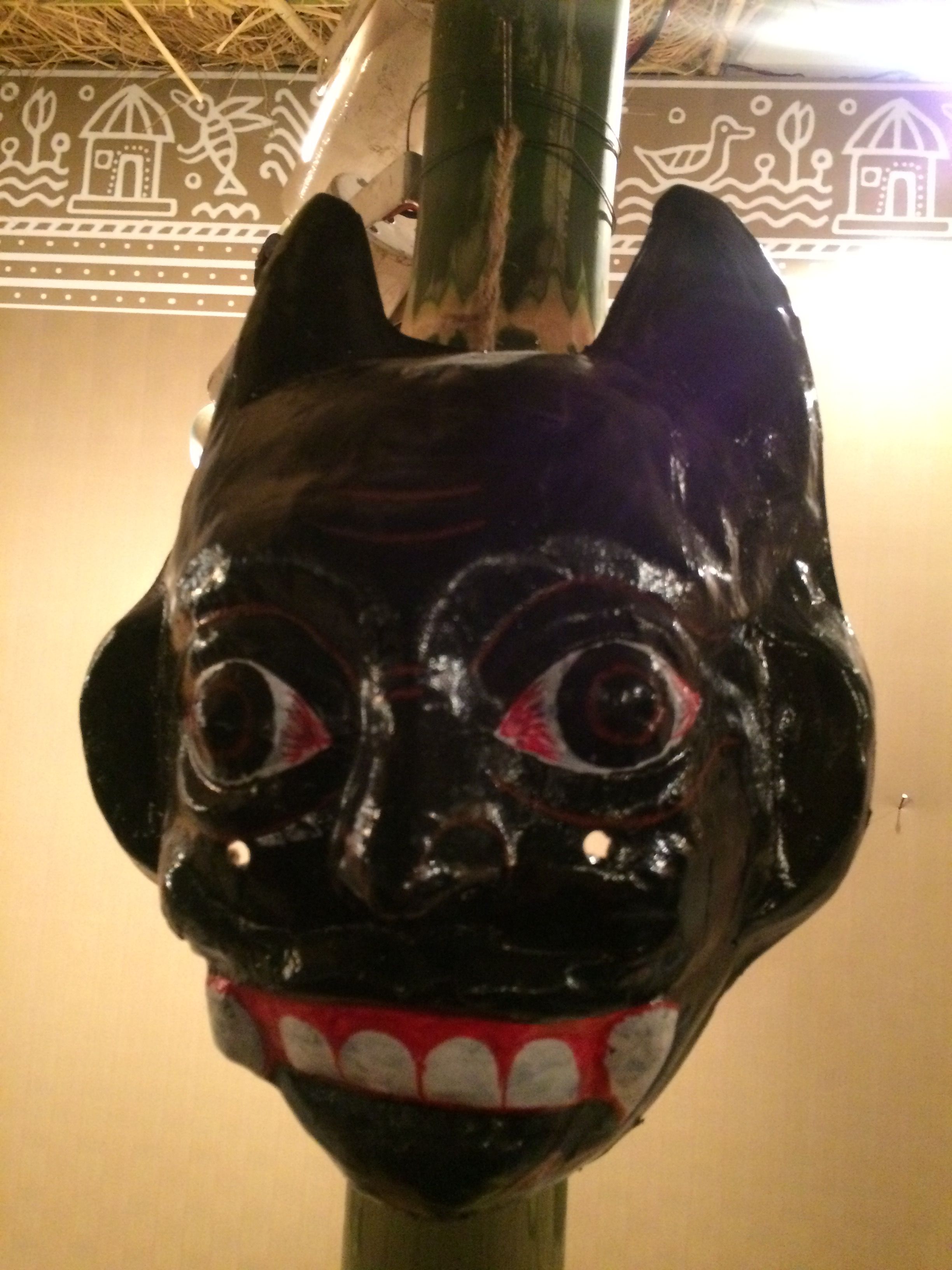 ------------------------------- 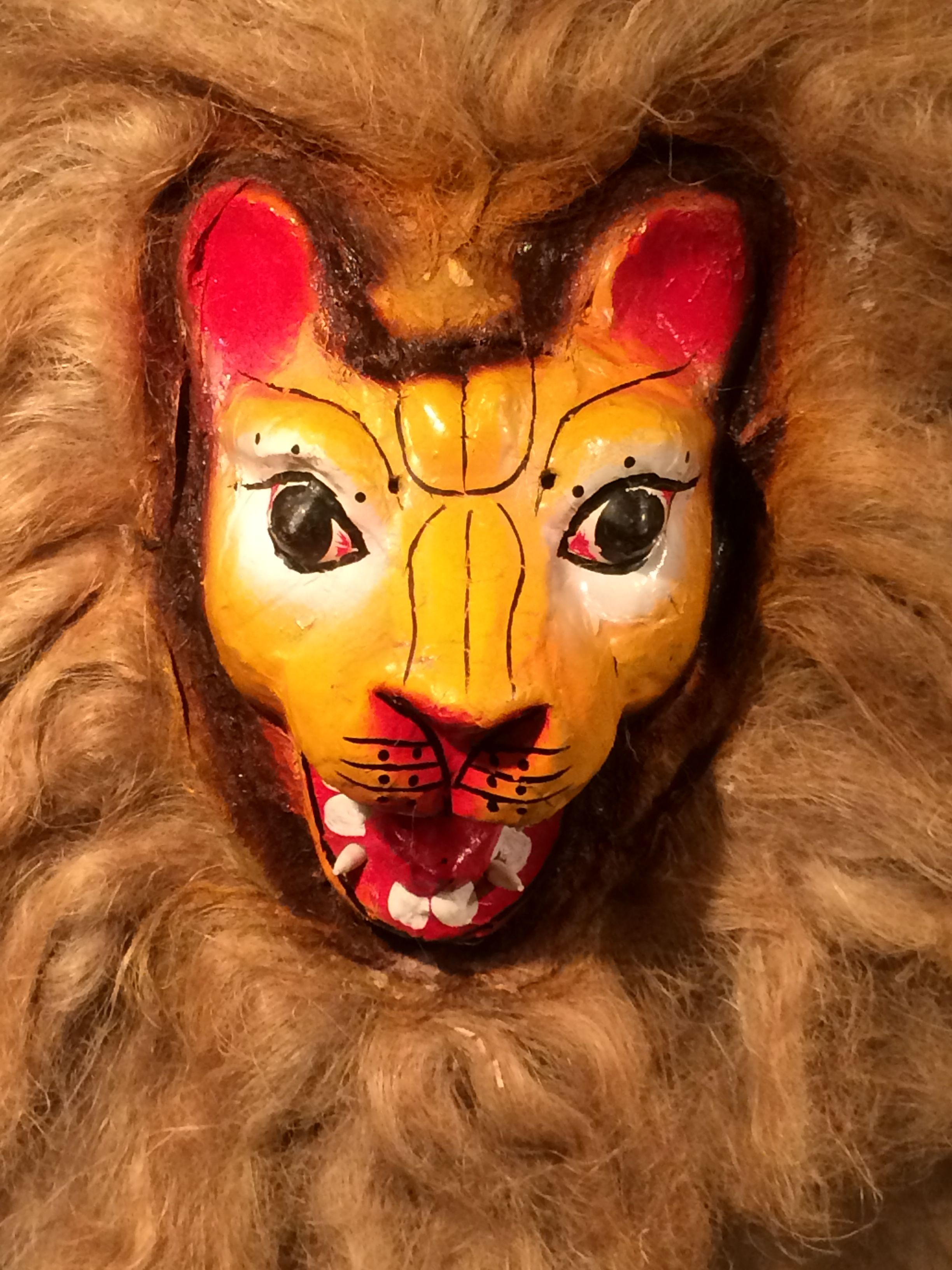 ------------------------------------ 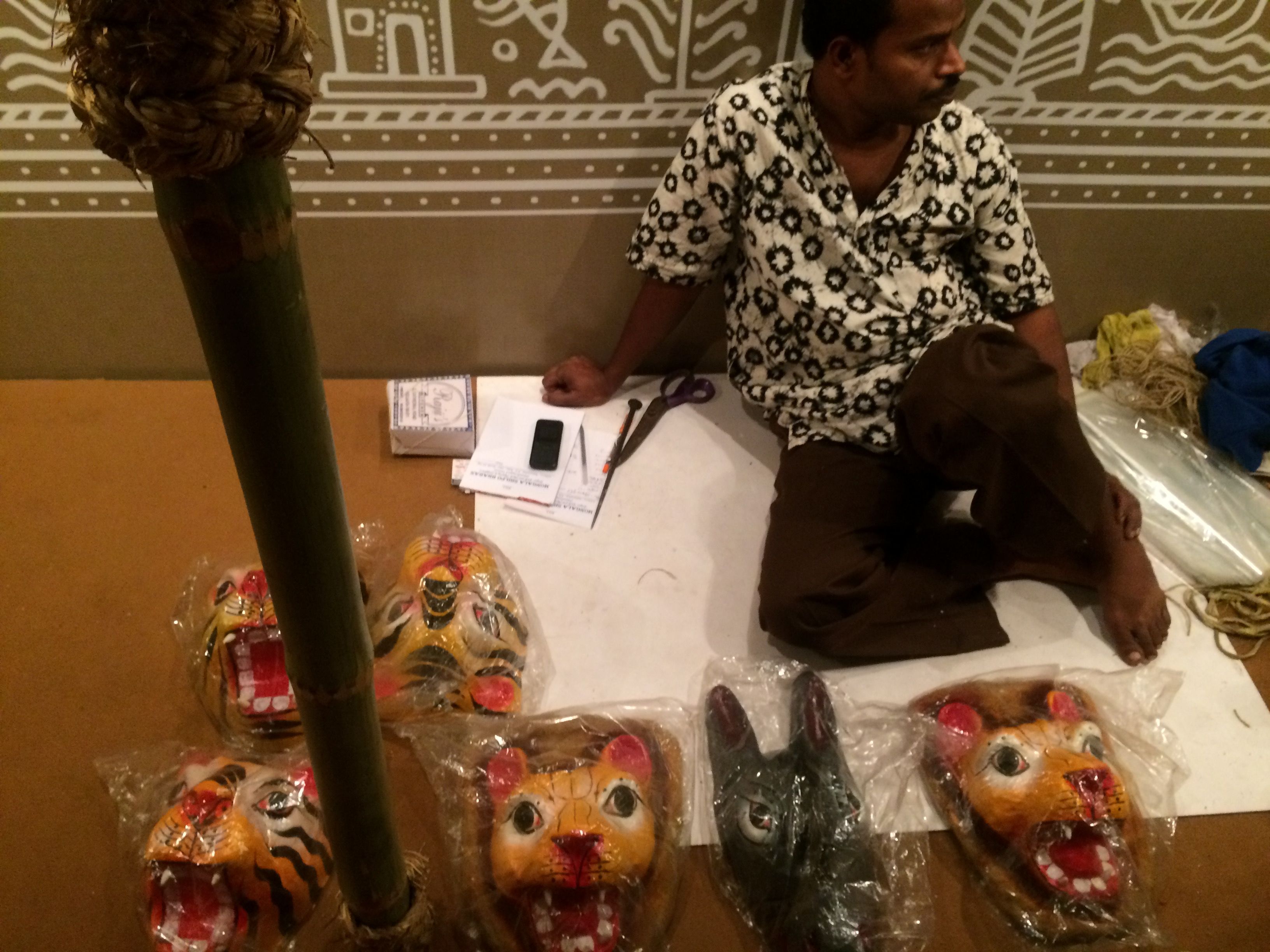 -------------------------- ##### "Parva Nach" Mask - - - - - - - -- - - - - - - - - - - - - - - - - 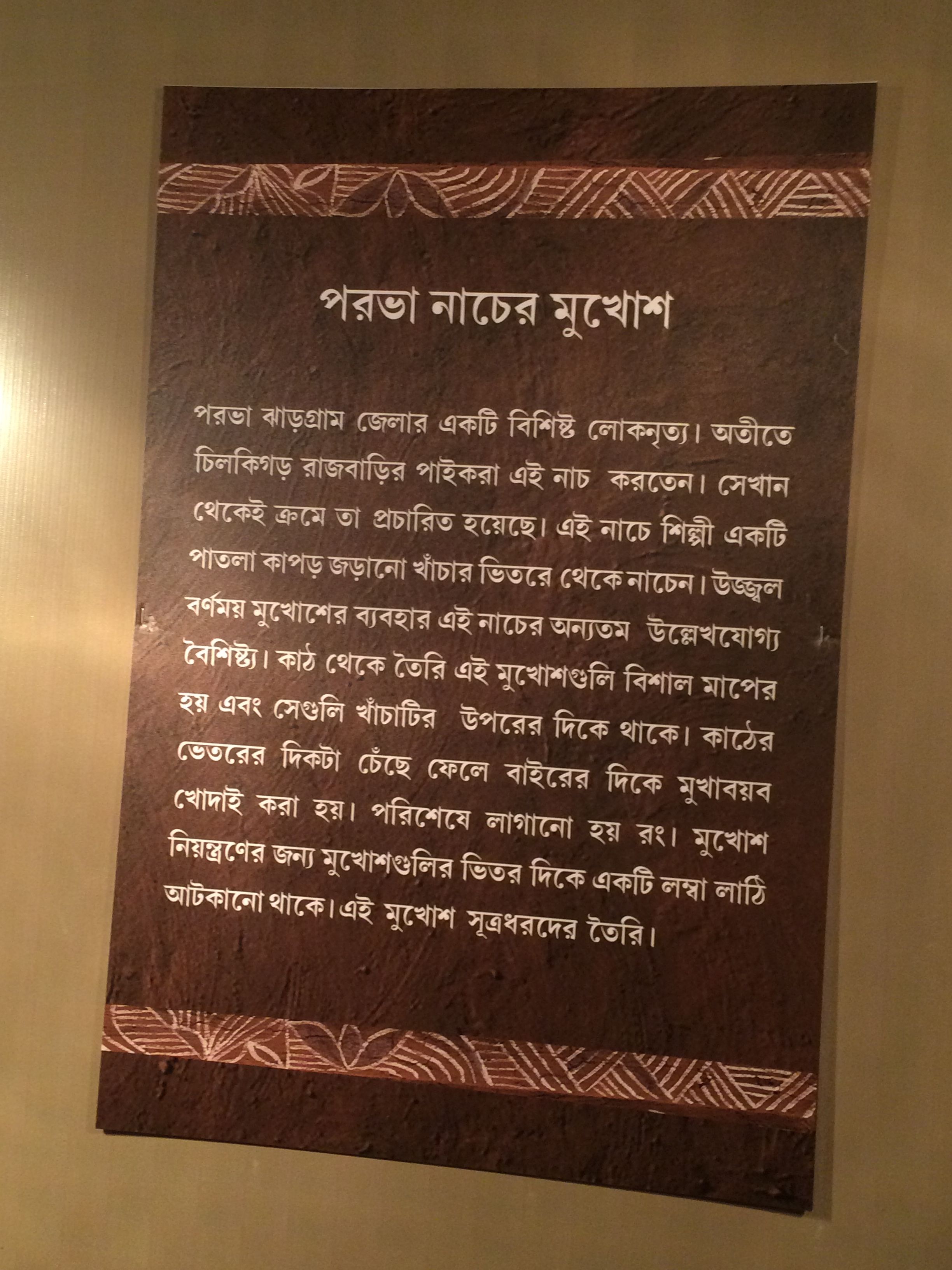 -------------------------------------------- 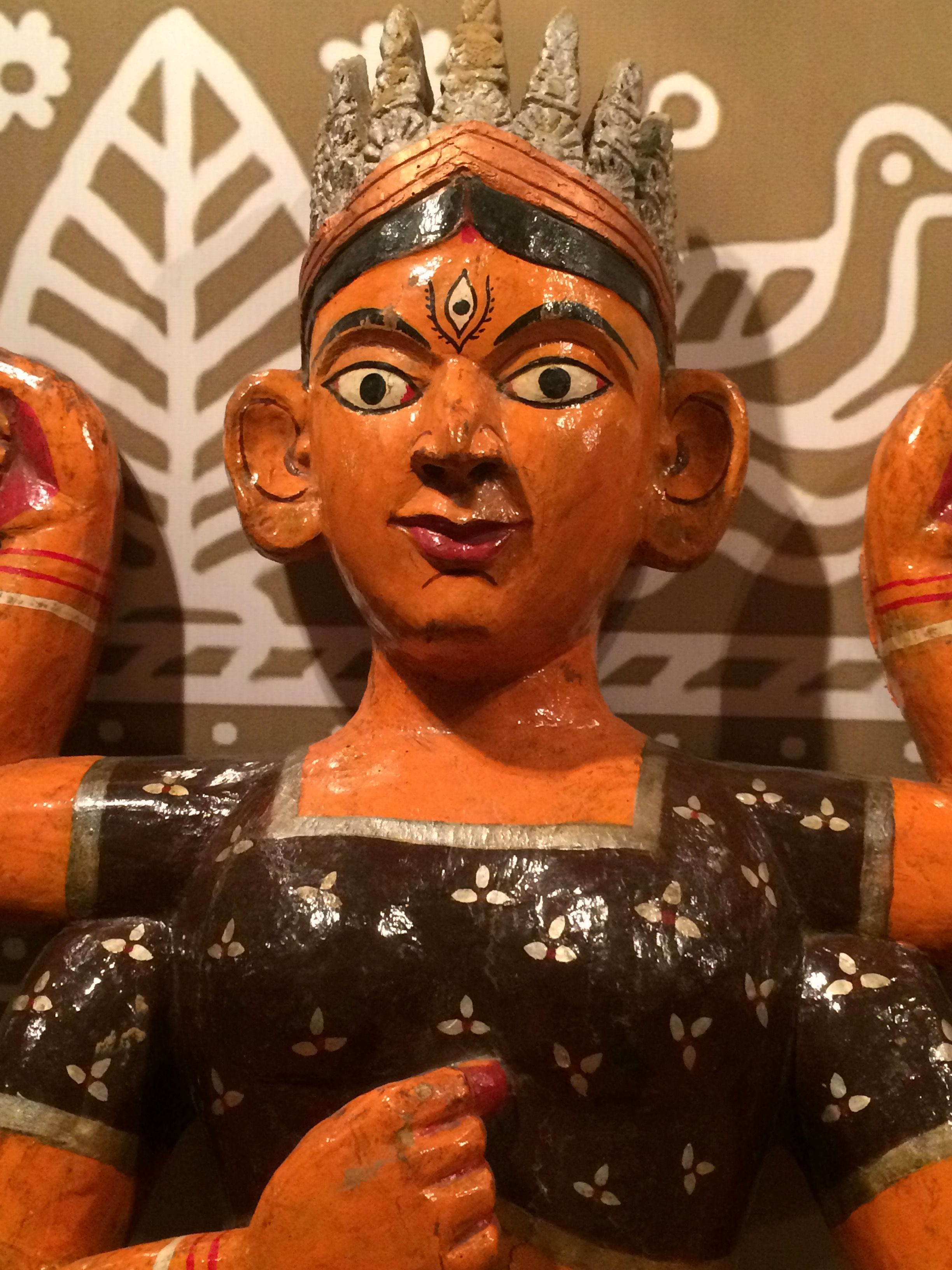 ----------------------- 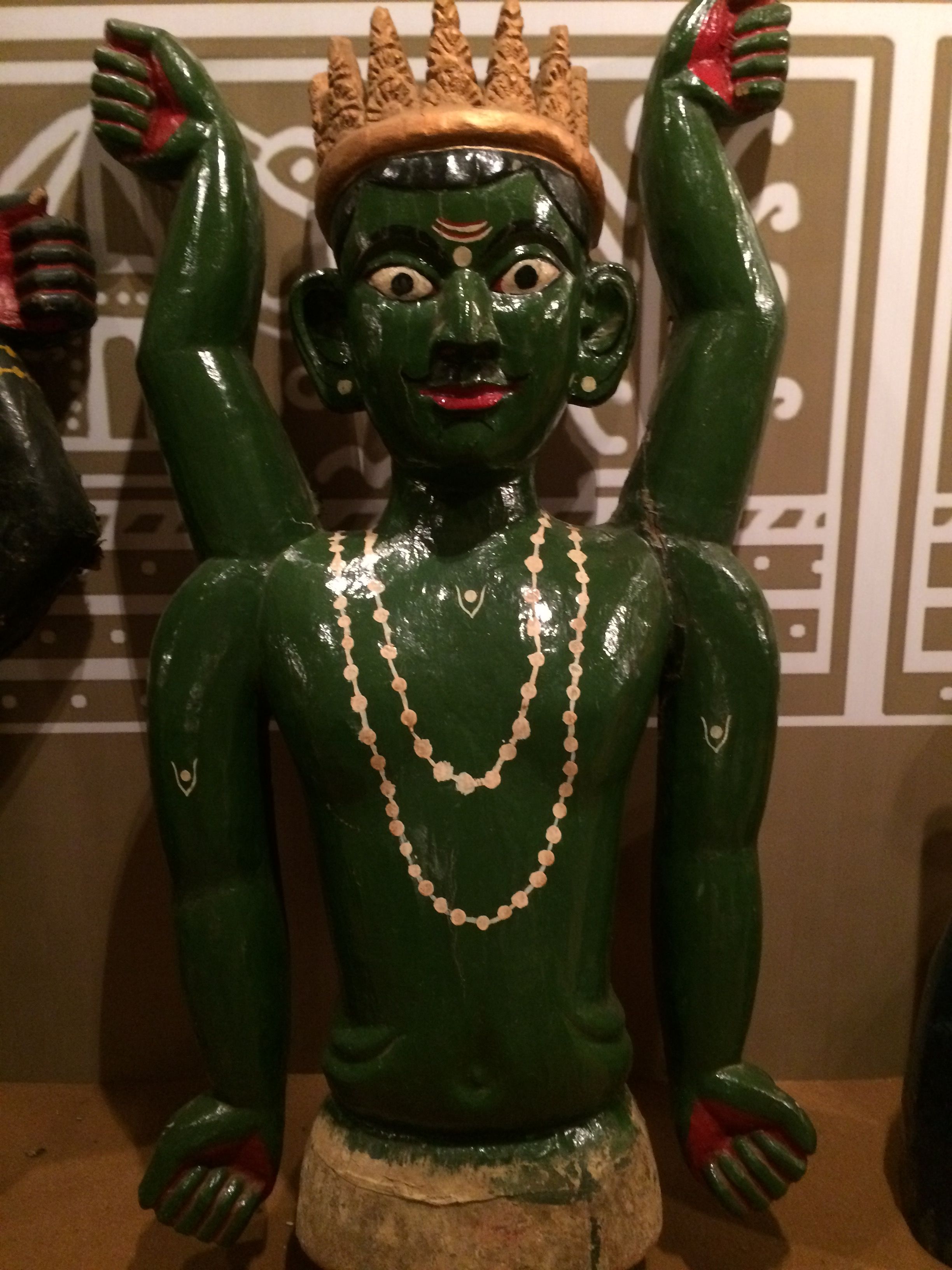 ------------------------------------- 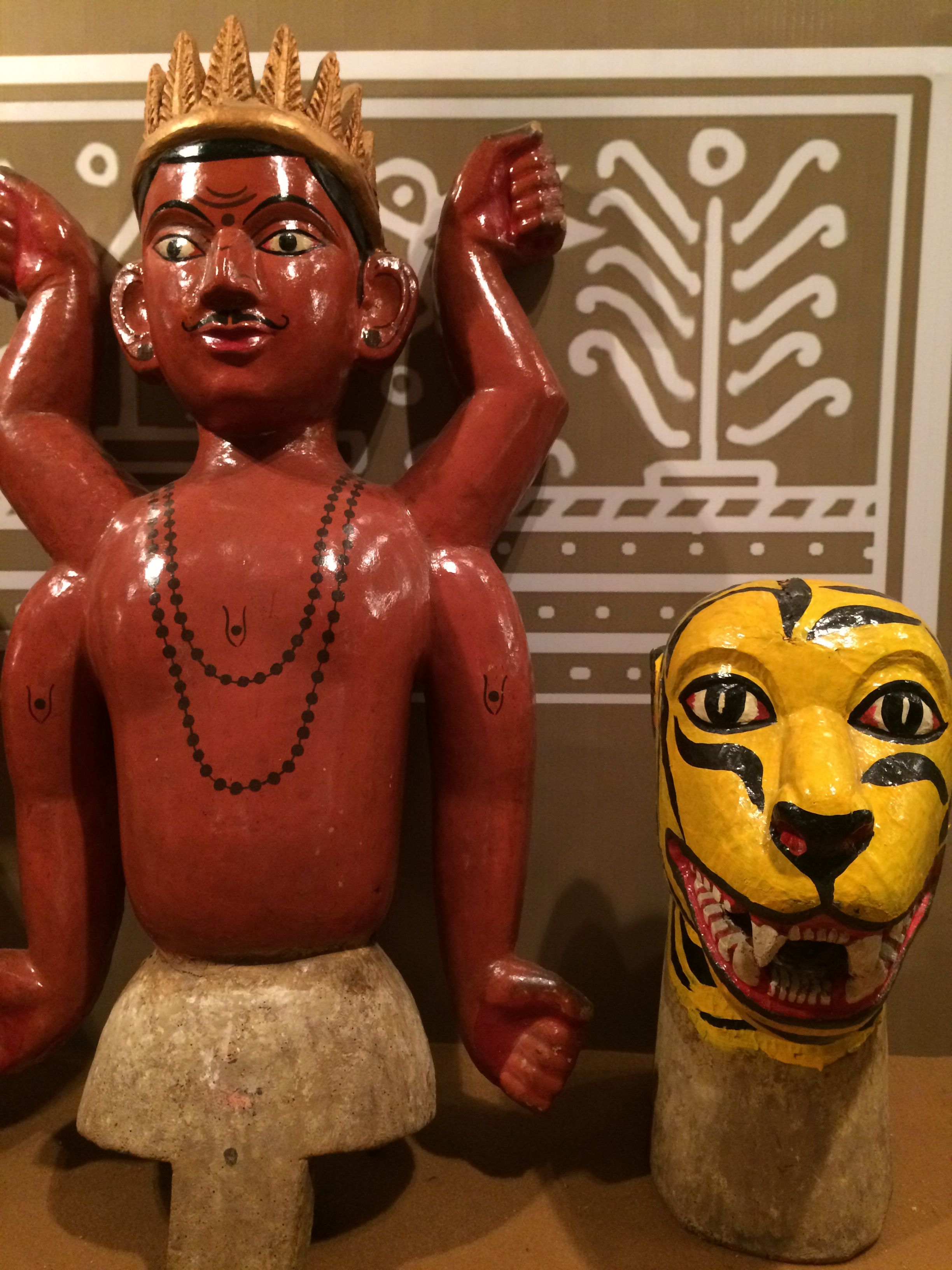 #### And many other 'MUKHOSH' are coming in exhibition - 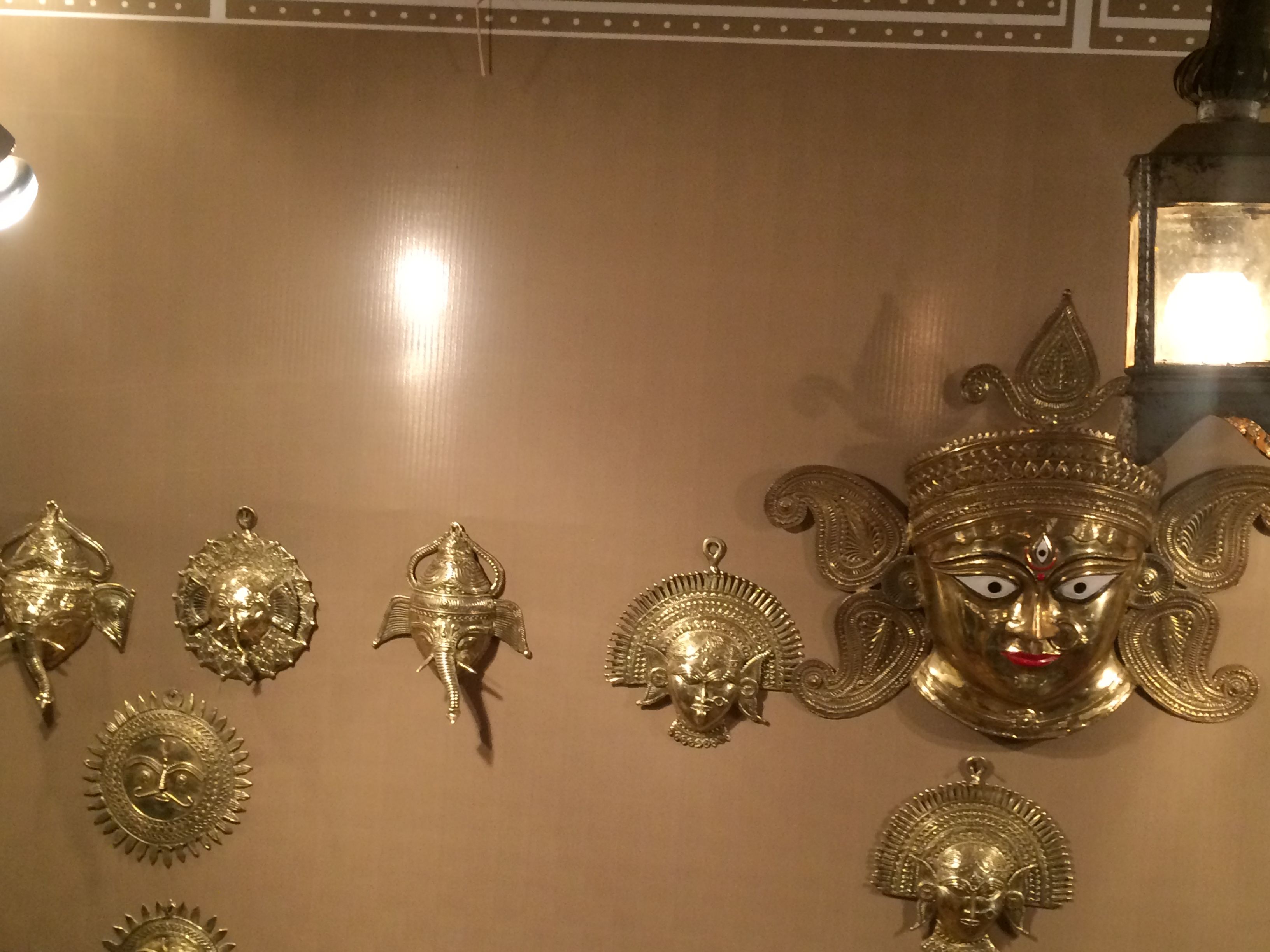 ------------------------------- 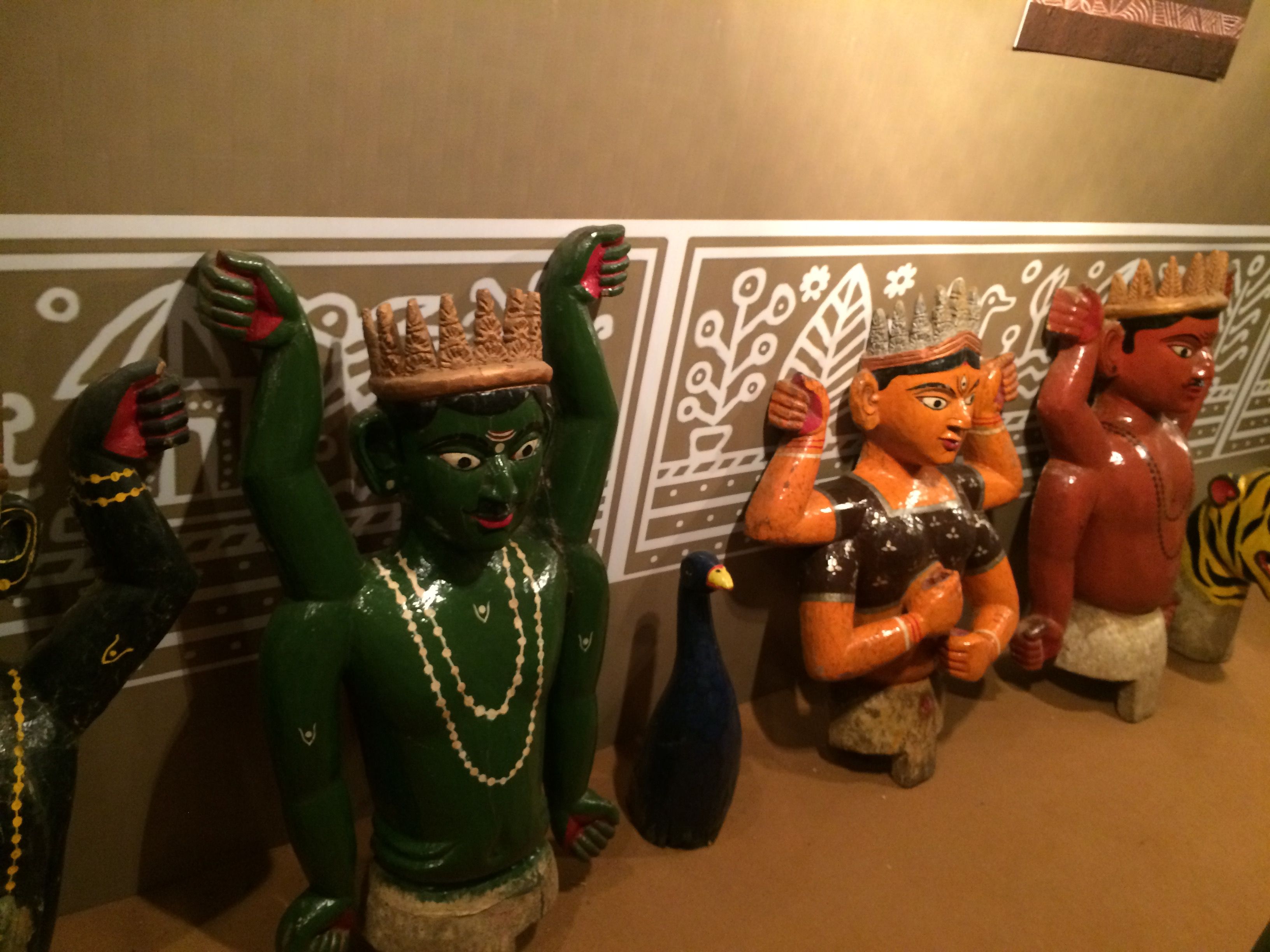 ------------------------------- 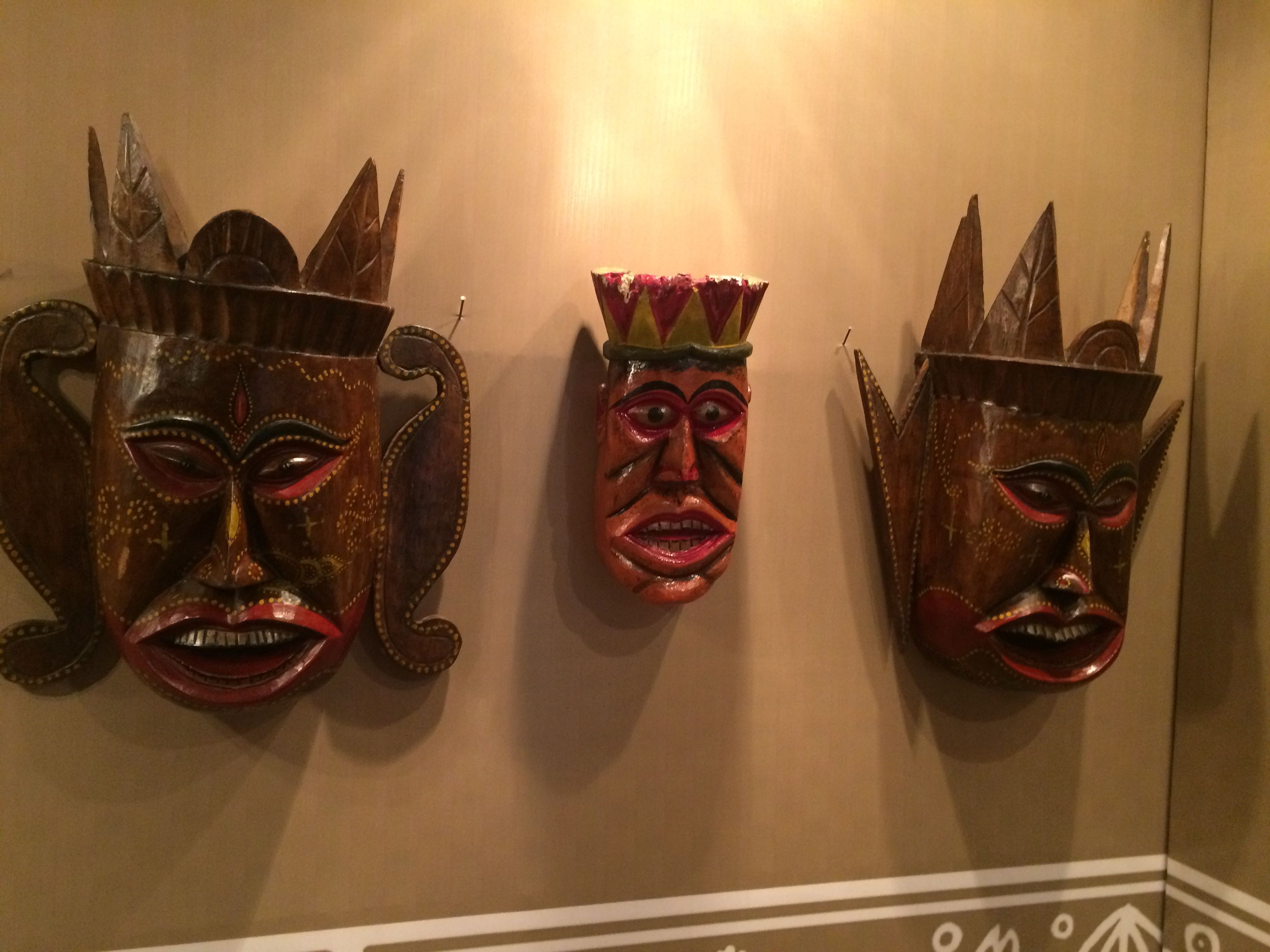 --------------------------------------- 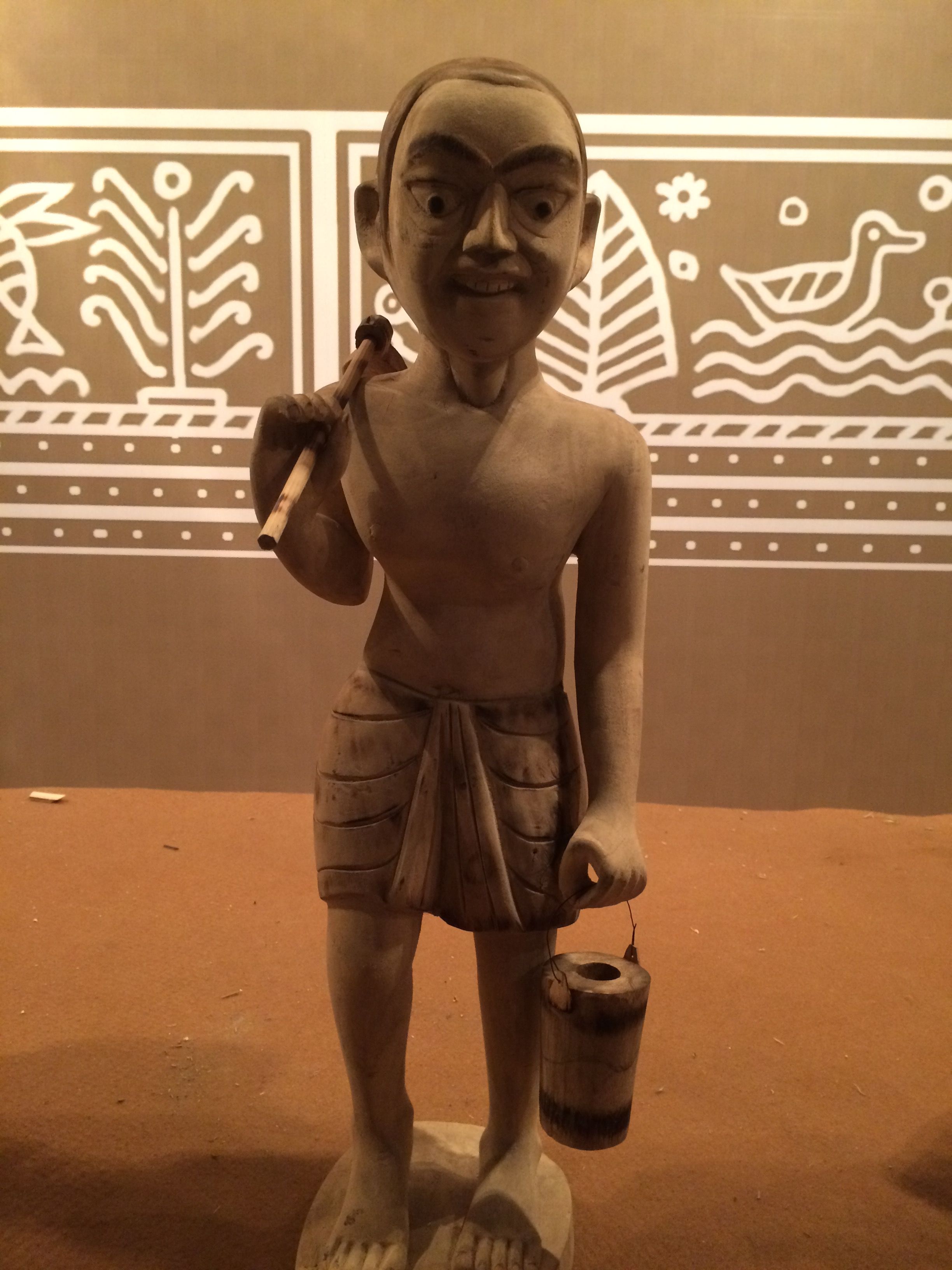 ----------------------------------------- 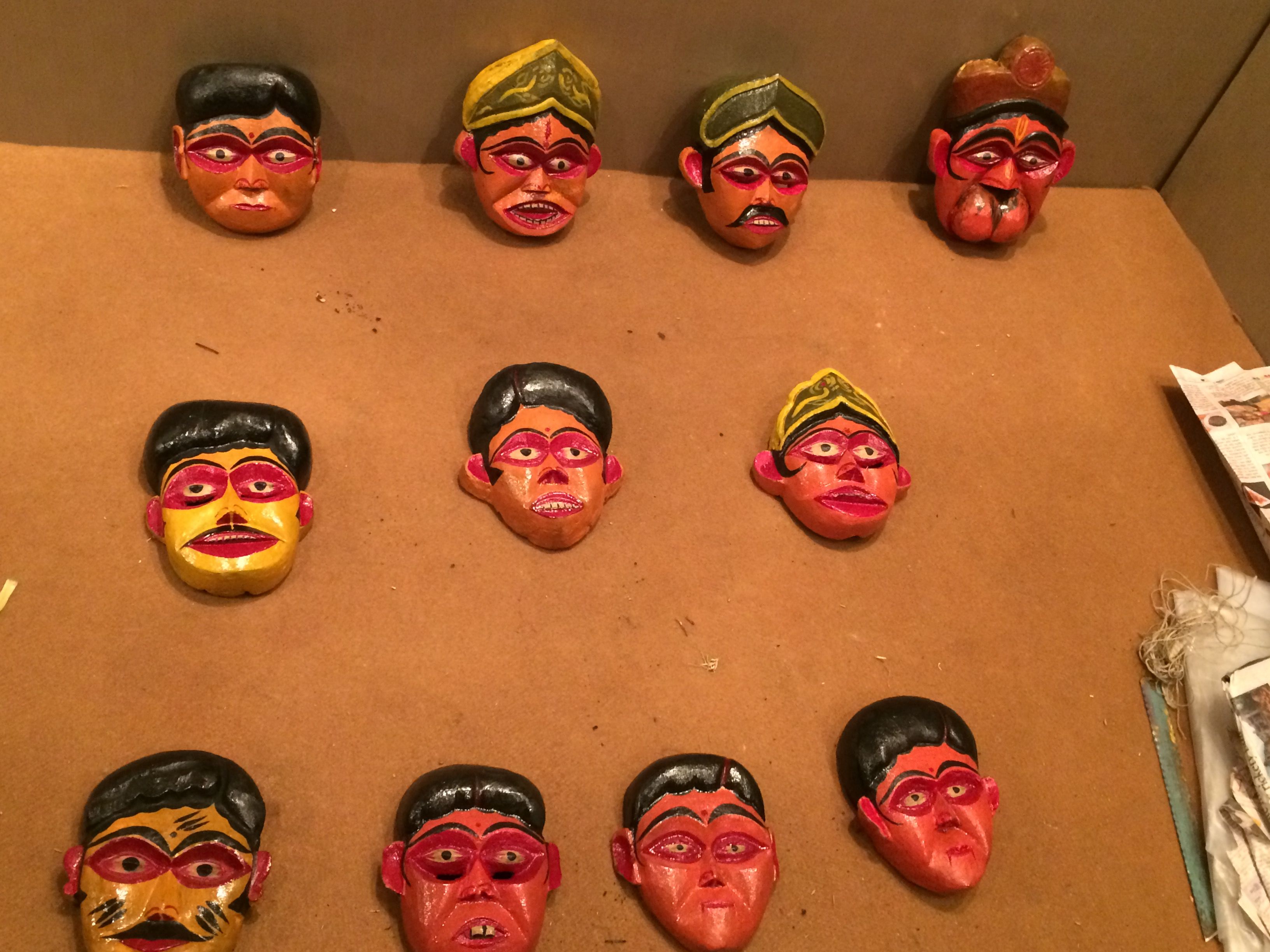 ----------------------------------- 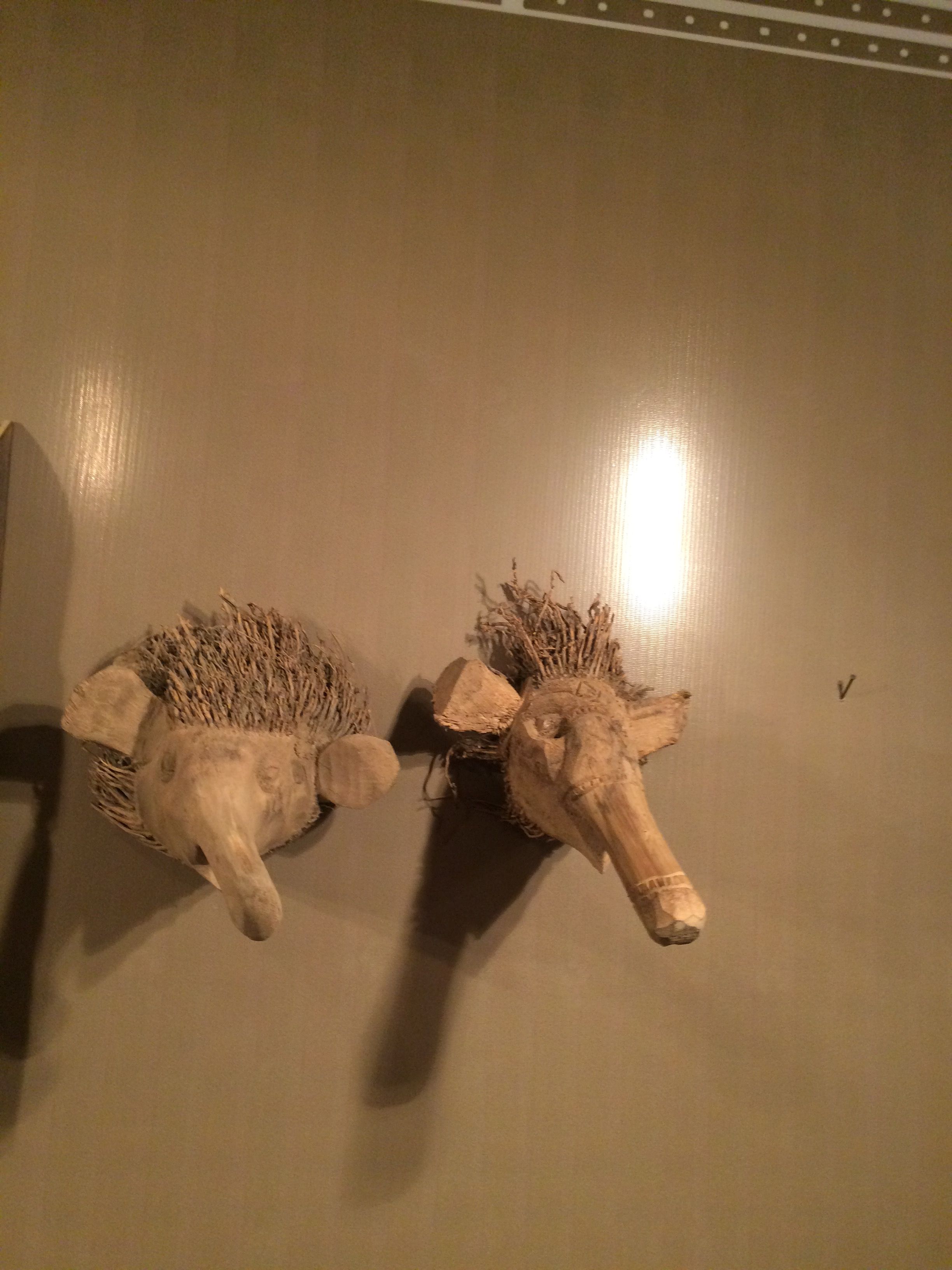 ------------------------------ #### The arranger - 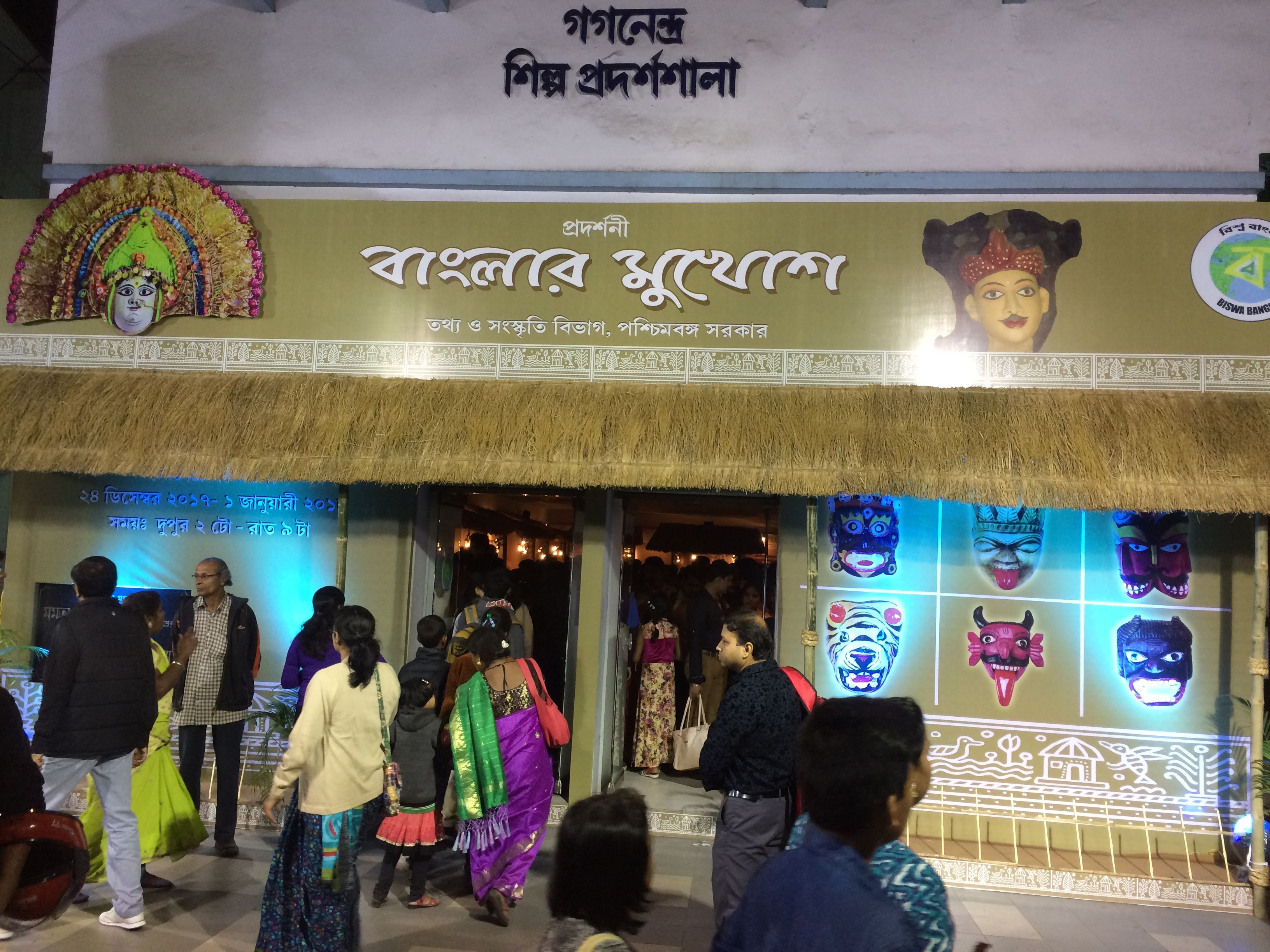 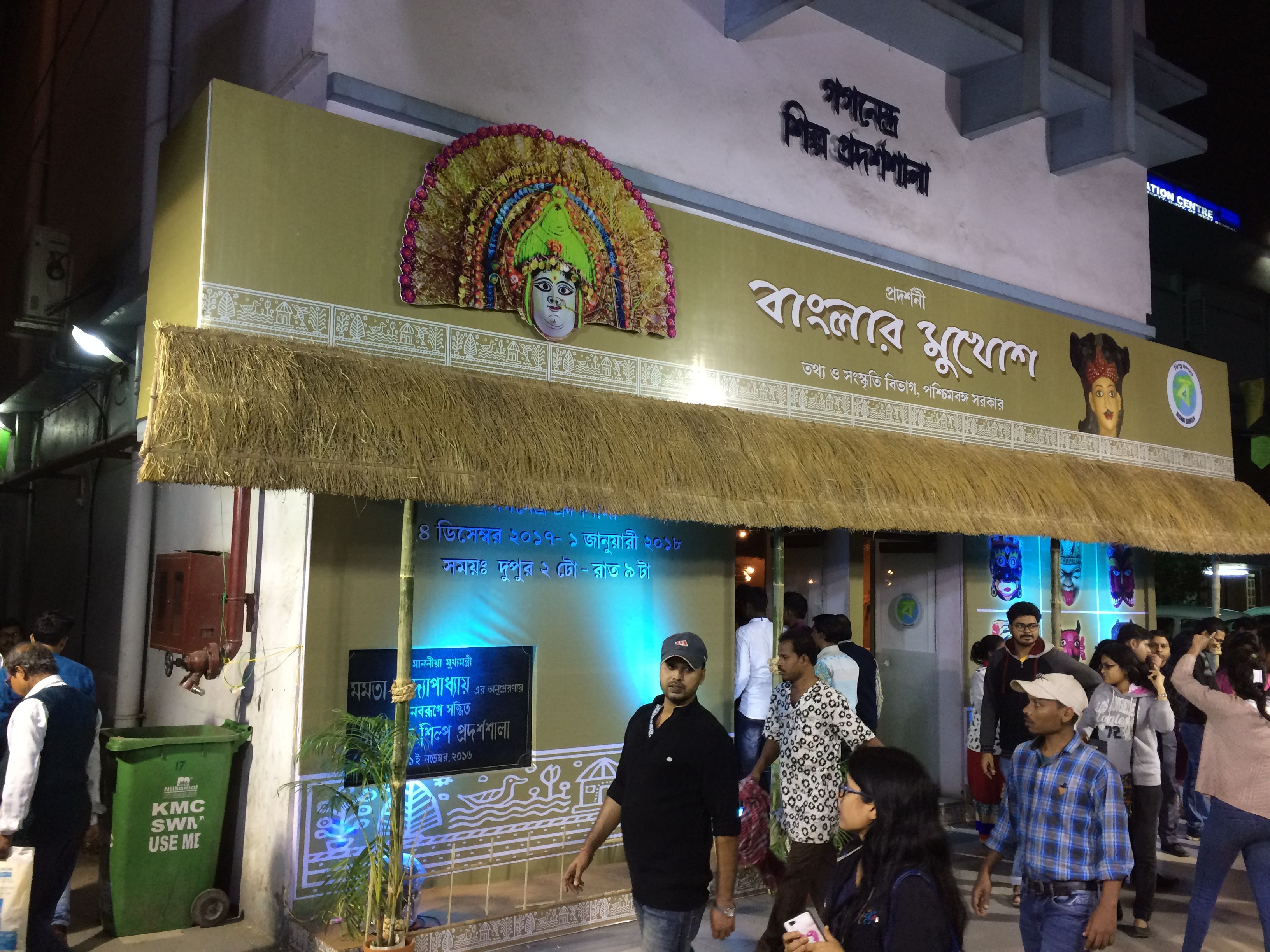 ## Thanks for visiting post,I hope you like this journey of Mask with me. |
| json metadata | {"tags":["art","photography","life","blog","photo"],"image":["https://steemitimages.com/DQmQYmx9UcNLFWHKBSRMgh9iD985SjhgimTu5onFE3RYQzv/IMG_4142.JPG","https://steemitimages.com/DQmciG2NvTBS4jHQrDVqQ2oPi1ZpAhyj7iXJaFdbWaiRwe3/IMG_4133.JPG","https://steemitimages.com/DQmeSjk5wGy2p6hfsjkaVYfuXfBd93sdppHLQRQCvsWNxf3/IMG_4157.JPG","https://steemitimages.com/DQmZNZQ68njzppRUAi7ddcfet8SNyZCmRTgPWwB2K8N917b/IMG_4155.JPG","https://steemitimages.com/DQmTU18PtKKZ6T6tj6sWur1FF5uJTXyZCTqHg9zJjxuhuFm/IMG_4154.JPG","https://steemitimages.com/DQmTvpM2Bp6zzbdmTCLGfnsKbHiBiqyQSv9ysAQHnZV5ynr/IMG_4138.JPG","https://steemitimages.com/DQmPFSMEgjq4q3KVbYx3amgH9iiXgXkF53UHzgnkLfvNY1V/IMG_4136.JPG","https://steemitimages.com/DQmPK2RMCMamtdVwWPiFBWGR61WrmSXyxjp95rEEMLHAdvp/IMG_4137.JPG","https://steemitimages.com/DQmUxj9x71xGWGrG2eSJQ7GQwXLo7nXboHY4wrUSHtyg8Mw/IMG_4150.JPG","https://steemitimages.com/DQmfSVQz7m7utgEKPtGhPMiX4Rmnooy5wY4YFufWXfxaNTJ/IMG_4132.JPG","https://steemitimages.com/DQmQZPRcgcdakXkcSH9Z6d7cR2Ate8qN39j8eaMdNsfnxqf/IMG_4153.JPG","https://steemitimages.com/DQmPf2WHF98onkKXy1Eq1NS5Hg6FashjmYp4wiZTkYvaaeN/IMG_4152.JPG","https://steemitimages.com/DQmfF7aJbitD4tRy5bMR9JUg2Gc9xPuesBHDyhuR14X4BAq/IMG_4148.JPG","https://steemitimages.com/DQmXLuF62VAAZj4zCMuZotEoGrgsSjZzwnwe6UHFqUw9MXh/IMG_4174.JPG","https://steemitimages.com/DQmUtxzUXtuzACJRWjDpi1o7WGSVp9hWmPYzggkUL3UvcZw/IMG_4172.JPG","https://steemitimages.com/DQmS1i27LX9y58fupxcyT4gbsjWCs9nTnk8sXPKt1y1Qbhz/IMG_4171.JPG","https://steemitimages.com/DQmWwT7L5kg328iW2sJs1Hg557XRPoAv4K14eAFZGszYrDq/IMG_4173.JPG","https://steemitimages.com/DQmT4jrBuTtgwpw9cC8cSo1nqdr7TYETmVXJKocg3eZ3HLU/IMG_4167.JPG","https://steemitimages.com/DQmXrKc8YwkTrNGta3TeXknSMHfM2pnCJ5m4KLxyhwFgcMx/IMG_4170.JPG","https://steemitimages.com/DQmUWxj8RvYn7JKACH9KreX9Ud5CgLH1AT5E2yrUSFfkZHD/IMG_4180.JPG","https://steemitimages.com/DQmWbu1rgmiv8K5cLri7qgPHMkLu7CJXD86vkMtLbSgdKew/IMG_4176.JPG","https://steemitimages.com/DQmZQxZVnfSWpeb6kWXdLsoJFdixgnaVeDoBQBRqnA5jWuK/IMG_4181.JPG","https://steemitimages.com/DQmSsdCPjriAALZRnq9KpX3ojNA9yoG54SfrhuaxPM6b4fh/IMG_4179.JPG","https://steemitimages.com/DQmRpswGvqcjzQt7qFyWZ1aJ4Fo6DBezyhUxbGSvLqVp3uB/IMG_4184.JPG","https://steemitimages.com/DQmUsae6u7gdUBfPcqP2fy4MofsnsZnmdGzfJknkrGLE571/IMG_4185.JPG"],"app":"steemit/0.1","format":"markdown"} |
| Transaction Info | Block #19669587/Trx 5b9e95fea923cd58e676aa3bafade2311713a6c2 |
View Raw JSON Data
{
"trx_id": "5b9e95fea923cd58e676aa3bafade2311713a6c2",
"block": 19669587,
"trx_in_block": 6,
"op_in_trx": 0,
"virtual_op": 0,
"timestamp": "2018-02-07T19:34:48",
"op": [
"comment",
{
"parent_author": "",
"parent_permlink": "art",
"author": "holudghuri",
"permlink": "the-mask-festival-at-kolkata",
"title": "The 'MASK' Festival at Kolkata",
"body": "Recently a mask festival or exhibition was held at Kolkata under 'West bengal information and cultural department about different masks.\nIt is a collection of Masks which are coming different parts or cities of west Bengal. This are vary as per its local culture and environment and necessity of people. \n\n\n\n\n### The mask are \"MUKOSH\" in Bengali. So in this post I will show you some amazing images of 'Mukosh' and with their origin with details (if any).\n\n##### \"CHOOU NACH\" Mask\n- - - - - - - -- - - - - - - - - - - - - - - - - \nThis kind of mask are mainly from Purulia district and used for Chow dance. The peoples of Parulia are making group dance by wearning this kind of Choou mukosh. The dance are mainly on tale of Godess Durga and Asur fighting. \n--------------------------------------\n\n------------------------------------------------------------------------\n\n---------------------------------------------------\n\n-----------------------------------\n\n\n##### \"Bagpa or Bakpa\" Mask\n- - - - - - - -- - - - - - - - - - - - - - - - - \nThis is also a dance mask.This dance about defeat evil and for better humanity. Thsi mask are mainly used by Buddhist region peoples .Also know as LAMA mask. Mainly red,blue and white colored mask are available.\n-----------------------------------------\n\n-----------------------------------\n\n---------------------------------------------\n\n---------------------------------------------\n\n\n##### \"Mukha Nach\" Mask\n- - - - - - - -- - - - - - - - - - - - - - - - - \nThis is are created for Mukha dance. This mask are from 'Uttar Dinajpur' District og West Bengal. This mask are created by crating woods.\n-------------------------------------\n\n---------------------------\n\n---------------------------------------\n\n-------------------------------\n\n------------------------------------\n\n--------------------------\n\n\n##### \"Parva Nach\" Mask\n- - - - - - - -- - - - - - - - - - - - - - - - - \n\n--------------------------------------------\n\n-----------------------\n\n-------------------------------------\n\n \n#### And many other 'MUKHOSH' are coming in exhibition - \n\n-------------------------------\n\n-------------------------------\n\n---------------------------------------\n\n-----------------------------------------\n\n-----------------------------------\n\n------------------------------\n\n#### The arranger - \n\n\n\n## Thanks for visiting post,I hope you like this journey of Mask with me.",
"json_metadata": "{\"tags\":[\"art\",\"photography\",\"life\",\"blog\",\"photo\"],\"image\":[\"https://steemitimages.com/DQmQYmx9UcNLFWHKBSRMgh9iD985SjhgimTu5onFE3RYQzv/IMG_4142.JPG\",\"https://steemitimages.com/DQmciG2NvTBS4jHQrDVqQ2oPi1ZpAhyj7iXJaFdbWaiRwe3/IMG_4133.JPG\",\"https://steemitimages.com/DQmeSjk5wGy2p6hfsjkaVYfuXfBd93sdppHLQRQCvsWNxf3/IMG_4157.JPG\",\"https://steemitimages.com/DQmZNZQ68njzppRUAi7ddcfet8SNyZCmRTgPWwB2K8N917b/IMG_4155.JPG\",\"https://steemitimages.com/DQmTU18PtKKZ6T6tj6sWur1FF5uJTXyZCTqHg9zJjxuhuFm/IMG_4154.JPG\",\"https://steemitimages.com/DQmTvpM2Bp6zzbdmTCLGfnsKbHiBiqyQSv9ysAQHnZV5ynr/IMG_4138.JPG\",\"https://steemitimages.com/DQmPFSMEgjq4q3KVbYx3amgH9iiXgXkF53UHzgnkLfvNY1V/IMG_4136.JPG\",\"https://steemitimages.com/DQmPK2RMCMamtdVwWPiFBWGR61WrmSXyxjp95rEEMLHAdvp/IMG_4137.JPG\",\"https://steemitimages.com/DQmUxj9x71xGWGrG2eSJQ7GQwXLo7nXboHY4wrUSHtyg8Mw/IMG_4150.JPG\",\"https://steemitimages.com/DQmfSVQz7m7utgEKPtGhPMiX4Rmnooy5wY4YFufWXfxaNTJ/IMG_4132.JPG\",\"https://steemitimages.com/DQmQZPRcgcdakXkcSH9Z6d7cR2Ate8qN39j8eaMdNsfnxqf/IMG_4153.JPG\",\"https://steemitimages.com/DQmPf2WHF98onkKXy1Eq1NS5Hg6FashjmYp4wiZTkYvaaeN/IMG_4152.JPG\",\"https://steemitimages.com/DQmfF7aJbitD4tRy5bMR9JUg2Gc9xPuesBHDyhuR14X4BAq/IMG_4148.JPG\",\"https://steemitimages.com/DQmXLuF62VAAZj4zCMuZotEoGrgsSjZzwnwe6UHFqUw9MXh/IMG_4174.JPG\",\"https://steemitimages.com/DQmUtxzUXtuzACJRWjDpi1o7WGSVp9hWmPYzggkUL3UvcZw/IMG_4172.JPG\",\"https://steemitimages.com/DQmS1i27LX9y58fupxcyT4gbsjWCs9nTnk8sXPKt1y1Qbhz/IMG_4171.JPG\",\"https://steemitimages.com/DQmWwT7L5kg328iW2sJs1Hg557XRPoAv4K14eAFZGszYrDq/IMG_4173.JPG\",\"https://steemitimages.com/DQmT4jrBuTtgwpw9cC8cSo1nqdr7TYETmVXJKocg3eZ3HLU/IMG_4167.JPG\",\"https://steemitimages.com/DQmXrKc8YwkTrNGta3TeXknSMHfM2pnCJ5m4KLxyhwFgcMx/IMG_4170.JPG\",\"https://steemitimages.com/DQmUWxj8RvYn7JKACH9KreX9Ud5CgLH1AT5E2yrUSFfkZHD/IMG_4180.JPG\",\"https://steemitimages.com/DQmWbu1rgmiv8K5cLri7qgPHMkLu7CJXD86vkMtLbSgdKew/IMG_4176.JPG\",\"https://steemitimages.com/DQmZQxZVnfSWpeb6kWXdLsoJFdixgnaVeDoBQBRqnA5jWuK/IMG_4181.JPG\",\"https://steemitimages.com/DQmSsdCPjriAALZRnq9KpX3ojNA9yoG54SfrhuaxPM6b4fh/IMG_4179.JPG\",\"https://steemitimages.com/DQmRpswGvqcjzQt7qFyWZ1aJ4Fo6DBezyhUxbGSvLqVp3uB/IMG_4184.JPG\",\"https://steemitimages.com/DQmUsae6u7gdUBfPcqP2fy4MofsnsZnmdGzfJknkrGLE571/IMG_4185.JPG\"],\"app\":\"steemit/0.1\",\"format\":\"markdown\"}"
}
]
}holudghurireceived 0.121 SBD, 0.043 SP author reward for @holudghuri / colorchallenge-wednesday-yellow2018/02/07 15:36:06
holudghurireceived 0.121 SBD, 0.043 SP author reward for @holudghuri / colorchallenge-wednesday-yellow
2018/02/07 15:36:06
| author | holudghuri |
| permlink | colorchallenge-wednesday-yellow |
| sbd payout | 0.121 SBD |
| steem payout | 0.000 STEEM |
| vesting payout | 69.541608 VESTS |
| Transaction Info | Block #19664823/Virtual Operation #9 |
View Raw JSON Data
{
  "trx_id": "0000000000000000000000000000000000000000",
  "block": 19664823,
  "trx_in_block": 4294967295,
  "op_in_trx": 0,
  "virtual_op": 9,
  "timestamp": "2018-02-07T15:36:06",
  "op": [
    "author_reward",
    {
      "author": "holudghuri",
      "permlink": "colorchallenge-wednesday-yellow",
      "sbd_payout": "0.121 SBD",
      "steem_payout": "0.000 STEEM",
      "vesting_payout": "69.541608 VESTS"
    }
  ]
}holudghurireceived 0.050 SBD, 0.019 SP author reward for @holudghuri / how-to-install-and-start-python-in-different-os2018/02/07 06:55:36
holudghurireceived 0.050 SBD, 0.019 SP author reward for @holudghuri / how-to-install-and-start-python-in-different-os
2018/02/07 06:55:36
| author | holudghuri |
| permlink | how-to-install-and-start-python-in-different-os |
| sbd payout | 0.050 SBD |
| steem payout | 0.000 STEEM |
| vesting payout | 30.680691 VESTS |
| Transaction Info | Block #19654429/Virtual Operation #19 |
View Raw JSON Data
{
  "trx_id": "0000000000000000000000000000000000000000",
  "block": 19654429,
  "trx_in_block": 4294967295,
  "op_in_trx": 0,
  "virtual_op": 19,
  "timestamp": "2018-02-07T06:55:36",
  "op": [
    "author_reward",
    {
      "author": "holudghuri",
      "permlink": "how-to-install-and-start-python-in-different-os",
      "sbd_payout": "0.050 SBD",
      "steem_payout": "0.000 STEEM",
      "vesting_payout": "30.680691 VESTS"
    }
  ]
}utopian.payreceived 0.011 SP benefactor reward from @holudghuri2018/02/07 06:55:36
utopian.payreceived 0.011 SP benefactor reward from @holudghuri
2018/02/07 06:55:36
| benefactor | utopian.pay |
| author | holudghuri |
| permlink | how-to-install-and-start-python-in-different-os |
| sbd payout | 0.000 SBD |
| steem payout | 0.000 STEEM |
| vesting payout | 18.408415 VESTS |
| Transaction Info | Block #19654429/Virtual Operation #18 |
View Raw JSON Data
{
  "trx_id": "0000000000000000000000000000000000000000",
  "block": 19654429,
  "trx_in_block": 4294967295,
  "op_in_trx": 0,
  "virtual_op": 18,
  "timestamp": "2018-02-07T06:55:36",
  "op": [
    "comment_benefactor_reward",
    {
      "benefactor": "utopian.pay",
      "author": "holudghuri",
      "permlink": "how-to-install-and-start-python-in-different-os",
      "sbd_payout": "0.000 SBD",
      "steem_payout": "0.000 STEEM",
      "vesting_payout": "18.408415 VESTS"
    }
  ]
}holudghurireceived 0.016 SBD, 0.006 SP author reward for @holudghuri / fully-charged-cat-zg1hbmlh-hdjyc2018/02/05 16:00:54
holudghurireceived 0.016 SBD, 0.006 SP author reward for @holudghuri / fully-charged-cat-zg1hbmlh-hdjyc
2018/02/05 16:00:54
| author | holudghuri |
| permlink | fully-charged-cat-zg1hbmlh-hdjyc |
| sbd payout | 0.016 SBD |
| steem payout | 0.000 STEEM |
| vesting payout | 10.227743 VESTS |
| Transaction Info | Block #19607763/Virtual Operation #12 |
View Raw JSON Data
{
  "trx_id": "0000000000000000000000000000000000000000",
  "block": 19607763,
  "trx_in_block": 4294967295,
  "op_in_trx": 0,
  "virtual_op": 12,
  "timestamp": "2018-02-05T16:00:54",
  "op": [
    "author_reward",
    {
      "author": "holudghuri",
      "permlink": "fully-charged-cat-zg1hbmlh-hdjyc",
      "sbd_payout": "0.016 SBD",
      "steem_payout": "0.000 STEEM",
      "vesting_payout": "10.227743 VESTS"
    }
  ]
}whalepunkreceived 0.000 SP benefactor reward from @holudghuri2018/02/05 16:00:54
whalepunkreceived 0.000 SP benefactor reward from @holudghuri
2018/02/05 16:00:54
| benefactor | whalepunk |
| author | holudghuri |
| permlink | fully-charged-cat-zg1hbmlh-hdjyc |
| sbd payout | 0.000 SBD |
| steem payout | 0.000 STEEM |
| vesting payout | 0.000000 VESTS |
| Transaction Info | Block #19607763/Virtual Operation #11 |
View Raw JSON Data
{
  "trx_id": "0000000000000000000000000000000000000000",
  "block": 19607763,
  "trx_in_block": 4294967295,
  "op_in_trx": 0,
  "virtual_op": 11,
  "timestamp": "2018-02-05T16:00:54",
  "op": [
    "comment_benefactor_reward",
    {
      "benefactor": "whalepunk",
      "author": "holudghuri",
      "permlink": "fully-charged-cat-zg1hbmlh-hdjyc",
      "sbd_payout": "0.000 SBD",
      "steem_payout": "0.000 STEEM",
      "vesting_payout": "0.000000 VESTS"
    }
  ]
}snubbermikereceived 0.000 SP benefactor reward from @holudghuri2018/02/05 16:00:54
snubbermikereceived 0.000 SP benefactor reward from @holudghuri
2018/02/05 16:00:54
| benefactor | snubbermike |
| author | holudghuri |
| permlink | fully-charged-cat-zg1hbmlh-hdjyc |
| sbd payout | 0.000 SBD |
| steem payout | 0.000 STEEM |
| vesting payout | 0.000000 VESTS |
| Transaction Info | Block #19607763/Virtual Operation #10 |
View Raw JSON Data
{
  "trx_id": "0000000000000000000000000000000000000000",
  "block": 19607763,
  "trx_in_block": 4294967295,
  "op_in_trx": 0,
  "virtual_op": 10,
  "timestamp": "2018-02-05T16:00:54",
  "op": [
    "comment_benefactor_reward",
    {
      "benefactor": "snubbermike",
      "author": "holudghuri",
      "permlink": "fully-charged-cat-zg1hbmlh-hdjyc",
      "sbd_payout": "0.000 SBD",
      "steem_payout": "0.000 STEEM",
      "vesting_payout": "0.000000 VESTS"
    }
  ]
}dmaniareceived 0.000 SP benefactor reward from @holudghuri2018/02/05 16:00:54
dmaniareceived 0.000 SP benefactor reward from @holudghuri
2018/02/05 16:00:54
| benefactor | dmania |
| author | holudghuri |
| permlink | fully-charged-cat-zg1hbmlh-hdjyc |
| sbd payout | 0.000 SBD |
| steem payout | 0.000 STEEM |
| vesting payout | 0.000000 VESTS |
| Transaction Info | Block #19607763/Virtual Operation #9 |
View Raw JSON Data
{
  "trx_id": "0000000000000000000000000000000000000000",
  "block": 19607763,
  "trx_in_block": 4294967295,
  "op_in_trx": 0,
  "virtual_op": 9,
  "timestamp": "2018-02-05T16:00:54",
  "op": [
    "comment_benefactor_reward",
    {
      "benefactor": "dmania",
      "author": "holudghuri",
      "permlink": "fully-charged-cat-zg1hbmlh-hdjyc",
      "sbd_payout": "0.000 SBD",
      "steem_payout": "0.000 STEEM",
      "vesting_payout": "0.000000 VESTS"
    }
  ]
}cntsreceived 0.000 SP benefactor reward from @holudghuri2018/02/05 16:00:54
cntsreceived 0.000 SP benefactor reward from @holudghuri
2018/02/05 16:00:54
| benefactor | cnts |
| author | holudghuri |
| permlink | fully-charged-cat-zg1hbmlh-hdjyc |
| sbd payout | 0.000 SBD |
| steem payout | 0.000 STEEM |
| vesting payout | 0.000000 VESTS |
| Transaction Info | Block #19607763/Virtual Operation #8 |
View Raw JSON Data
{
  "trx_id": "0000000000000000000000000000000000000000",
  "block": 19607763,
  "trx_in_block": 4294967295,
  "op_in_trx": 0,
  "virtual_op": 8,
  "timestamp": "2018-02-05T16:00:54",
  "op": [
    "comment_benefactor_reward",
    {
      "benefactor": "cnts",
      "author": "holudghuri",
      "permlink": "fully-charged-cat-zg1hbmlh-hdjyc",
      "sbd_payout": "0.000 SBD",
      "steem_payout": "0.000 STEEM",
      "vesting_payout": "0.000000 VESTS"
    }
  ]
}2018/02/05 08:48:12
2018/02/05 08:48:12
| voter | holudghuri |
| author | kvadrascope |
| permlink | how-to-see-a-casual-view-in-an-unfamiliar-and-hypnotizing-perspective |
| weight | 10000 (100.00%) |
| Transaction Info | Block #19599112/Trx 7779efd801b9571cb81af58ec2b571de9f0ce73d |
View Raw JSON Data
{
  "trx_id": "7779efd801b9571cb81af58ec2b571de9f0ce73d",
  "block": 19599112,
  "trx_in_block": 58,
  "op_in_trx": 0,
  "virtual_op": 0,
  "timestamp": "2018-02-05T08:48:12",
  "op": [
    "vote",
    {
      "voter": "holudghuri",
      "author": "kvadrascope",
      "permlink": "how-to-see-a-casual-view-in-an-unfamiliar-and-hypnotizing-perspective",
      "weight": 10000
    }
  ]
}holudghurireceived 0.012 SBD, 0.004 SP author reward for @holudghuri / asp-net-tutorial-an-introduction-to-asp-net-mobile-issue-12018/02/05 07:10:18
holudghurireceived 0.012 SBD, 0.004 SP author reward for @holudghuri / asp-net-tutorial-an-introduction-to-asp-net-mobile-issue-1
2018/02/05 07:10:18
| author | holudghuri |
| permlink | asp-net-tutorial-an-introduction-to-asp-net-mobile-issue-1 |
| sbd payout | 0.012 SBD |
| steem payout | 0.000 STEEM |
| vesting payout | 6.136758 VESTS |
| Transaction Info | Block #19597156/Virtual Operation #15 |
View Raw JSON Data
{
  "trx_id": "0000000000000000000000000000000000000000",
  "block": 19597156,
  "trx_in_block": 4294967295,
  "op_in_trx": 0,
  "virtual_op": 15,
  "timestamp": "2018-02-05T07:10:18",
  "op": [
    "author_reward",
    {
      "author": "holudghuri",
      "permlink": "asp-net-tutorial-an-introduction-to-asp-net-mobile-issue-1",
      "sbd_payout": "0.012 SBD",
      "steem_payout": "0.000 STEEM",
      "vesting_payout": "6.136758 VESTS"
    }
  ]
}utopian.payreceived 0.001 SP benefactor reward from @holudghuri2018/02/05 07:10:18
utopian.payreceived 0.001 SP benefactor reward from @holudghuri
2018/02/05 07:10:18
| benefactor | utopian.pay |
| author | holudghuri |
| permlink | asp-net-tutorial-an-introduction-to-asp-net-mobile-issue-1 |
| sbd payout | 0.000 SBD |
| steem payout | 0.000 STEEM |
| vesting payout | 2.045586 VESTS |
| Transaction Info | Block #19597156/Virtual Operation #14 |
View Raw JSON Data
{
  "trx_id": "0000000000000000000000000000000000000000",
  "block": 19597156,
  "trx_in_block": 4294967295,
  "op_in_trx": 0,
  "virtual_op": 14,
  "timestamp": "2018-02-05T07:10:18",
  "op": [
    "comment_benefactor_reward",
    {
      "benefactor": "utopian.pay",
      "author": "holudghuri",
      "permlink": "asp-net-tutorial-an-introduction-to-asp-net-mobile-issue-1",
      "sbd_payout": "0.000 SBD",
      "steem_payout": "0.000 STEEM",
      "vesting_payout": "2.045586 VESTS"
    }
  ]
}holudghuripublished a new post: post2018/02/05 06:42:57
holudghuripublished a new post: post
2018/02/05 06:42:57
| parent author | |
| parent permlink | test |
| author | holudghuri |
| permlink | post |
| title | post |
| body | TEST |
| json metadata | {"tags":["test"],"app":"steemit/0.1","format":"markdown"} |
| Transaction Info | Block #19596610/Trx b9742923ebdd9f9b139598a5e0bbf68c9ed15efc |
View Raw JSON Data
{
  "trx_id": "b9742923ebdd9f9b139598a5e0bbf68c9ed15efc",
  "block": 19596610,
  "trx_in_block": 28,
  "op_in_trx": 0,
  "virtual_op": 0,
  "timestamp": "2018-02-05T06:42:57",
  "op": [
    "comment",
    {
      "parent_author": "",
      "parent_permlink": "test",
      "author": "holudghuri",
      "permlink": "post",
      "title": "post",
      "body": "TEST",
      "json_metadata": "{\"tags\":[\"test\"],\"app\":\"steemit/0.1\",\"format\":\"markdown\"}"
    }
  ]
}2018/02/04 08:13:09
2018/02/04 08:13:09
| parent author | holudghuri |
| parent permlink | how-to-connect-a-mysql-database-via-a-jdbc-driver-with-openoffice-org |
| author | rufans |
| permlink | re-holudghuri-how-to-connect-a-mysql-database-via-a-jdbc-driver-with-openoffice-org-20180204t081310311z |
| title | |
| body | Your contribution cannot be approved because it does not follow the [Utopian Rules](https://utopian.io/rules), and is considered as **plagiarism**. Plagiarism is not allowed on Utopian, and posts that engage in plagiarism will be flagged and hidden forever. * The whole of you tutorial was gotten from a [PDF](https://www.openoffice.org/fr/Documentation/How-to/Bdd/05jdbc_mysqlfr-v2.pdf) file. You can contact us on [Discord](https://discord.gg/uTyJkNm). **[[utopian-moderator]](https://utopian.io/moderators)** |
| json metadata | {"tags":["utopian-io"],"community":"utopian","app":"utopian/1.0.0"} |
| Transaction Info | Block #19569628/Trx 83f2009d87f9f1e50954c57dbc09a6f14092efc6 |
View Raw JSON Data
{
  "trx_id": "83f2009d87f9f1e50954c57dbc09a6f14092efc6",
  "block": 19569628,
  "trx_in_block": 38,
  "op_in_trx": 0,
  "virtual_op": 0,
  "timestamp": "2018-02-04T08:13:09",
  "op": [
    "comment",
    {
      "parent_author": "holudghuri",
      "parent_permlink": "how-to-connect-a-mysql-database-via-a-jdbc-driver-with-openoffice-org",
      "author": "rufans",
      "permlink": "re-holudghuri-how-to-connect-a-mysql-database-via-a-jdbc-driver-with-openoffice-org-20180204t081310311z",
      "title": "",
      "body": "Your contribution cannot be approved because it does not follow the [Utopian Rules](https://utopian.io/rules), and is considered as **plagiarism**. Plagiarism is not allowed on Utopian, and posts that engage in plagiarism will be flagged and hidden forever.\n\n* The whole of you tutorial was gotten from a [PDF](https://www.openoffice.org/fr/Documentation/How-to/Bdd/05jdbc_mysqlfr-v2.pdf) file.\n\nYou can contact us on [Discord](https://discord.gg/uTyJkNm).\n**[[utopian-moderator]](https://utopian.io/moderators)**",
      "json_metadata": "{\"tags\":[\"utopian-io\"],\"community\":\"utopian\",\"app\":\"utopian/1.0.0\"}"
    }
  ]
}holudghuripublished a new post: how-to-connect-a-mysql-database-via-a-jdbc-driver-with-openoffice-org2018/02/04 08:11:51
holudghuripublished a new post: how-to-connect-a-mysql-database-via-a-jdbc-driver-with-openoffice-org
2018/02/04 08:11:51
| parent author | |
| parent permlink | utopian-io |
| author | holudghuri |
| permlink | how-to-connect-a-mysql-database-via-a-jdbc-driver-with-openoffice-org |
| title | How to Connect a MySQL Database via a JDBC Driver With OpenOffice.org |
| body | #### What Will I Learn? In this you will leaRN How to Connect a MySQL Database via a JDBC Driver With OpenOffice.org Broadcast by The OpenOffice.org Documentation Project. A short introduction to know how to use a MySQL database via a JDBC driver, under Windows. - Tutorial object Introduction - Creation of the database - Installing the JDBC driver - Connection with OOo - Examples #### Requirements Download and install MySQL: At the following address: http://www.mysql.org/downloads you will find the database and a graphical interface for `MYSQLGUI`, as well as JDBC driver APIs. A very good choice for driving MySQL is `PhpMyAdmin`. For this, you need to do to run a web server with PHP. It's very simple if you use `PHPTriad` or `FOXServer` in the extent that these two tools are made to install and configure, very simply, a `Web server Apache with MySQL, PHP and PHPMyAdmin`. You can find them at the following addresses: http://sourceforge.net/projects/foxserv http://sourceforge.net/projects/phptriad #### Difficulty - Intermediate #### Tutorial Contents ------------------------------------------------- #### <center>1 . Introduction</center> ---------------------------------- Here I use `PHPTriad` because it is smaller and everything is included without the JDBC drivers. After launching the installer, you have an Apache web server with PHP, PhpMyAdmin and MySQL as database. Since the user master is root, without a password, it's not very secure, but on a local PC, it's very convenient for learning. Later, you will be able to create users with their password, but after you will be assured that everything will work properly and that you will have gained more experience with a real database and its applications. Start your browser and try: `localhost`, while Apache and PHP are started. With `PhpPMyAdmin`, check the MySQL database. To check that nothing is missing, start with `Start - Program - PHPTriad - Apache and MySQL`. The `winmysqladmin.exe, mysqlmanager.exe` and maybe `mysql.exe` programs (from a shell DOS) can also be useful. You will find them in the / bin directory at the following address: `c: \ apache \ mysql \ bin`. With these simple programs, we can run the system, thanks to the PhpMyAdmin interface which is quite simple and powerful. ------------------------------------------------- #### <center>2. Creation of the database</center> ---------------------------------- We will now create a new Database with PhpMyAdmin. For our example it will be named mydb and the table will be named person with the fields described below. Here are the SQL statements and their definitions. We have defined p_id as Primary Key. ``` CREATE TABLE person ( p_nr int (10) NOT NULL, p_anrede char (20), p_titel char (20), p_vname char (30), p_name char (30), p_strasse char (30), p_hnr char (10), p_land char (3), p_plz char (5), p_ort char (30), p_zusatz char (50), p_art smallint (6), p_tel1 char (20), p_id int (10) NOT NULL AUTO_INCREMENT, p_tel2 char (20), p_telm char (20), PRIMARY KEY (p_id) ) ``` As OOo has some problems connecting via JDBC, use PhpMyAdmin to create or delete tables and databases, or use native SQL statements outside of OOo. It works well too. ------------------------------------------------- #### <center>3 . Installing the JDBC driver</center> ---------------------------------- ###### 3 .1 Original method for version 1.0 ---------------------------------- Then you need to install `JDBC driver`. We copy the file mm.mysql-02.4-bin.jar, in the directory `c: \ javaclasses` that we created before. OOo needs to know the way to find the driver. Edit the file: `<Openoffice-InstallDirectory> \ user \ config \ java.ini` with a text editor and completed at `[JAVA]` under `SystemClasspath = this .jar` - file, as below: ``` [Java] Java = 1 JavaScript = 1 Applets = 1 Home = F: \ jdk1.3.1_01 VMType = jdk Version 1.3.1 = RuntimeLib = F: \ jdk1.3.1_01 \ jre \ bin \ hotspot \ jvm.dll SystemClasspath = F: \ javaclasses \ mm.mysql-2.0.11-bin.jar; ... <the old entries are here> ``` ###### 3 .2 Simplified method ---------------------------------- This method can be used from the X.Y.Z version of OpenOffice and does not require editing a ini. It basically consists of adding the connector in the extensions of the Java environment. 1. Download the java plugin for MySQL on the following page: http://www.mysql.com/products/connector-j/ 2. Uncompress the `"mysql-connector-java-3.0.11-stable-bin.jar"` file in the `\ lib \ ext` directory its java installation, typically: `"C: \ Program Files \ Java \ j2re1.4.1_01 \ lib \ ext"` (names can vary by facility and version). 3. Restart OOo, after quitting the quick start. 4. It's close! ------------------------------------------------- #### <center>4 . Connection with OOo</center> ---------------------------------- Now we can start OOo - Under Tools - Data Sources a window opens that will allow you to configure your data source for OpenOffice.org. Here we choose `[New data source]`. On the `[General]` tab Name: `JDBCTest1 (= it's a free name under OOo)` Connection: type of `Bd: JDBC` Url of the data source: `jdbc: mysql: // localhost / mydb` where `localhost` can also be the DNS name of a local network, or the DNS name of your own PC, mydb is the name of the database we created earlier with PhpMyAdmin. Now choose `[JDBC]` `JDBC Driverclass: org.gjt.mm.mysql.Driver` URL: `jdbc: mysql: // localhost / mydb` (which should be inserted now) `Username: root` (since we have not changed the username in MySQL) Password: we leave it empty. Character set: System (you can change later) On the [Tables] tab you should now see the person table that we created earlier. You can create other tables here, as well as other queries, and so on. From this menu you can exit simply by pressing the `F4` key. Here you can now run and work on your MySQL databases via `JDBC`. ------------------------------------------------- #### <center>5 . Examples</center> ---------------------------------- Since I could not write to the database with normal formulas, I tried with Basic and I could write in the database. It seems that when you sent a direct SQL statement or via Basic, you have access rights to the database. With some OpenOffice.org's normal formulas, you can only read them, with the 641C. Here are some examples to connect to a database:- 'Connect to an active connection through a formula:' ``` oConn = thiscomponent.drawpage.forms (0) .ActiveConnection oTables = oConn.Tables () mTableNames = oTables.getElementNames () ``` 'Connecting to an existing DB:' ``` Function GetConnection (sDBName as String) If Not IsNull (oConn) Then oConn.Dispose () End If oDB = CreateUnoService ("com.sun.star.sdb.DatabaseContext") oConn = oDB.GetByName (sDBName) .GetConnection ("", "") end function ``` 'Load a Dialog that is in another Library:' ``` DialogLibraries.LoadLibrary ("Standard") 'Falls of the Dalog in anderer Lib wäre dDB = CreateUnoDialog (DialogLibraries.Standard.DBDia1 dDB.execute () ``` 'For all tables in a DB:' ``` for n = LBound (mTableNames) to UBound (mTableNames) print "Table" + CStr (n) + ":" + mTableNames (n) oMetadata = oConn.getMetadata () if oTables.hasbyName (mTableNames (n)) then msgbox "Tabelle:" + oTables.getbyName (mTableNames (n) + "existiert." end if ``` 'What the DB can:' ``` sSubQuery = oMetadata.supportsSubqueriesInComparisons () sSQL = oMetadata.supportsANSI92EntryLevelSQL () sKeyWords = oMetadata.getSQLKeywords () sMsg = "Subquery support in comparisons" + sSubquery sMsg = sMsg + Chr (13) + "ANSI-SQL:" + sSQL sMsg = sMsg + Chr (13) + sKeywords msgbox sMsg oColumns = oConn.Tables (n) .columns mColumnNames = oColumns.getElementNames () ``` 'For all Columns of the current table:' ``` for n1 = LBound (mColumnNames) to UBound (mColumnNames) sName = mColumnNames (n1) oColumn = oColumns.getByName (sName) sMsg = "Column:" + sName sMsg = sMsg + Chr (13) + "Default Value:" + oColumn.DefaultValue sMsg = sMsg + Chr (13) + "Description:" + oColumn.Description sMsg = sMsg + Chr (13) + "IsAutoIncrement:" + oColumn.IsAutoIncrement sMsg = sMsg + Chr (13) + "IsNullable:" + oColumn.IsNullable sMsg = sMsg + Chr (13) + "IsRowVersion:" + oColumn.IsRowVersion sMsg = sMsg + Chr (13) + "Precision:" + oColumn.Precision sMsg = sMsg + Chr (13) + "Scale:" + oColumn.Scale sMsg = sMsg + Chr (13) + "Type:" + oColumn.Type msgbox sMsg next n1 Next n ``` 'a simple selection' ``` if oTables.hasbyName ("person") then oStatement = oConn.createStatement () oResultset = oStatement.executeQuery ("Select p_id, p_anrede, p_titel, p_vname," _ + "p_name from person where p_anrede = 'Herr'") while oResultset.next print oResultset.getString (1) + ":" + _ oResultset.getString (2) + oResultset.getString (3) + _ oResultset.getString (4) + oResultset.getString (5) Wend end if dim iOK as integer iOK = msgbox ("Neuen Datensatz anlegen?", 1) while iOK = 1 Dim sText As String sText = InputBox ("Irgendwas eingeben:", "Lieber User") MsgBox (sText, 64, "Bitte bestätigen Sie die Eingabe!") iOK = msgbox ("Neuen Datensatz anlegen?", 1) Wend 'exit sub ``` This inserts a function only once, because p_id is a primary key, 'it's only a test to write in the DB:' ``` if oTables.hasbyName ("person") then oStatement = oConn.createStatement () oInsert = oStatement.execute ("insert into person(p_id, p_anrede," + _ "P_titel, p_vname, p_name) values (4, 'Herr', 'Prof. Nat. Rer.'," + _ "Mathias', 'irgendwer')" end if End Sub ``` Exit Dialog ``` sub exit_dialog dDB.endExecute () end sub ``` <br /><hr/><em>Posted on <a href="https://utopian.io/utopian-io/@holudghuri/how-to-connect-a-mysql-database-via-a-jdbc-driver-with-openoffice-org">Utopian.io - Rewarding Open Source Contributors</a></em><hr/> |
| json metadata | {"community":"utopian","app":"utopian/1.0.0","format":"markdown","repository":{"id":24494032,"name":"mysql-server","full_name":"mysql/mysql-server","html_url":"https://github.com/mysql/mysql-server","fork":false,"owner":{"login":"mysql"}},"pullRequests":[],"platform":"github","type":"tutorials","tags":["utopian-io","utopian-io","tutorials","mysql"],"moderator":{"account":"rufans","time":"2018-02-04T08:11:50.544Z","flagged":true,"reviewed":false,"pending":false}} |
| Transaction Info | Block #19569602/Trx e7af46fcb411e3f2ebc82f7b52d2151442bf5753 |
View Raw JSON Data
{
"trx_id": "e7af46fcb411e3f2ebc82f7b52d2151442bf5753",
"block": 19569602,
"trx_in_block": 13,
"op_in_trx": 0,
"virtual_op": 0,
"timestamp": "2018-02-04T08:11:51",
"op": [
"comment",
{
"parent_author": "",
"parent_permlink": "utopian-io",
"author": "holudghuri",
"permlink": "how-to-connect-a-mysql-database-via-a-jdbc-driver-with-openoffice-org",
"title": "How to Connect a MySQL Database via a JDBC Driver With OpenOffice.org",
"body": "\n#### What Will I Learn?\nIn this you will leaRN How to Connect a MySQL Database via a JDBC Driver With OpenOffice.org\nBroadcast by The OpenOffice.org Documentation Project. A short introduction to know how to use a MySQL database via a JDBC driver, under Windows.\n\n- Tutorial object Introduction\n- Creation of the database\n- Installing the JDBC driver\n- Connection with OOo\n- Examples\n\n#### Requirements\nDownload and install MySQL: At the following address: http://www.mysql.org/downloads you will find the database and a graphical interface for `MYSQLGUI`, as well as JDBC driver APIs.\nA very good choice for driving MySQL is `PhpMyAdmin`. For this, you need to do to run a web server with PHP. It's very simple if you use `PHPTriad` or `FOXServer` in the extent that these two tools are made to install and configure, very simply, a `Web server Apache with MySQL, PHP and PHPMyAdmin`. You can find them at the following addresses:\n\nhttp://sourceforge.net/projects/foxserv\n \nhttp://sourceforge.net/projects/phptriad\n\n#### Difficulty\n- Intermediate\n\n#### Tutorial Contents\n-------------------------------------------------\n#### <center>1 . Introduction</center>\n----------------------------------\nHere I use `PHPTriad` because it is smaller and everything is included without the JDBC drivers.\nAfter launching the installer, you have an Apache web server with PHP, PhpMyAdmin and MySQL as database. Since the user master is root, without a password, it's not very secure, but on a local PC, it's very convenient for learning. Later, you will be able to create users with their password, but after you will be assured that everything will work properly and that you will have gained more experience with a real database and its applications.\n\nStart your browser and try: `localhost`, while Apache and PHP are started. With `PhpPMyAdmin`, check the MySQL database.\nTo check that nothing is missing, start with `Start - Program - PHPTriad - Apache and MySQL`.\nThe `winmysqladmin.exe, mysqlmanager.exe` and maybe `mysql.exe` programs (from a shell DOS) can also be useful. You will find them in the / bin directory at the following address:\n`c: \\ apache \\ mysql \\ bin`. With these simple programs, we can run the system, thanks to the PhpMyAdmin interface which is quite simple and powerful.\n\n-------------------------------------------------\n#### <center>2. Creation of the database</center>\n----------------------------------\nWe will now create a new Database with PhpMyAdmin. For our example it will be named mydb and the table will be named person with the fields described below.\nHere are the SQL statements and their definitions. We have defined p_id as Primary Key.\n```\nCREATE TABLE person (\np_nr int (10) NOT NULL,\np_anrede char (20),\np_titel char (20),\np_vname char (30),\np_name char (30),\np_strasse char (30),\np_hnr char (10),\np_land char (3),\np_plz char (5),\np_ort char (30),\np_zusatz char (50),\np_art smallint (6),\np_tel1 char (20),\np_id int (10) NOT NULL AUTO_INCREMENT,\np_tel2 char (20),\np_telm char (20),\nPRIMARY KEY (p_id)\n)\n```\nAs OOo has some problems connecting via JDBC, use PhpMyAdmin to create or delete tables and databases, or use native SQL statements outside of OOo. It works well too.\n\n-------------------------------------------------\n#### <center>3 . Installing the JDBC driver</center>\n----------------------------------\n###### 3 .1 Original method for version 1.0\n----------------------------------\nThen you need to install `JDBC driver`. We copy the file mm.mysql-02.4-bin.jar, in the directory `c: \\ javaclasses` that we created before.\nOOo needs to know the way to find the driver. Edit the file:\n`<Openoffice-InstallDirectory> \\ user \\ config \\ java.ini` with a text editor and completed at `[JAVA]`\nunder `SystemClasspath = this .jar` - file, as below:\n```\n[Java]\nJava = 1\nJavaScript = 1\nApplets = 1\nHome = F: \\ jdk1.3.1_01\nVMType = jdk\nVersion 1.3.1 =\nRuntimeLib = F: \\ jdk1.3.1_01 \\ jre \\ bin \\ hotspot \\ jvm.dll\nSystemClasspath = F: \\ javaclasses \\ mm.mysql-2.0.11-bin.jar; ... <the old entries are here>\n```\n###### 3 .2 Simplified method\n----------------------------------\nThis method can be used from the X.Y.Z version of OpenOffice and does not require editing a ini. It basically consists of adding the connector in the extensions of the Java environment.\n\n1. Download the java plugin for MySQL on the following page:\nhttp://www.mysql.com/products/connector-j/\n2. Uncompress the `\"mysql-connector-java-3.0.11-stable-bin.jar\"` file in the `\\ lib \\ ext` directory\nits java installation, typically: `\"C: \\ Program Files \\ Java \\ j2re1.4.1_01 \\ lib \\ ext\"` (names can\nvary by facility and version).\n3. Restart OOo, after quitting the quick start.\n4. It's close!\n\n-------------------------------------------------\n#### <center>4 . Connection with OOo</center>\n----------------------------------\nNow we can start OOo - \nUnder Tools - Data Sources a window opens that will allow you to configure your data source for OpenOffice.org.\nHere we choose `[New data source]`.\n\nOn the `[General]` tab\nName: `JDBCTest1 (= it's a free name under OOo)`\nConnection:\ntype of `Bd: JDBC`\nUrl of the data source: `jdbc: mysql: // localhost / mydb`\nwhere `localhost` can also be the DNS name of a local network, or the DNS name of your own PC, mydb is the name of the database we created earlier with PhpMyAdmin.\nNow choose `[JDBC]`\n`JDBC Driverclass: org.gjt.mm.mysql.Driver`\nURL: `jdbc: mysql: // localhost / mydb` (which should be inserted now)\n`Username: root` (since we have not changed the username in MySQL)\nPassword: we leave it empty.\nCharacter set: System (you can change later)\nOn the [Tables] tab you should now see the person table that we created earlier. You can create other tables here, as well as other queries, and so on. From this menu you can exit simply by pressing the `F4` key.\nHere you can now run and work on your MySQL databases via `JDBC`.\n\n-------------------------------------------------\n#### <center>5 . Examples</center>\n----------------------------------\nSince I could not write to the database with normal formulas, I tried with Basic and I could write in the database. It seems that when you sent a direct SQL statement or via Basic, you have access rights to the database. With some OpenOffice.org's normal formulas, you can only read them, with the 641C.\n\nHere are some examples to connect to a database:- \n\n'Connect to an active connection through a formula:'\n```\noConn = thiscomponent.drawpage.forms (0) .ActiveConnection\noTables = oConn.Tables ()\nmTableNames = oTables.getElementNames ()\n```\n\n'Connecting to an existing DB:'\n```\nFunction GetConnection (sDBName as String)\nIf Not IsNull (oConn) Then\noConn.Dispose ()\nEnd If\noDB = CreateUnoService (\"com.sun.star.sdb.DatabaseContext\")\noConn = oDB.GetByName (sDBName) .GetConnection (\"\", \"\")\nend function\n```\n\n'Load a Dialog that is in another Library:'\n```\nDialogLibraries.LoadLibrary (\"Standard\") 'Falls of the Dalog in anderer Lib wäre\ndDB = CreateUnoDialog (DialogLibraries.Standard.DBDia1\ndDB.execute ()\n```\n\n'For all tables in a DB:'\n```\nfor n = LBound (mTableNames) to UBound (mTableNames)\nprint \"Table\" + CStr (n) + \":\" + mTableNames (n)\noMetadata = oConn.getMetadata ()\nif oTables.hasbyName (mTableNames (n)) then\nmsgbox \"Tabelle:\" + oTables.getbyName (mTableNames (n) + \"existiert.\"\nend if\n```\n\n'What the DB can:'\n```\nsSubQuery = oMetadata.supportsSubqueriesInComparisons ()\nsSQL = oMetadata.supportsANSI92EntryLevelSQL ()\nsKeyWords = oMetadata.getSQLKeywords ()\nsMsg = \"Subquery support in comparisons\" + sSubquery\nsMsg = sMsg + Chr (13) + \"ANSI-SQL:\" + sSQL\nsMsg = sMsg + Chr (13) + sKeywords\nmsgbox sMsg\noColumns = oConn.Tables (n) .columns\nmColumnNames = oColumns.getElementNames ()\n```\n\n'For all Columns of the current table:'\n```\nfor n1 = LBound (mColumnNames) to UBound (mColumnNames)\nsName = mColumnNames (n1)\noColumn = oColumns.getByName (sName)\nsMsg = \"Column:\" + sName\nsMsg = sMsg + Chr (13) + \"Default Value:\" + oColumn.DefaultValue\nsMsg = sMsg + Chr (13) + \"Description:\" + oColumn.Description\nsMsg = sMsg + Chr (13) + \"IsAutoIncrement:\" + oColumn.IsAutoIncrement\nsMsg = sMsg + Chr (13) + \"IsNullable:\" + oColumn.IsNullable\nsMsg = sMsg + Chr (13) + \"IsRowVersion:\" + oColumn.IsRowVersion\nsMsg = sMsg + Chr (13) + \"Precision:\" + oColumn.Precision\nsMsg = sMsg + Chr (13) + \"Scale:\" + oColumn.Scale\nsMsg = sMsg + Chr (13) + \"Type:\" + oColumn.Type\nmsgbox sMsg\nnext n1\nNext n\n```\n\n'a simple selection'\n```\nif oTables.hasbyName (\"person\") then\noStatement = oConn.createStatement ()\noResultset = oStatement.executeQuery (\"Select p_id, p_anrede, p_titel, p_vname,\"\n_ +\n\"p_name from person where p_anrede = 'Herr'\")\nwhile oResultset.next\nprint oResultset.getString (1) + \":\" + _\noResultset.getString (2) + oResultset.getString (3) + _\noResultset.getString (4) + oResultset.getString (5)\nWend\nend if\ndim iOK as integer\niOK = msgbox (\"Neuen Datensatz anlegen?\", 1)\nwhile iOK = 1\nDim sText As String\nsText = InputBox (\"Irgendwas eingeben:\", \"Lieber User\")\nMsgBox (sText, 64, \"Bitte bestätigen Sie die Eingabe!\")\niOK = msgbox (\"Neuen Datensatz anlegen?\", 1)\nWend\n'exit sub\n```\nThis inserts a function only once, because p_id is a primary key,\n'it's only a test to write in the DB:'\n```\nif oTables.hasbyName (\"person\") then\noStatement = oConn.createStatement ()\noInsert = oStatement.execute (\"insert into person(p_id, p_anrede,\" + _\n\"P_titel, p_vname, p_name) values (4, 'Herr', 'Prof. Nat. Rer.',\" + _\n\"Mathias', 'irgendwer')\"\nend if\nEnd Sub\n```\nExit Dialog\n```\nsub exit_dialog\ndDB.endExecute ()\nend sub\n```\n \n\n<br /><hr/><em>Posted on <a href=\"https://utopian.io/utopian-io/@holudghuri/how-to-connect-a-mysql-database-via-a-jdbc-driver-with-openoffice-org\">Utopian.io - Rewarding Open Source Contributors</a></em><hr/>",
"json_metadata": "{\"community\":\"utopian\",\"app\":\"utopian/1.0.0\",\"format\":\"markdown\",\"repository\":{\"id\":24494032,\"name\":\"mysql-server\",\"full_name\":\"mysql/mysql-server\",\"html_url\":\"https://github.com/mysql/mysql-server\",\"fork\":false,\"owner\":{\"login\":\"mysql\"}},\"pullRequests\":[],\"platform\":\"github\",\"type\":\"tutorials\",\"tags\":[\"utopian-io\",\"utopian-io\",\"tutorials\",\"mysql\"],\"moderator\":{\"account\":\"rufans\",\"time\":\"2018-02-04T08:11:50.544Z\",\"flagged\":true,\"reviewed\":false,\"pending\":false}}"
}
]
}2018/02/04 06:09:15
2018/02/04 06:09:15
| voter | pinksugar |
| author | holudghuri |
| permlink | how-to-connect-a-mysql-database-via-a-jdbc-driver-with-openoffice-org |
| weight | 10000 (100.00%) |
| Transaction Info | Block #19567152/Trx 117be1a98ed103cf89e3c5460648a8147d3fe296 |
View Raw JSON Data
{
  "trx_id": "117be1a98ed103cf89e3c5460648a8147d3fe296",
  "block": 19567152,
  "trx_in_block": 15,
  "op_in_trx": 0,
  "virtual_op": 0,
  "timestamp": "2018-02-04T06:09:15",
  "op": [
    "vote",
    {
      "voter": "pinksugar",
      "author": "holudghuri",
      "permlink": "how-to-connect-a-mysql-database-via-a-jdbc-driver-with-openoffice-org",
      "weight": 10000
    }
  ]
}holudghurideleted a comment or post2018/02/04 04:28:39
holudghurideleted a comment or post
2018/02/04 04:28:39
| author | holudghuri |
| permlink | re-gamer00-2000-followers-wow-20180204t042701227z |
| Transaction Info | Block #19565140/Trx f3f65f5a937b798317c60bb8e13721ae980cc5db |
View Raw JSON Data
{
  "trx_id": "f3f65f5a937b798317c60bb8e13721ae980cc5db",
  "block": 19565140,
  "trx_in_block": 13,
  "op_in_trx": 0,
  "virtual_op": 0,
  "timestamp": "2018-02-04T04:28:39",
  "op": [
    "delete_comment",
    {
      "author": "holudghuri",
      "permlink": "re-gamer00-2000-followers-wow-20180204t042701227z"
    }
  ]
}2018/02/04 04:27:06
2018/02/04 04:27:06
| parent author | gamer00 |
| parent permlink | 2000-followers-wow |
| author | holudghuri |
| permlink | re-gamer00-2000-followers-wow-20180204t042701227z |
| title | |
| body | Hey, Congrats Dear. And I'm happy that i'm one of among them. Continue your good work, It will continue increasing. |
| json metadata | {"tags":["steem"],"app":"steemit/0.1"} |
| Transaction Info | Block #19565109/Trx 9905ec0dbb9aa325f05e5c0c4484c74dae4a11db |
View Raw JSON Data
{
  "trx_id": "9905ec0dbb9aa325f05e5c0c4484c74dae4a11db",
  "block": 19565109,
  "trx_in_block": 40,
  "op_in_trx": 0,
  "virtual_op": 0,
  "timestamp": "2018-02-04T04:27:06",
  "op": [
    "comment",
    {
      "parent_author": "gamer00",
      "parent_permlink": "2000-followers-wow",
      "author": "holudghuri",
      "permlink": "re-gamer00-2000-followers-wow-20180204t042701227z",
      "title": "",
      "body": "Hey, Congrats Dear. And I'm happy that i'm one of among them. Continue your good work, It will continue increasing.",
      "json_metadata": "{\"tags\":[\"steem\"],\"app\":\"steemit/0.1\"}"
    }
  ]
}whitebloodupvoted (100.00%) @holudghuri / colorchallenge-wednesday-yellow2018/02/03 09:28:30
whitebloodupvoted (100.00%) @holudghuri / colorchallenge-wednesday-yellow
2018/02/03 09:28:30
| voter | whiteblood |
| author | holudghuri |
| permlink | colorchallenge-wednesday-yellow |
| weight | 10000 (100.00%) |
| Transaction Info | Block #19542447/Trx 028440986d349d7978bb3653fce9ac7300b28378 |
View Raw JSON Data
{
  "trx_id": "028440986d349d7978bb3653fce9ac7300b28378",
  "block": 19542447,
  "trx_in_block": 22,
  "op_in_trx": 0,
  "virtual_op": 0,
  "timestamp": "2018-02-03T09:28:30",
  "op": [
    "vote",
    {
      "voter": "whiteblood",
      "author": "holudghuri",
      "permlink": "colorchallenge-wednesday-yellow",
      "weight": 10000
    }
  ]
}whitebloodupvoted (100.00%) @holudghuri / how-to-install-and-start-python-in-different-os2018/02/03 09:28:18
whitebloodupvoted (100.00%) @holudghuri / how-to-install-and-start-python-in-different-os
2018/02/03 09:28:18
| voter | whiteblood |
| author | holudghuri |
| permlink | how-to-install-and-start-python-in-different-os |
| weight | 10000 (100.00%) |
| Transaction Info | Block #19542443/Trx 5ea7a0637eba2fe6d6601d662a77a746143f3ae7 |
View Raw JSON Data
{
  "trx_id": "5ea7a0637eba2fe6d6601d662a77a746143f3ae7",
  "block": 19542443,
  "trx_in_block": 30,
  "op_in_trx": 0,
  "virtual_op": 0,
  "timestamp": "2018-02-03T09:28:18",
  "op": [
    "vote",
    {
      "voter": "whiteblood",
      "author": "holudghuri",
      "permlink": "how-to-install-and-start-python-in-different-os",
      "weight": 10000
    }
  ]
}2018/02/03 09:28:06
2018/02/03 09:28:06
| voter | whiteblood |
| author | holudghuri |
| permlink | how-to-connect-a-mysql-database-via-a-jdbc-driver-with-openoffice-org |
| weight | 10000 (100.00%) |
| Transaction Info | Block #19542439/Trx 8f0c7c87fac31103f6c99b1c25eba41f10c9341f |
View Raw JSON Data
{
  "trx_id": "8f0c7c87fac31103f6c99b1c25eba41f10c9341f",
  "block": 19542439,
  "trx_in_block": 24,
  "op_in_trx": 0,
  "virtual_op": 0,
  "timestamp": "2018-02-03T09:28:06",
  "op": [
    "vote",
    {
      "voter": "whiteblood",
      "author": "holudghuri",
      "permlink": "how-to-connect-a-mysql-database-via-a-jdbc-driver-with-openoffice-org",
      "weight": 10000
    }
  ]
}2018/02/02 17:49:33
2018/02/02 17:49:33
| voter | holudghuri |
| author | holudghuri |
| permlink | how-to-connect-a-mysql-database-via-a-jdbc-driver-with-openoffice-org |
| weight | 10000 (100.00%) |
| Transaction Info | Block #19523689/Trx 9207c72f80fdae172bb5a6b934167cd4a4907c45 |
View Raw JSON Data
{
  "trx_id": "9207c72f80fdae172bb5a6b934167cd4a4907c45",
  "block": 19523689,
  "trx_in_block": 28,
  "op_in_trx": 0,
  "virtual_op": 0,
  "timestamp": "2018-02-02T17:49:33",
  "op": [
    "vote",
    {
      "voter": "holudghuri",
      "author": "holudghuri",
      "permlink": "how-to-connect-a-mysql-database-via-a-jdbc-driver-with-openoffice-org",
      "weight": 10000
    }
  ]
}holudghuriupdated options for how-to-connect-a-mysql-database-via-a-jdbc-driver-with-openoffice-org2018/02/02 17:36:21
holudghuriupdated options for how-to-connect-a-mysql-database-via-a-jdbc-driver-with-openoffice-org
2018/02/02 17:36:21
| author | holudghuri |
| permlink | how-to-connect-a-mysql-database-via-a-jdbc-driver-with-openoffice-org |
| max accepted payout | 1000000.000 SBD |
| percent steem dollars | 10000 |
| allow votes | true |
| allow curation rewards | true |
| extensions | [[0,{"beneficiaries":[{"account":"utopian.pay","weight":2500}]}]] |
| Transaction Info | Block #19523426/Trx 53f53d3e5a6e9d93125fe948f561dc380fe6474e |
View Raw JSON Data
{
  "trx_id": "53f53d3e5a6e9d93125fe948f561dc380fe6474e",
  "block": 19523426,
  "trx_in_block": 38,
  "op_in_trx": 0,
  "virtual_op": 0,
  "timestamp": "2018-02-02T17:36:21",
  "op": [
    "comment_options",
    {
      "author": "holudghuri",
      "permlink": "how-to-connect-a-mysql-database-via-a-jdbc-driver-with-openoffice-org",
      "max_accepted_payout": "1000000.000 SBD",
      "percent_steem_dollars": 10000,
      "allow_votes": true,
      "allow_curation_rewards": true,
      "extensions": [
        [
          0,
          {
            "beneficiaries": [
              {
                "account": "utopian.pay",
                "weight": 2500
              }
            ]
          }
        ]
      ]
    }
  ]
}holudghuripublished a new post: how-to-connect-a-mysql-database-via-a-jdbc-driver-with-openoffice-org2018/02/02 17:36:21
holudghuripublished a new post: how-to-connect-a-mysql-database-via-a-jdbc-driver-with-openoffice-org
2018/02/02 17:36:21
| parent author | |
| parent permlink | utopian-io |
| author | holudghuri |
| permlink | how-to-connect-a-mysql-database-via-a-jdbc-driver-with-openoffice-org |
| title | How to Connect a MySQL Database via a JDBC Driver With OpenOffice.org |
| body | #### What Will I Learn? In this you will leaRN How to Connect a MySQL Database via a JDBC Driver With OpenOffice.org Broadcast by The OpenOffice.org Documentation Project. A short introduction to know how to use a MySQL database via a JDBC driver, under Windows. - Tutorial object Introduction - Creation of the database - Installing the JDBC driver - Connection with OOo - Examples #### Requirements Download and install MySQL: At the following address: http://www.mysql.org/downloads you will find the database and a graphical interface for `MYSQLGUI`, as well as JDBC driver APIs. A very good choice for driving MySQL is `PhpMyAdmin`. For this, you need to do to run a web server with PHP. It's very simple if you use `PHPTriad` or `FOXServer` in the extent that these two tools are made to install and configure, very simply, a `Web server Apache with MySQL, PHP and PHPMyAdmin`. You can find them at the following addresses: http://sourceforge.net/projects/foxserv http://sourceforge.net/projects/phptriad #### Difficulty - Intermediate #### Tutorial Contents ------------------------------------------------- #### <center>1 . Introduction</center> ---------------------------------- Here I use `PHPTriad` because it is smaller and everything is included without the JDBC drivers. After launching the installer, you have an Apache web server with PHP, PhpMyAdmin and MySQL as database. Since the user master is root, without a password, it's not very secure, but on a local PC, it's very convenient for learning. Later, you will be able to create users with their password, but after you will be assured that everything will work properly and that you will have gained more experience with a real database and its applications. Start your browser and try: `localhost`, while Apache and PHP are started. With `PhpPMyAdmin`, check the MySQL database. To check that nothing is missing, start with `Start - Program - PHPTriad - Apache and MySQL`. The `winmysqladmin.exe, mysqlmanager.exe` and maybe `mysql.exe` programs (from a shell DOS) can also be useful. You will find them in the / bin directory at the following address: `c: \ apache \ mysql \ bin`. With these simple programs, we can run the system, thanks to the PhpMyAdmin interface which is quite simple and powerful. ------------------------------------------------- #### <center>2. Creation of the database</center> ---------------------------------- We will now create a new Database with PhpMyAdmin. For our example it will be named mydb and the table will be named person with the fields described below. Here are the SQL statements and their definitions. We have defined p_id as Primary Key. ``` CREATE TABLE person ( p_nr int (10) NOT NULL, p_anrede char (20), p_titel char (20), p_vname char (30), p_name char (30), p_strasse char (30), p_hnr char (10), p_land char (3), p_plz char (5), p_ort char (30), p_zusatz char (50), p_art smallint (6), p_tel1 char (20), p_id int (10) NOT NULL AUTO_INCREMENT, p_tel2 char (20), p_telm char (20), PRIMARY KEY (p_id) ) ``` As OOo has some problems connecting via JDBC, use PhpMyAdmin to create or delete tables and databases, or use native SQL statements outside of OOo. It works well too. ------------------------------------------------- #### <center>3 . Installing the JDBC driver</center> ---------------------------------- ###### 3 .1 Original method for version 1.0 ---------------------------------- Then you need to install `JDBC driver`. We copy the file mm.mysql-02.4-bin.jar, in the directory `c: \ javaclasses` that we created before. OOo needs to know the way to find the driver. Edit the file: `<Openoffice-InstallDirectory> \ user \ config \ java.ini` with a text editor and completed at `[JAVA]` under `SystemClasspath = this .jar` - file, as below: ``` [Java] Java = 1 JavaScript = 1 Applets = 1 Home = F: \ jdk1.3.1_01 VMType = jdk Version 1.3.1 = RuntimeLib = F: \ jdk1.3.1_01 \ jre \ bin \ hotspot \ jvm.dll SystemClasspath = F: \ javaclasses \ mm.mysql-2.0.11-bin.jar; ... <the old entries are here> ``` ###### 3 .2 Simplified method ---------------------------------- This method can be used from the X.Y.Z version of OpenOffice and does not require editing a ini. It basically consists of adding the connector in the extensions of the Java environment. 1. Download the java plugin for MySQL on the following page: http://www.mysql.com/products/connector-j/ 2. Uncompress the `"mysql-connector-java-3.0.11-stable-bin.jar"` file in the `\ lib \ ext` directory its java installation, typically: `"C: \ Program Files \ Java \ j2re1.4.1_01 \ lib \ ext"` (names can vary by facility and version). 3. Restart OOo, after quitting the quick start. 4. It's close! ------------------------------------------------- #### <center>4 . Connection with OOo</center> ---------------------------------- Now we can start OOo - Under Tools - Data Sources a window opens that will allow you to configure your data source for OpenOffice.org. Here we choose `[New data source]`. On the `[General]` tab Name: `JDBCTest1 (= it's a free name under OOo)` Connection: type of `Bd: JDBC` Url of the data source: `jdbc: mysql: // localhost / mydb` where `localhost` can also be the DNS name of a local network, or the DNS name of your own PC, mydb is the name of the database we created earlier with PhpMyAdmin. Now choose `[JDBC]` `JDBC Driverclass: org.gjt.mm.mysql.Driver` URL: `jdbc: mysql: // localhost / mydb` (which should be inserted now) `Username: root` (since we have not changed the username in MySQL) Password: we leave it empty. Character set: System (you can change later) On the [Tables] tab you should now see the person table that we created earlier. You can create other tables here, as well as other queries, and so on. From this menu you can exit simply by pressing the `F4` key. Here you can now run and work on your MySQL databases via `JDBC`. ------------------------------------------------- #### <center>5 . Examples</center> ---------------------------------- Since I could not write to the database with normal formulas, I tried with Basic and I could write in the database. It seems that when you sent a direct SQL statement or via Basic, you have access rights to the database. With some OpenOffice.org's normal formulas, you can only read them, with the 641C. Here are some examples to connect to a database:- 'Connect to an active connection through a formula:' ``` oConn = thiscomponent.drawpage.forms (0) .ActiveConnection oTables = oConn.Tables () mTableNames = oTables.getElementNames () ``` 'Connecting to an existing DB:' ``` Function GetConnection (sDBName as String) If Not IsNull (oConn) Then oConn.Dispose () End If oDB = CreateUnoService ("com.sun.star.sdb.DatabaseContext") oConn = oDB.GetByName (sDBName) .GetConnection ("", "") end function ``` 'Load a Dialog that is in another Library:' ``` DialogLibraries.LoadLibrary ("Standard") 'Falls of the Dalog in anderer Lib wäre dDB = CreateUnoDialog (DialogLibraries.Standard.DBDia1 dDB.execute () ``` 'For all tables in a DB:' ``` for n = LBound (mTableNames) to UBound (mTableNames) print "Table" + CStr (n) + ":" + mTableNames (n) oMetadata = oConn.getMetadata () if oTables.hasbyName (mTableNames (n)) then msgbox "Tabelle:" + oTables.getbyName (mTableNames (n) + "existiert." end if ``` 'What the DB can:' ``` sSubQuery = oMetadata.supportsSubqueriesInComparisons () sSQL = oMetadata.supportsANSI92EntryLevelSQL () sKeyWords = oMetadata.getSQLKeywords () sMsg = "Subquery support in comparisons" + sSubquery sMsg = sMsg + Chr (13) + "ANSI-SQL:" + sSQL sMsg = sMsg + Chr (13) + sKeywords msgbox sMsg oColumns = oConn.Tables (n) .columns mColumnNames = oColumns.getElementNames () ``` 'For all Columns of the current table:' ``` for n1 = LBound (mColumnNames) to UBound (mColumnNames) sName = mColumnNames (n1) oColumn = oColumns.getByName (sName) sMsg = "Column:" + sName sMsg = sMsg + Chr (13) + "Default Value:" + oColumn.DefaultValue sMsg = sMsg + Chr (13) + "Description:" + oColumn.Description sMsg = sMsg + Chr (13) + "IsAutoIncrement:" + oColumn.IsAutoIncrement sMsg = sMsg + Chr (13) + "IsNullable:" + oColumn.IsNullable sMsg = sMsg + Chr (13) + "IsRowVersion:" + oColumn.IsRowVersion sMsg = sMsg + Chr (13) + "Precision:" + oColumn.Precision sMsg = sMsg + Chr (13) + "Scale:" + oColumn.Scale sMsg = sMsg + Chr (13) + "Type:" + oColumn.Type msgbox sMsg next n1 Next n ``` 'a simple selection' ``` if oTables.hasbyName ("person") then oStatement = oConn.createStatement () oResultset = oStatement.executeQuery ("Select p_id, p_anrede, p_titel, p_vname," _ + "p_name from person where p_anrede = 'Herr'") while oResultset.next print oResultset.getString (1) + ":" + _ oResultset.getString (2) + oResultset.getString (3) + _ oResultset.getString (4) + oResultset.getString (5) Wend end if dim iOK as integer iOK = msgbox ("Neuen Datensatz anlegen?", 1) while iOK = 1 Dim sText As String sText = InputBox ("Irgendwas eingeben:", "Lieber User") MsgBox (sText, 64, "Bitte bestätigen Sie die Eingabe!") iOK = msgbox ("Neuen Datensatz anlegen?", 1) Wend 'exit sub ``` This inserts a function only once, because p_id is a primary key, 'it's only a test to write in the DB:' ``` if oTables.hasbyName ("person") then oStatement = oConn.createStatement () oInsert = oStatement.execute ("insert into person(p_id, p_anrede," + _ "P_titel, p_vname, p_name) values (4, 'Herr', 'Prof. Nat. Rer.'," + _ "Mathias', 'irgendwer')" end if End Sub ``` Exit Dialog ``` sub exit_dialog dDB.endExecute () end sub ``` <br /><hr/><em>Posted on <a href="https://utopian.io/utopian-io/@holudghuri/how-to-connect-a-mysql-database-via-a-jdbc-driver-with-openoffice-org">Utopian.io - Rewarding Open Source Contributors</a></em><hr/> |
| json metadata | {"community":"utopian","app":"utopian/1.0.0","format":"markdown","repository":{"id":24494032,"name":"mysql-server","full_name":"mysql/mysql-server","html_url":"https://github.com/mysql/mysql-server","fork":false,"owner":{"login":"mysql"}},"pullRequests":[],"platform":"github","type":"tutorials","tags":["utopian-io","utopian-io","tutorials","mysql"]} |
| Transaction Info | Block #19523426/Trx 53f53d3e5a6e9d93125fe948f561dc380fe6474e |
View Raw JSON Data
{
"trx_id": "53f53d3e5a6e9d93125fe948f561dc380fe6474e",
"block": 19523426,
"trx_in_block": 38,
"op_in_trx": 0,
"virtual_op": 0,
"timestamp": "2018-02-02T17:36:21",
"op": [
"comment",
{
"parent_author": "",
"parent_permlink": "utopian-io",
"author": "holudghuri",
"permlink": "how-to-connect-a-mysql-database-via-a-jdbc-driver-with-openoffice-org",
"title": "How to Connect a MySQL Database via a JDBC Driver With OpenOffice.org",
"body": "\n#### What Will I Learn?\nIn this you will leaRN How to Connect a MySQL Database via a JDBC Driver With OpenOffice.org\nBroadcast by The OpenOffice.org Documentation Project. A short introduction to know how to use a MySQL database via a JDBC driver, under Windows.\n\n- Tutorial object Introduction\n- Creation of the database\n- Installing the JDBC driver\n- Connection with OOo\n- Examples\n\n#### Requirements\nDownload and install MySQL: At the following address: http://www.mysql.org/downloads you will find the database and a graphical interface for `MYSQLGUI`, as well as JDBC driver APIs.\nA very good choice for driving MySQL is `PhpMyAdmin`. For this, you need to do to run a web server with PHP. It's very simple if you use `PHPTriad` or `FOXServer` in the extent that these two tools are made to install and configure, very simply, a `Web server Apache with MySQL, PHP and PHPMyAdmin`. You can find them at the following addresses:\n\nhttp://sourceforge.net/projects/foxserv\n \nhttp://sourceforge.net/projects/phptriad\n\n#### Difficulty\n- Intermediate\n\n#### Tutorial Contents\n-------------------------------------------------\n#### <center>1 . Introduction</center>\n----------------------------------\nHere I use `PHPTriad` because it is smaller and everything is included without the JDBC drivers.\nAfter launching the installer, you have an Apache web server with PHP, PhpMyAdmin and MySQL as database. Since the user master is root, without a password, it's not very secure, but on a local PC, it's very convenient for learning. Later, you will be able to create users with their password, but after you will be assured that everything will work properly and that you will have gained more experience with a real database and its applications.\n\nStart your browser and try: `localhost`, while Apache and PHP are started. With `PhpPMyAdmin`, check the MySQL database.\nTo check that nothing is missing, start with `Start - Program - PHPTriad - Apache and MySQL`.\nThe `winmysqladmin.exe, mysqlmanager.exe` and maybe `mysql.exe` programs (from a shell DOS) can also be useful. You will find them in the / bin directory at the following address:\n`c: \\ apache \\ mysql \\ bin`. With these simple programs, we can run the system, thanks to the PhpMyAdmin interface which is quite simple and powerful.\n\n-------------------------------------------------\n#### <center>2. Creation of the database</center>\n----------------------------------\nWe will now create a new Database with PhpMyAdmin. For our example it will be named mydb and the table will be named person with the fields described below.\nHere are the SQL statements and their definitions. We have defined p_id as Primary Key.\n```\nCREATE TABLE person (\np_nr int (10) NOT NULL,\np_anrede char (20),\np_titel char (20),\np_vname char (30),\np_name char (30),\np_strasse char (30),\np_hnr char (10),\np_land char (3),\np_plz char (5),\np_ort char (30),\np_zusatz char (50),\np_art smallint (6),\np_tel1 char (20),\np_id int (10) NOT NULL AUTO_INCREMENT,\np_tel2 char (20),\np_telm char (20),\nPRIMARY KEY (p_id)\n)\n```\nAs OOo has some problems connecting via JDBC, use PhpMyAdmin to create or delete tables and databases, or use native SQL statements outside of OOo. It works well too.\n\n-------------------------------------------------\n#### <center>3 . Installing the JDBC driver</center>\n----------------------------------\n###### 3 .1 Original method for version 1.0\n----------------------------------\nThen you need to install `JDBC driver`. We copy the file mm.mysql-02.4-bin.jar, in the directory `c: \\ javaclasses` that we created before.\nOOo needs to know the way to find the driver. Edit the file:\n`<Openoffice-InstallDirectory> \\ user \\ config \\ java.ini` with a text editor and completed at `[JAVA]`\nunder `SystemClasspath = this .jar` - file, as below:\n```\n[Java]\nJava = 1\nJavaScript = 1\nApplets = 1\nHome = F: \\ jdk1.3.1_01\nVMType = jdk\nVersion 1.3.1 =\nRuntimeLib = F: \\ jdk1.3.1_01 \\ jre \\ bin \\ hotspot \\ jvm.dll\nSystemClasspath = F: \\ javaclasses \\ mm.mysql-2.0.11-bin.jar; ... <the old entries are here>\n```\n###### 3 .2 Simplified method\n----------------------------------\nThis method can be used from the X.Y.Z version of OpenOffice and does not require editing a ini. It basically consists of adding the connector in the extensions of the Java environment.\n\n1. Download the java plugin for MySQL on the following page:\nhttp://www.mysql.com/products/connector-j/\n2. Uncompress the `\"mysql-connector-java-3.0.11-stable-bin.jar\"` file in the `\\ lib \\ ext` directory\nits java installation, typically: `\"C: \\ Program Files \\ Java \\ j2re1.4.1_01 \\ lib \\ ext\"` (names can\nvary by facility and version).\n3. Restart OOo, after quitting the quick start.\n4. It's close!\n\n-------------------------------------------------\n#### <center>4 . Connection with OOo</center>\n----------------------------------\nNow we can start OOo - \nUnder Tools - Data Sources a window opens that will allow you to configure your data source for OpenOffice.org.\nHere we choose `[New data source]`.\n\nOn the `[General]` tab\nName: `JDBCTest1 (= it's a free name under OOo)`\nConnection:\ntype of `Bd: JDBC`\nUrl of the data source: `jdbc: mysql: // localhost / mydb`\nwhere `localhost` can also be the DNS name of a local network, or the DNS name of your own PC, mydb is the name of the database we created earlier with PhpMyAdmin.\nNow choose `[JDBC]`\n`JDBC Driverclass: org.gjt.mm.mysql.Driver`\nURL: `jdbc: mysql: // localhost / mydb` (which should be inserted now)\n`Username: root` (since we have not changed the username in MySQL)\nPassword: we leave it empty.\nCharacter set: System (you can change later)\nOn the [Tables] tab you should now see the person table that we created earlier. You can create other tables here, as well as other queries, and so on. From this menu you can exit simply by pressing the `F4` key.\nHere you can now run and work on your MySQL databases via `JDBC`.\n\n-------------------------------------------------\n#### <center>5 . Examples</center>\n----------------------------------\nSince I could not write to the database with normal formulas, I tried with Basic and I could write in the database. It seems that when you sent a direct SQL statement or via Basic, you have access rights to the database. With some OpenOffice.org's normal formulas, you can only read them, with the 641C.\n\nHere are some examples to connect to a database:- \n\n'Connect to an active connection through a formula:'\n```\noConn = thiscomponent.drawpage.forms (0) .ActiveConnection\noTables = oConn.Tables ()\nmTableNames = oTables.getElementNames ()\n```\n\n'Connecting to an existing DB:'\n```\nFunction GetConnection (sDBName as String)\nIf Not IsNull (oConn) Then\noConn.Dispose ()\nEnd If\noDB = CreateUnoService (\"com.sun.star.sdb.DatabaseContext\")\noConn = oDB.GetByName (sDBName) .GetConnection (\"\", \"\")\nend function\n```\n\n'Load a Dialog that is in another Library:'\n```\nDialogLibraries.LoadLibrary (\"Standard\") 'Falls of the Dalog in anderer Lib wäre\ndDB = CreateUnoDialog (DialogLibraries.Standard.DBDia1\ndDB.execute ()\n```\n\n'For all tables in a DB:'\n```\nfor n = LBound (mTableNames) to UBound (mTableNames)\nprint \"Table\" + CStr (n) + \":\" + mTableNames (n)\noMetadata = oConn.getMetadata ()\nif oTables.hasbyName (mTableNames (n)) then\nmsgbox \"Tabelle:\" + oTables.getbyName (mTableNames (n) + \"existiert.\"\nend if\n```\n\n'What the DB can:'\n```\nsSubQuery = oMetadata.supportsSubqueriesInComparisons ()\nsSQL = oMetadata.supportsANSI92EntryLevelSQL ()\nsKeyWords = oMetadata.getSQLKeywords ()\nsMsg = \"Subquery support in comparisons\" + sSubquery\nsMsg = sMsg + Chr (13) + \"ANSI-SQL:\" + sSQL\nsMsg = sMsg + Chr (13) + sKeywords\nmsgbox sMsg\noColumns = oConn.Tables (n) .columns\nmColumnNames = oColumns.getElementNames ()\n```\n\n'For all Columns of the current table:'\n```\nfor n1 = LBound (mColumnNames) to UBound (mColumnNames)\nsName = mColumnNames (n1)\noColumn = oColumns.getByName (sName)\nsMsg = \"Column:\" + sName\nsMsg = sMsg + Chr (13) + \"Default Value:\" + oColumn.DefaultValue\nsMsg = sMsg + Chr (13) + \"Description:\" + oColumn.Description\nsMsg = sMsg + Chr (13) + \"IsAutoIncrement:\" + oColumn.IsAutoIncrement\nsMsg = sMsg + Chr (13) + \"IsNullable:\" + oColumn.IsNullable\nsMsg = sMsg + Chr (13) + \"IsRowVersion:\" + oColumn.IsRowVersion\nsMsg = sMsg + Chr (13) + \"Precision:\" + oColumn.Precision\nsMsg = sMsg + Chr (13) + \"Scale:\" + oColumn.Scale\nsMsg = sMsg + Chr (13) + \"Type:\" + oColumn.Type\nmsgbox sMsg\nnext n1\nNext n\n```\n\n'a simple selection'\n```\nif oTables.hasbyName (\"person\") then\noStatement = oConn.createStatement ()\noResultset = oStatement.executeQuery (\"Select p_id, p_anrede, p_titel, p_vname,\"\n_ +\n\"p_name from person where p_anrede = 'Herr'\")\nwhile oResultset.next\nprint oResultset.getString (1) + \":\" + _\noResultset.getString (2) + oResultset.getString (3) + _\noResultset.getString (4) + oResultset.getString (5)\nWend\nend if\ndim iOK as integer\niOK = msgbox (\"Neuen Datensatz anlegen?\", 1)\nwhile iOK = 1\nDim sText As String\nsText = InputBox (\"Irgendwas eingeben:\", \"Lieber User\")\nMsgBox (sText, 64, \"Bitte bestätigen Sie die Eingabe!\")\niOK = msgbox (\"Neuen Datensatz anlegen?\", 1)\nWend\n'exit sub\n```\nThis inserts a function only once, because p_id is a primary key,\n'it's only a test to write in the DB:'\n```\nif oTables.hasbyName (\"person\") then\noStatement = oConn.createStatement ()\noInsert = oStatement.execute (\"insert into person(p_id, p_anrede,\" + _\n\"P_titel, p_vname, p_name) values (4, 'Herr', 'Prof. Nat. Rer.',\" + _\n\"Mathias', 'irgendwer')\"\nend if\nEnd Sub\n```\nExit Dialog\n```\nsub exit_dialog\ndDB.endExecute ()\nend sub\n```\n \n\n<br /><hr/><em>Posted on <a href=\"https://utopian.io/utopian-io/@holudghuri/how-to-connect-a-mysql-database-via-a-jdbc-driver-with-openoffice-org\">Utopian.io - Rewarding Open Source Contributors</a></em><hr/>",
"json_metadata": "{\"community\":\"utopian\",\"app\":\"utopian/1.0.0\",\"format\":\"markdown\",\"repository\":{\"id\":24494032,\"name\":\"mysql-server\",\"full_name\":\"mysql/mysql-server\",\"html_url\":\"https://github.com/mysql/mysql-server\",\"fork\":false,\"owner\":{\"login\":\"mysql\"}},\"pullRequests\":[],\"platform\":\"github\",\"type\":\"tutorials\",\"tags\":[\"utopian-io\",\"utopian-io\",\"tutorials\",\"mysql\"]}"
}
]
}holudghuriupvoted (100.00%) @bikash-tutor / what-will-be-the-price-of-bitcoin-ab00af5ccb1022018/02/01 17:15:45
holudghuriupvoted (100.00%) @bikash-tutor / what-will-be-the-price-of-bitcoin-ab00af5ccb102
2018/02/01 17:15:45
| voter | holudghuri |
| author | bikash-tutor |
| permlink | what-will-be-the-price-of-bitcoin-ab00af5ccb102 |
| weight | 10000 (100.00%) |
| Transaction Info | Block #19494262/Trx 2fbbb8b4f1ee5261ba2bb24d24111ccd595781d6 |
View Raw JSON Data
{
  "trx_id": "2fbbb8b4f1ee5261ba2bb24d24111ccd595781d6",
  "block": 19494262,
  "trx_in_block": 23,
  "op_in_trx": 0,
  "virtual_op": 0,
  "timestamp": "2018-02-01T17:15:45",
  "op": [
    "vote",
    {
      "voter": "holudghuri",
      "author": "bikash-tutor",
      "permlink": "what-will-be-the-price-of-bitcoin-ab00af5ccb102",
      "weight": 10000
    }
  ]
}holudghuriupvoted (100.00%) @face2face / the-roadside-drum-proof-of-artist-talent-61bf0d061e5a22018/02/01 17:15:36
holudghuriupvoted (100.00%) @face2face / the-roadside-drum-proof-of-artist-talent-61bf0d061e5a2
2018/02/01 17:15:36
| voter | holudghuri |
| author | face2face |
| permlink | the-roadside-drum-proof-of-artist-talent-61bf0d061e5a2 |
| weight | 10000 (100.00%) |
| Transaction Info | Block #19494259/Trx 367cd2b8cefc70797ad10de2d51ebb4aa69fd8d3 |
View Raw JSON Data
{
  "trx_id": "367cd2b8cefc70797ad10de2d51ebb4aa69fd8d3",
  "block": 19494259,
  "trx_in_block": 50,
  "op_in_trx": 0,
  "virtual_op": 0,
  "timestamp": "2018-02-01T17:15:36",
  "op": [
    "vote",
    {
      "voter": "holudghuri",
      "author": "face2face",
      "permlink": "the-roadside-drum-proof-of-artist-talent-61bf0d061e5a2",
      "weight": 10000
    }
  ]
}holudghuriupvoted (100.00%) @face2face / esteem-app-calculate-less-time-than-steemit-or-utopian2018/02/01 17:15:30
holudghuriupvoted (100.00%) @face2face / esteem-app-calculate-less-time-than-steemit-or-utopian
2018/02/01 17:15:30
| voter | holudghuri |
| author | face2face |
| permlink | esteem-app-calculate-less-time-than-steemit-or-utopian |
| weight | 10000 (100.00%) |
| Transaction Info | Block #19494257/Trx 3cc774d2cb26a406f1400c8c12b04f6e5b250452 |
View Raw JSON Data
{
  "trx_id": "3cc774d2cb26a406f1400c8c12b04f6e5b250452",
  "block": 19494257,
  "trx_in_block": 33,
  "op_in_trx": 0,
  "virtual_op": 0,
  "timestamp": "2018-02-01T17:15:30",
  "op": [
    "vote",
    {
      "voter": "holudghuri",
      "author": "face2face",
      "permlink": "esteem-app-calculate-less-time-than-steemit-or-utopian",
      "weight": 10000
    }
  ]
}2018/02/01 17:15:24
2018/02/01 17:15:24
| voter | holudghuri |
| author | face2face |
| permlink | the-slate-it-was-my-first-writing-pad-did-you-use-it-48b91fcc217d |
| weight | 10000 (100.00%) |
| Transaction Info | Block #19494255/Trx 44ced5656dae6db20c5ac53e975b0c5e4e393990 |
View Raw JSON Data
{
  "trx_id": "44ced5656dae6db20c5ac53e975b0c5e4e393990",
  "block": 19494255,
  "trx_in_block": 28,
  "op_in_trx": 0,
  "virtual_op": 0,
  "timestamp": "2018-02-01T17:15:24",
  "op": [
    "vote",
    {
      "voter": "holudghuri",
      "author": "face2face",
      "permlink": "the-slate-it-was-my-first-writing-pad-did-you-use-it-48b91fcc217d",
      "weight": 10000
    }
  ]
}vishalsingh4997upvoted (50.00%) @holudghuri / colorchallenge-wednesday-yellow2018/02/01 01:25:36
vishalsingh4997upvoted (50.00%) @holudghuri / colorchallenge-wednesday-yellow
2018/02/01 01:25:36
| voter | vishalsingh4997 |
| author | holudghuri |
| permlink | colorchallenge-wednesday-yellow |
| weight | 5000 (50.00%) |
| Transaction Info | Block #19475296/Trx 0bee7859a89c5eac24e95aad3d10afc31e9486c8 |
View Raw JSON Data
{
  "trx_id": "0bee7859a89c5eac24e95aad3d10afc31e9486c8",
  "block": 19475296,
  "trx_in_block": 29,
  "op_in_trx": 0,
  "virtual_op": 0,
  "timestamp": "2018-02-01T01:25:36",
  "op": [
    "vote",
    {
      "voter": "vishalsingh4997",
      "author": "holudghuri",
      "permlink": "colorchallenge-wednesday-yellow",
      "weight": 5000
    }
  ]
}jatinhotaupvoted (20.00%) @holudghuri / colorchallenge-wednesday-yellow2018/02/01 01:25:36
jatinhotaupvoted (20.00%) @holudghuri / colorchallenge-wednesday-yellow
2018/02/01 01:25:36
| voter | jatinhota |
| author | holudghuri |
| permlink | colorchallenge-wednesday-yellow |
| weight | 2000 (20.00%) |
| Transaction Info | Block #19475296/Trx 832131b4a7f8281b4a19df3ac480c1f3ef7a9f4f |
View Raw JSON Data
{
  "trx_id": "832131b4a7f8281b4a19df3ac480c1f3ef7a9f4f",
  "block": 19475296,
  "trx_in_block": 28,
  "op_in_trx": 0,
  "virtual_op": 0,
  "timestamp": "2018-02-01T01:25:36",
  "op": [
    "vote",
    {
      "voter": "jatinhota",
      "author": "holudghuri",
      "permlink": "colorchallenge-wednesday-yellow",
      "weight": 2000
    }
  ]
}inukeupvoted (50.00%) @holudghuri / colorchallenge-wednesday-yellow2018/02/01 01:25:36
inukeupvoted (50.00%) @holudghuri / colorchallenge-wednesday-yellow
2018/02/01 01:25:36
| voter | inuke |
| author | holudghuri |
| permlink | colorchallenge-wednesday-yellow |
| weight | 5000 (50.00%) |
| Transaction Info | Block #19475296/Trx b43907e2e252273a883e1163a68aafb929e33dac |
View Raw JSON Data
{
  "trx_id": "b43907e2e252273a883e1163a68aafb929e33dac",
  "block": 19475296,
  "trx_in_block": 25,
  "op_in_trx": 0,
  "virtual_op": 0,
  "timestamp": "2018-02-01T01:25:36",
  "op": [
    "vote",
    {
      "voter": "inuke",
      "author": "holudghuri",
      "permlink": "colorchallenge-wednesday-yellow",
      "weight": 5000
    }
  ]
}bobinsonupvoted (25.00%) @holudghuri / colorchallenge-wednesday-yellow2018/02/01 01:25:36
bobinsonupvoted (25.00%) @holudghuri / colorchallenge-wednesday-yellow
2018/02/01 01:25:36
| voter | bobinson |
| author | holudghuri |
| permlink | colorchallenge-wednesday-yellow |
| weight | 2500 (25.00%) |
| Transaction Info | Block #19475296/Trx beee6caa12ec3eafc98faa5ca71405de14cf97f6 |
View Raw JSON Data
{
  "trx_id": "beee6caa12ec3eafc98faa5ca71405de14cf97f6",
  "block": 19475296,
  "trx_in_block": 23,
  "op_in_trx": 0,
  "virtual_op": 0,
  "timestamp": "2018-02-01T01:25:36",
  "op": [
    "vote",
    {
      "voter": "bobinson",
      "author": "holudghuri",
      "permlink": "colorchallenge-wednesday-yellow",
      "weight": 2500
    }
  ]
}indiaunitedupvoted (50.00%) @holudghuri / colorchallenge-wednesday-yellow2018/02/01 01:25:09
indiaunitedupvoted (50.00%) @holudghuri / colorchallenge-wednesday-yellow
2018/02/01 01:25:09
| voter | indiaunited |
| author | holudghuri |
| permlink | colorchallenge-wednesday-yellow |
| weight | 5000 (50.00%) |
| Transaction Info | Block #19475287/Trx 324f9f5dae8a78ad2c52ec5e187699bd2f617ba7 |
View Raw JSON Data
{
  "trx_id": "324f9f5dae8a78ad2c52ec5e187699bd2f617ba7",
  "block": 19475287,
  "trx_in_block": 28,
  "op_in_trx": 0,
  "virtual_op": 0,
  "timestamp": "2018-02-01T01:25:09",
  "op": [
    "vote",
    {
      "voter": "indiaunited",
      "author": "holudghuri",
      "permlink": "colorchallenge-wednesday-yellow",
      "weight": 5000
    }
  ]
}Manabar
Voting Power100.00%
Downvote Power100.00%
Resource Credits100.00%
Reputation Progress4.99%
{
  "voting_manabar": {
    "current_mana": 9604,
    "last_update_time": 1518659763
  },
  "downvote_manabar": {
    "current_mana": 0,
    "last_update_time": 1503685971
  },
  "rc_account": {
    "account": "holudghuri",
    "rc_manabar": {
      "current_mana": "39340568007",
      "last_update_time": 1537887600
    },
    "max_rc_creation_adjustment": {
      "amount": "2020748973",
      "precision": 6,
      "nai": "@@000000037"
    },
    "max_rc": "39340568007"
  }
}
Account Metadata
| POSTING JSON METADATA | |
| profile | {"profile_image":"https://scontent.fccu4-1.fna.fbcdn.net/v/t1.0-9/18740057_10208064316719440_8847351601194015927_n.jpg?oh=a43ba61c6ff81dd5d0d49a8f873cdea0&oe=5A29FFC8","cover_image":"https://scontent.fccu4-1.fna.fbcdn.net/v/t1.0-0/p206x206/424831_3767512600095_357169424_n.jpg?oh=238cc56b0b677eb090b306c68a8f3ebf&oe=5A325F33","name":"Sam","location":"Kolkata, INDIA"} |
| JSON METADATA | |
| profile | {"profile_image":"https://scontent.fccu4-1.fna.fbcdn.net/v/t1.0-9/18740057_10208064316719440_8847351601194015927_n.jpg?oh=a43ba61c6ff81dd5d0d49a8f873cdea0&oe=5A29FFC8","cover_image":"https://scontent.fccu4-1.fna.fbcdn.net/v/t1.0-0/p206x206/424831_3767512600095_357169424_n.jpg?oh=238cc56b0b677eb090b306c68a8f3ebf&oe=5A325F33","name":"Sam","location":"Kolkata, INDIA"} |
{
  "posting_json_metadata": {
    "profile": {
      "profile_image": "https://scontent.fccu4-1.fna.fbcdn.net/v/t1.0-9/18740057_10208064316719440_8847351601194015927_n.jpg?oh=a43ba61c6ff81dd5d0d49a8f873cdea0&oe=5A29FFC8",
      "cover_image": "https://scontent.fccu4-1.fna.fbcdn.net/v/t1.0-0/p206x206/424831_3767512600095_357169424_n.jpg?oh=238cc56b0b677eb090b306c68a8f3ebf&oe=5A325F33",
      "name": "Sam",
      "location": "Kolkata, INDIA"
    }
  },
  "json_metadata": {
    "profile": {
      "profile_image": "https://scontent.fccu4-1.fna.fbcdn.net/v/t1.0-9/18740057_10208064316719440_8847351601194015927_n.jpg?oh=a43ba61c6ff81dd5d0d49a8f873cdea0&oe=5A29FFC8",
      "cover_image": "https://scontent.fccu4-1.fna.fbcdn.net/v/t1.0-0/p206x206/424831_3767512600095_357169424_n.jpg?oh=238cc56b0b677eb090b306c68a8f3ebf&oe=5A325F33",
      "name": "Sam",
      "location": "Kolkata, INDIA"
    }
  }
}
Auth Keys
Owner
Single Signature
Public Keys
STM5TAxygjMdXNTHmsPi8RAYxEcyJ7ZC42SocJ1QUSWiPcWBFUShh1/1
Active
Single Signature
Public Keys
STM6jdXKmWL2oQXW8VZZ3xpZi3ivokAaSAQzmyAG7N2WhxrdAi3iw1/1
Posting
Single Signature
Public Keys
STM7oCSwsTpDhPxiMjGuDiMAnSeCWQZ9StQN7TtsVE4Lb7Ansgz9R1/1
Memo
STM7qgTduzkAgvw4X4VEkAGMZjsaEZtAMwsHqTqVhmHrs7qfKoQf9
{
  "owner": {
    "weight_threshold": 1,
    "account_auths": [],
    "key_auths": [
      [
        "STM5TAxygjMdXNTHmsPi8RAYxEcyJ7ZC42SocJ1QUSWiPcWBFUShh",
        1
      ]
    ]
  },
  "active": {
    "weight_threshold": 1,
    "account_auths": [],
    "key_auths": [
      [
        "STM6jdXKmWL2oQXW8VZZ3xpZi3ivokAaSAQzmyAG7N2WhxrdAi3iw",
        1
      ]
    ]
  },
  "posting": {
    "weight_threshold": 1,
    "account_auths": [
      [
        "busy.app",
        1
      ],
      [
        "dmania.app",
        1
      ],
      [
        "utopian.app",
        1
      ]
    ],
    "key_auths": [
      [
        "STM7oCSwsTpDhPxiMjGuDiMAnSeCWQZ9StQN7TtsVE4Lb7Ansgz9R",
        1
      ]
    ]
  },
  "memo": "STM7qgTduzkAgvw4X4VEkAGMZjsaEZtAMwsHqTqVhmHrs7qfKoQf9"
}
Witness Votes
0 / 30
No active witness votes.
[]