

VOTING POWER100.00%
DOWNVOTE POWER100.00%
RESOURCE CREDITS100.00%
REPUTATION PROGRESS71.73%
Net Worth
0.555USD
STEEM
0.000STEEM
SBD
1.080SBD
Effective Power
5.007SP
├── Own SP
0.631SP
└── Incoming DelegationsDeleg
+4.376SP
Detailed Balance
| STEEM | ||
| balance | 0.000STEEM | STEEM |
| market_balance | 0.000STEEM | STEEM |
| savings_balance | 0.000STEEM | STEEM |
| reward_steem_balance | 0.000STEEM | STEEM |
| STEEM POWER | ||
| Own SP | 0.631SP | SP |
| Delegated Out | 0.000SP | SP |
| Delegation In | 4.376SP | SP |
| Effective Power | 5.007SP | SP |
| Reward SP (pending) | 0.475SP | SP |
| SBD | ||
| sbd_balance | 0.000SBD | SBD |
| sbd_conversions | 0.000SBD | SBD |
| sbd_market_balance | 0.000SBD | SBD |
| savings_sbd_balance | 0.000SBD | SBD |
| reward_sbd_balance | 1.080SBD | SBD |
{
  "balance": "0.000 STEEM",
  "savings_balance": "0.000 STEEM",
  "reward_steem_balance": "0.000 STEEM",
  "vesting_shares": "1025.808385 VESTS",
  "delegated_vesting_shares": "0.000000 VESTS",
  "received_vesting_shares": "7117.851421 VESTS",
  "sbd_balance": "0.000 SBD",
  "savings_sbd_balance": "0.000 SBD",
  "reward_sbd_balance": "1.080 SBD",
  "conversions": []
}
Account Info
| name | hernss |
| id | 482570 |
| rank | 418,462 |
| reputation | 9302177514 |
| created | 2017-12-08T04:32:51 |
| recovery_account | steem |
| proxy | None |
| post_count | 5 |
| comment_count | 0 |
| lifetime_vote_count | 0 |
| witnesses_voted_for | 0 |
| last_post | 2018-01-08T02:36:33 |
| last_root_post | 2018-01-07T23:32:12 |
| last_vote_time | 2018-01-08T00:14:00 |
| proxied_vsf_votes | 0, 0, 0, 0 |
| can_vote | 1 |
| voting_power | 0 |
| delayed_votes | 0 |
| balance | 0.000 STEEM |
| savings_balance | 0.000 STEEM |
| sbd_balance | 0.000 SBD |
| savings_sbd_balance | 0.000 SBD |
| vesting_shares | 1025.808385 VESTS |
| delegated_vesting_shares | 0.000000 VESTS |
| received_vesting_shares | 7117.851421 VESTS |
| reward_vesting_balance | 973.973980 VESTS |
| vesting_balance | 0.000 STEEM |
| vesting_withdraw_rate | 0.000000 VESTS |
| next_vesting_withdrawal | 1969-12-31T23:59:59 |
| withdrawn | 0 |
| to_withdraw | 0 |
| withdraw_routes | 0 |
| savings_withdraw_requests | 0 |
| last_account_recovery | 1970-01-01T00:00:00 |
| reset_account | null |
| last_owner_update | 1970-01-01T00:00:00 |
| last_account_update | 2017-12-08T05:41:42 |
| mined | No |
| sbd_seconds | 0 |
| sbd_last_interest_payment | 1970-01-01T00:00:00 |
| savings_sbd_last_interest_payment | 1970-01-01T00:00:00 |
{
  "id": 482570,
  "name": "hernss",
  "owner": {
    "weight_threshold": 1,
    "account_auths": [],
    "key_auths": [
      [
        "STM6Cr2fD7FJ6E8Xe5bvuXRFizmn4j9Gb3Y2stVk7A3vhytimz14P",
        1
      ]
    ]
  },
  "active": {
    "weight_threshold": 1,
    "account_auths": [],
    "key_auths": [
      [
        "STM6WX1K4McUum98HRp9v1eAwi7EmhH8AsnAorBxiz6GxkxT2LnZJ",
        1
      ]
    ]
  },
  "posting": {
    "weight_threshold": 1,
    "account_auths": [],
    "key_auths": [
      [
        "STM7kzPYGJq1JrwLKme42ZjJ31RUKoq13sPtCrbCo2ncQyV6SrtfB",
        1
      ]
    ]
  },
  "memo_key": "STM6i1Mv7RdQQsejJk5pyX5vSwBPqFp31hvseLNYwuRw5EQnFhjvX",
  "json_metadata": "{\"profile\":{\"profile_image\":\"https://image.ibb.co/fqpfKb/logo.png\",\"name\":\"Hernan\",\"location\":\"Buenos Aires, Argentina\"}}",
  "posting_json_metadata": "{\"profile\":{\"profile_image\":\"https://image.ibb.co/fqpfKb/logo.png\",\"name\":\"Hernan\",\"location\":\"Buenos Aires, Argentina\"}}",
  "proxy": "",
  "last_owner_update": "1970-01-01T00:00:00",
  "last_account_update": "2017-12-08T05:41:42",
  "created": "2017-12-08T04:32:51",
  "mined": false,
  "recovery_account": "steem",
  "last_account_recovery": "1970-01-01T00:00:00",
  "reset_account": "null",
  "comment_count": 0,
  "lifetime_vote_count": 0,
  "post_count": 5,
  "can_vote": true,
  "voting_manabar": {
    "current_mana": "8143659806",
    "last_update_time": 1779066396
  },
  "downvote_manabar": {
    "current_mana": 2035914951,
    "last_update_time": 1779066396
  },
  "voting_power": 0,
  "balance": "0.000 STEEM",
  "savings_balance": "0.000 STEEM",
  "sbd_balance": "0.000 SBD",
  "sbd_seconds": "0",
  "sbd_seconds_last_update": "1970-01-01T00:00:00",
  "sbd_last_interest_payment": "1970-01-01T00:00:00",
  "savings_sbd_balance": "0.000 SBD",
  "savings_sbd_seconds": "0",
  "savings_sbd_seconds_last_update": "1970-01-01T00:00:00",
  "savings_sbd_last_interest_payment": "1970-01-01T00:00:00",
  "savings_withdraw_requests": 0,
  "reward_sbd_balance": "1.080 SBD",
  "reward_steem_balance": "0.000 STEEM",
  "reward_vesting_balance": "973.973980 VESTS",
  "reward_vesting_steem": "0.475 STEEM",
  "vesting_shares": "1025.808385 VESTS",
  "delegated_vesting_shares": "0.000000 VESTS",
  "received_vesting_shares": "7117.851421 VESTS",
  "vesting_withdraw_rate": "0.000000 VESTS",
  "next_vesting_withdrawal": "1969-12-31T23:59:59",
  "withdrawn": 0,
  "to_withdraw": 0,
  "withdraw_routes": 0,
  "curation_rewards": 0,
  "posting_rewards": 949,
  "proxied_vsf_votes": [
    0,
    0,
    0,
    0
  ],
  "witnesses_voted_for": 0,
  "last_post": "2018-01-08T02:36:33",
  "last_root_post": "2018-01-07T23:32:12",
  "last_vote_time": "2018-01-08T00:14:00",
  "post_bandwidth": 0,
  "pending_claimed_accounts": 0,
  "vesting_balance": "0.000 STEEM",
  "reputation": "9302177514",
  "transfer_history": [],
  "market_history": [],
  "post_history": [],
  "vote_history": [],
  "other_history": [],
  "witness_votes": [],
  "tags_usage": [],
  "guest_bloggers": [],
  "rank": 418462
}
Withdraw Routes
| Incoming | Outgoing |
|---|---|
Empty | Empty |
{
  "incoming": [],
  "outgoing": []
}From Date
To Date
2026/05/18 01:06:36
2026/05/18 01:06:36
| delegatee | hernss |
| delegator | steem |
| vesting shares | 7117.851421 VESTS |
| Transaction Info | Block #106144472/Trx b75b643fa02dc6974bbd8295b13c09082c313e2b |
View Raw JSON Data
{
  "block": 106144472,
  "op": [
    "delegate_vesting_shares",
    {
      "delegatee": "hernss",
      "delegator": "steem",
      "vesting_shares": "7117.851421 VESTS"
    }
  ],
  "op_in_trx": 0,
  "timestamp": "2026-05-18T01:06:36",
  "trx_id": "b75b643fa02dc6974bbd8295b13c09082c313e2b",
  "trx_in_block": 1,
  "virtual_op": 0
}2026/05/12 07:19:12
2026/05/12 07:19:12
| delegatee | hernss |
| delegator | steem |
| vesting shares | 4405.641016 VESTS |
| Transaction Info | Block #105979877/Trx 09d40fd00e9ac5c67d058c71dd98f22ae5e886fc |
View Raw JSON Data
{
  "block": 105979877,
  "op": [
    "delegate_vesting_shares",
    {
      "delegatee": "hernss",
      "delegator": "steem",
      "vesting_shares": "4405.641016 VESTS"
    }
  ],
  "op_in_trx": 0,
  "timestamp": "2026-05-12T07:19:12",
  "trx_id": "09d40fd00e9ac5c67d058c71dd98f22ae5e886fc",
  "trx_in_block": 0,
  "virtual_op": 0
}2026/04/26 00:26:03
2026/04/26 00:26:03
| delegatee | hernss |
| delegator | steem |
| vesting shares | 7130.367177 VESTS |
| Transaction Info | Block #105512098/Trx 70cef0bf050bb6a4be09a83c4f065806e2d58dad |
View Raw JSON Data
{
  "block": 105512098,
  "op": [
    "delegate_vesting_shares",
    {
      "delegatee": "hernss",
      "delegator": "steem",
      "vesting_shares": "7130.367177 VESTS"
    }
  ],
  "op_in_trx": 0,
  "timestamp": "2026-04-26T00:26:03",
  "trx_id": "70cef0bf050bb6a4be09a83c4f065806e2d58dad",
  "trx_in_block": 0,
  "virtual_op": 0
}2026/01/23 10:06:00
2026/01/23 10:06:00
| delegatee | hernss |
| delegator | steem |
| vesting shares | 4447.187835 VESTS |
| Transaction Info | Block #102854566/Trx 969e51fa40b23a63162c3542ac1d99632bedac2b |
View Raw JSON Data
{
  "block": 102854566,
  "op": [
    "delegate_vesting_shares",
    {
      "delegatee": "hernss",
      "delegator": "steem",
      "vesting_shares": "4447.187835 VESTS"
    }
  ],
  "op_in_trx": 0,
  "timestamp": "2026-01-23T10:06:00",
  "trx_id": "969e51fa40b23a63162c3542ac1d99632bedac2b",
  "trx_in_block": 3,
  "virtual_op": 0
}2024/12/17 05:24:00
2024/12/17 05:24:00
| delegatee | hernss |
| delegator | steem |
| vesting shares | 4611.407032 VESTS |
| Transaction Info | Block #91300945/Trx b51ea77593ea375ac66fa64d241ebc39e4d61a0d |
View Raw JSON Data
{
  "block": 91300945,
  "op": [
    "delegate_vesting_shares",
    {
      "delegatee": "hernss",
      "delegator": "steem",
      "vesting_shares": "4611.407032 VESTS"
    }
  ],
  "op_in_trx": 0,
  "timestamp": "2024-12-17T05:24:00",
  "trx_id": "b51ea77593ea375ac66fa64d241ebc39e4d61a0d",
  "trx_in_block": 0,
  "virtual_op": 0
}2023/11/13 21:06:24
2023/11/13 21:06:24
| delegatee | hernss |
| delegator | steem |
| vesting shares | 4780.540564 VESTS |
| Transaction Info | Block #79855136/Trx 972c3c06693f410a916f5e2a6c8621651e049357 |
View Raw JSON Data
{
  "block": 79855136,
  "op": [
    "delegate_vesting_shares",
    {
      "delegatee": "hernss",
      "delegator": "steem",
      "vesting_shares": "4780.540564 VESTS"
    }
  ],
  "op_in_trx": 0,
  "timestamp": "2023-11-13T21:06:24",
  "trx_id": "972c3c06693f410a916f5e2a6c8621651e049357",
  "trx_in_block": 1,
  "virtual_op": 0
}2023/09/21 22:50:18
2023/09/21 22:50:18
| delegatee | hernss |
| delegator | steem |
| vesting shares | 7717.819350 VESTS |
| Transaction Info | Block #78349035/Trx a6fb4b69fbde53fc0afadf97083d5808bb61a9a9 |
View Raw JSON Data
{
  "block": 78349035,
  "op": [
    "delegate_vesting_shares",
    {
      "delegatee": "hernss",
      "delegator": "steem",
      "vesting_shares": "7717.819350 VESTS"
    }
  ],
  "op_in_trx": 0,
  "timestamp": "2023-09-21T22:50:18",
  "trx_id": "a6fb4b69fbde53fc0afadf97083d5808bb61a9a9",
  "trx_in_block": 1,
  "virtual_op": 0
}2022/11/03 12:30:09
2022/11/03 12:30:09
| delegatee | hernss |
| delegator | steem |
| vesting shares | 7939.500788 VESTS |
| Transaction Info | Block #69114216/Trx f8ebdf8a4349820785ecc9027ef035c11df4e8b9 |
View Raw JSON Data
{
  "block": 69114216,
  "op": [
    "delegate_vesting_shares",
    {
      "delegatee": "hernss",
      "delegator": "steem",
      "vesting_shares": "7939.500788 VESTS"
    }
  ],
  "op_in_trx": 0,
  "timestamp": "2022-11-03T12:30:09",
  "trx_id": "f8ebdf8a4349820785ecc9027ef035c11df4e8b9",
  "trx_in_block": 1,
  "virtual_op": 0
}2022/01/17 11:42:06
2022/01/17 11:42:06
| delegatee | hernss |
| delegator | steem |
| vesting shares | 8160.034019 VESTS |
| Transaction Info | Block #60810304/Trx 5bc8fd009e8c36595a699b8159f2a58dc1dab41b |
View Raw JSON Data
{
  "block": 60810304,
  "op": [
    "delegate_vesting_shares",
    {
      "delegatee": "hernss",
      "delegator": "steem",
      "vesting_shares": "8160.034019 VESTS"
    }
  ],
  "op_in_trx": 0,
  "timestamp": "2022-01-17T11:42:06",
  "trx_id": "5bc8fd009e8c36595a699b8159f2a58dc1dab41b",
  "trx_in_block": 9,
  "virtual_op": 0
}2021/06/14 01:35:15
2021/06/14 01:35:15
| delegatee | hernss |
| delegator | steem |
| vesting shares | 8343.802677 VESTS |
| Transaction Info | Block #54608647/Trx 4df08be55c164f021a546221d3d261768f8d372e |
View Raw JSON Data
{
  "block": 54608647,
  "op": [
    "delegate_vesting_shares",
    {
      "delegatee": "hernss",
      "delegator": "steem",
      "vesting_shares": "8343.802677 VESTS"
    }
  ],
  "op_in_trx": 0,
  "timestamp": "2021-06-14T01:35:15",
  "trx_id": "4df08be55c164f021a546221d3d261768f8d372e",
  "trx_in_block": 0,
  "virtual_op": 0
}2020/12/11 11:52:48
2020/12/11 11:52:48
| delegatee | hernss |
| delegator | steem |
| vesting shares | 8531.224651 VESTS |
| Transaction Info | Block #49356069/Trx e2b9107da357b6eb46f9dcce2fe772df7d63f7b2 |
View Raw JSON Data
{
  "block": 49356069,
  "op": [
    "delegate_vesting_shares",
    {
      "delegatee": "hernss",
      "delegator": "steem",
      "vesting_shares": "8531.224651 VESTS"
    }
  ],
  "op_in_trx": 0,
  "timestamp": "2020-12-11T11:52:48",
  "trx_id": "e2b9107da357b6eb46f9dcce2fe772df7d63f7b2",
  "trx_in_block": 0,
  "virtual_op": 0
}2020/12/06 05:29:51
2020/12/06 05:29:51
| delegatee | hernss |
| delegator | steem |
| vesting shares | 1912.543513 VESTS |
| Transaction Info | Block #49207629/Trx e6bdc97a5880d54b4e5719187d0b4539a732bc77 |
View Raw JSON Data
{
  "block": 49207629,
  "op": [
    "delegate_vesting_shares",
    {
      "delegatee": "hernss",
      "delegator": "steem",
      "vesting_shares": "1912.543513 VESTS"
    }
  ],
  "op_in_trx": 0,
  "timestamp": "2020-12-06T05:29:51",
  "trx_id": "e6bdc97a5880d54b4e5719187d0b4539a732bc77",
  "trx_in_block": 4,
  "virtual_op": 0
}2020/12/05 15:30:45
2020/12/05 15:30:45
| delegatee | hernss |
| delegator | steem |
| vesting shares | 8537.432505 VESTS |
| Transaction Info | Block #49191165/Trx fcf795e2cde1b95a5eaba1885f54d21972c5d44b |
View Raw JSON Data
{
  "block": 49191165,
  "op": [
    "delegate_vesting_shares",
    {
      "delegatee": "hernss",
      "delegator": "steem",
      "vesting_shares": "8537.432505 VESTS"
    }
  ],
  "op_in_trx": 0,
  "timestamp": "2020-12-05T15:30:45",
  "trx_id": "fcf795e2cde1b95a5eaba1885f54d21972c5d44b",
  "trx_in_block": 6,
  "virtual_op": 0
}2020/11/02 17:11:36
2020/11/02 17:11:36
| delegatee | hernss |
| delegator | steem |
| vesting shares | 1920.017158 VESTS |
| Transaction Info | Block #48259631/Trx 7ae0c0ed3222e983bef8eb90c77ebc0dd959192d |
View Raw JSON Data
{
  "block": 48259631,
  "op": [
    "delegate_vesting_shares",
    {
      "delegatee": "hernss",
      "delegator": "steem",
      "vesting_shares": "1920.017158 VESTS"
    }
  ],
  "op_in_trx": 0,
  "timestamp": "2020-11-02T17:11:36",
  "trx_id": "7ae0c0ed3222e983bef8eb90c77ebc0dd959192d",
  "trx_in_block": 1,
  "virtual_op": 0
}2020/05/09 06:28:00
2020/05/09 06:28:00
| delegatee | hernss |
| delegator | steem |
| vesting shares | 8740.237864 VESTS |
| Transaction Info | Block #43217889/Trx 3603a4d0a5169a3fe35a6fbcbcbd440f57be7910 |
View Raw JSON Data
{
  "block": 43217889,
  "op": [
    "delegate_vesting_shares",
    {
      "delegatee": "hernss",
      "delegator": "steem",
      "vesting_shares": "8740.237864 VESTS"
    }
  ],
  "op_in_trx": 0,
  "timestamp": "2020-05-09T06:28:00",
  "trx_id": "3603a4d0a5169a3fe35a6fbcbcbd440f57be7910",
  "trx_in_block": 4,
  "virtual_op": 0
}2020/05/08 10:11:06
2020/05/08 10:11:06
| delegatee | hernss |
| delegator | steem |
| vesting shares | 1953.311140 VESTS |
| Transaction Info | Block #43194120/Trx 80fa420e85bd56d11fe7e2610726fe54cb50c89c |
View Raw JSON Data
{
  "block": 43194120,
  "op": [
    "delegate_vesting_shares",
    {
      "delegatee": "hernss",
      "delegator": "steem",
      "vesting_shares": "1953.311140 VESTS"
    }
  ],
  "op_in_trx": 0,
  "timestamp": "2020-05-08T10:11:06",
  "trx_id": "80fa420e85bd56d11fe7e2610726fe54cb50c89c",
  "trx_in_block": 18,
  "virtual_op": 0
}2020/04/16 00:23:03
2020/04/16 00:23:03
| delegatee | hernss |
| delegator | steem |
| vesting shares | 8753.125312 VESTS |
| Transaction Info | Block #42565775/Trx b7bbd6ba6fb6573df853623c93bd62553eab420c |
View Raw JSON Data
{
  "block": 42565775,
  "op": [
    "delegate_vesting_shares",
    {
      "delegatee": "hernss",
      "delegator": "steem",
      "vesting_shares": "8753.125312 VESTS"
    }
  ],
  "op_in_trx": 0,
  "timestamp": "2020-04-16T00:23:03",
  "trx_id": "b7bbd6ba6fb6573df853623c93bd62553eab420c",
  "trx_in_block": 10,
  "virtual_op": 0
}2019/12/08 05:54:36
2019/12/08 05:54:36
| author | steemitboard |
| body | Congratulations @hernss! You received a personal award! <table><tr><td>https://steemitimages.com/70x70/http://steemitboard.com/@hernss/birthday2.png</td><td>Happy Birthday! - You are on the Steem blockchain for 2 years!</td></tr></table> <sub>_You can view [your badges on your Steem Board](https://steemitboard.com/@hernss) and compare to others on the [Steem Ranking](https://steemitboard.com/ranking/index.php?name=hernss)_</sub> ###### [Vote for @Steemitboard as a witness](https://v2.steemconnect.com/sign/account-witness-vote?witness=steemitboard&approve=1) to get one more award and increased upvotes! |
| json metadata | {"image":["https://steemitboard.com/img/notify.png"]} |
| parent author | hernss |
| parent permlink | web-interface-installation-guide-for-socialsend-wallet |
| permlink | steemitboard-notify-hernss-20191208t055435000z |
| title | |
| Transaction Info | Block #38849465/Trx ba4065bd0fb88ee76be0af2c0f15de7364ee6fb5 |
View Raw JSON Data
{
  "block": 38849465,
  "op": [
    "comment",
    {
      "author": "steemitboard",
      "body": "Congratulations @hernss! You received a personal award!\n\n<table><tr><td>https://steemitimages.com/70x70/http://steemitboard.com/@hernss/birthday2.png</td><td>Happy Birthday! - You are on the Steem blockchain for 2 years!</td></tr></table>\n\n<sub>_You can view [your badges on your Steem Board](https://steemitboard.com/@hernss) and compare to others on the [Steem Ranking](https://steemitboard.com/ranking/index.php?name=hernss)_</sub>\n\n\n###### [Vote for @Steemitboard as a witness](https://v2.steemconnect.com/sign/account-witness-vote?witness=steemitboard&approve=1) to get one more award and increased upvotes!",
      "json_metadata": "{\"image\":[\"https://steemitboard.com/img/notify.png\"]}",
      "parent_author": "hernss",
      "parent_permlink": "web-interface-installation-guide-for-socialsend-wallet",
      "permlink": "steemitboard-notify-hernss-20191208t055435000z",
      "title": ""
    }
  ],
  "op_in_trx": 0,
  "timestamp": "2019-12-08T05:54:36",
  "trx_id": "ba4065bd0fb88ee76be0af2c0f15de7364ee6fb5",
  "trx_in_block": 5,
  "virtual_op": 0
}2019/05/12 17:28:03
2019/05/12 17:28:03
| delegatee | hernss |
| delegator | steem |
| vesting shares | 8948.742125 VESTS |
| Transaction Info | Block #32848564/Trx e4a6756f61a4e7a906ffcf57f77833e0724406e4 |
View Raw JSON Data
{
  "block": 32848564,
  "op": [
    "delegate_vesting_shares",
    {
      "delegatee": "hernss",
      "delegator": "steem",
      "vesting_shares": "8948.742125 VESTS"
    }
  ],
  "op_in_trx": 0,
  "timestamp": "2019-05-12T17:28:03",
  "trx_id": "e4a6756f61a4e7a906ffcf57f77833e0724406e4",
  "trx_in_block": 28,
  "virtual_op": 0
}2018/12/08 05:11:48
2018/12/08 05:11:48
| author | steemitboard |
| body | Congratulations @hernss! You received a personal award! <table><tr><td>https://steemitimages.com/70x70/http://steemitboard.com/@hernss/birthday1.png</td><td>1 Year on Steemit</td></tr></table> <sub>_[Click here to view your Board of Honor](https://steemitboard.com/@hernss)_</sub> **Do not miss the last post from @steemitboard:** <table><tr><td><a href="https://steemit.com/steemitboard/@steemitboard/5jrq2c-steemitboard-saint-nicholas-day"><img src="https://steemitimages.com/64x128/http://i.cubeupload.com/mGo2Zd.png"></a></td><td><a href="https://steemit.com/steemitboard/@steemitboard/5jrq2c-steemitboard-saint-nicholas-day">Saint Nicholas challenge for good boys and girls</a></td></tr></table> > Support [SteemitBoard's project](https://steemit.com/@steemitboard)! **[Vote for its witness](https://v2.steemconnect.com/sign/account-witness-vote?witness=steemitboard&approve=1)** and **get one more award**! |
| json metadata | {"image":["https://steemitboard.com/img/notify.png"]} |
| parent author | hernss |
| parent permlink | web-interface-installation-guide-for-socialsend-wallet |
| permlink | steemitboard-notify-hernss-20181208t051147000z |
| title | |
| Transaction Info | Block #28374630/Trx 4832b357b958e9d16ee7c64b3526155fe8e32bfb |
View Raw JSON Data
{
  "block": 28374630,
  "op": [
    "comment",
    {
      "author": "steemitboard",
      "body": "Congratulations @hernss! You received a personal award!\n\n<table><tr><td>https://steemitimages.com/70x70/http://steemitboard.com/@hernss/birthday1.png</td><td>1 Year on Steemit</td></tr></table>\n\n<sub>_[Click here to view your Board of Honor](https://steemitboard.com/@hernss)_</sub>\n\n\n**Do not miss the last post from @steemitboard:**\n<table><tr><td><a href=\"https://steemit.com/steemitboard/@steemitboard/5jrq2c-steemitboard-saint-nicholas-day\"><img src=\"https://steemitimages.com/64x128/http://i.cubeupload.com/mGo2Zd.png\"></a></td><td><a href=\"https://steemit.com/steemitboard/@steemitboard/5jrq2c-steemitboard-saint-nicholas-day\">Saint Nicholas challenge for good boys and girls</a></td></tr></table>\n\n> Support [SteemitBoard's project](https://steemit.com/@steemitboard)! **[Vote for its witness](https://v2.steemconnect.com/sign/account-witness-vote?witness=steemitboard&approve=1)** and **get one more award**!",
      "json_metadata": "{\"image\":[\"https://steemitboard.com/img/notify.png\"]}",
      "parent_author": "hernss",
      "parent_permlink": "web-interface-installation-guide-for-socialsend-wallet",
      "permlink": "steemitboard-notify-hernss-20181208t051147000z",
      "title": ""
    }
  ],
  "op_in_trx": 0,
  "timestamp": "2018-12-08T05:11:48",
  "trx_id": "4832b357b958e9d16ee7c64b3526155fe8e32bfb",
  "trx_in_block": 5,
  "virtual_op": 0
}2018/05/16 20:20:24
2018/05/16 20:20:24
| delegatee | hernss |
| delegator | steem |
| vesting shares | 9148.390523 VESTS |
| Transaction Info | Block #22489909/Trx 9c8f3ba833fd700f9ca889db863229c7ad5f59ee |
View Raw JSON Data
{
  "block": 22489909,
  "op": [
    "delegate_vesting_shares",
    {
      "delegatee": "hernss",
      "delegator": "steem",
      "vesting_shares": "9148.390523 VESTS"
    }
  ],
  "op_in_trx": 0,
  "timestamp": "2018-05-16T20:20:24",
  "trx_id": "9c8f3ba833fd700f9ca889db863229c7ad5f59ee",
  "trx_in_block": 13,
  "virtual_op": 0
}2018/04/21 20:44:09
2018/04/21 20:44:09
| delegatee | hernss |
| delegator | steem |
| vesting shares | 29536.359563 VESTS |
| Transaction Info | Block #21771171/Trx a5c048402bc23d0337813f3c568a559aa23fa324 |
View Raw JSON Data
{
  "block": 21771171,
  "op": [
    "delegate_vesting_shares",
    {
      "delegatee": "hernss",
      "delegator": "steem",
      "vesting_shares": "29536.359563 VESTS"
    }
  ],
  "op_in_trx": 0,
  "timestamp": "2018-04-21T20:44:09",
  "trx_id": "a5c048402bc23d0337813f3c568a559aa23fa324",
  "trx_in_block": 37,
  "virtual_op": 0
}agramajoupvoted (100.00%) @hernss / guia-de-instalacion-de-wallet-socialsend-en-raspberry-pi32018/02/07 01:49:51
agramajoupvoted (100.00%) @hernss / guia-de-instalacion-de-wallet-socialsend-en-raspberry-pi3
2018/02/07 01:49:51
| author | hernss |
| permlink | guia-de-instalacion-de-wallet-socialsend-en-raspberry-pi3 |
| voter | agramajo |
| weight | 10000 (100.00%) |
| Transaction Info | Block #19648324/Trx af58e179be04fa00a122b57439fefeaa7c7f250c |
View Raw JSON Data
{
  "block": 19648324,
  "op": [
    "vote",
    {
      "author": "hernss",
      "permlink": "guia-de-instalacion-de-wallet-socialsend-en-raspberry-pi3",
      "voter": "agramajo",
      "weight": 10000
    }
  ],
  "op_in_trx": 0,
  "timestamp": "2018-02-07T01:49:51",
  "trx_id": "af58e179be04fa00a122b57439fefeaa7c7f250c",
  "trx_in_block": 32,
  "virtual_op": 0
}2018/01/29 18:20:03
2018/01/29 18:20:03
| author | juguelio |
| body | Bien ahi! |
| json metadata | {"tags":["socialsend"],"app":"steemit/0.1"} |
| parent author | hernss |
| parent permlink | guia-de-instalacion-de-wallet-socialsend-en-raspberry-pi3 |
| permlink | re-hernss-guia-de-instalacion-de-wallet-socialsend-en-raspberry-pi3-20180129t182002546z |
| title | |
| Transaction Info | Block #19409255/Trx 8d4a1817e5698633a6814491f1d39368a74b6314 |
View Raw JSON Data
{
  "block": 19409255,
  "op": [
    "comment",
    {
      "author": "juguelio",
      "body": "Bien ahi!",
      "json_metadata": "{\"tags\":[\"socialsend\"],\"app\":\"steemit/0.1\"}",
      "parent_author": "hernss",
      "parent_permlink": "guia-de-instalacion-de-wallet-socialsend-en-raspberry-pi3",
      "permlink": "re-hernss-guia-de-instalacion-de-wallet-socialsend-en-raspberry-pi3-20180129t182002546z",
      "title": ""
    }
  ],
  "op_in_trx": 0,
  "timestamp": "2018-01-29T18:20:03",
  "trx_id": "8d4a1817e5698633a6814491f1d39368a74b6314",
  "trx_in_block": 18,
  "virtual_op": 0
}juguelioupvoted (100.00%) @hernss / guia-de-instalacion-de-wallet-socialsend-en-raspberry-pi32018/01/29 18:19:12
juguelioupvoted (100.00%) @hernss / guia-de-instalacion-de-wallet-socialsend-en-raspberry-pi3
2018/01/29 18:19:12
| author | hernss |
| permlink | guia-de-instalacion-de-wallet-socialsend-en-raspberry-pi3 |
| voter | juguelio |
| weight | 10000 (100.00%) |
| Transaction Info | Block #19409238/Trx 7217a61cd8852b7732a66aee18813c9b594eea8a |
View Raw JSON Data
{
  "block": 19409238,
  "op": [
    "vote",
    {
      "author": "hernss",
      "permlink": "guia-de-instalacion-de-wallet-socialsend-en-raspberry-pi3",
      "voter": "juguelio",
      "weight": 10000
    }
  ],
  "op_in_trx": 0,
  "timestamp": "2018-01-29T18:19:12",
  "trx_id": "7217a61cd8852b7732a66aee18813c9b594eea8a",
  "trx_in_block": 5,
  "virtual_op": 0
}hernssreceived 0.359 SBD, 0.082 SP author reward for @hernss / web-interface-installation-guide-for-socialsend-wallet2018/01/14 23:32:12
hernssreceived 0.359 SBD, 0.082 SP author reward for @hernss / web-interface-installation-guide-for-socialsend-wallet
2018/01/14 23:32:12
| author | hernss |
| permlink | web-interface-installation-guide-for-socialsend-wallet |
| sbd payout | 0.359 SBD |
| steem payout | 0.000 STEEM |
| vesting payout | 133.105712 VESTS |
| Transaction Info | Block #18983706/Virtual Operation #4 |
View Raw JSON Data
{
  "block": 18983706,
  "op": [
    "author_reward",
    {
      "author": "hernss",
      "permlink": "web-interface-installation-guide-for-socialsend-wallet",
      "sbd_payout": "0.359 SBD",
      "steem_payout": "0.000 STEEM",
      "vesting_payout": "133.105712 VESTS"
    }
  ],
  "op_in_trx": 0,
  "timestamp": "2018-01-14T23:32:12",
  "trx_id": "0000000000000000000000000000000000000000",
  "trx_in_block": 4294967295,
  "virtual_op": 4
}2018/01/08 02:36:33
2018/01/08 02:36:33
| author | hernss |
| body | Thanks!! |
| json metadata | {"tags":["socialsend"],"app":"steemit/0.1"} |
| parent author | rewardpoolrape |
| parent permlink | rewardpoolrape-re-hernssweb-interface-installation-guide-for-socialsend-wallet |
| permlink | re-rewardpoolrape-rewardpoolrape-re-hernssweb-interface-installation-guide-for-socialsend-wallet-20180108t023639894z |
| title | |
| Transaction Info | Block #18785991/Trx fbe85d9a34a4c49e3d7b676cb4030784c073d888 |
View Raw JSON Data
{
  "block": 18785991,
  "op": [
    "comment",
    {
      "author": "hernss",
      "body": "Thanks!!",
      "json_metadata": "{\"tags\":[\"socialsend\"],\"app\":\"steemit/0.1\"}",
      "parent_author": "rewardpoolrape",
      "parent_permlink": "rewardpoolrape-re-hernssweb-interface-installation-guide-for-socialsend-wallet",
      "permlink": "re-rewardpoolrape-rewardpoolrape-re-hernssweb-interface-installation-guide-for-socialsend-wallet-20180108t023639894z",
      "title": ""
    }
  ],
  "op_in_trx": 0,
  "timestamp": "2018-01-08T02:36:33",
  "trx_id": "fbe85d9a34a4c49e3d7b676cb4030784c073d888",
  "trx_in_block": 35,
  "virtual_op": 0
}hernssupvoted (100.00%) @hernss / web-interface-installation-guide-for-socialsend-wallet2018/01/08 00:14:00
hernssupvoted (100.00%) @hernss / web-interface-installation-guide-for-socialsend-wallet
2018/01/08 00:14:00
| author | hernss |
| permlink | web-interface-installation-guide-for-socialsend-wallet |
| voter | hernss |
| weight | 10000 (100.00%) |
| Transaction Info | Block #18783141/Trx b7b0d570d007f145991ece440b97136c50096186 |
View Raw JSON Data
{
  "block": 18783141,
  "op": [
    "vote",
    {
      "author": "hernss",
      "permlink": "web-interface-installation-guide-for-socialsend-wallet",
      "voter": "hernss",
      "weight": 10000
    }
  ],
  "op_in_trx": 0,
  "timestamp": "2018-01-08T00:14:00",
  "trx_id": "b7b0d570d007f145991ece440b97136c50096186",
  "trx_in_block": 30,
  "virtual_op": 0
}hr1upvoted (0.05%) @hernss / web-interface-installation-guide-for-socialsend-wallet2018/01/08 00:02:45
hr1upvoted (0.05%) @hernss / web-interface-installation-guide-for-socialsend-wallet
2018/01/08 00:02:45
| author | hernss |
| permlink | web-interface-installation-guide-for-socialsend-wallet |
| voter | hr1 |
| weight | 5 (0.05%) |
| Transaction Info | Block #18782916/Trx 580f4f3542516968259a99d48b972c213f76b256 |
View Raw JSON Data
{
  "block": 18782916,
  "op": [
    "vote",
    {
      "author": "hernss",
      "permlink": "web-interface-installation-guide-for-socialsend-wallet",
      "voter": "hr1",
      "weight": 5
    }
  ],
  "op_in_trx": 0,
  "timestamp": "2018-01-08T00:02:45",
  "trx_id": "580f4f3542516968259a99d48b972c213f76b256",
  "trx_in_block": 65,
  "virtual_op": 0
}2018/01/07 23:45:54
2018/01/07 23:45:54
| author | rewardpoolrape |
| body | Enjoy the vote and reward! |
| json metadata | |
| parent author | hernss |
| parent permlink | web-interface-installation-guide-for-socialsend-wallet |
| permlink | rewardpoolrape-re-hernssweb-interface-installation-guide-for-socialsend-wallet |
| title | |
| Transaction Info | Block #18782581/Trx a3d1e4ff096e4dedd8b5a02dcca62a259c275048 |
View Raw JSON Data
{
  "block": 18782581,
  "op": [
    "comment",
    {
      "author": "rewardpoolrape",
      "body": "Enjoy the vote and reward!",
      "json_metadata": "",
      "parent_author": "hernss",
      "parent_permlink": "web-interface-installation-guide-for-socialsend-wallet",
      "permlink": "rewardpoolrape-re-hernssweb-interface-installation-guide-for-socialsend-wallet",
      "title": ""
    }
  ],
  "op_in_trx": 0,
  "timestamp": "2018-01-07T23:45:54",
  "trx_id": "a3d1e4ff096e4dedd8b5a02dcca62a259c275048",
  "trx_in_block": 3,
  "virtual_op": 0
}rewardpoolrapeupvoted (0.05%) @hernss / web-interface-installation-guide-for-socialsend-wallet2018/01/07 23:45:51
rewardpoolrapeupvoted (0.05%) @hernss / web-interface-installation-guide-for-socialsend-wallet
2018/01/07 23:45:51
| author | hernss |
| permlink | web-interface-installation-guide-for-socialsend-wallet |
| voter | rewardpoolrape |
| weight | 5 (0.05%) |
| Transaction Info | Block #18782580/Trx 1a4d5c8d75ac0fca6baae2c8cd0e76de7734355d |
View Raw JSON Data
{
  "block": 18782580,
  "op": [
    "vote",
    {
      "author": "hernss",
      "permlink": "web-interface-installation-guide-for-socialsend-wallet",
      "voter": "rewardpoolrape",
      "weight": 5
    }
  ],
  "op_in_trx": 0,
  "timestamp": "2018-01-07T23:45:51",
  "trx_id": "1a4d5c8d75ac0fca6baae2c8cd0e76de7734355d",
  "trx_in_block": 45,
  "virtual_op": 0
}hernsspublished a new post: guia-de-instalacion-de-interface-web-para-socialsend-wallet2018/01/07 23:36:06
hernsspublished a new post: guia-de-instalacion-de-interface-web-para-socialsend-wallet
2018/01/07 23:36:06
| author | hernss |
| body | @@ -5392,16 +5392,155 @@ wallet.%0A +Ejemplo de archivo send.conf%0A%0A%60%60%60%0Arpcuser=anyuser%0Arpcpassword=anypassword%0Arpcallowip=127.0.0.1%0Astaking=1%0Aserver=1%0Alisten=1%0Adaemon=1%0A%60%60%60%0A#%0A%0A Una vez |
| json metadata | {"tags":["socialsend","raspberry","wallet","crypto","spanish"],"image":["https://steemitimages.com/DQmPqkYaR7K2jPKN5z5fdWjfsLX6yXvx3xdP7SQFAZeLWos/Screenshot1.jpg","https://steemitimages.com/DQmQwd9wFoXC2BiFhUDWoxJd6XE8Ubt2aW4uDawJr3mRULi/Screenshot2.jpg","https://steemitimages.com/DQmUa2dUSYffpoLS4912dtuN8iM2aDzKy45ZRrNMqnfG8tG/Screenshot3.jpg","https://steemitimages.com/DQmRZ9busg21PPZnLoRDvcSoKE8d21Wf5DN7vK13bfoiZxf/Screenshot4.jpg","https://steemitimages.com/DQmYWQWwQWFeez91iv3j6chpAPUs2oMkx1UPei1ra4D3772/Screenshot5.jpg","https://steemitimages.com/DQmZMJmnfg7MKoewup5g4qWBey9HMFED6ZFEMvJnyJTBPCp/Screenshot6.jpg","https://steemitimages.com/DQma9gBA7Hq9uWaoFEQLTKyXyh7qgzFmxQfYWT5t1AGLTJ5/Screenshot7.jpg","https://steemitimages.com/DQmQcKWCLbyiwDKwFexfdxb2zJsutkNVimLVhjMSyaKZZ5u/Screenshot8.jpg","https://steemitimages.com/DQmbhaSVs4hamUunDGxAvYWidbHiKRgHZLXiJwtUKy1gTkN/Screenshot9.jpg"],"links":["https://steemit.com/socialsend/@hernss/guia-de-instalacion-de-wallet-socialsend-en-raspberry-pi3","https://goo.gl/UEkgax"],"app":"steemit/0.1","format":"markdown"} |
| parent author | |
| parent permlink | socialsend |
| permlink | guia-de-instalacion-de-interface-web-para-socialsend-wallet |
| title | Guia de Instalacion de Interface Web para SocialSend Wallet |
| Transaction Info | Block #18782385/Trx faabe0bebe3c34e5327c3fb69b4e1ebb0692cea2 |
View Raw JSON Data
{
  "block": 18782385,
  "op": [
    "comment",
    {
      "author": "hernss",
      "body": "@@ -5392,16 +5392,155 @@\n wallet.%0A\n+Ejemplo de archivo send.conf%0A%0A%60%60%60%0Arpcuser=anyuser%0Arpcpassword=anypassword%0Arpcallowip=127.0.0.1%0Astaking=1%0Aserver=1%0Alisten=1%0Adaemon=1%0A%60%60%60%0A#%0A%0A\n Una vez \n",
      "json_metadata": "{\"tags\":[\"socialsend\",\"raspberry\",\"wallet\",\"crypto\",\"spanish\"],\"image\":[\"https://steemitimages.com/DQmPqkYaR7K2jPKN5z5fdWjfsLX6yXvx3xdP7SQFAZeLWos/Screenshot1.jpg\",\"https://steemitimages.com/DQmQwd9wFoXC2BiFhUDWoxJd6XE8Ubt2aW4uDawJr3mRULi/Screenshot2.jpg\",\"https://steemitimages.com/DQmUa2dUSYffpoLS4912dtuN8iM2aDzKy45ZRrNMqnfG8tG/Screenshot3.jpg\",\"https://steemitimages.com/DQmRZ9busg21PPZnLoRDvcSoKE8d21Wf5DN7vK13bfoiZxf/Screenshot4.jpg\",\"https://steemitimages.com/DQmYWQWwQWFeez91iv3j6chpAPUs2oMkx1UPei1ra4D3772/Screenshot5.jpg\",\"https://steemitimages.com/DQmZMJmnfg7MKoewup5g4qWBey9HMFED6ZFEMvJnyJTBPCp/Screenshot6.jpg\",\"https://steemitimages.com/DQma9gBA7Hq9uWaoFEQLTKyXyh7qgzFmxQfYWT5t1AGLTJ5/Screenshot7.jpg\",\"https://steemitimages.com/DQmQcKWCLbyiwDKwFexfdxb2zJsutkNVimLVhjMSyaKZZ5u/Screenshot8.jpg\",\"https://steemitimages.com/DQmbhaSVs4hamUunDGxAvYWidbHiKRgHZLXiJwtUKy1gTkN/Screenshot9.jpg\"],\"links\":[\"https://steemit.com/socialsend/@hernss/guia-de-instalacion-de-wallet-socialsend-en-raspberry-pi3\",\"https://goo.gl/UEkgax\"],\"app\":\"steemit/0.1\",\"format\":\"markdown\"}",
      "parent_author": "",
      "parent_permlink": "socialsend",
      "permlink": "guia-de-instalacion-de-interface-web-para-socialsend-wallet",
      "title": "Guia de Instalacion de Interface Web para SocialSend Wallet"
    }
  ],
  "op_in_trx": 0,
  "timestamp": "2018-01-07T23:36:06",
  "trx_id": "faabe0bebe3c34e5327c3fb69b4e1ebb0692cea2",
  "trx_in_block": 16,
  "virtual_op": 0
}hernsspublished a new post: web-interface-installation-guide-for-socialsend-wallet2018/01/07 23:32:12
hernsspublished a new post: web-interface-installation-guide-for-socialsend-wallet
2018/01/07 23:32:12
| author | hernss |
| body | In this guide we will see the necessary steps to put into operation the web interface for Rasperry Pi with the SocialSend wallet. ### Installing the necessary programs. First we need to download and install the SocialSend wallet in the Raspberry Pi 3 as we saw in this tutorial [link](https://steemit.com/socialsend/@hernss/installation-guide-for-social-send-wallet) or download the finished image from this [link](https://goo.gl/UEkgax) Once we have the ready image we start with the installation and configuration of the web server. For that we install Apache and PHP5. ``` sudo apt-get install apache2 php5 php5-curl qrencode ``` # 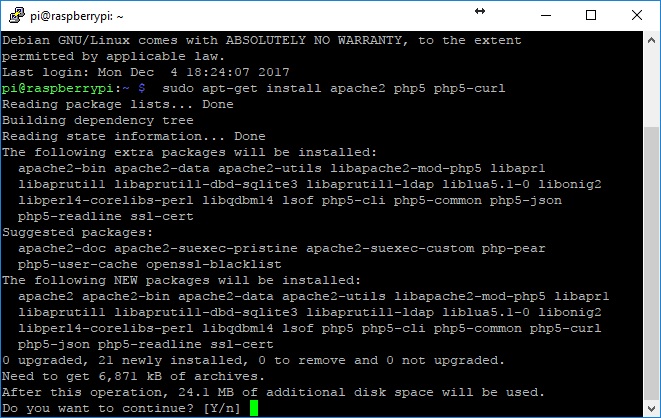 First activate the secure connection in apache and configure the SSL certificate to have an encrypted connection in our interface. For this we are going to use openSSL to generate the certificate. ``` sudo a2enmod ssl sudo a2enmod rewrite sudo a2ensite default-ssl service apache2 restart ``` # 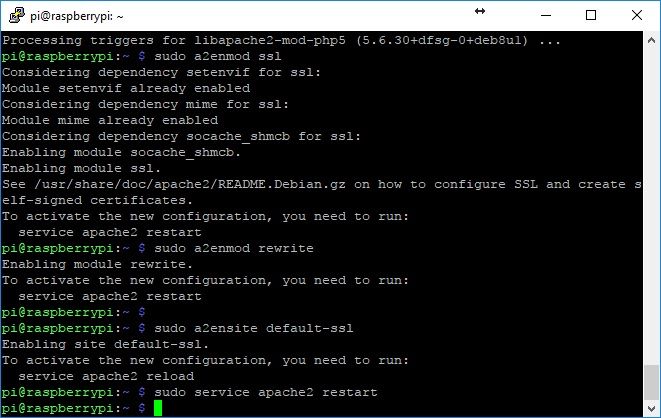 Creating the folder to save the certificate. ``` sudo mkdir /etc/apache2/ssl ``` # Create the certificate with a validity of 365 days and keep it in the directory that we have just created. Establish the permissions so that they are protected. ``` sudo openssl req -x509 -nodes -days 365 -newkey rsa:2048 -keyout /etc/apache2/ssl/sendpi.key -out /etc/apache2/ssl/sendpi.crt sudo chmod 600 /etc/apache2/ssl/* ``` # When we generate the certificate, complete all the information it requested. When it ask us for the field "Common Name" just put "localhost". 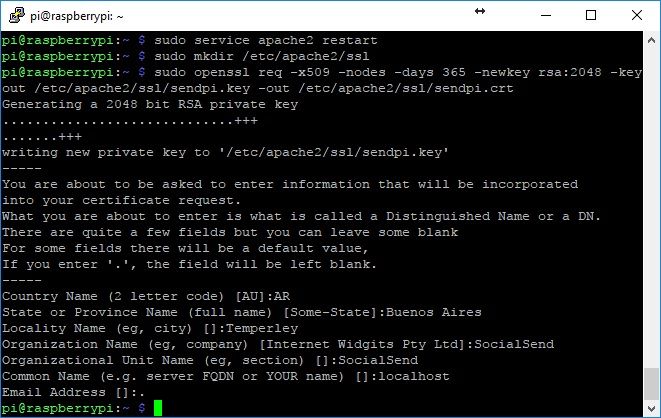 Edit the apache configuration to use the certificates that we just created. ``` sudo nano /etc/apache2/sites-enabled/default-ssl.conf ``` # This command opens the nano editor. We have to look for the following lines: ``` SSLCertificateFile /etc/ssl/certs/ssl-cert-snakeoil.pem SSLCertificateKeyFile /etc/ssl/private/ssl-cert-snakeoil.key ``` # and replace it with ``` SSLCertificateFile /etc/apache2/ssl/sendpi.crt SSLCertificateKeyFile /etc/apache2/ssl/sendpi.key ``` # 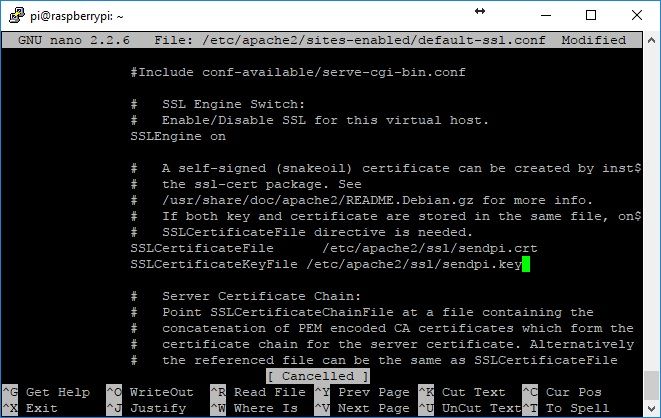 Then we are going to change the user that apache runs. This is so that the apache is executed with the same user that the wallet does, in this way, we have not permissions problems with the files. We edit the following configuration file: ``` sudo nano /etc/apache2/envvars ``` # We look for these lines ``` export APACHE_RUN_USER=www-data export APACHE_RUN_GROUP=www-data ``` # and change it for these others ``` export APACHE_RUN_USER=pi export APACHE_RUN_GROUP=pi ``` # 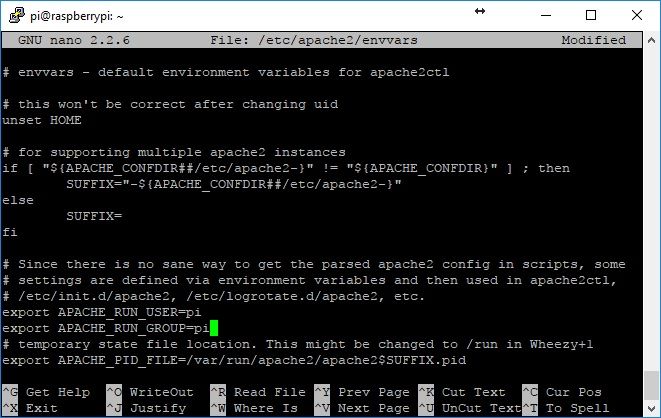 To allow the use of the `.htaccess` files we must change the apache configuration for the `/var/www/` directory for that we execute the command: ``` sudo nano /etc/apache2/apache2.conf ``` # We look for the configuration for the directory `/var/www/` which should be the following: ``` <Directory /var/www/> Options Indexes FollowSymLinks AllowOverride None Require all granted </Directory> ``` # and change the `AllowOverride None` to`AllowOverride All`, leaving as follows: ``` <Directory /var/www/> Options Indexes FollowSymLinks AllowOverride All Require all granted </Directory> ``` # 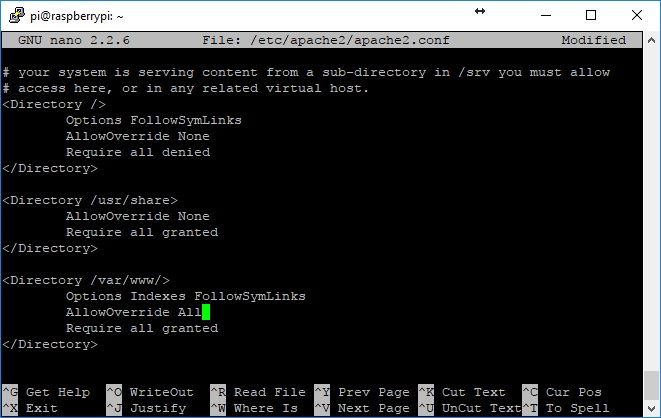 Save the changes and restart the apache to enable the new configuration with the following command: ``` sudo service apache2 restart ``` # ## Copying the web interface files. Download the web interface files: ``` cd ~ git clone https://github.com/hernss/SendPi.git ``` # 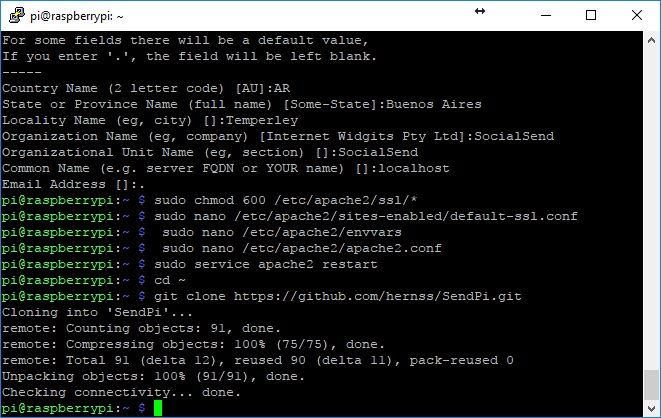 Copying the files to the web directory: ``` sudo chown pi /var/www/html/ cd SendPi/ chmod +x install ./install ``` # ## Starting the interface for the first time. We open a web browser and put in the address bar https://192.168.X.X (being 192.168.x.x the local ip address of the Raspberry Pi) As the certificate of the SSL connection is generated by ourselves the browser don't recognizing the creator of it. To avoid this warning, you have to add an exception in the browser. The first time you access the interface, you will ask us to enter a password. 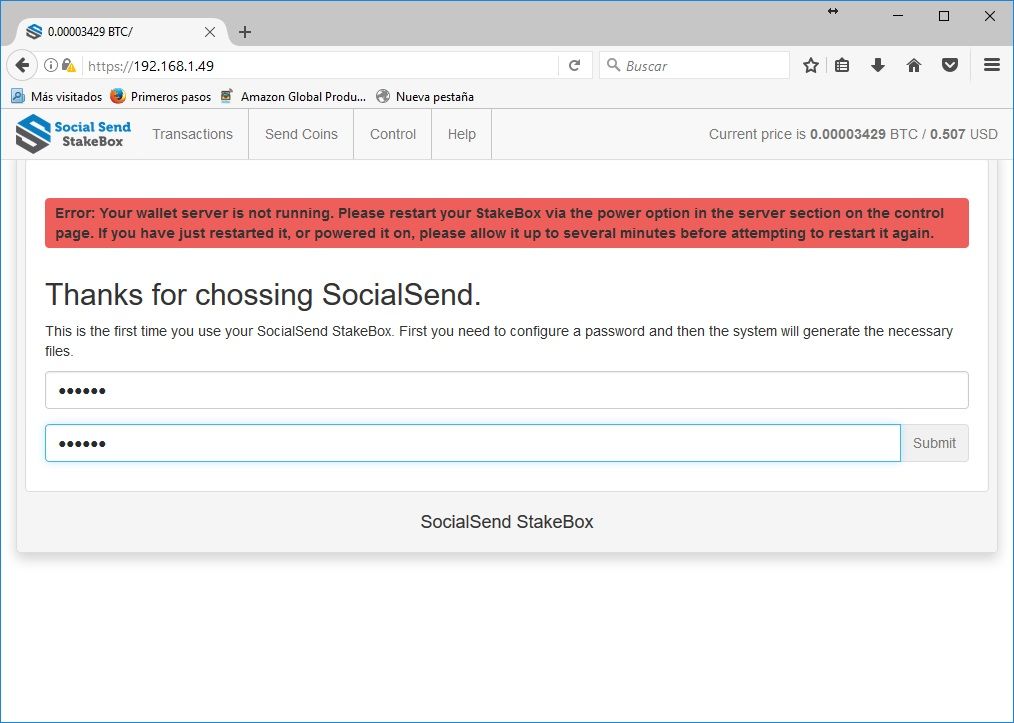 After entering the password the system will configure all the files to communicate with the wallet. It is important that before starting this step the wallet is already configured and the variables "rpcuser" and "rpcpassword" have been set in the file send.conf. The system will access this file to have access via RPC to the wallet. Example of send.conf file: ``` rpcuser=anyuser rpcpassword=anypassword rpcallowip=127.0.0.1 staking=1 server=1 listen=1 daemon=1 ``` # Once the password is confirmed, the system will ask us to login. 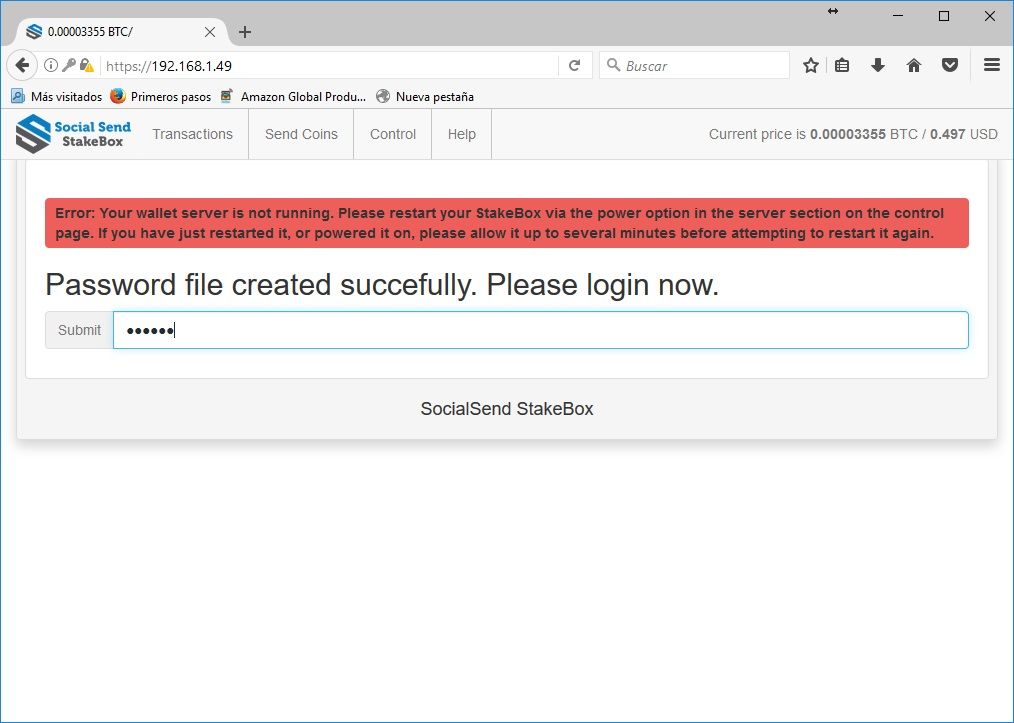 There we are going to have full access to the functionality of the Interace Web. If this guide was useful to you, some SENDS will always be welcome. `STRtrnjav8MGfTrkUn1BgMwdCU9mwYCQff` |
| json metadata | {"tags":["socialsend","raspberry","send","wallet","crypto"],"image":["https://steemitimages.com/DQmPqkYaR7K2jPKN5z5fdWjfsLX6yXvx3xdP7SQFAZeLWos/Screenshot1.jpg","https://steemitimages.com/DQmQwd9wFoXC2BiFhUDWoxJd6XE8Ubt2aW4uDawJr3mRULi/Screenshot2.jpg","https://steemitimages.com/DQmUa2dUSYffpoLS4912dtuN8iM2aDzKy45ZRrNMqnfG8tG/Screenshot3.jpg","https://steemitimages.com/DQmRZ9busg21PPZnLoRDvcSoKE8d21Wf5DN7vK13bfoiZxf/Screenshot4.jpg","https://steemitimages.com/DQmYWQWwQWFeez91iv3j6chpAPUs2oMkx1UPei1ra4D3772/Screenshot5.jpg","https://steemitimages.com/DQmZMJmnfg7MKoewup5g4qWBey9HMFED6ZFEMvJnyJTBPCp/Screenshot6.jpg","https://steemitimages.com/DQma9gBA7Hq9uWaoFEQLTKyXyh7qgzFmxQfYWT5t1AGLTJ5/Screenshot7.jpg","https://steemitimages.com/DQmQcKWCLbyiwDKwFexfdxb2zJsutkNVimLVhjMSyaKZZ5u/Screenshot8.jpg","https://steemitimages.com/DQmbhaSVs4hamUunDGxAvYWidbHiKRgHZLXiJwtUKy1gTkN/Screenshot9.jpg"],"links":["https://steemit.com/socialsend/@hernss/installation-guide-for-social-send-wallet","https://goo.gl/UEkgax","https://192.168.X.X"],"app":"steemit/0.1","format":"markdown"} |
| parent author | |
| parent permlink | socialsend |
| permlink | web-interface-installation-guide-for-socialsend-wallet |
| title | Web Interface Installation Guide for SocialSend Wallet. |
| Transaction Info | Block #18782307/Trx 34fddea4ac8fc95e25e5d7fd79f889c5edd8ffaf |
View Raw JSON Data
{
"block": 18782307,
"op": [
"comment",
{
"author": "hernss",
"body": "In this guide we will see the necessary steps to put into operation the web interface for Rasperry Pi with the SocialSend wallet.\n\n### Installing the necessary programs.\n\nFirst we need to download and install the SocialSend wallet in the Raspberry Pi 3 as we saw in this tutorial [link](https://steemit.com/socialsend/@hernss/installation-guide-for-social-send-wallet) or download the finished image from this [link](https://goo.gl/UEkgax)\nOnce we have the ready image we start with the installation and configuration of the web server. For that we install Apache and PHP5.\n```\nsudo apt-get install apache2 php5 php5-curl qrencode\n```\n#\n\n\nFirst activate the secure connection in apache and configure the SSL certificate to have an encrypted connection in our interface. For this we are going to use openSSL to generate the certificate.\n\n```\nsudo a2enmod ssl\nsudo a2enmod rewrite\nsudo a2ensite default-ssl\nservice apache2 restart\n```\n#\n\n\nCreating the folder to save the certificate.\n\n```\nsudo mkdir /etc/apache2/ssl\n```\n#\nCreate the certificate with a validity of 365 days and keep it in the directory that we have just created. Establish the permissions so that they are protected.\n\n```\nsudo openssl req -x509 -nodes -days 365 -newkey rsa:2048 -keyout /etc/apache2/ssl/sendpi.key -out /etc/apache2/ssl/sendpi.crt\nsudo chmod 600 /etc/apache2/ssl/*\n```\n#\nWhen we generate the certificate, complete all the information it requested. When it ask us for the field \"Common Name\" just put \"localhost\".\n\n\n\nEdit the apache configuration to use the certificates that we just created.\n\n```\nsudo nano /etc/apache2/sites-enabled/default-ssl.conf\n```\n#\nThis command opens the nano editor. We have to look for the following lines:\n\n```\nSSLCertificateFile /etc/ssl/certs/ssl-cert-snakeoil.pem\nSSLCertificateKeyFile /etc/ssl/private/ssl-cert-snakeoil.key\n```\n#\nand replace it with\n\n```\nSSLCertificateFile /etc/apache2/ssl/sendpi.crt\nSSLCertificateKeyFile /etc/apache2/ssl/sendpi.key\n```\n#\n\n\n\nThen we are going to change the user that apache runs. This is so that the apache is executed with the same user that the wallet does, in this way, we have not permissions problems with the files. We edit the following configuration file:\n\n\n```\nsudo nano /etc/apache2/envvars\n```\n#\nWe look for these lines\n\n```\nexport APACHE_RUN_USER=www-data\nexport APACHE_RUN_GROUP=www-data\n```\n#\nand change it for these others\n\n```\nexport APACHE_RUN_USER=pi\nexport APACHE_RUN_GROUP=pi\n```\n#\n\n\n\nTo allow the use of the `.htaccess` files we must change the apache configuration for the `/var/www/` directory for that we execute the command:\n\n```\nsudo nano /etc/apache2/apache2.conf\n```\n#\nWe look for the configuration for the directory `/var/www/` which should be the following:\n\n```\n<Directory /var/www/>\n Options Indexes FollowSymLinks\n AllowOverride None\n Require all granted\n</Directory>\n```\n#\nand change the `AllowOverride None` to`AllowOverride All`, leaving as follows:\n\n```\n<Directory /var/www/>\n Options Indexes FollowSymLinks\n AllowOverride All\n Require all granted\n</Directory>\n```\n#\n\n\nSave the changes and restart the apache to enable the new configuration with the following command:\n\n```\nsudo service apache2 restart\n```\n#\n\n## Copying the web interface files.\n\nDownload the web interface files:\n\n```\ncd ~\ngit clone https://github.com/hernss/SendPi.git\n```\n#\n\n\nCopying the files to the web directory:\n\n```\nsudo chown pi /var/www/html/\ncd SendPi/\nchmod +x install\n./install \n```\n#\n\n## Starting the interface for the first time.\n\nWe open a web browser and put in the address bar https://192.168.X.X (being 192.168.x.x the local ip address of the Raspberry Pi)\nAs the certificate of the SSL connection is generated by ourselves the browser don't recognizing the creator of it. To avoid this warning, you have to add an exception in the browser.\nThe first time you access the interface, you will ask us to enter a password.\n\n\n\nAfter entering the password the system will configure all the files to communicate with the wallet. It is important that before starting this step the wallet is already configured and the variables \"rpcuser\" and \"rpcpassword\" have been set in the file send.conf. The system will access this file to have access via RPC to the wallet.\nExample of send.conf file:\n\n```\nrpcuser=anyuser\nrpcpassword=anypassword\nrpcallowip=127.0.0.1\nstaking=1\nserver=1\nlisten=1\ndaemon=1\n```\n#\nOnce the password is confirmed, the system will ask us to login.\n\n\n\nThere we are going to have full access to the functionality of the Interace Web.\n\nIf this guide was useful to you, some SENDS will always be welcome.\n\n`STRtrnjav8MGfTrkUn1BgMwdCU9mwYCQff`",
"json_metadata": "{\"tags\":[\"socialsend\",\"raspberry\",\"send\",\"wallet\",\"crypto\"],\"image\":[\"https://steemitimages.com/DQmPqkYaR7K2jPKN5z5fdWjfsLX6yXvx3xdP7SQFAZeLWos/Screenshot1.jpg\",\"https://steemitimages.com/DQmQwd9wFoXC2BiFhUDWoxJd6XE8Ubt2aW4uDawJr3mRULi/Screenshot2.jpg\",\"https://steemitimages.com/DQmUa2dUSYffpoLS4912dtuN8iM2aDzKy45ZRrNMqnfG8tG/Screenshot3.jpg\",\"https://steemitimages.com/DQmRZ9busg21PPZnLoRDvcSoKE8d21Wf5DN7vK13bfoiZxf/Screenshot4.jpg\",\"https://steemitimages.com/DQmYWQWwQWFeez91iv3j6chpAPUs2oMkx1UPei1ra4D3772/Screenshot5.jpg\",\"https://steemitimages.com/DQmZMJmnfg7MKoewup5g4qWBey9HMFED6ZFEMvJnyJTBPCp/Screenshot6.jpg\",\"https://steemitimages.com/DQma9gBA7Hq9uWaoFEQLTKyXyh7qgzFmxQfYWT5t1AGLTJ5/Screenshot7.jpg\",\"https://steemitimages.com/DQmQcKWCLbyiwDKwFexfdxb2zJsutkNVimLVhjMSyaKZZ5u/Screenshot8.jpg\",\"https://steemitimages.com/DQmbhaSVs4hamUunDGxAvYWidbHiKRgHZLXiJwtUKy1gTkN/Screenshot9.jpg\"],\"links\":[\"https://steemit.com/socialsend/@hernss/installation-guide-for-social-send-wallet\",\"https://goo.gl/UEkgax\",\"https://192.168.X.X\"],\"app\":\"steemit/0.1\",\"format\":\"markdown\"}",
"parent_author": "",
"parent_permlink": "socialsend",
"permlink": "web-interface-installation-guide-for-socialsend-wallet",
"title": "Web Interface Installation Guide for SocialSend Wallet."
}
],
"op_in_trx": 0,
"timestamp": "2018-01-07T23:32:12",
"trx_id": "34fddea4ac8fc95e25e5d7fd79f889c5edd8ffaf",
"trx_in_block": 1,
"virtual_op": 0
}hernsspublished a new post: guia-de-instalacion-de-interface-web-para-socialsend-wallet2018/01/07 22:43:03
hernsspublished a new post: guia-de-instalacion-de-interface-web-para-socialsend-wallet
2018/01/07 22:43:03
| author | hernss |
| body | En esta guia vamos a ver los pasos necesarios para poner en funcionamiento la interface web para Rasperry Pi con la wallet de SocialSend. ### Instalando los programas necesarios. Primero necesitamos descargar e instalar la wallet de SocialSend en la Raspberry Pi 3 como vimos en este tutorial [link](https://steemit.com/socialsend/@hernss/guia-de-instalacion-de-wallet-socialsend-en-raspberry-pi3) o descargar la imagen terminada desde este [link](https://goo.gl/UEkgax) Una vez que tengamos la imagen lista empezamos con la instalacion y configuracion del servidor web. Para eso instalamos el Apache y PHP5. ``` sudo apt-get install apache2 php5 php5-curl qrencode ``` #  Primero activamos la conexion segura en apache y configuramos el certificado SSL para tener una conexion encriptada en nuestra interface. Para ello vamos a utilizar openSSL para generar el certificado. ``` sudo a2enmod ssl sudo a2enmod rewrite sudo a2ensite default-ssl service apache2 restart ``` #  Creamos la carpeta para guardar el certificado. ``` sudo mkdir /etc/apache2/ssl ``` # Creamos el certificado con una validez de 365 dias y lo guardamos en el directorio que acabamos de crear. Establecemos los permisos para que queden protegidos. ``` sudo openssl req -x509 -nodes -days 365 -newkey rsa:2048 -keyout /etc/apache2/ssl/sendpi.key -out /etc/apache2/ssl/sendpi.crt sudo chmod 600 /etc/apache2/ssl/* ``` # Al generar el certificado completamos todos los datos que nos pide. Cuando nos pregunte por el campo "Common Name" le ponemos "localhost".  Editamos la configuracion del apache para que use los certificados que acabamos de crear. ``` sudo nano /etc/apache2/sites-enabled/default-ssl.conf ``` # Este comando nos abre el editor nano. Tenemos que buscar las siguientes lineas: ``` SSLCertificateFile /etc/ssl/certs/ssl-cert-snakeoil.pem SSLCertificateKeyFile /etc/ssl/private/ssl-cert-snakeoil.key ``` # y modificarlas por las siguienes ``` SSLCertificateFile /etc/apache2/ssl/sendpi.crt SSLCertificateKeyFile /etc/apache2/ssl/sendpi.key ``` #  Luego vamos a cambiar el usuario con el que se ejecuta el apache. Esto es para que el apache se ejecute con el mismo usuario con el que se ejecuta la wallet, de esta manera, nos tenemos problemas de permisos a los archivos. Editamos el siguiente archivo de configuracion: ``` sudo nano /etc/apache2/envvars ``` # Buscamos las siguientes lineas: ``` export APACHE_RUN_USER=www-data export APACHE_RUN_GROUP=www-data ``` # y las modificamos por las siguientes: ``` export APACHE_RUN_USER=pi export APACHE_RUN_GROUP=pi ``` #  Para permitir el uso de los archivos `.htaccess` debemos cambiar la configuracion del apache para el directorio `/var/www/` para eso ejecutamos el comando ``` sudo nano /etc/apache2/apache2.conf ``` # Buscamos la configuracion para el directorio `/var/www/` que deberia ser la siguiente: ``` <Directory /var/www/> Options Indexes FollowSymLinks AllowOverride None Require all granted </Directory> ``` # y cambiamos el `AllowOverride None` por `AllowOverride All` quedando de la siguiente manera: ``` <Directory /var/www/> Options Indexes FollowSymLinks AllowOverride All Require all granted </Directory> ``` #  Guardamos los cambios y reiniciamos el apache para que tome la nueva configuracion con el siguiente comando: ``` sudo service apache2 restart ``` # ## Copiando los archivos de las interface web Descargamos los archivos de la interfaz web: ``` cd ~ git clone https://github.com/hernss/SendPi.git ``` #  Copiamos los archivos al directorio web: ``` sudo chown pi /var/www/html/ cd SendPi/ chmod +x install ./install ``` # ## Iniciando la interface por primera vez Abrimos un navegador y ponemos en la barra de direcciones `https://192.168.X.X`(siendo 192.168.x.x la direccion ip local de la Raspberry Pi) Como el certificado de la conexion SSL lo generamos nosotros mismos, entonces el navegador al no reconocer al creador del formulario arroja una advertencia. Para evitar esto hay que agregar una excepcion en el navegador. La primera vez que se accede a la interface nos va a pedir que ingresemos una contraseña.  Luego de ingresar la contraseña el sistema va a configurar todos los archivos para comunicarse con la wallet. Es importante que antes de iniciar este paso la wallet ya este configurada y tenga seteados las variables "rpcuser" y "rpcpassword" en el archivo send.conf. El sistema va a acceder a este archivo para tener acceso via RPC a la wallet. Una vez confirmada la contraseña el sistema nos va a pedir que ingresemos.  Ahi ya vamos a tener acceso completo a las funcionalidades de la Interace Web. Si esta guia te parecio util siempre algunos SENDS seran bien recibidos `STRtrnjav8MGfTrkUn1BgMwdCU9mwYCQff` |
| json metadata | {"tags":["socialsend","raspberry","wallet","crypto","spanish"],"image":["https://steemitimages.com/DQmPqkYaR7K2jPKN5z5fdWjfsLX6yXvx3xdP7SQFAZeLWos/Screenshot1.jpg","https://steemitimages.com/DQmQwd9wFoXC2BiFhUDWoxJd6XE8Ubt2aW4uDawJr3mRULi/Screenshot2.jpg","https://steemitimages.com/DQmUa2dUSYffpoLS4912dtuN8iM2aDzKy45ZRrNMqnfG8tG/Screenshot3.jpg","https://steemitimages.com/DQmRZ9busg21PPZnLoRDvcSoKE8d21Wf5DN7vK13bfoiZxf/Screenshot4.jpg","https://steemitimages.com/DQmYWQWwQWFeez91iv3j6chpAPUs2oMkx1UPei1ra4D3772/Screenshot5.jpg","https://steemitimages.com/DQmZMJmnfg7MKoewup5g4qWBey9HMFED6ZFEMvJnyJTBPCp/Screenshot6.jpg","https://steemitimages.com/DQma9gBA7Hq9uWaoFEQLTKyXyh7qgzFmxQfYWT5t1AGLTJ5/Screenshot7.jpg","https://steemitimages.com/DQmQcKWCLbyiwDKwFexfdxb2zJsutkNVimLVhjMSyaKZZ5u/Screenshot8.jpg","https://steemitimages.com/DQmbhaSVs4hamUunDGxAvYWidbHiKRgHZLXiJwtUKy1gTkN/Screenshot9.jpg"],"links":["https://steemit.com/socialsend/@hernss/guia-de-instalacion-de-wallet-socialsend-en-raspberry-pi3","https://goo.gl/UEkgax"],"app":"steemit/0.1","format":"markdown"} |
| parent author | |
| parent permlink | socialsend |
| permlink | guia-de-instalacion-de-interface-web-para-socialsend-wallet |
| title | Guia de Instalacion de Interface Web para SocialSend Wallet |
| Transaction Info | Block #18781324/Trx 93f9fad1bb992ef5d402935ba7a4ad15272bd515 |
View Raw JSON Data
{
"block": 18781324,
"op": [
"comment",
{
"author": "hernss",
"body": "En esta guia vamos a ver los pasos necesarios para poner en funcionamiento la interface web para Rasperry Pi con la wallet de SocialSend.\n\n### Instalando los programas necesarios.\n\nPrimero necesitamos descargar e instalar la wallet de SocialSend en la Raspberry Pi 3 como vimos en este tutorial [link](https://steemit.com/socialsend/@hernss/guia-de-instalacion-de-wallet-socialsend-en-raspberry-pi3) o descargar la imagen terminada desde este [link](https://goo.gl/UEkgax)\nUna vez que tengamos la imagen lista empezamos con la instalacion y configuracion del servidor web. Para eso instalamos el Apache y PHP5.\n```\nsudo apt-get install apache2 php5 php5-curl qrencode \n```\n#\n\n\nPrimero activamos la conexion segura en apache y configuramos el certificado SSL para tener una conexion encriptada en nuestra interface. Para ello vamos a utilizar openSSL para generar el certificado. \n\n```\nsudo a2enmod ssl\nsudo a2enmod rewrite\nsudo a2ensite default-ssl\nservice apache2 restart\n```\n#\n\n\nCreamos la carpeta para guardar el certificado.\n\n\n```\nsudo mkdir /etc/apache2/ssl\n```\n#\nCreamos el certificado con una validez de 365 dias y lo guardamos en el directorio que acabamos de crear. Establecemos los permisos para que queden protegidos.\n\n\n```\nsudo openssl req -x509 -nodes -days 365 -newkey rsa:2048 -keyout /etc/apache2/ssl/sendpi.key -out /etc/apache2/ssl/sendpi.crt\nsudo chmod 600 /etc/apache2/ssl/*\n```\n#\nAl generar el certificado completamos todos los datos que nos pide. Cuando nos pregunte por el campo \"Common Name\" le ponemos \"localhost\".\n\n\n\nEditamos la configuracion del apache para que use los certificados que acabamos de crear. \n\n\n```\nsudo nano /etc/apache2/sites-enabled/default-ssl.conf\n```\n#\nEste comando nos abre el editor nano. Tenemos que buscar las siguientes lineas:\n\n```\nSSLCertificateFile /etc/ssl/certs/ssl-cert-snakeoil.pem\nSSLCertificateKeyFile /etc/ssl/private/ssl-cert-snakeoil.key\n```\n#\ny modificarlas por las siguienes\n\n```\nSSLCertificateFile /etc/apache2/ssl/sendpi.crt\nSSLCertificateKeyFile /etc/apache2/ssl/sendpi.key\n```\n#\n\n\nLuego vamos a cambiar el usuario con el que se ejecuta el apache. Esto es para que el apache se ejecute con el mismo usuario con el que se ejecuta la wallet, de esta manera, nos tenemos problemas de permisos a los archivos. Editamos el siguiente archivo de configuracion:\n\n```\nsudo nano /etc/apache2/envvars\n```\n#\nBuscamos las siguientes lineas:\n\n```\nexport APACHE_RUN_USER=www-data\nexport APACHE_RUN_GROUP=www-data\n```\n#\ny las modificamos por las siguientes:\n\n```\nexport APACHE_RUN_USER=pi\nexport APACHE_RUN_GROUP=pi\n```\n#\n\n\nPara permitir el uso de los archivos `.htaccess` debemos cambiar la configuracion del apache para el directorio `/var/www/` para eso ejecutamos el comando \n\n```\nsudo nano /etc/apache2/apache2.conf\n```\n#\nBuscamos la configuracion para el directorio `/var/www/` que deberia ser la siguiente:\n\n```\n<Directory /var/www/>\n Options Indexes FollowSymLinks\n AllowOverride None\n Require all granted\n</Directory>\n```\n#\n\ny cambiamos el `AllowOverride None` por `AllowOverride All` quedando de la siguiente manera:\n\n```\n<Directory /var/www/>\n Options Indexes FollowSymLinks\n AllowOverride All\n Require all granted\n</Directory>\n```\n#\n\n\nGuardamos los cambios y reiniciamos el apache para que tome la nueva configuracion con el siguiente comando:\n\n```\nsudo service apache2 restart\n```\n#\n\n## Copiando los archivos de las interface web\n\nDescargamos los archivos de la interfaz web:\n\n```\ncd ~\ngit clone https://github.com/hernss/SendPi.git\n```\n#\n\n\nCopiamos los archivos al directorio web:\n```\nsudo chown pi /var/www/html/\ncd SendPi/\nchmod +x install\n./install \n```\n#\n## Iniciando la interface por primera vez\n\nAbrimos un navegador y ponemos en la barra de direcciones `https://192.168.X.X`(siendo 192.168.x.x la direccion ip local de la Raspberry Pi)\nComo el certificado de la conexion SSL lo generamos nosotros mismos, entonces el navegador al no reconocer al creador del formulario arroja una advertencia. Para evitar esto hay que agregar una excepcion en el navegador. \nLa primera vez que se accede a la interface nos va a pedir que ingresemos una contraseña. \n\n\n\nLuego de ingresar la contraseña el sistema va a configurar todos los archivos para comunicarse con la wallet. Es importante que antes de iniciar este paso la wallet ya este configurada y tenga seteados las variables \"rpcuser\" y \"rpcpassword\" en el archivo send.conf. El sistema va a acceder a este archivo para tener acceso via RPC a la wallet.\nUna vez confirmada la contraseña el sistema nos va a pedir que ingresemos. \n\n\n\nAhi ya vamos a tener acceso completo a las funcionalidades de la Interace Web.\n\nSi esta guia te parecio util siempre algunos SENDS seran bien recibidos \n\n`STRtrnjav8MGfTrkUn1BgMwdCU9mwYCQff`",
"json_metadata": "{\"tags\":[\"socialsend\",\"raspberry\",\"wallet\",\"crypto\",\"spanish\"],\"image\":[\"https://steemitimages.com/DQmPqkYaR7K2jPKN5z5fdWjfsLX6yXvx3xdP7SQFAZeLWos/Screenshot1.jpg\",\"https://steemitimages.com/DQmQwd9wFoXC2BiFhUDWoxJd6XE8Ubt2aW4uDawJr3mRULi/Screenshot2.jpg\",\"https://steemitimages.com/DQmUa2dUSYffpoLS4912dtuN8iM2aDzKy45ZRrNMqnfG8tG/Screenshot3.jpg\",\"https://steemitimages.com/DQmRZ9busg21PPZnLoRDvcSoKE8d21Wf5DN7vK13bfoiZxf/Screenshot4.jpg\",\"https://steemitimages.com/DQmYWQWwQWFeez91iv3j6chpAPUs2oMkx1UPei1ra4D3772/Screenshot5.jpg\",\"https://steemitimages.com/DQmZMJmnfg7MKoewup5g4qWBey9HMFED6ZFEMvJnyJTBPCp/Screenshot6.jpg\",\"https://steemitimages.com/DQma9gBA7Hq9uWaoFEQLTKyXyh7qgzFmxQfYWT5t1AGLTJ5/Screenshot7.jpg\",\"https://steemitimages.com/DQmQcKWCLbyiwDKwFexfdxb2zJsutkNVimLVhjMSyaKZZ5u/Screenshot8.jpg\",\"https://steemitimages.com/DQmbhaSVs4hamUunDGxAvYWidbHiKRgHZLXiJwtUKy1gTkN/Screenshot9.jpg\"],\"links\":[\"https://steemit.com/socialsend/@hernss/guia-de-instalacion-de-wallet-socialsend-en-raspberry-pi3\",\"https://goo.gl/UEkgax\"],\"app\":\"steemit/0.1\",\"format\":\"markdown\"}",
"parent_author": "",
"parent_permlink": "socialsend",
"permlink": "guia-de-instalacion-de-interface-web-para-socialsend-wallet",
"title": "Guia de Instalacion de Interface Web para SocialSend Wallet"
}
],
"op_in_trx": 0,
"timestamp": "2018-01-07T22:43:03",
"trx_id": "93f9fad1bb992ef5d402935ba7a4ad15272bd515",
"trx_in_block": 4,
"virtual_op": 0
}hernssupvoted (100.00%) @steemitboard / steemitboard-notify-hernss-20171217t014656000z2017/12/30 16:32:00
hernssupvoted (100.00%) @steemitboard / steemitboard-notify-hernss-20171217t014656000z
2017/12/30 16:32:00
| author | steemitboard |
| permlink | steemitboard-notify-hernss-20171217t014656000z |
| voter | hernss |
| weight | 10000 (100.00%) |
| Transaction Info | Block #18543828/Trx 9015ad38ed0b10a682613ee5ba5ffcaf11545a7c |
View Raw JSON Data
{
  "block": 18543828,
  "op": [
    "vote",
    {
      "author": "steemitboard",
      "permlink": "steemitboard-notify-hernss-20171217t014656000z",
      "voter": "hernss",
      "weight": 10000
    }
  ],
  "op_in_trx": 0,
  "timestamp": "2017-12-30T16:32:00",
  "trx_id": "9015ad38ed0b10a682613ee5ba5ffcaf11545a7c",
  "trx_in_block": 13,
  "virtual_op": 0
}vitor6chavesupvoted (100.00%) @hernss / installation-guide-for-social-send-wallet2017/12/26 17:09:06
vitor6chavesupvoted (100.00%) @hernss / installation-guide-for-social-send-wallet
2017/12/26 17:09:06
| author | hernss |
| permlink | installation-guide-for-social-send-wallet |
| voter | vitor6chaves |
| weight | 10000 (100.00%) |
| Transaction Info | Block #18429403/Trx a4e36736e3e74f3683d5fd8f20db5048a7dd1d47 |
View Raw JSON Data
{
  "block": 18429403,
  "op": [
    "vote",
    {
      "author": "hernss",
      "permlink": "installation-guide-for-social-send-wallet",
      "voter": "vitor6chaves",
      "weight": 10000
    }
  ],
  "op_in_trx": 0,
  "timestamp": "2017-12-26T17:09:06",
  "trx_id": "a4e36736e3e74f3683d5fd8f20db5048a7dd1d47",
  "trx_in_block": 15,
  "virtual_op": 0
}2017/12/17 01:46:57
2017/12/17 01:46:57
| author | steemitboard |
| body | Congratulations @hernss! You have completed some achievement on Steemit and have been rewarded with new badge(s) : [](http://steemitboard.com/@hernss) You made your First Vote [](http://steemitboard.com/@hernss) You got your First payout Click on any badge to view your own Board of Honor on SteemitBoard. For more information about SteemitBoard, click [here](https://steemit.com/@steemitboard) If you no longer want to receive notifications, reply to this comment with the word `STOP` > By upvoting this notification, you can help all Steemit users. Learn how [here](https://steemit.com/steemitboard/@steemitboard/http-i-cubeupload-com-7ciqeo-png)! |
| json metadata | {"image":["https://steemitboard.com/img/notifications.png"]} |
| parent author | hernss |
| parent permlink | installation-guide-for-social-send-wallet |
| permlink | steemitboard-notify-hernss-20171217t014656000z |
| title | |
| Transaction Info | Block #18151883/Trx 124af0b8a5af7f58f0566925b006615e59b27aab |
View Raw JSON Data
{
"block": 18151883,
"op": [
"comment",
{
"author": "steemitboard",
"body": "Congratulations @hernss! You have completed some achievement on Steemit and have been rewarded with new badge(s) :\n\n[](http://steemitboard.com/@hernss) You made your First Vote\n[](http://steemitboard.com/@hernss) You got your First payout\n\nClick on any badge to view your own Board of Honor on SteemitBoard.\nFor more information about SteemitBoard, click [here](https://steemit.com/@steemitboard)\n\nIf you no longer want to receive notifications, reply to this comment with the word `STOP`\n\n> By upvoting this notification, you can help all Steemit users. Learn how [here](https://steemit.com/steemitboard/@steemitboard/http-i-cubeupload-com-7ciqeo-png)!",
"json_metadata": "{\"image\":[\"https://steemitboard.com/img/notifications.png\"]}",
"parent_author": "hernss",
"parent_permlink": "installation-guide-for-social-send-wallet",
"permlink": "steemitboard-notify-hernss-20171217t014656000z",
"title": ""
}
],
"op_in_trx": 0,
"timestamp": "2017-12-17T01:46:57",
"trx_id": "124af0b8a5af7f58f0566925b006615e59b27aab",
"trx_in_block": 0,
"virtual_op": 0
}hernssupvoted (100.00%) @k5r2an / zxvrm-socialsend2017/12/16 23:32:57
hernssupvoted (100.00%) @k5r2an / zxvrm-socialsend
2017/12/16 23:32:57
| author | k5r2an |
| permlink | zxvrm-socialsend |
| voter | hernss |
| weight | 10000 (100.00%) |
| Transaction Info | Block #18149203/Trx ec1ecb2c1b5f49093750c05e6c4dc9c1d2751c61 |
View Raw JSON Data
{
  "block": 18149203,
  "op": [
    "vote",
    {
      "author": "k5r2an",
      "permlink": "zxvrm-socialsend",
      "voter": "hernss",
      "weight": 10000
    }
  ],
  "op_in_trx": 0,
  "timestamp": "2017-12-16T23:32:57",
  "trx_id": "ec1ecb2c1b5f49093750c05e6c4dc9c1d2751c61",
  "trx_in_block": 19,
  "virtual_op": 0
}hernssupvoted (100.00%) @steemitboard / steemitboard-notify-hernss-20171208t111532000z2017/12/16 23:30:18
hernssupvoted (100.00%) @steemitboard / steemitboard-notify-hernss-20171208t111532000z
2017/12/16 23:30:18
| author | steemitboard |
| permlink | steemitboard-notify-hernss-20171208t111532000z |
| voter | hernss |
| weight | 10000 (100.00%) |
| Transaction Info | Block #18149150/Trx 2134eb5f856eed70fb6a2cb72cc7e4c1ffb58122 |
View Raw JSON Data
{
  "block": 18149150,
  "op": [
    "vote",
    {
      "author": "steemitboard",
      "permlink": "steemitboard-notify-hernss-20171208t111532000z",
      "voter": "hernss",
      "weight": 10000
    }
  ],
  "op_in_trx": 0,
  "timestamp": "2017-12-16T23:30:18",
  "trx_id": "2134eb5f856eed70fb6a2cb72cc7e4c1ffb58122",
  "trx_in_block": 11,
  "virtual_op": 0
}hernssreceived 0.721 SBD, 0.517 SP author reward for @hernss / installation-guide-for-social-send-wallet2017/12/15 05:33:03
hernssreceived 0.721 SBD, 0.517 SP author reward for @hernss / installation-guide-for-social-send-wallet
2017/12/15 05:33:03
| author | hernss |
| permlink | installation-guide-for-social-send-wallet |
| sbd payout | 0.721 SBD |
| steem payout | 0.000 STEEM |
| vesting payout | 840.868268 VESTS |
| Transaction Info | Block #18098812/Virtual Operation #4 |
View Raw JSON Data
{
  "block": 18098812,
  "op": [
    "author_reward",
    {
      "author": "hernss",
      "permlink": "installation-guide-for-social-send-wallet",
      "sbd_payout": "0.721 SBD",
      "steem_payout": "0.000 STEEM",
      "vesting_payout": "840.868268 VESTS"
    }
  ],
  "op_in_trx": 0,
  "timestamp": "2017-12-15T05:33:03",
  "trx_id": "0000000000000000000000000000000000000000",
  "trx_in_block": 4294967295,
  "virtual_op": 4
}2017/12/12 22:18:24
2017/12/12 22:18:24
| delegatee | hernss |
| delegator | steem |
| vesting shares | 29740.191615 VESTS |
| Transaction Info | Block #18032551/Trx e333d69a2d3d9fee204e79555bbb5d64e246d3d0 |
View Raw JSON Data
{
  "block": 18032551,
  "op": [
    "delegate_vesting_shares",
    {
      "delegatee": "hernss",
      "delegator": "steem",
      "vesting_shares": "29740.191615 VESTS"
    }
  ],
  "op_in_trx": 0,
  "timestamp": "2017-12-12T22:18:24",
  "trx_id": "e333d69a2d3d9fee204e79555bbb5d64e246d3d0",
  "trx_in_block": 12,
  "virtual_op": 0
}steemitboardupvoted (1.00%) @hernss / installation-guide-for-social-send-wallet2017/12/08 11:15:33
steemitboardupvoted (1.00%) @hernss / installation-guide-for-social-send-wallet
2017/12/08 11:15:33
| author | hernss |
| permlink | installation-guide-for-social-send-wallet |
| voter | steemitboard |
| weight | 100 (1.00%) |
| Transaction Info | Block #17904140/Trx 9b044e1e4870ad7c2c78940f838dc383cdeabb4e |
View Raw JSON Data
{
  "block": 17904140,
  "op": [
    "vote",
    {
      "author": "hernss",
      "permlink": "installation-guide-for-social-send-wallet",
      "voter": "steemitboard",
      "weight": 100
    }
  ],
  "op_in_trx": 0,
  "timestamp": "2017-12-08T11:15:33",
  "trx_id": "9b044e1e4870ad7c2c78940f838dc383cdeabb4e",
  "trx_in_block": 7,
  "virtual_op": 0
}2017/12/08 11:15:30
2017/12/08 11:15:30
| author | steemitboard |
| body | Congratulations @hernss! You have completed some achievement on Steemit and have been rewarded with new badge(s) : [](http://steemitboard.com/@hernss) You published your First Post [](http://steemitboard.com/@hernss) You got a First Vote Click on any badge to view your own Board of Honor on SteemitBoard. For more information about SteemitBoard, click [here](https://steemit.com/@steemitboard) If you no longer want to receive notifications, reply to this comment with the word `STOP` > By upvoting this notification, you can help all Steemit users. Learn how [here](https://steemit.com/steemitboard/@steemitboard/http-i-cubeupload-com-7ciqeo-png)! |
| json metadata | {"image":["https://steemitboard.com/img/notifications.png"]} |
| parent author | hernss |
| parent permlink | installation-guide-for-social-send-wallet |
| permlink | steemitboard-notify-hernss-20171208t111532000z |
| title | |
| Transaction Info | Block #17904139/Trx 9d145efa07514492a7a49628cdf45f3c13247bb8 |
View Raw JSON Data
{
"block": 17904139,
"op": [
"comment",
{
"author": "steemitboard",
"body": "Congratulations @hernss! You have completed some achievement on Steemit and have been rewarded with new badge(s) :\n\n[](http://steemitboard.com/@hernss) You published your First Post\n[](http://steemitboard.com/@hernss) You got a First Vote\n\nClick on any badge to view your own Board of Honor on SteemitBoard.\nFor more information about SteemitBoard, click [here](https://steemit.com/@steemitboard)\n\nIf you no longer want to receive notifications, reply to this comment with the word `STOP`\n\n> By upvoting this notification, you can help all Steemit users. Learn how [here](https://steemit.com/steemitboard/@steemitboard/http-i-cubeupload-com-7ciqeo-png)!",
"json_metadata": "{\"image\":[\"https://steemitboard.com/img/notifications.png\"]}",
"parent_author": "hernss",
"parent_permlink": "installation-guide-for-social-send-wallet",
"permlink": "steemitboard-notify-hernss-20171208t111532000z",
"title": ""
}
],
"op_in_trx": 0,
"timestamp": "2017-12-08T11:15:30",
"trx_id": "9d145efa07514492a7a49628cdf45f3c13247bb8",
"trx_in_block": 14,
"virtual_op": 0
}laythepipeupvoted (90.00%) @hernss / guia-de-instalacion-de-wallet-socialsend-en-raspberry-pi32017/12/08 06:36:51
laythepipeupvoted (90.00%) @hernss / guia-de-instalacion-de-wallet-socialsend-en-raspberry-pi3
2017/12/08 06:36:51
| author | hernss |
| permlink | guia-de-instalacion-de-wallet-socialsend-en-raspberry-pi3 |
| voter | laythepipe |
| weight | 9000 (90.00%) |
| Transaction Info | Block #17898585/Trx f30771b38961d33e762270e234c97d02b0a7b99b |
View Raw JSON Data
{
  "block": 17898585,
  "op": [
    "vote",
    {
      "author": "hernss",
      "permlink": "guia-de-instalacion-de-wallet-socialsend-en-raspberry-pi3",
      "voter": "laythepipe",
      "weight": 9000
    }
  ],
  "op_in_trx": 0,
  "timestamp": "2017-12-08T06:36:51",
  "trx_id": "f30771b38961d33e762270e234c97d02b0a7b99b",
  "trx_in_block": 5,
  "virtual_op": 0
}hr1upvoted (15.00%) @hernss / installation-guide-for-social-send-wallet2017/12/08 06:03:18
hr1upvoted (15.00%) @hernss / installation-guide-for-social-send-wallet
2017/12/08 06:03:18
| author | hernss |
| permlink | installation-guide-for-social-send-wallet |
| voter | hr1 |
| weight | 1500 (15.00%) |
| Transaction Info | Block #17897914/Trx 0473fa816463f491957c36a939f3bcd0dd6d111c |
View Raw JSON Data
{
  "block": 17897914,
  "op": [
    "vote",
    {
      "author": "hernss",
      "permlink": "installation-guide-for-social-send-wallet",
      "voter": "hr1",
      "weight": 1500
    }
  ],
  "op_in_trx": 0,
  "timestamp": "2017-12-08T06:03:18",
  "trx_id": "0473fa816463f491957c36a939f3bcd0dd6d111c",
  "trx_in_block": 7,
  "virtual_op": 0
}jeffdudupvoted (5.00%) @hernss / guia-de-instalacion-de-wallet-socialsend-en-raspberry-pi32017/12/08 06:01:15
jeffdudupvoted (5.00%) @hernss / guia-de-instalacion-de-wallet-socialsend-en-raspberry-pi3
2017/12/08 06:01:15
| author | hernss |
| permlink | guia-de-instalacion-de-wallet-socialsend-en-raspberry-pi3 |
| voter | jeffdud |
| weight | 500 (5.00%) |
| Transaction Info | Block #17897873/Trx 3d9747c879c1d4b0fe710330423606f4f298592d |
View Raw JSON Data
{
  "block": 17897873,
  "op": [
    "vote",
    {
      "author": "hernss",
      "permlink": "guia-de-instalacion-de-wallet-socialsend-en-raspberry-pi3",
      "voter": "jeffdud",
      "weight": 500
    }
  ],
  "op_in_trx": 0,
  "timestamp": "2017-12-08T06:01:15",
  "trx_id": "3d9747c879c1d4b0fe710330423606f4f298592d",
  "trx_in_block": 8,
  "virtual_op": 0
}hernssupdated their account properties2017/12/08 05:41:42
hernssupdated their account properties
2017/12/08 05:41:42
| account | hernss |
| json metadata | {"profile":{"profile_image":"https://image.ibb.co/fqpfKb/logo.png","name":"Hernan","location":"Buenos Aires, Argentina"}} |
| memo key | STM6i1Mv7RdQQsejJk5pyX5vSwBPqFp31hvseLNYwuRw5EQnFhjvX |
| Transaction Info | Block #17897482/Trx 6ecfd6657152ee814c56328420a84b0625fc8474 |
View Raw JSON Data
{
  "block": 17897482,
  "op": [
    "account_update",
    {
      "account": "hernss",
      "json_metadata": "{\"profile\":{\"profile_image\":\"https://image.ibb.co/fqpfKb/logo.png\",\"name\":\"Hernan\",\"location\":\"Buenos Aires, Argentina\"}}",
      "memo_key": "STM6i1Mv7RdQQsejJk5pyX5vSwBPqFp31hvseLNYwuRw5EQnFhjvX"
    }
  ],
  "op_in_trx": 0,
  "timestamp": "2017-12-08T05:41:42",
  "trx_id": "6ecfd6657152ee814c56328420a84b0625fc8474",
  "trx_in_block": 9,
  "virtual_op": 0
}hernssupdated their account properties2017/12/08 05:40:39
hernssupdated their account properties
2017/12/08 05:40:39
| account | hernss |
| json metadata | {"profile":{"profile_image":"https://ibb.co/d9V9Cw","name":"Hernan","location":"Buenos Aires, Argentina"}} |
| memo key | STM6i1Mv7RdQQsejJk5pyX5vSwBPqFp31hvseLNYwuRw5EQnFhjvX |
| Transaction Info | Block #17897461/Trx 4f6c258a78c4cee2fa90f35f2c66f3b389e8ea9d |
View Raw JSON Data
{
  "block": 17897461,
  "op": [
    "account_update",
    {
      "account": "hernss",
      "json_metadata": "{\"profile\":{\"profile_image\":\"https://ibb.co/d9V9Cw\",\"name\":\"Hernan\",\"location\":\"Buenos Aires, Argentina\"}}",
      "memo_key": "STM6i1Mv7RdQQsejJk5pyX5vSwBPqFp31hvseLNYwuRw5EQnFhjvX"
    }
  ],
  "op_in_trx": 0,
  "timestamp": "2017-12-08T05:40:39",
  "trx_id": "4f6c258a78c4cee2fa90f35f2c66f3b389e8ea9d",
  "trx_in_block": 4,
  "virtual_op": 0
}whitey420upvoted (100.00%) @hernss / installation-guide-for-social-send-wallet2017/12/08 05:38:03
whitey420upvoted (100.00%) @hernss / installation-guide-for-social-send-wallet
2017/12/08 05:38:03
| author | hernss |
| permlink | installation-guide-for-social-send-wallet |
| voter | whitey420 |
| weight | 10000 (100.00%) |
| Transaction Info | Block #17897409/Trx 0ce8ea10b8a6d9dc5e49cb2f4be90508f88bcff4 |
View Raw JSON Data
{
  "block": 17897409,
  "op": [
    "vote",
    {
      "author": "hernss",
      "permlink": "installation-guide-for-social-send-wallet",
      "voter": "whitey420",
      "weight": 10000
    }
  ],
  "op_in_trx": 0,
  "timestamp": "2017-12-08T05:38:03",
  "trx_id": "0ce8ea10b8a6d9dc5e49cb2f4be90508f88bcff4",
  "trx_in_block": 2,
  "virtual_op": 0
}hernsspublished a new post: installation-guide-for-social-send-wallet2017/12/08 05:33:03
hernsspublished a new post: installation-guide-for-social-send-wallet
2017/12/08 05:33:03
| author | hernss |
| body | This installation guide shows the necessary steps to install the SocialSend wallet from source code in Raspberry Pi 3 ## Downloading the image. To start we must download the Jessie version of Raspbian from the official Raspberry website from [here](http://downloads.raspberrypi.org/raspbian/images/raspbian-2017-07-05/2017-07-05-raspbian-jessie.zip) Raspbian is a pre-installed Debian image for Raspberry. Why can not the latest version of Raspbian Stretch be used? Because this version has installed an incompatible version of OpenSSL that does not work with the Wallet. Once downloaded the image, you have to burn it on a microSD card using the ETCHER program that can be downloaded from its [official website](https://etcher.io/) ([download link](https://github.com/resin-io/etcher/releases/download/v1.2.0/Etcher-Setup-1.2.0-x64.exe)) For complete instructions on how to burn the image to start the Raspberry you can consult the official Raspberry website with instructions for installation. ([link](https://www.raspberrypi.org/documentation/installation/installing-images/README.md)) To enabled the ssh service, which by default is disabled, it is necessary to place a file with the name "ssh" in the boot partition. The file can be empty, the important thing is the name, you have to call ssh without extension or anything. In this way the SSH is enabled and the Raspberry can be accessed by SSH using the PuTTY. Before proceeding, we recommend changing the default password of the user pi (default values user: pi password: raspberry). The command to change the password is: ``` sudo passwd pi ``` # 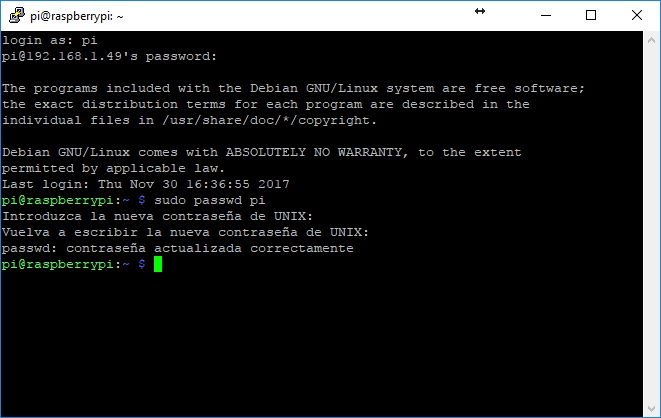 ## Preparing the dependencies. First it is necessary to enlarge the swap to have sufficient resources for the compilation process. With the following commands we create a 3 Gb SWAP file for this purpose. ``` sudo su fallocate -l 3G /swapfile chmod 600 /swapfile mkswap /swapfile swapon /swapfile echo -e "/swapfile none swap sw 0 0 \n" >> /etc/fstab su pi ``` # 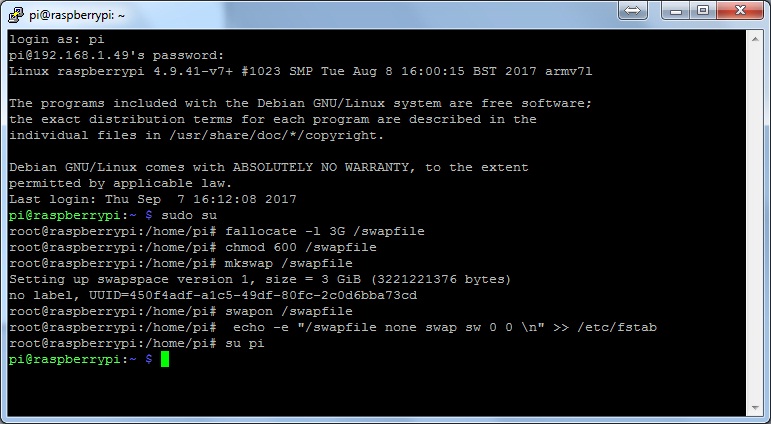 Updating the list of repositories. ``` sudo apt-get update && sudo apt-get upgrade ``` # 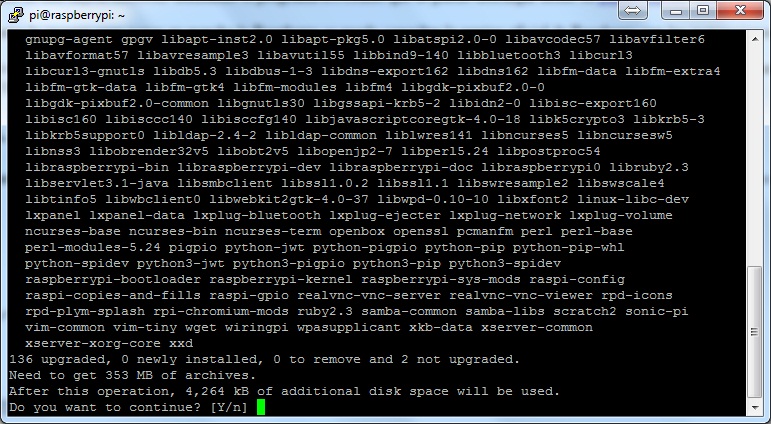 Installing the dependencies. ``` sudo apt-get install -y pkg-config sudo apt-get -y install build-essential autoconf automake libtool libboost-all-dev libgmp-dev libssl-dev libcurl4-openssl-dev git qtbase5-dev ``` # To compile the GUI version of the wallet it is also necessary to install the following dependencies. These are optional, in case you do not need a GUI or use the Raspberian lite version, it is not necessary to install them. ``` sudo apt-get install libqt5gui5 libqt5core5a libqt5dbus5 qttools5-dev qttools5-dev-tools libprotobuf-dev protobuf-compiler libzmq3-dev ``` # 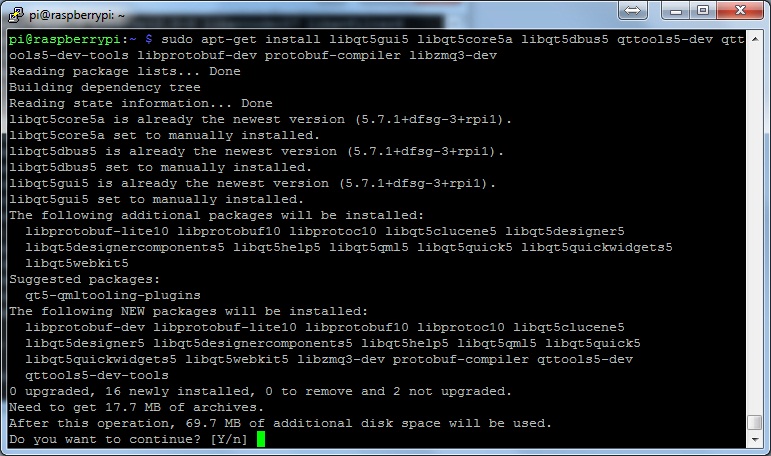 ## Installing Berkeley DB 4.8 For Ubuntu-based versions there is a PPA available to install the Berkeley DB from the apt-get command. But for the other versions of OS, in this case based on Debian, it is necessary to compile it from the sources. For the following we will first be placed in the user's folder to download the sources. ``` cd ~ wget http://download.oracle.com/berkeley-db/db-4.8.30.NC.tar.gz ``` # 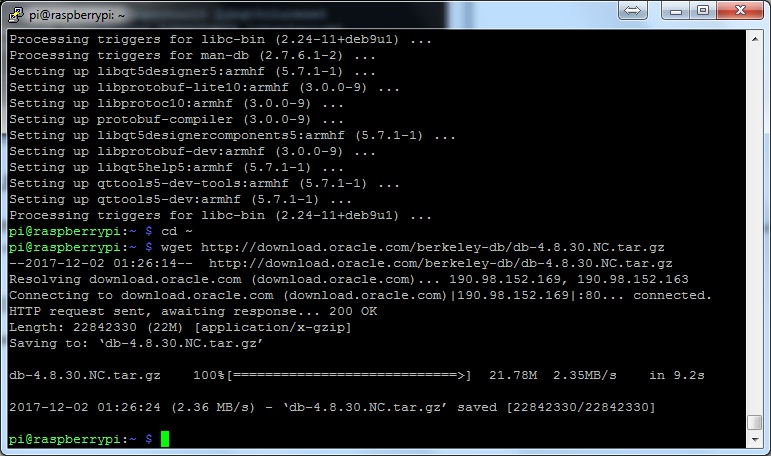 Unzip the downloaded file and execute the compilation. ``` tar -xzvf db-4.8.30.NC.tar.gz cd db-4.8.30.NC/build_unix ../dist/configure --enable-cxx make sudo make install ``` # Once this step is completed we will have installed version 4.8 of Berkeley DB. We set the global variables and create the symbolic links to compile the Wallet. ``` export BDB_INCLUDE_PATH="/usr/local/BerkeleyDB.4.8/include" export BDB_LIB_PATH="/usr/local/BerkeleyDB.4.8/lib" sudo ln -s /usr/local/BerkeleyDB.4.8/lib/libdb-4.8.so /usr/lib/libdb-4.8.so sudo ln -s /usr/local/BerkeleyDB.4.8/lib/libdb_cxx-4.8.so /usr/lib/libdb_cxx-4.8.so ``` # 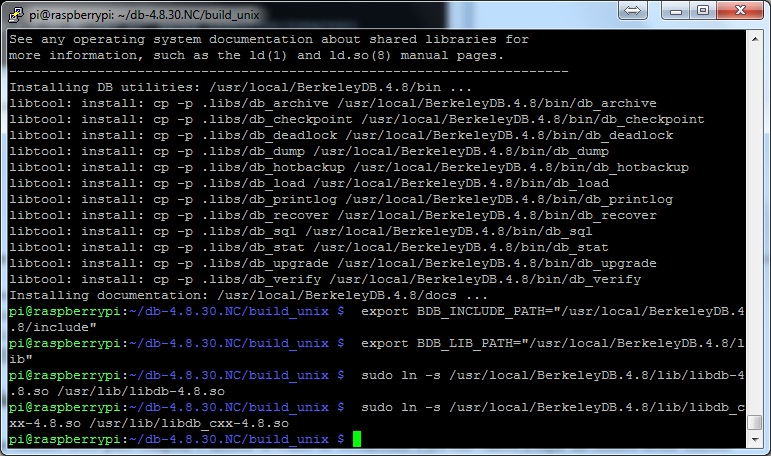 Compiling SocialSend Wallet Once all the steps above are completed we are ready to compile and install the SocialSend wallet. For this we are going to download the source code from GitHub. ``` cd ~ git clone http://github.com/SocialSend/SocialSend.git cd SocialSend ``` # We give execution permission to the installation scripts. ``` sudo chmod +x share/genbuild.sh sudo chmod +x autogen.sh sudo chmod 755 src/leveldb/build_detect_platform ``` # 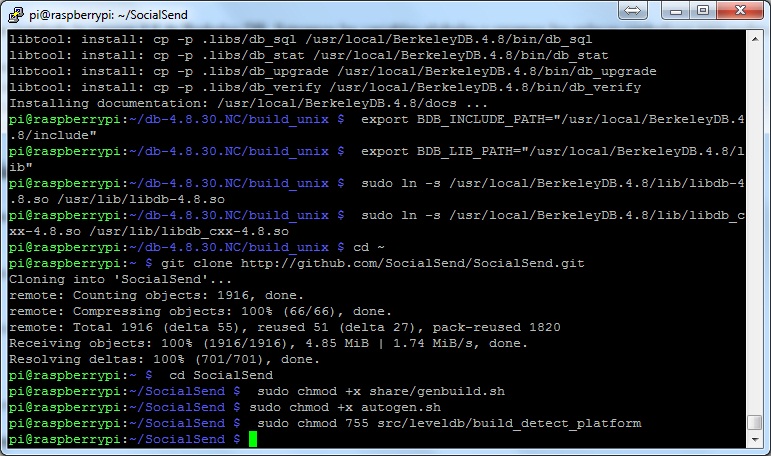 We configure and leave everything ready for the compilation process. ``` sudo ./autogen.sh sudo ./configure CPPFLAGS="-I/usr/local/BerkeleyDB.4.8/include -O2" LDFLAGS="-L/usr/local/BerkeleyDB.4.8/lib" ``` # The compilation process can take up to 3 hours. ``` sudo make ``` # After the compilation we install the executable files. ``` sudo make install ``` # 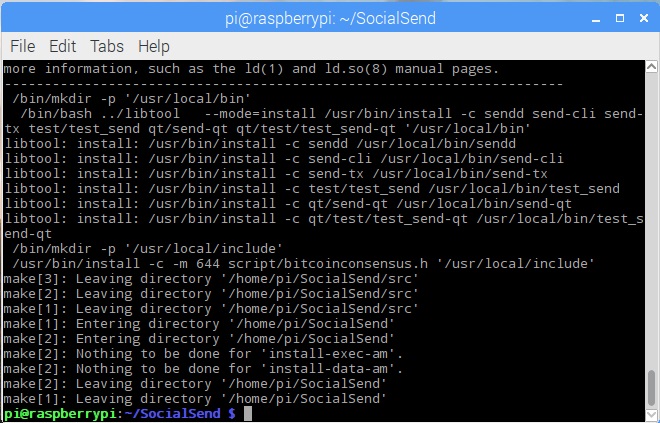 ## Executing the wallet from the command line. To run the command line wallet, we must execute the sendd file that we just compiled. In the first execution of the wallet he will ask us to complete the configuration file. This is located in `/home/pi/.send/send.conf` and then the data to complete. The user and password can be any and it is not necessary to remember them. ``` rpcuser=USER rpcpassword=PASSWORD staking=1 ``` # Once the configuration file is completed we can leave the wallet running with this command: ``` sendd -daemon ``` # To monitor the operation of the wallet we use the `send-cli` program. From this we can send command to know the status of our wallet. To obtain a list of all the available commands you can execute: ``` send-cli help ``` # To obtain more detailed information on each command, the following line can be executed: ``` send-cli COMMAND help ``` ## Running the wallet from the GUI interface. In case of having installed the GUI version we can execute the wallet with the command: ``` send-qt ``` # With the first execution, the program will ask us to specify a directory for the program files, both the configuration file and the blockchain files. 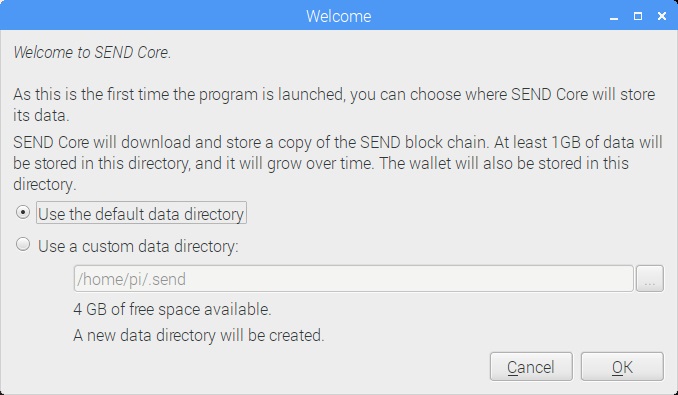 After selecting the directory, the wallet will start and start downloading the blockchain. 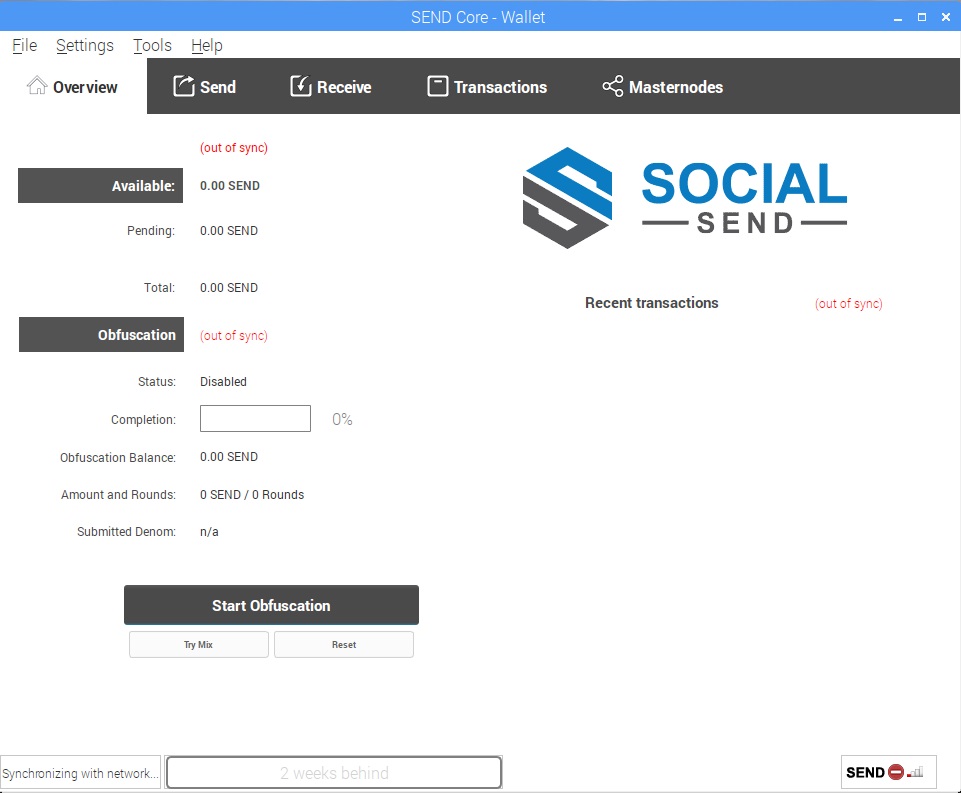 After downloading the entire blockchain the wallet is online and ready to be used. 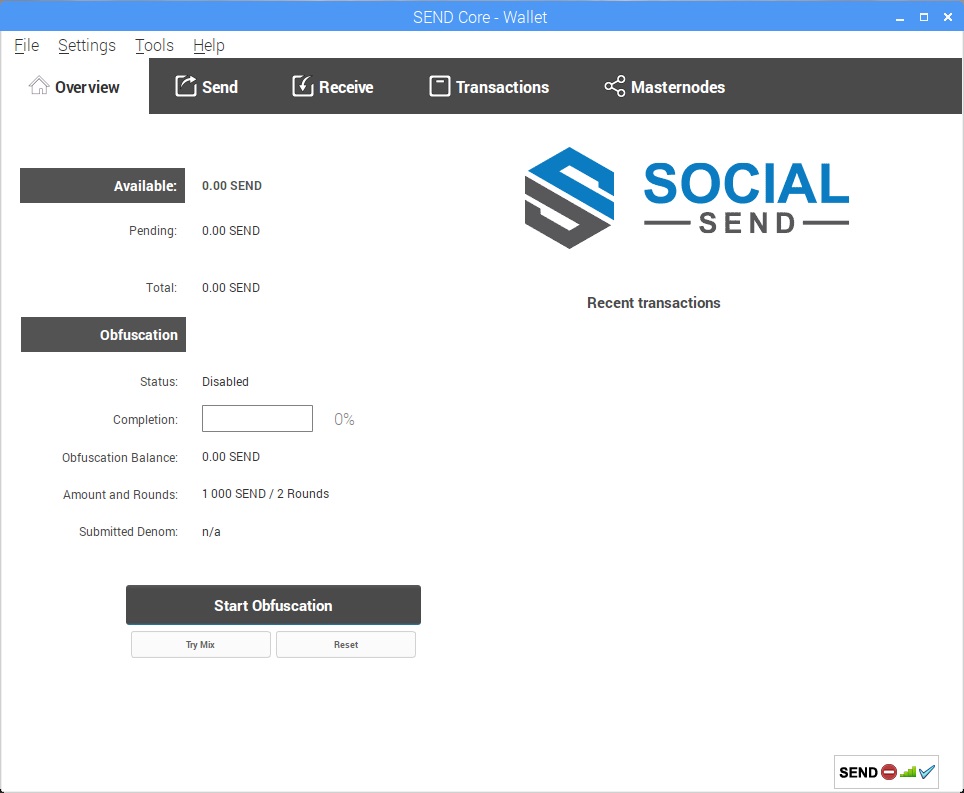 ## Image ready to use. With everything seen in this guide, an image was created to mount directly on an SD memory of at least 16GB. This image is ready for you to easily mount on your Raspberry Pi3. By default SSH service is enabled and the user to connect is "pi" and the password "send". The send-qt wallet starts with the operating system. I know that the file is heavy, about 4 Gb ...but keep in mind that the entire compilation process from the sources can take you about 4 hours to complete. [Download Link](https://goo.gl/bTWk3j) If you found this guide useful, some SENDS will always be welcome. ``` STRtrnjav8MGfTrkUn1BgMwdCU9mwYCQff ``` |
| json metadata | {"tags":["socialsend","raspberry","send","wallet"],"image":["https://steemitimages.com/DQmUeyJnAdpWyD36Ap77nyEfYsYt1N6yQRfpoGFEtsyGLMe/Screenshot-0.jpg","https://steemitimages.com/DQmWHcU1f8mp5GsUYQto5NwZefw7oqNwG7gsUHvx5xaMuc9/Screenshot-1.jpg","https://steemitimages.com/DQmaokVehBHYyFKzs4hnt7VGUxNWKxrWwdjKryvz68uZ3KG/Screenshot-2.jpg","https://steemitimages.com/DQmV6L8htNpmV77y1SxxY2k374TESSWb9hFxEKXa7C1tXb2/Screenshot-3.jpg","https://steemitimages.com/DQmUS8pgJxAXP8taFDoUyJoDobk1NkGMoubMGjLsiQDmuk7/Screenshot-4.jpg","https://steemitimages.com/DQmV5GqFzFnKPRWiqJA63niAF5K2UrWca9f8q8exym8FRsp/Screenshot-5.jpg","https://steemitimages.com/DQmcHhJSi4uYn4PPNgYwSCUwNgB43E1Uc9apVKNpiwkE7v4/Screenshot-6.jpg","https://steemitimages.com/DQmTfUaHXQsPyChyMVBg9rmVJ5PVTDUDXoJpxTsCXgpV1Cm/Screenshot-7.jpg","https://steemitimages.com/DQmUpn1ovvkk1Kp4XviyTaJZnY2oxg66TZFfGhgEKa19hwe/Screenshot-8.jpg","https://steemitimages.com/DQmY5LuFRdpKGbhNjxcZmHBB5WD42G7bmSyxLEPps2yuW4F/Screenshot-9.jpg","https://steemitimages.com/DQmR6C9LRSRVxJLBJe4BrVjPnmbJaDJyM36Y8wiSP6cx3Dg/Screenshot-10.jpg"],"links":["http://downloads.raspberrypi.org/raspbian/images/raspbian-2017-07-05/2017-07-05-raspbian-jessie.zip","https://etcher.io/","https://github.com/resin-io/etcher/releases/download/v1.2.0/Etcher-Setup-1.2.0-x64.exe","https://www.raspberrypi.org/documentation/installation/installing-images/README.md","https://goo.gl/bTWk3j"],"app":"steemit/0.1","format":"markdown"} |
| parent author | |
| parent permlink | socialsend |
| permlink | installation-guide-for-social-send-wallet |
| title | Installation Guide for Social Send Wallet |
| Transaction Info | Block #17897309/Trx f2a97c7e115fb6a80c28b3ebd58c52f158634169 |
View Raw JSON Data
{
"block": 17897309,
"op": [
"comment",
{
"author": "hernss",
"body": "This installation guide shows the necessary steps to install the SocialSend wallet from source code in Raspberry Pi 3\n\n## Downloading the image.\n\nTo start we must download the Jessie version of Raspbian from the official Raspberry website from [here](http://downloads.raspberrypi.org/raspbian/images/raspbian-2017-07-05/2017-07-05-raspbian-jessie.zip)\n\nRaspbian is a pre-installed Debian image for Raspberry. Why can not the latest version of Raspbian Stretch be used? Because this version has installed an incompatible version of OpenSSL that does not work with the Wallet.\n\nOnce downloaded the image, you have to burn it on a microSD card using the ETCHER program that can be downloaded from its [official website](https://etcher.io/) ([download link](https://github.com/resin-io/etcher/releases/download/v1.2.0/Etcher-Setup-1.2.0-x64.exe))\n\nFor complete instructions on how to burn the image to start the Raspberry you can consult the official Raspberry website with instructions for installation. ([link](https://www.raspberrypi.org/documentation/installation/installing-images/README.md))\n\nTo enabled the ssh service, which by default is disabled, it is necessary to place a file with the name \"ssh\" in the boot partition. The file can be empty, the important thing is the name, you have to call ssh without extension or anything. In this way the SSH is enabled and the Raspberry can be accessed by SSH using the PuTTY.\n\nBefore proceeding, we recommend changing the default password of the user pi (default values user: pi password: raspberry). The command to change the password is:\n\n```\nsudo passwd pi\n```\n#\n\n\n## Preparing the dependencies.\n\nFirst it is necessary to enlarge the swap to have sufficient resources for the compilation process. With the following commands we create a 3 Gb SWAP file for this purpose.\n\n```\nsudo su\nfallocate -l 3G /swapfile\nchmod 600 /swapfile\nmkswap /swapfile\nswapon /swapfile\necho -e \"/swapfile none swap sw 0 0 \\n\" >> /etc/fstab\nsu pi \n```\n#\n\n\nUpdating the list of repositories.\n\n```\nsudo apt-get update && sudo apt-get upgrade\n```\n#\n\n\nInstalling the dependencies.\n\n```\nsudo apt-get install -y pkg-config\nsudo apt-get -y install build-essential autoconf automake libtool libboost-all-dev libgmp-dev libssl-dev libcurl4-openssl-dev git qtbase5-dev\n```\n#\nTo compile the GUI version of the wallet it is also necessary to install the following dependencies. These are optional, in case you do not need a GUI or use the Raspberian lite version, it is not necessary to install them.\n\n```\nsudo apt-get install libqt5gui5 libqt5core5a libqt5dbus5 qttools5-dev qttools5-dev-tools libprotobuf-dev protobuf-compiler libzmq3-dev\n```\n#\n\n\n## Installing Berkeley DB 4.8\n\nFor Ubuntu-based versions there is a PPA available to install the Berkeley DB from the apt-get command. But for the other versions of OS, in this case based on Debian, it is necessary to compile it from the sources. For the following we will first be placed in the user's folder to download the sources.\n\n```\ncd ~\nwget http://download.oracle.com/berkeley-db/db-4.8.30.NC.tar.gz \n```\n#\n\n\nUnzip the downloaded file and execute the compilation.\n\n```\ntar -xzvf db-4.8.30.NC.tar.gz\ncd db-4.8.30.NC/build_unix\n../dist/configure --enable-cxx\nmake\nsudo make install\n```\n#\nOnce this step is completed we will have installed version 4.8 of Berkeley DB. We set the global variables and create the symbolic links to compile the Wallet.\n\n```\nexport BDB_INCLUDE_PATH=\"/usr/local/BerkeleyDB.4.8/include\"\nexport BDB_LIB_PATH=\"/usr/local/BerkeleyDB.4.8/lib\"\nsudo ln -s /usr/local/BerkeleyDB.4.8/lib/libdb-4.8.so /usr/lib/libdb-4.8.so\nsudo ln -s /usr/local/BerkeleyDB.4.8/lib/libdb_cxx-4.8.so /usr/lib/libdb_cxx-4.8.so\n```\n#\n\n\nCompiling SocialSend Wallet\n\nOnce all the steps above are completed we are ready to compile and install the SocialSend wallet. For this we are going to download the source code from GitHub.\n\n```\ncd ~\ngit clone http://github.com/SocialSend/SocialSend.git\ncd SocialSend\n```\n#\nWe give execution permission to the installation scripts.\n\n```\nsudo chmod +x share/genbuild.sh\nsudo chmod +x autogen.sh\nsudo chmod 755 src/leveldb/build_detect_platform\n```\n#\n\n\nWe configure and leave everything ready for the compilation process.\n\n```\nsudo ./autogen.sh\nsudo ./configure CPPFLAGS=\"-I/usr/local/BerkeleyDB.4.8/include -O2\" LDFLAGS=\"-L/usr/local/BerkeleyDB.4.8/lib\"\n```\n#\nThe compilation process can take up to 3 hours.\n\n```\nsudo make\n```\n#\nAfter the compilation we install the executable files.\n\n```\nsudo make install \n```\n#\n\n\n## Executing the wallet from the command line.\n\nTo run the command line wallet, we must execute the sendd file that we just compiled. In the first execution of the wallet he will ask us to complete the configuration file. This is located in `/home/pi/.send/send.conf` and then the data to complete. The user and password can be any and it is not necessary to remember them.\n\n```\nrpcuser=USER\nrpcpassword=PASSWORD\nstaking=1\n```\n#\nOnce the configuration file is completed we can leave the wallet running with this command:\n\n```\nsendd -daemon\n```\n#\nTo monitor the operation of the wallet we use the `send-cli` program. From this we can send command to know the status of our wallet. To obtain a list of all the available commands you can execute:\n\n```\nsend-cli help\n```\n#\nTo obtain more detailed information on each command, the following line can be executed:\n\n```\nsend-cli COMMAND help\n```\n\n## Running the wallet from the GUI interface.\n\nIn case of having installed the GUI version we can execute the wallet with the command:\n\n```\nsend-qt\n```\n#\nWith the first execution, the program will ask us to specify a directory for the program files, both the configuration file and the blockchain files.\n\n\nAfter selecting the directory, the wallet will start and start downloading the blockchain.\n\n\n\nAfter downloading the entire blockchain the wallet is online and ready to be used.\n\n\n\n## Image ready to use.\n\nWith everything seen in this guide, an image was created to mount directly on an SD memory of at least 16GB. This image is ready for you to easily mount on your Raspberry Pi3. By default SSH service is enabled and the user to connect is \"pi\" and the password \"send\". The send-qt wallet starts with the operating system. I know that the file is heavy, about 4 Gb ...but keep in mind that the entire compilation process from the sources can take you about 4 hours to complete. [Download Link](https://goo.gl/bTWk3j)\n\nIf you found this guide useful, some SENDS will always be welcome. \n```\nSTRtrnjav8MGfTrkUn1BgMwdCU9mwYCQff\n```",
"json_metadata": "{\"tags\":[\"socialsend\",\"raspberry\",\"send\",\"wallet\"],\"image\":[\"https://steemitimages.com/DQmUeyJnAdpWyD36Ap77nyEfYsYt1N6yQRfpoGFEtsyGLMe/Screenshot-0.jpg\",\"https://steemitimages.com/DQmWHcU1f8mp5GsUYQto5NwZefw7oqNwG7gsUHvx5xaMuc9/Screenshot-1.jpg\",\"https://steemitimages.com/DQmaokVehBHYyFKzs4hnt7VGUxNWKxrWwdjKryvz68uZ3KG/Screenshot-2.jpg\",\"https://steemitimages.com/DQmV6L8htNpmV77y1SxxY2k374TESSWb9hFxEKXa7C1tXb2/Screenshot-3.jpg\",\"https://steemitimages.com/DQmUS8pgJxAXP8taFDoUyJoDobk1NkGMoubMGjLsiQDmuk7/Screenshot-4.jpg\",\"https://steemitimages.com/DQmV5GqFzFnKPRWiqJA63niAF5K2UrWca9f8q8exym8FRsp/Screenshot-5.jpg\",\"https://steemitimages.com/DQmcHhJSi4uYn4PPNgYwSCUwNgB43E1Uc9apVKNpiwkE7v4/Screenshot-6.jpg\",\"https://steemitimages.com/DQmTfUaHXQsPyChyMVBg9rmVJ5PVTDUDXoJpxTsCXgpV1Cm/Screenshot-7.jpg\",\"https://steemitimages.com/DQmUpn1ovvkk1Kp4XviyTaJZnY2oxg66TZFfGhgEKa19hwe/Screenshot-8.jpg\",\"https://steemitimages.com/DQmY5LuFRdpKGbhNjxcZmHBB5WD42G7bmSyxLEPps2yuW4F/Screenshot-9.jpg\",\"https://steemitimages.com/DQmR6C9LRSRVxJLBJe4BrVjPnmbJaDJyM36Y8wiSP6cx3Dg/Screenshot-10.jpg\"],\"links\":[\"http://downloads.raspberrypi.org/raspbian/images/raspbian-2017-07-05/2017-07-05-raspbian-jessie.zip\",\"https://etcher.io/\",\"https://github.com/resin-io/etcher/releases/download/v1.2.0/Etcher-Setup-1.2.0-x64.exe\",\"https://www.raspberrypi.org/documentation/installation/installing-images/README.md\",\"https://goo.gl/bTWk3j\"],\"app\":\"steemit/0.1\",\"format\":\"markdown\"}",
"parent_author": "",
"parent_permlink": "socialsend",
"permlink": "installation-guide-for-social-send-wallet",
"title": "Installation Guide for Social Send Wallet"
}
],
"op_in_trx": 0,
"timestamp": "2017-12-08T05:33:03",
"trx_id": "f2a97c7e115fb6a80c28b3ebd58c52f158634169",
"trx_in_block": 1,
"virtual_op": 0
}salutonreplied to @hernss / zmdduw9t4ksnzaxqcczrrg2017/12/08 05:19:15
salutonreplied to @hernss / zmdduw9t4ksnzaxqcczrrg
2017/12/08 05:19:15
| author | saluton |
| body | Hello! |
| json metadata | {"tags": [""]} |
| parent author | hernss |
| parent permlink | guia-de-instalacion-de-wallet-socialsend-en-raspberry-pi3 |
| permlink | zmdduw9t4ksnzaxqcczrrg |
| title | |
| Transaction Info | Block #17897034/Trx 91f24865502071bed8546956418f2dcae1c1262d |
View Raw JSON Data
{
  "block": 17897034,
  "op": [
    "comment",
    {
      "author": "saluton",
      "body": "Hello!",
      "json_metadata": "{\"tags\": [\"\"]}",
      "parent_author": "hernss",
      "parent_permlink": "guia-de-instalacion-de-wallet-socialsend-en-raspberry-pi3",
      "permlink": "zmdduw9t4ksnzaxqcczrrg",
      "title": ""
    }
  ],
  "op_in_trx": 0,
  "timestamp": "2017-12-08T05:19:15",
  "trx_id": "91f24865502071bed8546956418f2dcae1c1262d",
  "trx_in_block": 10,
  "virtual_op": 0
}salutonupvoted (5.00%) @hernss / guia-de-instalacion-de-wallet-socialsend-en-raspberry-pi32017/12/08 05:18:57
salutonupvoted (5.00%) @hernss / guia-de-instalacion-de-wallet-socialsend-en-raspberry-pi3
2017/12/08 05:18:57
| author | hernss |
| permlink | guia-de-instalacion-de-wallet-socialsend-en-raspberry-pi3 |
| voter | saluton |
| weight | 500 (5.00%) |
| Transaction Info | Block #17897028/Trx af09919afea68600e01190954486ec33bf2b4e1d |
View Raw JSON Data
{
  "block": 17897028,
  "op": [
    "vote",
    {
      "author": "hernss",
      "permlink": "guia-de-instalacion-de-wallet-socialsend-en-raspberry-pi3",
      "voter": "saluton",
      "weight": 500
    }
  ],
  "op_in_trx": 0,
  "timestamp": "2017-12-08T05:18:57",
  "trx_id": "af09919afea68600e01190954486ec33bf2b4e1d",
  "trx_in_block": 0,
  "virtual_op": 0
}hernsspublished a new post: guia-de-instalacion-de-wallet-socialsend-en-raspberry-pi32017/12/08 05:10:39
hernsspublished a new post: guia-de-instalacion-de-wallet-socialsend-en-raspberry-pi3
2017/12/08 05:10:39
| author | hernss |
| body | En esta guia de instalacion se muestran los pasos necesarios para instalar desde las fuentes la wallet de SocialSend en una Raspberry Pi 3 ## Bajando la imagen. Para empezar debemos descargas la version Jessie de Raspbian de la pagina oficial de Raspberry desde [aqui](http://downloads.raspberrypi.org/raspbian/images/raspbian-2017-07-05/2017-07-05-raspbian-jessie.zip) Raspbian es una imagen instalada de Debian para Raspberry. ¿Por que no se puede usar la ultima version de Raspbian Stretch? Porque esta version trae instalada una version incompatible de OpenSSL que no funciona con la Wallet. Una vez descargada la imagen, hay que quemarla en una tarjeta microSD utilizando el programa ETCHER que se puede descargar desde su [pagina oficial](https://etcher.io/) ([link](https://github.com/resin-io/etcher/releases/download/v1.2.0/Etcher-Setup-1.2.0-x64.exe)) Para instrucciones mas completas de como montar la imagen para poner en marcha la Raspberry se puede consultar la pagina oficial de Raspberry con las instrucciones para la instalacion ([link](https://www.raspberrypi.org/documentation/installation/installing-images/README.md)) Para activar el ssh, que por defecto esta desactivado, es necesario colocar un archivo con el nombre "ssh" en la particion boot. El archivo puede estar vacio, lo importante es el nombre, se tiene que llamar ssh sin extencion ni nada. De esta manera se activa el SSH y se puede acceder a la Raspberry via SSH usando el PuTTY. Antes de seguir, recomendamos cambiar la contraseña por defecto del usuario pi (valores por defecto usuario: pi contraseña: raspberry). El comando para cambiar la contraseña es: ``` sudo passwd pi ``` #  ## Preparando las dependencias. Para empezar es necesario agrandar el swap para tener recursos suficientes para la compilacion. Con los siguientes comandos creamos un archivo SWAP de 3 Gb para este fin. ``` sudo su fallocate -l 3G /swapfile chmod 600 /swapfile mkswap /swapfile swapon /swapfile echo -e "/swapfile none swap sw 0 0 \n" >> /etc/fstab su pi ``` #  Actualizamos las lista de repositorios. ``` sudo apt-get update && sudo apt-get upgrade ``` #  Instalamos las dependecias ``` sudo apt-get install -y pkg-config sudo apt-get -y install build-essential autoconf automake libtool libboost-all-dev libgmp-dev libssl-dev libcurl4-openssl-dev git qtbase5-dev ``` # Para compilar la version GUI de la wallet es necesario ademas instalar las siguientes dependencias. Estas son opcionales, en caso de no necesitar GUI o usar la version lite de Raspberian no es necesario instalarlas. ``` sudo apt-get install libqt5gui5 libqt5core5a libqt5dbus5 qttools5-dev qttools5-dev-tools libprotobuf-dev protobuf-compiler libzmq3-dev ``` #  ## Instalacion de Berkeley DB 4.8 Para las versiones basadas en Ubuntu hay una PPA disponible para instalar la Berkeley DB desde el comando apt-get. Pero para las otras versiones de SO, en este caso basado en Debian, es necesario compilarlo desde las fuentes. Para lo siguiente primero nos vamos a situar en la carpeta del usuario para bajar las fuentes. ``` cd ~ wget http://download.oracle.com/berkeley-db/db-4.8.30.NC.tar.gz ``` #  Descomprimimos el archvo descargado y ejecutamos la compilacion. ``` tar -xzvf db-4.8.30.NC.tar.gz cd db-4.8.30.NC/build_unix ../dist/configure --enable-cxx make sudo make install ``` # Una vez completado este paso ya vamos a tener instalado la version 4.8 de Berkeley DB. Seteamos las variables globales y creamos los enlaces simbolicos para poder compilar la Wallet. ``` export BDB_INCLUDE_PATH="/usr/local/BerkeleyDB.4.8/include" export BDB_LIB_PATH="/usr/local/BerkeleyDB.4.8/lib" sudo ln -s /usr/local/BerkeleyDB.4.8/lib/libdb-4.8.so /usr/lib/libdb-4.8.so sudo ln -s /usr/local/BerkeleyDB.4.8/lib/libdb_cxx-4.8.so /usr/lib/libdb_cxx-4.8.so ``` #  ## Compilando la Wallet de SocialSend Una vez completados todos los pasos anteriores estamos listos para compilar e instalar la wallet de SocialSend. Para ello vamos a bajar las fuentes desde GitHub ``` cd ~ git clone http://github.com/SocialSend/SocialSend.git cd SocialSend ``` # Le damos permiso de ejecucion a los scripts de instalacion. ``` sudo chmod +x share/genbuild.sh sudo chmod +x autogen.sh sudo chmod 755 src/leveldb/build_detect_platform ``` #  Configuramos y dejamos todo listo para la compilacion ``` sudo ./autogen.sh sudo ./configure CPPFLAGS="-I/usr/local/BerkeleyDB.4.8/include -O2" LDFLAGS="-L/usr/local/BerkeleyDB.4.8/lib" ``` # El proceso de compilacion puede tardar hasta 3 horas. ``` sudo make ``` # Luego de la compilacion instalamos los ejecutables. ``` sudo make install ``` #  ## Ejecutando la billetera desde la linea de comando. Para poner a correr la billetera en linea de comando debemos ejecuar el archivo sendd que acabamos de compilar. En la primera ejecucion de la billetera nos va a pedir que completemos el archivo de configuracion. Este se encuentra en /home/pi/.send/send.conf y a continuacion los datos para completar. EL usuario y la contraseña puede ser cualquier y no es necesario recordarlos. ``` rpcuser=USUARIO rpcpassword=CONTRASEÑA staking=1 ``` # Una vez completado el archivo de configuracion podemos dejar corriendo la wallet con este comando: ``` sendd -daemon ``` # Para monitorear el funcionamiendo de la billetera usamos el programa `send-cli`. Desde este podemos enviar comando para saber el estado de nuestra wallet. Para obtener una lista de todos los comandos disponebles se puede ejecutar: ``` send-cli help ``` Para obtener informacion mas detallada de cada comando se puede ejecutar la siguiente linea: ``` send-cli COMANDO help ``` # ## Ejecutando la billetera desde la interfaz grafica. En el caso de haber instalado la version con GUI podemos ejecutar la wallet con el comando: ``` send-qt ``` # Con la primera ejecucion nos va a pedir especificar un directorio para los archivos del programa, tanto la configuracion como la blockchain.  Despues de seleccionar el directoria va a inicial la wallet y empezar a descargar la blockchain.  Luego de descargar toda la blockchain la wallet queda on-line y lista para ser usada.  ## Imagen lista para usar. Con todo lo visto en esta guia se creo una imagen para montar directamente en una memoria SD de por lo menos 16GB. Esta imagen esta lista para que puedas montar facilmente en tu Raspberry Pi3. Por defecto esta activado el SSH y el usuario para conectarse es "pi" y la contraseña "send". La wallet send-qt arranca con el sistema operativo. Si bien el archivo es pesado, unos 4 Gb... tene en cuenta que todo el proceso de compilacion desde las fuentes puede tomarte cerca de 4 horas en completarlo. [Link de Descarga](https://goo.gl/bTWk3j) Si esta guia te parecio util siempre algunos SENDS seran bien recibidos `STRtrnjav8MGfTrkUn1BgMwdCU9mwYCQff` |
| json metadata | {"tags":["socialsend","rasberry","send","wallet"],"image":["https://steemitimages.com/DQmUeyJnAdpWyD36Ap77nyEfYsYt1N6yQRfpoGFEtsyGLMe/Screenshot-0.jpg","https://steemitimages.com/DQmWHcU1f8mp5GsUYQto5NwZefw7oqNwG7gsUHvx5xaMuc9/Screenshot-1.jpg","https://steemitimages.com/DQmaokVehBHYyFKzs4hnt7VGUxNWKxrWwdjKryvz68uZ3KG/Screenshot-2.jpg","https://steemitimages.com/DQmV6L8htNpmV77y1SxxY2k374TESSWb9hFxEKXa7C1tXb2/Screenshot-3.jpg","https://steemitimages.com/DQmUS8pgJxAXP8taFDoUyJoDobk1NkGMoubMGjLsiQDmuk7/Screenshot-4.jpg","https://steemitimages.com/DQmV5GqFzFnKPRWiqJA63niAF5K2UrWca9f8q8exym8FRsp/Screenshot-5.jpg","https://steemitimages.com/DQmcHhJSi4uYn4PPNgYwSCUwNgB43E1Uc9apVKNpiwkE7v4/Screenshot-6.jpg","https://steemitimages.com/DQmTfUaHXQsPyChyMVBg9rmVJ5PVTDUDXoJpxTsCXgpV1Cm/Screenshot-7.jpg","https://steemitimages.com/DQmUpn1ovvkk1Kp4XviyTaJZnY2oxg66TZFfGhgEKa19hwe/Screenshot-8.jpg","https://steemitimages.com/DQmY5LuFRdpKGbhNjxcZmHBB5WD42G7bmSyxLEPps2yuW4F/Screenshot-9.jpg","https://steemitimages.com/DQmR6C9LRSRVxJLBJe4BrVjPnmbJaDJyM36Y8wiSP6cx3Dg/Screenshot-10.jpg"],"links":["http://downloads.raspberrypi.org/raspbian/images/raspbian-2017-07-05/2017-07-05-raspbian-jessie.zip","https://etcher.io/","https://github.com/resin-io/etcher/releases/download/v1.2.0/Etcher-Setup-1.2.0-x64.exe","https://www.raspberrypi.org/documentation/installation/installing-images/README.md","https://goo.gl/bTWk3j"],"app":"steemit/0.1","format":"markdown"} |
| parent author | |
| parent permlink | socialsend |
| permlink | guia-de-instalacion-de-wallet-socialsend-en-raspberry-pi3 |
| title | Guia de Instalacion de Wallet SocialSend en Raspberry Pi3 |
| Transaction Info | Block #17896862/Trx e2179a7e702538b16021a1cb154875e6c49fc379 |
View Raw JSON Data
{
"block": 17896862,
"op": [
"comment",
{
"author": "hernss",
"body": "En esta guia de instalacion se muestran los pasos necesarios para instalar desde las fuentes la wallet de SocialSend en una Raspberry Pi 3\n\n## Bajando la imagen.\n\nPara empezar debemos descargas la version Jessie de Raspbian de la pagina oficial de Raspberry desde [aqui](http://downloads.raspberrypi.org/raspbian/images/raspbian-2017-07-05/2017-07-05-raspbian-jessie.zip)\n\nRaspbian es una imagen instalada de Debian para Raspberry. ¿Por que no se puede usar la ultima version de Raspbian Stretch? Porque esta version trae instalada una version incompatible de OpenSSL que no funciona con la Wallet.\n\nUna vez descargada la imagen, hay que quemarla en una tarjeta microSD utilizando el programa ETCHER que se puede descargar desde su [pagina oficial](https://etcher.io/) ([link](https://github.com/resin-io/etcher/releases/download/v1.2.0/Etcher-Setup-1.2.0-x64.exe))\n\nPara instrucciones mas completas de como montar la imagen para poner en marcha la Raspberry se puede consultar la pagina oficial de Raspberry con las instrucciones para la instalacion ([link](https://www.raspberrypi.org/documentation/installation/installing-images/README.md))\n\nPara activar el ssh, que por defecto esta desactivado, es necesario colocar un archivo con el nombre \"ssh\" en la particion boot. El archivo puede estar vacio, lo importante es el nombre, se tiene que llamar ssh sin extencion ni nada. De esta manera se activa el SSH y se puede acceder a la Raspberry via SSH usando el PuTTY.\n\nAntes de seguir, recomendamos cambiar la contraseña por defecto del usuario pi (valores por defecto usuario: pi contraseña: raspberry). El comando para cambiar la contraseña es:\n```\nsudo passwd pi\n```\n#\n\n\n## Preparando las dependencias.\n\nPara empezar es necesario agrandar el swap para tener recursos suficientes para la compilacion. Con los siguientes comandos creamos un archivo SWAP de 3 Gb para este fin.\n\n```\nsudo su\nfallocate -l 3G /swapfile\nchmod 600 /swapfile\nmkswap /swapfile\nswapon /swapfile\necho -e \"/swapfile none swap sw 0 0 \\n\" >> /etc/fstab\nsu pi \n```\n#\n\n\nActualizamos las lista de repositorios.\n\n```\nsudo apt-get update && sudo apt-get upgrade\n```\n#\n\n\nInstalamos las dependecias\n\n```\nsudo apt-get install -y pkg-config\nsudo apt-get -y install build-essential autoconf automake libtool libboost-all-dev libgmp-dev libssl-dev libcurl4-openssl-dev git qtbase5-dev\n```\n#\nPara compilar la version GUI de la wallet es necesario ademas instalar las siguientes dependencias. Estas son opcionales, en caso de no necesitar GUI o usar la version lite de Raspberian no es necesario instalarlas.\n\n```\nsudo apt-get install libqt5gui5 libqt5core5a libqt5dbus5 qttools5-dev qttools5-dev-tools libprotobuf-dev protobuf-compiler libzmq3-dev\n```\n#\n\n\n## Instalacion de Berkeley DB 4.8\n\nPara las versiones basadas en Ubuntu hay una PPA disponible para instalar la Berkeley DB desde el comando apt-get. Pero para las otras versiones de SO, en este caso basado en Debian, es necesario compilarlo desde las fuentes. Para lo siguiente primero nos vamos a situar en la carpeta del usuario para bajar las fuentes.\n\n```\ncd ~\nwget http://download.oracle.com/berkeley-db/db-4.8.30.NC.tar.gz \n```\n#\n\n\nDescomprimimos el archvo descargado y ejecutamos la compilacion.\n\n```\ntar -xzvf db-4.8.30.NC.tar.gz\ncd db-4.8.30.NC/build_unix\n../dist/configure --enable-cxx\nmake\nsudo make install\n```\n#\nUna vez completado este paso ya vamos a tener instalado la version 4.8 de Berkeley DB. Seteamos las variables globales y creamos los enlaces simbolicos para poder compilar la Wallet.\n\n```\nexport BDB_INCLUDE_PATH=\"/usr/local/BerkeleyDB.4.8/include\"\nexport BDB_LIB_PATH=\"/usr/local/BerkeleyDB.4.8/lib\"\nsudo ln -s /usr/local/BerkeleyDB.4.8/lib/libdb-4.8.so /usr/lib/libdb-4.8.so\nsudo ln -s /usr/local/BerkeleyDB.4.8/lib/libdb_cxx-4.8.so /usr/lib/libdb_cxx-4.8.so\n```\n#\n\n\n## Compilando la Wallet de SocialSend\n\nUna vez completados todos los pasos anteriores estamos listos para compilar e instalar la wallet de SocialSend. Para ello vamos a bajar las fuentes desde GitHub\n\n```\ncd ~\ngit clone http://github.com/SocialSend/SocialSend.git\ncd SocialSend\n```\n#\nLe damos permiso de ejecucion a los scripts de instalacion.\n\n```\nsudo chmod +x share/genbuild.sh\nsudo chmod +x autogen.sh\nsudo chmod 755 src/leveldb/build_detect_platform\n```\n#\n\n\nConfiguramos y dejamos todo listo para la compilacion\n\n```\nsudo ./autogen.sh\nsudo ./configure CPPFLAGS=\"-I/usr/local/BerkeleyDB.4.8/include -O2\" LDFLAGS=\"-L/usr/local/BerkeleyDB.4.8/lib\"\n```\n#\nEl proceso de compilacion puede tardar hasta 3 horas.\n\n```\nsudo make\n```\n#\nLuego de la compilacion instalamos los ejecutables.\n\n```\nsudo make install \n```\n#\n\n\n## Ejecutando la billetera desde la linea de comando.\n\nPara poner a correr la billetera en linea de comando debemos ejecuar el archivo sendd que acabamos de compilar. En la primera ejecucion de la billetera nos va a pedir que completemos el archivo de configuracion. Este se encuentra en /home/pi/.send/send.conf y a continuacion los datos para completar. EL usuario y la contraseña puede ser cualquier y no es necesario recordarlos.\n\n```\nrpcuser=USUARIO\nrpcpassword=CONTRASEÑA\nstaking=1\n```\n#\nUna vez completado el archivo de configuracion podemos dejar corriendo la wallet con este comando:\n\n```\nsendd -daemon\n```\n#\nPara monitorear el funcionamiendo de la billetera usamos el programa `send-cli`. Desde este podemos enviar comando para saber el estado de nuestra wallet. Para obtener una lista de todos los comandos disponebles se puede ejecutar:\n\n```\nsend-cli help\n```\n\nPara obtener informacion mas detallada de cada comando se puede ejecutar la siguiente linea:\n\n```\nsend-cli COMANDO help\n```\n#\n## Ejecutando la billetera desde la interfaz grafica.\n\nEn el caso de haber instalado la version con GUI podemos ejecutar la wallet con el comando:\n\n```\nsend-qt\n```\n#\nCon la primera ejecucion nos va a pedir especificar un directorio para los archivos del programa, tanto la configuracion como la blockchain.\n\n\n\nDespues de seleccionar el directoria va a inicial la wallet y empezar a descargar la blockchain.\n\n\n\nLuego de descargar toda la blockchain la wallet queda on-line y lista para ser usada.\n\n\n\n## Imagen lista para usar.\n\nCon todo lo visto en esta guia se creo una imagen para montar directamente en una memoria SD de por lo menos 16GB. Esta imagen esta lista para que puedas montar facilmente en tu Raspberry Pi3. Por defecto esta activado el SSH y el usuario para conectarse es \"pi\" y la contraseña \"send\". La wallet send-qt arranca con el sistema operativo. Si bien el archivo es pesado, unos 4 Gb... tene en cuenta que todo el proceso de compilacion desde las fuentes puede tomarte cerca de 4 horas en completarlo. [Link de Descarga](https://goo.gl/bTWk3j)\n\nSi esta guia te parecio util siempre algunos SENDS seran bien recibidos `STRtrnjav8MGfTrkUn1BgMwdCU9mwYCQff`",
"json_metadata": "{\"tags\":[\"socialsend\",\"rasberry\",\"send\",\"wallet\"],\"image\":[\"https://steemitimages.com/DQmUeyJnAdpWyD36Ap77nyEfYsYt1N6yQRfpoGFEtsyGLMe/Screenshot-0.jpg\",\"https://steemitimages.com/DQmWHcU1f8mp5GsUYQto5NwZefw7oqNwG7gsUHvx5xaMuc9/Screenshot-1.jpg\",\"https://steemitimages.com/DQmaokVehBHYyFKzs4hnt7VGUxNWKxrWwdjKryvz68uZ3KG/Screenshot-2.jpg\",\"https://steemitimages.com/DQmV6L8htNpmV77y1SxxY2k374TESSWb9hFxEKXa7C1tXb2/Screenshot-3.jpg\",\"https://steemitimages.com/DQmUS8pgJxAXP8taFDoUyJoDobk1NkGMoubMGjLsiQDmuk7/Screenshot-4.jpg\",\"https://steemitimages.com/DQmV5GqFzFnKPRWiqJA63niAF5K2UrWca9f8q8exym8FRsp/Screenshot-5.jpg\",\"https://steemitimages.com/DQmcHhJSi4uYn4PPNgYwSCUwNgB43E1Uc9apVKNpiwkE7v4/Screenshot-6.jpg\",\"https://steemitimages.com/DQmTfUaHXQsPyChyMVBg9rmVJ5PVTDUDXoJpxTsCXgpV1Cm/Screenshot-7.jpg\",\"https://steemitimages.com/DQmUpn1ovvkk1Kp4XviyTaJZnY2oxg66TZFfGhgEKa19hwe/Screenshot-8.jpg\",\"https://steemitimages.com/DQmY5LuFRdpKGbhNjxcZmHBB5WD42G7bmSyxLEPps2yuW4F/Screenshot-9.jpg\",\"https://steemitimages.com/DQmR6C9LRSRVxJLBJe4BrVjPnmbJaDJyM36Y8wiSP6cx3Dg/Screenshot-10.jpg\"],\"links\":[\"http://downloads.raspberrypi.org/raspbian/images/raspbian-2017-07-05/2017-07-05-raspbian-jessie.zip\",\"https://etcher.io/\",\"https://github.com/resin-io/etcher/releases/download/v1.2.0/Etcher-Setup-1.2.0-x64.exe\",\"https://www.raspberrypi.org/documentation/installation/installing-images/README.md\",\"https://goo.gl/bTWk3j\"],\"app\":\"steemit/0.1\",\"format\":\"markdown\"}",
"parent_author": "",
"parent_permlink": "socialsend",
"permlink": "guia-de-instalacion-de-wallet-socialsend-en-raspberry-pi3",
"title": "Guia de Instalacion de Wallet SocialSend en Raspberry Pi3"
}
],
"op_in_trx": 0,
"timestamp": "2017-12-08T05:10:39",
"trx_id": "e2179a7e702538b16021a1cb154875e6c49fc379",
"trx_in_block": 9,
"virtual_op": 0
}2017/12/08 04:32:51
2017/12/08 04:32:51
| active | {"account_auths":[],"key_auths":[["STM6WX1K4McUum98HRp9v1eAwi7EmhH8AsnAorBxiz6GxkxT2LnZJ",1]],"weight_threshold":1} |
| creator | steem |
| delegation | 57000.000000 VESTS |
| extensions | [] |
| fee | 0.500 STEEM |
| json metadata | |
| memo key | STM6i1Mv7RdQQsejJk5pyX5vSwBPqFp31hvseLNYwuRw5EQnFhjvX |
| new account name | hernss |
| owner | {"account_auths":[],"key_auths":[["STM6Cr2fD7FJ6E8Xe5bvuXRFizmn4j9Gb3Y2stVk7A3vhytimz14P",1]],"weight_threshold":1} |
| posting | {"account_auths":[],"key_auths":[["STM7kzPYGJq1JrwLKme42ZjJ31RUKoq13sPtCrbCo2ncQyV6SrtfB",1]],"weight_threshold":1} |
| Transaction Info | Block #17896107/Trx c373080ffe3c04f3569c62af1094eb54be252e4d |
View Raw JSON Data
{
  "block": 17896107,
  "op": [
    "account_create_with_delegation",
    {
      "active": {
        "account_auths": [],
        "key_auths": [
          [
            "STM6WX1K4McUum98HRp9v1eAwi7EmhH8AsnAorBxiz6GxkxT2LnZJ",
            1
          ]
        ],
        "weight_threshold": 1
      },
      "creator": "steem",
      "delegation": "57000.000000 VESTS",
      "extensions": [],
      "fee": "0.500 STEEM",
      "json_metadata": "",
      "memo_key": "STM6i1Mv7RdQQsejJk5pyX5vSwBPqFp31hvseLNYwuRw5EQnFhjvX",
      "new_account_name": "hernss",
      "owner": {
        "account_auths": [],
        "key_auths": [
          [
            "STM6Cr2fD7FJ6E8Xe5bvuXRFizmn4j9Gb3Y2stVk7A3vhytimz14P",
            1
          ]
        ],
        "weight_threshold": 1
      },
      "posting": {
        "account_auths": [],
        "key_auths": [
          [
            "STM7kzPYGJq1JrwLKme42ZjJ31RUKoq13sPtCrbCo2ncQyV6SrtfB",
            1
          ]
        ],
        "weight_threshold": 1
      }
    }
  ],
  "op_in_trx": 0,
  "timestamp": "2017-12-08T04:32:51",
  "trx_id": "c373080ffe3c04f3569c62af1094eb54be252e4d",
  "trx_in_block": 3,
  "virtual_op": 0
}Manabar
Voting Power100.00%
Downvote Power100.00%
Resource Credits100.00%
Reputation Progress71.73%
{
  "voting_manabar": {
    "current_mana": "8143659806",
    "last_update_time": 1779066396
  },
  "downvote_manabar": {
    "current_mana": 2035914951,
    "last_update_time": 1779066396
  },
  "rc_account": {
    "account": "hernss",
    "rc_manabar": {
      "current_mana": "10164408779",
      "last_update_time": 1779066396
    },
    "max_rc_creation_adjustment": {
      "amount": "2020748973",
      "precision": 6,
      "nai": "@@000000037"
    },
    "max_rc": "10164408779"
  }
}
Account Metadata
| POSTING JSON METADATA | |
| profile | {"profile_image":"https://image.ibb.co/fqpfKb/logo.png","name":"Hernan","location":"Buenos Aires, Argentina"} |
| JSON METADATA | |
| profile | {"profile_image":"https://image.ibb.co/fqpfKb/logo.png","name":"Hernan","location":"Buenos Aires, Argentina"} |
{
  "posting_json_metadata": {
    "profile": {
      "profile_image": "https://image.ibb.co/fqpfKb/logo.png",
      "name": "Hernan",
      "location": "Buenos Aires, Argentina"
    }
  },
  "json_metadata": {
    "profile": {
      "profile_image": "https://image.ibb.co/fqpfKb/logo.png",
      "name": "Hernan",
      "location": "Buenos Aires, Argentina"
    }
  }
}
Auth Keys
Owner
Single Signature
Public Keys
STM6Cr2fD7FJ6E8Xe5bvuXRFizmn4j9Gb3Y2stVk7A3vhytimz14P1/1
Active
Single Signature
Public Keys
STM6WX1K4McUum98HRp9v1eAwi7EmhH8AsnAorBxiz6GxkxT2LnZJ1/1
Posting
Single Signature
Public Keys
STM7kzPYGJq1JrwLKme42ZjJ31RUKoq13sPtCrbCo2ncQyV6SrtfB1/1
Memo
STM6i1Mv7RdQQsejJk5pyX5vSwBPqFp31hvseLNYwuRw5EQnFhjvX
{
  "owner": {
    "weight_threshold": 1,
    "account_auths": [],
    "key_auths": [
      [
        "STM6Cr2fD7FJ6E8Xe5bvuXRFizmn4j9Gb3Y2stVk7A3vhytimz14P",
        1
      ]
    ]
  },
  "active": {
    "weight_threshold": 1,
    "account_auths": [],
    "key_auths": [
      [
        "STM6WX1K4McUum98HRp9v1eAwi7EmhH8AsnAorBxiz6GxkxT2LnZJ",
        1
      ]
    ]
  },
  "posting": {
    "weight_threshold": 1,
    "account_auths": [],
    "key_auths": [
      [
        "STM7kzPYGJq1JrwLKme42ZjJ31RUKoq13sPtCrbCo2ncQyV6SrtfB",
        1
      ]
    ]
  },
  "memo": "STM6i1Mv7RdQQsejJk5pyX5vSwBPqFp31hvseLNYwuRw5EQnFhjvX"
}
Witness Votes
0 / 30
No active witness votes.
[]