

VOTING POWER100.00%
DOWNVOTE POWER100.00%
RESOURCE CREDITS100.00%
REPUTATION PROGRESS0.00%
Net Worth
0.068USD
STEEM
0.000STEEM
SBD
0.070SBD
Effective Power
5.001SP
├── Own SP
0.627SP
└── Incoming DelegationsDeleg
+4.374SP
Detailed Balance
| STEEM | ||
| balance | 0.000STEEM | STEEM |
| market_balance | 0.000STEEM | STEEM |
| savings_balance | 0.000STEEM | STEEM |
| reward_steem_balance | 0.000STEEM | STEEM |
| STEEM POWER | ||
| Own SP | 0.627SP | SP |
| Delegated Out | 0.000SP | SP |
| Delegation In | 4.374SP | SP |
| Effective Power | 5.001SP | SP |
| Reward SP (pending) | 0.035SP | SP |
| SBD | ||
| sbd_balance | 0.000SBD | SBD |
| sbd_conversions | 0.000SBD | SBD |
| sbd_market_balance | 0.000SBD | SBD |
| savings_sbd_balance | 0.000SBD | SBD |
| reward_sbd_balance | 0.070SBD | SBD |
{
  "balance": "0.000 STEEM",
  "savings_balance": "0.000 STEEM",
  "reward_steem_balance": "0.000 STEEM",
  "vesting_shares": "1021.007588 VESTS",
  "delegated_vesting_shares": "0.000000 VESTS",
  "received_vesting_shares": "7122.652218 VESTS",
  "sbd_balance": "0.000 SBD",
  "savings_sbd_balance": "0.000 SBD",
  "reward_sbd_balance": "0.070 SBD",
  "conversions": []
}
Account Info
| name | guccip |
| id | 818859 |
| rank | 498,058 |
| reputation | 887131772 |
| created | 2018-03-10T13:06:03 |
| recovery_account | steem |
| proxy | None |
| post_count | 5 |
| comment_count | 0 |
| lifetime_vote_count | 0 |
| witnesses_voted_for | 0 |
| last_post | 2018-03-29T16:23:33 |
| last_root_post | 2018-03-29T16:08:21 |
| last_vote_time | 1970-01-01T00:00:00 |
| proxied_vsf_votes | 0, 0, 0, 0 |
| can_vote | 1 |
| voting_power | 0 |
| delayed_votes | 0 |
| balance | 0.000 STEEM |
| savings_balance | 0.000 STEEM |
| sbd_balance | 0.000 SBD |
| savings_sbd_balance | 0.000 SBD |
| vesting_shares | 1021.007588 VESTS |
| delegated_vesting_shares | 0.000000 VESTS |
| received_vesting_shares | 7122.652218 VESTS |
| reward_vesting_balance | 71.444444 VESTS |
| vesting_balance | 0.000 STEEM |
| vesting_withdraw_rate | 0.000000 VESTS |
| next_vesting_withdrawal | 1969-12-31T23:59:59 |
| withdrawn | 0 |
| to_withdraw | 0 |
| withdraw_routes | 0 |
| savings_withdraw_requests | 0 |
| last_account_recovery | 1970-01-01T00:00:00 |
| reset_account | null |
| last_owner_update | 1970-01-01T00:00:00 |
| last_account_update | 1970-01-01T00:00:00 |
| mined | No |
| sbd_seconds | 0 |
| sbd_last_interest_payment | 1970-01-01T00:00:00 |
| savings_sbd_last_interest_payment | 1970-01-01T00:00:00 |
{
  "id": 818859,
  "name": "guccip",
  "owner": {
    "weight_threshold": 1,
    "account_auths": [],
    "key_auths": [
      [
        "STM6F2Fynn5AYC3XFBr6HbCSXqd8eNhd1aQYQ2N5xppD51SNY6uEB",
        1
      ]
    ]
  },
  "active": {
    "weight_threshold": 1,
    "account_auths": [],
    "key_auths": [
      [
        "STM7DucMt3gx78TL1PLhdMsweERcf8nsr6W3sPEbd6Csk4qbykdV5",
        1
      ]
    ]
  },
  "posting": {
    "weight_threshold": 1,
    "account_auths": [],
    "key_auths": [
      [
        "STM8fgnX7q7MUKrvNKSmceZg9vL7gTQfudMrSw6nvbGp2AegTdWGn",
        1
      ]
    ]
  },
  "memo_key": "STM7ZMtAnF3BKjuMdaS4ZX1xNHPF18B3zKykAZ5zfRaHdg9pGPGqQ",
  "json_metadata": "",
  "posting_json_metadata": "",
  "proxy": "",
  "last_owner_update": "1970-01-01T00:00:00",
  "last_account_update": "1970-01-01T00:00:00",
  "created": "2018-03-10T13:06:03",
  "mined": false,
  "recovery_account": "steem",
  "last_account_recovery": "1970-01-01T00:00:00",
  "reset_account": "null",
  "comment_count": 0,
  "lifetime_vote_count": 0,
  "post_count": 5,
  "can_vote": true,
  "voting_manabar": {
    "current_mana": "8143659806",
    "last_update_time": 1779065490
  },
  "downvote_manabar": {
    "current_mana": 2035914951,
    "last_update_time": 1779065490
  },
  "voting_power": 0,
  "balance": "0.000 STEEM",
  "savings_balance": "0.000 STEEM",
  "sbd_balance": "0.000 SBD",
  "sbd_seconds": "0",
  "sbd_seconds_last_update": "1970-01-01T00:00:00",
  "sbd_last_interest_payment": "1970-01-01T00:00:00",
  "savings_sbd_balance": "0.000 SBD",
  "savings_sbd_seconds": "0",
  "savings_sbd_seconds_last_update": "1970-01-01T00:00:00",
  "savings_sbd_last_interest_payment": "1970-01-01T00:00:00",
  "savings_withdraw_requests": 0,
  "reward_sbd_balance": "0.070 SBD",
  "reward_steem_balance": "0.000 STEEM",
  "reward_vesting_balance": "71.444444 VESTS",
  "reward_vesting_steem": "0.035 STEEM",
  "vesting_shares": "1021.007588 VESTS",
  "delegated_vesting_shares": "0.000000 VESTS",
  "received_vesting_shares": "7122.652218 VESTS",
  "vesting_withdraw_rate": "0.000000 VESTS",
  "next_vesting_withdrawal": "1969-12-31T23:59:59",
  "withdrawn": 0,
  "to_withdraw": 0,
  "withdraw_routes": 0,
  "curation_rewards": 0,
  "posting_rewards": 70,
  "proxied_vsf_votes": [
    0,
    0,
    0,
    0
  ],
  "witnesses_voted_for": 0,
  "last_post": "2018-03-29T16:23:33",
  "last_root_post": "2018-03-29T16:08:21",
  "last_vote_time": "1970-01-01T00:00:00",
  "post_bandwidth": 0,
  "pending_claimed_accounts": 0,
  "vesting_balance": "0.000 STEEM",
  "reputation": 887131772,
  "transfer_history": [],
  "market_history": [],
  "post_history": [],
  "vote_history": [],
  "other_history": [],
  "witness_votes": [],
  "tags_usage": [],
  "guest_bloggers": [],
  "rank": 498058
}
Withdraw Routes
| Incoming | Outgoing |
|---|---|
Empty | Empty |
{
  "incoming": [],
  "outgoing": []
}From Date
To Date
2026/05/18 00:51:30
2026/05/18 00:51:30
| delegator | steem |
| delegatee | guccip |
| vesting shares | 7122.652218 VESTS |
| Transaction Info | Block #106144172/Trx 655dd0864d3148b5108996da3b300a93abfadc21 |
View Raw JSON Data
{
  "trx_id": "655dd0864d3148b5108996da3b300a93abfadc21",
  "block": 106144172,
  "trx_in_block": 1,
  "op_in_trx": 0,
  "virtual_op": 0,
  "timestamp": "2026-05-18T00:51:30",
  "op": [
    "delegate_vesting_shares",
    {
      "delegator": "steem",
      "delegatee": "guccip",
      "vesting_shares": "7122.652218 VESTS"
    }
  ]
}2026/05/12 06:16:54
2026/05/12 06:16:54
| delegator | steem |
| delegatee | guccip |
| vesting shares | 4410.441813 VESTS |
| Transaction Info | Block #105978633/Trx e5a278b33f50712b82792da978af22dc03c6d208 |
View Raw JSON Data
{
  "trx_id": "e5a278b33f50712b82792da978af22dc03c6d208",
  "block": 105978633,
  "trx_in_block": 2,
  "op_in_trx": 0,
  "virtual_op": 0,
  "timestamp": "2026-05-12T06:16:54",
  "op": [
    "delegate_vesting_shares",
    {
      "delegator": "steem",
      "delegatee": "guccip",
      "vesting_shares": "4410.441813 VESTS"
    }
  ]
}2026/04/26 00:11:27
2026/04/26 00:11:27
| delegator | steem |
| delegatee | guccip |
| vesting shares | 7135.167974 VESTS |
| Transaction Info | Block #105511807/Trx 77ce0ba3ed128d58b4e70f5ab23eb5669eb211a5 |
View Raw JSON Data
{
  "trx_id": "77ce0ba3ed128d58b4e70f5ab23eb5669eb211a5",
  "block": 105511807,
  "trx_in_block": 0,
  "op_in_trx": 0,
  "virtual_op": 0,
  "timestamp": "2026-04-26T00:11:27",
  "op": [
    "delegate_vesting_shares",
    {
      "delegator": "steem",
      "delegatee": "guccip",
      "vesting_shares": "7135.167974 VESTS"
    }
  ]
}2026/01/23 09:25:06
2026/01/23 09:25:06
| delegator | steem |
| delegatee | guccip |
| vesting shares | 4451.988632 VESTS |
| Transaction Info | Block #102853748/Trx 10138c2b8a33d0c9b84b977659af0321eca7b958 |
View Raw JSON Data
{
  "trx_id": "10138c2b8a33d0c9b84b977659af0321eca7b958",
  "block": 102853748,
  "trx_in_block": 2,
  "op_in_trx": 0,
  "virtual_op": 0,
  "timestamp": "2026-01-23T09:25:06",
  "op": [
    "delegate_vesting_shares",
    {
      "delegator": "steem",
      "delegatee": "guccip",
      "vesting_shares": "4451.988632 VESTS"
    }
  ]
}2024/12/17 04:43:18
2024/12/17 04:43:18
| delegator | steem |
| delegatee | guccip |
| vesting shares | 4616.207829 VESTS |
| Transaction Info | Block #91300133/Trx b39c0f3db05107c143786692cacad980dba39313 |
View Raw JSON Data
{
  "trx_id": "b39c0f3db05107c143786692cacad980dba39313",
  "block": 91300133,
  "trx_in_block": 1,
  "op_in_trx": 0,
  "virtual_op": 0,
  "timestamp": "2024-12-17T04:43:18",
  "op": [
    "delegate_vesting_shares",
    {
      "delegator": "steem",
      "delegatee": "guccip",
      "vesting_shares": "4616.207829 VESTS"
    }
  ]
}2023/11/13 20:26:06
2023/11/13 20:26:06
| delegator | steem |
| delegatee | guccip |
| vesting shares | 4785.341361 VESTS |
| Transaction Info | Block #79854332/Trx 4bf0a798b0e69f1050e8d6c0ea110fc29dcc5ffe |
View Raw JSON Data
{
  "trx_id": "4bf0a798b0e69f1050e8d6c0ea110fc29dcc5ffe",
  "block": 79854332,
  "trx_in_block": 5,
  "op_in_trx": 0,
  "virtual_op": 0,
  "timestamp": "2023-11-13T20:26:06",
  "op": [
    "delegate_vesting_shares",
    {
      "delegator": "steem",
      "delegatee": "guccip",
      "vesting_shares": "4785.341361 VESTS"
    }
  ]
}2023/09/21 22:32:15
2023/09/21 22:32:15
| delegator | steem |
| delegatee | guccip |
| vesting shares | 7722.620147 VESTS |
| Transaction Info | Block #78348675/Trx 1164ed65d7a4e131f30b55cf8320fb173abd2911 |
View Raw JSON Data
{
  "trx_id": "1164ed65d7a4e131f30b55cf8320fb173abd2911",
  "block": 78348675,
  "trx_in_block": 0,
  "op_in_trx": 0,
  "virtual_op": 0,
  "timestamp": "2023-09-21T22:32:15",
  "op": [
    "delegate_vesting_shares",
    {
      "delegator": "steem",
      "delegatee": "guccip",
      "vesting_shares": "7722.620147 VESTS"
    }
  ]
}2022/11/03 12:14:39
2022/11/03 12:14:39
| delegator | steem |
| delegatee | guccip |
| vesting shares | 7944.301585 VESTS |
| Transaction Info | Block #69113908/Trx aa5cf4f361f2ecd75ab2c21b1190d1ff42be2a1b |
View Raw JSON Data
{
  "trx_id": "aa5cf4f361f2ecd75ab2c21b1190d1ff42be2a1b",
  "block": 69113908,
  "trx_in_block": 3,
  "op_in_trx": 0,
  "virtual_op": 0,
  "timestamp": "2022-11-03T12:14:39",
  "op": [
    "delegate_vesting_shares",
    {
      "delegator": "steem",
      "delegatee": "guccip",
      "vesting_shares": "7944.301585 VESTS"
    }
  ]
}2022/01/17 11:28:00
2022/01/17 11:28:00
| delegator | steem |
| delegatee | guccip |
| vesting shares | 8164.834816 VESTS |
| Transaction Info | Block #60810024/Trx ebaf98990eaaf71ade503e0e8d64a32d9c13b2ef |
View Raw JSON Data
{
  "trx_id": "ebaf98990eaaf71ade503e0e8d64a32d9c13b2ef",
  "block": 60810024,
  "trx_in_block": 12,
  "op_in_trx": 0,
  "virtual_op": 0,
  "timestamp": "2022-01-17T11:28:00",
  "op": [
    "delegate_vesting_shares",
    {
      "delegator": "steem",
      "delegatee": "guccip",
      "vesting_shares": "8164.834816 VESTS"
    }
  ]
}2021/06/14 01:21:54
2021/06/14 01:21:54
| delegator | steem |
| delegatee | guccip |
| vesting shares | 8348.603474 VESTS |
| Transaction Info | Block #54608382/Trx 12b11efff21fcb45de309334fa0fc107bc047915 |
View Raw JSON Data
{
  "trx_id": "12b11efff21fcb45de309334fa0fc107bc047915",
  "block": 54608382,
  "trx_in_block": 1,
  "op_in_trx": 0,
  "virtual_op": 0,
  "timestamp": "2021-06-14T01:21:54",
  "op": [
    "delegate_vesting_shares",
    {
      "delegator": "steem",
      "delegatee": "guccip",
      "vesting_shares": "8348.603474 VESTS"
    }
  ]
}2020/12/11 11:39:54
2020/12/11 11:39:54
| delegator | steem |
| delegatee | guccip |
| vesting shares | 8536.025448 VESTS |
| Transaction Info | Block #49355818/Trx ea97c5621c0cea8035c30d8e9fbcb3584eeb2ace |
View Raw JSON Data
{
  "trx_id": "ea97c5621c0cea8035c30d8e9fbcb3584eeb2ace",
  "block": 49355818,
  "trx_in_block": 3,
  "op_in_trx": 0,
  "virtual_op": 0,
  "timestamp": "2020-12-11T11:39:54",
  "op": [
    "delegate_vesting_shares",
    {
      "delegator": "steem",
      "delegatee": "guccip",
      "vesting_shares": "8536.025448 VESTS"
    }
  ]
}2020/12/06 05:17:00
2020/12/06 05:17:00
| delegator | steem |
| delegatee | guccip |
| vesting shares | 1912.543513 VESTS |
| Transaction Info | Block #49207377/Trx 4c89d7a2319f368ea882e17e5b0d7a4d8fcde004 |
View Raw JSON Data
{
  "trx_id": "4c89d7a2319f368ea882e17e5b0d7a4d8fcde004",
  "block": 49207377,
  "trx_in_block": 2,
  "op_in_trx": 0,
  "virtual_op": 0,
  "timestamp": "2020-12-06T05:17:00",
  "op": [
    "delegate_vesting_shares",
    {
      "delegator": "steem",
      "delegatee": "guccip",
      "vesting_shares": "1912.543513 VESTS"
    }
  ]
}2020/12/05 15:17:48
2020/12/05 15:17:48
| delegator | steem |
| delegatee | guccip |
| vesting shares | 8542.233302 VESTS |
| Transaction Info | Block #49190909/Trx a5f60b9698715a9a2271aa07bbb75bd7e751250b |
View Raw JSON Data
{
  "trx_id": "a5f60b9698715a9a2271aa07bbb75bd7e751250b",
  "block": 49190909,
  "trx_in_block": 11,
  "op_in_trx": 0,
  "virtual_op": 0,
  "timestamp": "2020-12-05T15:17:48",
  "op": [
    "delegate_vesting_shares",
    {
      "delegator": "steem",
      "delegatee": "guccip",
      "vesting_shares": "8542.233302 VESTS"
    }
  ]
}2020/11/02 16:45:48
2020/11/02 16:45:48
| delegator | steem |
| delegatee | guccip |
| vesting shares | 1920.017158 VESTS |
| Transaction Info | Block #48259124/Trx 216d5a926d9aac8547245dece78892a07fb1e36d |
View Raw JSON Data
{
  "trx_id": "216d5a926d9aac8547245dece78892a07fb1e36d",
  "block": 48259124,
  "trx_in_block": 3,
  "op_in_trx": 0,
  "virtual_op": 0,
  "timestamp": "2020-11-02T16:45:48",
  "op": [
    "delegate_vesting_shares",
    {
      "delegator": "steem",
      "delegatee": "guccip",
      "vesting_shares": "1920.017158 VESTS"
    }
  ]
}2020/05/09 06:14:54
2020/05/09 06:14:54
| delegator | steem |
| delegatee | guccip |
| vesting shares | 8745.038661 VESTS |
| Transaction Info | Block #43217634/Trx e5c48ac981e2295061c620fc75f1c3a044f11822 |
View Raw JSON Data
{
  "trx_id": "e5c48ac981e2295061c620fc75f1c3a044f11822",
  "block": 43217634,
  "trx_in_block": 11,
  "op_in_trx": 0,
  "virtual_op": 0,
  "timestamp": "2020-05-09T06:14:54",
  "op": [
    "delegate_vesting_shares",
    {
      "delegator": "steem",
      "delegatee": "guccip",
      "vesting_shares": "8745.038661 VESTS"
    }
  ]
}2020/05/08 09:56:09
2020/05/08 09:56:09
| delegator | steem |
| delegatee | guccip |
| vesting shares | 1953.311140 VESTS |
| Transaction Info | Block #43193829/Trx 84b05e0dcb917d41562fc7860d4ace8b9c06b3df |
View Raw JSON Data
{
  "trx_id": "84b05e0dcb917d41562fc7860d4ace8b9c06b3df",
  "block": 43193829,
  "trx_in_block": 19,
  "op_in_trx": 0,
  "virtual_op": 0,
  "timestamp": "2020-05-08T09:56:09",
  "op": [
    "delegate_vesting_shares",
    {
      "delegator": "steem",
      "delegatee": "guccip",
      "vesting_shares": "1953.311140 VESTS"
    }
  ]
}2020/03/10 13:36:54
2020/03/10 13:36:54
| parent author | guccip |
| parent permlink | guide-install-eos-on-an-ubuntu-16-04-virtual-machine-3-3 |
| author | steemitboard |
| permlink | steemitboard-notify-guccip-20200310t133654000z |
| title | |
| body | Congratulations @guccip! You received a personal award! <table><tr><td>https://steemitimages.com/70x70/http://steemitboard.com/@guccip/birthday2.png</td><td>Happy Steem Birthday! - You are on the Steem blockchain for 2 years!</td></tr></table> <sub>_You can view [your badges on your Steem Board](https://steemitboard.com/@guccip) and compare to others on the [Steem Ranking](https://steemitboard.com/ranking/index.php?name=guccip)_</sub> **Do not miss the last post from @steemitboard:** <table><tr><td><a href="https://steemit.com/steemitboard/@steemitboard/downvote-challenge-add-up-to-3-funny-badges-to-your-board"><img src="https://steemitimages.com/64x128/https://steemitimages.com/0x0/"></a></td><td><a href="https://steemit.com/steemitboard/@steemitboard/downvote-challenge-add-up-to-3-funny-badges-to-your-board">Downvote challenge - Add up to 3 funny badges to your board</a></td></tr><tr><td><a href="https://steemit.com/steemitboard/@steemitboard/use-your-witness-votes-and-get-the-community-badge"><img src="https://steemitimages.com/64x128/https://cdn.steemitimages.com/DQmTugCUsoXX762vg1CuHRrpnPbfnjPogp8iCGv7F2kSVuj/image.png"></a></td><td><a href="https://steemit.com/steemitboard/@steemitboard/use-your-witness-votes-and-get-the-community-badge">Use your witness votes and get the Community Badge</a></td></tr></table> ###### [Vote for @Steemitboard as a witness](https://v2.steemconnect.com/sign/account-witness-vote?witness=steemitboard&approve=1) to get one more award and increased upvotes! |
| json metadata | {"image":["https://steemitboard.com/img/notify.png"]} |
| Transaction Info | Block #41530780/Trx b72aea30ebda858edb6c2c4220c62410081883f0 |
View Raw JSON Data
{
"trx_id": "b72aea30ebda858edb6c2c4220c62410081883f0",
"block": 41530780,
"trx_in_block": 17,
"op_in_trx": 0,
"virtual_op": 0,
"timestamp": "2020-03-10T13:36:54",
"op": [
"comment",
{
"parent_author": "guccip",
"parent_permlink": "guide-install-eos-on-an-ubuntu-16-04-virtual-machine-3-3",
"author": "steemitboard",
"permlink": "steemitboard-notify-guccip-20200310t133654000z",
"title": "",
"body": "Congratulations @guccip! You received a personal award!\n\n<table><tr><td>https://steemitimages.com/70x70/http://steemitboard.com/@guccip/birthday2.png</td><td>Happy Steem Birthday! - You are on the Steem blockchain for 2 years!</td></tr></table>\n\n<sub>_You can view [your badges on your Steem Board](https://steemitboard.com/@guccip) and compare to others on the [Steem Ranking](https://steemitboard.com/ranking/index.php?name=guccip)_</sub>\n\n\n**Do not miss the last post from @steemitboard:**\n<table><tr><td><a href=\"https://steemit.com/steemitboard/@steemitboard/downvote-challenge-add-up-to-3-funny-badges-to-your-board\"><img src=\"https://steemitimages.com/64x128/https://steemitimages.com/0x0/\"></a></td><td><a href=\"https://steemit.com/steemitboard/@steemitboard/downvote-challenge-add-up-to-3-funny-badges-to-your-board\">Downvote challenge - Add up to 3 funny badges to your board</a></td></tr><tr><td><a href=\"https://steemit.com/steemitboard/@steemitboard/use-your-witness-votes-and-get-the-community-badge\"><img src=\"https://steemitimages.com/64x128/https://cdn.steemitimages.com/DQmTugCUsoXX762vg1CuHRrpnPbfnjPogp8iCGv7F2kSVuj/image.png\"></a></td><td><a href=\"https://steemit.com/steemitboard/@steemitboard/use-your-witness-votes-and-get-the-community-badge\">Use your witness votes and get the Community Badge</a></td></tr></table>\n\n###### [Vote for @Steemitboard as a witness](https://v2.steemconnect.com/sign/account-witness-vote?witness=steemitboard&approve=1) to get one more award and increased upvotes!",
"json_metadata": "{\"image\":[\"https://steemitboard.com/img/notify.png\"]}"
}
]
}2019/06/20 05:12:33
2019/06/20 05:12:33
| delegator | steem |
| delegatee | guccip |
| vesting shares | 8931.214580 VESTS |
| Transaction Info | Block #33955731/Trx 52536bb02a1f9d9328b3c90bd812926f13422e96 |
View Raw JSON Data
{
  "trx_id": "52536bb02a1f9d9328b3c90bd812926f13422e96",
  "block": 33955731,
  "trx_in_block": 16,
  "op_in_trx": 0,
  "virtual_op": 0,
  "timestamp": "2019-06-20T05:12:33",
  "op": [
    "delegate_vesting_shares",
    {
      "delegator": "steem",
      "delegatee": "guccip",
      "vesting_shares": "8931.214580 VESTS"
    }
  ]
}2019/03/10 14:21:24
2019/03/10 14:21:24
| parent author | guccip |
| parent permlink | guide-install-eos-on-an-ubuntu-16-04-virtual-machine-3-3 |
| author | steemitboard |
| permlink | steemitboard-notify-guccip-20190310t142123000z |
| title | |
| body | Congratulations @guccip! You received a personal award! <table><tr><td>https://steemitimages.com/70x70/http://steemitboard.com/@guccip/birthday1.png</td><td>Happy Birthday! - You are on the Steem blockchain for 1 year!</td></tr></table> <sub>_[Click here to view your Board](https://steemitboard.com/@guccip)_</sub> ###### [Vote for @Steemitboard as a witness](https://v2.steemconnect.com/sign/account-witness-vote?witness=steemitboard&approve=1) and get one more award and increased upvotes! |
| json metadata | {"image":["https://steemitboard.com/img/notify.png"]} |
| Transaction Info | Block #31033108/Trx f03828c5006ffb6014756d64a7b853c559b1664d |
View Raw JSON Data
{
  "trx_id": "f03828c5006ffb6014756d64a7b853c559b1664d",
  "block": 31033108,
  "trx_in_block": 2,
  "op_in_trx": 0,
  "virtual_op": 0,
  "timestamp": "2019-03-10T14:21:24",
  "op": [
    "comment",
    {
      "parent_author": "guccip",
      "parent_permlink": "guide-install-eos-on-an-ubuntu-16-04-virtual-machine-3-3",
      "author": "steemitboard",
      "permlink": "steemitboard-notify-guccip-20190310t142123000z",
      "title": "",
      "body": "Congratulations @guccip! You received a personal award!\n\n<table><tr><td>https://steemitimages.com/70x70/http://steemitboard.com/@guccip/birthday1.png</td><td>Happy Birthday! - You are on the Steem blockchain for 1 year!</td></tr></table>\n\n<sub>_[Click here to view your Board](https://steemitboard.com/@guccip)_</sub>\n\n\n###### [Vote for @Steemitboard as a witness](https://v2.steemconnect.com/sign/account-witness-vote?witness=steemitboard&approve=1) and get one more award and increased upvotes!",
      "json_metadata": "{\"image\":[\"https://steemitboard.com/img/notify.png\"]}"
    }
  ]
}2018/06/28 20:35:42
2018/06/28 20:35:42
| delegator | steem |
| delegatee | guccip |
| vesting shares | 9130.297376 VESTS |
| Transaction Info | Block #23727384/Trx 4090f55f318d5817df34a57c83b1112a77cf2bc2 |
View Raw JSON Data
{
  "trx_id": "4090f55f318d5817df34a57c83b1112a77cf2bc2",
  "block": 23727384,
  "trx_in_block": 65,
  "op_in_trx": 0,
  "virtual_op": 0,
  "timestamp": "2018-06-28T20:35:42",
  "op": [
    "delegate_vesting_shares",
    {
      "delegator": "steem",
      "delegatee": "guccip",
      "vesting_shares": "9130.297376 VESTS"
    }
  ]
}2018/05/20 02:38:33
2018/05/20 02:38:33
| delegator | steem |
| delegatee | guccip |
| vesting shares | 29496.392674 VESTS |
| Transaction Info | Block #22583855/Trx b268b7b32011f56be1dbd1ab98caaecdcaac4a3d |
View Raw JSON Data
{
  "trx_id": "b268b7b32011f56be1dbd1ab98caaecdcaac4a3d",
  "block": 22583855,
  "trx_in_block": 12,
  "op_in_trx": 0,
  "virtual_op": 0,
  "timestamp": "2018-05-20T02:38:33",
  "op": [
    "delegate_vesting_shares",
    {
      "delegator": "steem",
      "delegatee": "guccip",
      "vesting_shares": "29496.392674 VESTS"
    }
  ]
}tstoupvoted (100.00%) @guccip / guide-install-eos-on-an-ubuntu-16-04-virtual-machine-3-32018/03/29 21:12:15
tstoupvoted (100.00%) @guccip / guide-install-eos-on-an-ubuntu-16-04-virtual-machine-3-3
2018/03/29 21:12:15
| voter | tsto |
| author | guccip |
| permlink | guide-install-eos-on-an-ubuntu-16-04-virtual-machine-3-3 |
| weight | 10000 (100.00%) |
| Transaction Info | Block #21109438/Trx 2387b710568ca275ee68bec1168bce2875a01d2e |
View Raw JSON Data
{
  "trx_id": "2387b710568ca275ee68bec1168bce2875a01d2e",
  "block": 21109438,
  "trx_in_block": 31,
  "op_in_trx": 0,
  "virtual_op": 0,
  "timestamp": "2018-03-29T21:12:15",
  "op": [
    "vote",
    {
      "voter": "tsto",
      "author": "guccip",
      "permlink": "guide-install-eos-on-an-ubuntu-16-04-virtual-machine-3-3",
      "weight": 10000
    }
  ]
}2018/03/29 16:23:33
2018/03/29 16:23:33
| parent author | guccip |
| parent permlink | guide-install-eos-on-an-ubuntu-16-04-virtual-machine-2-3 |
| author | guccip |
| permlink | re-guccip-guide-install-eos-on-an-ubuntu-16-04-virtual-machine-2-3-20180329t162331870z |
| title | |
| body | Hey, I just uploaded part 3 of the guide. If you follow it 1:1 it should work. https://steemit.com/eos/@guccip/guide-install-eos-on-an-ubuntu-16-04-virtual-machine-3-3 |
| json metadata | {"tags":["eos"],"links":["https://steemit.com/eos/@guccip/guide-install-eos-on-an-ubuntu-16-04-virtual-machine-3-3"],"app":"steemit/0.1"} |
| Transaction Info | Block #21103665/Trx 4ca7e812c675e9091bb0adcf15f98370b95b2ed7 |
View Raw JSON Data
{
  "trx_id": "4ca7e812c675e9091bb0adcf15f98370b95b2ed7",
  "block": 21103665,
  "trx_in_block": 10,
  "op_in_trx": 0,
  "virtual_op": 0,
  "timestamp": "2018-03-29T16:23:33",
  "op": [
    "comment",
    {
      "parent_author": "guccip",
      "parent_permlink": "guide-install-eos-on-an-ubuntu-16-04-virtual-machine-2-3",
      "author": "guccip",
      "permlink": "re-guccip-guide-install-eos-on-an-ubuntu-16-04-virtual-machine-2-3-20180329t162331870z",
      "title": "",
      "body": "Hey, I just uploaded part 3 of the guide. If you follow it 1:1 it should work.\n\nhttps://steemit.com/eos/@guccip/guide-install-eos-on-an-ubuntu-16-04-virtual-machine-3-3",
      "json_metadata": "{\"tags\":[\"eos\"],\"links\":[\"https://steemit.com/eos/@guccip/guide-install-eos-on-an-ubuntu-16-04-virtual-machine-3-3\"],\"app\":\"steemit/0.1\"}"
    }
  ]
}guccippublished a new post: guide-install-eos-on-an-ubuntu-16-04-virtual-machine-3-32018/03/29 16:20:57
guccippublished a new post: guide-install-eos-on-an-ubuntu-16-04-virtual-machine-3-3
2018/03/29 16:20:57
| parent author | |
| parent permlink | eos |
| author | guccip |
| permlink | guide-install-eos-on-an-ubuntu-16-04-virtual-machine-3-3 |
| title | Guide: Install EOS on an Ubuntu 16.04. Virtual Machine (3/3) |
| body | Please make sure you have an Ubuntu 16.04 system running and followed the previous steps from this guide. If not: https://steemit.com/eos/@guccip/guide-install-eos-on-an-ubuntu-16-04-virtual-machine-beginners https://steemit.com/eos/@guccip/guide-install-eos-on-an-ubuntu-16-04-virtual-machine-2-3 After you got the error message trying to run eosd for the first time, the config files have been created. Locate them in your file browser going to ~/eos/build/programs/eosd/data-dir  Open config.ini in the standard editor. Paste the following below the last line (has small changes from standard): # Load the testnet genesis state, which creates some initial block producers with the default key # genesis-json = /path/to/eos/source/genesis.json genesis-json = genesis.json # Enable production on a stale chain, since a single-node test chain is pretty much always stale # enable-stale-production = true # Enable block production with the testnet producers producer-name = inita producer-name = initb producer-name = initc producer-name = initd producer-name = inite producer-name = initf producer-name = initg producer-name = inith producer-name = initi producer-name = initj producer-name = initk producer-name = initl producer-name = initm producer-name = initn producer-name = inito producer-name = initp producer-name = initq producer-name = initr producer-name = inits producer-name = initt producer-name = initu # Load the block producer plugin, so you can produce blocks plugin = eosio::producer_plugin # Wallet plugin plugin = eosio::wallet_api_plugin # As well as API and HTTP plugins plugin = eosio::chain_api_plugin plugin = eosio::http_plugin It should look like this: 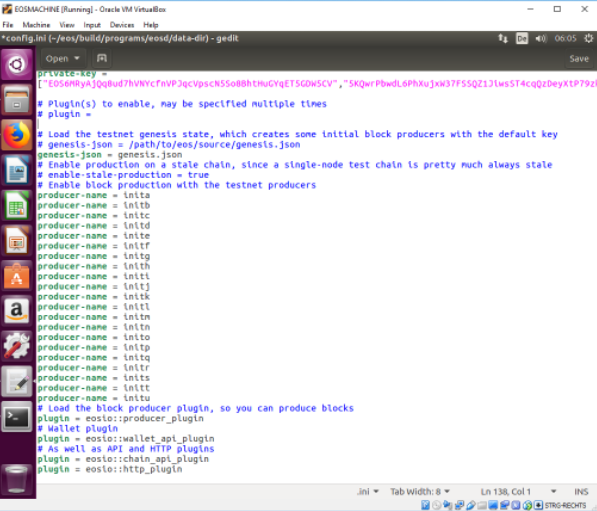 In the upper area edit enable-stale-production to true like in the picture: 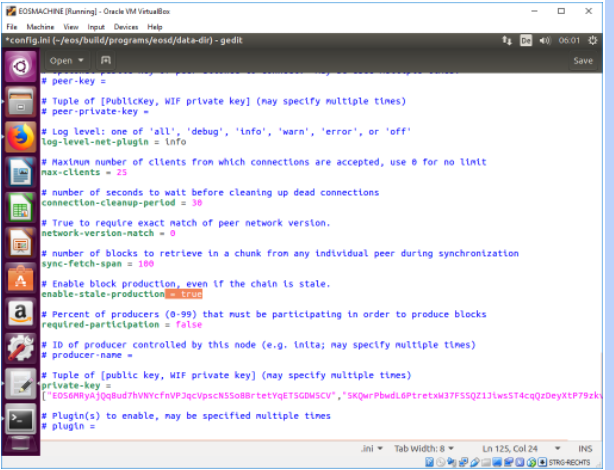 Save and close the file. Next, locate genesis.json in ~/eos/build and copy it. 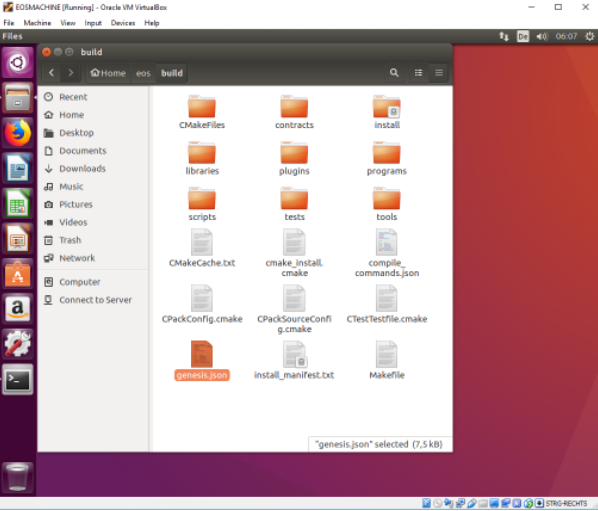 Paste it into ~/eos/build/programs/eosd/ 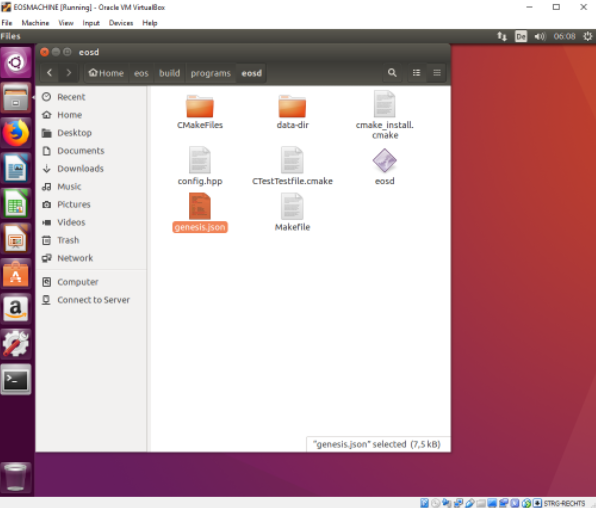 Done. Now you can run ./eosd again from ~/eos/build/programs/eosd/ like in the picture: 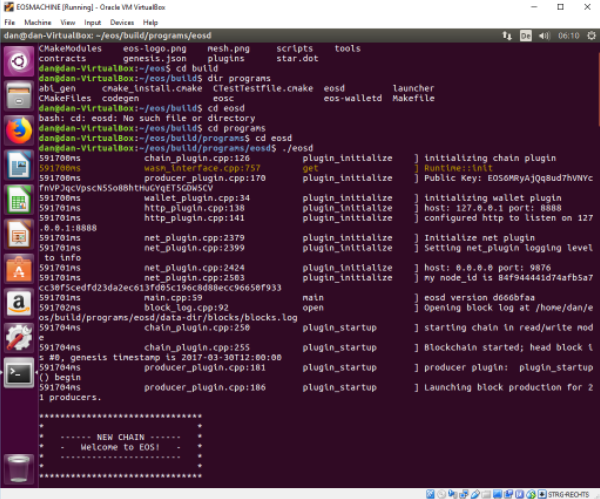 Well done, that's it! |
| json metadata | {"tags":["eos"],"image":["https://steemitimages.com/DQmUYSpqTBSsz6P7s5xEoykwGf6L7GNbdNYFmfCyfdTBhcC/image.png","https://steemitimages.com/DQmQaKCjrqeJaa3o5zKLV2Bvv66Xn9NRfUoD39235PzVNbV/image.png","https://steemitimages.com/DQmSKSjKCNT1L9Xy2F5h2Qs651K9A5dd7v34mJzW35isxT2/image.png","https://steemitimages.com/DQmNjjxMD64Wj51bgoWrYc3xKtQeyMFwX7FxggbrW3Y3JtL/image.png","https://steemitimages.com/DQmWsBzpcjD4DC5sDkdkuJyvBeVsuyWjnvmj8qQgNbPNWMp/image.png","https://steemitimages.com/DQmWYntWC9GAanMw6HNHsHCesez2SnBcsWB1PgSic55sPyC/image.png"],"links":["https://steemit.com/eos/@guccip/guide-install-eos-on-an-ubuntu-16-04-virtual-machine-beginners","https://steemit.com/eos/@guccip/guide-install-eos-on-an-ubuntu-16-04-virtual-machine-2-3"],"app":"steemit/0.1","format":"markdown"} |
| Transaction Info | Block #21103613/Trx e5fdca55215d3dc87fdd10c6ac2f2e4b4adc2518 |
View Raw JSON Data
{
"trx_id": "e5fdca55215d3dc87fdd10c6ac2f2e4b4adc2518",
"block": 21103613,
"trx_in_block": 1,
"op_in_trx": 0,
"virtual_op": 0,
"timestamp": "2018-03-29T16:20:57",
"op": [
"comment",
{
"parent_author": "",
"parent_permlink": "eos",
"author": "guccip",
"permlink": "guide-install-eos-on-an-ubuntu-16-04-virtual-machine-3-3",
"title": "Guide: Install EOS on an Ubuntu 16.04. Virtual Machine (3/3)",
"body": "Please make sure you have an Ubuntu 16.04 system running and followed the previous steps from this guide. If not: \nhttps://steemit.com/eos/@guccip/guide-install-eos-on-an-ubuntu-16-04-virtual-machine-beginners\nhttps://steemit.com/eos/@guccip/guide-install-eos-on-an-ubuntu-16-04-virtual-machine-2-3\n\nAfter you got the error message trying to run eosd for the first time, the config files have been created. Locate them in your file browser going to ~/eos/build/programs/eosd/data-dir \n\n\n\nOpen config.ini in the standard editor. Paste the following below the last line (has small changes from standard):\n\n # Load the testnet genesis state, which creates some initial block producers with the default key\n # genesis-json = /path/to/eos/source/genesis.json\n genesis-json = genesis.json\n # Enable production on a stale chain, since a single-node test chain is pretty much always stale\n # enable-stale-production = true\n # Enable block production with the testnet producers\n producer-name = inita\n producer-name = initb\n producer-name = initc\n producer-name = initd\n producer-name = inite\n producer-name = initf\n producer-name = initg\n producer-name = inith\n producer-name = initi\n producer-name = initj\n producer-name = initk\n producer-name = initl\n producer-name = initm\n producer-name = initn\n producer-name = inito\n producer-name = initp\n producer-name = initq\n producer-name = initr\n producer-name = inits\n producer-name = initt\n producer-name = initu\n # Load the block producer plugin, so you can produce blocks\n plugin = eosio::producer_plugin\n # Wallet plugin\n plugin = eosio::wallet_api_plugin\n # As well as API and HTTP plugins\n plugin = eosio::chain_api_plugin\n plugin = eosio::http_plugin\n\n\nIt should look like this:\n\n\nIn the upper area edit enable-stale-production to true like in the picture:\n\n\nSave and close the file.\n\nNext, locate genesis.json in ~/eos/build and copy it. \n\n\nPaste it into ~/eos/build/programs/eosd/\n\n\nDone. Now you can run ./eosd again from ~/eos/build/programs/eosd/ like in the picture:\n\n\nWell done, that's it!",
"json_metadata": "{\"tags\":[\"eos\"],\"image\":[\"https://steemitimages.com/DQmUYSpqTBSsz6P7s5xEoykwGf6L7GNbdNYFmfCyfdTBhcC/image.png\",\"https://steemitimages.com/DQmQaKCjrqeJaa3o5zKLV2Bvv66Xn9NRfUoD39235PzVNbV/image.png\",\"https://steemitimages.com/DQmSKSjKCNT1L9Xy2F5h2Qs651K9A5dd7v34mJzW35isxT2/image.png\",\"https://steemitimages.com/DQmNjjxMD64Wj51bgoWrYc3xKtQeyMFwX7FxggbrW3Y3JtL/image.png\",\"https://steemitimages.com/DQmWsBzpcjD4DC5sDkdkuJyvBeVsuyWjnvmj8qQgNbPNWMp/image.png\",\"https://steemitimages.com/DQmWYntWC9GAanMw6HNHsHCesez2SnBcsWB1PgSic55sPyC/image.png\"],\"links\":[\"https://steemit.com/eos/@guccip/guide-install-eos-on-an-ubuntu-16-04-virtual-machine-beginners\",\"https://steemit.com/eos/@guccip/guide-install-eos-on-an-ubuntu-16-04-virtual-machine-2-3\"],\"app\":\"steemit/0.1\",\"format\":\"markdown\"}"
}
]
}guccippublished a new post: guide-install-eos-on-an-ubuntu-16-04-virtual-machine-3-32018/03/29 16:08:21
guccippublished a new post: guide-install-eos-on-an-ubuntu-16-04-virtual-machine-3-3
2018/03/29 16:08:21
| parent author | |
| parent permlink | eos |
| author | guccip |
| permlink | guide-install-eos-on-an-ubuntu-16-04-virtual-machine-3-3 |
| title | Guide: Install EOS on an Ubuntu 16.04. Virtual Machine (3/3) |
| body | Please make sure you have an Ubuntu 16.04 system running and followed the previous steps from this guide. If not: https://steemit.com/eos/@guccip/guide-install-eos-on-an-ubuntu-16-04-virtual-machine-beginners https://steemit.com/eos/@guccip/guide-install-eos-on-an-ubuntu-16-04-virtual-machine-2-3 After you got the error message trying to run eosd for the first time, the config files have been created. Locate them in your file browser going to ~/eos/build/programs/eosd/data-dir  Open config.ini in the standard editor and remove the content. Paste the following: # Load the testnet genesis state, which creates some initial block producers with the default key # genesis-json = /path/to/eos/source/genesis.json genesis-json = genesis.json # Enable production on a stale chain, since a single-node test chain is pretty much always stale # enable-stale-production = true # Enable block production with the testnet producers producer-name = inita producer-name = initb producer-name = initc producer-name = initd producer-name = inite producer-name = initf producer-name = initg producer-name = inith producer-name = initi producer-name = initj producer-name = initk producer-name = initl producer-name = initm producer-name = initn producer-name = inito producer-name = initp producer-name = initq producer-name = initr producer-name = inits producer-name = initt producer-name = initu # Load the block producer plugin, so you can produce blocks plugin = eosio::producer_plugin # Wallet plugin plugin = eosio::wallet_api_plugin # As well as API and HTTP plugins plugin = eosio::chain_api_plugin plugin = eosio::http_plugin |
| json metadata | {"tags":["eos"],"image":["https://steemitimages.com/DQmUYSpqTBSsz6P7s5xEoykwGf6L7GNbdNYFmfCyfdTBhcC/image.png"],"links":["https://steemit.com/eos/@guccip/guide-install-eos-on-an-ubuntu-16-04-virtual-machine-beginners","https://steemit.com/eos/@guccip/guide-install-eos-on-an-ubuntu-16-04-virtual-machine-2-3"],"app":"steemit/0.1","format":"markdown"} |
| Transaction Info | Block #21103361/Trx 246ac8665a59e58180369d6d8d3fbf0b67d66b39 |
View Raw JSON Data
{
"trx_id": "246ac8665a59e58180369d6d8d3fbf0b67d66b39",
"block": 21103361,
"trx_in_block": 13,
"op_in_trx": 0,
"virtual_op": 0,
"timestamp": "2018-03-29T16:08:21",
"op": [
"comment",
{
"parent_author": "",
"parent_permlink": "eos",
"author": "guccip",
"permlink": "guide-install-eos-on-an-ubuntu-16-04-virtual-machine-3-3",
"title": "Guide: Install EOS on an Ubuntu 16.04. Virtual Machine (3/3)",
"body": "Please make sure you have an Ubuntu 16.04 system running and followed the previous steps from this guide. If not: \nhttps://steemit.com/eos/@guccip/guide-install-eos-on-an-ubuntu-16-04-virtual-machine-beginners\nhttps://steemit.com/eos/@guccip/guide-install-eos-on-an-ubuntu-16-04-virtual-machine-2-3\n\nAfter you got the error message trying to run eosd for the first time, the config files have been created. Locate them in your file browser going to ~/eos/build/programs/eosd/data-dir \n\n\n\nOpen config.ini in the standard editor and remove the content. Paste the following:\n# Load the testnet genesis state, which creates some initial block producers with the default key\n# genesis-json = /path/to/eos/source/genesis.json\ngenesis-json = genesis.json\n# Enable production on a stale chain, since a single-node test chain is pretty much always stale\n# enable-stale-production = true\n# Enable block production with the testnet producers\nproducer-name = inita\nproducer-name = initb\nproducer-name = initc\nproducer-name = initd\nproducer-name = inite\nproducer-name = initf\nproducer-name = initg\nproducer-name = inith\nproducer-name = initi\nproducer-name = initj\nproducer-name = initk\nproducer-name = initl\nproducer-name = initm\nproducer-name = initn\nproducer-name = inito\nproducer-name = initp\nproducer-name = initq\nproducer-name = initr\nproducer-name = inits\nproducer-name = initt\nproducer-name = initu\n# Load the block producer plugin, so you can produce blocks\nplugin = eosio::producer_plugin\n# Wallet plugin\nplugin = eosio::wallet_api_plugin\n# As well as API and HTTP plugins\nplugin = eosio::chain_api_plugin\nplugin = eosio::http_plugin",
"json_metadata": "{\"tags\":[\"eos\"],\"image\":[\"https://steemitimages.com/DQmUYSpqTBSsz6P7s5xEoykwGf6L7GNbdNYFmfCyfdTBhcC/image.png\"],\"links\":[\"https://steemit.com/eos/@guccip/guide-install-eos-on-an-ubuntu-16-04-virtual-machine-beginners\",\"https://steemit.com/eos/@guccip/guide-install-eos-on-an-ubuntu-16-04-virtual-machine-2-3\"],\"app\":\"steemit/0.1\",\"format\":\"markdown\"}"
}
]
}guccipreceived 0.036 SBD, 0.023 SP author reward for @guccip / guide-install-eos-on-an-ubuntu-16-04-virtual-machine-2-32018/03/17 14:13:03
guccipreceived 0.036 SBD, 0.023 SP author reward for @guccip / guide-install-eos-on-an-ubuntu-16-04-virtual-machine-2-3
2018/03/17 14:13:03
| author | guccip |
| permlink | guide-install-eos-on-an-ubuntu-16-04-virtual-machine-2-3 |
| sbd payout | 0.036 SBD |
| steem payout | 0.000 STEEM |
| vesting payout | 36.742841 VESTS |
| Transaction Info | Block #20756359/Virtual Operation #7 |
View Raw JSON Data
{
  "trx_id": "0000000000000000000000000000000000000000",
  "block": 20756359,
  "trx_in_block": 4294967295,
  "op_in_trx": 0,
  "virtual_op": 7,
  "timestamp": "2018-03-17T14:13:03",
  "op": [
    "author_reward",
    {
      "author": "guccip",
      "permlink": "guide-install-eos-on-an-ubuntu-16-04-virtual-machine-2-3",
      "sbd_payout": "0.036 SBD",
      "steem_payout": "0.000 STEEM",
      "vesting_payout": "36.742841 VESTS"
    }
  ]
}guccipreceived 0.034 SBD, 0.021 SP author reward for @guccip / guide-install-eos-on-an-ubuntu-16-04-virtual-machine-beginners2018/03/17 13:48:12
guccipreceived 0.034 SBD, 0.021 SP author reward for @guccip / guide-install-eos-on-an-ubuntu-16-04-virtual-machine-beginners
2018/03/17 13:48:12
| author | guccip |
| permlink | guide-install-eos-on-an-ubuntu-16-04-virtual-machine-beginners |
| sbd payout | 0.034 SBD |
| steem payout | 0.000 STEEM |
| vesting payout | 34.701603 VESTS |
| Transaction Info | Block #20755862/Virtual Operation #9 |
View Raw JSON Data
{
  "trx_id": "0000000000000000000000000000000000000000",
  "block": 20755862,
  "trx_in_block": 4294967295,
  "op_in_trx": 0,
  "virtual_op": 9,
  "timestamp": "2018-03-17T13:48:12",
  "op": [
    "author_reward",
    {
      "author": "guccip",
      "permlink": "guide-install-eos-on-an-ubuntu-16-04-virtual-machine-beginners",
      "sbd_payout": "0.034 SBD",
      "steem_payout": "0.000 STEEM",
      "vesting_payout": "34.701603 VESTS"
    }
  ]
}critesjoshupvoted (100.00%) @guccip / guide-install-eos-on-an-ubuntu-16-04-virtual-machine-2-32018/03/11 19:57:36
critesjoshupvoted (100.00%) @guccip / guide-install-eos-on-an-ubuntu-16-04-virtual-machine-2-3
2018/03/11 19:57:36
| voter | critesjosh |
| author | guccip |
| permlink | guide-install-eos-on-an-ubuntu-16-04-virtual-machine-2-3 |
| weight | 10000 (100.00%) |
| Transaction Info | Block #20590620/Trx bf86775541a061d43c3b0420518372cfc54b7d15 |
View Raw JSON Data
{
  "trx_id": "bf86775541a061d43c3b0420518372cfc54b7d15",
  "block": 20590620,
  "trx_in_block": 47,
  "op_in_trx": 0,
  "virtual_op": 0,
  "timestamp": "2018-03-11T19:57:36",
  "op": [
    "vote",
    {
      "voter": "critesjosh",
      "author": "guccip",
      "permlink": "guide-install-eos-on-an-ubuntu-16-04-virtual-machine-2-3",
      "weight": 10000
    }
  ]
}2018/03/11 19:55:45
2018/03/11 19:55:45
| parent author | guccip |
| parent permlink | guide-install-eos-on-an-ubuntu-16-04-virtual-machine-2-3 |
| author | critesjosh |
| permlink | re-guccip-guide-install-eos-on-an-ubuntu-16-04-virtual-machine-2-3-20180311t195531578z |
| title | |
| body | after running `sudo make install` i get this error: `make: *** No rule to make target `install'. Stop.` |
| json metadata | {"tags":["eos"],"app":"steemit/0.1"} |
| Transaction Info | Block #20590583/Trx e5d00670a0446d0204f63b7c282bc65d6d2d8b94 |
View Raw JSON Data
{
  "trx_id": "e5d00670a0446d0204f63b7c282bc65d6d2d8b94",
  "block": 20590583,
  "trx_in_block": 2,
  "op_in_trx": 0,
  "virtual_op": 0,
  "timestamp": "2018-03-11T19:55:45",
  "op": [
    "comment",
    {
      "parent_author": "guccip",
      "parent_permlink": "guide-install-eos-on-an-ubuntu-16-04-virtual-machine-2-3",
      "author": "critesjosh",
      "permlink": "re-guccip-guide-install-eos-on-an-ubuntu-16-04-virtual-machine-2-3-20180311t195531578z",
      "title": "",
      "body": "after running \n\n`sudo make install`\n\ni get this error: \n\n`make: *** No rule to make target `install'.  Stop.`",
      "json_metadata": "{\"tags\":[\"eos\"],\"app\":\"steemit/0.1\"}"
    }
  ]
}uhaynesupvoted (100.00%) @guccip / guide-install-eos-on-an-ubuntu-16-04-virtual-machine-beginners2018/03/11 00:22:48
uhaynesupvoted (100.00%) @guccip / guide-install-eos-on-an-ubuntu-16-04-virtual-machine-beginners
2018/03/11 00:22:48
| voter | uhaynes |
| author | guccip |
| permlink | guide-install-eos-on-an-ubuntu-16-04-virtual-machine-beginners |
| weight | 10000 (100.00%) |
| Transaction Info | Block #20567171/Trx 95a2b9e6fe7e1d0d3d5d68be22030b0b3194d294 |
View Raw JSON Data
{
  "trx_id": "95a2b9e6fe7e1d0d3d5d68be22030b0b3194d294",
  "block": 20567171,
  "trx_in_block": 81,
  "op_in_trx": 0,
  "virtual_op": 0,
  "timestamp": "2018-03-11T00:22:48",
  "op": [
    "vote",
    {
      "voter": "uhaynes",
      "author": "guccip",
      "permlink": "guide-install-eos-on-an-ubuntu-16-04-virtual-machine-beginners",
      "weight": 10000
    }
  ]
}sertificateupvoted (100.00%) @guccip / guide-install-eos-on-an-ubuntu-16-04-virtual-machine-beginners2018/03/11 00:22:21
sertificateupvoted (100.00%) @guccip / guide-install-eos-on-an-ubuntu-16-04-virtual-machine-beginners
2018/03/11 00:22:21
| voter | sertificate |
| author | guccip |
| permlink | guide-install-eos-on-an-ubuntu-16-04-virtual-machine-beginners |
| weight | 10000 (100.00%) |
| Transaction Info | Block #20567162/Trx b17c0bc8690356843db29bf8c0826b2a50769670 |
View Raw JSON Data
{
  "trx_id": "b17c0bc8690356843db29bf8c0826b2a50769670",
  "block": 20567162,
  "trx_in_block": 1,
  "op_in_trx": 0,
  "virtual_op": 0,
  "timestamp": "2018-03-11T00:22:21",
  "op": [
    "vote",
    {
      "voter": "sertificate",
      "author": "guccip",
      "permlink": "guide-install-eos-on-an-ubuntu-16-04-virtual-machine-beginners",
      "weight": 10000
    }
  ]
}cryptokensupvoted (100.00%) @guccip / guide-install-eos-on-an-ubuntu-16-04-virtual-machine-beginners2018/03/10 19:27:15
cryptokensupvoted (100.00%) @guccip / guide-install-eos-on-an-ubuntu-16-04-virtual-machine-beginners
2018/03/10 19:27:15
| voter | cryptokens |
| author | guccip |
| permlink | guide-install-eos-on-an-ubuntu-16-04-virtual-machine-beginners |
| weight | 10000 (100.00%) |
| Transaction Info | Block #20561274/Trx e125800bb363f809c244d5d8eac1df87e8abf779 |
View Raw JSON Data
{
  "trx_id": "e125800bb363f809c244d5d8eac1df87e8abf779",
  "block": 20561274,
  "trx_in_block": 70,
  "op_in_trx": 0,
  "virtual_op": 0,
  "timestamp": "2018-03-10T19:27:15",
  "op": [
    "vote",
    {
      "voter": "cryptokens",
      "author": "guccip",
      "permlink": "guide-install-eos-on-an-ubuntu-16-04-virtual-machine-beginners",
      "weight": 10000
    }
  ]
}cryptokensupvoted (100.00%) @guccip / guide-install-eos-on-an-ubuntu-16-04-virtual-machine-2-32018/03/10 19:27:09
cryptokensupvoted (100.00%) @guccip / guide-install-eos-on-an-ubuntu-16-04-virtual-machine-2-3
2018/03/10 19:27:09
| voter | cryptokens |
| author | guccip |
| permlink | guide-install-eos-on-an-ubuntu-16-04-virtual-machine-2-3 |
| weight | 10000 (100.00%) |
| Transaction Info | Block #20561272/Trx 15ef229ab2f1a778576d3f37dfb28209fb06e25a |
View Raw JSON Data
{
  "trx_id": "15ef229ab2f1a778576d3f37dfb28209fb06e25a",
  "block": 20561272,
  "trx_in_block": 13,
  "op_in_trx": 0,
  "virtual_op": 0,
  "timestamp": "2018-03-10T19:27:09",
  "op": [
    "vote",
    {
      "voter": "cryptokens",
      "author": "guccip",
      "permlink": "guide-install-eos-on-an-ubuntu-16-04-virtual-machine-2-3",
      "weight": 10000
    }
  ]
}tstoupvoted (100.00%) @guccip / guide-install-eos-on-an-ubuntu-16-04-virtual-machine-2-32018/03/10 14:15:06
tstoupvoted (100.00%) @guccip / guide-install-eos-on-an-ubuntu-16-04-virtual-machine-2-3
2018/03/10 14:15:06
| voter | tsto |
| author | guccip |
| permlink | guide-install-eos-on-an-ubuntu-16-04-virtual-machine-2-3 |
| weight | 10000 (100.00%) |
| Transaction Info | Block #20555045/Trx 8eb37ce80e6b96af26f4200a7f5260c429ffe769 |
View Raw JSON Data
{
  "trx_id": "8eb37ce80e6b96af26f4200a7f5260c429ffe769",
  "block": 20555045,
  "trx_in_block": 13,
  "op_in_trx": 0,
  "virtual_op": 0,
  "timestamp": "2018-03-10T14:15:06",
  "op": [
    "vote",
    {
      "voter": "tsto",
      "author": "guccip",
      "permlink": "guide-install-eos-on-an-ubuntu-16-04-virtual-machine-2-3",
      "weight": 10000
    }
  ]
}tstoupvoted (100.00%) @guccip / guide-install-eos-on-an-ubuntu-16-04-virtual-machine-beginners2018/03/10 14:14:15
tstoupvoted (100.00%) @guccip / guide-install-eos-on-an-ubuntu-16-04-virtual-machine-beginners
2018/03/10 14:14:15
| voter | tsto |
| author | guccip |
| permlink | guide-install-eos-on-an-ubuntu-16-04-virtual-machine-beginners |
| weight | 10000 (100.00%) |
| Transaction Info | Block #20555028/Trx 5ba245277998a709ce66420788138fdd21f26459 |
View Raw JSON Data
{
  "trx_id": "5ba245277998a709ce66420788138fdd21f26459",
  "block": 20555028,
  "trx_in_block": 51,
  "op_in_trx": 0,
  "virtual_op": 0,
  "timestamp": "2018-03-10T14:14:15",
  "op": [
    "vote",
    {
      "voter": "tsto",
      "author": "guccip",
      "permlink": "guide-install-eos-on-an-ubuntu-16-04-virtual-machine-beginners",
      "weight": 10000
    }
  ]
}guccippublished a new post: guide-install-eos-on-an-ubuntu-16-04-virtual-machine-2-32018/03/10 14:13:03
guccippublished a new post: guide-install-eos-on-an-ubuntu-16-04-virtual-machine-2-3
2018/03/10 14:13:03
| parent author | |
| parent permlink | eos |
| author | guccip |
| permlink | guide-install-eos-on-an-ubuntu-16-04-virtual-machine-2-3 |
| title | Guide: Install EOS on an Ubuntu 16.04. Virtual Machine (2/3) |
| body | <html> <h1>Guide: Install EOS on an Ubuntu 16.04. Virtual Machine (2/3)</h1> <p>Please make sure you have an Ubuntu 16.04 system running. If not follow the first guide: <a href="https://steemit.com/eos/@guccip/guide-install-eos-on-an-ubuntu-16-04-virtual-machine-beginners">https://steemit.com/eos/@guccip/guide-install-eos-on-an-ubuntu-16-04-virtual-machine-beginners</a></p> <h2>3 Install EOS.IO from GitHub</h2> <p>In your terminal, run the following command to install git:</p> <pre><code>sudo apt-get install git</code></pre> <p>Once finished, you can clone/download the EOS.IO repository with the following command: </p> <pre><code>git clone https://github.com/eosio/eos --recursive</code></pre> <p><br> https://steemitimages.com/DQmXmZgMyvufkMRgpvMHtpeso4zXSRuGXg9xThV976VH378/image.png</p> <p>Open the newly downloaded data by changing the directory to “eos”:</p> <pre><code>cd eos</code></pre> <p>The command “dir” will show you all the files downloaded from the GitHub repository. One issue with the current GitHub branch is that it’s broken and not working for new users. We’ll have to checkout an earlier build to make it run:</p> <pre><code>git checkout DAWN-2018-01-25</code></pre> <p><br> 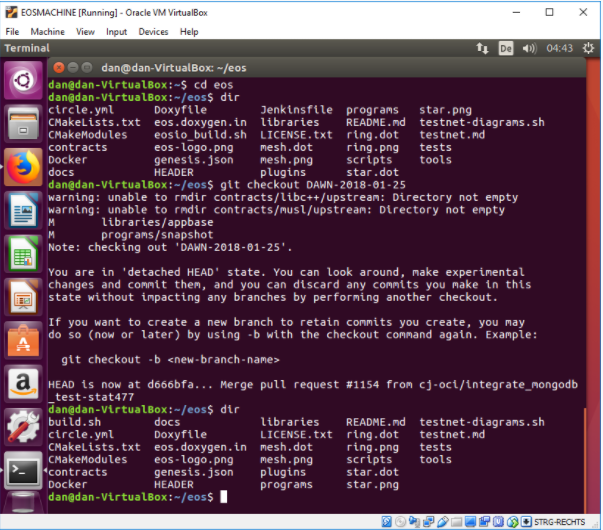</p> <p>Once checked out, run “dir” again and the files should be somewhat different now. Notice that the earlier build is not fully rebranded to “eosio”. The official documentation will tell you to run ./eosio_build.sh, which is not present here. Instead, run the automated build script like this (should take ~30 minutes or more if running on a virtual machine):</p> <pre><code>./build.sh ubuntu</code></pre> <p><br> 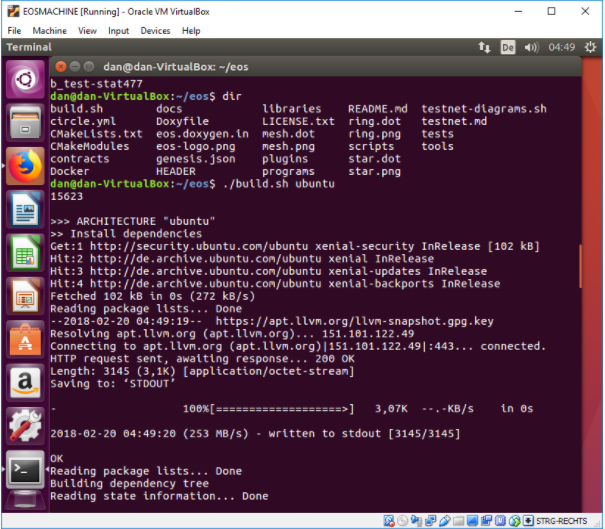</p> <p>When the build-step is finished you can see your newly generated EOS files in the build folder. The next step is to make binaries.</p> <p><br> 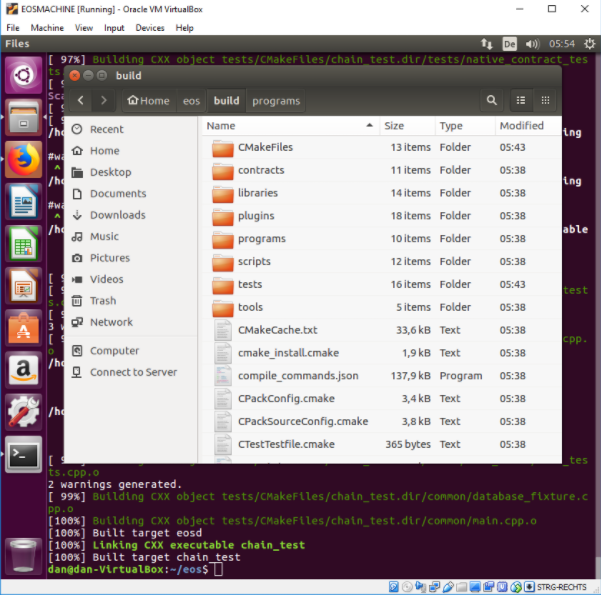</p> <pre><code>cd build<br> sudo make install</code></pre> <p><br> 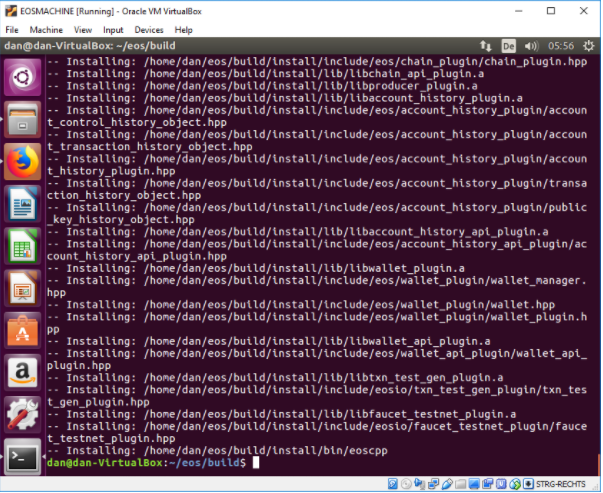</p> <p>Next step is to try to run EOS.IO for the first time. Switch into the eosd folder and run ./eosd:</p> <pre><code>cd eosd<br> ./eosd</code></pre> <p>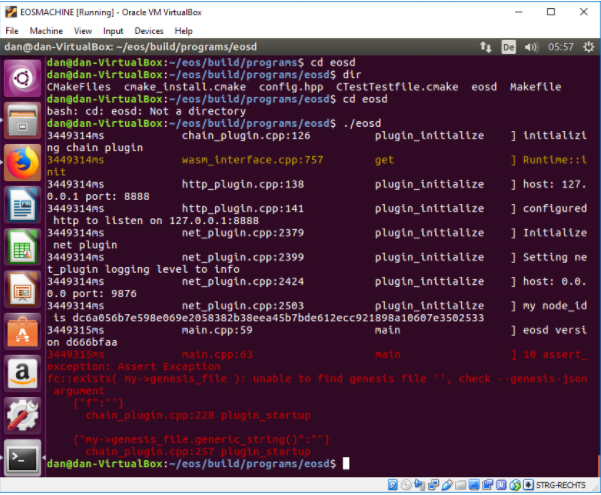</p> <p>You will get an error message that the genesis block is missing. This is expected.</p> </html> |
| json metadata | {"tags":["eos"],"image":["https://steemitimages.com/DQmXmZgMyvufkMRgpvMHtpeso4zXSRuGXg9xThV976VH378/image.png","https://steemitimages.com/DQmNqSAnk2BgpYu1HjEB3Bkx27FrTVdUhohJhZbgmvZcryV/image.png","https://steemitimages.com/DQmadSz1cMk3sqaC1e4c4Xvm21JJHX16kzJfYciWmNuiz6D/image.png","https://steemitimages.com/DQmSyNwhUL7XecoLBdneRiojDj7anzPL39hhabS8dyF7V71/image.png","https://steemitimages.com/DQmXSJsdCJ3Kgf1qWQotNcm1Vm6PvGmJxWiTbtHKLbtWcyA/image.png","https://steemitimages.com/DQmbBePR6Fwmea6RnezP4oNjU7yv2pCUWpM3LjkyHFPum9R/image.png"],"links":["https://steemit.com/eos/@guccip/guide-install-eos-on-an-ubuntu-16-04-virtual-machine-beginners"],"app":"steemit/0.1","format":"html"} |
| Transaction Info | Block #20555004/Trx 23d9a3bbac80c80902124ba4cdb831edb54be7a1 |
View Raw JSON Data
{
"trx_id": "23d9a3bbac80c80902124ba4cdb831edb54be7a1",
"block": 20555004,
"trx_in_block": 29,
"op_in_trx": 0,
"virtual_op": 0,
"timestamp": "2018-03-10T14:13:03",
"op": [
"comment",
{
"parent_author": "",
"parent_permlink": "eos",
"author": "guccip",
"permlink": "guide-install-eos-on-an-ubuntu-16-04-virtual-machine-2-3",
"title": "Guide: Install EOS on an Ubuntu 16.04. Virtual Machine (2/3)",
"body": "<html>\n<h1>Guide: Install EOS on an Ubuntu 16.04. Virtual Machine (2/3)</h1>\n<p>Please make sure you have an Ubuntu 16.04 system running. If not follow the first guide: <a href=\"https://steemit.com/eos/@guccip/guide-install-eos-on-an-ubuntu-16-04-virtual-machine-beginners\">https://steemit.com/eos/@guccip/guide-install-eos-on-an-ubuntu-16-04-virtual-machine-beginners</a></p>\n<h2>3 Install EOS.IO from GitHub</h2>\n<p>In your terminal, run the following command to install git:</p>\n<pre><code>sudo apt-get install git</code></pre>\n<p>Once finished, you can clone/download the EOS.IO repository with the following command: </p>\n<pre><code>git clone https://github.com/eosio/eos --recursive</code></pre>\n<p><br>\nhttps://steemitimages.com/DQmXmZgMyvufkMRgpvMHtpeso4zXSRuGXg9xThV976VH378/image.png</p>\n<p>Open the newly downloaded data by changing the directory to “eos”:</p>\n<pre><code>cd eos</code></pre>\n<p>The command “dir” will show you all the files downloaded from the GitHub repository. One issue with the current GitHub branch is that it’s broken and not working for new users. We’ll have to checkout an earlier build to make it run:</p>\n<pre><code>git checkout DAWN-2018-01-25</code></pre>\n<p><br>\n</p>\n<p>Once checked out, run “dir” again and the files should be somewhat different now. Notice that the earlier build is not fully rebranded to “eosio”. The official documentation will tell you to run ./eosio_build.sh, which is not present here. Instead, run the automated build script like this (should take ~30 minutes or more if running on a virtual machine):</p>\n<pre><code>./build.sh ubuntu</code></pre>\n<p><br>\n</p>\n<p>When the build-step is finished you can see your newly generated EOS files in the build folder. The next step is to make binaries.</p>\n<p><br>\n</p>\n<pre><code>cd build<br>\nsudo make install</code></pre>\n<p><br>\n</p>\n<p>Next step is to try to run EOS.IO for the first time. Switch into the eosd folder and run ./eosd:</p>\n<pre><code>cd eosd<br>\n./eosd</code></pre>\n<p></p>\n<p>You will get an error message that the genesis block is missing. This is expected.</p>\n</html>",
"json_metadata": "{\"tags\":[\"eos\"],\"image\":[\"https://steemitimages.com/DQmXmZgMyvufkMRgpvMHtpeso4zXSRuGXg9xThV976VH378/image.png\",\"https://steemitimages.com/DQmNqSAnk2BgpYu1HjEB3Bkx27FrTVdUhohJhZbgmvZcryV/image.png\",\"https://steemitimages.com/DQmadSz1cMk3sqaC1e4c4Xvm21JJHX16kzJfYciWmNuiz6D/image.png\",\"https://steemitimages.com/DQmSyNwhUL7XecoLBdneRiojDj7anzPL39hhabS8dyF7V71/image.png\",\"https://steemitimages.com/DQmXSJsdCJ3Kgf1qWQotNcm1Vm6PvGmJxWiTbtHKLbtWcyA/image.png\",\"https://steemitimages.com/DQmbBePR6Fwmea6RnezP4oNjU7yv2pCUWpM3LjkyHFPum9R/image.png\"],\"links\":[\"https://steemit.com/eos/@guccip/guide-install-eos-on-an-ubuntu-16-04-virtual-machine-beginners\"],\"app\":\"steemit/0.1\",\"format\":\"html\"}"
}
]
}guccipdeleted a comment or post2018/03/10 13:58:42
guccipdeleted a comment or post
2018/03/10 13:58:42
| author | guccip |
| permlink | guide-install-eos-on-an-ubuntu-16-04-virtual-machine-2-3 |
| Transaction Info | Block #20554719/Trx 14f5efae747f0c2ddec8eddad1fe833877e10b65 |
View Raw JSON Data
{
  "trx_id": "14f5efae747f0c2ddec8eddad1fe833877e10b65",
  "block": 20554719,
  "trx_in_block": 78,
  "op_in_trx": 0,
  "virtual_op": 0,
  "timestamp": "2018-03-10T13:58:42",
  "op": [
    "delete_comment",
    {
      "author": "guccip",
      "permlink": "guide-install-eos-on-an-ubuntu-16-04-virtual-machine-2-3"
    }
  ]
}guccippublished a new post: guide-install-eos-on-an-ubuntu-16-04-virtual-machine-2-32018/03/10 13:56:57
guccippublished a new post: guide-install-eos-on-an-ubuntu-16-04-virtual-machine-2-3
2018/03/10 13:56:57
| parent author | |
| parent permlink | eos |
| author | guccip |
| permlink | guide-install-eos-on-an-ubuntu-16-04-virtual-machine-2-3 |
| title | Guide: Install EOS on an Ubuntu 16.04. Virtual Machine (2/3) |
| body | <h1>Guide: Install EOS on an Ubuntu 16.04. Virtual Machine (2/3)</h1> Please make sure you have an Ubuntu 16.04 system running. If not follow the first guide: https://steemit.com/eos/@guccip/guide-install-eos-on-an-ubuntu-16-04-virtual-machine-beginners <h2>3 Install EOS.IO from GitHub</h2> <p>In your terminal, run the following command to install git:</p> <pre><code>sudo apt-get install git</code></pre> <p>Once finished, you can clone/download the EOS.IO repository with the following command: </p> <pre><code>git clone https://github.com/eosio/eos --recursive</code></pre> <p><img src="https://picoolio.net/images/2018/03/10/1308f803fa01df4231.png" width="603" height="529"/></p> <p>Open the newly downloaded data by changing the directory to “eos”:</p> <pre><code>cd eos</code></pre> <p>The command “dir” will show you all the files downloaded from the GitHub repository. One issue with the current GitHub branch is that it’s broken and not working for new users. We’ll have to checkout an earlier build to make it run:</p> <pre><code>git checkout DAWN-2018-01-25</code></pre> <p><img src="https://picoolio.net/images/2018/03/10/14f6d8788664e3f2c1.png" width="603" height="530"/></p> <p>Once checked out, run “dir” again and the files should be somewhat different now. Notice that the earlier build is not fully rebranded to “eosio”. The official documentation will tell you to run ./eosio_build.sh, which is not present here. Instead, run the automated build script like this (should take ~30 minutes or more if running on a virtual machine):</p> <pre><code>./build.sh ubuntu</code></pre> <p><img src="https://picoolio.net/images/2018/03/10/152b0029208b2f9f89.png"/></p> |
| json metadata | {"tags":["eos"],"image":["https://picoolio.net/images/2018/03/10/1308f803fa01df4231.png","https://picoolio.net/images/2018/03/10/14f6d8788664e3f2c1.png","https://picoolio.net/images/2018/03/10/152b0029208b2f9f89.png"],"links":["https://steemit.com/eos/@guccip/guide-install-eos-on-an-ubuntu-16-04-virtual-machine-beginners"],"app":"steemit/0.1","format":"markdown"} |
| Transaction Info | Block #20554684/Trx 5a7d5dd0048cf6ca9ec5effd7dd6b8e9eb1ac398 |
View Raw JSON Data
{
"trx_id": "5a7d5dd0048cf6ca9ec5effd7dd6b8e9eb1ac398",
"block": 20554684,
"trx_in_block": 34,
"op_in_trx": 0,
"virtual_op": 0,
"timestamp": "2018-03-10T13:56:57",
"op": [
"comment",
{
"parent_author": "",
"parent_permlink": "eos",
"author": "guccip",
"permlink": "guide-install-eos-on-an-ubuntu-16-04-virtual-machine-2-3",
"title": "Guide: Install EOS on an Ubuntu 16.04. Virtual Machine (2/3)",
"body": "<h1>Guide: Install EOS on an Ubuntu 16.04. Virtual Machine (2/3)</h1>\n\nPlease make sure you have an Ubuntu 16.04 system running. If not follow the first guide:\nhttps://steemit.com/eos/@guccip/guide-install-eos-on-an-ubuntu-16-04-virtual-machine-beginners\n\n<h2>3 Install EOS.IO from GitHub</h2>\n<p>In your terminal, run the following command to install git:</p>\n<pre><code>sudo apt-get install git</code></pre>\n<p>Once finished, you can clone/download the EOS.IO repository with the following command: </p>\n<pre><code>git clone https://github.com/eosio/eos --recursive</code></pre>\n<p><img src=\"https://picoolio.net/images/2018/03/10/1308f803fa01df4231.png\" width=\"603\" height=\"529\"/></p>\n<p>Open the newly downloaded data by changing the directory to “eos”:</p>\n<pre><code>cd eos</code></pre>\n<p>The command “dir” will show you all the files downloaded from the GitHub repository. One issue with the current GitHub branch is that it’s broken and not working for new users. We’ll have to checkout an earlier build to make it run:</p>\n<pre><code>git checkout DAWN-2018-01-25</code></pre>\n<p><img src=\"https://picoolio.net/images/2018/03/10/14f6d8788664e3f2c1.png\" width=\"603\" height=\"530\"/></p>\n<p>Once checked out, run “dir” again and the files should be somewhat different now. Notice that the earlier build is not fully rebranded to “eosio”. The official documentation will tell you to run ./eosio_build.sh, which is not present here. Instead, run the automated build script like this (should take ~30 minutes or more if running on a virtual machine):</p>\n<pre><code>./build.sh ubuntu</code></pre>\n<p><img src=\"https://picoolio.net/images/2018/03/10/152b0029208b2f9f89.png\"/></p>",
"json_metadata": "{\"tags\":[\"eos\"],\"image\":[\"https://picoolio.net/images/2018/03/10/1308f803fa01df4231.png\",\"https://picoolio.net/images/2018/03/10/14f6d8788664e3f2c1.png\",\"https://picoolio.net/images/2018/03/10/152b0029208b2f9f89.png\"],\"links\":[\"https://steemit.com/eos/@guccip/guide-install-eos-on-an-ubuntu-16-04-virtual-machine-beginners\"],\"app\":\"steemit/0.1\",\"format\":\"markdown\"}"
}
]
}guccippublished a new post: guide-install-eos-on-an-ubuntu-16-04-virtual-machine-beginners2018/03/10 13:52:36
guccippublished a new post: guide-install-eos-on-an-ubuntu-16-04-virtual-machine-beginners
2018/03/10 13:52:36
| parent author | |
| parent permlink | eos |
| author | guccip |
| permlink | guide-install-eos-on-an-ubuntu-16-04-virtual-machine-beginners |
| title | Guide: Install EOS on an Ubuntu 16.04. Virtual Machine (1/3) |
| body | @@ -3921,21 +3921,16 @@ ate%3Cbr%3E%0A -%3Cbr%3E%0A sudo apt |
| json metadata | {"tags":["eos"],"image":["https://picoolio.net/images/2018/03/10/15c5c22cf7ffae64e.png","https://picoolio.net/images/2018/03/10/218c693b068da5c3d.png","https://picoolio.net/images/2018/03/10/309c6b3be75a0ca46.png","https://picoolio.net/images/2018/03/10/410967b493f7552b0.png","https://picoolio.net/images/2018/03/10/5c278dfccc5595c97.png","https://picoolio.net/images/2018/03/10/69ecb9484b3ecc5bd.png","https://picoolio.net/images/2018/03/10/719c3a68206bedc50.png","https://picoolio.net/images/2018/03/10/81765fec434365a92.png","https://picoolio.net/images/2018/03/10/97994b61b9cee752b.png","https://picoolio.net/images/2018/03/10/10ec422add876b5a87.png","https://picoolio.net/images/2018/03/10/1143a011b8511d8d69.png"],"links":["https://github.com/EOSIO/eos","https://download.virtualbox.org/virtualbox/5.2.6/VirtualBox-5.2.6-120293-Win.exe","https://www.ubuntu.com/download/desktop"],"app":"steemit/0.1","format":"html"} |
| Transaction Info | Block #20554597/Trx 7fb8c8490b2f875f3bd2d6ed98b8f4cc3961f4a1 |
View Raw JSON Data
{
  "trx_id": "7fb8c8490b2f875f3bd2d6ed98b8f4cc3961f4a1",
  "block": 20554597,
  "trx_in_block": 35,
  "op_in_trx": 0,
  "virtual_op": 0,
  "timestamp": "2018-03-10T13:52:36",
  "op": [
    "comment",
    {
      "parent_author": "",
      "parent_permlink": "eos",
      "author": "guccip",
      "permlink": "guide-install-eos-on-an-ubuntu-16-04-virtual-machine-beginners",
      "title": "Guide: Install EOS on an Ubuntu 16.04. Virtual Machine (1/3)",
      "body": "@@ -3921,21 +3921,16 @@\n ate%3Cbr%3E%0A\n-%3Cbr%3E%0A\n sudo apt\n",
      "json_metadata": "{\"tags\":[\"eos\"],\"image\":[\"https://picoolio.net/images/2018/03/10/15c5c22cf7ffae64e.png\",\"https://picoolio.net/images/2018/03/10/218c693b068da5c3d.png\",\"https://picoolio.net/images/2018/03/10/309c6b3be75a0ca46.png\",\"https://picoolio.net/images/2018/03/10/410967b493f7552b0.png\",\"https://picoolio.net/images/2018/03/10/5c278dfccc5595c97.png\",\"https://picoolio.net/images/2018/03/10/69ecb9484b3ecc5bd.png\",\"https://picoolio.net/images/2018/03/10/719c3a68206bedc50.png\",\"https://picoolio.net/images/2018/03/10/81765fec434365a92.png\",\"https://picoolio.net/images/2018/03/10/97994b61b9cee752b.png\",\"https://picoolio.net/images/2018/03/10/10ec422add876b5a87.png\",\"https://picoolio.net/images/2018/03/10/1143a011b8511d8d69.png\"],\"links\":[\"https://github.com/EOSIO/eos\",\"https://download.virtualbox.org/virtualbox/5.2.6/VirtualBox-5.2.6-120293-Win.exe\",\"https://www.ubuntu.com/download/desktop\"],\"app\":\"steemit/0.1\",\"format\":\"html\"}"
    }
  ]
}guccippublished a new post: guide-install-eos-on-an-ubuntu-16-04-virtual-machine-beginners2018/03/10 13:51:45
guccippublished a new post: guide-install-eos-on-an-ubuntu-16-04-virtual-machine-beginners
2018/03/10 13:51:45
| parent author | |
| parent permlink | eos |
| author | guccip |
| permlink | guide-install-eos-on-an-ubuntu-16-04-virtual-machine-beginners |
| title | Guide: Install EOS on an Ubuntu 16.04. Virtual Machine (1/3) |
| body | @@ -64,17 +64,11 @@ ne ( -Beginners +1/3 )%3C/h @@ -3921,16 +3921,21 @@ ate%3Cbr%3E%0A +%3Cbr%3E%0A sudo apt @@ -4134,24 +4134,24 @@ /%3E%3Cbr%3E%0A%3C/p%3E%0A + %3Cp%3EAfter a f @@ -4273,1438 +4273,8 @@ /p%3E%0A -%3Ch2%3E3 Install EOS.IO from GitHub%3C/h2%3E%0A%3Cp%3EIn your terminal, run the following command to install git:%3C/p%3E%0A%3Cpre%3E%3Ccode%3Esudo apt-get install git%3C/code%3E%3C/pre%3E%0A%3Cp%3EOnce finished, you can clone/download the EOS.IO repository with the following command: %3C/p%3E%0A%3Cpre%3E%3Ccode%3Egit clone https://github.com/eosio/eos --recursive%3C/code%3E%3C/pre%3E%0A%3Cp%3E%3Cimg src=%22https://picoolio.net/images/2018/03/10/1308f803fa01df4231.png%22 width=%22603%22 height=%22529%22/%3E%3C/p%3E%0A%3Cp%3EOpen the newly downloaded data by changing the directory to %E2%80%9Ceos%E2%80%9D:%3C/p%3E%0A%3Cpre%3E%3Ccode%3Ecd eos%3C/code%3E%3C/pre%3E%0A%3Cp%3EThe command %E2%80%9Cdir%E2%80%9D will show you all the files downloaded from the GitHub repository. One issue with the current GitHub branch is that it%E2%80%99s broken and not working for new users. We%E2%80%99ll have to checkout an earlier build to make it run:%3C/p%3E%0A%3Cpre%3E%3Ccode%3Egit checkout DAWN-2018-01-25%3C/code%3E%3C/pre%3E%0A%3Cp%3E%3Cimg src=%22https://picoolio.net/images/2018/03/10/14f6d8788664e3f2c1.png%22 width=%22603%22 height=%22530%22/%3E%3C/p%3E%0A%3Cp%3EOnce checked out, run %E2%80%9Cdir%E2%80%9D again and the files should be somewhat different now. Notice that the earlier build is not fully rebranded to %E2%80%9Ceosio%E2%80%9D. The official documentation will tell you to run ./eosio_build.sh, which is not present here. Instead, run the automated build script like this (should take ~30 minutes or more if running on a virtual machine):%3C/p%3E%0A%3Cpre%3E%3Ccode%3E./build.sh ubuntu%3C/code%3E%3C/pre%3E%0A%3Cp%3E%3Cimg src=%22https://picoolio.net/images/2018/03/10/152b0029208b2f9f89.png%22/%3E%3C/p%3E%0A %3C/ht |
| json metadata | {"tags":["eos"],"image":["https://picoolio.net/images/2018/03/10/15c5c22cf7ffae64e.png","https://picoolio.net/images/2018/03/10/218c693b068da5c3d.png","https://picoolio.net/images/2018/03/10/309c6b3be75a0ca46.png","https://picoolio.net/images/2018/03/10/410967b493f7552b0.png","https://picoolio.net/images/2018/03/10/5c278dfccc5595c97.png","https://picoolio.net/images/2018/03/10/69ecb9484b3ecc5bd.png","https://picoolio.net/images/2018/03/10/719c3a68206bedc50.png","https://picoolio.net/images/2018/03/10/81765fec434365a92.png","https://picoolio.net/images/2018/03/10/97994b61b9cee752b.png","https://picoolio.net/images/2018/03/10/10ec422add876b5a87.png","https://picoolio.net/images/2018/03/10/1143a011b8511d8d69.png"],"links":["https://github.com/EOSIO/eos","https://download.virtualbox.org/virtualbox/5.2.6/VirtualBox-5.2.6-120293-Win.exe","https://www.ubuntu.com/download/desktop"],"app":"steemit/0.1","format":"html"} |
| Transaction Info | Block #20554580/Trx a6e9ede274cae2e85e42c85bfb05522c2838fd56 |
View Raw JSON Data
{
  "trx_id": "a6e9ede274cae2e85e42c85bfb05522c2838fd56",
  "block": 20554580,
  "trx_in_block": 23,
  "op_in_trx": 0,
  "virtual_op": 0,
  "timestamp": "2018-03-10T13:51:45",
  "op": [
    "comment",
    {
      "parent_author": "",
      "parent_permlink": "eos",
      "author": "guccip",
      "permlink": "guide-install-eos-on-an-ubuntu-16-04-virtual-machine-beginners",
      "title": "Guide: Install EOS on an Ubuntu 16.04. Virtual Machine (1/3)",
      "body": "@@ -64,17 +64,11 @@\n ne (\n-Beginners\n+1/3\n )%3C/h\n@@ -3921,16 +3921,21 @@\n ate%3Cbr%3E%0A\n+%3Cbr%3E%0A\n sudo apt\n@@ -4134,24 +4134,24 @@\n /%3E%3Cbr%3E%0A%3C/p%3E%0A\n+\n %3Cp%3EAfter a f\n@@ -4273,1438 +4273,8 @@\n /p%3E%0A\n-%3Ch2%3E3 Install EOS.IO from GitHub%3C/h2%3E%0A%3Cp%3EIn your terminal, run the following command to install git:%3C/p%3E%0A%3Cpre%3E%3Ccode%3Esudo apt-get install git%3C/code%3E%3C/pre%3E%0A%3Cp%3EOnce finished, you can clone/download the EOS.IO repository with the following command: %3C/p%3E%0A%3Cpre%3E%3Ccode%3Egit clone https://github.com/eosio/eos --recursive%3C/code%3E%3C/pre%3E%0A%3Cp%3E%3Cimg src=%22https://picoolio.net/images/2018/03/10/1308f803fa01df4231.png%22 width=%22603%22 height=%22529%22/%3E%3C/p%3E%0A%3Cp%3EOpen the newly downloaded data by changing the directory to %E2%80%9Ceos%E2%80%9D:%3C/p%3E%0A%3Cpre%3E%3Ccode%3Ecd eos%3C/code%3E%3C/pre%3E%0A%3Cp%3EThe command %E2%80%9Cdir%E2%80%9D will show you all the files downloaded from the GitHub repository. One issue with the current GitHub branch is that it%E2%80%99s broken and not working for new users. We%E2%80%99ll have to checkout an earlier build to make it run:%3C/p%3E%0A%3Cpre%3E%3Ccode%3Egit checkout DAWN-2018-01-25%3C/code%3E%3C/pre%3E%0A%3Cp%3E%3Cimg src=%22https://picoolio.net/images/2018/03/10/14f6d8788664e3f2c1.png%22 width=%22603%22 height=%22530%22/%3E%3C/p%3E%0A%3Cp%3EOnce checked out, run %E2%80%9Cdir%E2%80%9D again and the files should be somewhat different now. Notice that the earlier build is not fully rebranded to %E2%80%9Ceosio%E2%80%9D. The official documentation will tell you to run ./eosio_build.sh, which is not present here. Instead, run the automated build script like this (should take ~30 minutes or more if running on a virtual machine):%3C/p%3E%0A%3Cpre%3E%3Ccode%3E./build.sh ubuntu%3C/code%3E%3C/pre%3E%0A%3Cp%3E%3Cimg src=%22https://picoolio.net/images/2018/03/10/152b0029208b2f9f89.png%22/%3E%3C/p%3E%0A\n %3C/ht\n",
      "json_metadata": "{\"tags\":[\"eos\"],\"image\":[\"https://picoolio.net/images/2018/03/10/15c5c22cf7ffae64e.png\",\"https://picoolio.net/images/2018/03/10/218c693b068da5c3d.png\",\"https://picoolio.net/images/2018/03/10/309c6b3be75a0ca46.png\",\"https://picoolio.net/images/2018/03/10/410967b493f7552b0.png\",\"https://picoolio.net/images/2018/03/10/5c278dfccc5595c97.png\",\"https://picoolio.net/images/2018/03/10/69ecb9484b3ecc5bd.png\",\"https://picoolio.net/images/2018/03/10/719c3a68206bedc50.png\",\"https://picoolio.net/images/2018/03/10/81765fec434365a92.png\",\"https://picoolio.net/images/2018/03/10/97994b61b9cee752b.png\",\"https://picoolio.net/images/2018/03/10/10ec422add876b5a87.png\",\"https://picoolio.net/images/2018/03/10/1143a011b8511d8d69.png\"],\"links\":[\"https://github.com/EOSIO/eos\",\"https://download.virtualbox.org/virtualbox/5.2.6/VirtualBox-5.2.6-120293-Win.exe\",\"https://www.ubuntu.com/download/desktop\"],\"app\":\"steemit/0.1\",\"format\":\"html\"}"
    }
  ]
}guccippublished a new post: guide-install-eos-on-an-ubuntu-16-04-virtual-machine-beginners2018/03/10 13:49:21
guccippublished a new post: guide-install-eos-on-an-ubuntu-16-04-virtual-machine-beginners
2018/03/10 13:49:21
| parent author | |
| parent permlink | eos |
| author | guccip |
| permlink | guide-install-eos-on-an-ubuntu-16-04-virtual-machine-beginners |
| title | Guide: Install EOS on an Ubuntu 16.04. Virtual Machine (Beginners) |
| body | @@ -190,17 +190,16 @@ u 16.04. - %3Cbr%3E%0AThi @@ -3927,21 +3927,16 @@ ate%3Cbr%3E%0A -%3Cbr%3E%0A sudo apt |
| json metadata | {"tags":["eos"],"image":["https://picoolio.net/images/2018/03/10/15c5c22cf7ffae64e.png","https://picoolio.net/images/2018/03/10/218c693b068da5c3d.png","https://picoolio.net/images/2018/03/10/309c6b3be75a0ca46.png","https://picoolio.net/images/2018/03/10/410967b493f7552b0.png","https://picoolio.net/images/2018/03/10/5c278dfccc5595c97.png","https://picoolio.net/images/2018/03/10/69ecb9484b3ecc5bd.png","https://picoolio.net/images/2018/03/10/719c3a68206bedc50.png","https://picoolio.net/images/2018/03/10/81765fec434365a92.png","https://picoolio.net/images/2018/03/10/97994b61b9cee752b.png","https://picoolio.net/images/2018/03/10/10ec422add876b5a87.png","https://picoolio.net/images/2018/03/10/1143a011b8511d8d69.png","https://picoolio.net/images/2018/03/10/1308f803fa01df4231.png","https://picoolio.net/images/2018/03/10/14f6d8788664e3f2c1.png","https://picoolio.net/images/2018/03/10/152b0029208b2f9f89.png"],"links":["https://github.com/EOSIO/eos","https://download.virtualbox.org/virtualbox/5.2.6/VirtualBox-5.2.6-120293-Win.exe","https://www.ubuntu.com/download/desktop"],"app":"steemit/0.1","format":"html"} |
| Transaction Info | Block #20554532/Trx 66007a4009283c04356c1961c97eb61254f16686 |
View Raw JSON Data
{
  "trx_id": "66007a4009283c04356c1961c97eb61254f16686",
  "block": 20554532,
  "trx_in_block": 8,
  "op_in_trx": 0,
  "virtual_op": 0,
  "timestamp": "2018-03-10T13:49:21",
  "op": [
    "comment",
    {
      "parent_author": "",
      "parent_permlink": "eos",
      "author": "guccip",
      "permlink": "guide-install-eos-on-an-ubuntu-16-04-virtual-machine-beginners",
      "title": "Guide: Install EOS on an Ubuntu 16.04. Virtual Machine (Beginners)",
      "body": "@@ -190,17 +190,16 @@\n u 16.04.\n- \n %3Cbr%3E%0AThi\n@@ -3927,21 +3927,16 @@\n ate%3Cbr%3E%0A\n-%3Cbr%3E%0A\n sudo apt\n",
      "json_metadata": "{\"tags\":[\"eos\"],\"image\":[\"https://picoolio.net/images/2018/03/10/15c5c22cf7ffae64e.png\",\"https://picoolio.net/images/2018/03/10/218c693b068da5c3d.png\",\"https://picoolio.net/images/2018/03/10/309c6b3be75a0ca46.png\",\"https://picoolio.net/images/2018/03/10/410967b493f7552b0.png\",\"https://picoolio.net/images/2018/03/10/5c278dfccc5595c97.png\",\"https://picoolio.net/images/2018/03/10/69ecb9484b3ecc5bd.png\",\"https://picoolio.net/images/2018/03/10/719c3a68206bedc50.png\",\"https://picoolio.net/images/2018/03/10/81765fec434365a92.png\",\"https://picoolio.net/images/2018/03/10/97994b61b9cee752b.png\",\"https://picoolio.net/images/2018/03/10/10ec422add876b5a87.png\",\"https://picoolio.net/images/2018/03/10/1143a011b8511d8d69.png\",\"https://picoolio.net/images/2018/03/10/1308f803fa01df4231.png\",\"https://picoolio.net/images/2018/03/10/14f6d8788664e3f2c1.png\",\"https://picoolio.net/images/2018/03/10/152b0029208b2f9f89.png\"],\"links\":[\"https://github.com/EOSIO/eos\",\"https://download.virtualbox.org/virtualbox/5.2.6/VirtualBox-5.2.6-120293-Win.exe\",\"https://www.ubuntu.com/download/desktop\"],\"app\":\"steemit/0.1\",\"format\":\"html\"}"
    }
  ]
}2018/03/10 13:48:57
2018/03/10 13:48:57
| parent author | guccip |
| parent permlink | guide-install-eos-on-an-ubuntu-16-04-virtual-machine-beginners |
| author | wonsama |
| permlink | guide-install-eos-on-an-ubuntu-16-04-virtual-machine-beginners1520689735638 |
| title | |
| body | hi, @guccip Thank you for writing good. I will follow you and I hope to write better in the future. Follow me ( @wonsama ), I'll providing korean realtime news every 1 hour. If you do not know Korean, just use Google Translator. |
| json metadata | {"tags":["bot","comment"],"app":"bot/wonsama"} |
| Transaction Info | Block #20554524/Trx faa0dc083b87bcf5d007c376934ae5a88a59f013 |
View Raw JSON Data
{
  "trx_id": "faa0dc083b87bcf5d007c376934ae5a88a59f013",
  "block": 20554524,
  "trx_in_block": 26,
  "op_in_trx": 0,
  "virtual_op": 0,
  "timestamp": "2018-03-10T13:48:57",
  "op": [
    "comment",
    {
      "parent_author": "guccip",
      "parent_permlink": "guide-install-eos-on-an-ubuntu-16-04-virtual-machine-beginners",
      "author": "wonsama",
      "permlink": "guide-install-eos-on-an-ubuntu-16-04-virtual-machine-beginners1520689735638",
      "title": "",
      "body": "hi, @guccip\nThank you for writing good.\nI will follow you and I hope to write better in the future.\n\nFollow me ( @wonsama ), I'll providing korean realtime news every 1 hour.\nIf you do not know Korean, just use Google Translator.",
      "json_metadata": "{\"tags\":[\"bot\",\"comment\"],\"app\":\"bot/wonsama\"}"
    }
  ]
}guccippublished a new post: guide-install-eos-on-an-ubuntu-16-04-virtual-machine-beginners2018/03/10 13:48:12
guccippublished a new post: guide-install-eos-on-an-ubuntu-16-04-virtual-machine-beginners
2018/03/10 13:48:12
| parent author | |
| parent permlink | eos |
| author | guccip |
| permlink | guide-install-eos-on-an-ubuntu-16-04-virtual-machine-beginners |
| title | Guide: Install EOS on an Ubuntu 16.04. Virtual Machine (Beginners) |
| body | <html> <h1>Guide: Install EOS on an Ubuntu 16.04. Virtual Machine (Beginners)</h1> <p>Hi, this is a very basic step-by-step tutorial on how to install EOS on a virtual machine running Ubuntu 16.04. <br> This guide is based on the EOS.IO github page <a href="https://github.com/EOSIO/eos">https://github.com/EOSIO/eos</a></p> <p>I found the the Dawn 2018-01-25 guide to be not 100% accurate so I wanted to share my process. Please note that the process will vary a bit for other versions. Still, if you follow this guide at any time in the future you will end up with a running version of EOS Dawn 2018-01-25.</p> <h2><strong>1 Prerequisites </strong></h2> <p>Download & Install Oracle VirtualBox<br> <a href="https://download.virtualbox.org/virtualbox/5.2.6/VirtualBox-5.2.6-120293-Win.exe">https://download.virtualbox.org/virtualbox/5.2.6/VirtualBox-5.2.6-120293-Win.exe</a><br> </p> <p>Download Ubuntu 16.04.3 LTS<br> <a href="https://www.ubuntu.com/download/desktop">https://www.ubuntu.com/download/desktop</a><br> </p> <h2>2 Set up the Virtual Machine</h2> <p>In VirtualBox press “New” and give your machine a name (here: “EOSMACHINE”). Select Linux and Ubuntu (64/32-bit depending on your architecture) for Type and Version. </p> <p><img src="https://picoolio.net/images/2018/03/10/15c5c22cf7ffae64e.png" width="693" height="525"/></p> <p>Select Memory size: 4GB is good (more = better). 2GB should also work.<br> <img src="https://picoolio.net/images/2018/03/10/218c693b068da5c3d.png" width="602" height="455"/></p> <p>Hard Disk: “Create a virtual hard disk now” -> “VDI” -> “Dynamically allocated”. For size I used 50GB but anything larger than 5GB should be fine.</p> <p><img src="https://picoolio.net/images/2018/03/10/309c6b3be75a0ca46.png" width="597" height="454"/></p> <p>Once the machine has been created, right click on your new machine and open the settings. Then go to System->Processor and allocate another CPU if you can spare it: </p> <p><img src="https://picoolio.net/images/2018/03/10/410967b493f7552b0.png" width="601" height="457"/></p> <p>Afterwards double click on your virtual machine to launch it for the first time. A popup will ask you for a start-up disk. Navigate to the Ubuntu ISO you just downloaded and press “Start”.<br> <img src="https://picoolio.net/images/2018/03/10/5c278dfccc5595c97.png" width="599" height="521"/></p> <p>Press Install. </p> <p><img src="https://picoolio.net/images/2018/03/10/69ecb9484b3ecc5bd.png" width="600" height="506"/></p> <p>Feel free to check both boxes (not required). </p> <p><img src="https://picoolio.net/images/2018/03/10/719c3a68206bedc50.png" width="600" height="504"/></p> <p>Choose erase disk and install Ubuntu. The other options will also work but they are only for productive environments. </p> <p><img src="https://picoolio.net/images/2018/03/10/81765fec434365a92.png" width="603" height="503"/></p> <p>Next you will be asked for your time zone and keyboard layout which should be pretty straight forward. In the following window you will be asked for username/password and your computer name. For username go with “dan” and password “larimer”, otherwise your EOS daemon will crash. No seriously: Pick whatever you like. For testing out EOS on a VirtualBox security should not be your first concern. </p> <p>Let the installation finish and reboot your machine. If everything went as planned, you should be looking at a clean Ubuntu 16.04. installation running.</p> <p><img src="https://picoolio.net/images/2018/03/10/97994b61b9cee752b.png" width="600" height="477"/></p> <p>In the fresh loaded Ubuntu installation, click the top left icon and type “Terminal” into the search window. Then open the Terminal. </p> <p><img src="https://picoolio.net/images/2018/03/10/10ec422add876b5a87.png" width="602" height="566"/></p> <p>First run the following commands:</p> <pre><code>sudo apt-get update<br> <br> sudo apt-get upgrade</code></pre> <p>(Enter your password if asked and confirm questions with “Y”)<br> <img src="https://picoolio.net/images/2018/03/10/1143a011b8511d8d69.png" width="603" height="563"/><br> </p> <p>After a few minutes the upgrade should be complete and your Ubuntu system is prepared for the installation of EOS.IO. </p> <h2>3 Install EOS.IO from GitHub</h2> <p>In your terminal, run the following command to install git:</p> <pre><code>sudo apt-get install git</code></pre> <p>Once finished, you can clone/download the EOS.IO repository with the following command: </p> <pre><code>git clone https://github.com/eosio/eos --recursive</code></pre> <p><img src="https://picoolio.net/images/2018/03/10/1308f803fa01df4231.png" width="603" height="529"/></p> <p>Open the newly downloaded data by changing the directory to “eos”:</p> <pre><code>cd eos</code></pre> <p>The command “dir” will show you all the files downloaded from the GitHub repository. One issue with the current GitHub branch is that it’s broken and not working for new users. We’ll have to checkout an earlier build to make it run:</p> <pre><code>git checkout DAWN-2018-01-25</code></pre> <p><img src="https://picoolio.net/images/2018/03/10/14f6d8788664e3f2c1.png" width="603" height="530"/></p> <p>Once checked out, run “dir” again and the files should be somewhat different now. Notice that the earlier build is not fully rebranded to “eosio”. The official documentation will tell you to run ./eosio_build.sh, which is not present here. Instead, run the automated build script like this (should take ~30 minutes or more if running on a virtual machine):</p> <pre><code>./build.sh ubuntu</code></pre> <p><img src="https://picoolio.net/images/2018/03/10/152b0029208b2f9f89.png"/></p> </html> |
| json metadata | {"tags":["eos"],"image":["https://picoolio.net/images/2018/03/10/15c5c22cf7ffae64e.png","https://picoolio.net/images/2018/03/10/218c693b068da5c3d.png","https://picoolio.net/images/2018/03/10/309c6b3be75a0ca46.png","https://picoolio.net/images/2018/03/10/410967b493f7552b0.png","https://picoolio.net/images/2018/03/10/5c278dfccc5595c97.png","https://picoolio.net/images/2018/03/10/69ecb9484b3ecc5bd.png","https://picoolio.net/images/2018/03/10/719c3a68206bedc50.png","https://picoolio.net/images/2018/03/10/81765fec434365a92.png","https://picoolio.net/images/2018/03/10/97994b61b9cee752b.png","https://picoolio.net/images/2018/03/10/10ec422add876b5a87.png","https://picoolio.net/images/2018/03/10/1143a011b8511d8d69.png","https://picoolio.net/images/2018/03/10/1308f803fa01df4231.png","https://picoolio.net/images/2018/03/10/14f6d8788664e3f2c1.png","https://picoolio.net/images/2018/03/10/152b0029208b2f9f89.png"],"links":["https://github.com/EOSIO/eos","https://download.virtualbox.org/virtualbox/5.2.6/VirtualBox-5.2.6-120293-Win.exe","https://www.ubuntu.com/download/desktop"],"app":"steemit/0.1","format":"html"} |
| Transaction Info | Block #20554509/Trx 0929ee2082c4d21c74ea6004271988977a554fa9 |
View Raw JSON Data
{
"trx_id": "0929ee2082c4d21c74ea6004271988977a554fa9",
"block": 20554509,
"trx_in_block": 36,
"op_in_trx": 0,
"virtual_op": 0,
"timestamp": "2018-03-10T13:48:12",
"op": [
"comment",
{
"parent_author": "",
"parent_permlink": "eos",
"author": "guccip",
"permlink": "guide-install-eos-on-an-ubuntu-16-04-virtual-machine-beginners",
"title": "Guide: Install EOS on an Ubuntu 16.04. Virtual Machine (Beginners)",
"body": "<html>\n<h1>Guide: Install EOS on an Ubuntu 16.04. Virtual Machine (Beginners)</h1>\n<p>Hi, this is a very basic step-by-step tutorial on how to install EOS on a virtual machine running Ubuntu 16.04. <br>\nThis guide is based on the EOS.IO github page <a href=\"https://github.com/EOSIO/eos\">https://github.com/EOSIO/eos</a></p>\n<p>I found the the Dawn 2018-01-25 guide to be not 100% accurate so I wanted to share my process. Please note that the process will vary a bit for other versions. Still, if you follow this guide at any time in the future you will end up with a running version of EOS Dawn 2018-01-25.</p>\n<h2><strong>1 Prerequisites </strong></h2>\n<p>Download & Install Oracle VirtualBox<br>\n<a href=\"https://download.virtualbox.org/virtualbox/5.2.6/VirtualBox-5.2.6-120293-Win.exe\">https://download.virtualbox.org/virtualbox/5.2.6/VirtualBox-5.2.6-120293-Win.exe</a><br>\n</p>\n<p>Download Ubuntu 16.04.3 LTS<br>\n<a href=\"https://www.ubuntu.com/download/desktop\">https://www.ubuntu.com/download/desktop</a><br>\n</p>\n<h2>2 Set up the Virtual Machine</h2>\n<p>In VirtualBox press “New” and give your machine a name (here: “EOSMACHINE”). Select Linux and Ubuntu (64/32-bit depending on your architecture) for Type and Version. </p>\n<p><img src=\"https://picoolio.net/images/2018/03/10/15c5c22cf7ffae64e.png\" width=\"693\" height=\"525\"/></p>\n<p>Select Memory size: 4GB is good (more = better). 2GB should also work.<br>\n <img src=\"https://picoolio.net/images/2018/03/10/218c693b068da5c3d.png\" width=\"602\" height=\"455\"/></p>\n<p>Hard Disk: “Create a virtual hard disk now” -> “VDI” -> “Dynamically allocated”. For size I used 50GB but anything larger than 5GB should be fine.</p>\n<p><img src=\"https://picoolio.net/images/2018/03/10/309c6b3be75a0ca46.png\" width=\"597\" height=\"454\"/></p>\n<p>Once the machine has been created, right click on your new machine and open the settings. Then go to System->Processor and allocate another CPU if you can spare it: </p>\n<p><img src=\"https://picoolio.net/images/2018/03/10/410967b493f7552b0.png\" width=\"601\" height=\"457\"/></p>\n<p>Afterwards double click on your virtual machine to launch it for the first time. A popup will ask you for a start-up disk. Navigate to the Ubuntu ISO you just downloaded and press “Start”.<br>\n<img src=\"https://picoolio.net/images/2018/03/10/5c278dfccc5595c97.png\" width=\"599\" height=\"521\"/></p>\n<p>Press Install. </p>\n<p><img src=\"https://picoolio.net/images/2018/03/10/69ecb9484b3ecc5bd.png\" width=\"600\" height=\"506\"/></p>\n<p>Feel free to check both boxes (not required). </p>\n<p><img src=\"https://picoolio.net/images/2018/03/10/719c3a68206bedc50.png\" width=\"600\" height=\"504\"/></p>\n<p>Choose erase disk and install Ubuntu. The other options will also work but they are only for productive environments. </p>\n<p><img src=\"https://picoolio.net/images/2018/03/10/81765fec434365a92.png\" width=\"603\" height=\"503\"/></p>\n<p>Next you will be asked for your time zone and keyboard layout which should be pretty straight forward. In the following window you will be asked for username/password and your computer name. For username go with “dan” and password “larimer”, otherwise your EOS daemon will crash. No seriously: Pick whatever you like. For testing out EOS on a VirtualBox security should not be your first concern. </p>\n<p>Let the installation finish and reboot your machine. If everything went as planned, you should be looking at a clean Ubuntu 16.04. installation running.</p>\n<p><img src=\"https://picoolio.net/images/2018/03/10/97994b61b9cee752b.png\" width=\"600\" height=\"477\"/></p>\n<p>In the fresh loaded Ubuntu installation, click the top left icon and type “Terminal” into the search window. Then open the Terminal. </p>\n<p><img src=\"https://picoolio.net/images/2018/03/10/10ec422add876b5a87.png\" width=\"602\" height=\"566\"/></p>\n<p>First run the following commands:</p>\n<pre><code>sudo apt-get update<br>\n<br>\nsudo apt-get upgrade</code></pre>\n<p>(Enter your password if asked and confirm questions with “Y”)<br>\n<img src=\"https://picoolio.net/images/2018/03/10/1143a011b8511d8d69.png\" width=\"603\" height=\"563\"/><br>\n</p>\n<p>After a few minutes the upgrade should be complete and your Ubuntu system is prepared for the installation of EOS.IO. </p>\n<h2>3 Install EOS.IO from GitHub</h2>\n<p>In your terminal, run the following command to install git:</p>\n<pre><code>sudo apt-get install git</code></pre>\n<p>Once finished, you can clone/download the EOS.IO repository with the following command: </p>\n<pre><code>git clone https://github.com/eosio/eos --recursive</code></pre>\n<p><img src=\"https://picoolio.net/images/2018/03/10/1308f803fa01df4231.png\" width=\"603\" height=\"529\"/></p>\n<p>Open the newly downloaded data by changing the directory to “eos”:</p>\n<pre><code>cd eos</code></pre>\n<p>The command “dir” will show you all the files downloaded from the GitHub repository. One issue with the current GitHub branch is that it’s broken and not working for new users. We’ll have to checkout an earlier build to make it run:</p>\n<pre><code>git checkout DAWN-2018-01-25</code></pre>\n<p><img src=\"https://picoolio.net/images/2018/03/10/14f6d8788664e3f2c1.png\" width=\"603\" height=\"530\"/></p>\n<p>Once checked out, run “dir” again and the files should be somewhat different now. Notice that the earlier build is not fully rebranded to “eosio”. The official documentation will tell you to run ./eosio_build.sh, which is not present here. Instead, run the automated build script like this (should take ~30 minutes or more if running on a virtual machine):</p>\n<pre><code>./build.sh ubuntu</code></pre>\n<p><img src=\"https://picoolio.net/images/2018/03/10/152b0029208b2f9f89.png\"/></p>\n</html>",
"json_metadata": "{\"tags\":[\"eos\"],\"image\":[\"https://picoolio.net/images/2018/03/10/15c5c22cf7ffae64e.png\",\"https://picoolio.net/images/2018/03/10/218c693b068da5c3d.png\",\"https://picoolio.net/images/2018/03/10/309c6b3be75a0ca46.png\",\"https://picoolio.net/images/2018/03/10/410967b493f7552b0.png\",\"https://picoolio.net/images/2018/03/10/5c278dfccc5595c97.png\",\"https://picoolio.net/images/2018/03/10/69ecb9484b3ecc5bd.png\",\"https://picoolio.net/images/2018/03/10/719c3a68206bedc50.png\",\"https://picoolio.net/images/2018/03/10/81765fec434365a92.png\",\"https://picoolio.net/images/2018/03/10/97994b61b9cee752b.png\",\"https://picoolio.net/images/2018/03/10/10ec422add876b5a87.png\",\"https://picoolio.net/images/2018/03/10/1143a011b8511d8d69.png\",\"https://picoolio.net/images/2018/03/10/1308f803fa01df4231.png\",\"https://picoolio.net/images/2018/03/10/14f6d8788664e3f2c1.png\",\"https://picoolio.net/images/2018/03/10/152b0029208b2f9f89.png\"],\"links\":[\"https://github.com/EOSIO/eos\",\"https://download.virtualbox.org/virtualbox/5.2.6/VirtualBox-5.2.6-120293-Win.exe\",\"https://www.ubuntu.com/download/desktop\"],\"app\":\"steemit/0.1\",\"format\":\"html\"}"
}
]
}2018/03/10 13:06:03
2018/03/10 13:06:03
| fee | 0.500 STEEM |
| delegation | 29700.000000 VESTS |
| creator | steem |
| new account name | guccip |
| owner | {"weight_threshold":1,"account_auths":[],"key_auths":[["STM6F2Fynn5AYC3XFBr6HbCSXqd8eNhd1aQYQ2N5xppD51SNY6uEB",1]]} |
| active | {"weight_threshold":1,"account_auths":[],"key_auths":[["STM7DucMt3gx78TL1PLhdMsweERcf8nsr6W3sPEbd6Csk4qbykdV5",1]]} |
| posting | {"weight_threshold":1,"account_auths":[],"key_auths":[["STM8fgnX7q7MUKrvNKSmceZg9vL7gTQfudMrSw6nvbGp2AegTdWGn",1]]} |
| memo key | STM7ZMtAnF3BKjuMdaS4ZX1xNHPF18B3zKykAZ5zfRaHdg9pGPGqQ |
| json metadata | |
| extensions | [] |
| Transaction Info | Block #20553669/Trx 6521a7ef52e400be6dd614ade4087c5753292e97 |
View Raw JSON Data
{
  "trx_id": "6521a7ef52e400be6dd614ade4087c5753292e97",
  "block": 20553669,
  "trx_in_block": 50,
  "op_in_trx": 0,
  "virtual_op": 0,
  "timestamp": "2018-03-10T13:06:03",
  "op": [
    "account_create_with_delegation",
    {
      "fee": "0.500 STEEM",
      "delegation": "29700.000000 VESTS",
      "creator": "steem",
      "new_account_name": "guccip",
      "owner": {
        "weight_threshold": 1,
        "account_auths": [],
        "key_auths": [
          [
            "STM6F2Fynn5AYC3XFBr6HbCSXqd8eNhd1aQYQ2N5xppD51SNY6uEB",
            1
          ]
        ]
      },
      "active": {
        "weight_threshold": 1,
        "account_auths": [],
        "key_auths": [
          [
            "STM7DucMt3gx78TL1PLhdMsweERcf8nsr6W3sPEbd6Csk4qbykdV5",
            1
          ]
        ]
      },
      "posting": {
        "weight_threshold": 1,
        "account_auths": [],
        "key_auths": [
          [
            "STM8fgnX7q7MUKrvNKSmceZg9vL7gTQfudMrSw6nvbGp2AegTdWGn",
            1
          ]
        ]
      },
      "memo_key": "STM7ZMtAnF3BKjuMdaS4ZX1xNHPF18B3zKykAZ5zfRaHdg9pGPGqQ",
      "json_metadata": "",
      "extensions": []
    }
  ]
}Manabar
Voting Power100.00%
Downvote Power100.00%
Resource Credits100.00%
Reputation Progress0.00%
{
  "voting_manabar": {
    "current_mana": "8143659806",
    "last_update_time": 1779065490
  },
  "downvote_manabar": {
    "current_mana": 2035914951,
    "last_update_time": 1779065490
  },
  "rc_account": {
    "account": "guccip",
    "rc_manabar": {
      "current_mana": "10164408779",
      "last_update_time": 1779065490
    },
    "max_rc_creation_adjustment": {
      "amount": "2020748973",
      "precision": 6,
      "nai": "@@000000037"
    },
    "max_rc": "10164408779"
  }
}
Account Metadata
| POSTING JSON METADATA | |
| None | |
| JSON METADATA | |
| None |
{
  "posting_json_metadata": {},
  "json_metadata": {}
}
Auth Keys
Owner
Single Signature
Public Keys
STM6F2Fynn5AYC3XFBr6HbCSXqd8eNhd1aQYQ2N5xppD51SNY6uEB1/1
Active
Single Signature
Public Keys
STM7DucMt3gx78TL1PLhdMsweERcf8nsr6W3sPEbd6Csk4qbykdV51/1
Posting
Single Signature
Public Keys
STM8fgnX7q7MUKrvNKSmceZg9vL7gTQfudMrSw6nvbGp2AegTdWGn1/1
Memo
STM7ZMtAnF3BKjuMdaS4ZX1xNHPF18B3zKykAZ5zfRaHdg9pGPGqQ
{
  "owner": {
    "weight_threshold": 1,
    "account_auths": [],
    "key_auths": [
      [
        "STM6F2Fynn5AYC3XFBr6HbCSXqd8eNhd1aQYQ2N5xppD51SNY6uEB",
        1
      ]
    ]
  },
  "active": {
    "weight_threshold": 1,
    "account_auths": [],
    "key_auths": [
      [
        "STM7DucMt3gx78TL1PLhdMsweERcf8nsr6W3sPEbd6Csk4qbykdV5",
        1
      ]
    ]
  },
  "posting": {
    "weight_threshold": 1,
    "account_auths": [],
    "key_auths": [
      [
        "STM8fgnX7q7MUKrvNKSmceZg9vL7gTQfudMrSw6nvbGp2AegTdWGn",
        1
      ]
    ]
  },
  "memo": "STM7ZMtAnF3BKjuMdaS4ZX1xNHPF18B3zKykAZ5zfRaHdg9pGPGqQ"
}
Witness Votes
0 / 30
No active witness votes.
[]