

VOTING POWER100.00%
DOWNVOTE POWER100.00%
RESOURCE CREDITS100.00%
REPUTATION PROGRESS7.18%
Net Worth
0.025USD
STEEM
0.120STEEM
SBD
0.004SBD
Effective Power
5.001SP
├── Own SP
0.297SP
└── Incoming DelegationsDeleg
+4.704SP
Detailed Balance
| STEEM | ||
| balance | 0.120STEEM | STEEM |
| market_balance | 0.000STEEM | STEEM |
| savings_balance | 0.000STEEM | STEEM |
| reward_steem_balance | 0.000STEEM | STEEM |
| STEEM POWER | ||
| Own SP | 0.297SP | SP |
| Delegated Out | 0.000SP | SP |
| Delegation In | 4.704SP | SP |
| Effective Power | 5.001SP | SP |
| Reward SP (pending) | 0.000SP | SP |
| SBD | ||
| sbd_balance | 0.004SBD | SBD |
| sbd_conversions | 0.000SBD | SBD |
| sbd_market_balance | 0.000SBD | SBD |
| savings_sbd_balance | 0.000SBD | SBD |
| reward_sbd_balance | 0.000SBD | SBD |
{
  "balance": "0.120 STEEM",
  "savings_balance": "0.000 STEEM",
  "reward_steem_balance": "0.000 STEEM",
  "vesting_shares": "484.211622 VESTS",
  "delegated_vesting_shares": "0.000000 VESTS",
  "received_vesting_shares": "7659.448184 VESTS",
  "sbd_balance": "0.004 SBD",
  "savings_sbd_balance": "0.000 SBD",
  "reward_sbd_balance": "0.000 SBD",
  "conversions": []
}
Account Info
| name | growth-hack |
| id | 969190 |
| rank | 273,061 |
| reputation | 6105946518 |
| created | 2018-05-09T17:49:09 |
| recovery_account | steem |
| proxy | None |
| post_count | 6 |
| comment_count | 0 |
| lifetime_vote_count | 0 |
| witnesses_voted_for | 0 |
| last_post | 2020-05-14T11:31:30 |
| last_root_post | 2020-05-14T11:31:30 |
| last_vote_time | 2025-01-04T18:33:09 |
| proxied_vsf_votes | 0, 0, 0, 0 |
| can_vote | 1 |
| voting_power | 0 |
| delayed_votes | 0 |
| balance | 0.120 STEEM |
| savings_balance | 0.000 STEEM |
| sbd_balance | 0.004 SBD |
| savings_sbd_balance | 0.000 SBD |
| vesting_shares | 484.211622 VESTS |
| delegated_vesting_shares | 0.000000 VESTS |
| received_vesting_shares | 7659.448184 VESTS |
| reward_vesting_balance | 0.000000 VESTS |
| vesting_balance | 0.000 STEEM |
| vesting_withdraw_rate | 0.000000 VESTS |
| next_vesting_withdrawal | 1969-12-31T23:59:59 |
| withdrawn | 0 |
| to_withdraw | 0 |
| withdraw_routes | 0 |
| savings_withdraw_requests | 0 |
| last_account_recovery | 1970-01-01T00:00:00 |
| reset_account | null |
| last_owner_update | 1970-01-01T00:00:00 |
| last_account_update | 2025-01-04T18:27:21 |
| mined | No |
| sbd_seconds | 0 |
| sbd_last_interest_payment | 2020-12-23T09:49:57 |
| savings_sbd_last_interest_payment | 1970-01-01T00:00:00 |
{
  "id": 969190,
  "name": "growth-hack",
  "owner": {
    "weight_threshold": 1,
    "account_auths": [],
    "key_auths": [
      [
        "STM8SoQjk6Tq1RVhMJroexmHSu92kjEaYWR3ZdoxaRCPYiLMjicQd",
        1
      ]
    ]
  },
  "active": {
    "weight_threshold": 1,
    "account_auths": [],
    "key_auths": [
      [
        "STM6SeYsP11aENMqueEtsb3WAkDYbm9spvVFHwt3n3UCqwR89aB7h",
        1
      ]
    ]
  },
  "posting": {
    "weight_threshold": 1,
    "account_auths": [],
    "key_auths": [
      [
        "STM8fTbKyxhocWCqKaTcWbeiezDaP2Q7c1K37AQBUjPY3EipHoVNs",
        1
      ]
    ]
  },
  "memo_key": "STM7fbsAp4bdJfiB1SVFtuSsLtj35Q9BEnQvemFLfYrbXdgzsTQ9n",
  "json_metadata": "{\"profile\":{\"profile_image\":\"https://cdn.steemitimages.com/DQmP5RF9woEFgGxpb8cSbNqBhykvW3YasXKG6NvrDuEFLSS/fabian_maume.JPG\",\"website\":\"https://growth-hack.eu/\"}}",
  "posting_json_metadata": "{\"profile\":{\"profile_image\":\"https://cdn.steemitimages.com/DQmP5RF9woEFgGxpb8cSbNqBhykvW3YasXKG6NvrDuEFLSS/fabian_maume.JPG\",\"website\":\"https://www.tetriz.io/\",\"version\":2}}",
  "proxy": "",
  "last_owner_update": "1970-01-01T00:00:00",
  "last_account_update": "2025-01-04T18:27:21",
  "created": "2018-05-09T17:49:09",
  "mined": false,
  "recovery_account": "steem",
  "last_account_recovery": "1970-01-01T00:00:00",
  "reset_account": "null",
  "comment_count": 0,
  "lifetime_vote_count": 0,
  "post_count": 6,
  "can_vote": true,
  "voting_manabar": {
    "current_mana": "8143659806",
    "last_update_time": 1779065439
  },
  "downvote_manabar": {
    "current_mana": 2035914951,
    "last_update_time": 1779065439
  },
  "voting_power": 0,
  "balance": "0.120 STEEM",
  "savings_balance": "0.000 STEEM",
  "sbd_balance": "0.004 SBD",
  "sbd_seconds": "0",
  "sbd_seconds_last_update": "2020-12-23T09:49:57",
  "sbd_last_interest_payment": "2020-12-23T09:49:57",
  "savings_sbd_balance": "0.000 SBD",
  "savings_sbd_seconds": "0",
  "savings_sbd_seconds_last_update": "1970-01-01T00:00:00",
  "savings_sbd_last_interest_payment": "1970-01-01T00:00:00",
  "savings_withdraw_requests": 0,
  "reward_sbd_balance": "0.000 SBD",
  "reward_steem_balance": "0.000 STEEM",
  "reward_vesting_balance": "0.000000 VESTS",
  "reward_vesting_steem": "0.000 STEEM",
  "vesting_shares": "484.211622 VESTS",
  "delegated_vesting_shares": "0.000000 VESTS",
  "received_vesting_shares": "7659.448184 VESTS",
  "vesting_withdraw_rate": "0.000000 VESTS",
  "next_vesting_withdrawal": "1969-12-31T23:59:59",
  "withdrawn": 0,
  "to_withdraw": 0,
  "withdraw_routes": 0,
  "curation_rewards": 1,
  "posting_rewards": 280,
  "proxied_vsf_votes": [
    0,
    0,
    0,
    0
  ],
  "witnesses_voted_for": 0,
  "last_post": "2020-05-14T11:31:30",
  "last_root_post": "2020-05-14T11:31:30",
  "last_vote_time": "2025-01-04T18:33:09",
  "post_bandwidth": 0,
  "pending_claimed_accounts": 0,
  "vesting_balance": "0.000 STEEM",
  "reputation": "6105946518",
  "transfer_history": [],
  "market_history": [],
  "post_history": [],
  "vote_history": [],
  "other_history": [],
  "witness_votes": [],
  "tags_usage": [],
  "guest_bloggers": [],
  "rank": 273061
}
Withdraw Routes
| Incoming | Outgoing |
|---|---|
Empty | Empty |
{
  "incoming": [],
  "outgoing": []
}From Date
To Date
steemdelegated 4.704 SP to @growth-hack2026/05/18 00:50:39
steemdelegated 4.704 SP to @growth-hack
2026/05/18 00:50:39
| delegator | steem |
| delegatee | growth-hack |
| vesting shares | 7659.448184 VESTS |
| Transaction Info | Block #106144155/Trx 2818e4f0940ffaca5d0f75b86cabc25351a964a6 |
View Raw JSON Data
{
  "trx_id": "2818e4f0940ffaca5d0f75b86cabc25351a964a6",
  "block": 106144155,
  "trx_in_block": 0,
  "op_in_trx": 0,
  "virtual_op": 0,
  "timestamp": "2026-05-18T00:50:39",
  "op": [
    "delegate_vesting_shares",
    {
      "delegator": "steem",
      "delegatee": "growth-hack",
      "vesting_shares": "7659.448184 VESTS"
    }
  ]
}steemdelegated 3.038 SP to @growth-hack2026/05/12 06:14:06
steemdelegated 3.038 SP to @growth-hack
2026/05/12 06:14:06
| delegator | steem |
| delegatee | growth-hack |
| vesting shares | 4947.237779 VESTS |
| Transaction Info | Block #105978577/Trx d4533820178858abdd5e643bb2ed1ed824fa62c4 |
View Raw JSON Data
{
  "trx_id": "d4533820178858abdd5e643bb2ed1ed824fa62c4",
  "block": 105978577,
  "trx_in_block": 3,
  "op_in_trx": 0,
  "virtual_op": 0,
  "timestamp": "2026-05-12T06:14:06",
  "op": [
    "delegate_vesting_shares",
    {
      "delegator": "steem",
      "delegatee": "growth-hack",
      "vesting_shares": "4947.237779 VESTS"
    }
  ]
}steemdelegated 4.711 SP to @growth-hack2026/04/26 00:10:39
steemdelegated 4.711 SP to @growth-hack
2026/04/26 00:10:39
| delegator | steem |
| delegatee | growth-hack |
| vesting shares | 7671.963940 VESTS |
| Transaction Info | Block #105511791/Trx 46a9a5dc98d5ff77bfa1cc0a62a2cbe572f372af |
View Raw JSON Data
{
  "trx_id": "46a9a5dc98d5ff77bfa1cc0a62a2cbe572f372af",
  "block": 105511791,
  "trx_in_block": 0,
  "op_in_trx": 0,
  "virtual_op": 0,
  "timestamp": "2026-04-26T00:10:39",
  "op": [
    "delegate_vesting_shares",
    {
      "delegator": "steem",
      "delegatee": "growth-hack",
      "vesting_shares": "7671.963940 VESTS"
    }
  ]
}lewiswoodreplied to @growth-hack / ta8up12026/02/10 12:58:12
lewiswoodreplied to @growth-hack / ta8up1
2026/02/10 12:58:12
| parent author | growth-hack |
| parent permlink | automated-outreach-workflow-for-linkedin |
| author | lewiswood |
| permlink | ta8up1 |
| title | |
| body | This is a very practical workflow breakdown for automated outreach on the platform. The emphasis on personalization and gradual warming of prospects is crucial to avoid coming across as spam. The real challenge many face is executing this consistently and safely across multiple accounts without hitting limits, which is why the concept of solutions that https://www.alsona.com/ curates becomes relevant for those looking to scale their LinkedIn efforts indefinitely. The right tools can make this workflow sustainable, allowing you to focus on the quality of your messaging. This focus on optimizing a process for better results and engagement is a common thread in digital growth, paralleling the way strategic outreach marketing relies on refined workflows and reliable technology to ensure messages reach the right audience at the right time, thereby maximizing impact and connection rates. |
| json metadata | {"links":["https://www.alsona.com/"],"app":"steemit/0.2"} |
| Transaction Info | Block #103375320/Trx 4522299ee11d5777a4898df33bfbc80602d1dbdf |
View Raw JSON Data
{
  "trx_id": "4522299ee11d5777a4898df33bfbc80602d1dbdf",
  "block": 103375320,
  "trx_in_block": 1,
  "op_in_trx": 0,
  "virtual_op": 0,
  "timestamp": "2026-02-10T12:58:12",
  "op": [
    "comment",
    {
      "parent_author": "growth-hack",
      "parent_permlink": "automated-outreach-workflow-for-linkedin",
      "author": "lewiswood",
      "permlink": "ta8up1",
      "title": "",
      "body": "This is a very practical workflow breakdown for automated outreach on the platform. The emphasis on personalization and gradual warming of prospects is crucial to avoid coming across as spam. The real challenge many face is executing this consistently and safely across multiple accounts without hitting limits, which is why the concept of solutions that https://www.alsona.com/ curates becomes relevant for those looking to scale their LinkedIn efforts indefinitely. The right tools can make this workflow sustainable, allowing you to focus on the quality of your messaging. This focus on optimizing a process for better results and engagement is a common thread in digital growth, paralleling the way strategic outreach marketing relies on refined workflows and reliable technology to ensure messages reach the right audience at the right time, thereby maximizing impact and connection rates.",
      "json_metadata": "{\"links\":[\"https://www.alsona.com/\"],\"app\":\"steemit/0.2\"}"
    }
  ]
}lily65beenreplied to @growth-hack / ta8qn02026/02/10 11:30:39
lily65beenreplied to @growth-hack / ta8qn0
2026/02/10 11:30:39
| parent author | growth-hack |
| parent permlink | automated-outreach-workflow-for-linkedin |
| author | lily65been |
| permlink | ta8qn0 |
| title | |
| body | This is a very practical workflow breakdown for automated outreach on the platform. The emphasis on personalization and gradual warming of prospects is crucial to avoid coming across as spam. The real challenge many face is executing this consistently and safely across multiple accounts without hitting limits, which is why the concept of solutions that https://www.alsona.com/ curates becomes relevant for those looking to scale their LinkedIn efforts indefinitely. The right tools can make this workflow sustainable, allowing you to focus on the quality of your messaging. This focus on optimizing a process for better results and engagement is a common thread in digital growth, paralleling the way sophisticated online betting and casino platforms are engineered for smooth, engaging user journeys where every interaction is designed to be seamless and responsive. |
| json metadata | {"links":["https://www.alsona.com/"],"app":"steemit/0.2"} |
| Transaction Info | Block #103373573/Trx 000cb0fed35193e526c154de71020afee8df7fe2 |
View Raw JSON Data
{
  "trx_id": "000cb0fed35193e526c154de71020afee8df7fe2",
  "block": 103373573,
  "trx_in_block": 2,
  "op_in_trx": 0,
  "virtual_op": 0,
  "timestamp": "2026-02-10T11:30:39",
  "op": [
    "comment",
    {
      "parent_author": "growth-hack",
      "parent_permlink": "automated-outreach-workflow-for-linkedin",
      "author": "lily65been",
      "permlink": "ta8qn0",
      "title": "",
      "body": "This is a very practical workflow breakdown for automated outreach on the platform. The emphasis on personalization and gradual warming of prospects is crucial to avoid coming across as spam. The real challenge many face is executing this consistently and safely across multiple accounts without hitting limits, which is why the concept of solutions that https://www.alsona.com/ curates becomes relevant for those looking to scale their LinkedIn efforts indefinitely. The right tools can make this workflow sustainable, allowing you to focus on the quality of your messaging. This focus on optimizing a process for better results and engagement is a common thread in digital growth, paralleling the way sophisticated online betting and casino platforms are engineered for smooth, engaging user journeys where every interaction is designed to be seamless and responsive.",
      "json_metadata": "{\"links\":[\"https://www.alsona.com/\"],\"app\":\"steemit/0.2\"}"
    }
  ]
}steemdelegated 3.136 SP to @growth-hack2025/04/05 19:57:12
steemdelegated 3.136 SP to @growth-hack
2025/04/05 19:57:12
| delegator | steem |
| delegatee | growth-hack |
| vesting shares | 5107.205179 VESTS |
| Transaction Info | Block #94449470/Trx 48a43fad710c0a3001e15664b5e25277b8e64601 |
View Raw JSON Data
{
  "trx_id": "48a43fad710c0a3001e15664b5e25277b8e64601",
  "block": 94449470,
  "trx_in_block": 0,
  "op_in_trx": 0,
  "virtual_op": 0,
  "timestamp": "2025-04-05T19:57:12",
  "op": [
    "delegate_vesting_shares",
    {
      "delegator": "steem",
      "delegatee": "growth-hack",
      "vesting_shares": "5107.205179 VESTS"
    }
  ]
}steemdelegated 10.222 SP to @growth-hack2025/01/04 20:51:33
steemdelegated 10.222 SP to @growth-hack
2025/01/04 20:51:33
| delegator | steem |
| delegatee | growth-hack |
| vesting shares | 16645.955789 VESTS |
| Transaction Info | Block #91836568/Trx 6cb4caa23b8c11380e94ead014af67847e2a231b |
View Raw JSON Data
{
  "trx_id": "6cb4caa23b8c11380e94ead014af67847e2a231b",
  "block": 91836568,
  "trx_in_block": 0,
  "op_in_trx": 0,
  "virtual_op": 0,
  "timestamp": "2025-01-04T20:51:33",
  "op": [
    "delegate_vesting_shares",
    {
      "delegator": "steem",
      "delegatee": "growth-hack",
      "vesting_shares": "16645.955789 VESTS"
    }
  ]
}2025/01/04 18:33:09
2025/01/04 18:33:09
| voter | growth-hack |
| author | fabm |
| permlink | collaborative-articles-miner-get-a-list-of-linkedin-collaborative-articles-for-your-niche |
| weight | 10000 (100.00%) |
| Transaction Info | Block #91833808/Trx afdae3f96c8406d1c12248dc2b296c4eff41152d |
View Raw JSON Data
{
  "trx_id": "afdae3f96c8406d1c12248dc2b296c4eff41152d",
  "block": 91833808,
  "trx_in_block": 1,
  "op_in_trx": 0,
  "virtual_op": 0,
  "timestamp": "2025-01-04T18:33:09",
  "op": [
    "vote",
    {
      "voter": "growth-hack",
      "author": "fabm",
      "permlink": "collaborative-articles-miner-get-a-list-of-linkedin-collaborative-articles-for-your-niche",
      "weight": 10000
    }
  ]
}growth-hackupvoted (18.00%) @wjaa5q / babylofi-the-legendary-yeti-of-the-sui-chain2025/01/04 18:32:51
growth-hackupvoted (18.00%) @wjaa5q / babylofi-the-legendary-yeti-of-the-sui-chain
2025/01/04 18:32:51
| voter | growth-hack |
| author | wjaa5q |
| permlink | babylofi-the-legendary-yeti-of-the-sui-chain |
| weight | 1800 (18.00%) |
| Transaction Info | Block #91833802/Trx 6f666e9466b11eed95a0a85d155164f07bf7a9a1 |
View Raw JSON Data
{
  "trx_id": "6f666e9466b11eed95a0a85d155164f07bf7a9a1",
  "block": 91833802,
  "trx_in_block": 0,
  "op_in_trx": 0,
  "virtual_op": 0,
  "timestamp": "2025-01-04T18:32:51",
  "op": [
    "vote",
    {
      "voter": "growth-hack",
      "author": "wjaa5q",
      "permlink": "babylofi-the-legendary-yeti-of-the-sui-chain",
      "weight": 1800
    }
  ]
}2025/01/04 18:32:42
2025/01/04 18:32:42
| voter | growth-hack |
| author | bfpx3f |
| permlink | project-nostradamus-delivers-high-confidence-buy-sell-hold-recommendations |
| weight | 1500 (15.00%) |
| Transaction Info | Block #91833799/Trx 1d669e99de33f768b5c6a2b214f08cc3baab0941 |
View Raw JSON Data
{
  "trx_id": "1d669e99de33f768b5c6a2b214f08cc3baab0941",
  "block": 91833799,
  "trx_in_block": 1,
  "op_in_trx": 0,
  "virtual_op": 0,
  "timestamp": "2025-01-04T18:32:42",
  "op": [
    "vote",
    {
      "voter": "growth-hack",
      "author": "bfpx3f",
      "permlink": "project-nostradamus-delivers-high-confidence-buy-sell-hold-recommendations",
      "weight": 1500
    }
  ]
}2025/01/04 18:28:57
2025/01/04 18:28:57
| voter | growth-hack |
| author | steemitblog |
| permlink | steemit-update-december-30th-2024-steemit-learning-challenge-season-22-week-3 |
| weight | 10000 (100.00%) |
| Transaction Info | Block #91833724/Trx 9bddc9285659c11cffae281b08a0d9039b1471ac |
View Raw JSON Data
{
  "trx_id": "9bddc9285659c11cffae281b08a0d9039b1471ac",
  "block": 91833724,
  "trx_in_block": 3,
  "op_in_trx": 0,
  "virtual_op": 0,
  "timestamp": "2025-01-04T18:28:57",
  "op": [
    "vote",
    {
      "voter": "growth-hack",
      "author": "steemitblog",
      "permlink": "steemit-update-december-30th-2024-steemit-learning-challenge-season-22-week-3",
      "weight": 10000
    }
  ]
}growth-hackupdated their account properties2025/01/04 18:27:21
growth-hackupdated their account properties
2025/01/04 18:27:21
| account | growth-hack |
| json metadata | |
| posting json metadata | {"profile":{"profile_image":"https://cdn.steemitimages.com/DQmP5RF9woEFgGxpb8cSbNqBhykvW3YasXKG6NvrDuEFLSS/fabian_maume.JPG","website":"https://www.tetriz.io/","version":2}} |
| extensions | [] |
| Transaction Info | Block #91833692/Trx 7d56da362d710ad14b4bccac2e8979b1b3871bad |
View Raw JSON Data
{
  "trx_id": "7d56da362d710ad14b4bccac2e8979b1b3871bad",
  "block": 91833692,
  "trx_in_block": 1,
  "op_in_trx": 0,
  "virtual_op": 0,
  "timestamp": "2025-01-04T18:27:21",
  "op": [
    "account_update2",
    {
      "account": "growth-hack",
      "json_metadata": "",
      "posting_json_metadata": "{\"profile\":{\"profile_image\":\"https://cdn.steemitimages.com/DQmP5RF9woEFgGxpb8cSbNqBhykvW3YasXKG6NvrDuEFLSS/fabian_maume.JPG\",\"website\":\"https://www.tetriz.io/\",\"version\":2}}",
      "extensions": []
    }
  ]
}steemdelegated 3.164 SP to @growth-hack2024/12/17 04:41:06
steemdelegated 3.164 SP to @growth-hack
2024/12/17 04:41:06
| delegator | steem |
| delegatee | growth-hack |
| vesting shares | 5153.003795 VESTS |
| Transaction Info | Block #91300090/Trx 66ddf022c95526bb96d5dde07323425cfa4dfe78 |
View Raw JSON Data
{
  "trx_id": "66ddf022c95526bb96d5dde07323425cfa4dfe78",
  "block": 91300090,
  "trx_in_block": 1,
  "op_in_trx": 0,
  "virtual_op": 0,
  "timestamp": "2024-12-17T04:41:06",
  "op": [
    "delegate_vesting_shares",
    {
      "delegator": "steem",
      "delegatee": "growth-hack",
      "vesting_shares": "5153.003795 VESTS"
    }
  ]
}steemdelegated 3.268 SP to @growth-hack2023/11/13 20:23:57
steemdelegated 3.268 SP to @growth-hack
2023/11/13 20:23:57
| delegator | steem |
| delegatee | growth-hack |
| vesting shares | 5322.137327 VESTS |
| Transaction Info | Block #79854289/Trx 2c91796498463652886138126ff44d92505a1a86 |
View Raw JSON Data
{
  "trx_id": "2c91796498463652886138126ff44d92505a1a86",
  "block": 79854289,
  "trx_in_block": 1,
  "op_in_trx": 0,
  "virtual_op": 0,
  "timestamp": "2023-11-13T20:23:57",
  "op": [
    "delegate_vesting_shares",
    {
      "delegator": "steem",
      "delegatee": "growth-hack",
      "vesting_shares": "5322.137327 VESTS"
    }
  ]
}steemdelegated 5.072 SP to @growth-hack2023/09/21 22:31:15
steemdelegated 5.072 SP to @growth-hack
2023/09/21 22:31:15
| delegator | steem |
| delegatee | growth-hack |
| vesting shares | 8259.416113 VESTS |
| Transaction Info | Block #78348655/Trx e3e932d991d451e61a880d9393de82af055cf4b2 |
View Raw JSON Data
{
  "trx_id": "e3e932d991d451e61a880d9393de82af055cf4b2",
  "block": 78348655,
  "trx_in_block": 10,
  "op_in_trx": 0,
  "virtual_op": 0,
  "timestamp": "2023-09-21T22:31:15",
  "op": [
    "delegate_vesting_shares",
    {
      "delegator": "steem",
      "delegatee": "growth-hack",
      "vesting_shares": "8259.416113 VESTS"
    }
  ]
}steemdelegated 5.208 SP to @growth-hack2022/11/03 12:13:48
steemdelegated 5.208 SP to @growth-hack
2022/11/03 12:13:48
| delegator | steem |
| delegatee | growth-hack |
| vesting shares | 8481.097551 VESTS |
| Transaction Info | Block #69113891/Trx bfe6e389923053f18c6eff053b1f170e7dfc5f3c |
View Raw JSON Data
{
  "trx_id": "bfe6e389923053f18c6eff053b1f170e7dfc5f3c",
  "block": 69113891,
  "trx_in_block": 3,
  "op_in_trx": 0,
  "virtual_op": 0,
  "timestamp": "2022-11-03T12:13:48",
  "op": [
    "delegate_vesting_shares",
    {
      "delegator": "steem",
      "delegatee": "growth-hack",
      "vesting_shares": "8481.097551 VESTS"
    }
  ]
}growth-hackupvoted (100.00%) @growth-hack / how-to-enrich-leads-with-linkedin2022/05/12 11:34:12
growth-hackupvoted (100.00%) @growth-hack / how-to-enrich-leads-with-linkedin
2022/05/12 11:34:12
| voter | growth-hack |
| author | growth-hack |
| permlink | how-to-enrich-leads-with-linkedin |
| weight | 10000 (100.00%) |
| Transaction Info | Block #64103054/Trx 6ccbcb0eea0a3b8f9f10205b8611cdc2ec0ba564 |
View Raw JSON Data
{
  "trx_id": "6ccbcb0eea0a3b8f9f10205b8611cdc2ec0ba564",
  "block": 64103054,
  "trx_in_block": 1,
  "op_in_trx": 0,
  "virtual_op": 0,
  "timestamp": "2022-05-12T11:34:12",
  "op": [
    "vote",
    {
      "voter": "growth-hack",
      "author": "growth-hack",
      "permlink": "how-to-enrich-leads-with-linkedin",
      "weight": 10000
    }
  ]
}steemdelegated 5.345 SP to @growth-hack2022/01/15 00:39:00
steemdelegated 5.345 SP to @growth-hack
2022/01/15 00:39:00
| delegator | steem |
| delegatee | growth-hack |
| vesting shares | 8703.484418 VESTS |
| Transaction Info | Block #60739818/Trx 56b09cbdc84fb87106cf3db537f6a2d36d67215f |
View Raw JSON Data
{
  "trx_id": "56b09cbdc84fb87106cf3db537f6a2d36d67215f",
  "block": 60739818,
  "trx_in_block": 23,
  "op_in_trx": 0,
  "virtual_op": 0,
  "timestamp": "2022-01-15T00:39:00",
  "op": [
    "delegate_vesting_shares",
    {
      "delegator": "steem",
      "delegatee": "growth-hack",
      "vesting_shares": "8703.484418 VESTS"
    }
  ]
}aragorn17replied to @growth-hack / r31mv92021/11/23 21:11:33
aragorn17replied to @growth-hack / r31mv9
2021/11/23 21:11:33
| parent author | growth-hack |
| parent permlink | automated-outreach-workflow-for-linkedin |
| author | aragorn17 |
| permlink | r31mv9 |
| title | |
| body | I used to do everything manually too. It took me a lot of time. I decided to try to automate the functions. This is https://octopuscrm.io/ great software. You can use it to automate various LinkedIn functions. And the cost of this tool is inexpensive. So it's very cost effective. |
| json metadata | {"links":["https://octopuscrm.io/"],"app":"steemit/0.2"} |
| Transaction Info | Block #59256153/Trx b7cf974d31c42fb75d23ccd1dccab2da8523815f |
View Raw JSON Data
{
  "trx_id": "b7cf974d31c42fb75d23ccd1dccab2da8523815f",
  "block": 59256153,
  "trx_in_block": 5,
  "op_in_trx": 0,
  "virtual_op": 0,
  "timestamp": "2021-11-23T21:11:33",
  "op": [
    "comment",
    {
      "parent_author": "growth-hack",
      "parent_permlink": "automated-outreach-workflow-for-linkedin",
      "author": "aragorn17",
      "permlink": "r31mv9",
      "title": "",
      "body": "I used to do everything manually too. It took me a lot of time. I decided to try to automate the functions. This is https://octopuscrm.io/ great software. You can use it to automate various LinkedIn functions. And the cost of this tool is inexpensive. So it's very cost effective.",
      "json_metadata": "{\"links\":[\"https://octopuscrm.io/\"],\"app\":\"steemit/0.2\"}"
    }
  ]
}growth-hackcustom json: notify2021/08/11 12:56:12
growth-hackcustom json: notify
2021/08/11 12:56:12
| required auths | [] |
| required posting auths | ["growth-hack"] |
| id | notify |
| json | ["setLastRead",{"date":"2021-08-11T12:56:13"}] |
| Transaction Info | Block #56272632/Trx c64a4b802a4304dca606f2e8646ec894c2409ebd |
View Raw JSON Data
{
  "trx_id": "c64a4b802a4304dca606f2e8646ec894c2409ebd",
  "block": 56272632,
  "trx_in_block": 15,
  "op_in_trx": 0,
  "virtual_op": 0,
  "timestamp": "2021-08-11T12:56:12",
  "op": [
    "custom_json",
    {
      "required_auths": [],
      "required_posting_auths": [
        "growth-hack"
      ],
      "id": "notify",
      "json": "[\"setLastRead\",{\"date\":\"2021-08-11T12:56:13\"}]"
    }
  ]
}djacki123replied to @growth-hack / qwujso2021/07/26 10:00:24
djacki123replied to @growth-hack / qwujso
2021/07/26 10:00:24
| parent author | growth-hack |
| parent permlink | how-to-monitor-facebook-group-effectively |
| author | djacki123 |
| permlink | qwujso |
| title | |
| body | This does not work anymore, but Groouply.com does. They do private group monitoring as well! |
| json metadata | {"app":"steemit/0.2"} |
| Transaction Info | Block #55811423/Trx d1d51bcb1b41f7bf74b8a482bde48891b35be3b9 |
View Raw JSON Data
{
  "trx_id": "d1d51bcb1b41f7bf74b8a482bde48891b35be3b9",
  "block": 55811423,
  "trx_in_block": 8,
  "op_in_trx": 0,
  "virtual_op": 0,
  "timestamp": "2021-07-26T10:00:24",
  "op": [
    "comment",
    {
      "parent_author": "growth-hack",
      "parent_permlink": "how-to-monitor-facebook-group-effectively",
      "author": "djacki123",
      "permlink": "qwujso",
      "title": "",
      "body": "This does not work anymore, but Groouply.com does. They do private group monitoring as well!",
      "json_metadata": "{\"app\":\"steemit/0.2\"}"
    }
  ]
}steemdelegated 5.458 SP to @growth-hack2021/06/11 23:17:36
steemdelegated 5.458 SP to @growth-hack
2021/06/11 23:17:36
| delegator | steem |
| delegatee | growth-hack |
| vesting shares | 8887.260884 VESTS |
| Transaction Info | Block #54548742/Trx f6dd7445ab1509c690a792a2a626ec52a17103ac |
View Raw JSON Data
{
  "trx_id": "f6dd7445ab1509c690a792a2a626ec52a17103ac",
  "block": 54548742,
  "trx_in_block": 6,
  "op_in_trx": 0,
  "virtual_op": 0,
  "timestamp": "2021-06-11T23:17:36",
  "op": [
    "delegate_vesting_shares",
    {
      "delegator": "steem",
      "delegatee": "growth-hack",
      "vesting_shares": "8887.260884 VESTS"
    }
  ]
}growth-hackclaimed reward balance: 0.001 SP2020/12/23 09:49:57
growth-hackclaimed reward balance: 0.001 SP
2020/12/23 09:49:57
| account | growth-hack |
| reward steem | 0.000 STEEM |
| reward sbd | 0.000 SBD |
| reward vests | 1.948996 VESTS |
| Transaction Info | Block #49693958/Trx 68efae25ea60758695b6948a9202f7912bd8b0c5 |
View Raw JSON Data
{
  "trx_id": "68efae25ea60758695b6948a9202f7912bd8b0c5",
  "block": 49693958,
  "trx_in_block": 2,
  "op_in_trx": 0,
  "virtual_op": 0,
  "timestamp": "2020-12-23T09:49:57",
  "op": [
    "claim_reward_balance",
    {
      "account": "growth-hack",
      "reward_steem": "0.000 STEEM",
      "reward_sbd": "0.000 SBD",
      "reward_vests": "1.948996 VESTS"
    }
  ]
}blurtofficialsent 0.001 STEEM to @growth-hack- "CONGRATS! You have a 1:1 BLURT AIRDROP of 0.141 BLURT and 0.247000 BLURT POWER waiting for you. Check out https://blurtwallet.com/@growth-hack and https://blurt.blog/ TODAY!"2020/12/16 17:14:15
blurtofficialsent 0.001 STEEM to @growth-hack- "CONGRATS! You have a 1:1 BLURT AIRDROP of 0.141 BLURT and 0.247000 BLURT POWER waiting for you. Check out https://blurtwallet.com/@growth-hack and https://blurt.blog/ TODAY!"
2020/12/16 17:14:15
| from | blurtofficial |
| to | growth-hack |
| amount | 0.001 STEEM |
| memo | CONGRATS! You have a 1:1 BLURT AIRDROP of 0.141 BLURT and 0.247000 BLURT POWER waiting for you. Check out https://blurtwallet.com/@growth-hack and https://blurt.blog/ TODAY! |
| Transaction Info | Block #49503782/Trx 6037d976f56bf25c4a889600daf10c8ecf95b2a5 |
View Raw JSON Data
{
  "trx_id": "6037d976f56bf25c4a889600daf10c8ecf95b2a5",
  "block": 49503782,
  "trx_in_block": 0,
  "op_in_trx": 0,
  "virtual_op": 0,
  "timestamp": "2020-12-16T17:14:15",
  "op": [
    "transfer",
    {
      "from": "blurtofficial",
      "to": "growth-hack",
      "amount": "0.001 STEEM",
      "memo": "CONGRATS! You have a 1:1 BLURT AIRDROP of 0.141 BLURT and 0.247000 BLURT POWER waiting for you. Check out https://blurtwallet.com/@growth-hack and https://blurt.blog/ TODAY!"
    }
  ]
}steemdelegated 5.573 SP to @growth-hack2020/12/11 11:39:09
steemdelegated 5.573 SP to @growth-hack
2020/12/11 11:39:09
| delegator | steem |
| delegatee | growth-hack |
| vesting shares | 9074.770410 VESTS |
| Transaction Info | Block #49355803/Trx 72fe31a768adcaa8e7cc5c59951b5949002f121f |
View Raw JSON Data
{
  "trx_id": "72fe31a768adcaa8e7cc5c59951b5949002f121f",
  "block": 49355803,
  "trx_in_block": 3,
  "op_in_trx": 0,
  "virtual_op": 0,
  "timestamp": "2020-12-11T11:39:09",
  "op": [
    "delegate_vesting_shares",
    {
      "delegator": "steem",
      "delegatee": "growth-hack",
      "vesting_shares": "9074.770410 VESTS"
    }
  ]
}steemdelegated 1.174 SP to @growth-hack2020/12/06 05:16:12
steemdelegated 1.174 SP to @growth-hack
2020/12/06 05:16:12
| delegator | steem |
| delegatee | growth-hack |
| vesting shares | 1912.543513 VESTS |
| Transaction Info | Block #49207363/Trx 369aada4137335dfbbb9006831439987423765ba |
View Raw JSON Data
{
  "trx_id": "369aada4137335dfbbb9006831439987423765ba",
  "block": 49207363,
  "trx_in_block": 5,
  "op_in_trx": 0,
  "virtual_op": 0,
  "timestamp": "2020-12-06T05:16:12",
  "op": [
    "delegate_vesting_shares",
    {
      "delegator": "steem",
      "delegatee": "growth-hack",
      "vesting_shares": "1912.543513 VESTS"
    }
  ]
}steemdelegated 5.577 SP to @growth-hack2020/12/05 15:17:06
steemdelegated 5.577 SP to @growth-hack
2020/12/05 15:17:06
| delegator | steem |
| delegatee | growth-hack |
| vesting shares | 9080.978264 VESTS |
| Transaction Info | Block #49190895/Trx b3b638a60651caa3fe53f31a6773d4c04a2dc782 |
View Raw JSON Data
{
  "trx_id": "b3b638a60651caa3fe53f31a6773d4c04a2dc782",
  "block": 49190895,
  "trx_in_block": 42,
  "op_in_trx": 0,
  "virtual_op": 0,
  "timestamp": "2020-12-05T15:17:06",
  "op": [
    "delegate_vesting_shares",
    {
      "delegator": "steem",
      "delegatee": "growth-hack",
      "vesting_shares": "9080.978264 VESTS"
    }
  ]
}steemdelegated 1.179 SP to @growth-hack2020/11/02 16:44:00
steemdelegated 1.179 SP to @growth-hack
2020/11/02 16:44:00
| delegator | steem |
| delegatee | growth-hack |
| vesting shares | 1920.017158 VESTS |
| Transaction Info | Block #48259089/Trx f085754f3217387b54babf92765e6301322ff2a5 |
View Raw JSON Data
{
  "trx_id": "f085754f3217387b54babf92765e6301322ff2a5",
  "block": 48259089,
  "trx_in_block": 0,
  "op_in_trx": 0,
  "virtual_op": 0,
  "timestamp": "2020-11-02T16:44:00",
  "op": [
    "delegate_vesting_shares",
    {
      "delegator": "steem",
      "delegatee": "growth-hack",
      "vesting_shares": "1920.017158 VESTS"
    }
  ]
}steemdelegated 5.642 SP to @growth-hack2020/09/01 14:34:21
steemdelegated 5.642 SP to @growth-hack
2020/09/01 14:34:21
| delegator | steem |
| delegatee | growth-hack |
| vesting shares | 9187.382242 VESTS |
| Transaction Info | Block #46495255/Trx 07c5134a797472ff64bfef9039cb1b1116d6562f |
View Raw JSON Data
{
  "trx_id": "07c5134a797472ff64bfef9039cb1b1116d6562f",
  "block": 46495255,
  "trx_in_block": 2,
  "op_in_trx": 0,
  "virtual_op": 0,
  "timestamp": "2020-09-01T14:34:21",
  "op": [
    "delegate_vesting_shares",
    {
      "delegator": "steem",
      "delegatee": "growth-hack",
      "vesting_shares": "9187.382242 VESTS"
    }
  ]
}steemdelegated 17.724 SP to @growth-hack2020/07/30 21:11:27
steemdelegated 17.724 SP to @growth-hack
2020/07/30 21:11:27
| delegator | steem |
| delegatee | growth-hack |
| vesting shares | 28861.704096 VESTS |
| Transaction Info | Block #45565034/Trx 9e0ac943f6fa8818fc767e5f6f9adc1b5ef7f8ee |
View Raw JSON Data
{
  "trx_id": "9e0ac943f6fa8818fc767e5f6f9adc1b5ef7f8ee",
  "block": 45565034,
  "trx_in_block": 0,
  "op_in_trx": 0,
  "virtual_op": 0,
  "timestamp": "2020-07-30T21:11:27",
  "op": [
    "delegate_vesting_shares",
    {
      "delegator": "steem",
      "delegatee": "growth-hack",
      "vesting_shares": "28861.704096 VESTS"
    }
  ]
}growth-hackreceived 0.001 SP curation reward for @arindammroy / splinterlands-card-giveaway-day-011-beetle-queen2020/06/09 04:37:45
growth-hackreceived 0.001 SP curation reward for @arindammroy / splinterlands-card-giveaway-day-011-beetle-queen
2020/06/09 04:37:45
| curator | growth-hack |
| reward | 1.948996 VESTS |
| comment author | arindammroy |
| comment permlink | splinterlands-card-giveaway-day-011-beetle-queen |
| Transaction Info | Block #44091067/Virtual Operation #6 |
View Raw JSON Data
{
  "trx_id": "0000000000000000000000000000000000000000",
  "block": 44091067,
  "trx_in_block": 4294967295,
  "op_in_trx": 0,
  "virtual_op": 6,
  "timestamp": "2020-06-09T04:37:45",
  "op": [
    "curation_reward",
    {
      "curator": "growth-hack",
      "reward": "1.948996 VESTS",
      "comment_author": "arindammroy",
      "comment_permlink": "splinterlands-card-giveaway-day-011-beetle-queen"
    }
  ]
}growth-hackupvoted (100.00%) @arindammroy / splinterlands-card-giveaway-day-011-beetle-queen2020/06/02 14:08:48
growth-hackupvoted (100.00%) @arindammroy / splinterlands-card-giveaway-day-011-beetle-queen
2020/06/02 14:08:48
| voter | growth-hack |
| author | arindammroy |
| permlink | splinterlands-card-giveaway-day-011-beetle-queen |
| weight | 10000 (100.00%) |
| Transaction Info | Block #43903980/Trx 6ccb75f5e4bbddd1d936dba4400b7b1799634c5c |
View Raw JSON Data
{
  "trx_id": "6ccb75f5e4bbddd1d936dba4400b7b1799634c5c",
  "block": 43903980,
  "trx_in_block": 2,
  "op_in_trx": 0,
  "virtual_op": 0,
  "timestamp": "2020-06-02T14:08:48",
  "op": [
    "vote",
    {
      "voter": "growth-hack",
      "author": "arindammroy",
      "permlink": "splinterlands-card-giveaway-day-011-beetle-queen",
      "weight": 10000
    }
  ]
}growth-hackcustom json: notify2020/05/17 16:56:03
growth-hackcustom json: notify
2020/05/17 16:56:03
| required auths | [] |
| required posting auths | ["growth-hack"] |
| id | notify |
| json | ["setLastRead",{"date":"2020-05-17T16:56:03"}] |
| Transaction Info | Block #43455413/Trx b103ca589ece2c538b3ebe04087a4b363c56219c |
View Raw JSON Data
{
  "trx_id": "b103ca589ece2c538b3ebe04087a4b363c56219c",
  "block": 43455413,
  "trx_in_block": 7,
  "op_in_trx": 0,
  "virtual_op": 0,
  "timestamp": "2020-05-17T16:56:03",
  "op": [
    "custom_json",
    {
      "required_auths": [],
      "required_posting_auths": [
        "growth-hack"
      ],
      "id": "notify",
      "json": "[\"setLastRead\",{\"date\":\"2020-05-17T16:56:03\"}]"
    }
  ]
}growth-hackupvoted (100.00%) @azircon / featured-monster2020/05/17 16:29:39
growth-hackupvoted (100.00%) @azircon / featured-monster
2020/05/17 16:29:39
| voter | growth-hack |
| author | azircon |
| permlink | featured-monster |
| weight | 10000 (100.00%) |
| Transaction Info | Block #43454894/Trx 04ee00222844c8fa760a7b4fd45ac3583f63d342 |
View Raw JSON Data
{
  "trx_id": "04ee00222844c8fa760a7b4fd45ac3583f63d342",
  "block": 43454894,
  "trx_in_block": 2,
  "op_in_trx": 0,
  "virtual_op": 0,
  "timestamp": "2020-05-17T16:29:39",
  "op": [
    "vote",
    {
      "voter": "growth-hack",
      "author": "azircon",
      "permlink": "featured-monster",
      "weight": 10000
    }
  ]
}crypto.piotrsent 0.002 STEEM to @growth-hack- "Dear @growth-hack, I hope you don't mind this little memo. I would like to introduce you to new "LEARN AND EARN" initiative which I came up together with @hardaeborla. Check out my latest post and hop..."2020/05/14 17:26:21
crypto.piotrsent 0.002 STEEM to @growth-hack- "Dear @growth-hack, I hope you don't mind this little memo. I would like to introduce you to new "LEARN AND EARN" initiative which I came up together with @hardaeborla. Check out my latest post and hop..."
2020/05/14 17:26:21
| from | crypto.piotr |
| to | growth-hack |
| amount | 0.002 STEEM |
| memo | Dear @growth-hack, I hope you don't mind this little memo. I would like to introduce you to new "LEARN AND EARN" initiative which I came up together with @hardaeborla. Check out my latest post and hopefully you will enjoy our new idea. Obviously I would appreciate every resteem and your feedback. I read all comments. Yours, Piotr // LINK: https://steemit.com/hive-175254/@crypto.piotr/learn-and-earn-our-project-hope-new-awesome-initiative |
| Transaction Info | Block #43371492/Trx cd620dca7e41026633bcd8f91f0541dc4e74575c |
View Raw JSON Data
{
  "trx_id": "cd620dca7e41026633bcd8f91f0541dc4e74575c",
  "block": 43371492,
  "trx_in_block": 2,
  "op_in_trx": 0,
  "virtual_op": 0,
  "timestamp": "2020-05-14T17:26:21",
  "op": [
    "transfer",
    {
      "from": "crypto.piotr",
      "to": "growth-hack",
      "amount": "0.002 STEEM",
      "memo": "Dear @growth-hack, I hope you don't mind this little memo. I would like to introduce you to new \"LEARN AND EARN\" initiative which I came up together with @hardaeborla. Check out my latest post and hopefully you will enjoy our new idea. Obviously I would appreciate every resteem and your feedback. I read all comments. Yours, Piotr // LINK: https://steemit.com/hive-175254/@crypto.piotr/learn-and-earn-our-project-hope-new-awesome-initiative"
    }
  ]
}filipinoupvoted (10.00%) @growth-hack / how-to-enrich-leads-with-linkedin2020/05/14 12:31:36
filipinoupvoted (10.00%) @growth-hack / how-to-enrich-leads-with-linkedin
2020/05/14 12:31:36
| voter | filipino |
| author | growth-hack |
| permlink | how-to-enrich-leads-with-linkedin |
| weight | 1000 (10.00%) |
| Transaction Info | Block #43365744/Trx 9d396241815ea979ba442d8c080b27fb3e0a5e7e |
View Raw JSON Data
{
  "trx_id": "9d396241815ea979ba442d8c080b27fb3e0a5e7e",
  "block": 43365744,
  "trx_in_block": 2,
  "op_in_trx": 0,
  "virtual_op": 0,
  "timestamp": "2020-05-14T12:31:36",
  "op": [
    "vote",
    {
      "voter": "filipino",
      "author": "growth-hack",
      "permlink": "how-to-enrich-leads-with-linkedin",
      "weight": 1000
    }
  ]
}fabmupvoted (100.00%) @growth-hack / how-to-enrich-leads-with-linkedin2020/05/14 11:53:42
fabmupvoted (100.00%) @growth-hack / how-to-enrich-leads-with-linkedin
2020/05/14 11:53:42
| voter | fabm |
| author | growth-hack |
| permlink | how-to-enrich-leads-with-linkedin |
| weight | 10000 (100.00%) |
| Transaction Info | Block #43365005/Trx 764f7fde28b4f64907a9f99437f0d996c4fc6921 |
View Raw JSON Data
{
  "trx_id": "764f7fde28b4f64907a9f99437f0d996c4fc6921",
  "block": 43365005,
  "trx_in_block": 11,
  "op_in_trx": 0,
  "virtual_op": 0,
  "timestamp": "2020-05-14T11:53:42",
  "op": [
    "vote",
    {
      "voter": "fabm",
      "author": "growth-hack",
      "permlink": "how-to-enrich-leads-with-linkedin",
      "weight": 10000
    }
  ]
}growth-hackfollowed @stephenkendal2020/05/14 11:32:09
growth-hackfollowed @stephenkendal
2020/05/14 11:32:09
| required auths | [] |
| required posting auths | ["growth-hack"] |
| id | follow |
| json | ["follow",{"follower":"growth-hack","following":"stephenkendal","what":["blog"]}] |
| Transaction Info | Block #43364580/Trx 8b1f05bc98a2d849c949921c5918e6787dd66586 |
View Raw JSON Data
{
  "trx_id": "8b1f05bc98a2d849c949921c5918e6787dd66586",
  "block": 43364580,
  "trx_in_block": 5,
  "op_in_trx": 0,
  "virtual_op": 0,
  "timestamp": "2020-05-14T11:32:09",
  "op": [
    "custom_json",
    {
      "required_auths": [],
      "required_posting_auths": [
        "growth-hack"
      ],
      "id": "follow",
      "json": "[\"follow\",{\"follower\":\"growth-hack\",\"following\":\"stephenkendal\",\"what\":[\"blog\"]}]"
    }
  ]
}2020/05/14 11:32:00
2020/05/14 11:32:00
| voter | growth-hack |
| author | stephenkendal |
| permlink | on-linkedin-please-help-to-promote-steem-by-sharing-your-blogs-on-linkedin |
| weight | 10000 (100.00%) |
| Transaction Info | Block #43364577/Trx 213f9603698b5743fc822dd3b7fda99eeef06265 |
View Raw JSON Data
{
  "trx_id": "213f9603698b5743fc822dd3b7fda99eeef06265",
  "block": 43364577,
  "trx_in_block": 2,
  "op_in_trx": 0,
  "virtual_op": 0,
  "timestamp": "2020-05-14T11:32:00",
  "op": [
    "vote",
    {
      "voter": "growth-hack",
      "author": "stephenkendal",
      "permlink": "on-linkedin-please-help-to-promote-steem-by-sharing-your-blogs-on-linkedin",
      "weight": 10000
    }
  ]
}growth-hackpublished a new post: how-to-enrich-leads-with-linkedin2020/05/14 11:31:30
growth-hackpublished a new post: how-to-enrich-leads-with-linkedin
2020/05/14 11:31:30
| parent author | |
| parent permlink | |
| author | growth-hack |
| permlink | how-to-enrich-leads-with-linkedin |
| title | How to enrich leads with Linkedin ? |
| body | You got a list of website which you know could be interested in your business, but you don’t how to use it? This article is for you! In this article I will show you how to go from a list of website to a list of usable leads. To do so : - You will transform the list of websites into a list of employee. - You will filter this list of employee according your ideal customer profile. All of this, will of course be done with automation. If you do not have a list of relevant website yet you might consider buying some listing. [Builwith](https://builtwith.com/plans ) for example can provide valuable lists of websites using a given technology. You can also consider scraping some industry listing on [angelList](https://angel.co/markets ) or [g2](https://www.g2.com/categories ). Or if you would like scrape some other website [let me know](https://calendly.com/growth-hack/), there is a script for everything. # Step 1: Get the linkedin page from the leads’ website First of all you need to get the linkedin page of your target. This is quite easy to do, as there is usually a link toward it on the company website. Therefor you can simply use [this automation from Phantombuster team](https://phantombuster.com/automations/toolbox/22972/data-scraping-crawler?referral=fmc-f8VgvF4 ). However the free plan of phantombuster is quite limited so if you want to do this at scale I recommend you to [get in touch](https://calendly.com/growth-hack/). # Step 2 : Get the list of employee Once you have a list of linkedin pages you can use [this automation from Phantombuster](https://phantombuster.com/automations/linkedin/3295/linkedin-companies-employees?referral=fmc-f8VgvF4 ). This automation will log on linkedin, on your behalf and extract a listing of employee from the company page. As this automation is running from your linkedin account you cannot extracts data from 1000 of companies within a day (linkedin would block you). That is why you want to run this automation over time. Phantombuster provides you with powerful scheduling options so you can easily plan some daily extract. Phantombuster offers the option to filter the job tittle directly from the company page: 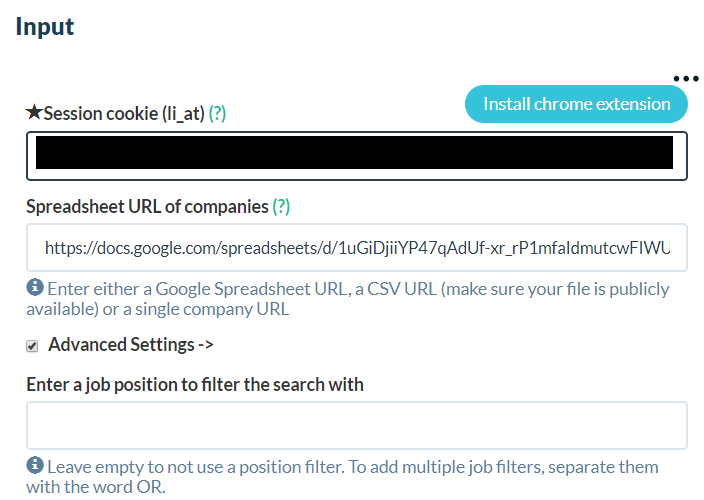 However I would recommend you, not to use this option and rather to filter the job titles a posteriori (see step 3): - If you wish to target several job title you will need to run the automation once for every job title you target (if you pick Phantombuster filtration option). - After the filtering job title you might realize that your filter is too restrictive. By filtering job title a posteriori you can have a look to the job title present to rework your filter. For example if you are targeting “Help desk” people, you might extend your filtering to “customer success”, “customer hero” or whatever job title get trendy in the future. # Step 3 : Filter the lead according the job title Now you have a list of employees for all your leads. You now want to filter the lead according your ideal customer profile. Depending on what your are selling you will have a different entry point in the company. Job title is the perfect data point to perform this filtration. To make this filtration at scale I would recommend you to use [this template](https://docs.google.com/spreadsheets/d/1603qhoacDPtbJZZl9LKvG7l1Ixmn9iDvlhVaBPcUF2s/edit?usp=sharing) The template required 2 inputs:  In the cell b2 you need to past the result file from the automation from step 3. To get the link, go to phantombuster, click on the “Console” button under your phantom name. On the right side under “chain phantoms”; you will be able to copy the url of the csv result file. In the cell B3 you need to write down the different job titles you wish to target separated by a coma ‘,’. Pay attention that the job title are case sensitive, so if you wish to target ‘Marketing’ and ‘marketing’ you need to write both. On the sheet “Filtered list” you will find all the leads matching the job title you enter. In case you wish to check the raw data before filtration check out the “Raw data” sheet. Also bellow this input you will get a summary of how many companies are in the raw data and how many have an employee matching the target job title: 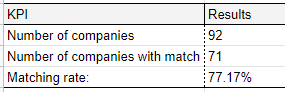 If the matching rate is low, have a look to the raw data to see if you can wider your targeting. # Step 4 : Reach out Now you have - a list of companies, which should be interested in your service - a list of their employees matching your ideal customer profile. It is time to outreach those leads. From those data there are 2 ways to proceed: - You can simply outreach those people over linkedin. To do so check out [my former article](https://medium.com/@fabianm.consulting/automated-outreach-workflow-for-linkedin-bc5a33982210 ). - You can use an email discovery service like [voila Norbert] (www.voilanorbert.com). From linkedin you have the name and surname of the employee you wish to target, in combination with the company website you should have the required input for any email discovery service. # Bonus: Do the same at scale with anylead As Phantombuster is using your linkedin account to extract data it is limited in scales. If you don’t want to get your linkedin profile bloke you have to work with small scale dataset. Which is good, as it forces you to work properly on your targeting rather than spaming out people. But if you want to work with higher scales dataset you might consider using [anylead](http://try.anyleads.com/FabianMaume). Their domain enrich tool allow to directly get a list of employee from a list of website. The list includes employees’ job titles, linkedin profile and professional email. So it is quite powerful. The only drawback is that you need to divide you list of website in several batches of 100 websites max. Of course I made [a script](https://github.com/fmaume/anylead_automation) to automate this process. I will cover how to setup and use this script in a future article. Just to wrap up here is a comparison of the scale both tools can handle | | Websites/day| |---|---| |Phantom (free plan)| 6| | Phantom (30$ plan)|36 | | Anyleads|2000| |
| json metadata | {"tags":["linkedin","lead","automation","growthhacking","marketing","phantombuster"],"image":["https://cdn.steemitimages.com/DQmZCSPYcXhDryhsbsvopSi8v43QJRz27KVSi9cwKkMWV1g/image.png","https://cdn.steemitimages.com/DQmZuibTfi8Qso2aaqJytkgquVwtatCfqBXJRKbi8CeJdkM/image.png","https://cdn.steemitimages.com/DQmc4vPGKSNfWSjpwy5CjvUMXbjJNJ4A4toMvhdDf6UrnAX/image.png"],"links":["https://builtwith.com/plans","https://angel.co/markets","https://www.g2.com/categories","https://calendly.com/growth-hack/","https://phantombuster.com/automations/toolbox/22972/data-scraping-crawler?referral=fmc-f8VgvF4","https://phantombuster.com/automations/linkedin/3295/linkedin-companies-employees?referral=fmc-f8VgvF4","https://docs.google.com/spreadsheets/d/1603qhoacDPtbJZZl9LKvG7l1Ixmn9iDvlhVaBPcUF2s/edit?usp=sharing","https://medium.com/@fabianm.consulting/automated-outreach-workflow-for-linkedin-bc5a33982210","http://try.anyleads.com/FabianMaume","https://github.com/fmaume/anylead_automation"],"app":"steemit/0.2","format":"markdown"} |
| Transaction Info | Block #43364568/Trx d6a8c52cf7314fb4d3c223ce0d1a67420d4d991c |
View Raw JSON Data
{
"trx_id": "d6a8c52cf7314fb4d3c223ce0d1a67420d4d991c",
"block": 43364568,
"trx_in_block": 0,
"op_in_trx": 0,
"virtual_op": 0,
"timestamp": "2020-05-14T11:31:30",
"op": [
"comment",
{
"parent_author": "",
"parent_permlink": "linkedin",
"author": "growth-hack",
"permlink": "how-to-enrich-leads-with-linkedin",
"title": "How to enrich leads with Linkedin ?",
"body": "You got a list of website which you know could be interested in your business, but you don’t how to use it? This article is for you!\n\nIn this article I will show you how to go from a list of website to a list of usable leads. To do so :\n- You will transform the list of websites into a list of employee.\n- You will filter this list of employee according your ideal customer profile.\nAll of this, will of course be done with automation.\n\nIf you do not have a list of relevant website yet you might consider buying some listing. [Builwith](https://builtwith.com/plans ) for example can provide valuable lists of websites using a given technology. You can also consider scraping some industry listing on [angelList](https://angel.co/markets ) or [g2](https://www.g2.com/categories ). Or if you would like scrape some other website [let me know](https://calendly.com/growth-hack/), there is a script for everything.\n\n# Step 1: Get the linkedin page from the leads’ website\n First of all you need to get the linkedin page of your target. This is quite easy to do, as there is usually a link toward it on the company website.\nTherefor you can simply use [this automation from Phantombuster team](https://phantombuster.com/automations/toolbox/22972/data-scraping-crawler?referral=fmc-f8VgvF4 ). However the free plan of phantombuster is quite limited so if you want to do this at scale I recommend you to [get in touch](https://calendly.com/growth-hack/).\n\n# Step 2 : Get the list of employee\nOnce you have a list of linkedin pages you can use [this automation from Phantombuster](https://phantombuster.com/automations/linkedin/3295/linkedin-companies-employees?referral=fmc-f8VgvF4 ). This automation will log on linkedin, on your behalf and extract a listing of employee from the company page.\nAs this automation is running from your linkedin account you cannot extracts data from 1000 of companies within a day (linkedin would block you). That is why you want to run this automation over time. Phantombuster provides you with powerful scheduling options so you can easily plan some daily extract.\n\n Phantombuster offers the option to filter the job tittle directly from the company page:\n\n\n\nHowever I would recommend you, not to use this option and rather to filter the job titles a posteriori (see step 3):\n- If you wish to target several job title you will need to run the automation once for every job title you target (if you pick Phantombuster filtration option). \n- After the filtering job title you might realize that your filter is too restrictive. By filtering job title a posteriori you can have a look to the job title present to rework your filter. For example if you are targeting “Help desk” people, you might extend your filtering to “customer success”, “customer hero” or whatever job title get trendy in the future.\n\n# Step 3 : Filter the lead according the job title\nNow you have a list of employees for all your leads. You now want to filter the lead according your ideal customer profile. Depending on what your are selling you will have a different entry point in the company. Job title is the perfect data point to perform this filtration.\nTo make this filtration at scale I would recommend you to use [this template](https://docs.google.com/spreadsheets/d/1603qhoacDPtbJZZl9LKvG7l1Ixmn9iDvlhVaBPcUF2s/edit?usp=sharing)\n\nThe template required 2 inputs:\n\n\nIn the cell b2 you need to past the result file from the automation from step 3. To get the link, go to phantombuster, click on the “Console” button under your phantom name. On the right side under “chain phantoms”; you will be able to copy the url of the csv result file.\nIn the cell B3 you need to write down the different job titles you wish to target separated by a coma ‘,’. Pay attention that the job title are case sensitive, so if you wish to target ‘Marketing’ and ‘marketing’ you need to write both.\n\nOn the sheet “Filtered list” you will find all the leads matching the job title you enter. In case you wish to check the raw data before filtration check out the “Raw data” sheet.\n\nAlso bellow this input you will get a summary of how many companies are in the raw data and how many have an employee matching the target job title:\n\n\n\n\n\nIf the matching rate is low, have a look to the raw data to see if you can wider your targeting. \n\n# Step 4 : Reach out\nNow you have \n- a list of companies, which should be interested in your service\n- a list of their employees matching your ideal customer profile.\n\nIt is time to outreach those leads. From those data there are 2 ways to proceed:\n- You can simply outreach those people over linkedin. To do so check out [my former article](https://medium.com/@fabianm.consulting/automated-outreach-workflow-for-linkedin-bc5a33982210 ).\n- You can use an email discovery service like [voila Norbert] (www.voilanorbert.com). From linkedin you have the name and surname of the employee you wish to target, in combination with the company website you should have the required input for any email discovery service.\n\n# Bonus: Do the same at scale with anylead\nAs Phantombuster is using your linkedin account to extract data it is limited in scales. If you don’t want to get your linkedin profile bloke you have to work with small scale dataset. Which is good, as it forces you to work properly on your targeting rather than spaming out people.\n\nBut if you want to work with higher scales dataset you might consider using [anylead](http://try.anyleads.com/FabianMaume). Their domain enrich tool allow to directly get a list of employee from a list of website. The list includes employees’ job titles, linkedin profile and professional email. So it is quite powerful.\nThe only drawback is that you need to divide you list of website in several batches of 100 websites max. Of course I made [a script](https://github.com/fmaume/anylead_automation) to automate this process. I will cover how to setup and use this script in a future article.\n\nJust to wrap up here is a comparison of the scale both tools can handle\n\n\n| | Websites/day| \n|---|---|\n|Phantom (free plan)| 6|\n| Phantom (30$ plan)|36 | \n| Anyleads|2000|",
"json_metadata": "{\"tags\":[\"linkedin\",\"lead\",\"automation\",\"growthhacking\",\"marketing\",\"phantombuster\"],\"image\":[\"https://cdn.steemitimages.com/DQmZCSPYcXhDryhsbsvopSi8v43QJRz27KVSi9cwKkMWV1g/image.png\",\"https://cdn.steemitimages.com/DQmZuibTfi8Qso2aaqJytkgquVwtatCfqBXJRKbi8CeJdkM/image.png\",\"https://cdn.steemitimages.com/DQmc4vPGKSNfWSjpwy5CjvUMXbjJNJ4A4toMvhdDf6UrnAX/image.png\"],\"links\":[\"https://builtwith.com/plans\",\"https://angel.co/markets\",\"https://www.g2.com/categories\",\"https://calendly.com/growth-hack/\",\"https://phantombuster.com/automations/toolbox/22972/data-scraping-crawler?referral=fmc-f8VgvF4\",\"https://phantombuster.com/automations/linkedin/3295/linkedin-companies-employees?referral=fmc-f8VgvF4\",\"https://docs.google.com/spreadsheets/d/1603qhoacDPtbJZZl9LKvG7l1Ixmn9iDvlhVaBPcUF2s/edit?usp=sharing\",\"https://medium.com/@fabianm.consulting/automated-outreach-workflow-for-linkedin-bc5a33982210\",\"http://try.anyleads.com/FabianMaume\",\"https://github.com/fmaume/anylead_automation\"],\"app\":\"steemit/0.2\",\"format\":\"markdown\"}"
}
]
}steemdelegated 17.844 SP to @growth-hack2020/05/09 06:14:12
steemdelegated 17.844 SP to @growth-hack
2020/05/09 06:14:12
| delegator | steem |
| delegatee | growth-hack |
| vesting shares | 29057.007435 VESTS |
| Transaction Info | Block #43217620/Trx 54d54a22a46e56257fc10d83fbec9818f475b762 |
View Raw JSON Data
{
  "trx_id": "54d54a22a46e56257fc10d83fbec9818f475b762",
  "block": 43217620,
  "trx_in_block": 1,
  "op_in_trx": 0,
  "virtual_op": 0,
  "timestamp": "2020-05-09T06:14:12",
  "op": [
    "delegate_vesting_shares",
    {
      "delegator": "steem",
      "delegatee": "growth-hack",
      "vesting_shares": "29057.007435 VESTS"
    }
  ]
}steemdelegated 3.451 SP to @growth-hack2020/05/08 09:55:15
steemdelegated 3.451 SP to @growth-hack
2020/05/08 09:55:15
| delegator | steem |
| delegatee | growth-hack |
| vesting shares | 5618.802108 VESTS |
| Transaction Info | Block #43193811/Trx 6b71d8b34203e94a9ea582032ea47d2153feb57f |
View Raw JSON Data
{
  "trx_id": "6b71d8b34203e94a9ea582032ea47d2153feb57f",
  "block": 43193811,
  "trx_in_block": 7,
  "op_in_trx": 0,
  "virtual_op": 0,
  "timestamp": "2020-05-08T09:55:15",
  "op": [
    "delegate_vesting_shares",
    {
      "delegator": "steem",
      "delegatee": "growth-hack",
      "vesting_shares": "5618.802108 VESTS"
    }
  ]
}steemdelegated 17.849 SP to @growth-hack2020/05/04 08:04:15
steemdelegated 17.849 SP to @growth-hack
2020/05/04 08:04:15
| delegator | steem |
| delegatee | growth-hack |
| vesting shares | 29065.342206 VESTS |
| Transaction Info | Block #43079223/Trx 181cde785a968f0141417a5a6391f809326b0e09 |
View Raw JSON Data
{
  "trx_id": "181cde785a968f0141417a5a6391f809326b0e09",
  "block": 43079223,
  "trx_in_block": 13,
  "op_in_trx": 0,
  "virtual_op": 0,
  "timestamp": "2020-05-04T08:04:15",
  "op": [
    "delegate_vesting_shares",
    {
      "delegator": "steem",
      "delegatee": "growth-hack",
      "vesting_shares": "29065.342206 VESTS"
    }
  ]
}growth-hackclaimed reward balance: 0.058 STEEM, 0.003 SBD, 0.099 SP2020/05/04 05:42:33
growth-hackclaimed reward balance: 0.058 STEEM, 0.003 SBD, 0.099 SP
2020/05/04 05:42:33
| account | growth-hack |
| reward steem | 0.058 STEEM |
| reward sbd | 0.003 SBD |
| reward vests | 160.409256 VESTS |
| Transaction Info | Block #43076455/Trx 4225402697456f6c808e94fba7013ba0634ffde0 |
View Raw JSON Data
{
  "trx_id": "4225402697456f6c808e94fba7013ba0634ffde0",
  "block": 43076455,
  "trx_in_block": 6,
  "op_in_trx": 0,
  "virtual_op": 0,
  "timestamp": "2020-05-04T05:42:33",
  "op": [
    "claim_reward_balance",
    {
      "account": "growth-hack",
      "reward_steem": "0.058 STEEM",
      "reward_sbd": "0.003 SBD",
      "reward_vests": "160.409256 VESTS"
    }
  ]
}filipinoupvoted (10.00%) @growth-hack / automated-outreach-workflow-for-linkedin2020/04/25 16:32:12
filipinoupvoted (10.00%) @growth-hack / automated-outreach-workflow-for-linkedin
2020/04/25 16:32:12
| voter | filipino |
| author | growth-hack |
| permlink | automated-outreach-workflow-for-linkedin |
| weight | 1000 (10.00%) |
| Transaction Info | Block #42836432/Trx f2a1609bb51354d1550e3ded3c6d17bda53d8a7b |
View Raw JSON Data
{
  "trx_id": "f2a1609bb51354d1550e3ded3c6d17bda53d8a7b",
  "block": 42836432,
  "trx_in_block": 37,
  "op_in_trx": 0,
  "virtual_op": 0,
  "timestamp": "2020-04-25T16:32:12",
  "op": [
    "vote",
    {
      "voter": "filipino",
      "author": "growth-hack",
      "permlink": "automated-outreach-workflow-for-linkedin",
      "weight": 1000
    }
  ]
}fabmupvoted (100.00%) @growth-hack / automated-outreach-workflow-for-linkedin2020/04/25 15:16:15
fabmupvoted (100.00%) @growth-hack / automated-outreach-workflow-for-linkedin
2020/04/25 15:16:15
| voter | fabm |
| author | growth-hack |
| permlink | automated-outreach-workflow-for-linkedin |
| weight | 10000 (100.00%) |
| Transaction Info | Block #42834952/Trx 8aa64bf1bdd797aaa46119c2351e43f3363929c6 |
View Raw JSON Data
{
  "trx_id": "8aa64bf1bdd797aaa46119c2351e43f3363929c6",
  "block": 42834952,
  "trx_in_block": 85,
  "op_in_trx": 0,
  "virtual_op": 0,
  "timestamp": "2020-04-25T15:16:15",
  "op": [
    "vote",
    {
      "voter": "fabm",
      "author": "growth-hack",
      "permlink": "automated-outreach-workflow-for-linkedin",
      "weight": 10000
    }
  ]
}growth-hackpublished a new post: automated-outreach-workflow-for-linkedin2020/04/25 15:08:12
growth-hackpublished a new post: automated-outreach-workflow-for-linkedin
2020/04/25 15:08:12
| parent author | |
| parent permlink | |
| author | growth-hack |
| permlink | automated-outreach-workflow-for-linkedin |
| title | Automated outreach workflow for linkedin |
| body | # What you will be able to do: I will show you how to setup this outreach process 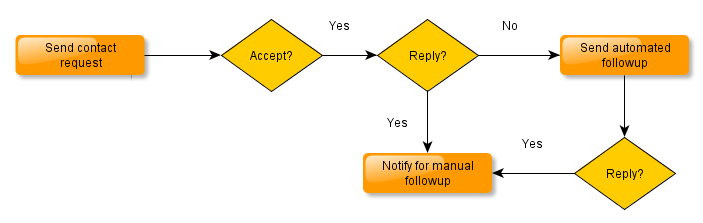 On top of that you will be manage everything from google doc dashboard displaying in real time the conversion rate of your campaign: <center>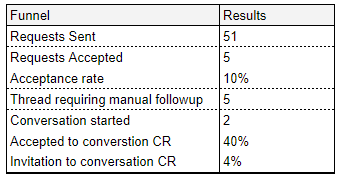</center> # What you will need - A linkedin account , obviously... A free account is sufficient for this kind of automation - A list of linkedin profiles you wish to contact - A [phantombuster account](https://phantombuster.com/?referral=fmc-f8VgvF4). - To make a copy of [this google sheet template](https://docs.google.com/spreadsheets/d/1HGYncODHWk0AEtVkHAkNAbRDXIzzoH5G50t4L0KqSm4/edit?usp=sharing) # Step by step ## Step 1 : send contact request Use [the network booster phantom](https://phantombuster.com/automations/linkedin/2818/linkedin-network-booster?referral=fmc-f8VgvF4) to sent custom contact request. Follow phantombuster instruction to set it up. Choose a repeating launch between 2 to 4 launch per day. The contact request text is limited to 300 characters by Linkedin but it is usually enough to break the ice. Once the network booster phantom, will have run once; you will be able to copy the result file to link this buster. To do so click on on the “Console” button under your phantom name: 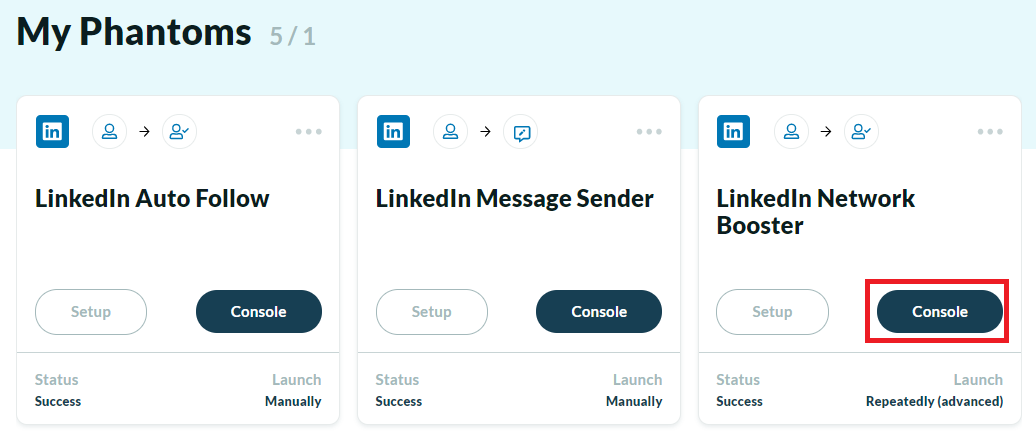 On the right side you should under “chain phantoms” you will be able to copy the url of the csv file: 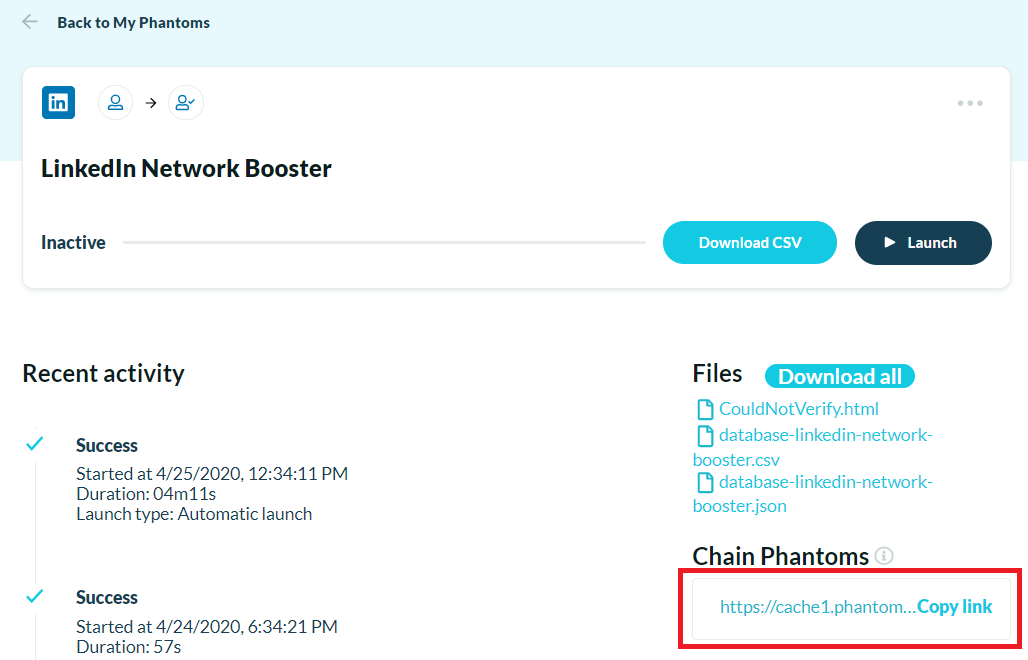 Copy past the link to the cell M2 of the google template (in Master sheet). ## Step 2 : setup phantom to collect the last linkedin messages You will need to setup a custom phantom using the code available [there](https://github.com/fmaume/Phantom_linkedin_last-message_collector). Creating a customer phantom buster is quite complex but you can check the step by step instruction in my last [article](https://steemit.com/linkedin/@growth-hack/how-to-automatically-outreach-people-over-linkedin) In setup you will have to copy past the [phantombon.json obeject](https://github.com/fmaume/Phantom_linkedin_last-message_collector/blob/master/phantom.json). The cookie parameter is the same than the one used by the Network Bolster you have just set up on step 1. So you can copy past it. The parameter “AccountNumber” is the number of messages you wish the automation to check. If you pick 10 for example this automation which log on your linkedin account and check the 10 most recent message threads. It can check up to 79 messages. You can setup this phantom to run twice per week. Once the phantom has run once, copy the like to chain this buster and past it, in the google doc template in cell M3 ## Step 3 : Dashboard setup You need to make some setup on the google sheet in cell K7 to K9 (All those cells are case sensitive !) <center>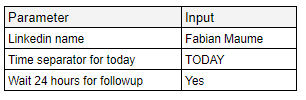</center> In K7 write you Name as it is display in linkeding message. This will allow the template to identify which message threads got replies, and therefore need some manual followup. If you wish to avoid sending followup message within less than 24 hours, after the contact request was accepted; you need to setup the cell K8. You need to past there the time separator for “today” which is used in you linkedin account (this depends of the language setting you are using) : <center></center> This will allow to the automation to filter out conversation which had activity in the last 24 hours. If you wish this feature to be enable put “Yes” in cell K9 (otherwise you write “No”). ## Step 4 : setup the phantom for messages On the google sheet go to the sheet “Message Sender [Input]” and copy the url. Use this url to setup [this message sender phantom](https://phantombuster.com/automations/linkedin/9227/linkedin-message-sender?referral=fmc-f8VgvF4). You can run this phantom twice a week. ## Step 5 : enjoy your dashboard Back in the google template: - The Master sheet give you some overview of how your campaign is performing - The “Required manual followup” sheet list all message threads where you were the last to speak. Those threads might required your attention to followup. # Closing remarks This template is using 3 phantoms. The first phantombuster plan (and free trial plan), allows you to run 5 phantoms in parallel so it is possible to setup up to 2 extra message followup. If you are interested in such modification of the template don’t hesitate to [reach out](https://calendly.com/growth-hack/). The automation for extracting last linkedin message only extract the last message. Therefore you might want to take a screenshot of the campaign result once the campaign is over. In fact, as time pass the message threads from your outreach campaign will go down in your linkedin messages list. |
| json metadata | {"tags":["linkedin","automation","lead","growthhacking","marketing","phantombuster"],"image":["https://cdn.steemitimages.com/DQmQjk5auQtjq9vKKLVWcDiyKjaHqLX8ZgjjdjuKN4rUmTb/image.png","https://cdn.steemitimages.com/DQmNT2MsZaxqFMQRM5sequdbnrAwS3Eu31LJCMxUwMJA7Ed/image.png","https://cdn.steemitimages.com/DQmdUbyn1dBVVag5gA6qMzme5b6k4wPzwUUvXWC4M4Mo2Gm/image.png","https://cdn.steemitimages.com/DQmSn8XBmcMC5xZsfnxLi4cANStmLecLW2siUt5MSQLyUh7/image.png","https://cdn.steemitimages.com/DQmeDg2JyRcERSQ38UuAQqpPKZY6tGYEhSvzMXJGsf5VT1d/image.png","https://cdn.steemitimages.com/DQmUevpBWxyum8uFKmpvpnGVJEqMxojx4pZ2Lr33KKAESQn/image.png"],"links":["https://phantombuster.com/?referral=fmc-f8VgvF4","https://docs.google.com/spreadsheets/d/1HGYncODHWk0AEtVkHAkNAbRDXIzzoH5G50t4L0KqSm4/edit?usp=sharing","https://phantombuster.com/automations/linkedin/2818/linkedin-network-booster?referral=fmc-f8VgvF4","https://github.com/fmaume/Phantom_linkedin_last-message_collector","https://steemit.com/linkedin/@growth-hack/how-to-automatically-outreach-people-over-linkedin","https://github.com/fmaume/Phantom_linkedin_last-message_collector/blob/master/phantom.json","https://phantombuster.com/automations/linkedin/9227/linkedin-message-sender?referral=fmc-f8VgvF4","https://calendly.com/growth-hack/"],"app":"steemit/0.2","format":"markdown"} |
| Transaction Info | Block #42834797/Trx edf373b7864990263fc503f7835fc9bc9365ed62 |
View Raw JSON Data
{
"trx_id": "edf373b7864990263fc503f7835fc9bc9365ed62",
"block": 42834797,
"trx_in_block": 22,
"op_in_trx": 0,
"virtual_op": 0,
"timestamp": "2020-04-25T15:08:12",
"op": [
"comment",
{
"parent_author": "",
"parent_permlink": "linkedin",
"author": "growth-hack",
"permlink": "automated-outreach-workflow-for-linkedin",
"title": "Automated outreach workflow for linkedin",
"body": "# What you will be able to do:\nI will show you how to setup this outreach process\n\n\n\n\nOn top of that you will be manage everything from google doc dashboard displaying in real time the conversion rate of your campaign:\n<center></center>\n\n# What you will need\n- A linkedin account , obviously... A free account is sufficient for this kind of automation\n- A list of linkedin profiles you wish to contact\n- A [phantombuster account](https://phantombuster.com/?referral=fmc-f8VgvF4).\n- To make a copy of [this google sheet template](https://docs.google.com/spreadsheets/d/1HGYncODHWk0AEtVkHAkNAbRDXIzzoH5G50t4L0KqSm4/edit?usp=sharing)\n\n\n# Step by step\n## Step 1 : send contact request\nUse [the network booster phantom](https://phantombuster.com/automations/linkedin/2818/linkedin-network-booster?referral=fmc-f8VgvF4) to sent custom contact request. Follow phantombuster instruction to set it up. Choose a repeating launch between 2 to 4 launch per day.\n\nThe contact request text is limited to 300 characters by Linkedin but it is usually enough to break the ice.\n\nOnce the network booster phantom, will have run once; you will be able to copy the result file to link this buster. To do so click on on the “Console” button under your phantom name:\n\nOn the right side you should under “chain phantoms” you will be able to copy the url of the csv file:\n\n\n\n\n\nCopy past the link to the cell M2 of the google template (in Master sheet).\n\n## Step 2 : setup phantom to collect the last linkedin messages\nYou will need to setup a custom phantom using the code available [there](https://github.com/fmaume/Phantom_linkedin_last-message_collector).\nCreating a customer phantom buster is quite complex but you can check the step by step instruction in my last [article](https://steemit.com/linkedin/@growth-hack/how-to-automatically-outreach-people-over-linkedin)\nIn setup you will have to copy past the [phantombon.json obeject](https://github.com/fmaume/Phantom_linkedin_last-message_collector/blob/master/phantom.json). The cookie parameter is the same than the one used by the Network Bolster you have just set up on step 1. So you can copy past it.\nThe parameter “AccountNumber” is the number of messages you wish the automation to check. If you pick 10 for example this automation which log on your linkedin account and check the 10 most recent message threads. It can check up to 79 messages.\n\nYou can setup this phantom to run twice per week. Once the phantom has run once, copy the like to chain this buster and past it, in the google doc template in cell M3\n\n## Step 3 : Dashboard setup\nYou need to make some setup on the google sheet in cell K7 to K9 (All those cells are case sensitive !)\n<center></center>\n\n \n\n\n\n\n\nIn K7 write you Name as it is display in linkeding message. This will allow the template to identify which message threads got replies, and therefore need some manual followup.\n\nIf you wish to avoid sending followup message within less than 24 hours, after the contact request was accepted; you need to setup the cell K8. You need to past there the time separator for “today” which is used in you linkedin account (this depends of the language setting you are using) :\n<center></center>\n\n\n\n\n\n\n\nThis will allow to the automation to filter out conversation which had activity in the last 24 hours.\nIf you wish this feature to be enable put “Yes” in cell K9 (otherwise you write “No”).\n\n## Step 4 : setup the phantom for messages\nOn the google sheet go to the sheet “Message Sender [Input]” and copy the url. Use this url to setup [this message sender phantom](https://phantombuster.com/automations/linkedin/9227/linkedin-message-sender?referral=fmc-f8VgvF4).\nYou can run this phantom twice a week.\n\n## Step 5 : enjoy your dashboard\nBack in the google template:\n- The Master sheet give you some overview of how your campaign is performing\n- The “Required manual followup” sheet list all message threads where you were the last to speak. Those threads might required your attention to followup.\n\n\n# Closing remarks\nThis template is using 3 phantoms. The first phantombuster plan (and free trial plan), allows you to run 5 phantoms in parallel so it is possible to setup up to 2 extra message followup. If you are interested in such modification of the template don’t hesitate to [reach out](https://calendly.com/growth-hack/).\n\nThe automation for extracting last linkedin message only extract the last message. Therefore you might want to take a screenshot of the campaign result once the campaign is over. In fact, as time pass the message threads from your outreach campaign will go down in your linkedin messages list.",
"json_metadata": "{\"tags\":[\"linkedin\",\"automation\",\"lead\",\"growthhacking\",\"marketing\",\"phantombuster\"],\"image\":[\"https://cdn.steemitimages.com/DQmQjk5auQtjq9vKKLVWcDiyKjaHqLX8ZgjjdjuKN4rUmTb/image.png\",\"https://cdn.steemitimages.com/DQmNT2MsZaxqFMQRM5sequdbnrAwS3Eu31LJCMxUwMJA7Ed/image.png\",\"https://cdn.steemitimages.com/DQmdUbyn1dBVVag5gA6qMzme5b6k4wPzwUUvXWC4M4Mo2Gm/image.png\",\"https://cdn.steemitimages.com/DQmSn8XBmcMC5xZsfnxLi4cANStmLecLW2siUt5MSQLyUh7/image.png\",\"https://cdn.steemitimages.com/DQmeDg2JyRcERSQ38UuAQqpPKZY6tGYEhSvzMXJGsf5VT1d/image.png\",\"https://cdn.steemitimages.com/DQmUevpBWxyum8uFKmpvpnGVJEqMxojx4pZ2Lr33KKAESQn/image.png\"],\"links\":[\"https://phantombuster.com/?referral=fmc-f8VgvF4\",\"https://docs.google.com/spreadsheets/d/1HGYncODHWk0AEtVkHAkNAbRDXIzzoH5G50t4L0KqSm4/edit?usp=sharing\",\"https://phantombuster.com/automations/linkedin/2818/linkedin-network-booster?referral=fmc-f8VgvF4\",\"https://github.com/fmaume/Phantom_linkedin_last-message_collector\",\"https://steemit.com/linkedin/@growth-hack/how-to-automatically-outreach-people-over-linkedin\",\"https://github.com/fmaume/Phantom_linkedin_last-message_collector/blob/master/phantom.json\",\"https://phantombuster.com/automations/linkedin/9227/linkedin-message-sender?referral=fmc-f8VgvF4\",\"https://calendly.com/growth-hack/\"],\"app\":\"steemit/0.2\",\"format\":\"markdown\"}"
}
]
}growth-hackreceived 0.058 STEEM, 0.003 SBD, 0.099 SP author reward for @growth-hack / how-to-automatically-outreach-people-over-linkedin2020/04/12 12:13:39
growth-hackreceived 0.058 STEEM, 0.003 SBD, 0.099 SP author reward for @growth-hack / how-to-automatically-outreach-people-over-linkedin
2020/04/12 12:13:39
| author | growth-hack |
| permlink | how-to-automatically-outreach-people-over-linkedin |
| sbd payout | 0.003 SBD |
| steem payout | 0.058 STEEM |
| vesting payout | 160.409256 VESTS |
| Transaction Info | Block #42467197/Virtual Operation #6 |
View Raw JSON Data
{
  "trx_id": "0000000000000000000000000000000000000000",
  "block": 42467197,
  "trx_in_block": 4294967295,
  "op_in_trx": 0,
  "virtual_op": 6,
  "timestamp": "2020-04-12T12:13:39",
  "op": [
    "author_reward",
    {
      "author": "growth-hack",
      "permlink": "how-to-automatically-outreach-people-over-linkedin",
      "sbd_payout": "0.003 SBD",
      "steem_payout": "0.058 STEEM",
      "vesting_payout": "160.409256 VESTS"
    }
  ]
}filipinoupvoted (10.00%) @growth-hack / how-to-automatically-outreach-people-over-linkedin2020/04/05 13:31:27
filipinoupvoted (10.00%) @growth-hack / how-to-automatically-outreach-people-over-linkedin
2020/04/05 13:31:27
| voter | filipino |
| author | growth-hack |
| permlink | how-to-automatically-outreach-people-over-linkedin |
| weight | 1000 (10.00%) |
| Transaction Info | Block #42271875/Trx 78f5208fe10b41b547e44de5ec2bcb6c98f9581d |
View Raw JSON Data
{
  "trx_id": "78f5208fe10b41b547e44de5ec2bcb6c98f9581d",
  "block": 42271875,
  "trx_in_block": 0,
  "op_in_trx": 0,
  "virtual_op": 0,
  "timestamp": "2020-04-05T13:31:27",
  "op": [
    "vote",
    {
      "voter": "filipino",
      "author": "growth-hack",
      "permlink": "how-to-automatically-outreach-people-over-linkedin",
      "weight": 1000
    }
  ]
}mendozaupvoted (10.00%) @growth-hack / how-to-automatically-outreach-people-over-linkedin2020/04/05 13:13:15
mendozaupvoted (10.00%) @growth-hack / how-to-automatically-outreach-people-over-linkedin
2020/04/05 13:13:15
| voter | mendoza |
| author | growth-hack |
| permlink | how-to-automatically-outreach-people-over-linkedin |
| weight | 1000 (10.00%) |
| Transaction Info | Block #42271518/Trx 90f1205e7e4aaff854103f916b73bc335aca210b |
View Raw JSON Data
{
  "trx_id": "90f1205e7e4aaff854103f916b73bc335aca210b",
  "block": 42271518,
  "trx_in_block": 22,
  "op_in_trx": 0,
  "virtual_op": 0,
  "timestamp": "2020-04-05T13:13:15",
  "op": [
    "vote",
    {
      "voter": "mendoza",
      "author": "growth-hack",
      "permlink": "how-to-automatically-outreach-people-over-linkedin",
      "weight": 1000
    }
  ]
}sharesupvoted (10.00%) @growth-hack / how-to-automatically-outreach-people-over-linkedin2020/04/05 13:03:03
sharesupvoted (10.00%) @growth-hack / how-to-automatically-outreach-people-over-linkedin
2020/04/05 13:03:03
| voter | shares |
| author | growth-hack |
| permlink | how-to-automatically-outreach-people-over-linkedin |
| weight | 1000 (10.00%) |
| Transaction Info | Block #42271317/Trx 47e6cc9fa157f0e72c45f1a3a79b903422f8ced0 |
View Raw JSON Data
{
  "trx_id": "47e6cc9fa157f0e72c45f1a3a79b903422f8ced0",
  "block": 42271317,
  "trx_in_block": 0,
  "op_in_trx": 0,
  "virtual_op": 0,
  "timestamp": "2020-04-05T13:03:03",
  "op": [
    "vote",
    {
      "voter": "shares",
      "author": "growth-hack",
      "permlink": "how-to-automatically-outreach-people-over-linkedin",
      "weight": 1000
    }
  ]
}councilupvoted (10.00%) @growth-hack / how-to-automatically-outreach-people-over-linkedin2020/04/05 13:03:00
councilupvoted (10.00%) @growth-hack / how-to-automatically-outreach-people-over-linkedin
2020/04/05 13:03:00
| voter | council |
| author | growth-hack |
| permlink | how-to-automatically-outreach-people-over-linkedin |
| weight | 1000 (10.00%) |
| Transaction Info | Block #42271316/Trx 3a01c742b1a7141a29360ab21ee39229d65bdfca |
View Raw JSON Data
{
  "trx_id": "3a01c742b1a7141a29360ab21ee39229d65bdfca",
  "block": 42271316,
  "trx_in_block": 22,
  "op_in_trx": 0,
  "virtual_op": 0,
  "timestamp": "2020-04-05T13:03:00",
  "op": [
    "vote",
    {
      "voter": "council",
      "author": "growth-hack",
      "permlink": "how-to-automatically-outreach-people-over-linkedin",
      "weight": 1000
    }
  ]
}yeheyupvoted (10.00%) @growth-hack / how-to-automatically-outreach-people-over-linkedin2020/04/05 13:02:57
yeheyupvoted (10.00%) @growth-hack / how-to-automatically-outreach-people-over-linkedin
2020/04/05 13:02:57
| voter | yehey |
| author | growth-hack |
| permlink | how-to-automatically-outreach-people-over-linkedin |
| weight | 1000 (10.00%) |
| Transaction Info | Block #42271315/Trx d78322c9e620b98ea09c9dd78da77a7b4ce7fff0 |
View Raw JSON Data
{
  "trx_id": "d78322c9e620b98ea09c9dd78da77a7b4ce7fff0",
  "block": 42271315,
  "trx_in_block": 3,
  "op_in_trx": 0,
  "virtual_op": 0,
  "timestamp": "2020-04-05T13:02:57",
  "op": [
    "vote",
    {
      "voter": "yehey",
      "author": "growth-hack",
      "permlink": "how-to-automatically-outreach-people-over-linkedin",
      "weight": 1000
    }
  ]
}raise-me-upupvoted (0.01%) @growth-hack / how-to-automatically-outreach-people-over-linkedin2020/04/05 12:43:21
raise-me-upupvoted (0.01%) @growth-hack / how-to-automatically-outreach-people-over-linkedin
2020/04/05 12:43:21
| voter | raise-me-up |
| author | growth-hack |
| permlink | how-to-automatically-outreach-people-over-linkedin |
| weight | 1 (0.01%) |
| Transaction Info | Block #42270929/Trx 43b8ed8420837093be4be2d5f2867ac1553a69bd |
View Raw JSON Data
{
  "trx_id": "43b8ed8420837093be4be2d5f2867ac1553a69bd",
  "block": 42270929,
  "trx_in_block": 4,
  "op_in_trx": 0,
  "virtual_op": 0,
  "timestamp": "2020-04-05T12:43:21",
  "op": [
    "vote",
    {
      "voter": "raise-me-up",
      "author": "growth-hack",
      "permlink": "how-to-automatically-outreach-people-over-linkedin",
      "weight": 1
    }
  ]
}payrollupvoted (4.00%) @growth-hack / how-to-automatically-outreach-people-over-linkedin2020/04/05 12:38:42
payrollupvoted (4.00%) @growth-hack / how-to-automatically-outreach-people-over-linkedin
2020/04/05 12:38:42
| voter | payroll |
| author | growth-hack |
| permlink | how-to-automatically-outreach-people-over-linkedin |
| weight | 400 (4.00%) |
| Transaction Info | Block #42270838/Trx 3a39190dbcc6fe6a7df27f7fc23526607a03520b |
View Raw JSON Data
{
  "trx_id": "3a39190dbcc6fe6a7df27f7fc23526607a03520b",
  "block": 42270838,
  "trx_in_block": 0,
  "op_in_trx": 0,
  "virtual_op": 0,
  "timestamp": "2020-04-05T12:38:42",
  "op": [
    "vote",
    {
      "voter": "payroll",
      "author": "growth-hack",
      "permlink": "how-to-automatically-outreach-people-over-linkedin",
      "weight": 400
    }
  ]
}fabmupvoted (100.00%) @growth-hack / how-to-automatically-outreach-people-over-linkedin2020/04/05 12:20:45
fabmupvoted (100.00%) @growth-hack / how-to-automatically-outreach-people-over-linkedin
2020/04/05 12:20:45
| voter | fabm |
| author | growth-hack |
| permlink | how-to-automatically-outreach-people-over-linkedin |
| weight | 10000 (100.00%) |
| Transaction Info | Block #42270481/Trx 5aebe372c50bb6acc578da11856f1d6939af2958 |
View Raw JSON Data
{
  "trx_id": "5aebe372c50bb6acc578da11856f1d6939af2958",
  "block": 42270481,
  "trx_in_block": 12,
  "op_in_trx": 0,
  "virtual_op": 0,
  "timestamp": "2020-04-05T12:20:45",
  "op": [
    "vote",
    {
      "voter": "fabm",
      "author": "growth-hack",
      "permlink": "how-to-automatically-outreach-people-over-linkedin",
      "weight": 10000
    }
  ]
}growth-hackpublished a new post: how-to-automatically-outreach-people-over-linkedin2020/04/05 12:13:39
growth-hackpublished a new post: how-to-automatically-outreach-people-over-linkedin
2020/04/05 12:13:39
| parent author | |
| parent permlink | |
| author | growth-hack |
| permlink | how-to-automatically-outreach-people-over-linkedin |
| title | How to automatically outreach people over LinkedIn ? |
| body | # Send contact request LinkedIn can be a powerful for B2B outreach. It is quite easy to send automated contact requests using [this phantombuster automation](https://phantombuster.com/automations/linkedin/2818/linkedin-network-booster?referral=fmc-f8VgvF4 ). The automation can customize the contact message to include the name of the person you are connecting with. Pay attention that you are limited to 300 characters for the copy (including the person’s name which is required to not look like a bot). From my experience between 35 and 20 % of the people will accept you contact request. However half the people accepting your contact request won’t respond to the message you put in the contact request. Lot of people just accept the invitation without reading it. Therefore you need to follow-up. # Send followup message That is why you need to setup some follow-up. Following up also allow to send longer message. Once someone is in your network you can send him a direct message which is not limited in number of characters. [Here](https://github.com/fmaume/Phantom_Linkedin_auto_followup) is an automation you can use to send follow-up message to people who accepted your invitation. This automation will: - Connect your LinkedIn account - Check the last message threads (number of thread to check can be defined in AccountNumber) - For each thread, check if the thread is the result of contact request being accepted - If the thread is the result of the contact request, check if the person responded - If the person did not respond send a follow up message The followup message can be customise using element from person LinkedIn profile. Mainly the person name and company name. As this automation is not from the official app store it is quite complex to setup. Let me walk you through. ## Small LinkedIn setup First of all the script required you to make a small setup on your LinkedIn account. Linkedin offer 2 setup to send messages: “Press Enter to Send” & “Click to send” 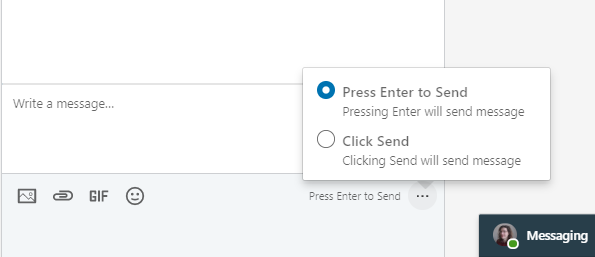 This automation required you to pick the Click to send option. ## Create custom phantom First of all you will need to create a custom phantom. Go to the Developer panel: 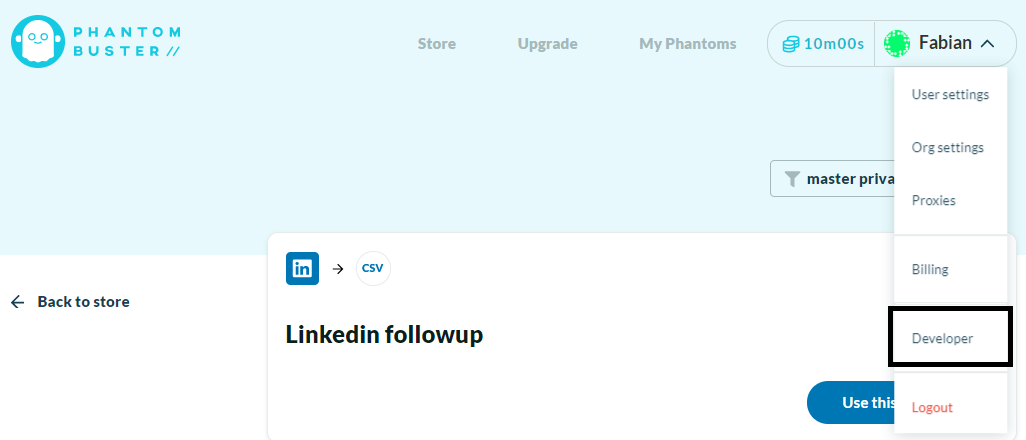 Click on create script in the middle: 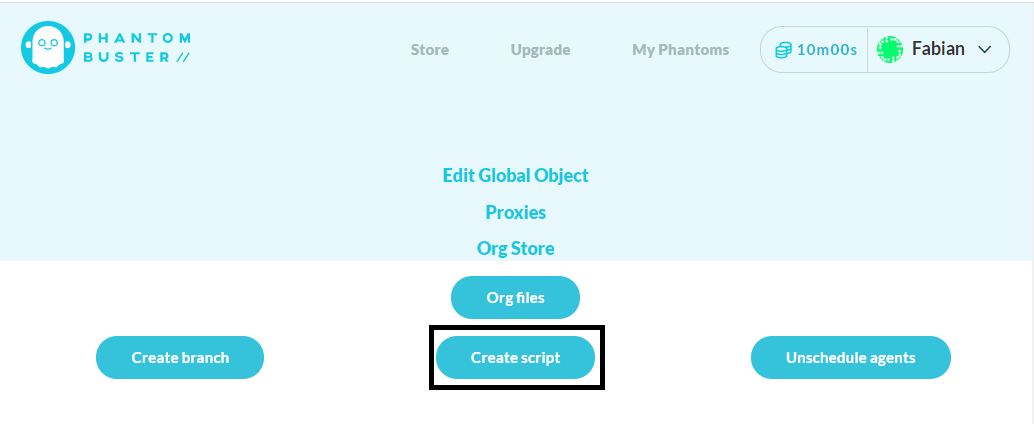 Name you script Click on the script detail (...) and click “Branch into” 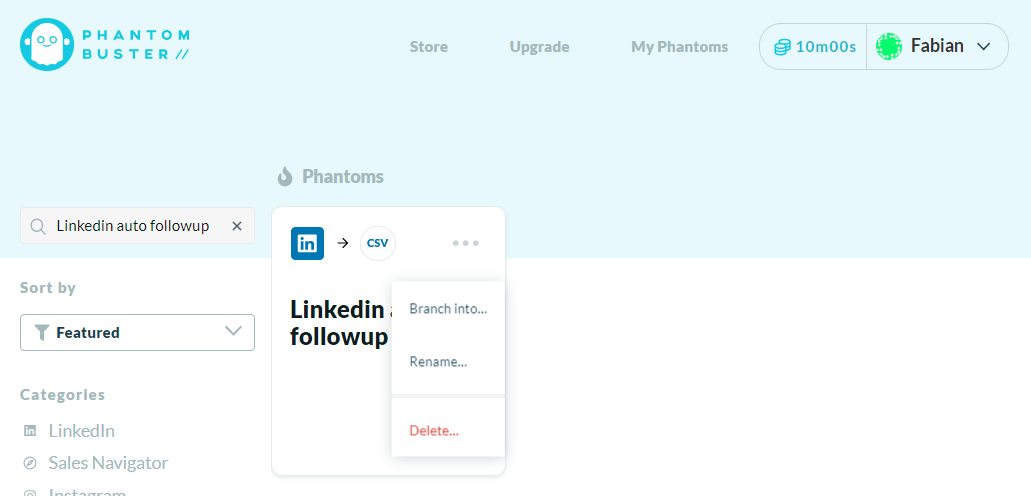 Click ok to the next pop-ups. Click on Use this phantom:  Click on edit code, and copy past there the phantom code from [here](https://github.com/fmaume/Phantom_Linkedin_auto_followup/blob/master/phantom.js ) 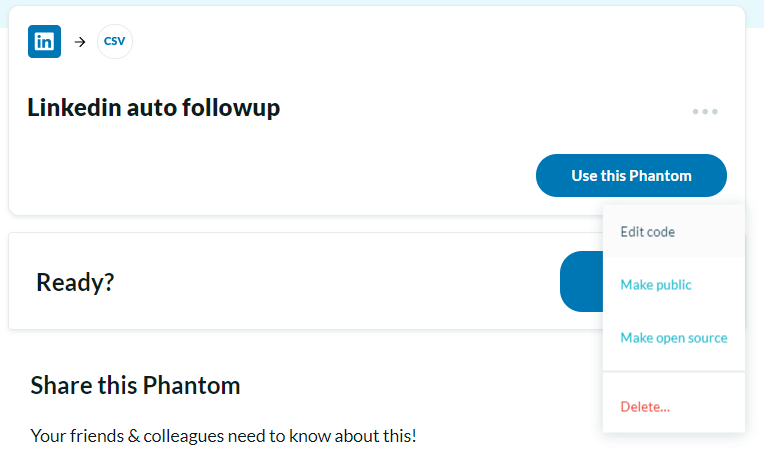 Now click on Setup. In the Input field past the code from [here](https://github.com/fmaume/Phantom_Linkedin_auto_followup/blob/master/phantom.json ) ## Setup the agent object You will have to custom few item in it. “SessionCookie” should be replaced by your linkedin cookie parameter li_at: open some LinkedIn page with your browser. Open the dev tool. In the Application window look for Cookies, under LinkedIn website. One of the cookie should be named “li_at” Set "AccountNumber" to the number of message Thread you want to check for. In « Message » you can write down the followup message you wish to send. You can use the keys '#firstName#' & '#CompanyName# to personalised the message based on the person LinkedIn profile. If you want to inclide line break in the message you can do so by using the special character “\r” In « accountName » you need to write the name of you LinkedIn account as it is display in a LinkedIn message thread. To get it without typo I recommend you to open a LinkedIn message thread and run the following script in console : > stemp = document.querySelector('.msg-s-message-group__meta') > stemp = stemp.querySelector('[data-control-name="view_profile"]') > stemp = stemp.innerText > console.log(stemp) It will display the name as you need to copy past it. You can then setup the script to run on automatically on regular basis. I recommend a frequency of once per week. If you have some questions about the setup don’t hesitate to ask in the comment. |
| json metadata | {"tags":["linkedin","lead","automation","growth-hacking","marketing"],"image":["https://cdn.steemitimages.com/DQmWcDbNp62Y79roZ2XzMPh5YH16G88UiSoj6G4LbbfiN8x/0.png","https://cdn.steemitimages.com/DQmNyJaMMEBn6kauDY1Zo2hXpgme3B6jBhhrGHr7q3L9TC2/1.png","https://cdn.steemitimages.com/DQmXYSkwYy1uKCRfge4zy5byZWn3ZfobF4TLwCyzR9Wd9fv/2.png","https://cdn.steemitimages.com/DQmYRKv7Jr8yd5oBTQZpjqkUvh8qvZhcRJeQHqDur3ehg71/3.png","https://cdn.steemitimages.com/DQmXSr8Y3GzFj2vAuYeU9zL3gUe1bCBN8bFGwJhcje9LD2Y/5.png","https://cdn.steemitimages.com/DQmU7QNVGzu6UJKcs7sAiXD36eEV7mUPraZ3VvhPwWV6H3g/6.png"],"links":["https://phantombuster.com/automations/linkedin/2818/linkedin-network-booster?referral=fmc-f8VgvF4","https://github.com/fmaume/Phantom_Linkedin_auto_followup","https://github.com/fmaume/Phantom_Linkedin_auto_followup/blob/master/phantom.js","https://github.com/fmaume/Phantom_Linkedin_auto_followup/blob/master/phantom.json"],"app":"steemit/0.2","format":"markdown"} |
| Transaction Info | Block #42270342/Trx 7fb27d240ba73c763b76ac330e63ad287136b612 |
View Raw JSON Data
{
"trx_id": "7fb27d240ba73c763b76ac330e63ad287136b612",
"block": 42270342,
"trx_in_block": 0,
"op_in_trx": 0,
"virtual_op": 0,
"timestamp": "2020-04-05T12:13:39",
"op": [
"comment",
{
"parent_author": "",
"parent_permlink": "linkedin",
"author": "growth-hack",
"permlink": "how-to-automatically-outreach-people-over-linkedin",
"title": "How to automatically outreach people over LinkedIn ?",
"body": "# Send contact request\nLinkedIn can be a powerful for B2B outreach. It is quite easy to send automated contact requests using [this phantombuster automation](https://phantombuster.com/automations/linkedin/2818/linkedin-network-booster?referral=fmc-f8VgvF4 ). The automation can customize the contact message to include the name of the person you are connecting with. Pay attention that you are limited to 300 characters for the copy (including the person’s name which is required to not look like a bot). \n\nFrom my experience between 35 and 20 % of the people will accept you contact request. However half the people accepting your contact request won’t respond to the message you put in the contact request. Lot of people just accept the invitation without reading it. Therefore you need to follow-up. \n\n\n\n# Send followup message\nThat is why you need to setup some follow-up. Following up also allow to send longer message. Once someone is in your network you can send him a direct message which is not limited in number of characters.\n[Here](https://github.com/fmaume/Phantom_Linkedin_auto_followup) is an automation you can use to send follow-up message to people who accepted your invitation. \nThis automation will:\n- Connect your LinkedIn account\n- Check the last message threads (number of thread to check can be defined in AccountNumber)\n- For each thread, check if the thread is the result of contact request being accepted\n- If the thread is the result of the contact request, check if the person responded\n- If the person did not respond send a follow up message\n\nThe followup message can be customise using element from person LinkedIn profile. Mainly the person name and company name.\n\nAs this automation is not from the official app store it is quite complex to setup. Let me walk you through.\n\n## Small LinkedIn setup\nFirst of all the script required you to make a small setup on your LinkedIn account. Linkedin offer 2 setup to send messages: “Press Enter to Send” & “Click to send”\n\n\n\n\nThis automation required you to pick the Click to send option.\n\n## Create custom phantom\n\nFirst of all you will need to create a custom phantom. Go to the Developer panel:\n\n\n\n\nClick on create script in the middle:\n\n\n\n\nName you script\n\nClick on the script detail (...) and click “Branch into”\n\n\n\nClick ok to the next pop-ups.\n\nClick on Use this phantom:\n\n\n\n\nClick on edit code, and copy past there the phantom code from [here](https://github.com/fmaume/Phantom_Linkedin_auto_followup/blob/master/phantom.js )\n\n\n\nNow click on Setup. In the Input field past the code from [here](https://github.com/fmaume/Phantom_Linkedin_auto_followup/blob/master/phantom.json )\n\n## Setup the agent object\nYou will have to custom few item in it.\n“SessionCookie” should be replaced by your linkedin cookie parameter li_at: open some LinkedIn page with your browser. Open the dev tool. In the Application window look for Cookies, under LinkedIn website. One of the cookie should be named “li_at”\nSet \"AccountNumber\" to the number of message Thread you want to check for.\nIn « Message » you can write down the followup message you wish to send. You can use the keys '#firstName#' & '#CompanyName# to personalised the message based on the person LinkedIn profile. If you want to inclide line break in the message you can do so by using the special character “\\r”\nIn « accountName » you need to write the name of you LinkedIn account as it is display in a LinkedIn message thread. To get it without typo I recommend you to open a LinkedIn message thread and run the following script in console :\n\n> stemp = document.querySelector('.msg-s-message-group__meta')\n> stemp = stemp.querySelector('[data-control-name=\"view_profile\"]')\n> stemp = stemp.innerText\n> console.log(stemp)\n\nIt will display the name as you need to copy past it.\n\nYou can then setup the script to run on automatically on regular basis. I recommend a frequency of once per week.\n\nIf you have some questions about the setup don’t hesitate to ask in the comment.",
"json_metadata": "{\"tags\":[\"linkedin\",\"lead\",\"automation\",\"growth-hacking\",\"marketing\"],\"image\":[\"https://cdn.steemitimages.com/DQmWcDbNp62Y79roZ2XzMPh5YH16G88UiSoj6G4LbbfiN8x/0.png\",\"https://cdn.steemitimages.com/DQmNyJaMMEBn6kauDY1Zo2hXpgme3B6jBhhrGHr7q3L9TC2/1.png\",\"https://cdn.steemitimages.com/DQmXYSkwYy1uKCRfge4zy5byZWn3ZfobF4TLwCyzR9Wd9fv/2.png\",\"https://cdn.steemitimages.com/DQmYRKv7Jr8yd5oBTQZpjqkUvh8qvZhcRJeQHqDur3ehg71/3.png\",\"https://cdn.steemitimages.com/DQmXSr8Y3GzFj2vAuYeU9zL3gUe1bCBN8bFGwJhcje9LD2Y/5.png\",\"https://cdn.steemitimages.com/DQmU7QNVGzu6UJKcs7sAiXD36eEV7mUPraZ3VvhPwWV6H3g/6.png\"],\"links\":[\"https://phantombuster.com/automations/linkedin/2818/linkedin-network-booster?referral=fmc-f8VgvF4\",\"https://github.com/fmaume/Phantom_Linkedin_auto_followup\",\"https://github.com/fmaume/Phantom_Linkedin_auto_followup/blob/master/phantom.js\",\"https://github.com/fmaume/Phantom_Linkedin_auto_followup/blob/master/phantom.json\"],\"app\":\"steemit/0.2\",\"format\":\"markdown\"}"
}
]
}growth-hackcustom json: community2020/04/05 12:05:21
growth-hackcustom json: community
2020/04/05 12:05:21
| required auths | [] |
| required posting auths | ["growth-hack"] |
| id | community |
| json | ["subscribe",{"community":"hive-112721"}] |
| Transaction Info | Block #42270176/Trx 1550e22c126aad48b014f092c40e9377ac9226f1 |
View Raw JSON Data
{
  "trx_id": "1550e22c126aad48b014f092c40e9377ac9226f1",
  "block": 42270176,
  "trx_in_block": 8,
  "op_in_trx": 0,
  "virtual_op": 0,
  "timestamp": "2020-04-05T12:05:21",
  "op": [
    "custom_json",
    {
      "required_auths": [],
      "required_posting_auths": [
        "growth-hack"
      ],
      "id": "community",
      "json": "[\"subscribe\",{\"community\":\"hive-112721\"}]"
    }
  ]
}value.marketupvoted (100.00%) @growth-hack / how-to-boost-your-event-networking-with-automation-v22020/03/22 15:42:51
value.marketupvoted (100.00%) @growth-hack / how-to-boost-your-event-networking-with-automation-v2
2020/03/22 15:42:51
| voter | value.market |
| author | growth-hack |
| permlink | how-to-boost-your-event-networking-with-automation-v2 |
| weight | 10000 (100.00%) |
| Transaction Info | Block #41877259/Trx 5622224d08150cec912e1937edff5e3a6e282081 |
View Raw JSON Data
{
  "trx_id": "5622224d08150cec912e1937edff5e3a6e282081",
  "block": 41877259,
  "trx_in_block": 20,
  "op_in_trx": 0,
  "virtual_op": 0,
  "timestamp": "2020-03-22T15:42:51",
  "op": [
    "vote",
    {
      "voter": "value.market",
      "author": "growth-hack",
      "permlink": "how-to-boost-your-event-networking-with-automation-v2",
      "weight": 10000
    }
  ]
}growth-hackclaimed reward balance: 0.058 STEEM, 0.073 SP2020/03/22 00:38:00
growth-hackclaimed reward balance: 0.058 STEEM, 0.073 SP
2020/03/22 00:38:00
| account | growth-hack |
| reward steem | 0.058 STEEM |
| reward sbd | 0.000 SBD |
| reward vests | 118.294282 VESTS |
| Transaction Info | Block #41859416/Trx 49fc82d5739f393def135fb1df45a1544dde9978 |
View Raw JSON Data
{
  "trx_id": "49fc82d5739f393def135fb1df45a1544dde9978",
  "block": 41859416,
  "trx_in_block": 12,
  "op_in_trx": 0,
  "virtual_op": 0,
  "timestamp": "2020-03-22T00:38:00",
  "op": [
    "claim_reward_balance",
    {
      "account": "growth-hack",
      "reward_steem": "0.058 STEEM",
      "reward_sbd": "0.000 SBD",
      "reward_vests": "118.294282 VESTS"
    }
  ]
}fabmupvoted (100.00%) @growth-hack / how-to-boost-your-event-networking-with-automation2020/03/22 00:26:21
fabmupvoted (100.00%) @growth-hack / how-to-boost-your-event-networking-with-automation
2020/03/22 00:26:21
| voter | fabm |
| author | growth-hack |
| permlink | how-to-boost-your-event-networking-with-automation |
| weight | 10000 (100.00%) |
| Transaction Info | Block #41859186/Trx 3ec47187d3d4beae93d063300666bcb33b26f665 |
View Raw JSON Data
{
  "trx_id": "3ec47187d3d4beae93d063300666bcb33b26f665",
  "block": 41859186,
  "trx_in_block": 14,
  "op_in_trx": 0,
  "virtual_op": 0,
  "timestamp": "2020-03-22T00:26:21",
  "op": [
    "vote",
    {
      "voter": "fabm",
      "author": "growth-hack",
      "permlink": "how-to-boost-your-event-networking-with-automation",
      "weight": 10000
    }
  ]
}growth-hackcustom json: notify2020/03/01 16:33:57
growth-hackcustom json: notify
2020/03/01 16:33:57
| required auths | [] |
| required posting auths | ["growth-hack"] |
| id | notify |
| json | ["setLastRead",{"date":"2020-03-01T16:33:58"}] |
| Transaction Info | Block #41276569/Trx 4d86bd77070cf1ef7a30bd2be3c6f795e92173e0 |
View Raw JSON Data
{
  "trx_id": "4d86bd77070cf1ef7a30bd2be3c6f795e92173e0",
  "block": 41276569,
  "trx_in_block": 16,
  "op_in_trx": 0,
  "virtual_op": 0,
  "timestamp": "2020-03-01T16:33:57",
  "op": [
    "custom_json",
    {
      "required_auths": [],
      "required_posting_auths": [
        "growth-hack"
      ],
      "id": "notify",
      "json": "[\"setLastRead\",{\"date\":\"2020-03-01T16:33:58\"}]"
    }
  ]
}fabmupvoted (100.00%) @growth-hack / how-to-boost-your-event-networking-with-automation-v22020/02/26 13:40:45
fabmupvoted (100.00%) @growth-hack / how-to-boost-your-event-networking-with-automation-v2
2020/02/26 13:40:45
| voter | fabm |
| author | growth-hack |
| permlink | how-to-boost-your-event-networking-with-automation-v2 |
| weight | 10000 (100.00%) |
| Transaction Info | Block #41158177/Trx 6b81c5a8da6c5581aaf84da725c02e56ac2fe34e |
View Raw JSON Data
{
  "trx_id": "6b81c5a8da6c5581aaf84da725c02e56ac2fe34e",
  "block": 41158177,
  "trx_in_block": 6,
  "op_in_trx": 0,
  "virtual_op": 0,
  "timestamp": "2020-02-26T13:40:45",
  "op": [
    "vote",
    {
      "voter": "fabm",
      "author": "growth-hack",
      "permlink": "how-to-boost-your-event-networking-with-automation-v2",
      "weight": 10000
    }
  ]
}fabmupvoted (100.00%) @growth-hack / how-to-monitor-facebook-group-effectively2020/02/26 13:40:12
fabmupvoted (100.00%) @growth-hack / how-to-monitor-facebook-group-effectively
2020/02/26 13:40:12
| voter | fabm |
| author | growth-hack |
| permlink | how-to-monitor-facebook-group-effectively |
| weight | 10000 (100.00%) |
| Transaction Info | Block #41158166/Trx cfcf016d899cd41dee1c095aefc80146f93d5196 |
View Raw JSON Data
{
  "trx_id": "cfcf016d899cd41dee1c095aefc80146f93d5196",
  "block": 41158166,
  "trx_in_block": 20,
  "op_in_trx": 0,
  "virtual_op": 0,
  "timestamp": "2020-02-26T13:40:12",
  "op": [
    "vote",
    {
      "voter": "fabm",
      "author": "growth-hack",
      "permlink": "how-to-monitor-facebook-group-effectively",
      "weight": 10000
    }
  ]
}greenfox1upvoted (100.00%) @growth-hack / how-to-boost-your-event-networking-with-automation-v22020/02/26 13:25:09
greenfox1upvoted (100.00%) @growth-hack / how-to-boost-your-event-networking-with-automation-v2
2020/02/26 13:25:09
| voter | greenfox1 |
| author | growth-hack |
| permlink | how-to-boost-your-event-networking-with-automation-v2 |
| weight | 10000 (100.00%) |
| Transaction Info | Block #41157865/Trx 1dc8c8aec03a93651365d2bdb01e6956b6ccbf75 |
View Raw JSON Data
{
  "trx_id": "1dc8c8aec03a93651365d2bdb01e6956b6ccbf75",
  "block": 41157865,
  "trx_in_block": 20,
  "op_in_trx": 0,
  "virtual_op": 0,
  "timestamp": "2020-02-26T13:25:09",
  "op": [
    "vote",
    {
      "voter": "greenfox1",
      "author": "growth-hack",
      "permlink": "how-to-boost-your-event-networking-with-automation-v2",
      "weight": 10000
    }
  ]
}steemdelegated 17.999 SP to @growth-hack2020/02/26 13:22:06
steemdelegated 17.999 SP to @growth-hack
2020/02/26 13:22:06
| delegator | steem |
| delegatee | growth-hack |
| vesting shares | 29309.165458 VESTS |
| Transaction Info | Block #41157804/Trx a087cd73c92c6e36d56ef5ca1f72337ad61b8932 |
View Raw JSON Data
{
  "trx_id": "a087cd73c92c6e36d56ef5ca1f72337ad61b8932",
  "block": 41157804,
  "trx_in_block": 34,
  "op_in_trx": 0,
  "virtual_op": 0,
  "timestamp": "2020-02-26T13:22:06",
  "op": [
    "delegate_vesting_shares",
    {
      "delegator": "steem",
      "delegatee": "growth-hack",
      "vesting_shares": "29309.165458 VESTS"
    }
  ]
}growth-hackcustom json: notify2020/02/26 13:20:57
growth-hackcustom json: notify
2020/02/26 13:20:57
| required auths | [] |
| required posting auths | ["growth-hack"] |
| id | notify |
| json | ["setLastRead",{"date":"2020-02-26T13:20:56"}] |
| Transaction Info | Block #41157781/Trx 0d80f0866ba134de7ba5b441bd00dffa6f9c7de3 |
View Raw JSON Data
{
  "trx_id": "0d80f0866ba134de7ba5b441bd00dffa6f9c7de3",
  "block": 41157781,
  "trx_in_block": 12,
  "op_in_trx": 0,
  "virtual_op": 0,
  "timestamp": "2020-02-26T13:20:57",
  "op": [
    "custom_json",
    {
      "required_auths": [],
      "required_posting_auths": [
        "growth-hack"
      ],
      "id": "notify",
      "json": "[\"setLastRead\",{\"date\":\"2020-02-26T13:20:56\"}]"
    }
  ]
}growth-hackupvoted (100.00%) @qurator / qurator-token-round-3-or-20-000-tokens2020/02/26 13:19:45
growth-hackupvoted (100.00%) @qurator / qurator-token-round-3-or-20-000-tokens
2020/02/26 13:19:45
| voter | growth-hack |
| author | qurator |
| permlink | qurator-token-round-3-or-20-000-tokens |
| weight | 10000 (100.00%) |
| Transaction Info | Block #41157757/Trx 9d96f0c7abd57f5bc7f5bcd4c78cc613dc55dfeb |
View Raw JSON Data
{
  "trx_id": "9d96f0c7abd57f5bc7f5bcd4c78cc613dc55dfeb",
  "block": 41157757,
  "trx_in_block": 14,
  "op_in_trx": 0,
  "virtual_op": 0,
  "timestamp": "2020-02-26T13:19:45",
  "op": [
    "vote",
    {
      "voter": "growth-hack",
      "author": "qurator",
      "permlink": "qurator-token-round-3-or-20-000-tokens",
      "weight": 10000
    }
  ]
}growth-hackupvoted (100.00%) @scrooger / how-to-buy-quratortokens-on-steem-engine-com2020/02/26 13:19:36
growth-hackupvoted (100.00%) @scrooger / how-to-buy-quratortokens-on-steem-engine-com
2020/02/26 13:19:36
| voter | growth-hack |
| author | scrooger |
| permlink | how-to-buy-quratortokens-on-steem-engine-com |
| weight | 10000 (100.00%) |
| Transaction Info | Block #41157754/Trx ed991660716d95f68e4820f0889fdb40fb919fc7 |
View Raw JSON Data
{
  "trx_id": "ed991660716d95f68e4820f0889fdb40fb919fc7",
  "block": 41157754,
  "trx_in_block": 17,
  "op_in_trx": 0,
  "virtual_op": 0,
  "timestamp": "2020-02-26T13:19:36",
  "op": [
    "vote",
    {
      "voter": "growth-hack",
      "author": "scrooger",
      "permlink": "how-to-buy-quratortokens-on-steem-engine-com",
      "weight": 10000
    }
  ]
}growth-hackupvoted (100.00%) @qurator / the-daily-qurator-8832020/02/26 13:14:30
growth-hackupvoted (100.00%) @qurator / the-daily-qurator-883
2020/02/26 13:14:30
| voter | growth-hack |
| author | qurator |
| permlink | the-daily-qurator-883 |
| weight | 10000 (100.00%) |
| Transaction Info | Block #41157653/Trx 647cfd1eb28b3d1ac3ca04edc37ec92195aa7a31 |
View Raw JSON Data
{
  "trx_id": "647cfd1eb28b3d1ac3ca04edc37ec92195aa7a31",
  "block": 41157653,
  "trx_in_block": 5,
  "op_in_trx": 0,
  "virtual_op": 0,
  "timestamp": "2020-02-26T13:14:30",
  "op": [
    "vote",
    {
      "voter": "growth-hack",
      "author": "qurator",
      "permlink": "the-daily-qurator-883",
      "weight": 10000
    }
  ]
}growth-hackfollowed @qurator2020/02/26 13:13:18
growth-hackfollowed @qurator
2020/02/26 13:13:18
| required auths | [] |
| required posting auths | ["growth-hack"] |
| id | follow |
| json | ["follow",{"follower":"growth-hack","following":"qurator","what":["blog"]}] |
| Transaction Info | Block #41157630/Trx 19a334e679a5eb9fdcd1ed7b4a0d97a8ffb86baa |
View Raw JSON Data
{
  "trx_id": "19a334e679a5eb9fdcd1ed7b4a0d97a8ffb86baa",
  "block": 41157630,
  "trx_in_block": 46,
  "op_in_trx": 0,
  "virtual_op": 0,
  "timestamp": "2020-02-26T13:13:18",
  "op": [
    "custom_json",
    {
      "required_auths": [],
      "required_posting_auths": [
        "growth-hack"
      ],
      "id": "follow",
      "json": "[\"follow\",{\"follower\":\"growth-hack\",\"following\":\"qurator\",\"what\":[\"blog\"]}]"
    }
  ]
}beemenginesent 0.001 STEEM to @growth-hack- "💎 Awesome Community Offer, Your Best STEEM Companion, automated 24/24 boosting your posts, guaranteed community extra votes, passive curation earnings and more, checkout https://www.steembeem.com 🤙 ..."2020/02/26 13:13:12
beemenginesent 0.001 STEEM to @growth-hack- "💎 Awesome Community Offer, Your Best STEEM Companion, automated 24/24 boosting your posts, guaranteed community extra votes, passive curation earnings and more, checkout https://www.steembeem.com 🤙 ..."
2020/02/26 13:13:12
| from | beemengine |
| to | growth-hack |
| amount | 0.001 STEEM |
| memo | 💎 Awesome Community Offer, Your Best STEEM Companion, automated 24/24 boosting your posts, guaranteed community extra votes, passive curation earnings and more, checkout https://www.steembeem.com 🤙 or join in for one month by sending ONLY 1 STEEM 🤯 to @beemengine with memo: subscribe |
| Transaction Info | Block #41157628/Trx 63d743ef263c65766ea315fba3ee0f46ab68f986 |
View Raw JSON Data
{
  "trx_id": "63d743ef263c65766ea315fba3ee0f46ab68f986",
  "block": 41157628,
  "trx_in_block": 53,
  "op_in_trx": 0,
  "virtual_op": 0,
  "timestamp": "2020-02-26T13:13:12",
  "op": [
    "transfer",
    {
      "from": "beemengine",
      "to": "growth-hack",
      "amount": "0.001 STEEM",
      "memo": "💎 Awesome Community Offer, Your Best STEEM Companion, automated 24/24 boosting your posts, guaranteed community extra votes, passive curation earnings and more, checkout https://www.steembeem.com 🤙 or join in for one month by sending ONLY 1 STEEM 🤯 to @beemengine with memo: subscribe"
    }
  ]
}growth-hackpublished a new post: how-to-boost-your-event-networking-with-automation-v22020/02/26 13:12:21
growth-hackpublished a new post: how-to-boost-your-event-networking-with-automation-v2
2020/02/26 13:12:21
| parent author | |
| parent permlink | networking |
| author | growth-hack |
| permlink | how-to-boost-your-event-networking-with-automation-v2 |
| title | How to boost your event networking with automation V2? |
| body | This is an update for my December 2018 article. Facebook no longer allows you to extract event’s attendees, which drastically reduces networking possibilities. Thankfully LinkedIn started to implement some events features. This article wills focus about how to leverage LinkedIn events. ## Step 1 search for event: LinkedIn doesn’t provide search option for event yet. However as the event FAQ mentions public event can be searched for, I guess it is only a question of time before a search option for event appears. For the time being you can search for LinkedIn event using google search: - Include “site:https://www.linkedin.com/events/” in the query to limit the search results to LinkedIn event’s pages - I strongly recommend to add some time related keyword in order to avoid past event in the results (It is not possible to extract list of attendees from past events) - Add some keyword you are interested in For example the query “site:https://www.linkedin.com/events/ startup may 2020” will return you this event: https://www.linkedin.com/events/newcastle-northeaststartupweek2020/ ## Step 2 extracts the attendees list: In order to access the attendee list you need to click on the “attend event” button:  Once you are marked as attendees click on the “See all” button to get the list of attendees:  Copy the url of the attendees’ list. You can now extract the list of attendee using my favorite Growth Hacking tool: [Phantombuster.](https://phantombuster.com/?referral=fmc-f8VgvF4) You can indeed use this API to extract event attendees: https://phantombuster.com/phantombuster/3149/linkedin-search-export Just follow the API setup and enter the url of the attendees’ list under “Search input”: 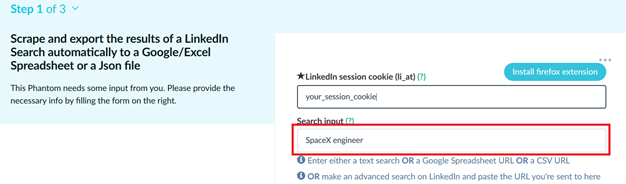 As a result you will get a csv file with link to all attendees. ## Step 3 outreach event attendees: At this point you should have a list of LinkedIn profile urls. This is straight forward to use. You can check the step 3 of my former article for the step by step: https://www.linkedin.com/pulse/how-boost-your-event-networking-automation-fabian-maume/ Or if you are confident in setting up Phantombuster, you can jump directly to those 2 APIs: - [Send automated contact requests.](https://phantombuster.com/phantombuster/2818/linkedin-network-booster?referral=fmc-f8VgvF4) - [Automatically follow LinkedIn profile.](https://phantombuster.com/phantombuster/6874/linkedin-auto-follow?referral=fmc-f8VgvF4) |
| json metadata | {"tags":["networking","automation","phantombuster","growthhacking"],"image":["https://cdn.steemitimages.com/DQmPEfui76mExbF3g6tXPSjc3MwK7UeMHKy9cCn1W2NUXYe/image.png","https://cdn.steemitimages.com/DQmcAWsp6zNs11TGaekdW475uY2X4gxBLnC8HcWuKo37e2h/image.png","https://cdn.steemitimages.com/DQmYnKhWAjMCWQEcxu2kti6dL9G9Wh5exXAoVMG1vQKKnVV/image.png"],"links":["https://www.linkedin.com/events/”","https://www.linkedin.com/events/","https://www.linkedin.com/events/newcastle-northeaststartupweek2020/","https://phantombuster.com/?referral=fmc-f8VgvF4","https://phantombuster.com/phantombuster/3149/linkedin-search-export","https://www.linkedin.com/pulse/how-boost-your-event-networking-automation-fabian-maume/","https://phantombuster.com/phantombuster/2818/linkedin-network-booster?referral=fmc-f8VgvF4","https://phantombuster.com/phantombuster/6874/linkedin-auto-follow?referral=fmc-f8VgvF4"],"app":"steemit/0.2","format":"markdown"} |
| Transaction Info | Block #41157611/Trx 4f060db58acf41d61cc91e2f8c457cd60f30d00c |
View Raw JSON Data
{
"trx_id": "4f060db58acf41d61cc91e2f8c457cd60f30d00c",
"block": 41157611,
"trx_in_block": 25,
"op_in_trx": 0,
"virtual_op": 0,
"timestamp": "2020-02-26T13:12:21",
"op": [
"comment",
{
"parent_author": "",
"parent_permlink": "networking",
"author": "growth-hack",
"permlink": "how-to-boost-your-event-networking-with-automation-v2",
"title": "How to boost your event networking with automation V2?",
"body": "This is an update for my December 2018 article. Facebook no longer allows you to extract event’s attendees, which drastically reduces networking possibilities. Thankfully LinkedIn started to implement some events features. This article wills focus about how to leverage LinkedIn events.\n\n## Step 1 search for event:\nLinkedIn doesn’t provide search option for event yet. However as the event FAQ mentions public event can be searched for, I guess it is only a question of time before a search option for event appears.\n\nFor the time being you can search for LinkedIn event using google search:\n\n- Include “site:https://www.linkedin.com/events/” in the query to limit the search results to LinkedIn event’s pages\n\n- I strongly recommend to add some time related keyword in order to avoid past event in the results (It is not possible to extract list of attendees from past events)\n\n- Add some keyword you are interested in\n\nFor example the query “site:https://www.linkedin.com/events/ startup may 2020” will return you this event: https://www.linkedin.com/events/newcastle-northeaststartupweek2020/\n\n## Step 2 extracts the attendees list:\nIn order to access the attendee list you need to click on the “attend event” button:\n\n\n\n\nOnce you are marked as attendees click on the “See all” button to get the list of attendees:\n\n\n\n\nCopy the url of the attendees’ list. You can now extract the list of attendee using my favorite Growth Hacking tool: [Phantombuster.](https://phantombuster.com/?referral=fmc-f8VgvF4)\n\nYou can indeed use this API to extract event attendees: https://phantombuster.com/phantombuster/3149/linkedin-search-export\n\nJust follow the API setup and enter the url of the attendees’ list under “Search input”:\n\n\n\n\nAs a result you will get a csv file with link to all attendees.\n\n## Step 3 outreach event attendees:\nAt this point you should have a list of LinkedIn profile urls. This is straight forward to use. You can check the step 3 of my former article for the step by step: https://www.linkedin.com/pulse/how-boost-your-event-networking-automation-fabian-maume/\n\nOr if you are confident in setting up Phantombuster, you can jump directly to those 2 APIs:\n\n- [Send automated contact requests.](https://phantombuster.com/phantombuster/2818/linkedin-network-booster?referral=fmc-f8VgvF4)\n\n- [Automatically follow LinkedIn profile.](https://phantombuster.com/phantombuster/6874/linkedin-auto-follow?referral=fmc-f8VgvF4)",
"json_metadata": "{\"tags\":[\"networking\",\"automation\",\"phantombuster\",\"growthhacking\"],\"image\":[\"https://cdn.steemitimages.com/DQmPEfui76mExbF3g6tXPSjc3MwK7UeMHKy9cCn1W2NUXYe/image.png\",\"https://cdn.steemitimages.com/DQmcAWsp6zNs11TGaekdW475uY2X4gxBLnC8HcWuKo37e2h/image.png\",\"https://cdn.steemitimages.com/DQmYnKhWAjMCWQEcxu2kti6dL9G9Wh5exXAoVMG1vQKKnVV/image.png\"],\"links\":[\"https://www.linkedin.com/events/”\",\"https://www.linkedin.com/events/\",\"https://www.linkedin.com/events/newcastle-northeaststartupweek2020/\",\"https://phantombuster.com/?referral=fmc-f8VgvF4\",\"https://phantombuster.com/phantombuster/3149/linkedin-search-export\",\"https://www.linkedin.com/pulse/how-boost-your-event-networking-automation-fabian-maume/\",\"https://phantombuster.com/phantombuster/2818/linkedin-network-booster?referral=fmc-f8VgvF4\",\"https://phantombuster.com/phantombuster/6874/linkedin-auto-follow?referral=fmc-f8VgvF4\"],\"app\":\"steemit/0.2\",\"format\":\"markdown\"}"
}
]
}steemdelegated 5.997 SP to @growth-hack2019/05/21 22:12:54
steemdelegated 5.997 SP to @growth-hack
2019/05/21 22:12:54
| delegator | steem |
| delegatee | growth-hack |
| vesting shares | 9765.599506 VESTS |
| Transaction Info | Block #33113292/Trx 9cc36b6bf5ed6e0e0a61f4826f9ae04dcdd26a40 |
View Raw JSON Data
{
  "trx_id": "9cc36b6bf5ed6e0e0a61f4826f9ae04dcdd26a40",
  "block": 33113292,
  "trx_in_block": 33,
  "op_in_trx": 0,
  "virtual_op": 0,
  "timestamp": "2019-05-21T22:12:54",
  "op": [
    "delegate_vesting_shares",
    {
      "delegator": "steem",
      "delegatee": "growth-hack",
      "vesting_shares": "9765.599506 VESTS"
    }
  ]
}2019/05/09 19:08:30
2019/05/09 19:08:30
| parent author | growth-hack |
| parent permlink | how-to-monitor-facebook-group-effectively |
| author | steemitboard |
| permlink | steemitboard-notify-growth-hack-20190509t190829000z |
| title | |
| body | Congratulations @growth-hack! You received a personal award! <table><tr><td>https://steemitimages.com/70x70/http://steemitboard.com/@growth-hack/birthday1.png</td><td>Happy Birthday! - You are on the Steem blockchain for 1 year!</td></tr></table> <sub>_You can view [your badges on your Steem Board](https://steemitboard.com/@growth-hack) and compare to others on the [Steem Ranking](http://steemitboard.com/ranking/index.php?name=growth-hack)_</sub> **Do not miss the last post from @steemitboard:** <table><tr><td><a href="https://steemit.com/steemitboard/@steemitboard/steemitboard-witness-update-2019-05"><img src="https://steemitimages.com/64x128/http://i.cubeupload.com/7CiQEO.png"></a></td><td><a href="https://steemit.com/steemitboard/@steemitboard/steemitboard-witness-update-2019-05">SteemitBoard - Witness Update</a></td></tr><tr><td><a href="https://steemit.com/steemmeetupaachen/@steemitboard/steemitboard-to-support-the-german-speaking-community-meetups"><img src="https://steemitimages.com/64x128/https://cdn.steemitimages.com/DQmeoNp9iCaCfd2D6TqnWa3Aky2mU4Fm3xaSmjTM91YoNBS/image.png"></a></td><td><a href="https://steemit.com/steemmeetupaachen/@steemitboard/steemitboard-to-support-the-german-speaking-community-meetups">SteemitBoard to support the german speaking community meetups</a></td></tr></table> ###### [Vote for @Steemitboard as a witness](https://v2.steemconnect.com/sign/account-witness-vote?witness=steemitboard&approve=1) to get one more award and increased upvotes! |
| json metadata | {"image":["https://steemitboard.com/img/notify.png"]} |
| Transaction Info | Block #32764202/Trx bcdb58c9bee69b228d0b1da11b6565663d80f5f1 |
View Raw JSON Data
{
  "trx_id": "bcdb58c9bee69b228d0b1da11b6565663d80f5f1",
  "block": 32764202,
  "trx_in_block": 17,
  "op_in_trx": 0,
  "virtual_op": 0,
  "timestamp": "2019-05-09T19:08:30",
  "op": [
    "comment",
    {
      "parent_author": "growth-hack",
      "parent_permlink": "how-to-monitor-facebook-group-effectively",
      "author": "steemitboard",
      "permlink": "steemitboard-notify-growth-hack-20190509t190829000z",
      "title": "",
      "body": "Congratulations @growth-hack! You received a personal award!\n\n<table><tr><td>https://steemitimages.com/70x70/http://steemitboard.com/@growth-hack/birthday1.png</td><td>Happy Birthday! - You are on the Steem blockchain for 1 year!</td></tr></table>\n\n<sub>_You can view [your badges on your Steem Board](https://steemitboard.com/@growth-hack) and compare to others on the [Steem Ranking](http://steemitboard.com/ranking/index.php?name=growth-hack)_</sub>\n\n\n**Do not miss the last post from @steemitboard:**\n<table><tr><td><a href=\"https://steemit.com/steemitboard/@steemitboard/steemitboard-witness-update-2019-05\"><img src=\"https://steemitimages.com/64x128/http://i.cubeupload.com/7CiQEO.png\"></a></td><td><a href=\"https://steemit.com/steemitboard/@steemitboard/steemitboard-witness-update-2019-05\">SteemitBoard - Witness Update</a></td></tr><tr><td><a href=\"https://steemit.com/steemmeetupaachen/@steemitboard/steemitboard-to-support-the-german-speaking-community-meetups\"><img src=\"https://steemitimages.com/64x128/https://cdn.steemitimages.com/DQmeoNp9iCaCfd2D6TqnWa3Aky2mU4Fm3xaSmjTM91YoNBS/image.png\"></a></td><td><a href=\"https://steemit.com/steemmeetupaachen/@steemitboard/steemitboard-to-support-the-german-speaking-community-meetups\">SteemitBoard to support the german speaking community meetups</a></td></tr></table>\n\n###### [Vote for @Steemitboard as a witness](https://v2.steemconnect.com/sign/account-witness-vote?witness=steemitboard&approve=1) to get one more award and increased upvotes!",
      "json_metadata": "{\"image\":[\"https://steemitboard.com/img/notify.png\"]}"
    }
  ]
}Manabar
Voting Power100.00%
Downvote Power100.00%
Resource Credits100.00%
Reputation Progress7.18%
{
  "voting_manabar": {
    "current_mana": "8143659806",
    "last_update_time": 1779065439
  },
  "downvote_manabar": {
    "current_mana": 2035914951,
    "last_update_time": 1779065439
  },
  "rc_account": {
    "account": "growth-hack",
    "rc_manabar": {
      "current_mana": "10164408779",
      "last_update_time": 1779065439
    },
    "max_rc_creation_adjustment": {
      "amount": "2020748973",
      "precision": 6,
      "nai": "@@000000037"
    },
    "max_rc": "10164408779"
  }
}
Account Metadata
| POSTING JSON METADATA | |
| profile | {"profile_image":"https://cdn.steemitimages.com/DQmP5RF9woEFgGxpb8cSbNqBhykvW3YasXKG6NvrDuEFLSS/fabian_maume.JPG","website":"https://www.tetriz.io/","version":2} |
| JSON METADATA | |
| profile | {"profile_image":"https://cdn.steemitimages.com/DQmP5RF9woEFgGxpb8cSbNqBhykvW3YasXKG6NvrDuEFLSS/fabian_maume.JPG","website":"https://growth-hack.eu/"} |
{
  "posting_json_metadata": {
    "profile": {
      "profile_image": "https://cdn.steemitimages.com/DQmP5RF9woEFgGxpb8cSbNqBhykvW3YasXKG6NvrDuEFLSS/fabian_maume.JPG",
      "website": "https://www.tetriz.io/",
      "version": 2
    }
  },
  "json_metadata": {
    "profile": {
      "profile_image": "https://cdn.steemitimages.com/DQmP5RF9woEFgGxpb8cSbNqBhykvW3YasXKG6NvrDuEFLSS/fabian_maume.JPG",
      "website": "https://growth-hack.eu/"
    }
  }
}
Auth Keys
Owner
Single Signature
Public Keys
STM8SoQjk6Tq1RVhMJroexmHSu92kjEaYWR3ZdoxaRCPYiLMjicQd1/1
Active
Single Signature
Public Keys
STM6SeYsP11aENMqueEtsb3WAkDYbm9spvVFHwt3n3UCqwR89aB7h1/1
Posting
Single Signature
Public Keys
STM8fTbKyxhocWCqKaTcWbeiezDaP2Q7c1K37AQBUjPY3EipHoVNs1/1
Memo
STM7fbsAp4bdJfiB1SVFtuSsLtj35Q9BEnQvemFLfYrbXdgzsTQ9n
{
  "owner": {
    "weight_threshold": 1,
    "account_auths": [],
    "key_auths": [
      [
        "STM8SoQjk6Tq1RVhMJroexmHSu92kjEaYWR3ZdoxaRCPYiLMjicQd",
        1
      ]
    ]
  },
  "active": {
    "weight_threshold": 1,
    "account_auths": [],
    "key_auths": [
      [
        "STM6SeYsP11aENMqueEtsb3WAkDYbm9spvVFHwt3n3UCqwR89aB7h",
        1
      ]
    ]
  },
  "posting": {
    "weight_threshold": 1,
    "account_auths": [],
    "key_auths": [
      [
        "STM8fTbKyxhocWCqKaTcWbeiezDaP2Q7c1K37AQBUjPY3EipHoVNs",
        1
      ]
    ]
  },
  "memo": "STM7fbsAp4bdJfiB1SVFtuSsLtj35Q9BEnQvemFLfYrbXdgzsTQ9n"
}
Witness Votes
0 / 30
No active witness votes.
[]