

VOTING POWER100.00%
DOWNVOTE POWER100.00%
RESOURCE CREDITS100.00%
REPUTATION PROGRESS0.00%
Net Worth
0.015USD
STEEM
0.000STEEM
SBD
0.012SBD
Effective Power
5.007SP
├── Own SP
0.158SP
└── Incoming DelegationsDeleg
+4.850SP
Detailed Balance
| STEEM | ||
| balance | 0.000STEEM | STEEM |
| market_balance | 0.000STEEM | STEEM |
| savings_balance | 0.000STEEM | STEEM |
| reward_steem_balance | 0.000STEEM | STEEM |
| STEEM POWER | ||
| Own SP | 0.158SP | SP |
| Delegated Out | 0.000SP | SP |
| Delegation In | 4.850SP | SP |
| Effective Power | 5.007SP | SP |
| Reward SP (pending) | 0.000SP | SP |
| SBD | ||
| sbd_balance | 0.012SBD | SBD |
| sbd_conversions | 0.000SBD | SBD |
| sbd_market_balance | 0.000SBD | SBD |
| savings_sbd_balance | 0.000SBD | SBD |
| reward_sbd_balance | 0.000SBD | SBD |
{
  "balance": "0.000 STEEM",
  "savings_balance": "0.000 STEEM",
  "reward_steem_balance": "0.000 STEEM",
  "vesting_shares": "256.190444 VESTS",
  "delegated_vesting_shares": "0.000000 VESTS",
  "received_vesting_shares": "7887.469362 VESTS",
  "sbd_balance": "0.012 SBD",
  "savings_sbd_balance": "0.000 SBD",
  "reward_sbd_balance": "0.000 SBD",
  "conversions": []
}
Account Info
| name | goncxjo |
| id | 853440 |
| rank | 1,381,965 |
| reputation | 729311018 |
| created | 2018-03-13T16:05:45 |
| recovery_account | steem |
| proxy | None |
| post_count | 2 |
| comment_count | 0 |
| lifetime_vote_count | 0 |
| witnesses_voted_for | 0 |
| last_post | 2019-05-12T13:14:42 |
| last_root_post | 2019-03-15T12:34:12 |
| last_vote_time | 1970-01-01T00:00:00 |
| proxied_vsf_votes | 0, 0, 0, 0 |
| can_vote | 1 |
| voting_power | 0 |
| delayed_votes | 0 |
| balance | 0.000 STEEM |
| savings_balance | 0.000 STEEM |
| sbd_balance | 0.012 SBD |
| savings_sbd_balance | 0.000 SBD |
| vesting_shares | 256.190444 VESTS |
| delegated_vesting_shares | 0.000000 VESTS |
| received_vesting_shares | 7887.469362 VESTS |
| reward_vesting_balance | 0.000000 VESTS |
| vesting_balance | 0.000 STEEM |
| vesting_withdraw_rate | 0.000000 VESTS |
| next_vesting_withdrawal | 1969-12-31T23:59:59 |
| withdrawn | 0 |
| to_withdraw | 0 |
| withdraw_routes | 0 |
| savings_withdraw_requests | 0 |
| last_account_recovery | 1970-01-01T00:00:00 |
| reset_account | null |
| last_owner_update | 1970-01-01T00:00:00 |
| last_account_update | 2019-03-15T00:38:21 |
| mined | No |
| sbd_seconds | 0 |
| sbd_last_interest_payment | 1970-01-01T00:00:00 |
| savings_sbd_last_interest_payment | 1970-01-01T00:00:00 |
{
  "active": {
    "account_auths": [],
    "key_auths": [
      [
        "STM88kC8EuAisEdao5nJRaqsWRs7FQ3zYU4uGeZ2G3JmuFYmAev7o",
        1
      ]
    ],
    "weight_threshold": 1
  },
  "balance": "0.000 STEEM",
  "can_vote": true,
  "comment_count": 0,
  "created": "2018-03-13T16:05:45",
  "curation_rewards": 0,
  "delegated_vesting_shares": "0.000000 VESTS",
  "downvote_manabar": {
    "current_mana": 2035914951,
    "last_update_time": 1779065142
  },
  "guest_bloggers": [],
  "id": 853440,
  "json_metadata": "{\"profile\":{\"profile_image\":\"https://cdn.steemitimages.com/DQmUuppppvafxHvLPhMFKuabbZ6tnU1UQEBbv5ZFc3cmgtY/1%20qSjtop4nLG3jpU4D4Yy-XQ.jpeg\"}}",
  "last_account_recovery": "1970-01-01T00:00:00",
  "last_account_update": "2019-03-15T00:38:21",
  "last_owner_update": "1970-01-01T00:00:00",
  "last_post": "2019-05-12T13:14:42",
  "last_root_post": "2019-03-15T12:34:12",
  "last_vote_time": "1970-01-01T00:00:00",
  "lifetime_vote_count": 0,
  "market_history": [],
  "memo_key": "STM8ADnVkBvLbEvVZ1N8oenKCQraksc3ZhGcVFKcG1MUcFxmgXpm3",
  "mined": false,
  "name": "goncxjo",
  "next_vesting_withdrawal": "1969-12-31T23:59:59",
  "other_history": [],
  "owner": {
    "account_auths": [],
    "key_auths": [
      [
        "STM7cJW8AF5DcXq8ekWTe5rQGLjFLqz5qXem5BYPikXQK4LbmDpTz",
        1
      ]
    ],
    "weight_threshold": 1
  },
  "pending_claimed_accounts": 0,
  "post_bandwidth": 0,
  "post_count": 2,
  "post_history": [],
  "posting": {
    "account_auths": [],
    "key_auths": [
      [
        "STM5zGagAsQ3dw96AzwH3Ug5RhnZLLrDNazgPw3TW4xgnhnBDn8kg",
        1
      ]
    ],
    "weight_threshold": 1
  },
  "posting_json_metadata": "{\"profile\":{\"profile_image\":\"https://cdn.steemitimages.com/DQmUuppppvafxHvLPhMFKuabbZ6tnU1UQEBbv5ZFc3cmgtY/1%20qSjtop4nLG3jpU4D4Yy-XQ.jpeg\"}}",
  "posting_rewards": 52,
  "proxied_vsf_votes": [
    0,
    0,
    0,
    0
  ],
  "proxy": "",
  "received_vesting_shares": "7887.469362 VESTS",
  "recovery_account": "steem",
  "reputation": 729311018,
  "reset_account": "null",
  "reward_sbd_balance": "0.000 SBD",
  "reward_steem_balance": "0.000 STEEM",
  "reward_vesting_balance": "0.000000 VESTS",
  "reward_vesting_steem": "0.000 STEEM",
  "savings_balance": "0.000 STEEM",
  "savings_sbd_balance": "0.000 SBD",
  "savings_sbd_last_interest_payment": "1970-01-01T00:00:00",
  "savings_sbd_seconds": "0",
  "savings_sbd_seconds_last_update": "1970-01-01T00:00:00",
  "savings_withdraw_requests": 0,
  "sbd_balance": "0.012 SBD",
  "sbd_last_interest_payment": "1970-01-01T00:00:00",
  "sbd_seconds": "0",
  "sbd_seconds_last_update": "2021-04-16T19:50:18",
  "tags_usage": [],
  "to_withdraw": 0,
  "transfer_history": [],
  "vesting_balance": "0.000 STEEM",
  "vesting_shares": "256.190444 VESTS",
  "vesting_withdraw_rate": "0.000000 VESTS",
  "vote_history": [],
  "voting_manabar": {
    "current_mana": "8143659806",
    "last_update_time": 1779065142
  },
  "voting_power": 0,
  "withdraw_routes": 0,
  "withdrawn": 0,
  "witness_votes": [],
  "witnesses_voted_for": 0,
  "rank": 1381965
}
Withdraw Routes
| Incoming | Outgoing |
|---|---|
Empty | Empty |
{
  "incoming": [],
  "outgoing": []
}From Date
To Date
2026/05/18 00:45:42
2026/05/18 00:45:42
| delegatee | goncxjo |
| delegator | steem |
| vesting shares | 7887.469362 VESTS |
| Transaction Info | Block #106144056/Trx 3b011acd4b6eb8af000c80fe79b727103770eaae |
View Raw JSON Data
{
  "block": 106144056,
  "op": [
    "delegate_vesting_shares",
    {
      "delegatee": "goncxjo",
      "delegator": "steem",
      "vesting_shares": "7887.469362 VESTS"
    }
  ],
  "op_in_trx": 0,
  "timestamp": "2026-05-18T00:45:42",
  "trx_id": "3b011acd4b6eb8af000c80fe79b727103770eaae",
  "trx_in_block": 0,
  "virtual_op": 0
}2026/05/12 05:55:06
2026/05/12 05:55:06
| delegatee | goncxjo |
| delegator | steem |
| vesting shares | 5175.258957 VESTS |
| Transaction Info | Block #105978198/Trx e5e61d300b5c99e32acc68b55d836b7d237281de |
View Raw JSON Data
{
  "block": 105978198,
  "op": [
    "delegate_vesting_shares",
    {
      "delegatee": "goncxjo",
      "delegator": "steem",
      "vesting_shares": "5175.258957 VESTS"
    }
  ],
  "op_in_trx": 0,
  "timestamp": "2026-05-12T05:55:06",
  "trx_id": "e5e61d300b5c99e32acc68b55d836b7d237281de",
  "trx_in_block": 3,
  "virtual_op": 0
}2026/04/26 00:05:51
2026/04/26 00:05:51
| delegatee | goncxjo |
| delegator | steem |
| vesting shares | 7899.985118 VESTS |
| Transaction Info | Block #105511695/Trx 6dbc423f463b96f9a3387065b74041a1d2146b6f |
View Raw JSON Data
{
  "block": 105511695,
  "op": [
    "delegate_vesting_shares",
    {
      "delegatee": "goncxjo",
      "delegator": "steem",
      "vesting_shares": "7899.985118 VESTS"
    }
  ],
  "op_in_trx": 0,
  "timestamp": "2026-04-26T00:05:51",
  "trx_id": "6dbc423f463b96f9a3387065b74041a1d2146b6f",
  "trx_in_block": 1,
  "virtual_op": 0
}2026/01/23 09:10:00
2026/01/23 09:10:00
| delegatee | goncxjo |
| delegator | steem |
| vesting shares | 5216.805776 VESTS |
| Transaction Info | Block #102853446/Trx c44c3096cd7db89bdb9274d93982004e38c18a01 |
View Raw JSON Data
{
  "block": 102853446,
  "op": [
    "delegate_vesting_shares",
    {
      "delegatee": "goncxjo",
      "delegator": "steem",
      "vesting_shares": "5216.805776 VESTS"
    }
  ],
  "op_in_trx": 0,
  "timestamp": "2026-01-23T09:10:00",
  "trx_id": "c44c3096cd7db89bdb9274d93982004e38c18a01",
  "trx_in_block": 1,
  "virtual_op": 0
}2024/12/17 04:28:30
2024/12/17 04:28:30
| delegatee | goncxjo |
| delegator | steem |
| vesting shares | 5381.024973 VESTS |
| Transaction Info | Block #91299839/Trx 03ad4b1f02c8ba44591635af206ae83eb4be8944 |
View Raw JSON Data
{
  "block": 91299839,
  "op": [
    "delegate_vesting_shares",
    {
      "delegatee": "goncxjo",
      "delegator": "steem",
      "vesting_shares": "5381.024973 VESTS"
    }
  ],
  "op_in_trx": 0,
  "timestamp": "2024-12-17T04:28:30",
  "trx_id": "03ad4b1f02c8ba44591635af206ae83eb4be8944",
  "trx_in_block": 4,
  "virtual_op": 0
}2023/11/13 20:11:30
2023/11/13 20:11:30
| delegatee | goncxjo |
| delegator | steem |
| vesting shares | 5550.158505 VESTS |
| Transaction Info | Block #79854041/Trx 2c60ede486ea620745d2fb83b0fc58be4f09a6f3 |
View Raw JSON Data
{
  "block": 79854041,
  "op": [
    "delegate_vesting_shares",
    {
      "delegatee": "goncxjo",
      "delegator": "steem",
      "vesting_shares": "5550.158505 VESTS"
    }
  ],
  "op_in_trx": 0,
  "timestamp": "2023-11-13T20:11:30",
  "trx_id": "2c60ede486ea620745d2fb83b0fc58be4f09a6f3",
  "trx_in_block": 1,
  "virtual_op": 0
}2023/09/21 22:25:42
2023/09/21 22:25:42
| delegatee | goncxjo |
| delegator | steem |
| vesting shares | 8487.437291 VESTS |
| Transaction Info | Block #78348544/Trx 32bcb735679b029cc5fc443f264de15df436a047 |
View Raw JSON Data
{
  "block": 78348544,
  "op": [
    "delegate_vesting_shares",
    {
      "delegatee": "goncxjo",
      "delegator": "steem",
      "vesting_shares": "8487.437291 VESTS"
    }
  ],
  "op_in_trx": 0,
  "timestamp": "2023-09-21T22:25:42",
  "trx_id": "32bcb735679b029cc5fc443f264de15df436a047",
  "trx_in_block": 6,
  "virtual_op": 0
}2022/07/06 13:31:57
2022/07/06 13:31:57
| delegatee | goncxjo |
| delegator | steem |
| vesting shares | 8798.511403 VESTS |
| Transaction Info | Block #65681115/Trx cbb3ea55a4e494a7064a36108630a7b8b4b5200a |
View Raw JSON Data
{
  "block": 65681115,
  "op": [
    "delegate_vesting_shares",
    {
      "delegatee": "goncxjo",
      "delegator": "steem",
      "vesting_shares": "8798.511403 VESTS"
    }
  ],
  "op_in_trx": 0,
  "timestamp": "2022-07-06T13:31:57",
  "trx_id": "cbb3ea55a4e494a7064a36108630a7b8b4b5200a",
  "trx_in_block": 2,
  "virtual_op": 0
}2021/11/16 02:01:57
2021/11/16 02:01:57
| delegatee | goncxjo |
| delegator | steem |
| vesting shares | 8979.616137 VESTS |
| Transaction Info | Block #59034815/Trx 42f485c1210f6e9d2f265df4cab2e37d0fc15f24 |
View Raw JSON Data
{
  "block": 59034815,
  "op": [
    "delegate_vesting_shares",
    {
      "delegatee": "goncxjo",
      "delegator": "steem",
      "vesting_shares": "8979.616137 VESTS"
    }
  ],
  "op_in_trx": 0,
  "timestamp": "2021-11-16T02:01:57",
  "trx_id": "42f485c1210f6e9d2f265df4cab2e37d0fc15f24",
  "trx_in_block": 4,
  "virtual_op": 0
}2021/04/22 20:04:21
2021/04/22 20:04:21
| delegatee | goncxjo |
| delegator | steem |
| vesting shares | 9164.357253 VESTS |
| Transaction Info | Block #53116484/Trx 40f3b1e9270255f41605608bf4cd16d719cf10e4 |
View Raw JSON Data
{
  "block": 53116484,
  "op": [
    "delegate_vesting_shares",
    {
      "delegatee": "goncxjo",
      "delegator": "steem",
      "vesting_shares": "9164.357253 VESTS"
    }
  ],
  "op_in_trx": 0,
  "timestamp": "2021-04-22T20:04:21",
  "trx_id": "40f3b1e9270255f41605608bf4cd16d719cf10e4",
  "trx_in_block": 0,
  "virtual_op": 0
}goncxjoclaimed reward balance: 0.012 SBD, 0.032 SP2021/04/16 19:50:18
goncxjoclaimed reward balance: 0.012 SBD, 0.032 SP
2021/04/16 19:50:18
| account | goncxjo |
| reward sbd | 0.012 SBD |
| reward steem | 0.000 STEEM |
| reward vests | 52.022531 VESTS |
| Transaction Info | Block #52945483/Trx b75e92cdcd3ce16e23b6a7c98ae1d6f924f13830 |
View Raw JSON Data
{
  "block": 52945483,
  "op": [
    "claim_reward_balance",
    {
      "account": "goncxjo",
      "reward_sbd": "0.012 SBD",
      "reward_steem": "0.000 STEEM",
      "reward_vests": "52.022531 VESTS"
    }
  ],
  "op_in_trx": 0,
  "timestamp": "2021-04-16T19:50:18",
  "trx_id": "b75e92cdcd3ce16e23b6a7c98ae1d6f924f13830",
  "trx_in_block": 12,
  "virtual_op": 0
}2020/12/11 11:34:42
2020/12/11 11:34:42
| delegatee | goncxjo |
| delegator | steem |
| vesting shares | 9352.865123 VESTS |
| Transaction Info | Block #49355715/Trx 2563b48898aebb7b5e8c120c0ca2c6af236ba6c9 |
View Raw JSON Data
{
  "block": 49355715,
  "op": [
    "delegate_vesting_shares",
    {
      "delegatee": "goncxjo",
      "delegator": "steem",
      "vesting_shares": "9352.865123 VESTS"
    }
  ],
  "op_in_trx": 0,
  "timestamp": "2020-12-11T11:34:42",
  "trx_id": "2563b48898aebb7b5e8c120c0ca2c6af236ba6c9",
  "trx_in_block": 1,
  "virtual_op": 0
}2020/12/06 05:11:51
2020/12/06 05:11:51
| delegatee | goncxjo |
| delegator | steem |
| vesting shares | 1912.543513 VESTS |
| Transaction Info | Block #49207277/Trx 67c9f0611aa18c54ef92bbc853c6acabf677088f |
View Raw JSON Data
{
  "block": 49207277,
  "op": [
    "delegate_vesting_shares",
    {
      "delegatee": "goncxjo",
      "delegator": "steem",
      "vesting_shares": "1912.543513 VESTS"
    }
  ],
  "op_in_trx": 0,
  "timestamp": "2020-12-06T05:11:51",
  "trx_id": "67c9f0611aa18c54ef92bbc853c6acabf677088f",
  "trx_in_block": 1,
  "virtual_op": 0
}2020/12/05 15:12:45
2020/12/05 15:12:45
| delegatee | goncxjo |
| delegator | steem |
| vesting shares | 9359.072977 VESTS |
| Transaction Info | Block #49190809/Trx fcb2dc8084fca3a2a5321fb5fe99e5cdc0311738 |
View Raw JSON Data
{
  "block": 49190809,
  "op": [
    "delegate_vesting_shares",
    {
      "delegatee": "goncxjo",
      "delegator": "steem",
      "vesting_shares": "9359.072977 VESTS"
    }
  ],
  "op_in_trx": 0,
  "timestamp": "2020-12-05T15:12:45",
  "trx_id": "fcb2dc8084fca3a2a5321fb5fe99e5cdc0311738",
  "trx_in_block": 5,
  "virtual_op": 0
}2020/11/02 16:35:00
2020/11/02 16:35:00
| delegatee | goncxjo |
| delegator | steem |
| vesting shares | 1920.017158 VESTS |
| Transaction Info | Block #48258913/Trx 44267c3cc9c040508d18081edc0c4855ebe81815 |
View Raw JSON Data
{
  "block": 48258913,
  "op": [
    "delegate_vesting_shares",
    {
      "delegatee": "goncxjo",
      "delegator": "steem",
      "vesting_shares": "1920.017158 VESTS"
    }
  ],
  "op_in_trx": 0,
  "timestamp": "2020-11-02T16:35:00",
  "trx_id": "44267c3cc9c040508d18081edc0c4855ebe81815",
  "trx_in_block": 0,
  "virtual_op": 0
}2020/05/09 06:09:45
2020/05/09 06:09:45
| delegatee | goncxjo |
| delegator | steem |
| vesting shares | 9561.878336 VESTS |
| Transaction Info | Block #43217534/Trx dd34d8d8fe029377d9e04fb2855dad9f9af6ceb2 |
View Raw JSON Data
{
  "block": 43217534,
  "op": [
    "delegate_vesting_shares",
    {
      "delegatee": "goncxjo",
      "delegator": "steem",
      "vesting_shares": "9561.878336 VESTS"
    }
  ],
  "op_in_trx": 0,
  "timestamp": "2020-05-09T06:09:45",
  "trx_id": "dd34d8d8fe029377d9e04fb2855dad9f9af6ceb2",
  "trx_in_block": 8,
  "virtual_op": 0
}2020/05/08 09:50:09
2020/05/08 09:50:09
| delegatee | goncxjo |
| delegator | steem |
| vesting shares | 1953.311140 VESTS |
| Transaction Info | Block #43193711/Trx 3dfbe33b36b03ca68c8b05bafa98ed4bbd7ec5b9 |
View Raw JSON Data
{
  "block": 43193711,
  "op": [
    "delegate_vesting_shares",
    {
      "delegatee": "goncxjo",
      "delegator": "steem",
      "vesting_shares": "1953.311140 VESTS"
    }
  ],
  "op_in_trx": 0,
  "timestamp": "2020-05-08T09:50:09",
  "trx_id": "3dfbe33b36b03ca68c8b05bafa98ed4bbd7ec5b9",
  "trx_in_block": 1,
  "virtual_op": 0
}2019/08/11 13:49:42
2019/08/11 13:49:42
| delegatee | goncxjo |
| delegator | steem |
| vesting shares | 9716.895676 VESTS |
| Transaction Info | Block #35460350/Trx 1fedf35854c4545441ac1857a328fed1dfbd85ff |
View Raw JSON Data
{
  "block": 35460350,
  "op": [
    "delegate_vesting_shares",
    {
      "delegatee": "goncxjo",
      "delegator": "steem",
      "vesting_shares": "9716.895676 VESTS"
    }
  ],
  "op_in_trx": 0,
  "timestamp": "2019-08-11T13:49:42",
  "trx_id": "1fedf35854c4545441ac1857a328fed1dfbd85ff",
  "trx_in_block": 28,
  "virtual_op": 0
}2019/07/08 04:02:57
2019/07/08 04:02:57
| delegatee | goncxjo |
| delegator | steem |
| vesting shares | 29621.192365 VESTS |
| Transaction Info | Block #34472078/Trx 3fde48df6255c29bdb2ddddeac9b3279a31bd40a |
View Raw JSON Data
{
  "block": 34472078,
  "op": [
    "delegate_vesting_shares",
    {
      "delegatee": "goncxjo",
      "delegator": "steem",
      "vesting_shares": "29621.192365 VESTS"
    }
  ],
  "op_in_trx": 0,
  "timestamp": "2019-07-08T04:02:57",
  "trx_id": "3fde48df6255c29bdb2ddddeac9b3279a31bd40a",
  "trx_in_block": 10,
  "virtual_op": 0
}2019/06/22 10:14:39
2019/06/22 10:14:39
| delegatee | goncxjo |
| delegator | dotevo |
| vesting shares | 0.000000 VESTS |
| Transaction Info | Block #34019312/Trx 61d64e862432539885ae78b238b768f0566c17b3 |
View Raw JSON Data
{
  "block": 34019312,
  "op": [
    "delegate_vesting_shares",
    {
      "delegatee": "goncxjo",
      "delegator": "dotevo",
      "vesting_shares": "0.000000 VESTS"
    }
  ],
  "op_in_trx": 0,
  "timestamp": "2019-06-22T10:14:39",
  "trx_id": "61d64e862432539885ae78b238b768f0566c17b3",
  "trx_in_block": 1,
  "virtual_op": 0
}2019/05/12 13:14:42
2019/05/12 13:14:42
| author | goncxjo |
| body | Jes, mi parolas la lingvon! Mi certe verkos novajn artikolojn pri Programlingvoj en Esperanto :) Dankon! |
| json metadata | {"tags":["dotnet"],"app":"steemit/0.1"} |
| parent author | adi3255 |
| parent permlink | adi3255-re-goncxjo-starting-with-net-core-and-docker-on-linux-20190429t224920167z |
| permlink | re-adi3255-adi3255-re-goncxjo-starting-with-net-core-and-docker-on-linux-20190512t131450029z |
| title | |
| Transaction Info | Block #32843497/Trx 5a6493433595984e3bc4d5848932a332716a2961 |
View Raw JSON Data
{
  "block": 32843497,
  "op": [
    "comment",
    {
      "author": "goncxjo",
      "body": "Jes, mi parolas la lingvon! Mi certe verkos novajn artikolojn pri Programlingvoj en Esperanto :)\nDankon!",
      "json_metadata": "{\"tags\":[\"dotnet\"],\"app\":\"steemit/0.1\"}",
      "parent_author": "adi3255",
      "parent_permlink": "adi3255-re-goncxjo-starting-with-net-core-and-docker-on-linux-20190429t224920167z",
      "permlink": "re-adi3255-adi3255-re-goncxjo-starting-with-net-core-and-docker-on-linux-20190512t131450029z",
      "title": ""
    }
  ],
  "op_in_trx": 0,
  "timestamp": "2019-05-12T13:14:42",
  "trx_id": "5a6493433595984e3bc4d5848932a332716a2961",
  "trx_in_block": 25,
  "virtual_op": 0
}2019/04/29 22:49:21
2019/04/29 22:49:21
| author | adi3255 |
| body | Mi vidas, ke vi havas Esperantan flagon. Ĉu vi parolas Esperanton? Se jes, mi volonte legos viajn venontajn artikolojn en Esperanto 😀 Elkore, Adriĉjo. Posted using [Partiko Android](https://partiko.app/referral/adi3255) |
| json metadata | {"app":"partiko","client":"android"} |
| parent author | goncxjo |
| parent permlink | starting-with-net-core-and-docker-on-linux |
| permlink | adi3255-re-goncxjo-starting-with-net-core-and-docker-on-linux-20190429t224920167z |
| title | |
| Transaction Info | Block #32480800/Trx 1476839c5c65c64f18304f5ec9c38b7a8f4a752d |
View Raw JSON Data
{
  "block": 32480800,
  "op": [
    "comment",
    {
      "author": "adi3255",
      "body": "Mi vidas, ke vi havas Esperantan flagon. Ĉu vi parolas Esperanton? Se jes, mi volonte legos viajn venontajn artikolojn en Esperanto 😀 Elkore, Adriĉjo.\n\nPosted using [Partiko Android](https://partiko.app/referral/adi3255)",
      "json_metadata": "{\"app\":\"partiko\",\"client\":\"android\"}",
      "parent_author": "goncxjo",
      "parent_permlink": "starting-with-net-core-and-docker-on-linux",
      "permlink": "adi3255-re-goncxjo-starting-with-net-core-and-docker-on-linux-20190429t224920167z",
      "title": ""
    }
  ],
  "op_in_trx": 0,
  "timestamp": "2019-04-29T22:49:21",
  "trx_id": "1476839c5c65c64f18304f5ec9c38b7a8f4a752d",
  "trx_in_block": 4,
  "virtual_op": 0
}virajtakke09upvoted (100.00%) @goncxjo / starting-with-net-core-and-docker-on-linux2019/04/29 07:36:03
virajtakke09upvoted (100.00%) @goncxjo / starting-with-net-core-and-docker-on-linux
2019/04/29 07:36:03
| author | goncxjo |
| permlink | starting-with-net-core-and-docker-on-linux |
| voter | virajtakke09 |
| weight | 10000 (100.00%) |
| Transaction Info | Block #32462543/Trx 5442729b64c5501f0c19fc6ad419bc4f6efe3fef |
View Raw JSON Data
{
  "block": 32462543,
  "op": [
    "vote",
    {
      "author": "goncxjo",
      "permlink": "starting-with-net-core-and-docker-on-linux",
      "voter": "virajtakke09",
      "weight": 10000
    }
  ],
  "op_in_trx": 0,
  "timestamp": "2019-04-29T07:36:03",
  "trx_id": "5442729b64c5501f0c19fc6ad419bc4f6efe3fef",
  "trx_in_block": 2,
  "virtual_op": 0
}goncxjoreceived 0.012 SBD, 0.032 SP author reward for @goncxjo / starting-with-net-core-and-docker-on-linux2019/03/22 12:34:12
goncxjoreceived 0.012 SBD, 0.032 SP author reward for @goncxjo / starting-with-net-core-and-docker-on-linux
2019/03/22 12:34:12
| author | goncxjo |
| permlink | starting-with-net-core-and-docker-on-linux |
| sbd payout | 0.012 SBD |
| steem payout | 0.000 STEEM |
| vesting payout | 52.022531 VESTS |
| Transaction Info | Block #31376302/Virtual Operation #6 |
View Raw JSON Data
{
  "block": 31376302,
  "op": [
    "author_reward",
    {
      "author": "goncxjo",
      "permlink": "starting-with-net-core-and-docker-on-linux",
      "sbd_payout": "0.012 SBD",
      "steem_payout": "0.000 STEEM",
      "vesting_payout": "52.022531 VESTS"
    }
  ],
  "op_in_trx": 0,
  "timestamp": "2019-03-22T12:34:12",
  "trx_id": "0000000000000000000000000000000000000000",
  "trx_in_block": 4294967295,
  "virtual_op": 6
}mysiaupvoted (100.00%) @goncxjo / starting-with-net-core-and-docker-on-linux2019/03/18 08:07:00
mysiaupvoted (100.00%) @goncxjo / starting-with-net-core-and-docker-on-linux
2019/03/18 08:07:00
| author | goncxjo |
| permlink | starting-with-net-core-and-docker-on-linux |
| voter | mysia |
| weight | 10000 (100.00%) |
| Transaction Info | Block #31255840/Trx 93e42ba1f3985f371614899e49f8f2a0497dd4b2 |
View Raw JSON Data
{
  "block": 31255840,
  "op": [
    "vote",
    {
      "author": "goncxjo",
      "permlink": "starting-with-net-core-and-docker-on-linux",
      "voter": "mysia",
      "weight": 10000
    }
  ],
  "op_in_trx": 0,
  "timestamp": "2019-03-18T08:07:00",
  "trx_id": "93e42ba1f3985f371614899e49f8f2a0497dd4b2",
  "trx_in_block": 15,
  "virtual_op": 0
}steem-hikersupvoted (15.00%) @goncxjo / starting-with-net-core-and-docker-on-linux2019/03/18 08:07:00
steem-hikersupvoted (15.00%) @goncxjo / starting-with-net-core-and-docker-on-linux
2019/03/18 08:07:00
| author | goncxjo |
| permlink | starting-with-net-core-and-docker-on-linux |
| voter | steem-hikers |
| weight | 1500 (15.00%) |
| Transaction Info | Block #31255840/Trx fccba82d64dcaaf6823cd77c06def2acac60b86b |
View Raw JSON Data
{
  "block": 31255840,
  "op": [
    "vote",
    {
      "author": "goncxjo",
      "permlink": "starting-with-net-core-and-docker-on-linux",
      "voter": "steem-hikers",
      "weight": 1500
    }
  ],
  "op_in_trx": 0,
  "timestamp": "2019-03-18T08:07:00",
  "trx_id": "fccba82d64dcaaf6823cd77c06def2acac60b86b",
  "trx_in_block": 12,
  "virtual_op": 0
}archetypalupvoted (15.00%) @goncxjo / starting-with-net-core-and-docker-on-linux2019/03/18 08:07:00
archetypalupvoted (15.00%) @goncxjo / starting-with-net-core-and-docker-on-linux
2019/03/18 08:07:00
| author | goncxjo |
| permlink | starting-with-net-core-and-docker-on-linux |
| voter | archetypal |
| weight | 1500 (15.00%) |
| Transaction Info | Block #31255840/Trx c7eccd4c3537caad10e0a2814e717fd6a62cc88f |
View Raw JSON Data
{
  "block": 31255840,
  "op": [
    "vote",
    {
      "author": "goncxjo",
      "permlink": "starting-with-net-core-and-docker-on-linux",
      "voter": "archetypal",
      "weight": 1500
    }
  ],
  "op_in_trx": 0,
  "timestamp": "2019-03-18T08:07:00",
  "trx_id": "c7eccd4c3537caad10e0a2814e717fd6a62cc88f",
  "trx_in_block": 11,
  "virtual_op": 0
}imperfect-oneupvoted (15.00%) @goncxjo / starting-with-net-core-and-docker-on-linux2019/03/18 08:07:00
imperfect-oneupvoted (15.00%) @goncxjo / starting-with-net-core-and-docker-on-linux
2019/03/18 08:07:00
| author | goncxjo |
| permlink | starting-with-net-core-and-docker-on-linux |
| voter | imperfect-one |
| weight | 1500 (15.00%) |
| Transaction Info | Block #31255840/Trx b19c2d7d25a6ce33000c1758fad5ffd22eb6b237 |
View Raw JSON Data
{
  "block": 31255840,
  "op": [
    "vote",
    {
      "author": "goncxjo",
      "permlink": "starting-with-net-core-and-docker-on-linux",
      "voter": "imperfect-one",
      "weight": 1500
    }
  ],
  "op_in_trx": 0,
  "timestamp": "2019-03-18T08:07:00",
  "trx_id": "b19c2d7d25a6ce33000c1758fad5ffd22eb6b237",
  "trx_in_block": 7,
  "virtual_op": 0
}mysupvoted (15.00%) @goncxjo / starting-with-net-core-and-docker-on-linux2019/03/18 08:05:51
mysupvoted (15.00%) @goncxjo / starting-with-net-core-and-docker-on-linux
2019/03/18 08:05:51
| author | goncxjo |
| permlink | starting-with-net-core-and-docker-on-linux |
| voter | mys |
| weight | 1500 (15.00%) |
| Transaction Info | Block #31255817/Trx 3d0316c651994742f59e28e0229f329da5fbf094 |
View Raw JSON Data
{
  "block": 31255817,
  "op": [
    "vote",
    {
      "author": "goncxjo",
      "permlink": "starting-with-net-core-and-docker-on-linux",
      "voter": "mys",
      "weight": 1500
    }
  ],
  "op_in_trx": 0,
  "timestamp": "2019-03-18T08:05:51",
  "trx_id": "3d0316c651994742f59e28e0229f329da5fbf094",
  "trx_in_block": 10,
  "virtual_op": 0
}goncxjoupvoted (100.00%) @dotevo / esperanto-on-duolingo2019/03/15 16:07:45
goncxjoupvoted (100.00%) @dotevo / esperanto-on-duolingo
2019/03/15 16:07:45
| author | dotevo |
| permlink | esperanto-on-duolingo |
| voter | goncxjo |
| weight | 10000 (100.00%) |
| Transaction Info | Block #31179141/Trx 06d88e695734de48cb1da873e8aa4af5160e9c17 |
View Raw JSON Data
{
  "block": 31179141,
  "op": [
    "vote",
    {
      "author": "dotevo",
      "permlink": "esperanto-on-duolingo",
      "voter": "goncxjo",
      "weight": 10000
    }
  ],
  "op_in_trx": 0,
  "timestamp": "2019-03-15T16:07:45",
  "trx_id": "06d88e695734de48cb1da873e8aa4af5160e9c17",
  "trx_in_block": 18,
  "virtual_op": 0
}2019/03/15 16:05:15
2019/03/15 16:05:15
| author | steemitboard |
| body | Congratulations @goncxjo! You received a personal award! <table><tr><td>https://steemitimages.com/70x70/http://steemitboard.com/@goncxjo/birthday1.png</td><td>Happy Birthday! - You are on the Steem blockchain for 1 year!</td></tr></table> <sub>_You can view [your badges on your Steem Board](https://steemitboard.com/@goncxjo) and compare to others on the [Steem Ranking](http://steemitboard.com/ranking/index.php?name=goncxjo)_</sub> **Do not miss the last post from @steemitboard:** <table><tr><td><a href="https://steemit.com/drugwars/@steemitboard/drugwars-early-adopter"><img src="https://steemitimages.com/64x128/https://cdn.steemitimages.com/DQmYGN7R653u4hDFyq1hM7iuhr2bdAP1v2ApACDNtecJAZ5/image.png"></a></td><td><a href="https://steemit.com/drugwars/@steemitboard/drugwars-early-adopter">Are you a DrugWars early adopter? Benvenuto in famiglia!</a></td></tr></table> ###### [Vote for @Steemitboard as a witness](https://v2.steemconnect.com/sign/account-witness-vote?witness=steemitboard&approve=1) to get one more award and increased upvotes! |
| json metadata | {"image":["https://steemitboard.com/img/notify.png"]} |
| parent author | goncxjo |
| parent permlink | starting-with-net-core-and-docker-on-linux |
| permlink | steemitboard-notify-goncxjo-20190315t160515000z |
| title | |
| Transaction Info | Block #31179091/Trx e5fca3087688e0f4db3dac576100b728451c101c |
View Raw JSON Data
{
  "block": 31179091,
  "op": [
    "comment",
    {
      "author": "steemitboard",
      "body": "Congratulations @goncxjo! You received a personal award!\n\n<table><tr><td>https://steemitimages.com/70x70/http://steemitboard.com/@goncxjo/birthday1.png</td><td>Happy Birthday! - You are on the Steem blockchain for 1 year!</td></tr></table>\n\n<sub>_You can view [your badges on your Steem Board](https://steemitboard.com/@goncxjo) and compare to others on the [Steem Ranking](http://steemitboard.com/ranking/index.php?name=goncxjo)_</sub>\n\n\n**Do not miss the last post from @steemitboard:**\n<table><tr><td><a href=\"https://steemit.com/drugwars/@steemitboard/drugwars-early-adopter\"><img src=\"https://steemitimages.com/64x128/https://cdn.steemitimages.com/DQmYGN7R653u4hDFyq1hM7iuhr2bdAP1v2ApACDNtecJAZ5/image.png\"></a></td><td><a href=\"https://steemit.com/drugwars/@steemitboard/drugwars-early-adopter\">Are you a DrugWars early adopter? Benvenuto in famiglia!</a></td></tr></table>\n\n###### [Vote for @Steemitboard as a witness](https://v2.steemconnect.com/sign/account-witness-vote?witness=steemitboard&approve=1) to get one more award and increased upvotes!",
      "json_metadata": "{\"image\":[\"https://steemitboard.com/img/notify.png\"]}",
      "parent_author": "goncxjo",
      "parent_permlink": "starting-with-net-core-and-docker-on-linux",
      "permlink": "steemitboard-notify-goncxjo-20190315t160515000z",
      "title": ""
    }
  ],
  "op_in_trx": 0,
  "timestamp": "2019-03-15T16:05:15",
  "trx_id": "e5fca3087688e0f4db3dac576100b728451c101c",
  "trx_in_block": 17,
  "virtual_op": 0
}2019/03/15 16:05:00
2019/03/15 16:05:00
| id | follow |
| json | ["follow",{"follower":"goncxjo","following":"dotevo","what":["blog"]}] |
| required auths | [] |
| required posting auths | ["goncxjo"] |
| Transaction Info | Block #31179086/Trx 8ea868309ae0355cf98f843df410e6e3110141eb |
View Raw JSON Data
{
  "block": 31179086,
  "op": [
    "custom_json",
    {
      "id": "follow",
      "json": "[\"follow\",{\"follower\":\"goncxjo\",\"following\":\"dotevo\",\"what\":[\"blog\"]}]",
      "required_auths": [],
      "required_posting_auths": [
        "goncxjo"
      ]
    }
  ],
  "op_in_trx": 0,
  "timestamp": "2019-03-15T16:05:00",
  "trx_id": "8ea868309ae0355cf98f843df410e6e3110141eb",
  "trx_in_block": 22,
  "virtual_op": 0
}2019/03/15 14:50:18
2019/03/15 14:50:18
| delegatee | goncxjo |
| delegator | steem |
| vesting shares | 29820.076232 VESTS |
| Transaction Info | Block #31177594/Trx da789788a2fa89455ec70abd9913f01026748bb2 |
View Raw JSON Data
{
  "block": 31177594,
  "op": [
    "delegate_vesting_shares",
    {
      "delegatee": "goncxjo",
      "delegator": "steem",
      "vesting_shares": "29820.076232 VESTS"
    }
  ],
  "op_in_trx": 0,
  "timestamp": "2019-03-15T14:50:18",
  "trx_id": "da789788a2fa89455ec70abd9913f01026748bb2",
  "trx_in_block": 28,
  "virtual_op": 0
}dotevoupvoted (100.00%) @goncxjo / starting-with-net-core-and-docker-on-linux2019/03/15 13:10:33
dotevoupvoted (100.00%) @goncxjo / starting-with-net-core-and-docker-on-linux
2019/03/15 13:10:33
| author | goncxjo |
| permlink | starting-with-net-core-and-docker-on-linux |
| voter | dotevo |
| weight | 10000 (100.00%) |
| Transaction Info | Block #31175601/Trx 9fe6aa5c5fff2d4f336aec592d66559042c741de |
View Raw JSON Data
{
  "block": 31175601,
  "op": [
    "vote",
    {
      "author": "goncxjo",
      "permlink": "starting-with-net-core-and-docker-on-linux",
      "voter": "dotevo",
      "weight": 10000
    }
  ],
  "op_in_trx": 0,
  "timestamp": "2019-03-15T13:10:33",
  "trx_id": "9fe6aa5c5fff2d4f336aec592d66559042c741de",
  "trx_in_block": 4,
  "virtual_op": 0
}goncxjopublished a new post: starting-with-net-core-and-docker-on-linux2019/03/15 12:34:12
goncxjopublished a new post: starting-with-net-core-and-docker-on-linux
2019/03/15 12:34:12
| author | goncxjo |
| body |  In this tutorial, you will be able to create a simple ASP.NET Core MVC app working with Docker. But before starting code, let’s talk about these technologies: I’m sure, you have listened about .NET Framework, but what about .NET Core? What about Docker? Well, it’s time to put all on site. # The .NET family ## What is .NET? That answer can be found at Microsoft’s .NET home page, which gives us the next definition: > .NET is a free, cross-platform, open source developer platform for building many different types of applications. With .NET, you can use multiple languages, editors, and libraries to build for web, mobile, desktop, gaming, and IoT.  ## The .NET implementations .NET has different implementations depending on the Operating System (Windows, Linux, MacOS, iOS, Android, UWP) and the target (server, desktop or mobile). We have 3 implementations: 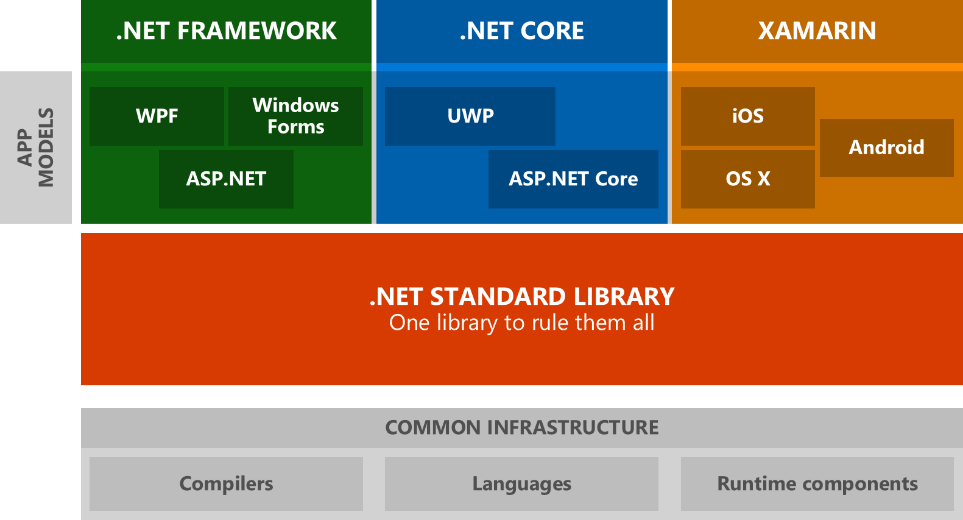 * .NET Framework is the original .NET implementation that has existed since 2002. It contains additional Windows-specific APIs. The .NET Framework is optimized for building Windows desktop applications. * .NET Core is a cross-platform and open source implementation of .NET for creating web apps, micro services, libraries and console applications that run everywhere (Windows, macOS and Linux). * Xamarin is a .NET implementation that you can create native Android, iOS, macOS and Windows apps. If you’re an observer and you have looked at the image, I’m sure you’re wondering what is .NET Standard: Immo Landwerth (program manager on the .NET Framework team at Microsoft) writes in his [blog](https://devblogs.microsoft.com/dotnet/introducing-net-standard/): > .NET Standard solves the code sharing problem for .NET developers across all platforms by bringing all the APIs that you expect and love across the environments that you need: desktop applications, mobile apps & games and cloud services. ## Why .NET Core? In the past, we only had a .NET Framework that is mainly a large and monolithic framework that has to be installed in full per machine (or you can’t use it) and allows the creation of console, desktop, web and mobile applications, where they run only on Windows. At present, .NET Core is the new generation of .NET technologies and unlike its traditional version, .NET Core is based and developed with the following goals in mind: - **Lighter and more modular**: you don’t have to install the entire .NET. Instead, you can choose what you want for developing. - **Multi-platform**: The applications created with this technology will work on Windows, Linux, and MacOS. - **High performance**: .NET Core has a higher performance than the traditional version, which is very important for Cloud environments, where this translates into a lot of money saving over time. Now we know that .NET Core is a powerful implementation of the .NET platform that allows us to develop, for example, a modern cross-platform web app with the C# program language on a Linux OS! Can you believe it? # Docker * The software Docker is a platform that allows you to build, test and deploy applications quickly. * The open source Docker community works to improve these technologies and benefit all users for free. * The company, Docker Inc., is behind the development and maintenance of the Docker software.  With Docker, you will never say the phrase “but it worked in my computer!”, because you can package all dependencies together with the software code to make your app working in a container and run it everywhere! ## Is Docker a Virtual Machine? Docker is not precisely a Virtual Machine. Virtual machines are a sandboxed environment, which contains an entire computer with its virtual hardware, OS and software; booting up a virtual machine can sometimes take a few minutes to boot up. Containers are a lightweight alternative to full machine virtualization since they are commonly used to sandbox a single application. Containers use the host OS’ kernel, and thus no bootup time is needed. So, containers are faster than Virtual Machines. 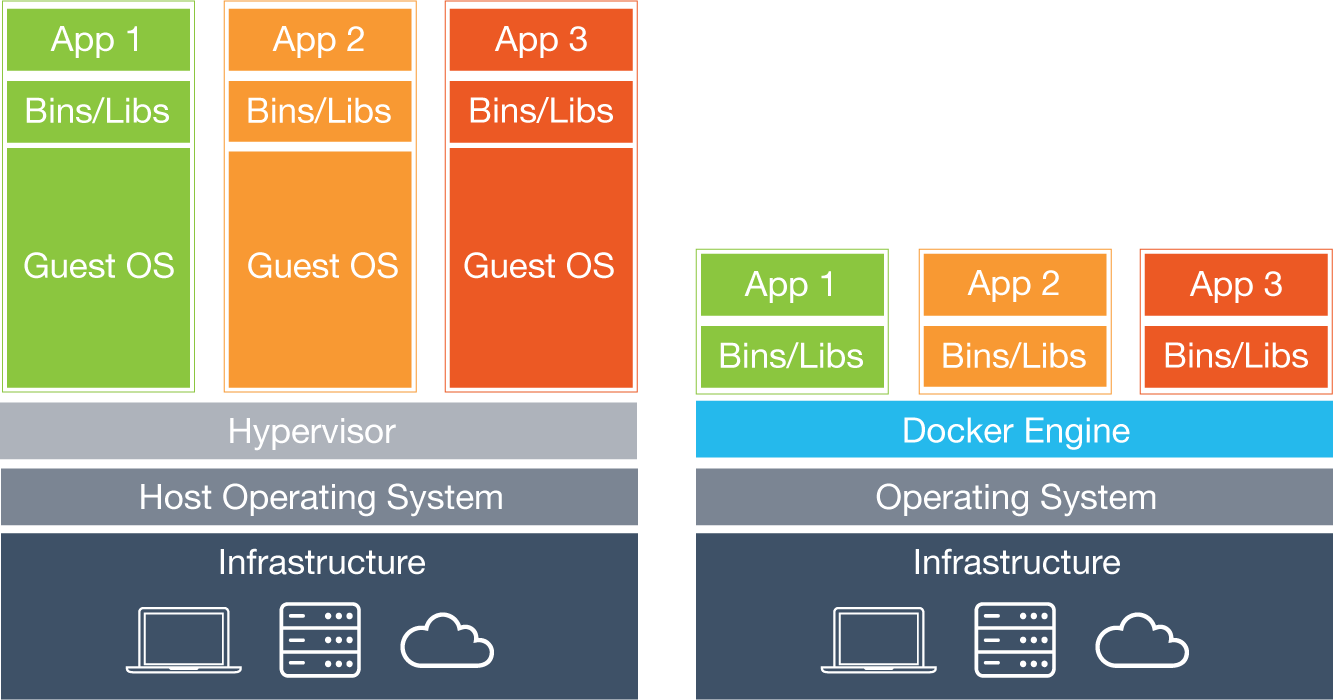 ## Containers Containers, containers, containers… What is that and why it’s so important? Well, here is the core of Docker: Containers are standardized units that have everything the software needs to run including libraries, system tools, code, and runtime. Docker packages software into containers that lets you quickly deploy and scale applications into any environment and know your code will run. ## Images How can we run our containers? To do that, we need images. An image is an executable package that includes everything needed to run an application: the code, a runtime, libraries, environment variables, and configuration files. So, we can say that a container is a runtime instance of an image. Another important thing about images is that we have available to download official images in the repositories that Docker offers at [Docker Hub](https://hub.docker.com/), which is a cloud-based registry service that includes private and public image repositories. # Let’s code our first .NET Core app! ## Requirements * [.NET Core SDK](https://dotnet.microsoft.com/learn/dotnet/hello-world-tutorial/install): the Software Development Kit (SDK) of .NET Core. We need it to create applications and libraries. * [Docker](https://docs.docker.com/install/) (if you have any problem with the installation of this software, you can try with [Docker Toolbox](https://docs.docker.com/toolbox/overview/)) * [Visual Studio Code](https://code.visualstudio.com/Docs/setup/setup-overview): optional. VS Code is a powerful cross-platform text editor from Microsoft. It’s very handful for its integration with and Docker. As you saw at the beginning of this tutorial, we’re going to use a Linux OS. In my case, I will be using Manjaro, which is an Arch-based Linux distro. But don’t worry: the only difference is mainly the installation phase of .NET Core and Docker. If you’re using Windows/macOS, you can still follow me! ## Installation OK! First of all, we need to install .NET Core SDK and Docker in our machine (links under requirements). For linux users, we have [this page](https://translate.google.com/translate?sl=es&tl=en&u=https%3A%2F%2Fdockertips.com%2Finstalando_docker) to install Docker with depending on your Linux distro. Manjaro (Arch and Antergos) users have available in the AUR repository all we need: ``` $ sudo pacman -S dotnet-runtime dotnet-sdk docker ``` Now check if everything was installed correctly. You have to see some info about .NET Core and Docker: ``` $ dotnet $ docker ``` If you have problems with docker, be sure that the service is turned on: ``` $ sudo systemctl status docker ``` If the service it’s OK, try to put “docker info”. If you read “cannot connect to the Docker daemon” or similar, maybe your user is not included in the Docker group: ``` # groupadd docker # usermod -aG docker ${USER} ``` ## Create your first .NET Core MVC app In your terminal, run the following commands: ``` $ dotnet new mvc -o awesomeMVC --no-https $ cd awesomeMVC ``` What do these commands mean? * The `dotnet` new command creates a new application. * The `mvc` parameter selects what template to use when creating your app. * The `-o` parameter creates a directory named awesomeMVC where your app is stored. * The `--no-https` flag specifies not to enable HTTPS. What files were created? * `Startup.cs` contains all the settings and configurations. * The `awesomeMVC/Views` directory contains some example web pages for the application. * `awesomeMVC.csproj` defines what libraries are referenced, etc. 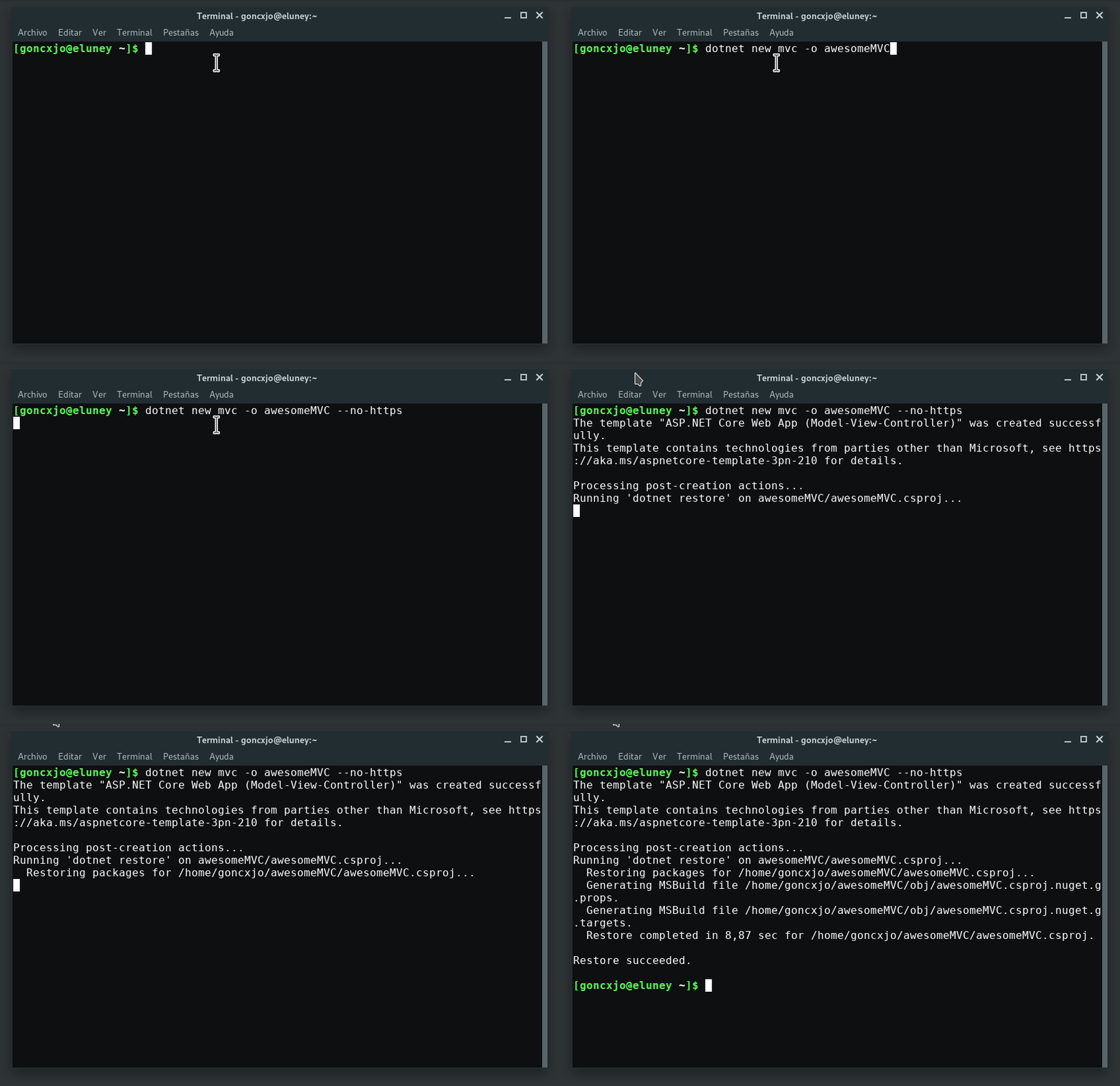 ## Run awesomeMVC Can we run our app? YES! In your terminal, run the following command: ``` $ dotnet run ``` Once the command completes, browse to http://localhost:5000/ 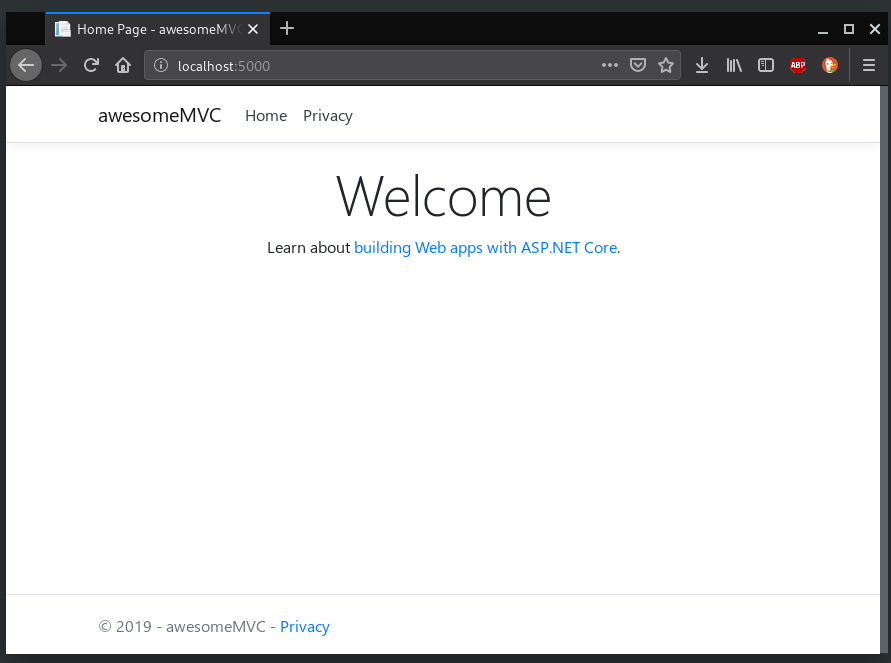 Yaaaay! It works 😃 ## Make it better Let’s make some changes: open `Views/Home/Index.cshtml` in VS Code and replace all of the code with the following: ``` @{ ViewData[“Title”] = “Home Page”; } <div class=”text-center”> <img class=”image-responsive” src="https://nunit.org/img/dotnetfoundation.png" height=”200em”> <p>The time on the server is @DateTime.Now</p> </div> ``` Save and refresh the browser. 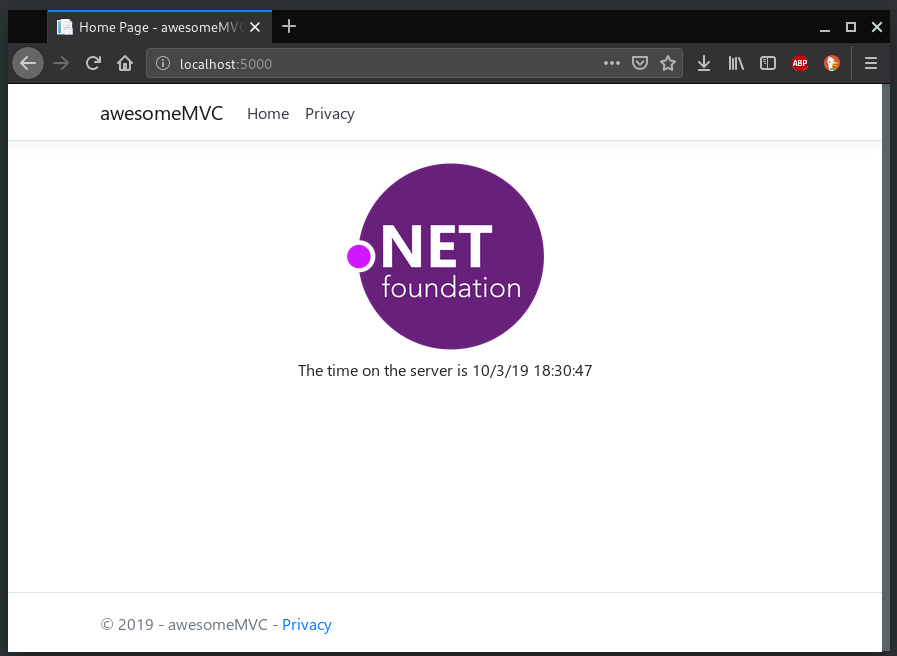 It looks better! # Dockerize awesomeMVC How can we do that? First, we have to know that: > Docker can build images automatically by reading the instructions from a “Dockerfile”. A Dockerfile is a text document that contains all the commands a user could call on the command line to assemble an image. ## Create a Dockerfile So, in the project’s folder, create a file named “Dockerfile” and add the text below. The Dockerfile assumes that your application is called awesomeMVC. Change the Dockerfile to use the DLL file of your project. ``` # Take a base image from the public Docker Hub repositories FROM microsoft/dotnet:sdk AS build-env # Navigate to the “/app” folder (create if not exists) WORKDIR /app # Copy csproj and download the dependencies listed in that file COPY *.csproj ./ RUN dotnet restore # Copy all files in the project folder COPY . ./ RUN dotnet publish -c Release -o out # Build runtime image FROM microsoft/dotnet:aspnetcore-runtime WORKDIR /app COPY --from=build-env /app/out . ENTRYPOINT [“dotnet”, “awesomeMVC.dll”] ``` ## Create a .dockerignore file To make your build context as small as possible add a .dockerignore file to your project folder and copy the following into it. ``` bin\ obj\ ``` Build and run the Docker image Open a terminal and navigate to your project folder. Use the following commands to build and run your Docker image: ``` $ docker build -t awesome-mvc . $ docker run -d -p 8080:80 -- name myapp awesome-mvc ``` 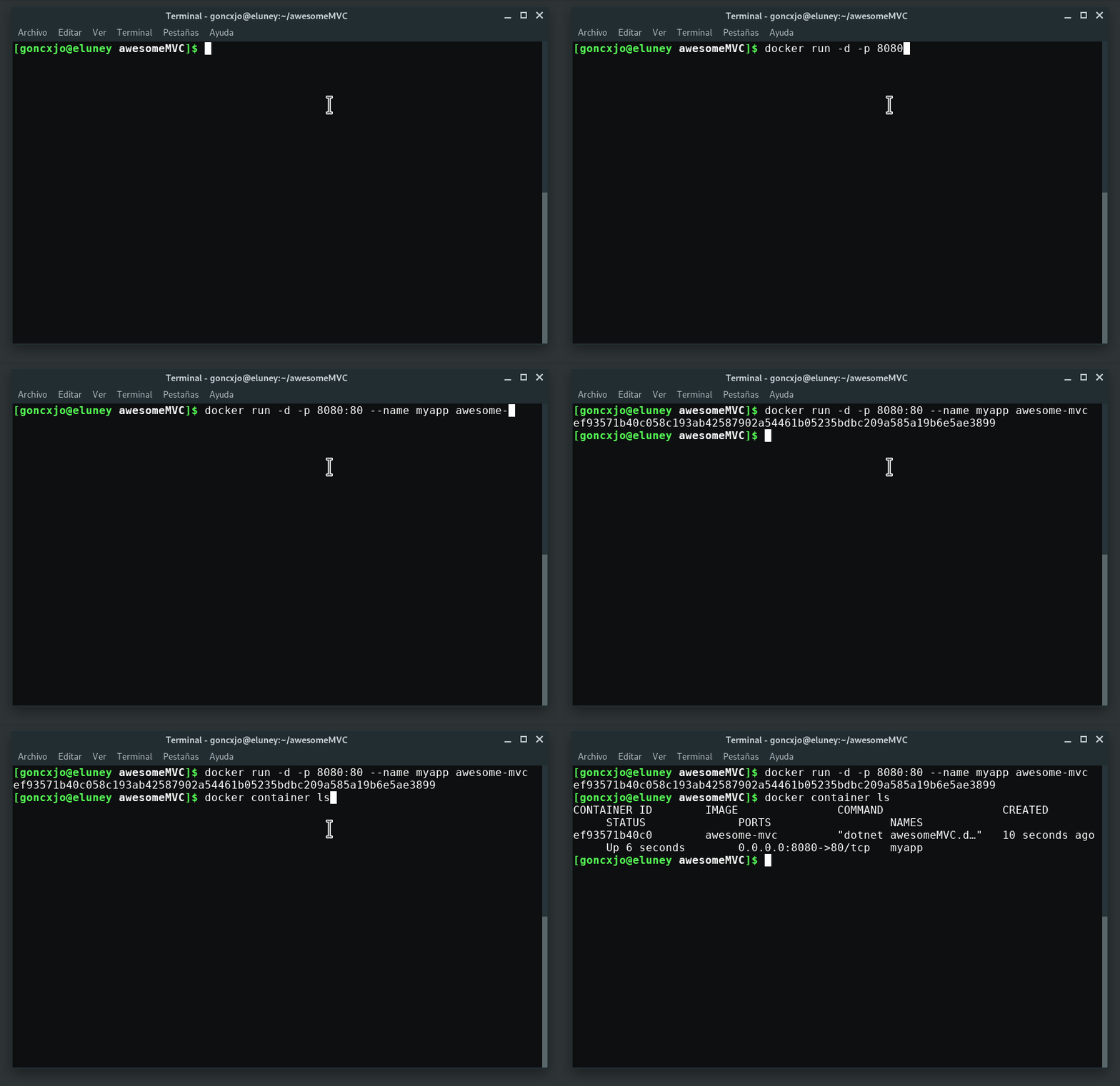 You can check if the container is active with: ``` $ docker container ls ```  ## View the web page running from a container - Go to http://localhost:8000 to access your app in a web browser. - If you are using the Nano Windows Container and have not updated to the Windows Creator Update there is a bug affecting how Windows 10 talks to Containers via “NAT” (Network Address Translation). You must hit the IP of the container directly. You can get the IP address of your container with the following steps: - Run `docker inspect -f "{{ .NetworkSettings.Networks.nat.IPAddress }}" myapp` - Copy the container IP address and paste into your browser. (For example, 172.16.240.197) 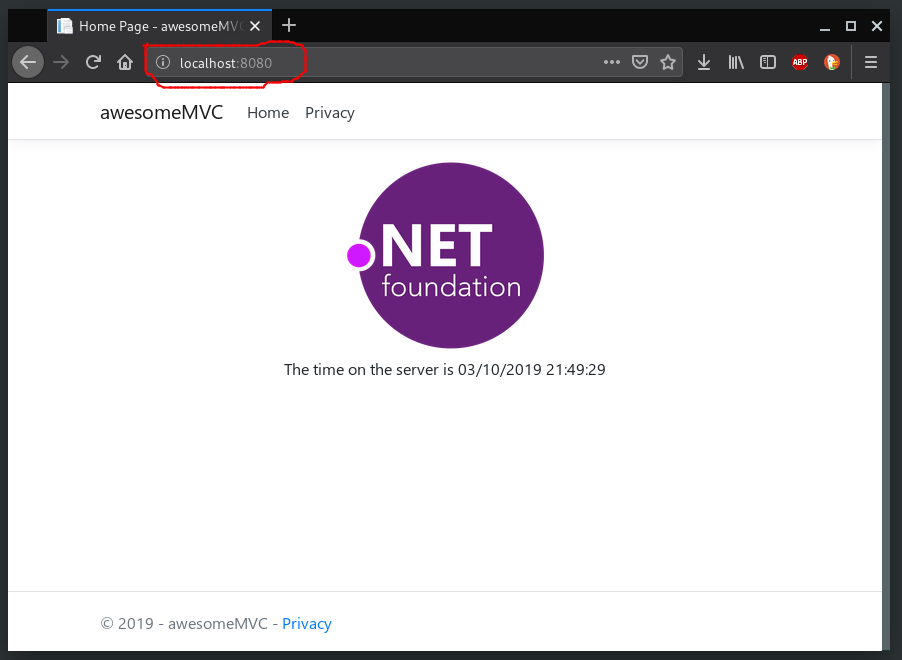 Congratulations! 🎊 You’ve created your first .NET Core app running in a Docker Container! 😄 # Let’s get harder: Docker Compose If you need to run more than one image at the same time and they have to be connected, you need to know about Docker Compose. In the official documentation of Docker says: > Compose is a tool for defining and running multi-container Docker applications. With Compose, you use a YAML file to configure your application’s services. Then, with a single command, you create and start all the services from your configuration. So, what needs our app? A database? Do you like SQL Server? OK! Let’s see… ## New requirements * [Docker Compose](https://docs.docker.com/compose/install/): with this tool, we can build our multi-container app, as we said. * [Azure Data Studio](https://docs.microsoft.com/en-us/sql/azure-data-studio/download?view=sql-server-2017): Linux/Mac users don’t have Management Studio for SQL Server, but we have this beautiful, lightweight, cross-platform database tool for manage SQL Server databases and cloud ## SQL Server image First, we have to pull down the image of our database. As we say, we will use SQL Server for Linux: ``` $ docker pull microsoft/mssql-server-linux ``` Also, you can use this SQL image: mcr.microsoft.com/mssql/server:latest Now that we have the image, we need to start it up and connect to it to make sure it is operating as we expect. Let’s run the container: ``` $ docker run \ -e 'ACCEPT_EULA=Y' \ -e 'SA_PASSWORD=yourStrong(!)Password' \ -p 1433:1433 \ --name sqlserver \ -d microsoft/mssql-server-linux ``` * `-e` specifies an environment variable, here we specify password and acceptance of EULA (end user license agreement), * `-p` pecifies the port to forward so that we can connect from the host (our local machine), * `--name` specifies the name used to identify the container — this is useful to start/stop/delete the container — , * `-d` specifies that we want to start a detached container (runs in background). Once that the container is up and running, open **Azure Data Studio* so we can connect to the database. Click on “Add Connection”: 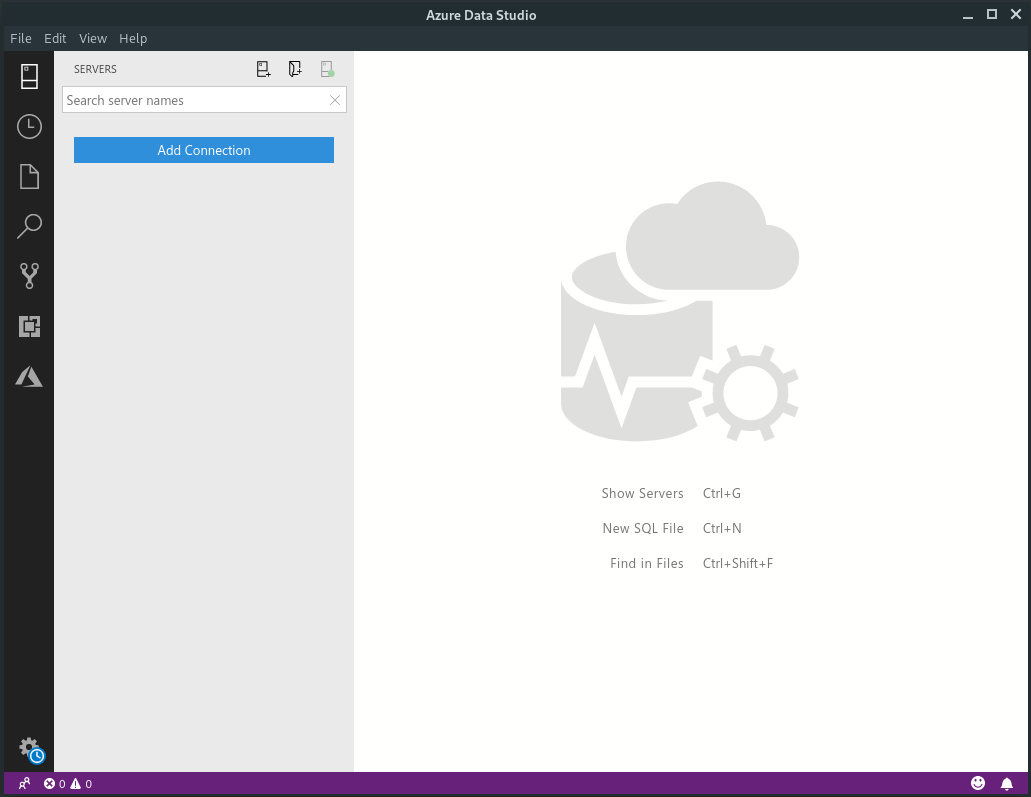 Now, complete with `localhost` as server, `sa` as username and `yourStrong(!)Password` as password. Then connect to the db: 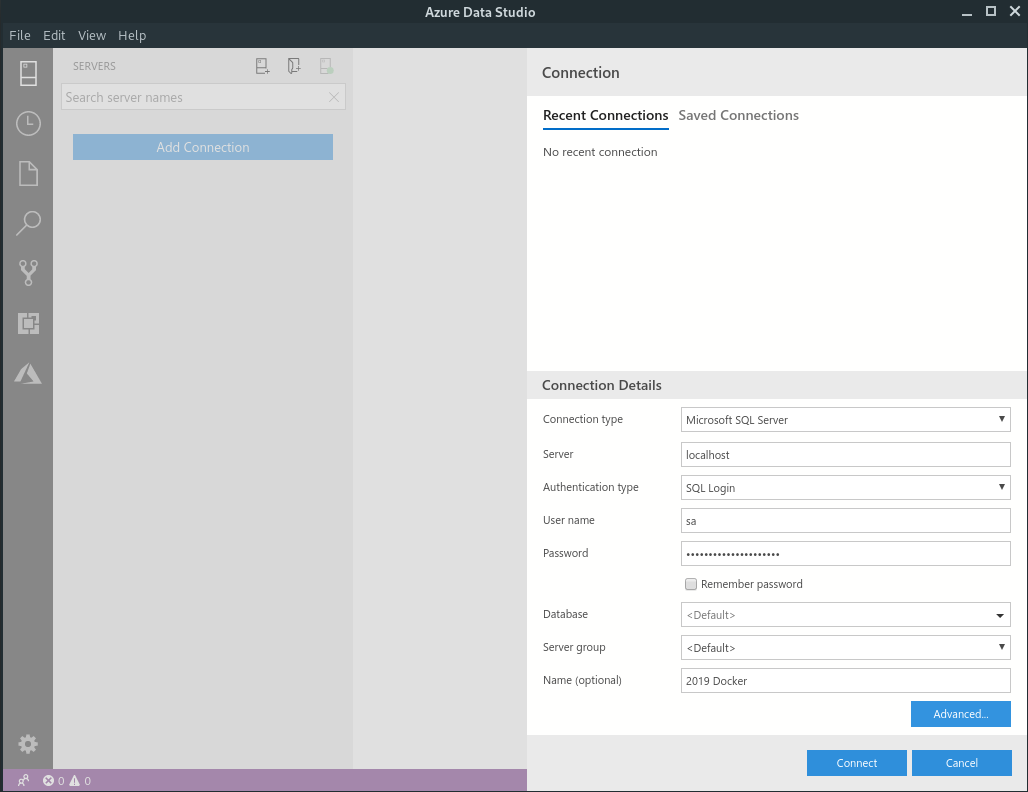 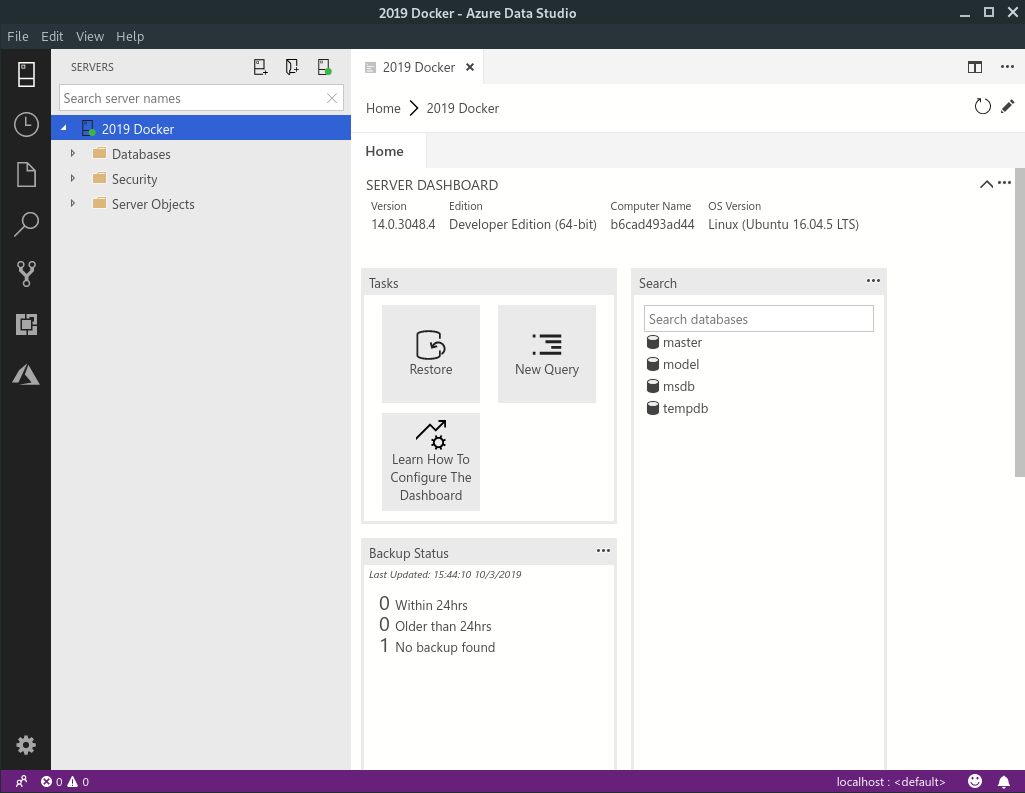 ## Entity Framework Core: modeling your Database Let’s back to our project “awesomeMVC” and we will replace the entire text at awesomeMVC.cproj: ``` <ItemGroup> <PackageReference Include="Microsoft.AspNetCore.App" /> <PackageReference Include="Microsoft.AspNetCore.Razor.Design" Version="2.2.0" PrivateAssets="All" /> <PackageReference Include="Microsoft.EntityFrameworkCore.Design" Version="2.2.2" /> <PackageReference Include="Microsoft.EntityFrameworkCore.SqlServer" Version="2.2.2" /> <PackageReference Include="Microsoft.VisualStudio.Web.CodeGeneration.Design" Version="2.2.2" /> </ItemGroup> <ItemGroup> <DotNetCliToolReference Include="Microsoft.VisualStudio.Web.CodeGeneration.Tools" Version="2.0.4" /> <DotNetCliToolReference Include="Microsoft.EntityFrameworkCore.Tools.DotNet" Version="2.0.3" /> </ItemGroup> ``` Then, install all the dependencies typing this in the terminal: ``` $ dotnet restore ``` Great! Now let’s get to creating our models. We are going to model some characters from Resident Evil 4 (man, I like this game!) and we will define items in a single file since it is such a simple example. Let’s start by creating the model: navigate through the “Models” folder in our project and create a file named `Model.cs`. Next, enter the following code: ``` using Microsoft.EntityFrameworkCore; using System.Collections.Generic; namespace awesomeMVC.Models { public class CharactersContext : DbContext { public CharactersContext(DbContextOptions<CharactersContext> options) : base(options) {} public DbSet<Character> Characters { get; set; } } public class Character { public int CharacterId { get; set; } public string FirstName { get; set; } public string LastName { get;set; } } } ``` Now we need to wire up the database context with the dependency injection framework. To do this open `Startup.cs`` and add the add the new lines. First, add the new using statements: ``` using awesomeMVC.Models; using Microsoft.EntityFrameworkCore; ``` With those added to the list of using statements, we can now modify the ConfigureServices method to add our code. ``` public void ConfigureServices(IServiceCollection services) { ... // This is the new code. var connection = Configuration.GetConnectionString("DefaultDatabase"); services.AddDbContext<CharactersContext>(options => options.UseSqlServer(connection)); services.AddMvc().SetCompatibilityVersion(CompatibilityVersion.Version_2_2); } ``` Now let’s add our connection string information to our appsettings.Development.json by adding the following code: ``` { "Logging": { "LogLevel": { "Default": "Debug", "System": "Information", "Microsoft": "Information" } }, "ConnectionStrings" : { "DefaultDatabase": "Server=localhost;Database=RE4Example;User Id=sa;Password=yourStrong(!)Password;" } } ``` With our connection string, the last step to do before we run our migrations is to create our RE4Example database. We can do this with Data Studio. Open it up and click on New Query. 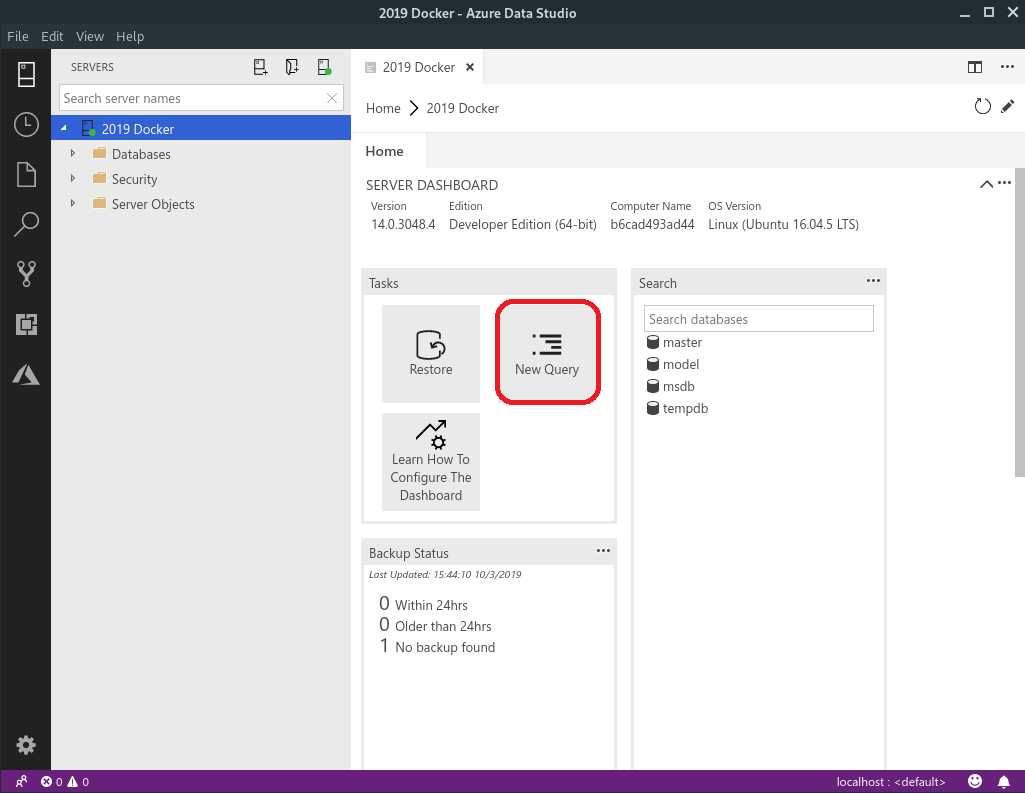 With that window open, type “sqlCre” and a snippet will pop, just hit enter. 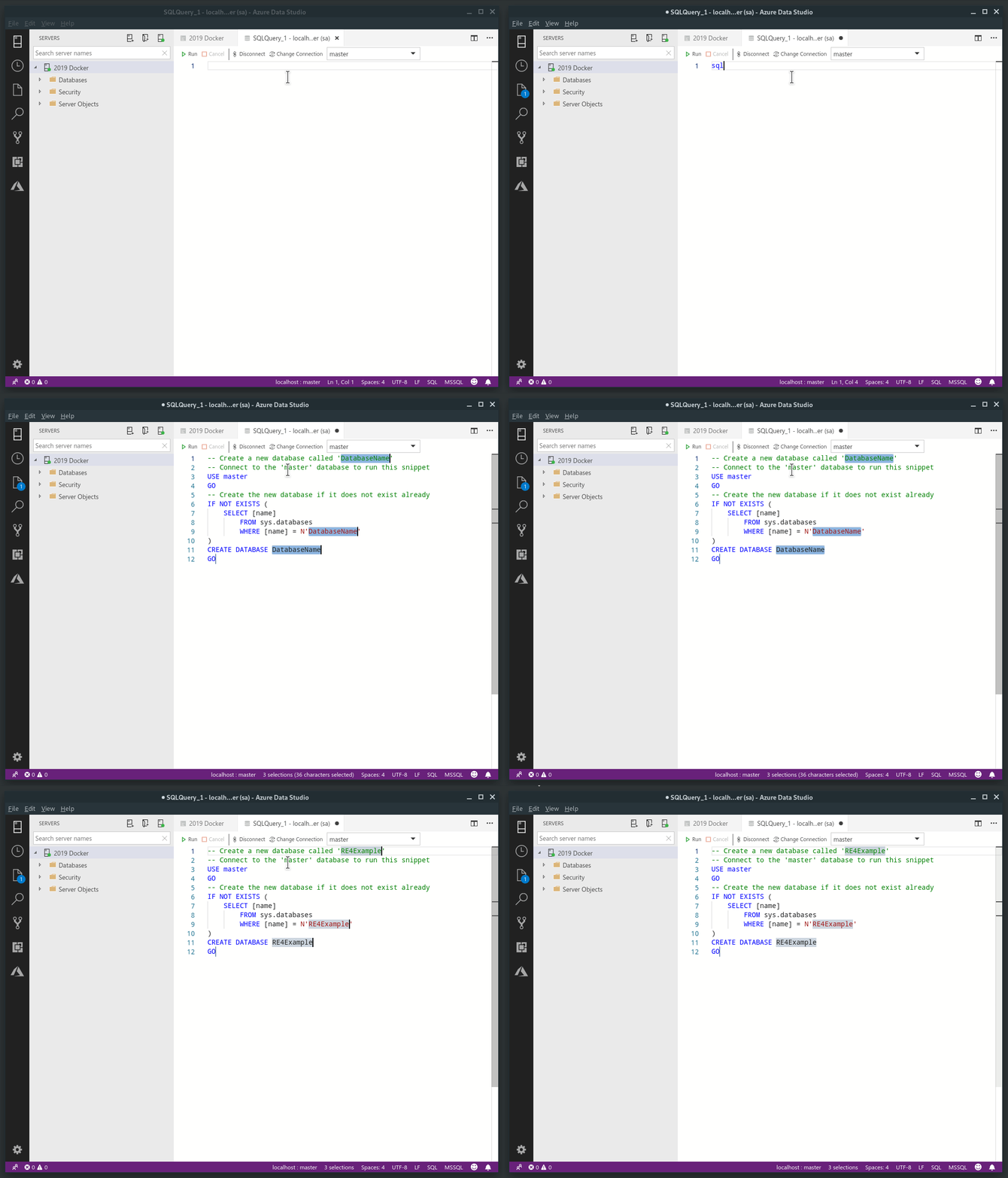 Now we are ready to create our Entity Framework migrations and create our tables. Run the following command to create the migration. ``` $ dotnet ef migrations add InitialCreate ``` If was succesful, you have to see something similar to this: 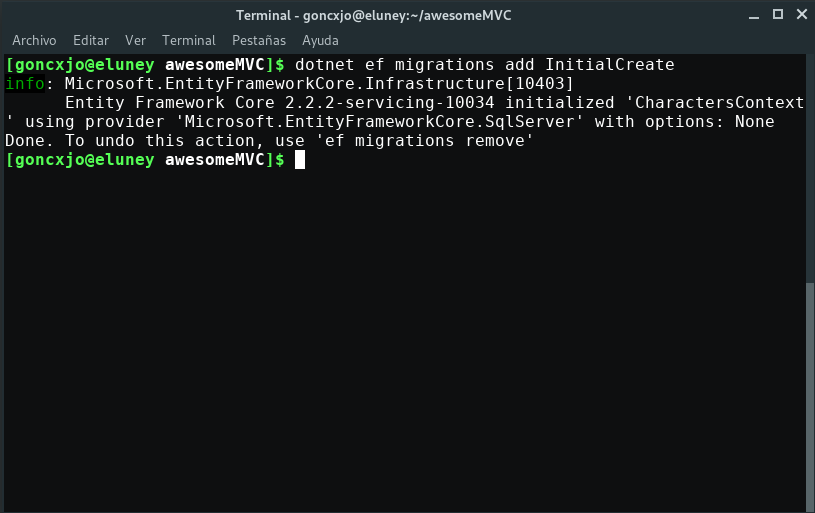 Now run the migration to create the tables. ``` $ dotnet ef database update ``` If ran successfully, let’s use Azure Data Studio to verify it: 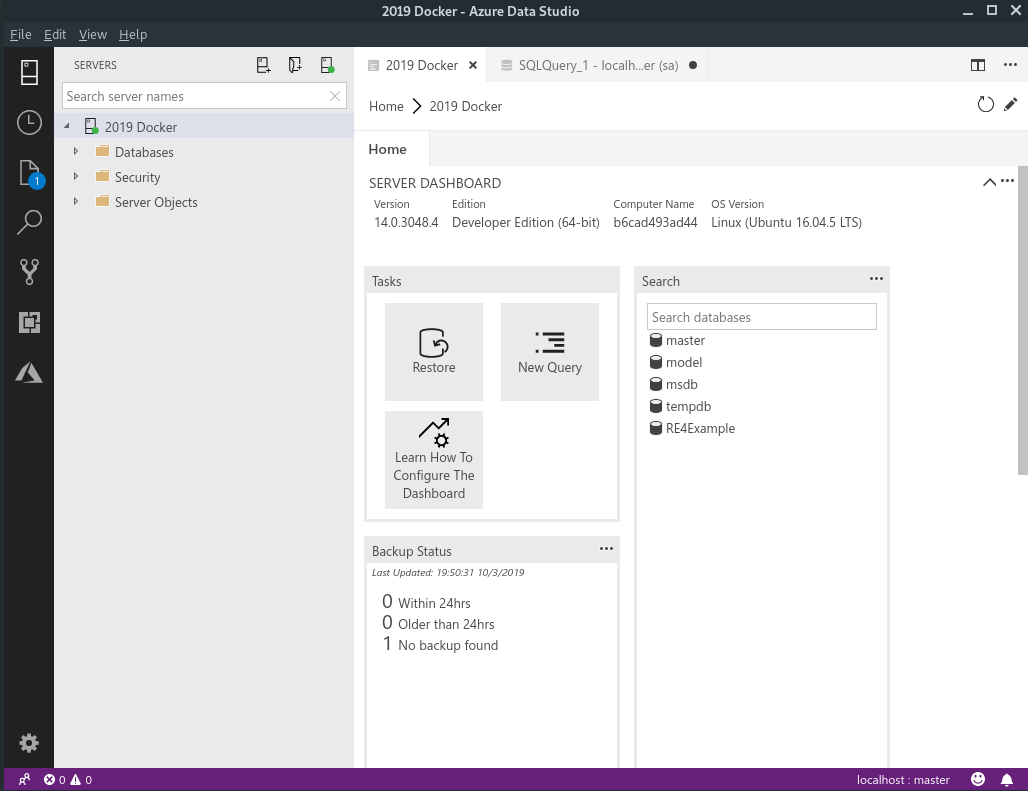 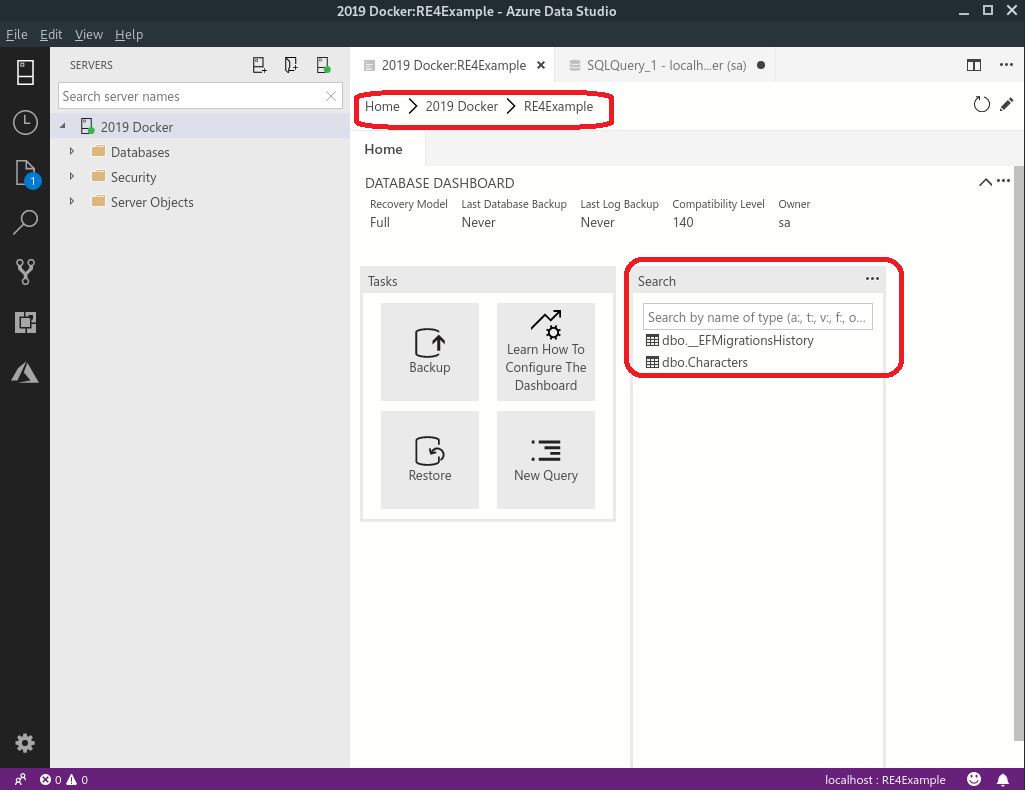 Now we just need to create our controller and views. We are going to use scaffolding for this tutorial because this isn’t the interesting part: ``` $ dotnet tool install -g dotnet-aspnet-codegenerator $ dotnet restore ``` Now we can generate our controllers and views with the scaffolding tools. ``` $ dotnet aspnet-codegenerator controller \ -name CharactersController \ -m Character \ -dc CharactersContext \ -outDir Controllers \ -udl \ -scripts ``` If you don’t understand what you’re doing, here’s a reference: ``` --controllerName|-name : Name of the controller --model|-m : Model class to use --dataContext|-dc : DbContext class to use --referenceScriptLibraries|-scripts : Switch to specify whether to reference script libraries in the generated views --useDefaultLayout|-udl : Switch to specify that default layout should be used for the views --relativeFolderPath|-outDir : Specify the relative output folder path from project where the file needs to be generated, if not specified, file will be generated the project folder ``` Now let’s run the application. ``` $ dotnet run ``` 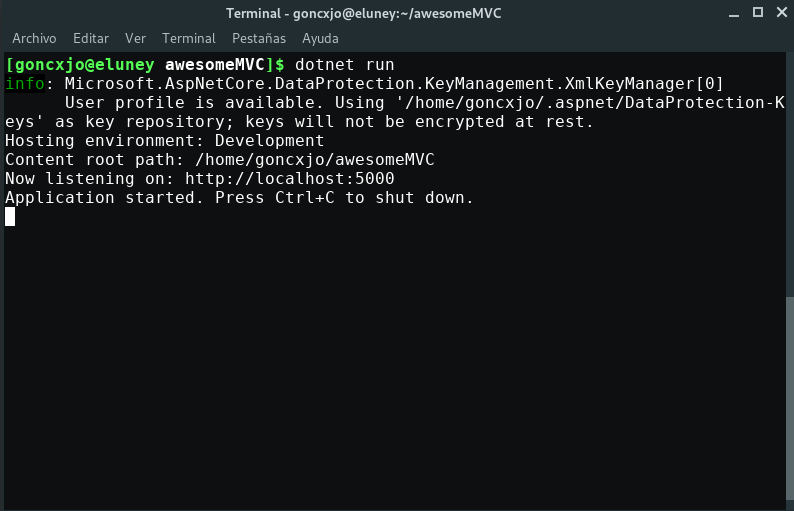 Navigate to https://localhost:5000/characters and you should see this: 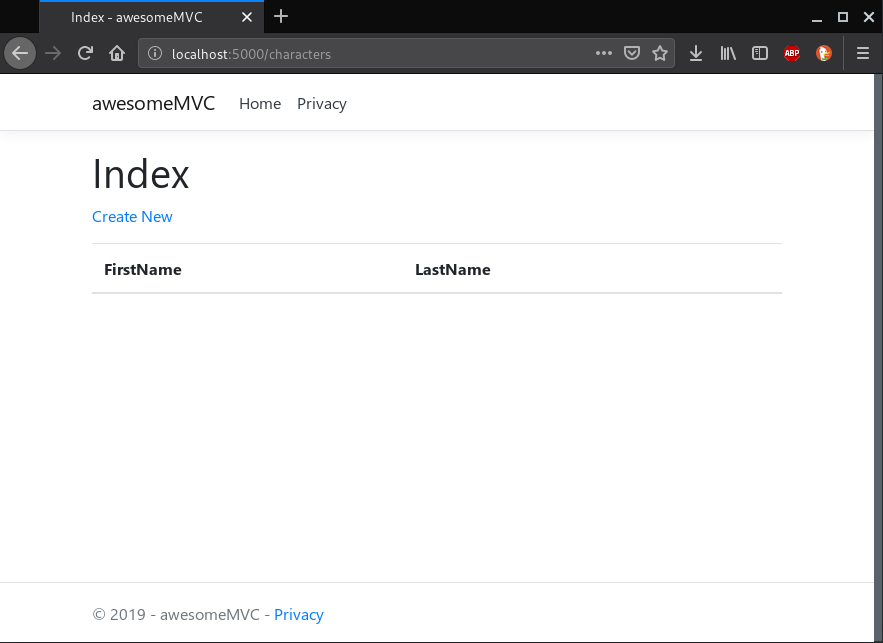 Now add a few Characters and let’s see if they show up in the SQL Server running on Linux in a docker container: 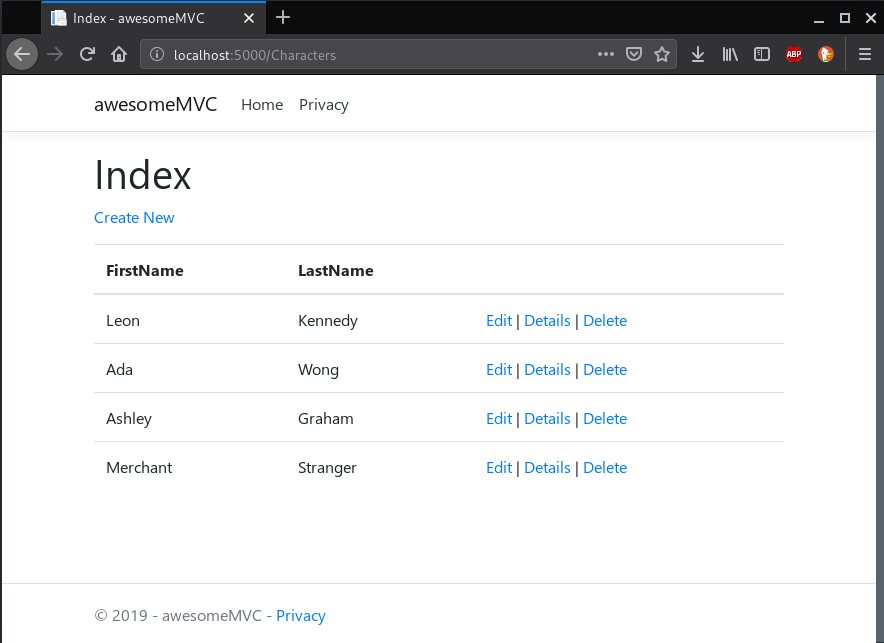 Characters in the database: 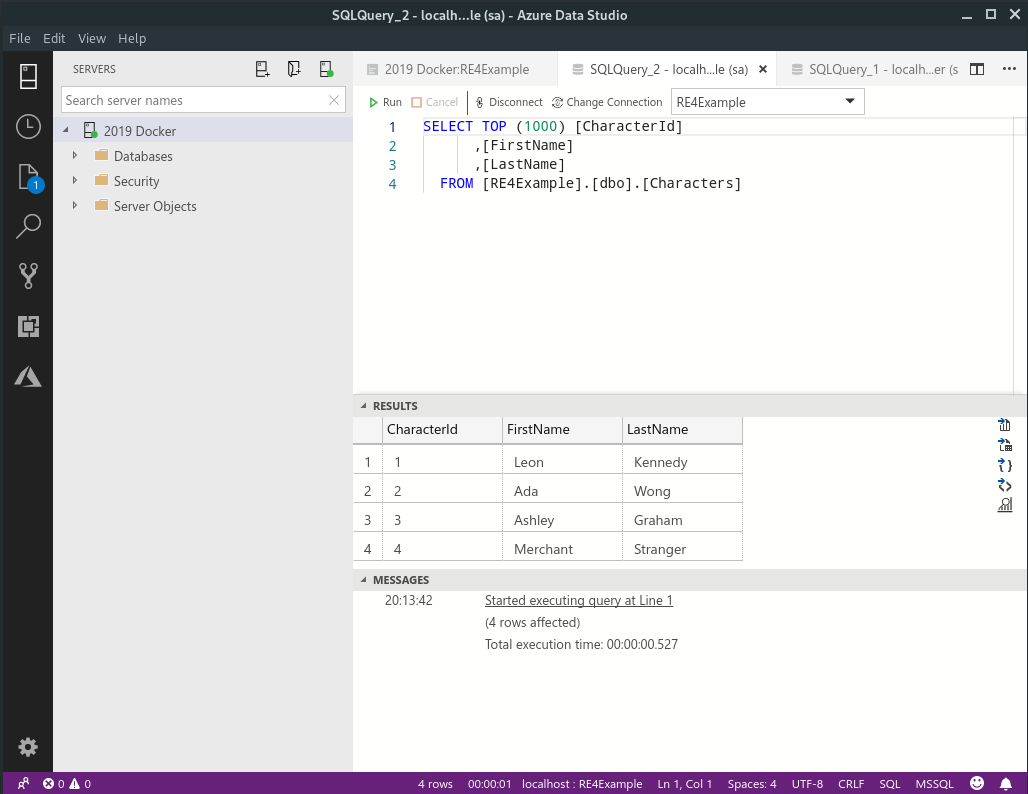 IT WORKS! 🙌 🙌 ## Compose everything Now, we’re going to dockerize everything. To do so, we have to use Docker Compose. We need these files: - **Dockerfile**: this file defines how to build the web app image. - **entrypoint.sh**: this script restores the database after it starts up, and then runs the application. This allows some time for the SQL Server database image to start up. - **docker-compose.yml**: this file defines the web and db micro-services, their relationship, the ports they are using, and their specific environment variables. Before working with those files, we have to edit the server name in our connection string in `appsettings.Development.json`: ``` “DefaultDatabase”: “Server=db;Database=RE4Example;User Id=sa;Password=yourStrong(!)Password;” ``` Now, edit the Dockerfile with the next code: ``` FROM microsoft/dotnet:latest COPY . /app WORKDIR /app RUN ["dotnet", "restore"] RUN ["dotnet", "build"] EXPOSE 80/tcp RUN chmod +x ./entrypoint.sh CMD /bin/bash ./entrypoint.sh ``` Create a file named entrypoint.sh and paste this: ``` #!/bin/bash set -e run_cmd="dotnet run --urls http://*:80" until dotnet ef database update; do >&2 echo "SQL Server is starting up" sleep 1 done >&2 echo "SQL Server is up - executing command" exec $run_cmd ``` Create a docker-compose.yml file and write the following code: ``` version: "3.4" services: web: build: . ports: - "8000:80" depends_on: - db db: image: microsoft/mssql-server-linux environment: - SA_PASSWORD=Password=yourStrong(!)Password - ACCEPT_EULA=Y ports: "5433:1433" ``` That is it! we just need to build this solution in Docker and then run it: ``` $ docker-compose build $ docker-compose up ``` Then, go to http://localhost:8000/characters on your favorite browser. 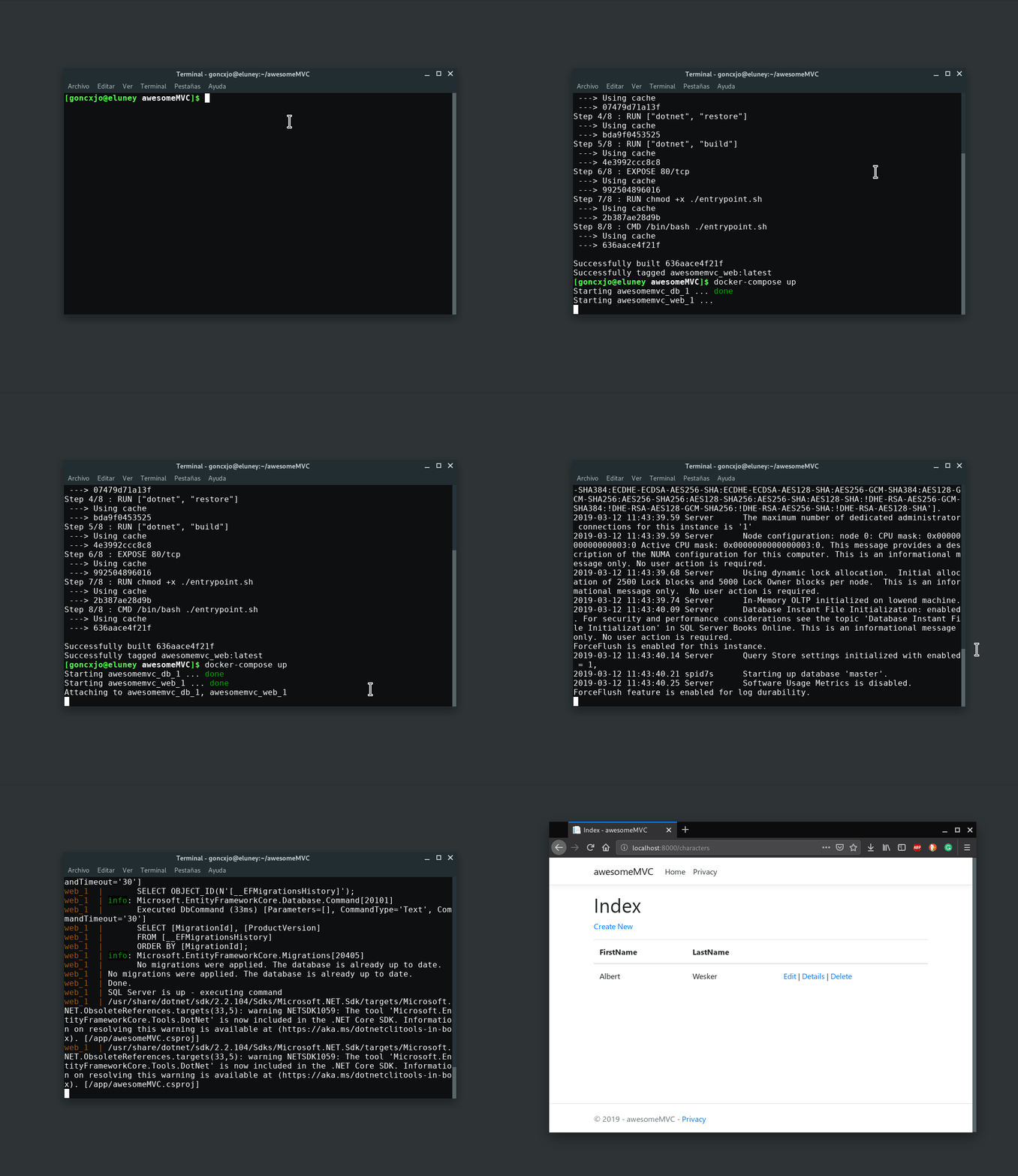 You can also connect to the database in the `localhost,5433` server: 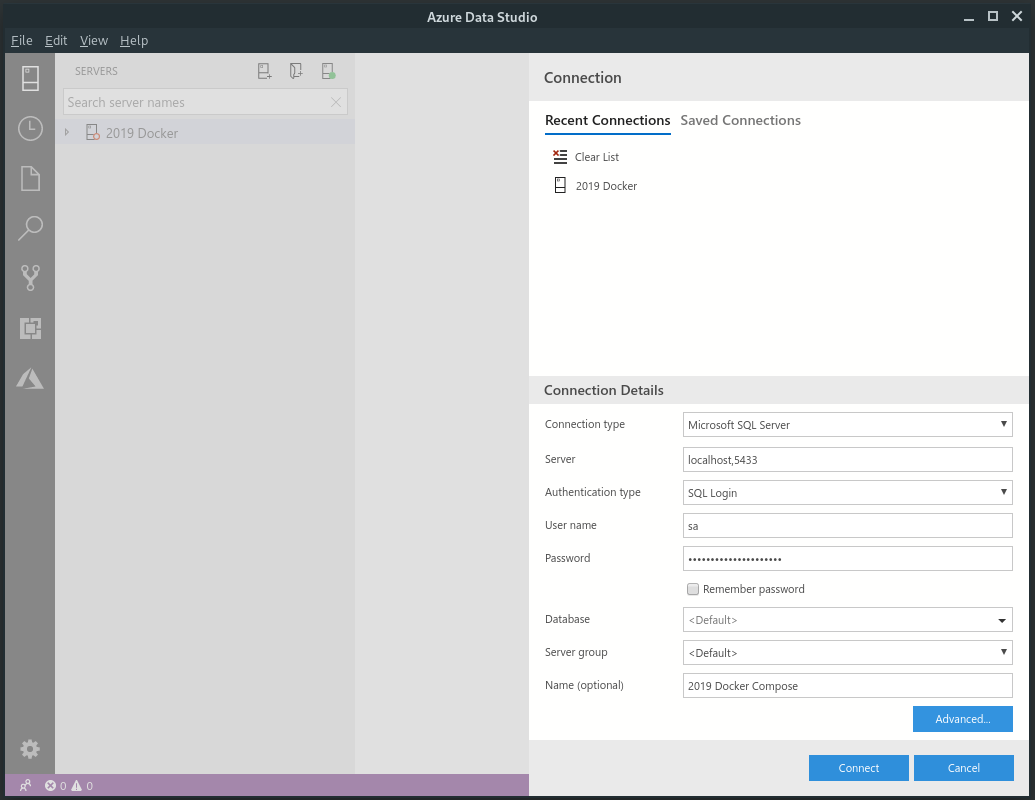 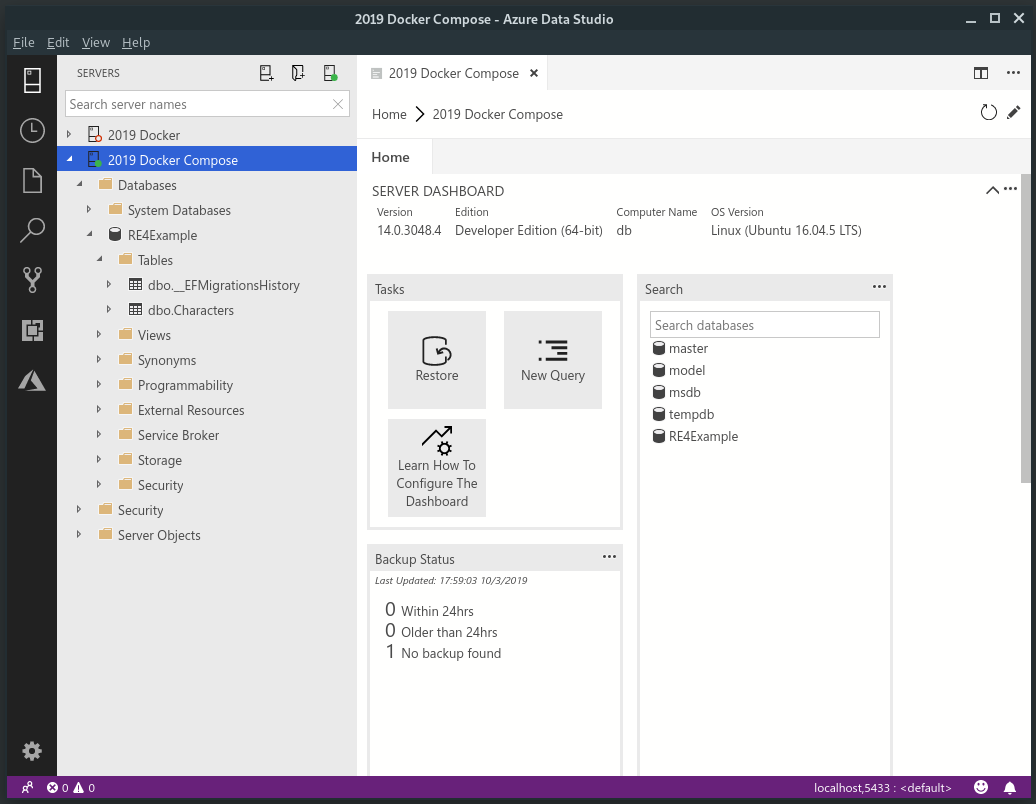 Congratulations! Your app .NET Core app with SQL Server is working thanks to Docker Compose! If you can’t wait, you can clone and run this project in this github repository. Thanks for reading! 💚 # Troubleshooting for Windows users using Docker Toolbox: - **I can’t build the project**: Have you allocated at least 4GB of RAM in your virtual machine? - **It hangs on after db startup**: If you see some errors with the `entrypoint.sh` file, maybe are compatibility problems between Windows and Linux scripts. Try the next command and rebuild: `dos2linux entrypoint.sh` - **I can’t connect to the localhost**: be sure to connect to the IP indicated at the start of Docker Toolbox CLI. 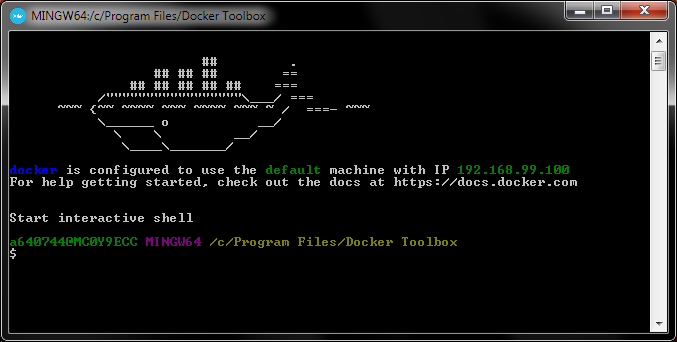 # What’s next? [Host ASP.NET Core in Docker containers | Microsoft Docs](https://docs.microsoft.com/en-us/aspnet/core/host-and-deploy/docker/?view=aspnetcore-2.2) [Build a real-world app with ASP.NET Core and Angular 2](https://programmingwithmosh.com/build-a-real-world-app-with-asp-net-core-and-angular-2/) [Tutorial: Creating ASP.NET Core + Angular 4 app in Docker container connected to SQL Azure Database — Infopulse](https://www.infopulse.com/blog/tutorial-creating-asp-net-core-angular-4-app-in-docker-container-connected-to-sql-azure-database/) [Enter ASP.NET Core 2 and Angular 5 Applications with Docker](https://codeburst.io/enter-asp-net-core-2-and-angular-5-applications-with-docker-48fec0eaa4d9) # References ## Official documentation [What is .NET?](https://dotnet.microsoft.com/learn/dotnet/what-is-dotnet) [Introduction to ASP.NET Core | Microsoft Docs](https://docs.microsoft.com/en-us/aspnet/core/?view=aspnetcore-2.2) [.NET architectural components | Microsoft Docs](https://docs.microsoft.com/en-us/dotnet/standard/components) [Announcing .NET Standard 2.0](https://devblogs.microsoft.com/dotnet/announcing-net-standard-2-0/) [EF Core tools reference (.NET CLI) — EF Core | Microsoft Docs](https://docs.microsoft.com/en-us/ef/core/miscellaneous/cli/dotnet) [ASP.NET Tutorial | Hello World in 10 minutes | .NET](https://dotnet.microsoft.com/learn/web/aspnet-hello-world-tutorial/intro) [Dockerize a .NET Core application | Docker Documentation](https://docs.docker.com/engine/examples/dotnetcore/) [Quickstart: Compose and ASP.NET Core with SQL Server | Docker Documentation](https://docs.docker.com/compose/aspnet-mssql-compose/) ## Other links [.NET Core, .NET Framework, Xamarin — The “WHAT and WHEN to use it” — Cesar de la Torre [Microsoft] — BLOG](https://blogs.msdn.microsoft.com/cesardelatorre/2016/06/27/net-core-1-0-net-framework-xamarin-the-whatand-when-to-use-it/) [.NET Core vs .NET Framework — Wolox — Medium](https://medium.com/wolox-driving-innovation/net-core-vs-net-framework-a694f1fbdb26) [Fix: Cannot Connect to the Docker Daemon — Appuals.com](https://appuals.com/fix-cannot-connect-docker-daemon/) [Jamie Phillips — Working with SQL Server on Linux for .NET Development Code Generator Error Creating Controller — Developer Community](https://www.phillipsj.net/posts/working-with-sql-server-on-linux-for-dotnet-development) [Are shell scripts sensitive to encoding and line endings?](https://stackoverflow.com/questions/39527571/are-shell-scripts-sensitive-to-encoding-and-line-endings) |
| json metadata | {"tags":["dotnet","docker","sql","compose","linux"],"image":["https://cdn.steemitimages.com/DQmPx6fVKSwH5UbigLM3U3rC5S7yVx7ZbUap2dAJtg7nrs5/image.png","https://cdn.steemitimages.com/DQmU6bARGS1L7uhbxPE7MvyZTp2bu9uSTmM3ZmJJzW1PAcN/image.png","https://cdn.steemitimages.com/DQmcSWCBMWxSDcRHbvhqBniG2K47g5aTgYv986Q3wzRe8SA/image.png","https://cdn.steemitimages.com/DQmeH57WQ525RmYdA2mqjWGDuXNESQs5xEEzkfhrpT8j8rc/image.png","https://cdn.steemitimages.com/DQmfT7SMgP6QF4uwoyUEzsKyNArC5uFubudmCmjTpdif5nD/image.png","https://cdn-images-1.medium.com/max/1600/1*hMJL6K5oGp8LCaR4eore5Q.gif","https://cdn.steemitimages.com/DQmdWEHwT8CifdrRWJ8brKNY3Dqag8Lxqd1Td5Zi3bDMMG8/image.png","https://cdn.steemitimages.com/DQmU1msGTH37Z8SbwrV2PrqNoxdEeXqh48sxBgHAj5Vit6r/image.png","https://cdn-images-1.medium.com/max/1600/1*JXJkWTSaIIcFLjcP7Z-8eQ.gif","https://cdn.steemitimages.com/DQmQDZBwxzsWcELUbGMQVoVfXuYaWAhSa5HF654ju2erQc6/image.png","https://cdn.steemitimages.com/DQmQ14SnjoPeBj5PDv7Y85hLSgtUErYvcqTpn2xqQYGMHqg/image.png","https://cdn.steemitimages.com/DQmccLPK5AAkfqVSNiDbMqZWLhfN3TfqPPm4BggVTKEnDr9/image.png","https://cdn.steemitimages.com/DQmRkFsxFnywbmVwjwFkrfkbXLXb2Se9FRqKCPKqZGXHd68/image.png","https://cdn.steemitimages.com/DQmRD5YBecBbayLgWKgjp8eEtkYzh94CXmhLRHLr45Doyuf/image.png","https://cdn.steemitimages.com/DQmUbEbJ7YSET9fgxhqHJ11mkY35JS6u6xu7BmoY41CVWpe/image.png","https://cdn-images-1.medium.com/max/1600/1*UXSanvwgBZER7VG_br98Ww.gif","https://cdn.steemitimages.com/DQmbRhMbZSAEQ5yiwLW8oqwmjkoBch5sbMcRcZAoDEwTDRC/image.png","https://cdn.steemitimages.com/DQmWDCYvB74zknfwsmCa7UwHVXr25978KK4VFcpZK3gvfDF/image.png","https://cdn.steemitimages.com/DQmaWyyh2Nm4Wk8HLxobjrPeXRba61pnMabeyyLPgPE7biZ/image.png","https://cdn.steemitimages.com/DQmS7coigYN6dWnEPtpSwmboNzJqwKkfgmDT4ZBsphNU9Rs/image.png","https://cdn.steemitimages.com/DQmTfLjJw9wBcJPcgtu5mABdudNPijArsYdjg2tKwFmJGzj/image.png","https://cdn.steemitimages.com/DQmcxjFfiD9RB4tKHYuGJyDLpsdXtNvGdFC6Xo59A3gPCdJ/image.png","https://cdn.steemitimages.com/DQmXiCcKSzzH2JkUB4LNKuWzZo3Stxon3z6d3mbjF6XJ5rj/image.png","https://cdn-images-1.medium.com/max/1600/1*9e4Qm_a6F2Jw2nGRx0SN3Q.gif","https://cdn.steemitimages.com/DQmWwJrwzoxFDwzP1Z9u54VhwzzME9H86GF8DKPTMJTzoSK/image.png","https://cdn.steemitimages.com/DQmX1z6p4kYutK7XfKaSUyDtrEj38tWEhTTqstQ2FVWzTDH/image.png","https://cdn.steemitimages.com/DQmWBS9uv8fCAYAqDPQExs1B1qnzxeRueJRDJ7sCBFuoVXG/image.png"],"links":["https://devblogs.microsoft.com/dotnet/introducing-net-standard/","https://hub.docker.com/","https://dotnet.microsoft.com/learn/dotnet/hello-world-tutorial/install","https://docs.docker.com/install/","https://docs.docker.com/toolbox/overview/","https://code.visualstudio.com/Docs/setup/setup-overview","https://translate.google.com/translate?sl=es&tl=en&u=https%3A%2F%2Fdockertips.com%2Finstalando_docker","http://localhost:5000/","http://localhost:8000","https://docs.docker.com/compose/install/","https://docs.microsoft.com/en-us/sql/azure-data-studio/download?view=sql-server-2017","https://localhost:5000/characters","http://localhost:8000/characters","https://docs.microsoft.com/en-us/aspnet/core/host-and-deploy/docker/?view=aspnetcore-2.2","https://programmingwithmosh.com/build-a-real-world-app-with-asp-net-core-and-angular-2/","https://www.infopulse.com/blog/tutorial-creating-asp-net-core-angular-4-app-in-docker-container-connected-to-sql-azure-database/","https://codeburst.io/enter-asp-net-core-2-and-angular-5-applications-with-docker-48fec0eaa4d9","https://dotnet.microsoft.com/learn/dotnet/what-is-dotnet","https://docs.microsoft.com/en-us/aspnet/core/?view=aspnetcore-2.2","https://docs.microsoft.com/en-us/dotnet/standard/components","https://devblogs.microsoft.com/dotnet/announcing-net-standard-2-0/","https://docs.microsoft.com/en-us/ef/core/miscellaneous/cli/dotnet","https://dotnet.microsoft.com/learn/web/aspnet-hello-world-tutorial/intro","https://docs.docker.com/engine/examples/dotnetcore/","https://docs.docker.com/compose/aspnet-mssql-compose/","https://blogs.msdn.microsoft.com/cesardelatorre/2016/06/27/net-core-1-0-net-framework-xamarin-the-whatand-when-to-use-it/","https://medium.com/wolox-driving-innovation/net-core-vs-net-framework-a694f1fbdb26","https://appuals.com/fix-cannot-connect-docker-daemon/","https://www.phillipsj.net/posts/working-with-sql-server-on-linux-for-dotnet-development","https://stackoverflow.com/questions/39527571/are-shell-scripts-sensitive-to-encoding-and-line-endings"],"app":"steemit/0.1","format":"markdown"} |
| parent author | |
| parent permlink | dotnet |
| permlink | starting-with-net-core-and-docker-on-linux |
| title | Starting with .NET Core and Docker on LINUX |
| Transaction Info | Block #31174874/Trx b23cb04d2675584035e9506c6740610fce2c0734 |
View Raw JSON Data
{
"block": 31174874,
"op": [
"comment",
{
"author": "goncxjo",
"body": " \n \nIn this tutorial, you will be able to create a simple ASP.NET Core MVC app working with Docker. But before starting code, let’s talk about these technologies: I’m sure, you have listened about .NET Framework, but what about .NET Core? What about Docker? Well, it’s time to put all on site. \n \n \n# The .NET family \n## What is .NET? \nThat answer can be found at Microsoft’s .NET home page, which gives us the next definition: \n \n> .NET is a free, cross-platform, open source developer platform for building many different types of applications. With .NET, you can use multiple languages, editors, and libraries to build for web, mobile, desktop, gaming, and IoT. \n \n \n \n## The .NET implementations \n.NET has different implementations depending on the Operating System (Windows, Linux, MacOS, iOS, Android, UWP) and the target (server, desktop or mobile). We have 3 implementations: \n \n \n* .NET Framework is the original .NET implementation that has existed since 2002. It contains additional Windows-specific APIs. The .NET Framework is optimized for building Windows desktop applications. \n* .NET Core is a cross-platform and open source implementation of .NET for creating web apps, micro services, libraries and console applications that run everywhere (Windows, macOS and Linux). \n* Xamarin is a .NET implementation that you can create native Android, iOS, macOS and Windows apps. \n \nIf you’re an observer and you have looked at the image, I’m sure you’re wondering what is .NET Standard: Immo Landwerth (program manager on the .NET Framework team at Microsoft) writes in his [blog](https://devblogs.microsoft.com/dotnet/introducing-net-standard/): \n \n> .NET Standard solves the code sharing problem for .NET developers across all platforms by bringing all the APIs that you expect and love across the environments that you need: desktop applications, mobile apps & games and cloud services. \n \n## Why .NET Core? \nIn the past, we only had a .NET Framework that is mainly a large and monolithic framework that has to be installed in full per machine (or you can’t use it) and allows the creation of console, desktop, web and mobile applications, where they run only on Windows. \n \nAt present, .NET Core is the new generation of .NET technologies and unlike its traditional version, .NET Core is based and developed with the following goals in mind: \n- **Lighter and more modular**: you don’t have to install the entire .NET. Instead, you can choose what you want for developing. \n- **Multi-platform**: The applications created with this technology will work on Windows, Linux, and MacOS. \n- **High performance**: .NET Core has a higher performance than the traditional version, which is very important for Cloud environments, where this translates into a lot of money saving over time. \n \nNow we know that .NET Core is a powerful implementation of the .NET platform that allows us to develop, for example, a modern cross-platform web app with the C# program language on a Linux OS! Can you believe it? \n \n \n# Docker \n* The software Docker is a platform that allows you to build, test and deploy applications quickly. \n* The open source Docker community works to improve these technologies and benefit all users for free. \n* The company, Docker Inc., is behind the development and maintenance of the Docker software. \n \n \nWith Docker, you will never say the phrase “but it worked in my computer!”, because you can package all dependencies together with the software code to make your app working in a container and run it everywhere! \n \n## Is Docker a Virtual Machine? \nDocker is not precisely a Virtual Machine. Virtual machines are a sandboxed environment, which contains an entire computer with its virtual hardware, OS and software; booting up a virtual machine can sometimes take a few minutes to boot up. \n \nContainers are a lightweight alternative to full machine virtualization since they are commonly used to sandbox a single application. Containers use the host OS’ kernel, and thus no bootup time is needed. So, containers are faster than Virtual Machines. \n \n \n## Containers \nContainers, containers, containers… What is that and why it’s so important? Well, here is the core of Docker: Containers are standardized units that have everything the software needs to run including libraries, system tools, code, and runtime. Docker packages software into containers that lets you quickly deploy and scale applications into any environment and know your code will run. \n \n## Images \nHow can we run our containers? To do that, we need images. An image is an executable package that includes everything needed to run an application: the code, a runtime, libraries, environment variables, and configuration files. So, we can say that a container is a runtime instance of an image. Another important thing about images is that we have available to download official images in the repositories that Docker offers at [Docker Hub](https://hub.docker.com/), which is a cloud-based registry service that includes private and public image repositories. \n \n# Let’s code our first .NET Core app! \n## Requirements \n* [.NET Core SDK](https://dotnet.microsoft.com/learn/dotnet/hello-world-tutorial/install): the Software Development Kit (SDK) of .NET Core. We need it to create applications and libraries. \n* [Docker](https://docs.docker.com/install/) (if you have any problem with the installation of this software, you can try with [Docker Toolbox](https://docs.docker.com/toolbox/overview/)) \n* [Visual Studio Code](https://code.visualstudio.com/Docs/setup/setup-overview): optional. VS Code is a powerful cross-platform text editor from Microsoft. It’s very handful for its integration with and Docker. \n \nAs you saw at the beginning of this tutorial, we’re going to use a Linux OS. In my case, I will be using Manjaro, which is an Arch-based Linux distro. But don’t worry: the only difference is mainly the installation phase of .NET Core and Docker. If you’re using Windows/macOS, you can still follow me! \n \n## Installation \nOK! First of all, we need to install .NET Core SDK and Docker in our machine (links under requirements). For linux users, we have [this page](https://translate.google.com/translate?sl=es&tl=en&u=https%3A%2F%2Fdockertips.com%2Finstalando_docker) to install Docker with depending on your Linux distro. \n \nManjaro (Arch and Antergos) users have available in the AUR repository all we need: \n``` \n$ sudo pacman -S dotnet-runtime dotnet-sdk docker \n``` \n \nNow check if everything was installed correctly. You have to see some info about .NET Core and Docker: \n``` \n$ dotnet \n$ docker \n``` \n \nIf you have problems with docker, be sure that the service is turned on: \n``` \n$ sudo systemctl status docker \n``` \n \nIf the service it’s OK, try to put “docker info”. If you read “cannot connect to the Docker daemon” or similar, maybe your user is not included in the Docker group: \n``` \n# groupadd docker \n# usermod -aG docker ${USER} \n``` \n \n## Create your first .NET Core MVC app \nIn your terminal, run the following commands: \n``` \n$ dotnet new mvc -o awesomeMVC --no-https \n$ cd awesomeMVC \n``` \n \nWhat do these commands mean? \n* The `dotnet` new command creates a new application. \n* The `mvc` parameter selects what template to use when creating your app. \n* The `-o` parameter creates a directory named awesomeMVC where your app is stored. \n* The `--no-https` flag specifies not to enable HTTPS. \n \nWhat files were created? \n* `Startup.cs` contains all the settings and configurations. \n* The `awesomeMVC/Views` directory contains some example web pages for the application. \n* `awesomeMVC.csproj` defines what libraries are referenced, etc. \n \n \n## Run awesomeMVC \nCan we run our app? YES! In your terminal, run the following command: \n``` \n$ dotnet run \n``` \n \nOnce the command completes, browse to http://localhost:5000/ \n \n \nYaaaay! It works 😃 \n \n## Make it better \nLet’s make some changes: open `Views/Home/Index.cshtml` in VS Code and replace all of the code with the following: \n``` \n@{ \n ViewData[“Title”] = “Home Page”; \n} \n<div class=”text-center”> \n <img class=”image-responsive” \n src=\"https://nunit.org/img/dotnetfoundation.png\" \n height=”200em”> \n <p>The time on the server is @DateTime.Now</p> \n</div> \n``` \n \nSave and refresh the browser. \n \n \nIt looks better! \n \n# Dockerize awesomeMVC \nHow can we do that? First, we have to know that: \n> Docker can build images automatically by reading the instructions from a “Dockerfile”. A Dockerfile is a text document that contains all the commands a user could call on the command line to assemble an image. \n \n## Create a Dockerfile \nSo, in the project’s folder, create a file named “Dockerfile” and add the text below. The Dockerfile assumes that your application is called awesomeMVC. Change the Dockerfile to use the DLL file of your project. \n``` \n# Take a base image from the public Docker Hub repositories \nFROM microsoft/dotnet:sdk AS build-env \n# Navigate to the “/app” folder (create if not exists) \nWORKDIR /app \n# Copy csproj and download the dependencies listed in that file \nCOPY *.csproj ./ \nRUN dotnet restore \n# Copy all files in the project folder \nCOPY . ./ \nRUN dotnet publish -c Release -o out \n# Build runtime image \nFROM microsoft/dotnet:aspnetcore-runtime \nWORKDIR /app \nCOPY --from=build-env /app/out . \nENTRYPOINT [“dotnet”, “awesomeMVC.dll”] \n``` \n \n## Create a .dockerignore file \nTo make your build context as small as possible add a .dockerignore file to your project folder and copy the following into it. \n``` \nbin\\ \nobj\\ \n``` \n \nBuild and run the Docker image \nOpen a terminal and navigate to your project folder. Use the following commands to build and run your Docker image: \n``` \n$ docker build -t awesome-mvc . \n$ docker run -d -p 8080:80 -- name myapp awesome-mvc \n``` \n \n \nYou can check if the container is active with: \n``` \n$ docker container ls \n``` \n \n \n## View the web page running from a container \n- Go to http://localhost:8000 to access your app in a web browser. \n- If you are using the Nano Windows Container and have not updated to the Windows Creator Update there is a bug affecting how Windows 10 talks to Containers via “NAT” (Network Address Translation). You must hit the IP of the container directly. You can get the IP address of your container with the following steps: \n- Run `docker inspect -f \"{{ .NetworkSettings.Networks.nat.IPAddress }}\" myapp` \n- Copy the container IP address and paste into your browser. (For example, 172.16.240.197) \n \n \n \nCongratulations! 🎊 You’ve created your first .NET Core app running in a Docker Container! 😄 \n \n \n \n# Let’s get harder: Docker Compose \nIf you need to run more than one image at the same time and they have to be connected, you need to know about Docker Compose. In the official documentation of Docker says: \n> Compose is a tool for defining and running multi-container Docker applications. With Compose, you use a YAML file to configure your application’s services. Then, with a single command, you create and start all the services from your configuration. \nSo, what needs our app? A database? Do you like SQL Server? OK! Let’s see… \n \n## New requirements \n* [Docker Compose](https://docs.docker.com/compose/install/): with this tool, we can build our multi-container app, as we said. \n* [Azure Data Studio](https://docs.microsoft.com/en-us/sql/azure-data-studio/download?view=sql-server-2017): Linux/Mac users don’t have Management Studio for SQL Server, but we have this beautiful, lightweight, cross-platform database tool for manage SQL Server databases and cloud \n \n## SQL Server image \nFirst, we have to pull down the image of our database. As we say, we will use SQL Server for Linux: \n``` \n$ docker pull microsoft/mssql-server-linux \n``` \n \nAlso, you can use this SQL image: mcr.microsoft.com/mssql/server:latest \n \nNow that we have the image, we need to start it up and connect to it to make sure it is operating as we expect. Let’s run the container: \n``` \n$ docker run \\ \n -e 'ACCEPT_EULA=Y' \\ \n -e 'SA_PASSWORD=yourStrong(!)Password' \\ \n -p 1433:1433 \\ \n --name sqlserver \\ \n -d microsoft/mssql-server-linux \n``` \n \n* `-e` specifies an environment variable, here we specify password and acceptance of EULA (end user license agreement), \n* `-p` pecifies the port to forward so that we can connect from the host (our local machine), \n* `--name` specifies the name used to identify the container — this is useful to start/stop/delete the container — , \n* `-d` specifies that we want to start a detached container (runs in background). \n \nOnce that the container is up and running, open **Azure Data Studio* so we can connect to the database. Click on “Add Connection”: \n \n \nNow, complete with `localhost` as server, `sa` as username and `yourStrong(!)Password` as password. Then connect to the db: \n \n \n \n## Entity Framework Core: modeling your Database \nLet’s back to our project “awesomeMVC” and we will replace the entire text at awesomeMVC.cproj: \n``` \n<ItemGroup> \n <PackageReference Include=\"Microsoft.AspNetCore.App\" /> \n <PackageReference Include=\"Microsoft.AspNetCore.Razor.Design\" Version=\"2.2.0\" PrivateAssets=\"All\" /> \n <PackageReference Include=\"Microsoft.EntityFrameworkCore.Design\" Version=\"2.2.2\" /> \n <PackageReference Include=\"Microsoft.EntityFrameworkCore.SqlServer\" Version=\"2.2.2\" /> \n <PackageReference Include=\"Microsoft.VisualStudio.Web.CodeGeneration.Design\" Version=\"2.2.2\" /> \n</ItemGroup> \n<ItemGroup> \n <DotNetCliToolReference Include=\"Microsoft.VisualStudio.Web.CodeGeneration.Tools\" Version=\"2.0.4\" /> \n <DotNetCliToolReference Include=\"Microsoft.EntityFrameworkCore.Tools.DotNet\" Version=\"2.0.3\" /> \n</ItemGroup> \n``` \n \nThen, install all the dependencies typing this in the terminal: \n``` \n$ dotnet restore \n``` \n \nGreat! Now let’s get to creating our models. We are going to model some characters from Resident Evil 4 (man, I like this game!) and we will define items in a single file since it is such a simple example. \n \nLet’s start by creating the model: navigate through the “Models” folder in our project and create a file named `Model.cs`. Next, enter the following code: \n``` \nusing Microsoft.EntityFrameworkCore; \nusing System.Collections.Generic; \nnamespace awesomeMVC.Models { \n public class CharactersContext : DbContext { \n public CharactersContext(DbContextOptions<CharactersContext> options) : base(options) {} \n public DbSet<Character> Characters { get; set; } \n } \npublic class Character { \n public int CharacterId { get; set; } \n public string FirstName { get; set; } \n public string LastName { get;set; } \n } \n} \n``` \n \nNow we need to wire up the database context with the dependency injection framework. To do this open `Startup.cs`` and add the add the new lines. \n \nFirst, add the new using statements: \n``` \nusing awesomeMVC.Models; \nusing Microsoft.EntityFrameworkCore; \n``` \n \nWith those added to the list of using statements, we can now modify the ConfigureServices method to add our code. \n``` \npublic void ConfigureServices(IServiceCollection services) \n{ \n ... \n \n // This is the new code. \n var connection = Configuration.GetConnectionString(\"DefaultDatabase\"); \n services.AddDbContext<CharactersContext>(options => options.UseSqlServer(connection)); \n services.AddMvc().SetCompatibilityVersion(CompatibilityVersion.Version_2_2); \n} \n``` \n \nNow let’s add our connection string information to our appsettings.Development.json by adding the following code: \n``` \n{ \n \"Logging\": { \n \"LogLevel\": { \n \"Default\": \"Debug\", \n \"System\": \"Information\", \n \"Microsoft\": \"Information\" \n } \n }, \n \"ConnectionStrings\" : { \n \"DefaultDatabase\": \"Server=localhost;Database=RE4Example;User Id=sa;Password=yourStrong(!)Password;\" \n } \n} \n``` \n \nWith our connection string, the last step to do before we run our migrations is to create our RE4Example database. We can do this with Data Studio. Open it up and click on New Query. \n \n \nWith that window open, type “sqlCre” and a snippet will pop, just hit enter. \n \n \nNow we are ready to create our Entity Framework migrations and create our tables. Run the following command to create the migration. \n``` \n$ dotnet ef migrations add InitialCreate \n``` \n \nIf was succesful, you have to see something similar to this: \n \n \nNow run the migration to create the tables. \n``` \n$ dotnet ef database update \n``` \n \nIf ran successfully, let’s use Azure Data Studio to verify it: \n \n \n \nNow we just need to create our controller and views. We are going to use scaffolding for this tutorial because this isn’t the interesting part: \n``` \n$ dotnet tool install -g dotnet-aspnet-codegenerator \n$ dotnet restore \n``` \n \nNow we can generate our controllers and views with the scaffolding tools. \n``` \n$ dotnet aspnet-codegenerator controller \\ \n -name CharactersController \\ \n -m Character \\ \n -dc CharactersContext \\ \n -outDir Controllers \\ \n -udl \\ \n -scripts \n``` \n \nIf you don’t understand what you’re doing, here’s a reference: \n``` \n--controllerName|-name : Name of the controller \n--model|-m : Model class to use \n--dataContext|-dc : DbContext class to use \n--referenceScriptLibraries|-scripts : Switch to specify whether to reference script libraries in the generated views \n--useDefaultLayout|-udl : Switch to specify that default layout should be used for the views \n--relativeFolderPath|-outDir : Specify the relative output folder path from project where the file needs to be generated, if not specified, file will be generated the project folder \n``` \n \nNow let’s run the application. \n``` \n$ dotnet run \n``` \n \n \nNavigate to https://localhost:5000/characters and you should see this: \n \n \nNow add a few Characters and let’s see if they show up in the SQL Server running on Linux in a docker container: \n \n \nCharacters in the database: \n \n \nIT WORKS! 🙌 🙌 \n \n \n## Compose everything \n \nNow, we’re going to dockerize everything. To do so, we have to use Docker Compose. We need these files: \n \n- **Dockerfile**: this file defines how to build the web app image. \n- **entrypoint.sh**: this script restores the database after it starts up, and then runs the application. This allows some time for the SQL Server database image to start up. \n- **docker-compose.yml**: this file defines the web and db micro-services, their relationship, the ports they are using, and their specific environment variables. \nBefore working with those files, we have to edit the server name in our connection string in `appsettings.Development.json`: \n``` \n“DefaultDatabase”: “Server=db;Database=RE4Example;User Id=sa;Password=yourStrong(!)Password;” \n``` \n \nNow, edit the Dockerfile with the next code: \n``` \nFROM microsoft/dotnet:latest \nCOPY . /app \nWORKDIR /app \nRUN [\"dotnet\", \"restore\"] \nRUN [\"dotnet\", \"build\"] \nEXPOSE 80/tcp \nRUN chmod +x ./entrypoint.sh \nCMD /bin/bash ./entrypoint.sh \n``` \n \nCreate a file named entrypoint.sh and paste this: \n``` \n#!/bin/bash \n \nset -e \nrun_cmd=\"dotnet run --urls http://*:80\" \n \nuntil dotnet ef database update; do \n>&2 echo \"SQL Server is starting up\" \nsleep 1 \ndone \n \n>&2 echo \"SQL Server is up - executing command\" \nexec $run_cmd \n``` \n \nCreate a docker-compose.yml file and write the following code: \n``` \nversion: \"3.4\" \nservices: \n web: \n build: . \n ports: \n - \"8000:80\" \n depends_on: \n - db \n db: \n image: microsoft/mssql-server-linux \n environment: \n - SA_PASSWORD=Password=yourStrong(!)Password \n - ACCEPT_EULA=Y \n ports: \n \"5433:1433\" \n``` \n \nThat is it! we just need to build this solution in Docker and then run it: \n``` \n$ docker-compose build \n$ docker-compose up \n``` \n \nThen, go to http://localhost:8000/characters on your favorite browser. \n \n \nYou can also connect to the database in the `localhost,5433` server: \n \n \n \n \nCongratulations! Your app .NET Core app with SQL Server is working thanks to Docker Compose! \n \n \nIf you can’t wait, you can clone and run this project in this github repository. \nThanks for reading! 💚 \n \n \n# Troubleshooting for Windows users using Docker Toolbox: \n- **I can’t build the project**: Have you allocated at least 4GB of RAM in your virtual machine? \n- **It hangs on after db startup**: If you see some errors with the `entrypoint.sh` file, maybe are compatibility problems between Windows and Linux scripts. Try the next command and rebuild: `dos2linux entrypoint.sh` \n- **I can’t connect to the localhost**: be sure to connect to the IP indicated at the start of Docker Toolbox CLI. \n \n \n \n# What’s next? \n[Host ASP.NET Core in Docker containers | Microsoft Docs](https://docs.microsoft.com/en-us/aspnet/core/host-and-deploy/docker/?view=aspnetcore-2.2) \n[Build a real-world app with ASP.NET Core and Angular 2](https://programmingwithmosh.com/build-a-real-world-app-with-asp-net-core-and-angular-2/) \n[Tutorial: Creating ASP.NET Core + Angular 4 app in Docker container connected to SQL Azure Database — Infopulse](https://www.infopulse.com/blog/tutorial-creating-asp-net-core-angular-4-app-in-docker-container-connected-to-sql-azure-database/) \n[Enter ASP.NET Core 2 and Angular 5 Applications with Docker](https://codeburst.io/enter-asp-net-core-2-and-angular-5-applications-with-docker-48fec0eaa4d9) \n \n# References \n## Official documentation \n[What is .NET?](https://dotnet.microsoft.com/learn/dotnet/what-is-dotnet) \n[Introduction to ASP.NET Core | Microsoft Docs](https://docs.microsoft.com/en-us/aspnet/core/?view=aspnetcore-2.2) \n[.NET architectural components | Microsoft Docs](https://docs.microsoft.com/en-us/dotnet/standard/components) \n[Announcing .NET Standard 2.0](https://devblogs.microsoft.com/dotnet/announcing-net-standard-2-0/) \n[EF Core tools reference (.NET CLI) — EF Core | Microsoft Docs](https://docs.microsoft.com/en-us/ef/core/miscellaneous/cli/dotnet) \n[ASP.NET Tutorial | Hello World in 10 minutes | .NET](https://dotnet.microsoft.com/learn/web/aspnet-hello-world-tutorial/intro) \n[Dockerize a .NET Core application | Docker Documentation](https://docs.docker.com/engine/examples/dotnetcore/) \n[Quickstart: Compose and ASP.NET Core with SQL Server | Docker Documentation](https://docs.docker.com/compose/aspnet-mssql-compose/) \n \n## Other links \n[.NET Core, .NET Framework, Xamarin — The “WHAT and WHEN to use it” — Cesar de la Torre [Microsoft] — BLOG](https://blogs.msdn.microsoft.com/cesardelatorre/2016/06/27/net-core-1-0-net-framework-xamarin-the-whatand-when-to-use-it/) \n[.NET Core vs .NET Framework — Wolox — Medium](https://medium.com/wolox-driving-innovation/net-core-vs-net-framework-a694f1fbdb26) \n[Fix: Cannot Connect to the Docker Daemon — Appuals.com](https://appuals.com/fix-cannot-connect-docker-daemon/) \n[Jamie Phillips — Working with SQL Server on Linux for .NET Development Code Generator Error Creating Controller — Developer Community](https://www.phillipsj.net/posts/working-with-sql-server-on-linux-for-dotnet-development) \n[Are shell scripts sensitive to encoding and line endings?](https://stackoverflow.com/questions/39527571/are-shell-scripts-sensitive-to-encoding-and-line-endings)",
"json_metadata": "{\"tags\":[\"dotnet\",\"docker\",\"sql\",\"compose\",\"linux\"],\"image\":[\"https://cdn.steemitimages.com/DQmPx6fVKSwH5UbigLM3U3rC5S7yVx7ZbUap2dAJtg7nrs5/image.png\",\"https://cdn.steemitimages.com/DQmU6bARGS1L7uhbxPE7MvyZTp2bu9uSTmM3ZmJJzW1PAcN/image.png\",\"https://cdn.steemitimages.com/DQmcSWCBMWxSDcRHbvhqBniG2K47g5aTgYv986Q3wzRe8SA/image.png\",\"https://cdn.steemitimages.com/DQmeH57WQ525RmYdA2mqjWGDuXNESQs5xEEzkfhrpT8j8rc/image.png\",\"https://cdn.steemitimages.com/DQmfT7SMgP6QF4uwoyUEzsKyNArC5uFubudmCmjTpdif5nD/image.png\",\"https://cdn-images-1.medium.com/max/1600/1*hMJL6K5oGp8LCaR4eore5Q.gif\",\"https://cdn.steemitimages.com/DQmdWEHwT8CifdrRWJ8brKNY3Dqag8Lxqd1Td5Zi3bDMMG8/image.png\",\"https://cdn.steemitimages.com/DQmU1msGTH37Z8SbwrV2PrqNoxdEeXqh48sxBgHAj5Vit6r/image.png\",\"https://cdn-images-1.medium.com/max/1600/1*JXJkWTSaIIcFLjcP7Z-8eQ.gif\",\"https://cdn.steemitimages.com/DQmQDZBwxzsWcELUbGMQVoVfXuYaWAhSa5HF654ju2erQc6/image.png\",\"https://cdn.steemitimages.com/DQmQ14SnjoPeBj5PDv7Y85hLSgtUErYvcqTpn2xqQYGMHqg/image.png\",\"https://cdn.steemitimages.com/DQmccLPK5AAkfqVSNiDbMqZWLhfN3TfqPPm4BggVTKEnDr9/image.png\",\"https://cdn.steemitimages.com/DQmRkFsxFnywbmVwjwFkrfkbXLXb2Se9FRqKCPKqZGXHd68/image.png\",\"https://cdn.steemitimages.com/DQmRD5YBecBbayLgWKgjp8eEtkYzh94CXmhLRHLr45Doyuf/image.png\",\"https://cdn.steemitimages.com/DQmUbEbJ7YSET9fgxhqHJ11mkY35JS6u6xu7BmoY41CVWpe/image.png\",\"https://cdn-images-1.medium.com/max/1600/1*UXSanvwgBZER7VG_br98Ww.gif\",\"https://cdn.steemitimages.com/DQmbRhMbZSAEQ5yiwLW8oqwmjkoBch5sbMcRcZAoDEwTDRC/image.png\",\"https://cdn.steemitimages.com/DQmWDCYvB74zknfwsmCa7UwHVXr25978KK4VFcpZK3gvfDF/image.png\",\"https://cdn.steemitimages.com/DQmaWyyh2Nm4Wk8HLxobjrPeXRba61pnMabeyyLPgPE7biZ/image.png\",\"https://cdn.steemitimages.com/DQmS7coigYN6dWnEPtpSwmboNzJqwKkfgmDT4ZBsphNU9Rs/image.png\",\"https://cdn.steemitimages.com/DQmTfLjJw9wBcJPcgtu5mABdudNPijArsYdjg2tKwFmJGzj/image.png\",\"https://cdn.steemitimages.com/DQmcxjFfiD9RB4tKHYuGJyDLpsdXtNvGdFC6Xo59A3gPCdJ/image.png\",\"https://cdn.steemitimages.com/DQmXiCcKSzzH2JkUB4LNKuWzZo3Stxon3z6d3mbjF6XJ5rj/image.png\",\"https://cdn-images-1.medium.com/max/1600/1*9e4Qm_a6F2Jw2nGRx0SN3Q.gif\",\"https://cdn.steemitimages.com/DQmWwJrwzoxFDwzP1Z9u54VhwzzME9H86GF8DKPTMJTzoSK/image.png\",\"https://cdn.steemitimages.com/DQmX1z6p4kYutK7XfKaSUyDtrEj38tWEhTTqstQ2FVWzTDH/image.png\",\"https://cdn.steemitimages.com/DQmWBS9uv8fCAYAqDPQExs1B1qnzxeRueJRDJ7sCBFuoVXG/image.png\"],\"links\":[\"https://devblogs.microsoft.com/dotnet/introducing-net-standard/\",\"https://hub.docker.com/\",\"https://dotnet.microsoft.com/learn/dotnet/hello-world-tutorial/install\",\"https://docs.docker.com/install/\",\"https://docs.docker.com/toolbox/overview/\",\"https://code.visualstudio.com/Docs/setup/setup-overview\",\"https://translate.google.com/translate?sl=es&tl=en&u=https%3A%2F%2Fdockertips.com%2Finstalando_docker\",\"http://localhost:5000/\",\"http://localhost:8000\",\"https://docs.docker.com/compose/install/\",\"https://docs.microsoft.com/en-us/sql/azure-data-studio/download?view=sql-server-2017\",\"https://localhost:5000/characters\",\"http://localhost:8000/characters\",\"https://docs.microsoft.com/en-us/aspnet/core/host-and-deploy/docker/?view=aspnetcore-2.2\",\"https://programmingwithmosh.com/build-a-real-world-app-with-asp-net-core-and-angular-2/\",\"https://www.infopulse.com/blog/tutorial-creating-asp-net-core-angular-4-app-in-docker-container-connected-to-sql-azure-database/\",\"https://codeburst.io/enter-asp-net-core-2-and-angular-5-applications-with-docker-48fec0eaa4d9\",\"https://dotnet.microsoft.com/learn/dotnet/what-is-dotnet\",\"https://docs.microsoft.com/en-us/aspnet/core/?view=aspnetcore-2.2\",\"https://docs.microsoft.com/en-us/dotnet/standard/components\",\"https://devblogs.microsoft.com/dotnet/announcing-net-standard-2-0/\",\"https://docs.microsoft.com/en-us/ef/core/miscellaneous/cli/dotnet\",\"https://dotnet.microsoft.com/learn/web/aspnet-hello-world-tutorial/intro\",\"https://docs.docker.com/engine/examples/dotnetcore/\",\"https://docs.docker.com/compose/aspnet-mssql-compose/\",\"https://blogs.msdn.microsoft.com/cesardelatorre/2016/06/27/net-core-1-0-net-framework-xamarin-the-whatand-when-to-use-it/\",\"https://medium.com/wolox-driving-innovation/net-core-vs-net-framework-a694f1fbdb26\",\"https://appuals.com/fix-cannot-connect-docker-daemon/\",\"https://www.phillipsj.net/posts/working-with-sql-server-on-linux-for-dotnet-development\",\"https://stackoverflow.com/questions/39527571/are-shell-scripts-sensitive-to-encoding-and-line-endings\"],\"app\":\"steemit/0.1\",\"format\":\"markdown\"}",
"parent_author": "",
"parent_permlink": "dotnet",
"permlink": "starting-with-net-core-and-docker-on-linux",
"title": "Starting with .NET Core and Docker on LINUX"
}
],
"op_in_trx": 0,
"timestamp": "2019-03-15T12:34:12",
"trx_id": "b23cb04d2675584035e9506c6740610fce2c0734",
"trx_in_block": 13,
"virtual_op": 0
}2019/03/15 12:30:54
2019/03/15 12:30:54
| delegatee | goncxjo |
| delegator | dotevo |
| vesting shares | 103470.397100 VESTS |
| Transaction Info | Block #31174808/Trx df3f073114d9f58060aa6c5c952f8101d290b170 |
View Raw JSON Data
{
  "block": 31174808,
  "op": [
    "delegate_vesting_shares",
    {
      "delegatee": "goncxjo",
      "delegator": "dotevo",
      "vesting_shares": "103470.397100 VESTS"
    }
  ],
  "op_in_trx": 0,
  "timestamp": "2019-03-15T12:30:54",
  "trx_id": "df3f073114d9f58060aa6c5c952f8101d290b170",
  "trx_in_block": 44,
  "virtual_op": 0
}goncxjoupdated their account properties2019/03/15 00:38:21
goncxjoupdated their account properties
2019/03/15 00:38:21
| account | goncxjo |
| json metadata | {"profile":{"profile_image":"https://cdn.steemitimages.com/DQmUuppppvafxHvLPhMFKuabbZ6tnU1UQEBbv5ZFc3cmgtY/1%20qSjtop4nLG3jpU4D4Yy-XQ.jpeg"}} |
| memo key | STM8ADnVkBvLbEvVZ1N8oenKCQraksc3ZhGcVFKcG1MUcFxmgXpm3 |
| Transaction Info | Block #31160565/Trx 8e2f576e8bc4e23a553236062093114510c65d15 |
View Raw JSON Data
{
  "block": 31160565,
  "op": [
    "account_update",
    {
      "account": "goncxjo",
      "json_metadata": "{\"profile\":{\"profile_image\":\"https://cdn.steemitimages.com/DQmUuppppvafxHvLPhMFKuabbZ6tnU1UQEBbv5ZFc3cmgtY/1%20qSjtop4nLG3jpU4D4Yy-XQ.jpeg\"}}",
      "memo_key": "STM8ADnVkBvLbEvVZ1N8oenKCQraksc3ZhGcVFKcG1MUcFxmgXpm3"
    }
  ],
  "op_in_trx": 0,
  "timestamp": "2019-03-15T00:38:21",
  "trx_id": "8e2f576e8bc4e23a553236062093114510c65d15",
  "trx_in_block": 18,
  "virtual_op": 0
}2018/06/12 16:45:27
2018/06/12 16:45:27
| delegatee | goncxjo |
| delegator | steem |
| vesting shares | 9955.790995 VESTS |
| Transaction Info | Block #23262086/Trx 164a9a13fd5ab72425f98d62bb2df7d805012078 |
View Raw JSON Data
{
  "block": 23262086,
  "op": [
    "delegate_vesting_shares",
    {
      "delegatee": "goncxjo",
      "delegator": "steem",
      "vesting_shares": "9955.790995 VESTS"
    }
  ],
  "op_in_trx": 0,
  "timestamp": "2018-06-12T16:45:27",
  "trx_id": "164a9a13fd5ab72425f98d62bb2df7d805012078",
  "trx_in_block": 64,
  "virtual_op": 0
}2018/03/13 16:57:48
2018/03/13 16:57:48
| delegatee | goncxjo |
| delegator | steem |
| vesting shares | 30420.968633 VESTS |
| Transaction Info | Block #20644580/Trx a12495ca1dc4597e73f9c04409467dc357f44ebc |
View Raw JSON Data
{
  "block": 20644580,
  "op": [
    "delegate_vesting_shares",
    {
      "delegatee": "goncxjo",
      "delegator": "steem",
      "vesting_shares": "30420.968633 VESTS"
    }
  ],
  "op_in_trx": 0,
  "timestamp": "2018-03-13T16:57:48",
  "trx_id": "a12495ca1dc4597e73f9c04409467dc357f44ebc",
  "trx_in_block": 28,
  "virtual_op": 0
}2018/03/13 16:05:45
2018/03/13 16:05:45
| active | {"account_auths":[],"key_auths":[["STM88kC8EuAisEdao5nJRaqsWRs7FQ3zYU4uGeZ2G3JmuFYmAev7o",1]],"weight_threshold":1} |
| creator | steem |
| delegation | 30690.000000 VESTS |
| extensions | [] |
| fee | 0.100 STEEM |
| json metadata | {} |
| memo key | STM8ADnVkBvLbEvVZ1N8oenKCQraksc3ZhGcVFKcG1MUcFxmgXpm3 |
| new account name | goncxjo |
| owner | {"account_auths":[],"key_auths":[["STM7cJW8AF5DcXq8ekWTe5rQGLjFLqz5qXem5BYPikXQK4LbmDpTz",1]],"weight_threshold":1} |
| posting | {"account_auths":[],"key_auths":[["STM5zGagAsQ3dw96AzwH3Ug5RhnZLLrDNazgPw3TW4xgnhnBDn8kg",1]],"weight_threshold":1} |
| Transaction Info | Block #20643539/Trx 05e2a3e076287815b81bc2aad73f02f89d464a19 |
View Raw JSON Data
{
  "block": 20643539,
  "op": [
    "account_create_with_delegation",
    {
      "active": {
        "account_auths": [],
        "key_auths": [
          [
            "STM88kC8EuAisEdao5nJRaqsWRs7FQ3zYU4uGeZ2G3JmuFYmAev7o",
            1
          ]
        ],
        "weight_threshold": 1
      },
      "creator": "steem",
      "delegation": "30690.000000 VESTS",
      "extensions": [],
      "fee": "0.100 STEEM",
      "json_metadata": "{}",
      "memo_key": "STM8ADnVkBvLbEvVZ1N8oenKCQraksc3ZhGcVFKcG1MUcFxmgXpm3",
      "new_account_name": "goncxjo",
      "owner": {
        "account_auths": [],
        "key_auths": [
          [
            "STM7cJW8AF5DcXq8ekWTe5rQGLjFLqz5qXem5BYPikXQK4LbmDpTz",
            1
          ]
        ],
        "weight_threshold": 1
      },
      "posting": {
        "account_auths": [],
        "key_auths": [
          [
            "STM5zGagAsQ3dw96AzwH3Ug5RhnZLLrDNazgPw3TW4xgnhnBDn8kg",
            1
          ]
        ],
        "weight_threshold": 1
      }
    }
  ],
  "op_in_trx": 0,
  "timestamp": "2018-03-13T16:05:45",
  "trx_id": "05e2a3e076287815b81bc2aad73f02f89d464a19",
  "trx_in_block": 21,
  "virtual_op": 0
}Manabar
Voting Power100.00%
Downvote Power100.00%
Resource Credits100.00%
Reputation Progress0.00%
{
  "voting_manabar": {
    "current_mana": "8143659806",
    "last_update_time": 1779065142
  },
  "downvote_manabar": {
    "current_mana": 2035914951,
    "last_update_time": 1779065142
  },
  "rc_account": {
    "account": "goncxjo",
    "max_rc": "10164408779",
    "max_rc_creation_adjustment": {
      "amount": "2020748973",
      "nai": "@@000000037",
      "precision": 6
    },
    "rc_manabar": {
      "current_mana": "10164408779",
      "last_update_time": 1779065142
    }
  }
}
Account Metadata
| POSTING JSON METADATA | |
| profile | {"profile_image":"https://cdn.steemitimages.com/DQmUuppppvafxHvLPhMFKuabbZ6tnU1UQEBbv5ZFc3cmgtY/1%20qSjtop4nLG3jpU4D4Yy-XQ.jpeg"} |
| JSON METADATA | |
| profile | {"profile_image":"https://cdn.steemitimages.com/DQmUuppppvafxHvLPhMFKuabbZ6tnU1UQEBbv5ZFc3cmgtY/1%20qSjtop4nLG3jpU4D4Yy-XQ.jpeg"} |
{
  "posting_json_metadata": {
    "profile": {
      "profile_image": "https://cdn.steemitimages.com/DQmUuppppvafxHvLPhMFKuabbZ6tnU1UQEBbv5ZFc3cmgtY/1%20qSjtop4nLG3jpU4D4Yy-XQ.jpeg"
    }
  },
  "json_metadata": {
    "profile": {
      "profile_image": "https://cdn.steemitimages.com/DQmUuppppvafxHvLPhMFKuabbZ6tnU1UQEBbv5ZFc3cmgtY/1%20qSjtop4nLG3jpU4D4Yy-XQ.jpeg"
    }
  }
}
Auth Keys
Owner
Single Signature
Public Keys
STM7cJW8AF5DcXq8ekWTe5rQGLjFLqz5qXem5BYPikXQK4LbmDpTz1/1
Active
Single Signature
Public Keys
STM88kC8EuAisEdao5nJRaqsWRs7FQ3zYU4uGeZ2G3JmuFYmAev7o1/1
Posting
Single Signature
Public Keys
STM5zGagAsQ3dw96AzwH3Ug5RhnZLLrDNazgPw3TW4xgnhnBDn8kg1/1
Memo
STM8ADnVkBvLbEvVZ1N8oenKCQraksc3ZhGcVFKcG1MUcFxmgXpm3
{
  "owner": {
    "account_auths": [],
    "key_auths": [
      [
        "STM7cJW8AF5DcXq8ekWTe5rQGLjFLqz5qXem5BYPikXQK4LbmDpTz",
        1
      ]
    ],
    "weight_threshold": 1
  },
  "active": {
    "account_auths": [],
    "key_auths": [
      [
        "STM88kC8EuAisEdao5nJRaqsWRs7FQ3zYU4uGeZ2G3JmuFYmAev7o",
        1
      ]
    ],
    "weight_threshold": 1
  },
  "posting": {
    "account_auths": [],
    "key_auths": [
      [
        "STM5zGagAsQ3dw96AzwH3Ug5RhnZLLrDNazgPw3TW4xgnhnBDn8kg",
        1
      ]
    ],
    "weight_threshold": 1
  },
  "memo": "STM8ADnVkBvLbEvVZ1N8oenKCQraksc3ZhGcVFKcG1MUcFxmgXpm3"
}
Witness Votes
0 / 30
No active witness votes.
[]