

@genesiscrypto
25We are a cryptocurrency investment company documenting our journey in creating and refining our trading bot
steemit.com/@genesiscryptoVOTING POWER100.00%
DOWNVOTE POWER100.00%
RESOURCE CREDITS100.00%
REPUTATION PROGRESS0.00%
Net Worth
2.875USD
STEEM
0.000STEEM
SBD
0.075SBD
Own SP
52.514SP
Detailed Balance
| STEEM | ||
| balance | 0.000STEEM | STEEM |
| market_balance | 0.000STEEM | STEEM |
| savings_balance | 0.000STEEM | STEEM |
| reward_steem_balance | 0.000STEEM | STEEM |
| STEEM POWER | ||
| Own SP | 52.514SP | SP |
| Delegated Out | 0.000SP | SP |
| Delegation In | 0.000SP | SP |
| Effective Power | 52.514SP | SP |
| Reward SP (pending) | 0.032SP | SP |
| SBD | ||
| sbd_balance | 0.000SBD | SBD |
| sbd_conversions | 0.000SBD | SBD |
| sbd_market_balance | 0.000SBD | SBD |
| savings_sbd_balance | 0.000SBD | SBD |
| reward_sbd_balance | 0.075SBD | SBD |
{
  "balance": "0.000 STEEM",
  "savings_balance": "0.000 STEEM",
  "reward_steem_balance": "0.000 STEEM",
  "vesting_shares": "85513.577094 VESTS",
  "delegated_vesting_shares": "0.000000 VESTS",
  "received_vesting_shares": "0.000000 VESTS",
  "sbd_balance": "0.000 SBD",
  "savings_sbd_balance": "0.000 SBD",
  "reward_sbd_balance": "0.075 SBD",
  "conversions": []
}
Account Info
| name | genesiscrypto |
| id | 997558 |
| rank | 33,198 |
| reputation | 726662613 |
| created | 2018-05-15T16:33:03 |
| recovery_account | blocktrades |
| proxy | None |
| post_count | 8 |
| comment_count | 0 |
| lifetime_vote_count | 0 |
| witnesses_voted_for | 0 |
| last_post | 2018-05-18T17:32:42 |
| last_root_post | 2018-05-18T17:32:42 |
| last_vote_time | 2018-05-21T20:26:00 |
| proxied_vsf_votes | 0, 0, 0, 0 |
| can_vote | 1 |
| voting_power | 9,604 |
| delayed_votes | 0 |
| balance | 0.000 STEEM |
| savings_balance | 0.000 STEEM |
| sbd_balance | 0.000 SBD |
| savings_sbd_balance | 0.000 SBD |
| vesting_shares | 85513.577094 VESTS |
| delegated_vesting_shares | 0.000000 VESTS |
| received_vesting_shares | 0.000000 VESTS |
| reward_vesting_balance | 65.090243 VESTS |
| vesting_balance | 0.000 STEEM |
| vesting_withdraw_rate | 0.000000 VESTS |
| next_vesting_withdrawal | 1969-12-31T23:59:59 |
| withdrawn | 0 |
| to_withdraw | 0 |
| withdraw_routes | 0 |
| savings_withdraw_requests | 0 |
| last_account_recovery | 1970-01-01T00:00:00 |
| reset_account | null |
| last_owner_update | 1970-01-01T00:00:00 |
| last_account_update | 2018-05-15T16:41:33 |
| mined | No |
| sbd_seconds | 0 |
| sbd_last_interest_payment | 1970-01-01T00:00:00 |
| savings_sbd_last_interest_payment | 1970-01-01T00:00:00 |
{
  "active": {
    "account_auths": [],
    "key_auths": [
      [
        "STM7aL2hWzccrQfnjXTE6pvM33ZJRreZswEGsY1N5VVZfwnyzGAM6",
        1
      ]
    ],
    "weight_threshold": 1
  },
  "balance": "0.000 STEEM",
  "can_vote": true,
  "comment_count": 0,
  "created": "2018-05-15T16:33:03",
  "curation_rewards": 5,
  "delegated_vesting_shares": "0.000000 VESTS",
  "downvote_manabar": {
    "current_mana": 0,
    "last_update_time": 1526401983
  },
  "guest_bloggers": [],
  "id": 997558,
  "json_metadata": "{\"profile\":{\"profile_image\":\"https://steemitimages.com/DQmUgxUJMFG6h6TwRhZNrdCkGQZ1yM1yi3cvzyHdts3Fbo8/408ryru2vzty.jpg\",\"cover_image\":\"https://steemitimages.com/DQmbm3WT6zmLGc1mgGztNbzJffq4qAGkkJbbq8E6F9zgTFn/sc206459.jpg\",\"name\":\"Genesis Investments\",\"about\":\"We are a cryptocurrency investment company documenting our journey in creating and refining our trading bot\",\"location\":\"Saint Peters, Missouri\",\"website\":\"https://genesiscrypto.fund/\"}}",
  "last_account_recovery": "1970-01-01T00:00:00",
  "last_account_update": "2018-05-15T16:41:33",
  "last_owner_update": "1970-01-01T00:00:00",
  "last_post": "2018-05-18T17:32:42",
  "last_root_post": "2018-05-18T17:32:42",
  "last_vote_time": "2018-05-21T20:26:00",
  "lifetime_vote_count": 0,
  "market_history": [],
  "memo_key": "STM5dtxUXKKnHaNfvd47HYmFtwNsSPNg6auTVaxX659eQCTApM7V3",
  "mined": false,
  "name": "genesiscrypto",
  "next_vesting_withdrawal": "1969-12-31T23:59:59",
  "other_history": [],
  "owner": {
    "account_auths": [],
    "key_auths": [
      [
        "STM6v8tVirCVU8U4kyfjHJBkyJxcpXaWbkA5cFDn3ihCcYdp3PSix",
        1
      ]
    ],
    "weight_threshold": 1
  },
  "pending_claimed_accounts": 0,
  "post_bandwidth": 0,
  "post_count": 8,
  "post_history": [],
  "posting": {
    "account_auths": [],
    "key_auths": [
      [
        "STM6e79CaM5fRrBuc4nggKx9n87EDwaJuHw8oEdFsMMrm5UNttynk",
        1
      ]
    ],
    "weight_threshold": 1
  },
  "posting_json_metadata": "{\"profile\":{\"profile_image\":\"https://steemitimages.com/DQmUgxUJMFG6h6TwRhZNrdCkGQZ1yM1yi3cvzyHdts3Fbo8/408ryru2vzty.jpg\",\"cover_image\":\"https://steemitimages.com/DQmbm3WT6zmLGc1mgGztNbzJffq4qAGkkJbbq8E6F9zgTFn/sc206459.jpg\",\"name\":\"Genesis Investments\",\"about\":\"We are a cryptocurrency investment company documenting our journey in creating and refining our trading bot\",\"location\":\"Saint Peters, Missouri\",\"website\":\"https://genesiscrypto.fund/\"}}",
  "posting_rewards": 52,
  "proxied_vsf_votes": [
    0,
    0,
    0,
    0
  ],
  "proxy": "",
  "received_vesting_shares": "0.000000 VESTS",
  "recovery_account": "blocktrades",
  "reputation": 726662613,
  "reset_account": "null",
  "reward_sbd_balance": "0.075 SBD",
  "reward_steem_balance": "0.000 STEEM",
  "reward_vesting_balance": "65.090243 VESTS",
  "reward_vesting_steem": "0.032 STEEM",
  "savings_balance": "0.000 STEEM",
  "savings_sbd_balance": "0.000 SBD",
  "savings_sbd_last_interest_payment": "1970-01-01T00:00:00",
  "savings_sbd_seconds": "0",
  "savings_sbd_seconds_last_update": "1970-01-01T00:00:00",
  "savings_withdraw_requests": 0,
  "sbd_balance": "0.000 SBD",
  "sbd_last_interest_payment": "1970-01-01T00:00:00",
  "sbd_seconds": "0",
  "sbd_seconds_last_update": "1970-01-01T00:00:00",
  "tags_usage": [],
  "to_withdraw": 0,
  "transfer_history": [],
  "vesting_balance": "0.000 STEEM",
  "vesting_shares": "85513.577094 VESTS",
  "vesting_withdraw_rate": "0.000000 VESTS",
  "vote_history": [],
  "voting_manabar": {
    "current_mana": 9604,
    "last_update_time": 1526934360
  },
  "voting_power": 9604,
  "withdraw_routes": 0,
  "withdrawn": 0,
  "witness_votes": [],
  "witnesses_voted_for": 0,
  "rank": 33198
}
Withdraw Routes
| Incoming | Outgoing |
|---|---|
Empty | Empty |
{
  "incoming": [],
  "outgoing": []
}From Date
To Date
angrezireplied to @genesiscrypto / rh1e2g2022/08/22 21:51:57
angrezireplied to @genesiscrypto / rh1e2g
2022/08/22 21:51:57
| author | angrezi |
| body | Trading bots are still a very interesting topic. https://aicrypto.vip/what-are-crypto-trading-bots/ |
| json metadata | {"links":["https://aicrypto.vip/what-are-crypto-trading-bots/"],"app":"steemit/0.2"} |
| parent author | genesiscrypto |
| parent permlink | cryptocurrency-trading-bot-part-1-setup-and-connect-to-binance |
| permlink | rh1e2g |
| title | |
| Transaction Info | Block #67036087/Trx 1787b02e1d8f693fc75ecf70843546b83cd7ffc4 |
View Raw JSON Data
{
  "block": 67036087,
  "op": [
    "comment",
    {
      "author": "angrezi",
      "body": "Trading bots are still a very interesting topic.\nhttps://aicrypto.vip/what-are-crypto-trading-bots/",
      "json_metadata": "{\"links\":[\"https://aicrypto.vip/what-are-crypto-trading-bots/\"],\"app\":\"steemit/0.2\"}",
      "parent_author": "genesiscrypto",
      "parent_permlink": "cryptocurrency-trading-bot-part-1-setup-and-connect-to-binance",
      "permlink": "rh1e2g",
      "title": ""
    }
  ],
  "op_in_trx": 0,
  "timestamp": "2022-08-22T21:51:57",
  "trx_id": "1787b02e1d8f693fc75ecf70843546b83cd7ffc4",
  "trx_in_block": 0,
  "virtual_op": 0
}guzzi235upvoted (100.00%) @genesiscrypto / part-3-adding-backtesting-and-support-for-rsi-indicator2021/05/26 00:50:36
guzzi235upvoted (100.00%) @genesiscrypto / part-3-adding-backtesting-and-support-for-rsi-indicator
2021/05/26 00:50:36
| author | genesiscrypto |
| permlink | part-3-adding-backtesting-and-support-for-rsi-indicator |
| voter | guzzi235 |
| weight | 10000 (100.00%) |
| Transaction Info | Block #54064632/Trx 818d941b005ad8d55a27ba4cc4bdf0f24b66469a |
View Raw JSON Data
{
  "block": 54064632,
  "op": [
    "vote",
    {
      "author": "genesiscrypto",
      "permlink": "part-3-adding-backtesting-and-support-for-rsi-indicator",
      "voter": "guzzi235",
      "weight": 10000
    }
  ],
  "op_in_trx": 0,
  "timestamp": "2021-05-26T00:50:36",
  "trx_id": "818d941b005ad8d55a27ba4cc4bdf0f24b66469a",
  "trx_in_block": 10,
  "virtual_op": 0
}2021/03/20 21:18:45
2021/03/20 21:18:45
| author | genesiscrypto |
| permlink | cryptocurrency-trading-bot-part-1-setup-and-connect-to-binance |
| voter | investorturk |
| weight | 10000 (100.00%) |
| Transaction Info | Block #52177258/Trx 51bbe1c0255d89bffc4baf851a1638a3283daebe |
View Raw JSON Data
{
  "block": 52177258,
  "op": [
    "vote",
    {
      "author": "genesiscrypto",
      "permlink": "cryptocurrency-trading-bot-part-1-setup-and-connect-to-binance",
      "voter": "investorturk",
      "weight": 10000
    }
  ],
  "op_in_trx": 0,
  "timestamp": "2021-03-20T21:18:45",
  "trx_id": "51bbe1c0255d89bffc4baf851a1638a3283daebe",
  "trx_in_block": 20,
  "virtual_op": 0
}2021/03/20 21:18:42
2021/03/20 21:18:42
| author | genesiscrypto |
| permlink | cryptocurrency-trading-bot-part-1-setup-and-connect-to-binance |
| voter | investorturk |
| weight | 10000 (100.00%) |
| Transaction Info | Block #52177257/Trx 21f34c83a174e1d04aa9eb2f7935f04fd8ea9cd9 |
View Raw JSON Data
{
  "block": 52177257,
  "op": [
    "vote",
    {
      "author": "genesiscrypto",
      "permlink": "cryptocurrency-trading-bot-part-1-setup-and-connect-to-binance",
      "voter": "investorturk",
      "weight": 10000
    }
  ],
  "op_in_trx": 0,
  "timestamp": "2021-03-20T21:18:42",
  "trx_id": "21f34c83a174e1d04aa9eb2f7935f04fd8ea9cd9",
  "trx_in_block": 0,
  "virtual_op": 0
}mahoeestireplied to @genesiscrypto / qgpxv12020/09/15 21:18:36
mahoeestireplied to @genesiscrypto / qgpxv1
2020/09/15 21:18:36
| author | mahoeesti |
| body | Hi thanks , for the work , did you continu the project? . i try to find a solution for develop a trading bot. |
| json metadata | {"app":"steemit/0.2"} |
| parent author | genesiscrypto |
| parent permlink | part-3-adding-backtesting-and-support-for-rsi-indicator |
| permlink | qgpxv1 |
| title | |
| Transaction Info | Block #46901486/Trx 9f37688e7c7279be12f9528c2da128b08489bc2b |
View Raw JSON Data
{
  "block": 46901486,
  "op": [
    "comment",
    {
      "author": "mahoeesti",
      "body": "Hi thanks , for the work , did you continu the project? . i try to find a solution for develop a trading bot.",
      "json_metadata": "{\"app\":\"steemit/0.2\"}",
      "parent_author": "genesiscrypto",
      "parent_permlink": "part-3-adding-backtesting-and-support-for-rsi-indicator",
      "permlink": "qgpxv1",
      "title": ""
    }
  ],
  "op_in_trx": 0,
  "timestamp": "2020-09-15T21:18:36",
  "trx_id": "9f37688e7c7279be12f9528c2da128b08489bc2b",
  "trx_in_block": 5,
  "virtual_op": 0
}darryl-chadwickreplied to @genesiscrypto / qdpmh72020/07/19 09:30:09
darryl-chadwickreplied to @genesiscrypto / qdpmh7
2020/07/19 09:30:09
| author | darryl-chadwick |
| body | Hi, thank for the guide! But actually, after a bit of research, I found a cloud platform, trality.com, which has both Python editor and Exchanges' API integrated in one place. So the whole setup for bot creation and deployment is already fine-tuned. And it is free, which is just absolutely great! |
| json metadata | {"app":"steemit/0.2"} |
| parent author | genesiscrypto |
| parent permlink | cryptocurrency-trading-bot-part-1-setup-and-connect-to-binance |
| permlink | qdpmh7 |
| title | |
| Transaction Info | Block #45237000/Trx c9d3f9e9482aa192ae5d90572b86b7ee21bb639d |
View Raw JSON Data
{
  "block": 45237000,
  "op": [
    "comment",
    {
      "author": "darryl-chadwick",
      "body": "Hi, thank for the guide!\nBut actually, after a bit of research, I found a cloud platform, trality.com, which has both Python editor and Exchanges' API integrated in one place. So the whole setup for bot creation and deployment is already fine-tuned. And it is free, which is just absolutely great!",
      "json_metadata": "{\"app\":\"steemit/0.2\"}",
      "parent_author": "genesiscrypto",
      "parent_permlink": "cryptocurrency-trading-bot-part-1-setup-and-connect-to-binance",
      "permlink": "qdpmh7",
      "title": ""
    }
  ],
  "op_in_trx": 0,
  "timestamp": "2020-07-19T09:30:09",
  "trx_id": "c9d3f9e9482aa192ae5d90572b86b7ee21bb639d",
  "trx_in_block": 1,
  "virtual_op": 0
}rcdinlineupvoted (100.00%) @genesiscrypto / part-3-adding-backtesting-and-support-for-rsi-indicator2020/06/12 02:31:15
rcdinlineupvoted (100.00%) @genesiscrypto / part-3-adding-backtesting-and-support-for-rsi-indicator
2020/06/12 02:31:15
| author | genesiscrypto |
| permlink | part-3-adding-backtesting-and-support-for-rsi-indicator |
| voter | rcdinline |
| weight | 10000 (100.00%) |
| Transaction Info | Block #44173876/Trx 7bfcf219fa8ee3e9503a8fd2a3f9000746d52a94 |
View Raw JSON Data
{
  "block": 44173876,
  "op": [
    "vote",
    {
      "author": "genesiscrypto",
      "permlink": "part-3-adding-backtesting-and-support-for-rsi-indicator",
      "voter": "rcdinline",
      "weight": 10000
    }
  ],
  "op_in_trx": 0,
  "timestamp": "2020-06-12T02:31:15",
  "trx_id": "7bfcf219fa8ee3e9503a8fd2a3f9000746d52a94",
  "trx_in_block": 0,
  "virtual_op": 0
}rcdinlineupvoted (100.00%) @genesiscrypto / part-3-adding-backtesting-and-support-for-rsi-indicator2020/06/12 02:31:00
rcdinlineupvoted (100.00%) @genesiscrypto / part-3-adding-backtesting-and-support-for-rsi-indicator
2020/06/12 02:31:00
| author | genesiscrypto |
| permlink | part-3-adding-backtesting-and-support-for-rsi-indicator |
| voter | rcdinline |
| weight | 10000 (100.00%) |
| Transaction Info | Block #44173871/Trx 698549ecc49dc6f6599ecb8c2bb468e9c7f7529b |
View Raw JSON Data
{
  "block": 44173871,
  "op": [
    "vote",
    {
      "author": "genesiscrypto",
      "permlink": "part-3-adding-backtesting-and-support-for-rsi-indicator",
      "voter": "rcdinline",
      "weight": 10000
    }
  ],
  "op_in_trx": 0,
  "timestamp": "2020-06-12T02:31:00",
  "trx_id": "698549ecc49dc6f6599ecb8c2bb468e9c7f7529b",
  "trx_in_block": 11,
  "virtual_op": 0
}2020/06/12 00:33:45
2020/06/12 00:33:45
| author | genesiscrypto |
| permlink | cryptocurrency-trading-bot-part-1-setup-and-connect-to-binance |
| voter | tiendo1011 |
| weight | 10000 (100.00%) |
| Transaction Info | Block #44171554/Trx 8bdef87772eace21f80a4158689c12cadbc256ff |
View Raw JSON Data
{
  "block": 44171554,
  "op": [
    "vote",
    {
      "author": "genesiscrypto",
      "permlink": "cryptocurrency-trading-bot-part-1-setup-and-connect-to-binance",
      "voter": "tiendo1011",
      "weight": 10000
    }
  ],
  "op_in_trx": 0,
  "timestamp": "2020-06-12T00:33:45",
  "trx_id": "8bdef87772eace21f80a4158689c12cadbc256ff",
  "trx_in_block": 4,
  "virtual_op": 0
}2020/06/12 00:33:27
2020/06/12 00:33:27
| author | genesiscrypto |
| permlink | cryptocurrency-trading-bot-part-1-setup-and-connect-to-binance |
| voter | tiendo1011 |
| weight | 10000 (100.00%) |
| Transaction Info | Block #44171548/Trx cdd5aa03d0173c8b83c54b9cce445537bb78ce3f |
View Raw JSON Data
{
  "block": 44171548,
  "op": [
    "vote",
    {
      "author": "genesiscrypto",
      "permlink": "cryptocurrency-trading-bot-part-1-setup-and-connect-to-binance",
      "voter": "tiendo1011",
      "weight": 10000
    }
  ],
  "op_in_trx": 0,
  "timestamp": "2020-06-12T00:33:27",
  "trx_id": "cdd5aa03d0173c8b83c54b9cce445537bb78ce3f",
  "trx_in_block": 0,
  "virtual_op": 0
}2020/05/17 00:07:42
2020/05/17 00:07:42
| author | genesiscrypto |
| permlink | cryptocurrency-trading-bot-part-1-setup-and-connect-to-binance |
| voter | netofreins |
| weight | 10000 (100.00%) |
| Transaction Info | Block #43435684/Trx 19100022508be10be04da6f985e921ec94139f7f |
View Raw JSON Data
{
  "block": 43435684,
  "op": [
    "vote",
    {
      "author": "genesiscrypto",
      "permlink": "cryptocurrency-trading-bot-part-1-setup-and-connect-to-binance",
      "voter": "netofreins",
      "weight": 10000
    }
  ],
  "op_in_trx": 0,
  "timestamp": "2020-05-17T00:07:42",
  "trx_id": "19100022508be10be04da6f985e921ec94139f7f",
  "trx_in_block": 6,
  "virtual_op": 0
}neliusupvoted (100.00%) @genesiscrypto / cryptocurrency-trading-bot-part-1-setup-and-connect-to-binance2019/09/26 10:59:54
neliusupvoted (100.00%) @genesiscrypto / cryptocurrency-trading-bot-part-1-setup-and-connect-to-binance
2019/09/26 10:59:54
| author | genesiscrypto |
| permlink | cryptocurrency-trading-bot-part-1-setup-and-connect-to-binance |
| voter | nelius |
| weight | 10000 (100.00%) |
| Transaction Info | Block #36757280/Trx 9274ad31d3010e42245c004bdf06017781bcaa34 |
View Raw JSON Data
{
  "block": 36757280,
  "op": [
    "vote",
    {
      "author": "genesiscrypto",
      "permlink": "cryptocurrency-trading-bot-part-1-setup-and-connect-to-binance",
      "voter": "nelius",
      "weight": 10000
    }
  ],
  "op_in_trx": 0,
  "timestamp": "2019-09-26T10:59:54",
  "trx_id": "9274ad31d3010e42245c004bdf06017781bcaa34",
  "trx_in_block": 18,
  "virtual_op": 0
}2019/05/15 18:04:33
2019/05/15 18:04:33
| author | steemitboard |
| body | Congratulations @genesiscrypto! You received a personal award! <table><tr><td>https://steemitimages.com/70x70/http://steemitboard.com/@genesiscrypto/birthday1.png</td><td>Happy Birthday! - You are on the Steem blockchain for 1 year!</td></tr></table> <sub>_You can view [your badges on your Steem Board](https://steemitboard.com/@genesiscrypto) and compare to others on the [Steem Ranking](http://steemitboard.com/ranking/index.php?name=genesiscrypto)_</sub> **Do not miss the last post from @steemitboard:** <table><tr><td><a href="https://steemit.com/japanese/@steemitboard/new-japanese-speaking-community-steem-meetup-badge"><img src="https://steemitimages.com/64x128/https://cdn.steemitimages.com/DQmRWbAjbeETEaqSPLcpwYX1JN5pZhdPffv4q6DaBs6xvZm/image.png"></a></td><td><a href="https://steemit.com/japanese/@steemitboard/new-japanese-speaking-community-steem-meetup-badge">New japanese speaking community Steem Meetup badge</a></td></tr></table> ###### [Vote for @Steemitboard as a witness](https://v2.steemconnect.com/sign/account-witness-vote?witness=steemitboard&approve=1) to get one more award and increased upvotes! |
| json metadata | {"image":["https://steemitboard.com/img/notify.png"]} |
| parent author | genesiscrypto |
| parent permlink | part-3-adding-backtesting-and-support-for-rsi-indicator |
| permlink | steemitboard-notify-genesiscrypto-20190515t180432000z |
| title | |
| Transaction Info | Block #32935642/Trx d8a5a9d62cecb740faddbb93cac2fbf35f6bea60 |
View Raw JSON Data
{
  "block": 32935642,
  "op": [
    "comment",
    {
      "author": "steemitboard",
      "body": "Congratulations @genesiscrypto! You received a personal award!\n\n<table><tr><td>https://steemitimages.com/70x70/http://steemitboard.com/@genesiscrypto/birthday1.png</td><td>Happy Birthday! - You are on the Steem blockchain for 1 year!</td></tr></table>\n\n<sub>_You can view [your badges on your Steem Board](https://steemitboard.com/@genesiscrypto) and compare to others on the [Steem Ranking](http://steemitboard.com/ranking/index.php?name=genesiscrypto)_</sub>\n\n\n**Do not miss the last post from @steemitboard:**\n<table><tr><td><a href=\"https://steemit.com/japanese/@steemitboard/new-japanese-speaking-community-steem-meetup-badge\"><img src=\"https://steemitimages.com/64x128/https://cdn.steemitimages.com/DQmRWbAjbeETEaqSPLcpwYX1JN5pZhdPffv4q6DaBs6xvZm/image.png\"></a></td><td><a href=\"https://steemit.com/japanese/@steemitboard/new-japanese-speaking-community-steem-meetup-badge\">New  japanese speaking community Steem Meetup badge</a></td></tr></table>\n\n###### [Vote for @Steemitboard as a witness](https://v2.steemconnect.com/sign/account-witness-vote?witness=steemitboard&approve=1) to get one more award and increased upvotes!",
      "json_metadata": "{\"image\":[\"https://steemitboard.com/img/notify.png\"]}",
      "parent_author": "genesiscrypto",
      "parent_permlink": "part-3-adding-backtesting-and-support-for-rsi-indicator",
      "permlink": "steemitboard-notify-genesiscrypto-20190515t180432000z",
      "title": ""
    }
  ],
  "op_in_trx": 0,
  "timestamp": "2019-05-15T18:04:33",
  "trx_id": "d8a5a9d62cecb740faddbb93cac2fbf35f6bea60",
  "trx_in_block": 7,
  "virtual_op": 0
}2019/01/15 18:46:39
2019/01/15 18:46:39
| author | genesiscrypto |
| permlink | re-algocoder-re-genesiscrypto-cryptocurrency-trading-bot-part-2-ta-lib-setup-and-beginning-strategy-20180517t011200160z |
| voter | cnsaad |
| weight | 10000 (100.00%) |
| Transaction Info | Block #29484523/Trx c23b0f897dace14d4859320b3cad3762a2c7c032 |
View Raw JSON Data
{
  "block": 29484523,
  "op": [
    "vote",
    {
      "author": "genesiscrypto",
      "permlink": "re-algocoder-re-genesiscrypto-cryptocurrency-trading-bot-part-2-ta-lib-setup-and-beginning-strategy-20180517t011200160z",
      "voter": "cnsaad",
      "weight": 10000
    }
  ],
  "op_in_trx": 0,
  "timestamp": "2019-01-15T18:46:39",
  "trx_id": "c23b0f897dace14d4859320b3cad3762a2c7c032",
  "trx_in_block": 5,
  "virtual_op": 0
}2018/12/28 15:14:30
2018/12/28 15:14:30
| author | genesiscrypto |
| permlink | introduction-to-the-genesis-cryptocurrency-trading-bot-journey |
| voter | sovereignfin |
| weight | 10000 (100.00%) |
| Transaction Info | Block #28962335/Trx 4771e4ad1238dbc5a70646f6d8434f44968b0eeb |
View Raw JSON Data
{
  "block": 28962335,
  "op": [
    "vote",
    {
      "author": "genesiscrypto",
      "permlink": "introduction-to-the-genesis-cryptocurrency-trading-bot-journey",
      "voter": "sovereignfin",
      "weight": 10000
    }
  ],
  "op_in_trx": 0,
  "timestamp": "2018-12-28T15:14:30",
  "trx_id": "4771e4ad1238dbc5a70646f6d8434f44968b0eeb",
  "trx_in_block": 8,
  "virtual_op": 0
}2018/12/28 15:14:27
2018/12/28 15:14:27
| author | genesiscrypto |
| permlink | cryptocurrency-trading-bot-part-1-setup-and-connect-to-binance |
| voter | sovereignfin |
| weight | 10000 (100.00%) |
| Transaction Info | Block #28962334/Trx bfd94c64aa50e62e82bb169419a9e0860478d256 |
View Raw JSON Data
{
  "block": 28962334,
  "op": [
    "vote",
    {
      "author": "genesiscrypto",
      "permlink": "cryptocurrency-trading-bot-part-1-setup-and-connect-to-binance",
      "voter": "sovereignfin",
      "weight": 10000
    }
  ],
  "op_in_trx": 0,
  "timestamp": "2018-12-28T15:14:27",
  "trx_id": "bfd94c64aa50e62e82bb169419a9e0860478d256",
  "trx_in_block": 33,
  "virtual_op": 0
}2018/12/28 15:14:27
2018/12/28 15:14:27
| author | genesiscrypto |
| permlink | cryptocurrency-trading-bot-part-2-ta-lib-setup-and-beginning-strategy |
| voter | sovereignfin |
| weight | 10000 (100.00%) |
| Transaction Info | Block #28962334/Trx b72d2958caa9e559e32f47c260d4d748c21216ec |
View Raw JSON Data
{
  "block": 28962334,
  "op": [
    "vote",
    {
      "author": "genesiscrypto",
      "permlink": "cryptocurrency-trading-bot-part-2-ta-lib-setup-and-beginning-strategy",
      "voter": "sovereignfin",
      "weight": 10000
    }
  ],
  "op_in_trx": 0,
  "timestamp": "2018-12-28T15:14:27",
  "trx_id": "b72d2958caa9e559e32f47c260d4d748c21216ec",
  "trx_in_block": 1,
  "virtual_op": 0
}sovereignfinupvoted (100.00%) @genesiscrypto / part-3-adding-backtesting-and-support-for-rsi-indicator2018/12/28 15:14:24
sovereignfinupvoted (100.00%) @genesiscrypto / part-3-adding-backtesting-and-support-for-rsi-indicator
2018/12/28 15:14:24
| author | genesiscrypto |
| permlink | part-3-adding-backtesting-and-support-for-rsi-indicator |
| voter | sovereignfin |
| weight | 10000 (100.00%) |
| Transaction Info | Block #28962333/Trx 176e0bd46aa3092a0d42c040d42b598817af4ef5 |
View Raw JSON Data
{
  "block": 28962333,
  "op": [
    "vote",
    {
      "author": "genesiscrypto",
      "permlink": "part-3-adding-backtesting-and-support-for-rsi-indicator",
      "voter": "sovereignfin",
      "weight": 10000
    }
  ],
  "op_in_trx": 0,
  "timestamp": "2018-12-28T15:14:24",
  "trx_id": "176e0bd46aa3092a0d42c040d42b598817af4ef5",
  "trx_in_block": 15,
  "virtual_op": 0
}2018/12/09 16:24:27
2018/12/09 16:24:27
| author | genesiscrypto |
| permlink | cryptocurrency-trading-bot-part-2-ta-lib-setup-and-beginning-strategy |
| voter | honeysun5 |
| weight | 10000 (100.00%) |
| Transaction Info | Block #28416865/Trx c4903945856969c6aa8963a7712379b828936d99 |
View Raw JSON Data
{
  "block": 28416865,
  "op": [
    "vote",
    {
      "author": "genesiscrypto",
      "permlink": "cryptocurrency-trading-bot-part-2-ta-lib-setup-and-beginning-strategy",
      "voter": "honeysun5",
      "weight": 10000
    }
  ],
  "op_in_trx": 0,
  "timestamp": "2018-12-09T16:24:27",
  "trx_id": "c4903945856969c6aa8963a7712379b828936d99",
  "trx_in_block": 25,
  "virtual_op": 0
}2018/08/11 04:27:45
2018/08/11 04:27:45
| author | genesiscrypto |
| permlink | cryptocurrency-trading-bot-part-1-setup-and-connect-to-binance |
| voter | chipmaker |
| weight | 10000 (100.00%) |
| Transaction Info | Block #24964304/Trx 2af990fd375ff8ac602857e7a2d8fb5946bc02b9 |
View Raw JSON Data
{
  "block": 24964304,
  "op": [
    "vote",
    {
      "author": "genesiscrypto",
      "permlink": "cryptocurrency-trading-bot-part-1-setup-and-connect-to-binance",
      "voter": "chipmaker",
      "weight": 10000
    }
  ],
  "op_in_trx": 0,
  "timestamp": "2018-08-11T04:27:45",
  "trx_id": "2af990fd375ff8ac602857e7a2d8fb5946bc02b9",
  "trx_in_block": 40,
  "virtual_op": 0
}chipmakerupvoted (100.00%) @genesiscrypto / part-3-adding-backtesting-and-support-for-rsi-indicator2018/08/11 04:27:39
chipmakerupvoted (100.00%) @genesiscrypto / part-3-adding-backtesting-and-support-for-rsi-indicator
2018/08/11 04:27:39
| author | genesiscrypto |
| permlink | part-3-adding-backtesting-and-support-for-rsi-indicator |
| voter | chipmaker |
| weight | 10000 (100.00%) |
| Transaction Info | Block #24964302/Trx 40e5082ff54449f9cda4c35081c335e808f1256c |
View Raw JSON Data
{
  "block": 24964302,
  "op": [
    "vote",
    {
      "author": "genesiscrypto",
      "permlink": "part-3-adding-backtesting-and-support-for-rsi-indicator",
      "voter": "chipmaker",
      "weight": 10000
    }
  ],
  "op_in_trx": 0,
  "timestamp": "2018-08-11T04:27:39",
  "trx_id": "40e5082ff54449f9cda4c35081c335e808f1256c",
  "trx_in_block": 2,
  "virtual_op": 0
}2018/08/11 04:27:33
2018/08/11 04:27:33
| author | genesiscrypto |
| permlink | cryptocurrency-trading-bot-part-2-ta-lib-setup-and-beginning-strategy |
| voter | chipmaker |
| weight | 10000 (100.00%) |
| Transaction Info | Block #24964300/Trx 8337444f9fc5a9cf5c5c9661060c2b45e25b263b |
View Raw JSON Data
{
  "block": 24964300,
  "op": [
    "vote",
    {
      "author": "genesiscrypto",
      "permlink": "cryptocurrency-trading-bot-part-2-ta-lib-setup-and-beginning-strategy",
      "voter": "chipmaker",
      "weight": 10000
    }
  ],
  "op_in_trx": 0,
  "timestamp": "2018-08-11T04:27:33",
  "trx_id": "8337444f9fc5a9cf5c5c9661060c2b45e25b263b",
  "trx_in_block": 6,
  "virtual_op": 0
}2018/08/11 04:26:27
2018/08/11 04:26:27
| author | chipmaker |
| body | Great Work. I built a screener using CCXT and will be studying your work. I will post details when I am done here. |
| json metadata | {"tags":["cryptocurrency"],"app":"steemit/0.1"} |
| parent author | genesiscrypto |
| parent permlink | part-3-adding-backtesting-and-support-for-rsi-indicator |
| permlink | re-genesiscrypto-part-3-adding-backtesting-and-support-for-rsi-indicator-20180811t042721723z |
| title | |
| Transaction Info | Block #24964278/Trx 81774971b56ea1015ed37123f639fa9e9b8460b9 |
View Raw JSON Data
{
  "block": 24964278,
  "op": [
    "comment",
    {
      "author": "chipmaker",
      "body": "Great Work. I built a screener using CCXT and will be studying your work. I will post details when I am done here.",
      "json_metadata": "{\"tags\":[\"cryptocurrency\"],\"app\":\"steemit/0.1\"}",
      "parent_author": "genesiscrypto",
      "parent_permlink": "part-3-adding-backtesting-and-support-for-rsi-indicator",
      "permlink": "re-genesiscrypto-part-3-adding-backtesting-and-support-for-rsi-indicator-20180811t042721723z",
      "title": ""
    }
  ],
  "op_in_trx": 0,
  "timestamp": "2018-08-11T04:26:27",
  "trx_id": "81774971b56ea1015ed37123f639fa9e9b8460b9",
  "trx_in_block": 18,
  "virtual_op": 0
}chipmakerupvoted (100.00%) @genesiscrypto / part-3-adding-backtesting-and-support-for-rsi-indicator2018/08/11 04:25:09
chipmakerupvoted (100.00%) @genesiscrypto / part-3-adding-backtesting-and-support-for-rsi-indicator
2018/08/11 04:25:09
| author | genesiscrypto |
| permlink | part-3-adding-backtesting-and-support-for-rsi-indicator |
| voter | chipmaker |
| weight | 10000 (100.00%) |
| Transaction Info | Block #24964252/Trx 9c339bd09e48e88b65610314daea200b154e866c |
View Raw JSON Data
{
  "block": 24964252,
  "op": [
    "vote",
    {
      "author": "genesiscrypto",
      "permlink": "part-3-adding-backtesting-and-support-for-rsi-indicator",
      "voter": "chipmaker",
      "weight": 10000
    }
  ],
  "op_in_trx": 0,
  "timestamp": "2018-08-11T04:25:09",
  "trx_id": "9c339bd09e48e88b65610314daea200b154e866c",
  "trx_in_block": 7,
  "virtual_op": 0
}2018/08/11 04:20:27
2018/08/11 04:20:27
| author | genesiscrypto |
| permlink | cryptocurrency-trading-bot-part-1-setup-and-connect-to-binance |
| voter | chipmaker |
| weight | 10000 (100.00%) |
| Transaction Info | Block #24964158/Trx 5b41b69f367d5057830a4aa9a4c5728ea3d05b36 |
View Raw JSON Data
{
  "block": 24964158,
  "op": [
    "vote",
    {
      "author": "genesiscrypto",
      "permlink": "cryptocurrency-trading-bot-part-1-setup-and-connect-to-binance",
      "voter": "chipmaker",
      "weight": 10000
    }
  ],
  "op_in_trx": 0,
  "timestamp": "2018-08-11T04:20:27",
  "trx_id": "5b41b69f367d5057830a4aa9a4c5728ea3d05b36",
  "trx_in_block": 29,
  "virtual_op": 0
}genesiscryptoreceived 0.005 SP curation reward for @patrik.malinsky / 2d3uoggy2018/05/28 19:45:12
genesiscryptoreceived 0.005 SP curation reward for @patrik.malinsky / 2d3uoggy
2018/05/28 19:45:12
| comment author | patrik.malinsky |
| comment permlink | 2d3uoggy |
| curator | genesiscrypto |
| reward | 8.134348 VESTS |
| Transaction Info | Block #22834372/Virtual Operation #18 |
View Raw JSON Data
{
  "block": 22834372,
  "op": [
    "curation_reward",
    {
      "comment_author": "patrik.malinsky",
      "comment_permlink": "2d3uoggy",
      "curator": "genesiscrypto",
      "reward": "8.134348 VESTS"
    }
  ],
  "op_in_trx": 0,
  "timestamp": "2018-05-28T19:45:12",
  "trx_id": "0000000000000000000000000000000000000000",
  "trx_in_block": 4294967295,
  "virtual_op": 18
}genesiscryptoreceived 0.018 SBD, 0.007 SP author reward for @genesiscrypto / re-algocoder-re-genesiscrypto-cryptocurrency-trading-bot-part-2-ta-lib-setup-and-beginning-strategy-20180517t011200160z2018/05/24 01:12:00
genesiscryptoreceived 0.018 SBD, 0.007 SP author reward for @genesiscrypto / re-algocoder-re-genesiscrypto-cryptocurrency-trading-bot-part-2-ta-lib-setup-and-beginning-strategy-20180517t011200160z
2018/05/24 01:12:00
| author | genesiscrypto |
| permlink | re-algocoder-re-genesiscrypto-cryptocurrency-trading-bot-part-2-ta-lib-setup-and-beginning-strategy-20180517t011200160z |
| sbd payout | 0.018 SBD |
| steem payout | 0.000 STEEM |
| vesting payout | 12.204547 VESTS |
| Transaction Info | Block #22697292/Virtual Operation #3 |
View Raw JSON Data
{
  "block": 22697292,
  "op": [
    "author_reward",
    {
      "author": "genesiscrypto",
      "permlink": "re-algocoder-re-genesiscrypto-cryptocurrency-trading-bot-part-2-ta-lib-setup-and-beginning-strategy-20180517t011200160z",
      "sbd_payout": "0.018 SBD",
      "steem_payout": "0.000 STEEM",
      "vesting_payout": "12.204547 VESTS"
    }
  ],
  "op_in_trx": 0,
  "timestamp": "2018-05-24T01:12:00",
  "trx_id": "0000000000000000000000000000000000000000",
  "trx_in_block": 4294967295,
  "virtual_op": 3
}genesiscryptoreceived 0.001 SP curation reward for @algo.coder / re-genesiscrypto-cryptocurrency-trading-bot-part-2-ta-lib-setup-and-beginning-strategy-20180517t001214096z2018/05/24 00:12:15
genesiscryptoreceived 0.001 SP curation reward for @algo.coder / re-genesiscrypto-cryptocurrency-trading-bot-part-2-ta-lib-setup-and-beginning-strategy-20180517t001214096z
2018/05/24 00:12:15
| comment author | algo.coder |
| comment permlink | re-genesiscrypto-cryptocurrency-trading-bot-part-2-ta-lib-setup-and-beginning-strategy-20180517t001214096z |
| curator | genesiscrypto |
| reward | 2.034095 VESTS |
| Transaction Info | Block #22696097/Virtual Operation #4 |
View Raw JSON Data
{
  "block": 22696097,
  "op": [
    "curation_reward",
    {
      "comment_author": "algo.coder",
      "comment_permlink": "re-genesiscrypto-cryptocurrency-trading-bot-part-2-ta-lib-setup-and-beginning-strategy-20180517t001214096z",
      "curator": "genesiscrypto",
      "reward": "2.034095 VESTS"
    }
  ],
  "op_in_trx": 0,
  "timestamp": "2018-05-24T00:12:15",
  "trx_id": "0000000000000000000000000000000000000000",
  "trx_in_block": 4294967295,
  "virtual_op": 4
}genesiscryptoreceived 0.030 SBD, 0.014 SP author reward for @genesiscrypto / cryptocurrency-trading-bot-part-2-ta-lib-setup-and-beginning-strategy2018/05/23 23:32:57
genesiscryptoreceived 0.030 SBD, 0.014 SP author reward for @genesiscrypto / cryptocurrency-trading-bot-part-2-ta-lib-setup-and-beginning-strategy
2018/05/23 23:32:57
| author | genesiscrypto |
| permlink | cryptocurrency-trading-bot-part-2-ta-lib-setup-and-beginning-strategy |
| sbd payout | 0.030 SBD |
| steem payout | 0.000 STEEM |
| vesting payout | 22.375083 VESTS |
| Transaction Info | Block #22695311/Virtual Operation #126 |
View Raw JSON Data
{
  "block": 22695311,
  "op": [
    "author_reward",
    {
      "author": "genesiscrypto",
      "permlink": "cryptocurrency-trading-bot-part-2-ta-lib-setup-and-beginning-strategy",
      "sbd_payout": "0.030 SBD",
      "steem_payout": "0.000 STEEM",
      "vesting_payout": "22.375083 VESTS"
    }
  ],
  "op_in_trx": 0,
  "timestamp": "2018-05-23T23:32:57",
  "trx_id": "0000000000000000000000000000000000000000",
  "trx_in_block": 4294967295,
  "virtual_op": 126
}genesiscryptoreceived 0.027 SBD, 0.012 SP author reward for @genesiscrypto / cryptocurrency-trading-bot-part-1-setup-and-connect-to-binance2018/05/22 20:39:39
genesiscryptoreceived 0.027 SBD, 0.012 SP author reward for @genesiscrypto / cryptocurrency-trading-bot-part-1-setup-and-connect-to-binance
2018/05/22 20:39:39
| author | genesiscrypto |
| permlink | cryptocurrency-trading-bot-part-1-setup-and-connect-to-binance |
| sbd payout | 0.027 SBD |
| steem payout | 0.000 STEEM |
| vesting payout | 20.342170 VESTS |
| Transaction Info | Block #22663064/Virtual Operation #18 |
View Raw JSON Data
{
  "block": 22663064,
  "op": [
    "author_reward",
    {
      "author": "genesiscrypto",
      "permlink": "cryptocurrency-trading-bot-part-1-setup-and-connect-to-binance",
      "sbd_payout": "0.027 SBD",
      "steem_payout": "0.000 STEEM",
      "vesting_payout": "20.342170 VESTS"
    }
  ],
  "op_in_trx": 0,
  "timestamp": "2018-05-22T20:39:39",
  "trx_id": "0000000000000000000000000000000000000000",
  "trx_in_block": 4294967295,
  "virtual_op": 18
}genesiscryptoupvoted (100.00%) @patrik.malinsky / 2d3uoggy2018/05/21 20:26:00
genesiscryptoupvoted (100.00%) @patrik.malinsky / 2d3uoggy
2018/05/21 20:26:00
| author | patrik.malinsky |
| permlink | 2d3uoggy |
| voter | genesiscrypto |
| weight | 10000 (100.00%) |
| Transaction Info | Block #22633998/Trx 480352120abe6c1e0433e56f9b6f7d282e6b2d1b |
View Raw JSON Data
{
  "block": 22633998,
  "op": [
    "vote",
    {
      "author": "patrik.malinsky",
      "permlink": "2d3uoggy",
      "voter": "genesiscrypto",
      "weight": 10000
    }
  ],
  "op_in_trx": 0,
  "timestamp": "2018-05-21T20:26:00",
  "trx_id": "480352120abe6c1e0433e56f9b6f7d282e6b2d1b",
  "trx_in_block": 4,
  "virtual_op": 0
}genesiscryptoremoved vote from (0.00%) @patrik.malinsky / dtube-introduction-video-patrik-malinsky2018/05/21 20:25:48
genesiscryptoremoved vote from (0.00%) @patrik.malinsky / dtube-introduction-video-patrik-malinsky
2018/05/21 20:25:48
| author | patrik.malinsky |
| permlink | dtube-introduction-video-patrik-malinsky |
| voter | genesiscrypto |
| weight | 0 (0.00%) |
| Transaction Info | Block #22633994/Trx 7aa015e333dc46d09358def2af00817b5e6f6e25 |
View Raw JSON Data
{
  "block": 22633994,
  "op": [
    "vote",
    {
      "author": "patrik.malinsky",
      "permlink": "dtube-introduction-video-patrik-malinsky",
      "voter": "genesiscrypto",
      "weight": 0
    }
  ],
  "op_in_trx": 0,
  "timestamp": "2018-05-21T20:25:48",
  "trx_id": "7aa015e333dc46d09358def2af00817b5e6f6e25",
  "trx_in_block": 20,
  "virtual_op": 0
}genesiscryptoupvoted (100.00%) @patrik.malinsky / dtube-introduction-video-patrik-malinsky2018/05/21 20:25:30
genesiscryptoupvoted (100.00%) @patrik.malinsky / dtube-introduction-video-patrik-malinsky
2018/05/21 20:25:30
| author | patrik.malinsky |
| permlink | dtube-introduction-video-patrik-malinsky |
| voter | genesiscrypto |
| weight | 10000 (100.00%) |
| Transaction Info | Block #22633988/Trx 15e8818aa03ab044f258e05559293a506a157884 |
View Raw JSON Data
{
  "block": 22633988,
  "op": [
    "vote",
    {
      "author": "patrik.malinsky",
      "permlink": "dtube-introduction-video-patrik-malinsky",
      "voter": "genesiscrypto",
      "weight": 10000
    }
  ],
  "op_in_trx": 0,
  "timestamp": "2018-05-21T20:25:30",
  "trx_id": "15e8818aa03ab044f258e05559293a506a157884",
  "trx_in_block": 32,
  "virtual_op": 0
}genesiscryptofollowed @obito2018/05/21 20:24:30
genesiscryptofollowed @obito
2018/05/21 20:24:30
| id | follow |
| json | ["follow",{"follower":"genesiscrypto","following":"obito","what":["blog"]}] |
| required auths | [] |
| required posting auths | ["genesiscrypto"] |
| Transaction Info | Block #22633968/Trx 78e518b76b18c1609f8178442af19a32a5f9cadb |
View Raw JSON Data
{
  "block": 22633968,
  "op": [
    "custom_json",
    {
      "id": "follow",
      "json": "[\"follow\",{\"follower\":\"genesiscrypto\",\"following\":\"obito\",\"what\":[\"blog\"]}]",
      "required_auths": [],
      "required_posting_auths": [
        "genesiscrypto"
      ]
    }
  ],
  "op_in_trx": 0,
  "timestamp": "2018-05-21T20:24:30",
  "trx_id": "78e518b76b18c1609f8178442af19a32a5f9cadb",
  "trx_in_block": 36,
  "virtual_op": 0
}genesiscryptofollowed @ethlend2018/05/20 23:20:24
genesiscryptofollowed @ethlend
2018/05/20 23:20:24
| id | follow |
| json | ["follow",{"follower":"genesiscrypto","following":"ethlend","what":["blog"]}] |
| required auths | [] |
| required posting auths | ["genesiscrypto"] |
| Transaction Info | Block #22608688/Trx 5311d50cc822152a462d4b89bd3961e689c5165d |
View Raw JSON Data
{
  "block": 22608688,
  "op": [
    "custom_json",
    {
      "id": "follow",
      "json": "[\"follow\",{\"follower\":\"genesiscrypto\",\"following\":\"ethlend\",\"what\":[\"blog\"]}]",
      "required_auths": [],
      "required_posting_auths": [
        "genesiscrypto"
      ]
    }
  ],
  "op_in_trx": 0,
  "timestamp": "2018-05-20T23:20:24",
  "trx_id": "5311d50cc822152a462d4b89bd3961e689c5165d",
  "trx_in_block": 51,
  "virtual_op": 0
}genesiscryptoupvoted (100.00%) @algo.coder / algo-coder-s-sbi-contest-2-prize-pool-1-sbi2018/05/20 19:45:42
genesiscryptoupvoted (100.00%) @algo.coder / algo-coder-s-sbi-contest-2-prize-pool-1-sbi
2018/05/20 19:45:42
| author | algo.coder |
| permlink | algo-coder-s-sbi-contest-2-prize-pool-1-sbi |
| voter | genesiscrypto |
| weight | 10000 (100.00%) |
| Transaction Info | Block #22604394/Trx 566acbd84e79532800e273589e8ece05781ec3bd |
View Raw JSON Data
{
  "block": 22604394,
  "op": [
    "vote",
    {
      "author": "algo.coder",
      "permlink": "algo-coder-s-sbi-contest-2-prize-pool-1-sbi",
      "voter": "genesiscrypto",
      "weight": 10000
    }
  ],
  "op_in_trx": 0,
  "timestamp": "2018-05-20T19:45:42",
  "trx_id": "566acbd84e79532800e273589e8ece05781ec3bd",
  "trx_in_block": 44,
  "virtual_op": 0
}2018/05/20 17:35:24
2018/05/20 17:35:24
| author | srsrahman |
| body | most important aspect of any investment |
| json metadata | {"tags":["cryptocurrency"],"app":"steemit/0.1"} |
| parent author | genesiscrypto |
| parent permlink | introduction-to-the-genesis-cryptocurrency-trading-bot-journey |
| permlink | re-genesiscrypto-introduction-to-the-genesis-cryptocurrency-trading-bot-journey-20180520t173521240z |
| title | |
| Transaction Info | Block #22601788/Trx eb995959e1c9c4edb929ee15533840f2576423ce |
View Raw JSON Data
{
  "block": 22601788,
  "op": [
    "comment",
    {
      "author": "srsrahman",
      "body": "most important aspect of any investment",
      "json_metadata": "{\"tags\":[\"cryptocurrency\"],\"app\":\"steemit/0.1\"}",
      "parent_author": "genesiscrypto",
      "parent_permlink": "introduction-to-the-genesis-cryptocurrency-trading-bot-journey",
      "permlink": "re-genesiscrypto-introduction-to-the-genesis-cryptocurrency-trading-bot-journey-20180520t173521240z",
      "title": ""
    }
  ],
  "op_in_trx": 0,
  "timestamp": "2018-05-20T17:35:24",
  "trx_id": "eb995959e1c9c4edb929ee15533840f2576423ce",
  "trx_in_block": 30,
  "virtual_op": 0
}genesiscryptoupvoted (100.00%) @genesiscrypto / part-3-adding-backtesting-and-support-for-rsi-indicator2018/05/18 17:35:57
genesiscryptoupvoted (100.00%) @genesiscrypto / part-3-adding-backtesting-and-support-for-rsi-indicator
2018/05/18 17:35:57
| author | genesiscrypto |
| permlink | part-3-adding-backtesting-and-support-for-rsi-indicator |
| voter | genesiscrypto |
| weight | 10000 (100.00%) |
| Transaction Info | Block #22544211/Trx b0e049a5b42bd1901501c32c4a812bc654ccb965 |
View Raw JSON Data
{
  "block": 22544211,
  "op": [
    "vote",
    {
      "author": "genesiscrypto",
      "permlink": "part-3-adding-backtesting-and-support-for-rsi-indicator",
      "voter": "genesiscrypto",
      "weight": 10000
    }
  ],
  "op_in_trx": 0,
  "timestamp": "2018-05-18T17:35:57",
  "trx_id": "b0e049a5b42bd1901501c32c4a812bc654ccb965",
  "trx_in_block": 87,
  "virtual_op": 0
}genesiscryptopublished a new post: part-3-adding-backtesting-and-support-for-rsi-indicator2018/05/18 17:35:48
genesiscryptopublished a new post: part-3-adding-backtesting-and-support-for-rsi-indicator
2018/05/18 17:35:48
| author | genesiscrypto |
| body | @@ -23700,16 +23700,355 @@ ed both. + Running a simple plot with the DGDBTC pair on 15m we get the following:%0A!%5Bdgdbtcrsi.png%5D(https://steemitimages.com/DQmTUDbAn6aSCG1QBmeHy96nTWjQwvbWYfWxadiMXcNwBSy/dgdbtcrsi.png)%0AFigure 1: Sample RSI Plot%0A%0AThis plot looks accurate compared to TradingView, but is a little messy and may not give the best trading strategy right off the bat. Due to |
| json metadata | {"tags":["cryptocurrency","trading","bot","money"],"links":["https://www.investopedia.com/terms/r/rsi.asp"],"app":"steemit/0.1","format":"markdown","image":["https://steemitimages.com/DQmTUDbAn6aSCG1QBmeHy96nTWjQwvbWYfWxadiMXcNwBSy/dgdbtcrsi.png"]} |
| parent author | |
| parent permlink | cryptocurrency |
| permlink | part-3-adding-backtesting-and-support-for-rsi-indicator |
| title | Cyptocurrency Trading Bot Part 3 - Adding Backtesting and Support for RSI Indicator |
| Transaction Info | Block #22544208/Trx 40acc4def8e604ca5f1db869a8b4c178084cec39 |
View Raw JSON Data
{
  "block": 22544208,
  "op": [
    "comment",
    {
      "author": "genesiscrypto",
      "body": "@@ -23700,16 +23700,355 @@\n ed both.\n+ Running a simple plot with the DGDBTC pair on 15m we get the following:%0A!%5Bdgdbtcrsi.png%5D(https://steemitimages.com/DQmTUDbAn6aSCG1QBmeHy96nTWjQwvbWYfWxadiMXcNwBSy/dgdbtcrsi.png)%0AFigure 1: Sample RSI Plot%0A%0AThis plot looks accurate compared to TradingView, but is a little messy and may not give the best trading strategy right off the bat.\n  Due to \n",
      "json_metadata": "{\"tags\":[\"cryptocurrency\",\"trading\",\"bot\",\"money\"],\"links\":[\"https://www.investopedia.com/terms/r/rsi.asp\"],\"app\":\"steemit/0.1\",\"format\":\"markdown\",\"image\":[\"https://steemitimages.com/DQmTUDbAn6aSCG1QBmeHy96nTWjQwvbWYfWxadiMXcNwBSy/dgdbtcrsi.png\"]}",
      "parent_author": "",
      "parent_permlink": "cryptocurrency",
      "permlink": "part-3-adding-backtesting-and-support-for-rsi-indicator",
      "title": "Cyptocurrency Trading Bot Part 3 - Adding Backtesting and Support for RSI Indicator"
    }
  ],
  "op_in_trx": 0,
  "timestamp": "2018-05-18T17:35:48",
  "trx_id": "40acc4def8e604ca5f1db869a8b4c178084cec39",
  "trx_in_block": 25,
  "virtual_op": 0
}genesiscryptopublished a new post: part-3-adding-backtesting-and-support-for-rsi-indicator2018/05/18 17:33:30
genesiscryptopublished a new post: part-3-adding-backtesting-and-support-for-rsi-indicator
2018/05/18 17:33:30
| author | genesiscrypto |
| body | # Step 1 – Code Clean Up After the previous part, we have some functional code to give us a look at the MACD indicator for a particular trading pair, but the code is not particularly useful for a number of reasons. If we wanted to add additional indicators or strategies, the duplicate code would stack up very quickly, not practical. We’ll instead create a new Strategy class which will handle all of the indicator calculation, strategy calculation (finding buy and sell points), and plotting. With this change our complete code now becomes: ```python3.6 from binance.client import Client import talib as ta import matplotlib.pyplot as plt import numpy as np from datetime import datetime class Trader: def __init__(self, file): self.connect(file) """ Creates Binance client """ def connect(self,file): lines = [line.rstrip('\n') for line in open(file)] key = lines[0] secret = lines[1] self.client = Client(key, secret) """ Gets all account balances """ def getBalances(self): prices = self.client.get_withdraw_history() return prices class Strategy: def __init__(self, indicator_name, strategy_name, pair, interval, klines): self.indicator = indicator_name self.strategy = strategy_name self.pair = pair self.interval = interval self.klines = klines self.indicator_result = self.calculateIndicator() self.strategy_result = self.calculateStrategy() def calculateIndicator(self): if self.indicator == 'MACD': close = [float(entry[4]) for entry in self.klines] close_array = np.asarray(close) macd, macdsignal, macdhist = ta.MACD(close_array, fastperiod=12, slowperiod=26, signalperiod=9) return [macd, macdsignal, macdhist] else: return None def calculateStrategy(self): if self.indicator == 'MACD': if self.strategy == 'CROSS': open_time = [int(entry[0]) for entry in self.klines] new_time = [datetime.fromtimestamp(time / 1000) for time in open_time] crosses = [] macdabove = False for i in range(len(self.indicator_result[0])): if np.isnan(self.indicator_result[0][i]) or np.isnan(self.indicator_result[1][i]): pass else: if self.indicator_result[0][i] > self.indicator_result[1][i]: if macdabove == False: macdabove = True cross = [new_time[i],self.indicator_result[0][i] , 'go'] crosses.append(cross) else: if macdabove == True: macdabove = False cross = [new_time[i], self.indicator_result[0][i], 'ro'] crosses.append(cross) return crosses else: return None else: return None def plotIndicator(self): if self.indicator == 'MACD': open_time = [int(entry[0]) for entry in klines] new_time = [datetime.fromtimestamp(time / 1000) for time in open_time] plt.style.use('dark_background') plt.plot(new_time, self.indicator_result[0], label='MACD') plt.plot(new_time, self.indicator_result[1], label='MACD Signal') plt.plot(new_time, self.indicator_result[2], label='MACD Histogram') for entry in self.strategy_result: plt.plot(entry[0], entry[1], entry[2]) title = "MACD Plot for " + self.pair + " on " + self.interval plt.title(title) plt.xlabel("Open Time") plt.ylabel("Value") plt.legend() plt.show() else: pass filename = 'credentials.txt' trader = Trader(filename) trading_pair = 'BTCUSDT' interval = '1d' klines = trader.client.get_klines(symbol=trading_pair,interval=interval) macd_strategy = Strategy('MACD','CROSS',trading_pair,interval,klines) macd_strategy.plotIndicator() ``` This is much more efficient, and will for us to expand the functionality of our script with ease in the future. # Step 2 – Backtesting Moving forward, backtesting will be a crucial part of this project, and it starts right here. We’re going to create a simple backtesting class with init parameters for starting amount and a strategy object, and an output with ending amount, percent change, number of trades, percentage of profitable trades, and a detailed report of each trade executed. After adding this functionality (and some more comments for readability), our code looks like this: ```python3.6 from binance.client import Client import talib as ta import matplotlib.pyplot as plt import numpy as np from datetime import datetime class Trader: def __init__(self, file): self.connect(file) """ Creates Binance client """ def connect(self,file): lines = [line.rstrip('\n') for line in open(file)] key = lines[0] secret = lines[1] self.client = Client(key, secret) """ Gets all account balances """ def getBalances(self): prices = self.client.get_withdraw_history() return prices class Strategy: def __init__(self, indicator_name, strategy_name, pair, interval, klines): #Name of indicator self.indicator = indicator_name #Name of strategy being used self.strategy = strategy_name #Trading pair self.pair = pair #Trading interval self.interval = interval #Kline data for the pair on given interval self.klines = klines #Calculates the indicator self.indicator_result = self.calculateIndicator() #Uses the indicator to run strategy self.strategy_result = self.calculateStrategy() ''' Calculates the desired indicator given the init parameters ''' def calculateIndicator(self): if self.indicator == 'MACD': close = [float(entry[4]) for entry in self.klines] close_array = np.asarray(close) macd, macdsignal, macdhist = ta.MACD(close_array, fastperiod=12, slowperiod=26, signalperiod=9) return [macd, macdsignal, macdhist] else: return None ''' Runs the desired strategy given the indicator results ''' def calculateStrategy(self): if self.indicator == 'MACD': if self.strategy == 'CROSS': open_time = [int(entry[0]) for entry in self.klines] new_time = [datetime.fromtimestamp(time / 1000) for time in open_time] self.time = new_time crosses = [] macdabove = False #Runs through each timestamp in order for i in range(len(self.indicator_result[0])): if np.isnan(self.indicator_result[0][i]) or np.isnan(self.indicator_result[1][i]): pass #If both the MACD and signal are well defined, we compare the 2 and decide if a cross has occured else: if self.indicator_result[0][i] > self.indicator_result[1][i]: if macdabove == False: macdabove = True #Appends the timestamp, MACD value at the timestamp, color of dot, buy signal, and the buy price cross = [new_time[i],self.indicator_result[0][i] , 'go', 'BUY', self.klines[i][4]] crosses.append(cross) else: if macdabove == True: macdabove = False #Appends the timestamp, MACD value at the timestamp, color of dot, sell signal, and the sell price cross = [new_time[i], self.indicator_result[0][i], 'ro', 'SELL', self.klines[i][4]] crosses.append(cross) return crosses else: return None else: return None ''' Getter for the strategy result ''' def getStrategyResult(self): return self.strategy_result ''' Getter for the klines ''' def getKlines(self): return self.klines ''' Getter for the trading pair ''' def getPair(self): return self.pair ''' Getter for the trading interval ''' def getInterval(self): return self.interval ''' Getter for the time list ''' def getTime(self): return self.time ''' Plots the desired indicator with strategy buy and sell points ''' def plotIndicator(self): if self.indicator == 'MACD': open_time = [int(entry[0]) for entry in klines] new_time = [datetime.fromtimestamp(time / 1000) for time in open_time] plt.style.use('dark_background') plt.plot(new_time, self.indicator_result[0], label='MACD') plt.plot(new_time, self.indicator_result[1], label='MACD Signal') plt.plot(new_time, self.indicator_result[2], label='MACD Histogram') for entry in self.strategy_result: plt.plot(entry[0], entry[1], entry[2]) title = "MACD Plot for " + self.pair + " on " + self.interval plt.title(title) plt.xlabel("Open Time") plt.ylabel("Value") plt.legend() plt.show() else: pass class Backtest: def __init__(self, starting_amount, start_datetime, end_datetime, strategy): #Starting amount self.start = starting_amount #Number of trades self.num_trades = 0 #Number of profitable trades self.profitable_trades = 0 #Running amount self.amount = self.start #Start of desired interval self.startTime = start_datetime #End of desired interval self.endTime = end_datetime #Strategy object self.strategy = strategy #Trading pair self.pair = self.strategy.getPair() #Trading interval self.interval = self.strategy.getInterval() #Outputs the trades exectued self.trades = [] #Runs the backtest self.results = self.runBacktest() #Prints the results self.printResults() def runBacktest(self): amount = self.start klines = self.strategy.getKlines() time = self.strategy.getTime() point_finder = 0 strategy_result = self.strategy.getStrategyResult() #Finds the first cross point within the desired backtest interval while strategy_result[point_finder][0] < self.startTime: point_finder += 1 #Initialize to not buy active_buy = False buy_price = 0 #Runs through each kline for i in range(len(klines)): if point_finder > len(strategy_result)-1: break #If timestamp is in the interval, check if strategy has triggered a buy or sell if time[i] > self.startTime and time[i] < self.endTime: if(time[i] == strategy_result[point_finder][0]): if strategy_result[point_finder][3] == 'BUY': active_buy = True buy_price = float(strategy_result[point_finder][4]) self.trades.append(['BUY', buy_price]) if strategy_result[point_finder][3] == 'SELL' and active_buy == True: active_buy = False bought_amount = amount / buy_price self.num_trades += 1 if(float(strategy_result[point_finder][4]) > buy_price): self.profitable_trades += 1 amount = bought_amount * float(strategy_result[point_finder][4]) self.trades.append(['SELL', float(strategy_result[point_finder][4])]) point_finder += 1 self.amount = amount ''' Prints the results of the backtest ''' def printResults(self): print("Trading Pair: " + self.pair) print("Interval: " + self.interval) print("Ending amount: " + str(self.amount)) print("Number of Trades: " + str(self.num_trades)) profitable = self.profitable_trades / self.num_trades * 100 print("Percentage of Profitable Trades: " + str(profitable) + "%") percent = self.amount / self.start * 100 print(str(percent) + "% of starting amount") for entry in self.trades: print(entry[0] + " at " + str(entry[1])) filename = 'credentials.txt' trader = Trader(filename) trading_pair = 'BTCUSDT' interval = '1d' klines = trader.client.get_klines(symbol=trading_pair,interval=interval) macd_strategy = Strategy('MACD','CROSS',trading_pair,interval,klines) #macd_strategy.plotIndicator() time = macd_strategy.getTime() macd_backtest = Backtest(10000, time[0], time[len(time)-1], macd_strategy) ``` And the output of running the program becomes: ``` Trading Pair: BTCUSDT Interval: 1d Ending amount: 27000.907633194856 Number of Trades: 8 Percentage of Profitable Trades: 62.5% 270.00907633194856% of starting amount BUY at 4193.0 SELL at 5477.03 BUY at 6463.0 SELL at 6506.98 BUY at 7699.19 SELL at 16488.98 BUY at 17069.79 SELL at 14400.0 BUY at 11879.95 SELL at 10237.51 BUY at 8063.88 SELL at 9271.64 BUY at 8898.03 SELL at 7795.51 BUY at 7018.0 SELL at 9187.56 ``` Not bad for a beginner strategy, but then again, it was pretty difficult to lose money when investing in Bitcoin back in October, and a 62.5% profitable trade rate is far from desirable. Let’s experiment with a few different trading pairs, trading intervals, and date ranges and look at the results: ``` Trading Pair: BTCUSDT Interval: 1h Ending amount: 9587.746001592644 Number of Trades: 41 Percentage of Profitable Trades: 36.58536585365854 95.87746001592645% of starting amount BUY at 6887.99 SELL at 6923.99 BUY at 7099.85 SELL at 6980.0 BUY at 7120.0 SELL at 6782.0 BUY at 6740.11 SELL at 6820.03 BUY at 6851.97 SELL at 6776.4 BUY at 7690.0 SELL at 7832.99 BUY at 8193.49 SELL at 8096.0 BUY at 8077.96 SELL at 7999.01 BUY at 8067.87 SELL at 8295.99 BUY at 8350.0 SELL at 8321.37 BUY at 8017.0 SELL at 7945.17 BUY at 8125.0 SELL at 8166.97 BUY at 8230.89 SELL at 8239.02 BUY at 8259.08 SELL at 8249.95 BUY at 8350.56 SELL at 8240.99 BUY at 8488.01 SELL at 8705.01 BUY at 8940.03 SELL at 8853.97 BUY at 8942.39 SELL at 8911.54 BUY at 8934.01 SELL at 9347.99 BUY at 8841.0 SELL at 8720.5 BUY at 8845.02 SELL at 9288.88 BUY at 9163.03 SELL at 9285.47 BUY at 9405.45 SELL at 9275.0 BUY at 9318.06 SELL at 9218.39 BUY at 9039.0 SELL at 8896.63 BUY at 8999.99 SELL at 9210.09 BUY at 9471.05 SELL at 9649.12 BUY at 9839.99 SELL at 9811.84 BUY at 9862.04 SELL at 9902.0 BUY at 9652.75 SELL at 9350.0 BUY at 9362.01 SELL at 9295.0 BUY at 9190.0 SELL at 9066.0 BUY at 9112.24 SELL at 9292.17 BUY at 9369.0 SELL at 9340.0 BUY at 8606.93 SELL at 8422.99 BUY at 8450.01 SELL at 8264.68 BUY at 8311.0 SELL at 8230.0 BUY at 8501.83 SELL at 8614.99 BUY at 8680.0 SELL at 8657.31 BUY at 8762.18 SELL at 8740.75 BUY at 8350.26 SELL at 8243.51 ``` ``` Trading Pair: ETHUSDT Interval: 15m Ending amount: 10063.292422919483 Number of Trades: 36 Percentage of Profitable Trades: 38.88888888888889% 100.63292422919483% of starting amount BUY at 732.88 SELL at 751.42 BUY at 762.15 SELL at 769.15 BUY at 739.92 SELL at 745.67 BUY at 724.0 SELL at 742.5 BUY at 758.5 SELL at 753.33 BUY at 753.0 SELL at 750.91 BUY at 755.3 SELL at 754.75 BUY at 759.95 SELL at 762.01 BUY at 765.55 SELL at 762.0 BUY at 764.95 SELL at 762.0 BUY at 765.9 SELL at 762.43 BUY at 764.33 SELL at 752.82 BUY at 737.65 SELL at 729.58 BUY at 728.95 SELL at 723.98 BUY at 679.46 SELL at 672.03 BUY at 677.74 SELL at 677.78 BUY at 648.53 SELL at 640.05 BUY at 648.6 SELL at 666.55 BUY at 665.83 SELL at 672.77 BUY at 679.0 SELL at 680.0 BUY at 677.21 SELL at 697.79 BUY at 702.7 SELL at 718.0 BUY at 704.99 SELL at 698.37 BUY at 725.91 SELL at 731.95 BUY at 731.02 SELL at 727.38 BUY at 727.94 SELL at 729.19 BUY at 735.82 SELL at 727.38 BUY at 725.43 SELL at 716.93 BUY at 713.48 SELL at 703.33 BUY at 706.95 SELL at 692.15 BUY at 687.63 SELL at 686.57 BUY at 699.67 SELL at 694.42 BUY at 697.6 SELL at 694.05 BUY at 698.68 SELL at 710.6 BUY at 700.54 SELL at 696.84 BUY at 700.55 SELL at 695.1 ``` These look a little more as expected from a beginner strategy. No need to panic just yet though, we are far from being done with our trading strategy development. Moving forward it would be nice to have a stable backtesting metric to compare strategies against each other. The metric that I’ll most commonly be using to compare strategies is avg. daily percent gain for a strategy on the 15 minute interval over the last 100 days. To do this we’ll need to pull some older data, which can be done using the get_historical_klines function in the Binance API. After we add our RSI indicator, we will test it using this metric in the next issue. # Step 4 – Adding RSI Strategy The relative strength index (RSI) is a momentum indicator developed by noted technical analyst Welles Wilder, that compares the magnitude of recent gains and losses over a specified time period to measure speed and change of price movements of a security. It is primarily used to attempt to identify overbought or oversold conditions in the trading of an asset (definition from [Investopedia]( https://www.investopedia.com/terms/r/rsi.asp). After our earlier code cleanup, adding a function for this new indicator is quite simple, the calculateIndicator function becomes: ```python3.6 if self.indicator == 'MACD': close = [float(entry[4]) for entry in self.klines] close_array = np.asarray(close) macd, macdsignal, macdhist = ta.MACD(close_array, fastperiod=12, slowperiod=26, signalperiod=9) return [macd, macdsignal, macdhist] elif self.indicator == 'RSI': close = [float(entry[4]) for entry in self.klines] close_array = np.asarray(close) rsi = ta.RSI(close_array, timeperiod=14) return rsi else: return None ``` calculateStrategy is: ```python3.6 if self.indicator == 'MACD': if self.strategy == 'CROSS': open_time = [int(entry[0]) for entry in self.klines] new_time = [datetime.fromtimestamp(time / 1000) for time in open_time] self.time = new_time crosses = [] macdabove = False #Runs through each timestamp in order for i in range(len(self.indicator_result[0])): if np.isnan(self.indicator_result[0][i]) or np.isnan(self.indicator_result[1][i]): pass #If both the MACD and signal are well defined, we compare the 2 and decide if a cross has occured else: if self.indicator_result[0][i] > self.indicator_result[1][i]: if macdabove == False: macdabove = True #Appends the timestamp, MACD value at the timestamp, color of dot, buy signal, and the buy price cross = [new_time[i],self.indicator_result[0][i] , 'go', 'BUY', self.klines[i][4]] crosses.append(cross) else: if macdabove == True: macdabove = False #Appends the timestamp, MACD value at the timestamp, color of dot, sell signal, and the sell price cross = [new_time[i], self.indicator_result[0][i], 'ro', 'SELL', self.klines[i][4]] crosses.append(cross) return crosses else: return None elif self.indicator == 'RSI': if self.strategy == '7030': open_time = [int(entry[0]) for entry in self.klines] new_time = [datetime.fromtimestamp(time / 1000) for time in open_time] self.time = new_time result = [] active_buy = False # Runs through each timestamp in order for i in range(len(self.indicator_result)): if np.isnan(self.indicator_result[i]): pass # If the RSI is well defined, check if over 70 or under 30 else: if float(self.indicator_result[i]) < 30 and active_buy == False: # Appends the timestamp, RSI value at the timestamp, color of dot, buy signal, and the buy price entry = [new_time[i], self.indicator_result[i], 'go', 'BUY', self.klines[i][4]] result.append(entry) active_buy = True elif float(self.indicator_result[i]) > 70 and active_buy == True: # Appends the timestamp, RSI value at the timestamp, color of dot, sell signal, and the sell price entry = [new_time[i], self.indicator_result[i], 'ro', 'SELL', self.klines[i][4]] result.append(entry) active_buy = False return result elif self.strategy == '8020': open_time = [int(entry[0]) for entry in self.klines] new_time = [datetime.fromtimestamp(time / 1000) for time in open_time] self.time = new_time result = [] active_buy = False # Runs through each timestamp in order for i in range(len(self.indicator_result)): if np.isnan(self.indicator_result[i]): pass # If the RSI is well defined, check if over 80 or under 20 else: if float(self.indicator_result[i]) < 20 and active_buy == False: # Appends the timestamp, RSI value at the timestamp, color of dot, buy signal, and the buy price entry = [new_time[i], self.indicator_result[i], 'go', 'BUY', self.klines[i][4]] result.append(entry) active_buy = True elif float(self.indicator_result[i]) > 80 and active_buy == True: # Appends the timestamp, RSI value at the timestamp, color of dot, sell signal, and the sell price entry = [new_time[i], self.indicator_result[i], 'ro', 'SELL', self.klines[i][4]] result.append(entry) active_buy = False return result else: return None ``` And plotIndicator is: ```python3.6 open_time = [int(entry[0]) for entry in klines] new_time = [datetime.fromtimestamp(time / 1000) for time in open_time] plt.style.use('dark_background') for entry in self.strategy_result: plt.plot(entry[0], entry[1], entry[2]) if self.indicator == 'MACD': plt.plot(new_time, self.indicator_result[0], label='MACD') plt.plot(new_time, self.indicator_result[1], label='MACD Signal') plt.plot(new_time, self.indicator_result[2], label='MACD Histogram') elif self.indicator == 'RSI': plt.plot(new_time, self.indicator_result, label='RSI') else: pass title = self.indicator + " Plot for " + self.pair + " on " + self.interval plt.title(title) plt.xlabel("Open Time") plt.ylabel("Value") plt.legend() plt.show() ``` We have implemented 2 RSI trading strategies, one with the bounds of 70 and 30, and the other with bounds of 80 and 20. There are different situations where each of these bounds are useful so we have implemented both. Due to the length of this post, we will be stopping here for now. In the next installment we’ll be testing out the RSI strategy making adjustments if necessary, combining the MACD and RSI strategies, adding stop losses, and setting up our bot to run in real time. As always, any questions, comments, concerns, general feedback, or statements of well being are always appreciated. Thanks for reading, Andrew |
| json metadata | {"tags":["cryptocurrency","trading","bot","money"],"links":["https://www.investopedia.com/terms/r/rsi.asp"],"app":"steemit/0.1","format":"markdown"} |
| parent author | |
| parent permlink | cryptocurrency |
| permlink | part-3-adding-backtesting-and-support-for-rsi-indicator |
| title | Cyptocurrency Trading Bot Part 3 - Adding Backtesting and Support for RSI Indicator |
| Transaction Info | Block #22544162/Trx 531287f94927db44fe33817e747c9818f9787725 |
View Raw JSON Data
{
  "block": 22544162,
  "op": [
    "comment",
    {
      "author": "genesiscrypto",
      "body": "# Step 1 – Code Clean Up\nAfter the previous part, we have some functional code to give us a look at the MACD indicator for a particular trading pair, but the code is not particularly useful for a number of reasons. If we wanted to add additional indicators or strategies, the duplicate code would stack up very quickly, not practical. We’ll instead create a new Strategy class which will handle all of the indicator calculation, strategy calculation (finding buy and sell points), and plotting. With this change our complete code now becomes:\n```python3.6\nfrom binance.client import Client\nimport talib as ta\nimport matplotlib.pyplot as plt\nimport numpy as np\nfrom datetime import datetime\n\nclass Trader:\n    def __init__(self, file):\n        self.connect(file)\n\n    \"\"\" Creates Binance client \"\"\"\n    def connect(self,file):\n        lines = [line.rstrip('\\n') for line in open(file)]\n        key = lines[0]\n        secret = lines[1]\n        self.client = Client(key, secret)\n\n    \"\"\" Gets all account balances \"\"\"\n    def getBalances(self):\n        prices = self.client.get_withdraw_history()\n        return prices\n\nclass Strategy:\n\n    def __init__(self, indicator_name, strategy_name, pair, interval, klines):\n        self.indicator = indicator_name\n        self.strategy = strategy_name\n        self.pair = pair\n        self.interval = interval\n        self.klines = klines\n        self.indicator_result = self.calculateIndicator()\n        self.strategy_result = self.calculateStrategy()\n\n\n    def calculateIndicator(self):\n        if self.indicator == 'MACD':\n            close = [float(entry[4]) for entry in self.klines]\n            close_array = np.asarray(close)\n\n            macd, macdsignal, macdhist = ta.MACD(close_array, fastperiod=12, slowperiod=26, signalperiod=9)\n            return [macd, macdsignal, macdhist]\n\n        else:\n            return None\n\n\n    def calculateStrategy(self):\n        if self.indicator == 'MACD':\n            if self.strategy == 'CROSS':\n                open_time = [int(entry[0]) for entry in self.klines]\n                new_time = [datetime.fromtimestamp(time / 1000) for time in open_time]\n                crosses = []\n                macdabove = False\n                for i in range(len(self.indicator_result[0])):\n                    if np.isnan(self.indicator_result[0][i]) or np.isnan(self.indicator_result[1][i]):\n                        pass\n                    else:\n                        if self.indicator_result[0][i] > self.indicator_result[1][i]:\n                            if macdabove == False:\n                                macdabove = True\n                                cross = [new_time[i],self.indicator_result[0][i] , 'go']\n                                crosses.append(cross)\n                        else:\n                            if macdabove == True:\n                                macdabove = False\n                                cross = [new_time[i], self.indicator_result[0][i], 'ro']\n                                crosses.append(cross)\n                return crosses\n\n            else:\n                return None\n        else:\n            return None\n\n\n\n    def plotIndicator(self):\n        if self.indicator == 'MACD':\n            open_time = [int(entry[0]) for entry in klines]\n            new_time = [datetime.fromtimestamp(time / 1000) for time in open_time]\n            plt.style.use('dark_background')\n            plt.plot(new_time, self.indicator_result[0], label='MACD')\n            plt.plot(new_time, self.indicator_result[1], label='MACD Signal')\n            plt.plot(new_time, self.indicator_result[2], label='MACD Histogram')\n            for entry in self.strategy_result:\n                plt.plot(entry[0], entry[1], entry[2])\n            title = \"MACD Plot for \" + self.pair + \" on \" + self.interval\n            plt.title(title)\n            plt.xlabel(\"Open Time\")\n            plt.ylabel(\"Value\")\n            plt.legend()\n            plt.show()\n\n        else:\n            pass\n\n\n\n\nfilename = 'credentials.txt'\ntrader = Trader(filename)\ntrading_pair = 'BTCUSDT'\ninterval = '1d'\nklines = trader.client.get_klines(symbol=trading_pair,interval=interval)\nmacd_strategy = Strategy('MACD','CROSS',trading_pair,interval,klines)\nmacd_strategy.plotIndicator()\n\n\n```\n\nThis is much more efficient, and will for us to expand the functionality of our script with ease in the future.\n\n# Step 2 – Backtesting\nMoving forward, backtesting will be a crucial part of this project, and it starts right here. We’re going to create a simple backtesting class with init parameters for starting amount and a strategy object, and an output with ending amount, percent change, number of trades, percentage of profitable trades, and a detailed report of each trade executed. After adding this functionality (and some more comments for readability), our code looks like this:\n```python3.6\nfrom binance.client import Client\nimport talib as ta\nimport matplotlib.pyplot as plt\nimport numpy as np\nfrom datetime import datetime\n\nclass Trader:\n    def __init__(self, file):\n        self.connect(file)\n\n    \"\"\" Creates Binance client \"\"\"\n    def connect(self,file):\n        lines = [line.rstrip('\\n') for line in open(file)]\n        key = lines[0]\n        secret = lines[1]\n        self.client = Client(key, secret)\n\n    \"\"\" Gets all account balances \"\"\"\n    def getBalances(self):\n        prices = self.client.get_withdraw_history()\n        return prices\n\nclass Strategy:\n\n    def __init__(self, indicator_name, strategy_name, pair, interval, klines):\n        #Name of indicator\n        self.indicator = indicator_name\n        #Name of strategy being used\n        self.strategy = strategy_name\n        #Trading pair\n        self.pair = pair\n        #Trading interval\n        self.interval = interval\n        #Kline data for the pair on given interval\n        self.klines = klines\n        #Calculates the indicator\n        self.indicator_result = self.calculateIndicator()\n        #Uses the indicator to run strategy\n        self.strategy_result = self.calculateStrategy()\n\n\n    '''\n    Calculates the desired indicator given the init parameters\n    '''\n    def calculateIndicator(self):\n        if self.indicator == 'MACD':\n            close = [float(entry[4]) for entry in self.klines]\n            close_array = np.asarray(close)\n\n            macd, macdsignal, macdhist = ta.MACD(close_array, fastperiod=12, slowperiod=26, signalperiod=9)\n            return [macd, macdsignal, macdhist]\n\n        else:\n            return None\n\n\n    '''\n    Runs the desired strategy given the indicator results\n    '''\n    def calculateStrategy(self):\n        if self.indicator == 'MACD':\n\n            if self.strategy == 'CROSS':\n                open_time = [int(entry[0]) for entry in self.klines]\n                new_time = [datetime.fromtimestamp(time / 1000) for time in open_time]\n                self.time = new_time\n                crosses = []\n                macdabove = False\n                #Runs through each timestamp in order\n                for i in range(len(self.indicator_result[0])):\n                    if np.isnan(self.indicator_result[0][i]) or np.isnan(self.indicator_result[1][i]):\n                        pass\n                    #If both the MACD and signal are well defined, we compare the 2 and decide if a cross has occured\n                    else:\n                        if self.indicator_result[0][i] > self.indicator_result[1][i]:\n                            if macdabove == False:\n                                macdabove = True\n                                #Appends the timestamp, MACD value at the timestamp, color of dot, buy signal, and the buy price\n                                cross = [new_time[i],self.indicator_result[0][i] , 'go', 'BUY', self.klines[i][4]]\n                                crosses.append(cross)\n                        else:\n                            if macdabove == True:\n                                macdabove = False\n                                #Appends the timestamp, MACD value at the timestamp, color of dot, sell signal, and the sell price\n                                cross = [new_time[i], self.indicator_result[0][i], 'ro', 'SELL', self.klines[i][4]]\n                                crosses.append(cross)\n                return crosses\n\n            else:\n                return None\n        else:\n            return None\n\n    '''\n    Getter for the strategy result\n    '''\n    def getStrategyResult(self):\n        return self.strategy_result\n\n    '''\n    Getter for the klines\n    '''\n    def getKlines(self):\n        return self.klines\n\n    '''\n    Getter for the trading pair\n    '''\n    def getPair(self):\n        return self.pair\n\n    '''\n    Getter for the trading interval\n    '''\n    def getInterval(self):\n        return self.interval\n\n    '''\n    Getter for the time list\n    '''\n    def getTime(self):\n        return self.time\n\n    '''\n    Plots the desired indicator with strategy buy and sell points\n    '''\n    def plotIndicator(self):\n        if self.indicator == 'MACD':\n            open_time = [int(entry[0]) for entry in klines]\n            new_time = [datetime.fromtimestamp(time / 1000) for time in open_time]\n            plt.style.use('dark_background')\n            plt.plot(new_time, self.indicator_result[0], label='MACD')\n            plt.plot(new_time, self.indicator_result[1], label='MACD Signal')\n            plt.plot(new_time, self.indicator_result[2], label='MACD Histogram')\n            for entry in self.strategy_result:\n                plt.plot(entry[0], entry[1], entry[2])\n            title = \"MACD Plot for \" + self.pair + \" on \" + self.interval\n            plt.title(title)\n            plt.xlabel(\"Open Time\")\n            plt.ylabel(\"Value\")\n            plt.legend()\n            plt.show()\n\n        else:\n            pass\n\nclass Backtest:\n    def __init__(self, starting_amount, start_datetime, end_datetime, strategy):\n        #Starting amount\n        self.start = starting_amount\n        #Number of trades\n        self.num_trades = 0\n        #Number of profitable trades\n        self.profitable_trades = 0\n        #Running amount\n        self.amount = self.start\n        #Start of desired interval\n        self.startTime = start_datetime\n        #End of desired interval\n        self.endTime = end_datetime\n        #Strategy object\n        self.strategy = strategy\n        #Trading pair\n        self.pair = self.strategy.getPair()\n        #Trading interval\n        self.interval = self.strategy.getInterval()\n        #Outputs the trades exectued\n        self.trades = []\n        #Runs the backtest\n        self.results = self.runBacktest()\n        #Prints the results\n        self.printResults()\n\n\n    def runBacktest(self):\n        amount = self.start\n        klines = self.strategy.getKlines()\n        time = self.strategy.getTime()\n        point_finder = 0\n        strategy_result = self.strategy.getStrategyResult()\n        #Finds the first cross point within the desired backtest interval\n        while strategy_result[point_finder][0] < self.startTime:\n            point_finder += 1\n        #Initialize to not buy\n        active_buy = False\n        buy_price = 0\n        #Runs through each kline\n        for i in range(len(klines)):\n            if point_finder > len(strategy_result)-1:\n                break\n            #If timestamp is in the interval, check if strategy has triggered a buy or sell\n            if time[i] > self.startTime and time[i] < self.endTime:\n                if(time[i] == strategy_result[point_finder][0]):\n                    if strategy_result[point_finder][3] == 'BUY':\n                        active_buy = True\n                        buy_price = float(strategy_result[point_finder][4])\n                        self.trades.append(['BUY', buy_price])\n                    if strategy_result[point_finder][3] == 'SELL' and active_buy == True:\n                        active_buy = False\n                        bought_amount = amount / buy_price\n                        self.num_trades += 1\n                        if(float(strategy_result[point_finder][4]) > buy_price):\n                            self.profitable_trades += 1\n                        amount = bought_amount * float(strategy_result[point_finder][4])\n                        self.trades.append(['SELL', float(strategy_result[point_finder][4])])\n                    point_finder += 1\n        self.amount = amount\n\n    '''\n    Prints the results of the backtest\n    '''\n    def printResults(self):\n        print(\"Trading Pair: \" + self.pair)\n        print(\"Interval: \" + self.interval)\n        print(\"Ending amount: \" + str(self.amount))\n        print(\"Number of Trades: \" + str(self.num_trades))\n        profitable = self.profitable_trades / self.num_trades * 100\n        print(\"Percentage of Profitable Trades: \" + str(profitable) + \"%\")\n        percent = self.amount / self.start * 100\n        print(str(percent) + \"% of starting amount\")\n        for entry in self.trades:\n            print(entry[0] + \" at \" + str(entry[1]))\n\n\n\nfilename = 'credentials.txt'\ntrader = Trader(filename)\ntrading_pair = 'BTCUSDT'\ninterval = '1d'\nklines = trader.client.get_klines(symbol=trading_pair,interval=interval)\nmacd_strategy = Strategy('MACD','CROSS',trading_pair,interval,klines)\n#macd_strategy.plotIndicator()\ntime = macd_strategy.getTime()\nmacd_backtest = Backtest(10000, time[0], time[len(time)-1], macd_strategy)\n\n\n```\nAnd the output of running the program becomes:\n```\nTrading Pair: BTCUSDT\nInterval: 1d\nEnding amount: 27000.907633194856\nNumber of Trades: 8\nPercentage of Profitable Trades: 62.5%\n270.00907633194856% of starting amount\nBUY at 4193.0\nSELL at 5477.03\nBUY at 6463.0\nSELL at 6506.98\nBUY at 7699.19\nSELL at 16488.98\nBUY at 17069.79\nSELL at 14400.0\nBUY at 11879.95\nSELL at 10237.51\nBUY at 8063.88\nSELL at 9271.64\nBUY at 8898.03\nSELL at 7795.51\nBUY at 7018.0\nSELL at 9187.56\n```\nNot bad for a beginner strategy, but then again, it was pretty difficult to lose money when investing in Bitcoin back in October, and a 62.5% profitable trade rate is far from desirable. Let’s experiment with a few different trading pairs, trading intervals, and date ranges and look at the results:\n```\nTrading Pair: BTCUSDT\nInterval: 1h\nEnding amount: 9587.746001592644\nNumber of Trades: 41\nPercentage of Profitable Trades: 36.58536585365854\n95.87746001592645% of starting amount\nBUY at 6887.99\nSELL at 6923.99\nBUY at 7099.85\nSELL at 6980.0\nBUY at 7120.0\nSELL at 6782.0\nBUY at 6740.11\nSELL at 6820.03\nBUY at 6851.97\nSELL at 6776.4\nBUY at 7690.0\nSELL at 7832.99\nBUY at 8193.49\nSELL at 8096.0\nBUY at 8077.96\nSELL at 7999.01\nBUY at 8067.87\nSELL at 8295.99\nBUY at 8350.0\nSELL at 8321.37\nBUY at 8017.0\nSELL at 7945.17\nBUY at 8125.0\nSELL at 8166.97\nBUY at 8230.89\nSELL at 8239.02\nBUY at 8259.08\nSELL at 8249.95\nBUY at 8350.56\nSELL at 8240.99\nBUY at 8488.01\nSELL at 8705.01\nBUY at 8940.03\nSELL at 8853.97\nBUY at 8942.39\nSELL at 8911.54\nBUY at 8934.01\nSELL at 9347.99\nBUY at 8841.0\nSELL at 8720.5\nBUY at 8845.02\nSELL at 9288.88\nBUY at 9163.03\nSELL at 9285.47\nBUY at 9405.45\nSELL at 9275.0\nBUY at 9318.06\nSELL at 9218.39\nBUY at 9039.0\nSELL at 8896.63\nBUY at 8999.99\nSELL at 9210.09\nBUY at 9471.05\nSELL at 9649.12\nBUY at 9839.99\nSELL at 9811.84\nBUY at 9862.04\nSELL at 9902.0\nBUY at 9652.75\nSELL at 9350.0\nBUY at 9362.01\nSELL at 9295.0\nBUY at 9190.0\nSELL at 9066.0\nBUY at 9112.24\nSELL at 9292.17\nBUY at 9369.0\nSELL at 9340.0\nBUY at 8606.93\nSELL at 8422.99\nBUY at 8450.01\nSELL at 8264.68\nBUY at 8311.0\nSELL at 8230.0\nBUY at 8501.83\nSELL at 8614.99\nBUY at 8680.0\nSELL at 8657.31\nBUY at 8762.18\nSELL at 8740.75\nBUY at 8350.26\nSELL at 8243.51\n```\n```\nTrading Pair: ETHUSDT\nInterval: 15m\nEnding amount: 10063.292422919483\nNumber of Trades: 36\nPercentage of Profitable Trades: 38.88888888888889%\n100.63292422919483% of starting amount\nBUY at 732.88\nSELL at 751.42\nBUY at 762.15\nSELL at 769.15\nBUY at 739.92\nSELL at 745.67\nBUY at 724.0\nSELL at 742.5\nBUY at 758.5\nSELL at 753.33\nBUY at 753.0\nSELL at 750.91\nBUY at 755.3\nSELL at 754.75\nBUY at 759.95\nSELL at 762.01\nBUY at 765.55\nSELL at 762.0\nBUY at 764.95\nSELL at 762.0\nBUY at 765.9\nSELL at 762.43\nBUY at 764.33\nSELL at 752.82\nBUY at 737.65\nSELL at 729.58\nBUY at 728.95\nSELL at 723.98\nBUY at 679.46\nSELL at 672.03\nBUY at 677.74\nSELL at 677.78\nBUY at 648.53\nSELL at 640.05\nBUY at 648.6\nSELL at 666.55\nBUY at 665.83\nSELL at 672.77\nBUY at 679.0\nSELL at 680.0\nBUY at 677.21\nSELL at 697.79\nBUY at 702.7\nSELL at 718.0\nBUY at 704.99\nSELL at 698.37\nBUY at 725.91\nSELL at 731.95\nBUY at 731.02\nSELL at 727.38\nBUY at 727.94\nSELL at 729.19\nBUY at 735.82\nSELL at 727.38\nBUY at 725.43\nSELL at 716.93\nBUY at 713.48\nSELL at 703.33\nBUY at 706.95\nSELL at 692.15\nBUY at 687.63\nSELL at 686.57\nBUY at 699.67\nSELL at 694.42\nBUY at 697.6\nSELL at 694.05\nBUY at 698.68\nSELL at 710.6\nBUY at 700.54\nSELL at 696.84\nBUY at 700.55\nSELL at 695.1\n```\n\nThese look a little more as expected from a beginner strategy. No need to panic just yet though, we are far from being done with our trading strategy development. \n\nMoving forward it would be nice to have a stable backtesting metric to compare strategies against each other. The metric that I’ll most commonly be using to compare strategies is avg. daily percent gain for a strategy on the 15 minute interval over the last 100 days. To do this we’ll need to pull some older data, which can be done using the get_historical_klines function in the Binance API. After we add our RSI indicator, we will test it using this metric in the next issue.\n\n# Step 4 – Adding RSI Strategy\nThe relative strength index (RSI) is a momentum indicator developed by noted technical analyst Welles Wilder, that compares the magnitude of recent gains and losses over a specified time period to measure speed and change of price movements of a security. It is primarily used to attempt to identify overbought or oversold conditions in the trading of an asset (definition from [Investopedia]( https://www.investopedia.com/terms/r/rsi.asp). After our earlier code cleanup, adding a function for this new indicator is quite simple, the calculateIndicator function becomes:\n```python3.6\nif self.indicator == 'MACD':\n    close = [float(entry[4]) for entry in self.klines]\n    close_array = np.asarray(close)\n\n    macd, macdsignal, macdhist = ta.MACD(close_array, fastperiod=12, slowperiod=26, signalperiod=9)\n    return [macd, macdsignal, macdhist]\n\nelif self.indicator == 'RSI':\n    close = [float(entry[4]) for entry in self.klines]\n    close_array = np.asarray(close)\n\n    rsi = ta.RSI(close_array, timeperiod=14)\n    return rsi\n\nelse:\n    return None\n\n```\ncalculateStrategy is:\n```python3.6\nif self.indicator == 'MACD':\n\n    if self.strategy == 'CROSS':\n        open_time = [int(entry[0]) for entry in self.klines]\n        new_time = [datetime.fromtimestamp(time / 1000) for time in open_time]\n        self.time = new_time\n        crosses = []\n        macdabove = False\n        #Runs through each timestamp in order\n        for i in range(len(self.indicator_result[0])):\n            if np.isnan(self.indicator_result[0][i]) or np.isnan(self.indicator_result[1][i]):\n                pass\n            #If both the MACD and signal are well defined, we compare the 2 and decide if a cross has occured\n            else:\n                if self.indicator_result[0][i] > self.indicator_result[1][i]:\n                    if macdabove == False:\n                        macdabove = True\n                        #Appends the timestamp, MACD value at the timestamp, color of dot, buy signal, and the buy price\n                        cross = [new_time[i],self.indicator_result[0][i] , 'go', 'BUY', self.klines[i][4]]\n                        crosses.append(cross)\n                else:\n                    if macdabove == True:\n                        macdabove = False\n                        #Appends the timestamp, MACD value at the timestamp, color of dot, sell signal, and the sell price\n                        cross = [new_time[i], self.indicator_result[0][i], 'ro', 'SELL', self.klines[i][4]]\n                        crosses.append(cross)\n        return crosses\n\n    else:\n        return None\nelif self.indicator == 'RSI':\n    if self.strategy == '7030':\n        open_time = [int(entry[0]) for entry in self.klines]\n        new_time = [datetime.fromtimestamp(time / 1000) for time in open_time]\n        self.time = new_time\n        result = []\n        active_buy = False\n        # Runs through each timestamp in order\n        for i in range(len(self.indicator_result)):\n            if np.isnan(self.indicator_result[i]):\n                pass\n            # If the RSI is well defined, check if over 70 or under 30\n            else:\n                if float(self.indicator_result[i]) < 30 and active_buy == False:\n                    # Appends the timestamp, RSI value at the timestamp, color of dot, buy signal, and the buy price\n                    entry = [new_time[i], self.indicator_result[i], 'go', 'BUY', self.klines[i][4]]\n                    result.append(entry)\n                    active_buy = True\n                elif float(self.indicator_result[i]) > 70 and active_buy == True:\n                    # Appends the timestamp, RSI value at the timestamp, color of dot, sell signal, and the sell price\n                    entry = [new_time[i], self.indicator_result[i], 'ro', 'SELL', self.klines[i][4]]\n                    result.append(entry)\n                    active_buy = False\n        return result\n    elif self.strategy == '8020':\n        open_time = [int(entry[0]) for entry in self.klines]\n        new_time = [datetime.fromtimestamp(time / 1000) for time in open_time]\n        self.time = new_time\n        result = []\n        active_buy = False\n        # Runs through each timestamp in order\n        for i in range(len(self.indicator_result)):\n            if np.isnan(self.indicator_result[i]):\n                pass\n            # If the RSI is well defined, check if over 80 or under 20\n            else:\n                if float(self.indicator_result[i]) < 20 and active_buy == False:\n                    # Appends the timestamp, RSI value at the timestamp, color of dot, buy signal, and the buy price\n                    entry = [new_time[i], self.indicator_result[i], 'go', 'BUY', self.klines[i][4]]\n                    result.append(entry)\n                    active_buy = True\n                elif float(self.indicator_result[i]) > 80 and active_buy == True:\n                    # Appends the timestamp, RSI value at the timestamp, color of dot, sell signal, and the sell price\n                    entry = [new_time[i], self.indicator_result[i], 'ro', 'SELL', self.klines[i][4]]\n                    result.append(entry)\n                    active_buy = False\n        return result\n\n\nelse:\n    return None\n\n```\nAnd plotIndicator is:\n```python3.6\nopen_time = [int(entry[0]) for entry in klines]\nnew_time = [datetime.fromtimestamp(time / 1000) for time in open_time]\nplt.style.use('dark_background')\nfor entry in self.strategy_result:\n    plt.plot(entry[0], entry[1], entry[2])\nif self.indicator == 'MACD':\n    plt.plot(new_time, self.indicator_result[0], label='MACD')\n    plt.plot(new_time, self.indicator_result[1], label='MACD Signal')\n    plt.plot(new_time, self.indicator_result[2], label='MACD Histogram')\n\nelif self.indicator == 'RSI':\n    plt.plot(new_time, self.indicator_result, label='RSI')\n\nelse:\n    pass\n\ntitle = self.indicator + \" Plot for \" + self.pair + \" on \" + self.interval\nplt.title(title)\nplt.xlabel(\"Open Time\")\nplt.ylabel(\"Value\")\nplt.legend()\nplt.show()\n\n```\n\nWe have implemented 2 RSI trading strategies, one with the bounds of 70 and 30, and the other with bounds of 80 and 20. There are different situations where each of these bounds are useful so we have implemented both. Due to the length of this post, we will be stopping here for now. In the next installment we’ll be testing out the RSI strategy making adjustments if necessary, combining the MACD and RSI strategies, adding stop losses, and setting up our bot to run in real time.\n\nAs always, any questions, comments, concerns, general feedback, or statements of well being are always appreciated.\n\nThanks for reading,\nAndrew",
      "json_metadata": "{\"tags\":[\"cryptocurrency\",\"trading\",\"bot\",\"money\"],\"links\":[\"https://www.investopedia.com/terms/r/rsi.asp\"],\"app\":\"steemit/0.1\",\"format\":\"markdown\"}",
      "parent_author": "",
      "parent_permlink": "cryptocurrency",
      "permlink": "part-3-adding-backtesting-and-support-for-rsi-indicator",
      "title": "Cyptocurrency Trading Bot Part 3 - Adding Backtesting and Support for RSI Indicator"
    }
  ],
  "op_in_trx": 0,
  "timestamp": "2018-05-18T17:33:30",
  "trx_id": "531287f94927db44fe33817e747c9818f9787725",
  "trx_in_block": 42,
  "virtual_op": 0
}genesiscryptopublished a new post: part-3-adding-backtesting-and-support-for-rsi-indicator2018/05/18 17:32:42
genesiscryptopublished a new post: part-3-adding-backtesting-and-support-for-rsi-indicator
2018/05/18 17:32:42
| author | genesiscrypto |
| body | # Step 1 – Code Clean Up After the previous part, we have some functional code to give us a look at the MACD indicator for a particular trading pair, but the code is not particularly useful for a number of reasons. If we wanted to add additional indicators or strategies, the duplicate code would stack up very quickly, not practical. We’ll instead create a new Strategy class which will handle all of the indicator calculation, strategy calculation (finding buy and sell points), and plotting. With this change our complete code now becomes: ```python3.6 from binance.client import Client import talib as ta import matplotlib.pyplot as plt import numpy as np from datetime import datetime class Trader: def __init__(self, file): self.connect(file) """ Creates Binance client """ def connect(self,file): lines = [line.rstrip('\n') for line in open(file)] key = lines[0] secret = lines[1] self.client = Client(key, secret) """ Gets all account balances """ def getBalances(self): prices = self.client.get_withdraw_history() return prices class Strategy: def __init__(self, indicator_name, strategy_name, pair, interval, klines): self.indicator = indicator_name self.strategy = strategy_name self.pair = pair self.interval = interval self.klines = klines self.indicator_result = self.calculateIndicator() self.strategy_result = self.calculateStrategy() def calculateIndicator(self): if self.indicator == 'MACD': close = [float(entry[4]) for entry in self.klines] close_array = np.asarray(close) macd, macdsignal, macdhist = ta.MACD(close_array, fastperiod=12, slowperiod=26, signalperiod=9) return [macd, macdsignal, macdhist] else: return None def calculateStrategy(self): if self.indicator == 'MACD': if self.strategy == 'CROSS': open_time = [int(entry[0]) for entry in self.klines] new_time = [datetime.fromtimestamp(time / 1000) for time in open_time] crosses = [] macdabove = False for i in range(len(self.indicator_result[0])): if np.isnan(self.indicator_result[0][i]) or np.isnan(self.indicator_result[1][i]): pass else: if self.indicator_result[0][i] > self.indicator_result[1][i]: if macdabove == False: macdabove = True cross = [new_time[i],self.indicator_result[0][i] , 'go'] crosses.append(cross) else: if macdabove == True: macdabove = False cross = [new_time[i], self.indicator_result[0][i], 'ro'] crosses.append(cross) return crosses else: return None else: return None def plotIndicator(self): if self.indicator == 'MACD': open_time = [int(entry[0]) for entry in klines] new_time = [datetime.fromtimestamp(time / 1000) for time in open_time] plt.style.use('dark_background') plt.plot(new_time, self.indicator_result[0], label='MACD') plt.plot(new_time, self.indicator_result[1], label='MACD Signal') plt.plot(new_time, self.indicator_result[2], label='MACD Histogram') for entry in self.strategy_result: plt.plot(entry[0], entry[1], entry[2]) title = "MACD Plot for " + self.pair + " on " + self.interval plt.title(title) plt.xlabel("Open Time") plt.ylabel("Value") plt.legend() plt.show() else: pass filename = 'credentials.txt' trader = Trader(filename) trading_pair = 'BTCUSDT' interval = '1d' klines = trader.client.get_klines(symbol=trading_pair,interval=interval) macd_strategy = Strategy('MACD','CROSS',trading_pair,interval,klines) macd_strategy.plotIndicator() ``` This is much more efficient, and will for us to expand the functionality of our script with ease in the future. # Step 2 – Backtesting Moving forward, backtesting will be a crucial part of this project, and it starts right here. We’re going to create a simple backtesting class with init parameters for starting amount and a strategy object, and an output with ending amount, percent change, number of trades, percentage of profitable trades, and a detailed report of each trade executed. After adding this functionality (and some more comments for readability), our code looks like this: ```python3.6 from binance.client import Client import talib as ta import matplotlib.pyplot as plt import numpy as np from datetime import datetime class Trader: def __init__(self, file): self.connect(file) """ Creates Binance client """ def connect(self,file): lines = [line.rstrip('\n') for line in open(file)] key = lines[0] secret = lines[1] self.client = Client(key, secret) """ Gets all account balances """ def getBalances(self): prices = self.client.get_withdraw_history() return prices class Strategy: def __init__(self, indicator_name, strategy_name, pair, interval, klines): #Name of indicator self.indicator = indicator_name #Name of strategy being used self.strategy = strategy_name #Trading pair self.pair = pair #Trading interval self.interval = interval #Kline data for the pair on given interval self.klines = klines #Calculates the indicator self.indicator_result = self.calculateIndicator() #Uses the indicator to run strategy self.strategy_result = self.calculateStrategy() ''' Calculates the desired indicator given the init parameters ''' def calculateIndicator(self): if self.indicator == 'MACD': close = [float(entry[4]) for entry in self.klines] close_array = np.asarray(close) macd, macdsignal, macdhist = ta.MACD(close_array, fastperiod=12, slowperiod=26, signalperiod=9) return [macd, macdsignal, macdhist] else: return None ''' Runs the desired strategy given the indicator results ''' def calculateStrategy(self): if self.indicator == 'MACD': if self.strategy == 'CROSS': open_time = [int(entry[0]) for entry in self.klines] new_time = [datetime.fromtimestamp(time / 1000) for time in open_time] self.time = new_time crosses = [] macdabove = False #Runs through each timestamp in order for i in range(len(self.indicator_result[0])): if np.isnan(self.indicator_result[0][i]) or np.isnan(self.indicator_result[1][i]): pass #If both the MACD and signal are well defined, we compare the 2 and decide if a cross has occured else: if self.indicator_result[0][i] > self.indicator_result[1][i]: if macdabove == False: macdabove = True #Appends the timestamp, MACD value at the timestamp, color of dot, buy signal, and the buy price cross = [new_time[i],self.indicator_result[0][i] , 'go', 'BUY', self.klines[i][4]] crosses.append(cross) else: if macdabove == True: macdabove = False #Appends the timestamp, MACD value at the timestamp, color of dot, sell signal, and the sell price cross = [new_time[i], self.indicator_result[0][i], 'ro', 'SELL', self.klines[i][4]] crosses.append(cross) return crosses else: return None else: return None ''' Getter for the strategy result ''' def getStrategyResult(self): return self.strategy_result ''' Getter for the klines ''' def getKlines(self): return self.klines ''' Getter for the trading pair ''' def getPair(self): return self.pair ''' Getter for the trading interval ''' def getInterval(self): return self.interval ''' Getter for the time list ''' def getTime(self): return self.time ''' Plots the desired indicator with strategy buy and sell points ''' def plotIndicator(self): if self.indicator == 'MACD': open_time = [int(entry[0]) for entry in klines] new_time = [datetime.fromtimestamp(time / 1000) for time in open_time] plt.style.use('dark_background') plt.plot(new_time, self.indicator_result[0], label='MACD') plt.plot(new_time, self.indicator_result[1], label='MACD Signal') plt.plot(new_time, self.indicator_result[2], label='MACD Histogram') for entry in self.strategy_result: plt.plot(entry[0], entry[1], entry[2]) title = "MACD Plot for " + self.pair + " on " + self.interval plt.title(title) plt.xlabel("Open Time") plt.ylabel("Value") plt.legend() plt.show() else: pass class Backtest: def __init__(self, starting_amount, start_datetime, end_datetime, strategy): #Starting amount self.start = starting_amount #Number of trades self.num_trades = 0 #Number of profitable trades self.profitable_trades = 0 #Running amount self.amount = self.start #Start of desired interval self.startTime = start_datetime #End of desired interval self.endTime = end_datetime #Strategy object self.strategy = strategy #Trading pair self.pair = self.strategy.getPair() #Trading interval self.interval = self.strategy.getInterval() #Outputs the trades exectued self.trades = [] #Runs the backtest self.results = self.runBacktest() #Prints the results self.printResults() def runBacktest(self): amount = self.start klines = self.strategy.getKlines() time = self.strategy.getTime() point_finder = 0 strategy_result = self.strategy.getStrategyResult() #Finds the first cross point within the desired backtest interval while strategy_result[point_finder][0] < self.startTime: point_finder += 1 #Initialize to not buy active_buy = False buy_price = 0 #Runs through each kline for i in range(len(klines)): if point_finder > len(strategy_result)-1: break #If timestamp is in the interval, check if strategy has triggered a buy or sell if time[i] > self.startTime and time[i] < self.endTime: if(time[i] == strategy_result[point_finder][0]): if strategy_result[point_finder][3] == 'BUY': active_buy = True buy_price = float(strategy_result[point_finder][4]) self.trades.append(['BUY', buy_price]) if strategy_result[point_finder][3] == 'SELL' and active_buy == True: active_buy = False bought_amount = amount / buy_price self.num_trades += 1 if(float(strategy_result[point_finder][4]) > buy_price): self.profitable_trades += 1 amount = bought_amount * float(strategy_result[point_finder][4]) self.trades.append(['SELL', float(strategy_result[point_finder][4])]) point_finder += 1 self.amount = amount ''' Prints the results of the backtest ''' def printResults(self): print("Trading Pair: " + self.pair) print("Interval: " + self.interval) print("Ending amount: " + str(self.amount)) print("Number of Trades: " + str(self.num_trades)) profitable = self.profitable_trades / self.num_trades * 100 print("Percentage of Profitable Trades: " + str(profitable) + "%") percent = self.amount / self.start * 100 print(str(percent) + "% of starting amount") for entry in self.trades: print(entry[0] + " at " + str(entry[1])) filename = 'credentials.txt' trader = Trader(filename) trading_pair = 'BTCUSDT' interval = '1d' klines = trader.client.get_klines(symbol=trading_pair,interval=interval) macd_strategy = Strategy('MACD','CROSS',trading_pair,interval,klines) #macd_strategy.plotIndicator() time = macd_strategy.getTime() macd_backtest = Backtest(10000, time[0], time[len(time)-1], macd_strategy) ``` And the output of running the program becomes: ``` Trading Pair: BTCUSDT Interval: 1d Ending amount: 27000.907633194856 Number of Trades: 8 Percentage of Profitable Trades: 62.5% 270.00907633194856% of starting amount BUY at 4193.0 SELL at 5477.03 BUY at 6463.0 SELL at 6506.98 BUY at 7699.19 SELL at 16488.98 BUY at 17069.79 SELL at 14400.0 BUY at 11879.95 SELL at 10237.51 BUY at 8063.88 SELL at 9271.64 BUY at 8898.03 SELL at 7795.51 BUY at 7018.0 SELL at 9187.56 ``` Not bad for a beginner strategy, but then again, it was pretty difficult to lose money when investing in Bitcoin back in October, and a 62.5% profitable trade rate is far from desirable. Let’s experiment with a few different trading pairs, trading intervals, and date ranges and look at the results: ``` Trading Pair: BTCUSDT Interval: 1h Ending amount: 9587.746001592644 Number of Trades: 41 Percentage of Profitable Trades: 36.58536585365854 95.87746001592645% of starting amount BUY at 6887.99 SELL at 6923.99 BUY at 7099.85 SELL at 6980.0 BUY at 7120.0 SELL at 6782.0 BUY at 6740.11 SELL at 6820.03 BUY at 6851.97 SELL at 6776.4 BUY at 7690.0 SELL at 7832.99 BUY at 8193.49 SELL at 8096.0 BUY at 8077.96 SELL at 7999.01 BUY at 8067.87 SELL at 8295.99 BUY at 8350.0 SELL at 8321.37 BUY at 8017.0 SELL at 7945.17 BUY at 8125.0 SELL at 8166.97 BUY at 8230.89 SELL at 8239.02 BUY at 8259.08 SELL at 8249.95 BUY at 8350.56 SELL at 8240.99 BUY at 8488.01 SELL at 8705.01 BUY at 8940.03 SELL at 8853.97 BUY at 8942.39 SELL at 8911.54 BUY at 8934.01 SELL at 9347.99 BUY at 8841.0 SELL at 8720.5 BUY at 8845.02 SELL at 9288.88 BUY at 9163.03 SELL at 9285.47 BUY at 9405.45 SELL at 9275.0 BUY at 9318.06 SELL at 9218.39 BUY at 9039.0 SELL at 8896.63 BUY at 8999.99 SELL at 9210.09 BUY at 9471.05 SELL at 9649.12 BUY at 9839.99 SELL at 9811.84 BUY at 9862.04 SELL at 9902.0 BUY at 9652.75 SELL at 9350.0 BUY at 9362.01 SELL at 9295.0 BUY at 9190.0 SELL at 9066.0 BUY at 9112.24 SELL at 9292.17 BUY at 9369.0 SELL at 9340.0 BUY at 8606.93 SELL at 8422.99 BUY at 8450.01 SELL at 8264.68 BUY at 8311.0 SELL at 8230.0 BUY at 8501.83 SELL at 8614.99 BUY at 8680.0 SELL at 8657.31 BUY at 8762.18 SELL at 8740.75 BUY at 8350.26 SELL at 8243.51 ``` ``` Trading Pair: ETHUSDT Interval: 15m Ending amount: 10063.292422919483 Number of Trades: 36 Percentage of Profitable Trades: 38.88888888888889% 100.63292422919483% of starting amount BUY at 732.88 SELL at 751.42 BUY at 762.15 SELL at 769.15 BUY at 739.92 SELL at 745.67 BUY at 724.0 SELL at 742.5 BUY at 758.5 SELL at 753.33 BUY at 753.0 SELL at 750.91 BUY at 755.3 SELL at 754.75 BUY at 759.95 SELL at 762.01 BUY at 765.55 SELL at 762.0 BUY at 764.95 SELL at 762.0 BUY at 765.9 SELL at 762.43 BUY at 764.33 SELL at 752.82 BUY at 737.65 SELL at 729.58 BUY at 728.95 SELL at 723.98 BUY at 679.46 SELL at 672.03 BUY at 677.74 SELL at 677.78 BUY at 648.53 SELL at 640.05 BUY at 648.6 SELL at 666.55 BUY at 665.83 SELL at 672.77 BUY at 679.0 SELL at 680.0 BUY at 677.21 SELL at 697.79 BUY at 702.7 SELL at 718.0 BUY at 704.99 SELL at 698.37 BUY at 725.91 SELL at 731.95 BUY at 731.02 SELL at 727.38 BUY at 727.94 SELL at 729.19 BUY at 735.82 SELL at 727.38 BUY at 725.43 SELL at 716.93 BUY at 713.48 SELL at 703.33 BUY at 706.95 SELL at 692.15 BUY at 687.63 SELL at 686.57 BUY at 699.67 SELL at 694.42 BUY at 697.6 SELL at 694.05 BUY at 698.68 SELL at 710.6 BUY at 700.54 SELL at 696.84 BUY at 700.55 SELL at 695.1 ``` These look a little more as expected from a beginner strategy. No need to panic just yet though, we are far from being done with our trading strategy development. Moving forward it would be nice to have a stable backtesting metric to compare strategies against each other. The metric that I’ll most commonly be using to compare strategies is avg. daily percent gain for a strategy on the 15 minute interval over the last 100 days. To do this we’ll need to pull some older data, which can be done using the get_historical_klines function in the Binance API. After we add our RSI indicator, we will test it using this metric in the next issue. # Step 4 – Adding RSI Strategy The relative strength index (RSI) is a momentum indicator developed by noted technical analyst Welles Wilder, that compares the magnitude of recent gains and losses over a specified time period to measure speed and change of price movements of a security. It is primarily used to attempt to identify overbought or oversold conditions in the trading of an asset (definition from [Investopedia]( https://www.investopedia.com/terms/r/rsi.asp). After our earlier code cleanup, adding a function for this new indicator is quite simple, the calculateIndicator function becomes: ```python3.6 if self.indicator == 'MACD': close = [float(entry[4]) for entry in self.klines] close_array = np.asarray(close) macd, macdsignal, macdhist = ta.MACD(close_array, fastperiod=12, slowperiod=26, signalperiod=9) return [macd, macdsignal, macdhist] elif self.indicator == 'RSI': close = [float(entry[4]) for entry in self.klines] close_array = np.asarray(close) rsi = ta.RSI(close_array, timeperiod=14) return rsi else: return None ``` calculateStrategy is: ```python3.6 if self.indicator == 'MACD': if self.strategy == 'CROSS': open_time = [int(entry[0]) for entry in self.klines] new_time = [datetime.fromtimestamp(time / 1000) for time in open_time] self.time = new_time crosses = [] macdabove = False #Runs through each timestamp in order for i in range(len(self.indicator_result[0])): if np.isnan(self.indicator_result[0][i]) or np.isnan(self.indicator_result[1][i]): pass #If both the MACD and signal are well defined, we compare the 2 and decide if a cross has occured else: if self.indicator_result[0][i] > self.indicator_result[1][i]: if macdabove == False: macdabove = True #Appends the timestamp, MACD value at the timestamp, color of dot, buy signal, and the buy price cross = [new_time[i],self.indicator_result[0][i] , 'go', 'BUY', self.klines[i][4]] crosses.append(cross) else: if macdabove == True: macdabove = False #Appends the timestamp, MACD value at the timestamp, color of dot, sell signal, and the sell price cross = [new_time[i], self.indicator_result[0][i], 'ro', 'SELL', self.klines[i][4]] crosses.append(cross) return crosses else: return None elif self.indicator == 'RSI': if self.strategy == '7030': open_time = [int(entry[0]) for entry in self.klines] new_time = [datetime.fromtimestamp(time / 1000) for time in open_time] self.time = new_time result = [] active_buy = False # Runs through each timestamp in order for i in range(len(self.indicator_result)): if np.isnan(self.indicator_result[i]): pass # If the RSI is well defined, check if over 70 or under 30 else: if float(self.indicator_result[i]) < 30 and active_buy == False: # Appends the timestamp, RSI value at the timestamp, color of dot, buy signal, and the buy price entry = [new_time[i], self.indicator_result[i], 'go', 'BUY', self.klines[i][4]] result.append(entry) active_buy = True elif float(self.indicator_result[i]) > 70 and active_buy == True: # Appends the timestamp, RSI value at the timestamp, color of dot, sell signal, and the sell price entry = [new_time[i], self.indicator_result[i], 'ro', 'SELL', self.klines[i][4]] result.append(entry) active_buy = False return result elif self.strategy == '8020': open_time = [int(entry[0]) for entry in self.klines] new_time = [datetime.fromtimestamp(time / 1000) for time in open_time] self.time = new_time result = [] active_buy = False # Runs through each timestamp in order for i in range(len(self.indicator_result)): if np.isnan(self.indicator_result[i]): pass # If the RSI is well defined, check if over 80 or under 20 else: if float(self.indicator_result[i]) < 20 and active_buy == False: # Appends the timestamp, RSI value at the timestamp, color of dot, buy signal, and the buy price entry = [new_time[i], self.indicator_result[i], 'go', 'BUY', self.klines[i][4]] result.append(entry) active_buy = True elif float(self.indicator_result[i]) > 80 and active_buy == True: # Appends the timestamp, RSI value at the timestamp, color of dot, sell signal, and the sell price entry = [new_time[i], self.indicator_result[i], 'ro', 'SELL', self.klines[i][4]] result.append(entry) active_buy = False return result else: return None ``` And plotIndicator is: ```python3.6 open_time = [int(entry[0]) for entry in klines] new_time = [datetime.fromtimestamp(time / 1000) for time in open_time] plt.style.use('dark_background') for entry in self.strategy_result: plt.plot(entry[0], entry[1], entry[2]) if self.indicator == 'MACD': plt.plot(new_time, self.indicator_result[0], label='MACD') plt.plot(new_time, self.indicator_result[1], label='MACD Signal') plt.plot(new_time, self.indicator_result[2], label='MACD Histogram') elif self.indicator == 'RSI': plt.plot(new_time, self.indicator_result, label='RSI') else: pass title = self.indicator + " Plot for " + self.pair + " on " + self.interval plt.title(title) plt.xlabel("Open Time") plt.ylabel("Value") plt.legend() plt.show() ``` We have implemented 2 RSI trading strategies, one with the bounds of 70 and 30, and the other with bounds of 80 and 20. There are different situations where each of these bounds are useful so we have implemented both. Due to the length of this post, we will be stopping here for now. In the next installment we’ll be testing out the RSI strategy making adjustments if necessary, combining the MACD and RSI strategies, adding stop losses, and setting up our bot to run in real time. As always, any questions, comments, concerns, general feedback, or statements of well being are always appreciated. Thanks for reading, Andrew |
| json metadata | {"tags":["cryptocurrency","trading","bot","money"],"links":["https://www.investopedia.com/terms/r/rsi.asp"],"app":"steemit/0.1","format":"markdown"} |
| parent author | |
| parent permlink | cryptocurrency |
| permlink | part-3-adding-backtesting-and-support-for-rsi-indicator |
| title | Part 3 - Adding Backtesting and Support for RSI Indicator |
| Transaction Info | Block #22544146/Trx 45f28af767f169fe9f09fe45192557ac4c32abc3 |
View Raw JSON Data
{
  "block": 22544146,
  "op": [
    "comment",
    {
      "author": "genesiscrypto",
      "body": "# Step 1 – Code Clean Up\nAfter the previous part, we have some functional code to give us a look at the MACD indicator for a particular trading pair, but the code is not particularly useful for a number of reasons. If we wanted to add additional indicators or strategies, the duplicate code would stack up very quickly, not practical. We’ll instead create a new Strategy class which will handle all of the indicator calculation, strategy calculation (finding buy and sell points), and plotting. With this change our complete code now becomes:\n```python3.6\nfrom binance.client import Client\nimport talib as ta\nimport matplotlib.pyplot as plt\nimport numpy as np\nfrom datetime import datetime\n\nclass Trader:\n    def __init__(self, file):\n        self.connect(file)\n\n    \"\"\" Creates Binance client \"\"\"\n    def connect(self,file):\n        lines = [line.rstrip('\\n') for line in open(file)]\n        key = lines[0]\n        secret = lines[1]\n        self.client = Client(key, secret)\n\n    \"\"\" Gets all account balances \"\"\"\n    def getBalances(self):\n        prices = self.client.get_withdraw_history()\n        return prices\n\nclass Strategy:\n\n    def __init__(self, indicator_name, strategy_name, pair, interval, klines):\n        self.indicator = indicator_name\n        self.strategy = strategy_name\n        self.pair = pair\n        self.interval = interval\n        self.klines = klines\n        self.indicator_result = self.calculateIndicator()\n        self.strategy_result = self.calculateStrategy()\n\n\n    def calculateIndicator(self):\n        if self.indicator == 'MACD':\n            close = [float(entry[4]) for entry in self.klines]\n            close_array = np.asarray(close)\n\n            macd, macdsignal, macdhist = ta.MACD(close_array, fastperiod=12, slowperiod=26, signalperiod=9)\n            return [macd, macdsignal, macdhist]\n\n        else:\n            return None\n\n\n    def calculateStrategy(self):\n        if self.indicator == 'MACD':\n            if self.strategy == 'CROSS':\n                open_time = [int(entry[0]) for entry in self.klines]\n                new_time = [datetime.fromtimestamp(time / 1000) for time in open_time]\n                crosses = []\n                macdabove = False\n                for i in range(len(self.indicator_result[0])):\n                    if np.isnan(self.indicator_result[0][i]) or np.isnan(self.indicator_result[1][i]):\n                        pass\n                    else:\n                        if self.indicator_result[0][i] > self.indicator_result[1][i]:\n                            if macdabove == False:\n                                macdabove = True\n                                cross = [new_time[i],self.indicator_result[0][i] , 'go']\n                                crosses.append(cross)\n                        else:\n                            if macdabove == True:\n                                macdabove = False\n                                cross = [new_time[i], self.indicator_result[0][i], 'ro']\n                                crosses.append(cross)\n                return crosses\n\n            else:\n                return None\n        else:\n            return None\n\n\n\n    def plotIndicator(self):\n        if self.indicator == 'MACD':\n            open_time = [int(entry[0]) for entry in klines]\n            new_time = [datetime.fromtimestamp(time / 1000) for time in open_time]\n            plt.style.use('dark_background')\n            plt.plot(new_time, self.indicator_result[0], label='MACD')\n            plt.plot(new_time, self.indicator_result[1], label='MACD Signal')\n            plt.plot(new_time, self.indicator_result[2], label='MACD Histogram')\n            for entry in self.strategy_result:\n                plt.plot(entry[0], entry[1], entry[2])\n            title = \"MACD Plot for \" + self.pair + \" on \" + self.interval\n            plt.title(title)\n            plt.xlabel(\"Open Time\")\n            plt.ylabel(\"Value\")\n            plt.legend()\n            plt.show()\n\n        else:\n            pass\n\n\n\n\nfilename = 'credentials.txt'\ntrader = Trader(filename)\ntrading_pair = 'BTCUSDT'\ninterval = '1d'\nklines = trader.client.get_klines(symbol=trading_pair,interval=interval)\nmacd_strategy = Strategy('MACD','CROSS',trading_pair,interval,klines)\nmacd_strategy.plotIndicator()\n\n\n```\n\nThis is much more efficient, and will for us to expand the functionality of our script with ease in the future.\n\n# Step 2 – Backtesting\nMoving forward, backtesting will be a crucial part of this project, and it starts right here. We’re going to create a simple backtesting class with init parameters for starting amount and a strategy object, and an output with ending amount, percent change, number of trades, percentage of profitable trades, and a detailed report of each trade executed. After adding this functionality (and some more comments for readability), our code looks like this:\n```python3.6\nfrom binance.client import Client\nimport talib as ta\nimport matplotlib.pyplot as plt\nimport numpy as np\nfrom datetime import datetime\n\nclass Trader:\n    def __init__(self, file):\n        self.connect(file)\n\n    \"\"\" Creates Binance client \"\"\"\n    def connect(self,file):\n        lines = [line.rstrip('\\n') for line in open(file)]\n        key = lines[0]\n        secret = lines[1]\n        self.client = Client(key, secret)\n\n    \"\"\" Gets all account balances \"\"\"\n    def getBalances(self):\n        prices = self.client.get_withdraw_history()\n        return prices\n\nclass Strategy:\n\n    def __init__(self, indicator_name, strategy_name, pair, interval, klines):\n        #Name of indicator\n        self.indicator = indicator_name\n        #Name of strategy being used\n        self.strategy = strategy_name\n        #Trading pair\n        self.pair = pair\n        #Trading interval\n        self.interval = interval\n        #Kline data for the pair on given interval\n        self.klines = klines\n        #Calculates the indicator\n        self.indicator_result = self.calculateIndicator()\n        #Uses the indicator to run strategy\n        self.strategy_result = self.calculateStrategy()\n\n\n    '''\n    Calculates the desired indicator given the init parameters\n    '''\n    def calculateIndicator(self):\n        if self.indicator == 'MACD':\n            close = [float(entry[4]) for entry in self.klines]\n            close_array = np.asarray(close)\n\n            macd, macdsignal, macdhist = ta.MACD(close_array, fastperiod=12, slowperiod=26, signalperiod=9)\n            return [macd, macdsignal, macdhist]\n\n        else:\n            return None\n\n\n    '''\n    Runs the desired strategy given the indicator results\n    '''\n    def calculateStrategy(self):\n        if self.indicator == 'MACD':\n\n            if self.strategy == 'CROSS':\n                open_time = [int(entry[0]) for entry in self.klines]\n                new_time = [datetime.fromtimestamp(time / 1000) for time in open_time]\n                self.time = new_time\n                crosses = []\n                macdabove = False\n                #Runs through each timestamp in order\n                for i in range(len(self.indicator_result[0])):\n                    if np.isnan(self.indicator_result[0][i]) or np.isnan(self.indicator_result[1][i]):\n                        pass\n                    #If both the MACD and signal are well defined, we compare the 2 and decide if a cross has occured\n                    else:\n                        if self.indicator_result[0][i] > self.indicator_result[1][i]:\n                            if macdabove == False:\n                                macdabove = True\n                                #Appends the timestamp, MACD value at the timestamp, color of dot, buy signal, and the buy price\n                                cross = [new_time[i],self.indicator_result[0][i] , 'go', 'BUY', self.klines[i][4]]\n                                crosses.append(cross)\n                        else:\n                            if macdabove == True:\n                                macdabove = False\n                                #Appends the timestamp, MACD value at the timestamp, color of dot, sell signal, and the sell price\n                                cross = [new_time[i], self.indicator_result[0][i], 'ro', 'SELL', self.klines[i][4]]\n                                crosses.append(cross)\n                return crosses\n\n            else:\n                return None\n        else:\n            return None\n\n    '''\n    Getter for the strategy result\n    '''\n    def getStrategyResult(self):\n        return self.strategy_result\n\n    '''\n    Getter for the klines\n    '''\n    def getKlines(self):\n        return self.klines\n\n    '''\n    Getter for the trading pair\n    '''\n    def getPair(self):\n        return self.pair\n\n    '''\n    Getter for the trading interval\n    '''\n    def getInterval(self):\n        return self.interval\n\n    '''\n    Getter for the time list\n    '''\n    def getTime(self):\n        return self.time\n\n    '''\n    Plots the desired indicator with strategy buy and sell points\n    '''\n    def plotIndicator(self):\n        if self.indicator == 'MACD':\n            open_time = [int(entry[0]) for entry in klines]\n            new_time = [datetime.fromtimestamp(time / 1000) for time in open_time]\n            plt.style.use('dark_background')\n            plt.plot(new_time, self.indicator_result[0], label='MACD')\n            plt.plot(new_time, self.indicator_result[1], label='MACD Signal')\n            plt.plot(new_time, self.indicator_result[2], label='MACD Histogram')\n            for entry in self.strategy_result:\n                plt.plot(entry[0], entry[1], entry[2])\n            title = \"MACD Plot for \" + self.pair + \" on \" + self.interval\n            plt.title(title)\n            plt.xlabel(\"Open Time\")\n            plt.ylabel(\"Value\")\n            plt.legend()\n            plt.show()\n\n        else:\n            pass\n\nclass Backtest:\n    def __init__(self, starting_amount, start_datetime, end_datetime, strategy):\n        #Starting amount\n        self.start = starting_amount\n        #Number of trades\n        self.num_trades = 0\n        #Number of profitable trades\n        self.profitable_trades = 0\n        #Running amount\n        self.amount = self.start\n        #Start of desired interval\n        self.startTime = start_datetime\n        #End of desired interval\n        self.endTime = end_datetime\n        #Strategy object\n        self.strategy = strategy\n        #Trading pair\n        self.pair = self.strategy.getPair()\n        #Trading interval\n        self.interval = self.strategy.getInterval()\n        #Outputs the trades exectued\n        self.trades = []\n        #Runs the backtest\n        self.results = self.runBacktest()\n        #Prints the results\n        self.printResults()\n\n\n    def runBacktest(self):\n        amount = self.start\n        klines = self.strategy.getKlines()\n        time = self.strategy.getTime()\n        point_finder = 0\n        strategy_result = self.strategy.getStrategyResult()\n        #Finds the first cross point within the desired backtest interval\n        while strategy_result[point_finder][0] < self.startTime:\n            point_finder += 1\n        #Initialize to not buy\n        active_buy = False\n        buy_price = 0\n        #Runs through each kline\n        for i in range(len(klines)):\n            if point_finder > len(strategy_result)-1:\n                break\n            #If timestamp is in the interval, check if strategy has triggered a buy or sell\n            if time[i] > self.startTime and time[i] < self.endTime:\n                if(time[i] == strategy_result[point_finder][0]):\n                    if strategy_result[point_finder][3] == 'BUY':\n                        active_buy = True\n                        buy_price = float(strategy_result[point_finder][4])\n                        self.trades.append(['BUY', buy_price])\n                    if strategy_result[point_finder][3] == 'SELL' and active_buy == True:\n                        active_buy = False\n                        bought_amount = amount / buy_price\n                        self.num_trades += 1\n                        if(float(strategy_result[point_finder][4]) > buy_price):\n                            self.profitable_trades += 1\n                        amount = bought_amount * float(strategy_result[point_finder][4])\n                        self.trades.append(['SELL', float(strategy_result[point_finder][4])])\n                    point_finder += 1\n        self.amount = amount\n\n    '''\n    Prints the results of the backtest\n    '''\n    def printResults(self):\n        print(\"Trading Pair: \" + self.pair)\n        print(\"Interval: \" + self.interval)\n        print(\"Ending amount: \" + str(self.amount))\n        print(\"Number of Trades: \" + str(self.num_trades))\n        profitable = self.profitable_trades / self.num_trades * 100\n        print(\"Percentage of Profitable Trades: \" + str(profitable) + \"%\")\n        percent = self.amount / self.start * 100\n        print(str(percent) + \"% of starting amount\")\n        for entry in self.trades:\n            print(entry[0] + \" at \" + str(entry[1]))\n\n\n\nfilename = 'credentials.txt'\ntrader = Trader(filename)\ntrading_pair = 'BTCUSDT'\ninterval = '1d'\nklines = trader.client.get_klines(symbol=trading_pair,interval=interval)\nmacd_strategy = Strategy('MACD','CROSS',trading_pair,interval,klines)\n#macd_strategy.plotIndicator()\ntime = macd_strategy.getTime()\nmacd_backtest = Backtest(10000, time[0], time[len(time)-1], macd_strategy)\n\n\n```\nAnd the output of running the program becomes:\n```\nTrading Pair: BTCUSDT\nInterval: 1d\nEnding amount: 27000.907633194856\nNumber of Trades: 8\nPercentage of Profitable Trades: 62.5%\n270.00907633194856% of starting amount\nBUY at 4193.0\nSELL at 5477.03\nBUY at 6463.0\nSELL at 6506.98\nBUY at 7699.19\nSELL at 16488.98\nBUY at 17069.79\nSELL at 14400.0\nBUY at 11879.95\nSELL at 10237.51\nBUY at 8063.88\nSELL at 9271.64\nBUY at 8898.03\nSELL at 7795.51\nBUY at 7018.0\nSELL at 9187.56\n```\nNot bad for a beginner strategy, but then again, it was pretty difficult to lose money when investing in Bitcoin back in October, and a 62.5% profitable trade rate is far from desirable. Let’s experiment with a few different trading pairs, trading intervals, and date ranges and look at the results:\n```\nTrading Pair: BTCUSDT\nInterval: 1h\nEnding amount: 9587.746001592644\nNumber of Trades: 41\nPercentage of Profitable Trades: 36.58536585365854\n95.87746001592645% of starting amount\nBUY at 6887.99\nSELL at 6923.99\nBUY at 7099.85\nSELL at 6980.0\nBUY at 7120.0\nSELL at 6782.0\nBUY at 6740.11\nSELL at 6820.03\nBUY at 6851.97\nSELL at 6776.4\nBUY at 7690.0\nSELL at 7832.99\nBUY at 8193.49\nSELL at 8096.0\nBUY at 8077.96\nSELL at 7999.01\nBUY at 8067.87\nSELL at 8295.99\nBUY at 8350.0\nSELL at 8321.37\nBUY at 8017.0\nSELL at 7945.17\nBUY at 8125.0\nSELL at 8166.97\nBUY at 8230.89\nSELL at 8239.02\nBUY at 8259.08\nSELL at 8249.95\nBUY at 8350.56\nSELL at 8240.99\nBUY at 8488.01\nSELL at 8705.01\nBUY at 8940.03\nSELL at 8853.97\nBUY at 8942.39\nSELL at 8911.54\nBUY at 8934.01\nSELL at 9347.99\nBUY at 8841.0\nSELL at 8720.5\nBUY at 8845.02\nSELL at 9288.88\nBUY at 9163.03\nSELL at 9285.47\nBUY at 9405.45\nSELL at 9275.0\nBUY at 9318.06\nSELL at 9218.39\nBUY at 9039.0\nSELL at 8896.63\nBUY at 8999.99\nSELL at 9210.09\nBUY at 9471.05\nSELL at 9649.12\nBUY at 9839.99\nSELL at 9811.84\nBUY at 9862.04\nSELL at 9902.0\nBUY at 9652.75\nSELL at 9350.0\nBUY at 9362.01\nSELL at 9295.0\nBUY at 9190.0\nSELL at 9066.0\nBUY at 9112.24\nSELL at 9292.17\nBUY at 9369.0\nSELL at 9340.0\nBUY at 8606.93\nSELL at 8422.99\nBUY at 8450.01\nSELL at 8264.68\nBUY at 8311.0\nSELL at 8230.0\nBUY at 8501.83\nSELL at 8614.99\nBUY at 8680.0\nSELL at 8657.31\nBUY at 8762.18\nSELL at 8740.75\nBUY at 8350.26\nSELL at 8243.51\n```\n```\nTrading Pair: ETHUSDT\nInterval: 15m\nEnding amount: 10063.292422919483\nNumber of Trades: 36\nPercentage of Profitable Trades: 38.88888888888889%\n100.63292422919483% of starting amount\nBUY at 732.88\nSELL at 751.42\nBUY at 762.15\nSELL at 769.15\nBUY at 739.92\nSELL at 745.67\nBUY at 724.0\nSELL at 742.5\nBUY at 758.5\nSELL at 753.33\nBUY at 753.0\nSELL at 750.91\nBUY at 755.3\nSELL at 754.75\nBUY at 759.95\nSELL at 762.01\nBUY at 765.55\nSELL at 762.0\nBUY at 764.95\nSELL at 762.0\nBUY at 765.9\nSELL at 762.43\nBUY at 764.33\nSELL at 752.82\nBUY at 737.65\nSELL at 729.58\nBUY at 728.95\nSELL at 723.98\nBUY at 679.46\nSELL at 672.03\nBUY at 677.74\nSELL at 677.78\nBUY at 648.53\nSELL at 640.05\nBUY at 648.6\nSELL at 666.55\nBUY at 665.83\nSELL at 672.77\nBUY at 679.0\nSELL at 680.0\nBUY at 677.21\nSELL at 697.79\nBUY at 702.7\nSELL at 718.0\nBUY at 704.99\nSELL at 698.37\nBUY at 725.91\nSELL at 731.95\nBUY at 731.02\nSELL at 727.38\nBUY at 727.94\nSELL at 729.19\nBUY at 735.82\nSELL at 727.38\nBUY at 725.43\nSELL at 716.93\nBUY at 713.48\nSELL at 703.33\nBUY at 706.95\nSELL at 692.15\nBUY at 687.63\nSELL at 686.57\nBUY at 699.67\nSELL at 694.42\nBUY at 697.6\nSELL at 694.05\nBUY at 698.68\nSELL at 710.6\nBUY at 700.54\nSELL at 696.84\nBUY at 700.55\nSELL at 695.1\n```\n\nThese look a little more as expected from a beginner strategy. No need to panic just yet though, we are far from being done with our trading strategy development. \n\nMoving forward it would be nice to have a stable backtesting metric to compare strategies against each other. The metric that I’ll most commonly be using to compare strategies is avg. daily percent gain for a strategy on the 15 minute interval over the last 100 days. To do this we’ll need to pull some older data, which can be done using the get_historical_klines function in the Binance API. After we add our RSI indicator, we will test it using this metric in the next issue.\n\n# Step 4 – Adding RSI Strategy\nThe relative strength index (RSI) is a momentum indicator developed by noted technical analyst Welles Wilder, that compares the magnitude of recent gains and losses over a specified time period to measure speed and change of price movements of a security. It is primarily used to attempt to identify overbought or oversold conditions in the trading of an asset (definition from [Investopedia]( https://www.investopedia.com/terms/r/rsi.asp). After our earlier code cleanup, adding a function for this new indicator is quite simple, the calculateIndicator function becomes:\n```python3.6\nif self.indicator == 'MACD':\n    close = [float(entry[4]) for entry in self.klines]\n    close_array = np.asarray(close)\n\n    macd, macdsignal, macdhist = ta.MACD(close_array, fastperiod=12, slowperiod=26, signalperiod=9)\n    return [macd, macdsignal, macdhist]\n\nelif self.indicator == 'RSI':\n    close = [float(entry[4]) for entry in self.klines]\n    close_array = np.asarray(close)\n\n    rsi = ta.RSI(close_array, timeperiod=14)\n    return rsi\n\nelse:\n    return None\n\n```\ncalculateStrategy is:\n```python3.6\nif self.indicator == 'MACD':\n\n    if self.strategy == 'CROSS':\n        open_time = [int(entry[0]) for entry in self.klines]\n        new_time = [datetime.fromtimestamp(time / 1000) for time in open_time]\n        self.time = new_time\n        crosses = []\n        macdabove = False\n        #Runs through each timestamp in order\n        for i in range(len(self.indicator_result[0])):\n            if np.isnan(self.indicator_result[0][i]) or np.isnan(self.indicator_result[1][i]):\n                pass\n            #If both the MACD and signal are well defined, we compare the 2 and decide if a cross has occured\n            else:\n                if self.indicator_result[0][i] > self.indicator_result[1][i]:\n                    if macdabove == False:\n                        macdabove = True\n                        #Appends the timestamp, MACD value at the timestamp, color of dot, buy signal, and the buy price\n                        cross = [new_time[i],self.indicator_result[0][i] , 'go', 'BUY', self.klines[i][4]]\n                        crosses.append(cross)\n                else:\n                    if macdabove == True:\n                        macdabove = False\n                        #Appends the timestamp, MACD value at the timestamp, color of dot, sell signal, and the sell price\n                        cross = [new_time[i], self.indicator_result[0][i], 'ro', 'SELL', self.klines[i][4]]\n                        crosses.append(cross)\n        return crosses\n\n    else:\n        return None\nelif self.indicator == 'RSI':\n    if self.strategy == '7030':\n        open_time = [int(entry[0]) for entry in self.klines]\n        new_time = [datetime.fromtimestamp(time / 1000) for time in open_time]\n        self.time = new_time\n        result = []\n        active_buy = False\n        # Runs through each timestamp in order\n        for i in range(len(self.indicator_result)):\n            if np.isnan(self.indicator_result[i]):\n                pass\n            # If the RSI is well defined, check if over 70 or under 30\n            else:\n                if float(self.indicator_result[i]) < 30 and active_buy == False:\n                    # Appends the timestamp, RSI value at the timestamp, color of dot, buy signal, and the buy price\n                    entry = [new_time[i], self.indicator_result[i], 'go', 'BUY', self.klines[i][4]]\n                    result.append(entry)\n                    active_buy = True\n                elif float(self.indicator_result[i]) > 70 and active_buy == True:\n                    # Appends the timestamp, RSI value at the timestamp, color of dot, sell signal, and the sell price\n                    entry = [new_time[i], self.indicator_result[i], 'ro', 'SELL', self.klines[i][4]]\n                    result.append(entry)\n                    active_buy = False\n        return result\n    elif self.strategy == '8020':\n        open_time = [int(entry[0]) for entry in self.klines]\n        new_time = [datetime.fromtimestamp(time / 1000) for time in open_time]\n        self.time = new_time\n        result = []\n        active_buy = False\n        # Runs through each timestamp in order\n        for i in range(len(self.indicator_result)):\n            if np.isnan(self.indicator_result[i]):\n                pass\n            # If the RSI is well defined, check if over 80 or under 20\n            else:\n                if float(self.indicator_result[i]) < 20 and active_buy == False:\n                    # Appends the timestamp, RSI value at the timestamp, color of dot, buy signal, and the buy price\n                    entry = [new_time[i], self.indicator_result[i], 'go', 'BUY', self.klines[i][4]]\n                    result.append(entry)\n                    active_buy = True\n                elif float(self.indicator_result[i]) > 80 and active_buy == True:\n                    # Appends the timestamp, RSI value at the timestamp, color of dot, sell signal, and the sell price\n                    entry = [new_time[i], self.indicator_result[i], 'ro', 'SELL', self.klines[i][4]]\n                    result.append(entry)\n                    active_buy = False\n        return result\n\n\nelse:\n    return None\n\n```\nAnd plotIndicator is:\n```python3.6\nopen_time = [int(entry[0]) for entry in klines]\nnew_time = [datetime.fromtimestamp(time / 1000) for time in open_time]\nplt.style.use('dark_background')\nfor entry in self.strategy_result:\n    plt.plot(entry[0], entry[1], entry[2])\nif self.indicator == 'MACD':\n    plt.plot(new_time, self.indicator_result[0], label='MACD')\n    plt.plot(new_time, self.indicator_result[1], label='MACD Signal')\n    plt.plot(new_time, self.indicator_result[2], label='MACD Histogram')\n\nelif self.indicator == 'RSI':\n    plt.plot(new_time, self.indicator_result, label='RSI')\n\nelse:\n    pass\n\ntitle = self.indicator + \" Plot for \" + self.pair + \" on \" + self.interval\nplt.title(title)\nplt.xlabel(\"Open Time\")\nplt.ylabel(\"Value\")\nplt.legend()\nplt.show()\n\n```\n\nWe have implemented 2 RSI trading strategies, one with the bounds of 70 and 30, and the other with bounds of 80 and 20. There are different situations where each of these bounds are useful so we have implemented both. Due to the length of this post, we will be stopping here for now. In the next installment we’ll be testing out the RSI strategy making adjustments if necessary, combining the MACD and RSI strategies, adding stop losses, and setting up our bot to run in real time.\n\nAs always, any questions, comments, concerns, general feedback, or statements of well being are always appreciated.\n\nThanks for reading,\nAndrew",
      "json_metadata": "{\"tags\":[\"cryptocurrency\",\"trading\",\"bot\",\"money\"],\"links\":[\"https://www.investopedia.com/terms/r/rsi.asp\"],\"app\":\"steemit/0.1\",\"format\":\"markdown\"}",
      "parent_author": "",
      "parent_permlink": "cryptocurrency",
      "permlink": "part-3-adding-backtesting-and-support-for-rsi-indicator",
      "title": "Part 3 - Adding Backtesting and Support for RSI Indicator"
    }
  ],
  "op_in_trx": 0,
  "timestamp": "2018-05-18T17:32:42",
  "trx_id": "45f28af767f169fe9f09fe45192557ac4c32abc3",
  "trx_in_block": 29,
  "virtual_op": 0
}2018/05/17 09:53:57
2018/05/17 09:53:57
| author | genesiscrypto |
| permlink | re-algocoder-re-genesiscrypto-cryptocurrency-trading-bot-part-2-ta-lib-setup-and-beginning-strategy-20180517t011200160z |
| voter | algo.coder |
| weight | 10000 (100.00%) |
| Transaction Info | Block #22506177/Trx 9585a6035d292208bf12a7b7f4d8ca1612e41ca6 |
View Raw JSON Data
{
  "block": 22506177,
  "op": [
    "vote",
    {
      "author": "genesiscrypto",
      "permlink": "re-algocoder-re-genesiscrypto-cryptocurrency-trading-bot-part-2-ta-lib-setup-and-beginning-strategy-20180517t011200160z",
      "voter": "algo.coder",
      "weight": 10000
    }
  ],
  "op_in_trx": 0,
  "timestamp": "2018-05-17T09:53:57",
  "trx_id": "9585a6035d292208bf12a7b7f4d8ca1612e41ca6",
  "trx_in_block": 22,
  "virtual_op": 0
}2018/05/17 02:20:39
2018/05/17 02:20:39
| author | genesiscrypto |
| permlink | cryptocurrency-trading-bot-part-2-ta-lib-setup-and-beginning-strategy |
| voter | genesiscrypto |
| weight | 10000 (100.00%) |
| Transaction Info | Block #22497113/Trx 8700c4ac8d40ccbabb7d464e744bb9ff8b1ff878 |
View Raw JSON Data
{
  "block": 22497113,
  "op": [
    "vote",
    {
      "author": "genesiscrypto",
      "permlink": "cryptocurrency-trading-bot-part-2-ta-lib-setup-and-beginning-strategy",
      "voter": "genesiscrypto",
      "weight": 10000
    }
  ],
  "op_in_trx": 0,
  "timestamp": "2018-05-17T02:20:39",
  "trx_id": "8700c4ac8d40ccbabb7d464e744bb9ff8b1ff878",
  "trx_in_block": 1,
  "virtual_op": 0
}2018/05/17 02:17:54
2018/05/17 02:17:54
| author | genesiscrypto |
| permlink | cryptocurrency-trading-bot-part-2-ta-lib-setup-and-beginning-strategy |
| voter | wonderwomancodes |
| weight | 10000 (100.00%) |
| Transaction Info | Block #22497058/Trx 5f11e84e8b4677b2b2a98c9faa305faaab4fa7c5 |
View Raw JSON Data
{
  "block": 22497058,
  "op": [
    "vote",
    {
      "author": "genesiscrypto",
      "permlink": "cryptocurrency-trading-bot-part-2-ta-lib-setup-and-beginning-strategy",
      "voter": "wonderwomancodes",
      "weight": 10000
    }
  ],
  "op_in_trx": 0,
  "timestamp": "2018-05-17T02:17:54",
  "trx_id": "5f11e84e8b4677b2b2a98c9faa305faaab4fa7c5",
  "trx_in_block": 9,
  "virtual_op": 0
}2018/05/17 02:08:24
2018/05/17 02:08:24
| author | junforever |
| body | Thanks I invite you to follow the telegram channel new airdrops every day |
| json metadata | {"tags":["bitcoin"],"app":"steemit/0.1"} |
| parent author | genesiscrypto |
| parent permlink | re-junforever-airdrop-list-you-will-have-a-very-busy-night-getting-free-tokens-20180517t011541848z |
| permlink | re-genesiscrypto-re-junforever-airdrop-list-you-will-have-a-very-busy-night-getting-free-tokens-20180517t020828688z |
| title | |
| Transaction Info | Block #22496868/Trx 0b63cc6898943572deb065ba9449cd6062fb7e9c |
View Raw JSON Data
{
  "block": 22496868,
  "op": [
    "comment",
    {
      "author": "junforever",
      "body": "Thanks I invite you to follow the telegram channel new airdrops every day",
      "json_metadata": "{\"tags\":[\"bitcoin\"],\"app\":\"steemit/0.1\"}",
      "parent_author": "genesiscrypto",
      "parent_permlink": "re-junforever-airdrop-list-you-will-have-a-very-busy-night-getting-free-tokens-20180517t011541848z",
      "permlink": "re-genesiscrypto-re-junforever-airdrop-list-you-will-have-a-very-busy-night-getting-free-tokens-20180517t020828688z",
      "title": ""
    }
  ],
  "op_in_trx": 0,
  "timestamp": "2018-05-17T02:08:24",
  "trx_id": "0b63cc6898943572deb065ba9449cd6062fb7e9c",
  "trx_in_block": 0,
  "virtual_op": 0
}genesiscryptoupvoted (100.00%) @haejin / burst-coin-uncanny-fractals2018/05/17 01:17:45
genesiscryptoupvoted (100.00%) @haejin / burst-coin-uncanny-fractals
2018/05/17 01:17:45
| author | haejin |
| permlink | burst-coin-uncanny-fractals |
| voter | genesiscrypto |
| weight | 10000 (100.00%) |
| Transaction Info | Block #22495856/Trx 40508d808d828f8d5c3fda444e56f88c95d8ad1e |
View Raw JSON Data
{
  "block": 22495856,
  "op": [
    "vote",
    {
      "author": "haejin",
      "permlink": "burst-coin-uncanny-fractals",
      "voter": "genesiscrypto",
      "weight": 10000
    }
  ],
  "op_in_trx": 0,
  "timestamp": "2018-05-17T01:17:45",
  "trx_id": "40508d808d828f8d5c3fda444e56f88c95d8ad1e",
  "trx_in_block": 50,
  "virtual_op": 0
}2018/05/17 01:15:42
2018/05/17 01:15:42
| author | genesiscrypto |
| body | Thank you for putting this together and sharing! Will definitely check these out. |
| json metadata | {"tags":["bitcoin"],"app":"steemit/0.1"} |
| parent author | junforever |
| parent permlink | airdrop-list-you-will-have-a-very-busy-night-getting-free-tokens |
| permlink | re-junforever-airdrop-list-you-will-have-a-very-busy-night-getting-free-tokens-20180517t011541848z |
| title | |
| Transaction Info | Block #22495815/Trx 8c9aabdcdb7a2e744de9a6a75f17ff918b7abc8c |
View Raw JSON Data
{
  "block": 22495815,
  "op": [
    "comment",
    {
      "author": "genesiscrypto",
      "body": "Thank you for putting this together and sharing! Will definitely check these out.",
      "json_metadata": "{\"tags\":[\"bitcoin\"],\"app\":\"steemit/0.1\"}",
      "parent_author": "junforever",
      "parent_permlink": "airdrop-list-you-will-have-a-very-busy-night-getting-free-tokens",
      "permlink": "re-junforever-airdrop-list-you-will-have-a-very-busy-night-getting-free-tokens-20180517t011541848z",
      "title": ""
    }
  ],
  "op_in_trx": 0,
  "timestamp": "2018-05-17T01:15:42",
  "trx_id": "8c9aabdcdb7a2e744de9a6a75f17ff918b7abc8c",
  "trx_in_block": 1,
  "virtual_op": 0
}2018/05/17 01:15:03
2018/05/17 01:15:03
| author | junforever |
| permlink | airdrop-list-you-will-have-a-very-busy-night-getting-free-tokens |
| voter | genesiscrypto |
| weight | 10000 (100.00%) |
| Transaction Info | Block #22495802/Trx bd5b0c0281d2ba0e9892bca5fb29fa7e81e7521d |
View Raw JSON Data
{
  "block": 22495802,
  "op": [
    "vote",
    {
      "author": "junforever",
      "permlink": "airdrop-list-you-will-have-a-very-busy-night-getting-free-tokens",
      "voter": "genesiscrypto",
      "weight": 10000
    }
  ],
  "op_in_trx": 0,
  "timestamp": "2018-05-17T01:15:03",
  "trx_id": "bd5b0c0281d2ba0e9892bca5fb29fa7e81e7521d",
  "trx_in_block": 56,
  "virtual_op": 0
}2018/05/17 01:12:00
2018/05/17 01:12:00
| author | genesiscrypto |
| body | Yes, adding stop losses will definitely be a high priority, and will be even more helpful when trading on shorter intervals. I typically like to trade on the 15m and 1h intervals so a lot of the strategies I'll be posting moving forward will be centered around those. |
| json metadata | {"tags":["cryptocurrency"],"app":"steemit/0.1"} |
| parent author | algo.coder |
| parent permlink | re-genesiscrypto-cryptocurrency-trading-bot-part-2-ta-lib-setup-and-beginning-strategy-20180517t001214096z |
| permlink | re-algocoder-re-genesiscrypto-cryptocurrency-trading-bot-part-2-ta-lib-setup-and-beginning-strategy-20180517t011200160z |
| title | |
| Transaction Info | Block #22495741/Trx d42add50a8deb641056737a794d5fd3d8fd7e894 |
View Raw JSON Data
{
  "block": 22495741,
  "op": [
    "comment",
    {
      "author": "genesiscrypto",
      "body": "Yes, adding stop losses will definitely be a high priority, and will be even more helpful when trading on shorter intervals. I typically like to trade on the 15m and 1h intervals so a lot of the strategies I'll be posting moving forward will be centered around those.",
      "json_metadata": "{\"tags\":[\"cryptocurrency\"],\"app\":\"steemit/0.1\"}",
      "parent_author": "algo.coder",
      "parent_permlink": "re-genesiscrypto-cryptocurrency-trading-bot-part-2-ta-lib-setup-and-beginning-strategy-20180517t001214096z",
      "permlink": "re-algocoder-re-genesiscrypto-cryptocurrency-trading-bot-part-2-ta-lib-setup-and-beginning-strategy-20180517t011200160z",
      "title": ""
    }
  ],
  "op_in_trx": 0,
  "timestamp": "2018-05-17T01:12:00",
  "trx_id": "d42add50a8deb641056737a794d5fd3d8fd7e894",
  "trx_in_block": 5,
  "virtual_op": 0
}2018/05/17 01:08:54
2018/05/17 01:08:54
| author | algo.coder |
| permlink | re-genesiscrypto-cryptocurrency-trading-bot-part-2-ta-lib-setup-and-beginning-strategy-20180517t001214096z |
| voter | genesiscrypto |
| weight | 10000 (100.00%) |
| Transaction Info | Block #22495679/Trx 3b748b4374c1866cdaff56674f72041a16ccf3cc |
View Raw JSON Data
{
  "block": 22495679,
  "op": [
    "vote",
    {
      "author": "algo.coder",
      "permlink": "re-genesiscrypto-cryptocurrency-trading-bot-part-2-ta-lib-setup-and-beginning-strategy-20180517t001214096z",
      "voter": "genesiscrypto",
      "weight": 10000
    }
  ],
  "op_in_trx": 0,
  "timestamp": "2018-05-17T01:08:54",
  "trx_id": "3b748b4374c1866cdaff56674f72041a16ccf3cc",
  "trx_in_block": 29,
  "virtual_op": 0
}genesiscryptofollowed @algo.coder2018/05/17 01:08:51
genesiscryptofollowed @algo.coder
2018/05/17 01:08:51
| id | follow |
| json | ["follow",{"follower":"genesiscrypto","following":"algo.coder","what":["blog"]}] |
| required auths | [] |
| required posting auths | ["genesiscrypto"] |
| Transaction Info | Block #22495678/Trx 871b7a8ff1797baae28144dbe19f75082a3ce3d9 |
View Raw JSON Data
{
  "block": 22495678,
  "op": [
    "custom_json",
    {
      "id": "follow",
      "json": "[\"follow\",{\"follower\":\"genesiscrypto\",\"following\":\"algo.coder\",\"what\":[\"blog\"]}]",
      "required_auths": [],
      "required_posting_auths": [
        "genesiscrypto"
      ]
    }
  ],
  "op_in_trx": 0,
  "timestamp": "2018-05-17T01:08:51",
  "trx_id": "871b7a8ff1797baae28144dbe19f75082a3ce3d9",
  "trx_in_block": 28,
  "virtual_op": 0
}2018/05/17 00:12:15
2018/05/17 00:12:15
| author | algo.coder |
| body | Do you plan on simulating stop losses / take profits on your strategies ? Right now I can see 9 signals out of 16 are good (for the strategy you presented), so you'll have to implement stop-losses. Or maybe hedging with leverages, I don't know which can be the most efficient. There's a lot of sudden movements in these markets that can easily trigger a stop loss if too tight. Will you try some more short-term strategies too ? Anyway, looking forward to hear more about your tests ! |
| json metadata | {"tags":["cryptocurrency"],"app":"steemit/0.1"} |
| parent author | genesiscrypto |
| parent permlink | cryptocurrency-trading-bot-part-2-ta-lib-setup-and-beginning-strategy |
| permlink | re-genesiscrypto-cryptocurrency-trading-bot-part-2-ta-lib-setup-and-beginning-strategy-20180517t001214096z |
| title | |
| Transaction Info | Block #22494546/Trx e149df1aaae76c9174ac979208a40d15061979b5 |
View Raw JSON Data
{
  "block": 22494546,
  "op": [
    "comment",
    {
      "author": "algo.coder",
      "body": "Do you plan on simulating stop losses / take profits on your strategies ?\nRight now I can see 9 signals out of 16 are good (for the strategy you presented), so you'll have to implement stop-losses. Or maybe hedging with leverages, I don't know which can be the most efficient.\nThere's a lot of sudden movements in these markets that can easily trigger a stop loss if too tight.\n\nWill you try some more short-term strategies too ?\n\nAnyway, looking forward to hear more about your tests !",
      "json_metadata": "{\"tags\":[\"cryptocurrency\"],\"app\":\"steemit/0.1\"}",
      "parent_author": "genesiscrypto",
      "parent_permlink": "cryptocurrency-trading-bot-part-2-ta-lib-setup-and-beginning-strategy",
      "permlink": "re-genesiscrypto-cryptocurrency-trading-bot-part-2-ta-lib-setup-and-beginning-strategy-20180517t001214096z",
      "title": ""
    }
  ],
  "op_in_trx": 0,
  "timestamp": "2018-05-17T00:12:15",
  "trx_id": "e149df1aaae76c9174ac979208a40d15061979b5",
  "trx_in_block": 5,
  "virtual_op": 0
}2018/05/17 00:11:51
2018/05/17 00:11:51
| author | genesiscrypto |
| permlink | cryptocurrency-trading-bot-part-2-ta-lib-setup-and-beginning-strategy |
| voter | restbot |
| weight | 1000 (10.00%) |
| Transaction Info | Block #22494538/Trx 282fcefd6a35e27018f825e43f0d3afef5f0c550 |
View Raw JSON Data
{
  "block": 22494538,
  "op": [
    "vote",
    {
      "author": "genesiscrypto",
      "permlink": "cryptocurrency-trading-bot-part-2-ta-lib-setup-and-beginning-strategy",
      "voter": "restbot",
      "weight": 1000
    }
  ],
  "op_in_trx": 0,
  "timestamp": "2018-05-17T00:11:51",
  "trx_id": "282fcefd6a35e27018f825e43f0d3afef5f0c550",
  "trx_in_block": 4,
  "virtual_op": 0
}2018/05/17 00:07:54
2018/05/17 00:07:54
| author | genesiscrypto |
| permlink | cryptocurrency-trading-bot-part-2-ta-lib-setup-and-beginning-strategy |
| voter | algo.coder |
| weight | 10000 (100.00%) |
| Transaction Info | Block #22494459/Trx 16dd829df60f820a4ff123e40624d9843f9f5bb7 |
View Raw JSON Data
{
  "block": 22494459,
  "op": [
    "vote",
    {
      "author": "genesiscrypto",
      "permlink": "cryptocurrency-trading-bot-part-2-ta-lib-setup-and-beginning-strategy",
      "voter": "algo.coder",
      "weight": 10000
    }
  ],
  "op_in_trx": 0,
  "timestamp": "2018-05-17T00:07:54",
  "trx_id": "16dd829df60f820a4ff123e40624d9843f9f5bb7",
  "trx_in_block": 14,
  "virtual_op": 0
}2018/05/17 00:05:27
2018/05/17 00:05:27
| author | algo.coder |
| body | Great ! Looking forward to this then. Do you plan on using only classical indicators (MACD, RSI, etc.) with the data available on the Binance API (the kline endpoint) or will you also use more original data like maybe Twitter with sentiment analysis, Reddit, orderbooks (you won't have the history) or trades (you can get the history but it's 500 by 500 so it's gonna take some time with the call restrictions). I'm developing a bot to, that's why I'm interested in this. |
| json metadata | {"tags":["cryptocurrency"],"app":"steemit/0.1"} |
| parent author | genesiscrypto |
| parent permlink | re-algocoder-re-genesiscrypto-cryptocurrency-trading-bot-part-1-setup-and-connect-to-binance-20180516t235724618z |
| permlink | re-genesiscrypto-re-algocoder-re-genesiscrypto-cryptocurrency-trading-bot-part-1-setup-and-connect-to-binance-20180517t000527857z |
| title | |
| Transaction Info | Block #22494410/Trx bf9d8f7bfd4587aa455b89b40f923e7624dc86b9 |
View Raw JSON Data
{
  "block": 22494410,
  "op": [
    "comment",
    {
      "author": "algo.coder",
      "body": "Great ! Looking forward to this then.\nDo you plan on using only classical indicators (MACD, RSI, etc.) with the data available on the Binance API (the kline endpoint) or will you also use more original data like maybe Twitter with sentiment analysis, Reddit, orderbooks (you won't have the history) or trades (you can get the history but it's 500 by 500 so it's gonna take some time with the call restrictions).\nI'm developing a bot to, that's why I'm interested in this.",
      "json_metadata": "{\"tags\":[\"cryptocurrency\"],\"app\":\"steemit/0.1\"}",
      "parent_author": "genesiscrypto",
      "parent_permlink": "re-algocoder-re-genesiscrypto-cryptocurrency-trading-bot-part-1-setup-and-connect-to-binance-20180516t235724618z",
      "permlink": "re-genesiscrypto-re-algocoder-re-genesiscrypto-cryptocurrency-trading-bot-part-1-setup-and-connect-to-binance-20180517t000527857z",
      "title": ""
    }
  ],
  "op_in_trx": 0,
  "timestamp": "2018-05-17T00:05:27",
  "trx_id": "bf9d8f7bfd4587aa455b89b40f923e7624dc86b9",
  "trx_in_block": 35,
  "virtual_op": 0
}2018/05/16 23:57:24
2018/05/16 23:57:24
| author | genesiscrypto |
| body | I'm planning on trying out a bunch of different strategies with a very strong emphasis on backtesting. Ultimately I'd like to dive into some machine learning and use TensorFlow to tune the weight of different indicators in deciding on trades. |
| json metadata | {"tags":["cryptocurrency"],"app":"steemit/0.1"} |
| parent author | algo.coder |
| parent permlink | re-genesiscrypto-cryptocurrency-trading-bot-part-1-setup-and-connect-to-binance-20180516t094500743z |
| permlink | re-algocoder-re-genesiscrypto-cryptocurrency-trading-bot-part-1-setup-and-connect-to-binance-20180516t235724618z |
| title | |
| Transaction Info | Block #22494249/Trx b1473bd82dab85e3927dab5d7bf13bd76f899c1d |
View Raw JSON Data
{
  "block": 22494249,
  "op": [
    "comment",
    {
      "author": "genesiscrypto",
      "body": "I'm planning on trying out a bunch of different strategies with a very strong emphasis on backtesting. Ultimately I'd like to dive into some machine learning and use TensorFlow to tune the weight of different indicators in deciding on trades.",
      "json_metadata": "{\"tags\":[\"cryptocurrency\"],\"app\":\"steemit/0.1\"}",
      "parent_author": "algo.coder",
      "parent_permlink": "re-genesiscrypto-cryptocurrency-trading-bot-part-1-setup-and-connect-to-binance-20180516t094500743z",
      "permlink": "re-algocoder-re-genesiscrypto-cryptocurrency-trading-bot-part-1-setup-and-connect-to-binance-20180516t235724618z",
      "title": ""
    }
  ],
  "op_in_trx": 0,
  "timestamp": "2018-05-16T23:57:24",
  "trx_id": "b1473bd82dab85e3927dab5d7bf13bd76f899c1d",
  "trx_in_block": 27,
  "virtual_op": 0
}2018/05/16 23:53:36
2018/05/16 23:53:36
| author | genesiscrypto |
| body | I can't tell you how many times I've started tutorials, failed on the setup stage, and given up, hence the "written for dummies" feel to the post. Glad you liked it! |
| json metadata | {"tags":["cryptocurrency"],"app":"steemit/0.1"} |
| parent author | bitcoinquest |
| parent permlink | re-genesiscrypto-cryptocurrency-trading-bot-part-1-setup-and-connect-to-binance-20180515t212804233z |
| permlink | re-bitcoinquest-re-genesiscrypto-cryptocurrency-trading-bot-part-1-setup-and-connect-to-binance-20180516t235337458z |
| title | |
| Transaction Info | Block #22494173/Trx d112ccc0c062998628eda7a8291ef8108cccbfcf |
View Raw JSON Data
{
  "block": 22494173,
  "op": [
    "comment",
    {
      "author": "genesiscrypto",
      "body": "I can't tell you how many times I've started tutorials, failed on the setup stage, and given up, hence the \"written for dummies\" feel to the post. Glad you liked it!",
      "json_metadata": "{\"tags\":[\"cryptocurrency\"],\"app\":\"steemit/0.1\"}",
      "parent_author": "bitcoinquest",
      "parent_permlink": "re-genesiscrypto-cryptocurrency-trading-bot-part-1-setup-and-connect-to-binance-20180515t212804233z",
      "permlink": "re-bitcoinquest-re-genesiscrypto-cryptocurrency-trading-bot-part-1-setup-and-connect-to-binance-20180516t235337458z",
      "title": ""
    }
  ],
  "op_in_trx": 0,
  "timestamp": "2018-05-16T23:53:36",
  "trx_id": "d112ccc0c062998628eda7a8291ef8108cccbfcf",
  "trx_in_block": 39,
  "virtual_op": 0
}genesiscryptopublished a new post: cryptocurrency-trading-bot-part-2-ta-lib-setup-and-beginning-strategy2018/05/16 23:34:51
genesiscryptopublished a new post: cryptocurrency-trading-bot-part-2-ta-lib-setup-and-beginning-strategy
2018/05/16 23:34:51
| author | genesiscrypto |
| body | @@ -6990,16 +6990,206 @@ ()%0A%60%60%60%0A%0A +After running this code, we get the following:%0A%0A%0A!%5Bcrossover.png%5D(https://steemitimages.com/DQmNmpYcvj7r459RFL7BMaNzKvauvNVKtQbN7bFGyY4zfCb/crossover.png)%0AFigure 4: MACD crossover strategy%0A%0A This cod |
| json metadata | {"tags":["cryptocurrency","trading","bot","python"],"image":["https://steemitimages.com/DQmQr6oJVTqFFij9gVNn46DtUN1o5tQZdip7MmgZzqUuych/macd1.png","https://steemitimages.com/DQmbbamKiA8dvxh846U33PkSCvVFHZJCRdTCiqTjeTUtxVD/macd3.png","https://steemitimages.com/DQmRnAm5TXvbSY27xGHFmXx4BUmnViEwbD5edcg2CWo9fbC/macd2.png","https://steemitimages.com/DQmNmpYcvj7r459RFL7BMaNzKvauvNVKtQbN7bFGyY4zfCb/crossover.png"],"links":["https://steemit.com/cryptocurrency/@genesiscrypto/cryptocurrency-trading-bot-part-1-setup-and-connect-to-binance","https://github.com/mrjbq7/ta-lib","https://www.tradingview.com/chart/8qIyPK2R/"],"app":"steemit/0.1","format":"markdown"} |
| parent author | |
| parent permlink | cryptocurrency |
| permlink | cryptocurrency-trading-bot-part-2-ta-lib-setup-and-beginning-strategy |
| title | Cryptocurrency Trading Bot Part 2 - TA-LIB Setup and Beginning Strategy |
| Transaction Info | Block #22493798/Trx ab31afc2893d2721384e48b8d70c4fb82417656b |
View Raw JSON Data
{
  "block": 22493798,
  "op": [
    "comment",
    {
      "author": "genesiscrypto",
      "body": "@@ -6990,16 +6990,206 @@\n ()%0A%60%60%60%0A%0A\n+After running this code, we get the following:%0A%0A%0A!%5Bcrossover.png%5D(https://steemitimages.com/DQmNmpYcvj7r459RFL7BMaNzKvauvNVKtQbN7bFGyY4zfCb/crossover.png)%0AFigure 4: MACD crossover strategy%0A%0A\n This cod\n",
      "json_metadata": "{\"tags\":[\"cryptocurrency\",\"trading\",\"bot\",\"python\"],\"image\":[\"https://steemitimages.com/DQmQr6oJVTqFFij9gVNn46DtUN1o5tQZdip7MmgZzqUuych/macd1.png\",\"https://steemitimages.com/DQmbbamKiA8dvxh846U33PkSCvVFHZJCRdTCiqTjeTUtxVD/macd3.png\",\"https://steemitimages.com/DQmRnAm5TXvbSY27xGHFmXx4BUmnViEwbD5edcg2CWo9fbC/macd2.png\",\"https://steemitimages.com/DQmNmpYcvj7r459RFL7BMaNzKvauvNVKtQbN7bFGyY4zfCb/crossover.png\"],\"links\":[\"https://steemit.com/cryptocurrency/@genesiscrypto/cryptocurrency-trading-bot-part-1-setup-and-connect-to-binance\",\"https://github.com/mrjbq7/ta-lib\",\"https://www.tradingview.com/chart/8qIyPK2R/\"],\"app\":\"steemit/0.1\",\"format\":\"markdown\"}",
      "parent_author": "",
      "parent_permlink": "cryptocurrency",
      "permlink": "cryptocurrency-trading-bot-part-2-ta-lib-setup-and-beginning-strategy",
      "title": "Cryptocurrency Trading Bot Part 2 - TA-LIB Setup and Beginning Strategy"
    }
  ],
  "op_in_trx": 0,
  "timestamp": "2018-05-16T23:34:51",
  "trx_id": "ab31afc2893d2721384e48b8d70c4fb82417656b",
  "trx_in_block": 32,
  "virtual_op": 0
}genesiscryptopublished a new post: cryptocurrency-trading-bot-part-2-ta-lib-setup-and-beginning-strategy2018/05/16 23:32:57
genesiscryptopublished a new post: cryptocurrency-trading-bot-part-2-ta-lib-setup-and-beginning-strategy
2018/05/16 23:32:57
| author | genesiscrypto |
| body | # Where We Are Now? If you have followed [Step 1](https://steemit.com/cryptocurrency/@genesiscrypto/cryptocurrency-trading-bot-part-1-setup-and-connect-to-binance), then you now have a Binance client setup in Python. The next logical step is to develop a strategy to teach our bot how to trade. The strategy that we will develop today will sadly not make you a millionaire, but utilizing the principles learned in this tutorial in combination with indicator strategies and back testing methods which we will develop in future tutorials just might, so this is an important first step for our bot. # Indicators The key to building any good trading strategy starts with good indicators. There are thousands of them out there, and luckily for us, we won't have to reinvent the wheel to access them because we have access to historical data in the form of the Binance API, and we will soon have TA-LIB which will give us access to these indicators in the form of a handy Python library. # Step 1 - Installing TA-Lib and MatplotLib TA-Lib (short for Technical Analysis Library) can be installed by simply running the command: ``` pip install TA-Lib ``` This instillation is notorious for running into issues, but luckily many people have failed with this very same installation so if you have problems, check the troubleshooting section on the [Github page]( https://github.com/mrjbq7/ta-lib), or do a quick google search of any error produced by the installation and you should find a solution. We will be using MatPlotLib to create plots and other analytics moving forward. MatPlotLib can be installed with: ``` pip install matplotlib ``` Numpy is a helpful library for doing a number of necessary array and matrix operations among other things, and can be installed with: ``` pip install numpy ``` The final two libraries we will need are pandas and pandas_datareader. These libraries will simplify the task of converting data pulled from the Binance API into a format which TA-Lib can compute from. We will not use these libraries today for our simple example, but they will come in handy later. These libraries can be installed with: ``` pip install pandas pip install pandas_datareader ``` # Step 2 – Generate First Indicator Now we will use the data pulled from the Binance API in combination with TA-Lib, Numpy, and MatPlotLib to generate a MACD plot for the BTC/USDT trading pair. MACD stands for moving average convergence divergence. It is a trend-following momentum indicator that shows the relationship between two moving averages of prices. We will plot these two moving average lines with the following modified python script which we started in the previous part. ```python3.6 from binance.client import Client import talib as ta import matplotlib.pyplot as plt import numpy as np from datetime import datetime class Trader: def __init__(self, file): self.connect(file) """ Creates Binance client """ def connect(self,file): lines = [line.rstrip('\n') for line in open(file)] key = lines[0] secret = lines[1] self.client = Client(key, secret) """ Gets all account balances """ def getBalances(self): prices = self.client.get_withdraw_history() return prices filename = 'credentials.txt' trader = Trader(filename) trading_pair = 'BTCUSDT' interval = '1d' klines = trader.client.get_klines(symbol=trading_pair,interval=interval) open_time = [int(entry[0]) for entry in klines] close = [float(entry[4]) for entry in klines] close_array = np.asarray(close) new_time = [datetime.fromtimestamp(time/1000) for time in open_time] macd, macdsignal, macdhist = ta.MACD(close_array, fastperiod=12, slowperiod=26, signalperiod=9) plt.style.use('dark_background') plt.plot(new_time, macd, label='MACD') plt.plot(new_time, macdsignal, label='MACD Signal') plt.plot(new_time, macdhist, label='MACD Histogram') plt.title("MACD Plot for BTC/USDT") plt.xlabel("Open Time") plt.ylabel("Value") plt.legend() plt.show() ``` In future tutorials we will move code for data generation, indicator computing, and plotting into separate classes and functions to make it easier to build complex trading strategies, but for now this code will be fine at the module level. If all of your libraries have been installed successfully, you should see an output that looks like this: 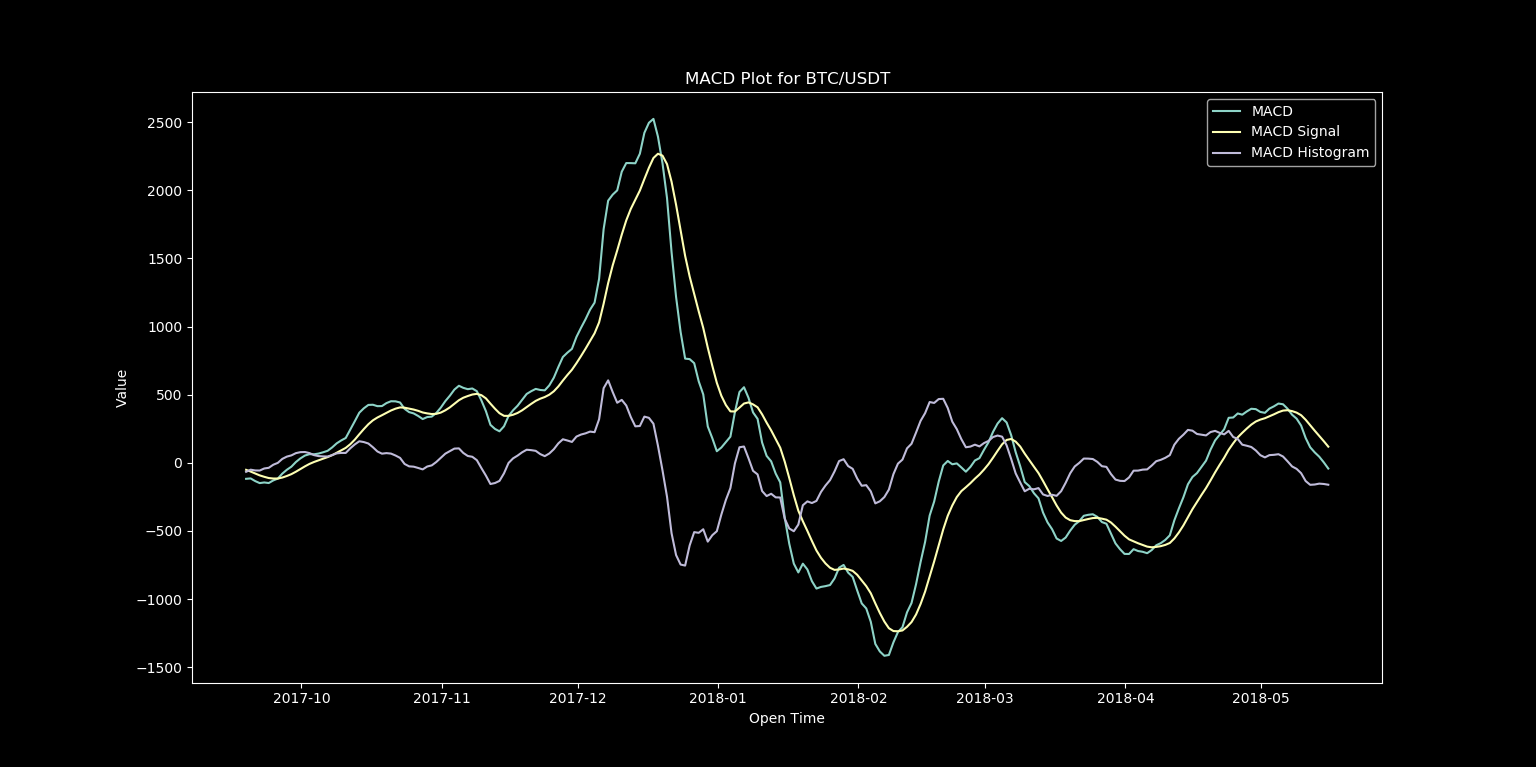 Figure 1: MACD output from above code By pulling up the MACD computed by [TradingView]( https://www.tradingview.com/chart/8qIyPK2R/), we can compare this to our isolated MACD line: 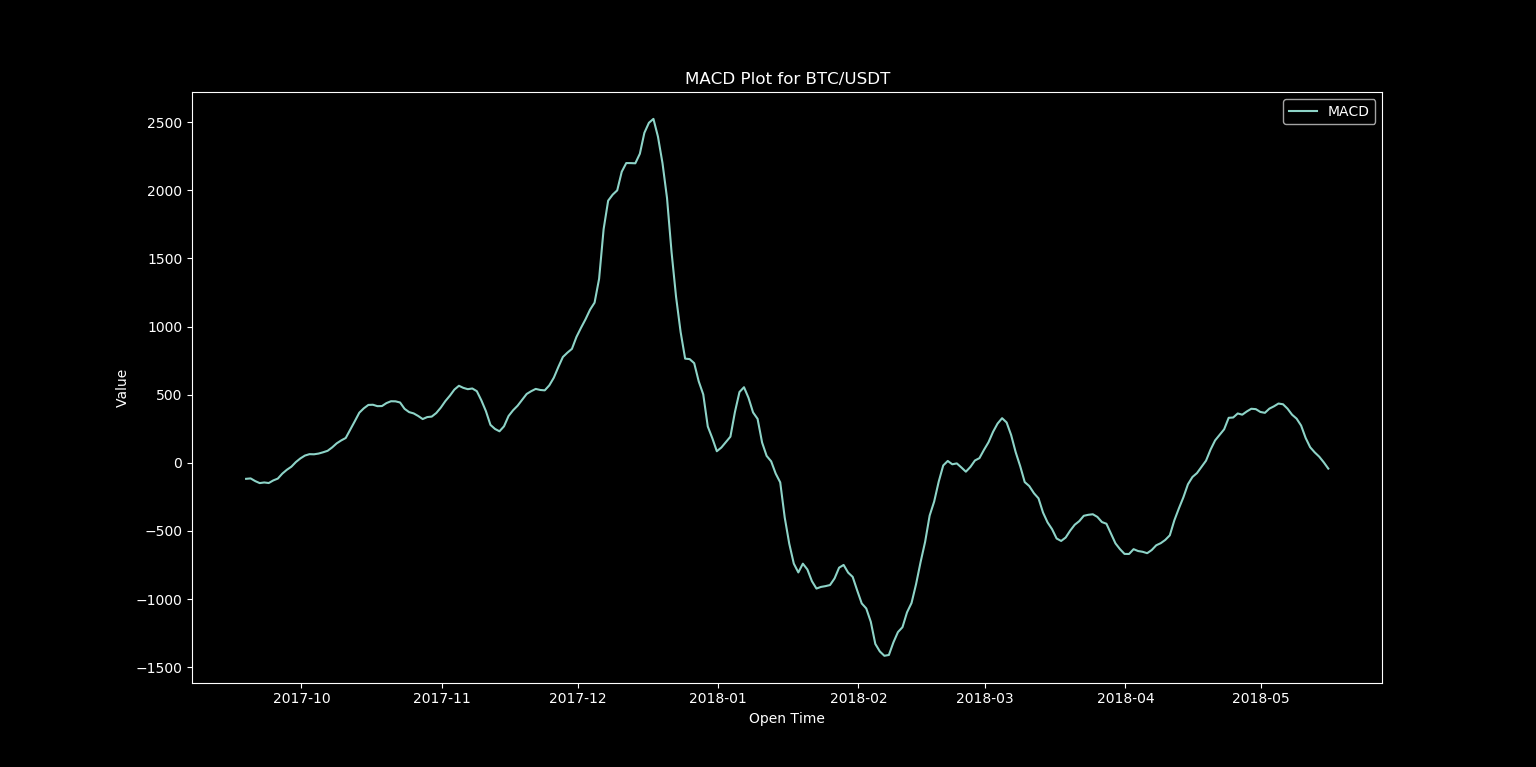 Figure 2: Isolated MACD Line from above code  Figure 3: MACD Output From TradingView An exact match, this means that we are now successfully able to compute the MACD indicator and can use it to build our very first trading strategy! # Step 3 – Crafting a Strategy The strategy that we will be creating will be a simple MACD crosover trading strategy. The idea is fairly simple and looks at the relationship between the MACD line and the MACD signal line (also called the trigger line). There are two types of crossovers: * Bullish MACD Crossover – We have a bullish MACD crossover when the MACD line crosses the slower signal line in the bullish direction. This action generates a bullish signal on the chart, which implies that the price might start an increase. * Bearish MACD Crossover – The bearish MACD crossover is opposite to the bullish MACD crossover. When the MACD line crosses the signal line in the bearish direction, we have a bearish crossover. This hints that the price action might be entering a bearish move. To start, we will add red and green indicators to our plot to show these crossover point. We can do this by replacing the code beneath this line: ```python3.6 macd, macdsignal, macdhist = ta.MACD(close_array, fastperiod=12, slowperiod=26, signalperiod=9) ``` with this: ```python3.6 crosses = [] macdabove = False for i in range(len(macd)): if np.isnan(macd[i]) or np.isnan(macdsignal[i]): pass else: if macd[i] > macdsignal[i]: if macdabove == False: macdabove = True cross = [new_time[i],macd[i],'go'] crosses.append(cross) else: if macdabove == True: macdabove = False cross = [new_time[i],macd[i],'ro'] crosses.append(cross) plt.style.use('dark_background') plt.plot(new_time, macd, label='MACD') plt.plot(new_time, macdsignal, label='MACD Signal') for cross in crosses: plt.plot(cross[0],cross[1],cross[2]) #plt.plot(new_time, macdhist, label='MACD Histogram') plt.title("MACD Plot for BTC/USDT") plt.xlabel("Open Time") plt.ylabel("Value") plt.legend() plt.show() ``` This code for locating crossover points will certainly be improved in future posts, but this is a good start, and locating these points will make it very easy to backtest this trading strategy. # Looking Ahead In the next installment in this series, we will be cleaning up the code to generate our indicators into more versatile functions and classes, adding support for more indicators, and begin creating our backtesting tools to analyze the performance of various strategies. Looking even further ahead, I'll be covering: * Making our bot run in realtime * Expanding backtesting and analytics to read and write data to a MySQL database * Many more trading strategies * More efficient methods for scanning multiple trading pairs * Using TensorFlow to utilize machine learning for tuning weight of indicators in deciding on potential trades * And much more Any requests for future topics to cover or general feedback are greatly appreciated. Thanks for reading, Andrew |
| json metadata | {"tags":["cryptocurrency","trading","bot","python"],"image":["https://steemitimages.com/DQmQr6oJVTqFFij9gVNn46DtUN1o5tQZdip7MmgZzqUuych/macd1.png","https://steemitimages.com/DQmbbamKiA8dvxh846U33PkSCvVFHZJCRdTCiqTjeTUtxVD/macd3.png","https://steemitimages.com/DQmRnAm5TXvbSY27xGHFmXx4BUmnViEwbD5edcg2CWo9fbC/macd2.png"],"links":["https://steemit.com/cryptocurrency/@genesiscrypto/cryptocurrency-trading-bot-part-1-setup-and-connect-to-binance","https://github.com/mrjbq7/ta-lib","https://www.tradingview.com/chart/8qIyPK2R/"],"app":"steemit/0.1","format":"markdown"} |
| parent author | |
| parent permlink | cryptocurrency |
| permlink | cryptocurrency-trading-bot-part-2-ta-lib-setup-and-beginning-strategy |
| title | Cryptocurrency Trading Bot Part 2 - TA-LIB Setup and Beginning Strategy |
| Transaction Info | Block #22493760/Trx 28ccf14b5c9cbbd28da30c5ce586b11ab4e0ffbe |
View Raw JSON Data
{
"block": 22493760,
"op": [
"comment",
{
"author": "genesiscrypto",
"body": "# Where We Are Now?\n\nIf you have followed [Step 1](https://steemit.com/cryptocurrency/@genesiscrypto/cryptocurrency-trading-bot-part-1-setup-and-connect-to-binance), then you now have a Binance client setup in Python. The next logical step is to develop a strategy to teach our bot how to trade. The strategy that we will develop today will sadly not make you a millionaire, but utilizing the principles learned in this tutorial in combination with indicator strategies and back testing methods which we will develop in future tutorials just might, so this is an important first step for our bot.\n\n# Indicators\n\nThe key to building any good trading strategy starts with good indicators. There are thousands of them out there, and luckily for us, we won't have to reinvent the wheel to access them because we have access to historical data in the form of the Binance API, and we will soon have TA-LIB which will give us access to these indicators in the form of a handy Python library. \n\n# Step 1 - Installing TA-Lib and MatplotLib\nTA-Lib (short for Technical Analysis Library) can be installed by simply running the command:\n```\npip install TA-Lib\n```\nThis instillation is notorious for running into issues, but luckily many people have failed with this very same installation so if you have problems, check the troubleshooting section on the [Github page]( https://github.com/mrjbq7/ta-lib), or do a quick google search of any error produced by the installation and you should find a solution. \nWe will be using MatPlotLib to create plots and other analytics moving forward. MatPlotLib can be installed with:\n```\npip install matplotlib\n```\nNumpy is a helpful library for doing a number of necessary array and matrix operations among other things, and can be installed with:\n```\npip install numpy\n```\nThe final two libraries we will need are pandas and pandas_datareader. These libraries will simplify the task of converting data pulled from the Binance API into a format which TA-Lib can compute from. We will not use these libraries today for our simple example, but they will come in handy later. These libraries can be installed with:\n```\npip install pandas\npip install pandas_datareader\n```\n\n\n# Step 2 – Generate First Indicator \nNow we will use the data pulled from the Binance API in combination with TA-Lib, Numpy, and MatPlotLib to generate a MACD plot for the BTC/USDT trading pair. MACD stands for moving average convergence divergence. It is a trend-following momentum indicator that shows the relationship between two moving averages of prices. We will plot these two moving average lines with the following modified python script which we started in the previous part.\n```python3.6\nfrom binance.client import Client\nimport talib as ta\nimport matplotlib.pyplot as plt\nimport numpy as np\nfrom datetime import datetime\n\nclass Trader:\n def __init__(self, file):\n self.connect(file)\n\n \"\"\" Creates Binance client \"\"\"\n def connect(self,file):\n lines = [line.rstrip('\\n') for line in open(file)]\n key = lines[0]\n secret = lines[1]\n self.client = Client(key, secret)\n\n \"\"\" Gets all account balances \"\"\"\n def getBalances(self):\n prices = self.client.get_withdraw_history()\n return prices\n\nfilename = 'credentials.txt'\ntrader = Trader(filename)\n\ntrading_pair = 'BTCUSDT'\ninterval = '1d'\nklines = trader.client.get_klines(symbol=trading_pair,interval=interval)\nopen_time = [int(entry[0]) for entry in klines]\nclose = [float(entry[4]) for entry in klines]\nclose_array = np.asarray(close)\nnew_time = [datetime.fromtimestamp(time/1000) for time in open_time]\n\nmacd, macdsignal, macdhist = ta.MACD(close_array, fastperiod=12, slowperiod=26, signalperiod=9)\n\n\n\nplt.style.use('dark_background')\nplt.plot(new_time, macd, label='MACD')\nplt.plot(new_time, macdsignal, label='MACD Signal')\nplt.plot(new_time, macdhist, label='MACD Histogram')\nplt.title(\"MACD Plot for BTC/USDT\")\nplt.xlabel(\"Open Time\")\nplt.ylabel(\"Value\")\nplt.legend()\nplt.show()\n\n```\nIn future tutorials we will move code for data generation, indicator computing, and plotting into separate classes and functions to make it easier to build complex trading strategies, but for now this code will be fine at the module level.\n\nIf all of your libraries have been installed successfully, you should see an output that looks like this:\n\n\nFigure 1: MACD output from above code\n\nBy pulling up the MACD computed by [TradingView]( https://www.tradingview.com/chart/8qIyPK2R/), we can compare this to our isolated MACD line:\n\nFigure 2: Isolated MACD Line from above code\n\n\nFigure 3: MACD Output From TradingView\n\nAn exact match, this means that we are now successfully able to compute the MACD indicator and can use it to build our very first trading strategy!\n\n# Step 3 – Crafting a Strategy\nThe strategy that we will be creating will be a simple MACD crosover trading strategy. The idea is fairly simple and looks at the relationship between the MACD line and the MACD signal line (also called the trigger line). There are two types of crossovers:\n* Bullish MACD Crossover – We have a bullish MACD crossover when the MACD line crosses the slower signal line in the bullish direction. This action generates a bullish signal on the chart, which implies that the price might start an increase.\n* Bearish MACD Crossover – The bearish MACD crossover is opposite to the bullish MACD crossover. When the MACD line crosses the signal line in the bearish direction, we have a bearish crossover. This hints that the price action might be entering a bearish move.\n\nTo start, we will add red and green indicators to our plot to show these crossover point. We can do this by replacing the code beneath this line:\n```python3.6\nmacd, macdsignal, macdhist = ta.MACD(close_array, fastperiod=12, slowperiod=26, signalperiod=9)\n```\nwith this:\n```python3.6\ncrosses = []\nmacdabove = False\nfor i in range(len(macd)):\n if np.isnan(macd[i]) or np.isnan(macdsignal[i]):\n pass\n else:\n if macd[i] > macdsignal[i]:\n if macdabove == False:\n macdabove = True\n cross = [new_time[i],macd[i],'go']\n crosses.append(cross)\n else:\n if macdabove == True:\n macdabove = False\n cross = [new_time[i],macd[i],'ro']\n crosses.append(cross)\n\n\n\nplt.style.use('dark_background')\nplt.plot(new_time, macd, label='MACD')\nplt.plot(new_time, macdsignal, label='MACD Signal')\nfor cross in crosses:\n plt.plot(cross[0],cross[1],cross[2])\n#plt.plot(new_time, macdhist, label='MACD Histogram')\nplt.title(\"MACD Plot for BTC/USDT\")\nplt.xlabel(\"Open Time\")\nplt.ylabel(\"Value\")\nplt.legend()\nplt.show()\n```\n\nThis code for locating crossover points will certainly be improved in future posts, but this is a good start, and locating these points will make it very easy to backtest this trading strategy. \n\n \n# Looking Ahead \n\nIn the next installment in this series, we will be cleaning up the code to generate our indicators into more versatile functions and classes, adding support for more indicators, and begin creating our backtesting tools to analyze the performance of various strategies.\n\nLooking even further ahead, I'll be covering:\n* Making our bot run in realtime\n* Expanding backtesting and analytics to read and write data to a MySQL database\n* Many more trading strategies \n* More efficient methods for scanning multiple trading pairs\n* Using TensorFlow to utilize machine learning for tuning weight of indicators in deciding on potential trades\n* And much more\n\nAny requests for future topics to cover or general feedback are greatly appreciated.\n\nThanks for reading,\nAndrew",
"json_metadata": "{\"tags\":[\"cryptocurrency\",\"trading\",\"bot\",\"python\"],\"image\":[\"https://steemitimages.com/DQmQr6oJVTqFFij9gVNn46DtUN1o5tQZdip7MmgZzqUuych/macd1.png\",\"https://steemitimages.com/DQmbbamKiA8dvxh846U33PkSCvVFHZJCRdTCiqTjeTUtxVD/macd3.png\",\"https://steemitimages.com/DQmRnAm5TXvbSY27xGHFmXx4BUmnViEwbD5edcg2CWo9fbC/macd2.png\"],\"links\":[\"https://steemit.com/cryptocurrency/@genesiscrypto/cryptocurrency-trading-bot-part-1-setup-and-connect-to-binance\",\"https://github.com/mrjbq7/ta-lib\",\"https://www.tradingview.com/chart/8qIyPK2R/\"],\"app\":\"steemit/0.1\",\"format\":\"markdown\"}",
"parent_author": "",
"parent_permlink": "cryptocurrency",
"permlink": "cryptocurrency-trading-bot-part-2-ta-lib-setup-and-beginning-strategy",
"title": "Cryptocurrency Trading Bot Part 2 - TA-LIB Setup and Beginning Strategy"
}
],
"op_in_trx": 0,
"timestamp": "2018-05-16T23:32:57",
"trx_id": "28ccf14b5c9cbbd28da30c5ce586b11ab4e0ffbe",
"trx_in_block": 44,
"virtual_op": 0
}2018/05/16 09:45:00
2018/05/16 09:45:00
| author | algo.coder |
| body | Nice initiative ! I too am fond of trading bots... What's the trading strategy you will apply with this bot ? Will this journey will just be about coding a bot or will we have basktestings, discussion about strategies, etc. ? Following you anyway, and looking forward to see where this goes... |
| json metadata | {"tags":["cryptocurrency"],"app":"steemit/0.1"} |
| parent author | genesiscrypto |
| parent permlink | cryptocurrency-trading-bot-part-1-setup-and-connect-to-binance |
| permlink | re-genesiscrypto-cryptocurrency-trading-bot-part-1-setup-and-connect-to-binance-20180516t094500743z |
| title | |
| Transaction Info | Block #22477204/Trx dd84695c4b975392ef09cb868125b08a9759c78e |
View Raw JSON Data
{
  "block": 22477204,
  "op": [
    "comment",
    {
      "author": "algo.coder",
      "body": "Nice initiative ! I too am fond of trading bots...\nWhat's the trading strategy you will apply with this bot ? Will this journey will just be about coding a bot or will we have basktestings, discussion about strategies, etc. ?\nFollowing you anyway, and looking forward to see where this goes...",
      "json_metadata": "{\"tags\":[\"cryptocurrency\"],\"app\":\"steemit/0.1\"}",
      "parent_author": "genesiscrypto",
      "parent_permlink": "cryptocurrency-trading-bot-part-1-setup-and-connect-to-binance",
      "permlink": "re-genesiscrypto-cryptocurrency-trading-bot-part-1-setup-and-connect-to-binance-20180516t094500743z",
      "title": ""
    }
  ],
  "op_in_trx": 0,
  "timestamp": "2018-05-16T09:45:00",
  "trx_id": "dd84695c4b975392ef09cb868125b08a9759c78e",
  "trx_in_block": 53,
  "virtual_op": 0
}2018/05/16 09:42:36
2018/05/16 09:42:36
| author | genesiscrypto |
| permlink | cryptocurrency-trading-bot-part-1-setup-and-connect-to-binance |
| voter | algo.coder |
| weight | 10000 (100.00%) |
| Transaction Info | Block #22477156/Trx 402860412cca2187dee325f42f209ae4c30e8a51 |
View Raw JSON Data
{
  "block": 22477156,
  "op": [
    "vote",
    {
      "author": "genesiscrypto",
      "permlink": "cryptocurrency-trading-bot-part-1-setup-and-connect-to-binance",
      "voter": "algo.coder",
      "weight": 10000
    }
  ],
  "op_in_trx": 0,
  "timestamp": "2018-05-16T09:42:36",
  "trx_id": "402860412cca2187dee325f42f209ae4c30e8a51",
  "trx_in_block": 3,
  "virtual_op": 0
}2018/05/16 06:50:09
2018/05/16 06:50:09
| author | steemitboard |
| body | Congratulations @genesiscrypto! You have completed some achievement on Steemit and have been rewarded with new badge(s) : [](http://steemitboard.com/@genesiscrypto) You published your First Post [](http://steemitboard.com/@genesiscrypto) You made your First Vote [](http://steemitboard.com/@genesiscrypto) You got a First Vote Click on any badge to view your own Board of Honor on SteemitBoard. For more information about SteemitBoard, click [here](https://steemit.com/@steemitboard) If you no longer want to receive notifications, reply to this comment with the word `STOP` > Upvote this notification to help all Steemit users. Learn why [here](https://steemit.com/steemitboard/@steemitboard/http-i-cubeupload-com-7ciqeo-png)! |
| json metadata | {"image":["https://steemitboard.com/img/notifications.png"]} |
| parent author | genesiscrypto |
| parent permlink | cryptocurrency-trading-bot-part-1-setup-and-connect-to-binance |
| permlink | steemitboard-notify-genesiscrypto-20180516t065009000z |
| title | |
| Transaction Info | Block #22473708/Trx 73a1f0fd3a0c1cc9349190574c52849986e44cc1 |
View Raw JSON Data
{
"block": 22473708,
"op": [
"comment",
{
"author": "steemitboard",
"body": "Congratulations @genesiscrypto! You have completed some achievement on Steemit and have been rewarded with new badge(s) :\n\n[](http://steemitboard.com/@genesiscrypto) You published your First Post\n[](http://steemitboard.com/@genesiscrypto) You made your First Vote\n[](http://steemitboard.com/@genesiscrypto) You got a First Vote\n\nClick on any badge to view your own Board of Honor on SteemitBoard.\nFor more information about SteemitBoard, click [here](https://steemit.com/@steemitboard)\n\nIf you no longer want to receive notifications, reply to this comment with the word `STOP`\n\n> Upvote this notification to help all Steemit users. Learn why [here](https://steemit.com/steemitboard/@steemitboard/http-i-cubeupload-com-7ciqeo-png)!",
"json_metadata": "{\"image\":[\"https://steemitboard.com/img/notifications.png\"]}",
"parent_author": "genesiscrypto",
"parent_permlink": "cryptocurrency-trading-bot-part-1-setup-and-connect-to-binance",
"permlink": "steemitboard-notify-genesiscrypto-20180516t065009000z",
"title": ""
}
],
"op_in_trx": 0,
"timestamp": "2018-05-16T06:50:09",
"trx_id": "73a1f0fd3a0c1cc9349190574c52849986e44cc1",
"trx_in_block": 9,
"virtual_op": 0
}genesiscryptopowered up 39.023 STEEM to @genesiscrypto2018/05/16 01:51:00
genesiscryptopowered up 39.023 STEEM to @genesiscrypto
2018/05/16 01:51:00
| amount | 39.023 STEEM |
| from | genesiscrypto |
| to | genesiscrypto |
| Transaction Info | Block #22467726/Trx c6f85a682c8372231b4ad8c77d7bf33f37827cc4 |
View Raw JSON Data
{
  "block": 22467726,
  "op": [
    "transfer_to_vesting",
    {
      "amount": "39.023 STEEM",
      "from": "genesiscrypto",
      "to": "genesiscrypto"
    }
  ],
  "op_in_trx": 0,
  "timestamp": "2018-05-16T01:51:00",
  "trx_id": "c6f85a682c8372231b4ad8c77d7bf33f37827cc4",
  "trx_in_block": 20,
  "virtual_op": 0
}genesiscryptofollowed @bitcoinquest2018/05/15 21:54:12
genesiscryptofollowed @bitcoinquest
2018/05/15 21:54:12
| id | follow |
| json | ["follow",{"follower":"genesiscrypto","following":"bitcoinquest","what":["blog"]}] |
| required auths | [] |
| required posting auths | ["genesiscrypto"] |
| Transaction Info | Block #22462992/Trx 1d18c5af4df44c4a4be8d934ba7b5af7b60704ce |
View Raw JSON Data
{
  "block": 22462992,
  "op": [
    "custom_json",
    {
      "id": "follow",
      "json": "[\"follow\",{\"follower\":\"genesiscrypto\",\"following\":\"bitcoinquest\",\"what\":[\"blog\"]}]",
      "required_auths": [],
      "required_posting_auths": [
        "genesiscrypto"
      ]
    }
  ],
  "op_in_trx": 0,
  "timestamp": "2018-05-15T21:54:12",
  "trx_id": "1d18c5af4df44c4a4be8d934ba7b5af7b60704ce",
  "trx_in_block": 2,
  "virtual_op": 0
}2018/05/15 21:53:48
2018/05/15 21:53:48
| author | bitcoinquest |
| permlink | re-genesiscrypto-cryptocurrency-trading-bot-part-1-setup-and-connect-to-binance-20180515t212804233z |
| voter | genesiscrypto |
| weight | 10000 (100.00%) |
| Transaction Info | Block #22462984/Trx 7ff7dd3044d11fa4fc39cff9299bae6f223ae8ea |
View Raw JSON Data
{
  "block": 22462984,
  "op": [
    "vote",
    {
      "author": "bitcoinquest",
      "permlink": "re-genesiscrypto-cryptocurrency-trading-bot-part-1-setup-and-connect-to-binance-20180515t212804233z",
      "voter": "genesiscrypto",
      "weight": 10000
    }
  ],
  "op_in_trx": 0,
  "timestamp": "2018-05-15T21:53:48",
  "trx_id": "7ff7dd3044d11fa4fc39cff9299bae6f223ae8ea",
  "trx_in_block": 44,
  "virtual_op": 0
}2018/05/15 21:28:06
2018/05/15 21:28:06
| author | bitcoinquest |
| body | This is written for dummies, great job! I like the idea to access the login data from a separate file and not hard code it in the script. Curious to read part two. |
| json metadata | {"tags":["cryptocurrency"],"app":"steemit/0.1"} |
| parent author | genesiscrypto |
| parent permlink | cryptocurrency-trading-bot-part-1-setup-and-connect-to-binance |
| permlink | re-genesiscrypto-cryptocurrency-trading-bot-part-1-setup-and-connect-to-binance-20180515t212804233z |
| title | |
| Transaction Info | Block #22462470/Trx beda0d533346f6578f21da9e92676999b95c2505 |
View Raw JSON Data
{
  "block": 22462470,
  "op": [
    "comment",
    {
      "author": "bitcoinquest",
      "body": "This is written for dummies, great job! I like the idea to access the login data from a separate file and not hard code it in the script.\n\nCurious to read part two.",
      "json_metadata": "{\"tags\":[\"cryptocurrency\"],\"app\":\"steemit/0.1\"}",
      "parent_author": "genesiscrypto",
      "parent_permlink": "cryptocurrency-trading-bot-part-1-setup-and-connect-to-binance",
      "permlink": "re-genesiscrypto-cryptocurrency-trading-bot-part-1-setup-and-connect-to-binance-20180515t212804233z",
      "title": ""
    }
  ],
  "op_in_trx": 0,
  "timestamp": "2018-05-15T21:28:06",
  "trx_id": "beda0d533346f6578f21da9e92676999b95c2505",
  "trx_in_block": 4,
  "virtual_op": 0
}2018/05/15 21:26:42
2018/05/15 21:26:42
| author | genesiscrypto |
| permlink | cryptocurrency-trading-bot-part-1-setup-and-connect-to-binance |
| voter | bitcoinquest |
| weight | 10000 (100.00%) |
| Transaction Info | Block #22462442/Trx 1d8eba6a25a56608b4fb3337886d7297143512e3 |
View Raw JSON Data
{
  "block": 22462442,
  "op": [
    "vote",
    {
      "author": "genesiscrypto",
      "permlink": "cryptocurrency-trading-bot-part-1-setup-and-connect-to-binance",
      "voter": "bitcoinquest",
      "weight": 10000
    }
  ],
  "op_in_trx": 0,
  "timestamp": "2018-05-15T21:26:42",
  "trx_id": "1d8eba6a25a56608b4fb3337886d7297143512e3",
  "trx_in_block": 21,
  "virtual_op": 0
}2018/05/15 21:05:30
2018/05/15 21:05:30
| author | genesiscrypto |
| permlink | cryptocurrency-trading-bot-part-1-setup-and-connect-to-binance |
| voter | yehey |
| weight | 1000 (10.00%) |
| Transaction Info | Block #22462018/Trx 768ad7e66c3aaf4388395fa0c255a6b10a57b17f |
View Raw JSON Data
{
  "block": 22462018,
  "op": [
    "vote",
    {
      "author": "genesiscrypto",
      "permlink": "cryptocurrency-trading-bot-part-1-setup-and-connect-to-binance",
      "voter": "yehey",
      "weight": 1000
    }
  ],
  "op_in_trx": 0,
  "timestamp": "2018-05-15T21:05:30",
  "trx_id": "768ad7e66c3aaf4388395fa0c255a6b10a57b17f",
  "trx_in_block": 21,
  "virtual_op": 0
}genesiscryptopublished a new post: cryptocurrency-trading-bot-part-1-setup-and-connect-to-binance2018/05/15 20:39:39
genesiscryptopublished a new post: cryptocurrency-trading-bot-part-1-setup-and-connect-to-binance
2018/05/15 20:39:39
| author | genesiscrypto |
| body | # Introduction In this post, I'll be going through the basics of the tools that we'll be using to build our cryptocurrency trading bot. # Step One - Download PyCharm and Create Working Directory If you already have a Python IDE that you prefer to work, then by all means, use what is most comfortable to you. For the sake of these tutorials I'll be using PyCharm, which can be downloaded [here](https://www.jetbrains.com/pycharm/download/#section=windows) (the community edition will work just fine). Once PyCharm is downloaded and opened up, create a new project anywhere you like. This will be where we store all python and text files needed to create the bot. # Step Two - Set up Binance Account and Get API Keys Registering an account on Binance is easy, you simply click on this [link](https://www.binance.com/), and sign up. Once you have an account, select the user icon shown below, and then press account. 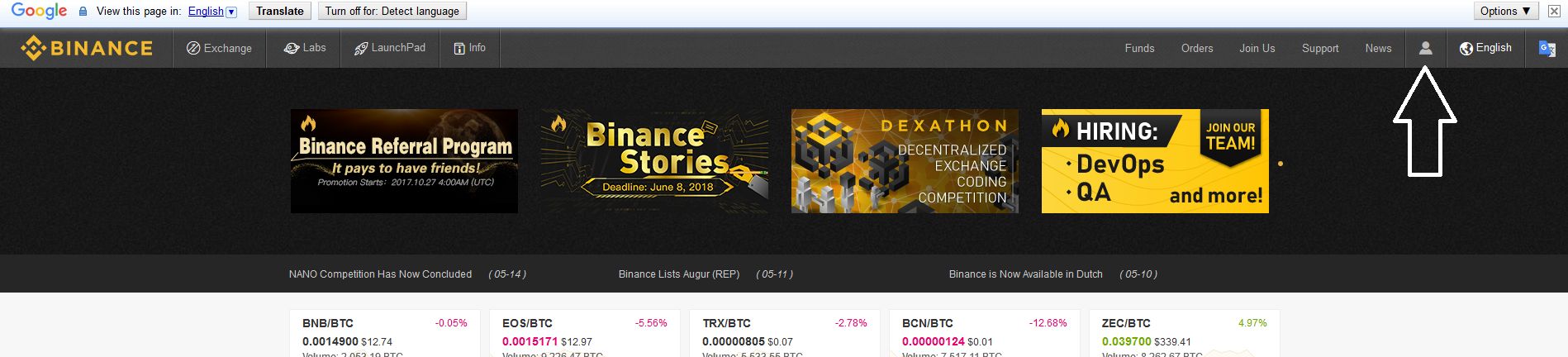 Once on the account page, find the box labeled API, and click enable. Next, enter an API key label (this can be anything), click Create New Key. Once you have your API Key and Secret Key, back them up in a secure location. What I did is create a file called credentials.txt in the working directory which we created in Step One, and pasted in the API Key on line one, and the secret key on line two. Later on in the post, I'll show you how to setup the Python-Binance API to use the keys stored in the credentials.txt file. # Step Three - Install the python-binance Client The [python-binance client](https://github.com/sammchardy/python-binance) by sammchardy will be our way of communicating with Binance from within Python. This Python Binance API is the most widely used and most well documented. The library can downloaded with pip using the command: ``` pip install python-binance ``` I ran into an issue on Windows 10 where the install would fail with exit code 1158, so if you run into this issue follow the steps in [this post](https://stackoverflow.com/questions/43858836/python-installing-clarifai-vs14-0-link-exe-failed-with-exit-status-1158/44563421) which should hopefully solve that issue. Once the python-binance library is installed, we're ready to connect to our Binance account with Python. # Step Four - Connect to Binance To connect to Binance we'll first need to create a python file in our working directory, I named mine trader.py. In this file paste in the following code: ```python3.6 from binance.client import Client class Trader: def __init__(self, file): self.connect(file) """ Creates Binance client """ def connect(self,file): lines = [line.rstrip('\n') for line in open(file)] key = lines[0] secret = lines[1] self.client = Client(key, secret) """ Gets all account balances """ def getBalances(self): prices = self.client.get_withdraw_history() return prices filename = 'credentials.txt' trader = Trader(filename) balances = trader.getBalances() print(balances) ``` If you run the following python script, you should get a print out of your account balances. If you get this result, then congratulations, you've successfully connected to Binance via Python! If you don't get the following result, there are a number of issues that you may have had. Some things to check for: * Ensure that Python 3.6 (or newer) is installed on your system * If the binance.client library is not found, retry the previous pip install and fix any errors that may arise until the library successfully downloads * If you receive an error relating to a Timestamp request error, check [this page](https://github.com/ccxt/ccxt/issues/850) to figure out how to sync your system clock to match Binance If you are having problems with this setup that you can't seem to fix, leave a comment on this post, and I'll try my best to help you resolve any issues. At this point you should have complete access to the Binance API, I encourage you to check out the python-binance [documentation](https://python-binance.readthedocs.io/en/latest/) and mess around with the commands that are available, because these commands will be the basis for making trades moving forward. In the next post, we'll go over how to setup TA-LIB and begin generating some indicators based on historical price data. Thanks for reading, Andrew |
| json metadata | {"tags":["cryptocurrency","trading","python","binance","bot"],"image":["https://steemitimages.com/DQmf4VpxyBX1Wqum5sjh8tHEu3p6xtZvphshxPbxyvidBDu/clickhere.png"],"links":["https://www.jetbrains.com/pycharm/download/#section=windows","https://www.binance.com/","https://github.com/sammchardy/python-binance","https://stackoverflow.com/questions/43858836/python-installing-clarifai-vs14-0-link-exe-failed-with-exit-status-1158/44563421","https://github.com/ccxt/ccxt/issues/850","https://python-binance.readthedocs.io/en/latest/"],"app":"steemit/0.1","format":"markdown"} |
| parent author | |
| parent permlink | cryptocurrency |
| permlink | cryptocurrency-trading-bot-part-1-setup-and-connect-to-binance |
| title | Cryptocurrency Trading Bot Part 1 - Setup And Connect To Binance |
| Transaction Info | Block #22461501/Trx 381d04255711106c89735cf43afcda588de67fb6 |
View Raw JSON Data
{
"block": 22461501,
"op": [
"comment",
{
"author": "genesiscrypto",
"body": "# Introduction\n\nIn this post, I'll be going through the basics of the tools that we'll be using to build our cryptocurrency trading bot.\n\n# Step One - Download PyCharm and Create Working Directory\n\nIf you already have a Python IDE that you prefer to work, then by all means, use what is most comfortable to you. For the sake of these tutorials I'll be using PyCharm, which can be downloaded [here](https://www.jetbrains.com/pycharm/download/#section=windows) (the community edition will work just fine). Once PyCharm is downloaded and opened up, create a new project anywhere you like. This will be where we store all python and text files needed to create the bot.\n\n# Step Two - Set up Binance Account and Get API Keys\n\nRegistering an account on Binance is easy, you simply click on this [link](https://www.binance.com/), and sign up. Once you have an account, select the user icon shown below, and then press account.\n\n\n\nOnce on the account page, find the box labeled API, and click enable.\n\nNext, enter an API key label (this can be anything), click Create New Key.\n\nOnce you have your API Key and Secret Key, back them up in a secure location. What I did is create a file called credentials.txt in the working directory which we created in Step One, and pasted in the API Key on line one, and the secret key on line two. Later on in the post, I'll show you how to setup the Python-Binance API to use the keys stored in the credentials.txt file.\n\n# Step Three - Install the python-binance Client\n\nThe [python-binance client](https://github.com/sammchardy/python-binance) by sammchardy will be our way of communicating with Binance from within Python. This Python Binance API is the most widely used and most well documented. The library can downloaded with pip using the command: \n```\npip install python-binance\n```\nI ran into an issue on Windows 10 where the install would fail with exit code 1158, so if you run into this issue follow the steps in [this post](https://stackoverflow.com/questions/43858836/python-installing-clarifai-vs14-0-link-exe-failed-with-exit-status-1158/44563421) which should hopefully solve that issue.\n\nOnce the python-binance library is installed, we're ready to connect to our Binance account with Python.\n\n# Step Four - Connect to Binance\n\nTo connect to Binance we'll first need to create a python file in our working directory, I named mine trader.py. In this file paste in the following code:\n\n```python3.6\nfrom binance.client import Client\n\nclass Trader:\n def __init__(self, file):\n self.connect(file)\n\n \"\"\" Creates Binance client \"\"\"\n def connect(self,file):\n lines = [line.rstrip('\\n') for line in open(file)]\n key = lines[0]\n secret = lines[1]\n self.client = Client(key, secret)\n\n \"\"\" Gets all account balances \"\"\"\n def getBalances(self):\n prices = self.client.get_withdraw_history()\n return prices\n\nfilename = 'credentials.txt'\ntrader = Trader(filename)\nbalances = trader.getBalances()\nprint(balances)\n```\n\nIf you run the following python script, you should get a print out of your account balances. If you get this result, then congratulations, you've successfully connected to Binance via Python!\n\nIf you don't get the following result, there are a number of issues that you may have had. Some things to check for: \n* Ensure that Python 3.6 (or newer) is installed on your system\n* If the binance.client library is not found, retry the previous pip install and fix any errors that may arise until the library successfully downloads\n* If you receive an error relating to a Timestamp request error, check [this page](https://github.com/ccxt/ccxt/issues/850) to figure out how to sync your system clock to match Binance\n\nIf you are having problems with this setup that you can't seem to fix, leave a comment on this post, and I'll try my best to help you resolve any issues.\n\nAt this point you should have complete access to the Binance API, I encourage you to check out the python-binance [documentation](https://python-binance.readthedocs.io/en/latest/) and mess around with the commands that are available, because these commands will be the basis for making trades moving forward.\n\nIn the next post, we'll go over how to setup TA-LIB and begin generating some indicators based on historical price data.\n\nThanks for reading,\nAndrew",
"json_metadata": "{\"tags\":[\"cryptocurrency\",\"trading\",\"python\",\"binance\",\"bot\"],\"image\":[\"https://steemitimages.com/DQmf4VpxyBX1Wqum5sjh8tHEu3p6xtZvphshxPbxyvidBDu/clickhere.png\"],\"links\":[\"https://www.jetbrains.com/pycharm/download/#section=windows\",\"https://www.binance.com/\",\"https://github.com/sammchardy/python-binance\",\"https://stackoverflow.com/questions/43858836/python-installing-clarifai-vs14-0-link-exe-failed-with-exit-status-1158/44563421\",\"https://github.com/ccxt/ccxt/issues/850\",\"https://python-binance.readthedocs.io/en/latest/\"],\"app\":\"steemit/0.1\",\"format\":\"markdown\"}",
"parent_author": "",
"parent_permlink": "cryptocurrency",
"permlink": "cryptocurrency-trading-bot-part-1-setup-and-connect-to-binance",
"title": "Cryptocurrency Trading Bot Part 1 - Setup And Connect To Binance"
}
],
"op_in_trx": 0,
"timestamp": "2018-05-15T20:39:39",
"trx_id": "381d04255711106c89735cf43afcda588de67fb6",
"trx_in_block": 9,
"virtual_op": 0
}2018/05/15 17:46:45
2018/05/15 17:46:45
| author | withsmn |
| body | Cryptocurrency Trading Bot |
| json metadata | {"tags":["cryptocurrency"],"app":"steemit/0.1"} |
| parent author | genesiscrypto |
| parent permlink | introduction-to-the-genesis-cryptocurrency-trading-bot-journey |
| permlink | re-genesiscrypto-introduction-to-the-genesis-cryptocurrency-trading-bot-journey-20180515t174633300z |
| title | |
| Transaction Info | Block #22458043/Trx 49c40f949104757806d8aa711becb6f4376fc6db |
View Raw JSON Data
{
  "block": 22458043,
  "op": [
    "comment",
    {
      "author": "withsmn",
      "body": "Cryptocurrency Trading Bot",
      "json_metadata": "{\"tags\":[\"cryptocurrency\"],\"app\":\"steemit/0.1\"}",
      "parent_author": "genesiscrypto",
      "parent_permlink": "introduction-to-the-genesis-cryptocurrency-trading-bot-journey",
      "permlink": "re-genesiscrypto-introduction-to-the-genesis-cryptocurrency-trading-bot-journey-20180515t174633300z",
      "title": ""
    }
  ],
  "op_in_trx": 0,
  "timestamp": "2018-05-15T17:46:45",
  "trx_id": "49c40f949104757806d8aa711becb6f4376fc6db",
  "trx_in_block": 24,
  "virtual_op": 0
}genesiscryptofollowed @haejin2018/05/15 17:44:51
genesiscryptofollowed @haejin
2018/05/15 17:44:51
| id | follow |
| json | ["follow",{"follower":"genesiscrypto","following":"haejin","what":["blog"]}] |
| required auths | [] |
| required posting auths | ["genesiscrypto"] |
| Transaction Info | Block #22458005/Trx 857d5df6aa97aaf76f13f42d5304e648dd4da6cc |
View Raw JSON Data
{
  "block": 22458005,
  "op": [
    "custom_json",
    {
      "id": "follow",
      "json": "[\"follow\",{\"follower\":\"genesiscrypto\",\"following\":\"haejin\",\"what\":[\"blog\"]}]",
      "required_auths": [],
      "required_posting_auths": [
        "genesiscrypto"
      ]
    }
  ],
  "op_in_trx": 0,
  "timestamp": "2018-05-15T17:44:51",
  "trx_id": "857d5df6aa97aaf76f13f42d5304e648dd4da6cc",
  "trx_in_block": 19,
  "virtual_op": 0
}genesiscryptofollowed @crypto49er2018/05/15 17:44:27
genesiscryptofollowed @crypto49er
2018/05/15 17:44:27
| id | follow |
| json | ["follow",{"follower":"genesiscrypto","following":"crypto49er","what":["blog"]}] |
| required auths | [] |
| required posting auths | ["genesiscrypto"] |
| Transaction Info | Block #22457997/Trx 96ad0c3ad5845e64f1ddd794e99a6299fc12bcc1 |
View Raw JSON Data
{
  "block": 22457997,
  "op": [
    "custom_json",
    {
      "id": "follow",
      "json": "[\"follow\",{\"follower\":\"genesiscrypto\",\"following\":\"crypto49er\",\"what\":[\"blog\"]}]",
      "required_auths": [],
      "required_posting_auths": [
        "genesiscrypto"
      ]
    }
  ],
  "op_in_trx": 0,
  "timestamp": "2018-05-15T17:44:27",
  "trx_id": "96ad0c3ad5845e64f1ddd794e99a6299fc12bcc1",
  "trx_in_block": 72,
  "virtual_op": 0
}2018/05/15 17:43:12
2018/05/15 17:43:12
| author | genesiscrypto |
| permlink | introduction-to-the-genesis-cryptocurrency-trading-bot-journey |
| voter | ax3 |
| weight | 100 (1.00%) |
| Transaction Info | Block #22457972/Trx 42c72f7e3dd583e1b5bc27b59cc7fb8197d70753 |
View Raw JSON Data
{
  "block": 22457972,
  "op": [
    "vote",
    {
      "author": "genesiscrypto",
      "permlink": "introduction-to-the-genesis-cryptocurrency-trading-bot-journey",
      "voter": "ax3",
      "weight": 100
    }
  ],
  "op_in_trx": 0,
  "timestamp": "2018-05-15T17:43:12",
  "trx_id": "42c72f7e3dd583e1b5bc27b59cc7fb8197d70753",
  "trx_in_block": 33,
  "virtual_op": 0
}2018/05/15 17:43:12
2018/05/15 17:43:12
| author | introduce.bot |
| body | ✅ @genesiscrypto, congratulations on making your first post! **I gave you an upvote!**<br><br>**Please give me a follow** and take a moment to read [this post](https://steemit.com/spam/@pleasestop/introducing-pleasestop-here-to-reduce-comment-spam) regarding commenting and spam.<br>(tl;dr - if you spam, you will be flagged!) |
| json metadata | |
| parent author | genesiscrypto |
| parent permlink | introduction-to-the-genesis-cryptocurrency-trading-bot-journey |
| permlink | introduce-bot-re-genesiscryptointroduction-to-the-genesis-cryptocurrency-trading-bot-journey |
| title | |
| Transaction Info | Block #22457972/Trx d6feb503c3494d652e6b97d6df39166cbb0ad7f6 |
View Raw JSON Data
{
  "block": 22457972,
  "op": [
    "comment",
    {
      "author": "introduce.bot",
      "body": "✅  @genesiscrypto, congratulations on making your first post! **I gave you an upvote!**<br><br>**Please give me a follow** and take a moment to read [this post](https://steemit.com/spam/@pleasestop/introducing-pleasestop-here-to-reduce-comment-spam) regarding commenting and spam.<br>(tl;dr - if you spam, you will be flagged!)",
      "json_metadata": "",
      "parent_author": "genesiscrypto",
      "parent_permlink": "introduction-to-the-genesis-cryptocurrency-trading-bot-journey",
      "permlink": "introduce-bot-re-genesiscryptointroduction-to-the-genesis-cryptocurrency-trading-bot-journey",
      "title": ""
    }
  ],
  "op_in_trx": 0,
  "timestamp": "2018-05-15T17:43:12",
  "trx_id": "d6feb503c3494d652e6b97d6df39166cbb0ad7f6",
  "trx_in_block": 32,
  "virtual_op": 0
}2018/05/15 17:43:09
2018/05/15 17:43:09
| author | genesiscrypto |
| permlink | introduction-to-the-genesis-cryptocurrency-trading-bot-journey |
| voter | introduce.bot |
| weight | 69 (0.69%) |
| Transaction Info | Block #22457971/Trx 2df90ba6a8a116c35f1712f28e990138fc7134ab |
View Raw JSON Data
{
  "block": 22457971,
  "op": [
    "vote",
    {
      "author": "genesiscrypto",
      "permlink": "introduction-to-the-genesis-cryptocurrency-trading-bot-journey",
      "voter": "introduce.bot",
      "weight": 69
    }
  ],
  "op_in_trx": 0,
  "timestamp": "2018-05-15T17:43:09",
  "trx_id": "2df90ba6a8a116c35f1712f28e990138fc7134ab",
  "trx_in_block": 43,
  "virtual_op": 0
}Manabar
Voting Power100.00%
Downvote Power100.00%
Resource Credits100.00%
Reputation Progress0.00%
{
  "voting_manabar": {
    "current_mana": 9604,
    "last_update_time": 1526934360
  },
  "downvote_manabar": {
    "current_mana": 0,
    "last_update_time": 1526401983
  },
  "rc_account": {
    "account": "genesiscrypto",
    "rc_manabar": {
      "current_mana": "87534326067",
      "last_update_time": 1537887600
    },
    "max_rc_creation_adjustment": {
      "amount": "2020748973",
      "precision": 6,
      "nai": "@@000000037"
    },
    "max_rc": "87534326067"
  }
}
Account Metadata
| POSTING JSON METADATA | |
| profile | {"profile_image":"https://steemitimages.com/DQmUgxUJMFG6h6TwRhZNrdCkGQZ1yM1yi3cvzyHdts3Fbo8/408ryru2vzty.jpg","cover_image":"https://steemitimages.com/DQmbm3WT6zmLGc1mgGztNbzJffq4qAGkkJbbq8E6F9zgTFn/sc206459.jpg","name":"Genesis Investments","about":"We are a cryptocurrency investment company documenting our journey in creating and refining our trading bot","location":"Saint Peters, Missouri","website":"https://genesiscrypto.fund/"} |
| JSON METADATA | |
| profile | {"profile_image":"https://steemitimages.com/DQmUgxUJMFG6h6TwRhZNrdCkGQZ1yM1yi3cvzyHdts3Fbo8/408ryru2vzty.jpg","cover_image":"https://steemitimages.com/DQmbm3WT6zmLGc1mgGztNbzJffq4qAGkkJbbq8E6F9zgTFn/sc206459.jpg","name":"Genesis Investments","about":"We are a cryptocurrency investment company documenting our journey in creating and refining our trading bot","location":"Saint Peters, Missouri","website":"https://genesiscrypto.fund/"} |
{
  "posting_json_metadata": {
    "profile": {
      "profile_image": "https://steemitimages.com/DQmUgxUJMFG6h6TwRhZNrdCkGQZ1yM1yi3cvzyHdts3Fbo8/408ryru2vzty.jpg",
      "cover_image": "https://steemitimages.com/DQmbm3WT6zmLGc1mgGztNbzJffq4qAGkkJbbq8E6F9zgTFn/sc206459.jpg",
      "name": "Genesis Investments",
      "about": "We are a cryptocurrency investment company documenting our journey in creating and refining our trading bot",
      "location": "Saint Peters, Missouri",
      "website": "https://genesiscrypto.fund/"
    }
  },
  "json_metadata": {
    "profile": {
      "profile_image": "https://steemitimages.com/DQmUgxUJMFG6h6TwRhZNrdCkGQZ1yM1yi3cvzyHdts3Fbo8/408ryru2vzty.jpg",
      "cover_image": "https://steemitimages.com/DQmbm3WT6zmLGc1mgGztNbzJffq4qAGkkJbbq8E6F9zgTFn/sc206459.jpg",
      "name": "Genesis Investments",
      "about": "We are a cryptocurrency investment company documenting our journey in creating and refining our trading bot",
      "location": "Saint Peters, Missouri",
      "website": "https://genesiscrypto.fund/"
    }
  }
}
Auth Keys
Owner
Single Signature
Public Keys
STM6v8tVirCVU8U4kyfjHJBkyJxcpXaWbkA5cFDn3ihCcYdp3PSix1/1
Active
Single Signature
Public Keys
STM7aL2hWzccrQfnjXTE6pvM33ZJRreZswEGsY1N5VVZfwnyzGAM61/1
Posting
Single Signature
Public Keys
STM6e79CaM5fRrBuc4nggKx9n87EDwaJuHw8oEdFsMMrm5UNttynk1/1
Memo
STM5dtxUXKKnHaNfvd47HYmFtwNsSPNg6auTVaxX659eQCTApM7V3
{
  "owner": {
    "account_auths": [],
    "key_auths": [
      [
        "STM6v8tVirCVU8U4kyfjHJBkyJxcpXaWbkA5cFDn3ihCcYdp3PSix",
        1
      ]
    ],
    "weight_threshold": 1
  },
  "active": {
    "account_auths": [],
    "key_auths": [
      [
        "STM7aL2hWzccrQfnjXTE6pvM33ZJRreZswEGsY1N5VVZfwnyzGAM6",
        1
      ]
    ],
    "weight_threshold": 1
  },
  "posting": {
    "account_auths": [],
    "key_auths": [
      [
        "STM6e79CaM5fRrBuc4nggKx9n87EDwaJuHw8oEdFsMMrm5UNttynk",
        1
      ]
    ],
    "weight_threshold": 1
  },
  "memo": "STM5dtxUXKKnHaNfvd47HYmFtwNsSPNg6auTVaxX659eQCTApM7V3"
}
Witness Votes
0 / 30
No active witness votes.
[]