

VOTING POWER100.00%
DOWNVOTE POWER100.00%
RESOURCE CREDITS100.00%
REPUTATION PROGRESS0.00%
Net Worth
0.217USD
STEEM
0.002STEEM
SBD
0.000SBD
Own SP
3.740SP
Detailed Balance
| STEEM | ||
| balance | 0.002STEEM | STEEM |
| market_balance | 0.000STEEM | STEEM |
| savings_balance | 0.000STEEM | STEEM |
| reward_steem_balance | 0.000STEEM | STEEM |
| STEEM POWER | ||
| Own SP | 3.740SP | SP |
| Delegated Out | 0.000SP | SP |
| Delegation In | 0.000SP | SP |
| Effective Power | 3.740SP | SP |
| Reward SP (pending) | 0.000SP | SP |
| SBD | ||
| sbd_balance | 0.000SBD | SBD |
| sbd_conversions | 0.000SBD | SBD |
| sbd_market_balance | 0.000SBD | SBD |
| savings_sbd_balance | 0.000SBD | SBD |
| reward_sbd_balance | 0.000SBD | SBD |
{
  "balance": "0.002 STEEM",
  "savings_balance": "0.000 STEEM",
  "reward_steem_balance": "0.000 STEEM",
  "vesting_shares": "6082.613735 VESTS",
  "delegated_vesting_shares": "0.000000 VESTS",
  "received_vesting_shares": "0.000000 VESTS",
  "sbd_balance": "0.000 SBD",
  "savings_sbd_balance": "0.000 SBD",
  "reward_sbd_balance": "0.000 SBD",
  "conversions": []
}
Account Info
| name | fengqun |
| id | 1080603 |
| rank | 848,537 |
| reputation | 1119566 |
| created | 2018-07-24T12:56:03 |
| recovery_account | blocktrades |
| proxy | None |
| post_count | 2 |
| comment_count | 0 |
| lifetime_vote_count | 0 |
| witnesses_voted_for | 0 |
| last_post | 2021-04-13T00:28:48 |
| last_root_post | 2021-04-13T00:28:48 |
| last_vote_time | 2021-04-12T03:30:57 |
| proxied_vsf_votes | 0, 0, 0, 0 |
| can_vote | 1 |
| voting_power | 9,799 |
| delayed_votes | 0 |
| balance | 0.002 STEEM |
| savings_balance | 0.000 STEEM |
| sbd_balance | 0.000 SBD |
| savings_sbd_balance | 0.000 SBD |
| vesting_shares | 6082.613735 VESTS |
| delegated_vesting_shares | 0.000000 VESTS |
| received_vesting_shares | 0.000000 VESTS |
| reward_vesting_balance | 0.000000 VESTS |
| vesting_balance | 0.000 STEEM |
| vesting_withdraw_rate | 0.000000 VESTS |
| next_vesting_withdrawal | 1969-12-31T23:59:59 |
| withdrawn | 6082613735 |
| to_withdraw | 6082613735 |
| withdraw_routes | 1 |
| savings_withdraw_requests | 0 |
| last_account_recovery | 1970-01-01T00:00:00 |
| reset_account | null |
| last_owner_update | 2021-04-12T02:50:42 |
| last_account_update | 2021-04-12T02:50:42 |
| mined | No |
| sbd_seconds | 0 |
| sbd_last_interest_payment | 1970-01-01T00:00:00 |
| savings_sbd_last_interest_payment | 1970-01-01T00:00:00 |
{
  "active": {
    "account_auths": [],
    "key_auths": [
      [
        "STM5W6tevRjQ9V2TUqnB5Xxtuqq1Hq5xqwtxTsyLUfgCMfVxx7dao",
        1
      ]
    ],
    "weight_threshold": 1
  },
  "balance": "0.002 STEEM",
  "can_vote": true,
  "comment_count": 0,
  "created": "2018-07-24T12:56:03",
  "curation_rewards": 0,
  "delegated_vesting_shares": "0.000000 VESTS",
  "downvote_manabar": {
    "current_mana": 1520653433,
    "last_update_time": 1618198257
  },
  "guest_bloggers": [],
  "id": 1080603,
  "json_metadata": "{}",
  "last_account_recovery": "1970-01-01T00:00:00",
  "last_account_update": "2021-04-12T02:50:42",
  "last_owner_update": "2021-04-12T02:50:42",
  "last_post": "2021-04-13T00:28:48",
  "last_root_post": "2021-04-13T00:28:48",
  "last_vote_time": "2021-04-12T03:30:57",
  "lifetime_vote_count": 0,
  "market_history": [],
  "memo_key": "STM8hRTkKjnVyz7VCferP68Kj165gfrdLLtxHJE6fNCgTQ7Rf3XzM",
  "mined": false,
  "name": "fengqun",
  "next_vesting_withdrawal": "1969-12-31T23:59:59",
  "other_history": [],
  "owner": {
    "account_auths": [],
    "key_auths": [
      [
        "STM5N2KamqVXncHRjrdMBsVvN1XMvpBp8Z1FNkFpxdNfRm94bsrSr",
        1
      ]
    ],
    "weight_threshold": 1
  },
  "pending_claimed_accounts": 0,
  "post_bandwidth": 0,
  "post_count": 2,
  "post_history": [],
  "posting": {
    "account_auths": [],
    "key_auths": [
      [
        "STM7DwnnVVqygnGfxoVWBACLAD33WtMVyRPhYVaKMX3jm5LJceamv",
        1
      ]
    ],
    "weight_threshold": 1
  },
  "posting_json_metadata": "",
  "posting_rewards": 0,
  "proxied_vsf_votes": [
    0,
    0,
    0,
    0
  ],
  "proxy": "",
  "received_vesting_shares": "0.000000 VESTS",
  "recovery_account": "blocktrades",
  "reputation": 1119566,
  "reset_account": "null",
  "reward_sbd_balance": "0.000 SBD",
  "reward_steem_balance": "0.000 STEEM",
  "reward_vesting_balance": "0.000000 VESTS",
  "reward_vesting_steem": "0.000 STEEM",
  "savings_balance": "0.000 STEEM",
  "savings_sbd_balance": "0.000 SBD",
  "savings_sbd_last_interest_payment": "1970-01-01T00:00:00",
  "savings_sbd_seconds": "0",
  "savings_sbd_seconds_last_update": "1970-01-01T00:00:00",
  "savings_withdraw_requests": 0,
  "sbd_balance": "0.000 SBD",
  "sbd_last_interest_payment": "1970-01-01T00:00:00",
  "sbd_seconds": "0",
  "sbd_seconds_last_update": "1970-01-01T00:00:00",
  "tags_usage": [],
  "to_withdraw": "6082613735",
  "transfer_history": [],
  "vesting_balance": "0.000 STEEM",
  "vesting_shares": "6082.613735 VESTS",
  "vesting_withdraw_rate": "0.000000 VESTS",
  "vote_history": [],
  "voting_manabar": {
    "current_mana": "5960961460",
    "last_update_time": 1618198257
  },
  "voting_power": 9799,
  "withdraw_routes": 1,
  "withdrawn": "6082613735",
  "witness_votes": [],
  "witnesses_voted_for": 0,
  "rank": 848537
}
Withdraw Routes
From Date
To Date
2021/04/13 00:28:48
2021/04/13 00:28:48
| author | fengqun |
| body | # Offline Staking * [将地址委托给Super Staker](https://github.com/qtumproject/documents/tree/master/zh/Qtum-Wallet-Tutorial#将地址委托给super-staker) * [委托地址操作](https://github.com/qtumproject/documents/tree/master/zh/Qtum-Wallet-Tutorial#委托地址操作) * [配置Super Staker](https://github.com/qtumproject/documents/tree/master/zh/Qtum-Wallet-Tutorial#配置super-staker) * [以Super Staker身份登录Qtum Core](https://github.com/qtumproject/documents/tree/master/zh/Qtum-Wallet-Tutorial#以super-staker身份登录qtum-core) * [qtumd Super Staker](https://github.com/qtumproject/documents/tree/master/zh/Qtum-Wallet-Tutorial#qtumd-super-staker) * [Super Staker操作](https://github.com/qtumproject/documents/tree/master/zh/Qtum-Wallet-Tutorial#super-staker操作) * [恢复](https://github.com/qtumproject/documents/tree/master/zh/Qtum-Wallet-Tutorial#恢复) # 将地址委托给Super Staker Qtum Offline Staking允许未staking的钱包地址(可以进行委托任务转账)被委托给Super Staker。Offline Staking无需托管,委托用户对自己的资产和私钥有完全的控制权。地址委托通过一次来自委托用户钱包的智能合约转账实现,在这个过程中委托者的地址、Super Staker的地址和委托者同意支付的费用都在转账中有所体现。如果Super Staker接受该费率,它将会开始为委托地址的UTXO进行staking。 委托的UTXO遵循与普通stakingUTXO同样的规则: * UTXO只有在成熟(达到500个区块的确认)之后才能被用于staking。 * Super Staker将会设置一个stake的最小UTXO限制,默认为100 QTUM。低于该值的委托UTXO将被忽略。 * 从回报角度来看,委托UTXO的最佳值在100-200 QTUM之间。对于Qtum Core钱包的用户来说,可以通过`splitutxosforaddress`命令实现UTXO的拆分。细节请见下文。 如果想从Qtum Core钱包进行委托操作,您可以在"Stake"中选择"委托",然后点击右上角的"+"按钮添加委托。之后,输入Staker名(为了方便辨识)、Staker地址、想要支付的费用比例和您想要委托的地址。如果您对Gas费用没有特别要求,请使用默认设置。委托转账需要至少0.9QTUM作为费用,多余的费用将被退还。  点击"确认"和"是"发送委托转账。 委托也可以通过Qtum Electrum钱包完成,同时支持Ledger硬件钱包地址。 # 委托地址操作 委托地址转账会被发送到一个智能合约中,该合约将记录委托任务,Super Staker也将从合约处领取任务。您将可以在钱包或浏览器[qtum.info](https://qtum.info/)中查看委托地址的区块奖励转账。 如果一个钱包的QTUM存在多个地址中,每个地址必须单独委托(转账费也必须单独支付)。因此,把UTXO合并到一个地址中再拆分委托可能更符合委托者的利益。在这种情况下,可以手动将不同地址的币合并到一个地址中。另一种方式是使用`sendmanywithdupes`命令,该命令可以将钱包内所有余额以合适的UTXO值发送到一个新地址内。 如果Super Staker接受了某一费率的一项委托,之后该Super Staker又降低了自己的费率标准(接受更低费率的委托任务),委托者如果也想享受该更低的费率,就必须重新设定费率,重新进行委托。 某个钱包的委托可以在"Stake"页的"委托"选项中查看,或者使用`getdelegationinfoforaddress`命令。 请保存一份wallet.dat文件以备份钱包。 # 配置Super Staker Qtum Core钱包提供了在线的PoS共识,因此登录、配置该钱包之后就可以作为Super Staker进行操作、接受其他地址的委托。 如果想在Qtum-Qt钱包中配置成为Super Staker,请在"Stake"页面选择"Super Staker",然后选择"+"以添加一个新的Super Staker。输入Staker名(仅作为本地识别使用,此处示例中使用地址的第一部分,并用"10"表示10%的费用),之后从下拉菜单中选择Staker地址。  作为Super Staker,钱包必须能够检查任意地址(地址索引)、启用日志以便操作智能合约(日志事件)并开启Staking选项。这三项设置可以通过设置`-superstaking`参数实现。设置`-superstaking`之后首次登录钱包时,钱包将重新扫描区块链以构建包含地址索引和日志事件的数据库。 下一步,钱包将提示您在"设置"-"选项"-"开启Super Staking",确认之后钱包将重新启动。  重启之后,钱包将向您确认是否要扫描区块链以便重建数据库。  钱包将显示"正在硬盘上重新索引区块"以及在重建数据库时显示"同步区块头"。这可能需要几十分钟,具体时间取决于您的计算机配置。 登录之后,返回"Stake"-"Super Staker"页面,选择"设置Super Staker"按钮(现在将能显示齿轮标志)以完成Super Staker配置。点击定制按钮查看默认配置,或更改配置。点击确认完成设置。  配置选项包括: * 最低费用 - Staker将会接受的最低委托费率。 * 最小UTXO值 - 设定了该Staker将接受的用于PoS共识的最小的UTXO。随着时间推进,委托地址将有许多小额区块奖励UTXO,管理这些小额UTXO将很低效(委托者应该将这些UTXO合并)。 * 委托列表类型: * 接受所有 - 接受所有高于最低费率的委托。 * 允许列表 - 只接受来自特定地址的委托。使用该模式将使Super Staker只能为特定地址服务,比如只为自己的币进行Staking。 * 排除列表 - 不接受来自列表内的地址的委托。 接下来,Super Staker将把UTXO分解成有效大小进行Staking。进行Staking的UTXO最小值为100QTUM。在Super Staker页面可以选择拆分按钮(三叉戟图标),拆分可以使用默认值或自行调整,但能用于Staking的UTXO最小值为100QTUM。  你也可用使用`splitutxosforaddress`命令拆分UTXO。委托地址也可用使用该功能。如果想将UTXO拆分为最小值(minValue)和最大值(maxValue)之间的值,可用使用如下命令: `splitutxosforaddress "address" minValue maxValue ( maxOutputs )` 例如,如果一个钱包内有数量为40、50、60、70和800QTUM的几个UTXO,要把这些UTXO拆分为最小100最大200的UTXO,可用使用如下命令: ```splitutxosforaddress { "txid": "197a199c3ac9dd8df574ca77da15c5da31db3f7101e2108638a3b2f94248b9f7", "selected": "1020.00", "splited": "1020.00" } ``` 以上例子中,输入总额为1020QTUM,拆分结果为9个100QTUM和1个119.99566QTUM的UTXO。钱包将发送一次对自己转账,并支付0.00434QTUM的转账费。 持有大金额的钱包需要调整‘输出上限(Maximum Outputs)’。以上例子中,输出上限的默认值为100。因此拆分操作只能拆分 100 QTUM(最小值)x 100 (输出上限)= 10000 UTXO值。拥有更大金额的钱包需要将输出上限调整到500或1000。输出上限调整至1000后,最高可拆分100000 UTXO值。因此,持有大额度的钱包也可以反复进行该命令,直至达到最佳的拆分状态。 在前面的例子中还展示了使用`sendmanywithdupes`命令的方式,但这种方式需要注意格式,并且更适用于您想将资金发送到新地址的情况。而且,无论使用哪个命令,这些UTXO都必须等待500个区块时间的确认,成熟后才能用于Staking。 # 以Super Staker身份登录Qtum Core 以上步骤展示了从默认的Qtum Core普通用户转换为Super Staker的流程。Qtum Core钱包也可以直接以Super Staker身份登录以缩短配置流程。这种情况下,起始的区块链同步就已经包括了为地址索引和日志事件构建数据库的过程,所以钱包就可以直接支持Super Staker使用。 Qtum Core钱包可以通过"设置"-"选项"-"允许Super Staking"设置来开启Super Staker模式,或者直接在命令行中使用`-superstaking`参数(示例为测试网环境)。 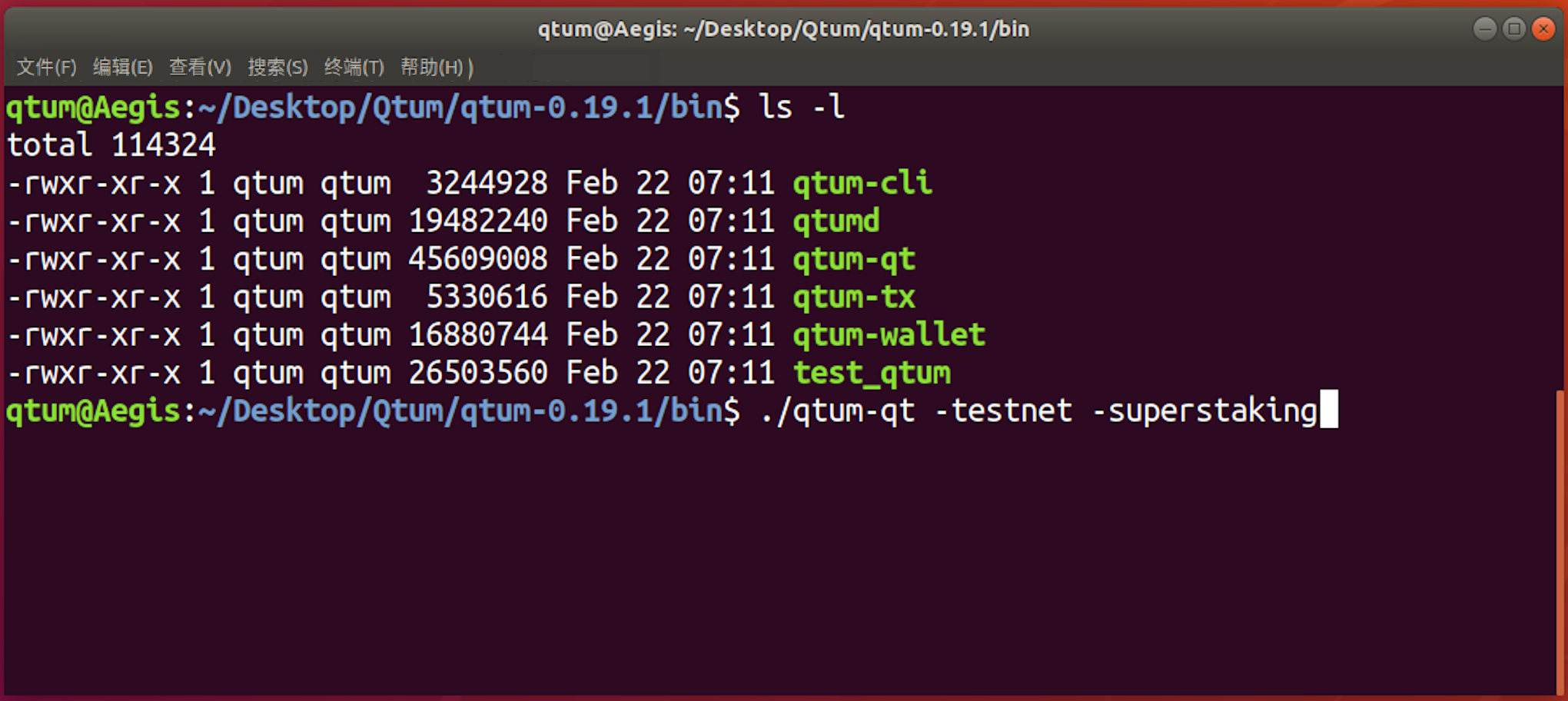 该命令在Windows的默认程序目录中使用方式如下: `qtum-qt -testnet -superstaking` 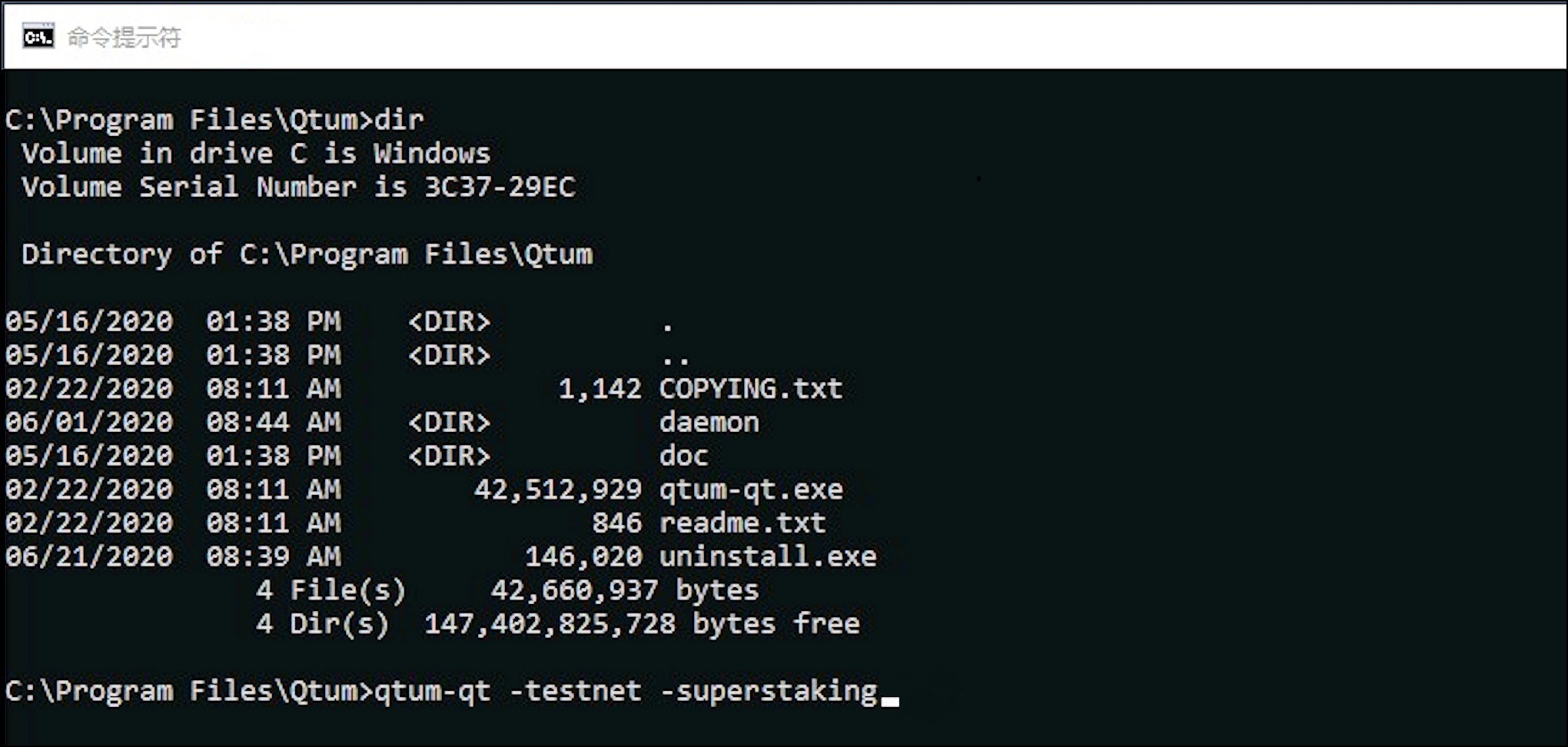 当钱包登录并同步区块链时(创建地址索引和日志事件),钱包就可以添加Super Staker。配置一个Super Staker,然后选中"设置"-"选项"-"允许Super Staking"即可开启Super Staker。 # qtumd Super Staker 在Qtum Core钱包中以Super Staker身份运行的任何地址都可能受到委托地址的委托,并以独立的Super Staker进行操作。桌面图形界面版的Qtum-Qt钱包允许配置多个Super Staker地址,分别设置不同的费率和最小UTXO值。deamon/server钱包qtumd中,所有Super Staker地址只能使用同一费率和最小UTXO设置。如果在qtumd中多个Super Staker需要不同的设置,可以在Qtum-Qt钱包中设置好后将wallet.dat文件转移到qtumd中运行。 下面的流程展示了在qtumd中配置一个Super Staker地址的过程。 安装qtumd后,以以下参数登录(示例为测试网环境): `./qtumd -testnet -superstaking` 可以添加一些非必须参数以修改费率(10%)和最小UTXO值(100QTUM),例如: `-stakingminfee=12 -stakingminutxovalue=120` 一旦钱包完成同步,就可以取得一个地址,并向该地址发送一些QTUM。这个地址就将是演示用的Super Staker地址。使用如下命令: `./qtum-cli -testnet getnewaddress "legacy"` 然后向该地址发送1300QTUM。  这1300QTUM以一个UTXO的形式发送,想要用于Super Staker操作就必须进行拆分。可以使用`splitutxosforaddress`命令拆分为最小100QTUM、最大200QTUM。 `./qtum-cli -testnet splitutxosforaddress "qdMp2BNpwL6ZmMEQHfLV5wGNVgmPCuzd7d" 100 200`  命令的执行结果显示1300QTUM被拆分成12个UTXO,可以根据转账的txid在区块链浏览器中查看具体操作。 此时,qtumd钱包已经可以使用地址qdMp2BNpwL6ZmMEQHfLV5wGNVgmPCuzd7d进行Super Staker操作。可以使用以下命令查看委托情况: `getdelegationsforstaker "qdMp2BNpwL6ZmMEQHfLV5wGNVgmPCuzd7d"` # Super Staker操作 Super Staker必须有一定量的UTXO为正在Staking的委托UTXO进行Stake以领取区块奖励。所需UTXO的数量(每个UTXO最少100QTUM)视委托权重占全网权重的百分比而定。比较安全的UTXO数量如下:30UTXO(1%全网权重)、50UTXO(2%全网权重)、100UTXO(5%全网权重)、160UTXO(10%全网权重)。 Super Staker应该时刻关注自己的钱包权重(UTXO权重减去正在Staking的数量),并在下降显著时及时补充UTXO。 请在更改offline staking设置(比如增加Super Staker或增加委托)后及时备份钱包(保存一份wallet.dat)文件,因为offline staking设置保存在wallet.dat文件内。如果wallet.dat文件丢失,也可以通过恢复选项找回设置。 向Super Staker发出的委托可以通过Super Staker页面的"委托"按钮进行查看,或者使用`getdelegationsforstaker`命令。 # 恢复 通常委托和Super Staker设置保存在wallet.dat文件内。如果wallet.dat文件遇到问题,可以通过Super Staker与委托页面的"恢复"按钮恢复委托信息和Super Staker信息。这种情况下,钱包将重新扫描智能合约状态,找到相应地址的offline staking转账相关信息。  *** |
| json metadata | {"tags":["qtum"],"image":["https://user-images.githubusercontent.com/29760787/85623682-ca7e8580-b636-11ea-8b92-2fd1fe735897.jpg","https://user-images.githubusercontent.com/29760787/85623694-ce120c80-b636-11ea-9aa2-8587900c6abf.jpg","https://user-images.githubusercontent.com/29760787/85623709-d407ed80-b636-11ea-8d6a-a1ea83dde656.jpg","https://user-images.githubusercontent.com/29760787/85623718-d5d1b100-b636-11ea-988f-762fb36bf926.jpg","https://user-images.githubusercontent.com/29760787/85623722-d8340b00-b636-11ea-8829-d6c5ad2fbbbe.jpg","https://user-images.githubusercontent.com/29760787/85623727-d9fdce80-b636-11ea-8502-ff453d6140ce.jpg","https://user-images.githubusercontent.com/29760787/91647025-dfefa180-ea23-11ea-9676-7b1319bf2aac.png","https://user-images.githubusercontent.com/29760787/91647028-e716af80-ea23-11ea-849e-3198b82492d5.jpg","https://user-images.githubusercontent.com/29760787/85623752-e124dc80-b636-11ea-9337-3239630551f3.png","https://user-images.githubusercontent.com/29760787/85623757-e3873680-b636-11ea-907d-36a19e01d11c.png","https://user-images.githubusercontent.com/29760787/85623770-e6822700-b636-11ea-8042-0ba6b480ccf0.jpg"],"links":["https://github.com/qtumproject/documents/tree/master/zh/Qtum-Wallet-Tutorial#将地址委托给super-staker","https://github.com/qtumproject/documents/tree/master/zh/Qtum-Wallet-Tutorial#委托地址操作","https://github.com/qtumproject/documents/tree/master/zh/Qtum-Wallet-Tutorial#配置super-staker","https://github.com/qtumproject/documents/tree/master/zh/Qtum-Wallet-Tutorial#以super-staker身份登录qtum-core","https://github.com/qtumproject/documents/tree/master/zh/Qtum-Wallet-Tutorial#qtumd-super-staker","https://github.com/qtumproject/documents/tree/master/zh/Qtum-Wallet-Tutorial#super-staker操作","https://github.com/qtumproject/documents/tree/master/zh/Qtum-Wallet-Tutorial#恢复","https://qtum.info/"],"app":"steemit/0.2","format":"markdown"} |
| parent author | |
| parent permlink | qtum |
| permlink | qtum |
| title | Qtum 离线挖矿 |
| Transaction Info | Block #52836955/Trx 1542dfd34769cd35f40e5e93f4e93f14d40be894 |
View Raw JSON Data
{
"block": 52836955,
"op": [
"comment",
{
"author": "fengqun",
"body": "# Offline Staking\n\n* [将地址委托给Super Staker](https://github.com/qtumproject/documents/tree/master/zh/Qtum-Wallet-Tutorial#将地址委托给super-staker)\n* [委托地址操作](https://github.com/qtumproject/documents/tree/master/zh/Qtum-Wallet-Tutorial#委托地址操作)\n* [配置Super Staker](https://github.com/qtumproject/documents/tree/master/zh/Qtum-Wallet-Tutorial#配置super-staker)\n* [以Super Staker身份登录Qtum Core](https://github.com/qtumproject/documents/tree/master/zh/Qtum-Wallet-Tutorial#以super-staker身份登录qtum-core)\n* [qtumd Super Staker](https://github.com/qtumproject/documents/tree/master/zh/Qtum-Wallet-Tutorial#qtumd-super-staker)\n* [Super Staker操作](https://github.com/qtumproject/documents/tree/master/zh/Qtum-Wallet-Tutorial#super-staker操作)\n* [恢复](https://github.com/qtumproject/documents/tree/master/zh/Qtum-Wallet-Tutorial#恢复)\n\n# 将地址委托给Super Staker\n\nQtum Offline Staking允许未staking的钱包地址(可以进行委托任务转账)被委托给Super Staker。Offline Staking无需托管,委托用户对自己的资产和私钥有完全的控制权。地址委托通过一次来自委托用户钱包的智能合约转账实现,在这个过程中委托者的地址、Super Staker的地址和委托者同意支付的费用都在转账中有所体现。如果Super Staker接受该费率,它将会开始为委托地址的UTXO进行staking。\n\n委托的UTXO遵循与普通stakingUTXO同样的规则:\n\n* UTXO只有在成熟(达到500个区块的确认)之后才能被用于staking。\n* Super Staker将会设置一个stake的最小UTXO限制,默认为100 QTUM。低于该值的委托UTXO将被忽略。\n* 从回报角度来看,委托UTXO的最佳值在100-200 QTUM之间。对于Qtum Core钱包的用户来说,可以通过`splitutxosforaddress`命令实现UTXO的拆分。细节请见下文。\n\n如果想从Qtum Core钱包进行委托操作,您可以在\"Stake\"中选择\"委托\",然后点击右上角的\"+\"按钮添加委托。之后,输入Staker名(为了方便辨识)、Staker地址、想要支付的费用比例和您想要委托的地址。如果您对Gas费用没有特别要求,请使用默认设置。委托转账需要至少0.9QTUM作为费用,多余的费用将被退还。\n\n\n\n点击\"确认\"和\"是\"发送委托转账。\n\n委托也可以通过Qtum Electrum钱包完成,同时支持Ledger硬件钱包地址。\n\n# 委托地址操作\n\n委托地址转账会被发送到一个智能合约中,该合约将记录委托任务,Super Staker也将从合约处领取任务。您将可以在钱包或浏览器[qtum.info](https://qtum.info/)中查看委托地址的区块奖励转账。\n\n如果一个钱包的QTUM存在多个地址中,每个地址必须单独委托(转账费也必须单独支付)。因此,把UTXO合并到一个地址中再拆分委托可能更符合委托者的利益。在这种情况下,可以手动将不同地址的币合并到一个地址中。另一种方式是使用`sendmanywithdupes`命令,该命令可以将钱包内所有余额以合适的UTXO值发送到一个新地址内。\n\n如果Super Staker接受了某一费率的一项委托,之后该Super Staker又降低了自己的费率标准(接受更低费率的委托任务),委托者如果也想享受该更低的费率,就必须重新设定费率,重新进行委托。\n\n某个钱包的委托可以在\"Stake\"页的\"委托\"选项中查看,或者使用`getdelegationinfoforaddress`命令。\n\n请保存一份wallet.dat文件以备份钱包。\n\n# 配置Super Staker\n\nQtum Core钱包提供了在线的PoS共识,因此登录、配置该钱包之后就可以作为Super Staker进行操作、接受其他地址的委托。\n\n如果想在Qtum-Qt钱包中配置成为Super Staker,请在\"Stake\"页面选择\"Super Staker\",然后选择\"+\"以添加一个新的Super Staker。输入Staker名(仅作为本地识别使用,此处示例中使用地址的第一部分,并用\"10\"表示10%的费用),之后从下拉菜单中选择Staker地址。\n\n\n\n作为Super Staker,钱包必须能够检查任意地址(地址索引)、启用日志以便操作智能合约(日志事件)并开启Staking选项。这三项设置可以通过设置`-superstaking`参数实现。设置`-superstaking`之后首次登录钱包时,钱包将重新扫描区块链以构建包含地址索引和日志事件的数据库。\n\n下一步,钱包将提示您在\"设置\"-\"选项\"-\"开启Super Staking\",确认之后钱包将重新启动。\n\n\n\n重启之后,钱包将向您确认是否要扫描区块链以便重建数据库。\n\n\n\n钱包将显示\"正在硬盘上重新索引区块\"以及在重建数据库时显示\"同步区块头\"。这可能需要几十分钟,具体时间取决于您的计算机配置。\n\n登录之后,返回\"Stake\"-\"Super Staker\"页面,选择\"设置Super Staker\"按钮(现在将能显示齿轮标志)以完成Super Staker配置。点击定制按钮查看默认配置,或更改配置。点击确认完成设置。\n\n\n\n配置选项包括:\n\n* 最低费用 - Staker将会接受的最低委托费率。\n* 最小UTXO值 - 设定了该Staker将接受的用于PoS共识的最小的UTXO。随着时间推进,委托地址将有许多小额区块奖励UTXO,管理这些小额UTXO将很低效(委托者应该将这些UTXO合并)。\n* 委托列表类型:\n * 接受所有 - 接受所有高于最低费率的委托。\n * 允许列表 - 只接受来自特定地址的委托。使用该模式将使Super Staker只能为特定地址服务,比如只为自己的币进行Staking。\n * 排除列表 - 不接受来自列表内的地址的委托。\n\n接下来,Super Staker将把UTXO分解成有效大小进行Staking。进行Staking的UTXO最小值为100QTUM。在Super Staker页面可以选择拆分按钮(三叉戟图标),拆分可以使用默认值或自行调整,但能用于Staking的UTXO最小值为100QTUM。\n\n\n\n你也可用使用`splitutxosforaddress`命令拆分UTXO。委托地址也可用使用该功能。如果想将UTXO拆分为最小值(minValue)和最大值(maxValue)之间的值,可用使用如下命令:\n\n`splitutxosforaddress \"address\" minValue maxValue ( maxOutputs )`\n\n例如,如果一个钱包内有数量为40、50、60、70和800QTUM的几个UTXO,要把这些UTXO拆分为最小100最大200的UTXO,可用使用如下命令:\n\n```splitutxosforaddress\n{\n \"txid\": \"197a199c3ac9dd8df574ca77da15c5da31db3f7101e2108638a3b2f94248b9f7\",\n \"selected\": \"1020.00\",\n \"splited\": \"1020.00\"\n}\n```\n\n以上例子中,输入总额为1020QTUM,拆分结果为9个100QTUM和1个119.99566QTUM的UTXO。钱包将发送一次对自己转账,并支付0.00434QTUM的转账费。\n\n持有大金额的钱包需要调整‘输出上限(Maximum Outputs)’。以上例子中,输出上限的默认值为100。因此拆分操作只能拆分 100 QTUM(最小值)x 100 (输出上限)= 10000 UTXO值。拥有更大金额的钱包需要将输出上限调整到500或1000。输出上限调整至1000后,最高可拆分100000 UTXO值。因此,持有大额度的钱包也可以反复进行该命令,直至达到最佳的拆分状态。\n\n在前面的例子中还展示了使用`sendmanywithdupes`命令的方式,但这种方式需要注意格式,并且更适用于您想将资金发送到新地址的情况。而且,无论使用哪个命令,这些UTXO都必须等待500个区块时间的确认,成熟后才能用于Staking。\n\n# 以Super Staker身份登录Qtum Core\n\n以上步骤展示了从默认的Qtum Core普通用户转换为Super Staker的流程。Qtum Core钱包也可以直接以Super Staker身份登录以缩短配置流程。这种情况下,起始的区块链同步就已经包括了为地址索引和日志事件构建数据库的过程,所以钱包就可以直接支持Super Staker使用。\n\nQtum Core钱包可以通过\"设置\"-\"选项\"-\"允许Super Staking\"设置来开启Super Staker模式,或者直接在命令行中使用`-superstaking`参数(示例为测试网环境)。\n\n\n\n该命令在Windows的默认程序目录中使用方式如下:\n\n`qtum-qt -testnet -superstaking`\n\n\n\n当钱包登录并同步区块链时(创建地址索引和日志事件),钱包就可以添加Super Staker。配置一个Super Staker,然后选中\"设置\"-\"选项\"-\"允许Super Staking\"即可开启Super Staker。\n\n# qtumd Super Staker\n\n在Qtum Core钱包中以Super Staker身份运行的任何地址都可能受到委托地址的委托,并以独立的Super Staker进行操作。桌面图形界面版的Qtum-Qt钱包允许配置多个Super Staker地址,分别设置不同的费率和最小UTXO值。deamon/server钱包qtumd中,所有Super Staker地址只能使用同一费率和最小UTXO设置。如果在qtumd中多个Super Staker需要不同的设置,可以在Qtum-Qt钱包中设置好后将wallet.dat文件转移到qtumd中运行。\n\n下面的流程展示了在qtumd中配置一个Super Staker地址的过程。\n\n安装qtumd后,以以下参数登录(示例为测试网环境):\n\n`./qtumd -testnet -superstaking`\n\n可以添加一些非必须参数以修改费率(10%)和最小UTXO值(100QTUM),例如:\n\n`-stakingminfee=12 -stakingminutxovalue=120`\n\n一旦钱包完成同步,就可以取得一个地址,并向该地址发送一些QTUM。这个地址就将是演示用的Super Staker地址。使用如下命令:\n\n`./qtum-cli -testnet getnewaddress \"legacy\"`\n\n然后向该地址发送1300QTUM。\n\n\n\n这1300QTUM以一个UTXO的形式发送,想要用于Super Staker操作就必须进行拆分。可以使用`splitutxosforaddress`命令拆分为最小100QTUM、最大200QTUM。\n\n`./qtum-cli -testnet splitutxosforaddress \"qdMp2BNpwL6ZmMEQHfLV5wGNVgmPCuzd7d\" 100 200`\n\n\n\n命令的执行结果显示1300QTUM被拆分成12个UTXO,可以根据转账的txid在区块链浏览器中查看具体操作。\n\n此时,qtumd钱包已经可以使用地址qdMp2BNpwL6ZmMEQHfLV5wGNVgmPCuzd7d进行Super Staker操作。可以使用以下命令查看委托情况:\n\n`getdelegationsforstaker \"qdMp2BNpwL6ZmMEQHfLV5wGNVgmPCuzd7d\"`\n\n# Super Staker操作\n\nSuper Staker必须有一定量的UTXO为正在Staking的委托UTXO进行Stake以领取区块奖励。所需UTXO的数量(每个UTXO最少100QTUM)视委托权重占全网权重的百分比而定。比较安全的UTXO数量如下:30UTXO(1%全网权重)、50UTXO(2%全网权重)、100UTXO(5%全网权重)、160UTXO(10%全网权重)。\n\nSuper Staker应该时刻关注自己的钱包权重(UTXO权重减去正在Staking的数量),并在下降显著时及时补充UTXO。\n\n请在更改offline staking设置(比如增加Super Staker或增加委托)后及时备份钱包(保存一份wallet.dat)文件,因为offline staking设置保存在wallet.dat文件内。如果wallet.dat文件丢失,也可以通过恢复选项找回设置。\n\n向Super Staker发出的委托可以通过Super Staker页面的\"委托\"按钮进行查看,或者使用`getdelegationsforstaker`命令。\n\n# 恢复\n\n通常委托和Super Staker设置保存在wallet.dat文件内。如果wallet.dat文件遇到问题,可以通过Super Staker与委托页面的\"恢复\"按钮恢复委托信息和Super Staker信息。这种情况下,钱包将重新扫描智能合约状态,找到相应地址的offline staking转账相关信息。\n\n\n\n***",
"json_metadata": "{\"tags\":[\"qtum\"],\"image\":[\"https://user-images.githubusercontent.com/29760787/85623682-ca7e8580-b636-11ea-8b92-2fd1fe735897.jpg\",\"https://user-images.githubusercontent.com/29760787/85623694-ce120c80-b636-11ea-9aa2-8587900c6abf.jpg\",\"https://user-images.githubusercontent.com/29760787/85623709-d407ed80-b636-11ea-8d6a-a1ea83dde656.jpg\",\"https://user-images.githubusercontent.com/29760787/85623718-d5d1b100-b636-11ea-988f-762fb36bf926.jpg\",\"https://user-images.githubusercontent.com/29760787/85623722-d8340b00-b636-11ea-8829-d6c5ad2fbbbe.jpg\",\"https://user-images.githubusercontent.com/29760787/85623727-d9fdce80-b636-11ea-8502-ff453d6140ce.jpg\",\"https://user-images.githubusercontent.com/29760787/91647025-dfefa180-ea23-11ea-9676-7b1319bf2aac.png\",\"https://user-images.githubusercontent.com/29760787/91647028-e716af80-ea23-11ea-849e-3198b82492d5.jpg\",\"https://user-images.githubusercontent.com/29760787/85623752-e124dc80-b636-11ea-9337-3239630551f3.png\",\"https://user-images.githubusercontent.com/29760787/85623757-e3873680-b636-11ea-907d-36a19e01d11c.png\",\"https://user-images.githubusercontent.com/29760787/85623770-e6822700-b636-11ea-8042-0ba6b480ccf0.jpg\"],\"links\":[\"https://github.com/qtumproject/documents/tree/master/zh/Qtum-Wallet-Tutorial#将地址委托给super-staker\",\"https://github.com/qtumproject/documents/tree/master/zh/Qtum-Wallet-Tutorial#委托地址操作\",\"https://github.com/qtumproject/documents/tree/master/zh/Qtum-Wallet-Tutorial#配置super-staker\",\"https://github.com/qtumproject/documents/tree/master/zh/Qtum-Wallet-Tutorial#以super-staker身份登录qtum-core\",\"https://github.com/qtumproject/documents/tree/master/zh/Qtum-Wallet-Tutorial#qtumd-super-staker\",\"https://github.com/qtumproject/documents/tree/master/zh/Qtum-Wallet-Tutorial#super-staker操作\",\"https://github.com/qtumproject/documents/tree/master/zh/Qtum-Wallet-Tutorial#恢复\",\"https://qtum.info/\"],\"app\":\"steemit/0.2\",\"format\":\"markdown\"}",
"parent_author": "",
"parent_permlink": "qtum",
"permlink": "qtum",
"title": "Qtum 离线挖矿"
}
],
"op_in_trx": 0,
"timestamp": "2021-04-13T00:28:48",
"trx_id": "1542dfd34769cd35f40e5e93f4e93f14d40be894",
"trx_in_block": 7,
"virtual_op": 0
}fengqunupvoted (100.00%) @fengqun / qtum-offline-staking2021/04/12 03:30:57
fengqunupvoted (100.00%) @fengqun / qtum-offline-staking
2021/04/12 03:30:57
| author | fengqun |
| permlink | qtum-offline-staking |
| voter | fengqun |
| weight | 10000 (100.00%) |
| Transaction Info | Block #52812026/Trx 04850419718ba3d84cf4636aac7f56014060b9e2 |
View Raw JSON Data
{
  "block": 52812026,
  "op": [
    "vote",
    {
      "author": "fengqun",
      "permlink": "qtum-offline-staking",
      "voter": "fengqun",
      "weight": 10000
    }
  ],
  "op_in_trx": 0,
  "timestamp": "2021-04-12T03:30:57",
  "trx_id": "04850419718ba3d84cf4636aac7f56014060b9e2",
  "trx_in_block": 11,
  "virtual_op": 0
}executive-boardsent 0.001 STEEM to @fengqun- "❗ Hello fengqun, great that you are using the STEEM blockchain. The Executive Board is publishing insider infos at https://discord.gg/KyBbmhh on how you will be earning the most coins. It's easy, just..."2021/04/12 03:17:51
executive-boardsent 0.001 STEEM to @fengqun- "❗ Hello fengqun, great that you are using the STEEM blockchain. The Executive Board is publishing insider infos at https://discord.gg/KyBbmhh on how you will be earning the most coins. It's easy, just..."
2021/04/12 03:17:51
| amount | 0.001 STEEM |
| from | executive-board |
| memo | ❗ Hello fengqun, great that you are using the STEEM blockchain. The Executive Board is publishing insider infos at https://discord.gg/KyBbmhh on how you will be earning the most coins. It's easy, just follow the instructions. THE 1000X BOOSTER KEY is already waiting for you over there too. 😉 Warm regards, The Executive Board. |
| to | fengqun |
| Transaction Info | Block #52811766/Trx 00cd9c3d83dfba0ebcb60d0beb8c659e1455f4b0 |
View Raw JSON Data
{
  "block": 52811766,
  "op": [
    "transfer",
    {
      "amount": "0.001 STEEM",
      "from": "executive-board",
      "memo": "❗ Hello fengqun, great that you are using the STEEM blockchain. The Executive Board is publishing insider infos at https://discord.gg/KyBbmhh on how you will be earning the most coins. It's easy, just follow the instructions. THE 1000X BOOSTER KEY is already waiting for you over there too. 😉 Warm regards, The Executive Board.",
      "to": "fengqun"
    }
  ],
  "op_in_trx": 0,
  "timestamp": "2021-04-12T03:17:51",
  "trx_id": "00cd9c3d83dfba0ebcb60d0beb8c659e1455f4b0",
  "trx_in_block": 0,
  "virtual_op": 0
}beemenginesent 0.001 STEEM to @fengqun- "🚀 Auto Voting Your New Posts 24/24. Community Curation, Passive Earnings & Support. Checkout http://beemengine.live to subscribe, or get a one month subscription for a reply of 1 STEEM with memo: sub..."2021/04/12 03:16:36
beemenginesent 0.001 STEEM to @fengqun- "🚀 Auto Voting Your New Posts 24/24. Community Curation, Passive Earnings & Support. Checkout http://beemengine.live to subscribe, or get a one month subscription for a reply of 1 STEEM with memo: sub..."
2021/04/12 03:16:36
| amount | 0.001 STEEM |
| from | beemengine |
| memo | 🚀 Auto Voting Your New Posts 24/24. Community Curation, Passive Earnings & Support. Checkout http://beemengine.live to subscribe, or get a one month subscription for a reply of 1 STEEM with memo: subscribe |
| to | fengqun |
| Transaction Info | Block #52811742/Trx 8be02f673774037ebbaf9e83b0f258e54a4ef4fc |
View Raw JSON Data
{
  "block": 52811742,
  "op": [
    "transfer",
    {
      "amount": "0.001 STEEM",
      "from": "beemengine",
      "memo": "🚀 Auto Voting Your New Posts 24/24. Community Curation, Passive Earnings & Support. Checkout http://beemengine.live to subscribe, or get a one month subscription for a reply of 1 STEEM with memo: subscribe",
      "to": "fengqun"
    }
  ],
  "op_in_trx": 0,
  "timestamp": "2021-04-12T03:16:36",
  "trx_id": "8be02f673774037ebbaf9e83b0f258e54a4ef4fc",
  "trx_in_block": 2,
  "virtual_op": 0
}fengqunpublished a new post: qtum-offline-staking2021/04/12 03:15:33
fengqunpublished a new post: qtum-offline-staking
2021/04/12 03:15:33
| author | fengqun |
| body | # Offline Staking * [Delegating Address to Super Staker](#delegating-address-to-super-staker) * [Delegating Address Operations](#delegating-Address-operations) * [Super Staker Configuration](#super-staker-configuration) * [Launching Qtum Core as a Super Staker](#launching-qtum-core-as-a-super-staker) * [qtumd Super Staker](#qtumd-super-staker) * [Super Staker Operations](#super-staker-operations) * [Restore](#restore) # Delegating Address to Super Staker Qtum Offline Staking allows the address for a non-staking wallet (capable of making the delegation assignment transaction) to be delegated to a Super Staker. Offline Staking is non-custodial: the delegation user keeps full control of their coins and private keys. The address delegation is made via a smart contract transaction from the delegation user's wallet which identifies the delegator's address, the Super Staker address, and the fee the delegator agrees to pay. If the Super Staker accepts this fee, it will begin staking the delegated address UTXOs. The normal rules for staking UTXOs apply to delegated UTXOs: * UTXOs may only be used for staking after they mature (500 confirmations) * The Super Staker will set a minimum size of UTXOs to stake, defaulting to 100 QTUM. Delegated UTXOs below this amount will be ignored. * It is best practice (for optimum returns) to break UTXOs up into sizes of 100 to 200 QTUM each. For users of the Qtum Core wallet, this can be easily accomplished with the command line version of `splitutxosforaddress`, described below. To make the delegation assignment from the Qtum Core wallet, select Stake – Delegations, the Add delegation "+" button in the upper right corner, enter the Staker name (for local reference only), Staker address, Fee you agree to pay, and your Address to be delegated. Leave the default Gas settings alone unless you understand how to set these. The delegation transaction will require at least 0.9 QTUM in fees and any excess will be refunded.  Press Confirm and Yes to send the delegation transaction. Delegation of addresses may also be accomplished using the Qtum Electrum wallet, which supports Ledger hardware wallet addresses. # Delegating Address Operations The Delegate Address transaction is sent to a smart contract which keeps the delegation assignments and will be picked up by the Super Staker there. You can see Delegated Address block reward transactions in the wallet and also with the explorer [qtum.info](https://qtum.info/). If the wallet is holding QTUM on multiple addresses, the delegation must be made separately for each address (and the transaction fee paid for each address) so it may make sense to consolidate the UTXOs to a single address before splitting UTXOs and delegating. In this case, use coin selection to select and consolidate the addresses. Alternatively, the `sendmanywithdupes` command could be used to send the entire wallet balance to a new address with appropriately-sized UTXOs. If the Super Staker accepts a delegation for a particular fee, and then the Super Staker reduces that fee (accepts assignments for a lower fee), to take advantage of that lower fee the user must delegate their address again with the lower fee set. Delegations from a wallet may be checked on the Stake – Delegations page or with the `getdelegationinfoforaddress` command. Backup your wallet to save a copy of the wallet.dat file. # Super Staker Configuration The Qtum Core wallet provides online Proof of Stake and can be launched and configured to operate as a Super Staker and receive address delegations. To configure the Qtum-Qt wallet for a Super Staker, select Stake – Super Staking and the "+" button to add a new Super Staker. Enter the Staker name (for local reference only, here using the first part of the address and "10" to denote a 10% fee) and select the Staker address using the dropdown.  To operate as a Super Staker, the wallet must be able to check arbitrary addresses (address index), have logs enabled for smart contract operations(log events), be enabled for staking and the single parameter `-superstaking` sets these three parameters. The first time launching with `-superstaking` the wallet will rescan the blockchain to rebuild the database to add the address index and log events. Next, the wallet will prompt to be restarted as a Super Staker using Settings – Options – Enable super staking and OK to restart the wallet.  On startup, the wallet will confirm that you want to scan and rebuild the database.  The wallet will show "Reindexing blocks on disk…" and "Syncing Headers" while it rebuilds the database, this may take several tens of minutes depending on your computer. After launching, go back to the Stake – Super Staking page and select the "Configure super staker" button (the gear symbol will now be visible) to compete the Super Staker configuration. Click the Custom box to see the default recommendations (shown below) or customize the setup. Click OK to complete the setup.  The configuration settings are: * Minimum fee – the minimum fee offered by delegators that the Staker will accept. * Minimum UTXO size – this sets the minimum-sized UTXO that will be evaluated for Proof of Stake consensus by the Staker. Over time, the delegated address should accumulate many small block reward UTXOs and it is inefficient to manage all these small amounts (which should be recombined by the delegator). * Delegation list type: * Accept all – accept any delegation with the minimum fee or more. * Allow list – only accept delegations from specific addresses. Use this mode if operating a Super Staker only for specific addresses, such as for your coins. * Exclude list – addresses to exclude from being accepted for staking. Next, split the UTXOs to valid amounts for committing stakes by the Super Staker. The UTXOs must be a minimum amount of 100 QTUM. On the Super staker page select the split coins button (trident icon) and use the default values or make adjustments, but no UTXOs under 100 QTUM will be used for staking.  You can also split UTXOs with the `splitutxosforaddress` command, which can be used for delegated addresses as well. To split the UTXOs between a minimum and maximum value, enter the command: `splitutxosforaddress "address" minValue maxValue ( maxOutputs )` For example, if a wallet held UTXOs of 40, 50, 60, 70, and 800 QTUM, to split these into UTXOs of a minimum 100 and maximum 200 would use the command: ```splitutxosforaddress { "txid": "197a199c3ac9dd8df574ca77da15c5da31db3f7101e2108638a3b2f94248b9f7", "selected": "1020.00", "splited": "1020.00" } ``` For this example, the total input was 1,020 QTUM, and the split was 9 UTXOs of 100.0 and one of 119.99566, the wallet sending a "transaction to self" and paying a fee of 0.00434 QTUM. Larger wallets may need to adjust the "Maximum outputs" number for splitting. In the example above with the "Maximum outputs" field set to the default value of 100, the split operation will split giving 100 QTUM (minimum size) x 100 (Maximum outputs) = 10,000 of UTXO value. For addresses holding more value the "Maximum output" field could be set higher, to 500, or 1000. With the "Maximum outputs" field set to 1000 it can split up to 100,000 in UTXO value. Even bigger addresses could just repeat this split command set for 1000 Maximum outputs until the Split operation reports back that it has selected and split 0 coins. Previously you could use the `sendmanywithdupes` command but that took significant formatting and operationally you would want to send to a new address. Of course, after either of these commands, the UTXOs must mature for 500 confirmations before they can be used for staking. # Launching Qtum Core as a Super Staker The above steps show the transition from a default installation Qtum Core wallet to a Super Staker. The wallet may also be initially launched as a Super Staker to shorten the steps. In this case, the initial blockchain sync is accompanied by building the database for address index and log events (as discussed above) so the wallet is all ready for Super Staking. The Qtum Core wallet may be launched as a Super Staker with Qtum-Qt using Settings - Options – Main – Enable super staking steps as shown above, or directly through the command line using the `-superstaking` parameter (testnet shown here).  This command for the default program directory on Windows would be: `qtum-qt -testnet -superstaking`  When the wallet launches and syncs the blockchain (creating address index and log events) it is all ready to add Super Stakers. Configure a Super Staker and then enable super staking on Settings – Options – Main – set "Enable super staking" and the Super Staker will be ready. # qtumd Super Staker Any address in a Qtum Core wallet running as a Super Staker may receive delegated addresses and operate as an individual Super Staker. The Desktop GUI wallet Qtum-Qt allows configuration of multiple Super Staker addresses with different fees and minimum UTXO sizes. The daemon/server wallet qtumd runs all its Super Staker addresses using the same fee and minimum UTXO size. If a variation is needed across multiple Super Staker addresses with qtumd, it is possible to set these up with the Qtum-Qt wallet and simply transfer the wallet.dat file to qtumd. The following setup for qtumd shows the use of a single Super Staker address. After installing qtumd, launch with the following parameters (testnet shown): `./qtumd -testnet -superstaking` Optional parameters may be added to change the default fee (of 10%) and minimum UTXO value (of 100 QTUM), for example as: `-stakingminfee=12 -stakingminutxovalue=120` Once the wallet syncs the blockchain, get an address to send some QTUM. This will be the Super Staker address. Use the command: `./qtum-cli -testnet getnewaddress "legacy"` Then send 1,300 QTUM to this address.  This 1,300 QTUM will arrive in a single UTXO, which must be split for the Super Staker operation. Use the `splitutxosforaddress` command with the default 100 minimum size and 200 maximum size: `./qtum-cli -testnet splitutxosforaddress "qdMp2BNpwL6ZmMEQHfLV5wGNVgmPCuzd7d" 100 200`  The command response shows that 1,300 QTUM were selected for splitting, in this case splitting into 12 UTXOs which can be seen with the txid on the Explorer. At this point, the qtumd wallet is ready for Super Staker operation with address qdMp2BNpwL6ZmMEQHfLV5wGNVgmPCuzd7d, and delegations can be monitored using the command: `getdelegationsforstaker "qdMp2BNpwL6ZmMEQHfLV5wGNVgmPCuzd7d"` # Super Staker Operations The Super Staker must hold UTXOs to commit to stakes for the delegated UTXOs it is staking. The number of UTXOs (of minimum size 100 QTUM) is based on Delegated Weight as a percent of overall Network Weight, and good values are 30 UTXOs for staking 1% of Network Weight, 50 UTXOs for 2.0%, 100 UTXOs for 5% and 160 UTXOs for staking 10% of overall Network Weight. Super Stakers should monitor their Wallet weight (UTXO weight minus amount currently staking) and add UTXOs if it drops below several thousand. Make a backup of the wallet (save the wallet.dat file) after changes in the offline staking configuration such as adding a Super Staker or adding a delegation, because the offline staking configuration is saved in the wallet.dat file. If the backup wallet.dat file is lost the configuration may also be restored with Recovery as shown below. Delegations to a Super Staker may be checked using the "Delegations…" button on the Super Staker page or with the `getdelegationsforstaker` command. # Restore Normally delegation and Super Staker configuration are stored in the wallet.dat file. If there are problems with the wallet.dat file the delegation information and super staker information may be recovered using the Restore button on the delegation and Super Staker pages. In this case, the wallet will rescan the "state" contract memory for offline staking transactions for the appropriate addresses.  *** |
| json metadata | {"tags":["qtum"],"image":["https://user-images.githubusercontent.com/29760787/85331894-f8cc5b80-b4a4-11ea-95d1-eb472a5454f1.jpg","https://user-images.githubusercontent.com/29760787/85331902-fc5fe280-b4a4-11ea-9506-84bfc0ecd6d5.jpg","https://user-images.githubusercontent.com/29760787/85331912-008c0000-b4a5-11ea-9901-c4b4433a8746.jpg","https://user-images.githubusercontent.com/29760787/85331921-041f8700-b4a5-11ea-8990-628f295ff4a9.jpg","https://user-images.githubusercontent.com/29760787/85331928-084ba480-b4a5-11ea-8434-82f9f140b6b6.jpg","https://user-images.githubusercontent.com/29760787/85331934-0a156800-b4a5-11ea-9339-eed51b9bddf6.jpg","https://user-images.githubusercontent.com/29760787/91646311-ca767980-ea1b-11ea-8a0a-aa89cc208c90.png","https://user-images.githubusercontent.com/29760787/91646313-cd716a00-ea1b-11ea-9586-52adafbea506.jpg","https://user-images.githubusercontent.com/29760787/85331969-13063980-b4a5-11ea-8ccc-280092131d18.png","https://user-images.githubusercontent.com/29760787/85331976-15689380-b4a5-11ea-91dd-187b6875f3b2.png","https://user-images.githubusercontent.com/29760787/85331982-18638400-b4a5-11ea-9f59-755b2ecd06a6.jpg"],"links":["#delegating-address-to-super-staker","#delegating-Address-operations","#super-staker-configuration","#launching-qtum-core-as-a-super-staker","#qtumd-super-staker","#super-staker-operations","#restore","https://qtum.info/"],"app":"steemit/0.2","format":"markdown"} |
| parent author | |
| parent permlink | qtum |
| permlink | qtum-offline-staking |
| title | Qtum Offline Staking |
| Transaction Info | Block #52811721/Trx cc738a7038c2020796a2d48bccd5b4f8d34609a5 |
View Raw JSON Data
{
"block": 52811721,
"op": [
"comment",
{
"author": "fengqun",
"body": "# Offline Staking\n\n* [Delegating Address to Super Staker](#delegating-address-to-super-staker)\n* [Delegating Address Operations](#delegating-Address-operations)\n* [Super Staker Configuration](#super-staker-configuration)\n* [Launching Qtum Core as a Super Staker](#launching-qtum-core-as-a-super-staker)\n* [qtumd Super Staker](#qtumd-super-staker)\n* [Super Staker Operations](#super-staker-operations)\n* [Restore](#restore)\n\n# Delegating Address to Super Staker\n\nQtum Offline Staking allows the address for a non-staking wallet (capable of making the delegation assignment transaction) to be delegated to a Super Staker. Offline Staking is non-custodial: the delegation user keeps full control of their coins and private keys. The address delegation is made via a smart contract transaction from the delegation user's wallet which identifies the delegator's address, the Super Staker address, and the fee the delegator agrees to pay. If the Super Staker accepts this fee, it will begin staking the delegated address UTXOs.\n\nThe normal rules for staking UTXOs apply to delegated UTXOs:\n\n* UTXOs may only be used for staking after they mature (500 confirmations)\n* The Super Staker will set a minimum size of UTXOs to stake, defaulting to 100 QTUM. Delegated UTXOs below this amount will be ignored.\n* It is best practice (for optimum returns) to break UTXOs up into sizes of 100 to 200 QTUM each. For users of the Qtum Core wallet, this can be easily accomplished with the command line version of `splitutxosforaddress`, described below.\n\nTo make the delegation assignment from the Qtum Core wallet, select Stake – Delegations, the Add delegation \"+\" button in the upper right corner, enter the Staker name (for local reference only), Staker address, Fee you agree to pay, and your Address to be delegated. Leave the default Gas settings alone unless you understand how to set these. The delegation transaction will require at least 0.9 QTUM in fees and any excess will be refunded.\n\n\n\nPress Confirm and Yes to send the delegation transaction.\n\nDelegation of addresses may also be accomplished using the Qtum Electrum wallet, which supports Ledger hardware wallet addresses.\n\n# Delegating Address Operations\n\nThe Delegate Address transaction is sent to a smart contract which keeps the delegation assignments and will be picked up by the Super Staker there. You can see Delegated Address block reward transactions in the wallet and also with the explorer [qtum.info](https://qtum.info/).\n\nIf the wallet is holding QTUM on multiple addresses, the delegation must be made separately for each address (and the transaction fee paid for each address) so it may make sense to consolidate the UTXOs to a single address before splitting UTXOs and delegating. In this case, use coin selection to select and consolidate the addresses. Alternatively, the `sendmanywithdupes` command could be used to send the entire wallet balance to a new address with appropriately-sized UTXOs.\n\nIf the Super Staker accepts a delegation for a particular fee, and then the Super Staker reduces that fee (accepts assignments for a lower fee), to take advantage of that lower fee the user must delegate their address again with the lower fee set.\n\nDelegations from a wallet may be checked on the Stake – Delegations page or with the `getdelegationinfoforaddress` command.\n\nBackup your wallet to save a copy of the wallet.dat file.\n \n\n# Super Staker Configuration\n\nThe Qtum Core wallet provides online Proof of Stake and can be launched and configured to operate as a Super Staker and receive address delegations.\n\nTo configure the Qtum-Qt wallet for a Super Staker, select Stake – Super Staking and the \"+\" button to add a new Super Staker. Enter the Staker name (for local reference only, here using the first part of the address and \"10\" to denote a 10% fee) and select the Staker address using the dropdown.\n\n\n\nTo operate as a Super Staker, the wallet must be able to check arbitrary addresses (address index), have logs enabled for smart contract operations(log events), be enabled for staking and the single parameter `-superstaking` sets these three parameters. The first time launching with `-superstaking` the wallet will rescan the blockchain to rebuild the database to add the address index and log events.\n\nNext, the wallet will prompt to be restarted as a Super Staker using Settings – Options – Enable super staking and OK to restart the wallet.\n\n\n\nOn startup, the wallet will confirm that you want to scan and rebuild the database.\n\n\n\nThe wallet will show \"Reindexing blocks on disk…\" and \"Syncing Headers\" while it rebuilds the database, this may take several tens of minutes depending on your computer.\n\nAfter launching, go back to the Stake – Super Staking page and select the \"Configure super staker\" button (the gear symbol will now be visible) to compete the Super Staker configuration. Click the Custom box to see the default recommendations (shown below) or customize the setup. Click OK to complete the setup.\n\n\n\nThe configuration settings are:\n\n* Minimum fee – the minimum fee offered by delegators that the Staker will accept.\n* Minimum UTXO size – this sets the minimum-sized UTXO that will be evaluated for Proof of Stake consensus by the Staker. Over time, the delegated address should accumulate many small block reward UTXOs and it is inefficient to manage all these small amounts (which should be recombined by the delegator). \n* Delegation list type:\n * Accept all – accept any delegation with the minimum fee or more.\n * Allow list – only accept delegations from specific addresses. Use this mode if operating a Super Staker only for specific addresses, such as for your coins.\n * Exclude list – addresses to exclude from being accepted for staking.\n\nNext, split the UTXOs to valid amounts for committing stakes by the Super Staker. The UTXOs must be a minimum amount of 100 QTUM. On the Super staker page select the split coins button (trident icon) and use the default values or make adjustments, but no UTXOs under 100 QTUM will be used for staking.\n\n\n\nYou can also split UTXOs with the `splitutxosforaddress` command, which can be used for delegated addresses as well. To split the UTXOs between a minimum and maximum value, enter the command:\n\n`splitutxosforaddress \"address\" minValue maxValue ( maxOutputs )`\n\nFor example, if a wallet held UTXOs of 40, 50, 60, 70, and 800 QTUM, to split these into UTXOs of a minimum 100 and maximum 200 would use the command:\n\n```splitutxosforaddress\n{\n \"txid\": \"197a199c3ac9dd8df574ca77da15c5da31db3f7101e2108638a3b2f94248b9f7\",\n \"selected\": \"1020.00\",\n \"splited\": \"1020.00\"\n}\n```\n\nFor this example, the total input was 1,020 QTUM, and the split was 9 UTXOs of 100.0 and one of 119.99566, the wallet sending a \"transaction to self\" and paying a fee of 0.00434 QTUM.\n\nLarger wallets may need to adjust the \"Maximum outputs\" number for splitting. In the example above with the \"Maximum outputs\" field set to the default value of 100, the split operation will split giving 100 QTUM (minimum size) x 100 (Maximum outputs) = 10,000 of UTXO value. For addresses holding more value the \"Maximum output\" field could be set higher, to 500, or 1000. With the \"Maximum outputs\" field set to 1000 it can split up to 100,000 in UTXO value. Even bigger addresses could just repeat this split command set for 1000 Maximum outputs until the Split operation reports back that it has selected and split 0 coins.\n\nPreviously you could use the `sendmanywithdupes` command but that took significant formatting and operationally you would want to send to a new address. Of course, after either of these commands, the UTXOs must mature for 500 confirmations before they can be used for staking.\n\n# Launching Qtum Core as a Super Staker\n\nThe above steps show the transition from a default installation Qtum Core wallet to a Super Staker. The wallet may also be initially launched as a Super Staker to shorten the steps. In this case, the initial blockchain sync is accompanied by building the database for address index and log events (as discussed above) so the wallet is all ready for Super Staking.\n\nThe Qtum Core wallet may be launched as a Super Staker with Qtum-Qt using Settings - Options – Main – Enable super staking steps as shown above, or directly through the command line using the `-superstaking` parameter (testnet shown here).\n\n\n\nThis command for the default program directory on Windows would be:\n\n`qtum-qt -testnet -superstaking`\n\n\n\nWhen the wallet launches and syncs the blockchain (creating address index and log events) it is all ready to add Super Stakers. Configure a Super Staker and then enable super staking on Settings – Options – Main – set \"Enable super staking\" and the Super Staker will be ready.\n\n# qtumd Super Staker\n\nAny address in a Qtum Core wallet running as a Super Staker may receive delegated addresses and operate as an individual Super Staker. The Desktop GUI wallet Qtum-Qt allows configuration of multiple Super Staker addresses with different fees and minimum UTXO sizes. The daemon/server wallet qtumd runs all its Super Staker addresses using the same fee and minimum UTXO size. If a variation is needed across multiple Super Staker addresses with qtumd, it is possible to set these up with the Qtum-Qt wallet and simply transfer the wallet.dat file to qtumd. \n\nThe following setup for qtumd shows the use of a single Super Staker address.\n\nAfter installing qtumd, launch with the following parameters (testnet shown):\n\n`./qtumd -testnet -superstaking`\n\nOptional parameters may be added to change the default fee (of 10%) and minimum UTXO value (of 100 QTUM), for example as:\n\n`-stakingminfee=12 -stakingminutxovalue=120`\n\nOnce the wallet syncs the blockchain, get an address to send some QTUM. This will be the Super Staker address. Use the command:\n\n`./qtum-cli -testnet getnewaddress \"legacy\"`\n\nThen send 1,300 QTUM to this address.\n\n\n\nThis 1,300 QTUM will arrive in a single UTXO, which must be split for the Super Staker operation. Use the `splitutxosforaddress` command with the default 100 minimum size and 200 maximum size:\n\n`./qtum-cli -testnet splitutxosforaddress \"qdMp2BNpwL6ZmMEQHfLV5wGNVgmPCuzd7d\" 100 200`\n\n\n\nThe command response shows that 1,300 QTUM were selected for splitting, in this case splitting into 12 UTXOs which can be seen with the txid on the Explorer.\n\nAt this point, the qtumd wallet is ready for Super Staker operation with address qdMp2BNpwL6ZmMEQHfLV5wGNVgmPCuzd7d, and delegations can be monitored using the command:\n\n`getdelegationsforstaker \"qdMp2BNpwL6ZmMEQHfLV5wGNVgmPCuzd7d\"`\n\n# Super Staker Operations\n\nThe Super Staker must hold UTXOs to commit to stakes for the delegated UTXOs it is staking. The number of UTXOs (of minimum size 100 QTUM) is based on Delegated Weight as a percent of overall Network Weight, and good values are 30 UTXOs for staking 1% of Network Weight, 50 UTXOs for 2.0%, 100 UTXOs for 5% and 160 UTXOs for staking 10% of overall Network Weight. \n\nSuper Stakers should monitor their Wallet weight (UTXO weight minus amount currently staking) and add UTXOs if it drops below several thousand.\n\nMake a backup of the wallet (save the wallet.dat file) after changes in the offline staking configuration such as adding a Super Staker or adding a delegation, because the offline staking configuration is saved in the wallet.dat file. If the backup wallet.dat file is lost the configuration may also be restored with Recovery as shown below.\n\nDelegations to a Super Staker may be checked using the \"Delegations…\" button on the Super Staker page or with the `getdelegationsforstaker` command.\n\n# Restore\n\nNormally delegation and Super Staker configuration are stored in the wallet.dat file. If there are problems with the wallet.dat file the delegation information and super staker information may be recovered using the Restore button on the delegation and Super Staker pages. In this case, the wallet will rescan the \"state\" contract memory for offline staking transactions for the appropriate addresses.\n\n\n\n***",
"json_metadata": "{\"tags\":[\"qtum\"],\"image\":[\"https://user-images.githubusercontent.com/29760787/85331894-f8cc5b80-b4a4-11ea-95d1-eb472a5454f1.jpg\",\"https://user-images.githubusercontent.com/29760787/85331902-fc5fe280-b4a4-11ea-9506-84bfc0ecd6d5.jpg\",\"https://user-images.githubusercontent.com/29760787/85331912-008c0000-b4a5-11ea-9901-c4b4433a8746.jpg\",\"https://user-images.githubusercontent.com/29760787/85331921-041f8700-b4a5-11ea-8990-628f295ff4a9.jpg\",\"https://user-images.githubusercontent.com/29760787/85331928-084ba480-b4a5-11ea-8434-82f9f140b6b6.jpg\",\"https://user-images.githubusercontent.com/29760787/85331934-0a156800-b4a5-11ea-9339-eed51b9bddf6.jpg\",\"https://user-images.githubusercontent.com/29760787/91646311-ca767980-ea1b-11ea-8a0a-aa89cc208c90.png\",\"https://user-images.githubusercontent.com/29760787/91646313-cd716a00-ea1b-11ea-9586-52adafbea506.jpg\",\"https://user-images.githubusercontent.com/29760787/85331969-13063980-b4a5-11ea-8ccc-280092131d18.png\",\"https://user-images.githubusercontent.com/29760787/85331976-15689380-b4a5-11ea-91dd-187b6875f3b2.png\",\"https://user-images.githubusercontent.com/29760787/85331982-18638400-b4a5-11ea-9f59-755b2ecd06a6.jpg\"],\"links\":[\"#delegating-address-to-super-staker\",\"#delegating-Address-operations\",\"#super-staker-configuration\",\"#launching-qtum-core-as-a-super-staker\",\"#qtumd-super-staker\",\"#super-staker-operations\",\"#restore\",\"https://qtum.info/\"],\"app\":\"steemit/0.2\",\"format\":\"markdown\"}",
"parent_author": "",
"parent_permlink": "qtum",
"permlink": "qtum-offline-staking",
"title": "Qtum Offline Staking"
}
],
"op_in_trx": 0,
"timestamp": "2021-04-12T03:15:33",
"trx_id": "cc738a7038c2020796a2d48bccd5b4f8d34609a5",
"trx_in_block": 11,
"virtual_op": 0
}fengquncustom json: follow2021/04/12 03:09:45
fengquncustom json: follow
2021/04/12 03:09:45
| id | follow |
| json | ["reblog",{"account":"fengqun","author":"hatu","permlink":"new-exchange-lowest-fees-in-crypto-candy-for-steemians"}] |
| required auths | [] |
| required posting auths | ["fengqun"] |
| Transaction Info | Block #52811606/Trx 2beedb9ce08ff6ec005d679c3d3191fbc790df3c |
View Raw JSON Data
{
  "block": 52811606,
  "op": [
    "custom_json",
    {
      "id": "follow",
      "json": "[\"reblog\",{\"account\":\"fengqun\",\"author\":\"hatu\",\"permlink\":\"new-exchange-lowest-fees-in-crypto-candy-for-steemians\"}]",
      "required_auths": [],
      "required_posting_auths": [
        "fengqun"
      ]
    }
  ],
  "op_in_trx": 0,
  "timestamp": "2021-04-12T03:09:45",
  "trx_id": "2beedb9ce08ff6ec005d679c3d3191fbc790df3c",
  "trx_in_block": 7,
  "virtual_op": 0
}fengqunfollowed @okankarol2021/04/12 03:09:24
fengqunfollowed @okankarol
2021/04/12 03:09:24
| id | follow |
| json | ["follow",{"follower":"fengqun","following":"okankarol","what":["blog"]}] |
| required auths | [] |
| required posting auths | ["fengqun"] |
| Transaction Info | Block #52811599/Trx 940bc2f13c1a1b5e5ee9d90888102732b53a7e99 |
View Raw JSON Data
{
  "block": 52811599,
  "op": [
    "custom_json",
    {
      "id": "follow",
      "json": "[\"follow\",{\"follower\":\"fengqun\",\"following\":\"okankarol\",\"what\":[\"blog\"]}]",
      "required_auths": [],
      "required_posting_auths": [
        "fengqun"
      ]
    }
  ],
  "op_in_trx": 0,
  "timestamp": "2021-04-12T03:09:24",
  "trx_id": "940bc2f13c1a1b5e5ee9d90888102732b53a7e99",
  "trx_in_block": 6,
  "virtual_op": 0
}fengqunfollowed @marcusmalone2021/04/12 02:52:45
fengqunfollowed @marcusmalone
2021/04/12 02:52:45
| id | follow |
| json | ["follow",{"follower":"fengqun","following":"marcusmalone","what":["blog"]}] |
| required auths | [] |
| required posting auths | ["fengqun"] |
| Transaction Info | Block #52811268/Trx 5d2bc040e3d6fe48cc09130c9058fa9801f37d6e |
View Raw JSON Data
{
  "block": 52811268,
  "op": [
    "custom_json",
    {
      "id": "follow",
      "json": "[\"follow\",{\"follower\":\"fengqun\",\"following\":\"marcusmalone\",\"what\":[\"blog\"]}]",
      "required_auths": [],
      "required_posting_auths": [
        "fengqun"
      ]
    }
  ],
  "op_in_trx": 0,
  "timestamp": "2021-04-12T02:52:45",
  "trx_id": "5d2bc040e3d6fe48cc09130c9058fa9801f37d6e",
  "trx_in_block": 8,
  "virtual_op": 0
}fengqunfollowed @marcusmalone2021/04/12 02:52:18
fengqunfollowed @marcusmalone
2021/04/12 02:52:18
| id | follow |
| json | ["follow",{"follower":"fengqun","following":"marcusmalone","what":["blog"]}] |
| required auths | [] |
| required posting auths | ["fengqun"] |
| Transaction Info | Block #52811259/Trx 6b9e00277cc66297e456d5903b248f2c18e2ffdd |
View Raw JSON Data
{
  "block": 52811259,
  "op": [
    "custom_json",
    {
      "id": "follow",
      "json": "[\"follow\",{\"follower\":\"fengqun\",\"following\":\"marcusmalone\",\"what\":[\"blog\"]}]",
      "required_auths": [],
      "required_posting_auths": [
        "fengqun"
      ]
    }
  ],
  "op_in_trx": 0,
  "timestamp": "2021-04-12T02:52:18",
  "trx_id": "6b9e00277cc66297e456d5903b248f2c18e2ffdd",
  "trx_in_block": 1,
  "virtual_op": 0
}fengqunupdated their account properties2021/04/12 02:50:42
fengqunupdated their account properties
2021/04/12 02:50:42
| account | fengqun |
| active | {"account_auths":[],"key_auths":[["STM5W6tevRjQ9V2TUqnB5Xxtuqq1Hq5xqwtxTsyLUfgCMfVxx7dao",1]],"weight_threshold":1} |
| json metadata | {} |
| memo key | STM8hRTkKjnVyz7VCferP68Kj165gfrdLLtxHJE6fNCgTQ7Rf3XzM |
| owner | {"account_auths":[],"key_auths":[["STM5N2KamqVXncHRjrdMBsVvN1XMvpBp8Z1FNkFpxdNfRm94bsrSr",1]],"weight_threshold":1} |
| posting | {"account_auths":[],"key_auths":[["STM7DwnnVVqygnGfxoVWBACLAD33WtMVyRPhYVaKMX3jm5LJceamv",1]],"weight_threshold":1} |
| Transaction Info | Block #52811227/Trx 29cff58db020b44eb567c131834c8c646b5c7c69 |
View Raw JSON Data
{
  "block": 52811227,
  "op": [
    "account_update",
    {
      "account": "fengqun",
      "active": {
        "account_auths": [],
        "key_auths": [
          [
            "STM5W6tevRjQ9V2TUqnB5Xxtuqq1Hq5xqwtxTsyLUfgCMfVxx7dao",
            1
          ]
        ],
        "weight_threshold": 1
      },
      "json_metadata": "{}",
      "memo_key": "STM8hRTkKjnVyz7VCferP68Kj165gfrdLLtxHJE6fNCgTQ7Rf3XzM",
      "owner": {
        "account_auths": [],
        "key_auths": [
          [
            "STM5N2KamqVXncHRjrdMBsVvN1XMvpBp8Z1FNkFpxdNfRm94bsrSr",
            1
          ]
        ],
        "weight_threshold": 1
      },
      "posting": {
        "account_auths": [],
        "key_auths": [
          [
            "STM7DwnnVVqygnGfxoVWBACLAD33WtMVyRPhYVaKMX3jm5LJceamv",
            1
          ]
        ],
        "weight_threshold": 1
      }
    }
  ],
  "op_in_trx": 0,
  "timestamp": "2021-04-12T02:50:42",
  "trx_id": "29cff58db020b44eb567c131834c8c646b5c7c69",
  "trx_in_block": 5,
  "virtual_op": 0
}fengqunsent 97.335 STEEM to @deepcrypto8- "101381107"2021/04/12 02:47:33
fengqunsent 97.335 STEEM to @deepcrypto8- "101381107"
2021/04/12 02:47:33
| amount | 97.335 STEEM |
| from | fengqun |
| memo | 101381107 |
| to | deepcrypto8 |
| Transaction Info | Block #52811164/Trx 3920e7748ddb924c971dd548bcac6a2472181f6f |
View Raw JSON Data
{
  "block": 52811164,
  "op": [
    "transfer",
    {
      "amount": "97.335 STEEM",
      "from": "fengqun",
      "memo": "101381107",
      "to": "deepcrypto8"
    }
  ],
  "op_in_trx": 0,
  "timestamp": "2021-04-12T02:47:33",
  "trx_id": "3920e7748ddb924c971dd548bcac6a2472181f6f",
  "trx_in_block": 13,
  "virtual_op": 0
}fengqunreceived 0.000 STEEM from power down installment (0.000 SP)2018/11/08 01:12:54
fengqunreceived 0.000 STEEM from power down installment (0.000 SP)
2018/11/08 01:12:54
| deposited | 0.000 STEEM |
| from account | fengqun |
| to account | fengqun |
| withdrawn | 0.000000 VESTS |
| Transaction Info | Block #27506313/Virtual Operation #3 |
View Raw JSON Data
{
  "block": 27506313,
  "op": [
    "fill_vesting_withdraw",
    {
      "deposited": "0.000 STEEM",
      "from_account": "fengqun",
      "to_account": "fengqun",
      "withdrawn": "0.000000 VESTS"
    }
  ],
  "op_in_trx": 0,
  "timestamp": "2018-11-08T01:12:54",
  "trx_id": "0000000000000000000000000000000000000000",
  "trx_in_block": 4294967295,
  "virtual_op": 3
}fengqunreceived 0.000 VESTS from power down installment (0.000 SP)2018/11/08 01:12:54
fengqunreceived 0.000 VESTS from power down installment (0.000 SP)
2018/11/08 01:12:54
| deposited | 0.000003 VESTS |
| from account | fengqun |
| to account | fengqun |
| withdrawn | 0.000003 VESTS |
| Transaction Info | Block #27506313/Virtual Operation #2 |
View Raw JSON Data
{
  "block": 27506313,
  "op": [
    "fill_vesting_withdraw",
    {
      "deposited": "0.000003 VESTS",
      "from_account": "fengqun",
      "to_account": "fengqun",
      "withdrawn": "0.000003 VESTS"
    }
  ],
  "op_in_trx": 0,
  "timestamp": "2018-11-08T01:12:54",
  "trx_id": "0000000000000000000000000000000000000000",
  "trx_in_block": 4294967295,
  "virtual_op": 2
}fengqunreceived 0.000 STEEM from power down installment (0.000 SP)2018/11/01 01:12:54
fengqunreceived 0.000 STEEM from power down installment (0.000 SP)
2018/11/01 01:12:54
| deposited | 0.000 STEEM |
| from account | fengqun |
| to account | fengqun |
| withdrawn | 0.000000 VESTS |
| Transaction Info | Block #27304884/Virtual Operation #9 |
View Raw JSON Data
{
  "block": 27304884,
  "op": [
    "fill_vesting_withdraw",
    {
      "deposited": "0.000 STEEM",
      "from_account": "fengqun",
      "to_account": "fengqun",
      "withdrawn": "0.000000 VESTS"
    }
  ],
  "op_in_trx": 0,
  "timestamp": "2018-11-01T01:12:54",
  "trx_id": "0000000000000000000000000000000000000000",
  "trx_in_block": 4294967295,
  "virtual_op": 9
}fengqunreceived 467.893 VESTS from power down installment (0.288 SP)2018/11/01 01:12:54
fengqunreceived 467.893 VESTS from power down installment (0.288 SP)
2018/11/01 01:12:54
| deposited | 467.893364 VESTS |
| from account | fengqun |
| to account | fengqun |
| withdrawn | 467.893364 VESTS |
| Transaction Info | Block #27304884/Virtual Operation #8 |
View Raw JSON Data
{
  "block": 27304884,
  "op": [
    "fill_vesting_withdraw",
    {
      "deposited": "467.893364 VESTS",
      "from_account": "fengqun",
      "to_account": "fengqun",
      "withdrawn": "467.893364 VESTS"
    }
  ],
  "op_in_trx": 0,
  "timestamp": "2018-11-01T01:12:54",
  "trx_id": "0000000000000000000000000000000000000000",
  "trx_in_block": 4294967295,
  "virtual_op": 8
}fengqunreceived 0.000 STEEM from power down installment (0.000 SP)2018/10/25 01:12:54
fengqunreceived 0.000 STEEM from power down installment (0.000 SP)
2018/10/25 01:12:54
| deposited | 0.000 STEEM |
| from account | fengqun |
| to account | fengqun |
| withdrawn | 0.000000 VESTS |
| Transaction Info | Block #27103428/Virtual Operation #9 |
View Raw JSON Data
{
  "block": 27103428,
  "op": [
    "fill_vesting_withdraw",
    {
      "deposited": "0.000 STEEM",
      "from_account": "fengqun",
      "to_account": "fengqun",
      "withdrawn": "0.000000 VESTS"
    }
  ],
  "op_in_trx": 0,
  "timestamp": "2018-10-25T01:12:54",
  "trx_id": "0000000000000000000000000000000000000000",
  "trx_in_block": 4294967295,
  "virtual_op": 9
}fengqunreceived 467.893 VESTS from power down installment (0.288 SP)2018/10/25 01:12:54
fengqunreceived 467.893 VESTS from power down installment (0.288 SP)
2018/10/25 01:12:54
| deposited | 467.893364 VESTS |
| from account | fengqun |
| to account | fengqun |
| withdrawn | 467.893364 VESTS |
| Transaction Info | Block #27103428/Virtual Operation #8 |
View Raw JSON Data
{
  "block": 27103428,
  "op": [
    "fill_vesting_withdraw",
    {
      "deposited": "467.893364 VESTS",
      "from_account": "fengqun",
      "to_account": "fengqun",
      "withdrawn": "467.893364 VESTS"
    }
  ],
  "op_in_trx": 0,
  "timestamp": "2018-10-25T01:12:54",
  "trx_id": "0000000000000000000000000000000000000000",
  "trx_in_block": 4294967295,
  "virtual_op": 8
}fengqunreceived 0.000 STEEM from power down installment (0.000 SP)2018/10/18 01:12:54
fengqunreceived 0.000 STEEM from power down installment (0.000 SP)
2018/10/18 01:12:54
| deposited | 0.000 STEEM |
| from account | fengqun |
| to account | fengqun |
| withdrawn | 0.000000 VESTS |
| Transaction Info | Block #26901963/Virtual Operation #3 |
View Raw JSON Data
{
  "block": 26901963,
  "op": [
    "fill_vesting_withdraw",
    {
      "deposited": "0.000 STEEM",
      "from_account": "fengqun",
      "to_account": "fengqun",
      "withdrawn": "0.000000 VESTS"
    }
  ],
  "op_in_trx": 0,
  "timestamp": "2018-10-18T01:12:54",
  "trx_id": "0000000000000000000000000000000000000000",
  "trx_in_block": 4294967295,
  "virtual_op": 3
}fengqunreceived 467.893 VESTS from power down installment (0.288 SP)2018/10/18 01:12:54
fengqunreceived 467.893 VESTS from power down installment (0.288 SP)
2018/10/18 01:12:54
| deposited | 467.893364 VESTS |
| from account | fengqun |
| to account | fengqun |
| withdrawn | 467.893364 VESTS |
| Transaction Info | Block #26901963/Virtual Operation #2 |
View Raw JSON Data
{
  "block": 26901963,
  "op": [
    "fill_vesting_withdraw",
    {
      "deposited": "467.893364 VESTS",
      "from_account": "fengqun",
      "to_account": "fengqun",
      "withdrawn": "467.893364 VESTS"
    }
  ],
  "op_in_trx": 0,
  "timestamp": "2018-10-18T01:12:54",
  "trx_id": "0000000000000000000000000000000000000000",
  "trx_in_block": 4294967295,
  "virtual_op": 2
}fengqunreceived 0.000 STEEM from power down installment (0.000 SP)2018/10/11 01:12:54
fengqunreceived 0.000 STEEM from power down installment (0.000 SP)
2018/10/11 01:12:54
| deposited | 0.000 STEEM |
| from account | fengqun |
| to account | fengqun |
| withdrawn | 0.000000 VESTS |
| Transaction Info | Block #26700545/Virtual Operation #6 |
View Raw JSON Data
{
  "block": 26700545,
  "op": [
    "fill_vesting_withdraw",
    {
      "deposited": "0.000 STEEM",
      "from_account": "fengqun",
      "to_account": "fengqun",
      "withdrawn": "0.000000 VESTS"
    }
  ],
  "op_in_trx": 0,
  "timestamp": "2018-10-11T01:12:54",
  "trx_id": "0000000000000000000000000000000000000000",
  "trx_in_block": 4294967295,
  "virtual_op": 6
}fengqunreceived 467.893 VESTS from power down installment (0.288 SP)2018/10/11 01:12:54
fengqunreceived 467.893 VESTS from power down installment (0.288 SP)
2018/10/11 01:12:54
| deposited | 467.893364 VESTS |
| from account | fengqun |
| to account | fengqun |
| withdrawn | 467.893364 VESTS |
| Transaction Info | Block #26700545/Virtual Operation #5 |
View Raw JSON Data
{
  "block": 26700545,
  "op": [
    "fill_vesting_withdraw",
    {
      "deposited": "467.893364 VESTS",
      "from_account": "fengqun",
      "to_account": "fengqun",
      "withdrawn": "467.893364 VESTS"
    }
  ],
  "op_in_trx": 0,
  "timestamp": "2018-10-11T01:12:54",
  "trx_id": "0000000000000000000000000000000000000000",
  "trx_in_block": 4294967295,
  "virtual_op": 5
}fengqunreceived 0.000 STEEM from power down installment (0.000 SP)2018/10/04 01:12:54
fengqunreceived 0.000 STEEM from power down installment (0.000 SP)
2018/10/04 01:12:54
| deposited | 0.000 STEEM |
| from account | fengqun |
| to account | fengqun |
| withdrawn | 0.000000 VESTS |
| Transaction Info | Block #26499068/Virtual Operation #5 |
View Raw JSON Data
{
  "block": 26499068,
  "op": [
    "fill_vesting_withdraw",
    {
      "deposited": "0.000 STEEM",
      "from_account": "fengqun",
      "to_account": "fengqun",
      "withdrawn": "0.000000 VESTS"
    }
  ],
  "op_in_trx": 0,
  "timestamp": "2018-10-04T01:12:54",
  "trx_id": "0000000000000000000000000000000000000000",
  "trx_in_block": 4294967295,
  "virtual_op": 5
}fengqunreceived 467.893 VESTS from power down installment (0.288 SP)2018/10/04 01:12:54
fengqunreceived 467.893 VESTS from power down installment (0.288 SP)
2018/10/04 01:12:54
| deposited | 467.893364 VESTS |
| from account | fengqun |
| to account | fengqun |
| withdrawn | 467.893364 VESTS |
| Transaction Info | Block #26499068/Virtual Operation #4 |
View Raw JSON Data
{
  "block": 26499068,
  "op": [
    "fill_vesting_withdraw",
    {
      "deposited": "467.893364 VESTS",
      "from_account": "fengqun",
      "to_account": "fengqun",
      "withdrawn": "467.893364 VESTS"
    }
  ],
  "op_in_trx": 0,
  "timestamp": "2018-10-04T01:12:54",
  "trx_id": "0000000000000000000000000000000000000000",
  "trx_in_block": 4294967295,
  "virtual_op": 4
}fengqunreceived 0.000 STEEM from power down installment (0.000 SP)2018/09/27 01:12:54
fengqunreceived 0.000 STEEM from power down installment (0.000 SP)
2018/09/27 01:12:54
| deposited | 0.000 STEEM |
| from account | fengqun |
| to account | fengqun |
| withdrawn | 0.000000 VESTS |
| Transaction Info | Block #26297638/Virtual Operation #8 |
View Raw JSON Data
{
  "block": 26297638,
  "op": [
    "fill_vesting_withdraw",
    {
      "deposited": "0.000 STEEM",
      "from_account": "fengqun",
      "to_account": "fengqun",
      "withdrawn": "0.000000 VESTS"
    }
  ],
  "op_in_trx": 0,
  "timestamp": "2018-09-27T01:12:54",
  "trx_id": "0000000000000000000000000000000000000000",
  "trx_in_block": 4294967295,
  "virtual_op": 8
}fengqunreceived 467.893 VESTS from power down installment (0.288 SP)2018/09/27 01:12:54
fengqunreceived 467.893 VESTS from power down installment (0.288 SP)
2018/09/27 01:12:54
| deposited | 467.893364 VESTS |
| from account | fengqun |
| to account | fengqun |
| withdrawn | 467.893364 VESTS |
| Transaction Info | Block #26297638/Virtual Operation #7 |
View Raw JSON Data
{
  "block": 26297638,
  "op": [
    "fill_vesting_withdraw",
    {
      "deposited": "467.893364 VESTS",
      "from_account": "fengqun",
      "to_account": "fengqun",
      "withdrawn": "467.893364 VESTS"
    }
  ],
  "op_in_trx": 0,
  "timestamp": "2018-09-27T01:12:54",
  "trx_id": "0000000000000000000000000000000000000000",
  "trx_in_block": 4294967295,
  "virtual_op": 7
}fengqunreceived 0.000 STEEM from power down installment (0.000 SP)2018/09/20 01:12:54
fengqunreceived 0.000 STEEM from power down installment (0.000 SP)
2018/09/20 01:12:54
| deposited | 0.000 STEEM |
| from account | fengqun |
| to account | fengqun |
| withdrawn | 0.000000 VESTS |
| Transaction Info | Block #26096357/Virtual Operation #7 |
View Raw JSON Data
{
  "block": 26096357,
  "op": [
    "fill_vesting_withdraw",
    {
      "deposited": "0.000 STEEM",
      "from_account": "fengqun",
      "to_account": "fengqun",
      "withdrawn": "0.000000 VESTS"
    }
  ],
  "op_in_trx": 0,
  "timestamp": "2018-09-20T01:12:54",
  "trx_id": "0000000000000000000000000000000000000000",
  "trx_in_block": 4294967295,
  "virtual_op": 7
}fengqunreceived 467.893 VESTS from power down installment (0.288 SP)2018/09/20 01:12:54
fengqunreceived 467.893 VESTS from power down installment (0.288 SP)
2018/09/20 01:12:54
| deposited | 467.893364 VESTS |
| from account | fengqun |
| to account | fengqun |
| withdrawn | 467.893364 VESTS |
| Transaction Info | Block #26096357/Virtual Operation #6 |
View Raw JSON Data
{
  "block": 26096357,
  "op": [
    "fill_vesting_withdraw",
    {
      "deposited": "467.893364 VESTS",
      "from_account": "fengqun",
      "to_account": "fengqun",
      "withdrawn": "467.893364 VESTS"
    }
  ],
  "op_in_trx": 0,
  "timestamp": "2018-09-20T01:12:54",
  "trx_id": "0000000000000000000000000000000000000000",
  "trx_in_block": 4294967295,
  "virtual_op": 6
}fengqunreceived 0.000 STEEM from power down installment (0.000 SP)2018/09/13 01:12:54
fengqunreceived 0.000 STEEM from power down installment (0.000 SP)
2018/09/13 01:12:54
| deposited | 0.000 STEEM |
| from account | fengqun |
| to account | fengqun |
| withdrawn | 0.000000 VESTS |
| Transaction Info | Block #25910395/Virtual Operation #6 |
View Raw JSON Data
{
  "block": 25910395,
  "op": [
    "fill_vesting_withdraw",
    {
      "deposited": "0.000 STEEM",
      "from_account": "fengqun",
      "to_account": "fengqun",
      "withdrawn": "0.000000 VESTS"
    }
  ],
  "op_in_trx": 0,
  "timestamp": "2018-09-13T01:12:54",
  "trx_id": "0000000000000000000000000000000000000000",
  "trx_in_block": 4294967295,
  "virtual_op": 6
}fengqunreceived 467.893 VESTS from power down installment (0.288 SP)2018/09/13 01:12:54
fengqunreceived 467.893 VESTS from power down installment (0.288 SP)
2018/09/13 01:12:54
| deposited | 467.893364 VESTS |
| from account | fengqun |
| to account | fengqun |
| withdrawn | 467.893364 VESTS |
| Transaction Info | Block #25910395/Virtual Operation #5 |
View Raw JSON Data
{
  "block": 25910395,
  "op": [
    "fill_vesting_withdraw",
    {
      "deposited": "467.893364 VESTS",
      "from_account": "fengqun",
      "to_account": "fengqun",
      "withdrawn": "467.893364 VESTS"
    }
  ],
  "op_in_trx": 0,
  "timestamp": "2018-09-13T01:12:54",
  "trx_id": "0000000000000000000000000000000000000000",
  "trx_in_block": 4294967295,
  "virtual_op": 5
}fengqunreceived 0.000 STEEM from power down installment (0.000 SP)2018/09/06 01:12:54
fengqunreceived 0.000 STEEM from power down installment (0.000 SP)
2018/09/06 01:12:54
| deposited | 0.000 STEEM |
| from account | fengqun |
| to account | fengqun |
| withdrawn | 0.000000 VESTS |
| Transaction Info | Block #25708855/Virtual Operation #11 |
View Raw JSON Data
{
  "block": 25708855,
  "op": [
    "fill_vesting_withdraw",
    {
      "deposited": "0.000 STEEM",
      "from_account": "fengqun",
      "to_account": "fengqun",
      "withdrawn": "0.000000 VESTS"
    }
  ],
  "op_in_trx": 0,
  "timestamp": "2018-09-06T01:12:54",
  "trx_id": "0000000000000000000000000000000000000000",
  "trx_in_block": 4294967295,
  "virtual_op": 11
}fengqunreceived 467.893 VESTS from power down installment (0.288 SP)2018/09/06 01:12:54
fengqunreceived 467.893 VESTS from power down installment (0.288 SP)
2018/09/06 01:12:54
| deposited | 467.893364 VESTS |
| from account | fengqun |
| to account | fengqun |
| withdrawn | 467.893364 VESTS |
| Transaction Info | Block #25708855/Virtual Operation #10 |
View Raw JSON Data
{
  "block": 25708855,
  "op": [
    "fill_vesting_withdraw",
    {
      "deposited": "467.893364 VESTS",
      "from_account": "fengqun",
      "to_account": "fengqun",
      "withdrawn": "467.893364 VESTS"
    }
  ],
  "op_in_trx": 0,
  "timestamp": "2018-09-06T01:12:54",
  "trx_id": "0000000000000000000000000000000000000000",
  "trx_in_block": 4294967295,
  "virtual_op": 10
}fengqunreceived 0.000 STEEM from power down installment (0.000 SP)2018/08/30 01:12:54
fengqunreceived 0.000 STEEM from power down installment (0.000 SP)
2018/08/30 01:12:54
| deposited | 0.000 STEEM |
| from account | fengqun |
| to account | fengqun |
| withdrawn | 0.000000 VESTS |
| Transaction Info | Block #25507379/Virtual Operation #4 |
View Raw JSON Data
{
  "block": 25507379,
  "op": [
    "fill_vesting_withdraw",
    {
      "deposited": "0.000 STEEM",
      "from_account": "fengqun",
      "to_account": "fengqun",
      "withdrawn": "0.000000 VESTS"
    }
  ],
  "op_in_trx": 0,
  "timestamp": "2018-08-30T01:12:54",
  "trx_id": "0000000000000000000000000000000000000000",
  "trx_in_block": 4294967295,
  "virtual_op": 4
}fengqunreceived 467.893 VESTS from power down installment (0.288 SP)2018/08/30 01:12:54
fengqunreceived 467.893 VESTS from power down installment (0.288 SP)
2018/08/30 01:12:54
| deposited | 467.893364 VESTS |
| from account | fengqun |
| to account | fengqun |
| withdrawn | 467.893364 VESTS |
| Transaction Info | Block #25507379/Virtual Operation #3 |
View Raw JSON Data
{
  "block": 25507379,
  "op": [
    "fill_vesting_withdraw",
    {
      "deposited": "467.893364 VESTS",
      "from_account": "fengqun",
      "to_account": "fengqun",
      "withdrawn": "467.893364 VESTS"
    }
  ],
  "op_in_trx": 0,
  "timestamp": "2018-08-30T01:12:54",
  "trx_id": "0000000000000000000000000000000000000000",
  "trx_in_block": 4294967295,
  "virtual_op": 3
}fengqunreceived 0.000 STEEM from power down installment (0.000 SP)2018/08/23 01:12:54
fengqunreceived 0.000 STEEM from power down installment (0.000 SP)
2018/08/23 01:12:54
| deposited | 0.000 STEEM |
| from account | fengqun |
| to account | fengqun |
| withdrawn | 0.000000 VESTS |
| Transaction Info | Block #25305901/Virtual Operation #73 |
View Raw JSON Data
{
  "block": 25305901,
  "op": [
    "fill_vesting_withdraw",
    {
      "deposited": "0.000 STEEM",
      "from_account": "fengqun",
      "to_account": "fengqun",
      "withdrawn": "0.000000 VESTS"
    }
  ],
  "op_in_trx": 0,
  "timestamp": "2018-08-23T01:12:54",
  "trx_id": "0000000000000000000000000000000000000000",
  "trx_in_block": 4294967295,
  "virtual_op": 73
}fengqunreceived 467.893 VESTS from power down installment (0.288 SP)2018/08/23 01:12:54
fengqunreceived 467.893 VESTS from power down installment (0.288 SP)
2018/08/23 01:12:54
| deposited | 467.893364 VESTS |
| from account | fengqun |
| to account | fengqun |
| withdrawn | 467.893364 VESTS |
| Transaction Info | Block #25305901/Virtual Operation #72 |
View Raw JSON Data
{
  "block": 25305901,
  "op": [
    "fill_vesting_withdraw",
    {
      "deposited": "467.893364 VESTS",
      "from_account": "fengqun",
      "to_account": "fengqun",
      "withdrawn": "467.893364 VESTS"
    }
  ],
  "op_in_trx": 0,
  "timestamp": "2018-08-23T01:12:54",
  "trx_id": "0000000000000000000000000000000000000000",
  "trx_in_block": 4294967295,
  "virtual_op": 72
}fengqunreceived 0.000 STEEM from power down installment (0.000 SP)2018/08/16 01:12:54
fengqunreceived 0.000 STEEM from power down installment (0.000 SP)
2018/08/16 01:12:54
| deposited | 0.000 STEEM |
| from account | fengqun |
| to account | fengqun |
| withdrawn | 0.000000 VESTS |
| Transaction Info | Block #25104361/Virtual Operation #40 |
View Raw JSON Data
{
  "block": 25104361,
  "op": [
    "fill_vesting_withdraw",
    {
      "deposited": "0.000 STEEM",
      "from_account": "fengqun",
      "to_account": "fengqun",
      "withdrawn": "0.000000 VESTS"
    }
  ],
  "op_in_trx": 0,
  "timestamp": "2018-08-16T01:12:54",
  "trx_id": "0000000000000000000000000000000000000000",
  "trx_in_block": 4294967295,
  "virtual_op": 40
}fengqunreceived 467.893 VESTS from power down installment (0.288 SP)2018/08/16 01:12:54
fengqunreceived 467.893 VESTS from power down installment (0.288 SP)
2018/08/16 01:12:54
| deposited | 467.893364 VESTS |
| from account | fengqun |
| to account | fengqun |
| withdrawn | 467.893364 VESTS |
| Transaction Info | Block #25104361/Virtual Operation #39 |
View Raw JSON Data
{
  "block": 25104361,
  "op": [
    "fill_vesting_withdraw",
    {
      "deposited": "467.893364 VESTS",
      "from_account": "fengqun",
      "to_account": "fengqun",
      "withdrawn": "467.893364 VESTS"
    }
  ],
  "op_in_trx": 0,
  "timestamp": "2018-08-16T01:12:54",
  "trx_id": "0000000000000000000000000000000000000000",
  "trx_in_block": 4294967295,
  "virtual_op": 39
}fengqunreceived 0.000 STEEM from power down installment (0.000 SP)2018/08/09 01:12:54
fengqunreceived 0.000 STEEM from power down installment (0.000 SP)
2018/08/09 01:12:54
| deposited | 0.000 STEEM |
| from account | fengqun |
| to account | fengqun |
| withdrawn | 0.000000 VESTS |
| Transaction Info | Block #24902824/Virtual Operation #4 |
View Raw JSON Data
{
  "block": 24902824,
  "op": [
    "fill_vesting_withdraw",
    {
      "deposited": "0.000 STEEM",
      "from_account": "fengqun",
      "to_account": "fengqun",
      "withdrawn": "0.000000 VESTS"
    }
  ],
  "op_in_trx": 0,
  "timestamp": "2018-08-09T01:12:54",
  "trx_id": "0000000000000000000000000000000000000000",
  "trx_in_block": 4294967295,
  "virtual_op": 4
}fengqunreceived 467.893 VESTS from power down installment (0.288 SP)2018/08/09 01:12:54
fengqunreceived 467.893 VESTS from power down installment (0.288 SP)
2018/08/09 01:12:54
| deposited | 467.893364 VESTS |
| from account | fengqun |
| to account | fengqun |
| withdrawn | 467.893364 VESTS |
| Transaction Info | Block #24902824/Virtual Operation #3 |
View Raw JSON Data
{
  "block": 24902824,
  "op": [
    "fill_vesting_withdraw",
    {
      "deposited": "467.893364 VESTS",
      "from_account": "fengqun",
      "to_account": "fengqun",
      "withdrawn": "467.893364 VESTS"
    }
  ],
  "op_in_trx": 0,
  "timestamp": "2018-08-09T01:12:54",
  "trx_id": "0000000000000000000000000000000000000000",
  "trx_in_block": 4294967295,
  "virtual_op": 3
}2018/08/02 01:13:15
2018/08/02 01:13:15
| auto vest | true |
| from account | fengqun |
| percent | 10000 |
| to account | fengqun |
| Transaction Info | Block #24701313/Trx ad84a8cff24b5c03705601c321b0cb8dac14586f |
View Raw JSON Data
{
  "block": 24701313,
  "op": [
    "set_withdraw_vesting_route",
    {
      "auto_vest": true,
      "from_account": "fengqun",
      "percent": 10000,
      "to_account": "fengqun"
    }
  ],
  "op_in_trx": 0,
  "timestamp": "2018-08-02T01:13:15",
  "trx_id": "ad84a8cff24b5c03705601c321b0cb8dac14586f",
  "trx_in_block": 48,
  "virtual_op": 0
}fengqunstarted power down of 3.740 SP2018/08/02 01:12:54
fengqunstarted power down of 3.740 SP
2018/08/02 01:12:54
| account | fengqun |
| vesting shares | 6082.613735 VESTS |
| Transaction Info | Block #24701306/Trx 5a4db5f87db0cd748730650503d1f6deb38dfdd9 |
View Raw JSON Data
{
  "block": 24701306,
  "op": [
    "withdraw_vesting",
    {
      "account": "fengqun",
      "vesting_shares": "6082.613735 VESTS"
    }
  ],
  "op_in_trx": 0,
  "timestamp": "2018-08-02T01:12:54",
  "trx_id": "5a4db5f87db0cd748730650503d1f6deb38dfdd9",
  "trx_in_block": 40,
  "virtual_op": 0
}blocktradessent 97.335 STEEM to @fengqun2018/07/24 12:56:03
blocktradessent 97.335 STEEM to @fengqun
2018/07/24 12:56:03
| amount | 97.335 STEEM |
| from | blocktrades |
| memo | |
| to | fengqun |
| Transaction Info | Block #24456758/Trx a8f0fae3254f519bf4220276ef1666829c73dd18 |
View Raw JSON Data
{
  "block": 24456758,
  "op": [
    "transfer",
    {
      "amount": "97.335 STEEM",
      "from": "blocktrades",
      "memo": "",
      "to": "fengqun"
    }
  ],
  "op_in_trx": 0,
  "timestamp": "2018-07-24T12:56:03",
  "trx_id": "a8f0fae3254f519bf4220276ef1666829c73dd18",
  "trx_in_block": 19,
  "virtual_op": 0
}blocktradescreated a new account: @fengqun2018/07/24 12:56:03
blocktradescreated a new account: @fengqun
2018/07/24 12:56:03
| active | {"account_auths":[],"key_auths":[["STM6wdnoU4ev72WzLjYzs42Y3JzAAyZL6NFCBWc4QwEs4thJjKGJc",1]],"weight_threshold":1} |
| creator | blocktrades |
| fee | 3.000 STEEM |
| json metadata | {} |
| memo key | STM8MrYCue6ywoqAupkQn28E98w1BtBTwBoxzn9yadxvvumkpFqx2 |
| new account name | fengqun |
| owner | {"account_auths":[],"key_auths":[["STM78gWqfGsVKWX1JT3bwYPCcVGTV6s26SDVKj7eRAmH2TvxZA3tA",1]],"weight_threshold":1} |
| posting | {"account_auths":[],"key_auths":[["STM7GufYHt2cvNBpd78crdXEoZNK6JAD6yfgBxaKMvsDqwtLDNqWu",1]],"weight_threshold":1} |
| Transaction Info | Block #24456758/Trx a8f0fae3254f519bf4220276ef1666829c73dd18 |
View Raw JSON Data
{
  "block": 24456758,
  "op": [
    "account_create",
    {
      "active": {
        "account_auths": [],
        "key_auths": [
          [
            "STM6wdnoU4ev72WzLjYzs42Y3JzAAyZL6NFCBWc4QwEs4thJjKGJc",
            1
          ]
        ],
        "weight_threshold": 1
      },
      "creator": "blocktrades",
      "fee": "3.000 STEEM",
      "json_metadata": "{}",
      "memo_key": "STM8MrYCue6ywoqAupkQn28E98w1BtBTwBoxzn9yadxvvumkpFqx2",
      "new_account_name": "fengqun",
      "owner": {
        "account_auths": [],
        "key_auths": [
          [
            "STM78gWqfGsVKWX1JT3bwYPCcVGTV6s26SDVKj7eRAmH2TvxZA3tA",
            1
          ]
        ],
        "weight_threshold": 1
      },
      "posting": {
        "account_auths": [],
        "key_auths": [
          [
            "STM7GufYHt2cvNBpd78crdXEoZNK6JAD6yfgBxaKMvsDqwtLDNqWu",
            1
          ]
        ],
        "weight_threshold": 1
      }
    }
  ],
  "op_in_trx": 0,
  "timestamp": "2018-07-24T12:56:03",
  "trx_id": "a8f0fae3254f519bf4220276ef1666829c73dd18",
  "trx_in_block": 19,
  "virtual_op": 0
}Manabar
Voting Power100.00%
Downvote Power100.00%
Resource Credits100.00%
Reputation Progress0.00%
{
  "voting_manabar": {
    "current_mana": "5960961460",
    "last_update_time": 1618198257
  },
  "downvote_manabar": {
    "current_mana": 1520653433,
    "last_update_time": 1618198257
  },
  "rc_account": {
    "account": "fengqun",
    "max_rc": "8103362708",
    "max_rc_creation_adjustment": {
      "amount": "2020748973",
      "nai": "@@000000037",
      "precision": 6
    },
    "rc_manabar": {
      "current_mana": 448599207,
      "last_update_time": 1618273728
    }
  }
}
Account Metadata
| POSTING JSON METADATA | |
| None | |
| JSON METADATA | |
| None |
{
  "posting_json_metadata": {},
  "json_metadata": {}
}
Auth Keys
Owner
Single Signature
Public Keys
STM5N2KamqVXncHRjrdMBsVvN1XMvpBp8Z1FNkFpxdNfRm94bsrSr1/1
Active
Single Signature
Public Keys
STM5W6tevRjQ9V2TUqnB5Xxtuqq1Hq5xqwtxTsyLUfgCMfVxx7dao1/1
Posting
Single Signature
Public Keys
STM7DwnnVVqygnGfxoVWBACLAD33WtMVyRPhYVaKMX3jm5LJceamv1/1
Memo
STM8hRTkKjnVyz7VCferP68Kj165gfrdLLtxHJE6fNCgTQ7Rf3XzM
{
  "owner": {
    "account_auths": [],
    "key_auths": [
      [
        "STM5N2KamqVXncHRjrdMBsVvN1XMvpBp8Z1FNkFpxdNfRm94bsrSr",
        1
      ]
    ],
    "weight_threshold": 1
  },
  "active": {
    "account_auths": [],
    "key_auths": [
      [
        "STM5W6tevRjQ9V2TUqnB5Xxtuqq1Hq5xqwtxTsyLUfgCMfVxx7dao",
        1
      ]
    ],
    "weight_threshold": 1
  },
  "posting": {
    "account_auths": [],
    "key_auths": [
      [
        "STM7DwnnVVqygnGfxoVWBACLAD33WtMVyRPhYVaKMX3jm5LJceamv",
        1
      ]
    ],
    "weight_threshold": 1
  },
  "memo": "STM8hRTkKjnVyz7VCferP68Kj165gfrdLLtxHJE6fNCgTQ7Rf3XzM"
}
Witness Votes
0 / 30
No active witness votes.
[]