

VOTING POWER100.00%
DOWNVOTE POWER100.00%
RESOURCE CREDITS100.00%
REPUTATION PROGRESS67.26%
Net Worth
9.223USD
STEEM
3.114STEEM
SBD
12.459SBD
Own SP
52.790SP
Detailed Balance
| STEEM | ||
| balance | 3.111STEEM | STEEM |
| market_balance | 0.000STEEM | STEEM |
| savings_balance | 0.000STEEM | STEEM |
| reward_steem_balance | 0.003STEEM | STEEM |
| STEEM POWER | ||
| Own SP | 52.790SP | SP |
| Delegated Out | 0.000SP | SP |
| Delegation In | 0.000SP | SP |
| Effective Power | 52.790SP | SP |
| Reward SP (pending) | 0.033SP | SP |
| SBD | ||
| sbd_balance | 12.392SBD | SBD |
| sbd_conversions | 0.000SBD | SBD |
| sbd_market_balance | 0.000SBD | SBD |
| savings_sbd_balance | 0.000SBD | SBD |
| reward_sbd_balance | 0.067SBD | SBD |
{
  "balance": "3.111 STEEM",
  "savings_balance": "0.000 STEEM",
  "reward_steem_balance": "0.003 STEEM",
  "vesting_shares": "85793.656461 VESTS",
  "delegated_vesting_shares": "0.000000 VESTS",
  "received_vesting_shares": "0.000000 VESTS",
  "sbd_balance": "12.392 SBD",
  "savings_sbd_balance": "0.000 SBD",
  "reward_sbd_balance": "0.067 SBD",
  "conversions": []
}
Account Info
| name | elsedongusu |
| id | 772845 |
| rank | 33,079 |
| reputation | 1187786228882 |
| created | 2018-02-21T10:30:45 |
| recovery_account | blocktrades |
| proxy | None |
| post_count | 20 |
| comment_count | 0 |
| lifetime_vote_count | 0 |
| witnesses_voted_for | 0 |
| last_post | 2018-05-27T10:34:51 |
| last_root_post | 2018-05-25T00:38:27 |
| last_vote_time | 2018-05-16T20:47:51 |
| proxied_vsf_votes | 0, 0, 0, 0 |
| can_vote | 1 |
| voting_power | 9,800 |
| delayed_votes | 0 |
| balance | 3.111 STEEM |
| savings_balance | 0.000 STEEM |
| sbd_balance | 12.392 SBD |
| savings_sbd_balance | 0.000 SBD |
| vesting_shares | 85793.656461 VESTS |
| delegated_vesting_shares | 0.000000 VESTS |
| received_vesting_shares | 0.000000 VESTS |
| reward_vesting_balance | 67.097143 VESTS |
| vesting_balance | 0.000 STEEM |
| vesting_withdraw_rate | 0.000000 VESTS |
| next_vesting_withdrawal | 1969-12-31T23:59:59 |
| withdrawn | 0 |
| to_withdraw | 0 |
| withdraw_routes | 0 |
| savings_withdraw_requests | 0 |
| last_account_recovery | 1970-01-01T00:00:00 |
| reset_account | null |
| last_owner_update | 1970-01-01T00:00:00 |
| last_account_update | 2018-04-07T10:57:27 |
| mined | No |
| sbd_seconds | 3,738,648,114 |
| sbd_last_interest_payment | 2018-05-21T11:24:00 |
| savings_sbd_last_interest_payment | 1970-01-01T00:00:00 |
{
  "active": {
    "account_auths": [],
    "key_auths": [
      [
        "STM7ifiNpGRTkZoBuTT9YBEmrMRd8nb3TGHt4hPmH4V4thwV6FESP",
        1
      ]
    ],
    "weight_threshold": 1
  },
  "balance": "3.111 STEEM",
  "can_vote": true,
  "comment_count": 0,
  "created": "2018-02-21T10:30:45",
  "curation_rewards": 11,
  "delegated_vesting_shares": "0.000000 VESTS",
  "downvote_manabar": {
    "current_mana": 0,
    "last_update_time": 1519209045
  },
  "guest_bloggers": [],
  "id": 772845,
  "json_metadata": "{\"profile\":{\"profile_image\":\"https://media.giphy.com/media/9E7kUhnT9eDok/giphy-downsized.gif\",\"cover_image\":\"http://www.nkfu.com/wp-content/uploads/2015/10/kirmizi-masaustu-resimleri-21.jpg\"}}",
  "last_account_recovery": "1970-01-01T00:00:00",
  "last_account_update": "2018-04-07T10:57:27",
  "last_owner_update": "1970-01-01T00:00:00",
  "last_post": "2018-05-27T10:34:51",
  "last_root_post": "2018-05-25T00:38:27",
  "last_vote_time": "2018-05-16T20:47:51",
  "lifetime_vote_count": 0,
  "market_history": [],
  "memo_key": "STM55k61a324xVQRoyxiUVyakgyfpXM5zUmwHyyXFJX4TeaQcPxPd",
  "mined": false,
  "name": "elsedongusu",
  "next_vesting_withdrawal": "1969-12-31T23:59:59",
  "other_history": [],
  "owner": {
    "account_auths": [],
    "key_auths": [
      [
        "STM5CTrZNX8e6muVtygNzWbWsDFYfbkLXBzS6rHHmFTnNfsbxawkq",
        1
      ]
    ],
    "weight_threshold": 1
  },
  "pending_claimed_accounts": 0,
  "post_bandwidth": 0,
  "post_count": 20,
  "post_history": [],
  "posting": {
    "account_auths": [
      [
        "utopian.app",
        1
      ]
    ],
    "key_auths": [
      [
        "STM6K6UJDHnuk6P1trB8FPpyegTmz1nx7t4Z6xSNL2Xd1vVmTdVhi",
        1
      ]
    ],
    "weight_threshold": 1
  },
  "posting_json_metadata": "{\"profile\":{\"profile_image\":\"https://media.giphy.com/media/9E7kUhnT9eDok/giphy-downsized.gif\",\"cover_image\":\"http://www.nkfu.com/wp-content/uploads/2015/10/kirmizi-masaustu-resimleri-21.jpg\"}}",
  "posting_rewards": 78230,
  "proxied_vsf_votes": [
    0,
    0,
    0,
    0
  ],
  "proxy": "",
  "received_vesting_shares": "0.000000 VESTS",
  "recovery_account": "blocktrades",
  "reputation": "1187786228882",
  "reset_account": "null",
  "reward_sbd_balance": "0.067 SBD",
  "reward_steem_balance": "0.003 STEEM",
  "reward_vesting_balance": "67.097143 VESTS",
  "reward_vesting_steem": "0.033 STEEM",
  "savings_balance": "0.000 STEEM",
  "savings_sbd_balance": "0.000 SBD",
  "savings_sbd_last_interest_payment": "1970-01-01T00:00:00",
  "savings_sbd_seconds": "0",
  "savings_sbd_seconds_last_update": "1970-01-01T00:00:00",
  "savings_withdraw_requests": 0,
  "sbd_balance": "12.392 SBD",
  "sbd_last_interest_payment": "2018-05-21T11:24:00",
  "sbd_seconds": "3738648114",
  "sbd_seconds_last_update": "2018-05-25T00:54:09",
  "tags_usage": [],
  "to_withdraw": 0,
  "transfer_history": [],
  "vesting_balance": "0.000 STEEM",
  "vesting_shares": "85793.656461 VESTS",
  "vesting_withdraw_rate": "0.000000 VESTS",
  "vote_history": [],
  "voting_manabar": {
    "current_mana": 9800,
    "last_update_time": 1526503671
  },
  "voting_power": 9800,
  "withdraw_routes": 0,
  "withdrawn": 0,
  "witness_votes": [],
  "witnesses_voted_for": 0,
  "rank": 33079
}
Withdraw Routes
| Incoming | Outgoing |
|---|---|
Empty | Empty |
{
  "incoming": [],
  "outgoing": []
}From Date
To Date
2020/02/21 10:42:51
2020/02/21 10:42:51
| author | steemitboard |
| body | Congratulations @elsedongusu! You received a personal award! <table><tr><td>https://steemitimages.com/70x70/http://steemitboard.com/@elsedongusu/birthday2.png</td><td>Happy Birthday! - You are on the Steem blockchain for 2 years!</td></tr></table> <sub>_You can view [your badges on your Steem Board](https://steemitboard.com/@elsedongusu) and compare to others on the [Steem Ranking](https://steemitboard.com/ranking/index.php?name=elsedongusu)_</sub> ###### [Vote for @Steemitboard as a witness](https://v2.steemconnect.com/sign/account-witness-vote?witness=steemitboard&approve=1) to get one more award and increased upvotes! |
| json metadata | {"image":["https://steemitboard.com/img/notify.png"]} |
| parent author | elsedongusu |
| parent permlink | xamarin-learning-serie-1-masterdetail-page-structure |
| permlink | steemitboard-notify-elsedongusu-20200221t104251000z |
| title | |
| Transaction Info | Block #41011014/Trx bd0aeebc3f342cff20578aaa33c22f32b09567a4 |
View Raw JSON Data
{
  "block": 41011014,
  "op": [
    "comment",
    {
      "author": "steemitboard",
      "body": "Congratulations @elsedongusu! You received a personal award!\n\n<table><tr><td>https://steemitimages.com/70x70/http://steemitboard.com/@elsedongusu/birthday2.png</td><td>Happy Birthday! - You are on the Steem blockchain for 2 years!</td></tr></table>\n\n<sub>_You can view [your badges on your Steem Board](https://steemitboard.com/@elsedongusu) and compare to others on the [Steem Ranking](https://steemitboard.com/ranking/index.php?name=elsedongusu)_</sub>\n\n\n###### [Vote for @Steemitboard as a witness](https://v2.steemconnect.com/sign/account-witness-vote?witness=steemitboard&approve=1) to get one more award and increased upvotes!",
      "json_metadata": "{\"image\":[\"https://steemitboard.com/img/notify.png\"]}",
      "parent_author": "elsedongusu",
      "parent_permlink": "xamarin-learning-serie-1-masterdetail-page-structure",
      "permlink": "steemitboard-notify-elsedongusu-20200221t104251000z",
      "title": ""
    }
  ],
  "op_in_trx": 0,
  "timestamp": "2020-02-21T10:42:51",
  "trx_id": "bd0aeebc3f342cff20578aaa33c22f32b09567a4",
  "trx_in_block": 5,
  "virtual_op": 0
}2019/02/21 11:28:45
2019/02/21 11:28:45
| author | steemitboard |
| body | Congratulations @elsedongusu! You received a personal award! <table><tr><td>https://steemitimages.com/70x70/http://steemitboard.com/@elsedongusu/birthday1.png</td><td>Happy Birthday! - You are on the Steem blockchain for 1 year!</td></tr></table> <sub>_[Click here to view your Board](https://steemitboard.com/@elsedongusu)_</sub> > Support [SteemitBoard's project](https://steemit.com/@steemitboard)! **[Vote for its witness](https://v2.steemconnect.com/sign/account-witness-vote?witness=steemitboard&approve=1)** and **get one more award**! |
| json metadata | {"image":["https://steemitboard.com/img/notify.png"]} |
| parent author | elsedongusu |
| parent permlink | xamarin-learning-serie-1-masterdetail-page-structure |
| permlink | steemitboard-notify-elsedongusu-20190221t112844000z |
| title | |
| Transaction Info | Block #30540396/Trx 14574cfc7e0f628020dc4b2b44547bd9dca3d8db |
View Raw JSON Data
{
  "block": 30540396,
  "op": [
    "comment",
    {
      "author": "steemitboard",
      "body": "Congratulations @elsedongusu! You received a personal award!\n\n<table><tr><td>https://steemitimages.com/70x70/http://steemitboard.com/@elsedongusu/birthday1.png</td><td>Happy Birthday! - You are on the Steem blockchain for 1 year!</td></tr></table>\n\n<sub>_[Click here to view your Board](https://steemitboard.com/@elsedongusu)_</sub>\n\n\n> Support [SteemitBoard's project](https://steemit.com/@steemitboard)! **[Vote for its witness](https://v2.steemconnect.com/sign/account-witness-vote?witness=steemitboard&approve=1)** and **get one more award**!",
      "json_metadata": "{\"image\":[\"https://steemitboard.com/img/notify.png\"]}",
      "parent_author": "elsedongusu",
      "parent_permlink": "xamarin-learning-serie-1-masterdetail-page-structure",
      "permlink": "steemitboard-notify-elsedongusu-20190221t112844000z",
      "title": ""
    }
  ],
  "op_in_trx": 0,
  "timestamp": "2019-02-21T11:28:45",
  "trx_id": "14574cfc7e0f628020dc4b2b44547bd9dca3d8db",
  "trx_in_block": 3,
  "virtual_op": 0
}2018/09/18 13:22:18
2018/09/18 13:22:18
| author | innoachukwu |
| body | Next time provide us with the code so that we can follow along. |
| json metadata | {"tags":["utopian-io"],"app":"steemit/0.1"} |
| parent author | elsedongusu |
| parent permlink | create-a-login-application-with-kivy |
| permlink | re-elsedongusu-create-a-login-application-with-kivy-20180918t132216363z |
| title | |
| Transaction Info | Block #26053480/Trx 208580404668f25e17d56f66d391b09f576b85cd |
View Raw JSON Data
{
  "block": 26053480,
  "op": [
    "comment",
    {
      "author": "innoachukwu",
      "body": "Next time provide us with the code so that we can follow along.",
      "json_metadata": "{\"tags\":[\"utopian-io\"],\"app\":\"steemit/0.1\"}",
      "parent_author": "elsedongusu",
      "parent_permlink": "create-a-login-application-with-kivy",
      "permlink": "re-elsedongusu-create-a-login-application-with-kivy-20180918t132216363z",
      "title": ""
    }
  ],
  "op_in_trx": 0,
  "timestamp": "2018-09-18T13:22:18",
  "trx_id": "208580404668f25e17d56f66d391b09f576b85cd",
  "trx_in_block": 9,
  "virtual_op": 0
}adas4kupvoted (100.00%) @elsedongusu / create-a-login-application-with-kivy2018/06/28 16:52:18
adas4kupvoted (100.00%) @elsedongusu / create-a-login-application-with-kivy
2018/06/28 16:52:18
| author | elsedongusu |
| permlink | create-a-login-application-with-kivy |
| voter | adas4k |
| weight | 10000 (100.00%) |
| Transaction Info | Block #23722916/Trx abfafd9f9381bf539d1ed91bedab457355e11239 |
View Raw JSON Data
{
  "block": 23722916,
  "op": [
    "vote",
    {
      "author": "elsedongusu",
      "permlink": "create-a-login-application-with-kivy",
      "voter": "adas4k",
      "weight": 10000
    }
  ],
  "op_in_trx": 0,
  "timestamp": "2018-06-28T16:52:18",
  "trx_id": "abfafd9f9381bf539d1ed91bedab457355e11239",
  "trx_in_block": 9,
  "virtual_op": 0
}elsedongusureceived 0.003 STEEM, 0.067 SBD, 0.041 SP author reward for @elsedongusu / xamarin-learning-serie-1-masterdetail-page-structure2018/06/01 00:38:27
elsedongusureceived 0.003 STEEM, 0.067 SBD, 0.041 SP author reward for @elsedongusu / xamarin-learning-serie-1-masterdetail-page-structure
2018/06/01 00:38:27
| author | elsedongusu |
| permlink | xamarin-learning-serie-1-masterdetail-page-structure |
| sbd payout | 0.067 SBD |
| steem payout | 0.003 STEEM |
| vesting payout | 67.097143 VESTS |
| Transaction Info | Block #22926624/Virtual Operation #5 |
View Raw JSON Data
{
  "block": 22926624,
  "op": [
    "author_reward",
    {
      "author": "elsedongusu",
      "permlink": "xamarin-learning-serie-1-masterdetail-page-structure",
      "sbd_payout": "0.067 SBD",
      "steem_payout": "0.003 STEEM",
      "vesting_payout": "67.097143 VESTS"
    }
  ],
  "op_in_trx": 0,
  "timestamp": "2018-06-01T00:38:27",
  "trx_id": "0000000000000000000000000000000000000000",
  "trx_in_block": 4294967295,
  "virtual_op": 5
}2018/05/27 17:31:00
2018/05/27 17:31:00
| author | steemitboard |
| body | Congratulations @elsedongusu! You have completed some achievement on Steemit and have been rewarded with new badge(s) : [](http://steemitboard.com/@elsedongusu) You got a First Reply Click on any badge to view your Board of Honor. For more information about SteemitBoard, click [here](https://steemit.com/@steemitboard) If you no longer want to receive notifications, reply to this comment with the word `STOP` **Do not miss the [last announcement](https://steemit.com/steemitboard/@steemitboard/steemitboard-new-level-notifications) from @steemitboard!** > Do you like **SteemitBoard**'s project? **[Vote for its witness](https://v2.steemconnect.com/sign/account-witness-vote?witness=steemitboard&approve=1)** and **get one more award**! |
| json metadata | {"image":["https://steemitboard.com/img/notify.png"]} |
| parent author | elsedongusu |
| parent permlink | xamarin-learning-serie-1-masterdetail-page-structure |
| permlink | steemitboard-notify-elsedongusu-20180527t173102000z |
| title | |
| Transaction Info | Block #22802893/Trx c521c9316779947e068163b09e1d7f5fddbf9cf5 |
View Raw JSON Data
{
"block": 22802893,
"op": [
"comment",
{
"author": "steemitboard",
"body": "Congratulations @elsedongusu! You have completed some achievement on Steemit and have been rewarded with new badge(s) :\n\n[](http://steemitboard.com/@elsedongusu) You got a First Reply\n\nClick on any badge to view your Board of Honor.\nFor more information about SteemitBoard, click [here](https://steemit.com/@steemitboard)\n\nIf you no longer want to receive notifications, reply to this comment with the word `STOP`\n\n**Do not miss the [last announcement](https://steemit.com/steemitboard/@steemitboard/steemitboard-new-level-notifications) from @steemitboard!**\n\n> Do you like **SteemitBoard**'s project? **[Vote for its witness](https://v2.steemconnect.com/sign/account-witness-vote?witness=steemitboard&approve=1)** and **get one more award**!",
"json_metadata": "{\"image\":[\"https://steemitboard.com/img/notify.png\"]}",
"parent_author": "elsedongusu",
"parent_permlink": "xamarin-learning-serie-1-masterdetail-page-structure",
"permlink": "steemitboard-notify-elsedongusu-20180527t173102000z",
"title": ""
}
],
"op_in_trx": 0,
"timestamp": "2018-05-27T17:31:00",
"trx_id": "c521c9316779947e068163b09e1d7f5fddbf9cf5",
"trx_in_block": 78,
"virtual_op": 0
}2018/05/27 10:37:30
2018/05/27 10:37:30
| author | tngflx |
| body | Its not an idea. Its a real working platform. Eill release it as soon as everything done. |
| json metadata | {"tags":["utopian-io"],"app":"steemit/0.1"} |
| parent author | elsedongusu |
| parent permlink | re-tngflx-more-features-to-steem-ultimate-editor-20180527t103451493z |
| permlink | re-elsedongusu-re-tngflx-more-features-to-steem-ultimate-editor-20180527t103730446z |
| title | |
| Transaction Info | Block #22794624/Trx 19bbe3d61479e6ee02e6716672917c494a417bdc |
View Raw JSON Data
{
  "block": 22794624,
  "op": [
    "comment",
    {
      "author": "tngflx",
      "body": "Its not an idea. Its a real working platform. Eill release it as soon as everything done.",
      "json_metadata": "{\"tags\":[\"utopian-io\"],\"app\":\"steemit/0.1\"}",
      "parent_author": "elsedongusu",
      "parent_permlink": "re-tngflx-more-features-to-steem-ultimate-editor-20180527t103451493z",
      "permlink": "re-elsedongusu-re-tngflx-more-features-to-steem-ultimate-editor-20180527t103730446z",
      "title": ""
    }
  ],
  "op_in_trx": 0,
  "timestamp": "2018-05-27T10:37:30",
  "trx_id": "19bbe3d61479e6ee02e6716672917c494a417bdc",
  "trx_in_block": 30,
  "virtual_op": 0
}2018/05/27 10:34:51
2018/05/27 10:34:51
| author | elsedongusu |
| body | wonderfull idea |
| json metadata | {"tags":["utopian-io"],"app":"steemit/0.1"} |
| parent author | tngflx |
| parent permlink | more-features-to-steem-ultimate-editor |
| permlink | re-tngflx-more-features-to-steem-ultimate-editor-20180527t103451493z |
| title | |
| Transaction Info | Block #22794571/Trx a41773047c91fc7a0084eef281f0aa372624ba01 |
View Raw JSON Data
{
  "block": 22794571,
  "op": [
    "comment",
    {
      "author": "elsedongusu",
      "body": "wonderfull idea",
      "json_metadata": "{\"tags\":[\"utopian-io\"],\"app\":\"steemit/0.1\"}",
      "parent_author": "tngflx",
      "parent_permlink": "more-features-to-steem-ultimate-editor",
      "permlink": "re-tngflx-more-features-to-steem-ultimate-editor-20180527t103451493z",
      "title": ""
    }
  ],
  "op_in_trx": 0,
  "timestamp": "2018-05-27T10:34:51",
  "trx_id": "a41773047c91fc7a0084eef281f0aa372624ba01",
  "trx_in_block": 12,
  "virtual_op": 0
}2018/05/25 21:44:15
2018/05/25 21:44:15
| author | portugalcoin |
| body | Thank you for your contribution. - I found a tutorial similar to yours <a href="https://docs.microsoft.com/en-us/xamarin/xamarin-forms/app-fundamentals/navigation/master-detail-page">here</a>. - Submissions focused on the use of functions that are already well documented in the project documentation will be not be considered for potential reward. Your contribution has been evaluated according to [Utopian policies and guidelines](https://join.utopian.io/guidelines), as well as a predefined set of questions pertaining to the category. To view those questions and the relevant answers related to your post, [click here](https://review.utopian.io/result/8/00000000). ---- Need help? Write a ticket on https://support.utopian.io/. Chat with us on [Discord](https://discord.gg/uTyJkNm). [[utopian-moderator]](https://join.utopian.io/) |
| json metadata | {"tags":["utopian-io"],"links":["https://docs.microsoft.com/en-us/xamarin/xamarin-forms/app-fundamentals/navigation/master-detail-page","https://join.utopian.io/guidelines","https://review.utopian.io/result/8/00000000","https://support.utopian.io/","https://discord.gg/uTyJkNm","https://join.utopian.io/"],"app":"steemit/0.1"} |
| parent author | elsedongusu |
| parent permlink | xamarin-learning-serie-1-masterdetail-page-structure |
| permlink | re-elsedongusu-xamarin-learning-serie-1-masterdetail-page-structure-20180525t214415852z |
| title | |
| Transaction Info | Block #22750368/Trx 6a93370027784d2ce75cdc6d252ec5a2271701a8 |
View Raw JSON Data
{
  "block": 22750368,
  "op": [
    "comment",
    {
      "author": "portugalcoin",
      "body": "Thank you for your contribution.\n\n- I found a tutorial similar to yours <a href=\"https://docs.microsoft.com/en-us/xamarin/xamarin-forms/app-fundamentals/navigation/master-detail-page\">here</a>.\n- Submissions focused on the use of functions that are already well documented in the project documentation will be not be considered for potential reward.\n\nYour contribution has been evaluated according to [Utopian policies and guidelines](https://join.utopian.io/guidelines), as well as a predefined set of questions pertaining to the category.\n\nTo view those questions and the relevant answers related to your post, [click here](https://review.utopian.io/result/8/00000000).\n\n---- \nNeed help? Write a ticket on https://support.utopian.io/. \nChat with us on [Discord](https://discord.gg/uTyJkNm). \n[[utopian-moderator]](https://join.utopian.io/)",
      "json_metadata": "{\"tags\":[\"utopian-io\"],\"links\":[\"https://docs.microsoft.com/en-us/xamarin/xamarin-forms/app-fundamentals/navigation/master-detail-page\",\"https://join.utopian.io/guidelines\",\"https://review.utopian.io/result/8/00000000\",\"https://support.utopian.io/\",\"https://discord.gg/uTyJkNm\",\"https://join.utopian.io/\"],\"app\":\"steemit/0.1\"}",
      "parent_author": "elsedongusu",
      "parent_permlink": "xamarin-learning-serie-1-masterdetail-page-structure",
      "permlink": "re-elsedongusu-xamarin-learning-serie-1-masterdetail-page-structure-20180525t214415852z",
      "title": ""
    }
  ],
  "op_in_trx": 0,
  "timestamp": "2018-05-25T21:44:15",
  "trx_id": "6a93370027784d2ce75cdc6d252ec5a2271701a8",
  "trx_in_block": 39,
  "virtual_op": 0
}mysupvoted (5.00%) @elsedongusu / xamarin-learning-serie-1-masterdetail-page-structure2018/05/25 10:16:21
mysupvoted (5.00%) @elsedongusu / xamarin-learning-serie-1-masterdetail-page-structure
2018/05/25 10:16:21
| author | elsedongusu |
| permlink | xamarin-learning-serie-1-masterdetail-page-structure |
| voter | mys |
| weight | 500 (5.00%) |
| Transaction Info | Block #22736615/Trx 37150fae0fd3347520ea43fbdbe20c880232415d |
View Raw JSON Data
{
  "block": 22736615,
  "op": [
    "vote",
    {
      "author": "elsedongusu",
      "permlink": "xamarin-learning-serie-1-masterdetail-page-structure",
      "voter": "mys",
      "weight": 500
    }
  ],
  "op_in_trx": 0,
  "timestamp": "2018-05-25T10:16:21",
  "trx_id": "37150fae0fd3347520ea43fbdbe20c880232415d",
  "trx_in_block": 17,
  "virtual_op": 0
}upvotelifeupvoted (100.00%) @elsedongusu / xamarin-learning-serie-1-masterdetail-page-structure2018/05/25 07:51:57
upvotelifeupvoted (100.00%) @elsedongusu / xamarin-learning-serie-1-masterdetail-page-structure
2018/05/25 07:51:57
| author | elsedongusu |
| permlink | xamarin-learning-serie-1-masterdetail-page-structure |
| voter | upvotelife |
| weight | 10000 (100.00%) |
| Transaction Info | Block #22733728/Trx ca1a938488ab9069ecb95cef5fae0fec7ce30217 |
View Raw JSON Data
{
  "block": 22733728,
  "op": [
    "vote",
    {
      "author": "elsedongusu",
      "permlink": "xamarin-learning-serie-1-masterdetail-page-structure",
      "voter": "upvotelife",
      "weight": 10000
    }
  ],
  "op_in_trx": 0,
  "timestamp": "2018-05-25T07:51:57",
  "trx_id": "ca1a938488ab9069ecb95cef5fae0fec7ce30217",
  "trx_in_block": 45,
  "virtual_op": 0
}sheikhsayemupvoted (100.00%) @elsedongusu / xamarin-learning-serie-1-masterdetail-page-structure2018/05/25 07:06:24
sheikhsayemupvoted (100.00%) @elsedongusu / xamarin-learning-serie-1-masterdetail-page-structure
2018/05/25 07:06:24
| author | elsedongusu |
| permlink | xamarin-learning-serie-1-masterdetail-page-structure |
| voter | sheikhsayem |
| weight | 10000 (100.00%) |
| Transaction Info | Block #22732817/Trx 81c195533cd61a20b20dc2c7ea5963a7f7254693 |
View Raw JSON Data
{
  "block": 22732817,
  "op": [
    "vote",
    {
      "author": "elsedongusu",
      "permlink": "xamarin-learning-serie-1-masterdetail-page-structure",
      "voter": "sheikhsayem",
      "weight": 10000
    }
  ],
  "op_in_trx": 0,
  "timestamp": "2018-05-25T07:06:24",
  "trx_id": "81c195533cd61a20b20dc2c7ea5963a7f7254693",
  "trx_in_block": 37,
  "virtual_op": 0
}properfractionupvoted (100.00%) @elsedongusu / xamarin-learning-serie-1-masterdetail-page-structure2018/05/25 06:25:39
properfractionupvoted (100.00%) @elsedongusu / xamarin-learning-serie-1-masterdetail-page-structure
2018/05/25 06:25:39
| author | elsedongusu |
| permlink | xamarin-learning-serie-1-masterdetail-page-structure |
| voter | properfraction |
| weight | 10000 (100.00%) |
| Transaction Info | Block #22732002/Trx a20c4c574dda5b75d3829180e49889dba644ada2 |
View Raw JSON Data
{
  "block": 22732002,
  "op": [
    "vote",
    {
      "author": "elsedongusu",
      "permlink": "xamarin-learning-serie-1-masterdetail-page-structure",
      "voter": "properfraction",
      "weight": 10000
    }
  ],
  "op_in_trx": 0,
  "timestamp": "2018-05-25T06:25:39",
  "trx_id": "a20c4c574dda5b75d3829180e49889dba644ada2",
  "trx_in_block": 21,
  "virtual_op": 0
}leirupvoted (20.00%) @elsedongusu / xamarin-learning-serie-1-masterdetail-page-structure2018/05/25 01:15:15
leirupvoted (20.00%) @elsedongusu / xamarin-learning-serie-1-masterdetail-page-structure
2018/05/25 01:15:15
| author | elsedongusu |
| permlink | xamarin-learning-serie-1-masterdetail-page-structure |
| voter | leir |
| weight | 2000 (20.00%) |
| Transaction Info | Block #22725795/Trx c0c0fed6d9680a9a09b8e3a244bec9a71c6f7822 |
View Raw JSON Data
{
  "block": 22725795,
  "op": [
    "vote",
    {
      "author": "elsedongusu",
      "permlink": "xamarin-learning-serie-1-masterdetail-page-structure",
      "voter": "leir",
      "weight": 2000
    }
  ],
  "op_in_trx": 0,
  "timestamp": "2018-05-25T01:15:15",
  "trx_id": "c0c0fed6d9680a9a09b8e3a244bec9a71c6f7822",
  "trx_in_block": 60,
  "virtual_op": 0
}st3llarupvoted (3.00%) @elsedongusu / xamarin-learning-serie-1-masterdetail-page-structure2018/05/25 01:04:21
st3llarupvoted (3.00%) @elsedongusu / xamarin-learning-serie-1-masterdetail-page-structure
2018/05/25 01:04:21
| author | elsedongusu |
| permlink | xamarin-learning-serie-1-masterdetail-page-structure |
| voter | st3llar |
| weight | 300 (3.00%) |
| Transaction Info | Block #22725577/Trx e6c80c6685ab8308a64013393658567ee835a665 |
View Raw JSON Data
{
  "block": 22725577,
  "op": [
    "vote",
    {
      "author": "elsedongusu",
      "permlink": "xamarin-learning-serie-1-masterdetail-page-structure",
      "voter": "st3llar",
      "weight": 300
    }
  ],
  "op_in_trx": 0,
  "timestamp": "2018-05-25T01:04:21",
  "trx_id": "e6c80c6685ab8308a64013393658567ee835a665",
  "trx_in_block": 24,
  "virtual_op": 0
}yeheyupvoted (10.00%) @elsedongusu / xamarin-learning-serie-1-masterdetail-page-structure2018/05/25 01:03:48
yeheyupvoted (10.00%) @elsedongusu / xamarin-learning-serie-1-masterdetail-page-structure
2018/05/25 01:03:48
| author | elsedongusu |
| permlink | xamarin-learning-serie-1-masterdetail-page-structure |
| voter | yehey |
| weight | 1000 (10.00%) |
| Transaction Info | Block #22725566/Trx 091c9a78c3844d4a64b5987c09993ce5dbaad2e0 |
View Raw JSON Data
{
  "block": 22725566,
  "op": [
    "vote",
    {
      "author": "elsedongusu",
      "permlink": "xamarin-learning-serie-1-masterdetail-page-structure",
      "voter": "yehey",
      "weight": 1000
    }
  ],
  "op_in_trx": 0,
  "timestamp": "2018-05-25T01:03:48",
  "trx_id": "091c9a78c3844d4a64b5987c09993ce5dbaad2e0",
  "trx_in_block": 82,
  "virtual_op": 0
}josephace135upvoted (100.00%) @elsedongusu / xamarin-learning-serie-1-masterdetail-page-structure2018/05/25 01:01:36
josephace135upvoted (100.00%) @elsedongusu / xamarin-learning-serie-1-masterdetail-page-structure
2018/05/25 01:01:36
| author | elsedongusu |
| permlink | xamarin-learning-serie-1-masterdetail-page-structure |
| voter | josephace135 |
| weight | 10000 (100.00%) |
| Transaction Info | Block #22725522/Trx 58a3c703b1d1e45dbc06ab03adafc55b33460045 |
View Raw JSON Data
{
  "block": 22725522,
  "op": [
    "vote",
    {
      "author": "elsedongusu",
      "permlink": "xamarin-learning-serie-1-masterdetail-page-structure",
      "voter": "josephace135",
      "weight": 10000
    }
  ],
  "op_in_trx": 0,
  "timestamp": "2018-05-25T01:01:36",
  "trx_id": "58a3c703b1d1e45dbc06ab03adafc55b33460045",
  "trx_in_block": 0,
  "virtual_op": 0
}yuxiupvoted (10.00%) @elsedongusu / xamarin-learning-serie-1-masterdetail-page-structure2018/05/25 00:58:15
yuxiupvoted (10.00%) @elsedongusu / xamarin-learning-serie-1-masterdetail-page-structure
2018/05/25 00:58:15
| author | elsedongusu |
| permlink | xamarin-learning-serie-1-masterdetail-page-structure |
| voter | yuxi |
| weight | 1000 (10.00%) |
| Transaction Info | Block #22725455/Trx 321c3edaccfb37c5f36e9df8f1719b2474a12f0f |
View Raw JSON Data
{
  "block": 22725455,
  "op": [
    "vote",
    {
      "author": "elsedongusu",
      "permlink": "xamarin-learning-serie-1-masterdetail-page-structure",
      "voter": "yuxi",
      "weight": 1000
    }
  ],
  "op_in_trx": 0,
  "timestamp": "2018-05-25T00:58:15",
  "trx_id": "321c3edaccfb37c5f36e9df8f1719b2474a12f0f",
  "trx_in_block": 41,
  "virtual_op": 0
}elsedongusuclaimed reward balance: 0.246 SBD, 0.103 SP2018/05/25 00:54:09
elsedongusuclaimed reward balance: 0.246 SBD, 0.103 SP
2018/05/25 00:54:09
| account | elsedongusu |
| reward sbd | 0.246 SBD |
| reward steem | 0.000 STEEM |
| reward vests | 166.804336 VESTS |
| Transaction Info | Block #22725373/Trx cd938dcd2dcffbe64bcd2585b4a177bef02cdf97 |
View Raw JSON Data
{
  "block": 22725373,
  "op": [
    "claim_reward_balance",
    {
      "account": "elsedongusu",
      "reward_sbd": "0.246 SBD",
      "reward_steem": "0.000 STEEM",
      "reward_vests": "166.804336 VESTS"
    }
  ],
  "op_in_trx": 0,
  "timestamp": "2018-05-25T00:54:09",
  "trx_id": "cd938dcd2dcffbe64bcd2585b4a177bef02cdf97",
  "trx_in_block": 0,
  "virtual_op": 0
}steemitstatsupvoted (5.00%) @elsedongusu / xamarin-learning-serie-1-masterdetail-page-structure2018/05/25 00:42:03
steemitstatsupvoted (5.00%) @elsedongusu / xamarin-learning-serie-1-masterdetail-page-structure
2018/05/25 00:42:03
| author | elsedongusu |
| permlink | xamarin-learning-serie-1-masterdetail-page-structure |
| voter | steemitstats |
| weight | 500 (5.00%) |
| Transaction Info | Block #22725131/Trx eec62e412461c8108781c7c475e61561d64a8a98 |
View Raw JSON Data
{
  "block": 22725131,
  "op": [
    "vote",
    {
      "author": "elsedongusu",
      "permlink": "xamarin-learning-serie-1-masterdetail-page-structure",
      "voter": "steemitstats",
      "weight": 500
    }
  ],
  "op_in_trx": 0,
  "timestamp": "2018-05-25T00:42:03",
  "trx_id": "eec62e412461c8108781c7c475e61561d64a8a98",
  "trx_in_block": 24,
  "virtual_op": 0
}elsedongusupublished a new post: xamarin-learning-serie-1-masterdetail-page-structure2018/05/25 00:38:27
elsedongusupublished a new post: xamarin-learning-serie-1-masterdetail-page-structure
2018/05/25 00:38:27
| author | elsedongusu |
| body |  github project download link : https://github.com/elsedongusu/xamarin-app1 my github profile : https://github.com/elsedongusu github link : https://github.com/xamarin/Xamarin.Forms ### What we will learn: - What is “MasterDetail Page” ? - Why we should use? - Basic features and usage. ### Requirements: - Visual Studio (I suggest Visiual Studio Mac) If you does not have you can download at there [https://www.visualstudio.com/tr/downloads/?rr=https%3A%2F%2Fwww.google.com.tr%2F] ### What is “MasterDetail Page” ? Whether you are working on the web, desktop or working on mobile technology has become a necessity to develop user-focused applications. This becomes even more important in mobile environments. Such as windows, shortlists, fewer entrances, are a must for the mobile interface design. Guiding the user is one of those delicacies. Because of we can not display all the information on one screen, we group that information and direct the user to other screens. Here; them master detail page is a structure for directing users on the mobile application. We can easily say that in mobile applications the menu structure is masterdetail page structure. When you think about a menu structure, first you have a structure that contains menu elements, and when you click on these elements, another structure leads the user to an another page. In the MasterDetailPage structure, the menu structure (the container where our links are located) is called MasterPage, and the screen that we will link to when we click on the links is called DetailPage. In this case we can say that in a MasterDetailPage there are two screens, MasterPage and DetailPage. ### Why we should use? We nearly always need menu structures in mobile applications. In such cases we need to use the MasterDetail Page. You can see ‘what’s look like’ at the below. 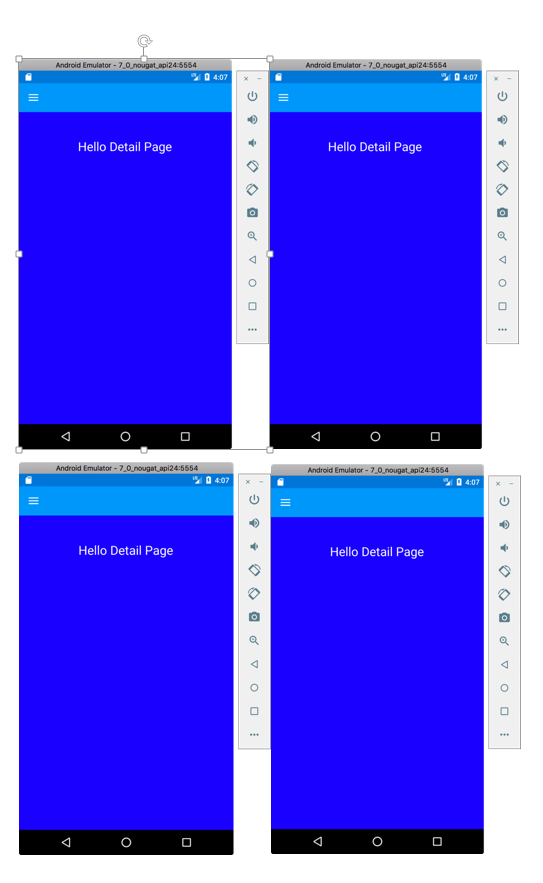 You can see the closed version of the menu in the first two pictures and in the last two pictures are the open version of the menu. ### Let's look at how MasterDetailPage is now done. First of all, we talked about 2 structure of pages. MasterPage and Detail Page. Firstly, add these pages to a folder. It's possible to use even a simple ContentPage because of it is derived from the Page class or we can use a CarouselPage or a TabPage. # I am using ContentPage at there: ``` <?xml version="1.0" encoding="UTF-8"?> <ContentPage xmlns="http://xamarin.com/schemas/2014/forms" xmlns:x="http://schemas.microsoft.com/winfx/2009/xaml" x:Class="Tutorial1.Views.MyMasterPage" Title="My Master Page"> <ContentPage.Content > <StackLayout BackgroundColor="Teal" > <StackLayout HorizontalOptions="Center" Margin="0,50" > <Label FontSize="24" Text="Hello Master Page"></Label> </StackLayout> </StackLayout> </ContentPage.Content> </ContentPage> ``` The structure of my MasterPage consists of a ContentPage. I colored the backgrounds here especially to understand the work logic. This will be our Menu. ``` <?xml version="1.0" encoding="UTF-8"?> <ContentPage xmlns="http://xamarin.com/schemas/2014/forms" xmlns:x="http://schemas.microsoft.com/winfx/2009/xaml" x:Class="Tutorial1.Views.MyDetailPage"> <ContentPage.Content > <StackLayout VerticalOptions="FillAndExpand" BackgroundColor="Blue"> <StackLayout HorizontalOptions="Center" Margin="1,50" > <Label TextColor="White" FontSize="24" Text="Hello Detail Page"></Label> </StackLayout> </StackLayout> </ContentPage.Content> </ContentPage> ``` These are our DetailPage. DetailPage is the page you get when you interact with the menü. Let us come to masterdetailpage. I mostly prefer to build it myself. So it's getting simpler codes. We create a class for this and we will derive this class from the MasterDetailPage class. ``` using System; using Tutorial1.Views; using Xamarin.Forms; namespace Tutorial1 { public class MasterDetailPage1 : MasterDetailPage { public MasterDetailPage1() { Master = new MyMasterPage(); Detail = new NavigationPage(new MyDetailPage()); } } } ``` It's so easy to create a MasterDetailPage, as you can see. What you need to be aware of here is that the Title property of the MasterPage is the require (you will get errors at runtime if you did not give an title to masterPage). Actually we see this title clearly on iOS screens. IOS uses it like a button. But on Android, it is a hamburger icon. If you want to see the hamburger icon on iOS, it will be enough to put the hamburger image on the MasterPage's Icon feature. You need to be aware that the relevant icon is located in the Resources folder. It is also included in the source code. ### 1- MASTERDETAIL PAGE’S BASIC FEATURES AND USEAGES We created a MasterDetailPage above. Now we will look at how to use this. As you can imagine, we will change the DetailPage of the MasterDetailPage with any item selected from the menu. To do this, I will add a few elements to the MasterPage that makes up our Menu, and change the DetailPage of our MasterDetailPage in their click event. First, we create a ContentPage named NewDetailPage to separate the old DetailPage and the new DetailPage. Then we access the existing MasterDetailPage in the click of the items that we put in the Menu as follows. ``` var masterdetailPage = (MasterDetailPage)App.Current.MainPage; ``` Then we make an assignation to Master and Detail properties of this MasterDetailPage as we would like. I do not want to change the Master page here. I am just changing the Detail page. ``` masterdetailPage.Detail = new NavigationPage(new NewDetailPage()); ``` You will see here that we have a new problem now. The DetailPage has changed but the Menu is still in the open position. For close the menü we have an property; IsPresented. This property takes boolean values and allows the menu to be open when it is true and close when it is false. ``` masterdetailPage.IsPresented = false; ``` Of course, it's totally in your hands to want to close the or open Menu here. In this way, we can open the DetailPage with a simple click, and it is also possible to pass information to the DetailPage. For this we need to make a small edit in the DetailPage. Now, when we click on a button from the menu we want to do, we will move the text of this button to the new Detail page ``` public partial class NewDetailPage : ContentPage { public NewDetailPage(string Content) { InitializeComponent(); } } ``` We changed the constructor of our NewDetailPage as above. Now let's edit the clicked event of the button in MasterPage ``` public void btnClicked(object sender, EventArgs eventArgs) { var masterdetailPage = (MasterDetailPage)App.Current.MainPage; var content = (Button)sender; masterdetailPage.Detail = new NavigationPage(new NewDetailPage(content.Text)); masterdetailPage.IsPresented = false; } ``` Because of we call the parameterized constructor of NewDetailPage, we need to make the following change in our page. ``` public partial class NewDetailPage : ContentPage { public NewDetailPage(string Content) { InitializeComponent(); lblContent.Text = "Clicked Item Name:" + Content; } } On the XAML side; <ContentPage.Content> <StackLayout HorizontalOptions="Center" VerticalOptions="Center"> <Label Text="Hello NEW DETAIL PAGE"></Label> <Label x:Name="lblContent"></Label> </StackLayout> </ContentPage.Content> ``` # iOS looks like this; 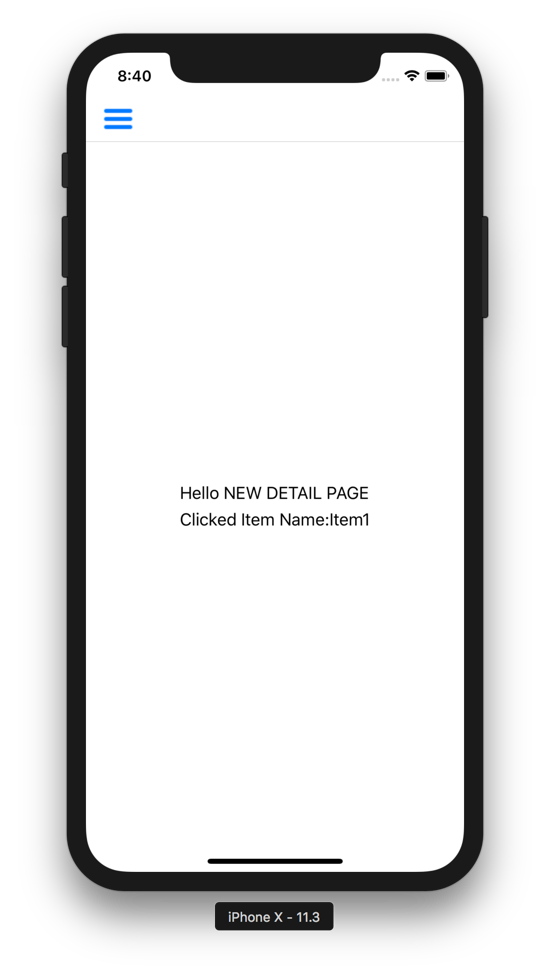 As you can imagine, we can transfer a simple string of data here, as well as an object. For example, we will push the button we clicked on the DetailPage page. For this we modify the NewDetailPage constructor as follows; ```public NewDetailPage(string Content, Button button) { InitializeComponent(); lblContent.Text = "Clicked Item Name:" + Content; stkContainer.Children.Add(button); } ``` In the clicked event of our MasterPage, we make the following change; ``` public void btnClicked(object sender, EventArgs eventArgs) { var masterdetailPage = (MasterDetailPage)App.Current.MainPage; var content = (Button)sender; masterdetailPage.Detail = new NavigationPage(new NewDetailPage(content.Text, content)); masterdetailPage.IsPresented = false; } ``` 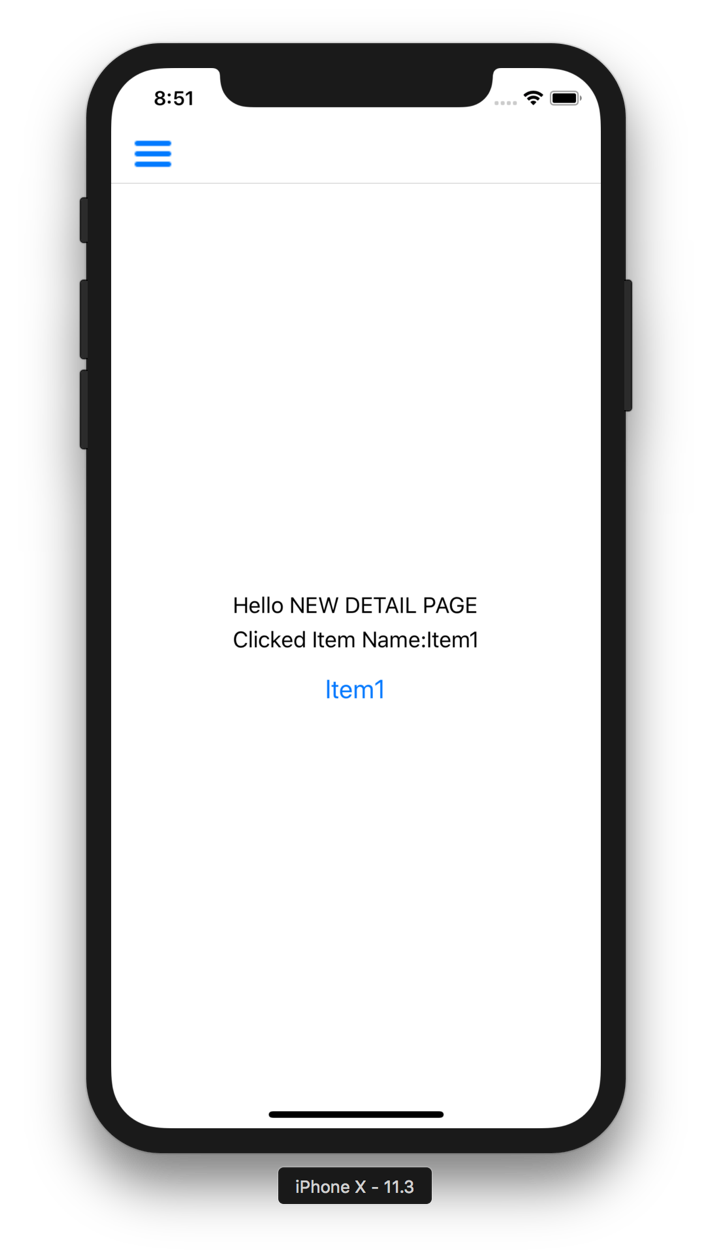 It's just one of the many ways to transfer data, and perhaps the easiest one you see. Now let's put a different structure to our DetailPage than the ContentPage and see how we can group more data. I add a TabbedPage there. I will click on the second button in the menu to convert the DetailPage to a TabbedPage and start navigating through the tabs. First, create our TabbedPage ``` <?xml version="1.0" encoding="UTF-8"?> <ContentPage xmlns="http://xamarin.com/schemas/2014/forms" xmlns:x="http://schemas.microsoft.com/winfx/2009/xaml" x:Class="Tutorial1.Views.TabPage1" Title="Tab1"> <ContentPage.Content> <StackLayout HorizontalOptions="Center" VerticalOptions="Center"> <Label Text="Tab Page 1"></Label> </StackLayout> </ContentPage.Content> </ContentPage> <?xml version="1.0" encoding="UTF-8"?> <ContentPage xmlns="http://xamarin.com/schemas/2014/forms" xmlns:x="http://schemas.microsoft.com/winfx/2009/xaml" x:Class="Tutorial1.Views.TabPage2" Title="Tab2"> <ContentPage.Content> <StackLayout HorizontalOptions="Center" VerticalOptions="Center"> <Label Text="Tab Page 2"></Label> </StackLayout> </ContentPage.Content> </ContentPage> ``` Now, let's create a Page that we wrap our Tab Pages like a container. I prefer to do this with a class, but you can also create it yourself quickly from the Visual Studio theme gallery ``` using System; using Tutorial1.Views; using Xamarin.Forms; namespace Tutorial1 { public class MyTabbedPage : TabbedPage { public MyTabbedPage() { Children.Add(new TabPage1()); Children.Add(new TabPage2()); } } } On the second button in the MasterPage is in the clicked event; public void btnTabbedClicked(object sender, EventArgs eventArgs) { var masterdetailPage = (MasterDetailPage)App.Current.MainPage; masterdetailPage.Detail = new NavigationPage(new MyTabbedPage()); masterdetailPage.IsPresented = false; } ``` # It will look like these pictures on Android and IOS. 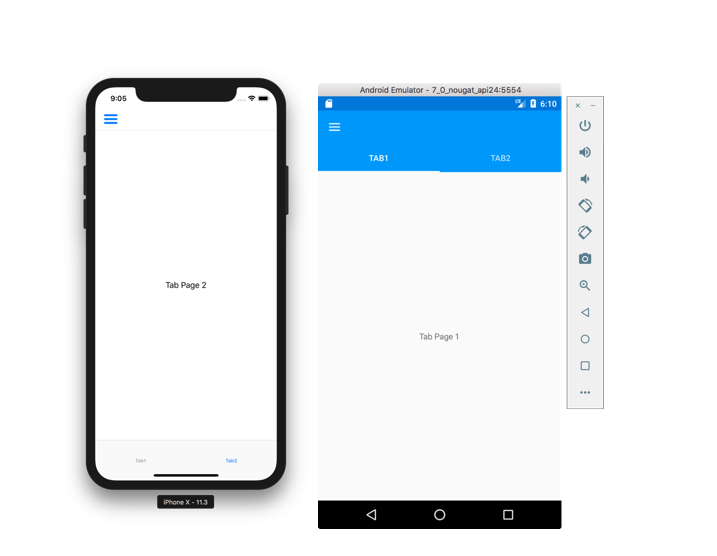 ### WHAT WE LEARNED 1- What is MasterDetailPage? It is used for what purpose. What are the usage areas? 2- The elements that make up the MasterDetailPage structure and their use. Author: @elsedongusu [xamarin logo link](https://i2.wp.com/www.muratoner.net/wp-content/uploads/2016/04/Xamarin-logo1.png?resize=517%2C217) |
| json metadata | {"tags":["utopian-io","tutorials","xamarin","technology","application"],"users":["elsedongusu"],"image":["https://cdn.steemitimages.com/DQmZYKbkkLTbwPQGV7JqjHsLBFT1V5SPi84vNAaJbg9Swvm/Xamarin-logo1.png","https://cdn.steemitimages.com/DQmZoHjhgrJbm2ar4xxMjGukf4xjax393LpGFUgmVYTcYhX/gg.png","https://cdn.steemitimages.com/DQmPvRNSPb4VeY12EC8Etz2sXPXvUXy97Xa3sxVNFsVvCqt/uu.png","https://cdn.steemitimages.com/DQmddNAsp3mVEjMF9W7kRm3MSKGzmvEi5Dd28z9pzbmBPCJ/ll.png","https://cdn.steemitimages.com/DQmTt87488S7rozUgtG6L5sXA41rc4Dq2neLcj7mpke8i6x/%C5%9F%C5%9F.png"],"links":["https://github.com/elsedongusu/xamarin-app1","https://github.com/elsedongusu","https://github.com/xamarin/Xamarin.Forms","https://www.visualstudio.com/tr/downloads/?rr=https%3A%2F%2Fwww.google.com.tr%2F","https://i2.wp.com/www.muratoner.net/wp-content/uploads/2016/04/Xamarin-logo1.png?resize=517%2C217"],"app":"steemit/0.1","format":"markdown"} |
| parent author | |
| parent permlink | utopian-io |
| permlink | xamarin-learning-serie-1-masterdetail-page-structure |
| title | Xamarin Learning Serie 1 MASTERDETAIL PAGE STRUCTURE |
| Transaction Info | Block #22725059/Trx 799a1a38208437671c7cfe54565afbc9e0e512dc |
View Raw JSON Data
{
"block": 22725059,
"op": [
"comment",
{
"author": "elsedongusu",
"body": "\n\n\n\ngithub project download link : https://github.com/elsedongusu/xamarin-app1\nmy github profile : https://github.com/elsedongusu\ngithub link : https://github.com/xamarin/Xamarin.Forms\n\n\n\n### What we will learn:\n-\tWhat is “MasterDetail Page” ?\n-\tWhy we should use?\n-\tBasic features and usage.\n\n### Requirements:\n\n- \tVisual Studio (I suggest Visiual Studio Mac) If you does not have you can download at there [https://www.visualstudio.com/tr/downloads/?rr=https%3A%2F%2Fwww.google.com.tr%2F]\n### What is “MasterDetail Page” ?\nWhether you are working on the web, desktop or working on mobile technology has become a necessity to develop user-focused applications. This becomes even more important in mobile environments. Such as windows, shortlists, fewer entrances, are a must for the mobile interface design. Guiding the user is one of those delicacies. Because of we can not display all the information on one screen, we group that information and direct the user to other screens. Here; them master detail page is a structure for directing users on the mobile application. We can easily say that in mobile applications the menu structure is masterdetail page structure. When you think about a menu structure, first you have a structure that contains menu elements, and when you click on these elements, another structure leads the user to an another page. In the MasterDetailPage structure, the menu structure (the container where our links are located) is called MasterPage, and the screen that we will link to when we click on the links is called DetailPage. In this case we can say that in a MasterDetailPage there are two screens, MasterPage and DetailPage.\n### \tWhy we should use?\nWe nearly always need menu structures in mobile applications. In such cases we need to use the MasterDetail Page.\n\nYou can see ‘what’s look like’ at the below.\n\n\n\n\n\nYou can see the closed version of the menu in the first two pictures and in the last two pictures are the open version of the menu. \n\n### Let's look at how MasterDetailPage is now done.\nFirst of all, we talked about 2 structure of pages. MasterPage and Detail Page. Firstly, add these pages to a folder. It's possible to use even a simple ContentPage because of it is derived from the Page class or we can use a CarouselPage or a TabPage. \n\n# I am using ContentPage at there:\n\n```\n\n<?xml version=\"1.0\" encoding=\"UTF-8\"?>\n<ContentPage xmlns=\"http://xamarin.com/schemas/2014/forms\" xmlns:x=\"http://schemas.microsoft.com/winfx/2009/xaml\" \n x:Class=\"Tutorial1.Views.MyMasterPage\" Title=\"My Master Page\">\n <ContentPage.Content >\n <StackLayout BackgroundColor=\"Teal\" >\n <StackLayout HorizontalOptions=\"Center\" Margin=\"0,50\" >\n <Label FontSize=\"24\" Text=\"Hello Master Page\"></Label>\n </StackLayout>\n </StackLayout>\n \n </ContentPage.Content>\n</ContentPage>\n```\n\nThe structure of my MasterPage consists of a ContentPage. I colored the backgrounds here especially to understand the work logic. This will be our Menu.\n\n\n```\n<?xml version=\"1.0\" encoding=\"UTF-8\"?>\n<ContentPage xmlns=\"http://xamarin.com/schemas/2014/forms\" xmlns:x=\"http://schemas.microsoft.com/winfx/2009/xaml\" x:Class=\"Tutorial1.Views.MyDetailPage\">\n <ContentPage.Content >\n <StackLayout VerticalOptions=\"FillAndExpand\" BackgroundColor=\"Blue\">\n <StackLayout HorizontalOptions=\"Center\" Margin=\"1,50\" >\n <Label TextColor=\"White\" FontSize=\"24\" Text=\"Hello Detail Page\"></Label>\n </StackLayout>\n </StackLayout>\n </ContentPage.Content>\n</ContentPage>\n```\n\nThese are our DetailPage. DetailPage is the page you get when you interact with the menü. Let us come to masterdetailpage. I mostly prefer to build it myself. So it's getting simpler codes. We create a class for this and we will derive this class from the MasterDetailPage class. \n\n```\n\nusing System;\nusing Tutorial1.Views;\nusing Xamarin.Forms;\n\nnamespace Tutorial1\n{\n public class MasterDetailPage1 : MasterDetailPage\n {\n public MasterDetailPage1()\n {\n Master = new MyMasterPage();\n Detail = new NavigationPage(new MyDetailPage());\n }\n }\n}\n\n```\nIt's so easy to create a MasterDetailPage, as you can see. What you need to be aware of here is that the Title property of the MasterPage is the require (you will get errors at runtime if you did not give an title to masterPage). Actually we see this title clearly on iOS screens. IOS uses it like a button. But on Android, it is a hamburger icon. If you want to see the hamburger icon on iOS, it will be enough to put the hamburger image on the MasterPage's Icon feature. You need to be aware that the relevant icon is located in the Resources folder. It is also included in the source code.\n\n### 1-\tMASTERDETAIL PAGE’S BASIC FEATURES AND USEAGES\nWe created a MasterDetailPage above. Now we will look at how to use this. As you can imagine, we will change the DetailPage of the MasterDetailPage with any item selected from the menu. To do this, I will add a few elements to the MasterPage that makes up our Menu, and change the DetailPage of our MasterDetailPage in their click event. First, we create a ContentPage named NewDetailPage to separate the old DetailPage and the new DetailPage. Then we access the existing MasterDetailPage in the click of the items that we put in the Menu as follows. \n\n```\nvar masterdetailPage = (MasterDetailPage)App.Current.MainPage;\n```\n\nThen we make an assignation to Master and Detail properties of this MasterDetailPage as we would like. I do not want to change the Master page here. I am just changing the Detail page.\n\n```\n\nmasterdetailPage.Detail = new NavigationPage(new NewDetailPage());\n\n```\nYou will see here that we have a new problem now. The DetailPage has changed but the Menu is still in the open position. For close the menü we have an property; IsPresented. This property takes boolean values and allows the menu to be open when it is true and close when it is false. \n\n```\nmasterdetailPage.IsPresented = false;\n```\n\nOf course, it's totally in your hands to want to close the or open Menu here. In this way, we can open the DetailPage with a simple click, and it is also possible to pass information to the DetailPage. For this we need to make a small edit in the DetailPage. Now, when we click on a button from the menu we want to do, we will move the text of this button to the new Detail page\n\n```\npublic partial class NewDetailPage : ContentPage\n {\n public NewDetailPage(string Content)\n {\n InitializeComponent();\n }\n }\n```\n\nWe changed the constructor of our NewDetailPage as above. Now let's edit the clicked event of the button in MasterPage\n\n```\npublic void btnClicked(object sender, EventArgs eventArgs)\n {\n var masterdetailPage = (MasterDetailPage)App.Current.MainPage;\n var content = (Button)sender;\n masterdetailPage.Detail = new NavigationPage(new NewDetailPage(content.Text));\n masterdetailPage.IsPresented = false;\n\n }\n```\n\nBecause of we call the parameterized constructor of NewDetailPage, we need to make the following change in our page. \n\n```\n\npublic partial class NewDetailPage : ContentPage\n {\n public NewDetailPage(string Content)\n {\n InitializeComponent();\n lblContent.Text = \"Clicked Item Name:\" + Content;\n }\n }\n\nOn the XAML side;\n<ContentPage.Content>\n <StackLayout HorizontalOptions=\"Center\" VerticalOptions=\"Center\">\n <Label Text=\"Hello NEW DETAIL PAGE\"></Label>\n <Label x:Name=\"lblContent\"></Label>\n </StackLayout>\n </ContentPage.Content>\n```\n\n# iOS looks like this;\n\n\n\n\nAs you can imagine, we can transfer a simple string of data here, as well as an object. For example, we will push the button we clicked on the DetailPage page. For this we modify the NewDetailPage constructor as follows;\n\n```public NewDetailPage(string Content, Button button)\n {\n InitializeComponent();\n lblContent.Text = \"Clicked Item Name:\" + Content;\n stkContainer.Children.Add(button);\n }\n```\n\nIn the clicked event of our MasterPage, we make the following change;\n\n```\n\npublic void btnClicked(object sender, EventArgs eventArgs)\n {\n var masterdetailPage = (MasterDetailPage)App.Current.MainPage;\nvar content = (Button)sender;\n masterdetailPage.Detail = new NavigationPage(new NewDetailPage(content.Text, content));\n masterdetailPage.IsPresented = false;\n }\n```\n \n\n\nIt's just one of the many ways to transfer data, and perhaps the easiest one you see. Now let's put a different structure to our DetailPage than the ContentPage and see how we can group more data. I add a TabbedPage there. I will click on the second button in the menu to convert the DetailPage to a TabbedPage and start navigating through the tabs. First, create our TabbedPage\n\n```\n<?xml version=\"1.0\" encoding=\"UTF-8\"?>\n<ContentPage xmlns=\"http://xamarin.com/schemas/2014/forms\" \n xmlns:x=\"http://schemas.microsoft.com/winfx/2009/xaml\" \n x:Class=\"Tutorial1.Views.TabPage1\" Title=\"Tab1\">\n <ContentPage.Content>\n <StackLayout HorizontalOptions=\"Center\" VerticalOptions=\"Center\">\n <Label Text=\"Tab Page 1\"></Label>\n </StackLayout>\n </ContentPage.Content>\n</ContentPage>\n\n<?xml version=\"1.0\" encoding=\"UTF-8\"?>\n<ContentPage xmlns=\"http://xamarin.com/schemas/2014/forms\" \n xmlns:x=\"http://schemas.microsoft.com/winfx/2009/xaml\" \n x:Class=\"Tutorial1.Views.TabPage2\" Title=\"Tab2\">\n <ContentPage.Content>\n <StackLayout HorizontalOptions=\"Center\" VerticalOptions=\"Center\">\n <Label Text=\"Tab Page 2\"></Label>\n </StackLayout>\n </ContentPage.Content>\n</ContentPage>\n```\n\nNow, let's create a Page that we wrap our Tab Pages like a container. I prefer to do this with a class, but you can also create it yourself quickly from the Visual Studio theme gallery\n\n```\nusing System;\nusing Tutorial1.Views;\nusing Xamarin.Forms;\nnamespace Tutorial1\n{\n public class MyTabbedPage : TabbedPage\n {\n public MyTabbedPage()\n {\nChildren.Add(new TabPage1());\n Children.Add(new TabPage2());\n }\n }\n}\n\nOn the second button in the MasterPage is in the clicked event;\n\npublic void btnTabbedClicked(object sender, EventArgs eventArgs)\n {\n var masterdetailPage = (MasterDetailPage)App.Current.MainPage;\n masterdetailPage.Detail = new NavigationPage(new MyTabbedPage());\n masterdetailPage.IsPresented = false;\n }\n```\n# It will look like these pictures on Android and IOS.\n\n\n\n### WHAT WE LEARNED\n1-\tWhat is MasterDetailPage? It is used for what purpose. What are the usage areas?\n2-\tThe elements that make up the MasterDetailPage structure and their use.\n\nAuthor: @elsedongusu\n\n[xamarin logo link](https://i2.wp.com/www.muratoner.net/wp-content/uploads/2016/04/Xamarin-logo1.png?resize=517%2C217)",
"json_metadata": "{\"tags\":[\"utopian-io\",\"tutorials\",\"xamarin\",\"technology\",\"application\"],\"users\":[\"elsedongusu\"],\"image\":[\"https://cdn.steemitimages.com/DQmZYKbkkLTbwPQGV7JqjHsLBFT1V5SPi84vNAaJbg9Swvm/Xamarin-logo1.png\",\"https://cdn.steemitimages.com/DQmZoHjhgrJbm2ar4xxMjGukf4xjax393LpGFUgmVYTcYhX/gg.png\",\"https://cdn.steemitimages.com/DQmPvRNSPb4VeY12EC8Etz2sXPXvUXy97Xa3sxVNFsVvCqt/uu.png\",\"https://cdn.steemitimages.com/DQmddNAsp3mVEjMF9W7kRm3MSKGzmvEi5Dd28z9pzbmBPCJ/ll.png\",\"https://cdn.steemitimages.com/DQmTt87488S7rozUgtG6L5sXA41rc4Dq2neLcj7mpke8i6x/%C5%9F%C5%9F.png\"],\"links\":[\"https://github.com/elsedongusu/xamarin-app1\",\"https://github.com/elsedongusu\",\"https://github.com/xamarin/Xamarin.Forms\",\"https://www.visualstudio.com/tr/downloads/?rr=https%3A%2F%2Fwww.google.com.tr%2F\",\"https://i2.wp.com/www.muratoner.net/wp-content/uploads/2016/04/Xamarin-logo1.png?resize=517%2C217\"],\"app\":\"steemit/0.1\",\"format\":\"markdown\"}",
"parent_author": "",
"parent_permlink": "utopian-io",
"permlink": "xamarin-learning-serie-1-masterdetail-page-structure",
"title": "Xamarin Learning Serie 1 MASTERDETAIL PAGE STRUCTURE"
}
],
"op_in_trx": 0,
"timestamp": "2018-05-25T00:38:27",
"trx_id": "799a1a38208437671c7cfe54565afbc9e0e512dc",
"trx_in_block": 26,
"virtual_op": 0
}elsedongusureceived 0.033 SBD, 0.015 SP author reward for @elsedongusu / application-menu-in-electron2018/05/23 19:55:42
elsedongusureceived 0.033 SBD, 0.015 SP author reward for @elsedongusu / application-menu-in-electron
2018/05/23 19:55:42
| author | elsedongusu |
| permlink | application-menu-in-electron |
| sbd payout | 0.033 SBD |
| steem payout | 0.000 STEEM |
| vesting payout | 24.409373 VESTS |
| Transaction Info | Block #22690966/Virtual Operation #3 |
View Raw JSON Data
{
  "block": 22690966,
  "op": [
    "author_reward",
    {
      "author": "elsedongusu",
      "permlink": "application-menu-in-electron",
      "sbd_payout": "0.033 SBD",
      "steem_payout": "0.000 STEEM",
      "vesting_payout": "24.409373 VESTS"
    }
  ],
  "op_in_trx": 0,
  "timestamp": "2018-05-23T19:55:42",
  "trx_id": "0000000000000000000000000000000000000000",
  "trx_in_block": 4294967295,
  "virtual_op": 3
}elsedongusureceived 0.213 SBD, 0.088 SP author reward for @elsedongusu / xamarin-learnign-serie-1-communication-with-web-apis2018/05/22 21:24:03
elsedongusureceived 0.213 SBD, 0.088 SP author reward for @elsedongusu / xamarin-learnign-serie-1-communication-with-web-apis
2018/05/22 21:24:03
| author | elsedongusu |
| permlink | xamarin-learnign-serie-1-communication-with-web-apis |
| sbd payout | 0.213 SBD |
| steem payout | 0.000 STEEM |
| vesting payout | 142.394963 VESTS |
| Transaction Info | Block #22663952/Virtual Operation #22 |
View Raw JSON Data
{
  "block": 22663952,
  "op": [
    "author_reward",
    {
      "author": "elsedongusu",
      "permlink": "xamarin-learnign-serie-1-communication-with-web-apis",
      "sbd_payout": "0.213 SBD",
      "steem_payout": "0.000 STEEM",
      "vesting_payout": "142.394963 VESTS"
    }
  ],
  "op_in_trx": 0,
  "timestamp": "2018-05-22T21:24:03",
  "trx_id": "0000000000000000000000000000000000000000",
  "trx_in_block": 4294967295,
  "virtual_op": 22
}elsedongusuclaimed reward balance: 11.604 SBD, 5.107 SP2018/05/21 11:24:00
elsedongusuclaimed reward balance: 11.604 SBD, 5.107 SP
2018/05/21 11:24:00
| account | elsedongusu |
| reward sbd | 11.604 SBD |
| reward steem | 0.000 STEEM |
| reward vests | 8299.341452 VESTS |
| Transaction Info | Block #22623159/Trx 061be586d0c9584d5f8e9daace40ef138e74a133 |
View Raw JSON Data
{
  "block": 22623159,
  "op": [
    "claim_reward_balance",
    {
      "account": "elsedongusu",
      "reward_sbd": "11.604 SBD",
      "reward_steem": "0.000 STEEM",
      "reward_vests": "8299.341452 VESTS"
    }
  ],
  "op_in_trx": 0,
  "timestamp": "2018-05-21T11:24:00",
  "trx_id": "061be586d0c9584d5f8e9daace40ef138e74a133",
  "trx_in_block": 52,
  "virtual_op": 0
}elsedongusureceived 11.604 SBD, 5.107 SP author reward for @elsedongusu / create-a-weather-app-whith-kivy-part-32018/05/18 18:19:30
elsedongusureceived 11.604 SBD, 5.107 SP author reward for @elsedongusu / create-a-weather-app-whith-kivy-part-3
2018/05/18 18:19:30
| author | elsedongusu |
| permlink | create-a-weather-app-whith-kivy-part-3 |
| sbd payout | 11.604 SBD |
| steem payout | 0.000 STEEM |
| vesting payout | 8299.341452 VESTS |
| Transaction Info | Block #22545081/Virtual Operation #17 |
View Raw JSON Data
{
  "block": 22545081,
  "op": [
    "author_reward",
    {
      "author": "elsedongusu",
      "permlink": "create-a-weather-app-whith-kivy-part-3",
      "sbd_payout": "11.604 SBD",
      "steem_payout": "0.000 STEEM",
      "vesting_payout": "8299.341452 VESTS"
    }
  ],
  "op_in_trx": 0,
  "timestamp": "2018-05-18T18:19:30",
  "trx_id": "0000000000000000000000000000000000000000",
  "trx_in_block": 4294967295,
  "virtual_op": 17
}2018/05/17 21:37:45
2018/05/17 21:37:45
| author | portugalcoin |
| body | Thank you for your contribution. - There are well-documented tutorials to talk about, for example, at this <a href="https://docs.microsoft.com/en-us/xamarin/xamarin-forms/get-started/">link</a>. Please do a tutorial where the subject in internet is not well documented and is useful to the open source community. ---- Need help? Write a ticket on https://support.utopian.io/. Chat with us on [Discord](https://discord.gg/uTyJkNm). [[utopian-moderator]](https://join.utopian.io/) |
| json metadata | {"tags":["utopian-io"],"links":["https://docs.microsoft.com/en-us/xamarin/xamarin-forms/get-started/","https://support.utopian.io/","https://discord.gg/uTyJkNm","https://join.utopian.io/"],"app":"steemit/0.1"} |
| parent author | elsedongusu |
| parent permlink | xamarin-learnign-serie-1-communication-with-web-apis |
| permlink | re-elsedongusu-xamarin-learnign-serie-1-communication-with-web-apis-20180517t213746847z |
| title | |
| Transaction Info | Block #22520252/Trx 0298b80c0dd26825f7d0332fb3815c59c945f3d6 |
View Raw JSON Data
{
  "block": 22520252,
  "op": [
    "comment",
    {
      "author": "portugalcoin",
      "body": "Thank you for your contribution.\n\n- There are well-documented tutorials to talk about, for example, at this <a href=\"https://docs.microsoft.com/en-us/xamarin/xamarin-forms/get-started/\">link</a>.\n\nPlease do a tutorial where the subject in internet is not well documented and is useful to the open source community.\n\n---- \nNeed help? Write a ticket on https://support.utopian.io/. \nChat with us on [Discord](https://discord.gg/uTyJkNm). \n[[utopian-moderator]](https://join.utopian.io/)",
      "json_metadata": "{\"tags\":[\"utopian-io\"],\"links\":[\"https://docs.microsoft.com/en-us/xamarin/xamarin-forms/get-started/\",\"https://support.utopian.io/\",\"https://discord.gg/uTyJkNm\",\"https://join.utopian.io/\"],\"app\":\"steemit/0.1\"}",
      "parent_author": "elsedongusu",
      "parent_permlink": "xamarin-learnign-serie-1-communication-with-web-apis",
      "permlink": "re-elsedongusu-xamarin-learnign-serie-1-communication-with-web-apis-20180517t213746847z",
      "title": ""
    }
  ],
  "op_in_trx": 0,
  "timestamp": "2018-05-17T21:37:45",
  "trx_id": "0298b80c0dd26825f7d0332fb3815c59c945f3d6",
  "trx_in_block": 56,
  "virtual_op": 0
}elsedongusupublished a new post: xamarin-learnign-serie-1-communication-with-web-apis2018/05/17 20:47:45
elsedongusupublished a new post: xamarin-learnign-serie-1-communication-with-web-apis
2018/05/17 20:47:45
| author | elsedongusu |
| body |  ### Github Repository https://xamarin.com/forms ### My github Adress https://github.com/elsedongusu ### Github project file https://github.com/elsedongusu/xmarina ### What we will learn: - Why we are using web api with mobelie applications? - How does web apis communicate with mobile systems? - Basic operations. Add, Edit, Delete, Display. ### Requirements - [MsSql Server (optional, you can use mysql or oracle)](https://www.microsoft.com/en-us/sql-server/sql-server-downloads) - [A web api ](https://docs.microsoft.com/tr-tr/aspnet/web-api/overview/getting-started-with-aspnet-web-api/tutorial-your-first-web-api) - [ Visual Studio I will be using Visual Studio Mac for Mac but you can use any version which compatible with Xamarin](https://www.visualstudio.com/tr/downloads/?rr=https%3A%2F%2Fwww.google.com.tr%2F) ### What you need to pay attention: - [Be sure you have Mvc Core 2.0.3](https://www.microsoft.com/net/download/macos) - [Be sure your Xamarin Components are running](https://www.visualstudio.com/tr/xamarin/?rr=https%3A%2F%2Fwww.google.com.tr%2F) ### Difficulty - Intermediate # Tutorial Contents Why we are using WEB API? When it is necessary to work with a global data in a web application, it is usually connecting to a database, and the data from that database is served to all clients. If there is no need for it here, it is the fastest way to connect directly to the database and to extract the data from there. In mobile technologies, it is not directly connected to a common database system like Mssql. Because you can not guarantee that mobile systems will always be connected to the internet.Instead of, you can use a portable database systems such as Sqlite when it is not necessary to work with shared data. For collaborations, we have to use a layer (Web API, Web Service) works as a bridge between the database system and the mobile application. Most preferred one from these, is a Web API. If you are making a request to a Web API with WebClients in a desktop or web software and doing basic CRUD (Cread, Read, Update and Delete) operations here, the same techniques are used at mobile applications to connect to the Web APIs and perform basic operations. For a simple Web API that we will enter from our mobile application, create the database as follows. 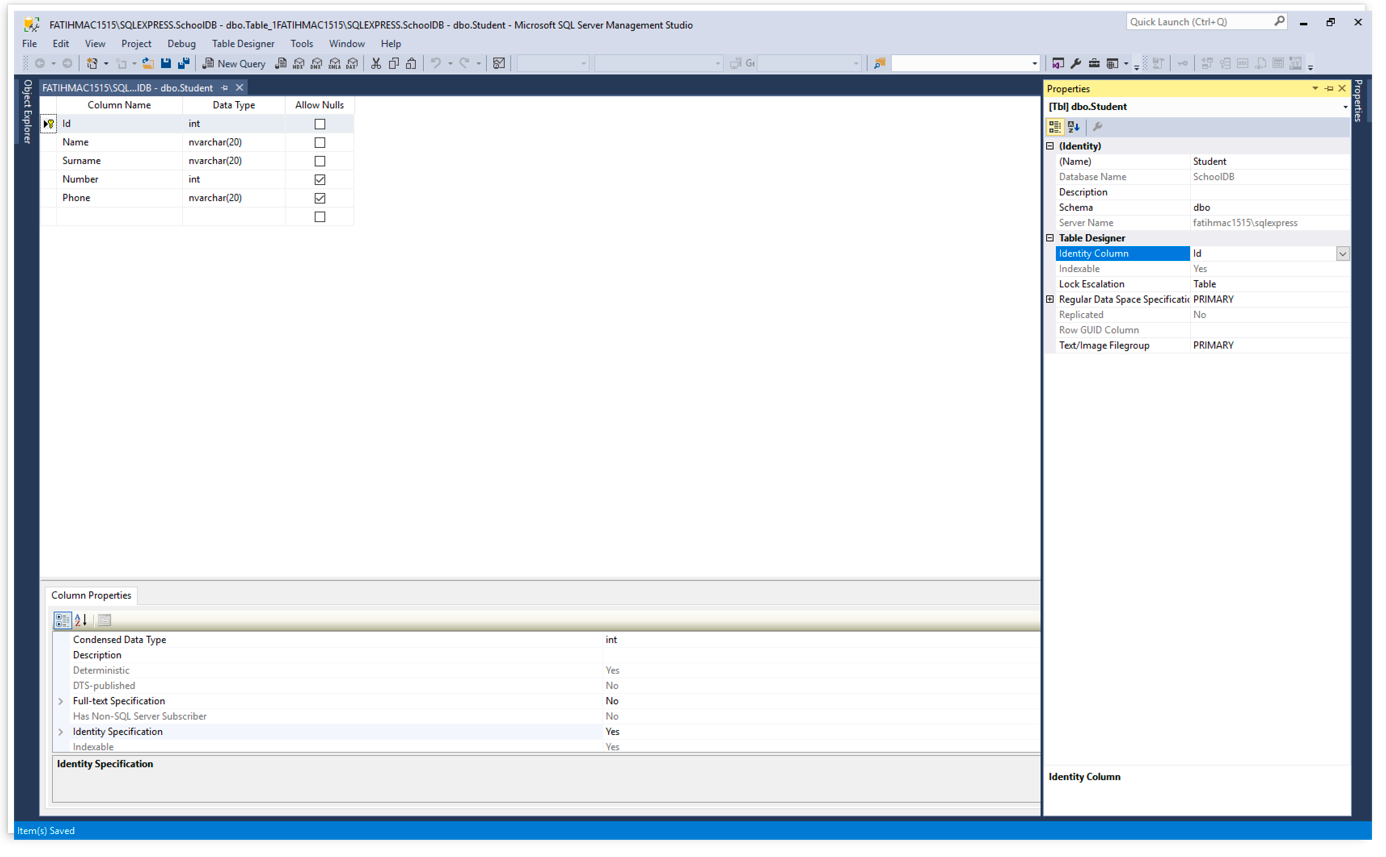 After that, lets code ouırWeb Apı's and be sure of its working. (I will be sharing my code) ``` [Route("api/[controller]")] public class StudentController : Controller { private readonly SchoolDBContext _context; public StudentController(SchoolDBContext context) { _context = context; } // GET api/values [HttpGet] public IEnumerable<Student> Get() { return _context.Student.ToList(); } // GET api/values/5 [HttpGet("{id}")] public Student Get(int id) { return _context.Student.FirstOrDefault(s => s.Id == id); } // POST api/values [HttpPost] public Student Post([FromBody]Student student) { _context.Student.Add(student); _context.SaveChanges(); return student; } // PUT api/values/5 [HttpPut("{id}")] public Student Put([FromBody]Student student) { _context.Student.Update(student); _context.SaveChanges(); return student; } // DELETE api/values/5 [HttpDelete("{id}")] public void Delete(int id) { var deleted = _context.Student.FirstOrDefault(s => s.Id == id); _context.Student.Remove(deleted); } } ``` We can code at Xamarin forms side now. Firstly we are creating an class at Models folder which one delegate our student class. So we can transfer datas to our student class, which one we got from web api ``` namespace XamarinTutorial1WebApi.Models { public class Student { public int Id { get; set; } public string Name { get; set; } public string Surname { get; set; } public int Number { get; set; } public string Phone { get; set; } } } ``` We are creating an screen for display student datas. We will be listing student datas are there and this screen will be a main page. We will can add a new student, edit student or delete student on this screen. ``` <?xml version="1.0" encoding="UTF-8"?> <ContentPage xmlns="http://xamarin.com/schemas/2014/forms" xmlns:x="http://schemas.microsoft.com/winfx/2009/xaml" x:Class="XamarinTutorial1WebApi.StudentList"> <ContentPage.Content> <StackLayout Padding="20"> <ListView x:Name="lstVStudent"> <ListView.ItemTemplate> <DataTemplate> <ViewCell> <ViewCell.ContextActions> <MenuItem Clicked="MenuItemDetail_Clicked" Text="Detail" CommandParameter="{Binding .}"></MenuItem> <MenuItem Clicked="MenuItemDelete_Clicked" Text="Delete" CommandParameter="{Binding .}"></MenuItem> </ViewCell.ContextActions> <StackLayout BackgroundColor="Green" Orientation="Vertical"> <StackLayout Orientation="Horizontal"> <Label TextColor="White" FontSize="20" Text="{Binding Name}"></Label> <Label TextColor="White" FontSize="20" Text="{Binding Surname}"></Label> </StackLayout> </StackLayout> </ViewCell> </DataTemplate> </ListView.ItemTemplate> </ListView> </StackLayout> </ContentPage.Content> </ContentPage> Our C # code will look like this: namespace XamarinTutorial1WebApi { public partial class StudentList : ContentPage { void MenuItemDetail_Clicked(object sender, EventArgs eventArgs) { var student = ((MenuItem)sender).CommandParameter as Student if (student != null) { Navigation.PushModalAsync(new AddStudent(student)); } } async void MenuItemDelete_Clicked(object sender, EventArgs eventArgs) { var student = ((MenuItem)sender).CommandParameter as Student; if (student != null) { var result = await DisplayAlert("Warning", "Are you sure?", "OK", "Cancel"); if (result) { await (new WebAPIService()).DeleteStudentAsync(student.Id); } } } public StudentList() { InitializeComponent(); } protected override async void OnAppearing() { base.OnAppearing(); var result = await (new WebAPIService()).GetData(); lstVStudent.ItemsSource = result; } } } ``` Our intent is listing students data, edit and delete any student at this screen. We will use MenuItems for this. And Menu Items look like this: 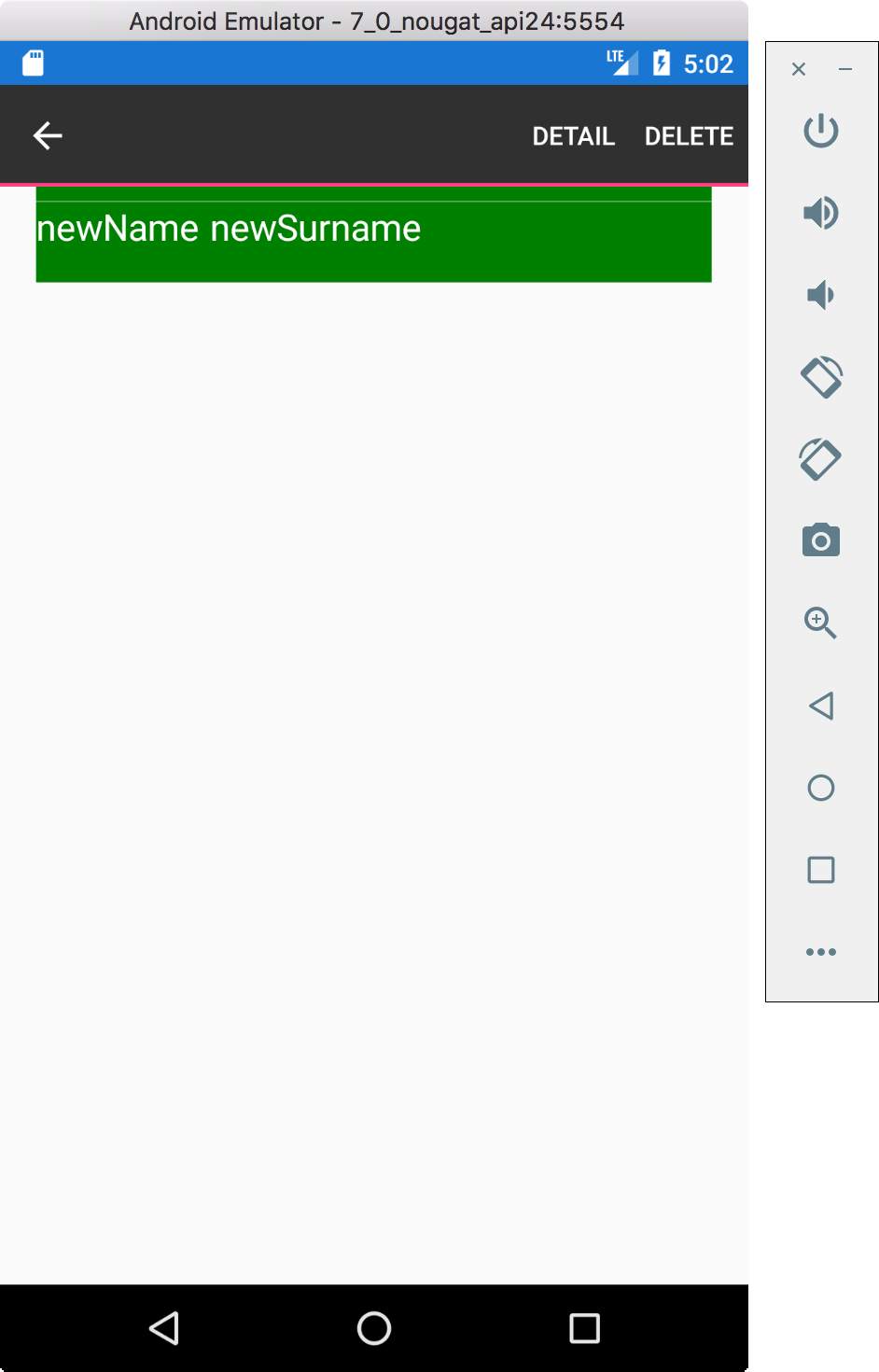 Before connecting a Web Api, we have to inject libraries which one is neccesarry. We will be using NewtonSoft JSON.NET because we generally use json structure at Rest services. Because of this don’t forget to add this library to your Project. Also we are inject Microsoft.Net.Http Library for using HttpClient class. After that we are creating our servicemanager, it will be a middleware for connect Web Api ``` using System; using System.Collections.Generic; using System.Net.Http; using System.Threading.Tasks; using Newtonsoft.Json; namespace XamarinTutorial1WebApi.Models { public class WebAPIService { private HttpClient _client; public WebAPIService() { _client = new HttpClient(); } public async Task<List<Student>> GetData() { var uri = new Uri(@"http://192.168.1.24/SchoolDBWebAPI/api/student"); var items = new List<Student>(); var response = await _client.GetAsync(uri); if (response.IsSuccessStatusCode) { var content = await response.Content.ReadAsStringAsync(); items = JsonConvert.DeserializeObject<List<Student>>(content); } return items; } } } ``` In the section I pointed out above, it is important to note that the url is specified with an IP address when specifying it. Because if we specify localhost, we get Connection Refused error because the mobile emulator is referring to its own IP address and our Restful service is not working in the emulator. For this we need to use IIS instead of IIS Express on the computer where we run the Web API (it may be a virtual server). We are desingning a screen for enter a student name, surname, school id and phone numberIf we want we can design another screen for this work but we did not design another screen because it wil have same components. This is how our screen’s look like; 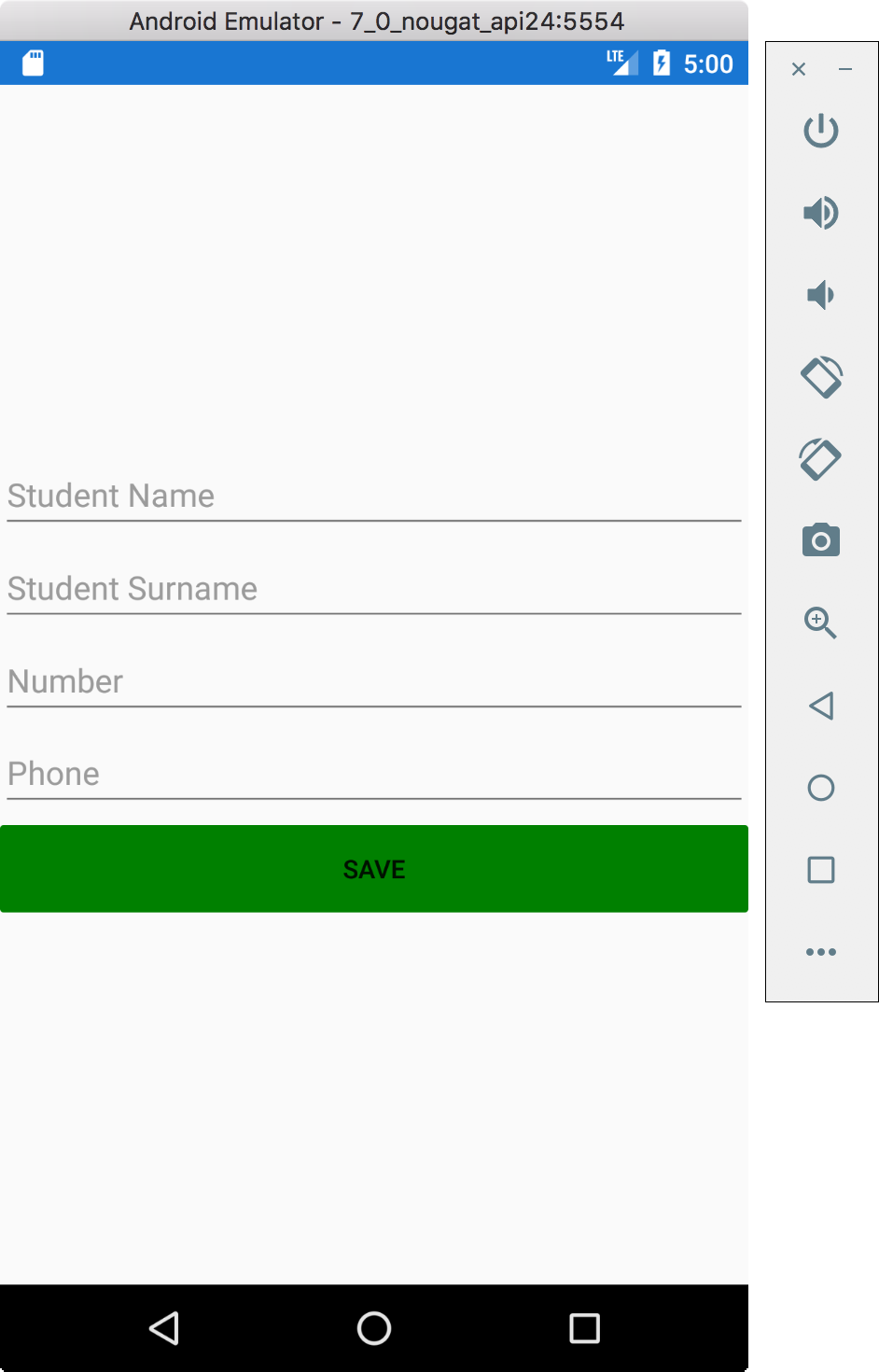 For delete operation, it is enought to send only student’s id. Our Rest service will delete entry which one is related with this id. If we get a pre-approval for this, accidental clicks can not lead to data loss. 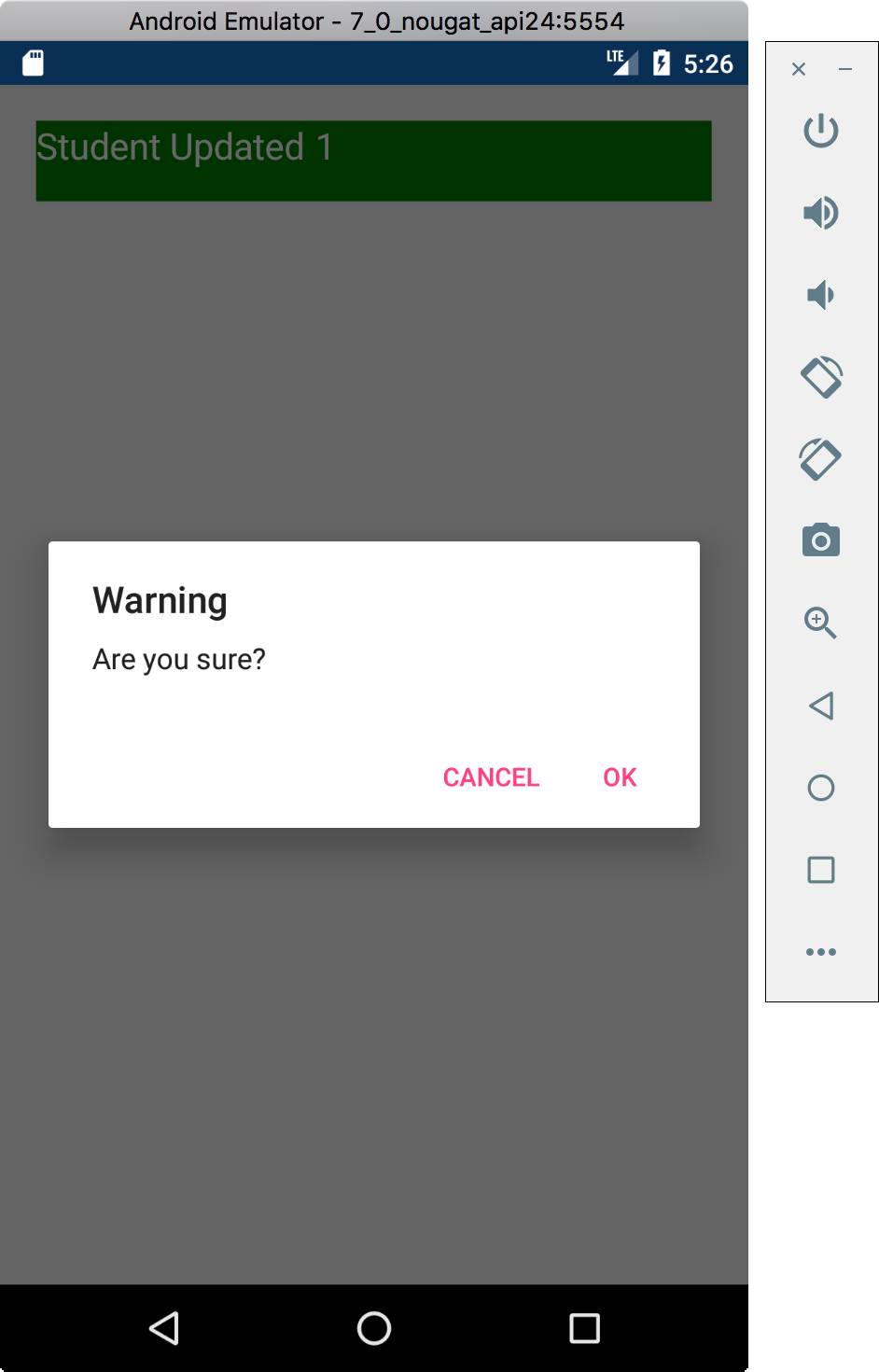 [source link](https://i2.wp.com/www.muratoner.net/wp-content/uploads/2016/04/Xamarin-logo1.png?resize=720%2C302) ### Author: elsedongusu |
| json metadata | {"tags":["utopian-io","tutorials","technology","education","xamarin"],"image":["https://steemitimages.com/DQmRArDUnvjft1omvtd69kYZs2V3xRLooh4vwGG37y14oLa/Xamarin-logo1.png","https://steemitimages.com/DQmXP319cW3T8gRKFyvvk2m4RtVYJCtj7XbAkTeZSmCyhGK/er1.png","https://steemitimages.com/DQmcMz2oEVsyZtpxaUXF4o5gZbstUsPBnxigCijdpsedML7/er3.png","https://steemitimages.com/DQmVC2PhUp2ABLt3vYKs1B4VqkFTfSJQYuvcnWp89MCqukA/er5.png","https://steemitimages.com/DQmQKRSt5xsfrtsr8GHduV3BG4NJGZj981AGDh275XWMciJ/er7.png"],"links":["https://xamarin.com/forms","https://github.com/elsedongusu","https://github.com/elsedongusu/xmarina","https://www.microsoft.com/en-us/sql-server/sql-server-downloads","https://docs.microsoft.com/tr-tr/aspnet/web-api/overview/getting-started-with-aspnet-web-api/tutorial-your-first-web-api","https://www.visualstudio.com/tr/downloads/?rr=https%3A%2F%2Fwww.google.com.tr%2F","https://www.microsoft.com/net/download/macos","https://www.visualstudio.com/tr/xamarin/?rr=https%3A%2F%2Fwww.google.com.tr%2F","https://i2.wp.com/www.muratoner.net/wp-content/uploads/2016/04/Xamarin-logo1.png?resize=720%2C302"],"app":"steemit/0.1","format":"markdown"} |
| parent author | |
| parent permlink | utopian-io |
| permlink | xamarin-learnign-serie-1-communication-with-web-apis |
| title | Xamarin Learning Serie #1 – Communication with WEB APIS |
| Transaction Info | Block #22519252/Trx e0e89d5bf9466206617f3c8b499499091257beaa |
View Raw JSON Data
{
"block": 22519252,
"op": [
"comment",
{
"author": "elsedongusu",
"body": "\n\n### Github Repository\nhttps://xamarin.com/forms\n\n### My github Adress\nhttps://github.com/elsedongusu\n\n### Github project file \nhttps://github.com/elsedongusu/xmarina\n\n\n\n\n\n### What we will learn:\n- Why we are using web api with mobelie applications? \n- How does web apis communicate with mobile systems? \n- Basic operations. Add, Edit, Delete, Display.\n\n### Requirements\n- [MsSql Server (optional, you can use mysql or oracle)](https://www.microsoft.com/en-us/sql-server/sql-server-downloads)\n- [A web api ](https://docs.microsoft.com/tr-tr/aspnet/web-api/overview/getting-started-with-aspnet-web-api/tutorial-your-first-web-api)\n- [ Visual Studio I will be using Visual Studio Mac for Mac but you can use any version which compatible with Xamarin](https://www.visualstudio.com/tr/downloads/?rr=https%3A%2F%2Fwww.google.com.tr%2F)\n\n### What you need to pay attention:\n\n- [Be sure you have Mvc Core 2.0.3](https://www.microsoft.com/net/download/macos)\n- [Be sure your Xamarin Components are running](https://www.visualstudio.com/tr/xamarin/?rr=https%3A%2F%2Fwww.google.com.tr%2F)\n\n\n### Difficulty\n\n- Intermediate\n\n# Tutorial Contents\n\n Why we are using WEB API?\nWhen it is necessary to work with a global data in a web application, it is usually connecting to a database, and the data from that database is served to all clients. If there is no need for it here, it is the fastest way to connect directly to the database and to extract the data from there. In mobile technologies, it is not directly connected to a common database system like Mssql. Because you can not guarantee that mobile systems will always be connected to the internet.Instead of, you can use a portable database systems such as Sqlite when it is not necessary to work with shared data. For collaborations, we have to use a layer (Web API, Web Service) works as a bridge between the database system and the mobile application. Most preferred one from these, is a Web API.\n\nIf you are making a request to a Web API with WebClients in a desktop or web software and doing basic CRUD (Cread, Read, Update and Delete) operations here, the same techniques are used at mobile applications to connect to the Web APIs and perform basic operations.\nFor a simple Web API that we will enter from our mobile application, create the database as follows.\n\n\n\nAfter that, lets code ouırWeb Apı's and be sure of its working. (I will be sharing my code)\n\n```\n[Route(\"api/[controller]\")]\n public class StudentController : Controller\n {\n private readonly SchoolDBContext _context;\n public StudentController(SchoolDBContext context)\n {\n _context = context;\n }\n // GET api/values\n [HttpGet]\n public IEnumerable<Student> Get()\n {\n return _context.Student.ToList();\n }\n\n // GET api/values/5\n [HttpGet(\"{id}\")]\n\n\npublic Student Get(int id)\n {\n return _context.Student.FirstOrDefault(s => s.Id == id);\n }\n\n // POST api/values\n [HttpPost]\n public Student Post([FromBody]Student student)\n {\n _context.Student.Add(student);\n _context.SaveChanges();\n return student;\n }\n\n // PUT api/values/5\n [HttpPut(\"{id}\")]\n public Student Put([FromBody]Student student)\n {\n _context.Student.Update(student);\n _context.SaveChanges();\n return student;\n }\n\n // DELETE api/values/5\n [HttpDelete(\"{id}\")]\n public void Delete(int id)\n {\n var deleted = _context.Student.FirstOrDefault(s => s.Id == id);\n _context.Student.Remove(deleted);\n\n }\n\n }\n```\nWe can code at Xamarin forms side now.\nFirstly we are creating an class at Models folder which one delegate our student class. So we can transfer datas to our student class, which one we got from web api\n\n```\nnamespace XamarinTutorial1WebApi.Models\n{\n\tpublic class Student\n\t{\n\t\tpublic int Id\n\t\t{\n\t\t\tget;\n\t\t\tset;\n\t\t}\n\t\tpublic string Name\n\t\t{\n\t\t\tget;\n\t\t\tset;\n\t\t}\n\t\tpublic string Surname\n\t\t{\n\t\t\tget;\n\t\t\tset;\n\t\t}\n\t\tpublic int Number\n\t\t{\n\t\t\tget;\n\t\t\tset;\n\t\t}\n\t\tpublic string Phone\n\t\t{\n\t\t\tget;\n\nset;\n\t\t}\n\t}\n}\n\n```\nWe are creating an screen for display student datas. We will be listing student datas are there and this screen will be a main page. We will can add a new student, edit student or delete student on this screen. \n\n```\n<?xml version=\"1.0\" encoding=\"UTF-8\"?>\n<ContentPage xmlns=\"http://xamarin.com/schemas/2014/forms\" xmlns:x=\"http://schemas.microsoft.com/winfx/2009/xaml\" x:Class=\"XamarinTutorial1WebApi.StudentList\">\n <ContentPage.Content>\n <StackLayout Padding=\"20\">\n <ListView x:Name=\"lstVStudent\">\n <ListView.ItemTemplate>\n <DataTemplate>\n <ViewCell>\n <ViewCell.ContextActions>\n <MenuItem Clicked=\"MenuItemDetail_Clicked\" Text=\"Detail\" CommandParameter=\"{Binding .}\"></MenuItem>\n <MenuItem Clicked=\"MenuItemDelete_Clicked\" Text=\"Delete\" CommandParameter=\"{Binding .}\"></MenuItem>\n </ViewCell.ContextActions>\n <StackLayout BackgroundColor=\"Green\" Orientation=\"Vertical\">\n <StackLayout Orientation=\"Horizontal\">\n <Label TextColor=\"White\" FontSize=\"20\" Text=\"{Binding Name}\"></Label>\n <Label TextColor=\"White\" FontSize=\"20\" Text=\"{Binding Surname}\"></Label>\n \n </StackLayout>\n </StackLayout>\n </ViewCell>\n </DataTemplate>\n </ListView.ItemTemplate>\n </ListView>\n </StackLayout>\n </ContentPage.Content>\n</ContentPage> \nOur C # code will look like this:\nnamespace XamarinTutorial1WebApi\n{\n public partial class StudentList : ContentPage\n {\n void MenuItemDetail_Clicked(object sender, EventArgs eventArgs)\n {\n var student = ((MenuItem)sender).CommandParameter as Student\n\n if (student != null)\n {\n Navigation.PushModalAsync(new AddStudent(student));\n }\n }\n async void MenuItemDelete_Clicked(object sender, EventArgs eventArgs)\n {\n var student = ((MenuItem)sender).CommandParameter as Student;\n if (student != null)\n {\n var result = await DisplayAlert(\"Warning\", \"Are you sure?\", \"OK\", \"Cancel\");\n if (result)\n {\n await (new WebAPIService()).DeleteStudentAsync(student.Id);\n }\n }\n }\n public StudentList()\n {\n InitializeComponent();\n }\n protected override async void OnAppearing()\n {\n base.OnAppearing();\n\n var result = await (new WebAPIService()).GetData();\n\n lstVStudent.ItemsSource = result;\n }\n\n\n }\n}\n\n```\n\nOur intent is listing students data, edit and delete any student at this screen. We will use MenuItems for this. \nAnd Menu Items look like this: \n\n\n\nBefore connecting a Web Api, we have to inject libraries which one is neccesarry. We will be using NewtonSoft JSON.NET because we generally use json structure at Rest services. Because of this don’t forget to add this library to your Project. Also we are inject Microsoft.Net.Http Library for using HttpClient class. \nAfter that we are creating our servicemanager, it will be a middleware for connect Web Api\n\n```\nusing System;\nusing System.Collections.Generic;\nusing System.Net.Http;\nusing System.Threading.Tasks;\nusing Newtonsoft.Json;\n\nnamespace XamarinTutorial1WebApi.Models\n{\n public class WebAPIService\n {\n private HttpClient _client;\n public WebAPIService()\n {\n _client = new HttpClient();\n }\n public async Task<List<Student>> GetData()\n {\n var uri = new Uri(@\"http://192.168.1.24/SchoolDBWebAPI/api/student\");\n var items = new List<Student>();\n\n var response = await _client.GetAsync(uri);\n if (response.IsSuccessStatusCode)\n {\n var content = await response.Content.ReadAsStringAsync();\n items = JsonConvert.DeserializeObject<List<Student>>(content);\n }\n return items;\n\n }\n }\n\n}\n\n```\nIn the section I pointed out above, it is important to note that the url is specified with an IP address when specifying it. Because if we specify localhost, we get Connection Refused error because the mobile emulator is referring to its own IP address and our Restful service is not working in the emulator. For this we need to use IIS instead of IIS Express on the computer where we run the Web API (it may be a virtual server).\n\nWe are desingning a screen for enter a student name, surname, school id and phone numberIf we want we can design another screen for this work but we did not design another screen because it wil have same components. \nThis is how our screen’s look like;\n\n\n\nFor delete operation, it is enought to send only student’s id. Our Rest service will delete entry which one is related with this id. If we get a pre-approval for this, accidental clicks can not lead to data loss.\n\n\n\n[source link](https://i2.wp.com/www.muratoner.net/wp-content/uploads/2016/04/Xamarin-logo1.png?resize=720%2C302)\n\n### Author: elsedongusu",
"json_metadata": "{\"tags\":[\"utopian-io\",\"tutorials\",\"technology\",\"education\",\"xamarin\"],\"image\":[\"https://steemitimages.com/DQmRArDUnvjft1omvtd69kYZs2V3xRLooh4vwGG37y14oLa/Xamarin-logo1.png\",\"https://steemitimages.com/DQmXP319cW3T8gRKFyvvk2m4RtVYJCtj7XbAkTeZSmCyhGK/er1.png\",\"https://steemitimages.com/DQmcMz2oEVsyZtpxaUXF4o5gZbstUsPBnxigCijdpsedML7/er3.png\",\"https://steemitimages.com/DQmVC2PhUp2ABLt3vYKs1B4VqkFTfSJQYuvcnWp89MCqukA/er5.png\",\"https://steemitimages.com/DQmQKRSt5xsfrtsr8GHduV3BG4NJGZj981AGDh275XWMciJ/er7.png\"],\"links\":[\"https://xamarin.com/forms\",\"https://github.com/elsedongusu\",\"https://github.com/elsedongusu/xmarina\",\"https://www.microsoft.com/en-us/sql-server/sql-server-downloads\",\"https://docs.microsoft.com/tr-tr/aspnet/web-api/overview/getting-started-with-aspnet-web-api/tutorial-your-first-web-api\",\"https://www.visualstudio.com/tr/downloads/?rr=https%3A%2F%2Fwww.google.com.tr%2F\",\"https://www.microsoft.com/net/download/macos\",\"https://www.visualstudio.com/tr/xamarin/?rr=https%3A%2F%2Fwww.google.com.tr%2F\",\"https://i2.wp.com/www.muratoner.net/wp-content/uploads/2016/04/Xamarin-logo1.png?resize=720%2C302\"],\"app\":\"steemit/0.1\",\"format\":\"markdown\"}",
"parent_author": "",
"parent_permlink": "utopian-io",
"permlink": "xamarin-learnign-serie-1-communication-with-web-apis",
"title": "Xamarin Learning Serie #1 – Communication with WEB APIS"
}
],
"op_in_trx": 0,
"timestamp": "2018-05-17T20:47:45",
"trx_id": "e0e89d5bf9466206617f3c8b499499091257beaa",
"trx_in_block": 19,
"virtual_op": 0
}elsedongusupublished a new post: xamarin-learnign-serie-1-communication-with-web-apis2018/05/17 20:39:54
elsedongusupublished a new post: xamarin-learnign-serie-1-communication-with-web-apis
2018/05/17 20:39:54
| author | elsedongusu |
| body |  ### Github Repository https://xamarin.com/forms ### My github Adress https://github.com/elsedongusu ### Github project file https://github.com/elsedongusu/xmarina ### What we will learn: - Why we are using web api with mobelie applications? - How does web apis communicate with mobile systems? - Basic operations. Add, Edit, Delete, Display. ### Requirements - [MsSql Server (optional, you can use mysql or oracle)](https://www.microsoft.com/en-us/sql-server/sql-server-downloads) - [A web api ](https://docs.microsoft.com/tr-tr/aspnet/web-api/overview/getting-started-with-aspnet-web-api/tutorial-your-first-web-api) - [ Visual Studio I will be using Visual Studio Mac for Mac but you can use any version which compatible with Xamarin](https://www.visualstudio.com/tr/downloads/?rr=https%3A%2F%2Fwww.google.com.tr%2F) ### What you need to pay attention: - [Be sure you have Mvc Core 2.0.3](https://www.microsoft.com/net/download/macos) - [Be sure your Xamarin Components are running](https://www.visualstudio.com/tr/xamarin/?rr=https%3A%2F%2Fwww.google.com.tr%2F) ### Difficulty - Intermediate # Tutorial Contents Why we are using WEB API? When it is necessary to work with a global data in a web application, it is usually connecting to a database, and the data from that database is served to all clients. If there is no need for it here, it is the fastest way to connect directly to the database and to extract the data from there. In mobile technologies, it is not directly connected to a common database system like Mssql. Because you can not guarantee that mobile systems will always be connected to the internet.Instead of, you can use a portable database systems such as Sqlite when it is not necessary to work with shared data. For collaborations, we have to use a layer (Web API, Web Service) works as a bridge between the database system and the mobile application. Most preferred one from these, is a Web API. If you are making a request to a Web API with WebClients in a desktop or web software and doing basic CRUD (Cread, Read, Update and Delete) operations here, the same techniques are used at mobile applications to connect to the Web APIs and perform basic operations. For a simple Web API that we will enter from our mobile application, create the database as follows.  After that, lets code ouırWeb Apı's and be sure of its working. (I will be sharing my code) ``` [Route("api/[controller]")] public class StudentController : Controller { private readonly SchoolDBContext _context; public StudentController(SchoolDBContext context) { _context = context; } // GET api/values [HttpGet] public IEnumerable<Student> Get() { return _context.Student.ToList(); } // GET api/values/5 [HttpGet("{id}")] public Student Get(int id) { return _context.Student.FirstOrDefault(s => s.Id == id); } // POST api/values [HttpPost] public Student Post([FromBody]Student student) { _context.Student.Add(student); _context.SaveChanges(); return student; } // PUT api/values/5 [HttpPut("{id}")] public Student Put([FromBody]Student student) { _context.Student.Update(student); _context.SaveChanges(); return student; } // DELETE api/values/5 [HttpDelete("{id}")] public void Delete(int id) { var deleted = _context.Student.FirstOrDefault(s => s.Id == id); _context.Student.Remove(deleted); } } ``` We can code at Xamarin forms side now. Firstly we are creating an class at Models folder which one delegate our student class. So we can transfer datas to our student class, which one we got from web api ``` namespace XamarinTutorial1WebApi.Models { public class Student { public int Id { get; set; } public string Name { get; set; } public string Surname { get; set; } public int Number { get; set; } public string Phone { get; set; } } } ``` We are creating an screen for display student datas. We will be listing student datas are there and this screen will be a main page. We will can add a new student, edit student or delete student on this screen. ``` <?xml version="1.0" encoding="UTF-8"?> <ContentPage xmlns="http://xamarin.com/schemas/2014/forms" xmlns:x="http://schemas.microsoft.com/winfx/2009/xaml" x:Class="XamarinTutorial1WebApi.StudentList"> <ContentPage.Content> <StackLayout Padding="20"> <ListView x:Name="lstVStudent"> <ListView.ItemTemplate> <DataTemplate> <ViewCell> <ViewCell.ContextActions> <MenuItem Clicked="MenuItemDetail_Clicked" Text="Detail" CommandParameter="{Binding .}"></MenuItem> <MenuItem Clicked="MenuItemDelete_Clicked" Text="Delete" CommandParameter="{Binding .}"></MenuItem> </ViewCell.ContextActions> <StackLayout BackgroundColor="Green" Orientation="Vertical"> <StackLayout Orientation="Horizontal"> <Label TextColor="White" FontSize="20" Text="{Binding Name}"></Label> <Label TextColor="White" FontSize="20" Text="{Binding Surname}"></Label> </StackLayout> </StackLayout> </ViewCell> </DataTemplate> </ListView.ItemTemplate> </ListView> </StackLayout> </ContentPage.Content> </ContentPage> Our C # code will look like this: namespace XamarinTutorial1WebApi { public partial class StudentList : ContentPage { void MenuItemDetail_Clicked(object sender, EventArgs eventArgs) { var student = ((MenuItem)sender).CommandParameter as Student if (student != null) { Navigation.PushModalAsync(new AddStudent(student)); } } async void MenuItemDelete_Clicked(object sender, EventArgs eventArgs) { var student = ((MenuItem)sender).CommandParameter as Student; if (student != null) { var result = await DisplayAlert("Warning", "Are you sure?", "OK", "Cancel"); if (result) { await (new WebAPIService()).DeleteStudentAsync(student.Id); } } } public StudentList() { InitializeComponent(); } protected override async void OnAppearing() { base.OnAppearing(); var result = await (new WebAPIService()).GetData(); lstVStudent.ItemsSource = result; } } } ``` Our intent is listing students data, edit and delete any student at this screen. We will use MenuItems for this. And Menu Items look like this:  Before connecting a Web Api, we have to inject libraries which one is neccesarry. We will be using NewtonSoft JSON.NET because we generally use json structure at Rest services. Because of this don’t forget to add this library to your Project. Also we are inject Microsoft.Net.Http Library for using HttpClient class. After that we are creating our servicemanager, it will be a middleware for connect Web Api ``` using System; using System.Collections.Generic; using System.Net.Http; using System.Threading.Tasks; using Newtonsoft.Json; namespace XamarinTutorial1WebApi.Models { public class WebAPIService { private HttpClient _client; public WebAPIService() { _client = new HttpClient(); } public async Task<List<Student>> GetData() { var uri = new Uri(@"http://192.168.1.24/SchoolDBWebAPI/api/student"); var items = new List<Student>(); var response = await _client.GetAsync(uri); if (response.IsSuccessStatusCode) { var content = await response.Content.ReadAsStringAsync(); items = JsonConvert.DeserializeObject<List<Student>>(content); } return items; } } } ``` In the section I pointed out above, it is important to note that the url is specified with an IP address when specifying it. Because if we specify localhost, we get Connection Refused error because the mobile emulator is referring to its own IP address and our Restful service is not working in the emulator. For this we need to use IIS instead of IIS Express on the computer where we run the Web API (it may be a virtual server). We are desingning a screen for enter a student name, surname, school id and phone numberIf we want we can design another screen for this work but we did not design another screen because it wil have same components. This is how our screen’s look like;  For delete operation, it is enought to send only student’s id. Our Rest service will delete entry which one is related with this id. If we get a pre-approval for this, accidental clicks can not lead to data loss.  [source link](https://i2.wp.com/www.muratoner.net/wp-content/uploads/2016/04/Xamarin-logo1.png?resize=720%2C302) ### Author: elsedongusu |
| json metadata | {"tags":["utopian-io","tutorials","technology","education","xamarin"],"image":["https://steemitimages.com/DQmRArDUnvjft1omvtd69kYZs2V3xRLooh4vwGG37y14oLa/Xamarin-logo1.png","https://steemitimages.com/DQmXP319cW3T8gRKFyvvk2m4RtVYJCtj7XbAkTeZSmCyhGK/er1.png","https://steemitimages.com/DQmcMz2oEVsyZtpxaUXF4o5gZbstUsPBnxigCijdpsedML7/er3.png","https://steemitimages.com/DQmVC2PhUp2ABLt3vYKs1B4VqkFTfSJQYuvcnWp89MCqukA/er5.png","https://steemitimages.com/DQmQKRSt5xsfrtsr8GHduV3BG4NJGZj981AGDh275XWMciJ/er7.png"],"links":["https://xamarin.com/forms","https://github.com/elsedongusu","https://github.com/elsedongusu/xmarina","https://www.microsoft.com/en-us/sql-server/sql-server-downloads","https://docs.microsoft.com/tr-tr/aspnet/web-api/overview/getting-started-with-aspnet-web-api/tutorial-your-first-web-api","https://www.visualstudio.com/tr/downloads/?rr=https%3A%2F%2Fwww.google.com.tr%2F","https://www.microsoft.com/net/download/macos","https://www.visualstudio.com/tr/xamarin/?rr=https%3A%2F%2Fwww.google.com.tr%2F","https://i2.wp.com/www.muratoner.net/wp-content/uploads/2016/04/Xamarin-logo1.png?resize=720%2C302"],"app":"steemit/0.1","format":"markdown"} |
| parent author | |
| parent permlink | utopian-io |
| permlink | xamarin-learnign-serie-1-communication-with-web-apis |
| title | Xamarin Learning Serie #1 – Communication with WEB APIS |
| Transaction Info | Block #22519095/Trx c16c1a2ec2a1eaecca6ce8054285c03e91d41724 |
View Raw JSON Data
{
"block": 22519095,
"op": [
"comment",
{
"author": "elsedongusu",
"body": "\n\n### Github Repository\nhttps://xamarin.com/forms\n\n### My github Adress\nhttps://github.com/elsedongusu\n\n### Github project file \nhttps://github.com/elsedongusu/xmarina\n\n\n\n\n\n### What we will learn:\n- Why we are using web api with mobelie applications? \n- How does web apis communicate with mobile systems? \n- Basic operations. Add, Edit, Delete, Display.\n\n### Requirements\n- [MsSql Server (optional, you can use mysql or oracle)](https://www.microsoft.com/en-us/sql-server/sql-server-downloads)\n- [A web api ](https://docs.microsoft.com/tr-tr/aspnet/web-api/overview/getting-started-with-aspnet-web-api/tutorial-your-first-web-api)\n- [ Visual Studio I will be using Visual Studio Mac for Mac but you can use any version which compatible with Xamarin](https://www.visualstudio.com/tr/downloads/?rr=https%3A%2F%2Fwww.google.com.tr%2F)\n\n### What you need to pay attention:\n\n- [Be sure you have Mvc Core 2.0.3](https://www.microsoft.com/net/download/macos)\n- [Be sure your Xamarin Components are running](https://www.visualstudio.com/tr/xamarin/?rr=https%3A%2F%2Fwww.google.com.tr%2F)\n\n\n### Difficulty\n\n- Intermediate\n\n# Tutorial Contents\n\n Why we are using WEB API?\nWhen it is necessary to work with a global data in a web application, it is usually connecting to a database, and the data from that database is served to all clients. If there is no need for it here, it is the fastest way to connect directly to the database and to extract the data from there. In mobile technologies, it is not directly connected to a common database system like Mssql. Because you can not guarantee that mobile systems will always be connected to the internet.Instead of, you can use a portable database systems such as Sqlite when it is not necessary to work with shared data. For collaborations, we have to use a layer (Web API, Web Service) works as a bridge between the database system and the mobile application. Most preferred one from these, is a Web API.\n\nIf you are making a request to a Web API with WebClients in a desktop or web software and doing basic CRUD (Cread, Read, Update and Delete) operations here, the same techniques are used at mobile applications to connect to the Web APIs and perform basic operations.\nFor a simple Web API that we will enter from our mobile application, create the database as follows.\n\n\n\nAfter that, lets code ouırWeb Apı's and be sure of its working. (I will be sharing my code)\n\n```\n[Route(\"api/[controller]\")]\n public class StudentController : Controller\n {\n private readonly SchoolDBContext _context;\n public StudentController(SchoolDBContext context)\n {\n _context = context;\n }\n // GET api/values\n [HttpGet]\n public IEnumerable<Student> Get()\n {\n return _context.Student.ToList();\n }\n\n // GET api/values/5\n [HttpGet(\"{id}\")]\n\n\npublic Student Get(int id)\n {\n return _context.Student.FirstOrDefault(s => s.Id == id);\n }\n\n // POST api/values\n [HttpPost]\n public Student Post([FromBody]Student student)\n {\n _context.Student.Add(student);\n _context.SaveChanges();\n return student;\n }\n\n // PUT api/values/5\n [HttpPut(\"{id}\")]\n public Student Put([FromBody]Student student)\n {\n _context.Student.Update(student);\n _context.SaveChanges();\n return student;\n }\n\n // DELETE api/values/5\n [HttpDelete(\"{id}\")]\n public void Delete(int id)\n {\n var deleted = _context.Student.FirstOrDefault(s => s.Id == id);\n _context.Student.Remove(deleted);\n\n }\n\n }\n```\nWe can code at Xamarin forms side now.\nFirstly we are creating an class at Models folder which one delegate our student class. So we can transfer datas to our student class, which one we got from web api\n\n```\nnamespace XamarinTutorial1WebApi.Models\n{\n\tpublic class Student\n\t{\n\t\tpublic int Id\n\t\t{\n\t\t\tget;\n\t\t\tset;\n\t\t}\n\t\tpublic string Name\n\t\t{\n\t\t\tget;\n\t\t\tset;\n\t\t}\n\t\tpublic string Surname\n\t\t{\n\t\t\tget;\n\t\t\tset;\n\t\t}\n\t\tpublic int Number\n\t\t{\n\t\t\tget;\n\t\t\tset;\n\t\t}\n\t\tpublic string Phone\n\t\t{\n\t\t\tget;\n\nset;\n\t\t}\n\t}\n}\n\n```\nWe are creating an screen for display student datas. We will be listing student datas are there and this screen will be a main page. We will can add a new student, edit student or delete student on this screen. \n\n```\n<?xml version=\"1.0\" encoding=\"UTF-8\"?>\n<ContentPage xmlns=\"http://xamarin.com/schemas/2014/forms\" xmlns:x=\"http://schemas.microsoft.com/winfx/2009/xaml\" x:Class=\"XamarinTutorial1WebApi.StudentList\">\n <ContentPage.Content>\n <StackLayout Padding=\"20\">\n <ListView x:Name=\"lstVStudent\">\n <ListView.ItemTemplate>\n <DataTemplate>\n <ViewCell>\n <ViewCell.ContextActions>\n <MenuItem Clicked=\"MenuItemDetail_Clicked\" Text=\"Detail\" CommandParameter=\"{Binding .}\"></MenuItem>\n <MenuItem Clicked=\"MenuItemDelete_Clicked\" Text=\"Delete\" CommandParameter=\"{Binding .}\"></MenuItem>\n </ViewCell.ContextActions>\n <StackLayout BackgroundColor=\"Green\" Orientation=\"Vertical\">\n <StackLayout Orientation=\"Horizontal\">\n <Label TextColor=\"White\" FontSize=\"20\" Text=\"{Binding Name}\"></Label>\n <Label TextColor=\"White\" FontSize=\"20\" Text=\"{Binding Surname}\"></Label>\n \n </StackLayout>\n </StackLayout>\n </ViewCell>\n </DataTemplate>\n </ListView.ItemTemplate>\n </ListView>\n </StackLayout>\n </ContentPage.Content>\n</ContentPage> \nOur C # code will look like this:\nnamespace XamarinTutorial1WebApi\n{\n public partial class StudentList : ContentPage\n {\n void MenuItemDetail_Clicked(object sender, EventArgs eventArgs)\n {\n var student = ((MenuItem)sender).CommandParameter as Student\n\n if (student != null)\n {\n Navigation.PushModalAsync(new AddStudent(student));\n }\n }\n async void MenuItemDelete_Clicked(object sender, EventArgs eventArgs)\n {\n var student = ((MenuItem)sender).CommandParameter as Student;\n if (student != null)\n {\n var result = await DisplayAlert(\"Warning\", \"Are you sure?\", \"OK\", \"Cancel\");\n if (result)\n {\n await (new WebAPIService()).DeleteStudentAsync(student.Id);\n }\n }\n }\n public StudentList()\n {\n InitializeComponent();\n }\n protected override async void OnAppearing()\n {\n base.OnAppearing();\n\n var result = await (new WebAPIService()).GetData();\n\n lstVStudent.ItemsSource = result;\n }\n\n\n }\n}\n\n```\n\nOur intent is listing students data, edit and delete any student at this screen. We will use MenuItems for this. \nAnd Menu Items look like this: \n\n\n\nBefore connecting a Web Api, we have to inject libraries which one is neccesarry. We will be using NewtonSoft JSON.NET because we generally use json structure at Rest services. Because of this don’t forget to add this library to your Project. Also we are inject Microsoft.Net.Http Library for using HttpClient class. \nAfter that we are creating our servicemanager, it will be a middleware for connect Web Api\n\n```\nusing System;\nusing System.Collections.Generic;\nusing System.Net.Http;\nusing System.Threading.Tasks;\nusing Newtonsoft.Json;\n\nnamespace XamarinTutorial1WebApi.Models\n{\n public class WebAPIService\n {\n private HttpClient _client;\n public WebAPIService()\n {\n _client = new HttpClient();\n }\n public async Task<List<Student>> GetData()\n {\n var uri = new Uri(@\"http://192.168.1.24/SchoolDBWebAPI/api/student\");\n var items = new List<Student>();\n\n var response = await _client.GetAsync(uri);\n if (response.IsSuccessStatusCode)\n {\n var content = await response.Content.ReadAsStringAsync();\n items = JsonConvert.DeserializeObject<List<Student>>(content);\n }\n return items;\n\n }\n }\n\n}\n\n```\nIn the section I pointed out above, it is important to note that the url is specified with an IP address when specifying it. Because if we specify localhost, we get Connection Refused error because the mobile emulator is referring to its own IP address and our Restful service is not working in the emulator. For this we need to use IIS instead of IIS Express on the computer where we run the Web API (it may be a virtual server).\n\nWe are desingning a screen for enter a student name, surname, school id and phone numberIf we want we can design another screen for this work but we did not design another screen because it wil have same components. \nThis is how our screen’s look like;\n\n\n\nFor delete operation, it is enought to send only student’s id. Our Rest service will delete entry which one is related with this id. If we get a pre-approval for this, accidental clicks can not lead to data loss.\n\n\n\n[source link](https://i2.wp.com/www.muratoner.net/wp-content/uploads/2016/04/Xamarin-logo1.png?resize=720%2C302)\n\n### Author: elsedongusu",
"json_metadata": "{\"tags\":[\"utopian-io\",\"tutorials\",\"technology\",\"education\",\"xamarin\"],\"image\":[\"https://steemitimages.com/DQmRArDUnvjft1omvtd69kYZs2V3xRLooh4vwGG37y14oLa/Xamarin-logo1.png\",\"https://steemitimages.com/DQmXP319cW3T8gRKFyvvk2m4RtVYJCtj7XbAkTeZSmCyhGK/er1.png\",\"https://steemitimages.com/DQmcMz2oEVsyZtpxaUXF4o5gZbstUsPBnxigCijdpsedML7/er3.png\",\"https://steemitimages.com/DQmVC2PhUp2ABLt3vYKs1B4VqkFTfSJQYuvcnWp89MCqukA/er5.png\",\"https://steemitimages.com/DQmQKRSt5xsfrtsr8GHduV3BG4NJGZj981AGDh275XWMciJ/er7.png\"],\"links\":[\"https://xamarin.com/forms\",\"https://github.com/elsedongusu\",\"https://github.com/elsedongusu/xmarina\",\"https://www.microsoft.com/en-us/sql-server/sql-server-downloads\",\"https://docs.microsoft.com/tr-tr/aspnet/web-api/overview/getting-started-with-aspnet-web-api/tutorial-your-first-web-api\",\"https://www.visualstudio.com/tr/downloads/?rr=https%3A%2F%2Fwww.google.com.tr%2F\",\"https://www.microsoft.com/net/download/macos\",\"https://www.visualstudio.com/tr/xamarin/?rr=https%3A%2F%2Fwww.google.com.tr%2F\",\"https://i2.wp.com/www.muratoner.net/wp-content/uploads/2016/04/Xamarin-logo1.png?resize=720%2C302\"],\"app\":\"steemit/0.1\",\"format\":\"markdown\"}",
"parent_author": "",
"parent_permlink": "utopian-io",
"permlink": "xamarin-learnign-serie-1-communication-with-web-apis",
"title": "Xamarin Learning Serie #1 – Communication with WEB APIS"
}
],
"op_in_trx": 0,
"timestamp": "2018-05-17T20:39:54",
"trx_id": "c16c1a2ec2a1eaecca6ce8054285c03e91d41724",
"trx_in_block": 34,
"virtual_op": 0
}elsedongusupublished a new post: xamarin-learnign-serie-1-communication-with-web-apis2018/05/16 20:57:54
elsedongusupublished a new post: xamarin-learnign-serie-1-communication-with-web-apis
2018/05/16 20:57:54
| author | elsedongusu |
| body |  ### Github Repository https://xamarin.com/forms ### My github Adress https://github.com/elsedongusu ### Github project file https://github.com/elsedongusu/xmarina ### What we will learn: - Why we are using web api with mobelie applications? - How does web apis communicate with mobile systems? - Basic operations. Add, Edit, Delete, Display. ### Requirements - [MsSql Server (optional, you can use mysql or oracle)](https://www.microsoft.com/en-us/sql-server/sql-server-downloads) - [A web api ](https://docs.microsoft.com/tr-tr/aspnet/web-api/overview/getting-started-with-aspnet-web-api/tutorial-your-first-web-api) - [ Visual Studio I will be using Visual Studio Mac for Mac but you can use any version which compatible with Xamarin](https://www.visualstudio.com/tr/downloads/?rr=https%3A%2F%2Fwww.google.com.tr%2F) ### What you need to pay attention: - [Be sure you have Mvc Core 2.0.3](https://www.microsoft.com/net/download/macos) - [Be sure your Xamarin Components are running](https://www.visualstudio.com/tr/xamarin/?rr=https%3A%2F%2Fwww.google.com.tr%2F) ### Difficulty - Intermediate # Tutorial Contents Why we are using WEB API? When it is necessary to work with a global data in a web application, it is usually connecting to a database, and the data from that database is served to all clients. If there is no need for it here, it is the fastest way to connect directly to the database and to extract the data from there. In mobile technologies, it is not directly connected to a common database system like Mssql. Because you can not guarantee that mobile systems will always be connected to the internet.Instead of, you can use a portable database systems such as Sqlite when it is not necessary to work with shared data. For collaborations, we have to use a layer (Web API, Web Service) works as a bridge between the database system and the mobile application. Most preferred one from these, is a Web API. If you are making a request to a Web API with WebClients in a desktop or web software and doing basic CRUD (Cread, Read, Update and Delete) operations here, the same techniques are used at mobile applications to connect to the Web APIs and perform basic operations. For a simple Web API that we will enter from our mobile application, create the database as follows.  After that, lets code ouırWeb Apı's and be sure of its working. (I will be sharing my code) ``` [Route("api/[controller]")] public class StudentController : Controller { private readonly SchoolDBContext _context; public StudentController(SchoolDBContext context) { _context = context; } // GET api/values [HttpGet] public IEnumerable<Student> Get() { return _context.Student.ToList(); } // GET api/values/5 [HttpGet("{id}")] public Student Get(int id) { return _context.Student.FirstOrDefault(s => s.Id == id); } // POST api/values [HttpPost] public Student Post([FromBody]Student student) { _context.Student.Add(student); _context.SaveChanges(); return student; } // PUT api/values/5 [HttpPut("{id}")] public Student Put([FromBody]Student student) { _context.Student.Update(student); _context.SaveChanges(); return student; } // DELETE api/values/5 [HttpDelete("{id}")] public void Delete(int id) { var deleted = _context.Student.FirstOrDefault(s => s.Id == id); _context.Student.Remove(deleted); } } ``` We can code at Xamarin forms side now. Firstly we are creating an class at Models folder which one delegate our student class. So we can transfer datas to our student class, which one we got from web api ``` namespace XamarinTutorial1WebApi.Models { public class Student { public int Id { get; set; } public string Name { get; set; } public string Surname { get; set; } public int Number { get; set; } public string Phone { get; set; } } } ``` We are creating an screen for display student datas. We will be listing student datas are there and this screen will be a main page. We will can add a new student, edit student or delete student on this screen. ``` <?xml version="1.0" encoding="UTF-8"?> <ContentPage xmlns="http://xamarin.com/schemas/2014/forms" xmlns:x="http://schemas.microsoft.com/winfx/2009/xaml" x:Class="XamarinTutorial1WebApi.StudentList"> <ContentPage.Content> <StackLayout Padding="20"> <ListView x:Name="lstVStudent"> <ListView.ItemTemplate> <DataTemplate> <ViewCell> <ViewCell.ContextActions> <MenuItem Clicked="MenuItemDetail_Clicked" Text="Detail" CommandParameter="{Binding .}"></MenuItem> <MenuItem Clicked="MenuItemDelete_Clicked" Text="Delete" CommandParameter="{Binding .}"></MenuItem> </ViewCell.ContextActions> <StackLayout BackgroundColor="Green" Orientation="Vertical"> <StackLayout Orientation="Horizontal"> <Label TextColor="White" FontSize="20" Text="{Binding Name}"></Label> <Label TextColor="White" FontSize="20" Text="{Binding Surname}"></Label> </StackLayout> </StackLayout> </ViewCell> </DataTemplate> </ListView.ItemTemplate> </ListView> </StackLayout> </ContentPage.Content> </ContentPage> Our C # code will look like this: namespace XamarinTutorial1WebApi { public partial class StudentList : ContentPage { void MenuItemDetail_Clicked(object sender, EventArgs eventArgs) { var student = ((MenuItem)sender).CommandParameter as Student if (student != null) { Navigation.PushModalAsync(new AddStudent(student)); } } async void MenuItemDelete_Clicked(object sender, EventArgs eventArgs) { var student = ((MenuItem)sender).CommandParameter as Student; if (student != null) { var result = await DisplayAlert("Warning", "Are you sure?", "OK", "Cancel"); if (result) { await (new WebAPIService()).DeleteStudentAsync(student.Id); } } } public StudentList() { InitializeComponent(); } protected override async void OnAppearing() { base.OnAppearing(); var result = await (new WebAPIService()).GetData(); lstVStudent.ItemsSource = result; } } } ``` Our intent is listing students data, edit and delete any student at this screen. We will use MenuItems for this. And Menu Items look like this:  Before connecting a Web Api, we have to inject libraries which one is neccesarry. We will be using NewtonSoft JSON.NET because we generally use json structure at Rest services. Because of this don’t forget to add this library to your Project. Also we are inject Microsoft.Net.Http Library for using HttpClient class. After that we are creating our servicemanager, it will be a middleware for connect Web Api ``` using System; using System.Collections.Generic; using System.Net.Http; using System.Threading.Tasks; using Newtonsoft.Json; namespace XamarinTutorial1WebApi.Models { public class WebAPIService { private HttpClient _client; public WebAPIService() { _client = new HttpClient(); } public async Task<List<Student>> GetData() { var uri = new Uri(@"http://192.168.1.24/SchoolDBWebAPI/api/student"); var items = new List<Student>(); var response = await _client.GetAsync(uri); if (response.IsSuccessStatusCode) { var content = await response.Content.ReadAsStringAsync(); items = JsonConvert.DeserializeObject<List<Student>>(content); } return items; } } } ``` In the section I pointed out above, it is important to note that the url is specified with an IP address when specifying it. Because if we specify localhost, we get Connection Refused error because the mobile emulator is referring to its own IP address and our Restful service is not working in the emulator. For this we need to use IIS instead of IIS Express on the computer where we run the Web API (it may be a virtual server). We are desingning a screen for enter a student name, surname, school id and phone numberIf we want we can design another screen for this work but we did not design another screen because it wil have same components. This is how our screen’s look like;  For delete operation, it is enought to send only student’s id. Our Rest service will delete entry which one is related with this id. If we get a pre-approval for this, accidental clicks can not lead to data loss.  [source link](https://i2.wp.com/www.muratoner.net/wp-content/uploads/2016/04/Xamarin-logo1.png?resize=720%2C302) ### Author: elsedongusu |
| json metadata | {"tags":["utopian-io","tutorial","technology","education","xamarin"],"image":["https://steemitimages.com/DQmRArDUnvjft1omvtd69kYZs2V3xRLooh4vwGG37y14oLa/Xamarin-logo1.png","https://steemitimages.com/DQmXP319cW3T8gRKFyvvk2m4RtVYJCtj7XbAkTeZSmCyhGK/er1.png","https://steemitimages.com/DQmcMz2oEVsyZtpxaUXF4o5gZbstUsPBnxigCijdpsedML7/er3.png","https://steemitimages.com/DQmVC2PhUp2ABLt3vYKs1B4VqkFTfSJQYuvcnWp89MCqukA/er5.png","https://steemitimages.com/DQmQKRSt5xsfrtsr8GHduV3BG4NJGZj981AGDh275XWMciJ/er7.png"],"links":["https://xamarin.com/forms","https://github.com/elsedongusu","https://github.com/elsedongusu/xmarina","https://www.microsoft.com/en-us/sql-server/sql-server-downloads","https://docs.microsoft.com/tr-tr/aspnet/web-api/overview/getting-started-with-aspnet-web-api/tutorial-your-first-web-api","https://www.visualstudio.com/tr/downloads/?rr=https%3A%2F%2Fwww.google.com.tr%2F","https://www.microsoft.com/net/download/macos","https://www.visualstudio.com/tr/xamarin/?rr=https%3A%2F%2Fwww.google.com.tr%2F","https://i2.wp.com/www.muratoner.net/wp-content/uploads/2016/04/Xamarin-logo1.png?resize=720%2C302"],"app":"steemit/0.1","format":"markdown"} |
| parent author | |
| parent permlink | utopian-io |
| permlink | xamarin-learnign-serie-1-communication-with-web-apis |
| title | Xamarin Learning Serie #1 – Communication with WEB APIS |
| Transaction Info | Block #22490659/Trx 94675990a898c7ebb367849668aeb51c0ff507eb |
View Raw JSON Data
{
"block": 22490659,
"op": [
"comment",
{
"author": "elsedongusu",
"body": "\n\n### Github Repository\nhttps://xamarin.com/forms\n\n### My github Adress\nhttps://github.com/elsedongusu\n\n### Github project file \nhttps://github.com/elsedongusu/xmarina\n\n\n\n\n\n### What we will learn:\n- Why we are using web api with mobelie applications? \n- How does web apis communicate with mobile systems? \n- Basic operations. Add, Edit, Delete, Display.\n\n### Requirements\n- [MsSql Server (optional, you can use mysql or oracle)](https://www.microsoft.com/en-us/sql-server/sql-server-downloads)\n- [A web api ](https://docs.microsoft.com/tr-tr/aspnet/web-api/overview/getting-started-with-aspnet-web-api/tutorial-your-first-web-api)\n- [ Visual Studio I will be using Visual Studio Mac for Mac but you can use any version which compatible with Xamarin](https://www.visualstudio.com/tr/downloads/?rr=https%3A%2F%2Fwww.google.com.tr%2F)\n\n### What you need to pay attention:\n\n- [Be sure you have Mvc Core 2.0.3](https://www.microsoft.com/net/download/macos)\n- [Be sure your Xamarin Components are running](https://www.visualstudio.com/tr/xamarin/?rr=https%3A%2F%2Fwww.google.com.tr%2F)\n\n\n### Difficulty\n\n- Intermediate\n\n# Tutorial Contents\n\n Why we are using WEB API?\nWhen it is necessary to work with a global data in a web application, it is usually connecting to a database, and the data from that database is served to all clients. If there is no need for it here, it is the fastest way to connect directly to the database and to extract the data from there. In mobile technologies, it is not directly connected to a common database system like Mssql. Because you can not guarantee that mobile systems will always be connected to the internet.Instead of, you can use a portable database systems such as Sqlite when it is not necessary to work with shared data. For collaborations, we have to use a layer (Web API, Web Service) works as a bridge between the database system and the mobile application. Most preferred one from these, is a Web API.\n\nIf you are making a request to a Web API with WebClients in a desktop or web software and doing basic CRUD (Cread, Read, Update and Delete) operations here, the same techniques are used at mobile applications to connect to the Web APIs and perform basic operations.\nFor a simple Web API that we will enter from our mobile application, create the database as follows.\n\n\n\nAfter that, lets code ouırWeb Apı's and be sure of its working. (I will be sharing my code)\n\n```\n[Route(\"api/[controller]\")]\n public class StudentController : Controller\n {\n private readonly SchoolDBContext _context;\n public StudentController(SchoolDBContext context)\n {\n _context = context;\n }\n // GET api/values\n [HttpGet]\n public IEnumerable<Student> Get()\n {\n return _context.Student.ToList();\n }\n\n // GET api/values/5\n [HttpGet(\"{id}\")]\n\n\npublic Student Get(int id)\n {\n return _context.Student.FirstOrDefault(s => s.Id == id);\n }\n\n // POST api/values\n [HttpPost]\n public Student Post([FromBody]Student student)\n {\n _context.Student.Add(student);\n _context.SaveChanges();\n return student;\n }\n\n // PUT api/values/5\n [HttpPut(\"{id}\")]\n public Student Put([FromBody]Student student)\n {\n _context.Student.Update(student);\n _context.SaveChanges();\n return student;\n }\n\n // DELETE api/values/5\n [HttpDelete(\"{id}\")]\n public void Delete(int id)\n {\n var deleted = _context.Student.FirstOrDefault(s => s.Id == id);\n _context.Student.Remove(deleted);\n\n }\n\n }\n```\nWe can code at Xamarin forms side now.\nFirstly we are creating an class at Models folder which one delegate our student class. So we can transfer datas to our student class, which one we got from web api\n\n```\nnamespace XamarinTutorial1WebApi.Models\n{\n\tpublic class Student\n\t{\n\t\tpublic int Id\n\t\t{\n\t\t\tget;\n\t\t\tset;\n\t\t}\n\t\tpublic string Name\n\t\t{\n\t\t\tget;\n\t\t\tset;\n\t\t}\n\t\tpublic string Surname\n\t\t{\n\t\t\tget;\n\t\t\tset;\n\t\t}\n\t\tpublic int Number\n\t\t{\n\t\t\tget;\n\t\t\tset;\n\t\t}\n\t\tpublic string Phone\n\t\t{\n\t\t\tget;\n\nset;\n\t\t}\n\t}\n}\n\n```\nWe are creating an screen for display student datas. We will be listing student datas are there and this screen will be a main page. We will can add a new student, edit student or delete student on this screen. \n\n```\n<?xml version=\"1.0\" encoding=\"UTF-8\"?>\n<ContentPage xmlns=\"http://xamarin.com/schemas/2014/forms\" xmlns:x=\"http://schemas.microsoft.com/winfx/2009/xaml\" x:Class=\"XamarinTutorial1WebApi.StudentList\">\n <ContentPage.Content>\n <StackLayout Padding=\"20\">\n <ListView x:Name=\"lstVStudent\">\n <ListView.ItemTemplate>\n <DataTemplate>\n <ViewCell>\n <ViewCell.ContextActions>\n <MenuItem Clicked=\"MenuItemDetail_Clicked\" Text=\"Detail\" CommandParameter=\"{Binding .}\"></MenuItem>\n <MenuItem Clicked=\"MenuItemDelete_Clicked\" Text=\"Delete\" CommandParameter=\"{Binding .}\"></MenuItem>\n </ViewCell.ContextActions>\n <StackLayout BackgroundColor=\"Green\" Orientation=\"Vertical\">\n <StackLayout Orientation=\"Horizontal\">\n <Label TextColor=\"White\" FontSize=\"20\" Text=\"{Binding Name}\"></Label>\n <Label TextColor=\"White\" FontSize=\"20\" Text=\"{Binding Surname}\"></Label>\n \n </StackLayout>\n </StackLayout>\n </ViewCell>\n </DataTemplate>\n </ListView.ItemTemplate>\n </ListView>\n </StackLayout>\n </ContentPage.Content>\n</ContentPage> \nOur C # code will look like this:\nnamespace XamarinTutorial1WebApi\n{\n public partial class StudentList : ContentPage\n {\n void MenuItemDetail_Clicked(object sender, EventArgs eventArgs)\n {\n var student = ((MenuItem)sender).CommandParameter as Student\n\n if (student != null)\n {\n Navigation.PushModalAsync(new AddStudent(student));\n }\n }\n async void MenuItemDelete_Clicked(object sender, EventArgs eventArgs)\n {\n var student = ((MenuItem)sender).CommandParameter as Student;\n if (student != null)\n {\n var result = await DisplayAlert(\"Warning\", \"Are you sure?\", \"OK\", \"Cancel\");\n if (result)\n {\n await (new WebAPIService()).DeleteStudentAsync(student.Id);\n }\n }\n }\n public StudentList()\n {\n InitializeComponent();\n }\n protected override async void OnAppearing()\n {\n base.OnAppearing();\n\n var result = await (new WebAPIService()).GetData();\n\n lstVStudent.ItemsSource = result;\n }\n\n\n }\n}\n\n```\n\nOur intent is listing students data, edit and delete any student at this screen. We will use MenuItems for this. \nAnd Menu Items look like this: \n\n\n\nBefore connecting a Web Api, we have to inject libraries which one is neccesarry. We will be using NewtonSoft JSON.NET because we generally use json structure at Rest services. Because of this don’t forget to add this library to your Project. Also we are inject Microsoft.Net.Http Library for using HttpClient class. \nAfter that we are creating our servicemanager, it will be a middleware for connect Web Api\n\n```\nusing System;\nusing System.Collections.Generic;\nusing System.Net.Http;\nusing System.Threading.Tasks;\nusing Newtonsoft.Json;\n\nnamespace XamarinTutorial1WebApi.Models\n{\n public class WebAPIService\n {\n private HttpClient _client;\n public WebAPIService()\n {\n _client = new HttpClient();\n }\n public async Task<List<Student>> GetData()\n {\n var uri = new Uri(@\"http://192.168.1.24/SchoolDBWebAPI/api/student\");\n var items = new List<Student>();\n\n var response = await _client.GetAsync(uri);\n if (response.IsSuccessStatusCode)\n {\n var content = await response.Content.ReadAsStringAsync();\n items = JsonConvert.DeserializeObject<List<Student>>(content);\n }\n return items;\n\n }\n }\n\n}\n\n```\nIn the section I pointed out above, it is important to note that the url is specified with an IP address when specifying it. Because if we specify localhost, we get Connection Refused error because the mobile emulator is referring to its own IP address and our Restful service is not working in the emulator. For this we need to use IIS instead of IIS Express on the computer where we run the Web API (it may be a virtual server).\n\nWe are desingning a screen for enter a student name, surname, school id and phone numberIf we want we can design another screen for this work but we did not design another screen because it wil have same components. \nThis is how our screen’s look like;\n\n\n\nFor delete operation, it is enought to send only student’s id. Our Rest service will delete entry which one is related with this id. If we get a pre-approval for this, accidental clicks can not lead to data loss.\n\n\n\n[source link](https://i2.wp.com/www.muratoner.net/wp-content/uploads/2016/04/Xamarin-logo1.png?resize=720%2C302)\n\n### Author: elsedongusu",
"json_metadata": "{\"tags\":[\"utopian-io\",\"tutorial\",\"technology\",\"education\",\"xamarin\"],\"image\":[\"https://steemitimages.com/DQmRArDUnvjft1omvtd69kYZs2V3xRLooh4vwGG37y14oLa/Xamarin-logo1.png\",\"https://steemitimages.com/DQmXP319cW3T8gRKFyvvk2m4RtVYJCtj7XbAkTeZSmCyhGK/er1.png\",\"https://steemitimages.com/DQmcMz2oEVsyZtpxaUXF4o5gZbstUsPBnxigCijdpsedML7/er3.png\",\"https://steemitimages.com/DQmVC2PhUp2ABLt3vYKs1B4VqkFTfSJQYuvcnWp89MCqukA/er5.png\",\"https://steemitimages.com/DQmQKRSt5xsfrtsr8GHduV3BG4NJGZj981AGDh275XWMciJ/er7.png\"],\"links\":[\"https://xamarin.com/forms\",\"https://github.com/elsedongusu\",\"https://github.com/elsedongusu/xmarina\",\"https://www.microsoft.com/en-us/sql-server/sql-server-downloads\",\"https://docs.microsoft.com/tr-tr/aspnet/web-api/overview/getting-started-with-aspnet-web-api/tutorial-your-first-web-api\",\"https://www.visualstudio.com/tr/downloads/?rr=https%3A%2F%2Fwww.google.com.tr%2F\",\"https://www.microsoft.com/net/download/macos\",\"https://www.visualstudio.com/tr/xamarin/?rr=https%3A%2F%2Fwww.google.com.tr%2F\",\"https://i2.wp.com/www.muratoner.net/wp-content/uploads/2016/04/Xamarin-logo1.png?resize=720%2C302\"],\"app\":\"steemit/0.1\",\"format\":\"markdown\"}",
"parent_author": "",
"parent_permlink": "utopian-io",
"permlink": "xamarin-learnign-serie-1-communication-with-web-apis",
"title": "Xamarin Learning Serie #1 – Communication with WEB APIS"
}
],
"op_in_trx": 0,
"timestamp": "2018-05-16T20:57:54",
"trx_id": "94675990a898c7ebb367849668aeb51c0ff507eb",
"trx_in_block": 45,
"virtual_op": 0
}elsedongusufollowed @mahsumclkblk2018/05/16 20:48:24
elsedongusufollowed @mahsumclkblk
2018/05/16 20:48:24
| id | follow |
| json | ["follow",{"follower":"elsedongusu","following":"mahsumclkblk","what":["blog"]}] |
| required auths | [] |
| required posting auths | ["elsedongusu"] |
| Transaction Info | Block #22490469/Trx 624d51a8df2e623e3ae2441c1b2025d24ec93941 |
View Raw JSON Data
{
  "block": 22490469,
  "op": [
    "custom_json",
    {
      "id": "follow",
      "json": "[\"follow\",{\"follower\":\"elsedongusu\",\"following\":\"mahsumclkblk\",\"what\":[\"blog\"]}]",
      "required_auths": [],
      "required_posting_auths": [
        "elsedongusu"
      ]
    }
  ],
  "op_in_trx": 0,
  "timestamp": "2018-05-16T20:48:24",
  "trx_id": "624d51a8df2e623e3ae2441c1b2025d24ec93941",
  "trx_in_block": 70,
  "virtual_op": 0
}2018/05/16 20:48:18
2018/05/16 20:48:18
| author | elsedongusu |
| body | eyvallah hocam , tesekkur edrim |
| json metadata | {"tags":["utopian-io"],"app":"steemit/0.1"} |
| parent author | mahsumclkblk |
| parent permlink | re-elsedongusu-application-menu-in-electron-20180516t200834287z |
| permlink | re-mahsumclkblk-re-elsedongusu-application-menu-in-electron-20180516t204817976z |
| title | |
| Transaction Info | Block #22490467/Trx e1a536ddd4ee486dfed5424eb67857f120bf35f7 |
View Raw JSON Data
{
  "block": 22490467,
  "op": [
    "comment",
    {
      "author": "elsedongusu",
      "body": "eyvallah hocam  , tesekkur edrim",
      "json_metadata": "{\"tags\":[\"utopian-io\"],\"app\":\"steemit/0.1\"}",
      "parent_author": "mahsumclkblk",
      "parent_permlink": "re-elsedongusu-application-menu-in-electron-20180516t200834287z",
      "permlink": "re-mahsumclkblk-re-elsedongusu-application-menu-in-electron-20180516t204817976z",
      "title": ""
    }
  ],
  "op_in_trx": 0,
  "timestamp": "2018-05-16T20:48:18",
  "trx_id": "e1a536ddd4ee486dfed5424eb67857f120bf35f7",
  "trx_in_block": 0,
  "virtual_op": 0
}2018/05/16 20:47:51
2018/05/16 20:47:51
| author | mahsumclkblk |
| permlink | re-elsedongusu-application-menu-in-electron-20180516t200834287z |
| voter | elsedongusu |
| weight | 10000 (100.00%) |
| Transaction Info | Block #22490458/Trx 4b6af47a9433ebf65f0132e82649d704f31fe70e |
View Raw JSON Data
{
  "block": 22490458,
  "op": [
    "vote",
    {
      "author": "mahsumclkblk",
      "permlink": "re-elsedongusu-application-menu-in-electron-20180516t200834287z",
      "voter": "elsedongusu",
      "weight": 10000
    }
  ],
  "op_in_trx": 0,
  "timestamp": "2018-05-16T20:47:51",
  "trx_id": "4b6af47a9433ebf65f0132e82649d704f31fe70e",
  "trx_in_block": 40,
  "virtual_op": 0
}elsedongusupublished a new post: application-menu-in-electron2018/05/16 20:47:27
elsedongusupublished a new post: application-menu-in-electron
2018/05/16 20:47:27
| author | elsedongusu |
| body |  selam arkadaslar bitcoin de bildiğiniz üzere son zamanlarda bayağı bir çatallanmalar yapıldı ve bitcoinimizin yeni yeni çocukları oldu işte bunlardan birisi olan btcp yani bitcoin private için dört gözle bekleyenlerden birisiyim ve etc ile zclasiic birleşimi olan bu coin inancım oki çok yakında moneronun tahtına oturacaktır benim naçizhane tavsiyem bu coini dikkatli bir şekilde izleminiz ve sizlere sunduğu fırsatları kaçırmamanız e tabikide bu bir yatırım tavsiyesi değildir sadece içimi döktim sizlere [foto link](https://i2.wp.com/kriptoparahaber.com/wp-content/uploads/2018/05/oie_Ql8gb5IBmO48.jpg?resize=758%2C558&ssl=1) |
| json metadata | {"tags":["tr","btcp","blockchain","utopian-io"],"app":"steemit/0.1","format":"markdown","image":["https://steemitimages.com/DQmZErFyFEDVWMBW5q4MFxb21cK6twEAjU6dBEjyANxheS2/btcplogo.jpg"],"links":["https://i2.wp.com/kriptoparahaber.com/wp-content/uploads/2018/05/oie_Ql8gb5IBmO48.jpg?resize=758%2C558&ssl=1"]} |
| parent author | |
| parent permlink | utopian-io |
| permlink | application-menu-in-electron |
| title | bitcoin private |
| Transaction Info | Block #22490450/Trx f9ce2fa3617196d7dcacd127c3f1589ffea90fa2 |
View Raw JSON Data
{
"block": 22490450,
"op": [
"comment",
{
"author": "elsedongusu",
"body": "\nselam arkadaslar \nbitcoin de bildiğiniz üzere son zamanlarda bayağı bir çatallanmalar yapıldı ve bitcoinimizin yeni yeni çocukları oldu\nişte bunlardan birisi olan btcp yani bitcoin private için dört gözle bekleyenlerden birisiyim \nve etc ile zclasiic birleşimi olan bu coin inancım oki çok yakında moneronun tahtına oturacaktır benim naçizhane tavsiyem bu coini dikkatli bir şekilde izleminiz ve sizlere sunduğu fırsatları kaçırmamanız \ne tabikide bu bir yatırım tavsiyesi değildir sadece içimi döktim sizlere\n\n[foto link](https://i2.wp.com/kriptoparahaber.com/wp-content/uploads/2018/05/oie_Ql8gb5IBmO48.jpg?resize=758%2C558&ssl=1)",
"json_metadata": "{\"tags\":[\"tr\",\"btcp\",\"blockchain\",\"utopian-io\"],\"app\":\"steemit/0.1\",\"format\":\"markdown\",\"image\":[\"https://steemitimages.com/DQmZErFyFEDVWMBW5q4MFxb21cK6twEAjU6dBEjyANxheS2/btcplogo.jpg\"],\"links\":[\"https://i2.wp.com/kriptoparahaber.com/wp-content/uploads/2018/05/oie_Ql8gb5IBmO48.jpg?resize=758%2C558&ssl=1\"]}",
"parent_author": "",
"parent_permlink": "utopian-io",
"permlink": "application-menu-in-electron",
"title": "bitcoin private"
}
],
"op_in_trx": 0,
"timestamp": "2018-05-16T20:47:27",
"trx_id": "f9ce2fa3617196d7dcacd127c3f1589ffea90fa2",
"trx_in_block": 42,
"virtual_op": 0
}elsedongusupublished a new post: application-menu-in-electron2018/05/16 20:46:48
elsedongusupublished a new post: application-menu-in-electron
2018/05/16 20:46:48
| author | elsedongusu |
| body |  selam arkadaslar bitcoin de bildiğiniz üzere son zamanlarda bayağı bir çatallanmalar yapıldı ve bitcoinimizin yeni yeni çocukları oldu işte bunlardan birisi olan btcp yani bitcoin private için dört gözle bekleyenlerden birisiyim ve etc ile zclasiic birleşimi olan bu coin inancım oki çok yakında moneronun tahtına oturacaktır benim naçizhane tavsiyem bu coini dikkatli bir şekilde izleminiz ve sizlere sunduğu fırsatları kaçırmamanız e tabikide bu bir yatırım tavsiyesi değildir sadece içimi döktim sizlere [foto link](https://i2.wp.com/kriptoparahaber.com/wp-content/uploads/2018/05/oie_Ql8gb5IBmO48.jpg?resize=758%2C558&ssl=1) |
| json metadata | {"tags":["tr","btcp","blockchain","utopian-io"],"app":"steemit/0.1","format":"markdown","image":["https://steemitimages.com/DQmZErFyFEDVWMBW5q4MFxb21cK6twEAjU6dBEjyANxheS2/btcplogo.jpg"],"links":["https://i2.wp.com/kriptoparahaber.com/wp-content/uploads/2018/05/oie_Ql8gb5IBmO48.jpg?resize=758%2C558&ssl=1"]} |
| parent author | |
| parent permlink | utopian-io |
| permlink | application-menu-in-electron |
| title | bitcoin private |
| Transaction Info | Block #22490437/Trx 6c7d76b62f9adafbe0e17946a25335ff6ec3ffb2 |
View Raw JSON Data
{
"block": 22490437,
"op": [
"comment",
{
"author": "elsedongusu",
"body": "\nselam arkadaslar \nbitcoin de bildiğiniz üzere son zamanlarda bayağı bir çatallanmalar yapıldı ve bitcoinimizin yeni yeni çocukları oldu\nişte bunlardan birisi olan btcp yani bitcoin private için dört gözle bekleyenlerden birisiyim \nve etc ile zclasiic birleşimi olan bu coin inancım oki çok yakında moneronun tahtına oturacaktır benim naçizhane tavsiyem bu coini dikkatli bir şekilde izleminiz ve sizlere sunduğu fırsatları kaçırmamanız \ne tabikide bu bir yatırım tavsiyesi değildir sadece içimi döktim sizlere\n\n[foto link](https://i2.wp.com/kriptoparahaber.com/wp-content/uploads/2018/05/oie_Ql8gb5IBmO48.jpg?resize=758%2C558&ssl=1)",
"json_metadata": "{\"tags\":[\"tr\",\"btcp\",\"blockchain\",\"utopian-io\"],\"app\":\"steemit/0.1\",\"format\":\"markdown\",\"image\":[\"https://steemitimages.com/DQmZErFyFEDVWMBW5q4MFxb21cK6twEAjU6dBEjyANxheS2/btcplogo.jpg\"],\"links\":[\"https://i2.wp.com/kriptoparahaber.com/wp-content/uploads/2018/05/oie_Ql8gb5IBmO48.jpg?resize=758%2C558&ssl=1\"]}",
"parent_author": "",
"parent_permlink": "utopian-io",
"permlink": "application-menu-in-electron",
"title": "bitcoin private"
}
],
"op_in_trx": 0,
"timestamp": "2018-05-16T20:46:48",
"trx_id": "6c7d76b62f9adafbe0e17946a25335ff6ec3ffb2",
"trx_in_block": 21,
"virtual_op": 0
}dick.sledgeupvoted (0.85%) @elsedongusu / application-menu-in-electron2018/05/16 20:25:27
dick.sledgeupvoted (0.85%) @elsedongusu / application-menu-in-electron
2018/05/16 20:25:27
| author | elsedongusu |
| permlink | application-menu-in-electron |
| voter | dick.sledge |
| weight | 85 (0.85%) |
| Transaction Info | Block #22490010/Trx f2ed92259bc331b701a10b909decb337beaa2595 |
View Raw JSON Data
{
  "block": 22490010,
  "op": [
    "vote",
    {
      "author": "elsedongusu",
      "permlink": "application-menu-in-electron",
      "voter": "dick.sledge",
      "weight": 85
    }
  ],
  "op_in_trx": 0,
  "timestamp": "2018-05-16T20:25:27",
  "trx_id": "f2ed92259bc331b701a10b909decb337beaa2595",
  "trx_in_block": 5,
  "virtual_op": 0
}lionindayardupvoted (0.85%) @elsedongusu / application-menu-in-electron2018/05/16 20:24:42
lionindayardupvoted (0.85%) @elsedongusu / application-menu-in-electron
2018/05/16 20:24:42
| author | elsedongusu |
| permlink | application-menu-in-electron |
| voter | lionindayard |
| weight | 85 (0.85%) |
| Transaction Info | Block #22489995/Trx 6f8bf3d994f79ebed34cf0165e76a5749e953220 |
View Raw JSON Data
{
  "block": 22489995,
  "op": [
    "vote",
    {
      "author": "elsedongusu",
      "permlink": "application-menu-in-electron",
      "voter": "lionindayard",
      "weight": 85
    }
  ],
  "op_in_trx": 0,
  "timestamp": "2018-05-16T20:24:42",
  "trx_id": "6f8bf3d994f79ebed34cf0165e76a5749e953220",
  "trx_in_block": 2,
  "virtual_op": 0
}marketstackupvoted (0.85%) @elsedongusu / application-menu-in-electron2018/05/16 20:24:42
marketstackupvoted (0.85%) @elsedongusu / application-menu-in-electron
2018/05/16 20:24:42
| author | elsedongusu |
| permlink | application-menu-in-electron |
| voter | marketstack |
| weight | 85 (0.85%) |
| Transaction Info | Block #22489995/Trx ee60552339a32cd0845654b527fd0121fea1ca61 |
View Raw JSON Data
{
  "block": 22489995,
  "op": [
    "vote",
    {
      "author": "elsedongusu",
      "permlink": "application-menu-in-electron",
      "voter": "marketstack",
      "weight": 85
    }
  ],
  "op_in_trx": 0,
  "timestamp": "2018-05-16T20:24:42",
  "trx_id": "ee60552339a32cd0845654b527fd0121fea1ca61",
  "trx_in_block": 0,
  "virtual_op": 0
}2018/05/16 20:08:33
2018/05/16 20:08:33
| author | mahsumclkblk |
| body | <blockquote>Yatırım tavsiyesi için teşekkürler :D</blockquote> Arada böyle içiniz dökün.Takipteyim hocam |
| json metadata | {"tags":["utopian-io"],"app":"steemit/0.1"} |
| parent author | elsedongusu |
| parent permlink | application-menu-in-electron |
| permlink | re-elsedongusu-application-menu-in-electron-20180516t200834287z |
| title | |
| Transaction Info | Block #22489672/Trx ce8a30dfedfecbf6469c2fff8bea6c3a5e3cac95 |
View Raw JSON Data
{
  "block": 22489672,
  "op": [
    "comment",
    {
      "author": "mahsumclkblk",
      "body": "<blockquote>Yatırım tavsiyesi için teşekkürler :D</blockquote>\nArada böyle içiniz dökün.Takipteyim hocam",
      "json_metadata": "{\"tags\":[\"utopian-io\"],\"app\":\"steemit/0.1\"}",
      "parent_author": "elsedongusu",
      "parent_permlink": "application-menu-in-electron",
      "permlink": "re-elsedongusu-application-menu-in-electron-20180516t200834287z",
      "title": ""
    }
  ],
  "op_in_trx": 0,
  "timestamp": "2018-05-16T20:08:33",
  "trx_id": "ce8a30dfedfecbf6469c2fff8bea6c3a5e3cac95",
  "trx_in_block": 52,
  "virtual_op": 0
}mahsumclkblkupvoted (100.00%) @elsedongusu / application-menu-in-electron2018/05/16 20:06:18
mahsumclkblkupvoted (100.00%) @elsedongusu / application-menu-in-electron
2018/05/16 20:06:18
| author | elsedongusu |
| permlink | application-menu-in-electron |
| voter | mahsumclkblk |
| weight | 10000 (100.00%) |
| Transaction Info | Block #22489627/Trx efe407bb8d2440c56d0a8e355e4fb751b5ff4e92 |
View Raw JSON Data
{
  "block": 22489627,
  "op": [
    "vote",
    {
      "author": "elsedongusu",
      "permlink": "application-menu-in-electron",
      "voter": "mahsumclkblk",
      "weight": 10000
    }
  ],
  "op_in_trx": 0,
  "timestamp": "2018-05-16T20:06:18",
  "trx_id": "efe407bb8d2440c56d0a8e355e4fb751b5ff4e92",
  "trx_in_block": 22,
  "virtual_op": 0
}elsedongusupublished a new post: application-menu-in-electron2018/05/16 20:02:30
elsedongusupublished a new post: application-menu-in-electron
2018/05/16 20:02:30
| author | elsedongusu |
| body |  selam arkadaslar bitcoin de bildiğiniz üzere son zamanlarda bayağı bir çatallanmalar yapıldı ve bitcoinimizin yeni yeni çocukları oldu işte bunlardan birisi olan btcp yani bitcoin private için dört gözle bekleyenlerden birisiyim ve etc ile zclasiic birleşimi olan bu coin inancım oki çok yakında moneronun tahtına oturacaktır benim naçizhane tavsiyem bu coini dikkatli bir şekilde izleminiz ve sizlere sunduğu fırsatları kaçırmamanız e tabikide bu bir yatırım tavsiyesi değildir sadece içimi döktim sizlere [foto link](https://i2.wp.com/kriptoparahaber.com/wp-content/uploads/2018/05/oie_Ql8gb5IBmO48.jpg?resize=758%2C558&ssl=1) |
| json metadata | {"tags":["tr","btcp","blockchain","utopian-io"],"app":"steemit/0.1","format":"markdown","image":["https://steemitimages.com/DQmZErFyFEDVWMBW5q4MFxb21cK6twEAjU6dBEjyANxheS2/btcplogo.jpg"],"links":["https://i2.wp.com/kriptoparahaber.com/wp-content/uploads/2018/05/oie_Ql8gb5IBmO48.jpg?resize=758%2C558&ssl=1"]} |
| parent author | |
| parent permlink | utopian-io |
| permlink | application-menu-in-electron |
| title | bitcoin private |
| Transaction Info | Block #22489552/Trx 0b96918fc9211f7b4d7e617b65641c00a72140a9 |
View Raw JSON Data
{
"block": 22489552,
"op": [
"comment",
{
"author": "elsedongusu",
"body": "\nselam arkadaslar \nbitcoin de bildiğiniz üzere son zamanlarda bayağı bir çatallanmalar yapıldı ve bitcoinimizin yeni yeni çocukları oldu\nişte bunlardan birisi olan btcp yani bitcoin private için dört gözle bekleyenlerden birisiyim \nve etc ile zclasiic birleşimi olan bu coin inancım oki çok yakında moneronun tahtına oturacaktır benim naçizhane tavsiyem bu coini dikkatli bir şekilde izleminiz ve sizlere sunduğu fırsatları kaçırmamanız \ne tabikide bu bir yatırım tavsiyesi değildir sadece içimi döktim sizlere\n\n[foto link](https://i2.wp.com/kriptoparahaber.com/wp-content/uploads/2018/05/oie_Ql8gb5IBmO48.jpg?resize=758%2C558&ssl=1)",
"json_metadata": "{\"tags\":[\"tr\",\"btcp\",\"blockchain\",\"utopian-io\"],\"app\":\"steemit/0.1\",\"format\":\"markdown\",\"image\":[\"https://steemitimages.com/DQmZErFyFEDVWMBW5q4MFxb21cK6twEAjU6dBEjyANxheS2/btcplogo.jpg\"],\"links\":[\"https://i2.wp.com/kriptoparahaber.com/wp-content/uploads/2018/05/oie_Ql8gb5IBmO48.jpg?resize=758%2C558&ssl=1\"]}",
"parent_author": "",
"parent_permlink": "utopian-io",
"permlink": "application-menu-in-electron",
"title": "bitcoin private"
}
],
"op_in_trx": 0,
"timestamp": "2018-05-16T20:02:30",
"trx_id": "0b96918fc9211f7b4d7e617b65641c00a72140a9",
"trx_in_block": 52,
"virtual_op": 0
}elsedongusupublished a new post: application-menu-in-electron2018/05/16 19:57:00
elsedongusupublished a new post: application-menu-in-electron
2018/05/16 19:57:00
| author | elsedongusu |
| body | canım sıkl |
| json metadata | {"tags":["tr","utopian-io"],"app":"steemit/0.1","format":"markdown"} |
| parent author | |
| parent permlink | utopian-io |
| permlink | application-menu-in-electron |
| title | selam |
| Transaction Info | Block #22489442/Trx c743a1b9b646e3bf2b119237858a8cf3a7cf7ce0 |
View Raw JSON Data
{
  "block": 22489442,
  "op": [
    "comment",
    {
      "author": "elsedongusu",
      "body": "canım sıkl",
      "json_metadata": "{\"tags\":[\"tr\",\"utopian-io\"],\"app\":\"steemit/0.1\",\"format\":\"markdown\"}",
      "parent_author": "",
      "parent_permlink": "utopian-io",
      "permlink": "application-menu-in-electron",
      "title": "selam"
    }
  ],
  "op_in_trx": 0,
  "timestamp": "2018-05-16T19:57:00",
  "trx_id": "c743a1b9b646e3bf2b119237858a8cf3a7cf7ce0",
  "trx_in_block": 21,
  "virtual_op": 0
}elsedongusupublished a new post: application-menu-in-electron2018/05/16 19:56:30
elsedongusupublished a new post: application-menu-in-electron
2018/05/16 19:56:30
| author | elsedongusu |
| body | asd |
| json metadata | {"tags":["utopian-io","electron","tutorial","technology","coding"],"app":"steemit/0.1","format":"markdown"} |
| parent author | |
| parent permlink | utopian-io |
| permlink | application-menu-in-electron |
| title | er |
| Transaction Info | Block #22489432/Trx 3c056b3d642d15e8200a804729fc4498df766bcb |
View Raw JSON Data
{
  "block": 22489432,
  "op": [
    "comment",
    {
      "author": "elsedongusu",
      "body": "asd",
      "json_metadata": "{\"tags\":[\"utopian-io\",\"electron\",\"tutorial\",\"technology\",\"coding\"],\"app\":\"steemit/0.1\",\"format\":\"markdown\"}",
      "parent_author": "",
      "parent_permlink": "utopian-io",
      "permlink": "application-menu-in-electron",
      "title": "er"
    }
  ],
  "op_in_trx": 0,
  "timestamp": "2018-05-16T19:56:30",
  "trx_id": "3c056b3d642d15e8200a804729fc4498df766bcb",
  "trx_in_block": 9,
  "virtual_op": 0
}steemitstatsupvoted (5.00%) @elsedongusu / application-menu-in-electron2018/05/16 19:56:03
steemitstatsupvoted (5.00%) @elsedongusu / application-menu-in-electron
2018/05/16 19:56:03
| author | elsedongusu |
| permlink | application-menu-in-electron |
| voter | steemitstats |
| weight | 500 (5.00%) |
| Transaction Info | Block #22489423/Trx 0676bc7130d7ec3a480cb636ef2ef5326b880289 |
View Raw JSON Data
{
  "block": 22489423,
  "op": [
    "vote",
    {
      "author": "elsedongusu",
      "permlink": "application-menu-in-electron",
      "voter": "steemitstats",
      "weight": 500
    }
  ],
  "op_in_trx": 0,
  "timestamp": "2018-05-16T19:56:03",
  "trx_id": "0676bc7130d7ec3a480cb636ef2ef5326b880289",
  "trx_in_block": 33,
  "virtual_op": 0
}elsedongusupublished a new post: application-menu-in-electron2018/05/16 19:55:42
elsedongusupublished a new post: application-menu-in-electron
2018/05/16 19:55:42
| author | elsedongusu |
| body |  ### Github repository https://github.com/electron/electron ### My Github Adress https://github.com/sanalrakam ### Project Github Adress https://github.com/sanalrakam/Application-Menu-in-Electron ### What I will learn? - You will learn what is the menu module in electron - You will learn differences between application menu and context menu - You will learn how to create template for menu - You will learn how to create sub menu - You will learn what kind of menu role in electron ### Requirements Atom Editor:https://atom.io/ Electron: https://electronjs.org/ Npm: https://www.npmjs.com/ ### Difficulty - Intermediate ### Description There are two kinds of menus in electron First menu is the application menu and is located on the bar above the application The second menu is the context menu right click on Mouse to open this menu In this tutorial will tell the application menu. How to create and use an application menu To create an application menu, you first need a menu module we define this module from electron Secondly we need a template to define menus and submenus. Template structure must be in json structure Finally we need to make this template menu and define it in he menu Let me demonstrate what I’m saying with an example Wwe define the app and browser window modules to create an electron application and let define the menu module side them ``` const {app,BrowserWindow,Menu}=require('electron') ```  Define url and path variables ``` const url=require('url') const path=require('path') ``` 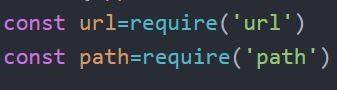 Create a function to create window ``` let win; function crtWindow(){ win=new BrowserWindow({ width:800, height:600 1) win.loadURL(url.format({ pathname:path.join( dirname,'index.htm11), protocol:'file:', slashes:true } ) ) } ``` 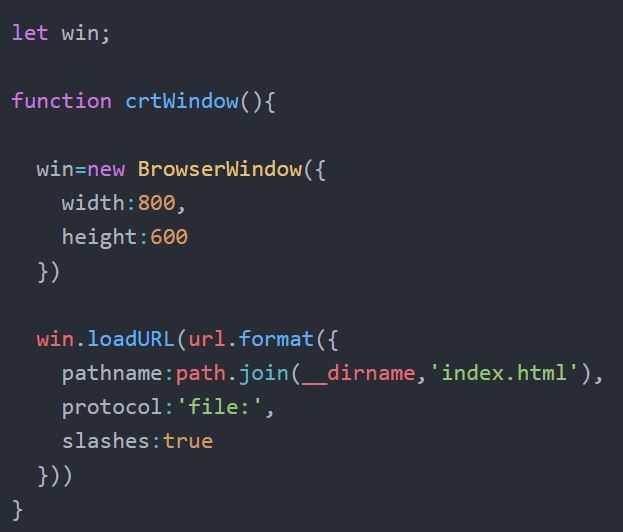 We can adjust window sizes with BrowserWindow We define the window page to be displayed with the loadURL method Finally we define this function in the on methods of the app module ``` app.on('ready',crtWindow) ```  Our electron application is ready Opens by default with electron appliation menus When we create a custom menu we overwrite these created menus Let’s create a template for menu ``` const template=[ { label:'sanalrakam', ```  I have identified the top menu here label property string gets a value Sub menu property used to create sub menu 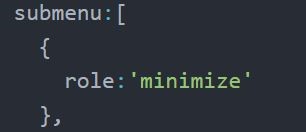 Allows the execution of the value that comes againist the role property Role property can only take roles from the electron The window will be minimized if you click the minimize menu Set role property minimize and let’s see how Template is ready. Let’s do this template menu and set menus fort he application ``` const menu=Menu.buildFromTemplate(template) Menu. setApplicationMenu(menu) ```  Continue to create sub menus ``` role: 'redo' type: ' separator ' role: ' cut ' role: 'copy' role: ' paste ``` 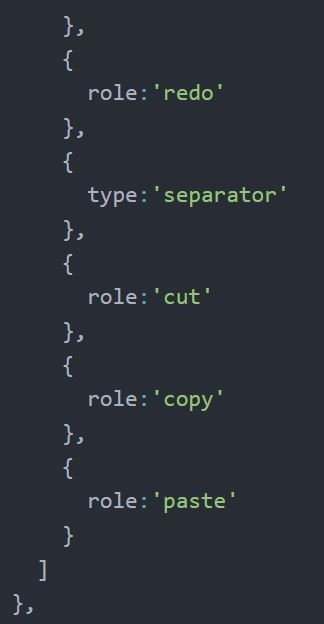 I wrote a new menu type is type and set it as a separator so that I can separate the upper and lower menus Ihave set the submenus of an upper menu in order to set a new upper menu ``` role:'help', submenu:[ { label:'for ``` 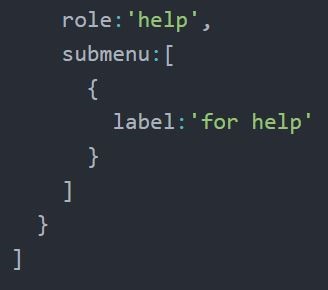 You can create your own application menus using these examples ### index.html ``` <!DOCTYPE html> <html> <head> <meta charset = "UTF-8"> <title>Menus</title> </head> <body> </body> </html> ``` ### main.js ``` const {app,BrowserWindow,Menu}=require('electron') const url=require('url') const path=require('path') let win; function crtWindow(){ win=new BrowserWindow({ width:800, height:600 }) win.loadURL(url.format({ pathname:path.join(__dirname,'index.html'), protocol:'file:', slashes:true })) } const template=[ { label:'sanalrakam', submenu:[ { role:'minimize' }, { role:'redo' }, { type:'separator' }, { role:'cut' }, { role:'copy' }, { role:'paste' } ] }, { role:'help', submenu:[ { label:'for help' } ] } ] const menu=Menu.buildFromTemplate(template) Menu.setApplicationMenu(menu) app.on('ready',crtWindow) ``` ### package.json ``` { "name": "Menus", "version": "1.0.0", "description": "", "main": "main.js", "scripts": { "test": "echo \"Error: no test specified\" && exit 1" }, "author": "", "license": "ISC" } ``` ### Video Tutorial https://www.youtube.com/watch?v=bsTTeR0FNW4&feature=youtu.be ### Curriculum [Show Open Dialog in Electron](https://steemit.com/utopian-io/@sanalrakam/show-open-dialog-in-electron) [IPC in Electron Tutorial](https://steemit.com/utopian-io/@sanalrakam/ipc-in-electron-tutorial) [The Remaining Character Calculation Application in the electron](https://steemit.com/utopian-io/@sanalrakam/the-remaining-character-calculation-application-in-the-electron) [electron logo link](https://avatars1.githubusercontent.com/u/13409222?s=400&v=4) |
| json metadata | {"tags":["utopian-io","electron","tutorial","technology","coding"],"image":["https://steemitimages.com/DQma3Y1W2wHM8FkMN9k6b6FxUTwTm5srU1Y2myfJagoyjNR/electronn.png","https://steemitimages.com/DQmTsLMuiWaasduTudfxDy8AtzEpin35GqVW83x8LHG4GZ8/r1.jpg","https://steemitimages.com/DQmRiuTQYUJB87Nkv5vDNfH8enj8pN2KcTtC68sWYYfjD6G/r2.jpg","https://steemitimages.com/DQmWgvyBhzL9vAsFMaFA3RxycuSrQZjQRdLBdbzWF9R5Vrt/rr3.jpg","https://steemitimages.com/DQmeaddLJZ2t7ZdQrHy5BSS3RvmbkCf4jdVGMN4WwFHVrqB/rr4.jpg","https://steemitimages.com/DQmc7AWRotJWBwq65pUD5tQLvULBp7nXhdy7YJLas6cRhmw/rr5.jpg","https://steemitimages.com/DQmdzEFAQf2HEpQaoqicNvr4yM8cqYVfwpYWy28arphx2KZ/rr6.jpg","https://steemitimages.com/DQmYXs7VJUtAu5ebzg7z9kR5JY13FjdDCc2Q8ey1CiCKcBT/rr7.jpg","https://steemitimages.com/DQmc7FMgaQ6ZcZome1aZfg3Tnx2PL9v7PEeE38DaM5zSV1z/rr8.jpg","https://steemitimages.com/DQmamAwKyPT7j5HRVm2oVFg1ToZnVu1fC2s4W5kCfcswjkg/rr9.jpg","https://img.youtube.com/vi/bsTTeR0FNW4/0.jpg"],"links":["https://github.com/electron/electron","https://github.com/sanalrakam","https://github.com/sanalrakam/Application-Menu-in-Electron","https://atom.io/","https://electronjs.org/","https://www.npmjs.com/","https://www.youtube.com/watch?v=bsTTeR0FNW4&feature=youtu.be","https://steemit.com/utopian-io/@sanalrakam/show-open-dialog-in-electron","https://steemit.com/utopian-io/@sanalrakam/ipc-in-electron-tutorial","https://steemit.com/utopian-io/@sanalrakam/the-remaining-character-calculation-application-in-the-electron","https://avatars1.githubusercontent.com/u/13409222?s=400&v=4"],"app":"steemit/0.1","format":"markdown"} |
| parent author | |
| parent permlink | utopian-io |
| permlink | application-menu-in-electron |
| title | Application Menu in Electron |
| Transaction Info | Block #22489416/Trx 0387b8d5001d415dfce92962b8f081843407c8eb |
View Raw JSON Data
{
"block": 22489416,
"op": [
"comment",
{
"author": "elsedongusu",
"body": "\n### Github repository\n\nhttps://github.com/electron/electron\n\n### My Github Adress\n\nhttps://github.com/sanalrakam\n\n### Project Github Adress\n\nhttps://github.com/sanalrakam/Application-Menu-in-Electron\n\n\n\n### What I will learn?\n- You will learn what is the menu module in electron\n- You will learn differences between application menu and context menu\n- You will learn how to create template for menu\n- You will learn how to create sub menu\n- You will learn what kind of menu role in electron\n### Requirements\n\nAtom Editor:https://atom.io/\nElectron: https://electronjs.org/\nNpm: https://www.npmjs.com/\n\n### Difficulty\n- Intermediate\n### Description\nThere are two kinds of menus in electron\nFirst menu is the application menu and is located on the bar above the application\nThe second menu is the context menu right click on Mouse to open this menu\nIn this tutorial will tell the application menu. How to create and use an application menu\nTo create an application menu, you first need a menu module we define this module from electron\nSecondly we need a template to define menus and submenus. Template structure must be in json structure\nFinally we need to make this template menu and define it in he menu \nLet me demonstrate what I’m saying with an example\nWwe define the app and browser window modules to create an electron application and let define the menu module side them\n```\nconst {app,BrowserWindow,Menu}=require('electron')\n\n```\n\nDefine url and path variables\n\n```\nconst url=require('url')\n const path=require('path')\n```\n\n\n\nCreate a function to create window\n\n```\nlet win;\nfunction crtWindow(){\nwin=new BrowserWindow({\nwidth:800,\nheight:600\n1)\nwin.loadURL(url.format({\npathname:path.join( dirname,'index.htm11),\nprotocol:'file:',\nslashes:true\n} ) )\n}\n```\n\n\nWe can adjust window sizes with BrowserWindow\nWe define the window page to be displayed with the loadURL method \nFinally we define this function in the on methods of the app module\n\n```\napp.on('ready',crtWindow)\n```\n\n\nOur electron application is ready\nOpens by default with electron appliation menus\nWhen we create a custom menu we overwrite these created menus\nLet’s create a template for menu\n\n```\nconst template=[\n{\nlabel:'sanalrakam',\n\n```\n\nI have identified the top menu here label property string gets a value\nSub menu property used to create sub menu\n\n\n\nAllows the execution of the value that comes againist the role property\nRole property can only take roles from the electron\nThe window will be minimized if you click the minimize menu\nSet role property minimize and let’s see how\nTemplate is ready. Let’s do this template menu and set menus fort he application\n\n```\nconst menu=Menu.buildFromTemplate(template)\n Menu. setApplicationMenu(menu)\n```\n\nContinue to create sub menus\n```\nrole: 'redo'\ntype: ' separator '\nrole: ' cut '\nrole: 'copy'\nrole: ' paste \n\n```\n\n\nI wrote a new menu type is type and set it as a separator so that I can separate the upper and lower menus\nIhave set the submenus of an upper menu in order to set a new upper menu\n\n```\nrole:'help',\nsubmenu:[\n{\nlabel:'for \n```\n\nYou can create your own application menus using these examples\n\n### index.html\n```\n<!DOCTYPE html>\n<html>\n <head>\n <meta charset = \"UTF-8\">\n <title>Menus</title>\n </head>\n\n <body>\n\n </body>\n</html>\n\n```\n### main.js\n\n```\nconst {app,BrowserWindow,Menu}=require('electron')\nconst url=require('url')\nconst path=require('path')\n\nlet win;\n\nfunction crtWindow(){\n\n win=new BrowserWindow({\n width:800,\n height:600\n })\n\n win.loadURL(url.format({\n pathname:path.join(__dirname,'index.html'),\n protocol:'file:',\n slashes:true\n }))\n}\n\nconst template=[\n {\n label:'sanalrakam',\n submenu:[\n {\n role:'minimize'\n },\n {\n role:'redo'\n },\n {\n type:'separator'\n },\n {\n role:'cut'\n },\n {\n role:'copy'\n },\n {\n role:'paste'\n }\n ]\n },\n {\n role:'help',\n submenu:[\n {\n label:'for help'\n }\n ]\n }\n]\n\nconst menu=Menu.buildFromTemplate(template)\nMenu.setApplicationMenu(menu)\n\n\n\napp.on('ready',crtWindow)\n```\n### package.json\n\n```\n{\n \"name\": \"Menus\",\n \"version\": \"1.0.0\",\n \"description\": \"\",\n \"main\": \"main.js\",\n \"scripts\": {\n \"test\": \"echo \\\"Error: no test specified\\\" && exit 1\"\n },\n \"author\": \"\",\n \"license\": \"ISC\"\n}\n```\n### Video Tutorial\n\nhttps://www.youtube.com/watch?v=bsTTeR0FNW4&feature=youtu.be\n\n### Curriculum\n\n[Show Open Dialog in Electron](https://steemit.com/utopian-io/@sanalrakam/show-open-dialog-in-electron)\n[IPC in Electron Tutorial](https://steemit.com/utopian-io/@sanalrakam/ipc-in-electron-tutorial)\n[The Remaining Character Calculation Application in the electron](https://steemit.com/utopian-io/@sanalrakam/the-remaining-character-calculation-application-in-the-electron)\n\n[electron logo link](https://avatars1.githubusercontent.com/u/13409222?s=400&v=4)",
"json_metadata": "{\"tags\":[\"utopian-io\",\"electron\",\"tutorial\",\"technology\",\"coding\"],\"image\":[\"https://steemitimages.com/DQma3Y1W2wHM8FkMN9k6b6FxUTwTm5srU1Y2myfJagoyjNR/electronn.png\",\"https://steemitimages.com/DQmTsLMuiWaasduTudfxDy8AtzEpin35GqVW83x8LHG4GZ8/r1.jpg\",\"https://steemitimages.com/DQmRiuTQYUJB87Nkv5vDNfH8enj8pN2KcTtC68sWYYfjD6G/r2.jpg\",\"https://steemitimages.com/DQmWgvyBhzL9vAsFMaFA3RxycuSrQZjQRdLBdbzWF9R5Vrt/rr3.jpg\",\"https://steemitimages.com/DQmeaddLJZ2t7ZdQrHy5BSS3RvmbkCf4jdVGMN4WwFHVrqB/rr4.jpg\",\"https://steemitimages.com/DQmc7AWRotJWBwq65pUD5tQLvULBp7nXhdy7YJLas6cRhmw/rr5.jpg\",\"https://steemitimages.com/DQmdzEFAQf2HEpQaoqicNvr4yM8cqYVfwpYWy28arphx2KZ/rr6.jpg\",\"https://steemitimages.com/DQmYXs7VJUtAu5ebzg7z9kR5JY13FjdDCc2Q8ey1CiCKcBT/rr7.jpg\",\"https://steemitimages.com/DQmc7FMgaQ6ZcZome1aZfg3Tnx2PL9v7PEeE38DaM5zSV1z/rr8.jpg\",\"https://steemitimages.com/DQmamAwKyPT7j5HRVm2oVFg1ToZnVu1fC2s4W5kCfcswjkg/rr9.jpg\",\"https://img.youtube.com/vi/bsTTeR0FNW4/0.jpg\"],\"links\":[\"https://github.com/electron/electron\",\"https://github.com/sanalrakam\",\"https://github.com/sanalrakam/Application-Menu-in-Electron\",\"https://atom.io/\",\"https://electronjs.org/\",\"https://www.npmjs.com/\",\"https://www.youtube.com/watch?v=bsTTeR0FNW4&feature=youtu.be\",\"https://steemit.com/utopian-io/@sanalrakam/show-open-dialog-in-electron\",\"https://steemit.com/utopian-io/@sanalrakam/ipc-in-electron-tutorial\",\"https://steemit.com/utopian-io/@sanalrakam/the-remaining-character-calculation-application-in-the-electron\",\"https://avatars1.githubusercontent.com/u/13409222?s=400&v=4\"],\"app\":\"steemit/0.1\",\"format\":\"markdown\"}",
"parent_author": "",
"parent_permlink": "utopian-io",
"permlink": "application-menu-in-electron",
"title": "Application Menu in Electron"
}
],
"op_in_trx": 0,
"timestamp": "2018-05-16T19:55:42",
"trx_id": "0387b8d5001d415dfce92962b8f081843407c8eb",
"trx_in_block": 19,
"virtual_op": 0
}remlaps2upvoted (100.00%) @elsedongusu / xamarin-learnign-serie-1-communication-with-web-apis2018/05/16 09:31:36
remlaps2upvoted (100.00%) @elsedongusu / xamarin-learnign-serie-1-communication-with-web-apis
2018/05/16 09:31:36
| author | elsedongusu |
| permlink | xamarin-learnign-serie-1-communication-with-web-apis |
| voter | remlaps2 |
| weight | 10000 (100.00%) |
| Transaction Info | Block #22476936/Trx f62f58ada591576a37130497b9791802787e10dd |
View Raw JSON Data
{
  "block": 22476936,
  "op": [
    "vote",
    {
      "author": "elsedongusu",
      "permlink": "xamarin-learnign-serie-1-communication-with-web-apis",
      "voter": "remlaps2",
      "weight": 10000
    }
  ],
  "op_in_trx": 0,
  "timestamp": "2018-05-16T09:31:36",
  "trx_id": "f62f58ada591576a37130497b9791802787e10dd",
  "trx_in_block": 6,
  "virtual_op": 0
}cub2upvoted (100.00%) @elsedongusu / xamarin-learnign-serie-1-communication-with-web-apis2018/05/16 09:31:33
cub2upvoted (100.00%) @elsedongusu / xamarin-learnign-serie-1-communication-with-web-apis
2018/05/16 09:31:33
| author | elsedongusu |
| permlink | xamarin-learnign-serie-1-communication-with-web-apis |
| voter | cub2 |
| weight | 10000 (100.00%) |
| Transaction Info | Block #22476935/Trx 3aacea2e15f7745915a622dd8887858f4b789c20 |
View Raw JSON Data
{
  "block": 22476935,
  "op": [
    "vote",
    {
      "author": "elsedongusu",
      "permlink": "xamarin-learnign-serie-1-communication-with-web-apis",
      "voter": "cub2",
      "weight": 10000
    }
  ],
  "op_in_trx": 0,
  "timestamp": "2018-05-16T09:31:33",
  "trx_id": "3aacea2e15f7745915a622dd8887858f4b789c20",
  "trx_in_block": 16,
  "virtual_op": 0
}astronomyizfunupvoted (75.00%) @elsedongusu / xamarin-learnign-serie-1-communication-with-web-apis2018/05/16 09:31:30
astronomyizfunupvoted (75.00%) @elsedongusu / xamarin-learnign-serie-1-communication-with-web-apis
2018/05/16 09:31:30
| author | elsedongusu |
| permlink | xamarin-learnign-serie-1-communication-with-web-apis |
| voter | astronomyizfun |
| weight | 7500 (75.00%) |
| Transaction Info | Block #22476934/Trx 544aedbd220ff2692347bb2ef17a3f8eabeba84c |
View Raw JSON Data
{
  "block": 22476934,
  "op": [
    "vote",
    {
      "author": "elsedongusu",
      "permlink": "xamarin-learnign-serie-1-communication-with-web-apis",
      "voter": "astronomyizfun",
      "weight": 7500
    }
  ],
  "op_in_trx": 0,
  "timestamp": "2018-05-16T09:31:30",
  "trx_id": "544aedbd220ff2692347bb2ef17a3f8eabeba84c",
  "trx_in_block": 19,
  "virtual_op": 0
}jaff8upvoted (100.00%) @elsedongusu / xamarin-learnign-serie-1-communication-with-web-apis2018/05/16 09:30:54
jaff8upvoted (100.00%) @elsedongusu / xamarin-learnign-serie-1-communication-with-web-apis
2018/05/16 09:30:54
| author | elsedongusu |
| permlink | xamarin-learnign-serie-1-communication-with-web-apis |
| voter | jaff8 |
| weight | 10000 (100.00%) |
| Transaction Info | Block #22476922/Trx b857edb5056287f92ea14ea53851087df8d0d423 |
View Raw JSON Data
{
  "block": 22476922,
  "op": [
    "vote",
    {
      "author": "elsedongusu",
      "permlink": "xamarin-learnign-serie-1-communication-with-web-apis",
      "voter": "jaff8",
      "weight": 10000
    }
  ],
  "op_in_trx": 0,
  "timestamp": "2018-05-16T09:30:54",
  "trx_id": "b857edb5056287f92ea14ea53851087df8d0d423",
  "trx_in_block": 32,
  "virtual_op": 0
}elsedongusupublished a new post: xamarin-learnign-serie-1-communication-with-web-apis2018/05/16 00:30:30
elsedongusupublished a new post: xamarin-learnign-serie-1-communication-with-web-apis
2018/05/16 00:30:30
| author | elsedongusu |
| body |  ### Github Repository https://xamarin.com/forms ### My github Adress https://github.com/elsedongusu ### Github project file https://github.com/elsedongusu/xmarina ### What we will learn: - Why we are using web api with mobelie applications? - How does web apis communicate with mobile systems? - Basic operations. Add, Edit, Delete, Display. ### Requirements - [MsSql Server (optional, you can use mysql or oracle)](https://www.microsoft.com/en-us/sql-server/sql-server-downloads) - [A web api ](https://docs.microsoft.com/tr-tr/aspnet/web-api/overview/getting-started-with-aspnet-web-api/tutorial-your-first-web-api) - [ Visual Studio I will be using Visual Studio Mac for Mac but you can use any version which compatible with Xamarin](https://www.visualstudio.com/tr/downloads/?rr=https%3A%2F%2Fwww.google.com.tr%2F) ### What you need to pay attention: - [Be sure you have Mvc Core 2.0.3](https://www.microsoft.com/net/download/macos) - [Be sure your Xamarin Components are running](https://www.visualstudio.com/tr/xamarin/?rr=https%3A%2F%2Fwww.google.com.tr%2F) ### Difficulty - Intermediate # Tutorial Contents Why we are using WEB API? When it is necessary to work with a global data in a web application, it is usually connecting to a database, and the data from that database is served to all clients. If there is no need for it here, it is the fastest way to connect directly to the database and to extract the data from there. In mobile technologies, it is not directly connected to a common database system like Mssql. Because you can not guarantee that mobile systems will always be connected to the internet.Instead of, you can use a portable database systems such as Sqlite when it is not necessary to work with shared data. For collaborations, we have to use a layer (Web API, Web Service) works as a bridge between the database system and the mobile application. Most preferred one from these, is a Web API. If you are making a request to a Web API with WebClients in a desktop or web software and doing basic CRUD (Cread, Read, Update and Delete) operations here, the same techniques are used at mobile applications to connect to the Web APIs and perform basic operations. For a simple Web API that we will enter from our mobile application, create the database as follows.  After that, lets code ouırWeb Apı's and be sure of its working. (I will be sharing my code) ``` [Route("api/[controller]")] public class StudentController : Controller { private readonly SchoolDBContext _context; public StudentController(SchoolDBContext context) { _context = context; } // GET api/values [HttpGet] public IEnumerable<Student> Get() { return _context.Student.ToList(); } // GET api/values/5 [HttpGet("{id}")] public Student Get(int id) { return _context.Student.FirstOrDefault(s => s.Id == id); } // POST api/values [HttpPost] public Student Post([FromBody]Student student) { _context.Student.Add(student); _context.SaveChanges(); return student; } // PUT api/values/5 [HttpPut("{id}")] public Student Put([FromBody]Student student) { _context.Student.Update(student); _context.SaveChanges(); return student; } // DELETE api/values/5 [HttpDelete("{id}")] public void Delete(int id) { var deleted = _context.Student.FirstOrDefault(s => s.Id == id); _context.Student.Remove(deleted); } } ``` We can code at Xamarin forms side now. Firstly we are creating an class at Models folder which one delegate our student class. So we can transfer datas to our student class, which one we got from web api ``` namespace XamarinTutorial1WebApi.Models { public class Student { public int Id { get; set; } public string Name { get; set; } public string Surname { get; set; } public int Number { get; set; } public string Phone { get; set; } } } ``` We are creating an screen for display student datas. We will be listing student datas are there and this screen will be a main page. We will can add a new student, edit student or delete student on this screen. ``` <?xml version="1.0" encoding="UTF-8"?> <ContentPage xmlns="http://xamarin.com/schemas/2014/forms" xmlns:x="http://schemas.microsoft.com/winfx/2009/xaml" x:Class="XamarinTutorial1WebApi.StudentList"> <ContentPage.Content> <StackLayout Padding="20"> <ListView x:Name="lstVStudent"> <ListView.ItemTemplate> <DataTemplate> <ViewCell> <ViewCell.ContextActions> <MenuItem Clicked="MenuItemDetail_Clicked" Text="Detail" CommandParameter="{Binding .}"></MenuItem> <MenuItem Clicked="MenuItemDelete_Clicked" Text="Delete" CommandParameter="{Binding .}"></MenuItem> </ViewCell.ContextActions> <StackLayout BackgroundColor="Green" Orientation="Vertical"> <StackLayout Orientation="Horizontal"> <Label TextColor="White" FontSize="20" Text="{Binding Name}"></Label> <Label TextColor="White" FontSize="20" Text="{Binding Surname}"></Label> </StackLayout> </StackLayout> </ViewCell> </DataTemplate> </ListView.ItemTemplate> </ListView> </StackLayout> </ContentPage.Content> </ContentPage> Our C # code will look like this: namespace XamarinTutorial1WebApi { public partial class StudentList : ContentPage { void MenuItemDetail_Clicked(object sender, EventArgs eventArgs) { var student = ((MenuItem)sender).CommandParameter as Student if (student != null) { Navigation.PushModalAsync(new AddStudent(student)); } } async void MenuItemDelete_Clicked(object sender, EventArgs eventArgs) { var student = ((MenuItem)sender).CommandParameter as Student; if (student != null) { var result = await DisplayAlert("Warning", "Are you sure?", "OK", "Cancel"); if (result) { await (new WebAPIService()).DeleteStudentAsync(student.Id); } } } public StudentList() { InitializeComponent(); } protected override async void OnAppearing() { base.OnAppearing(); var result = await (new WebAPIService()).GetData(); lstVStudent.ItemsSource = result; } } } ``` Our intent is listing students data, edit and delete any student at this screen. We will use MenuItems for this. And Menu Items look like this:  Before connecting a Web Api, we have to inject libraries which one is neccesarry. We will be using NewtonSoft JSON.NET because we generally use json structure at Rest services. Because of this don’t forget to add this library to your Project. Also we are inject Microsoft.Net.Http Library for using HttpClient class. After that we are creating our servicemanager, it will be a middleware for connect Web Api ``` using System; using System.Collections.Generic; using System.Net.Http; using System.Threading.Tasks; using Newtonsoft.Json; namespace XamarinTutorial1WebApi.Models { public class WebAPIService { private HttpClient _client; public WebAPIService() { _client = new HttpClient(); } public async Task<List<Student>> GetData() { var uri = new Uri(@"http://192.168.1.24/SchoolDBWebAPI/api/student"); var items = new List<Student>(); var response = await _client.GetAsync(uri); if (response.IsSuccessStatusCode) { var content = await response.Content.ReadAsStringAsync(); items = JsonConvert.DeserializeObject<List<Student>>(content); } return items; } } } ``` In the section I pointed out above, it is important to note that the url is specified with an IP address when specifying it. Because if we specify localhost, we get Connection Refused error because the mobile emulator is referring to its own IP address and our Restful service is not working in the emulator. For this we need to use IIS instead of IIS Express on the computer where we run the Web API (it may be a virtual server). We are desingning a screen for enter a student name, surname, school id and phone numberIf we want we can design another screen for this work but we did not design another screen because it wil have same components. This is how our screen’s look like;  For delete operation, it is enought to send only student’s id. Our Rest service will delete entry which one is related with this id. If we get a pre-approval for this, accidental clicks can not lead to data loss.  [source link](https://i2.wp.com/www.muratoner.net/wp-content/uploads/2016/04/Xamarin-logo1.png?resize=720%2C302) ### Author: elsedongusu |
| json metadata | {"tags":["utopian-io","xamarin","tutorial","technology","education"],"image":["https://steemitimages.com/DQmRArDUnvjft1omvtd69kYZs2V3xRLooh4vwGG37y14oLa/Xamarin-logo1.png","https://steemitimages.com/DQmXP319cW3T8gRKFyvvk2m4RtVYJCtj7XbAkTeZSmCyhGK/er1.png","https://steemitimages.com/DQmcMz2oEVsyZtpxaUXF4o5gZbstUsPBnxigCijdpsedML7/er3.png","https://steemitimages.com/DQmVC2PhUp2ABLt3vYKs1B4VqkFTfSJQYuvcnWp89MCqukA/er5.png","https://steemitimages.com/DQmQKRSt5xsfrtsr8GHduV3BG4NJGZj981AGDh275XWMciJ/er7.png"],"links":["https://xamarin.com/forms","https://github.com/elsedongusu","https://github.com/elsedongusu/xmarina","https://www.microsoft.com/en-us/sql-server/sql-server-downloads","https://docs.microsoft.com/tr-tr/aspnet/web-api/overview/getting-started-with-aspnet-web-api/tutorial-your-first-web-api","https://www.visualstudio.com/tr/downloads/?rr=https%3A%2F%2Fwww.google.com.tr%2F","https://www.microsoft.com/net/download/macos","https://www.visualstudio.com/tr/xamarin/?rr=https%3A%2F%2Fwww.google.com.tr%2F","https://i2.wp.com/www.muratoner.net/wp-content/uploads/2016/04/Xamarin-logo1.png?resize=720%2C302"],"app":"steemit/0.1","format":"markdown"} |
| parent author | |
| parent permlink | utopian-io |
| permlink | xamarin-learnign-serie-1-communication-with-web-apis |
| title | Xamarin Learning Serie #1 – Communication with WEB APIS |
| Transaction Info | Block #22466118/Trx 2f12a16d7bad66680fabac37671f2b6181c965d0 |
View Raw JSON Data
{
"block": 22466118,
"op": [
"comment",
{
"author": "elsedongusu",
"body": "\n\n### Github Repository\nhttps://xamarin.com/forms\n\n### My github Adress\nhttps://github.com/elsedongusu\n\n### Github project file \nhttps://github.com/elsedongusu/xmarina\n\n\n\n\n\n### What we will learn:\n- Why we are using web api with mobelie applications? \n- How does web apis communicate with mobile systems? \n- Basic operations. Add, Edit, Delete, Display.\n\n### Requirements\n- [MsSql Server (optional, you can use mysql or oracle)](https://www.microsoft.com/en-us/sql-server/sql-server-downloads)\n- [A web api ](https://docs.microsoft.com/tr-tr/aspnet/web-api/overview/getting-started-with-aspnet-web-api/tutorial-your-first-web-api)\n- [ Visual Studio I will be using Visual Studio Mac for Mac but you can use any version which compatible with Xamarin](https://www.visualstudio.com/tr/downloads/?rr=https%3A%2F%2Fwww.google.com.tr%2F)\n\n### What you need to pay attention:\n\n- [Be sure you have Mvc Core 2.0.3](https://www.microsoft.com/net/download/macos)\n- [Be sure your Xamarin Components are running](https://www.visualstudio.com/tr/xamarin/?rr=https%3A%2F%2Fwww.google.com.tr%2F)\n\n\n### Difficulty\n\n- Intermediate\n\n# Tutorial Contents\n\n Why we are using WEB API?\nWhen it is necessary to work with a global data in a web application, it is usually connecting to a database, and the data from that database is served to all clients. If there is no need for it here, it is the fastest way to connect directly to the database and to extract the data from there. In mobile technologies, it is not directly connected to a common database system like Mssql. Because you can not guarantee that mobile systems will always be connected to the internet.Instead of, you can use a portable database systems such as Sqlite when it is not necessary to work with shared data. For collaborations, we have to use a layer (Web API, Web Service) works as a bridge between the database system and the mobile application. Most preferred one from these, is a Web API.\n\nIf you are making a request to a Web API with WebClients in a desktop or web software and doing basic CRUD (Cread, Read, Update and Delete) operations here, the same techniques are used at mobile applications to connect to the Web APIs and perform basic operations.\nFor a simple Web API that we will enter from our mobile application, create the database as follows.\n\n\n\nAfter that, lets code ouırWeb Apı's and be sure of its working. (I will be sharing my code)\n\n```\n[Route(\"api/[controller]\")]\n public class StudentController : Controller\n {\n private readonly SchoolDBContext _context;\n public StudentController(SchoolDBContext context)\n {\n _context = context;\n }\n // GET api/values\n [HttpGet]\n public IEnumerable<Student> Get()\n {\n return _context.Student.ToList();\n }\n\n // GET api/values/5\n [HttpGet(\"{id}\")]\n\n\npublic Student Get(int id)\n {\n return _context.Student.FirstOrDefault(s => s.Id == id);\n }\n\n // POST api/values\n [HttpPost]\n public Student Post([FromBody]Student student)\n {\n _context.Student.Add(student);\n _context.SaveChanges();\n return student;\n }\n\n // PUT api/values/5\n [HttpPut(\"{id}\")]\n public Student Put([FromBody]Student student)\n {\n _context.Student.Update(student);\n _context.SaveChanges();\n return student;\n }\n\n // DELETE api/values/5\n [HttpDelete(\"{id}\")]\n public void Delete(int id)\n {\n var deleted = _context.Student.FirstOrDefault(s => s.Id == id);\n _context.Student.Remove(deleted);\n\n }\n\n }\n```\nWe can code at Xamarin forms side now.\nFirstly we are creating an class at Models folder which one delegate our student class. So we can transfer datas to our student class, which one we got from web api\n\n```\nnamespace XamarinTutorial1WebApi.Models\n{\n\tpublic class Student\n\t{\n\t\tpublic int Id\n\t\t{\n\t\t\tget;\n\t\t\tset;\n\t\t}\n\t\tpublic string Name\n\t\t{\n\t\t\tget;\n\t\t\tset;\n\t\t}\n\t\tpublic string Surname\n\t\t{\n\t\t\tget;\n\t\t\tset;\n\t\t}\n\t\tpublic int Number\n\t\t{\n\t\t\tget;\n\t\t\tset;\n\t\t}\n\t\tpublic string Phone\n\t\t{\n\t\t\tget;\n\nset;\n\t\t}\n\t}\n}\n\n```\nWe are creating an screen for display student datas. We will be listing student datas are there and this screen will be a main page. We will can add a new student, edit student or delete student on this screen. \n\n```\n<?xml version=\"1.0\" encoding=\"UTF-8\"?>\n<ContentPage xmlns=\"http://xamarin.com/schemas/2014/forms\" xmlns:x=\"http://schemas.microsoft.com/winfx/2009/xaml\" x:Class=\"XamarinTutorial1WebApi.StudentList\">\n <ContentPage.Content>\n <StackLayout Padding=\"20\">\n <ListView x:Name=\"lstVStudent\">\n <ListView.ItemTemplate>\n <DataTemplate>\n <ViewCell>\n <ViewCell.ContextActions>\n <MenuItem Clicked=\"MenuItemDetail_Clicked\" Text=\"Detail\" CommandParameter=\"{Binding .}\"></MenuItem>\n <MenuItem Clicked=\"MenuItemDelete_Clicked\" Text=\"Delete\" CommandParameter=\"{Binding .}\"></MenuItem>\n </ViewCell.ContextActions>\n <StackLayout BackgroundColor=\"Green\" Orientation=\"Vertical\">\n <StackLayout Orientation=\"Horizontal\">\n <Label TextColor=\"White\" FontSize=\"20\" Text=\"{Binding Name}\"></Label>\n <Label TextColor=\"White\" FontSize=\"20\" Text=\"{Binding Surname}\"></Label>\n \n </StackLayout>\n </StackLayout>\n </ViewCell>\n </DataTemplate>\n </ListView.ItemTemplate>\n </ListView>\n </StackLayout>\n </ContentPage.Content>\n</ContentPage> \nOur C # code will look like this:\nnamespace XamarinTutorial1WebApi\n{\n public partial class StudentList : ContentPage\n {\n void MenuItemDetail_Clicked(object sender, EventArgs eventArgs)\n {\n var student = ((MenuItem)sender).CommandParameter as Student\n\n if (student != null)\n {\n Navigation.PushModalAsync(new AddStudent(student));\n }\n }\n async void MenuItemDelete_Clicked(object sender, EventArgs eventArgs)\n {\n var student = ((MenuItem)sender).CommandParameter as Student;\n if (student != null)\n {\n var result = await DisplayAlert(\"Warning\", \"Are you sure?\", \"OK\", \"Cancel\");\n if (result)\n {\n await (new WebAPIService()).DeleteStudentAsync(student.Id);\n }\n }\n }\n public StudentList()\n {\n InitializeComponent();\n }\n protected override async void OnAppearing()\n {\n base.OnAppearing();\n\n var result = await (new WebAPIService()).GetData();\n\n lstVStudent.ItemsSource = result;\n }\n\n\n }\n}\n\n```\n\nOur intent is listing students data, edit and delete any student at this screen. We will use MenuItems for this. \nAnd Menu Items look like this: \n\n\n\nBefore connecting a Web Api, we have to inject libraries which one is neccesarry. We will be using NewtonSoft JSON.NET because we generally use json structure at Rest services. Because of this don’t forget to add this library to your Project. Also we are inject Microsoft.Net.Http Library for using HttpClient class. \nAfter that we are creating our servicemanager, it will be a middleware for connect Web Api\n\n```\nusing System;\nusing System.Collections.Generic;\nusing System.Net.Http;\nusing System.Threading.Tasks;\nusing Newtonsoft.Json;\n\nnamespace XamarinTutorial1WebApi.Models\n{\n public class WebAPIService\n {\n private HttpClient _client;\n public WebAPIService()\n {\n _client = new HttpClient();\n }\n public async Task<List<Student>> GetData()\n {\n var uri = new Uri(@\"http://192.168.1.24/SchoolDBWebAPI/api/student\");\n var items = new List<Student>();\n\n var response = await _client.GetAsync(uri);\n if (response.IsSuccessStatusCode)\n {\n var content = await response.Content.ReadAsStringAsync();\n items = JsonConvert.DeserializeObject<List<Student>>(content);\n }\n return items;\n\n }\n }\n\n}\n\n```\nIn the section I pointed out above, it is important to note that the url is specified with an IP address when specifying it. Because if we specify localhost, we get Connection Refused error because the mobile emulator is referring to its own IP address and our Restful service is not working in the emulator. For this we need to use IIS instead of IIS Express on the computer where we run the Web API (it may be a virtual server).\n\nWe are desingning a screen for enter a student name, surname, school id and phone numberIf we want we can design another screen for this work but we did not design another screen because it wil have same components. \nThis is how our screen’s look like;\n\n\n\nFor delete operation, it is enought to send only student’s id. Our Rest service will delete entry which one is related with this id. If we get a pre-approval for this, accidental clicks can not lead to data loss.\n\n\n\n[source link](https://i2.wp.com/www.muratoner.net/wp-content/uploads/2016/04/Xamarin-logo1.png?resize=720%2C302)\n\n### Author: elsedongusu",
"json_metadata": "{\"tags\":[\"utopian-io\",\"xamarin\",\"tutorial\",\"technology\",\"education\"],\"image\":[\"https://steemitimages.com/DQmRArDUnvjft1omvtd69kYZs2V3xRLooh4vwGG37y14oLa/Xamarin-logo1.png\",\"https://steemitimages.com/DQmXP319cW3T8gRKFyvvk2m4RtVYJCtj7XbAkTeZSmCyhGK/er1.png\",\"https://steemitimages.com/DQmcMz2oEVsyZtpxaUXF4o5gZbstUsPBnxigCijdpsedML7/er3.png\",\"https://steemitimages.com/DQmVC2PhUp2ABLt3vYKs1B4VqkFTfSJQYuvcnWp89MCqukA/er5.png\",\"https://steemitimages.com/DQmQKRSt5xsfrtsr8GHduV3BG4NJGZj981AGDh275XWMciJ/er7.png\"],\"links\":[\"https://xamarin.com/forms\",\"https://github.com/elsedongusu\",\"https://github.com/elsedongusu/xmarina\",\"https://www.microsoft.com/en-us/sql-server/sql-server-downloads\",\"https://docs.microsoft.com/tr-tr/aspnet/web-api/overview/getting-started-with-aspnet-web-api/tutorial-your-first-web-api\",\"https://www.visualstudio.com/tr/downloads/?rr=https%3A%2F%2Fwww.google.com.tr%2F\",\"https://www.microsoft.com/net/download/macos\",\"https://www.visualstudio.com/tr/xamarin/?rr=https%3A%2F%2Fwww.google.com.tr%2F\",\"https://i2.wp.com/www.muratoner.net/wp-content/uploads/2016/04/Xamarin-logo1.png?resize=720%2C302\"],\"app\":\"steemit/0.1\",\"format\":\"markdown\"}",
"parent_author": "",
"parent_permlink": "utopian-io",
"permlink": "xamarin-learnign-serie-1-communication-with-web-apis",
"title": "Xamarin Learning Serie #1 – Communication with WEB APIS"
}
],
"op_in_trx": 0,
"timestamp": "2018-05-16T00:30:30",
"trx_id": "2f12a16d7bad66680fabac37671f2b6181c965d0",
"trx_in_block": 69,
"virtual_op": 0
}acknowledgementupvoted (10.00%) @elsedongusu / xamarin-learnign-serie-1-communication-with-web-apis2018/05/15 22:03:03
acknowledgementupvoted (10.00%) @elsedongusu / xamarin-learnign-serie-1-communication-with-web-apis
2018/05/15 22:03:03
| author | elsedongusu |
| permlink | xamarin-learnign-serie-1-communication-with-web-apis |
| voter | acknowledgement |
| weight | 1000 (10.00%) |
| Transaction Info | Block #22463169/Trx a21bd30b871d4581fec73a800311674cdd2ab702 |
View Raw JSON Data
{
  "block": 22463169,
  "op": [
    "vote",
    {
      "author": "elsedongusu",
      "permlink": "xamarin-learnign-serie-1-communication-with-web-apis",
      "voter": "acknowledgement",
      "weight": 1000
    }
  ],
  "op_in_trx": 0,
  "timestamp": "2018-05-15T22:03:03",
  "trx_id": "a21bd30b871d4581fec73a800311674cdd2ab702",
  "trx_in_block": 7,
  "virtual_op": 0
}properfractionupvoted (100.00%) @elsedongusu / xamarin-learnign-serie-1-communication-with-web-apis2018/05/15 21:57:48
properfractionupvoted (100.00%) @elsedongusu / xamarin-learnign-serie-1-communication-with-web-apis
2018/05/15 21:57:48
| author | elsedongusu |
| permlink | xamarin-learnign-serie-1-communication-with-web-apis |
| voter | properfraction |
| weight | 10000 (100.00%) |
| Transaction Info | Block #22463064/Trx 43254ff236e9f8eb93b95ff2b559cca3d10c87c8 |
View Raw JSON Data
{
  "block": 22463064,
  "op": [
    "vote",
    {
      "author": "elsedongusu",
      "permlink": "xamarin-learnign-serie-1-communication-with-web-apis",
      "voter": "properfraction",
      "weight": 10000
    }
  ],
  "op_in_trx": 0,
  "timestamp": "2018-05-15T21:57:48",
  "trx_id": "43254ff236e9f8eb93b95ff2b559cca3d10c87c8",
  "trx_in_block": 37,
  "virtual_op": 0
}dick.sledgeupvoted (0.85%) @elsedongusu / xamarin-learnign-serie-1-communication-with-web-apis2018/05/15 21:55:54
dick.sledgeupvoted (0.85%) @elsedongusu / xamarin-learnign-serie-1-communication-with-web-apis
2018/05/15 21:55:54
| author | elsedongusu |
| permlink | xamarin-learnign-serie-1-communication-with-web-apis |
| voter | dick.sledge |
| weight | 85 (0.85%) |
| Transaction Info | Block #22463026/Trx bcdf05af3495594f73b8546b875f489b13ece295 |
View Raw JSON Data
{
  "block": 22463026,
  "op": [
    "vote",
    {
      "author": "elsedongusu",
      "permlink": "xamarin-learnign-serie-1-communication-with-web-apis",
      "voter": "dick.sledge",
      "weight": 85
    }
  ],
  "op_in_trx": 0,
  "timestamp": "2018-05-15T21:55:54",
  "trx_id": "bcdf05af3495594f73b8546b875f489b13ece295",
  "trx_in_block": 37,
  "virtual_op": 0
}ruilupvoted (100.00%) @elsedongusu / xamarin-learnign-serie-1-communication-with-web-apis2018/05/15 21:55:36
ruilupvoted (100.00%) @elsedongusu / xamarin-learnign-serie-1-communication-with-web-apis
2018/05/15 21:55:36
| author | elsedongusu |
| permlink | xamarin-learnign-serie-1-communication-with-web-apis |
| voter | ruil |
| weight | 10000 (100.00%) |
| Transaction Info | Block #22463020/Trx 1fc4c003241788dab5d3b8d4b6da787cb724e839 |
View Raw JSON Data
{
  "block": 22463020,
  "op": [
    "vote",
    {
      "author": "elsedongusu",
      "permlink": "xamarin-learnign-serie-1-communication-with-web-apis",
      "voter": "ruil",
      "weight": 10000
    }
  ],
  "op_in_trx": 0,
  "timestamp": "2018-05-15T21:55:36",
  "trx_id": "1fc4c003241788dab5d3b8d4b6da787cb724e839",
  "trx_in_block": 16,
  "virtual_op": 0
}lionindayardupvoted (0.85%) @elsedongusu / xamarin-learnign-serie-1-communication-with-web-apis2018/05/15 21:53:03
lionindayardupvoted (0.85%) @elsedongusu / xamarin-learnign-serie-1-communication-with-web-apis
2018/05/15 21:53:03
| author | elsedongusu |
| permlink | xamarin-learnign-serie-1-communication-with-web-apis |
| voter | lionindayard |
| weight | 85 (0.85%) |
| Transaction Info | Block #22462969/Trx d2aa4885ac2e7650e74cb25f0d7d40d41fe3b2c5 |
View Raw JSON Data
{
  "block": 22462969,
  "op": [
    "vote",
    {
      "author": "elsedongusu",
      "permlink": "xamarin-learnign-serie-1-communication-with-web-apis",
      "voter": "lionindayard",
      "weight": 85
    }
  ],
  "op_in_trx": 0,
  "timestamp": "2018-05-15T21:53:03",
  "trx_id": "d2aa4885ac2e7650e74cb25f0d7d40d41fe3b2c5",
  "trx_in_block": 9,
  "virtual_op": 0
}marketstackupvoted (0.85%) @elsedongusu / xamarin-learnign-serie-1-communication-with-web-apis2018/05/15 21:53:00
marketstackupvoted (0.85%) @elsedongusu / xamarin-learnign-serie-1-communication-with-web-apis
2018/05/15 21:53:00
| author | elsedongusu |
| permlink | xamarin-learnign-serie-1-communication-with-web-apis |
| voter | marketstack |
| weight | 85 (0.85%) |
| Transaction Info | Block #22462968/Trx 167a88e11dd3ac1ead4f651c8886bde8fb08e9be |
View Raw JSON Data
{
  "block": 22462968,
  "op": [
    "vote",
    {
      "author": "elsedongusu",
      "permlink": "xamarin-learnign-serie-1-communication-with-web-apis",
      "voter": "marketstack",
      "weight": 85
    }
  ],
  "op_in_trx": 0,
  "timestamp": "2018-05-15T21:53:00",
  "trx_id": "167a88e11dd3ac1ead4f651c8886bde8fb08e9be",
  "trx_in_block": 33,
  "virtual_op": 0
}beetlevcupvoted (50.00%) @elsedongusu / xamarin-learnign-serie-1-communication-with-web-apis2018/05/15 21:33:27
beetlevcupvoted (50.00%) @elsedongusu / xamarin-learnign-serie-1-communication-with-web-apis
2018/05/15 21:33:27
| author | elsedongusu |
| permlink | xamarin-learnign-serie-1-communication-with-web-apis |
| voter | beetlevc |
| weight | 5000 (50.00%) |
| Transaction Info | Block #22462577/Trx 2ea21f2ad0212e4e4d8c4184aaf3254f41dd27de |
View Raw JSON Data
{
  "block": 22462577,
  "op": [
    "vote",
    {
      "author": "elsedongusu",
      "permlink": "xamarin-learnign-serie-1-communication-with-web-apis",
      "voter": "beetlevc",
      "weight": 5000
    }
  ],
  "op_in_trx": 0,
  "timestamp": "2018-05-15T21:33:27",
  "trx_id": "2ea21f2ad0212e4e4d8c4184aaf3254f41dd27de",
  "trx_in_block": 28,
  "virtual_op": 0
}2018/05/15 21:33:24
2018/05/15 21:33:24
| author | leewilliamson |
| body | @therealwolf 's created platform smartsteem scammed my post this morning (mothersday) that was supposed to be for an Abused Childrens Charity. Dude literally stole from abused children that don't have mothers ... on mothersday. https://steemit.com/steemit/@prometheusrisen/beware-of-smartsteem-scam |
| json metadata | {} |
| parent author | elsedongusu |
| parent permlink | xamarin-learnign-serie-1-communication-with-web-apis |
| permlink | re-elsedongusu-xamarin-learnign-serie-1-communication-with-web-apis-20180515t213323843z |
| title | fossbot voter comment |
| Transaction Info | Block #22462576/Trx ac4197c31c900cf1a4a3369e424b65e5fd813db1 |
View Raw JSON Data
{
  "block": 22462576,
  "op": [
    "comment",
    {
      "author": "leewilliamson",
      "body": "@therealwolf 's created platform smartsteem scammed my post this morning (mothersday) that was supposed to be for an Abused Childrens Charity.  Dude literally stole from abused children that don't have mothers ... on mothersday.  \r\n\r\nhttps://steemit.com/steemit/@prometheusrisen/beware-of-smartsteem-scam",
      "json_metadata": "{}",
      "parent_author": "elsedongusu",
      "parent_permlink": "xamarin-learnign-serie-1-communication-with-web-apis",
      "permlink": "re-elsedongusu-xamarin-learnign-serie-1-communication-with-web-apis-20180515t213323843z",
      "title": "fossbot voter comment"
    }
  ],
  "op_in_trx": 0,
  "timestamp": "2018-05-15T21:33:24",
  "trx_id": "ac4197c31c900cf1a4a3369e424b65e5fd813db1",
  "trx_in_block": 21,
  "virtual_op": 0
}steemitstatsupvoted (5.00%) @elsedongusu / xamarin-learnign-serie-1-communication-with-web-apis2018/05/15 21:28:06
steemitstatsupvoted (5.00%) @elsedongusu / xamarin-learnign-serie-1-communication-with-web-apis
2018/05/15 21:28:06
| author | elsedongusu |
| permlink | xamarin-learnign-serie-1-communication-with-web-apis |
| voter | steemitstats |
| weight | 500 (5.00%) |
| Transaction Info | Block #22462470/Trx 5e5439fd457537f7465e8b23f2544c8e211e2319 |
View Raw JSON Data
{
  "block": 22462470,
  "op": [
    "vote",
    {
      "author": "elsedongusu",
      "permlink": "xamarin-learnign-serie-1-communication-with-web-apis",
      "voter": "steemitstats",
      "weight": 500
    }
  ],
  "op_in_trx": 0,
  "timestamp": "2018-05-15T21:28:06",
  "trx_id": "5e5439fd457537f7465e8b23f2544c8e211e2319",
  "trx_in_block": 1,
  "virtual_op": 0
}elsedongusupublished a new post: xamarin-learnign-serie-1-communication-with-web-apis2018/05/15 21:26:45
elsedongusupublished a new post: xamarin-learnign-serie-1-communication-with-web-apis
2018/05/15 21:26:45
| author | elsedongusu |
| body | @@ -1,16 +1,131 @@ +!%5BXamarin-logo1.png%5D(https://steemitimages.com/DQmRArDUnvjft1omvtd69kYZs2V3xRLooh4vwGG37y14oLa/Xamarin-logo1.png)%0A%0A ### Github Repos @@ -9918,24 +9918,138 @@ J/er7.png)%0A%0A +%5Bsource link%5D(https://i2.wp.com/www.muratoner.net/wp-content/uploads/2016/04/Xamarin-logo1.png?resize=720%252C302)%0A%0A ### Author: |
| json metadata | {"tags":["utopian-io","xamarin","tutorial","technology","education"],"image":["https://steemitimages.com/DQmRArDUnvjft1omvtd69kYZs2V3xRLooh4vwGG37y14oLa/Xamarin-logo1.png","https://steemitimages.com/DQmXP319cW3T8gRKFyvvk2m4RtVYJCtj7XbAkTeZSmCyhGK/er1.png","https://steemitimages.com/DQmcMz2oEVsyZtpxaUXF4o5gZbstUsPBnxigCijdpsedML7/er3.png","https://steemitimages.com/DQmVC2PhUp2ABLt3vYKs1B4VqkFTfSJQYuvcnWp89MCqukA/er5.png","https://steemitimages.com/DQmQKRSt5xsfrtsr8GHduV3BG4NJGZj981AGDh275XWMciJ/er7.png"],"links":["https://xamarin.com/forms","https://github.com/elsedongusu","https://github.com/elsedongusu/xmarina","https://www.microsoft.com/en-us/sql-server/sql-server-downloads","https://docs.microsoft.com/tr-tr/aspnet/web-api/overview/getting-started-with-aspnet-web-api/tutorial-your-first-web-api","https://www.visualstudio.com/tr/downloads/?rr=https%3A%2F%2Fwww.google.com.tr%2F","https://www.microsoft.com/net/download/macos","https://www.visualstudio.com/tr/xamarin/?rr=https%3A%2F%2Fwww.google.com.tr%2F","https://i2.wp.com/www.muratoner.net/wp-content/uploads/2016/04/Xamarin-logo1.png?resize=720%2C302"],"app":"steemit/0.1","format":"markdown"} |
| parent author | |
| parent permlink | utopian-io |
| permlink | xamarin-learnign-serie-1-communication-with-web-apis |
| title | Xamarin Learnign Serie #1 – Communication with WEB APIS |
| Transaction Info | Block #22462443/Trx 4984da6343c371209f5ba99f8e84bbe0f91341c1 |
View Raw JSON Data
{
  "block": 22462443,
  "op": [
    "comment",
    {
      "author": "elsedongusu",
      "body": "@@ -1,16 +1,131 @@\n+!%5BXamarin-logo1.png%5D(https://steemitimages.com/DQmRArDUnvjft1omvtd69kYZs2V3xRLooh4vwGG37y14oLa/Xamarin-logo1.png)%0A%0A\n ### Github Repos\n@@ -9918,24 +9918,138 @@\n J/er7.png)%0A%0A\n+%5Bsource link%5D(https://i2.wp.com/www.muratoner.net/wp-content/uploads/2016/04/Xamarin-logo1.png?resize=720%252C302)%0A%0A\n ### Author: \n",
      "json_metadata": "{\"tags\":[\"utopian-io\",\"xamarin\",\"tutorial\",\"technology\",\"education\"],\"image\":[\"https://steemitimages.com/DQmRArDUnvjft1omvtd69kYZs2V3xRLooh4vwGG37y14oLa/Xamarin-logo1.png\",\"https://steemitimages.com/DQmXP319cW3T8gRKFyvvk2m4RtVYJCtj7XbAkTeZSmCyhGK/er1.png\",\"https://steemitimages.com/DQmcMz2oEVsyZtpxaUXF4o5gZbstUsPBnxigCijdpsedML7/er3.png\",\"https://steemitimages.com/DQmVC2PhUp2ABLt3vYKs1B4VqkFTfSJQYuvcnWp89MCqukA/er5.png\",\"https://steemitimages.com/DQmQKRSt5xsfrtsr8GHduV3BG4NJGZj981AGDh275XWMciJ/er7.png\"],\"links\":[\"https://xamarin.com/forms\",\"https://github.com/elsedongusu\",\"https://github.com/elsedongusu/xmarina\",\"https://www.microsoft.com/en-us/sql-server/sql-server-downloads\",\"https://docs.microsoft.com/tr-tr/aspnet/web-api/overview/getting-started-with-aspnet-web-api/tutorial-your-first-web-api\",\"https://www.visualstudio.com/tr/downloads/?rr=https%3A%2F%2Fwww.google.com.tr%2F\",\"https://www.microsoft.com/net/download/macos\",\"https://www.visualstudio.com/tr/xamarin/?rr=https%3A%2F%2Fwww.google.com.tr%2F\",\"https://i2.wp.com/www.muratoner.net/wp-content/uploads/2016/04/Xamarin-logo1.png?resize=720%2C302\"],\"app\":\"steemit/0.1\",\"format\":\"markdown\"}",
      "parent_author": "",
      "parent_permlink": "utopian-io",
      "permlink": "xamarin-learnign-serie-1-communication-with-web-apis",
      "title": "Xamarin Learnign Serie #1 – Communication with WEB APIS"
    }
  ],
  "op_in_trx": 0,
  "timestamp": "2018-05-15T21:26:45",
  "trx_id": "4984da6343c371209f5ba99f8e84bbe0f91341c1",
  "trx_in_block": 22,
  "virtual_op": 0
}elsedongusupublished a new post: xamarin-learnign-serie-1-communication-with-web-apis2018/05/15 21:24:03
elsedongusupublished a new post: xamarin-learnign-serie-1-communication-with-web-apis
2018/05/15 21:24:03
| author | elsedongusu |
| body | ### Github Repository https://xamarin.com/forms ### My github Adress https://github.com/elsedongusu ### Github project file https://github.com/elsedongusu/xmarina ### What we will learn: - Why we are using web api with mobelie applications? - How does web apis communicate with mobile systems? - Basic operations. Add, Edit, Delete, Display. ### Requirements - [MsSql Server (optional, you can use mysql or oracle)](https://www.microsoft.com/en-us/sql-server/sql-server-downloads) - [A web api ](https://docs.microsoft.com/tr-tr/aspnet/web-api/overview/getting-started-with-aspnet-web-api/tutorial-your-first-web-api) - [ Visual Studio I will be using Visual Studio Mac for Mac but you can use any version which compatible with Xamarin](https://www.visualstudio.com/tr/downloads/?rr=https%3A%2F%2Fwww.google.com.tr%2F) ### What you need to pay attention: - [Be sure you have Mvc Core 2.0.3](https://www.microsoft.com/net/download/macos) - [Be sure your Xamarin Components are running](https://www.visualstudio.com/tr/xamarin/?rr=https%3A%2F%2Fwww.google.com.tr%2F) ### Difficulty - Intermediate # Tutorial Contents Why we are using WEB API? When it is necessary to work with a global data in a web application, it is usually connecting to a database, and the data from that database is served to all clients. If there is no need for it here, it is the fastest way to connect directly to the database and to extract the data from there. In mobile technologies, it is not directly connected to a common database system like Mssql. Because you can not guarantee that mobile systems will always be connected to the internet.Instead of, you can use a portable database systems such as Sqlite when it is not necessary to work with shared data. For collaborations, we have to use a layer (Web API, Web Service) works as a bridge between the database system and the mobile application. Most preferred one from these, is a Web API. If you are making a request to a Web API with WebClients in a desktop or web software and doing basic CRUD (Cread, Read, Update and Delete) operations here, the same techniques are used at mobile applications to connect to the Web APIs and perform basic operations. For a simple Web API that we will enter from our mobile application, create the database as follows.  After that, lets code ouırWeb Apı's and be sure of its working. (I will be sharing my code) ``` [Route("api/[controller]")] public class StudentController : Controller { private readonly SchoolDBContext _context; public StudentController(SchoolDBContext context) { _context = context; } // GET api/values [HttpGet] public IEnumerable<Student> Get() { return _context.Student.ToList(); } // GET api/values/5 [HttpGet("{id}")] public Student Get(int id) { return _context.Student.FirstOrDefault(s => s.Id == id); } // POST api/values [HttpPost] public Student Post([FromBody]Student student) { _context.Student.Add(student); _context.SaveChanges(); return student; } // PUT api/values/5 [HttpPut("{id}")] public Student Put([FromBody]Student student) { _context.Student.Update(student); _context.SaveChanges(); return student; } // DELETE api/values/5 [HttpDelete("{id}")] public void Delete(int id) { var deleted = _context.Student.FirstOrDefault(s => s.Id == id); _context.Student.Remove(deleted); } } ``` We can code at Xamarin forms side now. Firstly we are creating an class at Models folder which one delegate our student class. So we can transfer datas to our student class, which one we got from web api ``` namespace XamarinTutorial1WebApi.Models { public class Student { public int Id { get; set; } public string Name { get; set; } public string Surname { get; set; } public int Number { get; set; } public string Phone { get; set; } } } ``` We are creating an screen for display student datas. We will be listing student datas are there and this screen will be a main page. We will can add a new student, edit student or delete student on this screen. ``` <?xml version="1.0" encoding="UTF-8"?> <ContentPage xmlns="http://xamarin.com/schemas/2014/forms" xmlns:x="http://schemas.microsoft.com/winfx/2009/xaml" x:Class="XamarinTutorial1WebApi.StudentList"> <ContentPage.Content> <StackLayout Padding="20"> <ListView x:Name="lstVStudent"> <ListView.ItemTemplate> <DataTemplate> <ViewCell> <ViewCell.ContextActions> <MenuItem Clicked="MenuItemDetail_Clicked" Text="Detail" CommandParameter="{Binding .}"></MenuItem> <MenuItem Clicked="MenuItemDelete_Clicked" Text="Delete" CommandParameter="{Binding .}"></MenuItem> </ViewCell.ContextActions> <StackLayout BackgroundColor="Green" Orientation="Vertical"> <StackLayout Orientation="Horizontal"> <Label TextColor="White" FontSize="20" Text="{Binding Name}"></Label> <Label TextColor="White" FontSize="20" Text="{Binding Surname}"></Label> </StackLayout> </StackLayout> </ViewCell> </DataTemplate> </ListView.ItemTemplate> </ListView> </StackLayout> </ContentPage.Content> </ContentPage> Our C # code will look like this: namespace XamarinTutorial1WebApi { public partial class StudentList : ContentPage { void MenuItemDetail_Clicked(object sender, EventArgs eventArgs) { var student = ((MenuItem)sender).CommandParameter as Student if (student != null) { Navigation.PushModalAsync(new AddStudent(student)); } } async void MenuItemDelete_Clicked(object sender, EventArgs eventArgs) { var student = ((MenuItem)sender).CommandParameter as Student; if (student != null) { var result = await DisplayAlert("Warning", "Are you sure?", "OK", "Cancel"); if (result) { await (new WebAPIService()).DeleteStudentAsync(student.Id); } } } public StudentList() { InitializeComponent(); } protected override async void OnAppearing() { base.OnAppearing(); var result = await (new WebAPIService()).GetData(); lstVStudent.ItemsSource = result; } } } ``` Our intent is listing students data, edit and delete any student at this screen. We will use MenuItems for this. And Menu Items look like this:  Before connecting a Web Api, we have to inject libraries which one is neccesarry. We will be using NewtonSoft JSON.NET because we generally use json structure at Rest services. Because of this don’t forget to add this library to your Project. Also we are inject Microsoft.Net.Http Library for using HttpClient class. After that we are creating our servicemanager, it will be a middleware for connect Web Api ``` using System; using System.Collections.Generic; using System.Net.Http; using System.Threading.Tasks; using Newtonsoft.Json; namespace XamarinTutorial1WebApi.Models { public class WebAPIService { private HttpClient _client; public WebAPIService() { _client = new HttpClient(); } public async Task<List<Student>> GetData() { var uri = new Uri(@"http://192.168.1.24/SchoolDBWebAPI/api/student"); var items = new List<Student>(); var response = await _client.GetAsync(uri); if (response.IsSuccessStatusCode) { var content = await response.Content.ReadAsStringAsync(); items = JsonConvert.DeserializeObject<List<Student>>(content); } return items; } } } ``` In the section I pointed out above, it is important to note that the url is specified with an IP address when specifying it. Because if we specify localhost, we get Connection Refused error because the mobile emulator is referring to its own IP address and our Restful service is not working in the emulator. For this we need to use IIS instead of IIS Express on the computer where we run the Web API (it may be a virtual server). We are desingning a screen for enter a student name, surname, school id and phone numberIf we want we can design another screen for this work but we did not design another screen because it wil have same components. This is how our screen’s look like;  For delete operation, it is enought to send only student’s id. Our Rest service will delete entry which one is related with this id. If we get a pre-approval for this, accidental clicks can not lead to data loss.  ### Author: elsedongusu |
| json metadata | {"tags":["utopian-io","xamarin","tutorial","technology","education"],"image":["https://steemitimages.com/DQmXP319cW3T8gRKFyvvk2m4RtVYJCtj7XbAkTeZSmCyhGK/er1.png","https://steemitimages.com/DQmcMz2oEVsyZtpxaUXF4o5gZbstUsPBnxigCijdpsedML7/er3.png","https://steemitimages.com/DQmVC2PhUp2ABLt3vYKs1B4VqkFTfSJQYuvcnWp89MCqukA/er5.png","https://steemitimages.com/DQmQKRSt5xsfrtsr8GHduV3BG4NJGZj981AGDh275XWMciJ/er7.png"],"links":["https://xamarin.com/forms","https://github.com/elsedongusu","https://github.com/elsedongusu/xmarina","https://www.microsoft.com/en-us/sql-server/sql-server-downloads","https://docs.microsoft.com/tr-tr/aspnet/web-api/overview/getting-started-with-aspnet-web-api/tutorial-your-first-web-api","https://www.visualstudio.com/tr/downloads/?rr=https%3A%2F%2Fwww.google.com.tr%2F","https://www.microsoft.com/net/download/macos","https://www.visualstudio.com/tr/xamarin/?rr=https%3A%2F%2Fwww.google.com.tr%2F"],"app":"steemit/0.1","format":"markdown"} |
| parent author | |
| parent permlink | utopian-io |
| permlink | xamarin-learnign-serie-1-communication-with-web-apis |
| title | Xamarin Learnign Serie #1 – Communication with WEB APIS |
| Transaction Info | Block #22462389/Trx a71f406146ff0a1b59a1336746c798fcbb8dae0f |
View Raw JSON Data
{
"block": 22462389,
"op": [
"comment",
{
"author": "elsedongusu",
"body": "### Github Repository\nhttps://xamarin.com/forms\n\n### My github Adress\nhttps://github.com/elsedongusu\n\n### Github project file \nhttps://github.com/elsedongusu/xmarina\n\n\n\n\n\n### What we will learn:\n- Why we are using web api with mobelie applications? \n- How does web apis communicate with mobile systems? \n- Basic operations. Add, Edit, Delete, Display.\n\n### Requirements\n- [MsSql Server (optional, you can use mysql or oracle)](https://www.microsoft.com/en-us/sql-server/sql-server-downloads)\n- [A web api ](https://docs.microsoft.com/tr-tr/aspnet/web-api/overview/getting-started-with-aspnet-web-api/tutorial-your-first-web-api)\n- [ Visual Studio I will be using Visual Studio Mac for Mac but you can use any version which compatible with Xamarin](https://www.visualstudio.com/tr/downloads/?rr=https%3A%2F%2Fwww.google.com.tr%2F)\n\n### What you need to pay attention:\n\n- [Be sure you have Mvc Core 2.0.3](https://www.microsoft.com/net/download/macos)\n- [Be sure your Xamarin Components are running](https://www.visualstudio.com/tr/xamarin/?rr=https%3A%2F%2Fwww.google.com.tr%2F)\n\n\n### Difficulty\n\n- Intermediate\n\n# Tutorial Contents\n\n Why we are using WEB API?\nWhen it is necessary to work with a global data in a web application, it is usually connecting to a database, and the data from that database is served to all clients. If there is no need for it here, it is the fastest way to connect directly to the database and to extract the data from there. In mobile technologies, it is not directly connected to a common database system like Mssql. Because you can not guarantee that mobile systems will always be connected to the internet.Instead of, you can use a portable database systems such as Sqlite when it is not necessary to work with shared data. For collaborations, we have to use a layer (Web API, Web Service) works as a bridge between the database system and the mobile application. Most preferred one from these, is a Web API.\n\nIf you are making a request to a Web API with WebClients in a desktop or web software and doing basic CRUD (Cread, Read, Update and Delete) operations here, the same techniques are used at mobile applications to connect to the Web APIs and perform basic operations.\nFor a simple Web API that we will enter from our mobile application, create the database as follows.\n\n\n\nAfter that, lets code ouırWeb Apı's and be sure of its working. (I will be sharing my code)\n\n```\n[Route(\"api/[controller]\")]\n public class StudentController : Controller\n {\n private readonly SchoolDBContext _context;\n public StudentController(SchoolDBContext context)\n {\n _context = context;\n }\n // GET api/values\n [HttpGet]\n public IEnumerable<Student> Get()\n {\n return _context.Student.ToList();\n }\n\n // GET api/values/5\n [HttpGet(\"{id}\")]\n\n\npublic Student Get(int id)\n {\n return _context.Student.FirstOrDefault(s => s.Id == id);\n }\n\n // POST api/values\n [HttpPost]\n public Student Post([FromBody]Student student)\n {\n _context.Student.Add(student);\n _context.SaveChanges();\n return student;\n }\n\n // PUT api/values/5\n [HttpPut(\"{id}\")]\n public Student Put([FromBody]Student student)\n {\n _context.Student.Update(student);\n _context.SaveChanges();\n return student;\n }\n\n // DELETE api/values/5\n [HttpDelete(\"{id}\")]\n public void Delete(int id)\n {\n var deleted = _context.Student.FirstOrDefault(s => s.Id == id);\n _context.Student.Remove(deleted);\n\n }\n\n }\n```\nWe can code at Xamarin forms side now.\nFirstly we are creating an class at Models folder which one delegate our student class. So we can transfer datas to our student class, which one we got from web api\n\n```\nnamespace XamarinTutorial1WebApi.Models\n{\n\tpublic class Student\n\t{\n\t\tpublic int Id\n\t\t{\n\t\t\tget;\n\t\t\tset;\n\t\t}\n\t\tpublic string Name\n\t\t{\n\t\t\tget;\n\t\t\tset;\n\t\t}\n\t\tpublic string Surname\n\t\t{\n\t\t\tget;\n\t\t\tset;\n\t\t}\n\t\tpublic int Number\n\t\t{\n\t\t\tget;\n\t\t\tset;\n\t\t}\n\t\tpublic string Phone\n\t\t{\n\t\t\tget;\n\nset;\n\t\t}\n\t}\n}\n\n```\nWe are creating an screen for display student datas. We will be listing student datas are there and this screen will be a main page. We will can add a new student, edit student or delete student on this screen. \n\n```\n<?xml version=\"1.0\" encoding=\"UTF-8\"?>\n<ContentPage xmlns=\"http://xamarin.com/schemas/2014/forms\" xmlns:x=\"http://schemas.microsoft.com/winfx/2009/xaml\" x:Class=\"XamarinTutorial1WebApi.StudentList\">\n <ContentPage.Content>\n <StackLayout Padding=\"20\">\n <ListView x:Name=\"lstVStudent\">\n <ListView.ItemTemplate>\n <DataTemplate>\n <ViewCell>\n <ViewCell.ContextActions>\n <MenuItem Clicked=\"MenuItemDetail_Clicked\" Text=\"Detail\" CommandParameter=\"{Binding .}\"></MenuItem>\n <MenuItem Clicked=\"MenuItemDelete_Clicked\" Text=\"Delete\" CommandParameter=\"{Binding .}\"></MenuItem>\n </ViewCell.ContextActions>\n <StackLayout BackgroundColor=\"Green\" Orientation=\"Vertical\">\n <StackLayout Orientation=\"Horizontal\">\n <Label TextColor=\"White\" FontSize=\"20\" Text=\"{Binding Name}\"></Label>\n <Label TextColor=\"White\" FontSize=\"20\" Text=\"{Binding Surname}\"></Label>\n \n </StackLayout>\n </StackLayout>\n </ViewCell>\n </DataTemplate>\n </ListView.ItemTemplate>\n </ListView>\n </StackLayout>\n </ContentPage.Content>\n</ContentPage> \nOur C # code will look like this:\nnamespace XamarinTutorial1WebApi\n{\n public partial class StudentList : ContentPage\n {\n void MenuItemDetail_Clicked(object sender, EventArgs eventArgs)\n {\n var student = ((MenuItem)sender).CommandParameter as Student\n\n if (student != null)\n {\n Navigation.PushModalAsync(new AddStudent(student));\n }\n }\n async void MenuItemDelete_Clicked(object sender, EventArgs eventArgs)\n {\n var student = ((MenuItem)sender).CommandParameter as Student;\n if (student != null)\n {\n var result = await DisplayAlert(\"Warning\", \"Are you sure?\", \"OK\", \"Cancel\");\n if (result)\n {\n await (new WebAPIService()).DeleteStudentAsync(student.Id);\n }\n }\n }\n public StudentList()\n {\n InitializeComponent();\n }\n protected override async void OnAppearing()\n {\n base.OnAppearing();\n\n var result = await (new WebAPIService()).GetData();\n\n lstVStudent.ItemsSource = result;\n }\n\n\n }\n}\n\n```\n\nOur intent is listing students data, edit and delete any student at this screen. We will use MenuItems for this. \nAnd Menu Items look like this: \n\n\n\nBefore connecting a Web Api, we have to inject libraries which one is neccesarry. We will be using NewtonSoft JSON.NET because we generally use json structure at Rest services. Because of this don’t forget to add this library to your Project. Also we are inject Microsoft.Net.Http Library for using HttpClient class. \nAfter that we are creating our servicemanager, it will be a middleware for connect Web Api\n\n```\nusing System;\nusing System.Collections.Generic;\nusing System.Net.Http;\nusing System.Threading.Tasks;\nusing Newtonsoft.Json;\n\nnamespace XamarinTutorial1WebApi.Models\n{\n public class WebAPIService\n {\n private HttpClient _client;\n public WebAPIService()\n {\n _client = new HttpClient();\n }\n public async Task<List<Student>> GetData()\n {\n var uri = new Uri(@\"http://192.168.1.24/SchoolDBWebAPI/api/student\");\n var items = new List<Student>();\n\n var response = await _client.GetAsync(uri);\n if (response.IsSuccessStatusCode)\n {\n var content = await response.Content.ReadAsStringAsync();\n items = JsonConvert.DeserializeObject<List<Student>>(content);\n }\n return items;\n\n }\n }\n\n}\n\n```\nIn the section I pointed out above, it is important to note that the url is specified with an IP address when specifying it. Because if we specify localhost, we get Connection Refused error because the mobile emulator is referring to its own IP address and our Restful service is not working in the emulator. For this we need to use IIS instead of IIS Express on the computer where we run the Web API (it may be a virtual server).\n\nWe are desingning a screen for enter a student name, surname, school id and phone numberIf we want we can design another screen for this work but we did not design another screen because it wil have same components. \nThis is how our screen’s look like;\n\n\n\nFor delete operation, it is enought to send only student’s id. Our Rest service will delete entry which one is related with this id. If we get a pre-approval for this, accidental clicks can not lead to data loss.\n\n\n\n### Author: elsedongusu",
"json_metadata": "{\"tags\":[\"utopian-io\",\"xamarin\",\"tutorial\",\"technology\",\"education\"],\"image\":[\"https://steemitimages.com/DQmXP319cW3T8gRKFyvvk2m4RtVYJCtj7XbAkTeZSmCyhGK/er1.png\",\"https://steemitimages.com/DQmcMz2oEVsyZtpxaUXF4o5gZbstUsPBnxigCijdpsedML7/er3.png\",\"https://steemitimages.com/DQmVC2PhUp2ABLt3vYKs1B4VqkFTfSJQYuvcnWp89MCqukA/er5.png\",\"https://steemitimages.com/DQmQKRSt5xsfrtsr8GHduV3BG4NJGZj981AGDh275XWMciJ/er7.png\"],\"links\":[\"https://xamarin.com/forms\",\"https://github.com/elsedongusu\",\"https://github.com/elsedongusu/xmarina\",\"https://www.microsoft.com/en-us/sql-server/sql-server-downloads\",\"https://docs.microsoft.com/tr-tr/aspnet/web-api/overview/getting-started-with-aspnet-web-api/tutorial-your-first-web-api\",\"https://www.visualstudio.com/tr/downloads/?rr=https%3A%2F%2Fwww.google.com.tr%2F\",\"https://www.microsoft.com/net/download/macos\",\"https://www.visualstudio.com/tr/xamarin/?rr=https%3A%2F%2Fwww.google.com.tr%2F\"],\"app\":\"steemit/0.1\",\"format\":\"markdown\"}",
"parent_author": "",
"parent_permlink": "utopian-io",
"permlink": "xamarin-learnign-serie-1-communication-with-web-apis",
"title": "Xamarin Learnign Serie #1 – Communication with WEB APIS"
}
],
"op_in_trx": 0,
"timestamp": "2018-05-15T21:24:03",
"trx_id": "a71f406146ff0a1b59a1336746c798fcbb8dae0f",
"trx_in_block": 22,
"virtual_op": 0
}newsrxupvoted (4.20%) @elsedongusu / create-a-weather-app-whith-kivy-part-32018/05/14 22:45:15
newsrxupvoted (4.20%) @elsedongusu / create-a-weather-app-whith-kivy-part-3
2018/05/14 22:45:15
| author | elsedongusu |
| permlink | create-a-weather-app-whith-kivy-part-3 |
| voter | newsrx |
| weight | 420 (4.20%) |
| Transaction Info | Block #22435215/Trx f554b07adefbaebf43673b880d8d2a5454527c1f |
View Raw JSON Data
{
  "block": 22435215,
  "op": [
    "vote",
    {
      "author": "elsedongusu",
      "permlink": "create-a-weather-app-whith-kivy-part-3",
      "voter": "newsrx",
      "weight": 420
    }
  ],
  "op_in_trx": 0,
  "timestamp": "2018-05-14T22:45:15",
  "trx_id": "f554b07adefbaebf43673b880d8d2a5454527c1f",
  "trx_in_block": 14,
  "virtual_op": 0
}2018/05/14 22:45:09
2018/05/14 22:45:09
| author | utopian-io |
| body | Hey @elsedongusu **Thanks for contributing on Utopian**. We’re already looking forward to your next contribution! **Contributing on Utopian** Learn how to contribute on <a href='https://join.utopian.io'>our website</a> or by watching <a href='https://www.youtube.com/watch?v=8S1AtrzYY1Q'>this tutorial</a> on Youtube. **Want to chat? Join us on Discord https://discord.gg/h52nFrV.** <a href='https://v2.steemconnect.com/sign/account-witness-vote?witness=utopian-io&approve=1'>Vote for Utopian Witness!</a> |
| json metadata | {"app": "beem/0.19.29"} |
| parent author | elsedongusu |
| parent permlink | create-a-weather-app-whith-kivy-part-3 |
| permlink | re-create-a-weather-app-whith-kivy-part-3-20180514t224508z |
| title | |
| Transaction Info | Block #22435213/Trx df219650044c613c3d4ca96b78ff57638cce31e6 |
View Raw JSON Data
{
  "block": 22435213,
  "op": [
    "comment",
    {
      "author": "utopian-io",
      "body": "Hey @elsedongusu\n**Thanks for contributing on Utopian**.\nWe’re already looking forward to your next contribution!\n\n**Contributing on Utopian**\nLearn how to contribute on <a href='https://join.utopian.io'>our website</a> or by watching <a href='https://www.youtube.com/watch?v=8S1AtrzYY1Q'>this tutorial</a> on Youtube.\n\n**Want to chat? Join us on Discord https://discord.gg/h52nFrV.**\n\n<a href='https://v2.steemconnect.com/sign/account-witness-vote?witness=utopian-io&approve=1'>Vote for Utopian Witness!</a>",
      "json_metadata": "{\"app\": \"beem/0.19.29\"}",
      "parent_author": "elsedongusu",
      "parent_permlink": "create-a-weather-app-whith-kivy-part-3",
      "permlink": "re-create-a-weather-app-whith-kivy-part-3-20180514t224508z",
      "title": ""
    }
  ],
  "op_in_trx": 0,
  "timestamp": "2018-05-14T22:45:09",
  "trx_id": "df219650044c613c3d4ca96b78ff57638cce31e6",
  "trx_in_block": 30,
  "virtual_op": 0
}utopian-ioupvoted (4.20%) @elsedongusu / create-a-weather-app-whith-kivy-part-32018/05/14 22:45:06
utopian-ioupvoted (4.20%) @elsedongusu / create-a-weather-app-whith-kivy-part-3
2018/05/14 22:45:06
| author | elsedongusu |
| permlink | create-a-weather-app-whith-kivy-part-3 |
| voter | utopian-io |
| weight | 420 (4.20%) |
| Transaction Info | Block #22435212/Trx 93c305cf7d3aeefb7c5299da597e5c8a4482db13 |
View Raw JSON Data
{
  "block": 22435212,
  "op": [
    "vote",
    {
      "author": "elsedongusu",
      "permlink": "create-a-weather-app-whith-kivy-part-3",
      "voter": "utopian-io",
      "weight": 420
    }
  ],
  "op_in_trx": 0,
  "timestamp": "2018-05-14T22:45:06",
  "trx_id": "93c305cf7d3aeefb7c5299da597e5c8a4482db13",
  "trx_in_block": 33,
  "virtual_op": 0
}2018/05/14 13:11:33
2018/05/14 13:11:33
| author | rosatravels |
| body | @@ -68,97 +68,8 @@ ly. - In the past, your contribution was not accepted because of the low quality presentation. You |
| json metadata | {"tags":["utopian-io"],"users":["elsedongusu"],"app":"steemit/0.1"} |
| parent author | elsedongusu |
| parent permlink | re-rosatravels-re-elsedongusu-create-a-weather-app-whith-kivy-part-3-20180512t113523908z |
| permlink | re-elsedongusu-re-rosatravels-re-elsedongusu-create-a-weather-app-whith-kivy-part-3-20180512t115339373z |
| title | |
| Transaction Info | Block #22423741/Trx 48742b349c6f642c27558de2ba98c0f84fa00004 |
View Raw JSON Data
{
  "block": 22423741,
  "op": [
    "comment",
    {
      "author": "rosatravels",
      "body": "@@ -68,97 +68,8 @@\n ly. \n- In the past, your contribution was not accepted because of the low quality presentation.\n  You\n",
      "json_metadata": "{\"tags\":[\"utopian-io\"],\"users\":[\"elsedongusu\"],\"app\":\"steemit/0.1\"}",
      "parent_author": "elsedongusu",
      "parent_permlink": "re-rosatravels-re-elsedongusu-create-a-weather-app-whith-kivy-part-3-20180512t113523908z",
      "permlink": "re-elsedongusu-re-rosatravels-re-elsedongusu-create-a-weather-app-whith-kivy-part-3-20180512t115339373z",
      "title": ""
    }
  ],
  "op_in_trx": 0,
  "timestamp": "2018-05-14T13:11:33",
  "trx_id": "48742b349c6f642c27558de2ba98c0f84fa00004",
  "trx_in_block": 21,
  "virtual_op": 0
}2018/05/14 13:10:57
2018/05/14 13:10:57
| author | rosatravels |
| body | @@ -13,13 +13,8 @@ usu, - yes, you @@ -31,22 +31,22 @@ tion is -accept +review ed and s |
| json metadata | {"tags":["utopian-io"],"users":["elsedongusu"],"app":"steemit/0.1"} |
| parent author | elsedongusu |
| parent permlink | re-rosatravels-re-elsedongusu-create-a-weather-app-whith-kivy-part-3-20180512t113523908z |
| permlink | re-elsedongusu-re-rosatravels-re-elsedongusu-create-a-weather-app-whith-kivy-part-3-20180512t115339373z |
| title | |
| Transaction Info | Block #22423729/Trx 7f21c8be2fd4847d410763a851a31e728f22674f |
View Raw JSON Data
{
  "block": 22423729,
  "op": [
    "comment",
    {
      "author": "rosatravels",
      "body": "@@ -13,13 +13,8 @@\n usu,\n- yes,\n  you\n@@ -31,22 +31,22 @@\n tion is \n-accept\n+review\n ed and s\n",
      "json_metadata": "{\"tags\":[\"utopian-io\"],\"users\":[\"elsedongusu\"],\"app\":\"steemit/0.1\"}",
      "parent_author": "elsedongusu",
      "parent_permlink": "re-rosatravels-re-elsedongusu-create-a-weather-app-whith-kivy-part-3-20180512t113523908z",
      "permlink": "re-elsedongusu-re-rosatravels-re-elsedongusu-create-a-weather-app-whith-kivy-part-3-20180512t115339373z",
      "title": ""
    }
  ],
  "op_in_trx": 0,
  "timestamp": "2018-05-14T13:10:57",
  "trx_id": "7f21c8be2fd4847d410763a851a31e728f22674f",
  "trx_in_block": 37,
  "virtual_op": 0
}2018/05/12 11:55:42
2018/05/12 11:55:42
| author | rosatravels |
| body | Sorry, I missed the link. OK, take a look now. Link to the Answers of the Questionnaire - [Click here](https://review.utopian.io/result/9/234244333) |
| json metadata | {"tags":["utopian-io"],"links":["https://review.utopian.io/result/9/234244333"],"app":"steemit/0.1"} |
| parent author | elsedongusu |
| parent permlink | re-rosatravels-re-elsedongusu-create-a-weather-app-whith-kivy-part-3-20180512t113807068z |
| permlink | re-elsedongusu-re-rosatravels-re-elsedongusu-create-a-weather-app-whith-kivy-part-3-20180512t115540352z |
| title | |
| Transaction Info | Block #22364628/Trx b31f353f0d9f4183cca631965e2cfcdcc50e5d1d |
View Raw JSON Data
{
  "block": 22364628,
  "op": [
    "comment",
    {
      "author": "rosatravels",
      "body": "Sorry, I missed the link.  OK, take a look now.  \n\nLink to the Answers of the Questionnaire - \n\n[Click here](https://review.utopian.io/result/9/234244333)",
      "json_metadata": "{\"tags\":[\"utopian-io\"],\"links\":[\"https://review.utopian.io/result/9/234244333\"],\"app\":\"steemit/0.1\"}",
      "parent_author": "elsedongusu",
      "parent_permlink": "re-rosatravels-re-elsedongusu-create-a-weather-app-whith-kivy-part-3-20180512t113807068z",
      "permlink": "re-elsedongusu-re-rosatravels-re-elsedongusu-create-a-weather-app-whith-kivy-part-3-20180512t115540352z",
      "title": ""
    }
  ],
  "op_in_trx": 0,
  "timestamp": "2018-05-12T11:55:42",
  "trx_id": "b31f353f0d9f4183cca631965e2cfcdcc50e5d1d",
  "trx_in_block": 48,
  "virtual_op": 0
}2018/05/12 11:53:42
2018/05/12 11:53:42
| author | rosatravels |
| body | Hi @elsedongusu, yes, your contribution is accepted and scored accordingly. In the past, your contribution was not accepted because of the low quality presentation. You need to work on your presentation and narration. |
| json metadata | {"tags":["utopian-io"],"users":["elsedongusu"],"app":"steemit/0.1"} |
| parent author | elsedongusu |
| parent permlink | re-rosatravels-re-elsedongusu-create-a-weather-app-whith-kivy-part-3-20180512t113523908z |
| permlink | re-elsedongusu-re-rosatravels-re-elsedongusu-create-a-weather-app-whith-kivy-part-3-20180512t115339373z |
| title | |
| Transaction Info | Block #22364588/Trx 57fd3a7bf838ee5c38e7770ee828fa6e7c18c4b5 |
View Raw JSON Data
{
  "block": 22364588,
  "op": [
    "comment",
    {
      "author": "rosatravels",
      "body": "Hi @elsedongusu, yes, your contribution is accepted and scored accordingly.  In the past, your contribution was not accepted because of the low quality presentation. You need to work on your presentation and narration.",
      "json_metadata": "{\"tags\":[\"utopian-io\"],\"users\":[\"elsedongusu\"],\"app\":\"steemit/0.1\"}",
      "parent_author": "elsedongusu",
      "parent_permlink": "re-rosatravels-re-elsedongusu-create-a-weather-app-whith-kivy-part-3-20180512t113523908z",
      "permlink": "re-elsedongusu-re-rosatravels-re-elsedongusu-create-a-weather-app-whith-kivy-part-3-20180512t115339373z",
      "title": ""
    }
  ],
  "op_in_trx": 0,
  "timestamp": "2018-05-12T11:53:42",
  "trx_id": "57fd3a7bf838ee5c38e7770ee828fa6e7c18c4b5",
  "trx_in_block": 54,
  "virtual_op": 0
}2018/05/12 11:40:00
2018/05/12 11:40:00
| author | elsedongusu |
| body | @@ -105,16 +105,78 @@ link -ini + the proje -nin +ct here: https://github.com/elsedongusu/weather-app-3-tutorial |
| json metadata | {"tags":["utopian-io"],"app":"steemit/0.1","links":["https://github.com/elsedongusu/weather-app-3-tutorial"]} |
| parent author | rosatravels |
| parent permlink | re-elsedongusu-create-a-weather-app-whith-kivy-part-3-20180512t112038770z |
| permlink | re-rosatravels-re-elsedongusu-create-a-weather-app-whith-kivy-part-3-20180512t113807068z |
| title | |
| Transaction Info | Block #22364314/Trx a992cba001821edd4f3fce95ef5eae0f9e5231cb |
View Raw JSON Data
{
  "block": 22364314,
  "op": [
    "comment",
    {
      "author": "elsedongusu",
      "body": "@@ -105,16 +105,78 @@\n link\n-ini\n+ the\n  proje\n-nin\n+ct  here:  https://github.com/elsedongusu/weather-app-3-tutorial\n",
      "json_metadata": "{\"tags\":[\"utopian-io\"],\"app\":\"steemit/0.1\",\"links\":[\"https://github.com/elsedongusu/weather-app-3-tutorial\"]}",
      "parent_author": "rosatravels",
      "parent_permlink": "re-elsedongusu-create-a-weather-app-whith-kivy-part-3-20180512t112038770z",
      "permlink": "re-rosatravels-re-elsedongusu-create-a-weather-app-whith-kivy-part-3-20180512t113807068z",
      "title": ""
    }
  ],
  "op_in_trx": 0,
  "timestamp": "2018-05-12T11:40:00",
  "trx_id": "a992cba001821edd4f3fce95ef5eae0f9e5231cb",
  "trx_in_block": 48,
  "virtual_op": 0
}2018/05/12 11:38:06
2018/05/12 11:38:06
| author | elsedongusu |
| body | I read the questionnaire but it says github is not providing additional resources I have put the github linkini projenin |
| json metadata | {"tags":["utopian-io"],"app":"steemit/0.1"} |
| parent author | rosatravels |
| parent permlink | re-elsedongusu-create-a-weather-app-whith-kivy-part-3-20180512t112038770z |
| permlink | re-rosatravels-re-elsedongusu-create-a-weather-app-whith-kivy-part-3-20180512t113807068z |
| title | |
| Transaction Info | Block #22364276/Trx f4d5427680abfc200eb5359d5eae913d2c007093 |
View Raw JSON Data
{
  "block": 22364276,
  "op": [
    "comment",
    {
      "author": "elsedongusu",
      "body": "I read the questionnaire but it says github is not providing additional resources I have put the github linkini projenin",
      "json_metadata": "{\"tags\":[\"utopian-io\"],\"app\":\"steemit/0.1\"}",
      "parent_author": "rosatravels",
      "parent_permlink": "re-elsedongusu-create-a-weather-app-whith-kivy-part-3-20180512t112038770z",
      "permlink": "re-rosatravels-re-elsedongusu-create-a-weather-app-whith-kivy-part-3-20180512t113807068z",
      "title": ""
    }
  ],
  "op_in_trx": 0,
  "timestamp": "2018-05-12T11:38:06",
  "trx_id": "f4d5427680abfc200eb5359d5eae913d2c007093",
  "trx_in_block": 43,
  "virtual_op": 0
}2018/05/12 11:35:24
2018/05/12 11:35:24
| author | elsedongusu |
| body | thank for advice @rosatravels i have a question my contrubution approved or not ? i dont understanding |
| json metadata | {"tags":["utopian-io"],"users":["rosatravels"],"app":"steemit/0.1"} |
| parent author | rosatravels |
| parent permlink | re-elsedongusu-create-a-weather-app-whith-kivy-part-3-20180512t112038770z |
| permlink | re-rosatravels-re-elsedongusu-create-a-weather-app-whith-kivy-part-3-20180512t113523908z |
| title | |
| Transaction Info | Block #22364222/Trx 26d060c9891c77534354005da5b0ddca6c877831 |
View Raw JSON Data
{
  "block": 22364222,
  "op": [
    "comment",
    {
      "author": "elsedongusu",
      "body": "thank for advice @rosatravels     i have a question  my contrubution approved or not ? i dont understanding",
      "json_metadata": "{\"tags\":[\"utopian-io\"],\"users\":[\"rosatravels\"],\"app\":\"steemit/0.1\"}",
      "parent_author": "rosatravels",
      "parent_permlink": "re-elsedongusu-create-a-weather-app-whith-kivy-part-3-20180512t112038770z",
      "permlink": "re-rosatravels-re-elsedongusu-create-a-weather-app-whith-kivy-part-3-20180512t113523908z",
      "title": ""
    }
  ],
  "op_in_trx": 0,
  "timestamp": "2018-05-12T11:35:24",
  "trx_id": "26d060c9891c77534354005da5b0ddca6c877831",
  "trx_in_block": 23,
  "virtual_op": 0
}2018/05/12 11:20:42
2018/05/12 11:20:42
| author | rosatravels |
| body | Thank you for your contribution. It has been reviewed and scored accordingly. Link to the Answers of the Questionnaire - [Click here](https://review.utopian.io/result/9/234444333) Some suggestions for improvement @elsedongusu - You need to work on your presentation so that people can understand what you are saying. Try to practise your narration so that your words are heard clearly. Work on diction and pronunciation. - Video tutorial depends a great on the presentation and the presenter. You need to keep people engaged in your lesson tutorial. ---- Need help? Write a ticket on https://support.utopian.io/. Chat with us on [Discord](https://discord.gg/uTyJkNm). [[utopian-moderator]](https://join.utopian.io/) |
| json metadata | {"tags":["utopian-io"],"users":["elsedongusu"],"links":["https://review.utopian.io/result/9/234444333","https://support.utopian.io/","https://discord.gg/uTyJkNm","https://join.utopian.io/"],"app":"steemit/0.1"} |
| parent author | elsedongusu |
| parent permlink | create-a-weather-app-whith-kivy-part-3 |
| permlink | re-elsedongusu-create-a-weather-app-whith-kivy-part-3-20180512t112038770z |
| title | |
| Transaction Info | Block #22363928/Trx 1b0be533fb25cb08d8667fad47da18925a784345 |
View Raw JSON Data
{
  "block": 22363928,
  "op": [
    "comment",
    {
      "author": "rosatravels",
      "body": "Thank you for your contribution. \nIt has been reviewed and scored accordingly.\n\nLink to the Answers of the Questionnaire - \n\n[Click here](https://review.utopian.io/result/9/234444333)\n\n\nSome suggestions for improvement @elsedongusu\n\n- You need to work on your presentation so that people can understand what you are saying.  Try to practise your narration so that your words are heard clearly.  Work on diction and pronunciation.\n\n- Video tutorial depends a great on the presentation and the presenter.  You need to keep people engaged in your lesson tutorial.\n\n---- \nNeed help? Write a ticket on https://support.utopian.io/. \nChat with us on [Discord](https://discord.gg/uTyJkNm). \n[[utopian-moderator]](https://join.utopian.io/)",
      "json_metadata": "{\"tags\":[\"utopian-io\"],\"users\":[\"elsedongusu\"],\"links\":[\"https://review.utopian.io/result/9/234444333\",\"https://support.utopian.io/\",\"https://discord.gg/uTyJkNm\",\"https://join.utopian.io/\"],\"app\":\"steemit/0.1\"}",
      "parent_author": "elsedongusu",
      "parent_permlink": "create-a-weather-app-whith-kivy-part-3",
      "permlink": "re-elsedongusu-create-a-weather-app-whith-kivy-part-3-20180512t112038770z",
      "title": ""
    }
  ],
  "op_in_trx": 0,
  "timestamp": "2018-05-12T11:20:42",
  "trx_id": "1b0be533fb25cb08d8667fad47da18925a784345",
  "trx_in_block": 29,
  "virtual_op": 0
}steemitboardupvoted (1.00%) @elsedongusu / create-a-weather-app-whith-kivy-part-32018/05/11 22:13:57
steemitboardupvoted (1.00%) @elsedongusu / create-a-weather-app-whith-kivy-part-3
2018/05/11 22:13:57
| author | elsedongusu |
| permlink | create-a-weather-app-whith-kivy-part-3 |
| voter | steemitboard |
| weight | 100 (1.00%) |
| Transaction Info | Block #22348194/Trx 05b3a4a9ab76ed11ef040e945e9bec6567427324 |
View Raw JSON Data
{
  "block": 22348194,
  "op": [
    "vote",
    {
      "author": "elsedongusu",
      "permlink": "create-a-weather-app-whith-kivy-part-3",
      "voter": "steemitboard",
      "weight": 100
    }
  ],
  "op_in_trx": 0,
  "timestamp": "2018-05-11T22:13:57",
  "trx_id": "05b3a4a9ab76ed11ef040e945e9bec6567427324",
  "trx_in_block": 10,
  "virtual_op": 0
}2018/05/11 22:13:54
2018/05/11 22:13:54
| author | steemitboard |
| body | Congratulations @elsedongusu! You have completed some achievement on Steemit and have been rewarded with new badge(s) : [](http://steemitboard.com/@elsedongusu) Award for the number of posts published Click on any badge to view your own Board of Honor on SteemitBoard. To support your work, I also upvoted your post! For more information about SteemitBoard, click [here](https://steemit.com/@steemitboard) If you no longer want to receive notifications, reply to this comment with the word `STOP` > Upvote this notification to help all Steemit users. Learn why [here](https://steemit.com/steemitboard/@steemitboard/http-i-cubeupload-com-7ciqeo-png)! |
| json metadata | {"image":["https://steemitboard.com/img/notifications.png"]} |
| parent author | elsedongusu |
| parent permlink | create-a-weather-app-whith-kivy-part-3 |
| permlink | steemitboard-notify-elsedongusu-20180511t221353000z |
| title | |
| Transaction Info | Block #22348193/Trx 331757a407e9d90dd862ade36e4ad44387c398ec |
View Raw JSON Data
{
"block": 22348193,
"op": [
"comment",
{
"author": "steemitboard",
"body": "Congratulations @elsedongusu! You have completed some achievement on Steemit and have been rewarded with new badge(s) :\n\n[](http://steemitboard.com/@elsedongusu) Award for the number of posts published\n\nClick on any badge to view your own Board of Honor on SteemitBoard.\n\nTo support your work, I also upvoted your post!\nFor more information about SteemitBoard, click [here](https://steemit.com/@steemitboard)\n\nIf you no longer want to receive notifications, reply to this comment with the word `STOP`\n\n> Upvote this notification to help all Steemit users. Learn why [here](https://steemit.com/steemitboard/@steemitboard/http-i-cubeupload-com-7ciqeo-png)!",
"json_metadata": "{\"image\":[\"https://steemitboard.com/img/notifications.png\"]}",
"parent_author": "elsedongusu",
"parent_permlink": "create-a-weather-app-whith-kivy-part-3",
"permlink": "steemitboard-notify-elsedongusu-20180511t221353000z",
"title": ""
}
],
"op_in_trx": 0,
"timestamp": "2018-05-11T22:13:54",
"trx_id": "331757a407e9d90dd862ade36e4ad44387c398ec",
"trx_in_block": 5,
"virtual_op": 0
}leirupvoted (20.00%) @elsedongusu / create-a-weather-app-whith-kivy-part-32018/05/11 19:15:42
leirupvoted (20.00%) @elsedongusu / create-a-weather-app-whith-kivy-part-3
2018/05/11 19:15:42
| author | elsedongusu |
| permlink | create-a-weather-app-whith-kivy-part-3 |
| voter | leir |
| weight | 2000 (20.00%) |
| Transaction Info | Block #22344629/Trx 23a1d7bf243bb26d3ebf7d9a5e22701a2d2b82d8 |
View Raw JSON Data
{
  "block": 22344629,
  "op": [
    "vote",
    {
      "author": "elsedongusu",
      "permlink": "create-a-weather-app-whith-kivy-part-3",
      "voter": "leir",
      "weight": 2000
    }
  ],
  "op_in_trx": 0,
  "timestamp": "2018-05-11T19:15:42",
  "trx_id": "23a1d7bf243bb26d3ebf7d9a5e22701a2d2b82d8",
  "trx_in_block": 58,
  "virtual_op": 0
}properfractionupvoted (100.00%) @elsedongusu / create-a-weather-app-whith-kivy-part-32018/05/11 19:08:15
properfractionupvoted (100.00%) @elsedongusu / create-a-weather-app-whith-kivy-part-3
2018/05/11 19:08:15
| author | elsedongusu |
| permlink | create-a-weather-app-whith-kivy-part-3 |
| voter | properfraction |
| weight | 10000 (100.00%) |
| Transaction Info | Block #22344480/Trx 43994fc499d5449c8b687b74670cf6f39f9ef73c |
View Raw JSON Data
{
  "block": 22344480,
  "op": [
    "vote",
    {
      "author": "elsedongusu",
      "permlink": "create-a-weather-app-whith-kivy-part-3",
      "voter": "properfraction",
      "weight": 10000
    }
  ],
  "op_in_trx": 0,
  "timestamp": "2018-05-11T19:08:15",
  "trx_id": "43994fc499d5449c8b687b74670cf6f39f9ef73c",
  "trx_in_block": 14,
  "virtual_op": 0
}Manabar
Voting Power100.00%
Downvote Power100.00%
Resource Credits100.00%
Reputation Progress67.26%
{
  "voting_manabar": {
    "current_mana": 9800,
    "last_update_time": 1526503671
  },
  "downvote_manabar": {
    "current_mana": 0,
    "last_update_time": 1519209045
  },
  "rc_account": {
    "account": "elsedongusu",
    "max_rc": "87814405434",
    "max_rc_creation_adjustment": {
      "amount": "2020748973",
      "nai": "@@000000037",
      "precision": 6
    },
    "rc_manabar": {
      "current_mana": "87814405434",
      "last_update_time": 1537887600
    }
  }
}
Account Metadata
| POSTING JSON METADATA | |
| profile | {"profile_image":"https://media.giphy.com/media/9E7kUhnT9eDok/giphy-downsized.gif","cover_image":"http://www.nkfu.com/wp-content/uploads/2015/10/kirmizi-masaustu-resimleri-21.jpg"} |
| JSON METADATA | |
| profile | {"profile_image":"https://media.giphy.com/media/9E7kUhnT9eDok/giphy-downsized.gif","cover_image":"http://www.nkfu.com/wp-content/uploads/2015/10/kirmizi-masaustu-resimleri-21.jpg"} |
{
  "posting_json_metadata": {
    "profile": {
      "profile_image": "https://media.giphy.com/media/9E7kUhnT9eDok/giphy-downsized.gif",
      "cover_image": "http://www.nkfu.com/wp-content/uploads/2015/10/kirmizi-masaustu-resimleri-21.jpg"
    }
  },
  "json_metadata": {
    "profile": {
      "profile_image": "https://media.giphy.com/media/9E7kUhnT9eDok/giphy-downsized.gif",
      "cover_image": "http://www.nkfu.com/wp-content/uploads/2015/10/kirmizi-masaustu-resimleri-21.jpg"
    }
  }
}
Auth Keys
Owner
Single Signature
Public Keys
STM5CTrZNX8e6muVtygNzWbWsDFYfbkLXBzS6rHHmFTnNfsbxawkq1/1
Active
Single Signature
Public Keys
STM7ifiNpGRTkZoBuTT9YBEmrMRd8nb3TGHt4hPmH4V4thwV6FESP1/1
Posting
Single Signature
Public Keys
STM6K6UJDHnuk6P1trB8FPpyegTmz1nx7t4Z6xSNL2Xd1vVmTdVhi1/1
App Permissions
@utopian.app1/1
Memo
STM55k61a324xVQRoyxiUVyakgyfpXM5zUmwHyyXFJX4TeaQcPxPd
{
  "owner": {
    "account_auths": [],
    "key_auths": [
      [
        "STM5CTrZNX8e6muVtygNzWbWsDFYfbkLXBzS6rHHmFTnNfsbxawkq",
        1
      ]
    ],
    "weight_threshold": 1
  },
  "active": {
    "account_auths": [],
    "key_auths": [
      [
        "STM7ifiNpGRTkZoBuTT9YBEmrMRd8nb3TGHt4hPmH4V4thwV6FESP",
        1
      ]
    ],
    "weight_threshold": 1
  },
  "posting": {
    "account_auths": [
      [
        "utopian.app",
        1
      ]
    ],
    "key_auths": [
      [
        "STM6K6UJDHnuk6P1trB8FPpyegTmz1nx7t4Z6xSNL2Xd1vVmTdVhi",
        1
      ]
    ],
    "weight_threshold": 1
  },
  "memo": "STM55k61a324xVQRoyxiUVyakgyfpXM5zUmwHyyXFJX4TeaQcPxPd"
}
Witness Votes
0 / 30
No active witness votes.
[]