

VOTING POWER100.00%
DOWNVOTE POWER100.00%
RESOURCE CREDITS100.00%
REPUTATION PROGRESS12.15%
Net Worth
0.242USD
STEEM
0.013STEEM
SBD
0.479SBD
Own SP
0.096SP
Detailed Balance
| STEEM | ||
| balance | 0.001STEEM | STEEM |
| market_balance | 0.000STEEM | STEEM |
| savings_balance | 0.000STEEM | STEEM |
| reward_steem_balance | 0.012STEEM | STEEM |
| STEEM POWER | ||
| Own SP | 0.096SP | SP |
| Delegated Out | 0.000SP | SP |
| Delegation In | 0.000SP | SP |
| Effective Power | 0.096SP | SP |
| Reward SP (pending) | 0.013SP | SP |
| SBD | ||
| sbd_balance | 0.479SBD | SBD |
| sbd_conversions | 0.000SBD | SBD |
| sbd_market_balance | 0.000SBD | SBD |
| savings_sbd_balance | 0.000SBD | SBD |
| reward_sbd_balance | 0.000SBD | SBD |
{
  "balance": "0.001 STEEM",
  "savings_balance": "0.000 STEEM",
  "reward_steem_balance": "0.012 STEEM",
  "vesting_shares": "156.383842 VESTS",
  "delegated_vesting_shares": "0.000000 VESTS",
  "received_vesting_shares": "0.000000 VESTS",
  "sbd_balance": "0.479 SBD",
  "savings_sbd_balance": "0.000 SBD",
  "reward_sbd_balance": "0.000 SBD",
  "conversions": []
}
Account Info
| name | cryptomkd |
| id | 127218 |
| rank | 1,683,000 |
| reputation | 3707242574908 |
| created | 2017-01-17T12:12:42 |
| recovery_account | steem |
| proxy | None |
| post_count | 95 |
| comment_count | 0 |
| lifetime_vote_count | 0 |
| witnesses_voted_for | 0 |
| last_post | 2018-08-22T05:03:18 |
| last_root_post | 2018-08-22T05:02:33 |
| last_vote_time | 2017-11-04T19:13:00 |
| proxied_vsf_votes | 0, 0, 0, 0 |
| can_vote | 1 |
| voting_power | 9,800 |
| delayed_votes | 0 |
| balance | 0.001 STEEM |
| savings_balance | 0.000 STEEM |
| sbd_balance | 0.479 SBD |
| savings_sbd_balance | 0.000 SBD |
| vesting_shares | 156.383842 VESTS |
| delegated_vesting_shares | 0.000000 VESTS |
| received_vesting_shares | 0.000000 VESTS |
| reward_vesting_balance | 26.334264 VESTS |
| vesting_balance | 0.000 STEEM |
| vesting_withdraw_rate | 0.000000 VESTS |
| next_vesting_withdrawal | 1969-12-31T23:59:59 |
| withdrawn | 297914689417 |
| to_withdraw | 297914689417 |
| withdraw_routes | 0 |
| savings_withdraw_requests | 0 |
| last_account_recovery | 1970-01-01T00:00:00 |
| reset_account | null |
| last_owner_update | 1970-01-01T00:00:00 |
| last_account_update | 2018-09-02T11:15:27 |
| mined | No |
| sbd_seconds | 140,532 |
| sbd_last_interest_payment | 2018-08-12T16:05:24 |
| savings_sbd_last_interest_payment | 2017-05-14T00:03:09 |
{
  "id": 127218,
  "name": "cryptomkd",
  "owner": {
    "weight_threshold": 1,
    "account_auths": [],
    "key_auths": [
      [
        "STM7QDurVJLA8gEk31pGWhkZSThPaTGJMf7kHgVcRMSgTLdhfBSos",
        1
      ]
    ]
  },
  "active": {
    "weight_threshold": 1,
    "account_auths": [],
    "key_auths": [
      [
        "STM8gREJLt6fD9Lnop8V4NrdK2jAYrAwRzZFGZ8q9ezU79DQvRZQV",
        1
      ]
    ]
  },
  "posting": {
    "weight_threshold": 1,
    "account_auths": [
      [
        "dtube.app",
        1
      ]
    ],
    "key_auths": [
      [
        "STM8g2r3bWfbSn4reTeAARWdHtuf8wSy1UbZ14ENBvHt26inpy7zt",
        1
      ]
    ]
  },
  "memo_key": "STM74N65zXeGeNTU3LkBXXpv8tW4rmuWa6DPtDQF17iAb7rQ1ARUu",
  "json_metadata": "{\"profile\":{\"name\":\"CryptoMKD\",\"about\":\"Alternative Crypto Coins Mining\",\"location\":\"Skopje\",\"profile_image\":\"https://cdn.steemitimages.com/DQmZff7Ks9UYJdcVpUzDdRz9wLpBWHD6H9ra2oo3w1Ezs3n/CRYPTOMKD.jpg\",\"website\":\"https://www.youtube.com/channel/UCFVfxIntmF_fSFLQhygGcGA\",\"cover_image\":\"https://cdn.steemitimages.com/DQmQ8pzoVDWfyXgFr3o8hwCcaxQTW5qh4Z2kvuiLAu8ZjKE/steemcover.jpg\"}}",
  "posting_json_metadata": "{\"profile\":{\"name\":\"CryptoMKD\",\"about\":\"Alternative Crypto Coins Mining\",\"location\":\"Skopje\",\"profile_image\":\"https://cdn.steemitimages.com/DQmZff7Ks9UYJdcVpUzDdRz9wLpBWHD6H9ra2oo3w1Ezs3n/CRYPTOMKD.jpg\",\"website\":\"https://www.youtube.com/channel/UCFVfxIntmF_fSFLQhygGcGA\",\"cover_image\":\"https://cdn.steemitimages.com/DQmQ8pzoVDWfyXgFr3o8hwCcaxQTW5qh4Z2kvuiLAu8ZjKE/steemcover.jpg\"}}",
  "proxy": "",
  "last_owner_update": "1970-01-01T00:00:00",
  "last_account_update": "2018-09-02T11:15:27",
  "created": "2017-01-17T12:12:42",
  "mined": false,
  "recovery_account": "steem",
  "last_account_recovery": "1970-01-01T00:00:00",
  "reset_account": "null",
  "comment_count": 0,
  "lifetime_vote_count": 0,
  "post_count": 95,
  "can_vote": true,
  "voting_manabar": {
    "current_mana": 9800,
    "last_update_time": 1509822780
  },
  "downvote_manabar": {
    "current_mana": 0,
    "last_update_time": 1484655162
  },
  "voting_power": 9800,
  "balance": "0.001 STEEM",
  "savings_balance": "0.000 STEEM",
  "sbd_balance": "0.479 SBD",
  "sbd_seconds": "140532",
  "sbd_seconds_last_update": "2018-08-12T16:10:18",
  "sbd_last_interest_payment": "2018-08-12T16:05:24",
  "savings_sbd_balance": "0.000 SBD",
  "savings_sbd_seconds": "46147141620",
  "savings_sbd_seconds_last_update": "2017-06-08T19:47:24",
  "savings_sbd_last_interest_payment": "2017-05-14T00:03:09",
  "savings_withdraw_requests": 0,
  "reward_sbd_balance": "0.000 SBD",
  "reward_steem_balance": "0.012 STEEM",
  "reward_vesting_balance": "26.334264 VESTS",
  "reward_vesting_steem": "0.013 STEEM",
  "vesting_shares": "156.383842 VESTS",
  "delegated_vesting_shares": "0.000000 VESTS",
  "received_vesting_shares": "0.000000 VESTS",
  "vesting_withdraw_rate": "0.000000 VESTS",
  "next_vesting_withdrawal": "1969-12-31T23:59:59",
  "withdrawn": "297914689417",
  "to_withdraw": "297914689417",
  "withdraw_routes": 0,
  "curation_rewards": 0,
  "posting_rewards": 521446,
  "proxied_vsf_votes": [
    0,
    0,
    0,
    0
  ],
  "witnesses_voted_for": 0,
  "last_post": "2018-08-22T05:03:18",
  "last_root_post": "2018-08-22T05:02:33",
  "last_vote_time": "2017-11-04T19:13:00",
  "post_bandwidth": 10000,
  "pending_claimed_accounts": 0,
  "vesting_balance": "0.000 STEEM",
  "reputation": "3707242574908",
  "transfer_history": [],
  "market_history": [],
  "post_history": [],
  "vote_history": [],
  "other_history": [],
  "witness_votes": [],
  "tags_usage": [],
  "guest_bloggers": [],
  "rank": 1683000
}
Withdraw Routes
| Incoming | Outgoing |
|---|---|
Empty | Empty |
{
  "incoming": [],
  "outgoing": []
}From Date
To Date
emmapk1replied to @cryptomkd / qnrgrm2021/01/30 18:59:51
emmapk1replied to @cryptomkd / qnrgrm
2021/01/30 18:59:51
| parent author | cryptomkd |
| parent permlink | how-to-mine-orbitcoin-orb-on-pool |
| author | emmapk1 |
| permlink | qnrgrm |
| title | |
| body | I have seen your video for mining Orbitcoin. It's really informative and explained the whole procedure step by step that is understandable. You can also visit the trusted site to get PS3838 from trusted agents. <a href='https://arbusers.com/index.php?topic=7118.0'>PS3838</a> is the best alternative to the pinnacle as It offers you a high volume of betting. You can buy PS3838 accounts from agents as they don't deal with clients. Asiaconnect and BetinAsia are the agents of arbusers. Visit the site to get more details. |
| json metadata | {"links":["https://arbusers.com/index.php?topic=7118.0"],"app":"steemit/0.2"} |
| Transaction Info | Block #50786704/Trx 7275d88187481a5f95197573146b2a109368ed88 |
View Raw JSON Data
{
  "trx_id": "7275d88187481a5f95197573146b2a109368ed88",
  "block": 50786704,
  "trx_in_block": 5,
  "op_in_trx": 0,
  "virtual_op": 0,
  "timestamp": "2021-01-30T18:59:51",
  "op": [
    "comment",
    {
      "parent_author": "cryptomkd",
      "parent_permlink": "how-to-mine-orbitcoin-orb-on-pool",
      "author": "emmapk1",
      "permlink": "qnrgrm",
      "title": "",
      "body": "I have seen your video for mining Orbitcoin. It's really informative and explained the whole procedure step by step that is understandable. You can also visit the trusted site to get  PS3838 from trusted agents. <a href='https://arbusers.com/index.php?topic=7118.0'>PS3838</a>  is the best alternative to the pinnacle as It offers you a high volume of betting. You can buy PS3838  accounts from agents as they don't deal with clients.  Asiaconnect and BetinAsia are the agents of arbusers. Visit the site to get more details.",
      "json_metadata": "{\"links\":[\"https://arbusers.com/index.php?topic=7118.0\"],\"app\":\"steemit/0.2\"}"
    }
  ]
}emmapk1upvoted (100.00%) @cryptomkd / how-to-mine-orbitcoin-orb-on-pool2021/01/30 18:32:33
emmapk1upvoted (100.00%) @cryptomkd / how-to-mine-orbitcoin-orb-on-pool
2021/01/30 18:32:33
| voter | emmapk1 |
| author | cryptomkd |
| permlink | how-to-mine-orbitcoin-orb-on-pool |
| weight | 10000 (100.00%) |
| Transaction Info | Block #50786169/Trx 056a2956fff490c69a39ff8464315631939c227e |
View Raw JSON Data
{
  "trx_id": "056a2956fff490c69a39ff8464315631939c227e",
  "block": 50786169,
  "trx_in_block": 1,
  "op_in_trx": 0,
  "virtual_op": 0,
  "timestamp": "2021-01-30T18:32:33",
  "op": [
    "vote",
    {
      "voter": "emmapk1",
      "author": "cryptomkd",
      "permlink": "how-to-mine-orbitcoin-orb-on-pool",
      "weight": 10000
    }
  ]
}masterlampsupvoted (100.00%) @cryptomkd / how-to-start-mining-ryocurrency-ryo-on-pool-with-amd-gpu-s2020/02/13 09:53:48
masterlampsupvoted (100.00%) @cryptomkd / how-to-start-mining-ryocurrency-ryo-on-pool-with-amd-gpu-s
2020/02/13 09:53:48
| voter | masterlamps |
| author | cryptomkd |
| permlink | how-to-start-mining-ryocurrency-ryo-on-pool-with-amd-gpu-s |
| weight | 10000 (100.00%) |
| Transaction Info | Block #40780089/Trx 6d0964e8ce2b570c185a3efbe1aea74f5e08e463 |
View Raw JSON Data
{
  "trx_id": "6d0964e8ce2b570c185a3efbe1aea74f5e08e463",
  "block": 40780089,
  "trx_in_block": 10,
  "op_in_trx": 0,
  "virtual_op": 0,
  "timestamp": "2020-02-13T09:53:48",
  "op": [
    "vote",
    {
      "voter": "masterlamps",
      "author": "cryptomkd",
      "permlink": "how-to-start-mining-ryocurrency-ryo-on-pool-with-amd-gpu-s",
      "weight": 10000
    }
  ]
}2020/01/17 12:43:42
2020/01/17 12:43:42
| parent author | cryptomkd |
| parent permlink | l2dmcgo6 |
| author | steemitboard |
| permlink | steemitboard-notify-cryptomkd-20200117t124341000z |
| title | |
| body | Congratulations @cryptomkd! You received a personal award! <table><tr><td>https://steemitimages.com/70x70/http://steemitboard.com/@cryptomkd/birthday3.png</td><td>Happy Birthday! - You are on the Steem blockchain for 3 years!</td></tr></table> <sub>_You can view [your badges on your Steem Board](https://steemitboard.com/@cryptomkd) and compare to others on the [Steem Ranking](https://steemitboard.com/ranking/index.php?name=cryptomkd)_</sub> ###### [Vote for @Steemitboard as a witness](https://v2.steemconnect.com/sign/account-witness-vote?witness=steemitboard&approve=1) to get one more award and increased upvotes! |
| json metadata | {"image":["https://steemitboard.com/img/notify.png"]} |
| Transaction Info | Block #40007487/Trx 7ccf51228e1f6897bd733bfa530c30448806a9da |
View Raw JSON Data
{
  "trx_id": "7ccf51228e1f6897bd733bfa530c30448806a9da",
  "block": 40007487,
  "trx_in_block": 5,
  "op_in_trx": 0,
  "virtual_op": 0,
  "timestamp": "2020-01-17T12:43:42",
  "op": [
    "comment",
    {
      "parent_author": "cryptomkd",
      "parent_permlink": "l2dmcgo6",
      "author": "steemitboard",
      "permlink": "steemitboard-notify-cryptomkd-20200117t124341000z",
      "title": "",
      "body": "Congratulations @cryptomkd! You received a personal award!\n\n<table><tr><td>https://steemitimages.com/70x70/http://steemitboard.com/@cryptomkd/birthday3.png</td><td>Happy Birthday! - You are on the Steem blockchain for 3 years!</td></tr></table>\n\n<sub>_You can view [your badges on your Steem Board](https://steemitboard.com/@cryptomkd) and compare to others on the [Steem Ranking](https://steemitboard.com/ranking/index.php?name=cryptomkd)_</sub>\n\n\n###### [Vote for @Steemitboard as a witness](https://v2.steemconnect.com/sign/account-witness-vote?witness=steemitboard&approve=1) to get one more award and increased upvotes!",
      "json_metadata": "{\"image\":[\"https://steemitboard.com/img/notify.png\"]}"
    }
  ]
}dtubesent 0.001 STEEM to @cryptomkd- "Time is running out, claim your DTube account now before anyone else can! Login at https://d.tube"2019/08/22 15:20:42
dtubesent 0.001 STEEM to @cryptomkd- "Time is running out, claim your DTube account now before anyone else can! Login at https://d.tube"
2019/08/22 15:20:42
| from | dtube |
| to | cryptomkd |
| amount | 0.001 STEEM |
| memo | Time is running out, claim your DTube account now before anyone else can! Login at https://d.tube |
| Transaction Info | Block #35778425/Trx 267a63196101f972357f741d7b056ad76743fbfc |
View Raw JSON Data
{
  "trx_id": "267a63196101f972357f741d7b056ad76743fbfc",
  "block": 35778425,
  "trx_in_block": 32,
  "op_in_trx": 0,
  "virtual_op": 0,
  "timestamp": "2019-08-22T15:20:42",
  "op": [
    "transfer",
    {
      "from": "dtube",
      "to": "cryptomkd",
      "amount": "0.001 STEEM",
      "memo": "Time is running out, claim your DTube account now before anyone else can! Login at https://d.tube"
    }
  ]
}2019/01/17 13:40:57
2019/01/17 13:40:57
| parent author | cryptomkd |
| parent permlink | l2dmcgo6 |
| author | steemitboard |
| permlink | steemitboard-notify-cryptomkd-20190117t134057000z |
| title | |
| body | Congratulations @cryptomkd! You received a personal award! <table><tr><td>https://steemitimages.com/70x70/http://steemitboard.com/@cryptomkd/birthday2.png</td><td>2 Years on Steemit</td></tr></table> <sub>_[Click here to view your Board](https://steemitboard.com/@cryptomkd)_</sub> > Support [SteemitBoard's project](https://steemit.com/@steemitboard)! **[Vote for its witness](https://v2.steemconnect.com/sign/account-witness-vote?witness=steemitboard&approve=1)** and **get one more award**! |
| json metadata | {"image":["https://steemitboard.com/img/notify.png"]} |
| Transaction Info | Block #29535936/Trx 3f93942a50358396f2e7af1174cff58ad21e602c |
View Raw JSON Data
{
  "trx_id": "3f93942a50358396f2e7af1174cff58ad21e602c",
  "block": 29535936,
  "trx_in_block": 14,
  "op_in_trx": 0,
  "virtual_op": 0,
  "timestamp": "2019-01-17T13:40:57",
  "op": [
    "comment",
    {
      "parent_author": "cryptomkd",
      "parent_permlink": "l2dmcgo6",
      "author": "steemitboard",
      "permlink": "steemitboard-notify-cryptomkd-20190117t134057000z",
      "title": "",
      "body": "Congratulations @cryptomkd! You received a personal award!\n\n<table><tr><td>https://steemitimages.com/70x70/http://steemitboard.com/@cryptomkd/birthday2.png</td><td>2 Years on Steemit</td></tr></table>\n\n<sub>_[Click here to view your Board](https://steemitboard.com/@cryptomkd)_</sub>\n\n\n> Support [SteemitBoard's project](https://steemit.com/@steemitboard)! **[Vote for its witness](https://v2.steemconnect.com/sign/account-witness-vote?witness=steemitboard&approve=1)** and **get one more award**!",
      "json_metadata": "{\"image\":[\"https://steemitboard.com/img/notify.png\"]}"
    }
  ]
}2019/01/02 06:50:57
2019/01/02 06:50:57
| parent author | cryptomkd |
| parent permlink | how-to-start-mining-masari-msr-on-pool-with-amd-gpu-s |
| author | herominers |
| permlink | re-cryptomkd-how-to-start-mining-masari-msr-on-pool-with-amd-gpu-s-20190102t065054675z |
| title | |
| body | Thank you for your all videos. I am sending same message again but you missed my [masari mining pool.](https://masari.herominers.com) https://masari.herominers.com Example start.bat file for #SRBMiner >setx GPU_MAX_HEAP_SIZE 100 >setx GPU_MAX_USE_SYNC_OBJECTS 1 >setx GPU_SINGLE_ALLOC_PERCENT 100 >setx GPU_MAX_ALLOC_PERCENT 100 >setx GPU_MAX_SINGLE_ALLOC_PERCENT 100 >@echo off >cd %~dp0 > >SRBMiner-CN.exe --config Config\config-fast.txt --ccryptonighttype fast --cpool masari.herominers.com:10151 --cwallet YOUR_WALLET_ADDRESS --cpassword YOUR_WORKER_NAME |
| json metadata | {"tags":["mining","srbminer"],"users":["echo"],"links":["https://masari.herominers.com"],"app":"steemit/0.1"} |
| Transaction Info | Block #29096165/Trx 253bfd20d4e51cefc6349d1acd7f84def6f34d03 |
View Raw JSON Data
{
  "trx_id": "253bfd20d4e51cefc6349d1acd7f84def6f34d03",
  "block": 29096165,
  "trx_in_block": 5,
  "op_in_trx": 0,
  "virtual_op": 0,
  "timestamp": "2019-01-02T06:50:57",
  "op": [
    "comment",
    {
      "parent_author": "cryptomkd",
      "parent_permlink": "how-to-start-mining-masari-msr-on-pool-with-amd-gpu-s",
      "author": "herominers",
      "permlink": "re-cryptomkd-how-to-start-mining-masari-msr-on-pool-with-amd-gpu-s-20190102t065054675z",
      "title": "",
      "body": "Thank you for your all videos. I am sending same message again but you missed my  [masari mining pool.](https://masari.herominers.com)\nhttps://masari.herominers.com\n\n\n\nExample start.bat file for #SRBMiner\n\n\t\n>setx GPU_MAX_HEAP_SIZE 100\n>setx GPU_MAX_USE_SYNC_OBJECTS 1\n>setx GPU_SINGLE_ALLOC_PERCENT 100\n>setx GPU_MAX_ALLOC_PERCENT 100\n>setx GPU_MAX_SINGLE_ALLOC_PERCENT 100\n>@echo off\n>cd %~dp0\n>\n>SRBMiner-CN.exe --config Config\\config-fast.txt --ccryptonighttype fast --cpool masari.herominers.com:10151 --cwallet YOUR_WALLET_ADDRESS  --cpassword YOUR_WORKER_NAME",
      "json_metadata": "{\"tags\":[\"mining\",\"srbminer\"],\"users\":[\"echo\"],\"links\":[\"https://masari.herominers.com\"],\"app\":\"steemit/0.1\"}"
    }
  ]
}2019/01/01 19:27:42
2019/01/01 19:27:42
| parent author | cryptomkd |
| parent permlink | how-to-start-mining-haven-protocol-xhv-on-pool-with-amd-gpu-s |
| author | herominers |
| permlink | re-cryptomkd-how-to-start-mining-haven-protocol-xhv-on-pool-with-amd-gpu-s-20181230t141116729z |
| title | |
| body | I think you missed another [haven mining](https://haven.herominers.com) pool. https://haven.herominers.com And this is fast mining option for **SRBminer** Example **start.bat** file >setx GPU_MAX_HEAP_SIZE 100 >setx GPU_MAX_USE_SYNC_OBJECTS 1 >setx GPU_SINGLE_ALLOC_PERCENT 100 >setx GPU_MAX_ALLOC_PERCENT 100 >setx GPU_MAX_SINGLE_ALLOC_PERCENT 100 >@echo off >cd %~dp0 > >SRBMiner-CN.exe --config Config\config-haven.txt --ccryptonighttype haven --cpool haven.herominers.com:10141 --cwallet YOUR_WALLET_ADDRESS --cpassword YOUR_WORKER_NAME |
| json metadata | {"tags":["mining"],"users":["echo"],"links":["https://haven.herominers.com"],"app":"steemit/0.1"} |
| Transaction Info | Block #29082519/Trx f9b4b7c53c8d48c2e6f3b6d329d3edb360cf93ad |
View Raw JSON Data
{
  "trx_id": "f9b4b7c53c8d48c2e6f3b6d329d3edb360cf93ad",
  "block": 29082519,
  "trx_in_block": 3,
  "op_in_trx": 0,
  "virtual_op": 0,
  "timestamp": "2019-01-01T19:27:42",
  "op": [
    "comment",
    {
      "parent_author": "cryptomkd",
      "parent_permlink": "how-to-start-mining-haven-protocol-xhv-on-pool-with-amd-gpu-s",
      "author": "herominers",
      "permlink": "re-cryptomkd-how-to-start-mining-haven-protocol-xhv-on-pool-with-amd-gpu-s-20181230t141116729z",
      "title": "",
      "body": "I think you missed another [haven mining](https://haven.herominers.com) pool.\nhttps://haven.herominers.com\n\n\nAnd this is fast mining option for **SRBminer**\n\n\nExample **start.bat** file\n\n\n>setx GPU_MAX_HEAP_SIZE 100\n>setx GPU_MAX_USE_SYNC_OBJECTS 1\n>setx GPU_SINGLE_ALLOC_PERCENT 100\n>setx GPU_MAX_ALLOC_PERCENT 100\n>setx GPU_MAX_SINGLE_ALLOC_PERCENT 100\n>@echo off\n>cd %~dp0\n>\n>SRBMiner-CN.exe --config Config\\config-haven.txt --ccryptonighttype haven --cpool haven.herominers.com:10141 --cwallet YOUR_WALLET_ADDRESS  --cpassword YOUR_WORKER_NAME",
      "json_metadata": "{\"tags\":[\"mining\"],\"users\":[\"echo\"],\"links\":[\"https://haven.herominers.com\"],\"app\":\"steemit/0.1\"}"
    }
  ]
}2018/12/30 14:44:54
2018/12/30 14:44:54
| parent author | cryptomkd |
| parent permlink | how-to-start-mining-haven-protocol-xhv-on-pool-with-amd-gpu-s |
| author | herominers |
| permlink | re-cryptomkd-how-to-start-mining-haven-protocol-xhv-on-pool-with-amd-gpu-s-20181230t141116729z |
| title | |
| body | @@ -16,11 +16,28 @@ sed -one +another haven mining poo |
| json metadata | {"tags":["mining"],"users":["echo"],"links":["https://haven.herominers.com"],"app":"steemit/0.1"} |
| Transaction Info | Block #29019321/Trx b75d703fc152551baedb4b3f24dc422b58673594 |
View Raw JSON Data
{
  "trx_id": "b75d703fc152551baedb4b3f24dc422b58673594",
  "block": 29019321,
  "trx_in_block": 23,
  "op_in_trx": 0,
  "virtual_op": 0,
  "timestamp": "2018-12-30T14:44:54",
  "op": [
    "comment",
    {
      "parent_author": "cryptomkd",
      "parent_permlink": "how-to-start-mining-haven-protocol-xhv-on-pool-with-amd-gpu-s",
      "author": "herominers",
      "permlink": "re-cryptomkd-how-to-start-mining-haven-protocol-xhv-on-pool-with-amd-gpu-s-20181230t141116729z",
      "title": "",
      "body": "@@ -16,11 +16,28 @@\n sed \n-one\n+another haven mining\n  poo\n",
      "json_metadata": "{\"tags\":[\"mining\"],\"users\":[\"echo\"],\"links\":[\"https://haven.herominers.com\"],\"app\":\"steemit/0.1\"}"
    }
  ]
}2018/12/30 14:11:18
2018/12/30 14:11:18
| parent author | cryptomkd |
| parent permlink | how-to-start-mining-haven-protocol-xhv-on-pool-with-amd-gpu-s |
| author | herominers |
| permlink | re-cryptomkd-how-to-start-mining-haven-protocol-xhv-on-pool-with-amd-gpu-s-20181230t141116729z |
| title | |
| body | I think you missed one pool. https://haven.herominers.com And this is fast mining option for SRBminer Example start.bat file ========================================= setx GPU_MAX_HEAP_SIZE 100 setx GPU_MAX_USE_SYNC_OBJECTS 1 setx GPU_SINGLE_ALLOC_PERCENT 100 setx GPU_MAX_ALLOC_PERCENT 100 setx GPU_MAX_SINGLE_ALLOC_PERCENT 100 @echo off cd %~dp0 SRBMiner-CN.exe --config Config\config-haven.txt --ccryptonighttype haven --cpool haven.herominers.com:10141 --cwallet YOUR_WALLET_ADDRESS --cpassword YOUR_WORKER_NAME ========================================= |
| json metadata | {"tags":["mining"],"users":["echo"],"links":["https://haven.herominers.com"],"app":"steemit/0.1"} |
| Transaction Info | Block #29018649/Trx d228c1f1c3ccb5bb336a5291b9dc105c17edf0fc |
View Raw JSON Data
{
  "trx_id": "d228c1f1c3ccb5bb336a5291b9dc105c17edf0fc",
  "block": 29018649,
  "trx_in_block": 17,
  "op_in_trx": 0,
  "virtual_op": 0,
  "timestamp": "2018-12-30T14:11:18",
  "op": [
    "comment",
    {
      "parent_author": "cryptomkd",
      "parent_permlink": "how-to-start-mining-haven-protocol-xhv-on-pool-with-amd-gpu-s",
      "author": "herominers",
      "permlink": "re-cryptomkd-how-to-start-mining-haven-protocol-xhv-on-pool-with-amd-gpu-s-20181230t141116729z",
      "title": "",
      "body": "I think you missed one pool.\nhttps://haven.herominers.com\n\n\nAnd this is fast mining option for SRBminer\n\n\nExample start.bat file\n\n=========================================\nsetx GPU_MAX_HEAP_SIZE 100\nsetx GPU_MAX_USE_SYNC_OBJECTS 1\nsetx GPU_SINGLE_ALLOC_PERCENT 100\nsetx GPU_MAX_ALLOC_PERCENT 100\nsetx GPU_MAX_SINGLE_ALLOC_PERCENT 100\n@echo off\ncd %~dp0\n\nSRBMiner-CN.exe --config Config\\config-haven.txt --ccryptonighttype haven --cpool haven.herominers.com:10141 --cwallet YOUR_WALLET_ADDRESS  --cpassword YOUR_WORKER_NAME\n\n=========================================",
      "json_metadata": "{\"tags\":[\"mining\"],\"users\":[\"echo\"],\"links\":[\"https://haven.herominers.com\"],\"app\":\"steemit/0.1\"}"
    }
  ]
}herominersupvoted (100.00%) @cryptomkd / how-to-start-mining-haven-protocol-xhv-on-pool-with-amd-gpu-s2018/12/30 14:09:15
herominersupvoted (100.00%) @cryptomkd / how-to-start-mining-haven-protocol-xhv-on-pool-with-amd-gpu-s
2018/12/30 14:09:15
| voter | herominers |
| author | cryptomkd |
| permlink | how-to-start-mining-haven-protocol-xhv-on-pool-with-amd-gpu-s |
| weight | 10000 (100.00%) |
| Transaction Info | Block #29018609/Trx cb424acbd43cb87a8da08589c3052614c12e9139 |
View Raw JSON Data
{
  "trx_id": "cb424acbd43cb87a8da08589c3052614c12e9139",
  "block": 29018609,
  "trx_in_block": 28,
  "op_in_trx": 0,
  "virtual_op": 0,
  "timestamp": "2018-12-30T14:09:15",
  "op": [
    "vote",
    {
      "voter": "herominers",
      "author": "cryptomkd",
      "permlink": "how-to-start-mining-haven-protocol-xhv-on-pool-with-amd-gpu-s",
      "weight": 10000
    }
  ]
}oliverleinupvoted (100.00%) @cryptomkd / how-to-mine-boolberry-bbr-on-pool2018/09/30 20:06:09
oliverleinupvoted (100.00%) @cryptomkd / how-to-mine-boolberry-bbr-on-pool
2018/09/30 20:06:09
| voter | oliverlein |
| author | cryptomkd |
| permlink | how-to-mine-boolberry-bbr-on-pool |
| weight | 10000 (100.00%) |
| Transaction Info | Block #26406585/Trx 13c0d2e9321fa4c9a7abf66942f4a09848792dd6 |
View Raw JSON Data
{
  "trx_id": "13c0d2e9321fa4c9a7abf66942f4a09848792dd6",
  "block": 26406585,
  "trx_in_block": 17,
  "op_in_trx": 0,
  "virtual_op": 0,
  "timestamp": "2018-09-30T20:06:09",
  "op": [
    "vote",
    {
      "voter": "oliverlein",
      "author": "cryptomkd",
      "permlink": "how-to-mine-boolberry-bbr-on-pool",
      "weight": 10000
    }
  ]
}2018/09/30 15:14:09
2018/09/30 15:14:09
| parent author | cryptomkd |
| parent permlink | l2dmcgo6 |
| author | keepcalmandread |
| permlink | re-cryptomkd-l2dmcgo6-20180930t151411461z |
| title | |
| body | 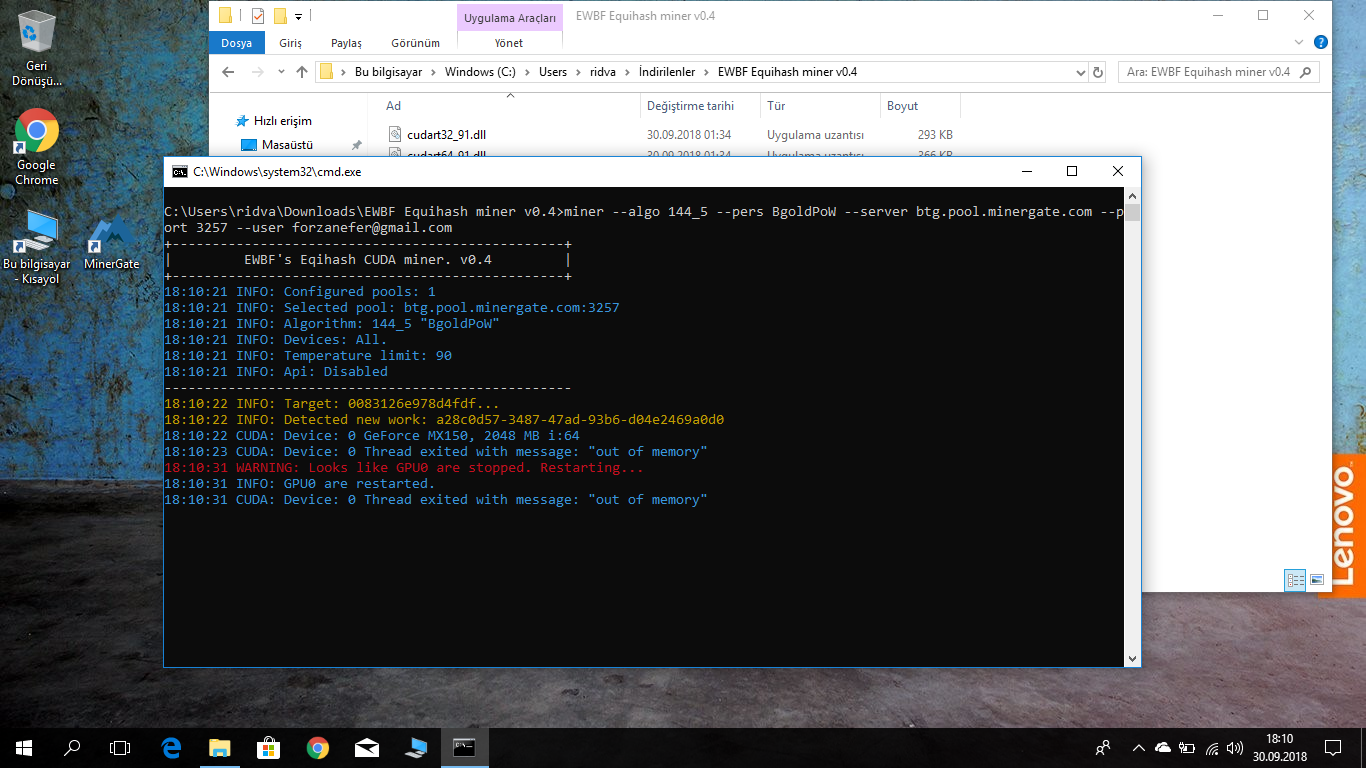 |
| json metadata | {"tags":["mining"],"image":["https://cdn.steemitimages.com/DQmYgTzMDdwHZEBbXiv8rCucXtMMSW7nqWktnKfAbdcQ2UL/image.png"],"app":"steemit/0.1"} |
| Transaction Info | Block #26400749/Trx c5ad1dc4c44d986747dd8660abb48b431d59b411 |
View Raw JSON Data
{
"trx_id": "c5ad1dc4c44d986747dd8660abb48b431d59b411",
"block": 26400749,
"trx_in_block": 32,
"op_in_trx": 0,
"virtual_op": 0,
"timestamp": "2018-09-30T15:14:09",
"op": [
"comment",
{
"parent_author": "cryptomkd",
"parent_permlink": "l2dmcgo6",
"author": "keepcalmandread",
"permlink": "re-cryptomkd-l2dmcgo6-20180930t151411461z",
"title": "",
"body": "",
"json_metadata": "{\"tags\":[\"mining\"],\"image\":[\"https://cdn.steemitimages.com/DQmYgTzMDdwHZEBbXiv8rCucXtMMSW7nqWktnKfAbdcQ2UL/image.png\"],\"app\":\"steemit/0.1\"}"
}
]
}cryptomkdupdated their account properties2018/09/02 11:15:27
cryptomkdupdated their account properties
2018/09/02 11:15:27
| account | cryptomkd |
| memo key | STM74N65zXeGeNTU3LkBXXpv8tW4rmuWa6DPtDQF17iAb7rQ1ARUu |
| json metadata | {"profile":{"name":"CryptoMKD","about":"Alternative Crypto Coins Mining","location":"Skopje","profile_image":"https://cdn.steemitimages.com/DQmZff7Ks9UYJdcVpUzDdRz9wLpBWHD6H9ra2oo3w1Ezs3n/CRYPTOMKD.jpg","website":"https://www.youtube.com/channel/UCFVfxIntmF_fSFLQhygGcGA","cover_image":"https://cdn.steemitimages.com/DQmQ8pzoVDWfyXgFr3o8hwCcaxQTW5qh4Z2kvuiLAu8ZjKE/steemcover.jpg"}} |
| Transaction Info | Block #25605786/Trx 5312b2824bfc6487d87deb7c1012cdafccb3b166 |
View Raw JSON Data
{
  "trx_id": "5312b2824bfc6487d87deb7c1012cdafccb3b166",
  "block": 25605786,
  "trx_in_block": 15,
  "op_in_trx": 0,
  "virtual_op": 0,
  "timestamp": "2018-09-02T11:15:27",
  "op": [
    "account_update",
    {
      "account": "cryptomkd",
      "memo_key": "STM74N65zXeGeNTU3LkBXXpv8tW4rmuWa6DPtDQF17iAb7rQ1ARUu",
      "json_metadata": "{\"profile\":{\"name\":\"CryptoMKD\",\"about\":\"Alternative Crypto Coins Mining\",\"location\":\"Skopje\",\"profile_image\":\"https://cdn.steemitimages.com/DQmZff7Ks9UYJdcVpUzDdRz9wLpBWHD6H9ra2oo3w1Ezs3n/CRYPTOMKD.jpg\",\"website\":\"https://www.youtube.com/channel/UCFVfxIntmF_fSFLQhygGcGA\",\"cover_image\":\"https://cdn.steemitimages.com/DQmQ8pzoVDWfyXgFr3o8hwCcaxQTW5qh4Z2kvuiLAu8ZjKE/steemcover.jpg\"}}"
    }
  ]
}cryptomkdupdated their account properties2018/09/02 11:01:51
cryptomkdupdated their account properties
2018/09/02 11:01:51
| account | cryptomkd |
| memo key | STM74N65zXeGeNTU3LkBXXpv8tW4rmuWa6DPtDQF17iAb7rQ1ARUu |
| json metadata | {"profile":{"name":"CryptoMKD","about":"Alternative Crypto Coins Mining","location":"Skopje","profile_image":"https://cdn.steemitimages.com/DQmZff7Ks9UYJdcVpUzDdRz9wLpBWHD6H9ra2oo3w1Ezs3n/CRYPTOMKD.jpg","website":"https://www.youtube.com/channel/UCFVfxIntmF_fSFLQhygGcGA"}} |
| Transaction Info | Block #25605514/Trx 481d1a3f2a22d1b3c27d11415971eb521d2a4c2b |
View Raw JSON Data
{
  "trx_id": "481d1a3f2a22d1b3c27d11415971eb521d2a4c2b",
  "block": 25605514,
  "trx_in_block": 20,
  "op_in_trx": 0,
  "virtual_op": 0,
  "timestamp": "2018-09-02T11:01:51",
  "op": [
    "account_update",
    {
      "account": "cryptomkd",
      "memo_key": "STM74N65zXeGeNTU3LkBXXpv8tW4rmuWa6DPtDQF17iAb7rQ1ARUu",
      "json_metadata": "{\"profile\":{\"name\":\"CryptoMKD\",\"about\":\"Alternative Crypto Coins Mining\",\"location\":\"Skopje\",\"profile_image\":\"https://cdn.steemitimages.com/DQmZff7Ks9UYJdcVpUzDdRz9wLpBWHD6H9ra2oo3w1Ezs3n/CRYPTOMKD.jpg\",\"website\":\"https://www.youtube.com/channel/UCFVfxIntmF_fSFLQhygGcGA\"}}"
    }
  ]
}coin.infoupvoted (6.94%) @cryptomkd / l2dmcgo62018/08/22 13:31:06
coin.infoupvoted (6.94%) @cryptomkd / l2dmcgo6
2018/08/22 13:31:06
| voter | coin.info |
| author | cryptomkd |
| permlink | l2dmcgo6 |
| weight | 694 (6.94%) |
| Transaction Info | Block #25291872/Trx 70f1ff338a805c8967d0151f26d265a3361b61ec |
View Raw JSON Data
{
  "trx_id": "70f1ff338a805c8967d0151f26d265a3361b61ec",
  "block": 25291872,
  "trx_in_block": 38,
  "op_in_trx": 0,
  "virtual_op": 0,
  "timestamp": "2018-08-22T13:31:06",
  "op": [
    "vote",
    {
      "voter": "coin.info",
      "author": "cryptomkd",
      "permlink": "l2dmcgo6",
      "weight": 694
    }
  ]
}2018/08/22 13:31:03
2018/08/22 13:31:03
| parent author | cryptomkd |
| parent permlink | l2dmcgo6 |
| author | coin.info |
| permlink | re-cryptomkd-l2dmcgo6-20180822t133103103z |
| title | |
| body | **Coins mentioned in post:** Coin | | Price (USD) | 📈 24h | 📈 7d - | - | - | - | - **BTC** | Bitcoin | 6666.609$ | _3.45%_ | _3.47%_ **ETC** | Ethereum Classic | 13.041$ | _3.47%_ | _7.84%_ **ETH** | Ethereum | 285.894$ | _2.09%_ | _-1.38%_ **XMR** | Monero | 94.934$ | _1.43%_ | _5.1%_ |
| json metadata | {"app":"coininfo/1.0.0","format":"markdown"} |
| Transaction Info | Block #25291871/Trx 4e5b5a5a2f7f74176a928148af0b34885b72da94 |
View Raw JSON Data
{
  "trx_id": "4e5b5a5a2f7f74176a928148af0b34885b72da94",
  "block": 25291871,
  "trx_in_block": 34,
  "op_in_trx": 0,
  "virtual_op": 0,
  "timestamp": "2018-08-22T13:31:03",
  "op": [
    "comment",
    {
      "parent_author": "cryptomkd",
      "parent_permlink": "l2dmcgo6",
      "author": "coin.info",
      "permlink": "re-cryptomkd-l2dmcgo6-20180822t133103103z",
      "title": "",
      "body": "**Coins mentioned in post:**\n\nCoin | | Price (USD) | 📈 24h | 📈 7d\n- | - | - | - | -\n**BTC** | Bitcoin | 6666.609$ | _3.45%_ | _3.47%_\n**ETC** | Ethereum Classic | 13.041$ | _3.47%_ | _7.84%_\n**ETH** | Ethereum | 285.894$ | _2.09%_ | _-1.38%_\n**XMR** | Monero | 94.934$ | _1.43%_ | _5.1%_",
      "json_metadata": "{\"app\":\"coininfo/1.0.0\",\"format\":\"markdown\"}"
    }
  ]
}moment.eternityupvoted (100.00%) @cryptomkd / l2dmcgo62018/08/22 05:19:57
moment.eternityupvoted (100.00%) @cryptomkd / l2dmcgo6
2018/08/22 05:19:57
| voter | moment.eternity |
| author | cryptomkd |
| permlink | l2dmcgo6 |
| weight | 10000 (100.00%) |
| Transaction Info | Block #25282050/Trx 468d2f513e92409e76e29de36fcd1ec19287cfed |
View Raw JSON Data
{
  "trx_id": "468d2f513e92409e76e29de36fcd1ec19287cfed",
  "block": 25282050,
  "trx_in_block": 49,
  "op_in_trx": 0,
  "virtual_op": 0,
  "timestamp": "2018-08-22T05:19:57",
  "op": [
    "vote",
    {
      "voter": "moment.eternity",
      "author": "cryptomkd",
      "permlink": "l2dmcgo6",
      "weight": 10000
    }
  ]
}cryptomkdreplied to @cryptomkd / r7qfefha02018/08/22 05:03:18
cryptomkdreplied to @cryptomkd / r7qfefha0
2018/08/22 05:03:18
| parent author | cryptomkd |
| parent permlink | l2dmcgo6 |
| author | cryptomkd |
| permlink | r7qfefha0 |
| title | r7qfefha0 |
| body | something new to start with |
| json metadata | {"app":"dtube/0.8"} |
| Transaction Info | Block #25281717/Trx 852c49a38cc13c050ccd147acfcee0d646f5398a |
View Raw JSON Data
{
  "trx_id": "852c49a38cc13c050ccd147acfcee0d646f5398a",
  "block": 25281717,
  "trx_in_block": 13,
  "op_in_trx": 0,
  "virtual_op": 0,
  "timestamp": "2018-08-22T05:03:18",
  "op": [
    "comment",
    {
      "parent_author": "cryptomkd",
      "parent_permlink": "l2dmcgo6",
      "author": "cryptomkd",
      "permlink": "r7qfefha0",
      "title": "r7qfefha0",
      "body": "something new to start with",
      "json_metadata": "{\"app\":\"dtube/0.8\"}"
    }
  ]
}2018/08/22 05:02:33
2018/08/22 05:02:33
| author | cryptomkd |
| permlink | l2dmcgo6 |
| max accepted payout | 1000000.000 SBD |
| percent steem dollars | 0 |
| allow votes | true |
| allow curation rewards | true |
| extensions | [[0,{"beneficiaries":[{"account":"dtube","weight":2500}]}]] |
| Transaction Info | Block #25281702/Trx 8ad92c5739591b99fa9d7f71206b053a6e176e99 |
View Raw JSON Data
{
  "trx_id": "8ad92c5739591b99fa9d7f71206b053a6e176e99",
  "block": 25281702,
  "trx_in_block": 4,
  "op_in_trx": 0,
  "virtual_op": 0,
  "timestamp": "2018-08-22T05:02:33",
  "op": [
    "comment_options",
    {
      "author": "cryptomkd",
      "permlink": "l2dmcgo6",
      "max_accepted_payout": "1000000.000 SBD",
      "percent_steem_dollars": 0,
      "allow_votes": true,
      "allow_curation_rewards": true,
      "extensions": [
        [
          0,
          {
            "beneficiaries": [
              {
                "account": "dtube",
                "weight": 2500
              }
            ]
          }
        ]
      ]
    }
  ]
}2018/08/22 05:02:33
2018/08/22 05:02:33
| parent author | |
| parent permlink | mining |
| author | cryptomkd |
| permlink | l2dmcgo6 |
| title | How to start mining Elya (ELYA) on pool with AMD GPU's |
| body | <center><a href='https://d.tube/#!/v/cryptomkd/l2dmcgo6'><img src='https://ipfs.io/ipfs/QmbifHdpjkoLRVRUbFUCUR1rFAp2gXoXPFyHFeiujP4Fut'></a></center><hr> Thank You For Watching! Remember to subscribe and hit the bell icon to get notifications as soon as I upload a new video or start a live stream! How to start mining Elya (ELYA) on pool with AMD GPU's. Explained in details how to mine Elya (ELYA) on pool with AMD GPU's. Useful Links: Official Website: https://elya.io/ https://elyatel.com/ Elya (ELYA) Block Explorer: https://explorer.coolbits.io/elya/ BitcoinTalk Thread: https://bitcointalk.org/index.php?topic=3118732.0 Elya (ELYA) Mining Pools: http://elya.gonspool.com/ http://elyapool.com/ https://cryptoknight.cc/elya/ MINING Software for mining Elya (ELYA) with AMD GPU's: SRBMiner Cryptonight AMD GPU Miner: https://bitcointalk.org/index.php?topic=3167363 http://www.srbminer.com/ JCE Miner Cryptonight/forks: https://bitcointalk.org/index.php?topic=3281187.0 Cast XMR - Highspeed CryptoNight Miner: https://bitcointalk.org/index.php?topic=2256917.0 http://www.gandalph3000.com/ Claymore's CryptoNight AMD GPU Miner https://bitcointalk.org/index.php?topic=638915.0 Link to official wallets: https://github.com/elyacoin/elyacoinwallet/releases Drivers for GPU's: RX 4XX, RX 5XX, VEGA series: Radeon Software Crimson ReLive Edition Beta for Blockchain Compute Release Notes https://support.amd.com/en-us/kb-articles/Pages/Radeon-Software-Crimson-ReLive-Edition-Beta-for-Blockchain-Compute-Release-Notes.aspx AMD/ATI Pixel Clock Patcher: https://www.monitortests.com/forum/Thread-AMD-ATI-Pixel-Clock-Patcher or you can try latest one from AMD. http://www.guru3d.com/files-categories/videocards-ati-catalyst-vista-win-7.html https://support.amd.com/en-us/download After installing drivers install MSI afterburner or Sapphire TRIXXX or OverdriveNTool - tool for AMD Hawaii, Fiji, Polaris, Vega GPUs, software to be able to proper setup your clocks for your cards. You can download this from here: https://www.msi.com/page/afterburner http://www.sapphiretech.com/catapage_tech.asp?cataid=291&lang=eng https://forums.guru3d.com/threads/overdriventool-tool-for-amd-gpus.416116/ For mining Elya (ELYA) with Cast XMR - Highspeed CryptoNight Miner my batch file is like this: cast_xmr-vega --algo=1 -S elya-pool.gonspool.com:3333 -u eL2qg1kgXUeYowWeukq4uaVJm4tnQyfLV9ZYn1ekejaMcoK9i9W4eWJGJySUU6YhzTRxLtAqg4GEkAHpDHJhs6mX2h5aTxsBZ.default %* Crypto Donations Are Really Appreciated! ----------------------------------------------------------------------------- Donate Ethereum and Ethereum-Based (ERC-20) Tokens: 0xdA7d91816d64F6a1682E8540aA96AeE0A0622844 Donate Bitcoin: 19hD3u8XJndTKqGiHmWsNsNvAyCU5gjDmw Donate ETC: 0x0b341f09401d1Aa5D3BC3E10c332AbD05150d469 Special Thanks For The Awesome Music: ------------------------------------------------------------------------------ Track: T-Mass - Ignoring My Heart [NCS Release] Music provided by NoCopyrightSounds. Watch: https://youtu.be/eT0tYnWX2sQ Free Download / Stream: http://ncs.io/ignoringmyheartYO #Bitcoin #Ethereum #Cryptocurrency #Crypto #Altcoins mining expanse mining expanse solo mining ethereum mining ethereum classic decred dual mining eth mining etc mining zcash mining zcash bitcoin btc SIB sibcoin sgminer ccminer monero xmr minergate cryptonight coin magi magi xmg SIA siacoin siamining zclassic zcl zcl mining bip bipcoin bipcoin mining pasc pascal pascalcoin pascalcoin mining dcr decred decred mining lbry lbc lbry credits expanse exp boolberry bbr wild keccak komodo kmd zdash zdash mining dash GEO geocoin qubit veltor vlt thors riddle ethereum classic etc pascal lite pasl chaincoin chc Wyvern WYV Musicoin musicoin music cryptocurrency ubiq ubq sia siacoin sc digibyte dgb groestl zencash zen zencash mining tribus denarius denarius coin mining denarius sigt signatum signatum mining monero xmr pxc phoenixcoin neoscrypt xvg verge myr-gr neoscrypt gobyte gbx hsr hsrminer purk purkmining wildkeccak wildminer ravencoin raven rvn x16r x16s masari msr Cryptonight Cryptonight Lite Cryptonight V7 Cryptonight Lite V7 Cryptonight Heavy Cryptonight Haven Cryptonight Fast Cryptonight BitTube V2 Cryptonight StelliteV4 Cryptonight ArtoCash Cryptonight Alloy Cryptonight B2N Cryptonight MarketCash Cryptonight Italo elya ELYA coin <hr><a href='https://d.tube/#!/v/cryptomkd/l2dmcgo6'> ▶️ DTube</a><br /><a href='https://ipfs.io/ipfs/QmTwVVF7XAqz9NC3UjyupAZZsJXJcP3sYKU8s44iDMRvvg'> ▶️ IPFS</a> |
| json metadata | {"video":{"info":{"title":"How to start mining Elya (ELYA) on pool with AMD GPU's","snaphash":"QmW3sYkn4sLuDjcbhxMEmWXHo5BmxXngTQ3Zprj3tk4v6q","author":"cryptomkd","permlink":"l2dmcgo6","duration":723.835644,"filesize":31768863,"spritehash":"QmNXrhsYrRy21aqKCjR1PyFatsEDToViPyqvV33NuwUVZd"},"content":{"videohash":"QmTwVVF7XAqz9NC3UjyupAZZsJXJcP3sYKU8s44iDMRvvg","description":"Thank You For Watching!\n\nRemember to subscribe and hit the bell icon to get notifications as soon as I upload a new video or start a live stream!\n\n\n\nHow to start mining Elya (ELYA) on pool with AMD GPU's.\n\n\nExplained in details how to mine Elya (ELYA) on pool with AMD GPU's.\n\n\nUseful Links:\n\nOfficial Website:\nhttps://elya.io/\nhttps://elyatel.com/\n\nElya (ELYA) Block Explorer:\nhttps://explorer.coolbits.io/elya/\n\nBitcoinTalk Thread:\nhttps://bitcointalk.org/index.php?topic=3118732.0\n\n\n\nElya (ELYA) Mining Pools:\n\nhttp://elya.gonspool.com/\nhttp://elyapool.com/\nhttps://cryptoknight.cc/elya/\n\n\n\nMINING Software for mining Elya (ELYA) with AMD GPU's:\n\nSRBMiner Cryptonight AMD GPU Miner:\nhttps://bitcointalk.org/index.php?topic=3167363\nhttp://www.srbminer.com/\n \t\nJCE Miner Cryptonight/forks:\nhttps://bitcointalk.org/index.php?topic=3281187.0\n\nCast XMR - Highspeed CryptoNight Miner:\nhttps://bitcointalk.org/index.php?topic=2256917.0\nhttp://www.gandalph3000.com/\n\nClaymore's CryptoNight AMD GPU Miner\nhttps://bitcointalk.org/index.php?topic=638915.0\n\n\n\nLink to official wallets:\n\nhttps://github.com/elyacoin/elyacoinwallet/releases\n\n\n\nDrivers for GPU's:\n\nRX 4XX, RX 5XX, VEGA series:\nRadeon Software Crimson ReLive Edition Beta for Blockchain Compute Release Notes\nhttps://support.amd.com/en-us/kb-articles/Pages/Radeon-Software-Crimson-ReLive-Edition-Beta-for-Blockchain-Compute-Release-Notes.aspx\n\nAMD/ATI Pixel Clock Patcher:\nhttps://www.monitortests.com/forum/Thread-AMD-ATI-Pixel-Clock-Patcher\n\nor you can try latest one from AMD.\nhttp://www.guru3d.com/files-categories/videocards-ati-catalyst-vista-win-7.html\nhttps://support.amd.com/en-us/download\n\n\nAfter installing drivers\ninstall MSI afterburner or Sapphire TRIXXX or\nOverdriveNTool - tool for AMD Hawaii, Fiji, Polaris, Vega GPUs,\nsoftware to be able to proper setup your clocks for your cards.\n\nYou can download this from here:\n\nhttps://www.msi.com/page/afterburner\nhttp://www.sapphiretech.com/catapage_tech.asp?cataid=291&lang=eng\nhttps://forums.guru3d.com/threads/overdriventool-tool-for-amd-gpus.416116/\n\n\n\n\nFor mining Elya (ELYA) with Cast XMR - Highspeed CryptoNight Miner\nmy batch file is like this:\n\ncast_xmr-vega --algo=1 -S elya-pool.gonspool.com:3333 -u eL2qg1kgXUeYowWeukq4uaVJm4tnQyfLV9ZYn1ekejaMcoK9i9W4eWJGJySUU6YhzTRxLtAqg4GEkAHpDHJhs6mX2h5aTxsBZ.default %*\n\n\n\n\n\n\nCrypto Donations Are Really Appreciated!\n-----------------------------------------------------------------------------\n\nDonate Ethereum and Ethereum-Based (ERC-20) Tokens: 0xdA7d91816d64F6a1682E8540aA96AeE0A0622844\n\nDonate Bitcoin: 19hD3u8XJndTKqGiHmWsNsNvAyCU5gjDmw\n\nDonate ETC: 0x0b341f09401d1Aa5D3BC3E10c332AbD05150d469\n\n\n\nSpecial Thanks For The Awesome Music:\n------------------------------------------------------------------------------\nTrack: T-Mass - Ignoring My Heart [NCS Release]\nMusic provided by NoCopyrightSounds.\nWatch: https://youtu.be/eT0tYnWX2sQ\nFree Download / Stream: http://ncs.io/ignoringmyheartYO\n\n\n\n\n#Bitcoin #Ethereum #Cryptocurrency #Crypto #Altcoins\n\n\n\n\n\nmining\nexpanse mining\nexpanse solo mining\nethereum mining\nethereum classic\ndecred\ndual mining\neth mining\netc mining\nzcash mining\nzcash\nbitcoin\nbtc\nSIB\nsibcoin\nsgminer\nccminer\nmonero\nxmr\nminergate\ncryptonight\ncoin magi\nmagi\nxmg\nSIA\nsiacoin\nsiamining\nzclassic\nzcl\nzcl mining\nbip\nbipcoin\nbipcoin mining\npasc\npascal\npascalcoin\npascalcoin mining\ndcr\ndecred\ndecred mining\nlbry\nlbc\nlbry credits\nexpanse\nexp\nboolberry\nbbr\nwild keccak\nkomodo\nkmd\nzdash\nzdash mining\ndash\nGEO\ngeocoin\nqubit\nveltor\nvlt\nthors riddle\nethereum classic\netc\npascal lite\npasl\nchaincoin\nchc\nWyvern\nWYV\nMusicoin\nmusicoin\nmusic\ncryptocurrency\nubiq\nubq\nsia\nsiacoin\nsc\ndigibyte\ndgb\ngroestl\nzencash\nzen\nzencash mining\ntribus\ndenarius\ndenarius coin\nmining denarius\nsigt\nsignatum\nsignatum mining\nmonero\nxmr\npxc\nphoenixcoin\nneoscrypt\nxvg\nverge\nmyr-gr\nneoscrypt\ngobyte\ngbx\nhsr\nhsrminer\npurk\npurkmining\nwildkeccak\nwildminer\nravencoin\nraven\nrvn\nx16r\nx16s\nmasari\nmsr\nCryptonight\nCryptonight Lite\nCryptonight V7\nCryptonight Lite V7\nCryptonight Heavy\nCryptonight Haven\nCryptonight Fast\nCryptonight BitTube V2\nCryptonight StelliteV4\nCryptonight ArtoCash\nCryptonight Alloy\nCryptonight B2N\nCryptonight MarketCash\nCryptonight Italo\nelya\nELYA coin","tags":["mining","bitcoin","ethereum","crypto"],"video240hash":"QmVWhBicf7fzR5RiVXUDDrNH6YX7vF1osfgRu6pkFctMDe","video480hash":"QmbMKB9HATaqzJyJWBRfY19WptXMLY9vKyWiAin2YLdsEC"}},"tags":["mining","bitcoin","ethereum","crypto","dtube"],"app":"dtube/0.8"} |
| Transaction Info | Block #25281702/Trx 8ad92c5739591b99fa9d7f71206b053a6e176e99 |
View Raw JSON Data
{
"trx_id": "8ad92c5739591b99fa9d7f71206b053a6e176e99",
"block": 25281702,
"trx_in_block": 4,
"op_in_trx": 0,
"virtual_op": 0,
"timestamp": "2018-08-22T05:02:33",
"op": [
"comment",
{
"parent_author": "",
"parent_permlink": "mining",
"author": "cryptomkd",
"permlink": "l2dmcgo6",
"title": "How to start mining Elya (ELYA) on pool with AMD GPU's",
"body": "<center><a href='https://d.tube/#!/v/cryptomkd/l2dmcgo6'><img src='https://ipfs.io/ipfs/QmbifHdpjkoLRVRUbFUCUR1rFAp2gXoXPFyHFeiujP4Fut'></a></center><hr>\n\nThank You For Watching!\n\nRemember to subscribe and hit the bell icon to get notifications as soon as I upload a new video or start a live stream!\n\n\n\nHow to start mining Elya (ELYA) on pool with AMD GPU's.\n\n\nExplained in details how to mine Elya (ELYA) on pool with AMD GPU's.\n\n\nUseful Links:\n\nOfficial Website:\nhttps://elya.io/\nhttps://elyatel.com/\n\nElya (ELYA) Block Explorer:\nhttps://explorer.coolbits.io/elya/\n\nBitcoinTalk Thread:\nhttps://bitcointalk.org/index.php?topic=3118732.0\n\n\n\nElya (ELYA) Mining Pools:\n\nhttp://elya.gonspool.com/\nhttp://elyapool.com/\nhttps://cryptoknight.cc/elya/\n\n\n\nMINING Software for mining Elya (ELYA) with AMD GPU's:\n\nSRBMiner Cryptonight AMD GPU Miner:\nhttps://bitcointalk.org/index.php?topic=3167363\nhttp://www.srbminer.com/\n \t\nJCE Miner Cryptonight/forks:\nhttps://bitcointalk.org/index.php?topic=3281187.0\n\nCast XMR - Highspeed CryptoNight Miner:\nhttps://bitcointalk.org/index.php?topic=2256917.0\nhttp://www.gandalph3000.com/\n\nClaymore's CryptoNight AMD GPU Miner\nhttps://bitcointalk.org/index.php?topic=638915.0\n\n\n\nLink to official wallets:\n\nhttps://github.com/elyacoin/elyacoinwallet/releases\n\n\n\nDrivers for GPU's:\n\nRX 4XX, RX 5XX, VEGA series:\nRadeon Software Crimson ReLive Edition Beta for Blockchain Compute Release Notes\nhttps://support.amd.com/en-us/kb-articles/Pages/Radeon-Software-Crimson-ReLive-Edition-Beta-for-Blockchain-Compute-Release-Notes.aspx\n\nAMD/ATI Pixel Clock Patcher:\nhttps://www.monitortests.com/forum/Thread-AMD-ATI-Pixel-Clock-Patcher\n\nor you can try latest one from AMD.\nhttp://www.guru3d.com/files-categories/videocards-ati-catalyst-vista-win-7.html\nhttps://support.amd.com/en-us/download\n\n\nAfter installing drivers\ninstall MSI afterburner or Sapphire TRIXXX or\nOverdriveNTool - tool for AMD Hawaii, Fiji, Polaris, Vega GPUs,\nsoftware to be able to proper setup your clocks for your cards.\n\nYou can download this from here:\n\nhttps://www.msi.com/page/afterburner\nhttp://www.sapphiretech.com/catapage_tech.asp?cataid=291&lang=eng\nhttps://forums.guru3d.com/threads/overdriventool-tool-for-amd-gpus.416116/\n\n\n\n\nFor mining Elya (ELYA) with Cast XMR - Highspeed CryptoNight Miner\nmy batch file is like this:\n\ncast_xmr-vega --algo=1 -S elya-pool.gonspool.com:3333 -u eL2qg1kgXUeYowWeukq4uaVJm4tnQyfLV9ZYn1ekejaMcoK9i9W4eWJGJySUU6YhzTRxLtAqg4GEkAHpDHJhs6mX2h5aTxsBZ.default %*\n\n\n\n\n\n\nCrypto Donations Are Really Appreciated!\n-----------------------------------------------------------------------------\n\nDonate Ethereum and Ethereum-Based (ERC-20) Tokens: 0xdA7d91816d64F6a1682E8540aA96AeE0A0622844\n\nDonate Bitcoin: 19hD3u8XJndTKqGiHmWsNsNvAyCU5gjDmw\n\nDonate ETC: 0x0b341f09401d1Aa5D3BC3E10c332AbD05150d469\n\n\n\nSpecial Thanks For The Awesome Music:\n------------------------------------------------------------------------------\nTrack: T-Mass - Ignoring My Heart [NCS Release]\nMusic provided by NoCopyrightSounds.\nWatch: https://youtu.be/eT0tYnWX2sQ\nFree Download / Stream: http://ncs.io/ignoringmyheartYO\n\n\n\n\n#Bitcoin #Ethereum #Cryptocurrency #Crypto #Altcoins\n\n\n\n\n\nmining\nexpanse mining\nexpanse solo mining\nethereum mining\nethereum classic\ndecred\ndual mining\neth mining\netc mining\nzcash mining\nzcash\nbitcoin\nbtc\nSIB\nsibcoin\nsgminer\nccminer\nmonero\nxmr\nminergate\ncryptonight\ncoin magi\nmagi\nxmg\nSIA\nsiacoin\nsiamining\nzclassic\nzcl\nzcl mining\nbip\nbipcoin\nbipcoin mining\npasc\npascal\npascalcoin\npascalcoin mining\ndcr\ndecred\ndecred mining\nlbry\nlbc\nlbry credits\nexpanse\nexp\nboolberry\nbbr\nwild keccak\nkomodo\nkmd\nzdash\nzdash mining\ndash\nGEO\ngeocoin\nqubit\nveltor\nvlt\nthors riddle\nethereum classic\netc\npascal lite\npasl\nchaincoin\nchc\nWyvern\nWYV\nMusicoin\nmusicoin\nmusic\ncryptocurrency\nubiq\nubq\nsia\nsiacoin\nsc\ndigibyte\ndgb\ngroestl\nzencash\nzen\nzencash mining\ntribus\ndenarius\ndenarius coin\nmining denarius\nsigt\nsignatum\nsignatum mining\nmonero\nxmr\npxc\nphoenixcoin\nneoscrypt\nxvg\nverge\nmyr-gr\nneoscrypt\ngobyte\ngbx\nhsr\nhsrminer\npurk\npurkmining\nwildkeccak\nwildminer\nravencoin\nraven\nrvn\nx16r\nx16s\nmasari\nmsr\nCryptonight\nCryptonight Lite\nCryptonight V7\nCryptonight Lite V7\nCryptonight Heavy\nCryptonight Haven\nCryptonight Fast\nCryptonight BitTube V2\nCryptonight StelliteV4\nCryptonight ArtoCash\nCryptonight Alloy\nCryptonight B2N\nCryptonight MarketCash\nCryptonight Italo\nelya\nELYA coin\n\n<hr><a href='https://d.tube/#!/v/cryptomkd/l2dmcgo6'> ▶️ DTube</a><br /><a href='https://ipfs.io/ipfs/QmTwVVF7XAqz9NC3UjyupAZZsJXJcP3sYKU8s44iDMRvvg'> ▶️ IPFS</a>",
"json_metadata": "{\"video\":{\"info\":{\"title\":\"How to start mining Elya (ELYA) on pool with AMD GPU's\",\"snaphash\":\"QmW3sYkn4sLuDjcbhxMEmWXHo5BmxXngTQ3Zprj3tk4v6q\",\"author\":\"cryptomkd\",\"permlink\":\"l2dmcgo6\",\"duration\":723.835644,\"filesize\":31768863,\"spritehash\":\"QmNXrhsYrRy21aqKCjR1PyFatsEDToViPyqvV33NuwUVZd\"},\"content\":{\"videohash\":\"QmTwVVF7XAqz9NC3UjyupAZZsJXJcP3sYKU8s44iDMRvvg\",\"description\":\"Thank You For Watching!\\n\\nRemember to subscribe and hit the bell icon to get notifications as soon as I upload a new video or start a live stream!\\n\\n\\n\\nHow to start mining Elya (ELYA) on pool with AMD GPU's.\\n\\n\\nExplained in details how to mine Elya (ELYA) on pool with AMD GPU's.\\n\\n\\nUseful Links:\\n\\nOfficial Website:\\nhttps://elya.io/\\nhttps://elyatel.com/\\n\\nElya (ELYA) Block Explorer:\\nhttps://explorer.coolbits.io/elya/\\n\\nBitcoinTalk Thread:\\nhttps://bitcointalk.org/index.php?topic=3118732.0\\n\\n\\n\\nElya (ELYA) Mining Pools:\\n\\nhttp://elya.gonspool.com/\\nhttp://elyapool.com/\\nhttps://cryptoknight.cc/elya/\\n\\n\\n\\nMINING Software for mining Elya (ELYA) with AMD GPU's:\\n\\nSRBMiner Cryptonight AMD GPU Miner:\\nhttps://bitcointalk.org/index.php?topic=3167363\\nhttp://www.srbminer.com/\\n \\t\\nJCE Miner Cryptonight/forks:\\nhttps://bitcointalk.org/index.php?topic=3281187.0\\n\\nCast XMR - Highspeed CryptoNight Miner:\\nhttps://bitcointalk.org/index.php?topic=2256917.0\\nhttp://www.gandalph3000.com/\\n\\nClaymore's CryptoNight AMD GPU Miner\\nhttps://bitcointalk.org/index.php?topic=638915.0\\n\\n\\n\\nLink to official wallets:\\n\\nhttps://github.com/elyacoin/elyacoinwallet/releases\\n\\n\\n\\nDrivers for GPU's:\\n\\nRX 4XX, RX 5XX, VEGA series:\\nRadeon Software Crimson ReLive Edition Beta for Blockchain Compute Release Notes\\nhttps://support.amd.com/en-us/kb-articles/Pages/Radeon-Software-Crimson-ReLive-Edition-Beta-for-Blockchain-Compute-Release-Notes.aspx\\n\\nAMD/ATI Pixel Clock Patcher:\\nhttps://www.monitortests.com/forum/Thread-AMD-ATI-Pixel-Clock-Patcher\\n\\nor you can try latest one from AMD.\\nhttp://www.guru3d.com/files-categories/videocards-ati-catalyst-vista-win-7.html\\nhttps://support.amd.com/en-us/download\\n\\n\\nAfter installing drivers\\ninstall MSI afterburner or Sapphire TRIXXX or\\nOverdriveNTool - tool for AMD Hawaii, Fiji, Polaris, Vega GPUs,\\nsoftware to be able to proper setup your clocks for your cards.\\n\\nYou can download this from here:\\n\\nhttps://www.msi.com/page/afterburner\\nhttp://www.sapphiretech.com/catapage_tech.asp?cataid=291&lang=eng\\nhttps://forums.guru3d.com/threads/overdriventool-tool-for-amd-gpus.416116/\\n\\n\\n\\n\\nFor mining Elya (ELYA) with Cast XMR - Highspeed CryptoNight Miner\\nmy batch file is like this:\\n\\ncast_xmr-vega --algo=1 -S elya-pool.gonspool.com:3333 -u eL2qg1kgXUeYowWeukq4uaVJm4tnQyfLV9ZYn1ekejaMcoK9i9W4eWJGJySUU6YhzTRxLtAqg4GEkAHpDHJhs6mX2h5aTxsBZ.default %*\\n\\n\\n\\n\\n\\n\\nCrypto Donations Are Really Appreciated!\\n-----------------------------------------------------------------------------\\n\\nDonate Ethereum and Ethereum-Based (ERC-20) Tokens: 0xdA7d91816d64F6a1682E8540aA96AeE0A0622844\\n\\nDonate Bitcoin: 19hD3u8XJndTKqGiHmWsNsNvAyCU5gjDmw\\n\\nDonate ETC: 0x0b341f09401d1Aa5D3BC3E10c332AbD05150d469\\n\\n\\n\\nSpecial Thanks For The Awesome Music:\\n------------------------------------------------------------------------------\\nTrack: T-Mass - Ignoring My Heart [NCS Release]\\nMusic provided by NoCopyrightSounds.\\nWatch: https://youtu.be/eT0tYnWX2sQ\\nFree Download / Stream: http://ncs.io/ignoringmyheartYO\\n\\n\\n\\n\\n#Bitcoin #Ethereum #Cryptocurrency #Crypto #Altcoins\\n\\n\\n\\n\\n\\nmining\\nexpanse mining\\nexpanse solo mining\\nethereum mining\\nethereum classic\\ndecred\\ndual mining\\neth mining\\netc mining\\nzcash mining\\nzcash\\nbitcoin\\nbtc\\nSIB\\nsibcoin\\nsgminer\\nccminer\\nmonero\\nxmr\\nminergate\\ncryptonight\\ncoin magi\\nmagi\\nxmg\\nSIA\\nsiacoin\\nsiamining\\nzclassic\\nzcl\\nzcl mining\\nbip\\nbipcoin\\nbipcoin mining\\npasc\\npascal\\npascalcoin\\npascalcoin mining\\ndcr\\ndecred\\ndecred mining\\nlbry\\nlbc\\nlbry credits\\nexpanse\\nexp\\nboolberry\\nbbr\\nwild keccak\\nkomodo\\nkmd\\nzdash\\nzdash mining\\ndash\\nGEO\\ngeocoin\\nqubit\\nveltor\\nvlt\\nthors riddle\\nethereum classic\\netc\\npascal lite\\npasl\\nchaincoin\\nchc\\nWyvern\\nWYV\\nMusicoin\\nmusicoin\\nmusic\\ncryptocurrency\\nubiq\\nubq\\nsia\\nsiacoin\\nsc\\ndigibyte\\ndgb\\ngroestl\\nzencash\\nzen\\nzencash mining\\ntribus\\ndenarius\\ndenarius coin\\nmining denarius\\nsigt\\nsignatum\\nsignatum mining\\nmonero\\nxmr\\npxc\\nphoenixcoin\\nneoscrypt\\nxvg\\nverge\\nmyr-gr\\nneoscrypt\\ngobyte\\ngbx\\nhsr\\nhsrminer\\npurk\\npurkmining\\nwildkeccak\\nwildminer\\nravencoin\\nraven\\nrvn\\nx16r\\nx16s\\nmasari\\nmsr\\nCryptonight\\nCryptonight Lite\\nCryptonight V7\\nCryptonight Lite V7\\nCryptonight Heavy\\nCryptonight Haven\\nCryptonight Fast\\nCryptonight BitTube V2\\nCryptonight StelliteV4\\nCryptonight ArtoCash\\nCryptonight Alloy\\nCryptonight B2N\\nCryptonight MarketCash\\nCryptonight Italo\\nelya\\nELYA coin\",\"tags\":[\"mining\",\"bitcoin\",\"ethereum\",\"crypto\"],\"video240hash\":\"QmVWhBicf7fzR5RiVXUDDrNH6YX7vF1osfgRu6pkFctMDe\",\"video480hash\":\"QmbMKB9HATaqzJyJWBRfY19WptXMLY9vKyWiAin2YLdsEC\"}},\"tags\":[\"mining\",\"bitcoin\",\"ethereum\",\"crypto\",\"dtube\"],\"app\":\"dtube/0.8\"}"
}
]
}2018/08/22 04:52:36
2018/08/22 04:52:36
| required auths | [] |
| required posting auths | ["cryptomkd"] |
| id | follow |
| json | ["follow",{"follower":"cryptomkd","following":"dtube","what":["blog"]}] |
| Transaction Info | Block #25281503/Trx b61641eb937cbb5e1cef1027291343c3ecb0bc8e |
View Raw JSON Data
{
  "trx_id": "b61641eb937cbb5e1cef1027291343c3ecb0bc8e",
  "block": 25281503,
  "trx_in_block": 21,
  "op_in_trx": 0,
  "virtual_op": 0,
  "timestamp": "2018-08-22T04:52:36",
  "op": [
    "custom_json",
    {
      "required_auths": [],
      "required_posting_auths": [
        "cryptomkd"
      ],
      "id": "follow",
      "json": "[\"follow\",{\"follower\":\"cryptomkd\",\"following\":\"dtube\",\"what\":[\"blog\"]}]"
    }
  ]
}cryptomkdupdated their account properties2018/08/22 04:52:30
cryptomkdupdated their account properties
2018/08/22 04:52:30
| account | cryptomkd |
| posting | {"weight_threshold":1,"account_auths":[["dtube.app",1]],"key_auths":[["STM8g2r3bWfbSn4reTeAARWdHtuf8wSy1UbZ14ENBvHt26inpy7zt",1]]} |
| memo key | STM74N65zXeGeNTU3LkBXXpv8tW4rmuWa6DPtDQF17iAb7rQ1ARUu |
| json metadata | {"profile":{"name":"CryptoMKD","about":"Alternative Crypto Coins Mining","location":"Skopje","profile_image":"http://tinypic.com/m/jre6wh/2"}} |
| Transaction Info | Block #25281501/Trx 99c76c86320dbba0c6e5d2c89cbadb626ad14448 |
View Raw JSON Data
{
  "trx_id": "99c76c86320dbba0c6e5d2c89cbadb626ad14448",
  "block": 25281501,
  "trx_in_block": 3,
  "op_in_trx": 0,
  "virtual_op": 0,
  "timestamp": "2018-08-22T04:52:30",
  "op": [
    "account_update",
    {
      "account": "cryptomkd",
      "posting": {
        "weight_threshold": 1,
        "account_auths": [
          [
            "dtube.app",
            1
          ]
        ],
        "key_auths": [
          [
            "STM8g2r3bWfbSn4reTeAARWdHtuf8wSy1UbZ14ENBvHt26inpy7zt",
            1
          ]
        ]
      },
      "memo_key": "STM74N65zXeGeNTU3LkBXXpv8tW4rmuWa6DPtDQF17iAb7rQ1ARUu",
      "json_metadata": "{\"profile\":{\"name\":\"CryptoMKD\",\"about\":\"Alternative Crypto Coins Mining\",\"location\":\"Skopje\",\"profile_image\":\"http://tinypic.com/m/jre6wh/2\"}}"
    }
  ]
}take-a-breakupvoted (100.00%) @cryptomkd / how-to-start-mining-straks-stak-on-pool-with-nvidia-gpu-s2018/08/17 11:48:00
take-a-breakupvoted (100.00%) @cryptomkd / how-to-start-mining-straks-stak-on-pool-with-nvidia-gpu-s
2018/08/17 11:48:00
| voter | take-a-break |
| author | cryptomkd |
| permlink | how-to-start-mining-straks-stak-on-pool-with-nvidia-gpu-s |
| weight | 10000 (100.00%) |
| Transaction Info | Block #25145854/Trx fb7cccf0f026b2e1ab04a03f13eef968b3d795d9 |
View Raw JSON Data
{
  "trx_id": "fb7cccf0f026b2e1ab04a03f13eef968b3d795d9",
  "block": 25145854,
  "trx_in_block": 33,
  "op_in_trx": 0,
  "virtual_op": 0,
  "timestamp": "2018-08-17T11:48:00",
  "op": [
    "vote",
    {
      "voter": "take-a-break",
      "author": "cryptomkd",
      "permlink": "how-to-start-mining-straks-stak-on-pool-with-nvidia-gpu-s",
      "weight": 10000
    }
  ]
}cryptomkdpublished a new post: how-to-start-mining-straks-stak-on-pool-with-nvidia-gpu-s2018/08/17 10:49:18
cryptomkdpublished a new post: how-to-start-mining-straks-stak-on-pool-with-nvidia-gpu-s
2018/08/17 10:49:18
| parent author | |
| parent permlink | mining |
| author | cryptomkd |
| permlink | how-to-start-mining-straks-stak-on-pool-with-nvidia-gpu-s |
| title | How to start mining Straks (STAK) on pool with NVIDIA GPU's |
| body | https://youtu.be/1Yg0XBGSvVQ How to start mining Straks (STAK) on pool with nVidia GPU's. Hello. In this video i will show you how to start mining Straks (STAK) on pool with nVidia GPU's. Straks (STAK) is a new Cryptocurrency featuring the Lyra2REv2 algorithm. Specification: https://github.com/straks/straks More innformation about Straks (STAK) you can find in the following links: Official Website: http://www.straks.tech/ Bitcointalk Forum: https://bitcointalk.org/index.php?topic=2433318.0 Block Explorer: https://straks.info/ Lets start!!! In this video for mining Straks (STAK) i will use this pool: https://titan-mining.net/ This is my personal choice and you can always use pool of your choice. Other pools for mining Straks (STAK): https://arcpool.com/ https://stak.suprnova.cc/ https://erstweal.com/ https://fairmine.pro/ http://www.blazepool.com/ http://blockmasters.co/ Where to get address for mining? Download official wallet and make your personal address and then mined coins from your wallet transfer to any exchange. Link to official wallets: http://www.straks.tech/ https://github.com/straks/straks/releases/ You can use address from the exchanges but do it on your own risk. Most of them have warnings like: Please do not mine to your exchange addresses we do not support transactions from pools like P2Pool etc... For mining Straks (STAK) with nVidia GPU's you can use this miners: CCminer - opensource - GPL (tpruvot) https://bitcointalk.org/index.php?topic=770064.0 CryptoDredge NVIDIA GPU Miner https://bitcointalk.org/index.php?topic=4807821.0 Barracuda Miner https://bitcointalk.org/index.php?topic=4870873.0 CCminer (SP-MOD) Modded https://bitcointalk.org/index.php?topic=826901.0 In this video i will use: CryptoDredge NVIDIA GPU Miner For best results i recommend that you have installed these drivers for your GPU's. Latest Nvidia drivers: http://www.nvidia.com/Download/index.aspx http://www.guru3d.com/files-categories/videocards-nvidia-geforce-vista-%7C-7.html After installing drivers install MSI afterburner or Sapphire TRIXXX software to be able to proper setup your clocks for your cards. You can download this from here: https://www.msi.com/page/afterburner http://www.sapphiretech.com/catapage_tech.asp?cataid=291&lang=eng In this video i will use 4X GeForce GTX 1060 Settings for my card's are: GPU Clock (MHz) +50 Memory Clock (MHz) +50 Power Limit (%) 75 Core Voltage (mV) 0 For mining Straks (STAK) with CryptoDredge NVIDIA GPU Miner my batch file is like this: @echo off title Straks (STAK) - titan-mining CryptoDredge -a lyra2v2 -o stratum+tcp://pool.titan-mining.net:4533 -u SNgkoR9C5Vnq6WjeYswiVA3Zem7H1TCswg -p c=STAK,d=4 pause And here it is we are mining Straks (STAK)!!!! Always wait couple of minutes to see your speed and progress on the pool!!! That is it!!!!! Thanks for watching and happy earnings!!!!!! |
| json metadata | {"tags":["mining","ethereum","bitcoin","cryptocurrency","cryptomkd"],"users":["echo"],"image":["https://img.youtube.com/vi/1Yg0XBGSvVQ/0.jpg"],"links":["https://youtu.be/1Yg0XBGSvVQ","https://github.com/straks/straks","http://www.straks.tech/","https://bitcointalk.org/index.php?topic=2433318.0","https://straks.info/","https://titan-mining.net/","https://arcpool.com/","https://stak.suprnova.cc/","https://erstweal.com/","https://fairmine.pro/","http://www.blazepool.com/","http://blockmasters.co/","https://github.com/straks/straks/releases/","https://bitcointalk.org/index.php?topic=770064.0","https://bitcointalk.org/index.php?topic=4807821.0","https://bitcointalk.org/index.php?topic=4870873.0","https://bitcointalk.org/index.php?topic=826901.0","http://www.nvidia.com/Download/index.aspx","http://www.guru3d.com/files-categories/videocards-nvidia-geforce-vista-%7C-7.html","https://www.msi.com/page/afterburner","http://www.sapphiretech.com/catapage_tech.asp?cataid=291&lang=eng"],"app":"steemit/0.1","format":"markdown"} |
| Transaction Info | Block #25144680/Trx f690fcb4a6df23f992c1651047df76598530d5e0 |
View Raw JSON Data
{
"trx_id": "f690fcb4a6df23f992c1651047df76598530d5e0",
"block": 25144680,
"trx_in_block": 30,
"op_in_trx": 0,
"virtual_op": 0,
"timestamp": "2018-08-17T10:49:18",
"op": [
"comment",
{
"parent_author": "",
"parent_permlink": "mining",
"author": "cryptomkd",
"permlink": "how-to-start-mining-straks-stak-on-pool-with-nvidia-gpu-s",
"title": "How to start mining Straks (STAK) on pool with NVIDIA GPU's",
"body": "https://youtu.be/1Yg0XBGSvVQ\n\n\nHow to start mining Straks (STAK) on pool with nVidia GPU's.\n\nHello.\n\nIn this video i will show you how to start mining Straks (STAK) on pool with nVidia GPU's.\nStraks (STAK) is a new Cryptocurrency featuring the Lyra2REv2 algorithm.\nSpecification:\nhttps://github.com/straks/straks\n\n\nMore innformation about Straks (STAK) you can find\nin the following links:\n\nOfficial Website:\nhttp://www.straks.tech/\n\nBitcointalk Forum:\nhttps://bitcointalk.org/index.php?topic=2433318.0\n\nBlock Explorer:\nhttps://straks.info/\n\n\nLets start!!!\n\n\nIn this video for mining Straks (STAK) i will use this pool:\n\nhttps://titan-mining.net/\n\nThis is my personal choice and you can always use pool of your choice.\n\nOther pools for mining Straks (STAK):\n\nhttps://arcpool.com/\nhttps://stak.suprnova.cc/\nhttps://erstweal.com/\nhttps://fairmine.pro/\nhttp://www.blazepool.com/\nhttp://blockmasters.co/\n\n\nWhere to get address for mining?\n\n\nDownload official wallet and make your personal address\nand then mined coins from your wallet transfer to any exchange.\n\nLink to official wallets:\n\nhttp://www.straks.tech/\nhttps://github.com/straks/straks/releases/\n\n\nYou can use address from the exchanges but do it on your own risk.\nMost of them have warnings like: Please do not mine to your exchange addresses\nwe do not support transactions from pools like P2Pool etc...\n\n\n\n\nFor mining Straks (STAK) with nVidia GPU's you can use this miners:\n\nCCminer - opensource - GPL (tpruvot)\nhttps://bitcointalk.org/index.php?topic=770064.0\n\nCryptoDredge NVIDIA GPU Miner\nhttps://bitcointalk.org/index.php?topic=4807821.0\n\nBarracuda Miner\nhttps://bitcointalk.org/index.php?topic=4870873.0\n\nCCminer (SP-MOD) Modded\nhttps://bitcointalk.org/index.php?topic=826901.0\n\nIn this video i will use:\nCryptoDredge NVIDIA GPU Miner\n\n\n\nFor best results i recommend that you have installed\nthese drivers for your GPU's.\n\nLatest Nvidia drivers:\n\nhttp://www.nvidia.com/Download/index.aspx\nhttp://www.guru3d.com/files-categories/videocards-nvidia-geforce-vista-%7C-7.html\n\n\nAfter installing drivers\ninstall MSI afterburner or Sapphire TRIXXX \nsoftware to be able to proper setup your clocks for your cards.\n\nYou can download this from here:\n\nhttps://www.msi.com/page/afterburner\nhttp://www.sapphiretech.com/catapage_tech.asp?cataid=291&lang=eng\n\n\nIn this video i will use \n4X GeForce GTX 1060\n\nSettings for my card's are:\n\nGPU Clock (MHz) +50\n\nMemory Clock (MHz) +50\n\nPower Limit (%) 75\n\nCore Voltage (mV) 0\n\n\n\n\nFor mining Straks (STAK) with CryptoDredge NVIDIA GPU Miner\nmy batch file is like this:\n\n@echo off\ntitle Straks (STAK) - titan-mining\nCryptoDredge -a lyra2v2 -o stratum+tcp://pool.titan-mining.net:4533 -u SNgkoR9C5Vnq6WjeYswiVA3Zem7H1TCswg -p c=STAK,d=4\npause\n\n\n\n\n\n\nAnd here it is \n\nwe are mining Straks (STAK)!!!!\n\nAlways wait couple of minutes to see your speed and progress on the pool!!!\n\n\nThat is it!!!!!\n\n\nThanks for watching and happy earnings!!!!!!",
"json_metadata": "{\"tags\":[\"mining\",\"ethereum\",\"bitcoin\",\"cryptocurrency\",\"cryptomkd\"],\"users\":[\"echo\"],\"image\":[\"https://img.youtube.com/vi/1Yg0XBGSvVQ/0.jpg\"],\"links\":[\"https://youtu.be/1Yg0XBGSvVQ\",\"https://github.com/straks/straks\",\"http://www.straks.tech/\",\"https://bitcointalk.org/index.php?topic=2433318.0\",\"https://straks.info/\",\"https://titan-mining.net/\",\"https://arcpool.com/\",\"https://stak.suprnova.cc/\",\"https://erstweal.com/\",\"https://fairmine.pro/\",\"http://www.blazepool.com/\",\"http://blockmasters.co/\",\"https://github.com/straks/straks/releases/\",\"https://bitcointalk.org/index.php?topic=770064.0\",\"https://bitcointalk.org/index.php?topic=4807821.0\",\"https://bitcointalk.org/index.php?topic=4870873.0\",\"https://bitcointalk.org/index.php?topic=826901.0\",\"http://www.nvidia.com/Download/index.aspx\",\"http://www.guru3d.com/files-categories/videocards-nvidia-geforce-vista-%7C-7.html\",\"https://www.msi.com/page/afterburner\",\"http://www.sapphiretech.com/catapage_tech.asp?cataid=291&lang=eng\"],\"app\":\"steemit/0.1\",\"format\":\"markdown\"}"
}
]
}2018/08/15 10:00:39
2018/08/15 10:00:39
| voter | steeming-hot |
| author | cryptomkd |
| permlink | how-to-start-mining-galactrum-ore-on-pool-with-nvidia-gpu-s |
| weight | 300 (3.00%) |
| Transaction Info | Block #25086123/Trx f1e716ae337f928c2fe4890463c69730dc229cef |
View Raw JSON Data
{
  "trx_id": "f1e716ae337f928c2fe4890463c69730dc229cef",
  "block": 25086123,
  "trx_in_block": 124,
  "op_in_trx": 0,
  "virtual_op": 0,
  "timestamp": "2018-08-15T10:00:39",
  "op": [
    "vote",
    {
      "voter": "steeming-hot",
      "author": "cryptomkd",
      "permlink": "how-to-start-mining-galactrum-ore-on-pool-with-nvidia-gpu-s",
      "weight": 300
    }
  ]
}cryptomkdpublished a new post: how-to-start-mining-galactrum-ore-on-pool-with-nvidia-gpu-s2018/08/15 09:53:39
cryptomkdpublished a new post: how-to-start-mining-galactrum-ore-on-pool-with-nvidia-gpu-s
2018/08/15 09:53:39
| parent author | |
| parent permlink | mining |
| author | cryptomkd |
| permlink | how-to-start-mining-galactrum-ore-on-pool-with-nvidia-gpu-s |
| title | How to start mining Galactrum (ORE) on pool with nVidia GPU's |
| body | https://youtu.be/Vu_86tx8Tc8 How to start mining Galactrum (ORE) on pool with nVidia GPU's. Hello. In this video i will show you how to start mining Galactrum (ORE) on pool with nVidia GPU's. Galactrum (ORE) is an autonomous digital currency, forked off of the Dash platform. Galactrum uses the ASIC resistant Lyra2v2 chained algorithm to secure block hashing. Combined with quick 2 minute block times and the latest advanced Dark Gravity Wave difficulty targeting, Galactrum is a modern platform ready for usage by the masses. More innformation about Galactrum (ORE) you can find in the following links: Official Website: https://www.galactrum.org/ Bitcointalk Forum: https://bitcointalk.org/index.php?topic=2576111.msg26237119 Block Explorer: https://explorer.galactrum.org/ Lets start!!! In this video for mining Galactrum (ORE) i will use this pool: http://bsod.pw/ This is my personal choice and you can always use pool of your choice. Other pools for mining Galactrum (ORE): https://www.mining-dutch.nl/ https://yiimp.masterhash.us/ Download official wallet and make your personal address Link to official wallets: https://www.galactrum.org/#download https://github.com/galactrum/galactrum/releases For mining Galactrum (ORE) with nVidia GPU's you can use this miners: CCminer opensource GPL (tpruvot) https://bitcointalk.org/index.php?topic=770064.0 CryptoDredge NVIDIA GPU Miner https://bitcointalk.org/index.php?topic=4807821.0 In this video i will use: CryptoDredge NVIDIA GPU Miner. For best results i recommend that you have installed these drivers for your GPU's. Latest Nvidia drivers: http://www.nvidia.com/Download/index.aspx http://www.guru3d.com/files-categories/videocards-nvidia-geforce-vista-%7C-7.html After installing drivers install MSI afterburner or Sapphire TRIXXX software to be able to proper setup your clocks for your cards. You can download this from here: https://www.msi.com/page/afterburner http://www.sapphiretech.com/catapage_tech.asp?cataid=291&lang=eng In this video i will use 4X GeForce GTX 1060 6G Settings for my card's are: GPU Clock (MHz) +50 Memory Clock (MHz) 0 Power Limit (%) 70 Core Voltage (mV) 0 For mining Galactrum (ORE) with CryptoDredge NVIDIA GPU Miner my batch file is like this: @echo off title Galactrum (ORE) - bsod pool CryptoDredge -a lyra2v2 -o stratum+tcp://eu.bsod.pw:1982 -p d=256 -u GXV9mLKjVh65eWdYk8PwXVAiizwtNFSBVF pause And here it is we are mining Galactrum (ORE)!!!! Always wait couple of minutes to see your speed and progress on the pool!!! That is it!!!!! Thanks for watching and happy earnings!!!!!! |
| json metadata | {"tags":["mining","ethereum","bitcoin","cryptocurrency","cryptomkd"],"users":["echo"],"image":["https://img.youtube.com/vi/Vu_86tx8Tc8/0.jpg"],"links":["https://youtu.be/Vu_86tx8Tc8","https://www.galactrum.org/","https://bitcointalk.org/index.php?topic=2576111.msg26237119","https://explorer.galactrum.org/","http://bsod.pw/","https://www.mining-dutch.nl/","https://yiimp.masterhash.us/","https://www.galactrum.org/#download","https://github.com/galactrum/galactrum/releases","https://bitcointalk.org/index.php?topic=770064.0","https://bitcointalk.org/index.php?topic=4807821.0","http://www.nvidia.com/Download/index.aspx","http://www.guru3d.com/files-categories/videocards-nvidia-geforce-vista-%7C-7.html","https://www.msi.com/page/afterburner","http://www.sapphiretech.com/catapage_tech.asp?cataid=291&lang=eng"],"app":"steemit/0.1","format":"markdown"} |
| Transaction Info | Block #25085983/Trx 7c2861f1ffedffbc5c128d59bf407edf9ebb445a |
View Raw JSON Data
{
"trx_id": "7c2861f1ffedffbc5c128d59bf407edf9ebb445a",
"block": 25085983,
"trx_in_block": 3,
"op_in_trx": 0,
"virtual_op": 0,
"timestamp": "2018-08-15T09:53:39",
"op": [
"comment",
{
"parent_author": "",
"parent_permlink": "mining",
"author": "cryptomkd",
"permlink": "how-to-start-mining-galactrum-ore-on-pool-with-nvidia-gpu-s",
"title": "How to start mining Galactrum (ORE) on pool with nVidia GPU's",
"body": "https://youtu.be/Vu_86tx8Tc8\n\n\nHow to start mining Galactrum (ORE) on pool with nVidia GPU's.\n\nHello.\n\nIn this video i will show you how to start mining Galactrum (ORE) on pool with nVidia GPU's.\nGalactrum (ORE) is an autonomous digital currency, forked off of the Dash platform.\nGalactrum uses the ASIC resistant Lyra2v2 chained algorithm to secure block hashing.\nCombined with quick 2 minute block times and the latest advanced Dark Gravity Wave difficulty targeting,\nGalactrum is a modern platform ready for usage by the masses.\n\nMore innformation about Galactrum (ORE) you can find\nin the following links:\n\nOfficial Website:\nhttps://www.galactrum.org/\n\nBitcointalk Forum:\nhttps://bitcointalk.org/index.php?topic=2576111.msg26237119\n\nBlock Explorer:\nhttps://explorer.galactrum.org/\n\n\nLets start!!!\n\n\nIn this video for mining Galactrum (ORE) i will use this pool:\n\nhttp://bsod.pw/\n\nThis is my personal choice and you can always use pool of your choice.\nOther pools for mining Galactrum (ORE):\n\nhttps://www.mining-dutch.nl/\nhttps://yiimp.masterhash.us/\n\n\n\nDownload official wallet and make your personal address\n\n\nLink to official wallets:\n\nhttps://www.galactrum.org/#download\nhttps://github.com/galactrum/galactrum/releases\n\n\n\n\nFor mining Galactrum (ORE) with nVidia GPU's you can use this miners:\n\nCCminer opensource GPL (tpruvot)\nhttps://bitcointalk.org/index.php?topic=770064.0\n\nCryptoDredge NVIDIA GPU Miner\nhttps://bitcointalk.org/index.php?topic=4807821.0\n\nIn this video i will use:\nCryptoDredge NVIDIA GPU Miner.\n\n\n\nFor best results i recommend that you have installed\nthese drivers for your GPU's.\n\nLatest Nvidia drivers:\n\nhttp://www.nvidia.com/Download/index.aspx\nhttp://www.guru3d.com/files-categories/videocards-nvidia-geforce-vista-%7C-7.html\n\n\nAfter installing drivers\ninstall MSI afterburner or Sapphire TRIXXX \nsoftware to be able to proper setup your clocks for your cards.\n\nYou can download this from here:\n\nhttps://www.msi.com/page/afterburner\nhttp://www.sapphiretech.com/catapage_tech.asp?cataid=291&lang=eng\n\n\nIn this video i will use \n4X GeForce GTX 1060 6G\n\nSettings for my card's are:\n\nGPU Clock (MHz) +50\n\nMemory Clock (MHz) 0\n\nPower Limit (%) 70\n\nCore Voltage (mV) 0\n\n\n\n\nFor mining Galactrum (ORE) with CryptoDredge NVIDIA GPU Miner\nmy batch file is like this:\n\n@echo off\ntitle Galactrum (ORE) - bsod pool\nCryptoDredge -a lyra2v2 -o stratum+tcp://eu.bsod.pw:1982 -p d=256 -u GXV9mLKjVh65eWdYk8PwXVAiizwtNFSBVF\npause\n\n\n\n\n\n\nAnd here it is \n\nwe are mining Galactrum (ORE)!!!!\n\nAlways wait couple of minutes to see your speed and progress on the pool!!!\n\n\nThat is it!!!!!\n\n\nThanks for watching and happy earnings!!!!!!",
"json_metadata": "{\"tags\":[\"mining\",\"ethereum\",\"bitcoin\",\"cryptocurrency\",\"cryptomkd\"],\"users\":[\"echo\"],\"image\":[\"https://img.youtube.com/vi/Vu_86tx8Tc8/0.jpg\"],\"links\":[\"https://youtu.be/Vu_86tx8Tc8\",\"https://www.galactrum.org/\",\"https://bitcointalk.org/index.php?topic=2576111.msg26237119\",\"https://explorer.galactrum.org/\",\"http://bsod.pw/\",\"https://www.mining-dutch.nl/\",\"https://yiimp.masterhash.us/\",\"https://www.galactrum.org/#download\",\"https://github.com/galactrum/galactrum/releases\",\"https://bitcointalk.org/index.php?topic=770064.0\",\"https://bitcointalk.org/index.php?topic=4807821.0\",\"http://www.nvidia.com/Download/index.aspx\",\"http://www.guru3d.com/files-categories/videocards-nvidia-geforce-vista-%7C-7.html\",\"https://www.msi.com/page/afterburner\",\"http://www.sapphiretech.com/catapage_tech.asp?cataid=291&lang=eng\"],\"app\":\"steemit/0.1\",\"format\":\"markdown\"}"
}
]
}anti-bullyupvoted (100.00%) @cryptomkd / how-to-start-mining-ryocurrency-ryo-on-pool-with-amd-gpu-s2018/08/12 20:58:33
anti-bullyupvoted (100.00%) @cryptomkd / how-to-start-mining-ryocurrency-ryo-on-pool-with-amd-gpu-s
2018/08/12 20:58:33
| voter | anti-bully |
| author | cryptomkd |
| permlink | how-to-start-mining-ryocurrency-ryo-on-pool-with-amd-gpu-s |
| weight | 10000 (100.00%) |
| Transaction Info | Block #25012909/Trx 232edf31601005e96e5fee5b9c654ca953848e4e |
View Raw JSON Data
{
  "trx_id": "232edf31601005e96e5fee5b9c654ca953848e4e",
  "block": 25012909,
  "trx_in_block": 6,
  "op_in_trx": 0,
  "virtual_op": 0,
  "timestamp": "2018-08-12T20:58:33",
  "op": [
    "vote",
    {
      "voter": "anti-bully",
      "author": "cryptomkd",
      "permlink": "how-to-start-mining-ryocurrency-ryo-on-pool-with-amd-gpu-s",
      "weight": 10000
    }
  ]
}jakeesent 0.001 SBD to @cryptomkd- "Hi @cryptomkd ►►► Make your posts more popular and find new followers ►►► Resteem to my +4000 followers ►►► Send 0.2 SBD or 0.1 STEEM to @jakee , URL in the memo ► If you send other amounts your..."2018/08/12 16:10:18
jakeesent 0.001 SBD to @cryptomkd- "Hi @cryptomkd ►►► Make your posts more popular and find new followers ►►► Resteem to my +4000 followers ►►► Send 0.2 SBD or 0.1 STEEM to @jakee , URL in the memo ► If you send other amounts your..."
2018/08/12 16:10:18
| from | jakee |
| to | cryptomkd |
| amount | 0.001 SBD |
| memo | Hi @cryptomkd ►►► Make your posts more popular and find new followers ►►► Resteem to my +4000 followers ►►► Send 0.2 SBD or 0.1 STEEM to @jakee , URL in the memo ► If you send other amounts your post would be upvoted. |
| Transaction Info | Block #25007144/Trx 984bb68b10da83d2e23a43bd7bdad47a62c5610c |
View Raw JSON Data
{
  "trx_id": "984bb68b10da83d2e23a43bd7bdad47a62c5610c",
  "block": 25007144,
  "trx_in_block": 27,
  "op_in_trx": 0,
  "virtual_op": 0,
  "timestamp": "2018-08-12T16:10:18",
  "op": [
    "transfer",
    {
      "from": "jakee",
      "to": "cryptomkd",
      "amount": "0.001 SBD",
      "memo": "Hi @cryptomkd   ►►► Make your posts more popular and find new followers   ►►► Resteem to my +4000 followers   ►►► Send 0.2 SBD or 0.1 STEEM to @jakee , URL in the memo ► If you send other amounts your post would be upvoted."
    }
  ]
}reblogitsent 0.001 SBD to @cryptomkd- "▶▶ Re-steem service ▶▶ 3800+ followers ▶▶ Send 0.03 SBDs/Steem ▶▶ I don't comment ▶▶"2018/08/12 16:05:24
reblogitsent 0.001 SBD to @cryptomkd- "▶▶ Re-steem service ▶▶ 3800+ followers ▶▶ Send 0.03 SBDs/Steem ▶▶ I don't comment ▶▶"
2018/08/12 16:05:24
| from | reblogit |
| to | cryptomkd |
| amount | 0.001 SBD |
| memo | ▶▶ Re-steem service ▶▶ 3800+ followers ▶▶ Send 0.03 SBDs/Steem ▶▶ I don't comment ▶▶ |
| Transaction Info | Block #25007046/Trx 9357832331a03f9781ac43d2df032a542a4af448 |
View Raw JSON Data
{
  "trx_id": "9357832331a03f9781ac43d2df032a542a4af448",
  "block": 25007046,
  "trx_in_block": 50,
  "op_in_trx": 0,
  "virtual_op": 0,
  "timestamp": "2018-08-12T16:05:24",
  "op": [
    "transfer",
    {
      "from": "reblogit",
      "to": "cryptomkd",
      "amount": "0.001 SBD",
      "memo": "▶▶ Re-steem service ▶▶ 3800+ followers ▶▶ Send 0.03 SBDs/Steem ▶▶ I don't comment ▶▶"
    }
  ]
}cryptomkdpublished a new post: how-to-start-mining-ryocurrency-ryo-on-pool-with-amd-gpu-s2018/08/12 16:02:54
cryptomkdpublished a new post: how-to-start-mining-ryocurrency-ryo-on-pool-with-amd-gpu-s
2018/08/12 16:02:54
| parent author | |
| parent permlink | mining |
| author | cryptomkd |
| permlink | how-to-start-mining-ryocurrency-ryo-on-pool-with-amd-gpu-s |
| title | How to start mining RyoCurrency (RYO) on pool with AMD GPU's |
| body | https://youtu.be/VLvtttvah3o How to start mining RyoCurrency (RYO) on pool with AMD GPU's. Hello. In this video i will show you how to start mining RyoCurrency (RYO) on pool with AMD GPU's. The Ryo implements Cryptonight-Heavy ASIC Resistant algorythm. Ryo, as a fork from Monero which itself was initially based on the CryptoNote protocol, inherits all whitepapers and academic studies from CryptoNote and Monero Research Lab. Additionally, Ryo has pioneered technologies such as Cryptonight-Heavy, which have been used by numerous other Monero forks. More innformation about RyoCurrency (RYO) you can find in the following links: Official Website: https://ryo-currency.com/ RyoCurrency (RYO) Block Explorer: https://explorer.ryo-currency.com/ BitcoinTalk Thread: https://bitcointalk.org/index.php?topic=4413010.0 ======================================================================================= Lets start!!! In this video for mining RyoCurrency (RYO) i will use this pool: https://ryo.miner.rocks/ This is my personal choice and you can always use pool of your choice. Other pools for mining RyoCurrency (RYO): https://pool.ryo-currency.com/ http://ryo.fairpool.cloud/ http://ryo.leafpool.com/ https://ryo.solopool.org/#/ https://newpool.pw/ryo/ There is a two options how to setup mining address for your batch file. First option and better option is to download official wallet and make your personal addres and then mined coins from your wallet to transfer to any exchange. Link to official wallets: https://ryo-currency.com/#downloads https://github.com/ryo-currency/ryo-currency/releases Second options is two mine directly on the exchange. You can use address from the exchanges but do it on your own risk. Most of them have warnings like: Please do not mine to your exchange addresses we do not support transactions from pools like P2Pool etc... ======================================================================================= For mining RyoCurrency (RYO) with AMD GPU's i will use SRBMiner Cryptonight AMD GPU Miner: SRBMiner Cryptonight AMD GPU Miner: https://bitcointalk.org/index.php?topic=3167363 http://www.srbminer.com/ Other Miners for mining Haven Protocol (XHV). JCE Miner Cryptonight/forks: https://bitcointalk.org/index.php?topic=3281187.0 Cast XMR - Highspeed CryptoNight Miner: https://bitcointalk.org/index.php?topic=2256917.0 http://www.gandalph3000.com/ ======================================================================================= For best results i recommend that you have installed these drivers for your GPUs. For all AMD cards: RX 4XX, RX 5XX, VEGA series: Radeon Software Crimson ReLive Edition Beta for Blockchain Compute Release Notes https://support.amd.com/en-us/kb-articles/Pages/Radeon-Software-Crimson-ReLive-Edition-Beta-for-Blockchain-Compute-Release-Notes.aspx AMD/ATI Pixel Clock Patcher: https://www.monitortests.com/forum/Thread-AMD-ATI-Pixel-Clock-Patcher or you can try latest one from AMD. http://www.guru3d.com/files-categories/videocards-ati-catalyst-vista-win-7.html https://support.amd.com/en-us/download After installing drivers install MSI afterburner or Sapphire TRIXXX or OverdriveNTool - tool for AMD Hawaii, Fiji, Polaris, Vega GPUs, software to be able to proper setup your clocks for your cards. You can download this from here: https://www.msi.com/page/afterburner http://www.sapphiretech.com/catapage_tech.asp?cataid=291&lang=eng https://forums.guru3d.com/threads/overdriventool-tool-for-amd-gpus.416116/ ======================================================================================= In this video i will use 3X RX 480 4GB. Settings for my cards are: GPU Clock (MHz) 1075 Memory Clock (MHz) 1900 Power Limit (%) 0 Core Voltage (mV) 0 ======================================================================================= For mining RyoCurrency (RYO) with SRBMiner you need to edit this 2 files: config.txt and pools.txt Config.txt ================================================ { "cryptonight_type" : "heavy", "intensity" : 0, "double_threads" : true, } Pools.txt ================================================ { "pools" : [ {"pool" : "ryo.miner.rocks:5555", "wallet" : "RYoLsimpC6ihKVuLRsqYGQCzZPPCos3X2YabL9iXLG7KBuxZtSqRt6eMmXkdZcqmNkEdXw8SyxFKiEYR1PxwZNAdVWfNwbgVwtR", "password" : "w=rig006"}, {"pool" : "ryo.miner.rocks:7777", "wallet" : "RYoLsimpC6ihKVuLRsqYGQCzZPPCos3X2YabL9iXLG7KBuxZtSqRt6eMmXkdZcqmNkEdXw8SyxFKiEYR1PxwZNAdVWfNwbgVwtR", "password" : "w=rig006"} ] } You can copy this from decription below the video!!! ======================================================================================= And here it is we are mining RyoCurrency (RYO)!!!! Always wait couple of minutes to see your speed and progress on the pool!!! That is it!!!!! Thanks for watching and happy earnings!!!!!! |
| json metadata | {"tags":["mining","ethereum","bitcoin","cryptocurrency","cryptomkd"],"image":["https://img.youtube.com/vi/VLvtttvah3o/0.jpg"],"links":["https://youtu.be/VLvtttvah3o","https://ryo-currency.com/","https://explorer.ryo-currency.com/","https://bitcointalk.org/index.php?topic=4413010.0","https://ryo.miner.rocks/","https://pool.ryo-currency.com/","http://ryo.fairpool.cloud/","http://ryo.leafpool.com/","https://ryo.solopool.org/#/","https://newpool.pw/ryo/","https://ryo-currency.com/#downloads","https://github.com/ryo-currency/ryo-currency/releases","https://bitcointalk.org/index.php?topic=3167363","http://www.srbminer.com/","https://bitcointalk.org/index.php?topic=3281187.0","https://bitcointalk.org/index.php?topic=2256917.0","http://www.gandalph3000.com/","https://support.amd.com/en-us/kb-articles/Pages/Radeon-Software-Crimson-ReLive-Edition-Beta-for-Blockchain-Compute-Release-Notes.aspx","https://www.monitortests.com/forum/Thread-AMD-ATI-Pixel-Clock-Patcher","http://www.guru3d.com/files-categories/videocards-ati-catalyst-vista-win-7.html","https://support.amd.com/en-us/download","https://www.msi.com/page/afterburner","http://www.sapphiretech.com/catapage_tech.asp?cataid=291&lang=eng","https://forums.guru3d.com/threads/overdriventool-tool-for-amd-gpus.416116/"],"app":"steemit/0.1","format":"markdown"} |
| Transaction Info | Block #25006996/Trx 66580dd3360c338f99fcd6884ed6e211c0271741 |
View Raw JSON Data
{
"trx_id": "66580dd3360c338f99fcd6884ed6e211c0271741",
"block": 25006996,
"trx_in_block": 20,
"op_in_trx": 0,
"virtual_op": 0,
"timestamp": "2018-08-12T16:02:54",
"op": [
"comment",
{
"parent_author": "",
"parent_permlink": "mining",
"author": "cryptomkd",
"permlink": "how-to-start-mining-ryocurrency-ryo-on-pool-with-amd-gpu-s",
"title": "How to start mining RyoCurrency (RYO) on pool with AMD GPU's",
"body": "https://youtu.be/VLvtttvah3o\n\n\nHow to start mining RyoCurrency (RYO) on pool with AMD GPU's.\n\nHello.\n\nIn this video i will show you how to start mining RyoCurrency (RYO) on pool with AMD GPU's.\n\nThe Ryo implements Cryptonight-Heavy ASIC Resistant algorythm.\nRyo, as a fork from Monero which itself was initially based on the CryptoNote protocol,\ninherits all whitepapers and academic studies from CryptoNote and Monero Research Lab.\nAdditionally, Ryo has pioneered technologies such as Cryptonight-Heavy,\nwhich have been used by numerous other Monero forks.\n\nMore innformation about RyoCurrency (RYO) you can find in the following links:\n\nOfficial Website:\nhttps://ryo-currency.com/\n\nRyoCurrency (RYO) Block Explorer:\nhttps://explorer.ryo-currency.com/\n\nBitcoinTalk Thread:\nhttps://bitcointalk.org/index.php?topic=4413010.0\n\n=======================================================================================\n\nLets start!!!\n\nIn this video for mining RyoCurrency (RYO) i will use this pool:\n\nhttps://ryo.miner.rocks/\n\n\nThis is my personal choice and you can always use pool of your choice.\nOther pools for mining RyoCurrency (RYO):\n\nhttps://pool.ryo-currency.com/\nhttp://ryo.fairpool.cloud/\nhttp://ryo.leafpool.com/\nhttps://ryo.solopool.org/#/\nhttps://newpool.pw/ryo/\n\n\n\nThere is a two options how to setup mining address for your batch file.\nFirst option and better option is to download official wallet and make\nyour personal addres and then mined coins from your wallet to transfer\nto any exchange.\nLink to official wallets:\n\nhttps://ryo-currency.com/#downloads\nhttps://github.com/ryo-currency/ryo-currency/releases\n\n\nSecond options is two mine directly on the exchange. You can use address from\nthe exchanges but do it on your own risk. Most of them have warnings like:\nPlease do not mine to your exchange addresses\nwe do not support transactions from pools like P2Pool etc...\n\n\n=======================================================================================\n\nFor mining RyoCurrency (RYO) with AMD GPU's i will use SRBMiner Cryptonight AMD GPU Miner:\n\nSRBMiner Cryptonight AMD GPU Miner:\nhttps://bitcointalk.org/index.php?topic=3167363\nhttp://www.srbminer.com/\n\nOther Miners for mining Haven Protocol (XHV).\n \t\nJCE Miner Cryptonight/forks:\nhttps://bitcointalk.org/index.php?topic=3281187.0\n\nCast XMR - Highspeed CryptoNight Miner:\nhttps://bitcointalk.org/index.php?topic=2256917.0\nhttp://www.gandalph3000.com/\n=======================================================================================\n\nFor best results i recommend that you have installed\nthese drivers for your GPUs.\n\nFor all AMD cards:\n\nRX 4XX, RX 5XX, VEGA series:\nRadeon Software Crimson ReLive Edition Beta for Blockchain Compute Release Notes\nhttps://support.amd.com/en-us/kb-articles/Pages/Radeon-Software-Crimson-ReLive-Edition-Beta-for-Blockchain-Compute-Release-Notes.aspx\n\nAMD/ATI Pixel Clock Patcher:\nhttps://www.monitortests.com/forum/Thread-AMD-ATI-Pixel-Clock-Patcher\n\nor you can try latest one from AMD.\nhttp://www.guru3d.com/files-categories/videocards-ati-catalyst-vista-win-7.html\nhttps://support.amd.com/en-us/download\n\n\nAfter installing drivers\ninstall MSI afterburner or Sapphire TRIXXX or\nOverdriveNTool - tool for AMD Hawaii, Fiji, Polaris, Vega GPUs,\nsoftware to be able to proper setup your clocks for your cards.\n\nYou can download this from here:\n\nhttps://www.msi.com/page/afterburner\nhttp://www.sapphiretech.com/catapage_tech.asp?cataid=291&lang=eng\nhttps://forums.guru3d.com/threads/overdriventool-tool-for-amd-gpus.416116/\n\n=======================================================================================\n\nIn this video i will use \n3X RX 480 4GB.\n\nSettings for my cards are:\n\nGPU Clock (MHz) 1075\n\nMemory Clock (MHz) 1900\n\nPower Limit (%) 0\n\nCore Voltage (mV) 0\n\n=======================================================================================\n\nFor mining RyoCurrency (RYO) with SRBMiner you need to edit\nthis 2 files:\nconfig.txt and pools.txt\n\nConfig.txt\n================================================\n{\n\"cryptonight_type\" : \"heavy\",\n\"intensity\" : 0,\n\"double_threads\" : true,\n}\n\nPools.txt\n================================================\n{\n\"pools\" :\n[\n\t{\"pool\" : \"ryo.miner.rocks:5555\", \"wallet\" : \"RYoLsimpC6ihKVuLRsqYGQCzZPPCos3X2YabL9iXLG7KBuxZtSqRt6eMmXkdZcqmNkEdXw8SyxFKiEYR1PxwZNAdVWfNwbgVwtR\", \"password\" : \"w=rig006\"},\n\t{\"pool\" : \"ryo.miner.rocks:7777\", \"wallet\" : \"RYoLsimpC6ihKVuLRsqYGQCzZPPCos3X2YabL9iXLG7KBuxZtSqRt6eMmXkdZcqmNkEdXw8SyxFKiEYR1PxwZNAdVWfNwbgVwtR\", \"password\" : \"w=rig006\"}\n]\n}\n\n\nYou can copy this from decription below the video!!!\n\n=======================================================================================\n\nAnd here it is \n\nwe are mining RyoCurrency (RYO)!!!!\n\nAlways wait couple of minutes to see your speed and progress on the pool!!!\n\n\nThat is it!!!!!\n\n\nThanks for watching and happy earnings!!!!!!",
"json_metadata": "{\"tags\":[\"mining\",\"ethereum\",\"bitcoin\",\"cryptocurrency\",\"cryptomkd\"],\"image\":[\"https://img.youtube.com/vi/VLvtttvah3o/0.jpg\"],\"links\":[\"https://youtu.be/VLvtttvah3o\",\"https://ryo-currency.com/\",\"https://explorer.ryo-currency.com/\",\"https://bitcointalk.org/index.php?topic=4413010.0\",\"https://ryo.miner.rocks/\",\"https://pool.ryo-currency.com/\",\"http://ryo.fairpool.cloud/\",\"http://ryo.leafpool.com/\",\"https://ryo.solopool.org/#/\",\"https://newpool.pw/ryo/\",\"https://ryo-currency.com/#downloads\",\"https://github.com/ryo-currency/ryo-currency/releases\",\"https://bitcointalk.org/index.php?topic=3167363\",\"http://www.srbminer.com/\",\"https://bitcointalk.org/index.php?topic=3281187.0\",\"https://bitcointalk.org/index.php?topic=2256917.0\",\"http://www.gandalph3000.com/\",\"https://support.amd.com/en-us/kb-articles/Pages/Radeon-Software-Crimson-ReLive-Edition-Beta-for-Blockchain-Compute-Release-Notes.aspx\",\"https://www.monitortests.com/forum/Thread-AMD-ATI-Pixel-Clock-Patcher\",\"http://www.guru3d.com/files-categories/videocards-ati-catalyst-vista-win-7.html\",\"https://support.amd.com/en-us/download\",\"https://www.msi.com/page/afterburner\",\"http://www.sapphiretech.com/catapage_tech.asp?cataid=291&lang=eng\",\"https://forums.guru3d.com/threads/overdriventool-tool-for-amd-gpus.416116/\"],\"app\":\"steemit/0.1\",\"format\":\"markdown\"}"
}
]
}cryptomkdreceived 0.012 STEEM, 0.016 SP author reward for @cryptomkd / how-to-start-mining-masari-msr-on-pool-with-amd-gpu-s2018/08/10 16:06:06
cryptomkdreceived 0.012 STEEM, 0.016 SP author reward for @cryptomkd / how-to-start-mining-masari-msr-on-pool-with-amd-gpu-s
2018/08/10 16:06:06
| author | cryptomkd |
| permlink | how-to-start-mining-masari-msr-on-pool-with-amd-gpu-s |
| sbd payout | 0.000 SBD |
| steem payout | 0.012 STEEM |
| vesting payout | 26.334264 VESTS |
| Transaction Info | Block #24949473/Virtual Operation #10 |
View Raw JSON Data
{
  "trx_id": "0000000000000000000000000000000000000000",
  "block": 24949473,
  "trx_in_block": 4294967295,
  "op_in_trx": 0,
  "virtual_op": 10,
  "timestamp": "2018-08-10T16:06:06",
  "op": [
    "author_reward",
    {
      "author": "cryptomkd",
      "permlink": "how-to-start-mining-masari-msr-on-pool-with-amd-gpu-s",
      "sbd_payout": "0.000 SBD",
      "steem_payout": "0.012 STEEM",
      "vesting_payout": "26.334264 VESTS"
    }
  ]
}2018/08/10 14:28:57
2018/08/10 14:28:57
| voter | youngogmarqs |
| author | cryptomkd |
| permlink | how-to-start-mining-gincoin-gin-on-pool-with-nvidia-gpu-s |
| weight | 2 (0.02%) |
| Transaction Info | Block #24947533/Trx 17e98c339c35cf5f615f225088ae801650e942de |
View Raw JSON Data
{
  "trx_id": "17e98c339c35cf5f615f225088ae801650e942de",
  "block": 24947533,
  "trx_in_block": 2,
  "op_in_trx": 0,
  "virtual_op": 0,
  "timestamp": "2018-08-10T14:28:57",
  "op": [
    "vote",
    {
      "voter": "youngogmarqs",
      "author": "cryptomkd",
      "permlink": "how-to-start-mining-gincoin-gin-on-pool-with-nvidia-gpu-s",
      "weight": 2
    }
  ]
}cryptomkdpublished a new post: how-to-start-mining-gincoin-gin-on-pool-with-nvidia-gpu-s2018/08/10 14:05:54
cryptomkdpublished a new post: how-to-start-mining-gincoin-gin-on-pool-with-nvidia-gpu-s
2018/08/10 14:05:54
| parent author | |
| parent permlink | mining |
| author | cryptomkd |
| permlink | how-to-start-mining-gincoin-gin-on-pool-with-nvidia-gpu-s |
| title | How to start mining GINcoin (GIN) on pool with nVidia GPU's |
| body | https://youtu.be/9vWoRb59klo How to start mining GINcoin (GIN) on pool with nVidia GPU's. Hello. In this video i will show you how to start mining GINcoin (GIN) on pool with nVidia GPU's. GINcoin uses Lyra2Z algorithm and has a 50% Masternode reward. Masternode deployment and the economy that surrounds this process is the core use case of GIN. More innformation about GINcoin (GIN) you can find in the following links: Official Website: https://gincoin.io/ Bitcointalk Forum: https://bitcointalk.org/index.php?topic=2998031.0 Block Explorer: https://explorer.gincoin.io/ Lets start!!! In this video for mining GINcoin (GIN) i will use this pool: http://bsod.pw/ This is my personal choice and you can always use pool of your choice. Other pools for mining GINcoin (GIN): https://www.etpool.com/ http://angrypool.com/ https://labs.f2pool.com/labs https://gos.cx/ http://gin.elitehash.net/ Download official wallet and make your personal address Link to official wallets: https://gincoin.io/#wallet https://github.com/gincoin-dev/gincoin-core/releases/ For mining GINcoin (GIN) with nVidia GPU's you can use this miners: CCminer opensource GPL (tpruvot) https://bitcointalk.org/index.php?topic=770064.0 T-Rex Nvidia GPU miner https://bitcointalk.org/index.php?topic=4432704.0 In this video i will use: T-Rex Nvidia GPU miner. For best results i recommend that you have installed these drivers for your GPU's. Latest Nvidia drivers: http://www.nvidia.com/Download/index.aspx http://www.guru3d.com/files-categories/videocards-nvidia-geforce-vista-%7C-7.html After installing drivers install MSI afterburner or Sapphire TRIXXX software to be able to proper setup your clocks for your cards. You can download this from here: https://www.msi.com/page/afterburner http://www.sapphiretech.com/catapage_tech.asp?cataid=291&lang=eng In this video i will use 4X GeForce GTX 1060 6G Settings for my card's are: GPU Clock (MHz) +50 Memory Clock (MHz) 0 Power Limit (%) 70 Core Voltage (mV) 0 For mining GINcoin (GIN) with T-Rex Nvidia GPU miner my batch file is like this: @echo off :start t-rex -a lyra2z -o stratum+tcp://eu.bsod.pw:2159 -u GMuw9iKPiRbDevgVh1CRks8PKpBFG4pxH2 -p c=GIN goto start And here it is we are mining GINcoin (GIN)!!!! Always wait couple of minutes to see your speed and progress on the pool!!! That is it!!!!! Thanks for watching and happy earnings!!!!!! |
| json metadata | {"tags":["mining","ethereum","bitcoin","cryptocurrency","cryptomkd"],"users":["echo"],"image":["https://img.youtube.com/vi/9vWoRb59klo/0.jpg"],"links":["https://youtu.be/9vWoRb59klo","https://gincoin.io/","https://bitcointalk.org/index.php?topic=2998031.0","https://explorer.gincoin.io/","http://bsod.pw/","https://www.etpool.com/","http://angrypool.com/","https://labs.f2pool.com/labs","https://gos.cx/","http://gin.elitehash.net/","https://gincoin.io/#wallet","https://github.com/gincoin-dev/gincoin-core/releases/","https://bitcointalk.org/index.php?topic=770064.0","https://bitcointalk.org/index.php?topic=4432704.0","http://www.nvidia.com/Download/index.aspx","http://www.guru3d.com/files-categories/videocards-nvidia-geforce-vista-%7C-7.html","https://www.msi.com/page/afterburner","http://www.sapphiretech.com/catapage_tech.asp?cataid=291&lang=eng"],"app":"steemit/0.1","format":"markdown"} |
| Transaction Info | Block #24947072/Trx 65b4c79e6fe4e5359053739408db41499ce4c744 |
View Raw JSON Data
{
"trx_id": "65b4c79e6fe4e5359053739408db41499ce4c744",
"block": 24947072,
"trx_in_block": 38,
"op_in_trx": 0,
"virtual_op": 0,
"timestamp": "2018-08-10T14:05:54",
"op": [
"comment",
{
"parent_author": "",
"parent_permlink": "mining",
"author": "cryptomkd",
"permlink": "how-to-start-mining-gincoin-gin-on-pool-with-nvidia-gpu-s",
"title": "How to start mining GINcoin (GIN) on pool with nVidia GPU's",
"body": "https://youtu.be/9vWoRb59klo\n\n\nHow to start mining GINcoin (GIN) on pool with nVidia GPU's.\n\nHello.\n\nIn this video i will show you how to start mining GINcoin (GIN) on pool with nVidia GPU's.\nGINcoin uses Lyra2Z algorithm and has a 50% Masternode reward.\nMasternode deployment and the economy that surrounds this process is the core use case of GIN.\n\nMore innformation about GINcoin (GIN) you can find\nin the following links:\n\nOfficial Website:\nhttps://gincoin.io/\n\nBitcointalk Forum:\nhttps://bitcointalk.org/index.php?topic=2998031.0\n\nBlock Explorer:\nhttps://explorer.gincoin.io/\n\n\nLets start!!!\n\n\nIn this video for mining GINcoin (GIN) i will use this pool:\n\nhttp://bsod.pw/\n\nThis is my personal choice and you can always use pool of your choice.\nOther pools for mining GINcoin (GIN):\n\nhttps://www.etpool.com/\nhttp://angrypool.com/\nhttps://labs.f2pool.com/labs\nhttps://gos.cx/\nhttp://gin.elitehash.net/\n\n\n\nDownload official wallet and make your personal address\n\nLink to official wallets:\n\nhttps://gincoin.io/#wallet\nhttps://github.com/gincoin-dev/gincoin-core/releases/\n\n\n\n\n\nFor mining GINcoin (GIN) with nVidia GPU's you can use this miners:\n\nCCminer opensource GPL (tpruvot)\nhttps://bitcointalk.org/index.php?topic=770064.0\n\nT-Rex Nvidia GPU miner\nhttps://bitcointalk.org/index.php?topic=4432704.0\n\nIn this video i will use:\nT-Rex Nvidia GPU miner.\n\n\n\nFor best results i recommend that you have installed\nthese drivers for your GPU's.\n\nLatest Nvidia drivers:\n\nhttp://www.nvidia.com/Download/index.aspx\nhttp://www.guru3d.com/files-categories/videocards-nvidia-geforce-vista-%7C-7.html\n\n\nAfter installing drivers\ninstall MSI afterburner or Sapphire TRIXXX \nsoftware to be able to proper setup your clocks for your cards.\n\nYou can download this from here:\n\nhttps://www.msi.com/page/afterburner\nhttp://www.sapphiretech.com/catapage_tech.asp?cataid=291&lang=eng\n\n\nIn this video i will use \n4X GeForce GTX 1060 6G\n\nSettings for my card's are:\n\nGPU Clock (MHz) +50\n\nMemory Clock (MHz) 0\n\nPower Limit (%) 70\n\nCore Voltage (mV) 0\n\n\n\n\nFor mining GINcoin (GIN) with T-Rex Nvidia GPU miner\nmy batch file is like this:\n\n@echo off\n:start\nt-rex -a lyra2z -o stratum+tcp://eu.bsod.pw:2159 -u GMuw9iKPiRbDevgVh1CRks8PKpBFG4pxH2 -p c=GIN\ngoto start\n\n\n\n\n\n\nAnd here it is \n\nwe are mining GINcoin (GIN)!!!!\n\nAlways wait couple of minutes to see your speed and progress on the pool!!!\n\n\nThat is it!!!!!\n\n\nThanks for watching and happy earnings!!!!!!",
"json_metadata": "{\"tags\":[\"mining\",\"ethereum\",\"bitcoin\",\"cryptocurrency\",\"cryptomkd\"],\"users\":[\"echo\"],\"image\":[\"https://img.youtube.com/vi/9vWoRb59klo/0.jpg\"],\"links\":[\"https://youtu.be/9vWoRb59klo\",\"https://gincoin.io/\",\"https://bitcointalk.org/index.php?topic=2998031.0\",\"https://explorer.gincoin.io/\",\"http://bsod.pw/\",\"https://www.etpool.com/\",\"http://angrypool.com/\",\"https://labs.f2pool.com/labs\",\"https://gos.cx/\",\"http://gin.elitehash.net/\",\"https://gincoin.io/#wallet\",\"https://github.com/gincoin-dev/gincoin-core/releases/\",\"https://bitcointalk.org/index.php?topic=770064.0\",\"https://bitcointalk.org/index.php?topic=4432704.0\",\"http://www.nvidia.com/Download/index.aspx\",\"http://www.guru3d.com/files-categories/videocards-nvidia-geforce-vista-%7C-7.html\",\"https://www.msi.com/page/afterburner\",\"http://www.sapphiretech.com/catapage_tech.asp?cataid=291&lang=eng\"],\"app\":\"steemit/0.1\",\"format\":\"markdown\"}"
}
]
}cryptomkdpublished a new post: how-to-start-mining-quantum-resistant-ledger-qrl-on-pool-with-amd-gpu-s2018/08/09 13:09:36
cryptomkdpublished a new post: how-to-start-mining-quantum-resistant-ledger-qrl-on-pool-with-amd-gpu-s
2018/08/09 13:09:36
| parent author | |
| parent permlink | mining |
| author | cryptomkd |
| permlink | how-to-start-mining-quantum-resistant-ledger-qrl-on-pool-with-amd-gpu-s |
| title | How to start mining Quantum Resistant Ledger (QRL) on pool with AMD GPU's |
| body | https://youtu.be/CwURk164VEI How to start mining Quantum Resistant Ledger (QRL) on pool with AMD GPU's. Hello. In this video i will show you how to start mining Quantum R L (QRL) on pool with AMD GPU's. Quantum R L (QRL) Uses the Monero v7 cryptonight algorithm to validate work on the QRL network. This allows QRL the same ASIC resistant benefits as Monero along with the added Quantum Resistant features. More innformation about Quantum R L (QRL) you can find in the following links: Official Website: https://theqrl.org/ Quantum R L (QRL) Block Explorer: https://explorer.theqrl.org/ BitcoinTalk Thread: https://bitcointalk.org/index.php?topic=1730273.0 =============================================================== Lets start!!! In this video for mining Quantum R L (QRL) i will use this pool: https://qrl.miner.rocks/ This is my personal choice and you can always use pool of your choice. Other pools for mining Quantum R L (QRL): https://easyhash.io/qrl/start https://qrl.fairpool.xyz/ https://qrl.herominers.com/ http://qrl.quantapool.com/ http://qrlmining.info/ There is a two options how to setup mining address for your batch file. First option and better option is to download official wallet and make your personal addres and then mined coins from your wallet to transfer to any exchange. Link to official wallets: https://theqrl.org/ https://github.com/theQRL/qrl-wallet/releases Web Wallet: https://wallet.theqrl.org/ Second options is two mine directly on the exchange. You can use address from the exchanges but do it on your own risk. Most of them have warnings like: Please do not mine to your exchange addresses we do not support transactions from pools like P2Pool etc... In this video i will use my WEB WALLET address for mining! ======================================================================================= For mining Quantum R L (QRL) with AMD GPU's i will use Claymore's CryptoNote AMD GPU Miner: Claymore's CryptoNote AMD GPU Miner: https://bitcointalk.org/index.php?topic=638915.0 Other Miners for mining Quantum R L (QRL). SRBMiner Cryptonight AMD GPU Miner: https://bitcointalk.org/index.php?topic=3167363 http://www.srbminer.com/ JCE Miner Cryptonight/forks: https://bitcointalk.org/index.php?topic=3281187.0 Cast XMR - Highspeed CryptoNight Miner: https://bitcointalk.org/index.php?topic=2256917.0 http://www.gandalph3000.com/ ======================================================================================= For best results i recommend that you have installed these drivers for your GPUs. For all AMD cards: RX 4XX, RX 5XX, VEGA series: Radeon Software Crimson ReLive Edition Beta for Blockchain Compute Release Notes https://support.amd.com/en-us/kb-articles/Pages/Radeon-Software-Crimson-ReLive-Edition-Beta-for-Blockchain-Compute-Release-Notes.aspx AMD/ATI Pixel Clock Patcher: https://www.monitortests.com/forum/Thread-AMD-ATI-Pixel-Clock-Patcher or you can try latest one from AMD. http://www.guru3d.com/files-categories/videocards-ati-catalyst-vista-win-7.html https://support.amd.com/en-us/download After installing drivers install MSI afterburner or Sapphire TRIXXX or OverdriveNTool - tool for AMD Hawaii, Fiji, Polaris, Vega GPUs, software to be able to proper setup your clocks for your cards. You can download this from here: https://www.msi.com/page/afterburner http://www.sapphiretech.com/catapage_tech.asp?cataid=291&lang=eng https://forums.guru3d.com/threads/overdriventool-tool-for-amd-gpus.416116/ ======================================================================================= In this video i will use 3X RX 480 4GB. Settings for my cards are: GPU Clock (MHz) 1075 Memory Clock (MHz) 1900 Power Limit (%) 0 Core Voltage (mV) 0 ======================================================================================= For mining Quantum R L (QRL) with Claymore's CryptoNote AMD GPU Miner my batch file is like this: setx GPU_FORCE_64BIT_PTR 1 setx GPU_MAX_HEAP_SIZE 100 setx GPU_USE_SYNC_OBJECTS 1 setx GPU_MAX_ALLOC_PERCENT 100 setx GPU_SINGLE_ALLOC_PERCENT 100 NsGpuCNMiner.exe -xpool stratum+tls://qrl.miner.rocks:5555 -xwal Q01050056ade39bca0cee9cc1a4879a899ea82226a4dfdca9af158414d5b7133a454aaf8d457abb -xpsw w=rig006 -pow7 1 You can copy this from decription below the video!!! ======================================================================================= And here it is we are mining Quantum R L (QRL)!!!! Always wait couple of minutes to see your speed and progress on the pool!!! That is it!!!!! Thanks for watching and happy earnings!!!!!! |
| json metadata | {"tags":["mining","ethereum","bitcoin","cryptocurrency","cryptomkd"],"image":["https://img.youtube.com/vi/CwURk164VEI/0.jpg"],"links":["https://youtu.be/CwURk164VEI","https://theqrl.org/","https://explorer.theqrl.org/","https://bitcointalk.org/index.php?topic=1730273.0","https://qrl.miner.rocks/","https://easyhash.io/qrl/start","https://qrl.fairpool.xyz/","https://qrl.herominers.com/","http://qrl.quantapool.com/","http://qrlmining.info/","https://github.com/theQRL/qrl-wallet/releases","https://wallet.theqrl.org/","https://bitcointalk.org/index.php?topic=638915.0","https://bitcointalk.org/index.php?topic=3167363","http://www.srbminer.com/","https://bitcointalk.org/index.php?topic=3281187.0","https://bitcointalk.org/index.php?topic=2256917.0","http://www.gandalph3000.com/","https://support.amd.com/en-us/kb-articles/Pages/Radeon-Software-Crimson-ReLive-Edition-Beta-for-Blockchain-Compute-Release-Notes.aspx","https://www.monitortests.com/forum/Thread-AMD-ATI-Pixel-Clock-Patcher","http://www.guru3d.com/files-categories/videocards-ati-catalyst-vista-win-7.html","https://support.amd.com/en-us/download","https://www.msi.com/page/afterburner","http://www.sapphiretech.com/catapage_tech.asp?cataid=291&lang=eng","https://forums.guru3d.com/threads/overdriventool-tool-for-amd-gpus.416116/"],"app":"steemit/0.1","format":"markdown"} |
| Transaction Info | Block #24917155/Trx 75b6ce928b3265234767afde6f3f5e5ecbfee286 |
View Raw JSON Data
{
"trx_id": "75b6ce928b3265234767afde6f3f5e5ecbfee286",
"block": 24917155,
"trx_in_block": 28,
"op_in_trx": 0,
"virtual_op": 0,
"timestamp": "2018-08-09T13:09:36",
"op": [
"comment",
{
"parent_author": "",
"parent_permlink": "mining",
"author": "cryptomkd",
"permlink": "how-to-start-mining-quantum-resistant-ledger-qrl-on-pool-with-amd-gpu-s",
"title": "How to start mining Quantum Resistant Ledger (QRL) on pool with AMD GPU's",
"body": "https://youtu.be/CwURk164VEI\n\n\nHow to start mining Quantum Resistant Ledger (QRL) on pool with AMD GPU's.\n\nHello.\n\nIn this video i will show you how to start mining Quantum R L (QRL) on pool with AMD GPU's.\nQuantum R L (QRL) Uses the Monero v7 cryptonight algorithm to validate work on the QRL network.\nThis allows QRL the same ASIC resistant benefits as Monero along with the added Quantum Resistant features.\n\n\nMore innformation about Quantum R L (QRL) you can find in the following links:\n\nOfficial Website:\nhttps://theqrl.org/\n\nQuantum R L (QRL) Block Explorer:\nhttps://explorer.theqrl.org/\n\nBitcoinTalk Thread:\nhttps://bitcointalk.org/index.php?topic=1730273.0\n\n===============================================================\n\nLets start!!!\n\nIn this video for mining Quantum R L (QRL) i will use this pool:\n\nhttps://qrl.miner.rocks/\n\n\nThis is my personal choice and you can always use pool of your choice.\n\nOther pools for mining Quantum R L (QRL):\n\nhttps://easyhash.io/qrl/start\nhttps://qrl.fairpool.xyz/\nhttps://qrl.herominers.com/\nhttp://qrl.quantapool.com/\nhttp://qrlmining.info/\n\n\nThere is a two options how to setup mining address for your batch file.\nFirst option and better option is to download official wallet and make\nyour personal addres and then mined coins from your wallet to transfer\nto any exchange.\n\nLink to official wallets:\n\nhttps://theqrl.org/\nhttps://github.com/theQRL/qrl-wallet/releases\n\nWeb Wallet:\n\nhttps://wallet.theqrl.org/\n\nSecond options is two mine directly on the exchange. You can use address from\nthe exchanges but do it on your own risk. Most of them have warnings like:\nPlease do not mine to your exchange addresses\nwe do not support transactions from pools like P2Pool etc...\n\n\nIn this video i will use my WEB WALLET address for mining!\n\n=======================================================================================\n\nFor mining Quantum R L (QRL) with AMD GPU's i will use Claymore's CryptoNote AMD GPU Miner:\n\nClaymore's CryptoNote AMD GPU Miner:\nhttps://bitcointalk.org/index.php?topic=638915.0\n\nOther Miners for mining Quantum R L (QRL).\n\nSRBMiner Cryptonight AMD GPU Miner:\nhttps://bitcointalk.org/index.php?topic=3167363\nhttp://www.srbminer.com/\n \t\nJCE Miner Cryptonight/forks:\nhttps://bitcointalk.org/index.php?topic=3281187.0\n\nCast XMR - Highspeed CryptoNight Miner:\nhttps://bitcointalk.org/index.php?topic=2256917.0\nhttp://www.gandalph3000.com/\n=======================================================================================\n\nFor best results i recommend that you have installed\nthese drivers for your GPUs.\n\nFor all AMD cards:\n\nRX 4XX, RX 5XX, VEGA series:\nRadeon Software Crimson ReLive Edition Beta for Blockchain Compute Release Notes\nhttps://support.amd.com/en-us/kb-articles/Pages/Radeon-Software-Crimson-ReLive-Edition-Beta-for-Blockchain-Compute-Release-Notes.aspx\n\nAMD/ATI Pixel Clock Patcher:\nhttps://www.monitortests.com/forum/Thread-AMD-ATI-Pixel-Clock-Patcher\n\nor you can try latest one from AMD.\nhttp://www.guru3d.com/files-categories/videocards-ati-catalyst-vista-win-7.html\nhttps://support.amd.com/en-us/download\n\n\nAfter installing drivers\ninstall MSI afterburner or Sapphire TRIXXX or\nOverdriveNTool - tool for AMD Hawaii, Fiji, Polaris, Vega GPUs,\nsoftware to be able to proper setup your clocks for your cards.\n\nYou can download this from here:\n\nhttps://www.msi.com/page/afterburner\nhttp://www.sapphiretech.com/catapage_tech.asp?cataid=291&lang=eng\nhttps://forums.guru3d.com/threads/overdriventool-tool-for-amd-gpus.416116/\n\n=======================================================================================\n\nIn this video i will use \n3X RX 480 4GB.\n\nSettings for my cards are:\n\nGPU Clock (MHz) 1075\n\nMemory Clock (MHz) 1900\n\nPower Limit (%) 0\n\nCore Voltage (mV) 0\n\n=======================================================================================\n\nFor mining Quantum R L (QRL) with Claymore's CryptoNote AMD GPU Miner\nmy batch file is like this:\n\nsetx GPU_FORCE_64BIT_PTR 1\nsetx GPU_MAX_HEAP_SIZE 100\nsetx GPU_USE_SYNC_OBJECTS 1\nsetx GPU_MAX_ALLOC_PERCENT 100\nsetx GPU_SINGLE_ALLOC_PERCENT 100\nNsGpuCNMiner.exe \n-xpool stratum+tls://qrl.miner.rocks:5555 \n-xwal Q01050056ade39bca0cee9cc1a4879a899ea82226a4dfdca9af158414d5b7133a454aaf8d457abb \n-xpsw w=rig006 \n-pow7 1\n\n\nYou can copy this from decription below the video!!!\n\n=======================================================================================\n\nAnd here it is \n\nwe are mining Quantum R L (QRL)!!!!\n\nAlways wait couple of minutes to see your speed and progress on the pool!!!\n\n\nThat is it!!!!!\n\n\nThanks for watching and happy earnings!!!!!!",
"json_metadata": "{\"tags\":[\"mining\",\"ethereum\",\"bitcoin\",\"cryptocurrency\",\"cryptomkd\"],\"image\":[\"https://img.youtube.com/vi/CwURk164VEI/0.jpg\"],\"links\":[\"https://youtu.be/CwURk164VEI\",\"https://theqrl.org/\",\"https://explorer.theqrl.org/\",\"https://bitcointalk.org/index.php?topic=1730273.0\",\"https://qrl.miner.rocks/\",\"https://easyhash.io/qrl/start\",\"https://qrl.fairpool.xyz/\",\"https://qrl.herominers.com/\",\"http://qrl.quantapool.com/\",\"http://qrlmining.info/\",\"https://github.com/theQRL/qrl-wallet/releases\",\"https://wallet.theqrl.org/\",\"https://bitcointalk.org/index.php?topic=638915.0\",\"https://bitcointalk.org/index.php?topic=3167363\",\"http://www.srbminer.com/\",\"https://bitcointalk.org/index.php?topic=3281187.0\",\"https://bitcointalk.org/index.php?topic=2256917.0\",\"http://www.gandalph3000.com/\",\"https://support.amd.com/en-us/kb-articles/Pages/Radeon-Software-Crimson-ReLive-Edition-Beta-for-Blockchain-Compute-Release-Notes.aspx\",\"https://www.monitortests.com/forum/Thread-AMD-ATI-Pixel-Clock-Patcher\",\"http://www.guru3d.com/files-categories/videocards-ati-catalyst-vista-win-7.html\",\"https://support.amd.com/en-us/download\",\"https://www.msi.com/page/afterburner\",\"http://www.sapphiretech.com/catapage_tech.asp?cataid=291&lang=eng\",\"https://forums.guru3d.com/threads/overdriventool-tool-for-amd-gpus.416116/\"],\"app\":\"steemit/0.1\",\"format\":\"markdown\"}"
}
]
}jbusreplied to @cryptomkd / re-cryptomkd-201888t85629807z2018/08/08 12:56:30
jbusreplied to @cryptomkd / re-cryptomkd-201888t85629807z
2018/08/08 12:56:30
| parent author | cryptomkd |
| parent permlink | how-to-start-mining-shield-xsh-on-pool-with-nvidia-gpu-s |
| author | jbus |
| permlink | re-cryptomkd-201888t85629807z |
| title | |
| body | If I had a computer that had any mining capability I would check this out. |
| json metadata | {"tags":["mining","ethereum","bitcoin","cryptocurrency","cryptomkd"],"app":"esteem/1.6.0","format":"markdown+html","community":"esteem"} |
| Transaction Info | Block #24888116/Trx 32a0bfa114d4fb81eb4c70e6863a0c4977885bbb |
View Raw JSON Data
{
  "trx_id": "32a0bfa114d4fb81eb4c70e6863a0c4977885bbb",
  "block": 24888116,
  "trx_in_block": 12,
  "op_in_trx": 0,
  "virtual_op": 0,
  "timestamp": "2018-08-08T12:56:30",
  "op": [
    "comment",
    {
      "parent_author": "cryptomkd",
      "parent_permlink": "how-to-start-mining-shield-xsh-on-pool-with-nvidia-gpu-s",
      "author": "jbus",
      "permlink": "re-cryptomkd-201888t85629807z",
      "title": "",
      "body": "If I had a computer that had any mining capability I would check this out.",
      "json_metadata": "{\"tags\":[\"mining\",\"ethereum\",\"bitcoin\",\"cryptocurrency\",\"cryptomkd\"],\"app\":\"esteem/1.6.0\",\"format\":\"markdown+html\",\"community\":\"esteem\"}"
    }
  ]
}jbusupvoted (100.00%) @cryptomkd / how-to-start-mining-shield-xsh-on-pool-with-nvidia-gpu-s2018/08/08 12:55:54
jbusupvoted (100.00%) @cryptomkd / how-to-start-mining-shield-xsh-on-pool-with-nvidia-gpu-s
2018/08/08 12:55:54
| voter | jbus |
| author | cryptomkd |
| permlink | how-to-start-mining-shield-xsh-on-pool-with-nvidia-gpu-s |
| weight | 10000 (100.00%) |
| Transaction Info | Block #24888104/Trx 0234b927a8abc1d877a1a1fcac16f6dc412144e0 |
View Raw JSON Data
{
  "trx_id": "0234b927a8abc1d877a1a1fcac16f6dc412144e0",
  "block": 24888104,
  "trx_in_block": 14,
  "op_in_trx": 0,
  "virtual_op": 0,
  "timestamp": "2018-08-08T12:55:54",
  "op": [
    "vote",
    {
      "voter": "jbus",
      "author": "cryptomkd",
      "permlink": "how-to-start-mining-shield-xsh-on-pool-with-nvidia-gpu-s",
      "weight": 10000
    }
  ]
}chnakreplied to @cryptomkd / 20180808t125304604z2018/08/08 12:53:03
chnakreplied to @cryptomkd / 20180808t125304604z
2018/08/08 12:53:03
| parent author | cryptomkd |
| parent permlink | how-to-start-mining-shield-xsh-on-pool-with-nvidia-gpu-s |
| author | chnak |
| permlink | 20180808t125304604z |
| title | |
| body | This game is very fun. https://reurl.cc/9EGMj |
| json metadata | {"tags":["hot"],"app":"foliko.com"} |
| Transaction Info | Block #24888047/Trx 0934178b73f013a44d30eab94258599b4bfea3d9 |
View Raw JSON Data
{
  "trx_id": "0934178b73f013a44d30eab94258599b4bfea3d9",
  "block": 24888047,
  "trx_in_block": 42,
  "op_in_trx": 0,
  "virtual_op": 0,
  "timestamp": "2018-08-08T12:53:03",
  "op": [
    "comment",
    {
      "parent_author": "cryptomkd",
      "parent_permlink": "how-to-start-mining-shield-xsh-on-pool-with-nvidia-gpu-s",
      "author": "chnak",
      "permlink": "20180808t125304604z",
      "title": "",
      "body": "This game is very fun. https://reurl.cc/9EGMj",
      "json_metadata": "{\"tags\":[\"hot\"],\"app\":\"foliko.com\"}"
    }
  ]
}cryptomkdpublished a new post: how-to-start-mining-shield-xsh-on-pool-with-nvidia-gpu-s2018/08/08 12:44:27
cryptomkdpublished a new post: how-to-start-mining-shield-xsh-on-pool-with-nvidia-gpu-s
2018/08/08 12:44:27
| parent author | |
| parent permlink | mining |
| author | cryptomkd |
| permlink | how-to-start-mining-shield-xsh-on-pool-with-nvidia-gpu-s |
| title | How to start mining SHIELD (XSH) on pool with nVidia GPU's |
| body | https://youtu.be/OGNke-nVUg4 How to start mining SHIELD (XSH) on pool with nVidia GPU's. Hello. In this video i will show you how to start mining SHIELD (XSH) on pool with nVidia GPU's. SHIELD (XSH) has improved upon the blockchains equal distribution of rewards as well as the ability to resist a 51% attack. Multi-algorithm (x17, blake2s, lyra2v2, scrypt, myr-gr) mining provides a method ofn allowing multiple and varied types of processing units to mine for blocks. More innformation about SHIELD (XSH) you can find in the following links: Official Website: https://www.shieldx.sh/ Bitcointalk Forum: https://bitcointalk.org/index.php?topic=2234453.0 Block Explorer: https://explorer.shieldx.sh/ Lets start!!! In this video for mining SHIELD (XSH) i will use this pool: http://bsod.pw/ This is my personal choice and you can always use pool of your choice. Other pools for mining SHIELD (XSH): https://www.mining-dutch.nl/ http://antminepool.com/ https://xsh.umine.org/ Download official wallet and make your personal address Link to official wallets: https://www.shieldx.sh/wallets SHIELD Web Wallet https://wallet.shieldx.sh/ For mining SHIELD (XSH) with nVidia GPU's you can use this miners: CCminer opensource GPL (tpruvot) https://bitcointalk.org/index.php?topic=770064.0 T-Rex Nvidia GPU miner https://bitcointalk.org/index.php?topic=4432704.0 Zealot/Enemy (z-enemy) NVIDIA GPU miner: https://bitcointalk.org/index.php?topic=3378390.0 In this video i will use: T-Rex Nvidia GPU miner. For best results i recommend that you have installed these drivers for your GPU's. Latest Nvidia drivers: http://www.nvidia.com/Download/index.aspx http://www.guru3d.com/files-categories/videocards-nvidia-geforce-vista-%7C-7.html After installing drivers install MSI afterburner or Sapphire TRIXXX software to be able to proper setup your clocks for your cards. You can download this from here: https://www.msi.com/page/afterburner http://www.sapphiretech.com/catapage_tech.asp?cataid=291&lang=eng In this video i will use 4X GeForce GTX 1060 6G Settings for my card's are: GPU Clock (MHz) +50 Memory Clock (MHz) 0 Power Limit (%) 70 Core Voltage (mV) 0 For mining SHIELD (XSH) with T-Rex Nvidia GPU miner my batch file is like this: @echo off :start t-rex -a x17 -o stratum+tcp://eu.bsod.pw:3737 -u EfpbGCmWesUr8DibeiWtTCpfkkiGLHPSAT -p c=XSH goto start And here it is we are mining SHIELD (XSH)!!!! Always wait couple of minutes to see your speed and progress on the pool!!! That is it!!!!! Thanks for watching and happy earnings!!!!!! |
| json metadata | {"tags":["mining","ethereum","bitcoin","cryptocurrency","cryptomkd"],"users":["echo"],"image":["https://img.youtube.com/vi/OGNke-nVUg4/0.jpg"],"links":["https://youtu.be/OGNke-nVUg4","https://www.shieldx.sh/","https://bitcointalk.org/index.php?topic=2234453.0","https://explorer.shieldx.sh/","http://bsod.pw/","https://www.mining-dutch.nl/","http://antminepool.com/","https://xsh.umine.org/","https://www.shieldx.sh/wallets","https://wallet.shieldx.sh/","https://bitcointalk.org/index.php?topic=770064.0","https://bitcointalk.org/index.php?topic=4432704.0","https://bitcointalk.org/index.php?topic=3378390.0","http://www.nvidia.com/Download/index.aspx","http://www.guru3d.com/files-categories/videocards-nvidia-geforce-vista-%7C-7.html","https://www.msi.com/page/afterburner","http://www.sapphiretech.com/catapage_tech.asp?cataid=291&lang=eng"],"app":"steemit/0.1","format":"markdown"} |
| Transaction Info | Block #24887875/Trx 992201e5f66dd81c4e6517c7133a50647fc81dbf |
View Raw JSON Data
{
"trx_id": "992201e5f66dd81c4e6517c7133a50647fc81dbf",
"block": 24887875,
"trx_in_block": 29,
"op_in_trx": 0,
"virtual_op": 0,
"timestamp": "2018-08-08T12:44:27",
"op": [
"comment",
{
"parent_author": "",
"parent_permlink": "mining",
"author": "cryptomkd",
"permlink": "how-to-start-mining-shield-xsh-on-pool-with-nvidia-gpu-s",
"title": "How to start mining SHIELD (XSH) on pool with nVidia GPU's",
"body": "https://youtu.be/OGNke-nVUg4\n\nHow to start mining SHIELD (XSH) on pool with nVidia GPU's.\n\nHello.\n\nIn this video i will show you how to start mining SHIELD (XSH) on pool with nVidia GPU's.\nSHIELD (XSH) has improved upon the blockchains equal distribution of rewards as well\nas the ability to resist a 51% attack. Multi-algorithm (x17, blake2s, lyra2v2, scrypt, myr-gr)\nmining provides a method ofn allowing multiple and varied types of processing\nunits to mine for blocks.\n\nMore innformation about SHIELD (XSH) you can find\nin the following links:\n\nOfficial Website:\nhttps://www.shieldx.sh/\n\nBitcointalk Forum:\nhttps://bitcointalk.org/index.php?topic=2234453.0\n\nBlock Explorer:\nhttps://explorer.shieldx.sh/\n\n\nLets start!!!\n\n\nIn this video for mining SHIELD (XSH) i will use this pool:\n\nhttp://bsod.pw/\n\nThis is my personal choice and you can always use pool of your choice.\nOther pools for mining SHIELD (XSH):\n\nhttps://www.mining-dutch.nl/\nhttp://antminepool.com/\nhttps://xsh.umine.org/\n\n\n\nDownload official wallet and make your personal address\n\nLink to official wallets:\n\nhttps://www.shieldx.sh/wallets\n\nSHIELD Web Wallet\n\nhttps://wallet.shieldx.sh/\n\n\n\nFor mining SHIELD (XSH) with nVidia GPU's you can use this miners:\n\nCCminer opensource GPL (tpruvot)\nhttps://bitcointalk.org/index.php?topic=770064.0\n\nT-Rex Nvidia GPU miner\nhttps://bitcointalk.org/index.php?topic=4432704.0\n\nZealot/Enemy (z-enemy) NVIDIA GPU miner:\nhttps://bitcointalk.org/index.php?topic=3378390.0\n\nIn this video i will use:\nT-Rex Nvidia GPU miner.\n\n\n\nFor best results i recommend that you have installed\nthese drivers for your GPU's.\n\nLatest Nvidia drivers:\n\nhttp://www.nvidia.com/Download/index.aspx\nhttp://www.guru3d.com/files-categories/videocards-nvidia-geforce-vista-%7C-7.html\n\n\nAfter installing drivers\ninstall MSI afterburner or Sapphire TRIXXX \nsoftware to be able to proper setup your clocks for your cards.\n\nYou can download this from here:\n\nhttps://www.msi.com/page/afterburner\nhttp://www.sapphiretech.com/catapage_tech.asp?cataid=291&lang=eng\n\n\nIn this video i will use \n4X GeForce GTX 1060 6G\n\nSettings for my card's are:\n\nGPU Clock (MHz) +50\n\nMemory Clock (MHz) 0\n\nPower Limit (%) 70\n\nCore Voltage (mV) 0\n\n\n\n\nFor mining SHIELD (XSH) with T-Rex Nvidia GPU miner\nmy batch file is like this:\n\n@echo off\n:start\nt-rex -a x17 -o stratum+tcp://eu.bsod.pw:3737 -u EfpbGCmWesUr8DibeiWtTCpfkkiGLHPSAT -p c=XSH\ngoto start\n\n\n\n\n\n\nAnd here it is \n\nwe are mining SHIELD (XSH)!!!!\n\nAlways wait couple of minutes to see your speed and progress on the pool!!!\n\n\nThat is it!!!!!\n\n\nThanks for watching and happy earnings!!!!!!",
"json_metadata": "{\"tags\":[\"mining\",\"ethereum\",\"bitcoin\",\"cryptocurrency\",\"cryptomkd\"],\"users\":[\"echo\"],\"image\":[\"https://img.youtube.com/vi/OGNke-nVUg4/0.jpg\"],\"links\":[\"https://youtu.be/OGNke-nVUg4\",\"https://www.shieldx.sh/\",\"https://bitcointalk.org/index.php?topic=2234453.0\",\"https://explorer.shieldx.sh/\",\"http://bsod.pw/\",\"https://www.mining-dutch.nl/\",\"http://antminepool.com/\",\"https://xsh.umine.org/\",\"https://www.shieldx.sh/wallets\",\"https://wallet.shieldx.sh/\",\"https://bitcointalk.org/index.php?topic=770064.0\",\"https://bitcointalk.org/index.php?topic=4432704.0\",\"https://bitcointalk.org/index.php?topic=3378390.0\",\"http://www.nvidia.com/Download/index.aspx\",\"http://www.guru3d.com/files-categories/videocards-nvidia-geforce-vista-%7C-7.html\",\"https://www.msi.com/page/afterburner\",\"http://www.sapphiretech.com/catapage_tech.asp?cataid=291&lang=eng\"],\"app\":\"steemit/0.1\",\"format\":\"markdown\"}"
}
]
}cryptomkdpublished a new post: how-to-start-mining-anucoin-anu-on-pool-with-nvidia-gpu-s2018/08/07 14:56:09
cryptomkdpublished a new post: how-to-start-mining-anucoin-anu-on-pool-with-nvidia-gpu-s
2018/08/07 14:56:09
| parent author | |
| parent permlink | mining |
| author | cryptomkd |
| permlink | how-to-start-mining-anucoin-anu-on-pool-with-nvidia-gpu-s |
| title | How to start mining AnuCoin (ANU) on pool with nVidia GPU's |
| body | https://youtu.be/x43dRjacZkE How to start mining AnuCoin (ANU) on pool with nVidia GPU's. Hello. In this video i will show you how to start mining AnuCoin (ANU) on pool with nVidia GPU's. AnuCoin (ANU) is a decentralized digital currency. Its based on a secure C11 algorithm Especially POW/POS mineable cryptocurrency with Masternodes under the Blockchain technology. More innformation about AnuCoin (ANU) you can find in the following links: Official Website: https://www.anucoin.org/ Bitcointalk Forum: https://bitcointalk.org/index.php?topic=4207648.0 Block Explorer: https://explorer.anucoin.org/ Lets start!!! In this video for mining AnuCoin (ANU) i will use this pool: http://bsod.pw/ This is my personal choice and you can always use pool of your choice. Other pools for mining AnuCoin (ANU): https://gos.cx/site/ducat Download official wallet and make your personal address Link to official wallets: https://github.com/anucore/anucore/releases For mining AnuCoin (ANU) with nVidia GPU's you can use this miners: CCminer opensource GPL (tpruvot) https://bitcointalk.org/index.php?topic=770064.0 T-Rex Nvidia GPU miner https://bitcointalk.org/index.php?topic=4432704.0 Zealot/Enemy (z-enemy) NVIDIA GPU miner: https://bitcointalk.org/index.php?topic=3378390.0 In this video i will use: T-Rex Nvidia GPU miner. For best results i recommend that you have installed these drivers for your GPU's. Latest Nvidia drivers: http://www.nvidia.com/Download/index.aspx http://www.guru3d.com/files-categories/videocards-nvidia-geforce-vista-%7C-7.html After installing drivers install MSI afterburner or Sapphire TRIXXX software to be able to proper setup your clocks for your cards. You can download this from here: https://www.msi.com/page/afterburner http://www.sapphiretech.com/catapage_tech.asp?cataid=291&lang=eng In this video i will use 4X GeForce GTX 1060 6G Settings for my card's are: GPU Clock (MHz) +50 Memory Clock (MHz) 0 Power Limit (%) 70 Core Voltage (mV) 0 For mining AnuCoin (ANU) with T-Rex Nvidia GPU miner my batch file is like this: @echo off :start t-rex -a c11 -o stratum+tcp://eu.bsod.pw:2298 -u AXBucdnQANbJS7kYgWjke84doxR32Rh2e8 -p c=ANU goto start And here it is we are mining AnuCoin (ANU)!!!! Always wait couple of minutes to see your speed and progress on the pool!!! That is it!!!!! Thanks for watching and happy earnings!!!!!! |
| json metadata | {"tags":["mining","ethereum","bitcoin","cryptocurrency","cryptomkd"],"users":["echo"],"image":["https://img.youtube.com/vi/x43dRjacZkE/0.jpg"],"links":["https://youtu.be/x43dRjacZkE","https://www.anucoin.org/","https://bitcointalk.org/index.php?topic=4207648.0","https://explorer.anucoin.org/","http://bsod.pw/","https://gos.cx/site/ducat","https://github.com/anucore/anucore/releases","https://bitcointalk.org/index.php?topic=770064.0","https://bitcointalk.org/index.php?topic=4432704.0","https://bitcointalk.org/index.php?topic=3378390.0","http://www.nvidia.com/Download/index.aspx","http://www.guru3d.com/files-categories/videocards-nvidia-geforce-vista-%7C-7.html","https://www.msi.com/page/afterburner","http://www.sapphiretech.com/catapage_tech.asp?cataid=291&lang=eng"],"app":"steemit/0.1","format":"markdown"} |
| Transaction Info | Block #24861722/Trx 8ba15af2edaede1eed46df97fdb141bedf5ae31d |
View Raw JSON Data
{
"trx_id": "8ba15af2edaede1eed46df97fdb141bedf5ae31d",
"block": 24861722,
"trx_in_block": 3,
"op_in_trx": 0,
"virtual_op": 0,
"timestamp": "2018-08-07T14:56:09",
"op": [
"comment",
{
"parent_author": "",
"parent_permlink": "mining",
"author": "cryptomkd",
"permlink": "how-to-start-mining-anucoin-anu-on-pool-with-nvidia-gpu-s",
"title": "How to start mining AnuCoin (ANU) on pool with nVidia GPU's",
"body": "https://youtu.be/x43dRjacZkE\n\n\nHow to start mining AnuCoin (ANU) on pool with nVidia GPU's.\n\nHello.\n\nIn this video i will show you how to start mining AnuCoin (ANU) on pool with nVidia GPU's.\nAnuCoin (ANU) is a decentralized digital currency. Its based on a secure C11 algorithm\nEspecially POW/POS mineable cryptocurrency with Masternodes under the Blockchain technology.\n\nMore innformation about AnuCoin (ANU) you can find\nin the following links:\n\nOfficial Website:\nhttps://www.anucoin.org/\n\nBitcointalk Forum:\nhttps://bitcointalk.org/index.php?topic=4207648.0\n\nBlock Explorer:\nhttps://explorer.anucoin.org/\n\n\nLets start!!!\n\n\nIn this video for mining AnuCoin (ANU) i will use this pool:\n\nhttp://bsod.pw/\n\nThis is my personal choice and you can always use pool of your choice.\nOther pools for mining AnuCoin (ANU):\n\nhttps://gos.cx/site/ducat\n\n\n\nDownload official wallet and make your personal address\n\nLink to official wallets:\n\nhttps://github.com/anucore/anucore/releases\n\n\n\n\n\nFor mining AnuCoin (ANU) with nVidia GPU's you can use this miners:\n\nCCminer opensource GPL (tpruvot)\nhttps://bitcointalk.org/index.php?topic=770064.0\n\nT-Rex Nvidia GPU miner\nhttps://bitcointalk.org/index.php?topic=4432704.0\n\nZealot/Enemy (z-enemy) NVIDIA GPU miner:\nhttps://bitcointalk.org/index.php?topic=3378390.0\n\nIn this video i will use:\nT-Rex Nvidia GPU miner.\n\n\n\nFor best results i recommend that you have installed\nthese drivers for your GPU's.\n\nLatest Nvidia drivers:\n\nhttp://www.nvidia.com/Download/index.aspx\nhttp://www.guru3d.com/files-categories/videocards-nvidia-geforce-vista-%7C-7.html\n\n\nAfter installing drivers\ninstall MSI afterburner or Sapphire TRIXXX \nsoftware to be able to proper setup your clocks for your cards.\n\nYou can download this from here:\n\nhttps://www.msi.com/page/afterburner\nhttp://www.sapphiretech.com/catapage_tech.asp?cataid=291&lang=eng\n\n\nIn this video i will use \n4X GeForce GTX 1060 6G\n\nSettings for my card's are:\n\nGPU Clock (MHz) +50\n\nMemory Clock (MHz) 0\n\nPower Limit (%) 70\n\nCore Voltage (mV) 0\n\n\n\n\nFor mining AnuCoin (ANU) with T-Rex Nvidia GPU miner\nmy batch file is like this:\n\n@echo off\n:start\nt-rex -a c11 -o stratum+tcp://eu.bsod.pw:2298 -u AXBucdnQANbJS7kYgWjke84doxR32Rh2e8 -p c=ANU\ngoto start\n\n\n\n\n\n\nAnd here it is \n\nwe are mining AnuCoin (ANU)!!!!\n\nAlways wait couple of minutes to see your speed and progress on the pool!!!\n\n\nThat is it!!!!!\n\n\nThanks for watching and happy earnings!!!!!!",
"json_metadata": "{\"tags\":[\"mining\",\"ethereum\",\"bitcoin\",\"cryptocurrency\",\"cryptomkd\"],\"users\":[\"echo\"],\"image\":[\"https://img.youtube.com/vi/x43dRjacZkE/0.jpg\"],\"links\":[\"https://youtu.be/x43dRjacZkE\",\"https://www.anucoin.org/\",\"https://bitcointalk.org/index.php?topic=4207648.0\",\"https://explorer.anucoin.org/\",\"http://bsod.pw/\",\"https://gos.cx/site/ducat\",\"https://github.com/anucore/anucore/releases\",\"https://bitcointalk.org/index.php?topic=770064.0\",\"https://bitcointalk.org/index.php?topic=4432704.0\",\"https://bitcointalk.org/index.php?topic=3378390.0\",\"http://www.nvidia.com/Download/index.aspx\",\"http://www.guru3d.com/files-categories/videocards-nvidia-geforce-vista-%7C-7.html\",\"https://www.msi.com/page/afterburner\",\"http://www.sapphiretech.com/catapage_tech.asp?cataid=291&lang=eng\"],\"app\":\"steemit/0.1\",\"format\":\"markdown\"}"
}
]
}steemitboardupvoted (1.00%) @cryptomkd / how-to-start-mining-masari-msr-on-pool-with-amd-gpu-s2018/08/04 00:37:21
steemitboardupvoted (1.00%) @cryptomkd / how-to-start-mining-masari-msr-on-pool-with-amd-gpu-s
2018/08/04 00:37:21
| voter | steemitboard |
| author | cryptomkd |
| permlink | how-to-start-mining-masari-msr-on-pool-with-amd-gpu-s |
| weight | 100 (1.00%) |
| Transaction Info | Block #24758176/Trx a4860e435b94ee35a2f76cd33436574347147e41 |
View Raw JSON Data
{
  "trx_id": "a4860e435b94ee35a2f76cd33436574347147e41",
  "block": 24758176,
  "trx_in_block": 5,
  "op_in_trx": 0,
  "virtual_op": 0,
  "timestamp": "2018-08-04T00:37:21",
  "op": [
    "vote",
    {
      "voter": "steemitboard",
      "author": "cryptomkd",
      "permlink": "how-to-start-mining-masari-msr-on-pool-with-amd-gpu-s",
      "weight": 100
    }
  ]
}2018/08/04 00:37:18
2018/08/04 00:37:18
| parent author | cryptomkd |
| parent permlink | how-to-start-mining-masari-msr-on-pool-with-amd-gpu-s |
| author | steemitboard |
| permlink | steemitboard-notify-cryptomkd-20180804t003720000z |
| title | |
| body | Congratulations @cryptomkd! You have completed the following achievement on Steemit and have been rewarded with new badge(s) : [](http://steemitboard.com/@cryptomkd) Award for the number of posts published <sub>_Click on the badge to view your Board of Honor._</sub> <sub>_If you no longer want to receive notifications, reply to this comment with the word_ `STOP`</sub> To support your work, I also upvoted your post! > Do you like [SteemitBoard's project](https://steemit.com/@steemitboard)? Then **[Vote for its witness](https://v2.steemconnect.com/sign/account-witness-vote?witness=steemitboard&approve=1)** and **get one more award**! |
| json metadata | {"image":["https://steemitboard.com/img/notify.png"]} |
| Transaction Info | Block #24758175/Trx eb3f6dc5a1a904f4cf4bba8042a814f9ad5fdfa8 |
View Raw JSON Data
{
"trx_id": "eb3f6dc5a1a904f4cf4bba8042a814f9ad5fdfa8",
"block": 24758175,
"trx_in_block": 31,
"op_in_trx": 0,
"virtual_op": 0,
"timestamp": "2018-08-04T00:37:18",
"op": [
"comment",
{
"parent_author": "cryptomkd",
"parent_permlink": "how-to-start-mining-masari-msr-on-pool-with-amd-gpu-s",
"author": "steemitboard",
"permlink": "steemitboard-notify-cryptomkd-20180804t003720000z",
"title": "",
"body": "Congratulations @cryptomkd! You have completed the following achievement on Steemit and have been rewarded with new badge(s) :\n\n[](http://steemitboard.com/@cryptomkd) Award for the number of posts published\n\n<sub>_Click on the badge to view your Board of Honor._</sub>\n<sub>_If you no longer want to receive notifications, reply to this comment with the word_ `STOP`</sub>\n\n\nTo support your work, I also upvoted your post!\n\n\n> Do you like [SteemitBoard's project](https://steemit.com/@steemitboard)? Then **[Vote for its witness](https://v2.steemconnect.com/sign/account-witness-vote?witness=steemitboard&approve=1)** and **get one more award**!",
"json_metadata": "{\"image\":[\"https://steemitboard.com/img/notify.png\"]}"
}
]
}tapash0507upvoted (51.00%) @cryptomkd / how-to-start-mining-masari-msr-on-pool-with-amd-gpu-s2018/08/03 17:07:30
tapash0507upvoted (51.00%) @cryptomkd / how-to-start-mining-masari-msr-on-pool-with-amd-gpu-s
2018/08/03 17:07:30
| voter | tapash0507 |
| author | cryptomkd |
| permlink | how-to-start-mining-masari-msr-on-pool-with-amd-gpu-s |
| weight | 5100 (51.00%) |
| Transaction Info | Block #24749183/Trx afb58eed4e6e2397454abf6291383a6cea23a097 |
View Raw JSON Data
{
  "trx_id": "afb58eed4e6e2397454abf6291383a6cea23a097",
  "block": 24749183,
  "trx_in_block": 25,
  "op_in_trx": 0,
  "virtual_op": 0,
  "timestamp": "2018-08-03T17:07:30",
  "op": [
    "vote",
    {
      "voter": "tapash0507",
      "author": "cryptomkd",
      "permlink": "how-to-start-mining-masari-msr-on-pool-with-amd-gpu-s",
      "weight": 5100
    }
  ]
}mrakodrapupvoted (10.00%) @cryptomkd / how-to-start-mining-masari-msr-on-pool-with-amd-gpu-s2018/08/03 16:56:36
mrakodrapupvoted (10.00%) @cryptomkd / how-to-start-mining-masari-msr-on-pool-with-amd-gpu-s
2018/08/03 16:56:36
| voter | mrakodrap |
| author | cryptomkd |
| permlink | how-to-start-mining-masari-msr-on-pool-with-amd-gpu-s |
| weight | 1000 (10.00%) |
| Transaction Info | Block #24748965/Trx 26e20d7aa657565746926e488a5f12b95604b1a7 |
View Raw JSON Data
{
  "trx_id": "26e20d7aa657565746926e488a5f12b95604b1a7",
  "block": 24748965,
  "trx_in_block": 9,
  "op_in_trx": 0,
  "virtual_op": 0,
  "timestamp": "2018-08-03T16:56:36",
  "op": [
    "vote",
    {
      "voter": "mrakodrap",
      "author": "cryptomkd",
      "permlink": "how-to-start-mining-masari-msr-on-pool-with-amd-gpu-s",
      "weight": 1000
    }
  ]
}rahit47upvoted (100.00%) @cryptomkd / how-to-start-mining-masari-msr-on-pool-with-amd-gpu-s2018/08/03 16:19:39
rahit47upvoted (100.00%) @cryptomkd / how-to-start-mining-masari-msr-on-pool-with-amd-gpu-s
2018/08/03 16:19:39
| voter | rahit47 |
| author | cryptomkd |
| permlink | how-to-start-mining-masari-msr-on-pool-with-amd-gpu-s |
| weight | 10000 (100.00%) |
| Transaction Info | Block #24748226/Trx 538110f5cbdcdc1500d03007cff5ddaa47806d2f |
View Raw JSON Data
{
  "trx_id": "538110f5cbdcdc1500d03007cff5ddaa47806d2f",
  "block": 24748226,
  "trx_in_block": 14,
  "op_in_trx": 0,
  "virtual_op": 0,
  "timestamp": "2018-08-03T16:19:39",
  "op": [
    "vote",
    {
      "voter": "rahit47",
      "author": "cryptomkd",
      "permlink": "how-to-start-mining-masari-msr-on-pool-with-amd-gpu-s",
      "weight": 10000
    }
  ]
}cryptomkdpublished a new post: how-to-start-mining-masari-msr-on-pool-with-amd-gpu-s2018/08/03 16:06:06
cryptomkdpublished a new post: how-to-start-mining-masari-msr-on-pool-with-amd-gpu-s
2018/08/03 16:06:06
| parent author | |
| parent permlink | mining |
| author | cryptomkd |
| permlink | how-to-start-mining-masari-msr-on-pool-with-amd-gpu-s |
| title | How to start mining Masari (MSR) on pool with AMD GPU's |
| body | https://youtu.be/0EFJBtXcYDo How to start mining Masari (MSR) on pool with AMD GPU's. Hello. In this video i will show you how to start mining Masari (MSR) on pool with AMD GPU's. Masari (MSR) is a scalability-focused and privacy-ensured cryptocurrency based on Monero. PoW algorithm: CryptoNight Fast Max supply: ~18.5 million (with tail emission) Block reward: Smoothly varying recurrence relation starting at around 35 MSR per block Block time: 120 seconds Difficulty: Re-targets at every block More innformation about Masari (MSR) you can find in the following links: Official Website: https://getmasari.org/ Masari (MSR) Block Explorer: https://www.msrchain.net/ BitcoinTalk Thread: https://bitcointalk.org/index.php?topic=2159114.0 ======================================================================================= Lets start!!! In this video for mining Masari (MSR) i will use this pool: https://masari.miner.rocks/ This is my personal choice and you can always use pool of your choice. Other pools for mining Masari (MSR): https://masaripools.org/ There is a two options how to setup mining address for your batch file. First option and better option is to download official wallet and make your personal addres and then mined coins from your wallet to transfer to any exchange. Link to official wallets: https://getmasari.org/#downloads https://github.com/masari-project/masari/releases/tag/v0.2.4.0 Web Wallet: https://www.masariwallet.com/ Second options is two mine directly on the exchange. You can use address from the exchanges but do it on your own risk. Most of them have warnings like: Please do not mine to your exchange addresses we do not support transactions from pools like P2Pool etc... In this video i will use my TradeOgre wallet address for mining! ======================================================================================= For mining Masari (MSR) with AMD GPU's i will use SRBMiner Cryptonight AMD GPU Miner: SRBMiner Cryptonight AMD GPU Miner: https://bitcointalk.org/index.php?topic=3167363 http://www.srbminer.com/ Other Miners for mining Masari (MSR). JCE Miner Cryptonight/forks: https://bitcointalk.org/index.php?topic=3281187.0 Cast XMR - Highspeed CryptoNight Miner: https://bitcointalk.org/index.php?topic=2256917.0 http://www.gandalph3000.com/ ======================================================================================= For best results i recommend that you have installed these drivers for your GPUs. For all AMD cards: RX 4XX, RX 5XX, VEGA series: Radeon Software Crimson ReLive Edition Beta for Blockchain Compute Release Notes https://support.amd.com/en-us/kb-articles/Pages/Radeon-Software-Crimson-ReLive-Edition-Beta-for-Blockchain-Compute-Release-Notes.aspx AMD/ATI Pixel Clock Patcher: https://www.monitortests.com/forum/Thread-AMD-ATI-Pixel-Clock-Patcher or you can try latest one from AMD. http://www.guru3d.com/files-categories/videocards-ati-catalyst-vista-win-7.html https://support.amd.com/en-us/download After installing drivers install MSI afterburner or Sapphire TRIXXX or OverdriveNTool - tool for AMD Hawaii, Fiji, Polaris, Vega GPUs, software to be able to proper setup your clocks for your cards. You can download this from here: https://www.msi.com/page/afterburner http://www.sapphiretech.com/catapage_tech.asp?cataid=291&lang=eng https://forums.guru3d.com/threads/overdriventool-tool-for-amd-gpus.416116/ ======================================================================================= In this video i will use 3X RX 480 4GB. Settings for my cards are: GPU Clock (MHz) 1075 Memory Clock (MHz) 1900 Power Limit (%) 0 Core Voltage (mV) 0 ======================================================================================= For mining Masari (MSR) with SRBMiner you need to edit this 2 files: config.txt and pools.txt Config.txt ================================================ { "cryptonight_type" : "fast", "intensity" : 0, "double_threads" : true, } Pools.txt ================================================ { "pools" : [ {"pool" : "masari.miner.rocks:5555", "wallet" : "5t5mEm254JNJ9HqRjY9vCiTE8aZALHX3v8TqhyQ3TTF9VHKZQXkRYjPDweT9kK4rJw7dDLtZXGjav2z9y24vXCdRbzWTSprLE6C94SKsPF", "password" : "w=RIG001"}, {"pool" : "masari.miner.rocks:5555", "wallet" : "5t5mEm254JNJ9HqRjY9vCiTE8aZALHX3v8TqhyQ3TTF9VHKZQXkRYjPDweT9kK4rJw7dDLtZXGjav2z9y24vXCdRbzWTSprLE6C94SKsPF", "password" : "w=RIG001"} ] } You can copy this from decription below the video!!! ======================================================================================= And here it is we are mining Masari (MSR)!!!! Always wait couple of minutes to see your speed and progress on the pool!!! That is it!!!!! Thanks for watching and happy earnings!!!!!! |
| json metadata | {"tags":["mining","ethereum","bitcoin","cryptocurrency","cryptomkd"],"image":["https://img.youtube.com/vi/0EFJBtXcYDo/0.jpg"],"links":["https://youtu.be/0EFJBtXcYDo","https://getmasari.org/","https://www.msrchain.net/","https://bitcointalk.org/index.php?topic=2159114.0","https://masari.miner.rocks/","https://masaripools.org/","https://getmasari.org/#downloads","https://github.com/masari-project/masari/releases/tag/v0.2.4.0","https://www.masariwallet.com/","https://bitcointalk.org/index.php?topic=3167363","http://www.srbminer.com/","https://bitcointalk.org/index.php?topic=3281187.0","https://bitcointalk.org/index.php?topic=2256917.0","http://www.gandalph3000.com/","https://support.amd.com/en-us/kb-articles/Pages/Radeon-Software-Crimson-ReLive-Edition-Beta-for-Blockchain-Compute-Release-Notes.aspx","https://www.monitortests.com/forum/Thread-AMD-ATI-Pixel-Clock-Patcher","http://www.guru3d.com/files-categories/videocards-ati-catalyst-vista-win-7.html","https://support.amd.com/en-us/download","https://www.msi.com/page/afterburner","http://www.sapphiretech.com/catapage_tech.asp?cataid=291&lang=eng","https://forums.guru3d.com/threads/overdriventool-tool-for-amd-gpus.416116/"],"app":"steemit/0.1","format":"markdown"} |
| Transaction Info | Block #24747955/Trx 58a3f9962e848c342fa7e28fbd50124e8e87bf69 |
View Raw JSON Data
{
"trx_id": "58a3f9962e848c342fa7e28fbd50124e8e87bf69",
"block": 24747955,
"trx_in_block": 42,
"op_in_trx": 0,
"virtual_op": 0,
"timestamp": "2018-08-03T16:06:06",
"op": [
"comment",
{
"parent_author": "",
"parent_permlink": "mining",
"author": "cryptomkd",
"permlink": "how-to-start-mining-masari-msr-on-pool-with-amd-gpu-s",
"title": "How to start mining Masari (MSR) on pool with AMD GPU's",
"body": "https://youtu.be/0EFJBtXcYDo\n\n\nHow to start mining Masari (MSR) on pool with AMD GPU's.\n\nHello.\n\nIn this video i will show you how to start mining Masari (MSR) on pool with AMD GPU's.\n\nMasari (MSR) is a scalability-focused and privacy-ensured cryptocurrency based on Monero.\nPoW algorithm: CryptoNight Fast\nMax supply: ~18.5 million (with tail emission)\nBlock reward: Smoothly varying recurrence relation starting at around 35 MSR per block\nBlock time: 120 seconds\nDifficulty: Re-targets at every block\n\n\nMore innformation about Masari (MSR) you can find in the following links:\n\nOfficial Website:\nhttps://getmasari.org/\n\nMasari (MSR) Block Explorer:\nhttps://www.msrchain.net/\n\nBitcoinTalk Thread:\nhttps://bitcointalk.org/index.php?topic=2159114.0\n\n=======================================================================================\n\nLets start!!!\n\nIn this video for mining Masari (MSR) i will use this pool:\n\nhttps://masari.miner.rocks/\n\n\nThis is my personal choice and you can always use pool of your choice.\nOther pools for mining Masari (MSR):\n\nhttps://masaripools.org/\n\n\n\nThere is a two options how to setup mining address for your batch file.\nFirst option and better option is to download official wallet and make\nyour personal addres and then mined coins from your wallet to transfer\nto any exchange.\nLink to official wallets:\n\nhttps://getmasari.org/#downloads\nhttps://github.com/masari-project/masari/releases/tag/v0.2.4.0\n\nWeb Wallet:\nhttps://www.masariwallet.com/\n\nSecond options is two mine directly on the exchange. You can use address from\nthe exchanges but do it on your own risk. Most of them have warnings like:\nPlease do not mine to your exchange addresses\nwe do not support transactions from pools like P2Pool etc...\n\n\nIn this video i will use my TradeOgre wallet address for mining!\n\n=======================================================================================\n\nFor mining Masari (MSR) with AMD GPU's i will use SRBMiner Cryptonight AMD GPU Miner:\n\nSRBMiner Cryptonight AMD GPU Miner:\nhttps://bitcointalk.org/index.php?topic=3167363\nhttp://www.srbminer.com/\n\nOther Miners for mining Masari (MSR).\n \t\nJCE Miner Cryptonight/forks:\nhttps://bitcointalk.org/index.php?topic=3281187.0\n\nCast XMR - Highspeed CryptoNight Miner:\nhttps://bitcointalk.org/index.php?topic=2256917.0\nhttp://www.gandalph3000.com/\n=======================================================================================\n\nFor best results i recommend that you have installed\nthese drivers for your GPUs.\n\nFor all AMD cards:\n\nRX 4XX, RX 5XX, VEGA series:\nRadeon Software Crimson ReLive Edition Beta for Blockchain Compute Release Notes\nhttps://support.amd.com/en-us/kb-articles/Pages/Radeon-Software-Crimson-ReLive-Edition-Beta-for-Blockchain-Compute-Release-Notes.aspx\n\nAMD/ATI Pixel Clock Patcher:\nhttps://www.monitortests.com/forum/Thread-AMD-ATI-Pixel-Clock-Patcher\n\nor you can try latest one from AMD.\nhttp://www.guru3d.com/files-categories/videocards-ati-catalyst-vista-win-7.html\nhttps://support.amd.com/en-us/download\n\n\nAfter installing drivers\ninstall MSI afterburner or Sapphire TRIXXX or\nOverdriveNTool - tool for AMD Hawaii, Fiji, Polaris, Vega GPUs,\nsoftware to be able to proper setup your clocks for your cards.\n\nYou can download this from here:\n\nhttps://www.msi.com/page/afterburner\nhttp://www.sapphiretech.com/catapage_tech.asp?cataid=291&lang=eng\nhttps://forums.guru3d.com/threads/overdriventool-tool-for-amd-gpus.416116/\n\n=======================================================================================\n\nIn this video i will use \n3X RX 480 4GB.\n\nSettings for my cards are:\n\nGPU Clock (MHz) 1075\n\nMemory Clock (MHz) 1900\n\nPower Limit (%) 0\n\nCore Voltage (mV) 0\n\n=======================================================================================\n\nFor mining Masari (MSR) with SRBMiner you need to edit\nthis 2 files:\nconfig.txt and pools.txt\n\nConfig.txt\n================================================\n{\n\"cryptonight_type\" : \"fast\",\n\"intensity\" : 0,\n\"double_threads\" : true,\n}\n\nPools.txt\n================================================\n{\n\"pools\" :\n[\n\t{\"pool\" : \"masari.miner.rocks:5555\", \"wallet\" : \"5t5mEm254JNJ9HqRjY9vCiTE8aZALHX3v8TqhyQ3TTF9VHKZQXkRYjPDweT9kK4rJw7dDLtZXGjav2z9y24vXCdRbzWTSprLE6C94SKsPF\", \"password\" : \"w=RIG001\"},\n\t{\"pool\" : \"masari.miner.rocks:5555\", \"wallet\" : \"5t5mEm254JNJ9HqRjY9vCiTE8aZALHX3v8TqhyQ3TTF9VHKZQXkRYjPDweT9kK4rJw7dDLtZXGjav2z9y24vXCdRbzWTSprLE6C94SKsPF\", \"password\" : \"w=RIG001\"}\n]\n}\n\n\nYou can copy this from decription below the video!!!\n\n=======================================================================================\n\nAnd here it is \n\nwe are mining Masari (MSR)!!!!\n\nAlways wait couple of minutes to see your speed and progress on the pool!!!\n\n\nThat is it!!!!!\n\n\nThanks for watching and happy earnings!!!!!!",
"json_metadata": "{\"tags\":[\"mining\",\"ethereum\",\"bitcoin\",\"cryptocurrency\",\"cryptomkd\"],\"image\":[\"https://img.youtube.com/vi/0EFJBtXcYDo/0.jpg\"],\"links\":[\"https://youtu.be/0EFJBtXcYDo\",\"https://getmasari.org/\",\"https://www.msrchain.net/\",\"https://bitcointalk.org/index.php?topic=2159114.0\",\"https://masari.miner.rocks/\",\"https://masaripools.org/\",\"https://getmasari.org/#downloads\",\"https://github.com/masari-project/masari/releases/tag/v0.2.4.0\",\"https://www.masariwallet.com/\",\"https://bitcointalk.org/index.php?topic=3167363\",\"http://www.srbminer.com/\",\"https://bitcointalk.org/index.php?topic=3281187.0\",\"https://bitcointalk.org/index.php?topic=2256917.0\",\"http://www.gandalph3000.com/\",\"https://support.amd.com/en-us/kb-articles/Pages/Radeon-Software-Crimson-ReLive-Edition-Beta-for-Blockchain-Compute-Release-Notes.aspx\",\"https://www.monitortests.com/forum/Thread-AMD-ATI-Pixel-Clock-Patcher\",\"http://www.guru3d.com/files-categories/videocards-ati-catalyst-vista-win-7.html\",\"https://support.amd.com/en-us/download\",\"https://www.msi.com/page/afterburner\",\"http://www.sapphiretech.com/catapage_tech.asp?cataid=291&lang=eng\",\"https://forums.guru3d.com/threads/overdriventool-tool-for-amd-gpus.416116/\"],\"app\":\"steemit/0.1\",\"format\":\"markdown\"}"
}
]
}postvoterupvoted (100.00%) @cryptomkd / how-to-start-mining-luxcoin-lux-on-pool-with-nvidia-gpu-s2018/08/02 05:30:51
postvoterupvoted (100.00%) @cryptomkd / how-to-start-mining-luxcoin-lux-on-pool-with-nvidia-gpu-s
2018/08/02 05:30:51
| voter | postvoter |
| author | cryptomkd |
| permlink | how-to-start-mining-luxcoin-lux-on-pool-with-nvidia-gpu-s |
| weight | 10000 (100.00%) |
| Transaction Info | Block #24706465/Trx 781ddc58eedd405c4daefeb56e5d9e9cde9b6415 |
View Raw JSON Data
{
  "trx_id": "781ddc58eedd405c4daefeb56e5d9e9cde9b6415",
  "block": 24706465,
  "trx_in_block": 12,
  "op_in_trx": 0,
  "virtual_op": 0,
  "timestamp": "2018-08-02T05:30:51",
  "op": [
    "vote",
    {
      "voter": "postvoter",
      "author": "cryptomkd",
      "permlink": "how-to-start-mining-luxcoin-lux-on-pool-with-nvidia-gpu-s",
      "weight": 10000
    }
  ]
}vaibhav27upvoted (100.00%) @cryptomkd / how-to-start-mining-luxcoin-lux-on-pool-with-nvidia-gpu-s2018/08/02 05:00:48
vaibhav27upvoted (100.00%) @cryptomkd / how-to-start-mining-luxcoin-lux-on-pool-with-nvidia-gpu-s
2018/08/02 05:00:48
| voter | vaibhav27 |
| author | cryptomkd |
| permlink | how-to-start-mining-luxcoin-lux-on-pool-with-nvidia-gpu-s |
| weight | 10000 (100.00%) |
| Transaction Info | Block #24705864/Trx 03735ed2917493b1e700b3c9ad0b543663de0012 |
View Raw JSON Data
{
  "trx_id": "03735ed2917493b1e700b3c9ad0b543663de0012",
  "block": 24705864,
  "trx_in_block": 26,
  "op_in_trx": 0,
  "virtual_op": 0,
  "timestamp": "2018-08-02T05:00:48",
  "op": [
    "vote",
    {
      "voter": "vaibhav27",
      "author": "cryptomkd",
      "permlink": "how-to-start-mining-luxcoin-lux-on-pool-with-nvidia-gpu-s",
      "weight": 10000
    }
  ]
}cryptomkdpublished a new post: how-to-start-mining-luxcoin-lux-on-pool-with-nvidia-gpu-s2018/08/02 05:00:18
cryptomkdpublished a new post: how-to-start-mining-luxcoin-lux-on-pool-with-nvidia-gpu-s
2018/08/02 05:00:18
| parent author | |
| parent permlink | mining |
| author | cryptomkd |
| permlink | how-to-start-mining-luxcoin-lux-on-pool-with-nvidia-gpu-s |
| title | How to start mining LUXCoin (LUX) on pool with nVidia GPU's |
| body | https://youtu.be/jzxVV71CpJc How to start mining LUXCoin (LUX) on pool with nVidia GPU's. Hello. In this video i will show you how to start mining LUXCoin (LUX) on pool with nVidia GPU's. The Luxcore platform relies on the ground-breaking PHI2 algorithm fueled blockchain to develop and implement its core product offerings. This includes the open source blockchain token of value, Lux Coin & the enterprise consumer focused, closed source products like LuxGate and Parallel Masternodes. More innformation about LUXCoin (LUX) you can find in the following links: Official Website: https://luxcore.io/ Bitcointalk Forum: https://bitcointalk.org/index.php?topic=2422372 Block Explorer: https://explorer.luxcore.io/ Lets start!!! In this video for mining LUXCoin (LUX) i will use this pool: https://bsod.pw/ This is my personal choice and you can always use pool of your choice. Other pools for mining LUXCoin (LUX): http://bpool.io/ https://pickaxe.pro/ https://pool.coin-miners.info/ https://omegapool.cc/ https://icemining.ca/ http://yiimp.eu/ https://unimining.net/ http://antminepool.com/ http://zergpool.com/ https://zpool.ca/ https://fairmine.pro/ There is a two options how to setup mining address for your batch file. First option and better option is to download official wallet and make your personal address and then mined coins from your wallet to transfer to any exchange. Link to official wallets: https://github.com/lux-core/lux/releases Web Wallet: https://auth.poswallet.io/auth/realms/webwallet/protocol/openid-connect/auth?client_id=Login&state=98260c26-6644-4c76-8173-1d6ff3dfbde6&redirect_uri=http%3A%2F%2Flux.poswallet.io%2F%3Fauth_callback%3D1&scope=openid&response_type=code Second options is two mine directly on the exchange. You can use address from the exchanges but do it on your own risk. Most of them have warnings like: Please do not mine to your exchange addresses we do not support transactions from pools like P2Pool etc... In this video i will use wallet address for mining from my personal wallet! For mining LUXCoin (LUX) with nVidia GPU's you can use this miners: CCminer 2.3 - opensource - GPL (tpruvot) https://bitcointalk.org/index.php?topic=770064.0 CryptoDredge NVIDIA GPU Miner https://bitcointalk.org/index.php?topic=4129696.0 Zealot/Enemy (z-enemy) NVIDIA GPU miner: https://bitcointalk.org/index.php?topic=3378390.0 T-Rex Nvidia GPU miner https://bitcointalk.org/index.php?topic=4432704.0 In this video i will use: Zealot/Enemy (z-enemy) NVIDIA GPU miner. For best results i recommend that you have installed these drivers for your GPU's. Latest Nvidia drivers: http://www.nvidia.com/Download/index.aspx http://www.guru3d.com/files-categories/videocards-nvidia-geforce-vista-%7C-7.html After installing drivers install MSI afterburner or Sapphire TRIXXX software to be able to proper setup your clocks for your cards. You can download this from here: https://www.msi.com/page/afterburner http://www.sapphiretech.com/catapage_tech.asp?cataid=291&lang=eng In this video i will use 4X GeForce GTX 1060 6G Settings for my card's are: GPU Clock (MHz) +50 Memory Clock (MHz) 0 Power Limit (%) 70 Core Voltage (mV) 0 For mining LUXCoin (LUX) with Zealot/Enemy (z-enemy) NVIDIA GPU miner my batch file is like this: @echo off :start z-enemy -a phi2 -o stratum+tcp://eu.bsod.pw::6667 -u LPKBW1qEocEkejDYTeqZdj6qAJADyE4MLu -p x -i 19 goto start And here it is we are mining LUXCoin (LUX)!!!! Always wait couple of minutes to see your speed and progress on the pool!!! That is it!!!!! Thanks for watching and happy earnings!!!!!! |
| json metadata | {"tags":["mining","ethereum","bitcoin","cryptocurrency","cryptomkd"],"users":["echo"],"image":["https://img.youtube.com/vi/jzxVV71CpJc/0.jpg"],"links":["https://youtu.be/jzxVV71CpJc","https://luxcore.io/","https://bitcointalk.org/index.php?topic=2422372","https://explorer.luxcore.io/","https://bsod.pw/","http://bpool.io/","https://pickaxe.pro/","https://pool.coin-miners.info/","https://omegapool.cc/","https://icemining.ca/","http://yiimp.eu/","https://unimining.net/","http://antminepool.com/","http://zergpool.com/","https://zpool.ca/","https://fairmine.pro/","https://github.com/lux-core/lux/releases","https://auth.poswallet.io/auth/realms/webwallet/protocol/openid-connect/auth?client_id=Login&state=98260c26-6644-4c76-8173-1d6ff3dfbde6&redirect_uri=http%3A%2F%2Flux.poswallet.io%2F%3Fauth_callback%3D1&scope=openid&response_type=code","https://bitcointalk.org/index.php?topic=770064.0","https://bitcointalk.org/index.php?topic=4129696.0","https://bitcointalk.org/index.php?topic=3378390.0","https://bitcointalk.org/index.php?topic=4432704.0","http://www.nvidia.com/Download/index.aspx","http://www.guru3d.com/files-categories/videocards-nvidia-geforce-vista-%7C-7.html","https://www.msi.com/page/afterburner","http://www.sapphiretech.com/catapage_tech.asp?cataid=291&lang=eng"],"app":"steemit/0.1","format":"markdown"} |
| Transaction Info | Block #24705854/Trx 559f0842d65c3e580fdeb408b181ae873f569bad |
View Raw JSON Data
{
"trx_id": "559f0842d65c3e580fdeb408b181ae873f569bad",
"block": 24705854,
"trx_in_block": 1,
"op_in_trx": 0,
"virtual_op": 0,
"timestamp": "2018-08-02T05:00:18",
"op": [
"comment",
{
"parent_author": "",
"parent_permlink": "mining",
"author": "cryptomkd",
"permlink": "how-to-start-mining-luxcoin-lux-on-pool-with-nvidia-gpu-s",
"title": "How to start mining LUXCoin (LUX) on pool with nVidia GPU's",
"body": "https://youtu.be/jzxVV71CpJc\n\n\nHow to start mining LUXCoin (LUX) on pool with nVidia GPU's.\n\nHello.\n\nIn this video i will show you how to start mining LUXCoin (LUX) on pool with nVidia GPU's.\nThe Luxcore platform relies on the ground-breaking PHI2 algorithm fueled blockchain\nto develop and implement its core product offerings.\nThis includes the open source blockchain token of value, Lux Coin & the enterprise consumer focused,\nclosed source products like LuxGate and Parallel Masternodes.\n\n\nMore innformation about LUXCoin (LUX) you can find in the following links:\n\nOfficial Website:\nhttps://luxcore.io/\n\nBitcointalk Forum:\nhttps://bitcointalk.org/index.php?topic=2422372\n\nBlock Explorer:\nhttps://explorer.luxcore.io/\n\n\nLets start!!!\n\n\nIn this video for mining LUXCoin (LUX) i will use this pool:\n\nhttps://bsod.pw/\n\nThis is my personal choice and you can always use pool of your choice.\nOther pools for mining LUXCoin (LUX):\n\nhttp://bpool.io/\nhttps://pickaxe.pro/\nhttps://pool.coin-miners.info/\nhttps://omegapool.cc/\nhttps://icemining.ca/\nhttp://yiimp.eu/\nhttps://unimining.net/\nhttp://antminepool.com/\nhttp://zergpool.com/\nhttps://zpool.ca/\nhttps://fairmine.pro/\n\n\nThere is a two options how to setup mining address for your batch file.\nFirst option and better option is to download official wallet and make\nyour personal address and then mined coins from your wallet to transfer\nto any exchange.\n\nLink to official wallets:\n\nhttps://github.com/lux-core/lux/releases\n\nWeb Wallet:\n\nhttps://auth.poswallet.io/auth/realms/webwallet/protocol/openid-connect/auth?client_id=Login&state=98260c26-6644-4c76-8173-1d6ff3dfbde6&redirect_uri=http%3A%2F%2Flux.poswallet.io%2F%3Fauth_callback%3D1&scope=openid&response_type=code\n\n\nSecond options is two mine directly on the exchange. You can use address from\nthe exchanges but do it on your own risk. Most of them have warnings like:\nPlease do not mine to your exchange addresses\nwe do not support transactions from pools like P2Pool etc...\n\n\nIn this video i will use wallet address for mining from my personal wallet!\n\n\n\nFor mining LUXCoin (LUX) with nVidia GPU's you can use this miners:\n\nCCminer 2.3 - opensource - GPL (tpruvot)\nhttps://bitcointalk.org/index.php?topic=770064.0\n\nCryptoDredge NVIDIA GPU Miner\nhttps://bitcointalk.org/index.php?topic=4129696.0\n\nZealot/Enemy (z-enemy) NVIDIA GPU miner:\nhttps://bitcointalk.org/index.php?topic=3378390.0\n\nT-Rex Nvidia GPU miner\nhttps://bitcointalk.org/index.php?topic=4432704.0\n\n\nIn this video i will use:\nZealot/Enemy (z-enemy) NVIDIA GPU miner.\n\n\n\nFor best results i recommend that you have installed\nthese drivers for your GPU's.\n\nLatest Nvidia drivers:\n\nhttp://www.nvidia.com/Download/index.aspx\nhttp://www.guru3d.com/files-categories/videocards-nvidia-geforce-vista-%7C-7.html\n\n\nAfter installing drivers\ninstall MSI afterburner or Sapphire TRIXXX \nsoftware to be able to proper setup your clocks for your cards.\n\nYou can download this from here:\n\nhttps://www.msi.com/page/afterburner\nhttp://www.sapphiretech.com/catapage_tech.asp?cataid=291&lang=eng\n\n\nIn this video i will use \n4X GeForce GTX 1060 6G\n\nSettings for my card's are:\n\nGPU Clock (MHz) +50\n\nMemory Clock (MHz) 0\n\nPower Limit (%) 70\n\nCore Voltage (mV) 0\n\n\n\n\nFor mining LUXCoin (LUX) with Zealot/Enemy (z-enemy) NVIDIA GPU miner\nmy batch file is like this:\n\n@echo off\n:start\nz-enemy -a phi2 -o stratum+tcp://eu.bsod.pw::6667 -u LPKBW1qEocEkejDYTeqZdj6qAJADyE4MLu -p x -i 19\ngoto start\n\n\n\n\n\n\nAnd here it is \n\nwe are mining LUXCoin (LUX)!!!!\n\nAlways wait couple of minutes to see your speed and progress on the pool!!!\n\n\nThat is it!!!!!\n\n\nThanks for watching and happy earnings!!!!!!",
"json_metadata": "{\"tags\":[\"mining\",\"ethereum\",\"bitcoin\",\"cryptocurrency\",\"cryptomkd\"],\"users\":[\"echo\"],\"image\":[\"https://img.youtube.com/vi/jzxVV71CpJc/0.jpg\"],\"links\":[\"https://youtu.be/jzxVV71CpJc\",\"https://luxcore.io/\",\"https://bitcointalk.org/index.php?topic=2422372\",\"https://explorer.luxcore.io/\",\"https://bsod.pw/\",\"http://bpool.io/\",\"https://pickaxe.pro/\",\"https://pool.coin-miners.info/\",\"https://omegapool.cc/\",\"https://icemining.ca/\",\"http://yiimp.eu/\",\"https://unimining.net/\",\"http://antminepool.com/\",\"http://zergpool.com/\",\"https://zpool.ca/\",\"https://fairmine.pro/\",\"https://github.com/lux-core/lux/releases\",\"https://auth.poswallet.io/auth/realms/webwallet/protocol/openid-connect/auth?client_id=Login&state=98260c26-6644-4c76-8173-1d6ff3dfbde6&redirect_uri=http%3A%2F%2Flux.poswallet.io%2F%3Fauth_callback%3D1&scope=openid&response_type=code\",\"https://bitcointalk.org/index.php?topic=770064.0\",\"https://bitcointalk.org/index.php?topic=4129696.0\",\"https://bitcointalk.org/index.php?topic=3378390.0\",\"https://bitcointalk.org/index.php?topic=4432704.0\",\"http://www.nvidia.com/Download/index.aspx\",\"http://www.guru3d.com/files-categories/videocards-nvidia-geforce-vista-%7C-7.html\",\"https://www.msi.com/page/afterburner\",\"http://www.sapphiretech.com/catapage_tech.asp?cataid=291&lang=eng\"],\"app\":\"steemit/0.1\",\"format\":\"markdown\"}"
}
]
}2018/08/01 10:40:00
2018/08/01 10:40:00
| parent author | cryptomkd |
| parent permlink | how-to-start-mining-digibyte-dgb-on-pool-with-nvidia-gpu-s |
| author | millionmoney |
| permlink | re-cryptomkd-how-to-start-mining-digibyte-dgb-on-pool-with-nvidia-gpu-s-20180801t103957657z |
| title | |
| body | Happy mining |
| json metadata | {"tags":["mining"],"app":"steemit/0.1"} |
| Transaction Info | Block #24683864/Trx 49d39950b490330f162ee382144b37d9f547aa36 |
View Raw JSON Data
{
  "trx_id": "49d39950b490330f162ee382144b37d9f547aa36",
  "block": 24683864,
  "trx_in_block": 42,
  "op_in_trx": 0,
  "virtual_op": 0,
  "timestamp": "2018-08-01T10:40:00",
  "op": [
    "comment",
    {
      "parent_author": "cryptomkd",
      "parent_permlink": "how-to-start-mining-digibyte-dgb-on-pool-with-nvidia-gpu-s",
      "author": "millionmoney",
      "permlink": "re-cryptomkd-how-to-start-mining-digibyte-dgb-on-pool-with-nvidia-gpu-s-20180801t103957657z",
      "title": "",
      "body": "Happy mining",
      "json_metadata": "{\"tags\":[\"mining\"],\"app\":\"steemit/0.1\"}"
    }
  ]
}2018/08/01 10:39:33
2018/08/01 10:39:33
| voter | steeming-hot |
| author | cryptomkd |
| permlink | how-to-start-mining-digibyte-dgb-on-pool-with-nvidia-gpu-s |
| weight | 300 (3.00%) |
| Transaction Info | Block #24683855/Trx f167cf097d0a8f311b97a3183a76f4f6ef5a96cb |
View Raw JSON Data
{
  "trx_id": "f167cf097d0a8f311b97a3183a76f4f6ef5a96cb",
  "block": 24683855,
  "trx_in_block": 0,
  "op_in_trx": 0,
  "virtual_op": 0,
  "timestamp": "2018-08-01T10:39:33",
  "op": [
    "vote",
    {
      "voter": "steeming-hot",
      "author": "cryptomkd",
      "permlink": "how-to-start-mining-digibyte-dgb-on-pool-with-nvidia-gpu-s",
      "weight": 300
    }
  ]
}millionmoneyupvoted (100.00%) @cryptomkd / how-to-start-mining-digibyte-dgb-on-pool-with-nvidia-gpu-s2018/08/01 10:38:33
millionmoneyupvoted (100.00%) @cryptomkd / how-to-start-mining-digibyte-dgb-on-pool-with-nvidia-gpu-s
2018/08/01 10:38:33
| voter | millionmoney |
| author | cryptomkd |
| permlink | how-to-start-mining-digibyte-dgb-on-pool-with-nvidia-gpu-s |
| weight | 10000 (100.00%) |
| Transaction Info | Block #24683835/Trx 5138a197413528feac67c8b7e1298e1e2b053d28 |
View Raw JSON Data
{
  "trx_id": "5138a197413528feac67c8b7e1298e1e2b053d28",
  "block": 24683835,
  "trx_in_block": 28,
  "op_in_trx": 0,
  "virtual_op": 0,
  "timestamp": "2018-08-01T10:38:33",
  "op": [
    "vote",
    {
      "voter": "millionmoney",
      "author": "cryptomkd",
      "permlink": "how-to-start-mining-digibyte-dgb-on-pool-with-nvidia-gpu-s",
      "weight": 10000
    }
  ]
}2018/08/01 10:36:00
2018/08/01 10:36:00
| voter | hackerzizon |
| author | cryptomkd |
| permlink | how-to-start-mining-digibyte-dgb-on-pool-with-nvidia-gpu-s |
| weight | 100 (1.00%) |
| Transaction Info | Block #24683784/Trx c1441181b8e46a1d426c9f160f2ee73bedb63f6a |
View Raw JSON Data
{
  "trx_id": "c1441181b8e46a1d426c9f160f2ee73bedb63f6a",
  "block": 24683784,
  "trx_in_block": 29,
  "op_in_trx": 0,
  "virtual_op": 0,
  "timestamp": "2018-08-01T10:36:00",
  "op": [
    "vote",
    {
      "voter": "hackerzizon",
      "author": "cryptomkd",
      "permlink": "how-to-start-mining-digibyte-dgb-on-pool-with-nvidia-gpu-s",
      "weight": 100
    }
  ]
}cryptomkdpublished a new post: how-to-start-mining-digibyte-dgb-on-pool-with-nvidia-gpu-s2018/08/01 10:35:36
cryptomkdpublished a new post: how-to-start-mining-digibyte-dgb-on-pool-with-nvidia-gpu-s
2018/08/01 10:35:36
| parent author | |
| parent permlink | mining |
| author | cryptomkd |
| permlink | how-to-start-mining-digibyte-dgb-on-pool-with-nvidia-gpu-s |
| title | How to start mining DigiByte (DGB) on pool with Nvidia GPU's |
| body | https://youtu.be/Av3UV0c-ZH0 How to start mining DigiByte (DGB) on pool with Nvidia GPU's. Hello. In this video i will show you how to start mining DigiByte (DGB) on pool with Nvidia GPU's. DigiByte uses five secure and advanced cryptographic mining algorithms (scrypt, sha256, qubit, skein and groestl) to prevent mining centralization compared to single algorithm blockchains. More innformation about DigiByte (DGB) you can find in the following links: Official Website: http://www.digibyte.co/ Bitcointalk Forum: https://bitcointalk.org/index.php?topic=408268.0 Block Explorer: https://digiexplorer.info/ Lets start!!! For mining DigiByte (DGB) you will can get addres for mining from bittrex.com or poloniex.com, or you can download official wallet an make your own address and use for mining. You can download wallets from here: https://www.digibyte.co/digibyte-wallet-downloads In this video i will use wallet address for mining from exchange poloniex.com ! In this video for mining DigiByte (DGB) i will use this pool: https://digibyte-skein.miningpoolhub.com/ This is my personal choice and you can always use pool of your choice. Other pools for mining DigiByte (DGB): http://digihash.co/ https://dgb-skein.theblocksfactory.com/ https://www.miners-pool.eu/ https://digibyte-skein.miningpoolhub.com/ For mining DigiByte (DGB) with nVidia GPU's you can use this miners: CCminer 2.3 - opensource - GPL (tpruvot) https://bitcointalk.org/index.php?topic=770064.0 CCminer 8.22 KlausT version https://github.com/KlausT/ccminer/releases CryptoDredge NVIDIA GPU Miner https://bitcointalk.org/index.php?topic=4129696.0 In this video i will use: CCminer 8.22 KlausT version For best results i recommend that you have installed these drivers for your GPUs. Latest nVidia drivers: http://www.nvidia.com/Download/index.aspx http://www.guru3d.com/files-categories/videocards-nvidia-geforce-vista-%7C-7.html After installing drivers install MSI afterburner software to be able to proper setup your clocks for your cards. You can download this from here: https://www.msi.com/page/afterburner In this video i will use GeForce 4xGTX 1060 6GB Settings for my cards are: GPU Clock (MHz) +100 Memory Clock (MHz) +300 Power Limit (%) 75 Core Voltage (mV) 0 (OVERCLOCKING YOUR CARD TO THE MAXXXXX will not get you best results, and beter hashrate) For mining DigiByte (DGB) with CCminer 8.22 KlausT version my batch file is like this: ccminer -a skein -o stratum+tcp://hub.miningpoolhub.com:20527 -u cryptomkd.1 -p x pause And here it is we are mining DigiByte (DGB) !!!! Always wait couple of minutes to see your speed and progress on the pools!!! That is it!!!!! Thanks for watching and happy earnings!!!!!! |
| json metadata | {"tags":["mining","ethereum","bitcoin","cryptocurrency","cryptomkd"],"image":["https://img.youtube.com/vi/Av3UV0c-ZH0/0.jpg"],"links":["https://youtu.be/Av3UV0c-ZH0","http://www.digibyte.co/","https://bitcointalk.org/index.php?topic=408268.0","https://digiexplorer.info/","https://www.digibyte.co/digibyte-wallet-downloads","https://digibyte-skein.miningpoolhub.com/","http://digihash.co/","https://dgb-skein.theblocksfactory.com/","https://www.miners-pool.eu/","https://bitcointalk.org/index.php?topic=770064.0","https://github.com/KlausT/ccminer/releases","https://bitcointalk.org/index.php?topic=4129696.0","http://www.nvidia.com/Download/index.aspx","http://www.guru3d.com/files-categories/videocards-nvidia-geforce-vista-%7C-7.html","https://www.msi.com/page/afterburner"],"app":"steemit/0.1","format":"markdown"} |
| Transaction Info | Block #24683776/Trx a0087c9e9bd1e2575c16f4d118093a35965edbca |
View Raw JSON Data
{
"trx_id": "a0087c9e9bd1e2575c16f4d118093a35965edbca",
"block": 24683776,
"trx_in_block": 32,
"op_in_trx": 0,
"virtual_op": 0,
"timestamp": "2018-08-01T10:35:36",
"op": [
"comment",
{
"parent_author": "",
"parent_permlink": "mining",
"author": "cryptomkd",
"permlink": "how-to-start-mining-digibyte-dgb-on-pool-with-nvidia-gpu-s",
"title": "How to start mining DigiByte (DGB) on pool with Nvidia GPU's",
"body": "https://youtu.be/Av3UV0c-ZH0\n\nHow to start mining DigiByte (DGB) on pool with Nvidia GPU's.\n\nHello.\n\nIn this video i will show you how to start mining DigiByte (DGB) on pool with Nvidia GPU's.\nDigiByte uses five secure and advanced cryptographic mining algorithms (scrypt, sha256, qubit, skein and groestl)\nto prevent mining centralization compared to single algorithm blockchains.\n\nMore innformation about DigiByte (DGB) you can find\nin the following links:\n\nOfficial Website:\nhttp://www.digibyte.co/\n\nBitcointalk Forum:\nhttps://bitcointalk.org/index.php?topic=408268.0\n\nBlock Explorer:\nhttps://digiexplorer.info/\n\n\n\nLets start!!!\n\n\nFor mining DigiByte (DGB) you will can get addres for mining from\nbittrex.com or poloniex.com, or you can download official wallet an make your\nown address and use for mining.\nYou can download wallets from here:\n\nhttps://www.digibyte.co/digibyte-wallet-downloads\n\nIn this video i will use wallet address for mining from exchange poloniex.com !\n\n\nIn this video for mining DigiByte (DGB) i will use this pool:\n\nhttps://digibyte-skein.miningpoolhub.com/\n\nThis is my personal choice and you can always use pool of your choice.\nOther pools for mining DigiByte (DGB):\n\nhttp://digihash.co/\nhttps://dgb-skein.theblocksfactory.com/\nhttps://www.miners-pool.eu/\nhttps://digibyte-skein.miningpoolhub.com/\n\n\nFor mining DigiByte (DGB) with nVidia GPU's you can use this miners:\n\nCCminer 2.3 - opensource - GPL (tpruvot)\nhttps://bitcointalk.org/index.php?topic=770064.0\n\nCCminer 8.22 KlausT version\nhttps://github.com/KlausT/ccminer/releases\n\nCryptoDredge NVIDIA GPU Miner\nhttps://bitcointalk.org/index.php?topic=4129696.0\n\nIn this video i will use:\nCCminer 8.22 KlausT version\n\n\nFor best results i recommend that you have installed\nthese drivers for your GPUs.\n\nLatest nVidia drivers:\n\nhttp://www.nvidia.com/Download/index.aspx\nhttp://www.guru3d.com/files-categories/videocards-nvidia-geforce-vista-%7C-7.html\n\n\nAfter installing drivers install \nMSI afterburner software to be able to \nproper setup your clocks for your cards.\n\nYou can download this from here:\n\nhttps://www.msi.com/page/afterburner\n\n\nIn this video i will use \nGeForce 4xGTX 1060 6GB\n\nSettings for my cards are:\n\nGPU Clock (MHz) +100\n\nMemory Clock (MHz) +300\n\nPower Limit (%) 75\n\nCore Voltage (mV) 0\n\n(OVERCLOCKING YOUR CARD TO THE MAXXXXX will not get you best results,\nand beter hashrate)\n\n\nFor mining DigiByte (DGB) with CCminer 8.22 KlausT version\nmy batch file is like this:\n\nccminer -a skein -o stratum+tcp://hub.miningpoolhub.com:20527 -u cryptomkd.1 -p x\npause\n\n\nAnd here it is \n\nwe are mining DigiByte (DGB) !!!!\n\nAlways wait couple of minutes to see your speed and progress on the pools!!!\n\n\nThat is it!!!!!\n\n\nThanks for watching and happy earnings!!!!!!",
"json_metadata": "{\"tags\":[\"mining\",\"ethereum\",\"bitcoin\",\"cryptocurrency\",\"cryptomkd\"],\"image\":[\"https://img.youtube.com/vi/Av3UV0c-ZH0/0.jpg\"],\"links\":[\"https://youtu.be/Av3UV0c-ZH0\",\"http://www.digibyte.co/\",\"https://bitcointalk.org/index.php?topic=408268.0\",\"https://digiexplorer.info/\",\"https://www.digibyte.co/digibyte-wallet-downloads\",\"https://digibyte-skein.miningpoolhub.com/\",\"http://digihash.co/\",\"https://dgb-skein.theblocksfactory.com/\",\"https://www.miners-pool.eu/\",\"https://bitcointalk.org/index.php?topic=770064.0\",\"https://github.com/KlausT/ccminer/releases\",\"https://bitcointalk.org/index.php?topic=4129696.0\",\"http://www.nvidia.com/Download/index.aspx\",\"http://www.guru3d.com/files-categories/videocards-nvidia-geforce-vista-%7C-7.html\",\"https://www.msi.com/page/afterburner\"],\"app\":\"steemit/0.1\",\"format\":\"markdown\"}"
}
]
}usefreeupvoted (100.00%) @cryptomkd / how-to-start-mining-haven-protocol-xhv-on-pool-with-amd-gpu-s2018/07/27 21:10:18
usefreeupvoted (100.00%) @cryptomkd / how-to-start-mining-haven-protocol-xhv-on-pool-with-amd-gpu-s
2018/07/27 21:10:18
| voter | usefree |
| author | cryptomkd |
| permlink | how-to-start-mining-haven-protocol-xhv-on-pool-with-amd-gpu-s |
| weight | 10000 (100.00%) |
| Transaction Info | Block #24552950/Trx a98e42396aef7435c0afebf9a425807fba6c378f |
View Raw JSON Data
{
  "trx_id": "a98e42396aef7435c0afebf9a425807fba6c378f",
  "block": 24552950,
  "trx_in_block": 79,
  "op_in_trx": 0,
  "virtual_op": 0,
  "timestamp": "2018-07-27T21:10:18",
  "op": [
    "vote",
    {
      "voter": "usefree",
      "author": "cryptomkd",
      "permlink": "how-to-start-mining-haven-protocol-xhv-on-pool-with-amd-gpu-s",
      "weight": 10000
    }
  ]
}usefreeupvoted (100.00%) @cryptomkd / how-to-start-mining-bitcoinz-btcz-on-pool-with-nvidia-gpu-s2018/07/27 21:10:00
usefreeupvoted (100.00%) @cryptomkd / how-to-start-mining-bitcoinz-btcz-on-pool-with-nvidia-gpu-s
2018/07/27 21:10:00
| voter | usefree |
| author | cryptomkd |
| permlink | how-to-start-mining-bitcoinz-btcz-on-pool-with-nvidia-gpu-s |
| weight | 10000 (100.00%) |
| Transaction Info | Block #24552944/Trx 00ef5bc3005d64b426c7bb8c1a5150c0fb8f1b29 |
View Raw JSON Data
{
  "trx_id": "00ef5bc3005d64b426c7bb8c1a5150c0fb8f1b29",
  "block": 24552944,
  "trx_in_block": 13,
  "op_in_trx": 0,
  "virtual_op": 0,
  "timestamp": "2018-07-27T21:10:00",
  "op": [
    "vote",
    {
      "voter": "usefree",
      "author": "cryptomkd",
      "permlink": "how-to-start-mining-bitcoinz-btcz-on-pool-with-nvidia-gpu-s",
      "weight": 10000
    }
  ]
}mrakodrapupvoted (10.00%) @cryptomkd / how-to-start-mining-bitcoinz-btcz-on-pool-with-nvidia-gpu-s2018/07/27 05:16:15
mrakodrapupvoted (10.00%) @cryptomkd / how-to-start-mining-bitcoinz-btcz-on-pool-with-nvidia-gpu-s
2018/07/27 05:16:15
| voter | mrakodrap |
| author | cryptomkd |
| permlink | how-to-start-mining-bitcoinz-btcz-on-pool-with-nvidia-gpu-s |
| weight | 1000 (10.00%) |
| Transaction Info | Block #24533872/Trx 7289e7060077821621e8773b6110216b0ff62535 |
View Raw JSON Data
{
  "trx_id": "7289e7060077821621e8773b6110216b0ff62535",
  "block": 24533872,
  "trx_in_block": 23,
  "op_in_trx": 0,
  "virtual_op": 0,
  "timestamp": "2018-07-27T05:16:15",
  "op": [
    "vote",
    {
      "voter": "mrakodrap",
      "author": "cryptomkd",
      "permlink": "how-to-start-mining-bitcoinz-btcz-on-pool-with-nvidia-gpu-s",
      "weight": 1000
    }
  ]
}mikitsupvoted (100.00%) @cryptomkd / how-to-start-mining-bitcoinz-btcz-on-pool-with-nvidia-gpu-s2018/07/27 04:41:00
mikitsupvoted (100.00%) @cryptomkd / how-to-start-mining-bitcoinz-btcz-on-pool-with-nvidia-gpu-s
2018/07/27 04:41:00
| voter | mikits |
| author | cryptomkd |
| permlink | how-to-start-mining-bitcoinz-btcz-on-pool-with-nvidia-gpu-s |
| weight | 10000 (100.00%) |
| Transaction Info | Block #24533169/Trx cbb3224fba3d555dae3f9b9b3b09e414589339ac |
View Raw JSON Data
{
  "trx_id": "cbb3224fba3d555dae3f9b9b3b09e414589339ac",
  "block": 24533169,
  "trx_in_block": 23,
  "op_in_trx": 0,
  "virtual_op": 0,
  "timestamp": "2018-07-27T04:41:00",
  "op": [
    "vote",
    {
      "voter": "mikits",
      "author": "cryptomkd",
      "permlink": "how-to-start-mining-bitcoinz-btcz-on-pool-with-nvidia-gpu-s",
      "weight": 10000
    }
  ]
}maria1989upvoted (100.00%) @cryptomkd / how-to-start-mining-haven-protocol-xhv-on-pool-with-amd-gpu-s2018/07/27 04:24:09
maria1989upvoted (100.00%) @cryptomkd / how-to-start-mining-haven-protocol-xhv-on-pool-with-amd-gpu-s
2018/07/27 04:24:09
| voter | maria1989 |
| author | cryptomkd |
| permlink | how-to-start-mining-haven-protocol-xhv-on-pool-with-amd-gpu-s |
| weight | 10000 (100.00%) |
| Transaction Info | Block #24532833/Trx b89a2926cc65a8d46eb2ad53d335f7d5294ae6f2 |
View Raw JSON Data
{
  "trx_id": "b89a2926cc65a8d46eb2ad53d335f7d5294ae6f2",
  "block": 24532833,
  "trx_in_block": 28,
  "op_in_trx": 0,
  "virtual_op": 0,
  "timestamp": "2018-07-27T04:24:09",
  "op": [
    "vote",
    {
      "voter": "maria1989",
      "author": "cryptomkd",
      "permlink": "how-to-start-mining-haven-protocol-xhv-on-pool-with-amd-gpu-s",
      "weight": 10000
    }
  ]
}henrycaluupvoted (100.00%) @cryptomkd / how-to-start-mining-bitcoinz-btcz-on-pool-with-nvidia-gpu-s2018/07/27 04:19:57
henrycaluupvoted (100.00%) @cryptomkd / how-to-start-mining-bitcoinz-btcz-on-pool-with-nvidia-gpu-s
2018/07/27 04:19:57
| voter | henrycalu |
| author | cryptomkd |
| permlink | how-to-start-mining-bitcoinz-btcz-on-pool-with-nvidia-gpu-s |
| weight | 10000 (100.00%) |
| Transaction Info | Block #24532749/Trx daf356935908a4c0430adb517049840b7fc82159 |
View Raw JSON Data
{
  "trx_id": "daf356935908a4c0430adb517049840b7fc82159",
  "block": 24532749,
  "trx_in_block": 11,
  "op_in_trx": 0,
  "virtual_op": 0,
  "timestamp": "2018-07-27T04:19:57",
  "op": [
    "vote",
    {
      "voter": "henrycalu",
      "author": "cryptomkd",
      "permlink": "how-to-start-mining-bitcoinz-btcz-on-pool-with-nvidia-gpu-s",
      "weight": 10000
    }
  ]
}cryptomkdpublished a new post: how-to-start-mining-bitcoinz-btcz-on-pool-with-nvidia-gpu-s2018/07/27 04:10:27
cryptomkdpublished a new post: how-to-start-mining-bitcoinz-btcz-on-pool-with-nvidia-gpu-s
2018/07/27 04:10:27
| parent author | |
| parent permlink | mining |
| author | cryptomkd |
| permlink | how-to-start-mining-bitcoinz-btcz-on-pool-with-nvidia-gpu-s |
| title | How to start mining BitcoinZ (BTCZ) on pool with NVIDIA GPU's |
| body | https://youtu.be/9UqKQ_W3LFk How to start mining BitcoinZ (BTCZ) on pool with NVIDIA GPU's. Hello. In this video i will show you how to start mining BitcoinZ (BTCZ) on pool with NVIDIA GPU's. BitcoinZ (BTCZ): Algo: Zhash (always GPU mining - we promote decentralization in mining) Max supply: 21B coins Current supply: 12,500 coins every 2.5 minutes More innformation about BitcoinZ (BTCZ) you can find in the following links: Official Website: https://btcz.rocks/ BitcoinZ (BTCZ) Block Explorer: https://explorer.btcz.rocks/ BitcoinTalk Thread: https://bitcointalk.org/index.php?topic=3086664.0 ======================================================================================= Lets start!!! In this video for mining BitcoinZ (BTCZ) i will use this pool: https://bitcoinz.axepool.com/ This is my personal choice and you can always use pool of your choice. Other pools for mining BitcoinZ (BTCZ): https://equipool.1ds.us/getting_started http://btcz.pcmining.xyz:8080/stats https://bitcoinz.miningspeed.com/getting_started https://zsolo.bid/bitcoinz-solo-mining.html https://solo-btcz.2miners.com/en https://btcz.nibirupool.com/ There is a two options how to setup mining address for your batch file. First option and better option is to download official wallet and make your personal addres and then mined coins from your wallet to transfer to any exchange. Link to official wallets: https://btcz.rocks/#wallets https://github.com/btcz/bitcoinz-wallet/releases Second options is two mine directly on the exchange. You can use address from the exchanges but do it on your own risk. Most of them have warnings like: Please do not mine to your exchange addresses we do not support transactions from pools like P2Pool etc... In this video i will use my Stocks Exchange wallet address for mining! ======================================================================================= For mining BitcoinZ (BTCZ) with NVIDIA GPU's i will use EWBF Cuda Equihash Miner: EWBF Cuda Equihash Miner: https://bitcointalk.org/index.php?topic=4466962.0 Other Miners for mining Zhash coins. Funakoshi-Miner cuda solver: https://github.com/funakoshi2718/funakoshi-miner/releases lolMiner-144.5: https://bitcointalk.org/index.php?topic=4591317.0 ======================================================================================= For best results i recommend that you have installed these drivers for your GPUs. Latest Nvidia drivers: http://www.nvidia.com/Download/index.aspx http://www.guru3d.com/files-categories/videocards-nvidia-geforce-vista-%7C-7.html After installing drivers install MSI afterburner or Sapphire TRIXXX software to be able to proper setup your clocks for your cards. You can download this from here: https://www.msi.com/page/afterburner http://www.sapphiretech.com/catapage_tech.asp?cataid=291&lang=eng ======================================================================================= In this video i will use 4X GeForce GTX 1060 3G Settings for my cards are: GPU Clock (MHz) +50 Memory Clock (MHz) +100 Power Limit (%) 70 Core Voltage (mV) 0 ======================================================================================= For mining BitcoinZ (BTCZ) with EWBF Cuda Equihash Miner my batch file is like this: miner --algo 144_5 --server eu.axepool.com --user t1QZd4upbqawiy4KyA6A9nfnt4T22J5zEbM.RIG016 --pass x --port 3032 --pers BitcoinZ You need to create batch file for your self, it not came with the miner!!! You can copy this from decription below the video!!! ======================================================================================= And here it is we are mining BitcoinZ (BTCZ)!!!! Always wait couple of minutes to see your speed and progress on the pool!!! That is it!!!!! Thanks for watching and happy earnings!!!!!! |
| json metadata | {"tags":["mining","ethereum","bitcoin","cryptocurrency","cryptomkd"],"image":["https://img.youtube.com/vi/9UqKQ_W3LFk/0.jpg"],"links":["https://youtu.be/9UqKQ_W3LFk","https://btcz.rocks/","https://explorer.btcz.rocks/","https://bitcointalk.org/index.php?topic=3086664.0","https://bitcoinz.axepool.com/","https://equipool.1ds.us/getting_started","http://btcz.pcmining.xyz:8080/stats","https://bitcoinz.miningspeed.com/getting_started","https://zsolo.bid/bitcoinz-solo-mining.html","https://solo-btcz.2miners.com/en","https://btcz.nibirupool.com/","https://btcz.rocks/#wallets","https://github.com/btcz/bitcoinz-wallet/releases","https://bitcointalk.org/index.php?topic=4466962.0","https://github.com/funakoshi2718/funakoshi-miner/releases","https://bitcointalk.org/index.php?topic=4591317.0","http://www.nvidia.com/Download/index.aspx","http://www.guru3d.com/files-categories/videocards-nvidia-geforce-vista-%7C-7.html","https://www.msi.com/page/afterburner","http://www.sapphiretech.com/catapage_tech.asp?cataid=291&lang=eng"],"app":"steemit/0.1","format":"markdown"} |
| Transaction Info | Block #24532559/Trx 7afc9e5c8154b740e8215f85091c8f96fdbef925 |
View Raw JSON Data
{
"trx_id": "7afc9e5c8154b740e8215f85091c8f96fdbef925",
"block": 24532559,
"trx_in_block": 9,
"op_in_trx": 0,
"virtual_op": 0,
"timestamp": "2018-07-27T04:10:27",
"op": [
"comment",
{
"parent_author": "",
"parent_permlink": "mining",
"author": "cryptomkd",
"permlink": "how-to-start-mining-bitcoinz-btcz-on-pool-with-nvidia-gpu-s",
"title": "How to start mining BitcoinZ (BTCZ) on pool with NVIDIA GPU's",
"body": "https://youtu.be/9UqKQ_W3LFk\n\n\nHow to start mining BitcoinZ (BTCZ) on pool with NVIDIA GPU's.\n\nHello.\n\nIn this video i will show you how to start mining BitcoinZ (BTCZ) on pool with NVIDIA GPU's.\n\nBitcoinZ (BTCZ):\nAlgo: Zhash (always GPU mining - we promote decentralization in mining)\nMax supply: 21B coins\nCurrent supply: 12,500 coins every 2.5 minutes\n\n\nMore innformation about BitcoinZ (BTCZ) you can find in the following links:\n\nOfficial Website:\nhttps://btcz.rocks/\n\nBitcoinZ (BTCZ) Block Explorer:\nhttps://explorer.btcz.rocks/\n\nBitcoinTalk Thread:\nhttps://bitcointalk.org/index.php?topic=3086664.0\n\n=======================================================================================\n\nLets start!!!\n\nIn this video for mining BitcoinZ (BTCZ) i will use this pool:\n\nhttps://bitcoinz.axepool.com/\n\n\nThis is my personal choice and you can always use pool of your choice.\nOther pools for mining BitcoinZ (BTCZ):\n\nhttps://equipool.1ds.us/getting_started\nhttp://btcz.pcmining.xyz:8080/stats\nhttps://bitcoinz.miningspeed.com/getting_started\nhttps://zsolo.bid/bitcoinz-solo-mining.html\nhttps://solo-btcz.2miners.com/en\nhttps://btcz.nibirupool.com/\n\n\n\nThere is a two options how to setup mining address for your batch file.\nFirst option and better option is to download official wallet and make\nyour personal addres and then mined coins from your wallet to transfer\nto any exchange.\nLink to official wallets:\n\nhttps://btcz.rocks/#wallets\nhttps://github.com/btcz/bitcoinz-wallet/releases\n\nSecond options is two mine directly on the exchange. You can use address from\nthe exchanges but do it on your own risk. Most of them have warnings like:\nPlease do not mine to your exchange addresses\nwe do not support transactions from pools like P2Pool etc...\n\n\nIn this video i will use my Stocks Exchange wallet address for mining!\n\n=======================================================================================\n\nFor mining BitcoinZ (BTCZ) with NVIDIA GPU's i will use EWBF Cuda Equihash Miner:\n\nEWBF Cuda Equihash Miner:\nhttps://bitcointalk.org/index.php?topic=4466962.0\n\n\nOther Miners for mining Zhash coins.\n \t\nFunakoshi-Miner cuda solver:\nhttps://github.com/funakoshi2718/funakoshi-miner/releases\n\nlolMiner-144.5:\nhttps://bitcointalk.org/index.php?topic=4591317.0\n=======================================================================================\n\nFor best results i recommend that you have installed\nthese drivers for your GPUs.\n\nLatest Nvidia drivers:\n\nhttp://www.nvidia.com/Download/index.aspx\nhttp://www.guru3d.com/files-categories/videocards-nvidia-geforce-vista-%7C-7.html\n\n\nAfter installing drivers\ninstall MSI afterburner or Sapphire TRIXXX \nsoftware to be able to proper setup your clocks for your cards.\n\nYou can download this from here:\n\nhttps://www.msi.com/page/afterburner\nhttp://www.sapphiretech.com/catapage_tech.asp?cataid=291&lang=eng\n\n=======================================================================================\n\nIn this video i will use \n4X GeForce GTX 1060 3G\n\nSettings for my cards are:\n\nGPU Clock (MHz) +50\n\nMemory Clock (MHz) +100\n\nPower Limit (%) 70\n\nCore Voltage (mV) 0\n\n=======================================================================================\n\nFor mining BitcoinZ (BTCZ) with EWBF Cuda Equihash Miner\nmy batch file is like this:\n\nminer --algo 144_5 --server eu.axepool.com --user t1QZd4upbqawiy4KyA6A9nfnt4T22J5zEbM.RIG016 --pass x --port 3032 --pers BitcoinZ\n\n\nYou need to create batch file for your self, it not came with the miner!!!\nYou can copy this from decription below the video!!!\n\n=======================================================================================\n\nAnd here it is \n\nwe are mining BitcoinZ (BTCZ)!!!!\n\nAlways wait couple of minutes to see your speed and progress on the pool!!!\n\n\nThat is it!!!!!\n\n\nThanks for watching and happy earnings!!!!!!",
"json_metadata": "{\"tags\":[\"mining\",\"ethereum\",\"bitcoin\",\"cryptocurrency\",\"cryptomkd\"],\"image\":[\"https://img.youtube.com/vi/9UqKQ_W3LFk/0.jpg\"],\"links\":[\"https://youtu.be/9UqKQ_W3LFk\",\"https://btcz.rocks/\",\"https://explorer.btcz.rocks/\",\"https://bitcointalk.org/index.php?topic=3086664.0\",\"https://bitcoinz.axepool.com/\",\"https://equipool.1ds.us/getting_started\",\"http://btcz.pcmining.xyz:8080/stats\",\"https://bitcoinz.miningspeed.com/getting_started\",\"https://zsolo.bid/bitcoinz-solo-mining.html\",\"https://solo-btcz.2miners.com/en\",\"https://btcz.nibirupool.com/\",\"https://btcz.rocks/#wallets\",\"https://github.com/btcz/bitcoinz-wallet/releases\",\"https://bitcointalk.org/index.php?topic=4466962.0\",\"https://github.com/funakoshi2718/funakoshi-miner/releases\",\"https://bitcointalk.org/index.php?topic=4591317.0\",\"http://www.nvidia.com/Download/index.aspx\",\"http://www.guru3d.com/files-categories/videocards-nvidia-geforce-vista-%7C-7.html\",\"https://www.msi.com/page/afterburner\",\"http://www.sapphiretech.com/catapage_tech.asp?cataid=291&lang=eng\"],\"app\":\"steemit/0.1\",\"format\":\"markdown\"}"
}
]
}cryptomkdpublished a new post: how-to-start-mining-haven-protocol-xhv-on-pool-with-amd-gpu-s2018/07/27 04:04:18
cryptomkdpublished a new post: how-to-start-mining-haven-protocol-xhv-on-pool-with-amd-gpu-s
2018/07/27 04:04:18
| parent author | |
| parent permlink | mining |
| author | cryptomkd |
| permlink | how-to-start-mining-haven-protocol-xhv-on-pool-with-amd-gpu-s |
| title | How to start mining Haven Protocol (XHV) on pool with AMD GPU's |
| body | https://youtu.be/0Yy7H3eW12k How to start mining Haven Protocol (XHV) on pool with AMD GPU's. Hello. In this video i will show you how to start mining Haven Protocol (XHV) on pool with AMD GPU's. Haven Protocol (XHV) is a fork of Monero so inherits the stealth and anonymity that it's famous for. Haven Protocol (XHV) has the benefit of starting the blockchain from scratch with RingCT for extra privacy. CryptoNight Haven Algorithm: This is a tweak on the cryptonight heavy algorithm we are currently using that will once again make us incompatible with nicehash. This is important while we are a growing network to ensure cheap power can't be rented to dominate the network hash. More innformation about Haven Protocol (XHV) you can find in the following links: Official Website: https://havenprotocol.com/ Haven Protocol (XHV) Block Explorer: https://explorer.havenprotocol.com/ BitcoinTalk Thread: https://bitcointalk.org/index.php?topic=2989487.0 ======================================================================================= Lets start!!! In this video for mining Haven Protocol (XHV) i will use this pool: https://haven.miner.rocks/ This is my personal choice and you can always use pool of your choice. Other pools for mining Haven Protocol (XHV): https://pool.havenprotocol.com/ http://pool.mineallcrypto.com/pool/?symbol=XHV https://xhv.luckypool.io/ http://cryptoknight.cc/haven/ https://monerise.com/?pool=haven There is a two options how to setup mining address for your batch file. First option and better option is to download official wallet and make your personal addres and then mined coins from your wallet to transfer to any exchange. Link to official wallets: https://havenprotocol.com/ https://github.com/havenprotocol/haven/releases/ Second options is two mine directly on the exchange. You can use address from the exchanges but do it on your own risk. Most of them have warnings like: Please do not mine to your exchange addresses we do not support transactions from pools like P2Pool etc... In this video i will use my TradeOgre wallet address for mining! ======================================================================================= For mining Haven Protocol (XHV) with AMD GPU's i will use SRBMiner Cryptonight AMD GPU Miner: SRBMiner Cryptonight AMD GPU Miner: https://bitcointalk.org/index.php?topic=3167363 http://www.srbminer.com/ Other Miners for mining Haven Protocol (XHV). JCE Miner Cryptonight/forks: https://bitcointalk.org/index.php?topic=3281187.0 Cast XMR - Highspeed CryptoNight Miner: https://bitcointalk.org/index.php?topic=2256917.0 http://www.gandalph3000.com/ ======================================================================================= For best results i recommend that you have installed these drivers for your GPUs. For all AMD cards: RX 4XX, RX 5XX, VEGA series: Radeon Software Crimson ReLive Edition Beta for Blockchain Compute Release Notes https://support.amd.com/en-us/kb-articles/Pages/Radeon-Software-Crimson-ReLive-Edition-Beta-for-Blockchain-Compute-Release-Notes.aspx AMD/ATI Pixel Clock Patcher: https://www.monitortests.com/forum/Thread-AMD-ATI-Pixel-Clock-Patcher or you can try latest one from AMD. http://www.guru3d.com/files-categories/videocards-ati-catalyst-vista-win-7.html https://support.amd.com/en-us/download After installing drivers install MSI afterburner or Sapphire TRIXXX or OverdriveNTool - tool for AMD Hawaii, Fiji, Polaris, Vega GPUs, software to be able to proper setup your clocks for your cards. You can download this from here: https://www.msi.com/page/afterburner http://www.sapphiretech.com/catapage_tech.asp?cataid=291&lang=eng https://forums.guru3d.com/threads/overdriventool-tool-for-amd-gpus.416116/ ======================================================================================= In this video i will use 3X RX 480 4GB. Settings for my cards are: GPU Clock (MHz) 1075 Memory Clock (MHz) 1900 Power Limit (%) 0 Core Voltage (mV) 0 ======================================================================================= For mining Haven Protocol (XHV) with SRBMiner you need to edit this 2 files: config.txt and pools.txt Config.txt ================================================ { "cryptonight_type" : "haven", "intensity" : 0, "double_threads" : true, } Pools.txt ================================================ { "pools" : [ {"pool" : "haven.miner.rocks:4005", "wallet" : "hvi1aCqoAZF19J8pijvqnrUkeAeP8Rvr4XyfDMGJcarhbL15KgYKM1hN7kiHMu3fer5k8JJ8YRLKCahDKFgLFgJMYAfnivqi46E8dqsECq9Uj", "password" : "w=RIG001"}, {"pool" : "ca.haven.miner.rocks:4005", "wallet" : "hvi1aCqoAZF19J8pijvqnrUkeAeP8Rvr4XyfDMGJcarhbL15KgYKM1hN7kiHMu3fer5k8JJ8YRLKCahDKFgLFgJMYAfnivqi46E8dqsECq9Uj", "password" : "w=RIG001"} ] } You can copy this from decription below the video!!! ======================================================================================= And here it is we are mining Haven Protocol (XHV)!!!! Always wait couple of minutes to see your speed and progress on the pool!!! That is it!!!!! Thanks for watching and happy earnings!!!!!! |
| json metadata | {"tags":["mining","ethereum","bitcoin","cryptocurrency","cryptomkd"],"image":["https://img.youtube.com/vi/0Yy7H3eW12k/0.jpg"],"links":["https://youtu.be/0Yy7H3eW12k","https://havenprotocol.com/","https://explorer.havenprotocol.com/","https://bitcointalk.org/index.php?topic=2989487.0","https://haven.miner.rocks/","https://pool.havenprotocol.com/","http://pool.mineallcrypto.com/pool/?symbol=XHV","https://xhv.luckypool.io/","http://cryptoknight.cc/haven/","https://monerise.com/?pool=haven","https://github.com/havenprotocol/haven/releases/","https://bitcointalk.org/index.php?topic=3167363","http://www.srbminer.com/","https://bitcointalk.org/index.php?topic=3281187.0","https://bitcointalk.org/index.php?topic=2256917.0","http://www.gandalph3000.com/","https://support.amd.com/en-us/kb-articles/Pages/Radeon-Software-Crimson-ReLive-Edition-Beta-for-Blockchain-Compute-Release-Notes.aspx","https://www.monitortests.com/forum/Thread-AMD-ATI-Pixel-Clock-Patcher","http://www.guru3d.com/files-categories/videocards-ati-catalyst-vista-win-7.html","https://support.amd.com/en-us/download","https://www.msi.com/page/afterburner","http://www.sapphiretech.com/catapage_tech.asp?cataid=291&lang=eng","https://forums.guru3d.com/threads/overdriventool-tool-for-amd-gpus.416116/"],"app":"steemit/0.1","format":"markdown"} |
| Transaction Info | Block #24532436/Trx 45acf1cde315c034b048a1438cdf97e0801f3c52 |
View Raw JSON Data
{
"trx_id": "45acf1cde315c034b048a1438cdf97e0801f3c52",
"block": 24532436,
"trx_in_block": 21,
"op_in_trx": 0,
"virtual_op": 0,
"timestamp": "2018-07-27T04:04:18",
"op": [
"comment",
{
"parent_author": "",
"parent_permlink": "mining",
"author": "cryptomkd",
"permlink": "how-to-start-mining-haven-protocol-xhv-on-pool-with-amd-gpu-s",
"title": "How to start mining Haven Protocol (XHV) on pool with AMD GPU's",
"body": "https://youtu.be/0Yy7H3eW12k\n\nHow to start mining Haven Protocol (XHV) on pool with AMD GPU's.\n\nHello.\n\nIn this video i will show you how to start mining Haven Protocol (XHV) on pool with AMD GPU's.\n\nHaven Protocol (XHV) is a fork of Monero so inherits the stealth and anonymity that it's famous for.\nHaven Protocol (XHV) has the benefit of starting the blockchain from scratch with RingCT for extra privacy.\nCryptoNight Haven Algorithm:\nThis is a tweak on the cryptonight heavy algorithm we are currently using that will once again make us incompatible with nicehash.\nThis is important while we are a growing network to ensure cheap power can't be rented to dominate the network hash.\n\n\nMore innformation about Haven Protocol (XHV) you can find in the following links:\n\nOfficial Website:\nhttps://havenprotocol.com/\n\nHaven Protocol (XHV) Block Explorer:\nhttps://explorer.havenprotocol.com/\n\nBitcoinTalk Thread:\nhttps://bitcointalk.org/index.php?topic=2989487.0\n\n=======================================================================================\n\nLets start!!!\n\nIn this video for mining Haven Protocol (XHV) i will use this pool:\n\nhttps://haven.miner.rocks/\n\n\nThis is my personal choice and you can always use pool of your choice.\nOther pools for mining Haven Protocol (XHV):\n\nhttps://pool.havenprotocol.com/\nhttp://pool.mineallcrypto.com/pool/?symbol=XHV\nhttps://xhv.luckypool.io/\nhttp://cryptoknight.cc/haven/\nhttps://monerise.com/?pool=haven\n\n\n\nThere is a two options how to setup mining address for your batch file.\nFirst option and better option is to download official wallet and make\nyour personal addres and then mined coins from your wallet to transfer\nto any exchange.\nLink to official wallets:\n\nhttps://havenprotocol.com/\nhttps://github.com/havenprotocol/haven/releases/\n\n\nSecond options is two mine directly on the exchange. You can use address from\nthe exchanges but do it on your own risk. Most of them have warnings like:\nPlease do not mine to your exchange addresses\nwe do not support transactions from pools like P2Pool etc...\n\n\nIn this video i will use my TradeOgre wallet address for mining!\n\n=======================================================================================\n\nFor mining Haven Protocol (XHV) with AMD GPU's i will use SRBMiner Cryptonight AMD GPU Miner:\n\nSRBMiner Cryptonight AMD GPU Miner:\nhttps://bitcointalk.org/index.php?topic=3167363\nhttp://www.srbminer.com/\n\nOther Miners for mining Haven Protocol (XHV).\n \t\nJCE Miner Cryptonight/forks:\nhttps://bitcointalk.org/index.php?topic=3281187.0\n\nCast XMR - Highspeed CryptoNight Miner:\nhttps://bitcointalk.org/index.php?topic=2256917.0\nhttp://www.gandalph3000.com/\n=======================================================================================\n\nFor best results i recommend that you have installed\nthese drivers for your GPUs.\n\nFor all AMD cards:\n\nRX 4XX, RX 5XX, VEGA series:\nRadeon Software Crimson ReLive Edition Beta for Blockchain Compute Release Notes\nhttps://support.amd.com/en-us/kb-articles/Pages/Radeon-Software-Crimson-ReLive-Edition-Beta-for-Blockchain-Compute-Release-Notes.aspx\n\nAMD/ATI Pixel Clock Patcher:\nhttps://www.monitortests.com/forum/Thread-AMD-ATI-Pixel-Clock-Patcher\n\nor you can try latest one from AMD.\nhttp://www.guru3d.com/files-categories/videocards-ati-catalyst-vista-win-7.html\nhttps://support.amd.com/en-us/download\n\n\nAfter installing drivers\ninstall MSI afterburner or Sapphire TRIXXX or\nOverdriveNTool - tool for AMD Hawaii, Fiji, Polaris, Vega GPUs,\nsoftware to be able to proper setup your clocks for your cards.\n\nYou can download this from here:\n\nhttps://www.msi.com/page/afterburner\nhttp://www.sapphiretech.com/catapage_tech.asp?cataid=291&lang=eng\nhttps://forums.guru3d.com/threads/overdriventool-tool-for-amd-gpus.416116/\n\n=======================================================================================\n\nIn this video i will use \n3X RX 480 4GB.\n\nSettings for my cards are:\n\nGPU Clock (MHz) 1075\n\nMemory Clock (MHz) 1900\n\nPower Limit (%) 0\n\nCore Voltage (mV) 0\n\n=======================================================================================\n\nFor mining Haven Protocol (XHV) with SRBMiner you need to edit\nthis 2 files:\nconfig.txt and pools.txt\n\nConfig.txt\n================================================\n{\n\"cryptonight_type\" : \"haven\",\n\"intensity\" : 0,\n\"double_threads\" : true,\n}\n\nPools.txt\n================================================\n{\n\"pools\" :\n[\n\t{\"pool\" : \"haven.miner.rocks:4005\", \"wallet\" : \"hvi1aCqoAZF19J8pijvqnrUkeAeP8Rvr4XyfDMGJcarhbL15KgYKM1hN7kiHMu3fer5k8JJ8YRLKCahDKFgLFgJMYAfnivqi46E8dqsECq9Uj\", \"password\" : \"w=RIG001\"},\n\t{\"pool\" : \"ca.haven.miner.rocks:4005\", \"wallet\" : \"hvi1aCqoAZF19J8pijvqnrUkeAeP8Rvr4XyfDMGJcarhbL15KgYKM1hN7kiHMu3fer5k8JJ8YRLKCahDKFgLFgJMYAfnivqi46E8dqsECq9Uj\", \"password\" : \"w=RIG001\"}\n]\n}\n\n\nYou can copy this from decription below the video!!!\n\n=======================================================================================\n\nAnd here it is \n\nwe are mining Haven Protocol (XHV)!!!!\n\nAlways wait couple of minutes to see your speed and progress on the pool!!!\n\n\nThat is it!!!!!\n\n\nThanks for watching and happy earnings!!!!!!",
"json_metadata": "{\"tags\":[\"mining\",\"ethereum\",\"bitcoin\",\"cryptocurrency\",\"cryptomkd\"],\"image\":[\"https://img.youtube.com/vi/0Yy7H3eW12k/0.jpg\"],\"links\":[\"https://youtu.be/0Yy7H3eW12k\",\"https://havenprotocol.com/\",\"https://explorer.havenprotocol.com/\",\"https://bitcointalk.org/index.php?topic=2989487.0\",\"https://haven.miner.rocks/\",\"https://pool.havenprotocol.com/\",\"http://pool.mineallcrypto.com/pool/?symbol=XHV\",\"https://xhv.luckypool.io/\",\"http://cryptoknight.cc/haven/\",\"https://monerise.com/?pool=haven\",\"https://github.com/havenprotocol/haven/releases/\",\"https://bitcointalk.org/index.php?topic=3167363\",\"http://www.srbminer.com/\",\"https://bitcointalk.org/index.php?topic=3281187.0\",\"https://bitcointalk.org/index.php?topic=2256917.0\",\"http://www.gandalph3000.com/\",\"https://support.amd.com/en-us/kb-articles/Pages/Radeon-Software-Crimson-ReLive-Edition-Beta-for-Blockchain-Compute-Release-Notes.aspx\",\"https://www.monitortests.com/forum/Thread-AMD-ATI-Pixel-Clock-Patcher\",\"http://www.guru3d.com/files-categories/videocards-ati-catalyst-vista-win-7.html\",\"https://support.amd.com/en-us/download\",\"https://www.msi.com/page/afterburner\",\"http://www.sapphiretech.com/catapage_tech.asp?cataid=291&lang=eng\",\"https://forums.guru3d.com/threads/overdriventool-tool-for-amd-gpus.416116/\"],\"app\":\"steemit/0.1\",\"format\":\"markdown\"}"
}
]
}jcoinnerupvoted (100.00%) @cryptomkd / how-to-mine-expanse-exp-on-pool2018/06/18 12:04:21
jcoinnerupvoted (100.00%) @cryptomkd / how-to-mine-expanse-exp-on-pool
2018/06/18 12:04:21
| voter | jcoinner |
| author | cryptomkd |
| permlink | how-to-mine-expanse-exp-on-pool |
| weight | 10000 (100.00%) |
| Transaction Info | Block #23429234/Trx 646b3b473a59ef172ed72e17f6c82665a0e28964 |
View Raw JSON Data
{
  "trx_id": "646b3b473a59ef172ed72e17f6c82665a0e28964",
  "block": 23429234,
  "trx_in_block": 16,
  "op_in_trx": 0,
  "virtual_op": 0,
  "timestamp": "2018-06-18T12:04:21",
  "op": [
    "vote",
    {
      "voter": "jcoinner",
      "author": "cryptomkd",
      "permlink": "how-to-mine-expanse-exp-on-pool",
      "weight": 10000
    }
  ]
}2018/06/12 10:10:18
2018/06/12 10:10:18
| parent author | cryptomkd |
| parent permlink | how-to-mine-bytecoin-bcn-on-pool |
| author | monerador |
| permlink | re-cryptomkd-how-to-mine-bytecoin-bcn-on-pool-20180612t101018347z |
| title | |
| body | Please add SuperPools.Online. They got Bytecoin as well and it is 0.5% fee. http://bcn.superpools.online/ Thanks! Monerador |
| json metadata | {"tags":["mining"],"links":["http://bcn.superpools.online/"],"app":"steemit/0.1"} |
| Transaction Info | Block #23254185/Trx 7674943c7857cd07ae5b0b5dcbe3cc9eb361d91e |
View Raw JSON Data
{
  "trx_id": "7674943c7857cd07ae5b0b5dcbe3cc9eb361d91e",
  "block": 23254185,
  "trx_in_block": 28,
  "op_in_trx": 0,
  "virtual_op": 0,
  "timestamp": "2018-06-12T10:10:18",
  "op": [
    "comment",
    {
      "parent_author": "cryptomkd",
      "parent_permlink": "how-to-mine-bytecoin-bcn-on-pool",
      "author": "monerador",
      "permlink": "re-cryptomkd-how-to-mine-bytecoin-bcn-on-pool-20180612t101018347z",
      "title": "",
      "body": "Please add SuperPools.Online. They got Bytecoin as well and it is 0.5% fee.\n\nhttp://bcn.superpools.online/\n\n\nThanks!\n\nMonerador",
      "json_metadata": "{\"tags\":[\"mining\"],\"links\":[\"http://bcn.superpools.online/\"],\"app\":\"steemit/0.1\"}"
    }
  ]
}2018/06/12 10:05:48
2018/06/12 10:05:48
| parent author | cryptomkd |
| parent permlink | how-to-start-mining-sumokoin-sumo-on-pool |
| author | monerador |
| permlink | re-cryptomkd-how-to-start-mining-sumokoin-sumo-on-pool-20180612t100547567z |
| title | |
| body | Please add SuperPools.Online http://sumo.superpools.online/ Thanks! Monerador |
| json metadata | {"tags":["mining"],"links":["http://sumo.superpools.online/"],"app":"steemit/0.1"} |
| Transaction Info | Block #23254095/Trx 40703ad2ef937347647f226e66ba1078b2004b0b |
View Raw JSON Data
{
  "trx_id": "40703ad2ef937347647f226e66ba1078b2004b0b",
  "block": 23254095,
  "trx_in_block": 15,
  "op_in_trx": 0,
  "virtual_op": 0,
  "timestamp": "2018-06-12T10:05:48",
  "op": [
    "comment",
    {
      "parent_author": "cryptomkd",
      "parent_permlink": "how-to-start-mining-sumokoin-sumo-on-pool",
      "author": "monerador",
      "permlink": "re-cryptomkd-how-to-start-mining-sumokoin-sumo-on-pool-20180612t100547567z",
      "title": "",
      "body": "Please add SuperPools.Online\n\nhttp://sumo.superpools.online/\n\n\nThanks!\n\nMonerador",
      "json_metadata": "{\"tags\":[\"mining\"],\"links\":[\"http://sumo.superpools.online/\"],\"app\":\"steemit/0.1\"}"
    }
  ]
}roadwishupvoted (100.00%) @cryptomkd / how-to-start-mining-vivo-vivo-on-pool-with-nvidia-gpu-s2018/05/19 04:19:03
roadwishupvoted (100.00%) @cryptomkd / how-to-start-mining-vivo-vivo-on-pool-with-nvidia-gpu-s
2018/05/19 04:19:03
| voter | roadwish |
| author | cryptomkd |
| permlink | how-to-start-mining-vivo-vivo-on-pool-with-nvidia-gpu-s |
| weight | 10000 (100.00%) |
| Transaction Info | Block #22557070/Trx 03e8f47089ffdf86f93e6d1dcf38a9d6c95a450d |
View Raw JSON Data
{
  "trx_id": "03e8f47089ffdf86f93e6d1dcf38a9d6c95a450d",
  "block": 22557070,
  "trx_in_block": 53,
  "op_in_trx": 0,
  "virtual_op": 0,
  "timestamp": "2018-05-19T04:19:03",
  "op": [
    "vote",
    {
      "voter": "roadwish",
      "author": "cryptomkd",
      "permlink": "how-to-start-mining-vivo-vivo-on-pool-with-nvidia-gpu-s",
      "weight": 10000
    }
  ]
}bluenight83upvoted (100.00%) @cryptomkd / how-to-start-mining-denarius-dnr-on-pool-with-nvidia-gpu-s2018/05/12 22:19:09
bluenight83upvoted (100.00%) @cryptomkd / how-to-start-mining-denarius-dnr-on-pool-with-nvidia-gpu-s
2018/05/12 22:19:09
| voter | bluenight83 |
| author | cryptomkd |
| permlink | how-to-start-mining-denarius-dnr-on-pool-with-nvidia-gpu-s |
| weight | 10000 (100.00%) |
| Transaction Info | Block #22377096/Trx 044b703e6536eec06d16556a6819dbbba8d01d42 |
View Raw JSON Data
{
  "trx_id": "044b703e6536eec06d16556a6819dbbba8d01d42",
  "block": 22377096,
  "trx_in_block": 30,
  "op_in_trx": 0,
  "virtual_op": 0,
  "timestamp": "2018-05-12T22:19:09",
  "op": [
    "vote",
    {
      "voter": "bluenight83",
      "author": "cryptomkd",
      "permlink": "how-to-start-mining-denarius-dnr-on-pool-with-nvidia-gpu-s",
      "weight": 10000
    }
  ]
}2018/04/28 03:18:36
2018/04/28 03:18:36
| parent author | cryptomkd |
| parent permlink | how-to-start-mining-bitcoin-gold-btg-on-pool-with-amd-gpu-s |
| author | characters1 |
| permlink | re-cryptomkd-how-to-start-mining-bitcoin-gold-btg-on-pool-with-amd-gpu-s-20180428t031834849z |
| title | |
| body | 0.1 BTC free for mining-you can buy 9 th/s lifetime , offer limited time https://seebit.io/?r=56086 |
| json metadata | {"tags":["mining"],"links":["https://seebit.io/?r=56086"],"app":"steemit/0.1"} |
| Transaction Info | Block #21951181/Trx 257d1217225bf4c5f88a0c20283147bb4e3b2048 |
View Raw JSON Data
{
  "trx_id": "257d1217225bf4c5f88a0c20283147bb4e3b2048",
  "block": 21951181,
  "trx_in_block": 24,
  "op_in_trx": 0,
  "virtual_op": 0,
  "timestamp": "2018-04-28T03:18:36",
  "op": [
    "comment",
    {
      "parent_author": "cryptomkd",
      "parent_permlink": "how-to-start-mining-bitcoin-gold-btg-on-pool-with-amd-gpu-s",
      "author": "characters1",
      "permlink": "re-cryptomkd-how-to-start-mining-bitcoin-gold-btg-on-pool-with-amd-gpu-s-20180428t031834849z",
      "title": "",
      "body": "0.1 BTC free for mining-you can buy 9 th/s lifetime , offer limited time https://seebit.io/?r=56086",
      "json_metadata": "{\"tags\":[\"mining\"],\"links\":[\"https://seebit.io/?r=56086\"],\"app\":\"steemit/0.1\"}"
    }
  ]
}2018/04/24 15:29:27
2018/04/24 15:29:27
| parent author | cryptomkd |
| parent permlink | how-to-mine-sibcoin-sib-on-pool |
| author | greenmask9 |
| permlink | re-cryptomkd-how-to-mine-sibcoin-sib-on-pool-20180424t152929729z |
| title | |
| body | Thanks. Had quite low reward at the time it was written. It is a good article. |
| json metadata | {"tags":["mining"],"app":"steemit/0.1"} |
| Transaction Info | Block #21850706/Trx 6dea427d0e809a52e3f8eecaad190cf0613d5f3d |
View Raw JSON Data
{
  "trx_id": "6dea427d0e809a52e3f8eecaad190cf0613d5f3d",
  "block": 21850706,
  "trx_in_block": 45,
  "op_in_trx": 0,
  "virtual_op": 0,
  "timestamp": "2018-04-24T15:29:27",
  "op": [
    "comment",
    {
      "parent_author": "cryptomkd",
      "parent_permlink": "how-to-mine-sibcoin-sib-on-pool",
      "author": "greenmask9",
      "permlink": "re-cryptomkd-how-to-mine-sibcoin-sib-on-pool-20180424t152929729z",
      "title": "",
      "body": "Thanks. Had quite low reward at the time it was written. It is a good article.",
      "json_metadata": "{\"tags\":[\"mining\"],\"app\":\"steemit/0.1\"}"
    }
  ]
}2018/04/07 13:53:42
2018/04/07 13:53:42
| parent author | cryptomkd |
| parent permlink | how-to-start-mining-zencash-zen-on-pool |
| author | pontuslse |
| permlink | re-cryptomkd-how-to-start-mining-zencash-zen-on-pool-20180407t135339474z |
| title | |
| body | https://www.bminer.me/ Bminer is a relatively new and faster miner you can find some posts here: http://cryptomining-blog.com/tag/bminer/ |
| json metadata | {"tags":["mining"],"links":["https://www.bminer.me/","http://cryptomining-blog.com/tag/bminer/"],"app":"steemit/0.1"} |
| Transaction Info | Block #21359823/Trx 2aaab619bad1f9ac3ba8394a9643035aae71ebfd |
View Raw JSON Data
{
  "trx_id": "2aaab619bad1f9ac3ba8394a9643035aae71ebfd",
  "block": 21359823,
  "trx_in_block": 14,
  "op_in_trx": 0,
  "virtual_op": 0,
  "timestamp": "2018-04-07T13:53:42",
  "op": [
    "comment",
    {
      "parent_author": "cryptomkd",
      "parent_permlink": "how-to-start-mining-zencash-zen-on-pool",
      "author": "pontuslse",
      "permlink": "re-cryptomkd-how-to-start-mining-zencash-zen-on-pool-20180407t135339474z",
      "title": "",
      "body": "https://www.bminer.me/\n\nBminer is a relatively new and faster miner \n\nyou can find some posts here:\nhttp://cryptomining-blog.com/tag/bminer/",
      "json_metadata": "{\"tags\":[\"mining\"],\"links\":[\"https://www.bminer.me/\",\"http://cryptomining-blog.com/tag/bminer/\"],\"app\":\"steemit/0.1\"}"
    }
  ]
}omozusiupvoted (100.00%) @cryptomkd / how-to-start-mining-with-claymore-s-cryptonight-gpu-miner-9-72018/04/01 18:35:48
omozusiupvoted (100.00%) @cryptomkd / how-to-start-mining-with-claymore-s-cryptonight-gpu-miner-9-7
2018/04/01 18:35:48
| voter | omozusi |
| author | cryptomkd |
| permlink | how-to-start-mining-with-claymore-s-cryptonight-gpu-miner-9-7 |
| weight | 10000 (100.00%) |
| Transaction Info | Block #21192688/Trx 45ddb98b78f469901b6e241773c576037ea8a5aa |
View Raw JSON Data
{
  "trx_id": "45ddb98b78f469901b6e241773c576037ea8a5aa",
  "block": 21192688,
  "trx_in_block": 14,
  "op_in_trx": 0,
  "virtual_op": 0,
  "timestamp": "2018-04-01T18:35:48",
  "op": [
    "vote",
    {
      "voter": "omozusi",
      "author": "cryptomkd",
      "permlink": "how-to-start-mining-with-claymore-s-cryptonight-gpu-miner-9-7",
      "weight": 10000
    }
  ]
}johanneskanterupvoted (100.00%) @cryptomkd / how-to-mine-komodo-kmd-on-pool2018/03/30 08:04:57
johanneskanterupvoted (100.00%) @cryptomkd / how-to-mine-komodo-kmd-on-pool
2018/03/30 08:04:57
| voter | johanneskanter |
| author | cryptomkd |
| permlink | how-to-mine-komodo-kmd-on-pool |
| weight | 10000 (100.00%) |
| Transaction Info | Block #21122488/Trx 27ff940d866469b9ac8998ece643c6fc5434c2f9 |
View Raw JSON Data
{
  "trx_id": "27ff940d866469b9ac8998ece643c6fc5434c2f9",
  "block": 21122488,
  "trx_in_block": 44,
  "op_in_trx": 0,
  "virtual_op": 0,
  "timestamp": "2018-03-30T08:04:57",
  "op": [
    "vote",
    {
      "voter": "johanneskanter",
      "author": "cryptomkd",
      "permlink": "how-to-mine-komodo-kmd-on-pool",
      "weight": 10000
    }
  ]
}johanneskanterremoved vote from (0.00%) @cryptomkd / how-to-mine-komodo-kmd-on-pool2018/03/30 08:04:48
johanneskanterremoved vote from (0.00%) @cryptomkd / how-to-mine-komodo-kmd-on-pool
2018/03/30 08:04:48
| voter | johanneskanter |
| author | cryptomkd |
| permlink | how-to-mine-komodo-kmd-on-pool |
| weight | 0 (0.00%) |
| Transaction Info | Block #21122485/Trx 533de75e29a7e006322be7d12a16d4653297ee98 |
View Raw JSON Data
{
  "trx_id": "533de75e29a7e006322be7d12a16d4653297ee98",
  "block": 21122485,
  "trx_in_block": 66,
  "op_in_trx": 0,
  "virtual_op": 0,
  "timestamp": "2018-03-30T08:04:48",
  "op": [
    "vote",
    {
      "voter": "johanneskanter",
      "author": "cryptomkd",
      "permlink": "how-to-mine-komodo-kmd-on-pool",
      "weight": 0
    }
  ]
}johanneskanterupvoted (100.00%) @cryptomkd / how-to-mine-komodo-kmd-on-pool2018/03/30 08:04:39
johanneskanterupvoted (100.00%) @cryptomkd / how-to-mine-komodo-kmd-on-pool
2018/03/30 08:04:39
| voter | johanneskanter |
| author | cryptomkd |
| permlink | how-to-mine-komodo-kmd-on-pool |
| weight | 10000 (100.00%) |
| Transaction Info | Block #21122482/Trx 56daa8346f0cbcaffdee027682f6c81ef57303c1 |
View Raw JSON Data
{
  "trx_id": "56daa8346f0cbcaffdee027682f6c81ef57303c1",
  "block": 21122482,
  "trx_in_block": 34,
  "op_in_trx": 0,
  "virtual_op": 0,
  "timestamp": "2018-03-30T08:04:39",
  "op": [
    "vote",
    {
      "voter": "johanneskanter",
      "author": "cryptomkd",
      "permlink": "how-to-mine-komodo-kmd-on-pool",
      "weight": 10000
    }
  ]
}velocyraptorupvoted (100.00%) @cryptomkd / how-to-start-mining-vivo-vivo-on-pool-with-nvidia-gpu-s2018/03/26 22:02:18
velocyraptorupvoted (100.00%) @cryptomkd / how-to-start-mining-vivo-vivo-on-pool-with-nvidia-gpu-s
2018/03/26 22:02:18
| voter | velocyraptor |
| author | cryptomkd |
| permlink | how-to-start-mining-vivo-vivo-on-pool-with-nvidia-gpu-s |
| weight | 10000 (100.00%) |
| Transaction Info | Block #21024070/Trx 28f227d867538083d0941d59c09a8e74b99c0ded |
View Raw JSON Data
{
  "trx_id": "28f227d867538083d0941d59c09a8e74b99c0ded",
  "block": 21024070,
  "trx_in_block": 26,
  "op_in_trx": 0,
  "virtual_op": 0,
  "timestamp": "2018-03-26T22:02:18",
  "op": [
    "vote",
    {
      "voter": "velocyraptor",
      "author": "cryptomkd",
      "permlink": "how-to-start-mining-vivo-vivo-on-pool-with-nvidia-gpu-s",
      "weight": 10000
    }
  ]
}Manabar
Voting Power100.00%
Downvote Power100.00%
Resource Credits100.00%
Reputation Progress12.15%
{
  "voting_manabar": {
    "current_mana": 9800,
    "last_update_time": 1509822780
  },
  "downvote_manabar": {
    "current_mana": 0,
    "last_update_time": 1484655162
  },
  "rc_account": {
    "account": "cryptomkd",
    "rc_manabar": {
      "current_mana": 2177132815,
      "last_update_time": 1537887600
    },
    "max_rc_creation_adjustment": {
      "amount": "2020748973",
      "precision": 6,
      "nai": "@@000000037"
    },
    "max_rc": 2177132815
  }
}
Account Metadata
| POSTING JSON METADATA | |
| profile | {"name":"CryptoMKD","about":"Alternative Crypto Coins Mining","location":"Skopje","profile_image":"https://cdn.steemitimages.com/DQmZff7Ks9UYJdcVpUzDdRz9wLpBWHD6H9ra2oo3w1Ezs3n/CRYPTOMKD.jpg","website":"https://www.youtube.com/channel/UCFVfxIntmF_fSFLQhygGcGA","cover_image":"https://cdn.steemitimages.com/DQmQ8pzoVDWfyXgFr3o8hwCcaxQTW5qh4Z2kvuiLAu8ZjKE/steemcover.jpg"} |
| JSON METADATA | |
| profile | {"name":"CryptoMKD","about":"Alternative Crypto Coins Mining","location":"Skopje","profile_image":"https://cdn.steemitimages.com/DQmZff7Ks9UYJdcVpUzDdRz9wLpBWHD6H9ra2oo3w1Ezs3n/CRYPTOMKD.jpg","website":"https://www.youtube.com/channel/UCFVfxIntmF_fSFLQhygGcGA","cover_image":"https://cdn.steemitimages.com/DQmQ8pzoVDWfyXgFr3o8hwCcaxQTW5qh4Z2kvuiLAu8ZjKE/steemcover.jpg"} |
{
  "posting_json_metadata": {
    "profile": {
      "name": "CryptoMKD",
      "about": "Alternative Crypto Coins Mining",
      "location": "Skopje",
      "profile_image": "https://cdn.steemitimages.com/DQmZff7Ks9UYJdcVpUzDdRz9wLpBWHD6H9ra2oo3w1Ezs3n/CRYPTOMKD.jpg",
      "website": "https://www.youtube.com/channel/UCFVfxIntmF_fSFLQhygGcGA",
      "cover_image": "https://cdn.steemitimages.com/DQmQ8pzoVDWfyXgFr3o8hwCcaxQTW5qh4Z2kvuiLAu8ZjKE/steemcover.jpg"
    }
  },
  "json_metadata": {
    "profile": {
      "name": "CryptoMKD",
      "about": "Alternative Crypto Coins Mining",
      "location": "Skopje",
      "profile_image": "https://cdn.steemitimages.com/DQmZff7Ks9UYJdcVpUzDdRz9wLpBWHD6H9ra2oo3w1Ezs3n/CRYPTOMKD.jpg",
      "website": "https://www.youtube.com/channel/UCFVfxIntmF_fSFLQhygGcGA",
      "cover_image": "https://cdn.steemitimages.com/DQmQ8pzoVDWfyXgFr3o8hwCcaxQTW5qh4Z2kvuiLAu8ZjKE/steemcover.jpg"
    }
  }
}
Auth Keys
Owner
Single Signature
Public Keys
STM7QDurVJLA8gEk31pGWhkZSThPaTGJMf7kHgVcRMSgTLdhfBSos1/1
Active
Single Signature
Public Keys
STM8gREJLt6fD9Lnop8V4NrdK2jAYrAwRzZFGZ8q9ezU79DQvRZQV1/1
Posting
Single Signature
Public Keys
STM8g2r3bWfbSn4reTeAARWdHtuf8wSy1UbZ14ENBvHt26inpy7zt1/1
App Permissions
@dtube.app1/1
Memo
STM74N65zXeGeNTU3LkBXXpv8tW4rmuWa6DPtDQF17iAb7rQ1ARUu
{
  "owner": {
    "weight_threshold": 1,
    "account_auths": [],
    "key_auths": [
      [
        "STM7QDurVJLA8gEk31pGWhkZSThPaTGJMf7kHgVcRMSgTLdhfBSos",
        1
      ]
    ]
  },
  "active": {
    "weight_threshold": 1,
    "account_auths": [],
    "key_auths": [
      [
        "STM8gREJLt6fD9Lnop8V4NrdK2jAYrAwRzZFGZ8q9ezU79DQvRZQV",
        1
      ]
    ]
  },
  "posting": {
    "weight_threshold": 1,
    "account_auths": [
      [
        "dtube.app",
        1
      ]
    ],
    "key_auths": [
      [
        "STM8g2r3bWfbSn4reTeAARWdHtuf8wSy1UbZ14ENBvHt26inpy7zt",
        1
      ]
    ]
  },
  "memo": "STM74N65zXeGeNTU3LkBXXpv8tW4rmuWa6DPtDQF17iAb7rQ1ARUu"
}
Witness Votes
0 / 30
No active witness votes.
[]