

VOTING POWER100.00%
DOWNVOTE POWER100.00%
RESOURCE CREDITS100.00%
REPUTATION PROGRESS67.99%
Net Worth
0.303USD
STEEM
0.000STEEM
SBD
0.000SBD
Effective Power
6.255SP
├── Own SP
5.232SP
└── Incoming DelegationsDeleg
+1.023SP
Detailed Balance
| STEEM | ||
| balance | 0.000STEEM | STEEM |
| market_balance | 0.000STEEM | STEEM |
| savings_balance | 0.000STEEM | STEEM |
| reward_steem_balance | 0.000STEEM | STEEM |
| STEEM POWER | ||
| Own SP | 5.232SP | SP |
| Delegated Out | 0.000SP | SP |
| Delegation In | 1.023SP | SP |
| Effective Power | 6.255SP | SP |
| Reward SP (pending) | 0.000SP | SP |
| SBD | ||
| sbd_balance | 0.000SBD | SBD |
| sbd_conversions | 0.000SBD | SBD |
| sbd_market_balance | 0.000SBD | SBD |
| savings_sbd_balance | 0.000SBD | SBD |
| reward_sbd_balance | 0.000SBD | SBD |
{
  "balance": "0.000 STEEM",
  "savings_balance": "0.000 STEEM",
  "reward_steem_balance": "0.000 STEEM",
  "vesting_shares": "8510.677577 VESTS",
  "delegated_vesting_shares": "0.000000 VESTS",
  "received_vesting_shares": "1664.440956 VESTS",
  "sbd_balance": "0.000 SBD",
  "savings_sbd_balance": "0.000 SBD",
  "reward_sbd_balance": "0.000 SBD",
  "conversions": []
}
Account Info
| name | baidang |
| id | 346001 |
| rank | 195,583 |
| reputation | 33112251603 |
| created | 2017-09-01T01:11:42 |
| recovery_account | steem |
| proxy | None |
| post_count | 7 |
| comment_count | 0 |
| lifetime_vote_count | 0 |
| witnesses_voted_for | 0 |
| last_post | 2017-11-06T12:30:57 |
| last_root_post | 2017-11-06T12:30:57 |
| last_vote_time | 2017-10-30T01:45:51 |
| proxied_vsf_votes | 0, 0, 0, 0 |
| can_vote | 1 |
| voting_power | 0 |
| delayed_votes | 0 |
| balance | 0.000 STEEM |
| savings_balance | 0.000 STEEM |
| sbd_balance | 0.000 SBD |
| savings_sbd_balance | 0.000 SBD |
| vesting_shares | 8510.677577 VESTS |
| delegated_vesting_shares | 0.000000 VESTS |
| received_vesting_shares | 1664.440956 VESTS |
| reward_vesting_balance | 0.000000 VESTS |
| vesting_balance | 0.000 STEEM |
| vesting_withdraw_rate | 0.000000 VESTS |
| next_vesting_withdrawal | 1969-12-31T23:59:59 |
| withdrawn | 0 |
| to_withdraw | 0 |
| withdraw_routes | 0 |
| savings_withdraw_requests | 0 |
| last_account_recovery | 1970-01-01T00:00:00 |
| reset_account | null |
| last_owner_update | 1970-01-01T00:00:00 |
| last_account_update | 2017-09-28T02:48:15 |
| mined | No |
| sbd_seconds | 148,776,750 |
| sbd_last_interest_payment | 2017-09-29T08:15:48 |
| savings_sbd_last_interest_payment | 1970-01-01T00:00:00 |
{
  "active": {
    "account_auths": [],
    "key_auths": [
      [
        "STM5Xh81jJ3r88cb46u3J9TTRtUZchzQ1SeDwynEKxHksZjNMojcs",
        1
      ]
    ],
    "weight_threshold": 1
  },
  "balance": "0.000 STEEM",
  "can_vote": true,
  "comment_count": 0,
  "created": "2017-09-01T01:11:42",
  "curation_rewards": 0,
  "delegated_vesting_shares": "0.000000 VESTS",
  "downvote_manabar": {
    "current_mana": 2543779633,
    "last_update_time": 1752866169
  },
  "guest_bloggers": [],
  "id": 346001,
  "json_metadata": "{\"profile\":{\"about\":\"C++ R&D Engineering\",\"location\":\"China\",\"website\":\"http://www.jianshu.com/u/349d823c5236\",\"name\":\"SharpSword\"}}",
  "last_account_recovery": "1970-01-01T00:00:00",
  "last_account_update": "2017-09-28T02:48:15",
  "last_owner_update": "1970-01-01T00:00:00",
  "last_post": "2017-11-06T12:30:57",
  "last_root_post": "2017-11-06T12:30:57",
  "last_vote_time": "2017-10-30T01:45:51",
  "lifetime_vote_count": 0,
  "market_history": [],
  "memo_key": "STM5MZfGsaHz56Se4Dvx6KRtro34wDunSBeVbKtqjhzRKvDEFCoqJ",
  "mined": false,
  "name": "baidang",
  "next_vesting_withdrawal": "1969-12-31T23:59:59",
  "other_history": [],
  "owner": {
    "account_auths": [],
    "key_auths": [
      [
        "STM5FkCjdvwr1rcjEF8uhf8UatS5bDEVX4Tv2QfseoLkJfFAnC5Aw",
        1
      ]
    ],
    "weight_threshold": 1
  },
  "pending_claimed_accounts": 0,
  "post_bandwidth": 0,
  "post_count": 7,
  "post_history": [],
  "posting": {
    "account_auths": [],
    "key_auths": [
      [
        "STM58J7YwxdnHX2jumEagoRaAzyhmoV9qszxgCTSae4h94Z8pSa6L",
        1
      ]
    ],
    "weight_threshold": 1
  },
  "posting_json_metadata": "{\"profile\":{\"about\":\"C++ R&D Engineering\",\"location\":\"China\",\"website\":\"http://www.jianshu.com/u/349d823c5236\",\"name\":\"SharpSword\"}}",
  "posting_rewards": 3812,
  "proxied_vsf_votes": [
    0,
    0,
    0,
    0
  ],
  "proxy": "",
  "received_vesting_shares": "1664.440956 VESTS",
  "recovery_account": "steem",
  "reputation": "33112251603",
  "reset_account": "null",
  "reward_sbd_balance": "0.000 SBD",
  "reward_steem_balance": "0.000 STEEM",
  "reward_vesting_balance": "0.000000 VESTS",
  "reward_vesting_steem": "0.000 STEEM",
  "savings_balance": "0.000 STEEM",
  "savings_sbd_balance": "0.000 SBD",
  "savings_sbd_last_interest_payment": "1970-01-01T00:00:00",
  "savings_sbd_seconds": "0",
  "savings_sbd_seconds_last_update": "1970-01-01T00:00:00",
  "savings_withdraw_requests": 0,
  "sbd_balance": "0.000 SBD",
  "sbd_last_interest_payment": "2017-09-29T08:15:48",
  "sbd_seconds": "148776750",
  "sbd_seconds_last_update": "2017-10-11T01:06:18",
  "tags_usage": [],
  "to_withdraw": 0,
  "transfer_history": [],
  "vesting_balance": "0.000 STEEM",
  "vesting_shares": "8510.677577 VESTS",
  "vesting_withdraw_rate": "0.000000 VESTS",
  "vote_history": [],
  "voting_manabar": {
    "current_mana": "10175118533",
    "last_update_time": 1752866169
  },
  "voting_power": 0,
  "withdraw_routes": 0,
  "withdrawn": 0,
  "witness_votes": [],
  "witnesses_voted_for": 0,
  "rank": 195583
}
Withdraw Routes
| Incoming | Outgoing |
|---|---|
Empty | Empty |
{
  "incoming": [],
  "outgoing": []
}From Date
To Date
2025/07/18 19:16:09
2025/07/18 19:16:09
| delegatee | baidang |
| delegator | steem |
| vesting shares | 1664.440956 VESTS |
| Transaction Info | Block #97435587/Trx aac4ba50089691f803efe951822d68989bd57459 |
View Raw JSON Data
{
  "block": 97435587,
  "op": [
    "delegate_vesting_shares",
    {
      "delegatee": "baidang",
      "delegator": "steem",
      "vesting_shares": "1664.440956 VESTS"
    }
  ],
  "op_in_trx": 0,
  "timestamp": "2025-07-18T19:16:09",
  "trx_id": "aac4ba50089691f803efe951822d68989bd57459",
  "trx_in_block": 2,
  "virtual_op": 0
}2022/02/25 09:13:45
2022/02/25 09:13:45
| delegatee | baidang |
| delegator | steem |
| vesting shares | 1830.890448 VESTS |
| Transaction Info | Block #61922699/Trx 2c845ab04ff93cece53ae6c0b0faa2be4a35764c |
View Raw JSON Data
{
  "block": 61922699,
  "op": [
    "delegate_vesting_shares",
    {
      "delegatee": "baidang",
      "delegator": "steem",
      "vesting_shares": "1830.890448 VESTS"
    }
  ],
  "op_in_trx": 0,
  "timestamp": "2022-02-25T09:13:45",
  "trx_id": "2c845ab04ff93cece53ae6c0b0faa2be4a35764c",
  "trx_in_block": 3,
  "virtual_op": 0
}2019/09/01 02:04:06
2019/09/01 02:04:06
| author | steemitboard |
| body | Congratulations @baidang! You received a personal award! <table><tr><td>https://steemitimages.com/70x70/http://steemitboard.com/@baidang/birthday2.png</td><td>Happy Birthday! - You are on the Steem blockchain for 2 years!</td></tr></table> <sub>_You can view [your badges on your Steem Board](https://steemitboard.com/@baidang) and compare to others on the [Steem Ranking](https://steemitboard.com/ranking/index.php?name=baidang)_</sub> ###### [Vote for @Steemitboard as a witness](https://v2.steemconnect.com/sign/account-witness-vote?witness=steemitboard&approve=1) to get one more award and increased upvotes! |
| json metadata | {"image":["https://steemitboard.com/img/notify.png"]} |
| parent author | baidang |
| parent permlink | clang |
| permlink | steemitboard-notify-baidang-20190901t020406000z |
| title | |
| Transaction Info | Block #36044716/Trx 52373b524031b7dcbd496c48ecded641fa2052b3 |
View Raw JSON Data
{
  "block": 36044716,
  "op": [
    "comment",
    {
      "author": "steemitboard",
      "body": "Congratulations @baidang! You received a personal award!\n\n<table><tr><td>https://steemitimages.com/70x70/http://steemitboard.com/@baidang/birthday2.png</td><td>Happy Birthday! - You are on the Steem blockchain for 2 years!</td></tr></table>\n\n<sub>_You can view [your badges on your Steem Board](https://steemitboard.com/@baidang) and compare to others on the [Steem Ranking](https://steemitboard.com/ranking/index.php?name=baidang)_</sub>\n\n\n###### [Vote for @Steemitboard as a witness](https://v2.steemconnect.com/sign/account-witness-vote?witness=steemitboard&approve=1) to get one more award and increased upvotes!",
      "json_metadata": "{\"image\":[\"https://steemitboard.com/img/notify.png\"]}",
      "parent_author": "baidang",
      "parent_permlink": "clang",
      "permlink": "steemitboard-notify-baidang-20190901t020406000z",
      "title": ""
    }
  ],
  "op_in_trx": 0,
  "timestamp": "2019-09-01T02:04:06",
  "trx_id": "52373b524031b7dcbd496c48ecded641fa2052b3",
  "trx_in_block": 10,
  "virtual_op": 0
}2018/11/26 16:44:18
2018/11/26 16:44:18
| delegatee | baidang |
| delegator | steem |
| vesting shares | 2013.984142 VESTS |
| Transaction Info | Block #28043027/Trx 7dbf7cda667d38b859d4866319495f0533c42d82 |
View Raw JSON Data
{
  "block": 28043027,
  "op": [
    "delegate_vesting_shares",
    {
      "delegatee": "baidang",
      "delegator": "steem",
      "vesting_shares": "2013.984142 VESTS"
    }
  ],
  "op_in_trx": 0,
  "timestamp": "2018-11-26T16:44:18",
  "trx_id": "7dbf7cda667d38b859d4866319495f0533c42d82",
  "trx_in_block": 25,
  "virtual_op": 0
}2018/09/01 02:39:48
2018/09/01 02:39:48
| author | steemitboard |
| body | Congratulations @baidang! You have received a personal award! [](http://steemitboard.com/@baidang) 1 Year on Steemit <sub>_Click on the badge to view your Board of Honor._</sub> > Do you like [SteemitBoard's project](https://steemit.com/@steemitboard)? Then **[Vote for its witness](https://v2.steemconnect.com/sign/account-witness-vote?witness=steemitboard&approve=1)** and **get one more award**! |
| json metadata | {"image":["https://steemitboard.com/img/notify.png"]} |
| parent author | baidang |
| parent permlink | clang |
| permlink | steemitboard-notify-baidang-20180901t023950000z |
| title | |
| Transaction Info | Block #25566693/Trx bb5f58510e66f13069138ace790f6e654918ce8f |
View Raw JSON Data
{
"block": 25566693,
"op": [
"comment",
{
"author": "steemitboard",
"body": "Congratulations @baidang! You have received a personal award!\n\n[](http://steemitboard.com/@baidang) 1 Year on Steemit\n<sub>_Click on the badge to view your Board of Honor._</sub>\n\n\n> Do you like [SteemitBoard's project](https://steemit.com/@steemitboard)? Then **[Vote for its witness](https://v2.steemconnect.com/sign/account-witness-vote?witness=steemitboard&approve=1)** and **get one more award**!",
"json_metadata": "{\"image\":[\"https://steemitboard.com/img/notify.png\"]}",
"parent_author": "baidang",
"parent_permlink": "clang",
"permlink": "steemitboard-notify-baidang-20180901t023950000z",
"title": ""
}
],
"op_in_trx": 0,
"timestamp": "2018-09-01T02:39:48",
"trx_id": "bb5f58510e66f13069138ace790f6e654918ce8f",
"trx_in_block": 16,
"virtual_op": 0
}2018/08/21 09:23:36
2018/08/21 09:23:36
| id | follow |
| json | ["follow",{"follower":"baidang","following":"cifer","what":["blog"]}] |
| required auths | [] |
| required posting auths | ["baidang"] |
| Transaction Info | Block #25258126/Trx 07a64b56d9ae05eb47c9d9619b965c6d2c77912d |
View Raw JSON Data
{
  "block": 25258126,
  "op": [
    "custom_json",
    {
      "id": "follow",
      "json": "[\"follow\",{\"follower\":\"baidang\",\"following\":\"cifer\",\"what\":[\"blog\"]}]",
      "required_auths": [],
      "required_posting_auths": [
        "baidang"
      ]
    }
  ],
  "op_in_trx": 0,
  "timestamp": "2018-08-21T09:23:36",
  "trx_id": "07a64b56d9ae05eb47c9d9619b965c6d2c77912d",
  "trx_in_block": 22,
  "virtual_op": 0
}2018/06/27 05:04:33
2018/06/27 05:04:33
| delegatee | baidang |
| delegator | steem |
| vesting shares | 21945.892424 VESTS |
| Transaction Info | Block #23679963/Trx 5cb09c000a8f23a7eb46f5486f64d275c4b791f3 |
View Raw JSON Data
{
  "block": 23679963,
  "op": [
    "delegate_vesting_shares",
    {
      "delegatee": "baidang",
      "delegator": "steem",
      "vesting_shares": "21945.892424 VESTS"
    }
  ],
  "op_in_trx": 0,
  "timestamp": "2018-06-27T05:04:33",
  "trx_id": "5cb09c000a8f23a7eb46f5486f64d275c4b791f3",
  "trx_in_block": 33,
  "virtual_op": 0
}baidangfollowed @peterchen1452018/06/27 03:51:24
baidangfollowed @peterchen145
2018/06/27 03:51:24
| id | follow |
| json | ["follow",{"follower":"baidang","following":"peterchen145","what":["blog"]}] |
| required auths | [] |
| required posting auths | ["baidang"] |
| Transaction Info | Block #23678500/Trx 85fa0e9c1d4c17d393507baeda65cbcd8c1ac945 |
View Raw JSON Data
{
  "block": 23678500,
  "op": [
    "custom_json",
    {
      "id": "follow",
      "json": "[\"follow\",{\"follower\":\"baidang\",\"following\":\"peterchen145\",\"what\":[\"blog\"]}]",
      "required_auths": [],
      "required_posting_auths": [
        "baidang"
      ]
    }
  ],
  "op_in_trx": 0,
  "timestamp": "2018-06-27T03:51:24",
  "trx_id": "85fa0e9c1d4c17d393507baeda65cbcd8c1ac945",
  "trx_in_block": 26,
  "virtual_op": 0
}2018/05/16 20:07:24
2018/05/16 20:07:24
| delegatee | baidang |
| delegator | steem |
| vesting shares | 2034.839782 VESTS |
| Transaction Info | Block #22489649/Trx 5b139cfdfaeff97ebe5dd78d51fcc79ec4545eaa |
View Raw JSON Data
{
  "block": 22489649,
  "op": [
    "delegate_vesting_shares",
    {
      "delegatee": "baidang",
      "delegator": "steem",
      "vesting_shares": "2034.839782 VESTS"
    }
  ],
  "op_in_trx": 0,
  "timestamp": "2018-05-16T20:07:24",
  "trx_id": "5b139cfdfaeff97ebe5dd78d51fcc79ec4545eaa",
  "trx_in_block": 5,
  "virtual_op": 0
}2018/04/21 20:39:03
2018/04/21 20:39:03
| delegatee | baidang |
| delegator | steem |
| vesting shares | 22051.490371 VESTS |
| Transaction Info | Block #21771069/Trx f8af4475fce6a69d9b7f503e87b8b12f4e652b16 |
View Raw JSON Data
{
  "block": 21771069,
  "op": [
    "delegate_vesting_shares",
    {
      "delegatee": "baidang",
      "delegator": "steem",
      "vesting_shares": "22051.490371 VESTS"
    }
  ],
  "op_in_trx": 0,
  "timestamp": "2018-04-21T20:39:03",
  "trx_id": "f8af4475fce6a69d9b7f503e87b8b12f4e652b16",
  "trx_in_block": 11,
  "virtual_op": 0
}2018/02/07 21:03:54
2018/02/07 21:03:54
| author | baidang |
| permlink | 66din5 |
| voter | bitw |
| weight | 10000 (100.00%) |
| Transaction Info | Block #19671357/Trx f0851fafd8e76722c3e8c03ad013d2b5ee2e84a8 |
View Raw JSON Data
{
  "block": 19671357,
  "op": [
    "vote",
    {
      "author": "baidang",
      "permlink": "66din5",
      "voter": "bitw",
      "weight": 10000
    }
  ],
  "op_in_trx": 0,
  "timestamp": "2018-02-07T21:03:54",
  "trx_id": "f0851fafd8e76722c3e8c03ad013d2b5ee2e84a8",
  "trx_in_block": 10,
  "virtual_op": 0
}2017/12/12 22:24:54
2017/12/12 22:24:54
| delegatee | baidang |
| delegator | steem |
| vesting shares | 22255.322423 VESTS |
| Transaction Info | Block #18032681/Trx eca0ac0c17e51df4c50c770c56c5310a1717dc69 |
View Raw JSON Data
{
  "block": 18032681,
  "op": [
    "delegate_vesting_shares",
    {
      "delegatee": "baidang",
      "delegator": "steem",
      "vesting_shares": "22255.322423 VESTS"
    }
  ],
  "op_in_trx": 0,
  "timestamp": "2017-12-12T22:24:54",
  "trx_id": "eca0ac0c17e51df4c50c770c56c5310a1717dc69",
  "trx_in_block": 9,
  "virtual_op": 0
}2017/11/06 15:26:57
2017/11/06 15:26:57
| author | baidang |
| permlink | clang |
| voter | moldova |
| weight | 10000 (100.00%) |
| Transaction Info | Block #16988040/Trx a118e5d78ea93d64b0695a51379d5bd9c9592e64 |
View Raw JSON Data
{
  "block": 16988040,
  "op": [
    "vote",
    {
      "author": "baidang",
      "permlink": "clang",
      "voter": "moldova",
      "weight": 10000
    }
  ],
  "op_in_trx": 0,
  "timestamp": "2017-11-06T15:26:57",
  "trx_id": "a118e5d78ea93d64b0695a51379d5bd9c9592e64",
  "trx_in_block": 21,
  "virtual_op": 0
}2017/11/06 15:26:57
2017/11/06 15:26:57
| author | baidang |
| permlink | clang |
| voter | gurskaya |
| weight | 10000 (100.00%) |
| Transaction Info | Block #16988040/Trx be4af8b87cd5a5833b4cb4786f5a6010f82d1f7e |
View Raw JSON Data
{
  "block": 16988040,
  "op": [
    "vote",
    {
      "author": "baidang",
      "permlink": "clang",
      "voter": "gurskaya",
      "weight": 10000
    }
  ],
  "op_in_trx": 0,
  "timestamp": "2017-11-06T15:26:57",
  "trx_id": "be4af8b87cd5a5833b4cb4786f5a6010f82d1f7e",
  "trx_in_block": 12,
  "virtual_op": 0
}2017/11/06 15:26:57
2017/11/06 15:26:57
| author | baidang |
| permlink | clang |
| voter | aastasi |
| weight | 10000 (100.00%) |
| Transaction Info | Block #16988040/Trx cc66f30c4efb208804247a41e90c588da66e67cf |
View Raw JSON Data
{
  "block": 16988040,
  "op": [
    "vote",
    {
      "author": "baidang",
      "permlink": "clang",
      "voter": "aastasi",
      "weight": 10000
    }
  ],
  "op_in_trx": 0,
  "timestamp": "2017-11-06T15:26:57",
  "trx_id": "cc66f30c4efb208804247a41e90c588da66e67cf",
  "trx_in_block": 9,
  "virtual_op": 0
}2017/11/06 15:26:57
2017/11/06 15:26:57
| author | baidang |
| permlink | clang |
| voter | luzaloys |
| weight | 10000 (100.00%) |
| Transaction Info | Block #16988040/Trx 1e6713122ac7e8d9037b34ad9f5ba01b42f36a42 |
View Raw JSON Data
{
  "block": 16988040,
  "op": [
    "vote",
    {
      "author": "baidang",
      "permlink": "clang",
      "voter": "luzaloys",
      "weight": 10000
    }
  ],
  "op_in_trx": 0,
  "timestamp": "2017-11-06T15:26:57",
  "trx_id": "1e6713122ac7e8d9037b34ad9f5ba01b42f36a42",
  "trx_in_block": 5,
  "virtual_op": 0
}2017/11/06 15:26:54
2017/11/06 15:26:54
| author | baidang |
| permlink | clang |
| voter | ninku |
| weight | 10000 (100.00%) |
| Transaction Info | Block #16988039/Trx 32b9e4dd6ddf78a62d08a0954637abb5e5b46b64 |
View Raw JSON Data
{
  "block": 16988039,
  "op": [
    "vote",
    {
      "author": "baidang",
      "permlink": "clang",
      "voter": "ninku",
      "weight": 10000
    }
  ],
  "op_in_trx": 0,
  "timestamp": "2017-11-06T15:26:54",
  "trx_id": "32b9e4dd6ddf78a62d08a0954637abb5e5b46b64",
  "trx_in_block": 20,
  "virtual_op": 0
}vikapobedaupvoted (100.00%) @baidang / clang2017/11/06 15:26:54
vikapobedaupvoted (100.00%) @baidang / clang
2017/11/06 15:26:54
| author | baidang |
| permlink | clang |
| voter | vikapobeda |
| weight | 10000 (100.00%) |
| Transaction Info | Block #16988039/Trx d720862b133cadb02a3b93f3585815fbe0838ac5 |
View Raw JSON Data
{
  "block": 16988039,
  "op": [
    "vote",
    {
      "author": "baidang",
      "permlink": "clang",
      "voter": "vikapobeda",
      "weight": 10000
    }
  ],
  "op_in_trx": 0,
  "timestamp": "2017-11-06T15:26:54",
  "trx_id": "d720862b133cadb02a3b93f3585815fbe0838ac5",
  "trx_in_block": 11,
  "virtual_op": 0
}ivanovagrunupvoted (100.00%) @baidang / clang2017/11/06 15:26:54
ivanovagrunupvoted (100.00%) @baidang / clang
2017/11/06 15:26:54
| author | baidang |
| permlink | clang |
| voter | ivanovagrun |
| weight | 10000 (100.00%) |
| Transaction Info | Block #16988039/Trx 5fc9ab54c632e6ec76c9ba73cedd8fcc23109cb3 |
View Raw JSON Data
{
  "block": 16988039,
  "op": [
    "vote",
    {
      "author": "baidang",
      "permlink": "clang",
      "voter": "ivanovagrun",
      "weight": 10000
    }
  ],
  "op_in_trx": 0,
  "timestamp": "2017-11-06T15:26:54",
  "trx_id": "5fc9ab54c632e6ec76c9ba73cedd8fcc23109cb3",
  "trx_in_block": 6,
  "virtual_op": 0
}2017/11/06 12:30:57
2017/11/06 12:30:57
| author | baidang |
| body | 原因:clang比gcc编译的快,i5-6400 4核心 4G内存 ubuntu16.04下比较, gcc编译约要8小时 clang编译约20分钟 # 一 下载clang的预编译的版本 ``` wget http://releases.llvm.org/5.0.0/clang+llvm-5.0.0-linux-x86_64-ubuntu16.04.tar.xz ``` 注意:需下载3.3及以后版本,官方的github CMakeLists.txt警告说的 message(FATAL_ERROR "Clang version must be at least 3.3!") # 二 解压clang并释放到/usr ``` tar -xvf clang+llvm-5.0.0-linux-x86_64-ubuntu16.04.tar.xz cd clang+llvm-5.0.0-linux-x86_64-ubuntu16.04 sudo cp -R * /usr/ ``` # 三 下载比特股源码编译 ``` git clone https://github.com/bitshares/bitshares-core cd bitshares-core git submodule update --init --recursive CC=clang CXX=clang++ cmake -G "Unix Makefiles" -DCMAKE_BUILD_TYPE=RelWithDebInfo . make witness_node cli_wallet -j4 //只编译见证节点和钱包节点 ``` |
| json metadata | {"tags":["bitshares","比特股"],"app":"steemit/0.1","format":"markdown"} |
| parent author | |
| parent permlink | bitshares |
| permlink | clang |
| title | 使用clang编译比特股 |
| Transaction Info | Block #16984520/Trx dd0b0ef4d9067a334a65e5697de623a3efce3b57 |
View Raw JSON Data
{
  "block": 16984520,
  "op": [
    "comment",
    {
      "author": "baidang",
      "body": "原因:clang比gcc编译的快,i5-6400 4核心 4G内存   ubuntu16.04下比较,\ngcc编译约要8小时\nclang编译约20分钟\n\n# 一  下载clang的预编译的版本\n```\nwget http://releases.llvm.org/5.0.0/clang+llvm-5.0.0-linux-x86_64-ubuntu16.04.tar.xz\n```\n注意:需下载3.3及以后版本,官方的github CMakeLists.txt警告说的\nmessage(FATAL_ERROR \"Clang version must be at least 3.3!\")\n\n# 二  解压clang并释放到/usr\n```\ntar -xvf clang+llvm-5.0.0-linux-x86_64-ubuntu16.04.tar.xz\ncd clang+llvm-5.0.0-linux-x86_64-ubuntu16.04\nsudo cp -R * /usr/\n```\n\n# 三 下载比特股源码编译\n```\ngit clone https://github.com/bitshares/bitshares-core\n\ncd bitshares-core\n\ngit submodule update --init --recursive\n\nCC=clang CXX=clang++ cmake -G \"Unix Makefiles\" -DCMAKE_BUILD_TYPE=RelWithDebInfo .\n\nmake witness_node cli_wallet  -j4   //只编译见证节点和钱包节点\n \n```",
      "json_metadata": "{\"tags\":[\"bitshares\",\"比特股\"],\"app\":\"steemit/0.1\",\"format\":\"markdown\"}",
      "parent_author": "",
      "parent_permlink": "bitshares",
      "permlink": "clang",
      "title": "使用clang编译比特股"
    }
  ],
  "op_in_trx": 0,
  "timestamp": "2017-11-06T12:30:57",
  "trx_id": "dd0b0ef4d9067a334a65e5697de623a3efce3b57",
  "trx_in_block": 15,
  "virtual_op": 0
}baidangupvoted (100.00%) @abit / bitshares-core-release-2-0-1710252017/10/30 01:45:51
baidangupvoted (100.00%) @abit / bitshares-core-release-2-0-171025
2017/10/30 01:45:51
| author | abit |
| permlink | bitshares-core-release-2-0-171025 |
| voter | baidang |
| weight | 10000 (100.00%) |
| Transaction Info | Block #16770076/Trx 3a34848389dfc6733dd0ccd7d65cb6cb13d91526 |
View Raw JSON Data
{
  "block": 16770076,
  "op": [
    "vote",
    {
      "author": "abit",
      "permlink": "bitshares-core-release-2-0-171025",
      "voter": "baidang",
      "weight": 10000
    }
  ],
  "op_in_trx": 0,
  "timestamp": "2017-10-30T01:45:51",
  "trx_id": "3a34848389dfc6733dd0ccd7d65cb6cb13d91526",
  "trx_in_block": 8,
  "virtual_op": 0
}2017/10/19 07:58:09
2017/10/19 07:58:09
| id | follow |
| json | ["follow",{"follower":"baidang","following":"btsabc","what":["blog"]}] |
| required auths | [] |
| required posting auths | ["baidang"] |
| Transaction Info | Block #16460903/Trx ba742ff50878211c4db33a539b3fb4aa0d62d30e |
View Raw JSON Data
{
  "block": 16460903,
  "op": [
    "custom_json",
    {
      "id": "follow",
      "json": "[\"follow\",{\"follower\":\"baidang\",\"following\":\"btsabc\",\"what\":[\"blog\"]}]",
      "required_auths": [],
      "required_posting_auths": [
        "baidang"
      ]
    }
  ],
  "op_in_trx": 0,
  "timestamp": "2017-10-19T07:58:09",
  "trx_id": "ba742ff50878211c4db33a539b3fb4aa0d62d30e",
  "trx_in_block": 24,
  "virtual_op": 0
}2017/10/17 02:35:15
2017/10/17 02:35:15
| amount | 0.681 STEEM |
| from | baidang |
| to | baidang |
| Transaction Info | Block #16396860/Trx d16f66feb2e37a8896546e12a3fa84085cf89f0b |
View Raw JSON Data
{
  "block": 16396860,
  "op": [
    "transfer_to_vesting",
    {
      "amount": "0.681 STEEM",
      "from": "baidang",
      "to": "baidang"
    }
  ],
  "op_in_trx": 0,
  "timestamp": "2017-10-17T02:35:15",
  "trx_id": "d16f66feb2e37a8896546e12a3fa84085cf89f0b",
  "trx_in_block": 10,
  "virtual_op": 0
}baidangconversion request filled: received 0.681 STEEM in exchange of 0.711 SBD2017/10/14 13:06:18
baidangconversion request filled: received 0.681 STEEM in exchange of 0.711 SBD
2017/10/14 13:06:18
| amount in | 0.711 SBD |
| amount out | 0.681 STEEM |
| owner | baidang |
| requestid | 1507683969 |
| Transaction Info | Block #16323500/Virtual Operation #2 |
View Raw JSON Data
{
  "block": 16323500,
  "op": [
    "fill_convert_request",
    {
      "amount_in": "0.711 SBD",
      "amount_out": "0.681 STEEM",
      "owner": "baidang",
      "requestid": 1507683969
    }
  ],
  "op_in_trx": 0,
  "timestamp": "2017-10-14T13:06:18",
  "trx_id": "0000000000000000000000000000000000000000",
  "trx_in_block": 4294967295,
  "virtual_op": 2
}baidangfollowed @followmyvote2017/10/14 06:59:00
baidangfollowed @followmyvote
2017/10/14 06:59:00
| id | follow |
| json | ["follow",{"follower":"baidang","following":"followmyvote","what":["blog"]}] |
| required auths | [] |
| required posting auths | ["baidang"] |
| Transaction Info | Block #16316157/Trx 745051d625b7c5dcc98dc44495daaa304d06240b |
View Raw JSON Data
{
  "block": 16316157,
  "op": [
    "custom_json",
    {
      "id": "follow",
      "json": "[\"follow\",{\"follower\":\"baidang\",\"following\":\"followmyvote\",\"what\":[\"blog\"]}]",
      "required_auths": [],
      "required_posting_auths": [
        "baidang"
      ]
    }
  ],
  "op_in_trx": 0,
  "timestamp": "2017-10-14T06:59:00",
  "trx_id": "745051d625b7c5dcc98dc44495daaa304d06240b",
  "trx_in_block": 9,
  "virtual_op": 0
}2017/10/13 16:08:39
2017/10/13 16:08:39
| delegatee | baidang |
| delegator | steem |
| vesting shares | 23751.203813 VESTS |
| Transaction Info | Block #16298356/Trx 807995b36eefcf6f7c3d32caf7fd555fcf0848c1 |
View Raw JSON Data
{
  "block": 16298356,
  "op": [
    "delegate_vesting_shares",
    {
      "delegatee": "baidang",
      "delegator": "steem",
      "vesting_shares": "23751.203813 VESTS"
    }
  ],
  "op_in_trx": 0,
  "timestamp": "2017-10-13T16:08:39",
  "trx_id": "807995b36eefcf6f7c3d32caf7fd555fcf0848c1",
  "trx_in_block": 2,
  "virtual_op": 0
}baidangstarted an SBD to STEEM conversion: 0.711 SBD2017/10/11 01:06:18
baidangstarted an SBD to STEEM conversion: 0.711 SBD
2017/10/11 01:06:18
| amount | 0.711 SBD |
| owner | baidang |
| requestid | 1507683969 |
| Transaction Info | Block #16222751/Trx f1eedebf60dd597d84074cb30cce9e54180d3a1c |
View Raw JSON Data
{
  "block": 16222751,
  "op": [
    "convert",
    {
      "amount": "0.711 SBD",
      "owner": "baidang",
      "requestid": 1507683969
    }
  ],
  "op_in_trx": 0,
  "timestamp": "2017-10-11T01:06:18",
  "trx_id": "f1eedebf60dd597d84074cb30cce9e54180d3a1c",
  "trx_in_block": 10,
  "virtual_op": 0
}baidangclaimed reward balance: 0.711 SBD, 0.733 SP2017/10/08 14:58:48
baidangclaimed reward balance: 0.711 SBD, 0.733 SP
2017/10/08 14:58:48
| account | baidang |
| reward sbd | 0.711 SBD |
| reward steem | 0.000 STEEM |
| reward vests | 1191.790921 VESTS |
| Transaction Info | Block #16153053/Trx 3e76362b0ed06c0e96a802c424726300ef3f6112 |
View Raw JSON Data
{
  "block": 16153053,
  "op": [
    "claim_reward_balance",
    {
      "account": "baidang",
      "reward_sbd": "0.711 SBD",
      "reward_steem": "0.000 STEEM",
      "reward_vests": "1191.790921 VESTS"
    }
  ],
  "op_in_trx": 0,
  "timestamp": "2017-10-08T14:58:48",
  "trx_id": "3e76362b0ed06c0e96a802c424726300ef3f6112",
  "trx_in_block": 9,
  "virtual_op": 0
}2017/10/08 14:58:18
2017/10/08 14:58:18
| amount | 1.047 STEEM |
| from | baidang |
| to | baidang |
| Transaction Info | Block #16153043/Trx 84ed1bc9acff979d70ef195d538b891eab931bce |
View Raw JSON Data
{
  "block": 16153043,
  "op": [
    "transfer_to_vesting",
    {
      "amount": "1.047 STEEM",
      "from": "baidang",
      "to": "baidang"
    }
  ],
  "op_in_trx": 0,
  "timestamp": "2017-10-08T14:58:18",
  "trx_id": "84ed1bc9acff979d70ef195d538b891eab931bce",
  "trx_in_block": 12,
  "virtual_op": 0
}2017/10/05 03:15:12
2017/10/05 03:15:12
| author | baidang |
| permlink | 66din5 |
| sbd payout | 0.711 SBD |
| steem payout | 0.000 STEEM |
| vesting payout | 1191.790921 VESTS |
| Transaction Info | Block #16052622/Virtual Operation #5 |
View Raw JSON Data
{
  "block": 16052622,
  "op": [
    "author_reward",
    {
      "author": "baidang",
      "permlink": "66din5",
      "sbd_payout": "0.711 SBD",
      "steem_payout": "0.000 STEEM",
      "vesting_payout": "1191.790921 VESTS"
    }
  ],
  "op_in_trx": 0,
  "timestamp": "2017-10-05T03:15:12",
  "trx_id": "0000000000000000000000000000000000000000",
  "trx_in_block": 4294967295,
  "virtual_op": 5
}baidangconversion request filled: received 1.047 STEEM in exchange of 1.537 SBD2017/10/02 20:15:48
baidangconversion request filled: received 1.047 STEEM in exchange of 1.537 SBD
2017/10/02 20:15:48
| amount in | 1.537 SBD |
| amount out | 1.047 STEEM |
| owner | baidang |
| requestid | 1506672935 |
| Transaction Info | Block #15986655/Virtual Operation #2 |
View Raw JSON Data
{
  "block": 15986655,
  "op": [
    "fill_convert_request",
    {
      "amount_in": "1.537 SBD",
      "amount_out": "1.047 STEEM",
      "owner": "baidang",
      "requestid": 1506672935
    }
  ],
  "op_in_trx": 0,
  "timestamp": "2017-10-02T20:15:48",
  "trx_id": "0000000000000000000000000000000000000000",
  "trx_in_block": 4294967295,
  "virtual_op": 2
}baidangstarted an SBD to STEEM conversion: 1.537 SBD2017/09/29 08:15:48
baidangstarted an SBD to STEEM conversion: 1.537 SBD
2017/09/29 08:15:48
| amount | 1.537 SBD |
| owner | baidang |
| requestid | 1506672935 |
| Transaction Info | Block #15885995/Trx 8bab760fe43750e51257f933e1c51d674f192e94 |
View Raw JSON Data
{
  "block": 15885995,
  "op": [
    "convert",
    {
      "amount": "1.537 SBD",
      "owner": "baidang",
      "requestid": 1506672935
    }
  ],
  "op_in_trx": 0,
  "timestamp": "2017-09-29T08:15:48",
  "trx_id": "8bab760fe43750e51257f933e1c51d674f192e94",
  "trx_in_block": 10,
  "virtual_op": 0
}baidangclaimed reward balance: 1.537 SBD, 1.680 SP2017/09/29 08:05:51
baidangclaimed reward balance: 1.537 SBD, 1.680 SP
2017/09/29 08:05:51
| account | baidang |
| reward sbd | 1.537 SBD |
| reward steem | 0.000 STEEM |
| reward vests | 2732.267680 VESTS |
| Transaction Info | Block #15885796/Trx 554804a5ee03e2b9e121afe5d1caf5902fdca6da |
View Raw JSON Data
{
  "block": 15885796,
  "op": [
    "claim_reward_balance",
    {
      "account": "baidang",
      "reward_sbd": "1.537 SBD",
      "reward_steem": "0.000 STEEM",
      "reward_vests": "2732.267680 VESTS"
    }
  ],
  "op_in_trx": 0,
  "timestamp": "2017-09-29T08:05:51",
  "trx_id": "554804a5ee03e2b9e121afe5d1caf5902fdca6da",
  "trx_in_block": 9,
  "virtual_op": 0
}baidangreceived 1.537 SBD, 1.680 SP author reward for @baidang / bitshares-bitfinex-rmb-eos2017/09/29 06:41:18
baidangreceived 1.537 SBD, 1.680 SP author reward for @baidang / bitshares-bitfinex-rmb-eos
2017/09/29 06:41:18
| author | baidang |
| permlink | bitshares-bitfinex-rmb-eos |
| sbd payout | 1.537 SBD |
| steem payout | 0.000 STEEM |
| vesting payout | 2732.267680 VESTS |
| Transaction Info | Block #15884105/Virtual Operation #4 |
View Raw JSON Data
{
  "block": 15884105,
  "op": [
    "author_reward",
    {
      "author": "baidang",
      "permlink": "bitshares-bitfinex-rmb-eos",
      "sbd_payout": "1.537 SBD",
      "steem_payout": "0.000 STEEM",
      "vesting_payout": "2732.267680 VESTS"
    }
  ],
  "op_in_trx": 0,
  "timestamp": "2017-09-29T06:41:18",
  "trx_id": "0000000000000000000000000000000000000000",
  "trx_in_block": 4294967295,
  "virtual_op": 4
}steemitboardupvoted (1.00%) @baidang / hyperledger-fabric1-0-couchdb2017/09/28 06:27:00
steemitboardupvoted (1.00%) @baidang / hyperledger-fabric1-0-couchdb
2017/09/28 06:27:00
| author | baidang |
| permlink | hyperledger-fabric1-0-couchdb |
| voter | steemitboard |
| weight | 100 (1.00%) |
| Transaction Info | Block #15855025/Trx edf8b29807cdc491df949e93152623c0a379efc9 |
View Raw JSON Data
{
  "block": 15855025,
  "op": [
    "vote",
    {
      "author": "baidang",
      "permlink": "hyperledger-fabric1-0-couchdb",
      "voter": "steemitboard",
      "weight": 100
    }
  ],
  "op_in_trx": 0,
  "timestamp": "2017-09-28T06:27:00",
  "trx_id": "edf8b29807cdc491df949e93152623c0a379efc9",
  "trx_in_block": 4,
  "virtual_op": 0
}2017/09/28 06:26:57
2017/09/28 06:26:57
| author | steemitboard |
| body | Congratulations @baidang! You have completed some achievement on Steemit and have been rewarded with new badge(s) : [](http://steemitboard.com/@baidang) You made your First Comment Click on any badge to view your own Board of Honor on SteemitBoard. For more information about SteemitBoard, click [here](https://steemit.com/@steemitboard) If you no longer want to receive notifications, reply to this comment with the word `STOP` > By upvoting this notification, you can help all Steemit users. Learn how [here](https://steemit.com/steemitboard/@steemitboard/http-i-cubeupload-com-7ciqeo-png)! |
| json metadata | {"image":["https://steemitboard.com/img/notifications.png"]} |
| parent author | baidang |
| parent permlink | hyperledger-fabric1-0-couchdb |
| permlink | steemitboard-notify-baidang-20170928t062659000z |
| title | |
| Transaction Info | Block #15855024/Trx 6fd16d162538e88a446027eabad1de1da3ca0b0d |
View Raw JSON Data
{
"block": 15855024,
"op": [
"comment",
{
"author": "steemitboard",
"body": "Congratulations @baidang! You have completed some achievement on Steemit and have been rewarded with new badge(s) :\n\n[](http://steemitboard.com/@baidang) You made your First Comment\n\nClick on any badge to view your own Board of Honor on SteemitBoard.\nFor more information about SteemitBoard, click [here](https://steemit.com/@steemitboard)\n\nIf you no longer want to receive notifications, reply to this comment with the word `STOP`\n\n> By upvoting this notification, you can help all Steemit users. Learn how [here](https://steemit.com/steemitboard/@steemitboard/http-i-cubeupload-com-7ciqeo-png)!",
"json_metadata": "{\"image\":[\"https://steemitboard.com/img/notifications.png\"]}",
"parent_author": "baidang",
"parent_permlink": "hyperledger-fabric1-0-couchdb",
"permlink": "steemitboard-notify-baidang-20170928t062659000z",
"title": ""
}
],
"op_in_trx": 0,
"timestamp": "2017-09-28T06:26:57",
"trx_id": "6fd16d162538e88a446027eabad1de1da3ca0b0d",
"trx_in_block": 21,
"virtual_op": 0
}2017/09/28 05:16:39
2017/09/28 05:16:39
| author | baidang |
| permlink | 66din5 |
| voter | vato |
| weight | 10000 (100.00%) |
| Transaction Info | Block #15853621/Trx 7ab03dbb0d5e0d69b00f876523cffd984f390e18 |
View Raw JSON Data
{
  "block": 15853621,
  "op": [
    "vote",
    {
      "author": "baidang",
      "permlink": "66din5",
      "voter": "vato",
      "weight": 10000
    }
  ],
  "op_in_trx": 0,
  "timestamp": "2017-09-28T05:16:39",
  "trx_id": "7ab03dbb0d5e0d69b00f876523cffd984f390e18",
  "trx_in_block": 4,
  "virtual_op": 0
}baidangpublished a new post: hyperledger-fabric1-0-couchdb2017/09/28 04:10:42
baidangpublished a new post: hyperledger-fabric1-0-couchdb
2017/09/28 04:10:42
| author | baidang |
| body | 背景:非docker形式多机部署fabric 1.0,需要启用couchdb功能,couchdb的查询功能比较nb,也方便调试 # 一 安装couchdb,安装教程见 http://docs.couchdb.org/en/2.1.0/install/unix.html 因为我安装在ubuntu 14.04,主要列举ubuntu 14.04的安装步骤 《1》Run the command: $echo "deb https://apache.bintray.com/couchdb-deb trusty main"\|sudo tee -a /etc/apt/sources.list 《2》install the repository key: $ curl -L https://couchdb.apache.org/repo/bintray-pubkey.asc\|sudo apt-key add - 《3》update the repository cache and install the package: $ sudo apt-get update&&sudo apt-get install couchdb 《4》配置couchdb能远程浏览器访问 $ cd /opt/couchdb/etc/ $ vim default.ini 找到 chttpd节点下的= 127.0.0.1,修改为bind_address = 0.0.0.0,存盘 《5》重启couchdb $stop couchdb $start couchdb 《6》通过浏览器远程访问http://127.0.0.1:5984/_utils#setup 配置管理员的用户名,密码, 监听地址(设置为0.0.0.0) # 二 修改hyperledger fabric的配置 《1》 停止所有peer进程 《2》到fabric配置文件路径,编辑fabric的core.yaml $ vim core.yaml 找到ledger-》blockchain-》state节点 《2.1》stateDatabase的属性,由goleveldb修改为CouchDB 《2.2》然后配置couchDBConfig节点下的地址,用户名,密码 couchDBAddress: 127.0.0.1:5984 username: admin password: xxxxxx 《2.3》存盘 《3》重新启动peer进程 # 三 查看通道的交易信息 访问http://localhost:5984/_utils/#/_all_dbs即可 |
| json metadata | {"tags":["fabric","couchdb"],"links":["http://docs.couchdb.org/en/2.1.0/install/unix.html","https://apache.bintray.com/couchdb-deb","https://couchdb.apache.org/repo/bintray-pubkey.asc|sudo","http://127.0.0.1:5984/_utils#setup","http://localhost:5984/_utils/#/_all_dbs即可"],"app":"steemit/0.1","format":"markdown"} |
| parent author | |
| parent permlink | fabric |
| permlink | hyperledger-fabric1-0-couchdb |
| title | hyperledger fabric1.0启用couchdb功能 |
| Transaction Info | Block #15852302/Trx 88e42104fda5e441c4b71510582a44b9af9d6dbd |
View Raw JSON Data
{
  "block": 15852302,
  "op": [
    "comment",
    {
      "author": "baidang",
      "body": "背景:非docker形式多机部署fabric 1.0,需要启用couchdb功能,couchdb的查询功能比较nb,也方便调试\n\n\n\n# 一 安装couchdb,安装教程见 http://docs.couchdb.org/en/2.1.0/install/unix.html\n\n因为我安装在ubuntu 14.04,主要列举ubuntu 14.04的安装步骤\n\n《1》Run the command:\n\n$echo \"deb https://apache.bintray.com/couchdb-deb trusty main\"\\|sudo tee -a /etc/apt/sources.list\n\n《2》install the repository key:\n\n$ curl -L https://couchdb.apache.org/repo/bintray-pubkey.asc\\|sudo apt-key add -\n\n《3》update the repository cache and install the package:\n\n$ sudo apt-get update&&sudo apt-get install couchdb\n\n《4》配置couchdb能远程浏览器访问\n\n$ cd /opt/couchdb/etc/\n\n$ vim default.ini\n\n找到 chttpd节点下的= 127.0.0.1,修改为bind_address = 0.0.0.0,存盘\n\n《5》重启couchdb\n\n$stop couchdb\n\n$start couchdb  \n\n《6》通过浏览器远程访问http://127.0.0.1:5984/_utils#setup\n\n配置管理员的用户名,密码, 监听地址(设置为0.0.0.0)\n\n\n\n# 二 修改hyperledger fabric的配置\n\n《1》 停止所有peer进程\n\n《2》到fabric配置文件路径,编辑fabric的core.yaml\n\n$ vim core.yaml\n\n找到ledger-》blockchain-》state节点\n\n《2.1》stateDatabase的属性,由goleveldb修改为CouchDB\n\n《2.2》然后配置couchDBConfig节点下的地址,用户名,密码\n\ncouchDBAddress: 127.0.0.1:5984\n\nusername: admin\n\npassword: xxxxxx\n\n《2.3》存盘\n\n《3》重新启动peer进程\n\n\n\n# 三  查看通道的交易信息  访问http://localhost:5984/_utils/#/_all_dbs即可",
      "json_metadata": "{\"tags\":[\"fabric\",\"couchdb\"],\"links\":[\"http://docs.couchdb.org/en/2.1.0/install/unix.html\",\"https://apache.bintray.com/couchdb-deb\",\"https://couchdb.apache.org/repo/bintray-pubkey.asc|sudo\",\"http://127.0.0.1:5984/_utils#setup\",\"http://localhost:5984/_utils/#/_all_dbs即可\"],\"app\":\"steemit/0.1\",\"format\":\"markdown\"}",
      "parent_author": "",
      "parent_permlink": "fabric",
      "permlink": "hyperledger-fabric1-0-couchdb",
      "title": "hyperledger fabric1.0启用couchdb功能"
    }
  ],
  "op_in_trx": 0,
  "timestamp": "2017-09-28T04:10:42",
  "trx_id": "88e42104fda5e441c4b71510582a44b9af9d6dbd",
  "trx_in_block": 15,
  "virtual_op": 0
}2017/09/28 03:40:36
2017/09/28 03:40:36
| author | baidang |
| permlink | 66din5 |
| voter | misstysea |
| weight | 10000 (100.00%) |
| Transaction Info | Block #15851700/Trx 42259bdad2281b4e487a43a5bf53e1fd27186867 |
View Raw JSON Data
{
  "block": 15851700,
  "op": [
    "vote",
    {
      "author": "baidang",
      "permlink": "66din5",
      "voter": "misstysea",
      "weight": 10000
    }
  ],
  "op_in_trx": 0,
  "timestamp": "2017-09-28T03:40:36",
  "trx_id": "42259bdad2281b4e487a43a5bf53e1fd27186867",
  "trx_in_block": 6,
  "virtual_op": 0
}2017/09/28 03:35:15
2017/09/28 03:35:15
| author | baidang |
| permlink | 66din5 |
| voter | ubg |
| weight | 100 (1.00%) |
| Transaction Info | Block #15851598/Trx e2fc5f7e292a3886907e7c715377d57dd5b4a814 |
View Raw JSON Data
{
  "block": 15851598,
  "op": [
    "vote",
    {
      "author": "baidang",
      "permlink": "66din5",
      "voter": "ubg",
      "weight": 100
    }
  ],
  "op_in_trx": 0,
  "timestamp": "2017-09-28T03:35:15",
  "trx_id": "e2fc5f7e292a3886907e7c715377d57dd5b4a814",
  "trx_in_block": 0,
  "virtual_op": 0
}2017/09/28 03:20:24
2017/09/28 03:20:24
| author | baidang |
| body | boombastic大大,我把架设水龙头的部署写好了,https://steemit.com/bitshares/@baidang/66din5 |
| json metadata | {"tags":["bitshares"],"links":["https://steemit.com/bitshares/@baidang/66din5"],"app":"steemit/0.1"} |
| parent author | boombastic |
| parent permlink | bitshares-api-api |
| permlink | re-boombastic-bitshares-api-api-20170928t032019594z |
| title | |
| Transaction Info | Block #15851307/Trx a3398dcc15dde8c9e8bc663d35c9596bc1cfbba0 |
View Raw JSON Data
{
  "block": 15851307,
  "op": [
    "comment",
    {
      "author": "baidang",
      "body": "boombastic大大,我把架设水龙头的部署写好了,https://steemit.com/bitshares/@baidang/66din5",
      "json_metadata": "{\"tags\":[\"bitshares\"],\"links\":[\"https://steemit.com/bitshares/@baidang/66din5\"],\"app\":\"steemit/0.1\"}",
      "parent_author": "boombastic",
      "parent_permlink": "bitshares-api-api",
      "permlink": "re-boombastic-bitshares-api-api-20170928t032019594z",
      "title": ""
    }
  ],
  "op_in_trx": 0,
  "timestamp": "2017-09-28T03:20:24",
  "trx_id": "a3398dcc15dde8c9e8bc663d35c9596bc1cfbba0",
  "trx_in_block": 10,
  "virtual_op": 0
}baidangupvoted (100.00%) @baidang / bitshares-bitfinex-rmb-eos2017/09/28 03:16:42
baidangupvoted (100.00%) @baidang / bitshares-bitfinex-rmb-eos
2017/09/28 03:16:42
| author | baidang |
| permlink | bitshares-bitfinex-rmb-eos |
| voter | baidang |
| weight | 10000 (100.00%) |
| Transaction Info | Block #15851234/Trx 1f625a93dc18be0c99b9fda851ae389be2573d2d |
View Raw JSON Data
{
  "block": 15851234,
  "op": [
    "vote",
    {
      "author": "baidang",
      "permlink": "bitshares-bitfinex-rmb-eos",
      "voter": "baidang",
      "weight": 10000
    }
  ],
  "op_in_trx": 0,
  "timestamp": "2017-09-28T03:16:42",
  "trx_id": "1f625a93dc18be0c99b9fda851ae389be2573d2d",
  "trx_in_block": 19,
  "virtual_op": 0
}2017/09/28 03:15:12
2017/09/28 03:15:12
| author | baidang |
| body | 安装环境 ubuntu16.04 64位 # 一 安装依赖库(mysql数据库 ) 注意,记得安装sql时的root用户密码 ``` sudo apt-get install mysql-server libmysqlclient-dev libreadline-dev ``` # 二 安装ruby环境 ``` //回到home目录 cd ~ git clone git://github.com/sstephenson/rbenv.git .rbenv echo 'export PATH="$HOME/.rbenv/bin:$PATH"' >> ~/.bashrc echo 'eval "$(rbenv init -)"' >> ~/.bashrc exec $SHELL git clone git://github.com/sstephenson/ruby-build.git ~/.rbenv/plugins/ruby-build echo 'export PATH="$HOME/.rbenv/plugins/ruby-build/bin:$PATH"' >> ~/.bashrc exec $SHELL git clone https://github.com/sstephenson/rbenv-gem-rehash.git ~/.rbenv/plugins/rbenv-gem-rehash sudo rbenv install 2.2.3 sudo rbenv global 2.2.3 sudo gem install bundler ``` # 三下载水龙头代码 ``` git clone https://github.com/bitshares/faucet cd faucet sudo bundle # ignore warnings ``` # 四 配置水龙头文件 ## 1水龙头访问配置faucet.yml ``` cp config/faucet-example.yml config/faucet.yml vim config/faucet.yml 》》内容如下 cli_wallet_connection: ws://127.0.0.1:8099 //钱包开放的websocketurl,cli_wallet-H参数对应 ./cli_wallet --chain-id="a35368851451335a25ea894c9bf81831c4e7c39e56ce94700a7813700cadf701" -s ws://127.0.0.1:8090 -w wallet.json -r 127.0.0.1:8099 -H 127.0.0.1:8092 registrar_account: nathan //提供注册的推荐人用户名,本例子为在比特股环境搭建》已创建且升级为会员的用户名nathan referrer_percent: 50 refcode_prefix: F01 default_url: 127.0.0.1 //水龙头对外访问的IP default_port: 3000 //水龙头对外访问的端口 exception_notification: sender_address: [email protected] exception_recipients: [email protected] smtp: address: address user_name: user password: password ``` ## 2密码种子文件secrets.yml(ruby on rails用到的密码种子配置文件) ``` cp config/secrets-example.yml config/secrets.yml rake secret vim config/secrets.yml 》》内容如下 (按需要改各个清空的密码种子) development: secret_key_base: abcdefg123456 test: secret_key_base: abcdefg123456 # Do not keep production secrets in the repository, # instead read values from the environment. production: secret_key_base: abcdefg123456 ``` ## 3数据库配置 ``` vim config/database.yml 》》内容如下 default: &default adapter: mysql2 encoding: utf8 pool: 5 username: root #数据库登录用户名 password: #数据库登录密码,根据安装mysql时的填写 host: localhost #数据库url development: <<: *default database: bitshares_faucet_dev test: <<: *default database: bitshares_faucet_test production: <<: *default database: bitshares_faucet ``` # 五 创建并初始化数据库 ``` rake db:create; rake db:migrate; rake db:seed RAILS_ENV=production bundle exec rake db:create db:schema:load ``` # 六 运行水龙头服务 (-b 0.0.0.0 -b,bind之意。是让本机以外的主机,能够访问水龙头服务) ``` rails s -b 0.0.0.0 ``` 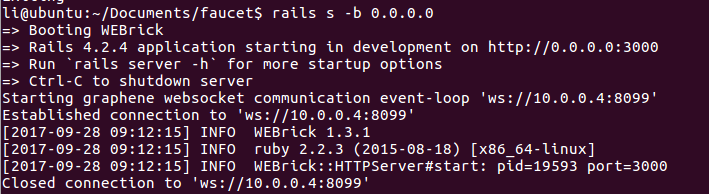 # 七 联合调试 ## 1 创建创世状态json ``` ./witness_node --create-genesis-json "genesis.json" ``` ## 2 启动witness_node ``` ./witness_node --rpc-endpoint "127.0.0.1:8090" --enable-stale-production -d test_net --seed-nodes "[]" --genesis-json "genesis.json" ``` ## 3 启动cli_wallet(如果报chain-id出错,则替换提示的chain-id) ``` ./cli_wallet --chain-id="a35368851451335a25ea894c9bf81831c4e7c39e56ce94700a7813700cadf701" -s ws://127.0.0.1:8090 -w wallet.json -r 127.0.0.1:8099 -H 127.0.0.1:8092 ``` ## 4 启动网页钱包服务 ### 4.1 修改网页钱包的配置文件,配置默认水龙头地址,默认p2p网络的地址 /bitshares-ui/app/api/apiConfig.js ``` 》》内容如下 export const blockTradesAPIs = { BASE: "https://api.blocktrades.us/v2", // BASE_OL: "https://api.blocktrades.us/ol/v2", BASE_OL: "https://ol-api1.openledger.info/api/v0/ol/support", COINS_LIST: "/coins", ACTIVE_WALLETS: "/active-wallets", TRADING_PAIRS: "/trading-pairs", DEPOSIT_LIMIT: "/deposit-limits", ESTIMATE_OUTPUT: "/estimate-output-amount" }; export const settingsAPIs = { DEFAULT_WS_NODE: "ws://127.0.0.1:8090", //默认witness_node节点网络地址 WS_NODE_LIST: [ {url: "ws://127.0.0.1:8090", location: "My hosted"},//本地witness_node节点网络地址 ], DEFAULT_FAUCET: "http://127.0.0.1:3000", //默认水龙头地址 RPC_URL: "http://127.0.0.1:3000/api/" //默认水龙头地址API }; ``` ### 4.2 启动网页钱包 ``` npm start ``` ### 4.3 浏览器打开127.0.0.1:8080 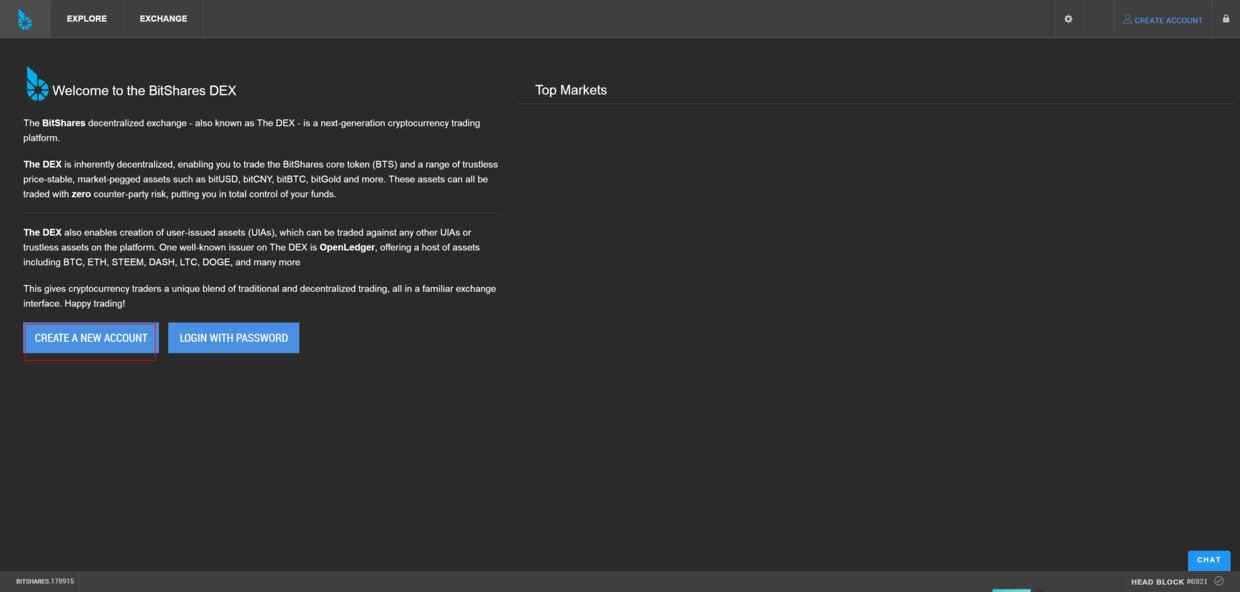 ## 5 注册(用账户模式测试) 注意:此时的cli_wallet命令行, ### 5.1 必须是unlock状态(否则注册报Failed to create account: tes32 - Assert Exception: !self.is_locked():) ### 5.2 nathan账户存在,且已升级为会员。  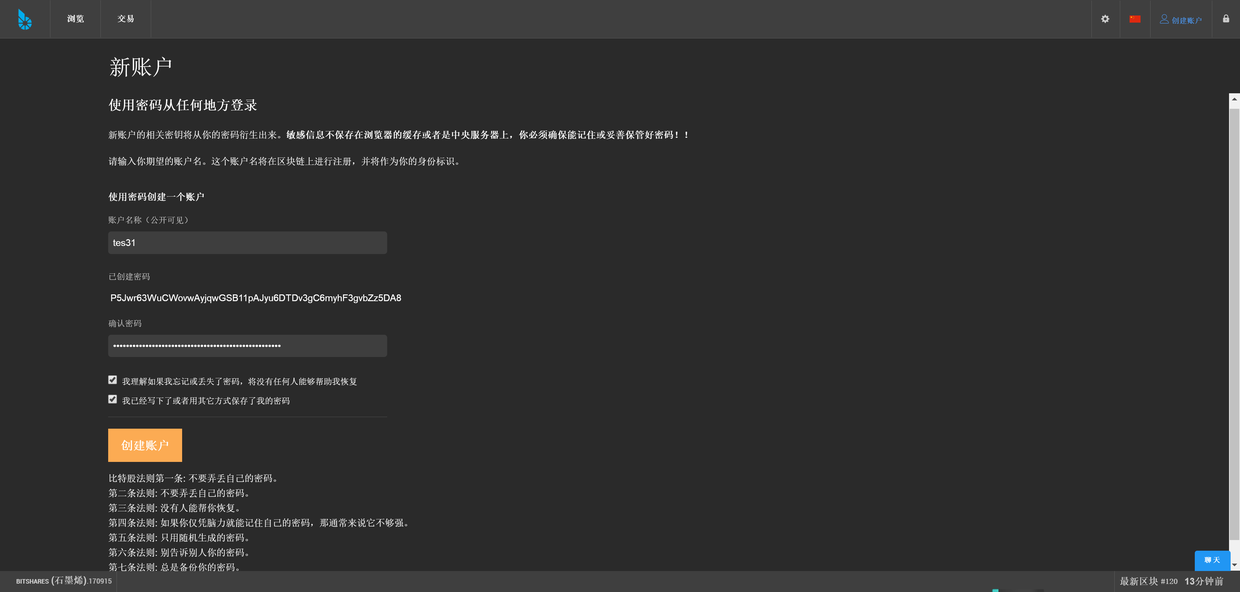   # 八 遇到的问题 ## 1 配置水龙头服务时,生成密码种子命令rake secret报错 ``` $rake secret报错 Could not find a JavaScript runtime. See https://github.com/rails/execjs for a list of available runtimes.,因为没nodejs环境 =>安装nodejs curl -o- https://raw.githubusercontent.com/creationix/nvm/v0.30.2/install.sh | bash nvm install v6 nvm use v6 ``` ## 2 执行rake db:create; rake db:migrate; rake db:seed报错,因root用户在localhost被禁用 ERROR 1698 (28000): Access denied for user 'root'@'localhost' ``` => $ sudo mysql -u root # I had to use "sudo" since is new installation mysql> USE mysql; mysql> UPDATE user SET plugin='mysql_native_password' WHERE User='root'; mysql> FLUSH PRIVILEGES; mysql> exit; ``` ## 3 Failed to create account: tes32 - Assert Exception: !self.is_locked(): =》 进入cli_wallet命令模式(my_password 是set_password my_password设置的密码) ``` locked >>> unlock my_password ``` ## 4 运行witness_node 一天后,发现无法产生块 ``` 2994239ms thread-0 producer_plugin.cpp:210 block_production_loo ] initk generated block #202 @ 2017-09-11T06:49:54 with 0 trxs 0 pending 2998489ms thread-0 producer_plugin.cpp:229 block_production_loo ] Not producing block because node didn't wake up within 500ms of the slot time. 3000615ms thread-0 producer_plugin.cpp:229 block_production_loo ] Not producing block because node didn't wake up within 500ms of the slot time. 3002818ms thread-0 chain_controller.cpp:235 _push_block ] inith #203 @2017-09-11t06:50:03 | 0 trx, 0 pending, exectime_ms=13 ``` => BM说,生成一个大区块是阻塞了,没说解决方法。以下是原文 This is an indication that the single CPU is getting backlogged by a large blocking task that is not properly timebound... eg, block generation with a large pending set. (https://github.com/EOSIO/eos/issues/397) ## 5 注意,witness_node, cli_wallet,faucet配置的IP为127.0.0.1,则服务只能本机访问。如需要本机外的机器能访问,把127.0.0.1设置为本机的局域网IP或公网IP。 ## 6 注册时,水龙头后台服务报异常Failed to create account: tes2 - Assert Exception: base58str.substr( 0, prefix_len ) == prefix ``` !!! register_account error: {"code"=>1, "message"=>"Assert Exception: base58str.substr( 0, prefix_len ) == prefix: ", "data"=>{"code"=>10, "name"=>"assert_exception", "message"=>"Assert Exception", "stack"=>[{"context"=>{"level"=>"error", "file"=>"types.cpp", "line"=>60, "method"=>"public_key_type", "hostname"=>"", "thread_name"=>"th_a", "timestamp"=>"2017-09-23T06:47:58"}, "format"=>"base58str.substr( 0, prefix_len ) == prefix: ", "data"=>{"base58str"=>"GPH5jNZn4sB7t3sBDcX3NFdx2BLEh3WA15SLmoG71dHCoLs1iTZwH"}}, {"context"=>{"level"=>"warn", "file"=>"websocket_api.cpp", "line"=>122, "method"=>"on_message", "hostname"=>"", "thread_name"=>"th_a", "timestamp"=>"2017-09-23T06:47:58"}, "format"=>"", "data"=>{"call.method"=>"call", "call.params"=>[0, "register_account", ["tes2", "GPH5jNZn4sB7t3sBDcX3NFdx2BLEh3WA15SLmoG71dHCoLs1iTZwH", "GPH5fMdwtVVKGvyawZwEBTBnftbovvNdJg1Q34BMpXPWggXtEKrbv", "nathan", "nathan", 0, true]]}}]}} ``` =》 因为网页钱包生成的公钥的地址前缀(GPH)和比特股源码的前缀(BTS)不对应。目前采用方法(2),原因是试错先试了这方法(2)。方法(1)未验证. 推测可行修改方式 ### (1)网页钱包bitshares-core的公钥前缀生成,是在bitsharesjs库里提供的。这里说可以把公钥前缀修改下。(https://blog.xiaofuxing.name/2017/04/18/ecc_in_nodejs_introduction.html) ``` const bitsharesjsws = require('bitsharesjs-ws'); bitsharesjsws.ChainConfig.setPrefix('BTS'); //可以手工设定前缀,这样的话可以兼容Steem区块链。 bitsharesjs库公钥前缀源码见 node_modules>bitsharesjs>cjs>src>ChainConfig.js "use strict"; exports.__esModule = true; var _this = void 0; var ecc_config = { address_prefix: process.env.npm_config__graphene_ecc_default_address_prefix || "GPH" }; _this = { core_asset: "CORE", address_prefix: "GPH", expire_in_secs: 15, expire_in_secs_proposal: 24 * 60 * 60, review_in_secs_committee: 24 * 60 * 60, networks: { BitShares: { core_asset: "BTS", address_prefix: "BTS", chain_id: "4018d7844c78f6a6c41c6a552b898022310fc5dec06da467ee7905a8dad512c8" }, Muse: { core_asset: "MUSE", address_prefix: "MUSE", chain_id: "45ad2d3f9ef92a49b55c2227eb06123f613bb35dd08bd876f2aea21925a67a67" }, Test: { core_asset: "TEST", address_prefix: "TEST", chain_id: "39f5e2ede1f8bc1a3a54a7914414e3779e33193f1f5693510e73cb7a87617447" }, Obelisk: { core_asset: "GOV", address_prefix: "FEW", chain_id: "1cfde7c388b9e8ac06462d68aadbd966b58f88797637d9af805b4560b0e9661e" } }, ``` ### (2)改bitshares-core源码的公钥前缀为GPH重新编译,且修改所有公钥前缀为GPH。 修改如下 ``` #### (2.1)修改源码 (2.1.1) 源码/bitshares-core/libraries/chain/include/graphene/chain/config.hpp #define GRAPHENE_SYMBOL "BTS" #define GRAPHENE_ADDRESS_PREFIX "BTS" => #define GRAPHENE_SYMBOL "GPH" #define GRAPHENE_ADDRESS_PREFIX "GPH" (2.1.2)源码/bitshares-core/libraries/chain/protocol/types.cpp 搜索多处"BTS" std::string( "BTS" ); => std::string( "GPH" ); (2.1.3)源码bitshares-core/libraries/chain/db_init.cpp if( symbol == "BTS" ) => if( symbol == "GPH" ) (2.1.4) 修改 bitshares-core/genesis.json ,替换多处 "BTS =》 "GPH 然后重新编译bitshares-core #### (2.2)修改witness_node启动创世块状态文件genesis.json,替换多处 "BTS =》 "GPH #### (2.3)修改witness_node启动参数文件,比特股参数文件 config.ini,替换多处 "BTS =》 "GPH ``` # 九 引用 http://docs.bitshares.org/testnet/7-faucet.html 《Setting up the Faucet》 |
| json metadata | {"tags":["bitshares","faucet"],"image":["https://steemitimages.com/DQmT4R615bNmBNGaA5B8tzhoAbme5Pb3RStLHreQYgPZtzu/image.png","https://steemitimages.com/DQmQb8kVQQGswzjnwn6bLygbZpXfCs7E4YLeryUHSWz1jXz/image.png","https://steemitimages.com/DQmP2qnAUHpqs8nQRad47rMfZXZCtApwoDhVTNcyxtfWs7V/image.png","https://steemitimages.com/DQme27ziquJtfkWfvAmdaDUNdN5YQ3ZoQZCSiPdTDdLmfzh/image.png","https://steemitimages.com/DQmNyHoQa9M4fhthTFg4v2Lgjk4SjSg1qPcjEycT5yoNQsH/image.png","https://steemitimages.com/DQmazJ171x84PDCevbY8a4Pxqv4mDpLTxhiGLDrp3Ybxcuz/image.png"],"links":["https://github.com/EOSIO/eos/issues/397)","https://blog.xiaofuxing.name/2017/04/18/ecc_in_nodejs_introduction.html","http://docs.bitshares.org/testnet/7-faucet.html"],"app":"steemit/0.1","format":"markdown"} |
| parent author | |
| parent permlink | bitshares |
| permlink | 66din5 |
| title | 搭建比特股的水龙头注册服务 |
| Transaction Info | Block #15851204/Trx ba8e1d23d66ef1f992236f5bcf75dd7a75785520 |
View Raw JSON Data
{
"block": 15851204,
"op": [
"comment",
{
"author": "baidang",
"body": "安装环境 ubuntu16.04 64位\n# 一 安装依赖库(mysql数据库 )\n注意,记得安装sql时的root用户密码\n```\nsudo apt-get install mysql-server libmysqlclient-dev libreadline-dev\n```\n\n# 二 安装ruby环境\n```\n//回到home目录\ncd ~\ngit clone git://github.com/sstephenson/rbenv.git .rbenv\necho 'export PATH=\"$HOME/.rbenv/bin:$PATH\"' >> ~/.bashrc\necho 'eval \"$(rbenv init -)\"' >> ~/.bashrc\nexec $SHELL\n\ngit clone git://github.com/sstephenson/ruby-build.git ~/.rbenv/plugins/ruby-build\necho 'export PATH=\"$HOME/.rbenv/plugins/ruby-build/bin:$PATH\"' >> ~/.bashrc\nexec $SHELL\n\ngit clone https://github.com/sstephenson/rbenv-gem-rehash.git ~/.rbenv/plugins/rbenv-gem-rehash\n\nsudo rbenv install 2.2.3\nsudo rbenv global 2.2.3\nsudo gem install bundler\n```\n\n\n# 三下载水龙头代码\n```\ngit clone https://github.com/bitshares/faucet\ncd faucet\nsudo bundle # ignore warnings\n```\n\n# 四 配置水龙头文件\n## 1水龙头访问配置faucet.yml\n```\ncp config/faucet-example.yml config/faucet.yml\nvim config/faucet.yml\n\n》》内容如下\ncli_wallet_connection: ws://127.0.0.1:8099 //钱包开放的websocketurl,cli_wallet-H参数对应 ./cli_wallet --chain-id=\"a35368851451335a25ea894c9bf81831c4e7c39e56ce94700a7813700cadf701\" -s ws://127.0.0.1:8090 -w wallet.json -r 127.0.0.1:8099 -H 127.0.0.1:8092 \nregistrar_account: nathan //提供注册的推荐人用户名,本例子为在比特股环境搭建》已创建且升级为会员的用户名nathan\nreferrer_percent: 50 \nrefcode_prefix: F01 \n \ndefault_url: 127.0.0.1 //水龙头对外访问的IP \ndefault_port: 3000 //水龙头对外访问的端口\n \nexception_notification: \n sender_address: [email protected] \n exception_recipients: [email protected] \n \nsmtp: \n address: address \n user_name: user \n password: password \n```\n## 2密码种子文件secrets.yml(ruby on rails用到的密码种子配置文件)\n```\ncp config/secrets-example.yml config/secrets.yml\nrake secret\nvim config/secrets.yml\n》》内容如下 (按需要改各个清空的密码种子)\ndevelopment: \n secret_key_base: abcdefg123456 \n \ntest: \n secret_key_base: abcdefg123456 \n \n# Do not keep production secrets in the repository, \n# instead read values from the environment. \nproduction: \n secret_key_base: abcdefg123456 \n```\n\n## 3数据库配置\n```\nvim config/database.yml\n\n》》内容如下\ndefault: &default \n adapter: mysql2 \n encoding: utf8 \n pool: 5 \n username: root #数据库登录用户名 \n password: #数据库登录密码,根据安装mysql时的填写\n host: localhost #数据库url \n \ndevelopment: \n <<: *default \n database: bitshares_faucet_dev \n \ntest: \n <<: *default \n database: bitshares_faucet_test \n \nproduction: \n <<: *default \n database: bitshares_faucet \n```\n\n# 五 创建并初始化数据库\n```\nrake db:create; rake db:migrate; rake db:seed\nRAILS_ENV=production bundle exec rake db:create db:schema:load\n```\n\n# 六 运行水龙头服务 (-b 0.0.0.0 -b,bind之意。是让本机以外的主机,能够访问水龙头服务)\n```\nrails s -b 0.0.0.0\n```\n\n\n\n# 七 联合调试\n## 1 创建创世状态json\n```\n ./witness_node --create-genesis-json \"genesis.json\"\n```\n\n## 2 启动witness_node\n```\n ./witness_node --rpc-endpoint \"127.0.0.1:8090\" --enable-stale-production -d test_net --seed-nodes \"[]\" --genesis-json \"genesis.json\"\n```\n\n## 3 启动cli_wallet(如果报chain-id出错,则替换提示的chain-id)\n```\n ./cli_wallet --chain-id=\"a35368851451335a25ea894c9bf81831c4e7c39e56ce94700a7813700cadf701\" -s ws://127.0.0.1:8090 -w wallet.json -r 127.0.0.1:8099 -H 127.0.0.1:8092 \n```\n\n## 4 启动网页钱包服务 \n### 4.1 修改网页钱包的配置文件,配置默认水龙头地址,默认p2p网络的地址\n/bitshares-ui/app/api/apiConfig.js\n```\n》》内容如下\nexport const blockTradesAPIs = {\n BASE: \"https://api.blocktrades.us/v2\",\n // BASE_OL: \"https://api.blocktrades.us/ol/v2\",\n BASE_OL: \"https://ol-api1.openledger.info/api/v0/ol/support\",\n COINS_LIST: \"/coins\",\n ACTIVE_WALLETS: \"/active-wallets\",\n TRADING_PAIRS: \"/trading-pairs\",\n DEPOSIT_LIMIT: \"/deposit-limits\",\n ESTIMATE_OUTPUT: \"/estimate-output-amount\"\n};\n\nexport const settingsAPIs = {\n DEFAULT_WS_NODE: \"ws://127.0.0.1:8090\", //默认witness_node节点网络地址\n WS_NODE_LIST: [\n {url: \"ws://127.0.0.1:8090\", location: \"My hosted\"},//本地witness_node节点网络地址\n ],\n DEFAULT_FAUCET: \"http://127.0.0.1:3000\", //默认水龙头地址\n RPC_URL: \"http://127.0.0.1:3000/api/\" //默认水龙头地址API\n};\n```\n\n### 4.2 启动网页钱包\n```\nnpm start\n```\n### 4.3 浏览器打开127.0.0.1:8080\n\n\n\n\n## 5 注册(用账户模式测试)\n注意:此时的cli_wallet命令行,\n### 5.1 必须是unlock状态(否则注册报Failed to create account: tes32 - Assert Exception: !self.is_locked():)\n### 5.2 nathan账户存在,且已升级为会员。\n\n\n\n\n\n\n\n# 八 遇到的问题\n## 1 配置水龙头服务时,生成密码种子命令rake secret报错\n```\n$rake secret报错\n Could not find a JavaScript runtime. See https://github.com/rails/execjs for a list of available runtimes.,因为没nodejs环境\n=>安装nodejs \ncurl -o- https://raw.githubusercontent.com/creationix/nvm/v0.30.2/install.sh | bash\nnvm install v6\nnvm use v6\n```\n\n## 2 执行rake db:create; rake db:migrate; rake db:seed报错,因root用户在localhost被禁用\nERROR 1698 (28000): Access denied for user 'root'@'localhost'\n```\n=>\n$ sudo mysql -u root # I had to use \"sudo\" since is new installation\nmysql> USE mysql;\nmysql> UPDATE user SET plugin='mysql_native_password' WHERE User='root';\nmysql> FLUSH PRIVILEGES;\nmysql> exit;\n```\n\n\n## 3 Failed to create account: tes32 - Assert Exception: !self.is_locked():\n=》\n进入cli_wallet命令模式(my_password 是set_password my_password设置的密码)\n```\nlocked >>> unlock my_password \n```\n\n## 4 运行witness_node 一天后,发现无法产生块\n```\n2994239ms thread-0 producer_plugin.cpp:210 block_production_loo ] initk generated block #202 @ 2017-09-11T06:49:54 with 0 trxs 0 pending\n2998489ms thread-0 producer_plugin.cpp:229 block_production_loo ] Not producing block because node didn't wake up within 500ms of the slot time.\n3000615ms thread-0 producer_plugin.cpp:229 block_production_loo ] Not producing block because node didn't wake up within 500ms of the slot time.\n3002818ms thread-0 chain_controller.cpp:235 _push_block ] inith #203 @2017-09-11t06:50:03 | 0 trx, 0 pending, exectime_ms=13\n```\n=>\nBM说,生成一个大区块是阻塞了,没说解决方法。以下是原文\nThis is an indication that the single CPU is getting backlogged by a large blocking task that is not properly timebound... eg, block generation with a large pending set. (https://github.com/EOSIO/eos/issues/397)\n\n## 5 注意,witness_node, cli_wallet,faucet配置的IP为127.0.0.1,则服务只能本机访问。如需要本机外的机器能访问,把127.0.0.1设置为本机的局域网IP或公网IP。\n\n## 6 注册时,水龙头后台服务报异常Failed to create account: tes2 - Assert Exception: base58str.substr( 0, prefix_len ) == prefix\n```\n!!! register_account error: {\"code\"=>1, \"message\"=>\"Assert Exception: base58str.substr( 0, prefix_len ) == prefix: \", \"data\"=>{\"code\"=>10, \"name\"=>\"assert_exception\", \"message\"=>\"Assert Exception\", \"stack\"=>[{\"context\"=>{\"level\"=>\"error\", \"file\"=>\"types.cpp\", \"line\"=>60, \"method\"=>\"public_key_type\", \"hostname\"=>\"\", \"thread_name\"=>\"th_a\", \"timestamp\"=>\"2017-09-23T06:47:58\"}, \"format\"=>\"base58str.substr( 0, prefix_len ) == prefix: \", \"data\"=>{\"base58str\"=>\"GPH5jNZn4sB7t3sBDcX3NFdx2BLEh3WA15SLmoG71dHCoLs1iTZwH\"}}, {\"context\"=>{\"level\"=>\"warn\", \"file\"=>\"websocket_api.cpp\", \"line\"=>122, \"method\"=>\"on_message\", \"hostname\"=>\"\", \"thread_name\"=>\"th_a\", \"timestamp\"=>\"2017-09-23T06:47:58\"}, \"format\"=>\"\", \"data\"=>{\"call.method\"=>\"call\", \"call.params\"=>[0, \"register_account\", [\"tes2\", \"GPH5jNZn4sB7t3sBDcX3NFdx2BLEh3WA15SLmoG71dHCoLs1iTZwH\", \"GPH5fMdwtVVKGvyawZwEBTBnftbovvNdJg1Q34BMpXPWggXtEKrbv\", \"nathan\", \"nathan\", 0, true]]}}]}}\n```\n=》\n因为网页钱包生成的公钥的地址前缀(GPH)和比特股源码的前缀(BTS)不对应。目前采用方法(2),原因是试错先试了这方法(2)。方法(1)未验证.\n推测可行修改方式\n\n### (1)网页钱包bitshares-core的公钥前缀生成,是在bitsharesjs库里提供的。这里说可以把公钥前缀修改下。(https://blog.xiaofuxing.name/2017/04/18/ecc_in_nodejs_introduction.html)\n```\n const bitsharesjsws = require('bitsharesjs-ws');\n bitsharesjsws.ChainConfig.setPrefix('BTS'); //可以手工设定前缀,这样的话可以兼容Steem区块链。\n\n\nbitsharesjs库公钥前缀源码见\nnode_modules>bitsharesjs>cjs>src>ChainConfig.js\n\"use strict\";\nexports.__esModule = true;\nvar _this = void 0;\nvar ecc_config = {\n address_prefix: process.env.npm_config__graphene_ecc_default_address_prefix || \"GPH\"\n};\n_this = {\n core_asset: \"CORE\",\n address_prefix: \"GPH\",\n expire_in_secs: 15,\n expire_in_secs_proposal: 24 * 60 * 60,\n review_in_secs_committee: 24 * 60 * 60,\n networks: {\n BitShares: {\n core_asset: \"BTS\",\n address_prefix: \"BTS\",\n chain_id: \"4018d7844c78f6a6c41c6a552b898022310fc5dec06da467ee7905a8dad512c8\"\n },\n Muse: {\n core_asset: \"MUSE\",\n address_prefix: \"MUSE\",\n chain_id: \"45ad2d3f9ef92a49b55c2227eb06123f613bb35dd08bd876f2aea21925a67a67\"\n },\n Test: {\n core_asset: \"TEST\",\n address_prefix: \"TEST\",\n chain_id: \"39f5e2ede1f8bc1a3a54a7914414e3779e33193f1f5693510e73cb7a87617447\"\n },\n Obelisk: {\n core_asset: \"GOV\",\n address_prefix: \"FEW\",\n chain_id: \"1cfde7c388b9e8ac06462d68aadbd966b58f88797637d9af805b4560b0e9661e\"\n }\n },\n```\n### (2)改bitshares-core源码的公钥前缀为GPH重新编译,且修改所有公钥前缀为GPH。\n修改如下\n```\n#### (2.1)修改源码\n(2.1.1) 源码/bitshares-core/libraries/chain/include/graphene/chain/config.hpp\n#define GRAPHENE_SYMBOL \"BTS\"\n#define GRAPHENE_ADDRESS_PREFIX \"BTS\"\n=>\n#define GRAPHENE_SYMBOL \"GPH\"\n#define GRAPHENE_ADDRESS_PREFIX \"GPH\"\n\n(2.1.2)源码/bitshares-core/libraries/chain/protocol/types.cpp 搜索多处\"BTS\"\nstd::string( \"BTS\" ); \n=> \nstd::string( \"GPH\" );\n\n(2.1.3)源码bitshares-core/libraries/chain/db_init.cpp\n if( symbol == \"BTS\" )\n=>\n if( symbol == \"GPH\" )\n\n(2.1.4) 修改 bitshares-core/genesis.json ,替换多处\n\"BTS\n=》\n\"GPH\n然后重新编译bitshares-core\n\n#### (2.2)修改witness_node启动创世块状态文件genesis.json,替换多处\n\"BTS\n=》\n\"GPH\n\n#### (2.3)修改witness_node启动参数文件,比特股参数文件 config.ini,替换多处\n\"BTS\n=》\n\"GPH\n```\n\n\n# 九 引用\nhttp://docs.bitshares.org/testnet/7-faucet.html 《Setting up the Faucet》",
"json_metadata": "{\"tags\":[\"bitshares\",\"faucet\"],\"image\":[\"https://steemitimages.com/DQmT4R615bNmBNGaA5B8tzhoAbme5Pb3RStLHreQYgPZtzu/image.png\",\"https://steemitimages.com/DQmQb8kVQQGswzjnwn6bLygbZpXfCs7E4YLeryUHSWz1jXz/image.png\",\"https://steemitimages.com/DQmP2qnAUHpqs8nQRad47rMfZXZCtApwoDhVTNcyxtfWs7V/image.png\",\"https://steemitimages.com/DQme27ziquJtfkWfvAmdaDUNdN5YQ3ZoQZCSiPdTDdLmfzh/image.png\",\"https://steemitimages.com/DQmNyHoQa9M4fhthTFg4v2Lgjk4SjSg1qPcjEycT5yoNQsH/image.png\",\"https://steemitimages.com/DQmazJ171x84PDCevbY8a4Pxqv4mDpLTxhiGLDrp3Ybxcuz/image.png\"],\"links\":[\"https://github.com/EOSIO/eos/issues/397)\",\"https://blog.xiaofuxing.name/2017/04/18/ecc_in_nodejs_introduction.html\",\"http://docs.bitshares.org/testnet/7-faucet.html\"],\"app\":\"steemit/0.1\",\"format\":\"markdown\"}",
"parent_author": "",
"parent_permlink": "bitshares",
"permlink": "66din5",
"title": "搭建比特股的水龙头注册服务"
}
],
"op_in_trx": 0,
"timestamp": "2017-09-28T03:15:12",
"trx_id": "ba8e1d23d66ef1f992236f5bcf75dd7a75785520",
"trx_in_block": 7,
"virtual_op": 0
}baidangupdated their account properties2017/09/28 02:48:15
baidangupdated their account properties
2017/09/28 02:48:15
| account | baidang |
| json metadata | {"profile":{"about":"C++ R&D Engineering","location":"China","website":"http://www.jianshu.com/u/349d823c5236","name":"SharpSword"}} |
| memo key | STM5MZfGsaHz56Se4Dvx6KRtro34wDunSBeVbKtqjhzRKvDEFCoqJ |
| Transaction Info | Block #15850665/Trx a47a3b7a715f70cd1efa008b71169cddfb1bc612 |
View Raw JSON Data
{
  "block": 15850665,
  "op": [
    "account_update",
    {
      "account": "baidang",
      "json_metadata": "{\"profile\":{\"about\":\"C++ R&D Engineering\",\"location\":\"China\",\"website\":\"http://www.jianshu.com/u/349d823c5236\",\"name\":\"SharpSword\"}}",
      "memo_key": "STM5MZfGsaHz56Se4Dvx6KRtro34wDunSBeVbKtqjhzRKvDEFCoqJ"
    }
  ],
  "op_in_trx": 0,
  "timestamp": "2017-09-28T02:48:15",
  "trx_id": "a47a3b7a715f70cd1efa008b71169cddfb1bc612",
  "trx_in_block": 5,
  "virtual_op": 0
}2017/09/26 01:55:09
2017/09/26 01:55:09
| id | follow |
| json | ["follow",{"follower":"baidang","following":"abit","what":["blog"]}] |
| required auths | [] |
| required posting auths | ["baidang"] |
| Transaction Info | Block #15792018/Trx 5ea234ab626697d215be1e013a6e7781bb2806c5 |
View Raw JSON Data
{
  "block": 15792018,
  "op": [
    "custom_json",
    {
      "id": "follow",
      "json": "[\"follow\",{\"follower\":\"baidang\",\"following\":\"abit\",\"what\":[\"blog\"]}]",
      "required_auths": [],
      "required_posting_auths": [
        "baidang"
      ]
    }
  ],
  "op_in_trx": 0,
  "timestamp": "2017-09-26T01:55:09",
  "trx_id": "5ea234ab626697d215be1e013a6e7781bb2806c5",
  "trx_in_block": 19,
  "virtual_op": 0
}johnsmithupvoted (100.00%) @baidang / bitshares-bitfinex-rmb-eos2017/09/22 16:04:18
johnsmithupvoted (100.00%) @baidang / bitshares-bitfinex-rmb-eos
2017/09/22 16:04:18
| author | baidang |
| permlink | bitshares-bitfinex-rmb-eos |
| voter | johnsmith |
| weight | 10000 (100.00%) |
| Transaction Info | Block #15693825/Trx 55081c9bfbd97c10c2fa2d356db8ffd22ba2571a |
View Raw JSON Data
{
  "block": 15693825,
  "op": [
    "vote",
    {
      "author": "baidang",
      "permlink": "bitshares-bitfinex-rmb-eos",
      "voter": "johnsmith",
      "weight": 10000
    }
  ],
  "op_in_trx": 0,
  "timestamp": "2017-09-22T16:04:18",
  "trx_id": "55081c9bfbd97c10c2fa2d356db8ffd22ba2571a",
  "trx_in_block": 16,
  "virtual_op": 0
}facerupvoted (100.00%) @baidang / bitshares-bitfinex-rmb-eos2017/09/22 13:00:18
facerupvoted (100.00%) @baidang / bitshares-bitfinex-rmb-eos
2017/09/22 13:00:18
| author | baidang |
| permlink | bitshares-bitfinex-rmb-eos |
| voter | facer |
| weight | 10000 (100.00%) |
| Transaction Info | Block #15690145/Trx 1e172b088b50ef5478d334f367bdf13d2314bee1 |
View Raw JSON Data
{
  "block": 15690145,
  "op": [
    "vote",
    {
      "author": "baidang",
      "permlink": "bitshares-bitfinex-rmb-eos",
      "voter": "facer",
      "weight": 10000
    }
  ],
  "op_in_trx": 0,
  "timestamp": "2017-09-22T13:00:18",
  "trx_id": "1e172b088b50ef5478d334f367bdf13d2314bee1",
  "trx_in_block": 13,
  "virtual_op": 0
}baidangpublished a new post: bitshares-bitfinex-rmb-eos2017/09/22 06:41:18
baidangpublished a new post: bitshares-bitfinex-rmb-eos
2017/09/22 06:41:18
| author | baidang |
| body | (同理可购买其他加密货币) #1 注册比特股 https://bitshares.org/wallet/#/ (注意备份秘钥) 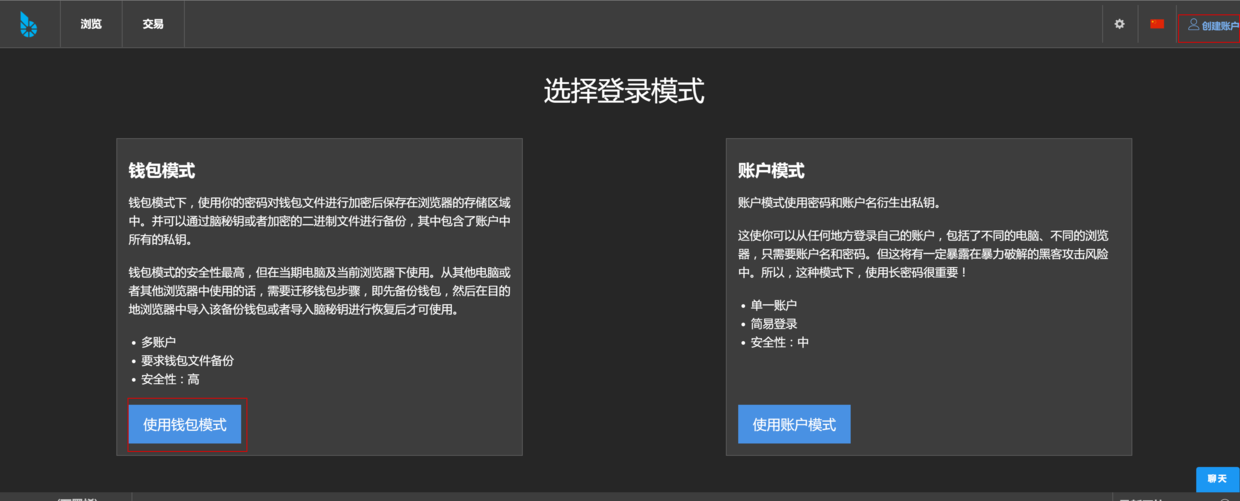  #2 找承兑商把RMB兑换为bitCNY(手续费 0.6%左右), 充值时注明你的用户名和ID,充值金额。 (欧链的OracleChain 团队推荐以下 几位位承兑商。 OracleChain 团队已对这些承兑商进行了验 资,但 OracleChain 团队不对充值行为负责,请投资者自行控制充值风险。) (在 BTS 内盘,一个 bitCNY 的价值约等于 1 元人民币。 OracleChain 团队推荐投资者联 系以下承兑商进行充值/提现。 OracleChain 团队已对这些承兑商进行了验资,每位承兑 商都至少持有 100 万 bitCNY。建议大家采用小额多笔的方式进行充值,单笔金额不大 于 5 万,并及时确认是否到账。为了避免挤兑,建议大家分散选择承兑商进行充值/提 现。 投资者在进行充值时一定要正确提供自己的 ID。)   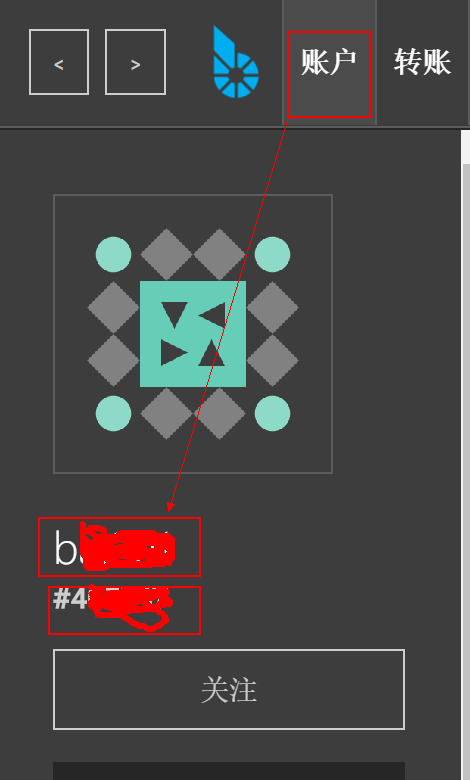 #3 使用bitCNY购买 ETH 注意不要买完所有的bitCNY,留一点(20bitCNY左右)用来提取ETH 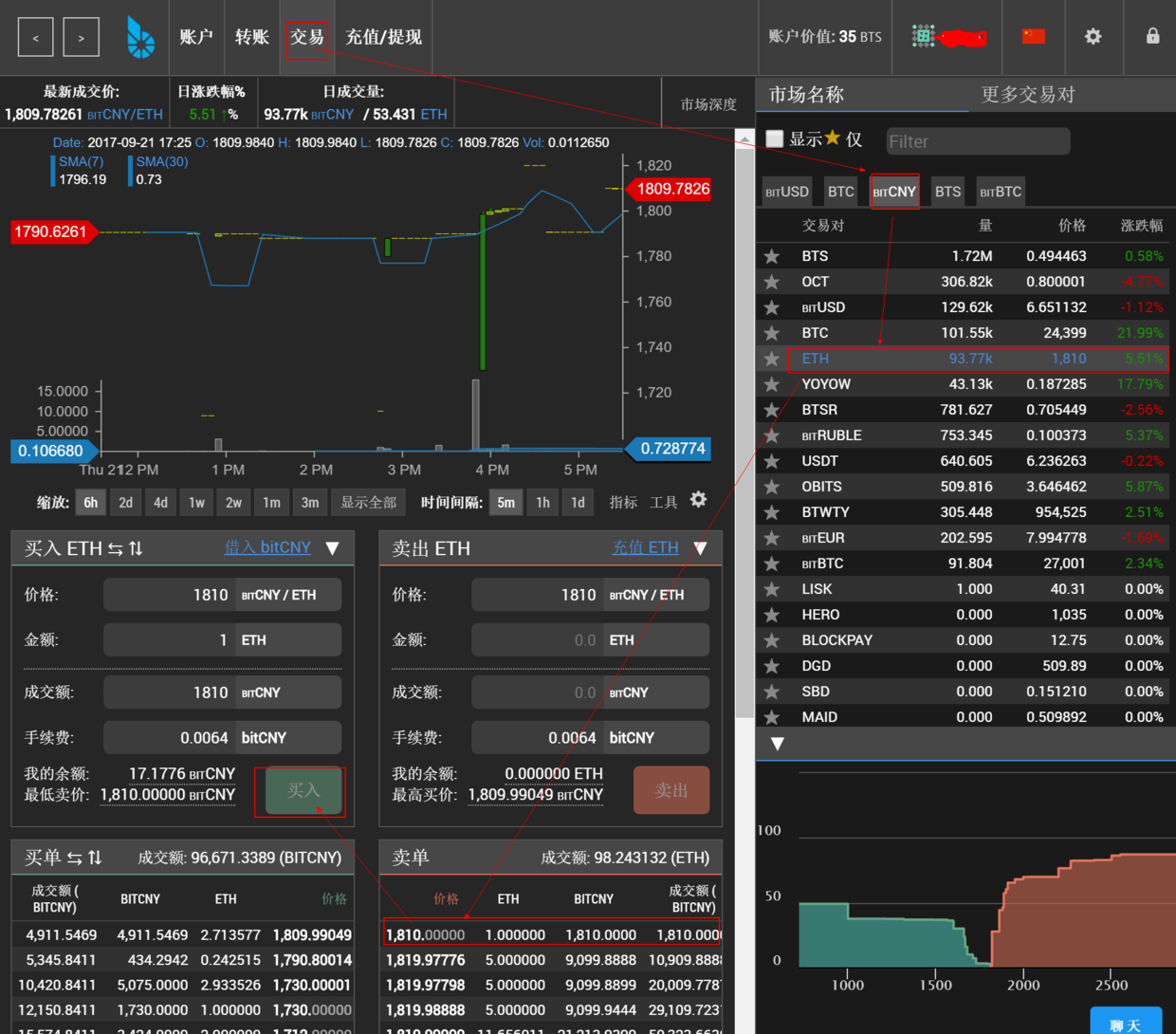 #4 注册bitfinex。注意开启二次验证,保障账户安全。 https://www.bitfinex.com/ 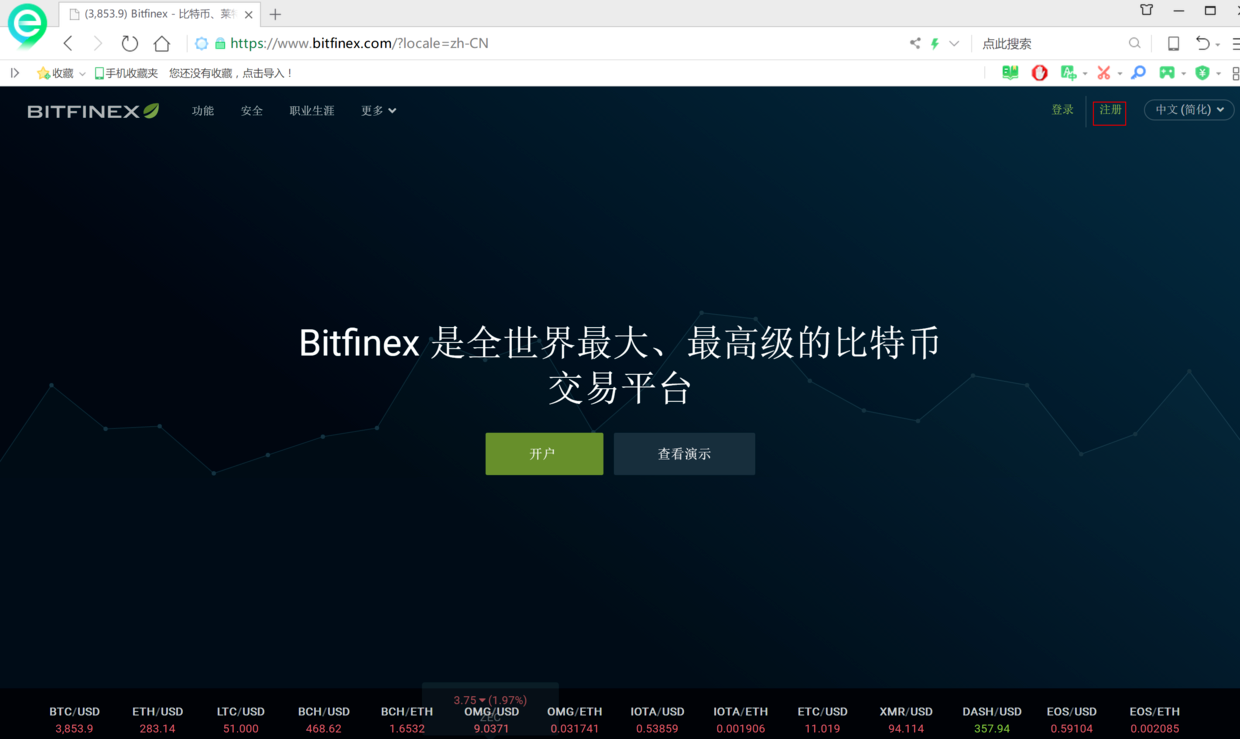  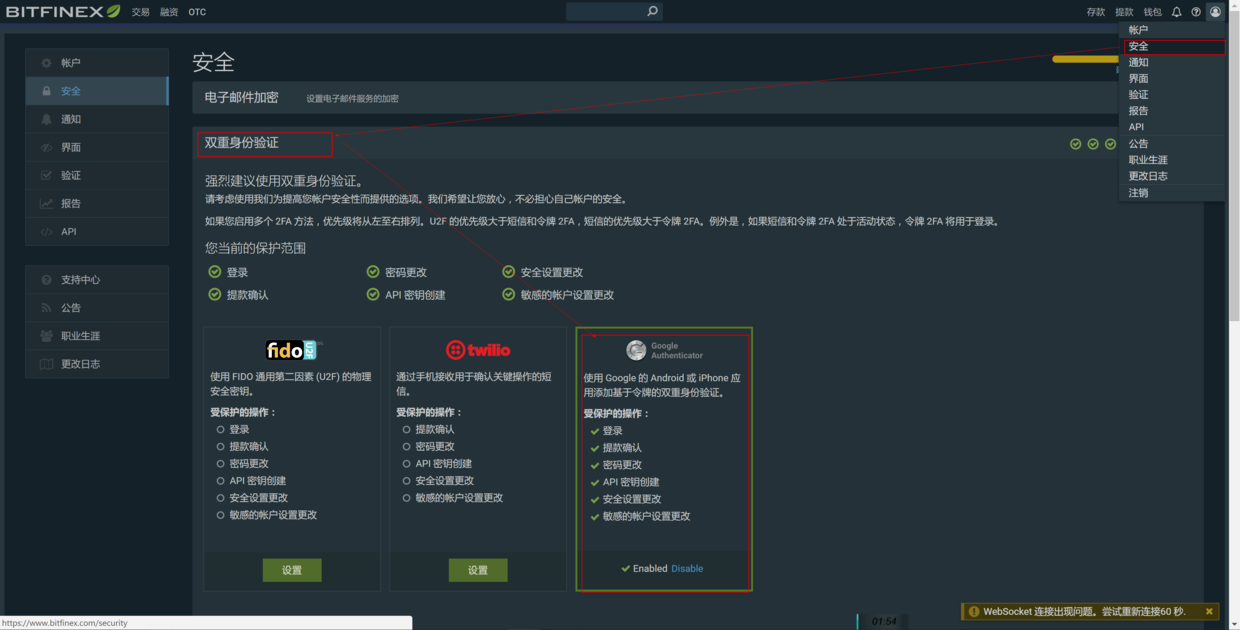 #5 在bitfinex,生成ETH充值地址  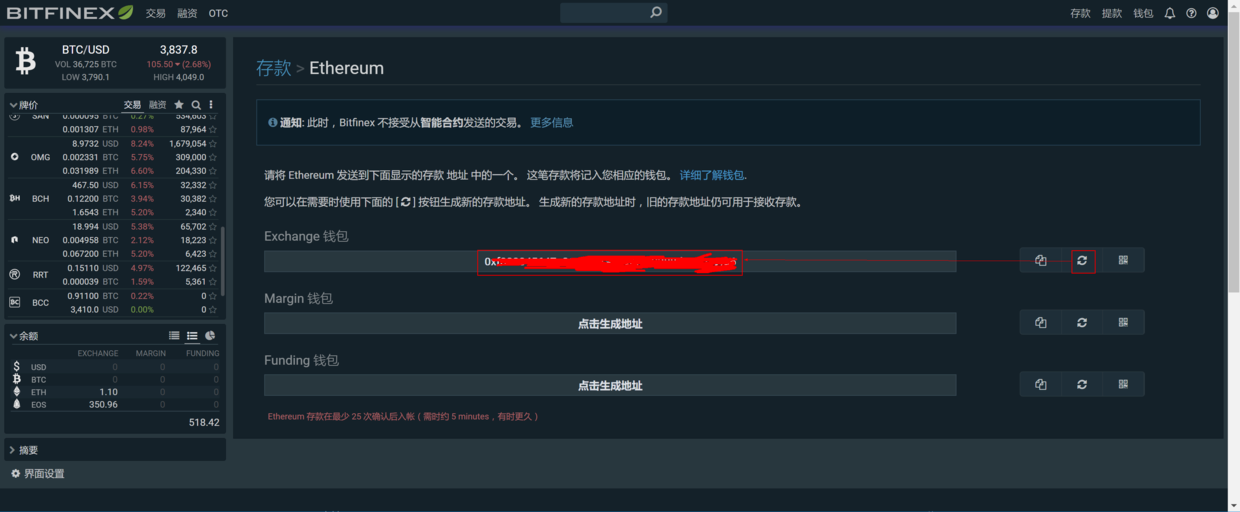 #6 在比特股,把购买的ETH转账到bitfinex 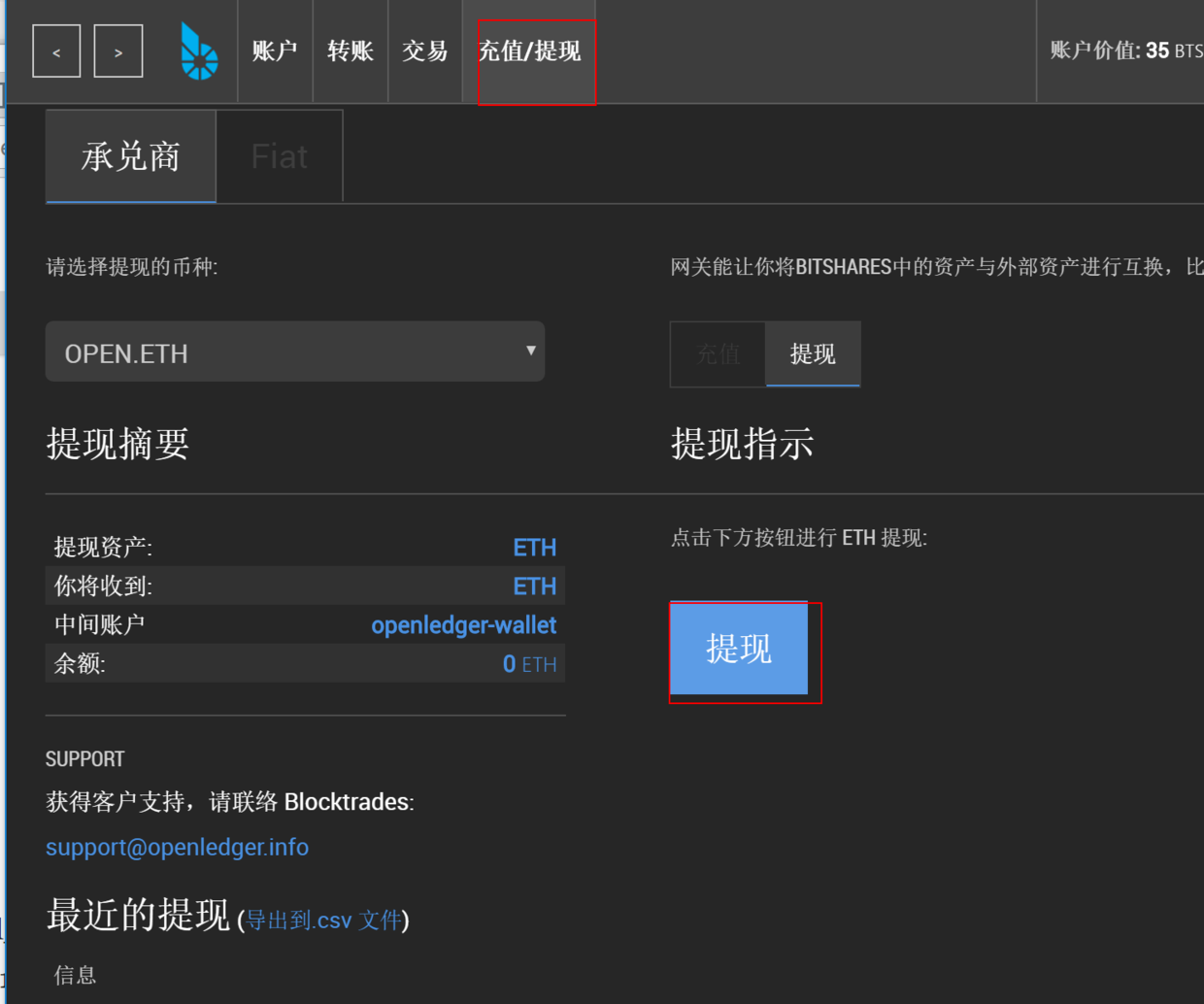 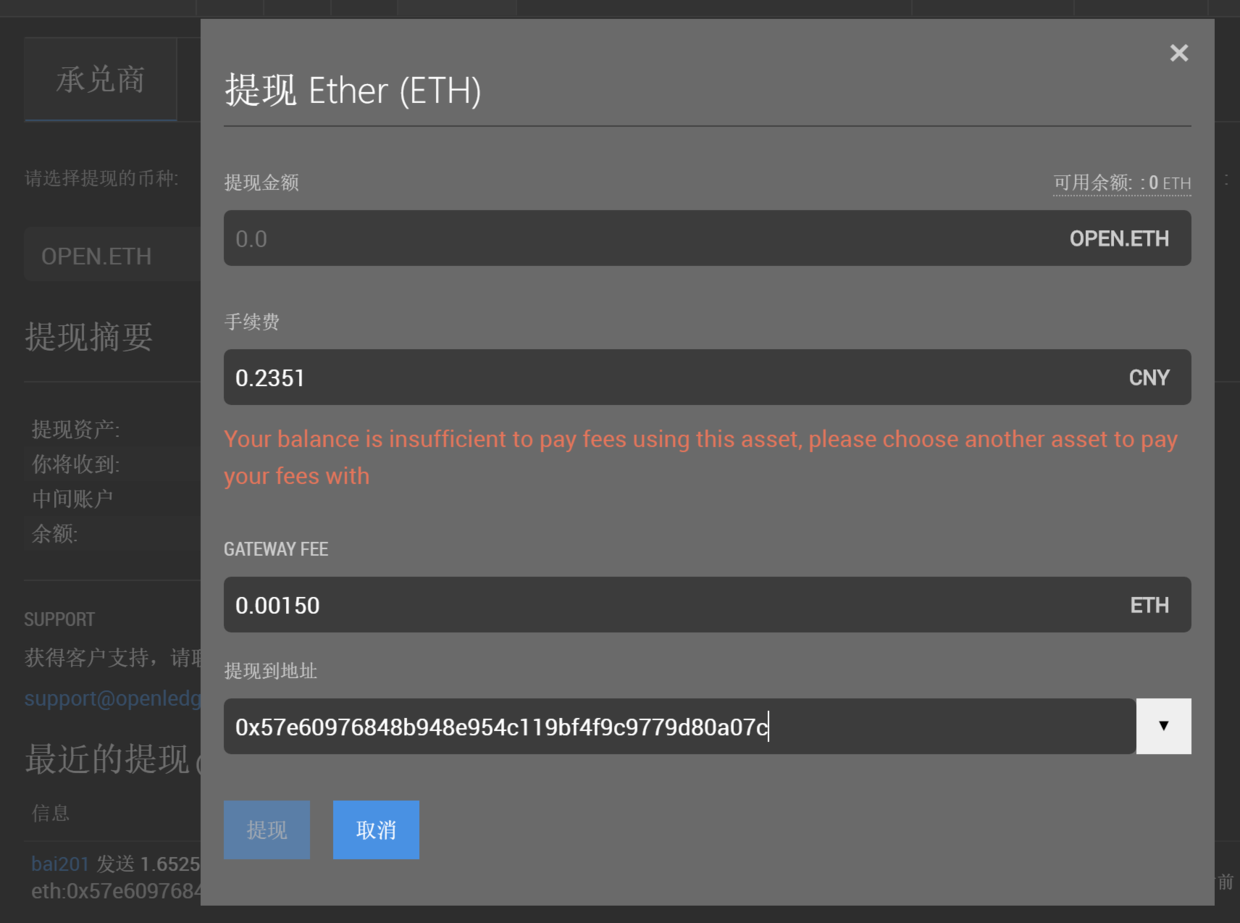 #7 在bitfinex,用ETH购买EOS(等待20分钟左右ETH到账) 选择购买价格,购买数量=》兑换买入 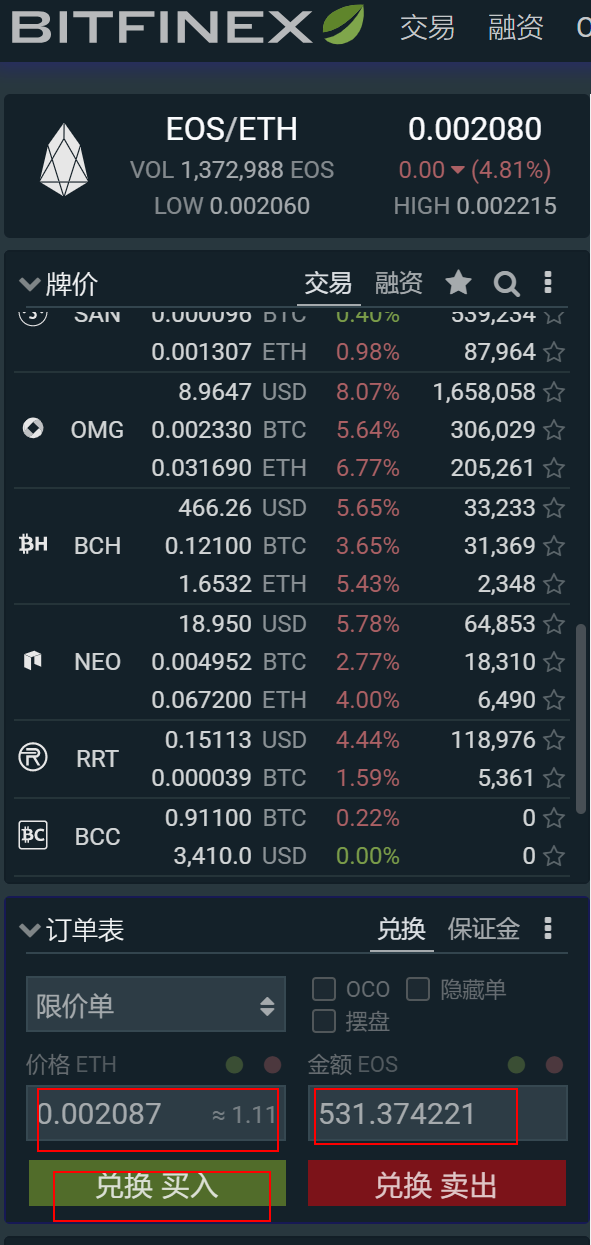 #8 购买结果 2017.9.21 测试充值3k,约买到791个eos |
| json metadata | {"tags":["bitshares","bitfinex","eos"],"image":["https://steemitimages.com/DQmd41RvZ1pV4u2pkXSocSCFw4htKrAQwuj4VZ2KRSYWvVp/image.png","https://steemitimages.com/DQmS9aWZwz9vF3o26qBgYRd4pXkvXCfDaKzcVoxp1SyvM1A/image.png","https://steemitimages.com/DQmXUe1s9jDZLMggToDGaJMEygZJvU2xdbmpjmouDWQERVe/image.png","https://steemitimages.com/DQmUoH5zJJsNSJxjHkibX3sCwMdR8XBq34CWJJbVemGc1oZ/image.png","https://steemitimages.com/DQmZ6xq8EkeKvV5uKASC4Zg8zheC5FERUBHyrXiE8LdqZzt/image.png","https://steemitimages.com/DQmcep1H55kt7WT42RUKT4oECyw3vfAuc5CF3sBqWDUBqPB/image.png","https://steemitimages.com/DQmZn67sMXXeoT7JbXZE9fS1sm9a2mmuQV3QMYH3uZKKKEY/image.png","https://steemitimages.com/DQmQMnRvax63dWtLTaiDKRN3CkfsyEpLnLfrvgeB71NAty1/image.png","https://steemitimages.com/DQmeZ63Za5zqtm2bEsHWsQUSP8X3bgQkhvfoe1HUsCgcvoF/image.png","https://steemitimages.com/DQmUG6HNbt4pT36E8cGG1VKcEewvajpE1rwN9p3Xc651QC2/image.png","https://steemitimages.com/DQmQvrEGAWoSd5CkL1H5ie1wNSCLYh8TKTd8YkbwdeWGaic/image.png","https://steemitimages.com/DQmdxwYCSgkKEK2TJye1MrMUM2fkxbgxXvFjmVkyzDMKWUo/image.png","https://steemitimages.com/DQmRCGbFQa31gB6uLvdhhffgM76zRWEyTioejk6uXpugBQB/image.png","https://steemitimages.com/DQmQyTAqKWsrAzSxkKzTtmtHUWbBxCgDtSjptGKxncJbeNE/image.png"],"links":["https://bitshares.org/wallet/#/","https://www.bitfinex.com/"],"app":"steemit/0.1","format":"markdown"} |
| parent author | |
| parent permlink | bitshares |
| permlink | bitshares-bitfinex-rmb-eos |
| title | 使用bitshares内盘 bitfinex,RMB购买EOS |
| Transaction Info | Block #15682565/Trx 78746eb68d992f32d6aaf5e03f2f3ec5f7124145 |
View Raw JSON Data
{
"block": 15682565,
"op": [
"comment",
{
"author": "baidang",
"body": "(同理可购买其他加密货币)\n\n#1 注册比特股 https://bitshares.org/wallet/#/\n(注意备份秘钥)\n\n\n\n\n\n#2 找承兑商把RMB兑换为bitCNY(手续费 0.6%左右),\n充值时注明你的用户名和ID,充值金额。\n(欧链的OracleChain 团队推荐以下 几位位承兑商。 OracleChain 团队已对这些承兑商进行了验\n资,但 OracleChain 团队不对充值行为负责,请投资者自行控制充值风险。)\n(在 BTS 内盘,一个 bitCNY 的价值约等于 1 元人民币。 OracleChain 团队推荐投资者联\n系以下承兑商进行充值/提现。 OracleChain 团队已对这些承兑商进行了验资,每位承兑\n商都至少持有 100 万 bitCNY。建议大家采用小额多笔的方式进行充值,单笔金额不大\n于 5 万,并及时确认是否到账。为了避免挤兑,建议大家分散选择承兑商进行充值/提\n现。 投资者在进行充值时一定要正确提供自己的 ID。)\n\n\n\n\n\n#3 使用bitCNY购买 ETH\n注意不要买完所有的bitCNY,留一点(20bitCNY左右)用来提取ETH\n\n\n\n\n#4 注册bitfinex。注意开启二次验证,保障账户安全。\nhttps://www.bitfinex.com/\n\n\n\n\n#5 在bitfinex,生成ETH充值地址\n\n\n\n#6 在比特股,把购买的ETH转账到bitfinex\n\n\n\n\n\n#7 在bitfinex,用ETH购买EOS(等待20分钟左右ETH到账)\n选择购买价格,购买数量=》兑换买入\n\n\n\n#8 购买结果\n2017.9.21 测试充值3k,约买到791个eos",
"json_metadata": "{\"tags\":[\"bitshares\",\"bitfinex\",\"eos\"],\"image\":[\"https://steemitimages.com/DQmd41RvZ1pV4u2pkXSocSCFw4htKrAQwuj4VZ2KRSYWvVp/image.png\",\"https://steemitimages.com/DQmS9aWZwz9vF3o26qBgYRd4pXkvXCfDaKzcVoxp1SyvM1A/image.png\",\"https://steemitimages.com/DQmXUe1s9jDZLMggToDGaJMEygZJvU2xdbmpjmouDWQERVe/image.png\",\"https://steemitimages.com/DQmUoH5zJJsNSJxjHkibX3sCwMdR8XBq34CWJJbVemGc1oZ/image.png\",\"https://steemitimages.com/DQmZ6xq8EkeKvV5uKASC4Zg8zheC5FERUBHyrXiE8LdqZzt/image.png\",\"https://steemitimages.com/DQmcep1H55kt7WT42RUKT4oECyw3vfAuc5CF3sBqWDUBqPB/image.png\",\"https://steemitimages.com/DQmZn67sMXXeoT7JbXZE9fS1sm9a2mmuQV3QMYH3uZKKKEY/image.png\",\"https://steemitimages.com/DQmQMnRvax63dWtLTaiDKRN3CkfsyEpLnLfrvgeB71NAty1/image.png\",\"https://steemitimages.com/DQmeZ63Za5zqtm2bEsHWsQUSP8X3bgQkhvfoe1HUsCgcvoF/image.png\",\"https://steemitimages.com/DQmUG6HNbt4pT36E8cGG1VKcEewvajpE1rwN9p3Xc651QC2/image.png\",\"https://steemitimages.com/DQmQvrEGAWoSd5CkL1H5ie1wNSCLYh8TKTd8YkbwdeWGaic/image.png\",\"https://steemitimages.com/DQmdxwYCSgkKEK2TJye1MrMUM2fkxbgxXvFjmVkyzDMKWUo/image.png\",\"https://steemitimages.com/DQmRCGbFQa31gB6uLvdhhffgM76zRWEyTioejk6uXpugBQB/image.png\",\"https://steemitimages.com/DQmQyTAqKWsrAzSxkKzTtmtHUWbBxCgDtSjptGKxncJbeNE/image.png\"],\"links\":[\"https://bitshares.org/wallet/#/\",\"https://www.bitfinex.com/\"],\"app\":\"steemit/0.1\",\"format\":\"markdown\"}",
"parent_author": "",
"parent_permlink": "bitshares",
"permlink": "bitshares-bitfinex-rmb-eos",
"title": "使用bitshares内盘 bitfinex,RMB购买EOS"
}
],
"op_in_trx": 0,
"timestamp": "2017-09-22T06:41:18",
"trx_id": "78746eb68d992f32d6aaf5e03f2f3ec5f7124145",
"trx_in_block": 8,
"virtual_op": 0
}2017/09/21 05:36:12
2017/09/21 05:36:12
| author | steemitboard |
| body | Congratulations @baidang! You have completed some achievement on Steemit and have been rewarded with new badge(s) : [](http://steemitboard.com/@baidang) You got a First Vote Click on any badge to view your own Board of Honor on SteemitBoard. For more information about SteemitBoard, click [here](https://steemit.com/@steemitboard) If you no longer want to receive notifications, reply to this comment with the word `STOP` > By upvoting this notification, you can help all Steemit users. Learn how [here](https://steemit.com/steemitboard/@steemitboard/http-i-cubeupload-com-7ciqeo-png)! |
| json metadata | {"image":["https://steemitboard.com/img/notifications.png"]} |
| parent author | baidang |
| parent permlink | 3sbedt |
| permlink | steemitboard-notify-baidang-20170921t053614000z |
| title | |
| Transaction Info | Block #15652464/Trx 34d784606379875f746d64b27f75c33028fccd92 |
View Raw JSON Data
{
"block": 15652464,
"op": [
"comment",
{
"author": "steemitboard",
"body": "Congratulations @baidang! You have completed some achievement on Steemit and have been rewarded with new badge(s) :\n\n[](http://steemitboard.com/@baidang) You got a First Vote\n\nClick on any badge to view your own Board of Honor on SteemitBoard.\nFor more information about SteemitBoard, click [here](https://steemit.com/@steemitboard)\n\nIf you no longer want to receive notifications, reply to this comment with the word `STOP`\n\n> By upvoting this notification, you can help all Steemit users. Learn how [here](https://steemit.com/steemitboard/@steemitboard/http-i-cubeupload-com-7ciqeo-png)!",
"json_metadata": "{\"image\":[\"https://steemitboard.com/img/notifications.png\"]}",
"parent_author": "baidang",
"parent_permlink": "3sbedt",
"permlink": "steemitboard-notify-baidang-20170921t053614000z",
"title": ""
}
],
"op_in_trx": 0,
"timestamp": "2017-09-21T05:36:12",
"trx_id": "34d784606379875f746d64b27f75c33028fccd92",
"trx_in_block": 14,
"virtual_op": 0
}2017/09/21 03:03:03
2017/09/21 03:03:03
| author | baidang |
| body | 运行环境:ubuntu 16.04 64位系统 #一 安装运行环境 安装nvm,nodejs的包管理工具 curl -o- https://raw.githubusercontent.com/creationix/nvm/v0.30.2/install.sh | bash nvm install v6 nvm use v6 #二 下载源码 git clone https://github.com/bitshares/bitshares-ui cd bitshares-ui #三 为网页钱包工程安装依赖的nodejs包(根据package.json) npm install #四 安装完成后,运行 npm start  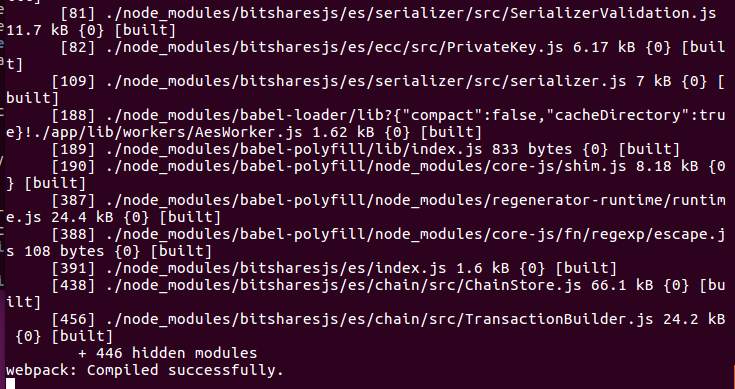  #五 访问 本机浏览器输入 http://127.0.0.1:8080 外部机器浏览器输入http://网页钱包运行主机的IP:8080 就可以访问了 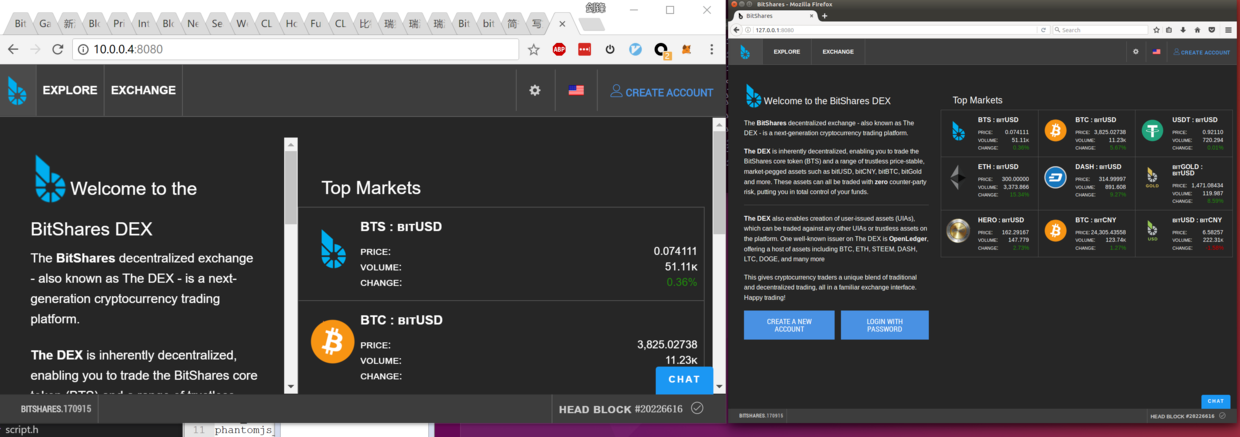 #四 遇到的问题 1 npm install时,安装eletron,卡在 node install.js , * 可以运行 npm config set registry https://registry.npm.taobao.org * 然后 编辑 ~/.npmrc 加入下面内容 ``` registry=https://registry.npm.taobao.org sass_binary_site=https://npm.taobao.org/mirrors/node-sass/ phantomjs_cdnurl=http://npm.taobao.org/mirrors/phantomjs ELECTRON_MIRROR=http://npm.taobao.org/mirrors/electron/ ``` 2 npm start时,发现building modules没完成,就退出了。且使用lsof -i:8080, 没看到node进程 =》内存不足,请增加内存 or 增加swap分区大小 |
| json metadata | {"tags":["bitshares"],"image":["https://steemitimages.com/DQmfYJB6arwP5u51jsQk8jVnQqssrDj9b3w7qrb7QhhjLNu/image.png","https://steemitimages.com/DQmT7KjuBx6aGJQz4Wvr2QH3nErvvUNBjBAteS9pZcvJDtu/image.png","https://steemitimages.com/DQmUbPZqYNKJcLgmingAS7pT97dBTyhpCvHR3fBYZimgdYv/image.png","https://steemitimages.com/DQmTUXkUdt2QNYgN6kebEgb4FfbLQEoNyKzvrRwj2qWnpaP/image.png"],"links":["https://raw.githubusercontent.com/creationix/nvm/v0.30.2/install.sh","https://github.com/bitshares/bitshares-ui","http://127.0.0.1:8080","https://registry.npm.taobao.org"],"app":"steemit/0.1","format":"markdown"} |
| parent author | |
| parent permlink | bitshares |
| permlink | 3sbedt |
| title | 比特股编译网页钱包 |
| Transaction Info | Block #15649403/Trx 3774b2941bbc89eed8c5a434bdb58126e1027d31 |
View Raw JSON Data
{
"block": 15649403,
"op": [
"comment",
{
"author": "baidang",
"body": "运行环境:ubuntu 16.04 64位系统\n\n#一 安装运行环境\n安装nvm,nodejs的包管理工具\ncurl -o- https://raw.githubusercontent.com/creationix/nvm/v0.30.2/install.sh | bash\nnvm install v6\nnvm use v6\n\n#二 下载源码\ngit clone https://github.com/bitshares/bitshares-ui\ncd bitshares-ui\n\n#三 为网页钱包工程安装依赖的nodejs包(根据package.json)\nnpm install\n\n\n#四 安装完成后,运行\nnpm start\n\n\n\n\n#五 访问\n 本机浏览器输入 http://127.0.0.1:8080\n 外部机器浏览器输入http://网页钱包运行主机的IP:8080\n就可以访问了\n\n\n\n\n#四 遇到的问题\n1 npm install时,安装eletron,卡在 node install.js ,\n* 可以运行 npm config set registry https://registry.npm.taobao.org\n* 然后 编辑 ~/.npmrc 加入下面内容\n```\nregistry=https://registry.npm.taobao.org\nsass_binary_site=https://npm.taobao.org/mirrors/node-sass/\nphantomjs_cdnurl=http://npm.taobao.org/mirrors/phantomjs\nELECTRON_MIRROR=http://npm.taobao.org/mirrors/electron/\n```\n\n2 npm start时,发现building modules没完成,就退出了。且使用lsof -i:8080, 没看到node进程\n =》内存不足,请增加内存 or 增加swap分区大小",
"json_metadata": "{\"tags\":[\"bitshares\"],\"image\":[\"https://steemitimages.com/DQmfYJB6arwP5u51jsQk8jVnQqssrDj9b3w7qrb7QhhjLNu/image.png\",\"https://steemitimages.com/DQmT7KjuBx6aGJQz4Wvr2QH3nErvvUNBjBAteS9pZcvJDtu/image.png\",\"https://steemitimages.com/DQmUbPZqYNKJcLgmingAS7pT97dBTyhpCvHR3fBYZimgdYv/image.png\",\"https://steemitimages.com/DQmTUXkUdt2QNYgN6kebEgb4FfbLQEoNyKzvrRwj2qWnpaP/image.png\"],\"links\":[\"https://raw.githubusercontent.com/creationix/nvm/v0.30.2/install.sh\",\"https://github.com/bitshares/bitshares-ui\",\"http://127.0.0.1:8080\",\"https://registry.npm.taobao.org\"],\"app\":\"steemit/0.1\",\"format\":\"markdown\"}",
"parent_author": "",
"parent_permlink": "bitshares",
"permlink": "3sbedt",
"title": "比特股编译网页钱包"
}
],
"op_in_trx": 0,
"timestamp": "2017-09-21T03:03:03",
"trx_id": "3774b2941bbc89eed8c5a434bdb58126e1027d31",
"trx_in_block": 6,
"virtual_op": 0
}primetimesportsupvoted (0.02%) @baidang / 6sbbkt2017/09/19 09:57:24
primetimesportsupvoted (0.02%) @baidang / 6sbbkt
2017/09/19 09:57:24
| author | baidang |
| permlink | 6sbbkt |
| voter | primetimesports |
| weight | 2 (0.02%) |
| Transaction Info | Block #15600112/Trx 1eb5e5a7b334ae2e6e459b9edbf7952d19e5aed2 |
View Raw JSON Data
{
  "block": 15600112,
  "op": [
    "vote",
    {
      "author": "baidang",
      "permlink": "6sbbkt",
      "voter": "primetimesports",
      "weight": 2
    }
  ],
  "op_in_trx": 0,
  "timestamp": "2017-09-19T09:57:24",
  "trx_id": "1eb5e5a7b334ae2e6e459b9edbf7952d19e5aed2",
  "trx_in_block": 7,
  "virtual_op": 0
}2017/09/19 09:33:18
2017/09/19 09:33:18
| author | baidang |
| body | 比特股环境搭建 # 一 编译 编译环境推荐为ubuntu 16.04 64位版(如果是windows,可以在https://github.com/bitshares/bitshares-core/releases中,下载编译好的BitShares-Core-2.0.170710-x64-cli-tools.zip) 1 安装编译相关库 ``` sudo apt-get update sudo apt-get install autoconf cmake git libboost-all-dev libssl-dev ``` 2 下载 源码 (2017.9.19 最新版本为 2.0.170710) ``` git clone https://github.com/bitshares/bitshares-core cd bitshares-core git checkout 2.0.170710 git submodule update --init --recursive cmake -DCMAKE_BUILD_TYPE=RelWithDebInfo . make -j 4 //make -j N 多进程并行编译,后面跟一数字N代表开启进程数量(默认约定为cpu核心数) ``` # 二 程序结构介绍  witness_node 通过 P2P 方式连接到 BTS 网络,从网络接收最新区块,向网络广播本地签署的交易包; witness_node 通过 websocket + http rpc 的方式提供 API 供其他程序调用(以下称为节点 API)。 delayed_node 通过 websocket 方式连接到 witness_node ,只包含不可回退的区块; delayed_node 通常情况下最新区块比 witness_node 落后一分钟,异常时可能会落后很多,但可保证不可回退。 delayed_node 通过 websocket + http rpc 的方式提供 API 供其他程序调用,API清单与 witness_node 相同,但无法使用交易广播功能。 cli_wallet 通过 websocket 方式连接到 witness_node 和 delayed_node 其中之一。 可以同时运行两个 cli_wallet 进程,分别连到 witness_node 和 delayed_node 。 cli_wallet 管理钱包文件,钱包文件里包含经过加密的用户私钥,一个钱包文件可以包含多个私钥。 cli_wallet 提供交易签名功能,签名后通过 witness_node 向外广播。 cli_wallet 通过 http rpc 的方式提供 API 供其他程序调用(以下称为钱包 API)。 推荐交易所使用一个连接到 delayed_node 的 cli_wallet 来监测用户充值,使用另一个连接到 witness_node 的 cli_wallet 来处理用户提现请求。 # 三 私有链单机部署步骤 1 生成创世纪块的json ./witness_node --create-genesis-json "genesis.json" 2 启动见证人节点 ./witness_node --rpc-endpoint "127.0.0.1:8090" --enable-stale-production -d test_net --seed-nodes "[]" --genesis-json "genesis.json" // --rpc-endpoint rpc监听端口 // --enable-stale-production 让本节点无视区块链数据的时间,无论如何都生成区块数据 // -w (--witness-id) 本节点控制的witness列表,(1.6.0-9)是默认的withness // --seed-nodes 要连接的peer列表(测试环境务必传此参数,不传的话会走代码里hardcode的正式网的peer列表,会导致测试节点去跟正式网络同步数据) (没有种子节点,一般用户等一年也不一定能连上网络。见证人对网络连接的要求更高,所以,必须与完整数据的种子节点相连,否则数据不完整的钱包会制造分叉。) // --genesis-json 比特股网络启动的数据文件 3 启动钱包 ./cli_wallet --chain-id="97f304dce6fe30cccbdef37cd7899d349297a78ba483375adc3982016ef40c63" -s ws://127.0.0.1:8090 -w wallet.json // -s 或 --server-rpc-endpoint witness_node的地址和端口 // --chain-id 指的是服务的chain-id,可以不带此参数执行一次命令,程序的报错信息会显示这个id 4 使用命令行钱包,执行新建用户,转账,申请见证人等操作,只做简单使用介绍。 new>>>set_password my_password //解锁钱包 locked>>>unlock my_password //导入用户 unlocked >>> import_key"nathan"5KQwrPbwdL6PhXujxW37FSSQZ1JiwsST4cqQzDeyXtP79zkvFD3 //导入余额 unlocked >>>import_balance nathan [5KQwrPbwdL6PhXujxW37FSSQZ1JiwsST4cqQzDeyXtP79zkvFD3] true //查看账户信息 unlocked >>>list_my_accounts //查看账户余额 locked >>> list_account_balances nathan //升级会员 (PS:可能是因为命令行钱包的bug,升级账号后必须退出程序再次进入才能使升级的状态生效)。 locked >>>upgrade_account nathantrue 5 后面可以整合安装bitshares-ui,浏览器版钱包,用于交易等操作。可看截图(https://bitshares.org/wallet/),源码(https://github.com/bitshares/bitshares-ui)。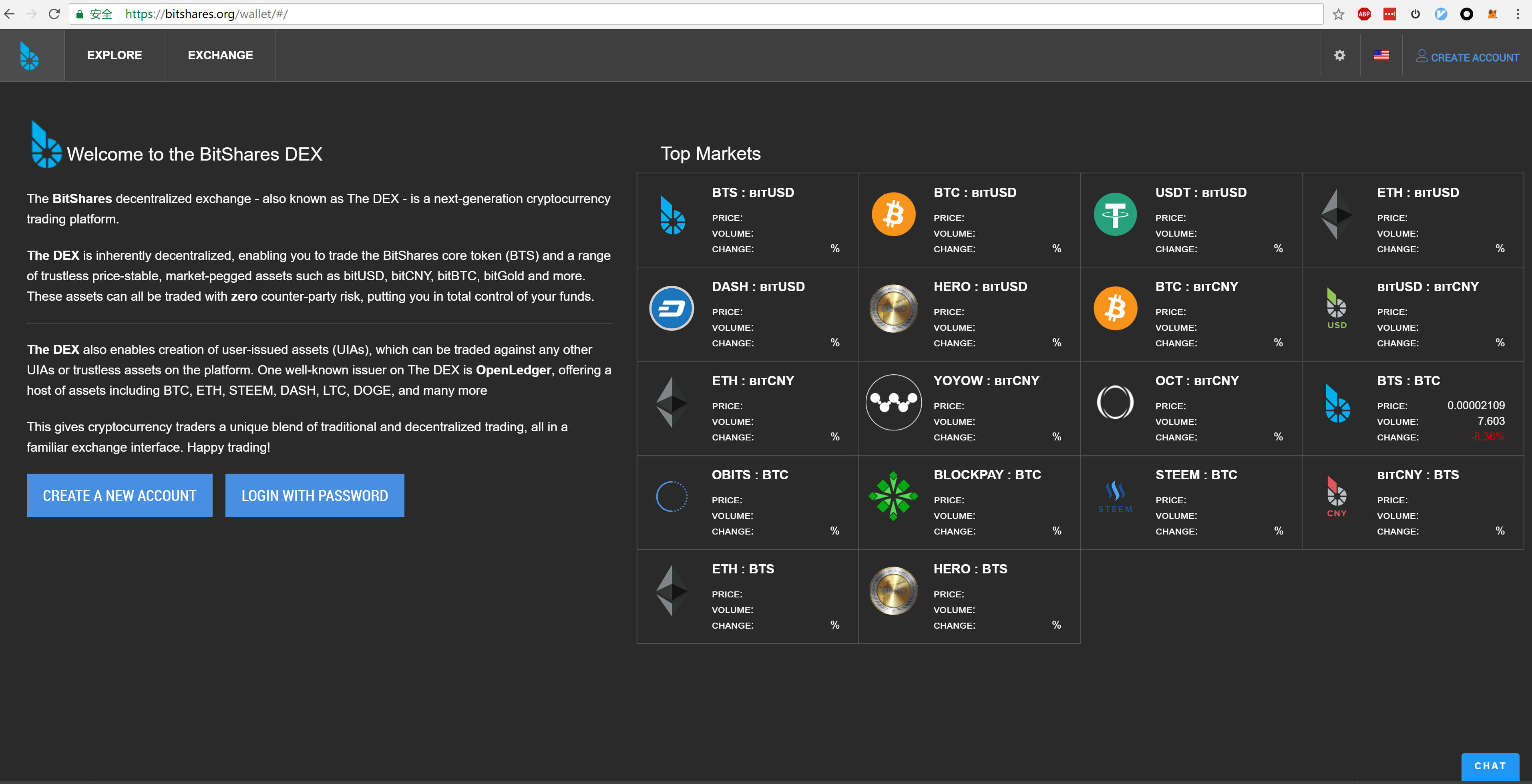 # 四 遇到的问题,编译内存不足。分配交换空间 gcc 编译出现 internal compiler error: Killed 增加一个交换分区: 1. 创建分区文件, 大小 10G(读者可按需分配) ddif=/dev/zero of=/swapfile bs=1kcount=10240000 1. 生成 swap 文件系统 mkswap/swapfile 1. 激活 swap 文件 swapon/swapfile 这样就木有问题了, 但是这样并不能在系统重启的时候自动挂载交换分区, 这样我们就需要修改 fstab. 修改 /etc/fstab 文件, 新增如下内容: /swapfile swap swap defaults00 这样每次重启系统的时候就会自动加载 swap 文件了. # 五 引用 搭建私有网络说明 http://docs.bitshares.org/testnet/private-testnet.html |
| json metadata | {"tags":["bitshares","build"],"image":["https://steemitimages.com/DQmYMJGg6USuGY3DmMkbZT6rGwWcnBDKqLCUk7jxoec45kX/1.png","https://steemitimages.com/DQmR97b9pYUpv4UZMvTPwSnF4qEBB48sgUy1x9CFPqEPXqL/image.png"],"links":["https://github.com/bitshares/bitshares-core/releases中,下载编译好的BitShares-Core-2.0.170710-x64-cli-tools.zip)","https://bitshares.org/wallet/","http://docs.bitshares.org/testnet/private-testnet.html"],"app":"steemit/0.1","format":"markdown"} |
| parent author | |
| parent permlink | bitshares |
| permlink | 6sbbkt |
| title | 比特股环境搭建 |
| Transaction Info | Block #15599630/Trx f8ddd63bee08bf0a789150b5a6171452badb56b6 |
View Raw JSON Data
{
"block": 15599630,
"op": [
"comment",
{
"author": "baidang",
"body": "比特股环境搭建\n\n# 一 编译\n\n编译环境推荐为ubuntu 16.04 64位版(如果是windows,可以在https://github.com/bitshares/bitshares-core/releases中,下载编译好的BitShares-Core-2.0.170710-x64-cli-tools.zip)\n\n1 安装编译相关库\n```\n\nsudo apt-get update\n\nsudo apt-get install autoconf cmake git libboost-all-dev libssl-dev\n```\n\n\n2 下载 源码 (2017.9.19 最新版本为 2.0.170710)\n```\n\ngit clone https://github.com/bitshares/bitshares-core\n\ncd bitshares-core\n\ngit checkout 2.0.170710\n\ngit submodule update --init --recursive\n\ncmake -DCMAKE_BUILD_TYPE=RelWithDebInfo .\n\nmake -j 4\n\n//make -j N 多进程并行编译,后面跟一数字N代表开启进程数量(默认约定为cpu核心数)\n```\n\n\n# 二 程序结构介绍\n\n\n\n\nwitness_node 通过 P2P 方式连接到 BTS 网络,从网络接收最新区块,向网络广播本地签署的交易包;\n\nwitness_node 通过 websocket + http rpc 的方式提供 API 供其他程序调用(以下称为节点 API)。\n\n\n\ndelayed_node 通过 websocket 方式连接到 witness_node ,只包含不可回退的区块;\n\ndelayed_node 通常情况下最新区块比 witness_node 落后一分钟,异常时可能会落后很多,但可保证不可回退。\n\ndelayed_node 通过 websocket + http rpc 的方式提供 API 供其他程序调用,API清单与 witness_node 相同,但无法使用交易广播功能。\n\n\n\ncli_wallet 通过 websocket 方式连接到 witness_node 和 delayed_node 其中之一。\n\n可以同时运行两个 cli_wallet 进程,分别连到 witness_node 和 delayed_node 。\n\ncli_wallet 管理钱包文件,钱包文件里包含经过加密的用户私钥,一个钱包文件可以包含多个私钥。\n\ncli_wallet 提供交易签名功能,签名后通过 witness_node 向外广播。\n\ncli_wallet 通过 http rpc 的方式提供 API 供其他程序调用(以下称为钱包 API)。\n\n\n\n推荐交易所使用一个连接到 delayed_node 的 cli_wallet 来监测用户充值,使用另一个连接到 witness_node 的 cli_wallet 来处理用户提现请求。\n\n\n\n# 三 私有链单机部署步骤\n\n1 生成创世纪块的json\n\n./witness_node --create-genesis-json \"genesis.json\"\n\n\n\n2 启动见证人节点\n\n./witness_node --rpc-endpoint \"127.0.0.1:8090\" --enable-stale-production -d test_net --seed-nodes \"[]\" --genesis-json \"genesis.json\" \n\n// --rpc-endpoint rpc监听端口\n\n// --enable-stale-production 让本节点无视区块链数据的时间,无论如何都生成区块数据\n\n// -w (--witness-id) 本节点控制的witness列表,(1.6.0-9)是默认的withness\n\n// --seed-nodes 要连接的peer列表(测试环境务必传此参数,不传的话会走代码里hardcode的正式网的peer列表,会导致测试节点去跟正式网络同步数据)\n\n(没有种子节点,一般用户等一年也不一定能连上网络。见证人对网络连接的要求更高,所以,必须与完整数据的种子节点相连,否则数据不完整的钱包会制造分叉。)\n\n// --genesis-json 比特股网络启动的数据文件\n\n\n\n3 启动钱包\n\n./cli_wallet --chain-id=\"97f304dce6fe30cccbdef37cd7899d349297a78ba483375adc3982016ef40c63\" -s ws://127.0.0.1:8090 -w wallet.json\n\n// -s 或 --server-rpc-endpoint witness_node的地址和端口\n\n// --chain-id 指的是服务的chain-id,可以不带此参数执行一次命令,程序的报错信息会显示这个id\n\n\n\n4 使用命令行钱包,执行新建用户,转账,申请见证人等操作,只做简单使用介绍。\n\nnew>>>set_password my_password\n\n//解锁钱包\n\nlocked>>>unlock my_password\n\n//导入用户\n\nunlocked >>> import_key\"nathan\"5KQwrPbwdL6PhXujxW37FSSQZ1JiwsST4cqQzDeyXtP79zkvFD3\n\n//导入余额\n\nunlocked >>>import_balance nathan [5KQwrPbwdL6PhXujxW37FSSQZ1JiwsST4cqQzDeyXtP79zkvFD3] true\n\n//查看账户信息\n\nunlocked >>>list_my_accounts\n\n//查看账户余额\n\nlocked >>> list_account_balances nathan\n\n//升级会员 (PS:可能是因为命令行钱包的bug,升级账号后必须退出程序再次进入才能使升级的状态生效)。\n\nlocked >>>upgrade_account nathantrue\n\n\n\n5 后面可以整合安装bitshares-ui,浏览器版钱包,用于交易等操作。可看截图(https://bitshares.org/wallet/),源码(https://github.com/bitshares/bitshares-ui)。\n\n\n\n\n# 四 遇到的问题,编译内存不足。分配交换空间\n\ngcc 编译出现 internal compiler error: Killed\n\n增加一个交换分区:\n\n1. 创建分区文件, 大小 10G(读者可按需分配)\n\n ddif=/dev/zero of=/swapfile bs=1kcount=10240000\n\n1. 生成 swap 文件系统\n\n mkswap/swapfile\n\n1. 激活 swap 文件\n\n swapon/swapfile\n\n这样就木有问题了, 但是这样并不能在系统重启的时候自动挂载交换分区, 这样我们就需要修改 fstab.\n\n修改 /etc/fstab 文件, 新增如下内容:\n\n/swapfile swap swap defaults00\n\n这样每次重启系统的时候就会自动加载 swap 文件了.\n\n\n\n# 五 引用\n\n搭建私有网络说明 http://docs.bitshares.org/testnet/private-testnet.html",
"json_metadata": "{\"tags\":[\"bitshares\",\"build\"],\"image\":[\"https://steemitimages.com/DQmYMJGg6USuGY3DmMkbZT6rGwWcnBDKqLCUk7jxoec45kX/1.png\",\"https://steemitimages.com/DQmR97b9pYUpv4UZMvTPwSnF4qEBB48sgUy1x9CFPqEPXqL/image.png\"],\"links\":[\"https://github.com/bitshares/bitshares-core/releases中,下载编译好的BitShares-Core-2.0.170710-x64-cli-tools.zip)\",\"https://bitshares.org/wallet/\",\"http://docs.bitshares.org/testnet/private-testnet.html\"],\"app\":\"steemit/0.1\",\"format\":\"markdown\"}",
"parent_author": "",
"parent_permlink": "bitshares",
"permlink": "6sbbkt",
"title": "比特股环境搭建"
}
],
"op_in_trx": 0,
"timestamp": "2017-09-19T09:33:18",
"trx_id": "f8ddd63bee08bf0a789150b5a6171452badb56b6",
"trx_in_block": 8,
"virtual_op": 0
}baidangupvoted (100.00%) @imyao / ann-smartcoins-wallet-v1-0-5-44-3-steem-sbd2017/09/16 10:04:30
baidangupvoted (100.00%) @imyao / ann-smartcoins-wallet-v1-0-5-44-3-steem-sbd
2017/09/16 10:04:30
| author | imyao |
| permlink | ann-smartcoins-wallet-v1-0-5-44-3-steem-sbd |
| voter | baidang |
| weight | 10000 (100.00%) |
| Transaction Info | Block #15513900/Trx 71ff7acd423f32e25699beaa4264a36a9fa2ecab |
View Raw JSON Data
{
  "block": 15513900,
  "op": [
    "vote",
    {
      "author": "imyao",
      "permlink": "ann-smartcoins-wallet-v1-0-5-44-3-steem-sbd",
      "voter": "baidang",
      "weight": 10000
    }
  ],
  "op_in_trx": 0,
  "timestamp": "2017-09-16T10:04:30",
  "trx_id": "71ff7acd423f32e25699beaa4264a36a9fa2ecab",
  "trx_in_block": 3,
  "virtual_op": 0
}baidangfollowed @boombastic2017/09/16 09:51:42
baidangfollowed @boombastic
2017/09/16 09:51:42
| id | follow |
| json | ["follow",{"follower":"baidang","following":"boombastic","what":["blog"]}] |
| required auths | [] |
| required posting auths | ["baidang"] |
| Transaction Info | Block #15513644/Trx 0cc3ed2711b63d8dffd57d8037aa2223a8b4573f |
View Raw JSON Data
{
  "block": 15513644,
  "op": [
    "custom_json",
    {
      "id": "follow",
      "json": "[\"follow\",{\"follower\":\"baidang\",\"following\":\"boombastic\",\"what\":[\"blog\"]}]",
      "required_auths": [],
      "required_posting_auths": [
        "baidang"
      ]
    }
  ],
  "op_in_trx": 0,
  "timestamp": "2017-09-16T09:51:42",
  "trx_id": "0cc3ed2711b63d8dffd57d8037aa2223a8b4573f",
  "trx_in_block": 5,
  "virtual_op": 0
}baidangupdated their account properties2017/09/01 01:25:39
baidangupdated their account properties
2017/09/01 01:25:39
| account | baidang |
| json metadata | {"profile":{"about":"C++ R&D Engineering","location":"China","website":"http://blog.csdn.net/baidang201","name":"SharpSword"}} |
| memo key | STM5MZfGsaHz56Se4Dvx6KRtro34wDunSBeVbKtqjhzRKvDEFCoqJ |
| Transaction Info | Block #15071718/Trx 8891b0febd2205eb65226af31d238e2ac9e279d2 |
View Raw JSON Data
{
  "block": 15071718,
  "op": [
    "account_update",
    {
      "account": "baidang",
      "json_metadata": "{\"profile\":{\"about\":\"C++ R&D Engineering\",\"location\":\"China\",\"website\":\"http://blog.csdn.net/baidang201\",\"name\":\"SharpSword\"}}",
      "memo_key": "STM5MZfGsaHz56Se4Dvx6KRtro34wDunSBeVbKtqjhzRKvDEFCoqJ"
    }
  ],
  "op_in_trx": 0,
  "timestamp": "2017-09-01T01:25:39",
  "trx_id": "8891b0febd2205eb65226af31d238e2ac9e279d2",
  "trx_in_block": 11,
  "virtual_op": 0
}baidangupdated their account properties2017/09/01 01:24:30
baidangupdated their account properties
2017/09/01 01:24:30
| account | baidang |
| json metadata | {"profile":{"about":"C++ R&D Engineering","location":"China","website":"http://blog.csdn.net/baidang201","name":"剑有偏锋"}} |
| memo key | STM5MZfGsaHz56Se4Dvx6KRtro34wDunSBeVbKtqjhzRKvDEFCoqJ |
| Transaction Info | Block #15071695/Trx 4df646e2989e99155b46754c3cd1cbb9c76e3fcb |
View Raw JSON Data
{
  "block": 15071695,
  "op": [
    "account_update",
    {
      "account": "baidang",
      "json_metadata": "{\"profile\":{\"about\":\"C++ R&D Engineering\",\"location\":\"China\",\"website\":\"http://blog.csdn.net/baidang201\",\"name\":\"剑有偏锋\"}}",
      "memo_key": "STM5MZfGsaHz56Se4Dvx6KRtro34wDunSBeVbKtqjhzRKvDEFCoqJ"
    }
  ],
  "op_in_trx": 0,
  "timestamp": "2017-09-01T01:24:30",
  "trx_id": "4df646e2989e99155b46754c3cd1cbb9c76e3fcb",
  "trx_in_block": 13,
  "virtual_op": 0
}baidangupdated their account properties2017/09/01 01:15:06
baidangupdated their account properties
2017/09/01 01:15:06
| account | baidang |
| json metadata | {"profile":{"about":"C++ R&D Engineering","location":"China","website":"http://blog.csdn.net/baidang201"}} |
| memo key | STM5MZfGsaHz56Se4Dvx6KRtro34wDunSBeVbKtqjhzRKvDEFCoqJ |
| Transaction Info | Block #15071507/Trx 8d51896833809d366e96bae458de7589e2143e0b |
View Raw JSON Data
{
  "block": 15071507,
  "op": [
    "account_update",
    {
      "account": "baidang",
      "json_metadata": "{\"profile\":{\"about\":\"C++ R&D Engineering\",\"location\":\"China\",\"website\":\"http://blog.csdn.net/baidang201\"}}",
      "memo_key": "STM5MZfGsaHz56Se4Dvx6KRtro34wDunSBeVbKtqjhzRKvDEFCoqJ"
    }
  ],
  "op_in_trx": 0,
  "timestamp": "2017-09-01T01:15:06",
  "trx_id": "8d51896833809d366e96bae458de7589e2143e0b",
  "trx_in_block": 4,
  "virtual_op": 0
}2017/09/01 01:11:42
2017/09/01 01:11:42
| active | {"account_auths":[],"key_auths":[["STM5Xh81jJ3r88cb46u3J9TTRtUZchzQ1SeDwynEKxHksZjNMojcs",1]],"weight_threshold":1} |
| creator | steem |
| delegation | 57000.000000 VESTS |
| extensions | [] |
| fee | 0.500 STEEM |
| json metadata | |
| memo key | STM5MZfGsaHz56Se4Dvx6KRtro34wDunSBeVbKtqjhzRKvDEFCoqJ |
| new account name | baidang |
| owner | {"account_auths":[],"key_auths":[["STM5FkCjdvwr1rcjEF8uhf8UatS5bDEVX4Tv2QfseoLkJfFAnC5Aw",1]],"weight_threshold":1} |
| posting | {"account_auths":[],"key_auths":[["STM58J7YwxdnHX2jumEagoRaAzyhmoV9qszxgCTSae4h94Z8pSa6L",1]],"weight_threshold":1} |
| Transaction Info | Block #15071439/Trx 6bc931ddacc848c971f1201388e347118ffa278f |
View Raw JSON Data
{
  "block": 15071439,
  "op": [
    "account_create_with_delegation",
    {
      "active": {
        "account_auths": [],
        "key_auths": [
          [
            "STM5Xh81jJ3r88cb46u3J9TTRtUZchzQ1SeDwynEKxHksZjNMojcs",
            1
          ]
        ],
        "weight_threshold": 1
      },
      "creator": "steem",
      "delegation": "57000.000000 VESTS",
      "extensions": [],
      "fee": "0.500 STEEM",
      "json_metadata": "",
      "memo_key": "STM5MZfGsaHz56Se4Dvx6KRtro34wDunSBeVbKtqjhzRKvDEFCoqJ",
      "new_account_name": "baidang",
      "owner": {
        "account_auths": [],
        "key_auths": [
          [
            "STM5FkCjdvwr1rcjEF8uhf8UatS5bDEVX4Tv2QfseoLkJfFAnC5Aw",
            1
          ]
        ],
        "weight_threshold": 1
      },
      "posting": {
        "account_auths": [],
        "key_auths": [
          [
            "STM58J7YwxdnHX2jumEagoRaAzyhmoV9qszxgCTSae4h94Z8pSa6L",
            1
          ]
        ],
        "weight_threshold": 1
      }
    }
  ],
  "op_in_trx": 0,
  "timestamp": "2017-09-01T01:11:42",
  "trx_id": "6bc931ddacc848c971f1201388e347118ffa278f",
  "trx_in_block": 14,
  "virtual_op": 0
}Manabar
Voting Power100.00%
Downvote Power100.00%
Resource Credits100.00%
Reputation Progress67.99%
{
  "voting_manabar": {
    "current_mana": "10175118533",
    "last_update_time": 1752866169
  },
  "downvote_manabar": {
    "current_mana": 2543779633,
    "last_update_time": 1752866169
  },
  "rc_account": {
    "account": "baidang",
    "max_rc": "12195867506",
    "max_rc_creation_adjustment": {
      "amount": "2020748973",
      "nai": "@@000000037",
      "precision": 6
    },
    "rc_manabar": {
      "current_mana": "12362316998",
      "last_update_time": 1752866169
    }
  }
}
Account Metadata
| POSTING JSON METADATA | |
| profile | {"about":"C++ R&D Engineering","location":"China","website":"http://www.jianshu.com/u/349d823c5236","name":"SharpSword"} |
| JSON METADATA | |
| profile | {"about":"C++ R&D Engineering","location":"China","website":"http://www.jianshu.com/u/349d823c5236","name":"SharpSword"} |
{
  "posting_json_metadata": {
    "profile": {
      "about": "C++ R&D Engineering",
      "location": "China",
      "website": "http://www.jianshu.com/u/349d823c5236",
      "name": "SharpSword"
    }
  },
  "json_metadata": {
    "profile": {
      "about": "C++ R&D Engineering",
      "location": "China",
      "website": "http://www.jianshu.com/u/349d823c5236",
      "name": "SharpSword"
    }
  }
}
Auth Keys
Owner
Single Signature
Public Keys
STM5FkCjdvwr1rcjEF8uhf8UatS5bDEVX4Tv2QfseoLkJfFAnC5Aw1/1
Active
Single Signature
Public Keys
STM5Xh81jJ3r88cb46u3J9TTRtUZchzQ1SeDwynEKxHksZjNMojcs1/1
Posting
Single Signature
Public Keys
STM58J7YwxdnHX2jumEagoRaAzyhmoV9qszxgCTSae4h94Z8pSa6L1/1
Memo
STM5MZfGsaHz56Se4Dvx6KRtro34wDunSBeVbKtqjhzRKvDEFCoqJ
{
  "owner": {
    "account_auths": [],
    "key_auths": [
      [
        "STM5FkCjdvwr1rcjEF8uhf8UatS5bDEVX4Tv2QfseoLkJfFAnC5Aw",
        1
      ]
    ],
    "weight_threshold": 1
  },
  "active": {
    "account_auths": [],
    "key_auths": [
      [
        "STM5Xh81jJ3r88cb46u3J9TTRtUZchzQ1SeDwynEKxHksZjNMojcs",
        1
      ]
    ],
    "weight_threshold": 1
  },
  "posting": {
    "account_auths": [],
    "key_auths": [
      [
        "STM58J7YwxdnHX2jumEagoRaAzyhmoV9qszxgCTSae4h94Z8pSa6L",
        1
      ]
    ],
    "weight_threshold": 1
  },
  "memo": "STM5MZfGsaHz56Se4Dvx6KRtro34wDunSBeVbKtqjhzRKvDEFCoqJ"
}
Witness Votes
0 / 30
No active witness votes.
[]