

@alphy123
25A versatile writer with the vast knowledge of technology helps to reduce the gap between a user and technology. Provides easy and reliable ways to resolve multi
steemit.com/@alphy123VOTING POWER100.00%
DOWNVOTE POWER100.00%
RESOURCE CREDITS100.00%
REPUTATION PROGRESS0.00%
Net Worth
0.007USD
STEEM
0.000STEEM
SBD
0.000SBD
Effective Power
5.001SP
├── Own SP
0.125SP
└── Incoming DelegationsDeleg
+4.876SP
Detailed Balance
| STEEM | ||
| balance | 0.000STEEM | STEEM |
| market_balance | 0.000STEEM | STEEM |
| savings_balance | 0.000STEEM | STEEM |
| reward_steem_balance | 0.000STEEM | STEEM |
| STEEM POWER | ||
| Own SP | 0.125SP | SP |
| Delegated Out | 0.000SP | SP |
| Delegation In | 4.876SP | SP |
| Effective Power | 5.001SP | SP |
| Reward SP (pending) | 0.000SP | SP |
| SBD | ||
| sbd_balance | 0.000SBD | SBD |
| sbd_conversions | 0.000SBD | SBD |
| sbd_market_balance | 0.000SBD | SBD |
| savings_sbd_balance | 0.000SBD | SBD |
| reward_sbd_balance | 0.000SBD | SBD |
{
  "balance": "0.000 STEEM",
  "savings_balance": "0.000 STEEM",
  "reward_steem_balance": "0.000 STEEM",
  "vesting_shares": "204.280457 VESTS",
  "delegated_vesting_shares": "0.000000 VESTS",
  "received_vesting_shares": "7939.379349 VESTS",
  "sbd_balance": "0.000 SBD",
  "savings_sbd_balance": "0.000 SBD",
  "reward_sbd_balance": "0.000 SBD",
  "conversions": []
}
Account Info
| name | alphy123 |
| id | 801193 |
| rank | 370,287 |
| reputation | 49051981 |
| created | 2018-03-03T04:46:30 |
| recovery_account | steem |
| proxy | None |
| post_count | 10 |
| comment_count | 0 |
| lifetime_vote_count | 0 |
| witnesses_voted_for | 0 |
| last_post | 2019-12-04T07:58:54 |
| last_root_post | 2019-12-04T07:58:54 |
| last_vote_time | 2019-12-04T07:59:51 |
| proxied_vsf_votes | 0, 0, 0, 0 |
| can_vote | 1 |
| voting_power | 0 |
| delayed_votes | 0 |
| balance | 0.000 STEEM |
| savings_balance | 0.000 STEEM |
| sbd_balance | 0.000 SBD |
| savings_sbd_balance | 0.000 SBD |
| vesting_shares | 204.280457 VESTS |
| delegated_vesting_shares | 0.000000 VESTS |
| received_vesting_shares | 7939.379349 VESTS |
| reward_vesting_balance | 0.000000 VESTS |
| vesting_balance | 0.000 STEEM |
| vesting_withdraw_rate | 0.000000 VESTS |
| next_vesting_withdrawal | 1969-12-31T23:59:59 |
| withdrawn | 0 |
| to_withdraw | 0 |
| withdraw_routes | 0 |
| savings_withdraw_requests | 0 |
| last_account_recovery | 1970-01-01T00:00:00 |
| reset_account | null |
| last_owner_update | 2019-11-22T10:00:48 |
| last_account_update | 2019-11-22T10:13:06 |
| mined | No |
| sbd_seconds | 0 |
| sbd_last_interest_payment | 1970-01-01T00:00:00 |
| savings_sbd_last_interest_payment | 1970-01-01T00:00:00 |
{
  "id": 801193,
  "name": "alphy123",
  "owner": {
    "weight_threshold": 1,
    "account_auths": [],
    "key_auths": [
      [
        "STM6kGYmFraqqxcdjQ1sGHpK6VYtnsAcE98XSKpHgWxAu9U5EPcyc",
        1
      ]
    ]
  },
  "active": {
    "weight_threshold": 1,
    "account_auths": [],
    "key_auths": [
      [
        "STM73NS14gsBpyN12gjPJLXDhaMy9jDQryQwXpxkuLGsaGPmkeQFD",
        1
      ]
    ]
  },
  "posting": {
    "weight_threshold": 1,
    "account_auths": [],
    "key_auths": [
      [
        "STM7MFQBxG9jUjPXFo16d6PRSL4HkGvhhe7hDyPGZz8arLzvXxpjW",
        1
      ]
    ]
  },
  "memo_key": "STM7wQ2Wt98e3oTRP6xgMpsqBgGTYewxpbHLuxDJPRw5F9J4in2Rm",
  "json_metadata": "{\"profile\":{\"name\":\"Alphy\",\"about\":\"A versatile writer with the vast knowledge of technology helps to reduce the gap between a user and technology. Provides easy and reliable ways to resolve multi\",\"location\":\"New Delhi\",\"profile_image\":\"https://cdn.steemitimages.com/DQmRPi1HesrEbys89ViokBNpFfYhYUQDhkSfY1HPukPtB8S/images%20(2).jpg\"}}",
  "posting_json_metadata": "",
  "proxy": "",
  "last_owner_update": "2019-11-22T10:00:48",
  "last_account_update": "2019-11-22T10:13:06",
  "created": "2018-03-03T04:46:30",
  "mined": false,
  "recovery_account": "steem",
  "last_account_recovery": "1970-01-01T00:00:00",
  "reset_account": "null",
  "comment_count": 0,
  "lifetime_vote_count": 0,
  "post_count": 10,
  "can_vote": true,
  "voting_manabar": {
    "current_mana": "8143659806",
    "last_update_time": 1779052464
  },
  "downvote_manabar": {
    "current_mana": 2035914951,
    "last_update_time": 1779052464
  },
  "voting_power": 0,
  "balance": "0.000 STEEM",
  "savings_balance": "0.000 STEEM",
  "sbd_balance": "0.000 SBD",
  "sbd_seconds": "0",
  "sbd_seconds_last_update": "1970-01-01T00:00:00",
  "sbd_last_interest_payment": "1970-01-01T00:00:00",
  "savings_sbd_balance": "0.000 SBD",
  "savings_sbd_seconds": "0",
  "savings_sbd_seconds_last_update": "1970-01-01T00:00:00",
  "savings_sbd_last_interest_payment": "1970-01-01T00:00:00",
  "savings_withdraw_requests": 0,
  "reward_sbd_balance": "0.000 SBD",
  "reward_steem_balance": "0.000 STEEM",
  "reward_vesting_balance": "0.000000 VESTS",
  "reward_vesting_steem": "0.000 STEEM",
  "vesting_shares": "204.280457 VESTS",
  "delegated_vesting_shares": "0.000000 VESTS",
  "received_vesting_shares": "7939.379349 VESTS",
  "vesting_withdraw_rate": "0.000000 VESTS",
  "next_vesting_withdrawal": "1969-12-31T23:59:59",
  "withdrawn": 0,
  "to_withdraw": 0,
  "withdraw_routes": 0,
  "curation_rewards": 0,
  "posting_rewards": 0,
  "proxied_vsf_votes": [
    0,
    0,
    0,
    0
  ],
  "witnesses_voted_for": 0,
  "last_post": "2019-12-04T07:58:54",
  "last_root_post": "2019-12-04T07:58:54",
  "last_vote_time": "2019-12-04T07:59:51",
  "post_bandwidth": 0,
  "pending_claimed_accounts": 0,
  "vesting_balance": "0.000 STEEM",
  "reputation": 49051981,
  "transfer_history": [],
  "market_history": [],
  "post_history": [],
  "vote_history": [],
  "other_history": [],
  "witness_votes": [],
  "tags_usage": [],
  "guest_bloggers": [],
  "rank": 370287
}
Withdraw Routes
| Incoming | Outgoing |
|---|---|
Empty | Empty |
{
  "incoming": [],
  "outgoing": []
}From Date
To Date
2026/05/17 21:14:24
2026/05/17 21:14:24
| delegator | steem |
| delegatee | alphy123 |
| vesting shares | 7939.379349 VESTS |
| Transaction Info | Block #106139847/Trx b0eaa998a716789a41f4b021ab79b21493c865e3 |
View Raw JSON Data
{
  "trx_id": "b0eaa998a716789a41f4b021ab79b21493c865e3",
  "block": 106139847,
  "trx_in_block": 1,
  "op_in_trx": 0,
  "virtual_op": 0,
  "timestamp": "2026-05-17T21:14:24",
  "op": [
    "delegate_vesting_shares",
    {
      "delegator": "steem",
      "delegatee": "alphy123",
      "vesting_shares": "7939.379349 VESTS"
    }
  ]
}2026/05/11 17:20:06
2026/05/11 17:20:06
| delegator | steem |
| delegatee | alphy123 |
| vesting shares | 5227.168944 VESTS |
| Transaction Info | Block #105963140/Trx 4fe0387b0e8a5e12ede32b082daf417ca51cd26a |
View Raw JSON Data
{
  "trx_id": "4fe0387b0e8a5e12ede32b082daf417ca51cd26a",
  "block": 105963140,
  "trx_in_block": 2,
  "op_in_trx": 0,
  "virtual_op": 0,
  "timestamp": "2026-05-11T17:20:06",
  "op": [
    "delegate_vesting_shares",
    {
      "delegator": "steem",
      "delegatee": "alphy123",
      "vesting_shares": "5227.168944 VESTS"
    }
  ]
}2026/04/25 20:40:00
2026/04/25 20:40:00
| delegator | steem |
| delegatee | alphy123 |
| vesting shares | 7951.895105 VESTS |
| Transaction Info | Block #105507586/Trx 13ec1688f986e1062d6c0addc4d8f13b5a6ac1f1 |
View Raw JSON Data
{
  "trx_id": "13ec1688f986e1062d6c0addc4d8f13b5a6ac1f1",
  "block": 105507586,
  "trx_in_block": 0,
  "op_in_trx": 0,
  "virtual_op": 0,
  "timestamp": "2026-04-25T20:40:00",
  "op": [
    "delegate_vesting_shares",
    {
      "delegator": "steem",
      "delegatee": "alphy123",
      "vesting_shares": "7951.895105 VESTS"
    }
  ]
}2026/01/22 23:46:21
2026/01/22 23:46:21
| delegator | steem |
| delegatee | alphy123 |
| vesting shares | 5268.715763 VESTS |
| Transaction Info | Block #102842197/Trx 8895983b053a2f4a60bd2a2185d43dba20dbf4da |
View Raw JSON Data
{
  "trx_id": "8895983b053a2f4a60bd2a2185d43dba20dbf4da",
  "block": 102842197,
  "trx_in_block": 2,
  "op_in_trx": 0,
  "virtual_op": 0,
  "timestamp": "2026-01-22T23:46:21",
  "op": [
    "delegate_vesting_shares",
    {
      "delegator": "steem",
      "delegatee": "alphy123",
      "vesting_shares": "5268.715763 VESTS"
    }
  ]
}2024/12/16 19:07:09
2024/12/16 19:07:09
| delegator | steem |
| delegatee | alphy123 |
| vesting shares | 5432.934960 VESTS |
| Transaction Info | Block #91288638/Trx 3ed788caaaf82992ddf6b78bb30d1da292c51308 |
View Raw JSON Data
{
  "trx_id": "3ed788caaaf82992ddf6b78bb30d1da292c51308",
  "block": 91288638,
  "trx_in_block": 0,
  "op_in_trx": 0,
  "virtual_op": 0,
  "timestamp": "2024-12-16T19:07:09",
  "op": [
    "delegate_vesting_shares",
    {
      "delegator": "steem",
      "delegatee": "alphy123",
      "vesting_shares": "5432.934960 VESTS"
    }
  ]
}2023/11/13 10:53:15
2023/11/13 10:53:15
| delegator | steem |
| delegatee | alphy123 |
| vesting shares | 5602.068492 VESTS |
| Transaction Info | Block #79842920/Trx 2d556b1be741d489a3dafa2a1a5e251ddee94004 |
View Raw JSON Data
{
  "trx_id": "2d556b1be741d489a3dafa2a1a5e251ddee94004",
  "block": 79842920,
  "trx_in_block": 14,
  "op_in_trx": 0,
  "virtual_op": 0,
  "timestamp": "2023-11-13T10:53:15",
  "op": [
    "delegate_vesting_shares",
    {
      "delegator": "steem",
      "delegatee": "alphy123",
      "vesting_shares": "5602.068492 VESTS"
    }
  ]
}2023/09/21 18:17:33
2023/09/21 18:17:33
| delegator | steem |
| delegatee | alphy123 |
| vesting shares | 8539.347278 VESTS |
| Transaction Info | Block #78343603/Trx b9754f8520a6d14648113d55d7202b91a26d3e1c |
View Raw JSON Data
{
  "trx_id": "b9754f8520a6d14648113d55d7202b91a26d3e1c",
  "block": 78343603,
  "trx_in_block": 1,
  "op_in_trx": 0,
  "virtual_op": 0,
  "timestamp": "2023-09-21T18:17:33",
  "op": [
    "delegate_vesting_shares",
    {
      "delegator": "steem",
      "delegatee": "alphy123",
      "vesting_shares": "8539.347278 VESTS"
    }
  ]
}2022/11/03 08:30:12
2022/11/03 08:30:12
| delegator | steem |
| delegatee | alphy123 |
| vesting shares | 8761.028716 VESTS |
| Transaction Info | Block #69109438/Trx 902fb92481f8799ee849d1c2b4fcb29c8d712937 |
View Raw JSON Data
{
  "trx_id": "902fb92481f8799ee849d1c2b4fcb29c8d712937",
  "block": 69109438,
  "trx_in_block": 88,
  "op_in_trx": 0,
  "virtual_op": 0,
  "timestamp": "2022-11-03T08:30:12",
  "op": [
    "delegate_vesting_shares",
    {
      "delegator": "steem",
      "delegatee": "alphy123",
      "vesting_shares": "8761.028716 VESTS"
    }
  ]
}2022/01/17 08:03:09
2022/01/17 08:03:09
| delegator | steem |
| delegatee | alphy123 |
| vesting shares | 8981.561947 VESTS |
| Transaction Info | Block #60805951/Trx bab8bd8fb9d3e5c9967dd59227b5e7050d396bdd |
View Raw JSON Data
{
  "trx_id": "bab8bd8fb9d3e5c9967dd59227b5e7050d396bdd",
  "block": 60805951,
  "trx_in_block": 12,
  "op_in_trx": 0,
  "virtual_op": 0,
  "timestamp": "2022-01-17T08:03:09",
  "op": [
    "delegate_vesting_shares",
    {
      "delegator": "steem",
      "delegatee": "alphy123",
      "vesting_shares": "8981.561947 VESTS"
    }
  ]
}2021/06/13 22:05:33
2021/06/13 22:05:33
| delegator | steem |
| delegatee | alphy123 |
| vesting shares | 9165.330605 VESTS |
| Transaction Info | Block #54604484/Trx 5b7b82c61893113309633a5455023f1be4a389e2 |
View Raw JSON Data
{
  "trx_id": "5b7b82c61893113309633a5455023f1be4a389e2",
  "block": 54604484,
  "trx_in_block": 18,
  "op_in_trx": 0,
  "virtual_op": 0,
  "timestamp": "2021-06-13T22:05:33",
  "op": [
    "delegate_vesting_shares",
    {
      "delegator": "steem",
      "delegatee": "alphy123",
      "vesting_shares": "9165.330605 VESTS"
    }
  ]
}2020/12/11 08:28:24
2020/12/11 08:28:24
| delegator | steem |
| delegatee | alphy123 |
| vesting shares | 9352.752579 VESTS |
| Transaction Info | Block #49352054/Trx 5aeefcf329cb53ebae35e004232cd48fcae3c649 |
View Raw JSON Data
{
  "trx_id": "5aeefcf329cb53ebae35e004232cd48fcae3c649",
  "block": 49352054,
  "trx_in_block": 3,
  "op_in_trx": 0,
  "virtual_op": 0,
  "timestamp": "2020-12-11T08:28:24",
  "op": [
    "delegate_vesting_shares",
    {
      "delegator": "steem",
      "delegatee": "alphy123",
      "vesting_shares": "9352.752579 VESTS"
    }
  ]
}2020/12/06 02:05:54
2020/12/06 02:05:54
| delegator | steem |
| delegatee | alphy123 |
| vesting shares | 1912.543513 VESTS |
| Transaction Info | Block #49203624/Trx b0a027ccf198d31be6ebba1a2160e9a980b80410 |
View Raw JSON Data
{
  "trx_id": "b0a027ccf198d31be6ebba1a2160e9a980b80410",
  "block": 49203624,
  "trx_in_block": 1,
  "op_in_trx": 0,
  "virtual_op": 0,
  "timestamp": "2020-12-06T02:05:54",
  "op": [
    "delegate_vesting_shares",
    {
      "delegator": "steem",
      "delegatee": "alphy123",
      "vesting_shares": "1912.543513 VESTS"
    }
  ]
}2020/11/25 15:19:51
2020/11/25 15:19:51
| delegator | steem |
| delegatee | alphy123 |
| vesting shares | 9369.879196 VESTS |
| Transaction Info | Block #48907138/Trx f9937c32dc84dc1796cfd907bddf782be3747ead |
View Raw JSON Data
{
  "trx_id": "f9937c32dc84dc1796cfd907bddf782be3747ead",
  "block": 48907138,
  "trx_in_block": 6,
  "op_in_trx": 0,
  "virtual_op": 0,
  "timestamp": "2020-11-25T15:19:51",
  "op": [
    "delegate_vesting_shares",
    {
      "delegator": "steem",
      "delegatee": "alphy123",
      "vesting_shares": "9369.879196 VESTS"
    }
  ]
}jasondaruloreplied to @alphy123 / qkcj102020/11/25 09:43:39
jasondaruloreplied to @alphy123 / qkcj10
2020/11/25 09:43:39
| parent author | alphy123 |
| parent permlink | outlook-pst-recovery-software-repair-corrupted-outlook-files |
| author | jasondarulo |
| permlink | qkcj10 |
| title | |
| body | If your PST files have been lost due to some reason and want to recover then use PST repair tool that is very unique and user-friendly and nowadays many users are using this software. Using this tool you can recover password protected PST file. This software has full capability to remove all obstruction from corrupt PST file and repair Outlook files in a new error free Outlook PST profile. Checkout this Software free demo version from here: http://www.recoverfilesdownload.com/outlook-pst-recovery.html |
| json metadata | {"links":["http://www.recoverfilesdownload.com/outlook-pst-recovery.html"],"app":"steemit/0.2"} |
| Transaction Info | Block #48900537/Trx 1837a533421a0ab91fdfc0fef2376ea0b09fa386 |
View Raw JSON Data
{
  "trx_id": "1837a533421a0ab91fdfc0fef2376ea0b09fa386",
  "block": 48900537,
  "trx_in_block": 0,
  "op_in_trx": 0,
  "virtual_op": 0,
  "timestamp": "2020-11-25T09:43:39",
  "op": [
    "comment",
    {
      "parent_author": "alphy123",
      "parent_permlink": "outlook-pst-recovery-software-repair-corrupted-outlook-files",
      "author": "jasondarulo",
      "permlink": "qkcj10",
      "title": "",
      "body": "If your PST files have been lost due to some reason and want to recover then use PST repair tool that is very unique and user-friendly and nowadays many users are using this software.    \n\nUsing this tool you can recover password protected PST file. This software has full capability to remove all obstruction from corrupt PST file and repair Outlook files in a new error free Outlook PST profile.\n\nCheckout this Software free demo version from here: http://www.recoverfilesdownload.com/outlook-pst-recovery.html",
      "json_metadata": "{\"links\":[\"http://www.recoverfilesdownload.com/outlook-pst-recovery.html\"],\"app\":\"steemit/0.2\"}"
    }
  ]
}alainajodireplied to @alphy123 / qdloif2020/07/17 06:25:33
alainajodireplied to @alphy123 / qdloif
2020/07/17 06:25:33
| parent author | alphy123 |
| parent permlink | outlook-pst-recovery-software-repair-corrupted-outlook-files |
| author | alainajodi |
| permlink | qdloif |
| title | |
| body | Professional Shoviv Outlook PST Repair tool provides a quick and safe solution by which Outlook users can repair severely corrupted PST files and import PST to Microsoft 365, Exchange Server, new PST, EML, and MSG. Read More: https://www.shoviv.com/outlook-pst-repair.html |
| json metadata | {"links":["https://www.shoviv.com/outlook-pst-repair.html"],"app":"steemit/0.2"} |
| Transaction Info | Block #45176238/Trx 4635a2aee79ab8b1cf211429056acf8d76e23989 |
View Raw JSON Data
{
  "trx_id": "4635a2aee79ab8b1cf211429056acf8d76e23989",
  "block": 45176238,
  "trx_in_block": 12,
  "op_in_trx": 0,
  "virtual_op": 0,
  "timestamp": "2020-07-17T06:25:33",
  "op": [
    "comment",
    {
      "parent_author": "alphy123",
      "parent_permlink": "outlook-pst-recovery-software-repair-corrupted-outlook-files",
      "author": "alainajodi",
      "permlink": "qdloif",
      "title": "",
      "body": "Professional Shoviv Outlook PST Repair tool provides a quick and safe solution by which Outlook users can repair severely corrupted PST files and import PST to Microsoft 365, Exchange Server, new PST, EML, and MSG. \n\nRead More: https://www.shoviv.com/outlook-pst-repair.html",
      "json_metadata": "{\"links\":[\"https://www.shoviv.com/outlook-pst-repair.html\"],\"app\":\"steemit/0.2\"}"
    }
  ]
}2020/05/09 03:00:33
2020/05/09 03:00:33
| delegator | steem |
| delegatee | alphy123 |
| vesting shares | 9561.765792 VESTS |
| Transaction Info | Block #43213835/Trx a4b3076c05b8a59235b68d2f3f53a5c66890e2cb |
View Raw JSON Data
{
  "trx_id": "a4b3076c05b8a59235b68d2f3f53a5c66890e2cb",
  "block": 43213835,
  "trx_in_block": 10,
  "op_in_trx": 0,
  "virtual_op": 0,
  "timestamp": "2020-05-09T03:00:33",
  "op": [
    "delegate_vesting_shares",
    {
      "delegator": "steem",
      "delegatee": "alphy123",
      "vesting_shares": "9561.765792 VESTS"
    }
  ]
}2020/05/08 06:11:45
2020/05/08 06:11:45
| delegator | steem |
| delegatee | alphy123 |
| vesting shares | 1953.311140 VESTS |
| Transaction Info | Block #43189444/Trx 5b6b5198abeff5a9bc6ef31e6f3965d6c65d343e |
View Raw JSON Data
{
  "trx_id": "5b6b5198abeff5a9bc6ef31e6f3965d6c65d343e",
  "block": 43189444,
  "trx_in_block": 11,
  "op_in_trx": 0,
  "virtual_op": 0,
  "timestamp": "2020-05-08T06:11:45",
  "op": [
    "delegate_vesting_shares",
    {
      "delegator": "steem",
      "delegatee": "alphy123",
      "vesting_shares": "1953.311140 VESTS"
    }
  ]
}2020/03/05 02:46:06
2020/03/05 02:46:06
| parent author | alphy123 |
| parent permlink | restore-exchange-database-from-backup-2010-2013-2016 |
| author | steemitboard |
| permlink | steemitboard-notify-alphy123-20200305t024606000z |
| title | |
| body | Congratulations @alphy123! You received a personal award! <table><tr><td>https://steemitimages.com/70x70/http://steemitboard.com/@alphy123/birthday2.png</td><td>Happy Birthday! - You are on the Steem blockchain for 2 years!</td></tr></table> <sub>_You can view [your badges on your Steem Board](https://steemitboard.com/@alphy123) and compare to others on the [Steem Ranking](https://steemitboard.com/ranking/index.php?name=alphy123)_</sub> **Do not miss the last post from @steemitboard:** <table><tr><td><a href="https://steemit.com/steemitboard/@steemitboard/use-your-witness-votes-and-get-the-community-badge"><img src="https://steemitimages.com/64x128/https://cdn.steemitimages.com/DQmTugCUsoXX762vg1CuHRrpnPbfnjPogp8iCGv7F2kSVuj/image.png"></a></td><td><a href="https://steemit.com/steemitboard/@steemitboard/use-your-witness-votes-and-get-the-community-badge">Use your witness votes and get the Community Badge</a></td></tr></table> ###### [Vote for @Steemitboard as a witness](https://v2.steemconnect.com/sign/account-witness-vote?witness=steemitboard&approve=1) to get one more award and increased upvotes! |
| json metadata | {"image":["https://steemitboard.com/img/notify.png"]} |
| Transaction Info | Block #41374180/Trx 9cf8ed5bc2f45cc4b8702d9fdb4a9edd23c5f629 |
View Raw JSON Data
{
  "trx_id": "9cf8ed5bc2f45cc4b8702d9fdb4a9edd23c5f629",
  "block": 41374180,
  "trx_in_block": 8,
  "op_in_trx": 0,
  "virtual_op": 0,
  "timestamp": "2020-03-05T02:46:06",
  "op": [
    "comment",
    {
      "parent_author": "alphy123",
      "parent_permlink": "restore-exchange-database-from-backup-2010-2013-2016",
      "author": "steemitboard",
      "permlink": "steemitboard-notify-alphy123-20200305t024606000z",
      "title": "",
      "body": "Congratulations @alphy123! You received a personal award!\n\n<table><tr><td>https://steemitimages.com/70x70/http://steemitboard.com/@alphy123/birthday2.png</td><td>Happy Birthday! - You are on the Steem blockchain for 2 years!</td></tr></table>\n\n<sub>_You can view [your badges on your Steem Board](https://steemitboard.com/@alphy123) and compare to others on the [Steem Ranking](https://steemitboard.com/ranking/index.php?name=alphy123)_</sub>\n\n\n**Do not miss the last post from @steemitboard:**\n<table><tr><td><a href=\"https://steemit.com/steemitboard/@steemitboard/use-your-witness-votes-and-get-the-community-badge\"><img src=\"https://steemitimages.com/64x128/https://cdn.steemitimages.com/DQmTugCUsoXX762vg1CuHRrpnPbfnjPogp8iCGv7F2kSVuj/image.png\"></a></td><td><a href=\"https://steemit.com/steemitboard/@steemitboard/use-your-witness-votes-and-get-the-community-badge\">Use your witness votes and get the Community Badge</a></td></tr></table>\n\n###### [Vote for @Steemitboard as a witness](https://v2.steemconnect.com/sign/account-witness-vote?witness=steemitboard&approve=1) to get one more award and increased upvotes!",
      "json_metadata": "{\"image\":[\"https://steemitboard.com/img/notify.png\"]}"
    }
  ]
}2020/03/04 10:11:48
2020/03/04 10:11:48
| delegator | steem |
| delegatee | alphy123 |
| vesting shares | 9595.549682 VESTS |
| Transaction Info | Block #41354402/Trx 7135dac900f8633eb51e35e17d557b6511132220 |
View Raw JSON Data
{
  "trx_id": "7135dac900f8633eb51e35e17d557b6511132220",
  "block": 41354402,
  "trx_in_block": 11,
  "op_in_trx": 0,
  "virtual_op": 0,
  "timestamp": "2020-03-04T10:11:48",
  "op": [
    "delegate_vesting_shares",
    {
      "delegator": "steem",
      "delegatee": "alphy123",
      "vesting_shares": "9595.549682 VESTS"
    }
  ]
}jansmithsmthreplied to @alphy123 / q5vxd62020/02/18 06:43:57
jansmithsmthreplied to @alphy123 / q5vxd6
2020/02/18 06:43:57
| parent author | alphy123 |
| parent permlink | how-to-recover-exchange-server-database-items-fast |
| author | jansmithsmth |
| permlink | q5vxd6 |
| title | |
| body | Easily repair or convert a dismounted EDB file to PST to recover all of its inner database items by using the <b>eSoftTools <a href="https://www.esofttools.com/exchange-edb-to-pst-converter.html">EDB to PST Converter</url> Software</b>. This software has the capability to easily recover all of the lost items of any corrupted or inaccessible EDB file and after making the recovery also it offers users to convert that EDB file. It is able to convert the <b>EDB file</b> into multiple working file formats such as- <b>PST, EML, EMLX, MSG, and HTML</b>. <b>For More Info, Visit Here:- https://www.esofttools.com/exchange-server-database-recovery.html</b> https://www.esofttools.com/img/EDB-images/exchange-edb-to-pst-conversion.png |
| json metadata | {"image":["https://www.esofttools.com/img/EDB-images/exchange-edb-to-pst-conversion.png"],"links":["https://www.esofttools.com/exchange-edb-to-pst-converter.html","https://www.esofttools.com/exchange-server-database-recovery.html"],"app":"steemit/0.1"} |
| Transaction Info | Block #40920013/Trx b1e33eeeb079d82782e13d728dec5b8c1d042cea |
View Raw JSON Data
{
  "trx_id": "b1e33eeeb079d82782e13d728dec5b8c1d042cea",
  "block": 40920013,
  "trx_in_block": 12,
  "op_in_trx": 0,
  "virtual_op": 0,
  "timestamp": "2020-02-18T06:43:57",
  "op": [
    "comment",
    {
      "parent_author": "alphy123",
      "parent_permlink": "how-to-recover-exchange-server-database-items-fast",
      "author": "jansmithsmth",
      "permlink": "q5vxd6",
      "title": "",
      "body": "Easily repair or convert a dismounted EDB file to PST to recover all of its inner database items by using the <b>eSoftTools <a href=\"https://www.esofttools.com/exchange-edb-to-pst-converter.html\">EDB to PST Converter</url> Software</b>. \n\nThis software has the capability to easily recover all of the lost items of any corrupted or inaccessible EDB file and after making the recovery also it offers users to convert that EDB file.\n\nIt is able to convert the <b>EDB file</b> into multiple working file formats such as- <b>PST, EML, EMLX, MSG, and HTML</b>.\n\n<b>For More Info, Visit Here:- https://www.esofttools.com/exchange-server-database-recovery.html</b>\n\nhttps://www.esofttools.com/img/EDB-images/exchange-edb-to-pst-conversion.png",
      "json_metadata": "{\"image\":[\"https://www.esofttools.com/img/EDB-images/exchange-edb-to-pst-conversion.png\"],\"links\":[\"https://www.esofttools.com/exchange-edb-to-pst-converter.html\",\"https://www.esofttools.com/exchange-server-database-recovery.html\"],\"app\":\"steemit/0.1\"}"
    }
  ]
}jansmithsmthreplied to @alphy123 / q3s05m2020/01/08 06:46:39
jansmithsmthreplied to @alphy123 / q3s05m
2020/01/08 06:46:39
| parent author | alphy123 |
| parent permlink | restore-exchange-database-from-backup-2010-2013-2016 |
| author | jansmithsmth |
| permlink | q3s05m |
| title | |
| body | Get the simplest utility to recover all lost Exchange mailbox items from an Exchange database EDB file to PST file format name as the <b>eSoftTools <a href="https://www.esofttools.com/exchange-edb-to-pst-converter.html">EDB to PST Converter</a> Software</b>. By using this free tool you can smoothly repair all of the corruption issues of the EDB file of Exchange Server and also users can save the recovered Exchange items to some other email file formats. It can convert the EDB file into PST, MSG, HTML, EML, and EMLX file format to access the Exchange items without Exchange Server installation. <b>Get More Info:- <a href="https://www.esofttools.com/exchange-server-database-recovery.html">Exchange Server Database Recovery</a></b> |
| json metadata | {"links":["https://www.esofttools.com/exchange-edb-to-pst-converter.html","https://www.esofttools.com/exchange-server-database-recovery.html"],"app":"steemit/0.1"} |
| Transaction Info | Block #39741674/Trx dc377fbebe534eb1170e957bb5531efa24c827ab |
View Raw JSON Data
{
  "trx_id": "dc377fbebe534eb1170e957bb5531efa24c827ab",
  "block": 39741674,
  "trx_in_block": 12,
  "op_in_trx": 0,
  "virtual_op": 0,
  "timestamp": "2020-01-08T06:46:39",
  "op": [
    "comment",
    {
      "parent_author": "alphy123",
      "parent_permlink": "restore-exchange-database-from-backup-2010-2013-2016",
      "author": "jansmithsmth",
      "permlink": "q3s05m",
      "title": "",
      "body": "Get the simplest utility to recover all lost Exchange mailbox items from an Exchange database EDB file to PST file format name as the <b>eSoftTools <a href=\"https://www.esofttools.com/exchange-edb-to-pst-converter.html\">EDB to PST Converter</a> Software</b>. By using this free tool you can smoothly repair all of the corruption issues of the EDB file of Exchange Server and also users can save the recovered Exchange items to some other email file formats. It can convert the EDB file into PST, MSG, HTML, EML, and EMLX file format to access the Exchange items without Exchange Server installation.\n\n<b>Get More Info:- <a href=\"https://www.esofttools.com/exchange-server-database-recovery.html\">Exchange Server Database Recovery</a></b>",
      "json_metadata": "{\"links\":[\"https://www.esofttools.com/exchange-edb-to-pst-converter.html\",\"https://www.esofttools.com/exchange-server-database-recovery.html\"],\"app\":\"steemit/0.1\"}"
    }
  ]
}alphy123upvoted (100.00%) @alphy123 / restore-exchange-database-from-backup-2010-2013-20162019/12/04 07:59:51
alphy123upvoted (100.00%) @alphy123 / restore-exchange-database-from-backup-2010-2013-2016
2019/12/04 07:59:51
| voter | alphy123 |
| author | alphy123 |
| permlink | restore-exchange-database-from-backup-2010-2013-2016 |
| weight | 10000 (100.00%) |
| Transaction Info | Block #38736978/Trx c67d26d300507530f02acf3c82f77396598aed61 |
View Raw JSON Data
{
  "trx_id": "c67d26d300507530f02acf3c82f77396598aed61",
  "block": 38736978,
  "trx_in_block": 6,
  "op_in_trx": 0,
  "virtual_op": 0,
  "timestamp": "2019-12-04T07:59:51",
  "op": [
    "vote",
    {
      "voter": "alphy123",
      "author": "alphy123",
      "permlink": "restore-exchange-database-from-backup-2010-2013-2016",
      "weight": 10000
    }
  ]
}alphy123published a new post: restore-exchange-database-from-backup-2010-2013-20162019/12/04 07:58:54
alphy123published a new post: restore-exchange-database-from-backup-2010-2013-2016
2019/12/04 07:58:54
| parent author | |
| parent permlink | recover |
| author | alphy123 |
| permlink | restore-exchange-database-from-backup-2010-2013-2016 |
| title | Restore Exchange Database from Backup (2010 / 2013 / 2016) |
| body | <html> <p><strong>Summary: </strong>Restore Exchange 2019, 2016, 2013, 2010 database from backup with Windows Server. Explore the step by step guide to recover Microsoft Exchange server DB mailbox from backup files easily. </p> <blockquote>Are you looking for a reliable and trusted way to restore Exchange database from backup? Are you having trouble accessing your corrupted Exchange database in your Windows system and want to retrieve Exchange Server DB from backup? Keep reading this blog as it will describe multiple methods of restoration data from Exchange backup file. </blockquote> <p>Exchange Server database restoration is not everyone’s cup of tea. It requires both knowledge and expertise from the person who will perform the recovery. But from now on, you can do that too by following the guideline given here. This blog will describe some approaches that are found helpful by thousands of users. These approaches will include recovery from Windows server backup, Exchange recovery database, and recovery with the help of a third-party application.</p> <p><img src="https://i.pinimg.com/originals/23/06/c8/2306c855683dc7f70897506ee6ef355e.jpg" alt="restore"></p> <h1>Method 1: Restore Exchange 2010 Database from Windows Server Backup</h1> <p>Windows server backup is a viable way to restore Exchange database. If you are planning to use this method, make sure the backup is healthy and not corrupted. For this, check backup database consistency and proceed with this method only if the checking is successful. Windows Server has a plugin for Exchange database with which, users can create Volume Shadow Copy Service-based backup. </p> <h1>What if the Exchange Database is Corrupted?</h1> <p>If there are some corruption issues on your Exchange Database backup then you will be unable to recover Exchange data from such a database backup file. In such a scenario, the only solution is to <a href="https://www.systoolsgroup.com/exchange-recovery.html"><strong>repair corrupted EDB files</strong></a> using a reliable <strong>Exchange Recovery software</strong>. Definitely this is the last option for you. The<strong> SysTools</strong> provides a reliable <strong>Exchange Server Database Recovery software</strong> to fix even highly corrupted Exchange EDB files and restore it back to any Server versions. The Windows-based software is available with both Demo and Full version. So users can check its features and functionalities before deciding to purchase it. </p> <p>Repair EDB files and export the same <strong>EDB to Live Exchange Server</strong> account easily. Restoring Exchange EDB database becomes quite easy now. You can try this application for all Exchange Server versions including Exchange 2003, 2007, 2010, 2013, 2016, and 2019.</p> <h2>How to Restore Exchange Database from Windows Server Backup?</h2> <ol> <li>Launch <strong>Windows Server Backup</strong> and click on <strong>Recover from the Actions</strong> section.</li> <li>When <strong>Recovery wizard</strong> opens, perform any of the following from the <strong>Getting Started</strong> page. <ul> <li>Select<strong> ServerName</strong> → <strong>Next</strong>, if the source data is located on the local server.</li> <li>If the source data is located in another server, or if the backup is being taken from another system, then choose <strong>Another Server</strong>, and click on <strong>Next</strong>. Then, <strong>Specify location type</strong> by selecting Local drives or <strong>Remote shared folder</strong> to proceed.</li> </ul> </li> <li>Set the backup time and date for recovery on <strong>Select backup date page</strong>, and click <strong>Next</strong>.</li> <li>From the “<strong>Select recovery type</strong>” page, select <strong>Applications </strong>→ <strong>Next</strong>.</li> <li>On “<strong>Select application page</strong>”, ensure that Exchange is selected in the <strong>Applications field</strong>. Click on <strong>View Details</strong> option to check the <strong>backup application components</strong>. Click on <strong>Next</strong>.</li> <li>Select destination for recovered data from the “<strong>Specify recovery options</strong>” page, and click <strong>Next</strong>.</li> <li>Choose “<strong>Recover to the original location</strong>” option.</li> <li>Review all the recovery settings you have already set on the <strong>Confirmation page</strong>, and click on <strong>Recover</strong>.</li> <li>Once the recovery is done, click on<strong> Close</strong>.</li> </ol> <h2>Pre-conditions for Recovery from Windows Backup</h2> <ul> <li>Make sure that time, the system version supported by Windows Backup.</li> <li>To backup, it is mandatory to have the backup application installed on Windows Server.</li> <li>Schedule the recovery process and inform all stakeholders of possible downtime.</li> <li>The server should be assigned with necessary permissions for backup.</li> </ul> <h2>Method 2: Use Recovery Database</h2> <p>Users can also try restoring from the Recovery database if they do not have Exchange 2010 /2013 / 2016 database backup on the Windows server. <strong>Recovery Database or RDB</strong> is a kind of database that allows users to recover data from a restored mailbox database. The main advantage of using this database is it retains the accessibility to the database and allows no downtime.</p> <h2>How to Restore Exchange 2010 Database from Recovery Database (RDB)</h2> <ul> <li><strong>Access Exchange Management Shell</strong> of Exchange Server 2010 / 2013 / 2016 and run this command:</li> </ul> <pre><code>New-MailboxDatabase -Recovery -Name %RDBName% -Server %ExchangeServerName%</code></pre> <p><strong>Note: </strong>Here, Exchangeservername is the name of the Exchange server and RDBName is the name of the Recovery Database.</p> <ul> <li>Now, apply this command to set location:</li> </ul> <pre><code>New-MailboxDatabase -Recovery -Name %RDBName% -Server %ExchangeServerName% -EdbFilePath %targetDBPath% -logFolderPath %targetlogPath%</code></pre> <ul> <li>Right-click on <strong>Recovery Database</strong> to select <strong>Properties</strong>. The general tab will display “<strong>dismounted</strong>” and on the maintenance tab, “<strong>This database can be overwritten by a restore</strong>” option will be checked.</li> <li>Make sure that the <strong>Recovery Mailbox Database</strong> has been created. Now, open <strong>DPM console </strong>and choose the <strong>recovery tab</strong>.</li> <li>Select <strong>mailbox database</strong>, <strong>user</strong> and the<strong> time of recovery</strong>.</li> <li>Select <strong>Recover from Actions</strong> menu and then choose the<strong> recovery type</strong>.</li> <li>Then, you have to specify the <strong>Exchange server and database name</strong>.</li> <li>On <strong>Specify Recovery Options</strong> page, select “<strong>mount the database after it’s recovery</strong>”. Click on <strong>Next</strong> after confirming that you have set all the necessary settings.</li> <li> Apply this command to restore: </li> </ul> <pre><code>Restore-Mailbox –Identity %Username% -RecoveryDatabase %RDBName%</code></pre> <p>Here, Username is the user mailbox that will be recovered and RDB is the name of Recovery Database</p> <ul> <li>Extract Exchange 2010 /2013 / 2016 database with <em><strong>New-MailboxRestoreRequest</strong></em>.</li> </ul> <h2>Pre-conditions of Restoring Exchange Database from Recovery Database:</h2> <ol> <li>Make sure that there is a Recovery Database created for Exchange.</li> <li>Database and Log files should contain the recovered data that need to be restored.</li> <li>Exchange database 2010 should not have suffered from a dirty shutdown state. If that is the case, use the Eseutil /R command to fix the problem and return the database to the clean shutdown state.</li> </ol> <h3>Conclusion</h3> <p>For every organization, the Exchange Server database is of great importance. So, MS Exchange Admins should take proper steps for database backup to protect valuable data from sudden and accidental loss. If Exchange backup is done with a Recovery Database or Windows Server Database, then users can restore Exchange Database from backup easily. If the Exchange database gets corrupted and gets issues while recovering Exchange 2019, 2016, 2013, 2010 database from backup, then users can choose Exchange Recovery Software. The application will help for quick recovery and restoration of database items easily.</p> <p><br></p> </html> |
| json metadata | {"tags":["recover","restore","exchange","database","db","backup","edb"],"image":["https://i.pinimg.com/originals/23/06/c8/2306c855683dc7f70897506ee6ef355e.jpg"],"links":["https://www.systoolsgroup.com/exchange-recovery.html"],"app":"steemit/0.1","format":"html"} |
| Transaction Info | Block #38736959/Trx 1b641ec9d1b1bf723b4dcc118ab9680b9cc22340 |
View Raw JSON Data
{
"trx_id": "1b641ec9d1b1bf723b4dcc118ab9680b9cc22340",
"block": 38736959,
"trx_in_block": 4,
"op_in_trx": 0,
"virtual_op": 0,
"timestamp": "2019-12-04T07:58:54",
"op": [
"comment",
{
"parent_author": "",
"parent_permlink": "recover",
"author": "alphy123",
"permlink": "restore-exchange-database-from-backup-2010-2013-2016",
"title": "Restore Exchange Database from Backup (2010 / 2013 / 2016)",
"body": "<html>\n<p><strong>Summary: </strong>Restore Exchange 2019, 2016, 2013, 2010 database from backup with Windows Server. Explore the step by step guide to recover Microsoft Exchange server DB mailbox from backup files easily. </p>\n<blockquote>Are you looking for a reliable and trusted way to restore Exchange database from backup? Are you having trouble accessing your corrupted Exchange database in your Windows system and want to retrieve Exchange Server DB from backup? Keep reading this blog as it will describe multiple methods of restoration data from Exchange backup file. </blockquote>\n<p>Exchange Server database restoration is not everyone’s cup of tea. It requires both knowledge and expertise from the person who will perform the recovery. But from now on, you can do that too by following the guideline given here. This blog will describe some approaches that are found helpful by thousands of users. These approaches will include recovery from Windows server backup, Exchange recovery database, and recovery with the help of a third-party application.</p>\n<p><img src=\"https://i.pinimg.com/originals/23/06/c8/2306c855683dc7f70897506ee6ef355e.jpg\" alt=\"restore\"></p>\n<h1>Method 1: Restore Exchange 2010 Database from Windows Server Backup</h1>\n<p>Windows server backup is a viable way to restore Exchange database. If you are planning to use this method, make sure the backup is healthy and not corrupted. For this, check backup database consistency and proceed with this method only if the checking is successful. Windows Server has a plugin for Exchange database with which, users can create Volume Shadow Copy Service-based backup. </p>\n<h1>What if the Exchange Database is Corrupted?</h1>\n<p>If there are some corruption issues on your Exchange Database backup then you will be unable to recover Exchange data from such a database backup file. In such a scenario, the only solution is to <a href=\"https://www.systoolsgroup.com/exchange-recovery.html\"><strong>repair corrupted EDB files</strong></a> using a reliable <strong>Exchange Recovery software</strong>. Definitely this is the last option for you. The<strong> SysTools</strong> provides a reliable <strong>Exchange Server Database Recovery software</strong> to fix even highly corrupted Exchange EDB files and restore it back to any Server versions. The Windows-based software is available with both Demo and Full version. So users can check its features and functionalities before deciding to purchase it. </p>\n<p>Repair EDB files and export the same <strong>EDB to Live Exchange Server</strong> account easily. Restoring Exchange EDB database becomes quite easy now. You can try this application for all Exchange Server versions including Exchange 2003, 2007, 2010, 2013, 2016, and 2019.</p>\n<h2>How to Restore Exchange Database from Windows Server Backup?</h2>\n<ol>\n <li>Launch <strong>Windows Server Backup</strong> and click on <strong>Recover from the Actions</strong> section.</li>\n <li>When <strong>Recovery wizard</strong> opens, perform any of the following from the <strong>Getting Started</strong> page.\n <ul>\n <li>Select<strong> ServerName</strong> → <strong>Next</strong>, if the source data is located on the local server.</li>\n <li>If the source data is located in another server, or if the backup is being taken from another system, then choose <strong>Another Server</strong>, and click on <strong>Next</strong>. Then, <strong>Specify location type</strong> by selecting Local drives or <strong>Remote shared folder</strong> to proceed.</li>\n </ul>\n </li>\n <li>Set the backup time and date for recovery on <strong>Select backup date page</strong>, and click <strong>Next</strong>.</li>\n <li>From the “<strong>Select recovery type</strong>” page, select <strong>Applications </strong>→ <strong>Next</strong>.</li>\n <li>On “<strong>Select application page</strong>”, ensure that Exchange is selected in the <strong>Applications field</strong>. Click on <strong>View Details</strong> option to check the <strong>backup application components</strong>. Click on <strong>Next</strong>.</li>\n <li>Select destination for recovered data from the “<strong>Specify recovery options</strong>” page, and click <strong>Next</strong>.</li>\n <li>Choose “<strong>Recover to the original location</strong>” option.</li>\n <li>Review all the recovery settings you have already set on the <strong>Confirmation page</strong>, and click on <strong>Recover</strong>.</li>\n <li>Once the recovery is done, click on<strong> Close</strong>.</li>\n</ol>\n<h2>Pre-conditions for Recovery from Windows Backup</h2>\n<ul>\n <li>Make sure that time, the system version supported by Windows Backup.</li>\n <li>To backup, it is mandatory to have the backup application installed on Windows Server.</li>\n <li>Schedule the recovery process and inform all stakeholders of possible downtime.</li>\n <li>The server should be assigned with necessary permissions for backup.</li>\n</ul>\n<h2>Method 2: Use Recovery Database</h2>\n<p>Users can also try restoring from the Recovery database if they do not have Exchange 2010 /2013 / 2016 database backup on the Windows server. <strong>Recovery Database or RDB</strong> is a kind of database that allows users to recover data from a restored mailbox database. The main advantage of using this database is it retains the accessibility to the database and allows no downtime.</p>\n<h2>How to Restore Exchange 2010 Database from Recovery Database (RDB)</h2>\n<ul>\n <li><strong>Access Exchange Management Shell</strong> of Exchange Server 2010 / 2013 / 2016 and run this command:</li>\n</ul>\n<pre><code>New-MailboxDatabase -Recovery -Name %RDBName% -Server %ExchangeServerName%</code></pre>\n<p><strong>Note: </strong>Here, Exchangeservername is the name of the Exchange server and RDBName is the name of the Recovery Database.</p>\n<ul>\n <li>Now, apply this command to set location:</li>\n</ul>\n<pre><code>New-MailboxDatabase -Recovery -Name %RDBName% -Server %ExchangeServerName% -EdbFilePath %targetDBPath% -logFolderPath %targetlogPath%</code></pre>\n<ul>\n <li>Right-click on <strong>Recovery Database</strong> to select <strong>Properties</strong>. The general tab will display “<strong>dismounted</strong>” and on the maintenance tab, “<strong>This database can be overwritten by a restore</strong>” option will be checked.</li>\n <li>Make sure that the <strong>Recovery Mailbox Database</strong> has been created. Now, open <strong>DPM console </strong>and choose the <strong>recovery tab</strong>.</li>\n <li>Select <strong>mailbox database</strong>, <strong>user</strong> and the<strong> time of recovery</strong>.</li>\n <li>Select <strong>Recover from Actions</strong> menu and then choose the<strong> recovery type</strong>.</li>\n <li>Then, you have to specify the <strong>Exchange server and database name</strong>.</li>\n <li>On <strong>Specify Recovery Options</strong> page, select “<strong>mount the database after it’s recovery</strong>”. Click on <strong>Next</strong> after confirming that you have set all the necessary settings.</li>\n <li> Apply this command to restore: </li>\n</ul>\n<pre><code>Restore-Mailbox –Identity %Username% -RecoveryDatabase %RDBName%</code></pre>\n<p>Here, Username is the user mailbox that will be recovered and RDB is the name of Recovery Database</p>\n<ul>\n <li>Extract Exchange 2010 /2013 / 2016 database with <em><strong>New-MailboxRestoreRequest</strong></em>.</li>\n</ul>\n<h2>Pre-conditions of Restoring Exchange Database from Recovery Database:</h2>\n<ol>\n <li>Make sure that there is a Recovery Database created for Exchange.</li>\n <li>Database and Log files should contain the recovered data that need to be restored.</li>\n <li>Exchange database 2010 should not have suffered from a dirty shutdown state. If that is the case, use the Eseutil /R command to fix the problem and return the database to the clean shutdown state.</li>\n</ol>\n<h3>Conclusion</h3>\n<p>For every organization, the Exchange Server database is of great importance. So, MS Exchange Admins should take proper steps for database backup to protect valuable data from sudden and accidental loss. If Exchange backup is done with a Recovery Database or Windows Server Database, then users can restore Exchange Database from backup easily. If the Exchange database gets corrupted and gets issues while recovering Exchange 2019, 2016, 2013, 2010 database from backup, then users can choose Exchange Recovery Software. The application will help for quick recovery and restoration of database items easily.</p>\n<p><br></p>\n</html>",
"json_metadata": "{\"tags\":[\"recover\",\"restore\",\"exchange\",\"database\",\"db\",\"backup\",\"edb\"],\"image\":[\"https://i.pinimg.com/originals/23/06/c8/2306c855683dc7f70897506ee6ef355e.jpg\"],\"links\":[\"https://www.systoolsgroup.com/exchange-recovery.html\"],\"app\":\"steemit/0.1\",\"format\":\"html\"}"
}
]
}2019/11/22 13:44:12
2019/11/22 13:44:12
| delegator | steem |
| delegatee | alphy123 |
| vesting shares | 29477.519909 VESTS |
| Transaction Info | Block #38398884/Trx a7ca75ca2a10f5b762cbda5850160b650ca2750b |
View Raw JSON Data
{
  "trx_id": "a7ca75ca2a10f5b762cbda5850160b650ca2750b",
  "block": 38398884,
  "trx_in_block": 5,
  "op_in_trx": 0,
  "virtual_op": 0,
  "timestamp": "2019-11-22T13:44:12",
  "op": [
    "delegate_vesting_shares",
    {
      "delegator": "steem",
      "delegatee": "alphy123",
      "vesting_shares": "29477.519909 VESTS"
    }
  ]
}prolinuxuaupvoted (100.00%) @alphy123 / how-to-recover-exchange-server-database-items-fast2019/11/22 12:29:33
prolinuxuaupvoted (100.00%) @alphy123 / how-to-recover-exchange-server-database-items-fast
2019/11/22 12:29:33
| voter | prolinuxua |
| author | alphy123 |
| permlink | how-to-recover-exchange-server-database-items-fast |
| weight | 10000 (100.00%) |
| Transaction Info | Block #38397395/Trx 948be9ddce640cf0c9159e5e75af9bab00a0dae3 |
View Raw JSON Data
{
  "trx_id": "948be9ddce640cf0c9159e5e75af9bab00a0dae3",
  "block": 38397395,
  "trx_in_block": 23,
  "op_in_trx": 0,
  "virtual_op": 0,
  "timestamp": "2019-11-22T12:29:33",
  "op": [
    "vote",
    {
      "voter": "prolinuxua",
      "author": "alphy123",
      "permlink": "how-to-recover-exchange-server-database-items-fast",
      "weight": 10000
    }
  ]
}alphy123published a new post: how-to-recover-exchange-server-database-items-fast2019/11/22 12:26:12
alphy123published a new post: how-to-recover-exchange-server-database-items-fast
2019/11/22 12:26:12
| parent author | |
| parent permlink | recover |
| author | alphy123 |
| permlink | how-to-recover-exchange-server-database-items-fast |
| title | How to Recover Exchange Server Database Items Fast? |
| body | <p>Whenever we hear of Exchange Database corruption, it is quite normal for the MS Exchange users to be panic. The reason is simple, Microsoft Exchange database (EDB file) contains valuable emails and data from our organizations. So, whatever might be the cause, if the Exchange database gets corrupt, users start to search: how to recover Exchange Server database fast without data loss? </p> <p>If you are also searching for the remedy of the same problem, remember that every single minute is precious. The users must not waste any time. Recover Exchange Server Database fast to avoid further loss. And to do so, they can obviously take the help of this blog that will demonstrate quick methods for Exchange Server Database Item Recovery.</p> <h2>Reasons for Exchange Database Corruption</h2> <p>Before you recover the data from corrupted Exchange Server 2019 / 2016 / 2013 EDB file, you might be interested to know the causes of database corruption. </p> <ul> <li>Jet Engine Error</li> <li>Issues related to database mounting</li> <li>Database logical corruptions</li> <li>Disk failure</li> <li>Dirty Shutdown error</li> <li>Missing objects in database</li> <li>Server Failure</li> <li>Hardware or software issues</li> <li>Errors in User-end</li> </ul> <h2>Recover Exchange Server Database using Exchange Recovery Tool</h2> <p>As we have mentioned earlier, quick recovery of corrupted (or in cases lost) Exchange Server database becomes mandatory when you lose data. So, we should better get going with some efficient software like <a href="https://www.systoolsgroup.com/exchange-recovery.html" target="_blank"><strong>SysTools Exchange Recovery Tool</strong></a>. This application can easily restore all types of corrupted and deleted data of Exchange Server Database from the EDB file stored in your local system. In order to perform this EDB file data recovery with this fast tool, Download the software and follow the guideline mentioned here.</p> <ul> <li><b>Step 1: </b>Install and run<strong> Exchange Data Recovery software</strong></li> <li><b>Step 2:</b> Click on <strong>Add File</strong> button on the top-left corner. If you know the location of EDB file, enable <strong>Select File</strong>. Then click on <strong>… </strong>button beside the EDB file option and add the file. If you are unaware of the location, choose the <strong>Search File </strong>option and the tool will find out all the EDB files of your system. Then you can <strong>choose the EDB file </strong>you need to recover data from.</li> 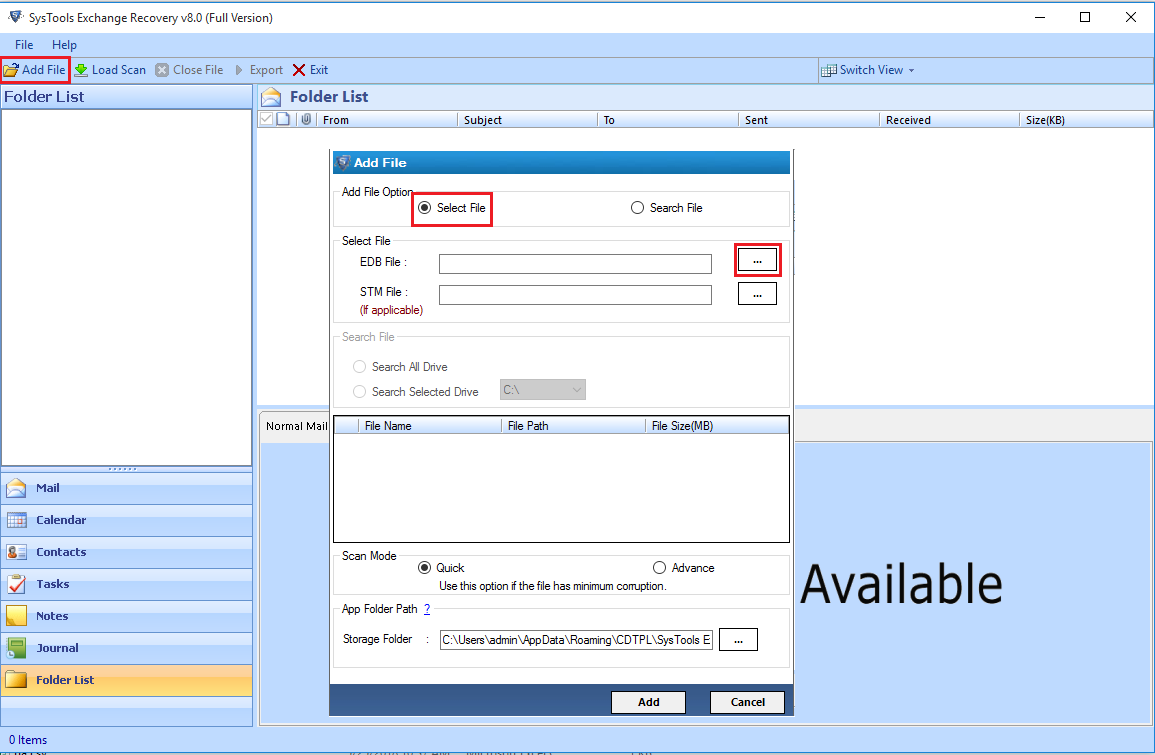 <li><b>Step 3:</b> Select <strong>Advance scanning</strong> if there is a high-level corruption, or to recover Exchange server database items. Choose Quick for minor corruption issues.</li> 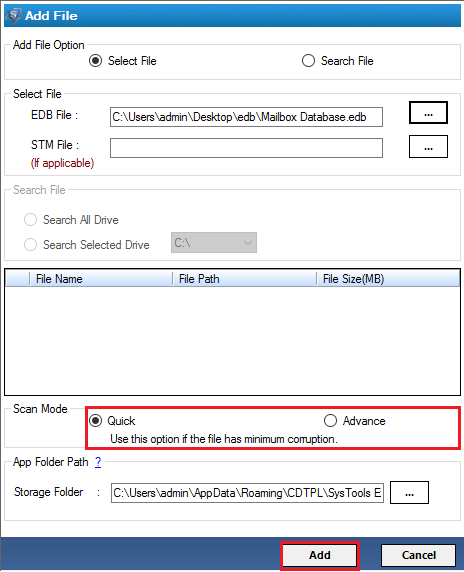 <li><b>Step 4:</b> All data will be available to you for the preview. Click on <strong>Export</strong> button.</li> 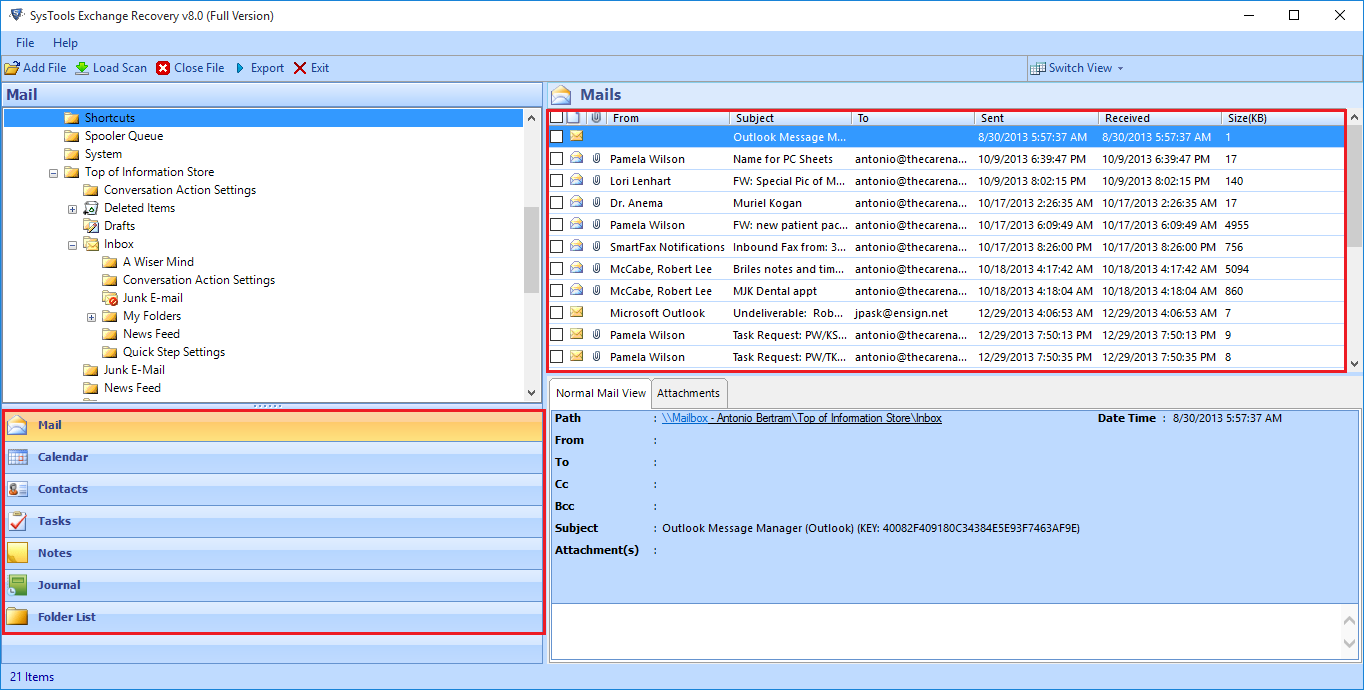 <li><b>Step 5:</b> Choose <strong>Live Exchange</strong> as the <strong>Export</strong> option. Click on <strong>Advanced Settings</strong>, add Exchange Server related information/credentials. Users can also enter the date range or categories if required.</li> 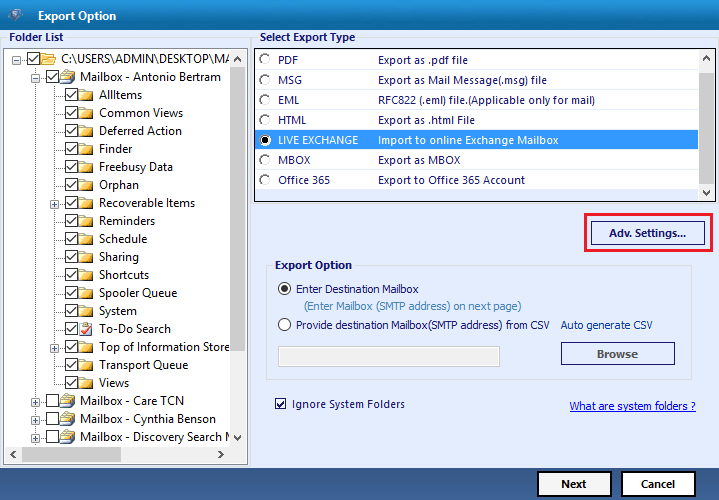 <li><b>Step 6:</b> <strong>Add destination mailbox</strong> info and wait till the validation is completed. Click on <strong>Export</strong> button to recover Exchange EDB data fast without any data loss.</li> </ul> <p>The above steps can easily resolve the issue. It can retrieve Exchange Server database items fast. You can export them into Live Exchange Server for further usage. Now you may be thinking, why you really wanted to get this software. It is simple. The tool comes with a safe and secure way to repair and recover Exchange EDB file. Continue reading to know more interesting facts.</p> <h3>Why Exchange Recovery for Fast Exchange Server Database Recovery</h3> <p>You may find various solution for Exchange Data loss issue. But here, we have explained the best way to recover deleted Exchange EDB file data. Though many applications claim to perform similar task, experts always recommend using SysTools Exchange EDB Recovery software. Here are the reasons why the users should choose the application:</p> <ol> <li>Complete and quick Exchange Server Database recovery.</li> <li>Support for all Exchange versions.</li> <li>Convert EDB data into PST, PDF, MSG, EML, MBOX, etc.</li> <li>Restore Exchange data in Office 365 and Live Exchange Server (all versions).</li> <li>Granular Exchange Recovery option available.</li> <li>Repair corrupted Exchange EDB files in bulk</li> <li>Advanced settings (Bates Number, Date stamp etc.) while saving the data in PDF.</li> <li>Recover all types of Exchange Server messages.</li> <li>Support for both EDB and STM files.</li> <li>Option to split PST file in user-defined size.</li> <li>Recover dismounted & Offline Exchange EDB files.</li> </ol> <h3>Is there Any Manual Solution Available?</h3> <p>If there are some small corruption issues, you can try the Eseutil commands. This is a manual approach as it involves no external software. But it is a difficult process and requires expertise and experience from the user’s end. Also, these commands are not capable of fixing severe corruption cases in Exchange Database.</p> <h3>Conclusion</h3> <p>This blog successfully depicted how to recover Exchange Server Database in a fast manner. If you want a quick recovery of your corrupted Exchange Data, you can trust this application suggested without any hesitation. But, if you do not want to spend any money and brave enough to take the risk of performing lengthy and complex manual method, we have mentioned that too. Now the final choice is completely up to the readers.</p> |
| json metadata | {"tags":["recover","exchange","server","database","edb"],"image":["https://cdn.steemitimages.com/DQmcs12jW5R1zxqT8uqb9D7BdK2GSeJ3TEyzfVcANYZPBZG/click_addfile.png","https://cdn.steemitimages.com/DQmTtCCyFY7Rei3dwPWkm6C6cS2TNJQNW8YbJU3FjvAQyBP/scan_mode.png","https://cdn.steemitimages.com/DQmaw9gB7MVrFsnj9vzRguidhSD5Ty7HVuEHCdh9G2fmzuc/mail.png","https://cdn.steemitimages.com/DQmfTghetVCyos5eEn4gWsK4119rfRAPyEVQfGtjFpNQuqG/advance_settings.png"],"links":["https://www.systoolsgroup.com/exchange-recovery.html"],"app":"steemit/0.1","format":"markdown"} |
| Transaction Info | Block #38397328/Trx f81c469fe4e29727f7d3ec42760a375ac7ad6f60 |
View Raw JSON Data
{
"trx_id": "f81c469fe4e29727f7d3ec42760a375ac7ad6f60",
"block": 38397328,
"trx_in_block": 13,
"op_in_trx": 0,
"virtual_op": 0,
"timestamp": "2019-11-22T12:26:12",
"op": [
"comment",
{
"parent_author": "",
"parent_permlink": "recover",
"author": "alphy123",
"permlink": "how-to-recover-exchange-server-database-items-fast",
"title": "How to Recover Exchange Server Database Items Fast?",
"body": "<p>Whenever we hear of Exchange Database corruption, it is quite normal for the MS Exchange users to be panic. The reason is simple, Microsoft Exchange database (EDB file) contains valuable emails and data from our organizations. So, whatever might be the cause, if the Exchange database gets corrupt, users start to search: how to recover Exchange Server database fast without data loss? </p>\n<p>If you are also searching for the remedy of the same problem, remember that every single minute is precious. The users must not waste any time. Recover Exchange Server Database fast to avoid further loss. And to do so, they can obviously take the help of this blog that will demonstrate quick methods for Exchange Server Database Item Recovery.</p>\n\n<h2>Reasons for Exchange Database Corruption</h2>\n<p>Before you recover the data from corrupted Exchange Server 2019 / 2016 / 2013 EDB file, you might be interested to know the causes of database corruption. </p>\n<ul>\n<li>Jet Engine Error</li>\n<li>Issues related to database mounting</li>\n<li>Database logical corruptions</li>\n<li>Disk failure</li>\n<li>Dirty Shutdown error</li>\n<li>Missing objects in database</li>\n<li>Server Failure</li>\n<li>Hardware or software issues</li>\n<li>Errors in User-end</li>\n</ul>\n\n<h2>Recover Exchange Server Database using Exchange Recovery Tool</h2>\n<p>As we have mentioned earlier, quick recovery of corrupted (or in cases lost) Exchange Server database becomes mandatory when you lose data. So, we should better get going with some efficient software like <a href=\"https://www.systoolsgroup.com/exchange-recovery.html\" target=\"_blank\"><strong>SysTools Exchange Recovery Tool</strong></a>. This application can easily restore all types of corrupted and deleted data of Exchange Server Database from the EDB file stored in your local system. In order to perform this EDB file data recovery with this fast tool, Download the software and follow the guideline mentioned here.</p>\n\n<ul>\n<li><b>Step 1: </b>Install and run<strong> Exchange Data Recovery software</strong></li>\n<li><b>Step 2:</b> Click on <strong>Add File</strong> button on the top-left corner. If you know the location of EDB file, enable <strong>Select File</strong>. Then click on <strong>… </strong>button beside the EDB file option and add the file. If you are unaware of the location, choose the <strong>Search File </strong>option and the tool will find out all the EDB files of your system. Then you can <strong>choose the EDB file </strong>you need to recover data from.</li>\n\n<li><b>Step 3:</b> Select <strong>Advance scanning</strong> if there is a high-level corruption, or to recover Exchange server database items. Choose Quick for minor corruption issues.</li>\n\n<li><b>Step 4:</b> All data will be available to you for the preview. Click on <strong>Export</strong> button.</li>\n\n<li><b>Step 5:</b> Choose <strong>Live Exchange</strong> as the <strong>Export</strong> option. Click on <strong>Advanced Settings</strong>, add Exchange Server related information/credentials. Users can also enter the date range or categories if required.</li>\n\n<li><b>Step 6:</b> <strong>Add destination mailbox</strong> info and wait till the validation is completed. Click on <strong>Export</strong> button to recover Exchange EDB data fast without any data loss.</li>\n</ul>\n\n<p>The above steps can easily resolve the issue. It can retrieve Exchange Server database items fast. You can export them into Live Exchange Server for further usage. Now you may be thinking, why you really wanted to get this software. It is simple. The tool comes with a safe and secure way to repair and recover Exchange EDB file. Continue reading to know more interesting facts.</p>\n\n<h3>Why Exchange Recovery for Fast Exchange Server Database Recovery</h3>\n<p>You may find various solution for Exchange Data loss issue. But here, we have explained the best way to recover deleted Exchange EDB file data. Though many applications claim to perform similar task, experts always recommend using SysTools Exchange EDB Recovery software. Here are the reasons why the users should choose the application:</p>\n<ol>\n<li>Complete and quick Exchange Server Database recovery.</li>\n<li>Support for all Exchange versions.</li>\n<li>Convert EDB data into PST, PDF, MSG, EML, MBOX, etc.</li>\n<li>Restore Exchange data in Office 365 and Live Exchange Server (all versions).</li>\n<li>Granular Exchange Recovery option available.</li>\n<li>Repair corrupted Exchange EDB files in bulk</li>\n<li>Advanced settings (Bates Number, Date stamp etc.) while saving the data in PDF.</li>\n<li>Recover all types of Exchange Server messages.</li>\n<li>Support for both EDB and STM files.</li>\n<li>Option to split PST file in user-defined size.</li>\n<li>Recover dismounted & Offline Exchange EDB files.</li>\n</ol>\n\n<h3>Is there Any Manual Solution Available?</h3>\n<p>If there are some small corruption issues, you can try the Eseutil commands. This is a manual approach as it involves no external software. But it is a difficult process and requires expertise and experience from the user’s end. Also, these commands are not capable of fixing severe corruption cases in Exchange Database.</p>\n \n<h3>Conclusion</h3>\n<p>This blog successfully depicted how to recover Exchange Server Database in a fast manner. If you want a quick recovery of your corrupted Exchange Data, you can trust this application suggested without any hesitation. But, if you do not want to spend any money and brave enough to take the risk of performing lengthy and complex manual method, we have mentioned that too. Now the final choice is completely up to the readers.</p>",
"json_metadata": "{\"tags\":[\"recover\",\"exchange\",\"server\",\"database\",\"edb\"],\"image\":[\"https://cdn.steemitimages.com/DQmcs12jW5R1zxqT8uqb9D7BdK2GSeJ3TEyzfVcANYZPBZG/click_addfile.png\",\"https://cdn.steemitimages.com/DQmTtCCyFY7Rei3dwPWkm6C6cS2TNJQNW8YbJU3FjvAQyBP/scan_mode.png\",\"https://cdn.steemitimages.com/DQmaw9gB7MVrFsnj9vzRguidhSD5Ty7HVuEHCdh9G2fmzuc/mail.png\",\"https://cdn.steemitimages.com/DQmfTghetVCyos5eEn4gWsK4119rfRAPyEVQfGtjFpNQuqG/advance_settings.png\"],\"links\":[\"https://www.systoolsgroup.com/exchange-recovery.html\"],\"app\":\"steemit/0.1\",\"format\":\"markdown\"}"
}
]
}alphy123followed @roberallardice2019/11/22 10:15:24
alphy123followed @roberallardice
2019/11/22 10:15:24
| required auths | [] |
| required posting auths | ["alphy123"] |
| id | follow |
| json | ["follow",{"follower":"alphy123","following":"roberallardice","what":["blog"]}] |
| Transaction Info | Block #38394716/Trx edebb9493dcb3d2d24e821caec745c4fa29aec87 |
View Raw JSON Data
{
  "trx_id": "edebb9493dcb3d2d24e821caec745c4fa29aec87",
  "block": 38394716,
  "trx_in_block": 15,
  "op_in_trx": 0,
  "virtual_op": 0,
  "timestamp": "2019-11-22T10:15:24",
  "op": [
    "custom_json",
    {
      "required_auths": [],
      "required_posting_auths": [
        "alphy123"
      ],
      "id": "follow",
      "json": "[\"follow\",{\"follower\":\"alphy123\",\"following\":\"roberallardice\",\"what\":[\"blog\"]}]"
    }
  ]
}alphy123updated their account properties2019/11/22 10:13:06
alphy123updated their account properties
2019/11/22 10:13:06
| account | alphy123 |
| memo key | STM7wQ2Wt98e3oTRP6xgMpsqBgGTYewxpbHLuxDJPRw5F9J4in2Rm |
| json metadata | {"profile":{"name":"Alphy","about":"A versatile writer with the vast knowledge of technology helps to reduce the gap between a user and technology. Provides easy and reliable ways to resolve multi","location":"New Delhi","profile_image":"https://cdn.steemitimages.com/DQmRPi1HesrEbys89ViokBNpFfYhYUQDhkSfY1HPukPtB8S/images%20(2).jpg"}} |
| Transaction Info | Block #38394670/Trx af6c64a0d08c9e9a251a934bb8cf5ca831aa635b |
View Raw JSON Data
{
  "trx_id": "af6c64a0d08c9e9a251a934bb8cf5ca831aa635b",
  "block": 38394670,
  "trx_in_block": 4,
  "op_in_trx": 0,
  "virtual_op": 0,
  "timestamp": "2019-11-22T10:13:06",
  "op": [
    "account_update",
    {
      "account": "alphy123",
      "memo_key": "STM7wQ2Wt98e3oTRP6xgMpsqBgGTYewxpbHLuxDJPRw5F9J4in2Rm",
      "json_metadata": "{\"profile\":{\"name\":\"Alphy\",\"about\":\"A versatile writer with the vast knowledge of technology helps to reduce the gap between a user and technology. Provides easy and reliable ways to resolve multi\",\"location\":\"New Delhi\",\"profile_image\":\"https://cdn.steemitimages.com/DQmRPi1HesrEbys89ViokBNpFfYhYUQDhkSfY1HPukPtB8S/images%20(2).jpg\"}}"
    }
  ]
}alphy123updated their account properties2019/11/22 10:00:48
alphy123updated their account properties
2019/11/22 10:00:48
| account | alphy123 |
| owner | {"weight_threshold":1,"account_auths":[],"key_auths":[["STM6kGYmFraqqxcdjQ1sGHpK6VYtnsAcE98XSKpHgWxAu9U5EPcyc",1]]} |
| active | {"weight_threshold":1,"account_auths":[],"key_auths":[["STM73NS14gsBpyN12gjPJLXDhaMy9jDQryQwXpxkuLGsaGPmkeQFD",1]]} |
| posting | {"weight_threshold":1,"account_auths":[],"key_auths":[["STM7MFQBxG9jUjPXFo16d6PRSL4HkGvhhe7hDyPGZz8arLzvXxpjW",1]]} |
| memo key | STM7wQ2Wt98e3oTRP6xgMpsqBgGTYewxpbHLuxDJPRw5F9J4in2Rm |
| json metadata | {} |
| Transaction Info | Block #38394424/Trx 39662ea0fda4a39b51efd52ce29b85846370a61f |
View Raw JSON Data
{
  "trx_id": "39662ea0fda4a39b51efd52ce29b85846370a61f",
  "block": 38394424,
  "trx_in_block": 22,
  "op_in_trx": 0,
  "virtual_op": 0,
  "timestamp": "2019-11-22T10:00:48",
  "op": [
    "account_update",
    {
      "account": "alphy123",
      "owner": {
        "weight_threshold": 1,
        "account_auths": [],
        "key_auths": [
          [
            "STM6kGYmFraqqxcdjQ1sGHpK6VYtnsAcE98XSKpHgWxAu9U5EPcyc",
            1
          ]
        ]
      },
      "active": {
        "weight_threshold": 1,
        "account_auths": [],
        "key_auths": [
          [
            "STM73NS14gsBpyN12gjPJLXDhaMy9jDQryQwXpxkuLGsaGPmkeQFD",
            1
          ]
        ]
      },
      "posting": {
        "weight_threshold": 1,
        "account_auths": [],
        "key_auths": [
          [
            "STM7MFQBxG9jUjPXFo16d6PRSL4HkGvhhe7hDyPGZz8arLzvXxpjW",
            1
          ]
        ]
      },
      "memo_key": "STM7wQ2Wt98e3oTRP6xgMpsqBgGTYewxpbHLuxDJPRw5F9J4in2Rm",
      "json_metadata": "{}"
    }
  ]
}2019/11/07 12:48:45
2019/11/07 12:48:45
| delegator | steem |
| delegatee | alphy123 |
| vesting shares | 9664.474837 VESTS |
| Transaction Info | Block #37966615/Trx 4b803febd5f03fcaedb5ea05272e26bed1d7edb0 |
View Raw JSON Data
{
  "trx_id": "4b803febd5f03fcaedb5ea05272e26bed1d7edb0",
  "block": 37966615,
  "trx_in_block": 2,
  "op_in_trx": 0,
  "virtual_op": 0,
  "timestamp": "2019-11-07T12:48:45",
  "op": [
    "delegate_vesting_shares",
    {
      "delegator": "steem",
      "delegatee": "alphy123",
      "vesting_shares": "9664.474837 VESTS"
    }
  ]
}shovivsoftwarereplied to @alphy123 / py67ai2019/09/21 07:25:36
shovivsoftwarereplied to @alphy123 / py67ai
2019/09/21 07:25:36
| parent author | alphy123 |
| parent permlink | outlook-failed-to-launch-in-safe-mode-do-you-want-to-start-repair-pst |
| author | shovivsoftware |
| permlink | py67ai |
| title | |
| body | Bitdataconversion Outlook <a href="https://www.bitdataconversion.com/outlook-pst-repair.html">PST repair tool</a> is an effective and reliable solution for repairing Outlook PST files, using this tool you can quickly recover deeply corrupted and damaged PST files while preserving the authenticity of the database. <b>Following are the highlighted features of the tool</b> 1. Repair damaged PST files smoothly. 2. You can save recovered PST files into multiple formats such as MSG, EML, HTML, RTF, etc. 3. PST Splitter helps to split over-sized PST file into smaller PST files. 4. The tool allows you to repair encrypted and password protected PST files 5. Good technical support and the free trial version which helps to ensure efficiency and effectiveness of the tool. For more info visit here: <a href="https://www.bitdataconversion.com/outlook-pst-repair.html">Outlook PST Repair</a> |
| json metadata | {"tags":["fix"],"links":["https://www.bitdataconversion.com/outlook-pst-repair.html"],"app":"steemit/0.1"} |
| Transaction Info | Block #36609304/Trx e71fee72ede7c986d99210f84ce6949e3c0bb8c5 |
View Raw JSON Data
{
  "trx_id": "e71fee72ede7c986d99210f84ce6949e3c0bb8c5",
  "block": 36609304,
  "trx_in_block": 26,
  "op_in_trx": 0,
  "virtual_op": 0,
  "timestamp": "2019-09-21T07:25:36",
  "op": [
    "comment",
    {
      "parent_author": "alphy123",
      "parent_permlink": "outlook-failed-to-launch-in-safe-mode-do-you-want-to-start-repair-pst",
      "author": "shovivsoftware",
      "permlink": "py67ai",
      "title": "",
      "body": "Bitdataconversion Outlook <a href=\"https://www.bitdataconversion.com/outlook-pst-repair.html\">PST repair tool</a> is an effective and reliable solution for repairing  Outlook PST files, using this tool you can quickly recover deeply corrupted and damaged PST files while preserving the authenticity of the database. \n\n<b>Following are the highlighted features of the tool</b>\n\n1. Repair damaged PST files smoothly.\n2. You can save recovered PST files into multiple formats such as                               MSG, EML, HTML, RTF, etc.\n3. PST Splitter helps to split over-sized PST file into smaller PST files.\n4. The tool allows you to repair encrypted and password protected PST files\n5. Good technical support and the free trial version which helps to ensure efficiency and effectiveness of the tool.\n\nFor more info visit here: <a href=\"https://www.bitdataconversion.com/outlook-pst-repair.html\">Outlook PST Repair</a>",
      "json_metadata": "{\"tags\":[\"fix\"],\"links\":[\"https://www.bitdataconversion.com/outlook-pst-repair.html\"],\"app\":\"steemit/0.1\"}"
    }
  ]
}2019/03/03 06:09:30
2019/03/03 06:09:30
| parent author | alphy123 |
| parent permlink | how-to-change-pdf-security-settings-to-allow-signing-copying-editing |
| author | steemitboard |
| permlink | steemitboard-notify-alphy123-20190303t060929000z |
| title | |
| body | Congratulations @alphy123! You received a personal award! <table><tr><td>https://steemitimages.com/70x70/http://steemitboard.com/@alphy123/birthday1.png</td><td>Happy Birthday! - You are on the Steem blockchain for 1 year!</td></tr></table> <sub>_[Click here to view your Board](https://steemitboard.com/@alphy123)_</sub> **Do not miss the last post from @steemitboard:** <table><tr><td><a href="https://steemit.com/carnival/@steemitboard/carnival-2019"><img src="https://steemitimages.com/64x128/http://i.cubeupload.com/rltzHT.png"></a></td><td><a href="https://steemit.com/carnival/@steemitboard/carnival-2019">Carnival Challenge - Collect badge and win 5 STEEM</a></td></tr></table> ###### [Vote for @Steemitboard as a witness](https://v2.steemconnect.com/sign/account-witness-vote?witness=steemitboard&approve=1) and get one more award and increased upvotes! |
| json metadata | {"image":["https://steemitboard.com/img/notify.png"]} |
| Transaction Info | Block #30821812/Trx 25bd629254f3f8788f9cfb48aaa58e33d2f4d1f8 |
View Raw JSON Data
{
  "trx_id": "25bd629254f3f8788f9cfb48aaa58e33d2f4d1f8",
  "block": 30821812,
  "trx_in_block": 11,
  "op_in_trx": 0,
  "virtual_op": 0,
  "timestamp": "2019-03-03T06:09:30",
  "op": [
    "comment",
    {
      "parent_author": "alphy123",
      "parent_permlink": "how-to-change-pdf-security-settings-to-allow-signing-copying-editing",
      "author": "steemitboard",
      "permlink": "steemitboard-notify-alphy123-20190303t060929000z",
      "title": "",
      "body": "Congratulations @alphy123! You received a personal award!\n\n<table><tr><td>https://steemitimages.com/70x70/http://steemitboard.com/@alphy123/birthday1.png</td><td>Happy Birthday! - You are on the Steem blockchain for 1 year!</td></tr></table>\n\n<sub>_[Click here to view your Board](https://steemitboard.com/@alphy123)_</sub>\n\n\n**Do not miss the last post from @steemitboard:**\n<table><tr><td><a href=\"https://steemit.com/carnival/@steemitboard/carnival-2019\"><img src=\"https://steemitimages.com/64x128/http://i.cubeupload.com/rltzHT.png\"></a></td><td><a href=\"https://steemit.com/carnival/@steemitboard/carnival-2019\">Carnival Challenge - Collect badge and win 5 STEEM</a></td></tr></table>\n\n###### [Vote for @Steemitboard as a witness](https://v2.steemconnect.com/sign/account-witness-vote?witness=steemitboard&approve=1) and get one more award and increased upvotes!",
      "json_metadata": "{\"image\":[\"https://steemitboard.com/img/notify.png\"]}"
    }
  ]
}2018/12/03 09:25:21
2018/12/03 09:25:21
| delegator | steem |
| delegatee | alphy123 |
| vesting shares | 9861.869589 VESTS |
| Transaction Info | Block #28235774/Trx d3eec820ddb4ffbede13313c3e646079f7f93047 |
View Raw JSON Data
{
  "trx_id": "d3eec820ddb4ffbede13313c3e646079f7f93047",
  "block": 28235774,
  "trx_in_block": 25,
  "op_in_trx": 0,
  "virtual_op": 0,
  "timestamp": "2018-12-03T09:25:21",
  "op": [
    "delegate_vesting_shares",
    {
      "delegator": "steem",
      "delegatee": "alphy123",
      "vesting_shares": "9861.869589 VESTS"
    }
  ]
}2018/11/26 16:32:45
2018/11/26 16:32:45
| delegator | steem |
| delegatee | alphy123 |
| vesting shares | 30005.481671 VESTS |
| Transaction Info | Block #28042796/Trx d5acecce306ac5a392d9c53f2a15df0a8315681d |
View Raw JSON Data
{
  "trx_id": "d5acecce306ac5a392d9c53f2a15df0a8315681d",
  "block": 28042796,
  "trx_in_block": 15,
  "op_in_trx": 0,
  "virtual_op": 0,
  "timestamp": "2018-11-26T16:32:45",
  "op": [
    "delegate_vesting_shares",
    {
      "delegator": "steem",
      "delegatee": "alphy123",
      "vesting_shares": "30005.481671 VESTS"
    }
  ]
}alphy123published a new post: how-to-change-pdf-security-settings-to-allow-signing-copying-editing2018/09/03 07:58:09
alphy123published a new post: how-to-change-pdf-security-settings-to-allow-signing-copying-editing
2018/09/03 07:58:09
| parent author | |
| parent permlink | modify |
| author | alphy123 |
| permlink | how-to-change-pdf-security-settings-to-allow-signing-copying-editing |
| title | How to Change PDF Security Settings to Allow Signing/Copying/Editing |
| body | @@ -581,28 +581,24 @@ ng, etc. -%3Cbr%3E%0A %3C/p%3E%0A%3C -p +h1 %3E%3Cstrong @@ -657,25 +657,26 @@ F%3C/strong%3E%3C/ -p +h1 %3E%0A%3Cp%3E%3Cbr%3E%0ABa @@ -1461,17 +1461,16 @@ is shown - + %3Cbr%3E%0A%3Cst @@ -1683,25 +1683,26 @@ trong%3E%3C/p%3E%0A%3C -p +h1 %3E%3Cstrong%3EKno @@ -1747,17 +1747,21 @@ Settings - +%3Cbr%3E%0A %3C/strong @@ -1762,23 +1762,19 @@ strong%3E%3C -br%3E%0A%3C/p +/h1 %3E%0A%3Cp%3EIn @@ -2526,17 +2526,16 @@ password - + %3Cbr%3E%0A%3Cst @@ -2880,20 +2880,16 @@ ngs. -%3Cbr%3E%0A %3C/p%3E%0A%3C -p +h2 %3E%3Cst @@ -2964,17 +2964,18 @@ trong%3E%3C/ -p +h2 %3E%0A%3Cp%3EIn @@ -3748,17 +3748,16 @@ %3E button - %3Cbr%3E%0A%3Cst @@ -3844,25 +3844,26 @@ column%3C/p%3E%0A%3C -p +h2 %3E%3Cstrong%3ECon @@ -3875,24 +3875,33 @@ on%3C/strong%3E%3C +/h2%3E%0A%3Cp%3E%3C br%3E%0APDF docu @@ -4496,15 +4496,13 @@ log. - %3Cbr%3E%0A - &nbs |
| json metadata | {"tags":["modify","pdf","security","settings"],"links":["https://www.systoolsgroup.com/pdf-unlocker.html"],"app":"steemit/0.1","format":"html"} |
| Transaction Info | Block #25630609/Trx 42b333db025e2d9bc5618eb9e4feca26cadac542 |
View Raw JSON Data
{
  "trx_id": "42b333db025e2d9bc5618eb9e4feca26cadac542",
  "block": 25630609,
  "trx_in_block": 12,
  "op_in_trx": 0,
  "virtual_op": 0,
  "timestamp": "2018-09-03T07:58:09",
  "op": [
    "comment",
    {
      "parent_author": "",
      "parent_permlink": "modify",
      "author": "alphy123",
      "permlink": "how-to-change-pdf-security-settings-to-allow-signing-copying-editing",
      "title": "How to Change PDF Security Settings to Allow Signing/Copying/Editing",
      "body": "@@ -581,28 +581,24 @@\n ng, etc.\n-%3Cbr%3E%0A\n %3C/p%3E%0A%3C\n-p\n+h1\n %3E%3Cstrong\n@@ -657,25 +657,26 @@\n F%3C/strong%3E%3C/\n-p\n+h1\n %3E%0A%3Cp%3E%3Cbr%3E%0ABa\n@@ -1461,17 +1461,16 @@\n is shown\n- \n \n+\n %3Cbr%3E%0A%3Cst\n@@ -1683,25 +1683,26 @@\n trong%3E%3C/p%3E%0A%3C\n-p\n+h1\n %3E%3Cstrong%3EKno\n@@ -1747,17 +1747,21 @@\n Settings\n- \n+%3Cbr%3E%0A\n %3C/strong\n@@ -1762,23 +1762,19 @@\n strong%3E%3C\n-br%3E%0A%3C/p\n+/h1\n %3E%0A%3Cp%3EIn \n@@ -2526,17 +2526,16 @@\n password\n- \n \n+\n %3Cbr%3E%0A%3Cst\n@@ -2880,20 +2880,16 @@\n ngs.\n-%3Cbr%3E%0A\n %3C/p%3E%0A%3C\n-p\n+h2\n %3E%3Cst\n@@ -2964,17 +2964,18 @@\n trong%3E%3C/\n-p\n+h2\n %3E%0A%3Cp%3EIn \n@@ -3748,17 +3748,16 @@\n %3E button\n- \n %3Cbr%3E%0A%3Cst\n@@ -3844,25 +3844,26 @@\n column%3C/p%3E%0A%3C\n-p\n+h2\n %3E%3Cstrong%3ECon\n@@ -3875,24 +3875,33 @@\n on%3C/strong%3E%3C\n+/h2%3E%0A%3Cp%3E%3C\n br%3E%0APDF docu\n@@ -4496,15 +4496,13 @@\n log.\n- \n %3Cbr%3E%0A\n- \n &nbs\n",
      "json_metadata": "{\"tags\":[\"modify\",\"pdf\",\"security\",\"settings\"],\"links\":[\"https://www.systoolsgroup.com/pdf-unlocker.html\"],\"app\":\"steemit/0.1\",\"format\":\"html\"}"
    }
  ]
}2018/09/03 07:58:09
2018/09/03 07:58:09
| voter | hackerzizon |
| author | alphy123 |
| permlink | how-to-change-pdf-security-settings-to-allow-signing-copying-editing |
| weight | 100 (1.00%) |
| Transaction Info | Block #25630609/Trx a2ce07e7d7d755ffecc451bf220cb586fe59a1ec |
View Raw JSON Data
{
  "trx_id": "a2ce07e7d7d755ffecc451bf220cb586fe59a1ec",
  "block": 25630609,
  "trx_in_block": 6,
  "op_in_trx": 0,
  "virtual_op": 0,
  "timestamp": "2018-09-03T07:58:09",
  "op": [
    "vote",
    {
      "voter": "hackerzizon",
      "author": "alphy123",
      "permlink": "how-to-change-pdf-security-settings-to-allow-signing-copying-editing",
      "weight": 100
    }
  ]
}alphy123published a new post: how-to-change-pdf-security-settings-to-allow-signing-copying-editing2018/09/03 07:56:45
alphy123published a new post: how-to-change-pdf-security-settings-to-allow-signing-copying-editing
2018/09/03 07:56:45
| parent author | |
| parent permlink | modify |
| author | alphy123 |
| permlink | how-to-change-pdf-security-settings-to-allow-signing-copying-editing |
| title | How to Change PDF Security Settings to Allow Signing/Copying/Editing |
| body | <html> <p> PDF files are mostly used for many business purposes because of their broad functionality i.e. portability & compatibility. These files have universal accessibility which makes them ideal file format for sharing the information with others on various platforms. But, sometimes due to security applied to these documents people are unable to access PDF documents completely. Therefore, for the complete accessibility of these files here we have discussed different ways by which a user can change PDF security settings to allow signing, printing, editing, copying, etc.<br> </p> <p><strong>How to Check What Type of Security is Present in PDF</strong></p> <p><br> Basically, there are two types of security available in PDF document. One is password and the other one is restrictions. With password security file is restricted to open until and unless the password is applied to it. On the other hand, with restrictions a file is protected to copy, print, edit, extract, etc. Now, to check the type of security available in the PDF document a user can follow these steps:</p> <p><strong>1- Open the PDF</strong> file in Adobe Acrobat Reader DC<br> <strong>2-</strong> After that,<strong> hit the Padlock icon</strong> & <strong>click Permission Details</strong> option<br> <strong>3-</strong> From the Document Properties menu <strong>click Security</strong><br> <strong>4-</strong> Preview of <strong>Document Restriction Summary</strong> is shown <br> <strong>5-</strong> <strong>Check the restrictions</strong> present in the PDF file<br> <strong>6-</strong> Also, to check whether the file has permission password on not by<strong> clicking on Show Details</strong></p> <p><strong>Know Some Methods to Change PDF Security Settings </strong><br> </p> <p>In order to modify security settings of PDF file follows these simple steps:</p> <p><br> <strong>1- </strong>Install and<strong> Run Adobe Acrobat</strong> on your system<br> <strong>2-</strong> After that choose <strong>"File"</strong> then<strong> "Open" </strong>to browse PDF<br> <strong>3- Click "Document"</strong> option from the toolbar, then "Security" from the drop-down menu. This opens a dialog box detailing the current security and permissions settings for your PDF.<br> <strong>4-</strong> After this, Select the <strong>"Edit" </strong>button to open the<strong> "Change Security"</strong> dialog box.<br> <strong>5-</strong> If you want the document to be protected with a password, check the appropriate box and enter the desired password <br> <strong>6.</strong> To add security restrictions click on<strong> "Permissions"</strong> heading.<br> <strong>7.</strong> Here, we can enable or disable options such as copying, printing, editing, extraction of text or images and form filling.<br> <strong>8.</strong> Lastly, click <strong>"OK" </strong>to save your PDF's new security settings.<br> </p> <p><strong>Completely Change PDF Security Settings in a Just Few Clicks</strong></p> <p>In order to remove or modify security settings of PDF completely,<a href="https://www.systoolsgroup.com/pdf-unlocker.html"> <strong>SysTools PDF Unlocker</strong></a> tool can be used it one of the most simple and reliable application to remove PDF security permanently. The tool provides the feature to view all the restrictions present in the Adobe document. Moreover, with the full version of the software users can uprotected PDF document in batch. Now, to perform PDF security removal task follow these steps:</p> <p><strong>1-</strong> Download and run the tool to remove PDF security<br> <strong>2-</strong> <strong>Browse PDF</strong> file and view permissions present in PDF<br> <strong>3- </strong>Add destination location and <strong>click Unlock PDF</strong> button <br> <strong>4- </strong>Lastly, <strong>view updated permissions</strong> in the After column</p> <p><strong>Conclusion</strong><br> PDF documents are secure as they have passwords which protect them because these Adobe files can be protected with restrictions or passwords. But, at times this security needs to be breached and for that, a third party application is required. Here, in this blog, we have described a professional utility which can easily remove PDF security. Moreover, if users want to change PDF security settings then, the appropriate solution is also provided here. Moreover, if any user wants to view the type of security present in the Adobe document then they can simply follow the steps provided in this blog. <br> <br> </p> </html> |
| json metadata | {"tags":["modify","pdf","security","settings"],"links":["https://www.systoolsgroup.com/pdf-unlocker.html"],"app":"steemit/0.1","format":"html"} |
| Transaction Info | Block #25630581/Trx 0e9f05882614dd01e41623cdd82a3d07089e3908 |
View Raw JSON Data
{
"trx_id": "0e9f05882614dd01e41623cdd82a3d07089e3908",
"block": 25630581,
"trx_in_block": 37,
"op_in_trx": 0,
"virtual_op": 0,
"timestamp": "2018-09-03T07:56:45",
"op": [
"comment",
{
"parent_author": "",
"parent_permlink": "modify",
"author": "alphy123",
"permlink": "how-to-change-pdf-security-settings-to-allow-signing-copying-editing",
"title": "How to Change PDF Security Settings to Allow Signing/Copying/Editing",
"body": "<html>\n<p> PDF files are mostly used for many business purposes because of their broad functionality i.e. portability & compatibility. These files have universal accessibility which makes them ideal file format for sharing the information with others on various platforms. But, sometimes due to security applied to these documents people are unable to access PDF documents completely. Therefore, for the complete accessibility of these files here we have discussed different ways by which a user can change PDF security settings to allow signing, printing, editing, copying, etc.<br>\n</p>\n<p><strong>How to Check What Type of Security is Present in PDF</strong></p>\n<p><br>\nBasically, there are two types of security available in PDF document. One is password and the other one is restrictions. With password security file is restricted to open until and unless the password is applied to it. On the other hand, with restrictions a file is protected to copy, print, edit, extract, etc. Now, to check the type of security available in the PDF document a user can follow these steps:</p>\n<p><strong>1- Open the PDF</strong> file in Adobe Acrobat Reader DC<br>\n<strong>2-</strong> After that,<strong> hit the Padlock icon</strong> & <strong>click Permission Details</strong> option<br>\n<strong>3-</strong> From the Document Properties menu <strong>click Security</strong><br>\n<strong>4-</strong> Preview of <strong>Document Restriction Summary</strong> is shown <br>\n<strong>5-</strong> <strong>Check the restrictions</strong> present in the PDF file<br>\n<strong>6-</strong> Also, to check whether the file has permission password on not by<strong> clicking on Show Details</strong></p>\n<p><strong>Know Some Methods to Change PDF Security Settings </strong><br>\n</p>\n<p>In order to modify security settings of PDF file follows these simple steps:</p>\n<p><br>\n<strong>1- </strong>Install and<strong> Run Adobe Acrobat</strong> on your system<br>\n<strong>2-</strong> After that choose <strong>\"File\"</strong> then<strong> \"Open\" </strong>to browse PDF<br>\n<strong>3- Click \"Document\"</strong> option from the toolbar, then \"Security\" from the drop-down menu. This opens a dialog box detailing the current security and permissions settings for your PDF.<br>\n<strong>4-</strong> After this, Select the <strong>\"Edit\" </strong>button to open the<strong> \"Change Security\"</strong> dialog box.<br>\n<strong>5-</strong> If you want the document to be protected with a password, check the appropriate box and enter the desired password <br>\n<strong>6.</strong> To add security restrictions click on<strong> \"Permissions\"</strong> heading.<br>\n<strong>7.</strong> Here, we can enable or disable options such as copying, printing, editing, extraction of text or images and form filling.<br>\n<strong>8.</strong> Lastly, click <strong>\"OK\" </strong>to save your PDF's new security settings.<br>\n</p>\n<p><strong>Completely Change PDF Security Settings in a Just Few Clicks</strong></p>\n<p>In order to remove or modify security settings of PDF completely,<a href=\"https://www.systoolsgroup.com/pdf-unlocker.html\"> <strong>SysTools PDF Unlocker</strong></a> tool can be used it one of the most simple and reliable application to remove PDF security permanently. The tool provides the feature to view all the restrictions present in the Adobe document. Moreover, with the full version of the software users can uprotected PDF document in batch. Now, to perform PDF security removal task follow these steps:</p>\n<p><strong>1-</strong> Download and run the tool to remove PDF security<br>\n<strong>2-</strong> <strong>Browse PDF</strong> file and view permissions present in PDF<br>\n<strong>3- </strong>Add destination location and <strong>click Unlock PDF</strong> button <br>\n<strong>4- </strong>Lastly, <strong>view updated permissions</strong> in the After column</p>\n<p><strong>Conclusion</strong><br>\nPDF documents are secure as they have passwords which protect them because these Adobe files can be protected with restrictions or passwords. But, at times this security needs to be breached and for that, a third party application is required. Here, in this blog, we have described a professional utility which can easily remove PDF security. Moreover, if users want to change PDF security settings then, the appropriate solution is also provided here. Moreover, if any user wants to view the type of security present in the Adobe document then they can simply follow the steps provided in this blog. <br>\n <br>\n</p>\n</html>",
"json_metadata": "{\"tags\":[\"modify\",\"pdf\",\"security\",\"settings\"],\"links\":[\"https://www.systoolsgroup.com/pdf-unlocker.html\"],\"app\":\"steemit/0.1\",\"format\":\"html\"}"
}
]
}ubgupvoted (1.00%) @alphy123 / outlook-pst-recovery-software-repair-corrupted-outlook-files2018/08/04 10:56:06
ubgupvoted (1.00%) @alphy123 / outlook-pst-recovery-software-repair-corrupted-outlook-files
2018/08/04 10:56:06
| voter | ubg |
| author | alphy123 |
| permlink | outlook-pst-recovery-software-repair-corrupted-outlook-files |
| weight | 100 (1.00%) |
| Transaction Info | Block #24770547/Trx 4e2b574243723480462303e629e5ea4e5e74c2f2 |
View Raw JSON Data
{
  "trx_id": "4e2b574243723480462303e629e5ea4e5e74c2f2",
  "block": 24770547,
  "trx_in_block": 35,
  "op_in_trx": 0,
  "virtual_op": 0,
  "timestamp": "2018-08-04T10:56:06",
  "op": [
    "vote",
    {
      "voter": "ubg",
      "author": "alphy123",
      "permlink": "outlook-pst-recovery-software-repair-corrupted-outlook-files",
      "weight": 100
    }
  ]
}alphy123published a new post: outlook-pst-recovery-software-repair-corrupted-outlook-files2018/08/03 12:21:30
alphy123published a new post: outlook-pst-recovery-software-repair-corrupted-outlook-files
2018/08/03 12:21:30
| parent author | |
| parent permlink | fix |
| author | alphy123 |
| permlink | outlook-pst-recovery-software-repair-corrupted-outlook-files |
| title | Outlook PST Recovery Software - Repair Corrupted Outlook Files |
| body | <p>Outlook Recovery is one of the professional software introduced in market keeping the need of Outlook user in mind. It is introduced with multiple functionalities so that the user can easily recover their corrupt Outlook data file .pst in a most precise way without affecting the original data integrity. Here I am going to discuss a list of Outlook recovery features so that you can get a clear picture of the working of Outlook <strong><a href="http://www.outlook-recovery.msoutlooktools.com/" target="_blank">PST Repair Software</a></strong> to recover PST file and its deleted data.</p> <h2>Key Features of Outlook PST Recovery Software</h2> <br /> <br /> </strong><strong>Dual Recovery Modes: </strong></p> <p>Outlook Recovery Software is integrated with dual recovery modes Quick scan and Advance scan to <a href="https://steemit.com/outlook/@alphy123/errors-have-been-detected-in-pst-outlook-2010-solution-for-pst-fix" target="-blank">recover a corrupt PST files</a>.</p> <ul> <li><strong>Quick scan:</strong> If the corruption level is low than use a quick scanning mode as it take less time to scan. </li> </ul> <ul> <li><strong>Advance scan:</strong> It the corruption level is high Quick scan get fails and at that instant, you need to use an Advance scanning mode as it deeply scans the data. </li> </ul> <p><strong>Delete Outlook Item Recovery:</strong> </p> <p>Deleted item of Outlook pst files can be easily recovered like emails, contacts, tasks, calendars, and notes etc. using Advance scanning mode.<br /> <strong></strong></p> <p><strong>Save Recovered PST file:</strong> </p> <p> After recovering the damaged item of Outlook pst files it allows you to restore them in three different modes like PST, MSG, and EML. So that the user can move their data easily into different email client platform. </p> <p><strong> Export selective files or folders:</strong> This feature of Outlook recovery software is really good as it saves you time, by allowing you to export a selective files, folders or items through an Outlook database. </p> <p><strong>Apply mail filter: </strong>Whenever you export file in PST, EML or MSG file format software it enables a feature of mail filter. Mail filter option basically helps in exporting or recovering the database of a particular duration (date range). </p> <p><strong>Split PST file: </strong>This option helps you in splitting the large PST files into a smaller one. By which you can protect the database from further corruption or manage it in an effective manner. </p> <p><strong>Naming Convention:</strong> This feature gets active when you export PST file data in an MSG or EML file format. To manage a data in a much effective manner it provides an eight different option like manage data according to subject, date and time. </p> <p><strong>Provide CSV Report: </strong>Outlook recovery software provides a CSV report of the whole process. You can save it to the desired location so that you don’t get the problem in founding the database. </p> <p><strong>Easy Graphical Interface:</strong> Outlook PST recovery software is easy to operate as it is integrated with an advanced graphical user interface. </p> <p><strong>Support Outlook & Windows versions:</strong> It runs swiftly with all most all edition of Microsoft Outlook like 98, 2003, 2007, 2010 and 2013 and Windows version 98, XP, Vista, 7, 8.0 etc.</p> <h3>Conclusion</h3> <p>To Make Our trust among the Outlook users we also provide a cost-free demo edition, that helps in recovering 25 items per folder is a most secured manner. Through demo, you can understand its functionality in much better manner, so try it and if you find it really efficient then go for the license edition of <a href="http://www.pcvita.com/recover-outlook.html"> <strong>Outlook Recovery</strong></a> software which is available at the economical price of 49 USD only. If still, you are not clear with any point than without thinking much contact out support team as it will assist you.</p> |
| json metadata | {"tags":["fix","microsoft","outlook","pst","error"],"links":["http://www.outlook-recovery.msoutlooktools.com/","https://steemit.com/outlook/@alphy123/errors-have-been-detected-in-pst-outlook-2010-solution-for-pst-fix","http://www.pcvita.com/recover-outlook.html"],"app":"steemit/0.1","format":"markdown"} |
| Transaction Info | Block #24743465/Trx 20b31a38090becef0129f0908269f6c8fe1a54b6 |
View Raw JSON Data
{
"trx_id": "20b31a38090becef0129f0908269f6c8fe1a54b6",
"block": 24743465,
"trx_in_block": 17,
"op_in_trx": 0,
"virtual_op": 0,
"timestamp": "2018-08-03T12:21:30",
"op": [
"comment",
{
"parent_author": "",
"parent_permlink": "fix",
"author": "alphy123",
"permlink": "outlook-pst-recovery-software-repair-corrupted-outlook-files",
"title": "Outlook PST Recovery Software - Repair Corrupted Outlook Files",
"body": "<p>Outlook Recovery is one of the professional software introduced in market keeping the need of Outlook user in mind. It is introduced with multiple functionalities so that the user can easily recover their corrupt Outlook data file .pst in a most precise way without affecting the original data integrity. Here I am going to discuss a list of Outlook recovery features so that you can get a clear picture of the working of Outlook <strong><a href=\"http://www.outlook-recovery.msoutlooktools.com/\" target=\"_blank\">PST Repair Software</a></strong> to recover PST file and its deleted data.</p>\n<h2>Key Features of Outlook PST Recovery Software</h2>\n<br /> <br /> </strong><strong>Dual Recovery Modes: </strong></p>\n<p>Outlook Recovery Software is integrated with dual recovery modes Quick scan and Advance scan to <a href=\"https://steemit.com/outlook/@alphy123/errors-have-been-detected-in-pst-outlook-2010-solution-for-pst-fix\" target=\"-blank\">recover a corrupt PST files</a>.</p>\n<ul>\n<li><strong>Quick scan:</strong> If the corruption level is low than use a quick scanning mode as it take less time to scan. </li>\n</ul>\n<ul>\n<li><strong>Advance scan:</strong> It the corruption level is high Quick scan get fails and at that instant, you need to use an Advance scanning mode as it deeply scans the data. </li>\n</ul>\n<p><strong>Delete Outlook Item Recovery:</strong> </p>\n<p>Deleted item of Outlook pst files can be easily recovered like emails, contacts, tasks, calendars, and notes etc. using Advance scanning mode.<br /> <strong></strong></p>\n<p><strong>Save Recovered PST file:</strong> </p>\n<p> After recovering the damaged item of Outlook pst files it allows you to restore them in three different modes like PST, MSG, and EML. So that the user can move their data easily into different email client platform. </p>\n<p><strong> Export selective files or folders:</strong> This feature of Outlook recovery software is really good as it saves you time, by allowing you to export a selective files, folders or items through an Outlook database. </p>\n<p><strong>Apply mail filter: </strong>Whenever you export file in PST, EML or MSG file format software it enables a feature of mail filter. Mail filter option basically helps in exporting or recovering the database of a particular duration (date range). </p>\n<p><strong>Split PST file: </strong>This option helps you in splitting the large PST files into a smaller one. By which you can protect the database from further corruption or manage it in an effective manner. </p>\n<p><strong>Naming Convention:</strong> This feature gets active when you export PST file data in an MSG or EML file format. To manage a data in a much effective manner it provides an eight different option like manage data according to subject, date and time. </p>\n<p><strong>Provide CSV Report: </strong>Outlook recovery software provides a CSV report of the whole process. You can save it to the desired location so that you don’t get the problem in founding the database. </p>\n<p><strong>Easy Graphical Interface:</strong> Outlook PST recovery software is easy to operate as it is integrated with an advanced graphical user interface. </p>\n<p><strong>Support Outlook & Windows versions:</strong> It runs swiftly with all most all edition of Microsoft Outlook like 98, 2003, 2007, 2010 and 2013 and Windows version 98, XP, Vista, 7, 8.0 etc.</p>\n<h3>Conclusion</h3>\n<p>To Make Our trust among the Outlook users we also provide a cost-free demo edition, that helps in recovering 25 items per folder is a most secured manner. Through demo, you can understand its functionality in much better manner, so try it and if you find it really efficient then go for the license edition of <a href=\"http://www.pcvita.com/recover-outlook.html\"> <strong>Outlook Recovery</strong></a> software which is available at the economical price of 49 USD only. If still, you are not clear with any point than without thinking much contact out support team as it will assist you.</p>",
"json_metadata": "{\"tags\":[\"fix\",\"microsoft\",\"outlook\",\"pst\",\"error\"],\"links\":[\"http://www.outlook-recovery.msoutlooktools.com/\",\"https://steemit.com/outlook/@alphy123/errors-have-been-detected-in-pst-outlook-2010-solution-for-pst-fix\",\"http://www.pcvita.com/recover-outlook.html\"],\"app\":\"steemit/0.1\",\"format\":\"markdown\"}"
}
]
}smitopblockchain operation: transfer from savings2018/08/01 23:15:45
smitopblockchain operation: transfer from savings
2018/08/01 23:15:45
| from | smitop |
| request id | 11895 |
| to | alphy123 |
| amount | 0.001 SBD |
| memo | Hi, it looks like you're not voting for any witnesses. Witnesses help secure the Steem network. You should vote for some, at https://steemit.com/~witnesses, or by pressing 'Vote for witnesses' in the Steemit sidebar (top right corner). I'm a bot. |
| Transaction Info | Block #24698964/Trx ca2212d27d71097654193b8b31590076a5dda835 |
View Raw JSON Data
{
  "trx_id": "ca2212d27d71097654193b8b31590076a5dda835",
  "block": 24698964,
  "trx_in_block": 1,
  "op_in_trx": 0,
  "virtual_op": 0,
  "timestamp": "2018-08-01T23:15:45",
  "op": [
    "transfer_from_savings",
    {
      "from": "smitop",
      "request_id": 11895,
      "to": "alphy123",
      "amount": "0.001 SBD",
      "memo": "Hi, it looks like you're not voting for any witnesses. Witnesses help secure the Steem network. You should vote for some, at https://steemit.com/~witnesses, or by pressing 'Vote for witnesses' in the Steemit sidebar (top right corner). I'm a bot."
    }
  ]
}2018/07/08 21:17:36
2018/07/08 21:17:36
| delegator | steem |
| delegatee | alphy123 |
| vesting shares | 30234.012459 VESTS |
| Transaction Info | Block #24006239/Trx c4d0ef9cc3f222ac8ee08fb937a045fc1f3b98c1 |
View Raw JSON Data
{
  "trx_id": "c4d0ef9cc3f222ac8ee08fb937a045fc1f3b98c1",
  "block": 24006239,
  "trx_in_block": 22,
  "op_in_trx": 0,
  "virtual_op": 0,
  "timestamp": "2018-07-08T21:17:36",
  "op": [
    "delegate_vesting_shares",
    {
      "delegator": "steem",
      "delegatee": "alphy123",
      "vesting_shares": "30234.012459 VESTS"
    }
  ]
}alphy123published a new post: get-the-best-2018-pdf-file-management-software-kit2018/07/05 10:55:15
alphy123published a new post: get-the-best-2018-pdf-file-management-software-kit
2018/07/05 10:55:15
| parent author | |
| parent permlink | |
| author | alphy123 |
| permlink | get-the-best-2018-pdf-file-management-software-kit |
| title | Get the Best 2018 PDF File Management Software Kit |
| body | @@ -3101,19 +3101,16 @@ /p%3E%0A%3Ch2%3E -1- PDF Secu |
| json metadata | {"tags":["pdf","file","management","software"],"app":"steemit/0.1","format":"html","links":["https://www.systoolsgroup.com/pdf-management-tools.html"]} |
| Transaction Info | Block #23907445/Trx b654625528639f6f7a1bb5b66af290d285d3b124 |
View Raw JSON Data
{
  "trx_id": "b654625528639f6f7a1bb5b66af290d285d3b124",
  "block": 23907445,
  "trx_in_block": 23,
  "op_in_trx": 0,
  "virtual_op": 0,
  "timestamp": "2018-07-05T10:55:15",
  "op": [
    "comment",
    {
      "parent_author": "",
      "parent_permlink": "pdf",
      "author": "alphy123",
      "permlink": "get-the-best-2018-pdf-file-management-software-kit",
      "title": "Get the Best 2018 PDF File Management Software Kit",
      "body": "@@ -3101,19 +3101,16 @@\n /p%3E%0A%3Ch2%3E\n-1- \n PDF Secu\n",
      "json_metadata": "{\"tags\":[\"pdf\",\"file\",\"management\",\"software\"],\"app\":\"steemit/0.1\",\"format\":\"html\",\"links\":[\"https://www.systoolsgroup.com/pdf-management-tools.html\"]}"
    }
  ]
}ubgupvoted (1.00%) @alphy123 / get-the-best-2018-pdf-file-management-software-kit2018/07/05 10:55:15
ubgupvoted (1.00%) @alphy123 / get-the-best-2018-pdf-file-management-software-kit
2018/07/05 10:55:15
| voter | ubg |
| author | alphy123 |
| permlink | get-the-best-2018-pdf-file-management-software-kit |
| weight | 100 (1.00%) |
| Transaction Info | Block #23907445/Trx 31e60b1088b5663dd254a1b6ae1907d87153d126 |
View Raw JSON Data
{
  "trx_id": "31e60b1088b5663dd254a1b6ae1907d87153d126",
  "block": 23907445,
  "trx_in_block": 19,
  "op_in_trx": 0,
  "virtual_op": 0,
  "timestamp": "2018-07-05T10:55:15",
  "op": [
    "vote",
    {
      "voter": "ubg",
      "author": "alphy123",
      "permlink": "get-the-best-2018-pdf-file-management-software-kit",
      "weight": 100
    }
  ]
}fastresteemupvoted (1.00%) @alphy123 / get-the-best-2018-pdf-file-management-software-kit2018/07/05 10:54:15
fastresteemupvoted (1.00%) @alphy123 / get-the-best-2018-pdf-file-management-software-kit
2018/07/05 10:54:15
| voter | fastresteem |
| author | alphy123 |
| permlink | get-the-best-2018-pdf-file-management-software-kit |
| weight | 100 (1.00%) |
| Transaction Info | Block #23907425/Trx ea5bc262cbccb29a621e99a763656a5859b1f165 |
View Raw JSON Data
{
  "trx_id": "ea5bc262cbccb29a621e99a763656a5859b1f165",
  "block": 23907425,
  "trx_in_block": 17,
  "op_in_trx": 0,
  "virtual_op": 0,
  "timestamp": "2018-07-05T10:54:15",
  "op": [
    "vote",
    {
      "voter": "fastresteem",
      "author": "alphy123",
      "permlink": "get-the-best-2018-pdf-file-management-software-kit",
      "weight": 100
    }
  ]
}alphy123published a new post: get-the-best-2018-pdf-file-management-software-kit2018/07/05 10:54:03
alphy123published a new post: get-the-best-2018-pdf-file-management-software-kit
2018/07/05 10:54:03
| parent author | |
| parent permlink | |
| author | alphy123 |
| permlink | get-the-best-2018-pdf-file-management-software-kit |
| title | Get the Best 2018 PDF File Management Software Kit |
| body | <html> <p> Adobe PDF files are always considered as one of the preferred file formats to transfer or share documents on the web. The main reason is that there are several universal readers available free for viewing and reading purpose. But, due to certain restrictions applied to them, these files can’t be edited, copied, signed. Apart from this difficulty in splitting, merging, compressing of PDF files make normal improper file management. Therefore, to resolve all such PDF file management issues we have introduced 10 best utilities which helps the user to manage or handle PDF files efficiently. Though there are several online utilities available some are free or paid, but they are not that much efficient to perform the tasks effectively. So, we come-up with the best 2018 PDF file Management software which can perform multiple tasks in just a few steps.</p> <h1><strong>Know More About Management Tools for PDF Toolkit</strong></h1> <p>As we know the usage of paperwork has been reduced on large scale, PDF files become the most important means of communication. These electronic documents cannot be altered easily. It can save any text, images, hyperlinks, graphics and is platform independent. These files are easy in viewing and can be used for an archival purpose. But, for the proper management of these PDF files, there is a need for certain PDF Toolkit or PDF file management software. Here, is the list of some applications to handle PDF files conveniently: </p> <h1>Top Freeware PDF Tools of the Toolkit </h1> <p>Some of the best freeware applications of the <a href="https://www.systoolsgroup.com/pdf-management-tools.html"><strong>PDF Management Tools</strong></a> are given below: </p> <h2>PDF File Split & Merge</h2> <p><strong>1- </strong>Allows users to divide PDF into separate documents<br> <strong>2-</strong> Join PDF documents in one file at a time<br> <strong>3-</strong> Split PDF by <strong>Page, Range, Even/Odd pages</strong><br> <strong>4-</strong> No limitation on the number of PDF files </p> <h2>PDF Toolbox </h2> <p><strong>1-</strong> Reduce size of PDF document in batch<br> <strong>2- Convert PDF files to PDF/A</strong> format<br> <strong>3-</strong> Extract text from PDF files<br> <strong>4-</strong> Allows extracting of images from PDF </p> <h2>PDF Watermark</h2> <p><strong>1-</strong> Insert watermark in text or image format<br> <strong>2-</strong> Set watermark<strong> color, size, placement</strong><br> <strong>3-</strong> Adjust the transparency of the watermark<br> <strong>4- </strong>Add any image format watermark to PDF </p> <h2>PDF Form Filler </h2> <p><strong>1- </strong>Provides facility to fill and edit PDF forms<br> <strong>2- </strong>Option to clear all filled data & refill it with new content<br> <strong>3-</strong> Export PDF form into FDF format<br> <strong>4-</strong> <strong>Zoom In/Out</strong> options are available to view form clearly</p> <h1>List of Other PDF File Management Software</h1> <p>In order to resolve other PDF related issues use these tools:</p> <h2>1- PDF Security Remover</h2> <p>1- This PDF toolkit application <strong>remove security from PDF files</strong><br> 2- Copy, print, edit, comment, sign, extract restrictions are removed<br> 3- Remove encryption from PDF with owner & user known password<br> 4- Supports <strong>Windows & Mac Operating Systems</strong></p> <h2>PDF Recovery</h2> <p><strong>1- </strong>Repair damaged PDF files and creates the healthy document<br> <strong>2- Recover and extract both text and images </strong>in PDF file<br> <strong>3-</strong> All PDF formats and versions are supported by the tool<br> <strong>4-</strong> Compatible with all Windows Operating systems</p> <h2>PDF Bates Stamping</h2> <p><strong>1- Add stamps and bates</strong> on multiple PDF files<br> <strong>2- </strong>Provides facility to set the position of bates number<br> <strong>3-</strong> Allows to insert additional text & set its position<br> <strong>4-</strong> <strong>Add prefix & suffix</strong> along with the page number</p> <h2>PDF Watermark Remover</h2> <p>1- Remove watermark from multiple PDF files<br> 2- Any text or image watermark can be removed<br> 3- Logo, image, signature watermark can be deleted<br> 4- No change in content originality and quality </p> <h1>Converter Tools of PDF File Management Software </h1> <p>Export epub and images into PDF files with these tools:</p> <h2>Image to PDF Converter </h2> <p><strong>1- </strong>This PDF Toolkit utility <strong>export images into PDF </strong>file format<br> <strong>2-</strong> Any image format can be converted into PDF<br> <strong>3-</strong> Save all images in one PDF or creates single PDF per image<br> <strong>4-</strong> Generates preview of images </p> <h2>EPUB to PDF Converter </h2> <p><strong>1- Convert e-book EPUB files to PDF </strong>format<br> <strong>2- </strong>Option to set the password on EPUB files<br> <strong>3-</strong> Supports multiple EPUB file conversion<br> <strong>4- </strong>Simple & easy to use graphical user interface</p> <h1>Conclusion</h1> <p>PDF management requires the ability to manipulate or perform multiple operations on PDF documents. For example, if we want to merge multiple PDF files but due to security restrictions, we are unable to do it. Hence, we need certain applications that can merge and unlock PDF files. However, their might me anyother requirement of the user to do the task. Therefore, all PDF related task requires a full-fledged by PDF file Management software. It is a single PDF Toolkit bundle with many tools to solve many PDF related issues.<br> </p> </html> |
| json metadata | {"tags":["pdf","file","management","software"],"app":"steemit/0.1","format":"html","links":["https://www.systoolsgroup.com/pdf-management-tools.html"]} |
| Transaction Info | Block #23907421/Trx 43edb039b5c74a4ae5f0bbe9ef904377b3952ecd |
View Raw JSON Data
{
"trx_id": "43edb039b5c74a4ae5f0bbe9ef904377b3952ecd",
"block": 23907421,
"trx_in_block": 33,
"op_in_trx": 0,
"virtual_op": 0,
"timestamp": "2018-07-05T10:54:03",
"op": [
"comment",
{
"parent_author": "",
"parent_permlink": "pdf",
"author": "alphy123",
"permlink": "get-the-best-2018-pdf-file-management-software-kit",
"title": "Get the Best 2018 PDF File Management Software Kit",
"body": "<html>\n<p> Adobe PDF files are always considered as one of the preferred file formats to transfer or share documents on the web. The main reason is that there are several universal readers available free for viewing and reading purpose. But, due to certain restrictions applied to them, these files can’t be edited, copied, signed. Apart from this difficulty in splitting, merging, compressing of PDF files make normal improper file management. Therefore, to resolve all such PDF file management issues we have introduced 10 best utilities which helps the user to manage or handle PDF files efficiently. Though there are several online utilities available some are free or paid, but they are not that much efficient to perform the tasks effectively. So, we come-up with the best 2018 PDF file Management software which can perform multiple tasks in just a few steps.</p>\n<h1><strong>Know More About Management Tools for PDF Toolkit</strong></h1>\n<p>As we know the usage of paperwork has been reduced on large scale, PDF files become the most important means of communication. These electronic documents cannot be altered easily. It can save any text, images, hyperlinks, graphics and is platform independent. These files are easy in viewing and can be used for an archival purpose. But, for the proper management of these PDF files, there is a need for certain PDF Toolkit or PDF file management software. Here, is the list of some applications to handle PDF files conveniently: </p>\n<h1>Top Freeware PDF Tools of the Toolkit </h1>\n<p>Some of the best freeware applications of the <a href=\"https://www.systoolsgroup.com/pdf-management-tools.html\"><strong>PDF Management Tools</strong></a> are given below: </p>\n<h2>PDF File Split & Merge</h2>\n<p><strong>1- </strong>Allows users to divide PDF into separate documents<br>\n<strong>2-</strong> Join PDF documents in one file at a time<br>\n<strong>3-</strong> Split PDF by <strong>Page, Range, Even/Odd pages</strong><br>\n<strong>4-</strong> No limitation on the number of PDF files </p>\n<h2>PDF Toolbox </h2>\n<p><strong>1-</strong> Reduce size of PDF document in batch<br>\n<strong>2- Convert PDF files to PDF/A</strong> format<br>\n<strong>3-</strong> Extract text from PDF files<br>\n<strong>4-</strong> Allows extracting of images from PDF </p>\n<h2>PDF Watermark</h2>\n<p><strong>1-</strong> Insert watermark in text or image format<br>\n<strong>2-</strong> Set watermark<strong> color, size, placement</strong><br>\n<strong>3-</strong> Adjust the transparency of the watermark<br>\n<strong>4- </strong>Add any image format watermark to PDF </p>\n<h2>PDF Form Filler </h2>\n<p><strong>1- </strong>Provides facility to fill and edit PDF forms<br>\n<strong>2- </strong>Option to clear all filled data & refill it with new content<br>\n<strong>3-</strong> Export PDF form into FDF format<br>\n<strong>4-</strong> <strong>Zoom In/Out</strong> options are available to view form clearly</p>\n<h1>List of Other PDF File Management Software</h1>\n<p>In order to resolve other PDF related issues use these tools:</p>\n<h2>1- PDF Security Remover</h2>\n<p>1- This PDF toolkit application <strong>remove security from PDF files</strong><br>\n2- Copy, print, edit, comment, sign, extract restrictions are removed<br>\n3- Remove encryption from PDF with owner & user known password<br>\n4- Supports <strong>Windows & Mac Operating Systems</strong></p>\n<h2>PDF Recovery</h2>\n<p><strong>1- </strong>Repair damaged PDF files and creates the healthy document<br>\n<strong>2- Recover and extract both text and images </strong>in PDF file<br>\n<strong>3-</strong> All PDF formats and versions are supported by the tool<br>\n<strong>4-</strong> Compatible with all Windows Operating systems</p>\n<h2>PDF Bates Stamping</h2>\n<p><strong>1- Add stamps and bates</strong> on multiple PDF files<br>\n<strong>2- </strong>Provides facility to set the position of bates number<br>\n<strong>3-</strong> Allows to insert additional text & set its position<br>\n<strong>4-</strong> <strong>Add prefix & suffix</strong> along with the page number</p>\n<h2>PDF Watermark Remover</h2>\n<p>1- Remove watermark from multiple PDF files<br>\n2- Any text or image watermark can be removed<br>\n3- Logo, image, signature watermark can be deleted<br>\n4- No change in content originality and quality </p>\n<h1>Converter Tools of PDF File Management Software </h1>\n<p>Export epub and images into PDF files with these tools:</p>\n<h2>Image to PDF Converter </h2>\n<p><strong>1- </strong>This PDF Toolkit utility <strong>export images into PDF </strong>file format<br>\n<strong>2-</strong> Any image format can be converted into PDF<br>\n<strong>3-</strong> Save all images in one PDF or creates single PDF per image<br>\n<strong>4-</strong> Generates preview of images </p>\n<h2>EPUB to PDF Converter </h2>\n<p><strong>1- Convert e-book EPUB files to PDF </strong>format<br>\n<strong>2- </strong>Option to set the password on EPUB files<br>\n<strong>3-</strong> Supports multiple EPUB file conversion<br>\n<strong>4- </strong>Simple & easy to use graphical user interface</p>\n<h1>Conclusion</h1>\n<p>PDF management requires the ability to manipulate or perform multiple operations on PDF documents. For example, if we want to merge multiple PDF files but due to security restrictions, we are unable to do it. Hence, we need certain applications that can merge and unlock PDF files. However, their might me anyother requirement of the user to do the task. Therefore, all PDF related task requires a full-fledged by PDF file Management software. It is a single PDF Toolkit bundle with many tools to solve many PDF related issues.<br>\n </p>\n</html>",
"json_metadata": "{\"tags\":[\"pdf\",\"file\",\"management\",\"software\"],\"app\":\"steemit/0.1\",\"format\":\"html\",\"links\":[\"https://www.systoolsgroup.com/pdf-management-tools.html\"]}"
}
]
}hackerzizonupvoted (1.00%) @alphy123 / get-the-best-2018-pdf-file-management-software-kit2018/07/05 10:27:21
hackerzizonupvoted (1.00%) @alphy123 / get-the-best-2018-pdf-file-management-software-kit
2018/07/05 10:27:21
| voter | hackerzizon |
| author | alphy123 |
| permlink | get-the-best-2018-pdf-file-management-software-kit |
| weight | 100 (1.00%) |
| Transaction Info | Block #23906887/Trx bf625e0b1ca269fd70a7c6d70185275f7412f446 |
View Raw JSON Data
{
  "trx_id": "bf625e0b1ca269fd70a7c6d70185275f7412f446",
  "block": 23906887,
  "trx_in_block": 23,
  "op_in_trx": 0,
  "virtual_op": 0,
  "timestamp": "2018-07-05T10:27:21",
  "op": [
    "vote",
    {
      "voter": "hackerzizon",
      "author": "alphy123",
      "permlink": "get-the-best-2018-pdf-file-management-software-kit",
      "weight": 100
    }
  ]
}alphabotupvoted (1.00%) @alphy123 / get-the-best-2018-pdf-file-management-software-kit2018/07/05 10:26:48
alphabotupvoted (1.00%) @alphy123 / get-the-best-2018-pdf-file-management-software-kit
2018/07/05 10:26:48
| voter | alphabot |
| author | alphy123 |
| permlink | get-the-best-2018-pdf-file-management-software-kit |
| weight | 100 (1.00%) |
| Transaction Info | Block #23906876/Trx 2fc1d6c3fecc941660e45bb6958224749dc2f687 |
View Raw JSON Data
{
  "trx_id": "2fc1d6c3fecc941660e45bb6958224749dc2f687",
  "block": 23906876,
  "trx_in_block": 21,
  "op_in_trx": 0,
  "virtual_op": 0,
  "timestamp": "2018-07-05T10:26:48",
  "op": [
    "vote",
    {
      "voter": "alphabot",
      "author": "alphy123",
      "permlink": "get-the-best-2018-pdf-file-management-software-kit",
      "weight": 100
    }
  ]
}alphy123published a new post: get-the-best-2018-pdf-file-management-software-kit2018/07/05 10:26:33
alphy123published a new post: get-the-best-2018-pdf-file-management-software-kit
2018/07/05 10:26:33
| parent author | |
| parent permlink | |
| author | alphy123 |
| permlink | get-the-best-2018-pdf-file-management-software-kit |
| title | Get the Best 2018 PDF File Management Software Kit |
| body | <html> <p> Adobe PDF files are always considered as one of the preferred file formats to transfer or share documents on the web. The main reason is that there are several universal readers available free for viewing and reading purpose. But, due to certain restrictions applied to them, these files can’t be edited, copied, signed. Apart from this difficulty in splitting, merging, compressing of PDF files make normal improper file management. Therefore, to resolve all such PDF file management issues we have introduced 10 best utilities which helps the user to manage or handle PDF files efficiently. Though there are several online utilities available some are free or paid, but they are not that much efficient to perform the tasks effectively. So, we come-up with the best 2018 PDF file Management software which can perform multiple tasks in just a few steps.<br> </p> <p>Know More About Management Tools for PDF Toolkit<br> </p> <p>As we know the usage of paperwork has been reduced on large scale, PDF files become the most important means of communication. These electronic documents cannot be altered easily. It can save any text, images, hyperlinks, graphics and is platform independent. These files are easy in viewing and can be used for an archival purpose. But, for the proper management of these PDF files, there is a need for certain PDF Toolkit or PDF file management software. Here, is the list of some applications to handle PDF files conveniently:<br> </p> <p>Top Freeware PDF Tools of the Toolkit<br> </p> <p>Some of the best freeware applications of the PDF Management Tools are given below:<br> </p> <p>PDF Split & Merge<br> </p> <p> 1- Allows users to split PDF into separate documents<br> 2- Merge PDF documents in one file at a time<br> 3- Split PDF by Page, Range, Even/Odd pages<br> 4- No limitation on the number of PDF files<br> </p> <p>PDF Toolbox<br> </p> <p>1- Reduce size of PDF document in batch<br> 2- Convert PDF files to PDF/A format<br> 3- Extract text from PDF files<br> 4- Allows extracting of images from PDF<br> </p> <p>PDF Watermark<br> </p> <p> 1- Insert watermark in text or image format<br> 2- Set watermark color, size, placement<br> 3- Adjust the transparency of the watermark<br> 4- Add any image format watermark to PDF<br> </p> <p>PDF Form Filler<br> </p> <p> 1- Provides facility to fill and edit PDF forms<br> 2- Option to clear all filled data & refill it with new content<br> 3- Export PDF form into FDF format<br> 4- Zoom In/Out options are available to view form clearly<br> </p> <p>List of Other PDF File Management Software <br> </p> <p>In order to resolve other PDF related issues use these tools: <br> </p> <p>1- PDF Unlocker<br> </p> <p> 1- This PDF toolkit application remove security from PDF files<br> 2- Copy, print, edit, comment, sign, extract restrictions are removed<br> 3- Unlock PDF with owner & user known password protection<br> 4- Supports Windows & Mac Operating Systems<br> </p> <p>PDF Recovery<br> </p> <p> 1- Repair damaged PDF files and creates the healthy document<br> 2- Recover and extract both text and images in PDF file<br> 3- All PDF formats and versions are supported by the tool<br> 4- Compatible with all Windows Operating systems<br> </p> <p>PDF Bates Numberer<br> </p> <p> 1- Add stamps and bates on multiple PDF files<br> 2- Provides facility to set the position of bates number<br> 3- Allows to insert additional text & set its position<br> 4- Add prefix & suffix along with the page number<br> </p> <p>PDF Watermark Remover<br> </p> <p> 1- Remove watermark from multiple PDF files<br> 2- Any text or image watermark can be removed<br> 3- Logo, image, signature watermark can be deleted<br> 4- No change in content originality and quality<br> </p> <p>Converter Tools of PDF File Management Software <br> </p> <p>Export epub and images into PDF files with these tools:<br> </p> <p>Image to PDF Converter<br> </p> <p> 1- This PDF Toolkit utility export images into PDF file format<br> 2- Any image format can be converted into PDF<br> 3- Save all images in one PDF or creates single PDF per image<br> 4- Generates preview of images<br> </p> <p>EPUB to PDF Converter<br> </p> <p> 1- Convert e-book EPUB files to PDF format<br> 2- Option to set the password on EPUB files<br> 3- Supports multiple EPUB file conversion<br> 4- Simple & easy to use graphical user interface <br> </p> <p>Conclusion<br> </p> <p>PDF management requires the ability to manipulate or perform multiple operations on PDF documents. For example, if we want to merge multiple PDF files but due to security restrictions, we are unable to do it. Hence, we need certain applications that can merge and unlock PDF files. However, their might me anyother requirement of the user to do the task. Therefore, all PDF related task requires a full-fledged by PDF file Management software. It is a single PDF Toolkit bundle with many tools to solve many PDF related issues.<br> </p> </html> |
| json metadata | {"tags":["pdf","file","management","software"],"app":"steemit/0.1","format":"html"} |
| Transaction Info | Block #23906871/Trx 5231936068a90b8f80b0978097b89b92189eee8c |
View Raw JSON Data
{
"trx_id": "5231936068a90b8f80b0978097b89b92189eee8c",
"block": 23906871,
"trx_in_block": 25,
"op_in_trx": 0,
"virtual_op": 0,
"timestamp": "2018-07-05T10:26:33",
"op": [
"comment",
{
"parent_author": "",
"parent_permlink": "pdf",
"author": "alphy123",
"permlink": "get-the-best-2018-pdf-file-management-software-kit",
"title": "Get the Best 2018 PDF File Management Software Kit",
"body": "<html>\n<p> Adobe PDF files are always considered as one of the preferred file formats to transfer or share documents on the web. The main reason is that there are several universal readers available free for viewing and reading purpose. But, due to certain restrictions applied to them, these files can’t be edited, copied, signed. Apart from this difficulty in splitting, merging, compressing of PDF files make normal improper file management. Therefore, to resolve all such PDF file management issues we have introduced 10 best utilities which helps the user to manage or handle PDF files efficiently. Though there are several online utilities available some are free or paid, but they are not that much efficient to perform the tasks effectively. So, we come-up with the best 2018 PDF file Management software which can perform multiple tasks in just a few steps.<br>\n </p>\n<p>Know More About Management Tools for PDF Toolkit<br>\n </p>\n<p>As we know the usage of paperwork has been reduced on large scale, PDF files become the most important means of communication. These electronic documents cannot be altered easily. It can save any text, images, hyperlinks, graphics and is platform independent. These files are easy in viewing and can be used for an archival purpose. But, for the proper management of these PDF files, there is a need for certain PDF Toolkit or PDF file management software. Here, is the list of some applications to handle PDF files conveniently:<br>\n </p>\n<p>Top Freeware PDF Tools of the Toolkit<br>\n </p>\n<p>Some of the best freeware applications of the PDF Management Tools are given below:<br>\n </p>\n<p>PDF Split & Merge<br>\n </p>\n<p> 1- Allows users to split PDF into separate documents<br>\n 2- Merge PDF documents in one file at a time<br>\n 3- Split PDF by Page, Range, Even/Odd pages<br>\n 4- No limitation on the number of PDF files<br>\n </p>\n<p>PDF Toolbox<br>\n </p>\n<p>1- Reduce size of PDF document in batch<br>\n2- Convert PDF files to PDF/A format<br>\n3- Extract text from PDF files<br>\n4- Allows extracting of images from PDF<br>\n </p>\n<p>PDF Watermark<br>\n </p>\n<p> 1- Insert watermark in text or image format<br>\n 2- Set watermark color, size, placement<br>\n 3- Adjust the transparency of the watermark<br>\n 4- Add any image format watermark to PDF<br>\n </p>\n<p>PDF Form Filler<br>\n </p>\n<p> 1- Provides facility to fill and edit PDF forms<br>\n 2- Option to clear all filled data & refill it with new content<br>\n 3- Export PDF form into FDF format<br>\n 4- Zoom In/Out options are available to view form clearly<br>\n </p>\n<p>List of Other PDF File Management Software <br>\n </p>\n<p>In order to resolve other PDF related issues use these tools: <br>\n </p>\n<p>1- PDF Unlocker<br>\n </p>\n<p> 1- This PDF toolkit application remove security from PDF files<br>\n 2- Copy, print, edit, comment, sign, extract restrictions are removed<br>\n 3- Unlock PDF with owner & user known password protection<br>\n 4- Supports Windows & Mac Operating Systems<br>\n </p>\n<p>PDF Recovery<br>\n </p>\n<p> 1- Repair damaged PDF files and creates the healthy document<br>\n 2- Recover and extract both text and images in PDF file<br>\n 3- All PDF formats and versions are supported by the tool<br>\n 4- Compatible with all Windows Operating systems<br>\n </p>\n<p>PDF Bates Numberer<br>\n </p>\n<p> 1- Add stamps and bates on multiple PDF files<br>\n 2- Provides facility to set the position of bates number<br>\n 3- Allows to insert additional text & set its position<br>\n 4- Add prefix & suffix along with the page number<br>\n </p>\n<p>PDF Watermark Remover<br>\n </p>\n<p> 1- Remove watermark from multiple PDF files<br>\n 2- Any text or image watermark can be removed<br>\n 3- Logo, image, signature watermark can be deleted<br>\n 4- No change in content originality and quality<br>\n </p>\n<p>Converter Tools of PDF File Management Software <br>\n </p>\n<p>Export epub and images into PDF files with these tools:<br>\n </p>\n<p>Image to PDF Converter<br>\n </p>\n<p> 1- This PDF Toolkit utility export images into PDF file format<br>\n 2- Any image format can be converted into PDF<br>\n 3- Save all images in one PDF or creates single PDF per image<br>\n 4- Generates preview of images<br>\n </p>\n<p>EPUB to PDF Converter<br>\n </p>\n<p> 1- Convert e-book EPUB files to PDF format<br>\n 2- Option to set the password on EPUB files<br>\n 3- Supports multiple EPUB file conversion<br>\n 4- Simple & easy to use graphical user interface <br>\n </p>\n<p>Conclusion<br>\n </p>\n<p>PDF management requires the ability to manipulate or perform multiple operations on PDF documents. For example, if we want to merge multiple PDF files but due to security restrictions, we are unable to do it. Hence, we need certain applications that can merge and unlock PDF files. However, their might me anyother requirement of the user to do the task. Therefore, all PDF related task requires a full-fledged by PDF file Management software. It is a single PDF Toolkit bundle with many tools to solve many PDF related issues.<br>\n </p>\n</html>",
"json_metadata": "{\"tags\":[\"pdf\",\"file\",\"management\",\"software\"],\"app\":\"steemit/0.1\",\"format\":\"html\"}"
}
]
}wxzurdupvoted (100.00%) @alphy123 / errors-have-been-detected-in-pst-outlook-2010-solution-for-pst-fix2018/06/16 10:34:15
wxzurdupvoted (100.00%) @alphy123 / errors-have-been-detected-in-pst-outlook-2010-solution-for-pst-fix
2018/06/16 10:34:15
| voter | wxzurd |
| author | alphy123 |
| permlink | errors-have-been-detected-in-pst-outlook-2010-solution-for-pst-fix |
| weight | 10000 (100.00%) |
| Transaction Info | Block #23369844/Trx 1bc4561114169fc08bd665afd42c0e6961af2403 |
View Raw JSON Data
{
  "trx_id": "1bc4561114169fc08bd665afd42c0e6961af2403",
  "block": 23369844,
  "trx_in_block": 44,
  "op_in_trx": 0,
  "virtual_op": 0,
  "timestamp": "2018-06-16T10:34:15",
  "op": [
    "vote",
    {
      "voter": "wxzurd",
      "author": "alphy123",
      "permlink": "errors-have-been-detected-in-pst-outlook-2010-solution-for-pst-fix",
      "weight": 10000
    }
  ]
}2018/06/16 10:28:45
2018/06/16 10:28:45
| voter | indrajeet1992 |
| author | alphy123 |
| permlink | errors-have-been-detected-in-pst-outlook-2010-solution-for-pst-fix |
| weight | 10000 (100.00%) |
| Transaction Info | Block #23369734/Trx 40a2f8ef8004befaf7ff339c7cdee7c3ee0940ea |
View Raw JSON Data
{
  "trx_id": "40a2f8ef8004befaf7ff339c7cdee7c3ee0940ea",
  "block": 23369734,
  "trx_in_block": 36,
  "op_in_trx": 0,
  "virtual_op": 0,
  "timestamp": "2018-06-16T10:28:45",
  "op": [
    "vote",
    {
      "voter": "indrajeet1992",
      "author": "alphy123",
      "permlink": "errors-have-been-detected-in-pst-outlook-2010-solution-for-pst-fix",
      "weight": 10000
    }
  ]
}alphy123published a new post: errors-have-been-detected-in-pst-outlook-2010-solution-for-pst-fix2018/06/16 10:26:09
alphy123published a new post: errors-have-been-detected-in-pst-outlook-2010-solution-for-pst-fix
2018/06/16 10:26:09
| parent author | |
| parent permlink | outlook |
| author | alphy123 |
| permlink | errors-have-been-detected-in-pst-outlook-2010-solution-for-pst-fix |
| title | Errors Have Been Detected in PST Outlook 2010! Solution for PST Fix |
| body | <p style="text-align: justify">Personal Storage File (.pst) is the file format that Microsoft Outlook uses for storing its data. Most probably PST file is well known for most of the Outlook users. So, introducing PST file is irrelevant in this scenario. Microsoft Outlook 2010 is having many active users and in this blog, we have targeted all errors and issues related to Outlook PST files. It explains various PST file problems based on the user query ‘Errors have been detected in PST Outlook 2010 account’. Go through the entire blog to understand various Outlook PST file issues and solutions for how to recover corrupted PST files in Outlook 2010.</p> <p style="text-align: justify"><em>“I am working on Windows 7 environment for many years. And I have been using Microsoft Outlook 2010 for my personal and business needs. A few days ago, I found my PST files are damaged. I tried few manual ways to repair corrupt PST file Outlook 2010. But not only I have failed the process, it ends up deleting PST files. So my first issue is, how to recover deleted emails in Outlook 2010?”</em></p> <h2>Errors Have Been Detected in PST Outlook 2010: Why?</h2> <p style="text-align: justify">An Outlook PST file can get corrupted or damaged by various reasons. And we know, a corrupted PST cannot be opened or accessed in Outlook account. Therefore chance of data loss from these files are greater. So first we have to find all PST file errors that have been detected in Outlook.pst 2010. Common Outlook PST errors are listed below:</p> <ul> </li>Messaging interface has caused an unknown error</li> </li>Outlook Error code 0x80040116</li> </li>An unknown error has occurred. 0x80040600</li> </li>An unknown error has occurred. 0X80040119</li> </li>The file abc.pst is not a personal folders file.</li> </li>The file abc.pst could not be found.</li> </li>Microsoft Outlook has encountered a problem and needs to close. We are sorry for the inconvenience.</li> </li>File abc.pst could not be accessed. Data error: Cyclic redundancy check.</li> </li>Errors have been detected in the file xyz.pst. Quit Outlook and all mail-enabled applications, & then use Inbox repair tool (Scanpst.exe) to diagnose & repair errors in the file. For more information about Inbox repair tool, see Help.</li> </li>Unable to display the folder. The file abc.pst could not be accessed. Access denied.</li> </ul> <h2>How to Repair Microsoft Outlook 2010 PST File?</h2> <p style="text-align: justify">If errors have been detected in PST Outlook 2010. The best and reliable solution to repair Outlook data file 2010 is to go for an efficient third-party application. The <b>SysTools Microsoft Outlook Email Recovery Software</b> can <a href="https://www.systoolsgroup.com/outlook-recovery.html" target="_blank"><b>rebuild Outlook PST file</b></a> without installing Outlook in the user system. The tool can recover permanently deleted emails in Outlook 2010 and all other editions easily. This PST fix tool provides the best environment for repairing Outlook PST files without any data loss. One need to download and install the utility from the official site. Then, follow few simple steps to fix the issues. The utility is tested for its performance efficiency and accuracy. It can repair and retrieve corrupted and deleted PST file items effortlessly.</p> <h3>Manual Solutions to Repair a PST File in Outlook 2010</h3> <p style="text-align: justify">Fix PST file in Outlook 2010 using manual solutions available. When a user recognize errors have been detected in PST Outlook 2010 account, you need to find proper solution to resolve it efficiently. Microsoft provides an inbuilt utility called Inbox Repair tool to repair corrupted PST files. It is one of the best free solution available to fix PST files in Outlook 2010 and all other Outlook versions. </p> <ol> <li>Open <b>ScanPST.exe</b> to repair PST file.</li> <li><b>Browse</b> the PST data file to be fixed.</li> <li><b>Start</b> scanning process to repair PST.</li> <li>Check to <b>make backup</b> of PST files.</li> <li>Press <b>Repai</b>r to fix PST file corruptions</li> <li>Finally click <b>OK</b> button.</li> </ol> <p style="text-align: justify">ScanPST.exe is a normal solution to repair Outlook.pst data files. But it can only fix minor corruption in Outlook PST. The most reliable solution is discussed above.</p> <h3>Resolve Outlook PST Issues</h3> <p style="text-align: justify">The blog has discussed the best solutions to repair corrupted Outlook PST files in Outlook 2010 and other editions. If errors have been detected in PST Outlook 2010 account, the effective way to fix it using a reliable software. It is because none of the available manual solutions can guarantee the safety of PST data files. Insecure solutions finally result in data loss and corruptions in Outlook PST data files.</p> |
| json metadata | {"tags":["outlook","pst","file","errors"],"links":["https://www.systoolsgroup.com/outlook-recovery.html"],"app":"steemit/0.1","format":"markdown"} |
| Transaction Info | Block #23369682/Trx 832385cbfe29c2d978d5774e3b9b3cb581f0f551 |
View Raw JSON Data
{
  "trx_id": "832385cbfe29c2d978d5774e3b9b3cb581f0f551",
  "block": 23369682,
  "trx_in_block": 18,
  "op_in_trx": 0,
  "virtual_op": 0,
  "timestamp": "2018-06-16T10:26:09",
  "op": [
    "comment",
    {
      "parent_author": "",
      "parent_permlink": "outlook",
      "author": "alphy123",
      "permlink": "errors-have-been-detected-in-pst-outlook-2010-solution-for-pst-fix",
      "title": "Errors Have Been Detected in PST Outlook 2010! Solution for PST Fix",
      "body": "<p style=\"text-align: justify\">Personal Storage File (.pst) is the file format that Microsoft Outlook uses for storing its data. Most probably PST file is well known for most of the Outlook users. So, introducing PST file is irrelevant in this scenario. Microsoft Outlook 2010 is having many active users and in this blog, we have targeted all errors and issues related to Outlook PST files. It explains various PST file problems based on the user query ‘Errors have been detected in PST Outlook 2010 account’. Go through the entire blog to understand various Outlook PST file issues and solutions for how to recover corrupted PST files in Outlook 2010.</p>\n\n<p style=\"text-align: justify\"><em>“I am working on Windows 7 environment for many years. And I have been using Microsoft Outlook 2010 for my personal and business needs. A few days ago, I found my PST files are damaged. I tried few manual ways to repair corrupt PST file Outlook 2010. But not only I have failed the process, it ends up deleting PST files. So my first issue is, how to recover deleted emails in Outlook 2010?”</em></p>\n\n<h2>Errors Have Been Detected in PST Outlook 2010: Why?</h2>\n<p style=\"text-align: justify\">An Outlook PST file can get corrupted or damaged by various reasons. And we know, a corrupted PST cannot be opened or accessed in Outlook account. Therefore chance of data loss from these files are greater. So first we have to find all PST file errors that have been detected in Outlook.pst 2010. Common Outlook PST errors are listed below:</p>\n<ul>\n</li>Messaging interface has caused an unknown error</li>\n</li>Outlook Error code 0x80040116</li>\n</li>An unknown error has occurred. 0x80040600</li>\n</li>An unknown error has occurred. 0X80040119</li>\n</li>The file abc.pst is not a personal folders file.</li>\n</li>The file abc.pst could not be found.</li>\n</li>Microsoft Outlook has encountered a problem and needs to close. We are sorry for the inconvenience.</li>\n</li>File abc.pst could not be accessed. Data error: Cyclic redundancy check.</li>\n</li>Errors have been detected in the file xyz.pst. Quit Outlook and all mail-enabled applications, & then use Inbox repair tool (Scanpst.exe) to diagnose & repair errors in the file. For more information about Inbox repair tool, see Help.</li>\n</li>Unable to display the folder. The file abc.pst could not be accessed. Access denied.</li>\n</ul>\n<h2>How to Repair Microsoft Outlook 2010 PST File?</h2>   \n<p style=\"text-align: justify\">If errors have been detected in PST Outlook 2010. The best and reliable solution to repair Outlook data file 2010 is to go for an efficient third-party application. The <b>SysTools Microsoft Outlook Email Recovery Software</b> can <a href=\"https://www.systoolsgroup.com/outlook-recovery.html\" target=\"_blank\"><b>rebuild Outlook PST file</b></a> without installing Outlook in the user system. The tool can recover permanently deleted emails in Outlook 2010 and all other editions easily. This PST fix tool provides the best environment for repairing Outlook PST files without any data loss. One need to download and install the utility from the official site. Then, follow few simple steps to fix the issues. The utility is tested for its performance efficiency and accuracy. It can repair and retrieve corrupted and deleted PST file items effortlessly.</p>\n\n<h3>Manual Solutions to Repair a PST File in Outlook 2010</h3>\n<p style=\"text-align: justify\">Fix PST file in Outlook 2010 using manual solutions available. When a user recognize errors have been detected in PST Outlook 2010 account, you need to find proper solution to resolve it efficiently. Microsoft provides an inbuilt utility called Inbox Repair tool to repair corrupted PST files. It is one of the best free solution available to fix PST files in Outlook 2010 and all other Outlook versions. </p>\n<ol>\n<li>Open <b>ScanPST.exe</b> to repair PST file.</li>\n<li><b>Browse</b> the PST data file to be fixed.</li>\n<li><b>Start</b> scanning process to repair PST.</li>\n<li>Check to <b>make backup</b> of PST files.</li>\n<li>Press <b>Repai</b>r to fix PST file corruptions</li>\n<li>Finally click <b>OK</b> button.</li>\n</ol>\n<p style=\"text-align: justify\">ScanPST.exe is a normal solution to repair Outlook.pst data files. But it can only fix minor corruption in Outlook PST. The most reliable solution is discussed above.</p>\n\n<h3>Resolve Outlook PST Issues</h3>\n<p style=\"text-align: justify\">The blog has discussed the best solutions to repair corrupted Outlook PST files in Outlook 2010 and other editions. If errors have been detected in PST Outlook 2010 account, the effective way to fix it using a reliable software. It is because none of the available manual solutions can guarantee the safety of PST data files. Insecure solutions finally result in data loss and corruptions in Outlook PST data files.</p>",
      "json_metadata": "{\"tags\":[\"outlook\",\"pst\",\"file\",\"errors\"],\"links\":[\"https://www.systoolsgroup.com/outlook-recovery.html\"],\"app\":\"steemit/0.1\",\"format\":\"markdown\"}"
    }
  ]
}2018/06/15 04:45:42
2018/06/15 04:45:42
| voter | alphy123 |
| author | alphy123 |
| permlink | outlook-failed-to-launch-in-safe-mode-do-you-want-to-start-repair-pst |
| weight | 10000 (100.00%) |
| Transaction Info | Block #23334076/Trx c8c3db1445d94e83d8103cf48ff66c57001db266 |
View Raw JSON Data
{
  "trx_id": "c8c3db1445d94e83d8103cf48ff66c57001db266",
  "block": 23334076,
  "trx_in_block": 36,
  "op_in_trx": 0,
  "virtual_op": 0,
  "timestamp": "2018-06-15T04:45:42",
  "op": [
    "vote",
    {
      "voter": "alphy123",
      "author": "alphy123",
      "permlink": "outlook-failed-to-launch-in-safe-mode-do-you-want-to-start-repair-pst",
      "weight": 10000
    }
  ]
}alphy123published a new post: outlook-failed-to-launch-in-safe-mode-do-you-want-to-start-repair-pst2018/06/11 05:39:42
alphy123published a new post: outlook-failed-to-launch-in-safe-mode-do-you-want-to-start-repair-pst
2018/06/11 05:39:42
| parent author | |
| parent permlink | fix |
| author | alphy123 |
| permlink | outlook-failed-to-launch-in-safe-mode-do-you-want-to-start-repair-pst |
| title | Outlook Failed to Launch in Safe Mode! Do you Want to Start Repair PST? |
| body | <p style="text-align: justify"><b>Summary:</b> Did your Outlook failed to launch in safe mode? Do you want to start Repair Outlook PST files? Explore manual as well as the automated solution to resolve MS Outlook PST file corruptions. Fix Microsoft Outlook problems and other PST file errors in few simple steps using refined PST repair tool. Read more to know more about the Outlook issue.</p> 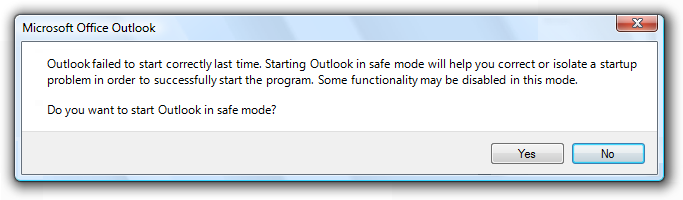 <p style="text-align: justify">Everyone knows that PST files are more essential for any Microsoft Outlook users. Whenever PST file gets corrupted or damaged, it becomes a big problem for the user. Apart from that, whenever most of the users try to open the Outlook client, the application attempts to run, but it crashes immediately. The most advised manual solution to check this Outlook issue is to run MS Outlook in safe mode. But what if the application is not even opening in the Safe Mode. Therefore, in the upcoming section, we will describe a manual solution that will help to fix 'Outlook Failed to Launch in Safe Mode. Do you want to Start Repair Outlook PST'.</p> <h2>Reasons Behind the Occurrence of an error</h2> <p style="text-align: justify">While opening the MS Outlook in safe mode, users face various issues that include ‘Outlook Failed to Launch in Safe Mode! Do you Want to Start Repair etc? Due to several reasons, this error can occur. The major reasons for encountering this type of Outlook PST file error may include:</p> <ul> <li>This error occurs due to incorrect configuration of the application</li> <li>The application has been installed incorrectly or modified by another program</li> <li>Another reason is Outlook may crash every time when you try to open a specific folder</li> </ul> <p style="text-align: justify">Before going through manual solutions to resolve Outlook issues, let me introduce an automated Outlook PST Recovery solution to <a href="https://www.systoolsgroup.com/outlook-recovery.html" target="_blank"><b>repair damaged PST file Outlook 2007</b></a>, 2010, 2013, 2016 without any data loss or PST file damage. The <b>SysTools Outlook Data Recovery software</b> is one of the best-expertized application to resolve MS Outlook issues.</p> 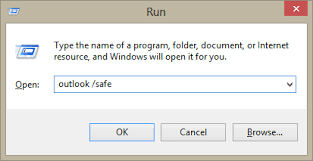 <h2>Manual Solutions to Resolve "Outlook Won't Open in Safe Mode" Error</h2> <p style="text-align: justify">Go through the following steps that will help to fix "Outlook failed to start in safe mode" error. Let us have a look:</p> <h3>If you can start MS Office Application</h3> <ol> <li>First of all, you need to <b>Open any Microsoft Office suite</b> and go to <b>File</b> menu</li> <li>In the next step, select<b> Account</b> option. (If you are using Outlook application, choose File and then, click on Office Account.)</li> <li>In the <b>Product Information</b>, choose <b>Update</b> Options and click on <b>Update Now</b></li> </ol> <h3>If you Cannot Open MS Office Application</h3> <ol> <li>Now, you have to run <b>Office online repair</b> through Control Panel</li> <li>Go to the <b>Control Panel</b>, select <b>Programs</b> and then, choose <b>Uninstall a Program</b></li> <li>Next, you have to select <b>Microsoft Office program</b> (if you have already installed an Office suite, choose the suite), select Change option and then, choose an Online Repair</li> </ol> <p style="text-align: justify">In case, if you are unable to open MS Office program and online repair does not work then, try to reinstall Office suite. Now, go to the My Account page, select Install and then, choose Install.</p> <p style="text-align: justify">While launching an Office 2016 application in safe mode on Windows 7, the most common error that users may receive can be: 'Outlook Failed to Launch in Safe Mode! Do you Want to Start Repair?.</p> <h3>Automated Solution to Overcome Microsoft Outlook Error</h3> <p style="text-align: justify">At times, it becomes quite impossible for a user to start Outlook in safe mode. Therefore, to overcome this issue users can use <b>SysTools Outlook Data Recovery Software</b>. With this amazing utility, users can restore permanently deleted and password protected PST files. It does not matter how much PST files are corrupted, it starts to repair all of them without any hassle.</p> <h3>The Bottom Line</h3> <p style="text-align: justify">How to fix "Outlook Failed to Launch in Safe Mode! Do you Want to Start Repair" is still a big trouble for all users, if they are not capable to repair a corrupt PST file? In such case, one can perform the manual procedure that we have discussed above. But, the guarantee of getting the satisfactory result is keen in case of manual techniques. Therefore, it is recommended to clients that they should go for one of best Outlook Recovery Software, which will fix this issues without any risk.</p> |
| json metadata | {"tags":["fix","microsoft","outlook","pst","error"],"image":["https://cdn.steemitimages.com/DQmWkmGpW5mKFigGL4bcyc3LMSzEE5QQ7214QFBv6YR4Ag8/Microsoft%20Outlook%20Failed%20to%20Start%20Correctly%20Last%20Time.png","https://cdn.steemitimages.com/DQmchQrmaz8QQjM4iqzarQwPWSztihhWLUuY3jJ82wwiMx6/outlook%20safe%20mode.png"],"links":["https://www.systoolsgroup.com/outlook-recovery.html"],"app":"steemit/0.1","format":"markdown"} |
| Transaction Info | Block #23220246/Trx 79bc226b8e2f5f7f00c216bfbedca8ec5ebe5dad |
View Raw JSON Data
{
"trx_id": "79bc226b8e2f5f7f00c216bfbedca8ec5ebe5dad",
"block": 23220246,
"trx_in_block": 24,
"op_in_trx": 0,
"virtual_op": 0,
"timestamp": "2018-06-11T05:39:42",
"op": [
"comment",
{
"parent_author": "",
"parent_permlink": "fix",
"author": "alphy123",
"permlink": "outlook-failed-to-launch-in-safe-mode-do-you-want-to-start-repair-pst",
"title": "Outlook Failed to Launch in Safe Mode! Do you Want to Start Repair PST?",
"body": "<p style=\"text-align: justify\"><b>Summary:</b> Did your Outlook failed to launch in safe mode? Do you want to start Repair Outlook PST files? Explore manual as well as the automated solution to resolve MS Outlook PST file corruptions. Fix Microsoft Outlook problems and other PST file errors in few simple steps using refined PST repair tool. Read more to know more about the Outlook issue.</p>\n\n\n\n<p style=\"text-align: justify\">Everyone knows that PST files are more essential for any Microsoft Outlook users. Whenever PST file gets corrupted or damaged, it becomes a big problem for the user. Apart from that, whenever most of the users try to open the Outlook client, the application attempts to run, but it crashes immediately. The most advised manual solution to check this Outlook issue is to run MS Outlook in safe mode. But what if the application is not even opening in the Safe Mode. Therefore, in the upcoming section, we will describe a manual solution that will help to fix 'Outlook Failed to Launch in Safe Mode. Do you want to Start Repair Outlook PST'.</p>\n\n<h2>Reasons Behind the Occurrence of an error</h2>\n\n<p style=\"text-align: justify\">While opening the MS Outlook in safe mode, users face various issues that include ‘Outlook Failed to Launch in Safe Mode! Do you Want to Start Repair etc? Due to several reasons, this error can occur. The major reasons for encountering this type of Outlook PST file error may include:</p>\n<ul>\n<li>This error occurs due to incorrect configuration of the application</li>\n<li>The application has been installed incorrectly or modified by another program</li>\n<li>Another reason is Outlook may crash every time when you try to open a specific folder</li>\n</ul>\n<p style=\"text-align: justify\">Before going through manual solutions to resolve Outlook issues, let me introduce an automated Outlook PST Recovery solution to <a href=\"https://www.systoolsgroup.com/outlook-recovery.html\" target=\"_blank\"><b>repair damaged PST file Outlook 2007</b></a>, 2010, 2013, 2016 without any data loss or PST file damage. The <b>SysTools Outlook Data Recovery software</b> is one of the best-expertized application to resolve MS Outlook issues.</p>\n\n\n\n<h2>Manual Solutions to Resolve \"Outlook Won't Open in Safe Mode\" Error</h2>\n\n<p style=\"text-align: justify\">Go through the following steps that will help to fix \"Outlook failed to start in safe mode\" error. Let us have a look:</p>\n\n<h3>If you can start MS Office Application</h3>\n<ol>\n<li>First of all, you need to <b>Open any Microsoft Office suite</b> and go to <b>File</b> menu</li>\n<li>In the next step, select<b> Account</b> option. (If you are using Outlook application, choose File and then, click on Office Account.)</li>\n<li>In the <b>Product Information</b>, choose <b>Update</b> Options and click on <b>Update Now</b></li>\n</ol>\n<h3>If you Cannot Open MS Office Application</h3>\n<ol>\n<li>Now, you have to run <b>Office online repair</b> through Control Panel</li>\n<li>Go to the <b>Control Panel</b>, select <b>Programs</b> and then, choose <b>Uninstall a Program</b></li>\n<li>Next, you have to select <b>Microsoft Office program</b> (if you have already installed an Office suite, choose the suite), select Change option and then, choose an Online Repair</li>\n</ol>\n<p style=\"text-align: justify\">In case, if you are unable to open MS Office program and online repair does not work then, try to reinstall Office suite. Now, go to the My Account page, select Install and then, choose Install.</p>\n\n<p style=\"text-align: justify\">While launching an Office 2016 application in safe mode on Windows 7, the most common error that users may receive can be: 'Outlook Failed to Launch in Safe Mode! Do you Want to Start Repair?.</p>\n\n<h3>Automated Solution to Overcome Microsoft Outlook Error</h3>\n<p style=\"text-align: justify\">At times, it becomes quite impossible for a user to start Outlook in safe mode. Therefore, to overcome this issue users can use <b>SysTools Outlook Data Recovery Software</b>. With this amazing utility, users can restore permanently deleted and password protected PST files. It does not matter how much PST files are corrupted, it starts to repair all of them without any hassle.</p>\n\n<h3>The Bottom Line</h3>\n<p style=\"text-align: justify\">How to fix \"Outlook Failed to Launch in Safe Mode! Do you Want to Start Repair\" is still a big trouble for all users, if they are not capable to repair a corrupt PST file? In such case, one can perform the manual procedure that we have discussed above. But, the guarantee of getting the satisfactory result is keen in case of manual techniques. Therefore, it is recommended to clients that they should go for one of best Outlook Recovery Software, which will fix this issues without any risk.</p>",
"json_metadata": "{\"tags\":[\"fix\",\"microsoft\",\"outlook\",\"pst\",\"error\"],\"image\":[\"https://cdn.steemitimages.com/DQmWkmGpW5mKFigGL4bcyc3LMSzEE5QQ7214QFBv6YR4Ag8/Microsoft%20Outlook%20Failed%20to%20Start%20Correctly%20Last%20Time.png\",\"https://cdn.steemitimages.com/DQmchQrmaz8QQjM4iqzarQwPWSztihhWLUuY3jJ82wwiMx6/outlook%20safe%20mode.png\"],\"links\":[\"https://www.systoolsgroup.com/outlook-recovery.html\"],\"app\":\"steemit/0.1\",\"format\":\"markdown\"}"
}
]
}2018/06/02 06:29:36
2018/06/02 06:29:36
| voter | alphy123 |
| author | alphy123 |
| permlink | convert-excel-spreadsheet-to-outlook-contacts-a-professional-approach |
| weight | 10000 (100.00%) |
| Transaction Info | Block #22962427/Trx eeec49547b8581107f1b33089ac5a3e4164d0fbc |
View Raw JSON Data
{
  "trx_id": "eeec49547b8581107f1b33089ac5a3e4164d0fbc",
  "block": 22962427,
  "trx_in_block": 21,
  "op_in_trx": 0,
  "virtual_op": 0,
  "timestamp": "2018-06-02T06:29:36",
  "op": [
    "vote",
    {
      "voter": "alphy123",
      "author": "alphy123",
      "permlink": "convert-excel-spreadsheet-to-outlook-contacts-a-professional-approach",
      "weight": 10000
    }
  ]
}2018/06/02 06:28:42
2018/06/02 06:28:42
| voter | alphythomas |
| author | alphy123 |
| permlink | convert-excel-spreadsheet-to-outlook-contacts-a-professional-approach |
| weight | 10000 (100.00%) |
| Transaction Info | Block #22962409/Trx f213510c42fa0c4ab2a887aed80cd9b7c94b2b93 |
View Raw JSON Data
{
  "trx_id": "f213510c42fa0c4ab2a887aed80cd9b7c94b2b93",
  "block": 22962409,
  "trx_in_block": 12,
  "op_in_trx": 0,
  "virtual_op": 0,
  "timestamp": "2018-06-02T06:28:42",
  "op": [
    "vote",
    {
      "voter": "alphythomas",
      "author": "alphy123",
      "permlink": "convert-excel-spreadsheet-to-outlook-contacts-a-professional-approach",
      "weight": 10000
    }
  ]
}alphythomasupvoted (100.00%) @alphy123 / learn-how-to-migrate-zoho-to-outlook-account-effortlessly2018/06/02 06:26:21
alphythomasupvoted (100.00%) @alphy123 / learn-how-to-migrate-zoho-to-outlook-account-effortlessly
2018/06/02 06:26:21
| voter | alphythomas |
| author | alphy123 |
| permlink | learn-how-to-migrate-zoho-to-outlook-account-effortlessly |
| weight | 10000 (100.00%) |
| Transaction Info | Block #22962362/Trx 4ef9fd76ffc11fc1b8f31053346efc2c67633d75 |
View Raw JSON Data
{
  "trx_id": "4ef9fd76ffc11fc1b8f31053346efc2c67633d75",
  "block": 22962362,
  "trx_in_block": 25,
  "op_in_trx": 0,
  "virtual_op": 0,
  "timestamp": "2018-06-02T06:26:21",
  "op": [
    "vote",
    {
      "voter": "alphythomas",
      "author": "alphy123",
      "permlink": "learn-how-to-migrate-zoho-to-outlook-account-effortlessly",
      "weight": 10000
    }
  ]
}alphy123upvoted (100.00%) @alphy123 / learn-how-to-migrate-zoho-to-outlook-account-effortlessly2018/06/02 06:26:12
alphy123upvoted (100.00%) @alphy123 / learn-how-to-migrate-zoho-to-outlook-account-effortlessly
2018/06/02 06:26:12
| voter | alphy123 |
| author | alphy123 |
| permlink | learn-how-to-migrate-zoho-to-outlook-account-effortlessly |
| weight | 10000 (100.00%) |
| Transaction Info | Block #22962359/Trx 557c5fdbafa73d950168092ddcb8d9f5b603d396 |
View Raw JSON Data
{
  "trx_id": "557c5fdbafa73d950168092ddcb8d9f5b603d396",
  "block": 22962359,
  "trx_in_block": 57,
  "op_in_trx": 0,
  "virtual_op": 0,
  "timestamp": "2018-06-02T06:26:12",
  "op": [
    "vote",
    {
      "voter": "alphy123",
      "author": "alphy123",
      "permlink": "learn-how-to-migrate-zoho-to-outlook-account-effortlessly",
      "weight": 10000
    }
  ]
}alphy123upvoted (100.00%) @alphy123 / how-to-recover-outlook-2007-pst-file-complete-guidelines2018/06/02 06:21:24
alphy123upvoted (100.00%) @alphy123 / how-to-recover-outlook-2007-pst-file-complete-guidelines
2018/06/02 06:21:24
| voter | alphy123 |
| author | alphy123 |
| permlink | how-to-recover-outlook-2007-pst-file-complete-guidelines |
| weight | 10000 (100.00%) |
| Transaction Info | Block #22962263/Trx e6349473d47f39117cd96817a9bf7730ebfe3b77 |
View Raw JSON Data
{
  "trx_id": "e6349473d47f39117cd96817a9bf7730ebfe3b77",
  "block": 22962263,
  "trx_in_block": 20,
  "op_in_trx": 0,
  "virtual_op": 0,
  "timestamp": "2018-06-02T06:21:24",
  "op": [
    "vote",
    {
      "voter": "alphy123",
      "author": "alphy123",
      "permlink": "how-to-recover-outlook-2007-pst-file-complete-guidelines",
      "weight": 10000
    }
  ]
}alphythomasupvoted (100.00%) @alphy123 / how-to-recover-outlook-2007-pst-file-complete-guidelines2018/06/02 06:19:27
alphythomasupvoted (100.00%) @alphy123 / how-to-recover-outlook-2007-pst-file-complete-guidelines
2018/06/02 06:19:27
| voter | alphythomas |
| author | alphy123 |
| permlink | how-to-recover-outlook-2007-pst-file-complete-guidelines |
| weight | 10000 (100.00%) |
| Transaction Info | Block #22962224/Trx ecdb8e8274d7fa678046ff099dfb2f43f8ea0cc5 |
View Raw JSON Data
{
  "trx_id": "ecdb8e8274d7fa678046ff099dfb2f43f8ea0cc5",
  "block": 22962224,
  "trx_in_block": 25,
  "op_in_trx": 0,
  "virtual_op": 0,
  "timestamp": "2018-06-02T06:19:27",
  "op": [
    "vote",
    {
      "voter": "alphythomas",
      "author": "alphy123",
      "permlink": "how-to-recover-outlook-2007-pst-file-complete-guidelines",
      "weight": 10000
    }
  ]
}alphy123published a new post: convert-excel-spreadsheet-to-outlook-contacts-a-professional-approach2018/05/15 12:05:03
alphy123published a new post: convert-excel-spreadsheet-to-outlook-contacts-a-professional-approach
2018/05/15 12:05:03
| parent author | |
| parent permlink | technology |
| author | alphy123 |
| permlink | convert-excel-spreadsheet-to-outlook-contacts-a-professional-approach |
| title | Convert Excel Spreadsheet to Outlook Contacts: A Professional Approach |
| body | <p style="text-align: justify">One of the most popular email client used by many users is Microsoft Outlook. It is a component of Microsoft Office suite that allows users to send/receive emails on their systems. On the other hand, Microsoft Excel allows users to organize, format and calculate data using a spreadsheet system. </p> <p style="text-align: justify">Sometimes, a person is not able to access contacts via Excel Spreadsheet due to the problems with Excel. A user can create a backup of all the contacts and other data also so, that he/she can access data easily without hassle. Therefore, the best solution for this is one can convert Excel Spreadsheet to Outlook contacts. Now, the question arises How to import contacts from Excel file to Outlook using best solution? No worries, this blog will provide you a reliable and time saving solution using which a user can easily import contacts from an Excel file to Outlook 2013, 2016 and all the other versions.</p> <p style="text-align: justify"><em>"I was working on Excel Spreadsheet and suddenly my system hanged and my data was at the risk of getting lost. But now, I have decided to importing all contacts from an Excel Spreadsheet to Outlook to create backup of my data files. So, there is any time-saving and trusted solution using which I can convert Excel Spreadsheet to Outlook contacts without data loss?”</em></p> <p style="text-align: justify">This type of query is faced by many people but they are not able to find a perfect solution to get rid of this problem. Here, this blog will help you by providing a simple and sophisticated method to export Excel Spreadsheet to Outlook contacts.</p> <h2>Methods to Convert Excel Spreadsheet to Outlook Contacts</h2> <p style="text-align: justify">Some of the methods to export Excel into Outlook contacts are explained below:</p> <h2>Method 1: Copy and Paste Method</h2> <ol> <li>In Excel, start by selecting the addresses from the column containing the email address. As other option, you can also select the column containing the names.</li> <li>To copy the selected cells press CTRL+C</li> <li>Now, create a new Contact group or Distribution list in Outlook.</li> <li>You have to open the Add members dialog</li> <li>Outlook 2003 and previous: Click on the Select Members... button</li> <li>Outlook 2007, Outlook 2010, Outlook 2013 and Outlook 2016: Choose From Outlook Contact… by clicking on the Add Member drop-down button </li> <li>Click in the text field next to the Members button </li> <li>Now, press CTRL+V to paste the copied content from the Excel</li> <li>If you have correctly followed steps then each address will be listed on its own line</li> <li>To close the Select Members dialog box just press OK and return to your Contact Group</li> <li>Name your Contact group and save it</li> </ol> <h3>Method 2: Import Excel Contacts into Outlook 2013 or Outlook 2016 for Windows</h3> <p style="text-align: justify">This method to convert Excel Spreadsheet to Outlook contacts has two major steps and that are: <strong>Step 1: Save your Excel workbook as a .csv file. </strong> <ol> <li>In your workbook, click the worksheet with the contact information you want to import </li> <li>Click on File option and then click on Save as Option</li> <li>Choose the location where you want to save your file</li> <li>Now, in the Save as type box, choose CSV (*.csv), and click Save</li> <li>Click on the OK button</li> <li>Click on the Yes button to have Excel save the current worksheet as a CSV file</li> <li>Now, close the CSV file</li> </ol> <strong>Step 2: Import your Contacts to Outlook</strong> <ol> <li>On the top left, you will see File Option, click on it</li> <li>Choose Open & Export and then click on Import/Export</li> <li>Now, choose Import from another program or file and click on the Next button</li> <li>Choose CSV and click on Next</li> <li>Browse the .csv file you want to import</li> <li>Under Options, choose the desired option: replace duplicates, create duplicate contacts, or not import duplicates</li> <li>Now, click on the Next button and choose the destination folder for your contacts (By default contacts should be selected, but if it’s not, scroll up until you find it)</li> <li>Click Next and make sure the checkbox is selected which is next to Import “MyContacts.csv”</li> <li>After this step, if you want to map your CSV file columns to Outlook contact fields then select the mapping option. Otherwise, click on the Finish Button.</li> </ol> <h3>Limitations of above Methods:</h3> <p>There are some limitations associated with the direct methods that are:</p> <ul> <li>While performing Import and Export sometimes users may face data loss issue</li> <li>Duplicate contacts are not excluded properly</li> <li>If the mapping is not done in the systematic way, then it will disorganize data</li> <li>Difficult for a non-technical person to perform these steps </li> <li>Time-consuming and lengthy process</li> </ul> <h3>Effortless Solution to Convert Excel Spreadsheet to Outlook Contacts</h3> <p style="text-align: justify">To overcome all the limitation in the manual method it is advised to a user to choose the Professional approach that is <a href="https://www.systools.in/products/excel-to-outlook-contacts/" target="_blank"><strong>Excel to Outlook Converter</strong></a>. This tool converts multiple contacts from Excel to Outlook Address Book without any hassle. The utility eliminates all the limitations in the manual method and also provide advanced options. It supports all the Windows version and all Outlook version. Due to its user-friendly interface, it becomes easy for users to work with this tool. No expertise or technical knowledge is required to use this tool. Altogether, it is the ideal application for users who want to import Excel files to Outlook contacts in an easy and time-saving way. <h4>Final Words</h4> <p style="text-align: justify">Hopefully, after reading this blog, you will be able to convert Excel Spreadsheet to Outlook Contacts easily without any difficulty. It totally depends on you which approach you opt for the conversion process. But, it is always advised to choose a reliable and simple solution to make your work easy.</p> |
| json metadata | {"tags":["technology","export","excel","to","outlook"],"links":["https://www.systools.in/products/excel-to-outlook-contacts/"],"app":"steemit/0.1","format":"markdown"} |
| Transaction Info | Block #22451209/Trx 8423d9b15f770160b20c8a55f99c048f4e02ed1b |
View Raw JSON Data
{
  "trx_id": "8423d9b15f770160b20c8a55f99c048f4e02ed1b",
  "block": 22451209,
  "trx_in_block": 51,
  "op_in_trx": 0,
  "virtual_op": 0,
  "timestamp": "2018-05-15T12:05:03",
  "op": [
    "comment",
    {
      "parent_author": "",
      "parent_permlink": "technology",
      "author": "alphy123",
      "permlink": "convert-excel-spreadsheet-to-outlook-contacts-a-professional-approach",
      "title": "Convert Excel Spreadsheet to Outlook Contacts: A Professional Approach",
      "body": "<p style=\"text-align: justify\">One of the most popular email client used by many users is Microsoft Outlook. It is a component of Microsoft Office suite that allows users to send/receive emails on their systems. On the other hand, Microsoft Excel allows users to organize, format and calculate data using a spreadsheet system. </p>\n\n<p style=\"text-align: justify\">Sometimes, a person is not able to access contacts via Excel Spreadsheet due to the problems with Excel. A user can create a backup of all the contacts and other data also so, that he/she can access data easily without hassle. Therefore, the best solution for this is one can convert Excel Spreadsheet to Outlook contacts. Now, the question arises How to import contacts from Excel file to Outlook using best solution? No worries, this blog will provide you a reliable and time saving solution using which a user can easily import contacts from an Excel file to Outlook 2013, 2016 and all the other versions.</p>\n\n<p style=\"text-align: justify\"><em>\"I was working on Excel Spreadsheet and suddenly my system hanged and my data was at the risk of getting lost. But now, I have decided to importing all contacts from an Excel Spreadsheet to Outlook to create backup of my data files. So, there is any time-saving and trusted solution using which I can convert Excel Spreadsheet to Outlook contacts without data loss?”</em></p>\n\n<p style=\"text-align: justify\">This type of query is faced by many people but they are not able to find a perfect solution to get rid of this problem. Here, this blog will help you by providing a simple and sophisticated method to export Excel Spreadsheet to Outlook contacts.</p>\n\n\n<h2>Methods to Convert Excel Spreadsheet to Outlook Contacts</h2>\n\n<p style=\"text-align: justify\">Some of the methods to export Excel into Outlook contacts are explained below:</p>\n\n<h2>Method 1: Copy and Paste Method</h2>\n<ol>\n<li>In Excel, start by selecting the addresses from the column containing the email address. As other option, you can also select the column containing the names.</li>\n<li>To copy the selected cells press CTRL+C</li>\n<li>Now, create a new Contact group or Distribution list in Outlook.</li>\n<li>You have to open the Add members dialog</li>\n<li>Outlook 2003 and previous: Click on the Select Members... button</li>\n<li>Outlook 2007, Outlook 2010, Outlook 2013 and Outlook 2016: Choose From Outlook Contact… by clicking on the Add Member drop-down button  </li>\n<li>Click in the text field next to the Members button </li>\n<li>Now, press CTRL+V to paste the copied content from the Excel</li>\n<li>If you have correctly followed steps then each address will be listed on its own line</li>\n<li>To close the Select Members dialog box just press OK and return to your Contact Group</li>\n<li>Name your Contact group and save it</li>\n</ol>\n<h3>Method 2: Import Excel Contacts into Outlook 2013 or Outlook 2016 for Windows</h3>\n\n<p style=\"text-align: justify\">This method to convert Excel Spreadsheet to Outlook contacts has two major steps and that are:\n\n<strong>Step 1: Save your Excel workbook as a .csv file. </strong>\n<ol>\n<li>In your workbook, click the worksheet with the contact information you want to import </li>\n<li>Click on File option and then click on Save as Option</li>\n<li>Choose the location where you want to save your file</li>\n<li>Now, in the Save as type box, choose CSV (*.csv), and click Save</li>\n<li>Click on the OK button</li>\n<li>Click on the Yes button to have Excel save the current worksheet as a CSV file</li>\n<li>Now, close the CSV file</li>\n</ol>\n<strong>Step 2: Import your Contacts to Outlook</strong>\n<ol>\n<li>On the top left, you will see File Option, click on it</li>\n<li>Choose Open & Export and then click on Import/Export</li>\n<li>Now, choose Import from another program or file and click on the Next button</li>\n<li>Choose CSV and click on Next</li>\n<li>Browse the .csv file you want to import</li>\n<li>Under Options, choose the desired option: replace duplicates, create duplicate contacts, or not import duplicates</li>\n<li>Now, click on the Next button and choose the destination folder for your contacts (By default contacts should be selected, but if it’s not, scroll up until you find it)</li>\n<li>Click Next and make sure the checkbox is selected which is next to Import “MyContacts.csv”</li>\n<li>After this step, if you want to map your CSV file columns to Outlook contact fields then select the mapping option. Otherwise, click on the Finish Button.</li>\n</ol>\n<h3>Limitations of above Methods:</h3> \n<p>There are some limitations associated with the direct methods that are:</p>\n<ul>\n<li>While performing Import and Export sometimes users may face data loss issue</li>\n<li>Duplicate contacts are not excluded properly</li>\n<li>If the mapping is not done in the systematic way, then it will disorganize data</li>\n<li>Difficult for a non-technical person to perform these steps </li>\n<li>Time-consuming and lengthy process</li>\n</ul>\n<h3>Effortless Solution to Convert Excel Spreadsheet to Outlook Contacts</h3>\n<p style=\"text-align: justify\">To overcome all the limitation in the manual method it is advised to a user to choose the Professional approach that is <a href=\"https://www.systools.in/products/excel-to-outlook-contacts/\" target=\"_blank\"><strong>Excel to Outlook Converter</strong></a>. This tool converts multiple contacts from Excel to Outlook Address Book without any hassle. The utility eliminates all the limitations in the manual method and also provide advanced options. It supports all the Windows version and all Outlook version. Due to its user-friendly interface, it becomes easy for users to work with this tool. No expertise or technical knowledge is required to use this tool. Altogether, it is the ideal application for users who want to import Excel files to Outlook contacts in an easy and time-saving way.\n \n<h4>Final Words</h4>\n<p style=\"text-align: justify\">Hopefully, after reading this blog, you will be able to convert Excel Spreadsheet to Outlook Contacts easily without any difficulty. It totally depends on you which approach you opt for the conversion process. But, it is always advised to choose a reliable and simple solution to make your work easy.</p>",
      "json_metadata": "{\"tags\":[\"technology\",\"export\",\"excel\",\"to\",\"outlook\"],\"links\":[\"https://www.systools.in/products/excel-to-outlook-contacts/\"],\"app\":\"steemit/0.1\",\"format\":\"markdown\"}"
    }
  ]
}ax3upvoted (1.00%) @alphy123 / learn-how-to-migrate-zoho-to-outlook-account-effortlessly2018/04/27 07:52:21
ax3upvoted (1.00%) @alphy123 / learn-how-to-migrate-zoho-to-outlook-account-effortlessly
2018/04/27 07:52:21
| voter | ax3 |
| author | alphy123 |
| permlink | learn-how-to-migrate-zoho-to-outlook-account-effortlessly |
| weight | 100 (1.00%) |
| Transaction Info | Block #21927867/Trx 260eebd73827d1256a72308e231b65ae8bd22b88 |
View Raw JSON Data
{
  "trx_id": "260eebd73827d1256a72308e231b65ae8bd22b88",
  "block": 21927867,
  "trx_in_block": 23,
  "op_in_trx": 0,
  "virtual_op": 0,
  "timestamp": "2018-04-27T07:52:21",
  "op": [
    "vote",
    {
      "voter": "ax3",
      "author": "alphy123",
      "permlink": "learn-how-to-migrate-zoho-to-outlook-account-effortlessly",
      "weight": 100
    }
  ]
}alphy123published a new post: learn-how-to-migrate-zoho-to-outlook-account-effortlessly2018/04/27 07:52:09
alphy123published a new post: learn-how-to-migrate-zoho-to-outlook-account-effortlessly
2018/04/27 07:52:09
| parent author | |
| parent permlink | zoho |
| author | alphy123 |
| permlink | learn-how-to-migrate-zoho-to-outlook-account-effortlessly |
| title | Learn How to Migrate Zoho to Outlook Account Effortlessly |
| body | Zoho mail is one of the popular web-based email client used for email transaction process. It can manage the task, activities, work, etc, of business users in a great and helpful manner. But when compared with other email clients including Outlook and Thunderbird, they provide so many advanced features in which Zoho lacks behind. So, many of the users tried to Transfer mail from Zoho to Outlook. So, here from this write-up, you can get the easy and efficient tricks to perform <a href="https://www.systoolsgroup.com/zoho/backup/" target="_blank" rel="noopener noreferrer"><strong>Zoho Mail Backup</strong></a>. <h2>Manual Tricks to Add Zoho to Outlook</h2> To import Zoho mail to Outlook PST manually, there are two steps present: <strong>Step 1:</strong> Backup Zoho Mail in EML format. <strong>Step 2:</strong> Import EML file to PST format <strong>Backup Zoho Mail in EML file</strong> <ul><li>Open Zoho Mail application</li> <li>Click the “Settings” option</li> <li>Choose the option “Mail Settings” after that select “Import/ Export Messages”</li> <li>From the “Export” window, select the mailbox in which you want to transfer</li> <li>From the store location take the mail you want to export</li> <li>Choose the duration and then click on “Submit” button</li> <li>After some time, you can get one email (on the same ID by which you have sent the request) with URL</li> <li>Click on that URL to get the zip file. Unzip it then you can get the EML file.</li></ul> <strong>Import EML File to Outlook PST</strong> <ul><li>Open MS Outlook on your system.</li> <li>Click on “File” after that “Export” and then choose the email messages.</li> <li>Select “Exchange Server” followed by “Next” option.</li> <li>Then you can get one message “All emails will be exported to Exchange Server or Outlook” and then click “OK”.</li> <li>Choose the option whether you need to export the whole email folder or some particular. Then click “OK”.</li> <li>After the completion of the export procedure, you can get one email stating about the successful completion. </li> <li>Finally, click on “Finish” button.</li></ul> <h2>Shortcomings of Manual Method</h2> <ul><li>Lengthy and time-consuming</li> <li>Technical knowledge is needed to complete the manual approach</li> <li>Both Outlook and Zoho Mail needs to be installed on the system</li></ul> <h3>Professional Approach to Connect Zoho to Outlook</h3> Using third-party solutions like Zoho backup software are the alternative to the manual approach. SysTools Zoho Backup tool is one of the best and efficient automated solution to synch emails from Zoho to Outlook PST file format. According to the expert’s review, it is one of the master solution for the query “how to backup Zoho mail in Outlook?” Some of the helpful and important features of Zoho Mail Backup tool are listed below: <ul><li>Supports to backup Zoho emails to PST Format.</li> <li>Provides Pause and Resume option.</li> <li>Delete After Download option is available.</li> <li>The Zoho Mail credentials are not saved in its database.</li> <li>Import all items including inbox, trash, draft, etc.</li> <li>Finally, it provides safe and secure backup.</li></ul> <h3>Bottom Line</h3> In this technical arena, most of the peoples trying to jump from Zoho to Outlook because of the great functionalities of Outlooks which lacks behind in Zoho. So, here in this article, we explained the manual and automated procedure to import Zoho mails to Outlook PST in a step by step manner. But due to some limitations, it is advised to go with the third-party tool. |
| json metadata | {"tags":["zoho","to","outlook"],"links":["https://www.systoolsgroup.com/zoho/backup/"],"app":"steemit/0.1","format":"markdown"} |
| Transaction Info | Block #21927863/Trx b2f0028f237060226210e143e7dd5169bfd1f7bb |
View Raw JSON Data
{
  "trx_id": "b2f0028f237060226210e143e7dd5169bfd1f7bb",
  "block": 21927863,
  "trx_in_block": 3,
  "op_in_trx": 0,
  "virtual_op": 0,
  "timestamp": "2018-04-27T07:52:09",
  "op": [
    "comment",
    {
      "parent_author": "",
      "parent_permlink": "zoho",
      "author": "alphy123",
      "permlink": "learn-how-to-migrate-zoho-to-outlook-account-effortlessly",
      "title": "Learn How to Migrate Zoho to Outlook Account Effortlessly",
      "body": "Zoho mail is one of the popular web-based email client used for email transaction process. It can manage the task, activities, work, etc, of business users in a great and helpful manner. But when compared with other email clients including Outlook and Thunderbird, they provide so many advanced features in which Zoho lacks behind. So, many of the users tried to Transfer mail from Zoho to Outlook. So, here from this write-up, you can get the easy and efficient tricks to perform <a href=\"https://www.systoolsgroup.com/zoho/backup/\" target=\"_blank\" rel=\"noopener noreferrer\"><strong>Zoho Mail Backup</strong></a>.\n\n<h2>Manual Tricks to Add Zoho to Outlook</h2>\nTo import Zoho mail to Outlook PST manually, there are two steps present:\n\n<strong>Step 1:</strong> Backup Zoho Mail in EML format.\n<strong>Step 2:</strong> Import EML file to PST format\n\n<strong>Backup Zoho Mail in EML file</strong>\n\n<ul><li>Open Zoho Mail application</li>\n<li>Click the “Settings” option</li>\n<li>Choose the option “Mail Settings” after that select “Import/ Export Messages”</li>\n<li>From the “Export” window, select the mailbox in which you want to transfer</li>\n<li>From the store location take the mail you want to export</li>\n<li>Choose the duration and then click on “Submit” button</li>\n<li>After some time, you can get one email (on the same ID by which you have sent the request) with URL</li>\n<li>Click on that URL to get the zip file. Unzip it then you can get the EML file.</li></ul>\n\n<strong>Import EML File to Outlook PST</strong>\n\n<ul><li>Open MS Outlook on your system.</li>\n<li>Click on “File” after that “Export” and then choose the email messages.</li>\n<li>Select “Exchange Server” followed by “Next” option.</li>\n<li>Then you can get one message “All emails will be exported to Exchange Server or Outlook” and then click “OK”.</li>\n<li>Choose the option whether you need to export the whole email folder or some particular. Then click “OK”.</li>\n<li>After the completion of the export procedure, you can get one email stating about the successful completion. </li>\n<li>Finally, click on “Finish” button.</li></ul>\n\n<h2>Shortcomings of Manual Method</h2>\n<ul><li>Lengthy and time-consuming</li>\n<li>Technical knowledge is needed to complete the manual approach</li>\n<li>Both Outlook and Zoho Mail needs to be installed on the system</li></ul>\n\n<h3>Professional Approach to Connect Zoho to Outlook</h3>\n\nUsing third-party solutions like Zoho backup software are the alternative to the manual approach. SysTools Zoho Backup tool is one of the best and efficient automated solution to synch emails from Zoho to Outlook PST file format. According to the expert’s review, it is one of the master solution for the query “how to backup Zoho mail in Outlook?”\nSome of the helpful and important features of Zoho Mail Backup tool are listed below:\n<ul><li>Supports to backup Zoho emails to PST Format.</li>\n<li>Provides Pause and Resume option.</li>\n<li>Delete After Download option is available.</li>\n<li>The Zoho Mail credentials are not saved in its database.</li>\n<li>Import all items including inbox, trash, draft, etc.</li>\n<li>Finally, it provides safe and secure backup.</li></ul>\n\n<h3>Bottom Line</h3>\n\nIn this technical arena, most of the peoples trying to jump from Zoho to Outlook because of the great functionalities of Outlooks which lacks behind in Zoho. So, here in this article, we explained the manual and automated procedure to import Zoho mails to Outlook PST in a step by step manner. But due to some limitations, it is advised to go with the third-party tool.",
      "json_metadata": "{\"tags\":[\"zoho\",\"to\",\"outlook\"],\"links\":[\"https://www.systoolsgroup.com/zoho/backup/\"],\"app\":\"steemit/0.1\",\"format\":\"markdown\"}"
    }
  ]
}2018/03/03 17:08:33
2018/03/03 17:08:33
| delegator | steem |
| delegatee | alphy123 |
| vesting shares | 30436.958765 VESTS |
| Transaction Info | Block #20357157/Trx 45c3722691b9c2b6887b173caa434b760fd09230 |
View Raw JSON Data
{
  "trx_id": "45c3722691b9c2b6887b173caa434b760fd09230",
  "block": 20357157,
  "trx_in_block": 14,
  "op_in_trx": 0,
  "virtual_op": 0,
  "timestamp": "2018-03-03T17:08:33",
  "op": [
    "delegate_vesting_shares",
    {
      "delegator": "steem",
      "delegatee": "alphy123",
      "vesting_shares": "30436.958765 VESTS"
    }
  ]
}alphy123published a new post: how-to-recover-outlook-2007-pst-file-complete-guidelines2018/03/03 06:43:51
alphy123published a new post: how-to-recover-outlook-2007-pst-file-complete-guidelines
2018/03/03 06:43:51
| parent author | |
| parent permlink | repair |
| author | alphy123 |
| permlink | how-to-recover-outlook-2007-pst-file-complete-guidelines |
| title | How to Recover Outlook 2007 PST File - Complete Guidelines |
| body | <p><strong>Summary:</strong> How to recover Outlook 2007 PST files without any data loss. Explore solutions to repair Outlook PST files using a manual solution. The article briefly describes steps to recover damaged Outlook PST files using Inbox Repair tool efficiently. Let us go deeply on PST files in Outlook 2007 and how this PST files may get corrupted.</p> <p>PST is an open-source file format. It is used to store emails, messages, events, etc. in the Microsoft email application. And the application that supports PST file format is Microsoft Outlook. The PST files provide free technology licensing and free specifications and it is also known as Personal Storage file. The MS Outlook 2007 provides only 2 GB storage capacity. When Outlook exceeded its storage limit, the PST files may get corrupted. Thus, a user needs to <a href="https://www.systoolsgroup.com/outlook-recovery.html" target="_blank"><strong>repair Outlook data file 2007</strong></a> PST files. There are many more reasons for this corruption, which are discussed in this blog. Also, you can get a solution on how to recover Outlook 2007 PST files.</p> <h2>Common Reasons to Restore PST File in Microsoft Outlook 2007</h2> <p>While using Microsoft Outlook, there are chances for PST files to get corrupt. These might create problems to access the system and the storage devices. There are various reasons on how to restore Outlook 2007 .pst files and other editions. Here are some of the causes that result in searching a way to recover Outlook 2007 PST files:</p> <strong>1. Hardware Issues</strong> <ul> <li>Crashing of storage device like a hard drive can damage or corrupt the Outlook .pst files.</li> <li>Problems with the network device. The PST files are mostly located on the network servers and when a user tries to access information from the remote computer system, it may result in network problem in cables or cards. Thus the Outlook PST files may get corrupted.</li> <li>The problem arises because of power failure. When the power failure occurs while a user is trying to access PST files can cause corruption of PST data files.</li> </ul> <strong>2. Software Issues</strong> <ul> <li>The main reason for corruption of PST files is damage of the file system. During the encounter of the file damage, the PST files might get missed or corrupt.</li> <li>The Microsoft Outlook might face virus attack which becomes the cause of PST damage.</li> <li>When the size of the PST files exceeds, this too can be a reason for the corruption.</li> </ul> <h3>How to Recover Outlook 2007 PST File?</h3> <p>In order to recover damaged Outlook PST file in Outlook 2007 and other versions, follow these steps:</p> <ol> <li>First of all, exit from <strong>Outlook</strong> & start the <strong>Inbox Repair tool</strong> <li> Now, repair the .pst file. <li>In the Inbox Repair tool, type the path and the<strong> file name of your PST file</strong>. Then, click on Browse button to <strong>locate the file</strong> by using the Windows file system. click on the <strong>Start</strong> button.</li> 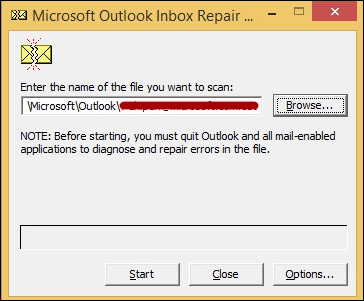 <li>Recover repaired items to a new PST file <ul> <li>To recover Outlook 2007 PST files, i.e the repaired items using the <strong>ScanPST.exe tool</strong>, start the Outlook. If you use multiple profiles in Outlook, then ensure that you must select the profile that contains the .pst file that you tried to repair <li>Then, press <strong>CTRL+6 </strong>to turn on <strong>Folder List view</strong> <li>Now, you are able to see the following Folder List: </ul> <ul> <li>Recovered Personal Folders</li> <li>Calendar</li> <li>Contacts</li> <li>Deleted Items</li> <li>Inbox</li> <li>Journal</li> <li>Notes </li> <li>Outbox</li> <li>Sent Items</li> <li>Tasks</li> </ul> </li>These recovered folders are usually empty because this is a rebuilt .pst file.</li> <li>In this step, create a <strong>new Personal Folder (.pst) file</strong> in your Outlook 2007 profile</li> <ul> <li>First, go to the <strong>File</strong> menu and click on the <strong>Data File Management</strong></li> <li>Then, click on<strong> Add button</strong> to open the <strong>New Outlook Data File</strong> dialog box</li> <li>In this dialog box, click to select <strong>Office Outlook Personal Folders File (.pst)</strong>, and then click on<strong> OK </strong>button</li> <li>Now, from the <strong>Create or Open Outlook Data File</strong> dialog box, select the<strong> location & a file name</strong> for your new .pst file, and then click on <strong>OK</strong> button</li> <li>Finally, you have a <strong>new Personal Folders (.pst) file</strong> in your profile.</li> </ul> <li>After that, <strong>Drag the recovered items</strong> from the Lost and Found folder to your new Personal Folders (.pst) file</li> <li>Finally, When you have finished moving all items, then you can remove recover Outlook 2007 PST file from your profile. This includes the Lost and Found folder.</li> </ol> <h3>An Automatic Solution to Recover Damaged Outlook PST File</h3> <p>The above discussed manual approach can be cumbersome. So, in case, if the manual method fails to repair corrupt PST file in Outlook 2007. Then, it is suggested to use a commercial solution like <strong>Outlook Recovery</strong> Tool. This software can easily remove the errors and recover Outlook 2007 PST files that are severely damaged. Moreover, it is an efficient recovery software for both minor and major corruption. The application allows repairing multiple PST files in batch.</p> <h3>The Final Words</h3> <p>After all these discussions on how to recover Outlook 2007 PST file. It is found that the manual method seems easy to solve the issues. But, in actual it is completely difficult for severely corrupted or damaged PST file. Therefore, in case of such severe problem, users can choose for Outlook Recovery tool. It can easily restore Outlook 2007 .pst file. </p> |
| json metadata | {"tags":["repair","recover","outlook","pst","files"],"image":["https://steemitimages.com/DQmcruGEsLLzuxGz8Ta5VgGGTay3gavq5gdX9FRs4sMTjT4/outlook.png"],"links":["https://www.systoolsgroup.com/outlook-recovery.html"],"app":"steemit/0.1","format":"markdown"} |
| Transaction Info | Block #20344665/Trx 264a44176477a27d37f1be1582b3df55ef069c0b |
View Raw JSON Data
{
"trx_id": "264a44176477a27d37f1be1582b3df55ef069c0b",
"block": 20344665,
"trx_in_block": 23,
"op_in_trx": 0,
"virtual_op": 0,
"timestamp": "2018-03-03T06:43:51",
"op": [
"comment",
{
"parent_author": "",
"parent_permlink": "repair",
"author": "alphy123",
"permlink": "how-to-recover-outlook-2007-pst-file-complete-guidelines",
"title": "How to Recover Outlook 2007 PST File - Complete Guidelines",
"body": "<p><strong>Summary:</strong> How to recover Outlook 2007 PST files without any data loss. Explore solutions to repair Outlook PST files using a manual solution. The article briefly describes steps to recover damaged Outlook PST files using Inbox Repair tool efficiently. Let us go deeply on PST files in Outlook 2007 and how this PST files may get corrupted.</p>\n\n<p>PST is an open-source file format. It is used to store emails, messages, events, etc. in the Microsoft email application. And the application that supports PST file format is Microsoft Outlook. The PST files provide free technology licensing and free specifications and it is also known as Personal Storage file. The MS Outlook 2007 provides only 2 GB storage capacity. When Outlook exceeded its storage limit, the PST files may get corrupted. Thus, a user needs to <a href=\"https://www.systoolsgroup.com/outlook-recovery.html\" target=\"_blank\"><strong>repair Outlook data file 2007</strong></a> PST files. There are many more reasons for this corruption, which are discussed in this blog. Also, you can get a solution on how to recover Outlook 2007 PST files.</p>\n\n<h2>Common Reasons to Restore PST File in Microsoft Outlook 2007</h2>\n<p>While using Microsoft Outlook, there are chances for PST files to get corrupt. These might create problems to access the system and the storage devices. There are various reasons on how to restore Outlook 2007 .pst files and other editions. Here are some of the causes that result in searching a way to recover Outlook 2007 PST files:</p>\n\n<strong>1. Hardware Issues</strong>\n<ul>\n<li>Crashing of storage device like a hard drive can damage or corrupt the Outlook .pst files.</li>\n<li>Problems with the network device. The PST files are mostly located on the network servers and when a user tries to access information from the remote computer system, it may result in network problem in cables or cards. Thus the Outlook PST files may get corrupted.</li>\n<li>The problem arises because of power failure. When the power failure occurs while a user is trying to access PST files can cause corruption of PST data files.</li>\n</ul>\n<strong>2. Software Issues</strong>\n<ul>\n<li>The main reason for corruption of PST files is damage of the file system. During the encounter of the file damage, the PST files might get missed or corrupt.</li>\n<li>The Microsoft Outlook might face virus attack which becomes the cause of PST damage.</li>\n<li>When the size of the PST files exceeds, this too can be a reason for the corruption.</li>\n</ul>\n<h3>How to Recover Outlook 2007 PST File?</h3>\n<p>In order to recover damaged Outlook PST file in Outlook 2007 and other versions, follow these steps:</p>\n<ol>\n<li>First of all, exit from <strong>Outlook</strong> & start the <strong>Inbox Repair tool</strong>\n<li> Now, repair the .pst file.\n<li>In the Inbox Repair tool, type the path and the<strong> file name of your PST file</strong>. Then, click on Browse button to <strong>locate the file</strong> by using the Windows file system. click on the <strong>Start</strong> button.</li>\n\n <li>Recover repaired items to a new PST file\n<ul>\n<li>To recover Outlook 2007 PST files, i.e the repaired items using the <strong>ScanPST.exe tool</strong>, start the Outlook. If you use multiple profiles in Outlook, then ensure that you must select the profile that contains the .pst file that you tried to repair\n<li>Then, press <strong>CTRL+6 </strong>to turn on <strong>Folder List view</strong>\n<li>Now, you are able to see the following Folder List:\n</ul>\n<ul>\n<li>Recovered Personal Folders</li>\n <li>Calendar</li>\n <li>Contacts</li>\n <li>Deleted Items</li>\n <li>Inbox</li>\n <li>Journal</li>\n <li>Notes </li>\n <li>Outbox</li>\n <li>Sent Items</li>\n <li>Tasks</li>\n</ul>\n</li>These recovered folders are usually empty because this is a rebuilt .pst file.</li>\n\n<li>In this step, create a <strong>new Personal Folder (.pst) file</strong> in your Outlook 2007 profile</li>\n<ul>\n<li>First, go to the <strong>File</strong> menu and click on the <strong>Data File Management</strong></li>\n<li>Then, click on<strong> Add button</strong> to open the <strong>New Outlook Data File</strong> dialog box</li>\n<li>In this dialog box, click to select <strong>Office Outlook Personal Folders File (.pst)</strong>, and then click on<strong> OK </strong>button</li>\n<li>Now, from the <strong>Create or Open Outlook Data File</strong> dialog box, select the<strong> location & a file name</strong> for your new .pst file, and then click on <strong>OK</strong> button</li>\n<li>Finally, you have a <strong>new Personal Folders (.pst) file</strong> in your profile.</li>\n</ul>\n<li>After that, <strong>Drag the recovered items</strong> from the Lost and Found folder to your new Personal Folders (.pst) file</li>\n<li>Finally, When you have finished moving all items, then you can remove recover Outlook 2007 PST file from your profile. This includes the Lost and Found folder.</li>\n</ol>\n\n<h3>An Automatic Solution to Recover Damaged Outlook PST File</h3>\n<p>The above discussed manual approach can be cumbersome. So, in case, if the manual method fails to repair corrupt PST file in Outlook 2007. Then, it is suggested to use a commercial solution like <strong>Outlook Recovery</strong> Tool. This software can easily remove the errors and recover Outlook 2007 PST files that are severely damaged. Moreover, it is an efficient recovery software for both minor and major corruption. The application allows repairing multiple PST files in batch.</p>\n\n<h3>The Final Words</h3>\n<p>After all these discussions on how to recover Outlook 2007 PST file. It is found that the manual method seems easy to solve the issues. But, in actual it is completely difficult for severely corrupted or damaged PST file. Therefore, in case of such severe problem, users can choose for Outlook Recovery tool. It can easily restore Outlook 2007 .pst file. </p>",
"json_metadata": "{\"tags\":[\"repair\",\"recover\",\"outlook\",\"pst\",\"files\"],\"image\":[\"https://steemitimages.com/DQmcruGEsLLzuxGz8Ta5VgGGTay3gavq5gdX9FRs4sMTjT4/outlook.png\"],\"links\":[\"https://www.systoolsgroup.com/outlook-recovery.html\"],\"app\":\"steemit/0.1\",\"format\":\"markdown\"}"
}
]
}2018/03/03 04:46:30
2018/03/03 04:46:30
| fee | 0.100 STEEM |
| delegation | 30690.000000 VESTS |
| creator | steem |
| new account name | alphy123 |
| owner | {"weight_threshold":1,"account_auths":[],"key_auths":[["STM7jHJkDyF9mMXJmjs7WddqBkg4JoeTJ9zJbUvhnfNYTcyoYMdUH",1]]} |
| active | {"weight_threshold":1,"account_auths":[],"key_auths":[["STM7cexC4V9hG46kARM7Ru2aEofaPKNxVsEU2NoW9hcTtaUEGwEjx",1]]} |
| posting | {"weight_threshold":1,"account_auths":[],"key_auths":[["STM8Q1tXd9E55s977GwjYFsdTtWqizxRYdjD4z7iwRPQarhdgGWLK",1]]} |
| memo key | STM7Dw35NRQSF1hUTxgSVLk95i9KSVU3uy2BVBnAB2HVoLSEFT2LQ |
| json metadata | {} |
| extensions | [] |
| Transaction Info | Block #20342318/Trx 91606862fcbccfe5add2ecaa7e6b06f7684d42fc |
View Raw JSON Data
{
  "trx_id": "91606862fcbccfe5add2ecaa7e6b06f7684d42fc",
  "block": 20342318,
  "trx_in_block": 8,
  "op_in_trx": 0,
  "virtual_op": 0,
  "timestamp": "2018-03-03T04:46:30",
  "op": [
    "account_create_with_delegation",
    {
      "fee": "0.100 STEEM",
      "delegation": "30690.000000 VESTS",
      "creator": "steem",
      "new_account_name": "alphy123",
      "owner": {
        "weight_threshold": 1,
        "account_auths": [],
        "key_auths": [
          [
            "STM7jHJkDyF9mMXJmjs7WddqBkg4JoeTJ9zJbUvhnfNYTcyoYMdUH",
            1
          ]
        ]
      },
      "active": {
        "weight_threshold": 1,
        "account_auths": [],
        "key_auths": [
          [
            "STM7cexC4V9hG46kARM7Ru2aEofaPKNxVsEU2NoW9hcTtaUEGwEjx",
            1
          ]
        ]
      },
      "posting": {
        "weight_threshold": 1,
        "account_auths": [],
        "key_auths": [
          [
            "STM8Q1tXd9E55s977GwjYFsdTtWqizxRYdjD4z7iwRPQarhdgGWLK",
            1
          ]
        ]
      },
      "memo_key": "STM7Dw35NRQSF1hUTxgSVLk95i9KSVU3uy2BVBnAB2HVoLSEFT2LQ",
      "json_metadata": "{}",
      "extensions": []
    }
  ]
}Manabar
Voting Power100.00%
Downvote Power100.00%
Resource Credits100.00%
Reputation Progress0.00%
{
  "voting_manabar": {
    "current_mana": "8143659806",
    "last_update_time": 1779052464
  },
  "downvote_manabar": {
    "current_mana": 2035914951,
    "last_update_time": 1779052464
  },
  "rc_account": {
    "account": "alphy123",
    "rc_manabar": {
      "current_mana": "10164408779",
      "last_update_time": 1779052464
    },
    "max_rc_creation_adjustment": {
      "amount": "2020748973",
      "precision": 6,
      "nai": "@@000000037"
    },
    "max_rc": "10164408779"
  }
}
Account Metadata
| POSTING JSON METADATA | |
| None | |
| JSON METADATA | |
| profile | {"name":"Alphy","about":"A versatile writer with the vast knowledge of technology helps to reduce the gap between a user and technology. Provides easy and reliable ways to resolve multi","location":"New Delhi","profile_image":"https://cdn.steemitimages.com/DQmRPi1HesrEbys89ViokBNpFfYhYUQDhkSfY1HPukPtB8S/images%20(2).jpg"} |
{
  "posting_json_metadata": {},
  "json_metadata": {
    "profile": {
      "name": "Alphy",
      "about": "A versatile writer with the vast knowledge of technology helps to reduce the gap between a user and technology. Provides easy and reliable ways to resolve multi",
      "location": "New Delhi",
      "profile_image": "https://cdn.steemitimages.com/DQmRPi1HesrEbys89ViokBNpFfYhYUQDhkSfY1HPukPtB8S/images%20(2).jpg"
    }
  }
}
Auth Keys
Owner
Single Signature
Public Keys
STM6kGYmFraqqxcdjQ1sGHpK6VYtnsAcE98XSKpHgWxAu9U5EPcyc1/1
Active
Single Signature
Public Keys
STM73NS14gsBpyN12gjPJLXDhaMy9jDQryQwXpxkuLGsaGPmkeQFD1/1
Posting
Single Signature
Public Keys
STM7MFQBxG9jUjPXFo16d6PRSL4HkGvhhe7hDyPGZz8arLzvXxpjW1/1
Memo
STM7wQ2Wt98e3oTRP6xgMpsqBgGTYewxpbHLuxDJPRw5F9J4in2Rm
{
  "owner": {
    "weight_threshold": 1,
    "account_auths": [],
    "key_auths": [
      [
        "STM6kGYmFraqqxcdjQ1sGHpK6VYtnsAcE98XSKpHgWxAu9U5EPcyc",
        1
      ]
    ]
  },
  "active": {
    "weight_threshold": 1,
    "account_auths": [],
    "key_auths": [
      [
        "STM73NS14gsBpyN12gjPJLXDhaMy9jDQryQwXpxkuLGsaGPmkeQFD",
        1
      ]
    ]
  },
  "posting": {
    "weight_threshold": 1,
    "account_auths": [],
    "key_auths": [
      [
        "STM7MFQBxG9jUjPXFo16d6PRSL4HkGvhhe7hDyPGZz8arLzvXxpjW",
        1
      ]
    ]
  },
  "memo": "STM7wQ2Wt98e3oTRP6xgMpsqBgGTYewxpbHLuxDJPRw5F9J4in2Rm"
}
Witness Votes
0 / 30
No active witness votes.
[]