

VOTING POWER100.00%
DOWNVOTE POWER100.00%
RESOURCE CREDITS100.00%
REPUTATION PROGRESS0.00%
Net Worth
0.000USD
STEEM
0.002STEEM
SBD
0.000SBD
Effective Power
3.361SP
├── Own SP
0.000SP
└── Incoming DelegationsDeleg
+3.361SP
Detailed Balance
| STEEM | ||
| balance | 0.002STEEM | STEEM |
| market_balance | 0.000STEEM | STEEM |
| savings_balance | 0.000STEEM | STEEM |
| reward_steem_balance | 0.000STEEM | STEEM |
| STEEM POWER | ||
| Own SP | 0.000SP | SP |
| Delegated Out | 0.000SP | SP |
| Delegation In | 3.361SP | SP |
| Effective Power | 3.361SP | SP |
| Reward SP (pending) | 0.000SP | SP |
| SBD | ||
| sbd_balance | 0.000SBD | SBD |
| sbd_conversions | 0.000SBD | SBD |
| sbd_market_balance | 0.000SBD | SBD |
| savings_sbd_balance | 0.000SBD | SBD |
| reward_sbd_balance | 0.000SBD | SBD |
{
  "balance": "0.002 STEEM",
  "savings_balance": "0.000 STEEM",
  "reward_steem_balance": "0.000 STEEM",
  "vesting_shares": "0.000000 VESTS",
  "delegated_vesting_shares": "0.000000 VESTS",
  "received_vesting_shares": "5472.996220 VESTS",
  "sbd_balance": "0.000 SBD",
  "savings_sbd_balance": "0.000 SBD",
  "reward_sbd_balance": "0.000 SBD",
  "conversions": []
}
Account Info
| name | agilemeadow |
| id | 1724999 |
| rank | 972,132 |
| reputation | 698070025 |
| created | 2022-06-21T04:58:18 |
| recovery_account | steemcurator01 |
| proxy | None |
| post_count | 2 |
| comment_count | 0 |
| lifetime_vote_count | 0 |
| witnesses_voted_for | 0 |
| last_post | 2022-10-20T06:12:00 |
| last_root_post | 2022-10-20T06:12:00 |
| last_vote_time | 2022-10-20T06:30:24 |
| proxied_vsf_votes | 0, 0, 0, 0 |
| can_vote | 1 |
| voting_power | 0 |
| delayed_votes | 0 |
| balance | 0.002 STEEM |
| savings_balance | 0.000 STEEM |
| sbd_balance | 0.000 SBD |
| savings_sbd_balance | 0.000 SBD |
| vesting_shares | 0.000000 VESTS |
| delegated_vesting_shares | 0.000000 VESTS |
| received_vesting_shares | 5472.996220 VESTS |
| reward_vesting_balance | 0.000000 VESTS |
| vesting_balance | 0.000 STEEM |
| vesting_withdraw_rate | 0.000000 VESTS |
| next_vesting_withdrawal | 1969-12-31T23:59:59 |
| withdrawn | 0 |
| to_withdraw | 0 |
| withdraw_routes | 0 |
| savings_withdraw_requests | 0 |
| last_account_recovery | 1970-01-01T00:00:00 |
| reset_account | null |
| last_owner_update | 1970-01-01T00:00:00 |
| last_account_update | 1970-01-01T00:00:00 |
| mined | No |
| sbd_seconds | 0 |
| sbd_last_interest_payment | 1970-01-01T00:00:00 |
| savings_sbd_last_interest_payment | 1970-01-01T00:00:00 |
{
  "id": 1724999,
  "name": "agilemeadow",
  "owner": {
    "weight_threshold": 1,
    "account_auths": [],
    "key_auths": [
      [
        "STM59YeHygaXiEztiDg3vx7Eh55ku1ehcYyvRqD5Z6Zbkycr2R7Dx",
        1
      ]
    ]
  },
  "active": {
    "weight_threshold": 1,
    "account_auths": [],
    "key_auths": [
      [
        "STM8dNnuS9amsjPGGTMHCHVAqz2NTBnKaAxgn3zjz9eaa3rsr3Pbt",
        1
      ]
    ]
  },
  "posting": {
    "weight_threshold": 1,
    "account_auths": [],
    "key_auths": [
      [
        "STM8T9KrZDPo1EfMdh8V5tiacsWDTZiyTTW17HbFuH2x5pa4dWn9e",
        1
      ]
    ]
  },
  "memo_key": "STM7Z6YgSZhWmwQG9B7AURWYYqSVpc5WavDbotLcRkiSfTrHtXRjE",
  "json_metadata": "{}",
  "posting_json_metadata": "",
  "proxy": "",
  "last_owner_update": "1970-01-01T00:00:00",
  "last_account_update": "1970-01-01T00:00:00",
  "created": "2022-06-21T04:58:18",
  "mined": false,
  "recovery_account": "steemcurator01",
  "last_account_recovery": "1970-01-01T00:00:00",
  "reset_account": "null",
  "comment_count": 0,
  "lifetime_vote_count": 0,
  "post_count": 2,
  "can_vote": true,
  "voting_manabar": {
    "current_mana": "5472996220",
    "last_update_time": 1769122878
  },
  "downvote_manabar": {
    "current_mana": 1368249055,
    "last_update_time": 1769122878
  },
  "voting_power": 0,
  "balance": "0.002 STEEM",
  "savings_balance": "0.000 STEEM",
  "sbd_balance": "0.000 SBD",
  "sbd_seconds": "0",
  "sbd_seconds_last_update": "1970-01-01T00:00:00",
  "sbd_last_interest_payment": "1970-01-01T00:00:00",
  "savings_sbd_balance": "0.000 SBD",
  "savings_sbd_seconds": "0",
  "savings_sbd_seconds_last_update": "1970-01-01T00:00:00",
  "savings_sbd_last_interest_payment": "1970-01-01T00:00:00",
  "savings_withdraw_requests": 0,
  "reward_sbd_balance": "0.000 SBD",
  "reward_steem_balance": "0.000 STEEM",
  "reward_vesting_balance": "0.000000 VESTS",
  "reward_vesting_steem": "0.000 STEEM",
  "vesting_shares": "0.000000 VESTS",
  "delegated_vesting_shares": "0.000000 VESTS",
  "received_vesting_shares": "5472.996220 VESTS",
  "vesting_withdraw_rate": "0.000000 VESTS",
  "next_vesting_withdrawal": "1969-12-31T23:59:59",
  "withdrawn": 0,
  "to_withdraw": 0,
  "withdraw_routes": 0,
  "curation_rewards": 0,
  "posting_rewards": 0,
  "proxied_vsf_votes": [
    0,
    0,
    0,
    0
  ],
  "witnesses_voted_for": 0,
  "last_post": "2022-10-20T06:12:00",
  "last_root_post": "2022-10-20T06:12:00",
  "last_vote_time": "2022-10-20T06:30:24",
  "post_bandwidth": 0,
  "pending_claimed_accounts": 0,
  "vesting_balance": "0.000 STEEM",
  "reputation": 698070025,
  "transfer_history": [],
  "market_history": [],
  "post_history": [],
  "vote_history": [],
  "other_history": [],
  "witness_votes": [],
  "tags_usage": [],
  "guest_bloggers": [],
  "rank": 972132
}
Withdraw Routes
| Incoming | Outgoing |
|---|---|
Empty | Empty |
{
  "incoming": [],
  "outgoing": []
}From Date
To Date
steemdelegated 3.361 SP to @agilemeadow2026/01/22 23:01:18
steemdelegated 3.361 SP to @agilemeadow
2026/01/22 23:01:18
| delegator | steem |
| delegatee | agilemeadow |
| vesting shares | 5472.996220 VESTS |
| Transaction Info | Block #102841297/Trx f04b344107ae484713779147fec7bb5be78fedd5 |
View Raw JSON Data
{
  "trx_id": "f04b344107ae484713779147fec7bb5be78fedd5",
  "block": 102841297,
  "trx_in_block": 0,
  "op_in_trx": 0,
  "virtual_op": 0,
  "timestamp": "2026-01-22T23:01:18",
  "op": [
    "delegate_vesting_shares",
    {
      "delegator": "steem",
      "delegatee": "agilemeadow",
      "vesting_shares": "5472.996220 VESTS"
    }
  ]
}steemdelegated 3.462 SP to @agilemeadow2024/12/16 18:22:27
steemdelegated 3.462 SP to @agilemeadow
2024/12/16 18:22:27
| delegator | steem |
| delegatee | agilemeadow |
| vesting shares | 5637.215417 VESTS |
| Transaction Info | Block #91287745/Trx cecefc2cc0d671bbde5ef637ff494d62c90c0a07 |
View Raw JSON Data
{
  "trx_id": "cecefc2cc0d671bbde5ef637ff494d62c90c0a07",
  "block": 91287745,
  "trx_in_block": 1,
  "op_in_trx": 0,
  "virtual_op": 0,
  "timestamp": "2024-12-16T18:22:27",
  "op": [
    "delegate_vesting_shares",
    {
      "delegator": "steem",
      "delegatee": "agilemeadow",
      "vesting_shares": "5637.215417 VESTS"
    }
  ]
}steemdelegated 3.566 SP to @agilemeadow2023/11/13 10:08:39
steemdelegated 3.566 SP to @agilemeadow
2023/11/13 10:08:39
| delegator | steem |
| delegatee | agilemeadow |
| vesting shares | 5806.348949 VESTS |
| Transaction Info | Block #79842031/Trx 461968abd422fd5af874786634d8174845b6523a |
View Raw JSON Data
{
  "trx_id": "461968abd422fd5af874786634d8174845b6523a",
  "block": 79842031,
  "trx_in_block": 4,
  "op_in_trx": 0,
  "virtual_op": 0,
  "timestamp": "2023-11-13T10:08:39",
  "op": [
    "delegate_vesting_shares",
    {
      "delegator": "steem",
      "delegatee": "agilemeadow",
      "vesting_shares": "5806.348949 VESTS"
    }
  ]
}steemdelegated 5.365 SP to @agilemeadow2023/10/03 22:24:36
steemdelegated 5.365 SP to @agilemeadow
2023/10/03 22:24:36
| delegator | steem |
| delegatee | agilemeadow |
| vesting shares | 8735.591451 VESTS |
| Transaction Info | Block #78692802/Trx 3bf0feef3e13e139bc1c1840ac1e139abde167a9 |
View Raw JSON Data
{
  "trx_id": "3bf0feef3e13e139bc1c1840ac1e139abde167a9",
  "block": 78692802,
  "trx_in_block": 0,
  "op_in_trx": 0,
  "virtual_op": 0,
  "timestamp": "2023-10-03T22:24:36",
  "op": [
    "delegate_vesting_shares",
    {
      "delegator": "steem",
      "delegatee": "agilemeadow",
      "vesting_shares": "8735.591451 VESTS"
    }
  ]
}steemdelegated 5.472 SP to @agilemeadow2023/01/19 08:09:18
steemdelegated 5.472 SP to @agilemeadow
2023/01/19 08:09:18
| delegator | steem |
| delegatee | agilemeadow |
| vesting shares | 8910.329863 VESTS |
| Transaction Info | Block #71313546/Trx 96abb298a7fca3658517691525d667e2f0148381 |
View Raw JSON Data
{
  "trx_id": "96abb298a7fca3658517691525d667e2f0148381",
  "block": 71313546,
  "trx_in_block": 5,
  "op_in_trx": 0,
  "virtual_op": 0,
  "timestamp": "2023-01-19T08:09:18",
  "op": [
    "delegate_vesting_shares",
    {
      "delegator": "steem",
      "delegatee": "agilemeadow",
      "vesting_shares": "8910.329863 VESTS"
    }
  ]
}steemdelegated 16.517 SP to @agilemeadow2022/11/03 08:13:03
steemdelegated 16.517 SP to @agilemeadow
2022/11/03 08:13:03
| delegator | steem |
| delegatee | agilemeadow |
| vesting shares | 26895.927518 VESTS |
| Transaction Info | Block #69109095/Trx ca155ea7a6d9abf73645172660e04cd962bfdc98 |
View Raw JSON Data
{
  "trx_id": "ca155ea7a6d9abf73645172660e04cd962bfdc98",
  "block": 69109095,
  "trx_in_block": 1,
  "op_in_trx": 0,
  "virtual_op": 0,
  "timestamp": "2022-11-03T08:13:03",
  "op": [
    "delegate_vesting_shares",
    {
      "delegator": "steem",
      "delegatee": "agilemeadow",
      "vesting_shares": "26895.927518 VESTS"
    }
  ]
}alexmove.witnesssent 0.001 STEEM to @agilemeadow- "Please support me @alexmove.witness as witness on site https://steemitwallet.com/~witnesses. I send daily Witness vote STEEM reward and voted for some posts of those who voted. Your vote is very impor..."2022/10/20 07:21:03
alexmove.witnesssent 0.001 STEEM to @agilemeadow- "Please support me @alexmove.witness as witness on site https://steemitwallet.com/~witnesses. I send daily Witness vote STEEM reward and voted for some posts of those who voted. Your vote is very impor..."
2022/10/20 07:21:03
| from | alexmove.witness |
| to | agilemeadow |
| amount | 0.001 STEEM |
| memo | Please support me @alexmove.witness as witness on site https://steemitwallet.com/~witnesses. I send daily Witness vote STEEM reward and voted for some posts of those who voted. Your vote is very important to me, agilemeadow! Good luck! 20221020 |
| Transaction Info | Block #68706817/Trx 3684b40006eba12dfbbbe3af0556854b6f0ea46f |
View Raw JSON Data
{
  "trx_id": "3684b40006eba12dfbbbe3af0556854b6f0ea46f",
  "block": 68706817,
  "trx_in_block": 4,
  "op_in_trx": 0,
  "virtual_op": 0,
  "timestamp": "2022-10-20T07:21:03",
  "op": [
    "transfer",
    {
      "from": "alexmove.witness",
      "to": "agilemeadow",
      "amount": "0.001 STEEM",
      "memo": "Please support me @alexmove.witness as witness on site https://steemitwallet.com/~witnesses. I send daily Witness vote STEEM reward and voted for some posts of those who voted. Your vote is very important to me, agilemeadow! Good luck! 20221020"
    }
  ]
}agilemeadowupvoted (100.00%) @ftma10 / awyib-herkese-guenaydin2022/10/20 06:30:24
agilemeadowupvoted (100.00%) @ftma10 / awyib-herkese-guenaydin
2022/10/20 06:30:24
| voter | agilemeadow |
| author | ftma10 |
| permlink | awyib-herkese-guenaydin |
| weight | 10000 (100.00%) |
| Transaction Info | Block #68705812/Trx e4213da8329ec38eb86a766cd6f365e07f40f9d6 |
View Raw JSON Data
{
  "trx_id": "e4213da8329ec38eb86a766cd6f365e07f40f9d6",
  "block": 68705812,
  "trx_in_block": 4,
  "op_in_trx": 0,
  "virtual_op": 0,
  "timestamp": "2022-10-20T06:30:24",
  "op": [
    "vote",
    {
      "voter": "agilemeadow",
      "author": "ftma10",
      "permlink": "awyib-herkese-guenaydin",
      "weight": 10000
    }
  ]
}agilemeadowpublished a new post: remote-desktop-connection-with-aws2022/10/20 06:12:00
agilemeadowpublished a new post: remote-desktop-connection-with-aws
2022/10/20 06:12:00
| parent author | |
| parent permlink | aws |
| author | agilemeadow |
| permlink | remote-desktop-connection-with-aws |
| title | Remote Desktop Connection with AWS |
| body | In the last post, we launched the instance and set it up with the #freetiers on AWS. In this post, we will use #RemoteDesktopConnection and upload JDK, Oracle, and Apache Tomcat in the Remote Desktop. Open the Remote Desktop Connection and insert the public IP address. 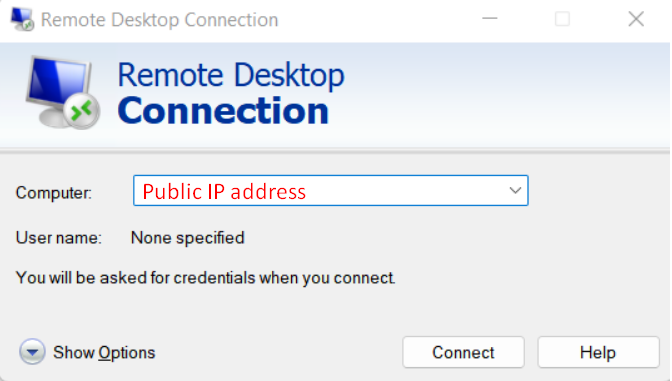 Log in with the Administrator. 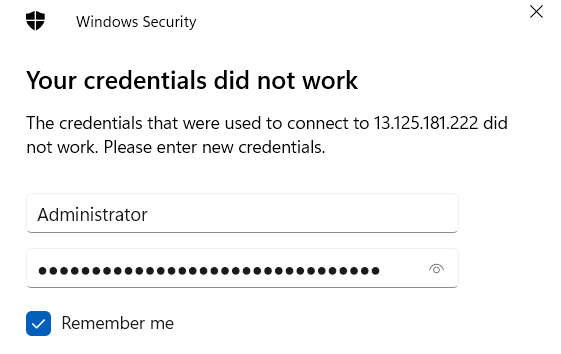 You will see this Remote Desktop after you enter the decrypted password from AWS. 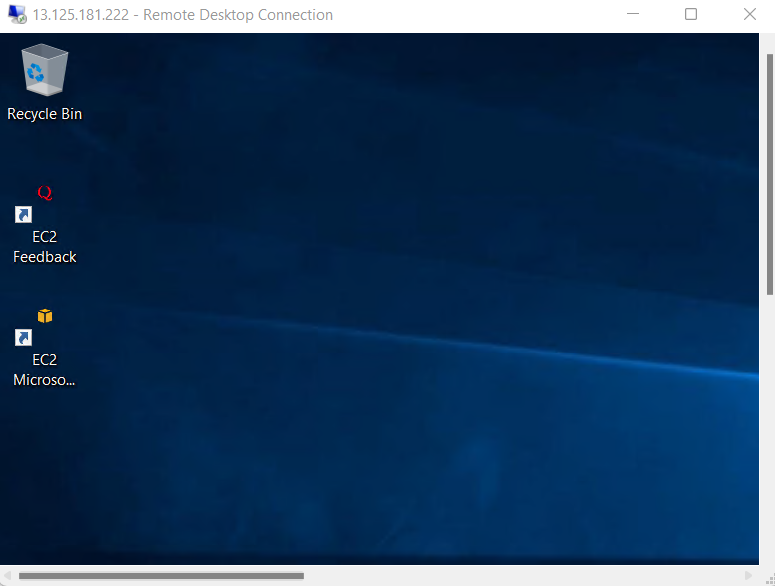 Here, download JDK, Oracle, and Apache Tomcat. In the Server Manager, go to Services. 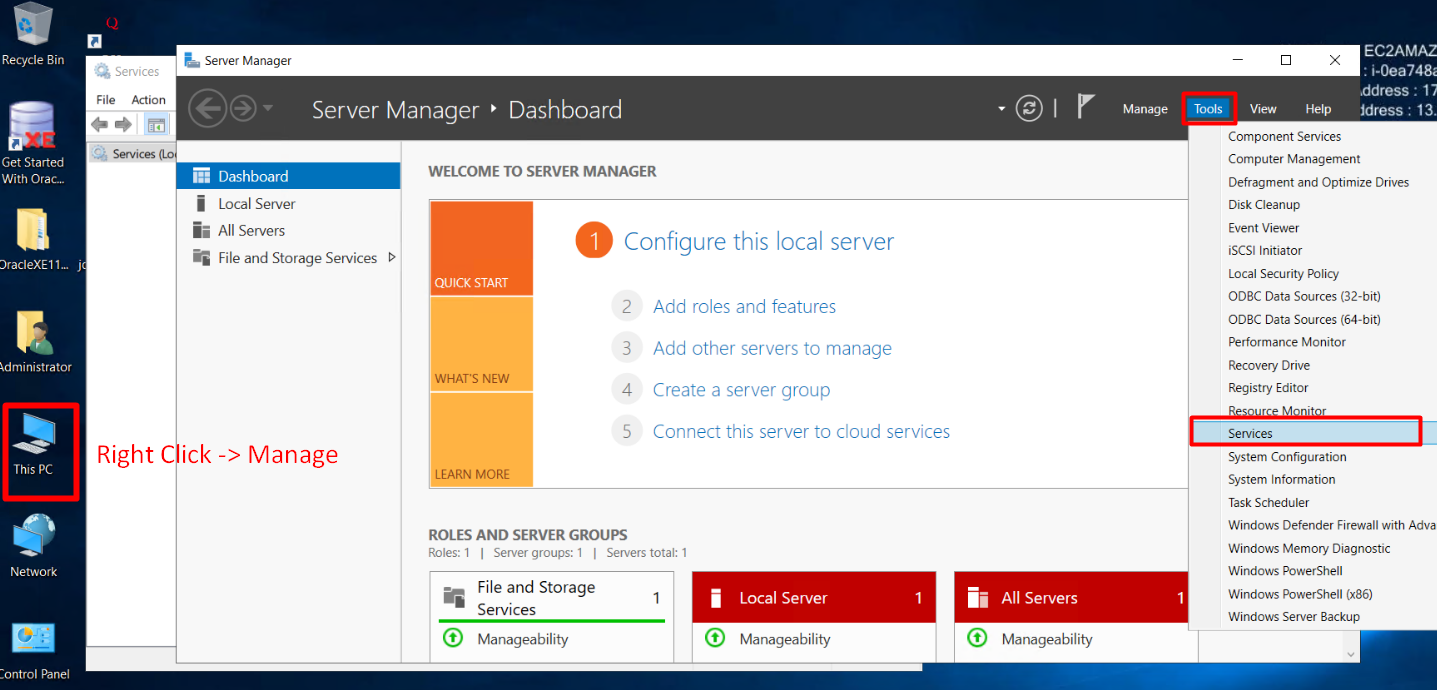 In the Services, set Apache Tomcat's Startup type, **Automatic**. 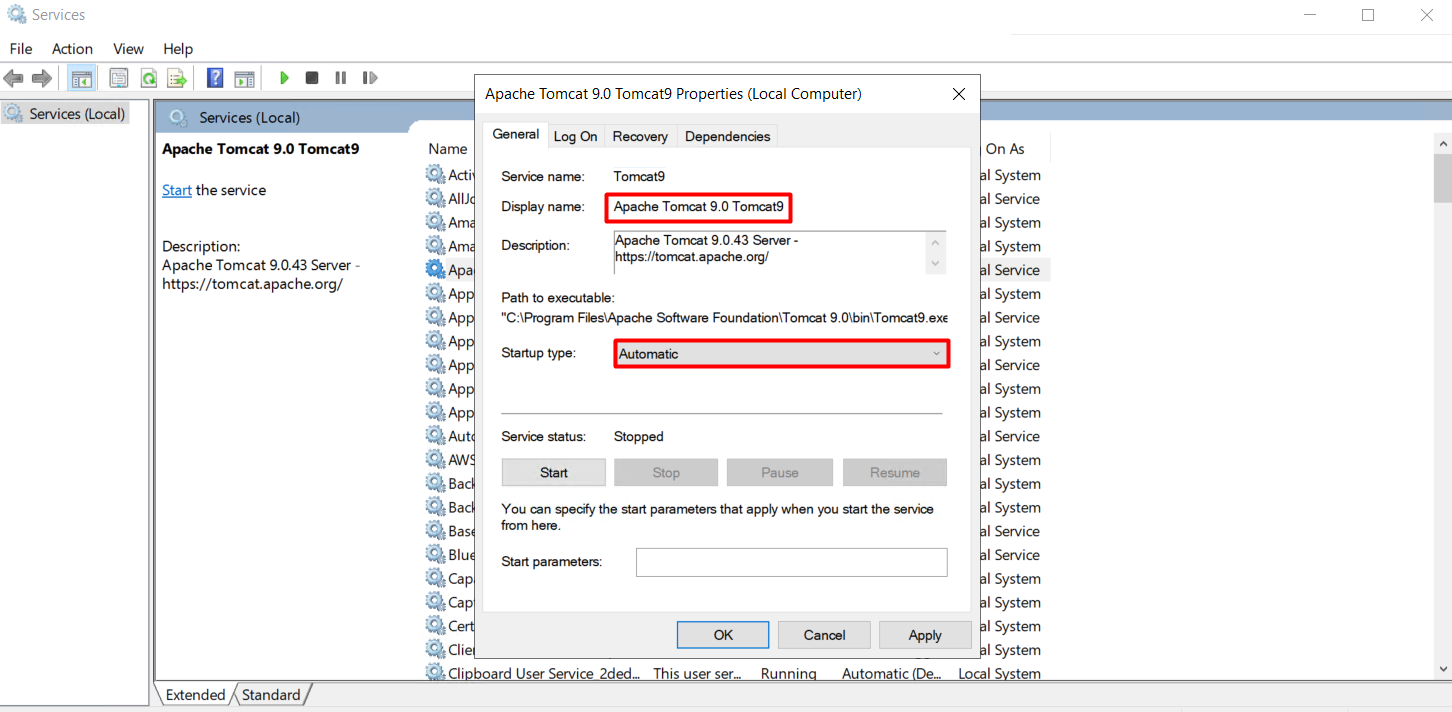 To set the firewall, 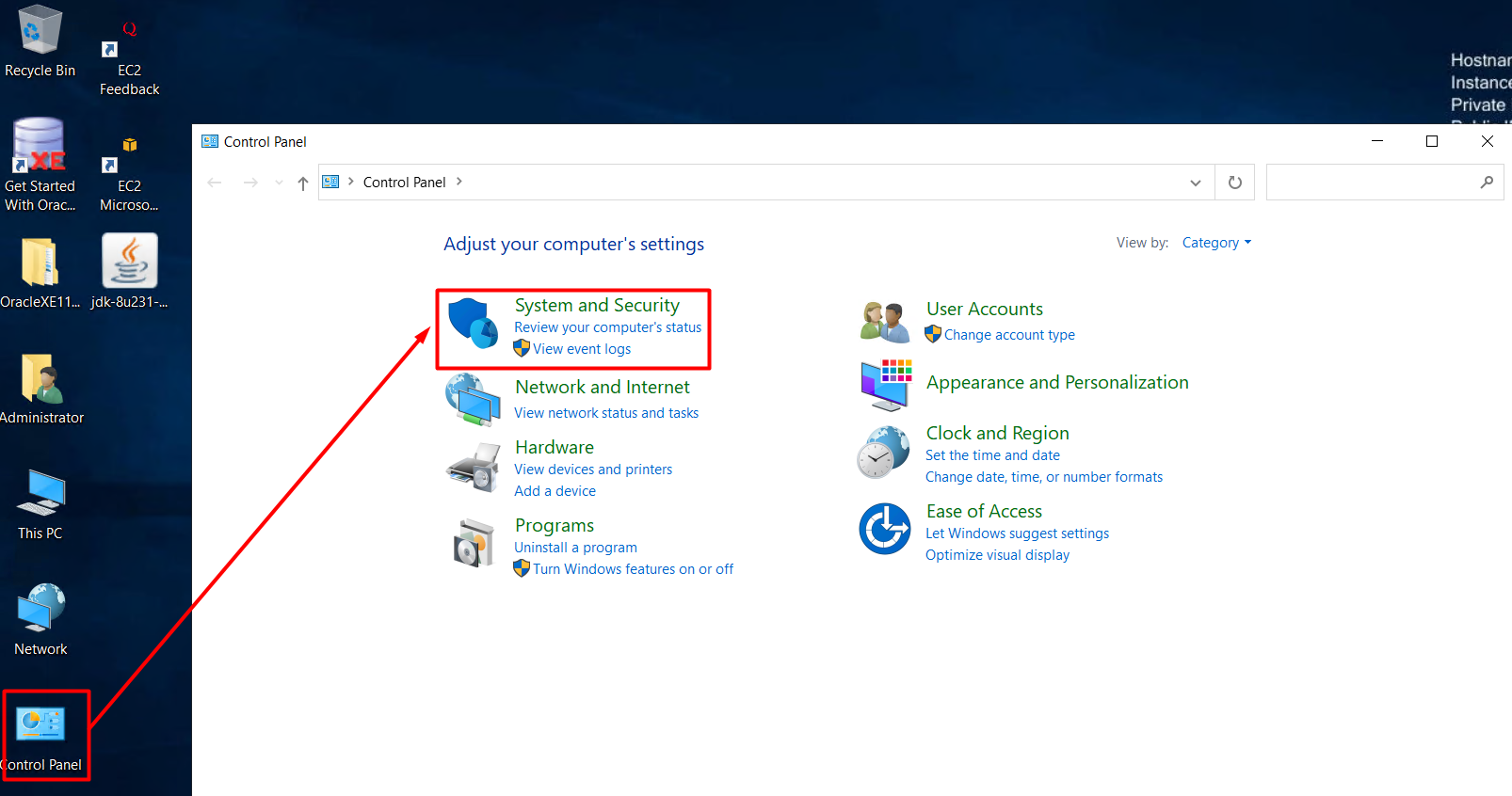 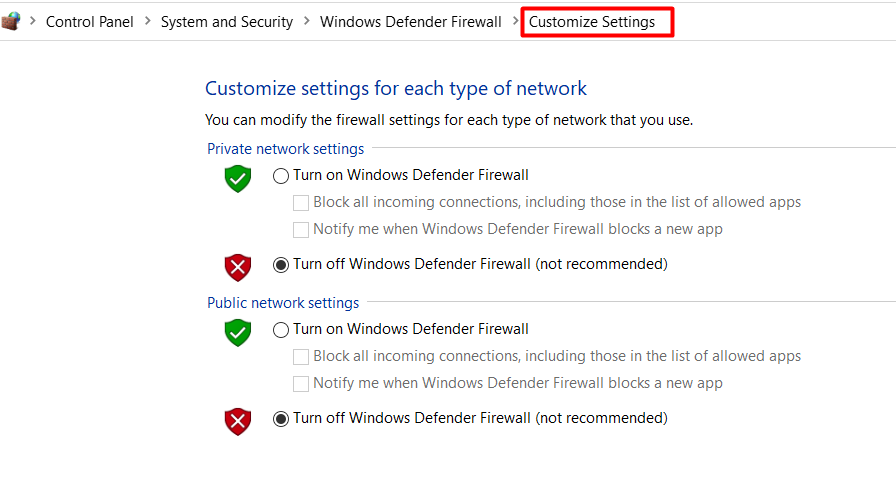 Now, when you enter the public IP in your localhost, you will see that it is connected. We will create a new Database Connection in the localhost Oracle SQL Developer to connect Oracle. 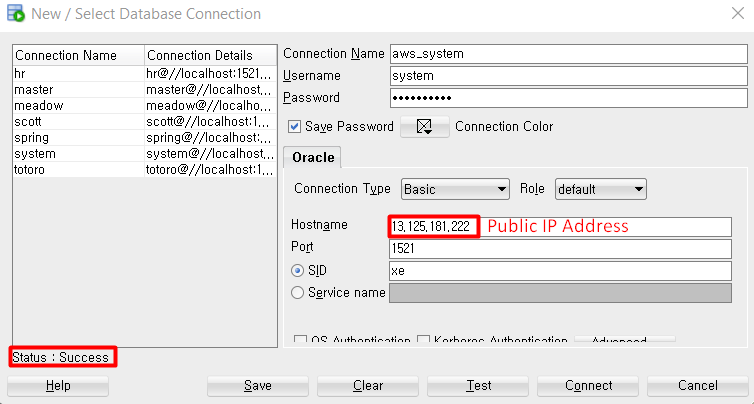 To deploy the tables that have already been made, we will create an account that already has a table. Create a new user and grant the user. 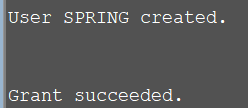 Create aws_spring in SQL Developer and Spring. 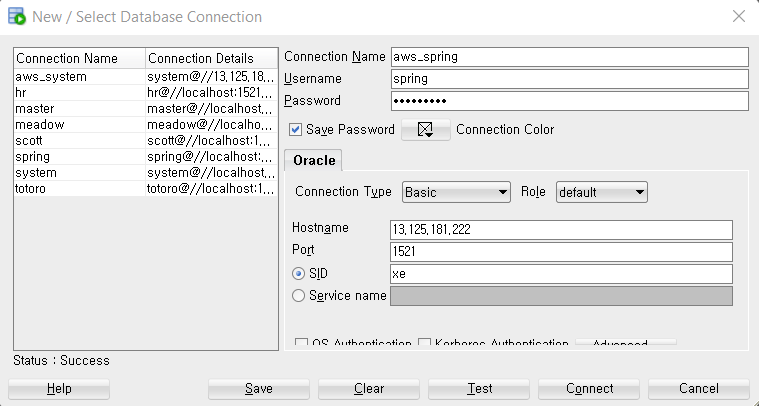 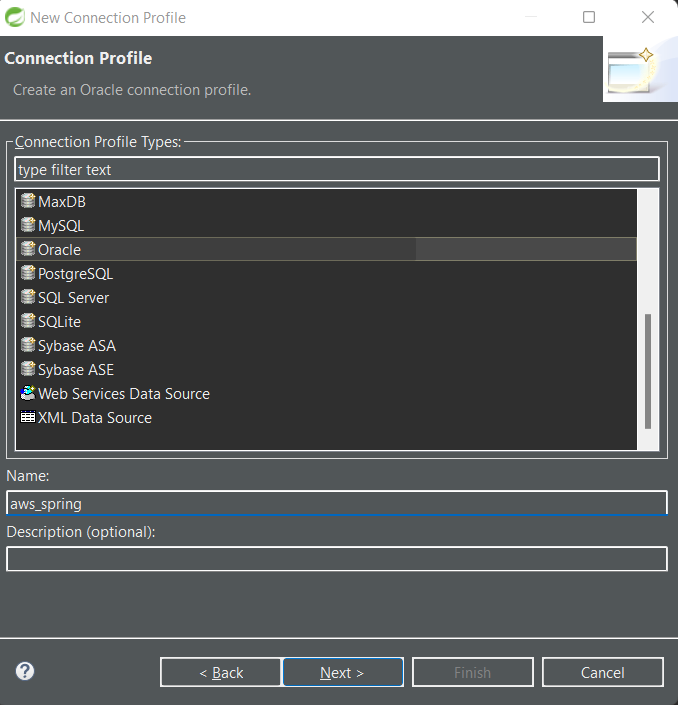 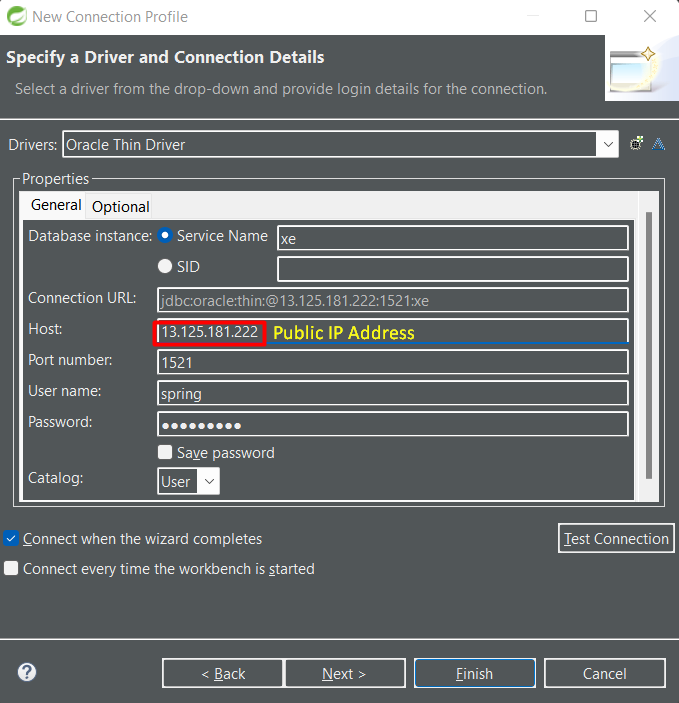 We will deploy a spring project named **springboard**, so go to the sql file, and change the connection's name to aws_spring. Then, create a table and a sequence. It will 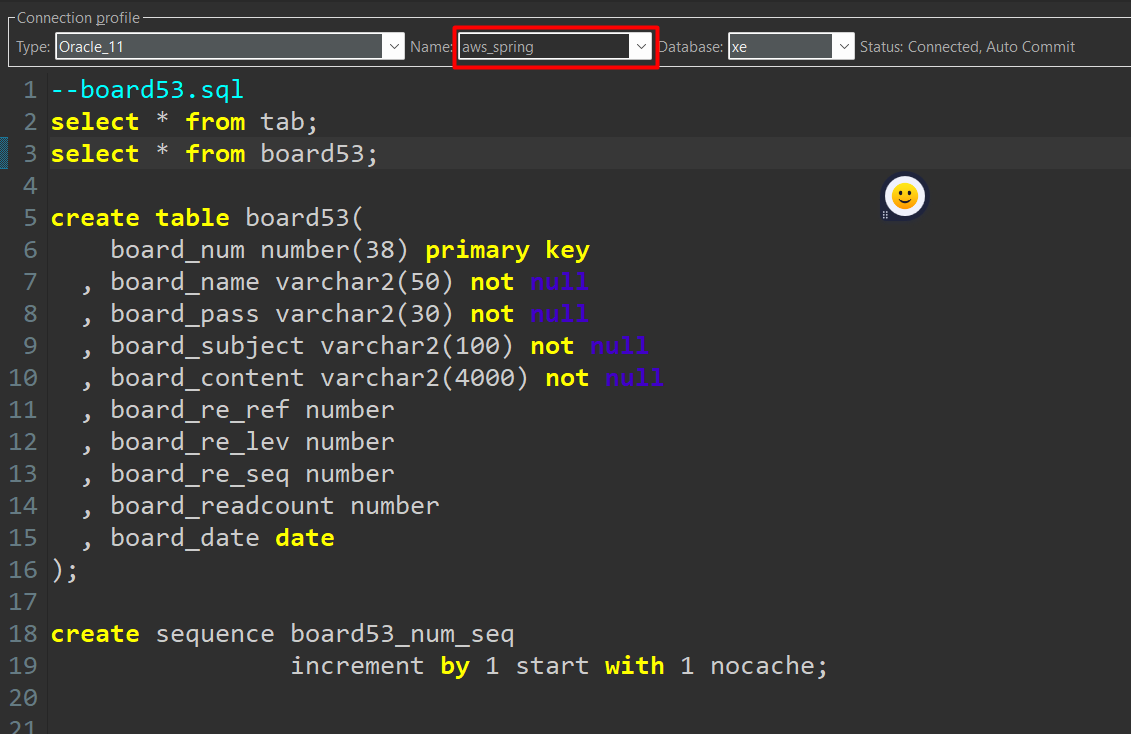 Export the project as WAR. Unzip the file and import it to the Remote Desktop. Import the project in the root folder where the Apache Tomcat is set. 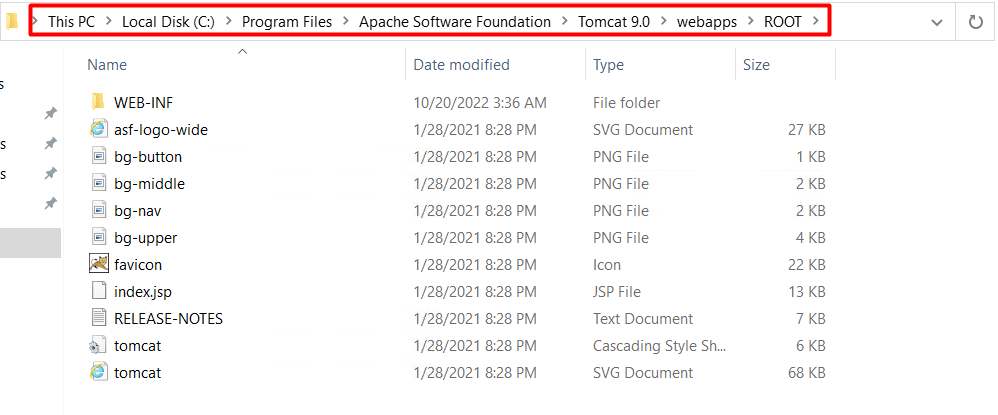 Delete these sample files, copy the project from the localhost, and paste it into the Remote Desktop. Now it is all done. Enter the Public IP Address to see if it is well done. 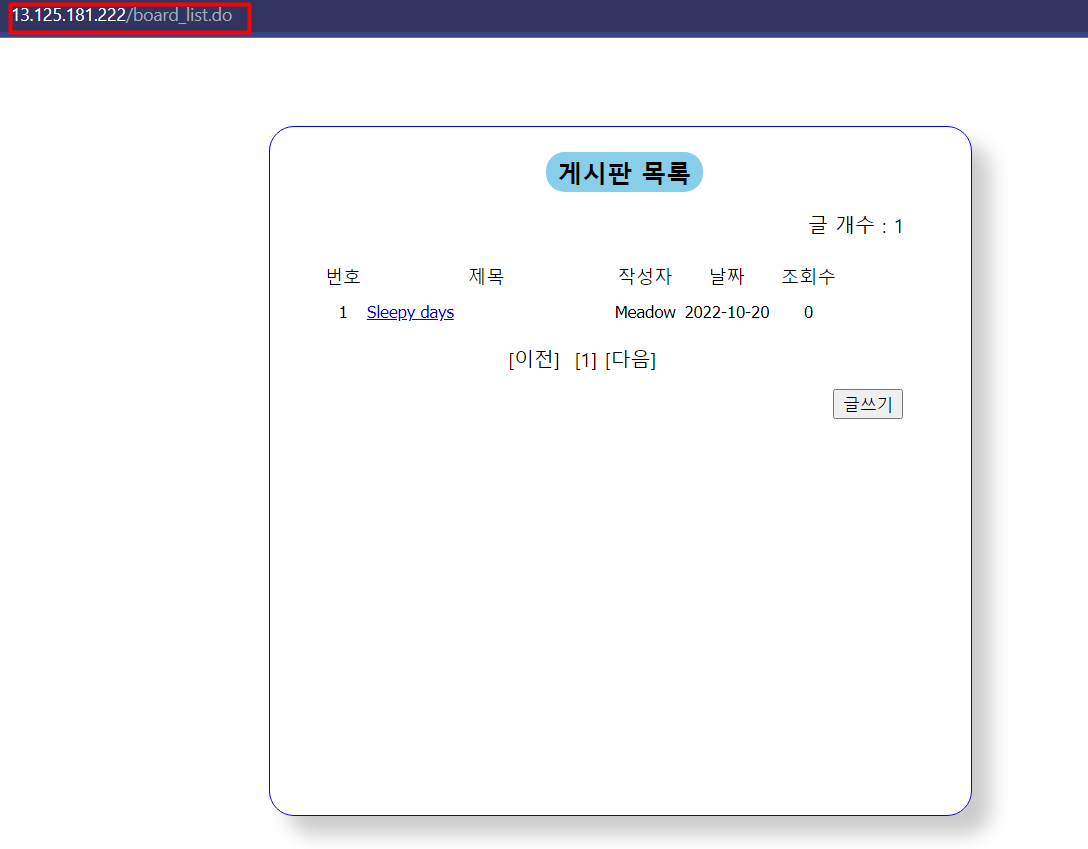 Look! It works! |
| json metadata | {"tags":["aws","remotedesktopconnection","awswithoracle","freetiers"],"image":["https://blog.kakaocdn.net/dn/AoqBa/btrO79mewac/onlFIqew4u1Kd1ZQkry4VK/img.png","https://blog.kakaocdn.net/dn/cTq7Jc/btrO4g8bM3q/xlFyLSGapMKk9kKNAOUZuk/img.png","https://blog.kakaocdn.net/dn/BCWM5/btrO6NcEMK4/eMuEk8DLDH6yKMFuB5pCEK/img.png","https://blog.kakaocdn.net/dn/b1WMEK/btrO35TrFiQ/9WP2fOTaFcnDyzmuCweYSK/img.png","https://blog.kakaocdn.net/dn/qwcmZ/btrO79miJJp/KRCsmNm2auAKUGSvV6BolK/img.png","https://blog.kakaocdn.net/dn/IfLfl/btrO431IZFN/RBfM7ocXnk7h3vYyAlJtS0/img.png","https://blog.kakaocdn.net/dn/ciVQry/btrO5teKlBO/FStQuL5xeZDf9An7Kh5Bc1/img.png","https://blog.kakaocdn.net/dn/WGSIV/btrO44GWp6p/F1d1Mgk20m9OKeowUeAWK0/img.png","https://blog.kakaocdn.net/dn/dY8Tw1/btrO9OPT1s6/YUHkf6rkklkGmawnqkb6rK/img.png","https://blog.kakaocdn.net/dn/ECF5x/btrO9AK7uQz/zhHumyjagdlDAf75fLbgkk/img.png","https://blog.kakaocdn.net/dn/blaqJ9/btrO6OwGrex/RmPFE6K3FJdj4rOBSTGlH1/img.png","https://blog.kakaocdn.net/dn/cwADLu/btrO6M6H5hy/3zKf6qLGVJbubohqQn2zi1/img.png","https://blog.kakaocdn.net/dn/TABxg/btrO450gEpn/vZwQJKWSdAAITX6qgeW681/img.png","https://blog.kakaocdn.net/dn/mQxOm/btrO450kFvM/aWaRepfxla3wZSAxYq2PyK/img.png","https://blog.kakaocdn.net/dn/uFBHS/btrO8z6CAlx/Zi6gITYuZSzDS4rAb0oRC0/img.png"],"app":"steemit/0.2","format":"markdown"} |
| Transaction Info | Block #68705445/Trx c3dd7fd353ff4e326e1dae0053de83dcfde429ce |
View Raw JSON Data
{
"trx_id": "c3dd7fd353ff4e326e1dae0053de83dcfde429ce",
"block": 68705445,
"trx_in_block": 1,
"op_in_trx": 0,
"virtual_op": 0,
"timestamp": "2022-10-20T06:12:00",
"op": [
"comment",
{
"parent_author": "",
"parent_permlink": "aws",
"author": "agilemeadow",
"permlink": "remote-desktop-connection-with-aws",
"title": "Remote Desktop Connection with AWS",
"body": "In the last post, we launched the instance and set it up with the #freetiers on AWS.\n\nIn this post, we will use #RemoteDesktopConnection and upload JDK, Oracle, and Apache Tomcat in the Remote Desktop.\n\n \n\nOpen the Remote Desktop Connection and insert the public IP address.\n\n\n\nLog in with the Administrator.\n\n\n\nYou will see this Remote Desktop after you enter the decrypted password from AWS.\n\n\n\nHere, download JDK, Oracle, and Apache Tomcat.\n\nIn the Server Manager, go to Services.\n\n\n\nIn the Services, set Apache Tomcat's Startup type, **Automatic**.\n\n\n\nTo set the firewall,\n\n\n\n\n\nNow, when you enter the public IP in your localhost, you will see that it is connected.\n\n \n\nWe will create a new Database Connection in the localhost Oracle SQL Developer to connect Oracle.\n\n\n\nTo deploy the tables that have already been made, we will create an account that already has a table.\n\nCreate a new user and grant the user. \n\n\n\nCreate aws_spring in SQL Developer and Spring.\n\n\n\n\n\n\n\nWe will deploy a spring project named **springboard**, so go to the sql file, and change the connection's name to aws_spring. Then, create a table and a sequence. It will\n\n\n\nExport the project as WAR. Unzip the file and import it to the Remote Desktop.\n\nImport the project in the root folder where the Apache Tomcat is set.\n\n\n\nDelete these sample files, copy the project from the localhost, and paste it into the Remote Desktop.\n\nNow it is all done. Enter the Public IP Address to see if it is well done.\n\n\n\nLook! It works!",
"json_metadata": "{\"tags\":[\"aws\",\"remotedesktopconnection\",\"awswithoracle\",\"freetiers\"],\"image\":[\"https://blog.kakaocdn.net/dn/AoqBa/btrO79mewac/onlFIqew4u1Kd1ZQkry4VK/img.png\",\"https://blog.kakaocdn.net/dn/cTq7Jc/btrO4g8bM3q/xlFyLSGapMKk9kKNAOUZuk/img.png\",\"https://blog.kakaocdn.net/dn/BCWM5/btrO6NcEMK4/eMuEk8DLDH6yKMFuB5pCEK/img.png\",\"https://blog.kakaocdn.net/dn/b1WMEK/btrO35TrFiQ/9WP2fOTaFcnDyzmuCweYSK/img.png\",\"https://blog.kakaocdn.net/dn/qwcmZ/btrO79miJJp/KRCsmNm2auAKUGSvV6BolK/img.png\",\"https://blog.kakaocdn.net/dn/IfLfl/btrO431IZFN/RBfM7ocXnk7h3vYyAlJtS0/img.png\",\"https://blog.kakaocdn.net/dn/ciVQry/btrO5teKlBO/FStQuL5xeZDf9An7Kh5Bc1/img.png\",\"https://blog.kakaocdn.net/dn/WGSIV/btrO44GWp6p/F1d1Mgk20m9OKeowUeAWK0/img.png\",\"https://blog.kakaocdn.net/dn/dY8Tw1/btrO9OPT1s6/YUHkf6rkklkGmawnqkb6rK/img.png\",\"https://blog.kakaocdn.net/dn/ECF5x/btrO9AK7uQz/zhHumyjagdlDAf75fLbgkk/img.png\",\"https://blog.kakaocdn.net/dn/blaqJ9/btrO6OwGrex/RmPFE6K3FJdj4rOBSTGlH1/img.png\",\"https://blog.kakaocdn.net/dn/cwADLu/btrO6M6H5hy/3zKf6qLGVJbubohqQn2zi1/img.png\",\"https://blog.kakaocdn.net/dn/TABxg/btrO450gEpn/vZwQJKWSdAAITX6qgeW681/img.png\",\"https://blog.kakaocdn.net/dn/mQxOm/btrO450kFvM/aWaRepfxla3wZSAxYq2PyK/img.png\",\"https://blog.kakaocdn.net/dn/uFBHS/btrO8z6CAlx/Zi6gITYuZSzDS4rAb0oRC0/img.png\"],\"app\":\"steemit/0.2\",\"format\":\"markdown\"}"
}
]
}agilemeadowcustom json: notify2022/10/20 06:04:12
agilemeadowcustom json: notify
2022/10/20 06:04:12
| required auths | [] |
| required posting auths | ["agilemeadow"] |
| id | notify |
| json | ["setLastRead",{"date":"2022-10-20T06:04:11"}] |
| Transaction Info | Block #68705289/Trx 382956ffc6166e723428615c08aac6e6c4994ffb |
View Raw JSON Data
{
  "trx_id": "382956ffc6166e723428615c08aac6e6c4994ffb",
  "block": 68705289,
  "trx_in_block": 1,
  "op_in_trx": 0,
  "virtual_op": 0,
  "timestamp": "2022-10-20T06:04:12",
  "op": [
    "custom_json",
    {
      "required_auths": [],
      "required_posting_auths": [
        "agilemeadow"
      ],
      "id": "notify",
      "json": "[\"setLastRead\",{\"date\":\"2022-10-20T06:04:11\"}]"
    }
  ]
}agilemeadowpublished a new post: how-to-start-hosting-with-aws-free-tier2022/10/20 06:03:57
agilemeadowpublished a new post: how-to-start-hosting-with-aws-free-tier
2022/10/20 06:03:57
| parent author | |
| parent permlink | aws |
| author | agilemeadow |
| permlink | how-to-start-hosting-with-aws-free-tier |
| title | How to start hosting with AWS Free tier |
| body | @@ -22,16 +22,122 @@ __html%22%3E +%0A%3Cp%3EIf you are a #developer or a student who is learning #coding, you may have heard once about #AWS.%3C/p%3E%0A %3Cp%3EAWS s @@ -4440,32 +4440,67 @@ ng%22 alt=%22%22%3E%3C/p%3E%0A +%3Cp%3EIt is pretty much all set! %3C/p%3E%0A %3Cp%3EIn the next p @@ -4546,16 +4546,42 @@ Desktop + with what we just created .%3C/p%3E%0A%3C/ |
| json metadata | {"links":["https://aws.amazon.com/","https://portal.aws.amazon.com/billing/signup#/start/email"],"app":"steemit/0.2","format":"markdown","image":["https://blog.kakaocdn.net/dn/bJCU3V/btrOQtlYtBg/r1ifLCD66kUpDEdAdNBzYK/img.png","https://blog.kakaocdn.net/dn/OUKgP/btrO5Y6tZVz/pfIA2tY7PyXCNdAT3YHv01/img.png","https://blog.kakaocdn.net/dn/EboQ5/btrOFj5lbpV/ytZ3I9pbEjH9W9Bv8JtH51/img.png","https://blog.kakaocdn.net/dn/cyhyP2/btrO50iWFYv/phcKhLqrnAb2tBQbxho48k/img.png","https://blog.kakaocdn.net/dn/by3I5X/btrO36q76mb/23qh9gDr5XihP7UauIFaBk/img.png","https://blog.kakaocdn.net/dn/0sDIf/btrO6hYZqV7/vds1RKE7bhZL7h4bGFNBYK/img.png","https://blog.kakaocdn.net/dn/cZZyXr/btrO3UkbklL/z6iEufZYM0B4otJXAoAqS0/img.png","https://blog.kakaocdn.net/dn/buP31P/btrO4tGf8Q3/MYSK9Y7j4lzX78YMZuWnZk/img.png","https://blog.kakaocdn.net/dn/bwmMBZ/btrO44MVeYE/bn2jELe2aUfsm8h0ucaJ10/img.png","https://blog.kakaocdn.net/dn/bQX3Nf/btrO3UdsVpi/YIOvL0RVO1yZjRmEWHMxxk/img.png","https://blog.kakaocdn.net/dn/72PMJ/btrOQvxmEi7/hUHs8F98NtIPJjdtFNvDUk/img.png","https://blog.kakaocdn.net/dn/bD8BLU/btrOQAMfrBv/VkzByccZhUdvkRumPMPnT0/img.png","https://blog.kakaocdn.net/dn/cqDjaB/btrOGoFnQQR/1uJUZkqZTGKryXm8ZxRgH1/img.png","https://blog.kakaocdn.net/dn/bbuedI/btrO5ZEnalk/Edtr5o5uINwYPk1mDOFa51/img.png","https://blog.kakaocdn.net/dn/bmJfEN/btrO8zyjh9D/NTaKXcTOjNFVxqXVCp9h0k/img.png","https://blog.kakaocdn.net/dn/zX2pL/btrOQEA4AoZ/QDzM3Vzkva19Rb231DqUyK/img.png","https://blog.kakaocdn.net/dn/wyha8/btrO34NEQAc/ue7IrWenuuJywIQEJwYRd1/img.png","https://blog.kakaocdn.net/dn/bJuXTR/btrO78t4BAr/LtpPrKhHlXasAkpoRfbMMK/img.png","https://blog.kakaocdn.net/dn/AuvUb/btrO5Z5t2uH/qhM2jKB2hwvFIPo80TOii0/img.png"],"tags":["developer","coding","aws"]} |
| Transaction Info | Block #68705284/Trx 86dbeb7afd5a289cbce17f7056174368030ab435 |
View Raw JSON Data
{
  "trx_id": "86dbeb7afd5a289cbce17f7056174368030ab435",
  "block": 68705284,
  "trx_in_block": 3,
  "op_in_trx": 0,
  "virtual_op": 0,
  "timestamp": "2022-10-20T06:03:57",
  "op": [
    "comment",
    {
      "parent_author": "",
      "parent_permlink": "aws",
      "author": "agilemeadow",
      "permlink": "how-to-start-hosting-with-aws-free-tier",
      "title": "How to start hosting with AWS Free tier",
      "body": "@@ -22,16 +22,122 @@\n __html%22%3E\n+%0A%3Cp%3EIf you are a #developer or a student who is learning #coding, you may have heard once about #AWS.%3C/p%3E%0A\n %3Cp%3EAWS s\n@@ -4440,32 +4440,67 @@\n ng%22 alt=%22%22%3E%3C/p%3E%0A\n+%3Cp%3EIt is pretty much all set! %3C/p%3E%0A\n %3Cp%3EIn the next p\n@@ -4546,16 +4546,42 @@\n  Desktop\n+ with what we just created\n .%3C/p%3E%0A%3C/\n",
      "json_metadata": "{\"links\":[\"https://aws.amazon.com/\",\"https://portal.aws.amazon.com/billing/signup#/start/email\"],\"app\":\"steemit/0.2\",\"format\":\"markdown\",\"image\":[\"https://blog.kakaocdn.net/dn/bJCU3V/btrOQtlYtBg/r1ifLCD66kUpDEdAdNBzYK/img.png\",\"https://blog.kakaocdn.net/dn/OUKgP/btrO5Y6tZVz/pfIA2tY7PyXCNdAT3YHv01/img.png\",\"https://blog.kakaocdn.net/dn/EboQ5/btrOFj5lbpV/ytZ3I9pbEjH9W9Bv8JtH51/img.png\",\"https://blog.kakaocdn.net/dn/cyhyP2/btrO50iWFYv/phcKhLqrnAb2tBQbxho48k/img.png\",\"https://blog.kakaocdn.net/dn/by3I5X/btrO36q76mb/23qh9gDr5XihP7UauIFaBk/img.png\",\"https://blog.kakaocdn.net/dn/0sDIf/btrO6hYZqV7/vds1RKE7bhZL7h4bGFNBYK/img.png\",\"https://blog.kakaocdn.net/dn/cZZyXr/btrO3UkbklL/z6iEufZYM0B4otJXAoAqS0/img.png\",\"https://blog.kakaocdn.net/dn/buP31P/btrO4tGf8Q3/MYSK9Y7j4lzX78YMZuWnZk/img.png\",\"https://blog.kakaocdn.net/dn/bwmMBZ/btrO44MVeYE/bn2jELe2aUfsm8h0ucaJ10/img.png\",\"https://blog.kakaocdn.net/dn/bQX3Nf/btrO3UdsVpi/YIOvL0RVO1yZjRmEWHMxxk/img.png\",\"https://blog.kakaocdn.net/dn/72PMJ/btrOQvxmEi7/hUHs8F98NtIPJjdtFNvDUk/img.png\",\"https://blog.kakaocdn.net/dn/bD8BLU/btrOQAMfrBv/VkzByccZhUdvkRumPMPnT0/img.png\",\"https://blog.kakaocdn.net/dn/cqDjaB/btrOGoFnQQR/1uJUZkqZTGKryXm8ZxRgH1/img.png\",\"https://blog.kakaocdn.net/dn/bbuedI/btrO5ZEnalk/Edtr5o5uINwYPk1mDOFa51/img.png\",\"https://blog.kakaocdn.net/dn/bmJfEN/btrO8zyjh9D/NTaKXcTOjNFVxqXVCp9h0k/img.png\",\"https://blog.kakaocdn.net/dn/zX2pL/btrOQEA4AoZ/QDzM3Vzkva19Rb231DqUyK/img.png\",\"https://blog.kakaocdn.net/dn/wyha8/btrO34NEQAc/ue7IrWenuuJywIQEJwYRd1/img.png\",\"https://blog.kakaocdn.net/dn/bJuXTR/btrO78t4BAr/LtpPrKhHlXasAkpoRfbMMK/img.png\",\"https://blog.kakaocdn.net/dn/AuvUb/btrO5Z5t2uH/qhM2jKB2hwvFIPo80TOii0/img.png\"],\"tags\":[\"developer\",\"coding\",\"aws\"]}"
    }
  ]
}inertiaupvoted (100.00%) @agilemeadow / how-to-start-hosting-with-aws-free-tier2022/10/20 06:01:30
inertiaupvoted (100.00%) @agilemeadow / how-to-start-hosting-with-aws-free-tier
2022/10/20 06:01:30
| voter | inertia |
| author | agilemeadow |
| permlink | how-to-start-hosting-with-aws-free-tier |
| weight | 10000 (100.00%) |
| Transaction Info | Block #68705235/Trx 321446a220c89be70215afdcc33f52b3c626bc9a |
View Raw JSON Data
{
  "trx_id": "321446a220c89be70215afdcc33f52b3c626bc9a",
  "block": 68705235,
  "trx_in_block": 3,
  "op_in_trx": 0,
  "virtual_op": 0,
  "timestamp": "2022-10-20T06:01:30",
  "op": [
    "vote",
    {
      "voter": "inertia",
      "author": "agilemeadow",
      "permlink": "how-to-start-hosting-with-aws-free-tier",
      "weight": 10000
    }
  ]
}agilemeadowpublished a new post: how-to-start-hosting-with-aws-free-tier2022/10/20 06:01:27
agilemeadowpublished a new post: how-to-start-hosting-with-aws-free-tier
2022/10/20 06:01:27
| parent author | |
| parent permlink | aws |
| author | agilemeadow |
| permlink | how-to-start-hosting-with-aws-free-tier |
| title | How to start hosting with AWS Free tier |
| body | <div class="stackedit__html"><p>AWS stands for Amazon Web Service. It is a service of Amazon.</p> <p>There are three main services: EC2(Elastic Computer Cloud), RDS(Relational Database Service), and S3(Simple Storage Service). To use the service for free for a year, sign up for AWS.</p> <p><a href="https://aws.amazon.com/">https://aws.amazon.com/</a></p> <p>Click the link above to the main page or below to load directly to the signup page.</p> <p><a href="https://portal.aws.amazon.com/billing/signup#/start/email">https://portal.aws.amazon.com/billing/signup#/start/email</a></p> <p>You must verify your email address, phone number, and credit/debit card.</p> <p>When you see this, click the <strong>Basic support - Free</strong> to use for free.</p> <p><img src="https://blog.kakaocdn.net/dn/bJCU3V/btrOQtlYtBg/r1ifLCD66kUpDEdAdNBzYK/img.png" alt=""></p> <p>It is all set.</p> <p><img src="https://blog.kakaocdn.net/dn/OUKgP/btrO5Y6tZVz/pfIA2tY7PyXCNdAT3YHv01/img.png" alt=""></p> <p>To log in, we will tick the <strong>Root User</strong>.</p> <p><img src="https://blog.kakaocdn.net/dn/EboQ5/btrOFj5lbpV/ytZ3I9pbEjH9W9Bv8JtH51/img.png" alt=""></p> <p>After signing in, you will see this <strong>Console Home</strong>.</p> <p><img src="https://blog.kakaocdn.net/dn/cyhyP2/btrO50iWFYv/phcKhLqrnAb2tBQbxho48k/img.png" alt=""></p> <p>Go to EC2 page.</p> <p><img src="https://blog.kakaocdn.net/dn/by3I5X/btrO36q76mb/23qh9gDr5XihP7UauIFaBk/img.png" alt=""></p> <p>Select the region where you are. I am currently in Seoul, so I selected Seoul.</p> <p><img src="https://blog.kakaocdn.net/dn/0sDIf/btrO6hYZqV7/vds1RKE7bhZL7h4bGFNBYK/img.png" alt=""></p> <p>Click <strong>Launch instance</strong>.</p> <p><img src="https://blog.kakaocdn.net/dn/cZZyXr/btrO3UkbklL/z6iEufZYM0B4otJXAoAqS0/img.png" alt=""></p> <p>Name the instance and choose one of the application and OS Images. I will choose Windows. To make sure you don’t have, double-check if it is <strong>Free tier eligible</strong>.</p> <p><img src="https://blog.kakaocdn.net/dn/buP31P/btrO4tGf8Q3/MYSK9Y7j4lzX78YMZuWnZk/img.png" alt=""></p> <p>Also, check the Free tier eligiblity with the instance type. Click <strong>create new key pair</strong>.</p> <p><img src="https://blog.kakaocdn.net/dn/bwmMBZ/btrO44MVeYE/bn2jELe2aUfsm8h0ucaJ10/img.png" alt=""></p> <p>Create your own key pair that is hard to forget. And keypairname.pem file will be created.</p> <p><img src="https://blog.kakaocdn.net/dn/bQX3Nf/btrO3UdsVpi/YIOvL0RVO1yZjRmEWHMxxk/img.png" alt=""></p> <p>In the Network settings, choose the existing security group and the default one.</p> <p><img src="https://blog.kakaocdn.net/dn/72PMJ/btrOQvxmEi7/hUHs8F98NtIPJjdtFNvDUk/img.png" alt=""></p> <p>Other, just leave them as they are. After all, you will see this Summary. If everything is alright, Launch Instance.</p> <p><img src="https://blog.kakaocdn.net/dn/bD8BLU/btrOQAMfrBv/VkzByccZhUdvkRumPMPnT0/img.png" alt=""></p> <p><img src="https://blog.kakaocdn.net/dn/cqDjaB/btrOGoFnQQR/1uJUZkqZTGKryXm8ZxRgH1/img.png" alt=""></p> <p>When you click the Instances tap, you will see the instance running that you just launched.</p> <p><img src="https://blog.kakaocdn.net/dn/bbuedI/btrO5ZEnalk/Edtr5o5uINwYPk1mDOFa51/img.png" alt=""></p> <p>Take note of the Public IPv4 address since you will need it often.</p> <p>To connect, check the box and click <strong>Connect</strong>.</p> <p><img src="https://blog.kakaocdn.net/dn/bmJfEN/btrO8zyjh9D/NTaKXcTOjNFVxqXVCp9h0k/img.png" alt=""></p> <p>Here, you will upload the key pair that was downloaded before.</p> <p><img src="https://blog.kakaocdn.net/dn/zX2pL/btrOQEA4AoZ/QDzM3Vzkva19Rb231DqUyK/img.png" alt=""></p> <p><img src="https://blog.kakaocdn.net/dn/wyha8/btrO34NEQAc/ue7IrWenuuJywIQEJwYRd1/img.png" alt=""></p> <p>Decrypt the password and take note of the decrypted password. You will not see this password every time, so make sure you know where you took the note of it.</p> <p>In the Security group menu, click Inbound rules. We will edit the inbound rules.</p> <p><img src="https://blog.kakaocdn.net/dn/bJuXTR/btrO78t4BAr/LtpPrKhHlXasAkpoRfbMMK/img.png" alt=""></p> <p>We will add RDP(Remote Desktop Protocol), Oracle-RDS, and HTTP(Hypertext Transfer Protocol) and save.</p> <p><img src="https://blog.kakaocdn.net/dn/AuvUb/btrO5Z5t2uH/qhM2jKB2hwvFIPo80TOii0/img.png" alt=""></p> <p>In the next post, we will connect this to the Remote Desktop.</p> </div> |
| json metadata | {"links":["https://aws.amazon.com/","https://portal.aws.amazon.com/billing/signup#/start/email"],"app":"steemit/0.2","format":"markdown","image":["https://blog.kakaocdn.net/dn/bJCU3V/btrOQtlYtBg/r1ifLCD66kUpDEdAdNBzYK/img.png","https://blog.kakaocdn.net/dn/OUKgP/btrO5Y6tZVz/pfIA2tY7PyXCNdAT3YHv01/img.png","https://blog.kakaocdn.net/dn/EboQ5/btrOFj5lbpV/ytZ3I9pbEjH9W9Bv8JtH51/img.png","https://blog.kakaocdn.net/dn/cyhyP2/btrO50iWFYv/phcKhLqrnAb2tBQbxho48k/img.png","https://blog.kakaocdn.net/dn/by3I5X/btrO36q76mb/23qh9gDr5XihP7UauIFaBk/img.png","https://blog.kakaocdn.net/dn/0sDIf/btrO6hYZqV7/vds1RKE7bhZL7h4bGFNBYK/img.png","https://blog.kakaocdn.net/dn/cZZyXr/btrO3UkbklL/z6iEufZYM0B4otJXAoAqS0/img.png","https://blog.kakaocdn.net/dn/buP31P/btrO4tGf8Q3/MYSK9Y7j4lzX78YMZuWnZk/img.png","https://blog.kakaocdn.net/dn/bwmMBZ/btrO44MVeYE/bn2jELe2aUfsm8h0ucaJ10/img.png","https://blog.kakaocdn.net/dn/bQX3Nf/btrO3UdsVpi/YIOvL0RVO1yZjRmEWHMxxk/img.png","https://blog.kakaocdn.net/dn/72PMJ/btrOQvxmEi7/hUHs8F98NtIPJjdtFNvDUk/img.png","https://blog.kakaocdn.net/dn/bD8BLU/btrOQAMfrBv/VkzByccZhUdvkRumPMPnT0/img.png","https://blog.kakaocdn.net/dn/cqDjaB/btrOGoFnQQR/1uJUZkqZTGKryXm8ZxRgH1/img.png","https://blog.kakaocdn.net/dn/bbuedI/btrO5ZEnalk/Edtr5o5uINwYPk1mDOFa51/img.png","https://blog.kakaocdn.net/dn/bmJfEN/btrO8zyjh9D/NTaKXcTOjNFVxqXVCp9h0k/img.png","https://blog.kakaocdn.net/dn/zX2pL/btrOQEA4AoZ/QDzM3Vzkva19Rb231DqUyK/img.png","https://blog.kakaocdn.net/dn/wyha8/btrO34NEQAc/ue7IrWenuuJywIQEJwYRd1/img.png","https://blog.kakaocdn.net/dn/bJuXTR/btrO78t4BAr/LtpPrKhHlXasAkpoRfbMMK/img.png","https://blog.kakaocdn.net/dn/AuvUb/btrO5Z5t2uH/qhM2jKB2hwvFIPo80TOii0/img.png"]} |
| Transaction Info | Block #68705234/Trx 2f9de4dd5f982459c9d6e7b996f0ecd7366fa56e |
View Raw JSON Data
{
  "trx_id": "2f9de4dd5f982459c9d6e7b996f0ecd7366fa56e",
  "block": 68705234,
  "trx_in_block": 1,
  "op_in_trx": 0,
  "virtual_op": 0,
  "timestamp": "2022-10-20T06:01:27",
  "op": [
    "comment",
    {
      "parent_author": "",
      "parent_permlink": "aws",
      "author": "agilemeadow",
      "permlink": "how-to-start-hosting-with-aws-free-tier",
      "title": "How to start hosting with AWS Free tier",
      "body": "<div class=\"stackedit__html\"><p>AWS stands for Amazon Web Service. It is a service of Amazon.</p>\n<p>There are three main services: EC2(Elastic Computer Cloud), RDS(Relational Database Service), and S3(Simple Storage Service). To use the service for free for a year, sign up for AWS.</p>\n<p><a href=\"https://aws.amazon.com/\">https://aws.amazon.com/</a></p>\n<p>Click the link above to the main page or below to load directly to the signup page.</p>\n<p><a href=\"https://portal.aws.amazon.com/billing/signup#/start/email\">https://portal.aws.amazon.com/billing/signup#/start/email</a></p>\n<p>You must verify your email address, phone number, and credit/debit card.</p>\n<p>When you see this, click the  <strong>Basic support - Free</strong>  to use for free.</p>\n<p><img src=\"https://blog.kakaocdn.net/dn/bJCU3V/btrOQtlYtBg/r1ifLCD66kUpDEdAdNBzYK/img.png\" alt=\"\"></p>\n<p>It is all set.</p>\n<p><img src=\"https://blog.kakaocdn.net/dn/OUKgP/btrO5Y6tZVz/pfIA2tY7PyXCNdAT3YHv01/img.png\" alt=\"\"></p>\n<p>To log in, we will tick the  <strong>Root User</strong>.</p>\n<p><img src=\"https://blog.kakaocdn.net/dn/EboQ5/btrOFj5lbpV/ytZ3I9pbEjH9W9Bv8JtH51/img.png\" alt=\"\"></p>\n<p>After signing in, you will see this  <strong>Console Home</strong>.</p>\n<p><img src=\"https://blog.kakaocdn.net/dn/cyhyP2/btrO50iWFYv/phcKhLqrnAb2tBQbxho48k/img.png\" alt=\"\"></p>\n<p>Go to EC2 page.</p>\n<p><img src=\"https://blog.kakaocdn.net/dn/by3I5X/btrO36q76mb/23qh9gDr5XihP7UauIFaBk/img.png\" alt=\"\"></p>\n<p>Select the region where you are. I am currently in Seoul, so I selected Seoul.</p>\n<p><img src=\"https://blog.kakaocdn.net/dn/0sDIf/btrO6hYZqV7/vds1RKE7bhZL7h4bGFNBYK/img.png\" alt=\"\"></p>\n<p>Click  <strong>Launch instance</strong>.</p>\n<p><img src=\"https://blog.kakaocdn.net/dn/cZZyXr/btrO3UkbklL/z6iEufZYM0B4otJXAoAqS0/img.png\" alt=\"\"></p>\n<p>Name the instance and choose one of the application and OS Images. I will choose Windows. To make sure you don’t have, double-check if it is  <strong>Free tier eligible</strong>.</p>\n<p><img src=\"https://blog.kakaocdn.net/dn/buP31P/btrO4tGf8Q3/MYSK9Y7j4lzX78YMZuWnZk/img.png\" alt=\"\"></p>\n<p>Also, check the Free tier eligiblity with the instance type. Click  <strong>create new key pair</strong>.</p>\n<p><img src=\"https://blog.kakaocdn.net/dn/bwmMBZ/btrO44MVeYE/bn2jELe2aUfsm8h0ucaJ10/img.png\" alt=\"\"></p>\n<p>Create your own key pair that is hard to forget. And keypairname.pem file will be created.</p>\n<p><img src=\"https://blog.kakaocdn.net/dn/bQX3Nf/btrO3UdsVpi/YIOvL0RVO1yZjRmEWHMxxk/img.png\" alt=\"\"></p>\n<p>In the Network settings, choose the existing security group and the default one.</p>\n<p><img src=\"https://blog.kakaocdn.net/dn/72PMJ/btrOQvxmEi7/hUHs8F98NtIPJjdtFNvDUk/img.png\" alt=\"\"></p>\n<p>Other, just leave them as they are. After all, you will see this Summary. If everything is alright, Launch Instance.</p>\n<p><img src=\"https://blog.kakaocdn.net/dn/bD8BLU/btrOQAMfrBv/VkzByccZhUdvkRumPMPnT0/img.png\" alt=\"\"></p>\n<p><img src=\"https://blog.kakaocdn.net/dn/cqDjaB/btrOGoFnQQR/1uJUZkqZTGKryXm8ZxRgH1/img.png\" alt=\"\"></p>\n<p>When you click the Instances tap, you will see the instance running that you just launched.</p>\n<p><img src=\"https://blog.kakaocdn.net/dn/bbuedI/btrO5ZEnalk/Edtr5o5uINwYPk1mDOFa51/img.png\" alt=\"\"></p>\n<p>Take note of the  Public IPv4 address since you will need it often.</p>\n<p>To connect, check the box and click  <strong>Connect</strong>.</p>\n<p><img src=\"https://blog.kakaocdn.net/dn/bmJfEN/btrO8zyjh9D/NTaKXcTOjNFVxqXVCp9h0k/img.png\" alt=\"\"></p>\n<p>Here, you will upload the key pair that was downloaded before.</p>\n<p><img src=\"https://blog.kakaocdn.net/dn/zX2pL/btrOQEA4AoZ/QDzM3Vzkva19Rb231DqUyK/img.png\" alt=\"\"></p>\n<p><img src=\"https://blog.kakaocdn.net/dn/wyha8/btrO34NEQAc/ue7IrWenuuJywIQEJwYRd1/img.png\" alt=\"\"></p>\n<p>Decrypt the password and take note of the decrypted password. You will not see this password every time, so make sure you know where you took the note of it.</p>\n<p>In the Security group menu, click Inbound rules. We will edit the inbound rules.</p>\n<p><img src=\"https://blog.kakaocdn.net/dn/bJuXTR/btrO78t4BAr/LtpPrKhHlXasAkpoRfbMMK/img.png\" alt=\"\"></p>\n<p>We will add RDP(Remote Desktop Protocol), Oracle-RDS, and HTTP(Hypertext Transfer Protocol) and save.</p>\n<p><img src=\"https://blog.kakaocdn.net/dn/AuvUb/btrO5Z5t2uH/qhM2jKB2hwvFIPo80TOii0/img.png\" alt=\"\"></p>\n<p>In the next post, we will connect this to the Remote Desktop.</p>\n</div>",
      "json_metadata": "{\"links\":[\"https://aws.amazon.com/\",\"https://portal.aws.amazon.com/billing/signup#/start/email\"],\"app\":\"steemit/0.2\",\"format\":\"markdown\",\"image\":[\"https://blog.kakaocdn.net/dn/bJCU3V/btrOQtlYtBg/r1ifLCD66kUpDEdAdNBzYK/img.png\",\"https://blog.kakaocdn.net/dn/OUKgP/btrO5Y6tZVz/pfIA2tY7PyXCNdAT3YHv01/img.png\",\"https://blog.kakaocdn.net/dn/EboQ5/btrOFj5lbpV/ytZ3I9pbEjH9W9Bv8JtH51/img.png\",\"https://blog.kakaocdn.net/dn/cyhyP2/btrO50iWFYv/phcKhLqrnAb2tBQbxho48k/img.png\",\"https://blog.kakaocdn.net/dn/by3I5X/btrO36q76mb/23qh9gDr5XihP7UauIFaBk/img.png\",\"https://blog.kakaocdn.net/dn/0sDIf/btrO6hYZqV7/vds1RKE7bhZL7h4bGFNBYK/img.png\",\"https://blog.kakaocdn.net/dn/cZZyXr/btrO3UkbklL/z6iEufZYM0B4otJXAoAqS0/img.png\",\"https://blog.kakaocdn.net/dn/buP31P/btrO4tGf8Q3/MYSK9Y7j4lzX78YMZuWnZk/img.png\",\"https://blog.kakaocdn.net/dn/bwmMBZ/btrO44MVeYE/bn2jELe2aUfsm8h0ucaJ10/img.png\",\"https://blog.kakaocdn.net/dn/bQX3Nf/btrO3UdsVpi/YIOvL0RVO1yZjRmEWHMxxk/img.png\",\"https://blog.kakaocdn.net/dn/72PMJ/btrOQvxmEi7/hUHs8F98NtIPJjdtFNvDUk/img.png\",\"https://blog.kakaocdn.net/dn/bD8BLU/btrOQAMfrBv/VkzByccZhUdvkRumPMPnT0/img.png\",\"https://blog.kakaocdn.net/dn/cqDjaB/btrOGoFnQQR/1uJUZkqZTGKryXm8ZxRgH1/img.png\",\"https://blog.kakaocdn.net/dn/bbuedI/btrO5ZEnalk/Edtr5o5uINwYPk1mDOFa51/img.png\",\"https://blog.kakaocdn.net/dn/bmJfEN/btrO8zyjh9D/NTaKXcTOjNFVxqXVCp9h0k/img.png\",\"https://blog.kakaocdn.net/dn/zX2pL/btrOQEA4AoZ/QDzM3Vzkva19Rb231DqUyK/img.png\",\"https://blog.kakaocdn.net/dn/wyha8/btrO34NEQAc/ue7IrWenuuJywIQEJwYRd1/img.png\",\"https://blog.kakaocdn.net/dn/bJuXTR/btrO78t4BAr/LtpPrKhHlXasAkpoRfbMMK/img.png\",\"https://blog.kakaocdn.net/dn/AuvUb/btrO5Z5t2uH/qhM2jKB2hwvFIPo80TOii0/img.png\"]}"
    }
  ]
}agilemeadowpublished a new post: how-to-start-hosting-with-aws-free-tier2022/10/20 05:55:54
agilemeadowpublished a new post: how-to-start-hosting-with-aws-free-tier
2022/10/20 05:55:54
| parent author | |
| parent permlink | aws |
| author | agilemeadow |
| permlink | how-to-start-hosting-with-aws-free-tier |
| title | How to start hosting with AWS Free tier |
| body | AWS stands for Amazon Web Service. It is a service of Amazon. There are three main services: EC2(Elastic Computer Cloud), RDS(Relational Database Service), and S3(Simple Storage Service). To use the service for free for a year, sign up for AWS. https://aws.amazon.com/ Click the link above to the main page or below to load directly to the signup page. https://portal.aws.amazon.com/billing/signup#/start/email You must verify your email address, phone number, and credit/debit card. When you see this, click the Basic support - Free to use for free. It is all set. To log in, we will tick the Root User. After signing in, you will see this Console Home. Go to EC2 page. Select the region where you are. I am currently in Seoul, so I selected Seoul. Click Launch instance. Name the instance and choose one of the application and OS Images. I will choose Windows. To make sure you don't have, double-check if it is Free tier eligible. Also, check the Free tier eligiblity with the instance type. Click create new key pair. Create your own key pair that is hard to forget. And keypairname.pem file will be created. Choose the existing security group and the default one in the Network settings. Other, just leave them as they are. After all, you will see this Summary. If everything is alright, Launch Instance. When you click the Instances tap, you will see the instance running that you just launched. Take note of the Public IPv4 address since you will need it often. To connect, check the box and click Connect. Here, you will upload the key pair that was downloaded before. Decrypt the password and take note of the decrypted password. You will not see this password every time, so make sure you know where you took the note of it. In the Security group menu, click Inbound rules. We will edit the inbound rules. We will add RDP(Remote Desktop Protocol), Oracle-RDS, and HTTP(Hypertext Transfer Protocol) and save. In the next post, we will connect this to the Remote Desktop. |
| json metadata | {"links":["https://aws.amazon.com/","https://portal.aws.amazon.com/billing/signup#/start/email"],"app":"steemit/0.2","format":"markdown"} |
| Transaction Info | Block #68705124/Trx 94fb0430d28f263b3500a060183bdea159a65620 |
View Raw JSON Data
{
  "trx_id": "94fb0430d28f263b3500a060183bdea159a65620",
  "block": 68705124,
  "trx_in_block": 0,
  "op_in_trx": 0,
  "virtual_op": 0,
  "timestamp": "2022-10-20T05:55:54",
  "op": [
    "comment",
    {
      "parent_author": "",
      "parent_permlink": "aws",
      "author": "agilemeadow",
      "permlink": "how-to-start-hosting-with-aws-free-tier",
      "title": "How to start hosting with AWS Free tier",
      "body": "AWS stands for Amazon Web Service. It is a service of Amazon. \n\nThere are three main services: EC2(Elastic Computer Cloud), RDS(Relational Database Service), and S3(Simple Storage Service). To use the service for free for a year, sign up for AWS. \n\n\n\nhttps://aws.amazon.com/\n\nClick the link above to the main page or below to load directly to the signup page. \n\nhttps://portal.aws.amazon.com/billing/signup#/start/email\n\nYou must verify your email address, phone number, and credit/debit card.\n\n\n\nWhen you see this, click the Basic support - Free to use for free. \n\n\nIt is all set. \n\n\nTo log in, we will tick the Root User.\n\n\nAfter signing in, you will see this Console Home.\n\n\nGo to EC2 page. \n\n\nSelect the region where you are. I am currently in Seoul, so I selected Seoul. \n\n\nClick Launch instance.\n\n\nName the instance and choose one of the application and OS Images. I will choose Windows. To make sure you don't have, double-check if it is Free tier eligible. \n\n\nAlso, check the Free tier eligiblity with the instance type. Click create new key pair. \n\n\nCreate your own key pair that is hard to forget. And keypairname.pem file will be created.\n\n\nChoose the existing security group and the default one in the Network settings.\n\n\nOther, just leave them as they are. After all, you will see this Summary. If everything is alright, Launch Instance.\n\n\n\nWhen you click the Instances tap, you will see the instance running that you just launched.\n\n\nTake note of the Public IPv4 address since you will need it often.\n\nTo connect, check the box and click Connect. \n\n\nHere, you will upload the key pair that was downloaded before. \n\n\n\nDecrypt the password and take note of the decrypted password. You will not see this password every time, so make sure you know where you took the note of it.\n\n\n\nIn the Security group menu, click Inbound rules. We will edit the inbound rules. \n\n\nWe will add RDP(Remote Desktop Protocol), Oracle-RDS, and HTTP(Hypertext Transfer Protocol) and save.\n\n\n\n\nIn the next post, we will connect this to the Remote Desktop.",
      "json_metadata": "{\"links\":[\"https://aws.amazon.com/\",\"https://portal.aws.amazon.com/billing/signup#/start/email\"],\"app\":\"steemit/0.2\",\"format\":\"markdown\"}"
    }
  ]
}steem.historyupvoted (1.00%) @agilemeadow / how-to-start-hosting-with-aws-free-tier2022/10/20 05:54:39
steem.historyupvoted (1.00%) @agilemeadow / how-to-start-hosting-with-aws-free-tier
2022/10/20 05:54:39
| voter | steem.history |
| author | agilemeadow |
| permlink | how-to-start-hosting-with-aws-free-tier |
| weight | 100 (1.00%) |
| Transaction Info | Block #68705099/Trx 262f2acde4d969f3b3a4d6b43e1dda40a3529bbe |
View Raw JSON Data
{
  "trx_id": "262f2acde4d969f3b3a4d6b43e1dda40a3529bbe",
  "block": 68705099,
  "trx_in_block": 2,
  "op_in_trx": 0,
  "virtual_op": 0,
  "timestamp": "2022-10-20T05:54:39",
  "op": [
    "vote",
    {
      "voter": "steem.history",
      "author": "agilemeadow",
      "permlink": "how-to-start-hosting-with-aws-free-tier",
      "weight": 100
    }
  ]
}2022/10/20 05:54:36
2022/10/20 05:54:36
| parent author | agilemeadow |
| parent permlink | how-to-start-hosting-with-aws-free-tier |
| author | steem.history |
| permlink | re-agilemeadow-how-to-start-hosting-with-aws-free-tier-20221020t055437018z |
| title | |
| body | Hello welcome to Steemit world! I'm @steem.history, who is steem witness. This is a recommended post for you.[Newcomers Guide](https://steemitdev.com/guide/@steemitblog/steemit-a-guide-for-newcomers) and [The Complete Steemit Etiquette Guide (Revision 2.0)](https://steemit.com/steem/@steem.history/the-complete-steemit-etiquette-guide-revision-20-homage-1598425779) and, recommended community [Newcomers Community](https://steemit.com/trending/hive-172186) I wish you luck to your steemit activities.<center> https://cdn.steemitimages.com/DQmXHwdcNs5VPcBft1iSosPdHLpBNBfjuG84g3ffWhMw5JQ/image.png <sub>(The bots avatar has been created using https://robohash.org/)</sub> @steem.history ### My witness activity - [My aspiration for STEEM witness](https://steemit.com/hive-185836/@steem.history/my-aspiration-for-steem-witness-1601280729) - Provides information on Steem. [Reference](https://steemit.com/trending/hive-130095) - Supporting the Steem project. [SPUD4STEEM project](https://steemit.com/trending/spud4steem) - Supporting the community. [Newcomers Community](https://steemit.com/trending/hive-172186),[Steem Sri Lanka](https://steemit.com/trending/hive-133716) ,[WORLD OF XPILAR](https://steemit.com/trending/hive-185836), [GLOBAL STEEM](https://steemit.com/trending/hive-145160), [Scouts](https://steemit.com/trending/hive-181136), [Latino Community](https://steemit.com/trending/hive-188619) ### My featured posts - [The Complete Steemit Etiquette Guide (Revision 2.0) -Homage](https://steemit.com/steem/@steem.history/the-complete-steemit-etiquette-guide-revision-20-homage-1598425779) [](https://steemlogin.com/sign/account-witness-vote?witness=steem.history&approve=1) <sub>please click it!</sub>  <sub>(Go to https://steemit.com/~witnesses and type fbslo at the bottom of the page)</sub> </center> |
| json metadata | {"tsgs":["hello"]} |
| Transaction Info | Block #68705098/Trx f2ace5876a98f0403de07ed8cd8a4bbe357cf024 |
View Raw JSON Data
{
"trx_id": "f2ace5876a98f0403de07ed8cd8a4bbe357cf024",
"block": 68705098,
"trx_in_block": 1,
"op_in_trx": 0,
"virtual_op": 0,
"timestamp": "2022-10-20T05:54:36",
"op": [
"comment",
{
"parent_author": "agilemeadow",
"parent_permlink": "how-to-start-hosting-with-aws-free-tier",
"author": "steem.history",
"permlink": "re-agilemeadow-how-to-start-hosting-with-aws-free-tier-20221020t055437018z",
"title": "",
"body": "Hello welcome to Steemit world! \n I'm @steem.history, who is steem witness. \n This is a recommended post for you.[Newcomers Guide](https://steemitdev.com/guide/@steemitblog/steemit-a-guide-for-newcomers) and [The Complete Steemit Etiquette Guide (Revision 2.0)](https://steemit.com/steem/@steem.history/the-complete-steemit-etiquette-guide-revision-20-homage-1598425779) and, recommended community [Newcomers Community](https://steemit.com/trending/hive-172186) \n I wish you luck to your steemit activities.<center> \n \n \n https://cdn.steemitimages.com/DQmXHwdcNs5VPcBft1iSosPdHLpBNBfjuG84g3ffWhMw5JQ/image.png \n <sub>(The bots avatar has been created using https://robohash.org/)</sub> \n @steem.history \n \n ### My witness activity \n - [My aspiration for STEEM witness](https://steemit.com/hive-185836/@steem.history/my-aspiration-for-steem-witness-1601280729) \n - Provides information on Steem. \n [Reference](https://steemit.com/trending/hive-130095) \n - Supporting the Steem project. \n [SPUD4STEEM project](https://steemit.com/trending/spud4steem) \n - Supporting the community. \n [Newcomers Community](https://steemit.com/trending/hive-172186),[Steem Sri Lanka](https://steemit.com/trending/hive-133716) ,[WORLD OF XPILAR](https://steemit.com/trending/hive-185836), [GLOBAL STEEM](https://steemit.com/trending/hive-145160), [Scouts](https://steemit.com/trending/hive-181136), [Latino Community](https://steemit.com/trending/hive-188619) \n \n ### My featured posts \n - [The Complete Steemit Etiquette Guide (Revision 2.0) -Homage](https://steemit.com/steem/@steem.history/the-complete-steemit-etiquette-guide-revision-20-homage-1598425779) \n \n [](https://steemlogin.com/sign/account-witness-vote?witness=steem.history&approve=1) \n <sub>please click it!</sub> \n \n  \n <sub>(Go to https://steemit.com/~witnesses and type fbslo at the bottom of the page)</sub> \n \n </center>",
"json_metadata": "{\"tsgs\":[\"hello\"]}"
}
]
}agilemeadowpublished a new post: how-to-start-hosting-with-aws-free-tier2022/10/20 05:54:30
agilemeadowpublished a new post: how-to-start-hosting-with-aws-free-tier
2022/10/20 05:54:30
| parent author | |
| parent permlink | aws |
| author | agilemeadow |
| permlink | how-to-start-hosting-with-aws-free-tier |
| title | How to start hosting with AWS Free tier |
| body | AWS stands for Amazon Web Service. It is a service of Amazon. There are three main services: EC2(Elastic Computer Cloud), RDS(Relational Database Service), and S3(Simple Storage Service). To use the service for free for a year, sign up for AWS. https://aws.amazon.com/ Click the link above to the main page or below to load directly to the signup page. https://portal.aws.amazon.com/billing/signup#/start/email You must verify your email address, phone number, and credit/debit card. When you see this, click the Basic support - Free to use for free. It is all set. To log in, we will tick the Root User. After signing in, you will see this Console Home. Go to EC2 page. Select the region where you are. I am currently in Seoul, so I selected Seoul. Click Launch instance. Name the instance and choose one of the application and OS Images. I will choose Windows. To make sure you don't have, double-check if it is Free tier eligible. Also, check the Free tier eligiblity with the instance type. Click create new key pair. Create your own key pair that is hard to forget. And keypairname.pem file will be created. Choose the existing security group and the default one in the Network settings. Other, just leave them as they are. After all, you will see this Summary. If everything is alright, Launch Instance. When you click the Instances tap, you will see the instance running that you just launched. Take note of the Public IPv4 address since you will need it often. To connect, check the box and click Connect. Here, you will upload the key pair that was downloaded before. Decrypt the password and take note of the decrypted password. You will not see this password every time, so make sure you know where you took the note of it. In the Security group menu, click Inbound rules. We will edit the inbound rules. We will add RDP(Remote Desktop Protocol), Oracle-RDS, and HTTP(Hypertext Transfer Protocol) and save. In the next post, we will connect this to the Remote Desktop. |
| json metadata | {"tags":["aws"],"links":["https://aws.amazon.com/","https://portal.aws.amazon.com/billing/signup#/start/email"],"app":"steemit/0.2","format":"markdown"} |
| Transaction Info | Block #68705096/Trx 38b0bee9b5dfff6fe30e0aa02b8ff4035dff068d |
View Raw JSON Data
{
  "trx_id": "38b0bee9b5dfff6fe30e0aa02b8ff4035dff068d",
  "block": 68705096,
  "trx_in_block": 0,
  "op_in_trx": 0,
  "virtual_op": 0,
  "timestamp": "2022-10-20T05:54:30",
  "op": [
    "comment",
    {
      "parent_author": "",
      "parent_permlink": "aws",
      "author": "agilemeadow",
      "permlink": "how-to-start-hosting-with-aws-free-tier",
      "title": "How to start hosting with AWS Free tier",
      "body": "AWS stands for Amazon Web Service. It is a service of Amazon. \n\nThere are three main services: EC2(Elastic Computer Cloud), RDS(Relational Database Service), and S3(Simple Storage Service). To use the service for free for a year, sign up for AWS. \n\n\n\nhttps://aws.amazon.com/\n\nClick the link above to the main page or below to load directly to the signup page. \n\nhttps://portal.aws.amazon.com/billing/signup#/start/email\n\nYou must verify your email address, phone number, and credit/debit card.\n\n\n\nWhen you see this, click the Basic support - Free to use for free. \n\n\nIt is all set. \n\n\nTo log in, we will tick the Root User.\n\n\nAfter signing in, you will see this Console Home.\n\n\nGo to EC2 page. \n\n\nSelect the region where you are. I am currently in Seoul, so I selected Seoul. \n\n\nClick Launch instance.\n\n\nName the instance and choose one of the application and OS Images. I will choose Windows. To make sure you don't have, double-check if it is Free tier eligible. \n\n\nAlso, check the Free tier eligiblity with the instance type. Click create new key pair. \n\n\nCreate your own key pair that is hard to forget. And keypairname.pem file will be created.\n\n\nChoose the existing security group and the default one in the Network settings.\n\n\nOther, just leave them as they are. After all, you will see this Summary. If everything is alright, Launch Instance.\n\n\n\nWhen you click the Instances tap, you will see the instance running that you just launched.\n\n\nTake note of the Public IPv4 address since you will need it often.\n\nTo connect, check the box and click Connect. \n\n\nHere, you will upload the key pair that was downloaded before. \n\n\n\nDecrypt the password and take note of the decrypted password. You will not see this password every time, so make sure you know where you took the note of it.\n\n\n\nIn the Security group menu, click Inbound rules. We will edit the inbound rules. \n\n\nWe will add RDP(Remote Desktop Protocol), Oracle-RDS, and HTTP(Hypertext Transfer Protocol) and save.\n\n\n\n\nIn the next post, we will connect this to the Remote Desktop.",
      "json_metadata": "{\"tags\":[\"aws\"],\"links\":[\"https://aws.amazon.com/\",\"https://portal.aws.amazon.com/billing/signup#/start/email\"],\"app\":\"steemit/0.2\",\"format\":\"markdown\"}"
    }
  ]
}agilemeadowupvoted (100.00%) @bismail / how-to-upload-and-embed-a-picture-to-your-steemit-blog-posts2022/10/20 05:49:24
agilemeadowupvoted (100.00%) @bismail / how-to-upload-and-embed-a-picture-to-your-steemit-blog-posts
2022/10/20 05:49:24
| voter | agilemeadow |
| author | bismail |
| permlink | how-to-upload-and-embed-a-picture-to-your-steemit-blog-posts |
| weight | 10000 (100.00%) |
| Transaction Info | Block #68704994/Trx 51e1781f09cca45a6a51ddbc402e4b0bd4c5b10e |
View Raw JSON Data
{
  "trx_id": "51e1781f09cca45a6a51ddbc402e4b0bd4c5b10e",
  "block": 68704994,
  "trx_in_block": 1,
  "op_in_trx": 0,
  "virtual_op": 0,
  "timestamp": "2022-10-20T05:49:24",
  "op": [
    "vote",
    {
      "voter": "agilemeadow",
      "author": "bismail",
      "permlink": "how-to-upload-and-embed-a-picture-to-your-steemit-blog-posts",
      "weight": 10000
    }
  ]
}steemdelegated 16.703 SP to @agilemeadow2022/06/21 05:48:15
steemdelegated 16.703 SP to @agilemeadow
2022/06/21 05:48:15
| delegator | steem |
| delegatee | agilemeadow |
| vesting shares | 27199.206505 VESTS |
| Transaction Info | Block #65242966/Trx 0ce23de8d7974470cb7b769e9d982785f8d14281 |
View Raw JSON Data
{
  "trx_id": "0ce23de8d7974470cb7b769e9d982785f8d14281",
  "block": 65242966,
  "trx_in_block": 1,
  "op_in_trx": 0,
  "virtual_op": 0,
  "timestamp": "2022-06-21T05:48:15",
  "op": [
    "delegate_vesting_shares",
    {
      "delegator": "steem",
      "delegatee": "agilemeadow",
      "vesting_shares": "27199.206505 VESTS"
    }
  ]
}executive-boardsent 0.001 STEEM to @agilemeadow- "❗ Hello agilemeadow, welcome to the STEEM ecosystem. The Executive Board is publishing insider infos at https://discord.gg/KyBbmhh on how you will be earning the most coins. It's easy, just follow the..."2022/06/21 05:00:06
executive-boardsent 0.001 STEEM to @agilemeadow- "❗ Hello agilemeadow, welcome to the STEEM ecosystem. The Executive Board is publishing insider infos at https://discord.gg/KyBbmhh on how you will be earning the most coins. It's easy, just follow the..."
2022/06/21 05:00:06
| from | executive-board |
| to | agilemeadow |
| amount | 0.001 STEEM |
| memo | ❗ Hello agilemeadow, welcome to the STEEM ecosystem. The Executive Board is publishing insider infos at https://discord.gg/KyBbmhh on how you will be earning the most coins. It's easy, just follow the instructions. THE 1000X BOOSTER KEY is already waiting for you over there too. 😉 Warm regards, The Executive Board. |
| Transaction Info | Block #65242008/Trx 8dd92dc2375a2b492fe479b05b7e03997e25fd2e |
View Raw JSON Data
{
  "trx_id": "8dd92dc2375a2b492fe479b05b7e03997e25fd2e",
  "block": 65242008,
  "trx_in_block": 4,
  "op_in_trx": 0,
  "virtual_op": 0,
  "timestamp": "2022-06-21T05:00:06",
  "op": [
    "transfer",
    {
      "from": "executive-board",
      "to": "agilemeadow",
      "amount": "0.001 STEEM",
      "memo": "❗ Hello agilemeadow, welcome to the STEEM ecosystem. The Executive Board is publishing insider infos at https://discord.gg/KyBbmhh on how you will be earning the most coins. It's easy, just follow the instructions. THE 1000X BOOSTER KEY is already waiting for you over there too. 😉 Warm regards, The Executive Board."
    }
  ]
}steemdelegated 18.607 SP to @agilemeadow2022/06/21 04:58:21
steemdelegated 18.607 SP to @agilemeadow
2022/06/21 04:58:21
| delegator | steem |
| delegatee | agilemeadow |
| vesting shares | 30300.000000 VESTS |
| Transaction Info | Block #65241973/Trx b402e69ab8a65d25ef106c89930bccc4fab896ec |
View Raw JSON Data
{
  "trx_id": "b402e69ab8a65d25ef106c89930bccc4fab896ec",
  "block": 65241973,
  "trx_in_block": 0,
  "op_in_trx": 0,
  "virtual_op": 0,
  "timestamp": "2022-06-21T04:58:21",
  "op": [
    "delegate_vesting_shares",
    {
      "delegator": "steem",
      "delegatee": "agilemeadow",
      "vesting_shares": "30300.000000 VESTS"
    }
  ]
}steemcurator01created a new account: @agilemeadow2022/06/21 04:58:18
steemcurator01created a new account: @agilemeadow
2022/06/21 04:58:18
| creator | steemcurator01 |
| new account name | agilemeadow |
| owner | {"weight_threshold":1,"account_auths":[],"key_auths":[["STM59YeHygaXiEztiDg3vx7Eh55ku1ehcYyvRqD5Z6Zbkycr2R7Dx",1]]} |
| active | {"weight_threshold":1,"account_auths":[],"key_auths":[["STM8dNnuS9amsjPGGTMHCHVAqz2NTBnKaAxgn3zjz9eaa3rsr3Pbt",1]]} |
| posting | {"weight_threshold":1,"account_auths":[],"key_auths":[["STM8T9KrZDPo1EfMdh8V5tiacsWDTZiyTTW17HbFuH2x5pa4dWn9e",1]]} |
| memo key | STM7Z6YgSZhWmwQG9B7AURWYYqSVpc5WavDbotLcRkiSfTrHtXRjE |
| json metadata | {} |
| extensions | [] |
| Transaction Info | Block #65241972/Trx 10c99e23f88954b86ce89458b24ab97019583267 |
View Raw JSON Data
{
  "trx_id": "10c99e23f88954b86ce89458b24ab97019583267",
  "block": 65241972,
  "trx_in_block": 0,
  "op_in_trx": 0,
  "virtual_op": 0,
  "timestamp": "2022-06-21T04:58:18",
  "op": [
    "create_claimed_account",
    {
      "creator": "steemcurator01",
      "new_account_name": "agilemeadow",
      "owner": {
        "weight_threshold": 1,
        "account_auths": [],
        "key_auths": [
          [
            "STM59YeHygaXiEztiDg3vx7Eh55ku1ehcYyvRqD5Z6Zbkycr2R7Dx",
            1
          ]
        ]
      },
      "active": {
        "weight_threshold": 1,
        "account_auths": [],
        "key_auths": [
          [
            "STM8dNnuS9amsjPGGTMHCHVAqz2NTBnKaAxgn3zjz9eaa3rsr3Pbt",
            1
          ]
        ]
      },
      "posting": {
        "weight_threshold": 1,
        "account_auths": [],
        "key_auths": [
          [
            "STM8T9KrZDPo1EfMdh8V5tiacsWDTZiyTTW17HbFuH2x5pa4dWn9e",
            1
          ]
        ]
      },
      "memo_key": "STM7Z6YgSZhWmwQG9B7AURWYYqSVpc5WavDbotLcRkiSfTrHtXRjE",
      "json_metadata": "{}",
      "extensions": []
    }
  ]
}Manabar
Voting Power100.00%
Downvote Power100.00%
Resource Credits100.00%
Reputation Progress0.00%
{
  "voting_manabar": {
    "current_mana": "5472996220",
    "last_update_time": 1769122878
  },
  "downvote_manabar": {
    "current_mana": 1368249055,
    "last_update_time": 1769122878
  },
  "rc_account": {
    "account": "agilemeadow",
    "rc_manabar": {
      "current_mana": "11077071975",
      "last_update_time": 1769122878
    },
    "max_rc_creation_adjustment": {
      "amount": "5439856558",
      "precision": 6,
      "nai": "@@000000037"
    },
    "max_rc": "10912852778"
  }
}
Account Metadata
| POSTING JSON METADATA | |
| None | |
| JSON METADATA | |
| None |
{
  "posting_json_metadata": {},
  "json_metadata": {}
}
Auth Keys
Owner
Single Signature
Public Keys
STM59YeHygaXiEztiDg3vx7Eh55ku1ehcYyvRqD5Z6Zbkycr2R7Dx1/1
Active
Single Signature
Public Keys
STM8dNnuS9amsjPGGTMHCHVAqz2NTBnKaAxgn3zjz9eaa3rsr3Pbt1/1
Posting
Single Signature
Public Keys
STM8T9KrZDPo1EfMdh8V5tiacsWDTZiyTTW17HbFuH2x5pa4dWn9e1/1
Memo
STM7Z6YgSZhWmwQG9B7AURWYYqSVpc5WavDbotLcRkiSfTrHtXRjE
{
  "owner": {
    "weight_threshold": 1,
    "account_auths": [],
    "key_auths": [
      [
        "STM59YeHygaXiEztiDg3vx7Eh55ku1ehcYyvRqD5Z6Zbkycr2R7Dx",
        1
      ]
    ]
  },
  "active": {
    "weight_threshold": 1,
    "account_auths": [],
    "key_auths": [
      [
        "STM8dNnuS9amsjPGGTMHCHVAqz2NTBnKaAxgn3zjz9eaa3rsr3Pbt",
        1
      ]
    ]
  },
  "posting": {
    "weight_threshold": 1,
    "account_auths": [],
    "key_auths": [
      [
        "STM8T9KrZDPo1EfMdh8V5tiacsWDTZiyTTW17HbFuH2x5pa4dWn9e",
        1
      ]
    ]
  },
  "memo": "STM7Z6YgSZhWmwQG9B7AURWYYqSVpc5WavDbotLcRkiSfTrHtXRjE"
}
Witness Votes
0 / 30
No active witness votes.
[]