

VOTING POWER100.00%
DOWNVOTE POWER100.00%
RESOURCE CREDITS100.00%
REPUTATION PROGRESS0.00%
Net Worth
0.000USD
STEEM
0.000STEEM
SBD
0.000SBD
Effective Power
1.199SP
├── Own SP
0.000SP
└── Incoming DelegationsDeleg
+1.199SP
Detailed Balance
| STEEM | ||
| balance | 0.000STEEM | STEEM |
| market_balance | 0.000STEEM | STEEM |
| savings_balance | 0.000STEEM | STEEM |
| reward_steem_balance | 0.000STEEM | STEEM |
| STEEM POWER | ||
| Own SP | 0.000SP | SP |
| Delegated Out | 0.000SP | SP |
| Delegation In | 1.199SP | SP |
| Effective Power | 1.199SP | SP |
| Reward SP (pending) | 0.000SP | SP |
| SBD | ||
| sbd_balance | 0.000SBD | SBD |
| sbd_conversions | 0.000SBD | SBD |
| sbd_market_balance | 0.000SBD | SBD |
| savings_sbd_balance | 0.000SBD | SBD |
| reward_sbd_balance | 0.000SBD | SBD |
{
  "balance": "0.000 STEEM",
  "savings_balance": "0.000 STEEM",
  "reward_steem_balance": "0.000 STEEM",
  "vesting_shares": "0.000000 VESTS",
  "delegated_vesting_shares": "0.000000 VESTS",
  "received_vesting_shares": "1953.241559 VESTS",
  "sbd_balance": "0.000 SBD",
  "savings_sbd_balance": "0.000 SBD",
  "reward_sbd_balance": "0.000 SBD",
  "conversions": []
}
Account Info
| name | adwinjohn |
| id | 1234447 |
| rank | 1,620,040 |
| reputation | 20600092 |
| created | 2019-03-08T09:34:00 |
| recovery_account | steem |
| proxy | None |
| post_count | 6 |
| comment_count | 0 |
| lifetime_vote_count | 0 |
| witnesses_voted_for | 0 |
| last_post | 2020-02-07T11:18:57 |
| last_root_post | 2020-02-07T11:18:57 |
| last_vote_time | 2019-03-11T12:43:36 |
| proxied_vsf_votes | 0, 0, 0, 0 |
| can_vote | 1 |
| voting_power | 0 |
| delayed_votes | 0 |
| balance | 0.000 STEEM |
| savings_balance | 0.000 STEEM |
| sbd_balance | 0.000 SBD |
| savings_sbd_balance | 0.000 SBD |
| vesting_shares | 0.000000 VESTS |
| delegated_vesting_shares | 0.000000 VESTS |
| received_vesting_shares | 1953.241559 VESTS |
| reward_vesting_balance | 0.000000 VESTS |
| vesting_balance | 0.000 STEEM |
| vesting_withdraw_rate | 0.000000 VESTS |
| next_vesting_withdrawal | 1969-12-31T23:59:59 |
| withdrawn | 0 |
| to_withdraw | 0 |
| withdraw_routes | 0 |
| savings_withdraw_requests | 0 |
| last_account_recovery | 1970-01-01T00:00:00 |
| reset_account | null |
| last_owner_update | 1970-01-01T00:00:00 |
| last_account_update | 1970-01-01T00:00:00 |
| mined | No |
| sbd_seconds | 0 |
| sbd_last_interest_payment | 1970-01-01T00:00:00 |
| savings_sbd_last_interest_payment | 1970-01-01T00:00:00 |
{
  "id": 1234447,
  "name": "adwinjohn",
  "owner": {
    "weight_threshold": 1,
    "account_auths": [],
    "key_auths": [
      [
        "STM7rYXpAxGiyEMbBc26jGq2e5ayU8odwyDs96Pf2EPCiAFQv6dct",
        1
      ]
    ]
  },
  "active": {
    "weight_threshold": 1,
    "account_auths": [],
    "key_auths": [
      [
        "STM5ehzLee6GPEu5ypPdXrqZoeTsm5j9a5R3zdZkFTYsaiEmeKJPT",
        1
      ]
    ]
  },
  "posting": {
    "weight_threshold": 1,
    "account_auths": [],
    "key_auths": [
      [
        "STM88uLLd2W1k55XHbgpvmu3xPaywSNHhzuXV9U1HoMpJCfZK3fna",
        1
      ]
    ]
  },
  "memo_key": "STM7wSK2SPSSdSQ9cR53wboLrVKTPNJj9pWUbTzCdG92rBJ3z7Wik",
  "json_metadata": "{}",
  "posting_json_metadata": "",
  "proxy": "",
  "last_owner_update": "1970-01-01T00:00:00",
  "last_account_update": "1970-01-01T00:00:00",
  "created": "2019-03-08T09:34:00",
  "mined": false,
  "recovery_account": "steem",
  "last_account_recovery": "1970-01-01T00:00:00",
  "reset_account": "null",
  "comment_count": 0,
  "lifetime_vote_count": 0,
  "post_count": 6,
  "can_vote": true,
  "voting_manabar": {
    "current_mana": 1953241559,
    "last_update_time": 1588967919
  },
  "downvote_manabar": {
    "current_mana": 488310390,
    "last_update_time": 1588967919
  },
  "voting_power": 0,
  "balance": "0.000 STEEM",
  "savings_balance": "0.000 STEEM",
  "sbd_balance": "0.000 SBD",
  "sbd_seconds": "0",
  "sbd_seconds_last_update": "1970-01-01T00:00:00",
  "sbd_last_interest_payment": "1970-01-01T00:00:00",
  "savings_sbd_balance": "0.000 SBD",
  "savings_sbd_seconds": "0",
  "savings_sbd_seconds_last_update": "1970-01-01T00:00:00",
  "savings_sbd_last_interest_payment": "1970-01-01T00:00:00",
  "savings_withdraw_requests": 0,
  "reward_sbd_balance": "0.000 SBD",
  "reward_steem_balance": "0.000 STEEM",
  "reward_vesting_balance": "0.000000 VESTS",
  "reward_vesting_steem": "0.000 STEEM",
  "vesting_shares": "0.000000 VESTS",
  "delegated_vesting_shares": "0.000000 VESTS",
  "received_vesting_shares": "1953.241559 VESTS",
  "vesting_withdraw_rate": "0.000000 VESTS",
  "next_vesting_withdrawal": "1969-12-31T23:59:59",
  "withdrawn": 0,
  "to_withdraw": 0,
  "withdraw_routes": 0,
  "curation_rewards": 0,
  "posting_rewards": 0,
  "proxied_vsf_votes": [
    0,
    0,
    0,
    0
  ],
  "witnesses_voted_for": 0,
  "last_post": "2020-02-07T11:18:57",
  "last_root_post": "2020-02-07T11:18:57",
  "last_vote_time": "2019-03-11T12:43:36",
  "post_bandwidth": 0,
  "pending_claimed_accounts": 0,
  "vesting_balance": "0.000 STEEM",
  "reputation": 20600092,
  "transfer_history": [],
  "market_history": [],
  "post_history": [],
  "vote_history": [],
  "other_history": [],
  "witness_votes": [],
  "tags_usage": [],
  "guest_bloggers": [],
  "rank": 1620040
}
Withdraw Routes
| Incoming | Outgoing |
|---|---|
Empty | Empty |
{
  "incoming": [],
  "outgoing": []
}From Date
To Date
cigatisolreplied to @adwinjohn / rdz1c62022/06/24 07:40:54
cigatisolreplied to @adwinjohn / rdz1c6
2022/06/24 07:40:54
| parent author | adwinjohn |
| parent permlink | how-to-export-all-emails-from-zoho |
| author | cigatisol |
| permlink | rdz1c6 |
| title | |
| body | Download Cigati <a href="https://www.cigatisolutions.com/zoho-backup-tool/">Zoho Backup Tool</a> one of the most powerful utility to perform backups of your Zoho mailbox emails to a local system/HardDrive/PC. It's fully featured and can help you save Zoho Mailbox data as PST, PDF, OST, EML, EMLX, Gmail, Yahoo Mail, Office 365, Yandex Mail and many other file formats or email clients. |
| json metadata | {"links":["https://www.cigatisolutions.com/zoho-backup-tool/"],"app":"steemit/0.2"} |
| Transaction Info | Block #65331146/Trx a65e092f21bf6d6ee465ce17a3329b0af7bd1929 |
View Raw JSON Data
{
  "trx_id": "a65e092f21bf6d6ee465ce17a3329b0af7bd1929",
  "block": 65331146,
  "trx_in_block": 4,
  "op_in_trx": 0,
  "virtual_op": 0,
  "timestamp": "2022-06-24T07:40:54",
  "op": [
    "comment",
    {
      "parent_author": "adwinjohn",
      "parent_permlink": "how-to-export-all-emails-from-zoho",
      "author": "cigatisol",
      "permlink": "rdz1c6",
      "title": "",
      "body": "Download Cigati <a href=\"https://www.cigatisolutions.com/zoho-backup-tool/\">Zoho Backup Tool</a> one of the most powerful utility to perform backups of your Zoho mailbox emails to a local system/HardDrive/PC. It's fully featured and can help you save Zoho Mailbox data as PST, PDF, OST, EML, EMLX, Gmail, Yahoo Mail, Office 365, Yandex Mail and many other file formats or email clients.",
      "json_metadata": "{\"links\":[\"https://www.cigatisolutions.com/zoho-backup-tool/\"],\"app\":\"steemit/0.2\"}"
    }
  ]
}bellaswanreplied to @adwinjohn / r8mrv02022/03/12 11:57:03
bellaswanreplied to @adwinjohn / r8mrv0
2022/03/12 11:57:03
| parent author | adwinjohn |
| parent permlink | bates-numbering-in-pdf-documents-efficient-and-suggested-solution |
| author | bellaswan |
| permlink | r8mrv0 |
| title | |
| body | Thank you for the helpful post. The increased usage of PDF files in every field, has increased the demand for bates numbering them for better management. Recently, I too had urgently needed to add bates numbering to my numerous PDF documents, then I used <b>CubexSoft <a href="https://www.cubexsoft.com/pdf-bates-stamping/">PDF Bates Stamping</a></b> Tool. What I really liked about this tool is its DIY interface, I simply loved the way it carried out the entire process without any interruption and errors. You can also try its free demo edition that allows to put bates stamp to first 5 PDF pages alongwith "CUBEXSOFTDEMO" stamp. |
| json metadata | {"links":["https://www.cubexsoft.com/pdf-bates-stamping/"],"app":"steemit/0.2"} |
| Transaction Info | Block #62355795/Trx c285400b671a3231c92bf4220d3eafc6fcc962f7 |
View Raw JSON Data
{
  "trx_id": "c285400b671a3231c92bf4220d3eafc6fcc962f7",
  "block": 62355795,
  "trx_in_block": 7,
  "op_in_trx": 0,
  "virtual_op": 0,
  "timestamp": "2022-03-12T11:57:03",
  "op": [
    "comment",
    {
      "parent_author": "adwinjohn",
      "parent_permlink": "bates-numbering-in-pdf-documents-efficient-and-suggested-solution",
      "author": "bellaswan",
      "permlink": "r8mrv0",
      "title": "",
      "body": "Thank you for the helpful post. The increased usage of PDF files in every field, has increased the demand for bates numbering them for better management. Recently, I too had urgently needed to add bates numbering to my numerous PDF documents, then I used <b>CubexSoft <a href=\"https://www.cubexsoft.com/pdf-bates-stamping/\">PDF Bates Stamping</a></b> Tool. What I really liked about this tool is its DIY interface, I simply loved the way it carried out the entire process without any interruption and errors. You can also try its free demo edition that allows to put bates stamp to first 5 PDF pages alongwith \"CUBEXSOFTDEMO\" stamp.",
      "json_metadata": "{\"links\":[\"https://www.cubexsoft.com/pdf-bates-stamping/\"],\"app\":\"steemit/0.2\"}"
    }
  ]
}steemdelegated 1.199 SP to @adwinjohn2020/05/08 19:58:39
steemdelegated 1.199 SP to @adwinjohn
2020/05/08 19:58:39
| delegator | steem |
| delegatee | adwinjohn |
| vesting shares | 1953.241559 VESTS |
| Transaction Info | Block #43205597/Trx 07fa6e24f70af30b5d132b18b85bf036af89aaf1 |
View Raw JSON Data
{
  "trx_id": "07fa6e24f70af30b5d132b18b85bf036af89aaf1",
  "block": 43205597,
  "trx_in_block": 17,
  "op_in_trx": 0,
  "virtual_op": 0,
  "timestamp": "2020-05-08T19:58:39",
  "op": [
    "delegate_vesting_shares",
    {
      "delegator": "steem",
      "delegatee": "adwinjohn",
      "vesting_shares": "1953.241559 VESTS"
    }
  ]
}steemdelegated 3.599 SP to @adwinjohn2020/05/08 05:53:24
steemdelegated 3.599 SP to @adwinjohn
2020/05/08 05:53:24
| delegator | steem |
| delegatee | adwinjohn |
| vesting shares | 5859.933421 VESTS |
| Transaction Info | Block #43189086/Trx 9771754c1564e6b7ed87988c8d4a83f19fc5007a |
View Raw JSON Data
{
  "trx_id": "9771754c1564e6b7ed87988c8d4a83f19fc5007a",
  "block": 43189086,
  "trx_in_block": 0,
  "op_in_trx": 0,
  "virtual_op": 0,
  "timestamp": "2020-05-08T05:53:24",
  "op": [
    "delegate_vesting_shares",
    {
      "delegator": "steem",
      "delegatee": "adwinjohn",
      "vesting_shares": "5859.933421 VESTS"
    }
  ]
}2020/03/08 09:40:54
2020/03/08 09:40:54
| parent author | adwinjohn |
| parent permlink | bates-numbering-in-pdf-documents-efficient-and-suggested-solution |
| author | steemitboard |
| permlink | steemitboard-notify-adwinjohn-20200308t094054000z |
| title | |
| body | Congratulations @adwinjohn! You received a personal award! <table><tr><td>https://steemitimages.com/70x70/http://steemitboard.com/@adwinjohn/birthday1.png</td><td>Happy Birthday! - You are on the Steem blockchain for 1 year!</td></tr></table> <sub>_You can view [your badges on your Steem Board](https://steemitboard.com/@adwinjohn) and compare to others on the [Steem Ranking](https://steemitboard.com/ranking/index.php?name=adwinjohn)_</sub> **Do not miss the last post from @steemitboard:** <table><tr><td><a href="https://steemit.com/steemitboard/@steemitboard/downvote-challenge-add-up-to-3-funny-badges-to-your-board"><img src="https://steemitimages.com/64x128/https://steemitimages.com/0x0/"></a></td><td><a href="https://steemit.com/steemitboard/@steemitboard/downvote-challenge-add-up-to-3-funny-badges-to-your-board">Downvote challenge - Add up to 3 funny badges to your board</a></td></tr><tr><td><a href="https://steemit.com/steemitboard/@steemitboard/use-your-witness-votes-and-get-the-community-badge"><img src="https://steemitimages.com/64x128/https://cdn.steemitimages.com/DQmTugCUsoXX762vg1CuHRrpnPbfnjPogp8iCGv7F2kSVuj/image.png"></a></td><td><a href="https://steemit.com/steemitboard/@steemitboard/use-your-witness-votes-and-get-the-community-badge">Use your witness votes and get the Community Badge</a></td></tr></table> ###### [Vote for @Steemitboard as a witness](https://v2.steemconnect.com/sign/account-witness-vote?witness=steemitboard&approve=1) to get one more award and increased upvotes! |
| json metadata | {"image":["https://steemitboard.com/img/notify.png"]} |
| Transaction Info | Block #41468590/Trx a43cc47e33551d7a3306e8ceae6c028bd00a6334 |
View Raw JSON Data
{
"trx_id": "a43cc47e33551d7a3306e8ceae6c028bd00a6334",
"block": 41468590,
"trx_in_block": 6,
"op_in_trx": 0,
"virtual_op": 0,
"timestamp": "2020-03-08T09:40:54",
"op": [
"comment",
{
"parent_author": "adwinjohn",
"parent_permlink": "bates-numbering-in-pdf-documents-efficient-and-suggested-solution",
"author": "steemitboard",
"permlink": "steemitboard-notify-adwinjohn-20200308t094054000z",
"title": "",
"body": "Congratulations @adwinjohn! You received a personal award!\n\n<table><tr><td>https://steemitimages.com/70x70/http://steemitboard.com/@adwinjohn/birthday1.png</td><td>Happy Birthday! - You are on the Steem blockchain for 1 year!</td></tr></table>\n\n<sub>_You can view [your badges on your Steem Board](https://steemitboard.com/@adwinjohn) and compare to others on the [Steem Ranking](https://steemitboard.com/ranking/index.php?name=adwinjohn)_</sub>\n\n\n**Do not miss the last post from @steemitboard:**\n<table><tr><td><a href=\"https://steemit.com/steemitboard/@steemitboard/downvote-challenge-add-up-to-3-funny-badges-to-your-board\"><img src=\"https://steemitimages.com/64x128/https://steemitimages.com/0x0/\"></a></td><td><a href=\"https://steemit.com/steemitboard/@steemitboard/downvote-challenge-add-up-to-3-funny-badges-to-your-board\">Downvote challenge - Add up to 3 funny badges to your board</a></td></tr><tr><td><a href=\"https://steemit.com/steemitboard/@steemitboard/use-your-witness-votes-and-get-the-community-badge\"><img src=\"https://steemitimages.com/64x128/https://cdn.steemitimages.com/DQmTugCUsoXX762vg1CuHRrpnPbfnjPogp8iCGv7F2kSVuj/image.png\"></a></td><td><a href=\"https://steemit.com/steemitboard/@steemitboard/use-your-witness-votes-and-get-the-community-badge\">Use your witness votes and get the Community Badge</a></td></tr></table>\n\n###### [Vote for @Steemitboard as a witness](https://v2.steemconnect.com/sign/account-witness-vote?witness=steemitboard&approve=1) to get one more award and increased upvotes!",
"json_metadata": "{\"image\":[\"https://steemitboard.com/img/notify.png\"]}"
}
]
}2020/02/07 11:48:12
2020/02/07 11:48:12
| voter | laissez-faire |
| author | adwinjohn |
| permlink | bates-numbering-in-pdf-documents-efficient-and-suggested-solution |
| weight | 10000 (100.00%) |
| Transaction Info | Block #40609946/Trx 4034b73c1e4a3e8e9f37c566665d6d21e81bfb6d |
View Raw JSON Data
{
  "trx_id": "4034b73c1e4a3e8e9f37c566665d6d21e81bfb6d",
  "block": 40609946,
  "trx_in_block": 9,
  "op_in_trx": 0,
  "virtual_op": 0,
  "timestamp": "2020-02-07T11:48:12",
  "op": [
    "vote",
    {
      "voter": "laissez-faire",
      "author": "adwinjohn",
      "permlink": "bates-numbering-in-pdf-documents-efficient-and-suggested-solution",
      "weight": 10000
    }
  ]
}2020/02/07 11:48:06
2020/02/07 11:48:06
| voter | raise-me-up |
| author | adwinjohn |
| permlink | bates-numbering-in-pdf-documents-efficient-and-suggested-solution |
| weight | 1 (0.01%) |
| Transaction Info | Block #40609944/Trx ea32aa9812f6d322b0f823d2d393dcbf3ccb5a17 |
View Raw JSON Data
{
  "trx_id": "ea32aa9812f6d322b0f823d2d393dcbf3ccb5a17",
  "block": 40609944,
  "trx_in_block": 16,
  "op_in_trx": 0,
  "virtual_op": 0,
  "timestamp": "2020-02-07T11:48:06",
  "op": [
    "vote",
    {
      "voter": "raise-me-up",
      "author": "adwinjohn",
      "permlink": "bates-numbering-in-pdf-documents-efficient-and-suggested-solution",
      "weight": 1
    }
  ]
}adwinjohnpublished a new post: bates-numbering-in-pdf-documents-efficient-and-suggested-solution2020/02/07 11:18:57
adwinjohnpublished a new post: bates-numbering-in-pdf-documents-efficient-and-suggested-solution
2020/02/07 11:18:57
| parent author | |
| parent permlink | bates |
| author | adwinjohn |
| permlink | bates-numbering-in-pdf-documents-efficient-and-suggested-solution |
| title | Bates Numbering in PDF Documents – Efficient & Suggested Solution |
| body | <p>This article will talk about the technique that will add bates numbering in PDF documents. Are you in requirement of a reliable process to easily get all the PDF files bates numbered? Then read the article to find one method that relates to your choice.</p> <p>Do you have any idea about bates numbering and why it is so significant for the PDF files? Let me tell you that first. Bates Numbering is a medium to insert page numbers along with some related texts over a document page. This helps the PDF user to retrieve the data easily whenever necessary. The process of bates numbering is similar to inserting the page number. In this, some extra data is added along with the Page number.</p> <h2>Efficient Method for Bates Numbering in PDF Documents</h2> <p><strong><a href="https://www.systoolsgroup.com/pdf-page-numbering.html" target="_blank">SysTools PDF Bates Numberer</a></strong> is a utility that has the facility to insert bates stamp on the PDF files. The facility allows the user to include the bates on multiple PDF files in batch. Plus, there is a function that removes the edit restriction from the PDF file without any password entered. It also helps out the user offering more than one form of PDF bate numbering techniques. </p> <h2>Steps to Add Bates Stamp in PDF</h2> <ol><li> Run PDF Bates Numberer.</li> <li>Select the Generate bates option.</li> <li>Choose to Generate Bates Number option and click on Next.</li> <li> Add PDF files & check Remove Encryption from PDF files option. Click Next.</li> <li>Enter the details<ul> <li>Prefix (set before bates stamp) </li> <li> Suffix (set after page number)</li> <li> Number of Digits (number of digits in page number)</li> <li>Start number (initial number)</li> <li>Increment By (pagination increment ratio)</li> <li>Additional text (extra text over the page number) </li> <li>Click on the Next button.</li></ul></li> <li> Position the Bates Stamp over the header or footer.</li> <li>Select the File naming convention.</li> <li>Browse the save location and click Next.</li> <li>Click on Generate to start bates numbering in PDF. </li></ol> <p>This is it. It will add bates stamps in all PDF documents selected earlier and will save the same at the new location set. In case, you have any protected PDF files inserted for bates numbering, please do check for the remove encryption from PDF file option. It will easily remove the passwords from the PDF automatically.</p> <h3>Conclusion</h3> <p>In this article, we have mentioned one good option of bates numbering in PDF. It will guide you to effortlessly insert the Bates stamps over multiple PDF files in bulk without any further trouble.</p> |
| json metadata | {"tags":["bates","numbering","in","pdf"],"links":["https://www.systoolsgroup.com/pdf-page-numbering.html"],"app":"steemit/0.1","format":"markdown"} |
| Transaction Info | Block #40609361/Trx 9ba37033585cf4e093835954983226438ccad8bf |
View Raw JSON Data
{
  "trx_id": "9ba37033585cf4e093835954983226438ccad8bf",
  "block": 40609361,
  "trx_in_block": 8,
  "op_in_trx": 0,
  "virtual_op": 0,
  "timestamp": "2020-02-07T11:18:57",
  "op": [
    "comment",
    {
      "parent_author": "",
      "parent_permlink": "bates",
      "author": "adwinjohn",
      "permlink": "bates-numbering-in-pdf-documents-efficient-and-suggested-solution",
      "title": "Bates Numbering in PDF Documents – Efficient & Suggested Solution",
      "body": "<p>This article will talk about the technique that will add bates numbering in PDF documents. Are you in requirement of a reliable process to easily get all the PDF files bates numbered? Then read the article to find one method that relates to your choice.</p>\n\n<p>Do you have any idea about bates numbering and why it is so significant for the PDF files? Let me tell you that first. Bates Numbering is a medium to insert page numbers along with some related texts over a document page. This helps the PDF user to retrieve the data easily whenever necessary. The process of bates numbering is similar to inserting the page number. In this, some extra data is added along with the Page number.</p> \n\n<h2>Efficient Method for Bates Numbering in PDF Documents</h2>\n<p><strong><a href=\"https://www.systoolsgroup.com/pdf-page-numbering.html\" target=\"_blank\">SysTools PDF Bates Numberer</a></strong> is a utility that has the facility to insert bates stamp on the PDF files. The facility allows the user to include the bates on multiple PDF files in batch. Plus, there is a function that removes the edit restriction from the PDF file without any password entered. It also helps out the user offering more than one form of PDF bate numbering techniques. </p>\n\n<h2>Steps to Add Bates Stamp in PDF</h2>\n   <ol><li> Run PDF Bates Numberer.</li>\n<li>Select the Generate bates option.</li>\n<li>Choose to Generate Bates Number option and click on Next.</li>\n<li> Add PDF files & check Remove Encryption from PDF files option. Click Next.</li>\n<li>Enter the details<ul>\n   <li>Prefix (set before bates stamp) </li>\n    <li> Suffix (set after page number)</li>\n     <li> Number of Digits (number of digits in page number)</li>\n     <li>Start number (initial number)</li>\n      <li>Increment By (pagination increment ratio)</li>\n      <li>Additional text (extra text over the page number) </li>\n       <li>Click on the Next button.</li></ul></li>\n   <li> Position the Bates Stamp over the header or footer.</li>\n    <li>Select the File naming convention.</li>\n    <li>Browse the save location and click Next.</li>\n    <li>Click on Generate to start bates numbering in PDF. </li></ol>\n\n<p>This is it. It will add bates stamps in all PDF documents selected earlier and will save the same at the new location set. In case, you have any protected PDF files inserted for bates numbering, please do check for the remove encryption from PDF file option. It will easily remove the passwords from the PDF automatically.</p> \n\n<h3>Conclusion</h3>\n<p>In this article, we have mentioned one good option of bates numbering in PDF. It will guide you to effortlessly insert the Bates stamps over multiple PDF files in bulk without any further trouble.</p>",
      "json_metadata": "{\"tags\":[\"bates\",\"numbering\",\"in\",\"pdf\"],\"links\":[\"https://www.systoolsgroup.com/pdf-page-numbering.html\"],\"app\":\"steemit/0.1\",\"format\":\"markdown\"}"
    }
  ]
}adwinjohnpublished a new post: how-to-export-all-emails-from-zoho2020/01/02 11:59:30
adwinjohnpublished a new post: how-to-export-all-emails-from-zoho
2020/01/02 11:59:30
| parent author | |
| parent permlink | export |
| author | adwinjohn |
| permlink | how-to-export-all-emails-from-zoho |
| title | How to Export All Emails From Zoho Account on Windows 10/ 8.1/ 8/ 7? |
| body | <div class="alert alert-info"><strong>Summary</strong>: The article will guide you with the technique to save Zoho emails locally on hard drive. There are multiple solutions described for easy migration of Zoho email data on Windows platform. The article is resolving the query How to Export All Emails From Zoho Mail without any difficulty.</div> <p>Query 1:<br/> I have a Zoho CRM setup for my business and it has been a lot of time using this mail service. The Zoho mail contains many of my payment related emails that are most important to me. Now I want to archive Zoho mail, the important ones and download them locally. I don’t know any process of saving data locally. The Zoho mail offers a 30 day offline use email function. But I want my data for a lifetime. Please consider this important and provide a solution.</p> <p>Query 2:<br/> I want to save archived Zoho mail to computer hard drive. I have moved my important mail data to the archive folder. I don’t know the process of saving data in Zoho. I want the data to be accessible in my Desktop Outlook application. Is it possible? If it is, can anyone help me with the reliable solution?</p> <p>The two queries above show how important it is to save personal data at the local end. In the below article we will be learning various techniques to perform the <a href="https://www.systoolsgroup.com/zoho/backup/" target="_blank">Zoho Backup</a> process. </p> <h2>How to Export All Emails from Zoho Mail?</h2> <p>In context of saving all emails from Zoho mail, including archive Zoho mail, Zoho itself provides an email export functionality. There are many other procedures as well. We will learn them in the upcoming sections. First, we take you to the direct export solution of Zoho. The Zoho offers an Export and Import option for downloading and uploading the emails in Zoho Mail. The data is exported in EML format and can be imported in the same format. Move down to learn the process.</p> <h2>Steps to Save Zoho Emails in Archive Folder Locally</h2> <ol><li> Login to Zoho Mail here: https://accounts.zoho.com/signin. <li> Click on <strong>View Archived</strong> option and Unarchive all emails. Create a New folder with <strong>Archive</strong> label and move these emails into the new folder. </li> <li> Click on <strong>Settings Gear icon</strong>.</li> <li> Navigate to the <strong>Import/Export Emails</strong> option and click on <strong>Export History</strong> button.</li> <li> Click on <strong>Select Folder</strong> drop-down below <strong>Export</strong> section and Select the <strong>Archive folder</strong>.</li> <li> Click on <strong>Export date</strong> drop-down and Select <strong>Export all emails in the folder</strong> option.</li> <li> Check for the <strong>Include Subfolders</strong> option and click on <strong>Export</strong> button.</li> <li> An email is sent containing the archive Zoho mail <strong>zip file link</strong>. Open email and click on <strong>show zip links</strong>.</li> <li> Hit the <strong>.zip file link</strong> to download your archived Zoho mail data.</li></ol> <p><strong>Please note</strong>: The Zip file link is not valid for lifetime and will expire after a time period of 30 days.</p> <p>This is how you can export all emails from Zoho mail archive folder. To download emails from all folders, you need to repeat the task for all mail folders existing in your Zoho mail account. Some limitations that restrict users from preferring this method are mentioned below </p> <h3>Limitations With Zoho Mail Export All Email Process</h3> <ol><li> The process of Export function in Zoho mail is very much time-consuming. The process will take a time period of 2 days to create a backup file of the selected Email folder.</li> <li> In case of large number of email folders, you will need to perform the same task a number of times to save the whole Zoho mail data.</li> <li> There is no direct method to save the archive Zoho Mail emails. You need to perform the extra task to download the emails in this folder.</li> </ol> <p>Having some disadvantages, the Zoho Mail export process provides some Advantages to the user. They are shown below</p> <ul><li> The Zoho mail offers a direct way to download Zoho emails to hard drive. </li> <li> Zoho Mail creates a single EML for all the emails exported. This helps to access individual emails at ease.</li> <li> There is functionality to download the data as a whole or with time interval. There is a function of date filtering in Zoho mail backup process.</li></ul> <p>These are some Pros and Cons of Zoho Mail export email process. You can also <a href="https://www.softwarepro.org/blog/how-to-set-zoho-mail-in-outlook-know-zoho-imap-pop-settings/" target="_blank"><strong>add Zoho Mail to Outlook</strong></a> to use Zoho email data in Offline mode for lifetime. We shall move on to the next process.</p> <h3>Alternative Solution to Export All Emails from Zoho Mail</h3> <p>Another method to saving Zoho emails to local hard drive is by using Zoho Email Backup application. This utility directly downloads the data to computer in multiple formats making the export process real ease for the Zoho mail users. In addition, there are multiple options to filter emails and manage the live backup process. An option to directly archive Zoho Mail on local drive is possible using this application. It will download the Zoho mail data and afterward, remove the same data from the Zoho mail server. This process is automatic and does not require any human intervention.</p> <h3>Steps to Export All Zoho Emails to Hard Drive</h3> <ol><li>Download and Run Zoho Email Backup Utility.</li> <li>Login with Zoho account (personal/ business).</li> <li>Select the Backup file format: PST/EML/MSG/MBOX.</li> <li>Browse a location to save all Zoho emails.</li> <li>Hit on Start button. </li></ol> <p>This will begin your Zoho Mail download process. There are a Pause and Resume option within the tool to deal with the network interruptions. Also, the function to resume the abrupt backup process is an advantage. This will resume the process it the application is shutdown anywhere during the process is on.</p> <strong>Disadvantage of the Application</strong> <p>The application has many functions to ease the user work and efficiently download the data without data loss. One disadvantage in the application is that it will not work in the Mac system. This is really a big disadvantage for the Mac system users.</p> <h4>Conclusion</h4> <p>The article above is talking about how to export all emails from Zoho Mail account. There is a guide displayed to complete your Zoho mail download process using various procedures. You can get the most eminent solution to save your important Zoho email data on Windows hard drive.</p> |
| json metadata | {"tags":["emails","zoho","archive","mail"],"links":["https://www.systoolsgroup.com/zoho/backup/","https://accounts.zoho.com/signin","https://www.softwarepro.org/blog/how-to-set-zoho-mail-in-outlook-know-zoho-imap-pop-settings/"],"app":"steemit/0.1","format":"markdown"} |
| Transaction Info | Block #39575440/Trx 991653028ca65f356ed97b1b4334e92f0ce7a7e0 |
View Raw JSON Data
{
  "trx_id": "991653028ca65f356ed97b1b4334e92f0ce7a7e0",
  "block": 39575440,
  "trx_in_block": 12,
  "op_in_trx": 0,
  "virtual_op": 0,
  "timestamp": "2020-01-02T11:59:30",
  "op": [
    "comment",
    {
      "parent_author": "",
      "parent_permlink": "export",
      "author": "adwinjohn",
      "permlink": "how-to-export-all-emails-from-zoho",
      "title": "How to Export All Emails From Zoho Account on Windows 10/ 8.1/ 8/ 7?",
      "body": "<div class=\"alert alert-info\"><strong>Summary</strong>: The article will guide you with the technique to save Zoho emails locally on hard drive. There are multiple solutions described for easy migration of Zoho email data on Windows platform. The article is resolving the query How to Export All Emails From Zoho Mail without any difficulty.</div>\n\n<p>Query 1:<br/> \nI have a Zoho CRM setup for my business and it has been a lot of time using this mail service. The Zoho mail contains many of my payment related emails that are most important to me. Now I want to archive Zoho mail, the important ones and download them locally. I don’t know any process of saving data locally. The Zoho mail offers a 30 day offline use email function. But I want my data for a lifetime. Please consider this important and provide a solution.</p>\n\n<p>Query 2:<br/>\nI want to save archived Zoho mail to computer hard drive. I have moved my important mail data to the archive folder. I don’t know the process of saving data in Zoho. I want the data to be accessible in my Desktop Outlook application. Is it possible? If it is, can anyone help me with the reliable solution?</p>\n\n<p>The two queries above show how important it is to save personal data at the local end. In the below article we will be learning various techniques to perform the <a href=\"https://www.systoolsgroup.com/zoho/backup/\" target=\"_blank\">Zoho Backup</a> process. </p>\n\n<h2>How to Export All Emails from Zoho Mail?</h2>\n<p>In context of saving all emails from Zoho mail, including archive Zoho mail, Zoho itself provides an email export functionality. There are many other procedures as well. We will learn them in the upcoming sections. First, we take you to the direct export solution of Zoho. The Zoho offers an Export and Import option for downloading and uploading the emails in Zoho Mail. The data is exported in EML format and can be imported in the same format. Move down to learn the process.</p>\n\n<h2>Steps to Save Zoho Emails in Archive Folder Locally</h2>\n   <ol><li> Login to Zoho Mail here: https://accounts.zoho.com/signin. \n    <li> Click on <strong>View Archived</strong> option and Unarchive all emails. Create a New folder with <strong>Archive</strong> label and move these emails into the new folder. </li>\n    <li> Click on <strong>Settings Gear icon</strong>.</li>\n    <li> Navigate to the <strong>Import/Export Emails</strong> option and click on <strong>Export History</strong> button.</li>\n    <li> Click on <strong>Select Folder</strong> drop-down below <strong>Export</strong> section and Select the <strong>Archive folder</strong>.</li>\n    <li> Click on <strong>Export date</strong> drop-down and Select <strong>Export all emails in the folder</strong> option.</li>\n    <li> Check for the <strong>Include Subfolders</strong> option and click on <strong>Export</strong> button.</li>\n    <li> An email is sent containing the archive Zoho mail <strong>zip file link</strong>. Open email and click on <strong>show zip links</strong>.</li>\n    <li> Hit the <strong>.zip file link</strong> to download your archived Zoho mail data.</li></ol>\n<p><strong>Please note</strong>: The Zip file link is not valid for lifetime and will expire after a time period of 30 days.</p>\n\n<p>This is how you can export all emails from Zoho mail archive folder. To download emails from all folders, you need to repeat the task for all mail folders existing in your Zoho mail account. Some limitations that restrict users from preferring this method are mentioned below </p>\n<h3>Limitations With Zoho Mail Export All Email Process</h3> \n    <ol><li> The process of Export function in Zoho mail is very much time-consuming. The process will take a time period of 2 days to create a backup file of the selected Email folder.</li>\n    <li> In case of large number of email folders, you will need to perform the same task a number of times to save the whole Zoho mail data.</li>\n    <li> There is no direct method to save the archive Zoho Mail emails. You need to perform the extra task to download the emails in this folder.</li>\n</ol>\n\n<p>Having some disadvantages, the Zoho Mail export process provides some Advantages to the user. They are shown below</p>\n\n    <ul><li> The Zoho mail offers a direct way to download Zoho emails to hard drive. </li>\n    <li> Zoho Mail creates a single EML for all the emails exported. This helps to access individual emails at ease.</li>\n    <li> There is functionality to download the data as a whole or with time interval. There is a function of date filtering in Zoho mail backup process.</li></ul>\n\n<p>These are some Pros and Cons of Zoho Mail export email process. You can also <a href=\"https://www.softwarepro.org/blog/how-to-set-zoho-mail-in-outlook-know-zoho-imap-pop-settings/\" target=\"_blank\"><strong>add Zoho Mail to Outlook</strong></a> to use Zoho email data in Offline mode for lifetime. We shall move on to the next process.</p>\n\n<h3>Alternative Solution to Export All Emails from Zoho Mail</h3>\n<p>Another method to saving Zoho emails to local hard drive is by using Zoho Email Backup application. This utility directly downloads the data to computer in multiple formats making the export process real ease for the Zoho mail users. In addition, there are multiple options to filter emails and manage the live backup process. An option to directly archive Zoho Mail on local drive is possible using this application. It will download the Zoho mail data and afterward, remove the same data from the Zoho mail server. This process is automatic and does not require any human intervention.</p>\n\n<h3>Steps to Export All Zoho Emails to Hard Drive</h3>\n<ol><li>Download and Run Zoho Email Backup Utility.</li>\n<li>Login with Zoho account (personal/ business).</li>\n<li>Select the Backup file format: PST/EML/MSG/MBOX.</li>\n<li>Browse a location to save all Zoho emails.</li>\n<li>Hit on Start button. </li></ol>\n\n<p>This will begin your Zoho Mail download process. There are a Pause and Resume option within the tool to deal with the network interruptions. Also, the function to resume the abrupt backup process is an advantage. This will resume the process it the application is shutdown anywhere during the process is on.</p>\n\n<strong>Disadvantage of the Application</strong>\n<p>The application has many functions to ease the user work and efficiently download the data without data loss. One disadvantage in the application is that it will not work in the Mac system. This is really a big disadvantage for the Mac system users.</p>\n\n<h4>Conclusion</h4>\n<p>The article above is talking about how to export all emails from Zoho Mail account. There is a guide displayed to complete your Zoho mail download process using various procedures. You can get the most eminent solution to save your important Zoho email data on Windows hard drive.</p>",
      "json_metadata": "{\"tags\":[\"emails\",\"zoho\",\"archive\",\"mail\"],\"links\":[\"https://www.systoolsgroup.com/zoho/backup/\",\"https://accounts.zoho.com/signin\",\"https://www.softwarepro.org/blog/how-to-set-zoho-mail-in-outlook-know-zoho-imap-pop-settings/\"],\"app\":\"steemit/0.1\",\"format\":\"markdown\"}"
    }
  ]
}2020/01/02 11:58:24
2020/01/02 11:58:24
| parent author | adwinjohn |
| parent permlink | how-to-export-all-emails-from-zoho |
| author | cheetah |
| permlink | cheetah-re-adwinjohnhow-to-export-all-emails-from-zoho |
| title | |
| body | Hi! I am a robot. I just upvoted you! I found similar content that readers might be interested in: https://www.zoho.com/mail/ |
| json metadata | |
| Transaction Info | Block #39575418/Trx 80cd29df116784801ac0e369848a5596a7c9ea82 |
View Raw JSON Data
{
  "trx_id": "80cd29df116784801ac0e369848a5596a7c9ea82",
  "block": 39575418,
  "trx_in_block": 17,
  "op_in_trx": 0,
  "virtual_op": 0,
  "timestamp": "2020-01-02T11:58:24",
  "op": [
    "comment",
    {
      "parent_author": "adwinjohn",
      "parent_permlink": "how-to-export-all-emails-from-zoho",
      "author": "cheetah",
      "permlink": "cheetah-re-adwinjohnhow-to-export-all-emails-from-zoho",
      "title": "",
      "body": "Hi! I am a robot. I just upvoted you! I found similar content that readers might be interested in:\nhttps://www.zoho.com/mail/",
      "json_metadata": ""
    }
  ]
}cheetahupvoted (0.08%) @adwinjohn / how-to-export-all-emails-from-zoho2020/01/02 11:58:21
cheetahupvoted (0.08%) @adwinjohn / how-to-export-all-emails-from-zoho
2020/01/02 11:58:21
| voter | cheetah |
| author | adwinjohn |
| permlink | how-to-export-all-emails-from-zoho |
| weight | 8 (0.08%) |
| Transaction Info | Block #39575417/Trx a7c308a13b448b5954c9387f43611fc105916e6b |
View Raw JSON Data
{
  "trx_id": "a7c308a13b448b5954c9387f43611fc105916e6b",
  "block": 39575417,
  "trx_in_block": 16,
  "op_in_trx": 0,
  "virtual_op": 0,
  "timestamp": "2020-01-02T11:58:21",
  "op": [
    "vote",
    {
      "voter": "cheetah",
      "author": "adwinjohn",
      "permlink": "how-to-export-all-emails-from-zoho",
      "weight": 8
    }
  ]
}adwinjohnpublished a new post: how-to-export-all-emails-from-zoho2020/01/02 11:58:09
adwinjohnpublished a new post: how-to-export-all-emails-from-zoho
2020/01/02 11:58:09
| parent author | |
| parent permlink | export |
| author | adwinjohn |
| permlink | how-to-export-all-emails-from-zoho |
| title | How to Export All Emails From Zoho |
| body | <div class="alert alert-info"><strong>Summary</strong>: The article will guide you with the technique to save Zoho emails locally on hard drive. There are multiple solutions described for easy migration of Zoho email data on Windows platform. The article is resolving the query How to Export All Emails From Zoho Mail without any difficulty.</div> <p>Query 1:<br/> I have a Zoho CRM setup for my business and it has been a lot of time using this mail service. The Zoho mail contains many of my payment related emails that are most important to me. Now I want to archive Zoho mail, the important ones and download them locally. I don’t know any process of saving data locally. The Zoho mail offers a 30 day offline use email function. But I want my data for a lifetime. Please consider this important and provide a solution.</p> <p>Query 2:<br/> I want to save archived Zoho mail to computer hard drive. I have moved my important mail data to the archive folder. I don’t know the process of saving data in Zoho. I want the data to be accessible in my Desktop Outlook application. Is it possible? If it is, can anyone help me with the reliable solution?</p> <p>The two queries above show how important it is to save personal data at the local end. In the below article we will be learning various techniques to perform the <a href="https://www.systoolsgroup.com/zoho/backup/" target="_blank">Zoho Backup</a> process. </p> <h2>How to Export All Emails from Zoho Mail?</h2> <p>In context of saving all emails from Zoho mail, including archive Zoho mail, Zoho itself provides an email export functionality. There are many other procedures as well. We will learn them in the upcoming sections. First, we take you to the direct export solution of Zoho. The Zoho offers an Export and Import option for downloading and uploading the emails in Zoho Mail. The data is exported in EML format and can be imported in the same format. Move down to learn the process.</p> <h2>Steps to Save Zoho Emails in Archive Folder Locally</h2> <ol><li> Login to Zoho Mail here: https://accounts.zoho.com/signin. <li> Click on <strong>View Archived</strong> option and Unarchive all emails. Create a New folder with <strong>Archive</strong> label and move these emails into the new folder. </li> <li> Click on <strong>Settings Gear icon</strong>.</li> <li> Navigate to the <strong>Import/Export Emails</strong> option and click on <strong>Export History</strong> button.</li> <li> Click on <strong>Select Folder</strong> drop-down below <strong>Export</strong> section and Select the <strong>Archive folder</strong>.</li> <li> Click on <strong>Export date</strong> drop-down and Select <strong>Export all emails in the folder</strong> option.</li> <li> Check for the <strong>Include Subfolders</strong> option and click on <strong>Export</strong> button.</li> <li> An email is sent containing the archive Zoho mail <strong>zip file link</strong>. Open email and click on <strong>show zip links</strong>.</li> <li> Hit the <strong>.zip file link</strong> to download your archived Zoho mail data.</li></ol> <p><strong>Please note</strong>: The Zip file link is not valid for lifetime and will expire after a time period of 30 days.</p> <p>This is how you can export all emails from Zoho mail archive folder. To download emails from all folders, you need to repeat the task for all mail folders existing in your Zoho mail account. Some limitations that restrict users from preferring this method are mentioned below </p> <h3>Limitations With Zoho Mail Export All Email Process</h3> <ol><li> The process of Export function in Zoho mail is very much time-consuming. The process will take a time period of 2 days to create a backup file of the selected Email folder.</li> <li> In case of large number of email folders, you will need to perform the same task a number of times to save the whole Zoho mail data.</li> <li> There is no direct method to save the archive Zoho Mail emails. You need to perform the extra task to download the emails in this folder.</li> </ol> <p>Having some disadvantages, the Zoho Mail export process provides some Advantages to the user. They are shown below</p> <ul><li> The Zoho mail offers a direct way to download Zoho emails to hard drive. </li> <li> Zoho Mail creates a single EML for all the emails exported. This helps to access individual emails at ease.</li> <li> There is functionality to download the data as a whole or with time interval. There is a function of date filtering in Zoho mail backup process.</li></ul> <p>These are some Pros and Cons of Zoho Mail export email process. You can also <a href="https://www.softwarepro.org/blog/how-to-set-zoho-mail-in-outlook-know-zoho-imap-pop-settings/" target="_blank"><strong>add Zoho Mail to Outlook</strong></a> to use Zoho email data in Offline mode for lifetime. We shall move on to the next process.</p> <h3>Alternative Solution to Export All Emails from Zoho Mail</h3> <p>Another method to saving Zoho emails to local hard drive is by using Zoho Email Backup application. This utility directly downloads the data to computer in multiple formats making the export process real ease for the Zoho mail users. In addition, there are multiple options to filter emails and manage the live backup process. An option to directly archive Zoho Mail on local drive is possible using this application. It will download the Zoho mail data and afterward, remove the same data from the Zoho mail server. This process is automatic and does not require any human intervention.</p> <h3>Steps to Export All Zoho Emails to Hard Drive</h3> <ol><li>Download and Run Zoho Email Backup Utility.</li> <li>Login with Zoho account (personal/ business).</li> <li>Select the Backup file format: PST/EML/MSG/MBOX.</li> <li>Browse a location to save all Zoho emails.</li> <li>Hit on Start button. </li></ol> <p>This will begin your Zoho Mail download process. There are a Pause and Resume option within the tool to deal with the network interruptions. Also, the function to resume the abrupt backup process is an advantage. This will resume the process it the application is shutdown anywhere during the process is on.</p> <strong>Disadvantage of the Application</strong> <p>The application has many functions to ease the user work and efficiently download the data without data loss. One disadvantage in the application is that it will not work in the Mac system. This is really a big disadvantage for the Mac system users.</p> <h4>Conclusion</h4> <p>The article above is talking about how to export all emails from Zoho Mail account. There is a guide displayed to complete your Zoho mail download process using various procedures. You can get the most eminent solution to save your important Zoho email data on Windows hard drive.</p> |
| json metadata | {"tags":["export"],"links":["https://www.systoolsgroup.com/zoho/backup/","https://accounts.zoho.com/signin","https://www.softwarepro.org/blog/how-to-set-zoho-mail-in-outlook-know-zoho-imap-pop-settings/"],"app":"steemit/0.1","format":"markdown"} |
| Transaction Info | Block #39575413/Trx 3bd36597fb9d45470e5a713422162b29cbe4d253 |
View Raw JSON Data
{
  "trx_id": "3bd36597fb9d45470e5a713422162b29cbe4d253",
  "block": 39575413,
  "trx_in_block": 5,
  "op_in_trx": 0,
  "virtual_op": 0,
  "timestamp": "2020-01-02T11:58:09",
  "op": [
    "comment",
    {
      "parent_author": "",
      "parent_permlink": "export",
      "author": "adwinjohn",
      "permlink": "how-to-export-all-emails-from-zoho",
      "title": "How to Export All Emails From Zoho",
      "body": "<div class=\"alert alert-info\"><strong>Summary</strong>: The article will guide you with the technique to save Zoho emails locally on hard drive. There are multiple solutions described for easy migration of Zoho email data on Windows platform. The article is resolving the query How to Export All Emails From Zoho Mail without any difficulty.</div>\n\n<p>Query 1:<br/> \nI have a Zoho CRM setup for my business and it has been a lot of time using this mail service. The Zoho mail contains many of my payment related emails that are most important to me. Now I want to archive Zoho mail, the important ones and download them locally. I don’t know any process of saving data locally. The Zoho mail offers a 30 day offline use email function. But I want my data for a lifetime. Please consider this important and provide a solution.</p>\n\n<p>Query 2:<br/>\nI want to save archived Zoho mail to computer hard drive. I have moved my important mail data to the archive folder. I don’t know the process of saving data in Zoho. I want the data to be accessible in my Desktop Outlook application. Is it possible? If it is, can anyone help me with the reliable solution?</p>\n\n<p>The two queries above show how important it is to save personal data at the local end. In the below article we will be learning various techniques to perform the <a href=\"https://www.systoolsgroup.com/zoho/backup/\" target=\"_blank\">Zoho Backup</a> process. </p>\n\n<h2>How to Export All Emails from Zoho Mail?</h2>\n<p>In context of saving all emails from Zoho mail, including archive Zoho mail, Zoho itself provides an email export functionality. There are many other procedures as well. We will learn them in the upcoming sections. First, we take you to the direct export solution of Zoho. The Zoho offers an Export and Import option for downloading and uploading the emails in Zoho Mail. The data is exported in EML format and can be imported in the same format. Move down to learn the process.</p>\n\n<h2>Steps to Save Zoho Emails in Archive Folder Locally</h2>\n   <ol><li> Login to Zoho Mail here: https://accounts.zoho.com/signin. \n    <li> Click on <strong>View Archived</strong> option and Unarchive all emails. Create a New folder with <strong>Archive</strong> label and move these emails into the new folder. </li>\n    <li> Click on <strong>Settings Gear icon</strong>.</li>\n    <li> Navigate to the <strong>Import/Export Emails</strong> option and click on <strong>Export History</strong> button.</li>\n    <li> Click on <strong>Select Folder</strong> drop-down below <strong>Export</strong> section and Select the <strong>Archive folder</strong>.</li>\n    <li> Click on <strong>Export date</strong> drop-down and Select <strong>Export all emails in the folder</strong> option.</li>\n    <li> Check for the <strong>Include Subfolders</strong> option and click on <strong>Export</strong> button.</li>\n    <li> An email is sent containing the archive Zoho mail <strong>zip file link</strong>. Open email and click on <strong>show zip links</strong>.</li>\n    <li> Hit the <strong>.zip file link</strong> to download your archived Zoho mail data.</li></ol>\n<p><strong>Please note</strong>: The Zip file link is not valid for lifetime and will expire after a time period of 30 days.</p>\n\n<p>This is how you can export all emails from Zoho mail archive folder. To download emails from all folders, you need to repeat the task for all mail folders existing in your Zoho mail account. Some limitations that restrict users from preferring this method are mentioned below </p>\n<h3>Limitations With Zoho Mail Export All Email Process</h3> \n    <ol><li> The process of Export function in Zoho mail is very much time-consuming. The process will take a time period of 2 days to create a backup file of the selected Email folder.</li>\n    <li> In case of large number of email folders, you will need to perform the same task a number of times to save the whole Zoho mail data.</li>\n    <li> There is no direct method to save the archive Zoho Mail emails. You need to perform the extra task to download the emails in this folder.</li>\n</ol>\n\n<p>Having some disadvantages, the Zoho Mail export process provides some Advantages to the user. They are shown below</p>\n\n    <ul><li> The Zoho mail offers a direct way to download Zoho emails to hard drive. </li>\n    <li> Zoho Mail creates a single EML for all the emails exported. This helps to access individual emails at ease.</li>\n    <li> There is functionality to download the data as a whole or with time interval. There is a function of date filtering in Zoho mail backup process.</li></ul>\n\n<p>These are some Pros and Cons of Zoho Mail export email process. You can also <a href=\"https://www.softwarepro.org/blog/how-to-set-zoho-mail-in-outlook-know-zoho-imap-pop-settings/\" target=\"_blank\"><strong>add Zoho Mail to Outlook</strong></a> to use Zoho email data in Offline mode for lifetime. We shall move on to the next process.</p>\n\n<h3>Alternative Solution to Export All Emails from Zoho Mail</h3>\n<p>Another method to saving Zoho emails to local hard drive is by using Zoho Email Backup application. This utility directly downloads the data to computer in multiple formats making the export process real ease for the Zoho mail users. In addition, there are multiple options to filter emails and manage the live backup process. An option to directly archive Zoho Mail on local drive is possible using this application. It will download the Zoho mail data and afterward, remove the same data from the Zoho mail server. This process is automatic and does not require any human intervention.</p>\n\n<h3>Steps to Export All Zoho Emails to Hard Drive</h3>\n<ol><li>Download and Run Zoho Email Backup Utility.</li>\n<li>Login with Zoho account (personal/ business).</li>\n<li>Select the Backup file format: PST/EML/MSG/MBOX.</li>\n<li>Browse a location to save all Zoho emails.</li>\n<li>Hit on Start button. </li></ol>\n\n<p>This will begin your Zoho Mail download process. There are a Pause and Resume option within the tool to deal with the network interruptions. Also, the function to resume the abrupt backup process is an advantage. This will resume the process it the application is shutdown anywhere during the process is on.</p>\n\n<strong>Disadvantage of the Application</strong>\n<p>The application has many functions to ease the user work and efficiently download the data without data loss. One disadvantage in the application is that it will not work in the Mac system. This is really a big disadvantage for the Mac system users.</p>\n\n<h4>Conclusion</h4>\n<p>The article above is talking about how to export all emails from Zoho Mail account. There is a guide displayed to complete your Zoho mail download process using various procedures. You can get the most eminent solution to save your important Zoho email data on Windows hard drive.</p>",
      "json_metadata": "{\"tags\":[\"export\"],\"links\":[\"https://www.systoolsgroup.com/zoho/backup/\",\"https://accounts.zoho.com/signin\",\"https://www.softwarepro.org/blog/how-to-set-zoho-mail-in-outlook-know-zoho-imap-pop-settings/\"],\"app\":\"steemit/0.1\",\"format\":\"markdown\"}"
    }
  ]
}adwinjohnpublished a new post: how-to-export-yahoo-mail-to-pst2019/12/09 08:26:33
adwinjohnpublished a new post: how-to-export-yahoo-mail-to-pst
2019/12/09 08:26:33
| parent author | |
| parent permlink | export |
| author | adwinjohn |
| permlink | how-to-export-yahoo-mail-to-pst |
| title | How to Export Yahoo Mail to PST Without using Microsoft Application |
| body | <h1>[Solved] How to Export Yahoo Email to PST without Outlook Installation</h1> <p>Do you know how to export Yahoo mail to PST with Outlook application? It is a process that has two phase steps. One, you need to <a href="https://outlookware.com/yahoo/outlook.html"><strong>configure Yahoo Mail to Outlook</strong></a> and the next being the Export process performed to download Yahoo emails to PST file. </p> <p>Have you thought of the method that does not use Outlook for converting Yahoo mail to PST format? If yes, have you got to the solution? If you are still waiting for an answer to this, read down the article and leave out happily. The article displays an all new method that export Yahoo mail folders to PST file without the usage of Outlook application at any step of procedure. </p> <h2>Know How Do I Export Yahoo Mail to PST Format</h2> <p></strong>Simple Steps to Save Yahoo Emails to Computer in PST</strong></p> <ul><li>Step 1: <strong>Download and Install</strong> Yahoo Backup Wizard </li> <li>Step 2: <strong>Login</strong> securely with Yahoo account (personal / business)</li> <li>Step 3: Select <strong>PST format</strong> as Backup file option</li> <li>Step 4: <strong>Browse</strong> a location to save the PST file</li> <li>Step 5: <strong>Start</strong> the process</li></ul> <p>This is the simplest method that I found to download and save Yahoo emails in PST format. This process does not require any Outlook version, save Outlook 2019/ 2016/ 2013/ 2010 or below versions installed in the computer. The main advantage in this is, it allows to convert Yahoo email to PST giving a user friendly experience and advance filtering options helps to increase the process efficiency. </p> <p>If you don’t know the method of exporting yahoo mail folders to Outlook PST format, then its better you compare among the two process. The manual procedure is discussed in the below section.</p> <h2>How to Download Yahoo Mail to PST using Outlook Application?</h2> <p>The basic process defines to add Yahoo mail on Outlook application is shown below</p> <p><strong>Procedure to Import Yahoo Mail to Outlook</strong></p> <ol><li>Launch MS Outlook (2019, 2016, 2013, 2010, 2007, 2003).</li> <li>Click on <strong>File</strong> menu, move to <strong>Info</strong> tab and click on <strong>Add Account</strong> option</li> <li>Select <strong>Manual setup or additional server types option</strong>. Click on <strong>Next</strong> to proceed</li> <li>Choose <strong>POP or IMAP</strong> radio button and click on <strong>Next</strong> button</li> <li>Under Account and server information section<ol> <li>Mention your <strong>Name and Email ID</strong></li> <li>Choose Account Type to <strong>IMAP (or POP</strong>)</li> <li>Enter <strong>imap.mail.yahoo.com / pop.mail.yahoo.com</strong> as Incoming mail server </li> <li>Enter <strong>smtp.mail.yahoo.com</strong> as Outgoing mail server</li> <li>Enter Yahoo <strong>Username and password</strong></li></ol></li> <li>Click on <strong>More Settings</strong> option<ol> <li>Go to <strong>Outgoing Server</strong> tab<ol> <li>Check for <strong>My outgoing server (SMTP) requires authentication</strong> option</li> <li>Select <strong>Use same settings as my Incoming mail server</strong> option</li></ol></li> <li>Move to <strong>Advanced</strong> tab<ol> <li>Enter <strong>993</strong> beside Incoming server (IMAP) and select <strong>SSL</strong> encryption</li> <li>Enter <strong>465</strong> beside Outgoing server (SMTP) and select <strong>SSL</strong> encryption</li></ol></li> <li>Click on <strong>OK</strong> button</li></ol></li> <li>Click on <strong>Next</strong> button</li> <li>On the appeared window, click on <strong>Close</strong> option</li> <li>Click on <strong>Finish</strong> button to exit window.</li> <li>Restart Outlook application</li></ol> <p>This process will add the Yahoo account mailbox on the Outlook platform. This completes the first phase of Yahoo email migration. Now you need to export Yahoo mail to PST file with Outlook Export process. This function is inbuilt and provided to save Yahoo mail data in PST file. Also, you can drag and drop individual emails to save the email file in MSG format on system.</p> <h3>Export Yahoo Mail Folders to PST File</h3> <ol><li>In MS Outlook application, click on <strong>File</strong> menu.</li> <li>Select <strong>Open & Export</strong> option and click on <strong>Import / Export</strong> option.</li> <li>Choose the option: <strong>Export to a file</strong>.</li> <li>Click on <strong>Outlook Data File (.pst)</strong> option and click on <strong>Next</strong> button.</li> <li>Choose the <strong>mailbox (Yahoo mail)</strong> and <strong>folder (s)</strong> to export.</li> <li>Click on <strong>Browse</strong> and select a destination to save the PST file</li> <li>Click on <strong>Finish</strong> button to export Yahoo mail folders to Outlook PST file.</li></ol> <p>This is the complete set of file migration that will save your Yahoo mail data as PST file on computer system. There is one pre-requisite setting that is to be done so that the Yahoo mail PST migration is completed without any issues. The prerequisite is discussed in the coming section</p> <h3>Pre-Requisite to Download Yahoo Mail in Outlook PST </h3> <p>For the methods to perform the yahoo email migration well, it is required to <strong>turn on the less secure Apps Sign in</strong> and disabling two-step verification. In case, the <strong>Two step verification is enabled</strong>, you have an option to <strong>generate an app password</strong> to use it for PST file migration.</p> <p>The process to complete the prerequisites are defined below:</p> <ul><li>Login to Yahoo mail account</li> <li>Click on the <strong>Menu</strong> button and select <strong>Account Info</strong> option</li> <li>Go to <strong>Account security</strong> and turn on the <strong>Allow apps that use less secure sign in</strong> option</li> <li>Create an <strong>App password</strong>, if you have enabled the <strong>Two Step Verification</strong> option. Or else, turn it off.</li></ul> <p><strong>Please Note</strong>: While the App password is created, you need to use this password for account password to complete the configuration in Outlook application. Also, the app password will be required to login to the application for direct Yahoo mail to PST file migration.</p> <h3>Conclusion</h3> <p>In the above article, we have discussed a simple mechanism to download and save Yahoo mail on computer. This article is the straight away solution to the query, “how to export Yahoo mail to PST”. Here manual process is also, describe so that the process unknown ones can compare the methods between two and take the right choice for Yahoo email migration.</p> |
| json metadata | {"tags":["yahoo","mail","to","pst"],"links":["https://outlookware.com/yahoo/outlook.html"],"app":"steemit/0.1","format":"markdown"} |
| Transaction Info | Block #38881247/Trx 6c8e59b1eb46298ec6240b8c1299724a67df6dbb |
View Raw JSON Data
{
  "trx_id": "6c8e59b1eb46298ec6240b8c1299724a67df6dbb",
  "block": 38881247,
  "trx_in_block": 10,
  "op_in_trx": 0,
  "virtual_op": 0,
  "timestamp": "2019-12-09T08:26:33",
  "op": [
    "comment",
    {
      "parent_author": "",
      "parent_permlink": "export",
      "author": "adwinjohn",
      "permlink": "how-to-export-yahoo-mail-to-pst",
      "title": "How to Export Yahoo Mail to PST Without using Microsoft Application",
      "body": "<h1>[Solved] How to Export Yahoo Email to PST without Outlook Installation</h1> \n<p>Do you know how to export Yahoo mail to PST with Outlook application? It is a process that has two phase steps. One, you need to <a href=\"https://outlookware.com/yahoo/outlook.html\"><strong>configure Yahoo Mail to Outlook</strong></a> and the next being the Export process performed to download Yahoo emails to PST file. </p>\n<p>Have you thought of the method that does not use Outlook for converting Yahoo mail to PST format? If yes, have you got to the solution? If you are still waiting for an answer to this, read down the article and leave out happily. The article displays an all new method that export Yahoo mail folders to PST file without the usage of Outlook application at any step of procedure. </p>\n<h2>Know How Do I Export Yahoo Mail to PST Format</h2>\n<p></strong>Simple Steps to Save Yahoo Emails to Computer in PST</strong></p>\n<ul><li>Step 1: <strong>Download and Install</strong> Yahoo Backup Wizard </li>\n<li>Step 2: <strong>Login</strong> securely with Yahoo account (personal / business)</li>\n<li>Step 3: Select <strong>PST format</strong> as Backup file option</li>\n<li>Step 4: <strong>Browse</strong> a location to save the PST file</li>\n<li>Step 5: <strong>Start</strong> the process</li></ul>\n<p>This is the simplest method that I found to download and save Yahoo emails in PST format. This process does not require any Outlook version, save Outlook 2019/ 2016/ 2013/ 2010 or below versions installed in the computer. The main advantage in this is, it allows to convert Yahoo email to PST giving a user friendly experience and advance filtering options helps to increase the process efficiency. </p>\n<p>If you don’t know the method of exporting yahoo mail folders to Outlook PST format, then its better you compare among the two process. The manual procedure is discussed in the below section.</p>\n<h2>How to Download Yahoo Mail to PST using Outlook Application?</h2>\n<p>The basic process defines to add Yahoo mail on Outlook application is shown below</p>\n<p><strong>Procedure to Import Yahoo Mail to Outlook</strong></p>\n    <ol><li>Launch MS Outlook (2019, 2016, 2013, 2010, 2007, 2003).</li>\n    <li>Click on <strong>File</strong> menu, move to <strong>Info</strong> tab and click on <strong>Add Account</strong> option</li>\n    <li>Select <strong>Manual setup or additional server types option</strong>. Click on <strong>Next</strong> to proceed</li>\n    <li>Choose <strong>POP or IMAP</strong> radio button and click on <strong>Next</strong> button</li>\n    <li>Under Account and server information section<ol>\n        <li>Mention your <strong>Name and Email ID</strong></li>\n        <li>Choose Account Type to <strong>IMAP (or POP</strong>)</li>\n        <li>Enter <strong>imap.mail.yahoo.com / pop.mail.yahoo.com</strong> as Incoming mail server </li>\n        <li>Enter <strong>smtp.mail.yahoo.com</strong> as Outgoing mail server</li>\n        <li>Enter Yahoo <strong>Username and password</strong></li></ol></li>\n    <li>Click on <strong>More Settings</strong> option<ol> \n        <li>Go to <strong>Outgoing Server</strong> tab<ol>\n            <li>Check for <strong>My outgoing server (SMTP) requires authentication</strong> option</li>\n            <li>Select <strong>Use same settings as my Incoming mail server</strong> option</li></ol></li>\n        <li>Move to <strong>Advanced</strong> tab<ol>\n            <li>Enter <strong>993</strong> beside Incoming server (IMAP) and select <strong>SSL</strong> encryption</li> \n            <li>Enter <strong>465</strong> beside Outgoing server (SMTP) and select <strong>SSL</strong> encryption</li></ol></li>\n        <li>Click on <strong>OK</strong> button</li></ol></li>\n    <li>Click on <strong>Next</strong> button</li>\n    <li>On the appeared window, click on <strong>Close</strong> option</li>\n    <li>Click on <strong>Finish</strong> button to exit window.</li>\n    <li>Restart Outlook application</li></ol>\n<p>This process will add the Yahoo account mailbox on the Outlook platform. This completes the first phase of Yahoo email migration. Now you need to export Yahoo mail to PST file with Outlook Export process. This function is inbuilt and provided to save Yahoo mail data in PST file. Also, you can drag and drop individual emails to save the email file in MSG format on system.</p>\n<h3>Export Yahoo Mail Folders to PST File</h3>\n    <ol><li>In MS Outlook application, click on <strong>File</strong> menu.</li>\n    <li>Select <strong>Open & Export</strong> option and click on <strong>Import / Export</strong> option.</li>\n    <li>Choose the option: <strong>Export to a file</strong>.</li>\n    <li>Click on <strong>Outlook Data File (.pst)</strong> option and click on <strong>Next</strong> button.</li>\n    <li>Choose the <strong>mailbox (Yahoo mail)</strong> and <strong>folder (s)</strong> to export.</li>\n    <li>Click on <strong>Browse</strong> and select a destination to save the PST file</li>\n    <li>Click on <strong>Finish</strong> button to export Yahoo mail folders to Outlook PST file.</li></ol>\n<p>This is the complete set of file migration that will save your Yahoo mail data as PST file on computer system. There is one pre-requisite setting that is to be done so that the Yahoo mail PST migration is completed without any issues. The prerequisite is discussed in the coming section</p>\n<h3>Pre-Requisite to Download Yahoo Mail in Outlook PST </h3>\n<p>For the methods to perform the yahoo email migration well, it is required to <strong>turn on the less secure Apps Sign in</strong> and disabling two-step verification. In case, the <strong>Two step verification is enabled</strong>, you have an option to <strong>generate an app password</strong> to use it for PST file migration.</p>\n<p>The process to complete the prerequisites are defined below:</p>\n    <ul><li>Login to Yahoo mail account</li>\n    <li>Click on the <strong>Menu</strong> button and select <strong>Account Info</strong> option</li>\n    <li>Go to <strong>Account security</strong> and turn on the <strong>Allow apps that use less secure sign in</strong> option</li>\n    <li>Create an <strong>App password</strong>, if you have enabled the <strong>Two Step Verification</strong> option. Or else, turn it off.</li></ul>\n<p><strong>Please Note</strong>: While the App password is created, you need to use this password for account password to complete the configuration in Outlook application. Also, the app password will be required to login to the application for direct Yahoo mail to PST file migration.</p>\n<h3>Conclusion</h3>\n<p>In the above article, we have discussed a simple mechanism to download and save Yahoo mail on computer. This article is the straight away solution to the query, “how to export Yahoo mail to PST”. Here manual process is also, describe so that the process unknown ones can compare the methods between two and take the right choice for Yahoo email migration.</p>",
      "json_metadata": "{\"tags\":[\"yahoo\",\"mail\",\"to\",\"pst\"],\"links\":[\"https://outlookware.com/yahoo/outlook.html\"],\"app\":\"steemit/0.1\",\"format\":\"markdown\"}"
    }
  ]
}adwinjohnpublished a new post: how-to-export-yahoo-mail-to-pst2019/12/09 08:25:30
adwinjohnpublished a new post: how-to-export-yahoo-mail-to-pst
2019/12/09 08:25:30
| parent author | |
| parent permlink | export |
| author | adwinjohn |
| permlink | how-to-export-yahoo-mail-to-pst |
| title | How to Export Yahoo Mail to PST |
| body | <h1>[Solved] How to Export Yahoo Email to PST without Outlook Installation</h1> <p>Do you know how to export Yahoo mail to PST with Outlook application? It is a process that has two phase steps. One, you need to <a href="https://outlookware.com/yahoo/outlook.html"><strong>configure Yahoo Mail to Outlook</strong></a> and the next being the Export process performed to download Yahoo emails to PST file. </p> <p>Have you thought of the method that does not use Outlook for converting Yahoo mail to PST format? If yes, have you got to the solution? If you are still waiting for an answer to this, read down the article and leave out happily. The article displays an all new method that export Yahoo mail folders to PST file without the usage of Outlook application at any step of procedure. </p> <h2>Know How Do I Export Yahoo Mail to PST Format</h2> <p></strong>Simple Steps to Save Yahoo Emails to Computer in PST</strong></p> <ul><li>Step 1: <strong>Download and Install</strong> Yahoo Backup Wizard </li> <li>Step 2: <strong>Login</strong> securely with Yahoo account (personal / business)</li> <li>Step 3: Select <strong>PST format</strong> as Backup file option</li> <li>Step 4: <strong>Browse</strong> a location to save the PST file</li> <li>Step 5: <strong>Start</strong> the process</li></ul> <p>This is the simplest method that I found to download and save Yahoo emails in PST format. This process does not require any Outlook version, save Outlook 2019/ 2016/ 2013/ 2010 or below versions installed in the computer. The main advantage in this is, it allows to convert Yahoo email to PST giving a user friendly experience and advance filtering options helps to increase the process efficiency. </p> <p>If you don’t know the method of exporting yahoo mail folders to Outlook PST format, then its better you compare among the two process. The manual procedure is discussed in the below section.</p> <h2>How to Download Yahoo Mail to PST using Outlook Application?</h2> <p>The basic process defines to add Yahoo mail on Outlook application is shown below</p> <p><strong>Procedure to Import Yahoo Mail to Outlook</strong></p> <ol><li>Launch MS Outlook (2019, 2016, 2013, 2010, 2007, 2003).</li> <li>Click on <strong>File</strong> menu, move to <strong>Info</strong> tab and click on <strong>Add Account</strong> option</li> <li>Select <strong>Manual setup or additional server types option</strong>. Click on <strong>Next</strong> to proceed</li> <li>Choose <strong>POP or IMAP</strong> radio button and click on <strong>Next</strong> button</li> <li>Under Account and server information section<ol> <li>Mention your <strong>Name and Email ID</strong></li> <li>Choose Account Type to <strong>IMAP (or POP</strong>)</li> <li>Enter <strong>imap.mail.yahoo.com / pop.mail.yahoo.com</strong> as Incoming mail server </li> <li>Enter <strong>smtp.mail.yahoo.com</strong> as Outgoing mail server</li> <li>Enter Yahoo <strong>Username and password</strong></li></ol></li> <li>Click on <strong>More Settings</strong> option<ol> <li>Go to <strong>Outgoing Server</strong> tab<ol> <li>Check for <strong>My outgoing server (SMTP) requires authentication</strong> option</li> <li>Select <strong>Use same settings as my Incoming mail server</strong> option</li></ol></li> <li>Move to <strong>Advanced</strong> tab<ol> <li>Enter <strong>993</strong> beside Incoming server (IMAP) and select <strong>SSL</strong> encryption</li> <li>Enter <strong>465</strong> beside Outgoing server (SMTP) and select <strong>SSL</strong> encryption</li></ol></li> <li>Click on <strong>OK</strong> button</li></ol></li> <li>Click on <strong>Next</strong> button</li> <li>On the appeared window, click on <strong>Close</strong> option</li> <li>Click on <strong>Finish</strong> button to exit window.</li> <li>Restart Outlook application</li></ol> <p>This process will add the Yahoo account mailbox on the Outlook platform. This completes the first phase of Yahoo email migration. Now you need to export Yahoo mail to PST file with Outlook Export process. This function is inbuilt and provided to save Yahoo mail data in PST file. Also, you can drag and drop individual emails to save the email file in MSG format on system.</p> <h3>Export Yahoo Mail Folders to PST File</h3> <ol><li>In MS Outlook application, click on <strong>File</strong> menu.</li> <li>Select <strong>Open & Export</strong> option and click on <strong>Import / Export</strong> option.</li> <li>Choose the option: <strong>Export to a file</strong>.</li> <li>Click on <strong>Outlook Data File (.pst)</strong> option and click on <strong>Next</strong> button.</li> <li>Choose the <strong>mailbox (Yahoo mail)</strong> and <strong>folder (s)</strong> to export.</li> <li>Click on <strong>Browse</strong> and select a destination to save the PST file</li> <li>Click on <strong>Finish</strong> button to export Yahoo mail folders to Outlook PST file.</li></ol> <p>This is the complete set of file migration that will save your Yahoo mail data as PST file on computer system. There is one pre-requisite setting that is to be done so that the Yahoo mail PST migration is completed without any issues. The prerequisite is discussed in the coming section</p> <h3>Pre-Requisite to Download Yahoo Mail in Outlook PST </h3> <p>For the methods to perform the yahoo email migration well, it is required to <strong>turn on the less secure Apps Sign in</strong> and disabling two-step verification. In case, the <strong>Two step verification is enabled</strong>, you have an option to <strong>generate an app password</strong> to use it for PST file migration.</p> <p>The process to complete the prerequisites are defined below:</p> <ul><li>Login to Yahoo mail account</li> <li>Click on the <strong>Menu</strong> button and select <strong>Account Info</strong> option</li> <li>Go to <strong>Account security</strong> and turn on the <strong>Allow apps that use less secure sign in</strong> option</li> <li>Create an <strong>App password</strong>, if you have enabled the <strong>Two Step Verification</strong> option. Or else, turn it off.</li></ul> <p><strong>Please Note</strong>: While the App password is created, you need to use this password for account password to complete the configuration in Outlook application. Also, the app password will be required to login to the application for direct Yahoo mail to PST file migration.</p> <h3>Conclusion</h3> <p>In the above article, we have discussed a simple mechanism to download and save Yahoo mail on computer. This article is the straight away solution to the query, “how to export Yahoo mail to PST”. Here manual process is also, describe so that the process unknown ones can compare the methods between two and take the right choice for Yahoo email migration.</p> |
| json metadata | {"tags":["export","yahoo","mail","to","pst"],"links":["https://outlookware.com/yahoo/outlook.html"],"app":"steemit/0.1","format":"markdown"} |
| Transaction Info | Block #38881226/Trx e228f52cd6b5deb8e4d9f18dbdd9542b2daab0d6 |
View Raw JSON Data
{
  "trx_id": "e228f52cd6b5deb8e4d9f18dbdd9542b2daab0d6",
  "block": 38881226,
  "trx_in_block": 23,
  "op_in_trx": 0,
  "virtual_op": 0,
  "timestamp": "2019-12-09T08:25:30",
  "op": [
    "comment",
    {
      "parent_author": "",
      "parent_permlink": "export",
      "author": "adwinjohn",
      "permlink": "how-to-export-yahoo-mail-to-pst",
      "title": "How to Export Yahoo Mail to PST",
      "body": "<h1>[Solved] How to Export Yahoo Email to PST without Outlook Installation</h1> \n<p>Do you know how to export Yahoo mail to PST with Outlook application? It is a process that has two phase steps. One, you need to <a href=\"https://outlookware.com/yahoo/outlook.html\"><strong>configure Yahoo Mail to Outlook</strong></a> and the next being the Export process performed to download Yahoo emails to PST file. </p>\n<p>Have you thought of the method that does not use Outlook for converting Yahoo mail to PST format? If yes, have you got to the solution? If you are still waiting for an answer to this, read down the article and leave out happily. The article displays an all new method that export Yahoo mail folders to PST file without the usage of Outlook application at any step of procedure. </p>\n<h2>Know How Do I Export Yahoo Mail to PST Format</h2>\n<p></strong>Simple Steps to Save Yahoo Emails to Computer in PST</strong></p>\n<ul><li>Step 1: <strong>Download and Install</strong> Yahoo Backup Wizard </li>\n<li>Step 2: <strong>Login</strong> securely with Yahoo account (personal / business)</li>\n<li>Step 3: Select <strong>PST format</strong> as Backup file option</li>\n<li>Step 4: <strong>Browse</strong> a location to save the PST file</li>\n<li>Step 5: <strong>Start</strong> the process</li></ul>\n<p>This is the simplest method that I found to download and save Yahoo emails in PST format. This process does not require any Outlook version, save Outlook 2019/ 2016/ 2013/ 2010 or below versions installed in the computer. The main advantage in this is, it allows to convert Yahoo email to PST giving a user friendly experience and advance filtering options helps to increase the process efficiency. </p>\n<p>If you don’t know the method of exporting yahoo mail folders to Outlook PST format, then its better you compare among the two process. The manual procedure is discussed in the below section.</p>\n<h2>How to Download Yahoo Mail to PST using Outlook Application?</h2>\n<p>The basic process defines to add Yahoo mail on Outlook application is shown below</p>\n<p><strong>Procedure to Import Yahoo Mail to Outlook</strong></p>\n    <ol><li>Launch MS Outlook (2019, 2016, 2013, 2010, 2007, 2003).</li>\n    <li>Click on <strong>File</strong> menu, move to <strong>Info</strong> tab and click on <strong>Add Account</strong> option</li>\n    <li>Select <strong>Manual setup or additional server types option</strong>. Click on <strong>Next</strong> to proceed</li>\n    <li>Choose <strong>POP or IMAP</strong> radio button and click on <strong>Next</strong> button</li>\n    <li>Under Account and server information section<ol>\n        <li>Mention your <strong>Name and Email ID</strong></li>\n        <li>Choose Account Type to <strong>IMAP (or POP</strong>)</li>\n        <li>Enter <strong>imap.mail.yahoo.com / pop.mail.yahoo.com</strong> as Incoming mail server </li>\n        <li>Enter <strong>smtp.mail.yahoo.com</strong> as Outgoing mail server</li>\n        <li>Enter Yahoo <strong>Username and password</strong></li></ol></li>\n    <li>Click on <strong>More Settings</strong> option<ol> \n        <li>Go to <strong>Outgoing Server</strong> tab<ol>\n            <li>Check for <strong>My outgoing server (SMTP) requires authentication</strong> option</li>\n            <li>Select <strong>Use same settings as my Incoming mail server</strong> option</li></ol></li>\n        <li>Move to <strong>Advanced</strong> tab<ol>\n            <li>Enter <strong>993</strong> beside Incoming server (IMAP) and select <strong>SSL</strong> encryption</li> \n            <li>Enter <strong>465</strong> beside Outgoing server (SMTP) and select <strong>SSL</strong> encryption</li></ol></li>\n        <li>Click on <strong>OK</strong> button</li></ol></li>\n    <li>Click on <strong>Next</strong> button</li>\n    <li>On the appeared window, click on <strong>Close</strong> option</li>\n    <li>Click on <strong>Finish</strong> button to exit window.</li>\n    <li>Restart Outlook application</li></ol>\n<p>This process will add the Yahoo account mailbox on the Outlook platform. This completes the first phase of Yahoo email migration. Now you need to export Yahoo mail to PST file with Outlook Export process. This function is inbuilt and provided to save Yahoo mail data in PST file. Also, you can drag and drop individual emails to save the email file in MSG format on system.</p>\n<h3>Export Yahoo Mail Folders to PST File</h3>\n    <ol><li>In MS Outlook application, click on <strong>File</strong> menu.</li>\n    <li>Select <strong>Open & Export</strong> option and click on <strong>Import / Export</strong> option.</li>\n    <li>Choose the option: <strong>Export to a file</strong>.</li>\n    <li>Click on <strong>Outlook Data File (.pst)</strong> option and click on <strong>Next</strong> button.</li>\n    <li>Choose the <strong>mailbox (Yahoo mail)</strong> and <strong>folder (s)</strong> to export.</li>\n    <li>Click on <strong>Browse</strong> and select a destination to save the PST file</li>\n    <li>Click on <strong>Finish</strong> button to export Yahoo mail folders to Outlook PST file.</li></ol>\n<p>This is the complete set of file migration that will save your Yahoo mail data as PST file on computer system. There is one pre-requisite setting that is to be done so that the Yahoo mail PST migration is completed without any issues. The prerequisite is discussed in the coming section</p>\n<h3>Pre-Requisite to Download Yahoo Mail in Outlook PST </h3>\n<p>For the methods to perform the yahoo email migration well, it is required to <strong>turn on the less secure Apps Sign in</strong> and disabling two-step verification. In case, the <strong>Two step verification is enabled</strong>, you have an option to <strong>generate an app password</strong> to use it for PST file migration.</p>\n<p>The process to complete the prerequisites are defined below:</p>\n    <ul><li>Login to Yahoo mail account</li>\n    <li>Click on the <strong>Menu</strong> button and select <strong>Account Info</strong> option</li>\n    <li>Go to <strong>Account security</strong> and turn on the <strong>Allow apps that use less secure sign in</strong> option</li>\n    <li>Create an <strong>App password</strong>, if you have enabled the <strong>Two Step Verification</strong> option. Or else, turn it off.</li></ul>\n<p><strong>Please Note</strong>: While the App password is created, you need to use this password for account password to complete the configuration in Outlook application. Also, the app password will be required to login to the application for direct Yahoo mail to PST file migration.</p>\n<h3>Conclusion</h3>\n<p>In the above article, we have discussed a simple mechanism to download and save Yahoo mail on computer. This article is the straight away solution to the query, “how to export Yahoo mail to PST”. Here manual process is also, describe so that the process unknown ones can compare the methods between two and take the right choice for Yahoo email migration.</p>",
      "json_metadata": "{\"tags\":[\"export\",\"yahoo\",\"mail\",\"to\",\"pst\"],\"links\":[\"https://outlookware.com/yahoo/outlook.html\"],\"app\":\"steemit/0.1\",\"format\":\"markdown\"}"
    }
  ]
}adwinjohnpublished a new post: how-to-watermark-a-document-in-pdf-save-a-pdf-with-draft-watermark2019/11/25 11:45:45
adwinjohnpublished a new post: how-to-watermark-a-document-in-pdf-save-a-pdf-with-draft-watermark
2019/11/25 11:45:45
| parent author | |
| parent permlink | watermark-pdf |
| author | adwinjohn |
| permlink | how-to-watermark-a-document-in-pdf-save-a-pdf-with-draft-watermark |
| title | How to Watermark a document in PDF - Save a PDF with Draft Watermark |
| body | In this article, we will study how to watermark a document in PDF format. There are multiple forms of watermarking techniques: text watermarking and image watermarking. In this session, we will go with Text watermarking. Also, in the variety of texts used for watermarking, some important and majorly used watermarking words are Sample, Draft, Approve, Confidential, etc. These texts provide a different message to the person viewing the document. The Sample Watermark gives the message that the document is in demo form and needs to be approved by the authority. Watermark Confidential gives the message that the document has some important data and it needs more attention than others. <iframe src="https://www.youtube.com/embed/yux9gmemQls"></iframe> Watermark Approve shows that the document is verified and could be used in the further (next) step. A Draft Watermark is usually set on those document files that are yet to be completed. The PDF files being documented or in process midway are set with a Draft watermark. In this write-up, we are here with the workflow to show how to watermark a document in PDF with a Draft Watermark. Please note: The process to add Text watermark is the same and you can try this method to add any other text watermark on your PDF file. # How to Save a PDF with Draft Watermark? As spoken above, text watermark is used to define various stages of a PDF file. A draft watermark is used when a PDF is in midway and could include some more data or can get modified with the existing data in it. So, without any delay. Let us move on to the technique that can simplify our issue and provide us an eminent and efficient simple way of watermarking PDF documents. # PDF Watermark Creator <a href="https://www.systoolsgroup.com/pdf-watermark.html">PDF Watermark Creator Tool</a> is an application built seeing the requirement of the PDF users to create a watermark for Free. The application is efficient enough to create a PDF watermark and make the document save at a new file location. Along with the function of performing this task over any number of PDF files. This feature makes the application on the top list over other PDF Watermarking Tools. The application has some function for adding an image watermark on PDFs as well. Here we are sharing the process of including a Draft watermark in PDF documents. ## Steps to Watermark a Document in PDF with Draft • Download and Run Free PDF Watermark Tool • Click on Watermark and choose Text watermark type • Click on ADD file and select PDF files from premise system • Enter Draft in the text field and Position it accordingly • Click on browse and select a location to save the PDF document • Click on Next option and click the Generate button This process will save the PDF with a Draft watermark at the destination location. This is the founded best offline procedure to get a watermark in PDF for free. If you have an internet connection and the network connectivity is good, you can try the free online tools to add a watermark in PDF. It is recommended to those PDF users, who have less number of PDFs to watermark. The users having the list of PDF within 10 in number can easily include a watermark in PDF file. The online application offer to watermark only one PDF at a time. This makes it difficult and sometimes troublesome for users to have the PDFs to be watermarked in a larger number. The PDF users having a licensed version of Acrobat DC can use the application for the same. This option is recommended to those who have a subscribed license plan. The PDF users need a licensed Acrobat version to watermark a document in PDF with Draft text. ## Steps to Include a Watermark in PDF using Acrobat DC • Launch Adobe Acrobat DC or any version below on your system • Go to Tools menu and choose the Edit PDF option • Choose Text Watermark radio option and enter Draft in the text field allotted • In the Appearance section, set the Opacity and Rotation as per requirement • For multiple PDF files watermarking, click on Add File option and select files from the system • Then, Click on the OK button This will save all the PDF documents with a Draft watermark. These were some solutions to watermark a PDF with Draft. The query How to watermark a document in PDF is resolved. Choose the method that helps you the most. Please note, offline applications are better than online watermarking tools as offline applications support to watermark PDFs with password protection. |
| json metadata | {"tags":["watermark-document","create-watermark"],"image":["https://img.youtube.com/vi/yux9gmemQls/0.jpg"],"links":["https://www.youtube.com/embed/yux9gmemQls","https://www.systoolsgroup.com/pdf-watermark.html"],"app":"steemit/0.1","format":"markdown"} |
| Transaction Info | Block #38482757/Trx 763fdd7c7a5aea75f3c443b7c5ade149b12dd3da |
View Raw JSON Data
{
  "trx_id": "763fdd7c7a5aea75f3c443b7c5ade149b12dd3da",
  "block": 38482757,
  "trx_in_block": 7,
  "op_in_trx": 0,
  "virtual_op": 0,
  "timestamp": "2019-11-25T11:45:45",
  "op": [
    "comment",
    {
      "parent_author": "",
      "parent_permlink": "watermark-pdf",
      "author": "adwinjohn",
      "permlink": "how-to-watermark-a-document-in-pdf-save-a-pdf-with-draft-watermark",
      "title": "How to Watermark a document in PDF - Save a PDF with Draft Watermark",
      "body": "In this article, we will study how to watermark a document in PDF format. There are multiple forms of watermarking techniques: text watermarking and image watermarking. In this session, we will go with Text watermarking. Also, in the variety of texts used for watermarking, some important and majorly used watermarking words are Sample, Draft, Approve, Confidential, etc. \n\nThese texts provide a different message to the person viewing the document. The Sample Watermark gives the message that the document is in demo form and needs to be approved by the authority. Watermark Confidential gives the message that the document has some important data and it needs more attention than others. \n\n<iframe src=\"https://www.youtube.com/embed/yux9gmemQls\"></iframe>\n\nWatermark Approve shows that the document is verified and could be used in the further (next) step. A Draft Watermark is usually set on those document files that are yet to be completed. The PDF files being documented or in process midway are set with a Draft watermark.\n\nIn this write-up, we are here with the workflow to show how to watermark a document in PDF with a Draft Watermark. Please note: The process to add Text watermark is the same and you can try this method to add any other text watermark on your PDF file. \n\n# How to Save a PDF with Draft Watermark?\nAs spoken above, text watermark is used to define various stages of a PDF file. A draft watermark is used when a PDF is in midway and could include some more data or can get modified with the existing data in it. So, without any delay. Let us move on to the technique that can simplify our issue and provide us an eminent and efficient simple way of watermarking PDF documents.\n\n# PDF Watermark Creator\n<a href=\"https://www.systoolsgroup.com/pdf-watermark.html\">PDF Watermark Creator Tool</a> is an application built seeing the requirement of the PDF users to create a watermark for Free. The application is efficient enough to create a PDF watermark and make the document save at a new file location. Along with the function of performing this task over any number of PDF files. This feature makes the application on the top list over other PDF Watermarking Tools. The application has some function for adding an image watermark on PDFs as well. Here we are sharing the process of including a Draft watermark in PDF documents.\n\n## Steps to Watermark a Document in PDF with Draft\n    • Download and Run Free PDF Watermark Tool\n    • Click on Watermark and choose Text watermark type\n    • Click on ADD file and select PDF files from premise system\n    • Enter Draft in the text field and Position it accordingly\n    • Click on browse and select a location to save the PDF document\n    • Click on Next option and click the Generate button\nThis process will save the PDF with a Draft watermark at the destination location. This is the founded best offline procedure to get a watermark in PDF for free.\n\nIf you have an internet connection and the network connectivity is good, you can try the free online tools to add a watermark in PDF. It is recommended to those PDF users, who have less number of PDFs to watermark. The users having the list of PDF within 10 in number can easily include a watermark in PDF file. The online application offer to watermark only one PDF at a time. This makes it difficult and sometimes troublesome for users to have the PDFs to be watermarked in a larger number.\n\nThe PDF users having a licensed version of Acrobat DC can use the application for the same. This option is recommended to those who have a subscribed license plan. The PDF users need a licensed Acrobat version to watermark a document in PDF with Draft text.\n\n## Steps to Include a Watermark in PDF using Acrobat DC \n    • Launch Adobe Acrobat DC or any version below on your system \n    • Go to Tools menu and choose the Edit PDF option\n    • Choose Text Watermark radio option and enter Draft in the text field allotted\n    • In the Appearance section, set the Opacity and Rotation as per requirement\n    • For multiple PDF files watermarking, click on Add File option and select files from the system\n    • Then, Click on the OK button\n\nThis will save all the PDF documents with a Draft watermark. These were some solutions to watermark a PDF with Draft. The query How to watermark a document in PDF is resolved. Choose the method that helps you the most. Please note, offline applications are better than online watermarking tools as offline applications support to watermark PDFs with password protection.",
      "json_metadata": "{\"tags\":[\"watermark-document\",\"create-watermark\"],\"image\":[\"https://img.youtube.com/vi/yux9gmemQls/0.jpg\"],\"links\":[\"https://www.youtube.com/embed/yux9gmemQls\",\"https://www.systoolsgroup.com/pdf-watermark.html\"],\"app\":\"steemit/0.1\",\"format\":\"markdown\"}"
    }
  ]
}adwinjohnpublished a new post: how-to-watermark-a-document-in-pdf-save-a-pdf-with-draft-watermark2019/11/25 11:44:57
adwinjohnpublished a new post: how-to-watermark-a-document-in-pdf-save-a-pdf-with-draft-watermark
2019/11/25 11:44:57
| parent author | |
| parent permlink | watermark-pdf |
| author | adwinjohn |
| permlink | how-to-watermark-a-document-in-pdf-save-a-pdf-with-draft-watermark |
| title | How to Watermark a document in PDF |
| body | In this article, we will study how to watermark a document in PDF format. There are multiple forms of watermarking techniques: text watermarking and image watermarking. In this session, we will go with Text watermarking. Also, in the variety of texts used for watermarking, some important and majorly used watermarking words are Sample, Draft, Approve, Confidential, etc. These texts provide a different message to the person viewing the document. The Sample Watermark gives the message that the document is in demo form and needs to be approved by the authority. Watermark Confidential gives the message that the document has some important data and it needs more attention than others. <iframe src="https://www.youtube.com/embed/yux9gmemQls"></iframe> Watermark Approve shows that the document is verified and could be used in the further (next) step. A Draft Watermark is usually set on those document files that are yet to be completed. The PDF files being documented or in process midway are set with a Draft watermark. In this write-up, we are here with the workflow to show how to watermark a document in PDF with a Draft Watermark. Please note: The process to add Text watermark is the same and you can try this method to add any other text watermark on your PDF file. # How to Save a PDF with Draft Watermark? As spoken above, text watermark is used to define various stages of a PDF file. A draft watermark is used when a PDF is in midway and could include some more data or can get modified with the existing data in it. So, without any delay. Let us move on to the technique that can simplify our issue and provide us an eminent and efficient simple way of watermarking PDF documents. # PDF Watermark Creator <a href="https://www.systoolsgroup.com/pdf-watermark.html">PDF Watermark Creator Tool</a> is an application built seeing the requirement of the PDF users to create a watermark for Free. The application is efficient enough to create a PDF watermark and make the document save at a new file location. Along with the function of performing this task over any number of PDF files. This feature makes the application on the top list over other PDF Watermarking Tools. The application has some function for adding an image watermark on PDFs as well. Here we are sharing the process of including a Draft watermark in PDF documents. ## Steps to Watermark a Document in PDF with Draft • Download and Run Free PDF Watermark Tool • Click on Watermark and choose Text watermark type • Click on ADD file and select PDF files from premise system • Enter Draft in the text field and Position it accordingly • Click on browse and select a location to save the PDF document • Click on Next option and click the Generate button This process will save the PDF with a Draft watermark at the destination location. This is the founded best offline procedure to get a watermark in PDF for free. If you have an internet connection and the network connectivity is good, you can try the free online tools to add a watermark in PDF. It is recommended to those PDF users, who have less number of PDFs to watermark. The users having the list of PDF within 10 in number can easily include a watermark in PDF file. The online application offer to watermark only one PDF at a time. This makes it difficult and sometimes troublesome for users to have the PDFs to be watermarked in a larger number. The PDF users having a licensed version of Acrobat DC can use the application for the same. This option is recommended to those who have a subscribed license plan. The PDF users need a licensed Acrobat version to watermark a document in PDF with Draft text. ## Steps to Include a Watermark in PDF using Acrobat DC • Launch Adobe Acrobat DC or any version below on your system • Go to Tools menu and choose the Edit PDF option • Choose Text Watermark radio option and enter Draft in the text field allotted • In the Appearance section, set the Opacity and Rotation as per requirement • For multiple PDF files watermarking, click on Add File option and select files from the system • Then, Click on the OK button This will save all the PDF documents with a Draft watermark. These were some solutions to watermark a PDF with Draft. The query How to watermark a document in PDF is resolved. Choose the method that helps you the most. Please note, offline applications are better than online watermarking tools as offline applications support to watermark PDFs with password protection. |
| json metadata | {"tags":["watermark-document","create-watermark"],"image":["https://img.youtube.com/vi/yux9gmemQls/0.jpg"],"links":["https://www.youtube.com/embed/yux9gmemQls","https://www.systoolsgroup.com/pdf-watermark.html"],"app":"steemit/0.1","format":"markdown"} |
| Transaction Info | Block #38482741/Trx cd7f13fcdea54405f3af8cdfc76b067b3fd8649b |
View Raw JSON Data
{
  "trx_id": "cd7f13fcdea54405f3af8cdfc76b067b3fd8649b",
  "block": 38482741,
  "trx_in_block": 6,
  "op_in_trx": 0,
  "virtual_op": 0,
  "timestamp": "2019-11-25T11:44:57",
  "op": [
    "comment",
    {
      "parent_author": "",
      "parent_permlink": "watermark-pdf",
      "author": "adwinjohn",
      "permlink": "how-to-watermark-a-document-in-pdf-save-a-pdf-with-draft-watermark",
      "title": "How to Watermark a document in PDF",
      "body": "In this article, we will study how to watermark a document in PDF format. There are multiple forms of watermarking techniques: text watermarking and image watermarking. In this session, we will go with Text watermarking. Also, in the variety of texts used for watermarking, some important and majorly used watermarking words are Sample, Draft, Approve, Confidential, etc. \n\nThese texts provide a different message to the person viewing the document. The Sample Watermark gives the message that the document is in demo form and needs to be approved by the authority. Watermark Confidential gives the message that the document has some important data and it needs more attention than others. \n\n<iframe src=\"https://www.youtube.com/embed/yux9gmemQls\"></iframe>\n\nWatermark Approve shows that the document is verified and could be used in the further (next) step. A Draft Watermark is usually set on those document files that are yet to be completed. The PDF files being documented or in process midway are set with a Draft watermark.\n\nIn this write-up, we are here with the workflow to show how to watermark a document in PDF with a Draft Watermark. Please note: The process to add Text watermark is the same and you can try this method to add any other text watermark on your PDF file. \n\n# How to Save a PDF with Draft Watermark?\nAs spoken above, text watermark is used to define various stages of a PDF file. A draft watermark is used when a PDF is in midway and could include some more data or can get modified with the existing data in it. So, without any delay. Let us move on to the technique that can simplify our issue and provide us an eminent and efficient simple way of watermarking PDF documents.\n\n# PDF Watermark Creator\n<a href=\"https://www.systoolsgroup.com/pdf-watermark.html\">PDF Watermark Creator Tool</a> is an application built seeing the requirement of the PDF users to create a watermark for Free. The application is efficient enough to create a PDF watermark and make the document save at a new file location. Along with the function of performing this task over any number of PDF files. This feature makes the application on the top list over other PDF Watermarking Tools. The application has some function for adding an image watermark on PDFs as well. Here we are sharing the process of including a Draft watermark in PDF documents.\n\n## Steps to Watermark a Document in PDF with Draft\n    • Download and Run Free PDF Watermark Tool\n    • Click on Watermark and choose Text watermark type\n    • Click on ADD file and select PDF files from premise system\n    • Enter Draft in the text field and Position it accordingly\n    • Click on browse and select a location to save the PDF document\n    • Click on Next option and click the Generate button\nThis process will save the PDF with a Draft watermark at the destination location. This is the founded best offline procedure to get a watermark in PDF for free.\n\nIf you have an internet connection and the network connectivity is good, you can try the free online tools to add a watermark in PDF. It is recommended to those PDF users, who have less number of PDFs to watermark. The users having the list of PDF within 10 in number can easily include a watermark in PDF file. The online application offer to watermark only one PDF at a time. This makes it difficult and sometimes troublesome for users to have the PDFs to be watermarked in a larger number.\n\nThe PDF users having a licensed version of Acrobat DC can use the application for the same. This option is recommended to those who have a subscribed license plan. The PDF users need a licensed Acrobat version to watermark a document in PDF with Draft text.\n\n## Steps to Include a Watermark in PDF using Acrobat DC \n    • Launch Adobe Acrobat DC or any version below on your system \n    • Go to Tools menu and choose the Edit PDF option\n    • Choose Text Watermark radio option and enter Draft in the text field allotted\n    • In the Appearance section, set the Opacity and Rotation as per requirement\n    • For multiple PDF files watermarking, click on Add File option and select files from the system\n    • Then, Click on the OK button\n\nThis will save all the PDF documents with a Draft watermark. These were some solutions to watermark a PDF with Draft. The query How to watermark a document in PDF is resolved. Choose the method that helps you the most. Please note, offline applications are better than online watermarking tools as offline applications support to watermark PDFs with password protection.",
      "json_metadata": "{\"tags\":[\"watermark-document\",\"create-watermark\"],\"image\":[\"https://img.youtube.com/vi/yux9gmemQls/0.jpg\"],\"links\":[\"https://www.youtube.com/embed/yux9gmemQls\",\"https://www.systoolsgroup.com/pdf-watermark.html\"],\"app\":\"steemit/0.1\",\"format\":\"markdown\"}"
    }
  ]
}adwinjohnpublished a new post: how-to-watermark-a-document-in-pdf-save-a-pdf-with-draft-watermark2019/11/25 11:43:03
adwinjohnpublished a new post: how-to-watermark-a-document-in-pdf-save-a-pdf-with-draft-watermark
2019/11/25 11:43:03
| parent author | |
| parent permlink | watermark-pdf |
| author | adwinjohn |
| permlink | how-to-watermark-a-document-in-pdf-save-a-pdf-with-draft-watermark |
| title | How to Watermark a document in PDF – Save a PDF with Draft Watermark |
| body | In this article, we will study how to watermark a document in PDF format. There are multiple forms of watermarking techniques: text watermarking and image watermarking. In this session, we will go with Text watermarking. Also, in the variety of texts used for watermarking, some important and majorly used watermarking words are Sample, Draft, Approve, Confidential, etc. These texts provide a different message to the person viewing the document. The Sample Watermark gives the message that the document is in demo form and needs to be approved by the authority. Watermark Confidential gives the message that the document has some important data and it needs more attention than others. <iframe src="https://www.youtube.com/embed/yux9gmemQls"></iframe> Watermark Approve shows that the document is verified and could be used in the further (next) step. A Draft Watermark is usually set on those document files that are yet to be completed. The PDF files being documented or in process midway are set with a Draft watermark. In this write-up, we are here with the workflow to show how to watermark a document in PDF with a Draft Watermark. Please note: The process to add Text watermark is the same and you can try this method to add any other text watermark on your PDF file. # How to Save a PDF with Draft Watermark? As spoken above, text watermark is used to define various stages of a PDF file. A draft watermark is used when a PDF is in midway and could include some more data or can get modified with the existing data in it. So, without any delay. Let us move on to the technique that can simplify our issue and provide us an eminent and efficient simple way of watermarking PDF documents. # PDF Watermark Creator <a href="https://www.systoolsgroup.com/pdf-watermark.html">PDF Watermark Creator Tool</a> is an application built seeing the requirement of the PDF users to create a watermark for Free. The application is efficient enough to create a PDF watermark and make the document save at a new file location. Along with the function of performing this task over any number of PDF files. This feature makes the application on the top list over other PDF Watermarking Tools. The application has some function for adding an image watermark on PDFs as well. Here we are sharing the process of including a Draft watermark in PDF documents. ## Steps to Watermark a Document in PDF with Draft • Download and Run Free PDF Watermark Tool • Click on Watermark and choose Text watermark type • Click on ADD file and select PDF files from premise system • Enter Draft in the text field and Position it accordingly • Click on browse and select a location to save the PDF document • Click on Next option and click the Generate button This process will save the PDF with a Draft watermark at the destination location. This is the founded best offline procedure to get a watermark in PDF for free. If you have an internet connection and the network connectivity is good, you can try the free online tools to add a watermark in PDF. It is recommended to those PDF users, who have less number of PDFs to watermark. The users having the list of PDF within 10 in number can easily include a watermark in PDF file. The online application offer to watermark only one PDF at a time. This makes it difficult and sometimes troublesome for users to have the PDFs to be watermarked in a larger number. The PDF users having a licensed version of Acrobat DC can use the application for the same. This option is recommended to those who have a subscribed license plan. The PDF users need a licensed Acrobat version to watermark a document in PDF with Draft text. ## Steps to Include a Watermark in PDF using Acrobat DC • Launch Adobe Acrobat DC or any version below on your system • Go to Tools menu and choose the Edit PDF option • Choose Text Watermark radio option and enter Draft in the text field allotted • In the Appearance section, set the Opacity and Rotation as per requirement • For multiple PDF files watermarking, click on Add File option and select files from the system • Then, Click on the OK button This will save all the PDF documents with a Draft watermark. These were some solutions to watermark a PDF with Draft. The query How to watermark a document in PDF is resolved. Choose the method that helps you the most. Please note, offline applications are better than online watermarking tools as offline applications support to watermark PDFs with password protection. |
| json metadata | {"tags":["watermark-pdf","watermark-document","create-watermark"],"image":["https://img.youtube.com/vi/yux9gmemQls/0.jpg"],"links":["https://www.youtube.com/embed/yux9gmemQls","https://www.systoolsgroup.com/pdf-watermark.html"],"app":"steemit/0.1","format":"markdown"} |
| Transaction Info | Block #38482703/Trx d30a9443e234f3c53ce075d0a3580a4c35b65cfa |
View Raw JSON Data
{
  "trx_id": "d30a9443e234f3c53ce075d0a3580a4c35b65cfa",
  "block": 38482703,
  "trx_in_block": 12,
  "op_in_trx": 0,
  "virtual_op": 0,
  "timestamp": "2019-11-25T11:43:03",
  "op": [
    "comment",
    {
      "parent_author": "",
      "parent_permlink": "watermark-pdf",
      "author": "adwinjohn",
      "permlink": "how-to-watermark-a-document-in-pdf-save-a-pdf-with-draft-watermark",
      "title": "How to Watermark a document in PDF – Save a PDF with Draft Watermark",
      "body": "In this article, we will study how to watermark a document in PDF format. There are multiple forms of watermarking techniques: text watermarking and image watermarking. In this session, we will go with Text watermarking. Also, in the variety of texts used for watermarking, some important and majorly used watermarking words are Sample, Draft, Approve, Confidential, etc. \n\nThese texts provide a different message to the person viewing the document. The Sample Watermark gives the message that the document is in demo form and needs to be approved by the authority. Watermark Confidential gives the message that the document has some important data and it needs more attention than others. \n\n<iframe src=\"https://www.youtube.com/embed/yux9gmemQls\"></iframe>\n\nWatermark Approve shows that the document is verified and could be used in the further (next) step. A Draft Watermark is usually set on those document files that are yet to be completed. The PDF files being documented or in process midway are set with a Draft watermark.\n\nIn this write-up, we are here with the workflow to show how to watermark a document in PDF with a Draft Watermark. Please note: The process to add Text watermark is the same and you can try this method to add any other text watermark on your PDF file. \n\n# How to Save a PDF with Draft Watermark?\nAs spoken above, text watermark is used to define various stages of a PDF file. A draft watermark is used when a PDF is in midway and could include some more data or can get modified with the existing data in it. So, without any delay. Let us move on to the technique that can simplify our issue and provide us an eminent and efficient simple way of watermarking PDF documents.\n\n# PDF Watermark Creator\n<a href=\"https://www.systoolsgroup.com/pdf-watermark.html\">PDF Watermark Creator Tool</a> is an application built seeing the requirement of the PDF users to create a watermark for Free. The application is efficient enough to create a PDF watermark and make the document save at a new file location. Along with the function of performing this task over any number of PDF files. This feature makes the application on the top list over other PDF Watermarking Tools. The application has some function for adding an image watermark on PDFs as well. Here we are sharing the process of including a Draft watermark in PDF documents.\n\n## Steps to Watermark a Document in PDF with Draft\n    • Download and Run Free PDF Watermark Tool\n    • Click on Watermark and choose Text watermark type\n    • Click on ADD file and select PDF files from premise system\n    • Enter Draft in the text field and Position it accordingly\n    • Click on browse and select a location to save the PDF document\n    • Click on Next option and click the Generate button\nThis process will save the PDF with a Draft watermark at the destination location. This is the founded best offline procedure to get a watermark in PDF for free.\n\nIf you have an internet connection and the network connectivity is good, you can try the free online tools to add a watermark in PDF. It is recommended to those PDF users, who have less number of PDFs to watermark. The users having the list of PDF within 10 in number can easily include a watermark in PDF file. The online application offer to watermark only one PDF at a time. This makes it difficult and sometimes troublesome for users to have the PDFs to be watermarked in a larger number.\n\nThe PDF users having a licensed version of Acrobat DC can use the application for the same. This option is recommended to those who have a subscribed license plan. The PDF users need a licensed Acrobat version to watermark a document in PDF with Draft text.\n\n## Steps to Include a Watermark in PDF using Acrobat DC \n    • Launch Adobe Acrobat DC or any version below on your system \n    • Go to Tools menu and choose the Edit PDF option\n    • Choose Text Watermark radio option and enter Draft in the text field allotted\n    • In the Appearance section, set the Opacity and Rotation as per requirement\n    • For multiple PDF files watermarking, click on Add File option and select files from the system\n    • Then, Click on the OK button\n\nThis will save all the PDF documents with a Draft watermark. These were some solutions to watermark a PDF with Draft. The query How to watermark a document in PDF is resolved. Choose the method that helps you the most. Please note, offline applications are better than online watermarking tools as offline applications support to watermark PDFs with password protection.",
      "json_metadata": "{\"tags\":[\"watermark-pdf\",\"watermark-document\",\"create-watermark\"],\"image\":[\"https://img.youtube.com/vi/yux9gmemQls/0.jpg\"],\"links\":[\"https://www.youtube.com/embed/yux9gmemQls\",\"https://www.systoolsgroup.com/pdf-watermark.html\"],\"app\":\"steemit/0.1\",\"format\":\"markdown\"}"
    }
  ]
}steemdelegated 6.115 SP to @adwinjohn2019/06/10 15:03:39
steemdelegated 6.115 SP to @adwinjohn
2019/06/10 15:03:39
| delegator | steem |
| delegatee | adwinjohn |
| vesting shares | 9957.747681 VESTS |
| Transaction Info | Block #33680104/Trx 5324302342c6a2387a29ead6a8af3281ece4886e |
View Raw JSON Data
{
  "trx_id": "5324302342c6a2387a29ead6a8af3281ece4886e",
  "block": 33680104,
  "trx_in_block": 7,
  "op_in_trx": 0,
  "virtual_op": 0,
  "timestamp": "2019-06-10T15:03:39",
  "op": [
    "delegate_vesting_shares",
    {
      "delegator": "steem",
      "delegatee": "adwinjohn",
      "vesting_shares": "9957.747681 VESTS"
    }
  ]
}2019/03/11 13:00:42
2019/03/11 13:00:42
| voter | thetroublenotes |
| author | adwinjohn |
| permlink | need-for-yahoo-emails-to-be-downloaded-on-hard-drive-outlook |
| weight | 100 (1.00%) |
| Transaction Info | Block #31060271/Trx 04e19f0ab7bd5261f88c155dba094148d206699b |
View Raw JSON Data
{
  "trx_id": "04e19f0ab7bd5261f88c155dba094148d206699b",
  "block": 31060271,
  "trx_in_block": 21,
  "op_in_trx": 0,
  "virtual_op": 0,
  "timestamp": "2019-03-11T13:00:42",
  "op": [
    "vote",
    {
      "voter": "thetroublenotes",
      "author": "adwinjohn",
      "permlink": "need-for-yahoo-emails-to-be-downloaded-on-hard-drive-outlook",
      "weight": 100
    }
  ]
}adwinjohnpublished a new post: need-for-yahoo-emails-to-be-downloaded-on-hard-drive-outlook2019/03/11 12:47:39
adwinjohnpublished a new post: need-for-yahoo-emails-to-be-downloaded-on-hard-drive-outlook
2019/03/11 12:47:39
| parent author | |
| parent permlink | yahoo-outage |
| author | adwinjohn |
| permlink | need-for-yahoo-emails-to-be-downloaded-on-hard-drive-outlook |
| title | Need for Yahoo Emails to be Downloaded on Hard drive / Outlook |
| body | @@ -3817,21 +3817,18 @@ br%3E%0A -!%5Byahoo.png%5D( +%3Cimg src=%22 http @@ -3906,25 +3906,28 @@ jB/yahoo.png -) +%22 /%3E %3Cbr%3E%0A%0A%3Ch4%3EAd @@ -4083,27 +4083,18 @@ br%3E%0A -!%5BAdd Account.png%5D( +%3Cimg src=%22 http @@ -4180,25 +4180,28 @@ 0Account.png -) +%22 /%3E %3Cbr%3E%0A %3Cli%3E @@ -4275,28 +4275,18 @@ br%3E%0A -!%5BManual Setup.png%5D( +%3Cimg src=%22 http @@ -4373,25 +4373,28 @@ %2520Setup.png -) +%22 /%3E %3Cbr%3E%0A %3Cli @@ -4440,28 +4440,18 @@ br%3E%0A -!%5BPOP and IMAP.png%5D( +%3Cimg src=%22 http @@ -4540,25 +4540,28 @@ d%2520IMAP.png -) +%22 /%3E %3Cbr%3E%0A %3Cli @@ -5182,31 +5182,18 @@ br%3E%0A -!%5BOutgoing server.png%5D( +%3Cimg src=%22 http @@ -5283,25 +5283,28 @@ 20server.png -) +%22 /%3E %3Cbr%3E%0A @@ -5532,24 +5532,18 @@ br%3E%0A -!%5BAdvanced.png%5D( +%3Cimg src=%22 http @@ -5628,17 +5628,20 @@ nced.png -) +%22 /%3E %3Cbr%3E%0A @@ -5696,37 +5696,18 @@ li%3E%0A -!%5Btest account settings.png%5D( +%3Cimg src=%22 http @@ -5809,17 +5809,25 @@ ings.png -) +%22 /%3E%3C/br%3E %0A %3Cli |
| json metadata | {"tags":["yahoo-outage","download-yahoo","emails"],"image":["https://cdn.steemitimages.com/DQmf2RcGfdyLU5w3eKrfuxB5XBk3WNn5KMMe2zA6WN3BKjB/yahoo.png","https://cdn.steemitimages.com/DQmdKdcyjp8A4udFjkkWfyKwEdGTsFGqpdTW1a91FxAkv9n/Add%20Account.png","https://cdn.steemitimages.com/DQmNWgYnwBAU88AZeeDwGJnAz6DGS6vZq2zrRHpHuBxbQQR/Manual%20Setup.png","https://cdn.steemitimages.com/DQmVHCd6Jf4yK3P3XoKGKV9pqGcbhBCbrqAfDwMmhTBnrNA/POP%20and%20IMAP.png","https://cdn.steemitimages.com/DQmdSDoJGseGXg9SFyUNjJzq4MVyM3YE8SqX9tavNxhQ7RC/Outgoing%20server.png","https://cdn.steemitimages.com/DQmbUnyXhk41XrmVNiuwaT95S6wdLkYeMmhh6tY8keq666F/Advanced.png","https://cdn.steemitimages.com/DQmZnSGX86nFiihG3eyAa6HX1pDufxeefsenDyseeTvLVjZ/test%20account%20settings.png"],"links":["https://www.systoolsgroup.com/yahoo-backup.html"],"app":"steemit/0.1","format":"markdown"} |
| Transaction Info | Block #31060010/Trx 1d411fb4fa0111c0d2d8580d45744a58538f4f03 |
View Raw JSON Data
{
  "trx_id": "1d411fb4fa0111c0d2d8580d45744a58538f4f03",
  "block": 31060010,
  "trx_in_block": 3,
  "op_in_trx": 0,
  "virtual_op": 0,
  "timestamp": "2019-03-11T12:47:39",
  "op": [
    "comment",
    {
      "parent_author": "",
      "parent_permlink": "yahoo-outage",
      "author": "adwinjohn",
      "permlink": "need-for-yahoo-emails-to-be-downloaded-on-hard-drive-outlook",
      "title": "Need for Yahoo Emails to be Downloaded on Hard drive / Outlook",
      "body": "@@ -3817,21 +3817,18 @@\n br%3E%0A\n-!%5Byahoo.png%5D(\n+%3Cimg src=%22\n http\n@@ -3906,25 +3906,28 @@\n jB/yahoo.png\n-)\n+%22 /%3E\n %3Cbr%3E%0A%0A%3Ch4%3EAd\n@@ -4083,27 +4083,18 @@\n br%3E%0A\n-!%5BAdd Account.png%5D(\n+%3Cimg src=%22\n http\n@@ -4180,25 +4180,28 @@\n 0Account.png\n-)\n+%22 /%3E\n %3Cbr%3E%0A   %3Cli%3E\n@@ -4275,28 +4275,18 @@\n br%3E%0A\n-!%5BManual Setup.png%5D(\n+%3Cimg src=%22\n http\n@@ -4373,25 +4373,28 @@\n %2520Setup.png\n-)\n+%22 /%3E\n %3Cbr%3E%0A    %3Cli\n@@ -4440,28 +4440,18 @@\n br%3E%0A\n-!%5BPOP and IMAP.png%5D(\n+%3Cimg src=%22\n http\n@@ -4540,25 +4540,28 @@\n d%2520IMAP.png\n-)\n+%22 /%3E\n %3Cbr%3E%0A    %3Cli\n@@ -5182,31 +5182,18 @@\n br%3E%0A\n-!%5BOutgoing server.png%5D(\n+%3Cimg src=%22\n http\n@@ -5283,25 +5283,28 @@\n 20server.png\n-)\n+%22 /%3E\n %3Cbr%3E%0A       \n@@ -5532,24 +5532,18 @@\n br%3E%0A\n-!%5BAdvanced.png%5D(\n+%3Cimg src=%22\n http\n@@ -5628,17 +5628,20 @@\n nced.png\n-)\n+%22 /%3E\n %3Cbr%3E%0A   \n@@ -5696,37 +5696,18 @@\n li%3E%0A\n-!%5Btest account settings.png%5D(\n+%3Cimg src=%22\n http\n@@ -5809,17 +5809,25 @@\n ings.png\n-)\n+%22 /%3E%3C/br%3E\n %0A    %3Cli\n",
      "json_metadata": "{\"tags\":[\"yahoo-outage\",\"download-yahoo\",\"emails\"],\"image\":[\"https://cdn.steemitimages.com/DQmf2RcGfdyLU5w3eKrfuxB5XBk3WNn5KMMe2zA6WN3BKjB/yahoo.png\",\"https://cdn.steemitimages.com/DQmdKdcyjp8A4udFjkkWfyKwEdGTsFGqpdTW1a91FxAkv9n/Add%20Account.png\",\"https://cdn.steemitimages.com/DQmNWgYnwBAU88AZeeDwGJnAz6DGS6vZq2zrRHpHuBxbQQR/Manual%20Setup.png\",\"https://cdn.steemitimages.com/DQmVHCd6Jf4yK3P3XoKGKV9pqGcbhBCbrqAfDwMmhTBnrNA/POP%20and%20IMAP.png\",\"https://cdn.steemitimages.com/DQmdSDoJGseGXg9SFyUNjJzq4MVyM3YE8SqX9tavNxhQ7RC/Outgoing%20server.png\",\"https://cdn.steemitimages.com/DQmbUnyXhk41XrmVNiuwaT95S6wdLkYeMmhh6tY8keq666F/Advanced.png\",\"https://cdn.steemitimages.com/DQmZnSGX86nFiihG3eyAa6HX1pDufxeefsenDyseeTvLVjZ/test%20account%20settings.png\"],\"links\":[\"https://www.systoolsgroup.com/yahoo-backup.html\"],\"app\":\"steemit/0.1\",\"format\":\"markdown\"}"
    }
  ]
}adwinjohnupvoted (100.00%) @adwinjohn / top-ways-found-to-resolve-aol-email-problems-20192019/03/11 12:43:36
adwinjohnupvoted (100.00%) @adwinjohn / top-ways-found-to-resolve-aol-email-problems-2019
2019/03/11 12:43:36
| voter | adwinjohn |
| author | adwinjohn |
| permlink | top-ways-found-to-resolve-aol-email-problems-2019 |
| weight | 10000 (100.00%) |
| Transaction Info | Block #31059929/Trx 057819fb30a00817f412234d3f3befc9ba6676f1 |
View Raw JSON Data
{
  "trx_id": "057819fb30a00817f412234d3f3befc9ba6676f1",
  "block": 31059929,
  "trx_in_block": 11,
  "op_in_trx": 0,
  "virtual_op": 0,
  "timestamp": "2019-03-11T12:43:36",
  "op": [
    "vote",
    {
      "voter": "adwinjohn",
      "author": "adwinjohn",
      "permlink": "top-ways-found-to-resolve-aol-email-problems-2019",
      "weight": 10000
    }
  ]
}adwinjohnupvoted (100.00%) @adwinjohn / need-for-yahoo-emails-to-be-downloaded-on-hard-drive-outlook2019/03/11 12:43:27
adwinjohnupvoted (100.00%) @adwinjohn / need-for-yahoo-emails-to-be-downloaded-on-hard-drive-outlook
2019/03/11 12:43:27
| voter | adwinjohn |
| author | adwinjohn |
| permlink | need-for-yahoo-emails-to-be-downloaded-on-hard-drive-outlook |
| weight | 10000 (100.00%) |
| Transaction Info | Block #31059926/Trx a3a00eb3886cda41bd9688da43d907abae91f348 |
View Raw JSON Data
{
  "trx_id": "a3a00eb3886cda41bd9688da43d907abae91f348",
  "block": 31059926,
  "trx_in_block": 35,
  "op_in_trx": 0,
  "virtual_op": 0,
  "timestamp": "2019-03-11T12:43:27",
  "op": [
    "vote",
    {
      "voter": "adwinjohn",
      "author": "adwinjohn",
      "permlink": "need-for-yahoo-emails-to-be-downloaded-on-hard-drive-outlook",
      "weight": 10000
    }
  ]
}adwinjohnpublished a new post: need-for-yahoo-emails-to-be-downloaded-on-hard-drive-outlook2019/03/11 12:42:42
adwinjohnpublished a new post: need-for-yahoo-emails-to-be-downloaded-on-hard-drive-outlook
2019/03/11 12:42:42
| parent author | |
| parent permlink | yahoo-outage |
| author | adwinjohn |
| permlink | need-for-yahoo-emails-to-be-downloaded-on-hard-drive-outlook |
| title | Need for Yahoo Emails to be Downloaded on Hard drive / Outlook |
| body | <p><em>"Hi Yahoo users! Facing problems in working with Yahoo mail? Frustrated with the frequent Yahoo mail outages? Work getting stuck due to Yahoo mail down? Not getting the rightful support from Yahoo resolving your mail errors? Afraid of the important data in Yahoo webmail being hacked or modified? Thinking of downloading Yahoo emails to hard drive for a safe side? Trying to move Yahoo emails to Outlook for comfort email usage and backup?"</em></p> <p>If these problems come across you and you are eager to find solutions for the same get along with the article to get your issues resolved easily and effectively. </p> <p>Yahoo emails have emerged to one among the largest growing email client having a user limit of above 281 million users, by 2011 and started supporting multiple other email clients by 2015. As this email client emerged, thus raised up the issues occurring in Yahoo mail. </p> <p> The issue that majorly affected all the Yahoo users is the Yahoo mail outage. This issue locked out all the users from signing into their Yahoo accounts and working on it. Though, the issue got resolved after a meanwhile time. But is not a solution that could be held all the time. This issue sometimes leads to loss of data (important emails), thus, leading the user into more trouble. </p> <p>Other issues that started revolving around the Yahoo mail users are emails not being sent and not being received due to some mistakes and over-flooding of storage space allotted. Yahoo provided the solution for these errors as well but these solutions were not that satisfactory and user required a better move to avoid these errors. </p> <p>Seeing all the factors, this article is posted for users who feel to get a reliable solution for their Yahoo related issues and comfort usage of their emails. </p> <h2>Techniques to Protect Yourself from Yahoo mail Outage</h2> <p>If the user has a backup of all the emails of yahoo mail on the local hard drive, then the issue of Yahoo mail outage won’t affect the user in any way. The user can easily import the downloaded Yahoo emails on any other web email client or simply on a desktop based email client and work on it when the Yahoo mail Outage strikes the users. </p> <p>One thing that is important to note is Yahoo mail does not provide a direct backup of the emails in it. Thus, an indirect method is to be applied. Indirect method states two ways in it that corresponds to <br> <ol><li>Move Yahoo emails to another email client</li> <li>Save yahoo emails on local hard drive</li></ol> </p> <ul><li><h3>Export Yahoo mail to Outlook </h3> <p>This is a manual method that is mainly recommended or the technical users as any single simple mistake can take down the whole process. And usually, errors occur during this indirect migration process. In this method the Yahoo mails get configured, in other words, is added to another email client so that another email client could access the yahoo emails and modify the contents as well and even download the same locally. Here, Outlook is preferred as this email client provides good service and supports multiple email clients efficiently, also can directly backup email files to local hard drive. Now, let’s get to the process of adding Yahoo mail to Outlook mail client.</p> <h3>Steps for adding Yahoo emails to MS Outlook</h3> <p>Follow the steps below to get Yahoo mail added to Outlook</p> <h4>Pre-Requisites on Yahoo</h4> <ol><li>Access Yahoo mail</li> <li>Move to <b>Menu</b>(gear) >>> <b>Account Info</b></li> <li>Go to Account security and give access to<b> Allow apps that use less secure sign in</b> option<br> <b>Note</b>: If <b>two-step verification</b> is enabled, create an app password before proceeding or else, disable the option for enabling above option.</li></ol><br> 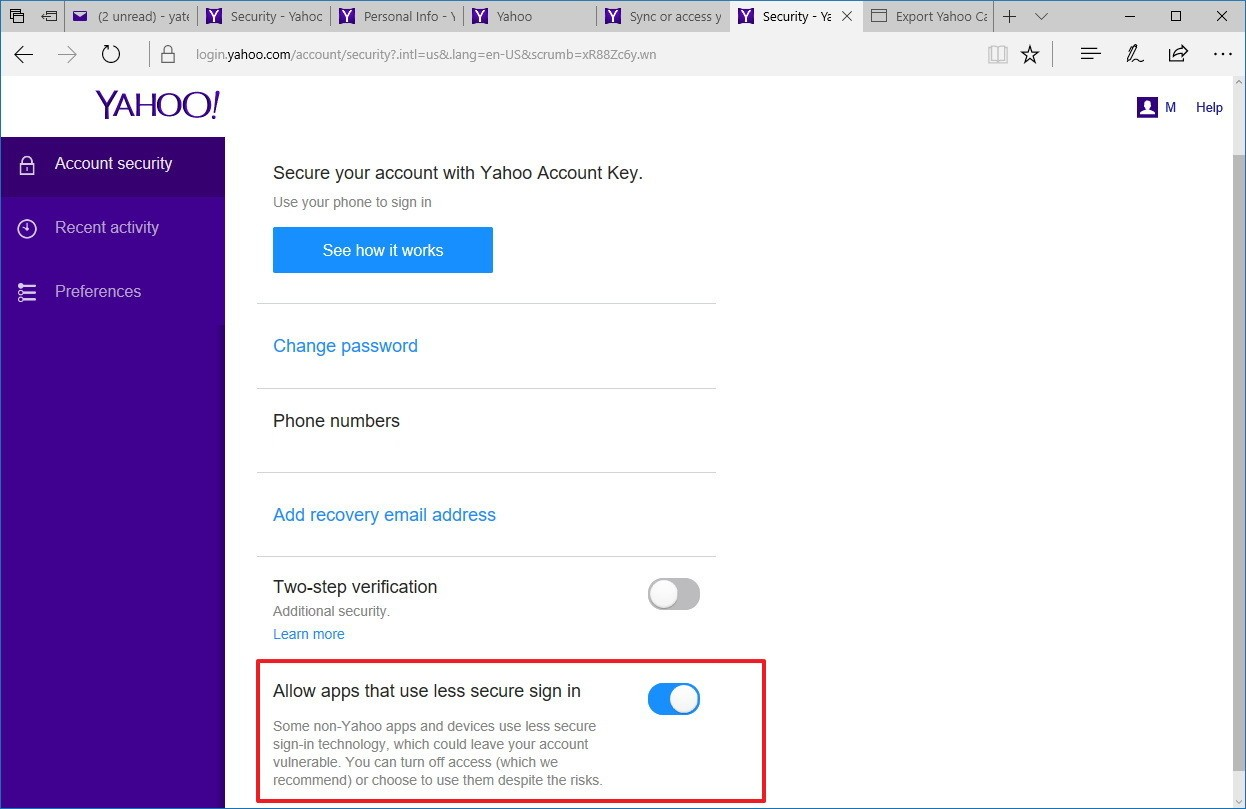<br> <h4>Add Yahoo mail to Outlook</h4> <ol><li>Launch Outlook email application</li> <li> Go to <b>File>>Info</b> and click <b>Add Account</b> button</li><br> 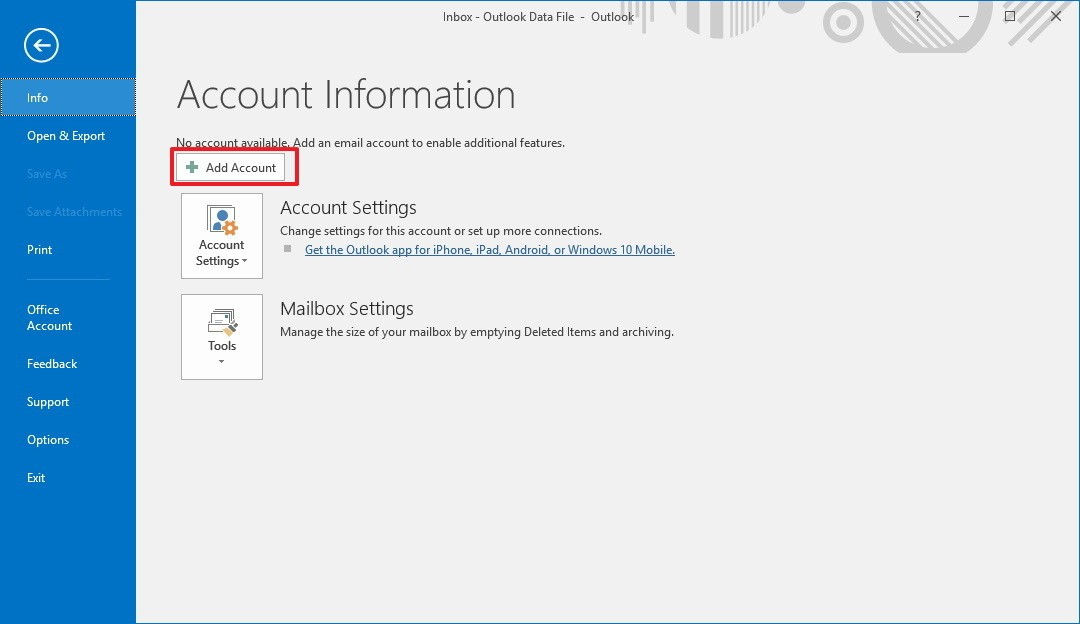<br> <li>Opt. <b>Manual setup or additional server types & proceed</b></li><br> 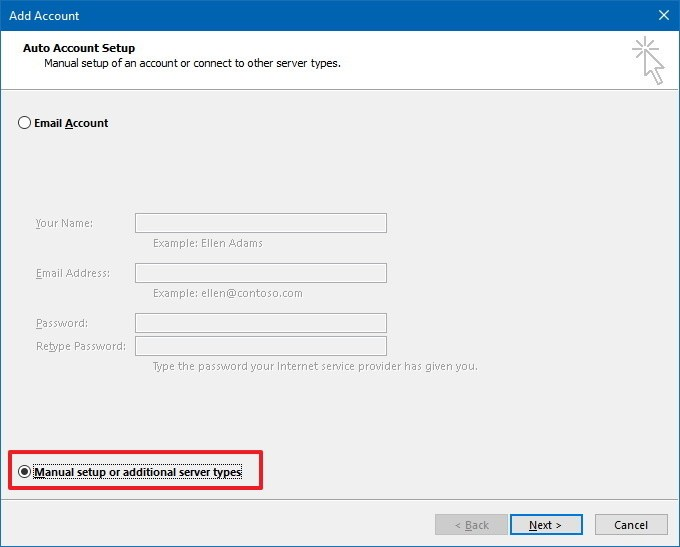<br> <li>Choose <b>POP or IMAP</b> option</li><br> 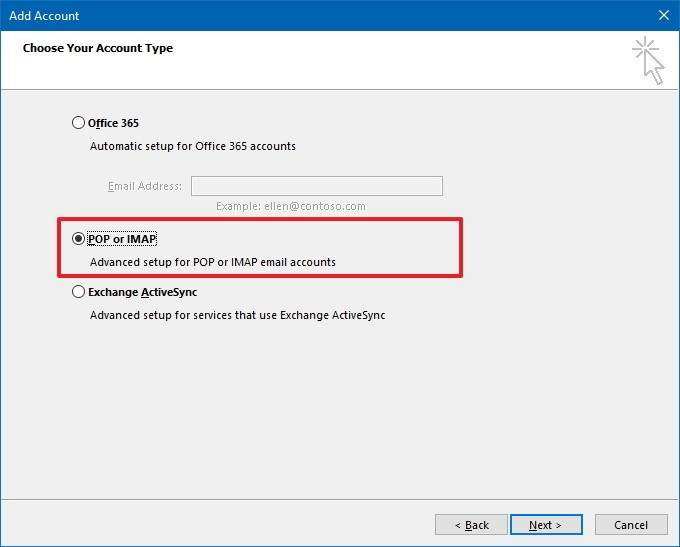<br> <li>Provide Yahoo mail information <ol> <li><b>User Information</b>: mention First & Last name</li> <li><b>Server Information</b>: provide the following <ul><li><b>Account Type</b>: IMAP </li> <li><b>Incoming mail server</b>: imap.mail.yahoo.com</li> <li><b>Outgoing mail server</b>: smtp.mail.yahoo.com</li></ul> </li> <li><b>Logon Information</b>: provide Yahoo account credential</li></ol></li><br> <li>Move to <b>More Settings</b> <ol> <li><b>Outgoing Server tab</b>: Check My outgoing server (SMTP) requires authentication checkbox</li><br> 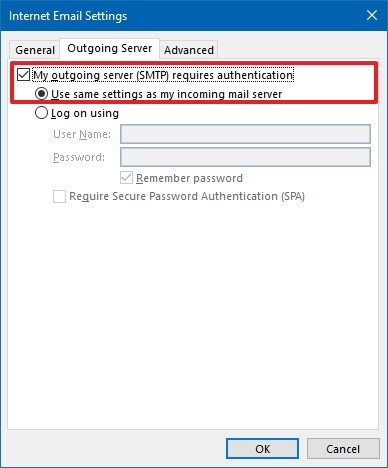<br> <li><b>Advanced tab</b>: <ul> <li><b>Incoming server (IMAP)</b>: 993 <b>Encryption</b>: SSL</li> <li><b>Outgoing server (SMTP)</b>: 465 <b>Encryption</b>: SSL</li></ul></li></ol></li><br> 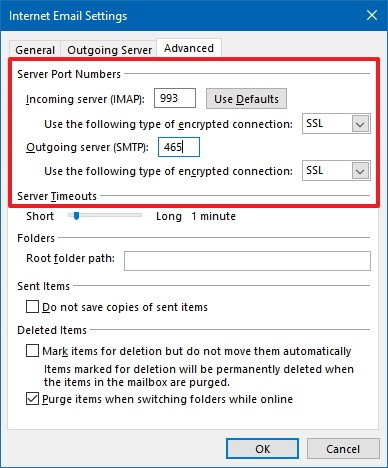<br> <li>Proceed <b>Next</b> to test configuration</li> 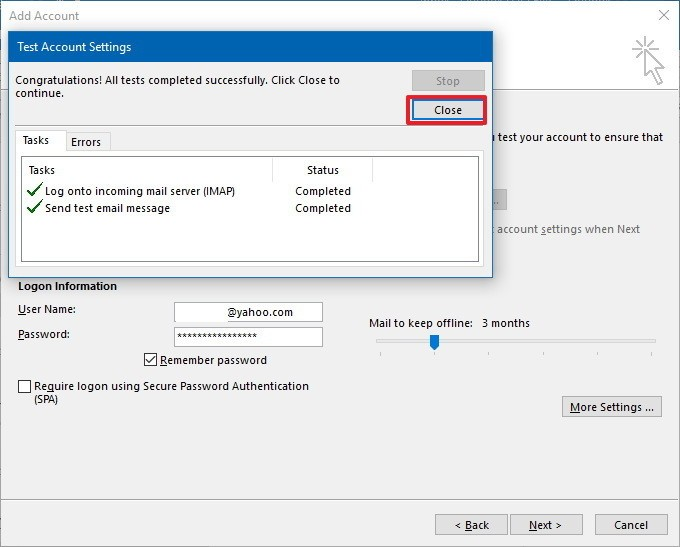 <li>Select <b>Finish</b> to exit</li></ol> <p>This above-displayed process is a bit lengthy and needs to be done with at most attention. Any error causes to redo the whole process again. That’s why this method not recommended for non-technical users. The next method seems quite simpler than this method and could be easily performed by all the yahoo users for downloading yahoo emails. </p></li> <li><h3>Download Yahoo emails on Local Hard Drive</h3> <p>This indirect method call for the use of a professional tool that automatically saves all the yahoo emails on the desktop in the user desired format. This downloaded file could be then used at other email application as per their requirement. And also the retention period of these backup files is forever. One such fonded software is <b><a href="https://www.systoolsgroup.com/yahoo-backup.html">SysTools Yahoo Email Backup Tool<a></b>. The application provides a very simple procedure to backup Yahoo emails with an outstanding GUI. Also, there is no time wastage and is recommended for all Yahoo email users. Let’s have a look over the backup steps functioned. For that, you have to install the software onto your computer and run it through the administrator. Then,</p> <ol><li>Select backup format type (<b>PST/EML/MSG/MBOX</b>)</li> <li><b>Browse</b> location for backup file on system</li> <li>Apply functions for user choice downloads</li> <li><b>Start</b> download process.</li></ol> <p>And thus the email file could be viewed on the system of the specified format. This file is a safeguard to all your important emails in yahoo which could be restored to any other email client whenever it is required. If required for its use, it is suggested to import the emails into any desktop based email client so that you can work with the emails even if the ISP is shut down for a while. Some suggested email clients could be Mozilla Thunderbird, MS Outlook, etc.</p></li></ul> <h2>Summing Up!!</h2> <p>In this article, we have surrounded some of the issues occurred in the Yahoo mail that leads to the user frustration and searches for solutions to resolve them. One major issue among them being the<b> Yahoo mail Outage</b>, which is discussed throughout with all the possible solutions, including a reliable method named <b>Yahoo emails backup</b> to be used by all users as their workaround for resolving Outage issue permanently. </p> |
| json metadata | {"tags":["yahoo-outage","download-yahoo","emails"],"image":["https://cdn.steemitimages.com/DQmf2RcGfdyLU5w3eKrfuxB5XBk3WNn5KMMe2zA6WN3BKjB/yahoo.png","https://cdn.steemitimages.com/DQmdKdcyjp8A4udFjkkWfyKwEdGTsFGqpdTW1a91FxAkv9n/Add%20Account.png","https://cdn.steemitimages.com/DQmNWgYnwBAU88AZeeDwGJnAz6DGS6vZq2zrRHpHuBxbQQR/Manual%20Setup.png","https://cdn.steemitimages.com/DQmVHCd6Jf4yK3P3XoKGKV9pqGcbhBCbrqAfDwMmhTBnrNA/POP%20and%20IMAP.png","https://cdn.steemitimages.com/DQmdSDoJGseGXg9SFyUNjJzq4MVyM3YE8SqX9tavNxhQ7RC/Outgoing%20server.png","https://cdn.steemitimages.com/DQmbUnyXhk41XrmVNiuwaT95S6wdLkYeMmhh6tY8keq666F/Advanced.png","https://cdn.steemitimages.com/DQmZnSGX86nFiihG3eyAa6HX1pDufxeefsenDyseeTvLVjZ/test%20account%20settings.png"],"links":["https://www.systoolsgroup.com/yahoo-backup.html"],"app":"steemit/0.1","format":"markdown"} |
| Transaction Info | Block #31059911/Trx e3f51414e83c74a912aee32ef4f9caa2f370205a |
View Raw JSON Data
{
"trx_id": "e3f51414e83c74a912aee32ef4f9caa2f370205a",
"block": 31059911,
"trx_in_block": 24,
"op_in_trx": 0,
"virtual_op": 0,
"timestamp": "2019-03-11T12:42:42",
"op": [
"comment",
{
"parent_author": "",
"parent_permlink": "yahoo-outage",
"author": "adwinjohn",
"permlink": "need-for-yahoo-emails-to-be-downloaded-on-hard-drive-outlook",
"title": "Need for Yahoo Emails to be Downloaded on Hard drive / Outlook",
"body": "<p><em>\"Hi Yahoo users! Facing problems in working with Yahoo mail? Frustrated with the frequent Yahoo mail outages? Work getting stuck due to Yahoo mail down? Not getting the rightful support from Yahoo resolving your mail errors? Afraid of the important data in Yahoo webmail being hacked or modified? Thinking of downloading Yahoo emails to hard drive for a safe side? Trying to move Yahoo emails to Outlook for comfort email usage and backup?\"</em></p> \n\n<p>If these problems come across you and you are eager to find solutions for the same get along with the article to get your issues resolved easily and effectively. </p>\n\n<p>Yahoo emails have emerged to one among the largest growing email client having a user limit of above 281 million users, by 2011 and started supporting multiple other email clients by 2015. As this email client emerged, thus raised up the issues occurring in Yahoo mail. </p>\n\n<p> The issue that majorly affected all the Yahoo users is the Yahoo mail outage. This issue locked out all the users from signing into their Yahoo accounts and working on it. Though, the issue got resolved after a meanwhile time. But is not a solution that could be held all the time. This issue sometimes leads to loss of data (important emails), thus, leading the user into more trouble. </p>\n\n<p>Other issues that started revolving around the Yahoo mail users are emails not being sent and not being received due to some mistakes and over-flooding of storage space allotted. Yahoo provided the solution for these errors as well but these solutions were not that satisfactory and user required a better move to avoid these errors. </p>\n\n<p>Seeing all the factors, this article is posted for users who feel to get a reliable solution for their Yahoo related issues and comfort usage of their emails. </p>\n\n<h2>Techniques to Protect Yourself from Yahoo mail Outage</h2>\n<p>If the user has a backup of all the emails of yahoo mail on the local hard drive, then the issue of Yahoo mail outage won’t affect the user in any way. The user can easily import the downloaded Yahoo emails on any other web email client or simply on a desktop based email client and work on it when the Yahoo mail Outage strikes the users. </p>\n<p>One thing that is important to note is Yahoo mail does not provide a direct backup of the emails in it. Thus, an indirect method is to be applied. Indirect method states two ways in it that corresponds to <br>\n<ol><li>Move Yahoo emails to another email client</li>\n <li>Save yahoo emails on local hard drive</li></ol>\n</p>\n<ul><li><h3>Export Yahoo mail to Outlook </h3>\n<p>This is a manual method that is mainly recommended or the technical users as any single simple mistake can take down the whole process. And usually, errors occur during this indirect migration process. In this method the Yahoo mails get configured, in other words, is added to another email client so that another email client could access the yahoo emails and modify the contents as well and even download the same locally. Here, Outlook is preferred as this email client provides good service and supports multiple email clients efficiently, also can directly backup email files to local hard drive. Now, let’s get to the process of adding Yahoo mail to Outlook mail client.</p>\n\n<h3>Steps for adding Yahoo emails to MS Outlook</h3>\n\n<p>Follow the steps below to get Yahoo mail added to Outlook</p>\n\n<h4>Pre-Requisites on Yahoo</h4>\n\n <ol><li>Access Yahoo mail</li>\n <li>Move to <b>Menu</b>(gear) >>> <b>Account Info</b></li>\n <li>Go to Account security and give access to<b> Allow apps that use less secure sign in</b> option<br>\n <b>Note</b>: If <b>two-step verification</b> is enabled, create an app password before proceeding or else, disable the option for enabling above option.</li></ol><br>\n<br>\n\n<h4>Add Yahoo mail to Outlook</h4>\n<ol><li>Launch Outlook email application</li>\n <li> Go to <b>File>>Info</b> and click <b>Add Account</b> button</li><br>\n<br>\n <li>Opt. <b>Manual setup or additional server types & proceed</b></li><br>\n<br>\n <li>Choose <b>POP or IMAP</b> option</li><br>\n<br>\n <li>Provide Yahoo mail information\n\t<ol>\n <li><b>User Information</b>: mention First & Last name</li>\n <li><b>Server Information</b>: provide the following\n <ul><li><b>Account Type</b>: IMAP </li>\n <li><b>Incoming mail server</b>: imap.mail.yahoo.com</li> \n <li><b>Outgoing mail server</b>: smtp.mail.yahoo.com</li></ul> </li>\n <li><b>Logon Information</b>: provide Yahoo account credential</li></ol></li><br>\n\n <li>Move to <b>More Settings</b> \n\t<ol>\n <li><b>Outgoing Server tab</b>: Check My outgoing server (SMTP) requires authentication checkbox</li><br>\n<br>\n <li><b>Advanced tab</b>: \n\t\t<ul>\n <li><b>Incoming server (IMAP)</b>: 993 \t<b>Encryption</b>: SSL</li>\n <li><b>Outgoing server (SMTP)</b>: 465 <b>Encryption</b>: SSL</li></ul></li></ol></li><br>\n<br>\n <li>Proceed <b>Next</b> to test configuration</li>\n\n <li>Select <b>Finish</b> to exit</li></ol>\n\n <p>This above-displayed process is a bit lengthy and needs to be done with at most attention. Any error causes to redo the whole process again. That’s why this method not recommended for non-technical users. The next method seems quite simpler than this method and could be easily performed by all the yahoo users for downloading yahoo emails. </p></li>\n<li><h3>Download Yahoo emails on Local Hard Drive</h3>\n <p>This indirect method call for the use of a professional tool that automatically saves all the yahoo emails on the desktop in the user desired format. This downloaded file could be then used at other email application as per their requirement. And also the retention period of these backup files is forever. One such fonded software is <b><a href=\"https://www.systoolsgroup.com/yahoo-backup.html\">SysTools Yahoo Email Backup Tool<a></b>. The application provides a very simple procedure to backup Yahoo emails with an outstanding GUI. Also, there is no time wastage and is recommended for all Yahoo email users. Let’s have a look over the backup steps functioned. For that, you have to install the software onto your computer and run it through the administrator. Then,</p>\n <ol><li>Select backup format type (<b>PST/EML/MSG/MBOX</b>)</li>\n <li><b>Browse</b> location for backup file on system</li>\n <li>Apply functions for user choice downloads</li>\n <li><b>Start</b> download process.</li></ol>\n\n<p>And thus the email file could be viewed on the system of the specified format. This file is a safeguard to all your important emails in yahoo which could be restored to any other email client whenever it is required. If required for its use, it is suggested to import the emails into any desktop based email client so that you can work with the emails even if the ISP is shut down for a while. Some suggested email clients could be Mozilla Thunderbird, MS Outlook, etc.</p></li></ul>\n\n<h2>Summing Up!!</h2>\n<p>In this article, we have surrounded some of the issues occurred in the Yahoo mail that leads to the user frustration and searches for solutions to resolve them. One major issue among them being the<b> Yahoo mail Outage</b>, which is discussed throughout with all the possible solutions, including a reliable method named <b>Yahoo emails backup</b> to be used by all users as their workaround for resolving Outage issue permanently. </p>",
"json_metadata": "{\"tags\":[\"yahoo-outage\",\"download-yahoo\",\"emails\"],\"image\":[\"https://cdn.steemitimages.com/DQmf2RcGfdyLU5w3eKrfuxB5XBk3WNn5KMMe2zA6WN3BKjB/yahoo.png\",\"https://cdn.steemitimages.com/DQmdKdcyjp8A4udFjkkWfyKwEdGTsFGqpdTW1a91FxAkv9n/Add%20Account.png\",\"https://cdn.steemitimages.com/DQmNWgYnwBAU88AZeeDwGJnAz6DGS6vZq2zrRHpHuBxbQQR/Manual%20Setup.png\",\"https://cdn.steemitimages.com/DQmVHCd6Jf4yK3P3XoKGKV9pqGcbhBCbrqAfDwMmhTBnrNA/POP%20and%20IMAP.png\",\"https://cdn.steemitimages.com/DQmdSDoJGseGXg9SFyUNjJzq4MVyM3YE8SqX9tavNxhQ7RC/Outgoing%20server.png\",\"https://cdn.steemitimages.com/DQmbUnyXhk41XrmVNiuwaT95S6wdLkYeMmhh6tY8keq666F/Advanced.png\",\"https://cdn.steemitimages.com/DQmZnSGX86nFiihG3eyAa6HX1pDufxeefsenDyseeTvLVjZ/test%20account%20settings.png\"],\"links\":[\"https://www.systoolsgroup.com/yahoo-backup.html\"],\"app\":\"steemit/0.1\",\"format\":\"markdown\"}"
}
]
}adwinjohnpublished a new post: top-ways-found-to-resolve-aol-email-problems-20192019/03/11 04:08:03
adwinjohnpublished a new post: top-ways-found-to-resolve-aol-email-problems-2019
2019/03/11 04:08:03
| parent author | |
| parent permlink | mac-aol |
| author | adwinjohn |
| permlink | top-ways-found-to-resolve-aol-email-problems-2019 |
| title | Top Ways Found to Resolve AOL Email Problems -2019 |
| body | @@ -5929,16 +5929,68 @@ to use +%3Ca href=%22https://www.systoolsgroup.com/aol-backup/%22%3E Mac AOL @@ -5995,16 +5995,20 @@ L Backup +%3C/a%3E to save |
| json metadata | {"tags":["mac-aol","aol-issues"],"users":["aol.com","aim.com","netscape.com","verizon.net"],"app":"steemit/0.1","format":"markdown","links":["https://www.systoolsgroup.com/aol-backup/"]} |
| Transaction Info | Block #31049622/Trx bae88315a7e9f5dae7b49e238809bdde2ec95c70 |
View Raw JSON Data
{
  "trx_id": "bae88315a7e9f5dae7b49e238809bdde2ec95c70",
  "block": 31049622,
  "trx_in_block": 24,
  "op_in_trx": 0,
  "virtual_op": 0,
  "timestamp": "2019-03-11T04:08:03",
  "op": [
    "comment",
    {
      "parent_author": "",
      "parent_permlink": "mac-aol",
      "author": "adwinjohn",
      "permlink": "top-ways-found-to-resolve-aol-email-problems-2019",
      "title": "Top Ways Found to Resolve AOL Email Problems -2019",
      "body": "@@ -5929,16 +5929,68 @@\n  to use \n+%3Ca href=%22https://www.systoolsgroup.com/aol-backup/%22%3E\n Mac AOL \n@@ -5995,16 +5995,20 @@\n L Backup\n+%3C/a%3E\n  to save\n",
      "json_metadata": "{\"tags\":[\"mac-aol\",\"aol-issues\"],\"users\":[\"aol.com\",\"aim.com\",\"netscape.com\",\"verizon.net\"],\"app\":\"steemit/0.1\",\"format\":\"markdown\",\"links\":[\"https://www.systoolsgroup.com/aol-backup/\"]}"
    }
  ]
}steemdelegated 18.445 SP to @adwinjohn2019/03/08 11:09:27
steemdelegated 18.445 SP to @adwinjohn
2019/03/08 11:09:27
| delegator | steem |
| delegatee | adwinjohn |
| vesting shares | 30036.430088 VESTS |
| Transaction Info | Block #30971711/Trx d6b42c86e9129b766f78f44c4fe3edf92bc8cff8 |
View Raw JSON Data
{
  "trx_id": "d6b42c86e9129b766f78f44c4fe3edf92bc8cff8",
  "block": 30971711,
  "trx_in_block": 11,
  "op_in_trx": 0,
  "virtual_op": 0,
  "timestamp": "2019-03-08T11:09:27",
  "op": [
    "delegate_vesting_shares",
    {
      "delegator": "steem",
      "delegatee": "adwinjohn",
      "vesting_shares": "30036.430088 VESTS"
    }
  ]
}adwinjohnpublished a new post: top-ways-found-to-resolve-aol-email-problems-20192019/03/08 10:29:51
adwinjohnpublished a new post: top-ways-found-to-resolve-aol-email-problems-2019
2019/03/08 10:29:51
| parent author | |
| parent permlink | mac-aol |
| author | adwinjohn |
| permlink | top-ways-found-to-resolve-aol-email-problems-2019 |
| title | Top Ways Found to Resolve AOL Email Problems -2019 |
| body | <p>“Hello everyone, I am using AOL webmail account since 2015. Don’t know what happened last night with my AOL account. Now, it shows an error code ERR1801. Due to this error, my emails could not be uploaded in the Inbox. The annoying part is that this error appears so frequently. To resolve the glitch, I restarted my Mac system and also used different browsers, but, nothing fixed this AOL email problem. Can someone help me? I have to access my emails on an urgent basis.”</p> <p>If you are also having the same problem as stated above and unable to reach out your emails, then no need to worry furthermore. Here, we will guide you on how to resolve AOL email problems in the most relevant manner. So, let’s get started!! </p> <p>There are plenty of errors that pop-up in the AOL mail account. Above all, the emails and their attachments not being loaded is the major one. However, these errors can be resolved by implementing the right workarounds.</p> <p>Still, errors are the reason due to which user cannot access the messages at the right time. Hence, it is always suggested to keep email backup on an on-premise location to have mail access in any disastrous situation. For this, users can use the SysTools Mac AOL Backup Software. </p> <p>It is a utility devised for downloading messages from a single AOL Mail account into MBOX, EML, MSG, and PST format on Mac system. In a case, when you do not need to backup entire emails, then just export messages of the particular timeline using Date Filter. With this software, the email backup of <b>@aol.com, @aim.com, @netscape.com,</b> and the<b> @verizon.net</b> account is possible in desired formats. So, whenever users face the problem of AOL mail outage, the backup file can be opened in the respective supported application that helps you a lot to access the emails. </p> In the upcoming section, we will discuss errors of AOL email and how to resolve AOL email problems proficiently. <h2>Full Guide On AOL Email Account Errors </h2> <ol> 1. Blerk! Error 1 Message This error is related to when there is an authentication glitch in AOL Mail. This issue generally occurs when the user is using an outdated version of the browser, then you may receive this error in any of the following error codes. <ul> <li>ERR1100</li> <li>ERR1102</li> <li>ERR1103</li> <li>ERR1106</li> <li>ERR1107</li> <li>ERR1108</li> <li> ERR1109</li> <li>ERR1110</li> <li>ERR1112</li> <li>ERR1113</li> <li>ERR1114</li> <li>ERR1115</li> <li>ERR1122</li> <li>ERR1123</li> <li>ERR1124</li> <li>ERR1125</li> </ul> <p> 2. GAH! Error 1111<br> This issue generally encounters when exclusively there is a sign-in problem with AOL Mail account. </p> <p>3. AOL ‘GAH! ERROR 2’ Error<br> In this error, due to connection/network issue, the user becomes unable to use the AOL mailbox. This technical error will be fixed automatically after taking some time.</p> <p> 4. AOL Mail ‘ERR800’ Error<br> This error conveys that there was an access issue with the Inbox folder.</p> <p> 5. BLERK! Error 4 & Error 5<br> This error occurs when there is an issue while loading the messages in account. Plus, when you encounter ERR1801, ERR140, ERR125, ERR136, and ERR101 error code, then they convey the same meaning.</p> <p> 6. GAH! Error 7 Message<br> In such a situation, when the Javascript is turned off for the browser, this error pops-up. To resolve this issue, the user needs to enable cookies in the browser (Firefox or Chrome). Plus, enable Javascript for your browser (Edge, Safari, Firefox, Chrome). Afterward, reopen the internet browser and again try to sign-in.</p> <p> 7. ZOIDS! Error 9<br> When a user tries to login with an account that does not support AOL Mail services, the ZOIDS! Error 9 message pops-up on the browser interface.</p> <p> 8. ZOIDS! ERROR 16 With Code ERR2600<br> This issue means that your AOL account disobeys the AOL Mail’s terms and condition. To get the account access back, you need to contact the AOL support team.</p> <p> 9. GAH! ERROR 15 With Error ERR404<br> When the attachment is missing, then this issue is generated. To resolve this AOL email problem, you can request the sender to resend the attachment.</p> <p> 10. BLERK! ERROR 13 <br> This error pops-up when the calendar is not loading properly in the user AOL account.</p> <p>11. GAH! ERROR 11 With ERR137<br> The AOL Mail service has a provision that if the account is inactive longer than 90 days, then they will deactivate the account. And whenever the user sign-in with an account that is inactive for the last 90 days, this error arises. The user can re-activate the account contacting AOL support. </p> <b>Note</b>: The account gets deleted if the AOL account is inactive for more than 180 days if so held the user won’t be able to re-access the account. <h2>How to Resolve AOL Email Problem</h2> <p>One can perform the following workarounds to fix the errors of AOL Mail account.</p> <p> 1. Again setup the browser security settings to resolve login or authentication related errors. Plus, when you bookmarked the link that is older, then remove it and use the new sign-in link for AOL account. </p> <p>2. Still, if you are facing a sign-in error, then change your account password. Adding to clear, just empty your browser’s cache. </p> <p> 3. In a case when you cannot access the Mailbox, then simply restart or change the browser. </p> <p> 4. If the data are not loading properly, then change firewall settings. Because many time firewall also not permit the emails access.</p> <h2>Final Summary</h2> <p>Errors in AOL Mail account are very common that occurs without any notice. Therefore, we have discussed all the technical glitches and how to resolve AOL email problems. However, we do not know which error can delete your emails. That is why it is suggested to use Mac AOL Backup to save a backup copy of emails on the Mac platform.</p> |
| json metadata | {"tags":["mac-aol","aol_issues"],"users":["aol.com","aim.com","netscape.com","verizon.net"],"app":"steemit/0.1","format":"markdown"} |
| Transaction Info | Block #30970919/Trx 6bd6caf0bd8f32ad63eb16d25caafbe2347f09fa |
View Raw JSON Data
{
  "trx_id": "6bd6caf0bd8f32ad63eb16d25caafbe2347f09fa",
  "block": 30970919,
  "trx_in_block": 15,
  "op_in_trx": 0,
  "virtual_op": 0,
  "timestamp": "2019-03-08T10:29:51",
  "op": [
    "comment",
    {
      "parent_author": "",
      "parent_permlink": "mac-aol",
      "author": "adwinjohn",
      "permlink": "top-ways-found-to-resolve-aol-email-problems-2019",
      "title": "Top Ways Found to Resolve AOL Email Problems -2019",
      "body": "<p>“Hello everyone, I am using AOL webmail account since 2015. Don’t know what happened last night with my AOL account. Now, it shows an error code ERR1801. Due to this error, my emails could not be uploaded in the Inbox. The annoying part is that this error appears so frequently. To resolve the glitch, I restarted my Mac system and also used different browsers, but, nothing fixed this AOL email problem. Can someone help me? I have to access my emails on an urgent basis.”</p>\n\n<p>If you are also having the same problem as stated above and unable to reach out your emails, then no need to worry furthermore. Here, we will guide you on how to resolve AOL email problems in the most relevant manner. So, let’s get started!! </p>\n\n<p>There are plenty of errors that pop-up in the AOL mail account. Above all, the emails and their attachments not being loaded is the major one. However, these errors can be resolved by implementing the right workarounds.</p>\n\n<p>Still, errors are the reason due to which user cannot access the messages at the right time. Hence, it is always suggested to keep email backup on an on-premise location to have mail access in any disastrous situation. For this, users can use the SysTools Mac AOL Backup Software. </p>\n\n<p>It is a utility devised for downloading messages from a single AOL Mail account into MBOX, EML, MSG, and PST format on Mac system. In a case, when you do not need to backup entire emails, then just export messages of the particular timeline using Date Filter. With this software, the email backup of <b>@aol.com, @aim.com, @netscape.com,</b> and the<b> @verizon.net</b> account is possible in desired formats. So, whenever users face the problem of AOL mail outage, the backup file can be opened in the respective supported application that helps you a lot to access the emails. </p>\n\nIn the upcoming section, we will discuss errors of AOL email and how to resolve AOL email problems proficiently.\n\n<h2>Full Guide On AOL Email Account Errors </h2>\n<ol>\n    1. Blerk! Error 1 Message \nThis error is related to when there is an authentication glitch in AOL Mail. This issue generally occurs when the user is using an outdated version of the browser, then you may receive this error in any of the following error codes.\n<ul>\n    <li>ERR1100</li>\n    <li>ERR1102</li>\n    <li>ERR1103</li>\n   <li>ERR1106</li>\n   <li>ERR1107</li>\n    <li>ERR1108</li>\n    <li> ERR1109</li>\n   <li>ERR1110</li>\n    <li>ERR1112</li>\n    <li>ERR1113</li>\n    <li>ERR1114</li>\n    <li>ERR1115</li>\n    <li>ERR1122</li>\n    <li>ERR1123</li>\n    <li>ERR1124</li>\n    <li>ERR1125</li>\n</ul>\n\n\n   <p> 2. GAH! Error 1111<br>\nThis issue generally encounters when exclusively there is a sign-in problem with AOL Mail account. </p>\n\n    \n<p>3. AOL ‘GAH! ERROR 2’ Error<br>\nIn this error, due to connection/network issue, the user becomes unable to use the AOL mailbox. This technical error will be fixed automatically after taking some time.</p>\n \n <p>   4. AOL Mail ‘ERR800’ Error<br>\nThis error conveys that there was an access issue with the Inbox folder.</p>\n\n  <p>  5. BLERK! Error 4 & Error 5<br>\nThis error occurs when there is an issue while loading the messages in account. Plus, when you encounter ERR1801, ERR140, ERR125, ERR136, and ERR101 error code, then they convey the same meaning.</p>\n\n   <p> 6. GAH! Error 7 Message<br>\nIn such a situation, when the Javascript is turned off for the browser, this error pops-up. To resolve this issue, the user needs to enable cookies in the browser (Firefox or Chrome). Plus, enable Javascript for your browser (Edge, Safari, Firefox, Chrome). Afterward, reopen the internet browser and again try to sign-in.</p>\n\n   <p> 7. ZOIDS! Error 9<br>\nWhen a user tries to login with an account that does not support AOL Mail services, the ZOIDS! Error 9 message pops-up on the browser interface.</p>\n\n  <p>  8. ZOIDS! ERROR 16 With Code ERR2600<br>\nThis issue means that your AOL account disobeys the AOL Mail’s terms and condition. To get the account access back, you need to contact the AOL support team.</p>\n\n   <p> 9. GAH! ERROR 15 With Error ERR404<br>\nWhen the attachment is missing, then this issue is generated. To resolve this AOL email problem, you can request the sender to resend the attachment.</p>\n\n   <p> 10.  BLERK! ERROR 13 <br>\nThis error pops-up when the calendar is not loading properly in the user AOL account.</p>\n\n    <p>11. GAH! ERROR 11 With ERR137<br>\nThe AOL Mail service has a provision that if the account is inactive longer than 90 days, then they will deactivate the account. And whenever the user sign-in with an account that is inactive for the last 90 days, this error arises. The user can re-activate the account contacting AOL support. </p>\n\n<b>Note</b>: The account gets deleted if the AOL account is inactive for more than 180 days if so held the user won’t be able to re-access the account. \n\n<h2>How to Resolve AOL Email Problem</h2>\n\n<p>One can perform the following workarounds to fix the errors of AOL Mail account.</p>\n\n   <p> 1. Again setup the browser security settings to resolve login or authentication related errors. Plus,   when you bookmarked the link that is older, then remove it and use the new sign-in link for AOL account. </p>\n\n    <p>2. Still, if you are facing a sign-in error, then change your account password. Adding to clear, just empty your browser’s cache. </p>\n\n  <p>  3. In a case when you cannot access the Mailbox, then simply restart or change the browser. </p>\n\n   <p> 4. If the data are not loading properly, then change firewall settings. Because many time firewall also not permit the emails access.</p>\n\n<h2>Final Summary</h2>\n<p>Errors in AOL Mail account are very common that occurs without any notice. Therefore, we have discussed all the technical glitches and how to resolve AOL email problems. However, we do not know which error can delete your emails. That is why it is suggested to use Mac AOL Backup to save a backup copy of emails on the Mac platform.</p>",
      "json_metadata": "{\"tags\":[\"mac-aol\",\"aol_issues\"],\"users\":[\"aol.com\",\"aim.com\",\"netscape.com\",\"verizon.net\"],\"app\":\"steemit/0.1\",\"format\":\"markdown\"}"
    }
  ]
}steemdelegated 18.607 SP to @adwinjohn2019/03/08 09:34:00
steemdelegated 18.607 SP to @adwinjohn
2019/03/08 09:34:00
| delegator | steem |
| delegatee | adwinjohn |
| vesting shares | 30300.000000 VESTS |
| Transaction Info | Block #30969804/Trx 8c76b93061ef1df2716221e8c554f966d78d3fb3 |
View Raw JSON Data
{
  "trx_id": "8c76b93061ef1df2716221e8c554f966d78d3fb3",
  "block": 30969804,
  "trx_in_block": 30,
  "op_in_trx": 0,
  "virtual_op": 0,
  "timestamp": "2019-03-08T09:34:00",
  "op": [
    "delegate_vesting_shares",
    {
      "delegator": "steem",
      "delegatee": "adwinjohn",
      "vesting_shares": "30300.000000 VESTS"
    }
  ]
}steemcreated a new account: @adwinjohn2019/03/08 09:34:00
steemcreated a new account: @adwinjohn
2019/03/08 09:34:00
| creator | steem |
| new account name | adwinjohn |
| owner | {"weight_threshold":1,"account_auths":[],"key_auths":[["STM7rYXpAxGiyEMbBc26jGq2e5ayU8odwyDs96Pf2EPCiAFQv6dct",1]]} |
| active | {"weight_threshold":1,"account_auths":[],"key_auths":[["STM5ehzLee6GPEu5ypPdXrqZoeTsm5j9a5R3zdZkFTYsaiEmeKJPT",1]]} |
| posting | {"weight_threshold":1,"account_auths":[],"key_auths":[["STM88uLLd2W1k55XHbgpvmu3xPaywSNHhzuXV9U1HoMpJCfZK3fna",1]]} |
| memo key | STM7wSK2SPSSdSQ9cR53wboLrVKTPNJj9pWUbTzCdG92rBJ3z7Wik |
| json metadata | {} |
| extensions | [] |
| Transaction Info | Block #30969804/Trx 8c76b93061ef1df2716221e8c554f966d78d3fb3 |
View Raw JSON Data
{
  "trx_id": "8c76b93061ef1df2716221e8c554f966d78d3fb3",
  "block": 30969804,
  "trx_in_block": 30,
  "op_in_trx": 0,
  "virtual_op": 0,
  "timestamp": "2019-03-08T09:34:00",
  "op": [
    "create_claimed_account",
    {
      "creator": "steem",
      "new_account_name": "adwinjohn",
      "owner": {
        "weight_threshold": 1,
        "account_auths": [],
        "key_auths": [
          [
            "STM7rYXpAxGiyEMbBc26jGq2e5ayU8odwyDs96Pf2EPCiAFQv6dct",
            1
          ]
        ]
      },
      "active": {
        "weight_threshold": 1,
        "account_auths": [],
        "key_auths": [
          [
            "STM5ehzLee6GPEu5ypPdXrqZoeTsm5j9a5R3zdZkFTYsaiEmeKJPT",
            1
          ]
        ]
      },
      "posting": {
        "weight_threshold": 1,
        "account_auths": [],
        "key_auths": [
          [
            "STM88uLLd2W1k55XHbgpvmu3xPaywSNHhzuXV9U1HoMpJCfZK3fna",
            1
          ]
        ]
      },
      "memo_key": "STM7wSK2SPSSdSQ9cR53wboLrVKTPNJj9pWUbTzCdG92rBJ3z7Wik",
      "json_metadata": "{}",
      "extensions": []
    }
  ]
}Manabar
Voting Power100.00%
Downvote Power100.00%
Resource Credits100.00%
Reputation Progress0.00%
{
  "voting_manabar": {
    "current_mana": 1953241559,
    "last_update_time": 1588967919
  },
  "downvote_manabar": {
    "current_mana": 488310390,
    "last_update_time": 1588967919
  },
  "rc_account": {
    "account": "adwinjohn",
    "rc_manabar": {
      "current_mana": "11867242174",
      "last_update_time": 1588967919
    },
    "max_rc_creation_adjustment": {
      "amount": "6007308753",
      "precision": 6,
      "nai": "@@000000037"
    },
    "max_rc": "7960550312"
  }
}
Account Metadata
| POSTING JSON METADATA | |
| None | |
| JSON METADATA | |
| None |
{
  "posting_json_metadata": {},
  "json_metadata": {}
}
Auth Keys
Owner
Single Signature
Public Keys
STM7rYXpAxGiyEMbBc26jGq2e5ayU8odwyDs96Pf2EPCiAFQv6dct1/1
Active
Single Signature
Public Keys
STM5ehzLee6GPEu5ypPdXrqZoeTsm5j9a5R3zdZkFTYsaiEmeKJPT1/1
Posting
Single Signature
Public Keys
STM88uLLd2W1k55XHbgpvmu3xPaywSNHhzuXV9U1HoMpJCfZK3fna1/1
Memo
STM7wSK2SPSSdSQ9cR53wboLrVKTPNJj9pWUbTzCdG92rBJ3z7Wik
{
  "owner": {
    "weight_threshold": 1,
    "account_auths": [],
    "key_auths": [
      [
        "STM7rYXpAxGiyEMbBc26jGq2e5ayU8odwyDs96Pf2EPCiAFQv6dct",
        1
      ]
    ]
  },
  "active": {
    "weight_threshold": 1,
    "account_auths": [],
    "key_auths": [
      [
        "STM5ehzLee6GPEu5ypPdXrqZoeTsm5j9a5R3zdZkFTYsaiEmeKJPT",
        1
      ]
    ]
  },
  "posting": {
    "weight_threshold": 1,
    "account_auths": [],
    "key_auths": [
      [
        "STM88uLLd2W1k55XHbgpvmu3xPaywSNHhzuXV9U1HoMpJCfZK3fna",
        1
      ]
    ]
  },
  "memo": "STM7wSK2SPSSdSQ9cR53wboLrVKTPNJj9pWUbTzCdG92rBJ3z7Wik"
}
Witness Votes
0 / 30
No active witness votes.
[]