

VOTING POWER100.00%
DOWNVOTE POWER100.00%
RESOURCE CREDITS100.00%
REPUTATION PROGRESS0.00%
Net Worth
0.014USD
STEEM
0.001STEEM
SBD
0.014SBD
Effective Power
5.008SP
├── Own SP
0.126SP
└── Incoming DelegationsDeleg
+4.882SP
Detailed Balance
| STEEM | ||
| balance | 0.000STEEM | STEEM |
| market_balance | 0.000STEEM | STEEM |
| savings_balance | 0.000STEEM | STEEM |
| reward_steem_balance | 0.001STEEM | STEEM |
| STEEM POWER | ||
| Own SP | 0.126SP | SP |
| Delegated Out | 0.000SP | SP |
| Delegation In | 4.882SP | SP |
| Effective Power | 5.008SP | SP |
| Reward SP (pending) | 0.009SP | SP |
| SBD | ||
| sbd_balance | 0.000SBD | SBD |
| sbd_conversions | 0.000SBD | SBD |
| sbd_market_balance | 0.000SBD | SBD |
| savings_sbd_balance | 0.000SBD | SBD |
| reward_sbd_balance | 0.014SBD | SBD |
{
  "balance": "0.000 STEEM",
  "savings_balance": "0.000 STEEM",
  "reward_steem_balance": "0.001 STEEM",
  "vesting_shares": "204.288467 VESTS",
  "delegated_vesting_shares": "0.000000 VESTS",
  "received_vesting_shares": "7939.371339 VESTS",
  "sbd_balance": "0.000 SBD",
  "savings_sbd_balance": "0.000 SBD",
  "reward_sbd_balance": "0.014 SBD",
  "conversions": []
}
Account Info
| name | slackerjack |
| id | 782185 |
| rank | 1,453,872 |
| reputation | 258190598 |
| created | 2018-03-02T10:55:51 |
| recovery_account | steem |
| proxy | None |
| post_count | 7 |
| comment_count | 0 |
| lifetime_vote_count | 0 |
| witnesses_voted_for | 0 |
| last_post | 2018-04-03T12:16:09 |
| last_root_post | 2018-04-03T12:16:09 |
| last_vote_time | 1970-01-01T00:00:00 |
| proxied_vsf_votes | 0, 0, 0, 0 |
| can_vote | 1 |
| voting_power | 0 |
| delayed_votes | 0 |
| balance | 0.000 STEEM |
| savings_balance | 0.000 STEEM |
| sbd_balance | 0.000 SBD |
| savings_sbd_balance | 0.000 SBD |
| vesting_shares | 204.288467 VESTS |
| delegated_vesting_shares | 0.000000 VESTS |
| received_vesting_shares | 7939.371339 VESTS |
| reward_vesting_balance | 18.348346 VESTS |
| vesting_balance | 0.000 STEEM |
| vesting_withdraw_rate | 0.000000 VESTS |
| next_vesting_withdrawal | 1969-12-31T23:59:59 |
| withdrawn | 0 |
| to_withdraw | 0 |
| withdraw_routes | 0 |
| savings_withdraw_requests | 0 |
| last_account_recovery | 1970-01-01T00:00:00 |
| reset_account | null |
| last_owner_update | 1970-01-01T00:00:00 |
| last_account_update | 2018-04-03T13:17:24 |
| mined | No |
| sbd_seconds | 0 |
| sbd_last_interest_payment | 1970-01-01T00:00:00 |
| savings_sbd_last_interest_payment | 1970-01-01T00:00:00 |
{
  "active": {
    "account_auths": [],
    "key_auths": [
      [
        "STM5yzEsMLRMB5vBAe5XkeSC1q4nErUgpsjA3NxhvnYpXoMx5JEuS",
        1
      ]
    ],
    "weight_threshold": 1
  },
  "balance": "0.000 STEEM",
  "can_vote": true,
  "comment_count": 0,
  "created": "2018-03-02T10:55:51",
  "curation_rewards": 0,
  "delegated_vesting_shares": "0.000000 VESTS",
  "downvote_manabar": {
    "current_mana": 2035914951,
    "last_update_time": 1779086256
  },
  "guest_bloggers": [],
  "id": 782185,
  "json_metadata": "{\"profile\":{\"name\":\"Jack Henry\",\"location\":\"London United Kingdom\",\"profile_image\":\"https://scontent-cdt1-1.xx.fbcdn.net/v/t1.0-9/21617904_10156502198254338_578442361456677680_n.jpg?_nc_cat=0&oh=ece0bff2ab869bb874c190009705ac02&oe=5B6B2B12\",\"cover_image\":\"https://scontent-cdt1-1.xx.fbcdn.net/v/t1.0-9/487176_10151240352154338_2134611149_n.jpg?_nc_cat=0&oh=5d575cfe94f4bba72b8db073b7a904ad&oe=5B750A3F\"}}",
  "last_account_recovery": "1970-01-01T00:00:00",
  "last_account_update": "2018-04-03T13:17:24",
  "last_owner_update": "1970-01-01T00:00:00",
  "last_post": "2018-04-03T12:16:09",
  "last_root_post": "2018-04-03T12:16:09",
  "last_vote_time": "1970-01-01T00:00:00",
  "lifetime_vote_count": 0,
  "market_history": [],
  "memo_key": "STM5zcKZqGXvyQzBhLPmV4pexaXg4dLNXSKZFTjsY8nJQpLzHawLj",
  "mined": false,
  "name": "slackerjack",
  "next_vesting_withdrawal": "1969-12-31T23:59:59",
  "other_history": [],
  "owner": {
    "account_auths": [],
    "key_auths": [
      [
        "STM613iUAAUZUDyvDzCpeTHBxmShnxzqF1VHHUa7jsPc9Xg2LgPB8",
        1
      ]
    ],
    "weight_threshold": 1
  },
  "pending_claimed_accounts": 0,
  "post_bandwidth": 0,
  "post_count": 7,
  "post_history": [],
  "posting": {
    "account_auths": [],
    "key_auths": [
      [
        "STM6ETcXkWKMbdCUiebdHB1c4zMgBoU3MQzYuAf12AnStwpJ7fTze",
        1
      ]
    ],
    "weight_threshold": 1
  },
  "posting_json_metadata": "{\"profile\":{\"name\":\"Jack Henry\",\"location\":\"London United Kingdom\",\"profile_image\":\"https://scontent-cdt1-1.xx.fbcdn.net/v/t1.0-9/21617904_10156502198254338_578442361456677680_n.jpg?_nc_cat=0&oh=ece0bff2ab869bb874c190009705ac02&oe=5B6B2B12\",\"cover_image\":\"https://scontent-cdt1-1.xx.fbcdn.net/v/t1.0-9/487176_10151240352154338_2134611149_n.jpg?_nc_cat=0&oh=5d575cfe94f4bba72b8db073b7a904ad&oe=5B750A3F\"}}",
  "posting_rewards": 18,
  "proxied_vsf_votes": [
    0,
    0,
    0,
    0
  ],
  "proxy": "",
  "received_vesting_shares": "7939.371339 VESTS",
  "recovery_account": "steem",
  "reputation": 258190598,
  "reset_account": "null",
  "reward_sbd_balance": "0.014 SBD",
  "reward_steem_balance": "0.001 STEEM",
  "reward_vesting_balance": "18.348346 VESTS",
  "reward_vesting_steem": "0.009 STEEM",
  "savings_balance": "0.000 STEEM",
  "savings_sbd_balance": "0.000 SBD",
  "savings_sbd_last_interest_payment": "1970-01-01T00:00:00",
  "savings_sbd_seconds": "0",
  "savings_sbd_seconds_last_update": "1970-01-01T00:00:00",
  "savings_withdraw_requests": 0,
  "sbd_balance": "0.000 SBD",
  "sbd_last_interest_payment": "1970-01-01T00:00:00",
  "sbd_seconds": "0",
  "sbd_seconds_last_update": "1970-01-01T00:00:00",
  "tags_usage": [],
  "to_withdraw": 0,
  "transfer_history": [],
  "vesting_balance": "0.000 STEEM",
  "vesting_shares": "204.288467 VESTS",
  "vesting_withdraw_rate": "0.000000 VESTS",
  "vote_history": [],
  "voting_manabar": {
    "current_mana": "8143659806",
    "last_update_time": 1779086256
  },
  "voting_power": 0,
  "withdraw_routes": 0,
  "withdrawn": 0,
  "witness_votes": [],
  "witnesses_voted_for": 0,
  "rank": 1453872
}
Withdraw Routes
| Incoming | Outgoing |
|---|---|
Empty | Empty |
{
  "incoming": [],
  "outgoing": []
}From Date
To Date
steemdelegated 4.882 SP to @slackerjack2026/05/18 06:37:36
steemdelegated 4.882 SP to @slackerjack
2026/05/18 06:37:36
| delegatee | slackerjack |
| delegator | steem |
| vesting shares | 7939.371339 VESTS |
| Transaction Info | Block #106151063/Trx 717422134a030e84173af41ba2b3dff809428ac1 |
View Raw JSON Data
{
  "block": 106151063,
  "op": [
    "delegate_vesting_shares",
    {
      "delegatee": "slackerjack",
      "delegator": "steem",
      "vesting_shares": "7939.371339 VESTS"
    }
  ],
  "op_in_trx": 0,
  "timestamp": "2026-05-18T06:37:36",
  "trx_id": "717422134a030e84173af41ba2b3dff809428ac1",
  "trx_in_block": 14,
  "virtual_op": 0
}steemdelegated 3.214 SP to @slackerjack2026/05/13 05:46:30
steemdelegated 3.214 SP to @slackerjack
2026/05/13 05:46:30
| delegatee | slackerjack |
| delegator | steem |
| vesting shares | 5227.160934 VESTS |
| Transaction Info | Block #106006759/Trx 4052cc84a90ce2cb8fa3ca93d26c00f883abc586 |
View Raw JSON Data
{
  "block": 106006759,
  "op": [
    "delegate_vesting_shares",
    {
      "delegatee": "slackerjack",
      "delegator": "steem",
      "vesting_shares": "5227.160934 VESTS"
    }
  ],
  "op_in_trx": 0,
  "timestamp": "2026-05-13T05:46:30",
  "trx_id": "4052cc84a90ce2cb8fa3ca93d26c00f883abc586",
  "trx_in_block": 1,
  "virtual_op": 0
}steemdelegated 4.890 SP to @slackerjack2026/04/26 05:48:51
steemdelegated 4.890 SP to @slackerjack
2026/04/26 05:48:51
| delegatee | slackerjack |
| delegator | steem |
| vesting shares | 7951.887095 VESTS |
| Transaction Info | Block #105518537/Trx d8119aad4e2ef9ada48a447f5f86474379e1084f |
View Raw JSON Data
{
  "block": 105518537,
  "op": [
    "delegate_vesting_shares",
    {
      "delegatee": "slackerjack",
      "delegator": "steem",
      "vesting_shares": "7951.887095 VESTS"
    }
  ],
  "op_in_trx": 0,
  "timestamp": "2026-04-26T05:48:51",
  "trx_id": "d8119aad4e2ef9ada48a447f5f86474379e1084f",
  "trx_in_block": 0,
  "virtual_op": 0
}steemdelegated 3.240 SP to @slackerjack2026/01/24 00:58:45
steemdelegated 3.240 SP to @slackerjack
2026/01/24 00:58:45
| delegatee | slackerjack |
| delegator | steem |
| vesting shares | 5268.707753 VESTS |
| Transaction Info | Block #102872387/Trx eb916ae9654592e45e3035100d819e9a74e73215 |
View Raw JSON Data
{
  "block": 102872387,
  "op": [
    "delegate_vesting_shares",
    {
      "delegatee": "slackerjack",
      "delegator": "steem",
      "vesting_shares": "5268.707753 VESTS"
    }
  ],
  "op_in_trx": 0,
  "timestamp": "2026-01-24T00:58:45",
  "trx_id": "eb916ae9654592e45e3035100d819e9a74e73215",
  "trx_in_block": 2,
  "virtual_op": 0
}steemdelegated 3.341 SP to @slackerjack2024/12/17 20:08:30
steemdelegated 3.341 SP to @slackerjack
2024/12/17 20:08:30
| delegatee | slackerjack |
| delegator | steem |
| vesting shares | 5432.926950 VESTS |
| Transaction Info | Block #91318597/Trx 91302e067feff4aa18189c5d4c8e2722a43a55d4 |
View Raw JSON Data
{
  "block": 91318597,
  "op": [
    "delegate_vesting_shares",
    {
      "delegatee": "slackerjack",
      "delegator": "steem",
      "vesting_shares": "5432.926950 VESTS"
    }
  ],
  "op_in_trx": 0,
  "timestamp": "2024-12-17T20:08:30",
  "trx_id": "91302e067feff4aa18189c5d4c8e2722a43a55d4",
  "trx_in_block": 1,
  "virtual_op": 0
}steemdelegated 3.445 SP to @slackerjack2023/11/14 11:49:09
steemdelegated 3.445 SP to @slackerjack
2023/11/14 11:49:09
| delegatee | slackerjack |
| delegator | steem |
| vesting shares | 5602.060482 VESTS |
| Transaction Info | Block #79872732/Trx 8aa1baed7d062e6e36f55da632b1c10a7d73c35a |
View Raw JSON Data
{
  "block": 79872732,
  "op": [
    "delegate_vesting_shares",
    {
      "delegatee": "slackerjack",
      "delegator": "steem",
      "vesting_shares": "5602.060482 VESTS"
    }
  ],
  "op_in_trx": 0,
  "timestamp": "2023-11-14T11:49:09",
  "trx_id": "8aa1baed7d062e6e36f55da632b1c10a7d73c35a",
  "trx_in_block": 2,
  "virtual_op": 0
}steemdelegated 5.251 SP to @slackerjack2023/09/22 10:48:24
steemdelegated 5.251 SP to @slackerjack
2023/09/22 10:48:24
| delegatee | slackerjack |
| delegator | steem |
| vesting shares | 8538.969268 VESTS |
| Transaction Info | Block #78363363/Trx 2b8c5115a62b2f0e7f84239744e7c363d32cf499 |
View Raw JSON Data
{
  "block": 78363363,
  "op": [
    "delegate_vesting_shares",
    {
      "delegatee": "slackerjack",
      "delegator": "steem",
      "vesting_shares": "8538.969268 VESTS"
    }
  ],
  "op_in_trx": 0,
  "timestamp": "2023-09-22T10:48:24",
  "trx_id": "2b8c5115a62b2f0e7f84239744e7c363d32cf499",
  "trx_in_block": 0,
  "virtual_op": 0
}steemdelegated 5.387 SP to @slackerjack2022/11/03 18:12:33
steemdelegated 5.387 SP to @slackerjack
2022/11/03 18:12:33
| delegatee | slackerjack |
| delegator | steem |
| vesting shares | 8761.020706 VESTS |
| Transaction Info | Block #69121032/Trx cf51b9455ea25d3419e5420736276096a741fa91 |
View Raw JSON Data
{
  "block": 69121032,
  "op": [
    "delegate_vesting_shares",
    {
      "delegatee": "slackerjack",
      "delegator": "steem",
      "vesting_shares": "8761.020706 VESTS"
    }
  ],
  "op_in_trx": 0,
  "timestamp": "2022-11-03T18:12:33",
  "trx_id": "cf51b9455ea25d3419e5420736276096a741fa91",
  "trx_in_block": 6,
  "virtual_op": 0
}steemdelegated 5.523 SP to @slackerjack2022/01/17 23:22:24
steemdelegated 5.523 SP to @slackerjack
2022/01/17 23:22:24
| delegatee | slackerjack |
| delegator | steem |
| vesting shares | 8981.128307 VESTS |
| Transaction Info | Block #60824240/Trx 9fc82ae574f911e93ea53e01831ceabe7f131dd9 |
View Raw JSON Data
{
  "block": 60824240,
  "op": [
    "delegate_vesting_shares",
    {
      "delegatee": "slackerjack",
      "delegator": "steem",
      "vesting_shares": "8981.128307 VESTS"
    }
  ],
  "op_in_trx": 0,
  "timestamp": "2022-01-17T23:22:24",
  "trx_id": "9fc82ae574f911e93ea53e01831ceabe7f131dd9",
  "trx_in_block": 27,
  "virtual_op": 0
}steemdelegated 5.636 SP to @slackerjack2021/06/14 06:32:21
steemdelegated 5.636 SP to @slackerjack
2021/06/14 06:32:21
| delegatee | slackerjack |
| delegator | steem |
| vesting shares | 9165.322595 VESTS |
| Transaction Info | Block #54614545/Trx 8434b4f33ba2c1c2a5b557576a98898daff4dd3d |
View Raw JSON Data
{
  "block": 54614545,
  "op": [
    "delegate_vesting_shares",
    {
      "delegatee": "slackerjack",
      "delegator": "steem",
      "vesting_shares": "9165.322595 VESTS"
    }
  ],
  "op_in_trx": 0,
  "timestamp": "2021-06-14T06:32:21",
  "trx_id": "8434b4f33ba2c1c2a5b557576a98898daff4dd3d",
  "trx_in_block": 3,
  "virtual_op": 0
}steemdelegated 5.751 SP to @slackerjack2020/12/11 16:44:09
steemdelegated 5.751 SP to @slackerjack
2020/12/11 16:44:09
| delegatee | slackerjack |
| delegator | steem |
| vesting shares | 9352.744569 VESTS |
| Transaction Info | Block #49361794/Trx 458743320baf2a2de20a96d95bd6150cad060b06 |
View Raw JSON Data
{
  "block": 49361794,
  "op": [
    "delegate_vesting_shares",
    {
      "delegatee": "slackerjack",
      "delegator": "steem",
      "vesting_shares": "9352.744569 VESTS"
    }
  ],
  "op_in_trx": 0,
  "timestamp": "2020-12-11T16:44:09",
  "trx_id": "458743320baf2a2de20a96d95bd6150cad060b06",
  "trx_in_block": 1,
  "virtual_op": 0
}steemdelegated 1.176 SP to @slackerjack2020/12/06 10:19:39
steemdelegated 1.176 SP to @slackerjack
2020/12/06 10:19:39
| delegatee | slackerjack |
| delegator | steem |
| vesting shares | 1912.543513 VESTS |
| Transaction Info | Block #49213309/Trx f7e5f2c44e75512c900b0dbd298d3059ef843829 |
View Raw JSON Data
{
  "block": 49213309,
  "op": [
    "delegate_vesting_shares",
    {
      "delegatee": "slackerjack",
      "delegator": "steem",
      "vesting_shares": "1912.543513 VESTS"
    }
  ],
  "op_in_trx": 0,
  "timestamp": "2020-12-06T10:19:39",
  "trx_id": "f7e5f2c44e75512c900b0dbd298d3059ef843829",
  "trx_in_block": 0,
  "virtual_op": 0
}steemdelegated 5.755 SP to @slackerjack2020/12/05 20:22:00
steemdelegated 5.755 SP to @slackerjack
2020/12/05 20:22:00
| delegatee | slackerjack |
| delegator | steem |
| vesting shares | 9358.952423 VESTS |
| Transaction Info | Block #49196880/Trx aa8246b246bcce2f7095ae8dcfb1f3f022c9b983 |
View Raw JSON Data
{
  "block": 49196880,
  "op": [
    "delegate_vesting_shares",
    {
      "delegatee": "slackerjack",
      "delegator": "steem",
      "vesting_shares": "9358.952423 VESTS"
    }
  ],
  "op_in_trx": 0,
  "timestamp": "2020-12-05T20:22:00",
  "trx_id": "aa8246b246bcce2f7095ae8dcfb1f3f022c9b983",
  "trx_in_block": 5,
  "virtual_op": 0
}steemdelegated 1.181 SP to @slackerjack2020/11/03 03:16:06
steemdelegated 1.181 SP to @slackerjack
2020/11/03 03:16:06
| delegatee | slackerjack |
| delegator | steem |
| vesting shares | 1920.017158 VESTS |
| Transaction Info | Block #48271494/Trx c7bebe1d0a8531f6392fec5b168b8e826d195958 |
View Raw JSON Data
{
  "block": 48271494,
  "op": [
    "delegate_vesting_shares",
    {
      "delegatee": "slackerjack",
      "delegator": "steem",
      "vesting_shares": "1920.017158 VESTS"
    }
  ],
  "op_in_trx": 0,
  "timestamp": "2020-11-03T03:16:06",
  "trx_id": "c7bebe1d0a8531f6392fec5b168b8e826d195958",
  "trx_in_block": 3,
  "virtual_op": 0
}steemdelegated 5.880 SP to @slackerjack2020/05/09 11:23:09
steemdelegated 5.880 SP to @slackerjack
2020/05/09 11:23:09
| delegatee | slackerjack |
| delegator | steem |
| vesting shares | 9561.757782 VESTS |
| Transaction Info | Block #43223647/Trx 284331d6401ed45796d8f437509ae9aa9a9f54b1 |
View Raw JSON Data
{
  "block": 43223647,
  "op": [
    "delegate_vesting_shares",
    {
      "delegatee": "slackerjack",
      "delegator": "steem",
      "vesting_shares": "9561.757782 VESTS"
    }
  ],
  "op_in_trx": 0,
  "timestamp": "2020-05-09T11:23:09",
  "trx_id": "284331d6401ed45796d8f437509ae9aa9a9f54b1",
  "trx_in_block": 12,
  "virtual_op": 0
}steemdelegated 1.201 SP to @slackerjack2020/05/08 15:49:54
steemdelegated 1.201 SP to @slackerjack
2020/05/08 15:49:54
| delegatee | slackerjack |
| delegator | steem |
| vesting shares | 1953.311140 VESTS |
| Transaction Info | Block #43200740/Trx 5557ec1fe0d599d9751be17b3937c46a428f3267 |
View Raw JSON Data
{
  "block": 43200740,
  "op": [
    "delegate_vesting_shares",
    {
      "delegatee": "slackerjack",
      "delegator": "steem",
      "vesting_shares": "1953.311140 VESTS"
    }
  ],
  "op_in_trx": 0,
  "timestamp": "2020-05-08T15:49:54",
  "trx_id": "5557ec1fe0d599d9751be17b3937c46a428f3267",
  "trx_in_block": 10,
  "virtual_op": 0
}steemdelegated 5.993 SP to @slackerjack2019/06/24 07:06:15
steemdelegated 5.993 SP to @slackerjack
2019/06/24 07:06:15
| delegatee | slackerjack |
| delegator | steem |
| vesting shares | 9745.578656 VESTS |
| Transaction Info | Block #34073089/Trx 4e960902004f392109c7f35ce3810eb0abfbb318 |
View Raw JSON Data
{
  "block": 34073089,
  "op": [
    "delegate_vesting_shares",
    {
      "delegatee": "slackerjack",
      "delegator": "steem",
      "vesting_shares": "9745.578656 VESTS"
    }
  ],
  "op_in_trx": 0,
  "timestamp": "2019-06-24T07:06:15",
  "trx_id": "4e960902004f392109c7f35ce3810eb0abfbb318",
  "trx_in_block": 0,
  "virtual_op": 0
}2019/03/02 12:25:51
2019/03/02 12:25:51
| author | steemitboard |
| body | Congratulations @slackerjack! You received a personal award! <table><tr><td>https://steemitimages.com/70x70/http://steemitboard.com/@slackerjack/birthday1.png</td><td>Happy Birthday! - You are on the Steem blockchain for 1 year!</td></tr></table> <sub>_[Click here to view your Board](https://steemitboard.com/@slackerjack)_</sub> **Do not miss the last post from @steemitboard:** <table><tr><td><a href="https://steemit.com/carnival/@steemitboard/carnival-2019"><img src="https://steemitimages.com/64x128/http://i.cubeupload.com/rltzHT.png"></a></td><td><a href="https://steemit.com/carnival/@steemitboard/carnival-2019">Carnival Challenge - Collect badge and win 5 STEEM</a></td></tr></table> ###### [Vote for @Steemitboard as a witness](https://v2.steemconnect.com/sign/account-witness-vote?witness=steemitboard&approve=1) and get one more award and increased upvotes! |
| json metadata | {"image":["https://steemitboard.com/img/notify.png"]} |
| parent author | slackerjack |
| parent permlink | important-guidelines-for-using-cryptocurrency |
| permlink | steemitboard-notify-slackerjack-20190302t122551000z |
| title | |
| Transaction Info | Block #30800552/Trx 7be642a72f08fb655e177ee90391c91ae23b5ca0 |
View Raw JSON Data
{
  "block": 30800552,
  "op": [
    "comment",
    {
      "author": "steemitboard",
      "body": "Congratulations @slackerjack! You received a personal award!\n\n<table><tr><td>https://steemitimages.com/70x70/http://steemitboard.com/@slackerjack/birthday1.png</td><td>Happy Birthday! - You are on the Steem blockchain for 1 year!</td></tr></table>\n\n<sub>_[Click here to view your Board](https://steemitboard.com/@slackerjack)_</sub>\n\n\n**Do not miss the last post from @steemitboard:**\n<table><tr><td><a href=\"https://steemit.com/carnival/@steemitboard/carnival-2019\"><img src=\"https://steemitimages.com/64x128/http://i.cubeupload.com/rltzHT.png\"></a></td><td><a href=\"https://steemit.com/carnival/@steemitboard/carnival-2019\">Carnival Challenge - Collect badge and win 5 STEEM</a></td></tr></table>\n\n###### [Vote for @Steemitboard as a witness](https://v2.steemconnect.com/sign/account-witness-vote?witness=steemitboard&approve=1) and get one more award and increased upvotes!",
      "json_metadata": "{\"image\":[\"https://steemitboard.com/img/notify.png\"]}",
      "parent_author": "slackerjack",
      "parent_permlink": "important-guidelines-for-using-cryptocurrency",
      "permlink": "steemitboard-notify-slackerjack-20190302t122551000z",
      "title": ""
    }
  ],
  "op_in_trx": 0,
  "timestamp": "2019-03-02T12:25:51",
  "trx_id": "7be642a72f08fb655e177ee90391c91ae23b5ca0",
  "trx_in_block": 6,
  "virtual_op": 0
}2018/09/29 23:25:09
2018/09/29 23:25:09
| author | c4msh4w |
| body | Very cool! Handy for having on my machine at home without getting in the way visually. Nice to have it automated, too. Thanks for an awesome tutorial! |
| json metadata | {"tags":["minergate"],"app":"steemit/0.1"} |
| parent author | slackerjack |
| parent permlink | running-minergate-cli-in-hidden-mode |
| permlink | re-slackerjack-running-minergate-cli-in-hidden-mode-20180929t232508727z |
| title | |
| Transaction Info | Block #26381785/Trx fdbf111dfab0fc389bda7d58ae6b52a2517c00e7 |
View Raw JSON Data
{
  "block": 26381785,
  "op": [
    "comment",
    {
      "author": "c4msh4w",
      "body": "Very cool! Handy for having on my machine at home without getting in the way visually.  Nice to have it automated, too.  Thanks for an awesome tutorial!",
      "json_metadata": "{\"tags\":[\"minergate\"],\"app\":\"steemit/0.1\"}",
      "parent_author": "slackerjack",
      "parent_permlink": "running-minergate-cli-in-hidden-mode",
      "permlink": "re-slackerjack-running-minergate-cli-in-hidden-mode-20180929t232508727z",
      "title": ""
    }
  ],
  "op_in_trx": 0,
  "timestamp": "2018-09-29T23:25:09",
  "trx_id": "fdbf111dfab0fc389bda7d58ae6b52a2517c00e7",
  "trx_in_block": 9,
  "virtual_op": 0
}c4msh4wupvoted (100.00%) @slackerjack / running-minergate-cli-in-hidden-mode2018/09/29 23:23:27
c4msh4wupvoted (100.00%) @slackerjack / running-minergate-cli-in-hidden-mode
2018/09/29 23:23:27
| author | slackerjack |
| permlink | running-minergate-cli-in-hidden-mode |
| voter | c4msh4w |
| weight | 10000 (100.00%) |
| Transaction Info | Block #26381751/Trx 2c98c4fd9213d47b566c1ac07a5cf17b3edbde30 |
View Raw JSON Data
{
  "block": 26381751,
  "op": [
    "vote",
    {
      "author": "slackerjack",
      "permlink": "running-minergate-cli-in-hidden-mode",
      "voter": "c4msh4w",
      "weight": 10000
    }
  ],
  "op_in_trx": 0,
  "timestamp": "2018-09-29T23:23:27",
  "trx_id": "2c98c4fd9213d47b566c1ac07a5cf17b3edbde30",
  "trx_in_block": 15,
  "virtual_op": 0
}romifernsupvoted (100.00%) @slackerjack / mining-waltonchain-mainnet-with-cpu-via-cli2018/08/10 09:53:15
romifernsupvoted (100.00%) @slackerjack / mining-waltonchain-mainnet-with-cpu-via-cli
2018/08/10 09:53:15
| author | slackerjack |
| permlink | mining-waltonchain-mainnet-with-cpu-via-cli |
| voter | romiferns |
| weight | 10000 (100.00%) |
| Transaction Info | Block #24942022/Trx 9401edb3cd00834591d3a2e9e9c2f2ba01d00c1f |
View Raw JSON Data
{
  "block": 24942022,
  "op": [
    "vote",
    {
      "author": "slackerjack",
      "permlink": "mining-waltonchain-mainnet-with-cpu-via-cli",
      "voter": "romiferns",
      "weight": 10000
    }
  ],
  "op_in_trx": 0,
  "timestamp": "2018-08-10T09:53:15",
  "trx_id": "9401edb3cd00834591d3a2e9e9c2f2ba01d00c1f",
  "trx_in_block": 16,
  "virtual_op": 0
}steemdelegated 6.115 SP to @slackerjack2018/07/03 15:39:18
steemdelegated 6.115 SP to @slackerjack
2018/07/03 15:39:18
| delegatee | slackerjack |
| delegator | steem |
| vesting shares | 9944.617991 VESTS |
| Transaction Info | Block #23855709/Trx 8564b7adf1974a680ba822eca5fece3e4b157a67 |
View Raw JSON Data
{
  "block": 23855709,
  "op": [
    "delegate_vesting_shares",
    {
      "delegatee": "slackerjack",
      "delegator": "steem",
      "vesting_shares": "9944.617991 VESTS"
    }
  ],
  "op_in_trx": 0,
  "timestamp": "2018-07-03T15:39:18",
  "trx_id": "8564b7adf1974a680ba822eca5fece3e4b157a67",
  "trx_in_block": 7,
  "virtual_op": 0
}2018/04/18 22:09:18
2018/04/18 22:09:18
| author | khidr |
| body | Good Post Thank you |
| json metadata | {"tags":["waltonchain"],"app":"steemit/0.1"} |
| parent author | slackerjack |
| parent permlink | mining-waltonchain-mainnet-with-cpu-via-cli |
| permlink | re-slackerjack-mining-waltonchain-mainnet-with-cpu-via-cli-20180418t220917075z |
| title | |
| Transaction Info | Block #21686489/Trx 1ad75a6b215ad6e3bbce215f3a7deadd02e70663 |
View Raw JSON Data
{
  "block": 21686489,
  "op": [
    "comment",
    {
      "author": "khidr",
      "body": "Good Post\nThank you",
      "json_metadata": "{\"tags\":[\"waltonchain\"],\"app\":\"steemit/0.1\"}",
      "parent_author": "slackerjack",
      "parent_permlink": "mining-waltonchain-mainnet-with-cpu-via-cli",
      "permlink": "re-slackerjack-mining-waltonchain-mainnet-with-cpu-via-cli-20180418t220917075z",
      "title": ""
    }
  ],
  "op_in_trx": 0,
  "timestamp": "2018-04-18T22:09:18",
  "trx_id": "1ad75a6b215ad6e3bbce215f3a7deadd02e70663",
  "trx_in_block": 27,
  "virtual_op": 0
}khidrupvoted (100.00%) @slackerjack / mining-waltonchain-mainnet-with-cpu-via-cli2018/04/18 22:07:18
khidrupvoted (100.00%) @slackerjack / mining-waltonchain-mainnet-with-cpu-via-cli
2018/04/18 22:07:18
| author | slackerjack |
| permlink | mining-waltonchain-mainnet-with-cpu-via-cli |
| voter | khidr |
| weight | 10000 (100.00%) |
| Transaction Info | Block #21686449/Trx 5cc5ab4ad312d7f3795eabef47c1a1392caf27d9 |
View Raw JSON Data
{
  "block": 21686449,
  "op": [
    "vote",
    {
      "author": "slackerjack",
      "permlink": "mining-waltonchain-mainnet-with-cpu-via-cli",
      "voter": "khidr",
      "weight": 10000
    }
  ],
  "op_in_trx": 0,
  "timestamp": "2018-04-18T22:07:18",
  "trx_id": "5cc5ab4ad312d7f3795eabef47c1a1392caf27d9",
  "trx_in_block": 51,
  "virtual_op": 0
}coinsfordaysupvoted (100.00%) @slackerjack / mining-waltonchain-mainnet-with-cpu-via-cli2018/04/15 20:24:21
coinsfordaysupvoted (100.00%) @slackerjack / mining-waltonchain-mainnet-with-cpu-via-cli
2018/04/15 20:24:21
| author | slackerjack |
| permlink | mining-waltonchain-mainnet-with-cpu-via-cli |
| voter | coinsfordays |
| weight | 10000 (100.00%) |
| Transaction Info | Block #21598004/Trx 724576b4643cac3bc59ae88ab3f88a3a304f9d6c |
View Raw JSON Data
{
  "block": 21598004,
  "op": [
    "vote",
    {
      "author": "slackerjack",
      "permlink": "mining-waltonchain-mainnet-with-cpu-via-cli",
      "voter": "coinsfordays",
      "weight": 10000
    }
  ],
  "op_in_trx": 0,
  "timestamp": "2018-04-15T20:24:21",
  "trx_id": "724576b4643cac3bc59ae88ab3f88a3a304f9d6c",
  "trx_in_block": 22,
  "virtual_op": 0
}slackerjackreceived 0.001 STEEM, 0.014 SBD, 0.011 SP author reward for @slackerjack / mining-waltonchain-mainnet-with-gpu-via-gui2018/04/10 11:08:06
slackerjackreceived 0.001 STEEM, 0.014 SBD, 0.011 SP author reward for @slackerjack / mining-waltonchain-mainnet-with-gpu-via-gui
2018/04/10 11:08:06
| author | slackerjack |
| permlink | mining-waltonchain-mainnet-with-gpu-via-gui |
| sbd payout | 0.014 SBD |
| steem payout | 0.001 STEEM |
| vesting payout | 18.348346 VESTS |
| Transaction Info | Block #21442904/Virtual Operation #7 |
View Raw JSON Data
{
  "block": 21442904,
  "op": [
    "author_reward",
    {
      "author": "slackerjack",
      "permlink": "mining-waltonchain-mainnet-with-gpu-via-gui",
      "sbd_payout": "0.014 SBD",
      "steem_payout": "0.001 STEEM",
      "vesting_payout": "18.348346 VESTS"
    }
  ],
  "op_in_trx": 0,
  "timestamp": "2018-04-10T11:08:06",
  "trx_id": "0000000000000000000000000000000000000000",
  "trx_in_block": 4294967295,
  "virtual_op": 7
}mrzepupvoted (100.00%) @slackerjack / mining-waltonchain-mainnet-with-cpu-via-cli2018/04/09 13:46:57
mrzepupvoted (100.00%) @slackerjack / mining-waltonchain-mainnet-with-cpu-via-cli
2018/04/09 13:46:57
| author | slackerjack |
| permlink | mining-waltonchain-mainnet-with-cpu-via-cli |
| voter | mrzep |
| weight | 10000 (100.00%) |
| Transaction Info | Block #21417284/Trx 3918942d84fb8a68791f6b89701d4400a4eec9f8 |
View Raw JSON Data
{
  "block": 21417284,
  "op": [
    "vote",
    {
      "author": "slackerjack",
      "permlink": "mining-waltonchain-mainnet-with-cpu-via-cli",
      "voter": "mrzep",
      "weight": 10000
    }
  ],
  "op_in_trx": 0,
  "timestamp": "2018-04-09T13:46:57",
  "trx_id": "3918942d84fb8a68791f6b89701d4400a4eec9f8",
  "trx_in_block": 1,
  "virtual_op": 0
}2018/04/09 13:46:39
2018/04/09 13:46:39
| author | mrzep |
| body | hi thx for the post!! i have a question where or how you get this http://127.0.0.1:8545 Thx! |
| json metadata | {"tags":["waltonchain"],"links":["http://127.0.0.1:8545"],"app":"steemit/0.1"} |
| parent author | slackerjack |
| parent permlink | mining-waltonchain-mainnet-with-cpu-via-cli |
| permlink | re-slackerjack-mining-waltonchain-mainnet-with-cpu-via-cli-20180409t134637928z |
| title | |
| Transaction Info | Block #21417278/Trx 65f7e6211366070feb72230ccf83c98e3195f343 |
View Raw JSON Data
{
  "block": 21417278,
  "op": [
    "comment",
    {
      "author": "mrzep",
      "body": "hi thx for the post!!\ni have a question where or how you get this \nhttp://127.0.0.1:8545\nThx!",
      "json_metadata": "{\"tags\":[\"waltonchain\"],\"links\":[\"http://127.0.0.1:8545\"],\"app\":\"steemit/0.1\"}",
      "parent_author": "slackerjack",
      "parent_permlink": "mining-waltonchain-mainnet-with-cpu-via-cli",
      "permlink": "re-slackerjack-mining-waltonchain-mainnet-with-cpu-via-cli-20180409t134637928z",
      "title": ""
    }
  ],
  "op_in_trx": 0,
  "timestamp": "2018-04-09T13:46:39",
  "trx_id": "65f7e6211366070feb72230ccf83c98e3195f343",
  "trx_in_block": 21,
  "virtual_op": 0
}slackerjackupdated their account properties2018/04/03 13:17:24
slackerjackupdated their account properties
2018/04/03 13:17:24
| account | slackerjack |
| json metadata | {"profile":{"name":"Jack Henry","location":"London United Kingdom","profile_image":"https://scontent-cdt1-1.xx.fbcdn.net/v/t1.0-9/21617904_10156502198254338_578442361456677680_n.jpg?_nc_cat=0&oh=ece0bff2ab869bb874c190009705ac02&oe=5B6B2B12","cover_image":"https://scontent-cdt1-1.xx.fbcdn.net/v/t1.0-9/487176_10151240352154338_2134611149_n.jpg?_nc_cat=0&oh=5d575cfe94f4bba72b8db073b7a904ad&oe=5B750A3F"}} |
| memo key | STM5zcKZqGXvyQzBhLPmV4pexaXg4dLNXSKZFTjsY8nJQpLzHawLj |
| Transaction Info | Block #21243912/Trx ea6c3d83b0cfe870f7be6370979946fe2c2b0111 |
View Raw JSON Data
{
  "block": 21243912,
  "op": [
    "account_update",
    {
      "account": "slackerjack",
      "json_metadata": "{\"profile\":{\"name\":\"Jack Henry\",\"location\":\"London United Kingdom\",\"profile_image\":\"https://scontent-cdt1-1.xx.fbcdn.net/v/t1.0-9/21617904_10156502198254338_578442361456677680_n.jpg?_nc_cat=0&oh=ece0bff2ab869bb874c190009705ac02&oe=5B6B2B12\",\"cover_image\":\"https://scontent-cdt1-1.xx.fbcdn.net/v/t1.0-9/487176_10151240352154338_2134611149_n.jpg?_nc_cat=0&oh=5d575cfe94f4bba72b8db073b7a904ad&oe=5B750A3F\"}}",
      "memo_key": "STM5zcKZqGXvyQzBhLPmV4pexaXg4dLNXSKZFTjsY8nJQpLzHawLj"
    }
  ],
  "op_in_trx": 0,
  "timestamp": "2018-04-03T13:17:24",
  "trx_id": "ea6c3d83b0cfe870f7be6370979946fe2c2b0111",
  "trx_in_block": 5,
  "virtual_op": 0
}2018/04/03 12:16:51
2018/04/03 12:16:51
| author | cheetah |
| body | Hi! I am a robot. I just upvoted you! I found similar content that readers might be interested in: https://talkisgeek.com/important-guidelines-for-using-cryptocurrency/ |
| json metadata | |
| parent author | slackerjack |
| parent permlink | important-guidelines-for-using-cryptocurrency |
| permlink | cheetah-re-slackerjackimportant-guidelines-for-using-cryptocurrency |
| title | |
| Transaction Info | Block #21242701/Trx aad4980b76805441c0c6d0087b71ab4456a2f5a3 |
View Raw JSON Data
{
  "block": 21242701,
  "op": [
    "comment",
    {
      "author": "cheetah",
      "body": "Hi! I am a robot. I just upvoted you! I found similar content that readers might be interested in:\nhttps://talkisgeek.com/important-guidelines-for-using-cryptocurrency/",
      "json_metadata": "",
      "parent_author": "slackerjack",
      "parent_permlink": "important-guidelines-for-using-cryptocurrency",
      "permlink": "cheetah-re-slackerjackimportant-guidelines-for-using-cryptocurrency",
      "title": ""
    }
  ],
  "op_in_trx": 0,
  "timestamp": "2018-04-03T12:16:51",
  "trx_id": "aad4980b76805441c0c6d0087b71ab4456a2f5a3",
  "trx_in_block": 9,
  "virtual_op": 0
}cheetahupvoted (0.08%) @slackerjack / important-guidelines-for-using-cryptocurrency2018/04/03 12:16:45
cheetahupvoted (0.08%) @slackerjack / important-guidelines-for-using-cryptocurrency
2018/04/03 12:16:45
| author | slackerjack |
| permlink | important-guidelines-for-using-cryptocurrency |
| voter | cheetah |
| weight | 8 (0.08%) |
| Transaction Info | Block #21242699/Trx e491b4125bca795869c052598825f04f6e2e9d18 |
View Raw JSON Data
{
  "block": 21242699,
  "op": [
    "vote",
    {
      "author": "slackerjack",
      "permlink": "important-guidelines-for-using-cryptocurrency",
      "voter": "cheetah",
      "weight": 8
    }
  ],
  "op_in_trx": 0,
  "timestamp": "2018-04-03T12:16:45",
  "trx_id": "e491b4125bca795869c052598825f04f6e2e9d18",
  "trx_in_block": 39,
  "virtual_op": 0
}slackerjackpublished a new post: important-guidelines-for-using-cryptocurrency2018/04/03 12:16:09
slackerjackpublished a new post: important-guidelines-for-using-cryptocurrency
2018/04/03 12:16:09
| author | slackerjack |
| body | You hear it over and over again. Another hack, another couple million of dollars of cryptocurrency stolen weakening cryptocurrency's legitimacy as a whole. As more and more people start to use this next generation of currency more government controls will be implemented which in a way will be a really good thing but until that happens it really is a case of every man for himself in the wild west of 'Cryptoland'. Here are a few must follow guidelines on using cryptocurrency. People's money is targeted for fraud, thieves, and con-artists. <h2>1. Watch out for Fake Websites</h2> Fake websites are probably the main cause of people losing funds. There have been countless fake “cryptocurrency” sites and social media channels sharing the news of new “services” which are not legitimate, and countless fake accounts made under the names of a cryptocurrency's core team. This is done in an attempt to con you into trusting the fake services and handing over your private keys (eg. <a href="https://www.coindesk.com/bitcoin-gold-wallet-scam-nets-3-million-illicit-earnings/">mybtgwallet.com ran a scam that stole millions of wallets.</a>) or to send currency for services that do not exist. <h2>2. Never Share Your Private Key</h2> Your private key is like the PIN number to your debit card. Without it, you can't access your account. Even if you could prove you owned the wallet (bank account) without the PIN it's useless. Unless you are 100% sure the company you are about to give your private key to is established and reputable and show a level of transparency in their dealings then <strong>Don't trust anyone with your private keys.</strong> <h2>3. Read as Much as You Can About Everything</h2> I'm simply stating that you should always give due diligence. As always but I can point you in the direction of some good source material: <ul> <li>Bitcoin.org themselves on being secure: <a href="https://bitcoin.org/en/secure-your-wallet">https://bitcoin.org/en/secure-your-wallet</a></li> <li>Bitcoin Security 101: <a href="http://bitcoinsecurity101.com/getting-started/">http://bitcoinsecurity101.com/getting-started/</a></li> <li>Medium: <a href="https://medium.com/@CoinMeteor/how-to-buy-bitcoin-wallet-basics-and-security-a-guide-for-beginners-6a3331972d3c">https://medium.com/@CoinMeteor/how-to-buy-bitcoin-wallet-basics-and-security-a-guide-for-beginners-6a3331972d3c</a></li> </ul> While even the best of us security geeks will get caught out from time to time it's important to understand the risks and how to mitigate them. |
| json metadata | {"tags":["cryptocurrency","guidelines","safety","online","guide"],"links":["https://www.coindesk.com/bitcoin-gold-wallet-scam-nets-3-million-illicit-earnings/","https://bitcoin.org/en/secure-your-wallet","http://bitcoinsecurity101.com/getting-started/","https://medium.com/@CoinMeteor/how-to-buy-bitcoin-wallet-basics-and-security-a-guide-for-beginners-6a3331972d3c"],"app":"steemit/0.1","format":"markdown"} |
| parent author | |
| parent permlink | cryptocurrency |
| permlink | important-guidelines-for-using-cryptocurrency |
| title | Important Guidelines for Using Cryptocurrency |
| Transaction Info | Block #21242687/Trx 62ea86ecbb592fd57e9baa22589b24b571757b70 |
View Raw JSON Data
{
"block": 21242687,
"op": [
"comment",
{
"author": "slackerjack",
"body": "You hear it over and over again. Another hack, another couple million of dollars of cryptocurrency stolen weakening cryptocurrency's legitimacy as a whole. As more and more people start to use this next generation of currency more government controls will be implemented which in a way will be a really good thing but until that happens it really is a case of every man for himself in the wild west of 'Cryptoland'. Here are a few must follow guidelines on using cryptocurrency.\n\nPeople's money is targeted for fraud, thieves, and con-artists.\n<h2>1. Watch out for Fake Websites</h2>\nFake websites are probably the main cause of people losing funds. There have been countless fake “cryptocurrency” sites and social media channels sharing the news of new “services” which are not legitimate, and countless fake accounts made under the names of a cryptocurrency's core team. This is done in an attempt to con you into trusting the fake services and handing over your private keys (eg. <a href=\"https://www.coindesk.com/bitcoin-gold-wallet-scam-nets-3-million-illicit-earnings/\">mybtgwallet.com ran a scam that stole millions of wallets.</a>) or to send currency for services that do not exist.\n\n<h2>2. Never Share Your Private Key</h2>\nYour private key is like the PIN number to your debit card. Without it, you can't access your account. Even if you could prove you owned the wallet (bank account) without the PIN it's useless. Unless you are 100% sure the company you are about to give your private key to is established and reputable and show a level of transparency in their dealings then <strong>Don't trust anyone with your private keys.</strong>\n<h2>3. Read as Much as You Can About Everything</h2>\nI'm simply stating that you should always give due diligence. As always but I can point you in the direction of some good source material:\n<ul>\n \t<li>Bitcoin.org themselves on being secure: <a href=\"https://bitcoin.org/en/secure-your-wallet\">https://bitcoin.org/en/secure-your-wallet</a></li>\n \t<li>Bitcoin Security 101: <a href=\"http://bitcoinsecurity101.com/getting-started/\">http://bitcoinsecurity101.com/getting-started/</a></li>\n \t<li>Medium: <a href=\"https://medium.com/@CoinMeteor/how-to-buy-bitcoin-wallet-basics-and-security-a-guide-for-beginners-6a3331972d3c\">https://medium.com/@CoinMeteor/how-to-buy-bitcoin-wallet-basics-and-security-a-guide-for-beginners-6a3331972d3c</a></li>\n</ul>\nWhile even the best of us security geeks will get caught out from time to time it's important to understand the risks and how to mitigate them.",
"json_metadata": "{\"tags\":[\"cryptocurrency\",\"guidelines\",\"safety\",\"online\",\"guide\"],\"links\":[\"https://www.coindesk.com/bitcoin-gold-wallet-scam-nets-3-million-illicit-earnings/\",\"https://bitcoin.org/en/secure-your-wallet\",\"http://bitcoinsecurity101.com/getting-started/\",\"https://medium.com/@CoinMeteor/how-to-buy-bitcoin-wallet-basics-and-security-a-guide-for-beginners-6a3331972d3c\"],\"app\":\"steemit/0.1\",\"format\":\"markdown\"}",
"parent_author": "",
"parent_permlink": "cryptocurrency",
"permlink": "important-guidelines-for-using-cryptocurrency",
"title": "Important Guidelines for Using Cryptocurrency"
}
],
"op_in_trx": 0,
"timestamp": "2018-04-03T12:16:09",
"trx_id": "62ea86ecbb592fd57e9baa22589b24b571757b70",
"trx_in_block": 62,
"virtual_op": 0
}2018/04/03 12:10:51
2018/04/03 12:10:51
| author | cheetah |
| body | Hi! I am a robot. I just upvoted you! I found similar content that readers might be interested in: https://talkisgeek.com/how-to-use-minergate-cli-in-hidden-mode-no-trace/ |
| json metadata | |
| parent author | slackerjack |
| parent permlink | running-minergate-cli-in-hidden-mode |
| permlink | cheetah-re-slackerjackrunning-minergate-cli-in-hidden-mode |
| title | |
| Transaction Info | Block #21242581/Trx a3dc6bf7c87bf203aeda55266dba66b5af1de844 |
View Raw JSON Data
{
  "block": 21242581,
  "op": [
    "comment",
    {
      "author": "cheetah",
      "body": "Hi! I am a robot. I just upvoted you! I found similar content that readers might be interested in:\nhttps://talkisgeek.com/how-to-use-minergate-cli-in-hidden-mode-no-trace/",
      "json_metadata": "",
      "parent_author": "slackerjack",
      "parent_permlink": "running-minergate-cli-in-hidden-mode",
      "permlink": "cheetah-re-slackerjackrunning-minergate-cli-in-hidden-mode",
      "title": ""
    }
  ],
  "op_in_trx": 0,
  "timestamp": "2018-04-03T12:10:51",
  "trx_id": "a3dc6bf7c87bf203aeda55266dba66b5af1de844",
  "trx_in_block": 24,
  "virtual_op": 0
}cheetahupvoted (0.08%) @slackerjack / running-minergate-cli-in-hidden-mode2018/04/03 12:10:45
cheetahupvoted (0.08%) @slackerjack / running-minergate-cli-in-hidden-mode
2018/04/03 12:10:45
| author | slackerjack |
| permlink | running-minergate-cli-in-hidden-mode |
| voter | cheetah |
| weight | 8 (0.08%) |
| Transaction Info | Block #21242579/Trx 51157471229bece1fcae3d102c2e40f7d7b3c97f |
View Raw JSON Data
{
  "block": 21242579,
  "op": [
    "vote",
    {
      "author": "slackerjack",
      "permlink": "running-minergate-cli-in-hidden-mode",
      "voter": "cheetah",
      "weight": 8
    }
  ],
  "op_in_trx": 0,
  "timestamp": "2018-04-03T12:10:45",
  "trx_id": "51157471229bece1fcae3d102c2e40f7d7b3c97f",
  "trx_in_block": 68,
  "virtual_op": 0
}slackerjackpublished a new post: running-minergate-cli-in-hidden-mode2018/04/03 12:10:36
slackerjackpublished a new post: running-minergate-cli-in-hidden-mode
2018/04/03 12:10:36
| author | slackerjack |
| body | Sometimes there is a need to run Minergate-CLI out of sight and out of mind. You might have a PC you own at work that you want to run the software on. I have written a detailed guide on how to run it hidden from the taskbar. They work perfectly well on Windows 10 and the Live CD works well on any PC that does not have boot secure turned on. As this can be used for malicious intent, this content is paid content and comes with a notice. I will not be held responsible for the use of these scripts in your own environment; USE AT YOUR OWN RISK and these scripts are to be only run on computers for which the owners are FULLY AWARE that you are running Minergate-CLI on. Requirements for Powershell Script: <ul> <li>Windows 10 or Windows Server 2016 (Does not run on any other platform)</li> <li>Administrator Rights</li> <li>Disable or Add exceptions to Anti-Virus for the following folder: C:\ProgramData\Java\</li> </ul> The first step is to create a Github.com account. <a href="https://github.com/join">Sign up here: https://github.com/join</a> <img class="aligncenter size-full wp-image-137" src="https://talkisgeek.com/wp-content/uploads/2017/10/GitHub-Signup.png" alt="GitHub Signup" width="714" height="714" /> Once you have created a free account and logged click in the top right corner and navigate to 'Your Gists' <img class="aligncenter size-full wp-image-138" src="https://talkisgeek.com/wp-content/uploads/2017/10/Navigate-to-Gists.png" alt="Navigate to Gists" width="936" height="436" /> <h2 style="text-align: center;">Step 2 - Create Gist</h2> In the next view, you will be given the option to create your first 'gist' <ul> <li>Give your gist a name; for example <strong>Minergate-Install</strong></li> <li>Give your gist a filename; for simplicity name it <strong>Install.ps1</strong></li> <li>Copy the code snippet below the next section. <strong>Make sure you replace the parts of the code with your Minergate email address; in this example replace (hawkrypted @ protonmail.com) with your own. </strong>I have detailed the code so you can understand what it does.</li> <li>Once you have made the changes and copied the code into the Gist click on <strong>'Create secret gist'</strong></li> </ul> <img class="aligncenter size-full wp-image-139" src="https://talkisgeek.com/wp-content/uploads/2017/10/Create-Secret-Gist.png" alt="Create Secret Gist" width="1015" height="705"> This script does the following: (All these variables are at the top of the script and can be tweaked. I will provide more detail) <ul> <li>Runs in two modes: <strong>75% between 7 AM and 6:30 PM</strong> and <strong>100% between 7 PM and 6:30 AM</strong></li> <li>Creates a local administrator account with no password expiry: Username: <strong>localadmin</strong> Password: <strong>password</strong></li> <li>Determines if the computer is running 64-Bit. If it isn't it doesn't run.</li> <li>Creates <strong>exceptions in Windows Defender</strong> for Minergate-CLI and the folder it sits in</li> <li>Downloads and unzips Minergate to <strong>C:\ProgramData\Java\</strong></li> <li><strong>Renames Minergate-CLI.exe to svhost.exe </strong></li> <li>Creates the batch files (.bat) to start Minergate-CLI</li> <li>Create VBScript that hides the Minergate console. The only place to see it running is Taskmanager</li> <li>Creates Scheduled Tasks that run in the background even when the computer is logged off</li> </ul> As long as the computer is on it will mine Monero 23 hours a day. Allowing for an hour break each night and morning. Code is located at the link below: https://pastebin.com/u82WAtzQ Sometimes the username and password creation part of the script fails. This is most likely due to group policy requirements pushed down from your domain administrator. The code will still execute successfully; you just won't have a local admin account created. If you want to edit the username and password, these are the first two variables in the script. If you want to delete the account creation, delete the following code after the variables: https://pastebin.com/embed_js/ugZNCRWZ The $CPUQuery command gets the total number of physical cores and then the following commands divide it / by the required amount (2 means half the CPU usage and 1 means full CPU usage) The following variables related to the CPU Usage: https://pastebin.com/embed_js/LGqZkBs5 If you want to edit the times Minergate runs edit the following variables: (This kills the 50% day schedule) $NightAction = New-ScheduledTaskAction -Execute 'C:\ProgramData\Java\Database\Kill.bat' $NightTrigger = New-ScheduledTaskTrigger -Daily -At <strong>6:30pm</strong> (This starts the 100% night schedule) $NightMineAction = New-ScheduledTaskAction -Execute 'C:\ProgramData\Java\Database\night.vbs' $NightMineTrigger = New-ScheduledTaskTrigger -Daily -At <strong>7pm</strong> (This kills the 100$ night schedule) $DayAction = New-ScheduledTaskAction -Execute 'C:\ProgramData\Java\Database\Kill.bat' $DayTrigger = New-ScheduledTaskTrigger -Daily -At <strong>6:30am</strong> (This starts the 50% day schedule) $DayMineAction = New-ScheduledTaskAction -Execute 'C:\ProgramData\Java\Database\day.vbs' $DayMineTrigger = New-ScheduledTaskTrigger -Daily -At <strong>7am</strong> Once you have created the secret gist click on <strong>'Raw'</strong> <img class="aligncenter size-full wp-image-140" src="https://talkisgeek.com/wp-content/uploads/2017/10/Raw-View.png" alt="Raw View" width="1020" height="397"> This will give you the final file we need to create the code to install your file. Using the following code as an example insert the URL of the gist you created: <img class="aligncenter size-full wp-image-141" src="https://talkisgeek.com/wp-content/uploads/2017/10/Raw-Gist-URL.png" alt="Raw Gist URL" width="1241" height="309"> https://pastebin.com/embed_js/KqezBphx <h3 style="text-align: center;">At this point, you have all the code ready to go. All you need to do is open up a command prompt (CMD) as Administrator and paste the above code<em> (with your replaced URL)</em> in and the script will run and do its job.</h3> If you want the miner to start again automatically when it killed off in task manager: In both batch files add a line of code: Taskkill /IM svhost.exe /F cd C:\ProgramData\Java\Database <strong>:miner</strong> timeout /t 60 svhost -user hawkrypted @ protonmail.com -fcn+xmr 4 <strong>goto miner</strong> When the svhost.exe is killed the batch file will loop back to the <strong>:miner</strong> command and start again after 60 seconds. Ethereum: 0xb689FC318554f712EEb5D06936F2372337Fcb66D Bitcoin: 16r3bd4VQNfurNjtUshnVek4E6gNBScPxJ Verge: DCydgAdJ22K3qu1VA3evhCZpoCVEZR4Xwr Waltonchain: 0x97207b07e3c340338d2dd0fa97a125b4c9b02c79 |
| json metadata | {"tags":["minergate","minergate-cli","monero","xmr","mining"],"image":["https://talkisgeek.com/wp-content/uploads/2017/10/GitHub-Signup.png","https://talkisgeek.com/wp-content/uploads/2017/10/Navigate-to-Gists.png","https://talkisgeek.com/wp-content/uploads/2017/10/Create-Secret-Gist.png","https://talkisgeek.com/wp-content/uploads/2017/10/Raw-View.png","https://talkisgeek.com/wp-content/uploads/2017/10/Raw-Gist-URL.png"],"links":["https://github.com/join","https://pastebin.com/u82WAtzQ","https://pastebin.com/embed_js/ugZNCRWZ","https://pastebin.com/embed_js/LGqZkBs5","https://pastebin.com/embed_js/KqezBphx"],"app":"steemit/0.1","format":"markdown"} |
| parent author | |
| parent permlink | minergate |
| permlink | running-minergate-cli-in-hidden-mode |
| title | Running Minergate-CLI in Hidden Mode |
| Transaction Info | Block #21242576/Trx 03a93b237d873f996a41837d31f3c37253fc20c6 |
View Raw JSON Data
{
"block": 21242576,
"op": [
"comment",
{
"author": "slackerjack",
"body": "Sometimes there is a need to run Minergate-CLI out of sight and out of mind. You might have a PC you own at work that you want to run the software on. I have written a detailed guide on how to run it hidden from the taskbar. They work perfectly well on Windows 10 and the Live CD works well on any PC that does not have boot secure turned on.\n\nAs this can be used for malicious intent, this content is paid content and comes with a notice. I will not be held responsible for the use of these scripts in your own environment; USE AT YOUR OWN RISK and these scripts are to be only run on computers for which the owners are FULLY AWARE that you are running Minergate-CLI on.\n\nRequirements for Powershell Script:\n<ul>\n \t<li>Windows 10 or Windows Server 2016 (Does not run on any other platform)</li>\n \t<li>Administrator Rights</li>\n \t<li>Disable or Add exceptions to Anti-Virus for the following folder: C:\\ProgramData\\Java\\</li>\n</ul>\n\nThe first step is to create a Github.com account. <a href=\"https://github.com/join\">Sign up here: https://github.com/join</a>\n\n<img class=\"aligncenter size-full wp-image-137\" src=\"https://talkisgeek.com/wp-content/uploads/2017/10/GitHub-Signup.png\" alt=\"GitHub Signup\" width=\"714\" height=\"714\" />\n\nOnce you have created a free account and logged click in the top right corner and navigate to 'Your Gists'\n\n<img class=\"aligncenter size-full wp-image-138\" src=\"https://talkisgeek.com/wp-content/uploads/2017/10/Navigate-to-Gists.png\" alt=\"Navigate to Gists\" width=\"936\" height=\"436\" />\n\n<h2 style=\"text-align: center;\">Step 2 - Create Gist</h2>\nIn the next view, you will be given the option to create your first 'gist'\n<ul>\n \t<li>Give your gist a name; for example <strong>Minergate-Install</strong></li>\n \t<li>Give your gist a filename; for simplicity name it <strong>Install.ps1</strong></li>\n \t<li>Copy the code snippet below the next section. <strong>Make sure you replace the parts of the code with your Minergate email address; in this example replace (hawkrypted @ protonmail.com) with your own. </strong>I have detailed the code so you can understand what it does.</li>\n \t<li>Once you have made the changes and copied the code into the Gist click on <strong>'Create secret gist'</strong></li>\n</ul>\n<img class=\"aligncenter size-full wp-image-139\" src=\"https://talkisgeek.com/wp-content/uploads/2017/10/Create-Secret-Gist.png\" alt=\"Create Secret Gist\" width=\"1015\" height=\"705\">\n\nThis script does the following: (All these variables are at the top of the script and can be tweaked. I will provide more detail)\n<ul>\n \t<li>Runs in two modes: <strong>75% between 7 AM and 6:30 PM</strong> and <strong>100% between 7 PM and 6:30 AM</strong></li>\n \t<li>Creates a local administrator account with no password expiry: Username: <strong>localadmin</strong> Password: <strong>password</strong></li>\n \t<li>Determines if the computer is running 64-Bit. If it isn't it doesn't run.</li>\n \t<li>Creates <strong>exceptions in Windows Defender</strong> for Minergate-CLI and the folder it sits in</li>\n \t<li>Downloads and unzips Minergate to <strong>C:\\ProgramData\\Java\\</strong></li>\n \t<li><strong>Renames Minergate-CLI.exe to svhost.exe </strong></li>\n \t<li>Creates the batch files (.bat) to start Minergate-CLI</li>\n \t<li>Create VBScript that hides the Minergate console. The only place to see it running is Taskmanager</li>\n \t<li>Creates Scheduled Tasks that run in the background even when the computer is logged off</li>\n</ul>\nAs long as the computer is on it will mine Monero 23 hours a day. Allowing for an hour break each night and morning.\n\nCode is located at the link below:\nhttps://pastebin.com/u82WAtzQ\n\nSometimes the username and password creation part of the script fails. This is most likely due to group policy requirements pushed down from your domain administrator. The code will still execute successfully; you just won't have a local admin account created.\n\nIf you want to edit the username and password, these are the first two variables in the script.\n\nIf you want to delete the account creation, delete the following code after the variables: https://pastebin.com/embed_js/ugZNCRWZ\n\nThe $CPUQuery command gets the total number of physical cores and then the following commands divide it / by the required amount (2 means half the CPU usage and 1 means full CPU usage)\n\nThe following variables related to the CPU Usage: https://pastebin.com/embed_js/LGqZkBs5\n\nIf you want to edit the times Minergate runs edit the following variables:\n\n(This kills the 50% day schedule)\n$NightAction = New-ScheduledTaskAction -Execute 'C:\\ProgramData\\Java\\Database\\Kill.bat'\n$NightTrigger = New-ScheduledTaskTrigger -Daily -At <strong>6:30pm</strong>\n\n(This starts the 100% night schedule)\n$NightMineAction = New-ScheduledTaskAction -Execute 'C:\\ProgramData\\Java\\Database\\night.vbs'\n$NightMineTrigger = New-ScheduledTaskTrigger -Daily -At <strong>7pm</strong>\n\n(This kills the 100$ night schedule)\n$DayAction = New-ScheduledTaskAction -Execute 'C:\\ProgramData\\Java\\Database\\Kill.bat'\n$DayTrigger = New-ScheduledTaskTrigger -Daily -At <strong>6:30am</strong>\n\n(This starts the 50% day schedule)\n$DayMineAction = New-ScheduledTaskAction -Execute 'C:\\ProgramData\\Java\\Database\\day.vbs'\n$DayMineTrigger = New-ScheduledTaskTrigger -Daily -At <strong>7am</strong>\n\nOnce you have created the secret gist click on <strong>'Raw'</strong>\n\n<img class=\"aligncenter size-full wp-image-140\" src=\"https://talkisgeek.com/wp-content/uploads/2017/10/Raw-View.png\" alt=\"Raw View\" width=\"1020\" height=\"397\">\n\nThis will give you the final file we need to create the code to install your file.\n\nUsing the following code as an example insert the URL of the gist you created:\n\n<img class=\"aligncenter size-full wp-image-141\" src=\"https://talkisgeek.com/wp-content/uploads/2017/10/Raw-Gist-URL.png\" alt=\"Raw Gist URL\" width=\"1241\" height=\"309\">\n\nhttps://pastebin.com/embed_js/KqezBphx\n\n<h3 style=\"text-align: center;\">At this point, you have all the code ready to go. All you need to do is open up a command prompt (CMD) as Administrator and paste the above code<em> (with your replaced URL)</em> in and the script will run and do its job.</h3>\n\nIf you want the miner to start again automatically when it killed off in task manager:\n\nIn both batch files add a line of code:\n\nTaskkill /IM svhost.exe /F\ncd C:\\ProgramData\\Java\\Database\n<strong>:miner</strong>\ntimeout /t 60\nsvhost -user hawkrypted @ protonmail.com -fcn+xmr 4\n<strong>goto miner</strong>\n\nWhen the svhost.exe is killed the batch file will loop back to the <strong>:miner</strong> command and start again after 60 seconds.\n\nEthereum:\n 0xb689FC318554f712EEb5D06936F2372337Fcb66D\n\nBitcoin:\n16r3bd4VQNfurNjtUshnVek4E6gNBScPxJ\n\nVerge:\nDCydgAdJ22K3qu1VA3evhCZpoCVEZR4Xwr\n\nWaltonchain:\n 0x97207b07e3c340338d2dd0fa97a125b4c9b02c79",
"json_metadata": "{\"tags\":[\"minergate\",\"minergate-cli\",\"monero\",\"xmr\",\"mining\"],\"image\":[\"https://talkisgeek.com/wp-content/uploads/2017/10/GitHub-Signup.png\",\"https://talkisgeek.com/wp-content/uploads/2017/10/Navigate-to-Gists.png\",\"https://talkisgeek.com/wp-content/uploads/2017/10/Create-Secret-Gist.png\",\"https://talkisgeek.com/wp-content/uploads/2017/10/Raw-View.png\",\"https://talkisgeek.com/wp-content/uploads/2017/10/Raw-Gist-URL.png\"],\"links\":[\"https://github.com/join\",\"https://pastebin.com/u82WAtzQ\",\"https://pastebin.com/embed_js/ugZNCRWZ\",\"https://pastebin.com/embed_js/LGqZkBs5\",\"https://pastebin.com/embed_js/KqezBphx\"],\"app\":\"steemit/0.1\",\"format\":\"markdown\"}",
"parent_author": "",
"parent_permlink": "minergate",
"permlink": "running-minergate-cli-in-hidden-mode",
"title": "Running Minergate-CLI in Hidden Mode"
}
],
"op_in_trx": 0,
"timestamp": "2018-04-03T12:10:36",
"trx_id": "03a93b237d873f996a41837d31f3c37253fc20c6",
"trx_in_block": 38,
"virtual_op": 0
}slackerjackpublished a new post: mining-waltonchain-mainnet-with-cpu-via-cli2018/04/03 11:46:45
slackerjackpublished a new post: mining-waltonchain-mainnet-with-cpu-via-cli
2018/04/03 11:46:45
| author | slackerjack |
| body | Finally, the Waltonchain Mainnet has been released and its time to get a piece of the action. Unfortunately, the documentation around this release has been scarce, to say the least, so I have created this guide to assist. <b>As of the 3rd of April:</b> <i>CPU mining is available, GPU mining is limited to Nvidia, only allows 1 GPU and does not report hashrate although some have said mining with CPU is actually vastly more efficient than even a 1080 Ti.</i> This guide is one of multiple: Installing Walton Wallet and Generating your Wallet Address (Required for all other articles) Mining with CPU via GUI Mining with GPU via GPU Mining with CPU via CLI using Powershell Mining with GPU via CLI using Powershell <h2>Mining with CPU via CLI using Powershell</h2> Mining with CPU via Powershell is more involved but fairly straightforward. Open up two PowerShell windows. One window will be used for mining the other for monitoring. In both PowerShell, windows change the directory to your WTC install directory. If you used the defaults the command will be: cd "c:\Program Files\WTC" <img class="aligncenter size-full wp-image-1672" src="https://talkisgeek.com/wp-content/uploads/2018/04/Navigate-to-Walton-Directory.png" alt="Navigate to Walton Directory" width="859" height="124" /> Once you have navigated to the folder you will be able to start the daemon with the following command: <strong>.\start.bat</strong> (This command will start the daemon) <img class="aligncenter size-full wp-image-1673" src="https://talkisgeek.com/wp-content/uploads/2018/04/Starting-Walton-CLI.png" alt="Starting Walton CLI" width="980" height="414" /> The next step is to set your wallet address: Start typing in the console; it will automatically show the > prompt and show what you are typing. If the writing disappears because a new block was found that is ok just keep typing and it will appear again. Type: <strong>miner.setEtherbase('COPYANDPASTPUBLICADDRESSHERE')</strong> The next line will say true when it accepts the address. <img class="aligncenter size-full wp-image-1674" src="https://talkisgeek.com/wp-content/uploads/2018/04/Set-Walton-Address.png" alt="Set Walton Address" width="1013" height="525" /> Now all you need to do is start the miner!! Run the command: <strong>miner.start()</strong> This command will start the miner on all available threads. I will elaborate on this in the (Additional Items) Below. <img class="aligncenter size-full wp-image-1675" src="https://talkisgeek.com/wp-content/uploads/2018/04/Mining-Walton-CLI-CPU.png" alt="Mining Walton CLI CPU" width="1089" height="659" /> To monitor the hashrate of your miner; in the other PowerShell, after you have changed the directory to C:\Program Files\WTC run the following commands: <strong>.\walton.exe attach http://127.0.0.1:8545</strong> <strong>miner.getHashrate()</strong> <img class="aligncenter size-full wp-image-1676" src="https://talkisgeek.com/wp-content/uploads/2018/04/Mining-Walton-CLI-CPU-Hashrate.png" alt="Mining Walton CLI CPU Hashrate" width="859" height="169" /> <h3>Additional Options:</h3> To make the most of your processor you will need to set the affinity for the process. This has mixed results. I attempted it on mine and I had a loss in hashrate. Play around with the affinity to get the best for your processor. Once you have started mining open up Task Manager (ALT+CTRL+DEL) Expand the <b>Windows Powershell</b> process Right click on <b>walton.exe</b> and click on <b>Go to Details</b> <img class="aligncenter size-full wp-image-1677" src="https://talkisgeek.com/wp-content/uploads/2018/04/Walton-CPU-Affinity-Go-To.png" alt="Walton CPU Affinity Go To" width="666" height="593" /> Right click on the now highlighted walton.exe process and click on <b>Set Affinity</b> <img class="aligncenter size-full wp-image-1678" src="https://talkisgeek.com/wp-content/uploads/2018/04/Walton-CPU-Set-Affinity.png" alt="Walton CPU Set Affinity" width="666" height="635" /> Now untick every second processor. These are the hyperthreaded cores which interfere with the main cores. <img class="aligncenter size-full wp-image-1679" src="https://talkisgeek.com/wp-content/uploads/2018/04/Walton-CPU-Set-Cores.png" alt="Walton CPU Set Cores" width="305" height="321" /> If this guide was useful please feel free to donate a coffee worth of coin my way: Ethereum: 0xb689FC318554f712EEb5D06936F2372337Fcb66D Bitcoin: 16r3bd4VQNfurNjtUshnVek4E6gNBScPxJ Verge: DCydgAdJ22K3qu1VA3evhCZpoCVEZR4Xwr Waltonchain: 0x97207b07e3c340338d2dd0fa97a125b4c9b02c79 |
| json metadata | {"tags":["waltonchain","wtc","mining","cpu","cli"],"image":["https://talkisgeek.com/wp-content/uploads/2018/04/Navigate-to-Walton-Directory.png","https://talkisgeek.com/wp-content/uploads/2018/04/Starting-Walton-CLI.png","https://talkisgeek.com/wp-content/uploads/2018/04/Set-Walton-Address.png","https://talkisgeek.com/wp-content/uploads/2018/04/Mining-Walton-CLI-CPU.png","https://talkisgeek.com/wp-content/uploads/2018/04/Mining-Walton-CLI-CPU-Hashrate.png","https://talkisgeek.com/wp-content/uploads/2018/04/Walton-CPU-Affinity-Go-To.png","https://talkisgeek.com/wp-content/uploads/2018/04/Walton-CPU-Set-Affinity.png","https://talkisgeek.com/wp-content/uploads/2018/04/Walton-CPU-Set-Cores.png"],"links":["http://127.0.0.1:8545"],"app":"steemit/0.1","format":"markdown"} |
| parent author | |
| parent permlink | waltonchain |
| permlink | mining-waltonchain-mainnet-with-cpu-via-cli |
| title | Mining Waltonchain Mainnet with CPU via CLI |
| Transaction Info | Block #21242099/Trx 66c3884f42ac1c9a1f3cf9f28ca31cbe896f5050 |
View Raw JSON Data
{
"block": 21242099,
"op": [
"comment",
{
"author": "slackerjack",
"body": "Finally, the Waltonchain Mainnet has been released and its time to get a piece of the action. Unfortunately, the documentation around this release has been scarce, to say the least, so I have created this guide to assist.\n\n<b>As of the 3rd of April:</b> <i>CPU mining is available, GPU mining is limited to Nvidia, only allows 1 GPU and does not report hashrate although some have said mining with CPU is actually vastly more efficient than even a 1080 Ti.</i>\n\nThis guide is one of multiple:\n\nInstalling Walton Wallet and Generating your Wallet Address (Required for all other articles)\nMining with CPU via GUI\nMining with GPU via GPU\nMining with CPU via CLI using Powershell\nMining with GPU via CLI using Powershell\n\n<h2>Mining with CPU via CLI using Powershell</h2>\n\nMining with CPU via Powershell is more involved but fairly straightforward.\n\nOpen up two PowerShell windows. One window will be used for mining the other for monitoring.\n\nIn both PowerShell, windows change the directory to your WTC install directory. If you used the defaults the command will be: cd \"c:\\Program Files\\WTC\"\n\n<img class=\"aligncenter size-full wp-image-1672\" src=\"https://talkisgeek.com/wp-content/uploads/2018/04/Navigate-to-Walton-Directory.png\" alt=\"Navigate to Walton Directory\" width=\"859\" height=\"124\" />\n\nOnce you have navigated to the folder you will be able to start the daemon with the following command: <strong>.\\start.bat</strong> (This command will start the daemon)\n\n<img class=\"aligncenter size-full wp-image-1673\" src=\"https://talkisgeek.com/wp-content/uploads/2018/04/Starting-Walton-CLI.png\" alt=\"Starting Walton CLI\" width=\"980\" height=\"414\" />\n\nThe next step is to set your wallet address: Start typing in the console; it will automatically show the > prompt and show what you are typing. If the writing disappears because a new block was found that is ok just keep typing and it will appear again. Type: <strong>miner.setEtherbase('COPYANDPASTPUBLICADDRESSHERE')</strong>\n\nThe next line will say true when it accepts the address.\n\n<img class=\"aligncenter size-full wp-image-1674\" src=\"https://talkisgeek.com/wp-content/uploads/2018/04/Set-Walton-Address.png\" alt=\"Set Walton Address\" width=\"1013\" height=\"525\" />\n\nNow all you need to do is start the miner!! Run the command: <strong>miner.start()</strong>\n\nThis command will start the miner on all available threads. I will elaborate on this in the (Additional Items) Below.\n\n<img class=\"aligncenter size-full wp-image-1675\" src=\"https://talkisgeek.com/wp-content/uploads/2018/04/Mining-Walton-CLI-CPU.png\" alt=\"Mining Walton CLI CPU\" width=\"1089\" height=\"659\" />\n\nTo monitor the hashrate of your miner; in the other PowerShell, after you have changed the directory to C:\\Program Files\\WTC run the following commands:\n\n<strong>.\\walton.exe attach http://127.0.0.1:8545</strong>\n<strong>miner.getHashrate()</strong>\n\n<img class=\"aligncenter size-full wp-image-1676\" src=\"https://talkisgeek.com/wp-content/uploads/2018/04/Mining-Walton-CLI-CPU-Hashrate.png\" alt=\"Mining Walton CLI CPU Hashrate\" width=\"859\" height=\"169\" />\n<h3>Additional Options:</h3>\nTo make the most of your processor you will need to set the affinity for the process. This has mixed results. I attempted it on mine and I had a loss in hashrate. Play around with the affinity to get the best for your processor.\n\nOnce you have started mining open up Task Manager (ALT+CTRL+DEL)\nExpand the <b>Windows Powershell</b> process\nRight click on <b>walton.exe</b> and click on <b>Go to Details</b>\n\n<img class=\"aligncenter size-full wp-image-1677\" src=\"https://talkisgeek.com/wp-content/uploads/2018/04/Walton-CPU-Affinity-Go-To.png\" alt=\"Walton CPU Affinity Go To\" width=\"666\" height=\"593\" />\n\nRight click on the now highlighted walton.exe process and click on <b>Set Affinity</b>\n\n<img class=\"aligncenter size-full wp-image-1678\" src=\"https://talkisgeek.com/wp-content/uploads/2018/04/Walton-CPU-Set-Affinity.png\" alt=\"Walton CPU Set Affinity\" width=\"666\" height=\"635\" />\n\nNow untick every second processor. These are the hyperthreaded cores which interfere with the main cores.\n\n<img class=\"aligncenter size-full wp-image-1679\" src=\"https://talkisgeek.com/wp-content/uploads/2018/04/Walton-CPU-Set-Cores.png\" alt=\"Walton CPU Set Cores\" width=\"305\" height=\"321\" />\n\nIf this guide was useful please feel free to donate a coffee worth of coin my way:\n\nEthereum:\n 0xb689FC318554f712EEb5D06936F2372337Fcb66D\n\nBitcoin:\n16r3bd4VQNfurNjtUshnVek4E6gNBScPxJ\n\nVerge:\nDCydgAdJ22K3qu1VA3evhCZpoCVEZR4Xwr\n\nWaltonchain:\n 0x97207b07e3c340338d2dd0fa97a125b4c9b02c79",
"json_metadata": "{\"tags\":[\"waltonchain\",\"wtc\",\"mining\",\"cpu\",\"cli\"],\"image\":[\"https://talkisgeek.com/wp-content/uploads/2018/04/Navigate-to-Walton-Directory.png\",\"https://talkisgeek.com/wp-content/uploads/2018/04/Starting-Walton-CLI.png\",\"https://talkisgeek.com/wp-content/uploads/2018/04/Set-Walton-Address.png\",\"https://talkisgeek.com/wp-content/uploads/2018/04/Mining-Walton-CLI-CPU.png\",\"https://talkisgeek.com/wp-content/uploads/2018/04/Mining-Walton-CLI-CPU-Hashrate.png\",\"https://talkisgeek.com/wp-content/uploads/2018/04/Walton-CPU-Affinity-Go-To.png\",\"https://talkisgeek.com/wp-content/uploads/2018/04/Walton-CPU-Set-Affinity.png\",\"https://talkisgeek.com/wp-content/uploads/2018/04/Walton-CPU-Set-Cores.png\"],\"links\":[\"http://127.0.0.1:8545\"],\"app\":\"steemit/0.1\",\"format\":\"markdown\"}",
"parent_author": "",
"parent_permlink": "waltonchain",
"permlink": "mining-waltonchain-mainnet-with-cpu-via-cli",
"title": "Mining Waltonchain Mainnet with CPU via CLI"
}
],
"op_in_trx": 0,
"timestamp": "2018-04-03T11:46:45",
"trx_id": "66c3884f42ac1c9a1f3cf9f28ca31cbe896f5050",
"trx_in_block": 48,
"virtual_op": 0
}cortexxupvoted (4.00%) @slackerjack / mining-waltonchain-mainnet-with-gpu-via-gui2018/04/03 11:16:36
cortexxupvoted (4.00%) @slackerjack / mining-waltonchain-mainnet-with-gpu-via-gui
2018/04/03 11:16:36
| author | slackerjack |
| permlink | mining-waltonchain-mainnet-with-gpu-via-gui |
| voter | cortexx |
| weight | 400 (4.00%) |
| Transaction Info | Block #21241496/Trx 5536aad1c8c9ec0124346048351816a1f6326251 |
View Raw JSON Data
{
  "block": 21241496,
  "op": [
    "vote",
    {
      "author": "slackerjack",
      "permlink": "mining-waltonchain-mainnet-with-gpu-via-gui",
      "voter": "cortexx",
      "weight": 400
    }
  ],
  "op_in_trx": 0,
  "timestamp": "2018-04-03T11:16:36",
  "trx_id": "5536aad1c8c9ec0124346048351816a1f6326251",
  "trx_in_block": 20,
  "virtual_op": 0
}slackerjackpublished a new post: mining-waltonchain-mainnet-with-gpu-via-gui2018/04/03 11:08:06
slackerjackpublished a new post: mining-waltonchain-mainnet-with-gpu-via-gui
2018/04/03 11:08:06
| author | slackerjack |
| body | Finally, the Waltonchain Mainnet has been released and its time to get a piece of the action. Unfortunately, the documentation around this release has been scarce, to say the least, so I have created this guide to assist. <b>As of the 3rd of April:</b> <i>CPU mining is available, GPU mining is limited to Nvidia, only allows 1 GPU and does not report hashrate although some have said mining with CPU is actually vastly more efficient than even a 1080 Ti.</i> This guide is one of multiple: Installing Walton Wallet and Generating your Wallet Address (Required for all other articles) Mining with CPU via GUI Mining with GPU via GPU Mining with CPU via CLI using Powershell Mining with GPU via CLI using Powershell <h2>Mining with CPU via GUI</h2> Open up the Walton Wallet. There should be a shortcut on your desktop. If there isn't navigate to "C:\Program Files\WTC\WTC.exe" Once open navigate to Mining on the left-hand side. From here you will need to enter your wallet address which you would have generated in the guide: Installing Walton Wallet and Generating your Wallet Address. Then simply click the intensity you would like and start click on start mining. <b>(Please keep an eye on your GPU thermal output. If it is above 90C for a prolonged amount of time it may damage the GPU. I take no responsibility for damaged GPUs from simply mining. You mine on your OWN hardware at your OWN risk)</b> <b>Observations:</b> It has been noted that the GUI will not show your hashrate when you are mining. There are reports that AMD Ryzen CPUs and top end Intel CPUs are outperforming GPUs this may be intended. <h2><img class="aligncenter size-full wp-image-1670" src="https://talkisgeek.com/wp-content/uploads/2018/04/Walton-GPU-GUI-Details.png" alt="Walton GPU GUI Details" width="1032" height="581" /></h2> If this guide was useful please feel free to donate a coffee worth of coin my way: Ethereum: 0xb689FC318554f712EEb5D06936F2372337Fcb66D Bitcoin: 16r3bd4VQNfurNjtUshnVek4E6gNBScPxJ Verge: DCydgAdJ22K3qu1VA3evhCZpoCVEZR4Xwr Waltonchain: 0x97207b07e3c340338d2dd0fa97a125b4c9b02c79 |
| json metadata | {"tags":["waltonchain","wtc","mining","gpu","gui"],"image":["https://talkisgeek.com/wp-content/uploads/2018/04/Walton-GPU-GUI-Details.png"],"app":"steemit/0.1","format":"markdown"} |
| parent author | |
| parent permlink | waltonchain |
| permlink | mining-waltonchain-mainnet-with-gpu-via-gui |
| title | Mining Waltonchain Mainnet with GPU via GUI |
| Transaction Info | Block #21241326/Trx 594c89a88ca29a075cdb93337be1ec6ec40d8408 |
View Raw JSON Data
{
  "block": 21241326,
  "op": [
    "comment",
    {
      "author": "slackerjack",
      "body": "Finally, the Waltonchain Mainnet has been released and its time to get a piece of the action. Unfortunately, the documentation around this release has been scarce, to say the least, so I have created this guide to assist.\n\n<b>As of the 3rd of April:</b> <i>CPU mining is available, GPU mining is limited to Nvidia, only allows 1 GPU and does not report hashrate although some have said mining with CPU is actually vastly more efficient than even a 1080 Ti.</i>\n\nThis guide is one of multiple:\n\nInstalling Walton Wallet and Generating your Wallet Address (Required for all other articles)\nMining with CPU via GUI\nMining with GPU via GPU\nMining with CPU via CLI using Powershell\nMining with GPU via CLI using Powershell\n\n<h2>Mining with CPU via GUI</h2>\n\nOpen up the Walton Wallet. There should be a shortcut on your desktop. If there isn't navigate to \"C:\\Program Files\\WTC\\WTC.exe\"\n\nOnce open navigate to Mining on the left-hand side.\n\nFrom here you will need to enter your wallet address which you would have generated in the guide: Installing Walton Wallet and Generating your Wallet Address.\n\nThen simply click the intensity you would like and start click on start mining.\n\n<b>(Please keep an eye on your GPU thermal output. If it is above 90C for a prolonged amount of time it may damage the GPU. I take no responsibility for damaged GPUs from simply mining. You mine on your OWN hardware at your OWN risk)</b>\n\n<b>Observations:</b> It has been noted that the GUI will not show your hashrate when you are mining. There are reports that AMD Ryzen CPUs and top end Intel CPUs are outperforming GPUs this may be intended. \n\n<h2><img class=\"aligncenter size-full wp-image-1670\" src=\"https://talkisgeek.com/wp-content/uploads/2018/04/Walton-GPU-GUI-Details.png\" alt=\"Walton GPU GUI Details\" width=\"1032\" height=\"581\" /></h2>\n\nIf this guide was useful please feel free to donate a coffee worth of coin my way:\n\nEthereum:\n 0xb689FC318554f712EEb5D06936F2372337Fcb66D\n\nBitcoin:\n16r3bd4VQNfurNjtUshnVek4E6gNBScPxJ\n\nVerge:\nDCydgAdJ22K3qu1VA3evhCZpoCVEZR4Xwr\n\nWaltonchain:\n 0x97207b07e3c340338d2dd0fa97a125b4c9b02c79",
      "json_metadata": "{\"tags\":[\"waltonchain\",\"wtc\",\"mining\",\"gpu\",\"gui\"],\"image\":[\"https://talkisgeek.com/wp-content/uploads/2018/04/Walton-GPU-GUI-Details.png\"],\"app\":\"steemit/0.1\",\"format\":\"markdown\"}",
      "parent_author": "",
      "parent_permlink": "waltonchain",
      "permlink": "mining-waltonchain-mainnet-with-gpu-via-gui",
      "title": "Mining Waltonchain Mainnet with GPU via GUI"
    }
  ],
  "op_in_trx": 0,
  "timestamp": "2018-04-03T11:08:06",
  "trx_id": "594c89a88ca29a075cdb93337be1ec6ec40d8408",
  "trx_in_block": 41,
  "virtual_op": 0
}slackerjackpublished a new post: mining-waltonchain-mainnet-with-cpu-via-gui2018/04/03 10:58:48
slackerjackpublished a new post: mining-waltonchain-mainnet-with-cpu-via-gui
2018/04/03 10:58:48
| author | slackerjack |
| body | Finally, the Waltonchain Mainnet has been released and its time to get a piece of the action. Unfortunately, the documentation around this release has been scarce, to say the least, so I have created this guide to assist. <b>As of the 3rd of April:</b> <i>CPU mining is available, GPU mining is limited to Nvidia, only allows 1 GPU and does not report hashrate although some have said mining with CPU is actually vastly more efficient than even a 1080 Ti.</i> This guide is one of multiple: Installing Walton Wallet and Generating your Wallet Address (Required for all other articles) Mining with CPU via GUI Mining with GPU via GPU Mining with CPU via CLI using Powershell Mining with GPU via CLI using Powershell <h2>Mining with CPU via GUI</h2> Open up the Walton Wallet. There should be a shortcut on your desktop. If there isn't navigate to "C:\Program Files\WTC\WTC.exe" Once open navigate to Mining on the left-hand side. From here you will need to enter your wallet address which you would have generated in the guide: Installing Walton Wallet and Generating your Wallet Address. Then simply click the intensity you would like and start click on start mining. <b>(Please keep an eye on your CPU thermal output. If it is above 80C for a prolonged amount of time it may damage the CPU. I take no responsibility for damaged CPUs from simply mining. You mine on your OWN hardware at your OWN risk)</b> 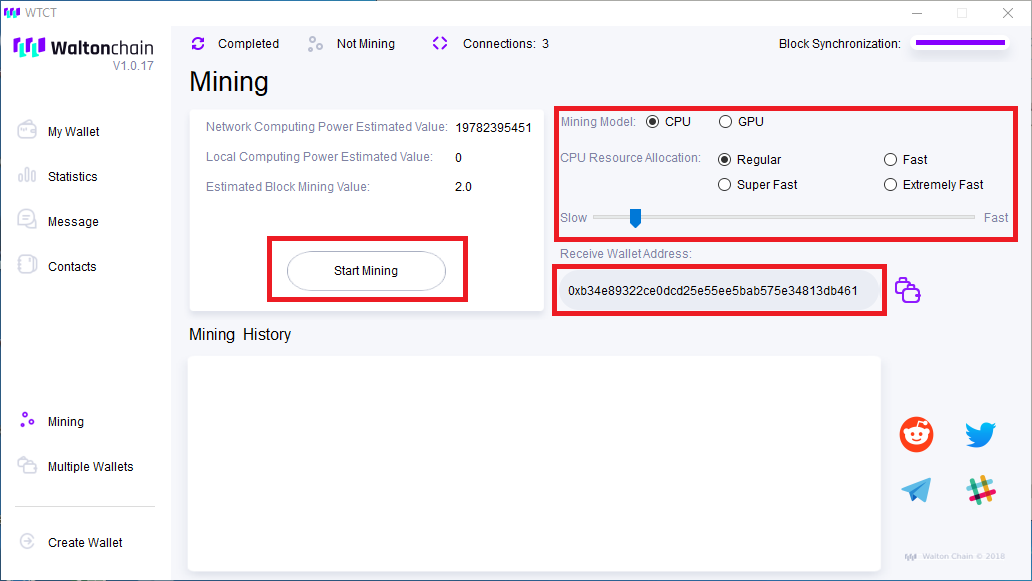 If this guide was useful please feel free to donate a coffee worth of coin my way: Ethereum: 0xb689FC318554f712EEb5D06936F2372337Fcb66D Bitcoin: 16r3bd4VQNfurNjtUshnVek4E6gNBScPxJ Verge: DCydgAdJ22K3qu1VA3evhCZpoCVEZR4Xwr Waltonchain: 0x97207b07e3c340338d2dd0fa97a125b4c9b02c79 |
| json metadata | {"tags":["waltonchain","wtc","mining","cpu","gui"],"image":["https://steemitimages.com/DQmaKFeHVFLHMcMjKuRFPecE5ZbewRXPh9e5CE3kv2w93sL/Walton%20CPU%20GUI%20Details.png"],"app":"steemit/0.1","format":"markdown"} |
| parent author | |
| parent permlink | waltonchain |
| permlink | mining-waltonchain-mainnet-with-cpu-via-gui |
| title | Mining Waltonchain Mainnet with CPU via GUI |
| Transaction Info | Block #21241140/Trx 6835c8a300e3ccf6fa3072940e00be7ded833b6c |
View Raw JSON Data
{
"block": 21241140,
"op": [
"comment",
{
"author": "slackerjack",
"body": "Finally, the Waltonchain Mainnet has been released and its time to get a piece of the action. Unfortunately, the documentation around this release has been scarce, to say the least, so I have created this guide to assist.\n\n<b>As of the 3rd of April:</b> <i>CPU mining is available, GPU mining is limited to Nvidia, only allows 1 GPU and does not report hashrate although some have said mining with CPU is actually vastly more efficient than even a 1080 Ti.</i>\n\nThis guide is one of multiple:\n\nInstalling Walton Wallet and Generating your Wallet Address (Required for all other articles)\nMining with CPU via GUI\nMining with GPU via GPU\nMining with CPU via CLI using Powershell\nMining with GPU via CLI using Powershell\n\n<h2>Mining with CPU via GUI</h2>\n\nOpen up the Walton Wallet. There should be a shortcut on your desktop. If there isn't navigate to \"C:\\Program Files\\WTC\\WTC.exe\"\n\nOnce open navigate to Mining on the left-hand side.\n\nFrom here you will need to enter your wallet address which you would have generated in the guide: Installing Walton Wallet and Generating your Wallet Address. \n\nThen simply click the intensity you would like and start click on start mining.\n\n <b>(Please keep an eye on your CPU thermal output. If it is above 80C for a prolonged amount of time it may damage the CPU. I take no responsibility for damaged CPUs from simply mining. You mine on your OWN hardware at your OWN risk)</b>\n\n\n\nIf this guide was useful please feel free to donate a coffee worth of coin my way:\n\nEthereum:\n 0xb689FC318554f712EEb5D06936F2372337Fcb66D\n\nBitcoin:\n16r3bd4VQNfurNjtUshnVek4E6gNBScPxJ\n\nVerge:\nDCydgAdJ22K3qu1VA3evhCZpoCVEZR4Xwr\n\nWaltonchain:\n 0x97207b07e3c340338d2dd0fa97a125b4c9b02c79",
"json_metadata": "{\"tags\":[\"waltonchain\",\"wtc\",\"mining\",\"cpu\",\"gui\"],\"image\":[\"https://steemitimages.com/DQmaKFeHVFLHMcMjKuRFPecE5ZbewRXPh9e5CE3kv2w93sL/Walton%20CPU%20GUI%20Details.png\"],\"app\":\"steemit/0.1\",\"format\":\"markdown\"}",
"parent_author": "",
"parent_permlink": "waltonchain",
"permlink": "mining-waltonchain-mainnet-with-cpu-via-gui",
"title": "Mining Waltonchain Mainnet with CPU via GUI"
}
],
"op_in_trx": 0,
"timestamp": "2018-04-03T10:58:48",
"trx_id": "6835c8a300e3ccf6fa3072940e00be7ded833b6c",
"trx_in_block": 15,
"virtual_op": 0
}capariupvoted (100.00%) @slackerjack / how-to-create-a-waltoncoin-wallet-address-for-mainnet-mining2018/04/03 10:41:30
capariupvoted (100.00%) @slackerjack / how-to-create-a-waltoncoin-wallet-address-for-mainnet-mining
2018/04/03 10:41:30
| author | slackerjack |
| permlink | how-to-create-a-waltoncoin-wallet-address-for-mainnet-mining |
| voter | capari |
| weight | 10000 (100.00%) |
| Transaction Info | Block #21240794/Trx ef697a81951f4c80f90f94604b1e27ca4ac9e4c3 |
View Raw JSON Data
{
  "block": 21240794,
  "op": [
    "vote",
    {
      "author": "slackerjack",
      "permlink": "how-to-create-a-waltoncoin-wallet-address-for-mainnet-mining",
      "voter": "capari",
      "weight": 10000
    }
  ],
  "op_in_trx": 0,
  "timestamp": "2018-04-03T10:41:30",
  "trx_id": "ef697a81951f4c80f90f94604b1e27ca4ac9e4c3",
  "trx_in_block": 26,
  "virtual_op": 0
}slackerjackpublished a new post: how-to-create-a-waltoncoin-wallet-address-for-mainnet-mining2018/04/03 10:40:57
slackerjackpublished a new post: how-to-create-a-waltoncoin-wallet-address-for-mainnet-mining
2018/04/03 10:40:57
| author | slackerjack |
| body | Finally, the Waltonchain Mainnet has been released and its time to get a piece of the action. Unfortunately, the documentation around this release has been scarce, to say the least, so I have created this guide to assist. <b>As of the 3rd of April: </b> <i> CPU mining is available, GPU mining is limited to Nvidia, only allows 1 GPU and does not report hashrate although some have said mining with CPU is actually vastly more efficient than even a 1080 Ti.</i> This guide is one of multiple: Installing Walton Wallet and Generating your Wallet Address (Required for all other articles) Mining with CPU via GUI Mining with GPU via GPU Mining with CPU via CLI using Powershell Mining with GPU via CLI using Powershell <h2>Installing Walton Wallet and Generating your Wallet Address</h2> <i>Before you start mining you going to need to generate a wallet address. Keep in mind Walton was an Ethereum ERC20 token and has migrated away from Ethereum ERC20 to its own Coin. This means that the addresses are completely different and CAN NOT be transferred to each other. DO NOT SEND YOUR ERC20 WTC coins to your new wallet address. YOU WILL LOSE THEM IF YOU DO. Waltonchain will organise an exchange where they will exchange your current tokens for ones in the mainnet.</i> Download Walton Wallet from their Github website: https://github.com/WaltonChain/WaltonWallet_Win_x64/blob/master/WTCSetup1.17.exe (copy and past this link) Click on Download: 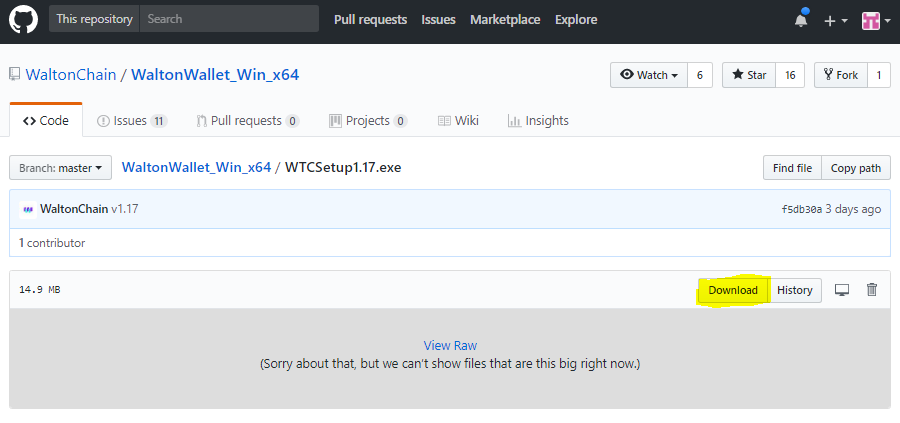 Downloading the file may trigger your anti-virus. Almost all mining software flags up with Anti-Virus as the program is designed to hook into the CPU/GPU to run mining software which is similar to most viruses. You can safely whitelist it ONLY if it came from GitHub. Do not download the software from any other source. It is well known for hackers to rehost mining software and add their own malicious code in order to cash in on the fact the user will whitelist the program as its mining software. Once downloaded run the installer and use the defaults for everything this should launch the application. Make sure you click "Allow Access" for all network access requests. Once the application has launched click on "Create New Wallet" 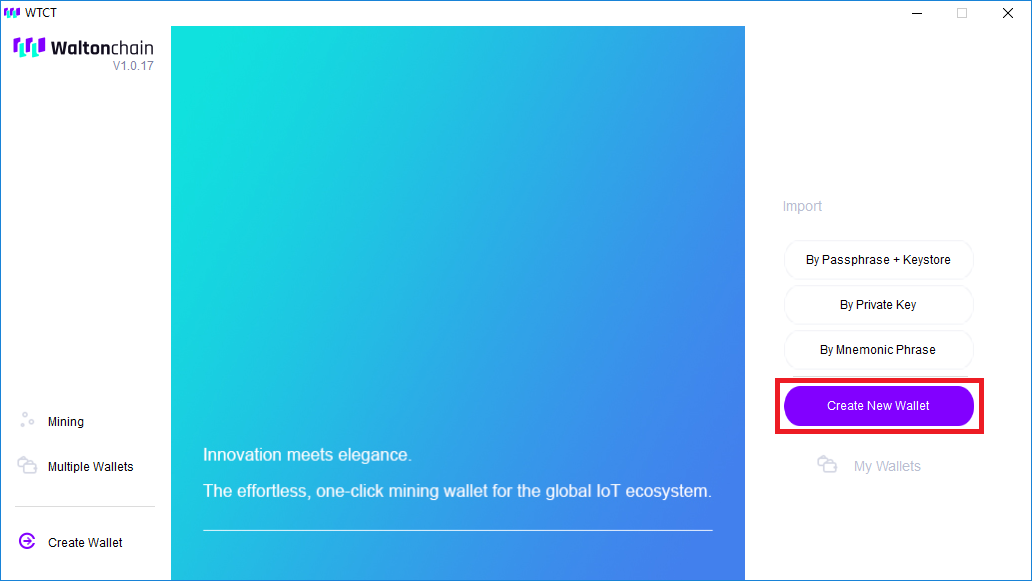 Create your passphrase (Used to unlock your wallet) Save the data in the next screen somewhere safe. DO NOT SHOW ANYONE YOUR: Private Key, Encrypted Private Key or Mnemonic Phrase. I HAVE EDITED THE IMAGE BELOW. 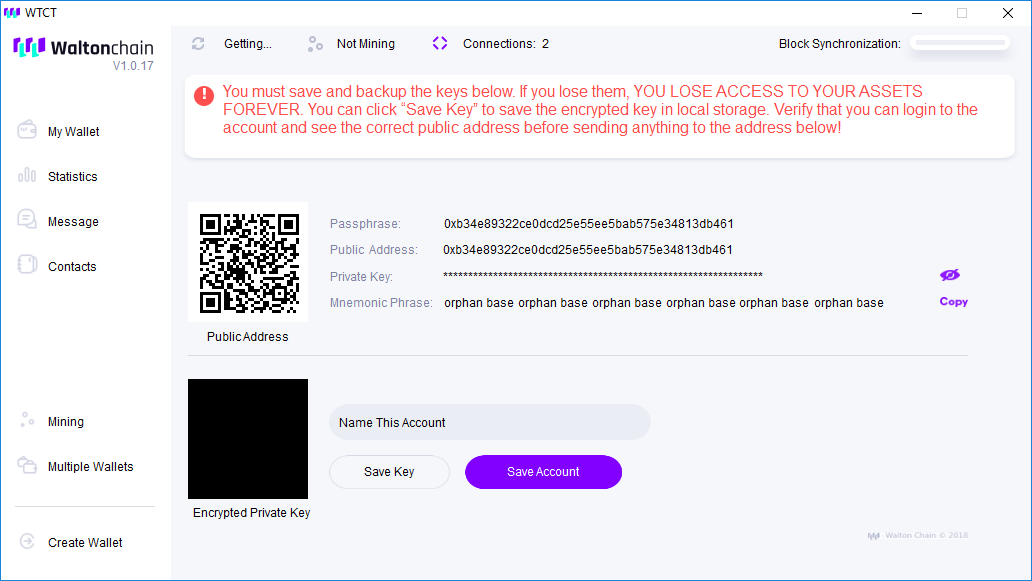 Make a copy of your Public Address. You will need it to set up the miners below. Now close your Walton wallet. If you need to check your balance you will need to launch this application or load the wallet up on another PC. If this guide was useful please feel free to donate a coffee worth of coin my way: Ethereum: 0xb689FC318554f712EEb5D06936F2372337Fcb66D Bitcoin: 16r3bd4VQNfurNjtUshnVek4E6gNBScPxJ Verge: DCydgAdJ22K3qu1VA3evhCZpoCVEZR4Xwr Waltonchain: 0x97207b07e3c340338d2dd0fa97a125b4c9b02c79 |
| json metadata | {"tags":["waltonchain","wtc","mining","howto","publickey"],"image":["https://steemitimages.com/DQmaBj4XbX9V4M1KSCupefLQo7BsGLUt4nUZ1rR4iKS3rBz/Download%20Wallet.PNG","https://steemitimages.com/DQmWTMK3erja1TN8SRY5mgD2ZYogLJVUt6DVaH59ppkMdYK/Create%20New%20Wallet.png","https://steemitimages.com/DQmU5DZmKPiYckBp518k1fqsQt6h7RPC1M2JPEwAMs664Yn/Walton%20Wallet%20Details.png"],"app":"steemit/0.1","format":"markdown"} |
| parent author | |
| parent permlink | waltonchain |
| permlink | how-to-create-a-waltoncoin-wallet-address-for-mainnet-mining |
| title | How to Create a Waltoncoin Wallet Address for Mainnet Mining |
| Transaction Info | Block #21240783/Trx a5ac030341634138595c76301b91adf8e1e21352 |
View Raw JSON Data
{
"block": 21240783,
"op": [
"comment",
{
"author": "slackerjack",
"body": "Finally, the Waltonchain Mainnet has been released and its time to get a piece of the action. Unfortunately, the documentation around this release has been scarce, to say the least, so I have created this guide to assist. \n\n<b>As of the 3rd of April: </b> <i> CPU mining is available, GPU mining is limited to Nvidia, only allows 1 GPU and does not report hashrate although some have said mining with CPU is actually vastly more efficient than even a 1080 Ti.</i>\n\nThis guide is one of multiple:\n\nInstalling Walton Wallet and Generating your Wallet Address (Required for all other articles)\nMining with CPU via GUI\nMining with GPU via GPU\nMining with CPU via CLI using Powershell\nMining with GPU via CLI using Powershell\n\n<h2>Installing Walton Wallet and Generating your Wallet Address</h2>\n\n<i>Before you start mining you going to need to generate a wallet address. Keep in mind Walton was an Ethereum ERC20 token and has migrated away from Ethereum ERC20 to its own Coin. This means that the addresses are completely different and CAN NOT be transferred to each other. DO NOT SEND YOUR ERC20 WTC coins to your new wallet address. YOU WILL LOSE THEM IF YOU DO. Waltonchain will organise an exchange where they will exchange your current tokens for ones in the mainnet.</i>\n\n\nDownload Walton Wallet from their Github website: https://github.com/WaltonChain/WaltonWallet_Win_x64/blob/master/WTCSetup1.17.exe\n(copy and past this link)\n\nClick on Download:\n\n\n\nDownloading the file may trigger your anti-virus. Almost all mining software flags up with Anti-Virus as the program is designed to hook into the CPU/GPU to run mining software which is similar to most viruses. You can safely whitelist it ONLY if it came from GitHub. Do not download the software from any other source. It is well known for hackers to rehost mining software and add their own malicious code in order to cash in on the fact the user will whitelist the program as its mining software. \n\nOnce downloaded run the installer and use the defaults for everything this should launch the application. Make sure you click \"Allow Access\" for all network access requests. \n\nOnce the application has launched click on \"Create New Wallet\"\n\n\n\nCreate your passphrase (Used to unlock your wallet)\n\nSave the data in the next screen somewhere safe. DO NOT SHOW ANYONE YOUR: Private Key, Encrypted Private Key or Mnemonic Phrase. I HAVE EDITED THE IMAGE BELOW. \n\n\n\nMake a copy of your Public Address. You will need it to set up the miners below. Now close your Walton wallet. If you need to check your balance you will need to launch this application or load the wallet up on another PC. \n\nIf this guide was useful please feel free to donate a coffee worth of coin my way:\n\nEthereum:\n0xb689FC318554f712EEb5D06936F2372337Fcb66D\n\nBitcoin: \n16r3bd4VQNfurNjtUshnVek4E6gNBScPxJ\n\nVerge:\nDCydgAdJ22K3qu1VA3evhCZpoCVEZR4Xwr\n\nWaltonchain:\n0x97207b07e3c340338d2dd0fa97a125b4c9b02c79",
"json_metadata": "{\"tags\":[\"waltonchain\",\"wtc\",\"mining\",\"howto\",\"publickey\"],\"image\":[\"https://steemitimages.com/DQmaBj4XbX9V4M1KSCupefLQo7BsGLUt4nUZ1rR4iKS3rBz/Download%20Wallet.PNG\",\"https://steemitimages.com/DQmWTMK3erja1TN8SRY5mgD2ZYogLJVUt6DVaH59ppkMdYK/Create%20New%20Wallet.png\",\"https://steemitimages.com/DQmU5DZmKPiYckBp518k1fqsQt6h7RPC1M2JPEwAMs664Yn/Walton%20Wallet%20Details.png\"],\"app\":\"steemit/0.1\",\"format\":\"markdown\"}",
"parent_author": "",
"parent_permlink": "waltonchain",
"permlink": "how-to-create-a-waltoncoin-wallet-address-for-mainnet-mining",
"title": "How to Create a Waltoncoin Wallet Address for Mainnet Mining"
}
],
"op_in_trx": 0,
"timestamp": "2018-04-03T10:40:57",
"trx_id": "a5ac030341634138595c76301b91adf8e1e21352",
"trx_in_block": 26,
"virtual_op": 0
}slackerjackupdated their account properties2018/03/08 11:48:30
slackerjackupdated their account properties
2018/03/08 11:48:30
| account | slackerjack |
| json metadata | {"profile":{"name":"Jack Henry","location":"London United Kingdom"}} |
| memo key | STM5zcKZqGXvyQzBhLPmV4pexaXg4dLNXSKZFTjsY8nJQpLzHawLj |
| Transaction Info | Block #20494596/Trx 9465aefe1db456ba83b7bf8e9e3c4ce9087526f0 |
View Raw JSON Data
{
  "block": 20494596,
  "op": [
    "account_update",
    {
      "account": "slackerjack",
      "json_metadata": "{\"profile\":{\"name\":\"Jack Henry\",\"location\":\"London United Kingdom\"}}",
      "memo_key": "STM5zcKZqGXvyQzBhLPmV4pexaXg4dLNXSKZFTjsY8nJQpLzHawLj"
    }
  ],
  "op_in_trx": 0,
  "timestamp": "2018-03-08T11:48:30",
  "trx_id": "9465aefe1db456ba83b7bf8e9e3c4ce9087526f0",
  "trx_in_block": 18,
  "virtual_op": 0
}2018/03/08 11:47:39
2018/03/08 11:47:39
| author | slackerjack |
| body | Reading your article you've inspired me to simply be me. To forge an identity regardless of the initial reader base, writing about something that inspires me. If people find an interest in it then yay. |
| json metadata | {"tags":["steemit"],"app":"steemit/0.1"} |
| parent author | yallapapi |
| parent permlink | why-steemit-is-a-giant-circle-jerk-and-how-to-make-it-work-in-your-favor |
| permlink | re-yallapapi-why-steemit-is-a-giant-circle-jerk-and-how-to-make-it-work-in-your-favor-20180308t114739853z |
| title | |
| Transaction Info | Block #20494579/Trx 44f1c7ef4293d60e2938330c8b909d700ff92eaf |
View Raw JSON Data
{
  "block": 20494579,
  "op": [
    "comment",
    {
      "author": "slackerjack",
      "body": "Reading your article you've inspired me to simply be me. To forge an identity regardless of the initial reader base, writing about something that inspires me. If people find an interest in it then yay.",
      "json_metadata": "{\"tags\":[\"steemit\"],\"app\":\"steemit/0.1\"}",
      "parent_author": "yallapapi",
      "parent_permlink": "why-steemit-is-a-giant-circle-jerk-and-how-to-make-it-work-in-your-favor",
      "permlink": "re-yallapapi-why-steemit-is-a-giant-circle-jerk-and-how-to-make-it-work-in-your-favor-20180308t114739853z",
      "title": ""
    }
  ],
  "op_in_trx": 0,
  "timestamp": "2018-03-08T11:47:39",
  "trx_id": "44f1c7ef4293d60e2938330c8b909d700ff92eaf",
  "trx_in_block": 59,
  "virtual_op": 0
}steemdelegated 18.718 SP to @slackerjack2018/03/02 11:46:06
steemdelegated 18.718 SP to @slackerjack
2018/03/02 11:46:06
| delegatee | slackerjack |
| delegator | steem |
| vesting shares | 30438.942053 VESTS |
| Transaction Info | Block #20321917/Trx 7e15cfb3a1acda9483f40973ef1c050ea3af8837 |
View Raw JSON Data
{
  "block": 20321917,
  "op": [
    "delegate_vesting_shares",
    {
      "delegatee": "slackerjack",
      "delegator": "steem",
      "vesting_shares": "30438.942053 VESTS"
    }
  ],
  "op_in_trx": 0,
  "timestamp": "2018-03-02T11:46:06",
  "trx_id": "7e15cfb3a1acda9483f40973ef1c050ea3af8837",
  "trx_in_block": 38,
  "virtual_op": 0
}steemcreated a new account: @slackerjack2018/03/02 10:55:51
steemcreated a new account: @slackerjack
2018/03/02 10:55:51
| active | {"account_auths":[],"key_auths":[["STM5yzEsMLRMB5vBAe5XkeSC1q4nErUgpsjA3NxhvnYpXoMx5JEuS",1]],"weight_threshold":1} |
| creator | steem |
| delegation | 30690.000000 VESTS |
| extensions | [] |
| fee | 0.100 STEEM |
| json metadata | {} |
| memo key | STM5zcKZqGXvyQzBhLPmV4pexaXg4dLNXSKZFTjsY8nJQpLzHawLj |
| new account name | slackerjack |
| owner | {"account_auths":[],"key_auths":[["STM613iUAAUZUDyvDzCpeTHBxmShnxzqF1VHHUa7jsPc9Xg2LgPB8",1]],"weight_threshold":1} |
| posting | {"account_auths":[],"key_auths":[["STM6ETcXkWKMbdCUiebdHB1c4zMgBoU3MQzYuAf12AnStwpJ7fTze",1]],"weight_threshold":1} |
| Transaction Info | Block #20320913/Trx 715b0c07f9640b6dca5ad67c31f1e7bb44e9d187 |
View Raw JSON Data
{
  "block": 20320913,
  "op": [
    "account_create_with_delegation",
    {
      "active": {
        "account_auths": [],
        "key_auths": [
          [
            "STM5yzEsMLRMB5vBAe5XkeSC1q4nErUgpsjA3NxhvnYpXoMx5JEuS",
            1
          ]
        ],
        "weight_threshold": 1
      },
      "creator": "steem",
      "delegation": "30690.000000 VESTS",
      "extensions": [],
      "fee": "0.100 STEEM",
      "json_metadata": "{}",
      "memo_key": "STM5zcKZqGXvyQzBhLPmV4pexaXg4dLNXSKZFTjsY8nJQpLzHawLj",
      "new_account_name": "slackerjack",
      "owner": {
        "account_auths": [],
        "key_auths": [
          [
            "STM613iUAAUZUDyvDzCpeTHBxmShnxzqF1VHHUa7jsPc9Xg2LgPB8",
            1
          ]
        ],
        "weight_threshold": 1
      },
      "posting": {
        "account_auths": [],
        "key_auths": [
          [
            "STM6ETcXkWKMbdCUiebdHB1c4zMgBoU3MQzYuAf12AnStwpJ7fTze",
            1
          ]
        ],
        "weight_threshold": 1
      }
    }
  ],
  "op_in_trx": 0,
  "timestamp": "2018-03-02T10:55:51",
  "trx_id": "715b0c07f9640b6dca5ad67c31f1e7bb44e9d187",
  "trx_in_block": 39,
  "virtual_op": 0
}Manabar
Voting Power100.00%
Downvote Power100.00%
Resource Credits100.00%
Reputation Progress0.00%
{
  "voting_manabar": {
    "current_mana": "8143659806",
    "last_update_time": 1779086256
  },
  "downvote_manabar": {
    "current_mana": 2035914951,
    "last_update_time": 1779086256
  },
  "rc_account": {
    "account": "slackerjack",
    "max_rc": "10164408779",
    "max_rc_creation_adjustment": {
      "amount": "2020748973",
      "nai": "@@000000037",
      "precision": 6
    },
    "rc_manabar": {
      "current_mana": "10164408779",
      "last_update_time": 1779086256
    }
  }
}
Account Metadata
| POSTING JSON METADATA | |
| profile | {"name":"Jack Henry","location":"London United Kingdom","profile_image":"https://scontent-cdt1-1.xx.fbcdn.net/v/t1.0-9/21617904_10156502198254338_578442361456677680_n.jpg?_nc_cat=0&oh=ece0bff2ab869bb874c190009705ac02&oe=5B6B2B12","cover_image":"https://scontent-cdt1-1.xx.fbcdn.net/v/t1.0-9/487176_10151240352154338_2134611149_n.jpg?_nc_cat=0&oh=5d575cfe94f4bba72b8db073b7a904ad&oe=5B750A3F"} |
| JSON METADATA | |
| profile | {"name":"Jack Henry","location":"London United Kingdom","profile_image":"https://scontent-cdt1-1.xx.fbcdn.net/v/t1.0-9/21617904_10156502198254338_578442361456677680_n.jpg?_nc_cat=0&oh=ece0bff2ab869bb874c190009705ac02&oe=5B6B2B12","cover_image":"https://scontent-cdt1-1.xx.fbcdn.net/v/t1.0-9/487176_10151240352154338_2134611149_n.jpg?_nc_cat=0&oh=5d575cfe94f4bba72b8db073b7a904ad&oe=5B750A3F"} |
{
  "posting_json_metadata": {
    "profile": {
      "name": "Jack Henry",
      "location": "London United Kingdom",
      "profile_image": "https://scontent-cdt1-1.xx.fbcdn.net/v/t1.0-9/21617904_10156502198254338_578442361456677680_n.jpg?_nc_cat=0&oh=ece0bff2ab869bb874c190009705ac02&oe=5B6B2B12",
      "cover_image": "https://scontent-cdt1-1.xx.fbcdn.net/v/t1.0-9/487176_10151240352154338_2134611149_n.jpg?_nc_cat=0&oh=5d575cfe94f4bba72b8db073b7a904ad&oe=5B750A3F"
    }
  },
  "json_metadata": {
    "profile": {
      "name": "Jack Henry",
      "location": "London United Kingdom",
      "profile_image": "https://scontent-cdt1-1.xx.fbcdn.net/v/t1.0-9/21617904_10156502198254338_578442361456677680_n.jpg?_nc_cat=0&oh=ece0bff2ab869bb874c190009705ac02&oe=5B6B2B12",
      "cover_image": "https://scontent-cdt1-1.xx.fbcdn.net/v/t1.0-9/487176_10151240352154338_2134611149_n.jpg?_nc_cat=0&oh=5d575cfe94f4bba72b8db073b7a904ad&oe=5B750A3F"
    }
  }
}
Auth Keys
Owner
Single Signature
Public Keys
STM613iUAAUZUDyvDzCpeTHBxmShnxzqF1VHHUa7jsPc9Xg2LgPB81/1
Active
Single Signature
Public Keys
STM5yzEsMLRMB5vBAe5XkeSC1q4nErUgpsjA3NxhvnYpXoMx5JEuS1/1
Posting
Single Signature
Public Keys
STM6ETcXkWKMbdCUiebdHB1c4zMgBoU3MQzYuAf12AnStwpJ7fTze1/1
Memo
STM5zcKZqGXvyQzBhLPmV4pexaXg4dLNXSKZFTjsY8nJQpLzHawLj
{
  "owner": {
    "account_auths": [],
    "key_auths": [
      [
        "STM613iUAAUZUDyvDzCpeTHBxmShnxzqF1VHHUa7jsPc9Xg2LgPB8",
        1
      ]
    ],
    "weight_threshold": 1
  },
  "active": {
    "account_auths": [],
    "key_auths": [
      [
        "STM5yzEsMLRMB5vBAe5XkeSC1q4nErUgpsjA3NxhvnYpXoMx5JEuS",
        1
      ]
    ],
    "weight_threshold": 1
  },
  "posting": {
    "account_auths": [],
    "key_auths": [
      [
        "STM6ETcXkWKMbdCUiebdHB1c4zMgBoU3MQzYuAf12AnStwpJ7fTze",
        1
      ]
    ],
    "weight_threshold": 1
  },
  "memo": "STM5zcKZqGXvyQzBhLPmV4pexaXg4dLNXSKZFTjsY8nJQpLzHawLj"
}
Witness Votes
0 / 30
No active witness votes.
[]